AWS Certified Developer – Associate Exam Learning Path

⚠️ OUTDATED EXAM VERSION

This post covers the original AWS Certified Developer – Associate exam (2017), which has been retired.

The current exam version is DVA-C02, released February 2023 and revised December 2024 with new skills including Amazon Q Developer, EventBridge patterns, and resilient application design.

For the current exam:

This page is maintained for historical reference only.

AWS Certified Developer – Associate Exam Learning Path (Original 2017 – RETIRED)

NOTE – This exam version has been retired. The exam has gone through two major revisions since this guide was published:

Current DVA-C02 Exam Overview

The current AWS Certified Developer – Associate (DVA-C02) exam validates proficiency in developing, testing, deploying, and debugging AWS cloud-based applications. Key changes from the original exam include:

DVA-C02 Exam Domains (Current)

  • Domain 1: Development with AWS Services (32%) – Includes Amazon Q Developer, event-driven patterns, resilient application design
  • Domain 2: Security (26%) – IAM, Cognito, KMS, Secrets Manager, WAF, fine-grained access control
  • Domain 3: Deployment (24%) – CI/CD pipelines, deployment strategies (blue/green, canary, rolling), IaC
  • Domain 4: Troubleshooting and Optimization (18%) – X-Ray, CloudWatch, structured logging, caching, performance optimization

Key Services Added Since Original Exam

  • Amazon Q Developer – AI-powered development assistant (added December 2024)
  • Amazon EventBridge – Event-driven architecture patterns
  • AWS Step Functions – Serverless workflow orchestration
  • AWS AppSync – Managed GraphQL service
  • Amazon Cognito – User authentication and authorization
  • AWS Secrets Manager – Secrets management
  • AWS AppConfig – Application configuration management
  • AWS CDK – Infrastructure as code using programming languages
  • Amazon ECS/EKS – Container orchestration
  • AWS CodePipeline/CodeBuild/CodeDeploy – CI/CD services

Services Removed from Scope

  • AWS Copilot – Removed from DVA-C02 v2.1 (December 2024)
  • Amazon CodeGuru – Removed from DVA-C02 v2.1 (December 2024)
  • Amazon SWF – No longer in scope (replaced by Step Functions)

Original 2017 Exam Content (Historical Reference)

The original AWS Developer – Associate exam validated the following:

  • Design, develop and deploy cloud based solutions using AWS
  • Understand the core AWS services, uses, and basic architecture best practices
  • Develop and maintain applications written for Amazon Simple Storage Services (S3), Amazon DynamoDB, Amazon Simple Queue Service (SQS), Amazon Simple Notification Service (SNS), Amazon Simple Workflow Service (SWF), AWS Elastic Beanstalk, and AWS CloudFormation

Domain 1.0: AWS Fundamentals

Domain 2.0: Designing and Developing

Domain 3.0: Deployment and Security

Domain 4.0: Debugging

  • General troubleshooting information and questions
  • Best Practices in debugging

AWS Developer – Associate Exam Resources

For current exam preparation resources, please refer to the DVA-C02 Exam Learning Path.

  • Read the AWS FAQs for important topics, as they cover key points and are good for quick review
  • Sign up for the AWS Free Tier to get hands-on experience
  • Use Cloud Skills Boost (formerly QwikLabs) for guided labs
AWS SysOps Administrator – Associate Exam Learning Path

⚠️ EXAM RETIRED — Historical Reference Only

The original AWS SysOps Administrator – Associate exam covered in this post was retired in September 2018 and replaced by SOA-C01, then SOA-C02, and most recently by the AWS Certified CloudOps Engineer – Associate (SOA-C03) which launched on September 30, 2025.

This content is maintained for historical reference only. Do NOT use this page for current exam preparation.

Current Exam Path:

Key Changes in SOA-C03: Containers (ECS, EKS, ECR) now in scope, AWS CDK and Terraform tested, multi-account/multi-Region emphasis, 5 domains instead of 6, exam labs removed.

AWS SysOps Administrator – Associate Exam Learning Path

NOTE — This page covers the original (pre-2018) AWS SysOps Administrator exam. This exam version has been retired and superseded multiple times:

The original AWS SysOps Administrator – Associate exam validated the following:

  • Deliver the stability and scalability needed by a business on AWS
  • Provision systems, services and deployment automation on AWS
  • Ensure data integrity and data security on AWS technology
  • Provide guidance on AWS best practices
  • Understand and monitor metrics on AWS

AWS Cloud Computing Whitepapers

AWS SysOps Administrator – Associate Exam Contents (Original Version)

Domain 1.0: Monitoring and Metrics

Domain 2.0: High Availability

Domain 3.0: Analysis

  • Optimize the environment to ensure maximum performance
  • Identify performance bottlenecks and implement remedies
  • Identify potential issues on a given application deployment

Domain 4.0: Deployment and Provisioning

  • Demonstrate the ability to build the environment to conform with the architected design
  • Demonstrate the ability to provision cloud resources and manage implementation automation

Domain 5.0: Data Management

Domain 6.0: Security

  • Implement and manage security policies
  • Ensure data integrity and access controls when using the AWS platform
  • Demonstrate understanding of the shared responsibility model
  • Demonstrate ability to prepare for security assessment use of AWS

Domain 7.0: Networking

  • Demonstrate ability to implement networking features of AWS
    • includes topics VPC
  • Demonstrate ability to implement connectivity features of AWS

Current Exam: AWS Certified CloudOps Engineer – Associate (SOA-C03)

As of September 30, 2025, the SysOps Administrator certification has been renamed and updated to AWS Certified CloudOps Engineer – Associate (SOA-C03). This is not just a name change — the exam scope has expanded significantly.

SOA-C03 Exam Overview

  • Exam Code: SOA-C03
  • Duration: 130 minutes
  • Questions: 65 (multiple-choice and multiple-response)
  • Passing Score: 720/1000
  • Cost: $150 USD
  • Exam Labs: None (removed since March 2023, not returned)
  • Validity: 3 years

SOA-C03 Domains

  • Domain 1: Monitoring, Logging, Analysis, Remediation & Performance Optimization (22%)
  • Domain 2: Reliability and Business Continuity (20%)
  • Domain 3: Deployment, Provisioning, and Automation (18%)
  • Domain 4: Security and Compliance (16%)
  • Domain 5: Networking and Content Delivery (14%)

Key New Topics in SOA-C03

  • Containers: Amazon ECS, EKS, ECR, and Fargate are now in scope
  • Infrastructure as Code: AWS CDK and Terraform explicitly tested
  • Multi-Account: AWS Organizations, Control Tower, SCPs, IAM Identity Center heavily emphasized
  • Modern Observability: Amazon Managed Grafana, Managed Service for Prometheus, CloudWatch Container Insights
  • Database Services: Aurora Serverless v2, RDS Proxy, DynamoDB Accelerator (DAX)
  • Disaster Recovery: AWS Elastic Disaster Recovery (DRS), CloudFormation StackSets
  • Security: AWS Security Hub, Config Organization Rules, KMS multi-Region keys

AWS Certified CloudOps Engineer – Associate Resources

Related Posts

AWS Certified Solution Architect – Associate Exam Learning Path

AWS Certified Solutions Architect – Associate (SAA-C03) Exam Learning Path

📋 Exam Quick Facts (2026)

  • Current Version: SAA-C03 (launched August 30, 2022)
  • Upcoming Version: SAA-C04 (rolling out Q2-Q3 2026 with increased AI/ML focus)
  • Duration: 130 minutes
  • Questions: 65 (multiple choice or multiple response)
  • Cost: $150 USD
  • Passing Score: 720 out of 1000
  • Validity: 3 years
  • Testing: Pearson VUE (test center or online proctored)

The AWS Certified Solutions Architect – Associate (SAA-C03) validates a candidate’s ability to design solutions based on the AWS Well-Architected Framework. It is one of the most popular and in-demand cloud certifications globally.

The exam validates the following abilities:

  • Design solutions that incorporate AWS services to meet current business requirements and future projected needs
  • Design architectures that are secure, resilient, high-performing, and cost-optimized
  • Review existing solutions and determine improvements
  • Provide implementation guidance based on best practices throughout the workload lifecycle

Refer to the AWS Certified Solutions Architect – Associate (SAA-C03) Exam Guide

SAA-C03 Exam Domains and Weights

Domain Weight
Domain 1: Design Secure Architectures 30%
Domain 2: Design Resilient Architectures 26%
Domain 3: Design High-Performing Architectures 24%
Domain 4: Design Cost-Optimized Architectures 20%

AWS Well-Architected Framework

The SAA-C03 exam is heavily based on the AWS Well-Architected Framework, which comprises six pillars:

  1. Operational Excellence – Run and monitor systems to deliver business value
  2. Security – Protect information, systems, and assets
  3. Reliability – Recover from failures and meet demand
  4. Performance Efficiency – Use resources efficiently
  5. Cost Optimization – Avoid unnecessary costs
  6. Sustainability – Minimize environmental impact (added in 2021)

AWS Cloud Computing Whitepapers

Domain 1: Design Secure Architectures (30%)

This is the highest-weighted domain. Topics include:

1.1 Secure Access to AWS Resources

1.2 Secure Workloads and Applications

1.3 Data Security Controls

Domain 2: Design Resilient Architectures (26%)

2.1 Scalable and Loosely Coupled Architectures

2.2 Highly Available and Fault-Tolerant Architectures

Domain 3: Design High-Performing Architectures (24%)

3.1 Compute

3.2 Storage

3.3 Database

  • Amazon RDS (Multi-AZ, Read Replicas, Aurora)
  • Amazon DynamoDB (On-demand, Provisioned, DAX, Global Tables)
  • Amazon ElastiCache (Redis, Memcached)
  • Amazon Redshift

3.4 Networking & Content Delivery

Domain 4: Design Cost-Optimized Architectures (20%)

  • EC2 Purchasing Options & Savings Plans
  • S3 Lifecycle Policies & Storage Class analysis
  • AWS Cost Explorer, Budgets, and Cost Anomaly Detection
  • Right-sizing recommendations
  • Serverless vs. provisioned cost trade-offs
  • Data transfer costs and optimization
  • Storage Options Whitepaper

Implementation & Deployment Services

Key services tested on the exam for infrastructure deployment:

Monitoring & Logging

Troubleshooting

SAA-C03 Exam Preparation Resources

Recommended Courses

🎓 Top-Rated Video Courses

Practice Exams

📝 Recommended Practice Tests

Hands-On Practice

  • AWS Free Tier
    • Updated (July 2025): New accounts now receive up to $200 in credits ($100 at sign-up + $100 more for completing activities) valid for 6 months on the Free Plan
    • Always Free tier services still available (Lambda, DynamoDB, etc.)
    • Existing accounts retain their original 12-month free tier benefits
  • Google Skills (formerly Qwiklabs / Google Cloud Skills Boost) – Offers some AWS-related labs, though primarily Google Cloud focused
  • AWS Skill Builder Labs – Official hands-on labs (subscription required for most)

Study Tips

  • Read the AWS FAQs for key services (EC2, S3, VPC, RDS, Lambda, IAM)
  • Understand architectural trade-offs, not just service features
  • Focus heavily on security (30% of exam) – IAM, encryption, VPC networking
  • Practice multi-service scenario questions – the exam tests decision-making
  • Recommended prep time: 8-12 weeks with hands-on practice
  • Use the AWS service names list – the exam uses short names for services

SAA-C04 Update (Rolling Out 2026)

🔄 Upcoming Exam Update

AWS is rolling out the SAA-C04 revision in Q2-Q3 2026 with the following changes:

  • Increased emphasis on resilient architecture design (30% of exam)
  • New focus on cost optimization for AI/ML workloads
  • Multi-region resilience architectures
  • Questions on Amazon Bedrock and AI governance frameworks

If you are preparing in mid-2026, check the AWS Certification Coming Soon page for exact transition dates.

Certification Path After SAA

After earning the Solutions Architect – Associate, consider:

  • AWS Certified Solutions Architect – Professional – Advanced architecture (also auto-recertifies your Associate)
  • AWS Certified Security – Specialty – Deep security focus
  • AWS Certified Data Engineer – Associate – Data and analytics focus
  • AWS Certified DevOps Engineer – Professional – CI/CD and automation

Note: Once you earn one AWS Certification, you receive a 50% discount on your next certification exam.

AWS Certification Exam Resources, Courses, Quizzes

AWS Certification Exam Courses, Resources, Quizzes

  • Clearing AWS certifications has been a long and rewarding journey. Whether you’re targeting your first foundational cert or pushing toward professional-level credentials, the right resources make all the difference.
  • The AWS certification landscape has evolved significantly — with new AI/ML certifications, updated exam codes, and modern training platforms replacing older ones.
  • Below are my personal recommendations for courses, practice tests, and resources that can help you prepare effectively.

NOTE: These are my personal recommendations based on experience and community feedback.

Current AWS Certifications (2026)

  • Foundational: Cloud Practitioner (CLF-C02), AI Practitioner (AIF-C01)
  • Associate: Solutions Architect (SAA-C03), Developer (DVA-C02), CloudOps Engineer (SOA-C03, formerly SysOps Administrator), Data Engineer (DEA-C01), Machine Learning Engineer (MLA-C01)
  • Professional: Solutions Architect Professional (SAP-C02), DevOps Engineer Professional (DOP-C02), Generative AI Developer Professional (AIP-C01)
  • Specialty: Advanced Networking (ANS-C01), Security (SCS-C02)

Recent Changes:

  • AWS Certified SysOps Administrator has been renamed to AWS Certified CloudOps Engineer – Associate (last day for old exam: Sept 29, 2025)
  • AWS Certified Machine Learning – Specialty was retired on March 31, 2026, replaced by ML Engineer Associate and Generative AI Developer Professional
  • AWS Certified AI Practitioner (launched 2024) — foundational AI/ML/GenAI credential
  • AWS Certified Generative AI Developer – Professional (launched 2025) — validates Bedrock, RAG, and responsible AI deployment skills

AWS Official Resources

  • Nothing can replace the fantastic AWS documentation that the team has put and maintained
  • AWS official resources include:
    • AWS Skill Builder — Official digital training platform with 600+ free courses, hands-on labs (Cloud Quest, Builder Labs, Jam Challenges), and official practice exams. Subscription ($29/month) unlocks enhanced exam prep and lab experiences.
    • AWS Documentation — Developer guides, User guides, and API references
    • AWS FAQs — Very important to get a quick summary for important questions targeted in the exams
    • AWS re:Invent Videos — Quick way to know details of services; available free on YouTube
    • AWS Whitepapers — Covers condensed knowledge of important topics and services
    • Braincert/PrepCatalyst – AWS Certification Practice Exams – Available for all AWS certification exams
    • AWS Certification Exam Prep — Official exam guides, sample questions, and recommended learning paths

Online Courses

Stephane Maarek (Udemy) — Highly Recommended

Adrian Cantrill (learn.cantrill.io) — Deep Dive

  • learn.cantrill.io offers the most in-depth and technically detailed AWS courses available
  • Courses go far beyond exam prep, teaching real-world architecture and implementation
  • Pricing: $40/course (Associate), $80/course (Professional), or $20/month membership for all courses
  • Covers: All Associate certifications, both Professional certs, Advanced Networking, and Security Specialty
  • Best for those who want deep understanding rather than just exam passing

Pluralsight Cloud+ (formerly A Cloud Guru)

⚠️ Platform Changes: A Cloud Guru was acquired by Pluralsight in 2021. Linux Academy was merged into A Cloud Guru earlier. As of November 2025, all A Cloud Guru content has been fully migrated to Pluralsight under the “Cloud+” brand. Standalone A Cloud Guru subscriptions no longer exist.

  • Pluralsight Cloud+ combines the best of A Cloud Guru and Linux Academy content
  • Includes hands-on labs, sandboxed AWS environments, and certification learning paths
  • Subscription-based model (part of Pluralsight subscription)
  • Good for those who want structured learning paths with lab environments

Practice Tests & Quizzes

Tutorials Dojo (Jon Bonso) — Highly Recommended

  • Tutorials Dojo is widely regarded as the best third-party practice exam provider
  • Available on their own portal and on Udemy
  • Covers all current AWS certifications including CloudOps Engineer and AI/ML certs
  • Each question includes detailed explanations with references to official documentation
  • Regularly updated for latest exam versions (SAA-C03, DVA-C02, SOA-C03, etc.)
  • Also offers cheat sheets and study guides for free on their blog

Whizlabs

  • Whizlabs offers practice tests and hands-on labs for all AWS certifications
  • Includes practice tests for newer certifications (AI Practitioner, ML Engineer, Generative AI Developer)
  • Offers both individual purchases and subscription access
  • Also provides video courses alongside practice exams
  • Good for those who want combined course + practice test bundles

AWS Official Practice Exams

  • Free Practice Question Sets — Available on AWS Skill Builder for each certification (20 questions)
  • Official Practice Exams — Full-length timed exams available with Skill Builder subscription ($29/month)
  • These are the closest to actual exam questions and are highly recommended before scheduling your exam

Study Strategy Recommendations

  • For Beginners: Start with AWS Cloud Practitioner → Pick an Associate cert aligned with your role
  • Recommended Study Path:
    1. Take a comprehensive video course (Stephane Maarek or Adrian Cantrill)
    2. Read relevant AWS FAQs and documentation
    3. Practice with hands-on labs (AWS Skill Builder free tier or Pluralsight)
    4. Take practice exams (Tutorials Dojo or Whizlabs) — aim for 80%+ consistently
    5. Review weak areas using AWS documentation and whitepapers
    6. Take the Official Practice Exam on AWS Skill Builder
  • Study Duration: Allow 4-8 weeks for Associate exams, 8-12 weeks for Professional exams
  • Key Tip: Always research answers independently — no third-party resource is 100% accurate

Free Resources

  • AWS Skill Builder (Free Tier) — 600+ free digital courses and free practice question sets
  • AWS Cloud Practitioner Essentials — Free official course for the foundational cert
  • AWS re:Invent sessions on YouTube — Hundreds of deep-dive sessions on individual services
  • Tutorials Dojo Cheat Sheets — Free condensed study notes for each service
  • jayendrapatil.com — This blog! Covers all AWS services with exam-focused summaries and practice questions

Feel free to share any other resources that you found very helpful and help back the community.

AWS Automated Backups

AWS Automated Backups

  • AWS provides automated backup capabilities across multiple services, either natively or through AWS Backup — a fully managed, centralized backup service.
  • Services with native automated backups include:
  • Amazon Data Lifecycle Manager helps automate EC2 EBS volume snapshots and AMI management
  • AWS Backup provides centralized, policy-based backup across 20+ AWS services including EC2, EBS, RDS, Aurora, DynamoDB, EFS, S3, FSx, EKS, Redshift Serverless, DocumentDB, Neptune, Timestream, and more.
  • AWS stores the backups and snapshots in S3

AWS Backup (Centralized Backup Service)

  • AWS Backup is a fully managed service that centralizes and automates data protection across AWS services and hybrid workloads.
  • Supports 20+ AWS services: EC2, EBS, RDS, Aurora, Aurora DSQL, DynamoDB, EFS, S3, FSx, Storage Gateway, DocumentDB, Neptune, Redshift (Provisioned and Serverless), Timestream, EKS, CloudFormation, SAP HANA, and VMware VMs.
  • Key Features:
    • Backup Plans — define schedules, retention rules, and lifecycle policies; supports frequencies as often as every hour.
    • Cross-Region and Cross-Account Copy — automatically replicate backups for disaster recovery.
    • Logically Air-Gapped Vaults (2024) — immutable, deletion-protected backup storage for ransomware recovery. Supports multi-party approval and direct restore.
    • Backup Audit Manager — audit and report on compliance of data protection policies.
    • Restore Testing — validate recoverability by scheduling automated restore tests.
    • GuardDuty Integration — automated malware scanning of recovery points for EC2, EBS, and S3 backups.
    • Cold Storage Tiering — transition backups to lower-cost cold storage (DynamoDB, EBS, EFS).
  • 2025 Updates:
    • Support for Amazon Redshift Serverless (April 2025)
    • Support for Amazon EKS clusters including persistent storage
    • Single-action cross-Region database snapshot copies to logically air-gapped vaults (Aurora, Neptune, DocumentDB)
    • Enhanced resource selection with tag-based exclusions in Organizations policies
    • Primary backup support directly in logically air-gapped vaults (reduces costs vs. copy-based approach)

RDS Backups

  • RDS supports automated backups as well as manual snapshots
  • Automated Backups
    • enable point-in-time recovery of the DB Instance
    • perform a full daily backup and capture transaction logs (as updates to your DB instance are made)
    • are performed during the defined preferred backup window and retained for a user-specified retention period (default 1 day, max 35 days)
    • When a point-in-time recovery is initiated, transaction logs are applied to the most appropriate daily backup to restore the DB instance to the specific requested time.
    • allows a point-in-time restore to any second during the retention period, up to the Latest Restorable Time (typically within the last 5 minutes)
    • are deleted when the DB instance is deleted
    • Cross-Region Automated Backup Replication — replicates snapshots and transaction logs to a destination AWS Region for disaster recovery. Supports point-in-time recovery in the secondary region.
  • Snapshots
    • are user-initiated and enable backing up the DB instance in a known state as frequently as needed, and can be restored to that specific state at any time.
    • can be created with the AWS Management Console or by using the CreateDBSnapshot API call.
    • are not deleted when the DB instance is deleted
    • can be copied across regions and shared with other AWS accounts
  • Automated backups and snapshots can result in a performance hit, if Multi-AZ is not enabled
  • AWS Backup can manage both RDS and Aurora backups centrally with cross-account and cross-Region copy capabilities.

DynamoDB Backups

  • DynamoDB Point-in-Time Recovery (PITR) provides continuous backups of table data.
  • When enabled, allows restore to any second within the configured recovery period.
  • Configurable recovery period (Jan 2025) — PITR period can now be set between 1–35 days per table (previously fixed at 35 days), allowing cost optimization for tables needing shorter retention.
  • PITR pricing is based on table size and local secondary indexes, not the recovery period duration.
  • DynamoDB also supports on-demand manual backups that are retained until explicitly deleted.
  • AWS Backup provides advanced DynamoDB features: cross-Region/cross-account copy, cold storage tiering, and tag-based cost management.

ElastiCache Automated Backups

  • ElastiCache supports automated backups (snapshots) for Valkey, Redis OSS, and Serverless Memcached caches.
  • Note: AWS recommends Valkey as the preferred engine — an open-source, vendor-neutral alternative to Redis OSS maintained by the Linux Foundation. Valkey 9.0 is available as of May 2026.
  • ElastiCache creates a daily backup of the cache during the configured backup window.
  • Snapshot operations may degrade performance, so backups should be scheduled during the least busy part of the day.
  • Backups are retained for the backup retention limit defined, with a maximum of 35 days.
  • ElastiCache also allows manual snapshots of the cache.
  • ElastiCache Serverless supports backups via RDB files compatible with Valkey 7.2+ and Redis OSS 5.0+.
  • Memcached (non-serverless) does NOT support backups.

Redshift Automated Backups

  • Amazon Redshift enables automated backups by default.
  • Redshift continuously backs up data to S3 and retains automated backups for 1 day (extendable to max 35 days).
  • Backups are incremental — only changed data since the last snapshot is backed up, minimizing storage usage.
  • Redshift also allows manual snapshots of the data warehouse.
  • Cross-Region Snapshot Replication — automated snapshots can be replicated to another AWS Region for disaster recovery.
  • Redshift Serverless — supports both automated recovery points and manual snapshots. Recovery points are created approximately every 30 minutes and retained for 24 hours.
  • AWS Backup Integration (April 2025) — AWS Backup now supports Redshift Serverless, enabling centralized backup management alongside provisioned clusters.
  • Incremental Snapshot Billing (June 2026) — new billing model for manual snapshots on Redshift Serverless and Redshift RG charges only for unique data blocks across active snapshots, reducing costs.
  • Default security enhancements (2025): newly created clusters and restored snapshots now have encryption enabled by default and public accessibility disabled.

EC2 EBS Backups

  • EBS volume snapshots can be automated using Amazon Data Lifecycle Manager (DLM)
  • DLM supports:
    • Scheduled snapshot creation with custom cron expressions or preset frequencies
    • Automated retention and deletion policies
    • Cross-Region and cross-account snapshot copy
    • Application-consistent snapshots — uses pre/post scripts via AWS Systems Manager documents for database-consistent backups (e.g., SAP HANA, SQL Server)
    • AMI lifecycle management (creation and deregistration)
  • EBS snapshots can also be created manually via the AWS Console, CLI, or APIs
  • EBS Snapshots are incremental and block-based — they consume space only for changed data after the initial snapshot
  • Data can be restored from snapshots by creating a new volume from the snapshot
  • EBS snapshots are region-specific and can be copied between AWS regions
  • EBS Snapshot Archive — move infrequently accessed snapshots to archive tier for up to 75% cost savings (minimum 90-day archive period)
  • Recycle Bin — protects against accidental deletion by retaining deleted snapshots, AMIs, and EBS volumes for a configured period. Supports tag-based exclusions (Nov 2024) and EBS volume recovery (Nov 2025).
  • Stored on S3 (managed by AWS, not visible in customer S3 buckets)
  • AWS Backup can also manage EBS snapshots centrally as an alternative to DLM.

AWS Certification Exam Practice Questions

  • Questions are collected from Internet and the answers are marked as per my knowledge and understanding (which might differ with yours).
  • AWS services are updated everyday and both the answers and questions might be outdated soon, so research accordingly.
  • AWS exam questions are not updated to keep up the pace with AWS updates, so even if the underlying feature has changed the question might not be updated
  • Open to further feedback, discussion and correction.
  1. Which two AWS services provide out-of-the-box user configurable automatic backup-as-a-service and backup rotation options? Choose 2 answers
    1. Amazon S3
    2. Amazon RDS
    3. Amazon EBS
    4. Amazon Redshift
  2. You have been asked to automate many routine systems administrator backup and recovery activities. Your current plan is to leverage AWS-managed solutions as much as possible and automate the rest with the AWS CLI and scripts. Which task would be best accomplished with a script?
    1. Creating daily EBS snapshots with a monthly rotation of snapshots
    2. Creating daily RDS snapshots with a monthly rotation of snapshots
    3. Automatically detect and stop unused or underutilized EC2 instances
    4. Automatically add Auto Scaled EC2 instances to an Amazon Elastic Load Balancer

    Note: This question is outdated. Amazon Data Lifecycle Manager and AWS Backup now automate EBS snapshot creation and rotation without custom scripts.

  3. A company wants to centrally manage backups across multiple AWS services including EC2, RDS, DynamoDB, and EFS. Which AWS service should they use?
    1. Amazon Data Lifecycle Manager
    2. AWS Storage Gateway
    3. AWS Backup
    4. Amazon S3 Lifecycle Policies
  4. Which feature of AWS Backup helps protect against ransomware by providing immutable, deletion-protected backup storage?
    1. Backup Vault Lock
    2. Logically Air-Gapped Vault
    3. Cross-Region Copy
    4. Cold Storage Tiering
  5. A company needs to protect EBS snapshots from accidental deletion while keeping costs optimized for infrequently accessed snapshots. Which combination of features should they use? (Choose 2)
    1. EBS Snapshot Archive
    2. S3 Glacier Deep Archive
    3. Recycle Bin
    4. EBS Fast Snapshot Restore
  6. A company wants to replicate their RDS automated backups to another AWS Region for disaster recovery purposes. Which feature should they enable?
    1. Read Replica in the target Region
    2. Cross-Region Automated Backup Replication
    3. AWS Backup with cross-Region copy rule
    4. Manual snapshot copy via Lambda

    Note: Both options B and C are valid approaches. Cross-Region Automated Backup Replication is the native RDS feature, while AWS Backup provides centralized management.

AWS Billing and Cost Management – Certification

AWS Billing and Cost Management

  • AWS Billing and Cost Management is the service that you use to pay your AWS bill, monitor your usage, and budget your costs.
  • It provides a comprehensive suite of tools for cost visualization, budgeting, anomaly detection, optimization recommendations, and financial governance across single or multiple AWS Organizations.

Analyzing Costs with Cost Explorer

  • AWS Cost Explorer allows you to visualize, understand, and manage your AWS costs and usage over time.
  • Cost Explorer provides filters by API operations, Availability Zones, AWS service, custom cost allocation tags, EC2 instance type, purchase options, region, usage type, usage type groups, or, if Consolidated Billing is used, by linked account.
  • Cost Explorer supports multiple cost metrics including unblended, blended, amortized, net unblended, and net amortized costs.
  • Cost Comparison (2025) – automatically detects significant cost changes between two months and surfaces the key factors driving these changes, enabling quick month-over-month analysis.
  • 18-Month Forecasting (2025) – extends the forecasting horizon from 12 to 18 months using improved ML models that analyze up to 36 months of historical data.
  • AI-Powered Cost Analysis (2025-2026) – integrates with Amazon Q Developer to deliver intelligent cost explanations. You can ask natural language questions directly in Cost Explorer, which automatically configures charts and reports to reflect the analysis.
  • Historical Data Retention (2026) – accounts in billing groups retain access to their historical billing data at original billable rates.

Cost Anomaly Detection

  • AWS Cost Anomaly Detection uses machine learning to continuously monitor your cost and usage to detect unusual spends.
  • You can create monitors for AWS services, linked accounts, cost allocation tags, or cost categories.
  • Monitors evaluate your spending patterns and alert you when anomalies are detected.
  • You can configure SNS topics or email notifications for alerts.
  • Multi-dimensional Root Cause Analysis (2024) – surfaces up to 10 root causes per anomaly across service, account, region, and usage type dimensions.
  • Accelerated Detection (2025) – improved algorithm uses rolling 24-hour windows, comparing current costs against equivalent time periods from previous days for faster identification.
  • AWS Managed Monitors (2025) – automatically monitor all linked accounts, cost allocation tags, or cost categories with a single managed monitor without manual configuration.
  • AI-Powered Cost Investigations (2026) – uses Amazon Q to analyze root causes by correlating cost data with CloudTrail events and resource activity automatically.

Budgets

  • AWS Budgets can be used to track AWS costs and usage and to set custom alerts when thresholds are exceeded.
  • Budgets use the cost visualization provided by Cost Explorer to show the status of the budgets and to provide forecasts of estimated costs.
  • Budgets can create notifications via SNS topics and email addresses when you go over your budgeted amounts or when estimated costs exceed budgets.
  • Supports budget types: Cost budgets, Usage budgets, Reservation budgets, and Savings Plans budgets.
  • Budgets can trigger automated actions (e.g., apply an IAM policy to restrict further provisioning) via Budget Actions.
  • Net Unblended and Net Amortized Cost Metrics (2025) – allows creating budgets that align precisely with actual spend including all applicable discounts.
  • Enhanced Filtering (2025) – provides more granular control over cost tracking, allowing you to exclude shared services or monitor specific spending areas.
  • AWS Budgets automatically monitors Free Tier usage to help track spending.

Cost Allocation Tags

  • Tags can be used to organize AWS resources, and cost allocation tags to track AWS costs on a detailed level.
  • Upon cost allocation tags activation, AWS uses the cost allocation tags to organize resource costs on the cost allocation report, making it easier to categorize and track costs.
  • AWS provides two types of cost allocation tags:
    • AWS-generated tags – AWS defines, creates, and applies these tags for you (e.g., aws:createdBy).
    • User-defined tags – you define, create, and apply these tags to resources.
  • Both types of tags must be activated separately before they can appear in Cost Explorer or on a cost allocation report.
  • Tags can take up to 24 hours to appear in the Billing and Cost Management console after activation.

Cost Categories

  • AWS Cost Categories enables you to group cost and usage information into meaningful categories based on your organizational needs (e.g., by team, project, environment).
  • You can define rules using dimensions such as account, service, tag, charge type, or even other cost categories (inherited value).
  • Split Charge Rules allow equitable allocation of shared costs (e.g., Enterprise Support, shared infrastructure) across Cost Category values using proportional, fixed, or even splits.
  • Cost Categories appear as a filter and grouping option in Cost Explorer, Budgets, and Cost and Usage Reports.
  • Supports hierarchical structures for complex organizational cost allocation.

Cost Optimization Hub

  • AWS Cost Optimization Hub (launched 2023) consolidates over 18 types of cost optimization recommendations across all accounts and Regions in your organization.
  • Recommendations include EC2 rightsizing, Graviton migration, idle resource detection, Aurora/RDS recommendations, and Reservation/Savings Plans opportunities.
  • Quantifies estimated savings incorporating your specific pricing, discounts, Reserved Instances, and Savings Plans.
  • Integrates with AWS Compute Optimizer for rightsizing and idle resource recommendations.
  • Cost Efficiency Metric (2025) – automatically generated measure of cloud spend efficiency to track optimization progress over time.
  • Savings Plans/Reservations Preferences (2025) – configure preferred term and payment options to see recommendations based on your preferred commitments.
  • Aurora Recommendations (2025) – expanded support for Amazon Aurora database optimization.
  • Free of charge (unless configuring extended 93-day lookback periods for EC2/RDS rightsizing).

Savings Plans

  • Savings Plans offer flexible pricing models providing up to 72% savings in exchange for a commitment to a consistent amount of usage ($/hour) over a 1 or 3-year term.
  • Four types of Savings Plans:
    • Compute Savings Plans – most flexible, up to 66% savings, applies to EC2, Fargate, and Lambda regardless of instance family, size, AZ, region, OS, or tenancy.
    • EC2 Instance Savings Plans – up to 72% savings, commitment to an instance family in a specific Region.
    • SageMaker Savings Plans – applies to SageMaker usage.
    • Database Savings Plans (2025) – up to 35% savings on RDS, Aurora, ElastiCache, and other database services with 1-year term, no upfront payment.
  • RISP Group Sharing (2025) – provides granular control over how commitments (Reserved Instances and Savings Plans) are shared across your organization.

Data Exports and Cost & Usage Reports

  • AWS Data Exports is the recommended way to receive detailed cost and usage data, replacing the legacy CUR creation method.
  • Supports multiple export formats:
    • CUR 2.0 – most granular cost and usage data with fixed schema, queryable nested structures, and column selection/filtering.
    • FOCUS 1.2 with AWS Columns – open-source FinOps Open Cost and Usage Specification for multi-cloud cost reporting standardization.
    • Cost and Usage Dashboard – summary view with pre-built Amazon QuickSight visuals.
  • Exports can be delivered to S3 and queried with Athena, Redshift, or QuickSight.
  • Data can be broken down by hour, day, or month, by product, resource, or custom tags.

AWS Pricing Calculator

  • Authenticated In-Console Pricing Calculator (GA 2025) – allows you to estimate costs while incorporating your specific discounts and commitments.
  • Key capabilities:
    • Estimate costs for specific workloads incorporating applicable discounts.
    • Model cost changes to existing workloads (e.g., instance type changes, region migrations).
    • Build cost projections for new workloads and apply results to budgets.
    • Simulate an entire bill computation including cost impact analysis for workload and purchase option changes.
  • Available to management and all member accounts from the Billing and Cost Management Console or via API/SDK.
  • Requires Cost Explorer enabled to import historical usage of existing workloads.

Billing Views

  • Custom Billing Views (2024) enable you to scope and securely share exact cost and usage data with stakeholders within or outside your organization.
  • Management accounts can create filtered views of cost data and share them with specific member accounts.
  • Multi-Source Custom Billing Views (2025) – combine multiple custom billing views from different organizations to create consolidated views, enabling centralized cost monitoring across your entire enterprise.
  • Shared views integrate with Cost Explorer and AWS Budgets for seamless analysis.

Billing Transfer

  • AWS Billing Transfer (2025) enables centralized invoice management and payment responsibilities across multiple AWS Organizations.
  • A single management account (billing owner) can manage billing—including invoice collection, payment processing, and cost analysis—for multiple organizations.
  • Maintains decentralized administrative controls while centralizing billing operations.
  • Useful for Managed Service Providers (MSPs), resellers, and enterprises with multiple AWS Organizations.
  • Works with AWS Billing Conductor for custom pricing plans.

Amazon Q Developer for Cost Management

  • Amazon Q Developer provides AI-powered conversational cost analysis capabilities.
  • Analyze historical and forecasted costs, discover cost-saving recommendations, understand Savings Plans/reservation opportunities, and get instant answers about pricing.
  • Available in Cost Explorer with natural language queries that auto-configure charts and reports.
  • AWS Billing and Cost Management MCP Server (2025) – enables AI agents and assistants to analyze spending, find optimization opportunities, and estimate costs programmatically.
  • Free Tier includes 50 queries per month; Pro Tier at $19/user/month for higher usage.

Consolidated Billing

  • Consolidated Billing is a feature of AWS Organizations that consolidates payment for multiple AWS accounts.
  • Benefits include a single bill, easy tracking, combined usage for volume discounts, and no extra charge for the feature.
  • Refer to Consolidated Billing for detailed information.

Alerts on Cost Limits

  • CloudWatch Billing Alarms can be used to monitor estimated AWS charges and trigger notifications when thresholds are exceeded.
  • Billing alerts must be enabled first in the Billing Preferences (Account Settings).
  • Billing metric data is stored in US East (N. Virginia) region and represents worldwide charges.
  • For more advanced monitoring, use AWS Budgets which provides forecasting and automated actions.

AWS Certification Exam Practice Questions

  • Questions are collected from Internet and the answers are marked as per my knowledge and understanding (which might differ with yours).
  • AWS services are updated everyday and both the answers and questions might be outdated soon, so research accordingly.
  • AWS exam questions are not updated to keep up the pace with AWS updates, so even if the underlying feature has changed the question might not be updated
  • Open to further feedback, discussion and correction.
  1. An organization is using AWS since a few months. The finance team wants to visualize the pattern of AWS spending. Which of the below AWS tool will help for this requirement?
    • AWS Cost Manager
    • AWS Cost Explorer (Check Cost Explorer)
    • AWS CloudWatch
    • AWS Consolidated Billing (Will not help visualize)
  2. Your company wants to understand where cost is coming from in the company’s production AWS account. There are a number of applications and services running at any given time. Without expending too much initial development time, how best can you give the business a good understanding of which applications cost the most per month to operate?
    1. Create an automation script, which periodically creates AWS Support tickets requesting detailed intra-month information about your bill.
    2. Use custom CloudWatch Metrics in your system, and put a metric data point whenever cost is incurred.
    3. Use AWS Cost Allocation Tagging for all resources, which support it. Use the Cost Explorer to analyze costs throughout the month. (Refer link)
    4. Use the AWS Price API and constantly running resource inventory scripts to calculate total price based on multiplication of consumed resources over time.
  3. You need to know when you spend $1000 or more on AWS. What’s the easy way for you to see that notification?
    1. AWS CloudWatch Events tied to API calls, when certain thresholds are exceeded, publish to SNS.
    2. Scrape the billing page periodically and pump into Kinesis.
    3. AWS Budgets with a cost budget set to $1000 threshold and email/SNS notification.
    4. Scrape the billing page periodically and publish to SNS.
  4. A user is planning to use AWS services for his web application. If the user is trying to set up his own billing management system for AWS, how can he configure it?
    1. Set up programmatic billing access. Download and parse the bill as per the requirement
    2. It is not possible for the user to create his own billing management service with AWS
    3. Enable the AWS CloudWatch alarm which will provide APIs to download the alarm data
    4. Use AWS billing APIs to download the usage report of each service from the AWS billing console
  5. An organization is setting up programmatic billing access for their AWS account. Which of the below mentioned services is not required or enabled when the organization wants to use programmatic access?
    1. Programmatic access
    2. AWS bucket to hold the billing report
    3. AWS billing alerts
    4. Monthly Billing report
  6. A user has setup a billing alarm using CloudWatch for $200. The usage of AWS exceeded $200 after some days. The user wants to increase the limit from $200 to $400? What should the user do?
    1. Create a new alarm of $400 and link it with the first alarm
    2. It is not possible to modify the alarm once it has crossed the usage limit
    3. Update the alarm to set the limit at $400 instead of $200 (Refer link)
    4. Create a new alarm for the additional $200 amount
  7. A user is trying to configure the CloudWatch billing alarm. Which of the below mentioned steps should be performed by the user for the first time alarm creation in the AWS Account Management section?
    1. Enable Receiving Billing Reports
    2. Enable Receiving Billing Alerts
    3. Enable AWS billing utility
    4. Enable CloudWatch Billing Threshold
  8. A company wants to consolidate cost optimization recommendations across all AWS accounts and Regions. Which AWS service should they use?
    1. AWS Trusted Advisor
    2. AWS Compute Optimizer
    3. AWS Cost Optimization Hub
    4. AWS Cost Explorer
  9. An organization uses multiple AWS accounts and wants to detect unexpected spending increases automatically. Which service uses machine learning to identify cost anomalies and provide root cause analysis?
    1. AWS Budgets with alerts
    2. CloudWatch Billing Alarms
    3. AWS Cost Anomaly Detection
    4. AWS Cost Explorer forecasting
  10. A company wants to provide their finance team with a filtered view of cost data for specific business units without giving them full billing access. Which feature should they use?
    1. AWS Cost Categories
    2. IAM billing permissions
    3. Custom Billing Views
    4. Cost Allocation Tags
  11. Which AWS service enables you to define custom groupings of costs based on your organizational structure and supports split charge rules for shared costs?
    1. Cost Allocation Tags
    2. AWS Cost Categories
    3. AWS Budgets
    4. AWS Cost Explorer
  12. A company wants to receive detailed cost and usage data formatted with an open-source specification that supports multi-cloud cost reporting. Which export format should they choose?
    1. CUR 2.0
    2. FOCUS 1.2 with AWS Columns
    3. Cost and Usage Dashboard
    4. Legacy Cost and Usage Report

References

AWS Blue/Green Deployment – Zero Downtime Release

AWS Blue Green Deployment

  • Blue/green deployments provide near zero-downtime release and rollback capabilities.
  • Blue/green deployment works by shifting traffic between two identical environments that are running different versions of the application
    • Blue environment represents the current application version serving production traffic.
    • In parallel, the green environment is staged running a different version of your application.
    • After the green environment is ready and tested, production traffic is redirected from blue to green.
    • If any problems are identified, you can roll back by reverting traffic back to the blue environment.

NOTE: Advanced Topic required for DevOps Professional Exam Only

AWS Services

Route 53

  • Route 53 is a highly available and scalable authoritative DNS service that routes user requests
  • Route 53 with its DNS service allows administrators to direct traffic by simply updating DNS records in the hosted zone
  • TTL can be adjusted for resource records to be shorter which allows record changes to propagate faster to clients

Elastic Load Balancing

  • Elastic Load Balancing distributes incoming application traffic across EC2 instances
  • Elastic Load Balancing scales in response to incoming requests, performs health checking against Amazon EC2 resources, and naturally integrates with other AWS tools, such as Auto Scaling.
  • ELB also helps perform health checks of EC2 instances to route traffic only to the healthy instances
  • Application Load Balancer (ALB) supports weighted target groups, enabling gradual traffic shifting between blue and green environments at the load balancer level.

Auto Scaling

  • Auto Scaling groups use launch templates (which replaced the now-deprecated launch configurations) to define templates for launching EC2 instances, enabling blue/green deployment.
  • Auto Scaling’s termination policies and Standby state enable blue/green deployment
    • Termination policies in Auto Scaling groups determine which EC2 instances to remove during a scaling action.
    • Auto Scaling also allows instances to be placed in Standby state, instead of termination, which helps with quick rollback when required
  • Auto Scaling with Elastic Load Balancing can be used to balance and scale the traffic
⚠️ Note: AWS deprecated Launch Configurations as of October 1, 2024. New AWS accounts cannot create launch configurations. Use Launch Templates instead, which offer versioning, mixed instance types, and support for all new EC2 features. Existing accounts with launch configurations should migrate to launch templates.

Elastic Beanstalk

  • Elastic Beanstalk makes it easy to run multiple versions of the application and provides capabilities to swap the environment URLs, facilitating blue/green deployment.
  • Elastic Beanstalk supports Auto Scaling and Elastic Load Balancing, both of which enable blue/green deployment

AWS CodeDeploy

  • AWS CodeDeploy is a fully managed deployment service that automates software deployments to EC2 instances, on-premises servers, Lambda functions, and ECS services.
  • CodeDeploy supports blue/green deployments for EC2/On-Premises, Lambda, and ECS compute platforms.
  • For EC2/On-Premises, CodeDeploy provisions a replacement (green) set of instances, installs the new application revision, and reroutes traffic from the original (blue) instances.
  • For Lambda, CodeDeploy shifts traffic between two Lambda function versions using aliases with configurable traffic-shifting strategies (Canary, Linear, or All-at-once).
  • For ECS, CodeDeploy shifts traffic between two task sets behind a load balancer using blue/green, canary, or linear strategies with lifecycle hooks for validation.
  • CodeDeploy integrates with CloudWatch Alarms for automatic rollback on deployment failure or alarm breach.

Amazon ECS Native Blue/Green Deployments

  • In July 2025, Amazon ECS launched built-in blue/green deployments, removing the dependency on AWS CodeDeploy for containerized workloads.
  • ECS native blue/green creates a new task set (green) alongside the existing task set (blue) and shifts traffic after validation.
  • Supports deployment lifecycle hooks to run validation tests before and after traffic shifting.
  • In October 2025, Amazon ECS added support for canary and linear deployment strategies natively, achieving feature parity with CodeDeploy.
  • ECS-native blue/green is now the recommended default for new ECS deployments (as of March 2026).
  • Supports Application Load Balancer, Network Load Balancer, and Service Connect for managed traffic shifting.

OpsWorks

⚠️ AWS OpsWorks Stacks reached End of Life (EOL) on May 26, 2024. The service has been disabled for both new and existing customers. The OpsWorks console, API, CLI, and CloudFormation resources have been discontinued. Migrate to AWS Systems Manager, AWS CloudFormation, or AWS CodeDeploy for deployment management.
  • OpsWorks had the concept of stacks, which were logical groupings of AWS resources with a common purpose that should be logically managed together
  • Stacks were made of one or more layers with each layer representing a set of EC2 instances that serve a particular purpose, such as serving applications or hosting a database server.
  • OpsWorks simplified cloning entire stacks when preparing for blue/green environments.

CloudFormation

  • CloudFormation helps describe the AWS resources through JSON or YAML formatted templates and provides automation capabilities for provisioning blue/green environments and facilitating updates to switch traffic, whether through Route 53 DNS, Elastic Load Balancing, etc.
  • CloudFormation provides infrastructure as code strategy, where infrastructure is provisioned and managed using code and software development techniques, such as version control and continuous integration, in a manner similar to how application code is treated
  • CloudFormation natively supports performing blue/green deployments on ECS using a CodeDeploy Blue/Green hook (AWS::CodeDeploy::BlueGreen).
  • AWS CDK and SAM can be used to define and deploy blue/green infrastructure with higher-level abstractions.

CloudWatch

  • CloudWatch monitoring can provide early detection of application health in blue/green deployments
  • CloudWatch Alarms integrate with CodeDeploy and ECS deployments to trigger automatic rollbacks when metrics breach thresholds during traffic shifting.

Amazon RDS/Aurora Blue/Green Deployments

  • Amazon RDS and Aurora support managed blue/green deployments for database changes such as major version upgrades, schema changes, and parameter group modifications.
  • RDS Blue/Green creates a staging (green) environment that is a topological copy of the production (blue) environment, kept in sync using logical replication.
  • Switchover from blue to green typically completes in under a minute for most workloads.
  • In November 2025, Amazon RDS Blue/Green Deployments added support for Aurora Global Database, including primary and all secondary regions.
  • Supported engines include Aurora MySQL, Aurora PostgreSQL, RDS for MySQL, RDS for MariaDB, and RDS for PostgreSQL.

Deployment Techniques

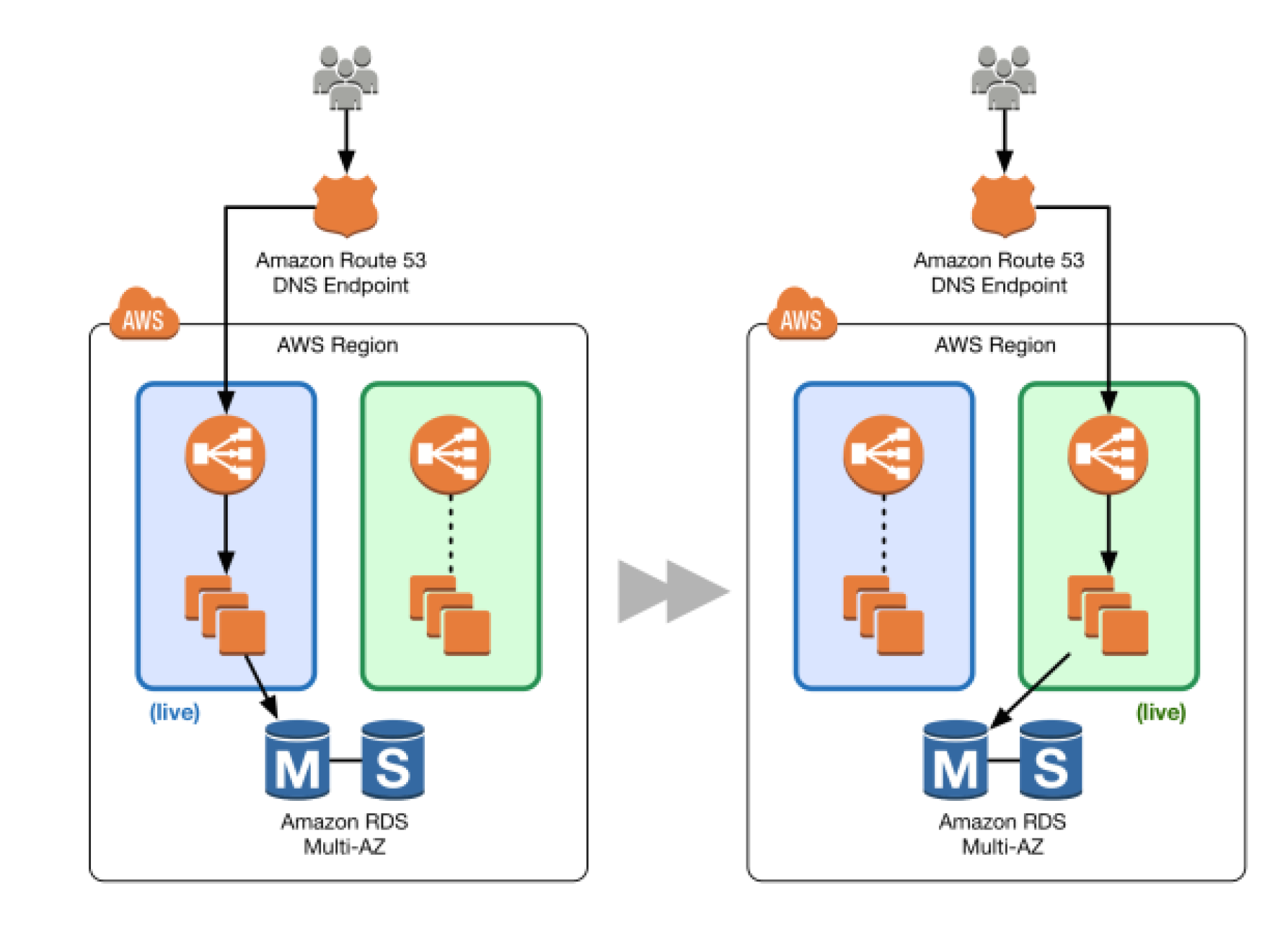
DNS Routing using Route 53

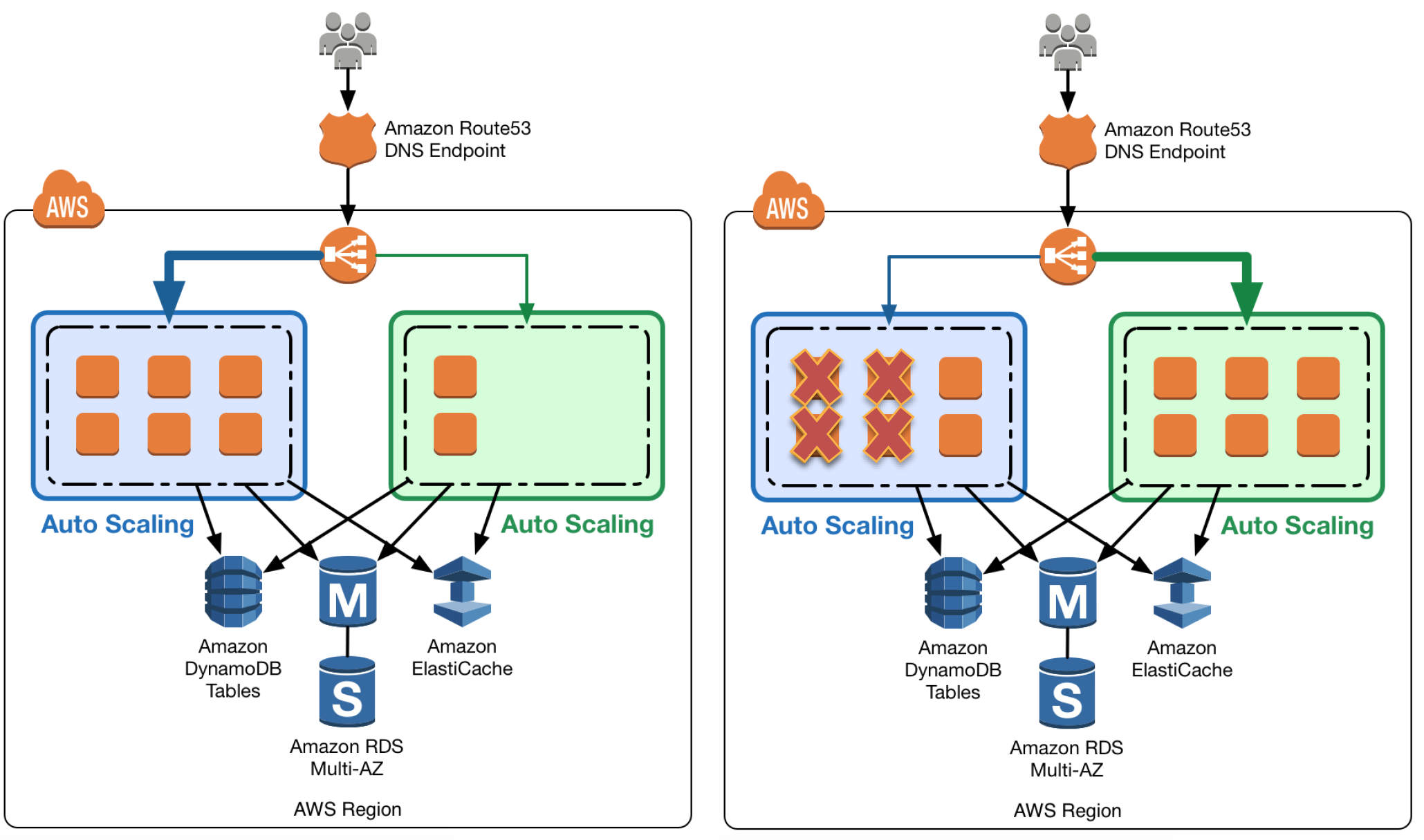
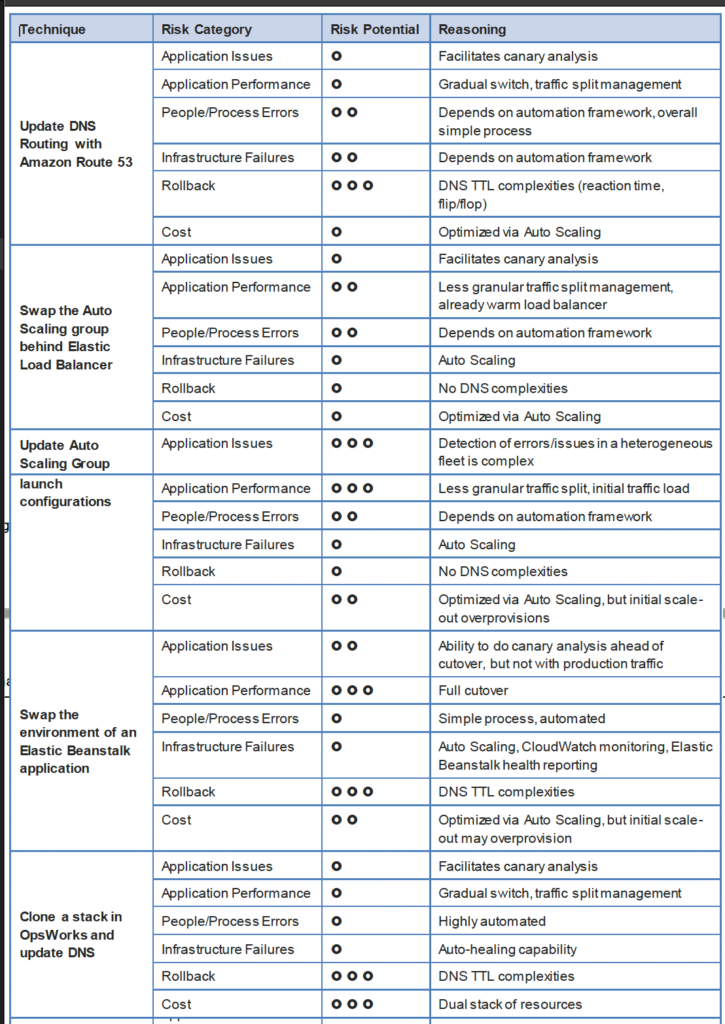
  • Route 53 DNS service can help switch traffic from the blue environment to the green and vice versa, if rollback is necessary
  • Route 53 can help either switch the traffic completely or through a weighted distribution
  • Weighted distribution
    • helps distribute percentage of traffic to go to the green environment and gradually update the weights until the green environment carries the full production traffic
    • provides the ability to perform canary analysis where a small percentage of production traffic is introduced to a new environment
    • helps manage cost by using auto scaling for instances to scale based on the actual demand
  • Route 53 can handle Public or Elastic IP address, Elastic Load Balancer, Elastic Beanstalk environment web tiers etc.
DNS Routing with Amazon Route 53

Auto Scaling Group Swap Behind Elastic Load Balancer

AWS Blue Green Deployment - Auto Scaling Group
  • Elastic Load Balancing with Auto Scaling to manage EC2 resources as per the demand can be used for Blue Green deployments
  • Multiple Auto Scaling groups can be attached to the Elastic Load Balancer
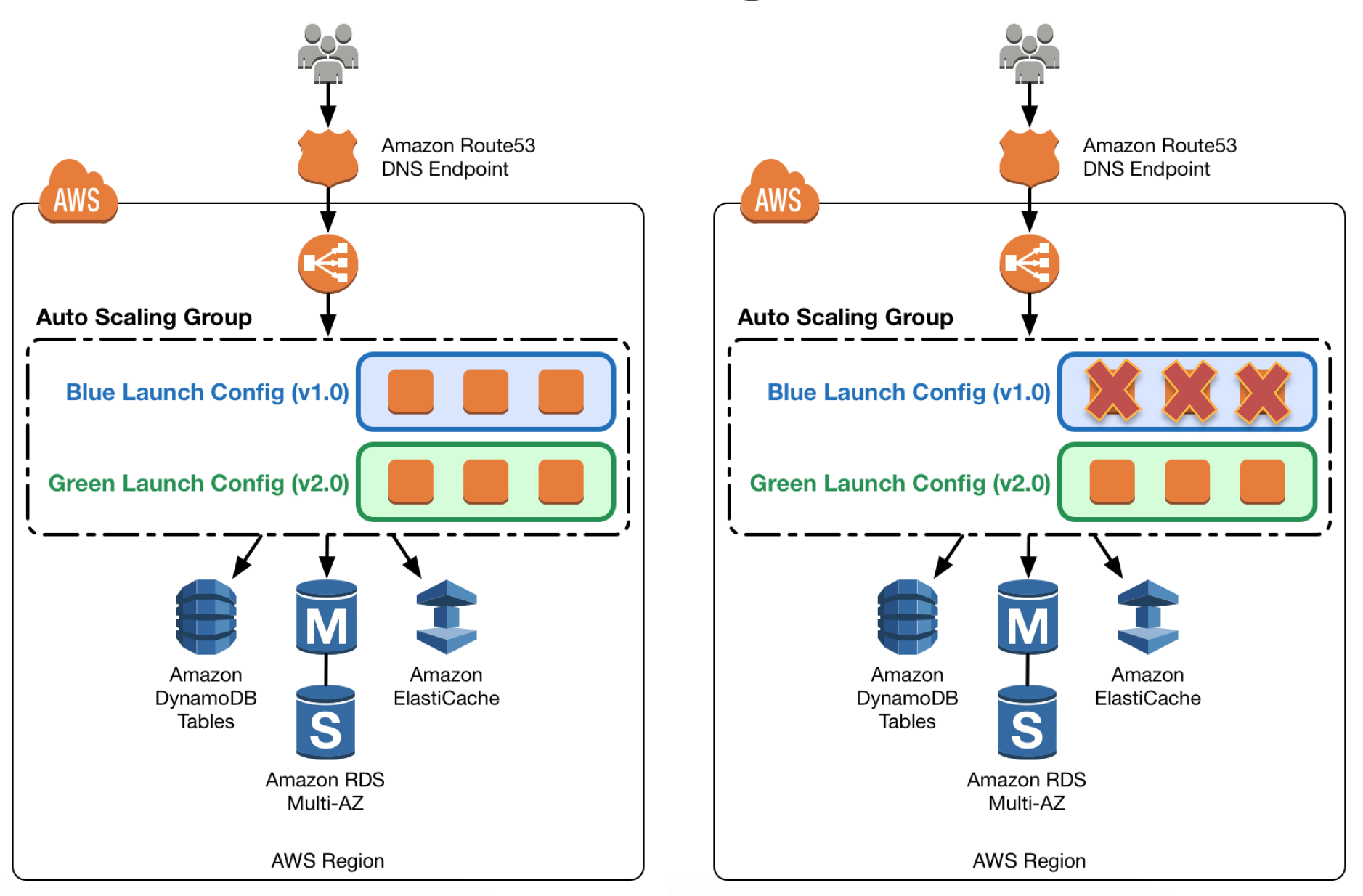
  • Green ASG can be attached to an existing ELB while Blue ASG is already attached to the ELB to serve traffic
  • ELB would start routing requests to the Green Group as for HTTP/S listener it uses a least outstanding requests routing algorithm
  • Green group capacity can be increased to process more traffic while the Blue group capacity can be reduced either by terminating the instances or by putting the instances in a standby mode
  • Standby is a good option because if roll back to the blue environment needed, blue server instances can be put back in service and they’re ready to go
  • If no issues with the Green group, the blue group can be decommissioned by adjusting the group size to zero

Update Auto Scaling Group Launch Templates

AWS Blue Green Deployment - Auto Scaling Launch
  • Auto Scaling groups have their own launch templates which define templates for EC2 instances to be launched
  • Launch templates support versioning — a new version can be created and the Auto Scaling Group updated to use the new version.
  • After a new launch template version is in place, any new instances that are launched use the new version parameters, but existing instances are not affected.
  • When Auto Scaling removes instances (referred to as scaling in) from the group, the default termination policy is to remove instances with the oldest launch template version
  • To deploy the new version of the application in the green environment, create a new launch template version and update the Auto Scaling group, then scale the Auto Scaling group to twice its original size.
  • Then, shrink the Auto Scaling group back to the original size
  • To perform a rollback, update the Auto Scaling group to use the previous launch template version. Then, do the preceding steps in reverse

Elastic Beanstalk Application Environment Swap

AWS Blue Green Deployment - Elastic Beanstalk
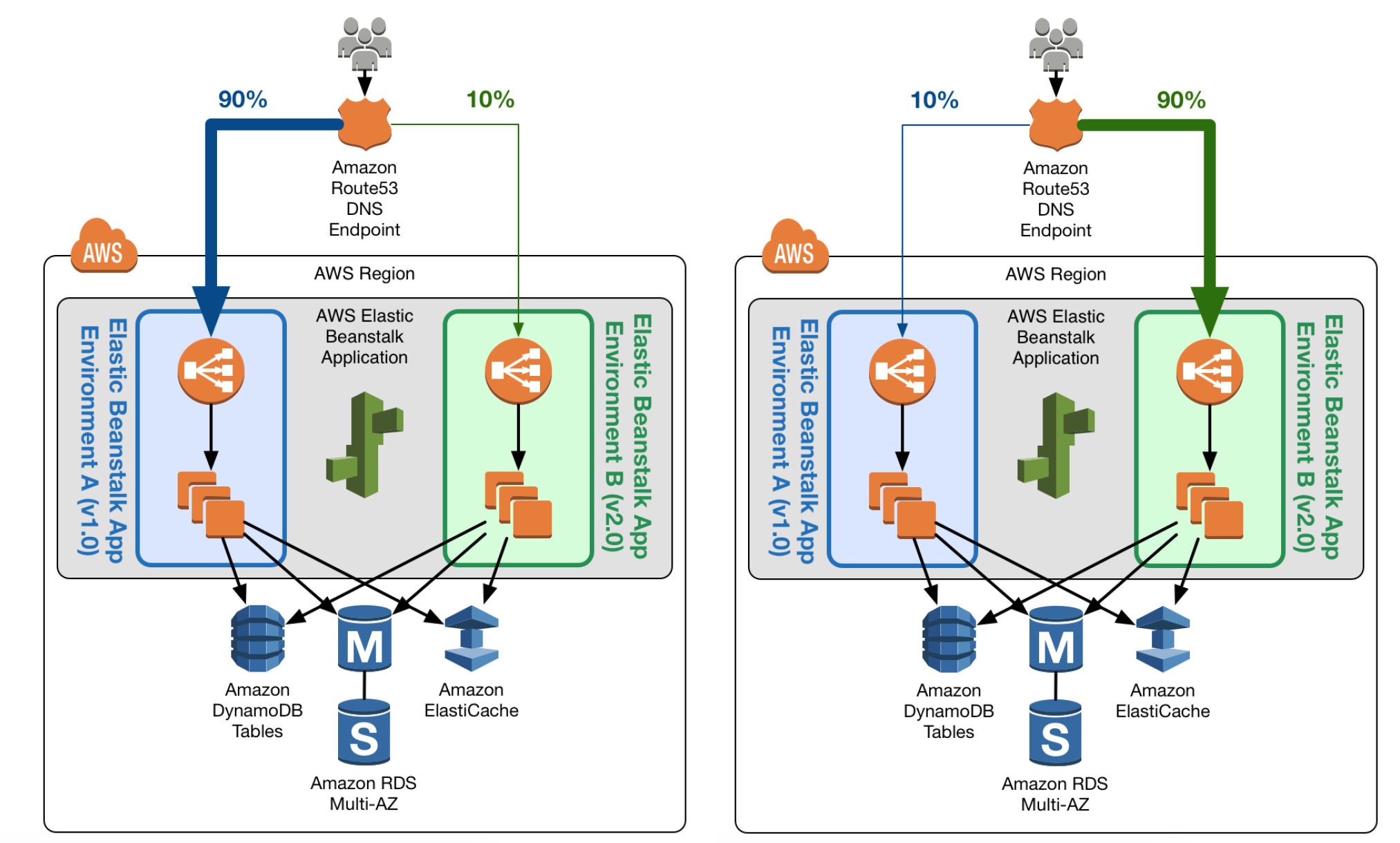
  • Elastic Beanstalk multiple environment and environment url swap feature helps enable Blue Green deployment
  • Elastic Beanstalk can be used to host the blue environment exposed via URL to access the environment
  • Elastic Beanstalk provides several deployment policies, ranging from policies that perform an in-place update on existing instances, to immutable deployment using a set of new instances.
  • Elastic Beanstalk performs an in-place update when the application versions are updated, however application may become unavailable to users for a short period of time.
  • To avoid the downtime, a new version can be deployed to a separate Green environment with its own URL, launched with the existing environment’s configuration
  • Elastic Beanstalk’s Swap Environment URLs feature can be used to promote the green environment to serve production traffic
  • Elastic Beanstalk performs a DNS switch, which typically takes a few minutes
  • To perform a rollback, invoke Swap Environment URL again.

Clone a Stack in AWS OpsWorks and Update DNS (Deprecated)

⚠️ Note: AWS OpsWorks Stacks reached End of Life on May 26, 2024. This section is maintained for historical reference only. Use AWS CloudFormation, CodeDeploy, or ECS for blue/green deployments instead.
  • OpsWorks could be used to create
    • Blue environment stack with the current version of the application and serving production traffic
    • Green environment stack with the newer version of the application and is not receiving any traffic
  • To promote to the green environment/stack into production, update DNS records to point to the green environment/stack’s load balancer

CodeDeploy Blue/Green for EC2 Instances

  • CodeDeploy automates the blue/green deployment process for EC2 instances by provisioning a new set of instances (green), deploying the application revision, and shifting traffic from the original instances (blue).
  • Traffic is rerouted through Elastic Load Balancing — instances are deregistered from the blue target group and registered to the green target group.
  • Supports configurable wait times before terminating blue instances, allowing for quick rollback.
  • Integrates with Auto Scaling groups to automatically provision green instances matching the blue group configuration.

Amazon ECS Blue/Green Deployments

  • ECS supports blue/green deployments using either ECS-native (recommended for new deployments) or CodeDeploy-based approaches.
  • ECS-native blue/green (July 2025): Creates a new task set, validates using lifecycle hooks, and shifts traffic — all managed directly by the ECS service without external dependencies.
  • CodeDeploy-based: Uses CodeDeploy to manage traffic shifting between two ECS task sets behind a load balancer with test listener support for validation.
  • Both approaches support automatic rollback on CloudWatch alarm breach or deployment failure.
  • ECS native deployments support blue/green (all-at-once shift), canary (percentage-based initial shift), and linear (incremental shift) strategies.

Lambda Traffic Shifting with CodeDeploy

  • Lambda deployments via CodeDeploy are always blue/green — traffic is shifted between two Lambda function versions using aliases.
  • Supports deployment configurations:
    • Canary — shifts a percentage (e.g., 10%) initially, then the remainder after a wait period
    • Linear — shifts traffic in equal increments at regular intervals
    • All-at-once — shifts all traffic immediately
  • Pre-traffic and post-traffic lifecycle hooks allow validation Lambda functions to run before and after traffic shifting.

Amazon RDS/Aurora Blue/Green Deployments

  • RDS Blue/Green Deployments enable safe database updates (engine upgrades, schema changes, parameter modifications) with minimal downtime.
  • Creates a fully managed staging (green) environment that mirrors production (blue) using logical replication to keep them in sync.
  • Switchover promotes the green environment to production, updating endpoints to point to the new instances — typically completes in under a minute.
  • Supports rollback by reverting the switchover if issues are detected.
  • Ideal for major version upgrades, maintenance operations, and schema migrations where traditional blue/green at the application layer alone is insufficient.
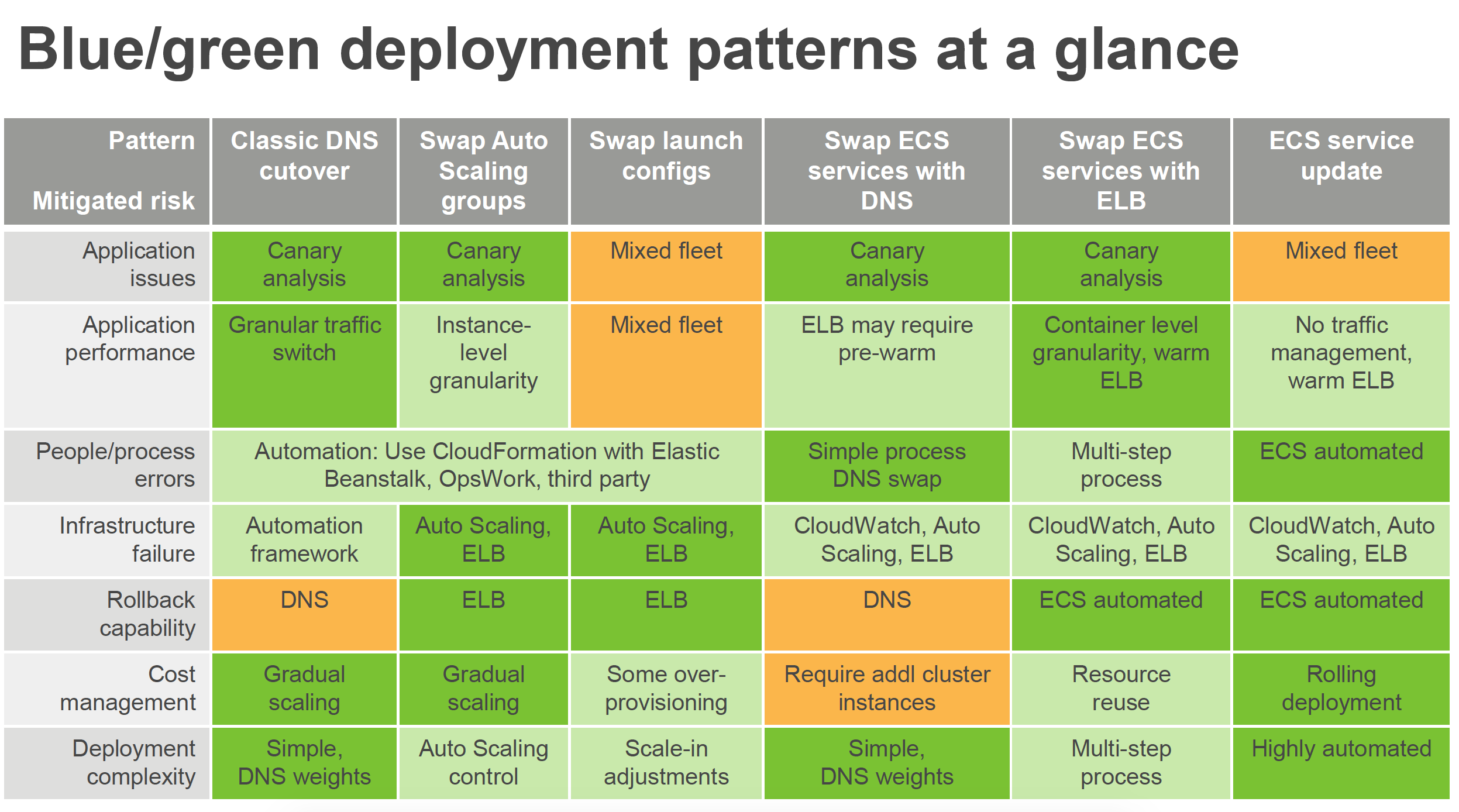
AWS Blue Green deployment patterns

AWS Certification Exam Practice Questions

  • Questions are collected from Internet and the answers are marked as per my knowledge and understanding (which might differ with yours).
  • AWS services are updated everyday and both the answers and questions might be outdated soon, so research accordingly.
  • AWS exam questions are not updated to keep up the pace with AWS updates, so even if the underlying feature has changed the question might not be updated
  • Open to further feedback, discussion and correction.
  1. What is server immutability?
    1. Not updating a server after creation. (During the new release, a new set of EC2 instances are rolled out by terminating older instances and are disposable. EC2 instance usage is considered temporary or ephemeral in nature for the period of deployment until the current release is active)
    2. The ability to change server counts.
    3. Updating a server after creation.
    4. The inability to change server counts.
  2. You need to deploy a new application version to production. Because the deployment is high-risk, you need to roll the new version out to users over a number of hours, to make sure everything is working correctly. You need to be able to control the proportion of users seeing the new version of the application down to the percentage point. You use ELB and EC2 with Auto Scaling Groups and custom AMIs with your code pre-installed assigned to Launch Configurations. There are no database-level changes during your deployment. You have been told you cannot spend too much money, so you must not increase the number of EC2 instances much at all during the deployment, but you also need to be able to switch back to the original version of code quickly if something goes wrong. What is the best way to meet these requirements?
    1. Create a second ELB, Auto Scaling Launch Configuration, and Auto Scaling Group using the Launch Configuration. Create AMIs with all code pre-installed. Assign the new AMI to the second Auto Scaling Launch Configuration. Use Route53 Weighted Round Robin Records to adjust the proportion of traffic hitting the two ELBs. (Use Weighted Round Robin DNS Records and reverse proxies allow such fine-grained tuning of traffic splits. Blue-Green option does not meet the requirement that we mitigate costs and keep overall EC2 fleet size consistent, so we must select the 2 ELB and ASG option with WRR DNS tuning)
    2. Use the Blue-Green deployment method to enable the fastest possible rollback if needed. Create a full second stack of instances and cut the DNS over to the new stack of instances, and change the DNS back if a rollback is needed. (Full second stack is expensive)
    3. Create AMIs with all code pre-installed. Assign the new AMI to the Auto Scaling Launch Configuration, to replace the old one. Gradually terminate instances running the old code (launched with the old Launch Configuration) and allow the new AMIs to boot to adjust the traffic balance to the new code. On rollback, reverse the process by doing the same thing, but changing the AMI on the Launch Config back to the original code. (Cannot modify the existing launch config)
    4. Migrate to use AWS Elastic Beanstalk. Use the established and well-tested Rolling Deployment setting AWS provides on the new Application Environment, publishing a zip bundle of the new code and adjusting the wait period to spread the deployment over time. Re-deploy the old code bundle to rollback if needed.
  3. When thinking of AWS Elastic Beanstalk, the ‘Swap Environment URLs’ feature most directly aids in what?
    1. Immutable Rolling Deployments
    2. Mutable Rolling Deployments
    3. Canary Deployments
    4. Blue-Green Deployments (Complete switch from one environment to other)
  4. You were just hired as a DevOps Engineer for a startup. Your startup uses AWS for 100% of their infrastructure. They currently have no automation at all for deployment, and they have had many failures while trying to deploy to production. The company has told you deployment process risk mitigation is the most important thing now, and you have a lot of budget for tools and AWS resources. Their stack: 2-tier API Data stored in DynamoDB or S3, depending on type, Compute layer is EC2 in Auto Scaling Groups, They use Route53 for DNS pointing to an ELB, An ELB balances load across the EC2 instances. The scaling group properly varies between 4 and 12 EC2 servers. Which of the following approaches, given this company’s stack and their priorities, best meets the company’s needs?
    1. Model the stack in AWS Elastic Beanstalk as a single Application with multiple Environments. Use Elastic Beanstalk’s Rolling Deploy option to progressively roll out application code changes when promoting across environments. (Does not support DynamoDB also need Blue Green deployment for zero downtime deployment as cost is not a constraint)
    2. Model the stack in 3 CloudFormation templates: Data layer, compute layer, and networking layer. Write stack deployment and integration testing automation following Blue-Green methodologies.
    3. Model the stack in AWS OpsWorks as a single Stack, with 1 compute layer and its associated ELB. Use Chef and App Deployments to automate Rolling Deployment. (Does not support DynamoDB also need Blue Green deployment for zero downtime deployment as cost is not a constraint. Additionally, OpsWorks reached EOL on May 26, 2024.)
    4. Model the stack in 1 CloudFormation template, to ensure consistency and dependency graph resolution. Write deployment and integration testing automation following Rolling Deployment methodologies. (Need Blue Green deployment for zero downtime deployment as cost is not a constraint)
  5. You are building out a layer in a software stack on AWS that needs to be able to scale out to react to increased demand as fast as possible. You are running the code on EC2 instances in an Auto Scaling Group behind an ELB. Which application code deployment method should you use?
    1. SSH into new instances those come online, and deploy new code onto the system by pulling it from an S3 bucket, which is populated by code that you refresh from source control on new pushes. (is slow and manual)
    2. Bake an AMI when deploying new versions of code, and use that AMI for the Auto Scaling Launch Configuration. (Pre baked AMIs can help to get started quickly)
    3. Create a Dockerfile when preparing to deploy a new version to production and publish it to S3. Use UserData in the Auto Scaling Launch configuration to pull down the Dockerfile from S3 and run it when new instances launch. (is slow)
    4. Create a new Auto Scaling Launch Configuration with UserData scripts configured to pull the latest code at all times. (is slow)
  6. You company runs a complex customer relations management system that consists of around 10 different software components all backed by the same Amazon Relational Database (RDS) database. You adopted AWS OpsWorks to simplify management and deployment of that application and created an AWS OpsWorks stack with layers for each of the individual components. An internal security policy requires that all instances should run on the latest Amazon Linux AMI and that instances must be replaced within one month after the latest Amazon Linux AMI has been released. AMI replacements should be done without incurring application downtime or capacity problems. You decide to write a script to be run as soon as a new Amazon Linux AMI is released. Which solutions support the security policy and meet your requirements? Choose 2 answers
    1. Assign a custom recipe to each layer, which replaces the underlying AMI. Use AWS OpsWorks life-cycle events to incrementally execute this custom recipe and update the instances with the new AMI.
    2. Create a new stack and layers with identical configuration, add instances with the latest Amazon Linux AMI specified as a custom AMI to the new layer, switch DNS to the new stack, and tear down the old stack. (Blue-Green Deployment)
    3. Identify all Amazon Elastic Compute Cloud (EC2) instances of your AWS OpsWorks stack, stop each instance, replace the AMI ID property with the ID of the latest Amazon Linux AMI ID, and restart the instance. To avoid downtime, make sure not more than one instance is stopped at the same time.
    4. Specify the latest Amazon Linux AMI as a custom AMI at the stack level, terminate instances of the stack and let AWS OpsWorks launch new instances with the new AMI.
    5. Add new instances with the latest Amazon Linux AMI specified as a custom AMI to all AWS OpsWorks layers of your stack, and terminate the old ones.
  7. Your company runs an event management SaaS application that uses Amazon EC2, Auto Scaling, Elastic Load Balancing, and Amazon RDS. Your software is installed on instances at first boot, using a tool such as Puppet or Chef, which you also use to deploy small software updates multiple times per week. After a major overhaul of your software, you roll out version 2.0 new, much larger version of the software of your running instances. Some of the instances are terminated during the update process. What actions could you take to prevent instances from being terminated in the future? (Choose two)
    1. Use the zero downtime feature of Elastic Beanstalk to deploy new software releases to your existing instances. (No such feature, you can perform environment url swap)
    2. Use AWS CodeDeploy. Create an application and a deployment targeting the Auto Scaling group. Use CodeDeploy to deploy and update the application in the future. (Refer link)
    3. Run “aws autoscaling suspend-processes” before updating your application. (Refer link)
    4. Use the AWS Console to enable termination protection for the current instances. (Termination protection does not work with Auto Scaling)
    5. Run “aws autoscaling detach-load-balancers” before updating your application. (Does not prevent Auto Scaling to terminate the instances)
  8. A company runs a containerized application on Amazon ECS with Fargate. They want to implement blue/green deployments with the ability to test the new version using a small percentage of traffic before full cutover. They also want automatic rollback if CloudWatch alarms trigger. What is the recommended approach? [2025 Updated]
    1. Use ECS rolling updates with circuit breaker enabled
    2. Use Elastic Beanstalk with Swap Environment URLs
    3. Use Amazon ECS native blue/green deployment with canary strategy (ECS native blue/green with canary strategy (October 2025) allows percentage-based traffic shifting with automatic rollback on alarm breach, without requiring CodeDeploy)
    4. Use AWS CodePipeline with manual approval before traffic shift
  9. A team wants to perform a major version upgrade on their Aurora PostgreSQL database with minimal downtime. The database handles production traffic and they need the ability to quickly rollback if the upgrade causes issues. What AWS feature should they use?
    1. Create a manual snapshot, upgrade, and restore from snapshot if issues occur
    2. Use Aurora cloning to create a copy and upgrade the clone
    3. Use Amazon RDS Blue/Green Deployments to create a green environment, perform the upgrade, and switchover (RDS Blue/Green Deployments create a staging environment kept in sync via logical replication, switchover completes in under a minute, and supports rollback)
    4. Set up Aurora read replica, promote it, and switch the application connection string

References

AWS Certified Solution Architect – Professional Exam Learning Path (Obsolete)

AWS Certified Solution Architect – Professional Exam Learning Path

⚠️ OBSOLETE EXAM VERSION

This learning path is for the original AWS Solutions Architect – Professional exam (pre-2018), which has been retired.

This content is maintained for historical reference only.

Current Exam:

Exam Version Timeline:

  • Original exam (this post) — Retired 2018
  • SAP-C01 — Released 2018, retired Nov. 14, 2022
  • SAP-C02 — Current version since Nov. 15, 2022

I recently cleared the AWS Certified Solution Architect Professional Exam with 93% after almost 2 months of preparation

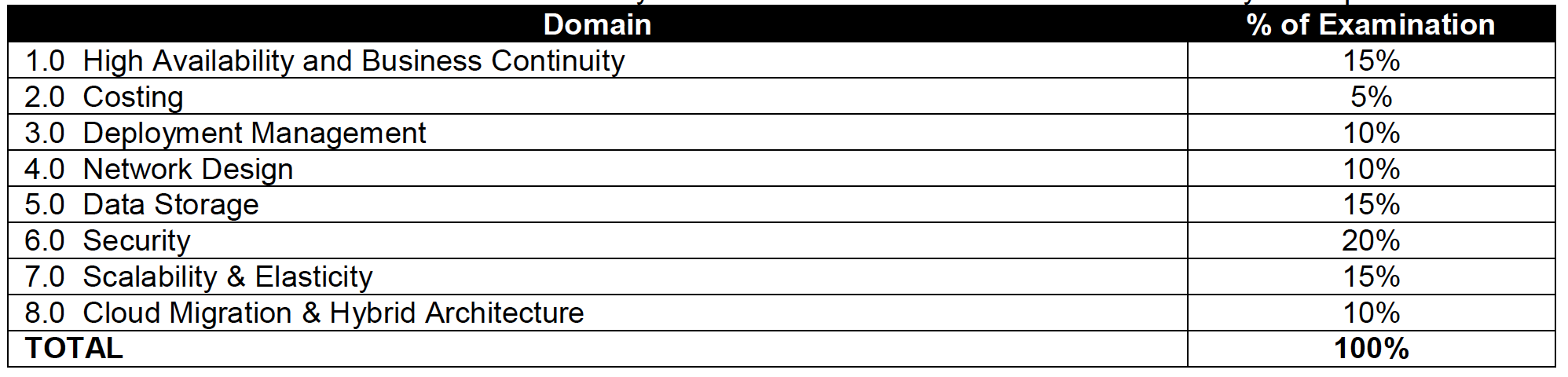
Topic Level Scoring:
1.0 High Availability and Business Continuity: 100%
2.0 Costing: 75%
3.0 Deployment Management: 100%
4.0 Network Design: 85%
5.0 Data Storage: 90%
6.0 Security: 92%
7.0 Scalability & Elasticity: 100%
8.0 Cloud Migration & Hybrid Architecture: 85%

AWS Solution Architect – Professional exam is quite an exhaustive exam with 77 questions in 180 minutes and covers a lot of AWS services and the combinations how they work and integrate together. However, the questions are bit old and has not kept pace with the fast changing AWS enhancements


If looking for Current Certification Preparation Guides, please refer


Note: The content below is historical and relates to the original (pre-2018) exam blueprint. The exam domains, weighting, and services covered have changed significantly in SAP-C02.

Refer to the AWS Solution Architect – Professional Exam Blue Print (historical)

AWS Solution Architect – Professional exam basically validates the following

  • Identify and gather requirements in order to define a solution to be built on AWS
  • Evolve systems by introducing new services and features
  • Assess the tradeoffs and implications of architectural decisions and choices for applications deployed in AWS
  • Design an optimal system by meeting project requirements while maximizing characteristics such as scalability, security, reliability, durability, and cost effectiveness
  • Evaluate project requirements and make recommendations for implementation, deployment, and provisioning applications on AWS
  • Provide best practice and architectural guidance over the lifecycle of a project
AWS Solutions Architect - Professional Exam Break Up

AWS Cloud Computing Whitepapers

AWS Certified Solution Architect Professional Exam Contents

Domain 1.0: High Availability and Business Continuity

  • 1.1 Demonstrate ability to architect the appropriate level of availability based on stakeholder requirements
  • 1.2 Demonstrate ability to implement DR for systems based on RPO and RTO
  • 1.3 Determine appropriate use of multi-Availability Zones vs. multi-Region architectures
  • 1.4 Demonstrate ability to implement self-healing capabilities
  • 1.5 High Availability vs. Fault Tolerance

Domain 2.0: Costing

  • 2.1 Demonstrate ability to make architectural decisions that minimize and optimize infrastructure cost
  • 2.2 Apply the appropriate AWS account and billing set-up options based on scenario
  • 2.3 Ability to compare and contrast the cost implications of different architectures

Domain 3.0: Deployment Management

  • 3.1 Ability to manage the lifecycle of an application on AWS
  • 3.2 Demonstrate ability to implement the right architecture for development, testing, and staging environments
  • 3.3 Position and select most appropriate AWS deployment mechanism based on scenario

Domain 4.0: Network Design for a complex large scale deployment

  • 4.1 Demonstrate ability to design and implement networking features of AWS
  • 4.2 Demonstrate ability to design and implement connectivity features of AWS

Domain 5.0: Data Storage for a complex large scale deployment

  • 5.1 Demonstrate ability to make architectural trade off decisions involving storage options
    • includes Storage Options patterns and anti patterns for S3, EBS,  Instance Store
  • 5.2 Demonstrate ability to make architectural trade off decisions involving database options
    • includes Storage Options patterns and anti patterns RDS, DynamoDB, Database on EC2
  • 5.3 Demonstrate ability to implement the most appropriate data storage architecture
  • 5.4 Determine use of synchronous versus asynchronous replication

Domain 6.0: Security

Domain 7.0: Scalability and Elasticity

  • 7.1 Demonstrate the ability to design a loosely coupled system
  • 7.2 Demonstrate ability to implement the most appropriate front-end scaling architecture
  • 7.3 Demonstrate ability to implement the most appropriate middle-tier scaling architecture
  • 7.4 Demonstrate ability to implement the most appropriate data storage scaling architecture
  • 7.5 Determine trade-offs between vertical and horizontal scaling
    • includes basic understanding of horizontal scaling is scale in/out and vertical scaling is scale up/down

Domain 8.0: Cloud Migration and Hybrid Architecture

Other services like SWF manual task and ability to retry, SNS Mobile Push, SES for durable email, Elastic TranscoderCloudSearch for search, Data Pipeline for disaster recovery, CloudWatch provides durable storage for logs, EMR how to improve performance

AWS Solution Architect – Professional Exam Resources (Historical)

Note: The resources below are outdated and no longer relevant for the current SAP-C02 exam. For current preparation resources, refer to the SAP-C02 Exam Learning Path.

AWS Certification Exam Cheat Sheet

AWS Certification Exam Cheat Sheet

AWS Certification Exams cover a lot of topics and a wide range of services with minute details for features, patterns, anti patterns and their integration with other services. This blog post is just to have a quick summary of all the services and key points for a quick glance before you appear for the exam.

📝 Last Updated: June 2026. Updated with latest AWS Global Infrastructure numbers (39 Regions, 123 AZs), AWS Organizations new policy types (RCPs, Declarative Policies), second-generation Outposts, AWS Network Firewall for IDS/IPS, AWS Shield enhancements, Snow Family availability changes, and AWS Elastic Disaster Recovery.

AWS Global Infrastructure

AWS Region, AZs, Edge locations

  • Each region is a separate geographic area, completely independent, isolated from the other regions & helps achieve the greatest possible fault tolerance and stability
  • AWS Cloud spans 123 Availability Zones within 39 Geographic Regions (as of 2026), with announced plans for additional Regions in Kingdom of Saudi Arabia and Chile
  • Communication between regions is across the AWS global network (private fiber backbone, not public Internet)
  • Each region has multiple Availability Zones (minimum 3 AZs for newer regions)
  • Each AZ is physically isolated, geographically separated from each other and designed as an independent failure zone
  • AZs are connected with low-latency private links (not public internet)
  • Edge locations are locations maintained by AWS through a worldwide network of data centers for the distribution of content to reduce latency.
  • New Regions launched (2024-2025): Canada West (Calgary), Asia Pacific (Malaysia), Asia Pacific (Thailand), Mexico (Central), Asia Pacific (Taipei), Asia Pacific (New Zealand)

AWS Local Zones

  • AWS Local Zones place select AWS services closer to end-users, which allows running highly-demanding applications that require single-digit millisecond latencies to the end-users such as media & entertainment content creation, real-time gaming, machine learning etc.
  • AWS Local Zones provide a high-bandwidth, secure connection between local workloads and those running in the AWS Region, allowing you to seamlessly connect to the full range of in-region services through the same APIs and tool sets.
  • 30+ Local Zone locations available across six continents (as of 2026)

AWS Dedicated Local Zones

  • Dedicated Local Zones are a type of on-premises infrastructure managed and operated exclusively by AWS for a single customer or community
  • Designed for customers with stringent digital sovereignty, data residency, and compliance requirements (e.g., government classified workloads)
  • Can be operated by local AWS personnel with additional security and governance features
  • Provides same benefits as Local Zones: elasticity, scalability, pay-as-you-go pricing

AWS Wavelength

  • AWS infrastructure deployments embed AWS compute and storage services within the telecommunications providers’ datacenters and help seamlessly access the breadth of AWS services in the region.
  • AWS Wavelength brings services to the edge of the 5G network, without leaving the mobile provider’s network reducing the extra network hops, minimizing the latency to connect to an application from a mobile device.
  • Available with multiple carrier partners globally including Verizon, Vodafone, KDDI, SK Telecom, and Bell Canada
  • Wavelength Zones available in Africa (Morocco) and Senegal in addition to existing locations in US, Europe, Asia, and Canada
  • Built on AWS Nitro System, sovereign-by-design providing verifiable security boundary

AWS Outposts

  • AWS Outposts bring native AWS services, infrastructure, and operating models to virtually any data center, co-location space, or on-premises facility.
  • AWS Outposts is designed for connected environments and can be used to support workloads that need to remain on-premises due to low latency, compliance or local data processing needs.
  • Available in two form factors: Outposts Racks (full 42U rack) and Outposts Servers (1U/2U for space-constrained environments)
  • Second-generation Outposts Racks (GA April 2025) provide:
    • Latest x86-powered EC2 instances (C7i, M7i, R7i, and C8i, M8i, R8i)
    • Up to 40% better performance compared to first-generation instances
    • Simplified network scaling and configuration
    • Accelerated networking instances for ultra-low latency workloads
    • Native L2/L3 multicast, Precision Time Protocol (PTP) support
    • Available in 70+ countries

AWS European Sovereign Cloud

  • New independent cloud for Europe designed to meet stringent data residency, operational autonomy, and resiliency requirements
  • First Region launched in Germany (2025), available to all customers
  • Physically and logically separate from existing AWS Regions
  • Operated and supported exclusively by EU-resident AWS employees

Refer details @ AWS Global Infrastructure

AWS Services

AWS Organizations

  • AWS Organizations offers policy-based management for multiple AWS accounts
  • Organizations allows creation of groups of accounts and then apply policies to those groups
  • Organizations enables you to centrally manage policies across multiple accounts, without requiring custom scripts and manual processes.
  • Organizations helps simplify the billing for multiple accounts by enabling the setup of a single payment method for all the accounts in the organization through consolidated billing
  • Policy Types available:
    • Service Control Policies (SCPs) – set maximum permissions for IAM users and roles in member accounts
    • Resource Control Policies (RCPs) – (launched Nov 2024) centrally restrict external access to AWS resources (S3, STS, KMS, SQS, Secrets Manager, and more)
    • Declarative Policies – (launched Dec 2024) define and enforce desired service configuration at scale (e.g., block public access for VPCs/EBS snapshots) with custom error messages
    • Tag Policies – enforce standardized tags across organization resources
    • Backup Policies – centrally manage backup plans
    • AI Services Opt-out Policies – control whether AWS AI services can store/use content
  • RCPs complement SCPs: SCPs control who can access, RCPs control what can be accessed
  • Declarative policies maintain enforcement even as new features or APIs are added

Consolidated Billing

  • Management account (formerly Paying/Payer account) with multiple linked member accounts
  • Management account is independent and should be only used for billing purpose
  • Management account cannot access resources of other accounts unless given exclusively access through Cross Account roles
  • All linked accounts are independent and soft limit of 20
  • One bill per AWS account
  • Provides Volume pricing discount for usage across the accounts
  • Allows unused Reserved Instances and Savings Plans to be applied across the group
  • Free tier is not applicable across the accounts
  • AWS Billing Conductor allows customizing billing rates, distributing credits/fees, and shared overhead costs for showback/chargeback use cases

Tags & Resource Groups

  • Are metadata, specified as key/value pairs with the AWS resources
  • Are for labelling purposes and helps managing, organizing resources
  • Can be inherited when created by Auto Scaling, CloudFormation, Elastic Beanstalk etc
  • Can be used for
    • Cost allocation to categorize and track the AWS costs
    • Conditional Access Control policy to define permission to allow or deny access on resources based on tags (ABAC – Attribute-Based Access Control)
    • Automation – target resources for Systems Manager operations
    • Operations – filter resources in CloudWatch, Config, and Systems Manager
  • Resource Group is a collection of resources that share one or more tags
  • Tag Policies (via AWS Organizations) enforce standardized tagging across accounts
  • Tag Editor allows bulk managing tags across multiple resources and regions

IDS/IPS

  • Promiscuous mode is not allowed, as AWS and Hypervisor will not deliver any traffic to instances this is not specifically addressed to the instance
  • IDS/IPS strategies
    • Host Based Firewall – Forward Deployed IDS where the IDS itself is installed on the instances
    • Host Based Firewall – Traffic Replication where IDS agents installed on instances which send/duplicate the data to a centralized IDS system
    • In-Line Firewall – Inbound IDS/IPS Tier (like a WAF configuration) which identifies and drops suspect packets
  • AWS Network Firewall (recommended managed service for IDS/IPS):
    • Stateful, managed network firewall and IDS/IPS for VPC
    • Supports Suricata-compatible IDS/IPS rules
    • AWS Managed Rule Groups provide threat intelligence-based blocking
    • Marketplace partner managed rules with up to 10M domain indicators and 1M IP addresses
    • Supports domain filtering, IP filtering, protocol inspection, and pattern matching
    • Integrates with AWS Firewall Manager for centralized policy management across accounts
    • Supports VPC Traffic Mirroring for passive IDS analysis
  • Amazon GuardDuty provides intelligent threat detection (IDS) analyzing VPC Flow Logs, DNS logs, CloudTrail events, EKS audit logs, and more

DDoS Mitigation

  • Minimize the Attack surface
    • use ELB/CloudFront/Route 53 to distribute load
    • maintain resources in private subnets and use Bastion servers or Systems Manager Session Manager
  • Scale to absorb the attack
    • scaling helps buy time to analyze and respond to an attack
    • auto scaling with ELB to handle increase in load to help absorb attacks
    • CloudFront, Route 53 inherently scales as per the demand
  • Safeguard exposed resources
    • use Route 53 for aliases to hide source IPs and Private DNS
    • use CloudFront geo restriction and Origin Access Control (OAC, replaces OAI)
    • use WAF as part of the infrastructure
  • Learn normal behavior (IDS/WAF)
    • analyze and benchmark to define rules on normal behavior
    • use CloudWatch
  • Create a plan for attacks
  • AWS Shield Standard
    • Automatically included for all AWS customers at no additional cost
    • Protects against most common Layer 3/4 DDoS attacks
    • Always-on network flow monitoring with traffic signatures and anomaly detection
  • AWS Shield Advanced
    • Managed DDoS protection with 24/7 Shield Response Team (SRT) access
    • Protects EC2, ELB, CloudFront, Global Accelerator, and Route 53 resources
    • DDoS cost protection (credits for scaling charges during attacks)
    • Automatic application layer (L7) DDoS mitigation with WAF integration
    • DDoS attack flow logs (launched May 2026) for detailed attack analysis
    • Health-based detection using Route 53 health checks for faster, more accurate response
  • AWS WAF Application Layer DDoS Protection (launched June 2025) – automatic L7 DDoS detection and mitigation as an AWS Managed Rule group for CloudFront and ALB

AWS Services Region, AZ, Subnet VPC limitations

  • Services like IAM (user, role, group, SSL certificate), Route 53, STS, CloudFront, WAF (Global), and Organizations are Global and available across regions
  • All other AWS services are limited to Region or within Region and do not exclusively copy data across regions unless configured
  • AMI are limited to region and need to be copied over to other region
  • EBS volumes are limited to the Availability Zone, and can be migrated by creating snapshots and copying them to another region
  • Reserved Instances are limited to the Region (can be modified across AZs within same region) and cannot be migrated to another region
  • Savings Plans apply automatically across regions regardless of instance type (Compute Savings Plans)
  • RDS instances are limited to the region and can be recreated in a different region by either using snapshots or promoting a Read Replica
  • Placement groups:
    • Cluster Placement groups are limited to single Availability Zone
    • Spread Placement groups can span across multiple Availability Zones
    • Partition Placement groups can span across multiple Availability Zones
  • S3 data is replicated within the region and can be moved to another region using Cross-Region Replication (CRR). S3 Multi-Region Access Points accelerate multi-region access via AWS Global Accelerator
  • DynamoDB maintains data within the region and can be replicated to another region using DynamoDB Global Tables (multi-active, multi-region). Supports Multi-Region Strong Consistency (MRSC) for zero RPO (GA 2025)
  • Redshift Cluster span within an Availability Zone only, and can be created in other AZ using snapshots

Disaster Recovery Whitepaper

  • RTO is the time it takes after a disruption to restore a business process to its service level and RPO acceptable amount of data loss measured in time before the disaster occurs
  • Techniques (RTO & RPO reduces and the Cost goes up as we go down)
    • Backup & Restore – Data is backed up and restored, with nothing running
    • Pilot light – Only minimal critical service like RDS is running and rest of the services can be recreated and scaled during recovery
    • Warm Standby – Fully functional site with minimal configuration is available and can be scaled during recovery
    • Multi-Site / Active-Active – Fully functional site with identical configuration is available and processes the load
  • Services
    • Region and AZ to launch services across multiple facilities
    • EC2 instances with the ability to scale and launch across AZs
    • EBS with Snapshot to recreate volumes in different AZ or region
    • AMI to quickly launch preconfigured EC2 instances
    • ELB and Auto Scaling to scale and launch instances across AZs
    • VPC to create private, isolated section
    • Elastic IP address as static IP address
    • ENI with pre allocated Mac Address
    • Route 53 is highly available and scalable DNS service to distribute traffic across EC2 instances and ELB in different AZs and regions
    • AWS Global Accelerator for automatic failover across regions
    • Direct Connect for speed data transfer (takes time to setup and expensive then VPN)
    • S3 and Glacier (with RTO of 3-5 hours) provides durable storage
    • RDS snapshots and Multi AZ support and Read Replicas across regions
    • Aurora Global Database for cross-region replication with <1 second lag
    • DynamoDB Global Tables for multi-region, multi-active replication
    • Redshift snapshots to recreate the cluster
    • Storage Gateway to backup the data in AWS
    • AWS Snow Family (Snowball Edge) for large data transfers – note: no longer available to new customers as of Nov 2025; use AWS DataSync or AWS Data Transfer Terminal instead
    • CloudFormation, Elastic Beanstalk and OpsWorks as orchestration tools for automation and recreate the infrastructure
  • AWS Elastic Disaster Recovery (AWS DRS)
    • Replaces CloudEndure Disaster Recovery
    • Minimizes downtime and data loss with continuous block-level replication
    • Supports on-premises to AWS, cloud to AWS, and cross-region/cross-AZ DR
    • Uses cost-effective staging area (minimal compute + EBS) until failover
    • Point-in-time recovery for RPO in seconds
    • Non-disruptive DR drills without impacting source
  • AWS Resilience Hub
    • Central service to define RTO/RPO targets for applications
    • Assesses resilience posture against defined goals
    • Next-gen (GA May 2026) includes generative AI-powered failure mode analysis, dependency discovery, and organization-wide reporting
    • Provides recommendations based on AWS Well-Architected Framework

AWS Certification – Application Services – Cheat Sheet

SQS

  • extremely scalable queue service and potentially handles millions of messages
  • helps build fault tolerant, distributed loosely coupled applications
  • stores copies of the messages on multiple servers for redundancy and high availability
  • supports two queue types:
    • Standard Queues – guarantee At-Least-Once Delivery with best-effort ordering
    • FIFO Queues – guarantee Exactly-Once Processing and strict message ordering
  • supports multiple readers and writers interacting with the same queue at the same time
  • holds message for 4 days, by default, and can be changed from 1 min – 14 days after which the message is deleted
  • maximum message size is 1 MiB for both Standard and FIFO queues (increased from 256 KB in Aug 2025)
  • message needs to be explicitly deleted by the consumer once processed
  • allows send, receive and delete batching which helps club up to 10 messages in a single batch (up to 256 KB total payload per batch) while charging price for a single message
  • handles visibility of the message to multiple consumers using Visibility Timeout, where the message once read by a consumer is not visible to the other consumers till the timeout occurs
  • can handle load and performance requirements by scaling the worker instances as the demand changes (Job Observer pattern)
  • message sampling allowing short and long polling
    • returns immediately vs waits for fixed time for e.g. 20 secs
    • might not return all messages as it samples a subset of servers vs returns all available messages
    • repetitive vs helps save cost with long connection
  • supports delay queues to make messages available after a certain delay, can be used to differentiate from priority queues
  • supports dead letter queues (DLQ), to redirect messages which failed to process after certain attempts instead of being processed repeatedly
  • supports DLQ redrive via the StartMessageMoveTask API to move messages from DLQ back to the source queue or a custom destination (supported for both Standard and FIFO queues)
  • FIFO Queue High Throughput Mode
    • supports up to 70,000 transactions per second (TPS) per API action without batching
    • up to 700,000 messages per second with batching
    • available in selected regions (US East, US West, Europe Ireland)
  • Fair Queues (2025) – mitigates noisy neighbor impact in multi-tenant systems by automatically detecting and deprioritizing tenants that generate excessive traffic, improving quality of service for other tenants
  • supports dual-stack (IPv4 and IPv6) endpoints
  • Lambda integration – supports provisioned mode for SQS event source mapping providing 3x faster scaling and 16x higher concurrency for event processing
  • supports server-side encryption (SSE) using AWS KMS keys
  • Design Patterns
    • Job Observer Pattern can help coordinate number of EC2 instances with number of job requests (Queue Size) automatically thus improving cost effectiveness and performance
    • Priority Queue Pattern can be used to setup different queues with different handling either by delayed queues or low scaling capacity for handling messages in lower priority queues

SNS

  • delivery or sending of messages to subscribing endpoints or clients
  • publisher-subscriber (pub/sub) model
  • Producers and Consumers communicate asynchronously with subscribers by producing and sending a message to a topic
  • supports two topic types:
    • Standard Topics – best-effort ordering, at-least-once delivery, nearly unlimited throughput
    • FIFO Topics – strict message ordering, exactly-once delivery, message deduplication
  • supported subscription protocols: Email (plain or JSON), HTTP/HTTPS, SMS, SQS, Lambda, Kinesis Data Firehose
  • supports Mobile Push Notifications to push notifications directly to mobile devices with services like Amazon Device Messaging (ADM), Apple Push Notification Service (APNS), Firebase Cloud Messaging (FCM) etc.
  • Message Filtering – subscription filter policies allow subscribers to receive only a subset of messages published to the topic
    • supports filtering on message attributes or message body (filter policy scope)
    • up to 200 filter policies per topic, 10,000 per account
  • Message Archiving and Replay (FIFO topics) – stores messages within the topic archive for up to 365 days and allows subscribers to replay them on demand for recovery or state synchronization
  • High-Throughput Mode for FIFO Topics (Jan 2025) – increases throughput from default 300 MPS per message group to much higher levels by setting FifoThroughputScope to MessageGroup
  • Cross-Region delivery – supports delivery from an SNS topic in one opt-in Region to an SQS queue in another opt-in Region
  • integrated with Lambda to invoke functions on notifications
  • for Email notifications, use SNS or SES directly, SQS does not work

SWF

⚠️ Note: AWS recommends AWS Step Functions for most new workflow and orchestration needs. SWF is still supported but is no longer the preferred service. Consider Step Functions for new implementations.

  • orchestration service to coordinate work across distributed components
  • helps define tasks, stores, assigns tasks to workers, define logic, tracks and monitors the task and maintains workflow state in a durable fashion
  • helps define tasks which can be executed on AWS cloud or on-premises
  • helps coordinating tasks across the application which involves managing intertask dependencies, scheduling, and concurrency in accordance with the logical flow of the application
  • supports built-in retries, timeouts and logging
  • supports manual tasks (human-in-the-loop)
  • Characteristics
    • deliver exactly once
    • uses long polling, which reduces number of polls without results
    • Visibility of task state via API
    • Timers, signals, markers, child workflows
    • supports versioning
    • keeps workflow history for a user-specified time
  • AWS SWF vs AWS SQS
    • task-oriented vs message-oriented
    • track of all tasks and events vs needs custom handling

Step Functions

  • recommended replacement for SWF for most workflow orchestration use cases
  • serverless visual workflow service to build distributed applications, automate processes, orchestrate microservices, and create data/ML pipelines
  • uses Amazon States Language (ASL) JSON-based language to define state machines
  • supports two workflow types:
    • Standard Workflows – long-running (up to 1 year), exactly-once execution, full execution history
    • Express Workflows – high-volume, short-duration (up to 5 min), at-least-once execution
  • native integrations with 220+ AWS services without custom glue code
  • supports HTTPS endpoints for calling third-party APIs directly
  • Distributed Map state for large-scale parallel processing (e.g., processing millions of S3 objects)
  • built-in error handling with Retry and Catch mechanisms
  • provides visual workflow editor and execution visualization for debugging
  • Step Functions vs SWF
    • JSON-based state machine vs programmatic deciders/workers
    • serverless, managed vs requires custom worker hosts
    • 220+ AWS integrations vs custom integration code
    • visual debugging vs API-based visibility

SES

  • highly scalable and cost-effective email service
  • SESv2 API is the recommended API – all new features are only available through SESv2 (SESv1 still supported but not receiving new capabilities)
  • uses content filtering technologies to scan outgoing emails to check standards and email content for spam and malware
  • supports full-fledged emails to be sent as compared to SNS where only the message is sent in Email
  • ideal for sending bulk emails at scale
  • guarantees first hop
  • eliminates the need to support custom software or applications to do heavy lifting of email transport
  • Virtual Deliverability Manager (VDM) – automatically adjusts email sending in real time to improve inbox placement
    • provides deliverability insights, optimization recommendations, and detailed dashboards
    • tracks open/click rates, bounce/complaint rates at ISP and configuration level
    • Advisor feature provides configuration recommendations for improved deliverability
  • Mail Manager (2024) – advanced email routing and archiving capabilities
    • supports rule-based email processing with actions (invoke Lambda, bounce, archive)
    • Ingress Endpoint with optional TLS and mutual TLS (mTLS) certificate-based authentication
    • simplifies email infrastructure migrations
  • supports both sending and receiving emails – incoming email can integrate with S3, Lambda, and SNS
  • available in multiple AWS regions globally

EventBridge

  • serverless event bus for building event-driven architectures (evolved from CloudWatch Events)
  • supports custom events, AWS service events, and SaaS partner integrations (Stripe, Datadog, Zendesk, etc.)
  • Event Bus – receives events and routes them to target services based on rules
  • Rules – match incoming events using event patterns and route to one or more targets
  • Schema Registry – automatically discovers and stores event schemas
  • EventBridge Pipes – point-to-point integrations between event producers and consumers with optional filter, transform, and enrich steps (without writing custom code)
  • EventBridge Scheduler – fully managed cron and rate-based scheduling for one-time or recurring tasks
  • supports targets including Lambda, Step Functions, SQS, SNS, Kinesis, ECS, and more
  • EventBridge vs SNS
    • content-based filtering on event structure vs attribute-based filtering
    • supports SaaS partner event sources vs no SaaS partner integration
    • schema discovery and registry vs no schema management
    • single target per rule (fan-out via multiple rules) vs fan-out to multiple subscribers per topic