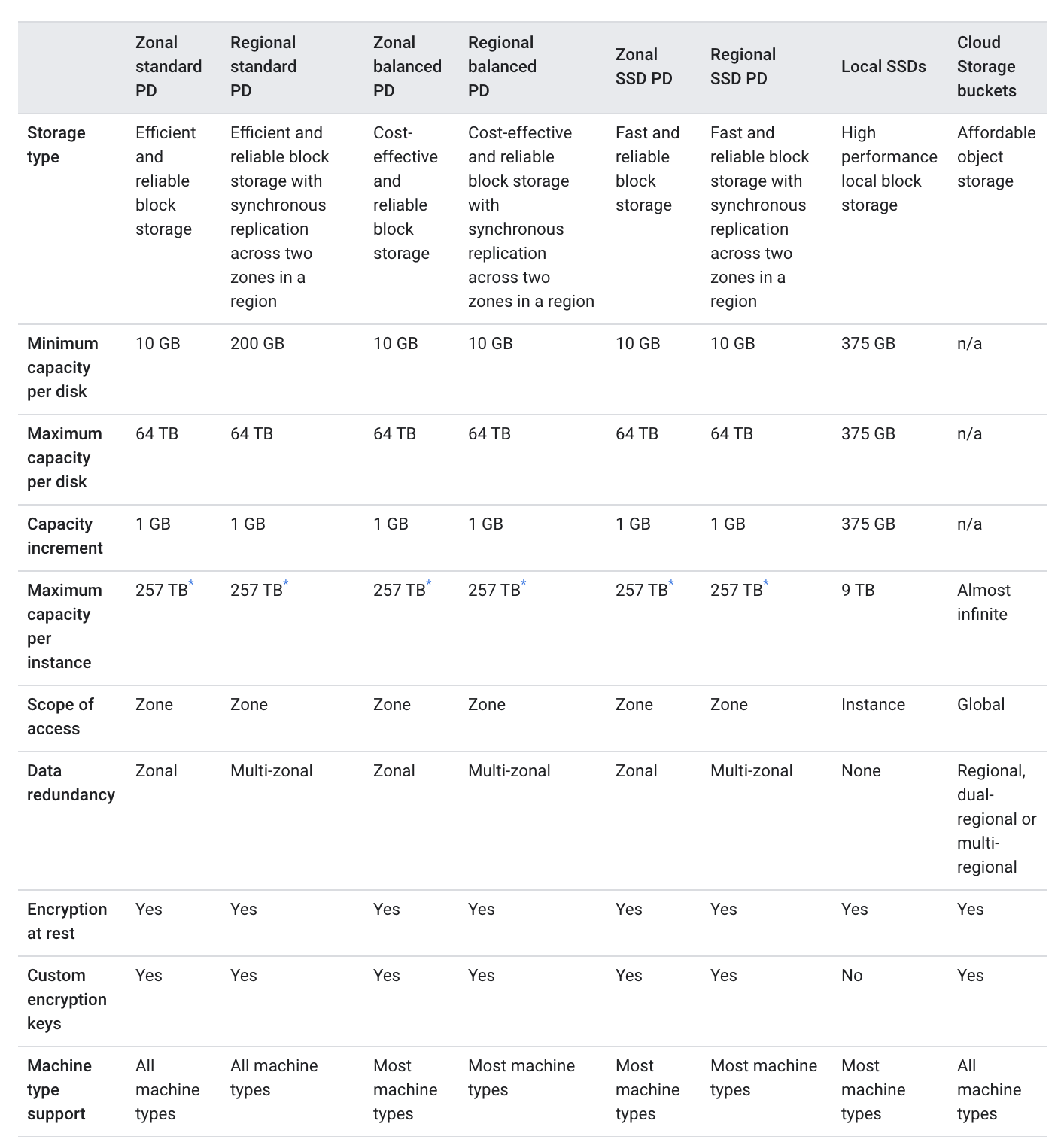
GCE Storage Options – Persistent Disk vs Local SSD vs Hyperdisk

Google Cloud Compute Engine Storage Options

📌 2026 Update: Google Cloud now recommends Hyperdisk as the primary block storage for Compute Engine workloads, offering higher performance and customizable IOPS/throughput. Persistent Disk remains available but Hyperdisk is preferred for new deployments on 3rd-gen+ machine series.

Hyperdisk

  • Hyperdisk is the fastest and most efficient durable block storage for Compute Engine, recommended by Google for boot and data disks.
  • Hyperdisk leverages Google’s Titanium storage offload technology for higher IOPS and throughput than Persistent Disk.
  • Hyperdisk volumes are durable network storage devices that function as physical disks attached to compute instances.
  • Hyperdisk provides customizable performance — IOPS and throughput can be configured independently and adjusted dynamically while in use.
  • Hyperdisk volumes are portable and can be detached from one instance and attached to another.
  • Hyperdisk provides built-in torn write protection with an atomic write unit of 128 KB, which can improve database write throughput by up to 25% by eliminating the need for doublewrite buffers.
  • Hyperdisk supports Confidential Computing mode for Hyperdisk Balanced volumes attached to Confidential VMs.

Hyperdisk Types

  • Hyperdisk Balanced — Best fit for most workloads; supports boot disks, virtual desktops, databases (Postgres, MySQL). Max 160,000 IOPS / 2,400 MiB/s throughput. Supports multi-writer (up to 8 instances).
  • Hyperdisk Balanced High Availability — Synchronously replicates data across two zones in the same region. Max 100,000 IOPS / 2,400 MiB/s. Supports multi-writer (up to 8 instances). Designed for RPO of 0.
  • Hyperdisk Extreme — Highest IOPS for demanding workloads (SAP HANA, Oracle, SQL Server). Max 350,000 IOPS / 5,000 MiB/s throughput.
  • Hyperdisk Throughput — High throughput for scale-out analytics (Hadoop, Spark, Kafka) and cold storage. Max 2,400 MiB/s. Cost-effective for capacity-intensive applications.
  • Hyperdisk ML — Designed for AI/ML inference and training; supports read-only attachment to up to 2,500 instances simultaneously. Highest read-only throughput.

Hyperdisk Storage Pools

  • Hyperdisk Storage Pools allow purchasing capacity and performance in bulk, reducing storage TCO by up to 40%.
  • Simplifies planning with thin provisioning, data reduction, and capacity pooling.
  • Supports Hyperdisk Balanced and Hyperdisk Throughput volumes.
  • Hyperdisk Exapools are designed for workloads requiring 1 PiB+ capacity or 1 TiB/s+ throughput per zone (e.g., large-scale AI/ML, parallel file systems).

Hyperdisk High Availability & Disaster Recovery

  • Cross-zonal (synchronous) — Hyperdisk Balanced High Availability replicates data synchronously between two zones in the same region.
  • Cross-regional (asynchronous) — Asynchronous Replication continuously copies data to a secondary region. Supported for Hyperdisk Balanced, Hyperdisk Extreme, and Hyperdisk Balanced High Availability.

Hyperdisk Machine Series Support

  • Hyperdisk Balanced is supported on C3, C3D, C4, C4A, C4D, N4, N4A, N4D, M3, M4, A3, A4, G4, Z3 and other 3rd-gen+ machine series.
  • Older machine series (N1, E2, C2, C2D, T2A) do not support Hyperdisk and must use Persistent Disk.
  • Generally, use Hyperdisk Balanced High Availability for 3rd-gen+ machine series and Regional Persistent Disks for 2nd-gen or older.

Persistent Disk

  • Persistent disks are durable network storage devices that the instances can access like physical disks in a desktop or a server.
  • Persistent disks are used as boot disks.
  • Data on each persistent disk is distributed across several physical disks.
  • Compute Engine manages the physical disks and the data distribution to ensure redundancy and optimal performance.
  • Persistent disks are located independently from the VM instances and can be detached or moved to keep the data even after the instance is deleted.
  • Persistent disk performance scales automatically with size, so they can be resized or additional ones added to meet the performance and storage space requirements.
  • Google now recommends Hyperdisk for highest performance and advanced features on supported machine series.

Persistent Disk Types

  • Standard persistent disks (pd-standard) are backed by standard hard disk drives (HDD).
  • Balanced persistent disks (pd-balanced) are backed by solid-state drives (SSD). They are an alternative to SSD persistent disks that balance performance and cost.
  • SSD persistent disks (pd-ssd) are backed by solid-state drives (SSD).
  • Extreme persistent disks (pd-extreme) provide configurable IOPS (2,500 to 120,000) with SSD-backed storage for high-performance database workloads like SAP HANA and SQL Server.

Zonal Persistent Disks

  • Zonal persistent disks provide durable storage and replication of data within a single zone in a region.
  • Persistent disks have built-in redundancy to protect the data against equipment failure and to ensure data availability through datacenter maintenance events.
  • For additional space on the persistent disks, resize the disks and resize the single file system rather than repartitioning and formatting.
  • Compute Engine automatically encrypts the data in transit, before it travels outside of the instance to persistent disk storage space.
  • Zonal persistent disk remains encrypted either with system-defined keys or with customer-supplied keys.

Regional Persistent Disks

  • Regional persistent disks provide durable storage and replication of data between two zones in the same region.
  • Regional persistent disks are also designed to work with regional managed instance groups.
  • Zonal outage can be handled by force attaching the disk to the standby instance, even if the disk can’t be detached from the original VM.
  • Regional persistent disks are designed for
    • workloads that require a lower RPO and RTO compared to using persistent disk snapshots.
    • write performance is less critical than data redundancy across multiple zones.
  • Regional persistent disks cannot be used with memory-optimized machines and compute-optimized machines.
  • For 3rd-gen+ machine series, Google recommends Hyperdisk Balanced High Availability instead of Regional Persistent Disks.

Local SSD

  • Local SSDs are physically attached to the server that hosts the VM instance.
  • Local SSDs have higher throughput and lower latency than standard persistent disks or SSD persistent disks.
  • Data stored on a local SSD persists only until the instance is stopped or deleted.
  • Local SSD disks cannot be used as boot disks.
  • Local SSD disks can be attached only during instance creation, and not once the instance is created.
  • Local SSDs performance gains require certain trade-offs in availability, durability, and flexibility. Because of these trade-offs, Local SSD storage isn’t automatically replicated and all data on the local SSD might be lost if the instance terminates for any reason.
  • Each local SSD is 375 GB in size, but a maximum of 24 local SSD partitions can be attached for a total of 9 TB per instance.
  • Compute Engine automatically encrypts the data when it is written to local SSD storage space. Customer-supplied encryption keys is not supported with local SSDs.

Local SSD on Newer Machine Series

  • For C3, C3D, C4, and C4D machine series, Local SSD is available only with specific machine types that end in -lssd (e.g., c3-standard-88-lssd, c4-standard-96-lssd).
  • For Z3, A4X, A4, A3, and A2 Ultra machine series, every machine type comes with Local SSD storage.
  • C4 VMs with Intel Xeon 6 (Granite Rapids) use Titanium Local SSD with up to 35% lower access latency compared to prior generations.
  • Local SSD cannot be used with shared-core machine types (e.g., E2).

Cloud Storage Buckets

  • Cloud Storage buckets are the most flexible, scalable, and durable storage option for the VM instances.
  • Cloud Storage is ideal if you don’t require the lower latency of Persistent Disks and Local SSDs, and can store the data in a Cloud Storage bucket.
  • Performance of Cloud Storage depends on the selected storage class.
  • Standard storage class used in the same location as the instance gives performance that is comparable to persistent disks but with higher latency and less consistent throughput characteristics.
  • Cloud Storage buckets have built-in redundancy to protect the data against equipment failure and to ensure data availability through datacenter maintenance events.
  • Cloud Storage buckets aren’t restricted to the zone where the instance is located. Multiregional Cloud Storage buckets store the data redundantly across at least two regions within a larger multiregional location.
  • Cloud Storage bucket can be mounted on the instance as a file system using Cloud Storage FUSE (gcsfuse).
  • Cloud Storage allows read and write data to a bucket from multiple instances simultaneously.
  • However, Cloud Storage buckets are object stores that don’t have the same write constraints as a POSIX file system and can’t be used as boot disks. Multiple instances working on the same file can lead to overwritten data.
  • Cloud Storage supports both encryption at rest and in transit.

Cloud Storage FUSE

  • Cloud Storage FUSE (gcsfuse) is a fully supported, GA product that allows mounting Cloud Storage buckets as local file systems on Compute Engine instances.
  • Particularly beneficial for AI/ML workloads that use frameworks requiring file-based data access (PyTorch, TensorFlow).
  • Supports caching, parallel downloads, and performance profiles for optimized workloads.
  • Provides a cost-effective alternative to persistent disk storage for read-heavy workloads.

Filestore

  • Filestore provides high-performance, fully managed network-attached storage (NAS) file storage using NFSv3 and NFSv4.1 protocols.
  • Filestore is ideal for workloads requiring a shared file system across multiple Compute Engine instances.

Filestore Service Tiers

  • Basic (HDD/SSD) — Entry-level, single-zone file storage for development and testing.
  • Zonal — High-performance, single-zone storage with up to 26 GiB/s throughput. Ideal for AI/ML training workloads.
  • Regional — Multi-zone availability within a region for business-critical workloads.
  • Enterprise — Multi-zone, multi-share capable, regional resilience for mission-critical enterprise workloads. Supports the Filestore CSI driver for GKE.

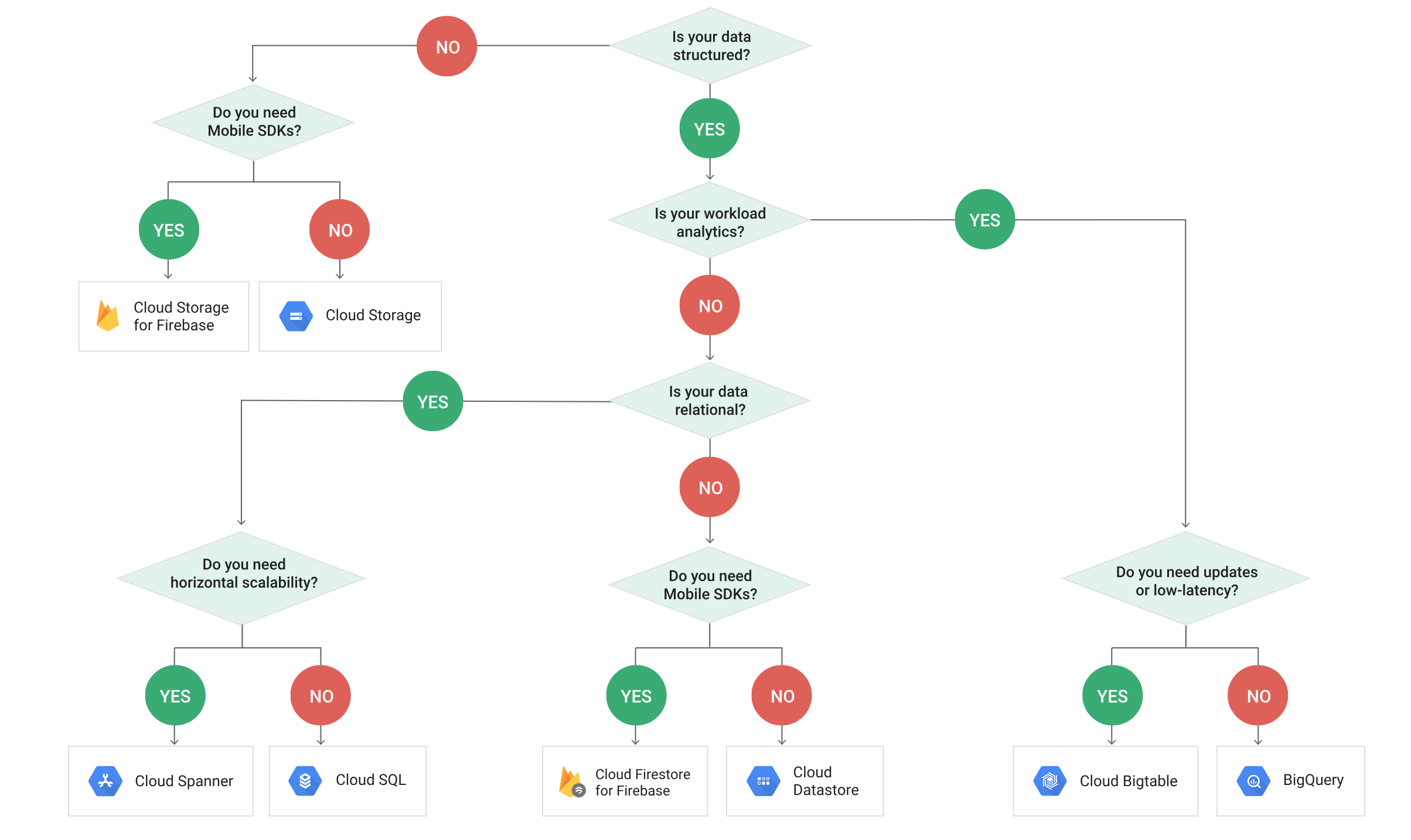
Storage Options Comparison

Feature Hyperdisk Persistent Disk Local SSD Cloud Storage Filestore
Type Network block storage Network block storage Locally attached Object storage Managed NFS
Durability 99.999%–99.9999% 99.999%–99.9999% Not durable (ephemeral) 99.999999999% (11 nines) Regional redundancy
Boot Disk Yes (Balanced only) Yes No No No
Performance Up to 350K IOPS / 5,000 MiB/s Up to 120K IOPS (Extreme) Very high (lowest latency) High throughput, higher latency Up to 26 GiB/s (Zonal)
Multi-VM Access Yes (multi-writer / read-only) Yes (multi-writer / read-only) No (single VM only) Yes Yes
Encryption Google-managed / CMEK / Confidential Google-managed / CMEK / CSEK Automatic (no CSEK) Google-managed / CMEK / CSEK Google-managed / CMEK

Google Cloud Compute Engine Storage Options

Storage Options Performance Comparison

Google Cloud Compute Engine Storage Performance

GCP Certification Exam Practice Questions

  • Questions are collected from Internet and the answers are marked as per my knowledge and understanding (which might differ with yours).
  • GCP services are updated everyday and both the answers and questions might be outdated soon, so research accordingly.
  • GCP exam questions are not updated to keep up the pace with GCP updates, so even if the underlying feature has changed the question might not be updated
  • Open to further feedback, discussion and correction.
  1. A company needs block storage for a database running on a C4 machine that requires the highest IOPS with configurable performance. Which storage option should they use?
    1. Persistent Disk SSD (pd-ssd)
    2. Hyperdisk Balanced
    3. Hyperdisk Extreme
    4. Local SSD
    Show Answer

    Answer: c – Hyperdisk Extreme provides the highest IOPS (up to 350,000) with configurable performance on C4 machine series.

  2. An organization wants to ensure zero data loss (RPO = 0) across zones for their mission-critical application running on C3 VMs. Which storage option provides this?
    1. Regional Persistent Disk
    2. Hyperdisk Balanced High Availability
    3. Hyperdisk Balanced with Asynchronous Replication
    4. Cloud Storage with multi-region bucket
    Show Answer

    Answer: b – Hyperdisk Balanced High Availability synchronously replicates data across two zones within the same region with RPO of 0. For 3rd-gen+ machine series, it is preferred over Regional Persistent Disks.

  3. A data science team needs to share a large ML model dataset across 500 GPU instances for inference. Which storage type is most appropriate?
    1. Hyperdisk Balanced with multi-writer
    2. Hyperdisk ML
    3. Hyperdisk Throughput
    4. Cloud Storage
    Show Answer

    Answer: b – Hyperdisk ML supports read-only attachment to up to 2,500 instances simultaneously and provides the highest read-only throughput, making it ideal for ML inference workloads.

  4. Which of the following statements about Local SSD on newer machine series (C3, C4) is correct?
    1. Local SSD can be attached to any C4 machine type after instance creation
    2. Local SSD is available only on machine types ending in -lssd (e.g., c3-standard-88-lssd)
    3. Local SSD is automatically attached to all C3 machine types
    4. Local SSD on C4 uses HDD storage for cost savings
    Show Answer

    Answer: b – For C3, C3D, C4, and C4D machine series, Local SSD is only available with specific machine types ending in -lssd.

  5. A company has a Hadoop cluster requiring high throughput, low-cost storage. Which Hyperdisk type is most suitable?
    1. Hyperdisk Balanced
    2. Hyperdisk Extreme
    3. Hyperdisk Throughput
    4. Hyperdisk ML
    Show Answer

    Answer: c – Hyperdisk Throughput is designed for scale-out analytics workloads like Hadoop, Spark, and Kafka, providing high throughput at a cost-effective price.

  6. Which Hyperdisk feature can improve MySQL database write performance by up to 25%?
    1. Customizable IOPS
    2. Torn write protection
    3. Storage Pools
    4. Multi-writer mode
    Show Answer

    Answer: b – Hyperdisk’s built-in torn write protection eliminates the need for database-level doublewrite buffers, increasing write throughput by up to 25%.

  7. An organization running N1 VMs needs high-performance block storage. Which storage option is available?
    1. Hyperdisk Balanced
    2. Hyperdisk Extreme
    3. Extreme Persistent Disk (pd-extreme)
    4. Hyperdisk ML
    Show Answer

    Answer: c – N1 machine series does not support any Hyperdisk type. Extreme Persistent Disk (pd-extreme) is available for high-performance needs on older machine series.

  8. Which storage option should be used to protect Hyperdisk data from a regional outage?
    1. Hyperdisk Balanced High Availability
    2. Regional Persistent Disk
    3. Asynchronous Replication
    4. Cloud Storage multi-region bucket
    Show Answer

    Answer: c – Asynchronous Replication maintains a copy of Hyperdisk data in another region for cross-regional disaster recovery. Hyperdisk Balanced HA only protects against zonal outages within a region.
References

Google Cloud Router – Dynamic BGP Routing

Google Cloud Router

  • Cloud Router is a fully distributed and managed service that programs custom dynamic routes and scales with the network traffic.
  • Cloud Router works with both legacy networks and VPC networks.
  • Cloud Router isn’t a connectivity option, but a service that works over Cloud VPN or Interconnect connections to provide dynamic routing by using the Border Gateway Protocol (BGP) for the VPC networks.
  • Cloud Router isn’t supported for Direct Peering or Carrier Peering connections.
  • Cloud Router isn’t a physical device that might cause a bottleneck, and it can’t be used by itself.
  • Cloud Routers don’t provide packet routing or forwarding capability.
  • Cloud Router is required or recommended in the following cases:
    • Required for Cloud NAT
    • Required for Cloud Interconnect (Dedicated, Partner, and Cross-Cloud Interconnect)
    • Required for HA VPN
    • Required for Router appliances (Network Connectivity Center)
    • A recommended configuration option for Classic VPN
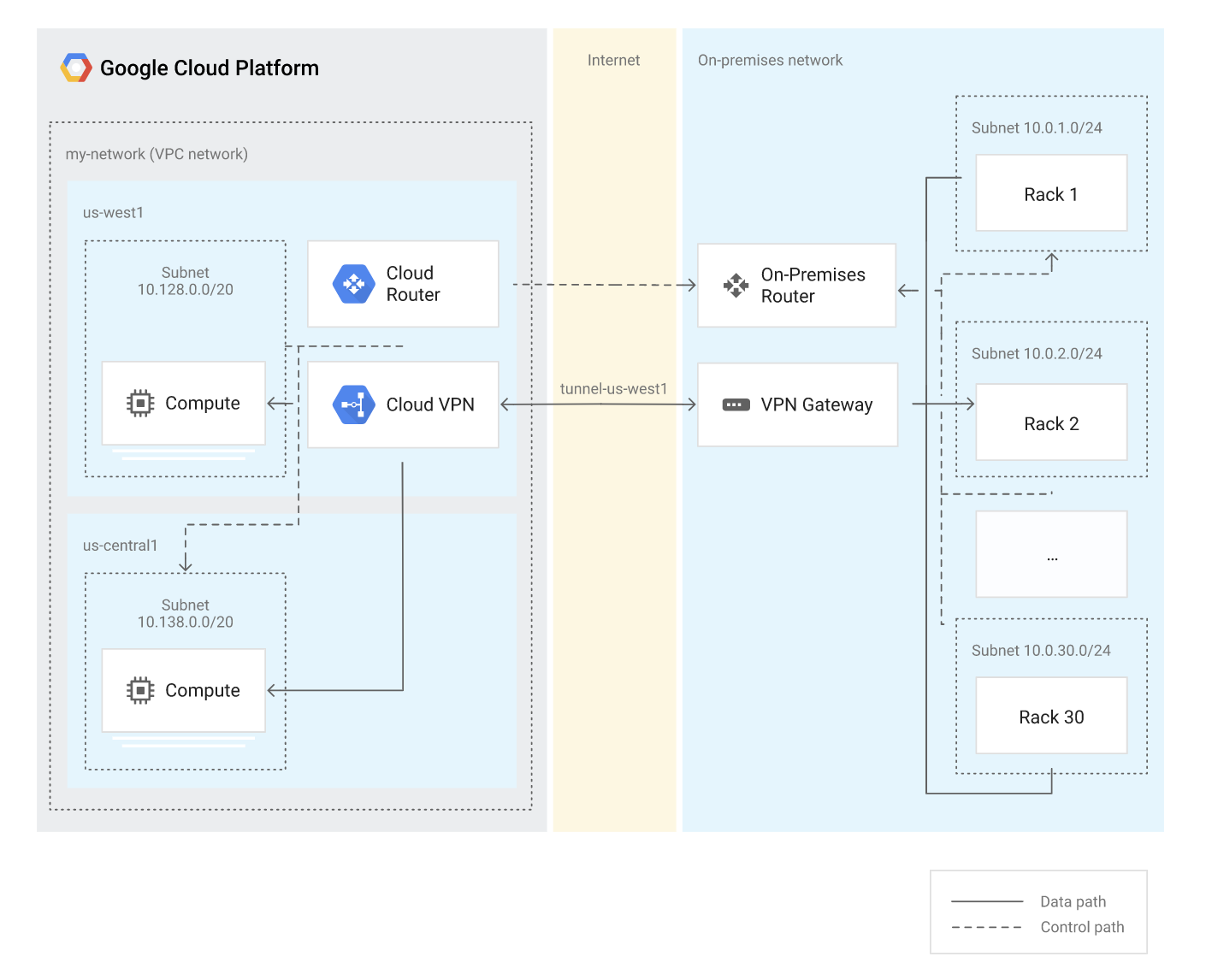
  • Cloud Router helps dynamically exchange routes between the Google Cloud network and the on-premises network.
  • Cloud Router peers with the on-premises VPN gateway or router to provide dynamic routing and exchanges topology information through BGP.
  • Cloud Router frees you from maintaining static routes.
  • Google Cloud recommends creating two Cloud Routers in each region for a Cloud Interconnect for 99.99% availability.
  • Cloud Router supports following dynamic routing mode:
    • Regional routing mode – provides visibility to resources only in the defined region.
    • Global routing mode – provides visibility to resources in all regions.

Google Cloud Router - Global Dynamic Routing

Cloud Router Key Features

  • BGP Session Management – Manages BGP sessions with support for Bidirectional Forwarding Detection (BFD) and MD5 authentication.
  • Advertised Routes – Advertises IP ranges to the peer network, including subnet routes and custom route advertisements.
  • Learned Routes – Uses routes received from BGP peers and custom learned routes to create dynamic routes in VPC networks.
  • BGP Route Policies – Allows setting rules to filter BGP routes or modify BGP route attributes (GA since March 2025).
  • IPv6 Support – Supports IPv6 route exchange through BGP over IPv6 or BGP over IPv4 using multiprotocol BGP (MP-BGP).

BGP Route Policies

  • BGP route policies let you set rules to filter BGP routes or modify BGP route attributes.
  • BGP route policies can be applied to both inbound (learned) and outbound (advertised) BGP routes.
  • A particular BGP route policy can be applied only in one direction (inbound OR outbound), but not both simultaneously.
  • BGP route policies can be applied to multiple BGP peers on Cloud Router.
  • Route policies use the Common Expression Language (CEL) to define conditions and actions.
  • Each policy is defined as an ordered list of terms, evaluated in sequence, with conditions and corresponding actions.
  • Use cases include:
    • Modifying the best-preferred BGP route to influence traffic paths
    • Filtering routes based on prefixes or communities
    • Modifying route attributes (MED, AS path, communities) before advertisement or import
  • Named Sets (Preview, March 2026) – Group together expressions of communities or BGP prefixes, allowing them to be managed or referenced as a single entity within route policies.
  • BGP route policies are not supported for custom learned routes.

Custom Learned Routes

  • Custom learned routes let you configure a BGP session to include learned routes that you manually specify.
  • Cloud Router behaves as if it learned these routes from the BGP peer.
  • Custom learned routes are useful when you don’t have administrator control to configure a remote peer router.
  • Advantages over static routes:
    • Can detect a loss of reachability in the next hop and react accordingly to avoid dropping traffic.
    • Support using HA VPN tunnels or Cloud Interconnect VLAN attachments as next hops.
  • Custom learned routes can be created along with a BGP session or added to an existing BGP session.
  • Custom learned routes became GA in July 2023.

Best Path Selection Modes

  • Cloud Router supports two best path selection modes for learned routes:
    • Legacy mode (default) – The default mode. Recommended for critical workloads.
    • Standard mode – Offers support for consistent AS path-based routing and more control over how BGP prefixes are ranked in VPC networks. GA since December 2024.
  • Standard mode provides more predictable path selection behavior, aligned with standard BGP best path selection algorithms.
  • The best path selection mode is configured at the VPC network level.

Bidirectional Forwarding Detection (BFD)

  • BFD is a UDP-based detection protocol that provides a low-overhead method of detecting failures in the forwarding path between two adjacent routers.
  • With BFD enabled on Cloud Router, end-to-end failure detection time can be as short as 5 seconds.
  • BFD helps quickly detect forwarding path outages such as BGP up or down events, allowing for more resilient hybrid networks.
  • BFD for Cloud Router is GA since February 2022.

BGP MD5 Authentication

  • Cloud Router supports MD5 authentication for BGP sessions to verify the authenticity of BGP messages.
  • MD5 authentication helps protect BGP sessions from spoofed TCP segments.
  • Both the Cloud Router and the peer router must use the same authentication key.
  • MD5 authentication for Cloud Router is GA since November 2022.

IPv6 Support and Multiprotocol BGP (MP-BGP)

  • Cloud Router supports IPv6 BGP sessions (GA since May 2024), allowing exchange of IPv6 prefixes over IPv6 BGP sessions.
  • With MP-BGP, you can exchange IPv6 routes over an IPv4 BGP session or IPv4 routes over an IPv6 BGP session.
  • To exchange both IPv4 and IPv6 traffic in a single BGP session, select the IPv4 and IPv6 (dual stack) stack type in the network connectivity product (e.g., HA VPN or Dedicated Interconnect).
  • You can enable or disable IPv4 or IPv6 route exchange in a specific BGP session by modifying the BGP peer configuration.
  • MP-BGP for exchanging IPv6 prefixes over IPv4 BGP sessions has been GA since December 2022.

Graceful Restart

  • Cloud Router supports graceful restart to minimize traffic disruption during Cloud Router task restarts or maintenance.
  • With graceful restart, traffic between networks isn’t disrupted as long as the BGP session is re-established within the graceful restart period.
  • Google Cloud recommends enabling graceful restart on the on-premises BGP device.
  • The default graceful restart timer and stalepath timer should be configured based on the specific deployment requirements.

Route Advertisements

  • Cloud Router advertises the IP ranges of subnets in the VPC network to on-premises peers by default.
  • Custom route advertisements allow you to control which routes are advertised:
    • Advertise all subnets (default behavior)
    • Advertise custom IP ranges
    • Advertise specific subnets
  • Custom route advertisements can be configured at the Cloud Router level or per BGP peer.

Cloud Router with Network Connectivity Center

  • Network Connectivity Center (NCC) is a hub-and-spoke orchestration framework for network connectivity.
  • Cloud Router is required for Router appliance instances, which are NCC features for using third-party network virtual appliances.
  • Router appliance instances use Cloud Router for BGP peering to exchange routes between the virtual appliance and the VPC network.
  • NCC supports site-to-site data transfer between on-premises sites using Google’s network.

GCP Certification Exam Practice Questions

  • Questions are collected from Internet and the answers are marked as per my knowledge and understanding (which might differ with yours).
  • GCP services are updated everyday and both the answers and questions might be outdated soon, so research accordingly.
  • GCP exam questions are not updated to keep up the pace with GCP updates, so even if the underlying feature has changed the question might not be updated
  • Open to further feedback, discussion and correction.

Question 1: You need to detect forwarding path failures between your on-premises router and Google Cloud as quickly as possible. What feature should you enable on Cloud Router?

  1. MD5 Authentication
  2. Graceful Restart
  3. Bidirectional Forwarding Detection (BFD)
  4. Custom Learned Routes
Show Answer

Answer: c. Bidirectional Forwarding Detection (BFD)

BFD provides sub-5-second failure detection for forwarding path outages between adjacent routers.

Question 2: Your organization wants to filter specific BGP routes learned from an on-premises peer and modify route attributes before importing them into your VPC routing table. Which Cloud Router feature should you use?

  1. Custom Route Advertisements
  2. Custom Learned Routes
  3. BGP Route Policies
  4. Best Path Selection Mode
Show Answer

Answer: c. BGP Route Policies

BGP route policies let you set rules to filter BGP routes or modify BGP route attributes for both inbound (learned) and outbound (advertised) routes.

Question 3: You want to exchange IPv6 routes with your on-premises network over an existing IPv4 BGP session. What feature should you configure?

  1. IPv6 BGP Session
  2. Multiprotocol BGP (MP-BGP)
  3. Dual-stack Cloud Router
  4. IPv6 Route Advertisements
Show Answer

Answer: b. Multiprotocol BGP (MP-BGP)

MP-BGP allows exchanging IPv6 routes over IPv4 BGP sessions (or IPv4 routes over IPv6 sessions) by selecting the dual-stack type in the connectivity product.

Question 4: You need routes that can detect loss of reachability at the next hop and that can use HA VPN tunnels as next hops. Static routes don’t meet these requirements. What should you use?

  1. BGP Route Policies
  2. Dynamic Routes from BGP peers
  3. Custom Learned Routes
  4. Policy-based Routes
Show Answer

Answer: c. Custom Learned Routes

Custom learned routes let you manually configure routes on a BGP session. Unlike static routes, they can detect loss of reachability and support HA VPN tunnels or VLAN attachments as next hops.

Question 5: Which of the following Google Cloud products require Cloud Router for dynamic routing? (Choose 3)

  1. Dedicated Interconnect
  2. Cloud CDN
  3. HA VPN
  4. Cross-Cloud Interconnect
  5. Cloud DNS
Show Answer

Answer: a, c, d

Cloud Router is required for Dedicated Interconnect, HA VPN, Cross-Cloud Interconnect, Partner Interconnect, and Router appliances. It is not used by Cloud CDN or Cloud DNS.

References

Google Cloud Data Transfer Services Overview

Google Cloud Data Transfer Services

Google Cloud Data Transfer services provide various options in terms of network and transfer tools to help transfer data from on-premises to Google Cloud network.

📋 Last Updated: June 2026 — Updated with gcloud storage CLI (gsutil replacement), Storage Transfer Service event-driven transfers, Cross-Cloud Interconnect, Transfer Appliance data export, BigQuery Data Transfer Service new sources, Classic VPN dynamic routing deprecation, and Network Connectivity Center.

Network Services

Cloud VPN

  • Provides network connectivity with Google Cloud between on-premises network and Google Cloud, or from Google Cloud to another cloud provider.
  • Cloud VPN still routes the traffic through the Internet.
  • Cloud VPN is quick to set up (as compared to Interconnect)
  • Each Cloud VPN tunnel can support up to 3 Gbps total for ingress and egress, but available bandwidth depends on the connectivity. Bandwidth can be increased by adding more tunnels.
  • Choose Cloud VPN to encrypt traffic to Google Cloud, or with lower throughput solution, or experimenting with migrating the workloads to Google Cloud
  • HA VPN is the recommended VPN configuration offering a 99.99% SLA when configured with tunnels on both interfaces per Google best practices.
  • Classic VPN provides a 99.9% SLA. Note: Classic VPN dynamic routing (BGP) was deprecated on August 1, 2025. HA VPN must be used for BGP-based VPN connectivity.
  • HA VPN over Cloud Interconnect allows encrypting traffic traversing Dedicated or Partner Interconnect connections for additional security and compliance.
  • Cloud VPN supports customizable cipher options (Public Preview as of June 2025) allowing configuration of ciphers per security requirements.
  • Cloud Interconnect offers a direct connection to Google Cloud through Google or one of the Cloud Interconnect service providers.
  • Cloud Interconnect service prevents data from going on the public internet and can provide a more consistent throughput for large data transfers
  • For enterprise-grade connection to Google Cloud that has higher throughput requirements, choose Dedicated Interconnect (10 Gbps to 100 Gbps) or Partner Interconnect (50 Mbps to 50 Gbps)
  • Cloud Interconnect provides access to all Google Cloud products and services from your on-premises network except Google Workspace.
  • Cloud Interconnect also allows access to supported APIs and services by using Private Google Access from on-premises hosts.
  • Cross-Cloud Interconnect enables dedicated, private connectivity between Google Cloud and another cloud service provider (AWS, Azure, Oracle Cloud Infrastructure, Alibaba Cloud). This eliminates the need for traffic to traverse the public internet for multicloud architectures.
  • Partner Cross-Cloud Interconnect (available for AWS) provides an on-demand method for cross-cloud transport without manually setting up networking components.
  • Cross-Site Interconnect (GA 2025) is a transparent, on-demand Layer 2 connectivity solution leveraging Google’s global infrastructure for high-bandwidth connectivity between on-premises sites.
  • Direct Peering provides access to the Google network with fewer network hops than with a public internet connection
  • By using Direct Peering, internet traffic is exchanged between the customer network and Google’s Edge Points of Presence (PoPs), which means the data does not use the public internet.
  • Google does not offer a Service Level Agreement (SLA) with Direct Peering.
  • For SLA-backed connectivity, Cloud Interconnect (Dedicated or Partner) is recommended over Direct Peering.

Network Connectivity Center

  • Network Connectivity Center (NCC) is an orchestration framework that simplifies network connectivity using a hub-and-spoke model.
  • Supports three types of spokes: VPC spokes, Producer VPC spokes, and Hybrid spokes (HA VPN tunnels, Cloud Interconnect VLAN attachments, Router appliance VMs).
  • Enables site-to-cloud connectivity (external networks to Google Cloud) and site-to-site connectivity (using Google Cloud as enterprise WAN).
  • Supports up to 250 VPC spokes per hub and provides transitivity between workload VPCs.
  • Useful for managing complex multicloud and hybrid network topologies centrally.

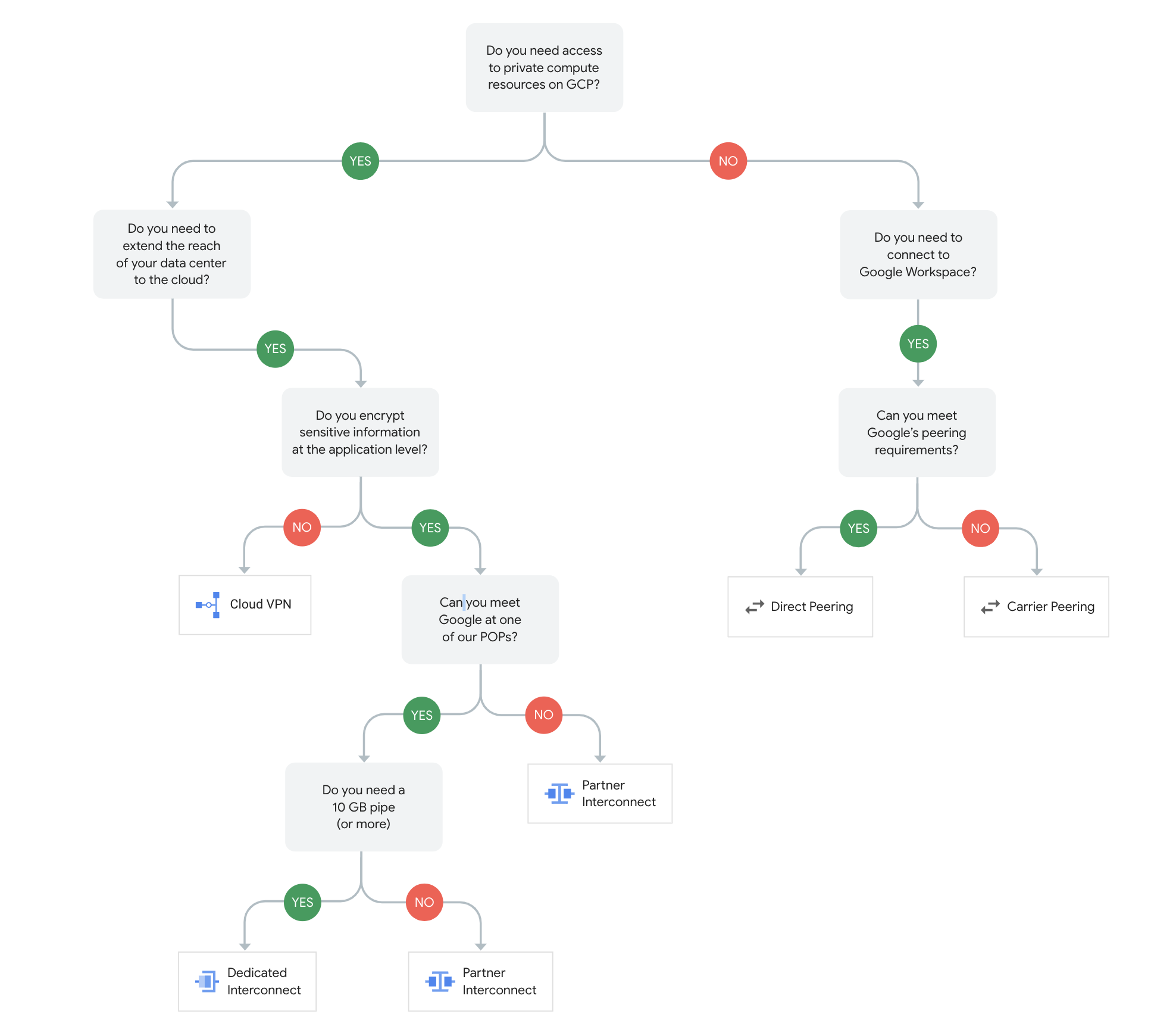
Google Cloud Networking Services Decision Tree

Google Cloud Hybrid Connectivity

Transfer Services

gcloud storage (formerly gsutil)

⚠️ gsutil Deprecation Notice: gsutil is no longer the recommended CLI for Cloud Storage. Google recommends using gcloud storage commands in the Google Cloud CLI instead. gsutil does not support newer Cloud Storage features such as soft delete and managed folders. gcloud storage commands require less manual optimization and provide faster transfer rates.
  • gcloud storage (replacement for gsutil) is the standard tool for small- to medium-sized transfers (less than 1 TB) over a typical enterprise-scale network, from a private data center to Google Cloud.
  • gcloud storage provides all the basic features needed to manage Cloud Storage instances, including copying data to and from the local file system and Cloud Storage.
  • gcloud storage can also move, rename, and remove objects and perform real-time incremental syncs (similar to rsync) to a Cloud Storage bucket.
  • gcloud storage is especially useful in the following scenarios:
    • As-needed transfers or during command-line sessions by your users.
    • Transferring only a few files or very large files, or both.
    • Consuming the output of a program (streaming output to Cloud Storage).
    • Watching a directory with a moderate number of files and syncing any updates with very low latencies.
  • gcloud storage provides the following features:
    • Parallel multi-threaded transfers for increased transfer speeds.
    • Composite transfers for a single large file, breaking them into smaller chunks to increase transfer speed. Chunks are transferred and validated in parallel. Once the chunks arrive at Google, they are combined (composited) to form a single object.
    • Uses faster CRC32C hashing algorithm for data integrity checking (improved over gsutil’s crcmod).
  • Migration: Replace gsutil commands with equivalent gcloud storage commands. For example: gsutil cpgcloud storage cp, gsutil rsyncgcloud storage rsync.
  • Storage Transfer Service is a fully managed, highly scalable service to automate transfers into Cloud Storage from multiple sources.
  • Supported Sources:
    • Amazon S3
    • S3-compatible storage (requires agents)
    • Microsoft Azure Blob Storage and Azure Data Lake Storage Gen2
    • Cloud Storage (bucket-to-bucket)
    • Publicly accessible HTTP/HTTPS URLs
    • On-premises file systems (POSIX-compliant, requires agents)
    • Hadoop Distributed File System (HDFS, requires agents)
  • Storage Transfer Service for Cloud-to-Cloud transfers:
    • Supports transfers from S3, Azure Blob Storage, and Cloud Storage without agents.
    • Supports daily copies of any modified objects.
  • Storage Transfer Service for on-premises data:
    • Is designed for large-scale transfers (up to petabytes of data, billions of files).
    • Supports full copies or incremental copies.
    • Can be set up by installing on-premises software (known as agents) onto computers in the data center.
  • Has a simple, managed graphical user interface; even non-technically savvy users (after setup) can use it to move data.
  • Provides robust error-reporting and a record of all files and objects that are moved.
  • Supports executing recurring transfers on a schedule.
  • Event-Driven Transfers (2025-2026):
    • Listens to event notifications to automatically transfer new or updated objects.
    • Supported for AWS S3 (via S3 Event Notifications to Amazon SQS).
    • Supported for Azure Blob Storage and Data Lake Storage Gen2 (via Azure Event Grid to Azure Storage Queues) — available since January 2026.
    • Supported for Cloud Storage (via Pub/Sub notifications).
  • Private Network Transfers (December 2025): Transfer data from AWS S3 or Azure Blob Storage to Cloud Storage over a private network connection using Cross-Cloud Interconnect or Partner Interconnect, optimizing costs and compliance.
  • Google-Managed Private Network for S3: Transfer from S3 over a Google-managed private network, eliminating AWS egress fees with a flat per-GiB rate.
  • AWS GovCloud Support (2026): Supports transfers from S3 buckets in us-gov-east-1 and us-gov-west-1 regions.
  • Organization Policy Constraints (February 2026): Custom organization policy constraints to control Storage Transfer Service usage (e.g., restrict sources or destinations).
  • Encrypts data in transit, supports VPC Service Controls, and uses checksums for data integrity.

Transfer Appliance

  • Transfer Appliance is an excellent option for performing large-scale transfers, especially when a fast network connection is unavailable, it’s too costly to acquire more bandwidth, or it’s a one-time transfer.
  • Expected turnaround time for a network appliance to be shipped, loaded with the data, shipped back, and rehydrated on Google Cloud is approximately 50 days.
  • Consider Transfer Appliance if the online transfer timeframe is calculated to be substantially more than this timeframe.
  • Transfer Appliance requires the ability to receive and ship back the Google-owned hardware.
  • Transfer Appliance is available only in certain countries.
  • Data Export (GA in US): Transfer Appliance now supports exporting data from Cloud Storage to the appliance, which is then shipped to you. This enables large-scale data egress from Google Cloud when network transfer is impractical.
  • gcloud CLI Support (Alpha): gcloud alpha transfer appliances commands allow viewing in-progress results, working with draft orders, and cloning existing orders.
  • Data is encrypted during upload, transit, after upload to Cloud Storage, and during download for data export.

BigQuery Data Transfer Service

  • BigQuery Data Transfer Service automates data movement into BigQuery on a scheduled, managed basis.
  • After a data transfer is configured, the BigQuery Data Transfer Service automatically loads data into BigQuery on a regular basis.
  • BigQuery Data Transfer Service can also initiate data backfills to recover from any outages or gaps.
  • BigQuery Data Transfer Service can only sink data to BigQuery and cannot be used to transfer data out of BigQuery.
  • Also supports dataset copies and scheduled queries within BigQuery.
  • BigQuery Data Transfer Service supports loading data from the following data sources:
    • Google SaaS Applications:
      • Google Ads
      • Google Ad Manager
      • Campaign Manager
      • Search Ads 360
      • Google Merchant Center
      • Google Play
      • YouTube Channel reports
      • YouTube Content Owner reports
      • Google Analytics 4 (GA4) — provides 12 daily partitioned tables reflecting UI reports
    • Cloud Storage — supports incremental and truncated write preferences
    • External cloud storage providers:
      • Amazon S3 (supports cross-cloud transfer)
    • Data warehouses:
      • Teradata
      • Amazon Redshift
    • Third-party connectors (2025):
      • Salesforce Sales Cloud
      • Salesforce Marketing Cloud (SFMC)
      • Facebook Ads
      • Adobe Analytics

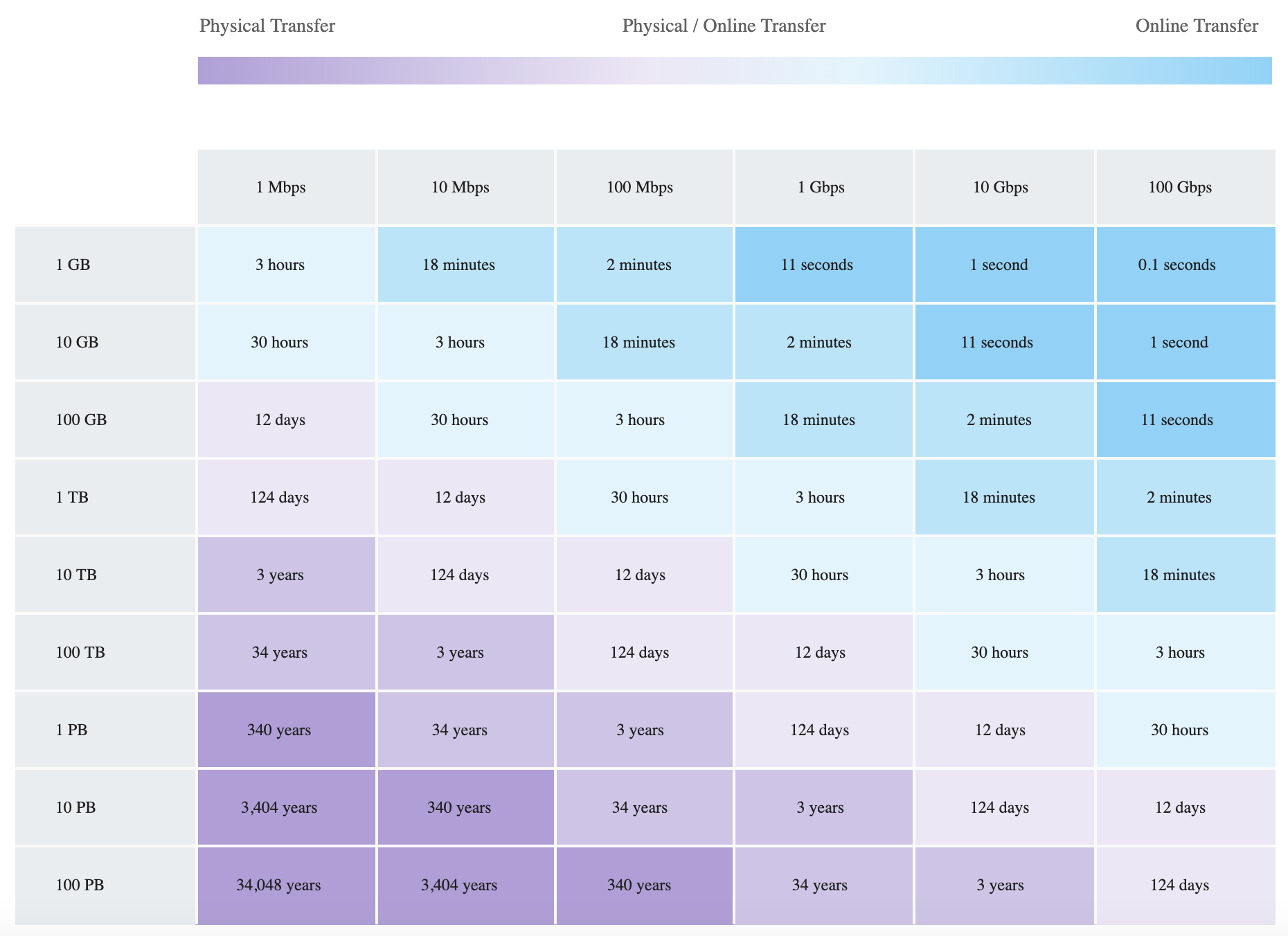
Transfer Data vs Speed Comparison

Data Migration Speeds

Choosing the Right Transfer Method

Method Best For Data Size Network Requirement
gcloud storage Ad-hoc, small transfers < 1 TB Standard internet
Storage Transfer Service Recurring, large cloud-to-cloud or on-premises transfers TB to PB scale Available network (supports private network)
Transfer Appliance One-time massive transfers, limited bandwidth Hundreds of TB to PB Minimal (physical shipping)
BigQuery Data Transfer Service SaaS data ingestion into BigQuery Varies Standard internet

GCP Certification Exam Practice Questions

  • Questions are collected from Internet and the answers are marked as per my knowledge and understanding (which might differ with yours).
  • GCP services are updated everyday and both the answers and questions might be outdated soon, so research accordingly.
  • GCP exam questions are not updated to keep up the pace with GCP updates, so even if the underlying feature has changed the question might not be updated
  • Open to further feedback, discussion and correction.
  1. A company wants to connect cloud applications to an Oracle database in its data center. Requirements are a maximum of 9 Gbps of data and a Service Level Agreement (SLA) of 99%. Which option best suits the requirements?
    1. Implement a high-throughput Cloud VPN connection
    2. Cloud Router with VPN
    3. Dedicated Interconnect
    4. Partner Interconnect
  2. An organization wishes to automate data movement from Software as a Service (SaaS) applications such as Google Ads and Google Ad Manager on a scheduled, managed basis. This data is further needed for analytics and generate reports. How can the process be automated?
    1. Use Storage Transfer Service to move the data to Cloud Storage
    2. Use Storage Transfer Service to move the data to BigQuery
    3. Use BigQuery Data Transfer Service to move the data to BigQuery
    4. Use Transfer Appliance to move the data to Cloud Storage
  3. Your company’s migration team needs to transfer 1PB of data to Google Cloud. The network speed between the on-premises data center and Google Cloud is 100Mbps. The migration activity has a timeframe of 6 months. What is the efficient way to transfer the data?
    1. Use BigQuery Data Transfer Service to transfer the data to Cloud Storage
    2. Expose the data as a public URL and Storage Transfer Service to transfer it
    3. Use Transfer Appliance to transfer the data to Cloud Storage
    4. Use gcloud storage command to transfer the data to Cloud Storage
  4. Your company uses Google Analytics for tracking. You need to export the session and hit data from a Google Analytics 360 reporting view on a scheduled basis into BigQuery for analysis. How can the data be exported?
    1. Configure a scheduler in Google Analytics to convert the Google Analytics data to JSON format, then import directly into BigQuery using bq command line.
    2. Use gcloud storage to export the Google Analytics data to Cloud Storage, then import into BigQuery and schedule it using Cron.
    3. Import data to BigQuery directly from Google Analytics using Cron
    4. Use BigQuery Data Transfer Service to import the data from Google Analytics
  5. A company needs to automatically transfer new files from an AWS S3 bucket to Cloud Storage as soon as they are created, with minimal latency. What is the most efficient approach?
    1. Schedule Storage Transfer Service to run every 15 minutes
    2. Use a Lambda function to call the Cloud Storage API on each new object
    3. Configure Storage Transfer Service event-driven transfers using S3 Event Notifications and Amazon SQS
    4. Use gsutil rsync with a cron job
  6. An organization wants to establish private, high-bandwidth connectivity between their Google Cloud environment and their AWS infrastructure for a multicloud application. Which service should they use?
    1. Cloud VPN with HA configuration
    2. Partner Interconnect
    3. Cross-Cloud Interconnect
    4. Direct Peering
  7. A company needs to transfer 500 TB of data from Azure Blob Storage to Cloud Storage while keeping all traffic off the public internet and maintaining dedicated bandwidth. What combination should they use?
    1. Storage Transfer Service over public internet
    2. Storage Transfer Service with private network transfer over Cross-Cloud Interconnect
    3. Transfer Appliance
    4. gcloud storage cp command
  8. Your organization wants to centrally manage connectivity between multiple VPC networks, on-premises sites, and other cloud providers using a hub-and-spoke model. Which Google Cloud service should you use?
    1. Cloud Router
    2. VPC Network Peering
    3. Shared VPC
    4. Network Connectivity Center

References


Google Cloud VPN – HA VPN & Classic VPN

Google Cloud VPN

  • Cloud VPN securely extends the peer network to the Virtual Private Cloud (VPC) network through an IPsec VPN connection.
  • Traffic traveling between the two networks is encrypted by one VPN gateway and then decrypted by the other VPN gateway.
  • Cloud VPN protects the data as it travels over the internet.
  • Two instances of Cloud VPN can also be connected to each other.
  • Cloud VPN cannot be used to route traffic to the public internet; it is designed for secure communication between private networks.

Cloud VPN Types

  • Google Cloud offers two types of Cloud VPN gateways:
    • HA VPN – Recommended, high-availability with 99.99% SLA
    • Classic VPN – Legacy, 99.9% SLA, limited functionality

Cloud VPN Specifications

  • Each Cloud VPN gateway is a regional resource.
  • Only supports site-to-site IPsec VPN connectivity.
  • Does not support client-to-gateway scenarios i.e., Cloud VPN doesn’t support use cases where client computers need to “dial in” to a VPN by using client VPN software.
  • Only supports IPsec. Other VPN technologies (such as SSL VPN) are not supported.
  • Can be used with Private Google Access for on-premises hosts.
  • Each Cloud VPN gateway must be connected to another Cloud VPN gateway or a peer VPN gateway.
  • Peer VPN gateway must have a static external (internet routable) IPv4 address, needed to configure Cloud VPN.
  • Requires that the peer VPN gateway be configured to support prefragmentation. Packets must be fragmented before being encapsulated.
  • Each Cloud VPN tunnel supports up to 250,000 packets per second (pps) for the sum of ingress and egress traffic, equivalent to between 1 Gbps and 3 Gbps of bandwidth depending on average packet size.
  • Supports IKEv1 and IKEv2 by using an IKE pre-shared key (shared secret) and IKE ciphers. Only pre-shared key authentication is supported.
  • Supports generic routing encapsulation (GRE) traffic (GA since May 2021), enabling services like SASE and SD-WAN.
  • Uses replay detection with a window of 4096 packets (cannot be disabled).
  • Cloud VPN uses ESP in tunnel mode with authentication; does not support AH or ESP in transport mode.
  • Only ESP, UDP 500, and UDP 4500 traffic is permitted to Cloud VPN gateway addresses.

Cloud VPN Components

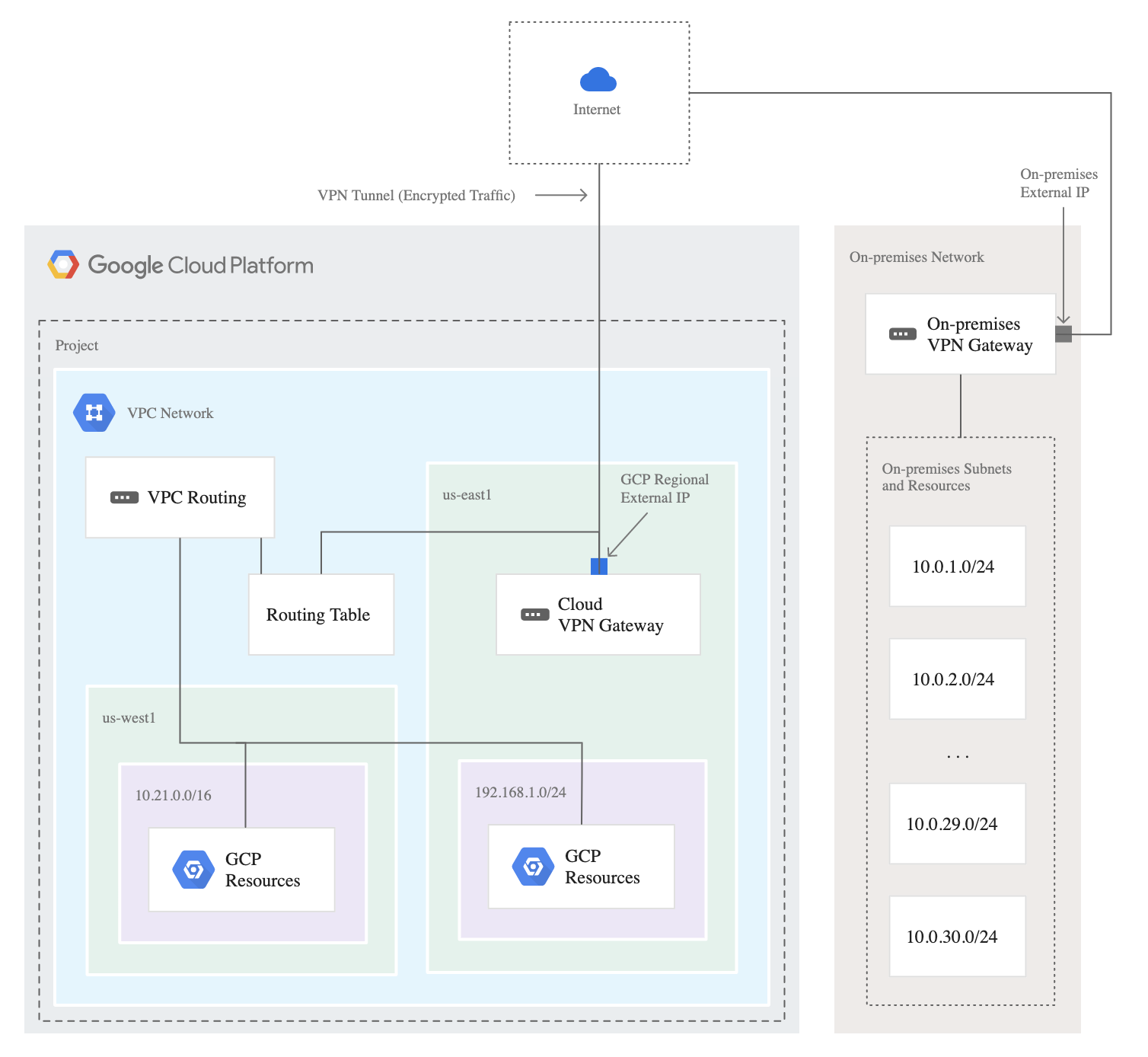
Google Cloud VPN Components

  • Cloud VPN gateway
    • A virtual VPN gateway running in Google Cloud managed by Google, using a specified configuration in the project, and used only by you.
    • Each Cloud VPN gateway is a regional resource that uses one or more regional external IP addresses.
    • A Cloud VPN gateway can connect to a peer VPN gateway.
  • Peer VPN gateway
    • A gateway that is connected to a Cloud VPN gateway.
    • A peer VPN gateway can be one of the following:
      • Another Cloud VPN gateway
      • A VPN gateway hosted by another cloud provider such as AWS or Microsoft Azure
      • An on-premises VPN device or VPN service
  • External VPN gateway
    • A gateway resource configured for HA VPN that provides information to Google Cloud about the peer VPN gateway or gateways.
  • Remote peer IP address
    • For an HA VPN gateway interface that connects to an external VPN gateway, the remote peer IP address is the IP address of the interface on the external VPN gateway that is used for the tunnel.
  • VPN tunnel
    • A VPN tunnel connects two VPN gateways and serves as a virtual medium through which encrypted traffic is passed.
  • Internet Key Exchange (IKE)
    • IKE is the protocol used for authentication and to negotiate a session key for encrypting traffic.

Classic VPN

⚠️ Classic VPN Dynamic Routing (BGP) Deprecated – August 1, 2025

Dynamic routing (BGP) for Classic VPN tunnels was deprecated on August 1, 2025.

Existing Classic VPN tunnels using BGP will continue to function but operate without an availability SLA and are no longer supported.

What remains supported:

  • Classic VPN tunnels using static routing from Classic VPN gateways to on-premises VPN gateways
  • Classic VPN tunnels using static routing from a Classic VPN gateway to a Compute Engine VM acting as a VPN gateway

Recommendation: Migrate to HA VPN for all production traffic requiring dynamic routing (BGP). HA VPN provides 99.99% SLA, IPv6 support, and is the only path for BGP functionality in Cloud VPN.

  • Classic VPN gateways have a single interface, a single external IP address, and support tunnels that use static routing (policy-based or route-based) only.
  • Classic VPN provides an SLA of 99.9% service availability.
  • Classic VPN gateways don’t support IPv6.
  • Classic VPNs are referred to as target VPN gateways in the API documentation.

HA VPN (High Availability VPN)

  • HA VPN is the recommended Cloud VPN solution that securely connects the on-premises network to the VPC network through an IPsec VPN connection.
  • HA VPN provides an SLA of 99.99% service availability when configured with two interfaces and two external IP addresses.
  • When you create an HA VPN gateway, Google Cloud automatically chooses two external IP addresses, one for each of its interfaces. Each IP address is automatically chosen from a unique address pool to support high availability.
  • Each HA VPN gateway interface supports multiple tunnels. You can also create multiple HA VPN gateways.
  • Peer VPN gateway device must support dynamic (BGP) routing.
  • HA VPN supports only dynamic routing (BGP). Static routing is not supported with HA VPN.
  • HA VPN can connect two VPC networks in different regions (inter-region support added June 2024).
  • To achieve high availability when both VPN gateways are in VPC networks, two HA VPN gateways must be used, and both must be in the same region.
  • If the VPC network uses global dynamic routing mode, routes shared through the gateways can be in any region.
  • HA VPN supports connecting to Compute Engine VM instances with external IP addresses (GA Jan 2024).
  • Known as the vpn-gateway resource in the API (vs. target-vpn-gateway for Classic).
  • No forwarding rules required for HA VPN gateways; external IP addresses are created from a pool.

Google Cloud VPN HA

IPv6 Support in HA VPN

  • HA VPN supports dual-stack (IPv4 and IPv6) and IPv6-only gateways (GA since June 2024).
  • Classic VPN does not support IPv6.
  • HA VPN gateway stack types:
    • IPV4_ONLY – Supports only IPv4 traffic (default). Gateway gets IPv4 external addresses.
    • IPV4_IPV6 (Dual-stack) – Supports both IPv4 and IPv6 traffic. Gateway gets both IPv4 and IPv6 external addresses.
    • IPV6_ONLY – Supports only IPv6 traffic. Gateway gets IPv6 external addresses.
  • IKEv2 must be used to enable IPv6 traffic in HA VPN.
  • Dual-stack HA VPN uses Multiprotocol BGP (MP-BGP) sessions in Cloud Router to exchange both IPv4 and IPv6 routes.
  • Once created, the stack type of an HA VPN gateway cannot be modified; must delete and recreate.
  • When connecting two HA VPN gateways, both must use identical IP stack types.

Customizable Cipher Options

  • Cloud VPN supports customizable cipher options for VPN tunnels (GA since September 2025).
  • Cipher selection allows configuring ciphers for IKE SA negotiation (phase 1) and IPsec SA negotiation (phase 2).
  • Cipher selection is available only with IKEv2, not IKEv1.
  • Once configured, cipher options cannot be modified; the tunnel must be deleted and recreated.
  • If AEAD ciphers are specified for encryption, separate integrity ciphers cannot be specified.
  • Note: DH algorithm group 22 has been deprecated. Google is rolling out changes to prefer more secure cipher algorithms first.

Active/Active vs Active/Passive Routing Options

  • If a Cloud VPN tunnel goes down, it restarts automatically.
  • If an entire virtual VPN device fails, Cloud VPN automatically instantiates a new one with the same configuration.
  • The new gateway and tunnel connect automatically.
  • Active/Active
    • Effective aggregate throughput is the combined throughput of both tunnels.
    • Peer gateway advertises the peer network’s routes with identical MED values for each tunnel.
    • Egress traffic sent to the peer network uses equal-cost multipath (ECMP) routing.
    • If one tunnel becomes unavailable, Cloud Router withdraws the learned custom dynamic routes whose next hops are the unavailable tunnel, which can take ~40 seconds.
  • Active/Passive
    • Effective aggregate throughput is the individual throughput of each tunnel.
    • Peer gateway advertises the peer network’s routes with different MED values for each tunnel.
    • Egress traffic sent to the peer network uses the route with the highest priority, as long as the associated tunnel is available.
    • Peer gateway can only use the tunnel with the highest priority to send traffic to Google Cloud.
    • If one tunnel becomes unavailable, Cloud Router withdraws the learned custom dynamic routes whose next hops are the unavailable tunnel, which can take ~40 seconds.
  • Google Cloud recommends:
    • Using Active/Passive configuration with a single HA VPN Gateway as the observed bandwidth capacity at the time of normal tunnel operation matches the bandwidth capacity observed during failover.
    • Using Active/Active configuration with multiple HA VPN Gateways as the observed bandwidth capacity at the time of normal tunnel operation is twice that of the guaranteed bandwidth capacity.

HA VPN over Cloud Interconnect

  • HA VPN over Cloud Interconnect lets you encrypt the traffic that traverses Dedicated Interconnect or Partner Interconnect connections (GA since February 2023).
  • Deploys HA VPN tunnels over VLAN attachments to provide IPsec encryption alongside the increased capacity of Cloud Interconnect.
  • Network traffic never traverses the public internet since it uses Cloud Interconnect infrastructure.
  • Particularly valuable for Partner Interconnect where traffic passes through third-party providers, requiring IPsec encryption for data security and compliance.
  • Each HA VPN tunnel over Cloud Interconnect has a bandwidth of 3 Gbps.
  • HA VPN gateways associated with VLAN attachments can be assigned regional internal IP addresses.

Network Connectivity Center (NCC) Integration

  • Using Network Connectivity Center, HA VPN tunnels can connect on-premises networks together, passing traffic between them as a data transfer network.
  • Connect networks by attaching a pair of tunnels to an NCC spoke for each on-premises location, then connect each spoke to an NCC hub.

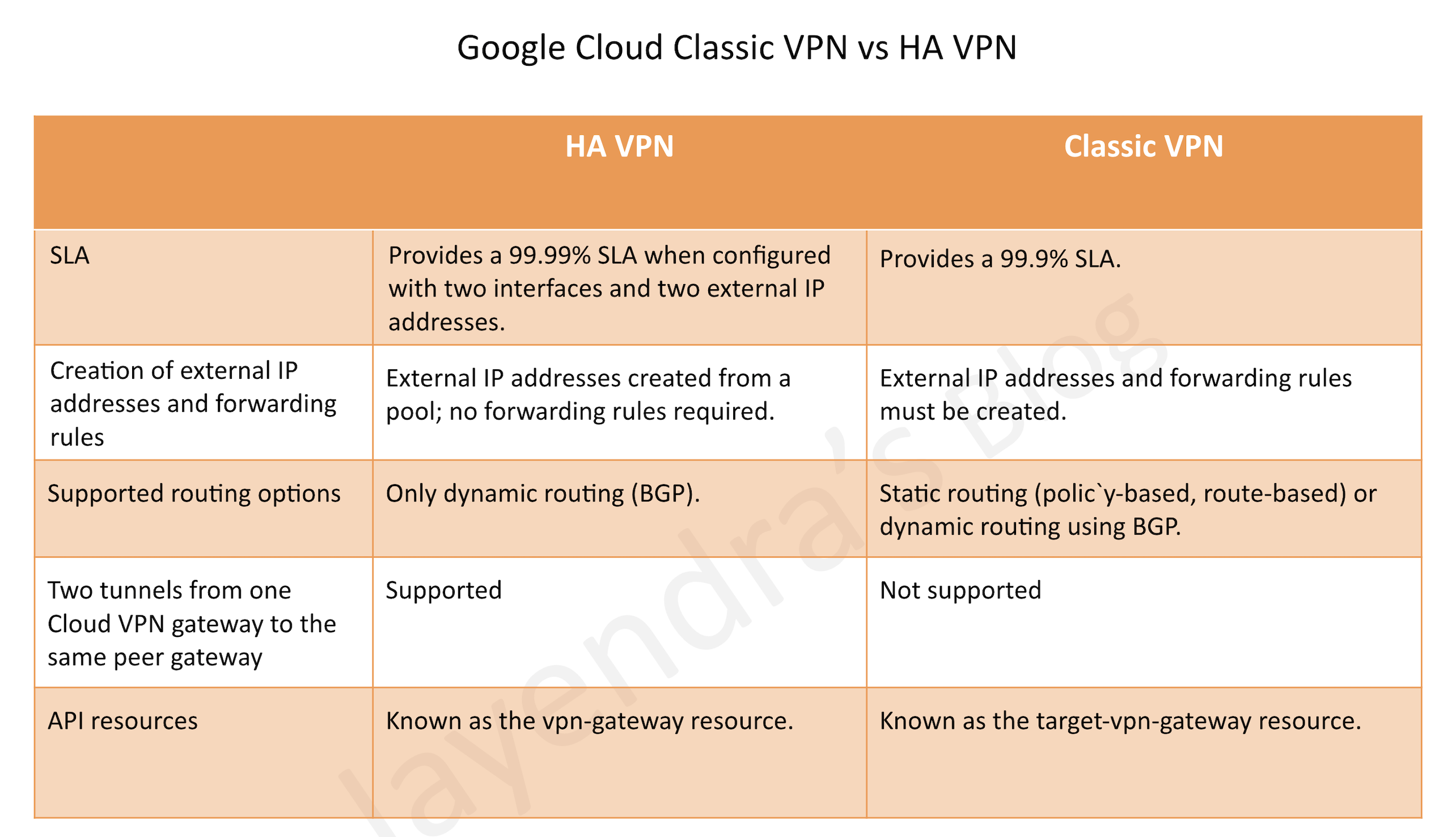
Classic VPN vs HA VPN

Google Cloud Classic VPN vs HA VPN

Feature HA VPN Classic VPN
SLA 99.99% (most topologies) 99.9%
Routing Dynamic (BGP) only Static only (BGP deprecated Aug 2025)
External IPs Auto-assigned from pool; no forwarding rules Must create external IPs and forwarding rules
Interfaces Two interfaces Single interface
IPv6 Supported (dual-stack and IPv6-only) Not supported
Two tunnels to same peer Supported Not supported
Connect to Compute Engine VMs Supported (recommended) Supported
API resource vpn-gateway target-vpn-gateway

Cloud VPN Monitoring

  • Cloud VPN provides predefined monitoring dashboards in the Google Cloud console for quick insight into system health and tunnel performance (GA since December 2025).
  • Displays key metrics for project-wide health and tunnel-specific diagnosis without manual configuration.
  • Cloud VPN supports Dead Peer Detection (DPD) per RFC 3706 to verify peer is alive. DPD interval is not configurable.
  • Network Topology visualization shows Cloud VPN gateways and VPN tunnels as entities.

GCP Certification Exam Practice Questions

  • Questions are collected from Internet and the answers are marked as per my knowledge and understanding (which might differ with yours).
  • GCP services are updated everyday and both the answers and questions might be outdated soon, so research accordingly.
  • GCP exam questions are not updated to keep up the pace with GCP updates, so even if the underlying feature has changed the question might not be updated
  • Open to further feedback, discussion and correction.
  1. Your company’s infrastructure is on-premises, but all machines are running at maximum capacity. You want to burst to Google Cloud. The workloads on Google Cloud must be able to directly communicate to the workloads on-premises using a private IP range. What should you do?
    1. In Google Cloud, configure the VPC as a host for Shared VPC.
    2. In Google Cloud, configure the VPC for VPC Network Peering.
    3. Create bastion hosts both in your on-premises environment and on Google Cloud. Configure both as proxy servers using their public IP addresses.
    4. Set up Cloud VPN between the infrastructure on-premises and Google Cloud.
  2. Your organization requires encryption for traffic between your on-premises data center and Google Cloud, and you already have a Dedicated Interconnect connection. Which solution should you implement?
    1. Create a Classic VPN tunnel over the Dedicated Interconnect.
    2. Deploy HA VPN over Cloud Interconnect to encrypt traffic on the VLAN attachments.
    3. Set up a separate VPN connection over the public internet.
    4. Use application-level TLS encryption only.
  3. You need to connect your on-premises network to Google Cloud VPC with a 99.99% availability SLA. Your on-premises VPN device supports BGP. What Cloud VPN type should you use?
    1. Classic VPN with dynamic routing
    2. Classic VPN with static routing
    3. HA VPN
    4. Classic VPN with policy-based routing
  4. Your company needs to support both IPv4 and IPv6 traffic over a VPN connection to Google Cloud. Which configuration should you choose?
    1. Classic VPN with IPv6 enabled
    2. HA VPN with dual-stack (IPV4_IPV6) stack type
    3. HA VPN with IPV4_ONLY stack type and MP-BGP
    4. Classic VPN with IKEv2
  5. You are configuring HA VPN tunnels for high availability. The peer gateway advertises routes with different MED values for each tunnel. What routing configuration is this?
    1. Active/Active with ECMP
    2. Active/Passive
    3. Static routing with priority
    4. Policy-based routing
  6. Which of the following statements about Classic VPN is TRUE as of August 2025? (Choose two)
    1. Classic VPN tunnels using static routing to on-premises gateways are still supported.
    2. Classic VPN supports dynamic routing (BGP) with full SLA.
    3. Classic VPN tunnels using BGP continue to function but without an availability SLA.
    4. Classic VPN supports IPv6 traffic.
    5. New Classic VPN tunnels with BGP can still be created.

Related Reads

References

Google Cloud Services Cheat Sheet

Google Cloud Certification Exam Cheat Sheet

Google Cloud Certification Exams cover a lot of topics and a wide range of services with minute details for features, patterns, anti-patterns, and their integration with other services. This blog post provides a quick summary of all the services and key points for a quick glance before you appear for the exam.

📋 2026 Exam Updates:
  • Google Cloud certifications are now delivered through Pearson VUE (transitioned from Kryterion in early 2026).
  • Exams are being updated to reflect Google Cloud Next ’26 announcements, including Gemini Enterprise Agent Platform and the updated data and analytics stack.
  • The Professional Machine Learning Engineer exam was significantly updated on June 1, 2026, now focusing heavily on the Gemini Enterprise Agent Platform.
  • A new Cloud Digital Leader beta exam is open through July 5, 2026.

Google Cloud Services

Google Cloud Service Categories (2026)

Google Cloud organizes its 100+ services into the following major categories:

  • Compute – App Engine, Compute Engine, Google Kubernetes Engine (GKE), Cloud Run, Batch, VMware Engine
  • Storage – Cloud Storage, Persistent Disk, Filestore, Cloud Managed Lustre, NetApp Volumes
  • Databases – AlloyDB, Cloud SQL, Spanner, Firestore, Bigtable, Memorystore
  • Networking – VPC, Cloud Load Balancing, Cloud CDN, Cloud DNS, Cloud Interconnect, Cloud Armor, Cloud NAT
  • Security & Identity – IAM, Security Command Center, Wiz (acquired March 2026), Cloud KMS, Sensitive Data Protection, Chrome Enterprise Premium
  • AI/ML & Generative AI – Gemini Enterprise Agent Platform (formerly Vertex AI), Gemini for Google Cloud, Gemini Code Assist, NotebookLM Enterprise
  • Data Analytics – BigQuery, Dataflow, Pub/Sub, Lakehouse (formerly BigLake), Knowledge Catalog (formerly Dataplex), Looker, Managed Service for Apache Spark (formerly Dataproc)
  • Serverless – Cloud Run, Cloud Run functions (formerly Cloud Functions), App Engine, Workflows, Eventarc
  • Developer Tools – Cloud Build, Artifact Registry, Cloud Deploy, Infrastructure Manager, Cloud Workstations, Gemini Code Assist
  • Operations – Cloud Logging, Cloud Monitoring, Cloud Trace, Error Reporting, Cloud Profiler
  • Management Tools – Cloud Shell, Infrastructure Manager, Recommender, Cloud Console
  • Migration – Migration Center, Database Migration Service, Migrate to Virtual Machines, Transfer Appliance
  • API Management – Apigee, API Gateway, Cloud Endpoints
  • Containers – GKE, Cloud Run, Cloud Build, Artifact Registry, Cloud Service Mesh

Key Service Renamings and Changes (2024-2026)

  • Vertex AIGemini Enterprise Agent Platform (announced at Cloud Next ’26, April 2026)
  • Cloud FunctionsCloud Run functions (merged into Cloud Run, August 2024)
  • DataprocManaged Service for Apache Spark
  • Cloud ComposerManaged Service for Apache Airflow
  • BigLakeLakehouse
  • Dataplex Universal CatalogKnowledge Catalog
  • Contact Center AIGemini Enterprise for Customer Experience (GECX)
  • Vertex AI SearchAgent Search on Gemini Enterprise Agent Platform
  • BeyondCorp EnterpriseChrome Enterprise Premium
  • Container RegistryArtifact Registry (Container Registry shut down March 2025)

Google Cloud Marketplace

Note: Google Cloud Marketplace was previously known as Cloud Launcher (renamed in 2018).

  • Google Cloud Marketplace offers a universal catalog of solutions from Google and partner ecosystem for customers to easily discover, try, buy, and use.
    • Deploy production-grade solutions in a few clicks
    • Single bill for all Google Cloud and 3rd party services
    • Includes AI agents and agent tools marketplace (launched 2025)
    • Supports Gemini-powered natural language search to discover solutions
    • Private Marketplace for organizational governance (enhanced March 2025)
    • Variable revenue share model for partners (3% down to 1.5%)
⚠️ Deployment Manager Deprecated: Google Cloud Deployment Manager was discontinued on March 31, 2026. Solutions in Marketplace are now managed using Infrastructure Manager (Terraform-based) or standard Google Cloud tools. Migrate existing Deployment Manager configurations to Terraform via Infrastructure Manager.

Major New Services & Features (2024-2026)

Gemini Enterprise Agent Platform (formerly Vertex AI)

  • Unified platform to build, deploy, scale, govern, and optimize AI agents
  • All Vertex AI services are now delivered exclusively through the Agent Platform
  • Includes Model Garden, Agent Development Kit (ADK), Agent Governance Stack
  • Supports Agent-to-Agent (A2A) protocol for agent interoperability
  • Session memory and centralized governance for production agents

Gemini Enterprise

  • Unified agentic portfolio combining AI agents, Gemini models, and Google search
  • Connects to enterprise data sources for workflow automation
  • Formerly Agentspace (absorbed into Gemini Enterprise, October 2025)

Wiz (Acquired March 2026)

  • Google completed $32 billion acquisition of Wiz, a cloud and AI security platform
  • Wiz joined Google Cloud and maintains its brand
  • Provides cloud security posture management across multi-cloud environments

Infrastructure Manager

  • Fully-managed service for deploying infrastructure using Terraform
  • Official replacement for Cloud Deployment Manager
  • Supports Git repositories, Cloud Storage buckets, and local directories
  • Preview deployments to review changes before applying

Google Cloud Certifications (2026)

  • Cloud Digital Leader – foundational certification
  • Associate Cloud Engineer – hands-on cloud management
  • Professional Cloud Architect – design and plan cloud solutions
  • Professional Cloud Developer – develop and deploy applications
  • Professional Cloud Network Engineer – network architecture
  • Professional Cloud Security Engineer – security policies and controls
  • Professional Data Engineer – data processing and analytics
  • Professional Machine Learning Engineer – updated June 2026 for Gemini Enterprise Agent Platform
  • Professional Cloud DevOps Engineer – CI/CD and SRE practices
  • Professional Cloud Database Engineer – database solutions

References

Google Cloud Networking Services Cheat Sheet

Virtual Private Cloud

  • Virtual Private Cloud (VPC) provides networking functionality for the cloud-based resources and services that is global, scalable, and flexible.
  • VPC networks are global resources, including the associated routes and firewall rules, and are not associated with any particular region or zone.
  • Subnets are regional resources and each subnet defines a range of IP addresses
  • IPv6 Support
    • VPC networks support dual-stack (IPv4 and IPv6) subnets in custom-mode VPC networks.
    • IPv6 functionality is available only in Premium Tier.
    • Supports both external (GUA – Globally Unique Addresses) and internal (ULA – Unique Local Addresses) IPv6 ranges.
    • VMs can have IPv4-only, dual-stack, or IPv6-only interfaces.
  • Cloud NGFW (Next Generation Firewall)
    • replaces legacy VPC firewall rules with network firewall policies.
    • protects workloads by applying controls at Layer 3, Layer 4, and Layer 7 of the network stack.
    • available in three tiers:
      • Essentials – rules based on IP ranges, ports, and protocols
      • Standard – adds FQDN objects, geo-location objects, and threat intelligence
      • Enterprise – adds Intrusion Detection and Prevention Service (IPS) powered by Palo Alto Networks, TLS inspection
    • Google recommends migrating from legacy VPC firewall rules to Cloud NGFW network firewall policies.
    • Network firewall policies can be attached to a single VPC or group of VPCs (unlike legacy VPC firewall rules which apply to a single VPC only).
  • Resources within a VPC network can communicate with one another by using internal IPv4 addresses, subject to applicable network firewall rules.
  • Private access options for services allow instances with internal IP addresses to communicate with Google APIs and services.
  • Private Service Connect (PSC)
    • allows consumers to access managed services privately from inside their VPC network.
    • allows managed service producers to host services in their own separate VPC networks and offer a private connection to consumers.
    • creates service endpoints in consumer VPCs that provide private connectivity and policy enforcement.
  • Shared VPC to keep a VPC network in a common host project shared with service projects. Authorized IAM members from other projects in the same organization can create resources that use subnets of the Shared VPC network
  • VPC Network Peering allows VPC networks to be connected with other VPC networks in different projects or organizations.
  • VPC networks can be securely connected in hybrid environments by using Cloud VPN or Cloud Interconnect.
  • Primary and Secondary IP address cannot overlap with the on-premises CIDR
  • VPC Flow Logs records a sample of network flows sent from and received by VM instances, including instances used as GKE nodes.

Cloud Load Balancing

  • Cloud Load Balancing is a fully distributed, software-defined managed load balancing service
  • distributes user traffic across multiple instances of the applications and reduces the risk of performance issues by spreading the load
  • provides health checking mechanisms that determine if backends, such as instance groups and zonal network endpoint groups (NEGs), are healthy and properly respond to traffic.
  • supports IPv6 clients with Application Load Balancers and proxy Network Load Balancers.
  • Note: Google Cloud has renamed load balancer types. HTTP(S) Load Balancing is now Application Load Balancer, TCP/UDP Load Balancing is now passthrough Network Load Balancer, and SSL Proxy/TCP Proxy are now proxy Network Load Balancer.
  • supports multiple Cloud Load Balancing types
    • Internal Application Load Balancer (formerly Internal HTTP(S) Load Balancing)
      • is a proxy-based, regional Layer 7 load balancer that enables running and scaling services behind an internal IP address.
      • also available as a cross-region internal Application Load Balancer for multi-region backends with automatic failover.
      • supports a regional backend service, which distributes HTTP and HTTPS requests to healthy backends (either instance groups containing CE VMs or NEGs containing GKE containers).
      • supports path based routing
      • preserves the Host header of the original client request and also appends two IP addresses (Client and LB) to the X-Forwarded-For header
      • supports a regional health check that periodically monitors the readiness of the backends.
      • has native support for the WebSocket protocol when using HTTP or HTTPS as the protocol to the backend
    • External Application Load Balancer (formerly External HTTP(S) Load Balancing)
      • is a global, proxy-based Layer 7 load balancer that enables running and scaling the services worldwide behind a single external IP address
      • distributes HTTP and HTTPS traffic to backends hosted on Compute Engine and GKE
      • offers global (cross-regional) and regional load balancing
      • supports content-based load balancing using URL maps
      • preserves the Host header of the original client request and also appends two IP addresses (Client and LB) to the X-Forwarded-For header
      • supports connection draining on backend services
      • has native support for the WebSocket protocol when using HTTP or HTTPS as the protocol to the backend
      • supports mutual TLS (mTLS) authentication for client certificate-based authentication.
    • Internal passthrough Network Load Balancer (formerly Internal TCP/UDP Load Balancing)
      • is a managed, internal, pass-through, regional Layer 4 load balancer that enables running and scaling services behind an internal IP address
      • distributes traffic among VM instances in the same region in a Virtual Private Cloud (VPC) network by using an internal IP address.
      • provides high-performance, pass-through Layer 4 load balancer for TCP or UDP traffic.
      • routes original connections directly from clients to the healthy backends, without any interruption.
      • does not terminate SSL traffic and SSL traffic can be terminated by the backends instead of by the load balancer
      • provides access through VPC Network Peering, Cloud VPN or Cloud Interconnect
      • supports health check that periodically monitors the readiness of the backends.
    • External passthrough Network Load Balancer (formerly External TCP/UDP Network Load Balancing)
      • is a managed, external, pass-through, regional Layer 4 load balancer that distributes TCP or UDP traffic originating from the internet to among VM instances in the same region
      • Load-balanced packets are received by backend VMs with their source IP unchanged.
      • Load-balanced connections are terminated by the backend VMs. Responses from the backend VMs go directly to the clients, not back through the load balancer (direct server return).
      • scope of a network load balancer is regional, not global. A network load balancer cannot span multiple regions. Within a single region, the load balancer services all zones.
      • supports connection tracking table and a configurable consistent hashing algorithm to determine how traffic is distributed to backend VMs.
      • supports additional protocols like UDP, ESP, GRE, ICMP, and ICMPv6.
    • External proxy Network Load Balancer (formerly External SSL Proxy and TCP Proxy Load Balancing)
      • is a reverse proxy load balancer that distributes SSL or TCP traffic coming from the internet to VM instances in the VPC network.
      • with SSL traffic, user SSL (TLS) connections are terminated at the load balancing layer, and then proxied to the closest available backend instances by using either SSL (recommended) or TCP.
      • supports global load balancing service with the Premium Tier and regional load balancing service with the Standard Tier
      • is intended for non-HTTP(S) traffic. For HTTP(S) traffic, use Application Load Balancers.
      • supports proxy protocol header to preserve the original source IP addresses of incoming connections to the load balancer

Cloud CDN

  • Cloud CDN is Google Cloud’s web acceleration solution that caches website and application content closer to the user.
  • uses Google’s global edge network to serve content closer to users, which accelerates the websites and applications.
  • works with the global external Application Load Balancer or the classic Application Load Balancer to deliver content to users
  • Cloud CDN content can be sourced from various types of backends
    • Instance groups
    • Zonal network endpoint groups (NEGs)
    • Serverless NEGs: One or more App Engine, Cloud Run, or Cloud Functions services
    • Internet NEGs, for endpoints that are outside of Google Cloud (also known as custom origins)
    • Buckets in Cloud Storage
  • supports content targeting (GA) — enables device characterization and geo-targeting for responsive websites, language customization, and currency settings.
  • Cloud CDN with Google Cloud Armor enforces security policies only for requests for dynamic content, cache misses, or other requests that are destined for the origin server. Cache hits are served even if the downstream Google Cloud Armor security policy would prevent that request from reaching the origin server.
  • recommends
    • using versioning instead of cache invalidation
    • using custom keys to improve cache hit ratio
    • cache static content
  • Media CDN
    • is Google Cloud’s media delivery solution, complementing Cloud CDN.
    • optimized for high-throughput egress workloads, such as streaming video and large file downloads.
    • uses YouTube’s infrastructure to bring video streams (VoD and live) and large file downloads closer to users.
    • supports Cloud Armor edge security policies for DDoS protection.

Cloud VPN

  • securely connects the peer network to the VPC network or two VPCs through an IPsec VPN connection.
  • encrypts the data as it travels over the internet.
  • only supports site-to-site IPsec VPN connectivity and not client-to-gateway scenarios. Cannot be used to route traffic to the public internet.
  • allows users to access private RFC1918 addresses on resources in the VPC from on-prem computers also using private RFC1918 addresses.
  • can be used with Private Google Access for on-premises hosts
  • HA VPN
    • provides a high-available and secure connection between the on-premises and the VPC network through an IPsec VPN connection in a single region
    • provides an SLA of 99.99% service availability, when configured with two interfaces and two external IP addresses.
    • supports IPv6 (dual-stack) tunnels for both inner and outer IP addresses.
    • supports customizable cipher options for VPN tunnels.
  • Classic VPN
    • provides a 99.9% SLA.
    • Classic VPN dynamic routing (BGP) was deprecated on August 1, 2025. HA VPN is now the only option for BGP connectivity in Cloud VPN. Existing tunnels continue to function but without an availability SLA. If deleted, they cannot be recreated.
    • Does not support IPv6 traffic.
  • HA VPN over Cloud Interconnect
    • allows encrypting traffic traversing Dedicated or Partner Interconnect connections.
    • deploys HA VPN tunnels over VLAN attachments for additional security and compliance.
    • Each HA VPN tunnel has a bandwidth of 3 Gbps.
  • supports up to 3Gbps per tunnel with a maximum of 8 tunnels
  • supports static as well as dynamic routing using Cloud Router
  • supports IKEv1 or IKEv2 using a shared secret

Cloud Interconnect

  • Cloud Interconnect provides options for extending the on-premises network to the VPC networks in Google Cloud.
  • Dedicated Interconnect (Dedicated connection)
    • provides a direct physical connection between the on-premises network and Google’s network
    • requires your network to physically meet Google’s network in a colocation facility with your own routing equipment
    • supports only dynamic routing
    • supports 10 Gbps, 100 Gbps, and 400 Gbps circuits.
  • Partner Interconnect (Use a service provider)
    • provides connectivity between the on-premises and VPC networks through a supported service provider.
    • supports bandwidth from 50 Mbps minimum to 50 Gbps maximum.
    • provides Layer 2 and Layer 3 connectivity
      • For Layer 2 connections, you must configure and establish a BGP session between the Cloud Routers and on-premises routers for each created VLAN attachment
      • For Layer 3 connections, the service provider establishes a BGP session between the Cloud Routers and their edge routers for each VLAN attachment.
  • Cross-Cloud Interconnect
    • provides dedicated, private connectivity between Google Cloud and another cloud provider (AWS, Azure, OCI, Alibaba Cloud).
    • offers 10 Gbps or 100 Gbps managed, encrypted links.
    • supports security options such as IPsec VPN or MACsec.
    • Partner Cross-Cloud Interconnect (for AWS) provides an on-demand method for establishing cross-cloud transport without manually setting up networking components.
  • Cross-Site Interconnect
    • is a transparent, on-demand, Layer 2 connectivity solution between on-premises network sites.
    • leverages Google’s global infrastructure for high-performance and high-bandwidth connectivity.
  • Single Interconnect connection does not offer redundancy or high availability and its recommended to
    • use 2 in the same metropolitan area (city) as the existing one, but in a different edge availability domain (metro availability zone).
    • use 4 with 2 connections in two different metropolitan areas (city), and each connection in a different edge availability domain (metro availability zone)
    • Cloud Routers are required one in each Google Cloud region
  • Cloud Interconnect does not encrypt the connection between your network and Google’s network. For additional security, use HA VPN over Cloud Interconnect or application-level encryption.

Cloud Router

  • is a fully distributed, managed service that provides dynamic routing and scales with the network traffic.
  • works with both legacy networks and VPC networks.
  • isn’t supported for Direct Peering or Carrier Peering connections.
  • helps dynamically exchange routes between the Google Cloud networks and the on-premises network.
  • peers with the on-premises VPN gateway or router to provide dynamic routing and exchanges topology information through BGP.
  • Google Cloud recommends creating two Cloud Routers in each region for a Cloud Interconnect for 99.99% availability.
  • supports following dynamic routing mode
    • Regional routing mode – provides visibility to resources only in the defined region.
    • Global routing mode – provides visibility to resources in all regions
  • is part of the Network Connectivity Center, which provides a hub-and-spoke model for managing connectivity across VPC networks, on-premises, and other clouds.

Network Connectivity Center

  • provides a hub-and-spoke model for managing network connectivity at scale.
  • enables site-to-site data transfer between on-premises locations through Google’s network.
  • supports VPC spokes, hybrid spokes (VPN/Interconnect), and router appliance spokes.
  • solves transitivity challenges through features like producer VPC spoke integration supporting Private Service Access (PSA) and Private Service Connect (PSC) propagation.
  • uses ECMP routing and BGP for route distribution between networks.

Cloud DNS

  • is a high-performance, resilient, reliable, low-latency, global DNS service that publishes the domain names to the global DNS in a cost-effective way.
  • With Shared VPC, Cloud DNS managed private zone, Cloud DNS peering zone, or Cloud DNS forwarding zone must be created in the host project
  • provides Private Zone which supports DNS services for a GCP project. VPCs in the same project can use the same name servers
  • supports DNS Forwarding for Private Zones, which overrides normal DNS resolution for the specified zones. Queries for the specified zones are forwarded to the listed forwarding targets.
  • supports DNS Peering, which allows sending requests for records that come from one zone’s namespace to another VPC network within GCP
  • supports DNS Outbound Policy, which forwards all DNS requests for a VPC network to the specified server targets. It disables internal DNS for the selected networks.
  • DNS Routing Policies
    • supports weighted round robin, geolocation, and failover routing policies.
    • can be configured with health checks for automatic failover.
    • supports internal passthrough Network Load Balancers and internal proxy Network Load Balancers as health checked targets.
  • Cloud DNS VPC Name Resolution Order
    • DNS Outbound Server Policy
    • DNS Forwarding Zone
    • DNS Peering
    • Compute Engine internal DNS
    • Public Zones
  • supports DNSSEC, a feature of DNS, that authenticates responses to domain name lookups and protects the domains from spoofing and cache poisoning attacks

Related Posts

Google Cloud Compute Services Cheat Sheet

Google Cloud Compute Services

Google Cloud - Compute Services Options

Google Cloud provides a range of compute services to run workloads, from fully managed serverless platforms to infrastructure-level virtual machines. The key compute services include Compute Engine, GKE, App Engine, Cloud Run, and Cloud Run functions (formerly Cloud Functions).

Compute Engine

  • is a virtual machine (VM) hosted on Google’s infrastructure.
  • can run the public images for Google provided Linux and Windows Server as well as custom images created or imported from existing systems
  • availability policy determines how it behaves when there is a maintenance event
    • VM instance’s maintenance behavior onHostMaintenance, which determines whether the instance is live migrated MIGRATE (default) or stopped TERMINATE
    • Instance’s restart behavior automaticRestart which determines whether the instance automatically restarts (default) if it crashes or gets stopped
  • Live migration helps keep the VM instances running even when a host system event, such as a software or hardware update, occurs
  • Spot VMs (recommended replacement for Preemptible VMs) offer up to 60-91% discount compared to on-demand pricing
    • can be reclaimed by Compute Engine at any time when resources are needed
    • unlike Preemptible VMs, Spot VMs have no maximum runtime limit (no 24-hour expiration)
    • same pricing model as Preemptible VMs
    • ideal for fault-tolerant, batch, and stateless workloads
  • Preemptible VMs (legacy — Google recommends using Spot VMs instead)
    • can be created and run at a much lower price than normal instances
    • always stop after 24 hours of running
    • can be stopped at any time when Compute Engine needs resources
  • Shielded VM offers verifiable integrity of the Compute Engine VM instances, to confirm the instances haven’t been compromised by boot- or kernel-level malware or rootkits.
  • Confidential VMs keep sensitive code and data encrypted in memory during processing (encryption-in-use)
    • uses hardware-based memory encryption with AMD SEV, AMD SEV-SNP, or Intel TDX
    • supports GPU workloads with A3 machine types (NVIDIA H100) using Intel TDX
    • together with encryption-at-rest and encryption-in-transit, provides encryption at all times
  • Instance template is a resource used to create VM instances and managed instance groups (MIGs) with identical configuration
  • Instance group is a collection of virtual machine (VM) instances that can be managed as a single entity.
    • Managed instance groups (MIGs)
      • allows app creation with multiple identical VMs.
      • workloads can be made scalable and highly available by taking advantage of automated MIG services, including: autoscaling, autohealing, regional (multiple zone) deployment, and automatic updating
      • supports rolling update feature
      • works with load balancing services to distribute traffic across all of the instances in the group.
    • Unmanaged instance groups
      • allows load balance across a fleet of VMs that you manage yourself which may not be identical
  • Instance templates are global, while instance groups are regional.
  • Machine image stores all the configuration, data, metadata and permissions from one or more disks required to create a VM instance
  • Sole-tenancy provides dedicated hosting only for the project’s VM and provides added layer of hardware isolation
  • deletionProtection prevents accidental VM deletion esp. for VMs running critical workloads and need to be protected
  • provides Sustained Discounts, Committed discounts, free tier etc. in pricing

Machine Families (Updated 2025)

  • General-purpose — best price-performance for common workloads
    • C4 — powered by 5th/6th Gen Intel Xeon Scalable processors (Emerald Rapids/Granite Rapids) and Google Titanium
    • C4D — powered by 5th Gen AMD EPYC Turin processors and Titanium; up to 80% higher throughput per vCPU for web-serving workloads; supports confidential computing
    • C4A — powered by Google Axion (Arm-based) processors with Titanium SSD; up to 72 vCPUs
    • N4D — AMD Turin-based; up to 3.5x throughput for web-serving vs. previous-gen N2D
    • E2, N2, N2D, N1 — previous generation general-purpose options
  • Compute-optimized — highest per-core performance (C2, C2D, H3)
  • Memory-optimized — large in-memory workloads (M1, M2, M3, X4)
  • Accelerator-optimized — GPU/ML workloads (A2, A3, G2, G4)
    • A3 — NVIDIA H100 GPUs, ideal for AI/ML training and large model inference
    • G4 — NVIDIA RTX PRO 6000 GPUs for graphics and virtual workstations
  • Storage-optimized — high IOPS local storage (Z3)

Storage Options

  • Persistent Disk — network-attached block storage (Standard, Balanced, SSD, Extreme)
  • Hyperdisk — next-generation block storage with substantially higher IOPS and throughput
    • Hyperdisk Balanced — general workloads with independently configurable IOPS and throughput
    • Hyperdisk Throughput — optimized for sequential reads/writes
    • Hyperdisk Extreme — highest performance for databases
    • Hyperdisk Balanced High Availability — multi-zone replication for critical workloads
    • Supports Confidential mode for hardware-based encryption
  • Local SSD — physically attached high-performance local storage
  • Titanium SSD — Google’s custom SSD integrated with Titanium infrastructure (available on C4A)

App Engine

  • App Engine helps build highly scalable applications on a fully managed serverless platform
  • Each Cloud project can contain only a single App Engine application
  • App Engine is regional, which means the infrastructure that runs the apps is located in a specific region, and Google manages it so that it is available redundantly across all of the zones within that region
  • App Engine application location or region cannot be changed once created
  • App engine allows traffic management to an application version by migrating or splitting traffic.
    • Traffic Splitting (Canary) – distributes a percentage of traffic to versions of the application.
    • Traffic Migration – smoothly switches request routing
  • Supports Standard and Flexible environments
    • Standard environment
      • Application instances that run in a sandbox, using the runtime environment of a supported language only.
      • Sandbox restricts what the application can do
        • only allows the app to use a limited set of binary libraries
        • app cannot write to disk
        • limits the CPU and memory options available to the application
      • Sandbox does not support
        • SSH debugging
        • Background processes
        • Background threads (limited capability)
        • Using Cloud VPN
    • Flexible environment
      • Application instances run within Docker containers on Compute Engine virtual machines (VM).
      • As Flexible environment supports docker it can support custom runtime or source code written in other programming languages.
      • Allows selection of any Compute Engine machine type for instances so that the application has access to more memory and CPU.
  • min_idle_instances indicates the number of additional instances to be kept running and ready to serve traffic for this version.

App Engine Runtime Lifecycle (Updated 2025)

  • Legacy runtimes reached End of Support on January 30, 2024 — Python 2.7, Java 8, PHP 5.5, Go 1.11
  • Legacy runtimes deprecated on January 31, 2026 and will be decommissioned after that
  • Google recommends Cloud Run as the modern alternative for new serverless container workloads
  • Cloud Run offers more flexibility: custom containers, VPC connectivity, GPU support, and finer-grained scaling controls
  • App Engine migration center provides guidance for moving to Cloud Run

Google Kubernetes Engine (GKE)

  • is a managed Kubernetes service for deploying and managing containerized applications
  • provides a fully managed environment for deployment, management, and scaling of containerized apps using Google infrastructure
  • uses Compute Engine instances as nodes in a cluster

GKE Modes of Operation

  • Autopilot mode (default since 2023, recommended)
    • fully managed — GKE manages nodes, node pools, and cluster infrastructure
    • pay-per-pod model — charges based on requested vCPU, memory, and ephemeral storage
    • hardened security configuration enabled by default
    • automatic security patching of nodes
    • built-in best practices for security, reliability, performance, and scalability
    • In 2024, 30% of active GKE clusters used Autopilot mode
    • In 2025, Autopilot became available to all qualifying clusters (automatic migration)
    • supports custom compute classes for workload-specific hardware requirements
  • Standard mode
    • provides full control over node configuration and management
    • user is responsible for managing and configuring individual nodes
    • can run Autopilot-mode workloads within Standard clusters
    • multi-cluster management features (Fleets, Teams, Config Management, Policy Controller) now included at no additional cost (2025)

GKE Key Features

  • Node Pools — group of nodes with identical configuration within a cluster
    • supports autoscaling (automatically adjusts number of nodes)
    • supports auto-provisioning (GKE creates optimal node pools automatically)
    • surge upgrade strategy by default (maxSurge=1, maxUnavailable=0)
  • Cluster Autoscaler — automatically resizes number of nodes based on workload demands
  • Vertical Pod Autoscaler (VPA) — adjusts CPU/memory requests for containers
  • Horizontal Pod Autoscaler (HPA) — adjusts number of pod replicas
  • GKE Sandbox — provides an extra layer of security using gVisor for untrusted workloads
  • Confidential GKE Nodes — uses Confidential VMs for hardware-based memory encryption
  • Workload Identity Federation — recommended way to access Google Cloud services from GKE workloads
  • Binary Authorization — deploy-time security control to ensure only trusted containers are deployed

GKE AI/ML Features (2024-2026)

  • GKE Inference Gateway — optimized routing for AI model inference workloads
  • GKE Inference Quickstart — simplified deployment for AI inference serving
  • Custom Compute Classes — define hardware requirements for AI workloads (GPUs, TPUs)
  • GKE Agent Sandbox — secure execution environment for AI agents
  • Support for clusters up to 130,000 nodes for massive AI computation
  • GKE now powers AI workloads for all top 50 Google Cloud platform customers

GKE Commands

  • gcloud container clusters create — creates a new cluster (Autopilot by default)
  • gcloud container clusters create --mode=standard — creates a Standard mode cluster
  • gcloud container clusters resize --num-nodes — scales the cluster node count (--size is deprecated)
  • gcloud container node-pools create — creates a new node pool

Cloud Run

  • is a fully managed serverless platform for running containerized applications
  • automatically scales containers up and down, including scale to zero
  • supports any container that listens for HTTP requests or processes events
  • no infrastructure to manage — deploy with a single command (gcloud run deploy)
  • Cloud Run services — for serving HTTP requests (web apps, APIs)
  • Cloud Run jobs — for running batch tasks to completion (GA since 2023)
  • Cloud Run worker pools — for long-running background workers (2025)
  • GPU support — serverless GPU acceleration with NVIDIA L4 GPUs (GA 2025)
    • ideal for AI inference, image/video processing, and scientific computation
    • no cluster management required
  • pay-per-use pricing — charged only when container is handling requests or running jobs
  • supports both request-based and instance-based billing models
  • integrates with VPC for private networking and direct VPC egress

Cloud Run Functions (formerly Cloud Functions)

  • Renamed from Cloud Functions to Cloud Run functions in August 2024
  • is a Functions-as-a-Service (FaaS) offering powered by Cloud Run and Eventarc
  • provides a simple event-driven programming model for small code snippets
  • supports 90+ event sources via Eventarc triggers
  • deployed as Cloud Run services under the hood, providing same scalability and networking features
  • 1st gen — original version with limited event triggers (legacy)
  • 2nd gen (Cloud Run functions) — latest version with advanced control, longer timeouts, larger instances, and traffic splitting
  • no server management — write code and deploy, infrastructure is handled automatically
  • supports Node.js, Python, Go, Java, .NET, Ruby, and PHP

Compute Services Comparison

Feature Compute Engine GKE App Engine Cloud Run Cloud Run Functions
Type IaaS CaaS (Containers) PaaS Serverless containers FaaS
Use case Full VM control Container orchestration Web apps Stateless containers Event-driven functions
Scaling MIG autoscaling Pod/node autoscaling Automatic Automatic (to zero) Automatic (to zero)
Management User manages OS, runtime User manages containers Google manages runtime Google manages infra Google manages everything
Pricing Per VM (seconds) Per node or per pod Per instance hour Per request/instance Per invocation
GPU support Yes Yes No Yes (L4) No

Google Cloud Compute Services Cheat Sheet Questions

  1. A company needs to run a containerized application that automatically scales based on traffic and requires zero infrastructure management. Which service should they use?
    1. Compute Engine
    2. GKE Standard
    3. Cloud Run
    4. App Engine Flexible
    Show Answer

    Answer: c. Cloud Run – provides automatic scaling including scale-to-zero with no infrastructure management for containerized apps.

  2. A team wants to run Kubernetes workloads without managing node pools, patching, or capacity planning. Which GKE mode should they choose?
    1. GKE Standard
    2. GKE Autopilot
    3. GKE Enterprise
    4. GKE Sandbox
    Show Answer

    Answer: b. GKE Autopilot – fully managed mode where GKE handles all node management, patching, and capacity planning.

  3. Which Compute Engine VM type is recommended over Preemptible VMs and has no maximum runtime limit?
    1. Shielded VM
    2. Confidential VM
    3. Spot VM
    4. Sole-tenant VM
    Show Answer

    Answer: c. Spot VM – recommended replacement for Preemptible VMs with same pricing but no 24-hour time limit.

  4. What happened to Google Cloud Functions in August 2024?
    1. It was deprecated entirely
    2. It was renamed to Cloud Run functions
    3. It was merged into App Engine
    4. It moved to GKE
    Show Answer

    Answer: b. It was renamed to Cloud Run functions – Cloud Functions (2nd gen) is now Cloud Run functions, deployed as services on Cloud Run.

  5. An organization needs to deploy AI inference models on GKE with optimized routing. Which feature should they use?
    1. GKE Sandbox
    2. GKE Inference Gateway
    3. Cloud Run GPU
    4. Compute Engine A3
    Show Answer

    Answer: b. GKE Inference Gateway – provides optimized routing specifically for AI model inference workloads on GKE.

  6. Which storage option provides substantially higher IOPS and throughput than Persistent Disk with independently configurable performance?
    1. Local SSD
    2. Standard Persistent Disk
    3. Hyperdisk
    4. Filestore
    Show Answer

    Answer: c. Hyperdisk – next-generation block storage with independently configurable IOPS and throughput.

  7. A company wants to run serverless GPU workloads for AI inference without managing clusters. Which service is most appropriate?
    1. Compute Engine with GPU
    2. GKE with A3 nodes
    3. Cloud Run with GPU
    4. App Engine Flexible
    Show Answer

    Answer: c. Cloud Run with GPU – provides serverless GPU acceleration with NVIDIA L4 GPUs, no cluster management required.

  8. Which Compute Engine feature protects data in memory using hardware-based encryption?
    1. Shielded VM
    2. Confidential VM
    3. Sole-tenant node
    4. Live migration
    Show Answer

    Answer: b. Confidential VM – keeps data encrypted in memory during processing using AMD SEV, SEV-SNP, or Intel TDX.

Related Posts

Google Cloud Storage Services Cheat Sheet

Google Cloud Storage Options

  • Relational (SQL) – Cloud SQL, AlloyDB & Cloud Spanner
  • Non-Relational (NoSQL) – Firestore & Bigtable
  • Structured & Semi-structured – Cloud SQL, AlloyDB, Cloud Spanner, Firestore & Bigtable
  • Unstructured – Cloud Storage
  • Block Storage – Persistent Disk & Hyperdisk
  • File Storage – Filestore
  • In-Memory – Memorystore (Redis, Valkey)
  • Transactional (OLTP) – Cloud SQL, AlloyDB & Cloud Spanner
  • Analytical (OLAP) – Bigtable & BigQuery
  • Fully Managed (Serverless) – Cloud Spanner, Firestore, BigQuery, AlloyDB
  • Requires Provisioning – Cloud SQL, Bigtable
  • Global – Cloud Spanner
  • Regional – Cloud SQL, AlloyDB, Bigtable, Firestore

Google Cloud - Storage Options Decision Tree

Google Cloud Storage – GCS

  • provides service for storing unstructured data i.e. objects
  • consists of bucket and objects where an object is an immutable piece of data consisting of a file of any format stored in containers called buckets.
  • support different location types
    • regional
      • A region is a specific geographic place, such as London.
      • helps optimize latency and network bandwidth for data consumers, such as analytics pipelines, that are grouped in the same region.
    • dual-region
      • is a specific pair of regions, such as Finland and the Netherlands.
      • provides higher availability that comes with being geo-redundant.
    • multi-region
      • is a large geographic area, such as the United States, that contains two or more geographic places.
      • allows serving content to data consumers that are outside of the Google network and distributed across large geographic areas
      • provides higher availability that comes with being geo-redundant.
    • Objects stored in a multi-region or dual-region are geo-redundant i.e. data is stored redundantly in at least two separate geographic places separated by at least 100 miles.
  • Storage class affects the object’s availability and pricing model
    • Standard Storage is best for data that is frequently accessed (hot data) and/or stored for only brief periods of time.
    • Nearline Storage is a low-cost, highly durable storage service for storing infrequently accessed data (warm data)
    • Coldline Storage provides a very-low-cost, highly durable storage service for storing infrequently accessed data (cold data)
    • Archive Storage is the lowest-cost, highly durable storage service for data archiving, online backup, and disaster recovery. (coldest data)
  • Autoclass automatically transitions objects to appropriate storage classes based on access patterns, removing the need to manually manage lifecycle rules for cost optimization. Supports transitioning between Standard, Nearline, Coldline, and Archive classes.
  • Soft Delete (launched 2024) provides default bucket-level protection against accidental or malicious deletion by preserving recently deleted objects for a configurable retention period (7-90 days). Enabled by default with 7-day retention.
  • Object Versioning prevents accidental overwrites and deletion. It retains a noncurrent object version when the live object version gets replaced, overwritten or deleted
  • Object Lifecycle Management sets Time To Live (TTL) on an object and helps configure transition or expiration of the objects based on specified rules for e.g. SetStorageClass to change the storage class, delete to expire noncurrent or archived objects
  • Resumable uploads are the recommended method for uploading large files, because they don’t need to be restarted from the beginning if there is a network failure while the upload is underway.
  • Parallel composite uploads divides a file into up to 32 chunks, which are uploaded in parallel to temporary objects, the final object is recreated using the temporary objects, and the temporary objects are deleted
  • Requester Pays on the bucket that requires requester to include a billing project in their requests, thus billing the requester’s project.
  • supports upload and storage of any MIME type of data up to 5 TB in size.
  • Retention policy on a bucket ensures that all current and future objects in the bucket cannot be deleted or replaced until they reach the defined age
  • Retention policy locks will lock a retention policy on a bucket and prevents the policy from ever being removed or the retention period from ever being reduced (although it can be increased). Locking a retention policy is irreversible
  • Bucket Lock feature provides immutable storage on Cloud Storage
  • Object holds, when set on individual objects, prevents the object from being deleted or replaced, however allows metadata to be edited.
  • Signed URLs provide time-limited read or write access to an object through a generated URL.
  • Signed policy documents helps specify what can be uploaded to a bucket.
  • Cloud Storage supports encryption at rest and in transit as well
  • Cloud Storage supports both
    • Server-side encryption with support for Google managed, Customer managed and Customer supplied encryption keys
    • Client-side encryption: encryption that occurs before data is sent to Cloud Storage, encrypted at client side.
  • Cloud Storage operations are
    • strongly consistent for read after writes or deletes and listing
    • eventually consistent for granting access to or revoking access
  • Cloud Storage allows setting CORS configuration at the bucket level only

Cloud Storage Rapid (New – 2025)

  • Rapid Bucket (formerly Rapid Storage) is a high-performance zonal object storage offering designed for AI/ML and HPC workloads
    • Provides sub-millisecond random read and write latency
    • Up to 15 TB/s of aggregate throughput and 20 million QPS
    • Collocates data with AI accelerators (TPUs/GPUs) in the same physical zone
    • 5x faster checkpoint restores and 3.2x faster checkpoint writes
  • Rapid Cache (formerly Anywhere Cache) accelerates reads on-demand for workloads in existing multi-region buckets, providing up to 20 Tbps throughput
  • Storage Intelligence provides zero-configuration dashboards, aggregated activity views, and enhanced batch operations for streamlined data management

Cloud SQL

  • provides relational MySQL, PostgreSQL and SQL Server databases as a service
  • managed, however, needs to select and provision machines
  • supports automatic replication, managed backups, vertical scaling for read and write, Horizontal scaling (using read replicas)
  • provides High Availability configuration provides data redundancy and failover capability with minimal downtime, when a zone or instance becomes unavailable due to a zonal outage, or an instance corruption
  • HA standby instance does not increase scalability and cannot be used for read queries.
  • Read replicas help scale horizontally the use of data in a database without degrading performance
  • is regional – although it now supports cross region read replicas
  • supports data encryption at rest and in transit
  • supports Point-In-Time recovery with binary logging and backups
  • available in two editions (introduced 2023-2024):
    • Cloud SQL Enterprise – provides all core capabilities, suitable for applications with less stringent availability and performance requirements
    • Cloud SQL Enterprise Plus – provides enhanced performance (up to 3x faster reads, 2x better write latency), higher availability, advanced observability (Query Insights), and supports Performance-optimized and Memory-optimized machine families (up to 32 GiB RAM per vCPU)
  • supports Private Service Connect (PSC) for automated endpoint creation in VPCs
  • supports Managed Connection Pooling with IAM authentication
  • supports PostgreSQL 18, MySQL 8.4, and SQL Server 2022
  • Extended Support – starting Feb 2025, instances running EOL major versions are automatically enrolled in paid extended support

AlloyDB for PostgreSQL (New Service)

  • fully managed, PostgreSQL-compatible database service designed for demanding enterprise workloads
  • more than 4x faster for transactional workloads and up to 100x faster for analytical queries compared to standard PostgreSQL
  • provides 99.99% availability SLA including maintenance
  • 100% compatible with open-source PostgreSQL
  • key features:
    • Columnar Engine – built-in columnar engine for real-time analytical queries on transactional data
    • AI/ML Integration – built-in vector search, Vertex AI integration for gen AI applications
    • Adaptive Autovacuum and automatic memory management
    • Index Advisor – recommends indexes to improve query performance
  • AlloyDB Omni – downloadable version that can run anywhere (on-premises, other clouds, edge)
  • supports PostgreSQL 14, 15, 16, 17, and 18
  • is regional with cross-region replication for disaster recovery

Cloud Spanner

  • fully managed, globally distributed, strongly consistent relational database service
  • provides virtually unlimited horizontal scalability with 99.999% availability SLA
  • supports SQL (GoogleSQL and PostgreSQL interface)
  • now available in editions (introduced 2024):
    • Standard Edition – core relational database capabilities
    • Enterprise Edition – adds multi-model capabilities including Spanner Graph, full-text search, vector search, managed autoscaling, and incremental backups
    • Enterprise Plus Edition – highest performance and availability
  • Multi-model capabilities (2024-2025):
    • Spanner Graph – native graph support using industry-standard GQL (Graph Query Language), interoperable with SQL for querying relational and connected data in a single operation
    • Vector Search – built-in vector similarity search for gen AI applications (cosine, Euclidean, dot-product distance)
    • Full-text Search – integrated text search capabilities
    • Vertex AI Integration – direct integration for embedding generation and AI model invocation
  • Tiered Storage (GA) – store data across SSDs or HDDs to optimize costs
  • is Global – spans multiple regions with strong consistency

Firestore (formerly Datastore)

  • Cloud Datastore has been superseded by Firestore and is now available in two modes:
    • Firestore in Datastore mode – same data model as original Datastore but runs on the Firestore engine (built on Spanner); backward-compatible with existing Datastore applications
    • Firestore in Native mode – new data model with real-time listeners, offline support, and richer querying
  • serverless, fully managed NoSQL document database
  • scales automatically with strong consistency
  • Firestore in Datastore mode improvements:
    • Queries in transactions are no longer required to be ancestor queries
    • Transactions are no longer limited to 25 entity groups
  • Firestore Enterprise Edition (2026) supports Text Search and Geospatial Search
  • Query Engine with Pipelines (2025) – introduces 100+ new pipeline operations for complex queries directly within the database
  • supports vector search for gen AI applications

BigQuery

  • serverless, highly scalable enterprise data warehouse for analytics
  • user- or project-level custom query quota
  • supports dry-run which helps in pricing queries based on the amount of bytes read i.e. --dry_run flag in the bq command-line tool or dryRun parameter when submitting a query job using the API
  • Pricing models:
    • On-demand – pay per TiB of data processed (first 1 TiB/month free)
    • Capacity (Editions) – replaced legacy flat-rate pricing (July 2023). Available in Standard, Enterprise, and Enterprise Plus editions with autoscaling slots
    • Legacy flat-rate and Flex Slots are no longer available for new purchases; existing commitments migrate to Editions upon expiration
  • BigQuery ML – build and run ML models using SQL, including:
    • TimesFM – state-of-the-art pre-trained forecasting model from Google Research
    • Gemini and open-source LLM model integration
    • Row-wise inference functions for mixing gen AI with SQL
    • Contribution Analysis for explaining changes in metrics
  • AI/ML capabilities (2024-2025):
    • AI functions for processing unstructured data
    • MCP (Model Context Protocol) support for agent-building tools
    • Over 100x scalability gains for LLM inference
    • Structured data generation/extraction with LLMs
  • BigQuery Studio – unified interface for data analytics with improved resource search and explorer

Bigtable

  • fully managed, wide-column NoSQL database designed for large analytical and operational workloads
  • handles massive scale with consistent low-latency (single-digit millisecond)
  • ideal for time-series data, IoT, financial data, and ad-tech
  • now available in editions (GA April 2026):
    • Enterprise and Enterprise Plus editions with advanced analytics, performance, and resource management features
  • GoogleSQL support – query Bigtable using standard SQL with features like:
    • Window functions for advanced analytic operations (GA 2026)
    • Distributed counting for real-time dashboards
    • KNN similarity search
  • Data Boost – serverless compute for running analytical queries without impacting operational workloads
  • In-Memory Tier (2026) – supports up to 120,000 QPS on a single row with hotspot resistance
  • supports replication across multiple regions for high availability
  • is regional with multi-region replication options

Filestore

  • fully managed, high-performance NFS file storage service
  • provides shared file storage mountable by Compute Engine VMs, GKE nodes, and other Google Cloud compute
  • supports NFSv3 and NFSv4.1 protocols
  • available in multiple tiers:
    • Basic (HDD/SSD) – for file sharing, software development, web hosting
    • Zonal – high-performance tier with higher IOPS and throughput
    • Enterprise – multi-zone with 99.99% availability SLA for business-critical apps
  • supports integration with GKE via Filestore CSI driver

Memorystore

  • fully managed in-memory data store service for Redis, Memcached, and Valkey
  • Memorystore for Valkey (GA 2025) – open-source, Redis-compatible in-memory database
    • 99.99% availability SLA
    • Supports Valkey versions 7.2, 8.0, and 9.0
    • Features: Private Service Connect, multi-VPC access, cross-region replication, persistence
    • Zero-downtime scaling, instances up to 14.5 TB
    • Valkey 9.0 includes SIMD optimizations for improved throughput and latency
  • Memorystore for Redis – managed Redis with Basic and Standard tiers (Standard includes replication and automatic failover)
  • Memorystore for Redis Cluster – high-throughput with clustering support
  • Memorystore for Memcached – managed Memcached for caching
  • supports vector search capabilities for gen AI applications

Google Persistent Disk & Hyperdisk

  • Persistent Disk – durable block storage for Compute Engine VMs
    • Standard (pd-standard) – HDD-backed, suitable for sequential read/write workloads
    • Balanced (pd-balanced) – SSD-backed, balance of performance and cost
    • SSD (pd-ssd) – SSD-backed, high random IOPS
    • Available as zonal or regional (synchronous replication across 2 zones)
  • Hyperdisk (newer generation, recommended) – higher performance block storage leveraging Google’s Titanium offload technology
    • Hyperdisk Balanced – general-purpose with configurable IOPS and throughput
    • Hyperdisk Extreme – highest IOPS for demanding databases
    • Hyperdisk Throughput – high throughput for bandwidth-intensive workloads at cost similar to cold storage
    • Hyperdisk ML – optimized for serving ML models with high throughput reads
    • Hyperdisk Balanced High Availability – for GKE workloads requiring HA (GKE 1.33+)
  • Hyperdisk Storage Pools (2024) – provision IOPS and throughput in aggregate; dynamically allocated across volumes for better utilization
  • Backup Vaults (GA 2025) – support for standalone Persistent Disk and Hyperdisk backups with multi-region capability

Google Local SSD

  • physically attached storage providing very high IOPS and low latency
  • ephemeral – data does not persist beyond the life of the instance
  • ideal for caches, scratch disks, and temporary processing
  • Titanium Local SSD (2024-2025) – next-generation local storage available with newer machine series:
    • C3 machine series with -lssd machine types (e.g., c3-standard-88-lssd)
    • C4 machine series with Intel Xeon 6 – up to 35% lower access latency
    • C4A with Google Axion processors – up to 72 vCPUs, 576 GB memory, 6 TB local storage
    • Z3 storage-optimized – up to 3x disk throughput, 35% lower latency, 3-36 TiB per VM
  • not available with shared-core machine types
  • data may not be available during maintenance events on storage-optimized VMs

Related Posts

Google Cloud Identity Services Cheat Sheet

Identity & Access Management – IAM

  • administrators authorize who can take what action on which resources
  • IAM Member (Principal) can be a Google Account (for end users), a service account (for apps and virtual machines), a Google group, a Google Workspace or Cloud Identity domain, or a workforce/workload identity that can access a resource.
  • IAM Role is a collection of permissions granted to authenticated members.
  • supports 3 kinds of roles
    • Basic roles (formerly called Primitive roles) – broad level of access (Owner, Editor, Viewer)
    • Predefined roles – finer-grained granular access control
    • Custom roles – tailored permissions when predefined roles don’t meet the needs.
  • Best practice is to use Predefined over basic roles
  • IAM Policy binds one or more members to a role.
  • IAM policy can be set at any level in the resource hierarchy: organization level, folder level, the project level, or the resource level.
  • IAM Policy inheritance is transitive and resources inherit the policies of all of their parent resources.
  • Effective policy for a resource is the union of the policy set on that resource and the policies inherited from higher up in the hierarchy.
  • Service account is a special kind of account used by an application or a virtual machine (VM) instance, not a person.
  • Access Scopes are the legacy method of specifying permissions for the instance for default service accounts
  • Best practice is to set the full cloud-platform access scope on the instance, then securely limit the service account’s access using IAM roles.
  • Delegate responsibility with groups (instead of individual users) and service accounts (for server-to-server interactions)

IAM Conditions

  • IAM Conditions allow granting resource access to identities (members) only if configured conditions are met.
  • Conditions are specified in role bindings of a resource’s IAM policy.
  • Conditions support attributes like date/time, resource type, resource name, IP address, and more.
  • Useful for temporary access, restricting access to specific resources, or limiting access based on device attributes.

IAM Deny Policies

  • IAM Deny Policies (GA) allow defining deny rules that prevent certain principals from using certain permissions, regardless of the roles they’re granted.
  • Deny policies act as guardrails and take precedence over allow policies.
  • Can be attached at the organization, folder, or project level.
  • Useful for centralizing management of administrative privileges and building defense in depth with Organization Policies.
  • Deny policies use the IAM v2 permission format (SERVICE_FQDN/RESOURCE.ACTION).

Workload Identity Federation

  • Workload Identity Federation allows external workloads (AWS, Azure, on-premises) to access Google Cloud resources without using service account keys.
  • Eliminates the maintenance and security burden associated with service account keys.
  • Uses identity pools and providers to map external identities to Google Cloud IAM.
  • Supports OIDC and SAML 2.0 protocols.
  • Recommended for GKE workloads — Workload Identity Federation for GKE enables pods to authenticate to Google Cloud services directly.

Privileged Access Manager (PAM)

  • Privileged Access Manager (PAM) is a Google Cloud native, managed solution for just-in-time temporary privilege elevation.
  • Enables on-demand, time-bound access to sensitive resources instead of always-on privileges.
  • Supports approval workflows — requesters can seek approval from designated approvers before access is granted.
  • Requesters can schedule grant requests up to seven days in advance (e.g., for maintenance windows or on-call shifts).
  • Provides audit logs to track who had access to what and when.
  • IAM recommender can remediate excessive permissions for Google groups by transitioning to PAM entitlements (Preview, 2026).

Principal Access Boundary Policies

  • Principal Access Boundary (PAB) Policies restrict which resources a principal is eligible to access.
  • By default, principals are eligible to access any Google Cloud resource (if they have the permission).
  • PAB policies define rules specifying which resources a set of principals can access — any resource not included is blocked.
  • Works alongside allow policies and deny policies for defense in depth.
  • Managed at the organization level with the Principal Access Boundary Admin role.

Agent Identity (GA – April 2026)

  • Agent Identity provides a first-class, strongly attested, cryptographic identity for AI agents — distinct from human identities or generic service accounts.
  • Based on the SPIFFE standard, tied to the lifecycle of the resource hosting the agent.
  • Enables agents to securely authenticate to MCP servers, cloud resources, endpoints, and other agents.
  • Supports acting on the agent’s own behalf or on behalf of an end user.
  • More secure than service accounts as the identity is per-agent and lifecycle-managed.
  • Agent Identity auth manager (Preview) helps authenticate agents to third-party services using OAuth or API keys.

Cloud Identity

  • Cloud Identity is an Identity as a Service (IDaaS) solution that helps centrally manage the users and groups.
  • configured to federate identities between Google and other identity providers, such as Active Directory and Microsoft Entra ID (formerly Azure Active Directory)
  • Cloud Identity and Google Workspace support Security Assertion Markup Language (SAML) 2.0 for single sign-on with authentication performed by an external identity provider (IdP)
  • With SAML, Cloud Identity or Google Workspace acts as a service provider that trusts the SAML IdP to verify a user’s identity on its behalf.
  • Google Cloud Directory Sync – GCDS implements the synchronization process between external IdP

Workforce Identity Federation

  • Workforce Identity Federation extends Google Cloud’s identity capabilities to support syncless, attribute-based single sign-on for human users.
  • Eliminates the need to synchronize user identities from an external IdP to Google-managed identities (no GCDS needed).
  • Supports multiple identity protocols: OpenID Connect (OIDC) and SAML 2.0.
  • Supports multiple IdPs per identity pool including Okta, Ping Identity, ADFS, and Microsoft Entra ID.
  • Over 95% of Google Cloud products now support Workforce Identity Federation.
  • Provides fine-grained, user-level access control without requiring users to have Google Accounts.

Cloud Billing

  • Google Cloud Billing defines billing accounts linked to Google Cloud Projects to determine who pays for a given set of Google Cloud resources.
  • To move the project to a different billing account, you must be a billing administrator and the project owner.
  • To link a project to a billing account, you must be a Billing Account Administrator or Billing Account User on the billing account OR Project Billing Manager on the project
  • Cloud Billing budgets can be created to monitor all of the Google Cloud charges in one place and configure alerts
  • supports BigQuery export with detailed Google Cloud billing data (such as usage, cost estimates, and pricing data) automatically throughout the day to a specified BigQuery dataset
  • Google Cloud billing data is not added retroactively to BigQuery, so the data before export is enabled will not be visible.

FinOps Hub

  • FinOps Hub centralizes all cost optimization activities in one place, highlighting inefficiencies and providing actionable recommendations.
  • Uses Cloud Billing to retrieve cost data and various Google Cloud cost recommenders for optimization and utilization metrics.
  • FinOps Hub 2.0 (announced at Cloud Next 2025) focuses on bringing utilization insights on resources to the forefront to identify potential waste.
  • Enables collaboration between business professionals and development teams to drive cost optimization.

Cost Anomaly Detection (GA – 2025)

  • Cost Anomaly Detection uses AI to identify spending patterns based on historical and seasonal trends, forecasting expected daily spend per project.
  • Continuously monitors actual spend every hour and detects deviations.
  • Anomaly alerts are enabled by default for every customer across all projects.
  • Supports customizable thresholds for cost impact amount and percent of deviation.
  • Provides automated alerts/notifications and allows feedback to improve accuracy.

CUD Analysis (GA – June 2026)

  • CUD Analysis provides a unified interface to examine both spend-based and resource-based Committed Use Discounts (CUDs).
  • Helps understand savings, track how effectively commitments are used, and download data for offline analysis.
  • Supports the new spend-based CUD model with direct discounted pricing (replacing the previous credit-based model).

AI Cost Summary Agent (Preview – April 2026)

  • AI Cost Summary Agent analyzes AI costs and provides insights into AI-related spend.
  • Focuses on spending related to Gemini usage, including Gemini API and Vertex AI.
  • Available as a widget on the Billing Overview page.

Spend Caps (Private Preview – 2026)

  • Spend Caps allow administrators to set budget limits at the project level that are automatically enforced.
  • If a project reaches the limit, Google Cloud issues a warning and then pauses API traffic.
  • Addresses the limitation of budgets which only alert but don’t enforce spending limits.

Related Posts

Google Cloud Monitoring – Metrics, Alerts & SLOs

Google Cloud Monitoring

  • Cloud Monitoring collects measurements of key aspects of the service and of the Google Cloud resources used.
  • Cloud Monitoring provides tools to visualize and monitor this data.
  • Cloud Monitoring helps gain visibility into the performance, availability, and health of the applications and infrastructure.
  • Cloud Monitoring collects metrics, events, and metadata from Google Cloud, AWS, hosted uptime probes, and application instrumentation.
  • Using the BindPlane service, data can be collected from over 150 common application components, on-premise systems, and hybrid cloud systems.
  • Cloud Monitoring was formerly known as Stackdriver Monitoring (rebranded in 2020 as part of Google Cloud Operations Suite).
  • Cloud Monitoring supports PromQL (Prometheus Query Language) as the recommended query language for creating charts, dashboards, and alerting policies.
  • Cloud Monitoring integrates with OpenTelemetry via the OTLP (OpenTelemetry Protocol) for vendor-agnostic metrics, traces, and logs ingestion.

Cloud Monitoring – Metrics Scope (formerly Workspaces)

ℹ️ Terminology Update: The concept of “Workspaces” has been replaced by Metrics Scopes and Scoping Projects. The functionality remains similar but with key improvements — a Google Cloud project can now be associated with multiple metrics scopes (previously limited to one Workspace).

  • Cloud Monitoring uses Metrics Scopes to organize monitoring information across multiple projects.
  • A Metrics Scope defines the set of resource containers whose time-series data a project can chart and monitor.
  • Every metrics scope is hosted by a designated Google Cloud project called the scoping project.
  • The scoping project stores all configuration content for dashboards, alerting policies, uptime checks, notification channels, and group definitions.
  • By default, the metrics scope of a Google Cloud project only includes that project.
  • A Google Cloud project can be associated with multiple metrics scopes (improved from the previous limit of one Workspace).
  • Up to 375 projects can be monitored per metrics scope.
  • You can use the Google Cloud console, the Google Cloud CLI, and the Cloud Monitoring API to modify the list of resource containers included in a metrics scope.
  • Metrics data remains in the monitored projects — the scoping project only stores configuration.
  • If you delete the scoping project, you also delete the metrics scope configuration.

Cloud Monitoring Query Languages

  • PromQL (Recommended)
    • PromQL is the open-source Prometheus Query Language and is the recommended query language for Cloud Monitoring.
    • Supports creating charts, dashboards, and alerting policies.
    • Offers complex conditions with features such as ratios, dynamic thresholds, and combined metrics.
    • Wide user base and extensive community resources available.
    • Fully integrated with Google Cloud Managed Service for Prometheus.
  • MQL (Deprecated)
    • Monitoring Query Language (MQL) was deprecated starting October 22, 2024.
    • As of July 22, 2025, MQL is no longer available for new charts, dashboards, and alerting policies in the Google Cloud console.
    • Existing MQL charts, dashboards, and alerting policies continue to work.
    • MQL can still be created via the Cloud Monitoring API (not the console).
    • Google recommends migrating to PromQL for all new workflows.

Cloud Monitoring Metrics

  • Metrics are a collection of measurements that help you understand how the applications and system services are performing.
  • Measurements might include the latency of requests to a service, the amount of disk space available on a machine, the number of tables in the SQL database, the number of widgets sold, and so forth.
  • Cloud Monitoring provides over 1,500+ free built-in metrics for Google Cloud services.
  • Metric Value type includes
    • For measurements consisting of a single value at a time
      • BOOL, a boolean
      • INT64, a 64-bit integer
      • DOUBLE, a double-precision float
      • STRING, a string
    • For distribution measurements, the value isn’t a single value but a group of values.
      • The value type for distribution measurements is DISTRIBUTION.
      • Values in distribution include the mean, count, max, and other statistics, computed for a group of values.
      • Latency metrics typically capture data as distributions
  • Metric Kind includes
    • Gauge metric – Value is measured at a specific instant in time for e.g, CPU utilization, current temperature.
    • Delta metric – Value is measured as the change since it was last recorded for e.g., metrics measuring request counts are delta metrics; each value records how many requests were received since the last data point was recorded.
    • Cumulative metric – Value constantly increases over time for e.g., a metric for “sent bytes” might be cumulative; each value records the total number of bytes sent by a service at that time.

Cloud Monitoring Agent

  • Google Cloud’s operations suite provides agents for collecting metrics and logs on Linux and Windows VM instances.
  • Ops Agent (Recommended)
    • The primary and recommended agent for collecting telemetry from Compute Engine instances.
    • Combines logging and metrics into a single agent with YAML-based configurations.
    • Uses Fluent Bit for logs (high-throughput logging) and the OpenTelemetry Collector for metrics.
    • Supports OTLP receiver for collecting OpenTelemetry metrics and traces from instrumented applications.
    • Can send data via the Telemetry API (OTLP-based) instead of proprietary Cloud Monitoring/Logging APIs.
    • Supports third-party application integrations (Apache, MySQL, PostgreSQL, etc.).
    • Available for both Linux and Windows VM instances.
  • Legacy Monitoring Agent (Deprecated)

    ⚠️ Deprecated: The legacy Monitoring agent (5.x version) has been deprecated and decommissioned. The legacy installation scripts (stack-install.sh and install-monitoring-agent.sh) are also deprecated and decommissioned. Google strongly recommends migrating to the Ops Agent.

    • The legacy monitoring agent is a collectd-based daemon that gathers system and application metrics from VM instances.
    • By default, the legacy monitoring agent collects disk, CPU, network, and process metrics.
    • Google strongly recommends using the Ops Agent instead.
    • The Ops Agent and a legacy agent cannot run on the same machine.

Cloud Monitoring – Alerting

  • Cloud Monitoring alerting policies help monitor resource metrics and notify when specific conditions are met.
  • Alerting Policy Types:
    • Metric-based alerting policies — monitor metric values and trigger when thresholds are crossed.
    • Log-based alerting policies — notify when a particular message or pattern appears in logs (created from Logs Explorer).
    • PromQL-based alerting policies — use PromQL queries for complex conditions including ratios, dynamic thresholds, and combined metrics.
    • Forecasted metric-value alerting policies — use historical trends to predict when a metric will cross a threshold in the future (forecast window: 1 hour to 2.5 days).
  • Notification Channels include email, SMS, Slack, PagerDuty, webhooks, Pub/Sub, and mobile app notifications.
  • Alerting policies can be configured to auto-close incidents after a specified duration.
  • Supports snooze functionality to temporarily suppress alerts during maintenance windows.

Cloud Monitoring – Uptime Checks & Synthetic Monitors

  • An uptime check is a request sent to an application endpoint to determine whether it responds.
  • Uptime checks support both public and private endpoints.
  • Public uptime checks can monitor:
    • URLs (HTTP, HTTPS, TCP)
    • Kubernetes LoadBalancer Services
    • VM instances
    • App Engine services
    • AWS load balancers
  • Private uptime checks can monitor resources without external IP addresses using Service Directory for service registration on private networks.
  • The availability of a resource can be monitored by creating an alerting policy that creates an incident when the uptime check fails.
  • The results of uptime checks can be observed in the Monitoring uptime-check dashboards.
  • For non-publicly available resources (public checks), the resource’s firewall must be configured to permit incoming traffic from the uptime-check servers.

Synthetic Monitors

  • Synthetic monitors (GA since November 2023) execute automated test scripts against application endpoints from Google Cloud data centers worldwide.
  • Synthetic monitors run single-purpose 2nd gen Cloud Run functions deployed on Cloud Run.
  • Can simulate critical user journeys (login, search, checkout) and verify multi-step workflows.
  • Support custom scripting using Mocha-based test frameworks for complex validation scenarios.
  • Provide more flexibility than standard uptime checks for complex application testing.

Cloud Monitoring – Service Monitoring & SLOs

  • Cloud Monitoring provides built-in Service Monitoring for defining and tracking SLOs (Service Level Objectives).
  • Key concepts:
    • Service-Level Indicator (SLI) — a measurement of performance (e.g., latency, availability).
    • Service-Level Objective (SLO) — a statement of desired performance (e.g., 99.9% availability over 30 days).
    • Error Budget — starts at (1 – SLO) and declines as actual performance misses the SLO.
  • Supports alerting on error budget burn rate to proactively notify before SLO violations.
  • Auto-detects services from GKE, Cloud Run, App Engine, and Istio/Anthos Service Mesh.
  • Can define custom services for any workload with metrics.

Google Cloud Managed Service for Prometheus

  • Managed Service for Prometheus provides fully managed, globally scalable Prometheus monitoring integrated with Cloud Monitoring.
  • Allows monitoring and alerting on workloads using Prometheus and OpenTelemetry without manually managing Prometheus at scale.
  • Supports managed collection (Google-managed collectors on GKE) and self-deployed collection (custom Prometheus setups).
  • Prometheus metrics can be used with Cloud Monitoring dashboarding, alerting, and SLO monitoring features.
  • Fully compatible with PromQL — chart Prometheus metrics alongside GKE, load balancer, and other Cloud Monitoring metrics.
  • Available on GKE clusters running Kubernetes version 1.25 or later.
  • Also supported on attached clusters (EKS, AKS) and Anthos clusters.

Application Monitoring & Gemini Cloud Assist

  • Application Monitoring (2025) automatically labels and brings together key telemetry for applications into a centralized experience.
  • Makes it easy to discover, filter, and correlate trends across metrics, logs, and traces for registered App Hub applications.
  • Displays trace spans associated with registered applications with annotations for identifying services and workloads.
  • Gemini Cloud Assist Investigations integrates with Application Monitoring for AI-assisted troubleshooting.
  • Gemini Cloud Assist understands cloud infrastructure, application code, organizational policies, and real-time operational state to provide intelligent operations support.

Cloud Monitoring – OpenTelemetry & OTLP Support

  • Cloud Monitoring supports the OpenTelemetry Protocol (OTLP) for direct metrics ingestion.
  • Supported OTLP protocols include http/protobuf, http/json, and grpc.
  • Enables vendor-agnostic telemetry pipelines using OpenTelemetry SDKs and collectors.
  • The Google-Built OpenTelemetry Collector lets you send correlated OTLP traces, metrics, and logs to Google Cloud Observability.
  • The Telemetry API (telemetry.googleapis.com) implements the OpenTelemetry Line Protocol natively.
  • Supports delta temporality for cumulative metrics export, allowing clients to flush memory between exports and reduce resource consumption.

GCP Certification Exam Practice Questions

  • Questions are collected from Internet and the answers are marked as per my knowledge and understanding (which might differ with yours).
  • GCP services are updated everyday and both the answers and questions might be outdated soon, so research accordingly.
  • GCP exam questions are not updated to keep up the pace with GCP updates, so even if the underlying feature has changed the question might not be updated
  • Open to further feedback, discussion and correction.
  1. You need to monitor resources that are distributed over different projects in Google Cloud Platform. You want to consolidate reporting under the same Cloud Monitoring dashboard. What should you do?
    1. Use Shared VPC to connect all projects, and link Cloud Monitoring to one of the projects.
    2. For each project, create a Cloud Monitoring account. In each project, create a service account for that project and grant it the role of Monitoring Editor in all other projects.
    3. Configure a single metrics scope, and add all projects to the same scoping project.
    4. Configure a single Cloud Monitoring account for one of the projects. In Cloud Monitoring, create a Group and add the other project names as criteria for that Group.
  2. You are asked to set up application performance monitoring on Google Cloud projects A, B, and C as a single pane of glass. You want to monitor CPU, memory, and disk. What should you do?
    1. Enable API and then share charts from projects A, B, and C.
    2. Enable API and then give the metrics.reader role to projects A, B, and C.
    3. Enable API and then use default dashboards to view all projects in sequence.
    4. Enable API, create a metrics scope under project A, and then add projects B and C to the metrics scope.
  3. Your company uses the Ops Agent on Compute Engine VMs. A developer asks about monitoring application-specific metrics using OpenTelemetry. What should you recommend?
    1. Install the legacy monitoring agent alongside the Ops Agent.
    2. Use Cloud Monitoring API to write custom metrics directly.
    3. Instrument the application with OpenTelemetry SDK and configure the Ops Agent’s OTLP receiver to collect the metrics.
    4. Deploy a separate Prometheus server to collect the metrics.
  4. You want to create an alerting policy that predicts when your disk usage will exceed 90% within the next 24 hours based on current trends. What type of alerting condition should you use?
    1. Metric threshold condition
    2. Log-based alerting policy
    3. PromQL-based alerting policy with rate function
    4. Forecasted metric-value condition
  5. You need to define availability and latency targets for your Cloud Run service and get alerted when the error budget is being consumed too quickly. What Cloud Monitoring feature should you use?
    1. Create custom metrics and threshold-based alerting policies.
    2. Use Service Monitoring to define SLOs with SLIs and configure burn rate alerting.
    3. Create an uptime check and monitor the uptime percentage.
    4. Use synthetic monitors to simulate user traffic and measure latency.
  6. Your team is migrating from MQL-based alerting policies to PromQL. Which statement about MQL deprecation is correct?
    1. All existing MQL dashboards and alerting policies stopped working on July 22, 2025.
    2. MQL was completely removed from Cloud Monitoring on October 22, 2024.
    3. Existing MQL charts, dashboards, and alerting policies continue to work, but new MQL assets can no longer be created via the Google Cloud console (only via API).
    4. MQL can only be used for dashboards but not for alerting policies.
  7. You want to monitor a web application running on a private VPC network without a public IP address. Which Cloud Monitoring feature should you use?
    1. Standard public uptime checks with VPC firewall rules.
    2. Synthetic monitors with Cloud Run functions.
    3. Private uptime checks using Service Directory for service registration.
    4. Custom metrics pushed from the application using the Cloud Monitoring API.
  8. You are running a Kubernetes workload on GKE and want to use Prometheus-style monitoring without managing your own Prometheus infrastructure. What should you use?
    1. Install a self-managed Prometheus server on the cluster.
    2. Use the legacy monitoring agent on each node.
    3. Use Google Cloud Managed Service for Prometheus with managed collection.
    4. Export all metrics to BigQuery for analysis.

References