Google Cloud Identity-Aware Proxy – IAP
- Identity-Aware Proxy (IAP) allows managing access to HTTP-based apps both on Google Cloud and outside of Google Cloud.
- IAP intercepts web requests sent to the application, authenticates the user making the request using the Google Identity Service, and only lets the requests through if they come from an authorized user. In addition, it can modify the request headers to include information about the authenticated user.
- IAP helps establish a central authorization layer for applications accessed by HTTPS to use an application-level access control model instead of relying on network-level firewalls.
- IAP is designed to enforce the BeyondCorp security model, which establishes a zero-trust perimeter on the public internet for secure, remote work without the need for a traditional VPN.
- Access policies can be defined centrally and applied to all of the applications and resources.
- IAP policies scale across the organization.
- IAP supports multiple identity sources:
- Google Accounts – Google Cloud users with Google Accounts are redirected through the Google Account sign-in flow.
- Workforce Identity Federation (GA – Feb 2025) – External IdP users (employees, partners, contractors) authenticate through their own IdP using IAM, without needing to sync identities into Cloud Identity.
- Identity Platform – Supports a wide range of external identity providers:
- Email/password
- OAuth (Google, Facebook, Twitter, GitHub, Microsoft, etc.)
- SAML
- OIDC
- Phone number
- Custom
- Anonymous
- Google Cloud does not charge for IAP (with some exceptions), and it can be enabled without requiring a BeyondCorp Enterprise license (as of January 2024).
IAP Supported Resources
- App Engine – Standard and Flexible environments
- Cloud Run – Directly on services (no load balancer needed, Preview April 2025) or via load balancer (GA since April 2023)
- Compute Engine – Via Cloud Load Balancing (external and internal HTTPS load balancers)
- Google Kubernetes Engine (GKE) – Via Cloud Load Balancing
- On-premises applications – Via IAP connector with Cloud Interconnect or VPN
- Agent Gateway (GA – June 2026) – Securing agent-to-anywhere egress for AI agents in Gemini Enterprise Agent Platform
How IAP Works
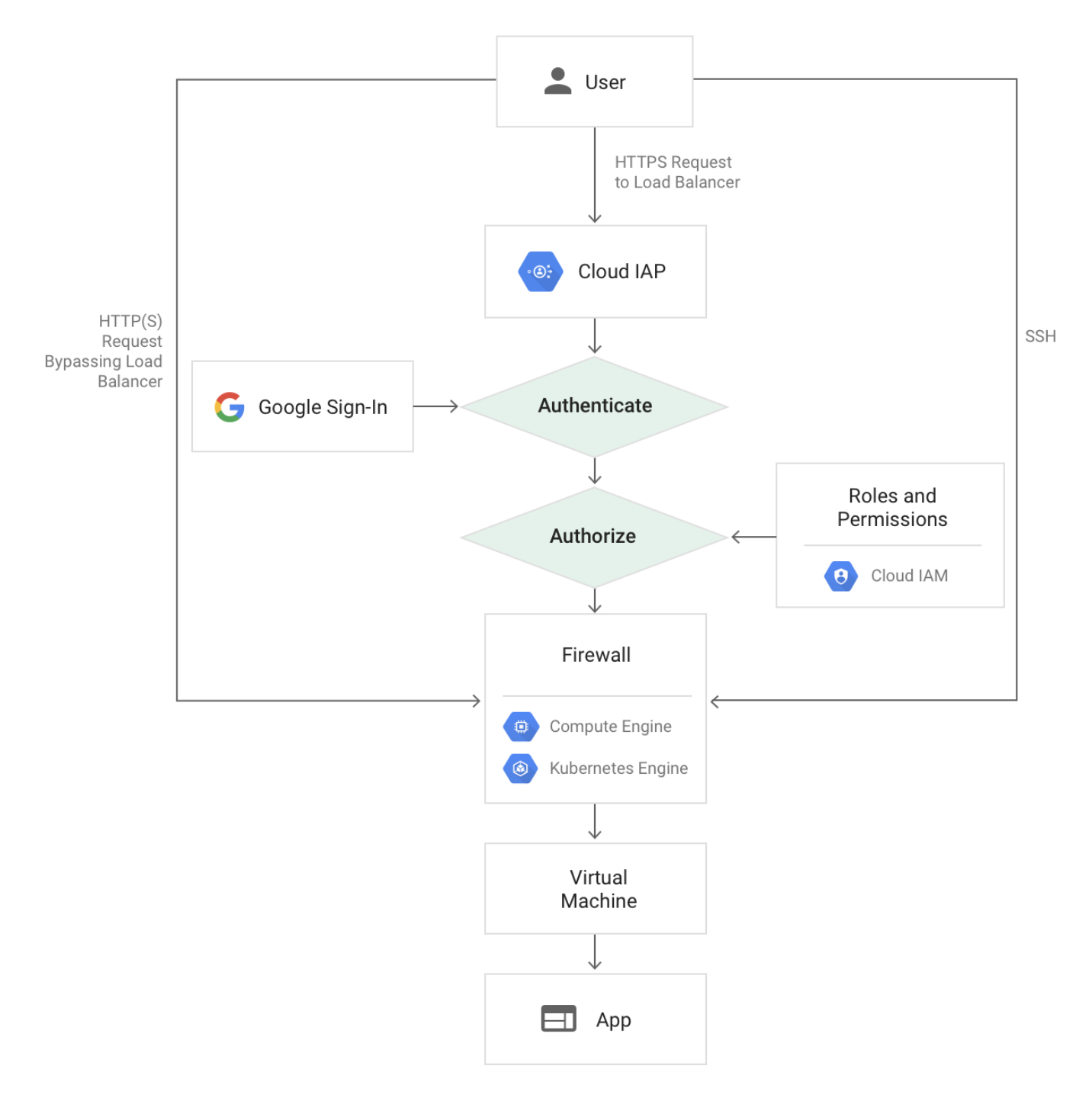
- Only users with the correct IAM role can access application or resource protected by IAP.
- Users are subject to the fine-grained access controls implemented by the product in use without requiring a VPN.
- When a user tries to access an IAP-secured resource, IAP performs authentication and authorization checks.
- Authentication
- Requests to the Google Cloud resources come through App Engine, Cloud Run, Cloud Load Balancing (External and Internal HTTPS), or internal HTTP load balancing.
- If IAP is enabled, information about the protected resource is sent to the IAP authentication server which includes information like the project number, the request URL, and any IAP credentials in the request headers or cookies.
- IAP supports multiple sign-in methods: Google Account sign-in flow, Workforce Identity Federation (external IdP sign-in), or Identity Platform (email/social).
- After authentication, the user’s browser stores a token in a browser cookie for future sign-ins.
- If the request credentials are valid, the authentication server uses those credentials to get the user’s identity (email address and user ID).
- The authentication server then uses the identity to check the user’s IAM role and check if the user is authorized to access the resource.
- Authorization
- After authentication, IAP applies the relevant IAM policy to check if the user is authorized to access the requested resource.
- User with IAP-secured Web App User role (
roles/iap.httpsResourceAccessor) on the Cloud Console project where the resource exists is authorized to access the application. - When you turn on IAP for a resource, it automatically creates an OAuth 2.0 client ID and secret (for Google-managed OAuth clients).
- You can also use authorization policies (Preview – Sept 2024) to delegate authorization decisions to IAP and IAM.
- For on-premises apps, the requests are routed through the IAP connector which forwards the request through a site-to-site connection established with Cloud Interconnect from Google Cloud to the on-premises network.
IAP for Cloud Run
- IAP can be enabled directly on Cloud Run services in a single click, with no load balancers required and at no added cost (Preview – April 2025).
- Alternatively, IAP can be configured on a load balancer with a Cloud Run backend (GA since April 2023).
- IAP cannot be enabled on both the Cloud Run service and the load balancer simultaneously.
- When IAP is enabled directly on Cloud Run, it protects all ingress paths including the default
run.appURL and any configured load balancer URL. - Some integrations (e.g., Pub/Sub) might stop working if IAP is enabled directly on Cloud Run.
- Cloud Run enforces IAP policies before performing IAM checks on the IAP service account.
Context-Aware Access
- Context-aware access provides secure access based on user identity, device posture, network location, geographic location, and other contextual attributes.
- Supports access control for:
- Google Cloud console and APIs – First layer of defense for protecting infrastructure access.
- Virtual Machines (VMs) – Enables administrative SSH/RDP access to VMs with robust context-aware controls.
- Web applications – Provides continuous authorization and authentication for web apps in Google Cloud and other clouds.
- Access levels can be defined based on:
- IP address and subnet
- Device security status (encryption, OS version, screen lock)
- Geographic location
- Time of day
- URL host and path (via IAM conditions)
- Access levels are enforced by adding them as IAM conditions on IAP-secured resources.
TCP Forwarding
- IAP TCP forwarding allows establishing an encrypted tunnel over which SSH, RDP, and other traffic can be forwarded to VM instances.
- VM instances don’t need public IP addresses – IAP TCP forwarding eliminates the need for bastion hosts.
- The TCP forwarding feature prevents administrative services from being openly exposed to the internet.
- IAP wraps the SSH connection inside HTTPS before forwarding the connection to the VM.
- WebSocket support for managing Compute Engine resource sessions is available (April 2024).
- Requires the
iap.tunnelInstances.accessViaIAPpermission, included in the IAP-secured Tunnel User role (roles/iap.tunnelResourceAccessor). - Firewall rules must allow traffic from the IAP TCP IP range
35.235.240.0/20. - Can be secured with VPC Service Controls for additional protection.
Workforce Identity Federation with IAP
- Generally available since February 2025.
- Allows using an external identity provider (IdP) to authenticate and authorize a workforce (employees, partners, contractors) using IAM.
- Users can securely access services deployed on Google Cloud or on-premises without needing to sync identities into Cloud Identity.
- Supports SAML and OIDC-based external IdPs (e.g., Microsoft Entra ID, Okta, etc.).
- Service account JWT authentication is also supported for Workforce Identity Federation configured applications (GA – Feb 2025).
- Configuration involves setting up a workforce pool and provider, creating an OAuth client ID and secret, and enabling IAP to use Workforce Identity Federation.
Programmatic Authentication
- Service accounts can use JSON Web Tokens (JWTs) to programmatically access resources protected by IAP (GA – May 2024).
- Provides a streamlined authentication process for workloads accessing IAP-protected applications and services.
- Path wildcard support in the
aud(audience) field is available when using service account JWT authentication (GA – Oct 2025). - Programmatic OAuth clients can be allowlisted for programmatic access.
- Google-managed OAuth clients can be used for simplified setup.
Custom OAuth Clients
- Custom OAuth clients can be configured via Google Cloud console (GA – March 2026).
- Required for:
- Configuring IAP for users outside of an organization.
- Customizing the OAuth consent screen with custom branding.
- Providing default OAuth clients for inherited applications across all IAP-protected resources at the organization or project level.
- Note: The IAP OAuth Admin API was deprecated on January 22, 2025, and reached end-of-life on September 21, 2025. OAuth clients are now configured via the Cloud console or IAP settings directly.
IAP for Agent Gateway
- Generally available since June 2026.
- IAP supports securing agent-to-anywhere egress for AI agents in Gemini Enterprise Agent Platform.
- Agent Gateway acts as the network entry and exit point for all agent interactions, enforcing security and governance policies.
- Security administrators can grant IAM privileges to source agents by binding IAM allow and deny policies on Agent Registry service instances.
- Agent Gateway services include MCP servers, destination agents, and endpoints.
- IAP enforces IAM allow and deny policies for agent traffic within Agent Platform.
Securing with Signed Headers
- IAP can be configured to use JSON Web Tokens (JWT) to make sure that a request to the app is authorized.
- By default, only headers
x-goog-authenticated-user-{email,id}are passed and can be easily forged to bypass IAP. - It protects App from:
- IAP being accidentally disabled;
- Misconfigured firewalls;
- Access from within the project.
- IAP JWT provides a more secure alternative by verifying the header, payload, and signature of the JWT, which is in the HTTP request header
x-goog-iap-jwt-assertion. - Signed headers provide secondary security in case someone bypasses IAP.
- Use signed headers for App Engine (flexible and standard), Compute Engine, GKE, and Cloud Run applications.
IAP Best Practices
- Don’t use a third-party CDN in front of the application. CDNs may cache content and serve cached pages to unauthenticated users.
- Make sure all requests to Compute Engine or GKE are routed through the load balancer.
- Use signed headers for App Engine, Compute Engine, GKE, and Cloud Run applications.
- Configure firewall rules to protect against traffic that doesn’t come through the load balancer.
- If using IAP on a load balancer with Cloud Run, disable the
run.appURL or use ingress controls to block traffic from outside your network. - Don’t enable IAP on both the load balancer and the Cloud Run service simultaneously.
- Use context-aware access with access levels for granular, attribute-based access control.
- Use Workforce Identity Federation instead of syncing external identities to Cloud Identity where possible.
Your Responsibilities
- IAP secures authentication and authorization of all requests to Cloud Run, App Engine, Cloud Load Balancing (HTTPS), and internal HTTP load balancing.
- If enabling IAP on a load balancer, verify whether the backend resources can be accessed directly.
- If the backend resource is a VM, configure firewall rules to protect against traffic that doesn’t come through the load balancer. IAP doesn’t protect against activity within a project (e.g., another VM inside the project).
- If the backend resource is a Cloud Run service, disable the
run.appURL or use ingress controls. - Update your app to use signed headers or use the App Engine standard environment Users API.
GCP Certification Exam Practice Questions
- Questions are collected from Internet and the answers are marked as per my knowledge and understanding (which might differ with yours).
- GCP services are updated everyday and both the answers and questions might be outdated soon, so research accordingly.
- GCP exam questions are not updated to keep up the pace with GCP updates, so even if the underlying feature has changed the question might not be updated
- Open to further feedback, discussion and correction.
- A company wants to allow employees to access internal web applications without a VPN while ensuring only authenticated and authorized users can reach the apps. The apps are hosted on Compute Engine behind an HTTPS load balancer. What should they use?
- Cloud Armor with rate limiting
- Identity-Aware Proxy (IAP)
- VPC Service Controls
- Cloud NAT
Show Answer
Answer: b
IAP provides application-level access control using the BeyondCorp zero-trust model, eliminating the need for VPN access.
- Your organization uses an external IdP (Microsoft Entra ID) for employee authentication. You want these employees to access IAP-protected applications without syncing identities to Cloud Identity. What feature should you configure?
- Identity Platform with OIDC
- Cloud Identity directory sync
- Workforce Identity Federation with IAP
- OAuth 2.0 client credentials
Show Answer
Answer: c
Workforce Identity Federation (GA Feb 2025) allows using external IdPs with IAP without syncing to Cloud Identity.
- A developer wants to programmatically access an IAP-protected API from a service running on Compute Engine. What authentication method should they use?
- API key
- OAuth 2.0 user credentials
- Service account JWT
- Firebase authentication token
Show Answer
Answer: c
Service accounts can use JWTs to programmatically access IAP-protected resources (GA since May 2024).
- You are securing a Cloud Run application with IAP and don’t want to incur load balancer costs. What is the best approach?
- Use Cloud Armor instead of IAP
- Enable IAP directly on the Cloud Run service
- Place a reverse proxy in front of Cloud Run
- Use VPC Service Controls
Show Answer
Answer: b
IAP can be enabled directly on Cloud Run services without a load balancer (Preview since April 2025), at no added cost.
- Your security team wants to restrict access to an IAP-protected application to only company-managed devices with encrypted storage, from specific IP ranges. What should you configure?
- OAuth scopes
- VPC firewall rules
- Context-aware access with access levels
- Cloud Armor security policies
Show Answer
Answer: c
Context-aware access allows defining access levels based on device attributes, IP address, and other contextual signals.
- An administrator wants to SSH into a private VM (no public IP) without setting up a bastion host. What IAP feature enables this?
- IAP signed headers
- IAP TCP forwarding
- IAP context-aware access
- IAP OAuth client
Show Answer
Answer: b
IAP TCP forwarding creates an encrypted tunnel for SSH/RDP access to VMs without requiring public IPs or bastion hosts.
- What is the primary purpose of verifying IAP signed headers (JWT) in your application code?
- To improve application performance
- To provide secondary security if IAP is bypassed
- To enable load balancing
- To authenticate service accounts
Show Answer
Answer: b
Signed headers provide secondary security protection against scenarios where IAP might be accidentally disabled, firewalls misconfigured, or access occurs from within the project.
- In the Gemini Enterprise Agent Platform, how does IAP protect AI agent communications? (Choose 2)
- By encrypting all agent data at rest
- By enforcing IAM allow and deny policies on Agent Registry services
- By securing agent-to-anywhere egress through Agent Gateway
- By managing agent source code
Show Answer
Answer: b, c
IAP for Agent Gateway (GA June 2026) enforces IAM policies and secures agent-to-anywhere egress within Agent Platform.