Google Cloud IAP – Identity-Aware Proxy & Zero Trust

Google Cloud Identity-Aware Proxy – IAP

  • Identity-Aware Proxy (IAP) allows managing access to HTTP-based apps both on Google Cloud and outside of Google Cloud.
  • IAP intercepts web requests sent to the application, authenticates the user making the request using the Google Identity Service, and only lets the requests through if they come from an authorized user. In addition, it can modify the request headers to include information about the authenticated user.
  • IAP helps establish a central authorization layer for applications accessed by HTTPS to use an application-level access control model instead of relying on network-level firewalls.
  • IAP is designed to enforce the BeyondCorp security model, which establishes a zero-trust perimeter on the public internet for secure, remote work without the need for a traditional VPN.
  • Access policies can be defined centrally and applied to all of the applications and resources.
  • IAP policies scale across the organization.
  • IAP supports multiple identity sources:
    • Google Accounts – Google Cloud users with Google Accounts are redirected through the Google Account sign-in flow.
    • Workforce Identity Federation (GA – Feb 2025) – External IdP users (employees, partners, contractors) authenticate through their own IdP using IAM, without needing to sync identities into Cloud Identity.
    • Identity Platform – Supports a wide range of external identity providers:
      • Email/password
      • OAuth (Google, Facebook, Twitter, GitHub, Microsoft, etc.)
      • SAML
      • OIDC
      • Phone number
      • Custom
      • Anonymous
  • Google Cloud does not charge for IAP (with some exceptions), and it can be enabled without requiring a BeyondCorp Enterprise license (as of January 2024).

IAP Supported Resources

  • App Engine – Standard and Flexible environments
  • Cloud Run – Directly on services (no load balancer needed, Preview April 2025) or via load balancer (GA since April 2023)
  • Compute Engine – Via Cloud Load Balancing (external and internal HTTPS load balancers)
  • Google Kubernetes Engine (GKE) – Via Cloud Load Balancing
  • On-premises applications – Via IAP connector with Cloud Interconnect or VPN
  • Agent Gateway (GA – June 2026) – Securing agent-to-anywhere egress for AI agents in Gemini Enterprise Agent Platform

How IAP Works
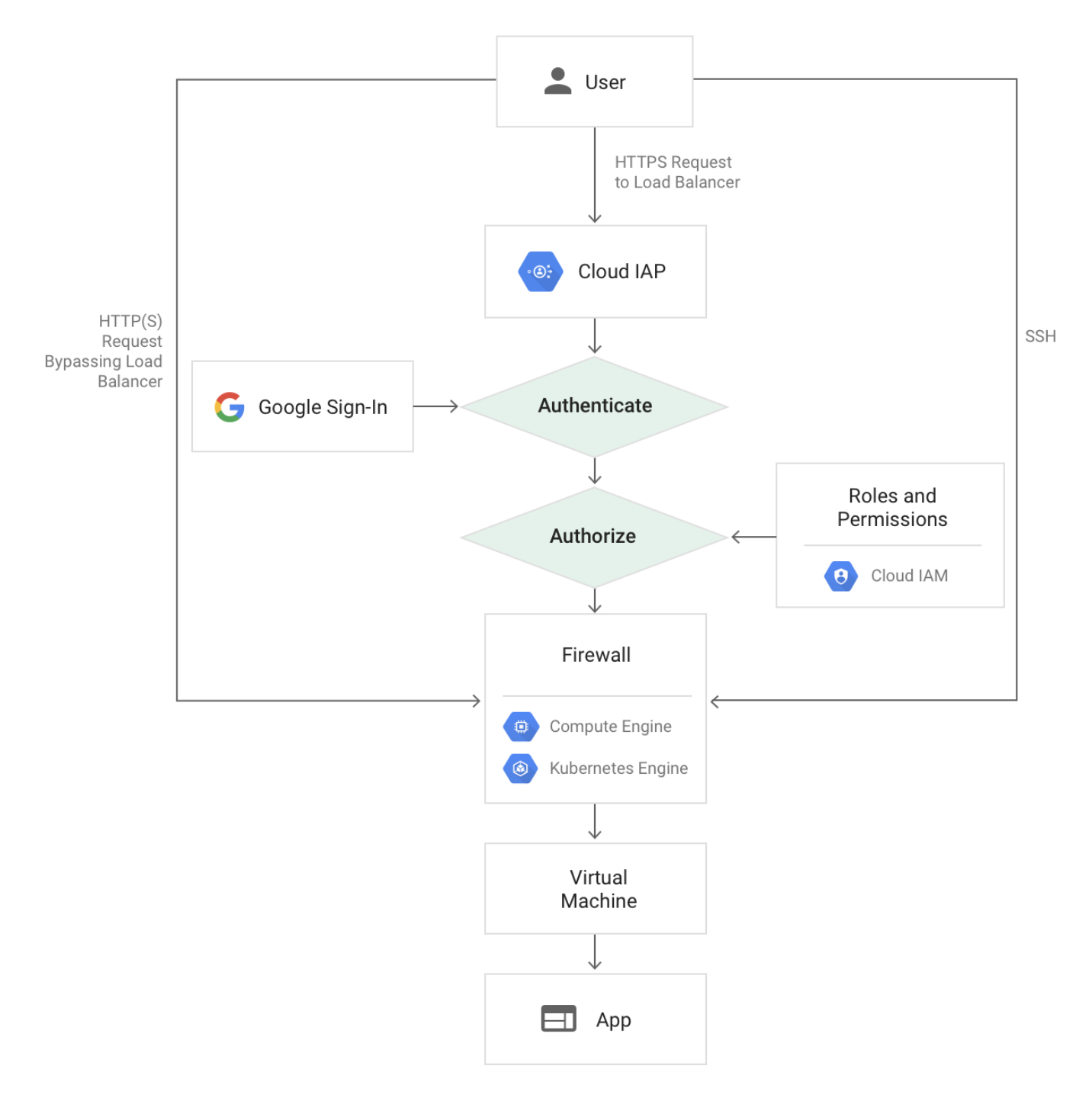
Google Cloud Identity-Aware Proxy Compute GKE

  • Only users with the correct IAM role can access application or resource protected by IAP.
  • Users are subject to the fine-grained access controls implemented by the product in use without requiring a VPN.
  • When a user tries to access an IAP-secured resource, IAP performs authentication and authorization checks.
  • Authentication
    • Requests to the Google Cloud resources come through App Engine, Cloud Run, Cloud Load Balancing (External and Internal HTTPS), or internal HTTP load balancing.
    • If IAP is enabled, information about the protected resource is sent to the IAP authentication server which includes information like the project number, the request URL, and any IAP credentials in the request headers or cookies.
    • IAP supports multiple sign-in methods: Google Account sign-in flow, Workforce Identity Federation (external IdP sign-in), or Identity Platform (email/social).
    • After authentication, the user’s browser stores a token in a browser cookie for future sign-ins.
    • If the request credentials are valid, the authentication server uses those credentials to get the user’s identity (email address and user ID).
    • The authentication server then uses the identity to check the user’s IAM role and check if the user is authorized to access the resource.
  • Authorization
    • After authentication, IAP applies the relevant IAM policy to check if the user is authorized to access the requested resource.
    • User with IAP-secured Web App User role (roles/iap.httpsResourceAccessor) on the Cloud Console project where the resource exists is authorized to access the application.
    • When you turn on IAP for a resource, it automatically creates an OAuth 2.0 client ID and secret (for Google-managed OAuth clients).
    • You can also use authorization policies (Preview – Sept 2024) to delegate authorization decisions to IAP and IAM.
  • For on-premises apps, the requests are routed through the IAP connector which forwards the request through a site-to-site connection established with Cloud Interconnect from Google Cloud to the on-premises network.

IAP for Cloud Run

  • IAP can be enabled directly on Cloud Run services in a single click, with no load balancers required and at no added cost (Preview – April 2025).
  • Alternatively, IAP can be configured on a load balancer with a Cloud Run backend (GA since April 2023).
  • IAP cannot be enabled on both the Cloud Run service and the load balancer simultaneously.
  • When IAP is enabled directly on Cloud Run, it protects all ingress paths including the default run.app URL and any configured load balancer URL.
  • Some integrations (e.g., Pub/Sub) might stop working if IAP is enabled directly on Cloud Run.
  • Cloud Run enforces IAP policies before performing IAM checks on the IAP service account.

Context-Aware Access

  • Context-aware access provides secure access based on user identity, device posture, network location, geographic location, and other contextual attributes.
  • Supports access control for:
    • Google Cloud console and APIs – First layer of defense for protecting infrastructure access.
    • Virtual Machines (VMs) – Enables administrative SSH/RDP access to VMs with robust context-aware controls.
    • Web applications – Provides continuous authorization and authentication for web apps in Google Cloud and other clouds.
  • Access levels can be defined based on:
    • IP address and subnet
    • Device security status (encryption, OS version, screen lock)
    • Geographic location
    • Time of day
    • URL host and path (via IAM conditions)
  • Access levels are enforced by adding them as IAM conditions on IAP-secured resources.

TCP Forwarding

  • IAP TCP forwarding allows establishing an encrypted tunnel over which SSH, RDP, and other traffic can be forwarded to VM instances.
  • VM instances don’t need public IP addresses – IAP TCP forwarding eliminates the need for bastion hosts.
  • The TCP forwarding feature prevents administrative services from being openly exposed to the internet.
  • IAP wraps the SSH connection inside HTTPS before forwarding the connection to the VM.
  • WebSocket support for managing Compute Engine resource sessions is available (April 2024).
  • Requires the iap.tunnelInstances.accessViaIAP permission, included in the IAP-secured Tunnel User role (roles/iap.tunnelResourceAccessor).
  • Firewall rules must allow traffic from the IAP TCP IP range 35.235.240.0/20.
  • Can be secured with VPC Service Controls for additional protection.

Workforce Identity Federation with IAP

  • Generally available since February 2025.
  • Allows using an external identity provider (IdP) to authenticate and authorize a workforce (employees, partners, contractors) using IAM.
  • Users can securely access services deployed on Google Cloud or on-premises without needing to sync identities into Cloud Identity.
  • Supports SAML and OIDC-based external IdPs (e.g., Microsoft Entra ID, Okta, etc.).
  • Service account JWT authentication is also supported for Workforce Identity Federation configured applications (GA – Feb 2025).
  • Configuration involves setting up a workforce pool and provider, creating an OAuth client ID and secret, and enabling IAP to use Workforce Identity Federation.

Programmatic Authentication

  • Service accounts can use JSON Web Tokens (JWTs) to programmatically access resources protected by IAP (GA – May 2024).
  • Provides a streamlined authentication process for workloads accessing IAP-protected applications and services.
  • Path wildcard support in the aud (audience) field is available when using service account JWT authentication (GA – Oct 2025).
  • Programmatic OAuth clients can be allowlisted for programmatic access.
  • Google-managed OAuth clients can be used for simplified setup.

Custom OAuth Clients

  • Custom OAuth clients can be configured via Google Cloud console (GA – March 2026).
  • Required for:
    • Configuring IAP for users outside of an organization.
    • Customizing the OAuth consent screen with custom branding.
    • Providing default OAuth clients for inherited applications across all IAP-protected resources at the organization or project level.
  • Note: The IAP OAuth Admin API was deprecated on January 22, 2025, and reached end-of-life on September 21, 2025. OAuth clients are now configured via the Cloud console or IAP settings directly.

IAP for Agent Gateway

  • Generally available since June 2026.
  • IAP supports securing agent-to-anywhere egress for AI agents in Gemini Enterprise Agent Platform.
  • Agent Gateway acts as the network entry and exit point for all agent interactions, enforcing security and governance policies.
  • Security administrators can grant IAM privileges to source agents by binding IAM allow and deny policies on Agent Registry service instances.
  • Agent Gateway services include MCP servers, destination agents, and endpoints.
  • IAP enforces IAM allow and deny policies for agent traffic within Agent Platform.

Securing with Signed Headers

  • IAP can be configured to use JSON Web Tokens (JWT) to make sure that a request to the app is authorized.
  • By default, only headers x-goog-authenticated-user-{email,id} are passed and can be easily forged to bypass IAP.
  • It protects App from:
    • IAP being accidentally disabled;
    • Misconfigured firewalls;
    • Access from within the project.
  • IAP JWT provides a more secure alternative by verifying the header, payload, and signature of the JWT, which is in the HTTP request header x-goog-iap-jwt-assertion.
  • Signed headers provide secondary security in case someone bypasses IAP.
  • Use signed headers for App Engine (flexible and standard), Compute Engine, GKE, and Cloud Run applications.

IAP Best Practices

  • Don’t use a third-party CDN in front of the application. CDNs may cache content and serve cached pages to unauthenticated users.
  • Make sure all requests to Compute Engine or GKE are routed through the load balancer.
  • Use signed headers for App Engine, Compute Engine, GKE, and Cloud Run applications.
  • Configure firewall rules to protect against traffic that doesn’t come through the load balancer.
  • If using IAP on a load balancer with Cloud Run, disable the run.app URL or use ingress controls to block traffic from outside your network.
  • Don’t enable IAP on both the load balancer and the Cloud Run service simultaneously.
  • Use context-aware access with access levels for granular, attribute-based access control.
  • Use Workforce Identity Federation instead of syncing external identities to Cloud Identity where possible.

Your Responsibilities

  • IAP secures authentication and authorization of all requests to Cloud Run, App Engine, Cloud Load Balancing (HTTPS), and internal HTTP load balancing.
  • If enabling IAP on a load balancer, verify whether the backend resources can be accessed directly.
  • If the backend resource is a VM, configure firewall rules to protect against traffic that doesn’t come through the load balancer. IAP doesn’t protect against activity within a project (e.g., another VM inside the project).
  • If the backend resource is a Cloud Run service, disable the run.app URL or use ingress controls.
  • Update your app to use signed headers or use the App Engine standard environment Users API.

GCP Certification Exam Practice Questions

  • Questions are collected from Internet and the answers are marked as per my knowledge and understanding (which might differ with yours).
  • GCP services are updated everyday and both the answers and questions might be outdated soon, so research accordingly.
  • GCP exam questions are not updated to keep up the pace with GCP updates, so even if the underlying feature has changed the question might not be updated
  • Open to further feedback, discussion and correction.
  1. A company wants to allow employees to access internal web applications without a VPN while ensuring only authenticated and authorized users can reach the apps. The apps are hosted on Compute Engine behind an HTTPS load balancer. What should they use?
    1. Cloud Armor with rate limiting
    2. Identity-Aware Proxy (IAP)
    3. VPC Service Controls
    4. Cloud NAT
    Show Answer

    Answer: b

    IAP provides application-level access control using the BeyondCorp zero-trust model, eliminating the need for VPN access.

  2. Your organization uses an external IdP (Microsoft Entra ID) for employee authentication. You want these employees to access IAP-protected applications without syncing identities to Cloud Identity. What feature should you configure?
    1. Identity Platform with OIDC
    2. Cloud Identity directory sync
    3. Workforce Identity Federation with IAP
    4. OAuth 2.0 client credentials
    Show Answer

    Answer: c

    Workforce Identity Federation (GA Feb 2025) allows using external IdPs with IAP without syncing to Cloud Identity.

  3. A developer wants to programmatically access an IAP-protected API from a service running on Compute Engine. What authentication method should they use?
    1. API key
    2. OAuth 2.0 user credentials
    3. Service account JWT
    4. Firebase authentication token
    Show Answer

    Answer: c

    Service accounts can use JWTs to programmatically access IAP-protected resources (GA since May 2024).

  4. You are securing a Cloud Run application with IAP and don’t want to incur load balancer costs. What is the best approach?
    1. Use Cloud Armor instead of IAP
    2. Enable IAP directly on the Cloud Run service
    3. Place a reverse proxy in front of Cloud Run
    4. Use VPC Service Controls
    Show Answer

    Answer: b

    IAP can be enabled directly on Cloud Run services without a load balancer (Preview since April 2025), at no added cost.

  5. Your security team wants to restrict access to an IAP-protected application to only company-managed devices with encrypted storage, from specific IP ranges. What should you configure?
    1. OAuth scopes
    2. VPC firewall rules
    3. Context-aware access with access levels
    4. Cloud Armor security policies
    Show Answer

    Answer: c

    Context-aware access allows defining access levels based on device attributes, IP address, and other contextual signals.

  6. An administrator wants to SSH into a private VM (no public IP) without setting up a bastion host. What IAP feature enables this?
    1. IAP signed headers
    2. IAP TCP forwarding
    3. IAP context-aware access
    4. IAP OAuth client
    Show Answer

    Answer: b

    IAP TCP forwarding creates an encrypted tunnel for SSH/RDP access to VMs without requiring public IPs or bastion hosts.

  7. What is the primary purpose of verifying IAP signed headers (JWT) in your application code?
    1. To improve application performance
    2. To provide secondary security if IAP is bypassed
    3. To enable load balancing
    4. To authenticate service accounts
    Show Answer

    Answer: b

    Signed headers provide secondary security protection against scenarios where IAP might be accidentally disabled, firewalls misconfigured, or access occurs from within the project.

  8. In the Gemini Enterprise Agent Platform, how does IAP protect AI agent communications? (Choose 2)
    1. By encrypting all agent data at rest
    2. By enforcing IAM allow and deny policies on Agent Registry services
    3. By securing agent-to-anywhere egress through Agent Gateway
    4. By managing agent source code
    Show Answer

    Answer: b, c

    IAP for Agent Gateway (GA June 2026) enforces IAM policies and secures agent-to-anywhere egress within Agent Platform.

References

Google Cloud Security Services Cheat Sheet

Cloud Armor

  • Cloud Armor protects the applications from multiple types of threats, including distributed denial-of-service (DDoS) attacks and application attacks like cross-site scripting (XSS) and SQL injection (SQLi).
  • Cloud Armor is offered in two service tiers: Cloud Armor Standard and Cloud Armor Enterprise (previously Managed Protection Plus).
  • Cloud Armor Standard includes:
    • Pay-as-you-go pricing
    • Always-on L3/L4 volumetric and protocol-based DDoS protection
    • Global and regional security policies
    • Preconfigured WAF rules (OWASP Top 10)
  • Cloud Armor Enterprise includes all Standard features plus:
    • Adaptive Protection with full ML-based L7 DDoS detection and suggested rules
    • Advanced network DDoS protection for external network LBs, protocol forwarding, and VMs with public IPs
    • Threat intelligence integration
    • Bot management with reCAPTCHA Enterprise integration
    • DDoS bill protection
    • Named IP lists
  • Cloud Armor supports applications deployed on Google Cloud, in a hybrid deployment, or in a multi-cloud architecture.
  • Cloud Armor is implemented at the edge of Google’s network in Google’s points of presence (PoP).
  • Security policies protect applications running behind a load balancer from DDoS and other web-based attacks
  • Backend service can have only one security policy associated with it
  • Prioritized rules define configurable match conditions, actions (allow or deny) and order in a security policy
  • Cloud Armor provides Preview mode that helps evaluate and preview the rules before going live.
  • Hierarchical Security Policies (GA Oct 2025) facilitate centralized control at the organization and folder level, enabling policy delegation and consistent enforcement across projects.
  • Enhanced WAF inspection (GA Feb 2026) expands request body inspection from 8 KB to 64 KB for all preconfigured WAF rules, improving detection of sophisticated malicious content.
  • Adaptive Protection uses ML to automatically detect and suggest mitigations for L7 DDoS attacks. Full alerts (with suggested rules) require Cloud Armor Enterprise; Standard provides basic alerts only.
  • Rate Limiting supports throttle and ban actions based on per-client request rates.

Cloud Identity-Aware Proxy

  • Identity-Aware Proxy (IAP) allows managing access to HTTP-based apps both on Google Cloud and outside of Google Cloud.
  • IAP is based on the BeyondCorp zero-trust security model, establishing a zero-trust perimeter on the public internet for secure remote work without the need for a traditional VPN.
  • IAP intercepts web requests sent to the application, authenticates the user making the request using Google Identity Service, and only lets the requests through if they come from an authorized user. In addition, it can modify the request headers to include information about the authenticated user.
  • IAP helps establish a central authorization layer for applications accessed by HTTPS to use an application-level access control model instead of relying on network-level firewalls.
  • IAP uses Google identities and IAM and can leverage external identity providers as well like OAuth with Facebook, GitHub, Microsoft, SAML, etc.
  • IAP can be configured to use JSON Web Tokens (JWT) as signed headers to make sure that a request to the app is authorized and doesn’t bypass IAP.
  • IAP for Cloud Run (2025) enables IAP directly on Cloud Run services in a single click, with no load balancers required and at no added cost for IAP itself.
  • Google Cloud does not charge for IAP (with some exceptions for programmatic workloads at high scale).
  • Note: The IAP OAuth Admin API was deprecated in January 2025 and shut down in September 2025. Use the IAM API for IAP resource management.

Sensitive Data Protection (formerly Cloud DLP)

  • Cloud Data Loss Prevention (Cloud DLP) has been renamed to Sensitive Data Protection (SDP), now encompassing a broader family of services for discovering, classifying, and protecting sensitive data.
  • Sensitive Data Protection is a fully managed service designed to help discover, classify, and protect the most sensitive data.
  • provides two key features:
    • Classification is the process to inspect the data and know what data we have, how sensitive it is, and the likelihood.
    • De-identification is the process of removing, masking, replacing information from data.
  • uses information types – or infoTypes – to define what it scans like credit card numbers, email addresses, etc.
  • provides various built-in infoType detectors and supports custom ones
  • supports inspection rules to fine-tune scan results using:
    • Exclusion rules decrease the number of findings
    • Hotword rules increase the quantity or change the likelihood value of findings
  • provides likelihood, which indicates how likely it is that a piece of data matches a given infoType like VERY_LIKELY or POSSIBLE, etc.
  • supports Text Classification and Reduction
  • supports Image Classification and Reduction, where the image is handled using its base64 encoded version
  • supports storage classification with scans on data stored in Cloud Storage, BigQuery, Datastore, and Cloud SQL
  • supports scanning of binary, text, image, Microsoft Word, PDF, and Apache Avro files
  • supports Templates to decouple configuration from implementation and manage large-scale rollouts
  • Discovery Service (continuous monitoring) automatically discovers, classifies, and profiles data across the organization, folder, or project, identifying where sensitive and high-risk data reside.
  • Discovery for Vertex AI (2025) extends automated data discovery to Vertex AI datasets and tuning jobs, helping understand data sensitivity in AI training and fine-tuning data.
  • Conversational content inspection (2026) supports inspecting and de-identifying conversational content within ContentItem requests.
  • Sensitive Data Protection is deeply integrated with Security Command Center, feeding data risk insights into the SCC risk engine.
  • Note: Integration with Data Catalog was deprecated (Sept 2025) and discontinued (Jan 2026). SDP discovery results now flow to Security Command Center instead.

Security Command Center – SCC

  • is a Security and risk management platform for Google Cloud
  • helps generate curated insights that provide a unique view of incoming threats and attacks to the assets, which include organization, projects, instances, and applications
  • displays possible security risks, called findings, that are associated with each asset.
  • is available in three tiers: Standard, Premium, and Enterprise (Enterprise is deprecated, shutting down May 21, 2027)
  • SCC Standard Tier (Enhanced, April 2026) is now automatically enabled for eligible customers and includes:
    • AI Protection dashboard with detection of unprotected Gemini inference and guardrail violations
    • 44+ misconfiguration checks based on Google Cloud Security Essentials (GCSE) framework
    • Agentless critical vulnerability scanning
    • Graph-driven risk insights
    • Data Security Posture Management (DSPM) for Vertex AI, BigQuery, and Cloud Storage
    • Compliance Manager with automated monitoring against GCSE
  • SCC Premium Tier adds:
    • Full Security Health Analytics vulnerability scanning
    • Event Threat Detection
    • Container Threat Detection
    • Virtual Machine Threat Detection
    • Cloud Run Threat Detection
    • Attack path simulation and risk scoring
  • provides built-in services:
    • Security Health Analytics provides managed vulnerability assessment scanning that can automatically detect the highest severity vulnerabilities and misconfigurations across assets.
    • Web Security Scanner custom scans provide granular information about application vulnerability findings like outdated libraries, XSS, etc.
    • Sensitive Data Protection (formerly Cloud DLP) discovers, classifies, and protects sensitive data
    • Cloud Armor protects Google Cloud deployments against threats
    • Container Threat Detection can detect the most common container runtime attacks
    • Virtual Machine Threat Detection scans VMs to detect potentially malicious applications such as cryptocurrency mining software, kernel-mode rootkits, and malware
    • Cloud Run Threat Detection continuously monitors Cloud Run resources to detect common runtime attacks
    • Event Threat Detection monitors the organization’s Cloud Logging stream and consumes logs to detect Malware, Cryptomining, brute-force attacks, and identity-based attacks
    • Phishing Protection helps prevent users from accessing phishing sites by classifying malicious content that uses the brand and reporting the unsafe URLs to Google Safe Browsing
    • Continuous Exports, which automatically manage the export of new findings to Pub/Sub.
  • Note: The Anomaly Detection service has been replaced by Event Threat Detection and VM Threat Detection capabilities.
  • Note: Forseti Security (open-source toolkit) has been archived and is no longer maintained. Use SCC built-in services instead.
  • Note: SCC Enterprise tier was deprecated May 21, 2026 and will shut down May 21, 2027. Organizations will automatically move to Premium tier.

DDoS Protection and Mitigation

  • Distributed Denial of Service (DDoS) Protection and Mitigation is a shared responsibility between Google Cloud and the Customer
  • DDoS attack is an attempt to render the service or application unavailable to the end-users using multiple sources
  • DDoS Protection and Mitigation Best Practices
    • Reduce the Attack Surface
      • Isolate and secure network using VPC, subnets, firewall rules, tags and IAM
      • Google provides Anti-spoofing protection and Automatic isolation between virtual networks
    • Isolate Internal Traffic
      • Use private IPs and avoid using Public IPs
      • Use NAT Gateway and Bastion host
      • Use Internal Load Balancer for internal traffic
    • Enable Proxy-based Load Balancing
      • HTTP(S) or SSL proxy load balancer uses GFE that helps mitigate and absorb layer 4 and other attacks
      • Disperse traffic across multiple regions
    • Scale to Absorb the Attack
      • Use GFE for protection
      • Use Anycast-based load balancing to provide single anycast IP to FE
      • Use Autoscaling to scale backend services as per the demand
    • Protection using CDN Offloading
      • CDN acts as a proxy and can help render cache content reducing the load on the origin servers
    • Deploy Cloud Armor for WAF and DDoS Protection
      • Cloud Armor Enterprise provides advanced DDoS protection, adaptive protection, and DDoS bill protection
    • App Engine Deployment
      • A fully multi-tenant system with isolation
    • Google Cloud Storage
      • Use signed URLs to access Google Cloud Storage
    • API Rate Limiting
      • Define rate limiting based on the number of allowed requests
      • API Rate limits are per applied per-project basis
      • Cloud Armor supports rate limiting with throttle and ban actions
    • Resource Quotas
      • Quotas help prevent unforeseen spikes in usage

Access Context Manager

  • Access Context Manager allows organization administrators to define fine-grained, attribute-based access control for projects and resources
  • helps prevent data exfiltration
  • helps reduce the size of the privileged network and move to a model where endpoints do not carry ambient authority based on the network.
  • helps define desired rules and policy but isn’t responsible for policy enforcement. The policy is configured and enforced across various points, such as VPC Service Controls.
  • supports custom organization policies (GA 2025) for creating custom constraints beyond the built-in access levels.
  • supports individual VPC network members in a perimeter and ingress rules to authorize specific VPC networks to access a perimeter.
  • works with Chrome Enterprise Premium (formerly BeyondCorp Enterprise) for context-aware access that integrates device trust, user identity, and location into access decisions.

Model Armor (New – 2025)

  • Model Armor is a Google Cloud service designed to enhance the security and safety of AI applications that use Large Language Models (LLMs).
  • Works by proactively screening LLM prompts and responses, protecting against various risks and ensuring responsible AI practices.
  • Key capabilities:
    • Prompt injection detection — detects and blocks prompt injection and jailbreak attempts
    • Sensitive data protection — detects and prevents exposure of PII, financial info, and credentials in prompts and responses
    • Content safety — filters harmful, toxic, or inappropriate content
    • Policy enforcement — identifies and reports potential policy violations and can actively block actions
  • Protects all LLMs (including Gemini, OpenAI, Anthropic, Llama, and more) via a REST API.
  • Offers no-code in-line protection integrated with Google Cloud services including Gemini Enterprise Agent Platform.
  • Can integrate with Agent Gateway for securing agentic AI workflows (2026).
  • Integrated with Security Command Center for AI security posture visibility.

FIPS 140-2 / 140-3 Validated

  • The NIST developed the Federal Information Processing Standard (FIPS) Publication 140-2 (and its successor FIPS 140-3) as a security standard that sets forth requirements for cryptographic modules, including hardware, software, and/or firmware, for U.S. federal agencies.
  • FIPS 140-2/140-3 Validated certification was established to aid in the protection of digitally stored unclassified, yet sensitive, information.
  • Google Cloud Platform uses a FIPS 140-2 validated encryption module called BoringCrypto in its production environment.
  • Google’s BoringCrypto module has also received a FIPS 140-3 certificate (#4735), reflecting the transition to the newer standard.
  • Certifications issued under FIPS 140-2 remain valid and acceptable for federal compliance programs until their expiration date.
  • Data in transit to the customer and between data centers, and data at rest are encrypted using FIPS 140-2 validated encryption (or newer).
  • BoringCrypto module that achieved FIPS 140-2/140-3 validation is part of the BoringSSL library.
  • BoringSSL library as a whole is not FIPS validated
  • In order to operate using only FIPS-validated implementations:
    • Google’s Local SSD storage product is automatically encrypted with NIST approved ciphers, but Google’s current implementation for this product doesn’t have a FIPS validation certificate. If you require FIPS-validated encryption on Local SSD storage, you must provide your own encryption with a FIPS-validated cryptographic module.
    • Google automatically encrypts traffic between VMs that travels between Google data centers using NIST-approved encryption algorithms, but this implementation does not have a FIPS validation certificate. If you require this traffic to be encrypted with a FIPS-validated implementation, you must provide your own.
    • Clients connecting to Google infrastructure with TLS clients must be configured to require use of secure FIPS-compliant algorithms; if the TLS client and GCP’s TLS services agree on an encryption method that is incompatible with FIPS, a non-validated encryption implementation will be used.
    • Applications built and operated on GCP might include their own cryptographic implementations; in order for the data they process to be secured with a FIPS-validated cryptographic module, you must integrate such an implementation yourself.
  • All Google Cloud regions and zones currently support FIPS 140-2 validated encryption.
  • GKE supports FIPS 140-2 validated encryption using BoringCrypto, with nodes configured to use FIPS-compliant cryptographic modules.

Related Posts