Cloud Identity is an Identity as a Service (IDaaS) solution that helps centrally manage the users and groups.
can be configured to federate identities between Google and other identity providers, such as Active Directory and Azure Active Directory
also gives more control over the accounts that are used in the organization.
Cloud Identity account is created for each of your users and groups and IAM can be used to manage access to Google Cloud resources for each Cloud Identity account.
Google Cloud Identity Management
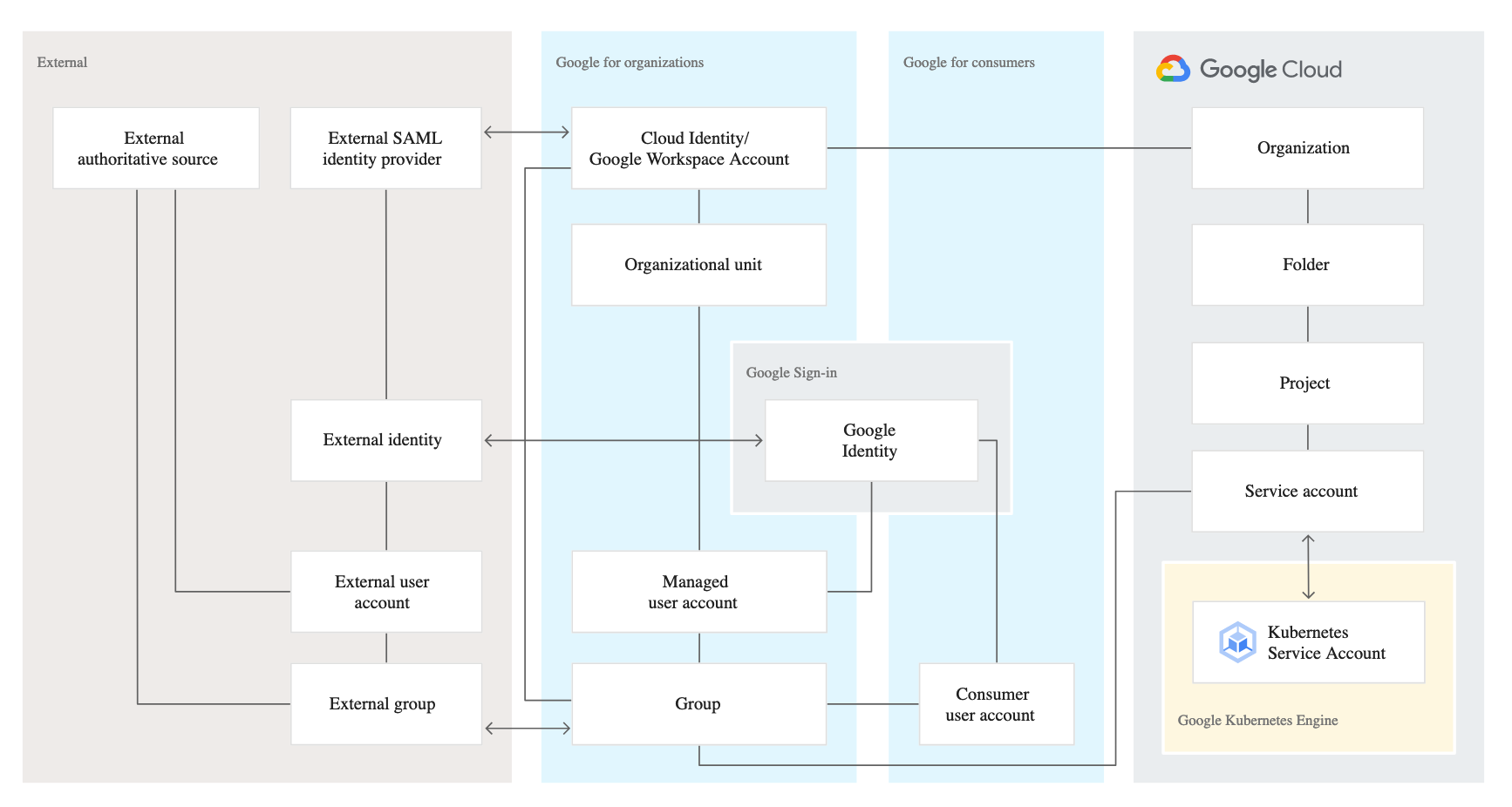
Google identity is related to a number of other entities that are all relevant in the context of managing identities:
Google for consumers contains the entities that are relevant for consumer-focused usage of Google services such as Gmail.
Google for organizations contains entities managed by Cloud Identity or Google Workspace. These entities are the most relevant for managing corporate identities.
Google Cloud contains entities that are specific to Google Cloud.
External contains entities that are relevant if you integrate Google with an external Identity Provider (IdP).
A Cloud Identity or Google Workspace (G Suite) account is the top-level container for users, groups, configuration, and data.
A Cloud Identity or Google Workspace account is created when a company signs up for Cloud Identity or Google Workspace and corresponds to the notion of a tenant.
Cloud Identity or Google Workspace account federation with an external IdP enables employees to use their existing identity and credentials to sign in to Google services.
External IdP is the source of truth and the sole system for authentication and provides a SSO experience for the employees across applications
With single sign-on enabled, Cloud Identity or Google Workspace relays authentication decisions to the SAML IdP.
In SAML terms, Cloud Identity or Google Workspace acts as a service provider that trusts the SAML IdP to verify a user’s identity on its behalf.
Each Cloud Identity or Google Workspace account can refer to at most one external IdP
Single Sign-on – SSO
Cloud Identity or Google Workspace account can be configured to use a single sign-on (SSO).
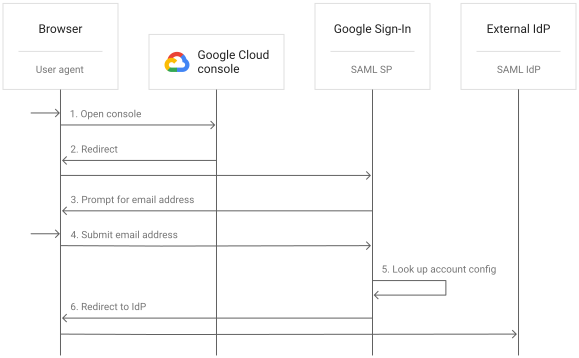
With SSO enabled, users are redirected to an external identity provider (IdP) for authentication.
Using SSO can provide several advantages:
better experience for users because they can use their existing credentials to authenticate and don’t have to enter credentials as often.
existing IdP remains the system of record for authenticating users.
don’t need to synchronize passwords to Cloud Identity or Google Workspace
Cloud Identity and Google Workspace support Security Assertion Markup Language (SAML) 2.0 for single sign-on.
SAML is an open standard for exchanging authentication and authorization data between a SAML IdP and SAML service providers.
With SSO for Cloud Identity or Google Workspace, the external IdP is the SAML IdP and Google is the SAML service provider.
Google implements SAML 2.0 HTTP Redirect binding.
Federating Google Cloud with Active Directory
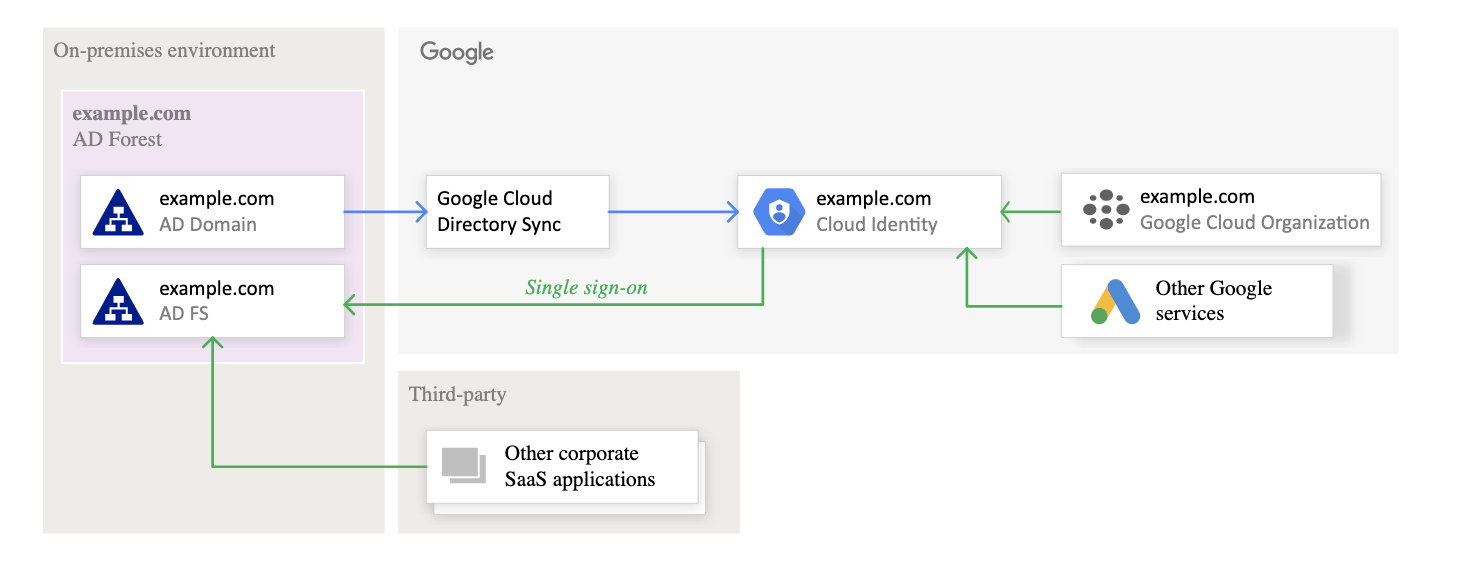
Federating user identities between Google Cloud and existing identity management systems helps automate the maintenance of Google identities and tie their lifecycle to existing users in Active Directory.
Federation can be supported using the following tools
Google Cloud Directory Sync – GCDS
is a free Google-provided tool that implements the synchronization process from Active Directory or LDAP server to Google Domain
communicates with Google Cloud over Secure Sockets Layer (SSL) and usually runs in the existing computing environment.
Active Directory Federation Services (AD FS)
is provided by Microsoft as part of Windows Server.
helps use Active Directory for federated authentication.
runs within the existing computing environment.
GCP Certification Exam Practice Questions
Questions are collected from Internet and the answers are marked as per my knowledge and understanding (which might differ with yours).
GCP services are updated everyday and both the answers and questions might be outdated soon, so research accordingly.
GCP exam questions are not updated to keep up the pace with GCP updates, so even if the underlying feature has changed the question might not be updated
Open to further feedback, discussion and correction.
Your organization has user identities in Active Directory. Your organization wants to use Active Directory as its source of truth for identities. Your organization wants to have full control over the Google accounts used by employees for all Google services, including your Google Cloud Platform (GCP) organization. What should you do?
Use Google Cloud Directory Sync (GCDS) to synchronize users into Cloud Identity.
Use the Cloud Identity APIs and write a script to synchronize users to Cloud Identity.
Export users from Active Directory as a CSV and import them to Cloud Identity via the Admin Console.
Ask each employee to create a Google account using self signup. Require that each employee use their company email address and password.
Your company has a single sign-on (SSO) identity provider that supports Security Assertion Markup Language (SAML) integration with service providers. Your company has users in Cloud Identity. You would like users to authenticate using your company’s SSO provider. What should you do?
In Cloud Identity, set up SSO with Google as an identity provider to access custom SAML apps.
In Cloud Identity, set up SSO with a third-party identity provider with Google as a service provider.
Obtain OAuth 2.0 credentials, configure the user consent screen, and set up OAuth 2.0 for Mobile & Desktop Apps.
Obtain OAuth 2.0 credentials, configure the user consent screen, and set up OAuth 2.0 for Web Server Applications.
⚠️ Important: Google Recommends Cloud Run for New Projects
As of 2025, Google officially recommends Cloud Run over App Engine for new projects. Cloud Run offers greater flexibility, container support, GPU access, multi-region load balancing, and lower pricing for idle instances. App Engine remains fully supported for existing applications, but Google has established an App Engine Migration Center to help customers transition to Cloud Run.
Google Cloud App Engine
App Engine helps build highly scalable applications on a fully managed serverless platform
App Engine provides PaaS and helps build and deploy apps quickly using popular languages or bring your own language runtimes and frameworks.
App Engine allows to scale the applications from zero to planet scale without having to manage infrastructure
Each Cloud project can contain only a single App Engine application
App Engine is regional, which means the infrastructure that runs the apps is located in a specific region, and Google manages it so that it is available redundantly across all of the zones within that region
App Engine application location or region cannot be changed once created
App Engine is well suited to applications that are designed using a microservice architecture
App Engine creates a default bucket in Cloud Storage for each app creation
App Engine supports two generations of runtimes — first-generation (legacy bundled services) and second-generation (standard Cloud Client Libraries)
App Engine Environments
App Engine provides two environments:
Standard Environment — runs in a secure sandbox, supports specific language runtimes, scale-to-zero capable, faster instance startup
Flexible Environment — runs in Docker containers on Compute Engine VMs, supports any language via custom runtimes, minimum 1 instance always running
App Engine follows a runtime lifecycle with stages: General Availability → End of Support → Deprecated → Decommissioned
Current Standard Environment Runtimes:
Java: Java 25 (preview), Java 21, Java 17
Python: Python 3.14, 3.13, 3.12, 3.11, 3.10
Node.js: Node.js 24, 22, 20
Go: Go 1.26, 1.25, 1.24, 1.23, 1.22
PHP: PHP 8.5, 8.4, 8.3, 8.2
Ruby: Ruby 4.0, 3.4, 3.3, 3.2
Deprecated Runtimes (Jan 31, 2026): Python 2.7, Java 8, Go 1.11, PHP 5.5 — these first-generation runtimes are deprecated and will be decommissioned on January 31, 2027
First-generation runtimes with legacy bundled services (Memcache, Task Queues, Users API) should be migrated to second-generation runtimes using Cloud Client Libraries
App Engine Scaling
App Engine can automatically create and shut down instances as traffic fluctuates, or a number of instances can be specified to run regardless of the amount of traffic
App Engine supports the following scaling types, which controls how and when instances are created:
Basic (Standard Only)
creates instances when the application receives requests.
each instance will be shut down when the application becomes idle.
is ideal for work that is intermittent or driven by user activity.
Automatic
creates instances based on request rate, response latencies, and other application metrics.
thresholds can be specified for each of these metrics, as well as a minimum number instances to keep running at all times.
supports configuring target_cpu_utilization, target_throughput_utilization, min_instances, max_instances, min_pending_latency, and max_pending_latency
Manual
specifies the number of instances that continuously run regardless of the load level.
allows tasks such as complex initializations and applications that rely on the state of the memory over time.
Managing Traffic
App engine allows traffic management to an application version by migrating or splitting traffic.
Gradually moves traffic from the versions currently receiving traffic to one or more specified versions
Standard environment allows you to choose to route requests to the target version, either immediately or gradually.
Flexible environment only allows immediate traffic migration
Traffic Splitting
Traffic splitting distributes a percentage of traffic to versions of the application.
Allows canary deployments or conduct A/B testing between the versions and provides control over the pace when rolling out features
Traffic can be split to move 100% of traffic to a single version or to route percentages of traffic to multiple versions.
Traffic splitting is applied to URLs that do not explicitly target a version.
Traffic split is supported by using either an IP address or HTTP cookie.
Default behaviour for splitting traffic is to do it by IP.
Setting up IP address traffic split is easier, but a cookie split is more precise
For traffic splitting, execute gcloud app deploy --no-promote to make a new version of the application available and then run gcloud app services set-traffic to start sending the new version traffic. Use --splits flag with two versions and weight
App Engine Networking
Ingress Settings — control where incoming traffic can originate: all traffic, internal only, or internal + Cloud Load Balancing
VPC Connectivity — App Engine standard supports connecting to a VPC using Serverless VPC Access connectors or Direct VPC Egress (preview)
Custom Domains — supported via App Engine settings or by using Cloud Load Balancing for advanced routing (recommended for production)
Firewall Rules — allow or deny traffic from specified IP ranges
Identity-Aware Proxy (IAP) — supported for controlling access to App Engine applications
Migration to Cloud Run
Google recommends evaluating Cloud Run for new projects as it provides more flexibility, lower pricing, and advanced features like GPU support
Container-based deployments (any language, any framework)
GPU support for AI/ML workloads
Multi-region load balancing
Sidecar containers
Lower cost for idle minimum instances
Committed use discounts (CUDs)
Services in the same project can be deployed to different regions
Cloud Run Invoker IAM role for fine-grained access control
Migration paths:
Standard environment → Deploy directly to Cloud Run from source
Flexible environment → Containerize and deploy to Cloud Run
Apps using legacy bundled services should first migrate off those services
GCP Certification Exam Practice Questions
Questions are collected from Internet and the answers are marked as per my knowledge and understanding (which might differ with yours).
GCP services are updated everyday and both the answers and questions might be outdated soon, so research accordingly.
GCP exam questions are not updated to keep up the pace with GCP updates, so even if the underlying feature has changed the question might not be updated
Open to further feedback, discussion and correction.
You have a website hosted on App Engine standard environment. You want 1% of your users to see a new test version of the website. You want to minimize complexity. What should you do?
Deploy the new version in the same application and use the –migrate option.
Deploy the new version in the same application and use the –splits option to give a weight of 99 to the current version and a weight of 1 to the new version.
Create a new App Engine application in the same project. Deploy the new version in that application. Use the App Engine library to proxy 1% of the requests to the new version.
Create a new App Engine application in the same project. Deploy the new version in that application. Configure your network load balancer to send 1% of the traffic to that new application.
You have created an App engine application in the us-central region. However, you found out the network team has configured all the VPN connections in the asia-east2 region, which are not possible to move. How can you change the location efficiently?
Change the region in app.yaml and redeploy
From App Engine console, change the region of the application
Change the region in application.xml within the application and redeploy
Create a new project in the asia-east2 region and create app engine in the project
Your team is deploying a new Python application. You need a serverless platform that supports scale-to-zero, container deployments, and multi-region load balancing. Which Google Cloud service should you use?
App Engine Standard Environment
App Engine Flexible Environment
Cloud Run
Google Kubernetes Engine
You are running a legacy Python 2.7 application on App Engine first-generation runtime. The runtime is deprecated as of January 31, 2026. What is the recommended migration approach?
Continue running on the deprecated runtime as it will be supported indefinitely
Migrate to App Engine flexible environment with Python 2.7
Migrate the application to a second-generation runtime (Python 3.x) and replace legacy bundled services with Cloud Client Libraries, or migrate to Cloud Run
Move the application to Compute Engine with Python 2.7
Your application on App Engine needs to perform background processing tasks between requests. Which configuration should you use?
Automatic scaling with default settings
Basic scaling with idle_timeout set to maximum
Manual scaling, which allows continuous CPU access between requests
Deploy to App Engine flexible environment only
You want to deploy an application that requires services in multiple regions within the same project. Which platform should you choose?
App Engine Standard — deploy services to different regions in the same project
App Engine Flexible — configure multi-region deployment in app.yaml
Cloud Run — services in the same project can be deployed to different regions
Cloud Logging is a fully managed service for storing, searching, analyzing, monitoring, and alerting on log data and events.
Answers the questions “Who did what, where and when” within the GCP projects
Maintains non-tamperable audit logs for each project and organizations
Logs buckets are a regional resource, which means the infrastructure that stores, indexes, and searches the logs are located in a specific geographical location. Google manages that infrastructure so that the applications are available redundantly across the zones within that region.
Cloud Logging is scoped by the project.
Cloud Logging is integrated with Cloud Monitoring, Error Reporting, and Cloud Trace for end-to-end observability.
Previously known as Stackdriver Logging, it is now part of the Google Cloud Observability suite.
Cloud Logging Process
For each Google Cloud project, Logging automatically creates two logs buckets: _Required and _Default.
_Required bucket
holds Admin Activity audit logs, System Event audit logs, and Access Transparency logs
retains them for 400 days.
the retention period of the logs stored here cannot be modified.
aren’t charged for the logs stored in _Required, and
cannot delete this bucket.
_Default bucket
holds all other ingested logs in a Google Cloud project except for the logs held in the _Required bucket.
are charged
are retained for 30 days, by default, and can be customized from 1 to 3650 days
these buckets cannot be deleted
All logs generated in the project are stored in the _Required and _Default logs buckets, which live in the project that the logs are generated in
Logs buckets only have regional availability, including those created in the global region.
User-defined (custom) log buckets can be created for more granular log management
Allow custom retention periods (1 to 3650 days)
Support CMEK (Customer-Managed Encryption Keys) for encryption
Can be upgraded to use Observability Analytics for SQL-based querying
Can have linked BigQuery datasets for advanced analytics
Cannot be created in folders or organizations
Cloud Logging Types
Cloud Platform Logs
Cloud platform logs are service-specific logs that can help troubleshoot and debug issues, as well as better understand the Google Cloud services.
Cloud Platform logs are logs generated by GCP services and vary depending on which Google Cloud resources are used in your Google Cloud project or organization.
Security Logs
Audit Logs
Cloud Audit Logs includes four types of audit logs:
Admin Activity,
Data Access,
System Event, and
Policy Denied.
Cloud Audit Logs provide audit trails of administrative changes and data accesses of the Google Cloud resources.
admin activity – administrative actions and API calls
have 400-day retention
System Events
captures system initiated resource configuration changes
enabled by default
no additional charge
system events – GCE system events like live migration
have 400-day retention
Data Access logs
Log API calls that create, modify or read user-provided data for e.g. object created in a GCS bucket.
30-day retention
disabled by default (except BigQuery, which is enabled by default)
size can be huge
charged beyond free limits
Available for GCP-visible services only. Not available for public resources.
Policy Denied logs
Records when a Google Cloud service denies access to a user or service account because of a security policy violation.
Generated by VPC Service Controls, Organization Policies, and other security services when access is denied.
Enabled by default
Stored in the _Default bucket (30-day retention by default)
Can be excluded from ingestion using exclusion filters
Log name: cloudaudit.googleapis.com/policy
Access Transparency Logs
provides logs of actions taken by Google staff when accessing the Google Cloud content.
can help track compliance with the organization’s legal and regulatory requirements.
have 400-day retention
User Logs
User logs are generated by user software, services, or applications and written to Cloud Logging using a logging agent, the Cloud Logging API, or the Cloud Logging client libraries
Agent logs
produced by logging agent installed that collects logs from user applications and VMs
covers log data from third-party applications
charged beyond free limits
30-day retention
Cloud Logging Export / Log Router
Log entries are stored in logs buckets for a specified length of time i.e. retention period and are then deleted and cannot be recovered
The Log Router receives all log entries and routes them through sinks to supported destinations.
Logs can be exported by configuring log sinks, which then continue to export log entries as they arrive in Logging.
A sink includes a destination and a filter that selects the log entries to export.
Exporting involves writing a filter that selects the log entries to be exported, and choosing a destination from the following options:
Cloud Storage: JSON files stored in buckets for long term retention
BigQuery: Tables created in BigQuery datasets for analytics
Pub/Sub: JSON messages delivered to Pub/Sub topics to stream to other resources. Supports third-party integrations, such as Splunk
Cloud Logging bucket: Log entries held in another Cloud Logging logs bucket (including in another project).
Every time a log entry arrives in a project, folder, billing account, or organization resource, Logging compares the log entry to the sinks in that resource. Each sink whose filter matches the log entry writes a copy of the log entry to the sink’s export destination.
Exporting happens for new log entries only, it is not retrospective.
However, Batch and Route Retroactively (Copy Logs) feature now allows copying existing logs stored in log buckets to supported destinations retroactively.
Exclusion Filters can be added to sinks to exclude matching log entries from being ingested or routed, helping reduce costs.
Aggregated Sinks
Aggregated sinks let you route logs from an organization or folder to a supported destination.
Can be configured as intercepting or non-intercepting:
Intercepting sink: prevents log entries from being routed to sinks in child resources (except _Required sinks). Gives centralized control over log routing.
Non-intercepting sink: routes matching log entries to the destination but does not prevent child resource sinks from also routing those entries.
Useful for centralized log storage and compliance across organizations.
Observability Analytics (formerly Log Analytics)
Observability Analytics lets you search, aggregate, and analyze logs using SQL queries directly in the Cloud Console.
Provides a SQL editor and a menu-based system for building queries.
Query results can be viewed in tabular form or visualized as charts.
Charts can be saved to custom dashboards.
Supports querying log views on log buckets and Analytics Views.
Analytics Views allow transforming log data from the LogEntry format into a custom schema more suitable for specific use cases.
Can also be used to query trace data for correlated observability.
Linked BigQuery Datasets:
Not required for basic log querying — Observability Analytics handles that directly.
Required when you want to: join log data with other BigQuery datasets, query from BigQuery Studio or Looker Studio, or run queries on BigQuery reserved slots for better performance.
SQL-based alerting policies can be configured to monitor query results and trigger alerts.
Log buckets need to be upgraded to use Observability Analytics.
Log Scopes
Log scopes are named collections of log views that span the same or different projects.
Control which resources the Logs Explorer searches for log data.
Enable multi-project log querying from a single view.
Made up of groups of log views that control and grant permissions to a subset of logs in a log bucket.
Useful for teams that need access to logs across multiple projects without switching between them.
Log-based Metrics
Log-based metrics are based on the content of log entries for e.g., the metrics can record the number of log entries containing particular messages, or they can extract latency information reported in log entries.
Log-based metrics can be used in Cloud Monitoring charts and alerting policies.
Log-based metrics are of two kinds
System-defined log-based metrics
provided by Cloud Logging for use by all Google Cloud projects.
System log-based metrics are calculated from included logs only i.e. they are calculated only from logs that have been ingested by Logging. If a log has been explicitly excluded from ingestion by Logging, it isn’t included in these metrics.
User-defined log-based metric
user-created to track things in the Google Cloud project for e.g. a log-based metric to count the no. of log entries that match a given filter.
User-defined log-based metrics are calculated from both included and excluded logs. i.e. are calculated from all logs received by the Logging API for the Cloud project, regardless of any inclusion filters or exclusion filters that may apply to the Cloud project.
Log-based metrics can be project-scoped or bucket-scoped:
Project-scoped: apply to a single Google Cloud project (traditional behavior)
Bucket-scoped: created on a specific log bucket, allowing metrics on logs from multiple projects stored in one bucket
Log-based metrics support the following types
Counter metrics count the number of log entries matching a given filter.
Distribution metrics accumulate numeric data from log entries matching a filter.
Cloud Logging Agent / Ops Agent
⚠️ Legacy Logging Agent Deprecated: The legacy Cloud Logging Agent (fluentd-based) is deprecated. While still supported, Google recommends against using it for new workloads. Use the Ops Agent for all new deployments and plan migration for existing VMs.
Ops Agent (Recommended)
The Ops Agent is the recommended agent for collecting logs and metrics from Compute Engine VMs.
Sends logs to Cloud Logging and metrics to Cloud Monitoring from a single unified agent.
Built on Fluent Bit (for logs) and the OpenTelemetry Collector (for metrics), providing better performance and resource efficiency.
Features:
Simple, unified YAML-based configuration
Support for standard Linux and Windows distros
Proxy support
OTLP receiver for collecting OpenTelemetry metrics, traces, and logs from instrumented applications
High throughput with efficient resource management
Telemetry API (Preview, May 2026): Starting with Ops Agent v2.66.0, logs and metrics can be exported using the OpenTelemetry-based Telemetry API instead of the proprietary Cloud Logging API and Cloud Monitoring API.
OTLP Log Ingestion (April 2026): OTLP-formatted logs can now be ingested into Cloud Logging using an OpenTelemetry Collector, an OTLP exporter, and the Telemetry API.
Can be installed on individual VMs, via VM Extension Manager policies, or via agent policies on a fleet of VMs.
Legacy Logging Agent (Deprecated)
Cloud Logging Agent streams logs from VM instances and from selected third-party software packages to Cloud Logging.
Helps capture logs from GCE and AWS EC2 instances.
VM images for GCE and Amazon EC2 don’t include the Logging agent and must be installed explicitly.
Uses fluentd for capturing logs.
No new feature development or support for new operating systems.
The legacy installation script (install-logging-agent.sh) is deprecated.
Migration to Ops Agent is recommended for all existing workloads.
Cloud Logging MCP Server (GA – April 2026)
The Cloud Logging API MCP (Model Context Protocol) server allows AI agents and LLM-powered applications to interact with log entries programmatically.
Enabled automatically when the Cloud Logging API is enabled in a project.
Standardizes how large language models connect to Cloud Logging as an external data source.
Supports enterprise-grade security through Cloud IAM and is integrated with Cloud Audit Logs for monitoring agent activity.
Useful for AI-powered troubleshooting, automated incident response, and log analysis workflows.
Abuse Event Logging (January 2025)
Google Cloud customers can track Cloud Abuse Events using Cloud Logging.
Events include:
Leaked service account keys
Crypto mining incidents
Malware detection
Enables automated incident remediation through integration with Security Command Center and Cloud Functions.
Helps organizations detect and respond to security threats faster.
Logs Bucket Writer (roles/logging.bucketWriter) – Write logs to a specific bucket
Project Viewer – View logs except Data Access/Access Transparency logs
Project Editor – Write, view, and delete logs. Create log based metrics. However, it cannot create export sinks or view Data Access/Access Transparency logs.
Project Owner – Full access to all logging actions
GCP Certification Exam Practice Questions
Questions are collected from Internet and the answers are marked as per my knowledge and understanding (which might differ with yours).
GCP services are updated everyday and both the answers and questions might be outdated soon, so research accordingly.
GCP exam questions are not updated to keep up the pace with GCP updates, so even if the underlying feature has changed the question might not be updated
Open to further feedback, discussion and correction.
Your organization is a financial company that needs to store audit log files for 3 years. Your organization has hundreds of Google Cloud projects. You need to implement a cost-effective approach for log file retention. What should you do?
Create an export to the sink that saves logs from Cloud Audit to BigQuery.
Create an export to the sink that saves logs from Cloud Audit to a Coldline Storage bucket.
Write a custom script that uses logging API to copy the logs from Cloud Logging to BigQuery.
Export these logs to Cloud Pub/Sub and write a Dataflow pipeline to store logs to Cloud SQL.
A company needs to analyze Cloud Logging data to detect security threats across 50 projects. They want to use SQL queries and visualize the results in dashboards. What approach should they use?
Export logs from all projects to BigQuery using individual sinks per project.
Create an aggregated sink to route logs to a central log bucket, upgrade to Observability Analytics, and use SQL queries with dashboard charts.
Use the Logging API to programmatically read logs from each project.
Create log-based metrics in each project and use Cloud Monitoring dashboards.
Your security team wants to be alerted when VPC Service Controls denies access to resources. Which type of audit log should they monitor?
Admin Activity audit logs
Data Access audit logs
System Event audit logs
Policy Denied audit logs
You are deploying a new application on Compute Engine and need to collect application logs and system metrics. Which agent should you install?
Legacy Cloud Logging Agent
Legacy Cloud Monitoring Agent
Ops Agent
OpenTelemetry Collector only
Your organization needs to centrally control log routing and prevent individual projects from routing certain logs to their own destinations. What should you configure?
Exclusion filters on each project’s _Default sink
Organization policy constraints on logging
An intercepting aggregated sink at the organization level
A non-intercepting aggregated sink at the folder level
A company wants to query log data from Cloud Logging using BigQuery Studio and join it with data from other BigQuery datasets. What do they need to configure?
Export logs to BigQuery using a sink
Use Observability Analytics SQL queries directly
Upgrade the log bucket to use Observability Analytics and create a linked BigQuery dataset
Create a scheduled query in BigQuery to import logs
Which of the following statements about Cloud Audit Logs are correct? (Choose 2)
Admin Activity and System Event logs are enabled by default and cannot be disabled.
Data Access logs are enabled by default for all services.
Policy Denied logs record when access is denied due to VPC Service Controls or Organization Policies.
All audit log types are stored in the _Required bucket with 400-day retention.
Cloud SQL provides a cloud-based alternative to local MySQL, PostgreSQL, and Microsoft SQL Server databases
Cloud SQL is a managed solution that helps handles backups, replication, high availability and failover, data encryption, monitoring, and logging.
Cloud SQL is ideal for lift and shift migration from existing on-premises relational databases
Cloud SQL High Availability
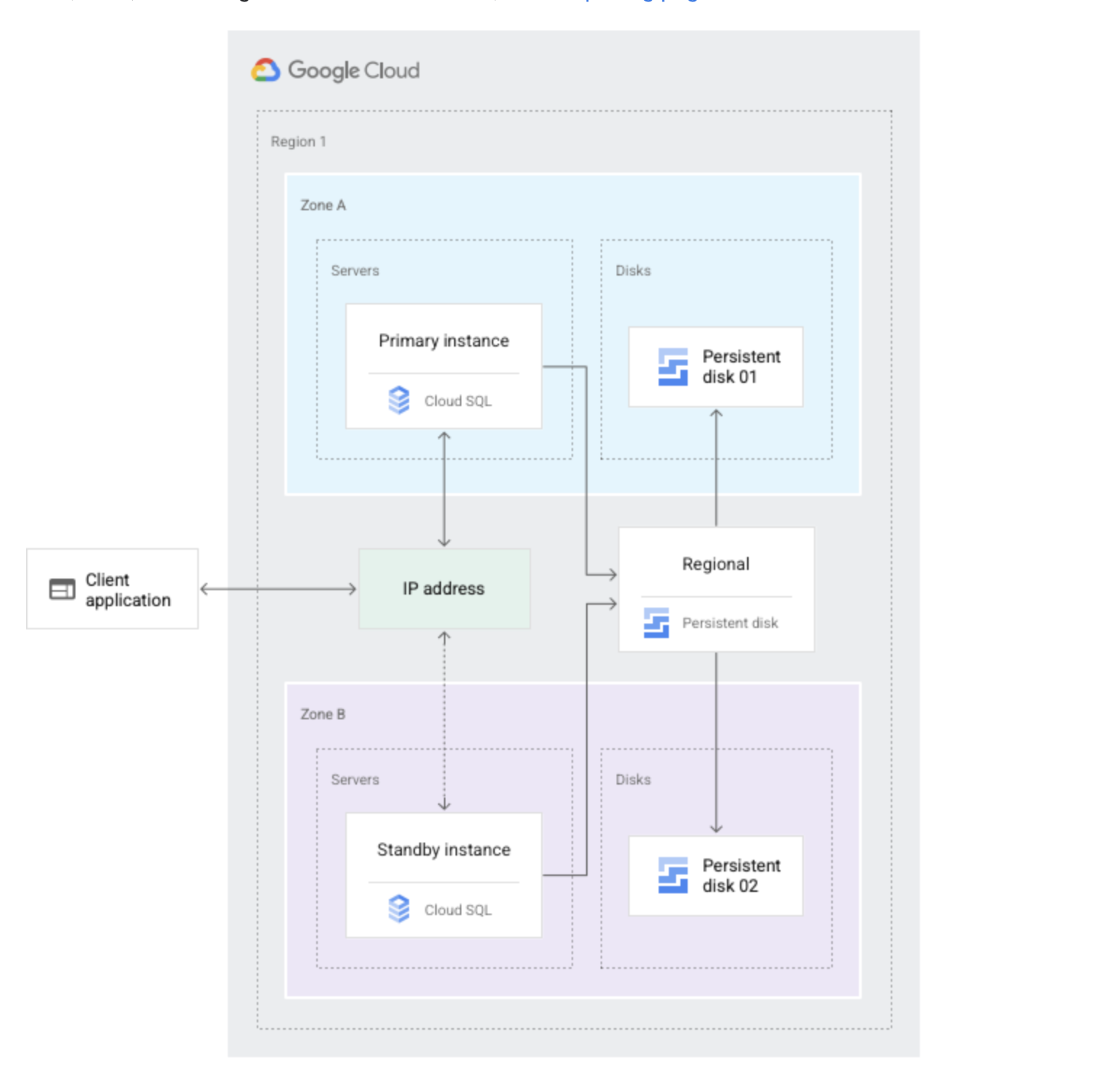
Cloud SQL instance HA configuration provides data redundancy and failover capability with minimal downtime, when a zone or instance becomes unavailable due to a zonal outage, or an instance corruption
HA configuration is also called a regional instance or cluster
With HA, the data continues to be available to client applications.
HA is made up of a primary and a standby instance and is located in a primary and secondary zone within the configured region
If an HA-configured instance becomes unresponsive, Cloud SQL automatically switches to serving data from the standby instance.
Data is synchronously replicated to each zone’s persistent disk, all writes made to the primary instance are replicated to disks in both zones before a transaction is reported as committed.
In the event of an instance or zone failure, the persistent disk is attached to the standby instance, and it becomes the new primary instance.
After a failover, the instance that received the failover continues to be the primary instance, even after the original instance comes back online.
Once the zone or instance that experienced an outage becomes available again, the original primary instance is destroyed and recreated and It becomes the new standby instance.
If a failover occurs in the future, the new primary will failover to the original instance in the original zone.
Cloud SQL Standby instance does not increase scalability and cannot be used for read queries
To see if failover has occurred, check the operation log’s failover history.
Cloud SQL Failover Process
Each second, the primary instance writes to a system database as a heartbeat signal.
Primary instance or zone fails.
If multiple heartbeats aren’t detected, failover is initiated. This occurs if the primary instance is unresponsive for approximately 60 seconds or the zone containing the primary instance experiences an outage.
Standby instance now serves data upon reconnection.
Through a shared static IP address with the primary instance, the standby instance now serves data from the secondary zone.
Users are then automatically rerouted to the new primary.
Cloud SQL Read Replica
Read replicas help scale horizontally the use of data in a database without degrading performance
Read replica is an exact copy of the primary instance. Data and other changes on the primary instance are updated in almost real time on the read replica.
Read replica can be promoted if the original instance becomes corrupted.
Primary instance and read replicas all reside in Cloud SQL
Read replicas are read-only; you cannot write to them
Read replicas do not provide failover capability
Read replicas cannot be made highly available like primary instances.
Cloud SQL currently supports 10 read replicas per primary instance
During a zonal outage, traffic to read replicas in that zone stops.
Once the zone becomes available again, any read replicas in the zone will resume replication from the primary instance.
If read replicas are in a zone that is not in an outage, they are connected to the standby instance when it becomes the primary instance.
GCP recommends putting read replicas in a different zone from the primary and standby instances. for e.g., if you have a primary instance in zone A and a standby instance in zone B, put the read replicas in zone C. This practice ensures that read replicas continue to operate even if the zone for the primary instance goes down.
Client application needs to be configured to send reads to the primary instance when read replicas are unavailable.
Cloud SQL supports Cross-region replication that lets you create a read replica in a different region from the primary instance.
Cloud SQL supports External read replicas that are external MySQL instances which replicate from a Cloud SQL primary instance
Cloud SQL Point In Time Recovery
Point-in-time recovery (PITR) uses binary logs or write-ahead logs
PITR requires
Binary logging and backups enabled for the instance, with continuous binary logs since the last backup before the event you want to recover from
A binary log file name and the position of the event you want to recover from (that event and all events that came after it will not be reflected in the new instance)
Point-in-time recovery is enabled by default when a new Cloud SQL instance is created
Cloud SQL Proxy
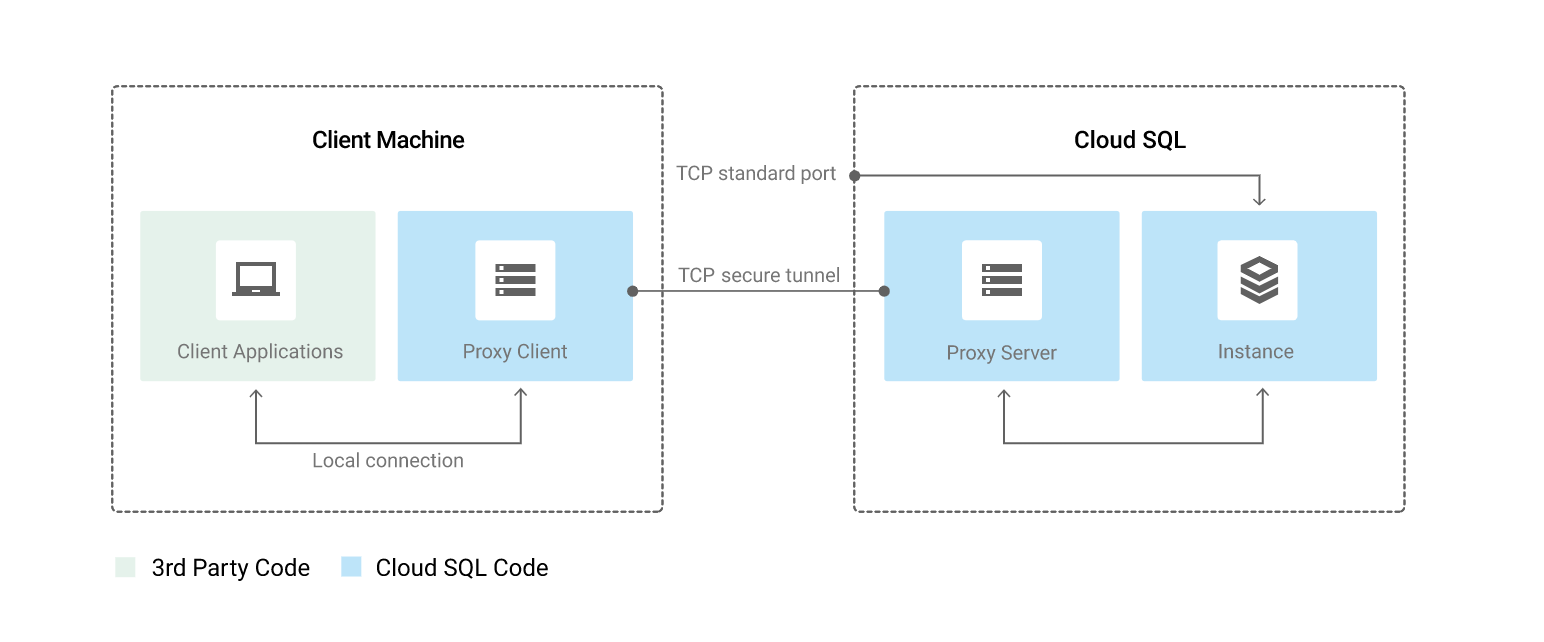
Cloud SQL Proxy provides secure access to the instances without the need for Authorized networks or for configuring SSL.
Secure connections : Cloud SQL Proxy automatically encrypts traffic to and from the database using TLS 1.2 with a 128-bit AES cipher; SSL certificates are used to verify client and server identities.
Easier connection management : Cloud SQL Proxy handles authentication removing the need to provide static IP addresses.
Cloud SQL Proxy does not provide a new connectivity path; it relies on existing IP connectivity. To connect to a Cloud SQL instance using private IP, the Cloud SQL Proxy must be on a resource with access to the same VPC network as the instance.
Cloud SQL Proxy works by having a local client running in the local environment. The application communicates with the Cloud SQL Proxy with the standard database protocol used by the database.
Cloud SQL Proxy uses a secure tunnel to communicate with its companion process running on the server.
While the proxy can listen on any port, it only creates outgoing connections to the Cloud SQL instance on port 3307.
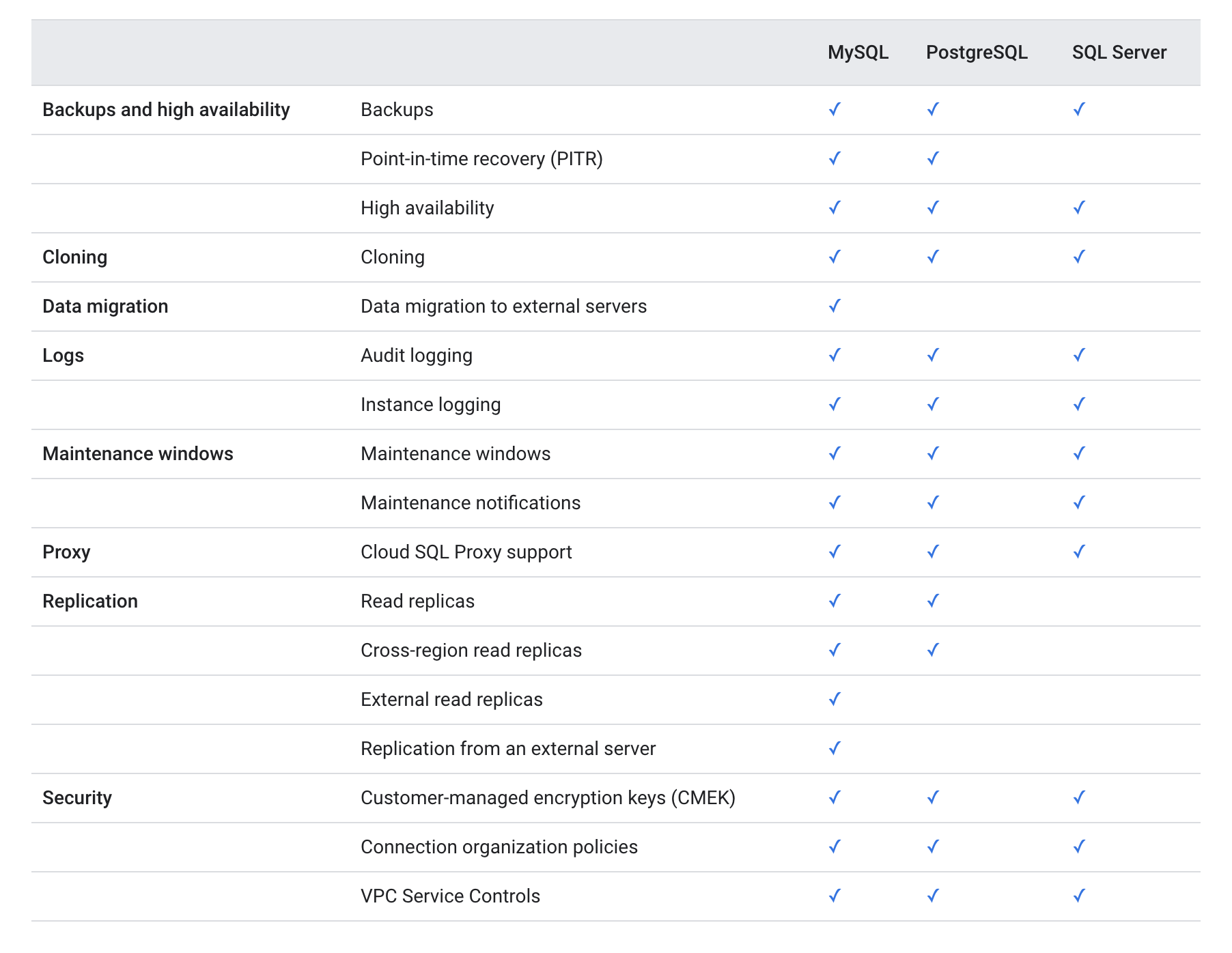
Cloud SQL Features Comparison
GCP Certification Exam Practice Questions
Questions are collected from Internet and the answers are marked as per my knowledge and understanding (which might differ with yours).
GCP services are updated everyday and both the answers and questions might be outdated soon, so research accordingly.
GCP exam questions are not updated to keep up the pace with GCP updates, so even if the underlying feature has changed the question might not be updated
Open to further feedback, discussion and correction.
You work for a mid-sized enterprise that needs to move its operational system transaction data from an on-premises database to GCP. The database is about 20 TB in size. Which database should you choose?
Cloud SQL
Cloud Bigtable
Cloud Spanner
Cloud Datastore
An application that relies on Cloud SQL to read infrequently changing data is predicted to grow dramatically. How can you increase capacity for more read-only clients?
Configure high availability on the master node
Establish an external replica in the customer’s data center
Use backups so you can restore if there’s an outage
Configure read replicas.
A Company is using Cloud SQL to host critical data. They want to enable high availability in case a complete zone goes down. How should you configure the same?
Create a Read replica in the same region different zone
Create a Read replica in the different region different zone
Create a Failover replica in the same region different zone
Create a Failover replica in the different region different zone
A Company is using Cloud SQL to host critical data. They want to enable Point In Time recovery (PIT) to be able to recover the instance to a specific point in. How should you configure the same?
Create a Read replica for the instance
Switch to Spanner 3 node cluster
Create a Failover replica for the instance
Enable Binary logging and backups for the instance
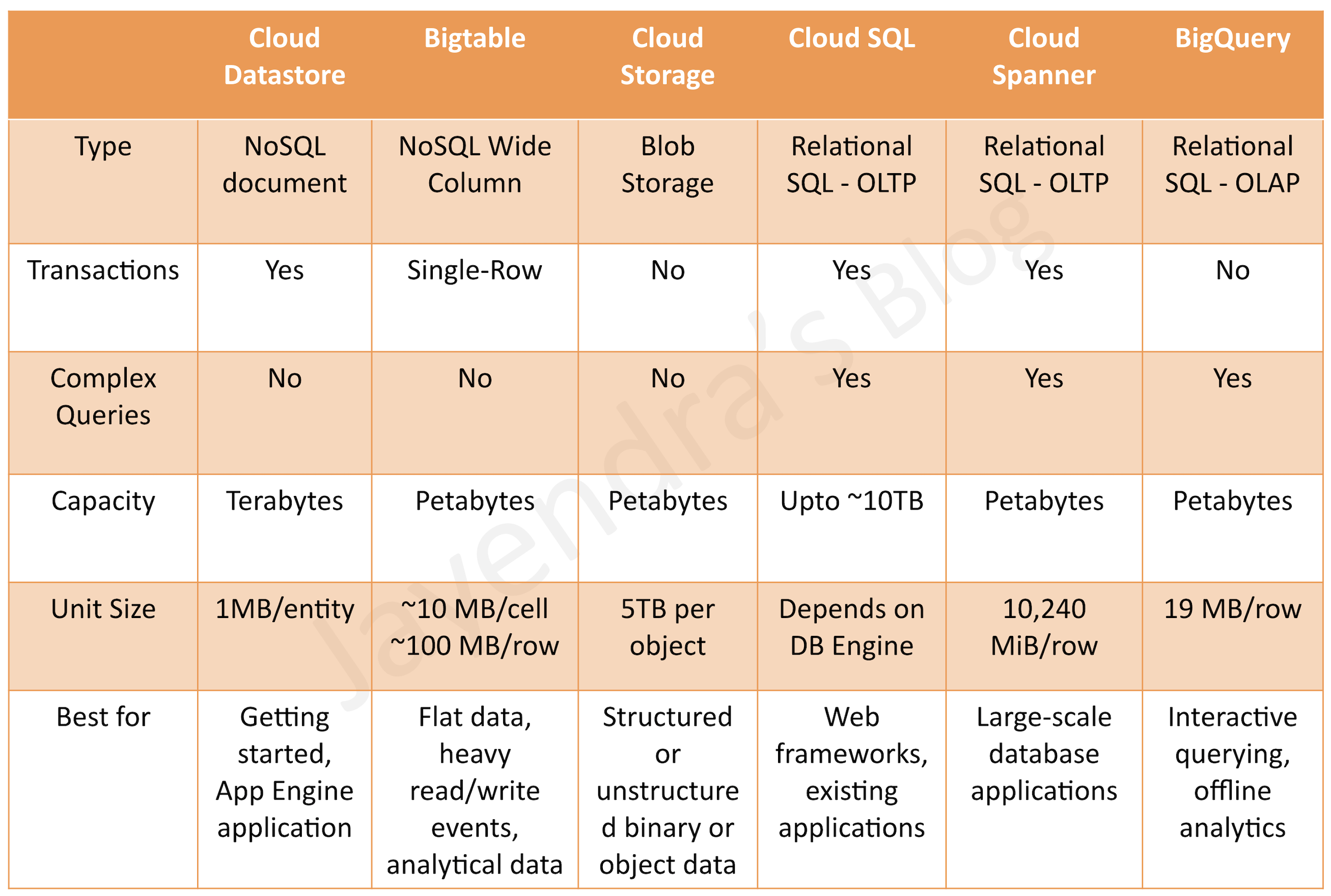
Bigtable provides a scalable, fully managed, non-relational NoSQL wide-column analytical big data database service suitable for both low-latency single-point lookups and precalculated analytics.
supports large quantities (>1 TB) of semi-structured or structured data (vs Datastore)
supports high throughput or rapidly changing data (vs BigQuery)
managed, but needs provisioning of nodes and can be expensive (vs Datastore and BigQuery)
does not support transactions or strong relational semantics (vs Datastore)
does not support SQL queries (vs BigQuery and Datastore)
Not Transactional and does not support ACID
provides eventual consistency
ideal for time-series or natural semantic ordering data
can run asynchronous batch or real-time processing on the data
can run machine learning algorithms on the data
provides petabytes of capacity with a maximum unit size of 10 MB per cell and 100 MB per row.
Usage Patterns
Low-latency read/write access
High-throughput data processing
Time series support
Anti Patterns
Not an ideal storage option for future analysis – Use BigQuery instead
Not an ideal storage option for transactional data – Use relational database or Datastore
Common Use cases
IoT, finance, adtech
Personalization, recommendations
Monitoring
Geospatial datasets
Graphs
Consider using Cloud Bigtable, if you need high-performance datastore to perform analytics on a large number of structured objects
Cloud Storage provides durable and highly available object storage.
fully managed, simple administration, cost-effective, and scalable service that does not require capacity management
supports unstructured data storage like binary or raw objects
provides high performance, internet-scale
supports data encryption at rest and in transit
Consider using Cloud Storage, if you need to store immutable blobs larger than 10 MB, such as large images or movies. This storage service provides petabytes of capacity with a maximum unit size of 5 TB per object.
offers MySQL, PostgreSQL, MSSQL databases as a service
manages OS & Software installation, patches and updates, backups and configuring replications, failover however needs to select and provision machines (vs Cloud Spanner)
single region only – although it now supports cross-region read replicas (vs Cloud Spanner)
Scaling
provides vertical scalability (Max. storage of 10TB)
storage can be increased without incurring any downtime
provides an option to increase the storage automatically
storage CANNOT be decreased
supports Horizontal scaling for read-only using read replicas (vs Cloud Spanner)
performance is linked to the disk size
Security
data is encrypted when stored in database tables, temporary files, and backups.
external connections can be encrypted by using SSL, or by using the Cloud SQL Proxy.
High Availability
fault-tolerance across zones can be achieved by configuring the instance for high availability by adding a failover replica
failover is automatic
can be created from primary instance only
replication from the primary instance to failover replica is semi-synchronous.
failover replica must be in the same region as the primary instance, but in a different zone
only one instance for every primary instance allowed
supports managed backups and backups are created on primary instance only
supports automatic replication
Backups
Automated backups can be configured and are stored for 7 days
Manual backups (snapshots) can be created and are not deleted automatically
Point-in-time recovery
requires binary logging enabled.
every update to the database is written to an independent log, which involves a small reduction in write performance.
performance of the read operations is unaffected by binary logging, regardless of the size of the binary log files.
Usage Patterns
direct lift and shift for MySQL, PostgreSQL, MSSQL database only
relational database service with strong consistency
OLTP workloads
Anti Patterns
need data storage more than 10TB, use Cloud Spanner
need global availability with low latency, use Cloud Spanner
not a direct replacement for Oracle use installation on GCE
Common Use cases
Websites, blogs, and content management systems (CMS)
Business intelligence (BI) applications
ERP, CRM, and eCommerce applications
Geospatial applications
Consider using Cloud SQL for full relational SQL support for OTLP and lift and shift of MySQL, PostgreSQL databases
provides fully managed, no-ops, OLAP, enterprise data warehouse (EDW) with SQL and fast ad-hoc queries.
provides high capacity, data warehousing analytics solution
ideal for big data exploration and processing
not ideal for operational or transactional databases
provides SQL interface
A scalable, fully managed
Usage Patterns
OLAP workloads up to petabyte-scale
Big data exploration and processing
Reporting via business intelligence (BI) tools
Anti Patterns
Not an ideal storage option for transactional data or OLTP – Use Cloud SQL or Cloud Spanner instead
Low-latency read/write access – Use Bigtable instead
Common Use cases
Analytical reporting on large data
Data science and advanced analyses
Big data processing using SQL
Memorystore
provides scalable, secure, and highly available in-memory service for Redis and Memcached.
fully managed as provisioning, replication, failover, and patching are all automated, which drastically reduces the time spent doing DevOps.
provides 100% compatibility with open source Redis and Memcached
is protected from the internet using VPC networks and private IP and comes with IAM integration
Usage Patterns
Lift and shift migration of applications
Low latency data caching and retrieval
Anti Patterns
Relational or NoSQL database
Analytics solution
Common Use cases
User session management
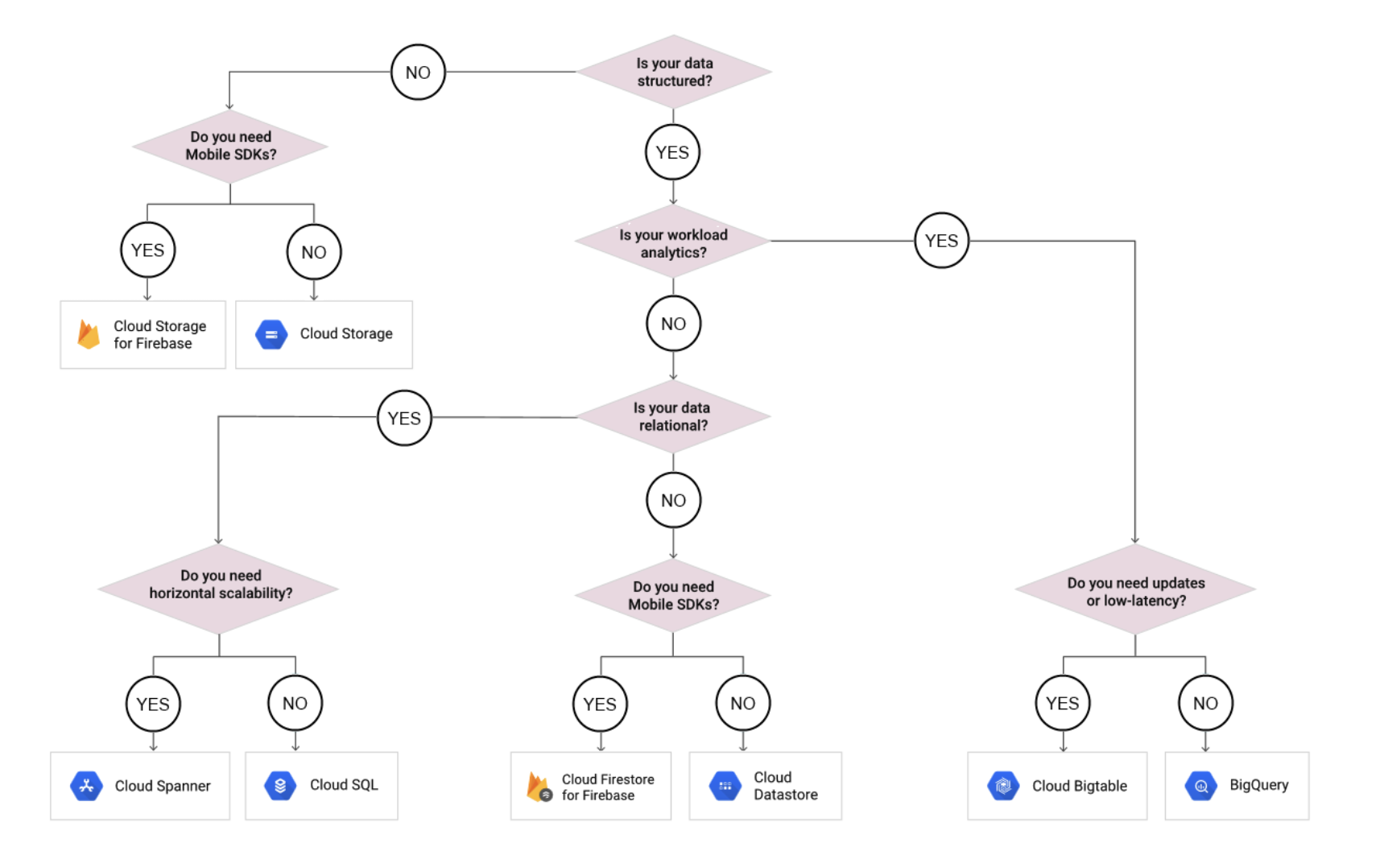
GCP Storage Options Decision Tree
GCP Certification Exam Practice Questions
Questions are collected from Internet and the answers are marked as per my knowledge and understanding (which might differ with yours).
GCP services are updated everyday and both the answers and questions might be outdated soon, so research accordingly.
GCP exam questions are not updated to keep up the pace with GCP updates, so even if the underlying feature has changed the question might not be updated
Open to further feedback, discussion and correction.
Your application is hosted across multiple regions and consists of both relational database data and static images. Your database has over 10 TB of data. You want to use a single storage repository for each data type across all regions. Which two products would you choose for this task? (Choose two)
Cloud Bigtable
Cloud Spanner
Cloud SQL
Cloud Storage
You are building an application that stores relational data from users. Users across the globe will use this application. Your CTO is concerned about the scaling requirements because the size of the user base is unknown. You need to implement a database solution that can scale with your user growth with minimum configuration changes. Which storage solution should you use?
Cloud SQL
Cloud Spanner
Cloud Firestore
Cloud Datastore
Your company processes high volumes of IoT data that are time-stamped. The total data volume can be several petabytes. The data needs to be written and changed at a high speed. You want to use the most performant storage option for your data. Which product should you use?
Cloud Datastore
Cloud Storage
Cloud Bigtable
BigQuery
Your App Engine application needs to store stateful data in a proper storage service. Your data is non-relational database data. You do not expect the database size to grow beyond 10 GB and you need to have the ability to scale down to zero to avoid unnecessary costs. Which storage service should you use?
Cloud Bigtable
Cloud Dataproc
Cloud SQL
Cloud Datastore
A financial organization wishes to develop a global application to store transactions happening from different part of the world. The storage system must provide low latency transaction support and horizontal scaling. Which GCP service is appropriate for this use case?
Bigtable
Datastore
Cloud Storage
Cloud Spanner
You work for a mid-sized enterprise that needs to move its operational system transaction data from an on-premises database to GCP. The database is about 20 TB in size. Which database should you choose?
Cloud Load Balancing distributes user traffic across multiple instances of the applications and reduces the risk that the of performance issues for the applications experience by spreading the load
Cloud Load Balancing helps serve content as close as possible to the users on a system that can respond to over one million queries per second.
Cloud Load Balancing is a fully distributed, software-defined managed service. It isn’t hardware-based and there is no need to manage a physical load balancing infrastructure.
Cloud Load Balancing Features
External versus Internal load balancing
External load balancing
for internet based applications
requires Premium Tier of Network Service Tiers
Types
External HTTP/S Load Balancing
SSL Proxy Load Balancing
TCP Proxy Load Balancing
External TCP/UDP Network Load Balancing
Internal load balancing
for internal clients inside of Google Cloud
can use Standard Tier
Types
Internal HTTP/S Load Balancing
Internal TCP/UDP Network Load Balancing
Global versus Regional Load Balancing
Regional load balancing
for single region applications.
supports only IPv4 termination.
Types
Internal HTTP/S Load Balancing
External TCP/UDP Network Load Balancing
Internal TCP/UDP Network Load Balancing
External HTTP/S Load Balancing (Standard Tier)
SSL Proxy Load Balancing (Standard Tier)
TCP Proxy Load Balancing (Standard Tier)
Global load balancing
for globally distributed applications
provides access by using a single anycast IP address
supports IPv4 and IPv6 termination.
Types
External HTTP/S Load Balancing (Premium Tier)
SSL Proxy Load Balancing (Premium Tier)
TCP Proxy Load Balancing (Premium Tier)
Pass-through vs Proxy-based load balancing
Proxy-based load balancing
acts as a proxy performing address and port translation and terminating the request before forwarding to the backend service
clients and backends interact with the load balancer
original client IP, port and protocol is forwarded using x-forwarded-for headers
automatically all proxy-based external load balancers inherit DDoS protection from Google Front Ends (GFEs)
Google Cloud Armor can be configured for external HTTP(S) load balancers
Types
Internal HTTP/S Load Balancing
External HTTP/S Load Balancing
SSL Proxy Load Balancing
TCP Proxy Load Balancing
Pass-through load balancing
does not modify the request or headers and passes to unchanged to the underlying backend
Types
External TCP/UDP Network Load Balancing
Internal TCP/UDP Network Load Balancing
Layer 4 vs Layer 7
Layer 4-based load balancing
directs traffic based on data from network and transport layer protocols, such as IP address and TCP or UDP port
Layer 7-based load balancing
adds content-based routing decisions based on attributes, such as the HTTP header and the URI
Traffic type
Supports various traffic types including HTTP(S), TCP, UDP
A backend is a group of endpoints that receive traffic from a Google Cloud load balancer, a Traffic Director-configured Envoy proxy, or a proxyless gRPC client.
Google Cloud supports several types of backends:
Instance group containing virtual machine (VM) instances.
Zonal NEG
Serverless NEG
Internet NEG
Cloud Storage bucket
A backend service is either global or regional in scope.
Forwarding Rules
A forwarding rule and its corresponding IP address represent the frontend configuration of a Google Cloud load balancer.
Health Checks
Google Cloud provides health checking mechanisms that determine if backends, such as instance groups and zonal network endpoint groups (NEGs), are healthy and properly respond to traffic.
Google Cloud provides global and regional health check systems that connect to backends on a configurable, periodic basis.
Each connection attempt is called a probe, and each health check system is called a prober. Google Cloud records the success or failure of each probe
Google Cloud computes an overall health state for each backend in the load balancer or Traffic Director based on a configurable number of sequential successful or failed probes.
Backends that respond successfully for the configured number of times are considered healthy.
Backends that fail to respond successfully for a separate number of times are unhealthy.
IPv6 termination
Google Cloud supports IPv6 clients with HTTP(S) Load Balancing, SSL Proxy Load Balancing, and TCP Proxy Load Balancing.
Load balancer accepts IPv6 connections from the users, and then proxies those connections to the backends.
SSL Certificates
Load balancer must have an SSL certificate and the certificate’s corresponding private key.
Communication between the client and the load balancer remains private – illegible to any third party that doesn’t have this private key.
Google Cloud uses SSL certificates to provide privacy and security from a client to a load balancer. To achieve this, the
Allows multiple SSL certificates when serving from multiple domains using the same load balancer IP address and port, and a different SSL certificate for each domain is needed
SSL Policies
SSL policies provide the ability to control the features of SSL that the SSL proxy load balancer or external HTTP(S) load balancer negotiates with clients
HTTP(S) Load Balancing and SSL Proxy Load Balancing uses a set of SSL features that provides good security and wide compatibility.
SSL policies help control the features of SSL like SSL versions and ciphers that the load balancer negotiates with clients.
URL Maps
URL map helps to direct requests to a destination based on defined rules
When a request arrives at the load balancer, the load balancer routes the request to a particular backend service or backend bucket based on configurations in a URL map.
GCP Certification Exam Practice Questions
Questions are collected from Internet and the answers are marked as per my knowledge and understanding (which might differ with yours).
GCP services are updated everyday and both the answers and questions might be outdated soon, so research accordingly.
GCP exam questions are not updated to keep up the pace with GCP updates, so even if the underlying feature has changed the question might not be updated
Open to further feedback, discussion and correction.
This post uses the current naming with references to previous names for clarity.
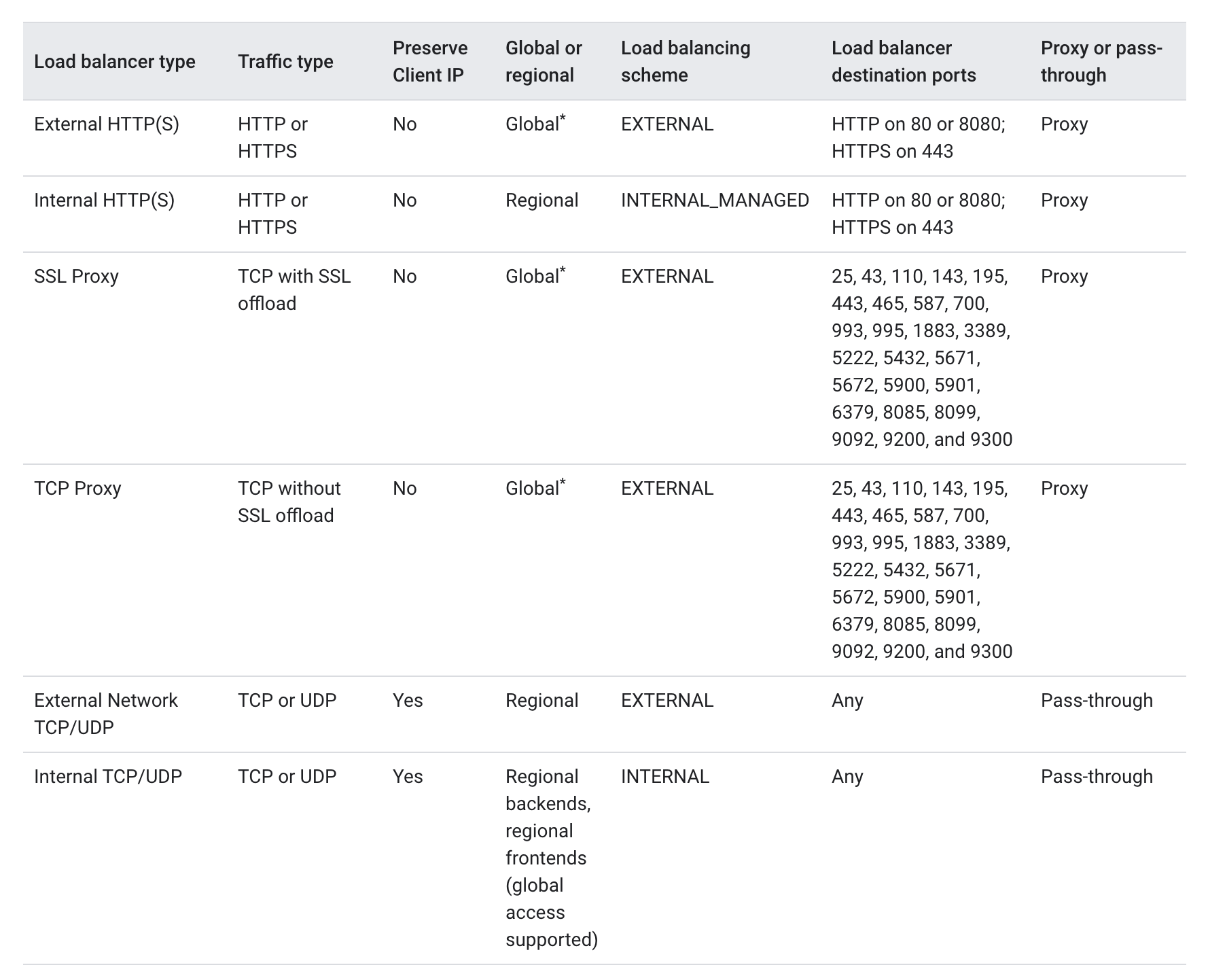
Google Cloud Load Balancer Summary
Load Balancer
Deployment Mode
Traffic Type
Network Tier
Application Load Balancer
Global external
HTTP/HTTPS
Premium
Regional external
HTTP/HTTPS
Premium or Standard
Classic
HTTP/HTTPS
Global in Premium, Regional in Standard
Regional internal
HTTP/HTTPS
Premium
Cross-region internal
HTTP/HTTPS
Premium
Proxy Network Load Balancer
Global external
TCP with optional SSL offload
Premium
Regional external
TCP
Premium or Standard
Classic
TCP with optional SSL offload
Global in Premium, Regional in Standard
Regional internal
TCP (no SSL offload)
Premium
Cross-region internal
TCP (no SSL offload)
Premium
Passthrough Network Load Balancer
External (regional)
TCP, UDP, ESP, GRE, ICMP, ICMPv6
Premium or Standard
Internal (regional)
TCP, UDP, ICMP, ICMPv6, SCTP, ESP, AH, GRE
Premium
Application Load Balancer — Internal (Regional)
Previously known as: Internal HTTP(S) Load Balancing
is a proxy-based, regional Layer 7 load balancer that enables running and scaling services behind an internal IP address.
distributes HTTP and HTTPS traffic to backends hosted on Compute Engine, GKE, and Cloud Run
is accessible only in the chosen region of the Virtual Private Cloud (VPC) network on an internal IP address.
can be made globally accessible by enabling global access on the forwarding rule, allowing clients from any region to access the load balancer.
enables rich traffic control capabilities based on HTTP(S) parameters.
is a managed service based on the open source Envoy proxy.
needs one proxy-only subnet in each region of a VPC network where the internal Application Load Balancer is used. All load balancers in a region and VPC network share the same proxy-only subnet.
supports path-based and host-based routing
supports advanced traffic management including traffic mirroring, weight-based traffic splitting, and header transformations
preserves the Host header of the original client request and also appends two IP addresses (Client and LB) to the X-Forwarded-For header
supports backend services distributing requests to healthy backends (instance groups, zonal NEGs, serverless NEGs for Cloud Run, or hybrid NEGs for on-premises backends).
supports health checks that periodically monitor the readiness of the backends.
if a backend becomes unhealthy, traffic is automatically redirected to healthy backends within the same region.
has native support for the WebSocket protocol
supports TLS 1.0, 1.1, 1.2, and 1.3 when terminating client SSL requests.
supports mutual TLS (mTLS) for client certificate-based authentication (added 2023)
supports IPv6 termination (Preview)
supports access from connected networks via VPC Network Peering, Cloud VPN, or Cloud Interconnect
isn’t compatible with the following features:
Cloud CDN
Cloud Storage buckets (supported in regional mode since 2024)
supports health checks (HTTP, HTTPS, HTTP2, TCP, SSL protocols); does not offer UDP health checks but can use TCP-based health checks.
supports failover backends that are only used when healthy VMs in primary backends fall below a configurable threshold.
supports multiple forwarding rules sharing a common IP address
Passthrough Network Load Balancer — External
Previously known as: External TCP/UDP Network Load Balancing
is a managed, external, pass-through, regionalLayer 4 load balancer that distributes TCP or UDP traffic from the internet to VM instances in the same region.
supports TCP, UDP, ESP, GRE, ICMP, and ICMPv6 protocols.
is not a proxy — packets are pass-through:
Load-balanced packets are received by backend VMs with their source IP unchanged.
Load-balanced connections are terminated by the backend VMs.
Responses from the backend VMs go directly to the clients, not back through the load balancer.
TCP responses use direct server return.
scope is regional, not global. Within a single region, the load balancer services all zones.
supports two architectures:
Backend service-based (recommended) — uses instance groups or zonal NEGs with GCE_VM_IP endpoints
Target pool-based (legacy) — simpler but fewer features
supports zonal NEGs with GCE_VM_IP endpoints, enabling forwarding to any network interface (not just nic0)
supports weighted load balancing for gradual traffic migration
supports regional health checks (HTTP, HTTPS, HTTP2, TCP, SSL); does not offer UDP health checks.
supports connection tracking table and configurable consistent hashing algorithm for traffic distribution.
supports Session affinity:
None: default, effectively same as Client IP, protocol, and port.
Client IP: based on client IP and destination IP.
Client IP and protocol: based on client IP, destination IP, and protocol.
Previously known as: External SSL Proxy Load Balancing and External TCP Proxy Load Balancing
Available in three deployment modes:
Global external — Premium Tier only, supports SSL offload
Regional external — Premium or Standard Tier, TCP only (no SSL offload)
Classic — Legacy mode, global in Premium Tier, regional in Standard Tier
Key Features
is a reverse proxy, Layer 4 load balancer that distributes SSL/TCP traffic from the internet to VM instances.
with SSL traffic, supports SSL offload where SSL (TLS) connections are terminated at the load balancing layer, then proxied to backends using SSL or TCP.
is intended for non-HTTP(S) traffic. For HTTP(S) traffic, use Application Load Balancer.
Global mode uses a single IP address for all users worldwide and automatically routes traffic to the closest backends.
supports proxy protocol header to preserve original source IP addresses.
supports two types of balancing mode:
CONNECTION: load spread based on concurrent connections the backend can handle.
UTILIZATION: load spread based on instance utilization.
supports Session Affinity with client IP affinity.
does not support mutual TLS (mTLS) authentication.
supports SSL policies to control minimum TLS versions and cipher suites.
Proxy Network Load Balancer — Internal
New deployment mode added in 2023
Available in two deployment modes:
Regional internal — for TCP traffic within a region
Cross-region internal — for TCP traffic across multiple regions
Key Features
is a proxy-based, internal, Layer 4 load balancer for TCP traffic.
uses Envoy proxy infrastructure.
does not support SSL offload (unlike the external proxy Network Load Balancer).
supports backends in instance groups, zonal NEGs, and hybrid NEGs.
provides access from connected networks via VPC Network Peering, Cloud VPN, or Cloud Interconnect.
cross-region mode enables backends distributed globally with automatic failover.
Choosing a Load Balancer
Choose an Application Load Balancer for HTTP(S) traffic with flexible Layer 7 features.
Choose a Proxy Network Load Balancer for TCP proxy load balancing with SSL offload to backends in one or more regions.
Choose a Passthrough Network Load Balancer to preserve client source IP addresses, avoid proxy overhead, and support additional protocols (UDP, ESP, ICMP, GRE).
Global vs. Regional
Global/Cross-region — distributed across multiple regions, resilient to both zonal and regional outages. Use when backends are in multiple regions or you need automatic cross-region failover.
Regional — distributed across zones within one region. Required for jurisdictional compliance where traffic must stay in a specific region.
Proxy vs. Passthrough
Proxy load balancers terminate client connections at the load balancer and open new connections to backends. Client IP is not preserved by default.
Passthrough load balancers don’t terminate client connections. Backend VMs receive packets with original source IP unchanged. Use when you need to preserve client IP.
Security Features (2023-2025 Updates)
Mutual TLS (mTLS) — Application Load Balancers now support frontend mTLS (client authenticates to LB) and backend mTLS (LB authenticates to backend). Supported on global external, regional external, regional internal, and cross-region internal Application Load Balancers.
Authorization Policies — Fine-grained access control policies that can be applied to Application Load Balancers to allow or deny requests based on attributes.
SSL Policies — Control minimum TLS version and cipher suites for Application Load Balancers and external proxy Network Load Balancers.
Google Cloud Armor — DDoS protection and WAF for external Application Load Balancers (global, regional, and classic modes) and external proxy Network Load Balancers.
Post-Quantum TLS — Support for post-quantum key exchange algorithms to protect against future quantum computing threats.
Service Extensions — Inject custom processing logic (such as custom security checks) into the load balancing data path of Application Load Balancers.
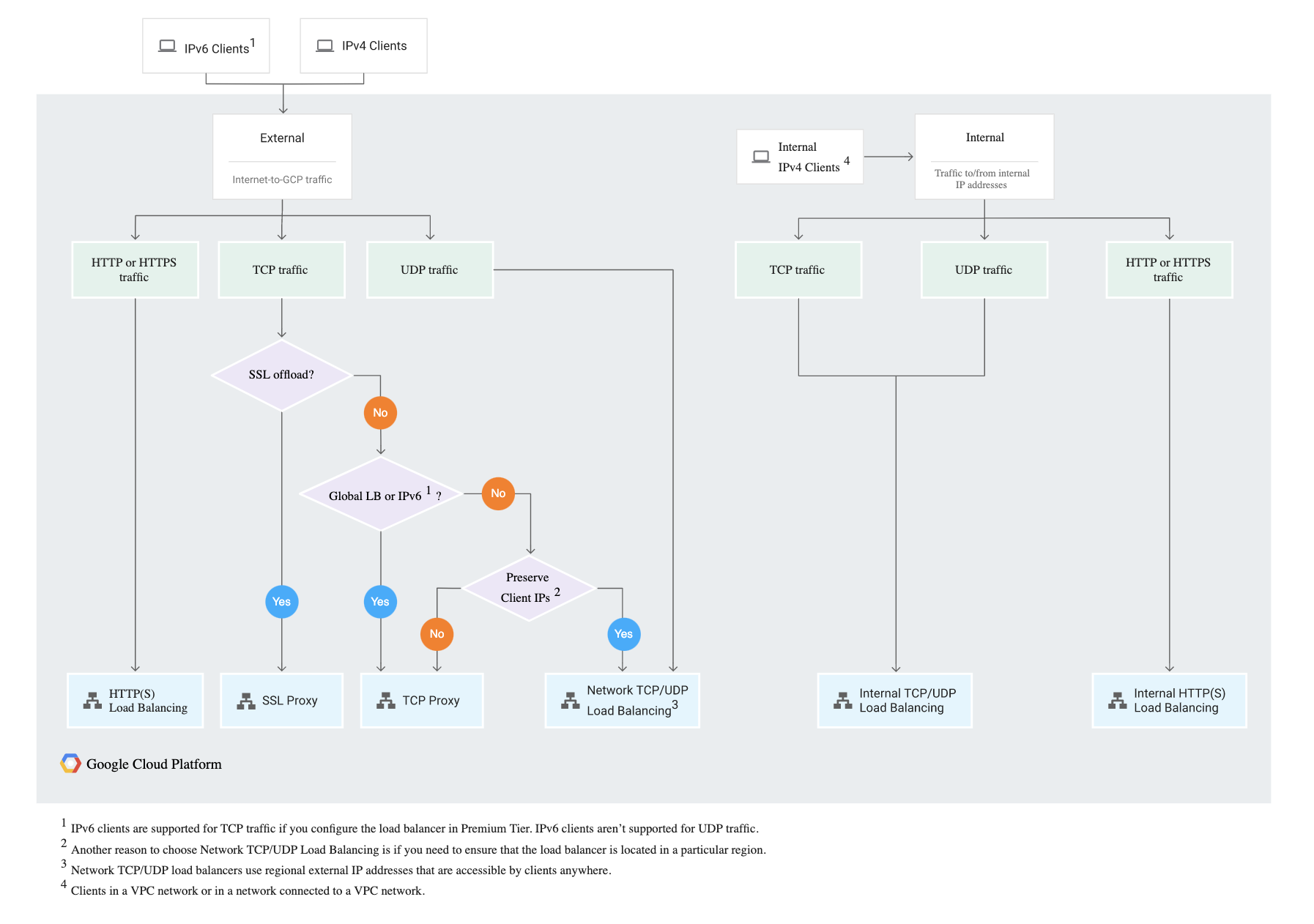
GCP Cloud Load Balancing Decision Tree
GCP Certification Exam Practice Questions
Questions are collected from Internet and the answers are marked as per my knowledge and understanding (which might differ with yours).
GCP services are updated everyday and both the answers and questions might be outdated soon, so research accordingly.
GCP exam questions are not updated to keep up the pace with GCP updates, so even if the underlying feature has changed the question might not be updated
Open to further feedback, discussion and correction.
Your development team has asked you to set up an external TCP load balancer with SSL offload. Which load balancer should you use?
External proxy Network Load Balancer (SSL proxy)
Application Load Balancer (HTTP)
External proxy Network Load Balancer (TCP proxy)
Application Load Balancer (HTTPS)
You have an instance group that you want to load balance. You want the load balancer to terminate the client SSL session. The instance group is used to serve a public web application over HTTPS. You want to follow Google-recommended practices. What should you do?
Configure an external Application Load Balancer.
Configure an internal passthrough Network Load Balancer.
Configure an external proxy Network Load Balancer (SSL proxy).
Configure an external proxy Network Load Balancer (TCP proxy).
Your development team has asked you to set up load balancer with SSL termination. The website would be using HTTPS protocol. Which load balancer should you use?
External proxy Network Load Balancer (SSL proxy)
Application Load Balancer (HTTP)
External proxy Network Load Balancer (TCP proxy)
External Application Load Balancer (HTTPS)
You have an application that receives SSL-encrypted TCP traffic on port 443. Clients for this application are located all over the world. You want to minimize latency for the clients. Which load balancing option should you use?
External Application Load Balancer (HTTPS)
External passthrough Network Load Balancer
External proxy Network Load Balancer (SSL Proxy)
Internal passthrough Network Load Balancer. Add a firewall rule allowing ingress traffic from 0.0.0.0/0 on the target instances.
You need to deploy an internal load balancer for HTTP traffic that can automatically failover to backends in another region if the primary region goes down. Which load balancer should you choose?
Regional internal Application Load Balancer
Cross-region internal Application Load Balancer
Internal passthrough Network Load Balancer
Internal proxy Network Load Balancer
Your organization requires that TLS be terminated only within a specific region for compliance. You need an external load balancer for HTTPS traffic. Which deployment mode should you use?
Global external Application Load Balancer
Classic Application Load Balancer (Premium Tier)
Regional external Application Load Balancer
External proxy Network Load Balancer (SSL proxy)
You want to load balance UDP traffic to backend VMs while preserving the client source IP address. Which load balancer type should you use?
External Application Load Balancer
External proxy Network Load Balancer
External passthrough Network Load Balancer
Internal Application Load Balancer
You need to set up mutual TLS (mTLS) authentication where the load balancer verifies client certificates. Which load balancer supports this? (Choose two)
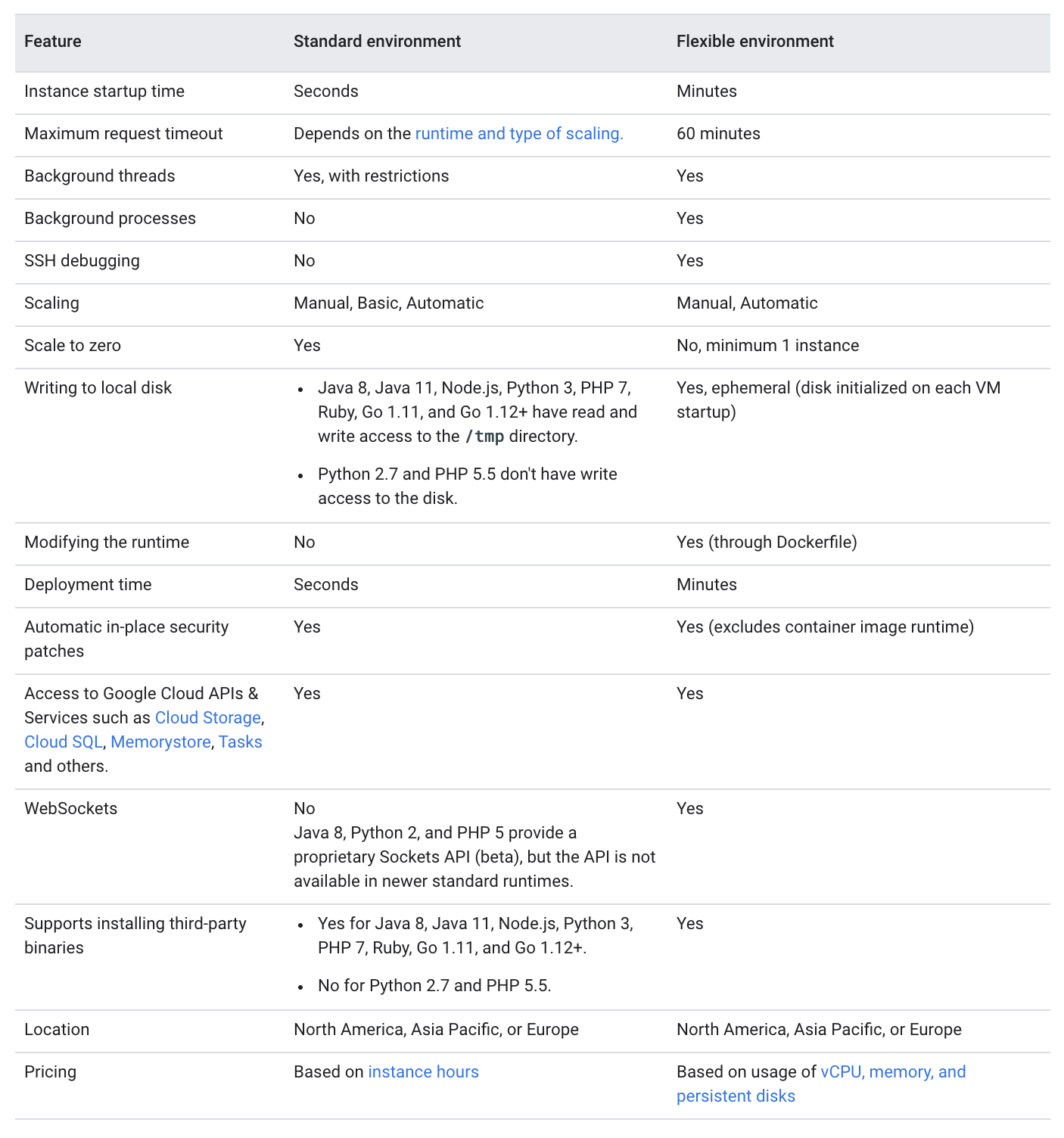
Google Cloud – App Engine Standard vs Flexible Environment
📢 Important Updates (2024-2026)
Legacy Runtimes Deprecated (Jan 31, 2026): Python 2.7, Java 8, Go 1.11, and PHP 5.5 first-generation runtimes have been deprecated. Existing apps continue to run but new deployments are blocked.
Second-Generation Runtimes: Standard environment now uses gVisor-based sandboxing with significantly fewer restrictions than the first-generation sandbox.
Cloud Run Recommended: Google recommends Cloud Run as the preferred serverless platform for new projects, combining the best of both App Engine environments.
VPC Connectivity: Standard environment now supports VPC access via Direct VPC egress and Serverless VPC connectors.
Application Execution
Standard environment
Application instances run in a sandboxed environment using second-generation runtimes (gVisor-based containers) for supported languages: Go, Java, Node.js, PHP, Python, and Ruby.
Second-generation runtimes (current) provide significantly relaxed restrictions compared to the original sandbox:
Can write to the /tmp directory (in-memory filesystem)
Can use any language-native libraries and system calls supported by gVisor
Supports network access including VPC connectivity
Background threads supported within request lifecycle
First-generation sandbox (deprecated Jan 2026) had strict restrictions:
Only allowed a limited set of binary libraries
App could not write to disk
Limited CPU and memory options
Did not support SSH debugging, background processes, or Cloud VPN
Supported Languages: Go (up to 1.26), Java (up to 25), Node.js (up to 24), PHP (up to 8.5), Python (up to 3.14), Ruby (up to 4.0)
Flexible environment
Application instances run within Docker containers on Compute Engine virtual machines (VM).
Supports custom runtimes or source code written in any programming language via Docker containers.
Allows selection of any Compute Engine machine type for instances, providing access to more memory and CPU (up to 80 vCPU and 6.5GB per vCPU).
Supports SSH debugging into instances.
Accessing External Services
Standard environment
Second-generation runtimes: Use Google Cloud Client Libraries (recommended) for accessing services like Firestore, Cloud Storage, etc. These libraries are portable across all Google Cloud platforms.
First-generation runtimes: Used legacy bundled services (google.appengine APIs) – these are still available on second-gen runtimes for Java, Python, Go, and PHP for backward compatibility but are not recommended for new apps.
Flexible environment
Legacy google.appengine APIs are not available.
Uses Google Cloud Client Libraries, making the application more portable.
Scaling
Standard Environment
Rapid scaling with scale-to-zero capability — can scale from zero instances up to thousands very quickly.
Uses a custom-designed autoscaling algorithm.
Supports three scaling types: automatic, basic, and manual scaling.
Configurable: max/min instances, target CPU utilization, target throughput utilization, max concurrent requests, and pending latency.
Flexible Environment
Must have at least one instance running for each active version (cannot scale to zero).
Uses the Compute Engine Autoscaler.
Can take longer to scale up in response to traffic compared to Standard.
Supports automatic and manual scaling only.
Health Checks
Standard environment
Performs automatic readiness and liveness checks on instances.
If an instance consistently fails checks, App Engine terminates and replaces it with a new instance.
Flexible environment
Instances are health-checked using configurable health check endpoints.
Health check results are used by the load balancer to determine whether to send traffic to an instance and whether it should be autohealed.
Networking & Connectivity
Standard environment
VPC connectivity supported via Direct VPC egress (Preview) or Serverless VPC Access connectors.
Supports Shared VPC for cross-project networking.
Direct VPC egress supports: network tags, Public NAT, dual-stack subnets.
Supports configurable ingress settings (internal-only, internal-and-Cloud-Load-Balancing, all traffic).
App Engine firewall rules available for access control.
Flexible environment
Instances run on Compute Engine VMs within the project’s VPC network directly.
Full network access including SSH and Cloud VPN support.
Configurable ingress settings and firewall rules available.
Traffic Migration
Standard environment
Allows routing requests to the target version either immediately or gradually (traffic splitting).
Supports splitting traffic by IP address, cookie, or random.
Flexible environment
Supports both immediate and gradual traffic migration.
Supports traffic splitting by IP address or cookie.
Single Zone Failures
Standard environment
Applications are single-zoned; all instances live in a single availability zone.
In the event of a zone failure, the application starts new instances in a different zone in the same region and the load balancer routes traffic to the new instances.
Latency spike can be observed due to loading requests and Memcache flush.
Flexible environment
Applications use Regional Managed Instance Groups with instances distributed among multiple availability zones within a region.
In the event of a single zone failure, the load balancer stops routing traffic to that zone.
Provides higher availability compared to Standard environment.
Deployment
Standard Environment
Deployments are generally faster — instance startup time is in seconds for auto-scaling.
Deploys from source code only (no container image support).
Uses app.yaml for all configuration.
Flexible Environment
Instance startup time in minutes (not seconds).
Deployment time is longer due to Docker image building.
Supports custom runtime Docker containers.
Uses app.yaml for configuration.
Compute Resources
Standard Environment
Predefined instance classes: F1 (384MB/600MHz), F2 (768MB/1.2GHz), F4 (1.5GB/2.4GHz), F4_1G (3GB/2.4GHz) for automatic scaling.
B1, B2, B4, B4_1G, B8 (up to 3GB/4.8GHz) for basic and manual scaling.
No GPU support.
Flexible Environment
Any Compute Engine machine type — up to 80 vCPU and 6.5GB RAM per vCPU.
Much greater resource flexibility.
No GPU support (use Cloud Run or Compute Engine for GPU workloads).
Pricing
Standard Environment
Billed per instance-hour based on instance class.
Includes a generous free tier (28 instance-hours/day for F1, 8 instance-hours/day for B1).
No per-request fees.
No committed use discounts (CUDs) available.
Flexible Environment
Billed based on vCPU, memory, and persistent disk resources of the underlying Compute Engine VMs.
No free tier.
Minimum one instance always running (cannot scale to zero).
Cloud Run — The Recommended Alternative
Cloud Run is the latest evolution of Google Cloud Serverless and is officially recommended by Google for new projects. It combines the best features of both App Engine environments:
Scale-to-zero like Standard environment
Container flexibility like Flexible environment (any language, any library)
GPU support — one GPU per instance configurable
Sidecar containers — run multiple containers per service
Volume mounts — mount Cloud Storage buckets directly
Multi-region load balancing — deploy services across regions
Committed Use Discounts (CUDs) available
Up to 8 vCPU and 32GB memory per instance
IAM-based access control with Cloud Run Invoker role
Configurable health checks — startup and liveness probes
Direct VPC egress (GA) with full VPC Flow Logs support
Questions are collected from Internet and the answers are marked as per my knowledge and understanding (which might differ with yours).
GCP services are updated everyday and both the answers and questions might be outdated soon, so research accordingly.
GCP exam questions are not updated to keep up the pace with GCP updates, so even if the underlying feature has changed the question might not be updated
Open to further feedback, discussion and correction.
You’re writing a Python application and want your application to run in a sandboxed managed environment with the ability to scale up in seconds to account for huge spikes in demand. Which service should you host your application on?
Compute Engine
App Engine Flexible Environment
Kubernetes Engine
App Engine Standard Environment
A Company is planning the migration of their web application to Google App Engine. However, they would still continue to use their on-premises database. How can they setup application?
Setup the application using App Engine Standard environment with Cloud VPN to connect to database
Setup the application using App Engine Flexible environment with Cloud VPN to connect to database
Setup the application using App Engine Standard environment with Cloud Router to connect to database
Setup the application using App Engine Flexible environment with Cloud Router to connect to database
Note: With second-generation runtimes, Standard environment can now connect to VPC using Direct VPC egress or Serverless VPC connectors, making option A potentially valid for newer deployments. However, for direct Cloud VPN connectivity, Flexible environment remains the straightforward choice.
A startup wants to deploy a containerized application written in Rust with minimal operational overhead and the ability to scale to zero during periods of inactivity. Which Google Cloud service should they use?
App Engine Standard Environment
App Engine Flexible Environment
Cloud Run
Google Kubernetes Engine
Your team is running an application on App Engine Standard environment using Python 2.7 runtime. Google has deprecated first-generation runtimes. What is the recommended migration path?
Migrate directly to Compute Engine
Migrate to the latest Python 3 runtime on App Engine Standard or migrate to Cloud Run
No action needed; the application will continue running indefinitely
Migrate to App Engine Flexible environment
Which of the following is TRUE about App Engine Standard environment with second-generation runtimes? (Choose TWO)
Applications can connect to VPC networks using Direct VPC egress
Applications can use any programming language via custom Docker containers
Applications can scale to zero instances when there is no traffic
Applications support SSH access for debugging
Applications require at least one instance always running
A company wants to deploy a web application that requires GPU access for AI inference with automatic scaling and minimal infrastructure management. Which service should they use?
App Engine Standard Environment
App Engine Flexible Environment
Cloud Run
Compute Engine with managed instance groups
Which App Engine environment provides multi-zone high availability by distributing instances across multiple zones in a region?
TerramEarth manufactures heavy equipment for the mining and agricultural industries. They currently have over 500 dealers and service centers in 100 countries. Their mission is to build products that make their customers more productive.
Key points here are 500 dealers and service centers are spread across the world and they want to make their customers more productive.
Solution Concept
There are 2 million TerramEarth vehicles in operation currently, and we see 20% yearly growth. Vehicles collect telemetry data from many sensors during operation. A small subset of critical data is transmitted from the vehicles in real time to facilitate fleet management. The rest of the sensor data is collected, compressed, and uploaded daily when the vehicles return to home base. Each vehicle usually generates 200 to 500 megabytes of data per day
Key points here are TerramEarth has 2 million vehicles. Only critical data is transferred in real-time while the rest of the data is uploaded in bulk daily.
Executive Statement
Our competitive advantage has always been our focus on the customer, with our ability to provide excellent customer service and minimize vehicle downtimes. After moving multiple systems into Google Cloud, we are seeking new ways to provide best-in-class online fleet management services to our customers and improve operations of our dealerships. Our 5-year strategic plan is to create a partner ecosystem of new products by enabling access to our data, increasing autonomous operation capabilities of our vehicles, and creating a path to move the remaining legacy systems to the cloud.
Key point here is the company wants to improve further in operations, customer experience, and partner ecosystem by allowing them to reuse the data.
Existing Technical Environment
TerramEarth’s vehicle data aggregation and analysis infrastructure resides in Google Cloud and serves clients from all around the world. A growing amount of sensor data is captured from their two main manufacturing plants and sent to private data centers that contain their legacy inventory and logistics management systems. The private data centers have multiple network interconnects configured to Google Cloud. The web frontend for dealers and customers is running in Google Cloud and allows access to stock management and analytics.
Key point here is the company is hosting its infrastructure in Google Cloud and private data centers. GCP has web frontend and vehicle data aggregation & analysis. Data is sent to private data centers.
Business Requirements
Predict and detect vehicle malfunction and rapidly ship parts to dealerships for just-in-time repair where possible.
Cloud IoT core can provide a fully managed service to easily and securely connect, manage, and ingest data from globally dispersed devices.
Existing legacy inventory and logistics management systems running in the private data centers can be migrated to Google Cloud.
Existing data can be migrated one time using Transfer Appliance.
Decrease cloud operational costs and adapt to seasonality.
Google Cloud provides configuring elasticity and scalability for resources based on the demand.
Increase speed and reliability of development workflow.
Google Cloud CI/CD tools like Cloud Build and open-source tools like Spinnaker can be used to increase the speed and reliability of the deployments.
Allow remote developers to be productive without compromising code or data security.
Cloud Function to Function authentication
Create a flexible and scalable platform for developers to create custom API services for dealers and partners.
Google Cloud provides multiple fully managed serverless and scalable application hosting solutions like Cloud Run and Cloud Functions
Managed Instance group with Compute Engines and GKE cluster with scaling can also be used to provide scalable, highly available compute services.
Technical Requirements
Create a new abstraction layer for HTTP API access to their legacy systems to enable a gradual move into the cloud without disrupting operations.
Google Cloud API Gateway & Cloud Endpoints can be used to provide an abstraction layer to expose the data externally over a variety of backends.
Modernize all CI/CD pipelines to allow developers to deploy container-based workloads in highly scalable environments.
Google Cloud provides DevOps tools like Cloud Build and supports open-source tools like Spinnaker to provide CI/CD features.
Cloud Build is a fully-managed, serverless service that executes builds on Google Cloud Platform’s infrastructure.
Container Registry is a private container image registry that supports Docker Image Manifest V2 and OCI image formats.
Artifact Registry is a fully-managed service with support for both container images and non-container artifacts, Artifact Registry extends the capabilities of Container Registry.
Allow developers to run experiments without compromising security and governance requirements
Google Cloud deployments can be configured for Canary or A/B testing to allow experimentation.
Create a self-service portal for internal and partner developers to create new projects, request resources for data analytics jobs, and centrally manage access to the API endpoints.
Use cloud-native solutions for keys and secrets management and optimize for identity-based access
Google Cloud supports Key Management Service – KMS and Secrets Manager for managing secrets and key management.
Improve and standardize tools necessary for application and network monitoring and troubleshooting.
Google Cloud provides Cloud Operations Suite which includes Cloud Monitoring and Logging to cover both on-premises and Cloud resources.
Cloud Monitoring collects measurements of key aspects of the service and of the Google Cloud resources used
Cloud Monitoring Uptime check is a request sent to a publicly accessible IP address on a resource to see whether it responds.
Cloud Logging is a service for storing, viewing, and interacting with logs.
Error Reporting aggregates and displays errors produced in the running cloud services.
Cloud Profiler helps with continuous CPU, heap, and other parameters profiling to improve performance and reduce costs.
Cloud Trace is a distributed tracing system that collects latency data from the applications and displays it in the Google Cloud Console.
Cloud Debugger helps inspect the state of an application, at any code location, without stopping or slowing down the running app.
Mountkirk Games makes online, session-based, multiplayer games for mobile platforms. They have recently started expanding to other platforms after successfully migrating their on-premises environments to Google Cloud. Their most recent endeavor is to create a retro-style first-person shooter (FPS) game that allows hundreds of simultaneous players to join a geo-specific digital arena from multiple platforms and locations. A real-time digital banner will display a global leaderboard of all the top players across every active arena.
Solution Concept
Mountkirk Games is building a new multiplayer game that they expect to be very popular. They plan to deploy the game’s backend on Google Kubernetes Engine so they can scale rapidly and use Google’s global load balancer to route players to the closest regional game arenas. In order to keep the global leader board in sync, they plan to use a multi-region Spanner cluster.
So the key here is the company wants to deploy the new game to Google Kubernetes Engine exposed globally using a Global Load Balancer and configured to scale rapidly and bring it closer to the users. Backend DB would be managed using a multi-region Cloud Spanner cluster.
Executive Statement
Our last game was the first time we used Google Cloud, and it was a tremendous success. We were able to analyze player behavior and game telemetry in ways that we never could before. This success allowed us to bet on a full migration to the cloud and to start building all-new games using cloud-native design principles. Our new game is our most ambitious to date and will open up doors for us to support more gaming platforms beyond mobile. Latency is our top priority, although cost management is the next most important challenge. As with our first cloud-based game, we have grown to expect the cloud to enable advanced analytics capabilities so we can rapidly iterate on our deployments of bug fixes and new functionality.
So the key points here are the company has moved to Google Cloud with great success and wants to build new games in the cloud. Key priorities are high performance, low latency, cost, advanced analytics, quick deployment, and time-to-market cycles.
Can be handled using Deployment Manager and IaaC services like Terraform to automate infrastructure provisioning
Cloud Build + Cloud Deploy/Spinnaker can be used for rapid continuous integration and deployment
Minimize latency
can be reduced using a Global HTTP load balancer, which would route the user to the closest region
using multi-regional resources like Cloud Spanner would also help reduce latency
Optimize for dynamic scaling
can be done using GKE Cluster Autoscaler and Horizontal Pod Autoscaling to dynamically scale the nodes and applications as per the demand
Cloud Spanner can be scaled dynamically
Use managed services and pooled resources.
Using GKE, with Global Load Balancer for computing and Cloud Spanner would help cover the application stack using managed services
Minimize costs.
Using minimal resources and enabling auto-scaling as per the demand would help minimize costs
Existing Technical Environment
The existing environment was recently migrated to Google Cloud, and five games came across using lift-and-shift virtual machine migrations, with a few minor exceptions. Each new game exists in an isolated Google Cloud project nested below a folder that maintains most of the permissions and network policies. Legacy games with low traffic have been consolidated into a single project. There are also separate environments for development and testing.
Key points here are the resource hierarchy exists with a project for each new game under a folder to control access using Service Control Permissions. Also, some of the small games would be hosted in a single project. There are also different environments for development, testing, and production.
Technical Requirements
Dynamically scale based on game activity.
can be done using GKE Cluster Autoscaler and Horizontal Pod Autoscaling to dynamically scale the nodes and applications as per the demand
Publish scoring data on a near-real-time global leaderboard.
can be handled using Pub/Sub for capturing data and Cloud DataFlow for processing the data on the fly i.e real time
Store game activity logs in structured files for future analysis.
can be handled using Cloud Storage to store logs for future analysis
analysis can be handled using BigQuery either loading the data or using federated data source
data can also be stored directly using BigQuery as it would provide a low-cost data storage (as compared to Bigtable) for analytics
another advantage of BigQuery over Bigtable in this case its multi-regional, meeting the global footprint and latency requirements
Use GPU processing to render graphics server-side for multi-platform support.
Support eventual migration of legacy games to this new platform.