Google Cloud – TerramEarth Case Study

TerramEarth manufactures heavy equipment for the mining and agricultural industries. They currently have over 500 dealers and service centers in 100 countries. Their mission is to build products that make their customers more productive.

Key points here are 500 dealers and service centers are spread across the world and they want to make their customers more productive.

Solution Concept

There are 2 million TerramEarth vehicles in operation currently, and we see 20% yearly growth. Vehicles collect telemetry data from many sensors during operation. A small subset of critical data is transmitted from the vehicles in real time to facilitate fleet management. The rest of the sensor data is collected, compressed, and uploaded daily when the vehicles return to home base. Each vehicle usually generates 200 to 500 megabytes of data per day

Key points here are TerramEarth has 2 million vehicles. Only critical data is transferred in real-time while the rest of the data is uploaded in bulk daily.

Executive Statement

Our competitive advantage has always been our focus on the customer, with our ability to provide excellent customer service and minimize vehicle downtimes. After moving multiple systems into Google Cloud, we are seeking new ways to provide best-in-class online fleet management services to our customers and improve operations of our dealerships. Our 5-year strategic plan is to create a partner ecosystem of new products by enabling access to our data, increasing autonomous operation capabilities of our vehicles, and creating a path to move the remaining legacy systems to the cloud.

Key point here is the company wants to improve further in operations, customer experience, and partner ecosystem by allowing them to reuse the data.

Existing Technical Environment

TerramEarth’s vehicle data aggregation and analysis infrastructure resides in Google Cloud and serves clients from all around the world. A growing amount of sensor data is captured from their two main manufacturing plants and sent to private data centers that contain their legacy inventory and logistics management systems. The private data centers have multiple network interconnects configured to Google Cloud.
The web frontend for dealers and customers is running in Google Cloud and allows access to stock management and analytics.

Key point here is the company is hosting its infrastructure in Google Cloud and private data centers. GCP has web frontend and vehicle data aggregation & analysis. Data is sent to private data centers.

Business Requirements

Predict and detect vehicle malfunction and rapidly ship parts to dealerships for just-in-time repair where possible.

  • ⚠️ Note: Cloud IoT Core was shut down on August 16, 2023. For IoT device connectivity, Google Cloud now recommends a Pub/Sub-based architecture with a standalone MQTT broker (e.g., EMQX, HiveMQ, or ClearBlade IoT Core) for device management and ingestion. The downstream pipeline (Pub/Sub → Dataflow → BigQuery) remains the same.
  • A Pub/Sub-based device messaging architecture with a third-party MQTT broker can provide secure device connectivity, management, and data ingestion from globally dispersed vehicles.
  • Existing legacy inventory and logistics management systems running in the private data centers can be migrated to Google Cloud.
  • Existing data can be migrated one time using Transfer Appliance.

Decrease cloud operational costs and adapt to seasonality.

    • Google Cloud provides configuring elasticity and scalability for resources based on the demand.

Increase speed and reliability of development workflow.

    • Google Cloud CI/CD tools like Cloud Build and Cloud Deploy can be used to increase the speed and reliability of the deployments. Cloud Deploy is a fully managed continuous delivery service for GKE and Cloud Run.

Allow remote developers to be productive without compromising code or data security.

  • Cloud Run functions (formerly Cloud Functions) supports function-to-function authentication for secure internal communication.

Create a flexible and scalable platform for developers to create custom API services for dealers and partners.

  • Google Cloud provides multiple fully managed serverless and scalable application hosting solutions like Cloud Run and Cloud Run functions (formerly Cloud Functions). Cloud Run now supports GPU workloads, worker pools, and deploying via Compose files.
  • Managed Instance group with Compute Engines and GKE cluster with scaling can also be used to provide scalable, highly available compute services.

Technical Requirements

Create a new abstraction layer for HTTP API access to their legacy systems to enable a gradual move into the cloud without disrupting operations.

    • Google Cloud API Gateway & Cloud Endpoints can be used to provide an abstraction layer to expose the data externally over a variety of backends. Cloud Endpoints now supports OpenAPI 3.0 specifications.

Modernize all CI/CD pipelines to allow developers to deploy container-based workloads in highly scalable environments.
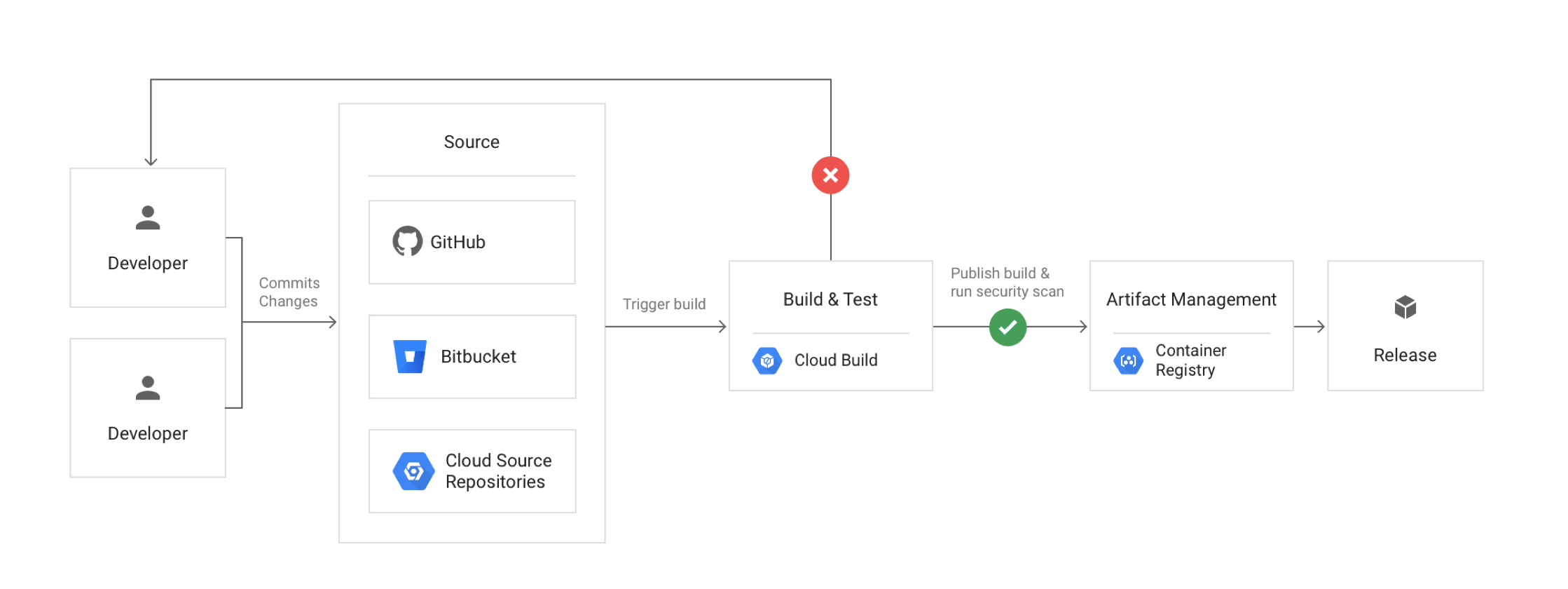
Google Cloud CI/CD - Continuous Integration Continuous Deployment

    • Google Cloud provides DevOps tools like Cloud Build and Cloud Deploy (fully managed continuous delivery) to provide CI/CD features. Spinnaker remains supported as an open-source option for multi-cloud deployments.
    • ⚠️ Update: Cloud Source Repositories reached end-of-sale on June 17, 2024 and is no longer available to new customers. Secure Source Manager is the recommended replacement — a regionally deployed, single-tenant managed source code repository on Google Cloud.
    • Cloud Build is a fully-managed, serverless service that executes builds on Google Cloud’s infrastructure.
    • ⚠️ Update: Container Registry was shut down on March 18, 2025. Artifact Registry is the required replacement, supporting both container images and non-container artifacts (Maven, npm, Python, etc.).
    • Artifact Registry is the single artifact management service for container images, language packages, and OS packages on Google Cloud.
    • Cloud Deploy is a fully managed continuous delivery service that automates delivery to GKE and Cloud Run with promotion sequences, deploy policies, canary deployments, and automated rollbacks.

Allow developers to run experiments without compromising security and governance requirements

    • Google Cloud Deploy supports canary deployments and automated rollbacks. Cloud Run provides traffic splitting for A/B testing and gradual rollouts.

Create a self-service portal for internal and partner developers to create new projects, request resources for data analytics jobs, and centrally manage access to the API endpoints.

Use cloud-native solutions for keys and secrets management and optimize for identity-based access

    • Google Cloud supports Cloud Key Management Service (Cloud KMS) and Secret Manager for managing secrets and key management. Cloud KMS now supports quantum-safe key encapsulation mechanisms, and Secret Manager supports integrated secret synchronization with GKE clusters.

Improve and standardize tools necessary for application and network monitoring and troubleshooting.

    • Google Cloud provides Cloud Operations Suite (Google Cloud Observability) which includes Cloud Monitoring and Logging to cover both on-premises and Cloud resources.
    • Cloud Monitoring collects measurements of key aspects of the service and of the Google Cloud resources used. It now integrates with App Hub for Application Monitoring dashboards with trace span visibility.
    • Cloud Monitoring Uptime check is a request sent to a publicly accessible IP address on a resource to see whether it responds.
    • Cloud Logging is a service for storing, viewing, and interacting with logs.
    • Error Reporting aggregates and displays errors produced in the running cloud services.
    • Cloud Profiler helps with continuous CPU, heap, and other parameters profiling to improve performance and reduce costs.
    • Cloud Trace is a distributed tracing system that collects latency data from the applications and displays it in the Google Cloud Console.
    • ⚠️ Update: Cloud Debugger was shut down on May 31, 2023. For production debugging capabilities, use Snapshot Debugger (open-source) or Cloud Logging and Cloud Trace for troubleshooting.

Reference Cellular Upload Architecture

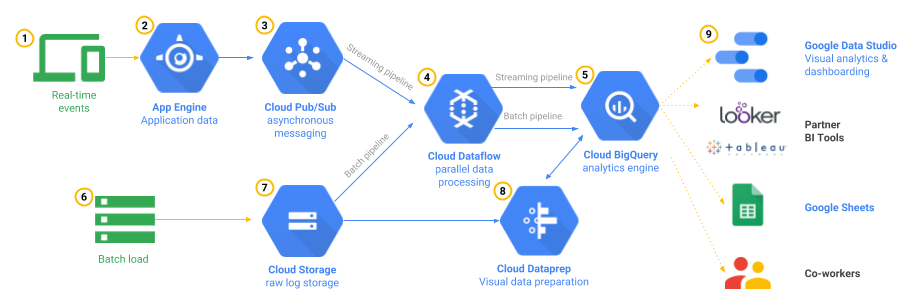
Batch Upload Replacement Architecture

Key Updates for Certification Exam (2024-2026)

The TerramEarth case study remains part of the Professional Cloud Architect certification exam. When answering exam questions related to this case study, keep the following service changes in mind:

  • IoT Device Connectivity: Cloud IoT Core is no longer available. Use Pub/Sub with a standalone MQTT broker for device telemetry ingestion.
  • CI/CD Pipeline: Cloud Deploy is the preferred managed CD solution. Container Registry has been replaced by Artifact Registry. Cloud Source Repositories is replaced by Secure Source Manager.
  • Serverless: Cloud Functions is now Cloud Run functions, unified under the Cloud Run platform.
  • Observability: Cloud Debugger is no longer available. Use Cloud Trace, Cloud Logging, and Snapshot Debugger instead.
  • Security: Cloud KMS now supports quantum-safe encryption. Secret Manager supports GKE secret synchronization.

Reference

Google Cloud – Mountkirk Games Case Study

Google Cloud – Mountkirk Games Case Study

Mountkirk Games makes online, session-based, multiplayer games for mobile platforms. They have recently started expanding to other platforms after successfully migrating their on-premises environments to Google Cloud. Their most recent endeavor is to create a retro-style first-person shooter (FPS) game that allows hundreds of simultaneous players to join a geo-specific digital arena from multiple platforms and locations. A real-time digital banner will display a global leaderboard of all the top players across every active arena.

Solution Concept

Mountkirk Games is building a new multiplayer game that they expect to be very popular. They plan to deploy the game’s backend on Google Kubernetes Engine so they can scale rapidly and use Google’s global load balancer to route players to the closest regional game arenas. In order to keep the global leader board in sync, they plan to use a multi-region Spanner cluster.

So the key here is the company wants to deploy the new game to Google Kubernetes Engine exposed globally using a Global Load Balancer and configured to scale rapidly and bring it closer to the users. Backend DB would be managed using a multi-region Cloud Spanner cluster.

Executive Statement

Our last game was the first time we used Google Cloud, and it was a tremendous success. We were able to analyze player behavior and game telemetry in ways that we never could before. This success allowed us to bet on a full migration to the cloud and to start building all-new games using cloud-native design principles. Our new game is our most ambitious to date and will open up doors for us to support more gaming platforms beyond mobile. Latency is our top priority, although cost management is the next most important challenge. As with our first cloud-based game, we have grown to expect the cloud to enable advanced analytics capabilities so we can rapidly iterate on our deployments of bug fixes and new functionality.

So the key points here are the company has moved to Google Cloud with great success and wants to build new games in the cloud. Key priorities are high performance, low latency, cost, advanced analytics, quick deployment, and time-to-market cycles.

Business Requirements

Support multiple gaming platforms.

Support multiple regions.

Support rapid iteration of game features.

  • Can be handled using Terraform with Infrastructure Manager (IaC) to automate infrastructure provisioning
  • Cloud Build + Cloud Deploy can be used for rapid continuous integration and deployment to GKE

Minimize latency

  • can be reduced using a Global HTTP load balancer, which would route the user to the closest region
  • using multi-regional resources like Cloud Spanner would also help reduce latency
  • using Agones with GKE for dedicated game server hosting would optimize player-to-server latency

Optimize for dynamic scaling

  • can be done using GKE Cluster Autoscaler and Horizontal Pod Autoscaling to dynamically scale the nodes and applications as per the demand
  • GKE Autopilot can simplify cluster management with automatic node provisioning and scaling
  • Cloud Spanner can be scaled dynamically with autoscaling (available since 2023)
  • Agones Fleet Autoscaler can dynamically scale game server fleets based on player demand

Use managed services and pooled resources.

  • Using GKE (Standard or Autopilot mode), with Global Load Balancer for computing and Cloud Spanner would help cover the application stack using managed services
  • Agones on GKE Autopilot eliminates the need to manage Kubernetes node pools for game servers

Minimize costs.

  • Using minimal resources and enabling auto-scaling as per the demand would help minimize costs
  • GKE Autopilot with Agones helps minimize costs by automatically right-sizing resources
  • Cloud Spanner Standard edition provides cost-effective option for development and testing environments

Existing Technical Environment

The existing environment was recently migrated to Google Cloud, and five games came across using lift-and-shift virtual machine migrations, with a few minor exceptions. Each new game exists in an isolated Google Cloud project nested below a folder that maintains most of the permissions and network policies. Legacy games with low traffic have been consolidated into a single project. There are also separate environments for development and testing.

Key points here are the resource hierarchy exists with a project for each new game under a folder to control access using Service Control Permissions. Also, some of the small games would be hosted in a single project. There are also different environments for development, testing, and production.

Technical Requirements

Dynamically scale based on game activity.

  • can be done using GKE Cluster Autoscaler and Horizontal Pod Autoscaling to dynamically scale the nodes and applications as per the demand
  • Agones Fleet Autoscaler can scale game server instances up and down based on active players and buffer capacity

Publish scoring data on a near-real-time global leaderboard.

  • can be handled using Pub/Sub for capturing data and Dataflow for processing the data on the fly i.e real time
  • Cloud Spanner multi-region configuration provides strongly consistent reads for global leaderboard data

Store game activity logs in structured files for future analysis.

  • can be handled using Cloud Storage to store logs for future analysis
  • analysis can be handled using BigQuery either loading the data or using federated data source
  • data can also be stored directly using BigQuery as it would provide a low-cost data storage (as compared to Bigtable) for analytics
  • another advantage of BigQuery over Bigtable in this case its multi-regional, meeting the global footprint and latency requirements

Use GPU processing to render graphics server-side for multi-platform support.

  • GKE supports GPU node pools (NVIDIA T4, L4, A100, H100) for server-side rendering workloads
  • Support eventual migration of legacy games to this new platform.

Key Services & Architecture Patterns (Updated 2025)

Agones – Dedicated Game Server Hosting

Agones is an open-source platform (developed by Google and Ubisoft) built on Kubernetes that simplifies hosting, scaling, and managing dedicated game servers. It is the recommended approach for running multiplayer game servers on GKE.

  • Fleet Management: Manages pools (Fleets) of ready game server instances
  • Fleet Autoscaler: Automatically scales game server fleets based on demand
  • Allocator: Assigns players to available game servers with low latency
  • Multi-cluster: Supports game server allocation across multiple GKE clusters in different regions
  • GKE Autopilot Support: Runs on GKE Autopilot for hands-off node management

For Mountkirk Games, Agones would be ideal for managing the FPS game server instances across multiple regions, handling player allocation to the nearest arena, and scaling based on game activity.

Cloud Spanner Editions (2024)

Cloud Spanner introduced tier-based editions in 2024 providing greater flexibility:

  • Standard: Cost-effective for development, testing, and less demanding workloads
  • Enterprise: Regional and multi-regional configurations with 99.99%+ availability
  • Enterprise Plus: Designed for the most demanding workloads requiring 99.999% availability with multi-region configurations and geo-partitioning

For the global leaderboard requirement, Enterprise Plus edition with multi-region configuration is recommended to provide strongly consistent, low-latency reads globally.

Additional Spanner capabilities added in 2024-2025:

  • Spanner Graph (2024): Native graph support with GQL for relationship queries (e.g., player social graphs, matchmaking)
  • Vector Search: Built-in vector capabilities for similarity search
  • Autoscaling: Automatic compute scaling based on workload demand
  • Won 2025 ACM SIGMOD Systems Award for groundbreaking distributed database contributions

GKE Updates (2024-2026)

  • GKE Autopilot: Fully managed mode with per-pod billing — recommended for game servers with Agones
  • Fleets & Multi-cluster Management: Now included free with GKE Standard for managing game servers across regions
  • Custom Compute Classes: Define specific compute requirements for game server pods
  • Scale: Support for up to 130,000 nodes per cluster
  • GKE Inference Gateway: For AI/ML workloads (player behavior prediction, anti-cheat)

Cloud Deploy for GKE

Cloud Deploy is a fully managed continuous delivery service for GKE and Cloud Run. It provides:

  • Delivery pipelines with promotion across environments (dev → staging → production)
  • Canary and blue/green deployment strategies
  • Rollback capabilities
  • Integration with Cloud Build for CI/CD

This replaces the need for self-managed tools like Spinnaker for continuous deployment to GKE.

⚠️ Deployment Manager Deprecated (EOL: March 31, 2026)

Google Cloud Deployment Manager reached end of support on March 31, 2026. For infrastructure as code, use:

Use the DM Convert tool to migrate existing Deployment Manager configurations to Terraform.

Reference Architecture

Mobile Gaming Analysis Telemetry Solution

Refer to Best Practices for Mobile Game Online Architectures on Google Cloud

Mobile Gaming Analysis Telemetry Solution

Practice Questions

Question 1: Mountkirk Games needs to deploy their FPS game backend to serve players globally with minimal latency. They want to use managed services and scale dynamically. Which combination of services should they use?

  1. Compute Engine MIGs with Global Load Balancer and Cloud SQL
  2. GKE with Agones, Global Load Balancer, and Cloud Spanner (Enterprise Plus, multi-region)
  3. Cloud Run with Cloud Spanner and Cloud CDN
  4. App Engine Flex with Firestore and Cloud Load Balancing
Show Answer

Answer: B. – GKE with Agones provides dedicated game server hosting with fleet autoscaling, the Global Load Balancer routes players to the nearest region, and Cloud Spanner Enterprise Plus with multi-region configuration provides 99.999% availability for the global leaderboard with strongly consistent reads.

Question 2: Mountkirk Games wants to implement rapid iteration of game features with automated deployments to their GKE clusters across multiple environments. Which approach aligns best with Google Cloud managed services?

  1. Deployment Manager with custom templates for each environment
  2. Jenkins on Compute Engine with custom deployment scripts
  3. Cloud Build for CI with Cloud Deploy pipelines for progressive delivery to GKE
  4. Spinnaker on GKE for multi-environment deployments
Show Answer

Answer: C. – Cloud Build provides continuous integration (building and testing), while Cloud Deploy provides fully managed continuous delivery with promotion pipelines across environments (dev → staging → production), canary deployments, and rollback capabilities. Note: Deployment Manager (Option A) reached end of support in March 2026.

Question 3: Mountkirk Games needs to publish scoring data on a near-real-time global leaderboard. Which architecture best meets this requirement?

  1. Write scores directly to Cloud Spanner from game servers
  2. Use Pub/Sub to ingest scoring events, Dataflow for real-time processing and aggregation, and write to Cloud Spanner multi-region for the leaderboard
  3. Store scores in Memorystore (Redis) with periodic batch writes to BigQuery
  4. Use Cloud Functions triggered by Firestore to update a global leaderboard document
Show Answer

Answer: B. – Pub/Sub provides reliable message ingestion at scale, Dataflow processes and aggregates scores in real-time (handling late-arriving data with windowing), and Cloud Spanner multi-region provides strongly consistent global reads for the leaderboard display.

Question 4: Mountkirk Games wants their game servers to dynamically scale based on player activity while minimizing operational overhead. Which approach is recommended?

  1. GKE Standard with manual node pool management and custom autoscaling scripts
  2. GKE Autopilot with Agones and Fleet Autoscaler
  3. Compute Engine Managed Instance Groups with custom game server images
  4. Cloud Run with WebSocket support for real-time game sessions
Show Answer

Answer: B. – GKE Autopilot eliminates node management overhead with per-pod billing, while Agones provides purpose-built game server lifecycle management. The Fleet Autoscaler automatically scales game server instances based on player demand and configurable buffer policies.

Question 5: Mountkirk Games needs to store game activity logs for future analysis. They need a cost-effective solution that supports structured queries. Which approach is most appropriate?

  1. Cloud Bigtable for real-time ingestion and ad-hoc analytics
  2. Cloud Storage (Standard) with BigQuery federated queries for analysis
  3. Ingest through Pub/Sub, process with Dataflow, store in BigQuery for analytics
  4. Firestore in Datastore mode with periodic exports to Cloud Storage
Show Answer

Answer: C. – Pub/Sub handles high-volume log ingestion, Dataflow transforms and enriches the data in streaming or batch mode, and BigQuery provides cost-effective, serverless, multi-regional analytics storage with powerful SQL querying capabilities for future analysis.

Mountkirk Games References

Google Cloud Shared VPC – Multi-Project Networking

Google Cloud Shared VPC

  • Shared VPC allows an organization to connect resources from multiple projects to a common VPC network to communicate with each other securely and efficiently using internal IPs from that network.
  • requires designating a project as a host project and attach one or more other service projects to it.
  • allows organization administrators to delegate administrative responsibilities, such as creating and managing instances, to Service Project Admins while maintaining centralized control over network resources like subnets, routes, and firewalls.
  • Shared VPC is also referred to as “XPN” in the API and command-line interface.
  • allows you to
    • implement a security best practice of least privilege for network administration, auditing, and access control.
    • apply and enforce consistent access control policies at the network level for multiple service projects in the organization while delegating administrative responsibilities
    • use service projects to separate budgeting or internal cost centers.

Shared VPC Concepts

GCP Shared VPC - Multiple host projects

  • Shared VPC connects projects within the same organization. Participating host and service projects cannot belong to different organizations.
  • Linked projects can be in the same or different folders, but if they are in different folders the admin must have Shared VPC Admin rights to both folders.
  • Each project in Shared VPC is either a host project or a service project
    • A host project contains one or more Shared VPC networks. A Shared VPC Admin must first enable a project as a host project. After that, a Shared VPC Admin can attach one or more service projects to it.
    • A service project is any project that has been attached to a host project by a Shared VPC Admin. This attachment allows it to participate in Shared VPC.
  • A project cannot be both a host and a service project simultaneously. Thus, a service project cannot be a host project to further service projects.
  • Multiple host projects can be created; however, each service project can only be attached to a single host project.
  • A project that does not participate in Shared VPC is called a standalone project.
  • VPC networks in the host project are called Shared VPC networks. Service projects resources can use subnets in the Shared VPC network.
  • Shared VPC networks can be either auto or custom mode, but legacy networks are not supported.
  • Shared VPC supports exporting subnets of any stack type (IPv4, IPv6, and dual-stack).
  • Host and service projects are connected by attachments at the project level.
  • Subnets of the Shared VPC networks in the host project are accessible by Service Project Admins.
  • When sharing networks, you can either share all host project subnets (including future ones) or specify individual subnets to share selectively.
  • Organization policies and IAM permissions work together to provide different levels of access control.
  • Organization policies enable setting controls at the organization, folder, or project level.

Organization Policy Constraints

  • Organization Policy constraints provide additional governance over Shared VPC configurations:
    • constraints/compute.restrictSharedVpcHostProjects – Limits the set of host projects to which a non-host project can be attached. Applies when a Shared VPC Admin attaches a service project; doesn’t affect existing attachments.
    • constraints/compute.restrictSharedVpcSubnetworks – Specifies which Shared VPC subnets a service project can access at the project, folder, or organization level. Applies to new VMs and load balancers only; existing resources are unaffected.
  • These constraints help enforce centralized governance while allowing delegated administration.

IAM Roles

Administrator (IAM role) Purpose
Organization Admin
resourcemanager.organizationAdmin
Organization Admins nominate Shared VPC Admins by granting them appropriate project creation and deletion roles, and the Shared VPC Admin role for the organization. These admins can define organization-level policies, but specific folder and project actions require additional folder and project roles.
Shared VPC Admin
compute.xpnAdmin + resourcemanager.projectIamAdmin
Shared VPC Admins have the Compute Shared VPC Admin and Project IAM Admin roles for the organization or one or more folders. They perform various tasks necessary to set up Shared VPC, such as enabling host projects, attaching service projects to host projects, and delegating access to some or all of the subnets in Shared VPC networks to Service Project Admins. A Shared VPC Admin for a given host project is typically its project owner as well.
A Shared VPC Admin can link projects in two different folders only if the admin has the role for both folders.
Note: Managing Shared VPC with the Shared VPC Admin role at the folder level is available in General Availability (GA since March 2023).
Service Project Admin
compute.networkUser
A Shared VPC Admin defines a Service Project Admin by granting an IAM member the Network User role to either the whole host project or select subnets of its Shared VPC networks. Service Project Admins also maintain ownership and control over resources defined in the service projects, so they should have the Instance Admin role in the corresponding service projects. They may have additional IAM roles to the service projects, such as project owner.

  • Project-level permissions: Access to all subnets in the host project (including future subnets).
  • Subnet-level permissions: Access restricted to specific subnets only.
Network Admin
compute.networkAdmin
Network Admins have full control over all network resources except for firewall rules and SSL certificates.
Security Admin
compute.securityAdmin
Security Admins manage firewall rules and SSL certificates.

Eligible Resources

  • Most Google Cloud products and features can be used in Shared VPC service projects.
  • Use of a Shared VPC network is not mandatory — service projects can still use their own VPC networks.
  • Existing resources do not automatically use shared network resources when a project is attached as a service project; new resources must be created to use Shared VPC subnets.
  • Key eligible resources include:
    • Compute Engine – VM instances, instance groups, instance templates
    • Google Kubernetes Engine (GKE) – Autopilot and Standard clusters (VPC-native required)
    • Cloud Run – Via Direct VPC egress or Serverless VPC Access connectors
    • Cloud Functions – Via Serverless VPC Access connectors
    • App Engine Flexible – Via Serverless VPC Access connectors
    • Cloud SQL – Via Private Services Access
    • Dataflow – Jobs can specify Shared VPC networks
    • Dataproc – Clusters can use Shared VPC subnets
    • Cloud Composer – Environments can use Shared VPC
    • Internal Load Balancers – All types supported

Serverless Services with Shared VPC

  • Serverless VPC Access – Allows Cloud Run, Cloud Functions, and App Engine to connect to Shared VPC networks via connectors. GA for Shared VPC since March 2021.
  • Direct VPC Egress (Recommended) – Available in GA since April 2024, Cloud Run services and jobs can send traffic directly to a Shared VPC network without needing Serverless VPC Access connectors.
    • Easier to set up, faster, handles more traffic, and has lower costs than connectors.
    • Supports sending traffic from a service project to the host project’s Shared VPC network.
    • Google recommends migrating from Serverless VPC Access connectors to Direct VPC egress for improved performance.

Multiple Network Interfaces with Shared VPC

  • VM instances can connect interfaces other than nic0 to a Shared VPC network (GA since March 2021, including support for instance templates and managed instance groups).
  • Dynamic NICs (GA since October 2025) – Allows adding or removing network interfaces without restarting or recreating VM instances. Supports up to 16 total interfaces.
  • Each network interface must point to a different VPC network.

Shared VPC with Firewall Policies

  • Hierarchical Firewall Policies (GA since February 2021) – Allow creating firewall rules at the organization or folder level that apply across all projects and VPC networks, including Shared VPC networks.
  • Global Network Firewall Policies (GA since August 2022) – Can be applied to Shared VPC networks for centralized firewall rule management.
  • Regional Network Firewall Policies (GA since August 2022) – Provide region-specific firewall rules for Shared VPC networks.
  • These policy types enable centralized security management across all service projects using the Shared VPC network.

Private Service Connect with Shared VPC

  • Private Service Connect (PSC) enables private connectivity to services without exposing traffic to the public internet.
  • PSC endpoints can be created in Shared VPC networks and accessed by service projects.
  • PSC endpoints in a Shared VPC network no longer need to be in the same project as the VMs sending requests (fixed July 2021).
  • Propagated Connections (GA since February 2025) – Services accessible through PSC endpoints in one VPC spoke can be accessed by other VPC spokes connected to the same Network Connectivity Center hub.
  • Service Connectivity Automation (GA since October 2023) – Allows service producers to automate PSC connectivity for managed services on behalf of consumers across different projects.

Cloud Interconnect with Shared VPC

  • Shared VPC can help share the VLAN attachment in a project with other VPC networks.
  • Shared VPC is preferable if you need to create many projects and would like to prevent individual project owners from managing their connectivity back to the on-premises network.
  • Host project contains a common Shared VPC network that VMs in service projects can use. Because VMs in service projects use this network, Service Project Admins don’t need to create other VLAN attachments or Cloud Routers in the service projects.
  • VLAN attachments and Cloud Routers for an Interconnect connection must be created only in the Shared VPC host project.
  • The combination of a VLAN attachment and its associated Cloud Router is unique to a given Shared VPC network.
  • Service Project Admins can create VMs in subnets that exist in a host project’s Shared VPC network based on the permissions that they have to the host project.
  • VMs that use the Shared VPC network can use the custom dynamic routes for VLAN attachments available to that network.
  • VPC Flow Logs can sample traffic sent through VLAN attachments (GA since January 2024).

Hybrid Subnets with Shared VPC

  • Hybrid Subnets (GA since April 2026) allow a VPC network to share a CIDR block with a connected on-premises network.
  • Enables migration of workloads to Google Cloud without changing IP addresses.
  • Workloads that have migrated can communicate with those remaining on-premises using internal IP addresses.
  • Particularly useful in Shared VPC environments where multiple service projects need seamless hybrid connectivity during migrations.
  • After migration is complete, hybrid subnet routing can be disabled to restore normal routing behavior.

Billing

  • Billing for resources in service projects using a Shared VPC network is attributed to the service project where the resource is located.
  • Outbound traffic from an instance is attributed to the project containing the instance.
  • Costs associated with a load balancer are charged to the project containing the load balancer components.
  • Outbound traffic to VPNs is attributed to the project containing the VPN Gateway (typically the host project).
  • Traffic from a Shared VPC service project through a VLAN attachment is attributed to the project owning the VLAN attachment.

Quotas and Limits

  • Shared VPC host projects are subject to standard per-project VPC quotas.
  • Shared VPC networks are subject to per-network and per-instance limits for VPC networks.
  • Relationships between host and service projects are governed by limits specific to Shared VPC (e.g., maximum number of service projects per host project).

GCP Certification Exam Practice Questions

  • Questions are collected from Internet and the answers are marked as per my knowledge and understanding (which might differ with yours).
  • GCP services are updated everyday and both the answers and questions might be outdated soon, so research accordingly.
  • GCP exam questions are not updated to keep up the pace with GCP updates, so even if the underlying feature has changed the question might not be updated
  • Open to further feedback, discussion and correction.
  1. Your company is building a large-scale web application. Each team is responsible for its own service component of the application
    and wants to manage its own individual projects. You want each service to communicate with the others over the RFC1918 address
    space. What should you do?

    1. Deploy each service into a single project within the same VPC.
    2. Configure Shared VPC, and add each project as a service of the Shared VPC project.
    3. Configure each service to communicate with the others over HTTPS protocol.
    4. Configure a global load balancer for each project, and communicate between each service using the global load balancer IP
      addresses.
  2. Where should you create the Cloud Router instance in a Shared VPC to allow connection from service projects across a new Dedicated Interconnect to your data center?
    1. VPC network in all projects
    2. VPC network in the IT Project
    3. VPC network in the Host Project
    4. VPC network in the Sales, Marketing, and IT Projects
  3. Your organization wants to allow different teams to manage their own GKE clusters while using a centrally managed network. The network team needs to control IP allocation and firewall rules. Which approach should you use?
    1. Create separate VPC networks for each team and use VPC Peering.
    2. Use Shared VPC with a host project managed by the network team and service projects for each team’s GKE clusters.
    3. Deploy all clusters in a single project with separate namespaces.
    4. Use Cloud VPN to connect each team’s project to a central network.
  4. A Shared VPC Admin wants to restrict which subnets a service project can use for deploying VMs. Which organization policy constraint should be applied?
    1. constraints/compute.restrictSharedVpcHostProjects
    2. constraints/compute.restrictSharedVpcSubnetworks
    3. constraints/compute.restrictVpcPeering
    4. constraints/compute.restrictXpnProjectLienRemoval
  5. Your Cloud Run services in a service project need to communicate with resources in a Shared VPC network. What is the recommended approach in 2024+?
    1. Create a VPN tunnel between the projects.
    2. Use Serverless VPC Access connectors in the host project.
    3. Configure Direct VPC egress to the Shared VPC network.
    4. Deploy Cloud Run in the host project directly.
  6. Which of the following statements about Shared VPC are correct? (Choose 2)
    1. A service project can be attached to multiple host projects simultaneously.
    2. A project cannot be both a host project and a service project at the same time.
    3. Shared VPC can connect projects across different organizations.
    4. Shared VPC supports exporting subnets of any stack type including IPv6 and dual-stack.

Reference

Google Cloud VPC Peering – Cross-Project Networking

Google Cloud VPC Peering

  • Google Cloud VPC Network Peering allows internal IP address or private connectivity across two VPC networks regardless of whether they belong to the same project or the same organization.
  • VPC Network Peering enables VPC networks connection, so that workloads in different VPC networks can communicate internally.
  • VPC Network Peering provides internal IPv4 and IPv6 connectivity between pairs of VPC networks.
  • Traffic stays within Google’s network and doesn’t traverse public internet.
  • Peering supports connectivity between networks having any combination of IPv4-only, dual-stack, and IPv6-only subnets.
  • VPC Network Peering provides following advantages over using external IP addresses or VPNs to connect networks, including:
    • Network Latency – connectivity uses only internal addresses and provides lower latency than connectivity that uses external addresses
    • Network Security – service owners do not need to have their services exposed to the public Internet and deal with its associated risks.
    • Network Cost – Google Cloud charges egress bandwidth or outbound traffic for networks using external IPs to communicate even if the traffic is within the same zone. However, for peered networks as they use internal IPs to communicate and save on those egress costs.
  • VPC Network Peering is useful in these environments:
    • SaaS (Software-as-a-Service) ecosystems in Google Cloud, which can be made available privately across different VPC networks within and across organizations.
    • Organizations that have several network administrative domains that need to communicate using internal IP addresses.

VPC Peering Properties

  • VPC Network Peering works with Compute Engine, GKE, and App Engine flexible environment.
  • VPC Network Peering supports VPC-native GKE clusters by exchanging subnet routes.
  • VPC Network Peering supports routes-based GKE clusters when configured to exchange static routes.
  • Peered VPC networks remain administratively separate. Routes, firewalls, VPNs, and other traffic management tools are administered and applied separately in each of the VPC networks.
  • Each side of a peering association is set up independently. Peering will be active only when the configuration from both sides matches. Either side can choose to delete the peering association at any time (in independent mode).
  • VPC peers always exchange subnet routes that don’t use privately used public IP addresses. Networks must explicitly export privately used public IP subnet routes for other networks to use them and must explicitly import privately used public IP subnet routes to receive them from other networks.
  • Subnet and static routes are global. Dynamic routes can be regional or global, depending on the VPC network’s dynamic routing mode.
  • A VPC network can peer with multiple VPC networks (default quota of 25 peerings per network).
  • IAM permissions for creating and deleting VPC Network Peering are included as part of the Compute Network Admin role (roles/compute.networkAdmin).
  • Peering traffic (traffic flowing between peered networks) has the same latency, throughput, and availability as private traffic in the same network.
  • Billing policy for peering traffic is the same as the billing policy for private traffic in the same network.
  • Peering is allowed with Shared VPC.
  • An organization policy administrator can use an organization policy to constrain which VPC networks can peer with VPC networks in the organization. Peering connections to particular VPC networks or to VPC networks in a particular folder or organization can be denied.

VPC Peering Connection Modes

  • VPC Network Peering supports two connection modes that determine how a peering connection is administered:
    • Independent Mode (default) – Either network can update or delete the peering connection at any time unilaterally.
    • Consensus Mode – Requires agreement from both networks to update or delete the peering connection. Prevents accidental, unilateral changes to network behavior.
  • When creating a peering connection, both peering configurations must specify the same connection mode.
  • An existing connection can be changed from independent to consensus mode (both sides must update), but changing from consensus to independent is NOT supported.
  • Consensus mode is recommended for critical services where accidental deletion of the peering connection would cause a service outage.
  • In consensus mode:
    • Update requests require complementary changes from both sides (e.g., if one side exports custom routes, the peer must import them).
    • Deletion requires both sides to submit a deletion request.
    • Pending update or deletion requests do not cause downtime—the connection remains active.

IPv6 Support in VPC Peering

  • VPC Network Peering provides internal IPv4 and IPv6 connectivity between pairs of VPC networks.
  • Peering supports connectivity between networks having any combination of IPv4-only, dual-stack, and IPv6-only subnets.
  • To exchange IPv6 routes (both internal and external IPv6 subnet ranges), the peering stack type must be set to IPV4_IPV6 using the --stack-type=IPV4_IPV6 flag.
  • IPv6 static and dynamic routes exchange also requires --stack-type=IPV4_IPV6 in addition to the --export-custom-routes / --import-custom-routes flags.
  • VPC Network Peering also provides certain external IPv6 connectivity to destination external IPv6 address ranges of dual-stack/IPv6-only VM instances, external protocol forwarding rules, and external passthrough Network Load Balancer forwarding rules.
  • IPv6 subnet routes are unique by definition — no two VPC networks can use the same internal or external IPv6 subnet ranges.
  • IPv6 functionality is available only in Premium Tier.

Route Exchange Options

  • When a VPC network shares local routes with a peered VPC network, it exports the routes. The peered VPC network can then import the routes.
  • Subnet routes (using private IPv4 ranges) are always exchanged and cannot be disabled.
  • Subnet routes using privately used public IPv4 addresses – exported by default, not imported by default. Controlled via --export-subnet-routes-with-public-ip and --import-subnet-routes-with-public-ip flags.
  • IPv6 subnet routes (internal and external) – not exchanged by default. Enabled by setting --stack-type=IPV4_IPV6.
  • Static and dynamic IPv4 routes – not exchanged by default. Controlled via --export-custom-routes and --import-custom-routes flags.
  • IPv6 static/dynamic routes – require both --export-custom-routes / --import-custom-routes AND --stack-type=IPV4_IPV6.
  • Static routes with network tags or using the default internet gateway as next hop can NEVER be exported or imported.
  • Policy-based routes are NOT supported for exchange via VPC Network Peering.
  • Route exchange options can be updated before peering is established or while peering is active.

VPC Peering Restrictions

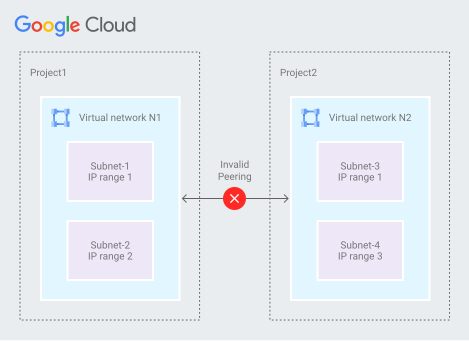
  • A subnet CIDR range in one peered VPC network cannot overlap with a static route in another peered network. This rule covers both subnet routes and static routes.

GCP VPC Peering - Overlapping Subnet IP ranges between two peers

  • A dynamic route can overlap with a subnet route in a peer network. For dynamic routes, the destination ranges that overlap with a subnet route from the peer network are silently dropped. Google Cloud uses the subnet route.
  • Only VPC networks are supported for VPC Network Peering. Peering is NOT supported for legacy networks.
  • Two auto mode VPC networks cannot be peered because each auto mode VPC uses subnet IP ranges that fit within 10.128.0.0/9. A custom mode VPC can be peered with an auto mode VPC as long as the custom mode VPC doesn’t have subnets within 10.128.0.0/9.
  • Subnet route exchange can’t be disabled or subnet routes that can be exchanged cannot be selected. After peering is established, all resources within subnet IP addresses are accessible across directly peered networks.
  • VPC Network Peering doesn’t provide granular route controls to filter out which subnet CIDR ranges are reachable across peered networks. It needs to be done using firewall rules.
  • Transitive peering is NOT supported. For transitive connectivity, use Network Connectivity Center with VPC spokes.
  • Network tags or service accounts from one peered network in the other peered network CANNOT be used in VPC firewall rules.
  • However, secure Tags (different from network tags) used in network firewall policies CAN identify sources in peered VPC networks connected to the VPC network to which the Tag is scoped.
  • Compute Engine internal DNS names created in a network are NOT accessible to peered networks. Use Cloud DNS peering zones or authorize the managed private zone to all peered VPC networks instead.
  • By default, VPC Network Peering with GKE is supported when used with IP aliases (VPC-native clusters). If you don’t use IP aliases (routes-based clusters), custom routes can be exported so that GKE containers are reachable from peered networks.

Peering Group and Quotas

  • VPC peering quotas depend on a concept called a peering group.
  • Each VPC network has its own peering group consisting of itself and all other VPC networks connected to it using VPC Network Peering.
  • Quotas such as internal forwarding rules, subnet ranges, and instances are evaluated across the entire peering group, not per individual network.
  • Default quota for VPC peerings within a single VPC is 25 (can be increased via quota request).
  • Google Cloud allows only one peering operation at a time across peered networks.

Network Connectivity Center (NCC) vs VPC Peering

  • Network Connectivity Center (NCC) is an alternative to VPC Network Peering for connecting multiple VPC networks, providing a hub-and-spoke model.
  • Transitivity: NCC provides full bandwidth and transitivity between workload VPCs (VPC spokes). VPC Peering does NOT provide transitivity.
  • Scale: NCC supports up to 250 VPC spokes per hub. VPC Peering is limited to 25 peerings per VPC by default.
  • When to use VPC Peering: Simple point-to-point connectivity between two VPCs without transitive requirements.
  • When to use NCC: Hub-and-spoke topologies, transitive routing across multiple VPCs, enterprise-scale connectivity, or when centralizing network management.
  • A VPC that is a VPC spoke in NCC can still use VPC Network Peering, provided the peered VPC network isn’t a VPC spoke itself.
  • NCC VPC spokes support IPv4 and IPv6 subnet route connectivity and IPv4 dynamic route connectivity using hybrid spokes.

Internal Load Balancer Support

  • Clients in a local VPC network can access internal load balancers in a peer VPC network.
  • Supported internal load balancers:
    • Internal passthrough Network Load Balancers
    • Internal proxy Network Load Balancers
    • Internal Application Load Balancers
  • Peered networks can exchange static routes that use internal passthrough Network Load Balancers as next hops.

DNS Support in Peered Networks

  • Resources in a peered VPC network cannot use Compute Engine internal DNS names created by a local VPC network.
  • To make DNS names available to resources in a peered VPC network, use one of the following:
    • Cloud DNS peering zones – Recommended approach for cross-network DNS resolution.
    • Authorize the managed private zone to all peered VPC networks.

GCP Certification Exam Practice Questions

  • Questions are collected from Internet and the answers are marked as per my knowledge and understanding (which might differ with yours).
  • GCP services are updated everyday and both the answers and questions might be outdated soon, so research accordingly.
  • GCP exam questions are not updated to keep up the pace with GCP updates, so even if the underlying feature has changed the question might not be updated
  • Open to further feedback, discussion and correction.
  1. Your company is working with a partner to provide a solution for a customer. Both your company and the partner organization are using GCP. There are applications in the partner’s network that need access to some resources in your company’s VPC. There is no CIDR overlap between the VPCs. Which two solutions can you implement to achieve the desired results without compromising security?
    1. VPC peering
    2. Shared VPC
    3. Dedicated Interconnect
    4. Cloud NAT
  2. Your organization is deploying a single project for 3 separate departments. Two of these departments require network connectivity between each other, but the third department should remain in isolation. Your design should create separate network administrative domains between these departments. You want to minimize operational overhead. How should you design the topology?
    1. Create a Shared VPC Host Project and the respective Service Projects for each of the 3 separate departments.
    2. Create 3 separate VPCs, and use Cloud VPN to establish connectivity between the two appropriate VPCs.
    3. Create 3 separate VPCs, and use VPC peering to establish connectivity between the two appropriate VPCs.
    4. Create a single project, and deploy specific firewall rules. Use network tags to isolate access between the departments.
  3. Your organization has 15 VPC networks that all need to communicate with each other. You need full-mesh transitive connectivity with centralized management. What should you use?
    1. VPC Network Peering between all 15 networks
    2. Network Connectivity Center with VPC spokes
    3. Cloud VPN tunnels between all networks
    4. Shared VPC with service projects
  4. You have two VPC networks peered together. A critical production service runs across the peering connection. You want to prevent accidental deletion of the peering connection by either network administrator. What should you configure?
    1. IAM deny policies on the peering resource
    2. Organization policy constraints
    3. Consensus mode for the peering connection
    4. Read-only access for both network administrators
  5. You have peered two VPC networks and need to enable IPv6 communication between resources in both networks. What must you configure on the peering connection?
    1. Enable the --export-custom-routes flag
    2. Create IPv6 firewall rules only
    3. Set the peering stack type to IPV4_IPV6
    4. Enable Private Google Access for IPv6
  6. You want to use network firewall policy rules to identify traffic sources from peered VPC networks. Which identifier can be used to match sources across peered networks?
    1. Network tags
    2. Service accounts
    3. Secure Tags (resource manager tags)
    4. IP ranges only

References

Google Cloud Compute Engine – VM Instance Types

Google Cloud Compute Engine

  • Compute Engine instance is a virtual machine (VM) hosted on Google’s infrastructure.
  • Compute Engine instances can run the public images for Linux and Windows Server that Google provides as well as private custom images created or imported from existing systems.
  • Docker containers can also be deployed, which are automatically launched on instances running the Container-Optimized OS public image.
  • Each instance belongs to a GCP project, and a project can have one or more instances. When you delete an instance, it is removed from the project.
  • For instance creation, the zone, operating system, and machine type (number of virtual CPUs and the amount of memory) need to be specified.
  • By default, each Compute Engine instance has a small boot persistent disk that contains the OS. Additional storage options can be attached.
  • Each network interface of a Compute Engine instance is associated with a subnet of a unique VPC network.
  • Regardless of the region where the VM instance is created, the default time for the VM instance is Coordinated Universal Time (UTC).
  • Compute Engine offers the best single instance compute availability SLA of any cloud provider: 99.95% availability for memory-optimized VMs and 99.9% for all other VM families.

Compute Engine Instance Lifecycle

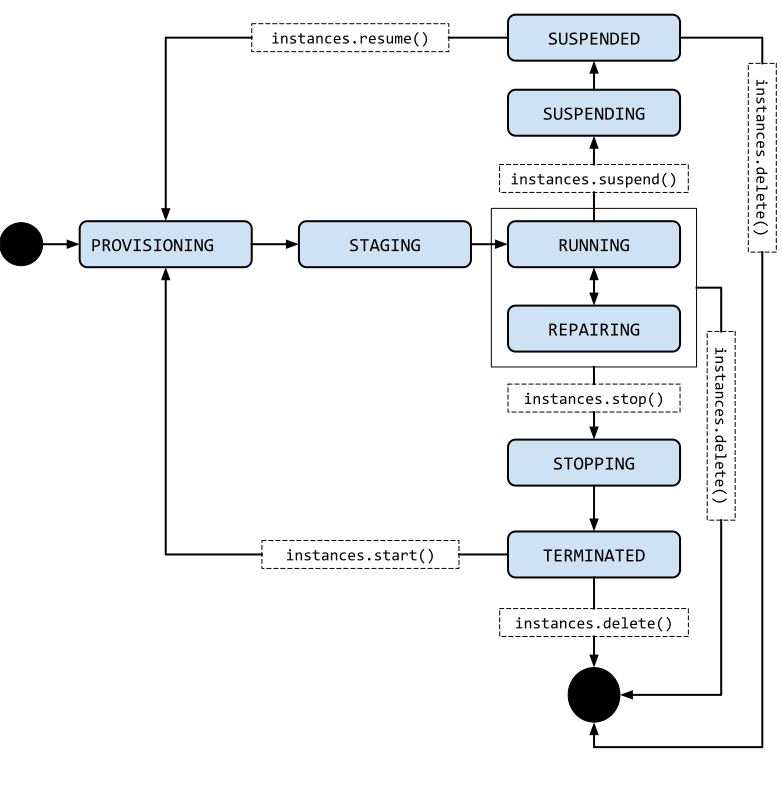
Instance life cycle.

  • PROVISIONING. Resources are being allocated for the instance. The instance is not running yet.
  • STAGING. Resources have been acquired and the instance is being prepared for the first boot.
  • RUNNING. The instance is booting up or running. You should be able to ssh into the instance soon, but not immediately after it enters this state.
  • REPAIRING – The instance is being repaired because the instance encountered an internal error or the underlying machine is unavailable due to maintenance. During this time, the instance is unusable. If repair is successful, the instance returns to one of the above states.
  • STOPPING: The instance is being stopped because a user has made a request to stop the instance or there was a failure. This is a temporary status and the instance will move to TERMINATED.
  • TERMINATED. A user shut down the instance, or the instance encountered a failure. You can choose to restart the instance or delete it.
  • SUSPENDING The instance is being suspended due to a user action
  • SUSPENDED – Instance is suspended and can be resumed or deleted

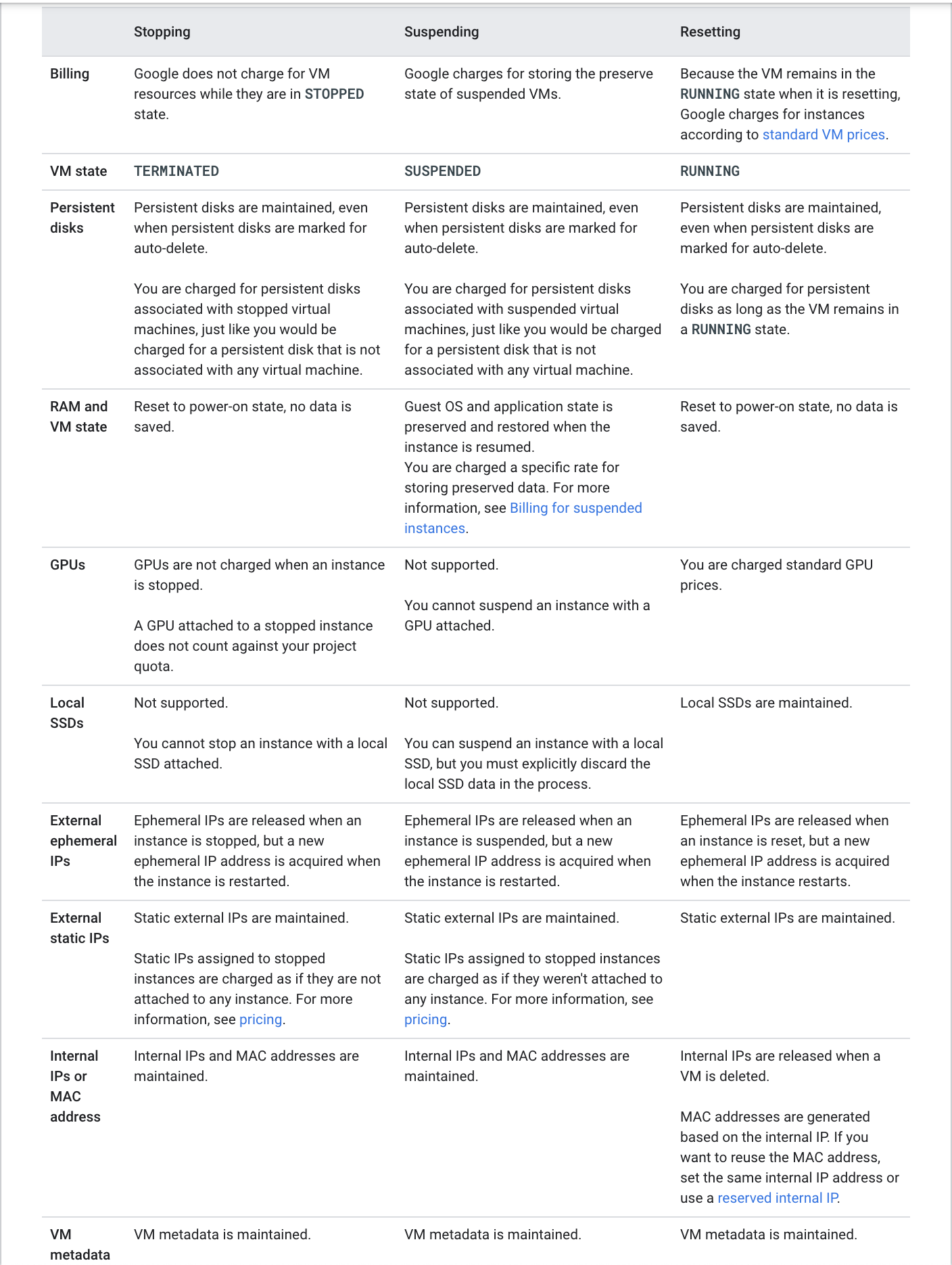
GCP Compute Engine Instance Stopping vs Suspending vs Resetting

Compute Engine Machine Types

  • A machine type is a set of virtualized hardware resources available to a virtual machine (VM) instance, including the system memory size, virtual CPU (vCPU) count, and persistent disk limits.
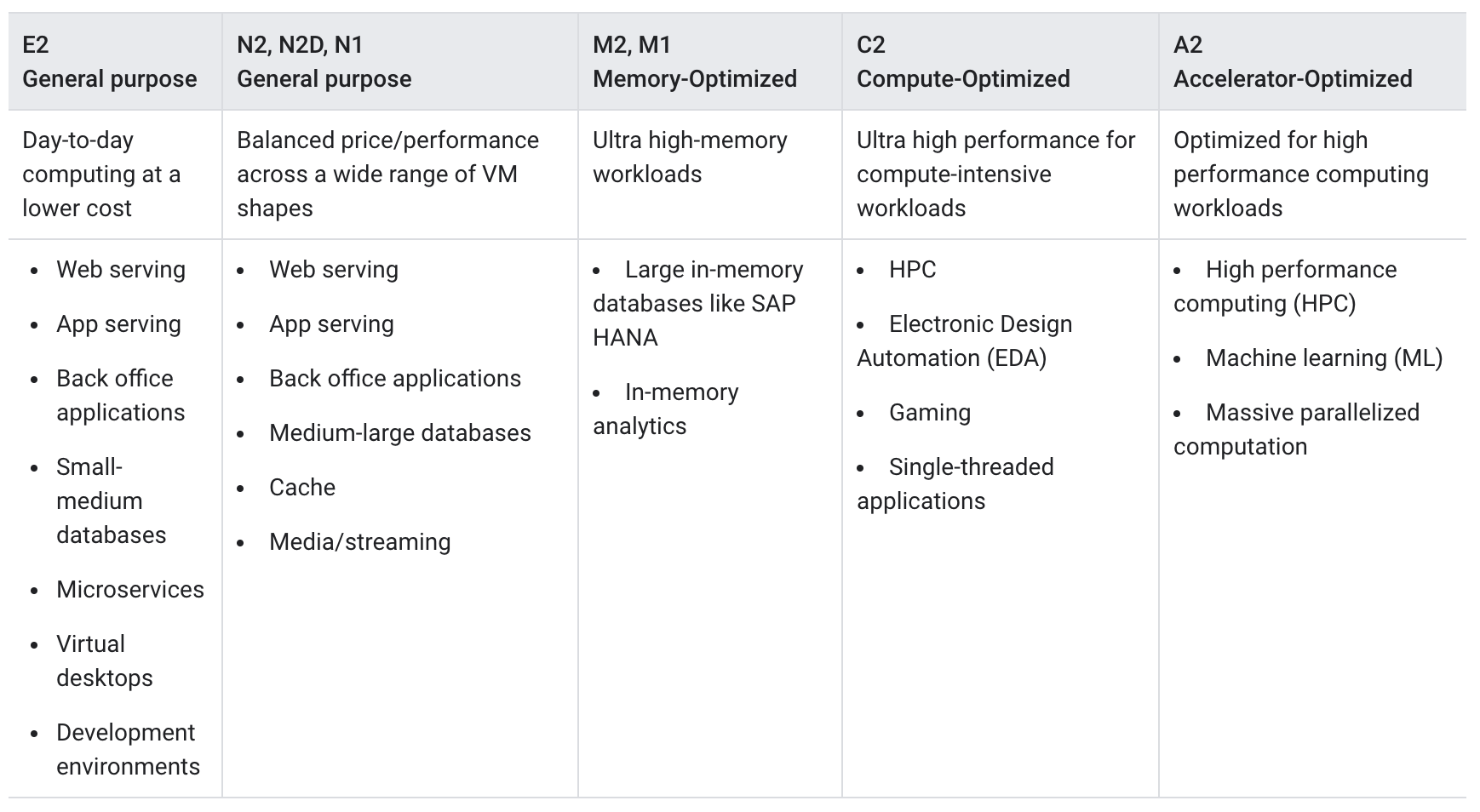
  • Machine types are grouped and curated by families for different workloads.
  • Machine families are further classified by series, generation, and processor type.

Machine Families

  • General-purpose — best price-performance ratio for a variety of workloads (N4, N4A, N4D, N2, N2D, N1, C4, C4A, C4D, C3, C3D, E2, Tau T2D, Tau T2A)
  • Compute-optimized — highest performance per core for HPC and compute-intensive workloads (H4D, H3, C2, C2D)
  • Memory-optimized — ideal for memory-intensive workloads, with up to 32 TB of memory (X4, M4, M4N, M3, M2, M1)
  • Storage-optimized — best for workloads that are low in core usage and high in storage density (Z3)
  • Network-optimized — ideal for IO-intensive workloads with up to 400 Gbps internal bandwidth (M4N)
  • Accelerator-optimized — ideal for massively parallelized CUDA compute workloads such as ML/AI and HPC (A4X Max, A4X, A4, A3, A2, G4, G2)

4th Generation Machine Series (Latest – 2024-2025)

  • C4 — Intel Granite Rapids/Emerald Rapids with Titanium offload, up to 288 vCPUs, 2.2 TB DDR5 memory. Delivers up to 20% better price-performance for general-purpose workloads.
  • C4A — Google Axion (Arm Neoverse V2) processor with Titanium, up to 72 vCPUs, 576 GB DDR5 memory. Delivers up to 65% better price-performance and 60% better energy efficiency than comparable x86 instances.
  • C4D — AMD EPYC Turin with Titanium, up to 384 vCPUs, 3 TB DDR5 memory.
  • N4 — Intel Emerald Rapids with Titanium, up to 80 vCPUs, 640 GB DDR5 memory. Supports custom machine types.
  • N4A — Google Axion (Arm Neoverse N3) with Titanium, up to 64 vCPUs, 512 GB DDR5 memory. Most efficient and flexible Arm-based series.
  • N4D — AMD EPYC Turin with Titanium, up to 96 vCPUs, 768 GB DDR5 memory. Supports custom machine types and dynamic resource management.
  • X4 — Intel Sapphire Rapids bare metal, up to 1,920 vCPUs, 6-32 TB of memory.
  • M4 — Intel Emerald Rapids, up to 224 vCPUs with up to 26.5 GB memory per vCPU.
  • H4D — AMD EPYC Turin with Titanium and Cloud RDMA support, 192 vCPUs, 720 GB DDR5. Designed for HPC workloads.
  • A4 — 224 vCPUs with 8 NVIDIA B200 GPUs, up to 3,600 Gbps network bandwidth.
  • A4X — NVIDIA Grace CPUs with 4 NVIDIA B200 GPUs, up to 2,000 Gbps network bandwidth.
  • G4 — AMD EPYC Turin with NVIDIA RTX PRO 6000 GPUs, supports fractional GPUs (1/8, 1/4, 1/2), up to 400 Gbps networking.

Google Titanium

  • Titanium is Google Cloud’s custom-designed architecture that offloads networking and storage tasks to dedicated hardware.
  • Delivers more consistent and predictable performance by reserving the entire CPU exclusively for applications.
  • Foundation to all 3rd-generation and newer Compute Engine machine types (C3, C4, N4, H3, H4D, Z3, etc.).
  • Provides performance, reliability, and security improvements by freeing up the CPU from I/O processing.

GCP Compute Engine Machine Types

Compute Engine Storage

  • Compute Engine offers multiple storage options:
    • Persistent Disk (PD) — network-attached block storage (Standard PD, Balanced PD, SSD PD, Extreme PD)
    • Hyperdisk — next-generation block storage with independently configurable IOPS, throughput, and capacity
    • Local SSD / Titanium SSD — physically attached high-performance local storage
  • Hyperdisk (GA 2024+) is the recommended storage for newer machine series (C4, N4, C4A, etc.):
    • Hyperdisk Balanced — best combination of price and performance; also used as boot disk for newer machine types. Up to 160,000 IOPS and 2,400 MiB/s throughput per volume.
    • Hyperdisk Balanced High Availability — synchronous replication across two zones in a region.
    • Hyperdisk Extreme — highest IOPS for demanding database workloads.
    • Hyperdisk ML — optimized for ML model serving with high throughput.
    • Hyperdisk Throughput — optimized for high-throughput sequential workloads.
  • Hyperdisk Storage Pools allow pre-provisioning capacity, throughput, and IOPS that multiple disks can share, enabling deduplication and thin provisioning.

Refer blog post @ Compute Engine Storage Options

Compute Engine Guest Environment

  • A Guest environment is automatically installed on the VM instance when using Google-provided public images
  • Guest environment is a set of scripts, daemons, and binaries that read the content of the metadata server to make a VM run properly on CE
  • A metadata server is a communication channel for transferring information from a client to the guest operating system.
  • Guest environment can be manually installed on custom images

Compute Engine Instance Availability Policies

  • Compute Engine does regular maintenance of its infrastructure which entails hardware and software updates
  • Google might require to move the VM away from the host undergoing maintenance and Compute Engine automatically manages the scheduling behavior of these instances.
  • Compute Engine instance’s availability policy determines how it behaves when there is a maintenance event
    • Live migrate – move the VM instances to another host machine
    • Stop the instances
  • Instance’s availability policy can be changed by configuring the following two settings:
    • VM instance’s maintenance behavior onHostMaintenance, which determines whether the instance is live migrated MIGRATE (default) or stopped TERMINATE
    • Instance’s restart behavior automaticRestart which determines whether the instance automatically restarts (default) if it crashes or gets stopped

Compute Engine Live Migration

  • Live migration helps keep the VM instances running even when a host system event, such as a software or hardware update, occurs
  • Compute Engine live migrates the running instances to another host in the same zone instead of requiring the VMs to be rebooted
  • Live migration allows Google to perform maintenance to keep infrastructure protected and reliable without interrupting any of the VMs.
  • GCP provides a notification to the guest that migration is imminent, when a VM is scheduled to be live migrated
    • Regular infrastructure maintenance and upgrades.
    • Network and power grid maintenance in the data centers.
    • Failed hardware such as memory, CPU, network interface cards, disks, power, and so on. This is done on a best-effort basis; if hardware fails completely or otherwise prevents live migration, the VM crashes and restarts automatically and a hostError is logged.
    • Host OS and BIOS upgrades.
    • Security-related updates, with the need to respond quickly.
    • System configuration changes, including changing the size of the host root partition, for storage of the host image and packages.
  • Live migration does not change any attributes or properties of the VM including internal and external IP addresses, instance metadata, block storage data and volumes, OS and application state, network settings, network connections, and so on.
  • Compute Engine can also live migrate instances with Local SSD disks attached, moving the VMs along with their local SSD to a new machine in advance of any planned maintenance.
  • Instances with GPUs attached cannot be live migrated and must be set to stop and optionally restart. Compute Engine offers a 60-minute notice before a VM instance with a GPU attached is stopped.
  • Instances created with bare metal machine types cannot be live migrated.
  • Spot VMs cannot be configured for live migration.

Spot VMs

✅ Spot VMs are the latest and recommended version of preemptible VMs. Google recommends using Spot VMs instead of preemptible VMs for new workloads.

  • A Spot VM is an instance that can be created and run at a much lower price (60-91% discount) than standard on-demand instances.
  • Compute Engine might stop (preempt) Spot VMs if it requires access to those resources for other tasks.
  • Spot VMs are excess Compute Engine capacity, so their availability varies with usage.
  • Spot VMs are ideal for fault-tolerant, batch, and stateless workloads that can withstand possible interruptions.
  • Key advantages over legacy Preemptible VMs:
    • No 24-hour maximum runtime limit — Spot VMs can run indefinitely as long as capacity is available (unless you explicitly limit the runtime).
    • Same pricing as preemptible VMs.
    • Same preemption behavior and mechanisms.
  • Spot VM limitations:
    • Compute Engine might preempt Spot VMs at any time due to system events.
    • Are finite GCE resources, so they might not always be available.
    • Can’t live migrate to a regular VM instance, or be set to automatically restart when there is a maintenance event.
    • Are not covered by any Service Level Agreement (SLA).
    • GCP Free Tier credits for Compute Engine don’t apply to Spot VMs.
  • Preemption process:
    • Compute Engine sends a preemption notice to the instance in the form of an ACPI G2 Soft Off signal.
    • Shutdown script can be used to handle the preemption notice and complete cleanup actions before the instance stops.
    • If the instance does not stop after 30 seconds, Compute Engine sends an ACPI G3 Mechanical Off signal to the operating system.
    • Compute Engine transitions the instance to a TERMINATED state.
  • Managed Instance Groups (MIGs) support Spot VMs.

Preemptible VM Instances (Legacy)

⚠️ Note: Preemptible VMs are the legacy version of Spot VMs. Google recommends using Spot VMs for all new workloads. Preemptible VMs continue to be supported but have the additional limitation of a 24-hour maximum runtime.

  • A preemptible VM is an instance that can be created and run at a much lower price than normal instances.
  • Preemptible instance limitations (in addition to Spot VM limitations):
    • Always stops preemptible instances after they run for 24 hours (Spot VMs do NOT have this limit).

Flex-start VMs

  • Flex-start VMs (introduced 2024) provide on-demand pricing but with flexible start times.
  • Ideal for workloads that need guaranteed capacity but can tolerate a short delay in provisioning.
  • Supported in managed instance groups (MIGs) for batch and scale-out workloads.

Shielded VM

  • Shielded VM offers verifiable integrity of the Compute Engine VM instances, to confirm the instances haven’t been compromised by boot- or kernel-level malware or rootkits.
  • Shielded VM’s verifiable integrity is achieved through the use of Secure Boot, virtual trusted platform module (vTPM)-enabled Measured Boot, and integrity monitoring.

Confidential VMs

  • Confidential VMs are a type of Compute Engine virtual machine that use hardware-based memory encryption to help ensure that data and applications can’t be read or modified while in use.
  • Provides an additional layer of security for sensitive workloads through hardware-level isolation.
  • Supported technologies:
    • AMD SEV (Secure Encrypted Virtualization) — encrypts VM memory with a dedicated per-VM key. Supported on N2D, C2D, C3D, C4D, and G4 machine series.
    • AMD SEV-SNP — adds memory integrity protection and attestation. Supported on N2D machine series.
    • Intel TDX (Trust Domain Extensions) — creates isolated trust domains with hardware-based attestation. GA on C3 machine series (since September 2024) and A3 accelerator-optimized machines.
    • NVIDIA Confidential Computing — enables GPU memory encryption for AI workloads. Supported on A3 and G4 machine series.
  • No additional code changes required for applications running inside Confidential VMs.

Managing Access to the Instances

  • Linux instances:
    • Compute Engine uses key-based SSH authentication to establish connections to Linux virtual machine (VM) instances.
    • By default, local users with passwords aren’t configured on Linux VMs.
    • By default, Compute Engine uses custom project and/or instance metadata to configure SSH keys and to manage SSH access. If OS Login is used, metadata SSH keys are disabled.
    • Managing Instance Access Using OS Login,
      • allows associating SSH keys with the Google Account or Google Workspace account and manage admin or non-admin access to the instance through IAM roles.
      • connecting to the instances using the gcloud command-line tool or SSH from the console, Compute Engine can automatically generate SSH keys and apply them to the Google Account or Google Workspace account.
      • Supports two-factor authentication (2FA) for additional security.
      • Supports SSH certificates for enhanced key management.
      • Supports security keys (FIDO2) as SSH authentication factors.
    • Manage the SSH keys in the project or instance metadata
      • allows granting admin access to instances with metadata access that does not use OS Login.
      • connecting to the instances using the gcloud command-line tool or SSH from the console, Compute Engine can automatically generate SSH keys and apply them to project metadata.
      • Project-wide public SSH keys
        • give users general access to a Linux instance.
        • give users access to all of the Linux instances in a project that allows project-wide public SSH keys
      • Instance metadata
        • If an instance blocks project-wide public SSH keys, a user can’t use the project-wide public SSH key to connect to the instance unless the same public SSH key is also added to instance metadata
    • Identity-Aware Proxy (IAP) TCP forwarding — allows SSH connections to VMs that don’t have external IP addresses through IAP tunnels, without needing a VPN or bastion host.
  • On Windows Server instances:
    • Create a password for a Windows Server instance

Compute Engine Images

  • Compute Engine Images help provide operation system images to create boot disks and application images with preinstalled, configured software
  • Main purpose is to create new instances or configure instance templates
  • Images can be regional or multi-regional and can be shared and accessed across projects and organizations
  • Compute Engine instances can run the public images for Linux and Windows Server that Google provides as well as private custom images created or imported from existing systems.
    • Public images
      • provided and maintained by Google, open-source communities, and third-party vendors.
      • All Google Cloud projects have access to these images and can use them to create instances.
    • Custom images
      • are available only to the Cloud project.
      • Custom images can be created from boot disks and other images.
  • Image families
    • help image versioning
    • helps to manage images in the project by grouping related images together, so that they can roll forward and roll back between specific image versions
    • always points to newest latest non-deprecated version
  • Linux images can be exported as a tar.gz file to Cloud Storage
  • Google Cloud supports images with Container-Optimized OS, an OS image for the CE instances optimized for running Docker containers

Instance Templates

  • Instance template is a resource used to create VM instances and managed instance groups (MIGs) with identical configuration
  • Instance templates define the machine type, boot disk image or container image, labels, and other instance properties
  • Instance templates are a convenient way to save a VM instance’s configuration to create VMs or groups of VMs later
  • Google Cloud has two Instance Template resources:
    • Global instance templates — can be reused in different regions. This is a global resource that is not bound to a zone or a region.
    • Regional instance templates — can be used in a specified region only. Useful for reducing cross-region dependency or achieving data residency requirements.
  • If some zonal resources are specified in an instance template for e.g. disks, which restricts the template to the zone where that resource resides.
  • Labels defined within an instance template are applied to all instances that are created from that instance template. The labels do not apply to the instance template itself.
  • Existing instance template cannot be updated or changed after it’s created

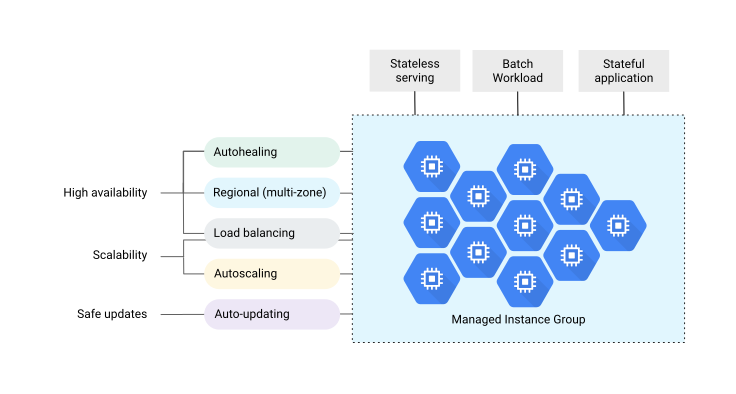
Instance Groups

Refer blog post @ Compute Engine Instance Groups

Snapshots

Refer blog post @ Compute Engine Snapshots

Startup & Shutdown Scripts

  • Startup scripts
    • can be added and executed on the VM instances to perform automated tasks every time the instance boots up.
    • can perform actions such as installing software, turning on services, performing updates, and any other tasks defined in the script.
  • Shutdown scripts
    • execute commands right before a VM instance is stopped or restarted.
    • can be useful allowing instances time to clean up or perform tasks, such as exporting logs, or syncing with other systems.
    • are executed only on a best-effort basis
    • have a limited amount of time to finish running before the instance stops i.e. 90 secs for on-demand and 30 secs for Spot/Preemptible instances
  • Startup & Shutdown scripts are executed using root user
  • Startup & Shutdown scripts can be provided to the VM instance using
    • local file, supported by gcloud only
    • inline using startup-script or shutdown-script option
    • Cloud Storage URL and startup-script-url or shutdown-script-url as the metadata key, provided the instance has access to the script
  • Graceful Shutdown (2025+) — allows configuring extended shutdown time for VMs in a MIG, giving workloads more time to complete in-flight requests during scale-in or updates.

Machine Image

  • A machine image is a Compute Engine resource that stores all the configuration, metadata, permissions, and data from one or more disks required to create a virtual machine (VM) instance.
  • Machine images can be used for VM backup, cloning, and replication across projects.

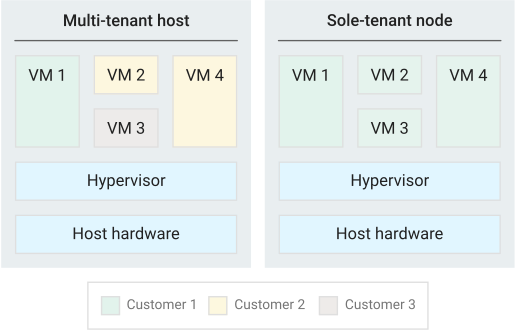
Sole Tenant Nodes

  • Sole-tenancy provides dedicated hosting only for the project’s VM and provides an added layer of hardware isolation
  • Sole-tenant nodes ensure that the VMs do not share host hardware with VMs from other projects
  • Each sole-tenant node maintains a one-to-one mapping to the physical server that is backing the node
  • Project has exclusive access to a sole-tenant node, which is a physical CE server and can be used to keep the VMs physically separated from VMs in other projects or to group the VMs together on the same host hardware
  • Sole-tenant nodes can help meet dedicated hardware requirements for bring your own license (BYOL) scenarios that require per-core or per-processor licenses

Projects on a multi-tenant host versus a sole-tenant node.

Bare Metal Instances

  • Bare metal instances (2024+) run directly on physical servers without a hypervisor layer.
  • Available in C4, C4A, C4D, Z3, and X4 machine series.
  • Ideal for workloads that require direct hardware access, specialized hypervisors, or specific compliance requirements.
  • Can attach disks and use VPC networking just like regular VM instances.
  • Cannot be live migrated during host maintenance events.

Preventing Accidental VM Deletion

  • Accidental VM deletion can be prevented by setting the property deletionProtection on an instance resource esp. for VMs running critical workloads and need to be protected
  • Deletion request fails if a user attempts to delete a VM instance for which the deletionProtection flag is set
  • Only a user granted with compute.instances.create permission can reset the flag to allow the resource to be deleted.
  • Deletion prevention does not prevent the following actions:
    • Terminating an instance from within the VM (such as running the shutdown command)
    • Stopping an instance
    • Resetting an instance
    • Suspending an instance
    • Instances being removed due to fraud and abuse after being detected by Google
    • Instances being removed due to project termination
  • Deletion protection can be applied to both regular and Spot VMs.
  • Deletion protection cannot be applied to VMs that are part of a managed instance group but can be applied to instances that are part of unmanaged instance groups.
  • Deletion prevention cannot be specified in instance templates.

Cost Optimization

  • Committed Use Discounts (CUDs) — discounts for committing to use a specific amount of resources for 1 or 3 years.
    • Resource-based CUDs — commit to a specific amount of vCPUs and memory in a region. 1-year: ~20% off, 3-year: ~45% off.
    • Compute Flexible CUDs (Flex CUDs) — spend-based commitments that apply across Compute Engine, GKE, and Cloud Run. 1-year: 28% off, 3-year: 46% off. No need to specify machine type or region.
  • Sustained Use Discounts (SUDs) — automatic discounts for running instances for a significant portion of the month. Available for N2, N2D, N1, C2, M1, M2 series. Not available for newer 4th-gen series (C4, N4, etc.) which are covered by Flex CUDs instead.
  • Spot VMs — up to 60-91% discount for interruptible workloads.
  • Rightsizing Recommendations — Compute Engine provides machine type recommendations based on workload utilization to help optimize costs.

GCP Certification Exam Practice Questions

  • Questions are collected from Internet and the answers are marked as per my knowledge and understanding (which might differ with yours).
  • GCP services are updated everyday and both the answers and questions might be outdated soon, so research accordingly.
  • GCP exam questions are not updated to keep up the pace with GCP updates, so even if the underlying feature has changed the question might not be updated
  • Open to further feedback, discussion and correction.
  1. Your company hosts multiple applications on Compute Engine instances. They want the instances to be resilient to any Host maintenance activities performed on the instance. How would you configure the instances?
    1. Set automaticRestart availability policy to true
    2. Set automaticRestart availability policy to false
    3. Set onHostMaintenance availability policy to migrate instances
    4. Set onHostMaintenance availability policy to terminate instances
  2. A company needs to run a fault-tolerant batch processing workload at the lowest possible cost. The workload can tolerate interruptions and does not have a fixed completion deadline. Which VM provisioning model should they use?
    1. Standard on-demand VMs
    2. Preemptible VMs
    3. Spot VMs
    4. Sole-tenant VMs
  3. What is the key advantage of Spot VMs over legacy Preemptible VMs in Google Cloud?
    1. Spot VMs are cheaper than Preemptible VMs
    2. Spot VMs can be live migrated during maintenance
    3. Spot VMs have no 24-hour maximum runtime limit
    4. Spot VMs are covered by a Service Level Agreement
  4. Your organization requires that VM memory is encrypted in use to protect sensitive data processing. Which Compute Engine feature should you enable?
    1. Shielded VM
    2. Confidential VM
    3. Customer-Managed Encryption Keys (CMEK)
    4. Customer-Supplied Encryption Keys (CSEK)
  5. Which 4th-generation machine series is powered by Google’s custom Axion Arm processor and offers up to 65% better price-performance than comparable x86 instances?
    1. C4
    2. C4A
    3. N4
    4. C4D
  6. A team needs a Compute Engine machine type that allows independently configuring vCPUs and memory for their specific workload needs. Which machine series supports custom machine types? (Choose TWO)
    1. C4
    2. N4
    3. N4D
    4. C4A
    5. H4D
  7. What is Google Titanium in the context of Compute Engine?
    1. A type of SSD storage
    2. A machine type family
    3. A custom-designed architecture that offloads networking and storage tasks to dedicated hardware
    4. A security feature for VM encryption
  8. Which storage type is recommended as the boot disk for newer Compute Engine machine series like C4 and N4?
    1. Standard Persistent Disk
    2. SSD Persistent Disk
    3. Hyperdisk Balanced
    4. Local SSD

References

GCE Instance Groups – MIG, Autoscaling & Spot VMs

Google Cloud – Compute Engine Instance Groups

  • An instance group is a collection of virtual machine (VM) instances that can be managed as a single entity.
  • Compute Engine offers two kinds of VM instance groups
    • Managed instance groups (MIGs)
      • allows app creation with multiple identical VMs.
      • workloads can be made scalable and highly available by taking advantage of automated MIG services, including: autoscaling, autohealing, regional (multiple zones) deployment, and automatic updating
    • Unmanaged instance groups
      • allows load balance across a fleet of self managed nonidentical VMs

Managed instance groups (MIGs)

  • A MIG creates each of its managed instances based on the instance template and specified optional stateful configuration
  • Managed instance group (MIG) is ideal for scenarios
    • Stateless serving workloads, such as a website frontend
    • Stateless batch, high-performance, or high-throughput compute workloads, such as image processing from a queue
    • Stateful applications, such as databases, legacy applications, and long-running batch computations with check pointing
Use a managed instance group to build highly available deployments for stateless serving, stateful applications, or batch workloads.

Health Checking

  • Managed instance group health checks proactively signal to delete and recreate instances that become UNHEALTHY.
  • Load balancing health checks help direct traffic away from non-responsive instances and toward healthy instances; these health checks do not cause Compute Engine to recreate instances.
  • Health checks used to monitor MIGs are similar to the health checks used for load balancing, with some differences in behavior.

High Availability & Autohealing

  • Managed instance groups maintain high availability of the applications by proactively maintaining the number of instances and keeping the instances available, which means in RUNNING state.
  • Application-based autohealing improves application availability by relying on a health checking signal that detects application-specific issues such as freezing, crashing, or overloading.
  • If a health check determines that an application has failed on a VM, the MIG automatically recreates that VM instance.
  • A MIG automatically recreates an instance that is not RUNNING. However, relying only on VM state may not be sufficient and should include check for application freezes, crashes, or runs out of memory.
  • MIGs support repair in alternate zone, allowing a VM to be recreated in a different zone if the original zone is experiencing issues.

Regional or Zonal groups

  • Zonal MIG,
    • deploys instances to a single zone.
  • Regional MIG
    • deploys instances to multiple zones across the same region
    • provides higher availability by spreading application load across multiple zones,
    • protects the workload against zonal failure
    • offer more capacity, with a maximum of 2,000 instances per regional group.

Target Distribution Shape (Regional MIGs)

  • Regional MIGs support configurable target distribution shapes to control how instances are distributed across zones:
    • EVEN (default) – maintains the same number of VMs across zones (differs by at most 1). Recommended for highly available serving workloads.
    • BALANCED – prioritizes creating VMs where resources are available while distributing as evenly as possible. Recommended for highly available serving or batch workloads.
    • ANY – picks zones to maximize resource acquisition and utilization of unused reservations. Recommended for batch workloads.
    • ANY_SINGLE_ZONE – creates all VMs within a single zone chosen based on hardware support, reservations, and resource availability. Recommended with compact placement policies for workloads requiring extensive VM-to-VM communication.
  • Proactive instance redistribution (enabled by default with EVEN shape) automatically rebalances VMs across zones when capacity becomes available.

Load Balancing

  • MIGs work with load balancing services to distribute traffic across all of the instances in the group.
  • Google Cloud load balancing can use instance groups to serve traffic by adding instance groups to a target pool or to a backend service.

Scalability & Autoscaling

  • MIGs provides scalability and supports autoscaling that dynamically adds or removes instances in response to increases or decreases in load.
  • Autoscaling policy determines how the group would scale which includes scaling based on CPU utilization, Cloud Monitoring metrics, load balancing capacity, or, for zonal MIGs, by using a queue-based workload like Pub/Sub
  • Autoscaler continuously collects usage information based on the selected utilization metric, compares actual utilization to the desired target utilization, and uses this information to determine whether the group needs to remove instances (scale in) or add instances (scale out).
  • Cool down period
    • is known as the application initialization period
  • Stabilization period
    • For scaling in, the autoscaler calculates the group’s recommended target size based on peak load over the last 10 minutes which is called the Stabilization period
    • Using the stabilization period, the autoscaler ensures that the recommended size for the managed instance group is always sufficient to serve the peak load observed during the previous 10 minutes.
  • Predictive autoscaling
    • helps to optimize your MIG for availability,
    • the autoscaler forecasts future load based on historical data and scales out a MIG in advance of predicted load, so that new instances are ready to serve when the load arrives.
  • Schedule-based autoscaling
    • allows setting minimum required capacity for recurring time windows (e.g., business hours, weekends).
    • supports cron-like schedules to proactively scale up before anticipated load increases.
    • can be combined with other autoscaling signals (CPU, load balancing, monitoring metrics) — the autoscaler uses the signal that results in the largest number of VMs.
  • Scale-in controls
    • allow limiting the rate at which autoscaler removes VMs to prevent sudden capacity drops.
    • configured as a maximum number of VMs or a percentage of group size that can be removed within a specified time window.
    • helps prevent overly aggressive scale-in during temporary load drops.
  • Autoscaler mode
    • ON – autoscaler scales both out and in based on recommended size.
    • ONLY_SCALE_OUT – autoscaler only increases group size, never reduces it automatically.

Automatic Updating

  • MIG automatic updater supports a flexible range of rollout scenarios to deploy new versions of the software to instances in the MIG such as rolling updates and canary updates.
  • Speed and scope of deployment can be controlled as well as the level of disruption to the service.
  • All-instances configuration (AIC) allows overriding instance template properties (like metadata or labels) across all VMs without changing the template itself.
  • One-click OS image upgrades simplify the process of updating VM images across the group.

Stateful Workloads Support

  • MIGs can be used for building highly available deployments and automating operation of applications with stateful data or configuration, such as databases, DNS servers, legacy monolith applications, or long-running batch computations with checkpointing.
  • Uptime and resiliency of such applications can be improved with autohealing, controlled updates, and multi-zone deployments, while preserving each instance’s unique state, including customizable instance name, persistent disks, and metadata.
  • Stateful MIGs preserve each instance’s unique state (instance name, attached persistent disks, metadata, and IP addresses) on machine restart, recreation, auto-healing, and update events.
  • Stateful IP addresses – allows preserving internal and/or external IP addresses across VM lifecycle events.

Spot VM Instance Groups

  • MIG supports Spot VMs (the recommended replacement for preemptible VMs), which provide significant discounts of up to 60-91% off on-demand pricing.
  • Unlike legacy preemptible VMs, Spot VMs have no maximum 24-hour runtime limit unless specifically configured.
  • Spot VMs can be preempted (stopped or deleted) at any time when Compute Engine needs the resources, but there is no fixed expiration time.
  • When Spot VMs in a MIG are preempted, the group repeatedly tries to recreate those VMs using the specified instance template when resources become available.
  • When using instance flexibility (multiple machine types in a MIG), the MIG automatically selects machine types with the lowest observed preemption rates.
  • Termination action can be set to STOP (default) or DELETE for each Spot VM.
📝 Note: Preemptible VMs are still supported but Google recommends using Spot VMs instead. Spot VMs are the latest version of preemptible VMs with no 24-hour maximum runtime. Legacy preemptible VMs may still appear in certification exams.

Instance Flexibility

  • Instance flexibility allows specifying multiple machine types suitable for a workload in a single MIG.
  • Compute Engine automatically selects and provisions VMs using any of the specified machine types based on current capacity and quota availability.
  • Helps improve the likelihood of getting resources, especially for Spot VMs or specialized hardware.
  • For Spot VMs, the MIG automatically selects machine types with the lowest observed preemption rates to minimize disruption.

Standby Pool (Suspended and Stopped VMs)

  • MIGs support a standby pool that allows VMs to be suspended or stopped while remaining part of the group.
  • Suspended/stopped VMs are pre-initialized and can be quickly resumed during scale-out, reducing cold-start latency.
  • Helps reduce costs when pausing applications during off-peak hours while maintaining quick scale-out capability.
  • VMs can be manually suspended or stopped, or automated as part of MIG lifecycle policies.

Resize Requests

  • Resize requests provide all-or-nothing capacity provisioning for MIGs, particularly useful for GPU workloads.
  • Ensures that either all requested VMs are created successfully or none are, preventing partial deployments.
  • Useful for ML/AI training workloads that require a specific number of accelerator VMs to start together.

Containers

  • MIG supports the deployment of containers to container-optimized OS that includes docker, if the instance template used specifies a container image.

Network and Subnet

  • Instance template, used with MIG, defines the VPC network and subnet that member instances use.
  • For auto mode VPC networks, the subnet can be omitted ; this instructs GCP to select the automatically-created subnet in the region specified in the template.
  • If VPC network is omitted, GCP attempts to use the VPC network named default.

Unmanaged instance groups

  • Unmanaged instance groups can contain heterogeneous instances that can be arbitrarily added and removed from the group.
  • Unmanaged instance groups do not offer autoscaling, autohealing, rolling update support, multi-zone support, or the use of instance templates and are not a good fit for deploying highly available and scalable workloads.
  • Use unmanaged instance groups, if load balancing needs to be added to groups of heterogeneous instances, or needs self managed instances

GCP Certification Exam Practice Questions

  • Questions are collected from Internet and the answers are marked as per my knowledge and understanding (which might differ with yours).
  • GCP services are updated everyday and both the answers and questions might be outdated soon, so research accordingly.
  • GCP exam questions are not updated to keep up the pace with GCP updates, so even if the underlying feature has changed the question might not be updated
  • Open to further feedback, discussion and correction.
  1. Your company’s test suite is a custom C++ application that runs tests throughout each day on Linux virtual machines. The full
    test suite takes several hours to complete, running on a limited number of on-premises servers reserved for testing. Your company
    wants to move the testing infrastructure to the cloud, to reduce the amount of time it takes to fully test a change to the system,
    while changing the tests as little as possible. Which cloud infrastructure should you recommend?

    1. Google Compute Engine unmanaged instance groups and Network Load Balancer.
    2. Google Compute Engine managed instance groups with auto-scaling.
    3. Google Cloud Dataproc to run Apache Hadoop jobs to process each test.
    4. Google App Engine with Google Stackdriver for logging.
  2. Your company has a set of compute engine instances that would be hosting production-based applications. These applications
    would be running 24×7 throughout the year. You need to implement the cost-effective, scalable and high availability solution even
    if a zone fails. How would you design the solution?

    1. Use Managed instance groups with Spot VMs across multiple zones
    2. Use Managed instance groups across multiple zones
    3. Use managed instance groups with instances in a single zone
    4. Use Unmanaged instance groups across multiple zones
  3. A company runs a batch processing workload using a MIG. The workload is fault-tolerant and can withstand VM preemption. They want to minimize costs. Which configuration should they use?
    1. Regional MIG with EVEN distribution and standard VMs
    2. Zonal MIG with standard VMs and autoscaling
    3. Regional MIG with ANY distribution shape and Spot VMs
    4. Regional MIG with BALANCED distribution and preemptible VMs
  4. You are designing a highly available web application that needs to survive a zone failure without degraded performance. The application serves traffic across multiple zones. Which MIG configuration is most appropriate?
    1. Regional MIG with ANY_SINGLE_ZONE target distribution shape
    2. Regional MIG with EVEN target distribution shape and overprovisioned capacity
    3. Zonal MIG with autoscaling enabled
    4. Regional MIG with ANY target distribution shape
  5. Your team wants to ensure that the autoscaler does not aggressively remove VMs when there is a temporary drop in traffic, to avoid affecting long-running user sessions. What should you configure?
    1. Increase the stabilization period to 30 minutes
    2. Set the autoscaler mode to ONLY_SCALE_OUT
    3. Configure scale-in controls to limit the rate of VM removal
    4. Use predictive autoscaling with schedule-based scaling
  6. A company needs to run a large ML training job that requires exactly 8 GPU VMs to start simultaneously. They cannot proceed with partial provisioning. Which MIG feature should they use?
    1. Autoscaling with minimum instances set to 8
    2. Schedule-based autoscaling
    3. Resize requests for all-or-nothing provisioning
    4. Instance flexibility with multiple machine types

GCP Resource Manager – Organizations & Projects

Google Cloud Resource Manager

Google Cloud Resource Manager helps manage resource containers such as organizations, folders, and projects that allow you to group and hierarchically organize Google Cloud resources. It provides centralized visibility, ownership, and control over your cloud resources.

Resource Hierarchy

Google Cloud Resource Hierarchy

Organizations

  • Organization resource is the root node in the Google Cloud resource hierarchy and is the hierarchical supernode and ancestor of project resources and folders.
  • Organization is at the top of the hierarchy and does not have a parent.
  • Organization provides central visibility and control over every resource that belongs to an organization
  • With an Organization resource, projects belong to the organization instead of the employee who created the project, which means that the projects are no longer deleted when an employee leaves the company; instead, they will follow the organization’s lifecycle on Google Cloud.
  • Organization administrators have central control of all resources and can view and manage all of the company’s projects
  • IAM access control policies applied to the Organization resource apply throughout the hierarchy on all resources in the organization.
  • Roles granted at the organization level are inherited by all projects and folders under the Organization resource
  • Organization is not applicable for personal (e.g. Gmail) accounts
  • Google Workspace or Cloud Identity account represents a company and is a prerequisite to having access to the Organization resource. It provides identity management, recovery mechanism, ownership, and lifecycle management
  • Google Workspace super admin is the individual responsible for domain ownership verification and the contact in cases of recovery.
  • Standalone Organizations (introduced in 2024) allow creating an organization resource without requiring a Google Workspace or Cloud Identity domain. This enables:
    • Users with federated identities to be added as organization owners
    • Multiple organizations for testing different features
    • Multiple organization owners to avoid single points of failure
    • Google Cloud now automatically creates an organization resource for new Free Trial customers

Folders

  • Folders are an additional optional grouping mechanism on top of projects and provide isolation boundaries between projects
  • Organization resource is a prerequisite to use folders.
  • Folders can be used to model different legal entities, departments, teams, and environments within a company
  • Folders allow delegation of administration rights as well as control or limit access to resources within the folder

Projects

  • Project resource is the base-level organizing entity
  • Organizations and folders may contain multiple projects
  • Projects are a core organizational component of Google Cloud
  • A project is required to use Google Cloud and forms the basis for creating, enabling, and using all Google Cloud services, managing APIs, enabling billing, adding and removing collaborators, and managing permissions.
  • Each project has a name and a unique project ID across Google Cloud
  • Project ID cannot be reused even if the project is deleted
  • Each project is associated with a billing account.
  • Multiple projects can have their usage billed to the same billing account
  • Project deletion has a 30-day recovery period during which the project can be restored
  • Projects can be protected from accidental deletion using liens
  • Project Environment Tags (2025) – Tags can be used to visually distinguish projects based on their environment (production, staging, development) directly within the Google Cloud console, helping prevent errors when working in sensitive environments

IAM Policy Inheritance

  • Identity and Access Management helps control who (users) has what access (roles) to which resources by setting IAM policies on the resources.
  • Resources inherit the policies of the parent node i.e. policy set at the Organization level is inherited by all its child folders and projects, and if a policy set at the project level, it is inherited by all its child resources.
  • Most permissive parent policy always overrules more restrictive child policy i.e. There is no way to explicitly remove permission for a lower-level resource that is granted at a higher level in the resource hierarchy.
  • The effective policy for a resource is the union of the policy set on the resource and the policy inherited from its ancestors.
  • Permission inheritance is transitive i.e. resources inherit policies from the project, which inherit policies from the organization.
  • IAM policy hierarchy follows the same path as the Google Cloud resource hierarchy i.e. if the resource hierarchy is changed for e.g. moving a project from one folder to the other, the policy hierarchy changes as well.

Tags

  • Tags are key-value pairs that can be attached to Google Cloud resources for fine-grained access control, organization, and policy enforcement.
  • Tags provide a way to create annotations for resources, and conditionally allow or deny policies based on whether a resource has a specific tag.
  • Tags are different from labels:
    • Tags support conditional IAM and organization policy enforcement; labels do not
    • Tags are inherited by children of the resource in the hierarchy; labels are not
    • Tags support allow and deny policy conditions; labels do not
    • Tag key/value names can be up to 256 characters; labels are limited to 63 characters
  • Tags are created at the organization or project level and managed through Resource Manager
  • Tag bindings are inherited by children of the resource in the Google Cloud hierarchy
  • Conditional IAM with Tags – Tags can be referenced in IAM policy bindings to conditionally grant or deny access to resources based on tag values
  • Organization Policy with Tags – Tags can be used to scope organization policies, enabling conditional enforcement based on resource tags
  • Tags can be added at the time of creating folders and projects (Preview, March 2024)
  • Dynamic tag values can be created using the Google Cloud console with a unified API for adding or updating tags on a resource (April 2026)
  • Tags support over 80+ Google Cloud services including Compute Engine, Cloud Storage, BigQuery, Cloud SQL, and more

Organization Policy Service

  • Organization Policy Service gives centralized and programmatic control over the organization’s cloud resources
  • Organization Policy Service benefits
    • Centralize control to configure restrictions on how the organization’s resources can be used.
    • Define and establish guardrails for the development teams to stay within compliance boundaries.
    • Help project owners and their teams move quickly without the worry of breaking compliance.
  • Organization policy is set on a resource hierarchy node, all descendants of that node inherit the organization policy by default. i.e. organization policy set at the root organization node will pass down the defined restriction through all descendant folders, projects, and service resources.

Managed Constraints (Built-in)

  • Organization Policy provides built-in managed constraints for various Google Cloud services
  • Managed constraints are predefined restrictions that can be enforced across the resource hierarchy
  • Examples include restricting VM external IPs, enforcing uniform bucket-level access, disabling service account key creation, etc.

Custom Organization Policies

  • Custom organization policies allow more granular, customizable control over the specific fields restricted in organization policies
  • Custom constraints use Common Expression Language (CEL) to define conditions
  • Custom constraints for Resource Manager (Preview, March 2025) support:
    • Projects – Constrain resource.parent and resource.projectId fields
    • Folders – Constrain resource.displayName and resource.parent fields
  • Use cases include:
    • Govern project naming patterns (e.g., require project IDs to start with “staging-“)
    • Restrict mutation of secure projects and folders
    • Disable creation of folders within other folders to control hierarchy depth
  • Custom constraints can be enforced on CREATE, UPDATE, or both methods
  • Policy changes don’t apply retroactively to existing resources

Dry-Run Mode and Policy Simulator

  • Dry-run mode allows organization policies to be created and enforced without denying violating actions — violations are audit logged but not blocked
  • Policy Simulator for Organization Policy lets you preview the impact of a new custom constraint or organization policy before enforcement on production
  • These tools support safe rollout of policy changes without impacting production workloads

Restricting Identities by Domain

  • Resource Manager provides a domain restriction constraint that can be used in organization policies to limit resource sharing based on domain.
  • This constraint allows restricting the set of identities allowed to be used in Identity and Access Management policies
  • Organization policies can use this constraint to limit resource sharing to a specified set of one or more Google Workspace domains, and exceptions can be granted on a per-folder or per-project basis.
  • Domain restriction constraint is not retroactive. Once a domain restriction is set, this limitation will apply to IAM policy changes made from that point forward, and not to any previous changes.

Security Baseline Constraints (Secure-by-Default)

  • Google Cloud security baseline constraints are automatically enforced for all organizations created on or after May 3, 2024
  • These secure-by-default policies address potentially insecure postures with a bundle of organization policies enforced at organization creation time
  • Existing organization resources are NOT impacted by this change
  • The following constraints are enforced by default:
    • constraints/iam.managed.disableServiceAccountKeyCreation — Prevents service account key creation
    • constraints/iam.managed.disableServiceAccountKeyUpload — Prevents service account key upload
    • constraints/iam.automaticIamGrantsForDefaultServiceAccounts — Prevents automatic IAM grants for default service accounts
    • constraints/iam.allowedPolicyMemberDomains — Restricts policy members to allowed domains
    • constraints/essentialcontacts.managed.allowedContactDomains — Restricts essential contacts to allowed domains
    • constraints/compute.managed.restrictProtocolForwardingCreationForTypes — Restricts protocol forwarding
    • constraints/storage.uniformBucketLevelAccess — Enforces uniform bucket-level access
  • These constraints can be overridden by organization administrators if needed, but provide a secure starting posture

Organization Restrictions

  • Organization Restrictions (GA, February 2023) help security administrators prevent data exfiltration due to phishing or insider attacks
  • Restricts access only to resources in authorized Google Cloud organizations
  • Mitigates the risk of data exfiltration by setting guardrails on what resources principals are allowed to interact with, regardless of IAM permissions
  • Works by adding organization restriction headers to outbound requests, ensuring users can only access resources in approved organizations
  • Supported by multiple Google Cloud services

Google Cloud Certification Exam Practice Questions

  • Questions are collected from Internet and the answers are marked as per my knowledge and understanding (which might differ with yours).
  • Google Cloud services are updated everyday and both the answers and questions might be outdated soon, so research accordingly.
  • Google Cloud exam questions are not updated to keep up the pace with Google Cloud updates, so even if the underlying feature has changed the question might not be updated
  • Open to further feedback, discussion and correction.
  1. Google Cloud Platform resources are managed hierarchically using organization, folders, and projects. When Cloud Identity and Access Management (IAM) policies exist at these different levels, what is the
    effective policy at a particular node of the hierarchy?

    1. The effective policy is determined only by the policy set at the node
    2. The effective policy is the union of the policy set at the node and policies inherited from its ancestors
    3. The effective policy is the policy set at the node and restricted by the policies of its ancestors
    4. The effective policy is the intersection of the policy set at the node and policies inherited from its ancestors
  2. An Organization has setup an IAM policy at the organization level, the folder level, the project level, and on the resource level. They want to understand what policy takes effect on the entity. What would be the
    correct option?

    1. Effective policy for a resource is the Intersection of the policy set on the resource and the policy inherited from its ancestors
    2. Effective policy for a resource is the policy inherited from its ancestors overriding the policy defined on the resource
    3. Effective policy for a resource is the union of the policy set on the resource and the policy inherited from its ancestors
    4. Effective policy for a resource is the policy defined overriding the policy inherited from its ancestors
  3. Several employees at your company have been creating projects with Cloud Platform and paying for it with their personal credit
    cards, which the company reimburses. The company wants to centralize all these projects under a single, new billing account.
    What should you do?

    1. Contact cloud-billing@google.com with your bank account details and request a corporate billing account for your company.
    2. Create a ticket with Google Support and wait for their call to share your credit card details over the phone.
    3. In the Google Platform Console, go to the Resource Manager and move all projects to the root Organization.
    4. In the Google Cloud Platform Console, create a new billing account and set up a payment method.
  4. A company wants to ensure that all new projects created in their Google Cloud organization follow a specific naming convention starting with “prod-” for production projects. What should they use?
    1. IAM deny policies on project creation
    2. VPC Service Controls perimeter
    3. Custom organization policy with a constraint on resource.projectId
    4. Cloud Audit Logs with alerting
  5. An organization was created in Google Cloud in June 2024. The security team notices that service account key creation is being denied even though no explicit organization policies were configured. What is the most likely reason?
    1. IAM deny policies are blocking the operation
    2. The project has reached its quota for service account keys
    3. Google Cloud security baseline constraints are automatically enforced for organizations created after May 2024
    4. Cloud Armor is blocking the API calls
  6. A company wants to conditionally grant IAM roles to resources based on whether the resource belongs to a production or development environment. What is the recommended approach?
    1. Create separate organizations for production and development
    2. Use labels on resources and reference them in IAM policies
    3. Use tags on resources and reference them in IAM Conditions
    4. Create separate billing accounts for each environment
  7. A security administrator wants to test the impact of a new organization policy before enforcing it in production. What Google Cloud feature should they use?
    1. Cloud Audit Logs
    2. Organization Policy dry-run mode
    3. VPC Service Controls dry-run mode
    4. IAM Policy Analyzer
  8. Which of the following statements about Google Cloud Tags is INCORRECT?
    1. Tags can be used to conditionally grant IAM roles
    2. Tag bindings are inherited by children of the resource in the hierarchy
    3. Tags and labels are the same thing and can be used interchangeably
    4. Tags can be used to scope organization policies

References

Google Cloud Storage – Buckets, Objects & Lifecycle

Google Cloud Storage – GCS

  • Google Cloud Storage is a service for storing unstructured data i.e. objects/blobs in Google Cloud.
  • Google Cloud Storage provides a RESTful service for storing and accessing the data on Google’s infrastructure.
  • GCS combines the performance and scalability of Google’s cloud with advanced security and sharing capabilities.
  • GCS supports a maximum single-object size of up to 5 TiB.
  • There is no limit on the number of objects that can be stored in a bucket.

Google Cloud Storage Components

Buckets

  • Buckets are the logical containers for objects
  • All buckets are associated with a project and projects can be grouped under an organization.
  • Bucket name considerations
    • reside in a single Cloud Storage namespace.
    • must be unique.
    • are publicly visible.
    • can only be assigned during creation and cannot be changed.
    • can be used in a DNS record as part of a CNAME or A redirect.
  • Bucket name requirements
    • must contain only lowercase letters, numbers, dashes (-), underscores (_), and dots (.). Spaces are not allowed. Names containing dots require verification.
    • must start and end with a number or letter.
    • must contain 3-63 characters. Names containing dots can contain up to 222 characters, but each dot-separated component can be no longer than 63 characters.
    • cannot be represented as an IP address for e.g., 192.168.5.4
    • cannot begin with the goog prefix.
    • cannot contain google or close misspellings, such as g00gle.

Objects

  • An object is a piece of data consisting of a file of any format.
  • Objects are stored in containers called buckets.
  • Objects are immutable, which means that an uploaded object cannot change throughout its storage lifetime.
  • Objects can be overwritten and overwrites are Atomic
  • Object names reside in a flat namespace within a bucket (unless Hierarchical Namespace is enabled), which means
    • Different buckets can have objects with the same name.
    • Objects do not reside within subdirectories in a bucket.
  • Existing objects cannot be directly renamed and need to be copied (unless the bucket has Hierarchical Namespace enabled, which supports atomic renames)

Object Metadata

  • Objects stored in Cloud Storage have metadata associated with them
  • Metadata exists as key:value pairs and identifies properties of the object
  • Mutability of metadata varies as some metadata is set at the time the object is created for e.g. Content-Type, Cache-Control while for others they can be edited at any time

Composite Objects

  • Composite objects help to make appends to an existing object, as well as for recreating objects uploaded as multiple components in parallel.
  • Compose operation works with objects
    • having the same storage class.
    • be stored in the same Cloud Storage bucket.
    • NOT use customer-managed encryption keys.

Cloud Storage Locations

  • GCS buckets need to be created in a location for storing the object data.
  • GCS support different location types
    • regional
      • A region is a specific geographic place, such as London.
      • helps optimize latency and network bandwidth for data consumers, such as analytics pipelines, that are grouped in the same region.
      • Regional buckets store data redundantly in at least two availability zones in the region.
      • Object writes are only confirmed after data is redundantly stored across at least two availability zones.
    • dual-region
      • is a specific pair of regions, such as Finland and the Netherlands.
      • provides higher availability that comes with being geo-redundant.
      • Dual-region pairings can be predefined or configurable (choose any two regions within a continent).
      • Supports Turbo Replication for a 15-minute Recovery Point Objective (RPO) across the two regions.
    • multi-region
      • is a large geographic area, such as the United States, that contains two or more geographic places.
      • allows serving content to data consumers that are outside of the Google network and distributed across large geographic areas, or
      • provides higher availability that comes with being geo-redundant.
  • Objects stored in a multi-region or dual-region are geo-redundant i.e. data is stored redundantly in at least two separate geographic places separated by at least 100 miles.

Bucket Relocation (New – 2024)

  • Bucket Relocation allows moving an existing bucket from one location to another without changing the bucket’s name or requiring manual data transfer.
  • All object metadata remains identical throughout the relocation — no path changes needed.
  • Applications experience minimal downtime while the underlying storage is moved.
  • Bucket relocation requires Storage Intelligence to be configured.
  • Limitations:
    • Cannot relocate buckets containing objects with holds.
    • Cannot relocate buckets with managed folders.
    • CMEK/CSEK not supported for relocations with write downtime.
  • Supports dry run mode to validate relocation before executing.

Cloud Storage Classes

Refer blog Google Cloud Storage – Storage Classes

Autoclass

  • Autoclass simplifies and automates cost savings by automatically transitioning objects between storage classes based on access patterns.
  • Autoclass removes retrieval charges, early deletion charges, and class transition charges for transitions it performs.
  • The terminal storage class is configurable:
    • Default terminal class is Nearline — objects transition down to Nearline and remain there until accessed.
    • Can be set to Archive for maximum savings — objects continue transitioning through Coldline to Archive.
  • Autoclass can be enabled on existing buckets (not just at creation time).
  • Autoclass is ideal when access patterns are unknown or unpredictable.

Cloud Storage Security

Refer blog Google Cloud Storage – Security

GCS Upload and Download

  • GCS supports upload and storage of any MIME type of data up to 5 TiB
  • Uploaded object consists of the data along with any associated metadata
  • GCS supports multiple upload types
    • Simple upload – ideal for small files that can be uploaded again in their entirety if the connection fails, and if there are no object metadata to send as part of the request.
    • Multipart upload – ideal for small files that can be uploaded again in their entirety if the connection fails, and there is a need to include object metadata as part of the request.
    • Resumable upload – ideal for large files with a need for more reliable transfer. Supports streaming transfers, which is a type of resumable upload that allows uploading an object of unknown size.

Resumable Upload

  • Resumable uploads are the recommended method for uploading large files because they don’t need to be restarted from the beginning if there is a network failure while the upload is underway.
  • Resumable upload allows resumption of data transfer operations to Cloud Storage after a communication failure has interrupted the flow of data
  • Resumable uploads work by sending multiple requests, each of which contains a portion of the object you’re uploading.
  • Resumable upload mechanism supports transfers where the file size is not known in advance or for streaming transfer.
  • Resumable upload must be completed within a week of being initiated.

Streaming Transfers

  • Streaming transfers allow streaming data to and from the Cloud Storage account without requiring that the data first be saved to a file.
  • Streaming uploads are useful when uploading data whose final size is not known at the start of the upload, such as when generating the upload data from a process, or when compressing an object on the fly.
  • Streaming downloads are useful to download data from Cloud Storage into a process.

Parallel Composite Uploads

  • Parallel composite uploads divide a file into up to 32 chunks, which are uploaded in parallel to temporary objects, the final object is recreated using the temporary objects, and the temporary objects are deleted
  • Parallel composite uploads can be significantly faster if network and disk speed are not limiting factors; however, the final object stored in the bucket is a composite object, which only has a crc32c hash and not an MD5 hash
  • Parallel composite uploads do not support buckets with default customer-managed encryption keys, because the compose operation does not support source objects encrypted in this way.
  • Parallel composite uploads do not need the uploaded objects to have an MD5 hash.

Soft Delete (New – 2024)

  • Soft Delete protects against accidental and malicious data deletion by retaining deleted objects for a configurable retention period.
  • Soft delete is enabled by default on all new buckets with a 7-day retention duration.
  • Retention duration is configurable between 7 and 90 days, or can be disabled entirely.
  • Soft-deleted objects can be listed and restored within the retention window.
  • Soft delete is compatible with all other Cloud Storage features including versioning, lifecycle management, and encryption.
  • Soft-deleted objects incur storage charges at the same rate as the object’s storage class.
  • Differs from Object Versioning:
    • Soft delete applies to all deletions automatically (no need to enable versioning).
    • Object Versioning retains overwritten versions; Soft Delete retains truly deleted objects.
    • Both can be used together for maximum protection.

Object Versioning

  • Object Versioning retains a noncurrent object version when the live object version gets replaced, overwritten, or deleted
  • Object Versioning is disabled by default.
  • Object Versioning prevents accidental overwrites and deletion
  • Object Versioning causes deleted or overwritten objects to be archived instead of being deleted
  • Object Versioning increases storage costs as it maintains the current and noncurrent versions of the object, which can be partially mitigated by lifecycle management
  • Noncurrent versions retain the name of the object but are uniquely identified by their generation number.
  • Noncurrent versions only appear in requests that explicitly call for object versions to be included.
  • Objects versions can be permanently deleted by including the generation number or configuring Object Lifecycle Management to delete older object versions
  • Object versioning, if disabled, does not create versions for new ones but old versions are not deleted

Object Lifecycle Management

  • Object Lifecycle Management sets Time To Live (TTL) on an object and helps configure transition or expiration of the objects based on specified rules for e.g. SetStorageClass to downgrade the storage class, delete to expire noncurrent or archived objects
  • Lifecycle management configuration can be applied to a bucket, which contains a set of rules applied to current and future objects in the bucket
  • Lifecycle management rules precedence
    • Delete action takes precedence over any SetStorageClass action.
    • SetStorageClass action switches the object to the storage class with the lowest at-rest storage pricing takes precedence.
  • Cloud Storage doesn’t validate the correctness of the storage class transition
  • Lifecycle actions can be tracked using Cloud Storage usage logs or using Pub/Sub Notifications for Cloud Storage
  • Lifecycle management is done using rules, conditions, and actions and is applied if
    • With multiple rules, any of the rules can be met (OR operation)
    • All the conditions in a rule (AND operation) should be met
  • Available lifecycle actions: Delete, SetStorageClass, and AbortIncompleteMultipartUpload

GCS Object Lifecycle Management

Object Lifecycle Behavior

  • Cloud Storage performs the action asynchronously, so there can be a lag between when the conditions are satisfied and the action is taken
  • Updates to lifecycle configuration may take up to 24 hours to take effect.
  • Delete action will not take effect on an object while the object either has an object hold placed on it or an unfulfilled retention policy.
  • SetStorageClass action is not affected by the existence of object holds or retention policies.
  • SetStorageClass does not rewrite an object and hence you are not charged for retrieval and deletion operations.

GCS Requester Pays

  • Project owner of the resource is billed normally for the access which includes operation charges, network charges, and data retrieval charges
  • However, if the requester provides a billing project with their request, the requester’s project is billed instead.
  • Requester Pays requires the requester to include a billing project in their requests, thus billing the requester’s project
  • Enabling Requester Pays is useful, e.g. if you have a lot of data to share, but you don’t want to be charged for their access to that data.
  • Requester Pays does not cover the storage charges and early deletion charges

CORS

  • Cloud Storage allows setting CORS configuration at the bucket level only

Hierarchical Namespace – HNS (New – 2024)

  • Hierarchical Namespace (HNS) provides true folder support in Cloud Storage buckets (GA November 2024).
  • With HNS enabled, buckets support:
    • Atomic rename operations on folders and objects (critical for data lake workloads like Apache Spark, Hive)
    • True directory semantics — folders are first-class resources, not just prefix simulations
    • Managed folders for fine-grained IAM access control at the folder level
  • HNS must be enabled at bucket creation time and cannot be changed later.
  • HNS buckets support soft delete and standard lifecycle management.
  • Managed Folders allow applying IAM permissions to groups of objects sharing a common prefix, enabling folder-level access control without HNS as well.

Cloud Storage Tracking Updates

  • Pub/Sub notifications
    • sends information about changes to objects in the buckets to Pub/Sub, where the information is added to a specified Pub/Sub topic in the form of messages.
    • Each notification contains information describing both the event that triggered it and the object that changed.
    • Pub/Sub notifications are the recommended approach for tracking object changes.
  • Object Change Notification (Deprecated January 30, 2026)
    • Object change notification was a legacy mechanism using HTTP webhooks to notify applications about object changes.
    • ⚠️ Deprecated as of January 30, 2026. Use Pub/Sub notifications instead.
  • Audit Logs
    • Google Cloud services write audit logs to help you answer the questions, “Who did what, where, and when?”
    • Cloud projects contain only the audit logs for resources that are directly within the project.
    • Cloud Audit Logs generates the following audit logs for operations in Cloud Storage:
      • Admin Activity logs: Entries for operations that modify the configuration or metadata of a project, bucket, or object.
      • Data Access logs: Entries for operations that modify objects or read a project, bucket, or object.

Data Consistency

  • Cloud Storage operations are primarily strongly consistent with few exceptions being eventually consistent
  • Cloud Storage provides strong global consistency for the following operations, including both data and metadata:
    • Read-after-write
    • Read-after-metadata-update
    • Read-after-delete
    • Bucket listing
    • Object listing
  • Cloud Storage provides eventual consistency for following operations
    • Granting access to or revoking access from resources.

Cloud Storage Rapid (New – 2025)

  • Cloud Storage Rapid is a high-performance storage offering designed for AI/ML, HPC, and data analytics workloads.
  • Cloud Storage Rapid consists of two components:
    • Rapid Bucket (formerly Rapid Storage)
      • A zonal object storage bucket providing sub-millisecond latency for random reads and writes.
      • Delivers up to 15 TB/s aggregate throughput and 20 million QPS.
      • Co-locates data in the same physical zone as AI accelerators (TPUs/GPUs).
      • Ideal for AI training data, checkpointing, and high-throughput analytics.
    • Rapid Cache (formerly Anywhere Cache)
      • An SSD-backed zonal read cache for existing Cloud Storage buckets.
      • Creates caches in the same zone as compute workloads for low-latency access.
      • Provides up to 2.5 TB/s throughput per cache.
      • Fully managed, always returns consistent data.
      • Supports ingest-on-write configuration for immediate cache population.
      • Includes a recommender to identify optimal bucket-zone pairs for caching.

Storage Intelligence (New – 2025)

  • Storage Intelligence is a unified management platform for data exploration, cost optimization, security enforcement, and governance.
  • Key capabilities include:
    • Zero-configuration dashboards — aggregated views of storage usage and activity
    • Storage Insights Datasets — daily metadata and activity insights (within 4 hours) exported to BigQuery for analysis
    • Storage Batch Operations — serverless batch operations on billions of objects (up to 1 billion objects in 3 hours)
    • Bucket Relocation — move buckets between locations (requires Storage Intelligence)
    • Gemini Cloud Assist integration — natural language queries for cost savings, security, and data discovery
  • Storage Intelligence offers a 30-day introductory trial.
  • Batch operations support: delete objects, set storage class, update metadata, and more at scale.

gcloud storage CLI

  • gcloud storage is the recommended CLI for Cloud Storage, replacing the legacy gsutil tool.
  • gcloud storage provides significantly better performance:
    • 79% faster on downloads and 33% faster on uploads for multiple files.
    • 94% faster on single large file downloads and 57% faster on uploads.
  • gcloud storage supports newer features not available in gsutil (soft delete, managed folders, HNS, etc.).
  • gcloud storage requires less manual optimization for fastest transfer rates.
  • Common commands:
    • gcloud storage cp — copy files to/from Cloud Storage
    • gcloud storage ls — list buckets and objects
    • gcloud storage rm — remove objects
    • gcloud storage rsync — synchronize files
    • gcloud storage buckets create — create buckets
    • gcloud storage buckets relocate — relocate buckets

gsutil (Legacy)

  • ⚠️ gsutil is no longer the recommended CLI for Cloud Storage. Use gcloud storage commands instead.
  • gsutil does not support newer Cloud Storage features such as soft delete, managed folders, and hierarchical namespace.
  • gsutil was the standard tool for small- to medium-sized transfers (less than 1 TB).
  • gsutil provides basic features for managing Cloud Storage including copying data, moving, renaming, removing objects, and performing incremental syncs.
  • Users should migrate to gcloud storage for all new workflows.

Best Practices

  • Use IAM over ACL whenever possible as IAM provides an audit trail
  • Use Managed Folders for fine-grained folder-level access control
  • Cloud Storage auto-scaling performs well if requests ramp up gradually rather than having a sudden spike.
    • If the request rate is less than 1000 write requests per second or 5000 read requests per second, then no ramp-up is needed.
    • If the request rate is expected to go over these thresholds, start with a request rate below or near the thresholds and then double the request rate no faster than every 20 minutes.
  • Avoid sequential naming bottleneck as Cloud Storage uploads data to different shards based on the file name/path as using the same pattern would overload a shard leading to performance degradation
  • Use Truncated exponential backoff as a standard error handling strategy
  • Use gcloud storage with --parallel-threads for batch uploads of multiple smaller files
  • For large objects downloads, use sliced downloads (automatic in gcloud storage)
  • To upload large files efficiently, use parallel composite upload with object composition
  • Enable Soft Delete for protection against accidental deletions
  • Use Autoclass when access patterns are unpredictable to optimize costs automatically
  • Use Cloud Storage Rapid for AI/ML workloads requiring sub-millisecond latency
  • Use Storage Intelligence for visibility into storage usage and cost optimization at scale

GCP Certification Exam Practice Questions

  • Questions are collected from Internet and the answers are marked as per my knowledge and understanding (which might differ with yours).
  • GCP services are updated everyday and both the answers and questions might be outdated soon, so research accordingly.
  • GCP exam questions are not updated to keep up the pace with GCP updates, so even if the underlying feature has changed the question might not be updated
  • Open to further feedback, discussion and correction.
  1. You have a collection of media files over 50GB each that you need to migrate to Google Cloud Storage. The files are in your on-premises data center. What migration method can you use to help speed up the transfer process?
    1. Use multi-threaded uploads using the -m option.
    2. Use parallel uploads to break the file into smaller chunks then transfer it simultaneously.
    3. Use the Cloud Transfer Service to transfer.
    4. Start a recursive upload.
  2. Your company has decided to store data files in Cloud Storage. The data would be hosted in a regional bucket to start with. You need to configure Cloud Storage lifecycle rule to move the data for archival after 30 days and delete the data after a year. Which two actions should you take?
    1. Create a Cloud Storage lifecycle rule with Age: “30”, Storage Class: “Standard”, and Action: “Set to Coldline”, and create a second GCS life-cycle rule with Age: “365”, Storage Class: “Coldline”, and Action: “Delete”.
    2. Create a Cloud Storage lifecycle rule with Age: “30”, Storage Class: “Standard”, and Action: “Set to Coldline”, and create a second GCS life-cycle rule with Age: “275”, Storage Class: “Coldline”, and Action: “Delete”.
    3. Create a Cloud Storage lifecycle rule with Age: “30”, Storage Class: “Standard”, and Action: “Set to Nearline”, and create a second GCS life-cycle rule with Age: “365”, Storage Class: “Nearline”, and Action: “Delete”.
    4. Create a Cloud Storage lifecycle rule with Age: “30”, Storage Class: “Standard”, and Action: “Set to Nearline”, and create a second GCS life-cycle rule with Age: “275”, Storage Class: “Nearline”, and Action: “Delete”.
  3. Your organization has a Cloud Storage bucket with millions of objects that need their storage class changed to Coldline. What is the most efficient approach?
    1. Write a custom script to iterate through all objects and change the class.
    2. Use gsutil rewrite command with the -m flag.
    3. Use Storage Batch Operations to change the storage class of objects at scale.
    4. Configure lifecycle management to transition objects.
  4. A data engineering team needs to run Apache Spark jobs on data stored in Cloud Storage. They require atomic rename operations on directories for job output. What should you recommend?
    1. Use Object Versioning to handle concurrent writes.
    2. Store data in a regional bucket with standard namespace.
    3. Create a bucket with Hierarchical Namespace (HNS) enabled for atomic directory renames.
    4. Use Cloud Storage FUSE with retry logic.
  5. Your AI training pipeline requires sub-millisecond latency reads from Cloud Storage. The TPUs are in us-central1-a. What Cloud Storage offering should you use?
    1. Standard regional bucket in us-central1.
    2. Dual-region bucket with Turbo Replication.
    3. Cloud Storage Rapid Bucket co-located in the same zone as the TPUs.
    4. Multi-regional bucket with CDN caching.
  6. An application stores objects in Cloud Storage that are critical for compliance. The team needs protection against both accidental deletions and accidental overwrites. What combination should you enable?
    1. Object Versioning only.
    2. Soft Delete only.
    3. Both Object Versioning (for overwrite protection) and Soft Delete (for deletion protection).
    4. Retention policies with bucket lock.
  7. Your company needs to relocate a Cloud Storage bucket from us-east1 to europe-west1 without changing the bucket name or application configurations. What feature should you use?
    1. Create a new bucket and use Storage Transfer Service.
    2. Use Bucket Relocation to move the bucket to the new location.
    3. Enable dual-region on the existing bucket.
    4. Use gsutil rsync to copy data to a new bucket.
  8. You have workloads reading data from a multi-region bucket, but your GPUs are in a specific zone. You need low-latency access without changing the bucket type. What should you configure?
    1. Move data to a regional bucket in the same region.
    2. Configure Cloud Storage Rapid Cache in the same zone as the GPUs.
    3. Enable Turbo Replication on the bucket.
    4. Create a duplicate bucket in the target region.

References