Google Cloud Storage Classes – Standard to Archive

Google Cloud Storage – Storage Classes

  • Google Cloud Storage – Storage class affects the object’s availability and pricing model
  • Storage class of an existing object can be changed either by rewriting the object or by using Object Lifecycle Management.
  • Bucket’s default storage class is set to Standard Storage, if not specified
  • A default storage class for the bucket can be specified so when a bucket is created, all the objects added to the bucket will inherit this storage class unless explicitly set otherwise.
  • Changing the default storage class of a bucket does not affect any of the objects that already exist in the bucket.
  • Autoclass can be enabled on a bucket to let Cloud Storage manage storage class transitions automatically based on access patterns.

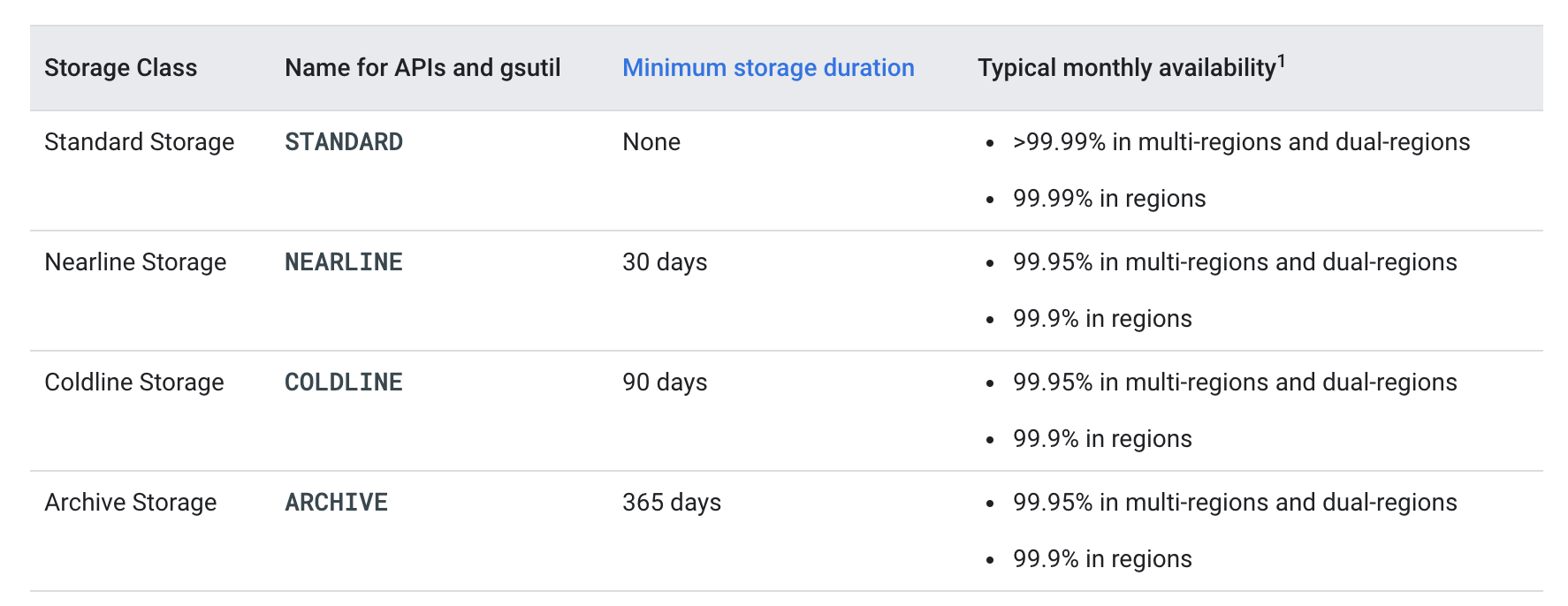
Storage Classes Options

  • All storage classes provide the following
    • Unlimited storage with unlimited access.
    • No minimum object size.
    • Worldwide accessibility and worldwide storage locations.
    • Low latency with no offline data retrieval (time to the first byte typically tens of milliseconds).
    • High durability (99.999999999% annual durability).
    • Geo-redundancy, if the data is stored in a multi-region or dual-region.
    • A uniform experience with Cloud Storage features, security, tools, and APIs

Rapid Storage (New – 2025)

  • Rapid Storage is a high-performance storage class optimized for I/O-intensive workloads such as AI/ML and data analytics.
  • Rapid Storage is only available with Rapid Bucket (zonal buckets) and stores data in zonal locations.
  • Provides sub-millisecond latency (<1ms for random reads and writes), up to 15 TB/s of aggregate throughput, and 20 million QPS.
  • Colocates data in the same physical zone as compute resources (TPUs/GPUs) for lowest latency.
  • Ideal for AI/ML training, inference, and data analytics workloads.
  • No minimum storage duration and no retrieval fees.
  • API/CLI name: RAPID
  • Availability SLA – 99.9% in zones (typical >99.95%)
  • Rapid Cache (formerly Anywhere Cache) accelerates reads on-demand and colocates compute and data for workloads in existing multi-region buckets.

Standard Storage

  • Standard Storage is best for data that is frequently accessed (hot data) and/or stored for only brief periods of time.
  • No minimum storage duration and no retrieval fees.
  • API/CLI name: STANDARD
  • for regional locations
    • is appropriate for storing data in the same location for co-locating the resources such as GKE clusters or GCE instances with the data used, which helps in maximizing performance and can reduce network charges.
    • Availability SLA – 99.9% (typical 99.99%)
  • for dual-region,
    • provides optimized performance when accessing Google Cloud products that are located in one of the associated regions,
    • provides improved availability that comes from storing data in geographically separate locations.
    • Availability SLA – 99.95% (typical >99.99%)
  • for multi-region
    • ideal for storing data that is accessed around the world, such as serving website content, streaming videos, executing interactive workloads, or serving data supporting mobile and gaming applications.
    • Availability SLA – 99.95% (typical >99.99%)

Nearline Storage

  • Nearline Storage is a low-cost, highly durable storage service for storing infrequently accessed data (warm data)
  • Nearline Storage is a better choice than Standard Storage in scenarios where slightly lower availability, a 30-day minimum storage duration, and data access costs are acceptable trade-offs for lowered at-rest storage cost
  • Nearline Storage is ideal for data you plan to read or modify on average once per month or less. for e.g., if you want to continuously add files to Cloud Storage and plan to access those files once a month for analysis, Nearline Storage is a great choice.
  • Nearline Storage is also appropriate for data backup, long-tail multimedia content, and data archiving.
  • Has retrieval fees for data access.
  • API/CLI name: NEARLINE
  • Availability SLA
    • Multi-region/Dual-region: 99.9% (typical 99.95%)
    • Region: 99.0% (typical 99.9%)

Coldline Storage

  • Coldline Storage provides a very-low-cost, highly durable storage service for storing infrequently accessed data (cold data)
  • Coldline Storage is a better choice than Standard Storage or Nearline Storage in scenarios where slightly lower availability, a 90-day minimum storage duration, and higher costs for data access are acceptable trade-offs for lowered at-rest storage costs.
  • Coldline Storage is ideal for data you plan to read or modify at most once a quarter.
  • Has retrieval fees for data access.
  • API/CLI name: COLDLINE
  • Availability SLA
    • Multi-region/Dual-region: 99.9% (typical 99.95%)
    • Region: 99.0% (typical 99.9%)

Archive Storage

  • Archive Storage is the lowest-cost, highly durable storage service for data archiving, online backup, and disaster recovery. (coldest data)
  • Archive Storage has higher costs for data access and operations, as well as a 365-day minimum storage duration.
  • Data is available within milliseconds, not hours or days (unlike other cloud providers’ archival tiers).
  • Archive Storage is the best choice for data that you plan to access less than once a year. for e.g. cold data storage for archival and disaster recovery
  • Has retrieval fees for data access.
  • API/CLI name: ARCHIVE
  • Availability SLA
    • Multi-region/Dual-region: 99.9% (typical 99.95%)
    • Region: 99.0% (typical 99.9%)

Google Cloud Storage - Storage Classes

Autoclass

  • Autoclass automatically transitions objects to appropriate storage classes based on each object’s access pattern.
  • Moves infrequently accessed data to colder storage classes to reduce costs, and promotes accessed cold data back to Standard storage.
  • When enabled:
    • All objects added to the bucket begin in Standard storage (even if a different class is specified).
    • The bucket’s default storage class is always Standard storage.
    • Objects smaller than 128 KiB don’t transition and remain in Standard storage permanently.
  • Terminal Storage Class – configurable setting:
    • Nearline (default): Objects transition to Nearline after 30 days of no access and stay there.
    • Archive (optional): Objects transition progressively — Standard → Nearline (30 days) → Coldline (90 days) → Archive (365 days).
  • Pricing Benefits:
    • No retrieval fees (except as part of enablement charges).
    • No early deletion fees.
    • All operations charged at Standard storage rate.
    • No operation charge for transitions to colder classes.
    • A management fee and enablement charge apply.
  • Can be enabled on both new and existing buckets.
  • Cannot coexist with Object Lifecycle Management rules that use SetStorageClass action or matchesStorageClass condition.
  • Recommended when: data has varied access frequencies, or access patterns are unknown/unpredictable.
  • Not recommended when: majority of data fits specific known storage class use cases, or other Google Cloud services regularly read data from the bucket.

Soft Delete (Default Protection)

  • Soft delete (introduced 2024) provides bucket-level protection against accidental or malicious deletion.
  • Retains recently deleted objects for a configurable retention period — 7 days by default (can be set between 7 and 90 days, or disabled).
  • Enabled by default on all buckets.
  • Soft-deleted objects retain their existing storage classes until the end of their retention duration.
  • Restored soft-deleted objects begin in Standard storage when Autoclass is enabled.

Storage Class Comparison

Storage Class API Name Min. Storage Duration Retrieval Fees Best For
Rapid RAPID None None AI/ML, high-performance analytics (zonal)
Standard STANDARD None None Frequently accessed (hot) data
Nearline NEARLINE 30 days Yes Once per month access
Coldline COLDLINE 90 days Yes Once per quarter access
Archive ARCHIVE 365 days Yes Less than once per year access

Legacy Storage Classes

  • Google Cloud Storage provided additional storage classes which have been phased out and cannot be set using the Google Cloud console:
    • Multi-Regional Storage
      • Equivalent to Standard Storage, except Multi-Regional Storage can only be used for objects stored in multi-regions or dual-regions.
    • Regional Storage
      • Equivalent to Standard Storage, except Regional Storage, can only be used for objects stored in regions.
    • Durable Reduced Availability (DRA) Storage:
      • Similar to Standard Storage except:
        • DRA has higher pricing for operations.
        • DRA has lower performance, particularly in terms of availability (DRA has a 99% availability SLA).
  • When enabling Autoclass, legacy storage classes are treated differently from Standard storage — objects in legacy classes transition to Standard storage.

GCP Certification Exam Practice Questions

  • Questions are collected from Internet and the answers are marked as per my knowledge and understanding (which might differ with yours).
  • GCP services are updated everyday and both the answers and questions might be outdated soon, so research accordingly.
  • GCP exam questions are not updated to keep up the pace with GCP updates, so even if the underlying feature has changed the question might not be updated
  • Open to further feedback, discussion and correction.
  1. You’ve created a bucket to store some data archives for compliance. The data isn’t likely to need to be viewed. However, you need to store it for at least 7 years. What is the best default storage class?
    1. Multi-regional
    2. Coldline
    3. Regional
    4. Nearline
    5. Archive
  2. Your company has unpredictable storage access patterns across different datasets. Some data is accessed frequently, while other data sits idle for months. Which feature should you enable to automatically optimize storage costs?
    1. Object Lifecycle Management with SetStorageClass rules
    2. Autoclass
    3. Nearline Storage for all buckets
    4. Manual storage class transitions via rewrites
  3. You are running an AI/ML training workload on TPUs and need the lowest possible latency for reading training data from Cloud Storage. Which storage option should you use?
    1. Standard Storage in a multi-region bucket
    2. Standard Storage in a regional bucket co-located with TPUs
    3. Rapid Storage in a zonal bucket (Rapid Bucket) co-located with TPUs
    4. Nearline Storage with Rapid Cache enabled
  4. When using Autoclass with the terminal storage class set to Archive, what is the transition timeline for an object that is never accessed after upload?
    1. Standard → Archive after 30 days
    2. Standard → Coldline after 90 days → Archive after 365 days
    3. Standard → Nearline after 30 days → Coldline after 90 days → Archive after 365 days
    4. Standard → Nearline after 30 days → Archive after 90 days
  5. Which of the following is true about Autoclass pricing? (Select TWO)
    1. No retrieval fees are charged (except as part of enablement charges)
    2. Operations are charged at the rate of the object’s current storage class
    3. No early deletion fees are charged
    4. There are no management fees
    5. Transition operations to colder classes incur Class A charges

References

GCP Associate Cloud Engineer Certification Path

Google Cloud - Associate Cloud Engineer

Google Cloud – Associate Cloud Engineer Certification learning path

📋 Last Updated: June 2026 — This guide has been updated to reflect the current ACE exam guide, including Cloud Run, Spot VMs, AlloyDB, Terraform/IaC tools, and the deprecation of Deployment Manager.

Google Cloud – Associate Cloud Engineer certification exam is for individuals who deploy applications, monitor operations, and manage enterprise solutions on Google Cloud. The exam validates production-ready skills including deploying and securing applications, configuring networks and IAM, monitoring systems, and automating routine tasks.

Google Cloud – Associate Cloud Engineer Certification Summary

  • Has 50-60 questions (typically ~50) to be answered in 2 hours.
  • Registration fee: $125 (plus tax where applicable).
  • Available in English, Japanese, Spanish, and Portuguese.
  • Covers wide range of Google Cloud services and what they actually do. It focuses heavily on IAM, Compute (including Cloud Run and Cloud Functions), Storage with networking and monitoring/observability.
  • Hands-on is a must. Covers Cloud SDK, CLI commands and Console operations that you would use for day-to-day work. If you have not worked on GCP before make sure you do lot of labs else you would be absolute clueless for some of the questions and commands.
  • The exam includes multiple-select questions where you must choose 2 or 3 correct answers from 4-5 options.
  • Make sure you understand Infrastructure as Code tools (Terraform, Config Connector) as Deployment Manager has been deprecated.

Google Cloud – Associate Cloud Engineer Certification Topics

General Services

  • Cloud Billing
    • Understand how Cloud Billing works. Monthly vs Threshold and which has priority
    • Budgets can be set to alert for projects
    • How to change a billing account for a project and what roles you need. Hint – Project Owner and Billing Administrator for the billing account
    • Cloud Billing can be exported to BigQuery and Cloud Storage
  • Resource Manager
    • Understand Resource Manager the hierarchy Organization -> Folders -> Projects -> Resources
    • IAM Policy inheritance is transitive and resources inherit the policies of all of their parent resources.
    • Effective policy for a resource is the union of the policy set on that resource and the policies inherited from higher up in the hierarchy.
    • Understand organizational policies and how they constrain resource configurations across the hierarchy.
  • Cloud SDK
    • Understand gcloud commands esp. when dealing with
      • configurations i.e. gcloud config
        • activate profiles – gcloud config configurations activate
        • GKE setting default cluster i.e. gcloud config set container/cluster CLUSTER_NAME
        • set project gcloud config set project mygcp-demo
        • set region gcloud config set compute/region us-west1
        • set zone gcloud config set compute/zone us-west1-a
      • Get project list and ids gcloud projects list
      • Auth i.e gcloud auth
        • Auth login using user gcloud auth login
        • Auth login using service account gcloud auth activate-service-account --key-file=sa_key.json
      • VPC firewalls i.e. gcloud compute firewall-rules

Network Services

  • Virtual Private Cloud
    • Understand Virtual Private Cloud (VPC), subnets and host applications within them. Hint – VPC spans across regions
    • Understand how Firewall rules work and how they are configured. Hint – Focus on Network Tags and Service Accounts for targeting. Also, there are 2 implicit firewall rules – default ingress deny and default egress allow
    • Understand creating ingress and egress firewall rules and policies (IP subnets, network tags, service accounts)
    • Understand VPC Peering and Shared VPC
    • Understand the concept of internal and external IPs and difference between static and ephemeral IPs
    • Primary IP range of an existing subnet can be expanded by modifying its subnet mask, setting the prefix length to a smaller number.
    • Understand Cloud DNS and Cloud NAT configuration and management.
  • Cloud Load Balancing
    • Understand Google Cloud Load Balancing
    • Know load balancer options and differences esp. HTTPS and SSL proxy when handling SSL termination.
    • Understand Network Service Tiers (Premium vs Standard) and their impact on routing and availability.

Identity Services

  • Identity and Access Management – IAM
    • Identity and Access Management – IAM provides administrators the ability to manage cloud resources centrally by controlling who can take what action on specific resources.
    • Understand how IAM works and how rules apply esp. the hierarchy from Organization -> Folder -> Project -> Resources
    • Understand the difference between Basic (formerly Primitive), Predefined and Custom roles and their use cases
    • IAM Policy inheritance is transitive and resources inherit the policies of all of their parent resources.
    • Effective policy for a resource is the union of the policy set on that resource and the policies inherited from higher up in the hierarchy.
    • Basically Permissions -> Roles -> (IAM Policy) -> Members (Principals)
    • Need to know and understand the roles for the following services at least
      • Cloud Storage – Admin vs Creator vs Viewer
      • Compute Engine – Admin vs Instance Admin
      • Spanner – Viewer vs Database User
      • BigQuery – User vs JobUser
    • Know how to copy roles to different projects or organization. Hint – gcloud iam roles copy
    • Know how to use service accounts with applications
    • Understand service account impersonation and creating short-lived credentials
    • Apply principle of least privilege when assigning service accounts to resources
  • Cloud Identity
    • Cloud Identity provides IDaaS (Identity as a Service) and provides single sign-on functionality and federation with external identity providers like Active Directory.
    • Know how to manage users and groups in Cloud Identity (manually and automated)

Compute Services

  • Make sure you know all the compute services: Compute Engine, App Engine, Google Kubernetes Engine, Cloud Run, and Cloud Functions. They are heavily covered in the exam.
  • Google Compute Engine
    • Google Compute Engine is the best IaaS option for compute and provides fine-grained control
    • Know how to create a Compute Engine instance, connect to it using Cloud Shell or SSH keys
    • Difference between backups and images and how to create instances from the same.
    • Instance templates with managed instance groups. Instance template cannot be edited, create a new one and attach.
    • Difference between managed vs unmanaged instance groups and auto-healing feature
    • Spot VMs (replacement for Preemptible VMs) and their use cases. HINT – Spot VMs can be terminated any time when Compute Engine needs resources, but unlike Preemptible VMs they have NO 24-hour maximum lifetime. Same pricing model as Preemptible VMs. Google recommends using Spot VMs instead of Preemptible VMs for new workloads.
    • Understand custom machine types for right-sizing compute resources
    • Upgrade an instance without downtime using Live Migration
    • Managing access using OS Login or project and instance metadata
    • Configure VM Manager for OS patch management and compliance
    • Prevent accidental deletion using deletion protection flag
    • In case of any issues or errors, how to debug the same
  • Google App Engine
    • Google App Engine is mainly the best option for PaaS with platforms supported and features provided.
    • Deploy an application with App Engine and understand how versioning and rolling deployments can be done
    • Understand how to keep auto scaling and traffic splitting and migration.
    • Know App Engine is a regional resource and understand the steps to migrate or deploy application to different region and project.
    • Know the difference between App Engine Flexible vs Standard
  • Google Kubernetes Engine (GKE)
    • Google Kubernetes Engine enables you to run containers on Google Cloud Platform.
    • GKE takes care of provisioning and maintaining the underlying virtual machine cluster, scaling your application, and operational logistics such as logging, monitoring, and cluster health management.
    • Be sure to Create a Kubernetes Cluster and configure it to host an application
    • Understand different cluster configurations: Autopilot (fully managed, recommended for most workloads), Standard, regional clusters, and private clusters
    • Understand GKE Enterprise for multi-cluster management
    • Understand how to make the cluster auto-repairable and upgradable. Hint – Node auto-upgrades and auto-repairing feature
    • Very important to understand where to use gcloud commands (to create a cluster) and kubectl commands (manage the cluster components)
    • Very important to understand how to increase cluster size, enable autoscaling, and manage node pools (add, edit, remove)
    • Know how to manage secrets like database passwords
    • Understand Horizontal and Vertical Pod Autoscaler configurations
    • Know how to configure GKE to access Artifact Registry for container images
  • Cloud Run
    • Cloud Run is a fully managed serverless platform for running containerized applications.
    • Deploy containerized applications without managing infrastructure
    • Understand traffic splitting between revisions for canary deployments
    • Configure scaling parameters (min/max instances, concurrency)
    • Understand event-driven architecture with Eventarc and Pub/Sub triggers
    • Know when to choose Cloud Run vs App Engine vs GKE vs Cloud Functions
  • Cloud Functions
    • Cloud Functions is a serverless execution environment for building and connecting cloud services.
    • Best for event-driven, single-purpose functions (e.g., responding to Cloud Storage events, Pub/Sub messages)
    • Understand triggers: HTTP, Pub/Sub, Cloud Storage, Eventarc
    • Know the difference between Cloud Functions and Cloud Run for serverless workloads

Storage Services

  • Understand each storage service options and their use cases.
  • Cloud Storage
    • Cloud Storage is cost-effective object storage for unstructured data.
    • Very important to know the different storage classes and their use cases:
      • Standard (frequent access — replaces the legacy Regional and Multi-Regional classes)
      • Nearline (access less than once per 30 days)
      • Coldline (access less than once per 90 days)
      • Archive (access less than once per year — coldest tier, ideal for long-term retention and compliance)
    • Understand lifecycle management. HINT – Changes are in accordance to object creation date
    • Understand Signed URL to give temporary access and the users do not need to be GCP users
    • Understand access control and permissions – IAM vs ACLs (fine-grained control). IAM is recommended for uniform bucket-level access.
    • Understand best practices esp. uploading and downloading the data. HINT using parallel composite uploads
  • Relational Databases
    • Cloud SQL
      • Cloud SQL is a fully-managed service that provides MySQL, PostgreSQL, and SQL Server
      • Supports up to 64TB storage and is a regional service.
      • Difference between Failover and Read replicas. Failover provides High Availability and almost zero downtime while Read replicas provide scalability. Cross-region Read Replicas are supported.
      • Perform Point-In-Time recovery. Hint – requires binary logging and backups
    • AlloyDB for PostgreSQL
      • AlloyDB is a fully managed, PostgreSQL-compatible database designed for demanding enterprise workloads.
      • Provides up to 4x faster transactional performance than standard PostgreSQL.
      • Features automatic storage scaling, columnar engine for analytics, and 99.99% availability SLA.
      • Best for enterprise applications needing PostgreSQL compatibility with superior performance and availability.
      • Now included in the ACE exam guide as a data solution option.
    • Cloud Spanner
      • Is a fully managed, mission-critical relational database service.
      • Provides a scalable online transaction processing (OLTP) database with high availability and strong consistency at global scale.
      • Globally distributed and can scale and handle more than 10TB.
      • Not a direct replacement for Cloud SQL and would need migration.
  • NoSQL Databases
    • Firestore
      • Highly scalable and serverless NoSQL document database with MongoDB compatibility.
      • Suitable for mobile, web, and IoT applications requiring real-time sync.
      • Now included in the ACE exam guide as both a deployment and management topic.
    • Bigtable
      • Cloud-native wide-column database for large-scale, low-latency workloads (IoT, analytics, time-series data).
  • Data Warehousing
    • BigQuery
      • Provides scalable, fully managed enterprise data warehouse (EDW) with SQL and fast ad-hoc queries.
      • Remember it is most suitable for historical analysis and analytics.
      • Know how to perform a preview or dry run. Hint – price is determined by bytes read not bytes returned.
      • Supports federated tables or external tables that can support Cloud Storage, Bigtable, Google Drive and Cloud SQL.
      • Understand how to review job status and estimate costs.

Data Services

  • Although there are only a few references to data services in the exam, it is important to know the data analytics stack to understand which service fits the different layers of ingest, store, process, and analytics:
    • Cloud Storage as the medium to store data as a data lake
    • Pub/Sub as the messaging service to capture real-time data esp. IoT. Designed to provide reliable, many-to-many, asynchronous messaging between applications.
    • Dataflow to process, transform, and transfer data — the key service for stream and batch processing pipelines.
    • BigQuery for storage and analytics. Remember BigQuery provides a cost-effective option for storage similar to Cloud Storage.
    • Managed Service for Apache Spark (formerly Cloud Dataproc) for existing Hadoop/Spark jobs. Hint – Use it to replace existing Hadoop infrastructure. Renamed from Dataproc in 2025.

⚠️ Deprecated Data Services:

  • Cloud Datalab — Deprecated since September 2, 2022. Replaced by Vertex AI Workbench for interactive data exploration, analysis, and visualization.
  • Cloud Dataprep — Now “Dataprep by Trifacta” (operated by Alteryx). Consider Cloud Data Fusion for data preparation and integration on Google Cloud.

Monitoring and Observability

  • Google Cloud Operations Suite (formerly Stackdriver)
    • The suite includes Cloud Monitoring, Cloud Logging, Cloud Trace, Cloud Profiler, and Error Reporting.
    • Create Cloud Monitoring alerts based on resource metrics
    • Create and ingest custom metrics (from applications or logs)
    • Export logs to external systems (on-premises, BigQuery)
    • Configure log buckets, log analytics, and log routers
    • View and filter logs in Cloud Logging; view specific log message details
    • Use cloud diagnostics to research application issues
    • Configure and deploy Ops Agent (replaces the legacy Monitoring and Logging agents)
    • Deploy Managed Service for Prometheus for Kubernetes workload monitoring
    • Configure audit logs for security and compliance
    • Remember audits and troubleshooting primarily involve checking Cloud Logging and Cloud Monitoring

DevOps and Infrastructure as Code

  • Infrastructure as Code (IaC)
    • The ACE exam now focuses on modern IaC tooling:
    • Terraform — The recommended IaC tool for Google Cloud. Supports declarative infrastructure provisioning with HCL.
    • Infrastructure Manager — Google Cloud’s managed Terraform service for deploying and managing infrastructure.
    • Config Connector — Kubernetes add-on for managing Google Cloud resources using Kubernetes-style YAML.
    • Cloud Foundation Toolkit — Reference templates and best practices for Terraform deployments.
    • Helm — Package manager for Kubernetes applications.

⚠️ Deployment Manager — DEPRECATED

Google Cloud Deployment Manager support ended December 31, 2025 and reached End of Life on March 31, 2026.

Migration Options:

  • Terraform (recommended) — Multi-cloud support, richer module ecosystem, expressive configuration language
  • Infrastructure Manager — Google Cloud’s managed Terraform service
  • Config Connector — For Kubernetes-native resource management

The ACE exam guide now references Terraform, Config Connector, Cloud Foundation Toolkit, and Helm as IaC tools instead of Deployment Manager.

  • Google Cloud Marketplace (formerly Cloud Launcher)
    • Provides a way to launch common software packages (e.g., Jenkins, WordPress) and stacks on Google Compute Engine with just a few clicks — a prepackaged solution.
    • Can help minimize deployment time and can be used without detailed knowledge about the product.

Google Cloud – Associate Cloud Engineer Certification Exam Domains (2025/2026)

The current exam guide covers five sections:

  • Section 1: Setting up a cloud solution environment (~20%) — Resource hierarchy, organizational policies, IAM roles, Cloud Identity, billing configuration
  • Section 2: Planning and configuring a cloud solution (~17.5%) — Compute choices (Compute Engine, GKE, Cloud Run, Cloud Functions), data storage options, network resources
  • Section 3: Deploying and implementing a cloud solution (~25%) — Compute Engine, GKE (Autopilot, regional, private clusters), Cloud Run & Cloud Functions, data solutions (Cloud SQL, Firestore, BigQuery, Spanner, AlloyDB, Pub/Sub, Dataflow), networking, IaC (Terraform, Config Connector, Helm)
  • Section 4: Ensuring successful operation (~20%) — Managing Compute Engine, GKE, Cloud Run resources; storage/database management; networking; monitoring and logging (Ops Agent, Managed Prometheus)
  • Section 5: Configuring access and security (~17.5%) — IAM policies, role types, service accounts, impersonation, short-lived credentials

Google Cloud – Associate Cloud Engineer Certification Resources

GCP Professional Data Engineer Certification Path

Google Cloud – Professional Data Engineer Certification Learning Path

I just recertified on my Google Cloud Certified – Professional Data Engineer certification. The first attempt on the Data Engineer exam has already been 2 long years which lasted for 4 hours with 95 questions. Once again, similar to the other Google Cloud certification exams, the Data Engineer exam covers not only the gamut of services and concepts but also focuses on logical thinking and practical experience.

📋 2025-2026 Exam Update Notice

The Professional Data Engineer exam has been significantly updated. Key changes include:

  • Increased focus on data governance (Dataplex), data lakehouse architecture (BigLake), Looker/Looker Studio for visualization, and Vertex AI for ML.
  • Reduced focus on deep ML concepts (overfitting, hyperparameters), Compute Engine/GKE, and command-line syntax.
  • New services covered: Dataplex Universal Catalog, BigLake, Analytics Hub, Dataform, Vertex AI (replacing AI Platform/Cloud ML Engine).
  • Deprecated services removed: Cloud Datalab (replaced by Vertex AI Workbench), Pub/Sub Lite (EOL March 2026), Data Catalog (replaced by Dataplex Knowledge Catalog).
  • Rebranding: Cloud DLP is now Sensitive Data Protection; Stackdriver is fully replaced by Cloud Monitoring/Logging; Vertex AI is now Gemini Enterprise Agent Platform.

Google Cloud – Professional Cloud Data Engineer Certification Summary

  • Cloud Data Engineer exam has 50 to 60 questions to be answered in 2 hours
  • Covers a wide range of data services including machine learning, with other topics covering storage, security, and data governance.
  • Exam does not cover any case studies
  • The exam has been updated to reflect current service names — Cloud Monitoring and Cloud Logging (no longer Stackdriver).
  • Strong focus on BigQuery, Dataflow, Pub/Sub, Dataproc, Cloud Composer, Looker, and Vertex AI.
  • Nothing much on Compute and Network is covered
  • Questions sometimes test your logical thinking rather than any concept regarding Google Cloud.
  • Hands-on is MUST, if you have not worked on GCP before make sure you do lots of labs else you would be absolutely clueless about some of the questions and commands
  • Be sure that NO Online Courses or Practice tests are going to cover all. Hands-on or practical knowledge is MUST.

Google Cloud – Professional Cloud Data Engineer Certification Resources

Google Cloud – Professional Cloud Data Engineer Certification Topics

Data & Analytics Services

  • Obviously, there are lots and lots of data and related services
  • Google Cloud Data & Analytics Services Cheatsheet
  • Know the Big Data stack and understand which service fits the different layers of ingest, store, process, analytics
  • Cloud BigQuery
    • provides scalable, fully managed enterprise data warehouse (EDW) with SQL and fast ad-hoc queries.
    • ideal for storage and analytics.
    • provides the same cost-effective option for storage as Cloud Storage
    • understand BigQuery Security
      • use BigQuery IAM access roles to control data and querying access
      • use Authorized views to access control tables, columns within tables, and query results. HINT: Authorized views need to reside in a different dataset as compared to the source dataset.
      • support data encryption
    • understand BigQuery Best Practices including key strategy, cost optimization, partitioning, and clustering
      • use dry run to estimate costs
      • use partitioning and clustering to limit the amount of data scanned
      • using external data sources might result in query performance degradation and its better to import the data
    • Dataset location can be set ONLY at the time of its creation.
    • supports schema auto-detection for JSON and CSV files.
    • understand how BigQuery Streaming works
    • know BigQuery limitations esp. with updates and inserts
    • supports an external data source (federated data source)
      • which is a data source that can be queried directly even though the data is not stored in BigQuery.
      • offers support for querying data directly from:
        • Cloud Bigtable
        • Cloud Storage
        • Google Drive
        • Cloud SQL
      • Use Permanent table for querying an external data source multiple times
      • Use Temporary table for querying an external data source for one-time, ad-hoc queries over external data, or for extract, transform, and load (ETL) processes.
    • BigQuery Studio (launched 2023) provides a unified workspace with SQL and notebook (Colab Enterprise) interfaces for data engineers, analysts, and scientists to perform end-to-end data tasks.
    • BigQuery editions (Standard, Enterprise, Enterprise Plus) provide flexible compute pricing with autoscaling slots, replacing the legacy flat-rate pricing model.
    • BI Engine provides fast in-memory analysis for sub-second query performance on dashboards connected to BigQuery.
  • Cloud Bigtable
    • provides column database suitable for both low-latency single-point lookups and precalculated analytics
    • understand Bigtable is not for long term storage as it is quite expensive
    • know the differences with HBase
    • Know how to measure performance and scale
    • supports Development and Production mode. Development mode can be upgraded to production and not vice versa.
    • supports HDD and SDD storage during cluster creation. HDD can be converted to SDD by exporting the data to the new instance.
    • understand Bigtable Replication. Can be used to separate real-time and batch workloads on the same instance using application profiles.
  • Cloud Pub/Sub
    • as the messaging service to capture real-time data esp. IoT
    • is designed to provide reliable, many-to-many, asynchronous messaging between applications esp. real-time IoT data capture
    • now supports exactly-once delivery (when subscribers connect in the same region), in addition to the default at-least-once delivery.
    • how it compares to Kafka (HINT: Pub/Sub provides only 7 days of retention vs Kafka which depends on the storage)
    • Note: Pub/Sub Lite has been deprecated (no new customers after Sept 24, 2024; EOL March 18, 2026). Use standard Pub/Sub instead.
  • Cloud Dataflow
    • to process, transform, transfer data and the key service to integrate store and analytics.
    • know how to improve a Dataflow performance
    • understand Apache Beam features as well
      • understand PCollections, Transforms, ParDo and what they do
      • understand windowing, watermarks, triggers Hint: windowing and watermarks can be used to handle delayed messages
    • supports drain feature to finish existing jobs but stop processing new ones, usually useful for deploying incompatible breaking changes
    • canceling a job will lead to an immediate stop and in-flight data loss.
    • Note: Dataflow SQL has been deprecated (July 2024, shutdown Jan 2025). Use standard Dataflow with Apache Beam SDK instead.
  • Cloud Dataprep (by Trifacta/Alteryx)
    • to clean and prepare data. It can be used for anomaly detection.
    • does not need any programming language knowledge and can be done through the graphical interface
    • be sure to know or try hands-on on a dataset
    • Note: Now operated by Alteryx. For new projects, consider Dataform (integrated into BigQuery) for SQL-based data transformations.
  • Cloud Dataproc
    • to handle existing Hadoop/Spark jobs
    • supports connector for BigQuery, Bigtable, Cloud Storage
    • supports Ephemeral clusters and with Cloud Storage connector support the data can be stored in GCS instead of HDFS
    • you need to know how to improve the performance of the Hadoop cluster as well :). Know how to configure the Hadoop cluster to use all the cores (hint- spark executor cores) and handle out of memory errors (hint – executor memory)
    • Secondary workers can be used to scale with the below limitations
      • Processing only with no data storage
      • No secondary-worker-only clusters
      • Persistent disk size is used for local caching of data and is not available through HDFS.
    • how to install other components (hint – initialization actions)
    • Dataproc Serverless allows running Spark batch workloads and interactive sessions without managing clusters.
  • Vertex AI Workbench
    • is the interactive notebook-based environment for data exploration, transformation, analysis, and visualization on Google Cloud
    • replaces the deprecated Cloud Datalab (deprecated Sept 2022)
    • provides managed and user-managed notebook instances with JupyterLab
    • integrates with BigQuery, Dataproc, and other GCP services
  • Cloud Composer
    • fully managed workflow orchestration service, based on Apache Airflow, enabling workflow creation that spans across clouds and on-premises data centers.
    • pipelines are configured as directed acyclic graphs (DAGs)
    • workflow lives on-premises, in multiple clouds, or fully within GCP.
    • provides the ability to author, schedule, and monitor the workflows in a unified manner
    • Composer 2 (current) provides autoscaling, better resource management, and improved performance over Composer 1.

Data Governance & Catalog Services

  • Dataplex
    • intelligent data fabric that enables organizations to centrally manage, monitor, and govern data across data lakes, data warehouses, and data marts.
    • organizes data into Lakes, Zones, and Assets for logical data management.
    • provides unified access management across BigQuery, Cloud Storage, and other services.
    • supports data quality rules and automated data profiling.
    • Dataplex Knowledge Catalog (formerly Dataplex Universal Catalog, replacing deprecated Data Catalog) provides metadata management, data discovery, and governance features.
    • Understand data mesh architecture patterns with Dataplex — the exam tests when data mesh is the right answer.
  • BigLake
    • unified storage engine that extends BigQuery’s fine-grained security and governance to multi-cloud and open-format data.
    • creates a unified interface over data stored in Cloud Storage (and even AWS S3 or Azure ADLS).
    • supports formats like Parquet, ORC, Avro, and Apache Iceberg.
    • enables applying BigQuery column-level security and row-level access policies to data lake files.
  • Analytics Hub
    • centralized platform for sharing BigQuery datasets securely, both within and across organizations.
    • enables data providers to list datasets and data consumers to subscribe under governed access controls.
    • supports private data exchanges for internal organizational sharing.
  • Dataform
    • integrated into BigQuery for SQL-based data transformation and pipeline management.
    • supports version control (Git), testing, and documentation for data pipelines.
    • alternative to dbt for BigQuery-native SQL workflow orchestration.

Identity Services

  • Cloud IAM
    • provides administrators the ability to manage cloud resources centrally by controlling who can take what action on specific resources.
    • Understand how IAM works and how rules apply esp. the hierarchy from Organization -> Folder -> Project -> Resources
    • Understand IAM Best practices

Storage Services

  • Understand each storage service option and its use cases.
  • Cloud Storage
    • cost-effective object storage for unstructured data.
    • very important to know the different classes and their use cases:
      • Standard — frequent access (hot data)
      • Nearline — monthly access (30-day minimum storage)
      • Coldline — quarterly access (90-day minimum storage)
      • Archive — yearly access (365-day minimum storage, lowest cost)
    • Autoclass automatically transitions objects between storage classes based on access patterns, eliminating retrieval and early-deletion charges.
    • Understand Signed URL to give temporary access and the users do not need to be GCP users
    • Understand permissions – IAM vs ACLs (fine-grained control). Note: Uniform bucket-level access is now the recommended default over ACLs.
  • Cloud SQL
    • is a fully-managed service that provides MySQL, PostgreSQL, and SQL Server.
    • supports Enterprise and Enterprise Plus editions with different performance tiers.
    • Limited to 64TB storage and is a regional service.
    • No direct options for Oracle yet.
  • AlloyDB for PostgreSQL
    • fully managed PostgreSQL-compatible database with up to 4x faster performance than standard PostgreSQL for transactional workloads and up to 100x faster for analytical queries.
    • integrates with Vertex AI for built-in vector search and AI capabilities.
    • ideal for demanding enterprise workloads requiring PostgreSQL compatibility with enhanced performance.
  • Cloud Spanner
    • is a fully managed, mission-critical relational database service.
    • provides a scalable online transaction processing (OLTP) database with high availability and strong consistency at a global scale.
    • globally distributed and can scale and handle more than 10TB.
    • now supports PostgreSQL interface for familiar tooling and migration.
    • supports Spanner Graph, full-text search, and vector search (2024-2025) making it a multi-model database.
    • not a direct replacement for Cloud SQL and would need migration
  • Cloud Firestore (Datastore mode)
    • provides document database for web and mobile applications. Datastore mode is not for analytics.
    • Firestore in Datastore mode is the recommended successor to the legacy Cloud Datastore.
    • Understand Datastore indexes and how to update indexes for Datastore
    • Firestore now offers Standard and Enterprise editions with enhanced features.

Machine Learning

  • Google expects the Data Engineer to know some of the Data scientists stuff, though the depth has been reduced in the current exam.
  • Understand the different algorithms
    • Supervised Learning (labeled data)
      • Classification (for e.g. Spam or Not)
      • Regression (for e.g. Stock or House prices)
    • Unsupervised Learning (Unlabelled data)
      • Clustering (for e.g. categories)
    • Reinforcement Learning
  • Vertex AI (now rebranded as Gemini Enterprise Agent Platform)
    • Unified ML platform replacing the legacy AI Platform and Cloud ML Engine.
    • provides end-to-end ML workflow: data preparation, training, deployment, and monitoring.
    • Vertex AI Workbench for notebook-based development (replaces Cloud Datalab).
    • AutoML for building models without extensive ML expertise.
    • Vertex AI Pipelines for orchestrating ML workflows.
    • Model Registry for versioning and managing models.
    • Access to Gemini foundation models for generative AI use cases.
  • Know the Cloud AI products which include
    • Cloud Vision AI
    • Cloud Natural Language AI
    • Cloud Speech-to-Text
    • Cloud Video Intelligence AI
    • Dialogflow (conversational AI)

Monitoring

  • Cloud Monitoring and Cloud Logging (formerly Stackdriver)
    • provides monitoring, alerting, error reporting, metrics, diagnostics, debugging, and trace capabilities.
    • remember audits are mainly checking Cloud Logging entries (Audit Logs)
    • Aggregated sink can route log entries from the organization or folder, plus (recursively) from any contained folders, billing accounts, or projects
    • Cloud Logging supports log-based metrics for creating dashboards and alerts.

Security Services

  • Sensitive Data Protection (formerly Cloud Data Loss Prevention / Cloud DLP)
    • to handle sensitive data esp. redaction of PII data.
    • provides discovery, classification, and de-identification of sensitive data inside and outside Google Cloud.
    • integrated with Security Command Center for risk assessment.
  • understand Encryption techniques
    • Google-managed encryption keys (default)
    • Customer-managed encryption keys (CMEK) via Cloud KMS
    • Customer-supplied encryption keys (CSEK)

Data Transfer Services

  • Storage Transfer Service
    • allows import of large amounts of data into Google Cloud Storage, quickly and cost-effectively.
    • supports transfers from AWS S3, Azure Blob Storage, HTTP/HTTPS locations, other GCS buckets, and on-premises file systems (via agent-based transfers).
    • recommended for transferring more than 1 TB from on-premises or cloud sources.
  • Transfer Appliance
    • to transfer large amounts of data (hundreds of TB to PB) quickly and cost-effectively into Google Cloud Platform via physical appliance.
    • Check for the data size — typically used when network transfer would take too long.
  • BigQuery Data Transfer Service
    • to integrate with third-party services (e.g., Google Ads, YouTube, Amazon S3, Teradata) and load data into BigQuery on a scheduled basis.

Visualization & BI

  • Looker Studio (formerly Google Data Studio)
    • free, self-service BI tool for creating interactive dashboards and reports.
    • connects directly to BigQuery and other data sources.
    • can use BigQuery BI Engine for sub-second query performance.
  • Looker
    • enterprise BI platform with LookML modeling language for governed metrics.
    • provides semantic layer, embedded analytics, and data applications.
    • integrated with BigQuery for governed, reusable analytics.

GCP Professional Cloud Architect Certification Path

Google Cloud - Professional Cloud Architect certificate

Google Cloud – Professional Cloud Architect Certification Learning Path

🔄 Last Updated: June 2026 — This post has been updated to reflect the new PCA exam format (v6.1, released October 30, 2025), new case studies, AI/ML content additions, service rebrandings, and the transition to Pearson as exam delivery provider (March 2026).

Re-certified !!!! Google Cloud – Professional Cloud Architect certification exam is one of the toughest exam I have appeared for. Even though it was recertification, the preparation level was same as the first one. The gamut of services and concepts it tests your knowledge on is really vast.

Google Cloud – Professional Cloud Architect Certification Summary

  • Has 50 questions to be answered in 2 hours.
  • Registration fee is $200 (plus tax where applicable).
  • Covers wide range of Google Cloud services and what they actually do.
  • includes Compute, Storage, Network, Data services, and now AI/ML services (Vertex AI, Gemini)
  • The exam was significantly updated in October 2025 (v6.1) to include the Google Cloud Well-Architected Framework and AI/ML integration topics.
  • Questions sometimes tests your logical thinking rather than any concept regarding Google Cloud.
  • Hands-on is a MUST, if you have not worked on GCP before make sure you do lots of labs else you would be absolute clueless for some of the questions and commands
  • Make sure you cover the case studies before hand. The exam includes ~15 questions based on case studies and it can really be a savior for you in the exams.
  • Be sure that NO Online Course or Practice tests is going to cover all. Hands-on or practical knowledge is MUST.
  • Exam Delivery: As of March 2026, exams are delivered through Pearson VUE (previously Kryterion). Exams can be taken onsite at test centers or remotely.

Google Cloud – Professional Cloud Architect Exam Updates (October 2025 – v6.1)

  • AI Content Expansion: Two new sections (2.4, 2.5) focused on Vertex AI, including AutoML, custom training, and model deployment.
  • Well-Architected Framework: Now required knowledge; questions focus on operational excellence, security, reliability, cost optimization, and performance pillars.
  • New Case Studies: EHR Healthcare retained; three new scenarios added — Altostrat Media, Cymbal Retail, and KnightMotives Automotive (all with AI integration).
  • ~30% new topics compared to the previous version; some older topics have been deprioritized.
  • Service Rebrandings: Be aware of Dataproc → Managed Service for Apache Spark, Cloud Functions → Cloud Run functions, Container Registry → Artifact Registry.

Google Cloud – Professional Cloud Architect Certification Resources

Google Cloud – Professional Cloud Architect Certification Topics

General Services

  • Cloud Billing
    • understand how Cloud Billing works. Monthly vs Threshold and which has priority
    • Budgets can be set to alert for projects
    • how to change a billing account for a project and what roles you need. Hint – Project Owner and Billing Administrator for the billing account
    • Cloud Billing can be exported to BigQuery and Cloud Storage
  • Resource Manager
    • Understand Resource Manager the hierarchy Organization -> Folders -> Projects -> Resources
    • IAM Policy inheritance is transitive and resources inherit the policies of all of their parent resources.
    • Effective policy for a resource is the union of the policy set on that resource and the policies inherited from higher up in the hierarchy.

Identity Services

  • Cloud Identity and Access Management
    • Identify and Access Management – IAM provides administrators the ability to manage cloud resources centrally by controlling who can take what action on specific resources.
    • Understand how IAM works and how rules apply esp. the hierarchy from Organization -> Folder -> Project -> Resources
    • Understand the difference between Basic (formerly Primitive), Pre-defined and Custom roles and their use cases
    • IAM Policy inheritance is transitive and resources inherit the policies of all of their parent resources.
    • Effective policy for a resource is the union of the policy set on that resource and the policies inherited from higher up in the hierarchy.
    • Basically Permissions -> Roles -> (IAM Policy) -> Members (Principals)
    • Know how to use service accounts with applications
    • Understand IAM Conditions for fine-grained, attribute-based access control
    • Understand IAM Deny Policies to set guardrails on access
  • Cloud Identity
    • Cloud Identity provides IDaaS (Identity as a Service) and provides single sign-on functionality and federation with external identity provides like Active Directory.
    • Cloud Identity supports federating with Active Directory using GCDS to implement the synchronization

Compute Services

    • Make sure you know all the compute services Google Compute Engine, Google App Engine, Google Kubernetes Engine, and Cloud Run. You need to be sure to know the pros and cons and the use cases that you should use them.
    • Google Compute Engine
      • Google Compute Engine is the best IaaS option for compute and provides fine grained control
      • Know how to create a Compute Engine instance, connect to it using Cloud shell or ssh keys
      • Difference between backups and images and how to create instances from the same.
      • Understand Compute Engine Storage Options. Disk throughput and IOPS depends on type and size.
      • Understand Compute Engine Snapshots
      • Instance templates with managed instance groups provide scalability and high availability
      • Instance template cannot be edited, create a new one and attach.
      • Difference between managed vs unmanaged instance groups and auto-healing feature
      • Managed instance groups are covered heavily the exam, as they provide the key auto-scaling capability. Hint: you need to create an Instance template and associate it with Instance group
      • Understand how migration or traffic splitting with Managed instance groups works Hint – rolling updates & deployments
      • Spot VMs (previously known as Preemptible VMs) and their use cases. HINT – can be terminated any time when Compute Engine needs the resources. Spot VMs no longer have the 24-hour maximum lifetime limitation that Preemptible VMs had.
      • Upgrade an instance without downtime using Live Migration
      • Managing access using OS Login or project and instance metadata
      • Prevent accidental deletion using deletion protection flag
      • Understand the pricing and discounts model Hint – Sustained (automatic up to 30%) vs Committed (1 to 3 yrs) discounts.
      • In case of any issues or errors, how to debug the same
    • Google App Engine
      • Google App Engine is mainly the best option for PaaS with platforms supported and features provided.
      • Deploy an application with App Engine and understand how versioning and rolling deployments can be done
      • Understand how to keep auto scaling and traffic splitting and migration.
      • Know App Engine is a regional resource and understand the steps to migrate or deploy application to different region and project.
      • Know the difference between App Engine Flexible vs Standard
    • Google Kubernetes Engine
      • Google Kubernetes Engine, powered by the open source container scheduler Kubernetes, enables you to run containers on Google Cloud Platform.
      • Kubernetes Engine takes care of provisioning and maintaining the underlying virtual machine cluster, scaling your application, and operational logistics such as logging, monitoring, and cluster health management.
      • A node pool is a subset of machines that all have the same configuration, including machine type (CPU and memory) authorization scopes. Node pools represent a subset of nodes within a cluster; a container cluster can contain one or more node pools. Hint : For adding new machine types, need to add a new node pool as existing one cannot be edited
      • Be sure to Create a Kubernetes Cluster and configure it to host an application
      • Understand how to make the cluster auto repairable and upgradable. Hint – Node auto-upgrades and auto-repairing feature
      • Very important to understand where to use gcloud commands (to create a cluster) and kubectl commands (manage the cluster components)
      • Very important to understand how to increase cluster size and enable autoscaling for the cluster
      • Know how to manage secrets like database passwords
      • Understand GKE Autopilot mode — a fully managed mode where Google manages the nodes, scaling, and security
    • Cloud Run
      • Cloud Run is a fully managed serverless platform for deploying and running containerized applications.
      • Supports any language or library as long as it can be containerized.
      • Scales automatically from zero to many instances and back to zero.
      • Supports both services (request-driven) and jobs (task-based workloads).
      • Cloud Run is now the unified serverless platform — Cloud Functions has been rebranded as Cloud Run functions.
    • Cloud Run functions (formerly Cloud Functions)
      • is a lightweight, event-based, asynchronous compute solution that allows you to create small, single-purpose functions that respond to cloud events without the need to manage a server or a runtime environment.
      • Remember that Cloud Run functions is serverless and scales from zero to scale and back to zero as the demand changes.
      • 2nd gen functions (recommended for new projects) are built on Cloud Run infrastructure and offer improved performance, concurrency, longer request processing (up to 60 minutes), and Eventarc integration.

Network Services

  • Virtual Private Cloud
    • Understand Virtual Private Cloud (VPC), subnets and host applications within them Hint VPC spans across region
    • Understand how Firewall rules works and how they are configured. Hint – Focus on Network Tags. Also, there are 2 implicit firewall rules – default ingress deny and default egress allow
    • Understand VPC Peering and Shared VPC
    • Understand the concept internal and external IPs and difference between static and ephemeral IPs
    • Primary IP range of an existing subnet can be expanded by modifying its subnet mask, setting the prefix length to a smaller number.
    • Understand Private Google Access and Private Service Connect use cases
  • On-premises connectivity
    • Cloud VPN and Cloud Interconnect are 2 components which help you connect to on-premises data center.
    • Understand HA VPN (recommended) vs Classic VPN. Note: Classic VPN dynamic routing via BGP is deprecated as of August 2025 — use HA VPN for BGP.
    • Understand what are the requirements to setup Cloud VPN.
    • Cloud Router provides dynamic routing using BGP
    • Know Interconnect as the reliable high speed, low latency and dedicated bandwidth options (Dedicated Interconnect and Partner Interconnect).
    • Cross-Cloud Interconnect — provides dedicated, high-bandwidth connectivity between Google Cloud and other cloud providers (e.g., AWS, Azure) without traversing the public internet.
    • Network Connectivity Center — a centralized hub for managing hybrid and multi-cloud network connectivity, connecting on-premises, Google Cloud, and other cloud networks through spokes.
  • Cloud Load Balancing (GCLB)
    • Google Cloud Load Balancing provides scaling, high availability, and traffic management for your internet-facing and private applications.
    • Understand Google Load Balancing options and their use cases esp. which is global and internal and what protocols they support.

Storage Services

  • Understand each Storage Options and use cases.
  • Persistent disks
    • attached to the Compute Engines, provide fast access however are limited in scalability, availability and scope.
    • Remember performance depends on the size of the disk
  • Cloud Storage
    • Cloud Storage is cost-effective object storage for unstructured data.
    • very important to know the different storage classes and their use cases: Standard (frequent access, replaces the legacy Regional/Multi-Regional classes), Nearline (30-day minimum, monthly access), Coldline (90-day minimum, quarterly access), and Archive (365-day minimum, yearly access)
    • Understand life cycle management. HINT – Changes are in accordance to object creation date
    • Understand various data encryption techniques
    • Understand Signed URL to give temporary access and the users do not need to be GCP users
    • Understand access control and permissions – IAM vs ACLs (fine grained control). Note: Uniform bucket-level access is now the recommended default.
    • Understand best practices esp. uploading and downloading the data. HINT using parallel composite uploads
  • Relational Databases
    • Know Cloud SQL, Cloud Spanner, and AlloyDB for PostgreSQL
    • Cloud SQL
      • Cloud SQL is a fully-managed service that provides MySQL, PostgreSQL and MS SQL Server
      • Supports up to 64TB of storage.
      • Difference between Failover and Read replicas. Failover provides High Availability and almost zero downtime while Read replicas provide scalability. Cross region Read Replicas are supported
      • Perform Point-In-Time recovery. Hint – requires binary logging and backups
      • Cloud SQL Enterprise Plus edition provides near-zero downtime maintenance and advanced HA features
    • Cloud Spanner
      • is a fully managed, mission-critical relational database service.
      • provides a scalable online transaction processing (OLTP) database with high availability and strong consistency at global scale.
      • globally distributed and can scale horizontally.
      • not a direct replacement for Cloud SQL and would need migration
    • AlloyDB for PostgreSQL
      • Fully managed, PostgreSQL-compatible database designed for demanding enterprise workloads.
      • Up to 4x faster for transactional workloads and up to 100x faster for analytical queries compared to standard PostgreSQL.
      • Provides automatic storage scaling, integrated AI/ML capabilities with built-in Vertex AI integration.
      • Best for enterprise PostgreSQL workloads that need high performance and availability.
  • NoSQL
    • Know Firestore and Bigtable
    • Firestore (successor to Cloud Datastore)
      • Firestore operates in two modes: Native mode (real-time, mobile/web apps) and Datastore mode (server-side, backward compatible with legacy Datastore)
      • Provides document database for web and mobile applications. Not for analytics.
      • Understand Firestore indexes and how to update indexes
      • Can be configured Multi-regional and regional
    • Bigtable
      • provides column database suitable for both low-latency single-point lookups and precalculated analytics
      • understand Bigtable is suitable for high-throughput workloads like IoT, time-series, and analytics
  • Data Warehousing
    • BigQuery
      • provides scalable, fully managed enterprise data warehouse (EDW) with SQL and fast ad-hoc queries.
      • Remember it is most suitable for historical analysis.
      • Now includes BigQuery ML for running ML models directly in SQL, and BigQuery Studio for unified analytics.
  • Memorystore and Firebase are now more commonly tested; understand Memorystore for Redis/Memcached caching use cases.

Data Services

  • Although there is a different certification for Data Engineer, the Cloud Architect does cover data services. Data services are also part of the use cases so be sure to know about them
  • Know the Big Data stack and understand which service fits the different layers of ingest, store, process, analytics, use
  • Key Services which need to be mainly covered are –
    • Cloud Storage as the medium to store data as data lake
    • Pub/Sub
      • as the messaging service to capture real time data esp. IoT
      • is designed to provide reliable, many-to-many, asynchronous messaging between applications esp. real time IoT data capture
      • Cloud Storage can generate notifications via Pub/Sub
    • Dataflow to process, transform, transfer data and the key service to integrate store and analytics. Now supports ML inference directly in pipelines (RunInference) and TPU integration.
    • BigQuery for storage and analytics. Remember BigQuery provides the same cost-effective option for storage as Cloud Storage
    • Managed Service for Apache Spark (formerly Cloud Dataproc) to handle existing Hadoop/Spark jobs. Hint – Use it to replace existing hadoop infra. Now includes serverless Spark option (no cluster management needed).
    • Dataform for managing SQL-based data transformation pipelines in BigQuery (replaces the need for Cloud Dataprep in many scenarios)
  • Know standard patterns Pub/Sub -> Dataflow -> BigQuery

AI and Machine Learning Services (NEW for PCA v6.1)

  • The updated PCA exam includes significant AI/ML content. Key services to know:
  • Vertex AI
    • Google Cloud’s unified AI/ML platform for building, deploying, and scaling ML models
    • Understand AutoML (no-code/low-code model training) vs Custom Training (bring your own code)
    • Understand Vertex AI Workbench (managed notebooks, replacement for Cloud Datalab)
    • Model deployment to endpoints with online/batch prediction
    • Vertex AI Feature Store for managing ML features
    • Vertex Explainable AI for model interpretability
  • Gemini
    • Google’s multimodal AI model family, available through Vertex AI
    • Understand use cases for generative AI in architecture (content generation, code assistance, data analysis)
  • Pre-trained APIs
    • Vision AI, Natural Language AI, Translation AI, Speech-to-Text, Text-to-Speech
    • Know when to use pre-trained APIs vs AutoML vs custom training

Monitoring

  • Google Cloud Monitoring (formerly Stackdriver)
    • provides everything from monitoring, alert, error reporting, metrics, diagnostics, debugging, trace.
    • remember audits are mainly checking Cloud Audit Logs
  • Google Cloud Logging (formerly Stackdriver Logging)
    • Understand log routing, sinks, and log-based metrics
    • Know log retention periods and where to export for long-term storage
  • Cloud Trace — distributed tracing for latency analysis
  • Error Reporting — aggregates and displays errors from cloud services

DevOps services

  • Infrastructure as Code
    • Infrastructure Manager (Terraform-based) — Google Cloud’s recommended IaC service
    • Terraform — the industry standard for multi-cloud IaC, fully supported on Google Cloud
    • Deployment ManagerDeprecated (support discontinued March 31, 2026). Migrate to Infrastructure Manager or Terraform.
  • Source Code Management
    • Secure Source Manager — regionally deployed, managed source code repository on Google Cloud
    • Cloud Source Repositories — End of sale since June 2024; not available to new customers. Use Secure Source Manager, GitHub, or GitLab.
  • Artifact Registry
    • is the universal package manager for all build artifacts and dependencies (Docker images, language packages, OS packages).
    • Container RegistryShut down March 18, 2025. All container image storage has migrated to Artifact Registry.
  • Cloud Build
    • is a service that executes your builds on Google Cloud Platform infrastructure.
    • Supports CI/CD pipelines with triggers from source repositories.
  • Cloud Deploy
    • Managed continuous delivery service for deploying to GKE, Cloud Run, and Anthos.
  • MarketPlace (Cloud Launcher)
    • provides a way to launch common software packages e.g. Jenkins or WordPress and stacks on Google Compute Engine with just a few clicks like a prepackaged solution.
    • can help minimize deployment time and can be used without any knowledge about the product

Security Services

  • Web Security Scanner (formerly Cloud Security Scanner)
    • is a web application security scanner that enables developers to easily check for a subset of common web application vulnerabilities in websites built on App Engine, GKE, and Compute Engine.
  • Cloud DLP (Sensitive Data Protection)
    • to handle sensitive data esp. redaction of PII data. Rebranded as Sensitive Data Protection.
  • Security Command Center (SCC)
    • Centralized security and risk management platform for Google Cloud resources.
    • Provides asset discovery, threat detection, and compliance monitoring.
  • Cloud Armor
    • DDoS protection and WAF (Web Application Firewall) for applications behind Load Balancers.
  • VPC Service Controls
    • Creates security perimeters around Google Cloud resources to prevent data exfiltration.
  • PCI-DSS compliant
    • GCP services are PCI-DSS compliant, however you need to make sure for the applications and hosting to be inline with PCI-DSS requirements
  • Same concept as PCI-DSS applies to GDPR as well

Google Cloud Well-Architected Framework (NEW for PCA v6.1)

  • The Well-Architected Framework is now required knowledge for the PCA exam.
  • Understand the six pillars:
    • Operational Excellence — monitoring, incident management, deployment practices
    • Security, Privacy, and Compliance — identity, data protection, network security
    • Reliability — high availability, disaster recovery, fault tolerance
    • Cost Optimization — resource efficiency, committed use discounts, rightsizing
    • Performance Optimization — scaling, caching, optimizing resources
    • Sustainability — efficient use of resources, carbon-aware workloads
  • Includes an AI and ML perspective covering design principles for AI workloads on Google Cloud.

Other Services

  • Know various data transfer options
  • Storage Transfer Service
    • allows import of large amounts of online data into Google Cloud Storage, quickly and cost-effectively.
    • Online data is the key here as it supports AWS S3, Azure Blob Storage, HTTP/HTTPS and other GCS buckets.
    • for on-premises data you can use the Storage Transfer Service agent or gsutil command
  • Transfer Appliance
    • to transfer large amounts of data quickly and cost-effectively into Google Cloud Platform.
    • Check for the data size and it would be always compared with Storage Transfer Service or gsutil commands.

Case Studies

  • The PCA exam was updated in October 2025 with new case studies. The current case studies are:
    • EHR Healthcare — electronic health record provider migrating to Google Cloud for scalability and disaster recovery
    • Altostrat Media — media company with AI integration requirements
    • Cymbal Retail — online retailer modernizing operations with conversational commerce and AI
    • KnightMotives Automotive — automotive company with AI-driven use cases
  • All new case studies emphasize AI/ML integration in architecture decisions.
  • Note: The previous case studies (Mountkirk Games, Dress4Win, TerramEarth) are no longer part of the exam.

Google Cloud – Dress4win Case Study

⚠️ Case Study No Longer on Current PCA Exam

The Dress4Win case study has been retired from the Google Cloud Professional Cloud Architect (PCA) exam.

The current PCA exam (v6.1, updated October 2025) uses four case studies: EHR Healthcare, Altostrat Media, Cymbal Retail, and KnightMotives Automotive. All now incorporate AI integration as core business requirements.

This content is maintained for historical reference and as a learning exercise for GCP migration architecture concepts. The architectural patterns discussed remain relevant for real-world cloud migrations.

Dress4Win is a web-based company that helps their users organize and manage their personal wardrobe using a web app and mobile application. The company also cultivates an active social network that connects their users with designers and retailers. They monetize their services through advertising, e-commerce, referrals, and a freemium app model. The application has grown from a few servers in the founder’s garage to several hundred servers and appliances in a colocated data center. However, the capacity of their infrastructure is now insufficient for the application’s rapid growth. Because of this growth and the company’s desire to innovate faster, Dress4Win is committing to a full migration to a public cloud.

The key here is the company wants to migrate completely to public cloud for the current infrastructures inability to scale

Solution Concept

For the first phase of their migration to the cloud, Dress4Win is moving their development and test environments. They are also building a disaster recovery site, because their current infrastructure is at a single location. They are not sure which components of their architecture they can migrate as is and which components they need to change before migrating them.

Key here is Dress4Win wants to move the development and test environments first. And also, they want to build a DR site for their current production site which would continue to be hosted on-premises

Executive Statement

Our investors are concerned about our ability to scale and contain costs with our current infrastructure. They are also concerned that a competitor could use a public cloud platform to offset their up-front investment and free them to focus on developing better features. Our traffic patterns are highest in the mornings and weekend evenings; during other times, 80% of our capacity is sitting idle.

Our capital expenditure is now exceeding our quarterly projections. Migrating to the cloud will likely cause an initial increase in spending, but we expect to fully transition before our next hardware refresh cycle. Our total cost of ownership (TCO) analysis over the next 5 years for a public cloud strategy achieves a cost reduction between 30% and 50% over our current model.

The key here is that the company wants to improve on the application scalability, efficiency (hardware sitting idle most of the time), capex cost reduction, and improve TCO over a period of time

Existing Technical Environment

The Dress4Win application is served out of a single data center location. All servers run Ubuntu LTS v16.04.

Databases:

  • MySQL. 1 server for user data, inventory, static data,
    • MySQL 5.8
    • 8 core CPUs
    • 128 GB of RAM
    • 2x 5 TB HDD (RAID 1)
  • Redis 3 server cluster for metadata, social graph, caching. Each server is:
    • Redis 3.2
    • 4 core CPUs
    • 32GB of RAM
  • MySQL server can be migrated directly to Cloud SQL, which is GCP managed relational database and supports MySQL. For PostgreSQL-compatible workloads requiring higher performance, AlloyDB (GA since 2022) is also an option offering up to 4x throughput vs. standard PostgreSQL.
  • For Redis cluster, Memorystore for Redis or Memorystore for Valkey (GA since 2025, recommended for new deployments) can be used. Valkey is a Redis-compatible open-source fork offering 99.99% SLA, cross-region replication, and supports versions 7.2, 8.0, and 9.0. Memorystore for Redis Cluster remains available for existing Redis workloads.
  • There would be no changes required to support the same.

Compute:

  • 40 Web Application servers providing micro-services based APIs and static content.
    • Tomcat – Java
    • Nginx
    • 4 core CPUs
    • 32 GB of RAM
  • 20 Apache Hadoop/Spark servers:
    • Data analysis
    • Real-time trending calculations
    • 8 core CPUs
    • 128 GB of RAM
    • 4x 5 TB HDD (RAID 1)
  • 3 RabbitMQ servers for messaging, social notifications, and events:
    • 8 core CPUs
    • 32GB of RAM
  • Miscellaneous servers:
    • Jenkins, monitoring, bastion hosts, security scanners
    • 8 core CPUs
    • 32GB of RAM
  • Web Application servers with Java and Nginx can be supported using Compute Engine, Cloud Run (for containerized microservices with automatic scaling), or Google Kubernetes Engine (GKE) (formerly Container Engine) with autoscaling configured. GKE Autopilot mode simplifies cluster management further.
  • Although the core and RAM combination would need a custom machine type, the same be configured or tuned to use an existing machine type
  • Apache Hadoop/Spark servers can be easily migrated to Dataproc (now part of the Managed Service for Apache Spark brand), which provides managed Hadoop and Spark clusters with autoscaling that can reduce VM costs by up to 40%.
  • RabbitMQ messaging service is currently not directly supported by Google Cloud and can be supported either with
    • Cloud Pub/Sub messaging – however this would need changes to the code and would not be a seamless migration. Pub/Sub now also supports streaming ingestion from external sources and export subscriptions to BigQuery/Cloud Storage.
    • Use Compute Engine to host the RabbitMQ servers
  • Jenkins, Bastion hosts, Security scanners can be hosted using Google Compute Engine (GCE). For CI/CD, Cloud Build is also available as a managed alternative to self-hosted Jenkins.
  • Monitoring can be provided using Google Cloud Operations Suite (formerly Stackdriver), which includes Cloud Monitoring, Cloud Logging, Cloud Trace, and Cloud Profiler.

Storage appliances:

  • iSCSI for VM hosts
  • Fiber channel SAN – MySQL databases
    • 1 PB total storage; 400 TB available
  • NAS – image storage, logs, backups
    • 100 TB total storage; 35 TB available
  • iSCSI for VM hosts can be supported using Cloud Persistent Disks (or Hyperdisk for higher performance requirements) as it needs a block level storage
  • SAN for MySQL databases can be supported using Cloud Persistent Disks as it needs a block level storage. However, a single disk cannot scale to 1PB and multiple disks need to be combined to create the storage
  • NAS for image storage, logs and backups can be supported using Cloud Storage which provides unlimited storage capacity. For file-system access (NFS), Filestore provides a managed NFS file server.

Business Requirements

  • Build a reliable and reproducible environment with scaled parity of production.
    • can be handled by provisioning services or using GCP managed services with the same scale as on-premises resources and with Terraform or Infrastructure Manager for creating repeatable deployments
  • Improve security by defining and adhering to a set of security and Identity and Access Management (IAM) best practices for cloud.
    • can be handled using IAM by implemented best practices like least privileges, separating dev/test/production projects to control access
  • Improve business agility and speed of innovation through rapid provisioning of new resources.
    • can be handled using Terraform or Infrastructure Manager for repeatable and automated provisioning of resources
    • deployments of applications and new releases can be handled efficiently using rolling updates, A/B testing, and Cloud Deploy for managed continuous delivery
  • Analyze and optimize architecture for performance in the cloud.
    • can be handled using autoscaling Compute Engine instances based on the demand
    • can be handled using Google Cloud Operations Suite (Cloud Monitoring, Cloud Logging) for monitoring and fine tuning the specs, plus Active Assist recommendations for rightsizing

Technical Requirements

  • Easily create non-production environments in the cloud.
    • most of the services can be created using GCP managed services and the environment creation can be standardized and automated using templates and configurations
  • Implement an automation framework for provisioning resources in cloud.
    • can be handled using Terraform (recommended) or Infrastructure Manager, which provide Infrastructure as Code (IaC) for provisioning resources in cloud. Note: Cloud Deployment Manager reached end of support on March 31, 2026 and should not be used for new projects.
  • Implement a continuous deployment process for deploying applications to the on-premises datacenter or cloud.
    • continuous deployments can be handled using tools like Jenkins available on both the environments, or Cloud Build with Cloud Deploy for GCP-native CI/CD pipelines
  • Support failover of the production environment to cloud during an emergency.
    • can be handled by replicating all the data to the cloud environment and ability to provision the servers quickly.
    • can be handled by using Cloud DNS to repoint from on-premises environment to cloud environment
  • Encrypt data on the wire and at rest.
    • All the GCP services, by default, provide encryption on wire and at rest. Encryption can be performed using Google-managed keys, Customer-Managed Encryption Keys (CMEK) via Cloud KMS, or Customer-Supplied Encryption Keys (CSEK)
  • Support multiple private connections between the production data center and cloud environment.
    • can be handled using Cloud VPN (multiple VPN tunnels with HA VPN for 99.99% SLA) or Dedicated Interconnect/Partner Interconnect connection between the production data center and the cloud environment. For multi-cloud connectivity, Cross-Cloud Interconnect is also available.

Updated GCP Service Mapping (2025-2026)

The following table summarizes the recommended GCP services for the Dress4Win migration, reflecting current service names and availability:

  • Relational Database: Cloud SQL (MySQL/PostgreSQL) or AlloyDB (for PostgreSQL-compatible high-performance workloads)
  • In-Memory Cache: Memorystore for Valkey (recommended for new deployments, 99.99% SLA) or Memorystore for Redis Cluster
  • Web Application Hosting: GKE (Google Kubernetes Engine), Cloud Run, or Compute Engine
  • Big Data/Analytics: Dataproc (Managed Service for Apache Spark) with autoscaling, or BigQuery for analytics
  • Messaging: Cloud Pub/Sub (managed) or self-hosted RabbitMQ on Compute Engine
  • Monitoring: Google Cloud Operations Suite (Cloud Monitoring, Cloud Logging, Cloud Trace)
  • IaC/Provisioning: Terraform or Infrastructure Manager (NOT Cloud Deployment Manager — deprecated)
  • CI/CD: Cloud Build + Cloud Deploy, or Jenkins on Compute Engine
  • Block Storage: Persistent Disk or Hyperdisk
  • Object/File Storage: Cloud Storage (objects), Filestore (NFS)
  • Networking: HA Cloud VPN, Dedicated/Partner Interconnect, Cross-Cloud Interconnect
  • Encryption: Google-managed keys, CMEK (Cloud KMS), or CSEK

References