AWS Redshift Best Practices

AWS Redshift Best Practices

📌 Last Updated: June 2026. Covers RG instances (Graviton-powered), Multidimensional Data Layouts (MDDL), Zero-ETL integrations, Auto-copy, Streaming Ingestion, AI-driven scaling for Serverless, and concurrency scaling for COPY commands.

Designing Tables

Distribution Style Selection

  • Distribute the fact table and one dimension table on their common columns.
    • A fact table can have only one distribution key. Any tables that join on another key aren’t collocated with the fact table.
    • Choose one dimension to collocate based on how frequently it is joined and the size of the joining rows.
    • Designate both the dimension table’s primary key and the fact table’s corresponding foreign key as the DISTKEY.
  • Choose the largest dimension based on the size of the filtered dataset.
    • Only the rows that are used in the join need to be distributed, so consider the size of the dataset after filtering, not the size of the table.
  • Choose a column with high cardinality in the filtered result set.
    • If you distribute a sales table on a date column, for e.g, you should probably get fairly even data distribution, unless most of the sales are seasonal
    • However, if you commonly use a range-restricted predicate to filter for a narrow date period, most of the filtered rows occur on a limited set of slices and the query workload is skewed.
  • Change some dimension tables to use ALL distribution.
    • If a dimension table cannot be collocated with the fact table or other important joining tables, query performance can be improved significantly by distributing the entire table to all of the nodes.
    • Using ALL distribution multiplies storage space requirements and increases load times and maintenance operations.
  • Use AUTO distribution for tables where optimal distribution is unclear.
    • With AUTO distribution (the default), Redshift assigns an optimal distribution style based on the table size — using ALL for small tables and EVEN for larger tables, then adjusting automatically.
    • Combined with Automatic Table Optimization (ATO), Redshift can monitor workloads and automatically apply optimal distribution keys without manual intervention.

Sort Key Selection

  • Redshift stores the data on disk in sorted order according to the sort key, which helps query optimizer to determine optimal query plans.
  • If recent data is queried most frequently, specify the timestamp column as the leading column for the sort key.
    • Queries are more efficient because they can skip entire blocks that fall outside the time range.
  • If you do frequent range filtering or equality filtering on one column, specify that column as the sort key.
    • Redshift can skip reading entire blocks of data for that column.
    • Redshift tracks the minimum and maximum column values stored on each block and can skip blocks that don’t apply to the predicate range.
  • If you frequently join a table, specify the join column as both the sort key and the distribution key.
    • Doing this enables the query optimizer to choose a sort merge join instead of a slower hash join.
    • As the data is already sorted on the join key, the query optimizer can bypass the sort phase of the sort merge join.
  • Use AUTO sort key or Multidimensional Data Layouts (MDDL) for complex workloads.
    • When you set SORTKEY AUTO, Redshift’s Automatic Table Optimization (ATO) analyzes your query history and automatically selects either a single-column sort key or Multidimensional Data Layouts based on which is better for your workload.
    • Multidimensional Data Layouts (MDDL) — GA since September 2025 — dynamically sort data based on actual query filter patterns rather than a single column, accelerating performance for workloads with multiple filter predicates.
    • MDDL constructs a multidimensional virtual sort key that co-locates rows typically accessed by the same queries, enabling data block skipping across multiple predicate columns.

Automatic Table Optimization (ATO)

  • ATO is a self-tuning capability that automatically optimizes table design by applying sort and distribution keys without administrator intervention.
  • ATO monitors cluster workload and table metadata, runs AI algorithms over observations, and implements sort and distribution keys online in the background without interrupting running queries.
  • When ATO is enabled, you don’t need to manually choose sort keys or distribution styles — Redshift will determine optimal settings based on actual query patterns.
  • To enable ATO on an existing table: ALTER TABLE tablename ALTER SORTKEY AUTO; ALTER TABLE tablename ALTER DISTSTYLE AUTO;
  • Best practice for new tables: use AUTO distribution and AUTO sort key unless you have specific, well-understood access patterns.

Other Practices

  • Automatic compression produces the best results
  • COPY command analyzes the data and applies compression encodings to an empty table automatically as part of the load operation
  • Define primary key and foreign key constraints between tables wherever appropriate. Even though they are informational only, the query optimizer uses those constraints to generate more efficient query plans.
  • Don’t use the maximum column size for convenience.
  • Use RA3 or RG instances with Redshift Managed Storage (RMS) to decouple compute from storage and enable independent scaling.

Loading Data

  • You can load data into the tables using the following methods:
    • Using Multi-Row INSERT
    • Using Bulk INSERT
    • Using COPY command
    • Staging tables
    • Auto-copy from S3 (continuous automatic ingestion)
    • Streaming Ingestion (from Kinesis Data Streams or Amazon MSK)
    • Zero-ETL integrations (from Aurora, DynamoDB, RDS, and SaaS applications)
  • Copy Command
    • COPY command loads data in parallel from S3, EMR, DynamoDB, or multiple data sources on remote hosts.
    • COPY loads large amounts of data much more efficiently than using INSERT statements, and stores the data more effectively as well.
    • Use a Single COPY Command to Load from Multiple Files
    • DON’T use multiple concurrent COPY commands to load one table from multiple files as Redshift is forced to perform a serialized load, which is much slower.
    • Concurrency Scaling for COPY (May 2026): Redshift now extends concurrency scaling to support high-volume data ingestion workloads, automatically scaling for COPY queries in Parquet and ORC formats from S3. Data pipelines no longer need to choose between ingestion speed and query performance during peak demand.
  • Split the Load Data into Multiple Files
    • Divide the data in multiple files with equal size (between 1MB and 1GB)
    • Number of files should be a multiple of the number of slices in the cluster
    • Helps to distribute workload uniformly in the cluster.
  • Use a Manifest File
    • S3 provides eventual consistency for some operationsNote: Since December 2020, Amazon S3 provides strong read-after-write consistency for all operations. Redshift COPY, UNLOAD, and Spectrum operations benefit from this consistency automatically.
    • Manifest files are still recommended to explicitly specify the exact list of files to load, preventing accidental inclusion/exclusion of files.
    • Manifest file helps specify different S3 locations in a more efficient way than with the use of S3 prefixes.
  • Compress Data Files
    • Individually compress the load files using gzip, lzop, bzip2, or Zstandard for large datasets
    • Avoid using compression, if small amount of data because the benefit of compression would be outweighed by the processing cost of decompression
    • If the priority is to reduce the time spent by COPY commands use LZO compression. If the priority is to reduce the size of the files in S3 and the network bandwidth use GZIP or Zstandard (ZSTD) compression.
  • Load Data in Sort Key Order
    • Load the data in sort key order to avoid needing to vacuum.
    • As long as each batch of new data follows the existing rows in the table, the data will be properly stored in sort order, and you will not need to run a vacuum.
    • Presorting rows is not needed in each load because COPY sorts each batch of incoming data as it loads.
  • Load Data using IAM role
    • Attach an IAM role to the cluster rather than embedding credentials in the COPY command.

Auto-copy from S3

  • Auto-copy enables continuous, automatic file ingestion from Amazon S3 into Redshift tables without additional tools or custom solutions.
  • Set up ingestion rules using COPY JOB to track S3 paths and automatically load new files as they arrive.
  • Auto-copy uses S3 event notifications to detect new files and trigger loads automatically.
  • Concurrency scaling for auto-copy (March 2026): Auto-copy now supports concurrency scaling, ensuring ingestion performance doesn’t degrade during peak query workloads.
  • Best suited for continuous batch data arriving in S3 (e.g., log files, IoT data, CDC exports).

Streaming Ingestion

  • Streaming Ingestion enables near real-time analytics by creating materialized views directly on top of data streams from Amazon Kinesis Data Streams or Amazon MSK (Managed Streaming for Apache Kafka).
  • Eliminates the need to stage data in S3 before loading — data flows directly from streams to Redshift.
  • Use CREATE MATERIALIZED VIEW with stream source to define ingestion, then REFRESH MATERIALIZED VIEW to consume latest data.
  • Supports JSON, CSV, and other formats directly from streams.
  • Available on both provisioned clusters and Redshift Serverless.

Zero-ETL Integrations

  • Zero-ETL integrations provide fully managed, near real-time data replication from operational databases and SaaS applications to Redshift without building ETL pipelines.
  • Supported sources:
    • Amazon Aurora (MySQL-compatible and PostgreSQL-compatible)
    • Amazon RDS (MySQL and PostgreSQL — PostgreSQL GA July 2025)
    • Amazon DynamoDB (GA October 2024)
    • Self-managed databases (MySQL, PostgreSQL)
    • SaaS applications — Salesforce, SAP, ServiceNow, Zendesk, and others (via Amazon SageMaker Lakehouse)
  • History mode (April 2025) preserves complete history of data changes for auditing and trend analysis without maintaining duplicate copies.
  • Concurrency scaling support for zero-ETL (March 2026) ensures replication performance during high query loads.
  • Available on RA3, RG instances and Redshift Serverless workgroups.

Designing Queries

  • Avoid using select *. Include only the columns you specifically need.
  • Use a CASE Expression to perform complex aggregations instead of selecting from the same table multiple times.
  • Don’t use cross-joins unless absolutely necessary
  • Use subqueries in cases where one table in the query is used only for predicate conditions and the subquery returns a small number of rows (less than about 200).
  • Use predicates to restrict the dataset as much as possible.
  • In the predicate, use the least expensive operators that you can.
  • Avoid using functions in query predicates.
  • If possible, use a WHERE clause to restrict the dataset.
  • Add predicates to filter tables that participate in joins, even if the predicates apply the same filters.
  • Use materialized views for frequently executed queries to pre-compute results and reduce query latency.
  • Leverage data sharing to share live data across multiple Redshift clusters/workgroups without copying, enabling workload isolation.

Cluster Configuration Best Practices

Instance Types

  • RG Instances (GA May 2026): New Graviton-powered nodes delivering up to 2.2x faster for data warehouse workloads and up to 2.4x faster for data lake workloads at 30% lower price per vCPU compared to RA3. Recommended for new provisioned deployments.
  • RA3 Instances: Previous generation with Redshift Managed Storage (RMS) that separates compute and storage. Still fully supported.
  • DC2/DS2 Instances: Legacy instance types. Migrate to RA3 or RG for better price-performance and managed storage benefits.
  • Both RG and RA3 use Redshift Managed Storage — data is automatically stored in S3 with intelligent caching on local SSDs.

Multi-AZ Deployments

  • Redshift supports Multi-AZ deployments for RG and RA3 clusters, providing high availability across two Availability Zones.
  • All nodes in both AZs are used for read and write workloads during normal operation.
  • If one AZ experiences an outage, the cluster continues operating in the other AZ.
  • Can convert existing Single-AZ clusters to Multi-AZ or restore from snapshot into Multi-AZ configuration.

Redshift Serverless

  • Redshift Serverless automatically provisions and scales data warehouse capacity without cluster management.
  • Capacity measured in RPUs (Redshift Processing Units). Range: 4 RPUs to 512 RPUs (4 RPU minimum available since June 2025, starting at $1.50/hour).
  • AI-driven scaling and optimization (default for new workgroups since April 2026) uses ML to predict compute needs and automatically adjust resources before queries queue, supporting 8–512 RPU base range.
  • Pay only for compute consumed when the warehouse is active — ideal for intermittent or unpredictable workloads.
  • Supports all the same features as provisioned: data sharing, streaming ingestion, zero-ETL, auto-copy.

UDF Best Practices

  • ⚠️ Python UDFs Deprecated: Amazon Redshift no longer supports creation of new Python UDFs (since November 1, 2025). Existing Python UDFs will reach end of support after June 30, 2026.
  • Use Lambda UDFs as the recommended replacement — they provide Python 3 support, access to external services, better scalability, and enhanced security.
  • SQL UDFs remain fully supported for simple transformations.
  • Migrate existing Python UDFs to Lambda UDFs before the end-of-support date.

AWS Certification Exam Practice Questions

  • Questions are collected from Internet and the answers are marked as per my knowledge and understanding (which might differ with yours).
  • AWS services are updated everyday and both the answers and questions might be outdated soon, so research accordingly.
  • AWS exam questions are not updated to keep up the pace with AWS updates, so even if the underlying feature has changed the question might not be updated
  • Open to further feedback, discussion and correction.
  1. An administrator needs to design a strategy for the schema in a Redshift cluster. The administrator needs to determine the optimal distribution style for the tables in the Redshift schema. In which two circumstances would choosing EVEN distribution be most appropriate? (Choose two.)
    1. When the tables are highly denormalized and do NOT participate in frequent joins.
    2. When data must be grouped based on a specific key on a defined slice.
    3. When data transfer between nodes must be eliminated.
    4. When a new table has been loaded and it is unclear how it will be joined to dimension.
  2. An administrator has a 500-GB file in Amazon S3. The administrator runs a nightly COPY command into a 10-node Amazon Redshift cluster. The administrator wants to prepare the data to optimize performance of the COPY command. How should the administrator prepare the data?
    1. Compress the file using gz compression.
    2. Split the file into 500 smaller files.
    3. Convert the file format to AVRO.
    4. Split the file into 10 files of equal size.
  3. A company needs to load data from multiple operational databases into Amazon Redshift in near real-time for analytics without building ETL pipelines. Which feature should they use?
    1. Redshift Streaming Ingestion
    2. Amazon Kinesis Data Firehose
    3. Zero-ETL integrations
    4. AWS Database Migration Service (DMS)
  4. An organization wants to optimize Redshift sort key selection for a workload that filters on multiple columns across different queries. The current single-column sort key only benefits a subset of queries. What should they use?
    1. Create compound sort keys with all filter columns
    2. Switch to interleaved sort keys
    3. Enable Automatic Table Optimization with SORTKEY AUTO to leverage Multidimensional Data Layouts (MDDL)
    4. Create multiple copies of the table with different sort keys
  5. A data engineering team needs to continuously ingest new files arriving in S3 into Redshift without managing external schedulers or custom Lambda triggers. Which Redshift feature addresses this requirement?
    1. Redshift Spectrum
    2. Auto-copy (COPY JOB)
    3. Streaming Ingestion from Kinesis
    4. Zero-ETL integration with S3
  6. A company is deploying a new Redshift provisioned cluster and wants the best price-performance. They need both data warehouse and data lake query capabilities. Which instance type should they select? (June 2026)
    1. DC2 instances
    2. DS2 instances
    3. RA3 instances
    4. RG instances (Graviton-powered)
  7. A team wants to enable near real-time analytics on streaming data from Amazon MSK without staging data in S3. Which approach should they use?
    1. Use AWS Glue streaming ETL job to load into Redshift
    2. Create a streaming materialized view in Redshift that reads directly from the MSK topic
    3. Use Kinesis Data Firehose to deliver to Redshift
    4. Use Lambda to consume MSK events and INSERT into Redshift

References

AWS Systems Manager

AWS Systems Manager

📢 Major Update (November 2024): AWS introduced a new unified Systems Manager experience with centralized cross-account, cross-Region node management, Amazon Q Developer integration for natural language queries, and one-click SSM Agent troubleshooting. The new experience is available at no extra cost.

  • Systems Manager provides visibility and control of the infrastructure on AWS.
  • helps to view operational data from multiple AWS services and automates operational tasks across AWS resources.
  • A managed instance is an EC2 instance or on-premises machine in your hybrid environment that has been configured for Systems Manager.
  • works with managed instances (now referred to as managed nodes), which are configured for use with Systems Manager.
  • helps configure and maintain managed nodes.
  • helps maintain security and compliance by scanning the managed nodes and reporting on (or taking corrective action on) any policy violations it detects.
  • supported machine types include EC2 instances, on-premises servers, virtual machines (VMs) including VMs in other cloud environments, containers, and edge IoT devices.
  • supported operating system types include Windows Server, multiple distributions of Linux (including Ubuntu 23.04, Debian 12, RHEL, SUSE SP5), macOS 14 (Sonoma), and Raspbian.

New Systems Manager Experience (2024)

  • Launched in November 2024, the new experience provides a unified console for centralized cross-account, cross-Region node management.
  • Provides centralized visibility of all managed nodes including EC2 instances, containers, VMs on other cloud providers, on-premises servers, and edge IoT devices.
  • Integrates with AWS Organizations allowing a delegated administrator to centrally manage nodes across the entire organization.
  • Integrates with Amazon Q Developer to query node metadata using natural language for rapid insights.
  • Provides Explore Nodes page with options to group and filter results across the organization.
  • Provides Review Node Insights dashboard with interactive charts for managed/unmanaged node visibility.
  • Enables one-click SSM Agent diagnosis and automated remediation for unmanaged nodes using recommended runbooks.
  • Uses Default Host Management Configuration (DHMC) to grant EC2 instances permissions to connect to Systems Manager without attaching IAM instance profiles to each instance.
  • Available at no extra cost by navigating to the Systems Manager console.

Default Host Management Configuration (DHMC)

  • Allows Systems Manager to manage EC2 instances automatically as managed nodes without attaching IAM instance profiles to each instance.
  • Uses the default-ec2-instance-management-role service setting.
  • Requires EC2 instances to use Instance Metadata Service Version 2 (IMDSv2).
  • Can be enabled organization-wide using Quick Setup in just a few clicks.
  • Simplifies the onboarding process for large-scale EC2 fleets.
  • Replaces the previous approach of manually attaching IAM instance profiles for Systems Manager access.

Operations Management

Capabilities that help manage the AWS resources

  • Trusted Advisor is an online tool that provides real-time guidance to help you provision the resources following AWS best practices.
  • AWS Health Dashboard (previously Personal Health Dashboard) provides information about AWS Health events that can affect your account
  • OpsCenter provides a central location where operations engineers and IT professionals can view, investigate, and resolve operational work items (OpsItems) related to AWS resources. OpsCenter is now the recommended alternative to Incident Manager for similar capabilities.

⚠️ Incident Manager: Incident Manager is no longer open to new customers starting November 7, 2025. Existing customers can continue to use the service. For capabilities similar to Incident Manager, explore AWS Systems Manager OpsCenter.

⚠️ Change Manager: Change Manager is no longer open to new customers starting November 7, 2025. Existing customers can continue to use the service.

⚠️ CloudWatch Dashboard in Systems Manager: The AWS Systems Manager CloudWatch Dashboard will no longer be available after April 30, 2026. Customers should use Amazon CloudWatch console directly to view, create, and manage CloudWatch dashboards.

Application Management

AppConfig

  • AWS AppConfig, a feature of Systems Manager, helps quickly and safely configure, validate, and deploy feature flags and application configuration.
  • Supports feature flags for enabling/disabling features and configuring different characteristics using flag attributes.
  • Supports advanced targeting (July 2024) with targets, variants, and splits for fine-grained, high-cardinality user segments.
  • Supports enhanced targeting during rollout (March 2026) to target feature flag values to specific segments during gradual roll-outs.
  • Provides syntactic and semantic validation in the pre-deployment phase.
  • Supports monitoring and automatic rollback if a configured alarm is triggered.
  • AWS recommends using Secrets Manager for secrets, Parameter Store for simple key-value pairs, and AppConfig for feature flags and advanced dynamic configuration.

SSM Parameter Store

  • SSM Parameter Store provides secure, scalable, centralized, hierarchical storage for configuration data and secret management.
  • can store data such as passwords, database strings, AMI IDs and license codes as parameter values.
  • supports values as plain text or encrypted data using the SecureString parameter.
  • uses AWS KMS to encrypt the parameter value.
  • parameters can be referenced by using the unique name specified during parameter creation.
  • supports versioning of configuration/secrets.
  • provides high availability as Parameter Store is hosted in multiple AZs in an AWS Region.
  • can be configured for change notifications and invoke automated actions for both parameters and parameter policies
  • is integrated with Secrets Manager and can be used to retrieve Secrets Manager secrets when using other AWS services that already support references to Parameter Store parameters
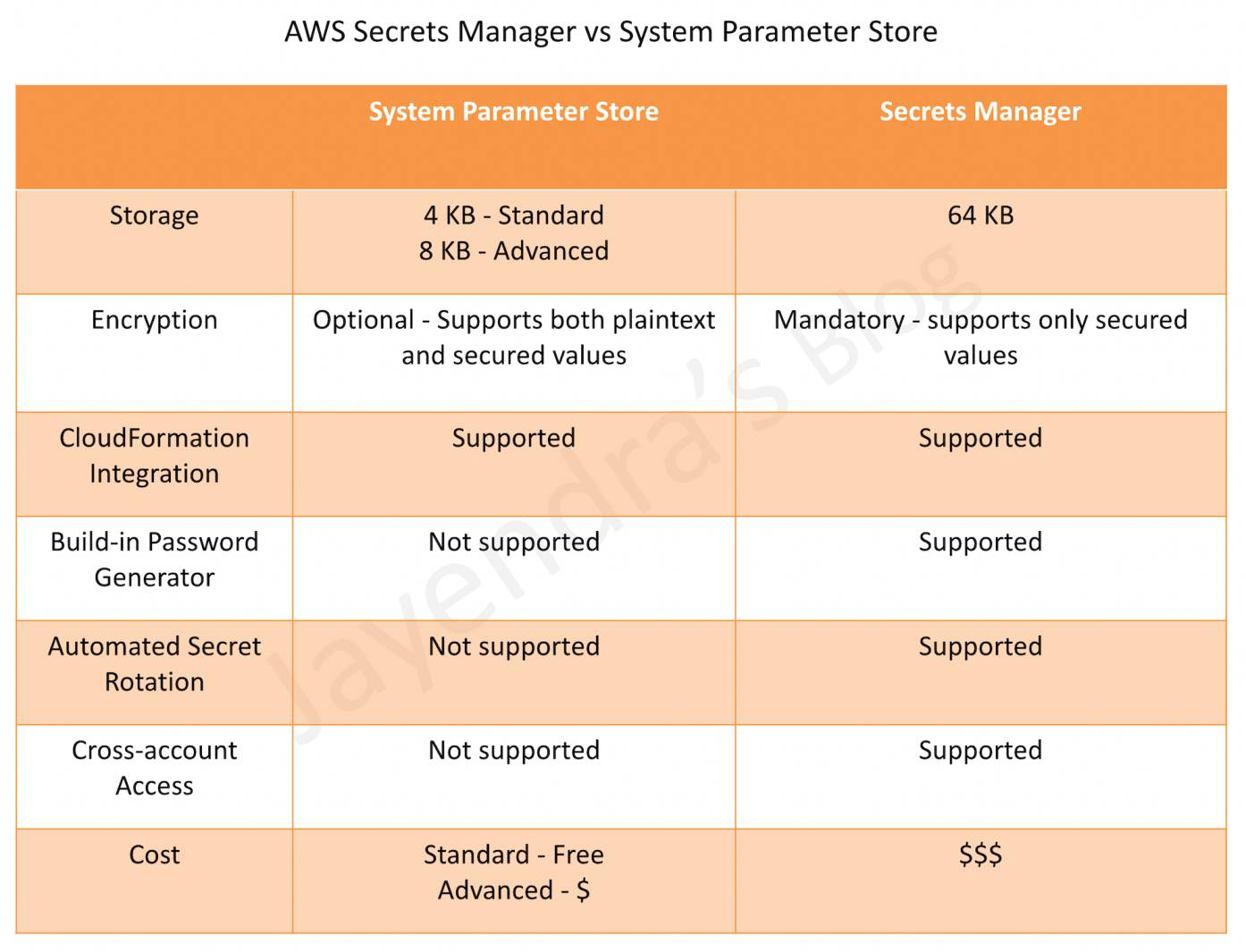
  • does not support password rotation, use Secrets Manager instead.
  • offers two tiers:
    • Standard – up to 10,000 parameters per account/Region, max 4 KB parameter size, no charge.
    • Advanced – up to 100,000 parameters per account/Region, max 8 KB parameter size, parameter policies support, charges apply.

SSM Parameter Store vs Secrets Manager

AWS Secrets Manager vs Systems Parameter Store

Change Management

Capabilities for taking action against or changing the AWS resources

Systems Manager Automation

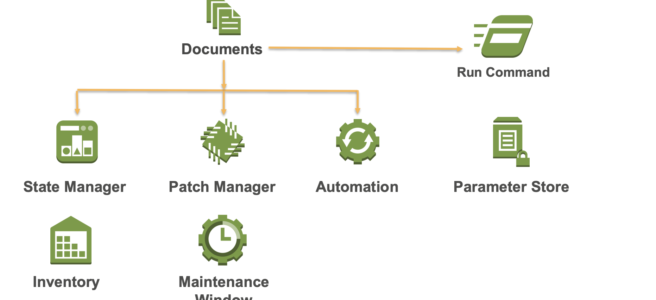
  • helps automate common maintenance and deployment tasks for e.g. create and update AMIs, apply driver and agent updates, reset passwords on Windows instances, reset SSH keys on Linux instances, and apply OS patches or application updates.
  • supports re-execution of runbooks directly from the Automation console with pre-populated parameters (August 2025).
  • supports automatic retry of throttled API calls during high-concurrency scenarios to improve execution reliability (August 2025).

💰 Automation Pricing Update (August 2025): The existing free tier for Automation (100,000 steps and 5,000 seconds of script duration per month) is no longer available for new customers and ended on December 31, 2025 for existing customers. Automation is now a paid service.

Maintenance Windows

  • helps set up recurring schedules for managed instances to run administrative tasks like installing patches and updates without interrupting business-critical operations.

Node Management

Capabilities for managing the EC2 instances, on-premises servers and virtual machines (VMs) in the hybrid environment, and other types of AWS resources (nodes)

Systems Manager Configuration Compliance

  • helps scan fleet of managed instances for patch compliance and configuration inconsistencies.
  • helps collect and aggregate data from multiple AWS accounts and Regions, and then drill down into specific resources that aren’t compliant.
  • provides, by default, displays compliance data about Patch Manager patching and State Manager associations, but can be customized

Session Manager

  • helps manage EC2 instances through an interactive one-click browser-based shell or through the AWS CLI.
  • provides secure and auditable instance management without the need to open inbound ports, maintain bastion hosts, or manage SSH keys.
  • helps comply with corporate policies that require controlled access to instances, strict security practices, and fully auditable logs with instance access details, while still providing end users with simple one-click cross-platform access to the EC2 instances.
  • supports port forwarding to remote hosts, enabling access to private resources (e.g., RDS databases, Redis clusters) through a managed node without publicly exposing ports.
  • supports SSH tunneling for secure connections to instances without opening SSH ports.
  • supports RDP connections through Fleet Manager for browser-based Windows instance access.
  • requires SSM Agent version 3.0.222.0 or later for port forwarding and SSH sessions.

Systems Manager Run Command

  • Run Command allows you to automate common administrative tasks and perform one-time configuration changes at scale.
  • helps to remotely and securely manage the configuration of the managed instances at scale.
  • helps perform on-demand changes like updating applications or running Linux shell scripts and Windows PowerShell commands on a target set of dozens or hundreds of instances.

Patch Manager

  • helps automate the process of patching managed instances with both security-related and other types of updates.
  • helps apply patches for both operating systems and applications. (On Windows Server, application support is limited to updates for Microsoft applications.)
  • enables scanning of instances for missing patches and applies them individually or to a large group of instances by using EC2 instance tags.
  • provides options to scan the instances and report compliance on a schedule, install available patches on a schedule, and patch or scan instances on-demand as needed.
  • supports patching across multiple AWS accounts and Regions using the unified console.
  • Patch baselines
    • defines which patches should and shouldn’t be installed
    • can include rules for auto-approving patches within days of their release, as well as a list of approved and rejected patches
    • helps install security patches on a regular basis by scheduling patching to run as a Systems Manager maintenance window task.
  • Patch group
    • helps associate a set of instances with a specific patch baseline
    • requires instances to be tagged with a tag key Patch Group
    • an instance can only be part of one Patch Group
    • a patch group can be registered with only one patch baseline

Systems Manager Inventory

  • provides visibility into the EC2 and on-premises computing environment
  • collect metadata from the managed instances about applications, files, components, patches, and more on the managed instances
  • collects only metadata from the managed instances and doesn’t access proprietary information or data.
  • supports custom metadata in addition to the pre-configured metadata
  • supports inventory data collection from multiple regions and AWS Accounts
  • supports inventory data storage in a single centralized location like S3 which can then be queried using Athena.

Systems Manager Distributor

  • helps create and deploy software packages to managed nodes.
  • supports AWS-provided agent software packages (e.g., AmazonCloudWatchAgent) and custom packages.
  • supports multiple operating systems including Windows, Ubuntu Server, Debian Server, and Red Hat Enterprise Linux.
  • integrates with State Manager and Maintenance Windows for automated package deployment.

Fleet Manager

  • provides a console-based experience to view and administer fleets of managed nodes from a single location.
  • supports OS-agnostic management without needing SSH or RDP connections.
  • provides browser-based RDP access to Windows instances without publicly exposing RDP ports.
  • displays health and performance status of the entire server fleet from one console.

Systems Manager State Manager

  • is a secure and scalable configuration management service that helps automate the process of keeping the managed instances in a defined state.
  • helps ensure that the instances are bootstrapped with specific software at startup, joined to a Windows domain (Windows instances only), or patched with specific software updates.
  • A State Manager association is a configuration that is assigned to the managed instances which defines the state that you want to maintain on the instances.

Shared Resources

Capabilities for managing and configuring the AWS resources

Systems Manager Document (SSM document)

  • SSM document defines the actions that the Systems Manager performs.
  • SSM document types include
    • Command documents, which are used by State Manager and Run Command, and
    • Automation documents (runbooks), which are used by Systems Manager Automation.
  • SSM Document can be defined in JSON or YAML and define parameters and actions.

Systems Manager Agent

  • is software that can be installed and configured on an EC2 instance, an on-premises server, or a virtual machine (VM)
  • makes it possible for the Systems Manager to update, manage, and configure these resources
  • must be installed on each instance to use with Systems Manager
  • usually comes preinstalled with a lot of Amazon Machine Images (AMIs), while it must be installed manually on other AMIs, and on on-premises servers and virtual machines for the hybrid environment
  • the new Systems Manager experience can automatically diagnose and remediate SSM Agent issues such as networking misconfigurations and outdated software using recommended runbooks
  • scheduled diagnosis can be set up on a recurring basis to proactively identify and fix SSM Agent connectivity issues

Instance Tiers for Hybrid Environments

  • Standard-instances tier
    • allows registering up to 1,000 hybrid-activated machines per AWS account per Region
    • no additional cost for on-premises instances
  • Advanced-instances tier
    • required for more than 1,000 hybrid-activated machines per account per Region
    • required to use Patch Manager for Microsoft-released applications on non-EC2 nodes
    • required to connect to non-EC2 nodes using Session Manager
    • available on a per-use (pay-per-use) basis

AWS Certification Exam Practice Questions

  • Questions are collected from Internet and the answers are marked as per my knowledge and understanding (which might differ with yours).
  • AWS services are updated everyday and both the answers and questions might be outdated soon, so research accordingly.
  • AWS exam questions are not updated to keep up the pace with AWS updates, so even if the underlying feature has changed the question might not be updated
  • Open to further feedback, discussion and correction.
  1. Which of the following tools from AWS allows the automatic collection of software inventory from EC2 instances and helps apply OS patches?
    1. AWS Code Deploy
    2. Systems Manager
    3. EC2 AMI’s
    4. AWS Code Pipeline
  2. A Developer is writing several Lambda functions that each access data in a common RDS DB instance. They must share a connection string that contains the database credentials, which are a secret. A company policy requires that all secrets be stored encrypted. Which solution will minimize the amount of code the Developer must write?
    1. Use common DynamoDB table to store settings
    2. Use AWS Lambda environment variables
    3. Use Systems Manager Parameter Store secure strings
    4. Use a table in a separate RDS database
  3. A company has a fleet of EC2 instances and needs to remotely execute scripts for all of the instances. Which Amazon EC2 systems Manager feature allows this?
    1. Systems Manager Automation
    2. Systems Manager Run Command
    3. Systems Manager Parameter Store
    4. Systems Manager Inventory
  4. As a part of compliance check it was found that EC2 instances launched by the deployment team were not in compliance to latest security patches. The team had all tagged the resources. Which AWS service can help make the instances complaint?
    1. AWS Inspector
    2. AWS GuardDuty
    3. AWS Systems Manager
    4. AWS Shield
  5. A company wants to manage EC2 instances in multiple AWS accounts centrally without logging into each instance. They need to apply security patches, run operational commands, and gain visibility into the fleet status. Which solution requires the LEAST operational effort?
    1. Set up SSH bastion hosts in each account and use SSH to manage instances
    2. Use AWS Config rules to detect non-compliant instances and manually patch them
    3. Enable the new Systems Manager unified console with AWS Organizations and use Default Host Management Configuration
    4. Deploy a third-party configuration management tool across all accounts
  6. A company needs to securely access an RDS database in a private subnet from a developer’s laptop without exposing any ports to the internet. Which Systems Manager feature enables this?
    1. Systems Manager Run Command
    2. Systems Manager Automation
    3. Session Manager port forwarding to remote host
    4. Systems Manager Parameter Store
  7. A DevOps team wants to enable AWS Systems Manager on all new EC2 instances automatically without manually configuring IAM instance profiles. Which feature should they use?
    1. Systems Manager Quick Setup with Patch Manager
    2. Systems Manager State Manager associations
    3. Default Host Management Configuration (DHMC)
    4. Systems Manager Hybrid Activations
  8. A company uses feature flags to control the gradual rollout of new features to specific user segments. Which AWS service should they use for advanced targeting with variants and splits?
    1. AWS Lambda environment variables
    2. Systems Manager Parameter Store
    3. Amazon CloudWatch Evidently
    4. AWS AppConfig feature flags

References

AWS Cloud Migration

AWS Cloud Migration

📋 Updated June 2025: This post has been updated to reflect the current AWS migration framework including the 7 Rs migration strategies (added Relocate), the 3-phase migration process (Assess, Mobilize, Migrate & Modernize), deprecation of AWS Server Migration Service (replaced by AWS Transform MGN), and the launch of AWS Transform – an AI-driven migration and modernization service.

Some of the key drivers to moving to cloud are:

  • Operational Costs – Key components of operational costs are unit price of infrastructure, the ability to match supply and demand, finding a pathway to optionality, employing an elastic cost base, and transparency
  • Workforce Productivity – Getting up and ready in seconds and various service availability
  • Cost Avoidance – Eliminating the need for hardware refresh programs and constant maintenance programs
  • Operational Resilience – Increases resilience and thereby reduces organization’s risk profile
  • Business Agility – React to market conditions more quickly
  • Sustainability – Leverage shared infrastructure and optimized resource utilization to reduce carbon footprint

Cloud Stages of Adoption

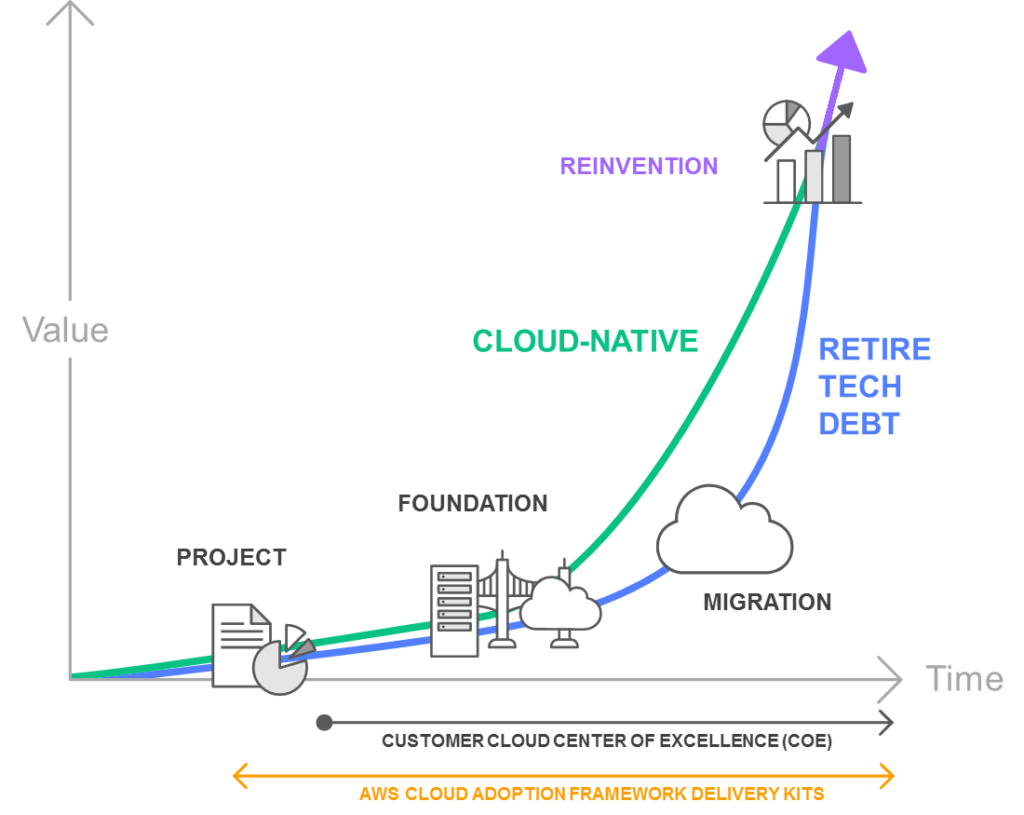
Cloud Stages of Adoption

PROJECT

  • In the project phase, execute projects to get familiar with and experience benefits from the cloud.

FOUNDATION

  • After experiencing the benefits of cloud, build the foundation to scale the cloud adoption.
  • This includes creating a landing zone (a pre-configured, secure, multi-account AWS environment), Cloud Center of Excellence (CCoE), operations model, as well as assuring security and compliance readiness.
  • AWS Control Tower helps set up and govern a secure, multi-account AWS environment (landing zone) based on best practices.

MIGRATION

  • Migrate existing applications including mission-critical applications or entire data centers to the cloud as you scale your adoption across a growing portion of the IT portfolio.

REINVENTION

  • Now that the operations are in the cloud, focus on reinvention by taking advantage of the flexibility and capabilities of AWS to transform business by speeding time to market and increasing the attention on innovation.

Migration Process

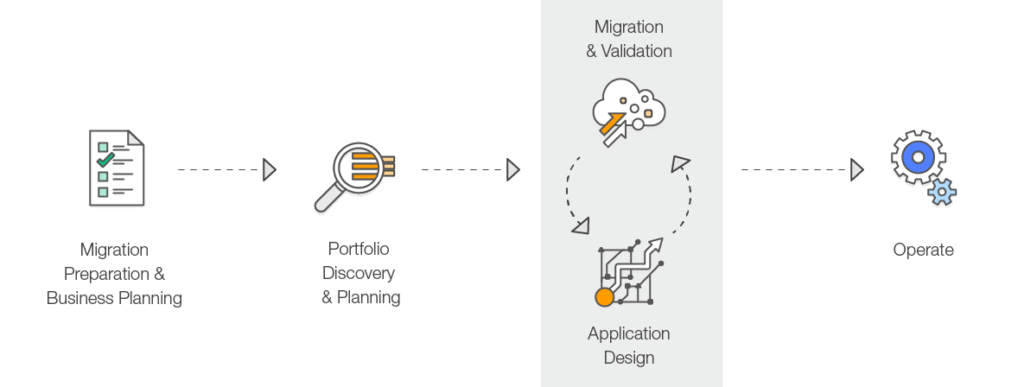
AWS recommends performing the migration process in three phases: Assess, Mobilize, and Migrate & Modernize.

Migration Process

Phase 1: Assess

  • Determine the right objectives and develop a preliminary business case for a migration.
  • Understand the current environment, application portfolio, interdependencies, and identify what is suitable for migration.
  • Use discovery tools like AWS Transform for automated application discovery, dependency mapping, and migration planning.
  • Build a directional business case by taking objectives into account along with the age and architecture of the existing applications, and their constraints.

Phase 2: Mobilize

  • Create a migration plan and refine the business case built in the Assess phase.
  • Address gaps in organizational readiness identified in the Assess phase.
  • Build the foundational landing zone, establish security guardrails, and set up operational tooling.
  • Perform pilot migrations to test processes, tools, and build team expertise.
  • Define the migration patterns, processes, and tools that will be used at scale.

Phase 3: Migrate & Modernize

  • Execute the migration using the patterns and tools validated during the Mobilize phase.
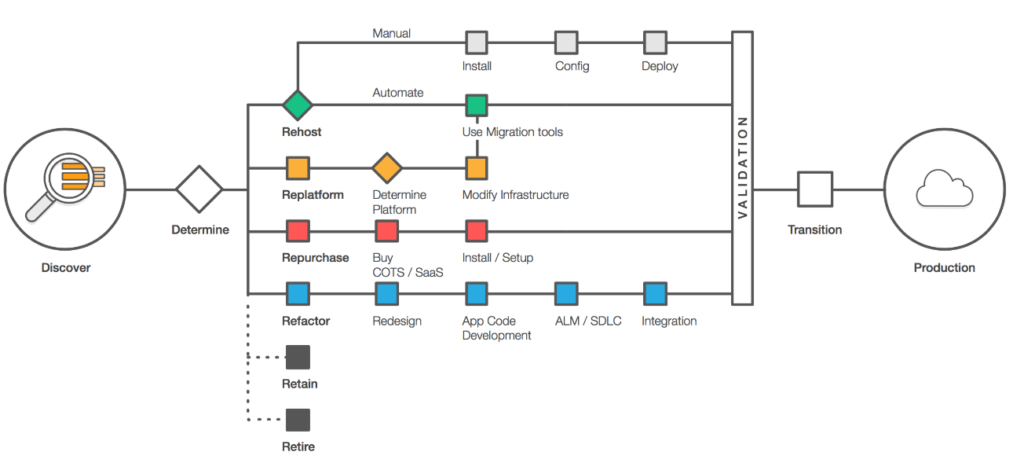
  • Each application is designed, migrated, and validated according to one of the seven common application strategies (“The 7 R’s”).
  • Focus on speed and scale – implement a migration factory approach for high-volume migrations.
  • Iterate on the foundation, turn off old systems, and modernize applications post-migration.
  • AWS provides migration services including:

⚠️ Deprecated Service Notice

AWS Server Migration Service (SMS) was discontinued on March 31, 2022. AWS recommends AWS Transform MGN (formerly AWS Application Migration Service) as the replacement for lift-and-shift migrations.

AWS Migration Hub is no longer open to new customers as of November 7, 2025. For similar capabilities, use AWS Transform.

Application Migration Strategies – The 7 R’s

Migration strategies depend upon what is in your environment and what is suitable for the portfolio, taking into account the business and technical requirements.

Below are the seven common migration strategies (expanded from the original “5 R’s” that Gartner outlined in 2011 to the current “7 R’s”).

Application Migration Strategies

1. Rehost (“lift and shift”)

  • Moving your application as is to the Cloud without making any changes.
  • Helps to quickly implement the migration and scale to meet a business case.
  • Provides better opportunity to re-architect the applications once they are already running in cloud, with the organization having already developed cloud skills.
  • Rehosting can be automated with tools such as AWS Transform MGN (formerly AWS Application Migration Service), or can be done manually.
  • AWS Transform MGN continuously replicates source servers to AWS, enabling non-disruptive testing and cutover.

2. Replatform (“lift, tinker and shift”)

  • Moving your application to the Cloud with optimizations, without any major changes.
  • Replatform helps achieve some tangible benefit without changing the core architecture of the application. For e.g., using RDS for database, Elastic Beanstalk for applications, or using AWS Graviton processors for cost optimization.
  • Can involve moving to managed services, upgrading OS versions, or migrating to containers without code changes.

3. Repurchase (“drop and shop”)

  • Dropping the application and moving to a completely new solution.
  • More of a Buy in a Build vs Buy model; might be expensive in short term but faster time to market.
  • Move to a different product, typically from a traditional license to a SaaS model (e.g., migrating CRM to Salesforce, or HR system to Workday).

4. Refactor / Re-architect

  • Moving the application to Cloud, with major changes to take advantage of cloud-native features.
  • More of a Build in a Build vs Buy model, and would take time.
  • Driven by a strong business need to add features, scale, or performance with agility and improvement in business continuity that would otherwise be difficult to achieve in the application’s existing environment.
  • May involve moving to microservices, serverless architecture, or event-driven design.

5. Retire

  • Decommission the applications that are no longer needed.
  • Identifying IT assets that are no longer useful and can be turned off will help boost your business case and direct your attention towards maintaining the resources that are widely used.
  • Includes decommissioning zombie applications (avg CPU/memory below 5%) and idle applications (5-20% usage over 90 days).

6. Retain

  • Keep the applications as is in the current environment.
  • Retain portions of the IT portfolio that have tight dependencies, are difficult or not in priority, or are not ready for migration.
  • May include applications with unresolved compliance requirements, recent upgrades, or dependencies on specialized hardware.

7. Relocate (hypervisor-level lift and shift)

  • Transfer infrastructure to the cloud without purchasing new hardware, rewriting applications, or modifying existing operations.
  • Enables moving a large number of servers at a given time from on-premises to a cloud version of the platform.
  • During relocation, the application continues to serve users, minimizing disruption and downtime.
  • Relocate is the quickest way to migrate and operate workloads in the cloud because it does not impact the overall architecture.
  • Example: Moving VMware workloads to AWS using AWS Transform for VMware.

AWS Migration Services and Tools

AWS Transform (Launched May 2025)

  • AI-driven service that uses agentic AI to accelerate and simplify migration and modernization of infrastructure, applications, and code.
  • Automates the full migration lifecycle: discovery, dependency mapping, migration planning, network conversion, and EC2 instance optimization.
  • Brings together 20 years of migration experience with specialized AI agents, human teams, and partner workflows.
  • Capabilities include:
    • AWS Transform for VMware – Automated VMware workload migration
    • AWS Transform for Mainframe – Mainframe modernization with AI agents
    • AWS Transform for .NET – Automated .NET framework modernization
    • AWS Transform for Windows – Full-stack Windows modernization
    • AWS Transform MGN – Rehosting (lift-and-shift) with continuous replication
  • Learn more: AWS Transform

AWS Transform MGN (formerly Application Migration Service)

  • Dedicated rehosting capability that automates the conversion of source servers (physical, virtual, or cloud) into native Amazon EC2 instances.
  • Continuously replicates block-level volumes from source servers to AWS.
  • Enables non-disruptive testing prior to cutover.
  • Supports a wide range of applications without changes to architecture or migrated servers.
  • Learn more: AWS Transform MGN

AWS Database Migration Service (DMS)

  • Supports homogeneous (e.g., Oracle to Oracle) and heterogeneous (e.g., Oracle to Aurora) database migrations.
  • DMS Serverless provides automatic scaling and storage management.
  • DMS Schema Conversion with GenAI accelerates heterogeneous database migrations using AI.
  • Supports continuous data replication for minimal downtime migrations.
  • Learn more: AWS DMS

AWS Migration Acceleration Program (MAP)

  • Comprehensive program based on thousands of enterprise customer migrations.
  • Uses a three-phased framework: Assess, Mobilize, and Migrate & Modernize.
  • Provides migration credits, technical guidance, and best-practice methodologies.
  • Includes support for VMware migrations, AI workloads, and mainframe modernization.
  • Learn more: AWS MAP

AWS Certification Exam Practice Questions

  • Questions are collected from Internet and the answers are marked as per my knowledge and understanding (which might differ with yours).
  • AWS services are updated everyday and both the answers and questions might be outdated soon, so research accordingly.
  • AWS exam questions are not updated to keep up the pace with AWS updates, so even if the underlying feature has changed the question might not be updated
  • Open to further feedback, discussion and correction.
  1. A company is planning the migration of several lab environments used for software testing. An assortment of custom tooling is used to manage the test runs for each lab. The labs use immutable infrastructure for the software test runs, and the results are stored in a highly available SQL database cluster. Although completely rewriting the custom tooling is out of scope for the migration project, the company would like to optimize workloads during the migration. Which application migration strategy meets this requirement?
    1. Re-host
    2. Re-platform
    3. Re-factor/re-architect
    4. Retire
  2. A company wants to migrate its on-premises VMware infrastructure to AWS with minimal changes to the applications. The company wants the fastest migration path that does not require purchasing new hardware or modifying existing operations. Which migration strategy should the company use?
    1. Rehost
    2. Replatform
    3. Relocate
    4. Refactor
  3. A company is migrating its data center to AWS. It needs to automatically replicate source servers to AWS and perform non-disruptive testing before cutover. Which AWS service should the company use?
    1. AWS Server Migration Service
    2. AWS Transform MGN
    3. AWS DataSync
    4. AWS Snowball
  4. An organization wants to use AI-powered tools to automate application discovery, dependency mapping, and migration planning for its large-scale migration to AWS. Which service provides these capabilities?
    1. AWS Migration Hub
    2. AWS Application Discovery Service
    3. AWS Transform
    4. AWS Server Migration Service
  5. A company is evaluating its application portfolio for migration to AWS. Several applications have average CPU and memory usage below 5%. What migration strategy is most appropriate for these applications?
    1. Rehost
    2. Retain
    3. Retire
    4. Replatform
  6. A company wants to migrate its Oracle database to Amazon Aurora PostgreSQL to reduce licensing costs and take advantage of cloud-native features. Which migration strategy does this represent?
    1. Rehost
    2. Replatform
    3. Refactor/Re-architect
    4. Repurchase

References

AWS Certified DevOps Engineer – Professional (DOP-C01) Exam Learning Path

AWS Certified DevOps Engineer - Professional (DOP-C01) Certificate

AWS Certified DevOps Engineer – Professional (DOP-C01) Exam Learning Path

⚠️ EXAM RETIRED – DOP-C01 No Longer Available

AWS Certified DevOps Engineer – Professional (DOP-C01) was retired on March 6, 2023.

This content is maintained for historical reference only. The DOP-C01 exam can no longer be taken.

Current Exam Version:

Key Changes in DOP-C02:

  • Updated domain structure with 6 domains (previously 5)
  • Greater emphasis on CI/CD automation, IaC, and container/serverless deployments
  • New coverage of AWS CDK, Step Functions, EventBridge, and modern observability
  • 75 questions in 180 minutes (previously 170 minutes)

AWS Certified DevOps Engineer – Professional (DOP-C01) exam was the upgraded pattern of the DevOps Engineer – Professional exam which was released in 2018. AWS replaced it with DOP-C02 on March 7, 2023.

AWS Certified DevOps Engineer – Professional (DOP-C01) exam validated

  • Implement and manage continuous delivery systems and methodologies on AWS
  • Implement and automate security controls, governance processes, and compliance validation
  • Define and deploy monitoring, metrics, and logging systems on AWS
  • Implement systems that are highly available, scalable, and self-healing on the AWS platform
  • Design, manage, and maintain tools to automate operational processes

AWS Certified DevOps Engineer – Professional (DOP-C01) Exam Summary

AWS Certified DevOps Engineer – Professional – Current Exam Resources (DOP-C02)

Note: The resources below have been updated for the current DOP-C02 exam. For the complete DOP-C02 learning path, visit the DOP-C02 Exam Learning Path.

DOP-C02 Exam Domain Overview

The current DOP-C02 exam has 6 domains (compared to 5 in DOP-C01):

  • Domain 1: SDLC Automation (22%) – CI/CD pipelines, testing, deployment strategies
  • Domain 2: Configuration Management and IaC (17%) – CloudFormation, CDK, Systems Manager
  • Domain 3: Resilient Cloud Solutions (15%) – HA, scalability, disaster recovery
  • Domain 4: Monitoring and Logging (15%) – CloudWatch, X-Ray, observability
  • Domain 5: Incident and Event Response (14%) – EventBridge, automation, remediation
  • Domain 6: Security and Compliance (17%) – IAM, secrets management, compliance automation

For the complete DOP-C02 preparation guide, refer to the AWS Certified DevOps Engineer – Professional (DOP-C02) Exam Learning Path.

AWS Certified Advanced Networking – Speciality (ANS-C00) Exam Learning Path

AWS Certified Advanced Networking – Specialty (ANS-C01) Exam Learning Path

⚠️ EXAM RETIREMENT NOTICE

AWS Certified Advanced Networking – Specialty (ANS-C01) is being retired. The last day to take the exam is August 25, 2026.

Certifications earned prior to retirement will remain active for the standard three-year period. New AWS Certified Advanced Networking – Specialty certifications will not be issued after the retirement date.

Note: The original ANS-C00 version was retired in July 2022 and replaced by ANS-C01. This page has been updated to reflect the current ANS-C01 exam content.

I recently cleared the AWS Certified Advanced Networking – Specialty (ANS-C01), which was my first, en route my path to the AWS Specialty certifications. Frankly, I feel the time I gave for preparation was still not enough, but I just about managed to get through. So a word of caution, this exam is inline or tougher than the professional exam especially for the reason that the Networking concepts it covers are not something you can get your hands dirty with easily.

AWS Certified Advanced Networking – Specialty (ANS-C01) exam focuses on AWS Networking concepts. It validates the ability to

  • Design, implement, manage, and secure AWS and hybrid network architectures at scale
  • Design and maintain network architecture for all AWS services
  • Leverage tools to automate AWS networking tasks
  • Implement network security, compliance, and governance controls

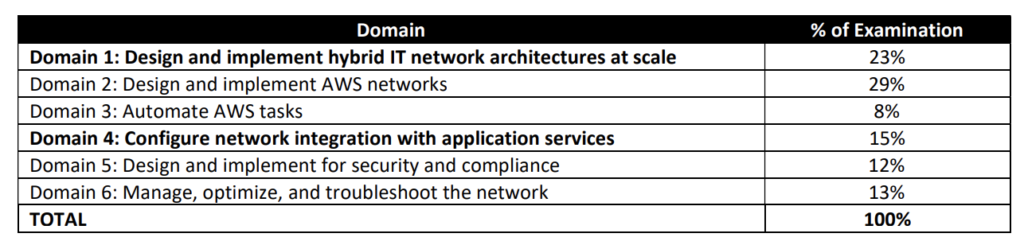
ANS-C01 Exam Domains

The ANS-C01 exam is structured into four domains (compared to six in the retired ANS-C00):

  • Domain 1: Network Design (30%) — Design solutions incorporating edge networking, DNS, load balancing, routing, and connectivity
  • Domain 2: Network Implementation (26%) — Implement routing, connectivity, multi-Region/multi-account solutions
  • Domain 3: Network Management and Operation (20%) — Maintain, monitor, and troubleshoot network solutions
  • Domain 4: Network Security, Compliance, and Governance (24%) — Implement and maintain network security controls

Refer to AWS Certified Advanced Networking – Specialty (ANS-C01) Exam Guide

AWS Certified Advanced Networking – Specialty (ANS-C01) Exam Resources

AWS Certified Advanced Networking – Specialty (ANS-C01) Exam Summary

  • AWS Certified Advanced Networking – Specialty exam covers extensive Networking concepts like VPC, VPN, Direct Connect, Transit Gateway, Route 53, ALB, NLB, Gateway Load Balancer, AWS Network Firewall, VPC Lattice, and Cloud WAN.
  • One of the key tactics when solving questions is to read the question and use paper and pencil to draw a rough architecture and focus on the areas that you need to improve. You will be able to eliminate 2 answers for sure and then need to focus on only the other two.
  • Be sure to cover the following topics
    • Networking & Content Delivery
      • You should know everything in Networking.
      • Understand VPC in depth
      • AWS Transit Gateway
        • Understand Transit Gateway as the primary hub-and-spoke architecture for connecting VPCs and on-premises networks (replaces Transit VPC pattern)
        • Know Transit Gateway route tables, associations, propagations, and peering across Regions
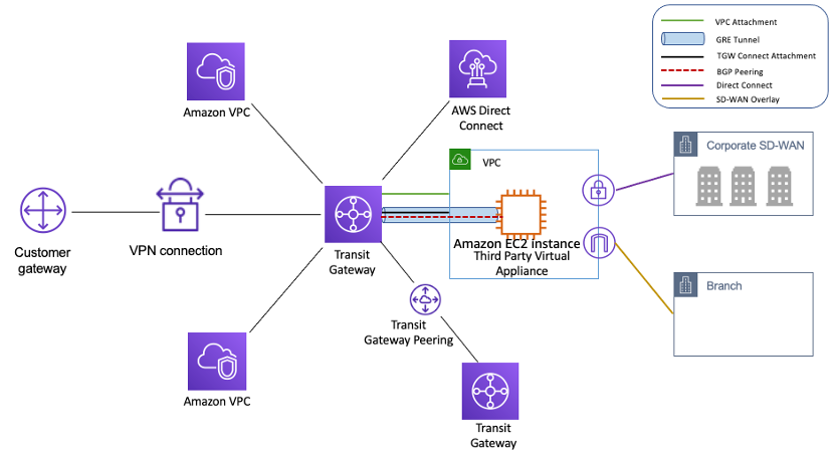
        • Understand Transit Gateway Connect attachments for SD-WAN integration using GRE tunnels and BGP
        • Know Transit Gateway Network Manager for global network visibility
      • AWS Cloud WAN
        • Know AWS Cloud WAN for building and managing global WANs using a central dashboard and network policies
        • Understand Core Network, segments, attachments, and policies
        • Know when to use Cloud WAN vs Transit Gateway (Cloud WAN for multi-Region global networks; Transit Gateway for single-Region hub-and-spoke)
        • Understand Service Insertion for centralized inspection architectures
      • Amazon VPC Lattice
        • Know Amazon VPC Lattice as an application-layer networking service for service-to-service connectivity
        • Understand service networks, services, target groups, and listeners
        • Know that VPC Lattice works across VPCs and accounts without requiring VPC peering or Transit Gateway
        • Understand the difference: VPC Lattice (Layer 7 application networking) vs Transit Gateway (Layer 3 network connectivity)
      • AWS VPC IPAM
        • Know VPC IP Address Manager (IPAM) for planning, tracking, and monitoring IP addresses at scale
        • Understand IPAM pools, scopes, and allocations across multi-account environments
      • Virtual Private Network to establish connectivity between on-premises data center and AWS VPC
        • Understand Site-to-Site VPN, accelerated VPN (using Global Accelerator), and VPN over Direct Connect
        • Know CloudHub for connecting multiple VPN sites
      • Direct Connect to establish connectivity between on-premises data center and AWS VPC and Public Services
        • Make sure you understand Direct Connect in detail — without this you cannot clear the exam
        • Understand Direct Connect connections – Dedicated (1, 10, 100, 400 Gbps) and Hosted connections
        • Understand how to create a Direct Connect connection (hint: LOA-CFA provides the details for partner to connect to AWS Direct Connect location)
        • Understand virtual interfaces options – Private VIF for VPC resources, Public VIF for public resources, and Transit VIF for Transit Gateway
        • Understand Route Propagation, propagation priority, BGP connectivity, and BFD (Bidirectional Forwarding Detection)
        • Understand High Availability options: Second Direct Connect connection, VPN as backup, or LAG (Link Aggregation Group)
        • Understand Direct Connect Gateway – provides connectivity to multiple VPCs across Regions from on-premises using a single DX connection
        • Know Direct Connect SiteLink – enables sending data between Direct Connect locations bypassing AWS Regions (site-to-site connectivity)
        • Understand Direct Connect + Cloud WAN integration (direct gateway association with Core Network)
        • Understand MACsec encryption for Direct Connect (Layer 2 encryption for dedicated connections)
      • Route 53
        • Understand Route 53 and Routing Policies and their use cases. Focus on Weighted, Latency, Geolocation, and Geoproximity routing policies
        • Understand Route 53 Split View DNS for same DNS to access a site externally and internally
        • Understand Route 53 Resolver – inbound/outbound endpoints for hybrid DNS resolution between on-premises and AWS
        • Know Route 53 Resolver DNS Firewall – filters outbound DNS queries, blocks malicious domains, prevents DNS tunneling and DGA attacks
        • Know Route 53 Resolver DNS Firewall Advanced (launched Nov 2024) – provides intelligent protection with real-time threat detection
      • Understand CloudFront and use cases including Origin Shield and real-time logs
      • AWS Global Accelerator
        • Know Global Accelerator for improving global application availability and performance using the AWS global network
        • Understand the difference between CloudFront (content caching/CDN) and Global Accelerator (network-layer acceleration with static anycast IPs)
        • Know dual-stack support for NLB endpoints
      • Load Balancer
        • Understand ALB, NLB, and Gateway Load Balancer (GWLB)
        • Understand the difference: ALB (Layer 7 – content, host, path-based routing), NLB (Layer 4 – static IP, ultra-low latency, TLS passthrough), GWLB (Layer 3 – transparent network gateway for third-party appliances)
        • Know Gateway Load Balancer for deploying, scaling, and managing third-party virtual appliances (firewalls, IDS/IPS) with GENEVE encapsulation
        • Know how to design VPC CIDR block with NLB (Hint – minimum number of IPs required are 8)
        • Know how to pass original Client IP to the backend instances (Hint – X-Forwarded-For for ALB, Proxy Protocol for NLB, and client IP preservation for GWLB)
      • Know WorkSpaces requirements and setup
    • Security
      • AWS Network Firewall
        • Know AWS Network Firewall as a managed stateful network firewall and IDS/IPS for VPCs
        • Understand rule groups (stateless and stateful), firewall policies, and deployment models (centralized, distributed)
        • Know integration with Gateway Load Balancer for centralized inspection architectures
      • AWS Verified Access
        • Know AWS Verified Access for secure application access without VPN using Zero Trust principles
        • Evaluates each request based on user identity and device health rather than network location
        • Now supports non-HTTP(S) protocols (announced re:Invent 2024)
      • Know AWS GuardDuty as managed threat detection service
      • Know AWS Shield esp. Shield Advanced and features (DDoS cost protection, SRT access, advanced mitigation)
      • Know WAF as Web Traffic Firewall — (Hint – WAF can be attached to CloudFront, ALB, API Gateway, AppSync, and Cognito User Pools)
      • Know AWS Firewall Manager for centrally managing firewall rules across accounts and resources in AWS Organizations

Key Differences: ANS-C01 vs ANS-C00

  • Structure: ANS-C01 has 4 domains (vs 6 in ANS-C00) — more streamlined and focused
  • New Services: Transit Gateway, Cloud WAN, VPC Lattice, IPAM, Network Firewall, Gateway Load Balancer, Global Accelerator, Verified Access, Route 53 Resolver endpoints
  • Deprecated Patterns: Transit VPC pattern replaced by Transit Gateway; complex VPN hub-and-spoke designs replaced by Transit Gateway with Cloud WAN
  • Emphasis Changes: Greater focus on multi-account/multi-Region networking, Zero Trust architecture, network automation, and centralized security
  • Direct Connect: Transit VIF, SiteLink, MACsec encryption, 400 Gbps connections, and Cloud WAN integration are new topics

AWS Network Connectivity Options

AWS Network Connectivity Options

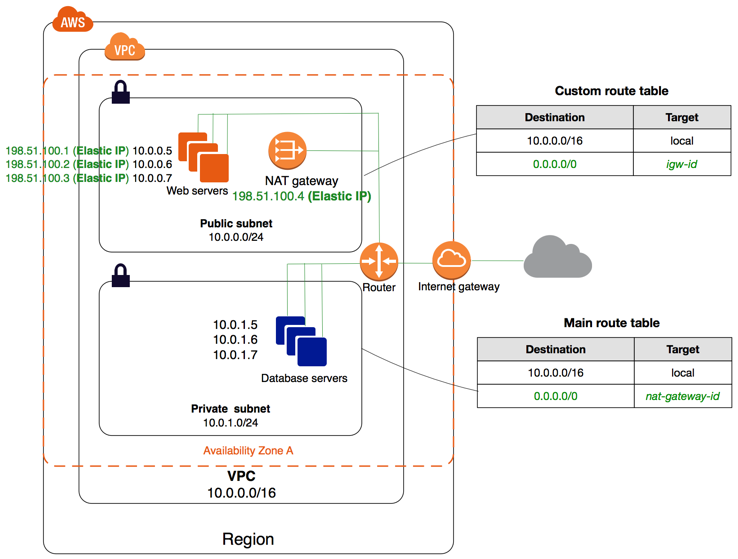
Internet Gateway

  • provides Internet connectivity to VPC
  • is a horizontally scaled, redundant, and highly available component that allows communication between instances in your VPC and the internet.
  • imposes no availability risks or bandwidth constraints on your network traffic.
  • serves two purposes: to provide a target in the VPC route tables for internet-routable traffic and to perform NAT for instances that have not been assigned public IPv4 addresses.
  • supports IPv4 and IPv6 traffic.

NAT Gateway

  • enables instances in a private subnet to connect to the internet or other AWS services, but prevents the Internet from initiating connections with the instances.
  • Public NAT gateway allows instances in private subnets to connect to the internet through the NAT gateway’s Elastic IP address.
  • Private NAT gateway allows instances in private subnets to connect to other VPCs or the on-premises network using its private IP address for source NAT.
  • Regional NAT Gateway (New – Nov 2025) – automatically expands across Availability Zones based on workload presence. Unlike standard (zonal) NAT gateways which operate in a single AZ, regional NAT gateways follow workloads to provide automatic high availability without requiring a public subnet to host the gateway.

Egress Only Internet Gateway

  • NAT devices are not supported for IPv6 traffic, use an Egress-only Internet gateway instead
  • Egress-only Internet gateway is a horizontally scaled, redundant, and highly available VPC component
  • Egress-only Internet gateway allows outbound communication over IPv6 from instances in the VPC to the Internet and prevents the Internet from initiating an IPv6 connection with your instances.

VPC Endpoints

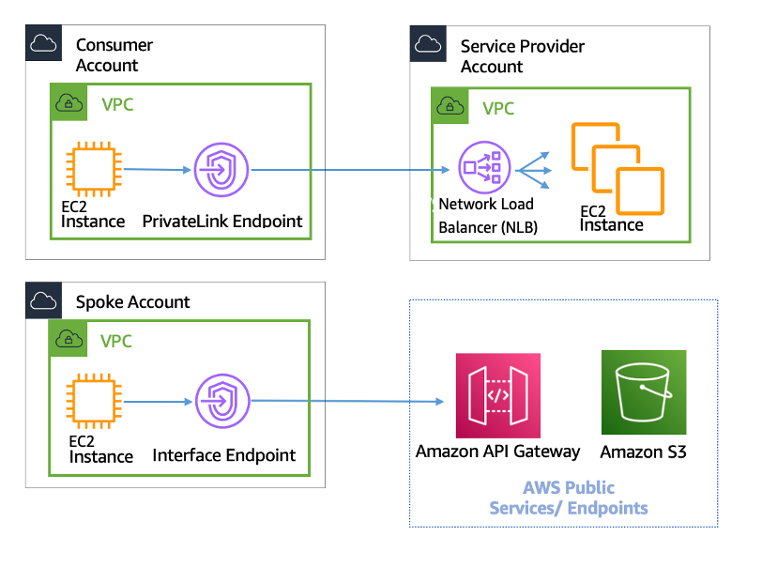
  • VPC endpoint provides a private connection from VPC to supported AWS services and VPC endpoint services powered by PrivateLink without requiring an internet gateway, NAT device, VPN connection, or AWS Direct Connect connection.
  • Instances in the VPC do not require public IP addresses to communicate with resources in the service. Traffic between the VPC and the other service does not leave the Amazon network.
  • VPC Endpoints are virtual devices and are horizontally scaled, redundant, and highly available VPC components that allow communication between instances in the VPC and services without imposing availability risks or bandwidth constraints on the network traffic.
  • VPC Endpoints are of three types
    • Interface Endpoints – is an elastic network interface with a private IP address that serves as an entry point for traffic destined to supported services.
    • Gateway Endpoints – is a gateway that is a target for a specified route in your route table, used for traffic destined to a supported AWS service. Currently only Amazon S3 and DynamoDB.
    • Resource Endpoints (New – Dec 2024) – enables private access to a specific resource (e.g., RDS database, IP address, or domain name) in another VPC or on-premises environment shared via AWS RAM, without requiring an NLB.
  • Cross-Region PrivateLink (Nov 2025) – Interface VPC endpoints now support cross-region connectivity, breaking the previous limitation that endpoints were regional-only. This enables connecting to VPC endpoint services hosted in other AWS Regions within the same partition.

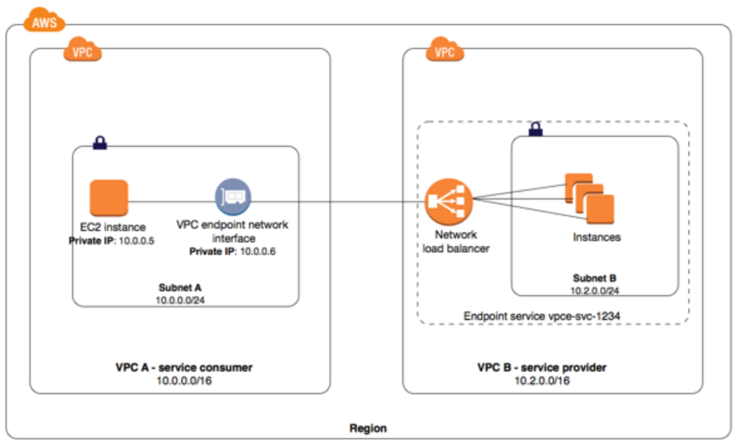
VPC Private LinksAWS Private Links

  • provides private connectivity between VPCs, AWS services, and your on-premises networks without exposing your traffic to the public internet.
  • helps privately expose a service/application residing in one VPC (service provider) to other VPCs (consumer) within an AWS Region in a way that only consumer VPCs initiate connections to the service provider VPC.
  • With ALB as a target of NLB, ALB’s advanced routing capabilities can be combined with AWS PrivateLink.
  • VPC Resource Gateway (Dec 2024) – allows sharing any VPC resource (RDS databases, domain names, IP addresses) via AWS RAM. Consumers access these resources privately using VPC endpoints without needing an NLB, simplifying hybrid networking.
  • Cross-Region Connectivity (Nov 2025) – PrivateLink now supports native cross-region access for both AWS services and customer endpoint services, enabling global private connectivity from a single Region deployment.

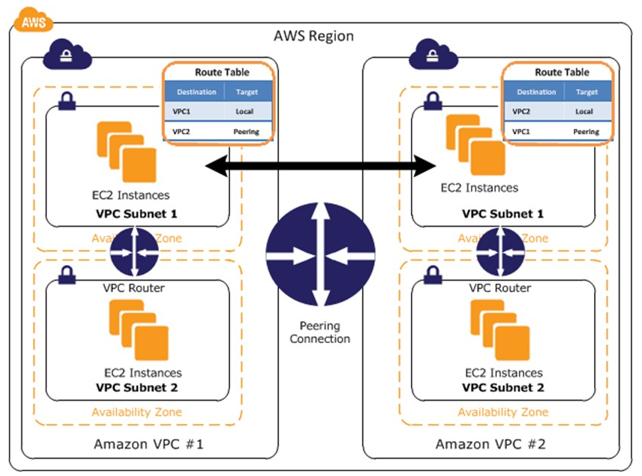
VPC Peering

  • enables networking connection between two VPCs to route traffic between them using private IPv4 addresses or IPv6 addresses
  • connections can be created between your own VPCs, or with a VPC in another AWS account.
  • enables full bidirectional connectivity between the VPCs
  • supports inter-region VPC peering connection
  • Inter-region peering now supports jumbo frames (up to 8500 bytes MTU) and full instance bandwidth (Mar 2025)
  • uses existing underlying AWS infrastructure
  • does not have a single point of failure for communication or a bandwidth bottleneck.
  • VPC Peering connections have limitations
    • cannot be used with Overlapping CIDR blocks
    • does not provide Transitive peering
    • does not support Edge to Edge routing through Gateway or private connection
  • is best used when resources in one VPC must communicate with resources in another VPC, the environment of both VPCs is controlled and secured, and the number of VPCs to be connected is less than 10
  • supports a limit of 125 active peering connections per VPC
  • Simplified Billing (Apr 2025) – AWS simplified VPC Peering billing; no changes to data transfer pricing but billing structure is streamlined.

VPN CloudHub

  • AWS VPN CloudHub allows you to securely communicate from one site to another using AWS Managed VPN or Direct Connect
  • AWS VPN CloudHub operates on a simple hub-and-spoke model that can be used with or without a VPC
  • AWS VPN CloudHub can be used if you have multiple branch offices and existing internet connections and would like to implement a convenient, potentially low cost hub-and-spoke model for primary or backup connectivity between these remote offices.
  • AWS VPN CloudHub leverages VPC virtual private gateway with multiple gateways, each using unique BGP autonomous system numbers (ASNs).

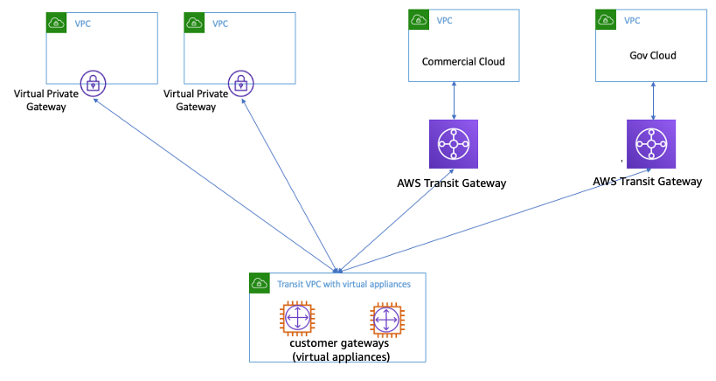
Transit VPC

⚠️ Note: Transit VPC is a legacy architecture pattern. AWS recommends using AWS Transit Gateway or AWS Cloud WAN for new deployments, which provide managed, highly available hub-and-spoke connectivity without the operational overhead of managing EC2-based virtual appliances.

  • A transit VPC is a common strategy for connecting multiple, geographically disperse VPCs and remote networks in order to create a global network transit center.
  • A transit VPC simplifies network management and minimizes the number of connections required to connect multiple VPCs and remote networks
  • Transit VPC can be used to support important use cases
    • Private Networking – You can build a private network that spans two or more AWS Regions.
    • Shared Connectivity – Multiple VPCs can share connections to data centers, partner networks, and other clouds.
    • Cross-Account AWS Usage – The VPCs and the AWS resources within them can reside in multiple AWS accounts.
  • Transit VPC design helps implement more complex routing rules, such as network address translation between overlapping network ranges, or to add additional network-level packet filtering or inspection.
  • Transit VPC
    • supports Transitive routing using the overlay VPN network — allowing for a simpler hub and spoke design.
    • supports network address translation between overlapping network ranges.
    • supports vendor functionality around advanced security (layer 7 firewall/IPS/IDS) using third-party software on EC2
    • leverages instance-based routing that increases costs while lowering availability and limiting the bandwidth.
    • Customers are responsible for managing the HA and redundancy of EC2 instances running the third-party vendor virtual appliance

Transit Gateway

Transit Gateway

  • is a highly available and scalable service to consolidate the AWS VPC routing configuration for a region with a hub-and-spoke architecture.
  • is a Regional resource and can connect thousands of VPCs within the same AWS Region.
  • TGWs across different regions can peer with each other to enable VPC communications within the same or different regions.
  • provides simpler VPC-to-VPC communication management over VPC Peering with a large number of VPCs.
  • enables you to attach VPCs (across accounts) and VPN connections in the same Region and route traffic between them.
  • support dynamic and static routing between attached VPCs and VPN connections
  • removes the need for using full mesh VPC Peering and Transit VPC
  • Transit Gateway Flow Logs – enables capturing detailed telemetry (source/destination IPs, ports, protocol, traffic counters, timestamps) for all network flows traversing the Transit Gateway. Logs can be published to CloudWatch Logs, S3, or Firehose.
  • Flexible Cost Allocation (Nov 2025) – provides granular control over how Transit Gateway data processing costs are allocated across AWS accounts within AWS Organizations.

AWS Cloud WAN

  • is a managed wide area networking (WAN) service that helps build, manage, and monitor a unified global network connecting cloud and on-premises resources.
  • provides a central dashboard and network policies to create a global network spanning multiple locations, removing the need to configure and manage different networks using different technologies.
  • uses a policy-based automation system to define network segments, attach VPCs, VPN connections, and SD-WAN products.
  • simplifies global network management compared to manually managing Transit Gateways across regions.
  • key features include:
    • Central Dashboard – manage branch offices, data centers, VPN connections, SD-WAN, VPCs, and Transit Gateways from one place.
    • Network Policies – define how traffic is routed between segments with policy-based controls.
    • Service Insertion (2024) – streamlines integrating security and inspection services (e.g., Network Firewall) into global networks.
    • Routing Policy (Nov 2025) – enables route filtering, summarization, and BGP path manipulation for fine-grained traffic control at scale.
    • Security Group Referencing & Enhanced DNS (Jun 2025) – simplifies security group management and DNS resolution across Cloud WAN segments.
  • can be used as a migration path from Transit Gateway for organizations needing global, multi-Region network management.
  • available in AWS GovCloud (US) Regions as of Jun 2026.

Hybrid Connectivity

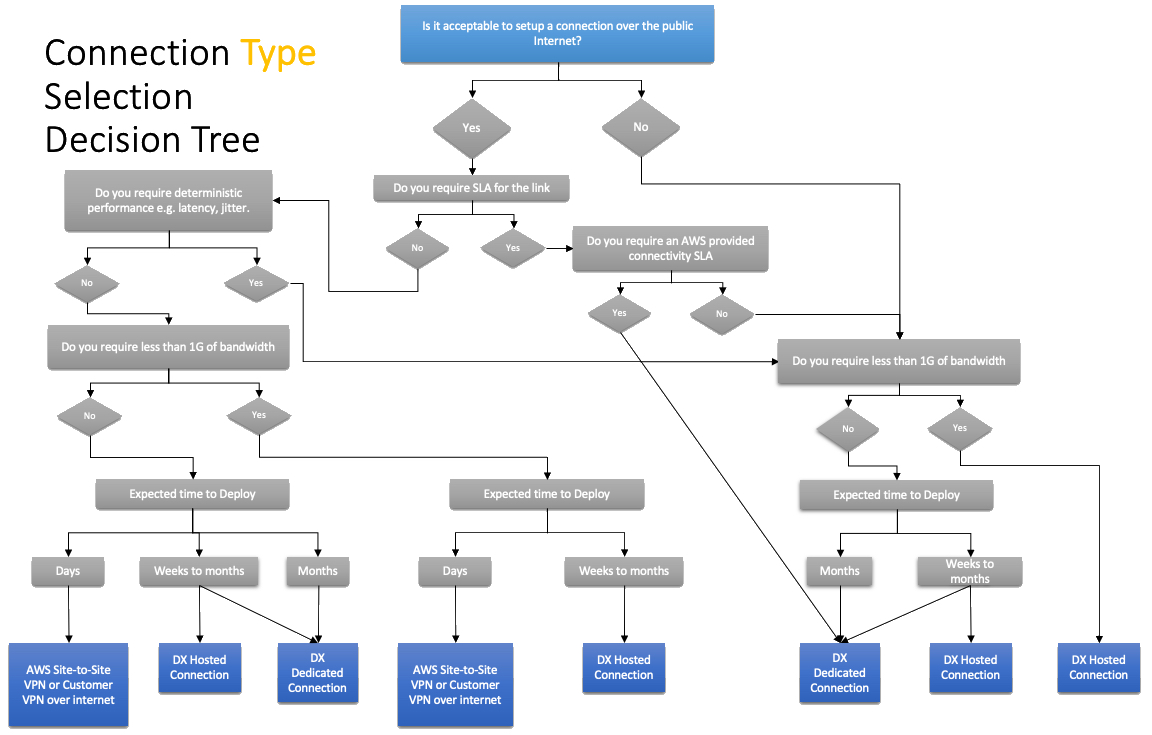
AWS Network Connectivity Decision Tree

Virtual Private Network (VPN)

VPC Managed VPN Connection

AWS Site-to-Site VPN

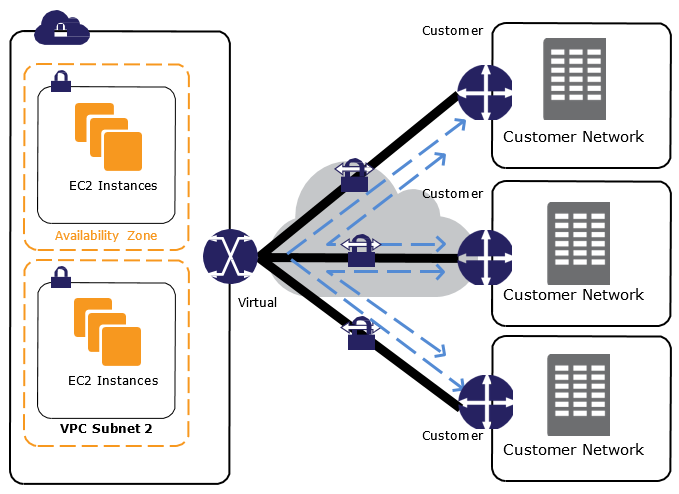
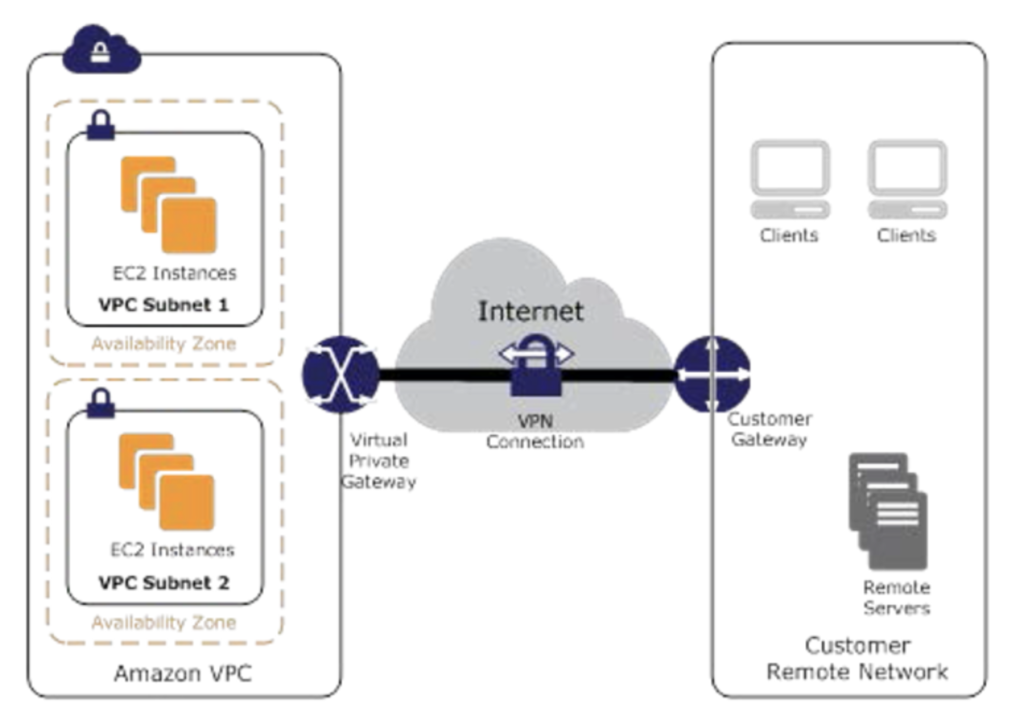
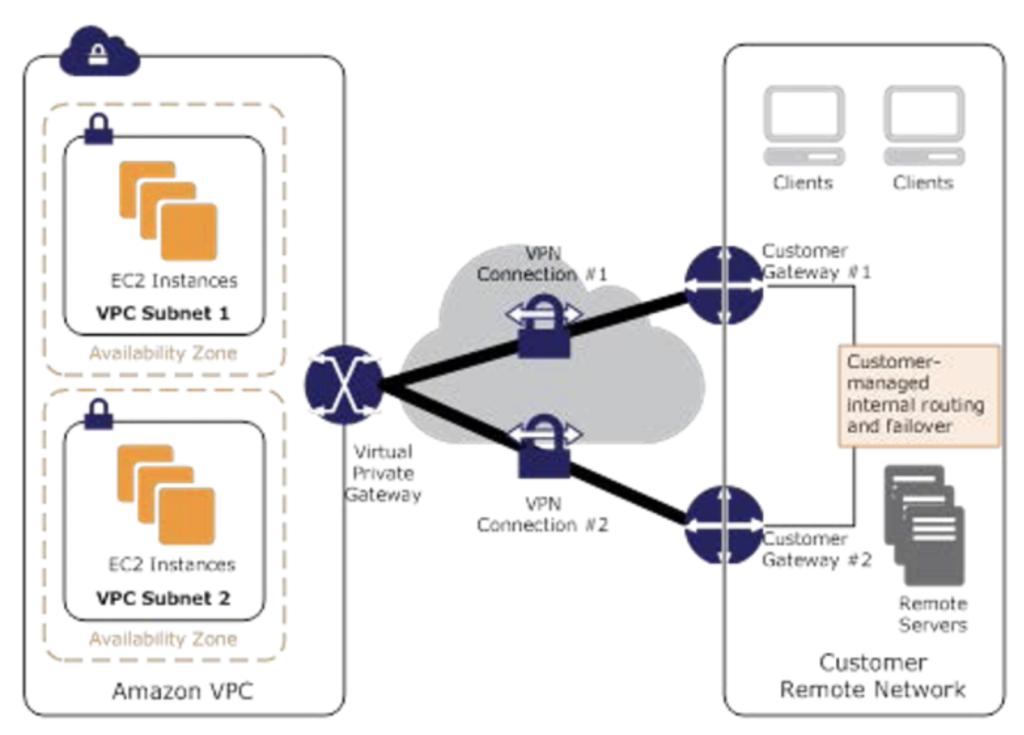
  • VPC provides the option of creating an IPsec VPN connection between remote customer networks and their VPC over the internet
  • AWS managed VPN endpoint includes automated multi–data center redundancy & failover built into the AWS side of the VPN connection
  • AWS managed VPN consists of two parts
    • Virtual Private Gateway (VPG) on AWS side
    • Customer Gateway (CGW) on the on-premises data center
  • AWS Site-to-Site VPN only provides Site-to-Site VPN connectivity. It does not provide Point-to-Site VPC connectivity (use AWS Client VPN for that).
  • Virtual Private Gateway are Highly Available as it represents two distinct VPN endpoints, physically located in separate data centers to increase the availability of the VPN connection.
  • High Availability on the on-premises data center must be handled by creating additional Customer Gateway.
  • AWS Site-to-Site VPN connections are low cost, quick to setup and start with compared to Direct Connect. However, they are not reliable as they traverse through Internet.
  • 5 Gbps Bandwidth Tunnels (Nov 2025) – supports VPN connections with up to 5 Gbps bandwidth per tunnel, a 4x improvement from the previous 1.25 Gbps limit. Beneficial for bandwidth-intensive hybrid applications, big data migrations, and disaster recovery. Bandwidth can be modified on existing connections without changing on-premises configuration (May 2026).
  • IPv6 Support for Outer Tunnel IPs (Jul 2025) – supports IPv6 addresses on outer tunnel IPs, enabling full IPv6-only VPN connectivity (IPv6-in-IPv6) and mixed (IPv4-in-IPv6) configurations without IPv6>IPv4>IPv6 translation.
  • VPN Concentrator (Nov 2025) – a new feature that simplifies multi-site connectivity for distributed enterprises with 25+ remote sites needing low bandwidth (under 100 Mbps each). Connects multiple remote sites through a single VPN attachment to Transit Gateway with 5 Gbps aggregate bandwidth.

AWS Client VPN

  • is a fully managed, scalable VPN service that provides an endpoint for users to establish a secure remote access (Point-to-Site) connection to the AWS network.
  • uses OpenVPN-based VPN client software for secure connectivity.
  • handles Point-to-Site VPN connectivity that AWS Site-to-Site VPN does not provide (e.g., remote worker/mobile access).
  • supports authentication via Active Directory, SAML-based federated authentication, and mutual certificate authentication.
  • IPv6 Connectivity (Aug 2025) – now supports full IPv6 connectivity for Client VPN endpoints, allowing connections to IPv6 resources in VPCs and from clients on IPv6 networks.

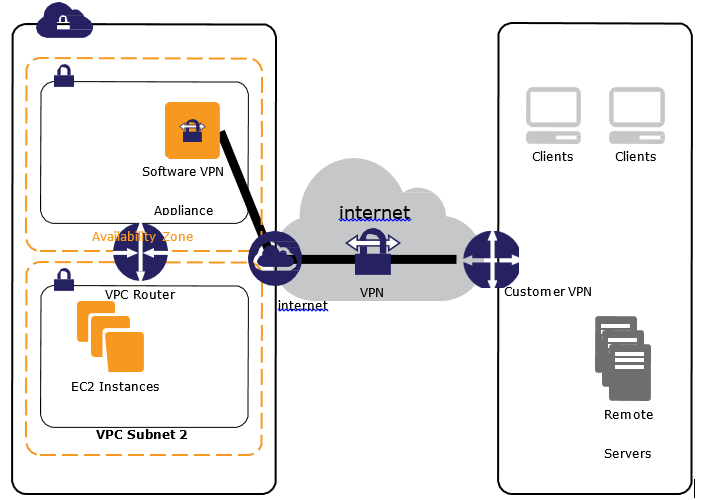
Software VPN

  • VPC offers the flexibility to fully manage both sides of the VPC connectivity by creating a VPN connection between your remote network and a software VPN appliance running in your VPC network.
  • Software VPNs help manage both ends of the VPN connection either for compliance purposes or for leveraging gateway devices that are not currently supported by Amazon VPC’s VPN solution.
  • Software VPNs allows you to handle Point-to-Site connectivity (though AWS Client VPN is now the recommended managed alternative).
  • Software VPNs, with the above design, introduces a single point of failure and needs to be handled.

Direct Connect – DX

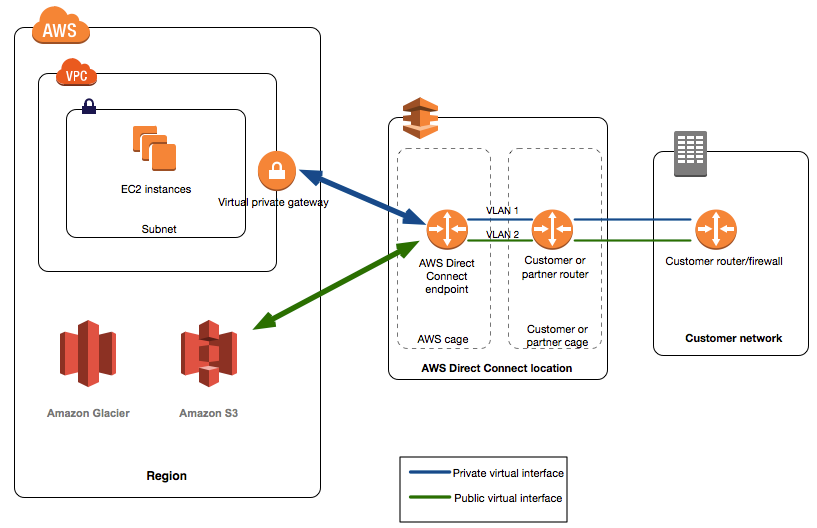
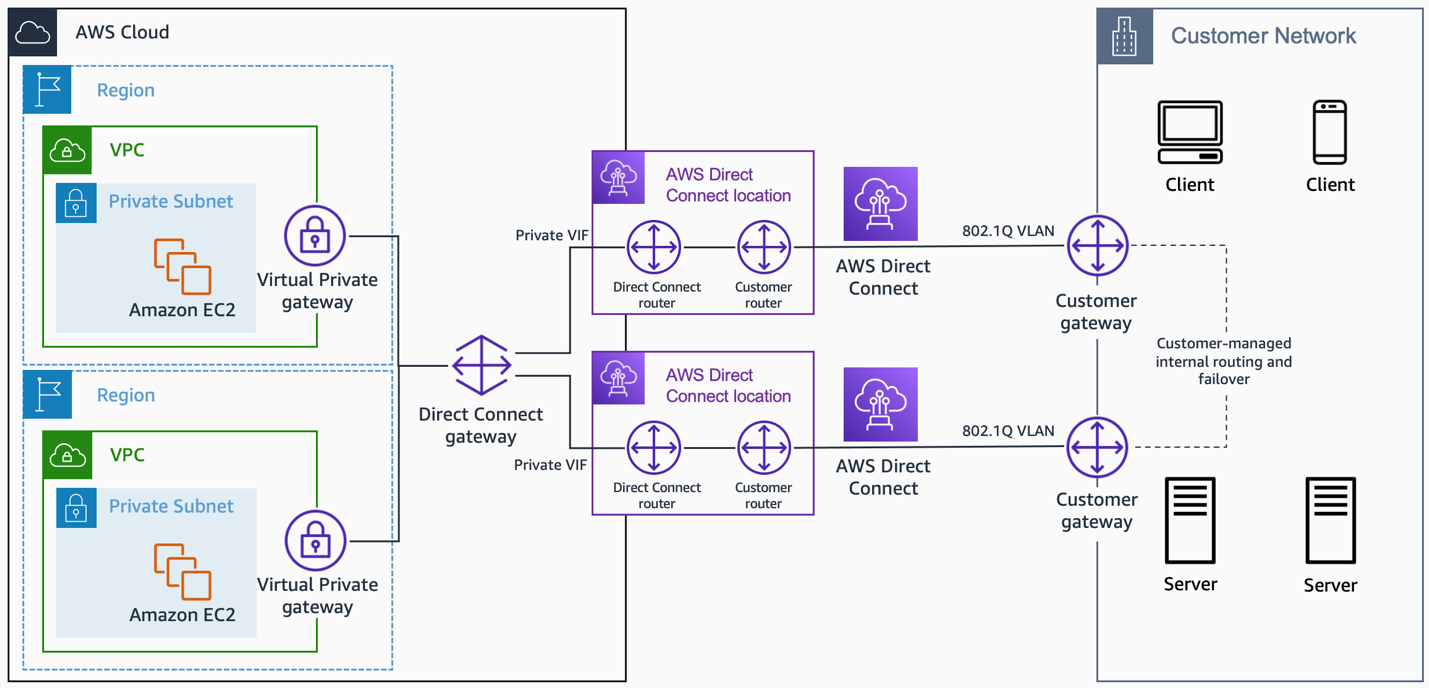
  • AWS Direct Connect helps establish a dedicated private connection between an on-premises network and AWS.
  • Direct Connect can reduce network costs, increase bandwidth throughput, and provide a more consistent network experience than internet-based or VPN connections
  • Direct Connect uses industry-standard VLANs to access EC2 instances running within a VPC using private IP addresses
  • Direct Connect lets you establish
    • Dedicated Connection: A 1G, 10G, or 100G physical Ethernet connection associated with a single customer through AWS.
    • Hosted Connection: A physical Ethernet connection that an AWS Direct Connect Partner provisions on behalf of a customer. Speeds range from 50 Mbps to 10 Gbps.
  • Direct Connect provides the following Virtual Interfaces
    • Private virtual interface – to access a VPC using private IP addresses.
    • Public virtual interface – to access all AWS public services using public IP addresses.
    • Transit virtual interface – to access one or more transit gateways associated with Direct Connect gateways.
  • Direct Connect connections are not redundant as each connection consists of a single dedicated connection between ports on your router and an Amazon router
  • Direct Connect High Availability can be configured using
    • Multiple Direct Connect connections
    • Back-up IPSec VPN connection
  • SiteLink – enables sending data between AWS Direct Connect locations to create private network connections between offices and data centers in a global network, bypassing AWS Regions. Data travels over the shortest path between locations using the AWS global network backbone.
  • VIF Rate Limiters (Jun 2026) – supports Virtual Interface Rate Limiters on dedicated connections to prevent network congestion caused by unexpected traffic spikes on a VIF, protecting other VIFs on the same connection.

LAGs

  • Direct Connect link aggregation group (LAG) is a logical interface that uses the Link Aggregation Control Protocol (LACP) to aggregate multiple connections at a single AWS Direct Connect endpoint, allowing you to treat them as a single, managed connection.
  • LAGs need the following
    • All connections in the LAG must use the same bandwidth.
    • A maximum of four connections in a LAG. Each connection in the LAG counts toward the overall connection limit for the Region.
    • All connections in the LAG must terminate at the same AWS Direct Connect endpoint.

Direct Connect Gateway

  • is a globally available resource to enable connections to multiple VPCs across different regions or AWS accounts.
  • allows you to connect an AWS Direct Connect connection to one or more VPCs in the account that are located in the same or different regions
  • allows connecting any participating VPCs from one private VIF, reducing Direct Connect management.
  • can be created in any public region and accessed from all other public regions
  • can also access the public resources in any AWS Region using a public virtual interface.
  • supports connecting up to 20 VPCs (via VGWs) globally over a single private VIF.

AWS Interconnect – Multicloud

  • is a new managed connectivity service (GA Apr 2026) that simplifies multicloud connectivity between AWS and other cloud service providers.
  • provides simple, resilient, high-speed private connections to other CSPs without needing to manage physical cross-connects or third-party providers.
  • attaches to a Direct Connect Gateway on the AWS side.
  • supported CSPs:
    • Google Cloud – Generally Available
    • Oracle Cloud Infrastructure (OCI) – Preview (May 2026)
    • Microsoft Azure – Coming later in 2026
  • offers a Free Tier – fully managed 500 Mbps interconnect to another CSP at no charge on the AWS side (May 2026).
  • eliminates complex multicloud networking setups that previously required physical Direct Connect connections and manual peering arrangements.

Amazon VPC Lattice

  • is an application networking service that consistently connects, monitors, and secures communications between services and resources across VPCs and accounts.
  • automatically manages network connectivity and application layer routing between services across different VPCs and AWS accounts.
  • abstracts IP address dependencies, allowing applications to communicate securely without direct network routing.
  • supports HTTP, HTTPS, gRPC, TLS, and TCP protocols.
  • key features include:
    • Service Networks – logical grouping of services with shared access and observability policies.
    • Service Network VPC Endpoints – allows VPCs to connect to service networks via VPC endpoints.
    • VPC Resources Support (re:Invent 2024) – enables connectivity to TCP resources such as databases, domain names, and IP addresses across VPCs and accounts.
    • Auth Policies – fine-grained access control using IAM-based policies at the service network and service level.
  • can replace complex Transit Gateway and PrivateLink configurations for service-to-service communication within a Region.
  • does not natively support cross-Region service access; requires a proxy solution for external Region connectivity.

Amazon VPC Route Server

  • is a new managed service (GA Apr 2025) that enables dynamic routing within Amazon VPC using Border Gateway Protocol (BGP).
  • allows deploying endpoints in a VPC and peering them with virtual appliances to advertise routes using BGP.
  • filters received routes using standard BGP attributes and propagates selected routes to specified VPC route tables.
  • dynamically updates VPC and internet gateway route tables with preferred IPv4 or IPv6 routes for routing fault tolerance.
  • eliminates the need for complex scripting or Lambda-based failover mechanisms for virtual appliance routing.
  • key use cases:
    • Automatic active/standby failover for inspection appliances
    • Dynamic routing between cloud applications and on-premises systems via virtual appliances
    • Integration with Transit Gateway for centralized inspection architectures
  • Logging Enhancements (Jun 2025) – provides real-time monitoring of BGP and BFD session states, historical peer-to-peer session data, with delivery via CloudWatch, S3, Data Firehose, or AWS CLI.

References

AWS CloudFormation Best Practices

AWS CloudFormation Best Practices

  • AWS CloudFormation Best Practices are based on real-world experience from current AWS CloudFormation customers
  • AWS CloudFormation Best Practices help provide guidelines on
    • how to plan and organize stacks,
    • create templates that describe resources and the software applications that run on them,
    • and manage stacks and their resources

Required Mainly for Developer, SysOps Associate & DevOps Professional Exam

Planning and Organizing

Shorten the Feedback Loop to Improve Development Velocity

  • Adopt practices and tools that help shorten the feedback loop for infrastructure described with CloudFormation templates.
  • Perform early linting and testing of templates in your workstation to discover potential syntax and configuration issues before submitting to a source code repository.
  • Use CloudFormation Linter (cfn-lint) to validate templates against the CloudFormation Resource Specification, including checking valid values for resource properties and best practices.
  • Use TaskCat to test templates by programmatically creating stacks in the AWS Regions you choose, generating pass/fail reports per Region.
  • Integrate cfn-lint in your source code repository for pre-commit validation of templates.
  • Use the CloudFormation Language Server (launched 2025) in your IDE via AWS Toolkit for context-aware auto-completion, built-in validation, and drift-aware deployment views.

Organize Your Stacks By Lifecycle and Ownership

  • Use the lifecycle and ownership of the AWS resources to help you decide what resources should go in each stack.
  • By grouping resources with common lifecycles and ownership, owners can make changes to their set of resources by using their own process and schedule without affecting other resources.
  • Use two common frameworks for organizing stacks: a multi-layered architecture (horizontal layers with dependencies) or a service-oriented architecture (SOA) (self-contained services wired together).
  • For e.g. Consider an Application using Web and Database instances. Both the Web and Database have a different lifecycle and usually the ownership lies with different teams. Maintaining both in a single stack would need communication and co-ordination between different teams introducing complexity. It would be best to have different stacks owned by the respective teams, so that they can update their resources without impacting each other’s stack.

Use Cross-Stack References to Export Shared Resources

  • With multiple stacks, there is usually a need to refer values and resources across stacks.
  • Use cross-stack references to export resources from a stack so that other stacks can use them.
  • CloudFormation provides two approaches:
    • Fn::ImportValue – Import values that another stack has explicitly exported. Creates a strong reference within the same account and Region. CloudFormation prevents deleting the exporting stack while other stacks depend on its exports.
    • Fn::GetStackOutput – Reference any stack output directly, including outputs from stacks in other AWS accounts or Regions, without requiring explicit exports. Creates a weak reference resolved at create or update time.
  • For e.g. Web stack would always need resources from the Network stack like VPC, Subnets etc.

Use CloudFormation StackSets for Multi-Account and Multi-Region Deployments

  • CloudFormation StackSets extend the capability of stacks by enabling you to create, update, or delete stacks across multiple accounts and Regions with a single operation.
  • Use StackSets for deploying common infrastructure components, compliance controls, or shared services across your organization.
  • Implement service-managed permissions with AWS Organizations for simplified permission management without manually configuring IAM roles in each account.
  • StackSets Deployment Ordering (2025): Supports defining the sequence in which stack instances automatically deploy across accounts and regions using the DependsOn parameter (up to 10 dependencies per stack instance).

Use IAM to Control Access

  • Use IAM to control access to
    • what AWS CloudFormation actions users can perform, such as viewing stack templates, creating stacks, or deleting stacks
    • what actions CloudFormation can perform on resources on their behalf
  • Remember, having access to CloudFormation does not provide user with access to AWS resources. That needs to be provided separately.
  • To separate permissions between a user and the AWS CloudFormation service, use a service role. AWS CloudFormation uses the service role’s policy to make calls instead of the user’s policy.
  • Apply the principle of least privilege – Grant only the permissions necessary for the intended functionality, and avoid using wildcard permissions.
  • Use IAM Access Analyzer to review permissions granted to CloudFormation service roles and identify unused permissions.

Verify Quotas for All Resource Types

  • Ensure that stack can create all the required resources without hitting the AWS account limits.
  • By default, you can only launch 2000 CloudFormation stacks per Region in your AWS account.

Reuse Templates to Replicate Stacks in Multiple Environments

  • Reuse templates to replicate infrastructure in multiple environments
  • Use parameters, mappings, and conditions sections to customize and make templates reusable
  • for e.g. creating the same stack in development, staging and production environment with different instance types, instance counts etc.

Use Nested Stacks to Reuse Common Template Patterns

  • Nested stacks are stacks that create other stacks.
  • Nested stacks separate out the common patterns and components to create dedicated templates for them, preventing copy pasting across stacks.
  • for e.g. a standard load balancer configuration can be created as nested stack and just used by other stacks

Use Modules to Reuse Resource Configurations

  • Modules allow packaging resource configurations for inclusion across stack templates in a transparent, manageable, and repeatable way.
  • Modules can encapsulate common service configurations and best practices as modular, customizable building blocks.
  • Modules can be for a single resource (e.g., best practices for an EC2 instance) or multiple resources (common application architecture patterns).
  • Modules can be nested into other modules for higher-level building blocks.
  • Available in the CloudFormation registry and can be used like a native resource.
  • When using a module, the template is expanded into the consuming template, allowing access to resources inside using Ref or Fn::GetAtt.

Adopt Infrastructure as Code Practices

  • Treat CloudFormation templates as code by implementing Infrastructure as Code (IaC) practices.
  • Store templates in version control systems, implement code reviews, and use automated testing.
  • Implement CI/CD pipelines using AWS CodePipeline, CodeBuild, and CodeDeploy for automated infrastructure deployments.
  • Use CloudFormation Git Sync to automatically trigger deployments whenever a tracked Git repository is updated, with support for Pull Request review workflows (2024).

Creating Templates

Do Not Embed Credentials in Your Templates

  • Use dynamic references in your stack template rather than embedding sensitive information.
  • Dynamic references provide a compact way to reference external values stored in other services:
    • AWS Systems Manager Parameter Store – for configuration data and secure strings
    • AWS Secrets Manager – for passwords, database credentials, API keys, and other secrets with rotation support
  • CloudFormation retrieves the value of the dynamic reference during stack and change set operations but never stores the actual reference value.
  • Use the NoEcho property to obfuscate parameter values if using input parameters. Note that NoEcho doesn’t prevent values from being logged if passed to other services.

Use AWS-Specific Parameter Types

  • For existing AWS-specific values, such as existing Virtual Private Cloud IDs or an EC2 key pair name, use AWS-specific parameter types.
  • AWS CloudFormation can quickly validate values for AWS-specific parameter types before creating your stack.
  • The CloudFormation console shows a drop-down list of valid values, eliminating the need to look up or memorize IDs.

Use Parameter Constraints

  • Use Parameter constraints to describe allowed input values so that CloudFormation catches any invalid values before creating a stack.
  • Set constraints such as minimum length, maximum length, and allowed patterns.
  • For e.g. constraints for database user name with min and max length

Use Pseudo Parameters to Promote Portability

  • Use pseudo parameters (AWS::Partition, AWS::Region, AWS::AccountId, AWS::StackName) as arguments for intrinsic functions to increase template portability across Regions and accounts.
  • Instead of hard-coding ARN values, use !Sub 'arn:${AWS::Partition}:ssm:${AWS::Region}:${AWS::AccountId}:parameter/MySampleParameter'.
  • Use AWS::StackName as a prefix for exports to help ensure unique export names.

Use AWS::CloudFormation::Init to Deploy Software Applications on Amazon EC2 Instances

  • Use AWS::CloudFormation::Init resource and the cfn-init helper script to install and configure software applications on EC2 instances.
  • Describe desired configurations rather than scripting procedural steps.
  • Configurations can be updated without recreating instances.

Use the Latest Helper Scripts

  • Helper scripts are updated periodically. Include yum install -y aws-cfn-bootstrap in the UserData property before calling helper scripts.

Validate Templates Before Using Them

  • Validate templates before creating or updating a stack.
  • Validating a template helps catch syntax and some semantic errors, such as circular dependencies, before AWS CloudFormation creates any resources.
  • During validation, AWS CloudFormation first checks if the template is valid JSON or a valid YAML. If both checks fail, AWS CloudFormation returns a template validation error.
  • Use AWS CloudFormation Guard (cfn-guard) for policy-as-code validation to ensure templates comply with organizational policies, security best practices, and governance requirements.
  • Pre-deployment Validation (2025): CloudFormation now validates templates during change set creation, catching common errors like invalid property syntax, resource name conflicts, and S3 bucket constraints before resource provisioning begins.

Use YAML or JSON for Template Authoring

  • Use YAML when you prioritize human readability, want to include comments, or work with complex nested structures.
  • Use JSON when integrating with tools that prefer JSON, working with programmatic template generation, or requiring strict data validation.
  • YAML is generally recommended for manual template authoring due to readability and comment support.

Implement a Comprehensive Tagging Strategy

  • Implement a consistent tagging strategy for all resources created by CloudFormation templates.
  • Tags help with resource organization, cost allocation, access control, and automation.
  • Include tags for environment, owner, cost center, application, and purpose.
  • Use the stack’s Tags property to apply tags to all supported resources automatically.

Leverage Template Macros for Advanced Transformations

  • CloudFormation macros enable custom processing on templates, from find-and-replace operations to complex transformations that generate additional resources.
  • The AWS Serverless Application Model (SAM) is an example of a macro that simplifies serverless application development.

Managing Stacks

Manage All Stack Resources Through AWS CloudFormation

  • After launching the stack, any further updates should be done through CloudFormation only.
  • Doing changes outside the stack can create a mismatch between the stack’s template and the current state of the stack resources (known as drift), which can cause errors if you update or delete the stack.

Create Change Sets Before Updating Your Stacks

  • Change sets provide a preview of how the proposed changes to a stack might impact the running resources before you implement them.
  • CloudFormation doesn’t make any changes to the stack until you execute the change set, allowing you to decide whether to proceed with the proposed changes or create another change set.
  • Drift-Aware Change Sets (2025): Provides a three-way comparison between your new template, last-deployed template, and actual infrastructure state to prevent unexpected overwrites of drift and help keep infrastructure in sync with templates.

Use Stack Policies

  • Stack policies help protect critical stack resources from unintentional updates that could cause resources to be interrupted or even replaced.
  • During a stack update, you must explicitly specify the protected resources that you want to update; otherwise, no changes are made to protected resources.

Use AWS CloudTrail to Log AWS CloudFormation Calls

  • AWS CloudTrail tracks anyone making AWS CloudFormation API calls in the AWS account.
  • API calls are logged whenever anyone uses the AWS CloudFormation API, the AWS CloudFormation console, a back-end console, or AWS CloudFormation AWS CLI commands.
  • Enable logging and specify an Amazon S3 bucket to store the logs.

Use Code Reviews and Revision Controls to Manage Your Templates

  • Using code reviews and revision controls help track changes between different versions of your templates and changes to stack resources.
  • Maintaining history can help revert the stack to a certain version of the template.

Use Drift Detection Regularly

  • Regularly use the CloudFormation drift detection feature to identify resources that have been modified outside of CloudFormation management.
  • Detecting and resolving drift helps maintain the integrity of your infrastructure as code approach.
  • Consider implementing automated drift detection using AWS Lambda functions triggered by Amazon EventBridge rules to periodically check for drift and notify your team.
  • Use drift-aware change sets to systematically revert drift and keep infrastructure in sync with templates.

Configure Rollback Triggers for Automatic Recovery

  • Use rollback triggers to specify Amazon CloudWatch alarms that CloudFormation monitors during stack creation and update operations.
  • If any specified alarm goes into the ALARM state, CloudFormation automatically rolls back the entire stack operation.
  • Configure rollback triggers for critical metrics such as application error rates, resource utilization, or custom business metrics.

Implement Effective Stack Refactoring Strategies

  • Stack Refactoring (2025) enables reorganizing CloudFormation and CDK infrastructure without disrupting deployed resources.
  • Move resources between stacks, rename logical IDs, and decompose monolithic stacks into focused components while maintaining resource stability.
  • Use cases:
    • Splitting monolithic stacks into smaller, manageable stacks
    • Consolidating related resources from multiple stacks
    • Extracting reusable components into modules or nested stacks
    • Improving resource organization to reflect relationships and dependencies

Use CloudFormation Hooks for Lifecycle Management

  • CloudFormation Hooks provide code that proactively inspects the configuration of AWS resources before provisioning.
  • Hooks check if resources, stacks, and change sets are compliant with your organization’s security, operational, and cost optimization needs.
  • Can provide warnings before provisioning or fail the operation and stop it altogether.
  • Violations and warnings are logged in Amazon CloudWatch for visibility.
  • Managed Proactive Controls (2025): Hooks now supports managed proactive controls from the AWS Control Tower Controls Catalog, eliminating the need to write custom Hooks logic. Controls can run in warn mode for testing before enforcement.

Authoring Tools

Use IaC Generator to Create Templates from Existing Resources

  • IaC Generator (launched 2024) helps create CloudFormation templates from existing AWS resources that are managed outside CloudFormation.
  • Useful for replicating existing infrastructure, documenting manually created resources, or bringing unmanaged resources under CloudFormation management.
  • Targeted Resource Scans (2025): Supports scanning specific resource types instead of all resources, simplifying the template generation process.
  • Works with resource types supported by the Cloud Control API in your Region.

Use AWS Infrastructure Composer for Visual Template Design

  • AWS Infrastructure Composer (formerly AWS Application Composer) is a visual builder that helps create, visualize, and modify CloudFormation templates using drag-and-drop.
  • Useful for architecture planning, template modernization, training, and stakeholder communication.
  • Available in the CloudFormation console and as a VS Code extension via the AWS Toolkit.
  • Maintains a visual representation in sync with your IaC – changes in the visual canvas are reflected in the template and vice versa.

Consider Using AWS Cloud Development Kit (AWS CDK)

  • For complex infrastructure, use AWS CDK to define cloud resources using programming languages like TypeScript, Python, Java, and .NET.
  • AWS CDK generates CloudFormation templates from your code, combining CloudFormation capabilities with high-level programming constructs.
  • Provides high-level constructs that encapsulate best practices and simplify common infrastructure patterns.

Use the AWS IaC MCP Server for AI-Powered Development

  • AWS IaC MCP Server (2025) bridges AI assistants with AWS infrastructure development workflows using the Model Context Protocol (MCP).
  • Enables AI assistants to search CloudFormation and CDK documentation, validate templates, troubleshoot deployments, and follow best practices.
  • Provides remote documentation search tools and local validation/troubleshooting tools (cfn-lint, CloudFormation Guard, CloudTrail integration).

Security and Compliance

Implement Policy as Code with AWS CloudFormation Guard

  • AWS CloudFormation Guard (cfn-guard) is an open-source policy-as-code tool that allows defining and enforcing rules for CloudFormation templates.
  • Ensures templates comply with organizational policies, security best practices, and governance requirements.
  • Integrate cfn-guard into CI/CD pipelines to automatically validate templates against policy rules before deployment.
  • Includes a rulegen feature to extract rules from existing compliant CloudFormation templates.
  • Can be used with CloudFormation Hooks for proactive enforcement during provisioning.

Secure Sensitive Parameters

  • Use AWS Systems Manager Parameter Store or AWS Secrets Manager for sensitive information instead of embedding in templates.
  • Use dynamic references to securely retrieve values during stack operations:
    • {{resolve:ssm:parameter-name}} – for SSM Parameter Store values
    • {{resolve:ssm-secure:parameter-name}} – for SSM SecureString parameters
    • {{resolve:secretsmanager:secret-id}} – for Secrets Manager values
  • CloudFormation never stores the actual resolved secret value when using dynamic references.

AWS Certification Exam Practice Questions

  • Questions are collected from Internet and the answers are marked as per my knowledge and understanding (which might differ with yours).
  • AWS services are updated everyday and both the answers and questions might be outdated soon, so research accordingly.
  • AWS exam questions are not updated to keep up the pace with AWS updates, so even if the underlying feature has changed the question might not be updated
  • Open to further feedback, discussion and correction.
  1. A company has deployed their application using CloudFormation. They want to update their stack. However, they want to understand how the changes will affect running resources before implementing the updated. How can the company achieve the same?
    1. Use CloudFormation Validate Stack feature
    2. Use CloudFormation Dry Run feature
    3. Use CloudFormation Stage feature
    4. Use CloudFormation Change Sets feature
  2. You have multiple similar three-tier applications and have decided to use CloudFormation to maintain version control and achieve automation. How can you best use CloudFormation to keep everything agile and maintain multiple environments while keeping cost down?
    1. Create multiple templates in one CloudFormation stack.
    2. Combine all resources into one template for version control and automation.
    3. Use CloudFormation custom resources to handle dependencies between stacks
    4. Create separate templates based on functionality, create nested stacks with CloudFormation.
  3. You are working as an AWS DevOps admins for your company. You are in-charge of building the infrastructure for the company’s development teams using CloudFormation. The template will include building the VPC and networking components, installing a LAMP stack and securing the created resources. As per the AWS best practices what is the best way to design this template?
    1. Create a single CloudFormation template to create all the resources since it would be easier from the maintenance perspective.
    2. Create multiple CloudFormation templates based on the number of VPC’s in the environment.
    3. Create multiple CloudFormation templates based on the number of development groups in the environment.
    4. Create multiple CloudFormation templates for each set of logical resources, one for networking, and the other for LAMP stack creation.
  4. A team wants to ensure that all CloudFormation templates in their CI/CD pipeline comply with company security policies before deployment. Which approach should they use?
    1. Use CloudFormation drift detection before each deployment
    2. Manually review each template before deployment
    3. Integrate AWS CloudFormation Guard (cfn-guard) into the CI/CD pipeline to validate templates against policy rules
    4. Use CloudFormation Change Sets to validate compliance
  5. A DevOps engineer needs to detect and remediate configuration changes made to CloudFormation-managed resources outside of CloudFormation. What is the most effective approach introduced in 2025?
    1. Use standard Change Sets and manually compare with actual state
    2. Delete and recreate the stack
    3. Use Drift-Aware Change Sets that provide a three-way comparison between the new template, last-deployed template, and actual infrastructure state
    4. Use AWS Config rules to detect drift
  6. A company has manually created resources in their AWS account and wants to bring them under CloudFormation management. What is the recommended approach?
    1. Delete and recreate all resources using CloudFormation templates
    2. Use CloudFormation resource import only
    3. Use the IaC Generator to scan existing resources and generate CloudFormation templates, then import the resources
    4. Manually write CloudFormation templates for each resource
  7. An organization wants to enforce security controls on CloudFormation resource configurations before they are provisioned, without writing custom code. Which feature should they use?
    1. CloudFormation Stack Policies
    2. AWS Config rules in proactive mode
    3. CloudFormation Change Sets
    4. CloudFormation Hooks with managed proactive controls from the AWS Control Tower Controls Catalog

References

AWS Certified SysOps Administrator – Associate (SOA-C01) Exam Learning Path

AWS Certified SysOps Administrator – Associate (SOA-C01) Exam Learning Path

⚠️ EXAM RETIRED – SOA-C01 No Longer Available

The AWS Certified SysOps Administrator – Associate (SOA-C01) exam has been retired. It was replaced by the SOA-C02 exam, which itself was retired on September 29, 2025.

The current exam is now the AWS Certified CloudOps Engineer – Associate (SOA-C03), launched on September 30, 2025.

Recommended Next Steps:

This content is maintained for historical reference only. If you are preparing for certification, please use the SOA-C03 exam resources.

AWS Certified SysOps Administrator – Associate (SOA-C01) exam was the AWS associate-level operations exam that validated the ability to:

  • Deploy, manage, and operate scalable, highly available, and fault tolerant systems on AWS
  • Implement and control the flow of data to and from AWS
  • Select the appropriate AWS service based on compute, data, or security requirements
  • Identify appropriate use of AWS operational best practices
  • Estimate AWS usage costs and identify operational cost control mechanisms
  • Migrate on-premises workloads to AWS

Refer AWS Certified SysOps – Associate Exam Guide Sep 18

AWS Certified SysOps Administrator - Associate Content Outline

AWS Certified SysOps Administrator – Associate (SOA-C01) Exam Summary

  • AWS Certified SysOps Administrator – Associate exam was quite different from the previous one with more focus on the error handling, deployment, monitoring.
  • AWS Certified SysOps Administrator – Associate exam covered a lot of AWS services like ALB, Lambda, AWS Config, AWS Inspector, AWS Shield while focusing majorly on other services like CloudWatch, Metrics from various services, CloudTrail.
  • Be sure to cover the following topics
    • Monitoring & Management Tools
      • Understand CloudWatch monitoring to provide operational transparency
        • Know which EC2 metrics it can track (disk, network, CPU, status checks) and which would need custom metrics (memory, disk swap, disk storage etc.)
        • Know ELB monitoring
          • Classic Load Balancer metrics SurgeQueueLength and SpilloverCount
          • Reasons for 4XX and 5XX errors
      • Understand CloudTrail for audit and governance
      • Understand AWS Config and its use cases
      • Understand AWS Systems Manager and its various services like parameter store, patch manager
      • Understand AWS Trusted Advisor and what it provides
      • Very important to understand AWS CloudWatch vs AWS CloudTrail vs AWS Config
      • Very important to understand Trust Advisor vs Systems manager vs Inspector
      • Know Personal Health Dashboard & Service Health Dashboard
      • Deployment tools
        • Know AWS OpsWorks and its ability to support chef & puppet
        • Know Elastic Beanstalk and its advantages
        • Understand AWS CloudFormation
          • Know stacks, templates, nested stacks
          • Know how to wait for resources setup to be completed before proceeding esp. cfn-signal
          • Know how to retain resources (RDS, S3), prevent rollback in case of a failure
    • Networking & Content Delivery
      • Understand VPC in depth
        • Understand the difference between
          • Bastion host – allow access to instances in private subnet
          • NAT – route traffic from private subnets to internet
          • NAT instance vs NAT Gateway
          • Internet Gateway – Access to internet
          • Virtual Private Gateway – Connectivity between on-premises and VPC
          • Egress-Only Internet Gateway – relevant to IPv6 only to allow egress traffic from private subnet to internet, without allowing ingress traffic
        • Understand
        • Understand how VPC Peering works and limitations
        • Understand VPC Endpoints and supported services
        • Ability to debug networking issues like EC2 not accessible, EC2 instances not reachable, Instances in subnets not able to communicate with others or Internet.
      • Understand Route 53 and Routing Policies and their use cases
        • Focus on Weighted, Latency routing policies
      • Understand VPN and Direct Connect and their use cases
      • Understand CloudFront and use cases
      • Understand ELB, ALB and NLB and what features they provide like
        • ALB provides content and path routing
        • NLB provides ability to give static IPs to load balancer.
    • Compute
      • Understand EC2 in depth
        • Understand EC2 instance types
        • Understand EC2 purchase options esp. spot instances and improved reserved instances options.
        • Understand how IO Credits work and T2 burstable performance and T2 unlimited
        • Understand EC2 Metadata & Userdata. Whats the use of each? How to look up instance data after it is launched.
        • Understand EC2 Security.
          • How IAM Role work with EC2 instances
          • IAM Role can now be attached to stopped and runnings instances
        • Understand AMIs and remember they are regional and how can they be shared with others.
        • Troubleshoot issues with launching EC2 esp. RequestLimitExceeded, InstanceLimitExceeded etc.
        • Troubleshoot connectivity, lost ssh keys issues
      • Understand Auto Scaling
      • Understand Lambda and its use cases
      • Understand Lambda with API Gateway
    • Storage
    • Databases
    • Security
      • Understand IAM as a whole
      • Understand KMS for key management and envelope encryption
      • Understand CloudHSM and KMS vs CloudHSM esp. support for symmetric and asymmetric keys
      • Know AWS Inspector and its use cases
      • Know AWS GuardDuty as managed threat detection service. Will help eliminate as the option
      • Know AWS Shield esp. the Shield Advanced option and the features it provides
      • Know WAF as Web Traffic Firewall
      • Know AWS Artifact as on-demand access to compliance reports
    • Integration Tools
      • Understand SQS as message queuing service and SNS as pub/sub notification service
        • Focus on SQS as a decoupling service
        • Understand SQS FIFO, make sure you know the differences between standard and FIFO
      • Understand CloudWatch integration with SNS for notification
    • Cost management

AWS Certified SysOps Administrator – Associate (SOA-C01) Exam Resources

📌 Note: The resources below were relevant for the retired SOA-C01 exam. For current certification preparation, refer to:

AWS Cloud Computing Whitepapers

AWS Certified SysOps Administrator – Associate (SOA-C01) Exam Contents

Domain 1: Monitoring and Reporting

  1. Create and maintain metrics and alarms utilizing AWS monitoring services
  2. Recognize and differentiate performance and availability metrics
  3. Perform the steps necessary to remediate based on performance and availability metrics

Domain 2: High Availability

  1. Implement scalability and elasticity based on use case
  2. Recognize and differentiate highly available and resilient environments on AWS

Domain 3: Deployment and Provisioning

  1. Identify and execute steps required to provision cloud resources
  2. Identify and remediate deployment issues

Domain 4: Storage and Data Management

  1. Create and manage data retention
  2. Identify and implement data protection, encryption, and capacity planning needs

Domain 5: Security and Compliance

  1. Implement and manage security policies on AWS
  2. Implement access controls when using AWS
  3. Differentiate between the roles and responsibility within the shared responsibility model

Domain 6: Networking

  1. Apply AWS networking features
  2. Implement connectivity services of AWS
  3. Gather and interpret relevant information for network troubleshooting

Domain 7: Automation and Optimization

  1. Use AWS services and features to manage and assess resource utilization
  2. Employ cost-optimization strategies for efficient resource utilization
  3. Automate manual or repeatable process to minimize management overhead

Exam Evolution: SOA-C01 → SOA-C02 → SOA-C03 (CloudOps Engineer)

The AWS SysOps Administrator certification has gone through significant evolution:

  • SOA-C01 (2018-2021) – Original version covered in this post. Focused on traditional operations with 7 domains.
  • SOA-C02 (2021-2025) – Added hands-on exam labs, introduced automation focus, reduced to 6 domains. Retired September 29, 2025.
  • SOA-C03 / AWS Certified CloudOps Engineer – Associate (2025-present) – Current exam. Rebranded to reflect modern cloud operations. Added containers (ECS, EKS, ECR), multi-account architectures, and expanded automation coverage. 5 domains with new question types (ordering, matching, case studies).

SOA-C03 Exam Domains (Current)

Domain Weight
Monitoring, Logging, Analysis, Remediation & Performance Optimization 22%
Reliability and Business Continuity 22%
Deployment, Provisioning, and Automation 22%
Networking and Content Delivery 18%
Security and Compliance 16%

Key additions in SOA-C03 compared to SOA-C01:

  • Container Operations – Amazon ECS, EKS, ECR, Fargate
  • Multi-Account Architecture – AWS Organizations, Service Control Policies (SCPs), AWS Control Tower
  • Modern Automation – AWS CDK, EventBridge, expanded Systems Manager capabilities
  • Cost Optimization – Compute Optimizer, AWS Budgets actions, Savings Plans
  • Enhanced Security – Security Hub, AWS Backup, Secrets Manager rotation

For the current exam preparation, refer to the official AWS CloudOps Engineer certification page.

AWS Certified Developer – Associate DVA-C01 Exam Learning Path

AWS Certified Developer – Associate DVA-C01 Exam Learning Path

⚠️ EXAM RETIRED — DVA-C01 No Longer Available

The AWS Certified Developer – Associate DVA-C01 exam was retired on February 27, 2023.

It has been replaced by the DVA-C02 exam. This content is maintained for historical reference only.

👉 For the current exam, see: AWS Certified Developer – Associate DVA-C02 Exam Learning Path

Key DVA-C02 Changes vs DVA-C01:

  • Domain restructuring — 4 domains: Development with AWS Services (32%), Security (26%), Deployment (24%), Troubleshooting & Optimization (18%)
  • More hands-on focus — Emphasis on writing, testing, deploying, and debugging code
  • New services — Amazon Q Developer, EventBridge, Step Functions, AppSync, CDK
  • AI-assisted development — Amazon Q Developer added in December 2024 revision
  • Removed focus — Less emphasis on architecture design, more on CI/CD workflows

AWS Certified Developer – Associate DVA-C01 exam was the AWS exam version available from June 2018 to February 2023 and has been replaced by the DVA-C02 exam. It validated:

  • Demonstrate an understanding of core AWS services, uses, and basic AWS architecture best practices.
  • Demonstrate proficiency in developing, deploying, and debugging cloud-based applications using AWS.

Refer AWS Certified Developer – Associate (Released June 2018) Exam Blue Print

AWS Certified Developer - Associate June 2018 Domains

AWS Certified Developer – Associate DVA-C01 Summary

  • AWS Certified Developer – Associate DVA-C01 exam was quite different from the previous one with more focus on the hands-on development and deployment concepts rather than just the architectural concepts
  • AWS Certified Developer – Associate DVA-C01 exam covered a lot of AWS services like Lambda, X-Ray while focusing majorly on other services like DynamoDB, Elastic Beanstalk, S3, EC2
  • Note: DVA-C01 was retired on Feb 27, 2023. For current exam preparation, refer to the DVA-C02 Learning Path

AWS Developer – Associate Exam Resources (Updated for DVA-C02)

AWS Developer – Associate DVA-C01 Exam Topics

  • Be sure to cover the following topics
    • Compute
      • Understand what AWS services you can use to build a serverless architecture?
      • Make sure you know and understand Lambda and serverless architecture, its features and use cases.
      • Know Lambda limits for e.g. execution time, deployable zipped and unzipped package limit
      • Be sure to know how to deploy, package using Lambda.
      • Understand tracing of Lambda functions using X-Ray
      • Understand integration of Lambda with CloudWatch.
      • Understand how to handle multiple releases using Alias
      • Know AWS Step Functions to manage Lambda functions flow
      • Understand Lambda with API Gateway
      • Understand API Gateway stages, ability to cater to different environments for e.g. dev, test, prod
      • Understand EC2 as a whole
      • Understand EC2 Metadata & Userdata. Whats the use of each? How to look up instance data after it is launched.
      • Understand EC2 Security. How IAM Role work with EC2 instances.
      • Understand how does EC2 evaluates the order of credentials, when multiple are provided. Remember the order – Environment variables -> Java system properties -> Default credential profiles file -> ECS container credentials -> Instance Profile credentials
      • Know Elastic Beanstalk at a high level, what it provides and its ability to get an application running quickly
      • Understand Elastic Beanstalk configurations and deployment types with their advantages and disadvantages
    • Databases
      • Understand relational and NoSQLs data storage options which include RDS, DynamoDB and their use cases
      • Understand DynamoDB Secondary Indexes
      • Make sure you understand DynamoDB provisioned throughput for Read/Writes and its calculations
      • Make sure you understand DynamoDB Consistency Model – difference between Strongly Consistent and Eventual Consistency
      • Understand DynamoDB with its low latency performance, DAX
      • Know how to configure fine grained security for DynamoDB table, items, attributes
      • Understand DynamoDB Best Practices regarding
        • table design
        • provisioned throughput
        • Query vs Scan operations
        • improving Scan operation performance
      • Understand RDS features – Read Replicas for scalability, Multi-AZ for High Availability
      • Know ElastiCache use cases, mainly for caching performance
      • Understand ElastiCache Redis vs Memcached
    • Storage
      • Understand S3 storage option
      • Understand S3 Best Practices to improve performance for GET/PUT requests
      • Understand S3 features like different storage classes with lifecycle policies, static website hosting, versioning, Pre-Signed URLs for both upload and download, CORS
    • Security
      • Understand IAM as a whole
      • Focus on IAM role and its use case especially with EC2 instance
      • Know how to test and validate IAM policies
      • Understand IAM identity providers and federation and use cases
      • Understand how AWS Cognito works and what features it provides
      • Understand MFA and How would implement two factor authentication for your application
      • Understand KMS for key management and envelope encryption
      • Know what services support KMS
        • Remember SQS, Kinesis now provides SSE support
      • Focus on S3 with SSE, SSE-C, SSE-KMS. How they work and differ?
      • Know how can you enforce only buckets to only accept encrypted objects
      • Know various KMS encryption options encrypt, reencrypt, generateEncryptedDataKey etc
      • Know how KMS impacts the performance of the services
    • Management Tools
      • Understand CloudWatch monitoring to provide operational transparency
      • Know which EC2 metrics it can track.
      • Understand CloudWatch is extendable with custom metrics
      • Understand CloudTrail for Audit
    • Integration Tools
      • Understand SQS as message queuing service and SNS as pub/sub notification service
      • Understand SQS features like visibility, long poll vs short poll
      • Focus on SQS as a decoupling service
      • AWS has released SQS FIFO, make sure you know the differences between standard and FIFO
      • Know the different development and deployment tools like CodeCommit, CodeBuild, CodeDeploy, CodePipeline
    • Networking
      • Does not cover much on networking or designing of networks, but be sure you understand VPC, Subnets, Routes, Security Groups etc.

AWS Cloud Computing Whitepapers

AWS Certified Developer – Associate DVA-C01 Exam Contents

Note: These domains are specific to the retired DVA-C01 exam. The current DVA-C02 exam has different domain structure and weightings. See the DVA-C02 Learning Path for current exam domains.

Domain 1: Deployment

  1. Deploy written code in AWS using existing CI/CD pipelines, processes, and patterns.
  1. Deploy applications using Elastic Beanstalk.
  1. Prepare the application deployment package to be deployed to AWS.
  2. Deploy serverless applications.

Domain 2: Security

  1. Make authenticated calls to AWS services.
  1. Implement encryption using AWS services.
  2. Implement application authentication and authorization.

Domain 3: Development with AWS Services

  1. Write code for serverless applications.
  1. Translate functional requirements into application design.
  1. Implement application design into application code.
  2. Write code that interacts with AWS services by using APIs, SDKs, and AWS CLI.

Domain 4: Refactoring

  1. Optimize application to best use AWS services and features.
  2. Migrate existing application code to run on AWS.

Domain 5: Monitoring and Troubleshooting

  1. Write code that can be monitored.
  2. Perform root cause analysis on faults found in testing or production.

DVA-C01 vs DVA-C02 — Key Differences

If you studied for DVA-C01 and need to understand what changed for DVA-C02:

  • Domain restructuring: DVA-C01 had 5 domains; DVA-C02 has 4 domains with different weightings
  • Refactoring domain removed: Merged into Development and Troubleshooting domains
  • More Lambda focus: Lambda gets its own dedicated task in DVA-C02
  • CI/CD emphasis: Greater focus on CodePipeline, CodeBuild, CodeDeploy, and CDK
  • New services added: EventBridge, AppSync, Step Functions, CDK, Amazon Q Developer
  • Services de-emphasized: Less focus on Elastic Beanstalk, more on containers (ECS/EKS)
  • Security weight increased: Security is now 26% of the exam (was 12% in DVA-C01)
  • AI-assisted development: December 2024 revision added Amazon Q Developer skills

For full DVA-C02 preparation guidance, visit the AWS Certified Developer – Associate DVA-C02 Exam Learning Path.

AWS Certified Solutions Architect – Associate SAA-C01 Exam Learning Path (Obsolete)

AWS Certified Solutions Architect – Associate SAA-C01 Exam Learning Path (Retired)

⚠️ EXAM RETIRED — SAA-C01 is No Longer Available

AWS Solutions Architect – Associate SAA-C01 was retired in 2020. It was succeeded by SAA-C02 (also retired August 29, 2022), and then by the current SAA-C03 exam.

This content is maintained for historical reference only. You cannot register for or take the SAA-C01 exam.

Current Exam:

What Changed (SAA-C01 → SAA-C03):

  • Greater focus on AWS Well-Architected Framework pillars
  • New services added: AWS Organizations, Control Tower, Lake Formation, EventBridge, Step Functions, EKS, Fargate, and more
  • Expanded security and governance coverage
  • More emphasis on hybrid cloud and migration strategies
  • Updated to reflect current AWS service landscape (2022+)

AWS Solutions Architect – Associate SAA-C01 Exam Summary (Historical)

AWS Solutions Architect – Associate SAA-C01 validated the ability to effectively demonstrate knowledge of how to architect and deploy secure and robust applications on AWS technologies:

  • Define a solution using architectural design principles based on customer requirements.
  • Provide implementation guidance based on best practices to the organization throughout the life cycle of the project.

The SAA-C01 exam focused on building scalable, highly available, cost-effective, performant, resilient, and operationally effective architectures across the following topic areas:

  • Be sure to cover the following topics
    • Networking
      • Be sure to create VPC from scratch. This is mandatory.
        • Create VPC and understand what’s a CIDR.
        • Create public and private subnets, configure proper routes, security groups, NACLs.
        • Create Bastion for communication with instances
        • Create NAT Gateway or Instances for instances in private subnets to interact with internet
        • Create two tier architecture with application in public and database in private subnets
        • Create three tier architecture with web servers in public, application and database servers in private.
        • Make sure to understand how the communication happens between Internet, Public subnets, Private subnets, NAT, Bastion etc.
      • Understand VPC endpoints and what services it can help interact
      • Understand difference between NAT Gateway and NAT Instance
      • Understand how NAT high availability can be achieved
      • Understand CloudFront as CDN and the static and dynamic caching it provides, what can be its origin (it can point to on-premises sources)
      • Understand Route 53 for routing, health checks and various routing policies it provides and their use cases mainly for high availability
      • Be sure to cover ELB in deep. AWS has introduced ALB and NLB and there are lot of questions on ALB
      • Understand ALB features with its ability for content based and URL based routing with support for dynamic port mapping with ECS
    • Storage
      • Understand various storage options S3, EBS, Instance store, EFS, Glacier and what are the use cases and anti patterns for each
      • Understand various EBS volume types and their use cases in terms of IOPS and throughput. SSD for IOPS and HDD for throughput
      • Understand Burst performance and I/O credits to handle occasional peaks
      • Understand S3 features like different storage classes with lifecycle policies, static website hosting, versioning, Pre-Signed URLs for both upload and download, CORS
      • Understand Glacier as an archival storage with various retrieval patterns
      • Understand Storage gateway and its different types
    • Compute
      • Understand EC2 as a whole
      • Understand Auto Scaling and ELB, how they work together to provide High Available and Scalable solution
      • Understand EC2 various purchase types – Reserved, On-demand and Spot and their use cases
      • Understand Lambda and serverless architecture, its features and use cases
      • Understand ECS with its ability to deploy containers and micro services architecture
      • Know Elastic Beanstalk at a high level, what it provides and its ability to get an application running quickly
    • Databases
    • Analytics
      • Understand Redshift as a data warehousing tool
      • Know Kinesis for real time data capture and analytics
    • Security
    • Management Tools
      • Understand CloudWatch monitoring to provide operational transparency
      • Know which EC2 metrics it can track. Remember, it cannot track memory and disk space/swap utilization
      • Understand CloudWatch is extendable with custom metrics
      • Understand CloudTrail for Audit
    • Integration Tools
      • Understand SQS as message queuing service and SNS as pub/sub notification service
      • Understand SQS features like visibility, long poll vs short poll
      • Focus on SQS as a decoupling service
      • Understand SQS FIFO and the differences between standard and FIFO

AWS Solutions Architect – Associate SAA-C01 Exam Resources (Archived)

Note: The resources below were relevant for the SAA-C01 exam (retired 2020). For current SAA-C03 study resources, visit the SAA-C03 Learning Path.

  • Online Courses (Historical)
  • General Preparation Tips (Still Valid)
    • Sign up with AWS for the Free Tier account which provides a lot of services to try for free
    • Read the FAQs for important topics, as they cover key points and are good for quick review

AWS Cloud Computing Whitepapers (Still Relevant)

AWS Solutions Architect – Associate SAA-C01 Exam Domains (Historical)

Domain 1: Design Resilient Architectures

  1. Choose reliable/resilient storage.
  2. Determine how to design decoupling mechanisms using AWS services.
  3. Determine how to design a multi-tier architecture solution.
  4. Determine how to design high availability and/or fault tolerant architectures.

Domain 2: Define Performant Architectures

  1. Choose performant storage and databases.
  2. Apply caching to improve performance.
  3. Design solutions for elasticity and scalability.

Domain 3: Specify Secure Applications and Architectures

  1. Determine how to secure application tiers.
  2. Determine how to secure data.
  3. Define the networking infrastructure for a single VPC application.

Domain 4: Design Cost-Optimized Architectures

  1. Determine how to design cost-optimized storage.
  2. Determine how to design cost-optimized compute.

Domain 5: Define Operationally-Excellent Architectures

  1. Choose design features in solutions that enable operational excellence.

Related Posts