AWS DynamoDB Best Practices

AWS DynamoDB Best Practices

Primary Key Design

  • Primary key uniquely identifies each item in a DynamoDB table and can be simple (a partition key only) or composite (a partition key combined with a sort key).
  • Partition key portion of a table’s primary key determines the logical partitions in which a table’s data is stored, which in turn affects the underlying physical partitions.
  • Partition key should have many unique values.
  • Distribute reads / writes uniformly across partitions to avoid hot partitions
  • Store hot and cold data in separate tables
  • Consider all possible query patterns to eliminate the use of scans and filters.
  • Choose a sort key depending on the application’s needs.
  • Avoid hot keys and hot partitions – a partition key design that doesn’t distribute I/O requests evenly can create “hot” partitions that result in throttling and use the provisioned I/O capacity inefficiently.
  • Use composite keys for access patterns – compose partition and sort keys by concatenating multiple attributes (e.g., {Type}#{ID}) to enable efficient queries without scans, especially in single-table designs.
  • Write sharding for high-volume keys – for items with high write volumes on the same partition key, add a random suffix or calculated suffix to distribute writes across multiple partitions.

Secondary Indexes

  • Use indexes based on the application’s query patterns.
  • Local Secondary Indexes – LSIs
    • Use primary key or LSIs when strong consistency is desired
    • Watch for expanding item collections (10 GB size limit!)
  • Global Secondary Indexes – GSIs
    • Use GSIs for finer control over throughput or when your application needs to query using a different partition key.
    • Can be used for eventually consistent read replicas – set up a global secondary index that has the same key schema as the parent table, with some or all of the non-key attributes projected into it.
    • Overloaded GSIs – use a single GSI with generic attribute names (e.g., GSI1PK, GSI1SK) to support multiple access patterns in single-table designs, reducing the total number of indexes needed.
  • Project fewer attributes – As secondary indexes consume storage and provisioned throughput, keep the index size as small as possible by projecting only required attributes as it would provide greater performance
  • Keep the number of indexes to a minimum – don’t create secondary indexes on attributes that aren’t queried often. Indexes that are seldom used contribute to increased storage and I/O costs without improving application performance.
  • Sparse indexes – DynamoDB indexes are Sparse and it writes a corresponding index entry only if the index sort key value is present in the item. If the sort key doesn’t appear in every table item, the index will not contain the item.

Large Items and Attributes

  • DynamoDB currently limits the size of each item (400 KB) that is stored in a table, which includes both attribute names and values binary length.
  • Use shorter (yet intuitive!) attribute names
  • Keep item size small.
  • Use compression (GZIP or LZO).
  • Split large attributes across multiple items (vertical partitioning).
  • Store metadata in DynamoDB and large BLOBs or attributes in S3.
  • Vertical partitioning – split items into multiple items using a sort key to distinguish parts, allowing you to exceed the 400 KB limit while maintaining efficient access to individual attribute groups.

Querying and Scanning Data

  • Avoid scans and filters – Scan operations are less efficient than other operations in DynamoDB. A Scan operation always scans the entire table or secondary index. It then filters out values to provide the result, essentially adding the extra step of removing data from the result set.
  • Use eventual consistency for reads.
  • Use parallel scans cautiously – parallel scans can improve throughput for large tables but consume significant read capacity. Use them only for infrequent, large-scale data processing tasks.

Time Series Data

  • Use a table per day, week, month, etc for storing time series data – create one table per period, provisioned with the required read and write capacity and the required indexes.
  • Before the end of each period, prebuild the table for the next period. Just as the current period ends, direct event traffic to the new table. Assign names to the tables that specify the periods they have recorded.
  • As soon as a table is no longer being written to, reduce its provisioned write capacity to a lower value (for example, 1 WCU), and provision whatever read capacity is appropriate. Reduce the provisioned read capacity of earlier tables as they age.
  • Archive or drop the tables whose contents are rarely or never needed.
  • Dropping tables is the fastest, simplest and cost-effective method if all the items are to be deleted from the table, without spending time in scanning and deleting each item.
  • Use TTL for automatic expiry – leverage Time to Live (TTL) to automatically delete expired items without consuming write throughput, ideal for session data, temporary records, and event logs.
  • Use DynamoDB Standard-IA table class – for older time series tables with infrequent access, switch to the Standard-Infrequent Access table class to save up to 60% on storage costs.

Capacity and Throughput Management

  • On-demand mode (recommended default) – on-demand mode is the default and recommended throughput option that eliminates capacity planning. DynamoDB instantly accommodates workloads as they ramp up or down. With the November 2024 pricing reduction (50% off), on-demand is now significantly more cost-effective.
  • Configurable maximum throughput – for on-demand tables, optionally set maximum read/write throughput limits to control costs and protect downstream services from accidental traffic surges (launched May 2024).
  • Warm throughput – provides visibility into the read and write operations your table can immediately support. Pre-warm tables proactively to meet anticipated traffic demands without throttling during sudden spikes (launched November 2024).
  • Burst Capacity reserves a portion of unused capacity (5 mins.) for later bursts of throughput to handle usage spikes.
  • Adaptive capacity helps run imbalanced workloads indefinitely. It minimizes throttling due to throughput exceptions and reduces cost by enabling you to provision only the needed throughput capacity.
  • Provisioned mode with Auto Scaling – for predictable workloads, provisioned mode with auto scaling can be more cost-effective than on-demand. Use scheduled scaling for known traffic patterns.
  • Reserved capacity – for steady-state workloads on provisioned tables, purchase 1-year or 3-year reserved capacity for significant savings. AWS Cost Explorer now provides purchase recommendations for DynamoDB reserved capacity.

Cost Optimization Best Practices

  • Choose the right capacity mode – on-demand mode pricing was reduced by 50% (November 2024). Evaluate whether on-demand or provisioned with auto scaling better suits your workload pattern.
  • DynamoDB Standard-IA table class – use for tables where storage cost exceeds 50% of throughput cost. Saves up to 60% on storage while keeping the same performance. Ideal for infrequently accessed data, logs, and historical records.
  • Use TTL to expire data – TTL deletes expired items without consuming write capacity, reducing both storage costs and manual cleanup effort.
  • Monitor with AWS Compute Optimizer – AWS Compute Optimizer now identifies idle DynamoDB provisioned tables (launched June 2026), helping detect unused resources and potential cost savings.
  • Global tables pricing – global table replicated write costs were reduced by up to 67% (November 2024). Evaluate global tables for multi-Region active-active architectures.

Security Best Practices

  • Resource-based policies (launched March 2024) – attach policies directly to DynamoDB tables, indexes, and streams to simplify cross-account access control. Integrates with IAM Access Analyzer and Block Public Access capabilities.
  • Attribute-Based Access Control (ABAC) – use tag-based conditions in IAM policies to grant access based on tags attached to users, roles, and DynamoDB resources (GA November 2024). ABAC automatically applies permissions as organizations grow without rewriting policies.
  • AWS PrivateLink (launched March 2024) – connect to DynamoDB over a private network without public IP addresses, eliminating the need for internet gateways or firewall rules.
  • Encryption at rest – all DynamoDB tables are encrypted at rest using AWS owned keys by default. Use AWS KMS customer managed keys (CMK) for additional control.
  • Deletion protection can keep the tables from being accidentally deleted.
  • FIPS 140-3 endpoints – FIPS-compliant interface VPC and Streams endpoints available in US, Canada, and GovCloud Regions (launched December 2024).

Global Tables Best Practices

  • Multi-Region strong consistency (GA June 2025) – global tables now support multi-Region strong consistency (MRSC), enabling zero RPO and ensuring applications can read the latest data from any Region. Ideal for user profiles, inventory tracking, and financial transactions.
  • Choose the right consistency mode – MRSC provides strongly consistent reads across Regions with slightly higher write latencies. Choose between MRSC and multi-Region eventually consistent (MREC) based on application needs.
  • Test with AWS FIS – use the AWS Fault Injection Service (FIS) action to pause global table replication and test application resilience during Regional interruptions (launched April 2024).
  • Pricing optimization – global table replicated write costs reduced by up to 67% for on-demand and 33% for provisioned (November 2024).

Zero-ETL Integrations

  • Amazon Redshift integration (GA October 2024) – zero-ETL integration with Amazon Redshift enables high-performance analytics on DynamoDB data without impacting production workloads or building ETL pipelines. Data becomes immediately available in Redshift as it is written to DynamoDB.
  • Amazon SageMaker Lakehouse integration (December 2024) – automates data synchronization between DynamoDB and SageMaker Lakehouse using Apache Iceberg format. Enables analytics and ML workloads with ACID transaction support.
  • Use zero-ETL for analytics – instead of running complex Scan operations for reporting, leverage zero-ETL integrations to offload analytics workloads to purpose-built analytics services.

Other Best Practices

  • Single-table design – for applications with multiple entity types and well-defined access patterns, consider single-table design with composite keys and overloaded GSIs to reduce costs and improve performance.
  • Multi-table design – for applications with simple access patterns or when teams need independent management of entities, multi-table design offers simpler maintenance and clearer data boundaries.
  • DynamoDB Accelerator (DAX) – use DAX for read-heavy workloads requiring microsecond response times. DAX provides up to 10x performance improvement for eventually consistent reads.
  • DynamoDB Streams – use streams for event-driven architectures, cross-Region replication, and real-time data processing. Now supported as a source in Amazon Managed Service for Apache Flink (November 2024).
  • Import from S3 – bulk import supports up to 50,000 S3 objects in a single import operation (increased March 2024), simplifying initial data loading.

AWS Certification Exam Tips

  • Understand partition key design and how to avoid hot partitions – a fundamental topic across all AWS certification exams.
  • Know the difference between on-demand and provisioned capacity modes and when to use each.
  • Understand global tables multi-Region strong consistency vs. eventual consistency trade-offs.
  • Know resource-based policies vs. identity-based policies for cross-account DynamoDB access.
  • Understand TTL for cost optimization and data lifecycle management.
  • Know DynamoDB Standard vs. Standard-IA table class selection criteria.
  • Understand zero-ETL integrations as the recommended approach for analytics on DynamoDB data.
  • Know warm throughput and configurable maximum throughput for performance management.

Reference

AWS Content Delivery – Cheat Sheet

CloudFront

  • provides low latency and high data transfer speeds for distribution of static, dynamic web or streaming content to web users
  • delivers the content through a worldwide network of data centers called Edge Locations — over 600+ Points of Presence (PoPs) and 13 regional edge caches in 100+ cities across 50+ countries
  • supports Embedded POPs deployed directly within ISP/telco networks for highly scaled capacity during peak traffic events
  • keeps persistent connections with the origin servers so that the files can be fetched from the origin servers as quickly as possible.
  • dramatically reduces the number of network hops that users’ requests must pass through
  • supports multiple origin server options, like AWS hosted service for e.g. S3, EC2, ELB or an on premise server, which stores the original, definitive version of the objects
  • single distribution can have multiple origins and Path pattern in a cache behavior determines which requests are routed to the origin
  • supports Web distribution only (RTMP Streaming distribution was deprecated on Dec 31, 2020)
    • Web distribution supports static, dynamic web content, on demand using progressive download & HLS and live streaming video content
    • RTMP distribution was discontinued on December 31, 2020. Use HTTP-based streaming protocols (HLS, DASH) instead.
  • supports HTTP/1.0, HTTP/1.1, HTTP/2, and HTTP/3 (QUIC)
    • HTTP/3 uses QUIC, a UDP-based, stream-multiplexed, secure transport protocol that improves upon TCP and TLS
    • HTTP/2 and HTTP/3 can be enabled per distribution
  • supports gRPC delivery (launched Nov 2024) for lightweight, high-performance remote procedure calls over HTTP/2, ideal for microservices architectures
  • supports WebSocket connections automatically with any distribution, including through VPC origins (May 2026)
  • supports HTTPS using either
    • dedicated IP address, which is expensive as dedicated IP address is assigned to each CloudFront edge location
    • Server Name Indication (SNI), which is free but supported by modern browsers only with the domain name available in the request header
  • For E2E HTTPS connection,
    • Viewers -> CloudFront needs either self signed certificate, or certificate issued by CA or ACM
    • CloudFront -> Origin needs certificate issued by ACM for ELB and by CA for other origins
  • Security
    • Origin Access Control (OAC) is the recommended way to restrict S3 origin content to be accessible from CloudFront only
      • OAC supports SigV4, SSE-KMS, POST method in all regions, and granular policy configurations
      • OAC replaced the legacy Origin Access Identity (OAI) which is deprecated — new distributions since March 2026 can only use OAC
      • Migration from OAI to OAC is recommended for all existing distributions
    • VPC Origins (launched Nov 2024) allow CloudFront to point directly to ALBs, NLBs, or EC2 instances in private subnets, eliminating the need for public internet exposure
      • Supports cross-account VPC origins (Nov 2025)
      • CloudFront becomes the single entry point, enhancing security posture
    • supports Geo restriction (Geo-Blocking) to whitelist or blacklist countries that can access the content
    • Signed URLs
      • to restrict access to individual files, for e.g., an installation download for your application.
      • users using a client, for e.g. a custom HTTP client, that doesn’t support cookies
    • Signed Cookies
      • provide access to multiple restricted files, for e.g., video part files in HLS format or all of the files in the subscribers’ area of a website.
      • don’t want to change the current URLs
    • integrates with AWS WAF, a web application firewall that helps protect web applications from attacks by allowing rules configured based on IP addresses, HTTP headers, and custom URI strings
    • Security Dashboard (launched Nov 2023) provides a unified CDN and security experience with one-click WAF protections against common web threats (OWASP Top 10, IP reputation, scanners/probes)
    • integrates with AWS Shield Standard automatically for DDoS protection at no extra cost
  • supports GET, HEAD, OPTIONS, PUT, POST, PATCH, DELETE to get object & object headers, add, update, and delete objects
    • only caches responses to GET and HEAD requests and, optionally, OPTIONS requests
    • does not cache responses to PUT, POST, PATCH, DELETE request methods and these requests are proxied back to the origin
  • object removal from cache
    • would be removed upon expiry (TTL) from the cache, by default 24 hrs
    • can be invalidated explicitly, but has a cost associated, however might continue to see the old version until it expires from those caches
    • change object name, versioning, to serve different version
  • Cache Policies and Origin Request Policies
    • Cache Policies control what is included in the cache key (headers, cookies, query strings) and TTL settings
    • Origin Request Policies specify what information to forward to the origin (independent of cache key)
    • Managed policies are provided for common use cases (CachingOptimized, CachingDisabled, etc.)
    • Managed cache policies for web applications added July 2024
  • Response Headers Policies
    • Add HTTP headers (security, CORS, custom) to responses without modifying origin
    • Managed policies include security headers (Strict-Transport-Security, X-Frame-Options, Content-Security-Policy) and CORS configurations
  • supports adding or modifying custom headers before the request is sent to origin which can be used to
    • validate if user is accessing the content from CDN
    • identifying CDN from which the request was forwarded from, in case of multiple CloudFront distribution
    • for viewers not supporting CORS to return the Access-Control-Allow-Origin header for every request
  • supports Partial GET requests using range header to download object in smaller units improving the efficiency of partial downloads and recovery from partially failed transfers
  • supports compression to compress and serve compressed files when viewer requests include Accept-Encoding: gzip in the request header
  • supports different price class to include all regions, to include only least expensive regions and other regions to exclude most expensive regions
  • Flat-rate pricing plans (launched Nov 2025) combine CloudFront CDN, WAF, DDoS protection, bot management, Route 53 DNS, CloudWatch Logs, serverless edge compute, and S3 storage credits into a single monthly price with no overage charges
  • Origin Shield
    • additional centralized caching layer between regional edge caches and the origin
    • helps increase cache hit ratio by collapsing requests across regions into a single origin request per object
    • reduces origin load and operating costs, particularly beneficial for multi-CDN deployments
  • Edge Compute — CloudFront Functions and Lambda@Edge
    • CloudFront Functions — lightweight JavaScript functions running at edge locations for viewer request/response manipulation (URL rewrites, header manipulation, redirects, JWT validation)
      • Sub-millisecond startup, millions of requests/second
      • KeyValueStore (launched Nov 2023) — globally distributed, low-latency data store for CloudFront Functions enabling dynamic routing, feature flags, A/B testing, and tenant routing without code redeployment
    • Lambda@Edge — Node.js/Python functions running at regional edge caches for more complex processing (origin request/response events, network calls, larger compute)
  • Continuous Deployment
    • Test and validate configuration changes with a staging distribution using a percentage of live production traffic (up to 15%)
    • Supports header-based or weight-based traffic routing for safe blue/green deployments
    • Promote changes to primary distribution when validated
  • Access Logs
    • Standard logs (v2) — delivered via CloudWatch vended logs to S3, CloudWatch Logs, or Data Firehose (Nov 2024)
    • Real-time logs — delivered within seconds to Amazon Kinesis Data Streams for real-time monitoring
    • Legacy standard logs delivered to S3 with up to several minutes delay

AWS IoT Core – MQTT, Rules Engine & Device Management Guide

AWS IoT

AWS IoT Core

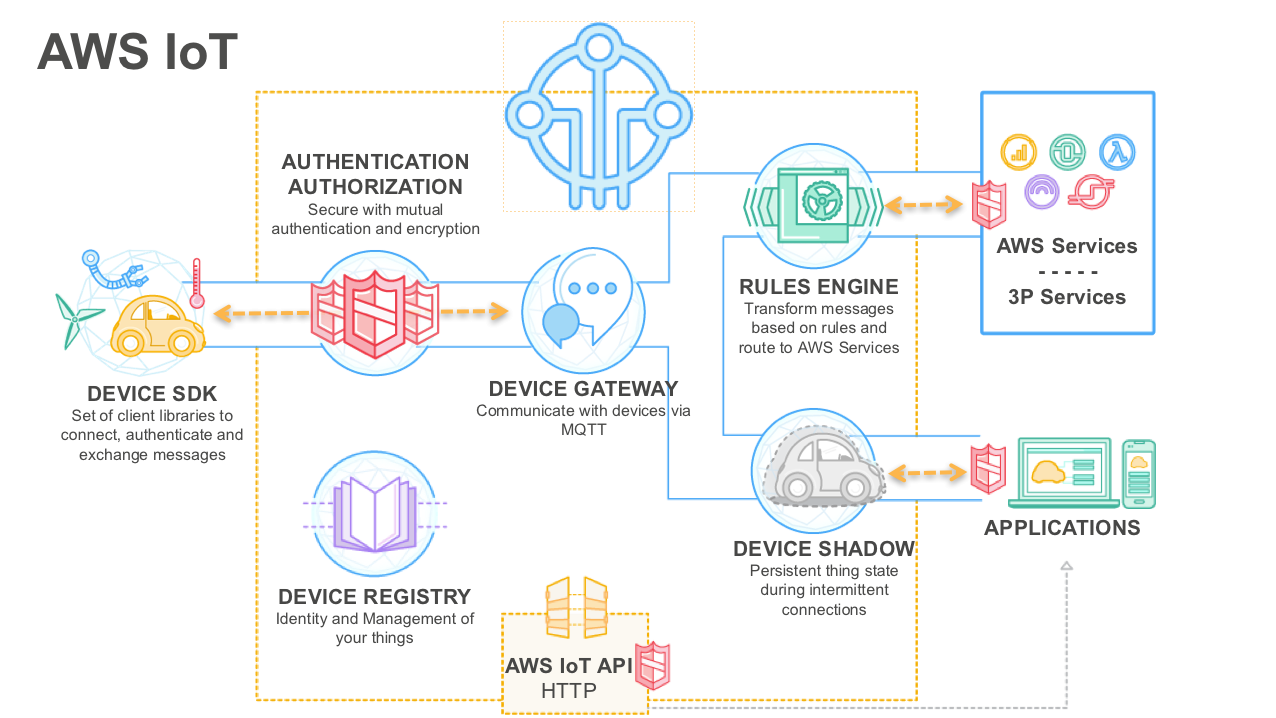
  • AWS IoT Core is a managed cloud platform that lets connected devices easily and securely interact with cloud applications and other devices.
  • AWS IoT Core can support billions of devices and trillions of messages, and can process and route those messages to AWS endpoints and to other devices reliably and securely.
  • AWS IoT Core allows the applications to keep track of and communicate with all the devices, all the time, even when they aren’t connected.
  • AWS IoT Core offers
    • Connectivity between devices and the AWS cloud.
      • AWS IoT Core allows communication with connected devices securely, with low latency and with low overhead.
      • Communication can scale to as many devices as needed.
      • AWS IoT Core supports standard communication protocols including HTTP, MQTT (v3.1.1 and v5), and WebSockets.
      • Communication is secured using TLS.
    • Processing data sent from connected devices.
      • AWS IoT Core can continuously ingest, filter, transform, and route the data streamed from connected devices.
      • Actions can be taken based on the data and route it for further processing and analytics.
    • Application interaction with connected devices.
      • AWS IoT Core accelerates IoT application development.
      • It serves as an easy to use interface for applications running in the cloud and on mobile devices to access data sent from connected devices, and send data and commands back to the devices.

AWS IoT

AWS IoT Core Works

  • Connected devices, such as sensors, actuators, embedded devices, smart appliances, and wearable devices, connect to AWS IoT Core over HTTPS, WebSockets, or secure MQTT.
  • Communication with AWS IoT Core is secure.
    • HTTPS and WebSockets requests sent to AWS IoT Core are authenticated using AWS IAM or AWS Cognito, both of which support the AWS SigV4 authentication.
    • HTTPS requests can also be authenticated using X.509 certificates.
    • MQTT messages to AWS IoT Core are authenticated using X.509 certificates.
    • AWS IoT Core allows using AWS IoT Core generated certificates, as well as those signed by your preferred Certificate Authority (CA).
  • AWS IoT Core also offers fine-grained authorization to isolate and secure communication among authenticated clients.

MQTT Protocol Support

  • AWS IoT Core supports both MQTT v3.1.1 and MQTT v5 protocols, enabling heterogeneous deployments with a mix of MQTT connectivity specifications.
  • MQTT 5 features include:
    • Shared Subscriptions – enables load balancing across multiple subscribing MQTT sessions or consumers, sending a published message to only one subscriber in a random manner.
    • Message Queuing for Shared Subscriptions (2025) – maintains message delivery reliability during network disruptions for shared subscription groups.
    • User Properties – allows attaching custom key-value pairs to MQTT messages for additional metadata.
    • Request/Response Pattern – includes response topic and correlation data for request-response communication patterns.
    • Message Expiry – sets a time-to-live on messages after which undelivered messages expire.
    • Topic Aliases – reduces the size of published packets by using short numeric aliases instead of full topic names.
    • Reason Codes – provides enhanced error handling with reason codes on acknowledgments.
  • AWS IoT Core supports cross MQTT version (MQTT 3 and MQTT 5) communication.

Direct Messaging (2026)

  • Direct Messaging enables sending point-to-point messages to any connected device by its MQTT client ID, without requiring the device to subscribe to a topic.
  • Uses the SendDirectMessage HTTP API to deliver messages from a sender to a single receiver.
  • Provides delivery confirmation – when enabled, the API delivers the message at QoS 1 and waits for a PUBACK from the receiving client before returning a successful response.
  • Supports response topic for request-response flows.
  • Provides better visibility into message delivery and lower messaging costs compared to pub/sub for point-to-point communication.

MQTT Connection Management APIs (2026)

  • AWS IoT Core provides GetConnection and ListSubscriptions APIs for MQTT connection management.
  • GetConnection – retrieves connection information for a specific MQTT client.
  • ListSubscriptions – lists active MQTT topic subscriptions for connected devices.
  • Enables easy access to client connection and subscription information for monitoring and troubleshooting.

Device Gateway

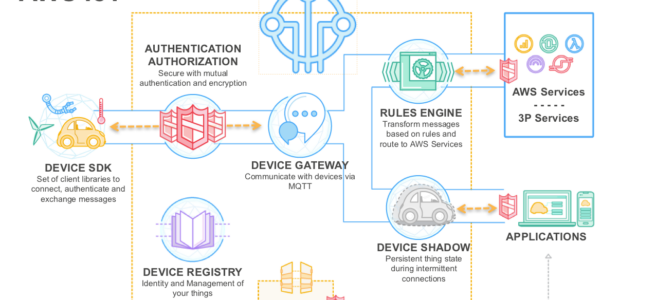
  • Device Gateway forms the backbone of communication between connected devices and the cloud capabilities such as the Rules Engine, Device Shadow, and other AWS and 3rd-party services.
  • Device Gateway allows secure, low-latency, low-overhead, bi-directional communication between connected devices, cloud and mobile applications.
  • Device Gateway supports the pub/sub messaging pattern, which involves clients publishing messages on logical communication channels called ‘topics’ and clients subscribing to topics to receive messages.
  • Device gateway enables communication between publishers and subscribers.
  • Device Gateway scales automatically as per the demand, without any operational overhead.
  • Supports custom domains – allows configuring custom domain names, using own server certificates stored in AWS Certificate Manager, and attaching custom authorizers.

Rules Engine

  • Rules Engine enables continuous processing of data sent by connected devices.
  • Rules can be configured to filter and transform the data using an intuitive, SQL-like syntax.
  • Rules can be configured to route the data to other AWS services such as DynamoDB, Kinesis, Lambda, SNS, SQS, CloudWatch, Amazon OpenSearch Service, Amazon Timestream, Amazon S3, AWS IoT SiteWise, as well as to non-AWS services via Lambda or HTTP actions for further processing, storage, or analytics.
  • Supports Basic Ingest to reduce messaging costs by bypassing the IoT message broker and routing telemetry directly to IoT Rule actions.

Registry

  • Registry allows registering devices and keeping track of devices connected to AWS IoT Core, or devices that may connect in the future.
  • Supports fleet indexing to search and aggregate device data across the fleet.

Device Shadow

  • Device Shadow enables cloud and mobile applications to query data sent from devices and send commands to devices, using a simple REST API, while letting AWS IoT Core handle the underlying communication with the devices.
  • Device Shadow accelerates application development by providing
    • a uniform interface to devices, even when they use one of the several IoT communication and security protocols with which the applications may not be compatible.
    • an always available interface to devices even when the connected devices are constrained by intermittent connectivity, limited bandwidth, limited computing ability or limited power.
  • Supports Named Shadows – allows creating multiple named shadows for a single device, enabling different applications or services to manage their own shadow independently.

Device and its Device Shadow Lifecycle

  • A device (such as a light bulb) is registered in the Registry.
  • Connected device is programmed to publish a set of its property values or ‘state (“I am ON and my color is RED”) to the AWS IoT Core service.
  • Device Shadow also stores the last reported state in AWS IoT Core.
  • An application (such as a mobile app controlling the light bulb) uses a RESTful API to query AWS IoT Core for the last reported state of the light bulb, without the complexity of communicating directly with the light bulb.
  • When a user wants to change the state (such as turning the light bulb from ON to OFF), the application uses a RESTful API to request an update, i.e. sets a ‘desired’ state for the device in AWS IoT Core. AWS IoT Core takes care of synchronizing the desired state to the device.
  • Application gets notified when the connected device updates its state to the desired state.

AWS IoT Core Device Location

  • AWS IoT Core Device Location enables devices to retrieve and report their current location without relying on GPS hardware.
  • Supports multiple location resolution methods:
    • Wi-Fi scan – uses nearby Wi-Fi access points to determine location.
    • Cellular scan – uses cell tower information for location resolution.
    • GNSS scan – uses Global Navigation Satellite System data.
    • Reverse IP look-up – determines approximate location from IP address.
  • Supports both MQTT and HTTP protocols for submitting location data.
  • Supports Confidence Level Configuration and Measurement Type for greater control over location resolution (2026).
  • Use cases include map visualization, historical route tracking, and geofencing.

AWS IoT Device Management Commands

  • Commands feature (GA November 2024) enables sending remote commands to IoT devices at scale for remote monitoring, control, and diagnostics.
  • Devices subscribe to MQTT topics to receive user-defined payloads from the cloud.
  • Supports creating reusable command templates with static or dynamic payloads.
  • Enables tracking command execution status (CREATED, IN_PROGRESS, SUCCEEDED, FAILED, TIMED_OUT, REJECTED).
  • Use cases include turning devices on/off, adjusting settings, retrieving data, or uploading logs without being physically present.

Related AWS IoT Services

  • AWS IoT Greengrass (V2) – enables local processing, messaging, data management, and ML inference at the edge. Provides prebuilt components for accelerated development. (Note: Greengrass V1 reaches end of support on October 7, 2026 – migrate to V2.)
  • AWS IoT Device Defender – audits device configurations, monitors connected devices for anomalous behavior, and mitigates security risks.
  • AWS IoT SiteWise – collects, stores, organizes, and monitors industrial equipment data at scale.

⚠️ Deprecated/EOL Related IoT Services

  • AWS IoT Analytics – End of support December 15, 2025. Migrate to AWS IoT Core Rules Engine with Amazon Kinesis Data Firehose and Amazon S3/Athena for IoT analytics workflows.
  • AWS IoT Events – End of support May 20, 2026. Migrate detector model logic to AWS IoT Core Rules Engine with AWS Lambda or AWS Step Functions.
  • AWS IoT 1-Click – Reached EOL December 16, 2024. Use AWS IoT Core directly for button/device triggers.
  • AWS IoT Device Management Fleet Hub – EOL October 18, 2025. Use AWS IoT Device Management console or custom dashboards.
  • AWS IoT FleetWise – No longer accepting new customers as of April 30, 2026. Existing customers can continue using the service.
  • AWS IoT Greengrass V1 – End of support October 7, 2026. Migrate to AWS IoT Greengrass V2.

AWS Certification Exam Practice Questions

  • Questions are collected from Internet and the answers are marked as per my knowledge and understanding (which might differ with yours).
  • AWS services are updated everyday and both the answers and questions might be outdated soon, so research accordingly.
  • AWS exam questions are not updated to keep up the pace with AWS updates, so even if the underlying feature has changed the question might not be updated
  • Open to further feedback, discussion and correction.
  1. You need to filter and transform incoming messages coming from a smart sensor you have connected with AWS. Once messages are received, you need to store them as time series data in DynamoDB. Which AWS service can you use?
    1. IoT Device Shadow Service (maintains device state)
    2. Redshift
    3. Kinesis (While Kinesis could technically be used as an intermediary between different sources, it isn’t a great way to get data into DynamoDB from an IoT device.)
    4. IoT Rules Engine
  2. A company has thousands of IoT sensors deployed in the field. The sensors publish telemetry data via MQTT and the company needs to load balance message processing across multiple backend consumers. Which AWS IoT Core feature should they use?
    1. Device Shadow
    2. Basic Ingest
    3. MQTT Shared Subscriptions
    4. IoT Rules Engine
  3. A company needs to determine the location of its IoT devices deployed in warehouses where GPS signals are unavailable. Which AWS IoT Core feature enables location resolution without GPS hardware?
    1. Device Shadow
    2. Fleet Indexing
    3. AWS IoT Core Device Location
    4. AWS IoT SiteWise
  4. An application needs to send a command to a specific connected IoT device and receive confirmation that the message was delivered. Which AWS IoT Core feature provides point-to-point messaging with delivery acknowledgment? (Choose the BEST answer)
    1. Device Shadow desired state
    2. IoT Rules Engine with Lambda
    3. MQTT topic publish with QoS 1
    4. Direct Messaging with SendDirectMessage API
  5. A company is currently using AWS IoT Analytics to process IoT telemetry data. Given the service’s end of support, which combination of services should they migrate to? (Select TWO)
    1. AWS IoT Core Rules Engine
    2. AWS IoT Events
    3. Amazon Kinesis Data Firehose with Amazon S3
    4. AWS IoT 1-Click
    5. Amazon Redshift Spectrum

AWS Certified Solutions Architect – Associate SAA-C02 Exam Learning Path

SAA-C02 Certification

⚠️ EXAM RETIRED – SAA-C02 No Longer Available

AWS Solutions Architect – Associate SAA-C02 exam was retired on August 29, 2022 and has been replaced by the SAA-C03 exam.

This content is maintained for historical reference only. If you are preparing for the AWS Solutions Architect – Associate certification, please refer to the current exam version.

👉 AWS Certified Solutions Architect – Associate SAA-C03 Exam Learning Path

Key differences in SAA-C03:

  • Reorganized into 4 domains: Secure Architectures (30%), Resilient Architectures (26%), High-Performing Architectures (24%), Cost-Optimized Architectures (20%)
  • Increased emphasis on security (now the highest-weighted domain)
  • Added modern services: AWS Transfer Family, AWS DataSync, Amazon EventBridge, AWS Transit Gateway, AWS Network Firewall, Amazon EKS/Fargate
  • Greater focus on serverless, containers, and multi-account architectures
  • Sustainability considerations added

AWS Certified Solutions Architect – Associate SAA-C02 Exam Learning Path

[HISTORICAL REFERENCE – Exam Retired August 29, 2022]

AWS Solutions Architect – Associate SAA-C02 exam was the AWS certification exam that replaced the previous SAA-C01 and was itself replaced by the current SAA-C03 exam on August 30, 2022. It validated the ability to effectively demonstrate knowledge of how to architect and deploy secure and robust applications on AWS technologies.

  • Define a solution using architectural design principles based on customer requirements.
  • Provide implementation guidance based on best practices to the organization throughout the life cycle of the project.

AWS Solutions Architect – Associate SAA-C02 Exam Summary

  • SAA-C02 exam consisted of 65 questions in 130 minutes.
  • SAA-C02 Exam covered the architecture aspects in deep, focusing on how to visualize the architecture and how different services relate.
  • AWS updated the exam concepts from the focus being on individual services to more building of scalable, highly available, cost-effective, performant, resilient architectures.
  • If you had been preparing for the SAA-C01 –
    • SAA-C02 was pretty much similar to SAA-C01 except the operational effective architecture domain was dropped
    • Most of the services and concepts covered by the SAA-C01 were the same. There were few new additions like Aurora Serverless, AWS Global Accelerator, FSx for Windows, FSx for Lustre

AWS Solutions Architect – Associate SAA-C02 Exam Resources

Note: These resources are outdated. For current SAA-C03 preparation resources, visit the SAA-C03 Exam Learning Path.

AWS Solutions Architect – Associate SAA-C02 Exam Topics

Note: These topics are for the retired SAA-C02 exam. For current exam topics, refer to the SAA-C03 Exam Learning Path.

Networking

  • Be sure to create VPC from scratch. This is mandatory.
    • Create VPC and understand whats a CIDR and addressing patterns
    • Create public and private subnets, configure proper routes, security groups, NACLs. (hint: Subnets are public or private depending on whether they can route traffic directly through Internet gateway)
    • Create Bastion for communication with instances
    • Create NAT Gateway or Instances for instances in private subnets to interact with internet
    • Create two tier architecture with application in public and database in private subnets
    • Create three tier architecture with web servers in public, application and database servers in private. (hint: focus on security group configuration with least privilege)
    • Make sure to understand how the communication happens between Internet, Public subnets, Private subnets, NAT, Bastion etc.
  • Understand difference between Security Groups and NACLs (hint: Security Groups are Stateful vs NACLs are stateless. Also only NACLs provide an ability to deny or block IPs)
  • Understand VPC endpoints and what services it can help interact (hint: VPC Endpoints routes traffic internally without Internet)
    • VPC Gateway Endpoints supports S3 and DynamoDB.
    • VPC Interface Endpoints OR Private Links supports others
  • Understand difference between NAT Gateway and NAT Instance (hint: NAT Gateway is AWS managed and is scalable and highly available)
  • Understand how NAT high availability can be achieved (hint: provision NAT in each AZ and route traffic from subnets within that AZ through that NAT Gateway)
  • Understand VPN and Direct Connect for on-premises to AWS connectivity
    • VPN provides quick connectivity, cost-effective, secure channel, however routes through internet and does not provide consistent throughput
    • Direct Connect provides consistent dedicated throughput without Internet, however requires time to setup and is not cost-effective
  • Understand Data Migration techniques
    • Choose Snowball vs Snowmobile vs Direct Connect vs VPN depending on the bandwidth available, data transfer needed, time available, encryption requirement, one-time or continuous requirement
    • Snowball, SnowMobile are for one-time data, cost-effective, quick and ideal for huge data transfer
    • Direct Connect, VPN are ideal for continuous or frequent data transfers
  • Understand CloudFront as CDN and the static and dynamic caching it provides, what can be its origin (hint: CloudFront can point to on-premises sources and its usecases with S3 to reduce load and cost)
  • Understand Route 53 for routing
    • Understand Route 53 health checks and failover routing
    • Understand Route 53 Routing Policies it provides and their use cases mainly for high availability (hint: focus on weighted, latency, geolocation, failover routing)
  • Be sure to cover ELB concepts in deep.
    • SAA-C02 focuses on ALB and NLB and does not cover CLB
    • Understand differences between CLB vs ALB vs NLB
      • ALB is layer 7 while NLB is layer 4
      • ALB provides content based, host based, path based routing
      • ALB provides dynamic port mapping which allows same tasks to be hosted on ECS node
      • NLB provides low latency and ability to scale
      • NLB provides static IP address

Security

  • Understand IAM as a whole
    • Focus on IAM role (hint: can be used for EC2 application access and Cross-account access)
    • Understand IAM identity providers and federation and use cases
    • Understand MFA and how would implement two factor authentication for an application
    • Understand IAM Policies (hint: expect couple of questions with policies defined and you need to select correct statements)
  • Understand encryption services
  • AWS WAF integrates with CloudFront to provide protection against Cross-site scripting (XSS) attacks. It also provides IP blocking and geo-protection.
  • AWS Shield integrates with CloudFront to provide protection against DDoS.
  • Refer Disaster Recovery whitepaper, be sure you know the different recovery types with impact on RTO/RPO.

Storage

  • Understand various storage options S3, EBS, Instance store, EFS, Glacier, FSx and what are the use cases and anti patterns for each
  • Instance Store
    • Understand Instance Store (hint: it is physically attached to the EC2 instance and provides the lowest latency and highest IOPS)
  • Elastic Block Storage – EBS
    • Understand various EBS volume types and their use cases in terms of IOPS and throughput. SSD for IOPS and HDD for throughput
    • Understand Burst performance and I/O credits to handle occasional peaks
    • Understand EBS Snapshots (hint: backups are automated, snapshots are manual)
  • Simple Storage Service – S3
    • Cover S3 in depth
    • Understand S3 storage classes with lifecycle policies
      • Understand the difference between S3 Standard vs S3 IA vs S3 IA One Zone in terms of cost and durability
    • Understand S3 Data Protection (hint: S3 Client side encryption encrypts data before storing it in S3)
    • Understand S3 features including
      • S3 provides a cost effective static website hosting
      • S3 versioning provides protection against accidental overwrites and deletions
      • S3 Pre-Signed URLs for both upload and download provides access without needing AWS credentials
      • S3 CORS allows cross domain calls
      • S3 Transfer Acceleration enables fast, easy, and secure transfers of files over long distances between your client and an S3 bucket.
    • Understand Glacier as an archival storage with various retrieval patterns
    • Glacier Expedited retrieval allows object retrieval within mins
  • Understand Storage gateway and its different types.
    • Cached Volume Gateway provides access to frequently accessed data, while using AWS as the actual storage
    • Stored Volume gateway uses AWS as a backup, while the data is being stored on-premises as well
    • File Gateway supports SMB protocol
  • Understand FSx easy and cost effective to launch and run popular file systems.
  • Understand the difference between EBS vs S3 vs EFS
    • EFS provides shared volume across multiple EC2 instances, while EBS can be attached to a single volume within the same AZ.
  • Understand the difference between EBS vs Instance Store
  • Would recommend referring Storage Options whitepaper, although a bit dated 90% still holds right

Compute

  • Understand Elastic Cloud Compute – EC2
  • Understand Auto Scaling and ELB, how they work together to provide High Available and Scalable solution. (hint: Span both ELB and Auto Scaling across Multi-AZs to provide High Availability)
  • Understand EC2 Instance Purchase Types – Reserved, Scheduled Reserved, On-demand and Spot and their use cases
    • Choose Reserved Instances for continuous persistent load
    • Choose Scheduled Reserved Instances for load with fixed scheduled and time interval
    • Choose Spot instances for fault tolerant and Spiky loads
    • Reserved instances provides cost benefits for long terms requirements over On-demand instances
    • Spot instances provides cost benefits for temporary fault tolerant spiky load
  • Understand EC2 Placement Groups (hint: Cluster placement groups provide low latency and high throughput communication, while Spread placement group provides high availability)
  • Understand Lambda and serverless architecture, its features and use cases. (hint: Lambda integrated with API Gateway to provide a serverless, highly scalable, cost-effective architecture)
  • Understand ECS with its ability to deploy containers and micro services architecture.
    • ECS role for tasks can be provided through taskRoleArn
    • ALB provides dynamic port mapping to allow multiple same tasks on the same node
  • Know Elastic Beanstalk at a high level, what it provides and its ability to get an application running quickly.

Databases

  • Understand relational and NoSQL data storage options which include RDS, DynamoDB, Aurora and their use cases
  • RDS
    • Understand RDS features – Read Replicas vs Multi-AZ
      • Read Replicas for scalability, Multi-AZ for High Availability
      • Multi-AZ are regional only
      • Read Replicas can span across regions and can be used for disaster recovery
    • Understand Automated Backups, underlying volume types
  • Aurora
    • Understand Aurora
      • provides multiple read replicas and replicates 6 copies of data across AZs
    • Understand Aurora Serverless provides a highly scalable cost-effective database solution
  • DynamoDB
    • Understand DynamoDB with its low latency performance, key-value store (hint: DynamoDB is not a relational database)
    • DynamoDB DAX provides caching for DynamoDB
    • Understand DynamoDB provisioned throughput for Read/Writes
  • Know ElastiCache use cases, mainly for caching performance

Integration Tools

  • Understand SQS as message queuing service and SNS as pub/sub notification service
  • Understand SQS features like visibility, long poll vs short poll
  • Focus on SQS as a decoupling service
  • Understand SQS Standard vs SQS FIFO difference (hint: FIFO provides exactly once delivery but low throughput)

Analytics

  • Know Redshift as a business intelligence tool
  • Know Kinesis for real time data capture and analytics
  • Know what AWS Glue does, so you can eliminate the answer

Management Tools

  • Understand CloudWatch monitoring to provide operational transparency
  • Know which EC2 metrics it can track. Remember, it cannot track memory and disk space/swap utilization
  • Understand CloudWatch is extendable with custom metrics
  • Understand CloudTrail for Audit
  • Have a basic understanding of CloudFormation, OpsWorks

AWS Whitepapers & Cheat sheets

AWS Solutions Architect – Associate SAA-C02 Exam Domains

Note: SAA-C03 has reorganized these into 4 domains with different weightings. See the SAA-C03 Exam Learning Path for current domains.

Domain 1: Design Resilient Architectures

  1. Design a multi-tier architecture solution
  2. Design highly available and/or fault-tolerant architectures
  3. Design decoupling mechanisms using AWS services
  4. Choose appropriate resilient storage

Domain 2: Define High-Performing Architectures

  1. Identify elastic and scalable compute solutions for a workload
  2. Select high-performing and scalable storage solutions for a workload
  3. Select high-performing networking solutions for a workload
  4. Choose high-performing database solutions for a workload

Domain 3: Specify Secure Applications and Architectures

  1. Design secure access to AWS resources
  2. Design secure application tiers
  3. Select appropriate data security options

Domain 4: Design Cost-Optimized Architectures

  1. Determine how to design cost-optimized storage.
  2. Determine how to design cost-optimized compute.

AWS FSx for Lustre – High Performance File System

AWS FSx for Lustre

  • FSx for Lustre is a fully managed service that makes it easy and cost-effective to launch and run the world’s most popular high-performance Lustre file system.
  • FSx for Lustre is built on the open-source Lustre file system designed for applications that require fast storage, where the storage needs to keep up with the compute.
  • handles the traditional complexity of setting up and managing high-performance Lustre file systems.
  • is POSIX-compliant and can be used with existing Linux-based applications without having to make any changes.
  • provides a native file system interface and works as any file system does with the Linux operating system.
  • provides read-after-write consistency and supports file locking.
  • is compatible with the most popular Linux-based AMIs, including Amazon Linux, Amazon Linux 2, Amazon Linux 2023, Red Hat Enterprise Linux (RHEL), CentOS, SUSE Linux, and Ubuntu.
  • is accessible from compute workloads running on EC2 instances and containers running on Amazon EKS, and from on-premises servers.
  • can be accessed from a Linux instance by installing the open-source Lustre client and mounting the file system using standard Linux commands.
  • is ideal for use cases where speed matters, such as machine learning, high-performance computing (HPC), video processing, financial modelling, genome sequencing, electronic design automation (EDA), and AI/ML training workloads.
  • delivers the fastest storage performance for GPU instances in the cloud with up to 1,200 Gbps per-client throughput using Elastic Fabric Adapter (EFA) and NVIDIA GPUDirect Storage (GDS).
  • delivers virtually unlimited storage capacity, millions of IOPS, up to terabytes per second of throughput, and sub-millisecond latencies.
  • supports Lustre LTS versions 2.10, 2.12, and 2.15, with in-place version upgrades supported.

FSx for Lustre Deployment Options

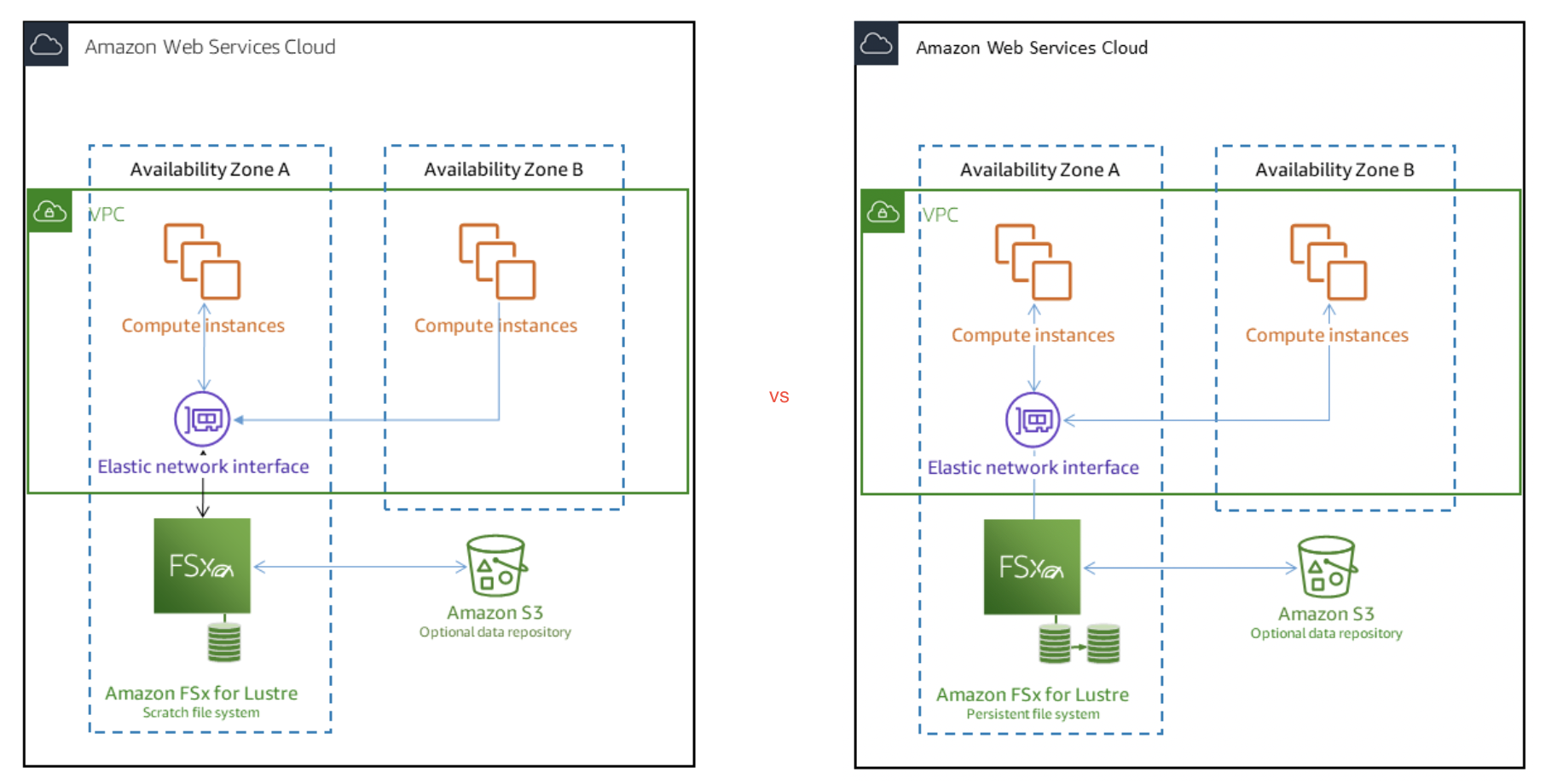
  • FSx for Lustre provides two file system deployment options: Scratch and Persistent.

Scratch file systems

  • designed for temporary storage and short-term processing of data.
  • provide high burst throughput of up to six times the baseline throughput of 200 MBps per TiB of storage capacity.
  • data is not replicated and does not persist if a file server fails.
  • ideal for cost-optimized storage for short-term, processing-heavy workloads.

Persistent file systems

  • designed for long-term storage and workloads.
  • is highly available, and data is automatically replicated within the AZ that is associated with the file system.
  • data volumes attached to the file servers are replicated independently from the file servers to which they are attached.
  • if a file server becomes unavailable, it is replaced automatically within minutes of failure.
  • continuously monitored for hardware failures, and automatically replaces infrastructure components in the event of a failure.
  • ideal for workloads that run for extended periods or indefinitely, and that might be sensitive to disruptions in availability.
  • Persistent-2 file systems are the latest generation, built on AWS Graviton processors, providing higher throughput per TiB (up to 1 GB/s per TiB) and lower cost of throughput compared to previous generation file systems.

FSx for Lustre - Scratch vs Persistence

FSx for Lustre Storage Classes

  • FSx for Lustre provides three storage classes: SSD, Intelligent-Tiering, and HDD.

SSD Storage Class

  • delivers consistent sub-millisecond latencies for the entire dataset.
  • ideal for latency-sensitive workloads that require all-flash performance.
  • available with both scratch and persistent deployment types.

Intelligent-Tiering Storage Class (New – 2025)

  • launched in May 2025, delivers virtually unlimited scalability, fully elastic Lustre file storage, and the lowest-cost Lustre file storage in the cloud.
  • automatically scales storage up and down based on access patterns — pay only for what you use.
  • automatically tiers data between three access tiers:
    • Frequent Access tier for actively used data.
    • Infrequent Access tier for less frequently accessed data.
    • Archive Instant Access tier for rarely accessed data.
  • offers an optional SSD read cache that delivers SSD-level performance at HDD pricing for latency-sensitive workloads.
  • delivers up to 34% better price-performance compared to on-premises HDD file storage.
  • delivers up to 70% better price-performance compared to other cloud-based Lustre storage.
  • starting at less than $0.005 per GB-month.
  • optimized for HDD-based or mixed HDD/SSD workloads with a mix of hot and cold data.
  • ideal for workloads like weather forecasting, seismic imaging, genomic analysis, and ADAS training.

HDD Storage Class

  • provides lower-cost storage for throughput-oriented workloads that don’t require sub-millisecond latencies.
  • suitable for workloads with large sequential I/O patterns.

FSx for Lustre Performance

  • FSx for Lustre file systems scale to terabytes per second of throughput and millions of IOPS.
  • supports concurrent access to the same file or directory from thousands of compute instances.
  • provides consistent, sub-millisecond latencies for file operations.

Elastic Fabric Adapter (EFA) and GPUDirect Storage (GDS) Support (2024)

  • launched in November 2024, provides the fastest storage performance for GPU instances in the cloud.
  • delivers up to 12x higher throughput per client instance (up to 1,200 Gbps) compared to previous FSx for Lustre systems.
  • NVIDIA GPUDirect Storage (GDS) creates a direct data path between storage and GPU memory, bypassing CPU and system memory.
  • supported on Nitro v4 (or higher) EC2 instances with EFA support (e.g., P5 GPU instances).
  • accelerates machine learning training jobs and reduces workload costs.
  • also supports ENA Express for enhanced networking.

Scalable Metadata Performance (2024)

  • increased maximum metadata IOPS by 15x (launched June 2024).
  • allows provisioning metadata IOPS independently of file system storage capacity.
  • supports up to 192,000 metadata IOPS per file system.
  • metadata IOPS can be configured in AUTOMATIC mode (scales with storage capacity) or USER_PROVISIONED mode.
  • available on Persistent-2 file systems.
  • up to 5x faster directory listing performance (launched November 2025).

Data Compression

  • uses the LZ4 compression algorithm optimized to deliver high levels of compression without adversely impacting performance.
  • newly written files are automatically compressed before writing to disk and uncompressed when read.
  • reduces storage consumption of both file system storage and backups.

FSx for Lustre with S3

  • FSx for Lustre integrates natively with S3, making it easy to process cloud data sets with the Lustre high-performance file system.
  • FSx for Lustre file system transparently presents S3 objects as files and allows writing changed data back to S3.
  • supports Data Repository Associations (DRAs) — links between a directory on the file system and an S3 bucket or prefix.
  • supports up to 8 DRAs per file system, enabling links to multiple S3 buckets or prefixes.
  • provides full bi-directional synchronization including deleted files and objects.
  • S3 objects are lazy-loaded by default:
    • FSx automatically loads the corresponding objects from S3 only when first accessed by applications.
    • Subsequent reads are served directly from the file system with low, consistent latencies.
    • FSx for Lustre file system can optionally be batch hydrated.
  • FSx for Lustre uses parallel data transfer techniques to transfer data from S3 at up to hundreds of GBs/s.
  • Files from the file system can be exported back to the S3 bucket.
  • supports automatic import and export policies to keep file system and S3 synchronized.
  • DRAs are supported on Lustre 2.12 and newer file systems (excluding scratch_1 deployment type).
  • supports cross-account S3 access for sharing data across AWS accounts.

FSx for Lustre Security

  • FSx for Lustre provides encryption at rest for the file system and the backups, by default, using KMS.
  • FSx encrypts data-in-transit when accessed from supported EC2 instances.
  • complies with PCI DSS, ISO 9001, 27001, 27017, and 27018, and SOC 1, 2, and 3.
  • is HIPAA eligible.
  • file systems are accessed from endpoints in a VPC, enabling network isolation.
  • integrated with AWS IAM for resource-level permissions.
  • supports storage quotas for monitoring and controlling user- and group-level storage consumption.

FSx for Lustre Availability and Durability

  • On a scratch file system, file servers are not replaced if they fail and data is not replicated.
  • On a persistent file system, if a file server becomes unavailable it is replaced automatically and within minutes.
  • FSx for Lustre provides a parallel file system, where data is stored across multiple network file servers to maximize performance and reduce bottlenecks, and each server has multiple disks.
  • FSx takes daily automatic incremental backups of the file systems, and allows manual backups at any point.
  • Backups are stored in Amazon S3 with 99.999999999% (11 9’s) of durability.
  • Backups are highly durable and file-system-consistent.
  • Supports cross-region and cross-account backup copies using AWS Backup for disaster recovery.
  • Supports copying backups across AWS opt-in Regions (launched April 2026).

FSx for Lustre Lustre Version Management

  • Supports Lustre LTS versions 2.10, 2.12, and 2.15.
  • In-place Lustre version upgrades supported (launched February 2025) — upgrade file systems to newer versions within minutes using the console or CLI/SDK.
  • Newer versions provide performance enhancements, new features, and support for the latest Linux kernel versions.
  • No downtime required for version upgrades.

FSx for Lustre Monitoring

  • Provides enhanced monitoring dashboard with performance insights and recommendations (launched September 2024).
  • Provides additional performance metrics for improved visibility into file system activity.
  • Integrates with Amazon CloudWatch for file system metrics.
  • Provides performance warnings and recommendations when metrics exceed thresholds.

FSx for Lustre Integration with Compute Services

  • Accessible from Amazon EC2 instances, containers on Amazon EKS, and on-premises servers.
  • Integrates with Amazon SageMaker as an input data source for ML training jobs.
  • Integrates with AWS Batch through EC2 Launch Templates for batch scheduling.
  • Integrates with AWS ParallelCluster for HPC cluster deployments.
  • Supports Lustre client on Amazon Linux, Amazon Linux 2, Amazon Linux 2023, RHEL, CentOS, SUSE Linux, and Ubuntu (including Ubuntu 24.04 with Kernel 6.14).

AWS Certification Exam Practice Questions

  • Questions are collected from Internet and the answers are marked as per my knowledge and understanding (which might differ with yours).
  • AWS services are updated everyday and both the answers and questions might be outdated soon, so research accordingly.
  • AWS exam questions are not updated to keep up the pace with AWS updates, so even if the underlying feature has changed the question might not be updated
  • Open to further feedback, discussion and correction.
  1. A solutions architect is designing storage for a high performance computing (HPC) environment based on Amazon Linux. The workload stores and processes a large amount of engineering drawings that require shared storage and heavy computing. Which storage option would be the optimal solution?
    1. Amazon Elastic File System (Amazon EFS)
    2. Amazon FSx for Lustre
    3. Amazon EC2 instance store
    4. Amazon EBS Provisioned IOPS SSD (io1)
  2. A company is planning to deploy a High Performance Computing (HPC) cluster in its VPC that requires a scalable, high performance file system. The storage service must be optimized for efficient workload processing, and the data must be accessible via a fast and scalable file system interface. It should also work natively with Amazon S3 that enables you to easily process your S3 data with a high-performance POSIX interface. Which of the following is the MOST suitable service that you should use for this scenario?
    1. Amazon Elastic File System (Amazon EFS)
    2. Amazon FSx for Lustre
    3. Amazon Elastic Block Store
    4. Amazon EBS Provisioned IOPS SSD (io1)
  3. A machine learning team needs to train large language models using GPU instances and requires the fastest possible storage throughput to keep GPUs fully utilized. The training data is stored in S3 and the team wants sub-millisecond latency access. Which FSx for Lustre feature should they enable for maximum GPU throughput?
    1. HDD storage class with burst throughput
    2. Scratch file system with increased storage capacity
    3. EFA-enabled file system with NVIDIA GPUDirect Storage (GDS)
    4. Persistent file system with data compression enabled
  4. A company runs large-scale genomics workloads with petabytes of data that has a mix of frequently and infrequently accessed files. They want the lowest-cost Lustre storage that automatically scales with their data and eliminates the need to provision capacity upfront. Which FSx for Lustre configuration best meets these requirements?
    1. Persistent SSD file system with data compression
    2. Scratch file system with HDD storage
    3. Intelligent-Tiering storage class with SSD read cache
    4. Persistent-2 file system with maximum throughput per TiB
  5. A company needs to link their FSx for Lustre file system to data in multiple S3 buckets for different teams. How many Data Repository Associations (DRAs) can be configured on a single FSx for Lustre file system?
    1. 1
    2. 4
    3. 8
    4. 16
  6. An organization is running metadata-intensive workloads on FSx for Lustre and needs to increase the number of file creation and listing operations. Which feature allows them to scale metadata performance independently of storage capacity?
    1. Increasing storage capacity
    2. Enabling data compression
    3. User-provisioned metadata IOPS on Persistent-2 file systems
    4. Switching to scratch file system deployment

References

AWS FSx for Windows

AWS FSx for Windows File Server

  • Amazon FSx for Windows File Server provides fully managed, highly reliable, and scalable file storage that is accessible over the industry-standard Server Message Block (SMB) protocol.
  • FSx for Windows is built on Windows Server, delivering a wide range of administrative features such as user quotas, end-user file restore, File Server Resource Manager (FSRM), ACLs, and Microsoft Active Directory (AD) integration.
  • FSx for Windows provides high levels of throughput and IOPS and consistent sub-millisecond latencies.
  • FSx for Windows supports up to 12 GBps throughput capacity and up to 400,000 IOPS.
  • FSx for Windows offers single-AZ and multi-AZ deployment options, fully managed backups, and encryption of data at rest and in transit.
  • FSx for Windows File Server backups are file-system-consistent, highly durable, and incremental.
  • Amazon FSx is accessible from Windows, Linux, and MacOS compute instances and devices.
  • Amazon FSx provides concurrent access to the file system to thousands of compute instances and devices.
  • Amazon FSx can connect the file system to EC2, VMware Cloud on AWS, Amazon WorkSpaces, Amazon AppStream 2.0, and Amazon ECS instances.
  • Integrated with CloudWatch to monitor storage capacity and file system activity.
  • Integrated with CloudTrail to monitor all Amazon FSx API calls.
  • Amazon FSx was designed for use cases that require Windows shared file storage, like CRM, ERP, custom or .NET applications, home directories, data analytics, media, and entertainment workflows, web serving and content management, software build environments, and Microsoft SQL Server.
  • FSx file system is accessible from the on-premises environment using an AWS Direct Connect or AWS VPN connection.
  • FSx is accessible from multiple VPCs, AWS accounts, and AWS Regions using VPC Peering connections or AWS Transit Gateway.
  • FSx provides consistent sub-millisecond latencies with SSD storage and single-digit millisecond latencies with HDD storage.
  • FSx supports Microsoft’s Distributed File System (DFS) to organize shares into a single folder structure up to hundreds of PB in size.
  • FSx supports DNS aliases to access file systems using custom DNS names (up to 50 aliases per file system), enabling seamless migration from on-premises file servers.
  • FSx supports two network type options: IPv4-only and dual-stack (for both IPv4 and IPv6), allowing access from IPv6 clients without complex address translation.

FSx for Windows Performance

  • FSx for Windows supports up to 12 GBps of throughput capacity per file system.
  • Maximum IOPS levels up to 400,000 for file systems with 12 GBps throughput capacity.
  • SSD IOPS can be provisioned independently of storage capacity, up to 400,000 IOPS.
  • Throughput capacity and storage capacity can be increased or decreased independently at any time.
  • Storage type can be updated from HDD to SSD without creating a new file system.
  • Each file system can be provisioned up to 64 TB in size.
  • Data deduplication helps reduce storage consumption by identifying and removing duplicate data.

FSx for Windows Security

  • FSx works with Microsoft Active Directory (AD) to integrate with existing Windows environments, which can either be an AWS Managed Microsoft AD or self-managed Microsoft AD.
  • FSx integrates with AWS Secrets Manager for enhanced management of Active Directory credentials for domain join operations.
  • FSx provides standard Windows permissions (full support for Windows Access Controls ACLs) for files and folders.
  • FSx for Windows File Server supports encryption at rest for the file system and backups using KMS managed keys.
  • FSx encrypts data-in-transit using SMB Kerberos session keys when accessing the file system from clients that support SMB 3.0.
  • FSx supports file-level or folder-level restores to previous versions by supporting Windows shadow copies, which are point-in-time snapshots of the file system.
  • FSx supports Windows shadow copies to enable the end-users to easily undo file changes and compare file versions by restoring files to previous versions, and backups to support the backup retention and compliance needs.
  • FSx complies with ISO, PCI-DSS, and SOC certifications, and is HIPAA eligible.
  • FSx supports AWS PrivateLink interface VPC endpoints (including dual-stack endpoints) to access the FSx API from within a VPC without sending traffic over the internet.

FSx for Windows File Access Auditing

  • FSx supports file access auditing to log end-user accesses on files, folders, and file shares.
  • File access auditing helps meet security and compliance requirements by tracking who accessed, modified, or changed permissions on files.
  • Audit event logs can be sent to Amazon CloudWatch Logs or streamed to Amazon Kinesis Data Firehose.
  • Supports configuring audit levels independently for file/folder accesses and file share accesses.
  • Audit log levels include: SUCCESS_ONLY, FAILURE_ONLY, SUCCESS_AND_FAILURE, and DISABLED.
  • File access auditing is supported on file systems with a throughput capacity of 32 MBps or greater.

FSx for Windows File Server Resource Manager (FSRM)

  • Amazon FSx supports File Server Resource Manager (FSRM), a Windows Server feature that provides capabilities to manage, govern, and monitor file data.
  • FSRM enables:
    • File Classification – Automatically classify and identify sensitive data (e.g., PII).
    • File Screening – Block unauthorized file types from being saved to business folders.
    • Folder-level Quotas – Set storage limits to prevent users from consuming excessive storage.
    • Storage Reports – Generate detailed reports about storage usage patterns.
    • Retention Policies – Create data retention and lifecycle policies.
  • FSRM events can be published to Amazon CloudWatch Logs or Amazon Kinesis Data Firehose for monitoring and automation.
  • FSRM events can trigger AWS Lambda functions to take reactive actions based on file events.
  • FSRM is supported on file systems with SSD storage and a throughput capacity of 128 MB/s or greater.

FSx for Windows Availability and Durability

  • FSx for Windows automatically replicates the data within an Availability Zone (AZ) to protect it from component failure.
  • FSx continuously monitors for hardware failures and automatically replaces infrastructure components in the event of a failure.
  • FSx supports Multi-AZ deployment
    • automatically provisions and maintains a standby file server in a different Availability Zone.
    • any changes written to disk in the file system are synchronously replicated across AZs to standby.
    • helps enhance availability during planned system maintenance.
    • helps protect the data against instance failure and AZ disruption.
    • In the event of planned file system maintenance or unplanned service disruption, FSx automatically fails over to the secondary file server, allowing data accessibility without manual intervention.
  • Multi-AZ file systems automatically failover from the preferred file server to the standby file server if
    • An Availability Zone outage occurs.
    • Preferred file server becomes unavailable.
    • Preferred file server undergoes planned maintenance.
  • FSx supports automatic daily backups of the file systems, which incrementally store only the changes after the most recent backup.
  • FSx stores backups in S3.
  • FSx supports copying backups cross-region (to another AWS Region) and in-region for disaster recovery and compliance.
  • FSx is integrated with AWS Backup for centralized backup management, cross-account backup, and cross-region backup copy.

FSx for Windows and FSx File Gateway

  • Note: Amazon FSx File Gateway is no longer available to new customers as of October 28, 2024. Existing customers can continue using the service.
  • FSx File Gateway previously provided low-latency, on-premises access to fully managed file shares in the cloud by caching frequently accessed data locally.
  • For on-premises access, AWS now recommends accessing FSx for Windows File Server directly using AWS Direct Connect or AWS VPN connections.

AWS Certification Exam Practice Questions

  • Questions are collected from Internet and the answers are marked as per my knowledge and understanding (which might differ with yours).
  • AWS services are updated everyday and both the answers and questions might be outdated soon, so research accordingly.
  • AWS exam questions are not updated to keep up the pace with AWS updates, so even if the underlying feature has changed the question might not be updated
  • Open to further feedback, discussion and correction.
  1. A data processing facility wants to move a group of Microsoft Windows servers to the AWS Cloud. These servers require access to a shared file system that can integrate with the facility’s existing Active Directory (AD) infrastructure for file and folder permissions. The solution needs to provide seamless support for shared files with AWS and on-premises servers and allow the environment to be highly available. The chosen solution should provide added security by supporting encryption at rest and in transit. The solution should also be cost-effective to implement and manage. Which storage solution would meet these requirements?
    1. An AWS Storage Gateway file gateway joined to the existing AD domain
    2. An Amazon FSx for Windows File Server file system joined to the existing AD domain
    3. An Amazon Elastic File System (Amazon EFS) file system joined to an AWS managed AD domain
    4. An Amazon S3 bucket mounted on Amazon EC2 instances in multiple Availability Zones running Windows Server and joined to an AWS managed AD domain.
  2. A company needs to audit file access patterns on its Amazon FSx for Windows File Server file system to meet compliance requirements. The security team needs to track who accessed, modified, or changed permissions on files and folders. Which feature should the solutions architect configure?
    1. Enable CloudTrail logging for FSx API calls
    2. Enable file access auditing with audit logs sent to CloudWatch Logs
    3. Configure Windows Event Viewer on the file server
    4. Enable VPC Flow Logs on the FSx file system’s network interfaces
  3. A solutions architect needs to manage storage costs for Amazon FSx for Windows File Server. The organization requires the ability to classify sensitive data, block unauthorized file types, set storage limits per department folder, and generate storage usage reports. Which feature should the architect use?
    1. Configure data deduplication on the file system
    2. Use Amazon Macie to classify data on FSx
    3. Enable File Server Resource Manager (FSRM) on the file system
    4. Use AWS Config rules to monitor storage usage
  4. A company is deploying Amazon FSx for Windows File Server and requires the file system to be accessible from both IPv4 and IPv6 clients within their VPC and on-premises network. Which configuration should the solutions architect choose?
    1. Create a file system with IPv4-only network type and use a NAT64 gateway
    2. Create a file system with dual-stack network type
    3. Create two file systems, one for IPv4 and one for IPv6 clients
    4. Deploy an Application Load Balancer with dualstack in front of the file system
  5. A company is migrating from on-premises Windows file servers to Amazon FSx for Windows File Server. They want to ensure end users can continue accessing file shares using the same DNS names without any client-side configuration changes. Which approach should the solutions architect recommend?
    1. Update the on-premises DNS to point to the FSx file system’s default DNS name
    2. Associate DNS aliases with the FSx file system matching the existing on-premises file server DNS names
    3. Create a Route 53 private hosted zone with CNAME records
    4. Configure AWS Global Accelerator with the FSx file system as an endpoint

References

AWS Elastic Load Balancing – ALB, NLB, GWLB Overview

AWS Elastic Load Balancer – ELB

📌 Post Updated: June 2026 — Added LCU Capacity Reservation (replaces pre-warming), TLS 1.3 support, NLB Security Groups, ALB Mutual TLS (mTLS), ALB Automatic Target Weights, NLB QUIC protocol, Post-Quantum TLS, Zonal Shift support, NLB Weighted Target Groups, and updated EC2-Classic retirement status.

  • Elastic Load Balancer allows the incoming traffic to be distributed automatically across multiple healthy EC2 instances.
  • ELB serves as a single point of contact for the client.
  • ELB helps to be transparent and increases the application availability by allowing the addition or removal of multiple EC2 instances across one or more AZs, without disrupting the overall flow of information.
  • ELB benefits
    • is a distributed system that is fault-tolerant and actively monitored
    • abstracts out the complexity of managing, maintaining, and scaling load balancers
    • serves as the first line of defence against attacks on the network
    • can offload the work of encryption and decryption (SSL termination) so that the EC2 instances can focus on their main work
    • offers integration with Auto Scaling, which ensures enough back-end capacity available to meet varying traffic levels
    • are engineered to not be a single point of failure
  • Elastic Load Balancer, by default, routes each request independently to the registered instance with the smallest load.
  • ELB automatically reroutes the traffic to the remaining running healthy EC2 instances, if an EC2 instance fails. If a failed EC2 instance is restored, ELB restores the traffic to that instance.
  • Load Balancers are regional and only work across AZs within a region
  • Elastic Load Balancing supports four types of load balancers:
    • Application Load Balancer (ALB) – Layer 7, HTTP/HTTPS
    • Network Load Balancer (NLB) – Layer 4, TCP/UDP/TLS
    • Gateway Load Balancer (GWLB) – Layer 3, third-party virtual appliances
    • Classic Load Balancer (CLB) – Previous generation (Layer 4/7)

Elastic Load Balancer basic architecture

Application Load Balancer – ALB

Refer to Blog Post @ Application Load Balancer

Network Load Balancer – NLB

Refer to Blog Post @ Network Load Balancer

Gateway Load Balancer – GWLB

Refer to Blog Post @ Gateway Load Balancer

Classic Load Balancer vs Application Load Balancer vs Network Load Balancer

Refer Blog Post @ Classic Load Balancer vs Application Load Balancer vs Network Load Balancer

⚠️ Classic Load Balancer – Previous Generation

EC2-Classic was fully retired in August 2023. Classic Load Balancer now operates only in VPC mode. AWS strongly recommends migrating all CLB workloads to Application Load Balancer (Layer 7) or Network Load Balancer (Layer 4).

AWS provides a CLB migration wizard to help migrate to ALB or NLB.

Elastic Load Balancer Features

Following ELB key concepts apply to all the Elastic Load Balancer types

Scaling ELB

  • Each ELB is allocated and configured with a default capacity.
  • ELB Controller is the service that stores all the configurations and also monitors the load balancer and manages the capacity that is used to handle the client requests.
  • As the traffic profile changes, the controller service scales the load balancers to handle more requests, scaling equally in all AZs.
  • ELB increases its capacity by utilizing either larger resources (scale up – resources with higher performance characteristics) or more individual resources (scale-out).
  • AWS handles the scaling of the ELB capacity and this scaling is different to the scaling of the EC2 instances to which the ELB routes its request, which is dealt with by Auto Scaling.
  • Time required for Elastic Load Balancing to scale can range from 1 to 7 minutes, depending on the changes in the traffic profile
  • When an Availability Zone is enabled for the load balancer, Elastic Load Balancing creates a load balancer node in the Availability Zone.
  • By default, each load balancer node distributes traffic across the registered targets in its Availability Zone only.

Load Balancer Capacity Unit (LCU) Reservation (New – Nov 2024)

  • LCU Reservation replaces the previous “pre-warming” concept and allows you to proactively set a minimum capacity for your load balancer.
  • Supported on ALB, NLB, and GWLB.
  • Ideal for scenarios with sharp traffic increases such as product launches, flash sales, or traffic migrations where auto-scaling alone may not respond quickly enough.
  • Capacity is reserved at the regional level and is evenly distributed across availability zones.
  • You pay only for the reserved LCUs and any additional usage above the reservation.
  • Can be configured through the ELB console, CLI, or API.
  • LCU reservation is not supported on NLBs using TLS listeners.

Pre-Warming ELB (Deprecated – replaced by LCU Reservation)

  • ELB works best with a gradual increase in traffic
  • AWS is able to scale automatically and handle a vast majority of use cases
  • However, in certain scenarios, if there is a flash traffic spike expected or a load test cannot be configured to gradually increase traffic, recommended contacting AWS support to have the load balancer “pre-warmed”
  • AWS would help Pre-warming the ELB, by configuring the load balancer to have the appropriate level of capacity based on the expected traffic
  • Note: Pre-warming via AWS Support is no longer documented. Use LCU Reservation instead for planned traffic spikes.

DNS Resolution

  • ELB is scaled automatically depending on the traffic profile.
  • When scaled, the Elastic Load Balancing service will update the Domain Name System (DNS) record of the load balancer so that the new resources have their respective IP addresses registered in DNS.
  • DNS record created includes a Time-to-Live (TTL) setting of 60 seconds
  • By default, ELB will return multiple IP addresses when clients perform a DNS resolution, with the records being randomly ordered on each DNS resolution request.
  • It is recommended that clients will re-lookup the DNS at least every 60 seconds to take advantage of the increased capacity

Load Balancer Types

  • Internet Load Balancer
    • An Internet-facing load balancer takes requests from clients over the Internet and distributes them across the EC2 instances that are registered with the load balancer.
  • Internal Load Balancer
    • An Internal load balancer routes traffic to EC2 instances in private subnets.

Availability Zones/Subnets

  • Elastic Load Balancer should have at least one subnet attached.
  • Elastic Load Balancing allows subnets to be added and creates a load balancer node in each of the Availability Zone where the subnet resides.
  • Only one subnet per AZ can be attached to the ELB. Attaching a subnet with an AZ already attached replaces the existing subnet
  • Each Subnet must have a CIDR block with at least a /27 bitmask and has at least 8 free IP addresses, which ELB uses to establish connections with the back-end instances.
  • For High Availability, it is recommended to attach one subnet per AZ for at least two AZs, even if the instances are in a single subnet.
  • Subnets can be attached or detached from the ELB and it would start or stop sending requests to the instances in the subnet accordingly

Security Groups & NACL

  • Security groups & NACLs should allow Inbound traffic, on the load balancer listener port, from the Client for an Internet ELB or VPC CIDR for an Internal ELB
  • Security groups & NACLs should allow Outbound traffic to the back-end instances on both the instance listener port and the health check port
  • NACLs, in addition, should allow responses on the ephemeral ports
  • All EC2 instances should allow incoming traffic from ELB
  • ALB – requires security groups (always required)
  • NLB – now supports security groups (New – Aug 2023). Security groups can be associated when the NLB is created. If created without security groups, they cannot be added later.
  • CLB – requires security groups

SSL/TLS Negotiation Configuration

  • For HTTPS load balancers, Elastic Load Balancing uses a Secure Socket Layer (SSL) negotiation configuration, known as a security policy, to negotiate SSL connections between a client and the load balancer.
  • A security policy is a combination of SSL protocols, SSL ciphers, and the Server Order Preference option
    • Elastic Load Balancing supports TLS 1.3 (NLB since Oct 2021, ALB since March 2023), TLS 1.2, TLS 1.1, TLS 1.0, SSL 3.0 (deprecated), SSL 2.0 (deprecated)
    • SSL ciphers are encryption algorithms that use encryption keys to create a coded message.
    • Elastic Load Balancing supports the Server Order Preference option for negotiating connections between a client and a load balancer.
    • During the SSL connection negotiation process, this allows the load balancer to control and select the first cipher in its list that is in the client’s list of ciphers instead of the default behaviour of checking to match the first cipher in the client’s list with the server’s list.
  • Elastic Load Balancer allows using Predefined Security Policies or creating a Custom Security Policy for specific needs. If none is specified, ELB selects the latest Predefined Security Policy.
  • ALB and NLB support FIPS 140-3 TLS policies (New – Nov 2023) for workloads requiring FIPS-validated cryptographic modules.
  • Elastic Load Balancer supports multiple certificates using Server Name Indication (SNI)
    • If the hostname provided by a client matches a single certificate in the certificate list, the load balancer selects this certificate.
    • If a hostname provided by a client matches multiple certificates in the certificate list, the load balancer selects the best certificate that the client can support.
  • Classic Load Balancer does not support multiple certificates
  • ALB and NLB support multiple certificates

Mutual TLS (mTLS) Authentication (New – Nov 2023)

  • ALB now supports mutual TLS authentication, allowing client certificate-based authentication directly at the load balancer.
  • With mTLS, the ALB verifies X.509 client certificates against a Trust Store, ensuring only trusted clients communicate with backend applications.
  • Two modes are supported:
    • Verify mode – ALB validates the client certificate and passes certificate metadata to targets via headers.
    • Passthrough mode – ALB sends the entire client certificate to targets for application-level validation.
  • Trust Stores hold Certificate Authority (CA) certificates and optional Certificate Revocation Lists (CRLs).
  • ALB can advertise CA subject names to simplify client certificate selection (Nov 2024).
  • Note: This addresses the previous limitation where ELB HTTPS listeners did not support client-side SSL certificates. ALB mTLS now provides this capability natively.

Post-Quantum TLS (New – Nov 2025)

  • ALB and NLB support post-quantum hybrid key exchange for TLS connections.
  • Uses ML-KEM (Module-Lattice Key Encapsulation Mechanism) combined with classical key exchange (X25519) in a hybrid configuration.
  • Protects against “Harvest Now, Decrypt Later” (HNDL) attacks where adversaries collect encrypted data today intending to decrypt it with future quantum computers.
  • Configured via post-quantum TLS security policies.

Health Checks

  • Load balancer performs health checks on all registered instances, whether the instance is in a healthy state or an unhealthy state.
  • Load balancer performs health checks to discover the availability of the EC2 instances and periodically sends pings, attempts connections, or sends requests to health check the EC2 instances.
  • Health check is InService for the status of healthy instances and OutOfService for unhealthy ones.
  • Load balancer sends a request to each registered instance at the Ping Protocol, Ping Port and Ping Path every HealthCheck Interval seconds. It waits for the instance to respond within the Response Timeout period. If the health checks exceed the Unhealthy Threshold for consecutive failed responses, the load balancer takes the instance out of service. When the health checks exceed the Healthy Threshold for consecutive successful responses, the load balancer puts the instance back in service.
  • Load balancer only sends requests to the healthy EC2 instances and stops routing requests to the unhealthy instances
  • All ELB types support health checks

Listeners

  • Listeners are the process that checks for connection requests from client
  • Listeners are configured with a protocol and a port for front-end (client to load balancer) connections, and a protocol and a port for back-end (load balancer to back-end instance) connections.
  • Listeners support HTTP, HTTPS, TCP, UDP, TCP_UDP, TLS, and QUIC protocols (varies by load balancer type)
  • An X.509 certificate is required for HTTPS or TLS connections and the load balancer uses the certificate to terminate the connection and then decrypt requests from clients before sending them to the back-end instances.
  • If you want to use SSL, but don’t want to terminate the connection on the load balancer, use TCP for connections from the client to the load balancer, use the SSL protocol for connections from the load balancer to the back-end application, and deploy certificates on the back-end instances handling requests.
  • If you use an HTTPS/SSL connection for the back end, you can enable authentication on the back-end instance. This authentication can be used to ensure that back-end instances accept only encrypted communication, and to ensure that the back-end instance has the correct certificates.
  • ELB HTTPS listener does not support Client-Side SSL certificatesALB now supports mTLS with client certificates (Nov 2023)
  • Load balancers can listen on any port in the range 1-65535.

Idle Connection Timeout

  • For each request that a client makes through a load balancer, it maintains two connections, for each client request, one connection is with the client, and the other connection is to the back-end instance.
  • For each connection, the load balancer manages an idle timeout that is triggered when no data is sent over the connection for a specified time period. If no data has been sent or received, it closes the connection after the idle timeout period (defaults to 60 seconds) has elapsed
  • For lengthy operations, such as file uploads, the idle timeout setting for the connections should be adjusted to ensure that lengthy operations have time to complete.

X-Forwarded Headers & Proxy Protocol Support

  • As the Elastic Load Balancer intercepts the traffic between the client and the back-end servers, the back-end server does not know the IP address, Protocol, and the Port used between the Client and the Load balancer.
  • ELB provides X-Forwarded headers support to help back-end servers track the same when using the HTTP protocol
    • X-Forwarded-For request header to help back-end servers identify the IP address of a client when you use an HTTP or HTTPS load balancer.
    • X-Forwarded-Proto request header to help back-end servers identify the protocol (HTTP/S) that a client used to connect to the server
    • X-Forwarded-Port request header to help back-end servers identify the port that an HTTP or HTTPS load balancer uses to connect to the client.
  • ELB provides Proxy Protocol support to help back-end servers track the same when using non-HTTP protocol or when using HTTPS and not terminating the SSL connection on the load balancer.
    • Proxy Protocol is an Internet protocol used to carry connection information from the source requesting the connection to the destination for which the connection was requested.
    • Elastic Load Balancing uses Proxy Protocol version 1 (CLB) and version 2 (NLB), which carries connection information such as the source IP address, destination IP address, and port numbers
    • If the ELB is already behind a Proxy with the Proxy protocol enabled, enabling the Proxy Protocol on ELB would add the header twice
  • ALB Header Modification (New – Nov 2024) — ALB supports renaming ALB-generated headers, inserting custom response headers, and disabling server response headers for enhanced security and compatibility.

Cross-Zone Load Balancing

  • By default, the load balancer distributes incoming requests evenly across its enabled Availability Zones for e.g. If AZ-a has 5 instances and AZ-b has 2 instances, the load will still be distributed 50% across each of the AZs
  • Enabling Cross-Zone load balancing allows the ELB to distribute incoming requests evenly across all the back-end instances, regardless of the AZ
  • Elastic Load Balancing creates a load balancer node in the AZ. By default, each load balancer node distributes traffic across the registered targets in its AZ only. If you enable cross-zone load balancing, each load balancer node distributes traffic across the registered targets in all enabled AZs.
  • Cross-zone load balancer reduces the need to maintain equivalent numbers of back-end instances in each AZ and improves the application’s ability to handle the loss of one or more back-end instances.
  • It is still recommended to maintain approximately equivalent numbers of instances in each Availability Zone for higher fault tolerance.
  • ALB → Cross Zone load balancing is enabled by default and free
  • CLB → Cross Zone load balancing is disabled by default, can be enabled, and is free
  • NLB → Cross Zone load balancing is disabled by default, can be enabled at the load balancer level or per target group level, and is charged for inter-AZ data transfer.

Zonal Shift & Zonal Autoshift (New – Oct/Nov 2024)

  • Zonal shift allows you to quickly shift traffic away from an impaired Availability Zone to recover from events such as bad deployments and gray failures.
  • Zonal autoshift automatically shifts traffic away from an AZ when AWS identifies potential impact to it.
  • Supported on both NLB (Oct 2024) and ALB (Nov 2024), with or without cross-zone load balancing enabled.
  • Integrated with AWS Application Recovery Controller (ARC).
  • Zonal shift is disabled by default and must be explicitly enabled on each load balancer.

Connection Draining (Deregistration Delay)

  • By default, if a registered EC2 instance with the ELB is deregistered or becomes unhealthy, the load balancer immediately closes the connection
  • Connection draining can help the load balancer to complete the in-flight requests made while keeping the existing connections open, and preventing any new requests from being sent to the instances that are de-registering or unhealthy.
  • Connection draining helps perform maintenance such as deploying software upgrades or replacing back-end instances without affecting customers’ experience
  • Connection draining allows you to specify a maximum time (between 1 and 3,600 seconds and default 300 seconds) to keep the connections alive before reporting the instance as de-registered. The maximum timeout limit does not apply to connections to unhealthy instances.
  • If the instances are part of an Auto Scaling group and connection draining is enabled for your load balancer, Auto Scaling waits for the in-flight requests to complete, or for the maximum timeout to expire, before terminating instances due to a scaling event or health check replacement.

Sticky Sessions (Session Affinity)

  • ELB can be configured to use Sticky Session feature (also called session affinity) which enables it to bind a user’s session to an instance and ensures all requests are sent to the same instance.
  • ALB — supports duration-based (load balancer generated cookie AWSALB) and application-based stickiness
  • CLB — supports duration-based (cookie AWSELB) and application-controlled stickiness
  • NLB — supports sticky sessions using source IP affinity. Stickiness is configured at the target group level.
  • Sticky sessions for CLB and ALB are disabled by default.

Requirements (ALB/CLB)

  • An HTTP/HTTPS load balancer.
  • SSL traffic should be terminated on the ELB.
  • ELB does session stickiness on an HTTP/HTTPS listener by utilizing an HTTP cookie. ELB has no visibility into the HTTP headers if the SSL traffic is not terminated on the ELB and is terminated on the back-end instance.
  • At least one healthy instance in each Availability Zone.
  • Sticky sessions are not supported if cross-zone load balancing is disabled (ALB).

Duration-Based Session Stickiness

  • Duration-Based Session Stickiness is maintained by ELB using a special cookie created to track the instance for each request to each listener.
  • When the load balancer receives a request,
    • it first checks to see if this cookie is present in the request. If so, the request is sent to the instance specified in the cookie.
    • If there is no cookie, the ELB chooses an instance based on the existing load balancing algorithm and a cookie is inserted into the response for binding subsequent requests from the same user to that instance.
  • Stickiness policy configuration defines a cookie expiration, which establishes the duration of validity for each cookie.
  • Cookie is automatically updated after its duration expires.

Application-Controlled Session Stickiness

  • Load balancer uses a special cookie only to associate the session with the instance that handled the initial request, but follows the lifetime of the application cookie specified in the policy configuration.
  • Load balancer only inserts a new stickiness cookie if the application response includes a new application cookie. The load balancer stickiness cookie does not update with each request.
  • If the application cookie is explicitly removed or expires, the session stops being sticky until a new application cookie is issued.
  • If an instance fails or becomes unhealthy, the load balancer stops routing request to that instance, instead chooses a new healthy instance based on the existing load balancing algorithm.
  • The load balancer treats the session as now “stuck” to the new healthy instance, and continues routing requests to that instance even if the failed instance comes back.

ALB Automatic Target Weights (ATW) (New – Nov 2023)

  • ATW uses a routing algorithm that optimizes the amount of traffic sent to each target based on health information available to the load balancer.
  • Anomaly detection — automatically enabled on HTTP/HTTPS target groups with at least three healthy targets. Analyzes HTTP status codes and TCP/TLS errors to identify targets with disproportionate error rates.
  • Anomaly mitigation — when anomalous targets are detected, ATW reduces traffic to under-performing targets and sends more traffic to healthy targets.
  • Helps protect against “gray failures” where targets pass health checks but perform poorly.

ALB Target Optimizer (New – Nov 2025)

  • Allows precise control over how many concurrent requests an application instance receives.
  • Enables high-efficiency load balanced applications while maintaining low latency and high availability.
  • Particularly useful for compute-intensive workloads like AI/ML inference.
  • Returns HTTP 503 when targets are at capacity, providing backpressure to clients.

ALB URL and Host Header Rewrite (New – Oct 2025)

  • ALB can now modify request URLs and Host Headers using regex-based pattern matching before routing requests to targets.
  • Supports rewriting and removing path segments from incoming requests.
  • Eliminates the need for third-party proxies (NGINX, Envoy) for URL manipulation.
  • Useful for microservices, multi-domain APIs, versioned APIs, and legacy migrations.

NLB QUIC Protocol Support (New – Nov 2025)

  • NLB supports QUIC protocol in passthrough mode, forwarding QUIC/UDP traffic directly to targets.
  • Uses QUIC Connection IDs for session stickiness, resilient to client IP/NAT changes.
  • Ideal for mobile-first applications requiring low-latency, high-performance networking.
  • TLS remains end-to-end as NLB does not terminate QUIC connections.

NLB Weighted Target Groups (New – Nov 2025)

  • NLB now supports registering multiple target groups with configurable weights (0-999).
  • Enables blue/green deployments, canary deployments, A/B testing, and application migration with zero downtime.
  • Previously only available on ALB (since 2019).

Load Balancer Deletion

  • Deleting a load balancer does not affect the instances registered with the load balancer and they would continue to run

ELB with Autoscaling

Refer Blog Post @ ELB with Autoscaling

AWS Certification Exam Practice Questions

  • Questions are collected from Internet and the answers are marked as per my knowledge and understanding (which might differ with yours).
  • AWS services are updated everyday and both the answers and questions might be outdated soon, so research accordingly.
  • AWS exam questions are not updated to keep up the pace with AWS updates, so even if the underlying feature has changed the question might not be updated
  • Open to further feedback, discussion and correction.
  1. A user has configured an HTTPS listener on an ELB. The user has not configured any security policy which can help to negotiate SSL between the client and ELB. What will ELB do in this scenario?
    1. By default ELB will select the first version of the security policy
    2. By default ELB will select the latest version of the policy
    3. ELB creation will fail without a security policy
    4. It is not required to have a security policy since SSL is already installed
  2. A user has configured ELB with SSL using a security policy for secure negotiation between the client and load balancer. The ELB security policy supports various ciphers. Which of the below mentioned options helps identify the matching cipher at the client side to the ELB cipher list when client is requesting ELB DNS over SSL
    1. Cipher Protocol
    2. Client Configuration Preference
    3. Server Order Preference
    4. Load Balancer Preference
  3. A user has configured ELB with SSL using a security policy for secure negotiation between the client and load balancer. Which of the below mentioned security policies is supported by ELB?
    1. Dynamic Security Policy
    2. All the other options
    3. Predefined Security Policy
    4. Default Security Policy
  4. A user has configured ELB with SSL using a security policy for secure negotiation between the client and load balancer. Which of the below mentioned SSL protocols is not supported by the security policy?
    1. TLS 1.3 Note: TLS 1.3 is now supported on ALB (March 2023) and NLB (Oct 2021). This question is outdated.
    2. TLS 1.2
    3. SSL 2.0
    4. SSL 3.0
  5. A user has configured ELB with a TCP listener at ELB as well as on the back-end instances. The user wants to enable a proxy protocol to capture the source and destination IP information in the header. Which of the below mentioned statements helps the user understand a proxy protocol with TCP configuration?
    1. If the end user is requesting behind a proxy server then the user should not enable a proxy protocol on ELB
    2. ELB does not support a proxy protocol when it is listening on both the load balancer and the back-end instances
    3. Whether the end user is requesting from a proxy server or directly, it does not make a difference for the proxy protocol
    4. If the end user is requesting behind the proxy then the user should add the “isproxy” flag to the ELB Configuration
  6. A user has enabled session stickiness with ELB. The user does not want ELB to manage the cookie; instead he wants the application to manage the cookie. What will happen when the server instance, which is bound to a cookie, crashes?
    1. The response will have a cookie but stickiness will be deleted
    2. The session will not be sticky until a new cookie is inserted
    3. ELB will throw an error due to cookie unavailability
    4. The session will be sticky and ELB will route requests to another server as ELB keeps replicating the Cookie
  7. A user has created an ELB with Auto Scaling. Which of the below mentioned offerings from ELB helps the user to stop sending new requests traffic from the load balancer to the EC2 instance when the instance is being deregistered while continuing in-flight requests?
    1. ELB sticky session
    2. ELB deregistration check
    3. ELB connection draining
    4. ELB auto registration Off
  8. When using an Elastic Load Balancer to serve traffic to web servers, which one of the following is true?
    1. Web servers must be publicly accessible
    2. The same security group must be applied to both the ELB and EC2 instances
    3. ELB and EC2 instance must be in the same subnet
    4. ELB and EC2 instances must be in the same VPC
  9. A user has configured Elastic Load Balancing by enabling a Secure Socket Layer (SSL) negotiation configuration known as a Security Policy. Which of the below mentioned options is not part of this secure policy while negotiating the SSL connection between the user and the client?
    1. SSL Protocols
    2. Client Order Preference
    3. SSL Ciphers
    4. Server Order Preference
  10. A user has created an ELB with the availability zone us-east-1. The user wants to add more zones to ELB to achieve High Availability. How can the user add more zones to the existing ELB?
    1. It is not possible to add more zones to the existing ELB
    2. Only option is to launch instances in different zones and add to ELB
    3. The user should stop the ELB and add zones and instances as required
    4. The user can add zones on the fly from the AWS console
  11. A user has launched an ELB which has 5 instances registered with it. The user deletes the ELB by mistake. What will happen to the instances?
    1. ELB will ask the user whether to delete the instances or not
    2. Instances will be terminated
    3. ELB cannot be deleted if it has running instances registered with it
    4. Instances will keep running
  12. A Sys-admin has created a shopping cart application and hosted it on EC2. The EC2 instances are running behind ELB. The admin wants to ensure that the end user request will always go to the EC2 instance where the user session has been created. How can the admin configure this?
    1. Enable ELB cross zone load balancing
    2. Enable ELB cookie setup
    3. Enable ELB sticky session
    4. Enable ELB connection draining
  13. A user has setup connection draining with ELB to allow in-flight requests to continue while the instance is being deregistered through Auto Scaling. If the user has not specified the draining time, how long will ELB allow inflight requests traffic to continue?
    1. 600 seconds
    2. 3600 seconds
    3. 300 seconds
    4. 0 seconds
  14. A customer has a web application that uses cookie Based sessions to track logged in users. It is deployed on AWS using ELB and Auto Scaling. The customer observes that when load increases Auto Scaling launches new Instances but the load on the existing Instances does not decrease, causing all existing users to have a sluggish experience. Which two answer choices independently describe a behavior that could be the cause of the sluggish user experience?
    1. ELB’s normal behavior sends requests from the same user to the same backend instance (its not by default)
    2. ELB’s behavior when sticky sessions are enabled causes ELB to send requests in the same session to the same backend
    3. A faulty browser is not honoring the TTL of the ELB DNS name (DNS TTL would only impact the ELB instances if scaled and not the EC2 instances to which the traffic is routed)
    4. The web application uses long polling such as comet or websockets. Thereby keeping a connection open to a web server for a long time
  15. A customer has an online store that uses the cookie-based sessions to track logged-in customers. It is deployed on AWS using ELB and autoscaling. When the load increases, Auto scaling automatically launches new web servers, but the load on the web servers do not decrease. This causes the customers a poor experience. What could be causing the issue?
    1. ELB DNS records Time to Live is set too high (DNS TTL would only impact the ELB instances if scaled and not the EC2 instances to which the traffic is routed)
    2. ELB is configured to send requests with previously established sessions
    3. Website uses CloudFront which is keeping sessions alive
    4. New Instances are not being added to the ELB during the Auto Scaling cool down period
  16. You are designing a multi-platform web application for AWS. The application will run on EC2 instances and will be accessed from PCs, tablets and smart phones. Supported accessing platforms are Windows, MACOS, IOS and Android. Separate sticky session and SSL certificate setups are required for different platform types. Which of the following describes the most cost effective and performance efficient architecture setup?
    1. Setup a hybrid architecture to handle session state and SSL certificates on-prem and separate EC2 Instance groups running web applications for different platform types running in a VPC.
    2. Set up one ELB for all platforms to distribute load among multiple instance under it. Each EC2 instance implements all functionality for a particular platform.
    3. Set up two ELBs. The first ELB handles SSL certificates for all platforms and the second ELB handles session stickiness for all platforms for each ELB run separate EC2 instance groups to handle the web application for each platform.
    4. Assign multiple ELBs to an EC2 instance or group of EC2 instances running the common components of the web application, one ELB for each platform type. Session stickiness and SSL termination are done at the ELBs. (Session stickiness requires HTTPS listener with SSL termination on the ELB and ELB does not support multiple SSL certs so one is required for each cert. Note: ALB now supports SNI with multiple certs, but the question was designed for CLB.)
  17. You are migrating a legacy client-server application to AWS. The application responds to a specific DNS domain (e.g. www.example.com) and has a 2-tier architecture, with multiple application servers and a database server. Remote clients use TCP to connect to the application servers. The application servers need to know the IP address of the clients in order to function properly and are currently taking that information from the TCP socket. A Multi-AZ RDS MySQL instance will be used for the database. During the migration you can change the application code but you have to file a change request. How would you implement the architecture on AWS in order to maximize scalability and high availability?
    1. File a change request to implement Proxy Protocol support in the application. Use an ELB with a TCP Listener and Proxy Protocol enabled to distribute load on two application servers in different AZs. (ELB with TCP listener and proxy protocol will allow IP to be passed)
    2. File a change request to implement Cross-Zone support in the application. Use an ELB with a TCP Listener and Cross-Zone Load Balancing enabled, two application servers in different AZs.
    3. File a change request to implement Latency Based Routing support in the application. Use Route 53 with Latency Based Routing enabled to distribute load on two application servers in different AZs.
    4. File a change request to implement Alias Resource support in the application Use Route 53 Alias Resource Record to distribute load on two application servers in different AZs.
  18. A user has created an ELB with three instances. How many security groups will ELB create by default?
    1. 3
    2. 5
    3. 2 (One for ELB to allow inbound and Outbound to listener and health check port of instances and One for the Instances to allow inbound from ELB)
    4. 1
  19. You have a web-style application with a stateless but CPU and memory-intensive web tier running on a cc2 8xlarge EC2 instance inside of a VPC The instance when under load is having problems returning requests within the SLA as defined by your business The application maintains its state in a DynamoDB table, but the data tier is properly provisioned and responses are consistently fast. How can you best resolve the issue of the application responses not meeting your SLA?
    1. Add another cc2 8xlarge application instance, and put both behind an Elastic Load Balancer
    2. Move the cc2 8xlarge to the same Availability Zone as the DynamoDB table (Does not improve the response time and performance)
    3. Cache the database responses in ElastiCache for more rapid access (Data tier is responding fast)
    4. Move the database from DynamoDB to RDS MySQL in scale-out read-replica configuration (Data tier is responding fast)
  20. An organization has configured a VPC with an Internet Gateway (IGW). pairs of public and private subnets (each with one subnet per Availability Zone), and an Elastic Load Balancer (ELB) configured to use the public subnets. The applications web tier leverages the ELB, Auto Scaling and a Multi-AZ RDS database instance. The organization would like to eliminate any potential single points of failure in this design. What step should you take to achieve this organization’s objective?
    1. Nothing, there are no single points of failure in this architecture.
    2. Create and attach a second IGW to provide redundant internet connectivity. (VPC can be attached only 1 IGW)
    3. Create and configure a second Elastic Load Balancer to provide a redundant load balancer. (ELB scales by itself with multiple availability zones configured with it)
    4. Create a second multi-AZ RDS instance in another Availability Zone and configure replication to provide a redundant database. (Multi AZ requires 2 different AZ for setup and already has a standby)
  21. Your application currently leverages AWS Auto Scaling to grow and shrink as load increases/decreases and has been performing well. Your marketing team expects a steady ramp up in traffic to follow an upcoming campaign that will result in a 20x growth in traffic over 4 weeks. Your forecast for the approximate number of Amazon EC2 instances necessary to meet the peak demand is 175. What should you do to avoid potential service disruptions during the ramp up in traffic?
    1. Ensure that you have pre-allocated 175 Elastic IP addresses so that each server will be able to obtain one as it launches (max limit 5 EIP and a service request needs to be submitted)
    2. Check the service limits in Trusted Advisor and adjust as necessary so the forecasted count remains within limits.
    3. Change your Auto Scaling configuration to set a desired capacity of 175 prior to the launch of the marketing campaign (Will cause 175 instances to be launched and running but not gradually scale)
    4. Pre-warm your Elastic Load Balancer to match the requests per second anticipated during peak demand (Does not need pre warming as the load is increasing steadily. Note: Pre-warming is no longer available; use LCU Reservation for sharp spikes.)
  22. Which of the following features ensures even distribution of traffic to Amazon EC2 instances in multiple Availability Zones registered with a load balancer?
    1. Elastic Load Balancing request routing
    2. An Amazon Route 53 weighted routing policy (does not control traffic to EC2 instance)
    3. Elastic Load Balancing cross-zone load balancing
    4. An Amazon Route 53 latency routing policy (does not control traffic to EC2 instance)
  23. Your web application front end consists of multiple EC2 instances behind an Elastic Load Balancer. You configured ELB to perform health checks on these EC2 instances, if an instance fails to pass health checks, which statement will be true?
    1. The instance gets terminated automatically by the ELB (it is done by Autoscaling)
    2. The instance gets quarantined by the ELB for root cause analysis.
    3. The instance is replaced automatically by the ELB. (it is done by Autoscaling)
    4. The ELB stops sending traffic to the instance that failed its health check
  24. You have a web application running on six Amazon EC2 instances, consuming about 45% of resources on each instance. You are using auto-scaling to make sure that six instances are running at all times. The number of requests this application processes is consistent and does not experience spikes. The application is critical to your business and you want high availability at all times. You want the load to be distributed evenly between all instances. You also want to use the same Amazon Machine Image (AMI) for all instances. Which of the following architectural choices should you make?
    1. Deploy 6 EC2 instances in one availability zone and use Amazon Elastic Load Balancer. (Single AZ will not provide High Availability)
    2. Deploy 3 EC2 instances in one region and 3 in another region and use Amazon Elastic Load Balancer. (Different region, AMI would not be available unless copied)
    3. Deploy 3 EC2 instances in one availability zone and 3 in another availability zone and use Amazon Elastic Load Balancer.
    4. Deploy 2 EC2 instances in three regions and use Amazon Elastic Load Balancer. (Different region, AMI would not be available unless copied)
  25. You are designing an SSL/TLS solution that requires HTTPS clients to be authenticated by the Web server using client certificate authentication. The solution must be resilient. Which of the following options would you consider for configuring the web server infrastructure? (Choose 2 answers)
    1. Configure ELB with TCP listeners on TCP/443. And place the Web servers behind it. (terminate SSL on the instance using client-side certificate)
    2. Configure your Web servers with EIPs. Place the Web servers in a Route53 Record Set and configure health checks against all Web servers. (Remove ELB and use Web Servers directly with Route 53)
    3. Configure ELB with HTTPS listeners, and place the Web servers behind it. (ELB with HTTPS does not support Client-Side certificates — Note: ALB now supports mTLS (Nov 2023) making this option valid for ALB, but this question predates that feature.)
    4. Configure your web servers as the origins for a CloudFront distribution. Use custom SSL certificates on your CloudFront distribution (CloudFront does not support Client-Side SSL certificates)
  26. You are designing an application that contains protected health information. Security and compliance requirements for your application mandate that all protected health information in the application use encryption at rest and in transit. The application uses a three-tier architecture where data flows through the load balancer and is stored on Amazon EBS volumes for processing, and the results are stored in Amazon S3 using the AWS SDK. Which of the following two options satisfy the security requirements? Choose 2 answers
    1. Use SSL termination on the load balancer, Amazon EBS encryption on Amazon EC2 instances, and Amazon S3 with server-side encryption. (connection between ELB and EC2 not encrypted)
    2. Use SSL termination with a SAN SSL certificate on the load balancer, Amazon EC2 with all Amazon EBS volumes using Amazon EBS encryption, and Amazon S3 with server-side encryption with customer-managed keys.
    3. Use TCP load balancing on the load balancer, SSL termination on the Amazon EC2 instances, OS-level disk encryption on the Amazon EBS volumes, and Amazon S3 with server-side encryption.
    4. Use TCP load balancing on the load balancer, SSL termination on the Amazon EC2 instances, and Amazon S3 with server-side encryption. (Does not mention EBS encryption)
    5. Use SSL termination on the load balancer, an SSL listener on the Amazon EC2 instances, Amazon EBS encryption on EBS volumes containing PHI, and Amazon S3 with server-side encryption.
  27. A startup deploys its photo-sharing site in a VPC. An elastic load balancer distributes web traffic across two subnets. The load balancer session stickiness is configured to use the AWS-generated session cookie, with a session TTL of 5 minutes. The web server Auto Scaling group is configured as min-size=4, max-size=4. The startup is preparing for a public launch, by running load-testing software installed on a single Amazon EC2 instance running in us-west-2a. After 60 minutes of load-testing, the web server logs show the following: webserver #1 (us-west-2a): 19,210 requests from load-tester | webserver #2 (us-west-2a): 21,790 requests from load-tester | webserver #3 (us-west-2b): 0 requests from load-tester | webserver #4 (us-west-2b): 0 requests from load-tester. Which recommendations can help ensure that load-testing HTTP requests are evenly distributed across the four web servers? Choose 2 answers
    1. Launch and run the load-tester Amazon EC2 instance from us-east-1 instead.
    2. Configure Elastic Load Balancing session stickiness to use the app-specific session cookie.
    3. Re-configure the load-testing software to re-resolve DNS for each web request.
    4. Configure Elastic Load Balancing and Auto Scaling to distribute across us-west-2a and us-west-2b.
    5. Use a third-party load-testing service which offers globally distributed test clients.
  28. To serve Web traffic for a popular product your chief financial officer and IT director have purchased 10 m1.large heavy utilization Reserved Instances (RIs) evenly spread across two availability zones. Route 53 is used to deliver the traffic to an Elastic Load Balancer (ELB). After several months, the product grows even more popular and you need additional capacity. As a result, your company purchases two c3.2xlarge medium utilization RIs. You register the two c3.2xlarge instances with your ELB and quickly find that the m1.large instances are at 100% of capacity and the c3.2xlarge instances have significant capacity that’s unused. Which option is the most cost effective and uses EC2 capacity most effectively?
    1. Use a separate ELB for each instance type and distribute load to ELBs with Route 53 weighted round robin
    2. Configure Autoscaling group and Launch Configuration with ELB to add up to 10 more on-demand m1.large instances when triggered by CloudWatch shut off c3.2xlarge instances (increase cost as you still pay for the RI)
    3. Route traffic to EC2 m1.large and c3.2xlarge instances directly using Route 53 latency based routing and health checks shut off ELB (will not still use the capacity effectively)
    4. Configure ELB with two c3.2xlarge Instances and use on-demand Autoscaling group for up to two additional c3.2xlarge instances. Shut off m1.large instances (Increases cost, as you still pay for the 10 m1.large RI)
  29. Which header received at the EC2 instance identifies the port used by the client while requesting ELB?
    1. X-Forwarded-Proto
    2. X-Requested-Proto
    3. X-Forwarded-Port
    4. X-Requested-Port
  30. A user has configured ELB with two instances running in separate AZs of the same region? Which of the below mentioned statements is true?
    1. Multi AZ instances will provide HA with ELB (ELB provides HA to route traffic to healthy instances only it does not provide scalability)
    2. Multi AZ instances are not possible with a single ELB
    3. Multi AZ instances will provide scalability with ELB
    4. The user can achieve both HA and scalability with ELB
  31. A user is configuring the HTTPS protocol on a front end ELB and the SSL protocol for the back-end listener in ELB. What will ELB do?
    1. It will allow you to create the configuration, but the instance will not pass the health check
    2. Receives requests on HTTPS and sends it to the back end instance on SSL
    3. It will not allow you to create this configuration (Will give error “Load Balancer protocol is an application layer protocol, but instance protocol is not. Both the Load Balancer protocol and the instance protocol should be at the same layer. Please fix.”)
    4. It will allow you to create the configuration, but ELB will not work as expected
  32. An ELB is diverting traffic across 5 instances. One of the instances was unhealthy only for 20 minutes. What will happen after 20 minutes when the instance becomes healthy?
    1. ELB will never divert traffic back to the same instance
    2. ELB will not automatically send traffic to the same instance. However, the user can configure to start sending traffic to the same instance
    3. ELB starts sending traffic to the instance once it is healthy
    4. ELB terminates the instance once it is unhealthy. Thus, the instance cannot be healthy after 10 minutes
  33. A user has hosted a website on AWS and uses ELB to load balance the multiple instances. The user application does not have any cookie management. How can the user bind the session of the requestor with a particular instance?
    1. Bind the IP address with a sticky cookie
    2. Create a cookie at the application level to set at ELB
    3. Use session synchronization with ELB
    4. Let ELB generate a cookie for a specified duration
  34. A user has configured a website and launched it using the Apache web server on port 80. The user is using ELB with the EC2 instances for Load Balancing. What should the user do to ensure that the EC2 instances accept requests only from ELB?
    1. Open the port for an ELB static IP in the EC2 security group
    2. Configure the security group of EC2, which allows access to the ELB source security group
    3. Configure the EC2 instance so that it only listens on the ELB port
    4. Configure the security group of EC2, which allows access only to the ELB listener
  35. AWS Elastic Load Balancer supports SSL termination.
    1. For specific availability zones only
    2. False
    3. For specific regions only
    4. For all regions
  36. User has launched five instances with ELB. How can the user add the sixth EC2 instance to ELB?
    1. The user can add the sixth instance on the fly.
    2. The user must stop the ELB and add the sixth instance.
    3. The user can add the instance and change the ELB config file.
    4. The ELB can only have a maximum of five instances.

References

AWS Certified Big Data -Speciality (BDS-C00) Exam Learning Path

⚠️ CERTIFICATION RETIRED

AWS Certified Big Data – Specialty (BDS-C00) was retired on July 1, 2020.

It was replaced by AWS Certified Data Analytics – Specialty (DAS-C01), which was itself retired on April 9, 2024.

The current replacement certification is:

This content is maintained for historical reference only. For current exam preparation, see the AWS Certified Data Engineer – Associate Exam Learning Path.

Clearing the AWS Certified Big Data – Speciality (BDS-C00) was a great feeling. This was my third Speciality certification and in terms of the difficulty level (compared to Network and Security Speciality exams), I would rate it between Network (being the toughest) Security (being the simpler one).

Big Data in itself is a very vast topic and with AWS services, there is lots to cover and know for the exam. If you have worked on Big Data technologies including a bit of Visualization and Machine learning, it would be a great asset to pass this exam.

AWS Certified Big Data – Speciality (BDS-C00) exam basically validates

  • Implement core AWS Big Data services according to basic architectural best practices
  • Design and maintain Big Data
  • Leverage tools to automate Data Analysis

Refer AWS Certified Big Data – Speciality Exam Guide for details

AWS Certified Big Data – Speciality Domains

AWS Certified Big Data – Speciality (BDS-C00) Exam Summary

  • AWS Certified Big Data – Speciality exam, as its name suggests, covers a lot of Big Data concepts right from data transfer and collection techniques, storage, pre and post processing, analytics, visualization with the added concepts for data security at each layer.
  • One of the key tactic I followed when solving any AWS Certification exam is to read the question and use paper and pencil to draw a rough architecture and focus on the areas that you need to improve. Trust me, you will be able to eliminate 2 answers for sure and then need to focus on only the other two. Read the other 2 answers to check the difference area and that would help you reach to the right answer or atleast have a 50% chance of getting it right.
  • Be sure to cover the following topics
    • Whitepapers and articles
    • Analytics
      • Make sure you know and cover all the services in depth, as 80% of the exam is focused on these topics
      • Elastic Map Reduce
        • Understand EMR in depth
        • Understand EMRFS (Note: EMRFS Consistent View reached end of support on June 1, 2023. Since December 2020, Amazon S3 provides strong read-after-write consistency natively, making Consistent View unnecessary.)
        • Know EMR Best Practices (hint: start with many small nodes instead on few large nodes)
        • Know Hive can be externally hosted using RDS, Aurora and AWS Glue Data Catalog
        • Know also different technologies
          • Presto is a fast SQL query engine designed for interactive analytic queries over large datasets from multiple sources
          • D3.js is a JavaScript library for manipulating documents based on data. D3 helps you bring data to life using HTML, SVG, and CSS
          • Spark is a distributed processing framework and programming model that helps do machine learning, stream processing, or graph analytics using Amazon EMR clusters
          • Zeppelin/Jupyter as a notebook for interactive data exploration and provides open-source web application that can be used to create and share documents that contain live code, equations, visualizations, and narrative text
          • Phoenix is used for OLTP and operational analytics, allowing you to use standard SQL queries and JDBC APIs to work with an Apache HBase backing store
      • Kinesis
        • Understand Kinesis Data Streams and Kinesis Data Firehose in depth
        • Know Kinesis Data Streams vs Kinesis Firehose
          • Know Kinesis Data Streams is open ended on both producer and consumer. It supports KCL and works with Spark.
          • Know Kineses Firehose is open ended for producer only. Data is stored in S3, Redshift and OpenSearch Service (formerly Elasticsearch).
          • Kinesis Firehose works in batches with minimum 60secs interval.
        • Understand Kinesis Encryption (hint: use server side encryption or encrypt in producer for data streams)
        • Know difference between KPL vs SDK (hint: PutRecords are synchronously, while KPL supports batching)
        • Kinesis Best Practices (hint: increase performance increasing the shards)
      • Know Amazon OpenSearch Service (formerly Elasticsearch Service) is a search and analytics service which supports indexing, full text search, faceting, vector search, and log analytics.
      • Redshift
        • Understand Redshift in depth
        • Understand Redshift Advance topics like Workload Management, Distribution Style, Sort key
        • Know Redshift Best Practices w.r.t selection of Distribution style, Sort key, COPY command which allows parallelism
        • Know Redshift views to control access to data.
      • Amazon Machine Learning
      • Know Data Pipeline for data transfer (Note: AWS Data Pipeline is in maintenance mode and closed to new customers as of July 25, 2024. Alternatives include AWS Glue, AWS Step Functions, and Amazon MWAA (Managed Workflows for Apache Airflow).)
      • QuickSight
      • Know Glue as the ETL tool (AWS Glue is now at version 5.1 with Apache Spark 3.5.4, Python 3.11, and native integration with Apache Iceberg, Hudi, and Delta Lake.)
    • Security, Identity & Compliance
    • Management & Governance Tools
      • Understand AWS CloudWatch for Logs and Metrics. Also, CloudWatch Events more real time alerts as compared to CloudTrail
    • Storage
    • Compute
      • Know EC2 access to services using IAM Role and Lambda using Execution role.
      • Lambda esp. how to improve performance batching, breaking functions etc.

AWS Certified Big Data – Speciality (BDS-C00) Exam Resources

⚠️ Note: The resources below were relevant for the retired BDS-C00 exam. For current Data Engineer certification preparation, see:

Current Replacement: AWS Certified Data Engineer – Associate (DEA-C01)

The AWS Certified Data Engineer – Associate (DEA-C01) is the current certification that covers data and analytics topics on AWS. It validates skills across four domains:

  • Domain 1: Data Ingestion and Transformation (34%) – Kinesis, MSK, DMS, Glue, EMR, Step Functions
  • Domain 2: Data Store Management (26%) – S3, Redshift, DynamoDB, RDS, Lake Formation, Data Catalog
  • Domain 3: Data Operations and Support (22%) – Pipeline orchestration, monitoring, troubleshooting, MWAA
  • Domain 4: Data Security and Governance (18%) – Encryption, access control, data privacy, Lake Formation permissions

Key differences from BDS-C00:

  • Associate-level (not Specialty) – requires 1-2 years hands-on AWS experience
  • Stronger focus on modern services: AWS Glue, Lake Formation, Step Functions, Amazon MWAA
  • Includes Apache Iceberg, Hudi, and Delta Lake open table formats
  • No longer covers deprecated services (Data Pipeline, Amazon ML classic)
  • Includes Amazon OpenSearch Service (replaced Elasticsearch Service)
  • Covers Amazon SageMaker AI for ML integration in data pipelines

For the full learning path, see AWS Certified Data Engineer – Associate (DEA-C01) Exam Learning Path.

AWS Data Transfer Services

AWS Data Transfer Services

📋 Last Updated: June 2026. Major changes include AWS Snowcone discontinuation (Nov 2024), AWS Snowmobile retirement (March 2024), Snowball Edge restricted to existing customers (Nov 2025), and the launch of AWS Data Transfer Terminal (Dec 2024).
  • AWS provides a suite of data transfer services that includes many methods to migrate data more effectively.
  • Data Transfer services work both Online and Offline and the usage depends on several factors like the amount of data, the time required, frequency, available bandwidth, and cost.
  • Online data transfer and hybrid cloud storage
    • A network link to the VPC, transfer data to AWS or use S3 for hybrid cloud storage with existing on-premises applications.
    • Helps both to lift and shift large datasets once, as well as help integrate existing process flows like backup and recovery or continuous data streams directly with cloud storage.
  • Offline/Physical data migration to S3.
    • Use shippable, ruggedized devices or visit AWS Data Transfer Terminals for moving large archives, data lakes, or in situations where bandwidth and data volumes cannot pass over your networks within your desired time frame.

Online Data Transfer

VPN

  • Connect securely between data centers and AWS
  • Quick to set up and cost-efficient
  • Ideal for small data transfers and connectivity
  • Not reliable as still uses shared Internet connection

Direct Connect

  • Provides a dedicated physical connection to accelerate network transfers between data centers and AWS
  • Provides reliable data transfer with consistent low latency
  • Ideal for regular large data transfer
  • Needs time to setup
  • Is not a cost-efficient solution for small workloads
  • Can be secured using VPN over Direct Connect or MACsec encryption
  • Supports dedicated connections at 1 Gbps, 10 Gbps, 100 Gbps, and 400 Gbps speeds
  • Supports hosted connections from 50 Mbps up to 25 Gbps via AWS Direct Connect Partners
  • MACsec (IEEE 802.1AE) – provides native, near line-rate, point-to-point Layer 2 encryption on 10 Gbps, 100 Gbps, and 400 Gbps dedicated connections at select locations
  • SiteLink – enables sending data between Direct Connect locations over the AWS global backbone, bypassing AWS Regions, for private site-to-site network connectivity

AWS S3 Transfer Acceleration

  • Makes public Internet transfers to S3 faster by up to 50-500% for long-distance transfers of larger objects.
  • Helps maximize the available bandwidth regardless of distance or varying Internet weather, and there are no special clients or proprietary network protocols. Simply change the endpoint you use with your S3 bucket and acceleration is automatically applied.
  • Uses globally distributed CloudFront edge locations (over 50 locations worldwide) for data transport.
  • Ideal for recurring jobs that travel across the globe, such as media uploads, backups, and local data processing tasks that are regularly sent to a central location.

AWS DataSync

  • Automates moving data between on-premises storage and Amazon S3, Amazon EFS, Amazon FSx, and other AWS storage services.
  • Automatically handles many of the tasks related to data transfers that can slow down migrations, including encryption, managing scripts, network optimization, and data integrity validation.
  • Helps transfer data at speeds up to 10 times faster than open-source tools.
  • Uses AWS Direct Connect or internet links to AWS and is ideal for one-time data migrations, recurring data processing workflows, and automated replication for data protection and recovery.
  • Enhanced Mode (2024-2025) – provides higher performance, scalability, and observability for transfers between S3 locations with virtually unlimited numbers of objects.
  • Cross-Cloud Transfers (May 2025) – supports direct data transfers between other clouds (Google Cloud Storage, Microsoft Azure Blob Storage, Oracle Cloud Object Storage) and Amazon S3 without deploying DataSync agents.
  • On-Premises Enhanced Mode (Dec 2025) – Enhanced mode now supports transfers between on-premises file servers and Amazon S3 with higher performance.
  • Supports AWS Secrets Manager for credential management across all location types including HDFS, FSx for Windows, and FSx for NetApp ONTAP.

AWS Transfer Family

  • Provides fully managed support for file transfers directly into and out of Amazon S3 and Amazon EFS using SFTP, FTPS, FTP, and AS2 protocols.
  • Eliminates the need to manage file transfer infrastructure and helps migrate file transfer workflows to AWS seamlessly.
  • SFTP Connectors – fully managed, low-code capability to copy files between remote SFTP servers and Amazon S3, supporting up to 150 GB files at 100 files/second throughput.
  • VPC-Based Connectivity (2025) – SFTP connectors can connect to remote servers through your VPC for private transfers.
  • Web Apps – browser-based interface for data transfers to/from S3, with VPC hosted endpoint support.
  • Supports quantum-resistant ML-KEM key exchange for SFTP connections.
  • Ideal for B2B file exchanges, data distribution, and supply chain management.

Physical/Offline Data Transfer

AWS Data Transfer Terminal

🆕 NEW (December 2024) – AWS recommends Data Transfer Terminal for new customers requiring physical data transfer.
  • AWS Data Transfer Terminal provides secure, upload-ready, physical locations where you can bring your own storage devices and connect them to the AWS network for high-speed data transfer.
  • Supports upload to any AWS endpoint including Amazon S3, Amazon EFS, and others using a high-throughput connection.
  • Each Terminal includes at least two 100 Gigabit Ethernet (100 GbE) ports.
  • You can reserve a date and time to visit, connect your storage device, initiate transfer, and validate completion.
  • Available at multiple locations globally (including Los Angeles, New York, San Francisco Bay Area, Munich, and more).
  • Pricing is based on port hours (number of 100 GbE ports actively used during your reservation).
  • Ideal for media production teams, large-scale data migrations, and data center shutdowns where you bring your own storage devices.

AWS Snowball Edge

⚠️ Notice: Effective November 7, 2025, AWS Snowball Edge devices are only available to existing customers. New customers should use AWS DataSync for online transfers or AWS Data Transfer Terminal for physical transfers.
  • AWS Snowball Edge is a data migration and edge computing device.
  • Latest Generation Devices (available to existing customers only):
    • Storage Optimized 210TB
      • 210 terabytes of NVMe storage with up to 1.5 GB/s data transfer speed.
      • Connectivity options: 10GBASE-T, SFP48, and QSFP28.
      • Well-suited for petabyte-scale data migrations.
    • Compute Optimized
      • 104 vCPUs, 416 GB of memory, and 28 TB of dedicated NVMe SSD for compute instances.
      • 42 TB of usable block or object storage plus 7.68 TB of dedicated NVMe SSD for instances.
      • Well-suited for advanced machine learning, full-motion video analysis, and edge computing in disconnected environments.
  • Data is encrypted at rest and in transit for security during physical transport.
  • Five to ten devices can be clustered for local compute jobs, data durability, and to grow/shrink storage on demand.
  • Customers can use these for data collection, machine learning and processing, and storage in environments with intermittent connectivity (manufacturing, industrial, transportation) or extremely remote locations (military or maritime operations).
  • Supports running Lambda functions and EC2 instances locally on the device.
  • Managed using AWS OpsHub (graphical interface).

AWS Snowcone (Discontinued)

⚠️ DISCONTINUED – AWS Snowcone was discontinued effective November 12, 2024. Support for existing customers ended November 12, 2025. Use AWS DataSync for online transfers or AWS Data Transfer Terminal for physical transfers.
  • AWS Snowcone was a portable, rugged, and secure edge computing and data transfer device.
  • Snowcone could collect, process, and move data to AWS, either offline by shipping the device or online with AWS DataSync.
  • Snowcone devices were small and weighed 4.5 lbs. (2.1 kg) for IoT, vehicular, or drone use cases.

Previous Generation Snowball Devices (Discontinued)

⚠️ DISCONTINUED – Previous generation Snowball Edge devices (80TB Storage Optimized, 52 vCPU Compute Optimized, and Compute Optimized with GPU) were discontinued effective November 12, 2024. Support for existing customers ended November 12, 2025.
  • Snowball Edge Storage Optimized (previous gen) provided 40 vCPUs with 80 terabytes of usable block or S3-compatible object storage.
  • Snowball Edge Compute Optimized (previous gen) provided 52 vCPUs, 42 terabytes of usable storage.

AWS Snowmobile (Retired)

⚠️ SERVICE RETIRED – AWS Snowmobile was retired in March 2024. The service is no longer available. For exabyte-scale migrations, AWS recommends using multiple Snowball Edge devices or AWS Data Transfer Terminal combined with AWS DataSync.
  • AWS Snowmobile moved up to 100 PB of data in a 45-foot long ruggedized shipping container for multi-petabyte or Exabyte-scale digital media migrations and data center shutdowns.
  • A Snowmobile arrived at the customer site and appeared as a network-attached data store for high-speed data transfer.
  • After data was transferred to Snowmobile, it was driven back to an AWS Region where the data was loaded into S3.

Data Transfer Decision Guide

Scenario Recommended Service Notes
Regular ongoing transfers with reliable bandwidth AWS Direct Connect + DataSync Dedicated connection, consistent performance
One-time large migration (limited bandwidth) AWS Data Transfer Terminal Bring your own devices, 100 GbE speeds
Edge computing + data transfer (existing customer) AWS Snowball Edge Only available to existing customers
Cross-globe S3 uploads S3 Transfer Acceleration 50-500% faster for long-distance transfers
Multi-cloud data migration AWS DataSync (Enhanced Mode) Agentless cross-cloud transfers to S3
B2B file transfers (SFTP/FTPS/AS2) AWS Transfer Family Managed file transfer protocols
Quick, low-cost secure connectivity VPN Uses shared internet, unpredictable performance

Data Transfer Chart – Bandwidth vs Time

Data Migration Speeds

AWS Certification Exam Practice Questions

  • Questions are collected from Internet and the answers are marked as per my knowledge and understanding (which might differ with yours).
  • AWS services are updated everyday and both the answers and questions might be outdated soon, so research accordingly.
  • AWS exam questions are not updated to keep up the pace with AWS updates, so even if the underlying feature has changed the question might not be updated
  • Open to further feedback, discussion and correction.
  1. An organization is moving non-business-critical applications to AWS while maintaining a mission critical application in an on-premises data center. An on-premises application must share limited confidential information with the applications in AWS. The Internet performance is unpredictable. Which configuration will ensure continued connectivity between sites MOST securely?
    1. VPN and a cached storage gateway
    2. AWS Snowball Edge
    3. VPN Gateway over AWS Direct Connect
    4. AWS Direct Connect
  2. A company wants to transfer petabyte-scale of data to AWS for their analytics, however are constrained on their internet connectivity? Which AWS service can help them transfer the data quickly?
    1. S3 enhanced uploader
    2. Snowmobile
    3. Snowball
    4. Direct Connect
  3. A company wants to transfer its video library data, which runs in exabytes, to AWS. Which AWS service can help the company transfer the data? [Note: Snowmobile was retired in March 2024. For current exabyte-scale migrations, multiple Snowball Edge devices or AWS Data Transfer Terminal would be recommended.]
    1. Snowmobile
    2. Snowball
    3. S3 upload
    4. S3 enhanced uploader
  4. You are working with a customer who has 100 TB of archival data that they want to migrate to Amazon Glacier. The customer has a 1-Gbps connection to the Internet. Which service or feature provides the fastest method of getting the data into Amazon Glacier?
    1. Amazon Glacier multipart upload
    2. AWS Storage Gateway
    3. VM Import/Export
    4. AWS Snowball
  5. A media company needs to transfer 500 TB of video content from their on-premises data center to Amazon S3. They have a 10 Gbps Direct Connect link but need the transfer completed within 1 week. Which approach is MOST appropriate?
    1. Use S3 Transfer Acceleration over the internet
    2. Use AWS DataSync over the Direct Connect link
    3. Use multiple AWS Snowball Edge devices
    4. Upload directly using the AWS CLI
  6. A company needs to regularly transfer files from a partner’s SFTP server to Amazon S3 for processing. Which AWS service provides a fully managed solution for this requirement?
    1. AWS DataSync
    2. Amazon S3 Transfer Acceleration
    3. AWS Transfer Family SFTP Connectors
    4. AWS Direct Connect
  7. A company is migrating data from Google Cloud Storage to Amazon S3. They want a managed solution that does not require deploying agents. Which AWS service and feature should they use?
    1. AWS DataSync Basic mode with an agent
    2. AWS S3 Batch Operations
    3. AWS DataSync Enhanced mode (cross-cloud transfers)
    4. AWS Transfer Family
  8. A film production company has 200 TB of raw footage on portable NAS devices after a remote shoot. They need to upload it to S3 as quickly as possible. They are near an AWS Data Transfer Terminal location. What is the FASTEST approach?
    1. Ship an AWS Snowball Edge device and transfer offline
    2. Use AWS DataSync over the internet
    3. Visit the AWS Data Transfer Terminal with their storage devices
    4. Use S3 Transfer Acceleration for parallel uploads

References