What is AWS VPC? (AWS VPC Explained)
Amazon Virtual Private Cloud (VPC) is your own private, isolated section of the AWS cloud where you launch resources like EC2 instances, databases, and load balancers. Think of it as your own private office building within a massive business park (AWS).
Real-World Analogy: VPC as a Private Office Building
Imagine AWS as a giant business park with thousands of buildings. When you create a VPC, you get your own building with:
- Your own address range (CIDR block) — like having your own floor numbers and room numbers
- Your own rooms (subnets) — different departments on different floors
- Your own security guards (security groups & NACLs) — controlling who enters and exits
- Your own reception desk (internet gateway) — managing visitors from outside
- Your own internal hallways (route tables) — directing people to the right rooms
Without a VPC, your AWS resources would be exposed to everyone — like working in an open field. A VPC gives you walls, doors, and locks.
|
1 2 3 4 5 6 7 8 9 10 11 12 13 14 15 |
┌─────────────────────────────────────────────────────────┐ │ AWS CLOUD │ │ │ │ ┌─────────────────────────────────────────────┐ │ │ │ YOUR VPC (10.0.0.0/16) │ │ │ │ │ │ │ │ ┌──────────────┐ ┌──────────────┐ │ │ │ │ │Public Subnet │ │Private Subnet│ │ │ │ │ │ 10.0.1.0/24 │ │ 10.0.2.0/24 │ │ │ │ │ │ [Web Server]│ │ [Database] │ │ │ │ │ └──────────────┘ └──────────────┘ │ │ │ │ │ │ │ └─────────────────────────────────────────────┘ │ │ │ └─────────────────────────────────────────────────────────┘ |
CIDR Notation Basics
Before diving deeper, you need to understand CIDR (Classless Inter-Domain Routing) notation — it’s how you define the size of your network.
How CIDR Works
A CIDR block looks like this: 10.0.0.0/16
- 10.0.0.0 — the starting IP address
- /16 — how many bits are “locked” (the network portion)
The smaller the number after the slash, the MORE IP addresses you get:
| CIDR Block | Number of IPs | Use Case |
|---|---|---|
| /16 | 65,536 | Large VPC (maximum size) |
| /20 | 4,096 | Medium subnet |
| /24 | 256 | Standard subnet (most common) |
| /28 | 16 | Smallest allowed (minimum size) |
Simple Rule: Each step from /16 to /17 to /18… cuts the number of addresses in half.
AWS-specific note: AWS reserves 5 IP addresses in each subnet (first 4 and last 1). So a /24 subnet gives you 251 usable IPs, not 256.
Common Private IP Ranges for VPCs
10.0.0.0/16— Most popular choice (10.0.0.0 to 10.0.255.255)172.16.0.0/16— Alternative range192.168.0.0/16— Familiar if you’ve used home routers
Default VPC vs. Custom VPC
Every AWS account comes with a default VPC in each Region. It’s like a starter apartment — convenient but limited.
| Feature | Default VPC | Custom VPC |
|---|---|---|
| Created automatically? | Yes (one per Region) | No (you create it) |
| CIDR block | 172.31.0.0/16 | You choose (/16 to /28) |
| Subnets | One public subnet per AZ | You design the layout |
| Internet access | Yes (by default) | Only if you configure it |
| Best for | Quick testing, learning | Production workloads |
| Security posture | Open (all subnets are public) | Locked down by design |
Best Practice: Use the default VPC for experimentation. Create custom VPCs for any real workload — you get full control over security, IP addressing, and network design.
Subnets: Public vs. Private
A subnet is a smaller segment of your VPC’s IP address range, placed in a specific Availability Zone (AZ). Think of subnets as individual rooms in your office building.
Public Subnet
- Has a route to the Internet Gateway
- Resources CAN have public IP addresses
- Used for: Web servers, load balancers, bastion hosts
- Analogy: The lobby of your building — visitors (internet traffic) can reach it
Private Subnet
- NO direct route to the Internet Gateway
- Resources cannot be reached from the internet
- Used for: Databases, application servers, internal services
- Analogy: The server room — only authorized internal staff can access it
|
1 2 3 4 5 6 7 8 9 10 11 12 13 |
┌─────────────────────────────────────────────────────────────┐ │ YOUR VPC │ │ │ │ ┌─────────────────────┐ ┌─────────────────────┐ │ │ │ PUBLIC SUBNET │ │ PRIVATE SUBNET │ │ │ │ │ │ │ │ │ │ [Web Server] │ │ [Database] │ │ │ │ [Load Balancer] │ │ [App Server] │ │ │ │ │ │ │ │ │ │ → Route to IGW ✓ │ │ → No IGW route ✗ │ │ │ └─────────────────────┘ └─────────────────────┘ │ │ │ └─────────────────────────────────────────────────────────────┘ |
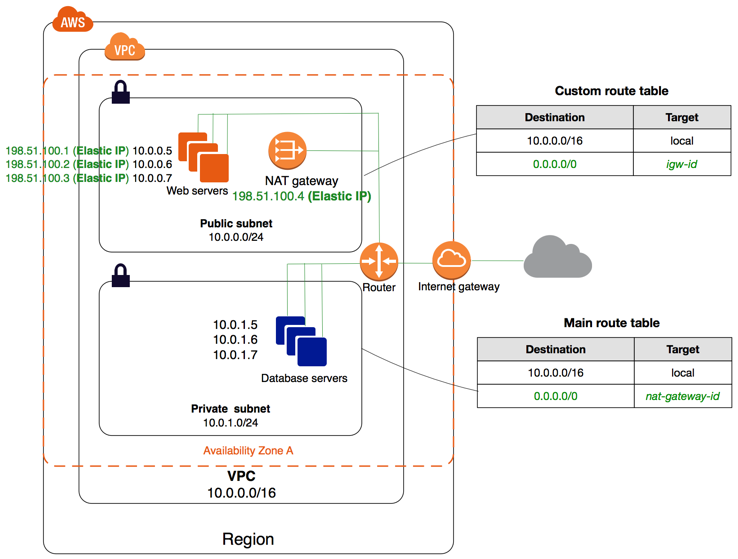
Key Point: A subnet is public or private based on its route table, not a toggle switch. If the route table has a route to an Internet Gateway, it’s public.
Route Tables
A route table contains rules (routes) that determine where network traffic is directed. Every subnet must be associated with a route table.
Analogy: Route tables are like signs in a building directing you — “Lobby → left,” “Server room → right,” “Exit → through reception.”
How Route Tables Work
| Destination | Target | Meaning |
|---|---|---|
| 10.0.0.0/16 | local | Traffic within VPC stays local |
| 0.0.0.0/0 | igw-xxxxx | All other traffic → Internet Gateway |
Key Rules:
- Every VPC has a main route table (default for all subnets)
- You can create custom route tables for specific subnets
- The
localroute (VPC internal traffic) cannot be removed - Most specific route wins (longest prefix match)
Internet Gateway (IGW)
An Internet Gateway is a horizontally scaled, redundant, and highly available VPC component that allows communication between your VPC and the internet.
Analogy: The front door of your office building. Without it, nobody from outside can enter, and nobody inside can leave to the internet.
Key Characteristics
- Only one IGW per VPC
- Supports both IPv4 and IPv6
- Highly available — no bandwidth constraints
- Must be attached to the VPC AND referenced in a route table to work
Making a Subnet Public (3 Steps)
- Create and attach an Internet Gateway to your VPC
- Add a route in the subnet’s route table:
0.0.0.0/0 → IGW - Ensure instances have public IP addresses (or Elastic IPs)
NAT Gateway
A NAT (Network Address Translation) Gateway allows instances in private subnets to access the internet (for software updates, API calls) WITHOUT allowing the internet to initiate connections back to them.
Analogy: A one-way mail slot. Your private servers can send letters out (make requests), but nobody outside can push mail back in unless it’s a reply.
How NAT Gateway Works
|
1 2 3 |
Private Subnet Instance → NAT Gateway (in Public Subnet) → Internet Gateway → Internet ↑ │ └────────────────── Response comes back same path ───────────────────────┘ |
Key Points
- NAT Gateway lives in a public subnet
- You add a route in the private subnet’s route table:
0.0.0.0/0 → nat-xxxxx - Managed by AWS — no patching required
- Supports up to 45 Gbps bandwidth (scales automatically)
- Charged per hour + per GB of data processed
- Zonal NAT Gateway: operates in a single AZ (traditional)
- Regional NAT Gateway (New 2025): automatically expands across AZs for high availability without manual setup
NAT Gateway vs. NAT Instance
| Feature | NAT Gateway | NAT Instance |
|---|---|---|
| Managed by | AWS | You |
| Availability | Highly available in AZ | Depends on your setup |
| Bandwidth | Up to 45 Gbps | Depends on instance type |
| Maintenance | None required | You patch/update |
| Cost | Higher | Lower (but more effort) |
| Recommendation | ✓ Use this | Only for cost savings |
Security Groups vs. NACLs
AWS gives you two layers of network security. Understanding the difference is critical for the exam and real-world usage.
Security Groups (Instance-Level Firewall)
Analogy: A bodyguard assigned to each person (instance). The bodyguard decides who can talk to that person.
- Operates at the instance level (attached to ENI)
- Stateful — if inbound traffic is allowed, the response is automatically allowed
- Supports ALLOW rules only (no deny rules)
- All rules evaluated before deciding
- Default: denies all inbound, allows all outbound
Example Security Group for a Web Server:
| Type | Protocol | Port | Source | Description |
|---|---|---|---|---|
| Inbound | TCP | 80 | 0.0.0.0/0 | Allow HTTP from anywhere |
| Inbound | TCP | 443 | 0.0.0.0/0 | Allow HTTPS from anywhere |
| Inbound | TCP | 22 | 203.0.113.0/32 | Allow SSH from my IP only |
| Outbound | All | All | 0.0.0.0/0 | Allow all outbound |
Network ACLs (Subnet-Level Firewall)
Analogy: A security checkpoint at each floor’s entrance. Everyone passing through that floor gets checked, regardless of which room they’re going to.
- Operates at the subnet level
- Stateless — inbound and outbound rules are evaluated independently
- Supports both ALLOW and DENY rules
- Rules evaluated in order by rule number (lowest first)
- Default NACL: allows all inbound and outbound traffic
Example NACL for a Public Subnet:
| Rule # | Type | Protocol | Port Range | Source/Dest | Allow/Deny |
|---|---|---|---|---|---|
| 100 | Inbound | TCP | 80 | 0.0.0.0/0 | ALLOW |
| 110 | Inbound | TCP | 443 | 0.0.0.0/0 | ALLOW |
| 120 | Inbound | TCP | 1024-65535 | 0.0.0.0/0 | ALLOW |
| * | Inbound | All | All | 0.0.0.0/0 | DENY |
| 100 | Outbound | TCP | 80 | 0.0.0.0/0 | ALLOW |
| 110 | Outbound | TCP | 443 | 0.0.0.0/0 | ALLOW |
| 120 | Outbound | TCP | 1024-65535 | 0.0.0.0/0 | ALLOW |
| * | Outbound | All | All | 0.0.0.0/0 | DENY |
Security Groups vs. NACLs Comparison
| Feature | Security Group | Network ACL |
|---|---|---|
| Level | Instance (ENI) | Subnet |
| Stateful/Stateless | Stateful | Stateless |
| Rules | Allow only | Allow AND Deny |
| Rule evaluation | All rules evaluated | Rules processed in order |
| Default (custom) | Deny all inbound | Deny all traffic |
| Default (default) | Allow internal | Allow all traffic |
| Applies to | Only if associated | All instances in subnet |
Best Practice: Use Security Groups as your primary defense (easier to manage). Use NACLs as an additional layer for subnet-wide rules, like blocking a specific IP range.
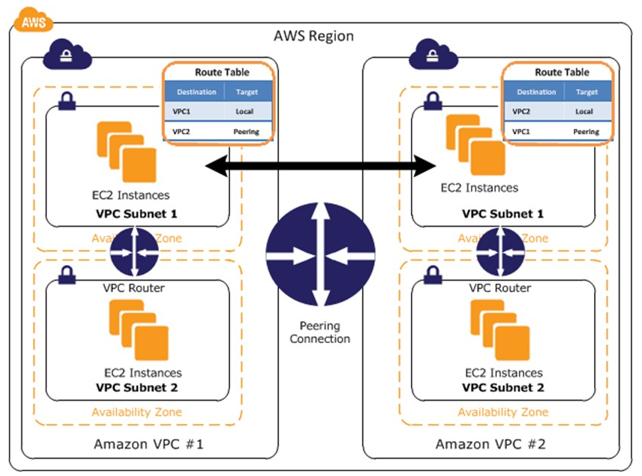
VPC Peering
A VPC Peering Connection is a networking connection between two VPCs that enables traffic routing between them using private IP addresses. Instances in either VPC can communicate as if they are in the same network.
Analogy: Building a private bridge between two office buildings. Employees (resources) can walk between buildings directly without going outside (through the internet).
Key Rules
- Works across different AWS accounts and different Regions
- CIDR blocks must NOT overlap between peered VPCs
- Not transitive — if VPC-A peers with VPC-B, and VPC-B peers with VPC-C, VPC-A CANNOT reach VPC-C through VPC-B
- You must update route tables in BOTH VPCs
- Security groups can reference the peered VPC’s security groups
|
1 2 3 4 5 6 |
VPC-A (10.0.0.0/16) ←──── Peering Connection ────→ VPC-B (172.16.0.0/16) │ │ │ NOT transitive │ │ │ ↓ ↓ VPC-C (192.168.0.0/16) ← Must create separate peering → VPC-B |
When to Use VPC Peering
- Connecting a development VPC to a production VPC
- Sharing resources across AWS accounts
- Simple one-to-one VPC connectivity
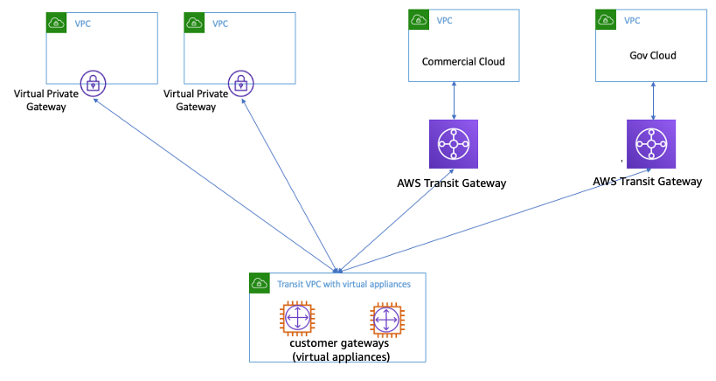
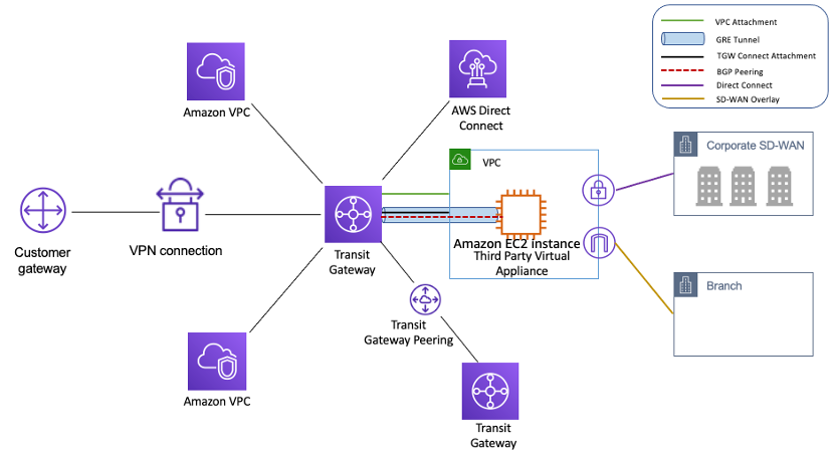
For complex multi-VPC architectures, consider AWS Transit Gateway instead — it acts as a central hub connecting multiple VPCs and on-premises networks.
VPC Endpoints
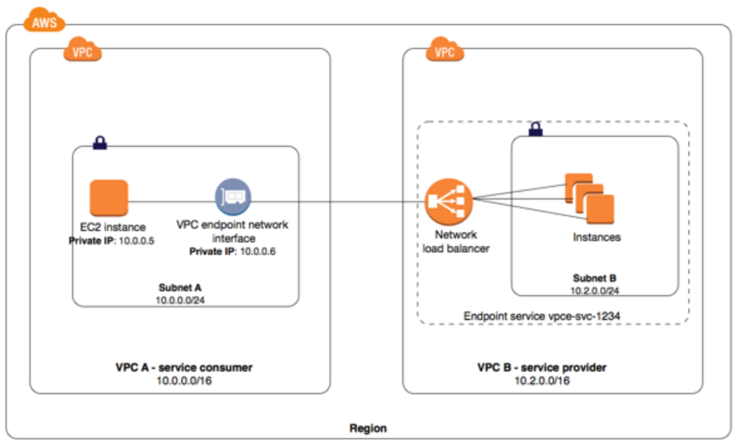
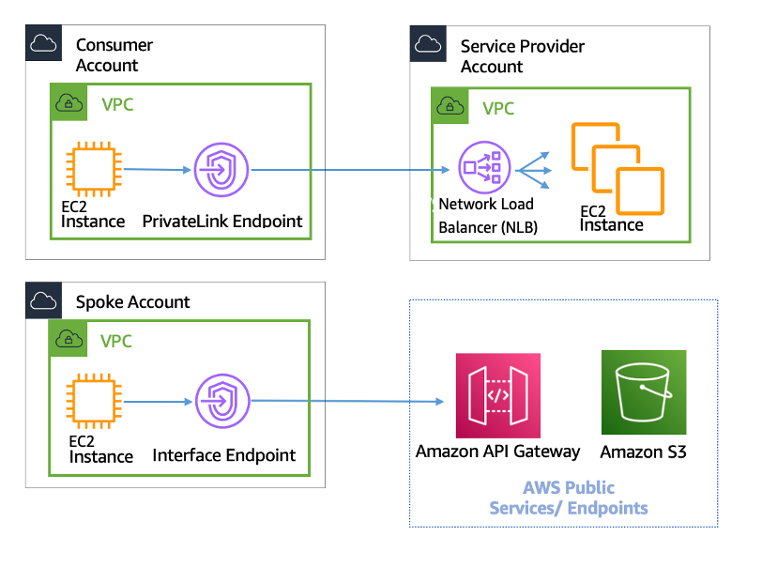
VPC Endpoints allow you to privately connect your VPC to supported AWS services without requiring an Internet Gateway, NAT Gateway, VPN, or AWS Direct Connect. Traffic never leaves the AWS network.
Analogy: Instead of leaving your building to visit the bank (AWS service), the bank opens a private counter inside your building. Faster, safer, and cheaper.
Types of VPC Endpoints
| Type | How it Works | Supported Services | Cost |
|---|---|---|---|
| Gateway Endpoint | Route table entry pointing to the endpoint | S3, DynamoDB only | Free |
| Interface Endpoint (PrivateLink) | ENI with private IP in your subnet | Most AWS services (100+) | Per hour + per GB |
Why Use VPC Endpoints?
- Security: Traffic stays within AWS network (never traverses the internet)
- Performance: Lower latency, more reliable
- Cost savings: No NAT Gateway data processing charges for AWS service traffic
- Compliance: Keep sensitive data off the public internet
Example: S3 Gateway Endpoint
Without endpoint: EC2 → NAT Gateway → Internet Gateway → S3 (over the internet)
With endpoint: EC2 → S3 Gateway Endpoint → S3 (private AWS network)
Step-by-Step: Creating a VPC with Public and Private Subnets
Here’s how to create a production-ready VPC from scratch using the AWS Console:
Step 1: Create the VPC
- Go to VPC Console → “Create VPC”
- Choose “VPC and more” (creates subnets, route tables, and gateways automatically) OR “VPC only” for manual setup
- Name:
my-app-vpc - IPv4 CIDR:
10.0.0.0/16(65,536 addresses — plenty of room) - Click “Create VPC”
Step 2: Create Subnets
- Create a Public Subnet:
10.0.1.0/24in AZ us-east-1a - Create a Private Subnet:
10.0.2.0/24in AZ us-east-1a - Create a Public Subnet:
10.0.3.0/24in AZ us-east-1b (for high availability) - Create a Private Subnet:
10.0.4.0/24in AZ us-east-1b
Step 3: Create and Attach an Internet Gateway
- Create an Internet Gateway:
my-app-igw - Attach it to your VPC
Step 4: Configure Route Tables
- Public Route Table: Add route
0.0.0.0/0 → igw-xxxxx - Associate public subnets (10.0.1.0/24, 10.0.3.0/24) with this route table
- Private Route Table: Keep only the local route (or add NAT Gateway route)
- Associate private subnets (10.0.2.0/24, 10.0.4.0/24) with this route table
Step 5: Create a NAT Gateway (for private subnet internet access)
- Create a NAT Gateway in one of the public subnets
- Allocate an Elastic IP for the NAT Gateway
- Update the Private Route Table: add
0.0.0.0/0 → nat-xxxxx
Step 6: Configure Security Groups
- Web-SG: Allow inbound HTTP (80), HTTPS (443) from 0.0.0.0/0
- App-SG: Allow inbound from Web-SG only on app port
- DB-SG: Allow inbound from App-SG only on database port (3306/5432)
|
1 2 3 4 5 6 7 8 9 10 11 12 13 14 15 16 17 18 19 20 21 22 |
FINAL ARCHITECTURE: Internet │ ▼ ┌─── Internet Gateway ───┐ │ │ ▼ ▼ ┌──────────────┐ ┌──────────────┐ │ Public Sub │ │ Public Sub │ │ (AZ-1a) │ │ (AZ-1b) │ │ [Web Server] │ │ [Web Server] │ │ [NAT GW] │ │ │ └──────┬───────┘ └──────────────┘ │ ▼ ┌──────────────┐ ┌──────────────┐ │ Private Sub │ │ Private Sub │ │ (AZ-1a) │ │ (AZ-1b) │ │ [App Server] │ │ [App Server] │ │ [Database] │ │ [Database] │ └──────────────┘ └──────────────┘ |
Quick Reference Table
| Component | What It Does | Key Facts |
|---|---|---|
| VPC | Isolated virtual network | Max size /16, min /28. Up to 5 CIDRs per VPC (adjustable to 50). |
| Subnet | Segment of VPC in one AZ | Public = has IGW route. AWS reserves 5 IPs per subnet. |
| Internet Gateway | Connects VPC to internet | One per VPC. Highly available. No bandwidth limit. |
| NAT Gateway | Private subnet → internet (outbound only) | Lives in public subnet. Up to 45 Gbps. Charged per hour + data. |
| Route Table | Directs traffic | Local route always present. Most specific route wins. |
| Security Group | Instance-level firewall | Stateful. Allow rules only. All rules evaluated. |
| Network ACL | Subnet-level firewall | Stateless. Allow + Deny. Rules processed in order. |
| VPC Peering | Connect two VPCs privately | Non-transitive. No overlapping CIDRs. Cross-account/region OK. |
| VPC Endpoint | Private access to AWS services | Gateway (S3, DynamoDB – free). Interface (most services – paid). |
| Elastic IP | Static public IPv4 address | Free when attached to a running instance. Charged when unused. |
Practice Questions
Question 1
You have an EC2 instance in a private subnet that needs to download software updates from the internet. Which combination enables this?
- Attach an Internet Gateway and assign a public IP to the instance
- Create a NAT Gateway in a public subnet and add a route in the private subnet’s route table
- Create a VPC Endpoint for the update server
- Add a route to 0.0.0.0/0 in the private subnet pointing to the Internet Gateway
Show Answer
Answer: B – A NAT Gateway in a public subnet allows private instances to access the internet for outbound traffic without being directly accessible from the internet. Option A would make it a public subnet. Option D would not work without a public IP on the instance.
Question 2
What makes a subnet “public” in AWS?
- It has “public” in its name tag
- Auto-assign public IP is enabled
- Its route table has a route to an Internet Gateway
- It is in the default VPC
Show Answer
Answer: C – A subnet is public when its associated route table contains a route directing internet-bound traffic (0.0.0.0/0) to an Internet Gateway. The name and auto-assign IP settings don’t determine this.
Question 3
Your security team wants to block all traffic from a specific IP range (203.0.113.0/24) at the subnet level. Which should you use?
- Security Group with a deny rule
- Network ACL with a deny rule
- Route table blackhole route
- AWS WAF rule
Show Answer
Answer: B – Network ACLs support both ALLOW and DENY rules and operate at the subnet level. Security Groups only support ALLOW rules, so you cannot explicitly deny specific IPs with them.
Question 4
VPC-A (10.0.0.0/16) is peered with VPC-B (172.16.0.0/16). VPC-B is peered with VPC-C (192.168.0.0/16). Can instances in VPC-A communicate with VPC-C through VPC-B?
- Yes, VPC peering is transitive
- Yes, if route tables are configured correctly in VPC-B
- No, VPC peering is NOT transitive
- Yes, but only for ICMP traffic
Show Answer
Answer: C – VPC peering is non-transitive. VPC-A must create a direct peering connection with VPC-C to communicate. Traffic cannot pass through VPC-B as an intermediary.
Question 5
An application in a private subnet needs to access S3 without traversing the internet. What’s the most cost-effective solution?
- Create a NAT Gateway and access S3 over the internet
- Create an S3 Gateway Endpoint
- Create an S3 Interface Endpoint (PrivateLink)
- Peer the VPC with the S3 VPC
Show Answer
Answer: B – S3 Gateway Endpoints are free and provide private access to S3 without requiring a NAT Gateway. Interface Endpoints (Option C) would also work but incur hourly and data charges. NAT Gateway (Option A) would add unnecessary cost.
What’s New in AWS VPC (2025-2026)
- VPC Encryption Controls (Nov 2025): Enforce encryption in transit for all traffic within and across VPCs using monitor and enforce modes — no application changes needed.
- Regional NAT Gateways (Nov 2025): A single NAT Gateway that automatically expands across Availability Zones based on your workload, providing automatic high availability without manual multi-AZ setup.
- Amazon VPC Lattice: A fully managed service for connecting, securing, and monitoring service-to-service communication across VPCs and accounts — ideal for microservices architectures.
- Amazon VPC IPAM: Centrally plan, track, and monitor IP addresses across your AWS organization.
Summary
AWS VPC is the foundation of cloud networking. Every resource you deploy sits inside a VPC. Here’s the key takeaway:
- VPC = Your private network in AWS (an isolated building)
- Subnets = Rooms in your building (public-facing or private)
- Route Tables = Signs directing traffic to the right destination
- Internet Gateway = Your front door to the internet
- NAT Gateway = One-way outbound access for private resources
- Security Groups = Personal bodyguards (stateful, allow-only)
- NACLs = Floor-level security checkpoints (stateless, allow + deny)
- VPC Peering = Private bridge between two VPCs
- VPC Endpoints = Private counter for AWS services inside your VPC
Start with the default VPC for learning, then build custom VPCs for production. Always place databases in private subnets and web servers in public subnets. Use security groups as your primary defense, and add NACLs for subnet-wide rules.
Frequently Asked Questions
What is a VPC in AWS?
A Virtual Private Cloud (VPC) is your own isolated network within AWS where you launch resources. Think of it like renting a private floor in an office building — you control the layout (subnets), doors (gateways), and security (security groups/NACLs).
What is the difference between a public and private subnet?
A public subnet has a route to an Internet Gateway, allowing resources with public IPs to communicate directly with the internet. A private subnet has no internet route — resources can only access the internet through a NAT Gateway for outbound traffic.
Do I need to create a VPC to use AWS?
No, every AWS account comes with a default VPC in each region with public subnets, an internet gateway, and default security groups. However, for production workloads, creating a custom VPC with public and private subnets is recommended for better security.