AWS Classic Load Balancer vs Application Load Balancer vs Network Load Balancer

AWS Classic Load Balancer vs Application Load Balancer vs Network Load Balancer

📌 Post Updated: June 2026 — Added Gateway Load Balancer (GWLB), NLB Security Groups support, ALB Mutual TLS, NLB QUIC protocol, ALB JWT verification, ALB Target Optimizer, LCU Reservation, Post-Quantum TLS, and updated EC2-Classic retirement status.

  • Elastic Load Balancing supports four types of load balancers:
    • Classic Load Balancer – CLB (Previous Generation)
    • Application Load Balancer – ALB
    • Network Load Balancer – NLB
    • Gateway Load Balancer – GWLB
  • While there is some overlap in the features, AWS does not maintain feature parity between the different types of load balancers.

⚠️ Classic Load Balancer – Previous Generation

Classic Load Balancer is the previous generation load balancer. AWS recommends using Application Load Balancer for Layer 7 and Network Load Balancer for Layer 4. CLB was originally designed for the EC2-Classic network, which was fully retired in August 2023. While CLB continues to function in VPC, no new features are being added to it.

Migration: Use the AWS Migration Wizard to migrate existing CLBs to ALB or NLB. See Migrate your Classic Load Balancer.

CLB vs ALB vs NLB General

Usage Patterns

  • Classic Load Balancer (Previous Generation)
    • provides basic load balancing across multiple EC2 instances and operates at both the request level and connection level.
    • is intended for applications that were built within the EC2-Classic network. EC2-Classic was fully retired in August 2023.
    • is ideal for simple load balancing of traffic across multiple EC2 instances.
    • AWS recommends migrating to ALB or NLB for all new workloads.
  • Application Load Balancer
    • is ideal for microservices or container-based architectures where there is a need to route traffic to multiple services or load balance across multiple ports on the same EC2 instance.
    • operates at the request level (layer 7), routing traffic to targets – EC2 instances, containers, IP addresses, and Lambda functions based on the content of the request.
    • is ideal for advanced load balancing of HTTP and HTTPS traffic, and provides advanced request routing targeted at delivery of modern application architectures, including microservices and container-based applications.
    • simplifies and improves the security of the application, by ensuring that the latest SSL/TLS ciphers and protocols are used at all times.
    • supports Mutual TLS (mTLS) authentication to verify client certificate-based identities.
    • supports native JWT (JSON Web Token) verification for secure service-to-service authentication.
  • Network Load Balancer
    • operates at the connection level (Layer 4), routing connections to targets – EC2 instances, microservices, and containers – within VPC based on IP protocol data.
    • is ideal for load balancing of TCP, UDP, TLS, and QUIC traffic.
    • is capable of handling millions of requests per second while maintaining ultra-low latencies.
    • is optimized to handle sudden and volatile traffic patterns while using a single static IP address per AZ
    • is integrated with other popular AWS services such as Auto Scaling, ECS, CloudFormation, and AWS Certificate Manager (ACM).
    • now supports security groups (since August 2023) for centralized access control.
    • supports QUIC protocol in passthrough mode (since November 2025) for low-latency mobile and real-time applications.
  • Gateway Load Balancer
    • operates at Layer 3 (network layer), providing a transparent network gateway and distributing traffic to virtual appliances.
    • is ideal for deploying, scaling, and managing third-party virtual appliances such as firewalls, intrusion detection/prevention systems (IDS/IPS), and deep packet inspection systems.
    • combines a transparent network gateway (single entry and exit point for all traffic) with load balancing of virtual appliances.
    • uses the GENEVE protocol on port 6081 to exchange traffic with registered virtual appliance instances.
    • maintains flow stickiness using 5-tuple (default), 3-tuple, or 2-tuple.
  • AWS recommends using Application Load Balancer for Layer 7 and Network Load Balancer for Layer 4 when using VPC.

AWS ELB Classic Load Balancer vs Application Load Balancer
Supported Protocols

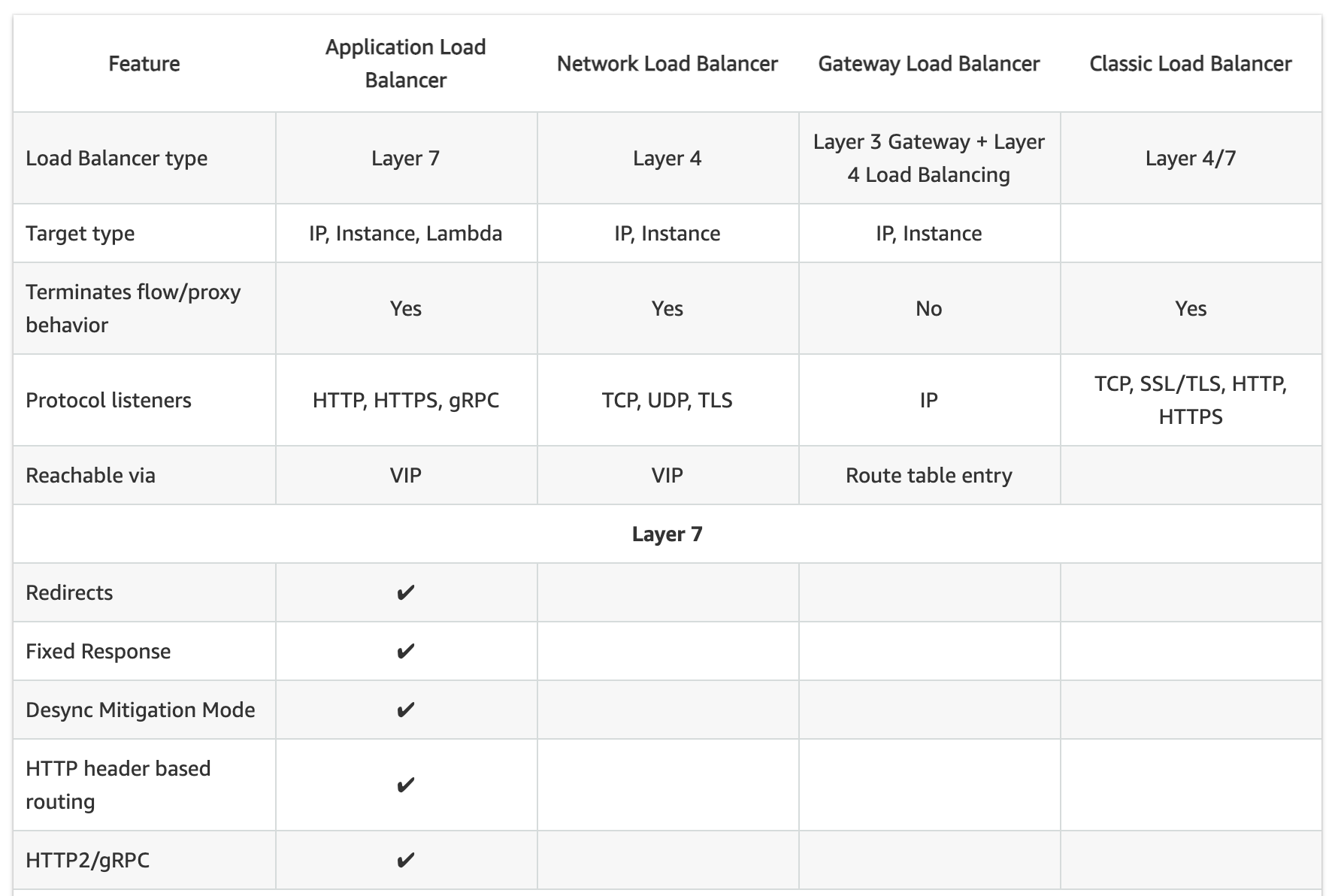
  • Classic ELB operates at layer 4 and supports HTTP, HTTPS, TCP, SSL
  • ALB operates at layer 7 and supports HTTP, HTTPS, HTTP/2, gRPC, WebSockets
  • NLB operates at the connection level (Layer 4) and supports TCP, UDP, TLS, QUIC, TCP_QUIC
  • GWLB operates at Layer 3 and listens for all IP packets across all ports

Load Balancing to Multiple Ports on the same instance

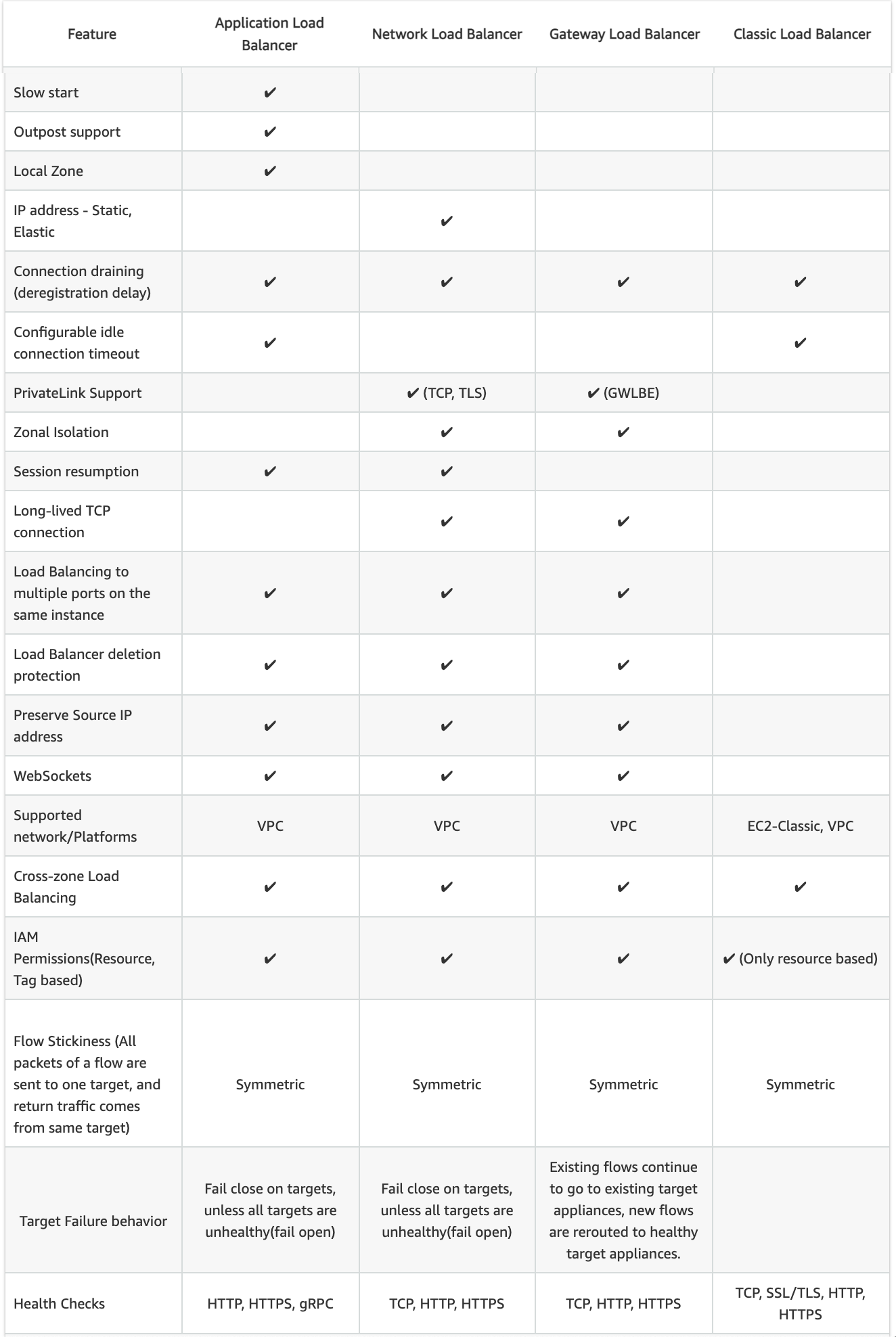
  • ALB, NLB, and GWLB support Load Balancing to multiple ports on the same instance
  • CLB does not support load balancing to multiple ports on the same instance

Host-based Routing & Path-based Routing

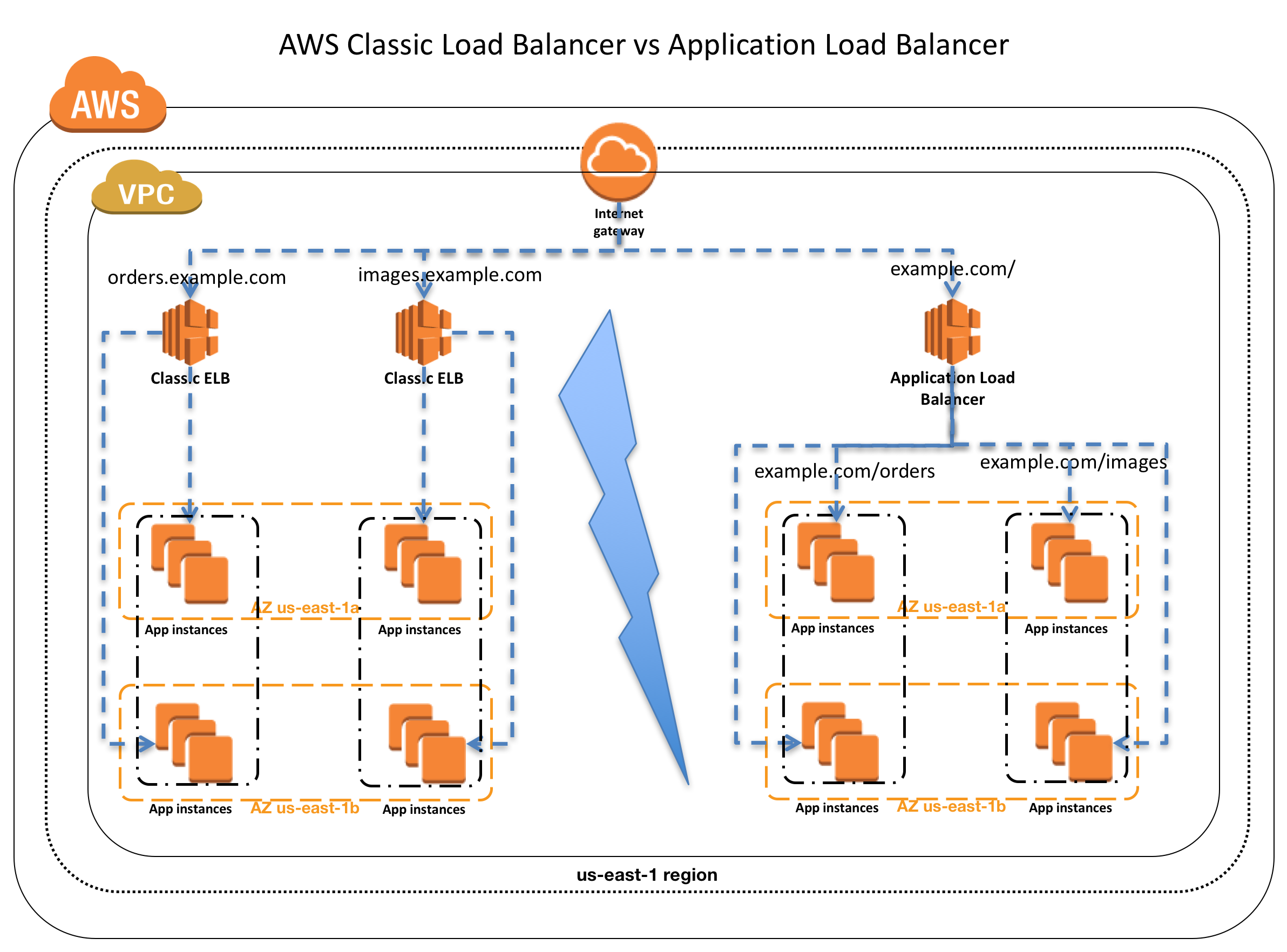
  • Host-based routing use host conditions to define rules that forward requests to different target groups based on the hostname in the host header. This enables ALB to support multiple domains using a single load balancer.
  • Path-based routing use path conditions to define rules that forward requests to different target groups based on the URL in the request. Each path condition has one path pattern. If the URL in a request matches the path pattern in a listener rule exactly, the request is routed using that rule.
  • Only ALB supports Host-based & Path-based routing.

URL and Host Header Rewrite (ALB – New 2025)

  • ALB now supports URL and Host Header rewrite capabilities (October 2025).
  • Enables modification of request URLs and Host Headers using regex-based pattern matching before routing requests to targets.
  • Useful for URL normalization, path rewriting, and host header transformation without application code changes.
  • Only ALB supports URL and Host Header Rewrite.

CLB vs ALB vs NLB Common configurations and Features

Slow Start

  • By default, a target starts to receive its full share of requests as soon as it is registered with a target group and passes an initial health check.
  • Using slow start mode gives targets time to warm up before the load balancer sends them a full share of requests.
  • Only ALB supports slow start mode

Target Optimizer (ALB – New 2025)

  • ALB Target Optimizer (November 2025) allows you to enforce a maximum number of concurrent requests on a target.
  • Uses an agent installed on each target that tracks concurrent requests and signals the ALB when capacity is available.
  • Enables high-efficiency load balanced applications while maintaining low latency and high availability.
  • Returns 503 errors during overload rather than overwhelming targets.
  • Only ALB supports Target Optimizer.

Static IP and Elastic IP Address

  • NLB automatically provides a static IP per AZ (subnet) that can be used by applications as the front-end IP of the load balancer.
  • NLB also allows the option to assign an Elastic IP per AZ (subnet) thereby providing your own fixed IP.
  • Classic ELB, ALB, and GWLB do not support Static and Elastic IP address

Connection Draining OR Deregistration Delay

  • Connection draining enables the load balancer to complete in-flight requests made to instances that are de-registering or unhealthy.
  • All Load Balancer types (CLB, ALB, NLB, GWLB) support connection draining/deregistration delay.

Idle Connection Timeout

  • Idle Connection Timeout helps specify a time period, which ELB uses to close the connection if no data has been sent or received by the time that the idle timeout period elapses
  • Can be configured for CLB & ALB (default 60 seconds)
  • Cannot be configured for NLB (350 secs for TCP, 120 secs for UDP)
  • GWLB supports configurable TCP idle timeout (60 to 6000 seconds, since September 2024)
  • It is recommended to enable HTTP keep-alive in the web server settings for the EC2 instances, thus making the ELB reuse the backend connections until the keep-alive timeout expires.

PrivateLink Support

  • CLB and ALB do not support PrivateLink
  • NLB supports PrivateLink (TCP, TLS, UDP)
  • GWLB supports PrivateLink via Gateway Load Balancer Endpoints (GWLBE)

Zonal Isolation

  • NLB and GWLB support Zonal Isolation which supports application architectures in a single zone. It automatically fails over to other healthy AZs, if something fails in an AZ
  • CLB and ALB do not support Zonal Isolation.
  • NLB supports Zonal DNS Affinity (since October 2023), allowing clients to resolve the load balancer DNS to an IP in their same AZ.

Deletion Protection

  • ALB, NLB, and GWLB support Deletion Protection, wherein a load balancer can’t be deleted if deletion protection is enabled
  • CLB does not support deletion protection.

Preserve Source IP address

  • As the ELB intercepts the traffic between the client and the back-end servers, the back-end server does not know the IP address, Protocol, and the Port used between the Client and the Load balancer.
  • Classic ELB (HTTP/HTTPS) and ALB do not preserve the client-side source IP. It needs to be retrieved using X-Forward-XXX.
    • X-Forwarded-For request header to help back-end servers identify the IP address of a client when you use an HTTP or HTTPS load balancer.
    • X-Forwarded-Proto request header to help back-end servers identify the protocol (HTTP/S) that a client used to connect to the server
    • X-Forwarded-Port request header to help back-end servers identify the port that an HTTP or HTTPS load balancer uses to connect to the client.
  • CLB (SSL/TLS) uses Proxy Protocol Version 1 and NLB uses Proxy Protocol Version 2 to provide the information.
  • NLB preserves the client-side source IP or needs Proxy Protocol allowing the back-end to see the IP address of the client.
    • If targets are registered by instance ID or ECS tasks, the source IP addresses of the clients are preserved and provided to the applications.
    • If targets are registered by IP address
      • for TCP & TLS, the source IP addresses are the private IP addresses of the load balancer nodes. Use Proxy Protocol.
      • for UDP & TCP_UDP, it is enabled by default and the source IP addresses of the clients are preserved.
  • GWLB preserves the source IP address as it operates as a transparent bump-in-the-wire.

Health Checks

  • All Load Balancer types support Health checks to determine if the instance is healthy or unhealthy
  • ALB provides health check improvements that allow detailed error codes from 200-399 to be configured
  • ALB supports HTTP, HTTPS, and gRPC health checks
  • NLB and GWLB support TCP, HTTP, and HTTPS health checks
  • CLB supports TCP, SSL/TLS, HTTP, and HTTPS health checks

Security Groups

  • ALB, NLB, and CLB support security groups
  • NLB added security group support in August 2023, enabling centralized access control and inbound rule enforcement
  • GWLB does not support security groups
  • Note: NLB security groups must be associated at creation time; they cannot be added to an existing NLB that was created without them.

Supported Platforms

  • Classic ELB supports both EC2-Classic and EC2-VPC — EC2-Classic was fully retired in August 2023. All load balancers now operate in VPC only.
  • ALB, NLB, and GWLB support only EC2-VPC.
  • CLB now effectively operates only in VPC (EC2-Classic no longer exists).

WebSockets

  • CLB does not support WebSockets
  • ALB, NLB, and GWLB support WebSockets

Cross-zone Load Balancing

  • By default, Load Balancer will distribute requests evenly across its enabled AZs, irrespective of the instances it hosts.
  • Cross-zone Load Balancing help distribute incoming requests evenly across all instances in its enabled AZs.
  • CLB → Cross Zone load balancing is disabled, by default, and can be enabled and free of charge.
  • ALB → Cross Zone load balancing is always enabled at the load balancer level, but can be turned off at the target group level (since November 2022). Free of charge.
  • NLB → Cross Zone load balancing is disabled, by default, and can be enabled but is charged for inter-az data transfer.
  • GWLB → Cross Zone load balancing is disabled, by default, and can be enabled.
  • Zonal Shift & Autoshift: Both ALB and NLB (with cross-zone enabled) now support zonal shift and zonal autoshift (2024) to move traffic away from an impaired AZ.

Sticky Sessions (Cookies)

  • Sticky Sessions (Session Affinity) enables the load balancer to bind a user’s session to a specific instance, which ensures that all requests from the user during the session are sent to the same instance
  • CLB, ALB, and NLB support sticky sessions to maintain session affinity
  • CLB and ALB maintain session stickiness using cookies.
  • NLB supports sticky sessions using a built-in 5-tuple hash table to maintain stickiness across backend servers.
  • NLB idle timeout for TCP connections is 350 seconds. Once the timeout is reached or the session is terminated, the NLB will forget the stickiness and incoming packets will be considered as a new flow and could be load balanced to a new target.
  • NLB QUIC protocol uses QUIC Connection IDs for session stickiness, which is resilient to client IP/NAT changes.

CLB vs ALB vs NLB Security

SSL Termination/Offloading

  • SSL Termination helps decrypt requests from clients before sending them to targets and hence reducing the load. SSL certificate must be installed on the load balancer.
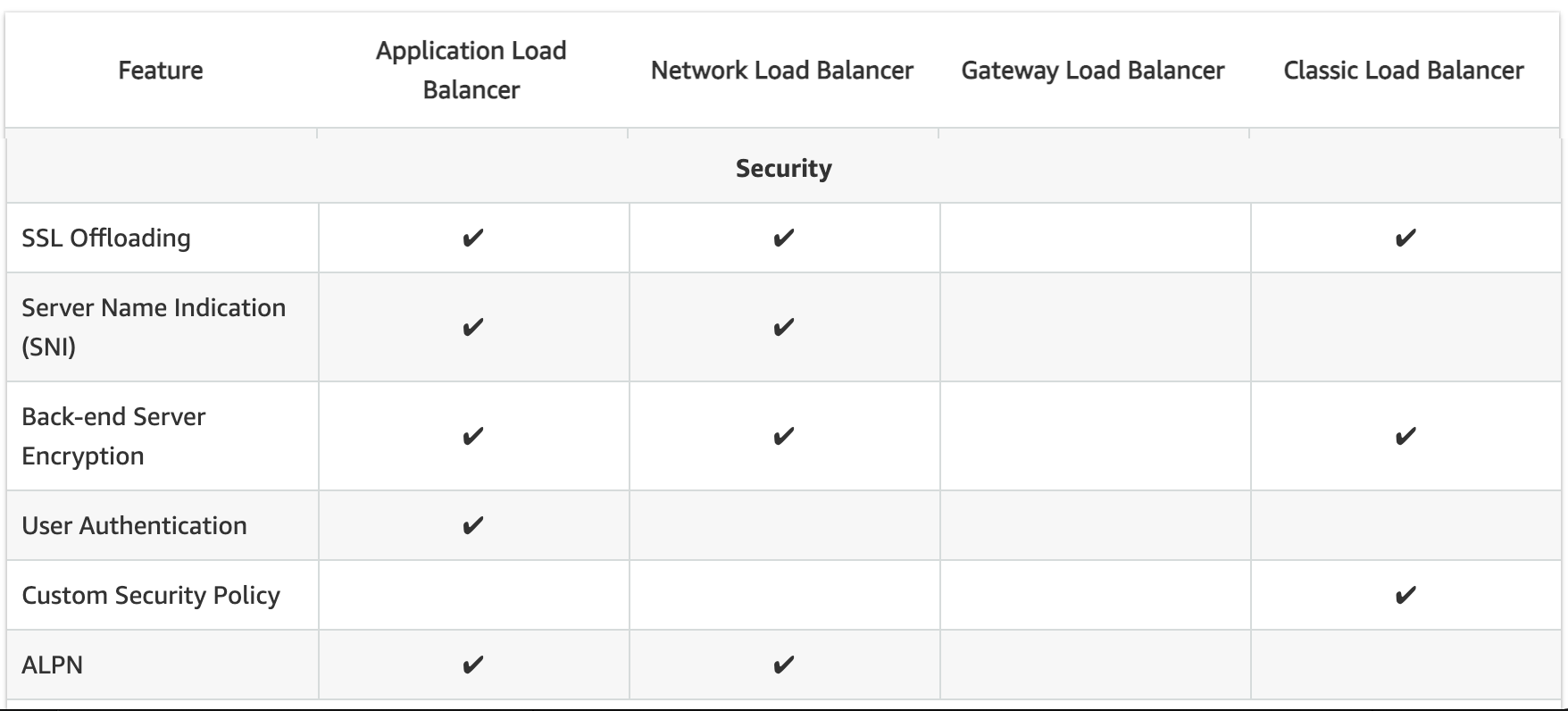
  • CLB, ALB, and NLB support SSL Termination.
  • GWLB does not support SSL offloading (operates at Layer 3).
  • ALB and NLB now support Post-Quantum Key Exchange for TLS (November 2025), using hybrid post-quantum key agreement with ML-KEM algorithm for quantum-resistant encryption.

Mutual TLS (mTLS) Authentication (ALB – New 2023)

  • Mutual TLS extends standard TLS by requiring clients to present X.509 certificates for authentication.
  • ALB can authenticate client certificates from third-party Certificate Authorities or AWS Private Certificate Authority (PCA).
  • Supports certificate revocation checks to restrict access for compromised certificates.
  • Offloads client authentication to the load balancer, eliminating the need for custom authentication in applications.
  • Only ALB supports Mutual TLS authentication.

JWT Verification (ALB – New 2025)

  • ALB now supports native JSON Web Token (JWT) verification (November 2025) for secure service-to-service (S2S) or machine-to-machine (M2M) communications.
  • Validates token signatures, expiration times, and claims without requiring application code changes.
  • Useful for OAuth 2.0 client credentials flow.
  • Only ALB supports native JWT verification.

Server Name Indication

  • CLB only supports a single certificate and does not support SNI
  • ALB and NLB support multiple certificates and use SNI to serve multiple secure websites using a single TLS listener.
    • If the hostname provided by a client matches a single certificate in the certificate list, the load balancer selects this certificate.
    • If a hostname provided by a client matches multiple certificates in the certificate list, the load balancer selects the best certificate that the client can support.

Back-end Server Authentication

  • Back-end Server Authentication enables authentication of the instances.
  • Load balancer communicates with an instance only if the public key that the instance presents to the load balancer matches a public key in the authentication policy for the load balancer.
  • Classic Load Balancer supports Back-end Server Authentication
  • ALB does not support Back-end Server Authentication

Capacity Unit Reservation (New 2024)

  • ALB and NLB support Load Balancer Capacity Unit (LCU) Reservation (November 2024).
  • Allows proactively setting a minimum capacity for the load balancer to prepare for planned traffic spikes.
  • Complements existing auto-scaling, useful for product launches, sales events, or traffic migrations.
  • GWLB added LCU Reservation support in April 2025.
  • ALB, NLB, and GWLB support LCU Reservation.
  • CLB does not support LCU Reservation.

Weighted Target Groups (NLB – New 2025)

  • NLB now supports weighted target groups (November 2025).
  • Allows distributing traffic across multiple target groups with configurable static weights.
  • Enables blue/green and canary deployment strategies with zero downtime without needing multiple load balancers.
  • ALB has long supported weighted target groups via listener rules; NLB now supports this natively.

CloudWatch Metrics

  • All Load Balancer types integrate with CloudWatch to provide metrics, with ALB providing additional metrics
  • ALB and CLB report request counts, error counts, error types, and request latency
  • NLB and GWLB report Active Flow Count, New Flow Count, and Processed Bytes

Access Logs

  • Access logs capture detailed information about requests sent to the load balancer. Each log contains information such as request received time, client’s IP address, latencies, request paths, and server responses
  • All Load Balancer types provide access logs, with ALB providing additional attributes

Gateway Load Balancer (GWLB)

  • Operates at Layer 3 (network layer) as a transparent network gateway combined with load balancing.
  • Designed for deploying, scaling, and managing third-party virtual appliances (firewalls, IDS/IPS, deep packet inspection).
  • Provides a single entry and exit point for all traffic, distributing it to virtual appliances while scaling based on demand.
  • Uses GENEVE encapsulation protocol on port 6081.
  • Supports 5-tuple (default), 3-tuple, or 2-tuple flow stickiness.
  • Accessible via VPC route table entries (not via VIP like ALB/NLB).
  • Target types: IP and Instance.
  • Supports cross-zone load balancing, deletion protection, and connection draining.
  • Supports configurable TCP idle timeout (60–6000 seconds) since September 2024.
  • Supports LCU Reservation since April 2025.
  • Does not support: SSL offloading, security groups, SNI, static/elastic IP, or slow start.

AWS Certification Exam Practice Questions

  • Questions are collected from Internet and the answers are marked as per my knowledge and understanding (which might differ with yours).
  • AWS services are updated everyday and both the answers and questions might be outdated soon, so research accordingly.
  • AWS exam questions are not updated to keep up the pace with AWS updates, so even if the underlying feature has changed the question might not be updated
  • Open to further feedback, discussion and correction.
  1. A company wants to use load balancer for their application. However, the company wants to forward the requests without any header modification. What service should the company use?
    1. Classic Load Balancer
    2. Network Load Balancer
    3. Application Load Balancer
    4. Use Route 53
  2. A Solutions Architect is building an Amazon ECS-based web application that requires that headers are not modified when being forwarded to Amazon ECS. Which load balancer should the Architect use?
    1. Application Load Balancer
    2. Network Load Balancer
    3. A virtual load balancer appliance from AWS marketplace
    4. Classic Load Balancer
  3. An application tier currently hosts two web services on the same set of instances, listening on different ports. Which AWS service should a solutions architect use to route traffic to the service based on the incoming request?
    1. AWS Application Load Balancer
    2. Amazon CloudFront
    3. Amazon Route 53
    4. AWS Classic Load Balancer
  4. A Solutions Architect needs to deploy an HTTP/HTTPS service on Amazon EC2 instances with support for WebSockets using load balancers. How can the Architect meet these requirements?
    1. Configure a Network Load balancer.
    2. Configure an Application Load Balancer.
    3. Configure a Classic Load Balancer.
    4. Configure a Layer-4 Load Balancer.
  5. A company is hosting an application in AWS for third party access. The third party needs to whitelist the application based on the IP. Which AWS service can the company use in the whitelisting of the IP address?
    1. AWS Application Load Balancer
    2. AWS Classic Load balancer
    3. AWS Network Load Balancer
    4. AWS Route 53
  6. A company needs to deploy inline virtual firewall appliances to inspect all traffic entering and leaving their VPC. The solution must scale automatically with traffic. Which load balancer type should they use?
    1. Application Load Balancer
    2. Network Load Balancer
    3. Classic Load Balancer
    4. Gateway Load Balancer
  7. A solutions architect needs to implement mutual TLS authentication for an application behind a load balancer to verify client certificates. Which load balancer supports this natively?
    1. Application Load Balancer
    2. Network Load Balancer
    3. Classic Load Balancer
    4. Gateway Load Balancer
  8. A company wants to perform blue/green deployments with their Network Load Balancer by gradually shifting traffic between two target groups. Which NLB feature enables this?
    1. Path-based routing
    2. Slow start mode
    3. Weighted target groups
    4. Cross-zone load balancing
  9. An organization wants to prepare their Network Load Balancer for a planned marketing event that will cause a sudden spike in traffic. Which feature should they use?
    1. Cross-zone load balancing
    2. Load Balancer Capacity Unit (LCU) Reservation
    3. Target group health configuration
    4. Slow start mode
  10. A company running a mobile gaming application needs ultra-low latency load balancing with session stickiness that survives client IP changes due to mobile network roaming. Which protocol and load balancer combination best meets this need?
    1. ALB with cookie-based stickiness
    2. NLB with TCP 5-tuple stickiness
    3. NLB with QUIC protocol using Connection ID stickiness
    4. CLB with session cookies

Related Posts

References

AWS API Gateway

AWS API Gateway

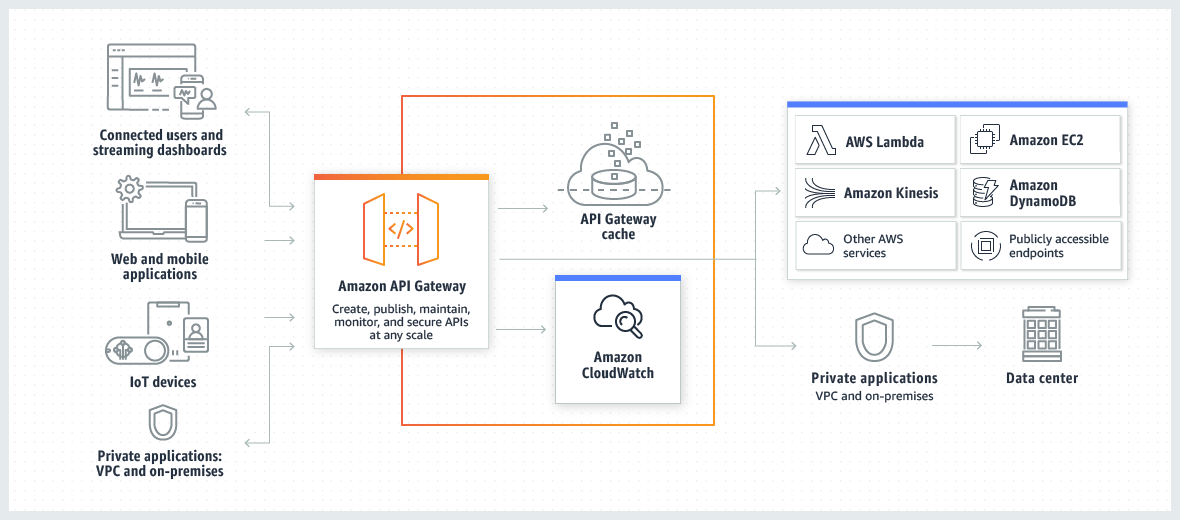
  • AWS API Gateway is a fully managed service that makes it easy for developers to publish, maintain, monitor, and secure APIs at any scale.
  • API Gateway handles all of the tasks involved in accepting and processing up to hundreds of thousands of concurrent API calls, including traffic management, authorization and access control, monitoring, and API version management.
  • API Gateway has no minimum fees or startup costs and charges only for the API calls received and the amount of data transferred out.
  • API Gateway acts as a proxy to the configured backend operations.
  • API Gateway scales automatically to handle the amount of traffic the API receives.
  • API Gateway exposes HTTPS endpoints only for all the APIs created. It does not support unencrypted (HTTP) endpoints.
  • APIs built on API Gateway can accept any payloads sent over HTTP with typical data formats including JSON, XML, query string parameters, and request headers.
  • API Gateway supports three types of APIs:
    • REST APIs – Full-featured API management with request/response transformation, caching, usage plans, and API keys.
    • HTTP APIs – Optimized for serverless workloads with up to 71% cost savings and 60% lower latency compared to REST APIs.
    • WebSocket APIs – For real-time, bidirectional communication between clients and backend services.
  • API Gateway can communicate to multiple backends
    • Lambda functions
    • AWS Step Functions state machines
    • HTTP endpoints exposed through Elastic Beanstalk, ELB or EC2 servers
    • Non AWS hosted HTTP based operations accessible via public Internet
    • Amazon Bedrock AgentCore Gateway (for AI agent tool interactions via MCP)
  • API Gateway endpoints can be public or private:
    • Edge-optimized and Regional endpoints are public to the Internet.
    • Private endpoints can only be accessed from within a VPC using interface VPC endpoints.

AWS API Gateway

API Gateway helps with several aspects of creating and managing APIs

  • Metering
    • automatically meters traffic to the APIs and lets you extract utilization data for each API key.
    • define plans that meter, restrict third-party developer access, configure throttling, and quota limits on a per API key basis
  • Security
    • helps remove authorization concerns from the backend code
    • allows leveraging of AWS administration and security tools, such as IAM and Cognito, to authorize access to APIs
    • can verify signed API calls on your behalf using the same methodology AWS uses for its own APIs.
    • supports custom authorizers written as Lambda functions and verify incoming bearer tokens.
    • supports mutual TLS (mTLS) authentication for REST and HTTP APIs for enhanced client-server identity verification.
    • supports Signature Version 4A (SigV4a) for REST APIs, enabling multi-region request signing for seamless routing and failover between regions.
    • automatically protects the backend systems from distributed denial-of-service (DDoS) attacks, whether attacked with counterfeit requests (Layer 7) or SYN floods (Layer 3).
  • Resiliency
    • helps manage traffic with throttling so that backend operations can withstand traffic spikes.
    • helps improve the performance of the APIs and the latency end users experience by caching the output of API calls to avoid calling the backend every time.
  • Operations Monitoring
    • integrates with CloudWatch and provides a metrics dashboard to monitor calls to API services
    • integrates with CloudWatch Logs to receive errors, access or debug logs
    • provides backend performance metrics covering API calls, latency data and error rates.
    • provides enhanced observability variables in access logs for granular troubleshooting of request errors and latency issues.
  • Lifecycle Management
    • allows multiple API versions and multiple stages (development, staging, production etc.) for each version simultaneously so that existing applications can continue to call previous versions after new API versions are published.
    • saves the history of the deployments, which allows rollback of a stage to a previous deployment at any point, using APIs or console.
  • Designed for Developers
    • allows specifying a mapping template to generate static content to be returned, helping you mock APIs before the backend is ready
    • helps reduce cross-team development effort and time-to-market for applications and allows dependent teams to begin development while backend processes are still built.

API Gateway API Types

REST APIs

  • Full-featured API management with the broadest set of capabilities.
  • Supports request/response transformation using Velocity Template Language (VTL).
  • API keys and usage plans for metering and throttling third-party access.
  • Request validation, API caching, and resource policies.
  • Private API endpoints accessible only from within a VPC.
  • Integration with AWS WAF for web exploit protection.
  • Canary release deployments for safe rollouts.
  • Supports response streaming (November 2025) – progressively streams response payloads to clients without buffering the entire response.
  • Supports private integration with Application Load Balancer directly (November 2025), eliminating the need for an intermediate NLB.
  • Pricing: $3.50 per million requests (first 333M), reducing at scale.

HTTP APIs

  • Optimized for serverless workloads and HTTP backends.
  • Up to 71% cost savings and 60% latency reduction compared to REST APIs.
  • Native JWT authorizer support and OpenID Connect/OAuth 2.0 integration.
  • Simplified configuration with automatic deployments.
  • Supports private integrations with ALB, NLB, and AWS Cloud Map via VPC links.
  • Supports mutual TLS (mTLS) authentication.
  • Does NOT support: API caching, request/response transformation, API keys/usage plans, resource policies, or private API endpoints.
  • Pricing: $1.00 per million requests (first 300M), then $0.90 per million.

WebSocket APIs

  • Supports real-time, bidirectional communication between clients and backend services.
  • Manages persistent connections and message routing based on message content.
  • Supports IAM and Lambda authorization, custom domains, and stage variables.
  • Ideal for chat applications, real-time dashboards, and gaming.
  • Available in most AWS Regions (expanded to 7 additional regions in 2024).
  • Pricing: $1.00 per million messages + $0.25 per million connection minutes.

API Gateway Features

  • Support for stateful (WebSocket) and stateless (HTTP and REST) APIs.
  • Powerful, flexible authentication mechanisms, such as AWS IAM policies, Lambda authorizer functions, and Amazon Cognito user pools.
  • Mutual TLS (mTLS) authentication for client certificate-based identity verification.
  • Signature Version 4A (SigV4a) support for multi-region API access patterns.
  • API Gateway Portals – fully managed developer portals for API discovery, documentation, and governance (November 2025).
  • Canary release deployments for safely rolling out changes.
  • CloudTrail logging and monitoring of API usage and API changes.
  • CloudWatch access logging and execution logging, including the ability to set alarms.
  • Ability to use AWS CloudFormation templates to enable API creation.
  • Support for custom domain names.
  • Integration with AWS WAF for protecting your APIs against common web exploits.
  • Integration with AWS X-Ray for understanding and triaging performance latencies.
  • Response streaming for REST APIs – progressively stream response payloads to clients as they become available (November 2025).
  • Dynamic routing rules for custom domain names based on HTTP headers and/or URL paths (June 2025).
  • Dual-stack (IPv4 and IPv6) endpoint support for REST, HTTP, and WebSocket APIs (March 2025).
  • Private integration with Application Load Balancer for REST APIs without requiring an intermediate NLB (November 2025).
  • Amazon Bedrock AgentCore Gateway integration for exposing REST APIs to AI agents via MCP (December 2025).

API Gateway Throttling and Caching

API Gateway Throttling and Caching

  • Throttling
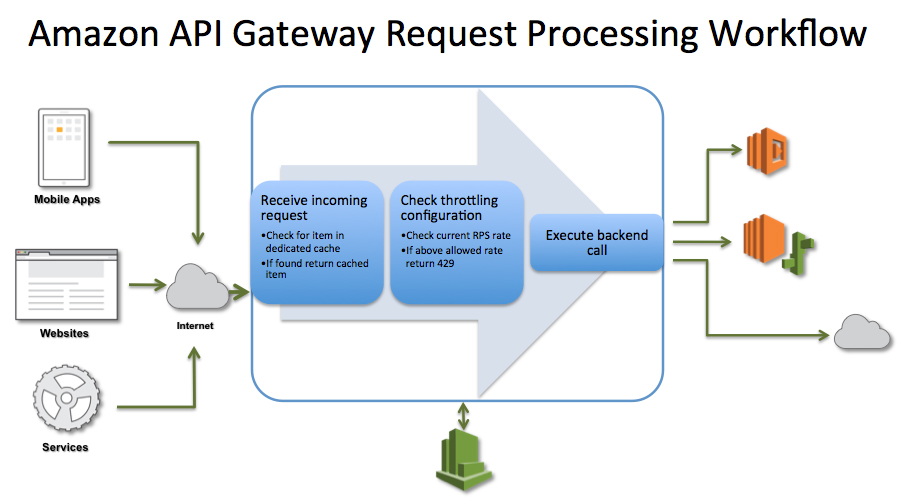
    • API Gateway provides throttling at multiple levels including global and by service calls and limits can be set for standard rates and bursts.
    • It tracks the number of requests per second. Any requests over the limit will receive a 429 HTTP response.
    • Throttling ensures that API traffic is controlled to help the backend services maintain performance and availability.
  • Caching
    • API Gateway provides API result caching by provisioning an API Gateway cache and specifying its size in gigabytes.
    • Caching helps improve performance and reduces the traffic sent to the back end.
    • Caching is available only for REST APIs (not HTTP APIs or WebSocket APIs).
    • API Gateway handles the request in the following manner
      • If caching is not enabled and throttling limits have not been applied, then all requests pass through to the backend service until the account level throttling limits are reached.
      • With throttling limits defined, the API Gateway will shed necessary amount of requests and send only the defined limit to the back-end
      • If a cache is configured, the API Gateway will return a cached response for duplicate requests for a customizable time, but only if under configured throttling limits. It caches responses from the endpoint for a specified time-to-live (TTL) period, in seconds
  • API Gateway does not arbitrarily limit or throttle invocations to the backend operations and all requests that are not intercepted by throttling and caching settings are sent to your backend operations.

API Gateway Response Streaming

  • API Gateway REST APIs support response streaming, progressively sending response payloads to clients as they become available (November 2025).
  • Eliminates the need to buffer complete responses before transmission, improving API responsiveness.
  • Responses can be streamed for up to 15 minutes.
  • Ideal for streaming LLM (Large Language Model) responses from services like Amazon Bedrock.
  • Works with proxy integrations (Lambda proxy and HTTP proxy).
  • Reduces time-to-first-byte (TTFB) for large responses.

API Gateway Routing Rules

  • Dynamic routing rules enable routing API requests based on HTTP header values, URL base paths, or a combination of both (June 2025).
  • Routing rules are associated with custom domain names.
  • Each rule has conditions, actions, and a priority:
    • Conditions: Up to two header conditions and one base path condition per rule (evaluated with AND logic).
    • Actions: Route to any stage of any REST API within the same account and region.
    • Priority: Numerical value (1 to 1,000,000); lower number = higher priority.
  • Supports wildcard matching in header values for prefix, suffix, and contains patterns.
  • Three routing modes:
    • API mappings only – default mode, base path mappings only.
    • Routing rules then API mappings – rules take precedence, unmatched requests fall back to base path mappings.
    • Routing rules only – recommended mode for new domains.
  • Use cases: API versioning, A/B testing, canary deployments, cell-based architecture routing, tenant-based routing.
  • No additional charges for using routing rules on REST APIs.

API Gateway Endpoint Types

Edge-optimized API Endpoints

  • An edge-optimized API endpoint is best for geographically distributed clients and is the default endpoint type for API Gateway REST APIs.
  • API requests are routed to the nearest CloudFront Point of Presence (POP).
  • Edge-optimized APIs capitalize the names of HTTP headers (for example, Cookie).
  • CloudFront sorts HTTP cookies in natural order by cookie name before forwarding the request to your origin.
  • Any custom domain name used for an edge-optimized API applies across all regions.

Regional API Endpoints

  • A regional API endpoint is intended for clients in the same region.
  • When a client running on an EC2 instance calls an API in the same region, or when an API is intended to serve a small number of clients with high demands, a regional API reduces connection overhead.
  • For a regional API, any custom domain name used is specific to the region where the API is deployed. If you deploy a regional API in multiple regions, it can have the same custom domain name in all regions.
  • Regional API endpoints pass all header names through as-is.

Private API Endpoints

  • A private API endpoint is an API endpoint that can only be accessed from VPC using an interface VPC endpoint.
  • Private API endpoints pass all header names through as-is.
  • Private APIs can only have a dualstack (IPv4 and IPv6) IP address type.

API Gateway Dual-Stack (IPv6) Support

  • API Gateway supports dual-stack (IPv4 and IPv6) endpoints for REST, HTTP, and WebSocket APIs, and custom domain names (March 2025).
  • Available in all commercial and AWS GovCloud (US) Regions.
  • Default IP address type:
    • Regional and edge-optimized APIs: IPv4 (can be changed to dualstack).
    • Private APIs: dualstack only.
  • Custom domain names can also be configured for dualstack operation.
  • Ensures compliance with IPv6 adoption mandates and supports modern network environments.

API Gateway Private Integrations

  • Private integrations allow API Gateway to route requests to backend resources in a VPC without exposing them to the public Internet.
  • Uses VPC links to encapsulate connections between API Gateway and VPC resources.
  • REST APIs – support private integration with:
    • Network Load Balancers (NLB) via VPC links.
    • Application Load Balancers (ALB) directly (November 2025) – eliminates the need for an intermediate NLB, reducing hops and simplifying architecture.
  • HTTP APIs – support private integration with:
    • Application Load Balancers (ALB)
    • Network Load Balancers (NLB)
    • AWS Cloud Map for service discovery
  • VPC links are shared across different routes and APIs.

API Gateway Portals

  • API Gateway Portals is a fully managed developer portal feature (November 2025).
  • Provides a centralized hub for API discovery, documentation, and governance.
  • Eliminates the need for static websites, open source solutions, or third-party portal offerings.
  • Enables businesses to create AWS-native developer portals.
  • Supports publishing APIs as portal products for customer consumption.
  • Simplifies API lifecycle management and reduces fragmentation.

API Gateway and AI/MCP Integration

  • API Gateway REST APIs can be added as targets for Amazon Bedrock AgentCore Gateway (December 2025).
  • Enables AI agents to interact with existing REST APIs using the Model Context Protocol (MCP).
  • AgentCore Gateway translates MCP requests into RESTful requests to API Gateway.
  • Provides built-in security and observability for AI agent tool interactions.
  • Enables intelligent tool discovery through semantic search.
  • Allows organizations to expose both new and existing API endpoints to agentic applications without code changes.

API Gateway Security

  • Authentication & Authorization
    • IAM Authorization – Use IAM policies with SigV4 or SigV4a signed requests.
    • Lambda Authorizers – Custom authorization logic in Lambda functions; supports token-based and request parameter-based authorizers.
    • Cognito User Pools – JWT token validation with Amazon Cognito.
    • JWT Authorizers (HTTP APIs only) – Native support for any OIDC-compliant identity provider.
    • Mutual TLS (mTLS) – Client certificate-based authentication for REST and HTTP APIs.
    • Resource Policies (REST APIs only) – JSON-based policies to control access by source IP, VPC, or AWS account.
  • TLS Security
    • Minimum TLS 1.2 enforced on all API endpoints (completed February 2024).
    • Enhanced TLS security policies available for REST APIs and custom domain names (November 2025).
    • Header remapping feature removed (June 2023) to improve security posture.
  • Integration with AWS WAF – Configurable rules to allow, block, or monitor web requests; protects against common web exploits like SQL injection and cross-site scripting.

AWS Certification Exam Practice Questions

  • Questions are collected from Internet and the answers are marked as per my knowledge and understanding (which might differ with yours).
  • AWS services are updated everyday and both the answers and questions might be outdated soon, so research accordingly.
  • AWS exam questions are not updated to keep up the pace with AWS updates, so even if the underlying feature has changed the question might not be updated
  • Open to further feedback, discussion and correction.
  1. You are running a mobile media application and are considering API Gateway for the client entry point. What benefits would this provide? Choose 2 answers
    1. Caching API responses
    2. IP blacklisting
    3. Intrusion prevention
    4. Load balancing
    5. Throttling traffic
  2. A company is building a serverless application and needs to choose between API Gateway REST API and HTTP API. The application requires request validation, response caching, and API key management. Which API type should they use?
    1. REST API, because it supports request validation, caching, and API keys/usage plans that HTTP APIs do not offer.
    2. HTTP API, because it is cheaper and supports all features.
    3. Either API type, as they both support the same features.
    4. WebSocket API, as it supports all REST features.
  3. A company wants to allow API consumers to access their REST API from IPv6-only clients. What should they configure?
    1. Create a CloudFront distribution in front of the API.
    2. Configure the API Gateway REST API endpoint to use the dualstack IP address type.
    3. Deploy a Network Load Balancer with IPv6 enabled.
    4. Use an HTTP API instead, as only HTTP APIs support IPv6.
  4. A development team needs to route API traffic to different backend versions based on a custom HTTP header value without changing URL paths. Which API Gateway feature should they use?
    1. Stage variables
    2. Canary deployments
    3. Base path mappings
    4. Routing rules for custom domain names
  5. A company wants to stream responses from their generative AI backend through API Gateway REST API to reduce time-to-first-byte for end users. Which feature enables this?
    1. WebSocket API with callback URL
    2. API Gateway caching with low TTL
    3. Response streaming with proxy integration
    4. Asynchronous Lambda invocation
  6. An organization wants to expose their existing REST APIs to AI agents that use the Model Context Protocol (MCP). Which integration enables this?
    1. Direct Lambda integration with MCP libraries
    2. API Gateway WebSocket API
    3. Amazon Bedrock AgentCore Gateway with API Gateway as a target
    4. Amazon EventBridge API destinations
  7. A company has REST APIs that need to integrate with backend services running on an ALB in a private VPC. Previously this required an intermediate NLB. Which new feature simplifies this?
    1. HTTP API with ALB private integration
    2. REST API direct private integration with Application Load Balancer
    3. VPC Lattice service network
    4. AWS PrivateLink endpoint service

References

AWS Certified DevOps – Professional Exam Learning Path

⚠️ OUTDATED EXAM VERSION

This post covers the original AWS Certified DevOps – Professional exam blueprint (pre-2019). This exam version has been retired.

The current exam version is DOP-C02, launched in 2023 with significantly updated domains and services.

Please use the updated guides:

This content is maintained for historical reference only.

AWS Certified DevOps – Professional Exam Learning Path (Legacy)

📋 Current Exam: DOP-C02 | 75 Questions | 180 Minutes | $300 USD

DOP-C02 Domains:

  • Domain 1: SDLC Automation (22%)
  • Domain 2: Configuration Management and IaC (17%)
  • Domain 3: Resilient Cloud Solutions (15%)
  • Domain 4: Monitoring and Logging (15%)
  • Domain 5: Incident and Event Response (14%)
  • Domain 6: Security and Compliance (17%)

➡️ View the DOP-C02 Exam Learning Path

Legacy Exam Content (Original Blueprint – Retired)

The original AWS Certified DevOps – Professional exam validated the following:

  • Implement and manage continuous delivery systems and methodologies on AWS
  • Understand, implement, and automate security controls, governance processes, and compliance validation
  • Define and deploy monitoring, metrics, and logging systems on AWS
  • Implement systems that are highly available, scalable, and self-healing on the AWS platform
  • Design, manage, and maintain tools to automate operational processes

AWS Cloud Computing Whitepapers

AWS Certified DevOps – Professional Exam Contents (Legacy)

Domain 1: Continuous Delivery and Process Automation

  • 1.1 Demonstrate an understanding of application lifecycle management:
    • Application deployment management strategies such as rolling deployments and A/B.
    • Version control, testing, build tools and bootstrapping.
      • includes CloudFormation Best Practices esp. Nested Templates for better control, using parameters for reusability
      • includes bootstrapping using userdata
      • includes CloudFormation helper scripts, WaitCondition and Creation Policy
      • includes CloudFormation Custom Resource
      • Using Pre-Baked AMIs
      • Using Docker with Elastic Beanstalk
  • 1.2 Demonstrate an understanding of infrastructure configuration and automation.
  • 1.3 Implement and manage continuous delivery processes using AWS services.
    • includes CodeDeploy
    • OpsWorks reached EOL May 26, 2024 – replaced by AWS Systems Manager in current exam
  • 1.4 Develop and manage scripts and tools to automate operational tasks using the AWS SDKs, CLI, and APIs.
    • includes using CloudFormation helper scripts
    • includes using Elastic Beanstalk container commands

Domain 2: Monitoring, Metrics, and Logging

  • 2.1 Monitor availability and performance.
  • 2.2 Monitor and manage billing and cost optimization processes.
  • 2.3 Aggregate and analyze infrastructure, OS and application log files.
    • includes using CloudWatch logs
    • includes using ELB access logs, CloudTrail logs which can be integrated with CloudWatch logs
  • 2.4 Use metrics to drive the scalability and health of infrastructure and applications.
    • includes using CloudWatch alarms, SNS and AutoScaling
  • 2.5 Analyze data collected from monitoring systems to discern utilization patterns.
    • includes CloudWatch and analysis using CloudWatch metrics
    • includes using Kinesis for real time log analysis
  • 2.6 Manage the lifecycle of application and infrastructure logs
  • 2.7 Leverage the AWS SDKs, CLIs and APIs for metrics and logging.
    • includes CloudWatch logs using CloudWatch agent with logs group, events and metrics

Domain 3: Security, Governance, and Validation

Domain 4: High Availability and Elasticity

  • 4.1 Determine appropriate use of multi-Availability Zone versus multi-region architectures.
  • 4.2 Implement self-healing application architectures.
  • 4.3 Implement the most appropriate front-end scaling architecture.
  • 4.4 Implement the most appropriate middle-tier scaling architecture.
    • includes building scalable architecture using ELB with Auto Scaling
    • includes building loosely coupled scalable architecture using SQS, CloudWatch and AutoScaling and SWF
  • 4.5 Implement the most appropriate data storage scaling architecture.
  • 4.6 Demonstrate an understanding of when to appropriately apply vertical and horizontal scaling concepts.
    • includes basic understanding of horizontal scaling is scale in/out and vertical scaling is scale up/down

AWS Certified DevOps – Professional Exam Resources

⚠️ Note: Many of the original resources listed for this exam version are no longer available:

  • A Cloud Guru — Platform shut down November 2025, migrated to Pluralsight Cloud+
  • Linux Academy — Merged into A Cloud Guru (now Pluralsight)
  • Braincert — Original practice exam links may no longer be active

Recommended Current Resources (DOP-C02)

Key Changes from Legacy Exam to DOP-C02

  • AWS OpsWorks Stacks — Reached End of Life on May 26, 2024. No longer tested. Replaced by AWS Systems Manager for configuration management.
  • AWS CodeCommit — No longer accepting new customers (July 2024). Existing functionality maintained but no new features.
  • New services heavily tested: AWS CDK, AWS SAM, Amazon EventBridge, AWS Step Functions, Amazon ECS/EKS deployments, AWS Security Hub, Amazon GuardDuty, AWS Control Tower
  • Container and serverless focus: DOP-C02 significantly increased coverage of ECS, EKS, Lambda, and Fargate deployment patterns
  • Six domains (expanded from 4) with dedicated domains for Incident Response and Security/Compliance

Related Posts

AWS Certified Developer – Associate Exam Learning Path

⚠️ OUTDATED EXAM VERSION

This post covers the original AWS Certified Developer – Associate exam (2017), which has been retired.

The current exam version is DVA-C02, released February 2023 and revised December 2024 with new skills including Amazon Q Developer, EventBridge patterns, and resilient application design.

For the current exam:

This page is maintained for historical reference only.

AWS Certified Developer – Associate Exam Learning Path (Original 2017 – RETIRED)

NOTE – This exam version has been retired. The exam has gone through two major revisions since this guide was published:

Current DVA-C02 Exam Overview

The current AWS Certified Developer – Associate (DVA-C02) exam validates proficiency in developing, testing, deploying, and debugging AWS cloud-based applications. Key changes from the original exam include:

DVA-C02 Exam Domains (Current)

  • Domain 1: Development with AWS Services (32%) – Includes Amazon Q Developer, event-driven patterns, resilient application design
  • Domain 2: Security (26%) – IAM, Cognito, KMS, Secrets Manager, WAF, fine-grained access control
  • Domain 3: Deployment (24%) – CI/CD pipelines, deployment strategies (blue/green, canary, rolling), IaC
  • Domain 4: Troubleshooting and Optimization (18%) – X-Ray, CloudWatch, structured logging, caching, performance optimization

Key Services Added Since Original Exam

  • Amazon Q Developer – AI-powered development assistant (added December 2024)
  • Amazon EventBridge – Event-driven architecture patterns
  • AWS Step Functions – Serverless workflow orchestration
  • AWS AppSync – Managed GraphQL service
  • Amazon Cognito – User authentication and authorization
  • AWS Secrets Manager – Secrets management
  • AWS AppConfig – Application configuration management
  • AWS CDK – Infrastructure as code using programming languages
  • Amazon ECS/EKS – Container orchestration
  • AWS CodePipeline/CodeBuild/CodeDeploy – CI/CD services

Services Removed from Scope

  • AWS Copilot – Removed from DVA-C02 v2.1 (December 2024)
  • Amazon CodeGuru – Removed from DVA-C02 v2.1 (December 2024)
  • Amazon SWF – No longer in scope (replaced by Step Functions)

Original 2017 Exam Content (Historical Reference)

The original AWS Developer – Associate exam validated the following:

  • Design, develop and deploy cloud based solutions using AWS
  • Understand the core AWS services, uses, and basic architecture best practices
  • Develop and maintain applications written for Amazon Simple Storage Services (S3), Amazon DynamoDB, Amazon Simple Queue Service (SQS), Amazon Simple Notification Service (SNS), Amazon Simple Workflow Service (SWF), AWS Elastic Beanstalk, and AWS CloudFormation

Domain 1.0: AWS Fundamentals

Domain 2.0: Designing and Developing

Domain 3.0: Deployment and Security

Domain 4.0: Debugging

  • General troubleshooting information and questions
  • Best Practices in debugging

AWS Developer – Associate Exam Resources

For current exam preparation resources, please refer to the DVA-C02 Exam Learning Path.

  • Read the AWS FAQs for important topics, as they cover key points and are good for quick review
  • Sign up for the AWS Free Tier to get hands-on experience
  • Use Cloud Skills Boost (formerly QwikLabs) for guided labs

AWS SysOps Administrator – Associate Exam Learning Path

⚠️ EXAM RETIRED — Historical Reference Only

The original AWS SysOps Administrator – Associate exam covered in this post was retired in September 2018 and replaced by SOA-C01, then SOA-C02, and most recently by the AWS Certified CloudOps Engineer – Associate (SOA-C03) which launched on September 30, 2025.

This content is maintained for historical reference only. Do NOT use this page for current exam preparation.

Current Exam Path:

Key Changes in SOA-C03: Containers (ECS, EKS, ECR) now in scope, AWS CDK and Terraform tested, multi-account/multi-Region emphasis, 5 domains instead of 6, exam labs removed.

AWS SysOps Administrator – Associate Exam Learning Path

NOTE — This page covers the original (pre-2018) AWS SysOps Administrator exam. This exam version has been retired and superseded multiple times:

The original AWS SysOps Administrator – Associate exam validated the following:

  • Deliver the stability and scalability needed by a business on AWS
  • Provision systems, services and deployment automation on AWS
  • Ensure data integrity and data security on AWS technology
  • Provide guidance on AWS best practices
  • Understand and monitor metrics on AWS

AWS Cloud Computing Whitepapers

AWS SysOps Administrator – Associate Exam Contents (Original Version)

Domain 1.0: Monitoring and Metrics

Domain 2.0: High Availability

Domain 3.0: Analysis

  • Optimize the environment to ensure maximum performance
  • Identify performance bottlenecks and implement remedies
  • Identify potential issues on a given application deployment

Domain 4.0: Deployment and Provisioning

  • Demonstrate the ability to build the environment to conform with the architected design
  • Demonstrate the ability to provision cloud resources and manage implementation automation

Domain 5.0: Data Management

Domain 6.0: Security

  • Implement and manage security policies
  • Ensure data integrity and access controls when using the AWS platform
  • Demonstrate understanding of the shared responsibility model
  • Demonstrate ability to prepare for security assessment use of AWS

Domain 7.0: Networking

  • Demonstrate ability to implement networking features of AWS
    • includes topics VPC
  • Demonstrate ability to implement connectivity features of AWS

Current Exam: AWS Certified CloudOps Engineer – Associate (SOA-C03)

As of September 30, 2025, the SysOps Administrator certification has been renamed and updated to AWS Certified CloudOps Engineer – Associate (SOA-C03). This is not just a name change — the exam scope has expanded significantly.

SOA-C03 Exam Overview

  • Exam Code: SOA-C03
  • Duration: 130 minutes
  • Questions: 65 (multiple-choice and multiple-response)
  • Passing Score: 720/1000
  • Cost: $150 USD
  • Exam Labs: None (removed since March 2023, not returned)
  • Validity: 3 years

SOA-C03 Domains

  • Domain 1: Monitoring, Logging, Analysis, Remediation & Performance Optimization (22%)
  • Domain 2: Reliability and Business Continuity (20%)
  • Domain 3: Deployment, Provisioning, and Automation (18%)
  • Domain 4: Security and Compliance (16%)
  • Domain 5: Networking and Content Delivery (14%)

Key New Topics in SOA-C03

  • Containers: Amazon ECS, EKS, ECR, and Fargate are now in scope
  • Infrastructure as Code: AWS CDK and Terraform explicitly tested
  • Multi-Account: AWS Organizations, Control Tower, SCPs, IAM Identity Center heavily emphasized
  • Modern Observability: Amazon Managed Grafana, Managed Service for Prometheus, CloudWatch Container Insights
  • Database Services: Aurora Serverless v2, RDS Proxy, DynamoDB Accelerator (DAX)
  • Disaster Recovery: AWS Elastic Disaster Recovery (DRS), CloudFormation StackSets
  • Security: AWS Security Hub, Config Organization Rules, KMS multi-Region keys

AWS Certified CloudOps Engineer – Associate Resources

Related Posts

AWS Certified Solution Architect – Associate Exam Learning Path

AWS Certified Solutions Architect – Associate (SAA-C03) Exam Learning Path

📋 Exam Quick Facts (2026)

  • Current Version: SAA-C03 (launched August 30, 2022)
  • Upcoming Version: SAA-C04 (rolling out Q2-Q3 2026 with increased AI/ML focus)
  • Duration: 130 minutes
  • Questions: 65 (multiple choice or multiple response)
  • Cost: $150 USD
  • Passing Score: 720 out of 1000
  • Validity: 3 years
  • Testing: Pearson VUE (test center or online proctored)

The AWS Certified Solutions Architect – Associate (SAA-C03) validates a candidate’s ability to design solutions based on the AWS Well-Architected Framework. It is one of the most popular and in-demand cloud certifications globally.

The exam validates the following abilities:

  • Design solutions that incorporate AWS services to meet current business requirements and future projected needs
  • Design architectures that are secure, resilient, high-performing, and cost-optimized
  • Review existing solutions and determine improvements
  • Provide implementation guidance based on best practices throughout the workload lifecycle

Refer to the AWS Certified Solutions Architect – Associate (SAA-C03) Exam Guide

SAA-C03 Exam Domains and Weights

Domain Weight
Domain 1: Design Secure Architectures 30%
Domain 2: Design Resilient Architectures 26%
Domain 3: Design High-Performing Architectures 24%
Domain 4: Design Cost-Optimized Architectures 20%

AWS Well-Architected Framework

The SAA-C03 exam is heavily based on the AWS Well-Architected Framework, which comprises six pillars:

  1. Operational Excellence – Run and monitor systems to deliver business value
  2. Security – Protect information, systems, and assets
  3. Reliability – Recover from failures and meet demand
  4. Performance Efficiency – Use resources efficiently
  5. Cost Optimization – Avoid unnecessary costs
  6. Sustainability – Minimize environmental impact (added in 2021)

AWS Cloud Computing Whitepapers

Domain 1: Design Secure Architectures (30%)

This is the highest-weighted domain. Topics include:

1.1 Secure Access to AWS Resources

1.2 Secure Workloads and Applications

1.3 Data Security Controls

Domain 2: Design Resilient Architectures (26%)

2.1 Scalable and Loosely Coupled Architectures

2.2 Highly Available and Fault-Tolerant Architectures

Domain 3: Design High-Performing Architectures (24%)

3.1 Compute

3.2 Storage

3.3 Database

  • Amazon RDS (Multi-AZ, Read Replicas, Aurora)
  • Amazon DynamoDB (On-demand, Provisioned, DAX, Global Tables)
  • Amazon ElastiCache (Redis, Memcached)
  • Amazon Redshift

3.4 Networking & Content Delivery

Domain 4: Design Cost-Optimized Architectures (20%)

  • EC2 Purchasing Options & Savings Plans
  • S3 Lifecycle Policies & Storage Class analysis
  • AWS Cost Explorer, Budgets, and Cost Anomaly Detection
  • Right-sizing recommendations
  • Serverless vs. provisioned cost trade-offs
  • Data transfer costs and optimization
  • Storage Options Whitepaper

Implementation & Deployment Services

Key services tested on the exam for infrastructure deployment:

Monitoring & Logging

Troubleshooting

SAA-C03 Exam Preparation Resources

Recommended Courses

🎓 Top-Rated Video Courses

Practice Exams

📝 Recommended Practice Tests

Hands-On Practice

  • AWS Free Tier
    • Updated (July 2025): New accounts now receive up to $200 in credits ($100 at sign-up + $100 more for completing activities) valid for 6 months on the Free Plan
    • Always Free tier services still available (Lambda, DynamoDB, etc.)
    • Existing accounts retain their original 12-month free tier benefits
  • Google Skills (formerly Qwiklabs / Google Cloud Skills Boost) – Offers some AWS-related labs, though primarily Google Cloud focused
  • AWS Skill Builder Labs – Official hands-on labs (subscription required for most)

Study Tips

  • Read the AWS FAQs for key services (EC2, S3, VPC, RDS, Lambda, IAM)
  • Understand architectural trade-offs, not just service features
  • Focus heavily on security (30% of exam) – IAM, encryption, VPC networking
  • Practice multi-service scenario questions – the exam tests decision-making
  • Recommended prep time: 8-12 weeks with hands-on practice
  • Use the AWS service names list – the exam uses short names for services

SAA-C04 Update (Rolling Out 2026)

🔄 Upcoming Exam Update

AWS is rolling out the SAA-C04 revision in Q2-Q3 2026 with the following changes:

  • Increased emphasis on resilient architecture design (30% of exam)
  • New focus on cost optimization for AI/ML workloads
  • Multi-region resilience architectures
  • Questions on Amazon Bedrock and AI governance frameworks

If you are preparing in mid-2026, check the AWS Certification Coming Soon page for exact transition dates.

Certification Path After SAA

After earning the Solutions Architect – Associate, consider:

  • AWS Certified Solutions Architect – Professional – Advanced architecture (also auto-recertifies your Associate)
  • AWS Certified Security – Specialty – Deep security focus
  • AWS Certified Data Engineer – Associate – Data and analytics focus
  • AWS Certified DevOps Engineer – Professional – CI/CD and automation

Note: Once you earn one AWS Certification, you receive a 50% discount on your next certification exam.

AWS Elasticsearch

AWS OpenSearch Service

📌 Service Renamed: Amazon Elasticsearch Service was renamed to Amazon OpenSearch Service on September 8, 2021. OpenSearch is an open-source, community-driven fork of Elasticsearch and Kibana. All existing Elasticsearch domains were automatically upgraded. The service now runs OpenSearch (versions 1.x, 2.x) and continues to support Elasticsearch versions 1.5 to 7.10.

  • Amazon OpenSearch Service (formerly Elasticsearch Service) is a managed service that makes it easy to deploy, operate, and scale OpenSearch clusters in the AWS Cloud.
  • OpenSearch is a popular open-source search and analytics engine for use cases such as log analytics, real-time application monitoring, clickstream analytics, vector search for AI/ML, and security analytics (SIEM).
  • OpenSearch Service provides
    • real-time, distributed search and analytics engine
    • ability to provision all the resources for the OpenSearch cluster and launch the cluster
    • easy to use cluster scaling options. Scaling the OpenSearch Service domain by adding or modifying instances, and storage volumes is an online operation that does not require any downtime.
    • self-healing clusters, which automatically detect and replace failed OpenSearch nodes, reducing the overhead associated with self-managed infrastructures
    • domain snapshots to back up and restore domains and replicate domains across AZs
    • data durability
    • enhanced security with IAM access control, fine-grained access control, and security groups
    • node monitoring
    • multiple configurations of CPU, memory, and storage capacity, known as instance types
    • storage volumes for the data using EBS volumes
    • Multiple geographical locations for your resources, known as regions and Availability Zones
    • ability to span cluster nodes across multiple AZs in the same region, known as zone awareness, for high availability and redundancy. OpenSearch Service automatically distributes the primary and replica shards across instances in different AZs.
    • Multi-AZ with Standby deployment option for 99.99% availability SLA with consistent performance for business-critical workloads
    • dedicated master nodes to improve cluster stability
    • data visualization using OpenSearch Dashboards (successor to Kibana)
    • integration with CloudWatch for monitoring OpenSearch domain metrics
    • integration with CloudTrail for auditing configuration API calls to OpenSearch domains
    • integration with S3, Kinesis, and DynamoDB for loading streaming data
    • ability to handle structured and unstructured data
    • HTTP Rest APIs
    • vector database capabilities for k-nearest neighbor (k-NN) search, enabling AI/ML and RAG workloads
    • security analytics for real-time threat detection and SIEM use cases

OpenSearch Domains

  • OpenSearch Service domains are OpenSearch clusters created using the OpenSearch Service console, CLI, or API.
  • Each domain is the cluster in the cloud with the specified compute and storage resources.
  • Enables you to create and delete domains, define infrastructure attributes, and control access and security.
  • OpenSearch Service automates common administrative tasks, such as performing backups, monitoring instances, and patching software once the domain is running.

OpenSearch Serverless

  • Amazon OpenSearch Serverless is a serverless deployment option that removes the need to manage clusters, nodes, or capacity.
  • Automatically provisions, scales, and optimizes infrastructure based on workload demands.
  • Next-generation architecture (GA May 2026) features:
    • Scale to zero — no idle costs when the collection is not in use
    • 20x faster autoscaling — provisions in seconds instead of minutes
    • Up to 60% lower cost compared to provisioning clusters for peak capacity
    • Decoupled storage and compute with usage-based pricing
    • Designed for agentic AI workloads with rapid burst capabilities
  • Supports three collection types: Search, Time series, and Vector search
  • Vector search collections serve as the backend for RAG (Retrieval-Augmented Generation) applications with Amazon Bedrock Knowledge Bases
  • Capacity is measured in OpenSearch Compute Units (OCUs)

OpenSearch Optimized Instances (OR1)

  • OR1 is an OpenSearch-optimized instance family introduced in November 2023.
  • Uses EBS volumes for primary storage with data copied synchronously to S3 for 11 nines (99.999999999%) of durability.
  • Delivers up to 30% price-performance improvement over memory-optimized instances.
  • Ideal for heavy indexing use cases and large-scale log analytics.
  • Supports multi-tier storage with hot and warm tiers powered by S3-backed storage.

OpenSearch Security

  • Access to OpenSearch Service management APIs for operations such as creating and scaling domains are controlled with AWS IAM policies.
  • OpenSearch Service domains can be configured to be accessible with an endpoint within the VPC or a public endpoint accessible to the internet.
  • Network access for VPC endpoints is controlled by security groups and for public endpoints, access can be granted or restricted by IP address.
  • OpenSearch Service provides user authentication via IAM and basic authentication using username and password.
  • Authorization can be granted at the domain level (via Domain Access Policies) as well as at the index, document, and field level (via the fine-grained access control feature).
  • Fine-grained access control extends OpenSearch Dashboards with read-only views and secure multi-tenant support.
  • OpenSearch Service supports integration with Amazon Cognito, allowing end-users to log in to OpenSearch Dashboards through enterprise identity providers such as Microsoft Active Directory using SAML 2.0, Cognito User Pools, and more.
  • OpenSearch Service supports encryption at rest through AWS Key Management Service (KMS), node-to-node encryption over TLS, and the ability to require clients to communicate with HTTPS.
  • Encryption at rest encrypts shards, log files, swap files, and automated S3 snapshots.
  • Security Analytics provides built-in SIEM capabilities with pre-packaged detection rules (Sigma format), automated correlation, and real-time alerting for threat detection.

Multi-AZ with Standby

  • Multi-AZ with Standby is a deployment option that provides 99.99% availability SLA for business-critical workloads.
  • Distributes data nodes across three AZs with standby nodes that are fully provisioned and ready to take over if an AZ fails.
  • Provides consistent performance during AZ failures by automatically failing over to standby nodes.
  • Available for OpenSearch version 1.3 and above in regions with at least three Availability Zones.
  • Recommended as the default deployment option for production workloads.

Vector Search and AI/ML Integration

  • OpenSearch Service supports vector database capabilities using k-nearest neighbor (k-NN) search since 2019.
  • Supports three vector engines: FAISS (Facebook AI Similarity Search), NMSLIB, and Lucene.
  • Supports both exact nearest-neighbor and approximate nearest-neighbor (ANN) matching.
  • Integrates with Amazon Bedrock Knowledge Bases as a vector store for RAG applications.
  • Supports the connector framework to connect to models hosted by various providers (Amazon Bedrock, SageMaker, DeepSeek, OpenAI, Cohere).
  • Search flow pipelines enable chaining of ML models with search for semantic search, hybrid search, and conversational search.
  • Vector search with UltraWarm (2025) enables cost-effective storage of vector embeddings in warm storage tier.
  • Ideal for semantic search, recommendation engines, image similarity, and generative AI applications.

Zero-ETL Integrations and Direct Query

  • OpenSearch Service supports zero-ETL integrations that eliminate the need to build custom data pipelines:
    • DynamoDB zero-ETL — real-time data replication from DynamoDB tables to OpenSearch
    • Amazon DocumentDB zero-ETL — sync DocumentDB collections to OpenSearch indexes
    • Amazon S3 zero-ETL — query operational logs in S3 data lakes without ingestion
    • Amazon Security Lake zero-ETL — security analytics directly on Security Lake data
    • Amazon RDS/Aurora integration — replicate relational data to OpenSearch via OpenSearch Ingestion
  • Direct Query enables querying data in place (S3, CloudWatch Logs, Security Lake, Amazon Managed Service for Prometheus) without building ingestion pipelines using SQL, PPL, or PromQL.
  • Amazon OpenSearch Ingestion is a fully managed, serverless data pipeline for delivering data to OpenSearch Service domains and collections.

OpenSearch Dashboards

  • OpenSearch Dashboards (successor to Kibana) is the visualization and UI tool for OpenSearch Service.
  • Supports visualizations including line charts, bar graphs, pie charts, heatmaps, and more.
  • OpenSearch UI (launched November 2024) provides a modern analytics experience with natural language querying powered by Amazon Q Developer.
  • PPL (Piped Processing Language) provides 35+ commands for log analytics, faceted exploration, and deep analysis.
  • Supports querying across multiple managed clusters, serverless collections, and S3 data sources from a single endpoint.

Storage Tiers

  • OpenSearch Service provides three storage tiers:
    • Hot — high-performance storage for frequently accessed data (EBS or OR1 instances)
    • UltraWarm — cost-effective warm storage backed by S3 for less frequently accessed data (read-only, now also supports vector search)
    • Cold — lowest-cost storage for infrequently accessed data, detached from compute
  • Data can be automatically moved between tiers using Index State Management (ISM) policies.
  • Multi-tier storage with OR1 instances provides a new architecture combining S3 cloud technology with local instance storage.

AWS Certification Exam Practice Questions

  • Questions are collected from Internet and the answers are marked as per my knowledge and understanding (which might differ with yours).
  • AWS services are updated everyday and both the answers and questions might be outdated soon, so research accordingly.
  • AWS exam questions are not updated to keep up the pace with AWS updates, so even if the underlying feature has changed the question might not be updated
  • Open to further feedback, discussion and correction.
  1. You need to perform ad-hoc analysis on log data, including searching quickly for specific error codes and reference numbers. Which should you evaluate first?
    1. Amazon OpenSearch Service (OpenSearch Service is a managed service that makes it easy to deploy, operate, and scale OpenSearch clusters in the AWS cloud. OpenSearch is a popular open-source search and analytics engine for use cases such as log analytics, real-time application monitoring, and clickstream analytics. Refer link)
    2. Amazon Redshift
    3. Amazon EMR
    4. Amazon DynamoDB
  2. You are hired as the new head of operations for a SaaS company. Your CTO has asked you to make debugging any part of your entire operation simpler and as fast as possible. She complains that she has no idea what is going on in the complex, service-oriented architecture, because the developers just log to disk, and it’s very hard to find errors in logs on so many services. How can you best meet this requirement and satisfy your CTO?
    1. Copy all log files into AWS S3 using a cron job on each instance. Use an S3 Notification Configuration on the PutBucket event and publish events to AWS Lambda. Use the Lambda to analyze logs as soon as they come in and flag issues.
    2. Begin using CloudWatch Logs on every service. Stream all Log Groups into S3 objects. Use AWS EMR cluster jobs to perform adhoc MapReduce analysis and write new queries when needed.
    3. Copy all log files into AWS S3 using a cron job on each instance. Use an S3 Notification Configuration on the PutBucket event and publish events to AWS Kinesis. Use Apache Spark on AWS EMR to perform at-scale stream processing queries on the log chunks and flag issues.
    4. Begin using CloudWatch Logs on every service. Stream all Log Groups into an Amazon OpenSearch Service Domain running OpenSearch Dashboards and perform log analysis on a search cluster. (Amazon OpenSearch Service with OpenSearch Dashboards is designed specifically for real-time, ad-hoc log analysis and aggregation)
  3. A company wants to implement a security analytics solution to detect threats across its AWS environment in near real-time. The solution should use pre-built detection rules and provide automated correlation of security events. Which approach is most suitable?
    1. Stream VPC Flow Logs to Amazon S3 and query with Amazon Athena on a scheduled basis.
    2. Use Amazon GuardDuty to detect threats and send findings to Amazon SNS for manual review.
    3. Use Amazon OpenSearch Service Security Analytics with pre-packaged Sigma detection rules to correlate and alert on security events in real time. (OpenSearch Service Security Analytics provides built-in SIEM capabilities with Sigma-format detection rules, automated event correlation, and real-time alerting)
    4. Send all logs to Amazon CloudWatch Logs and create metric filters for each threat pattern.
  4. A company needs to build a generative AI application that answers questions based on internal company documents. The solution requires storing vector embeddings and performing similarity searches at scale. Which combination of AWS services should be used? (Select TWO)
    1. Amazon OpenSearch Service as the vector database for storing and searching embeddings
    2. Amazon Bedrock Knowledge Bases with OpenSearch Service as the backend vector store
    3. Amazon DynamoDB with Global Secondary Indexes for similarity search
    4. Amazon RDS with full-text search enabled
    5. Amazon ElastiCache for Redis with vector similarity search

    (Amazon OpenSearch Service provides native k-NN vector search capabilities and integrates with Amazon Bedrock Knowledge Bases for RAG applications. This combination provides scalable vector storage, similarity search, and integration with foundation models.)

  5. A company has operational data in Amazon DynamoDB and wants to enable full-text search and analytics on this data in near real-time without building custom ETL pipelines. Which solution requires the LEAST operational overhead?
    1. Enable DynamoDB Streams and write a Lambda function to index data into OpenSearch Service.
    2. Export DynamoDB data to S3 and use OpenSearch Ingestion to load it into OpenSearch.
    3. Use DynamoDB zero-ETL integration with Amazon OpenSearch Service for automatic real-time replication. (DynamoDB zero-ETL integration with OpenSearch Service provides fully managed, code-free real-time data replication without building custom pipelines)
    4. Use AWS Glue to ETL DynamoDB data into OpenSearch on a scheduled basis.
  6. A startup wants to implement full-text search for their application but does not want to manage infrastructure or pay for idle capacity. They expect bursty traffic patterns with periods of zero usage. Which option is most cost-effective?
    1. Deploy a small OpenSearch Service managed cluster with a single node.
    2. Use Amazon OpenSearch Serverless with scale-to-zero enabled. (OpenSearch Serverless next-generation architecture supports scale to zero with no idle costs, 20x faster autoscaling, and up to 60% cost savings compared to provisioning for peak capacity)
    3. Use Amazon CloudSearch for managed search.
    4. Deploy Elasticsearch on EC2 instances with Auto Scaling.

AWS Certification Exam Resources, Courses, Quizzes

AWS Certification Exam Courses, Resources, Quizzes

  • Clearing AWS certifications has been a long and rewarding journey. Whether you’re targeting your first foundational cert or pushing toward professional-level credentials, the right resources make all the difference.
  • The AWS certification landscape has evolved significantly — with new AI/ML certifications, updated exam codes, and modern training platforms replacing older ones.
  • Below are my personal recommendations for courses, practice tests, and resources that can help you prepare effectively.

NOTE: These are my personal recommendations based on experience and community feedback.

Current AWS Certifications (2026)

  • Foundational: Cloud Practitioner (CLF-C02), AI Practitioner (AIF-C01)
  • Associate: Solutions Architect (SAA-C03), Developer (DVA-C02), CloudOps Engineer (SOA-C03, formerly SysOps Administrator), Data Engineer (DEA-C01), Machine Learning Engineer (MLA-C01)
  • Professional: Solutions Architect Professional (SAP-C02), DevOps Engineer Professional (DOP-C02), Generative AI Developer Professional (AIP-C01)
  • Specialty: Advanced Networking (ANS-C01), Security (SCS-C02)

Recent Changes:

  • AWS Certified SysOps Administrator has been renamed to AWS Certified CloudOps Engineer – Associate (last day for old exam: Sept 29, 2025)
  • AWS Certified Machine Learning – Specialty was retired on March 31, 2026, replaced by ML Engineer Associate and Generative AI Developer Professional
  • AWS Certified AI Practitioner (launched 2024) — foundational AI/ML/GenAI credential
  • AWS Certified Generative AI Developer – Professional (launched 2025) — validates Bedrock, RAG, and responsible AI deployment skills

AWS Official Resources

  • Nothing can replace the fantastic AWS documentation that the team has put and maintained
  • AWS official resources include:
    • AWS Skill Builder — Official digital training platform with 600+ free courses, hands-on labs (Cloud Quest, Builder Labs, Jam Challenges), and official practice exams. Subscription ($29/month) unlocks enhanced exam prep and lab experiences.
    • AWS Documentation — Developer guides, User guides, and API references
    • AWS FAQs — Very important to get a quick summary for important questions targeted in the exams
    • AWS re:Invent Videos — Quick way to know details of services; available free on YouTube
    • AWS Whitepapers — Covers condensed knowledge of important topics and services
    • Braincert/PrepCatalyst – AWS Certification Practice Exams – Available for all AWS certification exams
    • AWS Certification Exam Prep — Official exam guides, sample questions, and recommended learning paths

Online Courses

Stephane Maarek (Udemy) — Highly Recommended

Adrian Cantrill (learn.cantrill.io) — Deep Dive

  • learn.cantrill.io offers the most in-depth and technically detailed AWS courses available
  • Courses go far beyond exam prep, teaching real-world architecture and implementation
  • Pricing: $40/course (Associate), $80/course (Professional), or $20/month membership for all courses
  • Covers: All Associate certifications, both Professional certs, Advanced Networking, and Security Specialty
  • Best for those who want deep understanding rather than just exam passing

Pluralsight Cloud+ (formerly A Cloud Guru)

⚠️ Platform Changes: A Cloud Guru was acquired by Pluralsight in 2021. Linux Academy was merged into A Cloud Guru earlier. As of November 2025, all A Cloud Guru content has been fully migrated to Pluralsight under the “Cloud+” brand. Standalone A Cloud Guru subscriptions no longer exist.

  • Pluralsight Cloud+ combines the best of A Cloud Guru and Linux Academy content
  • Includes hands-on labs, sandboxed AWS environments, and certification learning paths
  • Subscription-based model (part of Pluralsight subscription)
  • Good for those who want structured learning paths with lab environments

Practice Tests & Quizzes

Tutorials Dojo (Jon Bonso) — Highly Recommended

  • Tutorials Dojo is widely regarded as the best third-party practice exam provider
  • Available on their own portal and on Udemy
  • Covers all current AWS certifications including CloudOps Engineer and AI/ML certs
  • Each question includes detailed explanations with references to official documentation
  • Regularly updated for latest exam versions (SAA-C03, DVA-C02, SOA-C03, etc.)
  • Also offers cheat sheets and study guides for free on their blog

Whizlabs

  • Whizlabs offers practice tests and hands-on labs for all AWS certifications
  • Includes practice tests for newer certifications (AI Practitioner, ML Engineer, Generative AI Developer)
  • Offers both individual purchases and subscription access
  • Also provides video courses alongside practice exams
  • Good for those who want combined course + practice test bundles

AWS Official Practice Exams

  • Free Practice Question Sets — Available on AWS Skill Builder for each certification (20 questions)
  • Official Practice Exams — Full-length timed exams available with Skill Builder subscription ($29/month)
  • These are the closest to actual exam questions and are highly recommended before scheduling your exam

Study Strategy Recommendations

  • For Beginners: Start with AWS Cloud Practitioner → Pick an Associate cert aligned with your role
  • Recommended Study Path:
    1. Take a comprehensive video course (Stephane Maarek or Adrian Cantrill)
    2. Read relevant AWS FAQs and documentation
    3. Practice with hands-on labs (AWS Skill Builder free tier or Pluralsight)
    4. Take practice exams (Tutorials Dojo or Whizlabs) — aim for 80%+ consistently
    5. Review weak areas using AWS documentation and whitepapers
    6. Take the Official Practice Exam on AWS Skill Builder
  • Study Duration: Allow 4-8 weeks for Associate exams, 8-12 weeks for Professional exams
  • Key Tip: Always research answers independently — no third-party resource is 100% accurate

Free Resources

  • AWS Skill Builder (Free Tier) — 600+ free digital courses and free practice question sets
  • AWS Cloud Practitioner Essentials — Free official course for the foundational cert
  • AWS re:Invent sessions on YouTube — Hundreds of deep-dive sessions on individual services
  • Tutorials Dojo Cheat Sheets — Free condensed study notes for each service
  • jayendrapatil.com — This blog! Covers all AWS services with exam-focused summaries and practice questions

Feel free to share any other resources that you found very helpful and help back the community.

AWS Automated Backups

AWS Automated Backups

  • AWS provides automated backup capabilities across multiple services, either natively or through AWS Backup — a fully managed, centralized backup service.
  • Services with native automated backups include:
  • Amazon Data Lifecycle Manager helps automate EC2 EBS volume snapshots and AMI management
  • AWS Backup provides centralized, policy-based backup across 20+ AWS services including EC2, EBS, RDS, Aurora, DynamoDB, EFS, S3, FSx, EKS, Redshift Serverless, DocumentDB, Neptune, Timestream, and more.
  • AWS stores the backups and snapshots in S3

AWS Backup (Centralized Backup Service)

  • AWS Backup is a fully managed service that centralizes and automates data protection across AWS services and hybrid workloads.
  • Supports 20+ AWS services: EC2, EBS, RDS, Aurora, Aurora DSQL, DynamoDB, EFS, S3, FSx, Storage Gateway, DocumentDB, Neptune, Redshift (Provisioned and Serverless), Timestream, EKS, CloudFormation, SAP HANA, and VMware VMs.
  • Key Features:
    • Backup Plans — define schedules, retention rules, and lifecycle policies; supports frequencies as often as every hour.
    • Cross-Region and Cross-Account Copy — automatically replicate backups for disaster recovery.
    • Logically Air-Gapped Vaults (2024) — immutable, deletion-protected backup storage for ransomware recovery. Supports multi-party approval and direct restore.
    • Backup Audit Manager — audit and report on compliance of data protection policies.
    • Restore Testing — validate recoverability by scheduling automated restore tests.
    • GuardDuty Integration — automated malware scanning of recovery points for EC2, EBS, and S3 backups.
    • Cold Storage Tiering — transition backups to lower-cost cold storage (DynamoDB, EBS, EFS).
  • 2025 Updates:
    • Support for Amazon Redshift Serverless (April 2025)
    • Support for Amazon EKS clusters including persistent storage
    • Single-action cross-Region database snapshot copies to logically air-gapped vaults (Aurora, Neptune, DocumentDB)
    • Enhanced resource selection with tag-based exclusions in Organizations policies
    • Primary backup support directly in logically air-gapped vaults (reduces costs vs. copy-based approach)

RDS Backups

  • RDS supports automated backups as well as manual snapshots
  • Automated Backups
    • enable point-in-time recovery of the DB Instance
    • perform a full daily backup and capture transaction logs (as updates to your DB instance are made)
    • are performed during the defined preferred backup window and retained for a user-specified retention period (default 1 day, max 35 days)
    • When a point-in-time recovery is initiated, transaction logs are applied to the most appropriate daily backup to restore the DB instance to the specific requested time.
    • allows a point-in-time restore to any second during the retention period, up to the Latest Restorable Time (typically within the last 5 minutes)
    • are deleted when the DB instance is deleted
    • Cross-Region Automated Backup Replication — replicates snapshots and transaction logs to a destination AWS Region for disaster recovery. Supports point-in-time recovery in the secondary region.
  • Snapshots
    • are user-initiated and enable backing up the DB instance in a known state as frequently as needed, and can be restored to that specific state at any time.
    • can be created with the AWS Management Console or by using the CreateDBSnapshot API call.
    • are not deleted when the DB instance is deleted
    • can be copied across regions and shared with other AWS accounts
  • Automated backups and snapshots can result in a performance hit, if Multi-AZ is not enabled
  • AWS Backup can manage both RDS and Aurora backups centrally with cross-account and cross-Region copy capabilities.

DynamoDB Backups

  • DynamoDB Point-in-Time Recovery (PITR) provides continuous backups of table data.
  • When enabled, allows restore to any second within the configured recovery period.
  • Configurable recovery period (Jan 2025) — PITR period can now be set between 1–35 days per table (previously fixed at 35 days), allowing cost optimization for tables needing shorter retention.
  • PITR pricing is based on table size and local secondary indexes, not the recovery period duration.
  • DynamoDB also supports on-demand manual backups that are retained until explicitly deleted.
  • AWS Backup provides advanced DynamoDB features: cross-Region/cross-account copy, cold storage tiering, and tag-based cost management.

ElastiCache Automated Backups

  • ElastiCache supports automated backups (snapshots) for Valkey, Redis OSS, and Serverless Memcached caches.
  • Note: AWS recommends Valkey as the preferred engine — an open-source, vendor-neutral alternative to Redis OSS maintained by the Linux Foundation. Valkey 9.0 is available as of May 2026.
  • ElastiCache creates a daily backup of the cache during the configured backup window.
  • Snapshot operations may degrade performance, so backups should be scheduled during the least busy part of the day.
  • Backups are retained for the backup retention limit defined, with a maximum of 35 days.
  • ElastiCache also allows manual snapshots of the cache.
  • ElastiCache Serverless supports backups via RDB files compatible with Valkey 7.2+ and Redis OSS 5.0+.
  • Memcached (non-serverless) does NOT support backups.

Redshift Automated Backups

  • Amazon Redshift enables automated backups by default.
  • Redshift continuously backs up data to S3 and retains automated backups for 1 day (extendable to max 35 days).
  • Backups are incremental — only changed data since the last snapshot is backed up, minimizing storage usage.
  • Redshift also allows manual snapshots of the data warehouse.
  • Cross-Region Snapshot Replication — automated snapshots can be replicated to another AWS Region for disaster recovery.
  • Redshift Serverless — supports both automated recovery points and manual snapshots. Recovery points are created approximately every 30 minutes and retained for 24 hours.
  • AWS Backup Integration (April 2025) — AWS Backup now supports Redshift Serverless, enabling centralized backup management alongside provisioned clusters.
  • Incremental Snapshot Billing (June 2026) — new billing model for manual snapshots on Redshift Serverless and Redshift RG charges only for unique data blocks across active snapshots, reducing costs.
  • Default security enhancements (2025): newly created clusters and restored snapshots now have encryption enabled by default and public accessibility disabled.

EC2 EBS Backups

  • EBS volume snapshots can be automated using Amazon Data Lifecycle Manager (DLM)
  • DLM supports:
    • Scheduled snapshot creation with custom cron expressions or preset frequencies
    • Automated retention and deletion policies
    • Cross-Region and cross-account snapshot copy
    • Application-consistent snapshots — uses pre/post scripts via AWS Systems Manager documents for database-consistent backups (e.g., SAP HANA, SQL Server)
    • AMI lifecycle management (creation and deregistration)
  • EBS snapshots can also be created manually via the AWS Console, CLI, or APIs
  • EBS Snapshots are incremental and block-based — they consume space only for changed data after the initial snapshot
  • Data can be restored from snapshots by creating a new volume from the snapshot
  • EBS snapshots are region-specific and can be copied between AWS regions
  • EBS Snapshot Archive — move infrequently accessed snapshots to archive tier for up to 75% cost savings (minimum 90-day archive period)
  • Recycle Bin — protects against accidental deletion by retaining deleted snapshots, AMIs, and EBS volumes for a configured period. Supports tag-based exclusions (Nov 2024) and EBS volume recovery (Nov 2025).
  • Stored on S3 (managed by AWS, not visible in customer S3 buckets)
  • AWS Backup can also manage EBS snapshots centrally as an alternative to DLM.

AWS Certification Exam Practice Questions

  • Questions are collected from Internet and the answers are marked as per my knowledge and understanding (which might differ with yours).
  • AWS services are updated everyday and both the answers and questions might be outdated soon, so research accordingly.
  • AWS exam questions are not updated to keep up the pace with AWS updates, so even if the underlying feature has changed the question might not be updated
  • Open to further feedback, discussion and correction.
  1. Which two AWS services provide out-of-the-box user configurable automatic backup-as-a-service and backup rotation options? Choose 2 answers
    1. Amazon S3
    2. Amazon RDS
    3. Amazon EBS
    4. Amazon Redshift
  2. You have been asked to automate many routine systems administrator backup and recovery activities. Your current plan is to leverage AWS-managed solutions as much as possible and automate the rest with the AWS CLI and scripts. Which task would be best accomplished with a script?
    1. Creating daily EBS snapshots with a monthly rotation of snapshots
    2. Creating daily RDS snapshots with a monthly rotation of snapshots
    3. Automatically detect and stop unused or underutilized EC2 instances
    4. Automatically add Auto Scaled EC2 instances to an Amazon Elastic Load Balancer

    Note: This question is outdated. Amazon Data Lifecycle Manager and AWS Backup now automate EBS snapshot creation and rotation without custom scripts.

  3. A company wants to centrally manage backups across multiple AWS services including EC2, RDS, DynamoDB, and EFS. Which AWS service should they use?
    1. Amazon Data Lifecycle Manager
    2. AWS Storage Gateway
    3. AWS Backup
    4. Amazon S3 Lifecycle Policies
  4. Which feature of AWS Backup helps protect against ransomware by providing immutable, deletion-protected backup storage?
    1. Backup Vault Lock
    2. Logically Air-Gapped Vault
    3. Cross-Region Copy
    4. Cold Storage Tiering
  5. A company needs to protect EBS snapshots from accidental deletion while keeping costs optimized for infrequently accessed snapshots. Which combination of features should they use? (Choose 2)
    1. EBS Snapshot Archive
    2. S3 Glacier Deep Archive
    3. Recycle Bin
    4. EBS Fast Snapshot Restore
  6. A company wants to replicate their RDS automated backups to another AWS Region for disaster recovery purposes. Which feature should they enable?
    1. Read Replica in the target Region
    2. Cross-Region Automated Backup Replication
    3. AWS Backup with cross-Region copy rule
    4. Manual snapshot copy via Lambda

    Note: Both options B and C are valid approaches. Cross-Region Automated Backup Replication is the native RDS feature, while AWS Backup provides centralized management.

AWS Billing and Cost Management – Certification

AWS Billing and Cost Management

  • AWS Billing and Cost Management is the service that you use to pay your AWS bill, monitor your usage, and budget your costs.
  • It provides a comprehensive suite of tools for cost visualization, budgeting, anomaly detection, optimization recommendations, and financial governance across single or multiple AWS Organizations.

Analyzing Costs with Cost Explorer

  • AWS Cost Explorer allows you to visualize, understand, and manage your AWS costs and usage over time.
  • Cost Explorer provides filters by API operations, Availability Zones, AWS service, custom cost allocation tags, EC2 instance type, purchase options, region, usage type, usage type groups, or, if Consolidated Billing is used, by linked account.
  • Cost Explorer supports multiple cost metrics including unblended, blended, amortized, net unblended, and net amortized costs.
  • Cost Comparison (2025) – automatically detects significant cost changes between two months and surfaces the key factors driving these changes, enabling quick month-over-month analysis.
  • 18-Month Forecasting (2025) – extends the forecasting horizon from 12 to 18 months using improved ML models that analyze up to 36 months of historical data.
  • AI-Powered Cost Analysis (2025-2026) – integrates with Amazon Q Developer to deliver intelligent cost explanations. You can ask natural language questions directly in Cost Explorer, which automatically configures charts and reports to reflect the analysis.
  • Historical Data Retention (2026) – accounts in billing groups retain access to their historical billing data at original billable rates.

Cost Anomaly Detection

  • AWS Cost Anomaly Detection uses machine learning to continuously monitor your cost and usage to detect unusual spends.
  • You can create monitors for AWS services, linked accounts, cost allocation tags, or cost categories.
  • Monitors evaluate your spending patterns and alert you when anomalies are detected.
  • You can configure SNS topics or email notifications for alerts.
  • Multi-dimensional Root Cause Analysis (2024) – surfaces up to 10 root causes per anomaly across service, account, region, and usage type dimensions.
  • Accelerated Detection (2025) – improved algorithm uses rolling 24-hour windows, comparing current costs against equivalent time periods from previous days for faster identification.
  • AWS Managed Monitors (2025) – automatically monitor all linked accounts, cost allocation tags, or cost categories with a single managed monitor without manual configuration.
  • AI-Powered Cost Investigations (2026) – uses Amazon Q to analyze root causes by correlating cost data with CloudTrail events and resource activity automatically.

Budgets

  • AWS Budgets can be used to track AWS costs and usage and to set custom alerts when thresholds are exceeded.
  • Budgets use the cost visualization provided by Cost Explorer to show the status of the budgets and to provide forecasts of estimated costs.
  • Budgets can create notifications via SNS topics and email addresses when you go over your budgeted amounts or when estimated costs exceed budgets.
  • Supports budget types: Cost budgets, Usage budgets, Reservation budgets, and Savings Plans budgets.
  • Budgets can trigger automated actions (e.g., apply an IAM policy to restrict further provisioning) via Budget Actions.
  • Net Unblended and Net Amortized Cost Metrics (2025) – allows creating budgets that align precisely with actual spend including all applicable discounts.
  • Enhanced Filtering (2025) – provides more granular control over cost tracking, allowing you to exclude shared services or monitor specific spending areas.
  • AWS Budgets automatically monitors Free Tier usage to help track spending.

Cost Allocation Tags

  • Tags can be used to organize AWS resources, and cost allocation tags to track AWS costs on a detailed level.
  • Upon cost allocation tags activation, AWS uses the cost allocation tags to organize resource costs on the cost allocation report, making it easier to categorize and track costs.
  • AWS provides two types of cost allocation tags:
    • AWS-generated tags – AWS defines, creates, and applies these tags for you (e.g., aws:createdBy).
    • User-defined tags – you define, create, and apply these tags to resources.
  • Both types of tags must be activated separately before they can appear in Cost Explorer or on a cost allocation report.
  • Tags can take up to 24 hours to appear in the Billing and Cost Management console after activation.

Cost Categories

  • AWS Cost Categories enables you to group cost and usage information into meaningful categories based on your organizational needs (e.g., by team, project, environment).
  • You can define rules using dimensions such as account, service, tag, charge type, or even other cost categories (inherited value).
  • Split Charge Rules allow equitable allocation of shared costs (e.g., Enterprise Support, shared infrastructure) across Cost Category values using proportional, fixed, or even splits.
  • Cost Categories appear as a filter and grouping option in Cost Explorer, Budgets, and Cost and Usage Reports.
  • Supports hierarchical structures for complex organizational cost allocation.

Cost Optimization Hub

  • AWS Cost Optimization Hub (launched 2023) consolidates over 18 types of cost optimization recommendations across all accounts and Regions in your organization.
  • Recommendations include EC2 rightsizing, Graviton migration, idle resource detection, Aurora/RDS recommendations, and Reservation/Savings Plans opportunities.
  • Quantifies estimated savings incorporating your specific pricing, discounts, Reserved Instances, and Savings Plans.
  • Integrates with AWS Compute Optimizer for rightsizing and idle resource recommendations.
  • Cost Efficiency Metric (2025) – automatically generated measure of cloud spend efficiency to track optimization progress over time.
  • Savings Plans/Reservations Preferences (2025) – configure preferred term and payment options to see recommendations based on your preferred commitments.
  • Aurora Recommendations (2025) – expanded support for Amazon Aurora database optimization.
  • Free of charge (unless configuring extended 93-day lookback periods for EC2/RDS rightsizing).

Savings Plans

  • Savings Plans offer flexible pricing models providing up to 72% savings in exchange for a commitment to a consistent amount of usage ($/hour) over a 1 or 3-year term.
  • Four types of Savings Plans:
    • Compute Savings Plans – most flexible, up to 66% savings, applies to EC2, Fargate, and Lambda regardless of instance family, size, AZ, region, OS, or tenancy.
    • EC2 Instance Savings Plans – up to 72% savings, commitment to an instance family in a specific Region.
    • SageMaker Savings Plans – applies to SageMaker usage.
    • Database Savings Plans (2025) – up to 35% savings on RDS, Aurora, ElastiCache, and other database services with 1-year term, no upfront payment.
  • RISP Group Sharing (2025) – provides granular control over how commitments (Reserved Instances and Savings Plans) are shared across your organization.

Data Exports and Cost & Usage Reports

  • AWS Data Exports is the recommended way to receive detailed cost and usage data, replacing the legacy CUR creation method.
  • Supports multiple export formats:
    • CUR 2.0 – most granular cost and usage data with fixed schema, queryable nested structures, and column selection/filtering.
    • FOCUS 1.2 with AWS Columns – open-source FinOps Open Cost and Usage Specification for multi-cloud cost reporting standardization.
    • Cost and Usage Dashboard – summary view with pre-built Amazon QuickSight visuals.
  • Exports can be delivered to S3 and queried with Athena, Redshift, or QuickSight.
  • Data can be broken down by hour, day, or month, by product, resource, or custom tags.

AWS Pricing Calculator

  • Authenticated In-Console Pricing Calculator (GA 2025) – allows you to estimate costs while incorporating your specific discounts and commitments.
  • Key capabilities:
    • Estimate costs for specific workloads incorporating applicable discounts.
    • Model cost changes to existing workloads (e.g., instance type changes, region migrations).
    • Build cost projections for new workloads and apply results to budgets.
    • Simulate an entire bill computation including cost impact analysis for workload and purchase option changes.
  • Available to management and all member accounts from the Billing and Cost Management Console or via API/SDK.
  • Requires Cost Explorer enabled to import historical usage of existing workloads.

Billing Views

  • Custom Billing Views (2024) enable you to scope and securely share exact cost and usage data with stakeholders within or outside your organization.
  • Management accounts can create filtered views of cost data and share them with specific member accounts.
  • Multi-Source Custom Billing Views (2025) – combine multiple custom billing views from different organizations to create consolidated views, enabling centralized cost monitoring across your entire enterprise.
  • Shared views integrate with Cost Explorer and AWS Budgets for seamless analysis.

Billing Transfer

  • AWS Billing Transfer (2025) enables centralized invoice management and payment responsibilities across multiple AWS Organizations.
  • A single management account (billing owner) can manage billing—including invoice collection, payment processing, and cost analysis—for multiple organizations.
  • Maintains decentralized administrative controls while centralizing billing operations.
  • Useful for Managed Service Providers (MSPs), resellers, and enterprises with multiple AWS Organizations.
  • Works with AWS Billing Conductor for custom pricing plans.

Amazon Q Developer for Cost Management

  • Amazon Q Developer provides AI-powered conversational cost analysis capabilities.
  • Analyze historical and forecasted costs, discover cost-saving recommendations, understand Savings Plans/reservation opportunities, and get instant answers about pricing.
  • Available in Cost Explorer with natural language queries that auto-configure charts and reports.
  • AWS Billing and Cost Management MCP Server (2025) – enables AI agents and assistants to analyze spending, find optimization opportunities, and estimate costs programmatically.
  • Free Tier includes 50 queries per month; Pro Tier at $19/user/month for higher usage.

Consolidated Billing

  • Consolidated Billing is a feature of AWS Organizations that consolidates payment for multiple AWS accounts.
  • Benefits include a single bill, easy tracking, combined usage for volume discounts, and no extra charge for the feature.
  • Refer to Consolidated Billing for detailed information.

Alerts on Cost Limits

  • CloudWatch Billing Alarms can be used to monitor estimated AWS charges and trigger notifications when thresholds are exceeded.
  • Billing alerts must be enabled first in the Billing Preferences (Account Settings).
  • Billing metric data is stored in US East (N. Virginia) region and represents worldwide charges.
  • For more advanced monitoring, use AWS Budgets which provides forecasting and automated actions.

AWS Certification Exam Practice Questions

  • Questions are collected from Internet and the answers are marked as per my knowledge and understanding (which might differ with yours).
  • AWS services are updated everyday and both the answers and questions might be outdated soon, so research accordingly.
  • AWS exam questions are not updated to keep up the pace with AWS updates, so even if the underlying feature has changed the question might not be updated
  • Open to further feedback, discussion and correction.
  1. An organization is using AWS since a few months. The finance team wants to visualize the pattern of AWS spending. Which of the below AWS tool will help for this requirement?
    • AWS Cost Manager
    • AWS Cost Explorer (Check Cost Explorer)
    • AWS CloudWatch
    • AWS Consolidated Billing (Will not help visualize)
  2. Your company wants to understand where cost is coming from in the company’s production AWS account. There are a number of applications and services running at any given time. Without expending too much initial development time, how best can you give the business a good understanding of which applications cost the most per month to operate?
    1. Create an automation script, which periodically creates AWS Support tickets requesting detailed intra-month information about your bill.
    2. Use custom CloudWatch Metrics in your system, and put a metric data point whenever cost is incurred.
    3. Use AWS Cost Allocation Tagging for all resources, which support it. Use the Cost Explorer to analyze costs throughout the month. (Refer link)
    4. Use the AWS Price API and constantly running resource inventory scripts to calculate total price based on multiplication of consumed resources over time.
  3. You need to know when you spend $1000 or more on AWS. What’s the easy way for you to see that notification?
    1. AWS CloudWatch Events tied to API calls, when certain thresholds are exceeded, publish to SNS.
    2. Scrape the billing page periodically and pump into Kinesis.
    3. AWS Budgets with a cost budget set to $1000 threshold and email/SNS notification.
    4. Scrape the billing page periodically and publish to SNS.
  4. A user is planning to use AWS services for his web application. If the user is trying to set up his own billing management system for AWS, how can he configure it?
    1. Set up programmatic billing access. Download and parse the bill as per the requirement
    2. It is not possible for the user to create his own billing management service with AWS
    3. Enable the AWS CloudWatch alarm which will provide APIs to download the alarm data
    4. Use AWS billing APIs to download the usage report of each service from the AWS billing console
  5. An organization is setting up programmatic billing access for their AWS account. Which of the below mentioned services is not required or enabled when the organization wants to use programmatic access?
    1. Programmatic access
    2. AWS bucket to hold the billing report
    3. AWS billing alerts
    4. Monthly Billing report
  6. A user has setup a billing alarm using CloudWatch for $200. The usage of AWS exceeded $200 after some days. The user wants to increase the limit from $200 to $400? What should the user do?
    1. Create a new alarm of $400 and link it with the first alarm
    2. It is not possible to modify the alarm once it has crossed the usage limit
    3. Update the alarm to set the limit at $400 instead of $200 (Refer link)
    4. Create a new alarm for the additional $200 amount
  7. A user is trying to configure the CloudWatch billing alarm. Which of the below mentioned steps should be performed by the user for the first time alarm creation in the AWS Account Management section?
    1. Enable Receiving Billing Reports
    2. Enable Receiving Billing Alerts
    3. Enable AWS billing utility
    4. Enable CloudWatch Billing Threshold
  8. A company wants to consolidate cost optimization recommendations across all AWS accounts and Regions. Which AWS service should they use?
    1. AWS Trusted Advisor
    2. AWS Compute Optimizer
    3. AWS Cost Optimization Hub
    4. AWS Cost Explorer
  9. An organization uses multiple AWS accounts and wants to detect unexpected spending increases automatically. Which service uses machine learning to identify cost anomalies and provide root cause analysis?
    1. AWS Budgets with alerts
    2. CloudWatch Billing Alarms
    3. AWS Cost Anomaly Detection
    4. AWS Cost Explorer forecasting
  10. A company wants to provide their finance team with a filtered view of cost data for specific business units without giving them full billing access. Which feature should they use?
    1. AWS Cost Categories
    2. IAM billing permissions
    3. Custom Billing Views
    4. Cost Allocation Tags
  11. Which AWS service enables you to define custom groupings of costs based on your organizational structure and supports split charge rules for shared costs?
    1. Cost Allocation Tags
    2. AWS Cost Categories
    3. AWS Budgets
    4. AWS Cost Explorer
  12. A company wants to receive detailed cost and usage data formatted with an open-source specification that supports multi-cloud cost reporting. Which export format should they choose?
    1. CUR 2.0
    2. FOCUS 1.2 with AWS Columns
    3. Cost and Usage Dashboard
    4. Legacy Cost and Usage Report

References