AWS Blue/Green Deployment – Zero Downtime Release

AWS Blue Green Deployment

  • Blue/green deployments provide near zero-downtime release and rollback capabilities.
  • Blue/green deployment works by shifting traffic between two identical environments that are running different versions of the application
    • Blue environment represents the current application version serving production traffic.
    • In parallel, the green environment is staged running a different version of your application.
    • After the green environment is ready and tested, production traffic is redirected from blue to green.
    • If any problems are identified, you can roll back by reverting traffic back to the blue environment.

NOTE: Advanced Topic required for DevOps Professional Exam Only

AWS Services

Route 53

  • Route 53 is a highly available and scalable authoritative DNS service that routes user requests
  • Route 53 with its DNS service allows administrators to direct traffic by simply updating DNS records in the hosted zone
  • TTL can be adjusted for resource records to be shorter which allows record changes to propagate faster to clients

Elastic Load Balancing

  • Elastic Load Balancing distributes incoming application traffic across EC2 instances
  • Elastic Load Balancing scales in response to incoming requests, performs health checking against Amazon EC2 resources, and naturally integrates with other AWS tools, such as Auto Scaling.
  • ELB also helps perform health checks of EC2 instances to route traffic only to the healthy instances
  • Application Load Balancer (ALB) supports weighted target groups, enabling gradual traffic shifting between blue and green environments at the load balancer level.

Auto Scaling

  • Auto Scaling groups use launch templates (which replaced the now-deprecated launch configurations) to define templates for launching EC2 instances, enabling blue/green deployment.
  • Auto Scaling’s termination policies and Standby state enable blue/green deployment
    • Termination policies in Auto Scaling groups determine which EC2 instances to remove during a scaling action.
    • Auto Scaling also allows instances to be placed in Standby state, instead of termination, which helps with quick rollback when required
  • Auto Scaling with Elastic Load Balancing can be used to balance and scale the traffic
⚠️ Note: AWS deprecated Launch Configurations as of October 1, 2024. New AWS accounts cannot create launch configurations. Use Launch Templates instead, which offer versioning, mixed instance types, and support for all new EC2 features. Existing accounts with launch configurations should migrate to launch templates.

Elastic Beanstalk

  • Elastic Beanstalk makes it easy to run multiple versions of the application and provides capabilities to swap the environment URLs, facilitating blue/green deployment.
  • Elastic Beanstalk supports Auto Scaling and Elastic Load Balancing, both of which enable blue/green deployment

AWS CodeDeploy

  • AWS CodeDeploy is a fully managed deployment service that automates software deployments to EC2 instances, on-premises servers, Lambda functions, and ECS services.
  • CodeDeploy supports blue/green deployments for EC2/On-Premises, Lambda, and ECS compute platforms.
  • For EC2/On-Premises, CodeDeploy provisions a replacement (green) set of instances, installs the new application revision, and reroutes traffic from the original (blue) instances.
  • For Lambda, CodeDeploy shifts traffic between two Lambda function versions using aliases with configurable traffic-shifting strategies (Canary, Linear, or All-at-once).
  • For ECS, CodeDeploy shifts traffic between two task sets behind a load balancer using blue/green, canary, or linear strategies with lifecycle hooks for validation.
  • CodeDeploy integrates with CloudWatch Alarms for automatic rollback on deployment failure or alarm breach.

Amazon ECS Native Blue/Green Deployments

  • In July 2025, Amazon ECS launched built-in blue/green deployments, removing the dependency on AWS CodeDeploy for containerized workloads.
  • ECS native blue/green creates a new task set (green) alongside the existing task set (blue) and shifts traffic after validation.
  • Supports deployment lifecycle hooks to run validation tests before and after traffic shifting.
  • In October 2025, Amazon ECS added support for canary and linear deployment strategies natively, achieving feature parity with CodeDeploy.
  • ECS-native blue/green is now the recommended default for new ECS deployments (as of March 2026).
  • Supports Application Load Balancer, Network Load Balancer, and Service Connect for managed traffic shifting.

OpsWorks

⚠️ AWS OpsWorks Stacks reached End of Life (EOL) on May 26, 2024. The service has been disabled for both new and existing customers. The OpsWorks console, API, CLI, and CloudFormation resources have been discontinued. Migrate to AWS Systems Manager, AWS CloudFormation, or AWS CodeDeploy for deployment management.
  • OpsWorks had the concept of stacks, which were logical groupings of AWS resources with a common purpose that should be logically managed together
  • Stacks were made of one or more layers with each layer representing a set of EC2 instances that serve a particular purpose, such as serving applications or hosting a database server.
  • OpsWorks simplified cloning entire stacks when preparing for blue/green environments.

CloudFormation

  • CloudFormation helps describe the AWS resources through JSON or YAML formatted templates and provides automation capabilities for provisioning blue/green environments and facilitating updates to switch traffic, whether through Route 53 DNS, Elastic Load Balancing, etc.
  • CloudFormation provides infrastructure as code strategy, where infrastructure is provisioned and managed using code and software development techniques, such as version control and continuous integration, in a manner similar to how application code is treated
  • CloudFormation natively supports performing blue/green deployments on ECS using a CodeDeploy Blue/Green hook (AWS::CodeDeploy::BlueGreen).
  • AWS CDK and SAM can be used to define and deploy blue/green infrastructure with higher-level abstractions.

CloudWatch

  • CloudWatch monitoring can provide early detection of application health in blue/green deployments
  • CloudWatch Alarms integrate with CodeDeploy and ECS deployments to trigger automatic rollbacks when metrics breach thresholds during traffic shifting.

Amazon RDS/Aurora Blue/Green Deployments

  • Amazon RDS and Aurora support managed blue/green deployments for database changes such as major version upgrades, schema changes, and parameter group modifications.
  • RDS Blue/Green creates a staging (green) environment that is a topological copy of the production (blue) environment, kept in sync using logical replication.
  • Switchover from blue to green typically completes in under a minute for most workloads.
  • In November 2025, Amazon RDS Blue/Green Deployments added support for Aurora Global Database, including primary and all secondary regions.
  • Supported engines include Aurora MySQL, Aurora PostgreSQL, RDS for MySQL, RDS for MariaDB, and RDS for PostgreSQL.

Deployment Techniques

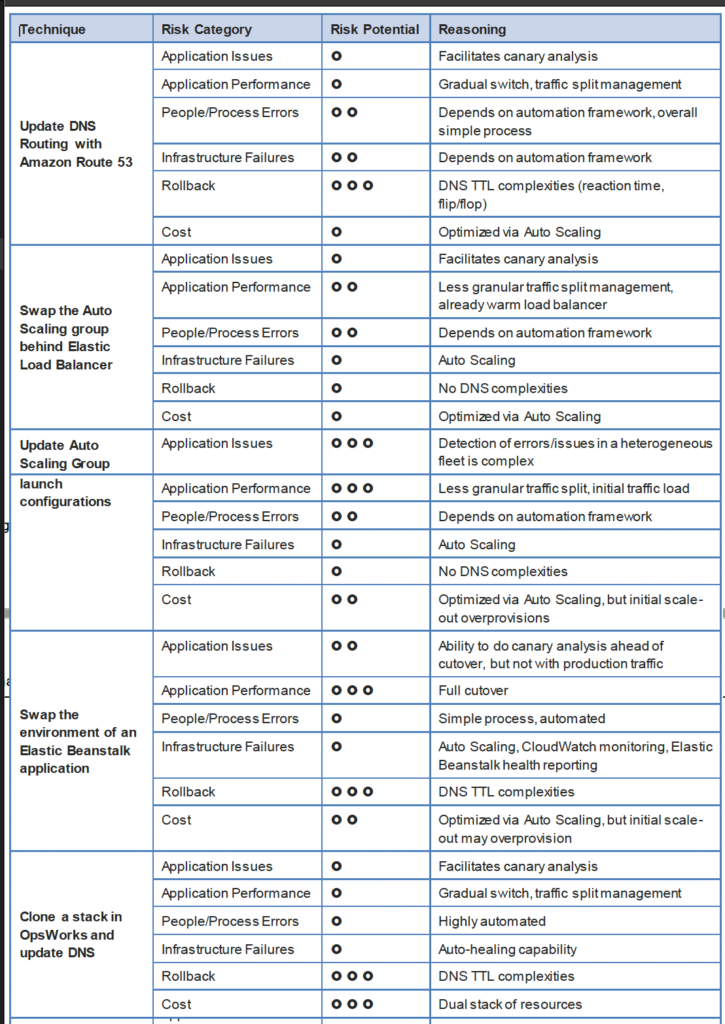
DNS Routing using Route 53

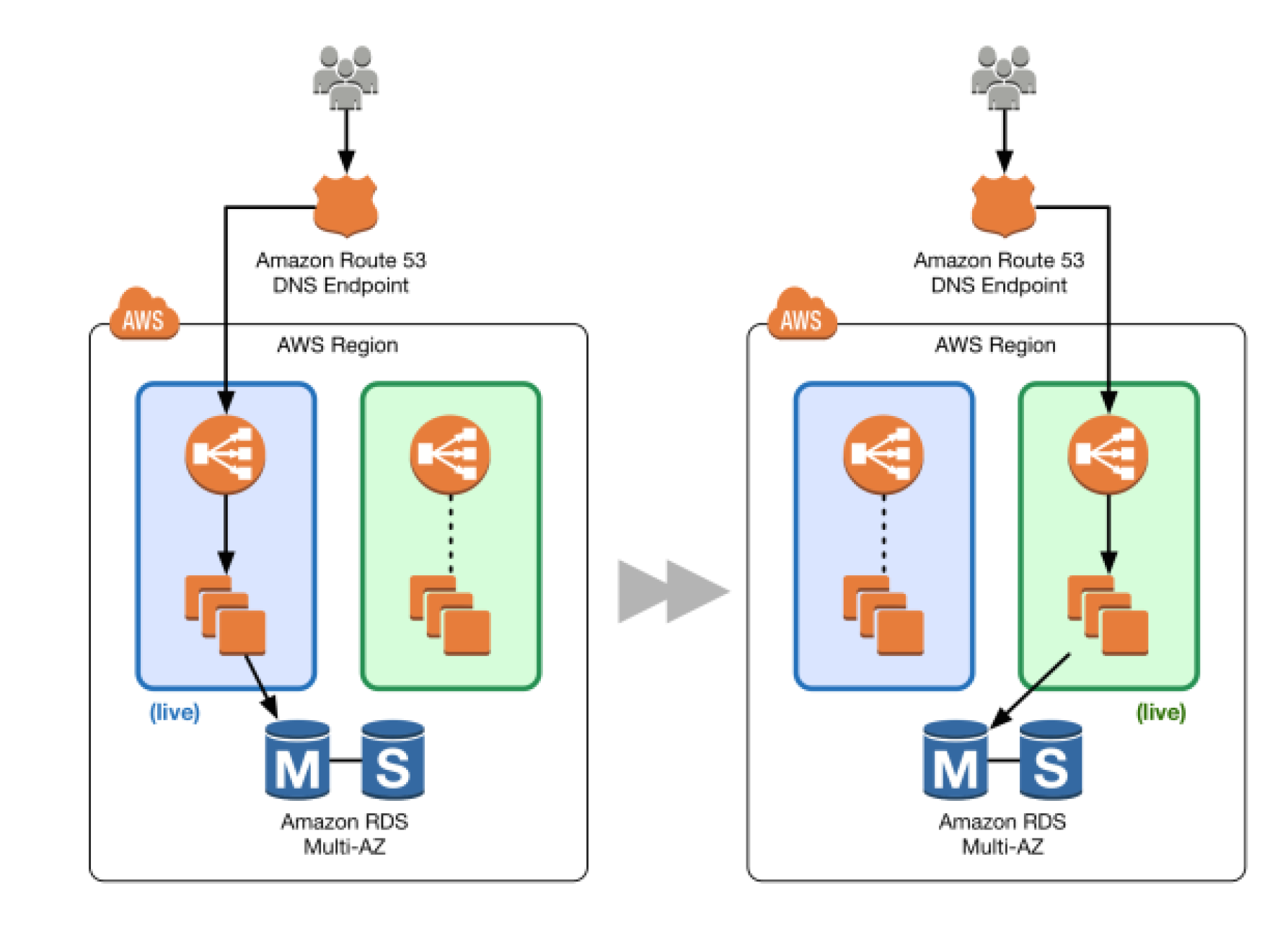
  • Route 53 DNS service can help switch traffic from the blue environment to the green and vice versa, if rollback is necessary
  • Route 53 can help either switch the traffic completely or through a weighted distribution
  • Weighted distribution
    • helps distribute percentage of traffic to go to the green environment and gradually update the weights until the green environment carries the full production traffic
    • provides the ability to perform canary analysis where a small percentage of production traffic is introduced to a new environment
    • helps manage cost by using auto scaling for instances to scale based on the actual demand
  • Route 53 can handle Public or Elastic IP address, Elastic Load Balancer, Elastic Beanstalk environment web tiers etc.
DNS Routing with Amazon Route 53

Auto Scaling Group Swap Behind Elastic Load Balancer

AWS Blue Green Deployment - Auto Scaling Group
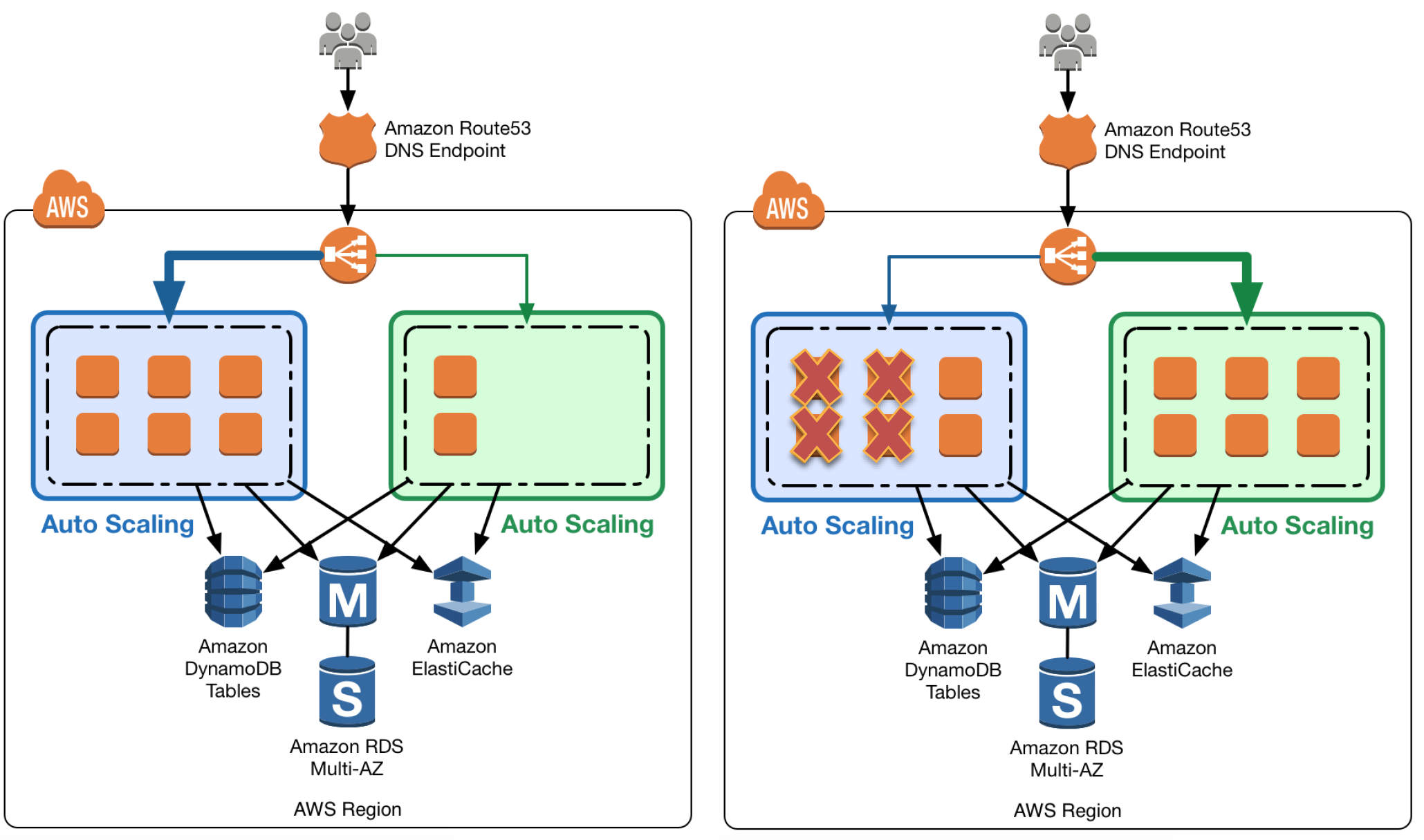
  • Elastic Load Balancing with Auto Scaling to manage EC2 resources as per the demand can be used for Blue Green deployments
  • Multiple Auto Scaling groups can be attached to the Elastic Load Balancer
  • Green ASG can be attached to an existing ELB while Blue ASG is already attached to the ELB to serve traffic
  • ELB would start routing requests to the Green Group as for HTTP/S listener it uses a least outstanding requests routing algorithm
  • Green group capacity can be increased to process more traffic while the Blue group capacity can be reduced either by terminating the instances or by putting the instances in a standby mode
  • Standby is a good option because if roll back to the blue environment needed, blue server instances can be put back in service and they’re ready to go
  • If no issues with the Green group, the blue group can be decommissioned by adjusting the group size to zero

Update Auto Scaling Group Launch Templates

AWS Blue Green Deployment - Auto Scaling Launch
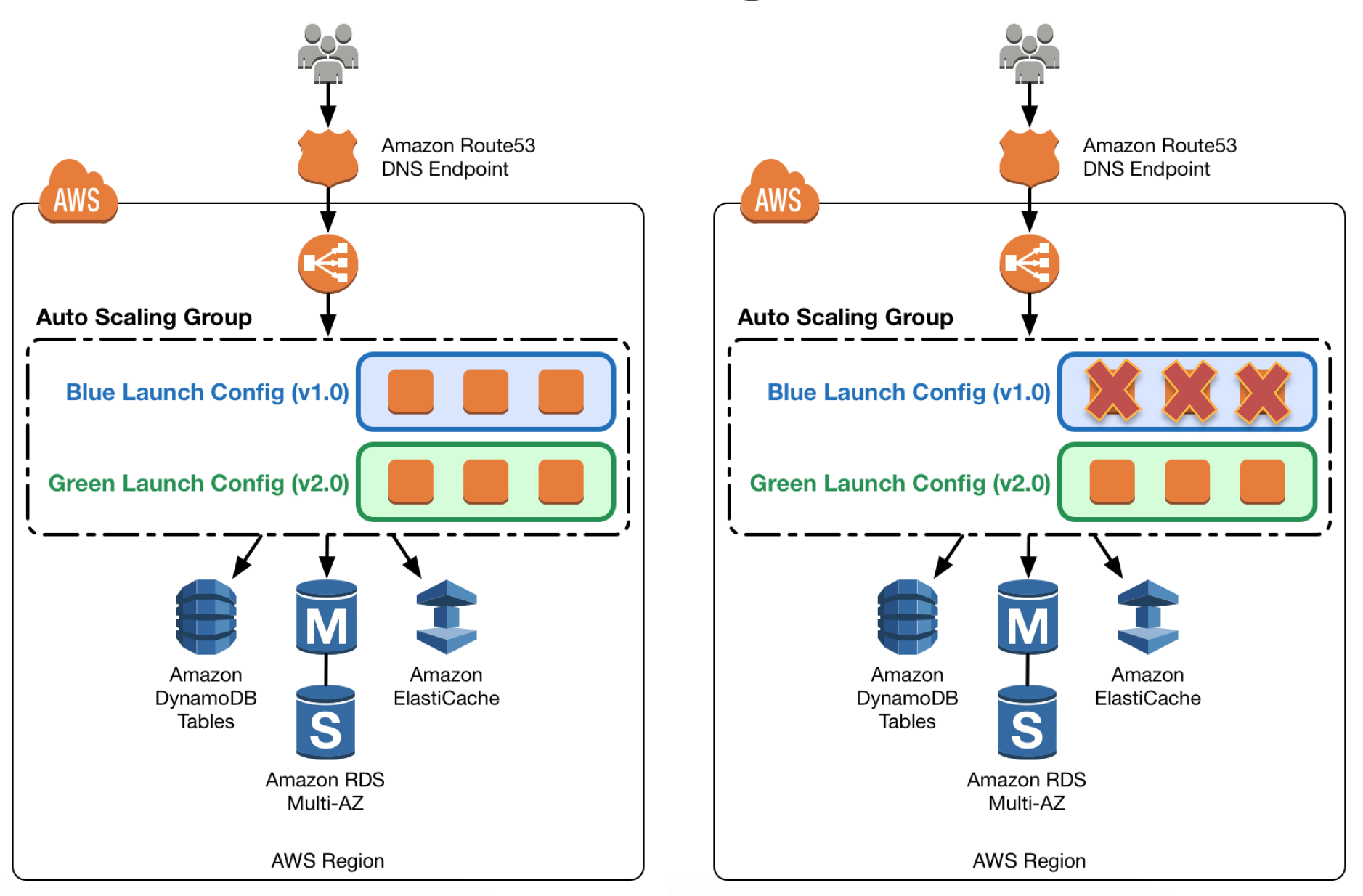
  • Auto Scaling groups have their own launch templates which define templates for EC2 instances to be launched
  • Launch templates support versioning — a new version can be created and the Auto Scaling Group updated to use the new version.
  • After a new launch template version is in place, any new instances that are launched use the new version parameters, but existing instances are not affected.
  • When Auto Scaling removes instances (referred to as scaling in) from the group, the default termination policy is to remove instances with the oldest launch template version
  • To deploy the new version of the application in the green environment, create a new launch template version and update the Auto Scaling group, then scale the Auto Scaling group to twice its original size.
  • Then, shrink the Auto Scaling group back to the original size
  • To perform a rollback, update the Auto Scaling group to use the previous launch template version. Then, do the preceding steps in reverse

Elastic Beanstalk Application Environment Swap

AWS Blue Green Deployment - Elastic Beanstalk
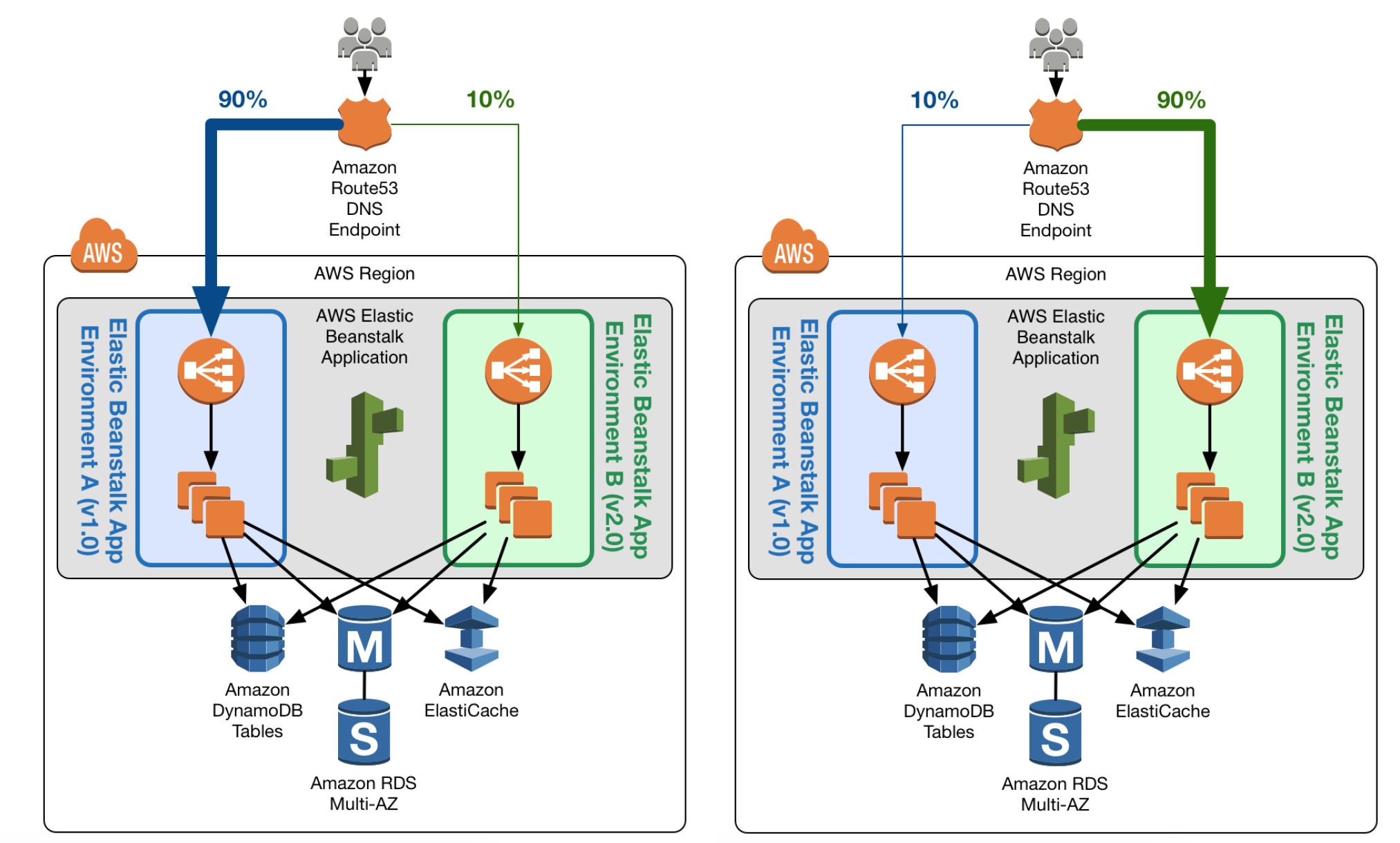
  • Elastic Beanstalk multiple environment and environment url swap feature helps enable Blue Green deployment
  • Elastic Beanstalk can be used to host the blue environment exposed via URL to access the environment
  • Elastic Beanstalk provides several deployment policies, ranging from policies that perform an in-place update on existing instances, to immutable deployment using a set of new instances.
  • Elastic Beanstalk performs an in-place update when the application versions are updated, however application may become unavailable to users for a short period of time.
  • To avoid the downtime, a new version can be deployed to a separate Green environment with its own URL, launched with the existing environment’s configuration
  • Elastic Beanstalk’s Swap Environment URLs feature can be used to promote the green environment to serve production traffic
  • Elastic Beanstalk performs a DNS switch, which typically takes a few minutes
  • To perform a rollback, invoke Swap Environment URL again.

Clone a Stack in AWS OpsWorks and Update DNS (Deprecated)

⚠️ Note: AWS OpsWorks Stacks reached End of Life on May 26, 2024. This section is maintained for historical reference only. Use AWS CloudFormation, CodeDeploy, or ECS for blue/green deployments instead.
  • OpsWorks could be used to create
    • Blue environment stack with the current version of the application and serving production traffic
    • Green environment stack with the newer version of the application and is not receiving any traffic
  • To promote to the green environment/stack into production, update DNS records to point to the green environment/stack’s load balancer

CodeDeploy Blue/Green for EC2 Instances

  • CodeDeploy automates the blue/green deployment process for EC2 instances by provisioning a new set of instances (green), deploying the application revision, and shifting traffic from the original instances (blue).
  • Traffic is rerouted through Elastic Load Balancing — instances are deregistered from the blue target group and registered to the green target group.
  • Supports configurable wait times before terminating blue instances, allowing for quick rollback.
  • Integrates with Auto Scaling groups to automatically provision green instances matching the blue group configuration.

Amazon ECS Blue/Green Deployments

  • ECS supports blue/green deployments using either ECS-native (recommended for new deployments) or CodeDeploy-based approaches.
  • ECS-native blue/green (July 2025): Creates a new task set, validates using lifecycle hooks, and shifts traffic — all managed directly by the ECS service without external dependencies.
  • CodeDeploy-based: Uses CodeDeploy to manage traffic shifting between two ECS task sets behind a load balancer with test listener support for validation.
  • Both approaches support automatic rollback on CloudWatch alarm breach or deployment failure.
  • ECS native deployments support blue/green (all-at-once shift), canary (percentage-based initial shift), and linear (incremental shift) strategies.

Lambda Traffic Shifting with CodeDeploy

  • Lambda deployments via CodeDeploy are always blue/green — traffic is shifted between two Lambda function versions using aliases.
  • Supports deployment configurations:
    • Canary — shifts a percentage (e.g., 10%) initially, then the remainder after a wait period
    • Linear — shifts traffic in equal increments at regular intervals
    • All-at-once — shifts all traffic immediately
  • Pre-traffic and post-traffic lifecycle hooks allow validation Lambda functions to run before and after traffic shifting.

Amazon RDS/Aurora Blue/Green Deployments

  • RDS Blue/Green Deployments enable safe database updates (engine upgrades, schema changes, parameter modifications) with minimal downtime.
  • Creates a fully managed staging (green) environment that mirrors production (blue) using logical replication to keep them in sync.
  • Switchover promotes the green environment to production, updating endpoints to point to the new instances — typically completes in under a minute.
  • Supports rollback by reverting the switchover if issues are detected.
  • Ideal for major version upgrades, maintenance operations, and schema migrations where traditional blue/green at the application layer alone is insufficient.
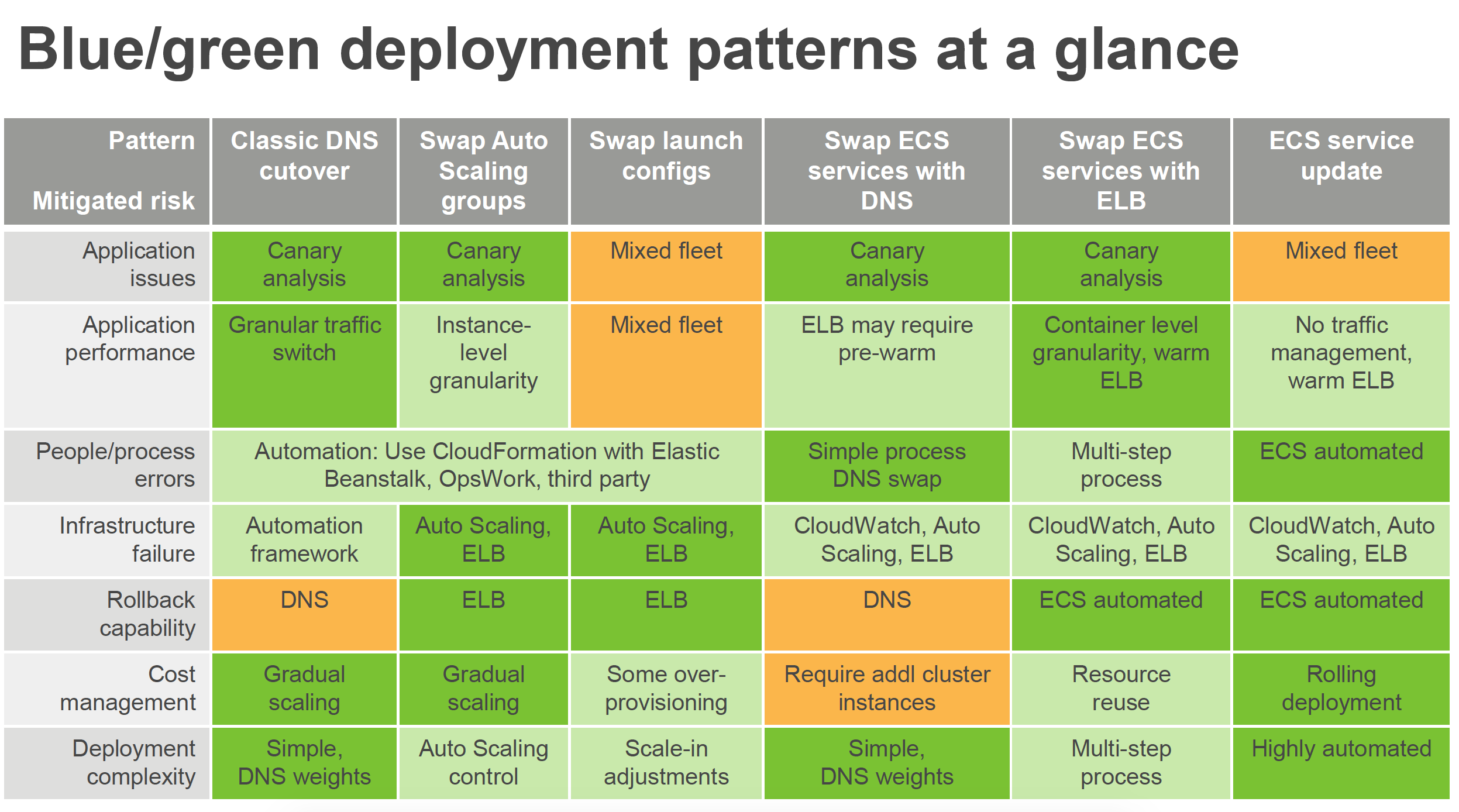
AWS Blue Green deployment patterns

AWS Certification Exam Practice Questions

  • Questions are collected from Internet and the answers are marked as per my knowledge and understanding (which might differ with yours).
  • AWS services are updated everyday and both the answers and questions might be outdated soon, so research accordingly.
  • AWS exam questions are not updated to keep up the pace with AWS updates, so even if the underlying feature has changed the question might not be updated
  • Open to further feedback, discussion and correction.
  1. What is server immutability?
    1. Not updating a server after creation. (During the new release, a new set of EC2 instances are rolled out by terminating older instances and are disposable. EC2 instance usage is considered temporary or ephemeral in nature for the period of deployment until the current release is active)
    2. The ability to change server counts.
    3. Updating a server after creation.
    4. The inability to change server counts.
  2. You need to deploy a new application version to production. Because the deployment is high-risk, you need to roll the new version out to users over a number of hours, to make sure everything is working correctly. You need to be able to control the proportion of users seeing the new version of the application down to the percentage point. You use ELB and EC2 with Auto Scaling Groups and custom AMIs with your code pre-installed assigned to Launch Configurations. There are no database-level changes during your deployment. You have been told you cannot spend too much money, so you must not increase the number of EC2 instances much at all during the deployment, but you also need to be able to switch back to the original version of code quickly if something goes wrong. What is the best way to meet these requirements?
    1. Create a second ELB, Auto Scaling Launch Configuration, and Auto Scaling Group using the Launch Configuration. Create AMIs with all code pre-installed. Assign the new AMI to the second Auto Scaling Launch Configuration. Use Route53 Weighted Round Robin Records to adjust the proportion of traffic hitting the two ELBs. (Use Weighted Round Robin DNS Records and reverse proxies allow such fine-grained tuning of traffic splits. Blue-Green option does not meet the requirement that we mitigate costs and keep overall EC2 fleet size consistent, so we must select the 2 ELB and ASG option with WRR DNS tuning)
    2. Use the Blue-Green deployment method to enable the fastest possible rollback if needed. Create a full second stack of instances and cut the DNS over to the new stack of instances, and change the DNS back if a rollback is needed. (Full second stack is expensive)
    3. Create AMIs with all code pre-installed. Assign the new AMI to the Auto Scaling Launch Configuration, to replace the old one. Gradually terminate instances running the old code (launched with the old Launch Configuration) and allow the new AMIs to boot to adjust the traffic balance to the new code. On rollback, reverse the process by doing the same thing, but changing the AMI on the Launch Config back to the original code. (Cannot modify the existing launch config)
    4. Migrate to use AWS Elastic Beanstalk. Use the established and well-tested Rolling Deployment setting AWS provides on the new Application Environment, publishing a zip bundle of the new code and adjusting the wait period to spread the deployment over time. Re-deploy the old code bundle to rollback if needed.
  3. When thinking of AWS Elastic Beanstalk, the ‘Swap Environment URLs’ feature most directly aids in what?
    1. Immutable Rolling Deployments
    2. Mutable Rolling Deployments
    3. Canary Deployments
    4. Blue-Green Deployments (Complete switch from one environment to other)
  4. You were just hired as a DevOps Engineer for a startup. Your startup uses AWS for 100% of their infrastructure. They currently have no automation at all for deployment, and they have had many failures while trying to deploy to production. The company has told you deployment process risk mitigation is the most important thing now, and you have a lot of budget for tools and AWS resources. Their stack: 2-tier API Data stored in DynamoDB or S3, depending on type, Compute layer is EC2 in Auto Scaling Groups, They use Route53 for DNS pointing to an ELB, An ELB balances load across the EC2 instances. The scaling group properly varies between 4 and 12 EC2 servers. Which of the following approaches, given this company’s stack and their priorities, best meets the company’s needs?
    1. Model the stack in AWS Elastic Beanstalk as a single Application with multiple Environments. Use Elastic Beanstalk’s Rolling Deploy option to progressively roll out application code changes when promoting across environments. (Does not support DynamoDB also need Blue Green deployment for zero downtime deployment as cost is not a constraint)
    2. Model the stack in 3 CloudFormation templates: Data layer, compute layer, and networking layer. Write stack deployment and integration testing automation following Blue-Green methodologies.
    3. Model the stack in AWS OpsWorks as a single Stack, with 1 compute layer and its associated ELB. Use Chef and App Deployments to automate Rolling Deployment. (Does not support DynamoDB also need Blue Green deployment for zero downtime deployment as cost is not a constraint. Additionally, OpsWorks reached EOL on May 26, 2024.)
    4. Model the stack in 1 CloudFormation template, to ensure consistency and dependency graph resolution. Write deployment and integration testing automation following Rolling Deployment methodologies. (Need Blue Green deployment for zero downtime deployment as cost is not a constraint)
  5. You are building out a layer in a software stack on AWS that needs to be able to scale out to react to increased demand as fast as possible. You are running the code on EC2 instances in an Auto Scaling Group behind an ELB. Which application code deployment method should you use?
    1. SSH into new instances those come online, and deploy new code onto the system by pulling it from an S3 bucket, which is populated by code that you refresh from source control on new pushes. (is slow and manual)
    2. Bake an AMI when deploying new versions of code, and use that AMI for the Auto Scaling Launch Configuration. (Pre baked AMIs can help to get started quickly)
    3. Create a Dockerfile when preparing to deploy a new version to production and publish it to S3. Use UserData in the Auto Scaling Launch configuration to pull down the Dockerfile from S3 and run it when new instances launch. (is slow)
    4. Create a new Auto Scaling Launch Configuration with UserData scripts configured to pull the latest code at all times. (is slow)
  6. You company runs a complex customer relations management system that consists of around 10 different software components all backed by the same Amazon Relational Database (RDS) database. You adopted AWS OpsWorks to simplify management and deployment of that application and created an AWS OpsWorks stack with layers for each of the individual components. An internal security policy requires that all instances should run on the latest Amazon Linux AMI and that instances must be replaced within one month after the latest Amazon Linux AMI has been released. AMI replacements should be done without incurring application downtime or capacity problems. You decide to write a script to be run as soon as a new Amazon Linux AMI is released. Which solutions support the security policy and meet your requirements? Choose 2 answers
    1. Assign a custom recipe to each layer, which replaces the underlying AMI. Use AWS OpsWorks life-cycle events to incrementally execute this custom recipe and update the instances with the new AMI.
    2. Create a new stack and layers with identical configuration, add instances with the latest Amazon Linux AMI specified as a custom AMI to the new layer, switch DNS to the new stack, and tear down the old stack. (Blue-Green Deployment)
    3. Identify all Amazon Elastic Compute Cloud (EC2) instances of your AWS OpsWorks stack, stop each instance, replace the AMI ID property with the ID of the latest Amazon Linux AMI ID, and restart the instance. To avoid downtime, make sure not more than one instance is stopped at the same time.
    4. Specify the latest Amazon Linux AMI as a custom AMI at the stack level, terminate instances of the stack and let AWS OpsWorks launch new instances with the new AMI.
    5. Add new instances with the latest Amazon Linux AMI specified as a custom AMI to all AWS OpsWorks layers of your stack, and terminate the old ones.
  7. Your company runs an event management SaaS application that uses Amazon EC2, Auto Scaling, Elastic Load Balancing, and Amazon RDS. Your software is installed on instances at first boot, using a tool such as Puppet or Chef, which you also use to deploy small software updates multiple times per week. After a major overhaul of your software, you roll out version 2.0 new, much larger version of the software of your running instances. Some of the instances are terminated during the update process. What actions could you take to prevent instances from being terminated in the future? (Choose two)
    1. Use the zero downtime feature of Elastic Beanstalk to deploy new software releases to your existing instances. (No such feature, you can perform environment url swap)
    2. Use AWS CodeDeploy. Create an application and a deployment targeting the Auto Scaling group. Use CodeDeploy to deploy and update the application in the future. (Refer link)
    3. Run “aws autoscaling suspend-processes” before updating your application. (Refer link)
    4. Use the AWS Console to enable termination protection for the current instances. (Termination protection does not work with Auto Scaling)
    5. Run “aws autoscaling detach-load-balancers” before updating your application. (Does not prevent Auto Scaling to terminate the instances)
  8. A company runs a containerized application on Amazon ECS with Fargate. They want to implement blue/green deployments with the ability to test the new version using a small percentage of traffic before full cutover. They also want automatic rollback if CloudWatch alarms trigger. What is the recommended approach? [2025 Updated]
    1. Use ECS rolling updates with circuit breaker enabled
    2. Use Elastic Beanstalk with Swap Environment URLs
    3. Use Amazon ECS native blue/green deployment with canary strategy (ECS native blue/green with canary strategy (October 2025) allows percentage-based traffic shifting with automatic rollback on alarm breach, without requiring CodeDeploy)
    4. Use AWS CodePipeline with manual approval before traffic shift
  9. A team wants to perform a major version upgrade on their Aurora PostgreSQL database with minimal downtime. The database handles production traffic and they need the ability to quickly rollback if the upgrade causes issues. What AWS feature should they use?
    1. Create a manual snapshot, upgrade, and restore from snapshot if issues occur
    2. Use Aurora cloning to create a copy and upgrade the clone
    3. Use Amazon RDS Blue/Green Deployments to create a green environment, perform the upgrade, and switchover (RDS Blue/Green Deployments create a staging environment kept in sync via logical replication, switchover completes in under a minute, and supports rollback)
    4. Set up Aurora read replica, promote it, and switch the application connection string

References

AWS Certified Solution Architect – Professional Exam Learning Path (Obsolete)

AWS Certified Solution Architect – Professional Exam Learning Path

⚠️ OBSOLETE EXAM VERSION

This learning path is for the original AWS Solutions Architect – Professional exam (pre-2018), which has been retired.

This content is maintained for historical reference only.

Current Exam:

Exam Version Timeline:

  • Original exam (this post) — Retired 2018
  • SAP-C01 — Released 2018, retired Nov. 14, 2022
  • SAP-C02 — Current version since Nov. 15, 2022

I recently cleared the AWS Certified Solution Architect Professional Exam with 93% after almost 2 months of preparation

Topic Level Scoring:
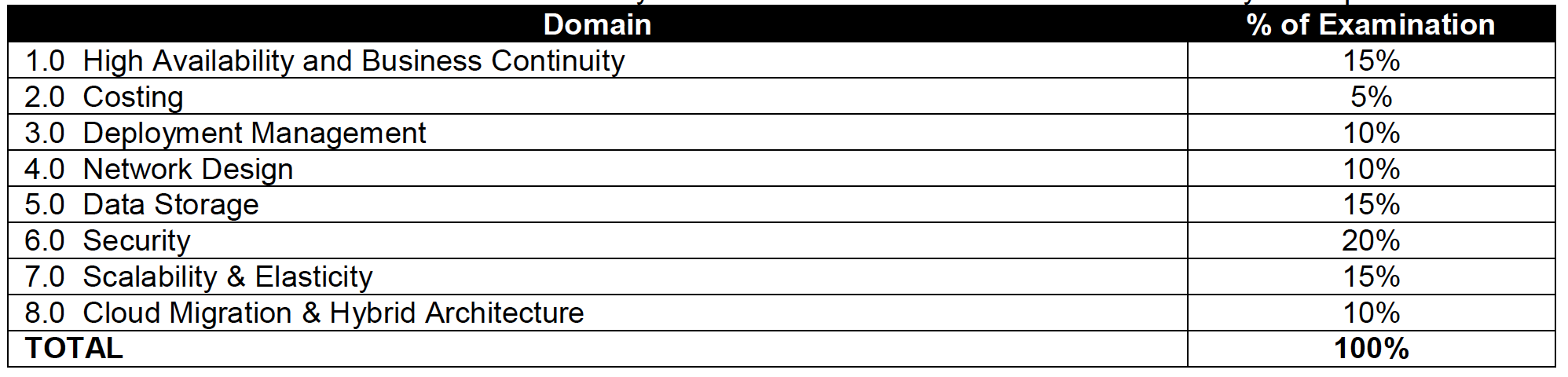
1.0 High Availability and Business Continuity: 100%
2.0 Costing: 75%
3.0 Deployment Management: 100%
4.0 Network Design: 85%
5.0 Data Storage: 90%
6.0 Security: 92%
7.0 Scalability & Elasticity: 100%
8.0 Cloud Migration & Hybrid Architecture: 85%

AWS Solution Architect – Professional exam is quite an exhaustive exam with 77 questions in 180 minutes and covers a lot of AWS services and the combinations how they work and integrate together. However, the questions are bit old and has not kept pace with the fast changing AWS enhancements


If looking for Current Certification Preparation Guides, please refer


Note: The content below is historical and relates to the original (pre-2018) exam blueprint. The exam domains, weighting, and services covered have changed significantly in SAP-C02.

Refer to the AWS Solution Architect – Professional Exam Blue Print (historical)

AWS Solution Architect – Professional exam basically validates the following

  • Identify and gather requirements in order to define a solution to be built on AWS
  • Evolve systems by introducing new services and features
  • Assess the tradeoffs and implications of architectural decisions and choices for applications deployed in AWS
  • Design an optimal system by meeting project requirements while maximizing characteristics such as scalability, security, reliability, durability, and cost effectiveness
  • Evaluate project requirements and make recommendations for implementation, deployment, and provisioning applications on AWS
  • Provide best practice and architectural guidance over the lifecycle of a project
AWS Solutions Architect - Professional Exam Break Up

AWS Cloud Computing Whitepapers

AWS Certified Solution Architect Professional Exam Contents

Domain 1.0: High Availability and Business Continuity

  • 1.1 Demonstrate ability to architect the appropriate level of availability based on stakeholder requirements
  • 1.2 Demonstrate ability to implement DR for systems based on RPO and RTO
  • 1.3 Determine appropriate use of multi-Availability Zones vs. multi-Region architectures
  • 1.4 Demonstrate ability to implement self-healing capabilities
  • 1.5 High Availability vs. Fault Tolerance

Domain 2.0: Costing

  • 2.1 Demonstrate ability to make architectural decisions that minimize and optimize infrastructure cost
  • 2.2 Apply the appropriate AWS account and billing set-up options based on scenario
  • 2.3 Ability to compare and contrast the cost implications of different architectures

Domain 3.0: Deployment Management

  • 3.1 Ability to manage the lifecycle of an application on AWS
  • 3.2 Demonstrate ability to implement the right architecture for development, testing, and staging environments
  • 3.3 Position and select most appropriate AWS deployment mechanism based on scenario

Domain 4.0: Network Design for a complex large scale deployment

  • 4.1 Demonstrate ability to design and implement networking features of AWS
  • 4.2 Demonstrate ability to design and implement connectivity features of AWS

Domain 5.0: Data Storage for a complex large scale deployment

  • 5.1 Demonstrate ability to make architectural trade off decisions involving storage options
    • includes Storage Options patterns and anti patterns for S3, EBS,  Instance Store
  • 5.2 Demonstrate ability to make architectural trade off decisions involving database options
    • includes Storage Options patterns and anti patterns RDS, DynamoDB, Database on EC2
  • 5.3 Demonstrate ability to implement the most appropriate data storage architecture
  • 5.4 Determine use of synchronous versus asynchronous replication

Domain 6.0: Security

Domain 7.0: Scalability and Elasticity

  • 7.1 Demonstrate the ability to design a loosely coupled system
  • 7.2 Demonstrate ability to implement the most appropriate front-end scaling architecture
  • 7.3 Demonstrate ability to implement the most appropriate middle-tier scaling architecture
  • 7.4 Demonstrate ability to implement the most appropriate data storage scaling architecture
  • 7.5 Determine trade-offs between vertical and horizontal scaling
    • includes basic understanding of horizontal scaling is scale in/out and vertical scaling is scale up/down

Domain 8.0: Cloud Migration and Hybrid Architecture

Other services like SWF manual task and ability to retry, SNS Mobile Push, SES for durable email, Elastic TranscoderCloudSearch for search, Data Pipeline for disaster recovery, CloudWatch provides durable storage for logs, EMR how to improve performance

AWS Solution Architect – Professional Exam Resources (Historical)

Note: The resources below are outdated and no longer relevant for the current SAP-C02 exam. For current preparation resources, refer to the SAP-C02 Exam Learning Path.

AWS Certification Exam Cheat Sheet

AWS Certification Exam Cheat Sheet

AWS Certification Exams cover a lot of topics and a wide range of services with minute details for features, patterns, anti patterns and their integration with other services. This blog post is just to have a quick summary of all the services and key points for a quick glance before you appear for the exam.

📝 Last Updated: June 2026. Updated with latest AWS Global Infrastructure numbers (39 Regions, 123 AZs), AWS Organizations new policy types (RCPs, Declarative Policies), second-generation Outposts, AWS Network Firewall for IDS/IPS, AWS Shield enhancements, Snow Family availability changes, and AWS Elastic Disaster Recovery.

AWS Global Infrastructure

AWS Region, AZs, Edge locations

  • Each region is a separate geographic area, completely independent, isolated from the other regions & helps achieve the greatest possible fault tolerance and stability
  • AWS Cloud spans 123 Availability Zones within 39 Geographic Regions (as of 2026), with announced plans for additional Regions in Kingdom of Saudi Arabia and Chile
  • Communication between regions is across the AWS global network (private fiber backbone, not public Internet)
  • Each region has multiple Availability Zones (minimum 3 AZs for newer regions)
  • Each AZ is physically isolated, geographically separated from each other and designed as an independent failure zone
  • AZs are connected with low-latency private links (not public internet)
  • Edge locations are locations maintained by AWS through a worldwide network of data centers for the distribution of content to reduce latency.
  • New Regions launched (2024-2025): Canada West (Calgary), Asia Pacific (Malaysia), Asia Pacific (Thailand), Mexico (Central), Asia Pacific (Taipei), Asia Pacific (New Zealand)

AWS Local Zones

  • AWS Local Zones place select AWS services closer to end-users, which allows running highly-demanding applications that require single-digit millisecond latencies to the end-users such as media & entertainment content creation, real-time gaming, machine learning etc.
  • AWS Local Zones provide a high-bandwidth, secure connection between local workloads and those running in the AWS Region, allowing you to seamlessly connect to the full range of in-region services through the same APIs and tool sets.
  • 30+ Local Zone locations available across six continents (as of 2026)

AWS Dedicated Local Zones

  • Dedicated Local Zones are a type of on-premises infrastructure managed and operated exclusively by AWS for a single customer or community
  • Designed for customers with stringent digital sovereignty, data residency, and compliance requirements (e.g., government classified workloads)
  • Can be operated by local AWS personnel with additional security and governance features
  • Provides same benefits as Local Zones: elasticity, scalability, pay-as-you-go pricing

AWS Wavelength

  • AWS infrastructure deployments embed AWS compute and storage services within the telecommunications providers’ datacenters and help seamlessly access the breadth of AWS services in the region.
  • AWS Wavelength brings services to the edge of the 5G network, without leaving the mobile provider’s network reducing the extra network hops, minimizing the latency to connect to an application from a mobile device.
  • Available with multiple carrier partners globally including Verizon, Vodafone, KDDI, SK Telecom, and Bell Canada
  • Wavelength Zones available in Africa (Morocco) and Senegal in addition to existing locations in US, Europe, Asia, and Canada
  • Built on AWS Nitro System, sovereign-by-design providing verifiable security boundary

AWS Outposts

  • AWS Outposts bring native AWS services, infrastructure, and operating models to virtually any data center, co-location space, or on-premises facility.
  • AWS Outposts is designed for connected environments and can be used to support workloads that need to remain on-premises due to low latency, compliance or local data processing needs.
  • Available in two form factors: Outposts Racks (full 42U rack) and Outposts Servers (1U/2U for space-constrained environments)
  • Second-generation Outposts Racks (GA April 2025) provide:
    • Latest x86-powered EC2 instances (C7i, M7i, R7i, and C8i, M8i, R8i)
    • Up to 40% better performance compared to first-generation instances
    • Simplified network scaling and configuration
    • Accelerated networking instances for ultra-low latency workloads
    • Native L2/L3 multicast, Precision Time Protocol (PTP) support
    • Available in 70+ countries

AWS European Sovereign Cloud

  • New independent cloud for Europe designed to meet stringent data residency, operational autonomy, and resiliency requirements
  • First Region launched in Germany (2025), available to all customers
  • Physically and logically separate from existing AWS Regions
  • Operated and supported exclusively by EU-resident AWS employees

Refer details @ AWS Global Infrastructure

AWS Services

AWS Organizations

  • AWS Organizations offers policy-based management for multiple AWS accounts
  • Organizations allows creation of groups of accounts and then apply policies to those groups
  • Organizations enables you to centrally manage policies across multiple accounts, without requiring custom scripts and manual processes.
  • Organizations helps simplify the billing for multiple accounts by enabling the setup of a single payment method for all the accounts in the organization through consolidated billing
  • Policy Types available:
    • Service Control Policies (SCPs) – set maximum permissions for IAM users and roles in member accounts
    • Resource Control Policies (RCPs) – (launched Nov 2024) centrally restrict external access to AWS resources (S3, STS, KMS, SQS, Secrets Manager, and more)
    • Declarative Policies – (launched Dec 2024) define and enforce desired service configuration at scale (e.g., block public access for VPCs/EBS snapshots) with custom error messages
    • Tag Policies – enforce standardized tags across organization resources
    • Backup Policies – centrally manage backup plans
    • AI Services Opt-out Policies – control whether AWS AI services can store/use content
  • RCPs complement SCPs: SCPs control who can access, RCPs control what can be accessed
  • Declarative policies maintain enforcement even as new features or APIs are added

Consolidated Billing

  • Management account (formerly Paying/Payer account) with multiple linked member accounts
  • Management account is independent and should be only used for billing purpose
  • Management account cannot access resources of other accounts unless given exclusively access through Cross Account roles
  • All linked accounts are independent and soft limit of 20
  • One bill per AWS account
  • Provides Volume pricing discount for usage across the accounts
  • Allows unused Reserved Instances and Savings Plans to be applied across the group
  • Free tier is not applicable across the accounts
  • AWS Billing Conductor allows customizing billing rates, distributing credits/fees, and shared overhead costs for showback/chargeback use cases

Tags & Resource Groups

  • Are metadata, specified as key/value pairs with the AWS resources
  • Are for labelling purposes and helps managing, organizing resources
  • Can be inherited when created by Auto Scaling, CloudFormation, Elastic Beanstalk etc
  • Can be used for
    • Cost allocation to categorize and track the AWS costs
    • Conditional Access Control policy to define permission to allow or deny access on resources based on tags (ABAC – Attribute-Based Access Control)
    • Automation – target resources for Systems Manager operations
    • Operations – filter resources in CloudWatch, Config, and Systems Manager
  • Resource Group is a collection of resources that share one or more tags
  • Tag Policies (via AWS Organizations) enforce standardized tagging across accounts
  • Tag Editor allows bulk managing tags across multiple resources and regions

IDS/IPS

  • Promiscuous mode is not allowed, as AWS and Hypervisor will not deliver any traffic to instances this is not specifically addressed to the instance
  • IDS/IPS strategies
    • Host Based Firewall – Forward Deployed IDS where the IDS itself is installed on the instances
    • Host Based Firewall – Traffic Replication where IDS agents installed on instances which send/duplicate the data to a centralized IDS system
    • In-Line Firewall – Inbound IDS/IPS Tier (like a WAF configuration) which identifies and drops suspect packets
  • AWS Network Firewall (recommended managed service for IDS/IPS):
    • Stateful, managed network firewall and IDS/IPS for VPC
    • Supports Suricata-compatible IDS/IPS rules
    • AWS Managed Rule Groups provide threat intelligence-based blocking
    • Marketplace partner managed rules with up to 10M domain indicators and 1M IP addresses
    • Supports domain filtering, IP filtering, protocol inspection, and pattern matching
    • Integrates with AWS Firewall Manager for centralized policy management across accounts
    • Supports VPC Traffic Mirroring for passive IDS analysis
  • Amazon GuardDuty provides intelligent threat detection (IDS) analyzing VPC Flow Logs, DNS logs, CloudTrail events, EKS audit logs, and more

DDoS Mitigation

  • Minimize the Attack surface
    • use ELB/CloudFront/Route 53 to distribute load
    • maintain resources in private subnets and use Bastion servers or Systems Manager Session Manager
  • Scale to absorb the attack
    • scaling helps buy time to analyze and respond to an attack
    • auto scaling with ELB to handle increase in load to help absorb attacks
    • CloudFront, Route 53 inherently scales as per the demand
  • Safeguard exposed resources
    • use Route 53 for aliases to hide source IPs and Private DNS
    • use CloudFront geo restriction and Origin Access Control (OAC, replaces OAI)
    • use WAF as part of the infrastructure
  • Learn normal behavior (IDS/WAF)
    • analyze and benchmark to define rules on normal behavior
    • use CloudWatch
  • Create a plan for attacks
  • AWS Shield Standard
    • Automatically included for all AWS customers at no additional cost
    • Protects against most common Layer 3/4 DDoS attacks
    • Always-on network flow monitoring with traffic signatures and anomaly detection
  • AWS Shield Advanced
    • Managed DDoS protection with 24/7 Shield Response Team (SRT) access
    • Protects EC2, ELB, CloudFront, Global Accelerator, and Route 53 resources
    • DDoS cost protection (credits for scaling charges during attacks)
    • Automatic application layer (L7) DDoS mitigation with WAF integration
    • DDoS attack flow logs (launched May 2026) for detailed attack analysis
    • Health-based detection using Route 53 health checks for faster, more accurate response
  • AWS WAF Application Layer DDoS Protection (launched June 2025) – automatic L7 DDoS detection and mitigation as an AWS Managed Rule group for CloudFront and ALB

AWS Services Region, AZ, Subnet VPC limitations

  • Services like IAM (user, role, group, SSL certificate), Route 53, STS, CloudFront, WAF (Global), and Organizations are Global and available across regions
  • All other AWS services are limited to Region or within Region and do not exclusively copy data across regions unless configured
  • AMI are limited to region and need to be copied over to other region
  • EBS volumes are limited to the Availability Zone, and can be migrated by creating snapshots and copying them to another region
  • Reserved Instances are limited to the Region (can be modified across AZs within same region) and cannot be migrated to another region
  • Savings Plans apply automatically across regions regardless of instance type (Compute Savings Plans)
  • RDS instances are limited to the region and can be recreated in a different region by either using snapshots or promoting a Read Replica
  • Placement groups:
    • Cluster Placement groups are limited to single Availability Zone
    • Spread Placement groups can span across multiple Availability Zones
    • Partition Placement groups can span across multiple Availability Zones
  • S3 data is replicated within the region and can be moved to another region using Cross-Region Replication (CRR). S3 Multi-Region Access Points accelerate multi-region access via AWS Global Accelerator
  • DynamoDB maintains data within the region and can be replicated to another region using DynamoDB Global Tables (multi-active, multi-region). Supports Multi-Region Strong Consistency (MRSC) for zero RPO (GA 2025)
  • Redshift Cluster span within an Availability Zone only, and can be created in other AZ using snapshots

Disaster Recovery Whitepaper

  • RTO is the time it takes after a disruption to restore a business process to its service level and RPO acceptable amount of data loss measured in time before the disaster occurs
  • Techniques (RTO & RPO reduces and the Cost goes up as we go down)
    • Backup & Restore – Data is backed up and restored, with nothing running
    • Pilot light – Only minimal critical service like RDS is running and rest of the services can be recreated and scaled during recovery
    • Warm Standby – Fully functional site with minimal configuration is available and can be scaled during recovery
    • Multi-Site / Active-Active – Fully functional site with identical configuration is available and processes the load
  • Services
    • Region and AZ to launch services across multiple facilities
    • EC2 instances with the ability to scale and launch across AZs
    • EBS with Snapshot to recreate volumes in different AZ or region
    • AMI to quickly launch preconfigured EC2 instances
    • ELB and Auto Scaling to scale and launch instances across AZs
    • VPC to create private, isolated section
    • Elastic IP address as static IP address
    • ENI with pre allocated Mac Address
    • Route 53 is highly available and scalable DNS service to distribute traffic across EC2 instances and ELB in different AZs and regions
    • AWS Global Accelerator for automatic failover across regions
    • Direct Connect for speed data transfer (takes time to setup and expensive then VPN)
    • S3 and Glacier (with RTO of 3-5 hours) provides durable storage
    • RDS snapshots and Multi AZ support and Read Replicas across regions
    • Aurora Global Database for cross-region replication with <1 second lag
    • DynamoDB Global Tables for multi-region, multi-active replication
    • Redshift snapshots to recreate the cluster
    • Storage Gateway to backup the data in AWS
    • AWS Snow Family (Snowball Edge) for large data transfers – note: no longer available to new customers as of Nov 2025; use AWS DataSync or AWS Data Transfer Terminal instead
    • CloudFormation, Elastic Beanstalk and OpsWorks as orchestration tools for automation and recreate the infrastructure
  • AWS Elastic Disaster Recovery (AWS DRS)
    • Replaces CloudEndure Disaster Recovery
    • Minimizes downtime and data loss with continuous block-level replication
    • Supports on-premises to AWS, cloud to AWS, and cross-region/cross-AZ DR
    • Uses cost-effective staging area (minimal compute + EBS) until failover
    • Point-in-time recovery for RPO in seconds
    • Non-disruptive DR drills without impacting source
  • AWS Resilience Hub
    • Central service to define RTO/RPO targets for applications
    • Assesses resilience posture against defined goals
    • Next-gen (GA May 2026) includes generative AI-powered failure mode analysis, dependency discovery, and organization-wide reporting
    • Provides recommendations based on AWS Well-Architected Framework

AWS Certification – Application Services – Cheat Sheet

SQS

  • extremely scalable queue service and potentially handles millions of messages
  • helps build fault tolerant, distributed loosely coupled applications
  • stores copies of the messages on multiple servers for redundancy and high availability
  • supports two queue types:
    • Standard Queues – guarantee At-Least-Once Delivery with best-effort ordering
    • FIFO Queues – guarantee Exactly-Once Processing and strict message ordering
  • supports multiple readers and writers interacting with the same queue at the same time
  • holds message for 4 days, by default, and can be changed from 1 min – 14 days after which the message is deleted
  • maximum message size is 1 MiB for both Standard and FIFO queues (increased from 256 KB in Aug 2025)
  • message needs to be explicitly deleted by the consumer once processed
  • allows send, receive and delete batching which helps club up to 10 messages in a single batch (up to 256 KB total payload per batch) while charging price for a single message
  • handles visibility of the message to multiple consumers using Visibility Timeout, where the message once read by a consumer is not visible to the other consumers till the timeout occurs
  • can handle load and performance requirements by scaling the worker instances as the demand changes (Job Observer pattern)
  • message sampling allowing short and long polling
    • returns immediately vs waits for fixed time for e.g. 20 secs
    • might not return all messages as it samples a subset of servers vs returns all available messages
    • repetitive vs helps save cost with long connection
  • supports delay queues to make messages available after a certain delay, can be used to differentiate from priority queues
  • supports dead letter queues (DLQ), to redirect messages which failed to process after certain attempts instead of being processed repeatedly
  • supports DLQ redrive via the StartMessageMoveTask API to move messages from DLQ back to the source queue or a custom destination (supported for both Standard and FIFO queues)
  • FIFO Queue High Throughput Mode
    • supports up to 70,000 transactions per second (TPS) per API action without batching
    • up to 700,000 messages per second with batching
    • available in selected regions (US East, US West, Europe Ireland)
  • Fair Queues (2025) – mitigates noisy neighbor impact in multi-tenant systems by automatically detecting and deprioritizing tenants that generate excessive traffic, improving quality of service for other tenants
  • supports dual-stack (IPv4 and IPv6) endpoints
  • Lambda integration – supports provisioned mode for SQS event source mapping providing 3x faster scaling and 16x higher concurrency for event processing
  • supports server-side encryption (SSE) using AWS KMS keys
  • Design Patterns
    • Job Observer Pattern can help coordinate number of EC2 instances with number of job requests (Queue Size) automatically thus improving cost effectiveness and performance
    • Priority Queue Pattern can be used to setup different queues with different handling either by delayed queues or low scaling capacity for handling messages in lower priority queues

SNS

  • delivery or sending of messages to subscribing endpoints or clients
  • publisher-subscriber (pub/sub) model
  • Producers and Consumers communicate asynchronously with subscribers by producing and sending a message to a topic
  • supports two topic types:
    • Standard Topics – best-effort ordering, at-least-once delivery, nearly unlimited throughput
    • FIFO Topics – strict message ordering, exactly-once delivery, message deduplication
  • supported subscription protocols: Email (plain or JSON), HTTP/HTTPS, SMS, SQS, Lambda, Kinesis Data Firehose
  • supports Mobile Push Notifications to push notifications directly to mobile devices with services like Amazon Device Messaging (ADM), Apple Push Notification Service (APNS), Firebase Cloud Messaging (FCM) etc.
  • Message Filtering – subscription filter policies allow subscribers to receive only a subset of messages published to the topic
    • supports filtering on message attributes or message body (filter policy scope)
    • up to 200 filter policies per topic, 10,000 per account
  • Message Archiving and Replay (FIFO topics) – stores messages within the topic archive for up to 365 days and allows subscribers to replay them on demand for recovery or state synchronization
  • High-Throughput Mode for FIFO Topics (Jan 2025) – increases throughput from default 300 MPS per message group to much higher levels by setting FifoThroughputScope to MessageGroup
  • Cross-Region delivery – supports delivery from an SNS topic in one opt-in Region to an SQS queue in another opt-in Region
  • integrated with Lambda to invoke functions on notifications
  • for Email notifications, use SNS or SES directly, SQS does not work

SWF

⚠️ Note: AWS recommends AWS Step Functions for most new workflow and orchestration needs. SWF is still supported but is no longer the preferred service. Consider Step Functions for new implementations.

  • orchestration service to coordinate work across distributed components
  • helps define tasks, stores, assigns tasks to workers, define logic, tracks and monitors the task and maintains workflow state in a durable fashion
  • helps define tasks which can be executed on AWS cloud or on-premises
  • helps coordinating tasks across the application which involves managing intertask dependencies, scheduling, and concurrency in accordance with the logical flow of the application
  • supports built-in retries, timeouts and logging
  • supports manual tasks (human-in-the-loop)
  • Characteristics
    • deliver exactly once
    • uses long polling, which reduces number of polls without results
    • Visibility of task state via API
    • Timers, signals, markers, child workflows
    • supports versioning
    • keeps workflow history for a user-specified time
  • AWS SWF vs AWS SQS
    • task-oriented vs message-oriented
    • track of all tasks and events vs needs custom handling

Step Functions

  • recommended replacement for SWF for most workflow orchestration use cases
  • serverless visual workflow service to build distributed applications, automate processes, orchestrate microservices, and create data/ML pipelines
  • uses Amazon States Language (ASL) JSON-based language to define state machines
  • supports two workflow types:
    • Standard Workflows – long-running (up to 1 year), exactly-once execution, full execution history
    • Express Workflows – high-volume, short-duration (up to 5 min), at-least-once execution
  • native integrations with 220+ AWS services without custom glue code
  • supports HTTPS endpoints for calling third-party APIs directly
  • Distributed Map state for large-scale parallel processing (e.g., processing millions of S3 objects)
  • built-in error handling with Retry and Catch mechanisms
  • provides visual workflow editor and execution visualization for debugging
  • Step Functions vs SWF
    • JSON-based state machine vs programmatic deciders/workers
    • serverless, managed vs requires custom worker hosts
    • 220+ AWS integrations vs custom integration code
    • visual debugging vs API-based visibility

SES

  • highly scalable and cost-effective email service
  • SESv2 API is the recommended API – all new features are only available through SESv2 (SESv1 still supported but not receiving new capabilities)
  • uses content filtering technologies to scan outgoing emails to check standards and email content for spam and malware
  • supports full-fledged emails to be sent as compared to SNS where only the message is sent in Email
  • ideal for sending bulk emails at scale
  • guarantees first hop
  • eliminates the need to support custom software or applications to do heavy lifting of email transport
  • Virtual Deliverability Manager (VDM) – automatically adjusts email sending in real time to improve inbox placement
    • provides deliverability insights, optimization recommendations, and detailed dashboards
    • tracks open/click rates, bounce/complaint rates at ISP and configuration level
    • Advisor feature provides configuration recommendations for improved deliverability
  • Mail Manager (2024) – advanced email routing and archiving capabilities
    • supports rule-based email processing with actions (invoke Lambda, bounce, archive)
    • Ingress Endpoint with optional TLS and mutual TLS (mTLS) certificate-based authentication
    • simplifies email infrastructure migrations
  • supports both sending and receiving emails – incoming email can integrate with S3, Lambda, and SNS
  • available in multiple AWS regions globally

EventBridge

  • serverless event bus for building event-driven architectures (evolved from CloudWatch Events)
  • supports custom events, AWS service events, and SaaS partner integrations (Stripe, Datadog, Zendesk, etc.)
  • Event Bus – receives events and routes them to target services based on rules
  • Rules – match incoming events using event patterns and route to one or more targets
  • Schema Registry – automatically discovers and stores event schemas
  • EventBridge Pipes – point-to-point integrations between event producers and consumers with optional filter, transform, and enrich steps (without writing custom code)
  • EventBridge Scheduler – fully managed cron and rate-based scheduling for one-time or recurring tasks
  • supports targets including Lambda, Step Functions, SQS, SNS, Kinesis, ECS, and more
  • EventBridge vs SNS
    • content-based filtering on event structure vs attribute-based filtering
    • supports SaaS partner event sources vs no SaaS partner integration
    • schema discovery and registry vs no schema management
    • single target per rule (fan-out via multiple rules) vs fan-out to multiple subscribers per topic

AWS Networking & Content Delivery Cheat Sheet

AWS Networking & Content Delivery Services

AWS Networking & Content Delivery Services Cheat Sheet

AWS Networking & Content Delivery Services

Virtual Private Cloud – VPC

  • helps define a logically isolated dedicated virtual network within the AWS
  • provides control of IP addressing using CIDR block from a minimum of /28 to a maximum of /16 block size
  • supports IPv4 and IPv6 addressing
  • cannot be extended once created
  • can be extended by associating secondary IPv4 CIDR blocks to VPC
  • Components
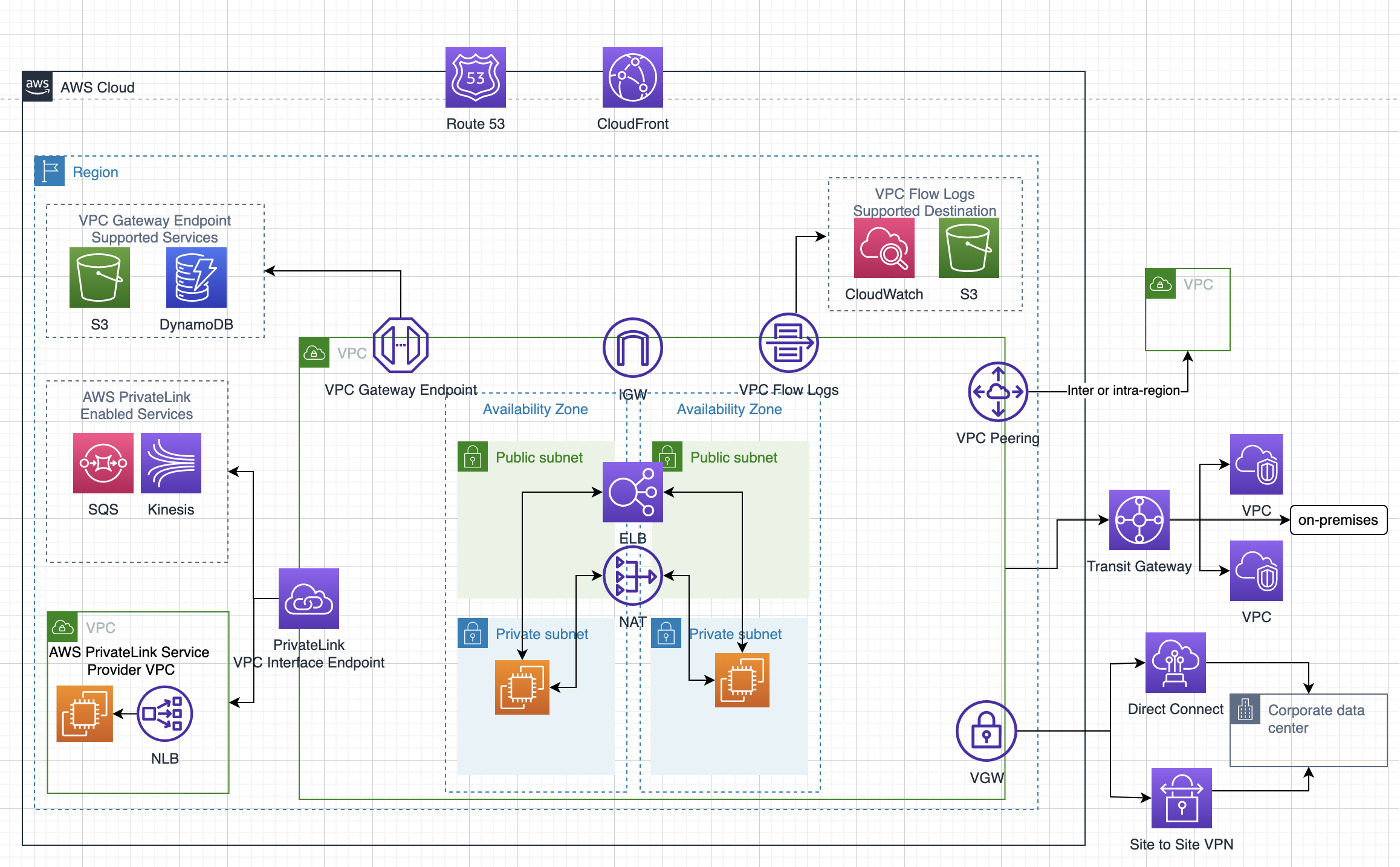
    • Internet gateway (IGW) provides access to the Internet
    • Virtual gateway (VGW) provides access to the on-premises data center through VPN and Direct Connect connections
    • VPC can have only one IGW and VGW
    • Route tables determine network traffic routing from the subnet
    • Ability to create a subnet with VPC CIDR block
    • A Network Address Translation (NAT) server provides outbound Internet access for EC2 instances in private subnets
    • Elastic IP addresses are static, persistent public IP addresses
    • Instances launched in the VPC will have a Private IP address and can have a Public or an Elastic IP address associated with it
    • Security Groups and NACLs help define security
    • Flow logs – Capture information about the IP traffic going to and from network interfaces in your VPC
  • Tenancy option for instances
    • shared, by default, allows instances to be launched on shared tenancy
    • dedicated allows instances to be launched on a dedicated hardware
  • Route Tables
    • defines rules, termed as routes, which determine where network traffic from the subnet would be routed
    • Each VPC has a Main Route table and can have multiple custom route tables created
    • Every route table contains a local route that enables communication within a VPC which cannot be modified or deleted
    • Route priority is decided by matching the most specific route in the route table that matches the traffic
  • Subnets
    • map to AZs and do not span across AZs
    • have a CIDR range that is a portion of the whole VPC.
    • CIDR ranges cannot overlap between subnets within the VPC.
    • AWS reserves 5 IP addresses in each subnet – first 4 and last one
    • Each subnet is associated with a route table which define its behavior
      • Public subnets – inbound/outbound Internet connectivity via IGW
      • Private subnets – outbound Internet connectivity via an NAT or VGW
      • Protected subnets – no outbound connectivity and used for regulated workloads
  • Elastic Network Interface (ENI)
    • a default ENI, eth0, is attached to an instance which cannot be detached with one or more secondary detachable ENIs (eth1-ethn)
    • has primary private, one or more secondary private, public, Elastic IP address, security groups, MAC address and source/destination check flag attributes associated
    • AN ENI in one subnet can be attached to an instance in the same or another subnet, in the same AZ and the same VPC
    • Security group membership of an ENI can be changed
    • with pre-allocated Mac Address can be used for applications with special licensing requirements
  • Security Groups vs NACLs – Network Access Control Lists
    • Stateful vs Stateless
    • At instance level vs At subnet level
    • Only allows Allow rule vs Allows both Allow and Deny rules
    • Evaluated as a Whole vs Evaluated in defined Order
  • Elastic IP
    • is a static IP address designed for dynamic cloud computing.
    • is associated with an AWS account, and not a particular instance
    • can be remapped from one instance to another instance
    • is charged for non-usage, if not linked for any instance or instance associated is in a stopped state
  • NAT
    • allows internet access to instances in the private subnets.
    • performs the function of both address translation and port address translation (PAT)
    • needs source/destination check flag to be disabled as it is not the actual destination of the traffic for NAT Instance.
    • NAT gateway is an AWS managed NAT service that provides better availability, higher bandwidth, and requires less administrative effort
    • are not supported for IPv6 traffic
    • NAT Gateway supports private NAT with fixed private IPs.
    • Regional NAT Gateway (announced Nov 2025) automatically expands across Availability Zones based on workload footprint, providing simplified setup, enhanced security, and automatic high availability without manual multi-AZ configuration.
  • Egress-Only Internet Gateways
    • outbound communication over IPv6 from instances in the VPC to the Internet, and prevents the Internet from initiating an IPv6 connection with your instances
    • supports IPv6 traffic only
  • Shared VPCs
    • allows multiple AWS accounts to create their application resources, such as EC2 instances, RDS databases, Redshift clusters, and AWS Lambda functions, into shared, centrally-managed VPCs
  • VPC Encryption Controls (announced Nov 2025)
    • allows enforcing encryption in transit for network traffic within the VPC
    • provides centralized encryption policy enforcement and monitoring capabilities
    • supports monitor and enforce modes to audit and enforce encryption compliance
    • transitioned to paid feature starting March 2026

VPC Peering

  • allows routing of traffic between the peer VPCs using private IP addresses with no IGW or VGW required.
  • No single point of failure and bandwidth bottlenecks
  • supports inter-region VPC peering
  • Limitations
    • IP space or CIDR blocks cannot overlap
    • cannot be transitive
    • supports a one-to-one relationship between two VPCs and has to be explicitly peered.
    • does not support edge-to-edge routing.
    • supports only one connection between any two VPCs
  • Private DNS values cannot be resolved
  • Security groups from peered VPC can now be referred to, however, the VPC should be in the same region.

VPC Endpoints

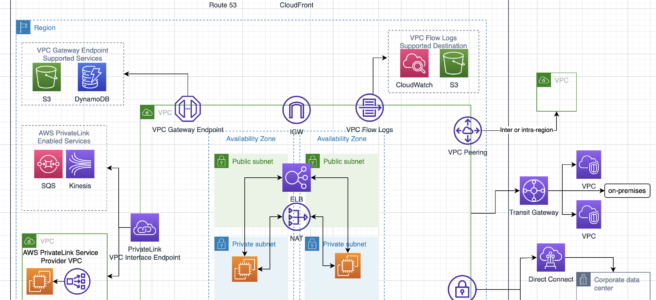
  • enables private connectivity from VPC to supported AWS services and VPC endpoint services powered by PrivateLink
  • does not require a public IP address, access over the Internet, NAT device, a VPN connection, or Direct Connect
  • traffic between VPC & AWS service does not leave the Amazon network
  • are virtual devices.
  • are horizontally scaled, redundant, and highly available VPC components that allow communication between instances in the VPC and services without imposing availability risks or bandwidth constraints on the network traffic.
  • Gateway Endpoints
    • is a gateway that is a target for a specified route in the route table, used for traffic destined to a supported AWS service.
    • only S3 and DynamoDB are currently supported
  • Interface Endpoints OR Private Links
    • is an elastic network interface with a private IP address that serves as an entry point for traffic destined to a supported service
    • supports services include AWS services, services hosted by other AWS customers and partners in their own VPCs (referred to as endpoint services), and supported AWS Marketplace partner services.
    • Private Links
      • provide fine-grained access control
      • provides a point-to-point integration.
      • supports overlapping CIDR blocks.
      • supports transitive routing
    • Access to VPC Resources over PrivateLink (announced Dec 2024) – allows sharing any VPC resource using AWS RAM and accessing them privately using VPC endpoints, without requiring the resource to sit behind a NLB.

CloudFront

  • provides low latency and high data transfer speeds for the distribution of static, dynamic web, or streaming content to web users.
  • delivers the content through a worldwide network of data centers called Edge Locations or Point of Presence (PoPs)
  • keeps persistent connections with the origin servers so that the files can be fetched from the origin servers as quickly as possible.
  • dramatically reduces the number of network hops that users’ requests must pass through
  • supports multiple origin server options, like AWS hosted service for e.g. S3, EC2, ELB, or an on-premise server, which stores the original, definitive version of the objects
  • single distribution can have multiple origins and Path pattern in a cache behavior determines which requests are routed to the origin
  • Web distribution supports static, dynamic web content, on-demand using progressive download & HLS, and live streaming video content
  • RTMP distributions were deprecated and removed on December 31, 2020. Use Web distributions with HTTP-based streaming protocols (HLS, DASH) instead.
  • supports HTTPS using either
    • dedicated IP address, which is expensive as a dedicated IP address is assigned to each CloudFront edge location
    • Server Name Indication (SNI), which is free but supported by modern browsers only with the domain name available in the request header
  • For E2E HTTPS connection,
    • Viewers -> CloudFront needs either a certificate issued by CA or ACM
    • CloudFront -> Origin needs a certificate issued by ACM for ELB and by CA for other origins
  • Security
    • Origin Access Control (OAC) is the recommended method to restrict content from S3 origin to be accessible from CloudFront only. OAC supports SSE-KMS, all HTTP methods, and all AWS Regions.
      • Origin Access Identity (OAI) is the legacy method. OAI creation was deprecated in 2024 and new distributions (as of March 2026) can only use OAC. Existing OAI configurations continue to work but migration to OAC is recommended.
    • supports Geo restriction (Geo-Blocking) to whitelist or blacklist countries that can access the content
    • Signed URLs
      • to restrict access to individual files, for e.g., an installation download for your application.
      • users using a client, for e.g. a custom HTTP client, that doesn’t support cookies
    • Signed Cookies
      • provide access to multiple restricted files, for e.g., video part files in HLS format or all of the files in the subscribers’ area of a website.
      • don’t want to change the current URLs
    • integrates with AWS WAF, a web application firewall that helps protect web applications from attacks by allowing rules configured based on IP addresses, HTTP headers, and custom URI strings
  • supports GET, HEAD, OPTIONS, PUT, POST, PATCH, DELETE to get object & object headers, add, update, and delete objects
    • only caches responses to GET and HEAD requests and, optionally, OPTIONS requests
    • does not cache responses to PUT, POST, PATCH, DELETE request methods and these requests are proxied back to the origin
  • object removal from the cache
    • would be removed upon expiry (TTL) from the cache, by default 24 hrs
    • can be invalidated explicitly, but has a cost associated, however, might continue to see the old version until it expires from those caches
    • objects can be invalidated only for Web distribution
    • use versioning or change object name, to serve a different version
    • Tag-based cache invalidation (announced May 2026) – allows tagging cached objects via origin response headers or S3 metadata and invalidating them by tag directly through the CloudFront API.
  • supports adding or modifying custom headers before the request is sent to origin which can be used to
    • validate if a user is accessing the content from CDN
    • identifying CDN from which the request was forwarded, in case of multiple CloudFront distributions
    • for viewers not supporting CORS to return the Access-Control-Allow-Origin header for every request
  • supports Partial GET requests using range header to download objects in smaller units improving the efficiency of partial downloads and recovery from partially failed transfers
  • supports compression to compress and serve compressed files when viewer requests include Accept-Encoding: gzip in the request header
  • supports different price classes to include all regions, or only the least expensive regions and other regions without the most expensive regions
  • supports access logs which contain detailed information about every user request for both web distribution
  • Edge Compute
    • CloudFront Functions – lightweight JavaScript functions for simple request/response transformations (URL rewrites, header manipulation, redirects) executed at viewer request/response events with sub-millisecond latency
    • Lambda@Edge – more powerful compute for complex processing at origin request/response and viewer request/response events
    • CloudFront KeyValueStore (launched 2023) – a globally distributed, low-latency data store that CloudFront Functions can read at runtime for dynamic routing, A/B testing, feature flags, and geo-routing without redeploying function code
  • CloudFront Flat-Rate Pricing Plans – combine CDN, AWS WAF, DDoS protection, bot management, Route 53 DNS, CloudWatch Logs ingestion, serverless edge compute, and S3 storage credits into a single monthly price

AWS VPN

  • AWS Site-to-Site VPN provides secure IPSec connections from on-premise computers or services to AWS over the Internet
  • is cheap, and quick to set up however it depends on the Internet speed
  • delivers high availability by using two tunnels across multiple Availability Zones within the AWS global network
  • VPN requires a Virtual Gateway – VGW and Customer Gateway – CGW for communication
  • VPN connection is terminated on VGW on AWS
  • Only one VGW can be attached to a VPC at a time
  • VGW supports both static and dynamic routing using Border Gateway Protocol (BGP)
  • VGW supports AWS-256 and SHA-2 for data encryption and integrity
  • AWS Client VPN is a managed client-based VPN service that enables secure access to AWS resources and resources in the on-premises network.
  • AWS VPN does not allow accessing the Internet through IGW or NAT Gateway, peered VPC resources, or VPC Gateway Endpoints from on-premises.
  • AWS VPN allows access accessing the Internet through NAT Instance and VPC Interface Endpoints from on-premises.

Direct Connect

  • is a network service that uses a private dedicated network connection to connect to AWS services.
  • helps reduce costs (long term), increases bandwidth, and provides a more consistent network experience than internet-based connections.
  • supports Dedicated and Hosted connections
    • Dedicated connection is made through a 1 Gbps, 10 Gbps, or 100 Gbps Ethernet port dedicated to a single customer.
    • Hosted connections are sourced from an AWS Direct Connect Partner that has a network link between themselves and AWS.
  • provides Virtual Interfaces
    • Private VIF to access instances within a VPC via VGW
    • Public VIF to access non VPC services
    • Transit VIF to access one or more Amazon VPC Transit Gateways associated with Direct Connect gateways, enabling connectivity to multiple VPCs through a single VIF
  • requires time to setup probably months, and should not be considered as an option if the turnaround time is less
  • does not provide redundancy, use either second direct connection or IPSec VPN connection
  • Virtual Private Gateway is on the AWS side and Customer Gateway is on the Customer side
  • route propagation is enabled on VGW and not on CGW
  • A link aggregation group (LAG) is a logical interface that uses the link aggregation control protocol (LACP) to aggregate multiple dedicated connections at a single AWS Direct Connect endpoint and treat them as a single, managed connection
  • VIF Rate Limiters (announced June 2026) on dedicated connections help prevent network congestion caused by unexpected traffic spikes on a VIF that could consume all available bandwidth impacting other VIFs on the same connection.
  • Direct Connect vs VPN IPSec
    • Expensive to Setup and Takes time vs Cheap & Immediate
    • Dedicated private connections vs Internet
    • Reduced data transfer rate vs Internet data transfer cost
    • Consistent performance vs Internet inherent variability
    • Do not provide Redundancy vs Provides Redundancy

Route 53

  • provides highly available and scalable DNS, Domain Registration Service, and health-checking web services
  • Reliable and cost-effective way to route end users to Internet applications
  • Supports multi-region and backup architectures for High availability. ELB is limited to region and does not support multi-region HA architecture.
  • supports private Intranet facing DNS service
  • internal resource record sets only work for requests originating from within the VPC and currently cannot extend to on-premise
  • Global propagation of any changes made to the DN records within ~ 1min
  • supports Alias resource record set is a Route 53 extension to DNS.
    • It’s similar to a CNAME resource record set, but supports both for root domain – zone apex e.g. example.com, and for subdomains for e.g. www.example.com.
    • supports ELB load balancers, CloudFront distributions, Elastic Beanstalk environments, API Gateways, VPC interface endpoints, and S3 buckets that are configured as websites.
  • CNAME resource record sets can be created only for subdomains and cannot be mapped to the zone apex record
  • supports Private DNS to provide an authoritative DNS within the VPCs without exposing the DNS records (including the name of the resource and its IP address(es) to the Internet.
  • Split-view (Split-horizon) DNS enables mapping the same domain publicly and privately. Requests are routed as per the origin.
  • Routing policy
    • Simple routing – simple round-robin policy
    • Weighted routing – assign weights to resource records sets to specify the proportion for e.g. 80%:20%
    • Latency based routing – helps improve global applications as requests are sent to the server from the location with minimal latency, is based on the latency and cannot guarantee users from the same geography will be served from the same location for any compliance reasons
    • Geolocation routing – Specify geographic locations by continent, country, the state limited to the US, is based on IP accuracy
    • Geoproximity routing policy – Use to route traffic based on the location of the resources and, optionally, shift traffic from resources in one location to resources in another.
    • Multivalue answer routing policy – Use to respond to DNS queries with up to eight healthy records selected at random.
    • Failover routing – failover to a backup site if the primary site fails and becomes unreachable
    • IP-based routing – route traffic based on the IP address of the client making the DNS query
  • Weighted, Latency and Geolocation can be used for Active-Active while Failover routing can be used for Active-Passive multi-region architecture
  • Traffic Flow is an easy-to-use and cost-effective global traffic management service. Traffic Flow supports versioning and helps create policies that route traffic based on the constraints they care most about, including latency, endpoint health, load, geoproximity, and geography.
  • Route 53 Resolver is a regional DNS service that helps with hybrid DNS
    • Inbound Endpoints are used to resolve DNS queries from an on-premises network to AWS
    • Outbound Endpoints are used to resolve DNS queries from AWS to an on-premises network
    • Resolver endpoints now support DNS delegation for private hosted zones (June 2025)
  • Route 53 Profiles – enables sharing DNS configurations (private hosted zone associations, Resolver rules, and Resolver DNS Firewall rule group associations) across VPCs and accounts using AWS RAM
  • Accelerated Recovery (announced Nov 2025) – provides a 60-minute recovery time objective (RTO) for regaining the ability to make DNS changes to public hosted zones during regional disruptions in US East (N. Virginia)
  • PrivateLink Support (announced Nov 2025) – allows making changes to DNS infrastructure (hosted zones, records, health checks) without using the public internet

AWS Global Accelerator

  • is a networking service that helps you improve the availability and performance of the applications to global users.
  • utilizes the Amazon global backbone network, improving the performance of the applications by lowering first-byte latency, and jitter, and increasing throughput as compared to the public internet.
  • provides two static IP addresses serviced by independent network zones that provide a fixed entry point to the applications and eliminate the complexity of managing specific IP addresses for different AWS Regions and AZs.
  • always routes user traffic to the optimal endpoint based on performance, reacting instantly to changes in application health, the user’s location, and configured policies
  • improves performance for a wide range of applications over TCP or UDP by proxying packets at the edge to applications running in one or more AWS Regions.
  • is a good fit for non-HTTP use cases, such as gaming (UDP), IoT (MQTT), or Voice over IP, as well as for HTTP use cases that specifically require static IP addresses or deterministic, fast regional failover.
  • integrates with AWS Shield for DDoS protection
  • uses a global network of 130+ Points of Presence in 95+ cities across 53+ countries
  • supports dual-stack Network Load Balancers as endpoints
  • supports endpoints in 33 AWS Regions (as of 2025)
  • integrates with AWS Load Balancer Controller for Kubernetes (announced 2025)

Transit Gateway – TGW

  • is a highly available and scalable service to consolidate the AWS VPC routing configuration for a region with a hub-and-spoke architecture.
  • acts as a Regional virtual router and is a network transit hub that can be used to interconnect VPCs and on-premises networks.
  • traffic always stays on the global AWS backbone, data is automatically encrypted, and never traverses the public internet, thereby reducing threat vectors, such as common exploits and DDoS attacks.
  • is a Regional resource and can connect VPCs within the same AWS Region.
  • TGWs across the same or different regions can peer with each other.
  • provides simpler VPC-to-VPC communication management over VPC Peering with a large number of VPCs.
  • scales elastically based on the volume of network traffic.
  • supports security group referencing (announced Sept 2024) – allows creating inbound security rules that reference security groups defined in other VPCs attached to the same Transit Gateway within the same Region.
  • supports per-AZ metrics delivered to CloudWatch and Path MTU Discovery (PMTUD) for both IPv4 and IPv6 (announced Nov 2024).
  • supports Transit Gateway Flow Logs for monitoring and logging network traffic between transit gateways.
  • supports Flexible Cost Allocation (announced Nov 2025) – provides versatile cost allocation options through a central metering policy beyond the default sender-pay model.

Amazon VPC Lattice

  • is a fully managed application networking service that connects, monitors, and secures communications between services and resources across VPCs and accounts.
  • simplifies service-to-service connectivity without requiring VPC peering, Transit Gateway, or PrivateLink NLBs.
  • automatically manages network connectivity and application-layer routing between services across different VPCs and AWS accounts.
  • supports connectivity to TCP resources, such as databases, domain names, and IP addresses across VPCs and accounts.
  • integrates with AWS IAM for service-to-service authentication and authorization using Auth policies.
  • removes the NLB requirement that PrivateLink imposes on providers and supports cross-VPC/cross-account connectivity without CIDR coordination.
  • terminates TLS at the data plane so callers do not need to manage certificates.
  • provides built-in observability with access logs, connection logs, and traffic metrics.
  • Key concepts:
    • Service Network – a logical boundary for a collection of services that can communicate with each other
    • Service – represents an application unit that is independently deployable
    • Target Groups – collection of resources (instances, IPs, Lambda, ALB) for routing
    • Resource Configurations – define TCP resources (databases, IPs, domain names) accessible through VPC Lattice
  • Use cases:
    • Microservices connectivity across multiple VPCs/accounts
    • Secure service-to-service communication with zero trust
    • Alternative to VPC Peering and Transit Gateway for application-layer connectivity
    • Replacement for AWS App Mesh (which reached EOL on September 30, 2026)

Amazon VPC IP Address Manager (IPAM)

  • is a VPC feature that allows you to plan, track, and monitor IP addresses for AWS workloads.
  • organizes IP addresses by routing and security requirements while automating allocation to VPCs, replacing manual spreadsheet-based tracking.
  • tracks AWS accounts and VPCs, eliminating IP bookkeeping overhead.
  • supports management at both VPC and subnet CIDR levels.
  • integrates with AWS Organizations for cross-account IP address management.
  • supports provisioning Amazon-provided contiguous IPv4 blocks into publicly scoped regional pools for use with EIPs, NLBs, and NAT Gateways.
  • Public IP Insights – free feature that simplifies monitoring, analysis, and auditing of public IPv4 addresses.
  • IPAM Policies – define public IPv4 allocation strategies and automate prefix lists.
  • integrates with ALB for predictable IP address blocks for internet-facing ALBs (March 2025).
  • IPAM Advanced Tier – includes Infoblox integration (Nov 2025) for managing AWS IP addresses through existing Infoblox workflows.

AWS Network Firewall

  • is a managed, stateful network firewall and intrusion detection and prevention service for all Amazon VPCs.
  • scales automatically with network traffic, requiring no infrastructure management.
  • provides Layer 7 firewall capabilities with deep packet inspection.
  • supports flexible rules engine for fine-grained control of VPC network traffic.
  • provides active threat defense using AWS managed rules to block evasive C2 channels, malicious URLs, and other threat vectors.
  • supports Suricata-compatible IPS rules for known bad signatures and traffic patterns.
  • includes Network Firewall Proxy for granular security controls to inspect and filter VPC outbound connections, preventing data exfiltration and malware intrusion.
  • integrates with AWS Firewall Manager for centralized policy management across accounts.
  • can be combined with VPC Lattice for comprehensive security (VPC Lattice for HTTP/S with identity-based controls, Network Firewall for other traffic types).

AWS Cloud WAN

  • is a managed WAN service that provides a central dashboard to connect and manage branch offices, data centers, VPN connections, SD-WAN, VPCs, and Transit Gateways.
  • uses network policies to create a global network spanning multiple locations and networks, removing the need for different technologies.
  • provides a single console and set of APIs to manage networks across AWS Regions.
  • supports direct Direct Connect gateway attachments without requiring an intermediate Transit Gateway (announced Nov 2024).
  • supports Routing Policy for advanced traffic control (announced Nov 2025) – enables controlled routing environments, minimizing route reachability blast radius.
  • supports Service Insertion for inspection and security appliance integration.
  • supports PMTUD for both IPv4 and IPv6 (announced Nov 2024).
  • supports AWS PrivateLink and IPv6 for management endpoint connectivity (announced March 2025).
  • available in AWS GovCloud (US) Regions.

AWS Verified Access

  • provides secure access to corporate applications and resources without requiring a VPN.
  • implements zero trust principles by evaluating each access request based on user identity and device security posture rather than network location.
  • uses the Cedar policy language for defining fine-grained access policies.
  • supports secure access to resources over non-HTTP(S) protocols (announced Feb 2025) – enables VPN-less access to TCP-based resources like SSH, RDP, and databases.
  • continuously monitors active connections and terminates connections when security requirements aren’t met.
  • integrates with third-party identity providers and device management solutions.
  • can be used with PrivateLink-backed services to provide authorized internet-based access while maintaining security boundaries.

AWS Management Tools Cheat Sheet

AWS Organizations

  • AWS Organizations is an account management service that enables consolidating multiple AWS accounts into an organization that can be created and centrally managed.
  • AWS Organizations enables you to
    • Automate AWS account creation and management, and provision resources with AWS CloudFormation Stacksets
    • Maintain a secure environment with policies and management of AWS security services
    • Govern access to AWS services, resources, and regions
    • Centrally manage policies across multiple AWS accounts
    • Audit your environment for compliance
    • View and manage costs with consolidated billing
    • Configure AWS services across multiple accounts
  • Resource Control Policies (RCPs) (launched Nov 2024)
    • RCPs are a new type of authorization policy to centrally restrict access to AWS resources across your organization.
    • Complement SCPs by setting the maximum available permissions on resources (SCPs control permissions on principals).
    • Help establish a data perimeter and restrict external access to resources at scale.
    • Only affect resources in member accounts, not the management account.
  • Declarative Policies (launched Dec 2024)
    • Help declare and enforce desired configuration for AWS services at scale across the organization.
    • Define the configuration once (e.g., “block public access for VPCs”) and AWS automatically enforces it across the multi-account environment.
    • Once set, configuration is maintained even as new features or APIs are added.
    • End users see custom error messages configured by administrators, directing them to internal resources or support channels.

CloudFormation

  • gives developers and systems administrators an easy way to create and manage a collection of related AWS resources
  • Resources can be updated, deleted, and modified in an orderly, controlled and predictable fashion, in effect applying version control to the AWS infrastructure as code done for software code
  • CloudFormation Template is an architectural diagram, in JSON or YAML format, and Stack is the end result of that diagram, which is actually provisioned
  • template can be used to set up the resources consistently and repeatedly over and over across multiple regions and consists of
    • List of AWS resources and their configuration values
    • An optional template file format version number
    • An optional list of template parameters (input values supplied at stack creation time)
    • An optional list of output values like public IP address using the Fn::GetAtt function
    • An optional list of data tables used to lookup static configuration values for e.g., AMI names per AZ
  • supports Chef & Puppet Integration to deploy and configure right down the application layer
  • supports Bootstrap scripts to install packages, files, and services on the EC2 instances by simply describing them in the CF template
  • automatic rollback on error feature is enabled, by default, which will cause all the AWS resources that CF created successfully for a stack up to the point where an error occurred to be deleted
  • provides a WaitCondition resource to block the creation of other resources until a completion signal is received from an external source
  • allows DeletionPolicy attribute to be defined for resources in the template
    • retain to preserve resources like S3 even after stack deletion
    • snapshot to backup resources like RDS after stack deletion
  • DependsOn attribute to specify that the creation of a specific resource follows another
  • Service role is an IAM role that allows AWS CloudFormation to make calls to resources in a stack on the user’s behalf
  • Nested stacks can separate out reusable, common components and create dedicated templates to mix and match different templates but use nested stacks to create a single, unified stack
  • Change Sets presents a summary or preview of the proposed changes that CloudFormation will make when a stack is updated
  • Drift detection enables you to detect whether a stack’s actual configuration differs, or has drifted, from its expected configuration.
  • Termination protection helps prevent a stack from being accidentally deleted.
  • Stack policy can prevent stack resources from being unintentionally updated or deleted during a stack update.
  • StackSets extends the functionality of stacks by enabling you to create, update, or delete stacks across multiple accounts and Regions with a single operation.
  • IaC Generator (launched Feb 2024)
    • Generates CloudFormation templates and AWS CDK apps for existing AWS resources that are not managed with CloudFormation.
    • Scans resources in an AWS account, identifies relationships, and generates templates.
    • Supports targeted resource scans for faster template generation.
    • Helps onboard existing resources to CloudFormation management.
  • Hooks
    • Extension points that invoke custom logic at specific points during stack operations for validation or enforcement.
    • Can be created using AWS Lambda, CloudFormation Guard rules, or the CFN-CLI.
    • Now supports managed proactive controls from AWS Control Tower Controls Catalog (2025).
    • Hooks Invocation Summary page provides centralized historical view of Hook activity.
  • Stack Refactoring (2025)
    • Enables reorganizing CloudFormation and CDK infrastructure without disrupting deployed resources.
    • Move resources between stacks, rename logical IDs, and decompose monolithic stacks.
  • Drift-Aware Change Sets (Nov 2025)
    • Provides three-way comparison between new template, last-deployed template, and actual infrastructure state.
    • Prevents unexpected overwrites of drift during stack updates.
    • During execution, recreates resources deleted outside of CloudFormation.
  • Pre-Deployment Validation (Nov 2025)
    • Validates templates during change set creation, catching errors before resource provisioning.
    • Checks for invalid property syntax, resource name conflicts, and S3 bucket emptiness constraints.
  • StackSets Deployment Ordering (2025)
    • Supports deployment ordering for auto-deployment mode with DependsOn parameter.
    • Enables defining the sequence in which stack instances deploy across accounts and regions.
    • Includes built-in cycle detection to prevent circular dependencies.

Elastic BeanStalk

  • makes it easier for developers to quickly deploy and manage applications in the AWS cloud.
  • automatically handles the deployment details of capacity provisioning, load balancing, auto-scaling and application health monitoring
  • CloudFormation supports ElasticBeanstalk
  • provisions resources to support
    • a web application that handles HTTP(S) requests or
    • a web application that handles background-processing (worker) tasks
  • supports Out Of the Box
    • Apache Tomcat for Java applications
    • Apache HTTP Server for PHP applications
    • Apache HTTP server for Python applications
    • Nginx or Apache HTTP Server for Node.js applications
    • Passenger for Ruby applications
    • Microsoft IIS for .NET applications
    • Single and Multi Container Docker
    • Go applications
  • supports custom AMI to be used
  • is designed to support multiple running environments such as one for Dev, QA, Pre-Prod and Production.
  • supports versioning and stores and tracks application versions over time allowing easy rollback to prior version
  • can provision RDS DB instance and connectivity information is exposed to the application by environment variables, but is NOT recommended for production setup as the RDS is tied up with the Elastic Beanstalk lifecycle and if deleted, the RDS instance would be deleted as well
  • Amazon Linux 2023 (AL2023) is the current recommended platform. Amazon Linux 2 (AL2) standard support ends June 30, 2026. Platform branches based on Amazon Linux AMI (AL1) are retired.
  • supports AI-powered log analysis using Amazon Nova for improved reliability in troubleshooting.

OpsWorks

⚠️ AWS OpsWorks — END OF LIFE

AWS OpsWorks Stacks reached End of Life (EOL) on May 26, 2024. The service has been disabled for both new and existing customers. The OpsWorks console, API, CLI, and CloudFormation resources have been discontinued in all AWS Regions.

Migration Options:

  • AWS Systems Manager — for configuration management, patching, and automation
  • AWS CloudFormation / CDK — for infrastructure as code provisioning
  • AWS Elastic Beanstalk — for application deployment and management
  • is a configuration management service that helps to configure and operate applications in a cloud enterprise by using Chef
  • helps deploy and monitor applications in stacks with multiple layers
  • supports preconfigured layers for Applications, Databases, Load Balancers, Caching
  • OpsWorks Stacks features is a set of lifecycle events – Setup, Configure, Deploy, Undeploy, and Shutdown – which automatically runs specified set of recipes at the appropriate time on each instance
  • Layers depend on Chef recipes to handle tasks such as installing packages on instances, deploying apps, running scripts, and so on
  • OpsWorks Stacks runs the recipes for each layer, even if the instance belongs to multiple layers
  • supports Auto Healing and Auto Scaling to monitor instance health, and provision new instances

CloudWatch

  • allows monitoring of AWS resources and applications in real time, collect and track pre configured or custom metrics and configure alarms to send notification or make resource changes based on defined rules
  • does not aggregate data across regions
  • stores the log data indefinitely, and the retention can be changed for each log group at any time
  • alarm history is stored for only 14 days
  • can be used an alternative to S3 to store logs with the ability to configure Alarms and generate metrics, however logs cannot be made public
  • Alarms exist only in the created region and the Alarm actions must reside in the same region as well
  • Application Signals (GA June 2024)
    • Provides a unified, application-centric view of applications, services, and dependencies.
    • Automatic instrumentation across Amazon ECS, EKS, Lambda, and EC2 — no custom code or dashboards needed.
    • Pre-built dashboards showing volume, availability, latency, faults, and errors.
    • Supports Service Level Objectives (SLOs) and health indicators.
    • Application map automatically discovers and visualizes application topology.
  • Network Monitoring
    • Internet Monitor — provides near-continuous internet measurements (availability and performance) tailored to your workload footprint on AWS.
    • Network Flow Monitor — tracks network metrics (data transferred, retransmissions, round-trip time) between compute resources using lightweight agents.
    • Network Synthetic Monitor — visualizes packet loss and latency of hybrid network connections.

CloudTrail

  • records access to API calls for the AWS account made from AWS management console, SDKs, CLI and higher level AWS service
  • support many AWS services and tracks who did, from where, what & when
  • is a global service — a trail can be applied to all regions or a single region. A region can include global services (like IAM, STS etc), is applicable to all the supported services within that region
  • log files from different regions can be sent to the same S3 bucket
  • can be integrated with SNS to notify logs availability, CloudWatch logs log group for notifications when specific API events occur
  • call history enables security analysis, resource change tracking, trouble shooting and compliance auditing
  • CloudTrail Lake
    • A managed data lake for capturing, storing, and analyzing AWS activity logs.
    • Supports enhanced event filtering, event enrichment, and expanded event size (2025).
    • AI-powered features for log analysis and pre-built dashboards (Nov 2024).
    • ⚠️ CloudTrail Lake is no longer open to new customers starting May 31, 2026. Existing customers can continue use. AWS recommends Amazon CloudWatch for similar capabilities going forward.

AWS Identity & Security Services Cheat Sheet

AWS Identity & Security Services Cheat Sheet

AWS Identity and Security Services

📌 Last Updated: June 2026 — Includes AWS Security Hub reimagined (re:Invent 2025), AWS Security Agent (GA March 2026), mandatory MFA enforcement for all root users, GuardDuty Extended Threat Detection, and IAM Identity Center multi-Region replication.

AWS Identity Services Cheat Sheet

AWS Security Services Cheat Sheet

AWS Identity & Security Services Overview

AWS Security, Identity, and Compliance services provide a comprehensive set of tools to help protect data, accounts, and workloads. These services are organized into the following categories:

Identity and Access Management

  • AWS Identity and Access Management (IAM) – Securely manage access to AWS services and resources using users, groups, roles, and policies
  • AWS IAM Identity Center (formerly AWS SSO) – Centrally manage SSO access to multiple AWS accounts and business applications
    • Now supports multi-Region replication (Feb 2026) for high availability
    • Supports IPv6 dual-stack endpoints
  • Amazon Cognito – Customer identity and access management (CIAM) for web and mobile apps
    • Now supports passwordless authentication with passkeys (FIDO2/WebAuthn), email OTP, and SMS OTP (Nov 2024)
    • New feature tiers: Essentials and Plus (Nov 2024)
    • Managed Login for pre-built authentication UIs
  • Amazon Verified Permissions – Scalable, fine-grained authorization using Cedar policy language for custom applications
  • AWS Resource Access Manager (RAM) – Securely share AWS resources across accounts and within AWS Organizations
  • AWS Directory Service – Managed Microsoft Active Directory in the AWS Cloud

Detection and Response

  • Amazon GuardDuty – Intelligent threat detection that continuously monitors for malicious activity
    • Extended Threat Detection (re:Invent 2024) – AI/ML-powered attack sequence identification across multiple data sources
    • Now covers EC2, ECS, EKS, S3, and IAM attack sequences
    • Custom entity lists for domain-based threat intelligence (Sept 2025)
  • Amazon Detective – Analyze, investigate, and identify root cause of security findings using ML and graph theory
  • Amazon Inspector – Automated vulnerability management for EC2 instances and container images in ECR
  • AWS Security Hub – Cloud security posture management (CSPM) and unified security operations
    • Reimagined at re:Invent 2025 – Unifies GuardDuty, Inspector, and other services into a single experience
    • Near real-time analytics and risk prioritization (GA Dec 2025)
    • Extended Plan (GA Feb 2026) – Full-stack enterprise security with 21 curated partner solutions across 9 categories
    • Expanding to multicloud environments
  • AWS Security Agent (GA March 2026) – AI-powered frontier agent for proactive application security
    • Automated security reviews tailored to organizational requirements
    • On-demand context-aware penetration testing
    • Full repository code scanning (Preview May 2026)
    • Operates like a human penetration tester – identifies, exploits, and validates vulnerabilities

Data Protection

Network and Application Protection

  • AWS WAF – Web application firewall to protect against common web exploits and bots
  • AWS Shield – Managed DDoS protection (Standard and Advanced tiers)
  • AWS Network Firewall – Managed network firewall for VPC with stateful inspection and IPS
  • AWS Firewall Manager – Centrally configure and manage firewall rules across accounts in AWS Organizations

Security Data Management and Compliance

  • Amazon Security Lake – Centralize security data from AWS, SaaS, on-premises using OCSF standard
    • Achieved FedRAMP High and Moderate authorization (April 2025)
  • AWS Audit Manager – Continuously audit AWS usage for risk and compliance assessment
  • AWS Artifact – On-demand access to AWS security and compliance reports

Key Updates (2024-2026)

  • MFA Enforcement (2024-2025) – AWS now mandates MFA for all root users across all account types. Prevents over 99% of password-related attacks.
  • AWS Security Hub Reimagined (re:Invent 2025) – Completely redesigned to unify security services into a single experience with near real-time analytics and AI-driven risk prioritization.
  • AWS Security Agent (GA March 2026) – First AI-powered frontier agent for autonomous application security testing and code scanning.
  • GuardDuty Extended Threat Detection (re:Invent 2024) – AI/ML attack sequence identification now covers EC2, ECS, EKS workloads.
  • IAM Identity Center Multi-Region (Feb 2026) – Replicate identity center configuration across multiple AWS Regions for high availability.
  • Amazon Cognito Passwordless (Nov 2024) – Native passkey support with FIDO2/WebAuthn, email OTP, and SMS OTP authentication.
  • Centralized Root Access Management (Nov 2024) – Centrally manage root credentials and perform privileged tasks across AWS Organizations member accounts.
  • Agentic AI Security Framework (2025) – New Agentic AI Security Scoping Matrix for securing autonomous AI systems.

AWS Certification Relevance

  • Solutions Architect (Associate/Professional) – IAM, VPC security, encryption, Security Hub, GuardDuty
  • Security Specialty – All services in depth, including Security Lake, Detective, Macie, Inspector
  • SysOps Administrator – Security Hub, Config, GuardDuty, IAM best practices
  • Developer Associate – Cognito, IAM roles, KMS, Secrets Manager
  • DevOps Professional – Security automation, Inspector, Security Hub integrations

AWS Compute Services Cheat Sheet – EC2, Lambda, ECS

AWS Compute Services Cheat Sheet

AWS Compute Services

Elastic Cloud Compute – EC2

  • provides scalable computing capacity
  • Features
    • Virtual computing environments, known as EC2 instances
    • Preconfigured templates for EC2 instances, known as Amazon Machine Images (AMIs), that package the bits needed for the server (including the operating system and additional software)
    • Various configurations of CPU, memory, storage, and networking capacity for your instances, known as Instance types
    • Secure login information for your instances using key pairs (public-private keys where private is kept by user)
    • Storage volumes for temporary data that’s deleted when you stop or terminate your instance, known as Instance store volumes
    • Persistent storage volumes for data using Elastic Block Store (EBS)
    • Multiple physical locations for your resources, such as instances and EBS volumes, known as Regions and Availability Zones
    • A firewall to specify the protocols, ports, and source IP ranges that can reach your instances using Security Groups
    • Static IP addresses, known as Elastic IP addresses
    • Metadata, known as tags, can be created and assigned to EC2 resources
    • Virtual networks that are logically isolated from the rest of the AWS cloud, and can optionally connect to on-premises network, known as Virtual private clouds (VPCs)

Amazon Machine Image – AMI

    • template from which EC2 instances can be launched quickly
    • does NOT span across regions, and needs to be copied
    • can be shared with other specific AWS accounts or made public

Instance Types

  • T for applications needing general usage
    • T2 instances are Burstable Performance Instances that provide a baseline level of CPU performance with the ability to burst above the baseline.
    • T2 instances accumulate CPU Credits when they are idle, and consume CPU Credits when they are active.
    • T2 Unlimited Instances can sustain high CPU performance for as long as a workload needs it at an additional cost.
    • T4g instances are powered by AWS Graviton2 processors and provide the next generation low cost burstable general purpose instance type.
  • R for applications needing more RAM or Memory
    • R8g instances powered by Graviton4 processors deliver up to 30% better performance over Graviton3-based instances for memory-intensive workloads.
  • C for applications needing more Compute
    • C8g instances powered by Graviton4 and C8i instances powered by Intel Xeon 6 processors represent the latest generation (2024-2025).
  • M for applications needing more Medium or Moderate performance on both Memory and CPU
    • M8g instances powered by Graviton4 and M8i instances powered by Intel Xeon 6 processors are the latest generation (2024-2025).
  • I for applications needing more IOPS
  • G for applications needing more GPU
  • P for applications needing GPU-accelerated computing for ML/AI
    • P5 and P5e instances for high-performance ML training and inference workloads.
  • Graviton-based instances (suffix “g”, e.g., C8g, M8g, R8g) are powered by AWS-designed Arm processors and provide the best price performance for most workloads.

Instance Purchasing Option

  • On-Demand Instances
    • pay for instances and compute capacity that you use by the hour or second
    • no long-term commitments or up-front payments
  • Reserved Instances
    • provides lower hourly running costs by providing a billing discount (up to 72%)
    • capacity reservation is applied to instances
    • suited if consistent, heavy, predictable usage
    • provides benefits with Consolidate Billing
    • can be modified to switch Availability Zones or the instance size within the same instance type, given the instance size footprint (Normalization factor) remains the same
    • pay for the entire term regardless of the usage
    • is not a physical instance that is launched, but rather a billing discount applied to the use of On-Demand Instances
    • available in Standard and Convertible options
  • Savings Plans
    • flexible pricing model offering savings up to 72% on compute usage in exchange for a commitment to a consistent amount of usage (measured in $/hour) for a 1 or 3 year term
    • Compute Savings Plans apply to EC2, Fargate, and Lambda usage regardless of instance family, size, AZ, region, OS, or tenancy
    • EC2 Instance Savings Plans apply to a specific instance family within a region
    • recommended over Reserved Instances for new workloads due to greater flexibility
  • Scheduled Reserved Instances
    • ⚠️ Scheduled Reserved Instances are no longer available for purchase. AWS does not have capacity available and has no plans to make it available in the future. Use On-Demand Capacity Reservations instead.
  • On-Demand Capacity Reservations
    • reserve compute capacity for instances in a specific AZ for any duration
    • can be created to start immediately or scheduled for a future date
    • ensures access to EC2 capacity when needed, independent of billing discounts
    • can be combined with Savings Plans or Reserved Instances for cost savings
  • Capacity Blocks for ML
    • reserve GPU instances (P4d, P5, P5e, Trn1) for ML workloads up to 8 weeks in advance
    • durations of up to 6 months in cluster sizes of 1 to 64 instances
    • supports instant start times and extensions
    • instances are placed in EC2 UltraClusters for low-latency networking
  • Spot Instances
    • cost-effective choice (up to 90% discount) but does NOT guarantee availability
    • applications flexible in the timing when they can run and also able to handle interruption by storing the state externally
    • provides a two-minute warning if the instance is to be terminated to save any unsaved work
    • Spot blocks can also be launched with a required duration, which are not interrupted due to changes in the Spot price Spot Blocks (Defined Duration) are no longer available for new customers.
    • Spot Fleet is a collection, or fleet, of Spot Instances, and optionally On-Demand Instances, which attempts to launch the number of Spot and On-Demand Instances to meet the specified target capacity
  • Dedicated Instances
    • is a tenancy option that enables instances to run in VPC on hardware that’s isolated, dedicated to a single customer
  • Dedicated Host
    • is a physical server with EC2 instance capacity fully dedicated to your use
    • helps meet compliance requirements and reduce costs by allowing use of existing server-bound software licenses
  • Light, Medium, and Heavy Utilization Reserved Instances are no longer available for purchase and were part of the Previous Generation AWS EC2 purchasing model

Enhanced Networking

  • results in higher bandwidth, higher packet per second (PPS) performance, lower latency, consistency, scalability, and lower jitter
  • supported using Single Root – I/O Virtualization (SR-IOV) only on supported instance types
  • is supported only with a VPC and HVM virtualization type
  • available by default on Amazon AMI but can be installed on other AMIs as well
  • no additional charge for using enhanced networking
  • Note: EC2-Classic has been fully retired (August 2023). All instances now run in VPC only.

Placement Group

  • Cluster Placement Group
    • provide low latency, High-Performance Computing via 10Gbps network
    • is a logical grouping on instances within a Single AZ
    • don’t span availability zones, can span multiple subnets but subnets must be in the same AZ
    • can span across peered VPCs for the same Availability Zones
    • An existing instance can be moved to a placement group, or moved from one placement group to another, or removed from a placement group, given it is in the stopped state.
    • for capacity errors, stop and start the instances in the placement group
    • use homogenous instance types which support enhanced networking and launch all the instances at once
  • Spread Placement Groups
    • is a group of instances that are each placed on distinct underlying hardware i.e. each instance on a distinct rack across AZ
    • recommended for applications that have a small number of critical instances that should be kept separate from each other.
    • reduces the risk of simultaneous failures that might occur when instances share the same underlying hardware.
  • Partition Placement Groups
    • is a group of instances spread across partitions i.e. group of instances spread across racks across AZs
    • reduces the likelihood of correlated hardware failures for the application.
    • can be used to spread deployment of large distributed and replicated workloads, such as HDFS, HBase, and Cassandra, across distinct hardware

EC2 Monitoring

  • CloudWatch provides monitoring for EC2 instances
  • Status monitoring helps quickly determine whether EC2 has detected any problems that might prevent instances from running applications.
  • Status monitoring includes
    • System Status checks – indicate issues with the underlying hardware
    • Instance Status checks – indicate issues with the underlying instance.

Elastic Load Balancer

  • Managed load balancing service and scales automatically
  • distributes incoming application traffic across multiple EC2 instances
  • is distributed system that is fault tolerant and actively monitored by AWS scales it as per the demand
  • are engineered to not be a single point of failure
  • supports Load Balancer Capacity Unit (LCU) Reservation to proactively set a minimum capacity for ALB and NLB, complementing auto-scaling for planned traffic events (launched Nov 2024)
  • supports routing traffic to instances in multiple AZs in the same region
  • performs Health Checks to route traffic only to the healthy instances
  • support Listeners with HTTP, HTTPS, SSL, TCP protocols
  • has an associated IPv4 and dual stack DNS name
  • can offload the work of encryption and decryption (SSL termination) so that the EC2 instances can focus on their main work
  • supports Cross Zone load balancing to help route traffic evenly across all EC2 instances regardless of the AZs they reside in
  • to help identify the IP address of a client
    • supports Proxy Protocol header for TCP/SSL connections
    • supports X-Forward headers for HTTP/HTTPS connections
  • supports Stick Sessions (session affinity) to bind a user’s session to a specific application instance,
    • it is not fault tolerant, if an instance is lost the information is lost
    • requires HTTP/HTTPS listener and does not work with TCP
    • requires SSL termination on ELB as it users the headers
  • supports Connection draining to help complete the in-flight requests in case an instance is deregistered
  • For High Availability, it is recommended to attach one subnet per AZ for at least two AZs, even if the instances are in a single subnet.
  • supports Static/Elastic IP (NLB only)
  • IPv4 & IPv6 support. VPC supports IPv6.
  • HTTPS listener does not support Client Side Certificate
  • For SSL termination at backend instances or support for Client Side Certificate use TCP for connections from the client to the ELB, use the SSL protocol for connections from the ELB to the back-end application, and deploy certificates on the back-end instances handling requests
  • Uses Server Name Indication to supports multiple SSL certificates
  • Supports four types: Application Load Balancer (ALB), Network Load Balancer (NLB), Gateway Load Balancer (GWLB), and Classic Load Balancer (CLB – previous generation)

Application Load Balancer

  • supports HTTP and HTTPS (Secure HTTP) protocols
  • supports HTTP/2, which is enabled natively. Clients that support HTTP/2 can connect over TLS
  • supports WebSockets and Secure WebSockets natively
  • supports Request tracing, by default.
    • request tracing can be used to track HTTP requests from clients to targets or other services.
    • Load balancer upon receiving a request from a client, adds or updates the X-Amzn-Trace-Id header before sending the request to the target
  • supports containerized applications. Using Dynamic port mapping, ECS can select an unused port when scheduling a task and register the task with a target group using this port.
  • supports Sticky Sessions (Session Affinity) using load balancer generated cookies, to route requests from the same client to the same target
  • supports SSL termination, to decrypt the request on ALB before sending it to the underlying targets.
  • supports layer 7 specific features like X-Forwarded-For headers to help determine the actual client IP, port and protocol
  • automatically scales its request handling capacity in response to incoming application traffic.
  • supports hybrid load balancing, to route traffic to instances in VPC and an on-premises location
  • provides High Availability, by allowing more than one AZ to be specified
  • integrates with ACM to provision and bind a SSL/TLS certificate to the load balancer thereby making the entire SSL offload process very easy
  • supports multiple certificates for the same domain to a secure listener
  • supports IPv6 addressing, for an Internet facing load balancer
  • supports dual-stack without public IPv4, enabling clients to connect using only IPv6 addresses without needing public IPv4 addresses (launched May 2024)
  • supports Cross-zone load balancing, and cannot be disabled.
  • supports Security Groups to control the traffic allowed to and from the load balancer.
  • provides Access Logs, to record all requests sent the load balancer, and store the logs in S3 for later analysis in compressed format
  • provides Delete Protection, to prevent the ALB from accidental deletion
  • supports Connection Idle Timeout – ALB maintains two connections for each request one with the Client (front end) and one with the target instance (back end). If no data has been sent or received by the time that the idle timeout period elapses, ALB closes the front-end connection
  • integrates with CloudWatch to provide metrics such as request counts, error counts, error types, and request latency
  • integrates with AWS WAF, a web application firewall that helps protect web applications from attacks by allowing rules configuration based on IP addresses, HTTP headers, and custom URI strings
  • integrates with CloudTrail to receive a history of ALB API calls made on the AWS account
  • back-end server authentication is NOT supported
  • does not provide Static, Elastic IP addresses

Network Load Balancer

  • handles volatile workloads and scale to millions of requests per second, without the need of pre-warming
  • offers extremely low latencies for latency-sensitive applications.
  • provides static IP/Elastic IP addresses for the load balancer
  • allows registering targets by IP address, including targets outside the VPC (on-premises) for the load balancer.
  • supports containerized applications. Using Dynamic port mapping, ECS can select an unused port when scheduling a task and register the task with a target group using this port.
  • monitors the health of its registered targets and routes the traffic only to healthy targets
  • enable cross-zone loading balancing only after creating the NLB
  • preserves client side source IP allowing the back-end to see client IP address. Target groups can be created with target type as instance ID or IP address. If targets registered by instance ID, the source IP addresses of the clients are preserved and provided to the applications. If register targets registered by IP address, the source IP addresses are the private IP addresses of the load balancer nodes.
  • supports both network and application target health checks.
  • supports long-lived TCP connections ideal for WebSocket type of applications
  • supports Zonal Isolation, which is designed for application architectures in a single zone and can be enabled in a single AZ to support architectures that require zonal isolation
  • supports sticky sessions using source IP affinity at the target group level to route traffic from the same client to the same target
  • supports removing Availability Zones after creation, enabling subnet reconfiguration without recreating the NLB (launched Feb 2025)
  • supports weighted target groups for blue/green and canary deployments without multiple load balancers (launched 2025)
  • supports QUIC protocol in passthrough mode, enabling low-latency forwarding of QUIC traffic while preserving session stickiness through QUIC Connection ID (launched Nov 2025)
  • supports UDP over IPv6 for dualstack load balancers (launched Nov 2024)

Gateway Load Balancer

  • enables deployment, scaling, and management of third-party virtual appliances such as firewalls, intrusion detection/prevention systems, and deep packet inspection systems
  • provides one gateway for distributing traffic across multiple virtual appliances while scaling them up or down based on demand
  • operates at Layer 3 (Network layer) and listens for all IP packets across all ports
  • uses the GENEVE protocol on port 6081 to encapsulate traffic
  • supports flow stickiness using 2-tuple, 3-tuple, or 5-tuple hash
  • configurable TCP idle timeout from 60 to 6000 seconds
  • decreases potential points of failure in network and increases availability
  • use cases include centralized network security inspection, traffic mirroring, and compliance monitoring

Auto Scaling

  • ensures correct number of EC2 instances are always running to handle the load by scaling up or down automatically as demand changes
  • cannot span multiple regions.
  • attempts to distribute instances evenly between the AZs that are enabled for the Auto Scaling group
  • performs checks either using EC2 status checks or can use ELB health checks to determine the health of an instance and terminates the instance if unhealthy, to launch a new instance
  • can be scaled using manual scaling, scheduled scaling, dynamic scaling (target tracking, step, simple) or predictive scaling
  • Predictive Scaling uses machine learning to predict future traffic based on historical patterns and proactively launches instances ahead of demand, ideal for applications with recurring traffic spikes
  • Target Tracking scaling now features highly responsive scaling policies that adapt to unique application usage patterns and support high-resolution CloudWatch metrics (enhanced Nov 2024)
  • cooldown period helps ensure instances are not launched or terminated before the previous scaling activity takes effect to allow the newly launched instances to start handling traffic and reduce load

AWS Auto Scaling & ELB

  • Auto Scaling & ELB can be used for High Availability and Redundancy by spanning Auto Scaling groups across multiple AZs within a region and then setting up ELB to distribute incoming traffic across those AZs
  • With Auto Scaling, use ELB health check with the instances to ensure that traffic is routed only to the healthy instances

Lambda

  • offers Serverless computing that allows applications and services to be built and run without thinking about servers.
  • helps run code without provisioning or managing servers, where you pay only for the compute time when the code is running.
  • is priced on a pay-per-use basis and there are no charges when the code is not running.
  • performs all the operational and administrative activities on your behalf, including capacity provisioning, monitoring fleet health, applying security patches to the underlying compute resources, deploying code, running a web service front end, and monitoring and logging the code.
  • does not provide access to the underlying compute infrastructure.
  • handles scalability and availability as it
    • provides easy scaling and high availability to the code without additional effort on your part.
    • is designed to process events within milliseconds.
    • is designed to run many instances of the functions in parallel.
    • is designed to use replication and redundancy to provide high availability for both the service and the functions it operates.
    • has no maintenance windows or scheduled downtimes for either.
    • has a default safety throttle for the number of concurrent executions per account per region.
    • has a higher latency immediately after a function is created, or updated, or if it has not been used recently.
    • for any function updates, there is a brief window of time, less than a minute, when requests would be served by both versions
  • Security
    • stores code in S3 and encrypts it at rest and performs additional integrity checks while the code is in use.
    • each function runs in its own isolated environment, with its own resources and file system view
    • supports Code Signing using AWS Signer, which offers trust and integrity controls that enable you to verify that only unaltered code from approved developers is deployed in the functions.
  • Functions must complete execution within 900 seconds (15 minutes). The default timeout is 3 seconds. The timeout can be set to any value between 1 and 900 seconds.
  • Supports up to 10,240 MB (10 GB) of memory per function.
  • AWS Step Functions can help coordinate a series of Lambda functions in a specific order. Multiple functions can be invoked sequentially, passing the output of one to the other, and/or in parallel, while the state is being maintained by Step Functions.
  • AWS X-Ray helps to trace functions, which provides insights such as service overhead, function init time, and function execution time.
  • Lambda Provisioned Concurrency provides greater control over the performance of serverless applications.
  • Lambda@Edge allows you to run code across AWS locations globally without provisioning or managing servers, responding to end-users at the lowest network latency.
  • Lambda Extensions allow integration of Lambda with other third-party tools for monitoring, observability, security, and governance.
  • Compute Savings Plan can help save money for Lambda executions.
  • CodePipeline and CodeDeploy can be used to automate the serverless application release process.
  • RDS Proxy provides a highly available database proxy that manages thousands of concurrent connections to relational databases.
  • Supports Elastic File Store, to provide a shared, external, persistent, scalable volume using a fully managed elastic NFS file system without the need for provisioning or capacity management.
  • Supports Function URLs, a built-in HTTPS endpoint that can be invoked using the browser, curl, and any HTTP client.
  • Lambda SnapStart reduces cold start latency from several seconds to sub-second for Java, Python, and .NET functions by taking a snapshot of the initialized execution environment (GA for Python & .NET in Nov 2024).
  • Lambda Durable Functions enable building resilient multi-step applications and AI workflows that can execute for up to one year, automatically checkpoint progress, suspend execution during long-running tasks, and recover from failures without custom state management code (launched Dec 2025).
  • Lambda Managed Instances enables running Lambda functions on EC2 instances (including Graviton4, GPU, network-optimized) while maintaining Lambda’s operational simplicity, with access to EC2 commitment-based pricing (Savings Plans, Reserved Instances) for up to 72% cost savings (launched Nov 2025).
  • Supports runtimes including Node.js 24, Python 3.12+, Java 25, .NET 8, and more.

AWS Compute – Additional Services

  • Amazon ECS (Elastic Container Service) – fully managed container orchestration service
    • Supports Fargate (serverless) and EC2 launch types
    • ECS Express Mode (launched Nov 2025) – streamlines deployment of containerized workloads by automatically setting up load balancing, auto scaling, networking, and monitoring with simplified APIs
    • ECS Managed Instances (launched Sep 2025) – fully managed compute option for broader EC2 instance access without infrastructure overhead
    • Supports predictive scaling (launched Nov 2024)
  • Amazon EKS (Elastic Kubernetes Service) – managed Kubernetes service for running containers at scale
  • AWS Fargate – serverless compute engine for containers that works with both ECS and EKS, removing the need to manage underlying infrastructure
  • AWS Batch – fully managed batch computing service for running batch jobs at any scale
  • AWS App Runner⚠️ No longer accepting new customers as of April 30, 2026. Existing services continue to operate. AWS recommends migrating to Amazon ECS Express Mode. No new features planned.

Related Posts

AWS Storage Services Cheat Sheet

AWS Storage Services Cheat Sheet

AWS Storage Services

Simple Storage Service – S3

  • provides key-value based object storage with unlimited storage, unlimited objects up to 5 TB for the internet
  • offers an extremely durable, highly available, and infinitely scalable data storage infrastructure at very low costs.
  • is Object-level storage (not a Block level storage) and cannot be used to host OS or dynamic websites (but can work with Javascript SDK)
  • provides durability by redundantly storing objects on multiple facilities within a region
  • regularly verifies the integrity of data using checksums and provides the auto-healing capability
  • S3 resources consist of globally unique buckets with objects and related metadata. The data model is a flat structure with no hierarchies or folders.
  • As of March 2026, S3 stores more than 500 trillion objects, serves more than 200 million requests per second globally across hundreds of exabytes of data.
  • S3 Replication enables automatic, asynchronous copying of objects across S3 buckets in the same or different AWS regions using SRR or CRR. Replication needs versioning enabled on either side.
  • S3 Transfer Acceleration helps speed data transport over long distances between a client and an S3 bucket using CloudFront edge locations.
  • S3 supports cost-effective Static Website hosting with Client-side scripts.
  • S3 CORS – Cross-Origin Resource Sharing allows cross-origin access to S3 resources.
  • S3 Access Logs enables tracking access requests to an S3 bucket.
  • S3 notification feature enables notifications to be triggered when certain events happen in the bucket.
  • S3 Inventory helps manage the storage and can be used to audit and report on the replication and encryption status of the objects for business, compliance, and regulatory needs.
  • Requestor Pays help bucket owner to specify that the requester requesting the download will be charged for the download.
  • S3 Batch Operations help perform large-scale batch operations on S3 objects and can perform a single operation on lists of specified S3 objects.
  • Pre-Signed URLs can be used shared for uploading/downloading objects for a limited time without requiring AWS security credentials.
  • Multipart Uploads allows
    • parallel uploads with improved throughput and bandwidth utilization
    • fault tolerance and quick recovery from network issues
    • ability to pause and resume uploads
    • begin an upload before the final object size is known
  • Versioning
    • helps preserve, retrieve, and restore every version of every object
    • protect from unintended overwrites and accidental deletions
    • protects individual files but does NOT protect from Bucket deletion
  • MFA (Multi-Factor Authentication) can be enabled for additional security for the deletion of objects.
  • Integrates with CloudTrail, CloudWatch, and SNS for event notifications
  • S3 Object Lock
    • provides Write-Once-Read-Many (WORM) protection for S3 objects
    • prevents objects from being deleted or overwritten for a fixed amount of time or indefinitely
    • Governance Mode – users with specific IAM permissions can remove the lock
    • Compliance Mode – no user, including the root account, can remove the lock until retention period expires
    • supports Legal Hold which prevents object deletion indefinitely until explicitly removed
    • requires versioning to be enabled on the bucket
  • S3 Storage Classes
    • S3 Standard
      • default storage class, ideal for frequently accessed data
      • 99.999999999% durability & 99.99% availability
      • Low latency and high throughput performance
      • designed to sustain the loss of data in two facilities
    • S3 Intelligent-Tiering
      • automatically moves data between access tiers based on access patterns with no retrieval charges
      • includes Frequent Access (default), Infrequent Access (after 30 days, 40% lower cost), and Archive Instant Access (after 90 days, 68% lower cost) tiers
      • optional Archive Access (90-730 days) and Deep Archive Access (180-730 days) tiers can be enabled
      • 99.999999999% durability & 99.9% availability
      • ideal for data with unknown or changing access patterns
      • small monthly monitoring and automation charge per object; no retrieval charges
    • S3 Express One Zone
      • high-performance storage class launched in November 2023
      • delivers up to 10x better performance than S3 Standard with consistent single-digit millisecond latency
      • request costs up to 50% lower than S3 Standard
      • uses directory buckets (a new bucket type) stored in a single Availability Zone
      • supports up to 2 million requests per second per directory bucket
      • ideal for ML training, interactive analytics, financial modeling, and real-time advertising
      • allows co-locating storage and compute in the same AZ for optimal performance
    • S3 Standard-Infrequent Access (S3 Standard-IA)
      • optimized for long-lived and less frequently accessed data
      • designed to sustain the loss of data in two facilities
      • 99.999999999% durability & 99.9% availability
      • suitable for objects greater than 128 KB kept for at least 30 days
    • S3 One Zone-Infrequent Access (S3 One Zone-IA)
      • optimized for rapid access, less frequently accessed data
      • ideal for secondary backups and reproducible data
      • stores data in a single AZ, data stored in this storage class will be lost in the event of AZ destruction.
      • 99.999999999% durability & 99.5% availability
    • S3 Reduced Redundancy Storage (Not Recommended)
      • designed for noncritical, reproducible data stored at lower levels of redundancy than the STANDARD storage class
      • reduces storage costs
      • 99.99% durability & 99.99% availability
      • designed to sustain the loss of data in a single facility
    • S3 Glacier Instant Retrieval
      • lowest-cost storage for long-lived data that is rarely accessed but requires milliseconds retrieval
      • ideal for medical images, news media assets, or genomics data accessed once per quarter
      • 99.999999999% durability & 99.9% availability
      • Minimum storage duration of 90 days
      • up to 68% lower cost than S3 Standard-IA
    • S3 Glacier Flexible Retrieval (formerly S3 Glacier)
      • suitable for low cost data archiving, where data access is infrequent
      • provides retrieval time of minutes to hours
        • Expedited – 1 to 5 minutes
        • Standard – 3 to 5 hours
        • Bulk – 5 to 12 hours (free)
      • 99.999999999% durability & 99.9% availability
      • Minimum storage duration of 90 days
    • S3 Glacier Deep Archive
      • provides lowest cost data archiving, where data access is infrequent
      • 99.999999999% durability & 99.9% availability
      • provides retrieval time of several (12-48) hours
        • Standard – 12 hours
        • Bulk – 48 hours
      • Minimum storage duration of 180 days
      • supports long-term retention and digital preservation for data that may be accessed once or twice a year
  • Lifecycle Management policies
    • transition to move objects to different storage classes and Glacier
    • expiration to remove objects and object versions
    • can be applied to both current and non-current objects, in case, versioning is enabled.
  • Data Consistency Model
    • provides strong read-after-write consistency for PUT and DELETE requests of objects in the S3 bucket in all AWS Regions
    • updates to a single key are atomic
  • S3 Security
    • IAM policies – grant users within your own AWS account permission to access S3 resources
    • Bucket and Object ACL – grant other AWS accounts (not specific users) access to S3 resources
    • Bucket policies – allows to add or deny permissions across some or all of the objects within a single bucket
    • S3 Access Points simplify data access for any AWS service or customer application that stores data in S3.
    • S3 Glacier Vault Lock helps deploy and enforce compliance controls for individual S3 Glacier vaults with a vault lock policy.
    • S3 VPC Gateway Endpoint enables private connections between a VPC and S3, without requiring that you use an internet gateway, NAT device, VPN connection, or AWS Direct Connect connection.
    • Support SSL encryption of data in transit and data encryption at rest
    • S3 Block Public Access – provides settings to block public access at the account and bucket level (enabled by default on new buckets)
    • SSE-C disabled by default – as of April 2026, Server-Side Encryption with Customer-Provided Keys (SSE-C) is disabled by default on all new general purpose buckets for enhanced security
  • S3 Data Encryption
    • supports data at rest and data in transit encryption
    • All new objects are encrypted by default with SSE-S3 (Amazon S3-managed keys)
    • Server-Side Encryption
      • SSE-S3 – encrypts S3 objects using keys handled & managed by AWS (default)
      • SSE-KMS – leverage AWS Key Management Service to manage encryption keys. KMS provides control and audit trail over the keys.
      • SSE-C – when you want to manage your own encryption keys. AWS does not store the encryption key. Requires HTTPS. Disabled by default on new buckets since April 2026.
      • DSSE-KMS – Dual-layer Server-Side Encryption with KMS keys, provides two layers of encryption for compliance requirements
    • Client-Side Encryption
      • Client library such as the S3 Encryption Client
      • Clients must encrypt data themselves before sending it to S3
      • Clients must decrypt data themselves when retrieving from S3
      • Customer fully manages the keys and encryption cycle
  • S3 Best Practices
    • use parallel threads and Multipart upload for faster writes
    • use parallel threads and Range Header GET for faster reads
    • for list operations with a large number of objects, it’s better to build a secondary index in DynamoDB
    • use Versioning to protect from unintended overwrites and deletions, but this does not protect against bucket deletion
    • use VPC S3 Endpoints with VPC to transfer data using Amazon internal network
    • use S3 Object Lock for WORM compliance and ransomware protection

S3 Bucket Types

  • General Purpose Buckets – traditional S3 buckets for most workloads with flat storage namespace
  • Directory Buckets – used with S3 Express One Zone storage class, organized with a hierarchical directory structure for low-latency workloads
  • Table Buckets – purpose-built for storing tabular data in Apache Iceberg format (launched December 2024), with automatic compaction, snapshot management, and garbage collection
  • Vector Buckets – optimized for durable, low-cost vector storage for AI embeddings (GA December 2025), supports up to 2 billion vectors per index with dedicated APIs for storing, accessing, and querying vectors

S3 Files (2026)

  • provides fully-featured, high-performance NFS file system access to S3 data
  • first cloud object store to provide full file system semantics without data ever leaving S3
  • enables accessing S3 objects using file-based protocols for applications requiring file system interfaces

Instance Store

  • provides temporary or ephemeral block-level storage for an EC2 instance
  • is physically attached to the Instance
  • deliver very high random I/O performance, which is a good option when storage with very low latency is needed
  • cannot be dynamically resized
  • data persists when an instance is rebooted
  • data does not persist if the
    • underlying disk drive fails
    • instance stops i.e. if the EBS backed instance with instance store volumes attached is stopped
    • instance terminates
  • can be attached to an EC2 instance only when the instance is launched
  • is ideal for the temporary storage of information that changes frequently, such as buffers, caches, scratch data, and other temporary content, or for data that is replicated across a fleet of instances, such as a load-balanced pool of web servers.

Elastic Block Store – EBS

  • is virtual network-attached block storage
  • provides highly available, reliable, durable, block-level storage volumes that can be attached to a running instance
  • provides high durability and are redundant in an AZ, as the data is automatically replicated within that AZ to prevent data loss due to any single hardware component failure
  • persists and is independent of EC2 lifecycle
  • multiple volumes can be attached to a single EC2 instance
  • can be detached & attached to another EC2 instance in that same AZ only
  • volumes are Zonal i.e. created in a specific AZ and CAN’T span across AZs
  • snapshots
  • for making volume available to different AZ, create a snapshot of the volume and restore it to a new volume in any AZ within the region
  • for making the volume available to different Region, the snapshot of the volume can be copied to a different region and restored as a volume
  • Multi-Attach enables attaching a single Provisioned IOPS SSD (io1 or io2) volume to multiple instances that are in the same AZ.
  • EBS Volume Types:
    • General Purpose SSD (gp3) – default and recommended for most workloads
      • baseline 3,000 IOPS and 125 MiB/s throughput included (independent of volume size)
      • as of September 2025, supports up to 64 TiB (4x previous 16 TiB), 80,000 IOPS (5x previous 16,000), and 2,000 MiB/s throughput (2x previous 1,000 MiB/s)
      • 99.9% durability
      • 20% lower cost than gp2 with ability to independently provision IOPS and throughput
    • General Purpose SSD (gp2) – legacy, still supported
      • IOPS scales with volume size (3 IOPS per GiB), up to 16,000 IOPS
      • suitable for boot volumes, dev/test environments
      • recommended to migrate to gp3 for cost savings
    • Provisioned IOPS SSD (io2 Block Express) – highest performance
      • up to 256,000 IOPS, 4,000 MiB/s throughput, 64 TiB volume size
      • 99.999% durability (100x higher than io1)
      • sub-millisecond latency
      • 1,000 IOPS per GiB ratio (20x higher than io1)
      • supports Multi-Attach
      • same price as io1, recommended as replacement
      • available in all commercial and GovCloud regions (2025)
    • Provisioned IOPS SSD (io1) – legacy, being superseded by io2
      • up to 64,000 IOPS, 50 IOPS per GiB
      • 99.9% durability
      • recommended to upgrade to io2 Block Express for better performance at same cost
    • Throughput Optimized HDD (st1)
      • low-cost HDD for frequently accessed, throughput-intensive workloads
      • big data, data warehouses, log processing
      • max throughput 500 MiB/s, max IOPS 500
      • cannot be a boot volume
    • Cold HDD (sc1)
      • lowest cost HDD for less frequently accessed workloads
      • max throughput 250 MiB/s, max IOPS 250
      • cannot be a boot volume

EBS Encryption

  • allows encryption using the EBS encryption feature.
  • All data stored at rest, disk I/O, and snapshots created from the volume are encrypted.
  • uses 256-bit AES algorithms (AES-256) and an Amazon-managed KMS
  • Snapshots of encrypted EBS volumes are automatically encrypted.
  • EBS encryption by default can be enabled at the account level for all new volumes

EBS Snapshots

  • helps create backups of EBS volumes
  • are incremental
  • occur asynchronously
  • are regional and CANNOT span across regions
  • can be copied across regions to make it easier to leverage multiple regions for geographical expansion, data center migration, and disaster recovery
  • can be shared by making them public or with specific AWS accounts by modifying the access permissions of the snapshots
  • support EBS encryption
    • Snapshots of encrypted volumes are automatically encrypted
    • Volumes created from encrypted snapshots are automatically encrypted
    • All data in flight between the instance and the volume is encrypted
    • Volumes created from an unencrypted snapshot owned or have access to can be encrypted on the fly.
    • Encrypted snapshot owned or having access to, can be encrypted with a different key during the copy process.
  • can be automated using AWS Data Lifecycle Manager (DLM)
  • EBS Snapshots Archive – move rarely-accessed snapshots to a low-cost archive tier (up to 75% cheaper), with retrieval taking 24-72 hours
  • Recycle Bin – protects against accidental deletion by retaining deleted snapshots for a configurable retention period

EBS vs Instance Store

Refer blog post @ EBS vs Instance Store

EFS

  • fully-managed, easy to set up, scale, and cost-optimize file storage
  • can automatically scale from gigabytes to petabytes of data without needing to provision storage
  • provides managed NFS (network file system) that can be mounted on and accessed by multiple EC2 in multiple AZs simultaneously
  • highly durable, highly scalable and highly available.
    • stores data redundantly across multiple Availability Zones
    • grows and shrinks automatically as files are added and removed, so there is no need to manage storage procurement or provisioning.
  • uses the Network File System version 4 (NFS v4) protocol
  • is compatible with all Linux-based AMIs for EC2, POSIX file system (~Linux) that has a standard file API
  • does not support Windows AMI (use FSx for Windows instead)
  • offers the ability to encrypt data at rest using KMS and in transit.
  • can be accessed from on-premises using an AWS Direct Connect or AWS VPN connection between the on-premises datacenter and VPC.
  • can be accessed concurrently from servers in the on-premises datacenter as well as EC2 instances in the Amazon VPC
  • supports up to 10,000 access points per file system (10x increase from previous 1,000 limit, February 2025)
  • Performance
    • Elastic Throughput (recommended) – automatically scales throughput up or down based on workload
      • up to 60 GiB/s read and 10 GiB/s write throughput (October 2024 increase)
    • Provisioned Throughput – specify throughput independent of storage
    • Bursting Throughput – scales with file system size
    • supports up to 2.5 million read IOPS and 500,000 write IOPS per file system (November 2024, 10x increase)
  • Storage Classes
    • EFS Standard – for frequently accessed files, multi-AZ redundancy
    • EFS Standard-IA (Infrequent Access) – lower cost for infrequently accessed files, multi-AZ redundancy
    • EFS One Zone – single-AZ, lower cost for frequently accessed data
    • EFS One Zone-IA – single-AZ, lowest cost for infrequent access
    • Lifecycle Management automatically moves data between storage classes based on access patterns
  • EFS Replication – enables automatic replication of file systems to another AWS Region or within the same Region for disaster recovery
  • EFS is a shared POSIX system for Linux systems and does not work for Windows

Amazon FSx for Windows File Server

  • is a fully managed, highly reliable, and scalable Windows file system share drive
  • supports SMB protocol & Windows NTFS
  • supports Microsoft Active Directory integration, ACLs, user quotas
  • built on SSD, scale up to 10s of GB/s, millions of IOPS, 100s PB of data
  • is accessible from Windows, Linux, and MacOS compute instances
  • can be accessed from the on-premise infrastructure
  • can be configured to be Multi-AZ (high availability)
  • supports encryption of data at rest and in transit
  • provides data deduplication, which enables further cost optimization by removing redundant data.
  • data is backed-up daily to S3

Amazon FSx for Lustre

  • provides easy and cost effective way to launch and run the world’s most popular high-performance file system.
  • is a type of parallel distributed file system, for large-scale computing
  • Lustre is derived from “Linux” and “cluster”
  • Machine Learning, High Performance Computing (HPC) esp. Video Processing, Financial Modeling, Electronic Design Automation
  • scales up to 100s GB/s, millions of IOPS, sub-ms latencies
  • seamless integration with S3, it transparently presents S3 objects as files and allows you to write changed data back to S3.
  • can “read S3” as a file system (through FSx)
  • can write the output of the computations back to S3 (through FSx)
  • supports encryption of data at rest and in transit
  • can be used from on-premise servers

Amazon FSx for NetApp ONTAP

  • fully managed shared storage built on NetApp’s popular ONTAP file system
  • supports NFS, SMB, and iSCSI protocols — accessible from Linux, Windows, and macOS
  • provides enterprise features: snapshots, cloning, replication, compression, deduplication, and tiering
  • supports Multi-AZ deployments for high availability
  • ideal for migrating on-premises NetApp/NAS workloads to AWS
  • second-generation file systems (July 2024) deliver up to 6 GBps throughput per HA pair
  • supports S3 Access Points (2025) — access file data through S3 APIs for AI/ML and analytics workloads without moving data
  • supports Autonomous Ransomware Protection (ARP) (April 2025) — detects unusual activity and generates automatic snapshots
  • can be accessed from on-premises via Direct Connect or VPN

Amazon FSx for OpenZFS

  • fully managed shared file storage built on the OpenZFS file system
  • supports NFS protocol (v3, v4, v4.1, v4.2)
  • delivers up to 1 million IOPS with sub-millisecond latencies
  • provides data management capabilities: snapshots, cloning, compression
  • ideal for migrating Linux-based file servers and applications to AWS
  • supports S3 Access Points (2025) — seamless access to file data through S3 APIs
  • accessible from Linux, Windows, and macOS compute instances

CloudFront

  • provides low latency and high data transfer speeds for distribution of static, dynamic web or streaming content to web users
  • delivers the content through a worldwide network of data centers called Edge Locations (700+ locations globally)
  • keeps persistent connections with the origin servers so that the files can be fetched from the origin servers as quickly as possible.
  • dramatically reduces the number of network hops that users’ requests must pass through
  • supports multiple origin server options, like AWS hosted service for e.g. S3, EC2, ELB or an on premise server, which stores the original, definitive version of the objects
  • single distribution can have multiple origins and Path pattern in a cache behavior determines which requests are routed to the origin
  • supports Web distribution for static, dynamic web content, on demand using progressive download & HLS and live streaming video content
    • RTMP Streaming distribution was deprecated and removed on December 31, 2020
  • supports HTTPS using either
    • dedicated IP address, which is expensive as dedicated IP address is assigned to each CloudFront edge location
    • Server Name Indication (SNI), which is free but supported by modern browsers only with the domain name available in the request header
  • For E2E HTTPS connection,
    • Viewers -> CloudFront needs either self signed certificate, or certificate issued by CA or ACM
    • CloudFront -> Origin needs certificate issued by ACM for ELB and by CA for other origins
  • Security
    • Origin Access Control (OAC) is the recommended method to restrict S3 origin access to CloudFront only. OAC supports SSE-KMS, all S3 bucket types, and dynamic requests (PUT/DELETE).
      • Origin Access Identity (OAI) is legacy — deprecated for new distributions as of March 2026. Migrate to OAC.
    • VPC Origins (November 2024) – enables CloudFront to connect directly to ALBs, NLBs, or EC2 instances in private subnets, making CloudFront the single point of entry without exposing origins to the internet
    • supports Geo restriction (Geo-Blocking) to whitelist or blacklist countries that can access the content
    • Signed URLs
      • to restrict access to individual files, for e.g., an installation download for your application.
      • users using a client, for e.g. a custom HTTP client, that doesn’t support cookies
    • Signed Cookies
      • provide access to multiple restricted files, for e.g., video part files in HLS format or all of the files in the subscribers’ area of a website.
      • don’t want to change the current URLs
    • integrates with AWS WAF, a web application firewall that helps protect web applications from attacks by allowing rules configured based on IP addresses, HTTP headers, and custom URI strings
    • integrates with AWS Shield (Standard included free) for DDoS protection
  • Edge Compute
    • CloudFront Functions – lightweight functions executing at 700+ edge locations with sub-millisecond startup, for simple request/response manipulations (URL redirects, header manipulation, cache key normalization)
    • Lambda@Edge – runs at 13 Regional Edge Caches, supports longer execution (up to 30 seconds), network access, and larger packages for complex logic
    • CloudFront KeyValueStore (2023) – globally distributed low-latency data store for CloudFront Functions, enabling data lookups without network calls (A/B testing, feature flags, geo-routing)
    • Connection Functions (November 2025) – functions for mutual TLS (mTLS) viewer authentication
  • supports GET, HEAD, OPTIONS, PUT, POST, PATCH, DELETE to get object & object headers, add, update, and delete objects
    • only caches responses to GET and HEAD requests and, optionally, OPTIONS requests
    • does not cache responses to PUT, POST, PATCH, DELETE request methods and these requests are proxied back to the origin
  • object removal from cache
    • would be removed upon expiry (TTL) from the cache, by default 24 hrs
    • can be invalidated explicitly, but has a cost associated, however might continue to see the old version until it expires from those caches
    • change object name, versioning, to serve different version
  • supports adding or modifying custom headers before the request is sent to origin which can be used to
    • validate if user is accessing the content from CDN
    • identifying CDN from which the request was forwarded from, in case of multiple CloudFront distribution
    • for viewers not supporting CORS to return the Access-Control-Allow-Origin header for every request
  • supports Partial GET requests using range header to download object in smaller units improving the efficiency of partial downloads and recovery from partially failed transfers
  • supports compression to compress and serve compressed files when viewer requests include Accept-Encoding: gzip in the request header
  • supports different price class to include all regions, to include only least expensive regions and other regions to exclude most expensive regions
  • CloudFront Pricing Plans (2025) – flat-rate plans (Free, Pro $15/mo, Business $200/mo, Premium $1000/mo) combining CDN, WAF, DDoS protection, bot management, Route 53, and S3 credits into predictable monthly pricing
  • Origin Shield – additional caching layer between edge locations and origin that reduces origin load and improves cache hit ratios
  • Continuous Deployment – enables safe deployment of CloudFront configuration changes using staging distributions for testing with a subset of traffic
  • supports access logs which contain detailed information about every user request

AWS Import/Export & Data Transfer

⚠️ AWS Import/Export Disk is a legacy service and has been superseded by the AWS Snow Family. AWS Snow Family devices (Snowball Edge) are no longer available to new customers as of November 7, 2025.

Alternatives for new customers:

  • AWS DataSync — for online data transfers
  • AWS Data Transfer Terminal — for secure physical transfers
  • AWS Partner solutions — for specialized migration needs
  • AWS Outposts — for edge computing needs

AWS Snow Family (Existing Customers Only)

  • physical devices for transferring large amounts of data into and out of AWS
  • Snowball Edge Storage Optimized – 80 TB usable storage, 40 vCPUs
  • Snowball Edge Compute Optimized – 28 TB usable storage, 104 vCPUs, optional GPU
  • suitable for large-scale data migrations, disaster recovery, and edge computing
  • supports S3-compatible storage and EC2 compute instances at the edge
  • No longer available to new customers as of November 7, 2025

AWS Data Transfer Terminal (2024)

  • secure, physical locations where customers bring their storage devices for high-speed data transfer to/from AWS
  • provides at least two 100 Gigabit Ethernet (100 GbE) ports per terminal
  • supports transfer to Amazon S3, EFS, and other AWS endpoints
  • available in multiple locations globally (US, Europe, etc.)
  • reservation-based model — book date and time through AWS Console
  • ideal replacement for Snow Family for physical data transfer use cases
  • charges based on number of ports used during reservation (per port-hour)

AWS DataSync

  • online data transfer service that simplifies, automates, and accelerates moving data between on-premises storage and AWS
  • supports transfer to/from S3, EFS, FSx, and between AWS storage services
  • automatically handles many transfer tasks: network optimization, data integrity validation, encryption
  • can transfer up to 10 Gbps over a Direct Connect link
  • recommended alternative to Snow Family for online transfers

AWS Elastic Transcoder – Certification

⚠️ SERVICE DEPRECATED — End of Life November 13, 2025

Amazon Elastic Transcoder was discontinued on November 13, 2025. The service console and all Elastic Transcoder resources are no longer accessible.

This content is maintained for historical reference and certification exam context.

Migration:

  • AWS Elemental MediaConvert — The direct replacement. Offers full feature parity plus advanced capabilities including AV1, HEVC, HDR, DRM, 8K resolution, and broadcast-grade features at lower cost.
  • Migration Guide — AWS provides a migration script and detailed guide for converting Elastic Transcoder presets and jobs to MediaConvert.

AWS Elastic Transcoder

  • Amazon Elastic Transcoder was a highly scalable, easy-to-use and cost-effective way for developers and businesses to convert (or “transcode”) video files from their source format into versions that will play back on multiple devices like smartphones, tablets and PCs.
  • Elastic Transcoder was for any customer with media assets stored in S3 for e.g. developers creating apps or websites that publish user-generated content, enterprises and educational establishments converting training and communication videos, and content owners and broadcasters needing to convert media assets into web-friendly formats.
  • Elastic Transcoder features
    • can be used to convert files from different media formats into H.264/AAC/MP4 files at different resolutions, bitrates, and frame rates, and set up transcoding pipelines to transcode files in parallel.
    • can be configured to overlay up to four graphics, known as watermarks, over a video during transcoding
    • can be configured to transcode captions, or subtitles, from one format to another and supports embedded and sidebar caption types
    • provides clip stitching ability to stitch together parts, or clips, from multiple input files to create a single output
    • can be configured to create Thumbnails
  • Elastic Transcoder is integrated with CloudTrail, an AWS service that captures information about every request that is sent to the Elastic Transcoder API by your AWS account, including your IAM users

Elastic Transcoder Components

  • Presets
    • are templates that contain most of the settings for transcoding media files from one format to another.
    • Elastic Transcoder includes some default presets for common formats and ability to create customized presets
  • Jobs
    • do the work of transcoding and converts a file into up to 30 formats.
    • takes the input file to be transcoded, names of the transcoded files and several other settings as input
    • For each transcoded format a preset needs to be specified
  • Pipelines
    • are queues that manage the transcoding jobs.
    • Elastic Transcoder starts processing the jobs and transcoding into format (for multiple formats) in the order they are added.
    • can be paused to temporarily stop processing jobs
  • Notifications
    • help keep you apprised of the status of a job, i.e. started, completed, encounters warning or error
    • eliminate the need for polling to determine when a job has finished and can be configured during pipeline creation

AWS Elemental MediaConvert (Replacement Service)

  • AWS Elemental MediaConvert is the direct replacement for Elastic Transcoder, offering file-based video transcoding with broadcast-grade features.
  • MediaConvert provides all Elastic Transcoder capabilities plus significantly more advanced features at lower cost.

Key MediaConvert Features (Beyond Elastic Transcoder)

  • Codec Support — AVC (H.264), HEVC (H.265), AV1, Apple ProRes, MPEG-2, Dolby Audio, and Dolby Atmos
  • Resolution & Frame Rate — Up to 8K resolution and 120 FPS
  • HDR Support — HDR10, HDR10+, HLG (Hybrid Log Gamma), and Dolby Vision
  • Adaptive Bitrate Streaming — CMAF, Apple HLS, DASH ISO, and Microsoft Smooth Streaming
  • DRM & Encryption — Google Widevine, Microsoft PlayReady, Apple FairPlay with SPEKE v2 integration
  • Quality Optimization — Multi-pass encoding, Quality-Defined Variable Bitrate (QVBR) for bandwidth and storage savings
  • Image Processing — Noise reduction, color correction, cropping, image insertion, frame rate conversion
  • Advanced Features — Ad avail blanking, ad insertion (ESAM), Nielsen configuration, audio normalization, video overlays, video padding, video rotation
  • Captions — Wide range of caption and subtitle format conversion
  • IMF Ingest — Interoperable Master Format with JPEG-2000 video support

Key Differences from Elastic Transcoder

  • Pipelines → Queues — MediaConvert uses queues instead of pipelines. Queues are not tied to a specific S3 bucket, providing more flexibility.
  • Presets + Job Templates — MediaConvert presets can be overridden per-job. Job templates save complete job configurations for reuse.
  • Notifications — Uses Amazon CloudWatch Events and EventBridge instead of SNS-based pipeline notifications. Enables richer automation with Lambda, SQS, and Step Functions.
  • Pricing — On-demand Basic tier starts at $0.0075/min (lower than Elastic Transcoder). Reserved pricing available for steady workloads with 12-month commitment.
  • Scalability — Automatically provisions resources, scales elastically with built-in redundancy across Availability Zones.

AWS Certification Exam Practice Questions

  • Questions are collected from Internet and the answers are marked as per my knowledge and understanding (which might differ with yours).
  • AWS services are updated everyday and both the answers and questions might be outdated soon, so research accordingly.
  • AWS exam questions are not updated to keep up the pace with AWS updates, so even if the underlying feature has changed the question might not be updated
  • Open to further feedback, discussion and correction.
  1. Your website is serving on-demand training videos to your workforce. Videos are uploaded monthly in high resolution MP4 format. Your workforce is distributed globally often on the move and using company-provided tablets that require the HTTP Live Streaming (HLS) protocol to watch a video. Your company has no video transcoding expertise and it required you might need to pay for a consultant. How do you implement the most cost-efficient architecture without compromising high availability and quality of video delivery?
    1. Elastic Transcoder to transcode original high-resolution MP4 videos to HLS. S3 to host videos with lifecycle Management to archive original flies to Glacier after a few days. CloudFront to serve HLS transcoded videos from S3 [Note: For current implementations, use AWS Elemental MediaConvert instead of Elastic Transcoder. The architecture pattern remains the same.]
    2. A video transcoding pipeline running on EC2 using SQS to distribute tasks and Auto Scaling to adjust the number or nodes depending on the length of the queue S3 to host videos with Lifecycle Management to archive all files to Glacier after a few days CloudFront to serve HLS transcoding videos from Glacier
    3. Elastic Transcoder to transcode original high-resolution MP4 videos to HLS EBS volumes to host videos and EBS snapshots to incrementally backup original rues after a few days. CloudFront to serve HLS transcoded videos from EC2.
    4. A video transcoding pipeline running on EC2 using SQS to distribute tasks and Auto Scaling to adjust the number of nodes depending on the length of the queue. EBS volumes to host videos and EBS snapshots to incrementally backup original files after a few days. CloudFront to serve HLS transcoded videos from EC2
  2. [New] A media company needs to transcode user-uploaded videos into multiple adaptive bitrate formats (HLS and DASH) with DRM protection. The solution should scale automatically, support HDR content, and minimize operational overhead. Which approach is most appropriate?
    1. Use Amazon EC2 instances with FFmpeg in an Auto Scaling group triggered by SQS messages
    2. Use AWS Elemental MediaConvert with job templates configured for HLS and DASH outputs with DRM encryption using SPEKE
    3. Use AWS Lambda with a custom transcoding library triggered by S3 upload events
    4. Use Amazon ECS with Fargate running containerized FFmpeg workers
  3. [New] An organization is migrating their video processing workflow from Elastic Transcoder to MediaConvert. They currently use SNS notifications from Elastic Transcoder pipelines to trigger downstream processing. What is the equivalent notification mechanism in MediaConvert?
    1. Configure SNS topics in MediaConvert queue settings
    2. Use Amazon CloudWatch Events (EventBridge) rules to capture MediaConvert job status changes
    3. Enable S3 event notifications on the output bucket
    4. Use AWS Step Functions to poll MediaConvert job status

References