AWS CloudSearch – Certification

⚠️ AWS CloudSearch — No Longer Available to New Customers

As of July 25, 2024, AWS closed new customer access to Amazon CloudSearch. Existing customers can continue using the service, but AWS will not introduce new features — only security, availability, and performance improvements.

Recommended Alternatives:

  • Amazon OpenSearch Service (managed clusters) — Full-featured search and analytics engine with fine-grained access control, dashboards, alerting, and vector/semantic search.
  • Amazon OpenSearch Serverless — Hands-free, auto-scaling serverless option (closest to CloudSearch’s ease of use). Next-gen version (GA May 2026) scales from zero to thousands of RPS.
  • Amazon Kendra — ML-powered intelligent enterprise search with natural language understanding and FAQ matching.

For migration guidance, see: Transition from Amazon CloudSearch to Amazon OpenSearch Service

AWS CloudSearch

  • CloudSearch is a fully-managed, full-featured search service in the AWS Cloud that makes it easy to set up, manage, and scale a search solution
  • CloudSearch
    • automatically provisions the required resources
    • deploys a highly tuned search index
    • easy configuration and can be up & running in less than one hour
    • search and ability to upload searchable data
    • automatically scales for data and traffic
    • self-healing clusters, and
    • high availability with Multi-AZ
  • CloudSearch uses Apache Solr as the underlying text search engine and
    • can be used to index and search both structured and unstructured data.
    • content can come from multiple sources and can include database fields along with files in a variety of formats, web pages, and so on.
    • supports indexing features like algorithmic stemming, dictionary stemming, stopword dictionary
    • can support customizable result ranking i.e. relevancy
    • supports search features for text search, different query types (range, boolean etc), sorting, facets for filtering, grouping etc
    • supports enhanced features for auto suggestions, highlighting, spatial search, fuzzy search etc
  • CloudSearch supports Multi-AZ option and it deploys additional instances in a second AZ in the same region.
  • CloudSearch can offer significantly lower total cost of ownership compared to operating and managing your own search environment
  • CloudSearch supports 34 languages and popular search features such as highlighting, autocomplete, and geospatial search

CloudSearch Search Domains, Data & Indexing

CloudSearch Architecture

  • Search domain is a data container and a set of services that make the data searchable
    • Document service that allows data uploading to domain for indexing
    • Search service that enables search requests against the indexed data
    • Configuration service for controlling the domains behavior (include relevance ranking)
  • Search domain can’t be automatically migrated from one region to another. New domain in the target region needs to be created, configured and data uploaded, and then the original domain deleted
  • Indexed data to be made searchable
    • can be submitted through a REST based web service url
    • has to be in JSON or XML format
    • is represented as a document with a unique document ID and multiple fields either to be search on to needed to be just retrieved
  • CloudSearch generates a search index from the document data according to the index fields configured for the domain
  • Data updates can be submitted by to add, update and delete documents
  • Data can be uploaded using secure and encrypted SSL HTTPS connection
  • All requests to CloudSearch domains can be required to arrive over HTTPS (enforced via domain configuration)

CloudSearch Auto Scaling

CloudSearch Scaling

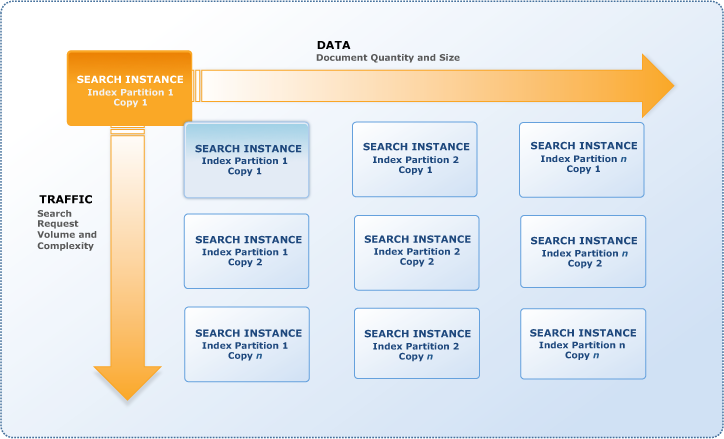
  • Search domains scale in two dimensions: data and traffic
  • A search instance is a single search engine in the cloud that indexes documents and responds to search requests with a finite amount of RAM and CPU resources for indexing data and processing requests.
  • Search domain can have one or more search partitions, portion of the data which fits on a single search instance, and the number of search partitions can change as the documents are indexed
  • CloudSearch can determine the size and number of search instances required to deliver low latency, high throughput search performance
  • When a search domain is created , a single instance is deployed
  • CloudSearch automatically scales the domain by adding instances as the volume of data or traffic increases
  • Scaling for data
    • CloudSearch handles scaling for data by
      • Vertical scaling by increasing the size of the instance, when the amount of data exceeds a single search instance
      • Horizontal scaling using search partitions, when the amount of data exceeds the capacity of the largest search instance type
    • Number of search instances required to hold the index partitions is sometimes referred to as the domain’s width.
    • CloudSearch reduces the number of partitions and size of search instances if the amount of data reduces
  • Scaling for traffic
    • CloudSearch handles Scaling for traffic by
      • Vertical scaling by increasing the size of the instance, when the amount of traffic exceeds a single search instance
      • Horizontal scaling by deploying a duplicate search instance to provide additional processing power i.e. the complete number of partitions are duplicated
    • CloudSearch reduces the number of partitions and size of search instances if the traffic reduces
    • Number of duplicate search instances is sometimes referred to as the domain’s depth.

CloudSearch Search Features

  • CloudSearch provides features to index and search both structured data and plain text as well as unstructured data like pdf, word documents
  • CloudSearch provides near real-time indexing for document updates
  • Indexing features include
    • tokenization,
    • stopwords,
    • stemming and
    • synonyms
  • Search features include
    • faceted search, free text search, Boolean search expressions,
    • customizable relevance ranking, query time rank expressions,
    • grouping
    • field weighting, searching and sorting
    • Other features like
      • Autocomplete suggestions
      • Highlighting
      • Geospatial search
      • New data types: date, double, 64 bit signed int, LatLon
      • Dynamic fields
      • Index field statistics
      • Sloppy phrase search
      • Term boosting
      • Enhanced range searching for all field types
      • Search filters that don’t affect relevance
      • Support for multiple query parsers: simple, structured, lucene, dismax
      • Query parser configuration options

CloudSearch vs. OpenSearch Service

  • Both are fully managed AWS search services, but OpenSearch Service is the recommended path forward
    • CloudSearch — simpler setup, auto-scaling, Apache Solr-based, no new features being added
    • OpenSearch Service (Managed Clusters) — full control over instances, sharding strategy, and cost optimization; supports vector/semantic search, fine-grained access control, dashboards, alerting, and observability
    • OpenSearch Serverless — hands-free operation similar to CloudSearch, scales automatically (including scale-to-zero with next-gen), REST API-based indexing and search
  • OpenSearch Service provides all CloudSearch search capabilities plus:
    • Vector search engine supporting semantic search with dense and sparse vectors
    • Hybrid search combining lexical and vector approaches
    • Fine-grained access control and advanced security
    • Log analytics and observability features
    • OpenSearch Dashboards for visualization
    • Alerting and anomaly detection
    • ML-powered auto-optimization (OpenSearch 3.x)
    • Agentic search for multi-step retrieval workflows
  • Migration from CloudSearch to OpenSearch requires re-ingesting and indexing data
    • Amazon OpenSearch Ingestion is recommended for data migration — serverless data pipeline that auto-scales
    • CloudSearch uses Solr query syntax; OpenSearch uses JSON Query DSL — query translation is required
    • AWS provides guidance for migrating from Apache Solr to OpenSearch

AWS Certification Exam Practice Questions

  • Questions are collected from Internet and the answers are marked as per my knowledge and understanding (which might differ with yours).
  • AWS services are updated everyday and both the answers and questions might be outdated soon, so research accordingly.
  • AWS exam questions are not updated to keep up the pace with AWS updates, so even if the underlying feature has changed the question might not be updated
  • Open to further feedback, discussion and correction.
  1. A newspaper organization has an on-premises application which allows the public to search its back catalogue and retrieve individual newspaper pages via a website written in Java. They have scanned the old newspapers into JPEGs (approx. 17TB) and used Optical Character Recognition (OCR) to populate a commercial search product. The hosting platform and software is now end of life and the organization wants to migrate its archive to AWS and produce a cost efficient architecture and still be designed for availability and durability. Which is the most appropriate?
    1. Use S3 with reduced redundancy to store and serve the scanned files, install the commercial search application on EC2 Instances and configure with auto-scaling and an Elastic Load Balancer. (Reusing Commercial search application which is nearing end of life not a good option for cost)
    2. Model the environment using CloudFormation. Use an EC2 instance running Apache webserver and an open source search application, stripe multiple standard EBS volumes together to store the JPEGs and search index. (storing JPEGs on EBS volumes not cost effective also answer does not address Open source solution availability)
    3. Use S3 with standard redundancy to store and serve the scanned files, use CloudSearch for query processing, and use Elastic Beanstalk to host the website across multiple availability zones. (Cost effective S3 storage, CloudSearch for Search and Highly available and durable web application. Note: For new implementations, Amazon OpenSearch Service or OpenSearch Serverless would be the recommended choice as CloudSearch is no longer available to new customers.)
    4. Use a single-AZ RDS MySQL instance to store the search index and the JPEG images use an EC2 instance to serve the website and translate user queries into SQL. (MySQL not an ideal solution to sore index and JPEG images for cost and performance)
    5. Use a CloudFront download distribution to serve the JPEGs to the end users and Install the current commercial search product, along with a Java Container for the website on EC2 instances and use Route53 with DNS round-robin. (Web Application not scalable, whats the source for JPEGs files through CloudFront)
  2. A company needs to implement a full-text search solution for their e-commerce product catalog with auto-complete suggestions, faceted navigation, and geospatial search capabilities. The solution must scale automatically and require minimal operational overhead. Which combination of AWS services best meets these requirements? [Select TWO]
    1. Amazon OpenSearch Serverless with a search collection type (Correct — OpenSearch Serverless provides auto-scaling, minimal operational overhead, and supports full-text search, facets, and geospatial queries)
    2. Amazon RDS with full-text indexing enabled
    3. Amazon OpenSearch Service managed cluster with UltraWarm and Auto-Tune enabled (Correct — Managed clusters with Auto-Tune reduce operational overhead while providing full search capabilities)
    4. Amazon DynamoDB with Global Secondary Indexes
    5. Amazon Kendra with custom data sources (Kendra is designed for enterprise document/knowledge search with NLU, not product catalog search with faceted navigation)
  3. A solutions architect is planning the migration of a legacy search application that currently uses Amazon CloudSearch. The application processes 500 search queries per second during peak hours but has near-zero traffic during off-hours. Cost optimization is a priority. What is the recommended migration approach?
    1. Continue using Amazon CloudSearch since it auto-scales for traffic
    2. Migrate to Amazon OpenSearch Serverless, which scales from zero to thousands of requests per second and back to zero when idle (Correct — Next-gen OpenSearch Serverless (GA 2026) offers scale-to-zero capability, providing up to 60% cost savings compared to provisioned clusters and ideal for variable traffic patterns)
    3. Migrate to an Amazon OpenSearch Service managed cluster with a single data node
    4. Migrate to Amazon Kendra for intelligent search (Kendra is designed for enterprise document search with NLU, not necessarily a replacement for general search workloads)

References

Beanstalk vs OpsWorks vs CloudFormation

⚠️ PARTIAL DEPRECATION NOTICE

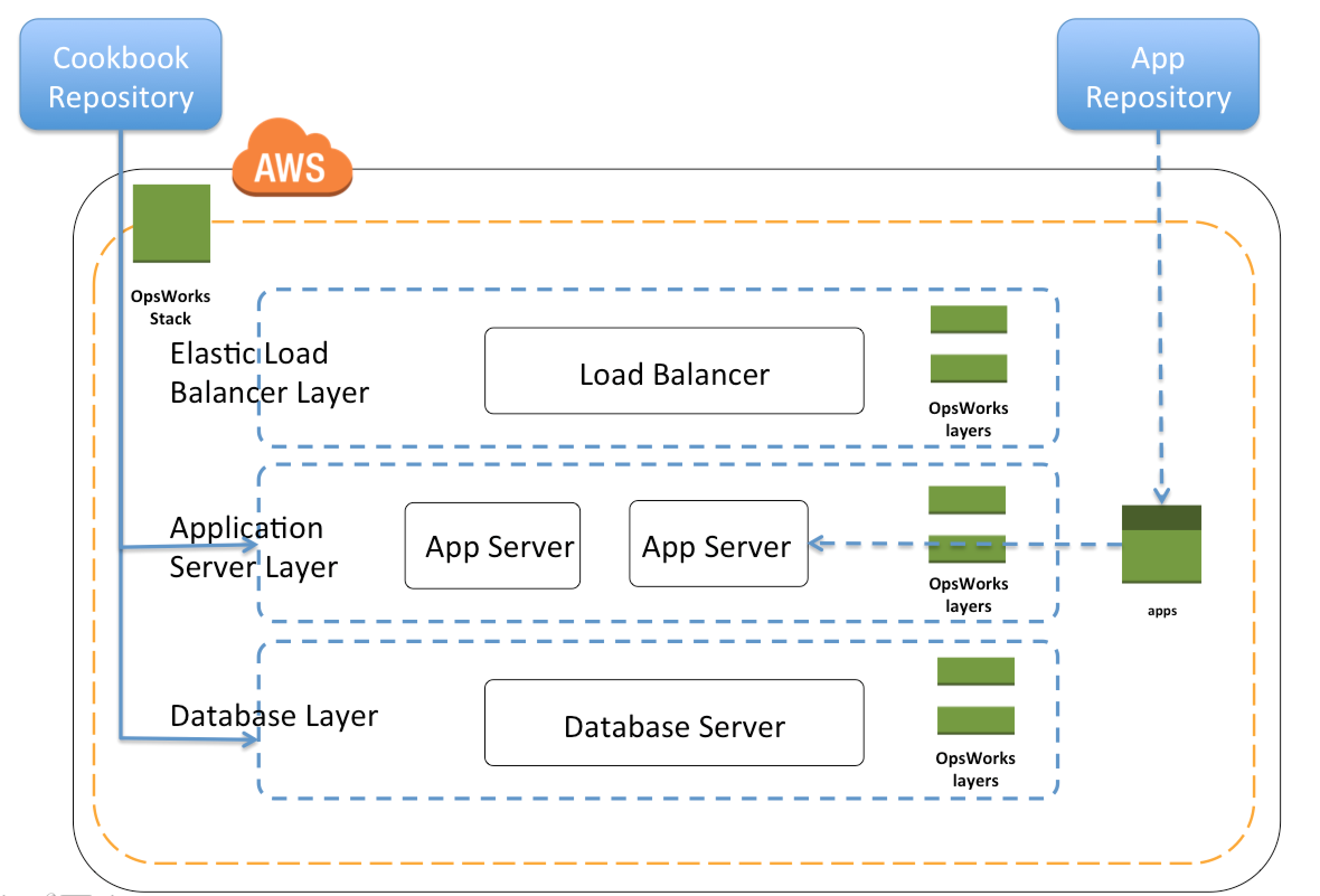
AWS OpsWorks (all variants) reached End of Life (EOL) in 2024.

  • AWS OpsWorks for Puppet Enterprise – EOL March 31, 2024
  • AWS OpsWorks for Chef Automate – EOL May 5, 2024
  • AWS OpsWorks Stacks – EOL May 26, 2024

The OpsWorks services have been disabled for both new and existing customers. The comparison sections involving OpsWorks are maintained for historical reference.

Current Deployment & Management Options:

  • AWS CloudFormation – Infrastructure as Code (still actively supported and enhanced)
  • AWS Elastic Beanstalk – Simplified application deployment (still actively supported)
  • AWS CDK – Programmatic infrastructure definition using familiar languages
  • AWS Systems Manager – Configuration management and automation (OpsWorks replacement)
  • AWS CodeDeploy – Application deployment automation
  • AWS App Runner – Fully managed container application service

For OpsWorks migration guidance, refer to: AWS OpsWorks EOL Documentation

AWS Elastic Beanstalk vs CloudFormation vs CDK – Deployment & Management Services Comparison

AWS offers multiple options for provisioning IT infrastructure and application deployment and management, varying from convenience & ease of setup to low-level granular control.
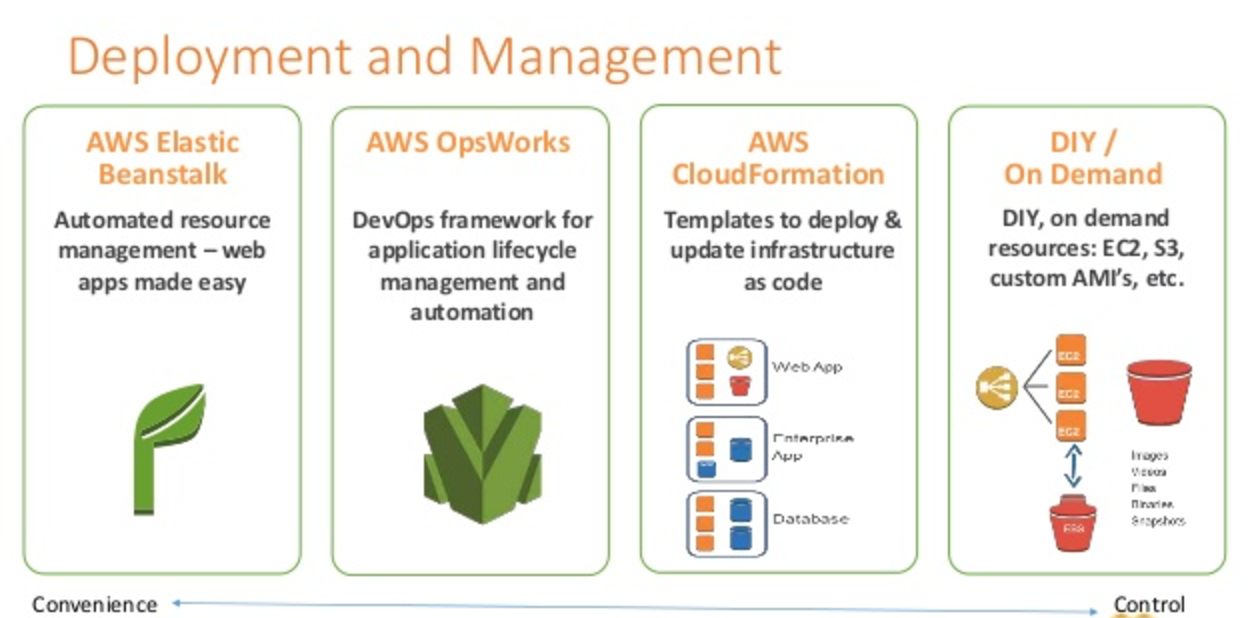
Deployment and Management - Elastic Beanstalk vs CloudFormation vs CDK

AWS Elastic Beanstalk

  • AWS Elastic Beanstalk is a higher-level service which allows you to quickly deploy with minimum management effort a web or worker-based environment using EC2, Docker using ECS, Elastic Load Balancing, Auto Scaling, RDS, CloudWatch, etc.
  • Elastic Beanstalk is the fastest and simplest way to get an application up and running on AWS, perfect for developers who want to deploy code and not worry about underlying infrastructure.
  • Elastic Beanstalk provides an environment to easily deploy and run applications in the cloud. It is integrated with developer tools and provides a one-stop experience for application lifecycle management.
  • Elastic Beanstalk requires minimal configuration and will help deploy, monitor, and handle the elasticity/scalability of the application.
  • A user doesn’t need to do much more than write application code and configure some settings on Elastic Beanstalk.
  • Supports platforms including Java, .NET, PHP, Node.js, Python, Ruby, Go, and Docker on Amazon Linux 2 and Amazon Linux 2023.
  • AI-Powered Environment Analysis (2026) – Elastic Beanstalk now offers AI-powered analysis that automatically diagnoses environment health issues, identifies root causes, and provides recommended solutions when health status is Warning, Degraded, or Severe.
  • Dual-Stack IPv6 Support (2025) – Supports dual-stack configuration for Application Load Balancers and Network Load Balancers, allowing environments to serve both IPv4 and IPv6 traffic.

AWS OpsWorks (Deprecated – EOL 2024)

⚠️ All AWS OpsWorks services reached End of Life in 2024 and have been disabled for all customers.
  • AWS OpsWorks was an application management service that simplified software configuration, application deployment, scaling, and monitoring using Chef or Puppet.
  • OpsWorks was recommended for managing infrastructure with a configuration management system such as Chef.
  • OpsWorks enabled writing custom Chef recipes, utilized self-healing, and worked with layers.
  • Although OpsWorks was a deployment management service that helped deploy applications with Chef recipes, it was not primarily meant to manage scaling out of the box and needed to be handled explicitly.
  • Migration Paths:
    • AWS Systems Manager – For configuration management and automation (recommended by AWS)
    • Chef SaaS – For customers who want to continue using Chef recipes
    • Puppet Enterprise – Self-hosted Puppet for existing Puppet users
    • AWS CodeDeploy – For application deployment workflows
    • Amazon ECS/EKS – For containerized workloads

AWS CloudFormation

  • AWS CloudFormation enables modeling, provisioning, and version-controlling of a wide range of AWS resources ranging from a single EC2 instance to a complex multi-tier, multi-region application.
  • CloudFormation is a low-level service and provides granular control to provision and manage stacks of AWS resources based on templates (JSON or YAML).
  • CloudFormation templates enable version control of the infrastructure and make deployment of environments easy and repeatable.
  • CloudFormation supports infrastructure needs of many different types of applications such as existing enterprise applications, legacy applications, applications built using a variety of AWS resources, and container-based solutions (including those built using AWS Elastic Beanstalk).
  • CloudFormation is not just an application deployment tool but can provision any kind of AWS resource.
  • CloudFormation is designed to complement Elastic Beanstalk and other AWS services.
  • CloudFormation with Elastic Beanstalk
    • CloudFormation supports Elastic Beanstalk application environments as one of the AWS resource types.
    • This allows you, for example, to create and manage an AWS Elastic Beanstalk–hosted application along with an RDS database to store the application data. In addition to RDS instances, any other supported AWS resource can be added to the group as well.
  • Key Updates (2024-2025):
    • Stack Refactoring (2025) – Move resources between stacks, rename logical IDs, and decompose monolithic templates into focused components without disrupting running infrastructure.
    • 40% Faster Deployments (2024) – Optimistic stabilization with CONFIGURATION_COMPLETE event enables parallel creation of dependent resources.
    • IaC Generator – Generate CloudFormation templates from existing AWS resources (reverse-engineer existing infrastructure into IaC).
    • Configuration Drift Management – Improved drift detection and remediation capabilities.
    • AI Integration – IaC context integrated with AI-powered development tools.

AWS Cloud Development Kit (AWS CDK)

  • AWS CDK is an open-source software development framework that allows you to define cloud infrastructure using familiar programming languages (TypeScript, JavaScript, Python, Java, C#/.NET, Go).
  • CDK synthesizes into CloudFormation templates, providing the reliability of CloudFormation with the expressiveness of general-purpose programming languages.
  • CDK provides high-level constructs (L2/L3) that encapsulate AWS best practices and reduce the amount of boilerplate code needed.
  • CDK is ideal for teams who prefer imperative programming over declarative YAML/JSON templates.
  • Same infrastructure that takes 500+ lines of CloudFormation YAML can be expressed in ~15 lines of CDK TypeScript.
  • CDK Refactoring (2025) – Refactor CDK code (rename constructs, move resources between stacks) while preserving deployed resources.
  • CDK Mixins (2026) – Add composable, reusable abstractions to any construct (L1, L2, or custom) without rebuilding existing infrastructure code.
  • CDK Aspects – Apply organization-wide policies (security rules, tagging standards, compliance requirements) across entire infrastructure.

AWS Serverless Application Model (AWS SAM)

  • AWS SAM is an open-source framework specifically designed for building serverless applications using infrastructure as code.
  • SAM extends CloudFormation with shorthand syntax to express Lambda functions, APIs, databases, and event source mappings with fewer lines of code.
  • During deployment, SAM transforms the SAM syntax into CloudFormation syntax, then CloudFormation provisions the resources.
  • SAM CLI provides local testing, debugging, packaging, and deployment capabilities.
  • SAM Accelerate – Speeds up local development and cloud testing.
  • WebSocket API Support (2026) – Define complete WebSocket APIs for API Gateway with minimal configuration.
  • SAM CLI integrates with AWS CDK and Terraform.

AWS App Runner

  • AWS App Runner is a fully managed container application service that lets you build, deploy, and run containerized web applications and API services without prior infrastructure or container experience.
  • App Runner connects directly to your code or image repository and provides an automatic CI/CD pipeline with fully managed operations, high performance, scalability, and security.
  • App Runner automatically handles load balancing, auto-scaling (including scale to zero), encryption, and health monitoring.
  • Ideal for web applications and APIs that need to deploy quickly from source code or container images without managing infrastructure.
  • Supports deployment from GitHub, Bitbucket, or Amazon ECR.

AWS Proton (Deprecated – EOL October 7, 2026)

⚠️ AWS Proton will reach End of Life on October 7, 2026. Plan migration accordingly.
  • AWS Proton was a fully managed deployment service that standardized how organizations deploy microservices and infrastructure from approved templates.
  • Proton sat on top of CloudFormation (or Terraform) and added self-service deployment, versioning, parameter validation, and standardization.
  • Designed for platform teams to provide standardized templates while giving developers self-service deployment speed.
  • After EOL, the Proton console, API, and pipeline management will be permanently unavailable, though deployed infrastructure will remain intact.

Comparison Summary

Service Level Best For Status
Elastic Beanstalk High-level PaaS Developers who want to deploy code without managing infrastructure ✅ Active
CloudFormation Low-level IaC Granular control over all AWS resources via declarative templates ✅ Active
AWS CDK High-level IaC Teams who prefer defining infrastructure in programming languages ✅ Active
AWS SAM Serverless IaC Serverless applications (Lambda, API Gateway, DynamoDB) ✅ Active
App Runner Fully Managed Container web apps/APIs without any infrastructure management ✅ Active
OpsWorks Configuration Mgmt Chef/Puppet based configuration management ❌ EOL (2024)
AWS Proton Template Orchestration Standardized microservice deployment templates ⚠️ EOL Oct 2026

AWS Certification Exam Practice Questions

  • Questions are collected from Internet and the answers are marked as per my knowledge and understanding (which might differ with yours).
  • AWS services are updated everyday and both the answers and questions might be outdated soon, so research accordingly.
  • AWS exam questions are not updated to keep up the pace with AWS updates, so even if the underlying feature has changed the question might not be updated
  • Open to further feedback, discussion and correction.
  1. Your team is excited about the use of AWS because now they have access to programmable infrastructure. You have been asked to manage your AWS infrastructure in a manner similar to the way you might manage application code. You want to be able to deploy exact copies of different versions of your infrastructure, stage changes into different environments, revert back to previous versions, and identify what versions are running at any particular time (development, test, QA, production). Which approach addresses this requirement?
    1. Use cost allocation reports and AWS OpsWorks to deploy and manage your infrastructure.
    2. Use AWS CloudWatch metrics and alerts along with resource tagging to deploy and manage your infrastructure.
    3. Use AWS Elastic Beanstalk and a version control system like GIT to deploy and manage your infrastructure.
    4. Use AWS CloudFormation and a version control system like GIT to deploy and manage your infrastructure.
  2. An organization is planning to use AWS for their production roll out. The organization wants to implement automation for deployment such that it will automatically create a LAMP stack, download the latest PHP installable from S3 and setup the ELB. Which of the below mentioned AWS services meets the requirement for making an orderly deployment of the software?
    1. AWS Elastic Beanstalk
    2. AWS CloudFront
    3. AWS CloudFormation
    4. AWS DevOps
  3. You are working with a customer who is using Chef configuration management in their data center. Which service is designed to let the customer leverage existing Chef recipes in AWS?
    Note: AWS OpsWorks reached EOL in 2024. For Chef-based configuration management on AWS, customers should now use Chef SaaS or AWS Systems Manager with Chef recipes via Application Manager.
    1. Amazon Simple Workflow Service
    2. AWS Elastic Beanstalk
    3. AWS CloudFormation
    4. AWS OpsWorks (Historical answer – service now deprecated)
  4. A company wants to define their infrastructure using a programming language like TypeScript instead of writing YAML templates. They want the same reliability as CloudFormation but with less boilerplate code. Which AWS service should they use?
    1. AWS Elastic Beanstalk
    2. AWS Cloud Development Kit (CDK)
    3. AWS SAM
    4. AWS App Runner
  5. A startup wants to deploy a containerized web application with minimal infrastructure management. They want automatic scaling, load balancing, and a CI/CD pipeline connected to their GitHub repository. Which AWS service provides the simplest solution?
    1. Amazon ECS with Fargate
    2. AWS Elastic Beanstalk
    3. AWS App Runner
    4. AWS CloudFormation
  6. A team is building a serverless application using Lambda functions, API Gateway, and DynamoDB. They want to define their infrastructure using a simplified template syntax with built-in local testing capabilities. Which tool is most appropriate?
    1. AWS CloudFormation
    2. AWS CDK
    3. AWS SAM
    4. AWS Elastic Beanstalk
  7. An organization has a large monolithic CloudFormation stack that they want to split into smaller, focused stacks without recreating their existing infrastructure. Which CloudFormation feature enables this?
    1. CloudFormation StackSets
    2. CloudFormation Change Sets
    3. CloudFormation Stack Refactoring
    4. CloudFormation Nested Stacks

References
AWS High Availability & Fault Tolerance Architecture

AWS High Availability & Fault Tolerance Architecture

📅 Content Update – June 2025

This post has been updated to reflect modern AWS HA/FT services and best practices including AWS Resilience Hub, Application Recovery Controller (ARC), Fault Injection Service (FIS), Multi-AZ DB Clusters, DynamoDB Global Tables with Multi-Region Strong Consistency (MRSC), and current ELB types (ALB/NLB/GWLB).

  • Amazon Web Services provides services and infrastructure to build reliable, fault-tolerant, and highly available systems in the cloud.
  • Fault-tolerance defines the ability for a system to remain in operation even if some of the components used to build the system fail.
  • Most of the higher-level services, such as S3, DynamoDB, SQS, and ELB, have been built with fault tolerance and high availability in mind.
  • Services that provide basic infrastructure, such as EC2 and EBS, provide specific features, such as availability zones, elastic IP addresses, and snapshots, that a fault-tolerant and highly available system must take advantage of and use correctly.

AWS High Availability and Fault Tolerance

NOTE: Topic mainly for Professional Exam Only

Regions & Availability Zones

  • Amazon Web Services are available in geographic Regions and with multiple Availability Zones (AZs) within a region, which provide easy access to redundant deployment locations.
  • AZs are distinct geographical locations that are engineered to be insulated from failures in other AZs.
  • Regions and AZs help achieve greater fault tolerance by distributing the application geographically and help build multi-site solutions.
  • AZs provide inexpensive, low latency network connectivity to other Availability Zones in the same Region. All traffic between AZs is encrypted.
  • By placing EC2 instances in multiple AZs, an application can be protected from failure at a single data center.
  • It is important to run independent application stacks in more than one AZ, either in the same region or in another region, so that if one zone fails, the application in the other zone can continue to run.
  • AWS recommends deploying production workloads across at least 3 AZs for optimal fault isolation and static stability.

Amazon Machine Image – AMIs

  • EC2 is a web service within Amazon Web Services that provides computing resources.
  • Amazon Machine Image (AMI) provides a Template that can be used to define the service instances.
  • Template basically contains a software configuration (i.e., OS, application server, and applications) and is applied to an instance type.
  • AMI can either contain all the softwares, applications and the code bundled or can be configured to have a bootstrap script (user data) to install the same on startup.
  • A single AMI can be used to create server resources of different instance types and start creating new instances or replacing failed instances.
  • EC2 Image Builder can automate the creation, testing, and distribution of AMIs across regions, enabling faster recovery through pre-built golden images.

Auto Scaling

  • Auto Scaling helps to automatically scale EC2 capacity up or down based on defined rules.
  • Auto Scaling also enables addition of more instances in response to an increasing load; and when those instances are no longer needed, they will be automatically terminated.
  • Auto Scaling enables terminating server instances at will, knowing that replacement instances will be automatically launched.
  • Auto Scaling can work across multiple AZs within an AWS Region.
  • Predictive Scaling uses machine learning to proactively scale out ASGs ahead of anticipated demand spikes, improving availability and reducing the need for over-provisioning.
  • Target Tracking Scaling policies provide a simplified way to configure dynamic scaling based on a specific metric target (e.g., average CPU utilization at 50%).
  • Auto Scaling groups support warm pools to pre-initialize instances for faster scaling, reducing cold-start times during demand surges.
  • Amazon Application Recovery Controller (ARC) supports zonal autoshift with EC2 Auto Scaling, automatically shifting traffic away from impaired AZs.

Elastic Load Balancing – ELB

  • Elastic Load Balancing is an effective way to increase the availability of a system and distributes incoming traffic to applications across several EC2 instances.
  • ELB supports health checks on hosts, distribution of traffic to EC2 instances across multiple availability zones, and dynamic addition and removal of EC2 hosts from the load-balancing rotation.
  • Elastic Load Balancing detects unhealthy instances within its pool and automatically reroutes traffic to healthy instances, until the unhealthy instances have been restored seamlessly using Auto Scaling.
  • Auto Scaling and Elastic Load Balancing are an ideal combination – while ELB gives a single DNS name for addressing, Auto Scaling ensures there is always the right number of healthy EC2 instances to accept requests.
  • ELB can be used to balance across instances in multiple AZs of a region.

ELB Types

  • Application Load Balancer (ALB) – Layer 7 (HTTP/HTTPS); supports path-based routing, host-based routing, mutual TLS authentication (2023), one-click AWS WAF integration, URL and host header rewrites (2025), Automatic Target Weights, and LCU Capacity Reservation for handling sharp traffic spikes.
  • Network Load Balancer (NLB) – Layer 4 (TCP/UDP/TLS); ultra-low latency, static IPs per AZ, weighted target groups for blue/green deployments, and subnet removal/addition capability (2025).
  • Gateway Load Balancer (GWLB) – Layer 3 gateway + Layer 4 load balancer; used to deploy, scale, and manage third-party virtual network appliances (firewalls, IDS/IPS).
  • Classic Load Balancer (CLB) – Previous generation; deprecated for new workloads. AWS recommends migrating to ALB or NLB. CLBs in EC2-Classic were retired in August 2022.

Elastic IPs – EIPs

  • Elastic IP addresses are public static IP addresses that can be mapped programmatically between instances within a region.
  • EIPs are associated with the AWS account and not with a specific instance or lifetime of an instance.
  • Elastic IP addresses can be used for instances and services that require consistent endpoints, such as master databases, central file servers, and EC2-hosted load balancers.
  • Elastic IP addresses can be used to work around host or availability zone failures by quickly remapping the address to another running instance or a replacement instance that was just started.

Reserved Instances & Savings Plans

  • Reserved Instances help reserve and guarantee computing capacity is available at a lower cost always.
  • Savings Plans provide a more flexible pricing model with up to 72% savings in exchange for committing to a consistent amount of compute usage (measured in $/hour) over a 1 or 3-year term.
  • On-Demand Capacity Reservations (ODCRs) ensure EC2 capacity is available in a specific AZ when needed for HA without requiring a term commitment.

Elastic Block Store – EBS

  • Elastic Block Store (EBS) offers persistent off-instance storage volumes that persist independently from the life of an instance and are about an order of magnitude more durable than on-instance storage.
  • EBS volumes store data redundantly and are automatically replicated within a single availability zone.
  • EBS helps in failover scenarios where if an EC2 instance fails and needs to be replaced, the EBS volume can be attached to the new EC2 instance.
  • Valuable data should never be stored only on instance (ephemeral) storage without proper backups, replication, or the ability to re-create the data.
  • EBS Multi-Attach (for io1/io2 volumes) allows a single volume to be attached to up to 16 Nitro-based instances within the same AZ for shared storage HA scenarios.

EBS Snapshots

  • EBS volumes are highly reliable, but to further mitigate the possibility of a failure and increase durability, point-in-time Snapshots can be created to store data on volumes in S3, which is then replicated to multiple AZs.
  • Snapshots can be used to create new EBS volumes, which are an exact replica of the original volume at the time the snapshot was taken.
  • Snapshots provide an effective way to deal with disk failures or other host-level issues, as well as with problems affecting an AZ.
  • Snapshots are incremental and back up only changes since the previous snapshot, so it is advisable to hold on to recent snapshots.
  • Snapshots are tied to the region, while EBS volumes are tied to a single AZ.
  • EBS Snapshots Archive provides up to 75% lower storage costs for snapshots stored 90+ days and rarely accessed.
  • Fast Snapshot Restore (FSR) eliminates the need for initializing volumes from snapshots, enabling full-performance volumes immediately upon creation for faster failover.

Relational Database Service – RDS

  • RDS makes it easy to run relational databases in the cloud.
  • RDS Multi-AZ instance deployments provision a synchronous standby replica in a different AZ, providing high availability and automatic failover protection.
  • In case of a failover scenario, the standby is promoted to be the primary seamlessly and will handle the database operations.
  • RDS Multi-AZ DB Cluster deployments (for MySQL and PostgreSQL) provide a primary instance and two readable standby instances across 3 AZs. This offers improved write latency, faster failover (typically under 35 seconds), and the standby instances can serve read traffic.
  • Automated backups, enabled by default, provide point-in-time recovery for the database instance.
  • RDS will back up your database and transaction logs and store both for a user-specified retention period.
  • In addition to the automated backups, manual RDS backups can also be performed which are retained until explicitly deleted.
  • Backups help recover from higher-level faults such as unintentional data modification, either by operator error or by bugs in the application.
  • RDS Read Replicas provide read-only replicas of the database and the ability to scale out beyond the capacity of a single database deployment for read-heavy database workloads.
  • RDS Read Replicas is a scalability and not a High Availability solution. However, cross-region Read Replicas can be manually promoted for disaster recovery.
  • Amazon RDS now supports ENA Express for Multi-AZ replication (2026), using Scalable Reliable Datagram (SRD) to improve replication performance by distributing traffic across multiple network paths.

Simple Storage Service – S3

  • S3 provides highly durable (99.999999999% / 11 9s), fault-tolerant and redundant object store.
  • S3 stores objects redundantly on multiple devices across multiple facilities in an S3 Region.
  • S3 is a great storage solution for somewhat static or slow-changing objects, such as images, videos, and other static media.
  • S3 also supports edge caching and streaming of these assets by interacting with the Amazon CloudFront service.
  • S3 Cross-Region Replication (CRR) automatically replicates objects to a bucket in another region, enabling disaster recovery and low-latency access for globally distributed users.
  • S3 Express One Zone delivers up to 10x faster performance with single-digit millisecond latency for frequently accessed data, but note it stores data in a single AZ (not suitable as the sole copy for fault tolerance).

Simple Queue Service – SQS

  • Simple Queue Service (SQS) is a highly reliable distributed messaging system that can serve as the backbone of a fault-tolerant application.
  • SQS is engineered to provide “at least once” delivery of all messages in standard queues. FIFO queues provide exactly-once processing and strict message ordering.
  • Messages sent to a queue are retained for up to 4 days (by default, can be extended up to 14 days) or until they are read and deleted by the application.
  • Messages can be polled by multiple workers and processed, while SQS takes care that a request is processed by only one worker at a time using a configurable time interval called visibility timeout.
  • If the number of messages in a queue starts to grow or if the average time to process a message becomes too high, workers can be scaled upwards by simply adding additional EC2 instances.
  • Dead-letter queues (DLQs) capture messages that cannot be processed successfully. DLQ redrive allows moving messages back to source queues for reprocessing.
  • FIFO queues support up to 70,000 messages per second with high throughput mode and up to 120K in-flight messages (increased from 20K in November 2024).

Route 53

  • Amazon Route 53 is a highly available and scalable DNS web service.
  • Queries for the domain are automatically routed to the nearest DNS server and thus are answered with the best possible performance.
  • Route 53 resolves requests for your domain name (for example, www.example.com) to your Elastic Load Balancer, as well as your zone apex record (example.com).
  • Route 53 supports multiple routing policies for HA: Failover (active-passive), Latency-based, Weighted, Geolocation, Geoproximity (expanded to public/private hosted zones in 2024), and Multivalue Answer.
  • Route 53 health checks can monitor endpoint health and trigger DNS failover automatically.
  • Route 53 Accelerated Recovery (2026) ensures customers can continue making DNS changes even during regional AWS outages, providing greater predictability for mission-critical applications.

CloudFront

  • CloudFront can be used to deliver website content, including dynamic, static and streaming content using a global network of edge locations.
  • Requests for your content are automatically routed to the nearest edge location, so content is delivered with the best possible performance.
  • CloudFront is optimized to work with other Amazon Web Services, like S3 and EC2.
  • CloudFront also works seamlessly with any non-AWS origin server, which stores the original, definitive versions of your files.
  • CloudFront Functions run lightweight JavaScript at edge locations for request/response customization. Lambda@Edge provides full compute capabilities at Regional Edge Caches.
  • VPC Origins allow CloudFront to fetch content directly from private resources within a VPC without exposing them to the public internet.
  • Origin Shield acts as an additional caching layer to reduce the load on origins and improve cache hit ratios for multi-region architectures.

DynamoDB Global Tables

  • DynamoDB Global Tables provide a fully managed, multi-Region, multi-active database solution for globally distributed applications.
  • Global Tables automatically replicate data across your choice of AWS Regions. Every replica table in every Region can accept both reads and writes.
  • Changes made to an item in one Region are typically replicated to all other replica Regions within a second.
  • Multi-Region Strong Consistency (MRSC), generally available since June 2025, provides zero RPO (Recovery Point Objective) by enabling strongly consistent reads from any Region. This is the highest level of application resilience for DynamoDB.
  • Global Tables now support cross-account replication (2026), enabling multi-account multi-region architectures.
  • Global Tables replace the previous cross-region replication approach (DynamoDB Streams-based) with a fully managed, zero-administration solution.

AWS Resilience Hub

  • AWS Resilience Hub is a central location to define, track, and manage the resilience of applications.
  • It enables you to define resilience goals (RTO/RPO), assess your resilience posture against those goals, and implement recommendations based on the AWS Well-Architected Framework.
  • Resilience Hub performs automated resilience assessments and identifies gaps in your architecture, such as missing Multi-AZ deployments or lack of backup strategies.
  • Integrates with AWS Fault Injection Service (FIS) to run chaos experiments directly from the Resilience Hub console.
  • The next generation of Resilience Hub (GA May 2026) uses generative AI to provide a structured resilience journey for SRE and development teams.

AWS Fault Injection Service (FIS)

  • AWS FIS is a managed chaos engineering service that enables you to perform controlled fault injection experiments on your AWS workloads.
  • FIS helps simulate real-world failures (AZ disruptions, instance failures, network degradation, API throttling) to validate fault tolerance of your architecture.
  • Supports actions targeting EC2, ECS, EKS, RDS, Lambda functions (native integration since October 2024), and more.
  • Amazon.com ran 733 AWS FIS experiments to prepare for Prime Day 2024.
  • Experiments can be generated using natural language through Amazon Bedrock integration (2025).

Amazon Application Recovery Controller (ARC)

  • ARC helps manage and coordinate recovery for applications across AWS Regions and Availability Zones.
  • Zonal Shift allows you to quickly shift traffic for a resource (ALB, NLB, EKS, Auto Scaling group) away from an impaired AZ to healthy AZs.
  • Zonal Autoshift enables AWS to automatically shift traffic away from an AZ when internal telemetry detects a potential impairment — without manual intervention.
  • Routing Controls provide manual override capabilities for cross-region failover of applications.
  • Zonal shift and zonal autoshift are available at no additional cost.
  • Supported resources include ALB, NLB, EC2 Auto Scaling groups, EKS clusters, and Karpenter (2026).

AWS Certification Exam Practice Questions

  • AWS services are updated everyday and both the answers and questions might be outdated soon, so research accordingly.
  • AWS exam questions are not updated to keep up the pace with AWS updates, so even if the underlying feature has changed the question might not be updated.
  • Open to further feedback, discussion and correction.
  1. You are moving an existing traditional system to AWS, and during the migration discover that there is a master server which is a single point of failure. Having examined the implementation of the master server you realize there is not enough time during migration to re-engineer it to be highly available, though you do discover that it stores its state in a local MySQL database. In order to minimize down-time you select RDS to replace the local database and configure master to use it, what steps would best allow you to create a self-healing architecture[PROFESSIONAL]
    1. Migrate the local database into multi-AZ RDS database. Place master node into a multi-AZ auto-scaling group with a minimum of one and maximum of one with health checks.
    2. Replicate the local database into a RDS read replica. Place master node into a Cross-Zone ELB with a minimum of one and maximum of one with health checks. (Read Replica does not provide HA and write capability and ELB does not have feature for Min and Max 1 and Cross Zone allows just the equal distribution of load across instances)
    3. Migrate the local database into multi-AZ RDS database. Place master node into a Cross-Zone ELB with a minimum of one and maximum of one with health checks. (ELB does not have feature for Min and Max 1 and Cross Zone allows just the equal distribution of load across instances)
    4. Replicate the local database into a RDS read replica. Place master node into a multi-AZ auto-scaling group with a minimum of one and maximum of one with health checks. (Read Replica does not provide HA and write capability)
  2. You are designing Internet connectivity for your VPC. The Web servers must be available on the Internet. The application must have a highly available architecture. Which alternatives should you consider? (Choose 2 answers)
    1. Configure a NAT instance in your VPC. Create a default route via the NAT instance and associate it with all subnets. Configure a DNS A record that points to the NAT instance public IP address (NAT is for internet connectivity for instances in private subnet)
    2. Configure a CloudFront distribution and configure the origin to point to the private IP addresses of your Web servers. Configure a Route53 CNAME record to your CloudFront distribution.
    3. Place all your web servers behind ELB. Configure a Route53 CNAME to point to the ELB DNS name.
    4. Assign EIPs to all web servers. Configure a Route53 record set with all EIPs. With health checks and DNS failover.
  3. When deploying a highly available 2-tier web application on AWS, which combination of AWS services meets the requirements? 1. AWS Direct Connect 2. Amazon Route 53 3. AWS Storage Gateway 4. Elastic Load Balancing 4. Amazon EC2 5. Auto scaling 6. Amazon VPC 7. AWS Cloud Trail [PROFESSIONAL]
    1. 2,4,5 and 6
    2. 3,4,5 and 8
    3. 1 through 8
    4. 1,3,5 and 7
    5. 1,2,5 and 6
  4. Company A has hired you to assist with the migration of an interactive website that allows registered users to rate local restaurants. Updates to the ratings are displayed on the home page, and ratings are updated in real time. Although the website is not very popular today, the company anticipates that It will grow rapidly over the next few weeks. They want the site to be highly available. The current architecture consists of a single Windows Server 2008 R2 web server and a MySQL database running on Linux. Both reside inside an on-premises hypervisor. What would be the most efficient way to transfer the application to AWS, ensuring performance and high-availability? [PROFESSIONAL]
    1. Export web files to an Amazon S3 bucket in us-west-1. Run the website directly out of Amazon S3. Launch a multi-AZ MySQL Amazon RDS instance in us-west-1a. Import the data into Amazon RDS from the latest MySQL backup. Use Route 53 and create an alias record pointing to the elastic load balancer. (Its an Interactive website, although it can be implemented using Javascript SDK, its a migration and the application would need changes. Also no use of ELB if hosted on S3)
    2. Launch two Windows Server 2008 R2 instances in us-west-1b and two in us-west-1a. Copy the web files from on premises web server to each Amazon EC2 web server, using Amazon S3 as the repository. Launch a multi-AZ MySQL Amazon RDS instance in us-west-2a. Import the data into Amazon RDS from the latest MySQL backup. Create an elastic load balancer to front your web servers. Use Route 53 and create an alias record pointing to the elastic load balancer. (Although RDS instance is in a different region which will impact performance, this is the only option that works.)
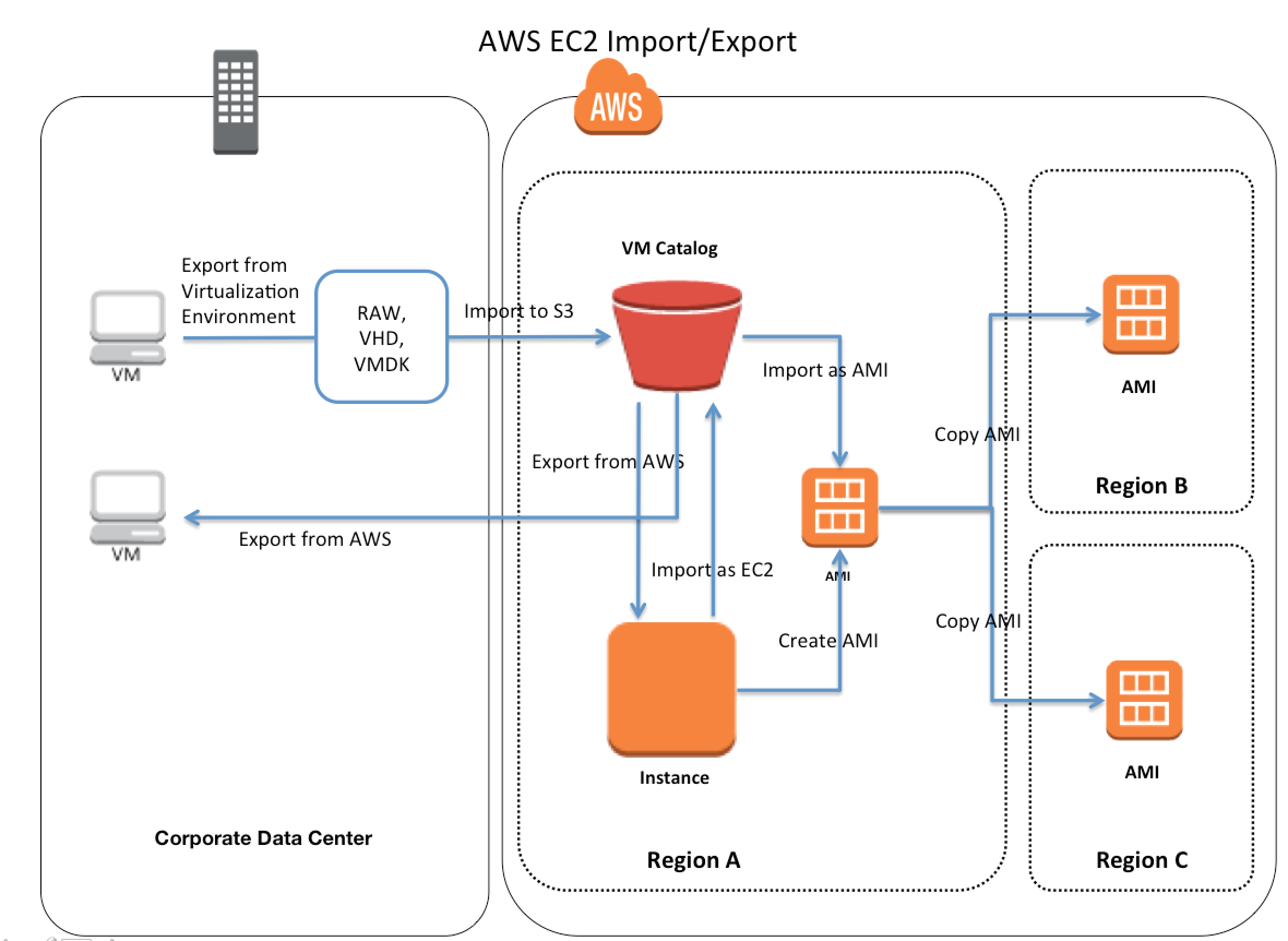
    3. Use AWS VM Import/Export to create an Amazon Elastic Compute Cloud (EC2) Amazon Machine Image (AMI) of the web server. Configure Auto Scaling to launch two web servers in us-west-1a and two in us-west-1b. Launch a Multi-AZ MySQL Amazon Relational Database Service (RDS) instance in us-west-1b. Import the data into Amazon RDS from the latest MySQL backup. Use Amazon Route 53 to create a hosted zone and point an A record to the elastic load balancer. (does not create a load balancer)
    4. Use AWS VM Import/Export to create an Amazon EC2 AMI of the web server. Configure auto-scaling to launch two web servers in us-west-1a and two in us-west-1b. Launch a multi-AZ MySQL Amazon RDS instance in us-west-1a. Import the data into Amazon RDS from the latest MySQL backup. Create an elastic load balancer to front your web servers. Use Amazon Route 53 and create an A record pointing to the elastic load balancer. (Need to create an aliased record without which the Route 53 pointing to ELB would not work)
  5. Your company runs a customer facing event registration site. This site is built with a 3-tier architecture with web and application tier servers and a MySQL database. The application requires 6 web tier servers and 6 application tier servers for normal operation, but can run on a minimum of 65% server capacity and a single MySQL database. When deploying this application in a region with three availability zones (AZs) which architecture provides high availability? [PROFESSIONAL]
    1. A web tier deployed across 2 AZs with 3 EC2 (Elastic Compute Cloud) instances in each AZ inside an Auto Scaling Group behind an ELB (elastic load balancer), and an application tier deployed across 2 AZs with 3 EC2 instances in each AZ inside an Auto Scaling Group behind an ELB. and one RDS (Relational Database Service) instance deployed with read replicas in the other AZ.
    2. A web tier deployed across 3 AZs with 2 EC2 (Elastic Compute Cloud) instances in each AZ inside an Auto Scaling Group behind an ELB (elastic load balancer) and an application tier deployed across 3 AZs with 2 EC2 instances in each AZ inside an Auto Scaling Group behind an ELB and one RDS (Relational Database Service) Instance deployed with read replicas in the two other AZs.
    3. A web tier deployed across 2 AZs with 3 EC2 (Elastic Compute Cloud) instances in each AZ inside an Auto Scaling Group behind an ELB (elastic load balancer) and an application tier deployed across 2 AZs with 3 EC2 instances m each AZ inside an Auto Scaling Group behind an ELB and a Multi-AZ RDS (Relational Database Service) deployment.
    4. A web tier deployed across 3 AZs with 2 EC2 (Elastic Compute Cloud) instances in each AZ Inside an Auto Scaling Group behind an ELB (elastic load balancer). And an application tier deployed across 3 AZs with 2 EC2 instances in each AZ inside an Auto Scaling Group behind an ELB. And a Multi-AZ RDS (Relational Database services) deployment.
  6. For a 3-tier, customer facing, inclement weather site utilizing a MySQL database running in a Region which has two AZs which architecture provides fault tolerance within the region for the application that minimally requires 6 web tier servers and 6 application tier servers running in the web and application tiers and one MySQL database? [PROFESSIONAL]
    1. A web tier deployed across 2 AZs with 6 EC2 (Elastic Compute Cloud) instances in each AZ inside an Auto Scaling Group behind an ELB (elastic load balancer), and an application tier deployed across 2 AZs with 6 EC2 instances in each AZ inside an Auto Scaling Group behind an ELB. and a Multi-AZ RDS (Relational Database Service) deployment. (As it needs Fault Tolerance with minimal 6 servers always available)
    2. A web tier deployed across 2 AZs with 3 EC2 (Elastic Compute Cloud) instances in each A2 inside an Auto Scaling Group behind an ELB (elastic load balancer) and an application tier deployed across 2 AZs with 3 EC2 instances in each AZ inside an Auto Scaling Group behind an ELB and a Multi-AZ RDS (Relational Database Service) deployment.
    3. A web tier deployed across 2 AZs with 3 EC2 (Elastic Compute Cloud) instances in each AZ inside an Auto Scaling Group behind an ELB (elastic load balancer) and an application tier deployed across 2 AZs with 6 EC2 instances in each AZ inside an Auto Scaling Group behind an ELB and one RDS (Relational Database Service) Instance deployed with read replicas in the other AZs.
    4. A web tier deployed across 1 AZs with 6 EC2 (Elastic Compute Cloud) instances in each AZ Inside an Auto Scaling Group behind an ELB (elastic load balancer). And an application tier deployed in the same AZs with 6 EC2 instances inside an Auto scaling group behind an ELB and a Multi-AZ RDS (Relational Database services) deployment, with 6 stopped web tier EC2 instances and 6 stopped application tier EC2 instances all in the other AZ ready to be started if any of the running instances in the first AZ fails.
  7. You are designing a system which needs, at minimum, 8 m4.large instances operating to service traffic. When designing a system for high availability in the us-east-1 region, which has 6 Availability Zones, you company needs to be able to handle death of a full availability zone. How should you distribute the servers, to save as much cost as possible, assuming all of the EC2 nodes are properly linked to an ELB? Your VPC account can utilize us-east-1’s AZ’s a through f, inclusive.
    1. 3 servers in each of AZ’s a through d, inclusive.
    2. 8 servers in each of AZ’s a and b.
    3. 2 servers in each of AZ’s a through e, inclusive. (You need to design for N+1 redundancy on Availability Zones. ZONE_COUNT = (REQUIRED_INSTANCES / INSTANCE_COUNT_PER_ZONE) + 1. To minimize cost, spread the instances across as many possible zones as you can. By using a though e, you are allocating 5 zones. Using 2 instances, you have 10 total instances. If a single zone fails, you have 4 zones left, with 2 instances each, for a total of 8 instances. By spreading out as much as possible, you have increased cost by only 25% and significantly de-risked an availability zone failure. Refer link)
    4. 4 servers in each of AZ’s a through c, inclusive.
  8. You need your API backed by DynamoDB to stay online during a total regional AWS failure. You can tolerate a couple minutes of lag or slowness during a large failure event, but the system should recover with normal operation after those few minutes. What is a good approach? [PROFESSIONAL]
    1. Set up DynamoDB Global Tables in a multi-active configuration across two regions. Create an Auto Scaling Group behind an ELB in each of the two regions. Add a Route53 Latency DNS Record with DNS Failover, using the ELBs in the two regions as the resource records. (Use DynamoDB Global Tables (multi-active replication) with two ELBs and ASGs with Route53 Failover and Latency DNS. Note: DynamoDB Global Tables now also support Multi-Region Strong Consistency (MRSC) for zero RPO since June 2025.)
    2. Set up a DynamoDB Multi-Region table. Create an Auto Scaling Group behind an ELB in each of the two regions DynamoDB is running in. Add a Route53 Latency DNS Record with DNS Failover, using the ELBs in the two regions as the resource records. (This is now essentially correct with DynamoDB Global Tables being the multi-region solution. However at the time of the question, this option was considered incorrect.)
    3. Set up a DynamoDB Multi-Region table. Create a cross-region ELB pointing to a cross-region Auto Scaling Group, and direct a Route53 Latency DNS Record with DNS Failover to the cross-region ELB. (No such thing as Cross Region ELB or cross-region ASG)
    4. Set up DynamoDB cross-region replication in a master-standby configuration, with a single standby in another region. Create a cross-region ELB pointing to a cross-region Auto Scaling Group, and direct a Route53 Latency DNS Record with DNS Failover to the cross-region ELB. (No such thing as cross-region ELB or cross-region ASG)
  9. You are putting together a WordPress site for a local charity and you are using a combination of Route53, Elastic Load Balancers, EC2 & RDS. You launch your EC2 instance, download WordPress and setup the configuration files connection string so that it can communicate to RDS. When you browse to your URL however, nothing happens. Which of the following could NOT be the cause of this.
    1. You have forgotten to open port 80/443 on your security group in which the EC2 instance is placed.
    2. Your elastic load balancer has a health check, which is checking a webpage that does not exist; therefore your EC2 instance is not in service.
    3. You have not configured an ALIAS for your A record to point to your elastic load balancer
    4. You have locked port 22 down to your specific IP address therefore users cannot access your site using HTTP/HTTPS
  10. A development team that is currently doing a nightly six-hour build which is lengthening over time on-premises with a large and mostly under utilized server would like to transition to a continuous integration model of development on AWS with multiple builds triggered within the same day. However, they are concerned about cost, security and how to integrate with existing on-premises applications such as their LDAP and email servers, which cannot move off-premises. The development environment needs a source code repository; a project management system with a MySQL database resources for performing the builds and a storage location for QA to pick up builds from. What AWS services combination would you recommend to meet the development team’s requirements? [PROFESSIONAL]
    1. A Bastion host Amazon EC2 instance running a VPN server for access from on-premises, Amazon EC2 for the source code repository with attached Amazon EBS volumes, Amazon EC2 and Amazon RDS MySQL for the project management system, EIP for the source code repository and project management system, Amazon SQS for a build queue, An Amazon Auto Scaling group of Amazon EC2 instances for performing builds and Amazon Simple Email Service for sending the build output. (Bastion is not for VPN connectivity also SES should not be used)
    2. An AWS Storage Gateway for connecting on-premises software applications with cloud-based storage securely, Amazon EC2 for the resource code repository with attached Amazon EBS volumes, Amazon EC2 and Amazon RDS MySQL for the project management system, EIPs for the source code repository and project management system, Amazon Simple Notification Service for a notification initiated build, An Auto Scaling group of Amazon EC2 instances for performing builds and Amazon S3 for the build output. (Storage Gateway does not provide secure connectivity, still needs VPN. SNS alone cannot handle builds)
    3. An AWS Storage Gateway for connecting on-premises software applications with cloud-based storage securely, Amazon EC2 for the resource code repository with attached Amazon EBS volumes, Amazon EC2 and Amazon RDS MySQL for the project management system, EIPs for the source code repository and project management system, Amazon SQS for a build queue, An Amazon Elastic Map Reduce (EMR) cluster of Amazon EC2 instances for performing builds and Amazon CloudFront for the build output. (Storage Gateway does not provide secure connectivity, still needs VPN. EMR is not ideal for performing builds as it needs normal EC2 instances)
    4. A VPC with a VPN Gateway back to their on-premises servers, Amazon EC2 for the source-code repository with attached Amazon EBS volumes, Amazon EC2 and Amazon RDS MySQL for the project management system, EIPs for the source code repository and project management system, SQS for a build queue, An Auto Scaling group of EC2 instances for performing builds and S3 for the build output. (VPN gateway is required for secure connectivity. SQS for build queue and EC2 for builds)
  11. Which of the following AWS services and features are essential for building a modern, highly available fault-tolerant architecture? (Choose 3) [NEW – 2025]
    1. Amazon Application Recovery Controller (ARC) with zonal autoshift
    2. AWS CloudTrail
    3. AWS Fault Injection Service (FIS) for resilience testing
    4. RDS Multi-AZ DB Cluster with readable standbys
    5. Amazon Inspector
  12. A company needs its DynamoDB-backed application to survive a complete regional failure with zero data loss (zero RPO). Which approach best achieves this requirement? [NEW – 2025]
    1. Use DynamoDB Streams to replicate data to another region manually.
    2. Use DynamoDB point-in-time recovery (PITR) with cross-region backups.
    3. Use DynamoDB Global Tables with Multi-Region Strong Consistency (MRSC). (MRSC, GA since June 2025, enables zero RPO with strongly consistent reads from any region.)
    4. Use DynamoDB On-Demand backup and restore to a secondary region.
  13. An application runs behind an Application Load Balancer across 3 AZs. During an AZ impairment detected by AWS, what feature can automatically redirect traffic away from the affected AZ without manual intervention? [NEW – 2025]
    1. Route 53 health check failover
    2. ALB Cross-Zone load balancing
    3. Amazon Application Recovery Controller (ARC) zonal autoshift (ARC zonal autoshift automatically shifts traffic away from an impaired AZ when AWS internal telemetry detects issues, without requiring manual intervention.)
    4. Auto Scaling AZ rebalancing

References

AWS IDS/IPS – Intrusion Detection & Prevention

AWS Intrusion Detection & Prevention System IDS/IPS

  • An Intrusion Prevention System (IPS)
    • is an appliance that monitors and analyzes network traffic to detect malicious patterns and potentially harmful packets and prevent vulnerability exploits
    • Most IPS offer firewall, unified threat management and routing capabilities
  • An Intrusion Detection System (IDS) is
    • an appliance or capability that continuously monitors the environment
    • sends alerts when it detects malicious activity, policy violations or network & system attack from someone attempting to break into or compromise the system
    • produces reports for analysis.

AWS Native IDS/IPS Services

AWS now provides several native managed services that deliver IDS/IPS capabilities without requiring third-party appliances:

AWS Network Firewall

  • AWS Network Firewall is a managed, stateful network firewall and intrusion detection and prevention service for VPCs.
  • Uses the open-source Suricata IPS engine for stateful inspection, supporting Suricata-compatible rules.
  • Provides deep packet inspection (DPI), examining packet payloads beyond just header information.
  • Supports both stateless and stateful rule engines:
    • Stateless engine – inspects each packet in isolation, evaluating against standard network attributes.
    • Stateful engine – maintains connection state, performs protocol detection, and applies IPS signatures.
  • Key IDS/IPS capabilities:
    • Active Threat Defense – AWS-managed rules that automatically block traffic to malicious IPs, domains, and URLs including C2 channels, malware staging hosts, sinkholes, and mining pools.
    • Managed Threat Signatures – rule groups protecting against malware, exploits, botnets, web attacks, credential phishing, scanning tools, and DoS attempts.
    • TLS Inspection – decrypts and inspects encrypted SSL/TLS traffic (both inbound and outbound) for hidden threats.
    • Domain Filtering – allows/denies traffic based on domain names.
    • Geographic IP Filtering – filters traffic based on country codes (added Dec 2024).
    • Automated Domain Lists – analyzes HTTP/HTTPS traffic patterns and simplifies outbound traffic control.
  • Supports thousands of custom rules based on domain, port, protocol, IP addresses, and pattern matching.
  • Auto-scales based on traffic load and provides built-in redundancy across Availability Zones.
  • Filters traffic at VPC perimeter – internet gateway, NAT gateway, VPN, or Direct Connect.
  • In April 2026, AWS expanded support for Marketplace partner managed rules with up to 10 million domain indicators and 1 million IP addresses per rule group.

Amazon GuardDuty

  • Amazon GuardDuty is an intelligent threat detection service providing continuous monitoring and intrusion detection for AWS accounts, workloads, and data.
  • Analyzes multiple data sources: VPC Flow Logs, CloudTrail events, DNS logs, EKS audit logs, S3 data events, and runtime activity.
  • Uses machine learning, anomaly detection, and integrated threat intelligence to identify threats.
  • Protection plans extend detection to:
    • S3 Protection – monitors S3 data access patterns
    • EKS Protection – monitors Kubernetes audit logs and runtime
    • Runtime Monitoring – monitors OS-level activity on EC2 and containers
    • Malware Protection – scans EBS volumes for malware
    • RDS Protection – monitors login activity for databases
    • Lambda Protection – monitors serverless function network activity
  • Extended Threat Detection (Dec 2024) – uses AI/ML to identify multi-stage attack sequences across accounts, correlating related activities like credential misuse, unusual S3 access, and network anomalies.
  • Extended Threat Detection for EC2 and ECS (Dec 2025) – expands sequence-level detection to virtual machine and container environments.
  • Extended Threat Detection for EKS (Jun 2025) – covers Kubernetes cluster compromise sequences.
  • Custom Entity Lists (Sep 2025) – allows incorporating custom domain-based and IP-based threat intelligence.
  • Integrates with AWS Security Hub for centralized findings management.

VPC Traffic Mirroring

  • VPC Traffic Mirroring copies network traffic from EC2 elastic network interfaces to out-of-band security and monitoring appliances.
  • Enables deployment of network-based IDS/IPS, NDR (Network Detection and Response), SIEM, and network forensics tools without agents.
  • Supports sending mirrored traffic to:
    • Individual EC2 instances running IDS/IPS software
    • A fleet behind a Network Load Balancer
    • A fleet behind a Gateway Load Balancer (UDP listener)
    • Amazon S3 (via Mountpoint) for offline packet capture and analysis
  • Supports traffic filters to capture only relevant traffic (reducing costs and noise).
  • Supports packet truncation to extract only headers or specific payload portions.
  • Replaces the traditional need for network TAPs or SPAN ports that are not available in AWS.
  • Use cases: content inspection, threat monitoring, troubleshooting, network performance monitoring.

Gateway Load Balancer (GWLB)

  • Gateway Load Balancer enables transparent insertion of third-party virtual IDS/IPS appliances into the traffic path.
  • Operates at Layer 3 (network layer), listening on all IP packets across all ports.
  • Uses GENEVE encapsulation (port 6081) to forward original packets to appliances – appliances see unmodified traffic.
  • Provides a single entry and exit point for all traffic while distributing load across a fleet of virtual appliances.
  • Supports flow stickiness using 5-tuple (default), 3-tuple, or 2-tuple.
  • Auto-scales appliance capacity based on demand.
  • Supports target failover for existing flows, ensuring continuity if an appliance becomes unhealthy.
  • Works with third-party IDS/IPS solutions from AWS Marketplace (Palo Alto, Fortinet, Check Point, etc.).
  • Integrates with AWS PrivateLink via Gateway Load Balancer Endpoints for cross-VPC inspection architectures.

AWS Shield & Shield Advanced

  • AWS Shield Standard – automatic DDoS protection at layers 3 and 4 for all AWS resources at no additional cost.
  • AWS Shield Advanced – enhanced DDoS protection with detection and mitigation at layers 3, 4, and 7, plus access to the DDoS Response Team (DRT).
  • Network Security Director (Preview, Jun 2025) – a new Shield capability that:
    • Discovers resources across AWS accounts and identifies connectivity
    • Identifies missing or misconfigured network security services (WAF, security groups, NACLs, Network Firewall)
    • Provides severity-prioritized findings with actionable remediation recommendations
    • Supports multi-account analysis (Dec 2025)
    • Findings integrate with AWS Security Hub (Mar 2026)

AWS Security Hub

  • Aggregates and prioritizes security findings from GuardDuty, Network Firewall, Inspector, Shield, and third-party tools.
  • Provides centralized dashboard for IDS/IPS findings across all services.
  • Runs compliance checks against CIS, PCI DSS, and AWS Foundational Security Best Practices.
  • Near Real-Time Risk Analytics (Dec 2025) – correlates signals from GuardDuty, Inspector, and CSPM to surface active risks.
  • Exposure Findings (Jun 2025) – helps prioritize security issues based on resource exposure.

Traditional Approaches for AWS IDS/IPS

Network Tap or SPAN

  • Traditional approach involves using a network Test Access Point (TAP) or Switch Port Analyzer (SPAN) to access & monitor all network traffic.
  • Connection between the AWS Internet Gateway (IGW) and the Elastic Load Balancer would be an ideal place to capture all network traffic.
  • However, there is no place to plug this in between IGW and ELB as there are no SPAN ports, network taps, or a concept of Layer 2 bridging.
  • Modern Alternative: Use VPC Traffic Mirroring to copy network traffic from ENIs to IDS/IPS appliances, or use AWS Network Firewall for inline inspection.

Packet Sniffing

  • It is not possible for a virtual instance running in promiscuous mode to receive or sniff traffic that is intended for a different virtual instance.
  • While interfaces can be placed into promiscuous mode, the hypervisor will not deliver any traffic to an instance that is not addressed to it.
  • Even two virtual instances that are owned by the same customer located on the same physical host cannot listen to each other’s traffic.
  • Promiscuous mode is not allowed in AWS.
  • Modern Alternative: Use VPC Traffic Mirroring which provides an authorized, AWS-native mechanism to copy and inspect network traffic.

Host Based Firewall – Forward Deployed IDS

  • Deploy a network-based IDS on every instance – IDS workload scales with your infrastructure.
  • Host-based security software works well with highly distributed and scalable application architectures because network packet inspection is distributed across the entire software fleet.
  • However, CPU-intensive process is deployed onto every single machine.
  • Modern Alternative: Use GuardDuty Runtime Monitoring for lightweight agent-based threat detection, or AWS Network Firewall for centralized inline inspection.

Host Based Firewall – Traffic Replication

  • An Agent is deployed on every instance to capture & replicate traffic for centralized analysis.
  • Actual workload of network traffic analysis is not performed on the instance but on a separate server.
  • Traffic capture and replication is still CPU-intensive (particularly on Windows machines).
  • It significantly increases the internal network traffic in the environment as every inbound packet is duplicated.
  • Modern Alternative: Use VPC Traffic Mirroring which performs traffic replication at the hypervisor level without consuming instance CPU, and sends traffic to a Gateway Load Balancer backed fleet of IDS/IPS appliances.

In-Line Firewall – Inbound IDS Tier

  • Add another tier to the application architecture where a load balancer sends all inbound traffic to a tier of instances that performs the network analysis.
  • IDS workload is now isolated to a horizontally scalable tier in the architecture.
  • You have to maintain and manage another mission-critical elastic tier in the architecture.
  • Modern Alternative: Use AWS Network Firewall (fully managed inline IPS) or Gateway Load Balancer with third-party appliances (Fortinet, Palo Alto, Check Point) for a scalable, managed inline inspection tier.

Recommended Modern IDS/IPS Architecture

  • Inline Network Protection: Deploy AWS Network Firewall in your VPC for managed IPS with Suricata rules, TLS inspection, and AWS-managed threat intelligence.
  • Threat Detection & Monitoring: Enable Amazon GuardDuty across all accounts for continuous AI/ML-based threat detection.
  • Third-Party Appliances: Use Gateway Load Balancer to transparently insert third-party IDS/IPS appliances (if advanced DPI or specific vendor features are required).
  • Network Visibility: Use VPC Traffic Mirroring for deep packet capture and out-of-band analysis with NDR/SIEM tools.
  • DNS-Level Protection: Use Route 53 Resolver DNS Firewall with managed domain lists to block DNS queries to known malicious domains.
  • Centralized Management: Use AWS Security Hub to aggregate findings from all security services and AWS Firewall Manager for centralized policy management.
  • Posture Assessment: Use AWS Shield Network Security Director to continuously identify missing or misconfigured network security controls.

AWS Certification Exam Practice Questions

  • Questions are collected from Internet and the answers are marked as per my knowledge and understanding (which might differ with yours).
  • AWS services are updated everyday and both the answers and questions might be outdated soon, so research accordingly.
  • AWS exam questions are not updated to keep up the pace with AWS updates, so even if the underlying feature has changed the question might not be updated
  • Open to further feedback, discussion and correction.
  1. A web company is looking to implement an intrusion detection and prevention system into their deployed VPC. This platform should have the ability to scale to thousands of instances running inside of the VPC. How should they architect their solution to achieve these goals?
    1. Configure an instance with monitoring software and the elastic network interface (ENI) set to promiscuous mode packet sniffing to see all traffic across the VPC. (virtual instance running in promiscuous mode to receive or “sniff” traffic is not allowed)
    2. Create a second VPC and route all traffic from the primary application VPC through the second VPC where the scalable virtualized IDS/IPS platform resides.
    3. Configure servers running in the VPC using the host-based ‘route’ commands to send all traffic through the platform to a scalable virtualized IDS/IPS (host based routing is not allowed)
    4. Configure each host with an agent that collects all network traffic and sends that traffic to the IDS/IPS platform for inspection.
  2. You are designing an intrusion detection prevention (IDS/IPS) solution for a customer web application in a single VPC. You are considering the options for implementing IDS/IPS protection for traffic coming from the Internet. Which of the following options would you consider? (Choose 2 answers)
    1. Implement IDS/IPS agents on each Instance running in VPC
    2. Configure an instance in each subnet to switch its network interface card to promiscuous mode and analyze network traffic. (virtual instance running in promiscuous mode to receive or “sniff” traffic is not allowed)
    3. Implement Elastic Load Balancing with SSL listeners in front of the web applications (ELB with SSL does not serve as IDS/IPS)
    4. Implement a reverse proxy layer in front of web servers and configure IDS/IPS agents on each reverse proxy server
  3. A company wants to implement a managed intrusion prevention system that can inspect all traffic entering and leaving their VPC, including encrypted HTTPS traffic. They want to minimize operational overhead. Which AWS service should they use?
    1. Amazon GuardDuty with VPC Flow Logs analysis
    2. AWS Network Firewall with TLS inspection and managed threat signature rule groups
    3. VPC Traffic Mirroring with third-party IDS appliances on EC2
    4. AWS WAF with AWS Shield Advanced

    AWS Network Firewall provides managed inline IPS with Suricata rules, TLS inspection for encrypted traffic, and managed threat signatures – all fully managed with minimal operational overhead.

  4. An organization needs to deploy third-party IDS/IPS virtual appliances to inspect all traffic flowing through their VPC transparently, without modifying application configurations. Which AWS service enables this architecture?
    1. Application Load Balancer with target groups
    2. Network Load Balancer with pass-through routing
    3. Gateway Load Balancer with GENEVE encapsulation
    4. VPC Traffic Mirroring with Network Load Balancer targets

    Gateway Load Balancer operates at Layer 3, transparently routing traffic through appliance fleets using GENEVE encapsulation. Applications never know the appliances are there.

  5. A security team wants to capture network packets from specific EC2 instances for forensic analysis without installing agents on the instances. Which AWS feature should they use?
    1. VPC Flow Logs with CloudWatch Logs
    2. GuardDuty Runtime Monitoring
    3. VPC Traffic Mirroring
    4. AWS Network Firewall logging

    VPC Traffic Mirroring copies actual network packets (not just metadata like Flow Logs) from ENIs without requiring any agents on the source instances.

  6. Which AWS service uses AI/ML to detect multi-stage attack sequences by correlating signals across IAM credential misuse, unusual S3 access, and network anomalies?
    1. AWS Network Firewall with managed threat signatures
    2. AWS Security Hub with compliance checks
    3. Amazon GuardDuty Extended Threat Detection
    4. VPC Traffic Mirroring with third-party SIEM

    GuardDuty Extended Threat Detection (launched Dec 2024) uses AI/ML to identify sophisticated multi-stage attacks by correlating related activities across AWS services.

  7. A company wants to block network traffic to known malicious command-and-control (C2) servers and malware staging hosts automatically, without manually managing threat intelligence feeds. Which feature should they enable?
    1. GuardDuty with custom threat lists
    2. AWS WAF managed rule groups
    3. VPC Network ACLs with deny rules
    4. AWS Network Firewall Active Threat Defense managed rule groups

    AWS Network Firewall Active Threat Defense managed rules automatically block traffic to malicious IPs, domains, and URLs using AWS threat intelligence, with no manual management required.

References

AWS OpsWorks

⚠️ AWS OpsWorks — ALL VARIANTS DEPRECATED (End of Life 2024)

All AWS OpsWorks services have reached End of Life and are fully disabled:

  • OpsWorks for Puppet Enterprise — EOL March 31, 2024
  • OpsWorks for Chef Automate — EOL May 5, 2024
  • OpsWorks Stacks — EOL May 26, 2024

The OpsWorks console, API, CLI, and CloudFormation resources have been discontinued in all AWS Regions for both new and existing customers.

Migration Options:

This content is maintained for historical reference and AWS certification exam preparation.

AWS OpsWorks

  • AWS OpsWorks was a configuration management service that helped configure and operate applications in a cloud enterprise by using Chef or Puppet
  • OpsWorks offered three variants: OpsWorks Stacks, OpsWorks for Chef Automate, and OpsWorks for Puppet Enterprise
  • All OpsWorks services reached End of Life in 2024 and have been replaced by AWS Systems Manager Application Manager

OpsWorks Variants (Historical)

  • OpsWorks Stacks — Used Chef cookbooks for configuration management with a simplified layer-based architecture (EOL May 26, 2024)
  • OpsWorks for Chef Automate — Fully managed Chef Automate server for running Chef cookbooks and compliance automation (EOL May 5, 2024)
  • OpsWorks for Puppet Enterprise — Fully managed Puppet Enterprise server for Puppet-based configuration management (EOL March 31, 2024)

Migration to AWS Systems Manager

  • AWS recommends migrating OpsWorks workloads to AWS Systems Manager Application Manager
  • Systems Manager provides equivalent or superior functionality for all OpsWorks Stacks features:
OpsWorks Feature Systems Manager Equivalent
Chef Runs Systems Manager Run Command (AWS-ApplyChefRecipes)
Chef Parameters SSM Parameter Store
EC2 Instance Configuration EC2 Launch Templates
Auto Scaling (load/time-based) EC2 Auto Scaling Groups
Instance Life Cycle Events Auto Scaling Groups Life Cycle Events
Load Balancing Application Load Balancer / Classic Load Balancer
Infrastructure Provisioning AWS CloudFormation
Chef Client Logs Amazon S3 / CloudWatch Logs

OpsWorks Stacks (Historical Reference)

AWS OpsWorks Stacks

  • OpsWorks Stacks provided a simple and flexible way to create and manage stacks, groups of AWS resources like load balancers, web, application and database servers, and application deployed on them
  • OpsWorks Stacks helped deploy and monitor applications in the stacks.
  • Unlike OpsWorks for Chef Automate, OpsWorks Stacks did not require or create Chef servers; and performed some of the work of a Chef server itself
  • OpsWorks Stacks monitored instance health, and provisioned new instances, when necessary, by using Auto Healing and Auto Scaling
  • OpsWorks Stacks integrated with IAM to control how users can interact with stacks, what stacks can do on the users behalf, what AWS resources an app can access etc
  • OpsWorks Stacks integrated with CloudWatch and CloudTrail to enable monitoring and logging
  • OpsWorks Stacks could be accessed globally and used to create and manage instances globally

Stacks

  • Stack was the core AWS OpsWorks Stacks component.
  • Stack was a container for AWS resources like EC2, RDS instances etc that had a common purpose and should be logically managed together
  • Stack helped manage the resources as a group and also defined some default configuration settings, such as the instances’ OS and AWS region
  • Stacks could also be run in VPC to be isolated from direct user interaction
  • Separate Stacks could be created for different environments like Dev, QA etc

Layers

  • Stacks helped manage cloud resources in specialized groups called layers.
  • A layer represented a set of EC2 instances that served a particular purpose, such as serving applications or hosting a database server.
  • Layers depended on Chef recipes to handle tasks such as installing packages on instances, deploying apps, and running scripts
  • Custom recipes and related files were packaged in one or more cookbooks and stored in a cookbook repository such S3 or Git

Recipes and LifeCycle Events

  • Layers depended on Chef recipes to handle tasks such as installing packages on instances, deploying apps, running scripts, and so on.
  • OpsWorks Stacks ran the recipes for each layer, even if the instance belonged to multiple layers for e.g. instance hosting both the application and the mysql server
  • AWS OpsWorks Stacks featured a set of lifecycle events – Setup, Configure, Deploy, Undeploy, and Shutdown – which automatically ran specified set of recipes at the appropriate time on each instance
    • Setup
      • Once a new instance had booted, OpsWorks triggered the Setup event, which ran recipes to set up the instance according to the layer configuration for e.g. installation of apache, PHP packages
      • Once setup was complete, AWS OpsWorks triggered a Deploy event, which ran recipes to deploy the application to the new instance.
    • Configure
      • Whenever an instance entered or left the online state, AWS OpsWorks triggered a Configure event on all instances in the stack.
      • Event ran each layer’s configure recipes to update configuration to reflect the current set of online instances for e.g. the HAProxy layer’s Configure recipes can modify the load balancer configuration to reflect any added or removed application server instances.
    • Deploy
      • OpsWorks triggered a Deploy event when the Deploy command was executed, to deploy the application to a set of application servers.
      • Event ran recipes on the application servers to deploy application and any related files from its repository to the layer’s instances.
    • Undeploy
      • OpsWorks triggered an Undeploy event when an app was deleted or Undeploy command was executed to remove an app from a set of application servers.
      • Event ran recipes to remove all application versions and perform any additional cleanup tasks.
    • Shutdown
      • OpsWorks triggered a Shutdown event when an instance was being shut down, but before the underlying EC2 instance was actually terminated.
      • Event ran recipes to perform cleanup tasks such as shutting down services.
      • OpsWorks allowed Shutdown recipes a configurable amount of time to perform their tasks, and then terminated the instance.

Instance

  • An instance represented a single computing resource for e.g. EC2 instance and defined the resource’s basic configuration, such as OS and size
  • OpsWorks Stacks created instances and added them to a layer.
  • When the instance was started, OpsWorks Stacks launched an EC2 instance using the configuration settings specified by the instance and its layer.
  • After the EC2 instance finished booting, OpsWorks Stacks installed an agent that handled communication between the instance and the service and ran the appropriate recipes in response to lifecycle events
  • OpsWorks Stacks supported instance auto-healing, whereby if an agent stopped communicating with the service, OpsWorks Stacks automatically stopped and restarted the instance
  • OpsWorks Stacks supported the following instance types
    • 24/7 instances – launched and stopped manually
    • Time based instances – run on scheduled time
    • Load based instances – automatically started and stopped based on configurable load metrics
  • Linux based computing resources created outside of the OpsWorks stacks for e.g. console or CLI could be added, incorporated and controlled through OpsWorks

Apps

  • An AWS OpsWorks Stacks app represented code to run on an application server residing in the app repository like S3
  • App contained the information required to deploy the code to the appropriate application server instances.
  • When an app was deployed, AWS OpsWorks Stacks triggered a Deploy event, which ran the Deploy recipes on the stack’s instances.
  • OpsWorks supported the ability to deploy multiple apps per stack and per layer

OpsWorks Deployment Strategies

Refer to OpsWorks Deployment Strategies blog post for details

AWS Certification Exam Practice Questions

  • Questions are collected from Internet and the answers are marked as per my knowledge and understanding (which might differ with yours).
  • AWS services are updated everyday and both the answers and questions might be outdated soon, so research accordingly.
  • AWS exam questions are not updated to keep up the pace with AWS updates, so even if the underlying feature has changed the question might not be updated
  • Open to further feedback, discussion and correction.
  • NOTE: AWS OpsWorks reached End of Life in 2024. These questions are maintained for historical reference. Current AWS exams may still reference OpsWorks concepts in the context of migration scenarios.
  1. You are working with a customer who is using Chef configuration management in their data center. Which service is designed to let the customer leverage existing Chef recipes in AWS?
    1. Amazon Simple Workflow Service
    2. AWS Elastic Beanstalk
    3. AWS CloudFormation
    4. AWS OpsWorks (NOTE: OpsWorks reached EOL in 2024. The current alternative is AWS Systems Manager with the AWS-ApplyChefRecipes Run Command document.)
  2. Your mission is to create a lights-out datacenter environment, and you plan to use AWS OpsWorks to accomplish this. First you created a stack and added an App Server layer with an instance running in it. Next you added an application to the instance, and now you need to deploy a MySQL RDS database instance. Which of the following answers accurately describe how to add a backend database server to an OpsWorks stack? Choose 3 answers
    1. Add a new database layer and then add recipes to the deploy actions of the database and App Server layers. (Refer link)
    2. Use OpsWorks’ “Clone Stack” feature to create a second RDS stack in another Availability Zone for redundancy in the event of a failure in the Primary AZ. To switch to the secondary RDS instance, set the [:database] attributes to values that are appropriate for your server which you can do by using custom JSON.
    3. The variables that characterize the RDS database connection—host, user, and so on—are set using the corresponding values from the deploy JSON’s [:deploy][:app_name][:database] attributes. (Refer link)
    4. Cookbook attributes are stored in a repository, so OpsWorks requires that the “password”: “your_password” attribute for the RDS instance must be encrypted using at least a 256-bit key.
    5. Set up the connection between the app server and the RDS layer by using a custom recipe. The recipe configures the app server as required, typically by creating a configuration file. The recipe gets the connection data such as the host and database name from a set of attributes in the stack configuration and deployment JSON that AWS OpsWorks installs on every instance. (Refer link)
  3. You are tasked with the migration of a highly trafficked node.js application to AWS. In order to comply with organizational standards Chef recipes must be used to configure the application servers that host this application and to support application lifecycle events. Which deployment option meets these requirements while minimizing administrative burden?
    1. Create a new stack within Opsworks add the appropriate layers to the stack and deploy the application (NOTE: With OpsWorks EOL, the current equivalent would be using AWS Systems Manager Application Manager with Chef recipes via Run Command.)
    2. Create a new application within Elastic Beanstalk and deploy this application to a new environment (need to comply with chef recipes)
    3. Launch a Node JS server from a community AMI and manually deploy the application to the launched EC2 instance
    4. Launch and configure Chef Server on an EC2 instance and leverage the AWS CLI to launch application servers and configure those instances using Chef.
  4. A web-startup runs its very successful social news application on Amazon EC2 with an Elastic Load Balancer, an Auto-Scaling group of Java/Tomcat application-servers, and DynamoDB as data store. The main web application best runs on m2.xlarge instances since it is highly memory- bound. Each new deployment requires semi-automated creation and testing of a new AMI for the application servers which takes quite a while and is therefore only done once per week. Recently, a new chat feature has been implemented in node.js and waits to be integrated in the architecture. First tests show that the new component is CPU bound Because the company has some experience with using Chef, they decided to streamline the deployment process and use AWS OpsWorks as an application life cycle tool to simplify management of the application and reduce the deployment cycles. What configuration in AWS OpsWorks is necessary to integrate the new chat module in the most cost-efficient and flexible way?
    1. Create one AWS Ops Works stack, create one AWS Ops Works layer, create one custom recipe
    2. Create one AWS Ops Works stack, create two AWS Ops Works layers create one custom recipe (Single environment stack, two layers for java and node.js application using built-in recipes and custom recipe for DynamoDB connectivity only as other configuration. Refer link)
    3. Create two AWS Ops Works stacks, create two AWS Ops Works layers create one custom recipe
    4. Create two AWS Ops Works stacks, create two AWS Ops Works layers create two custom recipe
  5. You company runs a complex customer relations management system that consists of around 10 different software components all backed by the same Amazon Relational Database (RDS) database. You adopted AWS OpsWorks to simplify management and deployment of that application and created an AWS OpsWorks stack with layers for each of the individual components. An internal security policy requires that all instances should run on the latest Amazon Linux AMI and that instances must be replaced within one month after the latest Amazon Linux AMI has been released. AMI replacements should be done without incurring application downtime or capacity problems. You decide to write a script to be run as soon as a new Amazon Linux AMI is released. Which solutions support the security policy and meet your requirements? Choose 2 answers
    1. Assign a custom recipe to each layer, which replaces the underlying AMI. Use AWS OpsWorks life-cycle events to incrementally execute this custom recipe and update the instances with the new AMI.
    2. Create a new stack and layers with identical configuration, add instances with the latest Amazon Linux AMI specified as a custom AMI to the new layer, switch DNS to the new stack, and tear down the old stack. (Blue-Green Deployment)
    3. Identify all Amazon Elastic Compute Cloud (EC2) instances of your AWS OpsWorks stack, stop each instance, replace the AMI ID property with the ID of the latest Amazon Linux AMI ID, and restart the instance. To avoid downtime, make sure not more than one instance is stopped at the same time.
    4. Specify the latest Amazon Linux AMI as a custom AMI at the stack level, terminate instances of the stack and let AWS OpsWorks launch new instances with the new AMI. (Will lead to downtime)
    5. Add new instances with the latest Amazon Linux AMI specified as a custom AMI to all AWS OpsWorks layers of your stack, and terminate the old ones.
  6. When thinking of AWS OpsWorks, which of the following is not an instance type you can allocate in a stack layer?
    1. 24/7 instances (24/7 instances are supported and started manually and run until you stop them)
    2. Spot instances (OpsWorks did not support spot instances directly but they could be used with auto scaling)
    3. Time-based instances (Time-based instances are run by AWS OpsWorks on a specified daily and weekly schedule)
    4. Load-based instances (Load-based instances are automatically started and stopped by AWS OpsWorks, based on specified load metrics, such as CPU utilization)
  7. Which of the following tools does not directly support AWS OpsWorks, for monitoring your stacks?
    1. AWS Config (Refer link)
    2. Amazon CloudWatch Metrics (AWS OpsWorks used CloudWatch to provide thirteen custom metrics with detailed monitoring for each instance in the stack)
    3. AWS CloudTrail (AWS OpsWorks integrated with CloudTrail to log every AWS OpsWorks API call and store the data in an S3 bucket)
    4. Amazon CloudWatch Logs (Amazon CloudWatch Logs could be used to monitor stack’s system, application, and custom logs.)
  8. When thinking of AWS OpsWorks, which of the following is true?
    1. Stacks have many layers, layers have many instances.
    2. Instances have many stacks, stacks have many layers.
    3. Layers have many stacks, stacks have many instances.
    4. Layers have many instances, instances have many stacks.

References

AWS EC2 VM Import/Export

EC2 VM Import/Export

  • EC2 VM Import/Export enables importing virtual machine (VM) images from existing virtualization environment to EC2, and then export them back to the on-premises environment.
  • EC2 VM Import/Export enables
    • migration of applications and workloads to EC2,
    • copying VM image catalog to EC2, or
    • creating a repository of VM images for backup and disaster recovery,
    • leveraging previous investments in building VMs by migrating the VMs to EC2.
  • VM Import/Export is available at no additional charge beyond standard usage charges for Amazon EC2 and Amazon S3.
  • For large-scale lift-and-shift migrations, AWS Transform MGN (formerly AWS Application Migration Service) is the recommended service as it provides continuous block-level replication, automated testing, and minimal-downtime cutover.

Supported Image Formats

  • OVA – Open Virtual Appliance image format, supports importing images with multiple hard disks
  • VMDK – Stream-optimized ESX Virtual Machine Disk, compatible with VMware ESX and VMware vSphere
  • VHD/VHDX – Fixed and Dynamic Virtual Hard Disk formats, compatible with Microsoft Hyper-V, Microsoft Azure, and Citrix Xen
  • RAW – Raw format for importing disks and VMs
⚠️ Important (April 2026): Starting April 1, 2026, VM Import/Export no longer supports i386 (32-bit) architecture. Import and Export tasks will not work for 32-bit OS versions including Windows Server 2003/2008 (32-bit), Windows 7/8 (32-bit), CentOS 5/6 (32-bit), Debian 6-12 (32-bit), and Ubuntu 12.04-17.04 (32-bit).

Supported Operating Systems

  • Linux:
    • Amazon Linux 2023 (kernel 6.1)
    • Ubuntu 24.04, 25.10, 26.04
    • Red Hat Enterprise Linux (RHEL) 8.9, 9.3–9.6
    • Rocky Linux 9.1–9.6
    • Oracle Linux 8.9, 9.3–9.6
    • CentOS 5.1–8.x (64-bit only for older versions)
    • Debian 7–12
    • SUSE Linux Enterprise Server 12, 15
  • Windows:
    • Windows Server 2008 R2 through Windows Server 2025
    • Windows 7 through Windows 11
    • Windows 11 requires UEFI boot mode
  • Not Supported: ARM64 architecture VMs, VMs from physical-to-virtual (P2V) conversions

Boot Modes

  • VM Import/Export supports two boot modes: UEFI (Unified Extensible Firmware Interface) and Legacy BIOS
  • The optional --boot-mode parameter can be specified as legacy-bios or uefi during import
  • Windows 11 requires UEFI boot mode
  • If no boot mode is specified and the VM is compatible with both, GPT volumes are converted to MBR partitioned volumes (Legacy BIOS is selected by default)

AWS EC2 VM Import/Export

EC2 VM Import/Export Features

  • Import a VM from a virtualization environment to EC2 as an Amazon Machine Image (AMI), which can be used to launch EC2 instances. (Recommended approach)
  • Import a VM as an EC2 instance (initially in a stopped state). Note: Importing as an instance is deprecated — the AWS CLI only supports importing as an image via aws ec2 import-image.
  • Export a VM that was previously imported from the virtualization environment.
  • Import disks as EBS snapshots.

Export Limitations

  • Cannot export instances/images containing third-party software provided by AWS (e.g., Windows or SQL Server images, or any image from AWS Marketplace)
  • Only supports exporting to an S3 bucket in the same AWS account
  • Export operations do not support hybrid boot configurations (GRUB2 must be enabled for either BIOS or UEFI, not both)

Import Limitations

  • Does not support importing disks separated into multiple files
  • Does not support VMs that use Raw Device Mapping (RDM)
  • Does not support VMs created by physical-to-virtual (P2V) conversion
  • ARM64 architecture VMs are not supported
  • Maximum 24 volumes can be attached to an import task

Integration with EC2 Image Builder

  • EC2 Image Builder works in conjunction with VM Import/Export to create and maintain golden images for both Amazon EC2 (AMI) and on-premises VM formats (VHDX, VMDK, OVF).
  • The import-vm-image command in Image Builder CLI references the VM Import task ID to pull in the created AMI as a base image for Image Builder recipes.
  • This enables building automated image pipelines that span both cloud and on-premises environments.

Related Migration Services

  • AWS Transform MGN (formerly AWS Application Migration Service / AWS MGN) – Recommended for lift-and-shift migrations. Provides continuous block-level replication with agent-based or agentless (VMware only) options. Automates server conversion to native EC2 instances with near-zero data loss and minimal downtime cutover.
    • Replaces deprecated AWS Server Migration Service (SMS) and CloudEndure Migration
    • Supports physical, virtual, and cloud-to-cloud migrations
  • Amazon Elastic VMware Service (Amazon EVS) – GA since August 2025. Run VMware Cloud Foundation (VCF) directly within your Amazon VPC without re-architecting applications. Ideal for organizations wanting to maintain VMware tools and investments while leveraging AWS infrastructure.
  • AWS Transform – Agentic AI service (GA May 2025) that accelerates full-stack migration and modernization including Windows, mainframe, and VMware workloads.

When to Use VM Import/Export vs. AWS Transform MGN

Criteria VM Import/Export AWS Transform MGN
Best for One-off imports, image catalog migration, DR repository Large-scale migrations, continuous replication
Downtime Higher (full image upload required) Minimal (continuous replication + cutover)
Automation CLI-based, manual process Fully automated with testing and cutover workflows
Replication Point-in-time snapshot Continuous block-level replication
Scale Individual VMs Multiple servers concurrently

AWS Certification Exam Practice Questions

  • Questions are collected from Internet and the answers are marked as per my knowledge and understanding (which might differ with yours).
  • AWS services are updated everyday and both the answers and questions might be outdated soon, so research accordingly.
  • AWS exam questions are not updated to keep up the pace with AWS updates, so even if the underlying feature has changed the question might not be updated
  • Open to further feedback, discussion and correction.
  1. You are responsible for a legacy web application whose server environment is approaching end of life. You would like to migrate this application to AWS as quickly as possible, since the application environment currently has the following limitations: The VM’s single 10GB VMDK is almost full. The virtual network interface still uses the 10Mbps driver, which leaves your 100Mbps WAN connection completely underutilized. It is currently running on a highly customized Windows VM within a VMware environment: You do not have the installation media. This is a mission critical application with an RTO (Recovery Time Objective) of 8 hours. RPO (Recovery Point Objective) of 1 hour. How could you best migrate this application to AWS while meeting your business continuity requirements?
    1. Use the EC2 VM Import Connector for vCenter to import the VM into EC2
    2. Use Import/Export to import the VM as an EBS snapshot and attach to EC2. (Import/Export is used to transfer large amount of data)
    3. Use S3 to create a backup of the VM and restore the data into EC2.
    4. Use the ec2-bundle-instance API to Import an Image of the VM into EC2 (only bundles a Windows instance store instance)
  2. You are tasked with moving a legacy application from a virtual machine running inside your datacenter to an Amazon VPC. Unfortunately this app requires access to a number of on-premises services and no one who configured the app still works for your company. Even worse there’s no documentation for it. What will allow the application running inside the VPC to reach back and access its internal dependencies without being reconfigured? (Choose 3 answers)
    1. An AWS Direct Connect link between the VPC and the network housing the internal services (VPN or a DX for communication)
    2. An Internet Gateway to allow a VPN connection. (Virtual and Customer gateway is needed)
    3. An Elastic IP address on the VPC instance (Don’t need a EIP as private subnets can also interact with on-premises network)
    4. An IP address space that does not conflict with the one on-premises (IP address cannot conflict)
    5. Entries in Amazon Route 53 that allow the Instance to resolve its dependencies’ IP addresses (Route 53 is not required)
    6. A VM Import of the current virtual machine (VM Import to copy the VM to AWS as there is no documentation it can’t be configured from scratch)
  3. A company wants to migrate 200 VMs from on-premises VMware to AWS with minimal downtime. The VMs run various Linux and Windows workloads. Which service should they use?
    1. VM Import/Export (VM Import/Export is for individual VM image imports, not large-scale migrations)
    2. AWS Transform MGN (Application Migration Service) (MGN provides continuous block-level replication with automated cutover for large-scale migrations with minimal downtime)
    3. AWS Server Migration Service (SMS was discontinued in March 2022, replaced by MGN)
    4. Amazon S3 with manual AMI creation
  4. An organization needs to maintain a golden image pipeline that produces AMIs for EC2 and VMDK/VHD images for on-premises deployment. Which combination of services should they use?
    1. EC2 Image Builder with VM Import/Export (Image Builder uses VM Import/Export to create and maintain images for both EC2 (AMI) and on-premises VM formats (VHDX, VMDK, OVF))
    2. AWS Transform MGN with manual exports
    3. AWS Backup with cross-region replication
    4. CloudFormation with custom AMI resources
  5. A company running VMware vSphere on-premises wants to extend their environment to AWS without re-architecting their applications or changing their operational tools. Which AWS service is most appropriate?
    1. VM Import/Export (VM Import/Export converts VMs to EC2 instances, doesn’t maintain VMware environment)
    2. AWS Transform MGN (MGN converts to native EC2, doesn’t maintain VMware tooling)
    3. Amazon Elastic VMware Service (Amazon EVS) (Amazon EVS runs VMware Cloud Foundation directly within your VPC, maintaining VMware tools and operational runbooks)
    4. Amazon EC2 with VMware Cloud on AWS (VMware Cloud on AWS is a Broadcom-managed service, different from Amazon EVS)

References

AWS WorkSpaces

AWS WorkSpaces

  • Amazon WorkSpaces is a fully managed, secure cloud-based virtual desktop infrastructure (VDI) service running on AWS.
  • WorkSpaces provides persistent (WorkSpaces Personal) and non-persistent (WorkSpaces Pools) desktop options to replace traditional desktops.
  • WorkSpaces eliminates the need to procure and deploy hardware or install complex software and the complexity of managing inventory, OS versions and patches, and VDI, which helps simplify the desktop delivery strategy.
  • A WorkSpace is available as a bundle of compute resources, storage space, and software applications that allow a user to perform day-to-day tasks just like using a traditional desktop.
  • WorkSpaces allows users to easily provision cloud-based virtual desktops and provide users access to the documents, applications, and resources they need from any supported device, including computers, Chromebooks, iPads, Fire tablets, and Android tablets.
  • Each WorkSpace runs on an individual instance for the assigned user and applications and users’ documents and settings are persistent.
  • WorkSpaces supports two streaming protocols: DCV (formerly WSP, renamed October 2024) and PCoIP.
  • WorkSpaces client application needs a supported client device (PC, Mac, iPad, Kindle Fire, or Android tablet), and an Internet connection with TCP ports 443 & 4172, and UDP port 4172 open (for PCoIP) or TCP/UDP 4195 (for DCV, with fallback to 443).

WorkSpaces Family

  • WorkSpaces Personal – Persistent virtual desktops assigned to individual users. Ideal for knowledge workers, developers, and engineers who need their settings and data preserved between sessions.
  • WorkSpaces Pools – (Launched June 2024) Non-persistent virtual desktops shared across a pool of users. Users get a fresh desktop each session. Ideal for task workers, contact centers, and training labs. Supports auto-scaling via AWS Application Auto Scaling and pay-as-you-go hourly pricing.
  • WorkSpaces Core – VDI infrastructure for third-party management solutions (Citrix, Omnissa, Workspot, Leostream). Enables customers to use familiar VDI management software on AWS infrastructure at 20% lower cost than all-inclusive WorkSpaces. Supports both pre-configured bundles and Managed Instances (launched June 2025).
  • WorkSpaces Secure Browser – Cloud-native secure browser providing access to internal websites and SaaS apps without a full virtual desktop. Streams encrypted pixels from a remote browser session. Starts at $7/month.

WorkSpaces Streaming Protocols

  • DCV (formerly WSP) – AWS’s proprietary streaming protocol, renamed from WorkSpaces Streaming Protocol (WSP) to DCV in October 2024. Supports Windows 11, Windows Server 2025, certificate-based authentication, WebAuthn, and enhanced streaming performance. Recommended for all new deployments.
  • PCoIP – Legacy protocol from Teradici. PCoIP Web Access closed to new customers as of November 7, 2025. AWS provides enhanced PCoIP to DCV migration tools (April 2026). Customers should plan migration to DCV.

WorkSpaces Supported Operating Systems

  • Windows – Windows 10, Windows 11 (via DCV), Windows Server 2016/2019/2022/2025
  • Linux – Rocky Linux 8/9, Red Hat Enterprise Linux 8/9, Ubuntu 22.04/24.04 (added June 2026)
  • ⚠️ Amazon Linux 2 reaches End of Life on June 30, 2026. Customers should migrate to Rocky 9, RHEL 9, or Ubuntu 24.04.
  • WorkSpaces supports Bring Your Own License (BYOL) for Windows 10/11.
  • Microsoft Office LTSC 2024, Visio 2024, and Project 2024 applications are available (January 2026).

⚠️ WorkSpaces Application Manager (WAM) – DEPRECATED

Amazon WAM reached End of Life (EOL) on September 1, 2023 and is no longer available.

This section is maintained for historical reference only.

Migration Options:

  • AWS Systems Manager – For application deployment and patch management
  • Microsoft SCCM/Intune – For Windows application management
  • Custom Images/Bundles – Package applications into custom WorkSpaces bundles

WorkSpaces Application Manager – WAM (Deprecated)

  • WAM offered a fast, flexible, and secure way to deploy and manage applications for WorkSpaces.
  • WAM accelerated software deployment, upgrades, patching, and retirement by packaging Microsoft Windows desktop applications into virtualized application containers.
  • Applications could be packaged using the WAM Studio, validated using the WAM Player, and uploaded to WAM for use.
  • WAM was retired on September 1, 2023. AWS recommends using custom images/bundles or third-party application management tools.

WorkSpaces Security

  • Users can be quickly added or removed.
  • Users can log in to the WorkSpace using their own credentials set when the instance is provisioned.
  • Integrates with the existing Active Directory domain, users can sign in with their regular Active Directory credentials.
  • Integrates with the existing RADIUS server to enable multi-factor authentication (MFA).
  • Supports certificate-based authentication (with DCV protocol) for passwordless authentication.
  • Supports WebAuthn for FIDO2 security keys (with DCV protocol).
  • Supports access restriction based on the client OS type and using digital certificates.
  • VPC Security groups to limit access to resources in the network or the Internet from the WorkSpaces.
  • IP Access Control Group enables the configuration of trusted IP addresses that are permitted to access the WorkSpaces.
  • Integrates with AWS Verified Access for Zero Trust network access without VPN.
  • Is PCI compliant and conforms to the Payment Card Industry Data Security Standard (PCI DSS).

WorkSpaces Maintenance & Backup

  • WorkSpaces enables maintenance windows for both AlwaysOn and AutoStop WorkSpaces by default.
  • AlwaysOn WorkSpaces has a default maintenance window from 00h00 to 04h00 on Sunday morning.
  • AutoStop WorkSpaces automatically start once a month to install updates.
  • User volume is backed up every 12 hours and if the WorkSpace fails, AWS can restore the volume from the backup.

WorkSpaces Encryption

  • Supports root volume and user volume encryption.
  • Uses EBS volumes that can be encrypted on WorkSpace creation, providing encryption for data stored at rest, disk I/O to the volume, and snapshots created from the volume.
  • Integrates with AWS KMS to specify the keys used to encrypt the volumes.

WorkSpaces Multi-Region Resilience

  • Multi-Region Resilience (MRR) enables deploying Standby WorkSpaces in a secondary AWS Region for business continuity and disaster recovery (launched January 2025).
  • Built upon cross-Region redirection using DNS health check and failover capabilities.
  • Users log in with registration codes that include FQDNs. If primary Region is unavailable, users are automatically redirected to standby WorkSpaces in the secondary Region.
  • Supports cross-Region data replication to keep standby WorkSpaces synchronized with primary.
  • Cost-optimized: standby WorkSpaces remain on standby until failover is triggered.

WorkSpaces Architecture

  • WorkSpaces launches the WorkSpaces in a VPC.
  • If using AWS Directory Service to create an AWS Managed Microsoft AD or a Simple AD, it is recommended to configure the VPC with one public subnet and two private subnets.
  • To provide internet access to WorkSpaces in a private subnet, configure a NAT gateway in the public subnet. Configure the directory to launch the WorkSpaces in the private subnets.
  • WorkSpaces Personal and Core are available in 30+ AWS Regions globally (expanded to 2 additional regions in April 2026).

WorkSpaces for AI Agents (Preview)

  • Announced May 2026 (Preview) – WorkSpaces now enables AI agents to securely operate desktop applications without requiring application modernization.
  • AI agents authenticate through IAM and connect via WorkSpaces with complete audit trails through CloudTrail and CloudWatch.
  • Supports Model Context Protocol (MCP) for agent connectivity — no APIs to build, no application migrations to plan.
  • Agents can point, click, and navigate desktop applications using computer vision, just like human users.
  • Ideal for automating workflows on legacy desktop applications (mainframes, ERP systems, proprietary tools) that lack modern APIs.
  • Operates within existing WorkSpaces security environment with enterprise-grade isolation.

WorkSpaces Thin Client (End of Support March 2027)

  • Amazon WorkSpaces Thin Client is a low-cost hardware device for accessing virtual desktops.
  • Ships directly from Amazon fulfillment centers to end users or company locations.
  • Provides centralized device management console for monitoring and maintaining devices.
  • ⚠️ End of Support: March 31, 2027. After this date, devices will no longer be usable and the Thin Client console will be unavailable.

WorkSpaces Pricing

  • AlwaysOn – Fixed monthly rate for users who use their WorkSpaces full-time.
  • AutoStop – Hourly rate for users who use WorkSpaces part-time. WorkSpaces stop after a configurable idle period.
  • WorkSpaces Pools – Pay-as-you-go hourly pricing with auto-scaling.
  • WorkSpaces Core – 20% lower cost than all-inclusive WorkSpaces (does not include VDI management software).

AWS Certification Exam Practice Questions

  • Questions are collected from Internet and the answers are marked as per my knowledge and understanding (which might differ with yours).
  • AWS services are updated everyday and both the answers and questions might be outdated soon, so research accordingly.
  • AWS exam questions are not updated to keep up the pace with AWS updates, so even if the underlying feature has changed the question might not be updated
  • Open to further feedback, discussion and correction.
  1. A company needs to deploy virtual desktops to its customers in a virtual private cloud, leveraging existing security controls. Which set of AWS services and features will meet the company’s requirements?
    1. Virtual Private Network connection. AWS Directory Services, and ClassicLink (ClassicLink allows you to link an EC2-Classic instance to a VPC in your account, within the same region)
    2. Virtual Private Network connection. AWS Directory Services, and Amazon WorkSpaces (WorkSpaces for Virtual desktops, and AWS Directory Services to authenticate to an existing on-premises AD through VPN)
    3. AWS Directory Service, Amazon WorkSpaces, and AWS Identity and Access Management (AD service needs a VPN connection to interact with an On-premise AD directory)
    4. Amazon Elastic Compute Cloud, and AWS Identity and Access Management (Need WorkSpaces for virtual desktops)
  2. Your company is planning on testing out Amazon WorkSpaces for their account. They are going to allocate a set of workstations with static IP addresses for this purpose. They need to ensure that only these IP addresses have access to Amazon WorkSpaces. How can you achieve this?
    1. Create an IP Access Control Group
    2. Place a WAF in front of Amazon WorkSpaces
    3. Specify the IP addresses in the NACL
    4. Specify the IP addresses in the Security Group
  3. A company wants to provide persistent virtual desktops to individual knowledge workers and also needs to set up shared non-persistent desktops for a training lab with 50 temporary users. Which WorkSpaces configuration meets both requirements?
    1. Use WorkSpaces Personal for all users with AutoStop mode for training
    2. Use WorkSpaces Personal for knowledge workers and WorkSpaces Pools for the training lab (WorkSpaces Personal provides persistent desktops; WorkSpaces Pools provides non-persistent desktops that are cost-effective for shared use cases like training labs)
    3. Use WorkSpaces Core for all users with different management policies
    4. Use WorkSpaces Secure Browser for training and WorkSpaces Personal for knowledge workers
  4. An organization is migrating from an on-premises Citrix VDI environment to AWS. They want to continue using their Citrix management console but run the infrastructure on AWS. Which WorkSpaces option is most appropriate?
    1. Amazon WorkSpaces Personal with DCV protocol
    2. Amazon WorkSpaces Pools with auto-scaling
    3. Amazon WorkSpaces Core with Citrix integration (WorkSpaces Core provides VDI infrastructure that integrates with third-party management solutions like Citrix, Omnissa, Workspot, and Leostream)
    4. Amazon WorkSpaces Secure Browser with Citrix plugins
  5. A company requires business continuity for their WorkSpaces deployment. If the primary Region becomes unavailable, users should be automatically redirected to desktops in a secondary Region. Which feature should they implement?
    1. WorkSpaces Auto-Recovery in same Region
    2. Cross-AZ replication with Route 53
    3. WorkSpaces Multi-Region Resilience (MRR) (MRR enables standby WorkSpaces in a secondary Region with automatic redirection via DNS health checks when the primary Region is unavailable)
    4. AWS Backup with cross-Region replication
  6. Which streaming protocol should be used for new Amazon WorkSpaces deployments to support Windows 11, certificate-based authentication, and WebAuthn?
    1. PCoIP
    2. DCV (formerly WSP) (DCV is the recommended protocol for new deployments and supports Windows 11, Windows Server 2025, certificate-based authentication, and WebAuthn. PCoIP Web Access is closed to new customers since November 2025)
    3. RDP
    4. NICE DCV standalone

References

Amazon WorkSpaces

WorkSpaces Administration Guide

WorkSpaces Pricing

WorkSpaces Pools Announcement (June 2024)

WorkSpaces for AI Agents (May 2026)

Multi-Region Resilience Documentation

AWS CloudHSM – Hardware Security Module

AWS CloudHSM

⚠️ Important Update (2024-2025): AWS CloudHSM has launched a new hsm2m.medium instance type (August 2024) with FIPS 140-3 Level 3 certification, non-FIPS mode, increased key storage (16,666 keys), and mTLS support. The previous hsm1.medium instance type reached end-of-support on March 31, 2026. Automatic migration to hsm2m.medium began January 2026. See the HSM Instance Type Migration section below.

  • AWS CloudHSM is a cloud-based hardware security module (HSM) that provides secure cryptographic key storage and enables you to easily generate and use your own encryption keys on the AWS Cloud.
  • CloudHSM helps manage your own encryption keys using FIPS 140-2 Level 3 validated HSMs (hsm1.medium) or FIPS 140-3 Level 3 validated HSMs (hsm2m.medium).
  • AWS CloudHSM helps meet corporate, contractual and regulatory compliance requirements for data security by using dedicated HSM appliances within the AWS cloud.
  • A hardware security module (HSM)
    • is a hardware appliance that provides secure key storage and cryptographic operations within a tamper-resistant hardware module.
    • are designed with physical and logical mechanisms, to securely store cryptographic key material and use the key material without exposing it outside the cryptographic boundary of the appliance.
    • physical protections include tamper detection and tamper response. When a tampering event is detected, the HSM is designed to securely destroy the keys rather than risk compromise.
    • logical protections include role-based access controls that provide separation of duties
  • CloudHSM allows encryption key protection within HSMs, designed and validated to government standards for secure key management.
  • CloudHSM helps comply with strict key management requirements within the AWS cloud without sacrificing application performance
  • HSMs are located in AWS data centres, managed and monitored by AWS, but AWS does not have access to the keys.
  • CloudHSM makes periodic backups of the users, keys, and policies in the cluster.
  • CloudHSM is a fully-managed service that automates time-consuming administrative tasks, such as hardware provisioning, software patching, high availability, and backups.
  • CloudHSM also enables you to scale quickly by adding and removing HSM capacity on-demand, with no up-front costs.
  • CloudHSM automatically load balances requests and securely duplicates keys stored in any HSM to all of the other HSMs in the cluster.
  • Only you have access to the keys and operations to generate, store and manage the keys.
  • AWS can’t help recover the key material if the credentials are lost
  • CloudHSM provides single tenant dedicated access to each HSM appliance
  • HSMs are inside your VPC and isolated from the rest of the network
  • Placing HSM appliances near the EC2 instances decreases network latency, which can improve application performance
  • Integrated with Amazon Redshift and Amazon RDS for Oracle
  • Integrated with AWS KMS through Custom Key Store feature, enabling KMS keys backed by CloudHSM hardware
  • Other use cases like EBS volume encryption and S3 object encryption and key management can be handled by writing custom applications and integrating them with CloudHSM
  • CloudHSM can perform a variety of cryptographic tasks:
    • Generate, store, import, export, and manage cryptographic keys, including symmetric keys and asymmetric key pairs.
    • Use symmetric and asymmetric algorithms to encrypt and decrypt data.
    • Use cryptographic hash functions to compute message digests and hash-based message authentication codes (HMACs).
    • Cryptographically sign data (including code signing) and verify signatures.
    • Generate cryptographically secure random data.
  • CloudHSM supports standard cryptographic APIs including PKCS#11, Java JCE (Java Cryptography Extensions), OpenSSL Dynamic Engine, and Microsoft KSP/CNG.

CloudHSM HSM Instance Types

  • hsm1.medium (Legacy)
    • Original CloudHSM instance type
    • FIPS 140-2 Level 3 validated
    • Maximum key storage: 3,300 keys
    • End-of-support: March 31, 2026
    • New cluster creation disabled since April 2025
  • hsm2m.medium (Current)
    • Launched August 20, 2024 (GA)
    • FIPS 140-3 Level 3 validated
    • Increased key storage: 16,666 total keys (asymmetric keys max 3,333 per cluster)
    • Supports both FIPS mode and non-FIPS mode clusters
    • Supports mutual TLS (mTLS) between client SDK and CloudHSM
    • Higher elliptic curve performance
    • Compatible with backups from hsm1.medium clusters
    • Requires Client SDK 5.9.0 or later

CloudHSM Cluster Modes

  • FIPS Mode (default)
    • Enforces FIPS 140-3 approved algorithms only
    • Required for PCI-PIN, PCI-3DS, PCI-DSS, and SOC2 compliance
    • Triple DES (3DES) key generation and encryption disallowed since January 1, 2024
    • RSA key wrap/unwrap with PKCS#1 v1.5 padding disallowed since January 1, 2024
  • Non-FIPS Mode (new with hsm2m.medium)
    • Supports all keys and algorithms available in CloudHSM regardless of FIPS approval
    • Allows continued use of 3DES and other non-FIPS approved algorithms
    • Suitable for workloads that don’t require FIPS compliance

CloudHSM Use Cases

  • Offload SSL/TLS processing for the web servers.
  • Store the Transparent Data Encryption (TDE) master encryption key for Oracle database servers that support TDE.
  • Store private keys and sign certificate requests acting as an issuing CA to issue certificates for your organization (PKI).
  • Database encryption for sensitive data at rest.
  • Digital Rights Management (DRM).
  • Authentication and authorization.
  • Document signing and code signing.
  • Transaction processing.
  • Custom key store for AWS KMS (KMS keys backed by CloudHSM hardware).

CloudHSM Clusters

  • CloudHSM Cluster is a collection of individual HSMs kept in sync.
  • HSMs can be placed in different AZs to provide high availability. Spreading clusters across AZs provides redundancy and high availability.
  • Cluster can be added with more HSMs for scalability and performance.
  • Cluster with more than one HSM is automatically load balanced.
  • CloudHSM helps keep the cluster synchronized, redundant, and highly available.
  • A single CloudHSM Cluster can contain up to 28 HSMs.
  • AWS strongly recommends at least two HSMs in two different AZs for production workloads.
  • For mission-critical workloads, at least three HSMs in at least two separate AZs are recommended.
  • CloudHSM makes automatic encrypted backups daily and during cluster lifecycle events.
  • Backups can be copied across regions for disaster recovery.

CloudHSM Multi-Cluster Configuration

  • Client SDK 5 supports multi-cluster configuration, allowing a single client instance to communicate with multiple CloudHSM clusters.
  • Supported for CloudHSM CLI, JCE, and PKCS#11 libraries.
  • Enables blue/green deployment strategies for migrations.
  • Supports key replication between cloned clusters using the key replicate command.
  • Enables cross-region disaster recovery by cloning clusters from backups.
  • Cost-saving feature for workloads that can share a client instance across clusters.

HSM Instance Type Migration (hsm1 → hsm2)

  • Timeline:
    • April 2025: New hsm1.medium cluster creation disabled
    • January 2026: Automatic migration of existing hsm1 clusters to hsm2m.medium began
    • March 31, 2026: hsm1.medium end-of-support
  • Migration Options:
    • Customer-triggered migration: Trigger via Console or CLI; AWS manages the process. Cluster enters limited-write mode during migration. Rollback available within 24 hours.
    • Customer-managed migration: Create new hsm2 cluster from hsm1 backup, reconfigure client SDKs, redirect applications. Supports blue/green deployment strategy.
    • Automatic migration: AWS automatically migrates remaining hsm1 clusters starting January 2026.
  • Prerequisites:
    • Upgrade to Client SDK version 5.9.0 or later
    • Ensure no deprecated algorithms (3DES in FIPS mode) are in use
    • Verify cluster meets migration validation checks

CloudHSM Client SDK

  • Client SDK 5 is the current and primary SDK with active feature development.
  • Client SDK 3 reached end-of-support; documentation for versions 3.4.4 and earlier unavailable after March 31, 2025.
  • Client SDK 5 features:
    • Multi-cluster configuration support
    • Key availability quorum (keys must exist on 2 HSMs before use)
    • Fully automatic key synchronization
    • Key replication between cloned clusters
    • mTLS support (with hsm2m.medium)
    • OpenSSL Provider support (added in v5.17.0, January 2026)
  • Latest version: 5.17.1 (March 2026)
  • SDK version support policy: Up to 3 prior minor versions and one year from release date.

CloudHSM Custom Key Store for AWS KMS

  • AWS KMS can be configured with a CloudHSM Custom Key Store, where KMS keys are generated and stored in your CloudHSM cluster.
  • Combines the convenience and AWS service integration of KMS with the added control of single-tenant HSMs.
  • When using a KMS key in a CloudHSM key store, cryptographic operations are performed in the HSMs in your cluster.
  • Key material never leaves the HSMs unencrypted.
  • Enables AWS services that integrate with KMS (S3, EBS, RDS, etc.) to benefit from CloudHSM hardware security.
  • Note: mTLS is not supported for CloudHSM key stores used with KMS.

CloudHSM vs KMS

Feature AWS CloudHSM AWS KMS
Tenancy Single-tenant, dedicated HSMs Multi-tenant, shared infrastructure
Key Control Full customer control AWS manages HSM infrastructure
FIPS Validation FIPS 140-3 Level 3 (hsm2m.medium) FIPS 140-2 Level 3
Key Storage Up to 16,666 keys per cluster Unlimited
APIs PKCS#11, JCE, OpenSSL, KSP/CNG AWS KMS API
AWS Integration Manual or via KMS Custom Key Store Native integration with 100+ AWS services
Pricing Per HSM per hour Per key + per request
Availability Customer manages HA (multi-AZ) Built-in HA by AWS
Key Access Recovery AWS cannot recover lost credentials Managed by AWS policies
Use Case Strict regulatory compliance, full key custody General encryption, service integration

AWS Payment Cryptography

  • For payment-specific cryptographic operations (PIN generation/validation, card security codes), AWS launched AWS Payment Cryptography (June 2023) as a managed alternative to on-premises payment HSMs.
  • CloudHSM provides general-purpose HSMs; AWS Payment Cryptography is purpose-built for payment processing use cases.
  • AWS Payment Cryptography is designed to meet PCI-PIN, PCI-P2PE, and PCI-DSS compliance requirements.
  • Fully managed, elastic, pay-as-you-go service with no HSM provisioning required.

FIPS 140 Compliance Updates

  • FIPS 140-3 Level 3: hsm2m.medium instances are validated under the newer FIPS 140-3 standard (supersedes FIPS 140-2).
  • 2024 Mechanism Deprecation (FIPS mode only):
    • Triple DES (3DES) key generation and encryption: disallowed since January 1, 2024
    • RSA key wrap/unwrap/encrypt/decrypt with PKCS#1 v1.5 padding: disallowed since January 1, 2024
    • These operations remain available in non-FIPS mode clusters
  • CloudHSM meets PCI-DSS, PCI-PIN, PCI-3DS, and SOC2 compliance requirements.

AWS Certification Exam Practice Questions

    • Questions are collected from Internet and the answers are marked as per my knowledge and understanding (which might differ with yours).
    • AWS services are updated everyday and both the answers and questions might be outdated soon, so research accordingly.
    • AWS exam questions are not updated to keep up the pace with AWS updates, so even if the underlying feature has changed the question might not be updated
    • Open to further feedback, discussion and correction.
  1. With which AWS services CloudHSM can be used (select 2)
    1. S3
    2. DynamoDb
    3. RDS
    4. ElastiCache
    5. Amazon Redshift
  2. An AWS customer is deploying a web application that is composed of a front-end running on Amazon EC2 and of confidential data that is stored on Amazon S3. The customer security policy that all access operations to this sensitive data must be authenticated and authorized by a centralized access management system that is operated by a separate security team. In addition, the web application team that owns and administers the EC2 web front-end instances is prohibited from having any ability to access the data that circumvents this centralized access management system. Which of the following configurations will support these requirements:
    1. Encrypt the data on Amazon S3 using a CloudHSM that is operated by the separate security team. Configure the web application to integrate with the CloudHSM for decrypting approved data access operations for trusted end-users. (S3 doesn’t integrate directly with CloudHSM, also there is no centralized access management system control)
    2. Configure the web application to authenticate end-users against the centralized access management system. Have the web application provision trusted users STS tokens entitling the download of approved data directly from Amazon S3 (Controlled access and admins cannot access the data as it needs authentication)
    3. Have the separate security team create and IAM role that is entitled to access the data on Amazon S3. Have the web application team provision their instances with this role while denying their IAM users access to the data on Amazon S3 (Web team would have access to the data)
    4. Configure the web application to authenticate end-users against the centralized access management system using SAML. Have the end-users authenticate to IAM using their SAML token and download the approved data directly from S3. (not the way SAML auth works and not sure if the centralized access management system is SAML complaint)
  3. A company requires FIPS 140-3 Level 3 compliance for its cryptographic key management. Which AWS CloudHSM instance type should they use?
    1. hsm1.medium
    2. hsm2m.medium
    3. Any CloudHSM instance type
    4. AWS KMS with custom key store
  4. A company is using AWS CloudHSM with hsm1.medium instances. They need to continue using Triple DES (3DES) encryption. What is the recommended approach?
    1. Continue using hsm1.medium in FIPS mode
    2. Migrate to hsm2m.medium in non-FIPS mode
    3. Use AWS KMS instead
    4. 3DES is still supported in all CloudHSM modes
  5. A company wants to use AWS KMS for service integration while maintaining full control of HSM hardware. Which approach should they use?
    1. Use AWS KMS with AWS managed keys
    2. Use CloudHSM directly with each AWS service
    3. Configure AWS KMS with a CloudHSM Custom Key Store
    4. Use AWS Payment Cryptography
  6. What is the maximum number of keys that can be stored in an hsm2m.medium CloudHSM cluster?
    1. 3,300 keys
    2. 10,000 keys
    3. 16,666 keys
    4. Unlimited keys
  7. Which feature is unique to hsm2m.medium and NOT available on hsm1.medium? (Select 2)
    1. FIPS 140-2 Level 3 validation
    2. Non-FIPS mode clusters
    3. Cross-region backup copying
    4. Mutual TLS (mTLS) between client and CloudHSM
    5. Multi-AZ high availability

AWS Risk and Compliance – Whitepaper – Certification

AWS Risk and Compliance Whitepaper Overview

⚠️ Note: The original AWS Risk and Compliance Whitepaper (last updated March 2021) is now marked as “for historical reference only” by AWS. However, the core concepts of Shared Responsibility, Risk Governance, and Compliance Programs remain fully applicable. This post has been updated to reflect current AWS compliance practices, tools, and programs as of 2025.

  • AWS Risk and Compliance Whitepaper is intended to provide information to assist AWS customers with integrating AWS into their existing control framework supporting their IT environment.
  • AWS does communicate its security and control environment relevant to customers. AWS does this by doing the following:
    • Obtaining industry certifications and independent third-party attestations described in this document
    • Publishing information about the AWS security and control practices in whitepapers and web site content
    • Providing certificates, reports, and other documentation directly to AWS customers under NDA (as required)
    • Providing on-demand access to compliance reports through AWS Artifact — a self-service portal in the AWS Management Console

Shared Responsibility Model

  • AWS’ part in the shared responsibility includes
    • providing its services on a highly secure and controlled platform and providing a wide array of security features customers can use
    • relieves the customer’s operational burden as AWS operates, manages and controls the components from the host operating system and virtualization layer down to the physical security of the facilities in which the service operates
    • Security “of” the Cloud — AWS is responsible for protecting the infrastructure that runs all services offered in the AWS Cloud, including hardware, software, networking, and facilities
  • Customers’ responsibility includes
    • configuring their IT environments in a secure and controlled manner for their purposes
    • Security “in” the Cloud — responsibility and management of the guest operating system (including updates and security patches), other associated application software as well as the configuration of the AWS provided security group firewall
    • stringent compliance requirements by leveraging technology such as host based firewalls, host based intrusion detection/prevention, encryption and key management
    • relieve customer burden of operating controls by managing those controls associated with the physical infrastructure deployed in the AWS environment
  • The Shared Responsibility Model also extends to IT controls — management, operation, and verification of IT controls is a shared responsibility
  • Responsibility varies depending on the services used:
    • Infrastructure Services (e.g., EC2) — Customer manages OS, firewall, network configuration, identity management
    • Container Services (e.g., RDS, ECS) — AWS manages OS and platform; customer manages network access, firewall rules, identity
    • Abstract Services (e.g., S3, DynamoDB, Lambda) — AWS manages platform, OS, server, networking; customer manages data, client-side encryption, access policies

Risk and Compliance Governance

  • AWS provides a wide range of information regarding its IT control environment to customers through white papers, reports, certifications, and other third-party attestations
  • AWS customers are required to continue to maintain adequate governance over the entire IT control environment regardless of how IT is deployed.
  • Leading practices include
    • an understanding of required compliance objectives and requirements (from relevant sources),
    • establishment of a control environment that meets those objectives and requirements,
    • an understanding of the validation required based on the organization’s risk tolerance,
    • and verification of the operating effectiveness of their control environment.
  • Strong customer compliance and governance might include the following basic approach:
    • Review information available from AWS together with other information to understand as much of the entire IT environment as possible, and then document all compliance requirements.
    • Design and implement control objectives to meet the enterprise compliance requirements.
    • Identify and document controls owned by outside parties.
    • Verify that all control objectives are met and all key controls are designed and operating effectively.
  • Approaching compliance governance in this manner helps companies gain a better understanding of their control environment and will help clearly delineate the verification activities to be performed.

AWS Compliance Programs, Certifications, and Third-Party Attestations

  • AWS engages with external certifying bodies and independent auditors to provide customers with considerable information regarding the policies, processes, and controls established and operated by AWS.
  • AWS provides third-party attestations, certifications, Service Organization Controls (SOC) reports and other relevant compliance reports directly to customers through AWS Artifact.
  • Key Compliance Programs include:
    • SOC 1, 2, and 3 Reports — Covers 188 services (as of Spring 2026), available in machine-readable OSCAL format
    • PCI DSS — Updated to PCI DSS v4.0; accessible through AWS Artifact
    • ISO Certifications — ISO 27001, 27017, 27018, 27701, 22301, 9001, and CSA STAR CCM v4
    • FedRAMP — Federal Risk and Authorization Management Program (Moderate and High baselines)
    • HIPAA — Healthcare compliance through Business Associate Addendum (BAA)
    • C5 — Cloud Computing Compliance Criteria Catalogue (183 services in scope)
    • NIST SP 800-53 — National Institute of Standards and Technology framework
    • NIST CSF 2.0 — Updated whitepaper aligning AWS services to the six Core Functions (Govern, Identify, Protect, Detect, Respond, Recover)
    • NIST SP 800-171 Rev. 2 — Protecting Controlled Unclassified Information (CUI)

AWS Compliance Tools and Services

  • AWS Artifact
    • Self-service portal providing on-demand access to AWS compliance reports
    • Download SOC reports, PCI DSS certifications, ISO certificates, and other attestations
    • Access previous versions of compliance reports without contacting AWS Support
    • Accept and manage agreements (e.g., BAA for HIPAA) on behalf of your account or organization
  • AWS Audit Manager
    • Continuously audit AWS usage to simplify risk and compliance assessment
    • Automates evidence collection mapped to specific compliance controls
    • Prebuilt frameworks for SOC 2, PCI DSS, GDPR, HIPAA, NIST, CIS, and more
    • Common control library with predefined and pre-mapped AWS data sources
    • Custom frameworks and controls creation capability
  • AWS Security Hub
    • Cloud Security Posture Management (CSPM) with automated security checks
    • Supported standards: AWS Foundational Security Best Practices, CIS AWS Foundations Benchmark, NIST SP 800-53 Rev. 5, NIST SP 800-171 Rev. 2, PCI DSS
    • Security scores for each enabled standard
    • Central configuration for multi-account deployments
  • AWS Control Tower
    • Governance and compliance controls for multi-account AWS environments
    • Supports frameworks: CIS v8.0, FedRAMP r4, ISO 27001:2013, NIST CSF v1.1, NIST SP 800-171 r2, PCI DSS v4.0, SOC 2
    • Guardrails (preventive, detective, proactive) for compliance enforcement

Key Risk and Compliance Questions

  • Shared Responsibility
    • AWS controls the physical components of that technology.
    • Customer owns and controls everything else, including control over connection points and transmissions
  • Auditing IT
    • Auditing for most layers and controls above the physical controls remains the responsibility of the customer
    • AWS ISO 27001 and other certifications are available for auditors review
    • AWS-defined logical and physical controls is documented in the SOC 1 Type II report and available for review by audit and compliance teams
    • AWS Audit Manager automates evidence collection and maps it to compliance controls for streamlined audit preparation
  • Data location
    • AWS customers control which physical region their data and their servers will be located
    • AWS replicates the data only within the region
    • AWS will not move customers’ content from the selected Regions without notifying the customer, unless required to comply with the law or requests of governmental entities
    • Data Sovereignty Options: AWS Dedicated Local Zones, AWS Outposts, and Local Zones provide additional data residency controls for regulated workloads
  • Data center tours
    • As AWS host multiple customers, AWS does not allow data center tours by customers, as this exposes a wide range of customers to physical access of a third party.
    • An independent and competent auditor validates the presence and operation of controls as part of our SOC 1 Type II report.
    • This third-party validation provides customers with the independent perspective of the effectiveness of controls in place.
    • AWS customers can access SOC reports and other attestations directly through AWS Artifact without signing a separate NDA.
  • Third-party access
    • AWS strictly controls access to data centers, even for internal employees.
    • Third parties are not provided access to AWS data centers except when explicitly approved by the appropriate AWS data center manager per the AWS access policy
  • Multi-tenancy
    • AWS environment is a virtualized, multi-tenant environment.
    • AWS has implemented security management processes, PCI controls, and other security controls designed to isolate each customer from other customers.
    • AWS systems are designed to prevent customers from accessing physical hosts or instances not assigned to them by filtering through the virtualization software.
  • Hypervisor
    • Amazon EC2 utilized a highly customized version of Xen hypervisor.
    • Update (2025): Modern EC2 instance types (C5, M5, and newer) use the AWS Nitro System, which replaces the traditional Xen hypervisor with purpose-built hardware and a lightweight hypervisor. Legacy instance types (T2, M3, C3) still use Xen.
    • The Nitro System provides stronger security isolation through dedicated hardware for networking, storage, and security functions, reducing the attack surface
    • The Nitro hypervisor is a minimal, firmware-level component that provides memory and CPU isolation but has no network access, no persistent storage, and no interactive login
  • Vulnerability management
    • AWS is responsible for patching systems supporting the delivery of service to customers, such as the hypervisor and networking services
  • Encryption
    • AWS allows customers to use their own encryption mechanisms for nearly all the services, including S3, EBS, and EC2.
    • IPSec tunnels to VPC are also encrypted
    • AWS Key Management Service (KMS) provides centralized key management with FIPS 140-3 Security Level 3 validated hardware security modules (HSMs)
    • AWS KMS supports post-quantum cryptography (ML-KEM for key agreement, ML-DSA for digital signatures) for future-proof encryption
    • AWS CloudHSM provides dedicated FIPS 140-3 validated hardware security modules for customers needing full control over keys
    • Most AWS services now offer encryption at rest by default using AWS-owned or customer-managed KMS keys
  • Data isolation
    • All data stored by AWS on behalf of customers has strong tenant isolation security and control capabilities
  • Composite services
    • AWS does not leverage any third-party cloud providers to deliver AWS services to customers.
  • Distributed Denial Of Service (DDoS) attacks
    • AWS network provides significant protection against traditional network security issues and the customer can implement further protection
    • AWS Shield Standard — Free, automatic protection against common Layer 3/4 DDoS attacks for all AWS customers
    • AWS Shield Advanced — Managed DDoS protection with 24/7 access to AWS Shield Response Team (SRT), DDoS cost protection, and automatic application layer (L7) DDoS mitigation
  • Data portability
    • AWS allows customers to move data as needed on and off AWS storage
  • Service & Customer provider business continuity
    • AWS does operate a business continuity program
    • AWS data centers incorporate physical protection against environmental risks.
    • AWS’ physical protection against environmental risks has been validated by an independent auditor and has been certified
    • AWS provides customers with the capability to implement a robust continuity plan with multi region/AZ deployment architectures, backups, data redundancy replication
  • Capability to scale
    • AWS cloud is distributed, highly secure and resilient, giving customers massive scale potential.
    • Customers may scale up or down, paying for only what they use
  • Service availability
    • AWS does commit to high levels of availability in its service level agreements (SLA) for e.g. S3 99.99% availability
  • Application Security
    • AWS system development lifecycle incorporates industry best practices which include formal design reviews by the AWS Security Team, source code analysis, threat modeling and completion of a risk assessment
    • AWS does not generally outsource development of software.
  • Threat and Vulnerability Management
    • AWS Security regularly engages independent security firms to perform external vulnerability threat assessments
    • AWS Security regularly scans all Internet facing service endpoint IP addresses for vulnerabilities, but do not include customer instances
    • AWS Security notifies the appropriate parties to remediate any identified vulnerabilities.
    • Updated Penetration Testing Policy: AWS no longer requires advance approval for penetration testing against customer-owned resources for the following services: EC2, NAT Gateways, Elastic Load Balancers, RDS, CloudFront, Aurora, API Gateway, Lambda, Lambda@Edge, Lightsail, and Elastic Beanstalk
    • Prohibited Activities still include: DNS zone walking, DoS/DDoS attacks, port flooding, protocol flooding, and request flooding (unless using approved AWS services like Shield Advanced testing)
  • Data Security
    • Customers retain full ownership and control of their data
    • AWS provides multiple encryption options for data at rest and data in transit
    • AWS KMS provides centralized key management with audit trails via AWS CloudTrail

AWS Certification Exam Practice Questions

  • Questions are collected from Internet and the answers are marked as per my knowledge and understanding (which might differ with yours).
  • AWS services are updated everyday and both the answers and questions might be outdated soon, so research accordingly.
  • AWS exam questions are not updated to keep up the pace with AWS updates, so even if the underlying feature has changed the question might not be updated
  • Open to further feedback, discussion and correction.
  1. When preparing for a compliance assessment of your system built inside of AWS. What are three best practices for you to prepare for an audit? Choose 3 answers
    1. Gather evidence of your IT operational controls (Customer still needs to gather all the IT operation controls inline with their environment)
    2. Request and obtain applicable third-party audited AWS compliance reports and certifications (Customers can request the reports and certifications produced by our third-party auditors or can request more information about AWS Compliance via AWS Artifact)
    3. Request and obtain a compliance and security tour of an AWS data center for a pre-assessment security review (AWS does not allow data center tour)
    4. Request and obtain approval from AWS to perform relevant network scans and in-depth penetration tests of your system’s Instances and endpoints (Note: AWS no longer requires prior approval for pen testing on permitted services (EC2, RDS, CloudFront, etc.), but the answer remains valid in exam context as it was the original requirement)
    5. Schedule meetings with AWS’s third-party auditors to provide evidence of AWS compliance that maps to your control objectives (Customers can request the reports and certifications produced by our third-party auditors or can request more information about AWS Compliance)
  2. In the shared security model, AWS is responsible for which of the following security best practices (check all that apply) :
    1. Penetration testing
    2. Operating system account security management
    3. Threat modeling
    4. User group access management
    5. Static code analysis
  3. You are running a web-application on AWS consisting of the following components an Elastic Load Balancer (ELB) an Auto-Scaling Group of EC2 instances running Linux/PHP/Apache, and Relational DataBase Service (RDS) MySQL. Which security measures fall into AWS’s responsibility?
    1. Protect the EC2 instances against unsolicited access by enforcing the principle of least-privilege access (Customer owned)
    2. Protect against IP spoofing or packet sniffing
    3. Assure all communication between EC2 instances and ELB is encrypted (Customer owned)
    4. Install latest security patches on ELB, RDS and EC2 instances (Customer owned for EC2 instances; AWS owned for ELB and RDS infrastructure)
  4. Which of the following statements is true about achieving PCI certification on the AWS platform? (Choose 2)
    1. Your organization owns the compliance initiatives related to anything placed on the AWS infrastructure
    2. Amazon EC2 instances must run on a single-tenancy environment (dedicated instance)
    3. AWS manages card-holder environments
    4. AWS Compliance provides assurance related to the underlying infrastructure
  5. A company needs to continuously audit its AWS usage to ensure compliance with internal policies and regulatory standards. Which AWS service should they use?
    1. AWS Config
    2. AWS Audit Manager (AWS Audit Manager continuously audits AWS usage and automates evidence collection for compliance assessments)
    3. AWS CloudTrail
    4. Amazon Inspector
  6. Which AWS service provides a centralized view of security alerts and compliance status across multiple AWS accounts?
    1. Amazon GuardDuty
    2. AWS Config
    3. AWS Security Hub (Security Hub provides centralized security posture management with automated compliance checks against standards like CIS, NIST, and PCI DSS)
    4. AWS CloudTrail
  7. A company needs to download AWS SOC 2 and PCI DSS compliance reports for their auditors. Which AWS service provides on-demand access to these reports?
    1. AWS Config
    2. AWS Security Hub
    3. AWS Trusted Advisor
    4. AWS Artifact (AWS Artifact is the self-service portal for on-demand access to AWS compliance reports, certifications, and agreements)
  8. Under the AWS Shared Responsibility Model, which of the following is the customer’s responsibility for Amazon RDS? (Choose 2)
    1. Patching the database engine
    2. Managing database users and permissions
    3. Replacing failed hardware
    4. Configuring security groups to control network access
    5. OS-level patching of the underlying instance

References

AWS Import/Export – Certification

⚠️ AWS Import/Export Disk – LEGACY SERVICE

AWS Import/Export Disk has been effectively replaced by the AWS Snow Family and newer data transfer services.

AWS has not accepted new Import/Export Disk jobs for several years. This content is maintained for historical reference and certification exam context.

Current Alternatives (2025-2026):

AWS Import/Export Disk

  • AWS Import/Export accelerates moving large amounts of data into and out of AWS using portable storage devices for transport
  • AWS transfers the data directly onto and off of storage devices using Amazon’s high-speed internal network, bypassing the Internet, and can be much faster and more cost effective than upgrading connectivity.
  • AWS Import/Export can be implemented in two different ways
    • AWS Import/Export Disk (Disk)
      • originally the only service offered by AWS for data transfer by mail
      • Disk supports transfers data directly onto and off of storage devices you own using the Amazon high-speed internal network
    • AWS Snowball
      • is generally faster and cheaper to use than Disk for importing data into Amazon S3
      • Note: AWS Snowball Edge is now only available to existing customers (as of November 7, 2025). New customers should use AWS DataSync or AWS Data Transfer Terminal.
  • AWS Import/Export supports
    • importing data to several types of AWS storage, including EBS snapshots, S3 buckets, and Glacier vaults.
    • exporting data out from S3 only
  • Data load typically begins the next business day after the storage device arrives at AWS and after the data export or import completes, the storage device is returned

Ideal Usage Patterns

  • AWS Import/Export is ideal for transferring large amounts of data in and out of the AWS cloud, especially in cases where transferring the data over the Internet would be too slow (a week or more) or too costly.
  • Common use cases include
    • first time migration – initial data upload to AWS
    • content distribution or regular data interchange to/from your customers or business associates,
    • off-site backup – transfer to Amazon S3 or Amazon Glacier for off-site backup and archival storage, and
    • disaster recovery – quick retrieval (export) of large backups from Amazon S3 or Amazon Glacier

AWS Import/Export Disk Jobs

  • AWS Import/Export jobs can be created in 2 steps
    • Submit a Job request to AWS where each job corresponds to exactly one storage device
    • Send your storage device to AWS, which after the data is uploaded or downloaded is returned back
  • AWS Import/Export jobs can be created
    • using a command line tool, which requires no programming or
    • programmatically using the AWS SDK for Java or the REST API to send requests to AWS or
    • even through third party tools
  • AWS Import/Export Data Encrption
    • supports data encryption methods
      • PIN-code encryption, Hardware-based device encryption that uses a physical PIN pad for access to the data.
      • TrueCrypt software encryption, Disk encryption using TrueCrypt, which is an open-source encryption application.
    • Creating an import or export job with encryption requires providing the PIN code or password for the selected encryption method
    • Although is is not mandatory for the data to be encrypted for import jobs, it is highly recommended
    • All export jobs require data encryption can use either hardware encryption or software encryption or both methods.
  • AWS Import/Export supported Job Types
    • Import to S3
    • Import to Glacier (Import to Glacier is no longer supported by AWS. Refer Updates)
    • Import to EBS
    • Export to S3
  • AWS erases the device after every import job prior to return shipping.

Guidelines and Limitations

  • AWS Import/Export does not support Server-Side Encryption (SSE) when importing data.
  • Maximum file size of a single file or object to be imported is 5 TB. Files and objects larger than 5 TB won’t be imported.
  • Maximum device capacity is 16 TB for Amazon Simple Storage Service (Amazon S3) and Amazon EBS jobs.
  • Maximum device capacity is 4 TB for Amazon Glacier jobs.
  • AWS Import/Export exports only the latest version from an Amazon S3 bucket that has versioning turned on.

Current AWS Data Transfer Alternatives (2025-2026)

AWS has significantly evolved its data transfer portfolio. The original Import/Export Disk service has been superseded by multiple modern options:

AWS DataSync (Recommended for Online Transfers)

  • Online data movement service that simplifies and accelerates data migrations to AWS
  • Moves data securely between on-premises storage, edge locations, other cloud providers, and AWS Storage
  • Automates scheduling, monitoring, encryption, and data integrity validation
  • Supports transfers to/from Amazon S3, Amazon EFS, Amazon FSx, and more
  • Enhanced mode (2025) enables cross-cloud transfers without requiring a DataSync agent
  • Integrates with Amazon CloudWatch and Amazon EventBridge for monitoring
  • Best for: Most data migration workloads where network connectivity is available

AWS Data Transfer Terminal (Physical Transfer)

  • Secure, physical locations where you bring your storage devices to upload data to AWS
  • Each terminal provides at least two 100 Gigabit Ethernet (100 GbE) ports
  • Reserve a time slot, bring your devices, and transfer data at high speed
  • Supports uploads to any AWS endpoint including Amazon S3, Amazon EFS, and others
  • You retain custody of your devices throughout the process
  • Available at multiple locations worldwide (expanding in 2026)
  • Best for: Large data sets where you want to retain device custody and need faster turnaround than shipping

AWS Snow Family (Limited Availability)

  • ⚠️ AWS Snowcone – Discontinued November 12, 2024. Support ended November 12, 2025.
  • ⚠️ AWS Snowmobile – Retired March 2024. No longer available.
  • ⚠️ Previous Generation Snowball Devices (80TB Storage Optimized, 52 vCPU Compute Optimized, GPU) – Discontinued November 12, 2024.
  • AWS Snowball Edge – Only available to existing customers as of November 7, 2025
    • Snowball Edge Storage Optimized 210TB – NVMe storage, up to 1.5 GB/s transfer speed
    • Snowball Edge Compute Optimized 104 vCPU – 416GB RAM, 28TB NVMe SSD storage
  • New customers should use AWS DataSync for online transfers or AWS Data Transfer Terminal for physical transfers
  • For edge computing needs, consider AWS Outposts

AWS Direct Connect

  • Dedicated network connection from on-premises to AWS
  • Consistent, low-latency performance for ongoing data transfers
  • Available in 1 Gbps, 10 Gbps, and 100 Gbps port speeds
  • Best for: Ongoing, high-volume data transfers with dedicated bandwidth requirements

AWS Certification Exam Practice Questions

  • Questions are collected from Internet and the answers are marked as per my knowledge and understanding (which might differ with yours).
  • AWS services are updated everyday and both the answers and questions might be outdated soon, so research accordingly.
  • AWS exam questions are not updated to keep up the pace with AWS updates, so even if the underlying feature has changed the question might not be updated
  • Open to further feedback, discussion and correction.
  1. You are working with a customer who has 10 TB of archival data that they want to migrate to Amazon Glacier. The customer has a 1-Mbps connection to the Internet. Which service or feature provides the fastest method of getting the data into Amazon Glacier?
    1. Amazon Glacier multipart upload
    2. AWS Storage Gateway
    3. VM Import/Export
    4. AWS Import/Export (Normal upload will take ~900 days as the internet max speed is capped)

    Note: This is a legacy exam question. In current exams, the recommended answer for offline data transfer would be AWS Snowball Edge (for existing customers) or AWS Data Transfer Terminal (for new customers). AWS DataSync would be recommended if network bandwidth is available.

  2. A company needs to migrate 50 TB of data from an on-premises data center to AWS. The company has a 100 Mbps internet connection but cannot wait for a multi-week transfer. Which is the MOST appropriate current solution?
    1. Use AWS DataSync over the internet connection
    2. Use AWS Direct Connect with a dedicated 1 Gbps connection
    3. Reserve a session at an AWS Data Transfer Terminal and bring the storage devices (Data Transfer Terminal provides 100 GbE connectivity and you retain custody of devices. Fastest physical option for new customers.)
    4. Use Amazon S3 Transfer Acceleration
  3. Which AWS service is the PRIMARY recommended method for online data migration to AWS storage services? (Choose one)
    1. AWS Import/Export Disk
    2. AWS Snowball Edge
    3. AWS DataSync (DataSync is the primary online data transfer service, automating scheduling, encryption, and validation)
    4. AWS Data Transfer Terminal
  4. A media company frequently generates 20 TB of video content at remote filming locations with limited internet connectivity. They need to get this data into Amazon S3 within 24 hours for post-production. Which solution is MOST suitable?
    1. Use AWS DataSync over a satellite internet link
    2. Reserve an AWS Data Transfer Terminal session near the filming location (Data Transfer Terminal provides secure physical locations with 100 GbE ports for rapid upload, ideal for remote content production)
    3. Set up AWS Direct Connect at the filming location
    4. Ship data using AWS Import/Export Disk

References