AWS Associate Certification Exams – Preparation – Sample Questions

AWS Associate Certification Exams – Preparation & Study Guide

📋 2026 Certification Update

AWS certifications have undergone significant changes since this post was originally written. Key updates include:

  • AWS Certified SysOps Administrator – Associate (SOA-C02) was retired on September 29, 2025 and replaced by the AWS Certified CloudOps Engineer – Associate (SOA-C03)
  • AWS Certified Solutions Architect – Associate is now on exam version SAA-C03 (updated August 2022)
  • AWS now offers 12+ active certifications including new AI/ML certifications
  • AWS Skill Builder is now the primary official training platform with 900+ free courses

This guide has been updated to reflect current exam versions, resources, and preparation strategies.


AWS Certification Landscape (2026)

AWS currently offers certifications across four levels:

Foundational (No prerequisite experience)

  • AWS Certified Cloud Practitioner (CLF-C02) – Cloud concepts, billing, security – $100, 90 mins, 65 questions
  • AWS Certified AI Practitioner (AIF-C01) – AI/ML/GenAI concepts and use cases – $100, 90 mins, 65 questions

Associate (1+ year hands-on experience recommended)

  • AWS Certified Solutions Architect – Associate (SAA-C03) – Architecture design – $150, 130 mins, 65 questions
  • AWS Certified Developer – Associate (DVA-C02) – Application development – $150, 130 mins, 65 questions
  • AWS Certified CloudOps Engineer – Associate (SOA-C03) – Cloud operations (formerly SysOps Administrator) – $150, 130 mins, 65 questions
  • AWS Certified Data Engineer – Associate (DEA-C01) – Data pipelines and analytics – $150, 130 mins, 65 questions
  • AWS Certified Machine Learning Engineer – Associate (MLA-C01) – ML solutions and pipelines – $150, 130 mins, 65 questions

Professional (2+ years experience recommended)

  • AWS Certified Solutions Architect – Professional (SAP-C02) – $300, 180 mins, 75 questions
  • AWS Certified DevOps Engineer – Professional (DOP-C02) – $300, 180 mins, 75 questions
  • AWS Certified Generative AI Developer – Professional – Foundation models, RAG, responsible AI – $300

Specialty

  • AWS Certified Security – Specialty (SCS-C02) – $300, 170 mins, 65 questions
  • AWS Certified Advanced Networking – Specialty (ANS-C01) – $300, 170 mins, 65 questions

Note: AWS Certified Machine Learning – Specialty was retired March 31, 2026, replaced by the ML Engineer Associate certification.

AWS Associate Certification Exam Preparation (2026 Guide)

AWS Associate certifications remain the most popular entry point for cloud professionals. Here is a comprehensive preparation strategy based on the current exam formats:

Recommended Preparation Resources

Exam Preparation Tips

  • AWS Associate certifications cover a broad range of services but focus heavily on architectural decision-making rather than memorization
  • The SAA-C03 exam emphasizes the Well-Architected Framework pillars: Operational Excellence, Security, Reliability, Performance Efficiency, Cost Optimization, and Sustainability
  • Hands-on experience is highly recommended – use the AWS Free Tier to practice with core services
  • AWS services are updated continuously; the exam tests current best practices and service capabilities
  • Focus on understanding when to use which service rather than deep implementation details for Associate-level exams
  • All Associate exams are 65 questions in 130 minutes (approximately 2 minutes per question)
  • A scaled score of 720 out of 1000 is required to pass
  • Exam Time Tip: Only mark questions you genuinely doubt as “Mark for Review.” Marking too many wastes valuable review time
  • After passing, you receive a 50% discount voucher for your next AWS certification exam and a free official practice exam

AWS Solutions Architect Associate (SAA-C03) – Exam Domains

The SAA-C03 exam (current version since August 2022) covers four domains:

  • Domain 1: Design Secure Architectures (30%)
    • Secure access to AWS resources
    • Secure workloads and applications
    • Determine appropriate data security controls
  • Domain 2: Design Resilient Architectures (26%)
    • Scalable and loosely coupled architectures
    • Highly available and fault-tolerant architectures
  • Domain 3: Design High-Performing Architectures (24%)
    • Storage, compute, database, and networking solutions for performance
  • Domain 4: Design Cost-Optimized Architectures (20%)
    • Cost-effective storage, compute, and database solutions
    • Cost-effective network architectures

AWS CloudOps Engineer Associate (SOA-C03) – Formerly SysOps Administrator

⚠️ Important: The AWS Certified SysOps Administrator – Associate (SOA-C02) was retired on September 29, 2025. It has been replaced by the AWS Certified CloudOps Engineer – Associate (SOA-C03). The new exam reflects modern cloud operations practices including automation, observability, and infrastructure as code.

The CloudOps Engineer exam focuses on:

  • Monitoring, logging, and observability
  • Automation and infrastructure as code
  • Security and compliance operations
  • Reliability and business continuity
  • Cost and performance optimization
  • Networking and content delivery operations

AWS Associate Certification – Important Topics

💡 Note: AWS SWF (Simple Workflow Service) is a legacy service rarely tested in current exams. AWS Step Functions is the modern replacement and is heavily tested in SAA-C03 and DVA-C02.

Preparation Strategy – Week-by-Week Plan

For candidates with some AWS hands-on experience, a 4-8 week study plan works well:

  • Weeks 1-2: Complete a video course (Stéphane Maarek or Adrian Cantrill) covering all domains
  • Weeks 3-4: Read AWS documentation for key services, practice with the Free Tier, review FAQs
  • Weeks 5-6: Take practice exams (Tutorials Dojo, Whizlabs, or AWS official), review incorrect answers thoroughly
  • Weeks 7-8: Focus on weak areas, retake practice exams targeting 80%+, review whitepapers

Target Score: Aim for consistently scoring 80%+ on practice exams before scheduling your real exam.

Related Posts

References

AWS SWF – Simple Workflow Overview – Certification

⚠️ AWS Recommends Step Functions for New Applications

AWS SWF remains available and supported, but AWS officially recommends AWS Step Functions for most new workflow and orchestration use cases.

SWF is still used in legacy and specialized systems requiring the SWF programming model (deciders/workers, long-lived workflows, and explicit control over scheduling and retries).

Modern Alternatives:

AWS SWF – Simple Workflow

  • AWS SWF makes it easy to build applications that coordinate work across distributed components
  • SWF makes it easier to develop asynchronous and distributed applications by providing a programming model and infrastructure for coordinating distributed components, tracking and maintaining their execution state in a reliable way
  • SWF does the following
    • stores metadata about a workflow and its component parts.
    • stores task for workers and queues them until a Worker needs them.
    • assigns task to workers, which can run either on cloud or on-premises
    • routes information between executions of a workflow and the associated Workers.
    • tracks the progress of workers on Tasks, with configurable timeouts.
    • maintains workflow state in a durable fashion
  • SWF helps coordinating tasks across the application which involves managing intertask dependencies, scheduling, and concurrency in accordance with the logical flow of the application.
  • SWF gives full control over implementing tasks and coordinating them without worrying about underlying complexities such as tracking their progress and maintaining their state.
  • SWF tracks and maintains the workflow state in a durable fashion, so that the application is resilient to failures in individual components, which can be implemented, deployed, scaled, and modified independently
  • SWF offers capabilities to support a variety of application requirements and is suitable for a range of use cases that require coordination of tasks, including media processing, web application back-ends, business process workflows, and analytics pipelines.

Simple Workflow Concepts

AWS SWF Components

  • Workflow
    • Fundamental concept in SWF is the Workflow, which is the automation of a business process
    • A workflow is a set of activities that carry out some objective, together with logic that coordinates the activities.
  • Workflow Execution
    • A workflow execution is a running instance of a workflow
  • Workflow History
    • SWF maintains the state and progress of each workflow execution in its Workflow History, which saves the application from having to store the state in a durable way.
    • It enables applications to be stateless as all information about a workflow execution is stored in its workflow history.
    • For each workflow execution, the history provides a record of which activities were scheduled, their current status, and their results. The workflow execution uses this information to determine next steps.
    • History provides a detailed audit trail that can be used to monitor running workflow executions and verify completed workflow executions.
    • Operations that do not change the state of the workflow for e.g. polling execution do not typically appear in the workflow history
    • Markers can be used to record information in the workflow history of a workflow execution that is specific to the use case
  • Domain
    • Each workflow runs in an AWS resource called a Domain, which controls the workflow’s scope
    • An AWS account can have multiple domains, with each containing multiple workflows
    • Workflows in different domains cannot interact with each other
  • Activities
    • Designing an SWF workflow, Activities need to be precisely defined and then registered with SWF as an activity type with information such as name, version and timeout
  • Activity Task & Activity Worker
    • An Activity Worker is a program that receives activity tasks, performs them, and provides results back. An activity worker can be a program or even a person who performs the task using an activity worker software
    • Activity tasks—and the activity workers that perform them can
      • run synchronously or asynchronously, can be distributed across multiple computers, potentially in different geographic regions, or run on the same computer,
      • be written in different programming languages and run on different operating systems
      • be created that are long-running, or that may fail, time out require restarts or that may complete with varying throughput & latency
  • Decider
    • A Decider implements a Workflow’s coordination logic.
    • Decider schedules activity tasks, provides input data to the activity workers, processes events that arrive while the workflow is in progress, and ends (or closes) the workflow when the objective has been completed.
    • Decider directs the workflow by receiving decision tasks from SWF and responding back to SWF with decisions. A decision represents an action or set of actions which are the next steps in the workflow which can either be to schedule an activity task, set timers to delay the execution of an activity task, to request cancellation of activity tasks already in progress, and to complete or close the workflow.
  • Workers and Deciders are both stateless, and can respond to increased traffic by simply adding additional Workers and Deciders as needed
  • Role of SWF service is to function as a reliable central hub through which data is exchanged between the decider, the activity workers, and other relevant entities such as the person administering the workflow.
  • Mechanism by which both the activity workers and the decider receive their tasks (activity tasks and decision tasks resp.) is by polling the SWF
  • SWF allows “long polling”, requests will be held open for up to 60 seconds if necessary, to reduce network traffic and unnecessary processing
  • SWF informs the decider of the state of the workflow by including with each decision task, a copy of the current workflow execution history. The workflow execution history is composed of events, where an event represents a significant change in the state of the workflow execution for e.g events would be the completion of a task, notification that a task has timed out, or the expiration of a timer that was set earlier in the workflow execution. The history is a complete, consistent, and authoritative record of the workflow’s progress

Workflow Implementation & Execution

  1. Implement Activity workers with the processing steps in the Workflow.
  2. Implement Decider with the coordination logic of the Workflow.
  3. Register the Activities and workflow with SWF.
  4. Start the Activity workers and Decider. Once started, the decider and activity workers should start polling Amazon SWF for tasks.
  5. Start one or more executions of the Workflow. Each execution runs independently and can be provided with its own set of input data.
  6. When an execution is started, SWF schedules the initial decision task. In response, the decider begins generating decisions which initiate activity tasks. Execution continues until your decider makes a decision to close the execution.
  7. View and Track workflow executions

SWF vs. Step Functions

Feature AWS SWF AWS Step Functions
Orchestration Model Decider + Activity Workers (code-driven) State machines defined in JSON/YAML (Amazon States Language)
Infrastructure Must manage worker/decider infrastructure Fully serverless
Max Execution Duration Up to 1 year Standard: up to 1 year; Express: up to 5 minutes
Service Integrations None (custom code only) 200+ native AWS service integrations + HTTPS endpoints
Visual Workflow No Yes – visual designer and execution visualization
Human Tasks Built-in support via manual activity workers Supported via callback patterns and task tokens
Error Handling Custom logic in decider Built-in Retry and Catch per state + Redrive from failure
External Signals Signal events Callback patterns, EventBridge integration
AI/ML Integration None native Native Bedrock, SageMaker, AgentCore integration
Pricing Per workflow execution Per state transition (Standard) or per execution (Express)
Use Case Legacy/specialized workflows needing full control Recommended for all new workflow applications

AWS Step Functions – Modern Workflow Orchestration

  • AWS Step Functions is a fully managed, serverless workflow service that coordinates multiple AWS services using visual state machines.
  • Step Functions uses Amazon States Language (ASL) – a JSON-based language for defining state machines with states like Task, Choice, Parallel, Map, Wait, Pass, Succeed, and Fail.
  • Offers two workflow types:
    • Standard Workflows – long-running (up to 1 year), exactly-once execution, durable and auditable
    • Express Workflows – high-volume, short-duration (up to 5 minutes), at-least-once execution
  • Provides 200+ native service integrations including Lambda, DynamoDB, ECS, Bedrock, SQS, SNS, and third-party HTTPS APIs
  • Built-in error handling with Retry (automatic retry with exponential backoff) and Catch (fallback states)

Key Step Functions Features (2024-2025)

  • Variables and JSONata (Nov 2024) – Assign data in one state and reference it in any subsequent step; JSONata provides powerful query and transformation capabilities replacing complex JSONPath expressions
  • Redrive (2023-2024) – Restart failed Standard Workflow executions from the point of failure rather than restarting the entire workflow; available for failed executions within 14 days
  • HTTPS Endpoints / HTTP Task – Call third-party APIs directly from workflows without Lambda; supports EventBridge connections for authentication
  • Private API Integration (Dec 2024) – Integrate with private APIs using AWS PrivateLink and VPC Lattice for secure cross-network communication
  • Amazon Bedrock Integration – Native integration for invoking foundation models, creating fine-tuning jobs, and orchestrating AI/ML pipelines
  • Distributed Map – Process large-scale datasets in parallel with support for S3 data sources, Athena manifests, and Parquet files
  • AgentCore Integration (2026) – Add AI agent reasoning steps directly in workflows through Amazon Bedrock AgentCore

AWS Lambda Durable Functions (Dec 2025)

  • Lambda Durable Functions is a newer alternative for building multi-step, long-running workflows directly within Lambda code
  • Extends the Lambda programming model with new primitives:
    • Steps – checkpoint progress automatically; recover from failures without losing completed work
    • Waits – suspend execution (up to 1 year) for human approvals, external callbacks, or long-running tasks without incurring compute charges
  • Key benefits:
    • Write workflow logic as regular code in familiar programming languages
    • No need to learn a separate DSL (like Amazon States Language)
    • Automatic checkpointing and failure recovery
    • Ideal for developers who prefer code-first approach over visual state machines
  • Best suited for AI agent workflows, human-in-the-loop processes, and multi-step applications

When to Use SWF vs. Step Functions vs. Lambda Durable Functions

  • Use AWS SWF when:
    • You have existing SWF workflows and migration isn’t justified
    • You need explicit control over scheduling, retries, and task routing
    • Your workflow requires the specific decider/worker programming model
  • Use AWS Step Functions when:
    • Building new workflow applications (AWS recommended)
    • You need visual workflow design and monitoring
    • You require native AWS service integrations
    • You need built-in error handling, parallel execution, and branching logic
    • Orchestrating AI/ML pipelines with Bedrock
  • Use Lambda Durable Functions when:
    • You prefer writing workflow logic as code rather than declarative state machines
    • Building AI agent workflows with complex decision logic
    • You want automatic checkpointing without managing external state
    • Your team is familiar with Lambda but not ASL

AWS Certification Exam Practice Questions

  • Questions are collected from Internet and the answers are marked as per my knowledge and understanding (which might differ with yours).
  • AWS services are updated everyday and both the answers and questions might be outdated soon, so research accordingly.
  • AWS exam questions are not updated to keep up the pace with AWS updates, so even if the underlying feature has changed the question might not be updated
  • Open to further feedback, discussion and correction.
  1. What does Amazon SWF stand for?
    1. Simple Web Flow
    2. Simple Work Flow
    3. Simple Wireless Forms
    4. Simple Web Form
  2. Regarding Amazon SWF, the coordination logic in a workflow is contained in a software program called a ____.
    1. Handler
    2. Decider
    3. Coordinator
    4. Worker
  3. For which of the following use cases are Simple Workflow Service (SWF) and Amazon EC2 an appropriate solution? Choose 2 answers
    1. Using as an endpoint to collect thousands of data points per hour from a distributed fleet of sensors
    2. Managing a multi-step and multi-decision checkout process of an e-commerce website
    3. Orchestrating the execution of distributed and auditable business processes
    4. Using as an SNS (Simple Notification Service) endpoint to trigger execution of video transcoding jobs
    5. Using as a distributed session store for your web application
  4. Amazon SWF is designed to help users…
    1. … Design graphical user interface interactions
    2. … Manage user identification and authorization
    3. … Store Web content
    4. … Coordinate synchronous and asynchronous tasks which are distributed and fault tolerant.
  5. What does a “Domain” refer to in Amazon SWF?
    1. A security group in which only tasks inside can communicate with each other
    2. A special type of worker
    3. A collection of related Workflows
    4. The DNS record for the Amazon SWF service
  6. Your company produces customer commissioned one-of-a-kind skiing helmets combining nigh fashion with custom technical enhancements Customers can show oft their Individuality on the ski slopes and have access to head-up-displays. GPS rear-view cams and any other technical innovation they wish to embed in the helmet. The current manufacturing process is data rich and complex including assessments to ensure that the custom electronics and materials used to assemble the helmets are to the highest standards Assessments are a mixture of human and automated assessments you need to add a new set of assessment to model the failure modes of the custom electronics using GPUs with CUD across a cluster of servers with low latency networking. What architecture would allow you to automate the existing process using a hybrid approach and ensure that the architecture can support the evolution of processes over time? [PROFESSIONAL]
    1. Use AWS Data Pipeline to manage movement of data & meta-data and assessments. Use an auto-scaling group of G2 instances in a placement group. (Involves mixture of human assessments)
    2. Use Amazon Simple Workflow (SWF) to manage assessments, movement of data & meta-data. Use an autoscaling group of G2 instances in a placement group. (Human and automated assessments with GPU and low latency networking)
    3. Use Amazon Simple Workflow (SWF) to manage assessments movement of data & meta-data. Use an autoscaling group of C3 instances with SR-IOV (Single Root I/O Virtualization). (C3 and SR-IOV won’t provide GPU as well as Enhanced networking needs to be enabled)
    4. Use AWS data Pipeline to manage movement of data & meta-data and assessments use auto-scaling group of C3 with SR-IOV (Single Root I/O virtualization). (Involves mixture of human assessments)
  7. Your startup wants to implement an order fulfillment process for selling a personalized gadget that needs an average of 3-4 days to produce with some orders taking up to 6 months you expect 10 orders per day on your first day. 1000 orders per day after 6 months and 10,000 orders after 12 months. Orders coming in are checked for consistency men dispatched to your manufacturing plant for production quality control packaging shipment and payment processing. If the product does not meet the quality standards at any stage of the process employees may force the process to repeat a step Customers are notified via email about order status and any critical issues with their orders such as payment failure. Your case architecture includes AWS Elastic Beanstalk for your website with an RDS MySQL instance for customer data and orders. How can you implement the order fulfillment process while making sure that the emails are delivered reliably? [PROFESSIONAL]
    1. Add a business process management application to your Elastic Beanstalk app servers and re-use the ROS database for tracking order status use one of the Elastic Beanstalk instances to send emails to customers. (Would use a SWF instead of BPM)
    2. Use SWF with an Auto Scaling group of activity workers and a decider instance in another Auto Scaling group with min/max=1. Use the decider instance to send emails to customers. (Decider sending emails might not be reliable)
    3. Use SWF with an Auto Scaling group of activity workers and a decider instance in another Auto Scaling group with min/max=1. Use SES to send emails to customers.
    4. Use an SQS queue to manage all process tasks. Use an Auto Scaling group of EC2 Instances that poll the tasks and execute them. Use SES to send emails to customers. (Does not provide an ability to repeat a step)
  8. Select appropriate use cases for SWF with Amazon EC2? (Choose 2)
    1. Video encoding using Amazon S3 and Amazon EC2. In this use case, large videos are uploaded to Amazon S3 in chunks. Application is built as a workflow where each video file is handled as one workflow execution.
    2. Processing large product catalogs using Amazon Mechanical Turk. While validating data in large catalogs, the products in the catalog are processed in batches. Different batches can be processed concurrently.
    3. Order processing system with Amazon EC2, SQS, and SimpleDB. Use SWF notifications to orchestrate an order processing system running on EC2, where notifications sent over HTTP can trigger real-time processing in related components such as an inventory system or a shipping service.
    4. Using as an SQS (Simple Queue Service) endpoint to trigger execution of video transcoding jobs.
  9. When you register an activity in Amazon SWF, you provide the following information, except:
    1. a name
    2. timeout values
    3. a domain
    4. version
  10. Regarding Amazon SWF, at times you might want to record information in the workflow history of a workflow execution that is specific to your use case. ____ enable you to record information in the workflow execution history that you can use for any custom or scenario-specific purpose.
    1. Markers
    2. Tags
    3. Hash keys
    4. Events
  11. Which of the following statements about SWF are true? Choose 3 answers.
    1. SWF tasks are assigned once and never duplicated
    2. SWF requires an S3 bucket for workflow storage
    3. SWF workflow executions can last up to a year
    4. SWF triggers SNS notifications on task assignment
    5. SWF uses deciders and workers to complete tasks
    6. SWF requires at least 1 EC2 instance per domain
  12. A company needs to orchestrate a multi-step order processing workflow. The workflow involves Lambda functions, requires visual monitoring, and must handle errors with automatic retries. Which AWS service should they use?
    1. Amazon SWF with deciders and activity workers
    2. Amazon SQS with dead-letter queues
    3. AWS Step Functions with Standard Workflows
    4. Amazon EventBridge with rules and targets
  13. A development team is building an AI-powered document processing pipeline that invokes Amazon Bedrock models, stores results in DynamoDB, and notifies users via SNS. The workflow needs to handle failures gracefully and restart from the point of failure. Which combination provides the MOST operationally efficient solution?
    1. AWS SWF with custom decider logic for error handling
    2. Lambda functions orchestrated with SQS queues and DLQ
    3. AWS Step Functions with native service integrations, Retry/Catch blocks, and Redrive
    4. Amazon MWAA (Managed Airflow) with custom operators
  14. A developer needs to build a workflow that coordinates multiple steps, includes human approval, and can pause execution for days while waiting. The developer wants to write the workflow logic as regular code without learning a separate workflow language. Which service is MOST appropriate?
    1. AWS SWF with activity workers
    2. AWS Step Functions with callback patterns
    3. AWS Lambda Durable Functions with waits
    4. Amazon SQS with visibility timeout

References

AWS Auto Scaling with ELB – Scaling & Health

Auto Scaling & ELB

📌 2025/2026 Updates

  • Launch Configurations Deprecated: As of October 1, 2024, new AWS accounts cannot create launch configurations. All users must use Launch Templates instead.
  • Zonal Shift & Autoshift: EC2 Auto Scaling now supports Amazon Application Recovery Controller (ARC) zonal shift to rapidly recover from AZ impairments (Nov 2024).
  • Instance Refresh – ReplaceRootVolume: New strategy to update root volumes without terminating instances (Nov 2025).
  • Predictive Scaling: Expanded to additional regions, uses ML to proactively scale ahead of demand (Oct 2025).
  • Instance Maintenance Policy: Control replacement behavior with launch-before-terminate or terminate-and-launch strategies.
  • ELB Target Groups: Modern load balancers (ALB, NLB, GWLB) use target groups instead of direct instance registration.
  • Auto Scaling & ELB
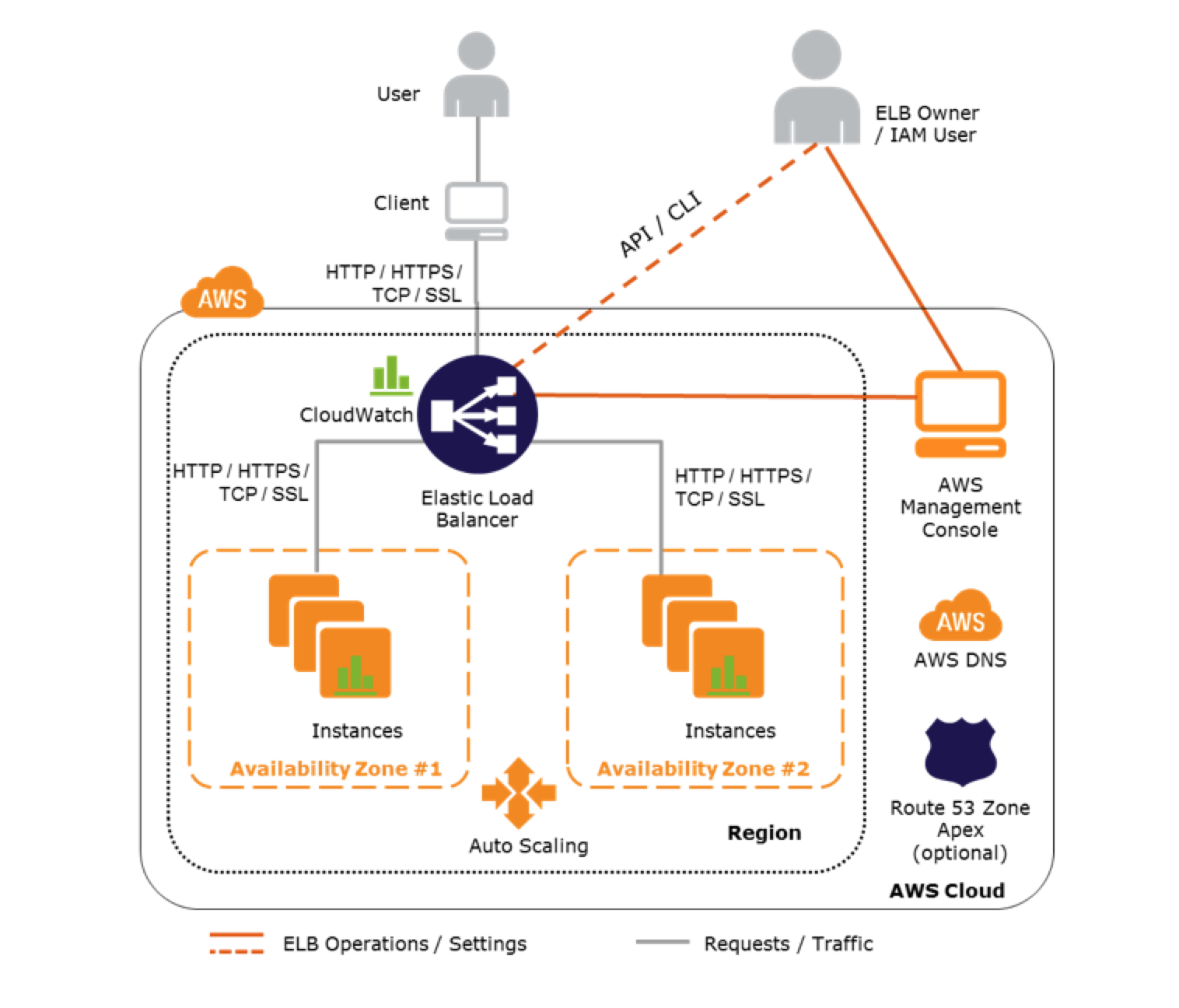
    • makes it easy to route traffic across a dynamically changing fleet of EC2 instances
    • acts as a single point of contact for all incoming traffic to the instances in an Auto Scaling group.
  • Auto Scaling dynamically adds and removes EC2 instances, while Elastic Load Balancing manages incoming requests by optimally routing traffic so that no one instance is overwhelmed
  • Auto Scaling helps to automatically increase the number of EC2 instances when the user demand goes up, and decrease the number of EC2 instances when demand goes down
  • ELB service helps to distribute the incoming web traffic (called the load) automatically among all the running EC2 instances
  • ELB uses load balancers to monitor traffic and handle requests that come through the Internet.
  • Using ELB & Auto Scaling
    • makes it easy to route traffic across a dynamically changing fleet of EC2 instances
    • load balancer acts as a single point of contact for all incoming traffic to the instances in an Auto Scaling group.
  • Elastic Load Balancing provides four types of load balancers:
    • Application Load Balancer (ALB) – Routes at the application layer (HTTP/HTTPS), supports path-based and host-based routing, and uses target groups.
    • Network Load Balancer (NLB) – Routes at the transport layer (TCP/UDP/TLS), handles millions of requests per second with ultra-low latency, and uses a static IP per AZ.
    • Gateway Load Balancer (GWLB) – Distributes traffic to third-party virtual appliances (firewalls, IDS/IPS) using the GENEVE protocol.
    • Classic Load Balancer (CLB) – Previous generation; AWS recommends migrating to ALB or NLB.

AWS Auto Scaling & ELB

Attaching/Detaching ELB with Auto Scaling Group

  • Auto Scaling integrates with Elastic Load Balancing and enables attaching one or more load balancers to an existing Auto Scaling group.
  • With Application Load Balancers, Network Load Balancers, and Gateway Load Balancers, instances are registered as targets with a target group, and the target group is attached to the Auto Scaling group.
  • With Classic Load Balancers, instances are registered directly with the load balancer.
  • ELB registers the EC2 instance using its IP address and routes requests to the primary IP address of the primary interface (eth0) of the instance.
  • After the ELB is attached, it automatically registers the instances in the group and distributes incoming traffic across the instances
  • When ELB is detached, it enters the Removing state while deregistering the instances in the group.
  • If connection draining (deregistration delay) is enabled, ELB waits for in-flight requests to complete before deregistering the instances.
  • Instances remain running after they are deregistered from the ELB
  • Auto Scaling adds instances to the ELB as they are launched, but this can be suspended. Instances launched during the suspension period are not added to the load balancer, after the resumption, and must be registered manually.

Launch Templates (Replaces Launch Configurations)

  • Launch Configurations are deprecated. As of October 1, 2024, new AWS accounts cannot create launch configurations using any method (console, API, CLI, or CloudFormation).
  • Launch Templates are the recommended replacement and support all new EC2 features including:
    • Multiple instance types and purchase options (mixed instances policy)
    • Attribute-based instance type selection
    • Versioning – create multiple versions and set a default
    • T2/T3 Unlimited mode configuration
    • Dedicated Hosts placement
  • As of January 1, 2023, new instance types added to AWS Regions are not supported in launch configurations.
  • Existing launch configurations continue to work for existing accounts, but no new features will be added.

High Availability & Redundancy

  • Auto Scaling can span across multiple AZs, within the same region.
  • When one AZ becomes unhealthy or unavailable, Auto Scaling launches new instances in an unaffected AZ.
  • When the unhealthy AZ recovers, Auto Scaling redistributes the traffic across all the healthy AZ.
  • Elastic Load balancer can be set up to distribute incoming requests across EC2 instances in a single AZ or multiple AZs within a region.
  • Using Auto Scaling & ELB by spanning Auto Scaling groups across multiple AZs within a region and then setting up ELB to distribute incoming traffic across those AZs helps take advantage of the safety and reliability of geographic redundancy.
  • Incoming traffic is load balanced equally across all the AZs enabled for ELB.

Zonal Shift & Zonal Autoshift (New – 2024)

  • EC2 Auto Scaling now supports Amazon Application Recovery Controller (ARC) zonal shift to rapidly recover from AZ impairments.
  • Zonal shift allows you to manually shift traffic and instances away from an impaired AZ.
  • Zonal autoshift automatically shifts traffic away from an AZ when AWS detects potential issues – no operator intervention needed.
  • When a zonal shift is active, Auto Scaling suspends AZ rebalancing for the shifted zone to prevent launching instances back into the impaired AZ.
  • Works with both ALB and NLB, with or without cross-zone load balancing enabled.

Health Checks

  • Auto Scaling group determines the health state of each instance by periodically checking the results of EC2 instance status checks.
  • Auto Scaling marks the instance as unhealthy and replaces the instance if the instance fails the EC2 instance status check.
  • ELB also performs health checks on the EC2 instances that are registered with it for e.g. the application is available by pinging a health check page
  • ELB health check with the instances should be used to ensure that traffic is routed only to the healthy instances.
  • Auto Scaling, by default, does not replace the instance, if the ELB health check fails.
  • After a load balancer is registered with an Auto Scaling group, it can be configured to use the results of the ELB health check in addition to the EC2 instance status checks to determine the health of the EC2 instances in the Auto Scaling group.
  • Health check grace period allows newly launched instances time to warm up before health checks begin evaluating them.

Instance Refresh

  • Instance Refresh allows rolling updates of instances in an Auto Scaling group when a launch template is updated (e.g., new AMI).
  • Supports minimum healthy percentage to control how many instances remain in service during updates.
  • Supports checkpoints and rollback for safe deployments.
  • ReplaceRootVolume strategy (Nov 2025): Updates the root volume of an instance without stopping or terminating it, preserving network interfaces, non-root EBS volumes, and instance store data.
  • Instance refresh only replaces instances where the AMI IDs don’t match, allowing it to skip already-updated instances.

Instance Maintenance Policy

  • Controls how Auto Scaling replaces instances during health check failures, Spot interruptions, or instance refresh operations.
  • Three options:
    • Launch before terminating – Provisions new instance before terminating the old one (favors availability over cost).
    • Terminate and launch – Terminates existing instance and launches new one simultaneously (favors cost over availability).
    • Custom policy – Set a custom min/max range for capacity during replacements.
  • Without an instance maintenance policy, Auto Scaling uses default replacement behaviors.

Warm Pools

  • Warm pools maintain pre-initialized EC2 instances ready for rapid scale-out, reducing application startup latency.
  • Instances in the warm pool can be in Stopped (lower cost, longer transition) or Running (higher cost, faster transition) state.
  • When demand increases, instances transition from the warm pool to the Auto Scaling group without repeating the full cold-start sequence.
  • Useful for applications with long boot times due to complex initialization or software dependencies.
  • As of April 2026, also supported with Amazon EKS managed node groups.

Predictive Scaling

  • Uses machine learning to predict future traffic patterns and proactively provision capacity ahead of demand.
  • Learns from past patterns and launches instances in advance, giving them time to warm up.
  • Enhances existing scaling policies (Target Tracking, Simple Scaling) by adding forecast-based scaling.
  • Expanded to additional AWS regions in October 2025.
  • Also available for Amazon ECS services (Nov 2024).

Monitoring

  • Elastic Load Balancing sends data about the load balancers and EC2 instances to CloudWatch. CloudWatch collects data about the performance of your resources and presents it as metrics.
  • After registering one or more load balancers with the Auto Scaling group, the Auto Scaling group can be configured to use ELB metrics (such as request latency or request count) to scale the application automatically.
  • For ALB, the ALBRequestCountPerTarget metric is commonly used for target tracking scaling policies.

AWS Certification Exam Practice Questions

  • Questions are collected from Internet and the answers are marked as per my knowledge and understanding (which might differ with yours).
  • AWS services are updated everyday and both the answers and questions might be outdated soon, so research accordingly.
  • AWS exam questions are not updated to keep up the pace with AWS updates, so even if the underlying feature has changed the question might not be updated
  • Open to further feedback, discussion and correction.
  1. A company is building a two-tier web application to serve dynamic transaction-based content. The data tier is leveraging an Online Transactional Processing (OLTP) database. What services should you leverage to enable an elastic and scalable web tier?
    1. Elastic Load Balancing, Amazon EC2, and Auto Scaling
    2. Elastic Load Balancing, Amazon RDS with Multi-AZ, and Amazon S3
    3. Amazon RDS with Multi-AZ and Auto Scaling
    4. Amazon EC2, Amazon DynamoDB, and Amazon S3
  2. You have been given a scope to deploy some AWS infrastructure for a large organization. The requirements are that you will have a lot of EC2 instances but may need to add more when the average utilization of your Amazon EC2 fleet is high and conversely remove them when CPU utilization is low. Which AWS services would be best to use to accomplish this?
    1. Amazon CloudFront, Amazon CloudWatch and Elastic Load Balancing
    2. Auto Scaling, Amazon CloudWatch and AWS CloudTrail
    3. Auto Scaling, Amazon CloudWatch and Elastic Load Balancing
    4. Auto Scaling, Amazon CloudWatch and AWS Elastic Beanstalk
  3. A user has configured ELB with Auto Scaling. The user suspended the Auto Scaling AddToLoadBalancer, which adds instances to the load balancer. process for a while. What will happen to the instances launched during the suspension period?
    1. The instances will not be registered with ELB and the user has to manually register when the process is resumed
    2. The instances will be registered with ELB only once the process has resumed
    3. Auto Scaling will not launch the instance during this period due to process suspension
    4. It is not possible to suspend only the AddToLoadBalancer process
  4. You have an Auto Scaling group associated with an Elastic Load Balancer (ELB). You have noticed that instances launched via the Auto Scaling group are being marked unhealthy due to an ELB health check, but these unhealthy instances are not being terminated. What do you need to do to ensure trial instances marked unhealthy by the ELB will be terminated and replaced?
    1. Change the thresholds set on the Auto Scaling group health check
    2. Add an Elastic Load Balancing health check to your Auto Scaling group
    3. Increase the value for the Health check interval set on the Elastic Load Balancer
    4. Change the health check set on the Elastic Load Balancer to use TCP rather than HTTP checks
  5. You are responsible for a web application that consists of an Elastic Load Balancing (ELB) load balancer in front of an Auto Scaling group of Amazon Elastic Compute Cloud (EC2) instances. For a recent deployment of a new version of the application, a new Amazon Machine Image (AMI) was created, and the Auto Scaling group was updated with a new launch configuration that refers to this new AMI. During the deployment, you received complaints from users that the website was responding with errors. All instances passed the ELB health checks. What should you do in order to avoid errors for future deployments? (Choose 2 answers) [PROFESSIONAL]
    1. Add an Elastic Load Balancing health check to the Auto Scaling group. Set a short period for the health checks to operate as soon as possible in order to prevent premature registration of the instance to the load balancer.
    2. Enable EC2 instance CloudWatch alerts to change the launch configuration’s AMI to the previous one. Gradually terminate instances that are using the new AMI.
    3. Set the Elastic Load Balancing health check configuration to target a part of the application that fully tests application health and returns an error if the tests fail.
    4. Create a new launch configuration that refers to the new AMI, and associate it with the group. Double the size of the group, wait for the new instances to become healthy, and reduce back to the original size. If new instances do not become healthy, associate the previous launch configuration.
    5. Increase the Elastic Load Balancing Unhealthy Threshold to a higher value to prevent an unhealthy instance from going into service behind the load balancer.

    Note: For modern deployments, use Instance Refresh with checkpoints and rollback capabilities instead of manually doubling group size. Launch Templates should be used instead of Launch Configurations.

  6. What is the order of most-to-least rapidly-scaling (fastest to scale first)? A) EC2 + ELB + Auto Scaling B) Lambda C) RDS
    1. B, A, C (Lambda is designed to scale instantly. EC2 + ELB + Auto Scaling require single-digit minutes to scale out. RDS will take at least 15 minutes, and will apply OS patches or any other updates when applied.)
    2. C, B, A
    3. C, A, B
    4. A, C, B
  7. A user has hosted an application on EC2 instances. The EC2 instances are configured with ELB and Auto Scaling. The application server session time out is 2 hours. The user wants to configure connection draining to ensure that all in-flight requests are supported by ELB even though the instance is being deregistered. What time out period should the user specify for connection draining?
    1. 5 minutes
    2. 1 hour (max allowed is 3600 secs that is close to 2 hours to keep the in flight requests alive)
    3. 30 minutes
    4. 2 hours
  8. A company runs a web application using an Auto Scaling group behind an Application Load Balancer. They are experiencing slow instance boot times (5+ minutes) and want to reduce latency during scale-out events without over-provisioning. What feature should they use?
    1. Increase the desired capacity of the Auto Scaling group
    2. Use Predictive Scaling to forecast demand
    3. Configure a warm pool with pre-initialized instances
    4. Enable cross-zone load balancing
  9. An organization needs to update the AMI for all instances in their Auto Scaling group with minimal disruption. They want to ensure instances are replaced in a rolling fashion. What is the recommended approach?
    1. Manually terminate instances one by one
    2. Create a new Auto Scaling group and swap the ELB attachment
    3. Update the launch template and start an instance refresh
    4. Use the UpdateAutoScalingGroup API to change the AMI directly
  10. An e-commerce company experiences predictable traffic spikes every day at 9 AM. They want Auto Scaling to proactively launch instances before the spike arrives. Which scaling approach should they use?
    1. Target tracking scaling policy
    2. Simple scaling policy with CloudWatch alarms
    3. Scheduled scaling actions
    4. Predictive scaling policy (Predictive scaling uses ML to learn patterns and proactively scale before predicted demand, ideal for recurring traffic patterns. While scheduled scaling could work, predictive scaling adapts automatically to changing patterns.)

References

AWS CloudFront

CloudFront

  • CloudFront is a fully managed, fast content delivery network (CDN) service that speeds up the distribution of static, dynamic web, or streaming content to end-users.
  • CloudFront delivers the content through a worldwide network of over 600 Points of Presence (POPs), including 400+ Edge Locations, 13 Regional Edge Caches, and Embedded POPs within ISP networks.
  • CloudFront securely delivers data, videos, applications, and APIs to customers globally with low latency, and high transfer speeds, all within a developer-friendly environment.
  • CloudFront gives businesses and web application developers an easy and cost-effective way to distribute content with low latency and high data transfer speeds.
  • CloudFront speeds up the distribution of the content by routing each user request to the edge location that can best serve the content thus providing the lowest latency (time delay).
  • CloudFront uses the AWS backbone network that dramatically reduces the number of network hops that users’ requests must pass through and helps improve performance, provide lower latency and higher data transfer rate
  • CloudFront is a good choice for the distribution of frequently accessed static content that benefits from edge delivery – like popular website images, videos, media files, or software downloads
  • CloudFront supports HTTP/3 powered by QUIC protocol for improved performance, with up to 10% improvement in time to first byte and 15% improvement in page load times.
  • CloudFront supports gRPC delivery (launched Nov 2024), enabling bidirectional communication between clients and servers over HTTP/2 connections for modern microservices architectures.

CloudFront Benefits

  • CloudFront eliminates the expense and complexity of operating a network of cache servers in multiple sites across the internet and eliminates the need to over-provision capacity in order to serve potential spikes in traffic.
  • CloudFront also provides increased reliability and availability because copies of objects are held in multiple edge locations around the world.
  • CloudFront keeps persistent connections with the origin servers so that those files can be fetched from the origin servers as quickly as possible.
  • CloudFront also uses techniques such as collapsing simultaneous viewer requests at an edge location for the same file into a single request to the origin server reducing the load on the origin.
  • CloudFront offers the most advanced security capabilities, including field-level encryption, HTTPS support, and mutual TLS (mTLS) authentication.
  • CloudFront seamlessly integrates with AWS Shield, AWS Web Application Firewall – WAF, and Route 53 to protect against multiple types of attacks including network and application layer DDoS attacks.
  • CloudFront provides one-click WAF security protections and a unified Security Dashboard for observability, investigation, and contextual configuration.
  • CloudFront offers flat-rate pricing plans (Free, Pro at $15/month, Business at $200/month, Premium at $1,000/month) that bundle CDN, WAF, DDoS protection, bot management, Route 53 DNS, CloudWatch Logs, and edge compute into a single monthly price with no overage charges.

Edge Locations & Regional Edge Caches

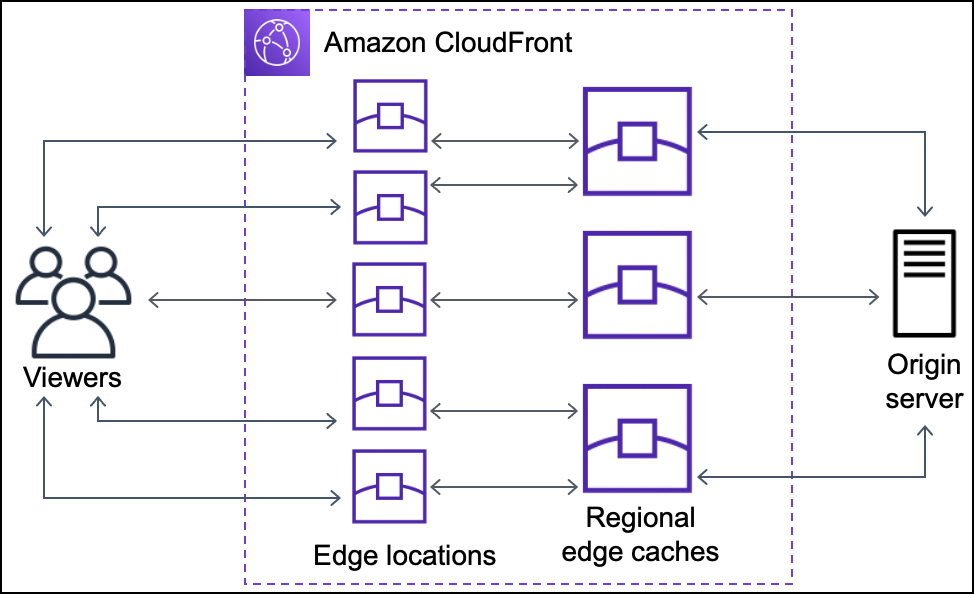
  • CloudFront Edge Locations or POPs make sure that popular content can be served quickly to the viewers.
  • CloudFront also has Regional Edge Caches that help bring more content closer to the viewers, even when the content is not popular enough to stay at a POP, to help improve performance for that content.
  • Regional Edge Caches are deployed globally, close to the viewers, and are located between the origin servers and the Edge Locations.
  • Regional edge caches support multiple Edge Locations and support a larger cache size so objects remain in the cache longer at the nearest regional edge cache location.
  • Regional edge caches help with all types of content, particularly content that tends to become less popular over time.
  • CloudFront Embedded POPs (launched 2024) are deployed within Internet Service Provider (ISP) networks to bring content even closer to end users, reducing latency for high-demand cacheable content like large file downloads and video streaming.

Configuration & Content Delivery

CloudFront Configuration and Content Delivery

Configuration

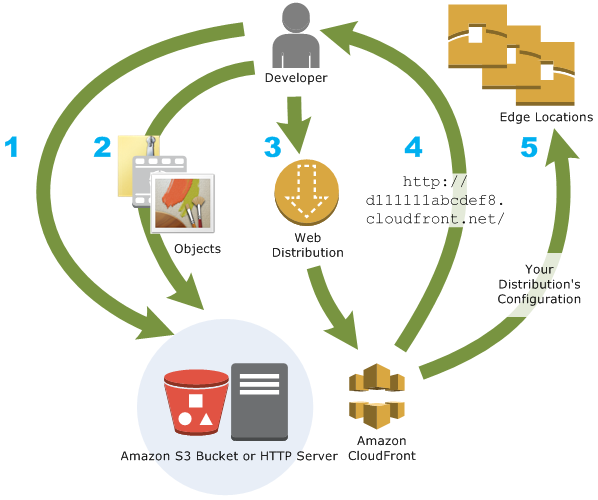
  1. Origin servers need to be configured to get the files for distribution. An origin server stores the original, definitive version of the objects and can be an AWS hosted service for e.g. S3, EC2, or an on-premise server
  2. Files or objects can be added/uploaded to the Origin servers with public read permissions or permissions restricted to Origin Access Control (OAC).
  3. Create a CloudFront distribution, which tells CloudFront which origin servers to get the files from when users request the files.
  4. CloudFront sends the distribution configuration to all the edge locations.
  5. The website can be used with the CloudFront provided domain name or a custom alternate domain name.
  6. An origin server can be configured to limit access protocols, caching behaviour, add headers to the files to add TTL, or the expiration time.

Content delivery to Users

  1. When a user accesses the website, file, or object – the DNS routes the request to the CloudFront edge location that can best serve the user’s request with the lowest latency.
  2. CloudFront returns the object immediately if the requested object is present in the cache at the Edge location.
  3. If the requested object does not exist in the cache at the edge location, the POP typically goes to the nearest regional edge cache to fetch it.
  4. If the object is in the regional edge cache, CloudFront forwards it to the POP that requested it.
  5. For objects not cached at either the POP or the regional edge cache location, the objects are requested from the origin server and returned it to the user via the regional edge cache and POP
  6. CloudFront begins to forward the object to the user as soon as the first byte arrives from the regional edge cache location.
  7. CloudFront also adds the object to the cache in the regional edge cache location in addition to the POP for the next time a viewer requests it.
  8. When the object reaches its expiration time, for any new request CloudFront checks with the Origin server for any latest versions, if it has the latest it uses the same object. If the Origin server has the latest version the same is retrieved, served to the user, and cached as well

CloudFront Origins

  • Each origin is either an S3 bucket, a MediaStore container, a MediaPackage channel, an AWS Lambda function URL, a VPC origin, or a custom origin like an EC2 instance or an HTTP server
  • For the S3 bucket, use the bucket URL or the static website endpoint URL, and the files either need to be publicly readable or secured using Origin Access Control (OAC).
  • Origin restrict access, for S3, Lambda function URLs, and MediaPackage origins, can be configured using Origin Access Control (OAC) to prevent direct access to the origin.
  • For the HTTP server as the origin, the domain name of the resource needs to be mapped and files must be publicly readable.
  • Distribution can have multiple origins for each bucket with one or more cache behaviors that route requests to each origin. Path pattern in a cache behavior determines which requests are routed to the origin (S3 bucket) that is associated with that cache behavior.

Origin Access Control (OAC)

⚠️ Origin Access Identity (OAI) Deprecated: AWS deprecated OAI creation in 2024. As of March 2026, new distributions can only use Origin Access Control (OAC). Existing OAI-based policies still work but cannot be attached to new distributions. AWS recommends migrating to OAC.

  • Origin Access Control (OAC) is the recommended method to restrict access to origins from CloudFront distributions, replacing the legacy Origin Access Identity (OAI).
  • OAC uses AWS Signature Version 4 (SigV4) for robust cryptographic authentication.
  • OAC supports granular policy configurations, HTTP/HTTPS POST method requests in all regions, and integration with SSE-KMS encrypted S3 objects.
  • OAC supports multiple origin types:
    • Amazon S3 – restricts bucket access to designated CloudFront distributions
    • Lambda Function URLs (April 2024) – blocks unintended users from directly accessing function URLs
    • AWS Elemental MediaPackage (April 2024) – permits origin access only from designated distributions
    • AWS Elemental MediaStore – secures media container access
  • When using OAC with S3, Amazon S3 Object Ownership must be set to “Bucket owner enforced” (default for new buckets).
  • OAC cannot be used with S3 buckets configured as website endpoints; use custom origin configuration instead.

CloudFront VPC Origins

  • CloudFront VPC Origins (launched November 2024) allows CloudFront to deliver content from applications hosted in private VPC subnets without requiring public internet access.
  • VPC Origins supports pointing distributions directly to Application Load Balancers (ALBs), Network Load Balancers (NLBs), or EC2 instances inside private subnets.
  • VPC Origins removes the need for complex security configurations like security groups, AWS WAF on origin, or custom header validation to restrict origin access.
  • Applications can be made fully private with CloudFront as the single entry point, preventing direct internet access to origin infrastructure.
  • Cross-account support (launched 2025) allows VPC Origins to work with resources in different AWS accounts.
  • VPC Origins is available at no additional cost.

CloudFront Origin Groups

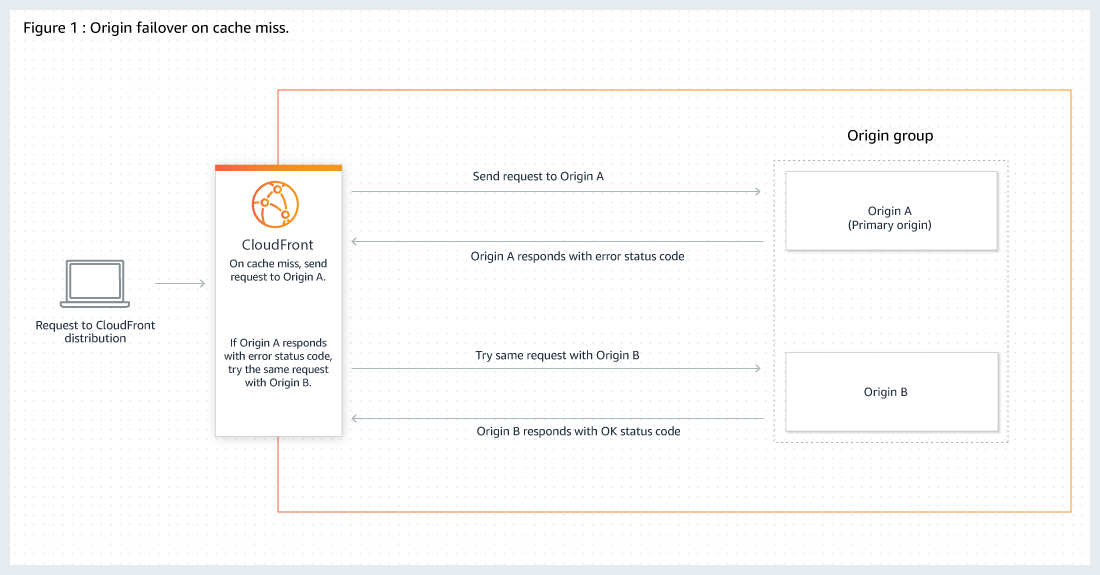
  • Origin Groups can be used to specify two origins to configure origin failover for high availability.
  • Origin failover can be used to designate a primary origin plus a second origin that CloudFront automatically switches to when the primary origin returns specific HTTP status code failure responses.
  • An origin group includes two origins (a primary origin and a second origin to failover to) and specified failover criteria.
  • CloudFront routes all incoming requests to the primary origin, even when a previous request has failed over to the secondary origin. CloudFront only sends requests to the secondary origin after a request fails to the primary origin.
  • CloudFront fails over to a secondary origin only when the HTTP method of the consumer request is GET, HEAD, or OPTIONS and does not fail over when the consumer sends a different HTTP method (for example POST, PUT, etc.).

CloudFront Origin Group

CloudFront Delivery Methods

Web distributions

  • supports both static and dynamic content for e.g. HTML, CSS, js, images, etc using HTTP or HTTPS.
  • supports multimedia content on-demand using progressive download and Apple HTTP Live Streaming (HLS).
  • supports a live event, such as a meeting, conference, or concert, in real-time. For live streaming, distribution can be created automatically using an AWS CloudFormation stack.
  • origin servers can be either an S3 bucket or an HTTP server, for e.g., a web server or an AWS ELB, etc.
  • supports gRPC delivery for modern microservices communication over HTTP/2 connections.

RTMP distributions (Discontinued)

  • RTMP distribution support was fully discontinued by AWS. CloudFront no longer supports Adobe RTMP protocol.
  • For streaming use cases, use Web distributions with HLS, DASH, or CMAF protocols instead.

Cache Behavior Settings

Path Patterns

  • Path Patterns help define which path the Cache behaviour would apply to.
  • A default (*) pattern is created and multiple cache distributions can be added with patterns to take priority over the default path.

Viewer Protocol Policy (Viewer -> CloudFront)

  • Viewer Protocol policy can be configured to define the allowed access protocol.
  • Between CloudFront & Viewers, cache distribution can be configured to either allow
    • HTTPS only – supports HTTPS only
    • HTTP and HTTPS – supports both
    • HTTP redirected to HTTPS – HTTP is automatically redirected to HTTPS

Origin Protocol Policy (CloudFront -> Origin)

  • Between CloudFront & Origin, cache distribution can be configured with
    • HTTP only (for S3 static website).
    • HTTPS only – CloudFront fetches objects from the origin by using HTTPS.
    • Match Viewer – CloudFront uses the protocol that the viewer used to request the objects.
  • For S3 as origin,
    • For the website, the protocol has to be HTTP as HTTPS is not supported.
    • For the S3 bucket, the default Origin protocol policy is Match Viewer and cannot be changed. So When CloudFront is configured to require HTTPS between the viewer and CloudFront, it automatically uses HTTPS to communicate with S3.

HTTPS Connection

  • CloudFront can also be configured to work with HTTPS for alternate domain names by using:-
    • Serving HTTPS Requests Using Dedicated IP Addresses
      • CloudFront associates the alternate domain name with a dedicated IP address, and the certificate is associated with the IP address when a request is received from a DNS server for the IP address.
      • This method works for every HTTPS request, regardless of the browser or other viewer that the user is using.
      • An additional monthly charge (of about $600/month) is incurred for using a dedicated IP address.
    • Serving HTTPS Requests Using Server Name Indication – SNI (Recommended)
      • SNI Custom SSL relies on the SNI extension of the TLS protocol, which allows multiple domains to be served over the same IP address by including the hostname, viewers are trying to connect to
      • SNI Custom SSL is available at no additional cost beyond standard CloudFront data transfer and request fees
      • Most modern browsers support SNI.
    • For End-to-End HTTPS connections certificate needs to be applied both between the Viewers and CloudFront & CloudFront and Origin, with the following requirements
      • HTTPS between viewers and CloudFront
        • A certificate issued by a trusted certificate authority (CA);
        • Certificate provided by AWS Certificate Manager (ACM);
      • HTTPS between CloudFront and the Custom Origin
        • If the origin is not an ELB load balancer, the certificate must be issued by a trusted CA.
        • For load balancer, a certificate provided by ACM can be used
        • Self-signed certificates CAN NOT be used.
      • ACM certificate for CloudFront must be requested or imported in the US East (N. Virginia) region. ACM certificates in this region that are associated with a CloudFront distribution are distributed to all the geographic locations configured for that distribution.

Mutual TLS (mTLS) Authentication

  • CloudFront supports viewer mutual TLS (mTLS) authentication, requiring both client and server to present and verify digital certificates for two-way authentication.
  • Viewer mTLS provides strong client authentication at the edge before traffic reaches the origin infrastructure.
  • CloudFront also supports mTLS authentication to origins (launched 2025), preserving cryptographic identity and trust across the full request path from viewer to CloudFront to origin.
  • CloudFront Connection Functions can be used to write lightweight JavaScript functions for custom mTLS certificate validation and authentication logic at edge locations.
  • mTLS requires HTTPS connections; it cannot be enabled on distributions with HTTP-supporting cache behaviors.

Allowed HTTP methods

  • CloudFront supports GET, HEAD, OPTIONS, PUT, POST, PATCH, DELETE to get, add, update, and delete objects, and to get object headers.
    • GET, HEAD methods to use to get objects, object headers
    • GET, HEAD, OPTIONS methods to use to get objects, object headers or retrieve a list of the options supported from the origin
    • GET, HEAD, OPTIONS, PUT, POST, PATCH, DELETE operations can also be performed for e.g. submitting data from a web form, which are directly proxied back to the Origin server
  • CloudFront only caches responses to GET and HEAD requests and, optionally, OPTIONS requests. CloudFront does not cache responses to PUT, POST, PATCH, DELETE request methods and these requests are directed to the origin.
  • PUT, POST HTTP methods also help for accelerated content uploads, as these operations will be sent to the origin e.g. S3 via the CloudFront edge location, improving efficiency, reducing latency, and allowing the application to benefit from the monitored, persistent connections that CloudFront maintains from the edge locations to the origin servers.

CloudFront Edge Caches

  • Control the cache max-age
    • To increase the cache hit ratio, the origin can be configured to add a Cache-Control: max-age directive to the objects.
    • Longer the interval less frequently it would be retrieved from the origin
  • Caching Based on Query String Parameters
    • CloudFront can be configured to cache based on the query parameters
      • None (Improves Caching) – if the origin returns the same version of an object regardless of the values of query string parameters.
      • Forward all, cache based on whitelist – if the origin server returns different versions of the objects based on one or more query string parameters.
      • Forward all, cache based on all – if the origin server returns different versions of the objects for all query string parameters.
    • Caching performance can be improved by
      • Configure CloudFront to forward only the query strings for which the origin will return unique objects.
      • Using the same case for the parameters’ values for e.g. parameter value A or a, CloudFront would cache the same request twice even if the response or object returned is identical
      • Using the same parameter order for e.g. for request a=x&b=y and b=y&a=x, CloudFront would cache the same request twice even though the response or object returned is identical
  • Caching Based on Cookie Values
    • CloudFront can be configured to cache based on cookie values.
    • By default, it doesn’t consider cookies while caching on edge locations
    • Caching performance can be improved by
      • Configure CloudFront to forward only specified cookies instead of forwarding all cookies
      • Cookie names and values are both case sensitive so better to stick with the same case
      • Create separate cache behaviors for static and dynamic content, and configure CloudFront to forward cookies to the origin only for dynamic content
      • If possible, create separate cache behaviors for dynamic content for which cookie values are unique for each user (such as a user ID) and dynamic content that varies based on a smaller number of unique values
  • Caching Based on Request Headers
    • CloudFront can be configured to cache based on request headers
    • By default, CloudFront doesn’t consider headers when caching the objects in edge locations.
    • Caching performance can be improved by
      • Configure CloudFront to forward and cache based only on specified headers instead of forwarding and caching based on all headers.
      • Try to avoid caching based on request headers that have large numbers of unique values.
      • CloudFront configured to forward all headers to the origin doesn’t cache the objects associated with this cache behaviour. Instead, it sends every request to the origin
      • CloudFront caches based on header values, it doesn’t consider the case of the header name but considers the case of the header value

Object Caching & Expiration

  • Object expiration determines how long the objects stay in a CloudFront cache before it fetches it again from Origin.
  • Low expiration time helps serve content that changes frequently and high expiration time helps improve performance and reduce the origin load.
  • By default, each object automatically expires after 24 hours
  • After expiration time, CloudFront checks if it still has the latest version
    • If the cache already has the latest version, the origin returns a 304 status code (Not Modified).
    • If the CloudFront cache does not have the latest version, the origin returns a 200 status code (OK), and the latest version of the object
  • If an object in an edge location isn’t frequently requested, CloudFront might evict the object before its expiration date to make room for objects that have been requested more recently.
  • The default behaviour can be changed by
    • for the entire path pattern, cache behaviour can be configured by the setting Minimum TTL, Maximum TTL, and Default TTL values
    • for individual objects, the origin can be configured to add a Cache-Control max-age or Cache-Control s-maxage directive, or an Expires header field to the object.
    • AWS recommends using Cache-Control max-age directive over Expires header to control object caching behaviour.
    • CloudFront uses only the value of Cache-Control max-age , if both the Cache-Control max-age directive and Expires header is specified
    • HTTP Cache-Control or Pragma header fields in a GET request from a viewer can’t be used to force CloudFront to go back to the origin server for the object
    • By default, when the origin returns an HTTP 4xx or 5xx status code, CloudFront caches these error responses for five minutes and then submits the next request for the object to the origin

Cache Invalidation

  • CloudFront supports URL path-based invalidation to remove cached objects from edge locations before they expire.
  • Invalidation by Cache Tag (launched April 2026) – allows invalidating groups of related cached objects using a single request based on semantic tags rather than URL paths.
    • Origins include cache tags via a response header with comma-separated tag values when objects are cached.
    • Objects can be invalidated by tag directly through the CloudFront API.
    • Useful for updating product catalogs, managing compliance requirements, and refreshing multi-tenant content.
    • Tag invalidation paths count toward the same 1,000 free invalidation paths per month allowance.
  • AWS recommends using file versioning (versioned file names) over invalidation for content updates when possible.

CloudFront Origin Shield

  • CloudFront Origin Shield provides an additional layer in the CloudFront caching infrastructure that helps to minimize the origin’s load, improve its availability, and reduce its operating costs.
  • Origin Shield provides a centralized caching layer that helps increase the cache hit ratio to reduce the load on your origin.
  • Origin Shield decreases the origin operating costs by collapsing requests across regions so as few as one request goes to the origin per object.
  • Origin Shield can be configured by choosing the Regional Edge Cache closest to the origin to become the Origin Shield Region
  • CloudFront Origin Shield is beneficial for many use cases like
    • Viewers that are spread across different geographical regions
    • Origins that provide just-in-time packaging for live streaming or on-the-fly image processing
    • On-premises origins with capacity or bandwidth constraints
    • Workloads that use multiple content delivery networks (CDNs)

Serving Compressed Files

  • CloudFront can be configured to automatically compress files of certain types and serve the compressed files when viewer requests include Accept-Encoding in the request header
  • Compressing content, downloads are faster because the files are smaller as well as less expensive as the cost of CloudFront data transfer is based on the total amount of data served.
  • CloudFront can compress objects using the Gzip and Brotli compression formats.
  • If serving from a custom origin, it can be used to
    • configure to compress files with or without CloudFront compression
    • compress file types that CloudFront doesn’t compress.
  • If the origin returns a compressed file, CloudFront detects compression by the Content-Encoding header value and doesn’t compress the file again.
  • CloudFront compresses files between 1,000 and 10,000,000 bytes in size, and the response must include a Content-Length header.

Distribution Details

Price Class

  • CloudFront has edge locations all over the world and the cost for each edge location varies and the price charged for serving the requests also varies
  • CloudFront edge locations are grouped into geographic regions, and regions have been grouped into price classes
    • Price Class All – includes all the regions
    • Price Class 200 – Includes All regions except South America and Australia and New Zealand.
    • Price Class 100 – Includes only the least-expensive regions (North America and Europe regions)
  • Price class can be selected to lower the cost but this would come only at the expense of performance (higher latency), as CloudFront would serve requests only from the selected price class edge locations
  • CloudFront may, sometimes, service requests from a region not included within the price class, however, you would be charged the rate for the least-expensive region in your selected price class

WAF Web ACL

  • AWS WAF can be used to allow or block requests based on specified criteria, choose the web ACL to associate with this distribution.
  • One-click WAF security protection is available directly from the CloudFront console to quickly enable common protections including bot control.
  • CloudFront Security Dashboard provides a unified view for monitoring, investigating, and configuring WAF security protections.

Alternate Domain Names (CNAMEs)

  • CloudFront by default assigns a domain name for the distribution for e.g. d111111abcdef8.cloudfront.net
  • An alternate domain name, also known as a CNAME, can be used to use own custom domain name for links to objects
  • Web distributions support alternate domain names.
  • CloudFront supports * wildcard at the beginning of a domain name instead of specifying subdomains individually.
  • However, a wildcard cannot replace part of a subdomain name for e.g. *domain.example.com, or cannot replace a subdomain in the middle of a domain name for e.g. subdomain.*.example.com.

Anycast Static IPs

  • CloudFront Anycast Static IPs (launched November 2024) provides a dedicated list of static IP addresses for CloudFront distributions.
  • Useful for allowlisting in network firewalls, zero-rating traffic with network carriers, and simplifying IP address management.
  • Supports apex domains (April 2025), allowing A records for apex domains without requiring Route 53 alias records.
  • Integrates with VPC IPAM for Bring Your Own IP (BYOIP) support, allowing use of both IPv4 and IPv6 addresses.

Distribution State

  • Distribution state indicates whether you want the distribution to be enabled or disabled once it’s deployed.

CloudFront Continuous Deployment

  • CloudFront Continuous Deployment allows safely testing and validating configuration changes using a portion of production traffic before committing the entire workload.
  • Creates a staging distribution linked to the primary distribution to test changes with real traffic.
  • Supports blue/green and canary deployment strategies for CDN configuration changes.
  • Enables zero-downtime deployments with easy rollback if issues are detected.
  • Can be integrated with CI/CD pipelines for automated testing and promotion of changes.

Geo-Restriction – Geoblocking

  • Geo restriction can help allow or prevent users in selected countries from accessing the content,
  • CloudFront distribution can be configured either to allow users in
    • whitelist of specified countries to access the content or to
    • deny users in a blacklist of specified countries to access the content
  • Geo restriction can be used to restrict access to all of the files that are associated with distribution and to restrict access at the country level
  • CloudFront responds to a request from a viewer in a restricted country with an HTTP status code 403 (Forbidden)
  • Use a third-party geolocation service, if access is to be restricted to a subset of the files that are associated with a distribution or to restrict access at a finer granularity than the country level.

CloudFront Edge Functions

Refer blog post @ CloudFront Edge Functions

CloudFront Functions

  • CloudFront Functions execute in 700+ Edge Locations with sub-millisecond execution times.
  • Suitable for lightweight, high-scale request/response transformations such as URL rewrites, header manipulation, and access control.
  • CloudFront KeyValueStore (launched November 2023) – a low-latency edge datastore for CloudFront Functions, enabling data updates without redeploying function code.
  • New capabilities (2025): edge location metadata, raw query string retrieval, and advanced origin overrides.
  • Supports CBOR Web Tokens (CWT) and Common Access Tokens (CAT) for token validation, generation, and refresh logic.

CloudFront Connection Functions

  • CloudFront Connection Functions enable lightweight JavaScript functions for mTLS certificate validation and custom authentication logic at the TLS connection layer.
  • Can validate client certificates, implement device-specific authentication rules, and handle certificate revocation scenarios.
  • Execute at CloudFront edge locations worldwide for low-latency connection-time decisions.

Lambda@Edge

  • Lambda@Edge executes at 13 Regional Edge Cache locations for more complex compute operations.
  • Suitable for operations requiring external network calls, longer execution times, or larger function packages.

CloudFront SaaS Manager

  • CloudFront SaaS Manager (launched May 2025) simplifies scaling and managing multi-tenant web applications that deliver content to end users.
  • Introduces multi-tenant distributions that serve content across multiple domains while sharing configuration and infrastructure.
  • Reduces operational overhead with reusable configuration templates and parameters for tenant onboarding.
  • Each tenant can have custom domain names, TLS certificates, and cache behaviors while sharing the underlying distribution infrastructure.
  • Ideal for SaaS providers needing to manage hundreds or thousands of customer domains efficiently.

CloudFront with S3

AWS CloudFront with S3

CloudFront Security

  • CloudFront provides Encryption in Transit and can be configured to require that viewers use HTTPS to request the files so that connections are encrypted when CloudFront communicates with viewers.
  • CloudFront provides Encryption at Rest
    • uses SSDs which are encrypted for edge location points of presence (POPs), and encrypted EBS volumes for Regional Edge Caches (RECs).
    • Function code and configuration are always stored in an encrypted format on the encrypted SSDs on the edge location POPs, and in other storage locations used by CloudFront.
  • Restricting access to content
    • Configure HTTPS connections
    • Use signed URLs or cookies to restrict access for selected users
    • Restrict access to content in S3 buckets using Origin Access Control (OAC) to prevent users from using the direct URL of the file.
    • Restrict access to Lambda function URLs using OAC.
    • Restrict direct access to load balancer using custom headers or VPC Origins.
    • Set up field-level encryption for specific content fields
    • Use AWS WAF web ACLs to create a web access control list (web ACL) to restrict access to your content.
    • Use geo-restriction, also known as geoblocking, to prevent users in specific geographic locations from accessing content served through a CloudFront distribution.
    • Use mutual TLS (mTLS) for strong two-way client/server authentication at the edge.

AWS CloudFront Security

Access Logs

  • CloudFront can be configured to create log files that contain detailed information about every user request that CloudFront receives.
  • With logging enabled, an S3 bucket can be specified where CloudFront would save the files
  • CloudFront delivers access logs for a distribution periodically, up to several times an hour
  • CloudFront usually delivers the log file for that time period to the S3 bucket within an hour of the events that appear in the log. Note, however, that some or all log file entries for a time period can sometimes be delayed by up to 24 hours
  • CloudFront also supports real-time logs delivery to Amazon Kinesis Data Streams for immediate processing and analysis.

CloudFront Cost

  • CloudFront charges are based on actual usage of the service in four areas:
    • Data Transfer Out to Internet
      • charges are applied for the volume of data transferred out of the CloudFront edge locations, measured in GB
      • Data transfer out from AWS origin (e.g., S3, EC2, etc.) to CloudFront are no longer charged. This applies to data transfer from all AWS regions to all global CloudFront edge locations
    • HTTP/HTTPS Requests
      • number of HTTP/HTTPS requests made for the content
    • Invalidation Requests
      • per path in the invalidation request (first 1,000 paths free per month)
      • Tag-based invalidation paths count toward the same free allowance
    • Dedicated IP Custom SSL certificates associated with a CloudFront distribution
      • $600 per month for each custom SSL certificate using the Dedicated IP version (SNI is free)
  • Flat-Rate Pricing Plans (2025): CloudFront offers bundled plans combining CDN, WAF, DDoS protection, bot management, Route 53, CloudWatch Logs, edge compute, and S3 storage credits:
    • Free – $0/month with basic usage allowances
    • Pro – $15/month for small-to-medium sites
    • Business – $200/month for larger applications
    • Premium – $1,000/month with configurable usage allowances and all features

CloudFront vs Global Accelerator

Refer blog post @ CloudFront vs Global Accelerator

AWS Certification Exam Practice Questions

  • Questions are collected from Internet and the answers are marked as per my knowledge and understanding (which might differ with yours).
  • AWS services are updated everyday and both the answers and questions might be outdated soon, so research accordingly.
  • AWS exam questions are not updated to keep up the pace with AWS updates, so even if the underlying feature has changed the question might not be updated
  • Open to further feedback, discussion and correction.
  1. Your company Is moving towards tracking web page users with a small tracking Image loaded on each page Currently you are serving this image out of US-East, but are starting to get concerned about the time It takes to load the image for users on the west coast. What are the two best ways to speed up serving this image? Choose 2 answers
    1. Use Route 53’s Latency Based Routing and serve the image out of US-West-2 as well as US-East-1
    2. Serve the image out through CloudFront
    3. Serve the image out of S3 so that it isn’t being served oft of your web application tier
    4. Use EBS PIOPs to serve the image faster out of your EC2 instances
  2. You deployed your company website using Elastic Beanstalk and you enabled log file rotation to S3. An Elastic Map Reduce job is periodically analyzing the logs on S3 to build a usage dashboard that you share with your CIO. You recently improved overall performance of the website using Cloud Front for dynamic content delivery and your website as the origin. After this architectural change, the usage dashboard shows that the traffic on your website dropped by an order of magnitude. How do you fix your usage dashboard’? [PROFESSIONAL]
    1. Enable CloudFront to deliver access logs to S3 and use them as input of the Elastic Map Reduce job
    2. Turn on Cloud Trail and use trail log tiles on S3 as input of the Elastic Map Reduce job
    3. Change your log collection process to use Cloud Watch ELB metrics as input of the Elastic Map Reduce job
    4. Use Elastic Beanstalk “Rebuild Environment” option to update log delivery to the Elastic Map Reduce job.
    5. Use Elastic Beanstalk ‘Restart App server(s)” option to update log delivery to the Elastic Map Reduce job.
  3. An AWS customer runs a public blogging website. The site users upload two million blog entries a month. The average blog entry size is 200 KB. The access rate to blog entries drops to negligible 6 months after publication and users rarely access a blog entry 1 year after publication. Additionally, blog entries have a high update rate during the first 3 months following publication; this drops to no updates after 6 months. The customer wants to use CloudFront to improve his user’s load times. Which of the following recommendations would you make to the customer? [PROFESSIONAL]
    1. Duplicate entries into two different buckets and create two separate CloudFront distributions where S3 access is restricted only to Cloud Front identity
    2. Create a CloudFront distribution with “US & Europe” price class for US/Europe users and a different CloudFront distribution with All Edge Locations for the remaining users.
    3. Create a CloudFront distribution with S3 access restricted only to the CloudFront identity and partition the blog entry’s location in S3 according to the month it was uploaded to be used with CloudFront behaviors
    4. Create a CloudFront distribution with Restrict Viewer Access Forward Query string set to true and minimum TTL of 0.
  4. Your company has on-premises multi-tier PHP web application, which recently experienced downtime due to a large burst in web traffic due to a company announcement. Over the coming days, you are expecting similar announcements to drive similar unpredictable bursts, and are looking to find ways to quickly improve your infrastructures ability to handle unexpected increases in traffic. The application currently consists of 2 tiers a web tier, which consists of a load balancer, and several Linux Apache web servers as well as a database tier which hosts a Linux server hosting a MySQL database. Which scenario below will provide full site functionality, while helping to improve the ability of your application in the short timeframe required? [PROFESSIONAL]
    1. Offload traffic from on-premises environment Setup a CloudFront distribution and configure CloudFront to cache objects from a custom origin Choose to customize your object cache behavior, and select a TTL that objects should exist in cache.
    2. Migrate to AWS Use VM Import/Export to quickly convert an on-premises web server to an AMI create an Auto Scaling group, which uses the imported AMI to scale the web tier based on incoming traffic Create an RDS read replica and setup replication between the RDS instance and on-premises MySQL server to migrate the database.
    3. Failover environment: Create an S3 bucket and configure it tor website hosting Migrate your DNS to Route53 using zone (lie import and leverage Route53 DNS failover to failover to the S3 hosted website.
    4. Hybrid environment Create an AMI which can be used of launch web serfers in EC2 Create an Auto Scaling group which uses the * AMI to scale the web tier based on incoming traffic Leverage Elastic Load Balancing to balance traffic between on-premises web servers and those hosted in AWS.
  5. You are building a system to distribute confidential training videos to employees. Using CloudFront, what method could be used to serve content that is stored in S3, but not publically accessible from S3 directly?
    1. Create an Origin Access Control (OAC) for CloudFront and grant access to the objects in your S3 bucket to that OAC. (Note: Previously this was Origin Access Identity/OAI which is now deprecated. OAC is the current recommended approach.)
    2. Add the CloudFront account security group “amazon-cf/amazon-cf-sg” to the appropriate S3 bucket policy.
    3. Create an Identity and Access Management (IAM) User for CloudFront and grant access to the objects in your S3 bucket to that IAM User.
    4. Create a S3 bucket policy that lists the CloudFront distribution ID as the Principal and the target bucket as the Amazon Resource Name (ARN).
  6. A media production company wants to deliver high-definition raw video for preproduction and dubbing to customer all around the world. They would like to use Amazon CloudFront for their scenario, and they require the ability to limit downloads per customer and video file to a configurable number. A CloudFront download distribution with TTL=0 was already setup to make sure all client HTTP requests hit an authentication backend on Amazon Elastic Compute Cloud (EC2)/Amazon RDS first, which is responsible for restricting the number of downloads. Content is stored in S3 and configured to be accessible only via CloudFront. What else needs to be done to achieve an architecture that meets the requirements? Choose 2 answers [PROFESSIONAL]
    1. Enable URL parameter forwarding, let the authentication backend count the number of downloads per customer in RDS, and return the content S3 URL unless the download limit is reached.
    2. Enable CloudFront logging into an S3 bucket, leverage EMR to analyze CloudFront logs to determine the number of downloads per customer, and return the content S3 URL unless the download limit is reached. (CloudFront logs are logged periodically and EMR not being real time, hence not suitable)
    3. Enable URL parameter forwarding, let the authentication backend count the number of downloads per customer in RDS, and invalidate the CloudFront distribution as soon as the download limit is reached. (Distribution are not invalidated but Objects)
    4. Enable CloudFront logging into the S3 bucket, let the authentication backend determine the number of downloads per customer by parsing those logs, and return the content S3 URL unless the download limit is reached. (CloudFront logs are logged periodically and EMR not being real time, hence not suitable)
    5. Configure a list of trusted signers, let the authentication backend count the number of download requests per customer in RDS, and return a dynamically signed URL unless the download limit is reached.
  7. Your customer is implementing a video on-demand streaming platform on AWS. The requirements are to support for multiple devices such as iOS, Android, and PC as client devices, using a standard client player, using streaming technology (not download) and scalable architecture with cost effectiveness [PROFESSIONAL]
    1. Store the video contents to Amazon Simple Storage Service (S3) as an origin server. Configure the Amazon CloudFront distribution with a streaming option to stream the video contents
    2. Store the video contents to Amazon S3 as an origin server. Configure the Amazon CloudFront distribution with a download option to stream the video contents (Refer link)
    3. Launch a streaming server on Amazon Elastic Compute Cloud (EC2) (for example, Adobe Media Server), and store the video contents as an origin server. Configure the Amazon CloudFront distribution with a download option to stream the video contents
    4. Launch a streaming server on Amazon Elastic Compute Cloud (EC2) (for example, Adobe Media Server), and store the video contents as an origin server. Launch and configure the required amount of streaming servers on Amazon EC2 as an edge server to stream the video contents
  8. You are an architect for a news -sharing mobile application. Anywhere in the world, your users can see local news on of topics they choose. They can post pictures and videos from inside the application. Since the application is being used on a mobile phone, connection stability is required for uploading content, and delivery should be quick. Content is accessed a lot in the first minutes after it has been posted, but is quickly replaced by new content before disappearing. The local nature of the news means that 90 percent of the uploaded content is then read locally (less than a hundred kilometers from where it was posted). What solution will optimize the user experience when users upload and view content (by minimizing page load times and minimizing upload times)? [PROFESSIONAL]
    1. Upload and store the content in a central Amazon Simple Storage Service (S3) bucket, and use an Amazon Cloud Front Distribution for content delivery.
    2. Upload and store the content in an Amazon Simple Storage Service (S3) bucket in the region closest to the user, and use multiple Amazon Cloud Front distributions for content delivery.
    3. Upload the content to an Amazon Elastic Compute Cloud (EC2) instance in the region closest to the user, send the content to a central Amazon Simple Storage Service (S3) bucket, and use an Amazon Cloud Front distribution for content delivery.
    4. Use an Amazon Cloud Front distribution for uploading the content to a central Amazon Simple Storage Service (S3) bucket and for content delivery.
  9. To enable end-to-end HTTPS connections from the user’s browser to the origin via CloudFront, which of the following options are valid? Choose 2 answers [PROFESSIONAL]
    1. Use self signed certificate in the origin and CloudFront default certificate in CloudFront. (Origin cannot be self signed)
    2. Use the CloudFront default certificate in both origin and CloudFront (CloudFront cert cannot be applied to origin)
    3. Use 3rd-party CA certificate in the origin and CloudFront default certificate in CloudFront
    4. Use 3rd-party CA certificate in both origin and CloudFront
    5. Use a self signed certificate in both the origin and CloudFront (Origin cannot be self signed)
  10. Your application consists of 10% writes and 90% reads. You currently service all requests through a Route53 Alias Record directed towards an AWS ELB, which sits in front of an EC2 Auto Scaling Group. Your system is getting very expensive when there are large traffic spikes during certain news events, during which many more people request to read similar data all at the same time. What is the simplest and cheapest way to reduce costs and scale with spikes like this? [PROFESSIONAL]
    1. Create an S3 bucket and asynchronously replicate common requests responses into S3 objects. When a request comes in for a precomputed response, redirect to AWS S3
    2. Create another ELB and Auto Scaling Group layer mounted on top of the other system, adding a tier to the system. Serve most read requests out of the top layer
    3. Create a CloudFront Distribution and direct Route53 to the Distribution. Use the ELB as an Origin and specify Cache Behaviors to proxy cache requests, which can be served late. (CloudFront can server request from cache and multiple cache behavior can be defined based on rules for a given URL pattern based on file extensions, file names, or any portion of a URL. Each cache behavior can include the CloudFront configuration values: origin server name, viewer connection protocol, minimum expiration period, query string parameters, cookies, and trusted signers for private content.)
    4. Create a Memcached cluster in AWS ElastiCache. Create cache logic to serve requests, which can be served late from the in-memory cache for increased performance.
  11. You are designing a service that aggregates clickstream data in batch and delivers reports to subscribers via email only once per week. Data is extremely spikey, geographically distributed, high-scale, and unpredictable. How should you design this system?
    1. Use a large RedShift cluster to perform the analysis, and a fleet of Lambdas to perform record inserts into the RedShift tables. Lambda will scale rapidly enough for the traffic spikes.
    2. Use a CloudFront distribution with access log delivery to S3. Clicks should be recorded as query string GETs to the distribution. Reports are built and sent by periodically running EMR jobs over the access logs in S3. (CloudFront is a Gigabit-Scale HTTP(S) global request distribution service and works fine with peaks higher than 10 Gbps or 15,000 RPS. It can handle scale, geo-spread, spikes, and unpredictability. Access Logs will contain the GET data and work just fine for batch analysis and email using EMR. Other streaming options are expensive as not required as the need is to batch analyze)
    3. Use API Gateway invoking Lambdas which PutRecords into Kinesis, and EMR running Spark performing GetRecords on Kinesis to scale with spikes. Spark on EMR outputs the analysis to S3, which are sent out via email.
    4. Use AWS Elasticsearch service and EC2 Auto Scaling groups. The Autoscaling groups scale based on click throughput and stream into the Elasticsearch domain, which is also scalable. Use Kibana to generate reports periodically.
  12. Your website is serving on-demand training videos to your workforce. Videos are uploaded monthly in high resolution MP4 format. Your workforce is distributed globally often on the move and using company-provided tablets that require the HTTP Live Streaming (HLS) protocol to watch a video. Your company has no video transcoding expertise and it required you might need to pay for a consultant. How do you implement the most cost-efficient architecture without compromising high availability and quality of video delivery? [PROFESSIONAL]
    1. Elastic Transcoder to transcode original high-resolution MP4 videos to HLS. S3 to host videos with lifecycle Management to archive original flies to Glacier after a few days. CloudFront to serve HLS transcoded videos from S3
    2. A video transcoding pipeline running on EC2 using SQS to distribute tasks and Auto Scaling to adjust the number or nodes depending on the length of the queue S3 to host videos with Lifecycle Management to archive all files to Glacier after a few days CloudFront to serve HLS transcoding videos from Glacier
    3. Elastic Transcoder to transcode original high-resolution MP4 videos to HLS EBS volumes to host videos and EBS snapshots to incrementally backup original rues after a few days. CloudFront to serve HLS transcoded videos from EC2.
    4. A video transcoding pipeline running on EC2 using SQS to distribute tasks and Auto Scaling to adjust the number of nodes depending on the length of the queue. EBS volumes to host videos and EBS snapshots to incrementally backup original files after a few days. CloudFront to serve HLS transcoded videos from EC2
  13. A company wants to restrict access to its CloudFront-distributed content to only authenticated IoT devices using certificate-based authentication. Which CloudFront feature should they use?
    1. CloudFront signed URLs with custom policy
    2. AWS WAF with IP-based rules
    3. CloudFront viewer mutual TLS (mTLS) with Connection Functions for certificate validation
    4. Origin Access Control with IAM authentication
  14. A SaaS company needs to deliver content for 500+ customer domains through CloudFront while sharing infrastructure configuration. Which feature best addresses this requirement?
    1. Create 500 separate CloudFront distributions with identical configurations
    2. Use a single distribution with 500 alternate domain names (CNAMEs)
    3. Use CloudFront SaaS Manager with multi-tenant distributions and distribution tenants
    4. Use CloudFront Functions with KeyValueStore for tenant routing
  15. An organization wants to ensure their application load balancer is only accessible through CloudFront and not directly from the internet. Which is the recommended approach?
    1. Add CloudFront IP ranges to the ALB security group
    2. Use a custom HTTP header shared between CloudFront and ALB
    3. Use CloudFront VPC Origins to place the ALB in a private subnet accessible only via CloudFront
    4. Configure AWS WAF on the ALB to block non-CloudFront traffic

See also: Global Accelerator vs CloudFront – When to Use Each

References

AWS Resource Tags – Tagging Strategy & Cost Allocation

AWS Tags – Resource Groups – Tag Editor

  • Tags are key/value pairs that can be attached to AWS resources
  • Tags are metadata: that means that they don’t actually do anything, they’re purely for labeling purposes and helps to organize AWS resources
  • Tagging allows the user to assign her own (words/phrases/labels) metadata to each resource in the form of tags.
  • Tags don’t have any semantic meaning to the resources it is assigned and are interpreted strictly as a string of characters
  • Tags can
    • help to manage AWS resources & services for e.g. instances, images, security groups, etc.
    • help categorize AWS resources in different ways, for e.g., by purpose, owner (Developer, Finance, etc), or environment (DEV, TEST, PROD, etc).
    • help search and filter the resources
    • be used as a mechanism to organize resource costs on the cost allocation report.
    • enable Attribute-Based Access Control (ABAC) for fine-grained permissions management
    • support automation and operational workflows for e.g., automated patching, backup schedules, instance scheduling
  • Tags are not automatically assigned to the resources, however, are (sometimes) inherited for e.g. services such as Auto Scaling, Elastic Beanstalk, and CloudFormation can create other resources, such as RDS or EC2 instances, and usually tag that resource with a reference to itself. These tags do count toward the total tag limit for a resource
  • Tags can be defined using the
    • AWS Management Console,
    • AWS CLI
    • Amazon API.
  • Most AWS resources now support tagging on creation (tag-on-create), allowing tags to be applied when a resource is first created via console, CLI, or API.
  • Each tag consists of a key and value
    • key and an optional value, both of which are user-controlled
    • defining a new tag that has the same key as an existing tag on that resource, the new value overwrites the old value.
    • keys and values can be edited, removed from a resource at any time.
    • value can be defined as an empty string, but can’t be set to null.
  • IAM allows you the ability to control which users in the AWS account have permission to create, edit, or delete tags.
  • Common examples of tags are Environment, Application, Owner, Cost Center, Purpose, Stack, etc.
  • AWS also applies system-generated tags (prefixed with aws:) automatically to resources for internal tracking.

Tags Restriction

  • Maximum number of tags per resource – 50 (user-created tags; aws: prefixed tags do not count against this limit)
  • Maximum key length – 128 Unicode characters in UTF-8
  • Maximum value length – 256 Unicode characters in UTF-8
  • Tag keys and values are case-sensitive.
  • Do not use the aws: prefix in the tag names or values because it is reserved for AWS use. Tags with this prefix can’t be edited or deleted and they do not count against the tags per resource limit.
  • Tags allowed characters are: letters, spaces, and numbers representable in UTF-8, plus the following special characters: + – = . _ : / @.
  • Each tag key must be unique for each resource; it can have only one value per key.

Tagging Strategy

  • AWS recommends defining a comprehensive tagging strategy early when establishing your cloud foundation
  • Common tagging categories include:
    • Technical tags – Name, Application, Environment, Version, Cluster
    • Business tags – Owner, CostCenter, Project, Department
    • Automation tags – Schedule (start/stop), Backup, Patch Group
    • Security tags – Confidentiality, Compliance, DataClassification
  • Mandatory tags are the minimum set of tags every resource should have, regardless of purpose (e.g., Owner, Environment, CostCenter)
  • Use consistent naming conventions – decide on camelCase, PascalCase, or kebab-case and apply uniformly
  • As the number of tags allowed per resource are limited, Complex Tagging can be used for e.g. keyName = value1|value2|value3 or keyName = key1|value1;key2|value2

EC2 Resources Tags

  • For tags on EC2 instances, instances can’t terminate, stop, or delete a resource based solely on its tags; the resource identifier must be specified
  • Public or shared resources can be tagged, but the tags assigned are available only to the AWS account and not to the other accounts sharing the resource.
  • Almost all EC2 resources can be tagged, including instances, AMIs, volumes, snapshots, security groups, and network interfaces.
  • EC2 supports tag-on-create – tags can be specified during resource creation (e.g., RunInstances, CreateVolume) using the TagSpecification parameter.

Cost Allocation Tags

  • Tags can be used as a mechanism to organize the resource costs on the cost allocation report.
  • Cost allocation tags can be used to categorize and track AWS costs.
  • There are two types of cost allocation tags:
    • AWS-generated tags – automatically created by AWS (e.g., aws:createdBy), must be activated by the management account owner in the Billing console
    • User-defined tags – created by users and must be activated in the Billing console to appear in cost reports
  • When tags are applied to AWS resources such as EC2 instances or S3 buckets and activated in the billing console, AWS generates a cost allocation report as a (CSV file) with the usage and costs aggregated by active tags.
  • Tags can be applied so that they represent business categories (such as cost centers, application names, or owners) to organize costs across multiple services.
  • Cost allocation report includes all of the AWS costs for each billing period and includes both tagged and untagged resources
  • Tags can also be used to filter views in Cost Explorer
  • AWS Cost Categories – allows grouping costs into meaningful categories based on rules (including tag-based rules) for advanced cost allocation
  • Split Cost Allocation Data – provides granular container-level cost visibility for Amazon ECS tasks and EKS pods, using Kubernetes labels and ECS task tags as cost allocation tags. Supports CPU, memory, and accelerator (GPU, Trainium, Inferentia) cost tracking.
  • When an account moves to another organization, previously activated cost allocation tags lose their “active” status and need to be re-activated by the new management account.

Attribute-Based Access Control (ABAC)

  • ABAC is an authorization strategy that defines permissions based on attributes (tags) attached to IAM principals and AWS resources.
  • Tags can be attached to IAM users, roles, and AWS resources to implement fine-grained access control.
  • Key IAM condition keys for ABAC:
    • aws:ResourceTag/tag-key – matches the tag on the target resource
    • aws:RequestTag/tag-key – matches the tag in the API request
    • aws:PrincipalTag/tag-key – matches the tag on the calling IAM principal
    • aws:TagKeys – controls which tag keys can be used in a request
  • ABAC scales permissions automatically – new resources with matching tags are automatically accessible without policy updates
  • Requires fewer policies compared to traditional RBAC (Role-Based Access Control) as environments grow
  • Supported by most AWS services including EC2, S3, RDS, Lambda, DynamoDB, and SageMaker
  • Amazon S3 ABAC support (launched Nov 2025) – enables tag-based access control for S3 general purpose buckets, eliminating frequent IAM or bucket policy updates as the organization grows

Tag Policies (AWS Organizations)

  • Tag Policies allow standardization of tags attached to AWS resources across an organization’s accounts
  • Help maintain consistent tagging with proactive compliance, governance, and control
  • Two key capabilities:
    • Basic compliance rules – define acceptable tag key case treatment and tag values for specific resource types
    • Required tag keys – specify mandatory tag keys that must be present on resources
  • Two enforcement modes:
    • Reporting mode – evaluates compliance and reports violations without blocking operations
    • Enforcement mode – prevents resource creation/modification with non-compliant tag values
  • Wildcard support (July 2025) – Tag Policies now support ALL_SUPPORTED in the Resource element, simplifying policy authoring and reducing policy size
  • IaC enforcement (Nov 2025) – Tag Policies can now validate and enforce required tags in CloudFormation, Terraform, and Pulumi deployments, preventing non-compliant deployments proactively
  • Tag policy enforcement has no effect on resources that are created without tags; use SCPs or AWS Config for mandatory tag-on-create enforcement

Tag Compliance and Governance

  • AWS Config required-tags rule – managed rule that checks if resources have specified tags; supports up to 6 tags with optional values in a single rule
  • Service Control Policies (SCPs) – can be used to deny resource creation without required tags using aws:RequestTag and aws:TagKeys condition keys
  • Combining Tag Policies + SCPs + AWS Config provides comprehensive tag governance:
    • Tag Policies – define allowed values and enforce consistency
    • SCPs – prevent untagged resource creation
    • AWS Config – detect and report non-compliant existing resources
  • Use AWS Config conformance packs to deploy tag compliance rules across multiple accounts

Resource Groups

  • A Resource Group is a collection of resources that share one or more tags or are based on an AWS CloudFormation stack
  • Resource groups help combine information for multiple resources and services on a single screen for e.g. for a Dev tag there might be multiple resources for ELB, EC2, and RDS. Using Resource Groups all the resources and their status can be viewed on a single page
  • Two types of resource groups:
    • Tag-based groups – resources matching specified tag key/value pairs
    • AWS CloudFormation stack-based groups – resources belonging to a CloudFormation stack
  • Resource Groups can be used with AWS Systems Manager to automate operational tasks on grouped resources (e.g., patching, run commands)
  • Expanded resource type support (2024-2025) – AWS Resource Groups added support for 490+ new resource types across 2024-2025, covering services like AWS Entity Resolution, Amazon Personalize, Amazon Q Apps, AWS Backup, AWS Network Manager, and many more
  • AWS PrivateLink support (June 2025) – Resource Groups APIs can now be invoked from within a VPC without traversing the public internet via interface VPC endpoints

AWS Resource Explorer

  • AWS Resource Explorer (launched 2022) enables searching and discovering AWS resources across Regions and accounts from a single interface
  • Supports search using tags, resource types, service names, and other metadata
  • Key features:
    • Unified Search – integrated into the AWS Management Console search bar
    • Multi-region search – find resources across all enabled regions
    • Tag-based filtering – search for resources by tag keys and values
    • tag:none filter – find all resources missing user-generated tags
  • Tagged resource discovery (Sept 2024) – can now discover all tagged resources regardless of whether the resource type is fully supported
  • Tag support filtering (May 2024) – filter for resources that support tags to evaluate tagging coverage
  • Resource Explorer complements Tag Editor by providing a broader search-and-discovery capability across the entire AWS account/organization
  • Automatic resource search – no longer requires explicit setup; Resource Explorer enables resource search functionality automatically with appropriate permissions

Tag Editor

  • Tag Editor allows the addition of tags to multiple resources at once (up to 400 resources in a single operation)
  • Tag Editor allows searching of resources using tags and then add, edit, remove tags for these resources
  • Supports multi-region tag management – search for and manage tags of resources across multiple AWS Regions
  • Tag Editor is part of the AWS Resource Groups console and works with the Resource Groups Tagging API
  • Supports hundreds of AWS resource types for tagging operations

AWS Certification Exam Practice Questions

  • Questions are collected from Internet and the answers are marked as per my knowledge and understanding (which might differ with yours).
  • AWS services are updated everyday and both the answers and questions might be outdated soon, so research accordingly.
  • AWS exam questions are not updated to keep up the pace with AWS updates, so even if the underlying feature has changed the question might not be updated
  • Open to further feedback, discussion and correction.
  1. Fill in the blanks: _________ let you categorize your EC2 resources in different ways, for example, by purpose, owner, or environment.
    1. Wildcards
    2. Pointers
    3. Tags
    4. Special filters
  2. Please select the Amazon EC2 resource, which can be tagged.
    1. Key pairs
    2. Elastic IP addresses
    3. Placement groups
    4. Amazon EBS snapshots
  3. Can the string value of ‘Key’ be prefixed with aws:?
    1. No
    2. Only for EC2 not S3
    3. Yes
    4. Only for S3 not EC
  4. What is the maximum key length of a tag?
    1. 512 Unicode characters
    2. 64 Unicode characters
    3. 256 Unicode characters
    4. 128 Unicode characters
  5. An organization has launched 5 instances: 2 for production and 3 for testing. The organization wants that one particular group of IAM users should only access the test instances and not the production ones. How can the organization set that as a part of the policy?
    1. Launch the test and production instances in separate regions and allow region wise access to the group (possible using location constraint condition but not flexible)
    2. Define the IAM policy which allows access based on the instance ID (not flexible as it would change)
    3. Create an IAM policy with a condition which allows access to only small instances (not flexible as it would change)
    4. Define the tags on the test and production servers and add a condition to the IAM policy which allows access to specific tags (possible using aws:ResourceTag condition – this is ABAC)
  6. A user has launched multiple EC2 instances for the purpose of development and testing in the same region. The user wants to find the separate cost for the production and development instances. How can the user find the cost distribution?
    1. The user should download the activity report of the EC2 services as it has the instance ID wise data
    2. It is not possible to get the AWS cost usage data of single region instances separately
    3. User should use Cost Distribution Metadata and AWS detailed billing
    4. User should use Cost Allocation Tags and AWS billing reports
  7. An organization is using cost allocation tags to find the cost distribution of different departments and projects. One of the instances has two separate tags with the key/value as “InstanceName/HR”, “CostCenter/HR”. What will AWS do in this case?
    1. InstanceName is a reserved tag for AWS. Thus, AWS will not allow this tag
    2. AWS will not allow the tags as the value is the same for different keys
    3. AWS will allow tags but will not show correctly in the cost allocation report due to the same value of the two separate keys
    4. AWS will allow both the tags and show properly in the cost distribution report
  8. A user is launching an instance. He is on the “Tag the instance” screen. Which of the below mentioned information will not help the user understand the functionality of an AWS tag?
    1. Each tag will have a key and value
    2. The user can apply tags to the S3 bucket
    3. The maximum value of the tag key length is 64 unicode characters
    4. AWS tags are used to find the cost distribution of various resources
  9. Your system recently experienced down time during the troubleshooting process. You found that a new administrator mistakenly terminated several production EC2 instances. Which of the following strategies will help prevent a similar situation in the future? The administrator still must be able to:- launch, start stop, and terminate development resources. – launch and start production instances.
    1. Create an IAM user, which is not allowed to terminate instances by leveraging production EC2 termination protection. (EC2 termination protection is enabled on EC2 instance)
    2. Leverage resource based tagging along with an IAM user, which can prevent specific users from terminating production EC2 resources. (Identify production resources using tags and add explicit deny – ABAC pattern)
    3. Leverage EC2 termination protection and multi-factor authentication, which together require users to authenticate before terminating EC2 instances. (Does not still prevent user from terminating instance)
    4. Create an IAM user and apply an IAM role, which prevents users from terminating production EC2 instances. (Role is not applied to User but assumed by the User also need a way to identify production EC2 instances)
  10. Your manager has requested you to tag EC2 instances to organize and manage a load balancer. Which of the following statements about tag restrictions is incorrect?
    1. The maximum key length is 127 Unicode characters.
    2. The maximum value length is 255 Unicode characters.
    3. Tag keys and values are case sensitive.
    4. The maximum number of tags per load balancer is 20. (50 is the limit)
  11. What is the maximum number of tags that a user can assign to an EC2 instance?
    1. 50
    2. 10
    3. 5
    4. 25
  12. A company wants to ensure all EC2 instances launched in their AWS accounts have mandatory “Environment” and “CostCenter” tags. Which combination of AWS services can enforce this requirement? (Choose 2)
    1. AWS Organizations Tag Policies with required tag keys and IaC enforcement
    2. Amazon CloudWatch Events with tag monitoring
    3. Service Control Policies (SCPs) with aws:RequestTag and aws:TagKeys conditions
    4. AWS CloudTrail with tag logging enabled
    5. Amazon Inspector with tag assessment templates
  13. An organization uses ABAC (Attribute-Based Access Control) to manage permissions. A developer tagged with “team=backend” needs access to Lambda functions tagged with “team=backend”. Which IAM condition key should be used in the policy?
    1. aws:RequestTag/team
    2. aws:TagKeys
    3. aws:ResourceTag/team with aws:PrincipalTag/team
    4. aws:userid
  14. A company needs to find all AWS resources across multiple regions that are missing required tags. Which AWS service provides this capability most efficiently?
    1. AWS Config with required-tags rule
    2. AWS CloudTrail with tag event filtering
    3. AWS Resource Explorer with the tag:none filter
    4. AWS Tag Editor with cross-region search


CloudWatch Monitoring Supported AWS Services

CloudWatch Monitoring Supported AWS Services

  • CloudWatch offers either basic or detailed monitoring for supported AWS services.
  • Basic monitoring means that a service sends data points to CloudWatch every five minutes.
  • Detailed monitoring means that a service sends data points to CloudWatch every minute.
  • If the AWS service supports both basic and detailed monitoring, the basic would be enabled by default and the detailed monitoring needs to be enabled for detailed metrics.
  • High-Resolution Custom Metrics allow publishing data at 1-second resolution using the PutMetricData API with a StorageResolution of 1.

Monitoring Categories

  • Basic Monitoring – Free, default set of metrics published at 5-minute intervals for most services.
  • Detailed Monitoring – Paid, more frequent metrics (typically 1-minute intervals). Must be explicitly enabled.
  • High-Resolution Custom Metrics – Custom metrics published at up to 1-second intervals using PutMetricData API or Embedded Metric Format (EMF).

Services Offering Detailed Monitoring

The following services officially offer detailed monitoring (paid, more fine-grained metrics):

  • Amazon API Gateway – Additional dimensions for detailed metrics
  • AWS AppSync – Detailed CloudWatch metrics
  • Amazon CloudFront – Additional distribution metrics
  • Amazon EC2 – 1-minute metrics (vs. 5-minute basic)
  • AWS Elastic Beanstalk – Enhanced health reporting and monitoring
  • Amazon Kinesis Data Streams – Enhanced shard-level metrics
  • AWS Lambda – Event source mapping metrics
  • Amazon Managed Streaming for Apache Kafka (MSK) – Per-broker, per-topic metrics
  • Amazon S3 – Request metrics at 1-minute intervals
  • Amazon SES – Detailed monitoring via event publishing

AWS Services with Monitoring Support

  • Auto Scaling
    • By default, basic monitoring is enabled when the launch configuration is created using the AWS Management Console, and detailed monitoring is enabled when the launch configuration is created using the AWS CLI or an API.
    • Auto Scaling sends data to CloudWatch every 5 minutes by default when created from Console.
    • For an additional charge, you can enable detailed monitoring for Auto Scaling, which sends data to CloudWatch every minute.
  • Amazon CloudFront
    • Amazon CloudFront sends data to CloudWatch every minute by default.
    • Additional distribution metrics (detailed monitoring) can be enabled for more fine-grained visibility.
  • Amazon CloudSearch
    • Amazon CloudSearch sends data to CloudWatch every minute by default.
  • Amazon EventBridge (formerly Amazon CloudWatch Events)
    • Amazon EventBridge sends data to CloudWatch every minute by default.
  • Amazon CloudWatch Logs
    • Amazon CloudWatch Logs sends data to CloudWatch every minute by default.
  • Amazon DynamoDB
    • Amazon DynamoDB sends data to CloudWatch every minute for some metrics and every 5 minutes for other metrics.
    • DynamoDB Contributor Insights provides additional metrics for table and global secondary index access patterns.
  • Amazon Elastic Container Service (Amazon ECS)
    • Amazon ECS sends data to CloudWatch every minute.
    • Container Insights provides additional detailed metrics at the cluster, service, task, and container level including CPU, memory, network, and storage metrics.
  • Amazon ElastiCache
    • Amazon ElastiCache sends data to CloudWatch every minute.
  • Amazon Elastic Block Store (EBS)
    • Amazon EBS sends data to CloudWatch every 5 minutes for gp2, st1, and sc1 volumes.
    • Provisioned IOPS SSD (io1 and io2) volumes automatically send one-minute metrics to CloudWatch.
    • gp3 volumes also send metrics at 1-minute intervals.
  • Amazon Elastic Compute Cloud (EC2)
    • Amazon EC2 sends data to CloudWatch every 5 minutes by default. For an additional charge, you can enable detailed monitoring for Amazon EC2, which sends data to CloudWatch every minute.
  • Elastic Load Balancing
    • Elastic Load Balancing sends data to CloudWatch every minute (applies to ALB, NLB, GLB, and Classic Load Balancer).
  • Amazon EMR (formerly Amazon Elastic MapReduce)
    • Amazon EMR sends basic data to CloudWatch every 5 minutes by default at no additional cost.
    • Starting with Amazon EMR Release 7.0+, the CloudWatch Agent can publish 34 enhanced metrics every minute (additional charges apply).
    • EMR Serverless sends metrics to CloudWatch every minute.
  • Amazon OpenSearch Service (formerly Amazon Elasticsearch Service)
    • Amazon OpenSearch Service sends data to CloudWatch every minute.
  • Amazon Kinesis Data Streams (formerly Amazon Kinesis Streams)
    • Amazon Kinesis Data Streams sends stream-level data to CloudWatch every minute.
    • Enhanced shard-level metrics (detailed monitoring) provide additional per-shard metrics.
  • Amazon Data Firehose (formerly Amazon Kinesis Data Firehose)
    • Amazon Data Firehose sends data to CloudWatch every minute.
  • AWS Lambda
    • AWS Lambda sends data to CloudWatch every minute.
    • Lambda Insights provides enhanced monitoring with system-level metrics (CPU, memory, network) at 1-minute intervals.
  • Amazon SageMaker AI
    • Amazon SageMaker AI (which replaced the legacy Amazon Machine Learning service) sends training, endpoint, and transform job metrics to CloudWatch every minute.
  • ⚠️ Note: The original Amazon Machine Learning service is no longer accepting new users. AWS recommends using Amazon SageMaker AI for machine learning workloads.
  • Amazon Redshift
    • Amazon Redshift sends data to CloudWatch every minute.
  • Amazon Relational Database Service (RDS)
    • Amazon RDS sends data to CloudWatch every minute.
    • CloudWatch Database Insights (launched Dec 2024) provides comprehensive database observability with fleet-level and instance-level dashboards.
  • Amazon Route 53
    • Amazon Route 53 sends data to CloudWatch every minute.
  • Amazon Simple Notification Service (SNS)
    • Amazon SNS sends data to CloudWatch every 5 minutes.
    • SNS does not support detailed (1-minute) monitoring.
  • Amazon Simple Queue Service (SQS)
    • Amazon SQS sends data to CloudWatch every 5 minutes.
  • Amazon Simple Storage Service (S3)
    • Amazon S3 sends storage metrics (bucket size, object count) to CloudWatch once a day (basic monitoring, free).
    • Request metrics (detailed monitoring) are available at 1-minute intervals and are billed as CloudWatch custom metrics.
    • 1-minute metrics are available at the bucket-level by default when request metrics are enabled.
  • Amazon Simple Workflow Service (SWF)
    • Amazon SWF sends data to CloudWatch every 5 minutes.
    • Note: AWS Step Functions is the recommended alternative for new workflow orchestration workloads.
  • AWS Storage Gateway
    • AWS Storage Gateway sends data to CloudWatch every 5 minutes.
  • AWS WAF
    • AWS WAF sends data to CloudWatch every minute.
  • Amazon WorkSpaces
    • Amazon WorkSpaces sends data to CloudWatch every 5 minutes.

⚠️ AWS OpsWorks – End of Life

AWS OpsWorks reached End of Life (EOL) on May 26, 2024. The service has been disabled for both new and existing customers. The OpsWorks console, API, CLI, and CloudFormation resources are no longer available.

Alternatives: AWS Systems Manager, AWS CodeDeploy, AWS CloudFormation

Additional Services Publishing CloudWatch Metrics (2024-2026)

The following additional AWS services publish metrics to CloudWatch (not in the original list):

  • Amazon API Gateway – Sends metrics every minute
  • AWS AppSync – Sends metrics every minute
  • Amazon EKS – Control plane metrics and Container Insights
  • Amazon Bedrock – Model invocation and throughput metrics
  • AWS Step Functions – Execution metrics every minute
  • Amazon Aurora – Database metrics every minute (with Database Insights)
  • AWS Fargate – Container-level metrics via Container Insights
  • Amazon MSK – Streaming metrics with per-broker/topic detail
  • AWS Network Firewall – Firewall metrics every minute
  • Amazon MemoryDB – Database metrics every minute

CloudWatch Enhanced Observability Features

  • Container Insights – Collects and aggregates metrics and logs from containerized applications on Amazon ECS, Amazon EKS, and Kubernetes. Provides cluster, node, pod, task, and service level metrics.
  • Lambda Insights – Enhanced monitoring for Lambda functions with system-level metrics (CPU, memory, network, disk).
  • Database Insights (Dec 2024) – Comprehensive database observability for Amazon RDS and Aurora with fleet-level health monitoring and instance-level SQL query analysis.
  • Application Signals (June 2024) – Application performance monitoring (APM) with pre-built dashboards showing volume, availability, latency, faults, and errors.
  • Internet Monitor – Near-continuous internet measurements for availability and performance, tailored to your workload footprint on AWS.
  • CloudWatch Investigations – AI-powered investigation of operational issues across services.

AWS Certification Exam Practice Questions

  • Questions are collected from Internet and the answers are marked as per my knowledge and understanding (which might differ with yours).
  • AWS services are updated everyday and both the answers and questions might be outdated soon, so research accordingly.
  • AWS exam questions are not updated to keep up the pace with AWS updates, so even if the underlying feature has changed the question might not be updated
  • Open to further feedback, discussion and correction.
  1. What is the minimum time interval for the data that Amazon CloudWatch receives and aggregates?
    1. One second (High-resolution custom metrics support 1-second resolution)
    2. Five seconds
    3. One minute
    4. Three minutes
    5. Five minutes

    Note: The original answer was “One minute” which was correct for standard metrics. With high-resolution custom metrics (introduced 2017), CloudWatch supports 1-second resolution. Exam questions may still reference 1 minute as the minimum for AWS service metrics.

  2. In the ‘Detailed’ monitoring data available for your Amazon EBS volumes, Provisioned IOPS volumes automatically send _____ minute metrics to Amazon CloudWatch.
    1. 3
    2. 1
    3. 5
    4. 2
  3. Using Amazon CloudWatch’s Free Tier, what is the frequency of metric updates, which you receive?
    1. 5 minutes
    2. 500 milliseconds.
    3. 30 seconds
    4. 1 minute
  4. What is the type of monitoring data (for Amazon EBS volumes) which is available automatically in 5-minute periods at no charge called?
    1. Basic
    2. Primary
    3. Detailed
    4. Local
  5. A user has created an Auto Scaling group using CLI. The user wants to enable CloudWatch detailed monitoring for that group. How can the user configure this?
    1. When the user sets an alarm on the Auto Scaling group, it automatically enables detail monitoring
    2. By default detailed monitoring is enabled for Auto Scaling (Detailed monitoring is enabled when you create the launch configuration using the AWS CLI or an API)
    3. Auto Scaling does not support detailed monitoring
    4. Enable detail monitoring from the AWS console
  6. A user is trying to understand the detailed CloudWatch monitoring concept. Which of the below mentioned services provides detailed monitoring with CloudWatch without charging the user extra?
    1. AWS Auto Scaling
    2. AWS Route 53
    3. AWS EMR
    4. AWS SNS
  7. A user is trying to understand the detailed CloudWatch monitoring concept. Which of the below mentioned services does not provide detailed monitoring with CloudWatch?
    1. AWS EMR (EMR sends basic metrics every 5 minutes by default; enhanced monitoring at 1-minute intervals is available starting with EMR 7.0+ via CloudWatch Agent)
    2. AWS RDS
    3. AWS ELB
    4. AWS Route53
  8. A user has enabled detailed CloudWatch monitoring with the AWS Simple Notification Service. Which of the below mentioned statements helps the user understand detailed monitoring better?
    1. SNS will send data every minute after configuration
    2. There is no need to enable since SNS provides data every minute
    3. AWS CloudWatch does not support monitoring for SNS
    4. SNS cannot provide data every minute
  9. A user has configured an Auto Scaling group with ELB. The user has enabled detailed CloudWatch monitoring on Auto Scaling. Which of the below mentioned statements will help the user understand the functionality better?
    1. It is not possible to setup detailed monitoring for Auto Scaling
    2. In this case, Auto Scaling will send data every minute and will charge the user extra
    3. Detailed monitoring will send data every minute without additional charges
    4. Auto Scaling sends data every minute only and does not charge the user
  10. Which of the following CloudWatch monitoring features provides near real-time visibility into application performance with pre-built dashboards?
    1. CloudWatch Logs Insights
    2. CloudWatch Alarms
    3. CloudWatch Application Signals
    4. CloudWatch Contributor Insights
  11. What is the minimum resolution supported by CloudWatch high-resolution custom metrics?
    1. 5 seconds
    2. 10 seconds
    3. 30 seconds
    4. 1 second
  12. Which CloudWatch feature provides comprehensive database observability with fleet-level health monitoring for Amazon RDS and Aurora?
    1. CloudWatch Logs Insights
    2. Enhanced Monitoring
    3. Performance Insights
    4. CloudWatch Database Insights

References

AWS Storage Options – Whitepaper – Certification

AWS Storage Options – Whitepaper – Certification

📋 Whitepaper Archived

The original AWS Storage Options whitepaper has been archived by AWS. AWS now recommends referring to the Storage section in the AWS Overview whitepaper or the AWS Cloud Storage page for current storage guidance.

This content is maintained and updated for certification exam preparation as the core storage concepts and service selection patterns remain highly relevant.

AWS Storage Options is one of the most important topics for AWS Solution Architect Professional Certification exam and covers a brief summary of each AWS storage option, their ideal usage patterns, anti-patterns, performance, durability and availability, scalability etc.

Overview

  • AWS offers multiple cloud-based storage options. Each has a unique combination of performance, durability, availability, cost, and interface, as well as other characteristics such as scalability and elasticity
  • All storage options are ideally suited for some use cases and there are certain Anti-Patterns which should be taken into account while making a storage choice
  • AWS storage services now span object storage, block storage, file storage, archival storage, hybrid storage, data transfer, and backup services
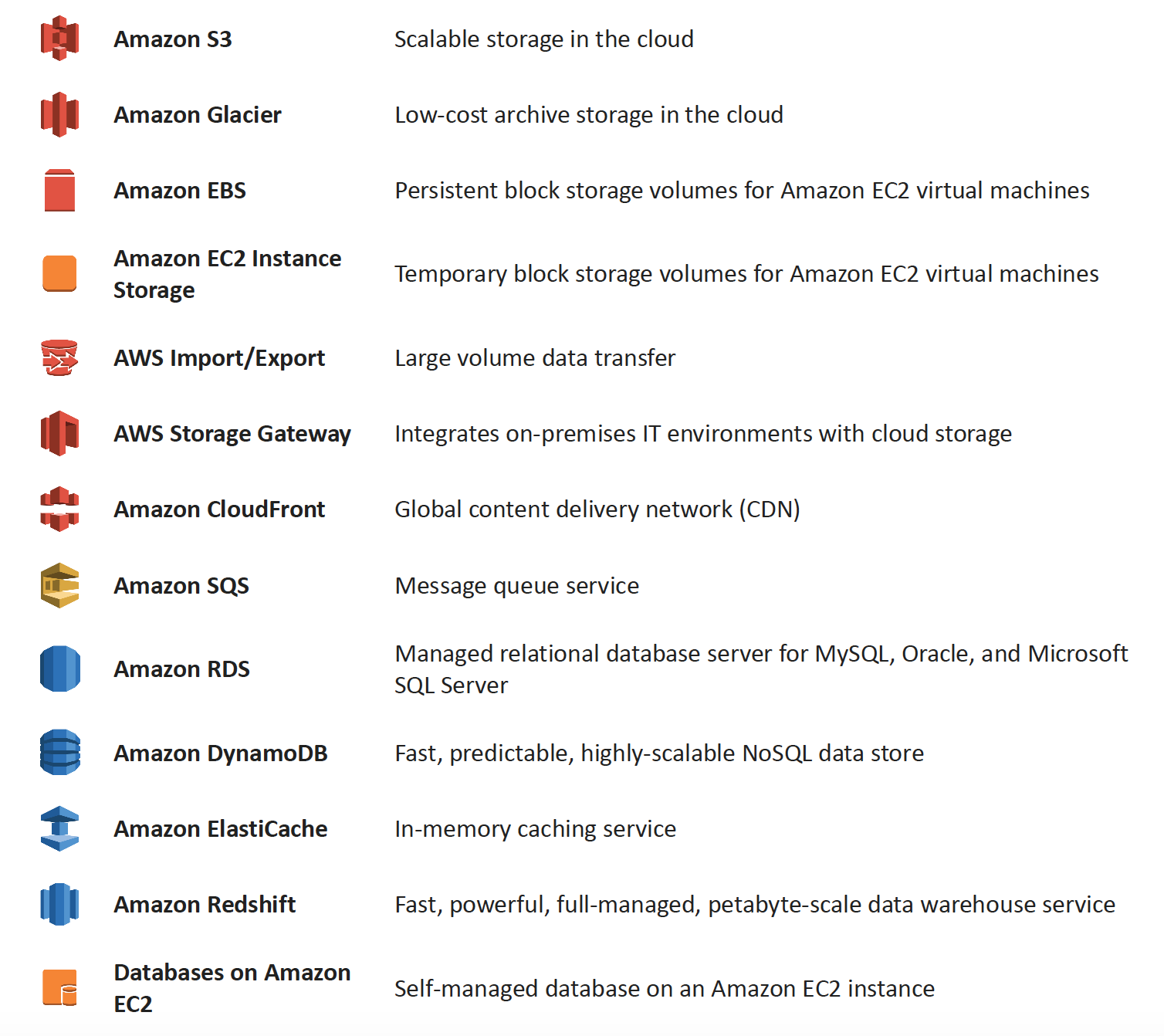
AWS Various Storage Options

AWS Storage Services

Amazon S3 & S3 Glacier Storage Classes

More Details @ AWS Storage Options – S3 & Glacier

Key Updates (2024-2026):

  • S3 Glacier is now three separate storage classes:
    • S3 Glacier Instant Retrieval – millisecond retrieval for rarely accessed data
    • S3 Glacier Flexible Retrieval (formerly S3 Glacier) – minutes to hours retrieval
    • S3 Glacier Deep Archive – lowest cost, 12-48 hour retrieval
  • S3 Express One Zone (launched 2023) – up to 10x faster performance than S3 Standard, single-digit millisecond latency, designed for most frequently accessed data. Received up to 85% price reduction in 2025.
  • S3 Tables (launched Dec 2024) – fully managed Apache Iceberg tables optimized for analytics workloads with up to 3x faster query throughput
  • S3 Intelligent-Tiering – now includes Archive Instant Access, Archive Access, and Deep Archive Access tiers

Amazon Elastic Block Store (EBS) & Instance Store Volumes

More details @ AWS Storage Options – EBS & Instance Store

Amazon EFS (Elastic File System)

  • Fully managed, elastic NFS file system for Linux workloads
  • Supports machine learning, big data analytics, web serving, and content management
  • Scales automatically without provisioning or managing capacity
  • Offers Standard and Infrequent Access storage classes with lifecycle management

Amazon FSx Family

  • FSx for Windows File Server – fully managed Windows-native file system
  • FSx for Lustre – high-performance file system for compute-intensive workloads (new Elastic storage class launched 2025)
  • FSx for NetApp ONTAP – fully managed shared storage with NetApp ONTAP (2nd gen file systems in 2024)
  • FSx for OpenZFS – fully managed OpenZFS file system (Intelligent-Tiering storage class launched Dec 2024, saves up to 85%)

Amazon RDS, DynamoDB & Database on EC2

More details @ AWS Storage Options – RDS, DynamoDB & Database on EC2

Amazon SQS & Redshift

More details @ AWS Storage Options – SQS & Redshift

Amazon CloudFront & ElastiCache

More details @ AWS Storage Options – CloudFront & ElastiCache

AWS Storage Gateway

More details @ AWS Storage Options – Storage Gateway & Import/Export

Key Updates:

  • Storage Gateway continues to provide S3 File Gateway, Tape Gateway, and Volume Gateway
  • FSx File Gateway is no longer available to new customers (effective October 28, 2024). Existing customers should migrate to direct Amazon FSx for Windows File Server access.
  • All Storage Gateway appliances must migrate from Amazon Linux 2 to AL2023 for continued updates

AWS Data Transfer & Migration Services

⚠️ AWS Import/Export & Snow Family Updates:

  • AWS Import/Export (original disk-shipping service) – deprecated long ago, replaced by Snow Family
  • AWS Snowmobile – Retired in March 2024. Service is no longer available.
  • AWS Snowcone – Discontinued effective November 12, 2024. Support ended November 12, 2025.
  • AWS Snowball Edge – Only available to existing customers as of November 7, 2025. Not available to new customers.

Recommended Replacements:

  • AWS DataSync – for online data transfers (now supports cross-cloud transfers to Google Cloud, Azure, Oracle Cloud as of 2025)
  • AWS Data Transfer Terminal (launched Dec 2024) – secure physical locations where you bring your storage devices and connect directly to the AWS network for high-speed uploads to S3, EFS, and other services
  • AWS Outposts – for edge computing use cases previously served by Snow devices
  • AWS Partner solutions – for specialized migration needs

AWS Backup

  • Fully managed, centralized backup service that automates data protection across AWS services and hybrid workloads
  • Supports EC2, EBS, RDS, DynamoDB, EFS, FSx, S3, Storage Gateway, and Amazon EKS (added 2025)
  • Provides ransomware detection and recovery capabilities
  • Supports cross-Region and cross-account backup with AWS Organizations integration
  • Logically air-gapped vaults for additional protection
  • Policy-based backup plans with configurable frequency and retention

Deprecated Services Referenced in Exam Questions

⚠️ Amazon Elastic Transcoder – EOL November 13, 2025

Amazon Elastic Transcoder has been discontinued. AWS Elemental MediaConvert is the recommended replacement, offering better performance, more features, and lower pricing. Questions referencing Elastic Transcoder still appear on older exam versions but the correct architectural pattern (S3 + transcoding + CloudFront) remains valid using MediaConvert.

⚠️ Amazon SWF (Simple Workflow Service) – Superseded by Step Functions

While SWF remains available, AWS recommends Step Functions for all new applications. SWF still appears in exam questions but new designs should use Step Functions for workflow orchestration.

AWS Certification Exam Practice Questions

  • Questions are collected from Internet and the answers are marked as per my knowledge and understanding (which might differ with yours).
  • AWS services are updated everyday and both the answers and questions might be outdated soon, so research accordingly.
  • AWS exam questions are not updated to keep up the pace with AWS updates, so even if the underlying feature has changed the question might not be updated
  • Open to further feedback, discussion and correction.
  1. You are developing a highly available web application using stateless web servers. Which services are suitable for storing session state data? Choose 3 answers.
    1. Elastic Load Balancing
    2. Amazon Relational Database Service (RDS)
    3. Amazon CloudWatch
    4. Amazon ElastiCache
    5. Amazon DynamoDB
    6. AWS Storage Gateway
  2. Your firm has uploaded a large amount of aerial image data to S3. In the past, in your on-premises environment, you used a dedicated group of servers to oaten process this data and used Rabbit MQ, an open source messaging system, to get job information to the servers. Once processed the data would go to tape and be shipped offsite. Your manager told you to stay with the current design, and leverage AWS archival storage and messaging services to minimize cost. Which is correct? [PROFESSIONAL]
    1. Use SQS for passing job messages, use Cloud Watch alarms to terminate EC2 worker instances when they become idle. Once data is processed, change the storage class of the S3 objects to Reduced Redundancy Storage.
    2. Setup Auto-Scaled workers triggered by queue depth that use spot instances to process messages in SQS. Once data is processed, change the storage class of the S3 objects to Reduced Redundancy Storage.
    3. Setup Auto-Scaled workers triggered by queue depth that use spot instances to process messages in SQS. Once data is processed, change the storage class of the S3 objects to Glacier. (Now S3 Glacier Flexible Retrieval or S3 Glacier Deep Archive)
    4. Use SNS to pass job messages use Cloud Watch alarms to terminate spot worker instances when they become idle. Once data is processed, change the storage class of the S3 object to Glacier.
  3. You are developing a new mobile application and are considering storing user preferences in AWS, which would provide a more uniform cross-device experience to users using multiple mobile devices to access the application. The preference data for each user is estimated to be 50KB in size. Additionally 5 million customers are expected to use the application on a regular basis. The solution needs to be cost-effective, highly available, scalable and secure, how would you design a solution to meet the above requirements? [PROFESSIONAL]
    1. Setup an RDS MySQL instance in 2 availability zones to store the user preference data. Deploy a public facing application on a server in front of the database to manage security and access credentials
    2. Setup a DynamoDB table with an item for each user having the necessary attributes to hold the user preferences. The mobile application will query the user preferences directly from the DynamoDB table. Utilize STS. Web Identity Federation, and DynamoDB Fine Grained Access Control to authenticate and authorize access
    3. Setup an RDS MySQL instance with multiple read replicas in 2 availability zones to store the user preference data .The mobile application will query the user preferences from the read replicas. Leverage the MySQL user management and access privilege system to manage security and access credentials.
    4. Store the user preference data in S3 Setup a DynamoDB table with an item for each user and an item attribute pointing to the user’ S3 object. The mobile application will retrieve the S3 URL from DynamoDB and then access the S3 object directly utilize STS, Web identity Federation, and S3 ACLs to authenticate and authorize access.
  4. A company is building a voting system for a popular TV show, viewers would watch the performances then visit the show’s website to vote for their favorite performer. It is expected that in a short period of time after the show has finished the site will receive millions of visitors. The visitors will first login to the site using their Amazon.com credentials and then submit their vote. After the voting is completed the page will display the vote totals. The company needs to build the site such that can handle the rapid influx of traffic while maintaining good performance but also wants to keep costs to a minimum. Which of the design patterns below should they use? [PROFESSIONAL]
    1. Use CloudFront and an Elastic Load balancer in front of an auto-scaled set of web servers, the web servers will first can the Login With Amazon service to authenticate the user then process the users vote and store the result into a multi-AZ Relational Database Service instance.
    2. Use CloudFront and the static website hosting feature of S3 with the Javascript SDK to call the Login With Amazon service to authenticate the user, use IAM Roles to gain permissions to a DynamoDB table to store the users vote.
    3. Use CloudFront and an Elastic Load Balancer in front of an auto-scaled set of web servers, the web servers will first call the Login with Amazon service to authenticate the user, the web servers will process the users vote and store the result into a DynamoDB table using IAM Roles for EC2 instances to gain permissions to the DynamoDB table.
    4. Use CloudFront and an Elastic Load Balancer in front of an auto-scaled set of web servers, the web servers will first call the Login With Amazon service to authenticate the user, the web servers would process the users vote and store the result into an SQS queue using IAM Roles for EC2 Instances to gain permissions to the SQS queue. A set of application servers will then retrieve the items from the queue and store the result into a DynamoDB table
  5. A large real-estate brokerage is exploring the option to adding a cost-effective location-based alert to their existing mobile application. The application backend infrastructure currently runs on AWS. Users who opt in to this service will receive alerts on their mobile device regarding real-estate offers in proximity to their location. For the alerts to be relevant delivery time needs to be in the low minute count. The existing mobile app has 5 million users across the US. Which one of the following architectural suggestions would you make to the customer? [PROFESSIONAL]
    1. Mobile application will submit its location to a web service endpoint utilizing Elastic Load Balancing and EC2 instances. DynamoDB will be used to store and retrieve relevant offers. EC2 instances will communicate with mobile carriers/device providers to push alerts back to mobile application.
    2. Use AWS Direct Connect or VPN to establish connectivity with mobile carriers EC2 instances will receive the mobile applications location through carrier connection: RDS will be used to store and relevant offers. EC2 instances will communicate with mobile carriers to push alerts back to the mobile application
    3. Mobile application will send device location using SQS. EC2 instances will retrieve the relevant offers from DynamoDB. AWS Mobile Push will be used to send offers to the mobile application (Note: Amazon SNS Mobile Push is now the terminology for mobile push notifications)
    4. Mobile application will send device location using AWS Mobile Push. EC2 instances will retrieve the relevant offers from DynamoDB. EC2 instances will communicate with mobile carriers/device providers to push alerts back to the mobile application.
  6. You are running a news website in the eu-west-1 region that updates every 15 minutes. The website has a worldwide audience and it uses an Auto Scaling group behind an Elastic Load Balancer and an Amazon RDS database. Static content resides on Amazon S3, and is distributed through Amazon CloudFront. Your Auto Scaling group is set to trigger a scale up event at 60% CPU utilization; you use an Amazon RDS extra-large DB instance with 10.000 Provisioned IOPS its CPU utilization is around 80%. While freeable memory is in the 2 GB range. Web analytics reports show that the average load time of your web pages is around 1.5 to 2 seconds, but your SEO consultant wants to bring down the average load time to under 0.5 seconds. How would you improve page load times for your users? (Choose 3 answers) [PROFESSIONAL]
    1. Lower the scale up trigger of your Auto Scaling group to 30% so it scales more aggressively.
    2. Add an Amazon ElastiCache caching layer to your application for storing sessions and frequent DB queries
    3. Configure Amazon CloudFront dynamic content support to enable caching of re-usable content from your site
    4. Switch Amazon RDS database to the high memory extra-large Instance type
    5. Set up a second installation in another region, and use the Amazon Route 53 latency-based routing feature to select the right region.
  7. A read only news reporting site with a combined web and application tier and a database tier that receives large and unpredictable traffic demands must be able to respond to these traffic fluctuations automatically. What AWS services should be used meet these requirements? [PROFESSIONAL]
    1. Stateless instances for the web and application tier synchronized using ElastiCache Memcached in an autoscaling group monitored with CloudWatch. And RDS with read replicas.
    2. Stateful instances for the web and application tier in an autoscaling group monitored with CloudWatch and RDS with read replicas
    3. Stateful instances for the web and application tier in an autoscaling group monitored with CloudWatch. And multi-AZ RDS
    4. Stateless instances for the web and application tier synchronized using ElastiCache Memcached in an autoscaling group monitored with CloudWatch and multi-AZ RDS
  8. You have a periodic Image analysis application that gets some files as input, analyzes them and for each file writes some data in output to a ten file. The number of files in input per day is high and concentrated in a few hours of the day. Currently you have a server on EC2 with a large EBS volume that hosts the input data and the results it takes almost 20 hours per day to complete the process. What services could be used to reduce the elaboration time and improve the availability of the solution? [PROFESSIONAL]
    1. S3 to store I/O files. SQS to distribute elaboration commands to a group of hosts working in parallel. Auto scaling to dynamically size the group of hosts depending on the length of the SQS queue
    2. EBS with Provisioned IOPS (PIOPS) to store I/O files. SNS to distribute elaboration commands to a group of hosts working in parallel Auto Scaling to dynamically size the group of hosts depending on the number of SNS notifications
    3. S3 to store I/O files, SNS to distribute evaporation commands to a group of hosts working in parallel. Auto scaling to dynamically size the group of hosts depending on the number of SNS notifications
    4. EBS with Provisioned IOPS (PIOPS) to store I/O files SQS to distribute elaboration commands to a group of hosts working in parallel Auto Scaling to dynamically size the group to hosts depending on the length of the SQS queue.
  9. A 3-tier e-commerce web application is current deployed on-premises and will be migrated to AWS for greater scalability and elasticity. The web server currently shares read-only data using a network distributed file system The app server tier uses a clustering mechanism for discovery and shared session state that depends on IP multicast The database tier uses shared-storage clustering to provide database fail over capability, and uses several read slaves for scaling. Data on all servers and the distributed file system directory is backed up weekly to off-site tapes. Which AWS storage and database architecture meets the requirements of the application? [PROFESSIONAL]
    1. Web servers store read-only data in S3, and copy from S3 to root volume at boot time. App servers share state using a combination of DynamoDB and IP unicast. Database use RDS with multi-AZ deployment and one or more Read Replicas. Backup web and app servers backed up weekly via AMIs, database backed up via DB snapshots.
    2. Web servers store read-only data in S3, and copy from S3 to root volume at boot time. App servers share state using a combination of DynamoDB and IP unicast. Database use RDS with multi-AZ deployment and one or more Read replicas. Backup web servers app servers, and database backed up weekly to Glacier using snapshots (Snapshots to Glacier don’t work directly with EBS snapshots)
    3. Web servers store read-only data in S3 and copy from S3 to root volume at boot time. App servers share state using a combination of DynamoDB and IP unicast. Database use RDS with multi-AZ deployment. Backup web and app servers backed up weekly via AMIs. Database backed up via DB snapshots (Need Read replicas for scalability and elasticity)
    4. Web servers, store read-only data in an EC2 NFS server, mount to each web server at boot time App servers share state using a combination of DynamoDB and IP multicast Database use RDS with multi-AZ deployment and one or more Read Replicas Backup web and app servers backed up weekly via AMIs database backed up via DB snapshots (IP multicast not available in AWS)
  10. Our company is getting ready to do a major public announcement of a social media site on AWS. The website is running on EC2 instances deployed across multiple Availability Zones with a Multi-AZ RDS MySQL Extra Large DB Instance. The site performs a high number of small reads and writes per second and relies on an eventual consistency model. After comprehensive tests you discover that there is read contention on RDS MySQL. Which are the best approaches to meet these requirements? (Choose 2 answers) [PROFESSIONAL]
    1. Deploy ElastiCache in-memory cache running in each availability zone
    2. Implement sharding to distribute load to multiple RDS MySQL instances (Would distribute read write both, focus is on read contention)
    3. Increase the RDS MySQL Instance size and Implement provisioned IOPS (Would distribute read write both, focus is on read contention)
    4. Add an RDS MySQL read replica in each availability zone
  11. Run 2-tier app with the following: an ELB, three web app server on EC2, and 1 MySQL RDS db. With grown load, db queries take longer and longer and slow down the overall response time for user request. What Options could speed up performance? (Choose 3) [PROFESSIONAL]
    1. Create an RDS read-replica and redirect half of the database read request to it
    2. Cache database queries in Amazon ElastiCache
    3. Setup RDS in multi-availability zone mode.
    4. Shard the database and distribute loads between shards.
    5. Use Amazon CloudFront to cache database queries.
  12. You have a web application leveraging an Elastic Load Balancer (ELB) In front of the web servers deployed using an Auto Scaling Group Your database is running on Relational Database Service (RDS) The application serves out technical articles and responses to them in general there are more views of an article than there are responses to the article. On occasion, an article on the site becomes extremely popular resulting in significant traffic Increases that causes the site to go down. What could you do to help alleviate the pressure on the infrastructure while maintaining availability during these events? Choose 3 answers [PROFESSIONAL]
    1. Leverage CloudFront for the delivery of the articles.
    2. Add RDS read-replicas for the read traffic going to your relational database
    3. Leverage ElastiCache for caching the most frequently used data.
    4. Use SQS to queue up the requests for the technical posts and deliver them out of the queue (does not process and would not be real time)
    5. Use Route53 health checks to fail over to an S3 bucket for an error page (more of an error handling then availability)
  1. Your website is serving on-demand training videos to your workforce. Videos are uploaded monthly in high resolution MP4 format. Your workforce is distributed globally often on the move and using company-provided tablets that require the HTTP Live Streaming (HLS) protocol to watch a video. Your company has no video transcoding expertise and it required you might need to pay for a consultant. How do you implement the most cost-efficient architecture without compromising high availability and quality of video delivery? [PROFESSIONAL]
    1. AWS Elemental MediaConvert to transcode original high-resolution MP4 videos to HLS. S3 to host videos with Lifecycle Management to archive original files to S3 Glacier Flexible Retrieval after a few days. CloudFront to serve HLS transcoded videos from S3. (MediaConvert replaces Elastic Transcoder (EOL Nov 2025) for high quality transcoding. S3 to host videos cheaply, Glacier for archives and CloudFront for high availability)
    2. A video transcoding pipeline running on EC2 using SQS to distribute tasks and Auto Scaling to adjust the number of nodes depending on the length of the queue S3 to host videos with Lifecycle Management to archive all files to Glacier after a few days CloudFront to serve HLS transcoding videos from Glacier
    3. AWS Elemental MediaConvert to transcode original high-resolution MP4 videos to HLS EBS volumes to host videos and EBS snapshots to incrementally backup original files after a few days. CloudFront to serve HLS transcoded videos from EC2.
    4. A video transcoding pipeline running on EC2 using SQS to distribute tasks and Auto Scaling to adjust the number of nodes depending on the length of the queue. EBS volumes to host videos and EBS snapshots to incrementally backup original files after a few days. CloudFront to serve HLS transcoded videos from EC2

    Note: Original question referenced Elastic Transcoder which reached End of Life on November 13, 2025. AWS Elemental MediaConvert is the replacement service. The architectural pattern remains the same.

  2. To meet regulatory requirements, a pharmaceuticals company needs to archive data after a drug trial test is concluded. Each drug trial test may generate up to several thousands of files, with compressed file sizes ranging from 1 byte to 100MB. Once archived, data rarely needs to be restored, and on the rare occasion when restoration is needed, the company has 24 hours to restore specific files that match certain metadata. Searches must be possible by numeric file ID, drug name, participant names, date ranges, and other metadata. Which is the most cost-effective architectural approach that can meet the requirements? [PROFESSIONAL]
    1. Store individual files in Amazon S3 Glacier, using the file ID as the archive name. When restoring data, query the Amazon Glacier vault for files matching the search criteria. (Individual files are expensive and does not allow searching by participant names etc)
    2. Store individual files in Amazon S3, and store search metadata in an Amazon Relational Database Service (RDS) multi-AZ database. Create a lifecycle rule to move the data to Amazon S3 Glacier after a certain number of days. When restoring data, query the Amazon RDS database for files matching the search criteria, and move the files matching the search criteria back to S3 Standard class. (As the data is not needed can be stored to Glacier directly and the data need not be moved back to S3 standard)
    3. Store individual files in Amazon S3 Glacier, and store the search metadata in an Amazon RDS multi-AZ database. When restoring data, query the Amazon RDS database for files matching the search criteria, and retrieve the archive name that matches the file ID returned from the database query. (Individual files and Multi-AZ is expensive)
    4. First, compress and then concatenate all files for a completed drug trial test into a single Amazon S3 Glacier archive. Store the associated byte ranges for the compressed files along with other search metadata in an Amazon RDS database with regular snapshotting. When restoring data, query the database for files that match the search criteria, and create restored files from the retrieved byte ranges.
    5. Store individual compressed files and search metadata in Amazon Simple Storage Service (S3). Create a lifecycle rule to move the data to Amazon S3 Glacier, after a certain number of days. When restoring data, query the Amazon S3 bucket for files matching the search criteria, and retrieve the file to S3 reduced redundancy in order to move it back to S3 Standard class. (Once the data is moved from S3 to Glacier the metadata is lost, as Glacier does not have metadata and must be maintained externally. Also S3 Reduced Redundancy Storage is no longer recommended.)
  3. A document storage company is deploying their application to AWS and changing their business model to support both free tier and premium tier users. The premium tier users will be allowed to store up to 200GB of data and free tier customers will be allowed to store only 5GB. The customer expects that billions of files will be stored. All users need to be alerted when approaching 75 percent quota utilization and again at 90 percent quota use. To support the free tier and premium tier users, how should they architect their application? [PROFESSIONAL]
    1. The company should utilize an Amazon Simple Workflow Service activity worker that updates the users data counter in Amazon DynamoDB. The activity worker will use Simple Email Service to send an email if the counter increases above the appropriate thresholds. (Note: For new implementations, AWS Step Functions with DynamoDB and SES would be the modern approach)
    2. The company should deploy an Amazon Relational Database Service relational database with a store objects table that has a row for each stored object along with size of each object. The upload server will query the aggregate consumption of the user in question by first determining the files stored by the user, and then querying the stored objects table for respective file sizes and send an email via Amazon Simple Email Service if the thresholds are breached.
    3. The company should write both the content length and the username of the files owner as S3 metadata for the object. They should then create a file watcher to iterate over each object and aggregate the size for each user and send a notification via Amazon Simple Queue Service to an emailing service if the storage threshold is exceeded.
    4. The company should create two separated Amazon Simple Storage Service buckets one for data storage for free tier users and another for data storage for premium tier users. An Amazon Simple Workflow Service activity worker will query all objects for a given user based on the bucket the data is stored
  4. Your company has been contracted to develop and operate a website that tracks NBA basketball statistics. Statistical data to derive reports like “best game-winning shots from the regular season” and more frequently built reports like “top shots of the game” need to be stored durably for repeated lookup. Leveraging social media techniques, NBA fans submit and vote on new report types from the existing data set so the system needs to accommodate variability in data queries and new static reports must be generated and posted daily. Initial research in the design phase indicates that there will be over 3 million report queries on game day by end users and other applications that use this application as a data source. It is expected that this system will gain in popularity over time and reach peaks of 10-15 million report queries of the system on game days. Select the answer that will allow your application to best meet these requirements while minimizing costs. [PROFESSIONAL]
    1. Launch a multi-AZ MySQL Amazon Relational Database Service (RDS) Read Replica connected to your multi AZ master database and generate reports by querying the Read Replica. Perform a daily table cleanup.
    2. Implement a multi-AZ MySQL RDS deployment and have the application generate reports from Amazon ElastiCache for in-memory performance results. Utilize the default expire parameter for items in the cache.
    3. Generate reports from a multi-AZ MySQL Amazon RDS deployment and have an offline task put reports in Amazon Simple Storage Service (S3) and use CloudFront to cache the content. Use a TTL to expire objects daily. (Offline task with S3 storage and CloudFront cache)
    4. Query a multi-AZ MySQL RDS instance and store the results in a DynamoDB table. Generate reports from the DynamoDB table. Remove stale tables daily.

References
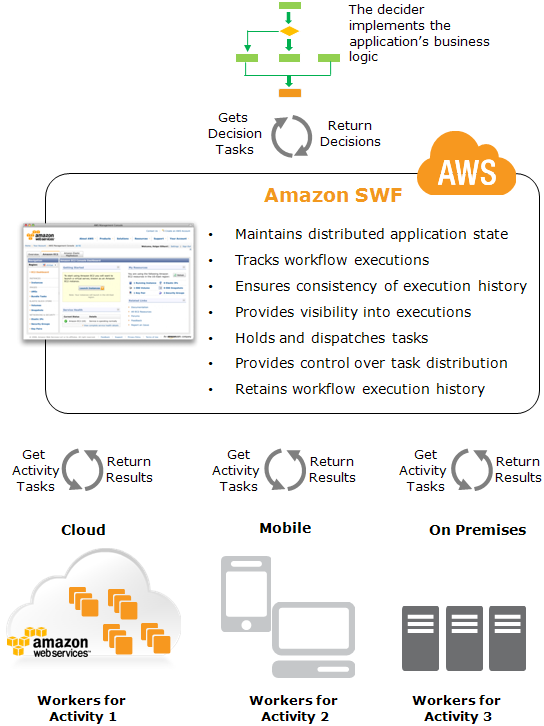
AWS Storage Options – SQS & Redshift

SQS

  • is a fully managed message queuing service that provides a reliable, highly scalable, hosted queue for temporary storage and delivery of messages up to 1 MiB in size (increased from 256 KB in August 2025).
  • supports a virtually unlimited number of queues and supports two queue types:
    • Standard queues – unordered, at-least-once delivery with nearly unlimited throughput.
    • FIFO queues – exactly-once processing with strict message ordering, supporting up to 70,000 messages per second with high throughput mode.

Ideal Usage Patterns

  • is ideally suited to any scenario where multiple application components must communicate and coordinate their work in a loosely coupled manner particularly producer consumer scenarios.
  • can be used to coordinate a multi-step processing pipeline, where each message is associated with a task that must be processed.
  • enables the number of worker instances to scale up or down, and also enable the processing power of each single worker instance to scale up or down, to suit the total workload, without any application changes.
  • ideal for multi-tenant workloads using fair queues (launched July 2025) to mitigate noisy neighbor impact and ensure consistent processing across tenants.
  • supports event-driven architectures with AWS Lambda event source mapping, including provisioned mode for 3x faster scaling and 16x higher concurrency.

Anti-Patterns

  • Binary or Large Messages
    • SQS supports messages up to 1 MiB. If the application requires binary or messages exceeding this limit, it is best to use the Amazon SQS Extended Client Library with Amazon S3 to store the payload and SQS to store the pointer.
  • Long Term storage
    • SQS stores messages for max 14 days and if application requires storage period longer than 14 days, Amazon S3 or other storage options should be preferred.
  • High-speed message queuing or very short tasks
    • If the application requires a very high-speed message send and receive response from a single producer or consumer, use of Amazon DynamoDB or a message-queuing system hosted on Amazon EC2 may be more appropriate.

Performance

  • is a distributed queuing system that is optimized for horizontal scalability, not for single-threaded sending or receiving speeds.
  • Standard queues support nearly unlimited throughput (thousands of transactions per second per API action).
  • FIFO queues support up to 3,000 messages per second with batching by default, or up to 70,000 messages per second (700,000 with batching) in high throughput mode in select regions.
  • FIFO queues support up to 120,000 in-flight messages (increased from 20,000 in November 2024).
  • Higher receive performance can be achieved by requesting multiple messages (up to 10) in a single call.
  • Fair queues (July 2025) automatically reorder messages to maintain consistent dwell time across tenants, preventing noisy neighbors from impacting processing latency.

Durability & Availability

  • are highly durable but temporary.
  • stores all messages redundantly across multiple servers and data centers.
  • Message retention time is configurable on a per-queue basis, from a minimum of one minute to a maximum of 14 days.
  • Messages are retained in a queue until they are explicitly deleted, or until they are automatically deleted upon expiration of the retention time.
  • supports dead-letter queues (DLQ) for isolating messages that fail processing, with DLQ redrive capability to move messages back to the source queue or a custom destination for reprocessing.

Cost Model

  • pricing is based on
    • number of requests (per million requests)
    • the amount of data transferred out (priced per GB per month)
    • First 1 million requests per month are free (Free Tier)

Scalability & Elasticity

  • is both highly elastic and massively scalable.
  • is designed to enable a virtually unlimited number of computers to read and write a virtually unlimited number of messages at any time.
  • supports virtually unlimited numbers of queues and messages per queue for any user.
  • supports dual-stack (IPv4 and IPv6) endpoints for flexible network access.

Key Features (Recent Updates)

  • Message payload size increased to 1 MiB (August 2025) – supports larger messages for both standard and FIFO queues without needing the Extended Client Library.
  • Fair queues (July 2025) – automatically mitigates noisy neighbor impact in multi-tenant standard queues by reordering messages to maintain consistent dwell time across tenants.
  • FIFO high throughput mode – up to 70,000 TPS per API action (November 2023), enabling 700,000 messages per second with batching.
  • FIFO in-flight limit increase (November 2024) – increased from 20,000 to 120,000 in-flight messages per FIFO queue.
  • Lambda provisioned mode for SQS (January 2025) – dedicated polling resources providing 3x faster scaling and 16x higher concurrency for event source mapping.
  • Dead-letter queue redrive – move failed messages from DLQ back to source queue or a custom destination for both standard and FIFO queues.
  • Simplified KMS permissions – SendMessage no longer requires kms:Decrypt permission; only kms:GenerateDataKey is needed.
  • Temporary queues – application-managed virtual queues for request-response patterns that reduce cost and development time.

Amazon Redshift

  • is a fast, fully-managed, petabyte-scale data warehouse service that makes it simple and cost-effective to efficiently analyze all data using existing business intelligence tools.
  • is optimized for datasets that range from a few hundred gigabytes to a petabyte or more.
  • manages the work needed to set up, operate, and scale a data warehouse, from provisioning the infrastructure capacity to automating ongoing administrative tasks such as backups and patching.
  • offers two deployment models: Provisioned clusters (RA3 and new RG instances) and Redshift Serverless (pay-per-use with automatic scaling).
⚠️ Important: Amazon Redshift DC2 instances reached End of Life on April 24, 2026. New DC2 clusters cannot be created since May 15, 2025. Migrate to RA3 instances, RG instances (Graviton-powered, GA May 2026), or Redshift Serverless. DS2 instances were previously deprecated in favor of RA3.

Ideal Usage Pattern

  • is ideal for analyzing large datasets using existing business intelligence tools.
  • Common use cases include
    • Analyze global sales data for multiple products
    • Store historical stock trade data
    • Analyze ad impressions and clicks
    • Aggregate gaming data
    • Analyze social trends
    • Measure clinical quality, operation efficiency, and financial performance in the health care space
    • Near real-time analytics using zero-ETL integrations from Aurora, DynamoDB, RDS, and SaaS applications
    • Data lakehouse analytics querying data in S3 data lakes using Redshift Spectrum
    • Generative AI applications using Amazon Bedrock integration for sentiment analysis, text generation, and summarization directly on warehouse data

Anti-Pattern

  • OLTP workloads
    • Redshift is a column-oriented database and more suited for data warehousing and analytics. If application involves online transaction processing, Amazon RDS or Aurora would be a better choice.
  • Blob data
    • For Blob storage, Amazon S3 would be a better choice with metadata in other storage as RDS or DynamoDB.

Performance

  • Amazon Redshift allows very high query performance on datasets ranging in size from hundreds of gigabytes to a petabyte or more.
  • It uses columnar storage, data compression, and zone maps to reduce the amount of I/O needed to perform queries.
  • It has a massively parallel processing (MPP) architecture that parallelizes and distributes SQL operations to take advantage of all available resources.
  • Underlying hardware is designed for high performance data processing that uses local attached storage to maximize throughput.
  • New RG instances (GA May 2026) powered by AWS Graviton deliver up to 2.4x faster performance than RA3 at 30% lower price per vCPU.
  • AI-driven scaling and optimization in Redshift Serverless automatically provisions and scales capacity for demanding workloads.
  • Query performance improvements (March 2026) speed up new queries in BI dashboards and ETL workloads by up to 7x.
  • Concurrency scaling automatically adds additional cluster capacity to handle burst read and write workloads, with support for data ingestion (COPY queries in Parquet/ORC from S3).

Durability & Availability

  • Amazon Redshift stores three copies of your data—all data written to a node in your cluster is automatically replicated to other nodes within the cluster, and all data is continuously backed up to Amazon S3.
  • Snapshots are automated, incremental, and continuous and stored for a user-defined period (1-35 days).
  • Manual snapshots can be created and are retained until explicitly deleted.
  • Amazon Redshift continuously monitors the health of the cluster and automatically re-replicates data from failed drives and replaces nodes as necessary.
  • Multi-AZ deployments (GA for RA3 clusters) run your data warehouse across two Availability Zones simultaneously, providing continued operation during AZ failure scenarios.

Cost Model

  • Provisioned clusters pricing:
    • Compute node hours – total hours run across all compute nodes (RA3 or RG instances)
    • Redshift Managed Storage (RMS) – billed per GB/month, separate from compute (RA3/RG only)
    • Backup storage – for automated and manual snapshots beyond the free tier
    • Data transfer – standard AWS data transfer charges apply
    • Concurrency scaling – free for 1 hour per day per cluster, then per-second billing
    • Spectrum – per TB of data scanned in S3
  • Redshift Serverless pricing:
    • Compute – per RPU-hour (Redshift Processing Unit), billed per second with no charge when idle
    • Storage – per GB/month for managed storage
  • Reserved Instance pricing available for provisioned clusters (1-year or 3-year terms) for significant discounts.

Scalability & Elasticity

  • Provisioned clusters – Elastic resize allows adding or removing nodes within minutes. Classic resize available for node type changes.
  • Redshift Serverless – automatically scales compute capacity up and down based on workload demands with no cluster management required.
  • Data sharing allows securely sharing live, transactionally consistent data across Redshift clusters (cross-account, cross-region) without copying data.
  • Multi-warehouse writes through data sharing (GA November 2024) enable using different warehouses of different types and sizes for ETL workloads.

Key Features (Recent Updates)

  • RG Instances (GA May 2026) – New Graviton-powered instance family delivering 2.4x faster performance than RA3 at 30% lower price per vCPU.
  • DC2 End of Life (April 24, 2026) – Migrate to RA3, RG, or Serverless. New DC2 cluster creation blocked since May 15, 2025.
  • Redshift Serverless – Pay-per-use model with automatic scaling, AI-driven optimization, and per-second billing with no charge when idle.
  • Zero-ETL integrations – Near real-time data replication from Aurora, DynamoDB, RDS, and self-managed databases to Redshift without building ETL pipelines. Also supports SaaS sources (Salesforce, SAP, Zendesk).
  • Multi-AZ deployments – Run RA3 provisioned clusters across two Availability Zones for high availability.
  • Amazon Bedrock integration (October 2024) – Run generative AI tasks (text generation, sentiment analysis, summarization, classification) directly on Redshift data using foundation models via SQL.
  • Amazon Q generative SQL – Generate SQL from natural language prompts in the Redshift Query Editor.
  • Data sharing – Share live data across clusters, accounts, and regions without data movement. Supports multi-warehouse writes for ETL.
  • Redshift Spectrum – Query exabytes of data in S3 without loading it into Redshift, enabling data lakehouse architectures.
  • Concurrency scaling for ingestion (2026) – Automatically scales for COPY queries in Parquet/ORC formats from S3 during traffic spikes.
  • 7x query performance improvement (March 2026) – Faster response for BI dashboards, ETL pipelines, and near real-time analytics.

AWS Storage Options – CloudFront & ElastiCache

Amazon CloudFront

  • is a webservice for content delivery
  • provides low latency by caching and delivering content from a global network of 750+ Points of Presence (PoPs) across 100+ cities in 50+ countries
  • supports HTTP/HTTPS for static and dynamic content delivery
  • optimized to work with Amazon services like S3, ELB, MediaConvert etc. as well as works seamlessly with any non-AWS origin server
⚠️ Note: CloudFront RTMP distributions were discontinued on December 31, 2020. For streaming, use HTTP-based streaming protocols (HLS, DASH) with CloudFront web distributions and AWS Elemental MediaConvert.

Ideal Usage Patterns

  • is ideal for distribution of frequently accessed static content, or dynamic content or for streaming audio or video that benefits from edge delivery
  • API acceleration and real-time content personalization at the edge
  • security at the edge with integrated WAF, DDoS protection, and bot management

Anti-Pattern

  • Infrequently accessed data
    • If the data is infrequently accessed, it would be better to serve the data from the Origin server
  • Programmatic cache invalidation
    • CloudFront supports cache invalidation, however AWS recommends using object versioning rather than programmatic cache invalidation.

Performance

  • is designed for low latency and high bandwidth delivery of content by redirecting the user to the nearest edge location in terms of latency and caching the content preventing the round trip to the origin server
  • supports HTTP/2 and HTTP/3 (QUIC) for improved connection performance

Durability & Availability

  • provides high Availability by delivering content from a distributed global network of edge locations. Amazon also constantly monitors the network paths connecting Origin servers to CloudFront
  • does not provide durable storage, which is more of the responsibility of the underlying Origin server providing the content for e.g. S3

Cost Model

  • has pay-as-you-go pricing with two main components:
    • regional data transfer out (per GB) and
    • requests (per 10,000)
  • Flat-Rate Pricing Plans (launched Nov 2025) — combine CloudFront CDN, AWS WAF, DDoS protection, bot management, Route 53 DNS, CloudWatch Logs, edge compute, and S3 storage credits into one monthly price with no overage charges

Scalability & Elasticity

  • provides seamless scalability & elasticity by automatically responding to the increase or the decrease in the demand

Edge Compute

  • CloudFront Functions — lightweight functions for high-scale, latency-sensitive request/response transformations (URL rewrites, header manipulation, redirects) executed at 750+ PoPs
  • Lambda@Edge — more powerful compute triggered at regional edge caches for complex logic (authentication, dynamic origin selection, content generation)
  • CloudFront KeyValueStore (launched 2023) — globally distributed, low-latency data store for CloudFront Functions enabling dynamic configuration (A/B testing, feature flags, geo-routing) without code redeployment

Security

  • Origin Access Control (OAC) — recommended method to restrict S3 origin access to CloudFront only, replacing the legacy Origin Access Identity (OAI). OAI creation was deprecated in 2024; new distributions since March 2026 can only use OAC.
  • AWS Shield Standard — included automatically with every CloudFront distribution for DDoS protection at no extra cost
  • AWS WAF integration — protect against web exploits and bots at the edge
  • Field-Level Encryption — encrypt sensitive data fields at the edge before forwarding to origin

ElastiCache

  • is a fully managed, serverless caching service that makes it easy to deploy, operate, and scale distributed in-memory caches in the cloud
  • helps improves performance of the applications by allowing retrieval of data from fast, managed, in-memory caching system with microsecond latency and up to 99.99% availability SLA
  • supports three open-source caching engines:
    • Valkey (recommended for new workloads) — open-source fork of Redis OSS 7.2, stewarded by the Linux Foundation (BSD-3 licensed)
    • Memcached — simple object caching engine
    • Redis OSS — key-value store (note: Redis OSS 7.2 is the last fully open-source Redis version)
🆕 Valkey Engine (Oct 2024): AWS recommends Valkey for new workloads. It provides 33% lower Serverless pricing and 20% lower node-based pricing compared to Redis OSS, with better performance and active open-source development. Valkey is a drop-in replacement for Redis OSS 7.2 and can be upgraded in-place.

Deployment Modes

  • ElastiCache Serverless (launched Nov 2023)
    • zero infrastructure management with instant auto-scaling
    • pay-per-use pricing based on data stored (GB-hour) and ElastiCache Processing Units (ECPUs)
    • creates a cache in under a minute; starts as low as $6/month with Valkey
    • zero downtime maintenance
  • Node-based (self-designed clusters)
    • fine-grained control over node type, count, and placement
    • supports Reserved Nodes for cost savings
    • Graviton3-based nodes available for better price-performance

Ideal Usage Patterns

  • improving application performance by storing critical data in-memory for low latency access
  • use cases involve usage as a database front end for read heavy applications, improving performance and reducing load on databases, or managing user session data, cache dynamically generated pages, or compute intensive calculations etc.
  • Real-time search (2026) — full-text, exact-match, numeric range, and hybrid search with microsecond latency
  • Vector similarity search — AI-driven semantic retrieval for RAG and recommendation systems

Anti-Patterns

  • Persistent Data
    • If the application needs fast access to data coupled with strong data durability, Amazon DynamoDB would be a better option
    • Note: ElastiCache for Valkey now supports durability with Multi-AZ transactional log (June 2026), enabling fast failover and data recovery without data loss

Performance

  • provides microsecond read latency and single-digit millisecond write latency with throughput up to millions of requests per second
  • Valkey 9.0 (May 2026) introduces enhanced search capabilities with full-text, hybrid, and aggregation queries directly in the cache

Durability & Availability

  • provides up to 99.99% availability SLA with Multi-AZ deployments
  • With the Memcached engine
    • all ElastiCache nodes in a single cache cluster are provisioned in a single Availability Zone.
    • ElastiCache automatically monitors the health of your cache nodes and replaces them in the event of network partitioning, host hardware, or software failure.
    • In the event of cache node failure, the cluster remains available, but performance may be reduced due to time needed to repopulate the cache in the new “cold” cache nodes.
    • To provide enhanced fault-tolerance for Availability Zone failures or cold-cache effects, you can run redundant cache clusters in different Availability Zones.
  • With the Valkey/Redis OSS engine,
    • ElastiCache supports replication to up to five read replicas for scaling. To improve availability, you can place read replicas in other Availability Zones.
    • ElastiCache monitors the primary node, and if the node becomes unavailable, ElastiCache will repair or replace the primary node if possible, using the same DNS name.
    • If the primary cache node recovery fails or its Availability Zone is unavailable, primary node can be failed over to one of the read replicas with an API call.
    • Durability support (June 2026): Multi-AZ transactional log enables data persistence across AZs, preventing data loss during failover, recovery, and node restarts.

Cost Model

  • offers two pricing models:
    • Serverless: pay-per-use based on data stored (GB-hour) and ECPUs consumed. Valkey Serverless is 33% cheaper than Redis OSS Serverless.
    • Node-based: pricing per cache node-hour consumed. Supports Reserved Nodes for up to 55% savings.

Scalability & Elasticity

  • ElastiCache is highly scalable and elastic.
  • Serverless: instantly auto-scales to match application demand with no capacity planning
  • Node-based: Cache nodes can be added or deleted from the cache cluster. Auto Discovery enables automatic discovery of Memcached cache nodes by ElastiCache Clients when the nodes are added to or removed from an ElastiCache cluster.


Storage Options Whitepaper – Storage Gateway – Import/Export – AWS Certification

AWS Storage Options – Storage Gateway & Import/Export (Snow Family)

Provides a brief summary for the Ideal Use cases and Anti-Patterns for AWS Storage Gateway and AWS Snow Family (formerly Import/Export) storage options.

📌 2025/2026 Update: This post has been significantly updated to reflect current AWS service terminology and availability:

  • Storage Gateway now offers four gateway types: S3 File Gateway, FSx File Gateway (no longer available to new customers), Volume Gateway, and Tape Gateway.
  • AWS Import/Export was replaced by AWS Snowball (2015), and the Snow Family is being significantly reduced — Snowmobile retired (March 2024), Snowcone discontinued (Nov 2024), and Snowball Edge restricted to existing customers only (Nov 2025).
  • AWS Data Transfer Terminal is the new physical data transfer alternative for new customers.

AWS Storage Gateway

  • AWS Storage Gateway is a hybrid cloud storage service that provides on-premises access to virtually unlimited cloud storage.
  • Storage Gateway provides a standard set of storage protocols such as iSCSI, SMB, and NFS, which allow you to use AWS storage without rewriting existing applications.
  • It provides low-latency performance by maintaining frequently accessed data on-premises while securely storing all data encrypted in AWS.
  • For disaster recovery scenarios, it can serve as a cloud-hosted solution, together with EC2, that mirrors the entire production environment.
  • Storage Gateway can be deployed as a virtual machine (VM) within VMware, Hyper-V, or Linux KVM virtual environments, or as an Amazon EC2 instance within a VPC, or on a dedicated hardware appliance.
  • Storage Gateway offers four gateway types:
    • Amazon S3 File Gateway
      • Presents Amazon S3 objects as files accessible via NFS or SMB protocols.
      • On-premises applications read and write files to the gateway, which stores them as objects in S3 buckets.
      • Maintains a local cache of recently accessed files for low-latency retrieval.
      • Supports S3 Standard, S3 Intelligent-Tiering, S3 Standard-IA, and S3 One Zone-IA storage classes.
    • Amazon FSx File Gateway
      • Provides low-latency, on-premises access to fully managed Windows file shares in Amazon FSx for Windows File Server.
      • ⚠️ No longer available to new customers as of October 28, 2024. Existing customers can continue using the service. AWS recommends connecting directly to Amazon FSx for Windows File Server as an alternative.
    • Volume Gateway
      • Presents cloud-backed iSCSI block storage volumes to on-premises applications.
      • Operates in two modes:
        • Cached volumes (formerly Gateway-cached volumes) – Primary data stored in S3, with frequently accessed data retained locally in a cache. Minimizes the need to scale on-premises storage while providing low-latency access to frequently accessed data.
        • Stored volumes (formerly Gateway-stored volumes) – Complete primary data stored locally, while asynchronously backing up data to AWS as EBS snapshots. Provides low-latency access to entire datasets with durable, off-site backups.
      • Cached volumes can be up to 32 TiB; stored volumes can be up to 16 TiB.
    • Tape Gateway
      • Presents a virtual tape library (VTL) interface to existing backup applications using iSCSI.
      • Virtual tapes are stored in S3, and archived tapes are stored in S3 Glacier or S3 Glacier Deep Archive.
      • Compatible with leading backup software (Veeam, Veritas NetBackup, Commvault, etc.).

Ideal Usage Patterns

  • AWS Storage Gateway use cases include
    • Corporate file sharing and collaboration (S3 File Gateway)
    • Enabling on-premises backup applications to store primary backups in S3 (Volume Gateway, Tape Gateway)
    • Disaster recovery with cloud-backed storage
    • Data mirroring to cloud-based compute resources
    • Tiering on-premises data to cloud storage

Anti-Patterns

  • Database storage
    • For Database backup or storage, EC2 instances using EBS volumes or managed database services (RDS, Aurora) are better choices.

Performance

  • Performance depends on the speed and configuration of underlying local disks, network bandwidth between the iSCSI initiator and gateway VM, amount of local storage allocated to the gateway VM, and bandwidth between the gateway VM and AWS.
  • For cached volumes, providing enough local cache storage for recently accessed data is important for low-latency read access.
  • Storage Gateway efficiently uses Internet bandwidth by only uploading incremental changes (data that has changed), minimizing data sent over the Internet.
  • AWS Direct Connect can be used to increase throughput and reduce network costs by establishing a dedicated network connection between the on-premises gateway and AWS.
  • Storage Gateway supports bandwidth throttling to control the amount of network bandwidth used for data transfer.

Durability and Availability

  • AWS Storage Gateway durably stores on-premises application data by uploading it to S3.
  • S3 stores data across multiple facilities and on multiple devices within each facility, providing 99.999999999% (11 9s) durability.
  • S3 performs regular, systematic data integrity checks and is built to be automatically self-healing.

Cost Model

  • AWS Storage Gateway pricing components vary by gateway type:
    • S3 File Gateway: Storage (S3 pricing), requests, and data transfer
    • Volume Gateway: Volume storage usage (per GB per month), snapshot storage, and data transfer
    • Tape Gateway: Virtual tape storage, virtual tape shelf (archive) storage, and data retrieval
    • All types: No charge for the gateway software; charges apply for AWS storage used

Scalability and Elasticity

  • Storage Gateway stores data in Amazon S3, which provides virtually unlimited scalability and elasticity.
  • A single gateway supports up to 32 cached volumes (max 1,024 TiB total) or 32 stored volumes (max 512 TiB total).

Interfaces

  • AWS Management Console, AWS CLI, and AWS SDKs can be used to manage Storage Gateway.
  • Gateway VM images are available for VMware ESXi, Microsoft Hyper-V, and Linux KVM.
  • Hardware appliance option is available for environments without virtualization infrastructure.
  • Volumes are attached as iSCSI devices; file shares are accessible via NFS or SMB protocols.

AL2 to AL2023 Migration (2025-2026)

  • AWS is transitioning Storage Gateway appliance OS from Amazon Linux 2 to AL2023.
  • This migration enables new hybrid cloud storage features and maintains optimal performance and security.
  • Gateway versions 1.x.x cannot be updated to 2.x.x — a new gateway deployment is required.

AWS Import/Export (Replaced by AWS Snow Family)

⚠️ SERVICE DEPRECATED & SIGNIFICANTLY REDUCED

AWS Import/Export (the original ship-your-own-disk service) was fully replaced by AWS Snowball in 2015.

AWS Snow Family Current Status (2025):

  • AWS Snowmobile — Retired (March 2024). Service is no longer available.
  • AWS Snowcone (HDD & SSD) — Discontinued November 12, 2024. Support for existing customers ended November 12, 2025.
  • Previous generation Snowball devices (80TB Storage Optimized, 52 vCPU Compute Optimized, Compute Optimized with GPU) — Discontinued November 12, 2024.
  • AWS Snowball Edge (latest generation) — Only available to existing customers as of November 7, 2025. New customers cannot order Snowball Edge devices.

Alternatives for New Customers:

  • AWS DataSync — For online data transfers when network bandwidth is available
  • AWS Data Transfer Terminal — For secure physical data transfers at AWS-managed locations
  • AWS Partner solutions — Third-party data migration services

AWS Snow Family (Current Service)

  • AWS Snow Family provides secure, rugged devices for edge computing and offline data transfer.
  • AWS Snowball Edge is the primary device, available in two options:
    • Snowball Edge Storage Optimized (210 TB) — Primary device for large data transfers with high storage capacity and faster transfer speeds.
    • Snowball Edge Compute Optimized — For edge computing workloads requiring local processing power.
  • Data encryption is performed on the device itself, enabling higher data throughput and shorter transfer times.
  • Supports Amazon S3 compatible storage on the device for edge workloads.

AWS Data Transfer Terminal (New Alternative)

  • AWS Data Transfer Terminal is a secure, physical location where customers bring their storage devices to transfer data using a high-throughput connection directly to AWS.
  • Provides direct network connectivity to AWS services including Amazon S3, Amazon EFS, and others.
  • Available in multiple locations globally (New York, Los Angeles, San Francisco Bay Area, Munich, and more being added).
  • Customers reserve a date and time, visit the location, connect their storage devices, and transfer data.
  • No device shipping required — eliminates wait times associated with Snowball device logistics.
  • Ideal for customers who need frequent, high-volume physical data transfers.

Original AWS Import/Export (Historical Reference)

  • AWS Import/Export (now fully replaced) accelerated moving large amounts of data into and out of AWS using portable storage devices for transport.
  • AWS transferred data directly onto and off of storage devices using Amazon’s high-speed internal network, bypassing the Internet.
  • Supported importing into EBS snapshots, S3 buckets, and Glacier vaults, and exporting data from S3.

Ideal Usage Patterns (Snow Family / Data Transfer Terminal)

  • Ideal for transferring large amounts of data in and out of the AWS cloud, especially in cases where transferring the data over the Internet would be too slow (a week or more) or too costly.
  • Common use cases include:
    • Initial data migration to AWS (large-scale lift-and-shift)
    • Content distribution or regular data interchange with customers/business associates
    • Transfer to Amazon S3 for off-site backup and archival storage
    • Edge computing in disconnected environments (Snowball Edge only)
    • Disaster recovery with rapid data retrieval

Anti-Patterns

  • Data that is more easily transferred over the Internet in less than one week — use AWS DataSync or AWS Transfer Family instead.
  • For new customers needing physical data transfer (post Nov 2025) — use AWS Data Transfer Terminal or AWS Partner solutions.

Performance

  • Snowball Edge Storage Optimized 210TB devices provide up to 100 Gbps network connectivity.
  • Data transfer rate is bounded by the read/write speed of the storage device and network connectivity.
  • AWS Data Transfer Terminal provides high-throughput direct connections for fast transfers.

Durability and Availability

  • Durability and availability characteristics of the target storage (S3, EBS, EFS) apply after data has been imported.
  • Snowball Edge devices use 256-bit encryption and tamper-resistant enclosures for data security during transit.

Cost Model

  • AWS Snowball Edge pricing includes: service fee per job, shipping costs, and per-day charges for device use beyond included days.
  • Standard Amazon S3, EBS, and other storage pricing applies for the destination storage.
  • AWS Data Transfer Terminal pricing is based on reservation time and data transferred.

Scalability and Elasticity

  • Multiple Snowball Edge devices can be used in parallel for petabyte-scale transfers.
  • Large Data Migration Manager available in the AWS Console for managing multi-device migration projects.
  • For Amazon S3, individual objects may range up to 5 terabytes in size.
  • Aggregate total amount of data that can be imported is virtually unlimited.

Interfaces

  • AWS Snowball is managed through the AWS Management Console (OpsHub), AWS CLI, and SDKs.
  • AWS OpsHub provides a graphical interface for managing Snow devices.
  • AWS Data Transfer Terminal is managed through the AWS Management Console for reservations.

AWS Certification Exam Practice Questions

  • Questions are collected from Internet and the answers are marked as per my knowledge and understanding (which might differ with yours).
  • AWS services are updated everyday and both the answers and questions might be outdated soon, so research accordingly.
  • AWS exam questions are not updated to keep up the pace with AWS updates, so even if the underlying feature has changed the question might not be updated
  • Open to further feedback, discussion and correction.
  1. You are working with a customer who has 10 TB of archival data that they want to migrate to Amazon Glacier. The customer has a 1-Mbps connection to the Internet. Which service or feature provides the fastest method of getting the data into Amazon Glacier?
    1. Amazon Glacier multipart upload
    2. AWS Storage Gateway
    3. VM Import/Export
    4. AWS Import/Export (Now: AWS Snowball)

    Note: This question uses legacy service names. AWS Import/Export has been replaced by AWS Snowball Edge. As of Nov 2025, Snowball Edge is only available to existing customers — new customers should use AWS Data Transfer Terminal.

  2. A company needs to provide on-premises applications with low-latency access to frequently used data while storing the complete dataset in AWS for disaster recovery. Which Storage Gateway configuration is most appropriate?
    1. S3 File Gateway with local cache
    2. Volume Gateway in cached mode
    3. Volume Gateway in stored mode
    4. Tape Gateway
    Show Answer

    Answer: C – Volume Gateway in stored mode keeps the complete primary data locally for low-latency access to the entire dataset, while asynchronously backing up data to AWS as EBS snapshots for disaster recovery.

  3. A company wants to minimize on-premises storage costs while maintaining low-latency access to frequently accessed data. The full dataset is several hundred terabytes. Which Storage Gateway solution is most suitable?
    1. S3 File Gateway
    2. Volume Gateway in cached mode
    3. Volume Gateway in stored mode
    4. Tape Gateway
    Show Answer

    Answer: B – Volume Gateway in cached mode stores primary data in S3 while retaining frequently accessed data locally in a cache, minimizing on-premises storage requirements.

  4. A new customer needs to physically transfer 50 TB of data to AWS but cannot use AWS Snowball Edge (no longer available to new customers as of November 2025). What is the recommended alternative?
    1. AWS Snowcone
    2. AWS Snowmobile
    3. AWS Data Transfer Terminal
    4. AWS Import/Export with customer-owned devices
    Show Answer

    Answer: C – AWS Data Transfer Terminal provides secure, physical locations where customers can bring their storage devices and transfer data using high-throughput connections to AWS. Snowcone and Snowmobile are discontinued, and Import/Export was replaced by Snowball in 2015.

  5. Which AWS Storage Gateway type would you recommend for a company that wants to replace their physical tape backup infrastructure with cloud-based backup while keeping existing backup software?
    1. S3 File Gateway
    2. Volume Gateway
    3. Tape Gateway
    4. FSx File Gateway
    Show Answer

    Answer: C – Tape Gateway presents a virtual tape library (VTL) interface compatible with existing backup applications, allowing companies to replace physical tape infrastructure while maintaining their current backup workflows.