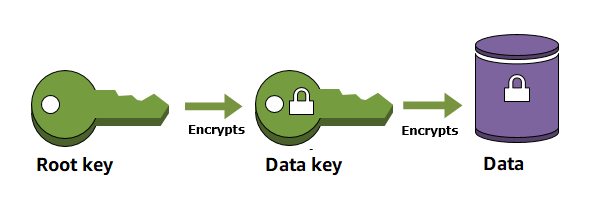
Envelope encryption is an optimized method for encrypting data that uses two different keys (Master key and Data key)
Master key is also known as Key Encryption Key – KEK and Data key is also known as Data Encryption Key – DEK.
Envelope encryption reduces the network load for the application or the cloud service as only the request and fulfillment of the much smaller data key through KMS must go over the network.
The data key is used locally by the encrypting service, avoiding the need to send the entire block of data to KMS and suffer network latency.
Root Key
A root key is an encryption key that is used to encrypt other encryption keys, such as data keys and key encryption keys. Unlike data keys and key encryption keys, root keys must be kept in plaintext so they can be used to decrypt the keys that they encrypted.
Key Management Service (KMS) generates and protects the root keys.
Key Encryption Key – KEK
A key encryption key is an encryption key that is used to encrypt a data key or another key encryption key. To protect the
Key encryption key is encrypted by using a root key.
Data Encryption Key – DEK
A data key or data encryption key is an encryption key that is used to protect data.
Data keys differ from root keys and key encryption keys, which are typically used to encrypt other encryption keys.
Envelop Encryption Process
Encryption
Create a Master Key
Generate data key.
KMS returns the plaintext and ciphertext of the data key.
The plaintext data key is used to encrypt each piece of data or resource.
The data key is encrypted under a master key defined in KMS.
The encrypted data key and encrypted data are then stored by the service.
Decryption
Retrieve the ciphertext data key and encrypted files from the persistent storage device or service.
Decrypt the ciphertext data key using the Master key. The plaintext data key is returned.
Use the plaintext data key to decrypt the files.
Encrypting the data key is more efficient than reencrypting the data under the new key because it is quicker and produces a much smaller ciphertext.
Envelope Encryption Benefits
Protecting data keys
When you encrypt a data key, you don’t have to worry about storing the encrypted data key, because the data key is inherently protected by encryption. You can safely store the encrypted data key alongside the encrypted data.
Encrypting the same data under multiple keys
Encryption operations can be time-consuming, particularly when the data being encrypted are large objects.
Instead of re-encrypting raw data multiple times with different keys, you can re-encrypt only the data keys that protect the raw data.
Combining the strengths of multiple algorithms
In general, symmetric key algorithms are faster and produce smaller ciphertexts than public key algorithms.
But public key algorithms provide inherent separation of roles and easier key management.
Envelope encryption lets you combine the strengths of each strategy.
Network Load Balancer – NLB operates at the connection level (Layer 4), routing connections to targets – EC2 instances, and containers based on IP protocol data.
NLB is suited for load balancing of TCP, UDP, TLS, and QUIC traffic.
NLB is capable of handling millions of requests per second while maintaining ultra-low latencies (~100 ms vs 400 ms for ALB)
NLB is optimized to handle sudden and volatile traffic patterns while using a single static IP address per Availability Zone.
NLB also supports TLS termination, preserves the source IP of the clients, and provides stable IP support and Zonal isolation.
NLB supports long-running connections that are very useful for WebSocket-type applications.
NLB now supports security groups (since Aug 2023), enabling filtering of traffic that NLB accepts and forwards to applications.
For TCP traffic,
the load balancer selects a target using a flow hash algorithm based on the protocol, source IP address, source port, destination IP address, destination port, and TCP sequence number.
TCP connections from a client having different source ports and sequence numbers and can be routed to different targets.
Each individual TCP connection is routed to a single target for the life of the connection.
For UDP traffic,
the load balancer selects a target using a flow hash algorithm based on the protocol, source IP address, source port, destination IP address, and destination port.
A UDP flow has the same source and destination, so it is consistently routed to a single target throughout its lifetime.
Different UDP flows have different source IP addresses and ports, so they can be routed to different targets.
For QUIC traffic,
NLB supports QUIC protocol in passthrough mode, forwarding QUIC traffic directly to targets without terminating sessions.
Session stickiness is maintained using QUIC Connection IDs, even when client IP addresses change during network roaming.
QUIC and TCP_QUIC listeners are not allowed on dualstack load balancers or load balancers with associated security groups.
back-end server authentication (MTLS) is not supported on NLB. mTLS is only supported on ALB.
Classic Load Balancer vs Application Load Balancer vs Network Load Balancer
Allows load balancing of TCP, TLS, UDP, TCP_UDP, QUIC, and TCP_QUIC traffic, routing connections to targets – EC2 instances, microservices, and containers.
High Availability
is highly available.
accepts incoming traffic from clients and distributes this traffic across the targets within the same AZ (except for Cross-zone load balancing).
monitors the health of its registered targets and routes the traffic only to healthy targets
if a health check fails and an unhealthy target is detected, it stops routing traffic to that target and reroutes traffic to remaining healthy targets.
if configured with multiple AZs and if all the targets in a single AZ fail, it routes traffic to healthy targets in the other AZs
Availability Zones
can be used to route traffic across multiple Availability Zones.
However, AZ must be enabled before the traffic is routed to that AZ.
AZ can be enabled, even after the NLB creation.
AZ can now be disabled/removed (since Feb 2025) – you can remove one or more availability zones from NLB by updating the list of enabled subnets using the ELB API, CLI, or Console.
Cross-zone load balancing works only for AZs enabled with NLB.
High Throughput
is designed to handle traffic as it grows and can load balance millions of requests/sec.
can also handle sudden volatile traffic patterns.
Low Latency
offers extremely low latencies for latency-sensitive applications.
Security Groups
NLB now supports security groups (since August 2023), enabling you to filter the traffic that your NLB accepts and forwards to your application.
Security groups can be configured with rules to ensure that NLB only accepts traffic from trusted IP addresses and centrally enforces access control policies.
Security group inbound rules can be enforced even when the load balancer converts IPv6 traffic to IPv4 or when targets are in peered VPCs.
Security group association is optional – NLBs can still be created without security groups for backward compatibility.
QUIC and TCP_QUIC listeners are not supported on NLBs with associated security groups.
Cross Zone Load Balancing
enables cross-zone loading balancing only after creating the NLB
is disabled, by default, and charges apply for inter-az traffic.
only works for the AZs that are enabled on the NLB.
can also be configured at the target group level, allowing per-target-group cross-zone settings.
Sticky Sessions
Sticky sessions (source IP affinity) are a mechanism to route requests from the same client to the same target.
Stickiness is defined at the target group level.
For QUIC traffic, stickiness is maintained using QUIC Connection IDs.
Load Balancing using IP addresses as Targets
allows load balancing of any application hosted in AWS or on-premises using IP addresses of the application backends as targets.
allows load balancing to an application backend hosted on any IP address and any interface on an instance.
ability to load balance across AWS and on-premises resources help migrate-to-cloud, burst-to-cloud or failover-to-cloud.
applications hosted in on-premises locations can be used as targets over a Direct Connect connection.
supports registering targets using IPv6 addresses (since Oct 2023).
Preserve Source IP Address
preserves client-side source IP allowing the back-end to see the client IP address.
Target groups can be created with target type as instance ID or IP address.
If targets are registered by instance ID or ECS tasks, the source IP addresses of the clients are preserved and provided to the applications.
If targets are registered by IP address
for TCP & TLS, the source IP addresses are the private IP addresses of the load balancer nodes. Use Proxy Protocol.
for UDP & TCP_UDP, it is enabled by default and the source IP addresses of the clients are preserved.
Static IP support
automatically provides a static IP per Availability Zone (subnet) that can be used by applications as the front-end IP of the load balancer.
creates a network interface for each enabled AZ. Each load balancer node in the AZ uses this network interface to get a static IP address.
Internet-facing load balancer can optionally associate one Elastic IP address per subnet.
Elastic IP support
an Elastic IP per Availability Zone (subnet) can also be assigned, optionally, thereby providing a fixed IP.
Configurable TCP Idle Timeout
TCP idle timeout can now be configured to any value between 60-6000 seconds (since Sep 2024).
The default idle timeout for TCP flows is 350 seconds.
Previously, this was a fixed value of 350 seconds that could not be modified.
Configurable timeout helps reduce latency for long-lived traffic flows by maintaining target stickiness for the optimal duration.
The connection idle timeout for TLS listeners remains fixed at 350 seconds.
UDP connections have a fixed 120 second idle timeout.
Clients or targets can use TCP keepalive packets to restart the idle timeout.
Health Checks
supports both network and application target health checks using HTTP, HTTPS, and TCP.
Network-level health check
is based on the overall response of the underlying target (instance or a container) to normal traffic.
target is marked unavailable if it is slow or unable to respond to new connection requests
Application-level health check
is based on a specific URL on a given target to test the application health deeper
Target group health settings can be configured to define minimum healthy target count/percentage and actions when thresholds are not met (since Nov 2022).
Unhealthy target connection termination can be disabled, allowing active connections to persist even when targets fail health checks (since Oct 2023).
Route 53 will direct traffic to load balancer nodes in other AZs, if there are no healthy targets with NLB or if the NLB itself is unhealthy
if NLB is unresponsive, Route 53 will remove the unavailable load balancer IP address from service and direct traffic to an alternate Network Load Balancer in another region.
Zonal Shift and Autoshift (Route 53 ARC)
NLB integrates with Amazon Application Recovery Controller (ARC) for zonal shift capabilities.
Zonal Shift allows you to manually shift NLB traffic away from an impaired Availability Zone.
Zonal Autoshift allows AWS to automatically shift traffic away from an AZ when it detects a potential failure, reducing time to recovery.
Zonal shift is disabled by default and must be enabled on each NLB.
Works only when cross-zone load balancing is turned off (the default for NLB).
Provides automated recovery without manual intervention during AZ impairments.
supports long-lived TCP connections ideal for WebSocket-type of applications
with configurable idle timeout (60-6000 seconds), long-lived connections can be maintained optimally.
Central API Support
uses the same API as Application Load Balancer.
enables you to work with target groups, health checks, and load balance across multiple ports on the same EC2 instance to support containerized applications.
Robust Monitoring and Auditing
integrated with CloudWatch to report Network Load Balancer metrics.
CloudWatch provides metrics such as Active Flow count, Healthy Host Count, New Flow Count, Processed bytes, ZonalHealthStatus, and more.
integrated with CloudTrail to track API calls to the NLB
Resource Map (since Apr 2024) provides a visual representation of load balancer resources and their relationships in the console.
Enhanced Logging
NLB access logs capture information about TLS requests sent to the load balancer, stored in Amazon S3.
Flow Logs feature helps record all requests sent to the load balancer.
Flow Logs capture information about the IP traffic going to and from network interfaces in the VPC.
Flow log data is stored using CloudWatch Logs.
Zonal Isolation
is designed for application architectures in a single zone.
can be enabled in a single AZ to support architectures that require zonal isolation
automatically fails-over to other healthy AZs, if something fails in an AZ
it’s recommended to configure the load balancer and targets in multiple AZs for achieving high availability
Zonal DNS Name
supports DNS names for each of its nodes.
by default, resolving the Regional NLB DNS name returns the IP address for all NLB nodes in all enabled AZs.
can be used to determine the IP address of each node.
useful to minimize latency and inter-az data transfer costs.
Zonal DNS Affinity (since Oct 2023) allows clients resolving the load balancer DNS to receive an IP address in the same AZ they are in, supporting affinity levels of 100%, 85%, or 0%.
TLS Offloading
NLB supports client TLS session termination, allowing TLS termination tasks to be offloaded to the load balancer while preserving the source IP address for back-end applications.
Predefined security policies can be selected for TLS listeners to meet compliance and security standards.
Supports SNI (Server Name Indication) to serve multiple secure websites using a single TLS listener.
Supports RSA 3072-bit and ECDSA 256/384/521-bit certificates via ACM (since Jan 2024).
Supports FIPS 140-3 cryptographic modules for TLS termination (since Nov 2023).
Supports Post-Quantum TLS (PQ-TLS) key exchange using ML-KEM768 to protect against “Harvest Now, Decrypt Later” (HNDL) attacks (since Nov 2025).
ALPN (Application-Layer Protocol Negotiation) policies supported for TLS listeners.
IP Address Types
IPv4 – clients connect using IPv4 addresses only.
Dualstack – clients can connect using both IPv4 and IPv6 addresses.
UDP over IPv6 is supported for dualstack load balancers (since Oct 2024).
Internal dualstack NLB access through the internet gateway is blocked to prevent unintended internet access.
Weighted Target Groups
NLB supports weighted target groups (since Nov 2025), allowing multiple target groups per listener with configurable weights ranging from 0 to 999.
Enables blue/green deployments, canary deployments, application migration, and A/B testing with zero downtime.
Eliminates the need for multiple load balancers to perform traffic splitting.
Provides precise control over traffic distribution between target groups.
QUIC Protocol Support
NLB supports QUIC protocol in passthrough mode (since Nov 2025), forwarding QUIC traffic directly to targets without terminating sessions.
Maintains session stickiness using QUIC Connection IDs, even when client IP addresses change during network roaming.
Ideal for mobile-first applications where clients frequently switch between cellular and WiFi networks.
Reduces end-to-end application latency by 25-30% compared to traditional protocols.
TCP_QUIC listeners support HTTP/3 applications with automatic fallback to HTTPS on TCP 443.
Limitations: QUIC/TCP_QUIC listeners are not allowed on dualstack load balancers, load balancers with associated security groups, or NLBs with UDP/TCP_UDP listeners. Only one QUIC or TCP_QUIC listener allowed per NLB.
Secondary IPv4 Addresses
NLB supports configuring up to 7 additional (secondary) IPv4 addresses on its egress network interfaces (since Jul 2025).
Increases concurrent connections per target from 64K to 512K by overcoming the 64K TCP ephemeral port constraint.
Helps resolve port allocation errors in high-connection-count scenarios where source IP preservation cannot be used.
Configurable via the secondary_ips.auto_assigned.per_subnet attribute (valid range: 0-7).
Once set, this value cannot be decreased.
LCU Capacity Reservations
NLB supports Load Balancer Capacity Unit (LCU) Reservations (since Nov 2024) to reserve a static minimum capacity.
Ideal for planned events with sudden high traffic (product launches, sales, traffic migrations).
NLB continues to auto-scale based on traffic, but capacity won’t go below the configured minimum.
Each LCU equals 2.2 Mbps of processed bandwidth.
You pay for reserved LCUs and any additional usage above the reservation.
Advantages over Classic Load Balancer
Ability to handle volatile workloads and scale to millions of requests per second, without the need of pre-warming
Support for static IP/Elastic IP addresses for the load balancer
Support for registering targets by IP address, including targets outside the VPC (on-premises) for the load balancer.
Support for routing requests to multiple applications on a single EC2 instance. A single instance or IP address can be registered with the same target group using multiple ports.
Support for containerized applications. Using Dynamic port mapping, ECS can select an unused port when scheduling a task and register the task with a target group using this port.
Support for monitoring the health of each service independently, as health checks are defined at the target group level and many CloudWatch metrics are reported at the target group level. Attaching a target group to an Auto Scaling group enables scaling each service dynamically based on demand
Support for security groups, enabling centralized access control policies
Support for QUIC protocol for low-latency mobile-first applications
Support for weighted target groups enabling blue/green and canary deployments
Network Load Balancer Limitations
can’t associate Security Groups with NLBs – NLB now supports security groups (since Aug 2023)
can’t disable/remove an AZ once you enable it – NLB now supports removing AZs (since Feb 2025)
can’t modify ENIs created by NLB in each AZ
can’t change EIPs and Private IPs attached to the ENIs after NLB creation.
can’t register EC2 instances by instance ID for instances in another VPC even if VPC peering is done.
QUIC/TCP_QUIC listeners not allowed on dualstack NLBs or NLBs with security groups.
mTLS (Mutual TLS) is not supported – only available on ALB.
TLS listener idle timeout is fixed at 350 seconds and cannot be modified.
Network Load Balancer with AWS PrivateLink
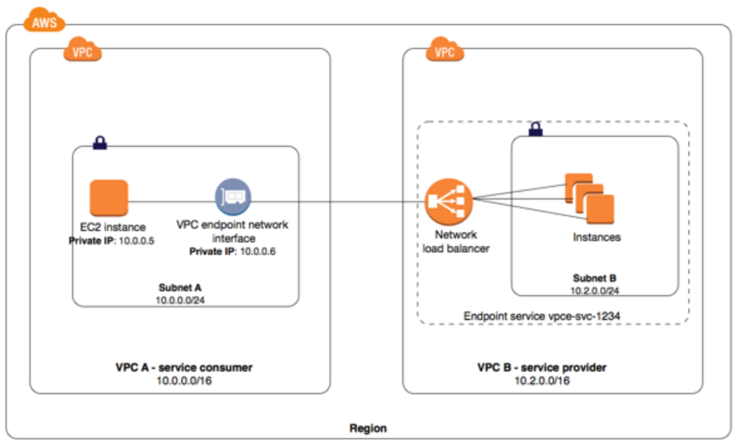
Interface Endpoints can be used to create custom applications in VPC and configure them as an AWS PrivateLink-powered service (referred to as an endpoint service) exposed through a Network Load Balancer. The custom applications can be hosted within AWS or on-premises.
Network Load Balancer Pricing
charged for each hour or partial hour that an NLB is running and the number of Load Balancer Capacity Units (LCU) used per hour.
An LCU is a metric for determining NLB pricing
An LCU defines the maximum resource consumed in any one of the dimensions (new connections/flows, active connections/flows, bandwidth and rule evaluations) the Network Load Balancer processes your traffic.
If using LCU Capacity Reservations, you pay for reserved LCUs per minute plus any additional LCUs used beyond the reservation.
AWS Certification Exam Practice Questions
Questions are collected from Internet and the answers are marked as per my knowledge and understanding (which might differ with yours).
AWS services are updated everyday and both the answers and questions might be outdated soon, so research accordingly.
AWS exam questions are not updated to keep up the pace with AWS updates, so even if the underlying feature has changed the question might not be updated
Open to further feedback, discussion and correction.
A company wants to use load balancer for their application. However, the company wants to forward the requests without any header modification. What service should the company use?
Classic Load Balancer
Network Load Balancer
Application Load Balancer
Use Route 53
A company is hosting an application in AWS for third party access. The third party needs to whitelist the application based on the IP. Which AWS service can the company use in the whitelisting of the IP address?
AWS Application Load Balancer
AWS Classic Load balancer
AWS Network Load Balancer
AWS Route 53
A company wants to restrict inbound traffic to their Network Load Balancer to only specific trusted IP ranges. What is the recommended approach?
Use NACLs on the NLB subnet
Configure WAF with NLB
Associate a security group with the NLB and configure inbound rules
Use Route 53 health checks to filter traffic
A company needs to perform a blue/green deployment for a TCP-based application running behind a Network Load Balancer. They want to gradually shift traffic from the old version to the new version. What is the MOST operationally efficient approach?
Create two NLBs and use Route 53 weighted routing
Use AWS CodeDeploy with two target groups
Configure weighted target groups on the NLB listener to distribute traffic between blue and green target groups
Manually deregister targets from the existing target group and register new targets
A mobile gaming company uses Network Load Balancer for their real-time game servers. Players frequently switch between WiFi and cellular networks, causing connection drops. Which NLB feature helps maintain session continuity during network changes?
Source IP affinity sticky sessions
TCP keepalive packets
QUIC protocol support with Connection ID-based stickiness
Cross-zone load balancing
A company runs a high-throughput application behind an NLB with IP-type targets. They are experiencing TCP port allocation errors because they have over 64,000 concurrent connections to a single target. What should they do?
Enable cross-zone load balancing to distribute traffic
Switch to instance-type targets
Configure secondary IPv4 addresses on the NLB egress interface
Add more targets to the target group
A company wants to ensure their NLB can handle a planned traffic spike during a product launch event without relying on auto-scaling warm-up time. What feature should they use?
Pre-warming request to AWS Support
Cross-zone load balancing
Multiple target groups with higher weights
LCU Capacity Reservations
An organization wants to protect their TLS-terminated NLB traffic against future quantum computing threats. Which NLB feature addresses this concern?
FIPS 140-3 security policies
Post-Quantum TLS (PQ-TLS) security policies with ML-KEM768
AWS IAM Identity Center (formerly AWS Single Sign-On)
📢 Service Rebranded: AWS Single Sign-On (AWS SSO) was renamed to AWS IAM Identity Center in July 2022. All functionality remains the same. SDKs, CLI, and APIs retain the sso namespace for backward compatibility.
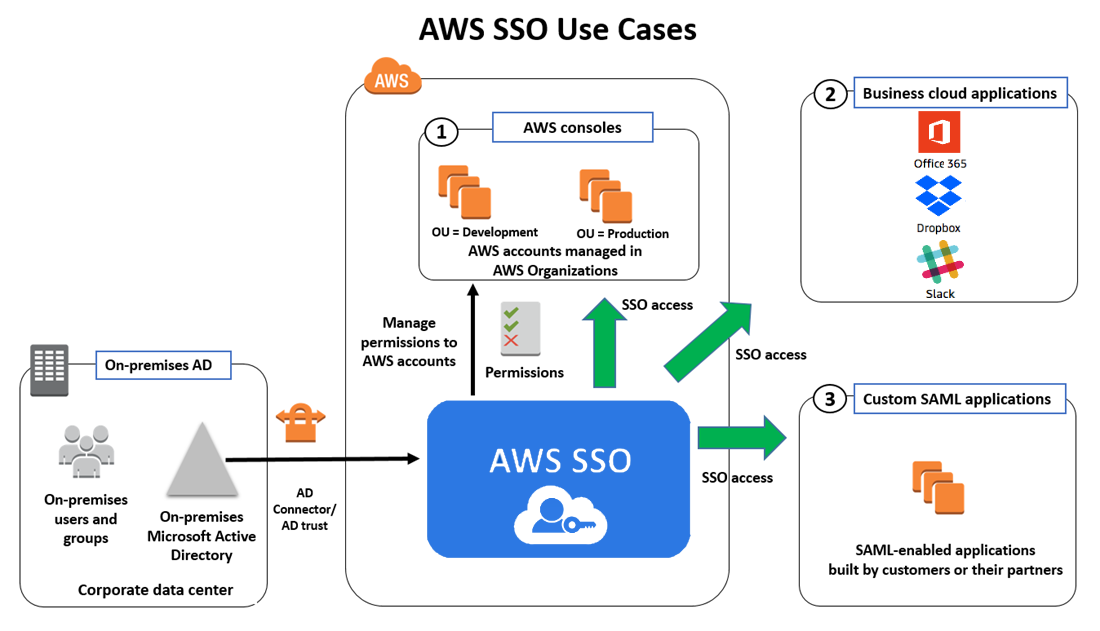
AWS IAM Identity Center is a cloud-based service that makes it easy to centrally manage single sign-on (SSO) access to all AWS accounts and cloud applications.
IAM Identity Center helps manage access and permissions to commonly used third-party software as a service (SaaS) applications, AWS managed applications, as well as custom applications that support SAML 2.0.
IAM Identity Center includes an AWS access portal where end-users can find and access all their assigned AWS accounts, cloud applications, and custom applications in one place.
IAM Identity Center is the recommended service for managing workforce access to AWS applications and multiple AWS accounts.
IAM Identity Center is available at no additional cost in all AWS commercial, GovCloud, and China Regions where it is supported.
IAM Identity Center Features
AWS Organizations Integration
Natively integrates with AWS Organizations and enumerates all the AWS accounts.
Configures and maintains all the necessary permissions for accounts automatically, without requiring any additional setup in individual accounts.
SSO access to AWS accounts and cloud applications
Helps manage Single Sign-On across all AWS accounts, cloud applications, AWS managed applications, and custom SAML 2.0–based applications, without custom scripts or third-party SSO solutions.
Supports pre-integrated business applications including Salesforce, Box, Microsoft 365, and hundreds of others.
Create and manage users and groups in IAM Identity Center
Provides a built-in identity store to create and manage users and groups directly.
Supports connecting to an existing AWS Managed Microsoft AD directory through AWS Directory Service.
Supports external identity providers (IdPs) via SAML 2.0 and SCIM 2.0 for automated user provisioning.
Leverage existing corporate identities
Integrates with Microsoft Active Directory through AWS Directory Service.
Supports external IdPs including Okta Universal Directory, Microsoft Entra ID (formerly Azure AD), Ping Identity, JumpCloud, and others.
Permission Sets
Permission sets are collections of one or more IAM policies that define the access for users/groups.
IAM Identity Center creates IAM roles based on permission sets and attaches the specified policies in each assigned account.
Multiple permission sets can be assigned to the same user.
Permissions can be based on common job functions or customized to meet specific security requirements.
Multi-factor Authentication (MFA)
Supports enforcement of MFA for all users, including requirement to set up MFA during sign-in.
AWS Management – AWS Systems Manager Change Manager
AWS AI/ML – Amazon SageMaker Unified Studio
AWS Storage – AWS Transfer Family web apps
Monitoring – AWS CloudTrail for auditing all administrative and access activity
AWS Certification Exam Practice Questions
Questions are collected from Internet and the answers are marked as per my knowledge and understanding (which might differ with yours).
AWS services are updated everyday and both the answers and questions might be outdated soon, so research accordingly.
AWS exam questions are not updated to keep up the pace with AWS updates, so even if the underlying feature has changed the question might not be updated
Open to further feedback, discussion and correction.
Which of the following can a customer use to enable single sign-on (SSO) to the AWS Console?
Amazon Connect
AWS IAM Identity Center (formerly AWS Single Sign-On)
Amazon Pinpoint
Amazon Rekognition
A company uses AWS Organizations with multiple AWS accounts. The company needs to provide centralized access management for all accounts. Users should be able to sign in once and access multiple accounts based on their job function. What is the recommended approach?
Create IAM users in each account and configure cross-account roles
Use AWS IAM Identity Center with permission sets to manage multi-account access
Use Amazon Cognito user pools for workforce identity federation
Create a custom SAML identity provider in each account
A company uses AWS Organizations and AWS IAM Identity Center. The company needs to restrict development teams to use only specific AWS Regions and specific AWS services. Which solution meets this requirement with the LEAST operational overhead?
Use IAM Identity Center to set up service-linked roles with IAM policy conditions
Deactivate AWS STS in Regions that developers are not allowed to use
Create SCPs that include Condition, Resource, and NotAction elements to allow access to only specific Regions and services
For each account, create tailored identity-based policies for IAM Identity Center
A company wants to connect their existing Okta Universal Directory as the identity source for AWS IAM Identity Center. Which protocol does IAM Identity Center use for automatic provisioning of users and groups from Okta?
OAuth 2.0
OpenID Connect (OIDC)
SCIM 2.0 (System for Cross-domain Identity Management)
LDAP
A company is using AWS IAM Identity Center and wants to grant fine-grained permissions to users based on their department and cost center attributes from their identity provider. Which IAM Identity Center feature should they use?
Permission boundaries
Service Control Policies (SCPs)
Resource-based policies
Attribute-Based Access Control (ABAC)
An analytics team needs to access data across Amazon Redshift, Amazon S3 via Lake Formation, and Amazon QuickSight using their corporate identity without managing separate credentials for each service. Which IAM Identity Center feature enables this?
AWS Route 53 routing policy determines how AWS would respond to the DNS queries and provides multiple routing policy options.
Simple Routing Policy
Simple routing policy is a simple round-robin policy and can be applied when there is a single resource doing the function for the domain e.g. web server that serves content for the website.
Simple routing helps configure standard DNS records, with no special Route 53 routing such as weighted or latency.
Route 53 responds to the DNS queries based on the values in the resource record set e.g. IP address in an A record.
Simple routing does not allow the creation of multiple records with the same name and type, but multiple values can be specified in the same record, such as multiple IP addresses.
Route 53 displays all the values to resolve it recursively in random order and the resolver displays the values for the client. The client then chooses a value and resends the query.
Simple routing policy does not support health checks, so the record would be returned to the client even if it is unhealthy.
With Alias record enabled, only one AWS resource or one record can be specified in the current hosted zone.
Weighted Routing Policy
Weighted routing policy helps route traffic to different resources in specified proportions (weights) e.g., 75% to one server and 25% to theother during a pilot release
Weights can be assigned between any number from 0 to 255 inclusive.
Weighted routing policy can be applied when there are multiple resources that perform the same function e.g., webservers serving the same site
Weighted resource record sets allow associating multiple resources with a single DNS name.
Weighted routing policy use cases include
load balancing between regions
A/B testing and piloting new versions of software
To create a group of weighted resource record sets, two or more resource record sets can be created that has the same combination of DNS name and type, and each resource record set is assigned a unique identifier and a relative weight.
When processing a DNS query, Route 53 searches for a resource record set or a group of resource record sets that have the specified name and type.
Route 53 selects one from the group. The probability of any one resource record set being selected depends on its weight as a proportion of the total weight for all resource record sets in the group for e.g., suppose www.example.com has three resource record sets with weights of 1 (20%), 1 (20%), and 3 (60%)(sum = 5). On average, Route 53 selects each of the first two resource records sets one-fifth of the time and returns the third resource record set three-fifths of the time.
Weighted routing policy supports health checks.
Latency-based Routing (LBR) Policy
Latency-based Routing Policy helps respond to the DNS query based on which data center gives the user the lowest network latency.
Latency-based routing policy can be used when there are multiple resources performing the same function and Route 53 needs to be configured to respond to the DNS queries with the resources that provide the fastest response with the lowest latency.
A latency resource record set can be created for the EC2 resource in each region that hosts the application. When Route 53 receives a query for the corresponding domain, it selects the latency resource record set for the EC2 region that gives the user the lowest latency. Route 53 then responds with the value associated with that resource record set for e.g., you might have web servers for example.com in the EC2 data centers in Ireland and in Tokyo. When a user browses example.com from Singapore, Route 53 will pick up the data center (Tokyo) which has the lowest latency from the user’s location
Latency between hosts on the Internet can change over time as a result of changes in network connectivity and routing. Latency-based routing is based on latency measurements performed over a period of time, and the measurements reflect these changes for e.g. if the latency from the user in Singapore to Ireland improves, the user can be routed to Ireland
Latency-based routing cannot guarantee users from the same geographic will be served from the same location for any compliance reason
Latency resource record sets can be created using any record type that Route 53 supports except NS or SOA.
Latency-based routing policy supports health checks.
Failover Routing Policy
Failover routing policy allows active-passive failover configuration, in which one resource (primary) takes all traffic when it’s healthy and the other resource (secondary) takes all traffic when the first isn’t healthy.
Route 53 health checking agents will monitor each location/endpoint of the application to determine its availability.
Failover routing policy is applicable for Public hosted zones only.
Geolocation Routing Policy
Geolocation routing policy helps respond to DNS queries based on the geographic location of the users i.e. location from which the DNS queries originate.
Geolocation routing policy use cases include
localization of content and presenting some or all of the website in the user’s language
restrict distribution of content to only the locations in which you have distribution rights.
balancing load across endpoints in a predictable, easy-to-manage way, so that each user location is consistently routed to the same endpoint.
Geolocation routing policy allows geographic locations to be specified by continent, country, or by state (only in the US)
Geolocation record sets, if created, for overlapping geographic regions for e.g. continent, and then for the country within the same continent, priority goes to the smallest geographic region, which allows some queries for a continent to be routed to one resource and queries for selected countries on that continent to a different resource
Geolocation works by mapping IP addresses to locations, which might not be mapped to an exact geographic location.
A default resource record set can be created to handle these queries and also the ones which do not have an explicit record set created.
Route 53 returns a “no answer” response for queries from those locations if a default resource record set is not created.
Two geolocation resource record sets that specify the same geographic location cannot be created.
Route 53 supports the edns-client-subnet extension of EDNS0 (EDNS0 adds several optional extensions to the DNS protocol.) to improve the accuracy of geolocation routing.
Geoproximity Routing Policy
Geoproximity routing helps route traffic to the resources based on the geographic location of the users and the resources.
Geoproximity routing can be configured with a bias to optionally choose to route more traffic or less to a given resource. A bias expands or shrinks the size of the geographic region from which traffic is routed to a resource.
Route 53 Traffic flow can be used to create Geoproximity routing flows.
Route 53 supports both the AWS region where the resource is created and the latitude and longitude of the resource.
Multivalue Routing Policy
Multivalue routing helps return multiple values, e.g. IP addresses for the web servers, in response to DNS queries.
Multivalue routing also helps check the health of each resource, so only the values for healthy resources are returned.
Route 53 responds to DNS queries with up to eight healthy records and gives different answers to different DNS resolvers.
Multivalue answer routing is not a substitute for a load balancer, but the ability to return multiple health-checkable IP addresses is a way to use DNS to improve availability and load balancing.
To route traffic approximately randomly to multiple resources, such as web servers, one multivalue answer record can be created for each resource and, optionally, associate a Route 53 health check with each record. If a web server becomes unavailable after the resolver caches a response, client software can try another IP address in the response.
Route 53 Traffic Flow
Route 53 Traffic Flow helps easily manage traffic globally through a variety of routing types combined with DNS Failover in order to enable a variety of low-latency, fault-tolerant architectures.
Traffic Flow provides a simple visual editor, to easily manage how the end-users are routed to the application’s endpoints – whether in a single AWS region or distributed around the globe.
Traffic Flow routes traffic based on multiple criteria, such as endpoint health, geographic location, and latency.
Traffic Flow’s versioning feature maintains a history of changes to the traffic policies to allow easy rollback to the previous version.
Route 53 Complex Routing Policies
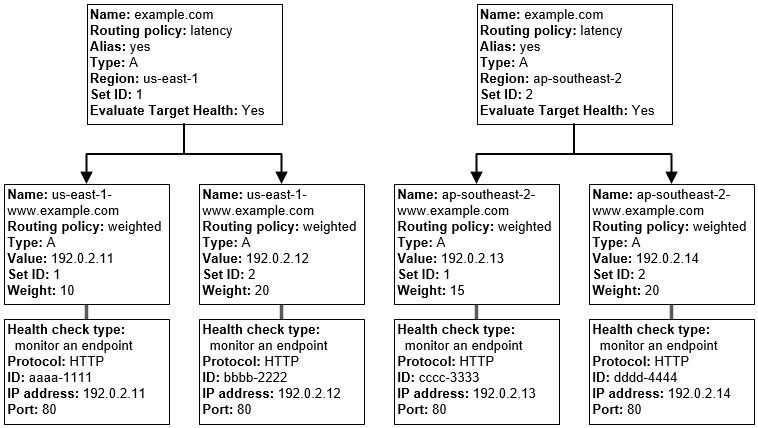
Route 53 can be used to define more complex and nested routing policies
A combination of alias records (such as weighted alias and failover alias) and non-alias records can be used to build a decision tree that gives you greater control over how Route 53 responds to requests.
Resources would be created from the bottom of the tree
AWS Certification Exam Practice Questions
Questions are collected from Internet and the answers are marked as per my knowledge and understanding (which might differ with yours).
AWS services are updated everyday and both the answers and questions might be outdated soon, so research accordingly.
AWS exam questions are not updated to keep up the pace with AWS updates, so even if the underlying feature has changed the question might not be updated
Open to further feedback, discussion and correction.
You have deployed a web application targeting a global audience across multiple AWS Regions under the domain name example.com. You decide to use Route 53 Latency-Based Routing to serve web requests to users from the region closest to the user. To provide business continuity in the event of server downtime you configure weighted record sets associated with two web servers in separate Availability Zones per region. During a DR test you notice that when you disable all web servers in one of the regions Route 53 does not automatically direct all users to the other region. What could be happening? (Choose 2 answers)
Latency resource record sets cannot be used in combination with weighted resource record sets.
You did not setup an http health check for one or more of the weighted resource record sets associated with the disabled web servers
The value of the weight associated with the latency alias resource record set in the region with the disabled servers is higher than the weight for the other region.
One of the two working web servers in the other region did not pass its HTTP health check
You did not set “Evaluate Target Health” to “Yes” on the latency alias resource record set associated with example.com in the region where you disabled the servers.
The compliance department within your multi-national organization requires that all data for your customers that reside in the European Union (EU) must not leave the EU and also data for customers that reside in the US must not leave the US without explicit authorization. What must you do to comply with this requirement for a web based profile management application running on EC2?
Run EC2 instances in multiple AWS Availability Zones in single Region and leverage an Elastic Load Balancer with session stickiness to route traffic to the appropriate zone to create their profile (should be in 2 different regions – US and Europe)
Run EC2 instances in multiple Regions and leverage Route 53’s Latency Based Routing capabilities to route traffic to the appropriate region to create their profile (Latency based routing policy would not guarantee the compliance requirement)
Run EC2 instances in multiple Regions and leverage a third party data provider to determine if a user needs to be redirect to the appropriate region to create their profile
Run EC2 instances in multiple AWS Availability Zones in a single Region and leverage a third party data provider to determine if a user needs to be redirect to the appropriate zone to create their profile(should be in 2 different regions – US and Europe)
A US-based company is expanding their web presence into Europe. The company wants to extend their AWS infrastructure from Northern Virginia (us-east-1) into the Dublin (eu-west-1) region. Which of the following options would enable an equivalent experience for users on both continents?
Use a public-facing load balancer per region to load-balance web traffic, and enable HTTP health checks.
Use a public-facing load balancer per region to load-balance web traffic, and enable sticky sessions.
Use Amazon Route 53, and apply a geolocation routing policy to distribute traffic across both regions
Use Amazon Route 53, and apply a weighted routing policy to distribute traffic across both regions.
You have been asked to propose a multi-region deployment of a web-facing application where a controlled portion of your traffic is being processed by an alternate region. Which configuration would achieve that goal?
Route 53 record sets with weighted routing policy
Route 53 record sets with latency based routing policy
Auto Scaling with scheduled scaling actions set
Elastic Load Balancing with health checks enabled
Your company is moving towards tracking web page users with a small tracking image loaded on each page. Currently you are serving this image out of us-east, but are starting to get concerned about the time it takes to load the image for users on the west coast. What are the two best ways to speed up serving this image? Choose 2 answers
Use Route 53’s Latency Based Routing and serve the image out of us-west-2 as well as us-east-1
Serve the image out through CloudFront
Serve the image out of S3 so that it isn’t being served of your web application tier
Use EBS PIOPs to serve the image faster out of your EC2 instances
Your API requires the ability to stay online during AWS regional failures. Your API does not store any state, it only aggregates data from other sources – you do not have a database. What is a simple but effective way to achieve this uptime goal?
Use a CloudFront distribution to serve up your API. Even if the region your API is in goes down, the edge locations CloudFront uses will be fine.
Use an ELB and a cross-zone ELB deployment to create redundancy across datacenters. Even if a region fails, the other AZ will stay online.
Create a Route53 Weighted Round Robin record, and if one region goes down, have that region redirect to the other region.
Create a Route53 Latency Based Routing Record with Failover and point it to two identical deployments of your stateless API in two different regions. Make sure both regions use Auto Scaling Groups behind ELBs. (Refer link)
Route 53 Resolver provides automatic DNS resolution within the VPC. It can help resolve DNS queries between VPCs and on-premises networks.
By default, Resolver answers DNS queries for VPC domain names such as domain names for EC2 instances or ELB load balancers.
Route 53 Resolver performs recursive lookups against public name servers for all other domain names.
However, on-premises instances cannot resolve Route 53 DNS entries and Route 53 cannot resolve on-premises DNS entries.
DNS resolution between VPC and on-premises network can be configured over a Direct Connect or VPN connection.
Route 53 Resolver is regional.
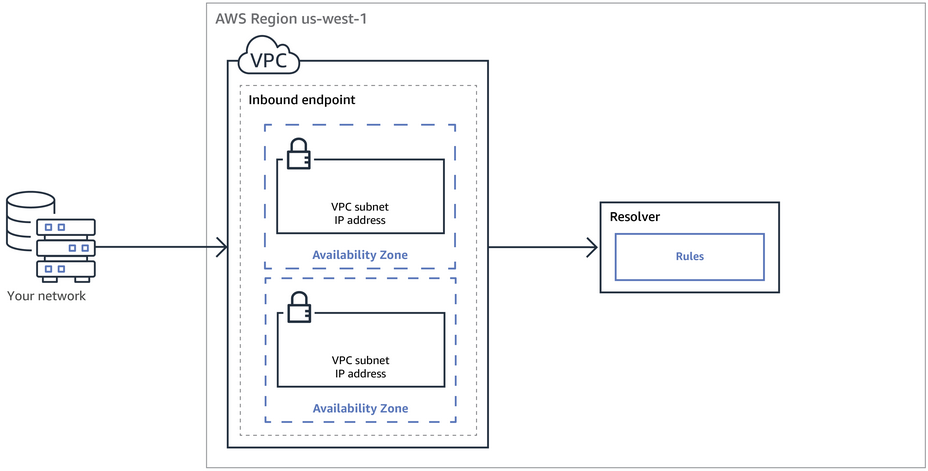
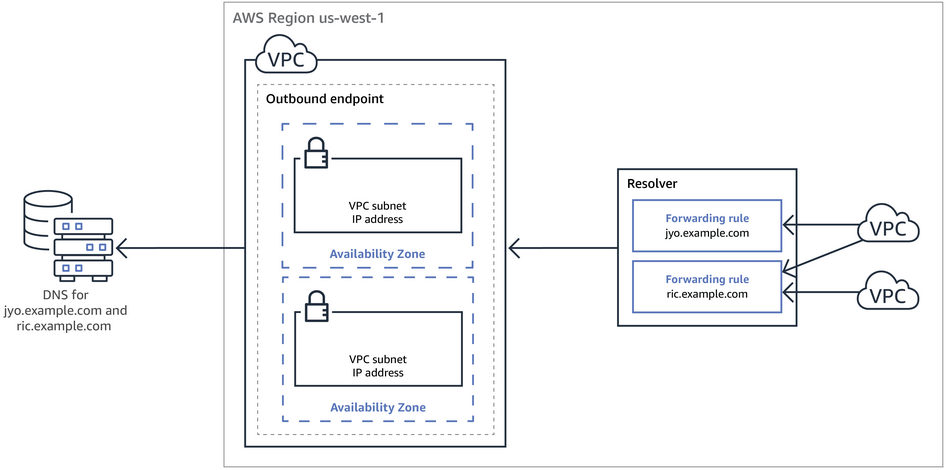
To use inbound or outbound forwarding, create a Resolver endpoint in the VPC.
As part of the definition of an endpoint, specify the IP addresses to forward inbound DNS queries to or the IP addresses that outbound queries originate from. For each IP address specified, Resolver automatically creates a VPC elastic network interface.
Inbound Endpoint – Forward DNS queries from resolvers on your network to AWS
DNS resolvers on the on-premises networks can forward DNS queries to Resolver in a specified VPC.
This enables DNS resolvers to easily resolve domain names for AWS resources such as EC2 instances or records in a Route 53 private hosted zone.
Outbound Endpoint – Conditionally forward queries from a VPC to resolvers on your network
Route 53 Resolver can be configured to forward queries that it receives from EC2 instances in the VPCs to DNS resolvers on the on-premises networks.
To forward selected queries, Resolver rules can be created that specify the domain names for the DNS queries that you want to forward (such as example.com), and the IP addresses of the DNS resolvers on the on-premises network that you want to forward the queries to.
If a query matches multiple rules (example.com, acme.example.com), Resolver chooses the rule with the most specific match (acme.example.com) and forwards the query to the IP addresses that you specified in that rule.
AWS Certification Exam Practice Questions
Questions are collected from Internet and the answers are marked as per my knowledge and understanding (which might differ with yours).
AWS services are updated everyday and both the answers and questions might be outdated soon, so research accordingly.
AWS exam questions are not updated to keep up the pace with AWS updates, so even if the underlying feature has changed the question might not be updated
Open to further feedback, discussion and correction.
A company wants to install a new private intranet service using Amazon EC2 instances inside a Virtual Private Cloud (VPC). The VPC is connected to the company’s on-premises network using an AWS Site-to-Site VPN. The new service must communicate with the on-premises services already in place. On-premises services are accessed using company-owned hostnames. for instance, a DNS zone. This DNS zone is entirely on-premises and accessible only via the company’s private network. To connect the new service with current services, a solutions architect must guarantee that the new service can resolve hostnames on the company’s example domain. Which solution satisfies these criteria?
Create an empty private zone in Route 53 for company.example . Add an additional NS record to the company’s on-premises company.example zone that points to the authoritative name servers for the new private zone in Route 53.
Turn on DNS hostnames for the VPC. Configure a new outbound endpoint with Route 53 Resolver. Create a Resolver rule to forward requests for company.example to the on-premises name servers.
Turn on DNS hostnames for the VPC. Configure a new inbound resolver endpoint with Route 53 Resolver. Configure the on-premises DNS server to forward requests for company.example to the new resolver.
Use AWS Systems Manager to configure a run document that will install a hosts file that contains any required hostnames. Use an Amazon EventBridge (Amazon CloudWatch Events) rule to run the document when an instance is entering the running state.
EBS provides durable block-level storage for use with EC2 instances
EBS volumes are off-instance, network-attached storage (NAS) that persists independently from the running life of a single EC2 instance.
EBS volume is attached to an instance and can be used as a physical hard drive, typically by formatting it with the file system of your choice and using the file I/O interface provided by the instance operating system.
EBS volume can be used to boot an EC2 instance (EBS-root AMIs only), and multiple EBS volumes can be attached to a single EC2 instance.
EBS volume can be attached to a single EC2 instance only at any point in time.
EBS Multi-Attach volume can be attached to multiple EC2 instances.
EBS provides the ability to take point-in-time snapshots, which are persisted in S3. These snapshots can be used to instantiate new EBS volumes and to protect data for long-term durability
EBS snapshots can be copied across AWS regions as well, making it easier to leverage multiple AWS regions for geographical expansion, data center migration, and disaster recovery
Ideal Usage Patterns
EBS is meant for data that changes relatively frequently and requires long-term persistence.
EBS volume provides access to raw block-level storage and is particularly well-suited for use as the primary storage for a database or file system
EBS Provisioned IOPS volumes are particularly well-suited for use with databases applications that require a high and consistent rate of random disk reads and writes
Anti-Patterns
Temporary Storage
EBS volume persists independent of the attached EC2 life cycle.
For temporary storage such as caches, buffers, queues, etc it is better to use local instance store volumes, SQS, or Elastic Cache
Highly-durable storage
EBS volumes with less than 20 GB of modified data since the last snapshot are designed for between 99.5% and 99.9% annual durability; volumes with more modified data can be expected to have proportionally lower durability
For highly durable storage, use S3 or Glacier which provides 99.999999999% annual durability per object
Static data or web content
For static web content, where data infrequently changes, EBS with EC2 would require a web server to serve the pages.
S3 may represent a more cost-effective and scalable solution for storing this fixed information and is served directly out of S3.
EBS Performance
EBS provides two volume types: standard volumes and Provisioned IOPS volumes which differ in performance characteristics and pricing model, allowing you to tailor the storage performance and cost to the needs of the applications.
EBS Volumes can be attached and striped across multiple similarly-provisioned EBS volumes using RAID 0 or logical volume manager software, thus aggregating available IOPs, total volume throughput, and total volume size.
Standard volumes offer cost-effective storage for applications with moderate or bursty I/O requirements. Standard volumes are also well suited for use as boot volumes, where the burst capability provides fast instance start-up times.
Provisioned IOPS volumes are designed to deliver predictable, high performance for I/O intensive workloads such as databases. With Provisioned IOPS, you specify an IOPS rate when creating a volume, and then EBS provisions that rate for the lifetime of the volume.
As EBS volumes are network-attached devices, other network I/O performed by the instance, as well as the total load on the shared network, can affect individual EBS volume performance.
EBS-optimized instances can be launched which deliver dedicated throughput between EC2 and EBS and enables instances to fully utilize the Provisioned IOPS on an EBS volume,
Each separate EBS volume can be configured as EBS standard or EBS Provisioned IOPS as needed. Alternatively, you could stripe the data.
EBS Durability & Availability
EBS volumes are designed to be highly available and reliable.
EBS volume data is replicated across multiple servers in a single AZ to prevent the loss of data from the failure of any single component.
EBS volume durability depends on both the size of the volume and the amount of data that has changed since your last snapshot
EBS snapshots are incremental, point-in-time backups, containing only the data blocks changed since the last snapshot.
Frequent snapshots are recommended to maximize both the durability and availability of their EBS data
EBS snapshots provide an easy-to-use disk clone or disk image mechanism for backup, sharing, and disaster recovery.
EBS Cost Model
EBS pricing has 3 components: provisioned storage, I/O requests, and snapshot storage
Standard volumes are charged per GB-month of provisioned storage and per million I/O requests
EBS Provisioned IOPS volumes are charged per GB-month of provisioned storage and per Provisioned IOPS-month
For both volumes, EBS snapshots are charged per GB-month of data stored. EBS snapshot copy is charged for the data transferred between regions, and for the standard EBS snapshot charges in the destination region.
EBS volume storage capacity is allocated at the time of volume creation, and you are charged for this allocated storage even if not used.
For EBS snapshots, you are charged only for storage actually used (consumed). Note that EBS snapshots are incremental and compressed, so the storage used in any snapshot is generally much less than the storage consumed on an EBS volume
EBS Scalability and Elasticity
EBS volumes can easily and rapidly be provisioned and released to scale in and out with the changing total storage demands
EBS volumes cannot be resized, and if additional storage is needed either
An additional volume can be attached
Create a snapshot and create a new volume from the snapshot with a higher volume size
EBS volumes can be resized dynamically, but cannot be reduced by size.
Interfaces
AWS offers management APIs for EBS in both SOAP and REST formats which can be used to create, delete, describe, attach, and detach EBS volumes for the EC2 instances as well as to create, delete, and describe snapshots from EBS to S3; and to copy snapshots across regions.
Amazon also offers the same capabilities through AWS Management Console
Instance Store volumes are also referred to as Ephemeral Storage.
Instance Store volumes provide temporary block-level storage and consist of a preconfigured and pre-attached block of disk storage on the same physical server as the EC2 instance
Instance storage’s amount of disk storage depends on the Instance type and larger instances provide both more and larger instance store volumes. Smaller instance types such as micro instances can only be launched with EBS volumes.
Storage-optimized instances provide special purpose instance storage targeted to specific uses case for e.g. HI1 provides very fast solid-state drive (SSD) backed instance storage capable of supporting over 120,000 random read IOPS, and is optimized for very high random I/O performance and low cost per IOPS. While, HS1 instances are optimized for very high storage density, low storage cost, and high sequential I/O performance.
Instance store volumes, unlike EBS volumes, cannot be detached or attached to another instance.
Ideal Usage Patterns
EC2 local instance store volumes are fast, free (that is, included in the price of the EC2 instance) “scratch volumes” best suited for storing temporary data that is continually changing, such as buffers, caches, scratch data or can easily be regenerated, or data that is replicated for durability
High I/O instances provide instance store volumes backed by SSD, and are ideally suited for many high performance database workloads. for e.g. applications include NoSQL databases like Cassandra and MongoDB.
High storage instances support much higher storage density per EC2 instance and are ideally suited for applications that benefit from high sequential I/O performance across very large datasets. e.g. applications include data warehouses, Hadoop storage nodes, seismic analysis, cluster file systems, etc.
Anti-Patterns
Persistent storage
For persistent virtual disk storage similar to a physical disk drive for files or other data that must persist longer than the lifetime of a single EC2 instance, EBS volumes or S3 are more appropriate.
Relational database storage
In most cases, relational databases require storage that persists beyond the lifetime of a single EC2 instance, making EBS volumes the natural choice.
Shared storage
Instance store volumes are dedicated to a single EC2 instance, and cannot be shared with other systems or users.
If you need storage that can be detached from one instance and attached to a different instance, or if you need the ability to share data easily, S3 or EBS volumes are the better choices.
Snapshots
If you need the convenience, long-term durability, availability, and shareability of point-in-time disk snapshots, EBS volumes are a better choice.
Instance Store Performance
Non-SSD-based instance store volumes in most EC2 instance families have performance characteristics similar to standard EBS volumes.
EC2 instance virtual machine and the local instance store volumes are located in the same physical server, and interaction with the storage is very fast, particularly for sequential access.
To further increase aggregate IOPS, or to improve sequential disk throughput, multiple instance store volumes can be grouped together using RAID 0 (disk striping) software.
Because the bandwidth to the disks is not limited by the network, aggregate sequential throughput for multiple instance volumes can be higher than for the same number of EBS volumes.
SSD instance store volumes in the EC2 high I/O instances provide from tens of thousands to hundreds of thousands of low-latency, random 4 KB random IOPS.
Because of the I/O characteristics of SSD devices, write performance can be variable.
Instance store volumes on EC2 high storage instances provide very high storage density and high sequential read and write performance. High storage instances are capable of delivering 2.6 GB/sec of sequential read and write performance when using a block size of 2 MB.
Instance Store Durability and Availability
EC2 local instance store volumes are not intended to be used as durable disk storage and they persist only during the life of the associate EC2 instance
Cost Model
Cost of the EC2 instance includes any local instance store volumes if the instance type provides them.
While there is no additional charge for data storage on local instance store volumes, note that data transferred to and from EC2 instance store volumes from other AZs or outside of an EC2 region may incur data transfer charges, and additional charges will apply for use of any persistent storage, such as S3, Glacier, EBS volumes, and EBS snapshots
Scalability and Elasticity
Local instance store volumes are tied to a particular EC2 instance and are fixed in number and size for a given EC2 instance type, so the scalability and elasticity of this storage are tied to the number of EC2 instances.
Interfaces
Instance store volumes are specified using the block device mapping feature of the EC2 API and the AWS Management Console
To the EC2 instance, an instance store volume appears just like a local disk drive. To write to and read data from instance store volumes, use the native file system I/O interfaces of the chosen operating system.
AWS Certification Exam Practice Questions
Questions are collected from Internet and the answers are marked as per my knowledge and understanding (which might differ with yours).
AWS services are updated everyday and both the answers and questions might be outdated soon, so research accordingly.
AWS exam questions are not updated to keep up the pace with AWS updates, so even if the underlying feature has changed the question might not be updated
Open to further feedback, discussion and correction.
Which of the following provides the fastest storage medium?
Amazon S3
Amazon EBS using Provisioned IOPS (PIOPS)
SSD Instance (ephemeral) store (SSD Instance Storage provides 100,000 IOPS on some instance types, much faster than any network-attached storage)
AWS Global Accelerator is a networking service that helps improve the availability and performance of the applications to global users.
AWS Global Accelerator optimizes the path to applications to keep packet loss, jitter, and latency consistently low.
helps improve the performance of the applications by lowering first-byte latency (the round trip time for a packet to go from a client to your endpoint and back again) and jitter (the variation of latency), and increasing throughput (amount of data transferred in a second) as compared to the public internet.
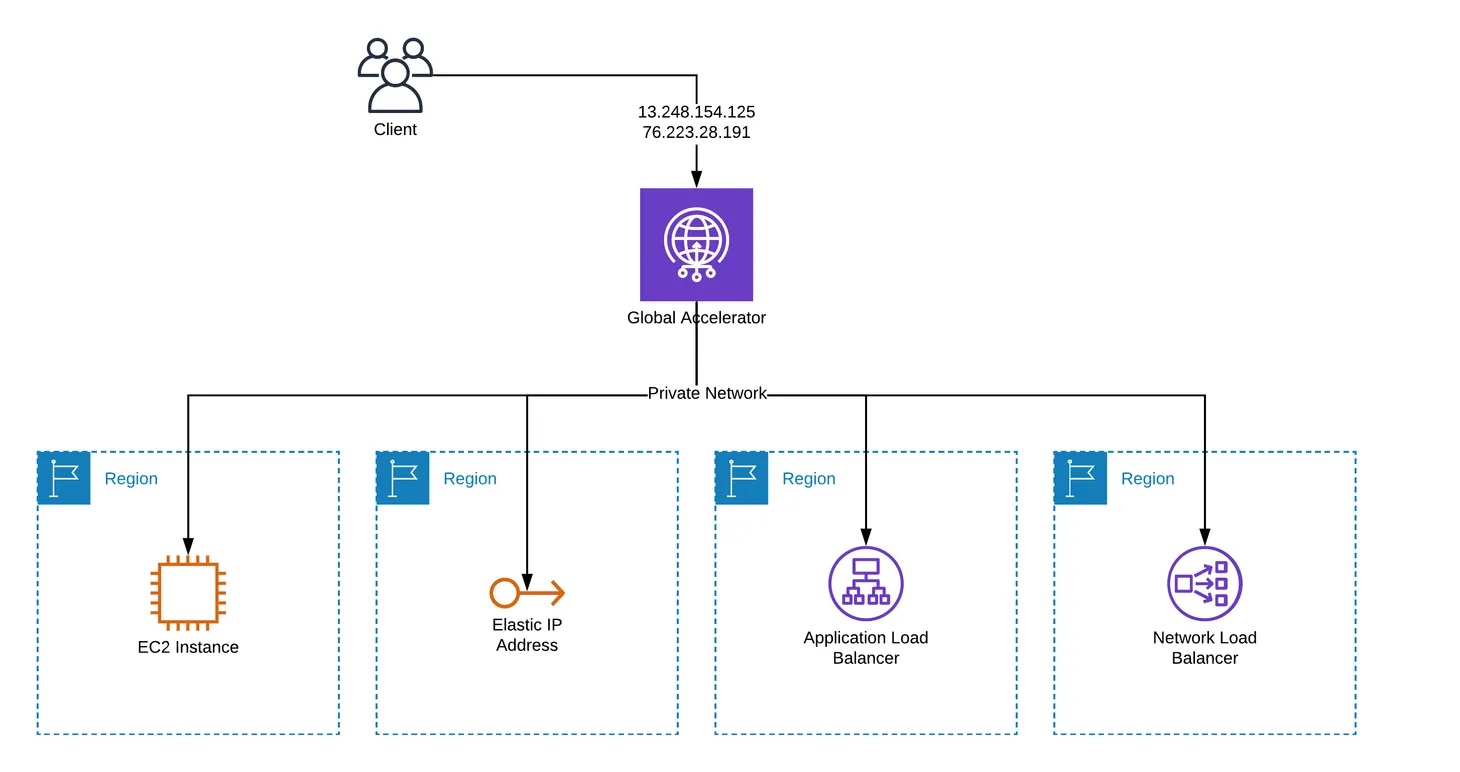
Global Accelerator uses the vast, well-monitored, congestion-free, redundant AWS global network to route TCP and UDP traffic to a healthy application endpoint in the closest AWS Region to the user.
is a global service that supports endpoints in multiple AWS Regions.
uses a global network of 130 Points of Presence in 95 cities across 53 countries.
supports AWS application endpoints, such as ALBs, NLBs, EC2 Instances, and Elastic IPs without making user-facing changes.
supports endpoints in 33 AWS Regions including recent additions like Mexico (Central), Asia Pacific (Malaysia), Asia Pacific (Thailand), and Asia Pacific (Taipei).
provides two global static public IPs that act as a fixed entry point to the application hosted in one or more AWS Regions, improving availability.
helps anycast the static IP addresses from the AWS edge network which serves as the frontend interface of the applications.
Using static IP addresses ensures you don’t need to make any client-facing changes or update DNS records as you modify or replace endpoints.
allows you to bring your own IP addresses (BYOIP) and use them as a fixed entry point to the application endpoints.
supports cross-account BYOIP, enabling the use of bring-your-own IP addresses across multiple AWS accounts.
Global Accelerator allocates two static IPv4 addresses serviced by independent network zones which are isolated units with their own set of physical infrastructure and service IP addresses from a unique IP subnet. If one IP address from a network zone becomes unavailable, due to network disruptions or IP address blocking by certain client networks, the client applications can retry using the healthy static IP address from the other isolated network zone.
supports both IPv4 and dual-stack (IPv4 + IPv6) accelerators. For dual-stack, Global Accelerator provides a total of four addresses: two static IPv4 addresses and two static IPv6 addresses.
dual-stack accelerators support routing IPv6 traffic to Application Load Balancers, Network Load Balancers, and EC2 instance endpoints.
continuously monitors the health of the application endpoints by using TCP, HTTP, and HTTPS health checks.
automatically re-routes the traffic to the nearest healthy available endpoint to mitigate endpoint failure.
terminates TCP connections from clients at AWS edge locations and, almost concurrently, establishes a new TCP connection with your endpoints. This gives clients faster response times (lower latency) and increased throughput. TCP termination at the edge is supported for both IPv4 and IPv6 traffic.
supports Client Affinity which helps build stateful applications.
supports Client IP address preservation for ALBs, EC2 instances, and NLBs (with security groups enabled). Client IP address preservation is not supported for Elastic IP address endpoints.
integrates with AWS Shield Standard, which minimizes application downtime and latency from DDoS attacks by using always-on network flow monitoring and automated in-line mitigation. AWS Shield Advanced can be enabled for enhanced DDoS detection and mitigation.
does not support on-premises endpoints. However, an NLB can be configured to address the on-premises endpoints while Global Accelerator points to the NLB.
supports cross-account attachments, allowing a single accelerator to route traffic to endpoints across multiple AWS accounts.
integrates with the AWS Load Balancer Controller for Kubernetes, enabling declarative management of accelerators, listeners, and endpoint groups using Kubernetes Custom Resource Definitions (CRDs).
Global Accelerator Types
Standard Accelerator
Standard accelerators automatically route traffic to a healthy endpoint that is nearest to the user.
Designed to load balance traffic across endpoints and regions.
Supports weighted routing using traffic dials and endpoint weights.
Ideal for web applications, API acceleration, gaming (UDP), IoT (MQTT), VoIP, and HTTP use cases requiring static IP addresses or fast regional failover.
Custom Routing Accelerator
Custom routing accelerators allow using application logic to deterministically route users to a specific Amazon EC2 instance and port.
Maps each port on the accelerator to a specific destination (EC2 instance private IP address and port).
Users are still routed over the AWS global network for performance benefits.
Ideal for interactive applications such as multi-player gaming, EdTech, social media, video collaboration, and real-time communications (VoIP/SIP).
Integrates with matchmaking servers or session border controllers to deterministically send user traffic to specific EC2 destinations.
Client IP address preservation is always enabled for custom routing accelerator endpoints.
Cross-Account Support
Global Accelerator supports cross-account attachments that allow a single accelerator to route traffic to endpoints across multiple AWS accounts.
Resource owners create a cross-account attachment to authorize resources in their account to be added to an accelerator by another account.
Cross-account BYOIP support allows using bring-your-own IP addresses from shared CIDR blocks across accounts.
Simplifies multi-account architectures by enabling centralized traffic management through a single accelerator.
S3 Multi-Region Access Points
S3 Multi-Region Access Points use Global Accelerator transparently to provide a single global endpoint to access data sets replicated across multiple AWS Regions.
Based on AWS Global Accelerator, S3 Multi-Region Access Points consider factors like network congestion and the requesting application’s location to dynamically route requests to the lowest latency copy of data.
Enables building multi-region applications with the same architecture used in a single region.
Monitoring
Global Accelerator integrates with Amazon CloudWatch for monitoring.
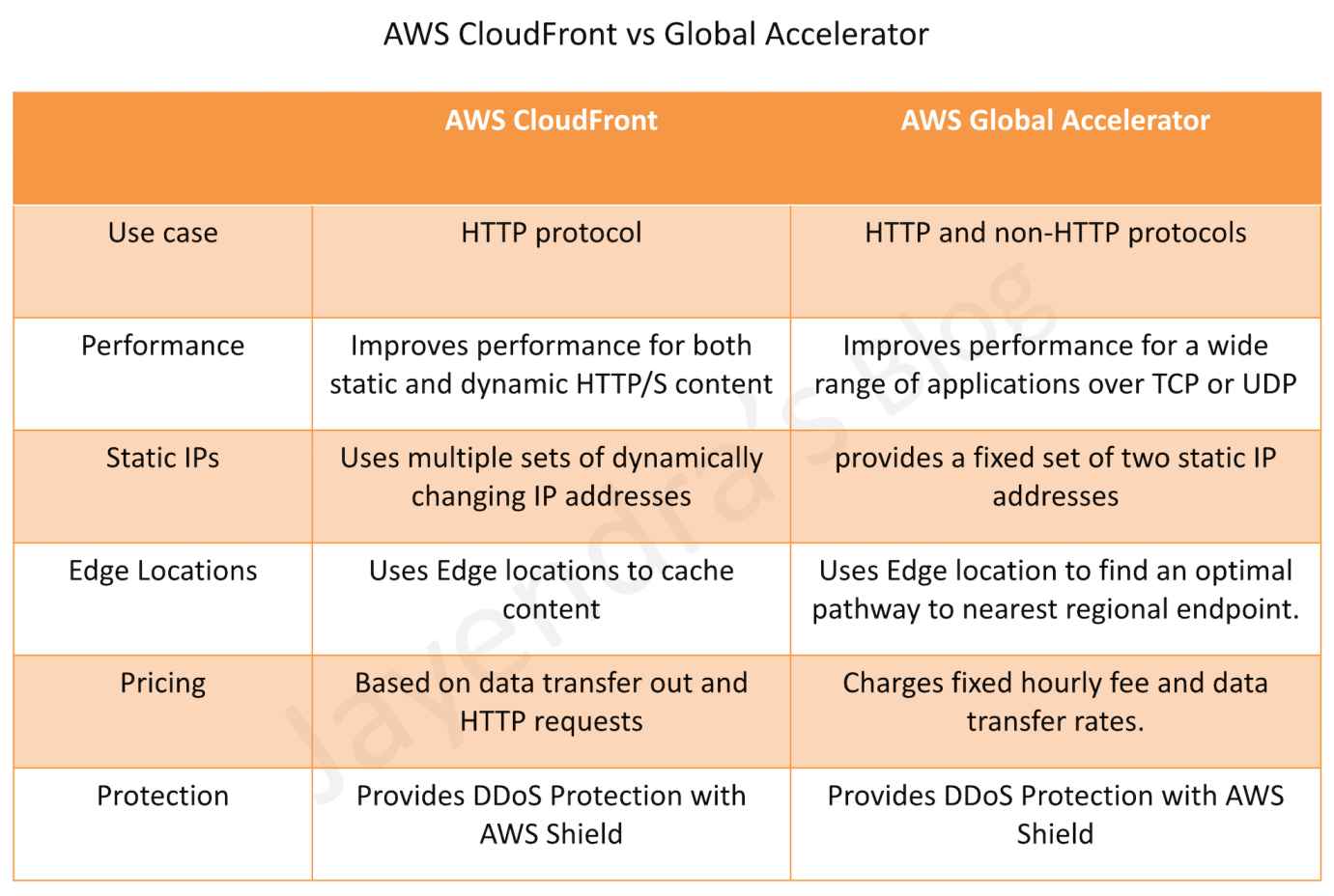
Global Accelerator and CloudFront both use the AWS global network and its edge locations around the world.
Both services integrate with AWS Shield for DDoS protection.
Performance
CloudFront improves performance for both cacheable content (such as images and videos) and dynamic content (such as API acceleration and dynamic site delivery).
Global Accelerator improves performance for a wide range of applications over TCP or UDP by proxying packets at the edge to applications running in one or more AWS Regions.
Use Cases
CloudFront is a good fit for HTTP use cases
Global Accelerator is a good fit for non-HTTP use cases, such as gaming (UDP), IoT (MQTT), or VoIP, as well as for HTTP use cases that require static IP addresses or deterministic, fast regional failover.
Caching
CloudFront supports Edge caching
Global Accelerator does not support Edge Caching.
IP Addresses
CloudFront uses dynamic IP addresses for edge locations.
Global Accelerator provides static anycast IP addresses as a fixed entry point.
AWS Certification Exam Practice Questions
Questions are collected from Internet and the answers are marked as per my knowledge and understanding (which might differ with yours).
AWS services are updated everyday and both the answers and questions might be outdated soon, so research accordingly.
AWS exam questions are not updated to keep up the pace with AWS updates, so even if the underlying feature has changed the question might not be updated
Open to further feedback, discussion and correction.
What features does AWS Global Accelerator provide? (Select TWO)
Improved security
Improved durability
Improved performance
Improved cost optimization
Improved availability
A company that develops web applications has launched hundreds of Application Load Balancers (ALBs) in multiple Regions. The company wants to create an allow list for the IPs of all the load balancers on its firewall device. A solutions architect is looking for a one-time, highly available solution to address this request, which will also help reduce the number of IPs that need to be allowed by the firewall. What should the solutions architect recommend to meet these requirements?
Create an AWS Lambda function to keep track of the IPs for all the ALBs in different Regions. Keep refreshing this list.
Set up a Network Load Balancer (NLB) with Elastic IPs. Register the private IPs of all the ALBs as targets to this NLB.
Launch AWS Global Accelerator and create endpoints for all the Regions. Register all the ALBs in different Regions to the corresponding endpoints.
Set up an Amazon EC2 instance, assign an Elastic IP to this EC2 instance, and configure the instance as a proxy to forward traffic to all the ALBs.
A company operates a multi-player online gaming platform with game servers deployed across multiple AWS Regions. The company needs to route players to specific game servers based on matchmaking logic while maintaining low latency. Which AWS service and accelerator type should the solutions architect use?
AWS Global Accelerator with standard accelerator and endpoint weights
AWS Global Accelerator with custom routing accelerator
Amazon CloudFront with Lambda@Edge for routing logic
Amazon Route 53 with latency-based routing
A company has a multi-account AWS architecture and wants to route traffic through a single AWS Global Accelerator to endpoints in different AWS accounts. What feature should the solutions architect use?
AWS Resource Access Manager (RAM) sharing
VPC peering between accounts
Global Accelerator cross-account attachments
AWS Organizations service control policies
A company requires both IPv4 and IPv6 connectivity for their global application. They want to use AWS Global Accelerator with static IP addresses for both protocols. What type of accelerator should they create?
Standard accelerator with BYOIP addresses
Dual-stack accelerator
Custom routing accelerator with IPv6 enabled
Standard accelerator with two separate configurations
📅 Last Updated: June 2026 | Added: OpenSearch Service, AWS AppSync, VPC Lattice, App Runner alias targets; clarified record type support for alias-to-alias records.
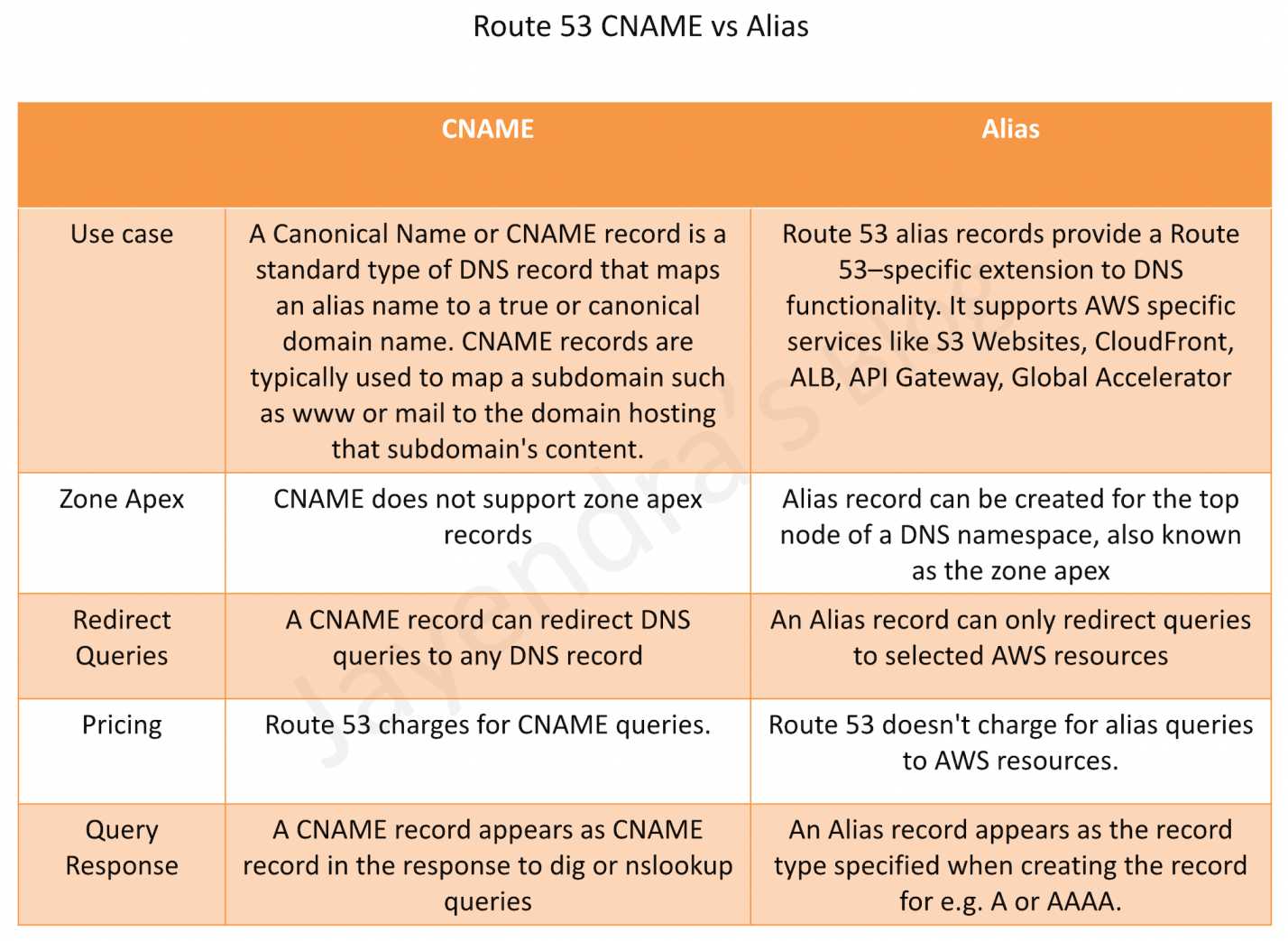
Route 53 Alias records are similar to CNAME records, but there are some important differences.
Supported Resources
Alias records support selected AWS resources
Elastic Load Balancers (Application, Network, and Classic Load Balancers)
CloudFront distributions
Amazon API Gateway (custom regional and edge-optimized APIs)
Elastic Beanstalk environments
S3 Website (bucket configured as static website)
AWS Global Accelerator
VPC Interface Endpoints
Amazon OpenSearch Service custom domain endpoints (Added 2024)
AWS AppSync domain names
AWS App Runner services (Note: App Runner is no longer accepting new customers as of April 30, 2026)
Amazon VPC Lattice service domain endpoints (Added June 2025)
Route 53 record in the same hosted zone
Alias records do not support
EC2 DNS endpoint
RDS DNS endpoint
Non-AWS DNS endpoints
CNAME record can redirect DNS queries to any DNS record (AWS or non-AWS)
Zone Apex or Root domain like example.com
Alias record supports mapping Zone Apex records
CNAME record does not support Zone Apex records (per DNS RFC standards)
Charges
Route 53 doesn’t charge for alias queries to AWS resources
Route 53 charges for CNAME queries
Note: A CNAME record pointing to another Route 53 record incurs charges for both queries
Record Type
For AWS resource targets (ELB, CloudFront, S3, etc.), alias records support A (IPv4) or AAAA (IPv6) record types
For alias records pointing to another record in the same hosted zone, all record types are supported except NS and SOA
CNAME record redirects DNS queries for a record name regardless of the record type specified in the DNS query, such as A or AAAA
TTL (Time to Live)
When an alias record points to an AWS resource, you cannot set the TTL; Route 53 uses the default TTL for the resource
When an alias record points to another record in the same hosted zone, Route 53 uses the TTL of the target record
CNAME records allow custom TTL configuration
Health Checking
Alias records support “Evaluate Target Health” which integrates with the target resource’s health
For ELB and Elastic Beanstalk, Evaluate Target Health provides routing away from unhealthy resources
For highly available services (S3, API Gateway, Global Accelerator, OpenSearch, VPC Lattice), use Route 53 health checks instead
Route 53 Alias vs CNAME Comparison
Key Considerations for Alias Records
Automatic IP Resolution – Route 53 automatically recognizes changes in the resource’s IP addresses (e.g., when an ELB’s IP changes)
No Extra Hop – Unlike CNAME which requires an additional DNS lookup, alias records resolve directly to IP addresses
IPv6 Support – For CloudFront, ELB, and OpenSearch Service, create separate A (IPv4) and AAAA (IPv6) alias records
Cross-Account Support – Alias records can point to resources in different AWS accounts (e.g., a CloudFront distribution in another account)
AWS Certification Exam Practice Questions
Questions are collected from Internet and the answers are marked as per my knowledge and understanding (which might differ with yours).
AWS services are updated everyday and both the answers and questions might be outdated soon, so research accordingly.
AWS exam questions are not updated to keep up the pace with AWS updates, so even if the underlying feature has changed the question might not be updated
Open to further feedback, discussion and correction.
Which of the following statements are true about Amazon Route 53 resource records? Choose 2 answers
An Alias record can map one DNS name to another Amazon Route 53 DNS name.
A CNAME record can be created for your zone apex.
An Amazon Route 53 CNAME record can point to any DNS record hosted anywhere.
TTL can be set for an Alias record in Amazon Route 53.
An Amazon Route 53 Alias record can point to any DNS record hosted anywhere.
How can the domain’s zone apex for example “myzoneapexdomain com” be pointed towards an Elastic Load Balancer?
By using an AAAA record
By using an A record
By using an Amazon Route 53 CNAME record
By using an Amazon Route 53 Alias record
A company hosts its website using Amazon S3 static website hosting. They want to use their domain’s zone apex (example.com) to point to the S3 bucket. Which record type should they use?
CNAME record pointing to the S3 website endpoint
Alias record of type A pointing to the S3 website endpoint
A record with the IP address of the S3 bucket
MX record pointing to the S3 bucket
Which of the following AWS resources can be targets for a Route 53 Alias record? (Choose 3)
Application Load Balancer
RDS database instance
CloudFront distribution
EC2 instance public DNS
Amazon OpenSearch Service custom domain
What is the primary advantage of using a Route 53 Alias record instead of a CNAME record when routing traffic to an AWS Elastic Load Balancer?
Alias records support more record types than CNAME
Alias records can point to non-AWS resources
Alias records can be used at the zone apex and don’t incur query charges for AWS resources
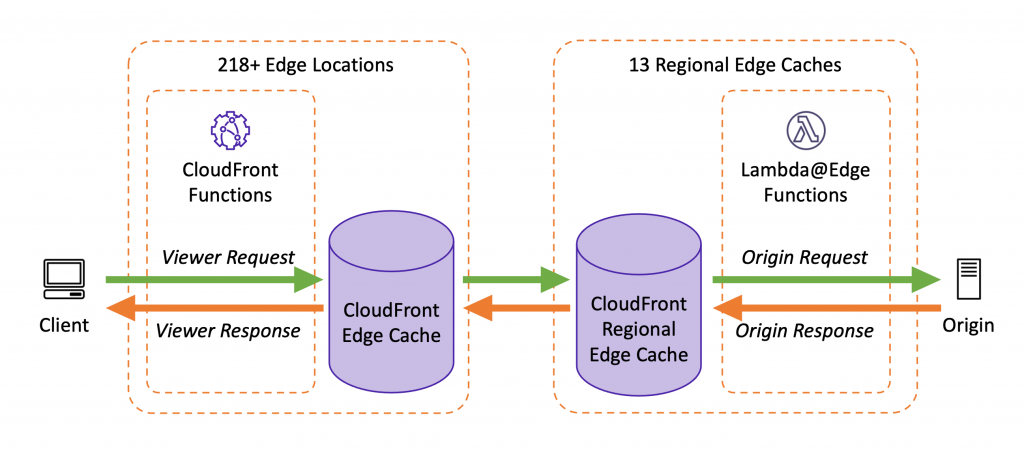
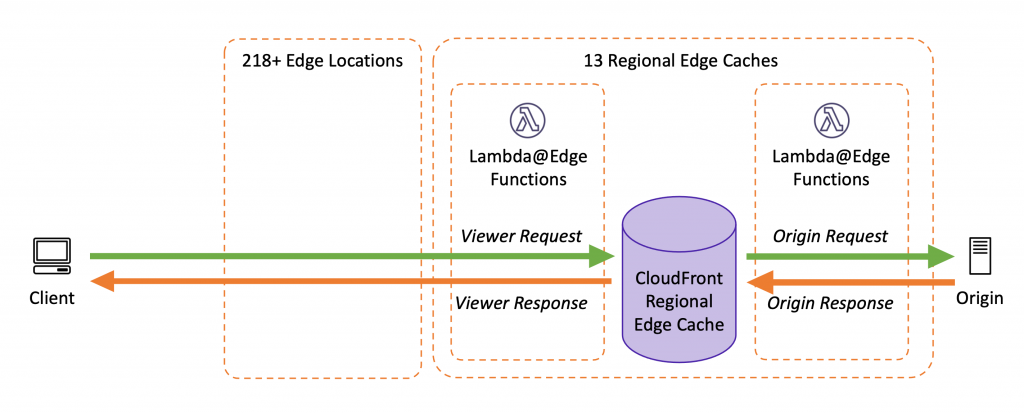
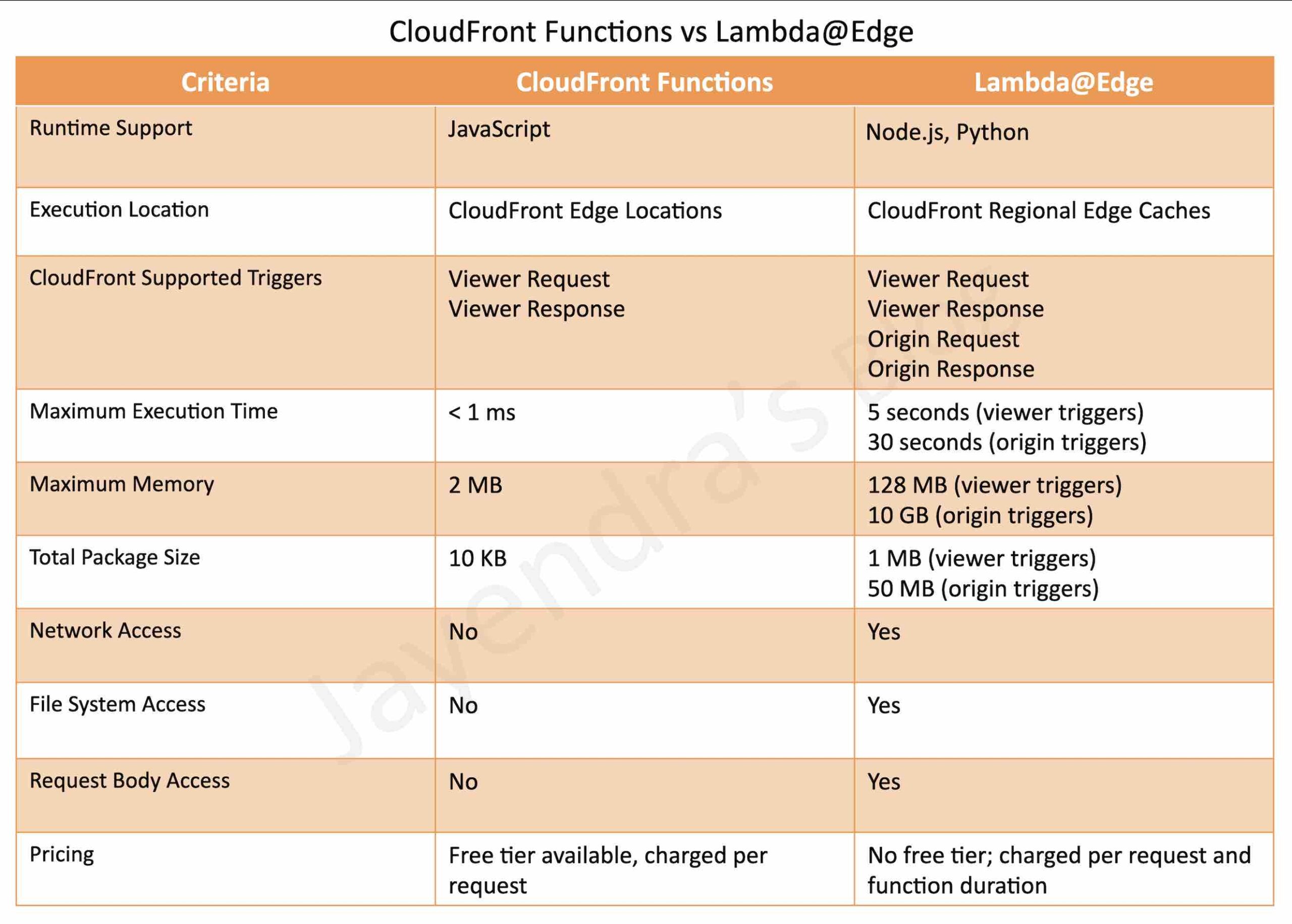
AWS CloudFront helps write your own code to customize how the CloudFront distributions process HTTP requests and responses.
The code runs close to the viewers (users) to minimize latency, and without having to manage servers or other infrastructure.
Custom code can manipulate the requests and responses that flow through CloudFront, perform basic authentication and authorization, generate HTTP responses at the edge, and more.
CloudFront Edge Functions currently supports three types
CloudFront Functions now supports origin modification, allowing you to conditionally change or update origin servers on each request from the viewer request event.
Previously, origin modification was only possible using Lambda@Edge on the origin request event.
Supports updating all existing origin capabilities such as setting custom headers, adjusting timeouts, setting Origin Shield, or changing the primary origin in origin groups.
Uses helper methods from the cloudfront module: updateRequestOrigin(), selectRequestOriginById(), and createRequestOriginGroup().
Requires JavaScript runtime 2.0.
In April 2025, VPC Origin modification was also added, enabling routing to private VPC origins from CloudFront Functions.
Available at no additional charge.
CloudFront Functions – New Capabilities (Nov 2025)
Edge Location Metadata – Access the three-letter airport code of the serving edge location and expected Regional Edge Cache (REC). Enables geo-specific content routing or compliance requirements (e.g., directing European users to GDPR-compliant origins).
Raw Query String Retrieval – Access the complete, unprocessed query string as received from the viewer, preserving special characters and encoding that may be altered during standard parsing.
Advanced Origin Overrides – Customize SSL/TLS handshake parameters including Server Name Indication (SNI). Useful for multi-tenant setups where CloudFront connects through CNAME chains resolving to servers with different certificate domains. Parameters include hostHeader, sni, allowedCertificateNames, and originOverrides.
Available at no additional charge in all CloudFront edge locations.
Amazon CloudFront KeyValueStore
is a low-latency, globally distributed datastore for CloudFront Functions (launched Nov 2023).
allows storing key-value pairs that can be read by CloudFront Functions at the edge without making a network call.
enables dynamic updates to configuration data without deploying code changes.
requires CloudFront Functions using JavaScript runtime 2.0.
eliminates the need for environment variables (which are not supported in CloudFront Functions).
use cases:
URL redirects and rewrites based on dynamic mappings
A/B testing configuration
Feature flags
Access control lists
SaaS tenant routing at the edge
Geo-based routing configuration
supports operations via CloudFront API using Signature Version 4A (SigV4A):
GetKey – retrieve a single key
PutKey – add or update a key
DeleteKey – remove a key
ListKeys – list all keys
data is eventually consistent across all edge locations.
Lambda@Edge
are Lambda functions and visible on the Lambda dashboard.
supports Node.js and Python languages (currently supports Node.js 18, 20, 22, 24 and Python 3.9-3.13)
runs in Regional Edge Caches (13 locations globally)
JSON Structured Logs – Function logs can now be output in structured JSON format, making it easier to search, filter, and analyze large volumes of log entries without custom logging libraries.
Log Level Granularity – Switch log levels (ERROR, DEBUG, INFO) instantly without code changes, useful for real-time issue investigation.
Custom CloudWatch Log Group Selection – Choose which CloudWatch log group Lambda@Edge sends logs to, simplifying log aggregation and management at scale.
Configurable via Lambda APIs, Lambda console, AWS CLI, AWS SAM, and AWS CloudFormation.
CloudFront Connection Functions
is a newer type of edge function specifically designed for mutual TLS (mTLS) validation at the edge (launched 2025).
executes during the TLS handshake, before HTTP request processing begins.
Each event type (viewer request, origin request, origin response, and viewer response) can have only one edge function association.
CloudFront Functions and Lambda@Edge in viewer events (viewer request and viewer response) cannot be combined on the same cache behavior.
CloudFront does not invoke edge functions for viewer response events when the origin returns an HTTP status code 400 or higher.
Edge functions for viewer response events cannot modify the HTTP status code of the response, regardless of whether the response came from the origin or the CloudFront cache.
Lambda@Edge functions must be created in US East (N. Virginia) region and must use a numbered version (not $LATEST or aliases).
CloudFront Functions cannot access the request body, make network calls, or use timers.
Origin modification in CloudFront Functions runs on every request (viewer request event), whereas Lambda@Edge origin modification only runs on cache misses (origin request event).
AWS Certification Exam Practice Questions
Questions are collected from Internet and the answers are marked as per my knowledge and understanding (which might differ with yours).
AWS services are updated everyday and both the answers and questions might be outdated soon, so research accordingly.
AWS exam questions are not updated to keep up the pace with AWS updates, so even if the underlying feature has changed the question might not be updated
Open to further feedback, discussion and correction.
You’ve been given the requirement to customize the content which is distributed to users via a CloudFront Distribution. The content origin is an S3 bucket. How could you achieve this?
Add an event to the S3 bucket. Make the event invoke a Lambda function to customize the content before rendering
Add a Step Function. Add a step with a Lambda function just before the content gets delivered to the users.
Use Lambda@Edge
Use a separate application on an EC2 Instance for this purpose.
A company’s packaged application dynamically creates and returns single-use text files in response to user requests. The company is using Amazon CloudFront for distribution but wants to further reduce data transfer costs. The company cannot modify the application’s source code. What should a solutions architect do to reduce costs?
Use Lambda@Edge to compress the files as they are sent to users.
Enable Amazon S3 Transfer Acceleration to reduce the response times.
Enable caching on the CloudFront distribution to store generated files at the edge.
Use Amazon S3 multipart uploads to move the files to Amazon S3 before returning them to users.
A company needs to dynamically route CloudFront requests to different origin servers based on the viewer’s geographic location with sub-millisecond latency. The routing configuration changes frequently. Which solution meets these requirements with the LEAST operational overhead?
Use Lambda@Edge with a DynamoDB table for routing rules
Use CloudFront Functions with KeyValueStore for routing configuration
Use multiple CloudFront distributions with Route 53 geolocation routing
Use CloudFront cache behaviors with path-based routing
A development team needs to implement URL redirects for a website served through CloudFront. The redirect mappings change weekly and currently contain 500 entries. They need sub-millisecond performance. Which approach is MOST efficient?
Use Lambda@Edge to query a database for redirect mappings
Configure CloudFront cache behaviors for each redirect
Use CloudFront Functions with KeyValueStore to store redirect mappings
Use an Application Load Balancer with listener rules for redirects
A company wants to dynamically route requests to different backend origins based on customer subscription tier. Requests include the tier as a header. The company wants this logic executed on every request with the lowest possible latency. Which edge function approach should they use?
Lambda@Edge on origin request event
Lambda@Edge on viewer request event
CloudFront Functions with origin modification on viewer request event
CloudFront Functions on viewer response event
A solutions architect needs to implement custom mutual TLS certificate validation that checks client certificates against a revocation list at CloudFront edge locations. The revocation list is updated hourly. Which solution is MOST appropriate?
Use Lambda@Edge to validate certificates on viewer request
Use CloudFront Connection Functions with KeyValueStore for the revocation list
Use CloudFront Functions to check certificate headers
CloudFront Security has multiple features, including
Support for Encryption at Rest and Transit.
Prevent users in specific geographic locations from accessing content
Configure HTTPS connections.
Use signed URLs or cookies to restrict access for selected users.
Restrict access to content in S3 buckets using Origin Access Control (OAC), to prevent users from using the direct URL of the file.
Set up field-level encryption for specific content fields
Use AWS WAF web ACLs to create a web access control list (web ACL) to restrict access to your content.
Use geo-restriction, also known as geoblocking, to prevent users in specific geographic locations from accessing content served through a CloudFront distribution.
Integration with AWS Shield to protect from DDoS attacks.
Support for Mutual TLS (mTLS) authentication for both viewer and origin connections.
VPC Origins to deliver content from applications in private subnets without exposing them to the public internet.
Data Protection
CloudFront supports both Encryption at Rest and in Transit.
CloudFront provides Encryption in Transit and can be configured
to require viewers to use HTTPS to request the files so that connections are encrypted when CloudFront communicates with viewers.
to use HTTPS to get files from the origin, so that connections are encrypted when CloudFront communicates with the origin.
HTTPS can be enforced using the Viewer Protocol Policy and Origin Protocol Policy.
CloudFront supports TLS 1.3 for origin connections (launched November 2025), providing stronger encryption algorithms, reduced handshake latency (up to 30% improvement), and better security posture for data transmission between edge locations and origin servers. TLS 1.3 is automatically enabled for all origin types including custom origins, S3, and ALBs.
CloudFront supports Post-Quantum TLS (launched September 2025) with the TLS1.3_2025 security policy, providing quantum-resistant key exchange to protect against “harvest now, decrypt later” threats.
CloudFront provides Encryption at Rest
using SSDs which are encrypted for edge location points of presence (POPs), and encrypted EBS volumes for Regional Edge Caches (RECs).
Function code and configuration are always stored in an encrypted format on the encrypted SSDs on the edge location POPs, and in other storage locations used by CloudFront.
Mutual TLS (mTLS) Authentication
Mutual TLS (mTLS) extends standard TLS by requiring bidirectional certificate-based authentication, where both client and server must prove their identity before establishing a secure connection.
CloudFront supports mTLS in two configurations:
Viewer mTLS (launched November 2025) – Authenticates end users/clients connecting to CloudFront using client certificates. Requires HTTPS connections.
Origin mTLS (launched January 2026) – CloudFront authenticates itself to origin servers using client certificates, ensuring only authorized CloudFront distributions can connect to application servers.
Together, viewer and origin mTLS enable true end-to-end zero-trust authentication from viewers through CloudFront to origin servers.
Origin mTLS supports per-origin configuration, allowing different client certificates for different origins within the same distribution.
mTLS Passthrough mode (launched May 2026) allows CloudFront to forward client certificates to the origin without verifying them at CloudFront, enabling custom validation at the origin.
mTLS is available at no additional cost and can be configured via Console, CLI, SDK, CDK, and CloudFormation.
Restrict Viewer Access
Serving Private Content
To securely serve private content using CloudFront
Require the users to access the private content by using special CloudFront signed URLs or signed cookies with the following restrictions
end date and time, after which the URL is no longer valid
start date-time, when the URL becomes valid
IP address or range of addresses to access the URLs
Require that users access the S3 content only using CloudFront URLs, not S3 URLs. Requiring CloudFront URLs isn’t required, but recommended to prevent users from bypassing the restrictions specified in signed URLs or signed cookies.
Signed URLs or Signed Cookies can be used with CloudFront using an HTTP server as an origin. It requires the content to be publicly accessible and care should be taken to not share the direct URL of the content
Restriction for Origin can be applied by
For S3, using Origin Access Control (OAC) to grant only CloudFront access to the content and removing any other access permissions. (OAI is legacy; see OAC section below)
For a Load balancer OR HTTP server, custom headers can be added by CloudFront which can be used at Origin to verify the request has come from CloudFront.
Custom origins can also be configured to allow traffic from CloudFront IPs only. CloudFront managed prefix list can be used to allow inbound traffic to the origin only from CloudFront’s origin-facing servers, preventing any non-CloudFront traffic from reaching your origin
For origins in private subnets, VPC Origins can be used to restrict access so that only CloudFront can reach the ALB, NLB, or EC2 instances directly.
Trusted Key Groups (Recommended)
AWS recommends using trusted key groups instead of trusted signers (CloudFront key pairs) for creating signed URLs and signed cookies.
Trusted key groups use public keys that you manage in CloudFront, associated with IAM-managed key pairs.
Benefits over legacy trusted signers:
No need for the AWS account root user to manage CloudFront key pairs.
Can use IAM policies and API to manage keys.
Can have more key groups per distribution (not limited to 5 trusted signers).
Supports key rotation without disrupting viewers.
A key group contains one or more public keys that CloudFront uses to verify signed URLs or signed cookies.
Trusted Signer (Legacy)
To create signed URLs or signed cookies, at least one AWS account (trusted signer) is needed that has an active CloudFront key pair
Once the AWS account is added as a trusted signer to the distribution, CloudFront starts to require that users use signed URLs or signed cookies to access the objects.
Private key from the trusted signer’s key pair to sign a portion of the URL or the cookie. When someone requests a restricted object, CloudFront compares the signed portion of the URL or cookie with the unsigned portion to verify that the URL or cookie hasn’t been tampered with. CloudFront also validates the URL or cookie is valid for e.g, that the expiration date and time hasn’t passed.
Each Trusted signer AWS account used to create CloudFront signed URLs or signed cookies must have its own active CloudFront key pair, which should be frequently rotated
A maximum of 5 trusted signers can be assigned for each cache behavior
Note: AWS recommends migrating to trusted key groups for better security and management flexibility.
Signed URLs vs Signed Cookies
CloudFront signed URLs and signed cookies help to secure the content and provide control to decide who can access the content.
Use signed URLs in the following cases:
to restrict access to individual files, for e.g., an installation download for the application.
users using a client, for e.g. a custom HTTP client, that doesn’t support cookies
Use signed cookies in the following cases:
provide access to multiple restricted files, e.g., all of the video files in HLS format or all of the files in the subscribers’ area of a website.
don’t want to change the current URLs.
Signed URLs take precedence over signed cookies, if both signed URLs and signed cookies are used to control access to the same files and a viewer uses a signed URL to request a file, CloudFront determines whether to return the file to the viewer based only on the signed URL.
Canned Policy vs Custom Policy
Canned policy or a custom policy is a policy statement, used by the Signed URLs, that helps define the restrictions for e.g. expiration date and time
CloudFront validates the expiration time at the start of the event.
If the user is downloading a large object, and the URL expires the download would still continue.
However, if the user is using range GET requests, or while streaming video skips to another position which might trigger another event, the request would fail.
Origin Access Control (OAC)
✅ OAC is the recommended method for restricting origin access. AWS deprecated Origin Access Identity (OAI) creation in 2024, and as of March 2026, new distributions can only use OAC. Existing OAI configurations continue to work but should be migrated to OAC.
Origin Access Control (OAC) restricts access so that only designated CloudFront distributions can access your origin.
OAC uses AWS Signature Version 4 (SigV4) to sign requests to the origin, providing enhanced security over legacy OAI.
OAC supports multiple origin types:
Amazon S3 bucket origins – primary use case for restricting S3 access
AWS Lambda function URL origins (April 2024) – secure Lambda function URLs
AWS Elemental MediaStore origins – secure media storage
OAC advantages over legacy OAI:
Supports all AWS regions including opt-in regions
Supports SSE-KMS encrypted S3 objects
Supports HTTP and HTTPS requests using POST method in all regions
Supports granular policy configurations with IAM resource policies
Supports S3 Object Ownership set to bucket owner enforced (default for new buckets)
For S3 origins, OAC works with bucket policies to allow only the CloudFront service principal (cloudfront.amazonaws.com) access, scoped to the specific distribution ID.
Users accessing S3 objects directly would
bypass the controls provided by CloudFront signed URLs or signed cookies
make CloudFront access logs less useful because they’re incomplete.
Migrating from OAI to OAC
Existing OAI configurations continue to work but should be migrated to OAC.
Migration steps:
Create an OAC in the CloudFront console or via API
Update the S3 bucket policy to allow the CloudFront service principal
Update the distribution origin to use OAC instead of OAI
Remove the OAI from the bucket policy after verifying OAC works
Both OAI and OAC can coexist during migration to avoid downtime.
Legacy: Origin Access Identity (OAI)
⚠️ OAI is legacy. AWS deprecated new OAI creation in 2024 and recommends migrating to Origin Access Control (OAC). As of March 2026, OAI cannot be attached to new distributions.
Origin Access Identity (OAI) was the original method to prevent users from directly accessing objects from S3.
OAI is a special CloudFront user that can be created and associated with the distribution.
S3 bucket/object permissions are configured to only provide access to the OAI.
OAI limitations (addressed by OAC):
Does not support SSE-KMS
Does not support POST method in regions requiring SigV4
Limited to S3 origins only
Does not support granular IAM policies
VPC Origins
CloudFront VPC Origins (launched November 2024) allows delivering content from applications hosted in VPC private subnets, preventing direct public internet access to origins.
Supported origin types within private subnets:
Application Load Balancers (ALB)
Network Load Balancers (NLB)
EC2 Instances
Key benefits:
Origins remain completely private – accessible only through CloudFront
No need for public IPs, NAT gateways, or complex security group rules
Eliminates the need for custom header verification or IP allowlisting for origin protection
Available at no additional cost
Cross-account support (November 2025) allows CloudFront distributions in one account to access VPC origins in another account.
WebSocket support (May 2026) enables real-time applications hosted in private subnets to use WebSockets through CloudFront VPC origins.
VPC Origins is the recommended approach for securing non-S3 custom origins, replacing the legacy pattern of custom headers or IP allowlisting.
Custom Headers
Custom headers can be added by CloudFront which can be used at Origin to verify the request has come from CloudFront.
A viewer accesses the website or application and requests one or more files, such as an image file and an HTML file.
DNS routes the request to the CloudFront edge location that can best serve the request – typically the nearest edge location in terms of latency.
At the edge location, AWS WAF inspects the incoming request according to configured web ACL rules.
At the edge location, CloudFront checks its cache for the requested content.
If the content is in the cache, CloudFront returns it to the user.
If the content isn’t in the cache, CloudFront adds the custom header, X-Origin-Verify , with the value of the secret from Secrets Manager, and forwards the request to the origin.
At the origin ALB, ALB rules or AWS WAF inspects the incoming request header, X-Origin-Verify, and allows the request if the string value is valid. If the header isn’t valid, AWS WAF blocks the request.
At the configured interval, Secrets Manager automatically rotates the custom header value and updates the origin AWS WAF and CloudFront configurations.
Note: For stronger origin protection, consider using VPC Origins (for ALB/NLB/EC2) or Origin mTLS instead of shared secret headers, as these provide cryptographic authentication rather than shared secrets.
CloudFront Security Dashboard
CloudFront Security Dashboard (launched November 2023) provides a unified CDN and security experience within the CloudFront console.
Key features:
One-click WAF protection – creates an AWS WAF web ACL, configures rules to protect against common web threats (OWASP Top 10, known threat IPs, scanner detection), and attaches it to the distribution automatically.
Security metrics – displays allowed/blocked requests, challenge and CAPTCHA requests, top attack types, and traffic ratios over time.
Geo-restriction management – block countries directly from the dashboard with metrics visibility.
Built-in pricing calculators – estimate WAF and CloudWatch costs when enabling protections.
Standard pricing for AWS WAF and Amazon CloudWatch apply when security protections are enabled.
Geo-Restriction – Geoblocking
Geo restriction can help allow or prevent users in selected countries from accessing the content.
CloudFront distribution can be configured either to allow users in
an allowlist of specified countries to access the content or to
deny users in a denylist of specified countries to access the content
Geo restriction can be used to restrict access to all of the files that are
associated with distribution and to restrict access at the country level.
CloudFront responds to a request from a viewer in a restricted country with an HTTP status code 403 (Forbidden).
Use a third-party geolocation service, if access is to be restricted to a subset of the files that are associated with a distribution or to restrict access at a finer granularity than the country level.
CloudFront geographic restrictions are provided for free, but metrics for blocked country requests are only visible through AWS WAF geographic restrictions in the security dashboard.
Geo-restriction is also critical for reducing attack surface by limiting traffic to expected geographic regions.
Field Level Encryption Config
CloudFront can enforce secure end-to-end connections to origin servers by using HTTPS.
Field-level encryption adds an additional layer of security that helps protect specific data throughout system processing so that only certain applications can see it.
Field-level encryption can be used to securely upload user-submitted sensitive information. The sensitive information provided by the clients is encrypted at the edge closer to the user and remains encrypted throughout the entire application stack, ensuring that only applications that need the data – and have the credentials to decrypt it – are able to do so.
Up to 10 data fields can be encrypted in a request.
Uses asymmetric encryption (public key at edge, private key at application) for protection.
AWS Certification Exam Practice Questions
Questions are collected from Internet and the answers are marked as per my knowledge and understanding (which might differ with yours).
AWS services are updated everyday and both the answers and questions might be outdated soon, so research accordingly.
AWS exam questions are not updated to keep up the pace with AWS updates, so even if the underlying feature has changed the question might not be updated
Open to further feedback, discussion and correction.
You are building a system to distribute confidential training videos to employees. Using CloudFront, what method could be used to serve content that is stored in S3, but not publically accessible from S3 directly?
Create an Origin Access Control (OAC) for CloudFront and grant access to the objects in your S3 bucket to that OAC. (Note: OAI is legacy; OAC is the current recommended approach)
Add the CloudFront account security group “amazon-cf/amazon-cf-sg” to the appropriate S3 bucket policy.
Create an Identity and Access Management (IAM) User for CloudFront and grant access to the objects in your S3 bucket to that IAM User.
Create a S3 bucket policy that lists the CloudFront distribution ID as the Principal and the target bucket as the Amazon Resource Name (ARN).
A media production company wants to deliver high-definition raw video for preproduction and dubbing to customer all around the world. They would like to use Amazon CloudFront for their scenario, and they require the ability to limit downloads per customer and video file to a configurable number. A CloudFront download distribution with TTL=0 was already setup to make sure all client HTTP requests hit an authentication backend on Amazon Elastic Compute Cloud (EC2)/Amazon RDS first, which is responsible for restricting the number of downloads. Content is stored in S3 and configured to be accessible only via CloudFront. What else needs to be done to achieve an architecture that meets the requirements? Choose 2 answers
Enable URL parameter forwarding, let the authentication backend count the number of downloads per customer in RDS, and return the content S3 URL unless the download limit is reached.
Enable CloudFront logging into an S3 bucket, leverage EMR to analyze CloudFront logs to determine the number of downloads per customer, and return the content S3 URL unless the download limit is reached. (CloudFront logs are logged periodically and EMR not being real time, hence not suitable)
Enable URL parameter forwarding, let the authentication backend count the number of downloads per customer in RDS, and invalidate the CloudFront distribution as soon as the download limit is reached. (Distribution are not invalidated but Objects)
Enable CloudFront logging into the S3 bucket, let the authentication backend determine the number of downloads per customer by parsing those logs, and return the content S3 URL unless the download limit is reached. (CloudFront logs are logged periodically and EMR not being real time, hence not suitable)
Configure a list of trusted signers, let the authentication backend count the number of download requests per customer in RDS, and return a dynamically signed URL unless the download limit is reached.
To enable end-to-end HTTPS connections from the user’s browser to the origin via CloudFront, which of the following options are valid? Choose 2 answers
Use self-signed certificate in the origin and CloudFront default certificate in CloudFront. (Origin cannot be self-signed)
Use the CloudFront default certificate in both origin and CloudFront (CloudFront cert cannot be applied to origin)
Use a 3rd-party CA certificate in the origin and CloudFront default certificate in CloudFront
Use 3rd-party CA certificate in both origin and CloudFront
Use a self-signed certificate in both the origin and CloudFront (Origin cannot be self-signed)
A company needs to ensure that only authenticated IoT devices can access their API through CloudFront. The devices have client certificates issued by the company’s internal CA. Which CloudFront feature should they use?
An organization wants to ensure that requests reaching their origin servers are exclusively from their authorized CloudFront distributions, using cryptographic identity verification rather than shared secrets. Which approach provides the strongest origin protection?
Custom headers with X-Origin-Verify and Secrets Manager rotation
CloudFront managed prefix list with security group rules
CloudFront Origin mTLS authentication with client certificates
Origin Access Control (OAC) with S3 bucket policies
A company wants to serve their web application through CloudFront, but their backend ALB must not be accessible from the public internet. The ALB is in a private subnet. Which CloudFront feature enables this?
Origin Access Control (OAC) with ALB
Custom headers with Secrets Manager rotation
CloudFront VPC Origins
CloudFront managed prefix list with security groups
A company is currently using Origin Access Identity (OAI) to restrict S3 access through CloudFront. They need to serve SSE-KMS encrypted objects. What should they do?
Add the OAI to the KMS key policy
Migrate from OAI to Origin Access Control (OAC), which supports SSE-KMS
Use CloudFront field-level encryption instead of SSE-KMS
Create a Lambda@Edge function to decrypt the objects