AWS CloudFront with S3
- CloudFront can be used to distribute the content from an S3 bucket.
For an RTMP distribution, the S3 bucket is the only supported origin, and custom origins cannot be used- Using CloudFront over S3 has the following benefits
- can be more cost-effective if the objects are frequently accessed as at higher usage, and the price for CloudFront data transfer is much lower than the price for S3 data transfer.
- downloads are faster with CloudFront than with S3 alone because the objects are stored closer to the users
- CloudFront provides two ways to send authenticated requests to an S3 origin: Origin Access Control (OAC) and Origin Access Identity (OAI).
- OAC is the recommended and preferred method. OAI is legacy and deprecated — new CloudFront distributions (as of March 2026) can only use OAC.
- When using S3 as the origin for distribution and the bucket is moved to a different region, CloudFront can take up to an hour to update its records to include the change of region when both of the following are true:
- Origin Access Control (OAC) or Origin Access Identity (OAI) are used to restrict access to the bucket.
- Bucket is moved to an S3 region that requires Signature Version 4 for authentication
- CloudFront does not currently support S3 directory buckets (S3 Express One Zone) as origins directly.
Origin Access Control – OAC
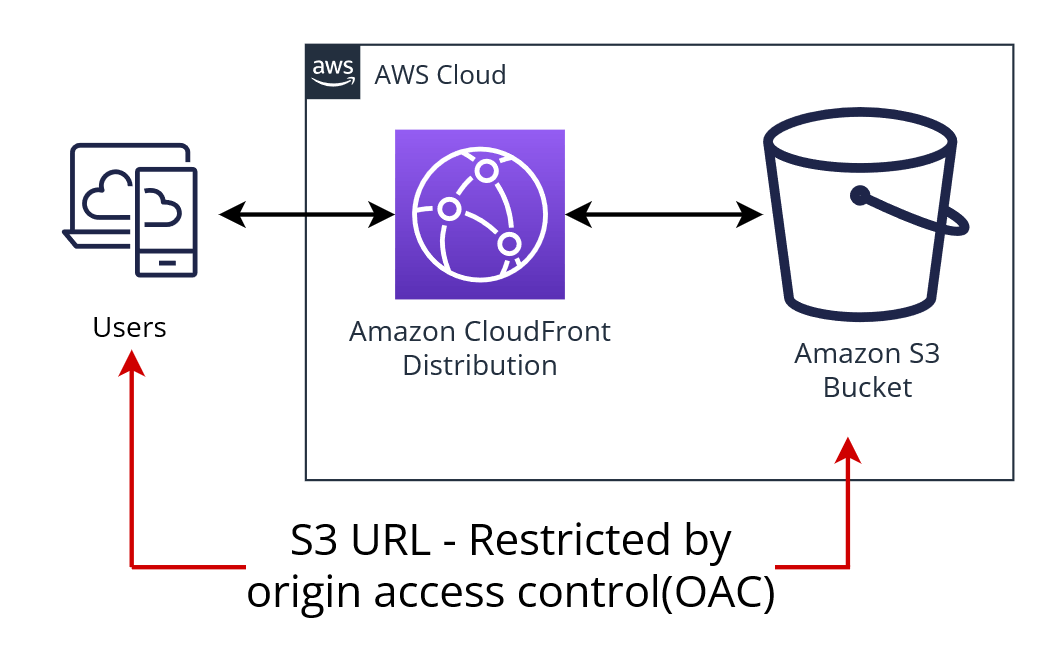
- Origin Access Control (OAC) is the recommended method to restrict direct S3 access and should be used for all new distributions.
- OAC supports:
- Enhanced security practices like short-term credentials, frequent credential rotations, and resource-based policies
- All S3 buckets in all AWS Regions, including opt-in Regions launched after December 2022
- S3 server-side encryption with AWS KMS (SSE-KMS)
- Dynamic requests (PUT, POST, DELETE) to Amazon S3
- Comprehensive HTTP methods support — OAC supports GET, PUT, POST, PATCH, DELETE, OPTIONS, and HEAD.
- OAC is based on IAM service principals to authenticate with S3 origins using AWS Signature Version 4 (SigV4).
- CloudFront OAC needs to be set up with permissions to access the S3 bucket origin using an S3 bucket policy that grants the CloudFront service principal (
cloudfront.amazonaws.com) access, scoped to the specific distribution ARN. - For buckets with objects encrypted using server-side encryption with AWS Key Management Service (SSE-KMS), the OAC must be provided with permission to use the AWS KMS key via the KMS key policy.
- When using CloudFront OAC with Amazon S3 bucket origins, Amazon S3 Object Ownership must be set to Bucket owner enforced (the default for new S3 buckets). If ACLs are required, use the Bucket owner preferred setting.
- OAC does not work with S3 buckets configured as website endpoints — these must be set up as custom origins.
- OAC Signing Behavior options:
- Always sign requests (recommended) — CloudFront always signs requests to the S3 origin.
- Never sign requests — Turns off OAC; bucket must be publicly accessible.
- Do not override authorization header — CloudFront signs only when the viewer request doesn’t include an Authorization header.
OAC Extended Origin Support (2024)
- CloudFront OAC is not limited to S3 origins. It now also supports:
- AWS Lambda function URL origins (April 2024) — Secures Lambda function URLs by permitting access only from designated CloudFront distributions using SigV4.
- AWS Elemental MediaPackage v2 origins — Restricts access to MediaPackage v2 channel endpoints.
- AWS Elemental MediaStore origins — Restricts access to MediaStore container endpoints.
Migrating from OAI to OAC
- To migrate, first update the S3 bucket policy to allow both the OAI and the distribution with OAC enabled to access the bucket’s content.
- This ensures CloudFront never loses access during the transition.
- After the distribution is fully deployed with OAC, remove the OAI statement from the bucket policy.
Origin Access Identity – OAI (Legacy, Not Recommended)
⚠️ OAI DEPRECATED
Origin Access Identity (OAI) is a legacy feature. AWS deprecated OAI creation in 2024. As of March 2026, new CloudFront distributions can only use Origin Access Control (OAC). Existing OAI-based distributions continue to function but cannot be attached to new distributions.
Action Required: Migrate to Origin Access Control (OAC) for enhanced security and feature support.
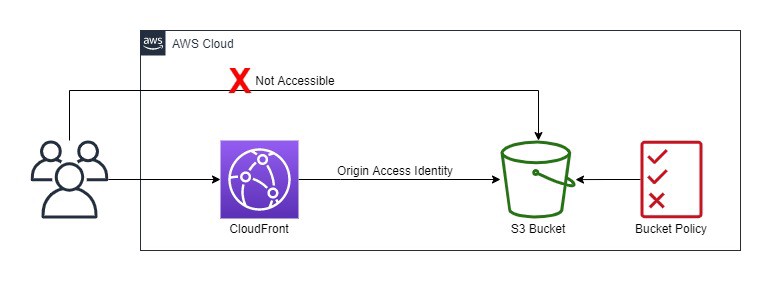
- OAI doesn’t support:
- Amazon S3 buckets in opt-in Regions (launched after January 2023)
- Amazon S3 server-side encryption with AWS KMS (SSE-KMS)
- Dynamic requests (PUT, POST, or DELETE) to Amazon S3
- S3 origin objects must be granted public read permissions and hence the objects are accessible from both S3 as well as CloudFront.
- Even though CloudFront does not expose the underlying S3 URL, it can be known to the user if shared directly or used by applications.
- For using CloudFront signed URLs or signed cookies to provide access to the objects, it would be necessary to prevent users from having direct access to the S3 objects.
- Users accessing S3 objects directly would
- bypass the controls provided by CloudFront signed URLs or signed cookies, for e.g., control over the date-time that a user can no longer access the content and the IP addresses can be used to access content
- CloudFront access logs are less useful because they’re incomplete.
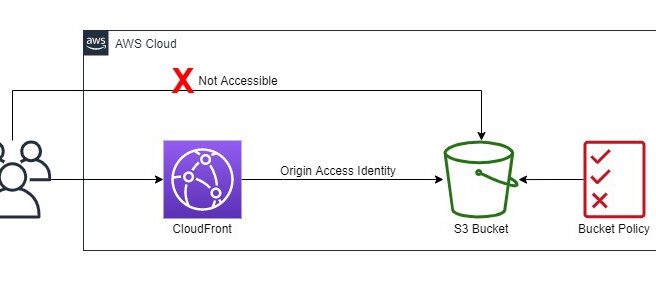
- Origin Access Identity (OAI) can be used to prevent users from directly accessing objects from S3.
- Origin access identity, which is a special CloudFront user, can be created and associated with the distribution.
- S3 bucket/object permissions need to be configured to only provide access to the Origin Access Identity.
- When users access the object from CloudFront, it uses the OAI to fetch the content on the user’s behalf, while the S3 object’s direct access is restricted
CloudFront with S3 Objects
- CloudFront can be configured to include custom headers or modify existing headers whenever it forwards a request to the origin, to
- validate the user is not accessing the origin directly, bypassing CDN
- identify the CDN from which the request was forwarded, if more than one CloudFront distribution is configured to use the same origin
- if users use viewers that don’t support CORS, configure CloudFront to forward the Origin header to the origin. That will cause the origin to return the Access-Control-Allow-Origin header for every request
Adding & Updating Objects
- Objects just need to be added to the Origin and CloudFront would start distributing them when accessed.
- For objects served by CloudFront, the Origin can be updated either by
- Overwriting the original object
- Create a different version and update the links exposed to the user.
- For updating objects, it is recommended to use versioning e.g. have files or the entire folders with versions, so links can be changed when the objects are updated forcing a refresh.
- With versioning,
- there is no wait time for an object to expire before CloudFront begins to serve a new version of it.
- there is no difference in consistency in the object served from the edge
- no cost is involved to pay for object invalidation.
Removing/Invalidating Objects
- Objects, by default, would be removed upon expiry (TTL) and the latest object would be fetched from the Origin
- Objects can also be removed from the edge cache before it expires
- File or Object Versioning to serve a different version of the object that has a different name.
- Invalidate the object from edge caches. For the next request, CloudFront returns to the Origin to fetch the object
- Object or File Versioning is recommended over Invalidating objects
- if the objects need to be updated frequently.
- enables to control which object a request returns even when the user has a version cached either locally or behind a corporate caching proxy.
- makes it easier to analyze the results of object changes as CloudFront access logs include the names of the objects
- provides a way to serve different versions to different users.
- simplifies rolling forward & back between object revisions.
- is less expensive, as no charges for invalidating objects.
- for e.g. change header-v1.jpg to header-v2.jpg
- Invalidating objects from the cache
- objects in the cache can be invalidated explicitly before they expire to force a refresh
- allows to invalidate selected objects
- allows to invalidate multiple objects for e.g. objects in a directory or all of the objects whose names begin with the same characters, you can include the * wildcard at the end of the invalidation path.
- the user might continue to see the old version until it expires from those caches.
- A specified number of invalidation paths can be submitted each month for free. Any invalidation requests more than the allotted no. per month, a fee is charged for each submitted invalidation path
- The First 1,000 invalidation paths requests submitted per month are free; charges apply for each invalidation path over 1,000 in a month.
- Invalidation path can be for a single object for e.g. /js/ab.js or for multiple objects for e.g. /js/* and is counted as a single request even if the * wildcard request may invalidate thousands of objects.
For RTMP distribution, objects served cannot be invalidated
Invalidation by Cache Tag (2026)
- CloudFront now supports tag-based cache invalidation (announced April 2026), enabling invalidation of cached objects based on semantic tags rather than URL paths.
- How it works:
- Configure a
CacheTagConfigon the distribution specifying the HTTP header name for cache tags. - The origin returns a cache tag header (e.g.,
x-amz-meta-cache-tag) with comma-separated tag values in HTTP responses. - Use the
CreateInvalidationAPI with a#prefix to invalidate all objects matching a tag (e.g.,#product:electronics).
- Configure a
- For S3 origins, cache tags can be attached as S3 object metadata. A metadata key of
cache-tagis returned by S3 as anx-amz-meta-cache-tagheader. - Alternatively, a Lambda@Edge origin response function can add cache tag headers.
- Tag format requirements:
- ASCII visible characters (33–126), no spaces or commas
- Case-insensitive, maximum 256 characters per tag
- Maximum 50 tags per object
- Path and tag invalidations can be mixed in a single request.
- Tag invalidation is opt-in — distributions without
CacheTagConfigignore cache tag headers. - Backward compatible — existing path and wildcard invalidations continue to work unchanged.
Partial Requests (Range GETs)
- Partial requests using Range headers in a GET request help to download the object in smaller units, improving the efficiency of partial downloads and the recovery from partially failed transfers.
- For a partial GET range request, CloudFront
- checks the cache in the edge location for the requested range or the entire object and if exists, serves it immediately
- if the requested range does not exist, it forwards the request to the origin and may request a larger range than the client requested to optimize performance
- if the origin supports range header, it returns the requested object range and CloudFront returns the same to the viewer
- if the origin does not support range header, it returns the complete object and CloudFront serves the entire object and caches it for future.
- CloudFront uses the cached entire object to serve any future range GET header requests
CloudFront VPC Origins (2024)
- CloudFront VPC Origins (launched November 2024) allows CloudFront to deliver content from applications hosted in VPC private subnets.
- Eliminates the need for applications to be exposed on the public internet by restricting access solely through CloudFront distributions.
- Supports Application Load Balancers (ALBs), Network Load Balancers (NLBs), or EC2 instances in private subnets as origins.
- For S3 origins, OAC remains the managed solution. VPC Origins is designed for compute-based origins (ALB, NLB, EC2).
- Origin servers remain hidden from the internet, reducing the attack surface.
- VPC Origin modification via CloudFront Functions is also supported (April 2025).
CloudFront Origin Modification via CloudFront Functions (2024)
- CloudFront supports origin modification within CloudFront Functions (announced November 2024), enabling conditional origin changes on each request.
- Allows dynamically routing requests to different S3 buckets or other origins based on request attributes (headers, path, query strings).
- Use cases include A/B testing, failover, geographic routing, and multi-tenant architectures.
- Additional capabilities added (November 2025): edge location and Regional Edge Cache (REC) metadata, raw query string retrieval, and advanced origin overrides.
CloudFront Mutual TLS for Origins (2026)
- CloudFront now supports mutual TLS (mTLS) authentication for origins (announced January 2026), enabling end-to-end certificate-based authentication from viewers to origins.
- Ensures that only authorized CloudFront distributions can establish connections with origin servers.
- Supports per-origin configuration with different client certificates for different origins within the same distribution.
- Stronger than custom headers or IP allowlists for origin authentication.
- Works with AWS, on-premises, and third-party backends.
- CloudFront also supports mTLS Passthrough Mode for viewers (May 2026), forwarding client certificates to the origin without verification at CloudFront.
AWS Certification Exam Practice Questions
- Questions are collected from Internet and the answers are marked as per my knowledge and understanding (which might differ with yours).
- AWS services are updated everyday and both the answers and questions might be outdated soon, so research accordingly.
- AWS exam questions are not updated to keep up the pace with AWS updates, so even if the underlying feature has changed the question might not be updated
- Open to further feedback, discussion and correction.
- You are building a system to distribute confidential training videos to employees. Using CloudFront, what method could be used to serve content that is stored in S3, but not publically accessible from S3 directly?
- Create an Origin Access Identity (OAI) for CloudFront and grant access to the objects in your S3 bucket to that OAI. [Note: While this answer remains technically correct for the question, OAI is now legacy. The recommended approach for new implementations is Origin Access Control (OAC).]
- Add the CloudFront account security group “amazon-cf/amazon-cf-sg” to the appropriate S3 bucket policy.
- Create an Identity and Access Management (IAM) User for CloudFront and grant access to the objects in your S3 bucket to that IAM User.
- Create an S3 bucket policy that lists the CloudFront distribution ID as the Principal and the target bucket as the Amazon Resource Name (ARN).
- A company wants to restrict access to its S3 bucket origin so that content is only accessible through their CloudFront distribution. They also need to support uploading files via CloudFront and use SSE-KMS encryption. Which approach should they use?
- Configure Origin Access Identity (OAI) with a bucket policy granting s3:GetObject and s3:PutObject.
- Configure Origin Access Control (OAC) with a bucket policy granting the CloudFront service principal s3:GetObject and s3:PutObject, and update the KMS key policy to allow CloudFront.
- Make the S3 bucket public and use CloudFront signed URLs to restrict viewer access.
- Use a Lambda@Edge function to sign all requests to S3 using IAM credentials.
- A development team needs to invalidate all cached product images across their CloudFront distribution whenever a product category is updated, regardless of URL path structure. What is the most efficient approach?
- Create a wildcard invalidation for /* to clear all cached content.
- Maintain a list of all product image URLs and submit individual invalidation paths.
- Configure cache tag invalidation on the distribution and tag objects with category metadata, then invalidate by cache tag.
- Reduce the TTL to 0 for all product images so they are never cached.
- An organization uses CloudFront to serve a web application from an ALB in a private subnet. They want to ensure the ALB is never directly accessible from the internet. Which CloudFront feature should they use?
- Origin Access Control (OAC)
- AWS WAF with IP restriction rules
- CloudFront VPC Origins
- CloudFront signed URLs with a custom policy
- A company needs to verify that requests to their origin server come exclusively from their authorized CloudFront distribution, using certificate-based authentication instead of shared secrets or IP allowlists. Which feature should they implement?
- CloudFront Origin Access Control (OAC)
- Custom origin headers with a shared secret value
- AWS WAF with CloudFront managed prefix list
- CloudFront mutual TLS (mTLS) for origins