By default, communications to and from DynamoDB use the HTTPS protocol, which protects network traffic by using SSL/TLS encryption.
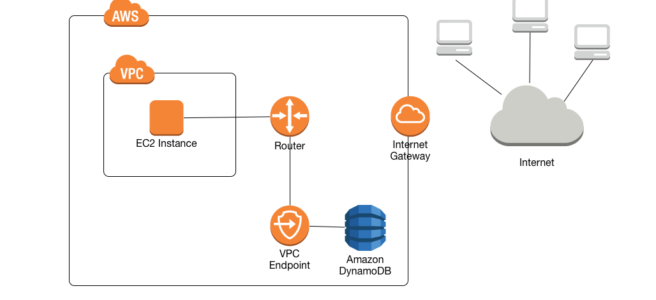
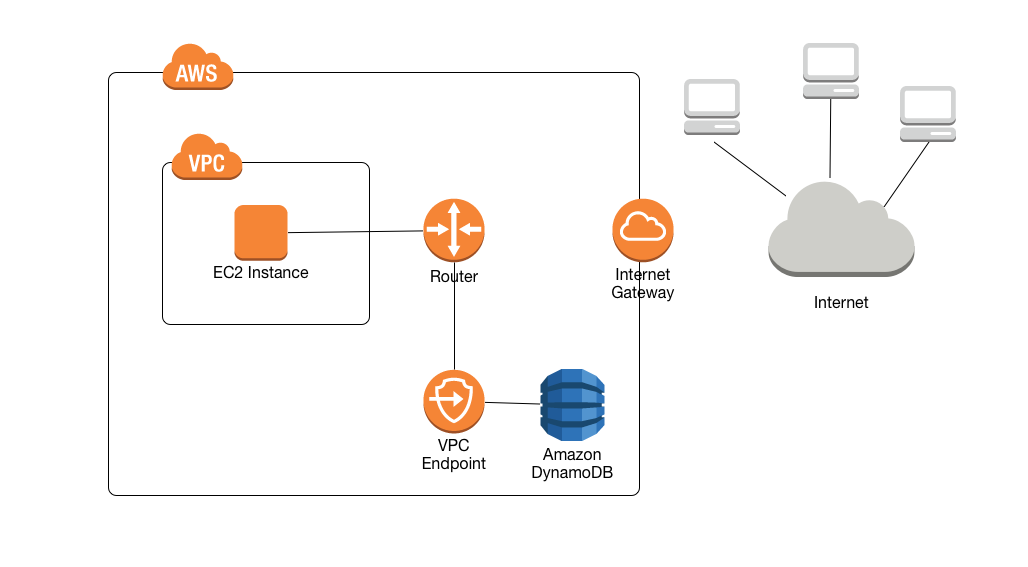
A VPC endpoint for DynamoDB enables EC2 instances in the VPC to use their private IP addresses to access DynamoDB with no exposure to the public internet.
Traffic between the VPC and the AWS service does not leave the Amazon network.
EC2 instances do not require public IP addresses, an internet gateway, a NAT device, or a virtual private gateway in the VPC.
VPC endpoint for DynamoDB routes any requests to a DynamoDB endpoint within the Region to a private DynamoDB endpoint within the Amazon network.
Applications running on EC2 instances in the VPC don’t need to be modified.
Endpoint name remains the same, but the route to DynamoDB stays entirely within the Amazon network and does not access the public internet.
VPC Endpoint Policies to control access to DynamoDB.
Types of VPC Endpoints for DynamoDB
DynamoDB supports two types of VPC endpoints: Gateway Endpoints and Interface Endpoints (using AWS PrivateLink).
Both types keep network traffic on the AWS network.
Gateway endpoints and interface endpoints can be used together in the same VPC.
Gateway Endpoints
A gateway endpoint is specified in the route table to access DynamoDB from the VPC over the AWS network.
Use DynamoDB public IP addresses.
Do not allow access from on-premises networks.
Do not allow access from another AWS Region.
Not billed – Gateway endpoints are free of charge.
Available only in the Region where created.
Supported for both DynamoDB tables and DynamoDB Streams.
Interface Endpoints (AWS PrivateLink)
Announced in March 2024, DynamoDB now supports AWS PrivateLink for interface endpoints.
Use private IP addresses from the VPC to route requests to DynamoDB.
Represented by one or more elastic network interfaces (ENIs) with private IP addresses.
Allow access from on-premises networks via AWS Direct Connect or Site-to-Site VPN.
Allow cross-region access from another VPC using VPC peering or AWS Transit Gateway.
Billed – Interface endpoints incur hourly charges and data processing charges.
Support up to 50,000 requests per second per endpoint.
Compatible with existing gateway endpoints in the same VPC.
Enable simplified private network connectivity from on-premises workloads to DynamoDB.
Choosing Between Gateway and Interface Endpoints
Use Gateway Endpoints when:
Access is only needed from within the VPC.
Cost optimization is a priority (gateway endpoints are free).
Simple VPC-only connectivity is sufficient.
Use Interface Endpoints when:
Access is needed from on-premises networks via Direct Connect or VPN.
Cross-region access is required via VPC peering or Transit Gateway.
Private IP addressing is required for compliance or security policies.
Integration with AWS Management Console Private Access is needed.
Use Both Together when:
In-VPC applications can use the free gateway endpoint.
On-premises applications use interface endpoints for private connectivity.
This approach optimizes costs while enabling hybrid connectivity.
DynamoDB Streams with AWS PrivateLink
Announced in March 2025, DynamoDB Streams now supports AWS PrivateLink.
Allows invoking DynamoDB Streams APIs from within the VPC without traversing the public internet.
Only interface endpoints are supported for DynamoDB Streams – gateway endpoints are not supported.
Enables private connectivity for stream processing applications running on-premises or in other regions.
Supports FIPS endpoints in US and Canada commercial AWS Regions (announced November 2025).
To use DynamoDB console with AWS Management Console Private Access, create VPC endpoints for both:
com.amazonaws.<region>.dynamodb
com.amazonaws.<region>.dynamodb-streams
DynamoDB Accelerator (DAX) with AWS PrivateLink
Announced in October 2025, DAX now supports AWS PrivateLink.
Enables secure access to DAX management APIs (CreateCluster, DescribeClusters, DeleteCluster) over private IP addresses within the VPC.
Customers can access DAX using private DNS names.
Provides private connectivity for DAX cluster management operations.
IPv6 Support
Announced in October 2025, DynamoDB now supports Internet Protocol version 6 (IPv6).
IPv6 addresses can be used in VPCs when connecting to:
DynamoDB tables
DynamoDB Streams
DynamoDB Accelerator (DAX)
IPv6 support includes both AWS PrivateLink Gateway and Interface endpoints.
DAX supports IPv6 addressing with IPv4-only, IPv6-only, or dual-stack networking modes.
Available in all commercial AWS Regions and AWS GovCloud (US) Regions.
VPC Endpoint Policies
Endpoint policies can be attached to VPC endpoints to control access to DynamoDB.
Policies specify:
IAM principals that can perform actions
Actions that can be performed
Resources on which actions can be performed
Can restrict access to specific DynamoDB tables from a VPC endpoint.
Useful for implementing least-privilege access controls.
Considerations and Limitations
AWS PrivateLink for DynamoDB does not support:
Transport Layer Security (TLS) 1.1
Private and Hybrid Domain Name System (DNS) services
Network connectivity timeouts to AWS PrivateLink endpoints need to be handled by applications.
Interface endpoints support up to 50,000 requests per second per endpoint.
When using both gateway and interface endpoints together, applications must use endpoint-specific DNS names to route traffic through interface endpoints.
AWS Certification Exam Practice Questions
Questions are collected from Internet and the answers are marked as per my knowledge and understanding (which might differ with yours).
AWS services are updated everyday and both the answers and questions might be outdated soon, so research accordingly.
AWS exam questions are not updated to keep up the pace with AWS updates, so even if the underlying feature has changed the question might not be updated
Open to further feedback, discussion and correction.
What are the services supported by VPC endpoints, using the Gateway endpoint type?
Amazon EFS
Amazon DynamoDB
Amazon Glacier
Amazon SQS
A business application is hosted on Amazon EC2 and uses Amazon DynamoDB for its storage. The chief information security officer has directed that no application traffic between the two services should traverse the public internet. Which capability should the solutions architect use to meet the compliance requirements?
AWS Key Management Service (AWS KMS)
VPC endpoint
Private subnet
Virtual private gateway
A company runs an application in the AWS Cloud and uses Amazon DynamoDB as the database. The company deploys Amazon EC2 instances to a private network to process data from the database. The company uses two NAT instances to provide connectivity to DynamoDB.
The company wants to retire the NAT instances. A solutions architect must implement a solution that provides connectivity to DynamoDB and that does not require ongoing management. What is the MOST cost-effective solution that meets these requirements?
Create a gateway VPC endpoint to provide connectivity to DynamoDB.
Configure a managed NAT gateway to provide connectivity to DynamoDB.
Establish an AWS Direct Connect connection between the private network and DynamoDB.
Deploy an AWS PrivateLink endpoint service between the private network and DynamoDB.
A company has an on-premises data center connected to AWS via AWS Direct Connect. The company needs to access DynamoDB tables from on-premises applications without traversing the public internet. What is the BEST solution?
Create a gateway VPC endpoint for DynamoDB.
Create an interface VPC endpoint (AWS PrivateLink) for DynamoDB.
Configure a NAT gateway in the VPC.
Use an internet gateway with security groups.
A solutions architect needs to enable private connectivity to DynamoDB Streams for a stream processing application. Which VPC endpoint type should be used?
Gateway endpoint only
Interface endpoint only
Either gateway or interface endpoint
Both gateway and interface endpoints together
A company wants to minimize costs for accessing DynamoDB from EC2 instances within the same VPC while maintaining private connectivity. What should they implement?
Interface VPC endpoint
Gateway VPC endpoint
NAT gateway
Internet gateway with security groups
Which of the following are true about DynamoDB interface endpoints? (Select TWO)
They support access from on-premises networks via Direct Connect or VPN.
They are free of charge.
They use private IP addresses from the VPC.
They cannot be used with gateway endpoints in the same VPC.
DynamoDB Time to Live – TTL enables a per-item timestamp to determine when an item is no longer needed.
After the date and time of the specified timestamp, DynamoDB deletes the item from the table without consuming any write throughput.
DynamoDB TTL is provided at no extra cost and can help reduce data storage by retaining only required data.
Items that are deleted from the table are also removed from any local secondary index and global secondary index in the same way as a DeleteItem operation.
DynamoDB Stream tracks the delete operation as a system delete, not a regular one.
How TTL Works
TTL allows defining a per-item expiration timestamp that indicates when an item is no longer needed.
DynamoDB automatically deletes expired items within a few days of their expiration time, without consuming write throughput.
Deletion Timeline: DynamoDB typically deletes expired items within two days (48 hours) of expiration.
The exact duration depends on the workload nature and table size.
Deletion rate is proportional to the total number of TTL-expired items.
Items pending deletion: Expired items that haven’t been deleted yet will still appear in reads, queries, and scans.
Use filter expressions to remove expired items from Scan and Query results.
Expired items can still be updated, including changing or removing their TTL attributes.
When updating expired items, use a condition expression to ensure the item hasn’t been subsequently deleted.
TTL process runs in the background as a low-priority task to avoid impacting table performance.
TTL deletions do not consume Write Capacity Units (WCU) in provisioned mode or Write Request Units in on-demand mode.
TTL Requirements and Limitations
Data Type: TTL attributes must use the Number data type. Other data types, such as String, are not supported.
Time Format: TTL attributes must use the Unix epoch time format (seconds since January 1, 1970, 00:00:00 UTC).
Be sure that the timestamp is in seconds, not milliseconds.
Items with TTL attributes that are not a Number type are ignored by the TTL process.
Five-Year Past Limitation: To be considered for expiry and deletion, the TTL timestamp cannot be more than five years in the past.
This prevents accidental deletion of historical data with very old timestamps.
Items with TTL values older than five years in the past are ignored by the TTL process.
Future Expiration: No limit on how far in the future the TTL timestamp can be set.
Attribute Selection: Only one attribute per table can be designated as the TTL attribute.
The initial TTL delete does not consume WCU in the region where the TTL expiry occurs.
The replicated TTL delete to replica table(s) consumes a replicated Write Capacity Unit (provisioned mode) or Replicated Write Unit (on-demand mode) in each replica region.
Applicable charges apply for replicated TTL deletes.
TTL and DynamoDB Streams
Deleted items are sent to DynamoDB Streams as system deletions (not user deletions).
Stream records for TTL deletions include a special attribute to identify them as TTL-triggered deletions.
Can be used to trigger downstream actions via AWS Lambda, such as:
Archiving expired items to S3 or Amazon S3 Glacier.
Sending notifications when items expire.
Maintaining audit logs of deleted items.
Common Use Cases
TTL is useful if the stored items lose relevance after a specific time. For example:
Session Management: Remove user session data after inactivity period (e.g., 30 days).
IoT and Sensor Data: Remove sensor data after a year of inactivity.
Temporary Data: Delete temporary records like shopping carts, draft documents, or cache entries.
Compliance and Data Retention: Retain sensitive data for a certain amount of time according to contractual or regulatory obligations (e.g., GDPR, HIPAA).
Event Data: Remove event logs, audit trails, or metrics after a retention period.
Archive to S3: Archive expired items to an S3 data lake via DynamoDB Streams and AWS Lambda before deletion.
Best Practices
Calculate TTL on Write: Compute the expiration timestamp when creating or updating items.
For new items: TTL = createdAt + retention_period
For updated items: TTL = updatedAt + retention_period
Use Filter Expressions: Filter out expired items in application queries to avoid processing items pending deletion.
Archive Before Deletion: Use DynamoDB Streams with Lambda to archive important data to S3 before TTL deletion.
Monitor TTL Deletions: Track TTL deletion metrics using CloudWatch to ensure the deletion rate meets expectations.
Test TTL Behavior: Use the TTL preview feature in the DynamoDB console to simulate deletions before enabling TTL.
Avoid Very Old Timestamps: Ensure TTL values are not more than five years in the past to prevent them from being ignored.
Consider Global Table Costs: Account for replicated write costs when using TTL with Global Tables.
Enabling TTL
TTL can be enabled on a table through:
AWS Management Console
AWS CLI
AWS SDKs
AWS CloudFormation
Specify the attribute name that will store the TTL timestamp.
TTL can be enabled or disabled at any time without impacting table performance.
Changing the TTL attribute requires disabling TTL first, then re-enabling with the new attribute.
AWS Certification Exam Practice Questions
Questions are collected from Internet and the answers are marked as per my knowledge and understanding (which might differ with yours).
AWS services are updated everyday and both the answers and questions might be outdated soon, so research accordingly.
AWS exam questions are not updated to keep up the pace with AWS updates, so even if the underlying feature has changed the question might not be updated
Open to further feedback, discussion and correction.
A company developed an application by using AWS Lambda and Amazon DynamoDB. The Lambda function periodically pulls data from the company’s S3 bucket based on date and time tags and inserts specific values into a DynamoDB table for further processing. The company must remove data that is older than 30 days from the DynamoDB table. Which solution will meet this requirement with the MOST operational efficiency?
Update the Lambda function to add the Version attribute in the DynamoDB table. Enable TTL on the DynamoDB table to expire entries that are older than 30 days based on the TTL attribute.
Update the Lambda function to add the TTL attribute in the DynamoDB table. Enable TTL on the DynamoDB table to expire entries that are older than 30 days based on the TTL attribute.
Use AWS Step Functions to delete entries that are older than 30 days.
Use EventBridge to schedule the Lambda function to delete entries that are older than 30 days.
A company stores IoT sensor data in a DynamoDB table. The data must be retained for 90 days for analysis and then automatically deleted. The solution must minimize costs. What should a solutions architect recommend?
Create a Lambda function to scan and delete items older than 90 days, triggered daily by EventBridge.
Enable TTL on the DynamoDB table with an expiration attribute set to 90 days from the item creation time.
Use DynamoDB Streams with Lambda to move data to S3 Glacier after 90 days and delete from DynamoDB.
Create a scheduled AWS Batch job to delete items older than 90 days.
A DynamoDB table has TTL enabled. A developer notices that some items with expired TTL timestamps are still appearing in query results. What is the MOST likely explanation?
TTL is not working correctly and needs to be disabled and re-enabled.
The TTL attribute is using the wrong data type.
Items are expired but have not yet been deleted by the background TTL process, which can take up to 48 hours.
The TTL timestamp is more than five years in the past.
A company uses DynamoDB Global Tables across three regions. TTL is enabled on the table. How are write capacity units consumed for TTL deletions?
TTL deletions consume WCU in all regions including the region where expiration occurs.
TTL deletions do not consume WCU in the region where expiration occurs, but consume replicated write units in replica regions.
TTL deletions do not consume any WCU in any region.
TTL deletions consume double WCU in the region where expiration occurs.
What is the correct format for a DynamoDB TTL attribute value to expire an item on January 1, 2027, at 00:00:00 UTC?
2027-01-01T00:00:00Z (ISO 8601 format)
1735689600000 (milliseconds since epoch)
1735689600 (seconds since epoch)
“1735689600” (string representation of seconds)
A company wants to archive expired DynamoDB items to S3 before they are deleted by TTL. What is the BEST approach?
Create a Lambda function that scans the table for expired items and copies them to S3 before TTL deletes them.
Enable DynamoDB Streams and use a Lambda function to detect TTL deletions and archive items to S3.
Disable TTL and use a scheduled Lambda function to manually delete items after archiving to S3.
Use AWS Backup to automatically archive items before TTL deletion.
Which of the following statements about DynamoDB TTL are correct? (Select TWO)
TTL deletions consume write capacity units in the source region.
TTL timestamps must be in Unix epoch time format in seconds.
TTL can use String data type for the expiration attribute.
TTL timestamps cannot be more than five years in the past to be considered for deletion.
TTL guarantees deletion within exactly 48 hours of expiration.
DynamoDB Global Tables is a fully managed, serverless, multi-Region, multi-active database.
Global tables provide 99.999% availability, increased application resiliency, and improved business continuity.
Global table’s automatic cross-Region replication capability helps achieve fast, local read and write performance and regional fault tolerance for database workloads.
Applications can now perform reads and writes to DynamoDB in AWS Regions around the world, with changes in any Region propagated to every Region where a table is replicated.
Global Tables help in building applications to advantage of data locality to reduce overall latency.
Global Tables replicates data among Regions within a single AWS account.
Global Tables Working
Global Table is a collection of one or more replica tables, all owned by a single AWS account.
A single Amazon DynamoDB global table can only have one replica table per AWS Region.
Each replica table stores the same set of data items, has the same table name, and the same primary key schema.
When an application writes data to a replica table in one Region, DynamoDB replicates the writes to other replica tables in the other AWS Regions.
All replicas in a global table share the same table name, primary key schema, and item data.
Consistency Modes
When creating a global table, a consistency mode must be configured.
Global tables support two consistency modes: Multi-Region Eventual Consistency (MREC) and Multi-Region Strong Consistency (MRSC).
If no consistency mode is specified, the global table defaults to MREC.
A global table cannot contain replicas configured with different consistency modes.
Consistency mode cannot be changed after creation.
MREC is the default consistency mode for global tables.
Item changes are asynchronously replicated to all other replicas, typically within a second or less.
Conflict Resolution: Uses Last Write Wins approach based on the latest internal timestamp on a per-item basis.
Consistency Behavior:
Supports eventual consistency for cross-Region reads.
Supports strong consistency for same-Region reads (returns latest version if item was last updated in that Region).
May return stale data for strongly consistent reads if the item was last updated in a different Region.
Recovery Point Objective (RPO): Equal to replication delay between replicas (usually a few seconds).
Replica Management:
Create by adding a replica to an existing DynamoDB table.
Can add replicas to expand to more Regions or remove replicas if no longer needed.
Can have a replica in any Region where DynamoDB is available.
No performance impact when adding replicas.
Requirements: Requires DynamoDB Streams enabled with New and Old image settings.
Use Cases:
Applications that can tolerate stale data from strongly consistent reads if data was updated in another Region.
Prioritize lower write and strongly consistent read latencies over multi-Region read consistency.
Multi-Region high availability strategy can tolerate RPO greater than zero.
Multi-Region Strong Consistency (MRSC) – January 2025
Announced at AWS re:Invent 2024 (preview) and generally available in January 2025.
Item changes are synchronously replicated to at least one other Region before the write operation returns a successful response.
Zero RPO: Provides Recovery Point Objective (RPO) of zero for highest resilience.
Consistency Behavior:
Strongly consistent read operations on any MRSC replica always return the latest version of an item.
Conditional writes always evaluate against the latest version of an item.
Provides strong read-after-write consistency across all Regions.
Deployment Requirements:
Must be deployed in exactly three Regions.
Can configure with three replicas OR two replicas + one witness.
Witness: A component that contains data written to replicas and supports MRSC’s availability architecture. Cannot perform read/write operations on a witness. Witness is owned and managed by DynamoDB.
Regional Availability: Available in three Region sets:
US Region set: US East (N. Virginia), US East (Ohio), US West (Oregon)
EU Region set: Europe (Ireland), Europe (London), Europe (Paris), Europe (Frankfurt)
AP Region set: Asia Pacific (Tokyo), Asia Pacific (Seoul), Asia Pacific (Osaka)
MRSC global tables cannot span Region sets (e.g., cannot mix US and EU Regions).
Creation Requirements:
Create by adding one replica and a witness OR two replicas to an existing DynamoDB table.
Table must be empty when converting to MRSC (existing items not supported).
Cannot add additional replicas after creation.
Cannot delete a single replica or witness (must delete two replicas or one replica + witness to convert back to single-Region table).
Write Conflicts: Write operation fails with ReplicatedWriteConflictException when attempting to modify an item already being modified in another Region. Failed writes can be retried.
Limitations:
Time to Live (TTL): Not supported
Local Secondary Indexes (LSIs): Not supported
Transactions: Not supported (TransactWriteItems and TransactGetItems return errors)
DynamoDB Streams: Not used for replication (can be enabled separately)
Performance Trade-off: Higher write and strongly consistent read latencies compared to MREC.
Use Cases:
Need strongly consistent reads across multiple Regions.
Prioritize global read consistency over lower write latency.
Multi-Region high availability strategy requires RPO of zero.
Financial applications, inventory management, or any system requiring strict consistency.
Pricing Reduction (November 2024)
Effective November 1, 2024, DynamoDB reduced prices for global tables by up to 67%.
On-demand mode: Global tables cost 67% less than before.
Provisioned capacity mode: Global tables cost 33% less than before.
Makes global tables significantly more cost-effective for multi-Region deployments.
Replication and Throughput
MREC Replication:
Uses DynamoDB Streams to replicate changes.
Streams are enabled by default on all replicas and cannot be disabled.
Replication process may combine multiple changes into a single replicated write.
Stream records are ordered per-item but ordering between items may differ between replicas.
MRSC Replication:
Does not use DynamoDB Streams for replication.
Streams can be enabled separately if needed.
Stream records are identical for every replica, including ordering.
Provisioned Mode:
Replication consumes write capacity.
Auto scaling settings for read and write capacities are synchronized between replicas.
Read capacity can be independently configured per replica using ProvisionedThroughputOverride.
On-demand Mode:
Write capacity is automatically synchronized across all replicas.
DynamoDB automatically adjusts capacity based on traffic.
Monitoring and Testing
Replication Latency (MREC only):
MREC global tables publish ReplicationLatency metric to CloudWatch.
Tracks elapsed time between item write in one replica and appearance in another replica.
Expressed in milliseconds for every source-destination Region pair.
MRSC global tables do not publish this metric (synchronous replication).
Fault Injection Testing:
Both MREC and MRSC integrate with AWS Fault Injection Service (AWS FIS).
Can simulate Region isolation by pausing replication to/from a selected replica.
Test error handling, recovery mechanisms, and multi-Region traffic shift behavior.
Additional Features and Considerations
Time to Live (TTL):
MREC: Supported. TTL settings synchronized across all replicas. TTL deletes replicated to all replicas (charged for replicated deletes).
MRSC: Not supported.
Transactions:
MREC: Supported but only atomic within the Region where invoked. Not replicated as a unit.
MRSC: Not supported.
Point-in-Time Recovery (PITR):
Can be enabled on each local replica independently.
PITR settings are not synchronized between replicas.
DynamoDB Accelerator (DAX):
Writes to global table replicas bypass DAX, updating DynamoDB directly.
DAX caches can become stale and are only refreshed when cache TTL expires.
Can be overridden per replica: Read capacity, table class
Never synchronized: Deletion protection, PITR, tags, Contributor Insights
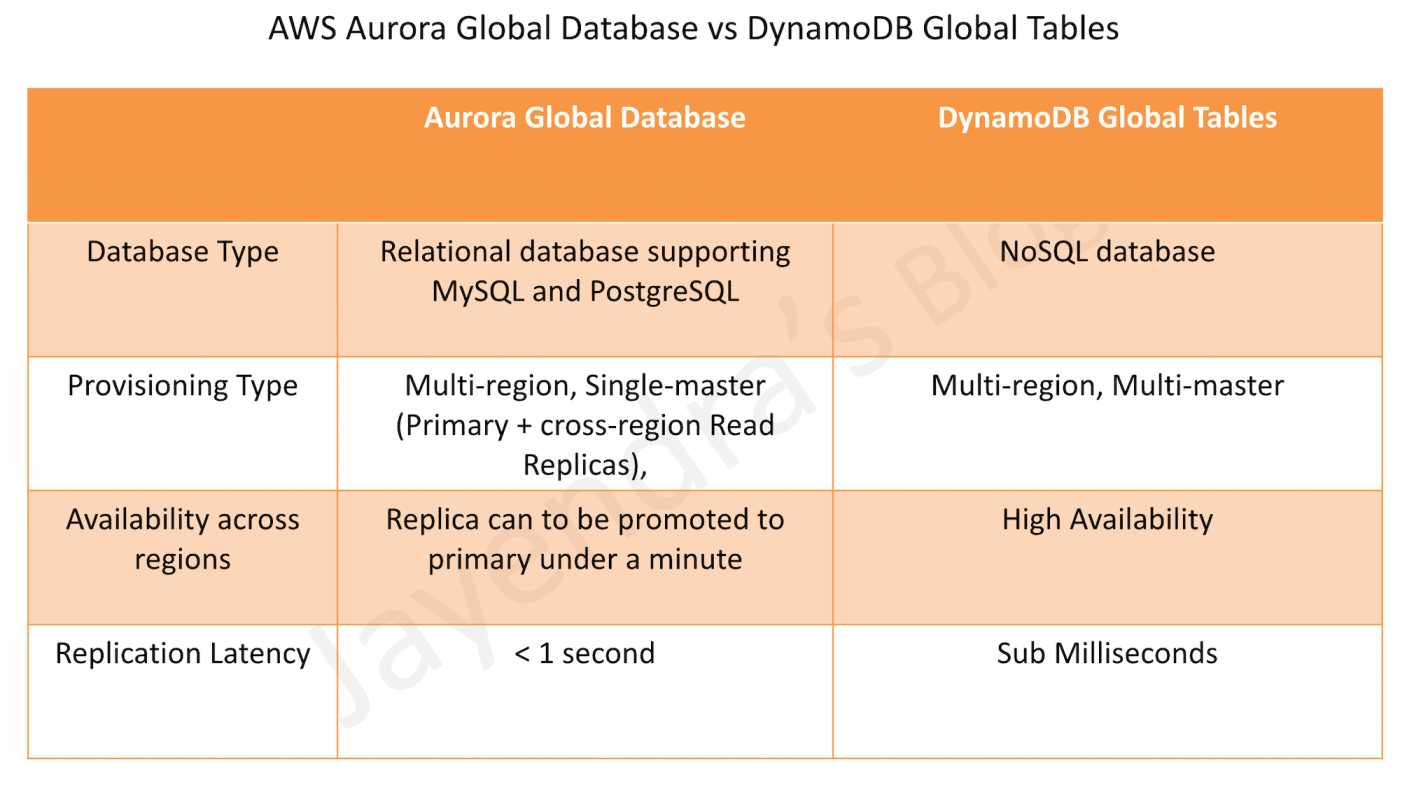
DynamoDB Global Tables vs. Aurora Global Databases
AWS Certification Exam Practice Questions
Questions are collected from Internet and the answers are marked as per my knowledge and understanding (which might differ with yours).
AWS services are updated everyday and both the answers and questions might be outdated soon, so research accordingly.
AWS exam questions are not updated to keep up the pace with AWS updates, so even if the underlying feature has changed the question might not be updated
Open to further feedback, discussion and correction.
A company is building a web application on AWS. The application requires the database to support read and write operations in multiple AWS Regions simultaneously. The database also needs to propagate data changes between Regions as the changes occur. The application must be highly available and must provide a latency of single-digit milliseconds. Which solution meets these requirements?
Amazon DynamoDB global tables
Amazon DynamoDB streams with AWS Lambda to replicate the data
An Amazon ElastiCache for Redis cluster with cluster mode enabled and multiple shards
An Amazon Aurora global database
A financial services company requires a multi-Region database with zero data loss (RPO = 0) and strongly consistent reads across all Regions. Which DynamoDB global tables consistency mode should they use?
Multi-Region Eventual Consistency (MREC)
Multi-Region Strong Consistency (MRSC)
Single-Region Strong Consistency
Cross-Region Read Replicas
A company wants to create a DynamoDB global table with MRSC for their inventory management system. They have existing data in a table in us-east-1. What must they do before converting to MRSC?
Enable DynamoDB Streams on the table.
Configure three replicas in different Regions.
Empty the table of all existing data.
Enable Point-in-Time Recovery (PITR).
A company has a DynamoDB global table with MREC configured across us-east-1, eu-west-1, and ap-southeast-1. An item is updated simultaneously in us-east-1 and eu-west-1. How does DynamoDB resolve this conflict?
The write in the primary Region takes precedence.
Last Write Wins based on the latest internal timestamp.
Both writes are rejected and must be retried.
The write with the larger data size takes precedence.
A company wants to deploy a DynamoDB global table with MRSC. They need replicas in us-east-1, eu-west-1, and ap-southeast-1. What will happen?
The global table will be created successfully.
The creation will fail because MRSC cannot span Region sets.
The global table will be created with MREC instead.
A witness will be automatically placed in a fourth Region.
Which of the following features are NOT supported with DynamoDB MRSC global tables? (Select THREE)
Time to Live (TTL)
DynamoDB Streams
Local Secondary Indexes (LSIs)
Global Secondary Indexes (GSIs)
Transaction operations (TransactWriteItems)
Point-in-Time Recovery (PITR)
A company has a DynamoDB global table with MREC. They perform a strongly consistent read in us-west-2, but the item was last updated in eu-west-1. What will the read return?
The latest version of the item from eu-west-1.
Potentially stale data (the version before the eu-west-1 update).
An error indicating the item is being replicated.
The read will be automatically redirected to eu-west-1.
What is the typical replication latency for DynamoDB global tables with MREC?
DynamoDB Streams provides a time-ordered sequence of item-level changes made to data in a table.
DynamoDB Streams is a serverless data streaming feature that makes it straightforward to track, process, and react to item-level changes in DynamoDB tables in near real-time.
DynamoDB Streams stores the data for the last 24 hours, after which they are erased.
DynamoDB Streams maintains an ordered sequence of the events per item; however, sequence across items is not maintained.
Example:
For e.g., suppose that you have a DynamoDB table tracking high scores for a game and that each item in the table represents an individual player. If you make the following three updates in this order:
Update 1: Change Player 1’s high score to 100 points
Update 2: Change Player 2’s high score to 50 points
Update 3: Change Player 1’s high score to 125 points
DynamoDB Streams will maintain the order for Player 1 score events. However, it would not maintain order across the players. So Player 2 score event is not guaranteed between the 2 Player 1 events.
Applications can access this log and view the data items as they appeared before and after they were modified, in near-real time.
DynamoDB Streams APIs help developers consume updates and receive the item-level data before and after items are changed.
DynamoDB Streams Features
Streams allow reads at up to twice the rate of the provisioned write capacity of the DynamoDB table.
Streams have to be enabled on a per-table basis. When enabled on a table, DynamoDB captures information about every modification to data items in the table.
Streams support Encryption at rest to encrypt the data.
Streams are designed for No Duplicates so that every update made to the table will be represented exactly once in the stream.
Streams write stream records in near-real time so that applications can consume these streams and take action based on the contents.
Stream records contain information about a data modification to a single item in a DynamoDB table.
Each stream record has a sequence number that reflects the order in which the record was published to the stream.
Stream View Types
When enabling a stream on a table, you must specify the stream view type, which determines what information is written to the stream:
KEYS_ONLY: Only the key attributes of the modified item.
NEW_IMAGE: The entire item, as it appears after it was modified.
OLD_IMAGE: The entire item, as it appeared before it was modified.
NEW_AND_OLD_IMAGES: Both the new and the old images of the item (recommended for maximum flexibility).
Use Cases
Multi-Region Replication: Keep other data stores up-to-date with the latest changes to DynamoDB (used by DynamoDB Global Tables).
Real-time Analytics: Stream data to analytics services for real-time insights.
Event-Driven Architectures: Trigger actions based on changes made to the table.
Data Aggregation: Aggregate data from multiple tables into a single view.
Audit and Compliance: Maintain audit logs of all changes to data.
Search Index Updates: Keep search indexes (e.g., OpenSearch) synchronized with DynamoDB data.
Cache Invalidation: Invalidate caches when data changes.
Notifications: Send notifications when specific data changes occur.
Processing DynamoDB Streams
Stream records can be processed using multiple methods:
AWS Lambda
Most common and recommended approach for processing DynamoDB Streams.
Lambda polls the stream and invokes the function synchronously when new records are available.
Lambda automatically handles scaling, retries, and error handling.
Supports batch processing of stream records.
Can filter events using event filtering to reduce invocations and costs.
KCL 3.0 Support (June 2025): DynamoDB Streams now supports Kinesis Client Library 3.0.
Reduces compute costs to process streaming data by up to 33% compared to previous KCL versions.
Improved load balancing algorithm based on CPU utilization.
Enhanced performance and efficiency.
Note: KCL 1.x reaches end-of-support on January 30, 2026. Migrate to KCL 3.x.
AWS PrivateLink Support (March 2025)
Announced in March 2025, DynamoDB Streams now supports AWS PrivateLink.
Allows invoking DynamoDB Streams APIs from within your Amazon VPC without traversing the public internet.
Only interface endpoints are supported for DynamoDB Streams (gateway endpoints are not supported).
Enables private connectivity for stream processing applications running on-premises or in other Regions.
Supports FIPS endpoints in US and Canada commercial AWS Regions (announced November 2025).
Enhances security by keeping stream data within the AWS network.
Critical for compliance requirements that mandate private network connectivity.
Can be accessed from on-premises via AWS Direct Connect or Site-to-Site VPN.
DynamoDB Streams vs. Kinesis Data Streams
DynamoDB Streams:
24-hour data retention
Automatically scales with table
No additional cost (included with DynamoDB)
Simpler to set up and use
Best for simple event-driven architectures
Kinesis Data Streams:
Up to 365 days data retention
Manual capacity management (or on-demand mode)
Additional cost for Kinesis
More complex but more flexible
Best for multiple consumers and longer retention needs
Recommendation: Use DynamoDB Streams for simple use cases with Lambda. Use Kinesis Data Streams for complex scenarios requiring multiple consumers or longer retention.
Best Practices
Choose the Right View Type: Use NEW_AND_OLD_IMAGES for maximum flexibility unless you have specific requirements.
Handle Duplicates: Although designed for no duplicates, implement idempotent processing logic.
Monitor Stream Processing: Use CloudWatch metrics to monitor Lambda invocations, errors, and iterator age.
Use Event Filtering: Filter events in Lambda to reduce unnecessary invocations and costs.
Batch Processing: Configure appropriate batch sizes for Lambda to optimize throughput and cost.
Error Handling: Implement proper error handling and configure dead-letter queues for failed records.
Consider Kinesis for Multiple Consumers: If you need multiple consumers, use Kinesis Data Streams instead.
Migrate to KCL 3.0: If using KCL, migrate to version 3.0 for cost savings and performance improvements.
Use PrivateLink for Security: Enable AWS PrivateLink for enhanced security and compliance.
Limitations and Considerations
Stream records are available for only 24 hours.
Streams do not guarantee ordering across different items (only per-item ordering).
Stream records are eventually consistent with the table.
Enabling streams does not affect table performance.
Streams cannot be enabled on tables with local secondary indexes that use non-key attributes in the projection.
For Global Tables with MREC, streams are enabled by default and cannot be disabled.
For Global Tables with MRSC, streams are not used for replication but can be enabled separately.
AWS Certification Exam Practice Questions
Questions are collected from Internet and the answers are marked as per my knowledge and understanding (which might differ with yours).
AWS services are updated everyday and both the answers and questions might be outdated soon, so research accordingly.
AWS exam questions are not updated to keep up the pace with AWS updates, so even if the underlying feature has changed the question might not be updated
Open to further feedback, discussion and correction.
An application currently writes a large number of records to a DynamoDB table in one region. There is a requirement for a secondary application to retrieve new records written to the DynamoDB table every 2 hours and process the updates accordingly. Which of the following is an ideal way to ensure that the secondary application gets the relevant changes from the DynamoDB table?
Insert a timestamp for each record and then scan the entire table for the timestamp as per the last 2 hours.
Create another DynamoDB table with the records modified in the last 2 hours.
Use DynamoDB Streams to monitor the changes in the DynamoDB table.
Transfer records to S3 which were modified in the last 2 hours.
A company needs to process DynamoDB stream records from an on-premises application without exposing traffic to the public internet. What should they implement?
Use a NAT gateway to access DynamoDB Streams.
Create an interface VPC endpoint for DynamoDB Streams using AWS PrivateLink.
Create a gateway VPC endpoint for DynamoDB Streams.
Use an internet gateway with security groups.
A company wants to reduce costs for processing DynamoDB Streams using KCL. What should they do?
Switch from KCL to Lambda for processing.
Migrate from KCL 1.x to KCL 3.0 for up to 33% cost reduction.
Reduce the number of shards in the stream.
Increase the batch size for stream processing.
A company needs to maintain an audit log of all changes to a DynamoDB table for 90 days. DynamoDB Streams only retains data for 24 hours. What is the BEST solution?
Enable PITR on the DynamoDB table.
Stream DynamoDB changes to Kinesis Data Streams with 90-day retention.
Use Lambda to copy stream records to S3 every 24 hours.
Create on-demand backups every 24 hours.
A developer wants to capture both the old and new values of items when they are modified in a DynamoDB table. Which stream view type should they configure?
KEYS_ONLY
NEW_IMAGE
OLD_IMAGE
NEW_AND_OLD_IMAGES
Which of the following statements about DynamoDB Streams are correct? (Select TWO)
Stream records are available for 24 hours.
Streams guarantee ordering across all items in the table.
Streams maintain ordered sequence of events per item.
Streams can be processed only by Lambda functions.
Enabling streams impacts table write performance.
A company has multiple applications that need to process the same DynamoDB change events. What is the BEST approach?
Create multiple Lambda functions triggered by the same DynamoDB Stream.
Stream DynamoDB changes to Kinesis Data Streams and use multiple consumers.
Enable multiple DynamoDB Streams on the same table.
Use DynamoDB Streams with fan-out to multiple Lambda functions.
AWS has a Region, which is a physical location around the world where we cluster data centers, with one or more Availability Zones which are discrete data centers with redundant power, networking, and connectivity in an AWS Region.
Amazon automatically stores each DynamoDB table in the three geographically distributed locations or AZs for durability.
DynamoDB consistency represents the manner and timing in which the successful write or update of a data item is reflected in a subsequent read operation of that same item.
DynamoDB Consistency Modes
Eventually Consistent Reads (Default)
Eventual consistency option maximizes the read throughput.
Consistency across all copies is usually reached within a second.
However, an eventually consistent read might not reflect the results of a recently completed write.
Repeating a read after a short time should return the updated data.
DynamoDB uses eventually consistent reads, by default.
Use Cases:
Applications that can tolerate reading slightly stale data.
Read-heavy workloads where throughput is more important than immediate consistency.
Cost-sensitive applications (eventually consistent reads are half the cost of strongly consistent reads).
Strongly Consistent Reads
Strongly consistent read returns a result that reflects all writes that received a successful response prior to the read.
Ensures that the most up-to-date data is returned.
Cost: Strongly consistent reads are 2x the cost of eventually consistent reads (consume twice the read capacity units).
Disadvantages:
A strongly consistent read might not be available if there is a network delay or outage. In this case, DynamoDB may return a server error (HTTP 500).
Strongly consistent reads may have higher latency than eventually consistent reads.
Not supported on Global Secondary Indexes (GSIs) – only eventually consistent reads are supported on GSIs.
Strongly consistent reads use more throughput capacity than eventually consistent reads.
Financial transactions or inventory management where stale data is unacceptable.
Scenarios where data accuracy is critical.
Specifying Consistency Mode
DynamoDB allows the user to specify whether the read should be eventually consistent or strongly consistent at the time of the request.
Read operations (such as GetItem, Query, and Scan) provide a ConsistentRead parameter. If set to true, DynamoDB uses strongly consistent reads during the operation.
Default Behavior: Query, GetItem, and BatchGetItem operations perform eventually consistent reads by default.
Forcing Strong Consistency:
Query and GetItem operations can be forced to be strongly consistent by setting ConsistentRead=true.
Query operations cannot perform strongly consistent reads on Global Secondary Indexes (GSIs).
BatchGetItem operations can be forced to be strongly consistent on a per-table basis.
Scan operations can be forced to be strongly consistent.
Transactional Consistency
DynamoDB supports transactions with full ACID (Atomicity, Consistency, Isolation, Durability) properties.
Transactions provide all-or-nothing execution for multiple operations across one or more tables.
TransactGetItems – Perform multiple read operations with snapshot isolation.
Consistency Guarantees:
Atomicity: All operations in a transaction succeed or fail together.
Consistency: Transactions move the database from one valid state to another.
Isolation: Transactions are isolated from each other using snapshot isolation.
Durability: Once a transaction is committed, it is durable.
Regional Scope: Transactional operations provide ACID guarantees within a single Region.
Global Tables Consideration: For Global Tables with MREC, transactions are only atomic within the Region where invoked (not replicated as a unit).
Cost: Transactional operations consume 2x the write capacity units compared to standard writes.
Multi-Region Strong Consistency (MRSC) – January 2025
Announced at AWS re:Invent 2024 and generally available in January 2025.
Available for DynamoDB Global Tables configured with Multi-Region Strong Consistency mode.
Capability: Provides strong consistency across multiple AWS Regions.
Guarantee: Strongly consistent reads on an MRSC table always return the latest version of an item, irrespective of the Region where the read is performed.
Zero RPO: Enables Recovery Point Objective (RPO) of zero for highest resilience.
How It Works:
Item changes are synchronously replicated to at least one other Region before the write operation returns success.
Strongly consistent reads always reflect the latest committed write across all Regions.
Conditional writes always evaluate against the latest version of an item globally.
Deployment Requirements:
Must be deployed in exactly three Regions.
Can configure with 3 replicas OR 2 replicas + 1 witness.
Available in three Region sets: US, EU, and AP (cannot span Region sets).
Trade-offs:
Higher write latency compared to MREC (eventual consistency) due to synchronous replication.
Higher strongly consistent read latency compared to MREC.
Use Cases:
Financial applications requiring global strong consistency.
Inventory management systems across multiple Regions.
Local Secondary Indexes not supported on MRSC tables.
Consistency Comparison
Consistency Type
Scope
Latency
Cost
Use Case
Eventually Consistent
Single Region
Lowest
1x RCU
Read-heavy, can tolerate stale data
Strongly Consistent
Single Region
Low-Medium
2x RCU
Immediate consistency required
Transactional
Single Region
Medium
2x WCU
ACID guarantees, multiple operations
MRSC (Global Tables)
Multi-Region
Higher
Varies
Global strong consistency, zero RPO
Best Practices
Default to Eventually Consistent: Use eventually consistent reads by default for cost and performance optimization.
Use Strong Consistency Selectively: Only use strongly consistent reads when immediate consistency is required.
Avoid Strong Consistency on GSIs: Design data models to avoid needing strongly consistent reads on GSIs (not supported).
Consider Read-After-Write Patterns: If your application writes and immediately reads, use strongly consistent reads or implement retry logic.
Use Transactions for Multi-Item Operations: When multiple items must be updated atomically, use transactions.
Evaluate MRSC for Global Applications: For applications requiring global strong consistency, consider MRSC Global Tables.
Monitor Consistency Metrics: Use CloudWatch to monitor read/write patterns and adjust consistency settings accordingly.
Handle Errors Gracefully: Implement retry logic for strongly consistent reads that may fail during network issues.
AWS Certification Exam Practice Questions
Questions are collected from Internet and the answers are marked as per my knowledge and understanding (which might differ with yours).
AWS services are updated everyday and both the answers and questions might be outdated soon, so research accordingly.
AWS exam questions are not updated to keep up the pace with AWS updates, so even if the underlying feature has changed the question might not be updated
Open to further feedback, discussion and correction.
Which of the following statements is true about DynamoDB?
Requests are eventually consistent unless otherwise specified.
Requests are strongly consistent.
Tables do not contain primary keys.
None of the above
How is provisioned throughput affected by the chosen consistency model when reading data from a DynamoDB table?
Strongly consistent reads use the same amount of throughput as eventually consistent reads
Strongly consistent reads use variable throughput depending on read activity
Strongly consistent reads use more throughput than eventually consistent reads.
Strongly consistent reads use less throughput than eventually consistent reads
A company needs to perform a query on a Global Secondary Index (GSI) and requires the most up-to-date data. What consistency mode should they use?
Strongly consistent reads
Eventually consistent reads (GSIs do not support strongly consistent reads)
Transactional reads
Multi-Region strong consistency
A financial application requires strong consistency across multiple AWS Regions with zero data loss (RPO = 0). Which DynamoDB feature should they use?
DynamoDB Global Tables with MREC (eventual consistency)
DynamoDB Global Tables with MRSC (multi-Region strong consistency)
DynamoDB with strongly consistent reads
DynamoDB transactions
A developer needs to update multiple items across two DynamoDB tables atomically. Which feature should they use?
Strongly consistent writes
BatchWriteItem operation
DynamoDB transactions (TransactWriteItems)
Conditional writes
What is the cost difference between eventually consistent reads and strongly consistent reads in DynamoDB?
No difference in cost
Strongly consistent reads cost 2x more (consume 2x RCU)
Strongly consistent reads cost 3x more
Eventually consistent reads cost 2x more
Which of the following statements about DynamoDB consistency are correct? (Select TWO)
Eventually consistent reads are the default for Query and GetItem operations.
Strongly consistent reads are supported on Global Secondary Indexes.
Strongly consistent reads may return HTTP 500 errors during network issues.
Transactions provide ACID guarantees across multiple Regions.
MRSC Global Tables support local secondary indexes.
DynamoDB Auto Scaling uses the AWS Application Auto Scaling service to dynamically adjust provisioned throughput capacity on your behalf, in response to actual traffic patterns.
Application Auto Scaling enables a DynamoDB table or a global secondary index to increase its provisioned read and write capacity to handle sudden increases in traffic, without throttling.
When the workload decreases, Application Auto Scaling decreases the throughput so that you don’t pay for unused provisioned capacity.
Auto Scaling is available for both provisioned capacity mode and works alongside on-demand capacity mode.
DynamoDB Auto Scaling Process
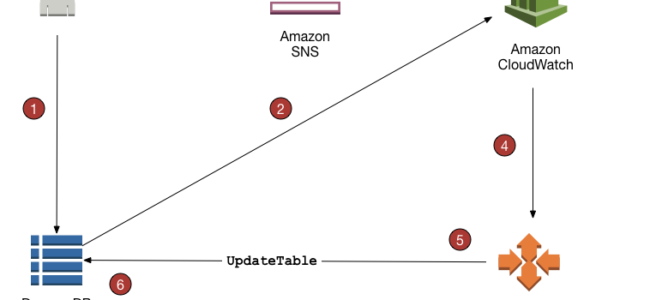
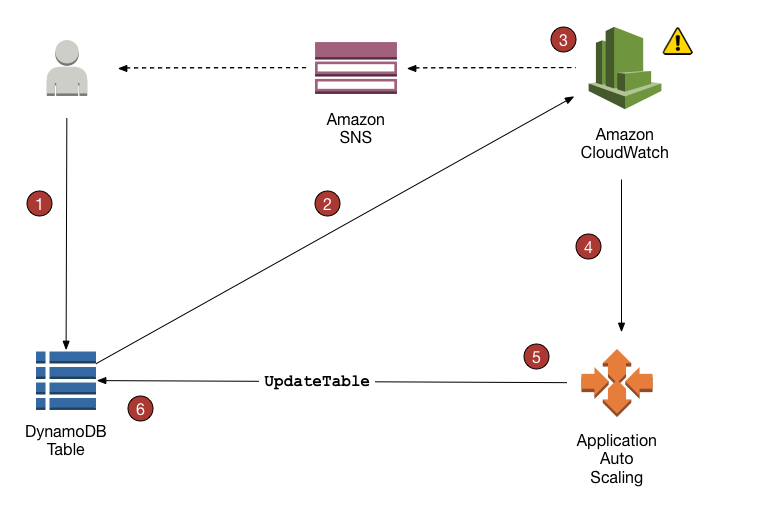
Application Auto Scaling policy can be created on the DynamoDB table.
DynamoDB publishes consumed capacity metrics to CloudWatch.
If the table’s consumed capacity exceeds the target utilization (or falls below the target) for a specific length of time, CloudWatch triggers an alarm. You can view the alarm on the console and receive notifications using Simple Notification Service – SNS.
The upper threshold alarm is triggered when consumed reads or writes breach the target utilization percent for two consecutive minutes.
The lower threshold alarm is triggered after traffic falls below the target utilization minus 20 percent for 15 consecutive minutes.
CloudWatch alarm invokes Application Auto Scaling to evaluate the scaling policy.
Application Auto Scaling issues an UpdateTable request to adjust the table’s provisioned throughput.
DynamoDB processes the UpdateTable request, dynamically increasing (or decreasing) the table’s provisioned throughput capacity so that it approaches your target utilization.
Auto Scaling Configuration
Target Utilization: The percentage of consumed provisioned throughput at a point in time (typically 70%).
Minimum Capacity: The lower bound for provisioned throughput that Auto Scaling will not scale below.
Maximum Capacity: The upper bound for provisioned throughput that Auto Scaling will not scale above.
Scaling Policy: Defines how Auto Scaling responds to changes in workload.
Auto Scaling can be configured for:
Tables (read and write capacity)
Global Secondary Indexes (read and write capacity)
Each can be configured independently
Warm Throughput (November 2024)
Announced in November 2024, DynamoDB now supports warm throughput for tables and indexes.
Warm Throughput: The read and write capacity your DynamoDB table or index can immediately support, based on historical usage.
Provides visibility into the number of read and write operations your table can readily handle.
Automatic Growth: DynamoDB automatically adjusts warm throughput values as your usage increases.
Pre-warming Capability: You can proactively set higher warm throughput values to prepare for anticipated traffic spikes.
Useful for planned events like product launches, sales events, or marketing campaigns.
Ensures your table is immediately ready to handle increased load from the moment the event begins.
Prevents throttling during sudden traffic surges.
Availability:
Available for both provisioned and on-demand tables and indexes.
Available in all AWS commercial Regions and AWS GovCloud (US) Regions.
Pricing:
Warm throughput values are available at no cost.
Pre-warming your table’s throughput incurs a charge.
Use Cases:
Peak events with 10x or 100x traffic surges in short periods.
Product launches or shopping events (e.g., Black Friday).
Marketing campaigns with predictable traffic spikes.
Gaming events or live streaming scenarios.
How It Works:
Each partition is limited to 1,000 write units per second and 3,000 read units per second.
Warm throughput indicates the current capacity available across all partitions.
Pre-warming increases this capacity before the traffic spike occurs.
Auto Scaling takes time to react; pre-warming ensures immediate readiness.
Capacity Modes
Provisioned Capacity Mode with Auto Scaling
You specify the number of read and write capacity units.
Auto Scaling automatically adjusts capacity within configured min/max bounds.
Best for predictable workloads with gradual changes.
Cost-effective when you can forecast capacity needs.
Supports warm throughput and pre-warming.
On-Demand Capacity Mode
DynamoDB automatically scales to accommodate workload.
No need to specify capacity units or configure Auto Scaling.
Pay per request (no minimum capacity).
Best for unpredictable workloads or new applications.
Supports warm throughput and pre-warming.
Pricing reduced by 50% effective November 1, 2024.
Auto Scaling Best Practices
Set Appropriate Target Utilization: 70% is recommended to provide buffer for traffic spikes.
Configure Realistic Min/Max Bounds: Ensure maximum capacity can handle peak loads.
Use Warm Throughput for Planned Events: Pre-warm tables before anticipated traffic spikes.
Monitor CloudWatch Metrics: Track consumed capacity, throttled requests, and Auto Scaling activities.
Test Scaling Behavior: Simulate traffic patterns to validate Auto Scaling configuration.
Consider On-Demand for Unpredictable Workloads: Eliminates need for capacity planning.
Configure Alarms: Set up CloudWatch alarms for throttling events and capacity changes.
Review Scaling History: Analyze past scaling activities to optimize configuration.
Auto Scaling Activity: View scaling activities in Application Auto Scaling console.
Warm Throughput Values: Monitor current warm throughput via DynamoDB console or APIs.
Alarms: Configure CloudWatch alarms for proactive monitoring.
AWS Certification Exam Practice Questions
Questions are collected from Internet and the answers are marked as per my knowledge and understanding (which might differ with yours).
AWS services are updated everyday and both the answers and questions might be outdated soon, so research accordingly.
AWS exam questions are not updated to keep up the pace with AWS updates, so even if the underlying feature has changed the question might not be updated
Open to further feedback, discussion and correction.
An application running on Amazon EC2 instances writes data synchronously to an Amazon DynamoDB table configured for 60 write capacity units. During normal operation, the application writes 50KB/s to the table but can scale up to 500 KB/s during peak hours. The application is currently getting throttling errors from the DynamoDB table during peak hours. What is the MOST cost-effective change to support the increased traffic with minimal changes to the application?
Use Amazon SNS to manage the write operations to the DynamoDB table
Change DynamoDB table configuration to 600 write capacity units
Increase the number of Amazon EC2 instances to support the traffic
Configure Amazon DynamoDB Auto Scaling to handle the extra demand
A company is planning a major product launch that will cause a 100x traffic spike to their DynamoDB table for 2 hours. They want to ensure the table can handle the load immediately without throttling. What should they do?
Configure Auto Scaling with a high maximum capacity.
Switch to on-demand capacity mode.
Pre-warm the table using warm throughput before the launch.
Manually increase provisioned capacity before the launch.
A DynamoDB table with Auto Scaling configured is experiencing throttling despite having sufficient overall capacity. What is the MOST likely cause?
Auto Scaling is not configured correctly.
The target utilization is set too high.
Hot partitions are exceeding per-partition throughput limits.
CloudWatch alarms are not triggering properly.
What is the recommended target utilization percentage for DynamoDB Auto Scaling?
50%
70%
90%
100%
A company wants to minimize costs for a DynamoDB table with unpredictable traffic patterns. Which capacity mode should they choose?
Provisioned capacity with Auto Scaling
On-demand capacity mode
Provisioned capacity with manual scaling
Reserved capacity
Which of the following statements about DynamoDB warm throughput are correct? (Select TWO)
Warm throughput values are available at no cost.
Warm throughput is only available for provisioned capacity mode.
Pre-warming a table incurs a charge.
Warm throughput cannot be used with on-demand capacity mode.
Warm throughput eliminates the need for Auto Scaling.
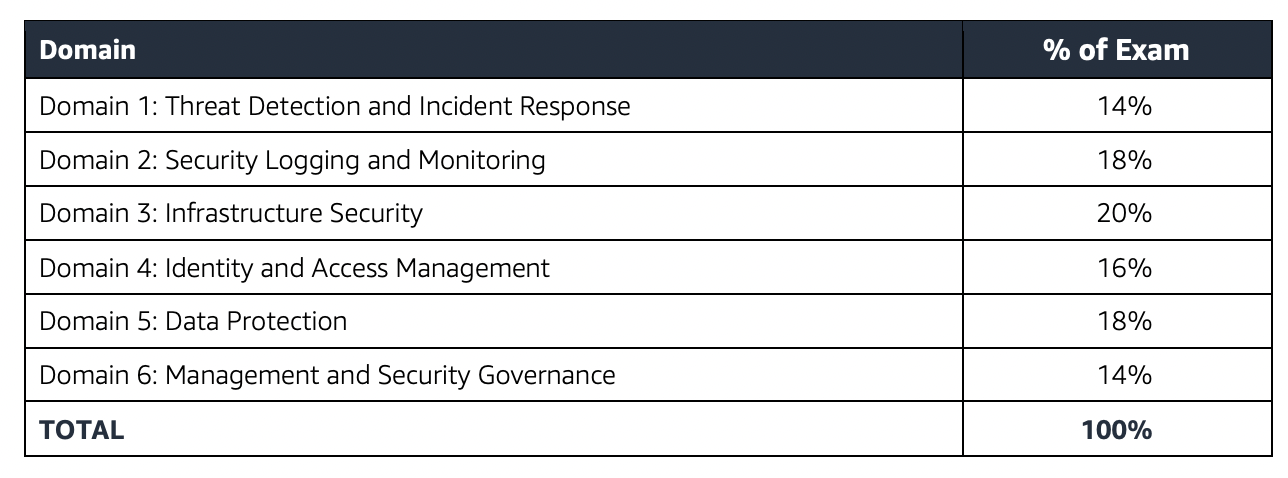
I recently re-certified the updated AWS Certified Security – Specialty (SCS-C02) certification exam. The format and domains are pretty much the same as SCS-C01, however it has been enhanced to cover all the latest services.
Specialty exams are tough, lengthy, and tiresome. Most of the questions and answers options have a lot of prose and a lot of reading that needs to be done, so be sure you are prepared and manage your time well.
SCS-C02 exam has 65 questions to be solved in 170 minutes which gives you roughly 2 1/2 minutes to attempt each question.
SCS-C02 exam includes two types of questions, multiple-choice and multiple-response.
SCS-C02 has a scaled score between 100 and 1,000. The scaled score needed to pass the exam is 750.
Associate exams currently cost $ 300 + tax.
You can get an additional 30 minutes if English is your second language by requesting Exam Accommodations. It might not be needed for Associate exams but is helpful for Professional and Specialty ones.
As always, mark the questions for review, move on, and come back to them after you are done with all.
As always, having a rough architecture or mental picture of the setup helps focus on the areas that you need to improve. Trust me, you will be able to eliminate 2 answers for sure and then need to focus on only the other two. Read the other 2 answers to check the difference area and that would help you reach the right answer or at least have a 50% chance of getting it right.
AWS exams can be taken either remotely or online, I prefer to take them online as it provides a lot of flexibility. Just make sure you have a proper place to take the exam with no disturbance and nothing around you.
Also, if you are taking the AWS Online exam for the first time try to join at least 30 minutes before the actual time as I have had issues with both PSI and Pearson with long wait times.
AWS Certified Security – Specialty (SCS-C02) exam focuses a lot on Security and compliance concepts involving Data Encryption at rest or in transit, Data protection, Auditing, Compliance and regulatory requirements, and automated remediation.
IAM Roles to grant the service, users temporary access to AWS services.
IAM Role can be used to give cross-account access and usually involves creating a role within the trusting account with a trust and permission policy and granting the user in the trusted account permissions to assume the trusting account role.
Identity Providers & Federation to grant external user identity (SAML or Open ID compatible IdPs) permissions to AWS resources without having to be created within the AWS account.
IAM Policies help define who has access & what actions can they perform.
Key policies are the primary way to control access to KMS keys. Unless the key policy explicitly allows it, you cannot use IAM policies to allow access to a KMS key.
are regional, however, supports multi-region keys, which are KMS keys in different AWS Regions that can be used interchangeably – as though you had the same key in multiple Regions.
is a threat detection service that continuously monitors the AWS accounts and workloads for malicious activity and delivers detailed security findings for visibility and remediation.
supports CloudTrail S3 data events and management event logs, DNS logs, EKS audit logs, and VPC flow logs.
is a security service that uses machine learning to automatically discover, classify, and protect sensitive data in S3.
AWS Artifact is a central resource for compliance-related information that provides on-demand access to AWS’ security and compliance reports and select online agreements
protects from common attack techniques like SQL injection and XSS, Conditions based include IP addresses, HTTP headers, HTTP body, and URI strings.
integrates with CloudFront, ALB, and API Gateway.
supports Web ACLs and can block traffic based on IPs, Rate limits, and specific countries as well
allows IP match set rules to allow/deny specific IP addresses and rate-based rules to limit the number of requests.
logs can be sent to the CloudWatch Logs log group, an S3 bucket, or Kinesis Data Firehose.
AWS Security Hub is a cloud security posture management service that performs security best practice checks, aggregates alerts, and enables automated remediation.
AWS Network Firewall is a stateful, fully managed, network firewall and intrusion detection and prevention service (IDS/IPS) for VPCs.
AWS Resource Access Manager helps you securely share your resources across AWS accounts, within your organization or organizational units (OUs), and with IAM roles and users for supported resource types.
AWS Signer is a fully managed code-signing service to ensure the trust and integrity of your code.
AWS Audit Manager to map your compliance requirements to AWS usage data with prebuilt and custom frameworks and automated evidence collection.
Firewall Manager helps centrally configure and manage firewall rules across the accounts and applications in AWS Organizations which includes a variety of protections, including WAF, Shield Advanced, VPC security groups, Network Firewall, and Route 53 Resolver DNS Firewall.
helps improve the cache hit ratio and reduce the load on the origin.
requests from other regional caches would hit the Origin shield rather than the Origin.
should be placed in the regional cache and not in the edge cache
should be deployed to the region closer to the origin server
CloudFront provides Encryption at Rest
uses SSDs which are encrypted for edge location points of presence (POPs), and encrypted EBS volumes for Regional Edge Caches (RECs).
Function code and configuration are always stored in an encrypted format on the encrypted SSDs on the edge location POPs, and in other storage locations used by CloudFront.
Restricting access to content
Configure HTTPS connections
Use signed URLs or cookies to restrict access for selected users
Restrict access to content in S3 buckets using origin access identity – OAI, to prevent users from using the direct URL of the file.
Set up field-level encryption for specific content fields
Use AWS WAF web ACLs to create a web access control list (web ACL) to restrict access to your content.
Use Geo-restriction, also known as geoblocking, to prevent users in specific geographic locations from accessing content served through a CloudFront distribution.
is a highly available and scalable DNS web service.
Resolver Query logging
logs the queries that originate in specified VPCs, on-premises resources that use inbound resolver or ones using outbound resolver as well as the responses to those DNS queries.
can be logged to CloudWatch logs, S3, and Kinesis Data Firehose
Route 53 DNSSEC secures DNS traffic, and helps protect a domain from DNS spoofing man-in-the-middle attacks.
AWS Config rules can be used to alert for any changes and Config can be used to check the history of changes. AWS Config can also help check approved AMIs compliance
allows you to remediate noncompliant resources using AWS Systems Manager Automation documents.
Parameter Store provides secure, scalable, centralized, hierarchical storage for configuration data and secret management. Does not support secrets rotation. Use Secrets Manager instead
Systems Manager Patch Manager helps select and deploy the operating system and software patches automatically across large groups of EC2 or on-premises instances
Systems Manager Run Command provides safe, secure remote management of your instances at scale without logging into the servers, replacing the need for bastion hosts, SSH, or remote PowerShell
Session Manager provides secure and auditable instance management without the need to open inbound ports, maintain bastion hosts, or manage SSH keys.
Deletion Policy to prevent, retain, or backup RDS, EBS Volumes
Stack policy can prevent stack resources from being unintentionally updated or deleted during a stack update. Stack Policy only applies for Stack updates and not stack deletion.
CloudFormation Guard provides an open-source, general-purpose, policy-as-code evaluation tool.
S3 Object Lock helps to store objects using a WORM model and can help prevent objects from being deleted or overwritten for a fixed amount of time or indefinitely.
S3 Block Public Access provides controls across an entire AWS Account or at the individual S3 bucket level to ensure that objects never have public access, now and in the future.
S3 Access Points simplify data access for any AWS service or customer application that stores data in S3.
S3 Versioning with MFA Delete can be enabled on a bucket to ensure that data in the bucket cannot be accidentally overwritten or deleted.
S3 Access Analyzer monitors the access policies, ensuring that the policies provide only the intended access to your S3 resources.
Glacier Vault Lock helps deploy and enforce compliance controls for individual S3 Glacier vaults with a vault lock policy.
is a web service that makes it easier to set up, operate, and scale a relational database in the cloud.
supports the same encryption at rest methods as EBS
does not support enabling encryption after creation. Need to create a snapshot, copy the snapshot to an encrypted snapshot, and restore it as an encrypted DB.
Compute
EC2 access using an IAM Role, Lambda using the Execution role & ECS using the Task role.
DynamoDB Accelerator (DAX) is a fully managed, highly available, in-memory cache for DynamoDB that delivers up to a 10x performance improvement – from ms to µs – even at millions of requests per second.
DAX as a managed service handles the cache invalidation, data population, or cluster management.
DAX provides API compatibility with DynamoDB. Therefore, it requires only minimal functional changes to use with an existing application.
DAX saves costs by reducing the read load (RCU) on DynamoDB.
DAX helps prevent hot partitions.
DAX is intended for high-performance read applications. As a write-through cache, DAX writes directly so that the writes are immediately reflected in the item cache.
DAX only supports eventual consistency and strong consistency requests are passed through to DynamoDB.
DAX is fault-tolerant and scalable.
DAX cluster has a primary node and zero or more read-replica nodes. Upon a failure for a primary node, DAX will automatically failover and elect a new primary. For scaling, add or remove read replicas.
DAX supports server-side encryption.
DAX supports encryption in transit, ensuring that all requests and responses between the application and the cluster are encrypted by TLS, and connections to the cluster can be authenticated by verification of a cluster x509 certificate.
DAX AWS PrivateLink Support – October 2025
DAX now supports AWS PrivateLink for management APIs.
Enables secure access to DAX management APIs over private IP addresses within your VPC.
Supported management APIs:
CreateCluster
DescribeClusters
DeleteCluster
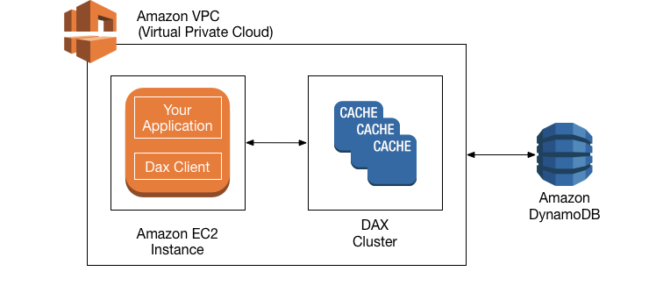
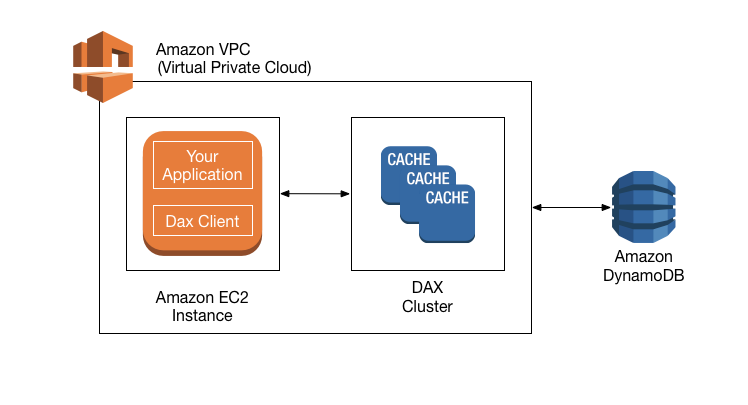
DAX clusters already run inside your VPC, and all data plane operations (GetItem, Query) are handled privately within the VPC.
With PrivateLink, cluster management operations can now be performed privately without connecting to the public regional endpoint.
Simplifies private network connectivity between VPCs, DAX, and on-premises data centers using interface VPC endpoints.
Helps meet compliance regulations and eliminates the need for public IP addresses, firewall rules, or Internet gateways.
Available in all Regions where DAX is available.
Additional AWS PrivateLink charges apply.
DAX Cluster
DAC cluster is a logical grouping of one or more nodes that DAX manages as a unit.
One of the nodes in the cluster is designated as the primary node, and the other nodes (if any) are read replicas.
Primary Node is responsible for
Fulfilling application requests for cached data.
Handling write operations to DynamoDB.
Evicting data from the cache according to the cluster’s eviction policy.
Read replicas are responsible for
Fulfilling application requests for cached data.
Evicting data from the cache according to the cluster’s eviction policy.
Only the primary node writes to DynamoDB, read replicas don’t write to DynamoDB.
For production, it is recommended to have DAX with at least three nodes with each node placed in different Availability Zones.
Three nodes are required for a DAX cluster to be fault-tolerant.
DAX can scale out to a 10-node cluster, providing millions of requests per second.
A DAX cluster in an AWS Region can only interact with DynamoDB tables that are in the same Region.
DynamoDB Accelerator Operations
Eventual Read operations
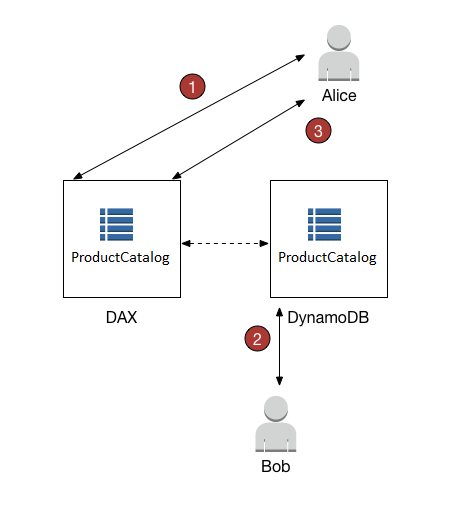
If DAX has the item available (a cache hit), DAX returns the item without accessing DynamoDB.
If DAX does not have the item available (a cache miss), DAX passes the request through to DynamoDB. When it receives the response from DynamoDB, DAX returns the results to the application. But it also writes the results to the cache on the primary node.
Strongly Consistent Read operations
DAX passes the request through to DynamoDB. The results from DynamoDB are not cached in DAX. but simply returned.
DAX is not ideal for applications that require strongly consistent reads (or that cannot tolerate eventually consistent reads).
For Write operations
Data is first written to the DynamoDB table, and then to the DAX cluster.
Operation is successful only if the data is successfully written to both the table and to DAX.
Is not ideal for applications that are write-intensive, or that do not perform much read activity.
DynamoDB Accelerator Caches
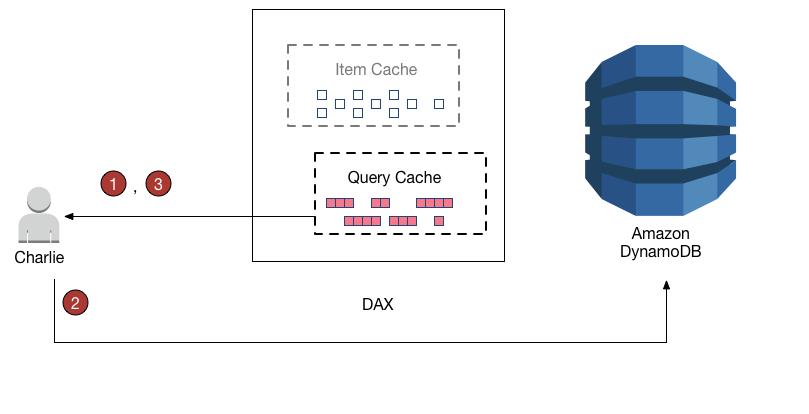
DAX cluster has two distinct caches – Item cache and Query cache
Item cache
item cache to store the results from GetItem and BatchGetItem operations.
Item remains in the DAX item cache, subject to the Time to Live (TTL) setting and the least recently used (LRU) algorithm for the cache
DAX provides a write-through cache, keeping the DAX item cache consistent with the underlying DynamoDB tables.
Query cache
DAX caches the results from Query and Scan requests in its query cache.
Query and Scan results don’t affect the item cache at all, as the result set is saved in the query cache – not in the item cache.
Writes to the Item cache don’t affect the Query cache
Item and Query cache has a default 5 minutes TTL setting.
DAX assigns a timestamp to every entry it writes to the cache. The entry expires if it has remained in the cache for longer than the TTL setting
DAX maintains an LRU list for both Item and Query cache. LRU list tracks the item addition and last read time. If the cache becomes full, DAX evicts older items (even if they haven’t expired yet) to make room for new entries
LRU algorithm is always enabled for both the item and query cache and is not user-configurable.
DynamoDB Accelerator Write Strategies
Write-Through
DAX item cache implements a write-through policy
For write operations, DAX ensures that the cached item is synchronized with the item as it exists in DynamoDB.
Write-Around
Write-around strategy reduces write latency
Ideal for bulk uploads or writing large quantities of data
Item cache doesn’t remain in sync with the data in DynamoDB.
DAX Encryption
DAX supports encryption at rest using AWS-owned keys.
Customer-managed KMS keys are NOT supported for DAX encryption at rest.
DAX supports encryption in transit using TLS.
All requests and responses between the application and the cluster are encrypted.
Connections can be authenticated by verification of a cluster x509 certificate.
DynamoDB Accelerator Scenarios
As an in-memory cache, DAX increases performance and reduces the response times of eventually consistent read workloads by an order of magnitude from single-digit milliseconds to microseconds.
DAX reduces operational and application complexity by providing a managed service that is API-compatible with DynamoDB. It requires only minimal functional changes to use with an existing application.
For read-heavy or bursty workloads, DAX provides increased throughput and potential operational cost savings by reducing the need to overprovision read capacity units.
Ideal use cases:
Gaming leaderboards processing millions of score lookups per second
E-commerce platforms serving product catalog data during flash sales
Financial applications requiring sub-millisecond trade data retrieval
Applications with repeated reads for individual keys
DAX Best Practices
Deploy DAX with at least three nodes across different Availability Zones for fault tolerance.
Scale out to up to 10 nodes for high-throughput workloads.
Use write-through strategy for consistency-critical applications.
Use write-around strategy for bulk uploads to reduce write latency.
Configure appropriate TTL settings based on data freshness requirements (default: 5 minutes).
Use AWS PrivateLink for private management API access from on-premises or other VPCs.
Questions are collected from Internet and the answers are marked as per my knowledge and understanding (which might differ with yours).
AWS services are updated everyday and both the answers and questions might be outdated soon, so research accordingly.
AWS exam questions are not updated to keep up the pace with AWS updates, so even if the underlying feature has changed the question might not be updated
Open to further feedback, discussion and correction.
A company has setup an application in AWS that interacts with DynamoDB. DynamoDB is currently responding in milliseconds, but the application response guidelines require it to respond within microseconds. How can the performance of DynamoDB be further improved?
Use ElastiCache in front of DynamoDB
Use DynamoDB inbuilt caching
Use DynamoDB Accelerator
Use RDS with ElastiCache instead
A company needs to manage DAX clusters from their on-premises data center without exposing traffic to the public internet. Which feature should they use?
VPC gateway endpoint
Internet gateway with security groups
AWS PrivateLink for DAX
NAT gateway
What is the maximum number of nodes a DAX cluster can scale to?
3 nodes
5 nodes
10 nodes
Unlimited nodes
A company requires customer-managed KMS keys for encrypting all data at rest. Can they use DAX for their DynamoDB tables?
Yes, DAX supports customer-managed keys
No, DAX only supports AWS-owned keys for encryption at rest
Yes, but only for the item cache
Yes, but only for the query cache
Which write strategy should be used for bulk uploads to minimize write latency in DAX?
Write-around
Write-through
Write-back
Write-behind
Which of the following statements about DAX are correct? (Select THREE)
DAX supports AWS PrivateLink for management APIs
DAX caches strongly consistent reads
DAX can scale to 10 nodes for millions of requests per second
DAX supports customer-managed KMS keys
DAX provides microsecond response times for eventually consistent reads
What happens when a strongly consistent read request is made to DAX?
DAX returns the cached value
DAX passes the request through to DynamoDB without caching
AWS Service Catalog helps centrally manage cloud resources to achieve governance at scale of the infrastructure as code (IaC) templates, written in CloudFormation or Terraform.
allows IT administrators to create, manage, and distribute catalogs of approved products to end users, who can then access the products they need in a personalized portal.
can help control which users have access to each product to enforce compliance with organizational business policies while making sure the customers can quickly deploy the cloud resources they need.
increases agility and reduces costs as end users can find and launch only the products they need from a controlled catalog.
is a regional service and Portfolios and products are a regional construct that will need to be created per region and are only visible/usable on the regions in which they were created.
supports VPC Endpoints to privately access Service Catalog APIs from VPC without the need for an Internet gateway, NAT gateway, or VPN connection.
Source: AWS
Service Catalog Portfolios and Products
Service Catalog portfolio is a collection of products, with configuration information that determines who can use those products and how they can use them.
Each Service Catalog product is based on an infrastructure-as-code (IaC) template using CloudFormation or Terraform.
Customized portfolios can be created for each type of user in an organization and selectively granted access to the appropriate portfolio.
When an administrator adds a new version of a product to a portfolio, that version is automatically available to all current portfolio users.
Same product can be included in multiple portfolios.
Portfolios can be shared with other AWS accounts and extended by applying additional constraints.
Service Catalog Access Control
Launch Constraint
provide AWS Service Catalog with the capability to perform actions on behalf of users even when those users do not have the necessary IAM permissions to perform those actions directly.
is an IAM Role that AWS Service Catalog assumes when an end user launches a product.
Service Catalog products without a launch constraint will launch and manage products using the end user’s IAM credentials; if the end user credentials are not sufficient for those activities, errors will result either in provisioning or in management activities.
Template Constraint
define rules that limit the parameter values that a user enters when launching a product
is applied when provisioning a new product or updating a product that is already in use.
applies the most restrictive constraint among all constraints applied to the portfolio and the product.
are not supported for Terraform configurations
Service Catalog AppRegistry
Service Catalog AppRegistry allows organizations to understand the application context of their AWS resources.
AppRegistry provides a repository for the information that describes the applications and associated resources that you use within your enterprise.
AppRegistry provides a single, up-to-date, definition of applications within their AWS environment.
AWS Certification Exam Practice Questions
Questions are collected from Internet and the answers are marked as per my knowledge and understanding (which might differ with yours).
AWS services are updated everyday and both the answers and questions might be outdated soon, so research accordingly.
AWS exam questions are not updated to keep up the pace with AWS updates, so even if the underlying feature has changed the question might not be updated
Open to further feedback, discussion and correction.
A company has several business units that want to use Amazon EC2. The company wants to require all business units to provision their EC2 instances by using only approved EC2 instance configurations. What should a SysOps administrator do to implement this requirement?
Create an EC2 instance launch configuration. Allow the business units to launch EC2 instances by specifying this launch configuration in the AWS Management Console.
Develop an IAM policy that limits the business units to provision EC2 instances only. Instruct the business units to launch instances by using an AWS CloudFormation template.
Publish a product and launch constraint role for EC2 instances by using AWS Service Catalog. Allow the business units to perform actions in AWS Service Catalog only.
Share an AWS CloudFormation template with the business units. Instruct the business units to pass a role to AWS CloudFormation to allow the service to manage EC2 instances.
AWS Config is a fully managed service that provides AWS resource inventory, configuration history, and configuration change notifications to enable security, compliance, and governance.
provides a detailed view of the configuration of AWS resources in the AWS account.
is a regional service.
is strictly a detective service and does not prevent changes but it integrates with other AWS services for remediation.
gives point-in-time and historical states thereby allowing users to see changes visually in a timeline.
will only record the latest configuration of that resource only, in cases where several configuration changes are made to a resource in quick succession (i.e., within a span of a few minutes); this represents the cumulative impact of that entire set of changes.
does not cover all the AWS services and for the services unsupported the configuration management process can be automated using API and code and used to compare current and past data.
provides customizable, predefined rules as well as the ability to define custom rules.
can help with the following:
Evaluate the AWS resource configurations for desired settings.
Get a snapshot of the current configurations of the supported resources that are associated with your AWS account.
Retrieve configurations of one or more resources that exist in the account.
Retrieve historical configurations of one or more resources.
Receive a notification whenever a resource is created, modified, or deleted.
View relationships between resources e.g., you might want to find all resources that use a particular security group.
AWS Config Use Cases
Security Analysis & Resource Administration
enables continuous monitoring and governance over resource configurations and helps evaluate them for any misconfigurations leading to security gaps or weaknesses.
Auditing & Compliance
helps maintain a complete inventory of all resources and their configurations attributes as well as point in time history
helps retrieve historical configurations that can be very useful to ensure compliance and audits with internal policies and best practices
Change Management
helps understand relationships between resources so that the impact of the change can be proactively assessed.
can be configured to notify whenever resources are created, modified, or deleted without having to monitor these changes by polling the calls made to each resource
Troubleshooting
helps to quickly identify and troubleshoot issues, by being able to use the historical configurations and compare the last working configuration to the one recent change causing issues.
Discovery
helps discover resources that exist within an account leading to better inventory and asset management.
Get a snapshot of the current configurations of the supported resources that are associated with the AWS account
AWS Config Concepts
AWS Resources
AWS Resources are entities created and managed for e.g. EC2 instances, Security groups
Resource Relationship
AWS Config discovers AWS resources in the account and then creates a map of relationships between AWS resources for e.g. EBS volume linked to an EC2 instance
Configuration Items
A configuration item represents a point-in-time view of the supported AWS resource
Components of a configuration item include metadata, attributes, relationships, current configuration, and related events.
Configuration Snapshot
A configuration snapshot is a collection of the configuration items for the supported resources that exist in the account.
Configuration History
A configuration history is a collection of the configuration items for a given resource over any time period.
Configuration Stream
Configuration stream is an automatically updated list of all configuration items for the resources that AWS Config is recording.
Configuration Recorder
Configuration recorder stores the configurations of the supported resources in your account as configuration items.
A configuration recorder needs to be created and started for recording and by default records, all supported services in the region.
AWS Config Rules
AWS Config Rules help define desired configuration settings for specific resources or for the entire account.
AWS Config continuously tracks the resource configuration changes against the rules and if violated marks the resource as non-compliant.
can be triggered either periodically or on configuration changes.
AWS Config Flow
When AWS Config is turned on, it discovers the supported resources that exist in the account and generates a configuration item for each resource.
By default, AWS Config creates configuration items for every supported resource in the region but can be customized to limited resource types.
AWS Config
generates configuration items when the configuration of a resource changes, and it maintains historical records of the configuration items of the resources from the time the configuration recorder is started.
keeps track of all changes to the resources by invoking the Describe or the List API call for each resource as well as related resources in the account.
also tracks the configuration changes that were not initiated by the API. It examines the resource configurations periodically and generates configuration items for the configurations that have changed.
Configuration items are delivered in a configuration stream to an S3 bucket.
AWS Config rules, if configured,
are evaluated continuously for resource configurations for desired settings.
resources are evaluated either in response to configuration changes or periodically, depending on the rule.
when the resources are evaluated, it invokes the rule’s AWS Lambda function, which contains the evaluation logic for the rule.
The function returns the compliance status of the evaluated resources.
If a resource violates the conditions of a rule, the resource and the rule are flagged as non-compliant and a notification is sent to the SNS topic.
AWS Config Remediation
AWS Config is strictly a detective service and does not prevent changes but it integrates with other AWS services for remediation.
allows remediation of noncompliant resources that are evaluated by config rules.
Remediation is applied using Systems Manager Automation documents, which define the actions to be performed on noncompliant AWS resources.
provides a set of managed automation documents with remediation actions.
Custom automation documents can also be created and associated with rules.
Multi-Account Multi-Region Data Aggregation
An aggregator helps collect AWS Config configuration and compliance data from the following:
Multiple accounts and multiple regions.
Single account and multiple regions.
An organization in AWS Organizations and all the accounts in that organization that has AWS Config enabled.
AWS Config reports on WHAT has changed, whereas CloudTrail reports on WHO made the change, WHEN, and from WHICH location.
AWS Config focuses on the configuration of the AWS resources and reports with detailed snapshots on HOW the resources have changed, whereas CloudTrail focuses on the events or API calls, that drive those changes. It focuses on the user, application, and activity performed on the system.
AWS Certification Exam Practice Questions
Questions are collected from Internet and the answers are marked as per my knowledge and understanding (which might differ with yours).
AWS services are updated everyday and both the answers and questions might be outdated soon, so research accordingly.
AWS exam questions are not updated to keep up the pace with AWS updates, so even if the underlying feature has changed the question might not be updated
Open to further feedback, discussion and correction.
Questions are collected from Internet and the answers are marked as per my knowledge and understanding (which might differ with yours).
AWS services are updated everyday and both the answers and questions might be outdated soon, so research accordingly.
AWS exam questions are not updated to keep up the pace with AWS updates, so even if the underlying feature has changed the question might not be updated
Open to further feedback, discussion and correction.
One of the challenges in managing AWS resources is to keep track of changes in the resource configuration over time. Which one of the following statements provide the best solution?
Use strict syntax tagging on the resources
Create a custom application to automate the configuration management process
Use AWS Config for supported services and use an automated process via APIs for unsupported services
Use resource groups and tagging along with CloudTrail so that you can audit changes using the logs
Fill the blanks: ____ helps us track AWS API calls and transitions, ____ helps to understand what resources we have now, and ____ allows auditing credentials and logins.