Google Cloud DDoS Protection and Mitigation

Google Cloud DDoS Protection and Mitigation

  • A Denial of Service (DoS) attack is an attempt to render the service or application unavailable to the end-users.
  • With Distributed Denial of Service (DDoS) attacks, the attackers use multiple resources (often a large number of compromised hosts/instances) to orchestrate large-scale attacks against targets.
  • Successfully thwarting and handling DDoS attacks is a shared responsibility between Google Cloud Platform and you.
  • DDoS defense involves deploying detection systems, implementing barriers, and being able to absorb attacks by scaling in order to prevent attackers from overwhelming or disabling access to the services or applications

DDoS Protection and Mitigation Best Practices

Reduce the Surface Attack

  • Provision an isolated and secure piece using Google Cloud VPC
  • Isolate and secure using subnetworks and networks, firewall rules, tags, and IAM
  • Open access for only required ports and protocols using firewall rules
    and/or protocol forwarding.
  • Anti-spoofing protection for the private network (IP addresses) is provided by default.
  • GCP automatically provides isolation between virtual networks.

Isolate the internal traffic from the external world

  • Deploy instances without public IPs unless necessary.
  • Set up a NAT gateway or SSH bastion to limit the number of instances that are exposed to the internet.
  • Deploy Internal Load Balancing for the internal client instances accessing internally deployed services to avoid exposure to the external world

DDoS Protection using Proxy-based Load Balancing

Scale to Absorb the Attack

  • Google Frontend Infrastructure – GFE
    • With Google Global Cloud Load Balancing, the GFE terminates user traffic, automatically scales to absorb certain types of attacks (e.g., SYN floods) before they reach the compute instances
  • Anycast-based Load Balancing
    • HTTP(S) Load Balancing and SSL proxy Load Balancing enable a single anycast IP to front-end the deployed backend instances in all regions.
    • User traffic is directed to the closest backend with capacity
    • In the event of a DDoS attack, it increases the surface area to absorb this attack by moving traffic to instances with available capacity in any region where backends are deployed.
  • Autoscaling
    • A sufficient number of backend instances should be provisioned and autoscaling configured to handle spikes in traffic.
    • In the event of a sudden traffic spike, the load balancing proxy layer will distribute the traffic across all the backends with available capacity
    • In parallel, the autoscaler ramps up the backends inline with traffic that needs to be handled.

DDoS Protection with CDN Offloading

  • Cloud CDN acts as a proxy between the clients and the origin servers
  • For cacheable content, Cloud CDN caches and services this content from points-of-presence (POPs) closer to the users as opposed to sending them to backend servers (instances).
  • In the event of DDoS attack for cacheable content, the requests are sent to POPs all over the globe as opposed to the origin servers, thereby providing a larger set of locations to absorb the attack.

Deploy Third-party DDoS Protection Solutions

  • Third-party DDoS protection solutions can used used to protect against DDoS attacks.
  • DDoS solutions can be deployed using Google Cloud Launcher.

App Engine Deployment

  • App Engine is designed to be a fully multi-tenant system and implements a number of safeguards intended to ensure that a single bad application will not impact the performance or availability of other applications
  • App Engine sits behind the GFE which mitigates and absorbs many Layer 4 and below attacks, such as SYN floods, IP fragment floods, port exhaustion, etc.
  • A set of IPs/IP networks via a dos.yaml file can be specified to block them from accessing the application(s).

Google Cloud Storage

  • Use Signed URLs to control access and if the users are not needed a Google account in order to be able to access the Google Cloud Storage resources,

API rate-limiting

  • API rate limits define the number of requests that can be made to the Google Compute Engine API.
  • API rate limits apply on a per-project basis. Currently, projects are limited to an API rate limit of 20 requests/second.

Resource Quotas

  • Compute Engine enforces quotas on resource usage for a variety of
    reasons, as the quotas, protect the community of Google Cloud users by preventing unforeseen spikes in usage.

GCP Certification Exam Practice Questions

  • Questions are collected from Internet and the answers are marked as per my knowledge and understanding (which might differ with yours).
  • GCP services are updated everyday and both the answers and questions might be outdated soon, so research accordingly.
  • GCP exam questions are not updated to keep up the pace with GCP updates, so even if the underlying feature has changed the question might not be updated
  • Open to further feedback, discussion and correction.

Reference

Google_Cloud_DDoS_Protection

Google Cloud Security Services Cheat Sheet

Cloud Armor

  • Cloud Armor protects the applications from multiple types of threats, including distributed denial-of-service (DDoS) attacks and application attacks like cross-site scripting (XSS) and SQL injection (SQLi).
  • Cloud Armor provides protection only to applications running behind an external HTTP(S) and TCP/SSL Proxy load balancer.
  • Cloud Armor supports applications deployed on Google Cloud, in a hybrid deployment, or in a multi-cloud architecture.
  • Cloud Armor is implemented at the edge of Google’s network in Google’s points of presence (PoP).
  • Security policies protect applications running behind a load balancer from DDoS and other web-based attacks
  • Backend service can have only one security policy associated with it
  • Prioritized rules define configurable match conditions, actions (allow or deny) and order in a security policy
  • Cloud Armor provides Preview mode that helps evaluate and preview the rules before going live.

Cloud Identity-Aware Proxy

  • Identity-Aware Proxy IAP allows managing access to HTTP-based apps both on Google Cloud and outside of Google Cloud.
  • Identity-Aware Proxy IAP intercepts the web requests sent to the application, authenticates the user making the request using the Google Identity Service, and only lets the requests through if they come from an authorized user. In addition, it can modify the request headers to include information about the authenticated user.
  • Identity-Aware Proxy IAP helps establish a central authorization layer for applications accessed by HTTPS to use an application-level access control model instead of relying on network-level firewalls.
  • IAP uses Google identities and IAM and can leverage external identity providers as well like OAuth with Facebook, GitHub, Microsoft, SAML, etc.
  • Identity-Aware Proxy (IAP) can be configured to use JSON Web Tokens (JWT) as signed headers to make sure that a request to the app is authorized and doesn’t bypass IAP

Cloud Data Loss Prevention – DLP

  • Cloud Data Loss Prevention – DLP is a fully managed service designed to help discover, classify, and protect the most sensitive data.
  • provides two key features
    • Classification is the process to inspect the data and know what data we have, how sensitive it is, and the likelihood.
    • De-identification is the process of removing, masking, replacing information from data.
  • uses information types – or infoTypes – to define what it scans like credit card numbers, email addresses, etc.
  • provides various built-in infoType detector and supports custom ones
  • supports inspection rules to fine-tune scan results using
    • Exclusion rules decrease the number of findings
    • Hotword rules increase the quantity or change the likelihood value of findings
  • provides likelihood, which indicates how likely it is that a piece of data matches a given infoType like VERY_LIKELY or POSSIBLE, etc.
  • supports Text Classification and Reduction
  • supports Image Classification and Reduction, where the image is handled using its base64 encoded version
  • supports storage classification with scans on data stored in Cloud Storage, Datastore, and BigQuery
  • supports scanning of binary, text, image, Microsoft Word, PDF, and Apache Avro files
  • supports Templates help decouple configuration information from the implementation of the requests and manage large scale rollouts

Security Command Center – SCC

  • is a Security and risk management platform
  • helps generate curated insights that provide a unique view of incoming threats and attacks to the assets, which include organization, projects, instances, and applications
  • displays possible security risks, called findings, that are associated with each asset.
  • provides services
    • Security Health Analytics provides managed vulnerability assessment scanning that can automatically detect the highest severity vulnerabilities and misconfigurations across assets.
    • Web Security Scanner custom scans provide granular information about application vulnerability findings like outdated libraries, XSS, etc.
    • Cloud Data Loss Prevention discovers, classifies, and protects sensitive data
    • Cloud Armor protects Google Cloud deployments against threats
    • Anomaly Detection identifies security anomalies for the projects and VM instances, like potential leaked credentials and coin mining, etc.
    • Container Threat Detection can detect the most common container runtime attacks
    • Forseti Security, the open-source security toolkit, and third-party security information and event management (SIEM) applications
    • Event Threat Detection monitors the organization’s Cloud Logging stream and consumes logs to detect Malware, Cryptomining, etc.
    • Phishing Protection helps prevent users from accessing phishing sites by classifying malicious content that uses the brand and reporting the unsafe URLs to Google Safe Browsing
    • Continuous Exports, which automatically manage the export of new findings to Pub/Sub.

DDoS Protection and Mitigation

  • Distributed Denial of Service (DDoS) Protection and Mitigation is a shared responsibility between Google Cloud and the Customer
  • DDoS attack is an attempt to render the service or application unavailable to the end-users using multiple sources
  • DDoS Protection and Mitigation Best Practices
    • Reduce the Attack Surface
      • Isolate and secure network using VPC, subnets, firewall rules. tags and IAM
      • Google provides Anti-spoofing protection and Automatic isolation between virtual networks
    • Isolate Internal Traffic
      • Use privates IPs and avoid using Public IPs
      • Use NAT Gateway and Bastion host
      • Use Internal Load Balancer for internal traffic
    • Enable Proxy-based Load Balancing
      • HTTP(S) or SSL proxy load balancer uses GFE that helps mitigate and absorb layer 4 and other attacks
      • Disperse traffic across multiple regions
    • Scale to Absorb the Attack
      • Use GFE for protection
      • Use Anycast-based load balancing to provide single anycast IP to FE
      • Use Autoscaling to scale backend services as per the demand
    • Protection using CDN Offloading
      • CDN acts as a proxy and can help render cache content reducing the load on the origin servers
    • Deploy Third-party DDoS Protection solutions
    • App Engine Deployment
      • A fully multi-tenant system with isolation
    • Google Cloud Storage
      • Use signed URLs to access Google Cloud Storage
    • API Rate Limiting
      • Define rate limiting based on the number of allowed requests
      • API Rate limits are per applied per-project basis
    • Resource Quotas
      • Quotas help prevent unforeseen spikes in usage

Access Context Manager

  • Access Context Manager allows organization administrators to define fine-grained, attribute-based access control for projects and resources
  • helps prevent data exfiltration
  • helps reduce the size of the privileged network and move to a model where endpoints do not carry ambient authority based on the network.
  • helps define desired rules and policy but isn’t responsible for policy enforcement. The policy is configured and enforced across various points, such as VPC Service Controls.

FIPS 140-2 Validated

  • The NIST developed the Federal Information Processing Standard (FIPS) Publication 140-2 as a security standard that sets forth requirements for cryptographic modules, including hardware, software, and/or firmware, for U.S. federal agencies.
  • FIPS 140-2 Validated certification was established to aid in the protection of digitally stored unclassified, yet sensitive, information.
  • Google Cloud Platform uses a FIPS 140-2 validated encryption module called BoringCrypto in its production environment.
  • Data in transit to the customer and between data centers, and data at rest are encrypted using FIPS 140-2 validated encryption.
  • BoringCrypto module that achieved FIPS 140-2 validation is part of the BoringSSL library.
  • BoringSSL library as a whole is not FIPS 140-2 validated
  • In order to operate using only FIPS-validated implementations:
    • Google’s Local SSD storage product is automatically encrypted with NIST approved ciphers, but Google’s current implementation for this product doesn’t have a FIPS 140-2 validation certificate. If you require FIPS-validated encryption on Local SSD storage, you must provide your own encryption with a FIPS-validated cryptographic module.
    • Google automatically encrypts traffic between VMs that travels between Google data centers using NIST-approved encryption algorithms, but this implementation does not have a FIPS validation certificate. If you require this traffic to be encrypted with a FIPS-validated implementation, you must provide your own.
    • Clients connecting to Google infrastructure with TLS clients must be configured to require use of secure FIPS-compliant algorithms; if the TLS client and GCP’s TLS services agree on an encryption method that is incompatible with FIPS, a non-validated encryption implementation will be used.
    • Applications built and operated on GCP might include their own cryptographic implementations; in order for the data they process to be secured with a FIPS-validated cryptographic module, you must integrate such an implementation yourself.
  • All Google Cloud regions and zones currently support FIPS 140-2 validated encryption.

AWS DDoS Resiliency Best Practices Overview

AWS DDoS Resiliency – Best Practices

📋 Whitepaper Update Notice

The original AWS DDoS Best Practices whitepaper (June 2015) has been updated multiple times, with the latest revision dated August 9, 2023. AWS now marks it as “historical reference.” The current AWS DDoS protection guidance is integrated into the AWS WAF, Shield, and Firewall Manager Developer Guide.

This post has been updated to reflect the modern AWS DDoS protection services including AWS Shield, AWS WAF v2, AWS Firewall Manager, and the new Anti-DDoS Managed Rule Group (2026).

  • Denial of Service (DoS) is an attack, carried out by a single attacker, which attempts to make a website or application unavailable to the end users.
  • Distributed Denial of Service (DDoS) is an attack, carried out by multiple attackers either controlled or compromised by a group of collaborators, which generates a flood of requests to the application making it unavailable to the legitimate end users.
  • DDoS attacks can be segregated by which layer of the OSI model they attack:
    • Infrastructure layer attacks (Layer 3 and 4) — SYN/UDP floods, reflection attacks, amplification attacks
    • Application layer attacks (Layer 6 and 7) — HTTP/S floods, DNS query floods, SSL/TLS abuse

AWS DDoS Protection Services

  • AWS Shield Standard — Free, automatic protection for all AWS customers against common infrastructure DDoS attacks (Layer 3/4)
  • AWS Shield Advanced — Paid managed DDoS protection with enhanced detection, always-on automatic mitigation, 24/7 access to Shield Response Team (SRT), cost protection, and application layer protections
  • AWS WAF — Web application firewall for application layer (Layer 7) protection with managed rule groups, rate-based rules, and bot control
  • AWS Firewall Manager — Centralized security policy management across multiple accounts and resources in AWS Organizations
  • AWS Shield Network Security Director (Preview, 2025) — Analyzes network resources, identifies configuration issues, and provides remediation recommendations for comprehensive DDoS posture

Mitigation Techniques

Minimize the Attack Surface Area

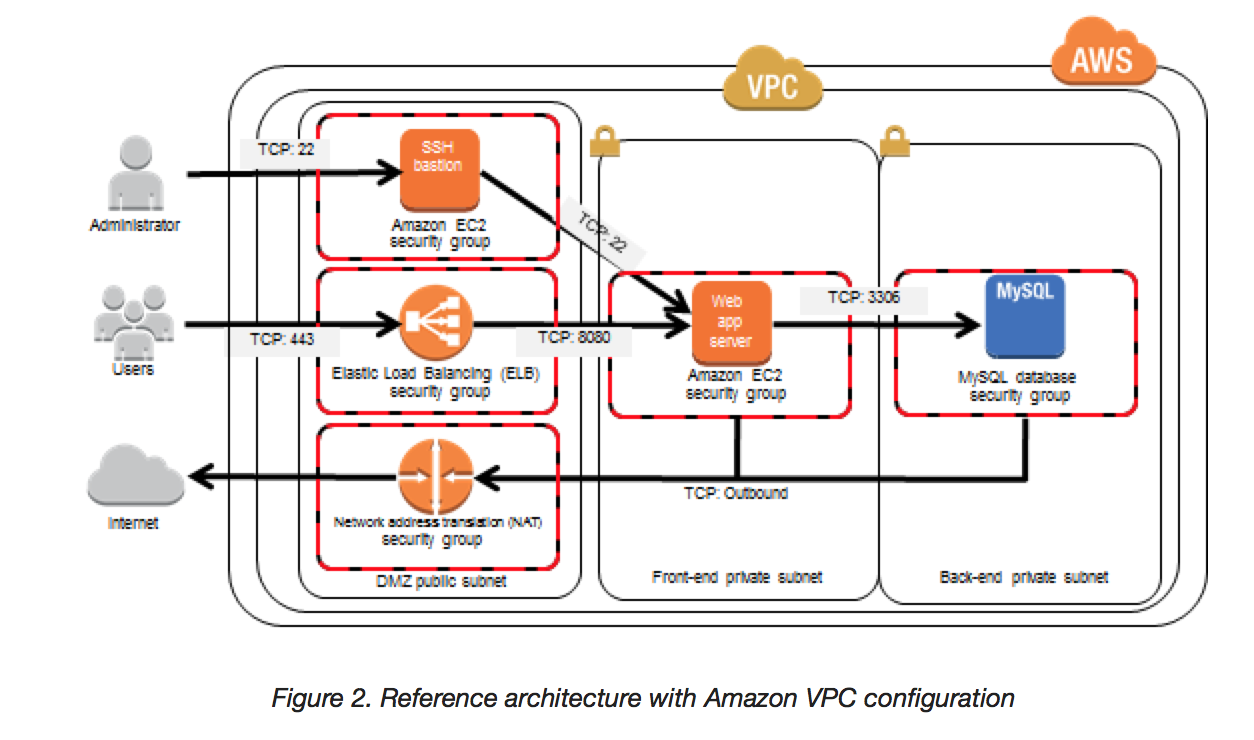
  • Reduce the attack surface by minimizing the different Internet entry points that allow access to your application
  • Strategy to minimize the Attack surface area:
    • Reduce the number of necessary Internet entry points
    • Don’t expose back-end servers
    • Eliminate non-critical Internet entry points
    • Separate end user traffic from management traffic
    • Obfuscate necessary Internet entry points to the level that untrusted end users cannot access them
    • Decouple Internet entry points to minimize the effects of attacks
  • Benefits:
    • Minimizes the effective attack vectors and targets
    • Less to monitor and protect
  • Strategy can be achieved using AWS Virtual Private Cloud (VPC):
    • Defines a logically isolated virtual network within AWS
    • Provides ability to create Public & Private Subnets to launch internet-facing and non-public-facing instances accordingly
    • Provides NAT gateway allowing instances in private subnets to have internet access without Public IPs
    • Allows creation of Bastion hosts (or use AWS Systems Manager Session Manager) for connecting to instances in private subnets
    • Provides security groups for instances and NACLs for subnets to control and limit outbound and inbound traffic
    • Supports VPC endpoints (Gateway and Interface) to access AWS services privately without traversing the internet

VPC Architecture

Be Ready to Scale to Absorb the Attack

  • DDoS attacks mainly aim to overload systems beyond their capacity, rendering them unusable
  • Scaling out Benefits:
    • Helps build a resilient architecture
    • Makes the attacker work harder
    • Gives you time to think, analyze, and adapt
  • AWS services for scaling:
    • Auto Scaling & Elastic Load Balancing
      • Horizontal scaling using Auto Scaling with ELB (ALB, NLB, or CLB)
      • Auto Scaling allows instances to be added and removed as demand changes
      • ELB distributes traffic across multiple EC2 instances while acting as a single point of contact
      • Auto Scaling automatically registers and deregisters EC2 instances with the ELB during scale-out and scale-in events
      • Application Load Balancer (ALB) integrates natively with AWS WAF for Layer 7 protection
      • Network Load Balancer (NLB) handles millions of requests per second with ultra-low latency for Layer 4 traffic
    • EC2 Instance
      • Vertical scaling can be achieved by using appropriate EC2 instance types (e.g., EBS-optimized or ones with 25/100 Gbps network connectivity) to handle the load
    • Enhanced Networking
      • Use instances with Enhanced Networking capabilities (ENA) for high packet-per-second performance, low latency networking, and improved scalability
    • Amazon CloudFront
      • CloudFront is a CDN that acts as a proxy between end users and Origin servers, distributing content without sending all traffic to the Origin
      • Has inherent ability to mitigate both infrastructure and application layer DDoS attacks by dispersing traffic across multiple edge locations globally
      • AWS has multiple Internet connections for capacity and redundancy at each location, allowing isolation of attack traffic while serving legitimate end users
      • CloudFront filters to ensure only valid TCP connections and HTTP requests are processed, dropping invalid requests (commonly used in UDP & SYN floods, and slow reads)
      • CloudFront Security Dashboard (2023) provides unified CDN and security experience with one-click AWS WAF protection and built-in security monitoring
      • Integrates natively with AWS WAF and AWS Shield Advanced
    • Amazon Route 53
      • DDoS attacks also target DNS — if DNS is unavailable, the application is effectively unavailable
      • AWS Route 53 is a highly available and scalable DNS service with capabilities to withstand DDoS attacks:
        • Shuffle Sharding — spreads DNS requests over numerous PoPs using independent sets of edge locations, providing multiple paths to your application
        • Anycast Routing — advertises the same IP address from multiple PoPs, increasing redundancy; if one endpoint is overwhelmed, traffic routes to others
    • AWS Global Accelerator
      • Uses static anycast IP addresses as entry points to the AWS global network
      • Integrates with AWS Shield for DDoS mitigation at the edge, including a stateless SYN proxy that challenges new connections and only serves legitimate end users
      • Routes traffic over the AWS backbone network, away from the congested public internet
      • Provides fault isolation and deterministic routing for improved DDoS resiliency

Safeguard Exposed & Hard-to-Scale Resources

  • If entry points cannot be limited, additional measures to restrict access and protect those entry points without interrupting legitimate end user traffic
  • AWS services for protection:
    • CloudFront
      • Restrict access using Geo Restriction and Origin Access Control (OAC)
      • With Geo Restriction, access can be restricted to whitelisted countries or blocked from blacklisted countries
      • Origin Access Control (OAC) replaces the legacy Origin Access Identity (OAI) — allows access to S3 origins only through CloudFront while denying direct access. OAC supports SSE-KMS, dynamic requests, and all S3 regions.
    • Route 53
      • Alias Record sets and Private DNS make it easier to scale infrastructure and respond to DDoS attacks
      • Route 53 health checks enable automatic failover to healthy resources
    • AWS WAF (Web Application Firewall)
      • AWS WAF is a fully managed service (not EC2-based) that filters web traffic using customizable rules
      • Integrates directly with CloudFront, ALB, API Gateway, AppSync, App Runner, Cognito, and Verified Access
      • Key capabilities:
        • Rate-based rules — automatically blocks IPs exceeding request thresholds
        • Managed Rule Groups — pre-built rules for OWASP Top 10, known bad inputs, SQL injection, XSS
        • Bot Control — managed bot detection and mitigation covering 650+ unique bots and AI agents
        • Fraud Control — Account Takeover Prevention (ATP) and Account Creation Fraud Prevention (ACFP)
        • Anti-DDoS Managed Rule Group (AWSManagedRulesAntiDDoSRuleSet) — launched March 2026 as the default L7 DDoS protection; establishes traffic baselines, detects anomalies within seconds, and mitigates HTTP floods automatically
        • AI Bot Management — AI Activity Dashboard (Feb 2026) for visibility into AI scrapers, tools, and agents; supports AI traffic monetization
        • Geo-match conditions, IP set rules, regex pattern sets
        • Custom response bodies and headers
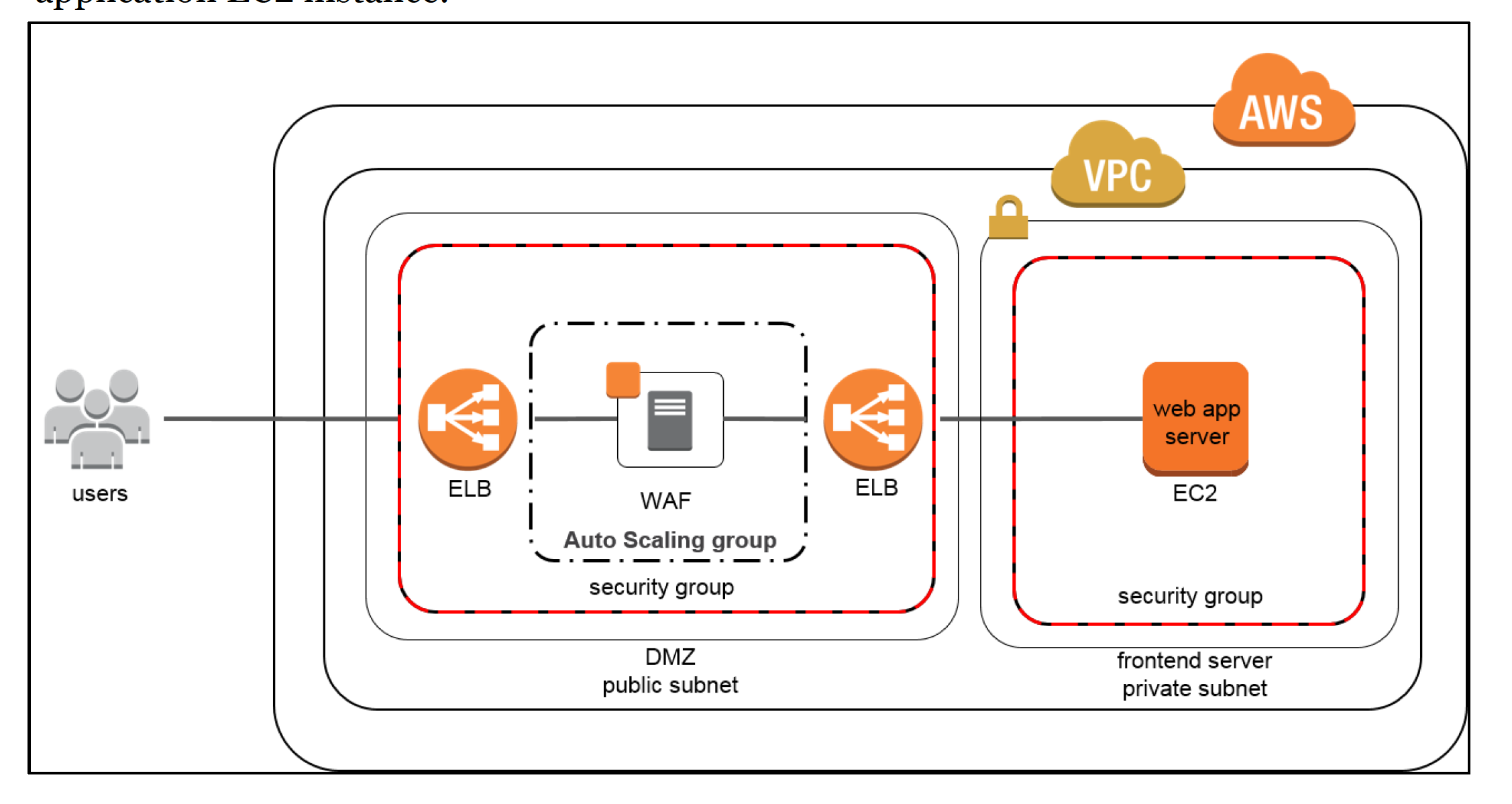
      • No longer requires the “WAF sandwich” pattern — AWS WAF is now a native, managed Layer 7 service that does not require separate EC2 instances
    • AWS Shield Advanced
      • Provides managed DDoS protection for CloudFront, Route 53, Global Accelerator, ELB, and EC2 Elastic IPs
      • Key features:
        • Always-on detection and automatic mitigation with sub-second time-to-mitigate
        • Application layer automatic mitigation — automatically deploys WAF rules during attacks
        • Shield Response Team (SRT) — 24/7 expert support during active DDoS events
        • Cost protection — credits for scaling charges incurred during DDoS attacks
        • DDoS visibility — real-time metrics, attack notifications, and forensic reports
        • Health-based detection — uses Route 53 health checks to improve detection accuracy and reduce false positives
        • Network Security Director (Preview, June 2025) — discovers resources, visualizes network topology, identifies security misconfigurations, and provides remediation recommendations using Amazon Q Developer
    • AWS Firewall Manager
      • Centrally configure and manage AWS WAF rules, Shield Advanced protections, security groups, Network Firewall, and DNS Firewall policies across all accounts in AWS Organizations
      • Automatically applies security policies to new resources as they are created
      • Provides compliance monitoring and reporting

DDOS Resiliency - WAF Sandwich Architecture (Legacy Pattern)

Note: The WAF Sandwich pattern shown above is a legacy architecture. AWS WAF is now a fully managed service that integrates natively with ALB, CloudFront, API Gateway, and other services — no separate EC2-based WAF instances are needed.

Learn Normal Behavior

  • Understand the normal levels and patterns of traffic for your application and use that as a benchmark for identifying abnormal traffic or resource spikes
  • Benefits:
    • Allows one to spot abnormalities
    • Configure alarms with accurate thresholds
    • Assists with generating forensic data
  • AWS services for tracking and detection:
    • Amazon CloudWatch
      • Monitor infrastructure and applications running on AWS
      • Collect metrics, log files, and set alarms for when metrics pass predetermined thresholds
      • Shield Advanced publishes DDoS metrics: DDoSDetected, DDoSAttackBitsPerSecond, DDoSAttackPacketsPerSecond, DDoSAttackRequestsPerSecond
    • VPC Flow Logs
      • Capture traffic to instances in a VPC to understand traffic patterns and detect anomalies
      • Can be published to CloudWatch Logs or S3 for analysis
    • AWS WAF Logging & Metrics
      • Full logging of all evaluated requests to S3, CloudWatch Logs, or Kinesis Data Firehose
      • Real-time metrics in CloudWatch for blocked/allowed/counted requests
      • Traffic Overview Dashboard (2025) — near-real-time summaries including total requests, blocked requests, bot categories, CAPTCHA solve rates, and top matched rules
    • AWS CloudTrail
      • Logs API calls for auditing configuration changes to WAF, Shield, and security groups

Create a Plan for Attacks

  • Have a plan in place before an attack, which ensures that:
    • Architecture has been validated and techniques selected work for the infrastructure
    • Costs for increased resiliency have been evaluated and the goals of your defense are understood
    • Contact points have been identified
    • Runbooks exist for DDoS incident response
  • AWS Shield Advanced SRT engagement — proactive or reactive engagement with DDoS experts
  • AWS Support — Business or Enterprise Support plans provide access to 24/7 support during attacks

DDoS-Resilient Reference Architecture

AWS recommends using the following services at the edge for maximum DDoS resiliency:

  • Edge Layer: Amazon CloudFront + AWS WAF + AWS Shield (Standard/Advanced) + Amazon Route 53
  • Network Layer: AWS Global Accelerator + Elastic Load Balancing (ALB/NLB) + VPC with NACLs and Security Groups
  • Application Layer: Auto Scaling groups + EC2 instances in multiple AZs
  • Management Layer: AWS Firewall Manager for centralized policy management across accounts

Key principle: Push traffic as far from the origin as possible using CloudFront, Global Accelerator, and Route 53 to leverage AWS’s globally distributed DDoS mitigation capacity (terabits scale).

AWS Certification Exam Practice Questions

  • Questions are collected from Internet and the answers are marked as per my knowledge and understanding (which might differ with yours).
  • AWS services are updated everyday and both the answers and questions might be outdated soon, so research accordingly.
  • AWS exam questions are not updated to keep up the pace with AWS updates, so even if the underlying feature has changed the question might not be updated
  • Open to further feedback, discussion and correction.
  1. You are designing a social media site and are considering how to mitigate distributed denial-of-service (DDoS) attacks. Which of the below are viable mitigation techniques? (Choose 3 answers)
    1. Add multiple elastic network interfaces (ENIs) to each EC2 instance to increase the network bandwidth.
    2. Use dedicated instances to ensure that each instance has the maximum performance possible.
    3. Use an Amazon CloudFront distribution for both static and dynamic content.
    4. Use an Elastic Load Balancer with auto scaling groups at the web app and Amazon Relational Database Service (RDS) tiers
    5. Add alert Amazon CloudWatch to look for high Network in and CPU utilization.
    6. Create processes and capabilities to quickly add and remove rules to the instance OS firewall.
  2. You’ve been hired to enhance the overall security posture for a very large e-commerce site. They have a well architected multi-tier application running in a VPC that uses ELBs in front of both the web and the app tier with static assets served directly from S3. They are using a combination of RDS and DynamoDB for their dynamic data and then archiving nightly into S3 for further processing with EMR. They are concerned because they found questionable log entries and suspect someone is attempting to gain unauthorized access. Which approach provides a cost effective scalable mitigation to this kind of attack?
    1. Recommend that they lease space at a DirectConnect partner location and establish a 1G DirectConnect connection to their VPC they would then establish Internet connectivity into their space, filter the traffic in hardware Web Application Firewall (WAF). And then pass the traffic through the DirectConnect connection into their application running in their VPC. (Not cost effective)
    2. Add previously identified hostile source IPs as an explicit INBOUND DENY NACL to the web tier subnet. (does not protect against new source)
    3. Add a WAF tier by creating a new ELB and an AutoScaling group of EC2 Instances running a host-based WAF. They would redirect Route 53 to resolve to the new WAF tier ELB. The WAF tier would then pass the traffic to the current web tier. The web tier Security Groups would be updated to only allow traffic from the WAF tier Security Group (Note: This describes the legacy “WAF sandwich” pattern. In modern AWS, you would simply enable AWS WAF on the existing ALB — no separate EC2 WAF tier is needed.)
    4. Remove all but TLS 1.2 from the web tier ELB and enable Advanced Protocol Filtering This will enable the ELB itself to perform WAF functionality. (No advanced protocol filtering in ELB)
  3. A company wants to protect its web application from Layer 7 DDoS attacks and common web exploits. The application uses Amazon CloudFront with an Application Load Balancer origin. Which combination of AWS services provides the MOST effective protection? (Choose 2 answers)
    1. Enable AWS Shield Advanced on the CloudFront distribution and ALB with automatic application layer DDoS mitigation
    2. Deploy AWS Network Firewall in front of the ALB
    3. Associate an AWS WAF web ACL with rate-based rules and the Anti-DDoS Managed Rule Group on the CloudFront distribution
    4. Use Security Groups on the ALB to block malicious IPs
    5. Enable VPC Flow Logs and manually block attacking IPs
  4. A security team needs to protect multiple AWS accounts’ web applications from DDoS attacks with consistent security policies. Which approach provides centralized management with automatic enforcement?
    1. Manually configure AWS WAF rules on each account’s resources
    2. Use AWS Firewall Manager to define WAF and Shield Advanced policies across the AWS Organization
    3. Deploy third-party WAF appliances in each VPC
    4. Use AWS Config rules to audit WAF configurations
  5. Which AWS service provides automatic, always-on protection against common DDoS attacks at no additional cost for ALL AWS customers?
    1. AWS WAF
    2. AWS Shield Standard
    3. AWS Shield Advanced
    4. AWS Firewall Manager
  6. A company is experiencing an active DDoS attack on their application behind CloudFront. They have AWS Shield Advanced enabled. Which features are available to help mitigate the attack? (Choose 3 answers)
    1. 24/7 access to the AWS Shield Response Team (SRT)
    2. Automatic VPC security group rule updates
    3. Automatic application layer mitigation through managed WAF rules
    4. Cost protection credits for scaling charges incurred during the attack
    5. Automatic CloudFront distribution disablement

References