AWS Application Auto Scaling

AWS Application Auto Scaling

  • Application Auto Scaling is a web service for developers and system administrators who need a solution for automatically scaling their scalable resources for individual AWS services beyond Amazon EC2 Auto Scaling.
  • Application Auto Scaling allows you to automatically scale your scalable resources according to conditions that you define.

Supported Services

  • Application Auto Scaling integrates with the following AWS services:
    • Amazon WorkSpaces Applications (formerly AppStream 2.0) fleets
    • Amazon Aurora replicas
    • Amazon Comprehend document classification and entity recognizer endpoints
    • Amazon DynamoDB tables and global secondary indexes
    • Amazon ECS services
    • Amazon ElastiCache replication groups (Redis OSS and Valkey) and Memcached clusters
    • Amazon EMR clusters
    • Amazon Keyspaces (for Apache Cassandra) tables
    • AWS Lambda function provisioned concurrency
    • Amazon MSK (Managed Streaming for Apache Kafka) broker storage
    • Amazon Neptune clusters
    • Amazon SageMaker AI endpoint variants, inference components, and Serverless provisioned concurrency
    • Spot Fleet requests
    • Amazon WorkSpaces pools
    • Custom resources provided by your own applications or services

Scaling Policy Types

  • Application Auto Scaling supports four types of scaling policies:
    • Target Tracking Scaling – Scale a resource based on a target value for a specific CloudWatch metric.
    • Step Scaling – Scale a resource based on a set of scaling adjustments that vary based on the size of the alarm breach.
    • Scheduled Scaling – Scale a resource one time only or on a recurring schedule.
    • Predictive Scaling – Scale a resource proactively to match anticipated load based on historical data using machine learning algorithms.

Predictive Scaling

  • Predictive scaling uses machine learning algorithms to analyze historical metric data and forecast future demand.
  • It looks at past load data from up to the past 14 days to analyze daily or weekly patterns in traffic flows.
  • Generates an hourly forecast of capacity requirements for the next 48 hours.
  • Proactively scales resources ahead of demand surges, reducing overprovisioning costs while improving application responsiveness.
  • Predictive scaling is currently supported on Amazon ECS services (launched November 2024).
  • Predictive scaling can be used in combination with other scaling policies (e.g., target tracking) for comprehensive scaling coverage.

DynamoDB Auto Scaling

  • DynamoDB tables and global secondary indexes can be scaled using target tracking scaling policies and scheduled scaling.
  • DynamoDB Auto Scaling helps dynamically adjust provisioned throughput capacity on your behalf, in response to actual traffic patterns.
  • DynamoDB Auto Scaling enables a table or a global secondary index to increase its provisioned read and write capacity to handle sudden increases in traffic, without throttling.
  • When the workload decreases, Application Auto Scaling decreases the throughput so that you don’t pay for unused provisioned capacity.
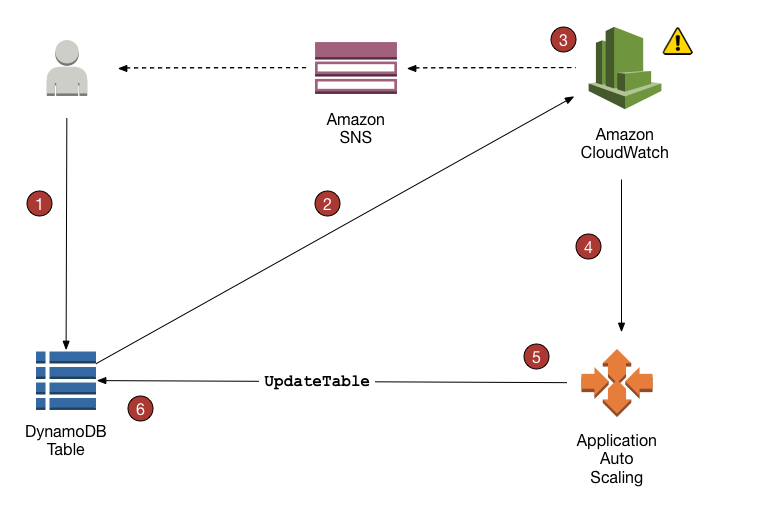
DynamoDB Auto Scaling

Aurora Auto Scaling

  • Aurora DB clusters can be scaled using target tracking scaling policies, step scaling policies, and scheduled scaling.
  • Aurora Auto Scaling dynamically adjusts the number of Aurora Replicas provisioned for an Aurora DB cluster using single-master replication.
  • Aurora Auto Scaling helps add read replicas with min and max replica count based on scaling CloudWatch CPU or connections metrics condition.
  • Aurora Auto Scaling enables the Aurora DB cluster to handle sudden increases in connectivity or workload.
  • As the workload decreases, Aurora Auto Scaling removes unnecessary Aurora Replicas so that you don’t pay for unused provisioned DB instances.

ECS Service Auto Scaling

  • Amazon ECS services can be scaled using target tracking scaling policies, step scaling policies, predictive scaling policies, and scheduled scaling.
  • ECS service auto scaling automatically adjusts the desired count of tasks in an ECS service based on CloudWatch metrics such as CPU utilization, memory utilization, or request count per target.
  • Supports custom metrics such as queue depth for scaling decisions.
  • Predictive Scaling (November 2024) – Leverages advanced machine learning algorithms to proactively scale ECS services ahead of demand surges based on historical traffic patterns.
  • ECS Cluster Auto Scaling works with capacity providers to manage the underlying EC2 instances in the cluster.

Lambda Auto Scaling

  • AWS Lambda provisioned concurrency can be scaled using target tracking scaling policies and scheduled scaling.
  • Helps maintain a pool of pre-initialized execution environments ready to respond immediately to function invocations.
  • Target tracking can scale based on the provisioned concurrency utilization metric.

ElastiCache Auto Scaling

  • Amazon ElastiCache replication groups (Redis OSS and Valkey) and Memcached self-designed clusters can be horizontally scaled using target tracking scaling policies and scheduled scaling.
  • Automatically increases or decreases the desired shards or replicas to optimize performance or cost.
  • ElastiCache Serverless provides automatic scaling without managing clusters, scaling capacity up or down based on workload demands.
  • Supports console access for both scaling policies and scheduled scaling configuration.

SageMaker AI Auto Scaling

  • Amazon SageMaker AI endpoint variants, inference components, and Serverless provisioned concurrency can be scaled using target tracking scaling policies, step scaling policies, and scheduled scaling.
  • Scale Down to Zero (November 2024) – Endpoints can automatically scale to zero instances when not in use and scale back up when traffic resumes, reducing costs for intermittent workloads.
  • Faster Auto Scaling for Generative AI (July 2024) – Sub-minute CloudWatch metrics enable up to 6x faster scale-out detection for generative AI models.
  • Container Caching (December 2024) – Stores container images and model artifacts on running instances, reducing scaling latency by up to 56% for new model copies.
  • Capacity-Aware Inference (April 2026) – Automatic instance fallback when preferred instance types have insufficient capacity, keeping autoscaling running smoothly.
  • Supports multi-model endpoints with automatic scaling of model replicas based on traffic patterns.

Neptune Auto Scaling

  • Amazon Neptune clusters can be scaled by automatically adding or removing read replicas in response to changes in performance metrics.
  • Neptune auto scaling works with Amazon CloudWatch to continuously monitor performance metrics of read replicas.
  • Supports up to 15 Neptune replicas in a DB cluster for read scaling.
  • Uses target tracking scaling policies based on CPU utilization or connections metrics.

Amazon Keyspaces Auto Scaling

  • Amazon Keyspaces (for Apache Cassandra) tables can be scaled using target tracking scaling policies and scheduled scaling.
  • Automatically adjusts read and write capacity of tables to handle traffic changes without throttling.

Amazon MSK Auto Scaling

  • Amazon Managed Streaming for Apache Kafka (MSK) broker storage can be scaled using target tracking scaling policies.
  • Automatically increases broker storage capacity when utilization reaches a defined threshold.

EC2 Auto Scaling

  • EC2 Auto Scaling ensures a correct number of EC2 instances are always running to handle the load of the application.
  • Auto Scaling helps
    • to achieve better fault tolerance, better availability, and cost management.
    • helps specify scaling policies that can be used to launch and terminate EC2 instances to handle any increase or decrease in demand.
  • Auto Scaling attempts to distribute instances evenly between the AZs that are enabled for the Auto Scaling group.
  • Auto Scaling does this by attempting to launch new instances in the AZ with the fewest instances. If the attempt fails, it attempts to launch the instances in another AZ until it succeeds.
  • Note: EC2 Auto Scaling uses Auto Scaling groups and is separate from Application Auto Scaling, which handles scaling for other AWS services.

WorkSpaces Applications Auto Scaling

  • Amazon WorkSpaces Applications (formerly AppStream 2.0) fleets can be scaled using target tracking scaling policies, step scaling policies, and scheduled scaling.
  • Fleet Auto Scaling automatically adjusts the size of Always-On or On-Demand fleets to match the supply of available instances to user demand.
  • Supports multi-session fleets where more than one user can use a single instance.
  • Elastic fleets have capacity automatically managed without requiring auto scaling rules.
  • Supports console access for both scaling policies and scheduled scaling configuration.

AWS Certification Exam Practice Questions

  • Questions are collected from Internet and the answers are marked as per my knowledge and understanding (which might differ with yours).
  • AWS services are updated everyday and both the answers and questions might be outdated soon, so research accordingly.
  • AWS exam questions are not updated to keep up the pace with AWS updates, so even if the underlying feature has changed the question might not be updated
  • Open to further feedback, discussion and correction.
  1. A company runs an application on Amazon ECS with fluctuating traffic that has predictable daily patterns. The application experiences slow response times during morning traffic spikes because scaling policies react too slowly. Which scaling approach should the Solutions Architect recommend?
    1. Use step scaling with lower thresholds
    2. Use target tracking scaling with reduced cooldown period
    3. Use predictive scaling to proactively scale ECS tasks based on historical patterns
    4. Increase the minimum number of tasks to handle peak load at all times

    Answer: c. Predictive scaling uses ML algorithms to analyze historical traffic patterns and proactively scale ECS services ahead of demand surges.

  2. Which of the following are valid scaling policy types supported by AWS Application Auto Scaling? (Choose 3)
    1. Target Tracking Scaling
    2. Simple Scaling
    3. Step Scaling
    4. Predictive Scaling
    5. Proportional Scaling

    Answer: a, c, d. Application Auto Scaling supports Target Tracking, Step Scaling, Scheduled Scaling, and Predictive Scaling. Simple Scaling is only for EC2 Auto Scaling groups.

  3. A machine learning team wants to reduce costs for their SageMaker AI inference endpoints that receive intermittent traffic with long idle periods. Which feature should they use?
    1. Use Spot Instances for inference
    2. Configure Scale Down to Zero for SageMaker inference endpoints
    3. Use scheduled scaling to turn off endpoints during idle hours
    4. Switch to Lambda for inference

    Answer: b. SageMaker AI Scale Down to Zero (launched November 2024) allows endpoints to automatically scale to zero instances when not in use and scale back up when traffic resumes.

  4. Which AWS services can be scaled using Application Auto Scaling? (Choose 3)
    1. Amazon DynamoDB tables
    2. Amazon EC2 instances in an Auto Scaling group
    3. Amazon ECS services
    4. Amazon ElastiCache replication groups
    5. Amazon S3 storage

    Answer: a, c, d. Application Auto Scaling supports DynamoDB, ECS, and ElastiCache among others. EC2 Auto Scaling groups use Amazon EC2 Auto Scaling (separate service). S3 does not use auto scaling.

  5. A company uses Amazon Aurora with read-heavy workloads that vary throughout the day. They want to automatically add and remove read replicas based on CPU utilization. Which approach should they use?
    1. Configure Aurora Auto Scaling with a target tracking policy on CPU utilization
    2. Use AWS Lambda to monitor CPU and add replicas
    3. Set up CloudWatch alarms to trigger SNS notifications for manual scaling
    4. Use Aurora Serverless which automatically scales compute

    Answer: a. Aurora Auto Scaling through Application Auto Scaling supports target tracking policies based on CPU utilization or connections to dynamically adjust the number of Aurora Replicas.

  6. How does Application Auto Scaling predictive scaling determine future capacity needs?
    1. It uses fixed schedules defined by the administrator
    2. It analyzes historical metric data from up to the past 14 days to identify daily or weekly patterns
    3. It only monitors current metrics and reacts to breaches
    4. It requires manual input of expected traffic patterns

    Answer: b. Predictive scaling analyzes metric data from up to the past 14 days to identify patterns and generates an hourly forecast of capacity requirements for the next 48 hours.
References

DynamoDB Table Classes

DynamoDB Table Classes

  • DynamoDB table classes are designed to help you optimize for cost.
  • DynamoDB currently supports two table classes:
    • DynamoDB Standard table class is the default, and is recommended for the vast majority of workloads.
    • DynamoDB Standard-Infrequent Access (DynamoDB Standard-IA) table class which is optimized for tables where storage is the dominant cost. e.g., tables that store infrequently accessed data, such as application logs, old social media posts, e-commerce order history, and past gaming achievements.
  • Every DynamoDB table is associated with a table class.
  • All secondary indexes associated with the table use the same table class.
  • DynamoDB table class can be:
    • Set when creating the table (DynamoDB Standard by default), or
    • Updated for an existing table using the AWS Management Console, AWS CLI, or AWS SDK.
  • DynamoDB also supports managing the table class using AWS CloudFormation for single-region tables (tables that are not global tables).
  • Each table class offers different pricing for data storage as well as read and write requests.
  • You can select the most cost-effective table class for your table based on its storage and throughput usage patterns.

DynamoDB Standard Table Class

  • The default table class for all new tables.
  • Recommended for the vast majority of workloads.
  • Lower throughput costs than DynamoDB Standard-IA.
  • Most cost-effective option for tables where throughput is the dominant cost.
  • Use Cases:
    • Frequently accessed data with high read/write operations.
    • Real-time applications requiring low latency.
    • Tables with high throughput relative to storage.
    • Mission-critical workloads with continuous access patterns.

DynamoDB Standard-IA Table Class

  • Optimized for tables where storage is the dominant cost.
  • Storage costs: Approximately 60% lower than DynamoDB Standard ($0.10/GB vs. $0.25/GB).
  • Throughput costs: Approximately 25% higher than DynamoDB Standard for reads and writes.
  • Cost-Effective Threshold: When storage exceeds 50% of the throughput cost of a table using DynamoDB Standard, Standard-IA can help reduce total table cost.
  • Offers the same performance, durability, and availability as DynamoDB Standard tables.
  • Use Cases:
    • Application logs and audit trails.
    • Old social media posts or historical content.
    • E-commerce order history and past transactions.
    • Gaming achievements and historical player data.
    • Archived data with infrequent access.
    • Long-term data retention with occasional reads.

Pricing Comparison

Cost Component DynamoDB Standard DynamoDB Standard-IA Difference
Storage $0.25/GB $0.10/GB ~60% lower
Read/Write Throughput Lower cost Higher cost ~25% higher
Best For Throughput-dominant Storage-dominant

Switching Between Table Classes

  • Table class can be updated at any time for existing tables.
  • No application code changes required – same DynamoDB APIs and service endpoints are used regardless of table class.
  • No downtime – table remains accessible during the table class update.
  • Table class update is a background process.
  • Update time depends on table traffic, storage size, and other variables.
  • Switching Limitation: No more than two table class updates are allowed in a 30-day trailing period.
  • All secondary indexes automatically use the same table class as the base table.

Feature Compatibility

Choosing the Right Table Class

  • Analyze Historical Data: Use AWS Cost and Usage Reports and AWS Cost Explorer to review table’s historical storage and throughput costs.
  • Calculate Cost Ratio: Determine if storage cost exceeds 50% of total table cost.
  • Decision Criteria:
    • Choose Standard if:
      • Throughput (reads/writes) is the dominant cost.
      • Data is frequently accessed.
      • High read/write operations relative to storage.
    • Choose Standard-IA if:
      • Storage is the dominant cost (exceeds 50% of throughput cost).
      • Data is infrequently accessed.
      • Large storage with low read/write operations.
  • Monitor and Adjust: Review costs regularly and switch table classes if usage patterns change (within the 2 updates per 30 days limit).

Best Practices

  • Start with Standard: Use DynamoDB Standard for new tables until usage patterns are established.
  • Monitor Costs: Regularly review storage vs. throughput costs using Cost Explorer.
  • Use 50% Threshold: Switch to Standard-IA when storage exceeds 50% of throughput cost.
  • Consider Access Patterns: Standard-IA is ideal for archival and historical data with infrequent access.
  • Plan Switches Carefully: Remember the 2 updates per 30 days limitation.
  • Test Before Production: Validate cost savings in non-production environments first.
  • Document Decisions: Keep records of why specific table classes were chosen for future reference.
  • Automate Monitoring: Set up CloudWatch alarms for cost thresholds to identify optimization opportunities.

Limitations and Considerations

  • Switching Limit: Maximum of 2 table class updates per 30-day trailing period.
  • CloudFormation Support: Only for single-region tables (not global tables).
  • Index Inheritance: All indexes (GSIs and LSIs) automatically use the same table class as the base table.
  • Background Process: Table class updates are asynchronous and time varies based on table size and traffic.
  • Cost Analysis Required: Requires careful analysis of storage vs. throughput costs to determine optimal class.
  • No Partial Application: Cannot apply different table classes to different indexes on the same table.

AWS Certification Exam Practice Questions

  • Questions are collected from Internet and the answers are marked as per my knowledge and understanding (which might differ with yours).
  • AWS services are updated everyday and both the answers and questions might be outdated soon, so research accordingly.
  • AWS exam questions are not updated to keep up the pace with AWS updates, so even if the underlying feature has changed the question might not be updated
  • Open to further feedback, discussion and correction.
  1. A company has a DynamoDB table storing 500 GB of application logs that are accessed once per month for compliance reporting. The table currently uses the Standard table class. What should they do to optimize costs?
    1. Enable DynamoDB Auto Scaling.
    2. Switch to DynamoDB Standard-IA table class.
    3. Enable Time-to-Live (TTL) to delete old logs.
    4. Switch to on-demand capacity mode.
  2. A DynamoDB table has storage costs of $1,000/month and throughput costs of $800/month. Which table class would be most cost-effective?
    1. DynamoDB Standard
    2. DynamoDB Standard-IA (storage exceeds 50% of total cost)
    3. Either class would have the same cost
    4. Cannot determine without more information
  3. A company wants to switch a table between Standard and Standard-IA classes multiple times to test cost optimization. What is the maximum number of switches allowed?
    1. Unlimited switches
    2. 1 switch per 30 days
    3. 2 switches per 30-day trailing period
    4. 4 switches per 30 days
  4. What happens to a DynamoDB table during a table class update?
    1. The table is unavailable during the update.
    2. Read operations are allowed but write operations are blocked.
    3. The table remains fully accessible with no downtime.
    4. The table is read-only during the update.
  5. A company has a DynamoDB table with 3 Global Secondary Indexes (GSIs). They want to use Standard-IA for the base table but Standard for the GSIs. Is this possible?
    1. Yes, each index can have a different table class.
    2. No, all indexes automatically use the same table class as the base table.
    3. Yes, but only for GSIs, not LSIs.
    4. Yes, but requires manual configuration for each index.
  6. Which of the following statements about DynamoDB Standard-IA are correct? (Select TWO)
    1. Storage costs are approximately 60% lower than Standard.
    2. Throughput costs are approximately 60% lower than Standard.
    3. Read and write costs are approximately 25% higher than Standard.
    4. It offers lower performance than Standard tables.
    5. It is not compatible with DynamoDB Streams.

References

AWS Database Services Cheat Sheet

AWS Database Services Cheat Sheet

AWS Database Services

📋 Last Updated: June 2026

This cheat sheet has been updated to include Aurora DSQL, Aurora storage increase to 256 TiB, ElastiCache for Valkey, ElastiCache Serverless, Redshift Multi-AZ and Serverless, DynamoDB multi-Region strong consistency, zero-ETL integrations, RDS Multi-AZ DB Clusters with readable standbys, and RDS Extended Support.

Relational Database Service – RDS

  • provides Relational Database service
  • supports MySQL, MariaDB, PostgreSQL, Oracle, Microsoft SQL Server, Amazon Aurora, and IBM Db2 (added in 2023) DB engines
  • as it is a managed service, shell (root ssh) access is not provided
  • manages backups, software patching, automatic failure detection, and recovery
  • supports use initiated manual backups and snapshots
  • daily automated backups with database transaction logs enables Point in Time recovery up to the last five minutes of database usage
  • snapshots are user-initiated storage volume snapshot of DB instance, backing up the entire DB instance and not just individual databases that can be restored as a independent RDS instance
  • RDS Security
    • support encryption at rest using KMS as well as encryption in transit using SSL endpoints
    • supports IAM database authentication, which prevents the need to store static user credentials in the database, because authentication is managed externally using IAM.
    • supports Encryption only during creation of an RDS DB instance
    • existing unencrypted DB cannot be encrypted and you need to create a snapshot, create an encrypted copy of the snapshot and restore as encrypted DB
    • supports Secrets Manager for storing and rotating secrets
    • for encrypted database
      • logs, snapshots, backups, read replicas are all encrypted as well
      • cross region replicas and snapshots are supported for encrypted instances
  • Multi-AZ deployment
    • provides high availability and automatic failover support and is NOT a scaling solution
    • maintains a synchronous standby replica in a different AZ
    • transaction success is returned only if the commit is successful both on the primary and the standby DB
    • Oracle, PostgreSQL, MySQL, and MariaDB DB instances use Amazon technology, while SQL Server DB instances use SQL Server Always On Availability Groups
    • snapshots and backups are taken from standby & eliminate I/O freezes
    • during automatic failover, its seamless and RDS switches to the standby instance and updates the DNS record to point to standby
    • failover can be forced with the Reboot with failover option
  • Multi-AZ DB Cluster (Readable Standbys)
    • provides a primary DB instance and two readable standby DB instances in different AZs
    • standby instances can serve read traffic, providing additional read capacity
    • uses semi-synchronous replication with transaction log-based replication
    • provides faster failover (typically under 35 seconds) compared to Multi-AZ instance deployment
    • supports MySQL and PostgreSQL engines
    • offers lower write latency compared to Multi-AZ instance deployments
  • Read Replicas
    • uses the PostgreSQL, MySQL, and MariaDB DB engines’ built-in replication functionality to create a separate Read Only instance
    • updates are asynchronously copied to the Read Replica, and data might be stale
    • can help scale applications and reduce read only load
    • requires automatic backups enabled
    • replicates all databases in the source DB instance
    • for disaster recovery, can be promoted to a full fledged database
    • can be created in a different region for disaster recovery, migration and low latency across regions
    • can’t create encrypted read replicas from unencrypted DB or read replica
  • RDS does not support all the features of underlying databases, and if required the database instance can be launched on an EC2 instance
  • RDS Components
    • DB parameter groups contains engine configuration values that can be applied to one or more DB instances of the same instance type for e.g. SSL, max connections etc.
    • Default DB parameter group cannot be modified, create a custom one and attach to the DB
    • Supports static and dynamic parameters
      • changes to dynamic parameters are applied immediately (irrespective of apply immediately setting)
      • changes to static parameters are NOT applied immediately and require a manual reboot.
  • RDS Monitoring & Notification
    • integrates with CloudWatch and CloudTrail
    • CloudWatch provides metrics about CPU utilization from the hypervisor for a DB instance, and Enhanced Monitoring gathers its metrics from an agent on the instance
    • Performance Insights is a database performance tuning and monitoring feature that helps illustrate the database’s performance and help analyze any issues that affect it
    • supports RDS Event Notification which uses the SNS to provide notification when an RDS event like creation, deletion or snapshot creation etc occurs
  • RDS Blue/Green Deployments
    • creates a staging (green) environment that mirrors the production (blue) environment
    • enables safer database updates, major version upgrades, and schema changes with minimal downtime (under 5 seconds)
    • supports Aurora MySQL, Aurora PostgreSQL, RDS for MySQL, RDS for MariaDB, and RDS for PostgreSQL
    • now supports Aurora Global Database (2025)
  • RDS Extended Support
    • allows running databases on a major engine version up to 3 years past its RDS end of standard support date at an additional cost
    • provides critical security and bug fixes after the community ends support for a major version
    • databases are automatically enrolled if not upgraded before the end of standard support date
  • Zero-ETL Integrations
    • RDS for MySQL and Aurora support zero-ETL integration with Amazon Redshift
    • enables near real-time analytics on transactional data without building ETL pipelines
    • data is automatically replicated to Amazon Redshift within seconds of being written

⚠️ RDS Custom for Oracle – End of Support (March 31, 2027)

AWS will end support for Amazon RDS Custom for Oracle on March 31, 2027. After this date, you will no longer be able to access the RDS Custom for Oracle console or resources.

Migration Options: Migrate to Amazon RDS for Oracle (standard) or run Oracle on Amazon EC2 bare metal instances.

Aurora

  • is a relational database engine that combines the speed and reliability of high-end commercial databases with the simplicity and cost-effectiveness of open source databases
  • is a managed service and handles time-consuming tasks such as provisioning, patching, backup, recovery, failure detection and repair
  • is a proprietary technology from AWS (not open sourced)
  • provides PostgreSQL and MySQL compatibility
  • is “AWS cloud optimized” and claims 5x performance improvement over MySQL on RDS, over 3x the performance of PostgreSQL on RDS
  • scales storage automatically in increments of 10GB, up to 256 TiB (increased from 128 TiB in July 2025) with no impact to database performance. Storage is striped across 100s of volumes.
  • no need to provision storage in advance.
  • provides self-healing storage. Data blocks and disks are continuously scanned for errors and repaired automatically.
  • provides instantaneous failover
  • replicates each chunk of the database volume six ways across three Availability Zones i.e. 6 copies of the data across 3 AZ
    • requires 4 copies out of 6 needed for writes
    • requires 3 copies out of 6 need for reads
  • costs more than RDS (20% more) – but is more efficient
  • Read Replicas
    • can have 15 replicas while MySQL has 5, and the replication process is faster (sub 10 ms replica lag)
    • share the same data volume as the primary instance in the same AWS Region, there is virtually no replication lag
    • supports Automated failover for master in less than 30 seconds
    • supports Cross Region Replication using either physical or logical replication.
  • Security
    • supports Encryption at rest using KMS
    • supports Encryption in flight using SSL (same process as MySQL or Postgres)
    • Automated backups, snapshots and replicas are also encrypted
    • Possibility to authenticate using IAM token (same method as RDS)
    • supports protecting the instance with security groups
    • does not support SSH access to the underlying servers
  • Aurora I/O-Optimized
    • a cluster configuration that provides predictable pricing with no charges for I/O operations
    • ideal for I/O-intensive applications such as e-commerce, payment processing, and SaaS applications
    • can deliver up to 40% cost savings for I/O-intensive workloads
    • supports both Aurora Serverless and provisioned instances
    • can switch between I/O-Optimized and Standard configurations (once every 30 days to I/O-Optimized, back to Standard anytime)
  • Aurora Serverless
    • provides automated database instantiation and on-demand autoscaling based on actual usage
    • provides a relatively simple, cost-effective option for infrequent, intermittent, or unpredictable workloads
    • automatically starts up, shuts down, and scales capacity up or down based on the application’s needs. No capacity planning needed
    • Pay per second, can be more cost-effective
    • Aurora Serverless v1 reached end of life on March 31, 2025 – all clusters have been migrated to Aurora Serverless v2 (now simply called “Aurora Serverless”)
    • Aurora Serverless (v2) supports features like read replicas, Multi-AZ, Global Database, and logical replication that v1 did not
    • supports scale to zero capability and up to 30% better performance with smarter scaling (2026 enhancement)
  • Aurora Global Database
    • allows a single Aurora database to span multiple AWS regions.
    • provides Physical replication, which uses dedicated infrastructure that leaves the databases entirely available to serve the application
    • supports 1 Primary Region (read / write)
    • replicates across up to 5 secondary (read-only) regions, replication lag is less than 1 second
    • supports up to 16 Read Replicas per secondary region
    • recommended for low-latency global reads and disaster recovery with an RTO of < 1 minute
    • supports managed failover (Global Database Failover) which automates the cross-Region failover process, reducing operational overhead (introduced August 2023)
    • supports Blue/Green Deployments for Global Database (2025) for safer major version upgrades across all regions
    • supports a global writer endpoint for simplified application connectivity
  • Aurora Backtrack
    • Backtracking “rewinds” the DB cluster to the specified time
    • Backtracking performs in place restore and does not create a new instance. There is a minimal downtime associated with it.
  • Aurora Clone feature allows quick and cost-effective creation of Aurora Cluster duplicates
  • supports parallel or distributed query using Aurora Parallel Query, which refers to the ability to push down and distribute the computational load of a single query across thousands of CPUs in Aurora’s storage layer.
  • Aurora Optimized Reads
    • delivers up to 8x improved query latency for applications with datasets exceeding instance memory
    • uses local NVMe-based storage on Graviton-based instances to extend caching capacity
    • available for both PostgreSQL and MySQL compatible editions

Amazon Aurora DSQL (New – GA May 2025)

  • a serverless, distributed SQL database optimized for transaction processing
  • the fastest serverless distributed SQL database with active-active high availability
  • provides PostgreSQL compatibility (subset of features)
  • designed for 99.99% availability in single-Region and 99.999% availability in multi-Region configurations
  • delivers strong consistency for all reads and writes to any Regional endpoint
  • provides virtually unlimited scalability with zero infrastructure management and zero downtime maintenance
  • offers the fastest distributed SQL reads and writes with 4x faster reads and writes compared to other popular distributed SQL databases
  • employs an active-active deployment model where all database resources function as peers capable of handling both read and write traffic
  • supports up to 256 TiB of storage per database cluster
  • ideal for globally distributed applications requiring strong consistency, such as financial transactions, gaming, and SaaS applications

DynamoDB

  • fully managed NoSQL database service
  • synchronously replicates data across three facilities in an AWS Region, giving high availability and data durability
  • runs exclusively on SSDs to provide high I/O performance
  • provides provisioned table reads and writes
  • automatically partitions, reallocates, and re-partitions the data and provisions additional server capacity as data or throughput changes
  • creates and maintains indexes for the primary key attributes for efficient access to data in the table
  • DynamoDB Table classes currently support
    • DynamoDB Standard table class is the default and is recommended for the vast majority of workloads.
    • DynamoDB Standard-Infrequent Access (DynamoDB Standard-IA) table class which is optimized for tables where storage is the dominant cost.
  • supports Secondary Indexes
    • allows querying attributes other than the primary key attributes without impacting performance.
    • are automatically maintained as sparse objects
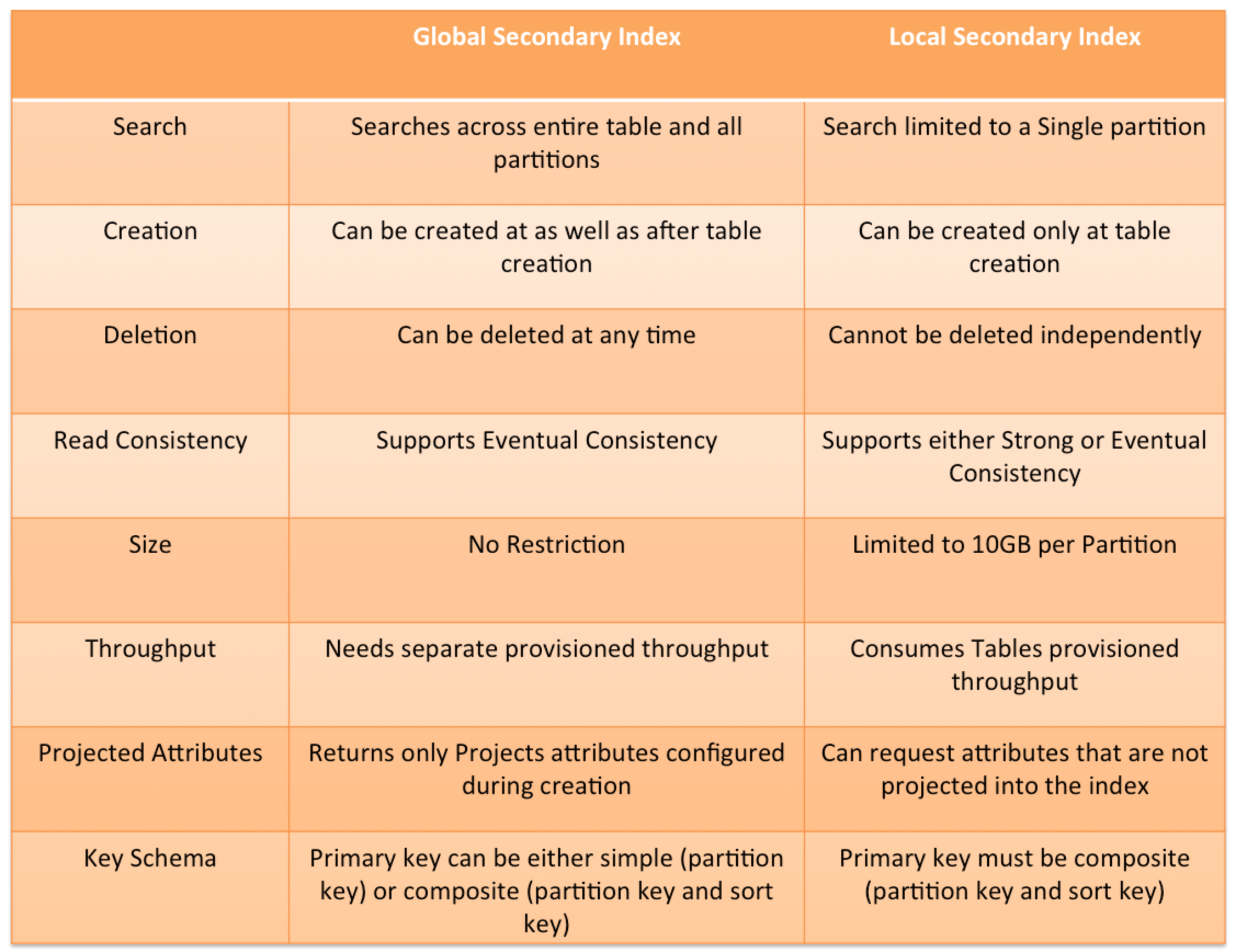
  • Local secondary index vs Global secondary index
    • shares partition key + different sort key vs different partition + sort key
    • search limited to partition vs across all partition
    • unique attributes vs non-unique attributes
    • linked to the base table vs independent separate index
    • only created during the base table creation vs can be created later
    • cannot be deleted after creation vs can be deleted
    • consumes provisioned throughput capacity of the base table vs independent throughput
    • returns all attributes for item vs only projected attributes
    • Eventually or Strongly vs Only Eventually consistent reads
    • size limited to 10Gb per partition vs unlimited
  • DynamoDB Consistency
    • provides Eventually consistent (by default) or Strongly Consistent option to be specified during a read operation
    • supports Strongly consistent reads for a few operations like Query, GetItem, and BatchGetItem using the ConsistentRead parameter
  • DynamoDB Throughput Capacity
    • supports On-demand and Provisioned read/write capacity modes
    • Provisioned mode requires the number of reads and writes per second as required by the application to be specified
    • On-demand mode provides flexible billing option capable of serving thousands of requests per second without capacity planning
    • On-demand pricing reduced by 50% in November 2024
    • supports switching from provisioned to on-demand up to 4 times in a rolling 24-hour period (2025 improvement)
  • DynamoDB Auto Scaling helps dynamically adjust provisioned throughput capacity on your behalf, in response to actual traffic patterns.
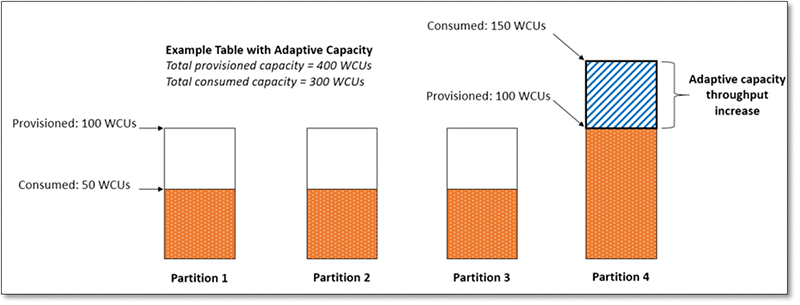
  • DynamoDB Adaptive capacity is a feature that enables DynamoDB to run imbalanced workloads indefinitely.
  • DynamoDB Global Tables
    • provide multi-active, cross-region replication capability of DynamoDB to support data access locality and regional fault tolerance for database workloads.
    • provide up to 99.999% availability
    • Multi-Region Strong Consistency (MRSC) – GA June 2025
      • enables applications to always read the latest version of data from any Region in a global table
      • provides zero RPO (Recovery Point Objective) for the highest application resilience
      • removes the need to manage consistency across multiple Regions manually
      • slightly higher write latencies compared to eventually consistent (MREC) mode
    • Global tables pricing reduced by up to 67% in November 2024
  • DynamoDB Streams provides a time-ordered sequence of item-level changes made to data in a table
  • DynamoDB Time to Live (TTL)
    • enables a per-item timestamp to determine when an item expiry
    • expired items are deleted from the table without consuming any write throughput.
  • DynamoDB Accelerator (DAX) is a fully managed, highly available, in-memory cache for DynamoDB that delivers up to a 10x performance improvement – from milliseconds to microseconds – even at millions of requests per second.
  • DynamoDB Triggers (just like database triggers) are a feature that allows the execution of custom actions based on item-level updates on a table.
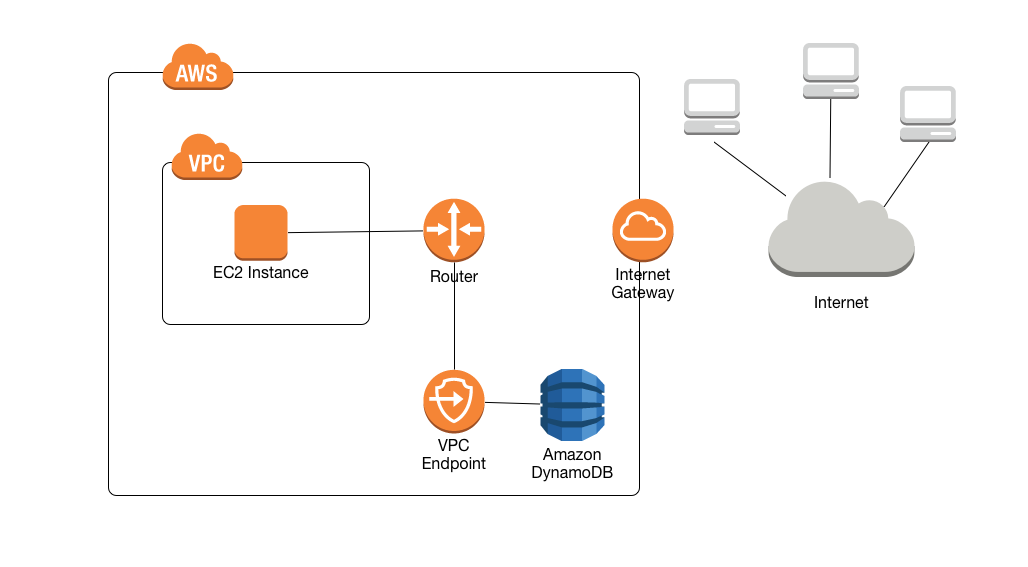
  • VPC Gateway Endpoints provide private access to DynamoDB from within a VPC without the need for an internet gateway or NAT gateway.
  • DynamoDB Zero-ETL Integrations
    • Zero-ETL with Amazon Redshift (GA October 2024) – automatically replicates DynamoDB tables into Redshift for SQL analytics without building ETL pipelines
    • Zero-ETL with Amazon OpenSearch Service – provides seamless, code-free data replication for vector search and near real-time analytics
    • enables analytics on DynamoDB data without impacting production workload performance

ElastiCache

  • managed web service that provides in-memory caching to deploy and run Valkey, Redis OSS, or Memcached protocol-compliant cache clusters
  • ElastiCache for Valkey (Recommended – default since October 2024)
    • Valkey is an open-source fork of Redis OSS 7.2, maintained by the Linux Foundation with contributions from AWS, Google, Microsoft, and others
    • is a drop-in replacement for Redis OSS – supports the same data structures, commands, and protocols
    • all features available with Redis OSS 7.2 are available in Valkey 7.2 and above
    • AWS recommends Valkey for new deployments and offers migration paths from existing Redis OSS clusters
    • like Redis OSS, supports Multi-AZ, Read Replicas and Snapshots
    • supports cluster mode for horizontal scaling
  • ElastiCache with Redis OSS
    • available up to version 7.1 (the last BSD-licensed release); now a maintenance track with no active new feature development from AWS
    • Redis 8.0+ is licensed under AGPLv3, which is not supported by ElastiCache
    • Standard support for versions 4 and 5 ends January 31, 2026; clusters will be enrolled in Extended Support after that date
    • like RDS, supports Multi-AZ, Read Replicas and Snapshots
    • Read Replicas are created across AZ within same region using Redis’s asynchronous replication technology
    • Multi-AZ differs from RDS as there is no standby, but if the primary goes down a Read Replica is promoted as primary
    • allows snapshots for backup and restore
    • AOF can be enabled for recovery scenarios, to recover the data in case the node fails or service crashes. But it does not help in case the underlying hardware fails
    • Enabling Redis Multi-AZ as a Better Approach to Fault Tolerance
  • ElastiCache with Memcached
    • can be scaled up by increasing size and scaled out by adding nodes
    • nodes can span across multiple AZs within the same region
    • cached data is spread across the nodes, and a node failure will always result in some data loss from the cluster
    • supports auto discovery
    • every node should be homogenous and of same instance type
  • ElastiCache Valkey/Redis vs Memcached
    • complex data objects vs simple key value storage
    • persistent vs non persistent, pure caching
    • automatic failover with Multi-AZ vs Multi-AZ not supported
    • scaling using Read Replicas vs using multiple nodes
    • backup & restore supported vs not supported
  • ElastiCache Serverless (launched November 2023)
    • creates a cache in under a minute with zero capacity planning
    • instantly scales capacity based on application traffic patterns
    • provides zero infrastructure management and zero downtime maintenance
    • supports Valkey 7.2+, Redis OSS 7.0+, and Memcached 1.6+
    • pay-per-use pricing based on data stored and requests executed
    • automatically provisions resources across multiple AZs for high availability
  • can be used for state management to keep the web application stateless

Redshift

  • fully managed, fast and powerful, petabyte scale data warehouse service
  • uses replication and continuous backups to enhance availability and improve data durability and can automatically recover from node and component failures
  • provides Massive Parallel Processing (MPP) by distributing & parallelizing queries across multiple physical resources
  • columnar data storage improving query performance and allowing advance compression techniques
  • now supports Multi-AZ deployments for RA3 clusters (GA 2024), running the data warehouse in two AZs simultaneously with 99.99% SLA
  • spot instances are NOT an option
  • Redshift Serverless
    • enables running and scaling analytics without provisioning or managing clusters
    • automatically scales compute up or down based on workload demands
    • AI-driven scaling and optimization (default for new workgroups since April 2026) uses machine learning to predict compute needs and automatically adjust resources
    • offers minimum capacity as low as 4 RPUs for cost-effective development workloads
    • supports Serverless Reservations (2025) for discounted pricing and cost predictability
    • pay-as-you-go pricing based on compute used
  • Zero-ETL Integrations
    • supports zero-ETL from Aurora MySQL, Aurora PostgreSQL, RDS for MySQL, DynamoDB, and self-managed databases
    • automatically replicates data from source to Redshift without building ETL pipelines
    • enables near real-time analytics on transactional data
  • Enhanced Security Defaults (2025)
    • new clusters default to public accessibility disabled, encryption enabled, and secure connections enforced

AWS DynamoDB

AWS DynamoDB

  • Amazon DynamoDB is a fully managed, serverless NoSQL database service that
    • makes it simple and cost-effective to store and retrieve any amount of data and serve any level of request traffic.
    • provides fast and predictable performance with seamless scalability
    • offers single-digit millisecond performance at any scale
  • DynamoDB enables customers to offload the administrative burdens of operating and scaling distributed databases to AWS, without having to worry about hardware provisioning, setup and configuration, replication, software patching, or cluster scaling.
  • DynamoDB offers zero infrastructure management, zero downtime maintenance, instant scaling to any application demand, and pay-per-request billing. There are no cold starts, no version upgrades, and no maintenance windows.
  • DynamoDB tables do not have fixed schemas, and the table consists of items and each item may have a different number of attributes.
  • DynamoDB synchronously replicates data across three facilities in an AWS Region, giving high availability and data durability.
  • DynamoDB supports fast in-place updates. A numeric attribute can be incremented or decremented in a row using a single API call.
  • DynamoDB uses proven cryptographic methods to securely authenticate users and prevent unauthorized data access.
  • Durability, performance, reliability, and security are built in, with SSD (solid state drive) storage and automatic 3-way replication.
  • DynamoDB supports two different kinds of primary keys:
    • Partition Key (previously called the Hash key)
      • A simple primary key, composed of one attribute
      • The partition key value is used as input to an internal hash function; the output from the hash function determines the partition where the item will be stored.
      • No two items in a table can have the same partition key value.
    • Partition Key and Sort Key (previously called the Hash and Range key)
      • A composite primary key is composed of two attributes. The first attribute is the partition key, and the second attribute is the sort key.
      • The partition key value is used as input to an internal hash function; the output from the hash function determines the partition where the item will be stored.
      • All items with the same partition key are stored together, in sorted order by sort key value.
      • The combination of the partition key and sort key must be unique.
      • It is possible for two items to have the same partition key value, but those two items must have different sort key values.
  • DynamoDB Table classes currently support
    • DynamoDB Standard table class is the default and is recommended for the vast majority of workloads.
    • DynamoDB Standard-Infrequent Access (DynamoDB Standard-IA) table class which is optimized for tables where storage is the dominant cost.
  • DynamoDB Throughput Capacity determines the read/write capacity for processing reads and writes on the tables and it currently supports
    • Provisioned – maximum amount of capacity in terms of reads/writes per second that an application can consume from a table or index
    • On-demand – serves thousands of requests per second without capacity planning.
  • DynamoDB Secondary indexes
    • add flexibility to the queries, without impacting performance.
    • are automatically maintained as sparse objects, items will only appear in an index if they exist in the table on which the index is defined making queries against an index very efficient
  • DynamoDB throughput and single-digit millisecond latency make it a great fit for gaming, ad tech, mobile, and many other applications
  • ElastiCache or DAX can be used in front of DynamoDB in order to offload a high amount of reads for non-frequently changed data

DynamoDB Consistency

  • Each DynamoDB table is automatically stored in the three geographically distributed locations for durability.
  • Read consistency represents the manner and timing in which the successful write or update of a data item is reflected in a subsequent read operation of that same item.
  • DynamoDB allows the user to specify whether the read should be eventually consistent or strongly consistent at the time of the request
    • Eventually Consistent Reads (Default)
      • Eventual consistency option maximizes the read throughput.
      • Consistency across all copies is usually reached within a second
      • However, an eventually consistent read might not reflect the results of a recently completed write.
      • Repeating a read after a short time should return the updated data.
      • DynamoDB uses eventually consistent reads, by default.
    • Strongly Consistent Reads
      • Strongly consistent read returns a result that reflects all writes that received a successful response prior to the read
      • Strongly consistent reads are 2x the cost of Eventually consistent reads
      • Strongly Consistent Reads come with disadvantages
        • A strongly consistent read might not be available if there is a network delay or outage. In this case, DynamoDB may return a server error (HTTP 500).
        • Strongly consistent reads may have higher latency than eventually consistent reads.
        • Strongly consistent reads are not supported on global secondary indexes.
        • Strongly consistent reads use more throughput capacity than eventually consistent reads.
  • Read operations (such as GetItem, Query, and Scan) provide a ConsistentRead parameter, if set to true, DynamoDB uses strongly consistent reads during the operation.
  • Query, GetItem, and BatchGetItem operations perform eventually consistent reads by default.
    • Query and GetItem operations can be forced to be strongly consistent
    • Query operations cannot perform strongly consistent reads on Global Secondary Indexes
    • BatchGetItem operations can be forced to be strongly consistent on a per-table basis

DynamoDB Throughput Capacity

  • DynamoDB throughput capacity depends on the read/write capacity modes for processing reads and writes on the tables.
  • DynamoDB supports two types of read/write capacity modes:
    • Provisioned – maximum amount of capacity in terms of reads/writes per second that an application can consume from a table or index
    • On-demand – serves thousands of requests per second without capacity planning.
  • DynamoDB Auto Scaling helps dynamically adjust provisioned throughput capacity on your behalf, in response to actual traffic patterns.
  • DynamoDB Adaptive capacity is a feature that enables DynamoDB to run imbalanced workloads indefinitely.

Warm Throughput (November 2024)

  • Warm throughput provides visibility into the number of read and write operations a DynamoDB table or index can immediately support.
  • Warm throughput values grow automatically as usage increases over time.
  • Pre-warming allows proactively setting higher warm throughput values to meet anticipated future traffic demands.
  • Warm throughput values are available for all provisioned and on-demand tables and indexes at no cost.
  • Pre-warming incurs an additional charge based on the DynamoDB pricing page.
  • Useful for planned events like product launches, sales events, or traffic migrations where a sudden spike is expected.

Configurable Maximum Throughput for On-Demand (May 2024)

  • Allows optionally configuring maximum read or write (or both) throughput for individual on-demand DynamoDB tables and associated secondary indexes.
  • Throughput requests exceeding the configured maximum are automatically throttled.
  • Simplifies balancing cost and performance for on-demand mode.
  • Protects against accidental surges in consumed resources and excessive use.
  • Safeguards downstream services with fixed capacity from potential overloading.
  • Maximum throughput can be modified at any time based on application requirements.

DynamoDB Secondary Indexes

  • DynamoDB Secondary indexes
    • add flexibility to the queries, without impacting performance.
    • are automatically maintained as sparse objects, items will only appear in an index if they exist in the table on which the index is defined making queries against an index very efficient
  • DynamoDB Secondary indexes on a table allow efficient access to data with attributes other than the primary key.
  • DynamoDB Secondary indexes support two types

Multi-Attribute Composite Keys in GSIs (November 2025)

  • DynamoDB now supports primary keys composed of up to eight attributes in Global Secondary Indexes (GSIs).
  • Allows up to four attributes each for the partition key and sort key in a GSI.
  • Previously, partition and sort keys were limited to one attribute each.
  • Enables querying data at scale across multiple dimensions without client-side composite key construction.
  • Reduces client-side code and makes it easier to initially model data and add new access patterns later.
  • Each index key attribute must be a scalar of type String, Number, or Binary.
  • Base table primary keys still use the traditional structure (single partition key + optional single sort key).

DynamoDB Secondary Indexes - GSI vs LSI

DynamoDB Advanced Topics

  • DynamoDB Secondary indexes on a table allow efficient access to data with attributes other than the primary key.
  • DynamoDB Time to Live – TTL enables a per-item timestamp to determine when an item is no longer needed.
  • DynamoDB cross-region replication allows identical copies (called replicas) of a DynamoDB table (called master table) to be maintained in one or more AWS regions.
  • DynamoDB Global Tables is a fully managed, serverless, multi-Region, and multi-active database that provides up to 99.999% availability.
  • DynamoDB Streams provides a time-ordered sequence of item-level changes made to data in a table.
  • DynamoDB Triggers (just like database triggers) are a feature that allows the execution of custom actions based on item-level updates on a table.
  • DynamoDB Accelerator – DAX is a fully managed, highly available, in-memory cache for DynamoDB that delivers up to a 10x performance improvement – from ms to µs – even at millions of requests per second.
  • VPC Gateway Endpoints provide private access to DynamoDB from within a VPC without the need for an internet gateway or NAT gateway.
  • AWS PrivateLink (Interface Endpoints) – DynamoDB also supports interface VPC endpoints via AWS PrivateLink, enabling private connectivity from on-premises workloads using Direct Connect or VPN without requiring an internet gateway.

DynamoDB Global Tables

  • DynamoDB Global Tables is a fully managed, serverless, multi-Region, and multi-active database.
  • Provides up to 99.999% availability and increased application resiliency.
  • Automatically replicates tables across selected AWS Regions for fast, local read and write performance.
  • Supports two versions:
    • Version 2019.11.21 (Current) – recommended version with latest features
    • Version 2017.11.29 (Legacy) – original version, AWS recommends upgrading to current version

Multi-Region Strong Consistency (MRSC) – GA June 2025

  • DynamoDB Global Tables now supports Multi-Region Strong Consistency (MRSC), enabling zero Recovery Point Objective (RPO).
  • Ensures applications can consistently read the latest data version from any Region in a global table.
  • Eliminates the need for manual cross-Region consistency management.
  • Particularly beneficial for:
    • User profile management
    • Inventory tracking
    • Financial transaction processing
    • Any application with strict consistency requirements
  • Supports application resiliency testing with AWS Fault Injection Service (FIS).
  • Previously, Global Tables only supported eventual consistency across Regions.

DynamoDB Zero-ETL Integrations

  • DynamoDB offers zero-ETL integrations that automatically replicate data to analytics services without building complex ETL pipelines.

Zero-ETL with Amazon Redshift (GA October 2024)

  • Enables seamless analytics on DynamoDB data without impacting production workloads.
  • Data written to DynamoDB becomes immediately available in Amazon Redshift.
  • Allows using Amazon Redshift capabilities: high-performance SQL, built-in ML, Spark integrations, and data sharing.
  • Supports Redshift Serverless workgroups and provisioned clusters using RA3 instance types.
  • Eliminates the need to build and maintain custom ETL pipelines.

Zero-ETL with Amazon OpenSearch Service

  • Provides a fully managed, no-code solution for ingesting data from DynamoDB into OpenSearch Service.
  • Uses the DynamoDB plugin for Amazon OpenSearch Ingestion.
  • Enables near real-time analytics, full-text search, and vector search on DynamoDB data.
  • Supports complex search queries and analytics capabilities not natively available in DynamoDB.

Zero-ETL with Amazon SageMaker Lakehouse (December 2024)

  • Automates extracting and loading data from DynamoDB into SageMaker Lakehouse.
  • Enables analytics and machine learning (ML) workloads on DynamoDB data.
  • SageMaker Lakehouse provides integrated access control and open source Apache Iceberg for data interoperability.

DynamoDB S3 Import and Export

  • DynamoDB supports import and export features to easily move, transform, and copy table data.
  • Export to S3
    • Exports data to S3 without consuming read capacity units (RCUs).
    • Leverages Point-in-Time Recovery (PITR) capability.
    • Supports both full exports and incremental exports (only changed data between two time points).
    • Supports DynamoDB JSON and Amazon Ion formats.
  • Import from S3
    • Allows bulk importing S3 data into a new DynamoDB table.
    • Supports up to 50,000 S3 objects in a single bulk import (increased from previous limits in March 2024).
    • Supports DynamoDB JSON, Amazon Ion, and CSV formats.
  • Incremental exports enable change data capture (CDC) pipelines more efficiently and cost-effectively.

DynamoDB Performance

  • Automatically scales horizontally
  • runs exclusively on Solid State Drives (SSDs).
    • SSDs help achieve the design goals of predictable low-latency response times for storing and accessing data at any scale.
    • SSDs High I/O performance enables them to serve high-scale request workloads cost-efficiently and to pass this efficiency along in low request pricing.
  • allows provisioned table reads and writes
    • Scale up throughput when needed
    • Scale down throughput four times per UTC calendar day
  • automatically partitions, reallocates and re-partitions the data and provisions additional server capacity as the
    • table size grows or
    • provisioned throughput is increased
  • Global Secondary indexes (GSI)
    • can be created upfront or added later
  • Supports IPv6 addressing (October 2025), allowing connections to DynamoDB tables, streams, and DAX in IPv4-only, IPv6-only, or dual-stack networking modes.

DynamoDB Security

  • AWS handles basic security tasks like guest operating system (OS) and database patching, firewall configuration, and disaster recovery.
  • DynamoDB protects user data stored at rest and in transit between on-premises clients and DynamoDB, and between DynamoDB and other AWS resources within the same AWS Region.
  • Encryption at rest is enabled on all DynamoDB table data and cannot be disabled.
  • Encryption at rest includes the base tables, primary key, local and global secondary indexes, streams, global tables, backups, and DynamoDB Accelerator (DAX) clusters.
  • Fine-Grained Access Control (FGAC) gives a high degree of control over data in the table and helps control who (caller) can access which items or attributes of the table and perform what actions (read/write capability).
  • Resource-Based Policies (March 2024)
    • Allow specifying IAM principals and their allowed actions on tables, streams, and indexes.
    • Simplify cross-account access control without needing to configure IAM roles in each account.
    • Integrate with AWS IAM Access Analyzer and Block Public Access capabilities.
    • Available at no additional cost.
  • Attribute-Based Access Control – ABAC (November 2024)
    • DynamoDB supports ABAC for tables and indexes.
    • Uses tag-based conditions in IAM policies to allow or deny specific actions based on IAM principals’ tags matching table/index tags.
    • Automatically applies tag-based permissions to new employees and changing resource structures without rewriting policies.
    • Provides more granular access permissions based on organizational structures.
  • AWS PrivateLink (March 2024)
    • DynamoDB supports interface VPC endpoints via AWS PrivateLink for private network connectivity.
    • Eliminates the need to use public IP addresses, configure firewall rules, or set up an internet gateway.
    • Compatible with Direct Connect and AWS VPN for end-to-end private network connectivity from on-premises.
    • Available in addition to VPC Gateway Endpoints.
  • VPC Endpoints allow private connectivity from within a VPC only to DynamoDB.
  • DynamoDB supports FIPS 140-3 compliant interface VPC and Streams endpoints in US and Canada Regions (December 2024).

Refer blog post @ DynamoDB Security

DynamoDB Costs

  • Index Storage
    • DynamoDB is an indexed data store
      • Billable Data = Raw byte data size + 100 byte per-item storage indexing overhead
  • Provisioned throughput
    • Pay flat, hourly rate based on the capacity reserved as the throughput provisioned for the table
    • one Write Capacity Unit provides one write per second for items < 1KB in size.
    • one Read Capacity Unit provides one strongly consistent read (or two eventually consistent reads) per second for items < 4KB in size.
    • Provisioned throughput charges for every 10 units of Write Capacity and every 50 units of Read Capacity.
  • On-demand throughput
    • Pay per read/write request consumed with no minimum capacity required.
    • Effective November 1, 2024, DynamoDB reduced on-demand throughput prices by 50%.
    • Makes on-demand mode significantly more cost-effective for variable workloads.
  • Reserved capacity
    • Significant savings over the normal price
    • Pay a one-time upfront fee
    • Available for 1-year or 3-year terms
    • AWS Cost Explorer now provides purchase recommendations for DynamoDB reserved capacity.
  • Global Tables
    • Effective November 1, 2024, DynamoDB reduced global tables pricing by up to 67% for on-demand and 33% for provisioned capacity.
    • Replicated write capacity units (rWCU/rWRU) are now priced identically to standard single-region writes.
  • DynamoDB also charges for storage, backup, replication, streams, caching, data transfer out, and S3 exports.

DynamoDB Best Practices

Refer blog post @ DynamoDB Best Practices

AWS Certification Exam Practice Questions

  • Questions are collected from Internet and the answers are marked as per my knowledge and understanding (which might differ with yours).
  • AWS services are updated everyday and both the answers and questions might be outdated soon, so research accordingly.
  • AWS exam questions are not updated to keep up the pace with AWS updates, so even if the underlying feature has changed the question might not be updated
  • Open to further feedback, discussion and correction.
  1. Which of the following are use cases for Amazon DynamoDB? Choose 3 answers
    1. Storing BLOB data.
    2. Managing web sessions
    3. Storing JSON documents
    4. Storing metadata for Amazon S3 objects
    5. Running relational joins and complex updates.
    6. Storing large amounts of infrequently accessed data.
  2. You are configuring your company’s application to use Auto Scaling and need to move user state information. Which of the following AWS services provides a shared data store with durability and low latency?
    1. AWS ElastiCache Memcached (does not allow writes)
    2. Amazon Simple Storage Service (does not provide low latency)
    3. Amazon EC2 instance storage (not durable)
    4. Amazon DynamoDB
  3. Does Dynamo DB support in-place atomic updates?
    1. It is not defined
    2. No
    3. Yes
    4. It does support in-place non-atomic updates
  4. What is the maximum write throughput I can provision for a single Dynamic DB table?
    1. 1,000 write capacity units
    2. 100,000 write capacity units
    3. Dynamic DB is designed to scale without limits, but if you go beyond 10,000 you have to contact AWS first
    4. 10,000 write capacity units
  5. For a DynamoDB table, what happens if the application performs more reads or writes than your provisioned capacity?
    1. Nothing
    2. requests above the provisioned capacity will be performed but you will receive 400 error codes.
    3. requests above the provisioned capacity will be performed but you will receive 200 error codes.
    4. requests above the provisioned capacity will be throttled and you will receive 400 error codes.
  6. In which of the following situations might you benefit from using DynamoDB? (Choose 2 answers)
    1. You need fully managed database to handle highly complex queries
    2. You need to deal with massive amount of “hot” data and require very low latency
    3. You need a rapid ingestion of clickstream in order to collect data about user behavior
    4. Your on-premises data center runs Oracle database, and you need to host a backup in AWS cloud
  7. You are designing a file-sharing service. This service will have millions of files in it. Revenue for the service will come from fees based on how much storage a user is using. You also want to store metadata on each file, such as title, description and whether the object is public or private. How do you achieve all of these goals in a way that is economical and can scale to millions of users? [PROFESSIONAL]
    1. Store all files in Amazon Simple Storage Service (S3). Create a bucket for each user. Store metadata in the filename of each object, and access it with LIST commands against the S3 API. (expensive and slow as it returns only 1000 items at a time)
    2. Store all files in Amazon S3. Create Amazon DynamoDB tables for the corresponding key-value pairs on the associated metadata, when objects are uploaded.
    3. Create a striped set of 4000 IOPS Elastic Load Balancing volumes to store the data. Use a database running in Amazon Relational Database Service (RDS) to store the metadata.(not economical with volumes)
    4. Create a striped set of 4000 IOPS Elastic Load Balancing volumes to store the data. Create Amazon DynamoDB tables for the corresponding key-value pairs on the associated metadata, when objects are uploaded. (not economical with volumes)
  8. A utility company is building an application that stores data coming from more than 10,000 sensors. Each sensor has a unique ID and will send a datapoint (approximately 1KB) every 10 minutes throughout the day. Each datapoint contains the information coming from the sensor as well as a timestamp. This company would like to query information coming from a particular sensor for the past week very rapidly and want to delete all the data that is older than 4 weeks. Using Amazon DynamoDB for its scalability and rapidity, how do you implement this in the most cost effective way? [PROFESSIONAL]
    1. One table, with a primary key that is the sensor ID and a hash key that is the timestamp (Single table impacts performance)
    2. One table, with a primary key that is the concatenation of the sensor ID and timestamp (Single table and concatenation impacts performance)
    3. One table for each week, with a primary key that is the concatenation of the sensor ID and timestamp (Concatenation will cause queries would be slower, if at all)
    4. One table for each week, with a primary key that is the sensor ID and a hash key that is the timestamp (Composite key with Sensor ID and timestamp would help for faster queries)
  9. You have recently joined a startup company building sensors to measure street noise and air quality in urban areas. The company has been running a pilot deployment of around 100 sensors for 3 months. Each sensor uploads 1KB of sensor data every minute to a backend hosted on AWS. During the pilot, you measured a peak of 10 IOPS on the database, and you stored an average of 3GB of sensor data per month in the database. The current deployment consists of a load-balanced auto scaled Ingestion layer using EC2 instances and a PostgreSQL RDS database with 500GB standard storage. The pilot is considered a success and your CEO has managed to get the attention or some potential investors. The business plan requires a deployment of at least 100K sensors, which needs to be supported by the backend. You also need to store sensor data for at least two years to be able to compare year over year Improvements. To secure funding, you have to make sure that the platform meets these requirements and leaves room for further scaling. Which setup will meet the requirements? [PROFESSIONAL]
    1. Add an SQS queue to the ingestion layer to buffer writes to the RDS instance (RDS instance will not support data for 2 years)
    2. Ingest data into a DynamoDB table and move old data to a Redshift cluster (Handle 10K IOPS ingestion and store data into Redshift for analysis. Note: DynamoDB zero-ETL integration with Redshift (GA 2024) can now simplify this architecture.)
    3. Replace the RDS instance with a 6 node Redshift cluster with 96TB of storage (Does not handle the ingestion issue)
    4. Keep the current architecture but upgrade RDS storage to 3TB and 10K provisioned IOPS (RDS instance will not support data for 2 years)
  10. Does Amazon DynamoDB support both increment and decrement atomic operations?
    1. No, neither increment nor decrement operations.
    2. Only increment, since decrement are inherently impossible with DynamoDB’s data model.
    3. Only decrement, since increment are inherently impossible with DynamoDB’s data model.
    4. Yes, both increment and decrement operations.
  11. What is the data model of DynamoDB?
    1. “Items”, with Keys and one or more Attribute; and “Attribute”, with Name and Value.
    2. “Database”, which is a set of “Tables”, which is a set of “Items”, which is a set of “Attributes”.
    3. “Table”, a collection of Items; “Items”, with Keys and one or more Attribute; and “Attribute”, with Name and Value.
    4. “Database”, a collection of Tables; “Tables”, with Keys and one or more Attribute; and “Attribute”, with Name and Value.
  12. In regard to DynamoDB, for which one of the following parameters does Amazon not charge you?
    1. Cost per provisioned write units
    2. Cost per provisioned read units
    3. Storage cost
    4. I/O usage within the same Region
  13. Which statements about DynamoDB are true? Choose 2 answers.
    1. DynamoDB uses a pessimistic locking model
    2. DynamoDB uses optimistic concurrency control
    3. DynamoDB uses conditional writes for consistency
    4. DynamoDB restricts item access during reads
    5. DynamoDB restricts item access during writes
  14. Which of the following is an example of a good DynamoDB hash key schema for provisioned throughput efficiency?
    1. User ID, where the application has many different users.
    2. Status Code where most status codes is the same.
    3. Device ID, where one is by far more popular than all the others.
    4. Game Type, where there are three possible game types.
  15. You are inserting 1000 new items every second in a DynamoDB table. Once an hour these items are analyzed and then are no longer needed. You need to minimize provisioned throughput, storage, and API calls. Given these requirements, what is the most efficient way to manage these Items after the analysis?
    1. Retain the items in a single table
    2. Delete items individually over a 24 hour period
    3. Delete the table and create a new table per hour
    4. Create a new table per hour
  16. When using a large Scan operation in DynamoDB, what technique can be used to minimize the impact of a scan on a table’s provisioned throughput?
    1. Set a smaller page size for the scan (Refer link)
    2. Use parallel scans
    3. Define a range index on the table
    4. Prewarm the table by updating all items
  17. In regard to DynamoDB, which of the following statements is correct?
    1. An Item should have at least two value sets, a primary key and another attribute.
    2. An Item can have more than one attributes
    3. A primary key should be single-valued.
    4. An attribute can have one or several other attributes.
  18. Which one of the following statements is NOT an advantage of DynamoDB being built on Solid State Drives?
    1. serve high-scale request workloads
    2. low request pricing
    3. high I/O performance of WebApp on EC2 instance (Not related to DynamoDB)
    4. low-latency response times
  19. Which one of the following operations is NOT a DynamoDB operation?
    1. BatchWriteItem
    2. DescribeTable
    3. BatchGetItem
    4. BatchDeleteItem (DeleteItem deletes a single item in a table by primary key, but BatchDeleteItem doesn’t exist)
  20. What item operation allows the retrieval of multiple items from a DynamoDB table in a single API call?
    1. GetItem
    2. BatchGetItem
    3. GetMultipleItems
    4. GetItemRange
  21. An application stores payroll information nightly in DynamoDB for a large number of employees across hundreds of offices. Item attributes consist of individual name, office identifier, and cumulative daily hours. Managers run reports for ranges of names working in their office. One query is. “Return all Items in this office for names starting with A through E”. Which table configuration will result in the lowest impact on provisioned throughput for this query? [PROFESSIONAL]
    1. Configure the table to have a hash index on the name attribute, and a range index on the office identifier
    2. Configure the table to have a range index on the name attribute, and a hash index on the office identifier
    3. Configure a hash index on the name attribute and no range index
    4. Configure a hash index on the office Identifier attribute and no range index
  22. You need to migrate 10 million records in one hour into DynamoDB. All records are 1.5KB in size. The data is evenly distributed across the partition key. How many write capacity units should you provision during this batch load?
    1. 6667
    2. 4166
    3. 5556 ( 2 write units (1 for each 1KB) * 10 million/3600 secs, refer link)
    4. 2778
  23. A meteorological system monitors 600 temperature gauges, obtaining temperature samples every minute and saving each sample to a DynamoDB table. Each sample involves writing 1K of data and the writes are evenly distributed over time. How much write throughput is required for the target table?
    1. 1 write capacity unit
    2. 10 write capacity units ( 1 write unit for 1K * 600 gauges/60 secs)
    3. 60 write capacity units
    4. 600 write capacity units
    5. 3600 write capacity units
  24. You are building a game high score table in DynamoDB. You will store each user’s highest score for each game, with many games, all of which have relatively similar usage levels and numbers of players. You need to be able to look up the highest score for any game. What’s the best DynamoDB key structure?
    1. HighestScore as the hash / only key.
    2. GameID as the hash key, HighestScore as the range key. (hash (partition) key should be the GameID, and there should be a range key for ordering HighestScore. Refer link)
    3. GameID as the hash / only key.
    4. GameID as the range / only key.
  25. You are experiencing performance issues writing to a DynamoDB table. Your system tracks high scores for video games on a marketplace. Your most popular game experiences all of the performance issues. What is the most likely problem?
    1. DynamoDB’s vector clock is out of sync, because of the rapid growth in request for the most popular game.
    2. You selected the Game ID or equivalent identifier as the primary partition key for the table. (Refer link)
    3. Users of the most popular video game each perform more read and write requests than average.
    4. You did not provision enough read or write throughput to the table.
  26. You are writing to a DynamoDB table and receive the following exception:” ProvisionedThroughputExceededException”. Though according to your Cloudwatch metrics for the table, you are not exceeding your provisioned throughput. What could be an explanation for this?
    1. You haven’t provisioned enough DynamoDB storage instances
    2. You’re exceeding your capacity on a particular Range Key
    3. You’re exceeding your capacity on a particular Hash Key (Hash key determines the partition and hence the performance)
    4. You’re exceeding your capacity on a particular Sort Key
    5. You haven’t configured DynamoDB Auto Scaling triggers
  27. Your company sells consumer devices and needs to record the first activation of all sold devices. Devices are not activated until the information is written on a persistent database. Activation data is very important for your company and must be analyzed daily with a MapReduce job. The execution time of the data analysis process must be less than three hours per day. Devices are usually sold evenly during the year, but when a new device model is out, there is a predictable peak in activation’s, that is, for a few days there are 10 times or even 100 times more activation’s than in average day. Which of the following databases and analysis framework would you implement to better optimize costs and performance for this workload? [PROFESSIONAL]
    1. Amazon RDS and Amazon Elastic MapReduce with Spot instances.
    2. Amazon DynamoDB and Amazon Elastic MapReduce with Spot instances.
    3. Amazon RDS and Amazon Elastic MapReduce with Reserved instances.
    4. Amazon DynamoDB and Amazon Elastic MapReduce with Reserved instances
  28. A company needs to analyze DynamoDB transactional data in near real-time using SQL queries and generate business intelligence dashboards. Which solution requires the LEAST operational overhead?
    1. Use DynamoDB Streams with AWS Lambda to write data to Amazon RDS for analytics.
    2. Export DynamoDB data to S3 and use Amazon Athena for querying.
    3. Use DynamoDB zero-ETL integration with Amazon Redshift and run SQL queries directly. (Zero-ETL integration (GA Oct 2024) automatically replicates data without building custom ETL pipelines)
    4. Set up an AWS Glue ETL job to copy data from DynamoDB to Amazon Redshift on a schedule.
  29. A global e-commerce application uses DynamoDB global tables with replicas in US, Europe, and Asia. The application requires that all users always read the most recent data regardless of which Region they connect to. Which DynamoDB capability supports this requirement?
    1. Enable strongly consistent reads on the global table.
    2. Use DynamoDB Streams to synchronize data between Regions.
    3. Enable Multi-Region Strong Consistency (MRSC) on the global table. (MRSC (GA June 2025) ensures applications always read the latest data from any Region, providing zero RPO)
    4. Implement a custom conflict resolution strategy using Lambda triggers.
  30. A team wants to control costs for their DynamoDB on-demand table by preventing accidental traffic spikes from consuming excessive throughput. Which feature should they use?
    1. Switch to provisioned mode with Auto Scaling.
    2. Configure maximum throughput limits on the on-demand table. (Configurable maximum throughput (May 2024) allows setting max read/write throughput on on-demand tables)
    3. Use DynamoDB Accelerator (DAX) to absorb traffic spikes.
    4. Enable adaptive capacity for the table.
  31. A company wants to grant a partner organization’s AWS account access to specific DynamoDB tables without creating IAM roles in their own account. Which approach requires the LEAST configuration?
    1. Create an IAM role with a trust policy for the partner account.
    2. Set up AWS Organizations with shared access policies.
    3. Attach a resource-based policy to the DynamoDB table specifying the partner account as principal. (Resource-based policies (March 2024) simplify cross-account access without IAM role configuration)
    4. Use AWS RAM (Resource Access Manager) to share the table.
  32. An application team expects a major product launch will triple their DynamoDB table traffic within the first minute. They want to ensure the table can immediately handle the increased load. What should they do?
    1. Switch the table to on-demand mode the day before launch.
    2. Increase provisioned capacity to triple the current value.
    3. Pre-warm the table using DynamoDB warm throughput to set the expected read and write capacity. (Warm throughput (Nov 2024) allows pre-warming tables to handle anticipated traffic spikes immediately)
    4. Enable DynamoDB Auto Scaling with aggressive scaling policies.

References

AWS DynamoDB Throughput Capacity

AWS DynamoDB Throughput Capacity

  • AWS DynamoDB throughput capacity depends on the read/write capacity modes for processing reads and writes on the tables.
  • DynamoDB supports two types of read/write capacity modes:
    • Provisioned – maximum amount of capacity in terms of reads/writes per second that an application can consume from a table or index
    • On-demand (default and recommended) – serves thousands of requests per second without capacity planning.
  • DynamoDB Auto Scaling helps dynamically adjust provisioned throughput capacity on your behalf, in response to actual traffic patterns.
  • DynamoDB Burst capacity provides some flexibility in the per-partition throughput provisioning by providing burst capacity.
  • DynamoDB Adaptive capacity is a feature that enables DynamoDB to run imbalanced workloads indefinitely. Adaptive capacity is instant.
  • DynamoDB Warm Throughput (November 2024) provides visibility into table capacity and enables pre-warming for peak events.
  • Configurable Maximum Throughput (May 2024) allows setting per-table maximum throughput limits for on-demand tables.

NOTE – DynamoDB throughput capacity, including both Provisioned and On-demand modes, is covered in the AWS Certified Developer – Associate exam (DVA-C02). RCU/WCU calculations, capacity mode selection, and throttling mitigation are key exam topics.

Pricing Reduction – November 2024

  • Effective November 1, 2024, DynamoDB reduced prices significantly:
    • On-demand throughput: 50% price reduction
    • Global tables (on-demand): Up to 67% price reduction
    • Global tables (provisioned): 33% price reduction
  • Makes DynamoDB more cost-effective for building, scaling, and optimizing applications.
  • Applies to all AWS commercial Regions.
  • On-demand mode is now the default and recommended throughput option for most DynamoDB workloads.

Provisioned Mode

  • Provisioned mode requires you to specify the number of reads and writes per second as required by the application
  • Provisioned throughput is the maximum amount of capacity that an application can consume from a table or index
  • If the provisioned throughput capacity on a table or index is exceeded, it is subject to request throttling
  • Provisioned mode provides the following capacity units
    • Read Capacity Units (RCU)
      • Total number of read capacity units required depends on the item size, and the consistent read model (eventually or strongly)
      • one RCU represents
        • two eventually consistent reads per second, for an item up to 4 KB in size i.e. 8 KB
        • one strongly consistent read per second for an item up to 4 KB in size i.e. 2x cost of eventually consistent reads
        • Transactional read requests require two read capacity units to perform one read per second for items up to 4 KB. i.e. 2x cost of strongly consistent reads
      • DynamoDB must consume additional read capacity units for items greater than 4 KB for e.g. for an 8 KB item size, 2 read capacity units to sustain one strongly consistent read per second, 1 read capacity unit if you choose eventually consistent reads, or 4 read capacity units for a transactional read request would be required
      • Item size is rounded off to 4 KB equivalents for e.g. a 6 KB or a 8 KB item in size would require the same RCU
    • Write Capacity Units (WCU)
      • Total number of write capacity units required depends on the item size only
      • one write per second for an item up to 1 KB in size
      • Transactional write requests require 2 write capacity units to perform one write per second for items up to 1 KB. i.e. 2x cost of general write.
      • DynamoDB must consume additional write capacity units for items greater than 1 KB for a 2 KB item size, 2 write capacity units would be required to sustain one write request per second or 4 write capacity units for a transactional write request
      • Item size is rounded off to 1 KB equivalents for e.g. a 0.5 KB or a 1 KB item would need the same WCU
  • Provisioned capacity mode might be best for use cases where you
    • Have predictable application traffic
    • Run applications whose traffic is consistent or ramps gradually
    • Can forecast capacity requirements to control costs

Provisioned Mode Examples

  • DynamoDB table with provisioned capacity of 10 RCUs and 10 WCUs can support
    • Read throughput
      • Eventual consistency = 4KB * 10 * 2 = 80KB/sec
      • Strong consistency = 4KB * 10 = 40KB/sec
      • Transactional consistency = 4KB * 10 * 1/2 = 20KB/sec
    • Write throughput
      • Eventual and Strong consistency = 10 * 1KB = 10KB/sec
      • Transaction consistency = 10 * 1KB * 1/2 = 5KB/sec
  • Capacity units required for reading and writing 15KB item
    • Read capacity units – 15KB rounded to 4 blocks of 4KB = 4 RCUs
      • Eventual consistency 4 RCUs * 1/2 = 2 RCUs
      • Strong consistency 4 RCUs * 1 = 4 RCUs
      • Transactional consistency 4 RCUs * 2 = 8 RCUs
    • Write capacity units 15KB = 15 WCUs
      • Eventual and Strong consistency 15 WCUs * 1 = 15 WCUs
      • Transactional consistency 15 WCUs * 2 = 30 WCUs

On-demand Mode

  • On-demand mode is the default and recommended throughput option for most DynamoDB workloads.
  • On-demand mode provides a flexible billing option capable of serving thousands of requests per second without capacity planning.
  • No need to specify the expected read and write throughput.
  • Charged for only the reads and writes that the application performs on the tables in terms of read request units and write request units.
  • Offers pay-per-request pricing for read and write requests so that you pay only for what you use.
  • DynamoDB adapts rapidly to accommodate the changing load and can scale down to zero when no requests are being issued.
  • DynamoDB on-demand uses Request units which are similar to provisioned capacity Units.
  • On-demand mode does not support reserved capacity.
  • Pricing reduced by 50% effective November 1, 2024.
  • New on-demand tables can sustain up to 4,000 writes per second and 12,000 reads per second initially.
  • On-demand throughput rate is bounded by a default 40,000 table-level read and write throughput service quota per account (can be increased via Service Quotas).
  • On-demand capacity mode might be best for use cases where you
    • Create new tables with unknown workloads
    • Have unpredictable application traffic
    • Prefer the ease of paying for only what you use

Configurable Maximum Throughput for On-Demand Tables – May 2024

  • Announced in May 2024, allows setting maximum read or write (or both) throughput for individual on-demand tables and associated GSIs.
  • Provides an additional layer of cost predictability and manageability for on-demand tables.
  • Throughput requests in excess of the configured maximum table throughput will be automatically throttled.
  • The maximum throughput can be modified at any time based on application requirements.
  • Key use cases:
    • Cost optimization – Bounds maximum spending per table while retaining on-demand flexibility.
    • Protection against accidental surges – Prevents runaway code from consuming excessive resources.
    • Safeguarding downstream services – Prevents overloading downstream services with fixed capacities.
  • Previously, the on-demand request rate was only limited by the default 40,000 RRU/WRU account-level quota, which could not be customized per table.

DynamoDB Warm Throughput – November 2024

  • Announced in November 2024, warm throughput provides visibility and control over table capacity.
  • Warm throughput is the read and write capacity your DynamoDB table can instantly support based on historical usage.
  • Available for both provisioned and on-demand tables and indexes at no cost.
  • Provides insight into the operations your table or index can immediately support.
  • Warm throughput values grow automatically as usage increases.
  • Once increased, warm throughput values cannot be decreased.
  • Available in all AWS commercial Regions (GovCloud added January 2025).

Pre-warming Tables

  • You can pre-warm your table or index by proactively setting higher warm throughput values.
  • Ideal for anticipated peak events like:
    • Product launches
    • Shopping events (Black Friday, Prime Day)
    • Marketing campaigns
    • Live streaming events
  • Pre-warming ensures tables can handle 10x or 100x traffic surges instantly without throttling.
  • DynamoDB automatically scales, but pre-warming eliminates the scaling delay.
  • Pre-warming is an asynchronous operation; you can carry out other table updates while it completes.
  • You can pre-warm up to the table or index quota limit for your account in that Region.
  • There is no limit to the number of DynamoDB tables you can pre-warm at any time.
  • Warm throughput values are available at no cost.
  • Pre-warming incurs a charge (see DynamoDB pricing for details).

Capacity Mode Switching

  • You can switch between on-demand and provisioned capacity modes.
  • Provisioned to On-demand: Can be switched up to 4 times in a 24-hour rolling window (updated August 2025, previously limited to once per 24 hours).
  • On-demand to Provisioned: Can be switched at any time with no frequency limitation.
  • When switching from provisioned to on-demand:
    • DynamoDB ensures the table is scaled to sustain at least the previously provisioned or peak capacity.
    • New tables with provisioned below 4,000 WCU/12,000 RCU will be scaled to at least 4,000 writes/sec and 12,000 reads/sec.
    • Auto scaling settings are deleted (console) or preserved (CLI/SDK).
  • When switching from on-demand to provisioned:
    • Table delivers throughput consistent with the previous peak reached during on-demand mode.
    • Use CloudWatch metrics (ConsumedWriteCapacityUnits, ConsumedReadCapacityUnits) to determine appropriate provisioned settings.
  • You can bulk edit multiple tables to switch capacity modes in the DynamoDB console.

DynamoDB Throttling

  • DynamoDB distributes the data across partitions and the provisioned throughput capacity is distributed equally across these partitions and these are physical partitions and not the logical partitions based on the primary key.
  • Each partition on a DynamoDB table is subject to a hard limit of 1,000 write capacity units and 3,000 read capacity units.
  • DynamoDB would throttle requests
    • If the workload is unevenly distributed across partitions, or if the workload relies on short periods of time with high usage (a burst of read or write activity), the table might be throttled.
    • When data access is imbalanced, a hot partition can receive a higher volume of read and write traffic compared to other partitions leading to throttling errors on that partition.
    • If the write throughput capacity on the GSI is not sufficient it would lead to throttling on a GSI and this would affect the base table.
    • If configurable maximum throughput is set on an on-demand table, requests exceeding that maximum will be throttled.
  • To avoid and handle throttling issues, you can
    • Distribute read and write operations as evenly as possible across your table. A hot partition can degrade the overall performance of your table.
    • Use warm throughput and pre-warming for anticipated peak events to ensure instant capacity availability.
    • Implement a caching solution. If the workload is mostly read access to static data, then query results can be delivered much faster if the data is in a well‑designed cache rather than in a database. DynamoDB Accelerator (DAX) is a caching service that offers fast in‑memory performance for your application. ElastiCache can be used as well.
    • Implement error retries and exponential backoff. Exponential backoff can improve an application’s reliability by using progressively longer waits between retries. If using an AWS SDK, this logic is built‑in.
    • Switch to on-demand mode if workload is unpredictable to avoid provisioned throughput throttling entirely.

DynamoDB Burst Capacity

  • DynamoDB provides some flexibility in the per-partition throughput provisioning by providing burst capacity.
  • If partition’s throughput is not fully used, DynamoDB reserves a portion of that unused capacity for later bursts of throughput to handle usage spikes.
  • DynamoDB currently retains up to 5 minutes (300 seconds) of unused read and write capacity.
  • During an occasional burst of read or write activity, these extra capacity units can be consumed quickly – even faster than the per-second provisioned throughput capacity that you’ve defined for your table.
  • DynamoDB can also consume burst capacity for background maintenance and other tasks without prior notice.
  • Burst capacity details may change in the future.

DynamoDB Adaptive Capacity

  • DynamoDB Adaptive capacity is a feature that enables DynamoDB to run imbalanced workloads indefinitely.
  • Adaptive capacity is instant — it responds immediately to traffic imbalances by increasing throughput capacity for partitions that receive more traffic.
  • Adaptive capacity enables the application to continue read/write to hot partitions without being throttled, provided that traffic does not exceed the table’s total provisioned capacity or the partition’s maximum capacity.
  • It minimizes throttling due to throughput exceptions.
  • It also helps reduce costs by enabling the provisioning of only the needed throughput capacity.
  • Adaptive capacity is enabled automatically for every DynamoDB table, at no additional cost. You don’t need to explicitly enable or disable it.
  • Isolating Frequently Accessed Items:
    • Adaptive capacity rebalances partitions so that frequently accessed items don’t reside on the same partition.
    • If a single item drives consistently high traffic, adaptive capacity may isolate it on its own partition.
    • A single item can receive throughput up to the partition maximum of 3,000 RCUs and 1,000 WCUs.

Capacity Mode Comparison

Feature Provisioned Mode On-Demand Mode
Capacity Planning Required (specify RCU/WCU) Not required (automatic)
Pricing Model Pay for provisioned capacity (hourly) Pay per request (50% reduced Nov 2024)
Best For Predictable, steady traffic Unpredictable/spiky traffic (default)
Auto Scaling Supported (Application Auto Scaling) Automatic (built-in, scales to zero)
Warm Throughput Supported Supported
Configurable Max Throughput N/A (set explicit capacity) Supported (May 2024)
Reserved Capacity Supported Not supported
Initial Capacity (new tables) As specified 4,000 WPS / 12,000 RPS
Account-level Default Quota N/A 40,000 RRU/WRU per table (adjustable)
Switch to Other Mode Up to 4 times per 24hrs to on-demand Any time to provisioned

AWS Certification Exam Practice Questions

  • Questions are collected from Internet and the answers are marked as per my knowledge and understanding (which might differ with yours).
  • AWS services are updated everyday and both the answers and questions might be outdated soon, so research accordingly.
  • AWS exam questions are not updated to keep up the pace with AWS updates, so even if the underlying feature has changed the question might not be updated
  • Open to further feedback, discussion and correction.
  1. You need to migrate 10 million records in one hour into DynamoDB. All records are 1.5KB in size. The data is evenly distributed across the partition key. How many write capacity units should you provision during this batch load?
    1. 6667
    2. 4166
    3. 5556 ( 2 write units (1 for each 1KB) * 10 million/3600 secs)
    4. 2778
  2. A meteorological system monitors 600 temperature gauges, obtaining temperature samples every minute and saving each sample to a DynamoDB table. Each sample involves writing 1K of data and the writes are evenly distributed over time. How much write throughput is required for the target table?
    1. 1 write capacity unit
    2. 10 write capacity units ( 1 write unit for 1K * 600 gauges/60 secs)
    3. 60 write capacity units
    4. 600 write capacity units
    5. 3600 write capacity units
  3. A company is building a system to collect sensor data from its 36000 trucks, which is stored in DynamoDB. The trucks emit 1KB of data once every hour. How much write throughput is required for the target table. Choose an answer from the options below
    1. 10
    2. 60
    3. 600
    4. 150
  4. A company is using DynamoDB to design storage for their IOT project to store sensor data. Which combination would give the highest throughput?
    1. 5 Eventual Consistent reads capacity with Item Size of 4KB (40KB/s)
    2. 15 Eventual Consistent reads capacity with Item Size of 1KB (30KB/s)
    3. 5 Strongly Consistent reads capacity with Item Size of 4KB (20KB/s)
    4. 15 Strongly Consistent reads capacity with Item Size of 1KB (15KB/s)
  5. If your table item’s size is 3KB and you want to have 90 strongly consistent reads per second, how many read capacity units will you need to provision on the table? Choose the correct answer from the options below
    1. 90
    2. 45
    3. 10
    4. 19
  6. A company is planning a major product launch that will generate 10x normal traffic for 2 hours. What feature should they use to ensure DynamoDB can handle the spike instantly?
    1. DynamoDB Auto Scaling
    2. Burst capacity
    3. Warm throughput with pre-warming
    4. Adaptive capacity
  7. When should you start pre-warming a DynamoDB table for an anticipated peak event?
    1. 1 hour before the event
    2. 6 hours before the event
    3. At least 24 hours before the event (pre-warming is asynchronous and completion time depends on the values set)
    4. 1 week before the event
  8. Which of the following statements about DynamoDB capacity modes are correct? (Select THREE)
    1. On-demand pricing was reduced by 50% in November 2024
    2. Provisioned mode does not support warm throughput
    3. New on-demand tables can sustain 4,000 writes and 12,000 reads per second initially
    4. On-demand mode supports reserved capacity
    5. Warm throughput values are available at no cost, but pre-warming incurs charges
  9. A development team wants to prevent a runaway application from generating excessive DynamoDB costs on their on-demand table. Which feature should they configure?
    1. DynamoDB Auto Scaling with max capacity
    2. Provisioned capacity with burst limits
    3. Configurable maximum throughput for on-demand tables
    4. Reserved capacity with cost alerts
  10. How many times can you switch a DynamoDB table from provisioned capacity mode to on-demand mode within a 24-hour period?
    1. Once
    2. Twice
    3. Four times
    4. Unlimited

References

AWS EC2 Dedicated Host vs Dedicated Instances

EC2 Dedicated Host vs Dedicated Instances

EC2 Dedicated Host vs Dedicated Instances

  • Each instance launched into a VPC has a tenancy attribute.
    • default
      • is the default option
      • instances run on shared hardware.
      • all instances launched would be shared, unless you explicitly specify a different tenancy during the instance launch.
    • dedicated
      • instance runs on single-tenant hardware.
      • all instances launched would be dedicated
      • can’t be changed to default after creation
    • host
      • instance runs on a Dedicated Host, which is an isolated server with configurations that you can control.
  • Tenancy conversion rules (instance must be in stopped state):
    • default tenancy can be changed to dedicated or host.
    • dedicated tenancy can be changed to default or host.
    • host tenancy can be changed to dedicated or default (except for T3 instances, which cannot change from host to dedicated or default).
    • Changes take effect the next time the instance starts.
    • Tenancy conversions are managed through AWS License Manager tenancy conversion with billing code restrictions (e.g., Windows BYOL not permitted on shared tenancy, license-included SQL Server/SUSE not permitted on Dedicated Hosts).
  • VPC tenancy of dedicated can’t be changed to default after creation.
  • Dedicated Hosts and Dedicated Instances can both be used to launch EC2 instances onto physical servers that are dedicated for your use.
  • There are no performance, security, or physical differences between Dedicated Instances and instances on Dedicated Hosts.

Dedicated Host vs Dedicated Instances

EC2 Dedicated Host vs Dedicated Instances

Feature Dedicated Host Dedicated Instance
Dedicated physical server Physical server with instance capacity fully dedicated to your use Physical server dedicated to a single customer account
Instance capacity sharing Can share capacity with other accounts via AWS RAM Not supported
Billing Per-host billing Per-instance billing
Visibility of sockets, cores, and host ID Provides visibility of the number of sockets and physical cores No visibility
Host and instance affinity Allows consistent deployment to the same physical server Not supported
Targeted instance placement Provides control over how instances are placed on a physical server Not supported
Automatic instance recovery Supported Supported
Bring Your Own License (BYOL) Comprehensive support Partial support (SQL Server with License Mobility, Windows VDA only)
Capacity Reservations Not supported Supported

Dedicated Hosts

  • EC2 Dedicated Host is a physical server with EC2 instance capacity fully dedicated to your use.
  • provides Affinity that allows you to specify which Dedicated Host an instance will run on after it has been stopped and restarted.
  • Dedicated Hosts provide visibility and the option to control how you place your instances on a specific, physical server. This enables you to deploy instances using configurations that help address corporate compliance and regulatory requirements.
  • Dedicated Hosts allow using existing per-socket, per-core, or per-VM software licenses, including Windows Server, Microsoft SQL Server, SUSE Linux Enterprise Server, Red Hat Enterprise Linux, or other software licenses that are bound to VMs, sockets, or physical cores.
  • Dedicated Host is also integrated with AWS License Manager, a service that helps you manage your software licenses, including Microsoft Windows Server and Microsoft SQL Server licenses.
  • Dedicated Hosts support Host Resource Groups through AWS License Manager, allowing you to manage a collection of Dedicated Hosts as a single entity with automated host allocation and license tracking.
  • Dedicated Hosts can be shared across AWS accounts using AWS Resource Access Manager (RAM), allowing other accounts to launch instances on your Dedicated Hosts.
  • Dedicated Hosts support both single instance type and multiple instance type configurations within the same instance family.
  • RDS instances are not supported.
  • Dedicated Hosts cannot be launched in placement groups.
  • SQL Server, SUSE, and RHEL AMIs provided by Amazon EC2 cannot be used with Dedicated Hosts (BYOL only for these).
  • AWS recommends migrating from Xen-based Dedicated Hosts to Nitro-based Dedicated Hosts for improved price performance.

Dedicated Host Maintenance

  • Live Migration-based Host Maintenance (October 2024) – AWS now supports live migration for Dedicated Hosts during maintenance events. When a host requires maintenance, AWS allocates a replacement Dedicated Host and moves instances to the new host automatically within 24 hours, without stopping and restarting them.
  • Host Recovery – Automatically detects hardware issues and migrates instances to a replacement host, minimizing disruption.
  • If host maintenance is disabled, you receive notification to manually migrate instances within 28 days. After 28 days, instances are terminated and the host is released.
  • EC2 Mac Dedicated Hosts (August 2025) – Now support Host Recovery and Reboot-based Host Maintenance for Mac instances.

Dedicated Host Auto-Placement

  • When auto-placement is enabled, instances launched with host tenancy (without a specific host ID) are automatically placed on any available Dedicated Host with matching instance type.
  • When auto-placement is disabled, you must provide a specific host ID for instance launch.
  • Auto-placement works with Host Resource Groups in License Manager for automated host management and allocation.

Dedicated Instances

  • Dedicated Instances are EC2 instances that run in a VPC on hardware that’s dedicated to a single customer.
  • Dedicated Instances are physically isolated at the host hardware level from the instances that aren’t Dedicated Instances and from instances that belong to other AWS accounts.
  • Dedicated Instances may share hardware with other instances from the same AWS account that are not Dedicated Instances.
  • Dedicated Instances provide no visibility or control over instance placement and do not support host affinity.
  • Dedicated Instances provide limited support for Bring Your Own License (BYOL).
  • Dedicated Instances can be launched using:
    • Create the VPC with the instance tenancy set to dedicated – all instances launched into this VPC are Dedicated Instances.
    • Create the VPC with the instance tenancy set to default, and specify dedicated tenancy for any instances that should be Dedicated Instances when launched.
  • Dedicated Instances support:
    • Reserved Instances and Capacity Reservations
    • Auto Scaling
    • Automatic instance recovery
    • Spot Instances (Dedicated Spot Instances)
    • Burstable performance instances (T3)
  • EBS volumes attached to Dedicated Instances do NOT run on single-tenant hardware.

AWS Certification Exam Practice Questions

  • Questions are collected from Internet and the answers are marked as per my knowledge and understanding (which might differ with yours).
  • AWS services are updated everyday and both the answers and questions might be outdated soon, so research accordingly.
  • AWS exam questions are not updated to keep up the pace with AWS updates, so even if the underlying feature has changed the question might not be updated
  • Open to further feedback, discussion and correction.
  1. A company wants its instances to run on single-tenant hardware with dedicated hardware for compliance reasons. Which value should they have to set the instance’s tenancy attribute to?
    1. Dedicated
    2. Isolated
    3. Default
    4. Reserved
  2. A company is performing migration from on-premises to AWS cloud. They have a compliance requirement for application hosting on physical servers to be able to use existing server-bound software licenses. Which AWS EC2 purchase type would help fulfill the requirement?
    1. Spot instances
    2. Reserved instances
    3. On-demand instances
    4. Dedicated Hosts
  3. A company runs licensed software that requires visibility into the physical cores and sockets of the underlying server. Which EC2 tenancy option provides this visibility?
    1. Default tenancy
    2. Dedicated Instances
    3. Dedicated Hosts
    4. Placement Groups
  4. A company uses EC2 Dedicated Hosts and wants to minimize downtime during host maintenance events. Which feature should they enable? (Select TWO)
    1. Live migration-based host maintenance
    2. Enhanced networking
    3. Host Recovery
    4. Elastic Fabric Adapter
    5. Placement Groups
  5. A company wants to share Dedicated Host capacity with other AWS accounts in their organization. Which AWS service enables this?
    1. AWS Organizations
    2. AWS Resource Access Manager (RAM)
    3. AWS License Manager
    4. AWS Service Catalog
  6. Which of the following statements about Dedicated Instances is CORRECT? (Select TWO)
    1. EBS volumes attached to Dedicated Instances do NOT run on single-tenant hardware
    2. Dedicated Instances provide visibility into the number of physical cores
    3. Dedicated Instances may share hardware with other non-dedicated instances from the same account
    4. Dedicated Instances support host affinity
    5. Dedicated Instances cannot use Spot pricing

References

AWS DynamoDB Security

DynamoDB Security

  • DynamoDB provides a highly durable storage infrastructure for mission-critical and primary data storage.
  • Data is redundantly stored on multiple devices across multiple facilities in a DynamoDB Region.
  • AWS handles basic security tasks like guest operating system (OS) and database patching, firewall configuration, and disaster recovery.
  • DynamoDB protects user data stored at rest and in transit between on-premises clients and DynamoDB, and between DynamoDB and other AWS resources within the same AWS Region.
  • Fine-Grained Access Control (FGAC) gives a high degree of control over data in the table.
  • FGAC helps control who (caller) can access which items or attributes of the table and perform what actions (read/write capability).
  • FGAC is integrated with IAM, which manages the security credentials and the associated permissions.
  • VPC Endpoints allow private connectivity from within a VPC only to DynamoDB.

DynamoDB Resource-Based Policies – March 2024

  • DynamoDB now supports resource-based policies to simplify access control for DynamoDB resources.
  • Resource-based policies allow you to specify IAM principals that have access to a resource and what actions they can perform directly on the resource.
  • Simplifies cross-account access without requiring IAM role assumption.
  • Can be attached to:
    • DynamoDB tables
    • DynamoDB Streams
  • Resource-based policies work alongside IAM identity policies for comprehensive access control.
  • Enables fine-grained permissions at the resource level.
  • Useful for scenarios like:
    • Cross-account data sharing
    • Third-party integrations
    • Service-to-service access

DynamoDB Encryption

  • DynamoDB Security supports both encryption at rest and in transit.

Encryption in Transit

  • DynamoDB Data in Transit encryption can be done by encrypting sensitive data on the client side or using encrypted connections (TLS).
  • DAX supports encryption in transit, ensuring that all requests and responses between the application and the cluster are encrypted by transport level security (TLS), and connections to the cluster can be authenticated by verification of a cluster x509 certificate.
  • All the data in DynamoDB is encrypted in transit
  • communications to and from DynamoDB using the HTTPS protocol, which protects network traffic using SSL/TLS encryption.
  • Data can also be protected using client-side encryption

Encryption at Rest

  • Encryption at rest enables encryption for the data persisted (data at rest) in the DynamoDB tables.
  • Encryption at rest includes the base tables, primary key, local and global secondary indexes, streams, global tables, backups, and DynamoDB Accelerator (DAX) clusters.
  • Encryption at rest is enabled on all DynamoDB table data and cannot be disabled.
  • Encryption at rest automatically integrates with AWS KMS for managing the keys used for encrypting the tables.
  • Encryption at rest also supports the following KMS keys
    • AWS owned CMK – Default encryption type. The key is owned by DynamoDB (no additional charge).
    • AWS managed CMK – the key is stored in your account and is managed by AWS KMS (AWS KMS charges apply).
    • Customer managed CMK – the key is stored in your account and is created, owned, and managed by you. You have full control over the KMS key (AWS KMS charges apply).
  • Encryption at rest can be enabled only for a new table and encryption keys can be switched for an existing table.
  • DynamoDB streams can be used with encrypted tables and are always encrypted with a table-level encryption key.
  • On-Demand Backups of encrypted DynamoDB tables are encrypted using S3’s Server-Side Encryption
  • Encryption at rest encrypts the data using 256-bit AES encryption.
  • DAX clusters cannot use customer-managed key encryption.

DynamoDB Encryption Client

  • DynamoDB Encryption Client is a software library that helps protect the table data before sending it to DynamoDB.
  • Encrypting the sensitive data in transit and at rest helps ensure that the plaintext data isn’t available to any third party, including AWS.
  • helps in end-to-end data encryption.
  • encrypts attribute values that can be controlled but do not encrypt the entire table, attribute names, or primary key.

VPC Endpoints

  • By default, communications to and from DynamoDB use the HTTPS protocol, which protects network traffic by using SSL/TLS encryption.
  • DynamoDB supports two types of VPC endpoints: Gateway Endpoints and Interface Endpoints (using AWS PrivateLink).

Gateway Endpoints

  • A VPC gateway endpoint for DynamoDB enables EC2 instances in the VPC to use their private IP addresses to access DynamoDB with no exposure to the public internet.
  • Traffic between the VPC and the AWS service does not leave the Amazon network.
  • EC2 instances do not require public IP addresses, an internet gateway, a NAT device, or a virtual private gateway in the VPC.
  • VPC Endpoint Policies to control access to DynamoDB.
  • No additional charge for using gateway endpoints.
  • Accessible only from within the VPC where they are created.

Interface Endpoints (AWS PrivateLink)

DynamoDB Interface Endpoints – March 2024

  • DynamoDB now supports AWS PrivateLink with interface VPC endpoints.
  • Interface endpoints are represented by elastic network interfaces (ENIs) with private IP addresses.
  • Accessible from:
    • Within the VPC
    • On-premises networks via AWS Direct Connect or Site-to-Site VPN
    • Other AWS Regions via VPC peering
  • Eliminates need for public IP addresses, proxy infrastructure, or firewall rules for on-premises access.
  • Supports private DNS names for simplified connectivity.
  • Standard AWS PrivateLink charges apply.

DynamoDB Streams Interface Endpoints – March 2025

  • DynamoDB Streams APIs now support AWS PrivateLink.
  • Enables private access to DynamoDB Streams APIs without traversing the public internet.
  • Supports GetRecords, GetShardIterator, and DescribeStream operations.
  • Only interface endpoints are supported for DynamoDB Streams (gateway endpoints not supported).

DAX Interface Endpoints – October 2025

  • DynamoDB Accelerator (DAX) now supports AWS PrivateLink.
  • Enables secure access to DAX management APIs over private IP addresses.
  • Supported APIs: CreateCluster, DescribeClusters, DeleteCluster.
  • Accessible using private DNS names.

DynamoDB VPC Endpoint

DynamoDB Security Best Practices

  • DynamoDB encrypts at rest all user data stored in tables, indexes, streams, and backups using encryption keys stored in KMS.
  • DynamoDB can be configured to use an AWS owned key (default encryption type), an AWS managed key, or a customer managed key to encrypt user data.
  • Use customer-managed KMS keys for enhanced control over encryption keys with rotation policies.
  • Use IAM Roles to authenticate access to DynamoDB
  • Implement resource-based policies for simplified cross-account access control.
  • Use Fine-Grained Access Control (FGAC) to control access at item and attribute level.
  • Use VPC gateway endpoints for cost-effective private access from within VPC.
  • Use interface endpoints (AWS PrivateLink) for private access from on-premises or cross-region.
  • DynamoDB Encryption Client is a software library that helps in client-side encryption and protects the table data before you send it to DynamoDB.
  • Enable AWS CloudTrail for auditing access to encryption keys and DynamoDB operations.
  • Apply principle of least privilege when defining IAM policies.
  • Regularly review and rotate access credentials and encryption keys.

AWS Certification Exam Practice Questions

  • Questions are collected from Internet and the answers are marked as per my knowledge and understanding (which might differ with yours).
  • AWS services are updated everyday and both the answers and questions might be outdated soon, so research accordingly.
  • AWS exam questions are not updated to keep up the pace with AWS updates, so even if the underlying feature has changed the question might not be updated
  • Open to further feedback, discussion and correction.
  1. What are the services supported by VPC endpoints, using the Gateway endpoint type?
    1. Amazon EFS
    2. Amazon DynamoDB
    3. Amazon Glacier
    4. Amazon SQS
  2. A company needs to provide cross-account access to a DynamoDB table without requiring IAM role assumption. Which feature should they use?
    1. IAM identity policies
    2. VPC endpoint policies
    3. Resource-based policies
    4. Fine-grained access control
  3. A company needs to access DynamoDB from their on-premises data center over AWS Direct Connect without traversing the public internet. Which solution should they use?
    1. VPC gateway endpoint
    2. VPC interface endpoint with AWS PrivateLink
    3. Internet gateway
    4. NAT gateway
  4. Which DynamoDB Streams access method supports AWS PrivateLink?
    1. Gateway endpoints
    2. Interface endpoints
    3. Both gateway and interface endpoints
    4. Neither gateway nor interface endpoints
  5. A company wants to minimize costs for private VPC access to DynamoDB from EC2 instances within the same VPC. Which endpoint type should they use?
    1. Interface endpoint
    2. Gateway endpoint
    3. Both are equally cost-effective
    4. Neither supports this use case
  6. Which of the following statements about DynamoDB security are correct? (Select THREE)
    1. Resource-based policies simplify cross-account access
    2. Gateway endpoints are accessible from on-premises networks
    3. DAX supports AWS PrivateLink for management APIs
    4. Encryption at rest can be disabled for tables
    5. DynamoDB Streams only supports interface endpoints, not gateway endpoints
  7. What encryption key type provides the most control over key management for DynamoDB?
    1. AWS owned key
    2. AWS managed key
    3. Customer managed key
    4. All provide equal control

References

AWS RDS Proxy

RDS Proxy

AWS RDS Proxy

  • fully managed, highly available database proxy for RDS that makes applications more secure, scalable, more resilient to database failures.
  • allows apps to pool and share DB connections established with the database
  • improves database efficiency by reducing stress on the database resources (e.g. CPU, RAM) by minimizing open connections and creation of new connections.
  • is serverless and scales automatically to accommodate your workload.
  • is highly available and deployed across multiple Availability Zones.
  • increases resiliency to database failures by automatically connecting to a standby DB instance while preserving application connections.
  • reduces RDS and Aurora failover time by up to 66%.
  • protects the database against oversubscription by providing control over the number of database connections that are created.
  • queues or throttles application connections that can’t be served immediately from the pool of connections.
  • supports RDS (MySQL, PostgreSQL, MariaDB, SQL Server) and Aurora (MySQL, PostgreSQL)
  • does NOT support RDS for Oracle or RDS for Db2.
  • is fully managed and there is no need to provision or manage any additional infrastructure.
  • required no code changes for most apps, just need to point to the RDS proxy endpoint instead of the RDS endpoint
  • enforce IAM Authentication for DB, and securely store credentials in AWS Secrets Manager
  • is never publicly accessible (must be accessed from VPC)
  • is priced per vCPU per hour of the underlying database instances (for provisioned) or per ACU per hour (for Aurora Serverless v2).

RDS Proxy

RDS Proxy Connection Pooling & Multiplexing

  • RDS Proxy maintains a pool of established connections to the database and reuses connections in this pool.
  • uses transaction-level multiplexing — by default, it can reuse a connection after each transaction in a session (called “borrowing” the connection).
  • translates a large number of client connections into a much smaller number of back-end database connections.
  • reduces the memory and CPU overhead for connection management on the database.
  • Connection pinning occurs when session state changes (e.g., SET statements, prepared statements, temporary tables) that cannot be shared. Pinned connections cannot be reused until the session ends.
  • to avoid pinning, move session configuration to the proxy’s initialization query or use session-state-compatible patterns.

RDS Proxy Endpoints

  • RDS Proxy supports creating additional endpoints beyond the default read/write endpoint.
  • Read-only endpoints route queries to Aurora Replicas or RDS read replicas, providing read scalability.
  • Cross-VPC endpoints allow accessing the proxy from a different VPC than the one the proxy resides in.
  • each endpoint has its own set of CloudWatch metrics for monitoring.
  • endpoints support IPv4, IPv6, or dual-stack network types.

RDS Proxy High Availability & Failover

  • reduces failover times for Aurora and RDS Multi-AZ databases by up to 66% by bypassing DNS cache propagation delays.
  • automatically connects to the new primary instance during failover while preserving application connections.
  • supports RDS Multi-AZ with two readable standbys for typically under 35-second failovers, 2x improved write latency, added read capacity, and reduced minor version upgrade downtime to typically under 1 second.
  • supports Blue/Green Deployments (since April 2026) — RDS Proxy actively monitors database instances during a Blue/Green Deployment switchover and automatically redirects connections to the Green environment, eliminating DNS propagation delays. Supported for RDS for PostgreSQL, RDS for MySQL, and RDS for MariaDB.

RDS Proxy IPv6 Support

  • RDS Proxy supports IPv6 (since September 2025), allowing applications to pool and share database connections using IPv6 addresses.
  • existing IPv4 endpoints remain available for backwards compatibility.
  • database must be configured for dual-stack mode to support IPv6 connections from the proxy.
  • endpoint network type can be set to IPV4, IPV6, or DUAL.

RDS Proxy Security

  • enforces IAM authentication for database access, eliminating hard-coded credentials in application code.
  • integrates with AWS Secrets Manager for centralized database credential management.
  • supports IAM authentication for both client-to-proxy and proxy-to-database connections (removing the need to store passwords in Secrets Manager).
  • is never publicly accessible — all connections must originate from within the VPC.
  • supports TLS/SSL connections between the application and the proxy.

RDS Proxy Use Cases

  • Serverless applications (Lambda) — Lambda functions create many short-lived connections; RDS Proxy pools them efficiently, preventing “too many connections” errors.
  • Unpredictable workloads — connection governance gracefully scales applications dealing with burst connection patterns.
  • Applications with idle connections — SaaS/eCommerce apps keep connections open for responsiveness; RDS Proxy holds idle connections without overprovisioning the database.
  • Applications requiring high availability — transparently tolerates database failures and routes traffic to new instances.
  • Multi-tenant SaaS — connection pooling supports multiple tenants efficiently with separate proxy endpoints per tenant or workload.

RDS Proxy Availability

  • available in most AWS Regions including AWS GovCloud (US-East and US-West) regions (since April 2025).
  • expanded to Asia Pacific (Malaysia), Asia Pacific (Thailand), and Mexico (Central) regions (April 2025).

AWS Certification Exam Practice Questions

  • Questions are collected from Internet and the answers are marked as per my knowledge and understanding (which might differ with yours).
  • AWS services are updated everyday and both the answers and questions might be outdated soon, so research accordingly.
  • AWS exam questions are not updated to keep up the pace with AWS updates, so even if the underlying feature has changed the question might not be updated
  • Open to further feedback, discussion and correction.
  1. A company migrated one of its business-critical database workloads to an Amazon Aurora Multi-AZ DB cluster. The company requires a very low RTO and needs to improve the application recovery time after database failover. Which approach meets these requirements?
    1. Set the max_connections parameter to 16,000 in the instance-level parameter group.
    2. Modify the client connection timeout to 300 seconds.
    3. Create an Amazon RDS Proxy database proxy and update client connections to point to the proxy endpoint.
    4. Enable the query cache at the instance level.
  2. A company is running a serverless application on AWS Lambda that stores data in an Amazon RDS for MySQL DB instance. Usage has steadily increased, and recently there have been numerous “too many connections” errors when the Lambda function attempts to connect to the database. The company already has configured the database to use the maximum max_connections value that is possible. What should a SysOps administrator do to resolve these errors?
    1. Create a read replica of the database. Use Amazon Route 53 to create a weighted DNS record that contains both databases.
    2. Use Amazon RDS Proxy to create a proxy. Update the connection string in the Lambda function.
    3. Increase the value in the max_connect_errors parameter in the parameter group that the database uses.
    4. Update the Lambda function’s reserved concurrency to a higher value.
  3. A company needs to perform a major version upgrade on an Amazon Aurora MySQL cluster with minimal downtime. The cluster uses Amazon RDS Proxy for connection management. Which approach minimizes application disruption during the upgrade?
    1. Perform a direct in-place major version upgrade during the maintenance window.
    2. Create a new Aurora cluster, manually migrate data, and switch DNS records.
    3. Use Amazon RDS Blue/Green Deployments with RDS Proxy to perform the upgrade and switchover with minimal downtime.
    4. Take a snapshot, restore to a new cluster with the target version, and update the proxy target.
  4. A development team is building a multi-tenant SaaS application using AWS Lambda and Amazon Aurora PostgreSQL. Different tenants have different query patterns — some tenants perform heavy reads while others perform heavy writes. How should the team configure RDS Proxy to optimize performance?
    1. Create a single proxy with a large connection pool and use Lambda reserved concurrency to limit connections.
    2. Create separate Aurora clusters for each tenant with their own RDS Proxy.
    3. Create a single proxy with both a read/write default endpoint and additional read-only endpoints to route read traffic to Aurora Replicas.
    4. Disable connection multiplexing in RDS Proxy to ensure session affinity for each tenant.
  5. A company has an application using Amazon RDS Proxy with an Aurora PostgreSQL cluster. After deploying a new application version, they notice increased latency and CloudWatch shows high DatabaseConnectionsCurrentlySessionPinned metrics. What is the most likely cause and solution?
    1. The database is undersized; scale up the instance.
    2. The proxy has too few connections in the pool; increase MaxConnectionsPercent.
    3. The new application code uses session-level settings (SET statements or prepared statements) that cause connection pinning, reducing multiplexing efficiency. Move session configuration to the proxy’s initialization query.
    4. The proxy endpoint is misconfigured; recreate the proxy.

References

AWS EC2 Troubleshooting

AWS EC2 Troubleshooting

An Instance Immediately Terminates

  • EBS volume limit was reached. Its a soft limit and can be increased by submitting a support request
  • EBS snapshot is corrupt.
  • Root EBS volume is encrypted and you do not have permission to access the KMS key for decryption.
  • Instance store-backed AMI used to launch the instance is missing a required part
  • Resolution
    • Delete unused volumes
    • Ensure proper permissions to access the AWS keys.

EC2 Instance Connectivity Issues

  • Error connecting to your instance: Connection timed out
    • Route table, for the subnet, does not have a  route that sends all traffic destined outside the VPC to the Internet gateway for the VPC.
    • Security group does not allow inbound traffic from the public IP address on the proper port
    • ACL does not allow inbound traffic from and outbound traffic to the public IP address on the proper port
    • Private key used to connect does not match with key that corresponds to the key pair selected for the instance during the launch
    • Appropriate user name for the AMI is not used for e.g. user name for Amazon Linux AMI is ec2-user, Ubuntu AMI is ubuntu, RHEL5 AMI & SUSE Linux can be either root or ec2-user, Fedora AMI can be fedora or ec2-user
    • If connecting from a corporate network, the internal firewall does not
      allow inbound and outbound traffic on port 22 (for Linux instances) or port 3389 (for Windows instances).
    • Instance does not have the same public IP address, which changes during restarts. Associate an Elastic IP address with the instance
    • CPU load on the instance is high; the server may be overloaded.
  • User key not recognized by the server
    • private key file used to connect has not been converted to the format as required by the server
  • Host key not found, Permission denied (publickey), or Authentication failed, permission denied
    • appropriate user name for the AMI is not used for connecting
    • proper private key file for the instance is not used
  • Unprotected Private Key File
    • private key file is not protected from read and write operations from any other users.
  • Server refused our key or No supported authentication methods available
    • appropriate user name for the AMI is not used for connecting

Failed Status Checks

  • System Status CheckChecks Physical Hosts
    • Lost Network connectivity
    • Loss of System power
    • Software issues on the physical host
    • Hardware issues on the physical host
    • Resolution
      • Amazon EBS-backed AMI instance – stop and restart the instance
      • Instance-store backed AMI – terminate the instance and launch a replacement.
  • Instance Status Check – Checks Instance or VM
    • Possible reasons
      • Misconfigured networking or startup configuration
      • Exhausted memory
      • Corrupted file system
      • Failed Amazon EBS volume or Physical drive
      • Incompatible kernel
    • Resolution
      • Rebooting of the Instance or making modifications in your Operating system, volumes

Instance Capacity Issues

  • InsufficientInstanceCapacity
    • AWS does not currently have enough available capacity to service the request.
    • There is a limit to the number of instances of instance type that can be launched within a region.
    • Issue is mainly from the AWS side and it can be resolved by
      • reducing the request for the number of instances
      • changing the instance type
      • submitting a request without specifying the Availability Zone.
  • InstanceLimitExceeded
    • Concurrent running instance limit, default is 20, has been reached in a region.
    • Request an instance limit increase on a per-region basis

AWS Certification Exam Practice Questions

  • Questions are collected from Internet and the answers are marked as per my knowledge and understanding (which might differ with yours).
  • AWS services are updated everyday and both the answers and questions might be outdated soon, so research accordingly.
  • AWS exam questions are not updated to keep up the pace with AWS updates, so even if the underlying feature has changed the question might not be updated
  • Open to further feedback, discussion and correction.
  1. A user has launched an EC2 instance. The instance got terminated as soon as it was launched. Which of the below mentioned options is not a possible reason for this?
    1. The user account has reached the maximum EC2 instance limit (Refer link)
    2. The snapshot is corrupt
    3. The AMI is missing. It is the required part
    4. The user account has reached the maximum volume limit
  2. If you’re unable to connect via SSH to your EC2 instance, which of the following should you check and possibly correct to restore connectivity?
    1. Adjust Security Group to permit egress traffic over TCP port 443 from your IP.
    2. Configure the IAM role to permit changes to security group settings.
    3. Modify the instance security group to allow ingress of ICMP packets from your IP.
    4. Adjust the instance’s Security Group to permit ingress traffic over port 22 from your IP
    5. Apply the most recently released Operating System security patches.
  3. You try to connect via SSH to a newly created Amazon EC2 instance and get one of the following error messages: “Network error: Connection timed out” or “Error connecting to [instance], reason: -> Connection timed out: connect,” You have confirmed that the network and security group rules are configured correctly and the instance is passing status checks. What steps should you take to identify the source of the behavior? Choose 2 answers
    1. Verify that the private key file corresponds to the Amazon EC2 key pair assigned at launch.
    2. Verify that your IAM user policy has permission to launch Amazon EC2 instances. (there is not need for a IAM user and just need ssh keys)
    3. Verify that you are connecting with the appropriate user name for your AMI. (Although it gives different error seems the only other logical choice)
    4. Verify that the Amazon EC2 Instance was launched with the proper IAM role. (role assigned to EC2 is irrelevant for ssh and only controls what AWS resources EC2 can access to)
    5. Verify that your federation trust to AWS has been established (federation is for authenticating the user)
  4. A user has launched an EBS backed EC2 instance in the us-east-1a region. The user stopped the instance and started it back after 20 days. AWS throws up an ‘Insufficient Instance Capacity’ error. What can be the possible reason for this?
    1. AWS does not have sufficient capacity in that availability zone
    2. AWS zone mapping is changed for that user account
    3. There is some issue with the host capacity on which the instance is launched
    4. The user account has reached the maximum EC2 instance limit
  5. A user is trying to connect to a running EC2 instance using SSH. However, the user gets an Unprotected Private Key File error. Which of the below mentioned options can be a possible reason for rejection?
    1. The private key file has the wrong file permission
    2. The ppk file used for SSH is read only
    3. The public key file has the wrong permission
    4. The user has provided the wrong user name for the OS login
  6. A user has launched an EC2 instance. However, due to some reason the instance was terminated. If the user wants to find out the reason for termination, where can he find the details?
    1. It is not possible to find the details after the instance is terminated
    2. The user can get information from the AWS console, by checking the Instance description under the State transition reason label
    3. The user can get information from the AWS console, by checking the Instance description under the Instance Status Change reason label
    4. The user can get information from the AWS console, by checking the Instance description under the Instance Termination reason label
  7. You have a Linux EC2 web server instance running inside a VPC. The instance is in a public subnet and has an EIP associated with it so you can connect to it over the Internet via HTTP or SSH. The instance was also fully accessible when you last logged in via SSH and was also serving web requests on port 80. Now you are not able to SSH into the host nor does it respond to web requests on port 80, that were working fine last time you checked. You have double-checked that all networking configuration parameters (security groups route tables, IGW, EIP. NACLs etc.) are properly configured and you haven’t made any changes to those anyway since you were last able to reach the Instance). You look at the EC2 console and notice that system status check shows “impaired.” Which should be your next step in troubleshooting and attempting to get the instance back to a healthy state so that you can log in again?
    1. Stop and start the instance so that it will be able to be redeployed on a healthy host system that most likely will fix the “impaired” system status (for system status check impaired status you need Stop Start for EBS and terminate and relaunch for Instance store)
    2. Reboot your instance so that the operating system will have a chance to boot in a clean healthy state that most likely will fix the ‘impaired” system status
    3. Add another dynamic private IP address to me instance and try to connect via that new path, since the networking stack of the OS may be locked up causing the “impaired” system status.
    4. Add another Elastic Network Interface to the instance and try to connect via that new path since the networking stack of the OS may be locked up causing the “impaired” system status
    5. un-map and then re-map the EIP to the instance, since the IGW/NAT gateway may not be working properly, causing the “impaired” system status
  8. A user is trying to connect to a running EC2 instance using SSH. However, the user gets a connection time out error. Which of the below mentioned options is not a possible reason for rejection?
    1. The access key to connect to the instance is wrong (access key is different from ssh private key)
    2. The security group is not configured properly
    3. The private key used to launch the instance is not correct
    4. The instance CPU is heavily loaded
  9. A user is trying to connect to a running EC2 instance using SSH. However, the user gets a Host key not found error. Which of the below mentioned options is a possible reason for rejection?
    1. The user has provided the wrong user name for the OS login
    2. The instance CPU is heavily loaded
    3. The security group is not configured properly
    4. The access key to connect to the instance is wrong (access key is different from ssh private key)

AWS EC2 – Placement Groups

EC2 Placement Groups

  • EC2 Placement groups determine how the instances are placed on the underlying hardware.
  • AWS provides three types of placement groups
    • Cluster – clusters instances into a low-latency group in a single AZ
    • Partition – spreads instances across logical partitions, ensuring that instances in one partition do not share underlying hardware with instances in other partitions
    • Spread – strictly places a small group of instances across distinct underlying hardware to reduce correlated failures
  • There is no charge for creating a placement group.
  • A maximum of 500 placement groups can be created per account in each Region.
  • Placement groups support tagging at creation time.
  • Placement groups can be shared across multiple AWS accounts using AWS Resource Access Manager (RAM).

Cluster Placement Groups

  • is a logical grouping of instances within a single Availability Zone
  • don’t span across Availability Zones
  • can span peered VPCs in the same Region
  • Instances are not isolated to a single rack.
  • impacts High Availability as susceptible to hardware failures for the application
  • recommended for
    • applications that benefit from low network latency, high network throughput, or both.
    • when the majority of the network traffic is between the instances in the group.
  • To provide the lowest latency, and the highest packet-per-second network performance for the placement group, choose an instance type that supports enhanced networking
  • recommended to launch all group instances with the same instance type at the same time to ensure enough capacity
  • instances can be added later, but there are chances of encountering an insufficient capacity error
  • for moving an instance into or between placement groups,
    • the instance must be in the stopped state
    • use the Modify Instance Placement option (Console) or modify-instance-placement CLI command
    • can also remove an instance from a placement group by specifying an empty string for the group name
  • an instance still runs in the same placement group if stopped and started within the placement group.
  • in case of a capacity error, stop and start all of the instances in the placement group, and try the launch again. Starting the instances may migrate them to hardware that has capacity for all requested instances
  • is only available within a single AZ either in the same VPC or peered VPCs
  • Instances in the same cluster placement group enjoy a higher per-flow throughput limit for TCP/IP traffic and are placed in the same high-bisection bandwidth segment of the network.
  • Supports On-Demand Capacity Reservations (ODCRs) to reserve capacity explicitly within the cluster placement group.

Capacity Reservations in Cluster Placement Groups (CPG-ODCRs)

  • On-Demand Capacity Reservations can be created within Cluster Placement Groups for assured capacity with low latency and high throughput.
  • CPG-ODCRs can be added to Resource Groups for managing reservations across multiple placement groups.
  • CPG-ODCRs can be shared across multiple AWS accounts through AWS Resource Access Manager (RAM) to create central pools of capacity. (August 2025)
  • Zonal Reserved Instances cannot reserve capacity explicitly in a placement group; use On-Demand Capacity Reservations instead.
  • Capacity Reservations do not reserve capacity in partition or spread placement groups.

AWS EC2 Placement Group

Partition Placement Groups

  • is a group of instances spread across partitions i.e. group of instances spread across racks.
  • Partitions are logical groupings of instances, where contained instances do not share the same underlying hardware across different partitions.
  • EC2 divides each group into logical segments called partitions.
  • EC2 ensures that each partition within a placement group has its own set of racks. Each rack has its own network and power source.
  • No two partitions within a placement group share the same racks, allowing isolating the impact of a hardware failure within the application.
  • reduces the likelihood of correlated hardware failures for the application.
  • can have partitions in multiple Availability Zones in the same region
  • can have a maximum of seven partitions per Availability Zone
  • number of instances that can be launched into a partition placement group is limited only by the limits of the account.
  • When instances are launched into a partition placement group, EC2 tries to evenly distribute the instances across all partitions. EC2 does not guarantee an even distribution.
  • can be used to spread deployment of large distributed and replicated workloads, such as HDFS, HBase, and Cassandra, across distinct hardware.
  • offer visibility into the partitions and the instances to partitions mapping can be seen. This information can be shared with topology-aware applications, such as HDFS, HBase, and Cassandra. These applications use this information to make intelligent data replication decisions for increasing data availability and durability.
  • Capacity Reservations do not reserve capacity in a partition placement group.

Spread Placement Groups

  • is a group of instances that are each placed on distinct underlying hardware i.e. each instance on a distinct rack with each rack having its own network and power source.
  • recommended for applications that have a small number of critical instances that should be kept separate from each other.
  • reduces the risk of simultaneous failures that might occur when instances share the same underlying hardware.
  • provide access to distinct hardware, and are therefore suitable for mixing instance types or launching instances over time.
  • can span multiple Availability Zones in the same region.
  • can have a maximum of seven running instances per AZ per group
  • maximum number of instances = 1 instance per rack * 7 racks * No. of AZs for e.g. in a Region with three AZs, a total of 21 instances in the group (seven per zone) can be launched
  • If the start or launch of an instance in a spread placement group fails cause of insufficient unique hardware to fulfil the request, the request can be tried later as EC2 makes more distinct hardware available over time
  • Capacity Reservations do not reserve capacity in a spread placement group.

Spread Placement Group Levels

  • Placement groups can spread instances across racks or hosts.
  • Rack level spread (default) – each instance is placed on a distinct rack. Available in AWS Regions and on AWS Outposts.
  • Host level spread – each instance is placed on a distinct host. Available only with AWS Outposts.
  • On Outposts, a rack level spread placement group can hold as many instances as you have racks in your Outpost deployment.
  • On Outposts, a host level spread placement group can hold as many instances as you have hosts in your Outpost deployment.

Placement Group Sharing (Cross-Account)

  • Placement groups can be shared across multiple AWS accounts using AWS Resource Access Manager (RAM).
  • To share a placement group, create a resource share through AWS RAM, add the placement group as a resource, and specify the target accounts.
  • Instances from different AWS accounts can be launched into the same shared placement group for low-latency communication.
  • A shared partition placement group supports a maximum of seven partitions per Availability Zone.
  • A shared spread placement group supports a maximum of seven running instances per Availability Zone.
  • You can’t view or modify instances and capacity reservations associated with a shared placement group but not owned by you.
  • Use case: Enables scenarios like HFT (High-Frequency Trading) where multiple accounts need low-latency communication within the same placement group.

Placement Group Rules and Limitations

  • Ensure unique Placement group name within AWS account for the region.
  • A maximum of 500 placement groups can be created per account in each Region.
  • Placement groups cannot be merged.
  • An instance can be placed in one placement group at a time; you can’t place an instance in multiple placement groups.
  • You can’t launch Dedicated Hosts in placement groups.
  • Instances can be moved to or removed from placement groups using the Modify Instance Placement action (instance must be in stopped state).
  • Cluster Placement groups
    • can’t span multiple Availability Zones.
    • supported by current generation instance types, except for burstable performance instances (e.g., T2, T3), Mac1 instances, and M7i-flex instances.
    • also supports previous generation instances: A1, C3, C4, I2, M4, R3, and R4.
    • maximum network throughput speed of traffic between two instances in a cluster placement group is limited by the slower of the two instances, so choose the instance type properly.
    • can use up to 10 Gbps for single-flow traffic. Instances not within a cluster placement group can use up to 5 Gbps for single-flow traffic.
    • Traffic to and from S3 buckets within the same region over the public IP address space or through a VPC endpoint can use all available instance aggregate bandwidth.
    • recommended using the same instance type i.e. homogenous instance types. Although multiple instance types can be launched into a cluster placement group. However, this reduces the likelihood that the required capacity will be available for your launch to succeed.
    • Network traffic to the internet and over an AWS Direct Connect connection to on-premises resources is limited to 5 Gbps.
    • Supports On-Demand Capacity Reservations to explicitly reserve capacity. Zonal Reserved Instances cannot reserve capacity in a placement group.
  • Partition placement groups
    • supports a maximum of seven partitions per Availability Zone
    • Dedicated Instances can have a maximum of two partitions
    • are not supported for Dedicated Hosts
    • Capacity Reservations do not reserve capacity in a partition placement group
  • Spread placement groups
    • supports a maximum of seven running instances per Availability Zone for e.g., in a region that has three AZs, then a total of 21 running instances in the group (seven per zone).
    • are not supported for Dedicated Instances.
    • Host level spread placement groups are only supported on AWS Outposts.
    • Capacity Reservations do not reserve capacity in a spread placement group.

ENA Express and Placement Groups

  • ENA Express uses the Scalable Reliable Datagram (SRD) protocol to increase the maximum single-flow bandwidth up to 25 Gbps between EC2 instances without requiring a cluster placement group.
  • ENA Express also provides up to 85% improvement in P99.9 latency for high throughput workloads.
  • Works transparently with TCP and UDP protocols.
  • For the absolute highest performance (lowest latency + highest PPS), a cluster placement group combined with enhanced networking and Jumbo Frames (9001 MTU) remains the best option.

AWS Certification Exam Practice Questions

  • Questions are collected from Internet and the answers are marked as per my knowledge and understanding (which might differ with yours).
  • AWS services are updated everyday and both the answers and questions might be outdated soon, so research accordingly.
  • AWS exam questions are not updated to keep up the pace with AWS updates, so even if the underlying feature has changed the question might not be updated
  • Open to further feedback, discussion and correction.
  1. What is a cluster placement group?
    • A collection of Auto Scaling groups in the same Region
    • Feature that enables EC2 instances to interact with each other via high bandwidth, low latency connections
    • A collection of Elastic Load Balancers in the same Region or Availability Zone
    • A collection of authorized Cloud Front edge locations for a distribution
  2. In order to optimize performance for a compute cluster that requires low inter-node latency, which feature in the following list should you use?
    • AWS Direct Connect
    • Cluster Placement Groups
    • VPC private subnets
    • EC2 Dedicated Instances
    • Multiple Availability Zones
  3. What is required to achieve gigabit network throughput on EC2? You already selected cluster-compute, 10GB instances with enhanced networking, and your workload is already network-bound, but you are not seeing 10 gigabit speeds.
    1. Enable biplex networking on your servers, so packets are non-blocking in both directions and there’s no switching overhead.
    2. Ensure the instances are in different VPCs so you don’t saturate the Internet Gateway on any one VPC.
    3. Select PIOPS for your drives and mount several, so you can provision sufficient disk throughput
    4. Use a Cluster placement group for your instances so the instances are physically near each other in the same Availability Zone. (You are not guaranteed 10 gigabit performance, except within a placement group. Using placement groups enables applications to participate in a low-latency, 10 Gbps network)
  4. You need the absolute highest possible network performance for a cluster computing application. You already selected homogeneous instance types supporting 10 gigabit enhanced networking, made sure that your workload was network bound, and put the instances in a placement group. What is the last optimization you can make?
    1. Use 9001 MTU instead of 1500 for Jumbo Frames, to raise packet body to packet overhead ratios. (For instances that are collocated inside a placement group, jumbo frames help to achieve the maximum network throughput possible, and they are recommended in this case)
    2. Segregate the instances into different peered VPCs while keeping them all in a placement group, so each one has its own Internet Gateway.
    3. Bake an AMI for the instances and relaunch, so the instances are fresh in the placement group and do not have noisy neighbors
    4. Turn off SYN/ACK on your TCP stack or begin using UDP for higher throughput.
  5. A company needs to deploy a distributed database across multiple racks for fault isolation while maintaining rack-level visibility for data replication decisions. Which placement group strategy should they use?
    1. Cluster placement group
    2. Partition placement group
    3. Spread placement group
    4. Default placement (no placement group)
  6. An organization has multiple AWS accounts that need instances in the same placement group for low-latency communication. How can they achieve this?
    1. Create identical placement groups with the same name in each account
    2. Use VPC peering between the accounts
    3. Share the placement group across accounts using AWS Resource Access Manager (RAM)
    4. Launch all instances from a single account and use IAM cross-account roles
  7. Which of the following statements about spread placement groups are correct? (Choose 2)
    1. A rack level spread placement group supports a maximum of seven running instances per Availability Zone
    2. Host level spread placement groups are available in all AWS Regions
    3. Spread placement groups support Dedicated Instances
    4. Spread placement groups can span multiple Availability Zones in the same Region
  8. A team wants to move an existing running instance into a cluster placement group. What is the correct procedure?
    1. Use the modify-instance-placement command while the instance is running
    2. Create an AMI and launch a new instance into the placement group
    3. Stop the instance, use modify-instance-placement to assign it to the placement group, then start it
    4. Terminate the instance and launch a new one in the placement group

References