AWS Application Load Balancer – ALB
What is application load balancing (AWS ALB)? An Application Load Balancer (ALB) is an AWS Elastic Load Balancing type that operates at Layer 7 (HTTP/HTTPS), routing requests by content — URL path, host header, HTTP headers, query strings, and source IP. Use ALB for HTTP/HTTPS microservices and container workloads needing content-based routing; use NLB for ultra-low-latency TCP/UDP at Layer 4; use the legacy Classic Load Balancer only for older EC2-Classic setups.
📌 Last Updated: June 2026
This post has been updated to include the latest ALB features including Mutual TLS (mTLS) support, gRPC protocol support, HTTP/2 end-to-end, Built-in Authentication (OIDC/Cognito), JWT Verification, Automatic Target Weights (ATW), Target Optimizer, URL/Host Header Rewrite, HTTP Header Modification, LCU Capacity Reservation, and VPC IPAM integration.
- Application Load Balancer operates at layer 7 (application layer) and allows defining routing rules based on content across multiple services or containers running on one or more EC2 instances.
- scales the load balancer as traffic to the application changes over time.
- can scale to the vast majority of workloads automatically.
- supports health checks, used to monitor the health of registered targets so that the load balancer can send requests only to the healthy targets.
- supports HTTP, HTTPS, and gRPC protocols for listeners.

Application Load Balancer Components
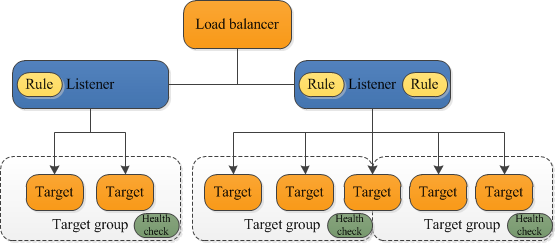
- A load balancer
- serves as the single point of contact for clients.
- distributes incoming application traffic across multiple targets, such as EC2 instances, in multiple AZs, which increases the availability of the application.
- one or more listeners can be added to the load balancer.
- A listener
- checks for connection requests from clients, using the configured protocol and port
- rules defined determine, how the load balancer routes request to its registered targets.
- each rule consists of a priority, one or more actions, and one or more conditions.
- supported actions are
- forward,
- redirect,
- fixed-response,
- authenticate-oidc,
- authenticate-cognito,
- jwt-validation
- supported rule conditions are
- host-header
- http-request-method
- path-pattern
- source-ip
- http-header
- query-string
- when the conditions for a rule are met, its actions are performed.
- a default rule for each listener must be defined, and optionally additional rules can be defined
- Target group
- routes requests to one or more registered targets, such as EC2 instances, using the specified protocol and port number
- a target can be registered with multiple target groups.
- health checks can be configured on a per target group basis.
- health checks are performed on all targets registered to a target group that is specified in a listener rule for the load balancer.
- target group supports the following target types:
- supports weighted target group routing
- enables routing of the traffic forwarded by a rule to multiple target groups.
- enables use cases like blue-green, canary and hybrid deployments without the need for multiple load balancers.
- also enables zero-downtime migration between on-premises and cloud or between different compute types like EC2 and Lambda.
- supports Slow Start Mode
- allows newly registered targets to warm up before receiving their full share of traffic.
- ALB linearly ramps up traffic over a configurable duration (30-900 seconds).
- useful for applications that need time for caching, JIT compilation, or resource initialization.
- When a load balancer receives a request, it evaluates the listener rules in priority order to determine which rule to apply and then selects a target from the target group for the rule action.
- Listener rules can be configured to route requests to different target groups based on the content of the application traffic.
- Routing is performed independently for each target group, even when a target is registered with multiple target groups.
- Routing algorithm used can be configured at the target group level.
- Supported routing algorithms:
- Round Robin (default) – distributes requests evenly across targets
- Least Outstanding Requests (LOR) – routes to the target with fewest pending requests
- Weighted Random – used by Automatic Target Weights (ATW) for anomaly mitigation
Application Load Balancer Features
- supports load balancing of applications using HTTP, HTTPS (Secure HTTP), and gRPC protocols
- supports HTTP/2, which is enabled natively. Clients that support HTTP/2 can connect over TLS
- supports end-to-end HTTP/2, enabling gRPC workloads between microservices or between gRPC-enabled clients and services (launched Oct 2020)
- supports gRPC protocol natively
- provides health checks that examine gRPC status codes
- provides metrics for gRPC request count and access logs that differentiate gRPC requests
- supports gRPC-specific response headers
- requires HTTPS listener and gRPC protocol version for the target group
- supports WebSockets and Secure WebSockets natively
- supports Request tracing, by default.
- request tracing can be used to track HTTP requests from clients to targets or other services.
- Load balancer upon receiving a request from a client, adds or updates the X-Amzn-Trace-Id header before sending the request to the target
- Any services or applications between the load balancer and the target can also add or update this header.
- supports Sticky Sessions (Session Affinity) using load balancer generated cookies or application-based cookies, to route requests from the same client to the same target
- supports SSL/TLS termination, to decrypt the request on ALB before sending it to the underlying targets.
- an SSL certificate can be installed on the load balancer.
- the load balancer uses this certificate to terminate the connection and then decrypt requests from clients before sending them to targets.
- supports Mutual TLS (mTLS) authentication (launched Nov 2023)
- enables mutual authentication between clients and the load balancer
- ALB authenticates client X.509 certificates and performs revocation checks
- supports certificates issued by third-party CAs or AWS Private Certificate Authority (ACM PCA)
- simplifies authentication management and reduces the load on backend applications
- available in all commercial AWS Regions and GovCloud (US) Regions
- supports Built-in Authentication (OIDC and Cognito)
- ALB can authenticate users before routing requests to backend targets
- supports Amazon Cognito user pools for user management
- supports any OpenID Connect (OIDC) compliant identity provider (Okta, Google, etc.)
- handles the OAuth 2.0 flow, validates tokens, and forwards authenticated requests with user claims in HTTP headers
- eliminates the need for authentication code in backend applications
- supports JWT Verification (launched Nov 2025)
- validates JSON Web Tokens (JWTs) included in request headers
- validates token signatures, expiration times (‘exp’), issuer (‘iss’), and optional claims (‘nbf’, ‘iat’)
- enables client credential flow without requiring application code modifications
- configured as a listener rule action type (jwt-validation)
- supports layer 7 specific features like X-Forwarded-For headers to help determine the actual client IP, port and protocol
- automatically scales its request handling capacity in response to incoming application traffic.
- supports hybrid load balancing,
- If an application runs on targets distributed between a VPC and an on-premises location, they can be added to the same target group using their IP addresses
- provides High Availability, by allowing you to specify more than one AZ and distribution of incoming traffic across multiple AZs.
- integrates with ACM to provision and bind an SSL/TLS certificate to the load balancer thereby making the entire SSL offload process very easy
- supports multiple certificates using Server Name Indication (SNI)
- host multiple TLS secured applications behind a single ALB
- ALB automatically selects the optimal TLS certificate for each client using a smart selection algorithm
- supports IPv6 addressing, for an Internet-facing load balancer
- supports Cross-zone load balancing, by default
- supports Security Groups to control the traffic allowed to and from the load balancer.
- provides Access Logs, to record all requests sent to the load balancer, and store the logs in S3 for later analysis in compressed format
- provides Delete Protection, to prevent the ALB from accidental deletion
- supports Connection Idle Timeout – ALB maintains two connections for each request one with the Client (front end) and one with the target instance (back end). If no data has been sent or received by the time that the idle timeout period elapses, ALB closes the front-end connection
- integrates with CloudWatch to provide metrics, such as request counts, error counts, error types, and request latency
- integrates with AWS WAF, a web application firewall that helps protect web applications from attacks by allowing rules configuration based on IP addresses, HTTP headers, and custom URI strings
- integrates with CloudTrail to receive a history of ALB API calls made on the AWS account
- supports Desync Mitigation Mode to protect applications from HTTP desync attacks
- classifies requests based on threat level using the HTTP Desync Guardian library
- modes: Defensive (default), Strictest, and Monitor
- supports Outpost deployment for on-premises workloads
- supports Local Zones for low-latency applications
Automatic Target Weights (ATW)
- Launched November 2023 to detect and mitigate gray failures for targets behind ALB
- A gray failure occurs when a target passes health checks but still returns errors to clients
- ATW analyzes HTTP status codes and TCP/TLS error rates to identify anomalous targets
- When underperforming targets are identified, ATW iteratively reduces traffic to the affected target
- If the target recovers, ALB gradually increases traffic back to its original level
- Uses the Weighted Random routing algorithm for anomaly mitigation
- Configured at the target group level as a target group attribute
- Complements active health checks by addressing partial failures that health checks cannot detect
Target Optimizer
- Launched November 2025 to deliver optimal concurrency to each target
- Allows you to enforce a maximum number of concurrent requests on a target
- Ensures targets receive only the number of requests they can process
- Achieves higher request success rate, better target utilization, and lower latency
- Particularly useful for compute-intensive workloads (AI/ML inference, media processing)
- Returns 503 errors when targets are at capacity rather than overloading them
- Configured at the target group level
HTTP Header Modification
- Launched November 2024 for enhanced traffic control and security
- Provides three key capabilities:
- Header Rename – rename ALB-generated TLS headers (mTLS and TLS headers) for seamless backend integration
- Header Insertion – insert custom response headers including CORS and security headers like HSTS
- Server Header Suppression – disable the ALB-generated “Server” header to reduce server-specific information exposure
- Must be enabled on each listener individually
URL and Host Header Rewrite
- Launched October 2025 for advanced request transformation
- Enables modification of request URLs and Host Headers using regex-based pattern matching before routing to targets
- Supports regex matches based on request parameters
- Can rewrite both host headers and URL paths in a single rule
- Eliminates the need for custom proxy layers or Lambda@Edge for URL transformations
VPC IPAM Integration
- Launched March 2025 for predictable IP address management
- Allows internet-facing ALBs to use IP addresses from Amazon VPC IPAM pools
- Enables Bring Your Own IP (BYOIP) use cases for ALBs
- ALB automatically switches to AWS-managed IP addresses when IPAM pool is depleted
- Useful for organizations that need allowlisted or predictable IP addresses
LCU Capacity Reservation
- Launched January 2025 to prepare for planned traffic spikes
- Allows you to reserve a minimum capacity for your ALB proactively
- Eliminates the need to open AWS support cases for pre-warming
- Useful for planned events such as product launches, sales, or traffic migrations
- Capacity is reserved at the regional level and distributed across AZs
- Reserved capacity can be increased anytime; decreased up to two times per day
- Charged per reserved LCU per minute, plus additional LCUs used beyond reservation
Resource Map
- Launched March 2024 in the AWS Management Console
- Displays all ALB resources and their relationships in a visual format on a single page
- Provides clear understanding of ALB architecture (listeners, rules, target groups, targets)
- Includes an Unhealthy Target Map view to display only unhealthy targets and associated resources
- Useful for troubleshooting and architecture visualization
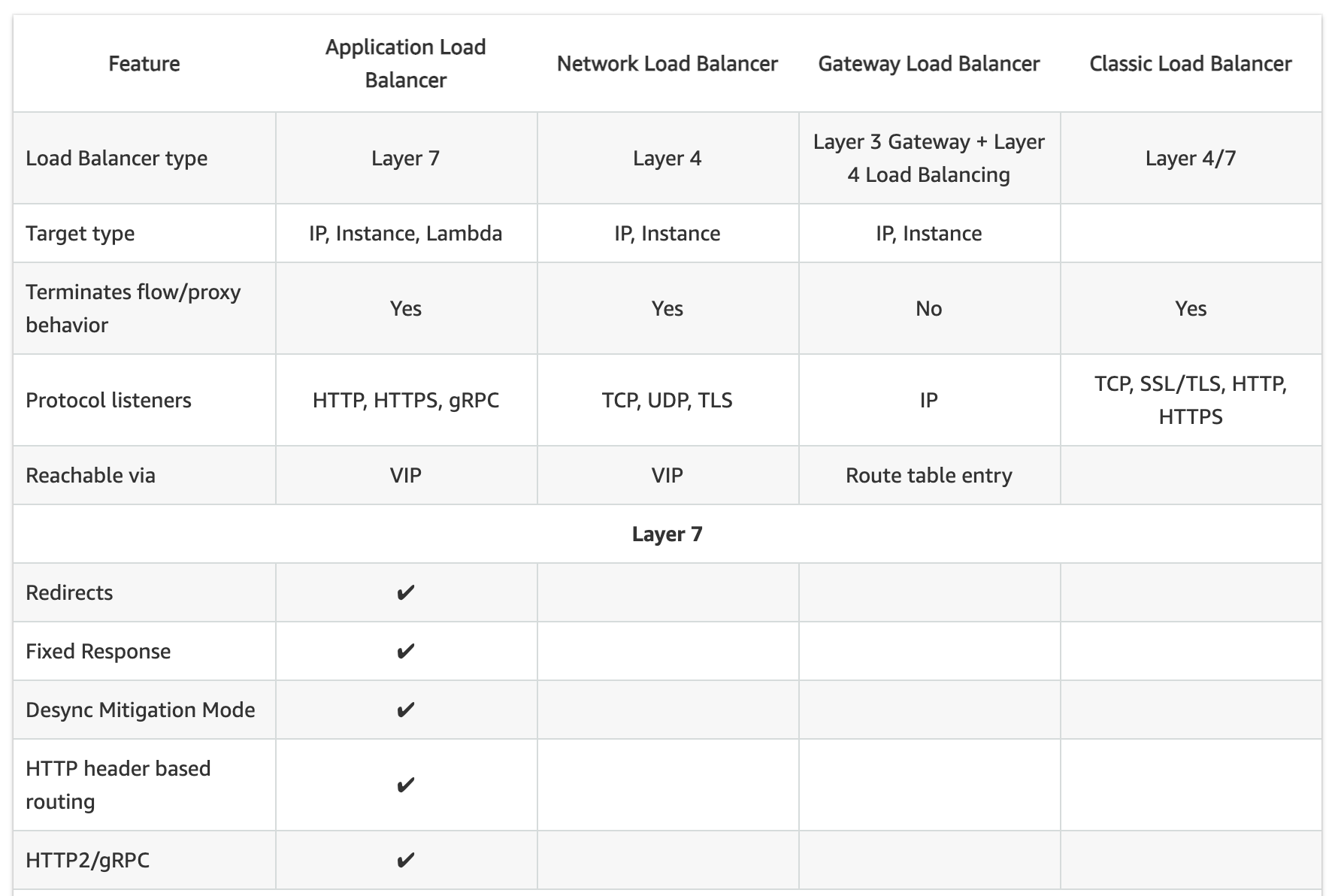
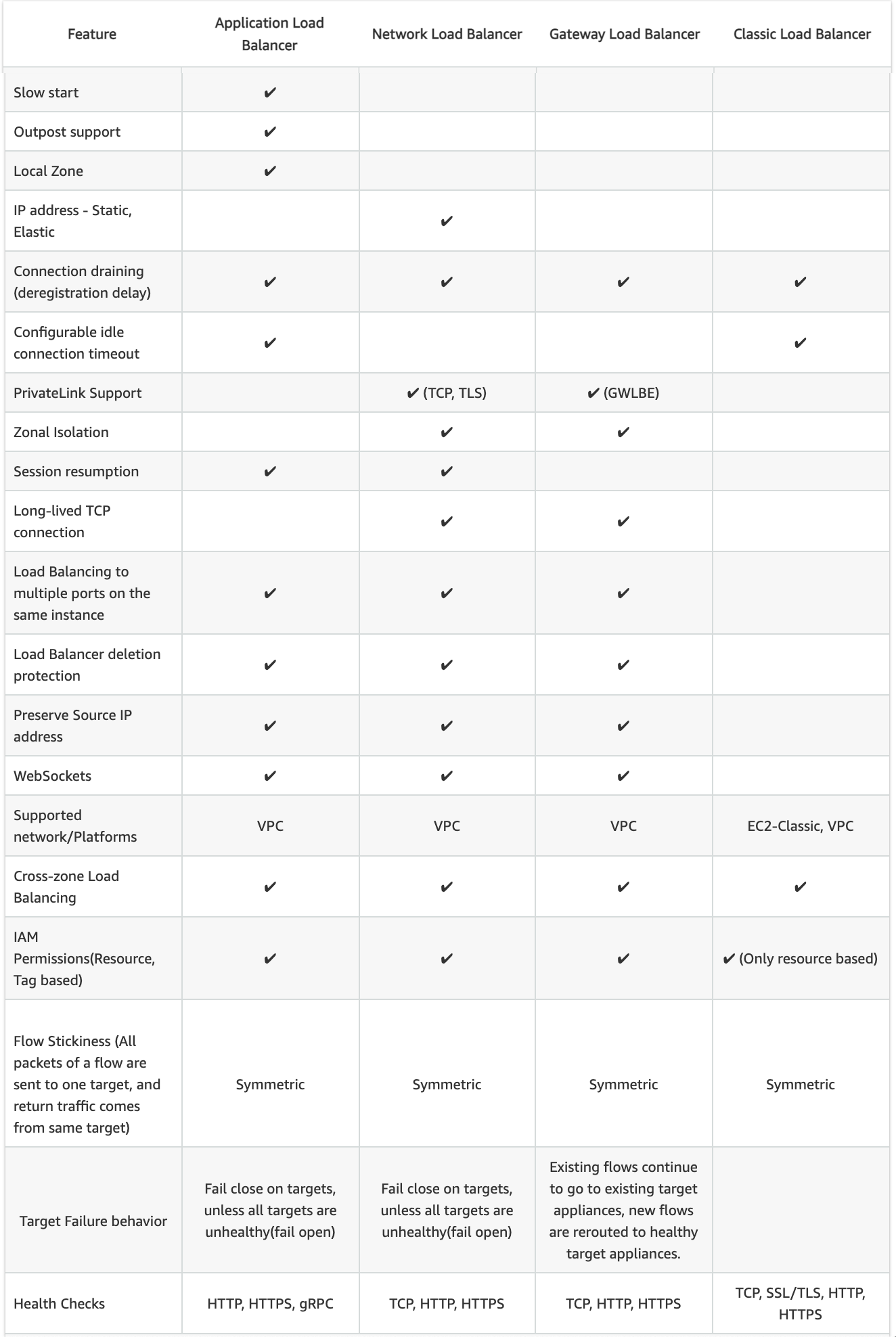
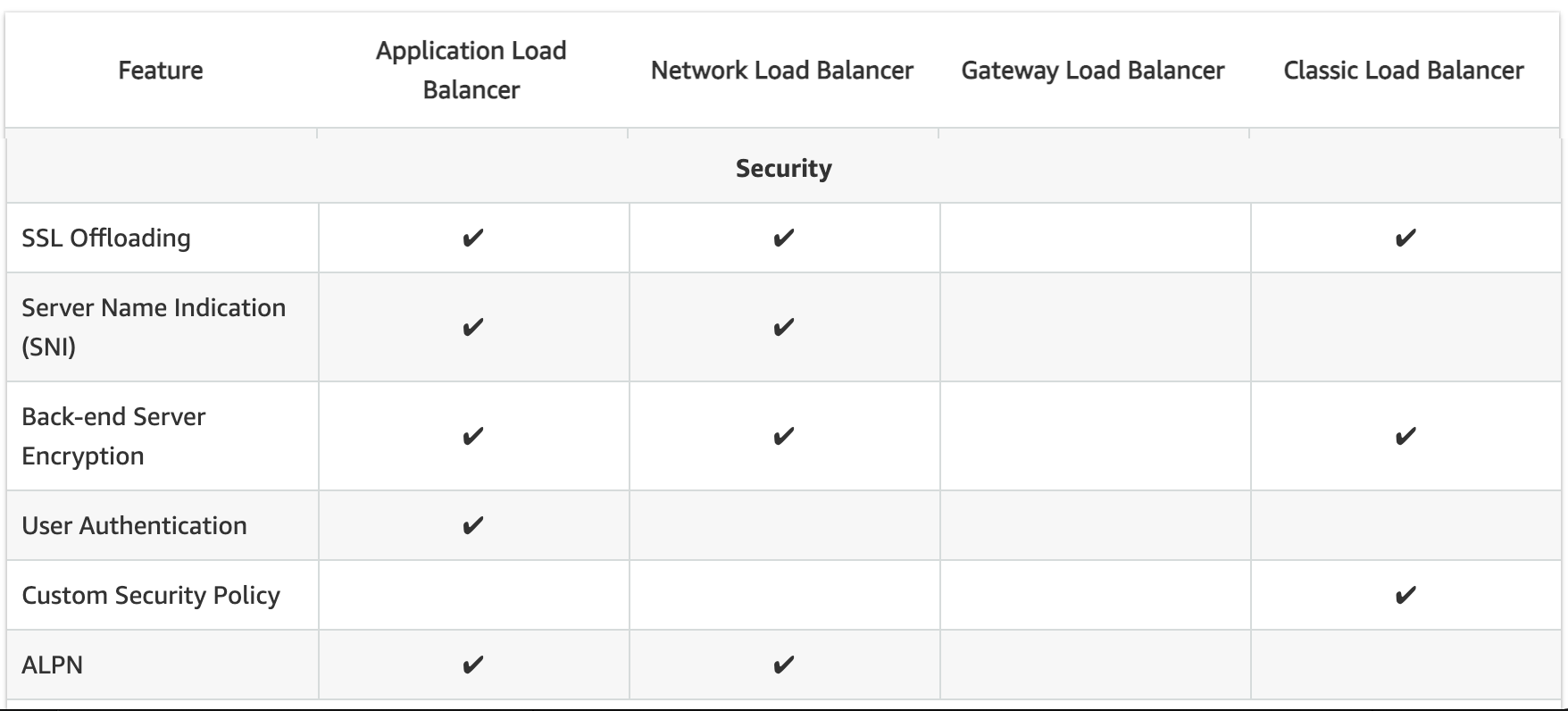
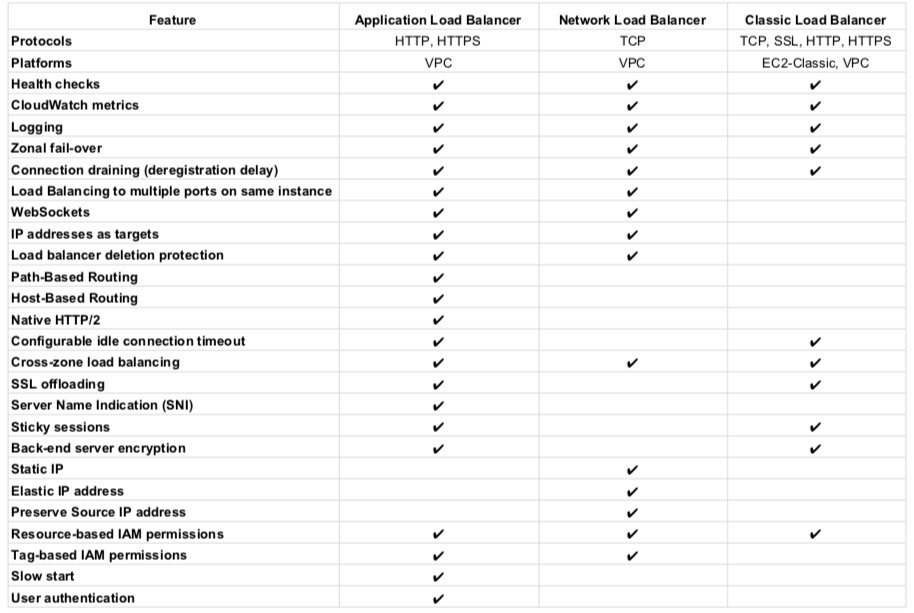
Classic Load Balancer vs Application Load Balancer vs Network Load Balancer
Refer Blog Post @ Classic Load Balancer vs Application Load Balancer vs Network Load Balancer
Application Load Balancer Benefits
- Support for Path-based routing, where listener rules can be configured to forward requests based on the URL in the request. This enables structuring applications as smaller services (microservices), and route requests to the correct service based on the content of the URL.
- Support for routing requests to multiple services on a single EC2 instance by registering the instance using multiple ports using Dynamic Port mapping.
- Support for containerized applications. EC2 Container Service (ECS) can select an unused port when scheduling a task and register the task with a target group using this port, enabling efficient use of the clusters.
- Support for monitoring the health of each service independently, as health checks are defined at the target group level and many CloudWatch metrics are reported at the target group level.
- Attaching a target group to an Auto Scaling group enables scaling each service dynamically based on demand.
- Support for built-in user authentication using OIDC or Amazon Cognito, eliminating custom authentication code.
- Support for gRPC and end-to-end HTTP/2 workloads for modern microservice architectures.
- Support for Mutual TLS (mTLS) for enhanced zero-trust security.
Application Load Balancer Listeners
- A listener is a process that checks for connection requests, using the configured protocol and port
- Listener supports HTTP & HTTPS protocol with Ports from 1-65535
- ALB supports SSL Termination for HTTPS listeners, which helps to offload the work of encryption and decryption so that the targets can focus on their main work.
- HTTPS listener must have at least one SSL server certificate on the listener
- supports multiple TLS certificates using SNI (Server Name Indication) on a single HTTPS listener
- WebSockets with both HTTP and HTTPS listeners (Secure WebSockets)
- Supports HTTP/2 with HTTPS listeners
- 128 requests can be sent in parallel using one HTTP/2 connection.
- ALB can forward HTTP/2 end-to-end to targets (for gRPC) or convert to individual HTTP/1.1 requests
- HTTP/2 uses front-end connections more efficiently resulting in fewer connections between clients and the load balancer.
- Server-push feature of HTTP/2 is not supported
- Each listener has a default rule, and can optionally define additional rules.
- Each rule consists of a priority, one or more actions, one or more conditions, and optional transforms.
- Priority – Rules are evaluated in priority order, from the lowest value to the highest value. The default rule has the lowest priority
- Action – Supported action types: forward, redirect, fixed-response, authenticate-oidc, authenticate-cognito, jwt-validation
- Condition – Supported conditions: host-header, path-pattern, http-request-method, source-ip, http-header, query-string
- Transform – Supports URL rewrite and host header rewrite using regex patterns (launched Oct 2025)
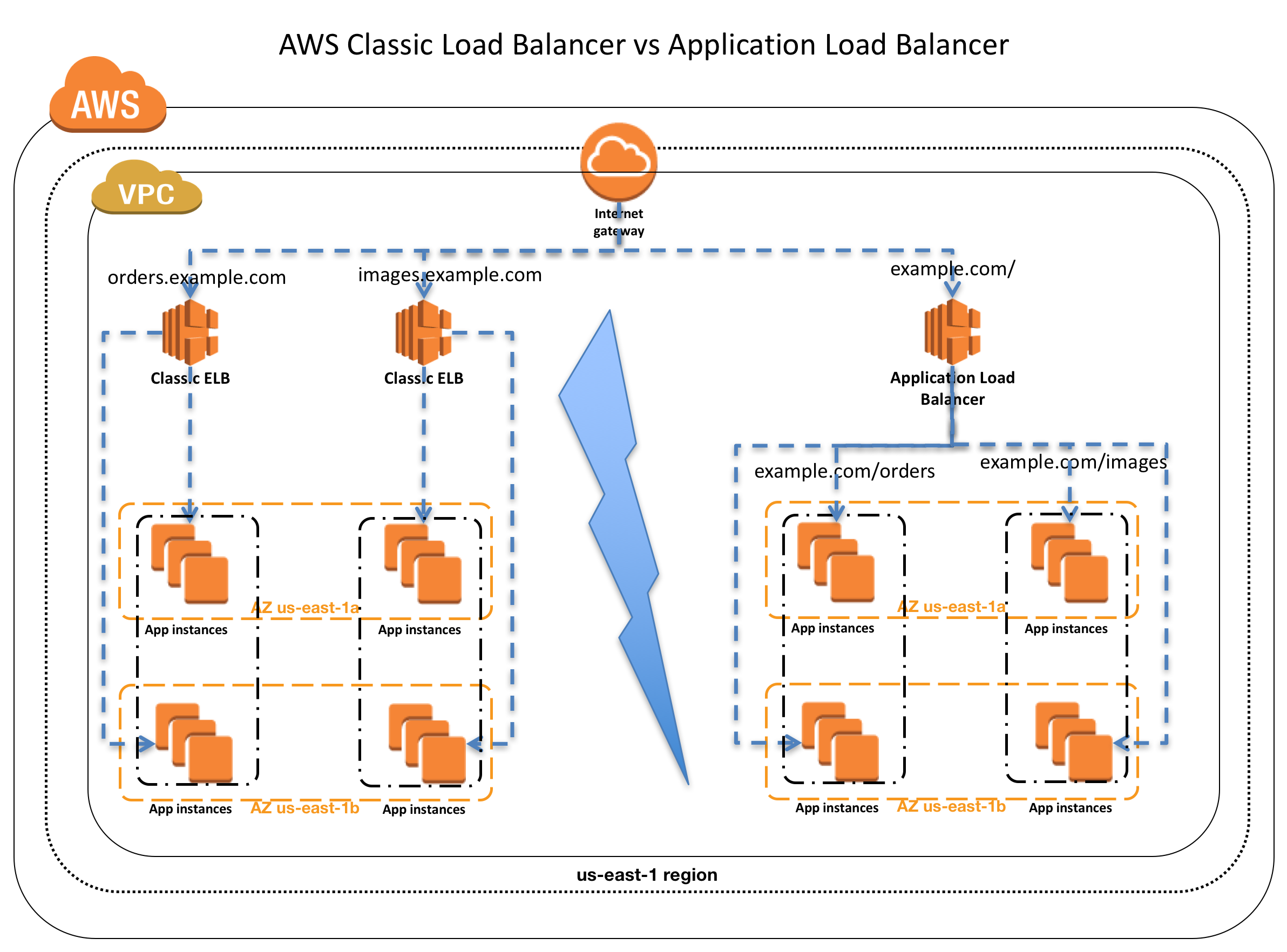
- Host Condition or Host-based routing
- Host conditions can be used to define rules that forward requests to different target groups based on the hostname in the host header
- This enables support for multiple domains using a single ALB for e.g. orders.example.com, images.example.com, registration.example.com
- Each host condition has one hostname. If the hostname in
- Path Condition or path-based routing
- Path conditions can be used to define rules that forward requests to different target groups based on the URL in the request
- Each path condition has one path pattern for e.g. example.com/orders, example.com/images, example.com/registration
- If the URL in a request matches the path pattern in a listener rule exactly, the request is routed using that rule.
Advantages over Classic Load Balancer
- Support for path-based routing, where rules can be configured for the listener to forward requests based on the content of the URL
- Support for host-based routing, where rules can be configured for the listener to forward requests based on the host field in the HTTP header.
- Support for routing based on fields in the request, such as standard and custom HTTP headers and methods, query parameters, and source IP address
- Support for routing requests to multiple applications on a single EC2 instance. Each instance or IP address can be registered with the same target group using multiple ports
- Support for registering targets by IP address, including targets outside the VPC for the load balancer.
- Support for redirecting requests from one URL to another.
- Support for returning a custom HTTP response.
- Support for registering Lambda functions as targets.
- Support for the load balancer to authenticate users of the applications through their corporate or social identities before routing requests.
- Support containerized applications with ECS using Dynamic port mapping
- Support monitoring the health of each service independently, as health checks and many CloudWatch metrics are defined at the target group level
- Attaching the target group to an Auto Scaling group enables scaling of each service dynamically based on demand
- Access logs contain additional information & stored in compressed format
- Improved load balancer performance.
- Support for SNI (multiple TLS certificates on a single listener)
- Support for gRPC and end-to-end HTTP/2
- Support for Mutual TLS (mTLS) authentication
- Support for JWT verification at the load balancer
- Support for URL and Host Header rewrite using regex
Application Load Balancer Pricing
- charged for each hour or partial hour that an ALB is running and the number of Load Balancer Capacity Units (LCU) used per hour.
- An LCU is a metric for determining ALB pricing
- An LCU defines the maximum resource consumed in any one of the dimensions (new connections, active connections, bandwidth and rule evaluations) the Application Load Balancer processes the traffic.
- With LCU Capacity Reservation, you are charged per reserved LCU per minute, plus additional LCUs used per minute beyond the reserved amount.
📖 Related: AWS Auto Scaling with ELB – Integration Guide
AWS Certification Exam Practice Questions
- Questions are collected from Internet and the answers are marked as per my knowledge and understanding (which might differ with yours).
- AWS services are updated everyday and both the answers and questions might be outdated soon, so research accordingly.
- AWS exam questions are not updated to keep up the pace with AWS updates, so even if the underlying feature has changed the question might not be updated
- Open to further feedback, discussion and correction.
- You are designing an application which requires websockets support, to exchange real-time messages with end-users without the end users having to request (or poll) the server for an update? Which ELB option should you choose?
- Use Application Load Balancer and enable comet support
- Use Classic Load Balancer which supports WebSockets
- Use Application Load Balancer which supports WebSockets
- Use Classic Load Balancer and enable comet support
- Which of the following Internet protocols does an AWS Application Load Balancer Support? Choose 2 answers
A. ICMP
B. UDP
C. HTTP
D. SNTP
E. Websocket - Your organization has configured an application behind ALB. However, Clients are complaining that they cannot connect to an Internet-facing load balancer. What cannot be the issue?
- Internet-facing load balancer is attached to a private subnet
- ALB Security Groups does not allow the traffic
- Subnet NACLs do not allow the traffic
- ALB was not assigned an EIP
- To protect your ALB from accidental deletion, you should
- enable Multi-Factor Authentication (MFA) protected access
- enable Delete Protection on the ALB
- enabled Termination Protection on the ALB
- ALB does not provide any feature to prevent accidental deletion
- Your organization is using ALB for servicing requests. One of the API request is facing consistent performance issues. Upon checking the flow, you find that the request flows through multiple services. How can you track the performance or timing issues in the application stack at the granularity of an individual request?
- Track the request using “X-Amzn-Trace-Id” HTTP header
- Track the request using “X-Amzn-Track-Id” HTTP header
- Track the request using “X-Aws-Track-Id” HTTP header
- Track the request using “X-Aws-Trace-Id” HTTP header
- A company wants to offload user authentication from their backend services. They want the ALB to handle authentication using their corporate identity provider which supports OpenID Connect. Which ALB action type should they configure?
- forward with custom headers
- authenticate-oidc
- redirect to identity provider
- fixed-response with authentication challenge
- An application team notices that one of their targets behind an ALB passes health checks but returns HTTP 500 errors for approximately 10% of requests. Which ALB feature helps mitigate this issue automatically?
- Weighted target group routing
- Least Outstanding Requests algorithm
- Automatic Target Weights (ATW)
- Slow Start Mode
- A company needs to ensure that only clients presenting valid X.509 certificates can access their application behind an ALB. Which ALB feature should they use?
- AWS WAF with custom rules
- Security group inbound rules
- Mutual TLS (mTLS) authentication
- OIDC authentication action
- A microservices team wants to route gRPC traffic between their services using ALB. What are the requirements? (Choose 2)
- Configure the listener protocol as HTTPS
- Configure the listener protocol as HTTP
- Set the target group protocol version to gRPC
- Enable WebSocket support on the listener
- Use an HTTP/1.1 target group
- Your application experiences sudden traffic spikes during planned product launches. You want to ensure ALB has sufficient capacity before the event. What should you do?
- Manually scale the backend targets
- Open an AWS support case for pre-warming
- Configure LCU Capacity Reservation for the ALB
- Deploy multiple ALBs behind Route 53
References
- Refer AWS documentation – Application Load Balancer
- AWS ALB Product Page
- ELB Features Comparison
- ALB mTLS Announcement
- ALB Automatic Target Weights Announcement
- ALB Target Optimizer Announcement
- ALB URL and Host Header Rewrite Announcement
- ALB Header Modification Announcement
- ALB LCU Capacity Reservation Blog