⚠️ Important Updates (June 2026)
License Change: As of Terraform 1.6 (October 2023), Terraform is licensed under the Business Source License (BSL 1.1), replacing the previous MPL 2.0 open-source license. The BSL restricts using Terraform to compete commercially with HashiCorp.
IBM Acquisition: IBM completed its $6.4 billion acquisition of HashiCorp in February 2025. Effective September 1, 2025, all HashiCorp business operations transitioned to IBM.
OpenTofu Fork: OpenTofu, a community fork under the Linux Foundation (CNCF Sandbox), remains under MPL 2.0 and is drop-in compatible with Terraform 1.5 configurations.
Terraform Cloud Rebranded: Effective April 22, 2024, Terraform Cloud is now HCP Terraform.
Certification: The Terraform Associate (003) exam was retired January 8, 2026. The current exam is Terraform Associate (004).
- A provisioning declarative tool based on Infrastructure as Code paradigm, now licensed under BSL 1.1 (source-available, not open-source since v1.6)
- Designed on immutable infrastructure principles
- Written in Golang and uses own syntax – HCL (HashiCorp Configuration Language), but also supports JSON
- Helps to evolve the infrastructure, safely and predictably
- Applies Graph Theory to IaC and provides Automation, Versioning and Reusability
- Terraform is a multipurpose composition tool:
○ Composes multiple tiers (SaaS/PaaS/IaaS)
○ A plugin-based architecture model - Terraform is not a cloud agnostic tool. It embraces all major Cloud Providers and provides common language to orchestrate the infrastructure resources
- Terraform is not a configuration management tool and other tools like Chef, Ansible exist in the market.
- Current stable version: Terraform 1.15.x (as of June 2026)
Terraform Architecture
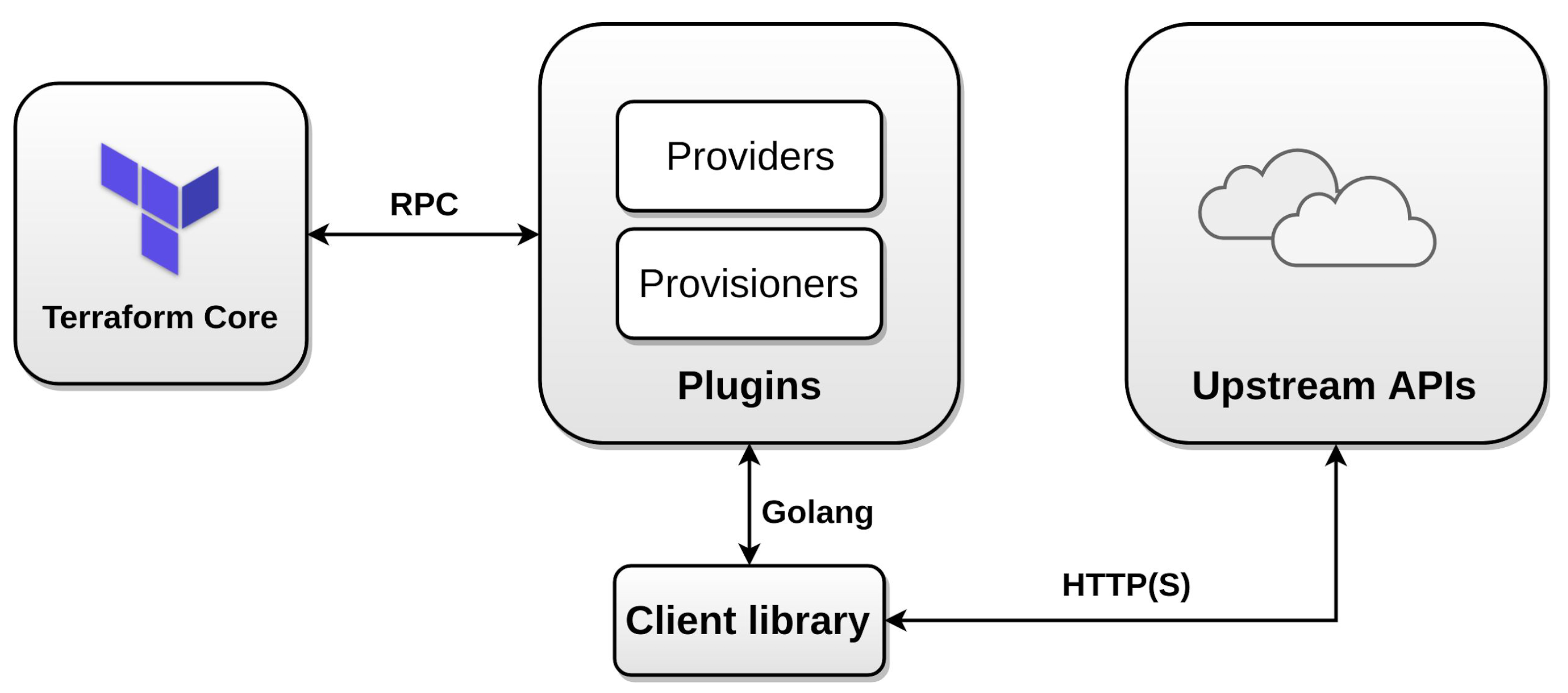
Terraform Providers (Plugins)
- Provide abstraction above the upstream API and is responsible for understanding API interactions and exposing resources.
- Invoke only upstream APIs for the basic CRUD operations
- Providers are unaware of anything related to configuration loading, graph theory, etc.
- Supports multiple provider instances using
aliasfor e.g. multiple AWS providers with different regions - Can be integrated with any API using providers framework
- Most providers configure a specific infrastructure platform (either cloud or self-hosted).
- Can also offer local utilities for tasks like generating random numbers for unique resource names.
- (New in 1.8) Providers can export provider-defined functions accessible via
provider::<name>::function()syntax, enabling custom logic without brittle workarounds.
Terraform Provisioners
- Run code locally or remotely on resource creation
local-execexecutes code on the machine running Terraformremote-exec- runs on the provisioned resource
- supports
sshandwinrm
- requires inline list of commands
- Should be used as a last resort — provisioners break Terraform’s declarative model by introducing imperative operations
- Are defined within the resource block.
- Support types – Create and Destroy
- if creation time fails, resource is tainted if provisioning failed, by default. (next apply it will be re-created)
- behavior can be overridden by setting the
on_failuretocontinue, which means ignore and continue - for destroy, if it fails – resources are not removed
- Note: Chef, Habitat, Puppet, and Salt Masterless provisioners were removed in Terraform v0.15.0. Only
local-exec,remote-exec, andfileprovisioners remain. - Prefer alternatives:
user_data,cloud-init, or configuration management tools (Ansible, Chef, etc.)
Terraform Workspaces
- Helps manage multiple distinct sets of infrastructure resources or environments with the same code.
- Just need to create needed workspace and use them, instead of creating a directory for each environment to manage
- State files for each workspace are stored in the directory
terraform.tfstate.d terraform workspace new devcreates a new workspace and switches to it as wellterraform workspace select devhelps select workspaceterraform workspace listlists the workspaces and shows the current active one with*- Does not provide strong separation as it uses the same backend
- Note: For stronger environment isolation at scale, consider Terraform Stacks (GA on HCP Terraform since September 2025), which provide explicit cross-environment orchestration with separate state per deployment.
Terraform Workflow
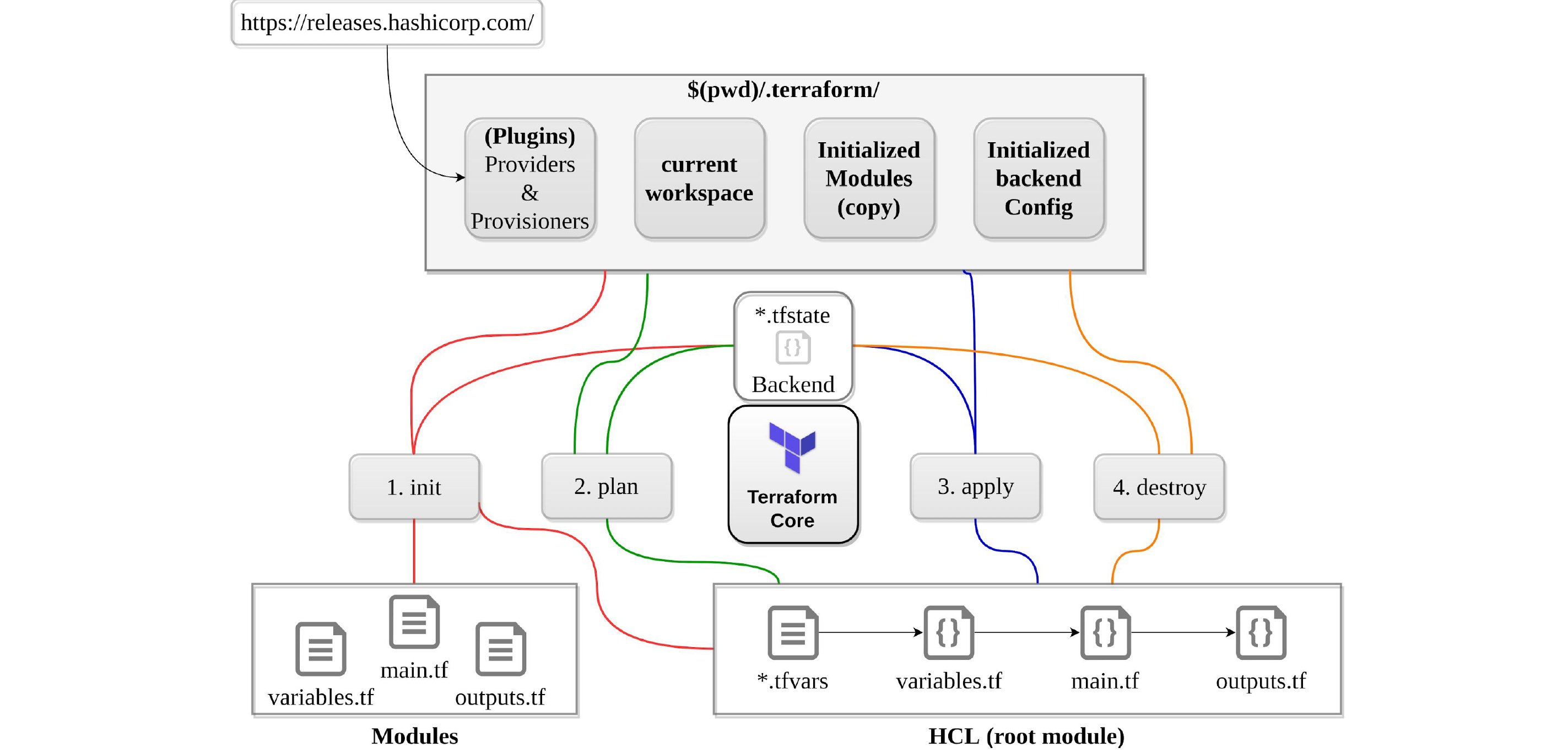
init
- Initializes a working directory containing Terraform configuration files.
- Performs
- Backend initialization, storage for Terraform state file.
- Modules installation, downloaded from Terraform registry to local path
- Provider(s) plugins installation, the plugins are downloaded in the sub-directory of the present working directory at the path of
.terraform/plugins
- Supports
-upgradeto update all previously installed plugins to the newest version that complies with the configuration’s version constraints - Is safe to run multiple times, to bring the working directory up to date with changes in the configuration
- Does not delete the existing configuration or state
validate
- Validates syntactically for format and correctness.
- Is used to validate/check the syntax of the Terraform files.
- Verifies whether a configuration is syntactically valid and internally consistent, regardless of any provided variables or existing state.
- A syntax check is done on all the terraform files in the directory, and will display an error if any of the files doesn’t validate.
- (New in 1.15)
terraform validatenow also validates the backend block configuration.
plan
- Creates an execution plan
- Traverses each vertex and requests each provider using parallelism
- Calculates the difference between the last-known state and the current state and presents this difference as the output of the terraform plan operation
- Does not modify the infrastructure or state.
- Allows a user to see which actions Terraform will perform prior to making any changes to reach the desired state
- Will scan all
*.tffiles in the directory and create the plan - Will perform refresh for each resource and might hit rate limiting issues as it calls provider APIs
- All resources refresh can be disabled or avoided using
-refresh=falseor-target=xxxxor- break resources into different directories.
- Supports
-outto save the plan - Supports
-refresh-onlymode to update state without making infrastructure changes (replacement for the deprecatedterraform refreshcommand)
apply
- Apply changes to reach the desired state.
- Scans the current directory for the configuration and applies the changes appropriately.
- Can be provided with an explicit plan, saved as out from
terraform plan - If no explicit plan file is given on the command line,
terraform applywill create a new plan automatically and prompt for approval to apply it - Will modify the infrastructure and the state.
- If a resource successfully creates but fails during provisioning,
- Terraform will error and mark the resource as “tainted”.
- A resource that is tainted has been physically created, but can’t be considered safe to use since provisioning failed.
- Terraform also does not automatically roll back and destroy the resource during the apply when the failure happens, because that would go against the execution plan.
- Does not import any resource (use
importblocks orterraform importCLI instead). - Supports
-auto-approveto apply the changes without asking for a confirmation - Supports
-targetto apply a specific module - Supports
-replace=ADDRESSto force recreation of a specific resource (replacement for the deprecatedterraform taintcommand)
refresh
- Used to reconcile the state Terraform knows about (via its state file) with the real-world infrastructure
- Does not modify infrastructure, but does modify the state file
- Deprecated since Terraform 0.15.4 due to unsafe default behavior with misconfigured credentials
- Use instead:
terraform plan -refresh-onlyorterraform apply -refresh-only
destroy
- Destroy the infrastructure and all resources
- Modifies both state and infrastructure
terraform destroy -targetcan be used to destroy targeted resourcesterraform plan -destroyallows creation of destroy plan
import
- Helps import already-existing external resources, not managed by Terraform, into Terraform state and allow it to manage those resources
- CLI usage:
terraform importrequires you to first write the resource definition in Terraform and then import the resource - (New in 1.6) Declarative
importblocks: Import can now be defined directly in configuration files, enabling:- Bulk imports in a single plan/apply cycle
- Version-controlled import definitions in Git
- Plan preview before actual import
- Auto-generation of resource configuration with
terraform plan -generate-config-out=generated.tf
taint
- Previously marked a Terraform-managed resource as tainted, forcing it to be destroyed and recreated on the next apply.
- Deprecated since Terraform v0.15.2
- Use instead:
terraform apply -replace=RESOURCE_ADDRESS - The
-replaceflag is safer because it integrates with the plan workflow, allowing you to preview the change before applying.
fmt
- Format to lint the code into a standard format
console
- Command provides an interactive console for evaluating expressions.
test (New in 1.6)
- Native testing framework for validating Terraform modules
- Uses
.tftest.hclfiles withrunblocks containing commands (planorapply), variables, and assertions - Tests run in parallel since Terraform 1.7
- Eliminates the need for external testing tools like Terratest (Go) for basic module validation
- (New in 1.15) Supports functions inside
mockblocks for more flexible test scenarios
Terraform New Features (1.6 – 1.15)
- Terraform 1.6 (Oct 2023): Declarative
importblocks, native testing framework, first BSL release - Terraform 1.7:
removedblock (removes resource from state without destroying it), parallel test execution - Terraform 1.8: Provider-defined functions via
provider::<name>::function() - Terraform 1.9: Ephemeral values — values that exist during plan/apply but are never written to state (ideal for secrets/tokens), enhanced module input validation with cross-variable references
- Terraform 1.10: S3 native state locking (experimental), ephemeral resources
- Terraform 1.11: S3 native state locking GA (
use_lockfile = true), DynamoDB locking deprecated - Terraform 1.15 (April 2026):
- Dynamic module sources — use variables (with
const = true) insourceandversionfields deprecatedattribute onvariableandoutputblocks for communicating breaking changesconvert()function for precise inline type conversiontypeattribute foroutputblocks (like variables)- S3 backend supports
aws loginauthentication - Windows ARM64 builds
- Dynamic module sources — use variables (with
Terraform Modules
- Enables code reuse
- Supports versioning to maintain compatibility
- Stores code remotely
- Enables easier testing (can use native
terraform testsince 1.6) - Enables encapsulation with all the separate resources under one configuration block
- Modules can be nested inside other modules, allowing you to quickly spin up whole separate environments.
- Can be referred using
sourceattribute - (New in 1.15) Module
sourceandversioncan reference variables declared withconst = true - Supports Local and Remote modules
- Local modules are stored alongside the Terraform configuration (in a separate directory, outside of each environment but in the same repository) with
sourcepath./or../ - Remote modules are stored externally in a separate repository, and supports versioning
- Local modules are stored alongside the Terraform configuration (in a separate directory, outside of each environment but in the same repository) with
- Supports following backends/sources
- Local paths
- Terraform Registry
- GitHub
- Bitbucket
- Generic Git, Mercurial repositories
- HTTP URLs
- S3 buckets
- GCS buckets
- Module requirements
- Must be on GitHub and must be a public repo, if using public registry.
- Must be named
terraform-<PROVIDER>-<NAME>, where<NAME>reflects the type of infrastructure the module manages and<PROVIDER>is the main provider where it creates that infrastructure. for e.g. terraform-google-vault or terraform-aws-ec2-instance. - Must maintain
x.y.ztags for releases to identify module versions. Release tag names must be a semantic version, which can optionally be prefixed with a v for example, v1.0.4 and 0.9.2. Tags that don’t look like version numbers are ignored. - Must maintain a Standard module structure, which allows the registry to inspect the module and generate documentation, track resource usage, parse submodules and examples, and more.
Terraform Read and Write Configuration

- Resources
resourceare the most important element in the Terraform language that describes one or more infrastructure objects, such as compute instances etc- Resource type and local name together serve as an identifier for a given resource and must be unique within a module for e.g.
aws_instance.local_name
- Data Sources
dataallow data to be fetched or computed for use elsewhere in Terraform configuration- Allows a Terraform configuration to make use of information defined outside of Terraform, or defined by another separate Terraform configuration
- Variables
variableserve as parameters for a Terraform module and act like function arguments- Allows aspects of the module to be customized without altering the module’s own source code, and allowing modules to be shared between different configurations
- Can be defined through multiple ways
- Command line for e.g.
-var="image_id=ami-abc123" - Variable definition files
.tfvarsor.tfvars.json. By default, Terraform automatically loads:- Files named exactly
terraform.tfvarsorterraform.tfvars.json. - Any files with names ending in
.auto.tfvarsor.auto.tfvars.json - File can also be passed with
-var-file
- Files named exactly
- Environment variables can be used to set variables using the format
TF_VAR_name
- Command line for e.g.
- Terraform loads variables in the following order, with later sources taking precedence over earlier ones:
- Environment variables
terraform.tfvarsfile, if present.terraform.tfvars.jsonfile, if present.- Any
*.auto.tfvarsor*.auto.tfvars.jsonfiles, processed in lexical order of their filenames. - Any
-varand-var-fileoptions on the command line, in the order they are provided.
- (New in 1.15) Variables support
const = trueattribute for compile-time constants usable insource/version, anddeprecated = "message"attribute for communicating planned removals.
- Local Values
localsassigns a name to an expression, allowing it to be used multiple times within a module without repeating it.- Are like a function’s temporary local variables.
- Helps to avoid repeating the same values or expressions multiple times in a configuration.
- Output
- Are like function return values.
- Output can be marked as containing sensitive material using the optional
sensitiveargument, which prevents Terraform from showing its value in the list of outputs. However, they are still stored in the state as plain text. - In a parent module, outputs of child modules are available in expressions as
module.<MODULE NAME>.<OUTPUT NAME>. - (New in 1.15) Outputs now support a
typeattribute for type constraints, anddeprecated = "message"for signaling breaking changes.
- Ephemeral Values (New in 1.9)
- Values that materialize during plan or apply but are never written to the state file
- Ideal for secrets: dynamically generated passwords, tokens from Vault/AWS Secrets Manager, temporary credentials
- Prevents sensitive data leakage through state files
- Named Values
- Is an expression that references the associated value for e.g.
aws_instance.local_name,data.aws_ami.centos,var.instance_typeetc. - Support Local named values for e.g
count.index
- Is an expression that references the associated value for e.g.
- Dependencies
- Identifies implicit dependencies as Terraform automatically infers when one resource depends on another by studying the resource attributes used in interpolation expressions for e.g
aws_eipon resourceaws_instance - Explicit dependencies can be defined using
depends_onwhere dependencies between resources are not visible to Terraform
- Identifies implicit dependencies as Terraform automatically infers when one resource depends on another by studying the resource attributes used in interpolation expressions for e.g
- Data Types
- Supports primitive data types of
string,numberandbool- Terraform language will automatically convert
numberandboolvalues tostringvalues when needed
- Supports complex data types of
list– a sequence of values identified by consecutive whole numbers starting with zero.map– a collection of values where each is identified by a string label.set– a collection of unique values that do not have any secondary identifiers or ordering.
- Supports structural data types of
object– a collection of named attributes that each have their own typetuple– a sequence of elements identified by consecutive whole numbers starting with zero, where each element has its own type.
- Supports primitive data types of
- Built-in Functions
- Includes a number of built-in functions that can be called from within expressions to transform and combine values for e.g.
min,max,file,concat,element,index,lookupetc. - Does not support user-defined functions
- (New in 1.8) Provider-defined functions extend available functions via
provider::<name>::function() - (New in 1.15)
convert()function for precise inline type conversion
- Includes a number of built-in functions that can be called from within expressions to transform and combine values for e.g.
- Dynamic Blocks
- Acts much like a
forexpression, but produces nested blocks instead of a complex typed value. It iterates over a given complex value, and generates a nested block for each element of that complex value.
- Acts much like a
- Terraform Comments
- Supports three different syntaxes for comments:
- #
- //
- /* and */
- Supports three different syntaxes for comments:
Terraform Backends
- Determines how state is loaded and how an operation such as
applyis executed - Are responsible for storing state and providing an API for optional state locking
- Needs to be initialized
- If switching the backend for the first time setup, Terraform provides a migration option
- Helps
- Collaboration and working as a team, with the state maintained remotely and state locking
- Can provide enhanced security for sensitive data
- Support remote operations
- Supports local vs remote backends
- Local (default) backend stores state in a local JSON file on disk
- Remote backend stores state remotely like S3, OSS, GCS, Consul and support features like remote operation, state locking, encryption, versioning etc.
- Supports partial configuration with remaining configuration arguments provided as part of the initialization process
- Backend configuration doesn’t support interpolations.
- GitHub is not a supported backend type in Terraform.
Terraform State Management
- State helps keep track of the infrastructure Terraform manages
- Stored locally in the
terraform.tfstate - Recommended not to edit the state manually
- Use
terraform statecommandmv– to move/rename modulesrm– to safely remove resource from the state. (destroy/retain like)pull– to observe current remote statelist&show– to write/debug modules
- (New in 1.7) The
removedblock provides a declarative alternative toterraform state rm, removing a resource from state without destroying it.
State Locking
- Happens for all operations that could write state, if supported by backend
- Prevents others from acquiring the lock & potentially corrupting the state
- Backends which support state locking are
- azurerm
- HashiCorp Consul
- Tencent Cloud Object Storage (COS)
- Google Cloud Storage GCS
- HTTP endpoints
- Kubernetes Secret with locking done using a Lease resource
- AliCloud Object Storage OSS with locking via TableStore
- PostgreSQL
- AWS S3 with native S3 locking via
use_lockfile = true(GA since Terraform 1.11)⚠️ Note: DynamoDB-based state locking for S3 backend is deprecated as of Terraform 1.11. Thedynamodb_tableargument and related DynamoDB arguments now emit deprecation warnings. Useuse_lockfile = truefor native S3 locking instead. - HCP Terraform (formerly Terraform Cloud) / Terraform Enterprise
- Can be disabled for most commands with the
-lockflag - Use
force-unlockcommand to manually unlock the state if unlocking failed
State Security
- Can contain sensitive data, depending on the resources in use for e.g passwords and keys
- Using local state, data is stored in plain-text JSON files
- Using remote state, state is held in memory when used by Terraform. It may be encrypted at rest, if supported by backend for e.g. S3, OSS
- (New in 1.9) Ephemeral values are never written to state, providing additional security for secrets
- Note: OpenTofu (the community fork) offers native state file encryption, which Terraform does not currently provide
Terraform Logging
- Debugging can be controlled using
TF_LOG, which can be configured for different levels TRACE, DEBUG, INFO, WARN or ERROR, with TRACE being the more verbose. - Logs path can be controlled with
TF_LOG_PATH.TF_LOGneeds to be specified.
HCP Terraform and Terraform Enterprise
- HCP Terraform (formerly Terraform Cloud) provides Cloud Infrastructure Automation as a Service. It is offered as a multi-tenant SaaS platform and is designed to suit the needs of smaller teams and organizations. Its smaller plans default to one run at a time, which prevents users from executing multiple runs concurrently.
- Terraform Enterprise is a private install for organizations who prefer to self-manage. It is designed to suit the needs of organizations with specific requirements for security, compliance and custom operations. Now an IBM product following the acquisition.
- HCP Terraform provides features
- Remote Terraform Execution – supports Remote Operations for Remote Terraform execution which helps provide consistency and visibility for critical provisioning operations.
- Workspaces – organizes infrastructure with workspaces instead of directories. Each workspace contains everything necessary to manage a given collection of infrastructure, and Terraform uses that content whenever it executes in the context of that workspace.
- Remote State Management – acts as a remote backend for the Terraform state. State storage is tied to workspaces, which helps keep state associated with the configuration that created it.
- Version Control Integration – is designed to work directly with the version control system (VCS) provider.
- Private Module Registry – provides a private and central library of versioned & validated modules to be used within the organization
- Team based Permission System – can define groups of users that match the organization’s real-world teams and assign them only the permissions they need
- Sentinel Policies – embeds the Sentinel policy-as-code framework, which lets you define and enforce granular policies for how the organization provisions infrastructure. Helps eliminate provisioned resources that don’t follow security, compliance, or operational policies.
- Cost Estimation – can display an estimate of its total cost, as well as any change in cost caused by the proposed updates
- Security – encrypts state at rest and protects it with TLS in transit.
- Terraform Stacks (GA since Sept 2025) – enables deploying a single module across multiple environments with explicit cross-stack dependencies, coordinated orchestration, and per-deployment state management.
- Drift Detection & Continuous Health Checks – automatically detects infrastructure drift and notifies teams
- Terraform Enterprise features
- Includes all the HCP Terraform features with
- Audit – supports detailed audit logging and tracks the identity of the user requesting state and maintains a history of state changes.
- SSO/SAML – SAML for SSO provides the ability to govern user access to your applications.
The Replicated Native Scheduler deployment option for Terraform Enterprise has reached end of life. The final Replicated release was in March 2025, with support ending April 1, 2026. After December 31, 2027, all Replicated installations will cease to function.
New deployment options: Docker (Docker Compose), Kubernetes, and Podman. These provide faster startups, reduced resource requirements, and improved security.
- HCP Terraform currently supports following VCS Providers
- GitHub.com
- GitHub.com (OAuth)
- GitHub Enterprise
- GitLab.com
- GitLab EE and CE
- Bitbucket Cloud
- Bitbucket Server
- Azure DevOps Server
- Azure DevOps Services
- HCP Terraform uses a Resources Under Management (RUM) pricing model, calculating costs based on the number of resources connected to Terraform rather than by user count.
- A Terraform Enterprise install that is provisioned on a network that does not have Internet access is generally known as an air-gapped install. These types of installs require you to pull updates, providers, etc. from external sources vs. being able to download them directly.
OpenTofu – The Community Fork
- OpenTofu is a community fork of Terraform 1.5.x under the Linux Foundation, now a CNCF Sandbox project (April 2025)
- Licensed under MPL 2.0 (truly open-source, guaranteed permanently)
- Drop-in compatible with Terraform for most configurations; state files are interchangeable
- Providers work identically between Terraform and OpenTofu
- Key differentiator: Native state file encryption (not available in Terraform)
- Does not have Stacks or ephemeral values (as of mid-2026)
- Decision factors:
- Do you have a contract with HashiCorp/IBM or use HCP?
- Do you need Stacks or native state encryption?
- What does internal policy say about BSL vs open-source licensing?
Thank you for putting together excellent notes for Terraform!
Glads its helping Surender …
sir any suggestions on terraform associate exam i had scheduled the exam and about to write the exam in few days (i am a beginner)
sir any suggestions on terraform associate exam i had scheduled the exam and about to write the exam in few days (i am a beginner)
hi vamsi, i have documented the same at https://jayendrapatil.com/hashicorp-certified-terraform-associate-learning-path/.
Thanks for sharing detailed summary details for Terraform
Thanks A lot! It helped me alot in Interview.
Great it helped you Navneet …