📢 Exam Update Notice (January 2026)
The Terraform Associate (003) exam was retired on January 7, 2026. The new Terraform Associate (004) exam launched on January 8, 2026, aligned with Terraform v1.12 and HCP Terraform (formerly Terraform Cloud).
Key 004 Changes:
- Reorganized into 8 objectives (previously 9 in 003)
- New topics:
importblocks,moved/removedblocks,checkblocks, custom conditions, ephemeral values & write-only arguments - Terraform Cloud renamed to HCP Terraform throughout
terraform taintdeprecated — replaced byterraform apply -replace- Enhanced coverage of HCP Terraform workspaces and projects
Note: IBM acquired HashiCorp (closed February 2025). Terraform’s license changed from MPL 2.0 to BSL 1.1 in August 2023 (v1.6+). OpenTofu is the community open-source fork under Linux Foundation.
If you are working on a multi-cloud environment and focusing on automation, you would surely have been using Terraform or considered it at some point of time. I have been using Terraform for over two years now for provisioning infrastructure on AWS, GCP and AliCloud right through development to production and it has been a wonderful DevOps journey and It was good to validate the Terraform skills through the Terraform Associate certification.
Terraform is for Cloud Engineers specializing in operations, IT, or development who know the basic concepts and skills associated with open source HashiCorp Terraform. As of 2024, Terraform is now licensed under BSL 1.1 and the managed cloud service is branded as HCP Terraform (formerly Terraform Cloud).
HashiCorp Certified Terraform Associate (004) Exam Summary
- HashiCorp Certified Terraform Associate (004) exam focuses on Terraform Community Edition and HCP Terraform concepts
- The exam has 57 questions with a time limit of 60 minutes
- Exam has multiple answer, multiple choice, fill in the blanks and True/False type of questions
- The exam is aligned with Terraform v1.12 and covers HCP Terraform features
- Questions and answer options are pretty short and if you have experience on Terraform they are pretty easy and the time is more than sufficient.
- The 004 exam has 8 objective domains (down from 9 in 003), with restructured and updated content
HashiCorp Certified Terraform Associate (004) Exam Topic Summary
Refer Terraform Cheat Sheet for details
1. Infrastructure as Code (IaC) with Terraform
- Explain what IaC is
- Infrastructure is described using a high-level configuration syntax (HCL – HashiCorp Configuration Language)
- IaC allows Infrastructure to be versioned and treated as you would any other code.
- Infrastructure can be shared and re-used.
- Describe advantages of IaC patterns
- makes Infrastructure more reliable
- makes Infrastructure more manageable
- makes Infrastructure more automated and less error prone
- enables reproducibility and consistency across environments
- Explain how Terraform manages multi-cloud, hybrid cloud, and service-agnostic workflows
- using multi-cloud setup increases fault tolerance and reduces dependency on a single Cloud
- Terraform provides a cloud-agnostic framework and allows a single configuration to be used to manage multiple providers, and to even handle cross-cloud dependencies.
- Terraform simplifies management and orchestration, helping operators build large-scale multi-cloud infrastructures.
2. Terraform Fundamentals
- Install and version Terraform providers
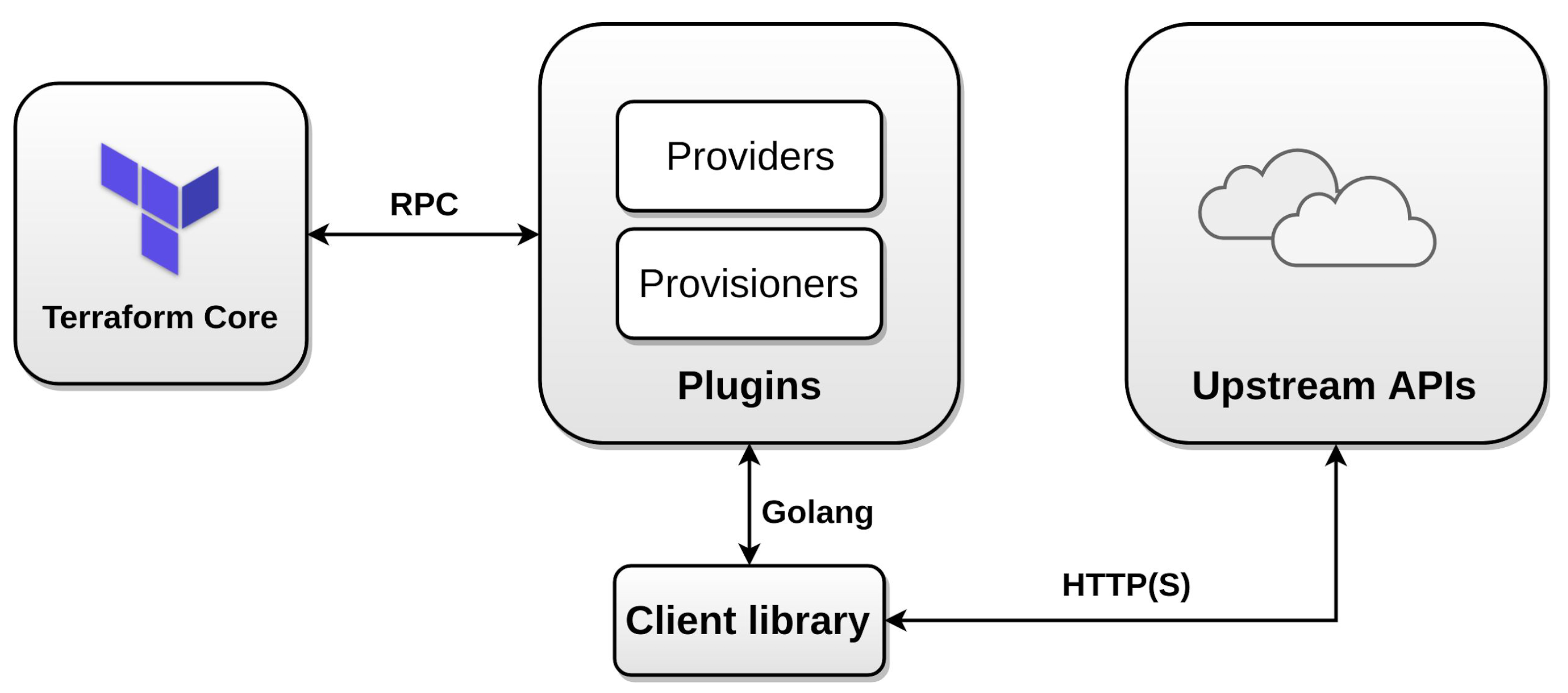
- Providers provide abstraction above the upstream API and is responsible for understanding API interactions and exposing resources.
- Terraform configurations must declare which providers they require, so that Terraform can install and use them
- Provider requirements are declared in a
required_providersblock. - Terraform uses a dependency lock file (
.terraform.lock.hcl) to track provider versions and ensure consistent installations.
- Describe how Terraform uses providers (plugin-based architecture)
- Terraform relies on plugins called “providers” to interact with remote systems.
- Terraform finds and installs providers when initializing a working directory. It can automatically download providers from a Terraform registry, or load them from a local mirror or cache.
- Each Terraform module must declare which providers it requires, so that Terraform can install and use them.
- Write Terraform configuration using multiple providers
- supports multiple provider instances using
aliasfor e.g. multiple aws providers with different region
- supports multiple provider instances using
- Explain how Terraform uses and manages state
- State is a necessary requirement for Terraform to function.
- Terraform requires some sort of database to map Terraform config to the real world.
- Terraform uses its own state structure for mapping configuration to resources in the real world
- Terraform state helps
- track metadata such as resource dependencies.
- provides performance as it stores a cache of the attribute values for all resources in the state
- aids syncing when using in team with multiple users
3. Core Terraform Workflow
- Describe Terraform workflow ( Write → Plan → Apply )
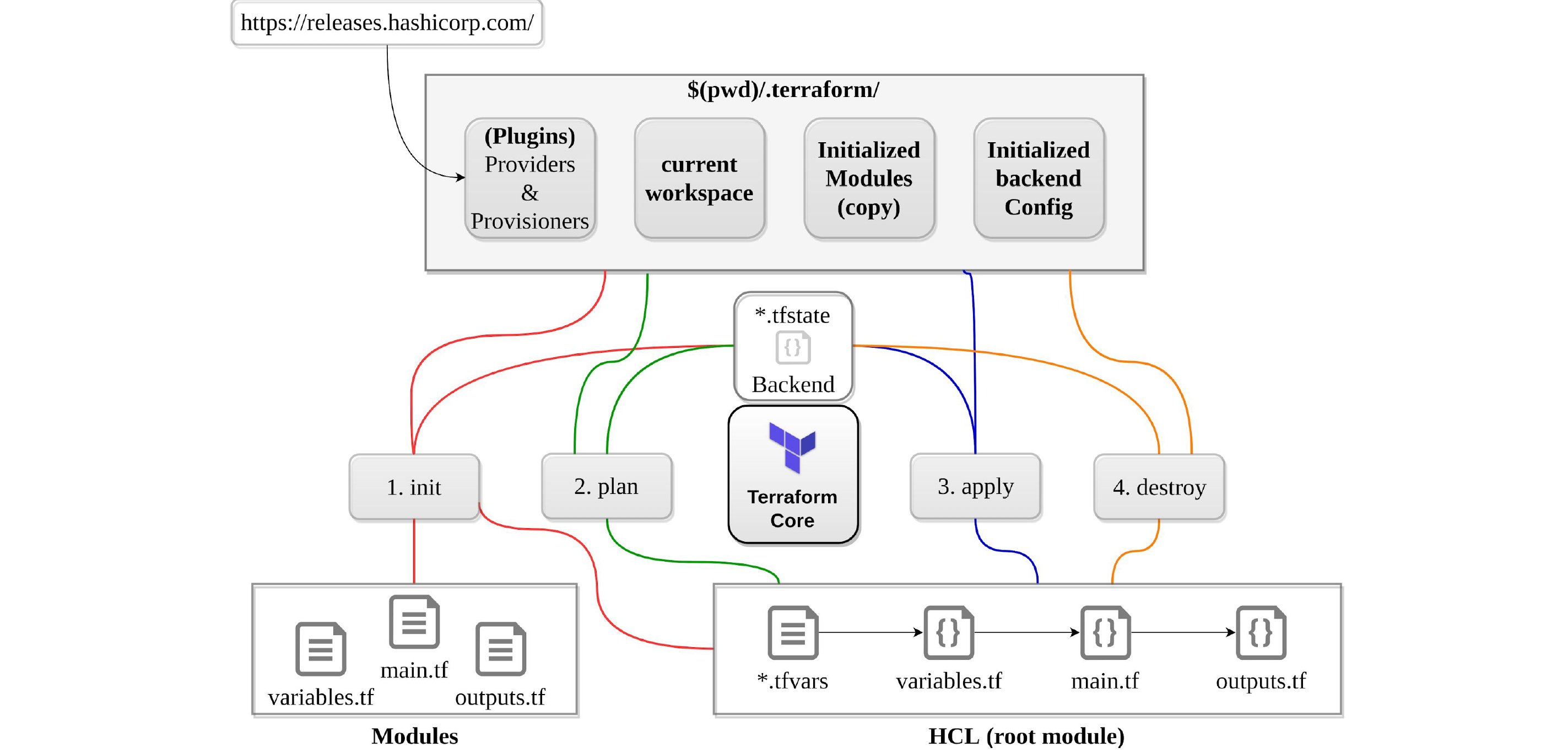
- Core Terraform workflow has three steps:
- Write – Author infrastructure as code.
- Plan – Preview changes before applying.
- Apply – Provision reproducible infrastructure.
- Core Terraform workflow has three steps:
- Initialize a Terraform working directory
terraform init- initializes a working directory containing Terraform configuration files.
- performs backend initialization, modules and plugins installation.
- providers are downloaded in the sub-directory of the present working directory at the path of
.terraform/providers - creates a dependency lock file (
.terraform.lock.hcl) to record provider versions - does not delete the existing configuration or state
- Validate a Terraform configuration
terraform validate- validates the configuration files in a directory, referring only to the configuration and not accessing any remote services such as remote state, provider APIs, etc.
- verifies whether a configuration is syntactically valid and internally consistent, regardless of any provided variables or existing state.
- useful for general verification of reusable modules, including the correctness of attribute names and value types.
- Generate and review an execution plan for Terraform
terraform planterraform plancreates an execution plan as it traverses each vertex and requests each provider using parallelism- calculates the difference between the last-known state and the current state and presents this difference as the output of the terraform plan operation to user in their terminal
- does not modify the infrastructure or state.
- allows a user to see which actions Terraform will perform prior to making any changes to reach the desired state
- performs refresh for each resource and might hit rate limiting issues as it calls provider APIs
- all resources refresh can be disabled or avoided using
-refresh=falseor-target=xxxxor- break resources into different directories.
- Apply changes to infrastructure with Terraform
terraform apply- will always ask for confirmation before executing unless passed the
-auto-approveflag. - if a resource successfully creates but fails during provisioning, Terraform will error and mark the resource as “tainted”. Terraform does not roll back the changes
- supports
-replace=ADDRESSflag to force recreation of a specific resource (replaces the deprecatedterraform taintcommand)
- will always ask for confirmation before executing unless passed the
- Destroy Terraform managed infrastructure
terraform destroy- will always ask for confirmation before executing unless passed the
-auto-approveflag. - equivalent to
terraform apply -destroy
- will always ask for confirmation before executing unless passed the
- Apply formatting and style adjustments
terraform fmtterraform fmthelps format code into a standard format. It usually aligns the spaces and matches the=- use
-recursiveflag to format files in subdirectories
4. Terraform Configuration
- Use and differentiate resource and data configuration
- Resources describe one or more infrastructure objects, such as virtual networks, instances, or higher-level components such as DNS records.
- Data sources allow data to be fetched or computed for use elsewhere in Terraform configuration. Use of data sources allows a Terraform configuration to make use of information defined outside of Terraform, or defined by another separate Terraform configuration.
- Use resource addressing and resource parameters to connect resources together
- Use variables and outputs
- Variables
- serve as parameters for a Terraform module and
- act like function arguments
countis a reserved word and cannot be used as variable name- Variable precedence (highest to lowest): -var and -var-file on CLI → *.auto.tfvars → terraform.tfvars → Environment variables (TF_VAR_)
- Output
- are like function return values.
- can be marked
sensitivewhich prevents showing its value in the list of outputs. However, they are stored in the state as plain text.
- Variables
- Understand the use of collection and structural types
- supports primitive data types of
string,numberandbool- automatically convert
numberandboolvalues tostringvalues
- supports complex data types of
list– sequence of values identified by consecutive whole numbers starting with zero.map– collection of values where each is identified by a string labelset– collection of unique values that do not have any secondary identifiers or ordering.
- supports structural data types of
object– a collection of named attributes with their own typetuple– a sequence of elements identified by consecutive whole numbers starting with zero, where each element has its own type.
- supports primitive data types of
- Write dynamic configuration using expressions and functions
lookupretrieves the value of a single element from a map, given its key. If the given key does not exist, a the given default value is returned instead.lookup(map, key, default)zipmapconstructs a map from a list of keys and a corresponding list of values.zipmap(["a", "b"], [1, 2])results into{"a" = 1, "b" = 2}dynamicblocks act much like aforexpression, but produce nested blocks instead of a complex typed value. It iterates over a given complex value, and generates a nested block for each element of that complex value.- Overuse of dynamic blocks is not recommended as it makes the code hard to understand and debug
- Define resource dependencies in configuration
- Terraform analyses any expressions within a resource block to find references to other objects and treats those references as implicit ordering requirements when creating, updating, or destroying resources.
- Explicit dependency can be defined using the
depends_onattribute where dependencies between resources that are not visible - Lifecycle meta-argument
create_before_destroyensures the replacement resource is created before the original is destroyed
- Validate configuration using custom conditions (New in 004)
checkblocks define assertions about infrastructure that run during plan and apply- Preconditions and postconditions can be added to resources and data sources using
lifecycleblocks - Variable
validationblocks allow custom validation rules for input variables
- Understand best practices for managing sensitive data (New in 004)
- Ephemeral values (Terraform 1.10+) are temporary values that are not persisted to state or plan files
- Write-only arguments allow resource arguments to be set but never read back from state
- Use HashiCorp Vault provider for dynamic secrets injection
- Terraform has no mechanism to redact secrets returned via data sources — secrets are persisted into state
- Protect state with encryption and proper access control using remote backends
- Supports comments using #, // and /* */
5. Terraform Modules
- Explain how Terraform sources modules
- Terraform Module Registry allows you to browse, filter and search for modules
- Modules can be sourced from: local paths, Terraform Registry, GitHub, Bitbucket, S3 buckets, GCS buckets, and generic git repos
- Describe variable scope within modules/child modules
- Modules are called from within other modules using
moduleblocks - All modules require a
sourceargument, which is a meta-argument defined by Terraform - Input variables serve as parameters for a Terraform module, allowing aspects of the module to be customized without altering the module’s own source code
- Resources defined in a module are encapsulated, so the calling module cannot access their attributes directly.
- Child module can declare output values to selectively export certain values to be accessed by the calling module
module.module_name.output_value
- Modules are called from within other modules using
- Use modules in configuration
- To call a module means to include the contents of that module into the configuration with specific values for its input variables.
- Manage module versions
- must be on GitHub and must be a public repo, if using public registry.
- must be named
terraform-<PROVIDER>-<NAME>, where<NAME>reflects the type of infrastructure the module manages and<PROVIDER>is the main provider where it creates that infrastructure. for e.g. terraform-google-vault or terraform-aws-ec2-instance. - must maintain
x.y.ztags for releases to identify module versions. Tags can optionally be prefixed with a v for example, v1.0.4 and 0.9.2. Tags that don’t look like version numbers are ignored. - must maintain a Standard module structure, which allows the registry to inspect the module and generate documentation, track resource usage, parse submodules and examples, and more.
6. Terraform State Management
- Describe the local backend
- A “backend” in Terraform determines how state is loaded and how an operation such as
applyis executed. - determines how state is loaded and how an operation such as
applyis executed - is responsible for storing state and providing an API for optional state locking
- needs to be initialized
- helps
- collaboration and working as a team, with the state maintained remotely and state locking
- can provide enhanced security for sensitive data
- support remote operations
- local (default) backend stores state in a local JSON file on disk
- A “backend” in Terraform determines how state is loaded and how an operation such as
- Describe state locking
- happens for all operations that could write state, if supported by backend
- prevents others from acquiring the lock & potentially corrupting the state
- use
force-unlockcommand to manually unlock the state if unlocking failed - backends which support state locking include:
- AWS S3 — now supports native S3 state locking (Terraform 1.10+, Nov 2024) without DynamoDB. Legacy DynamoDB-based locking is being deprecated.
- azurerm
- Google Cloud Storage (GCS)
- HashiCorp Consul
- Kubernetes Secret with locking done using a Lease resource
- PostgreSQL
- HCP Terraform / Terraform Enterprise
- HTTP endpoints
- Configure remote state using the backend block
- Backend configuration doesn’t support interpolations.
- supports partial configuration with remaining configuration arguments provided as part of the initialization process
- if switching the backend for the first time setup, Terraform provides a migration option
- remote backend stores state remotely like S3, GCS, Consul and supports features like remote operation, state locking, encryption, versioning etc.
- Manage resource drift and Terraform state
terraform plan -refresh-only(preferred) orterraform refresh(legacy) is used to reconcile the state Terraform knows about with the real-world infrastructure.- can be used to detect any drift from the last-known state, and to update the state file.
- does not modify infrastructure but does modify the state file.
movedblocks (Terraform 1.1+) — refactor resources (rename, move to/from modules) without destroying and recreating themremovedblocks (Terraform 1.7+) — remove resources from state without destroying the actual infrastructure- Use
terraform statecommand for advanced state management:mv– to move/rename modulesrm– to safely remove resource from the statepull– to observe current remote statelist&show– to view state resources
- Handle backend authentication methods
- every remote backend supports different authentication mechanisms and can be configured with the backend configuration
7. Maintain Infrastructure with Terraform
- Import existing infrastructure into your Terraform workspace
terraform import(CLI command) helps import already-existing external resources into Terraform stateimportblocks (Terraform 1.5+) — declarative import that can generate configuration. Preferred over CLI import.
1234import {to = aws_instance.exampleid = "i-abcd1234"}- Run
terraform plan -generate-config-out=generated.tfto auto-generate configuration for imported resources
- Use the CLI to inspect state
terraform state list— list resources in stateterraform state show— show attributes of a single resource- recommended not to edit the state manually
- Describe when and how to use verbose logging
- debugging can be controlled using
TF_LOG, which can be configured for different levels TRACE, DEBUG, INFO, WARN or ERROR, with TRACE being the most verbose. - logs path can be controlled using
TF_LOG_PATH.TF_LOGneeds to be specified. - Separate core and provider logs with
TF_LOG_COREandTF_LOG_PROVIDER
- debugging can be controlled using
- Given a scenario: choose when to use terraform workspace to create workspaces
- Terraform workspace helps manage multiple distinct sets of infrastructure resources or environments with the same code.
- state files for each workspace are stored in the directory
terraform.tfstate.d terraform workspace new devcreates a new workspace with namedevand switches to it as well- does not provide strong separation as it uses the same backend
- Understand provisioners (use as last resort)
- Terraform provides
local-execandremote-execprovisioners- local-exec executes code on the machine running terraform
- remote-exec executes on the resource provisioned and supports
sshandwinrm
- Provisioners should only be used as a last resort — HashiCorp strongly recommends alternatives like cloud-init, user_data, or configuration management tools
- Vendor-specific provisioners (Chef, Puppet, Habitat, Salt) were removed in Terraform 0.15+
- are defined within the resource block.
- support types – Create and Destroy
- if creation time fails, resource is tainted if provisioning failed, by default. (next apply it will be re-created)
- behavior can be overridden by setting the
on_failuretocontinue - for destroy, if it fails – resources are not removed
- Terraform provides
- Force resource recreation (terraform taint deprecated)
terraform taint- Use
terraform apply -replace="aws_instance.example"instead — this is safer as the replacement is part of the plan and visible before applying
8. HCP Terraform (formerly Terraform Cloud)
- Use HCP Terraform to create infrastructure
- HCP Terraform (renamed from Terraform Cloud in April 2024) provides remote state management, remote operations, and team collaboration
- Supports VCS-driven, CLI-driven, and API-driven workflows
- Remote operations allow terraform plan and apply to run in HCP Terraform’s managed environment
- Describe HCP Terraform collaboration and governance features
- HCP Terraform provides a private module registry for storing modules private to the organization
- Policy enforcement — supports Sentinel and OPA (Open Policy Agent) for policy-as-code
- Drift detection — automatically detects when real infrastructure diverges from state
- Change requests — review and approval workflows for infrastructure changes
- Teams and permissions — role-based access control for workspaces
- Run tasks — integrate third-party tools into the run workflow
- Describe how to organize and use HCP Terraform workspaces and projects (New in 004)
- Projects — group related workspaces together for easier management and access control
- Variable sets — share variables across multiple workspaces
- Run triggers — create dependencies between workspaces so changes propagate
- Workspaces in HCP Terraform are different from CLI workspaces — each has its own state, variables, and team access
- Configure and use HCP Terraform integration
- Use the
cloudblock in configuration to connect to HCP Terraform (replaces legacyremotebackend) terraform loginauthenticates with HCP Terraform- State can be migrated from local/other backends to HCP Terraform
- Use the
- Differentiate Terraform editions
- Terraform Community Edition (open-source, BSL 1.1 licensed) — single-user CLI workflow
- HCP Terraform (SaaS) — remote operations, collaboration, governance. Free tier available.
- Terraform Enterprise — self-hosted version of HCP Terraform for air-gapped/on-premises deployments
Key Terraform Features by Version (2023-2026)
| Version | Release | Key Features |
|---|---|---|
| 1.5 | Jun 2023 | import blocks, check blocks, config-driven import |
| 1.6 | Oct 2023 | terraform test framework, BSL 1.1 license change |
| 1.7 | Jan 2024 | removed blocks, provider-defined functions |
| 1.8 | Apr 2024 | Provider-defined functions GA, backend improvements |
| 1.9 | Jun 2024 | Input variable validation improvements, templatestring function |
| 1.10 | Nov 2024 | Ephemeral values, write-only arguments, S3 native state locking |
| 1.11 | Feb 2025 | Stability improvements and bug fixes |
| 1.12 | 2025 | Exam 004 target version, enhanced ephemeral resources |
HashiCorp Certified Terraform Associate Exam Resources
- Official Resources
- Terraform Associate 004 Learning Path (Official)
- Terraform Associate 004 Exam Content List (Official)
- Terraform Associate 004 Sample Questions (Official)
- Courses
- Practice tests