AWS Storage Options – EBS & Instance Store

AWS Storage Options – EBS & Instance Store

  • Elastic Block Store – EBS and Instance Store provide block-level storage options for EC2 instances.

Elastic Block Store (EBS) volume

  • EBS provides durable block-level storage for use with EC2 instances
  • EBS volumes are off-instance, network-attached storage (NAS) that persists independently from the running life of a single EC2 instance.
  • EBS volume is attached to an instance and can be used as a physical hard drive, typically by formatting it with the file system of your choice and using the file I/O interface provided by the instance operating system.
  • EBS volume can be used to boot an EC2 instance (EBS-root AMIs only), and multiple EBS volumes can be attached to a single EC2 instance.
  • EBS volume can be attached to a single EC2 instance only at any point in time.
  • EBS Multi-Attach volume can be attached to multiple EC2 instances (up to 16 Nitro-based instances in the same AZ). Multi-Attach is supported on io1 and io2 Block Express volumes.
  • EBS provides the ability to take point-in-time snapshots, which are persisted in S3. These snapshots can be used to instantiate new EBS volumes and to protect data for long-term durability
  • EBS snapshots can be copied across AWS regions as well, making it easier to leverage multiple AWS regions for geographical expansion, data center migration, and disaster recovery
  • All EBS volume types are designed for 99.999% availability.

EBS Volume Types

  • Amazon EBS provides six volume types divided into two major categories:
    • SSD-backed storage for transactional workloads (databases, virtual desktops, boot volumes)
    • HDD-backed storage for throughput-intensive workloads (MapReduce, log processing)
  • General Purpose SSD (gp3) — baseline 3,000 IOPS and 125 MiB/s at any size; scales up to 64 TiB, 80,000 IOPS, and 2,000 MiB/s (enhanced Sep 2025). Performance provisioned independently of capacity. 99.8%-99.9% durability.
  • General Purpose SSD (gp2) — burstable performance tied to volume size (3 IOPS/GiB, up to 16,000 IOPS). Being superseded by gp3 for new workloads.
  • Provisioned IOPS SSD (io2 Block Express) — highest performance block storage: up to 256,000 IOPS, 4,000 MiB/s throughput, 64 TiB capacity, sub-millisecond latency. 99.999% durability (100X more durable than gp3). Supports Multi-Attach and NVMe reservations for shared storage fencing.
  • Provisioned IOPS SSD (io1) — previous generation Provisioned IOPS; up to 64,000 IOPS and 1,000 MiB/s. 99.8%-99.9% durability.
  • Throughput Optimized HDD (st1) — low-cost HDD for frequently accessed, throughput-intensive workloads; up to 500 MiB/s. Cannot be a boot volume.
  • Cold HDD (sc1) — lowest cost HDD for less frequently accessed workloads; up to 250 MiB/s. Cannot be a boot volume.
  • Magnetic (standard) — previous generation volume type with lower performance. AWS recommends migrating to current generation volume types.

Ideal Usage Patterns

  • EBS is meant for data that changes relatively frequently and requires long-term persistence.
  • EBS volume provides access to raw block-level storage and is particularly well-suited for use as the primary storage for a database or file system
  • EBS Provisioned IOPS volumes (io2 Block Express) are particularly well-suited for use with databases applications that require a high and consistent rate of random disk reads and writes, such as Oracle, SAP HANA, Microsoft SQL Server, and SAS Analytics.
  • gp3 volumes are ideal for a wide variety of workloads including virtual desktops, medium-sized databases, development/test environments, and boot volumes.
  • st1 volumes are ideal for big data, data warehouses, and log processing.
  • sc1 volumes are ideal for infrequently accessed cold data requiring lowest storage cost.

Anti-Patterns

  • Temporary Storage
    • EBS volume persists independent of the attached EC2 life cycle.
    • For temporary storage such as caches, buffers, queues, etc it is better to use local instance store volumes, SQS, or ElastiCache
  • Highly-durable storage
    • For highly durable storage, use S3 or Glacier which provides 99.999999999% (11 9’s) annual durability per object. EBS io2 Block Express offers 99.999% durability, while gp3/gp2/io1 offer 99.8%-99.9% durability.
  • Static data or web content
    • For static web content, where data infrequently changes, EBS with EC2 would require a web server to serve the pages.
    • S3 may represent a more cost-effective and scalable solution for storing this fixed information and is served directly out of S3.

EBS Performance

  • EBS provides multiple volume types that differ in performance characteristics and pricing, allowing you to tailor storage performance and cost to application needs.
  • EBS Volumes can be attached and striped across multiple similarly-provisioned EBS volumes using RAID 0 or logical volume manager software, thus aggregating available IOPS, total volume throughput, and total volume size.
  • gp3 volumes offer cost-effective storage with independently configurable IOPS and throughput. Baseline: 3,000 IOPS and 125 MiB/s; scalable up to 80,000 IOPS and 2,000 MiB/s (as of Sep 2025).
  • io2 Block Express volumes deliver predictable, high performance for I/O intensive workloads: up to 256,000 IOPS, 4,000 MiB/s throughput, with sub-millisecond latency. Supports 1,000 IOPS per GB provisioned.
  • As EBS volumes are network-attached devices, other network I/O performed by the instance, as well as the total load on the shared network, can affect individual EBS volume performance.
  • EBS-optimized instances deliver dedicated throughput between EC2 and EBS. Latest Nitro-based instances (e.g., C8gn, M8gn, R8gn in 48xlarge/metal sizes) support up to 120 Gbps EBS bandwidth and 480,000 IOPS (as of Apr 2026).
  • Each separate EBS volume can be configured independently with its own type and performance settings.

EBS Durability & Availability

  • EBS volumes are designed to be highly available and reliable.
  • EBS volume data is replicated across multiple servers in a single AZ to prevent the loss of data from the failure of any single component.
  • All EBS volume types are designed for 99.999% availability.
  • io2 Block Express volumes provide 99.999% durability (0.001% annual failure rate) — 100X more durable than other volume types.
  • gp3, gp2, and io1 volumes provide 99.8%-99.9% durability (0.1%-0.2% annual failure rate).
  • EBS snapshots are incremental, point-in-time backups, containing only the data blocks changed since the last snapshot.
  • Frequent snapshots are recommended to maximize both the durability and availability of EBS data.
  • EBS snapshots provide an easy-to-use disk clone or disk image mechanism for backup, sharing, and disaster recovery.

EBS Snapshots Archive

  • EBS Snapshots Archive offers up to 75% lower snapshot storage costs for snapshots stored for 90 days or longer that are rarely accessed.
  • Snapshots in the standard tier are incremental; when archived, they are converted to full snapshots and moved to the archive tier.
  • Archived snapshots can be restored to the standard tier when needed (restoration takes 24-72 hours).
  • AWS Backup now supports EBS Snapshots Archive in backup policies for automated lifecycle management.
  • EBS now displays full snapshot size information in Console and via DescribeSnapshots API (full-snapshot-size-in-bytes field, Feb 2025).

EBS Elastic Volumes

  • Elastic Volumes allows you to dynamically increase capacity, tune performance, and change the type of live volumes with no downtime or performance impact.
  • EBS volumes can be resized dynamically (increased only, cannot be reduced in size).
  • As of Jan 2026, EBS supports up to 4 Elastic Volumes modifications per volume within a rolling 24-hour window (previously limited to 1 modification per 6 hours).
  • Modifications include: increasing size, changing volume type, and adjusting provisioned performance (IOPS/throughput).

EBS Cost Model

  • EBS pricing varies by volume type:
    • gp3: charged per GB-month of provisioned storage, plus separately for provisioned IOPS (above 3,000) and throughput (above 125 MiB/s)
    • gp2: charged per GB-month of provisioned storage (IOPS included based on size)
    • io2/io1: charged per GB-month of provisioned storage and per Provisioned IOPS-month
    • st1/sc1: charged per GB-month of provisioned storage
  • EBS snapshots are charged per GB-month of data stored. Snapshots are incremental and compressed, so storage used is generally much less than volume size.
  • EBS Snapshots Archive tier costs up to 75% less than standard snapshot storage (minimum 90-day retention).
  • EBS snapshot copy is charged for data transferred between regions, plus standard snapshot charges in the destination region.
  • EBS volume storage capacity is allocated at creation time, and you are charged for allocated storage even if not fully used.

EBS Scalability and Elasticity

  • EBS volumes can easily and rapidly be provisioned and released to scale in and out with changing storage demands.
  • EBS volumes can be resized dynamically using Elastic Volumes (increase only, cannot be reduced).
  • Volume type and performance can be changed without detaching the volume or stopping the instance.
  • Up to 4 modifications are allowed per 24-hour rolling window.

Interfaces

  • AWS offers management APIs for EBS through REST-based APIs, AWS CLI, and SDKs, which can be used to create, delete, describe, attach, and detach EBS volumes, as well as to create, delete, and describe snapshots and copy snapshots across regions.
  • Amazon also offers the same capabilities through the AWS Management Console.
  • EBS Direct APIs allow you to read and write data directly to/from EBS snapshots without needing to attach them to an instance — useful for backup, disaster recovery, and data migration.

Instance Store Volumes

  • Instance Store volumes are also referred to as Ephemeral Storage.
  • Instance Store volumes provide temporary block-level storage and consist of a preconfigured and pre-attached block of disk storage on the same physical server as the EC2 instance.
  • Instance storage amount depends on the Instance type; larger instances provide both more and larger instance store volumes.
  • Modern instance store volumes use NVMe SSD storage on Nitro-based instances, delivering high random I/O performance with low latency.
  • Latest generation storage-optimized instances (2025-2026):
    • C8gd, M8gd, R8gd (Graviton4): up to 11.4 TB of NVMe SSD local storage, 3X more than previous generation
    • C8id, M8id, R8id (Intel Xeon 6): up to 22.8 TB of NVMe SSD local storage, 3X more than 6th-gen instances
  • Instance store volumes, unlike EBS volumes, cannot be detached or attached to another instance.
  • Data on instance store volumes persists only during the life of the associated EC2 instance — data is lost when the instance stops, terminates, or the underlying hardware fails.

Ideal Usage Patterns

  • EC2 local instance store volumes are fast, free (included in the price of the EC2 instance) “scratch volumes” best suited for storing temporary data that is continually changing, such as buffers, caches, scratch data, or data that is replicated for durability.
  • NVMe SSD-backed instances are ideally suited for many high performance database workloads. e.g., NoSQL databases like Cassandra, MongoDB, and real-time analytics.
  • High storage instances support much higher storage density per EC2 instance and are ideally suited for applications that benefit from high sequential I/O performance across very large datasets. e.g., data warehouses, Hadoop/Spark storage nodes, distributed file systems.
  • Machine learning training workloads that need fast local scratch storage for datasets and checkpoints.

Anti-Patterns

  • Persistent storage
    • For persistent virtual disk storage similar to a physical disk drive for files or other data that must persist longer than the lifetime of a single EC2 instance, EBS volumes or S3 are more appropriate.
  • Relational database storage
    • In most cases, relational databases require storage that persists beyond the lifetime of a single EC2 instance, making EBS volumes the natural choice.
  • Shared storage
    • Instance store volumes are dedicated to a single EC2 instance, and cannot be shared with other systems or users.
    • If you need storage that can be detached from one instance and attached to a different instance, or if you need the ability to share data easily, EBS volumes, EFS, or S3 are better choices.
  • Snapshots
    • If you need the convenience, long-term durability, availability, and shareability of point-in-time disk snapshots, EBS volumes are a better choice.

Instance Store Performance

  • EC2 instance virtual machine and the local instance store volumes are located on the same physical server, providing very fast access with low latency, particularly for sequential access.
  • Because the bandwidth to the disks is not limited by the network, aggregate sequential throughput for multiple instance volumes can be higher than for the same number of EBS volumes.
  • NVMe SSD instance store volumes provide from tens of thousands to hundreds of thousands of low-latency, random 4 KB IOPS.
  • To further increase aggregate IOPS or improve sequential disk throughput, multiple instance store volumes can be grouped together using RAID 0 (disk striping) software.
  • High storage instances are capable of delivering multi-GB/sec sequential read and write performance.
  • AWS provides detailed NVMe statistics for instance store volumes to help optimize latency-sensitive workloads (available 2025).

Instance Store Durability and Availability

  • EC2 local instance store volumes are NOT intended to be used as durable disk storage.
  • Data persists only during the life of the associated EC2 instance.
  • Data is lost when: instance is stopped or terminated, underlying disk drive fails, or instance hibernates.
  • Always replicate important data to EBS, S3, or other durable storage.

Cost Model

  • Cost of the EC2 instance includes any local instance store volumes if the instance type provides them.
  • While there is no additional charge for data storage on local instance store volumes, data transferred to and from instance store volumes from other AZs or outside an EC2 region may incur data transfer charges.
  • Additional charges apply for any persistent storage used (S3, Glacier, EBS volumes, EBS snapshots).

Scalability and Elasticity

  • Local instance store volumes are tied to a particular EC2 instance and are fixed in number and size for a given EC2 instance type.
  • Scalability and elasticity of this storage are tied to the number of EC2 instances running.

Interfaces

  • Instance store volumes are specified using the block device mapping feature of the EC2 API and the AWS Management Console.
  • To the EC2 instance, an instance store volume appears just like a local disk drive. Use the native file system I/O interfaces of the chosen operating system to read and write data.
  • On Nitro-based instances, instance store volumes are exposed as NVMe block devices.

EBS vs Instance Store Comparison

Feature EBS Instance Store
Persistence Persists independently of instance Ephemeral — lost on stop/terminate
Network Network-attached Physically attached (local)
Snapshots Supported (incremental, cross-region) Not supported
Boot volume Yes No (legacy only)
Resize Yes (Elastic Volumes) Fixed per instance type
Max IOPS 256,000 (io2 Block Express) Millions (NVMe, instance-dependent)
Max size per volume 64 TiB Instance-type dependent (up to 22.8 TB)
Durability 99.999% (io2) / 99.8-99.9% (others) None — ephemeral
Multi-Attach Yes (io1/io2, up to 16 instances) No
Cost Pay per provisioned GB + IOPS/throughput Included in instance price

AWS Certification Exam Practice Questions

  • Questions are collected from Internet and the answers are marked as per my knowledge and understanding (which might differ with yours).
  • AWS services are updated everyday and both the answers and questions might be outdated soon, so research accordingly.
  • AWS exam questions are not updated to keep up the pace with AWS updates, so even if the underlying feature has changed the question might not be updated
  • Open to further feedback, discussion and correction.
  1. Which of the following provides the fastest storage medium?
    1. Amazon S3
    2. Amazon EBS using Provisioned IOPS (PIOPS)
    3. SSD Instance (ephemeral) store (SSD Instance Storage provides hundreds of thousands of IOPS on some instance types, much faster than any network-attached storage)
    4. AWS Storage Gateway
  2. A company needs a block storage volume with the highest durability for a mission-critical Oracle database. Which EBS volume type should they choose?
    1. gp3
    2. gp2
    3. io2 Block Express (io2 Block Express provides 99.999% durability — 100X more durable than other volume types, designed for mission-critical applications)
    4. io1
  3. An application requires a single EBS volume with 50,000 IOPS. Which volume type(s) can meet this requirement? (Choose TWO)
    1. gp3 (gp3 now supports up to 80,000 IOPS as of Sep 2025)
    2. gp2 (gp2 max is 16,000 IOPS)
    3. io2 Block Express (io2 Block Express supports up to 256,000 IOPS)
    4. st1 (st1 is HDD-backed and optimized for throughput, not IOPS)
  4. Which statements about EBS Elastic Volumes are correct? (Choose TWO)
    1. You can increase volume size without detaching or stopping the instance
    2. You can decrease volume size dynamically (Volume size can only be increased, not decreased)
    3. Up to 4 modifications are allowed per volume within a 24-hour rolling window
    4. Volume modifications require a reboot to take effect (No downtime or reboot required)
  5. A company wants to reduce costs for EBS snapshots that are retained for compliance for 2 years but rarely accessed. What should they use?
    1. S3 Glacier Deep Archive
    2. EBS Snapshots Archive (EBS Snapshots Archive provides up to 75% lower costs for snapshots stored 90+ days that are rarely accessed)
    3. Delete the snapshots and use AMIs instead
    4. Use sc1 volumes instead of snapshots
  6. Which of the following is true about EC2 Instance Store volumes? (Choose TWO)
    1. Data is lost when the instance is stopped or terminated
    2. Instance store volumes can be detached and attached to another instance (Instance store volumes cannot be detached)
    3. Instance store volumes provide lower latency than EBS because they are physically attached
    4. Instance store volumes support point-in-time snapshots (Snapshots are not supported for instance store)
  7. A company needs to attach a single high-performance EBS volume to 8 EC2 instances in the same AZ for a clustered application. Which solution is appropriate?
    1. Use gp3 with Multi-Attach (Multi-Attach is not supported on gp3)
    2. Use io2 Block Express with Multi-Attach (io2 Block Express supports Multi-Attach to up to 16 Nitro-based instances in the same AZ with NVMe reservations for I/O fencing)
    3. Use instance store volumes shared via NFS
    4. Use st1 with Multi-Attach (Multi-Attach is not supported on HDD volumes)

References

Google Cloud Storage & Database Options Comparison

GCP Storage Options

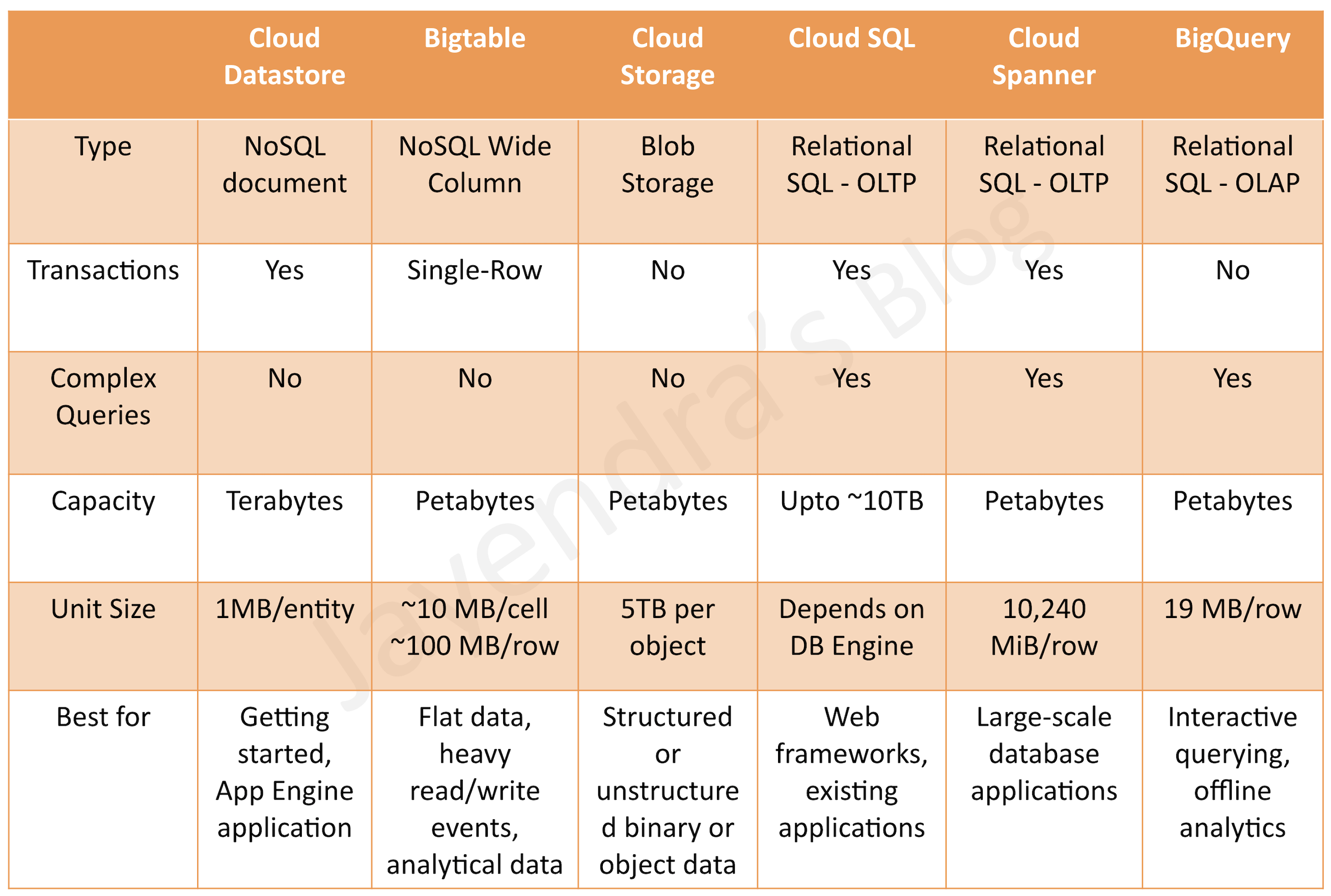
GCP provides various storage options and the selection can be based on

  • Structured vs Unstructured
  • Relational (SQL) vs Non-Relational (NoSQL)
  • Transactional (OLTP) vs Analytical (OLAP)
  • Fully Managed vs Requires Provisioning
  • Global vs Regional
  • Horizontal vs Vertical scaling

Cloud Firestore

  • Cloud Firestore is a fully managed, highly scalable, serverless, non-relational NoSQL document database
  • fully managed with no-ops and no planned downtime and no need to provision database instances (vs Bigtable)
  • uses a distributed architecture to automatically manage scaling.
  • queries scale with the size of the result set, not the size of the data set
  • supports ACID Atomic transactionsall or nothing (vs Bigtable)
  • provides High availability of reads and writesruns in Google data centers, which use redundancy to minimize impact from points of failure.
  • provides massive scalability with high performanceuses a distributed architecture to automatically manage scaling.
  • scales from zero to terabytes with flexible storage and querying of data
  • provides SQL-like query language
  • supports strong consistency
  • supports data encryption at rest and in transit
  • provides terabytes of capacity with a maximum unit size of 1 MB per entity (vs Bigtable)
  • Firestore Editions (2025)
    • Standard edition – core Firestore capabilities with standard querying support
    • Enterprise edition – provides MongoDB API compatibility, a new pipeline query engine with 200+ query operations, additional data types, new index types, and text/geospatial search
  • Enterprise Edition Features
    • MongoDB Compatibility (GA Aug 2025) – use existing MongoDB application code, drivers, and tools as a drop-in replacement while getting Firestore’s auto-scaling and high availability
    • Pipeline Query Engine – supports 200+ new query capabilities (pipeline operations) for complex queries directly within the database
    • Text Search and Geospatial Search – native full-text and geospatial query support without external services
    • Maximum document size increased to 16 MiB (Enterprise edition)
    • Indexes are not required for queries in Enterprise edition
  • Consider using Cloud Firestore if you need to store semi-structured objects, or if require support for transactions and SQL-like queries.

Cloud Bigtable

  • Bigtable provides a scalable, fully managed, non-relational NoSQL wide-column analytical big data database service suitable for both low-latency single-point lookups and precalculated analytics.
  • supports large quantities (>1 TB) of semi-structured or structured data (vs Datastore)
  • supports high throughput or rapidly changing data (vs BigQuery)
  • managed, but needs provisioning of nodes and can be expensive (vs Datastore and BigQuery)
  • does not support transactions or strong relational semantics (vs Datastore)
  • Now supports GoogleSQL queries (GA 2024) – familiar SQL syntax for querying Bigtable data directly
  • Not Transactional and does not support ACID
  • provides eventual consistency
  • ideal for time-series or natural semantic ordering data
  • can run asynchronous batch or real-time processing on the data
  • can run machine learning algorithms on the data
  • provides petabytes of capacity with a maximum unit size of 10 MB per cell and 100 MB per row.
  • Bigtable Editions (GA April 2026)
    • Enterprise edition – advanced features in performance, analytic query capability, and resource management
    • Enterprise Plus edition – includes in-memory tier with sub-millisecond latency and hotspot resistance supporting up to 120,000 queries per second on a single row
  • New Features (2024-2026)
    • Bigtable SQL (GoogleSQL) – query data using familiar SQL syntax with specialized features preserving flexible schema
    • Data Boost – serverless analytical queries without impacting operational workloads
    • Incremental Materialized Views – simplify creation of real-time metrics
    • Window Functions (GA April 2026) – advanced analytic operations over multiple table rows
    • KNN Vector Search – K nearest neighbors similarity search for AI/ML use cases
    • Distributed Counting – instant metric retrieval for real-time dashboards
    • In-Memory Tier – hotspot resistance with sub-millisecond latency
    • Agent Skills (April 2026) – let AI agents assist with schema design, SQL queries, and infrastructure management
  • Usage Patterns
    • Low-latency read/write access
    • High-throughput data processing
    • Time series support
  • Anti Patterns
    • Not an ideal storage option for future analysis – Use BigQuery instead
    • Not an ideal storage option for transactional data – Use relational database or Datastore
  • Common Use cases
    • IoT, finance, adtech
    • Personalization, recommendations
    • Monitoring
    • Geospatial datasets
    • Graphs
    • Real-time AI/ML inference and vector search
  • Consider using Cloud Bigtable, if you need high-performance datastore to perform analytics on a large number of structured objects

Cloud Storage

  • Cloud Storage provides durable and highly available object storage.
  • fully managed, simple administration, cost-effective, and scalable service that does not require capacity management
  • supports unstructured data storage like binary or raw objects
  • provides high performance, internet-scale
  • supports data encryption at rest and in transit
  • provides 99.999999999% (11 nines) annual durability
  • Storage Classes: Standard, Nearline (30-day min), Coldline (90-day min), Archive (365-day min)
  • Autoclass – automatically transitions objects to appropriate storage classes based on access patterns
  • New Features (2024-2026)
    • Cloud Storage Rapid (2025-2026) – high-performance storage tier for AI/ML workloads
      • Rapid Bucket (formerly Rapid Storage) – zonal object storage with <1ms random read/write latency, 6 TB/s throughput
      • Rapid Cache (formerly Anywhere Cache) – accelerates reads and colocates compute with data, up to 20 Tbps throughput
    • Smart Storage – automated metadata annotation for unstructured data with AI agent connectivity via MCP
    • Storage Intelligence – zero-configuration dashboards, aggregated activity views, and enhanced batch operations
    • Bucket Relocation – move buckets between regions with minimal downtime
    • Batch Operations Dry Run Mode – simulate batch jobs without modifying data
  • Consider using Cloud Storage, if you need to store immutable blobs larger than 10 MB, such as large images or movies. This storage service provides petabytes of capacity with a maximum unit size of 5 TB per object.
  • Usage Patterns
    • Images, pictures, and videos
    • Objects and blobs
    • Unstructured data
    • Long term storage for archival or compliance
    • AI/ML training data and model checkpoints
  • Anti Patterns
    • Not ideal for structured/relational data
    • Not ideal for frequently changing data requiring low-latency updates
  • Common Use cases
    • Storing and streaming multimedia
    • Storage for custom data analytics pipelines
    • Archive, backup, and disaster recovery
    • AI/ML training datasets and model serving

Cloud SQL

  • provides fully managed, relational SQL databases
  • offers MySQL, PostgreSQL, and SQL Server databases as a service
  • manages OS & Software installation, patches and updates, backups and configuring replications, failover however needs to select and provision machines (vs Cloud Spanner)
  • single region only – although it now supports cross-region read replicas (vs Cloud Spanner)
  • Cloud SQL Editions
    • Enterprise edition – core capabilities, suitable for applications with less stringent availability/performance requirements. Up to 96 vCPU, 624 GB RAM.
    • Enterprise Plus edition – highest performance with optimized software/hardware stack. Up to 128 vCPU, 864 GB RAM. Includes data cache, up to 35-day point-in-time log retention, sub-second maintenance downtime, and advanced disaster recovery.
  • Scaling
    • provides vertical scalability (Max. storage of 64 TB)
    • storage can be increased without incurring any downtime
    • provides an option to increase the storage automatically
    • storage CANNOT be decreased
    • supports Horizontal scaling for read-only using read replicas (vs Cloud Spanner)
    • performance is linked to the disk size
  • Security
    • data is encrypted when stored in database tables, temporary files, and backups.
    • external connections can be encrypted by using SSL, or by using the Cloud SQL Proxy.
    • Private Service Connect (PSC) support for simplified private connectivity
  • High Availability
    • fault-tolerance across zones can be achieved by configuring the instance for high availability by adding a failover replica
    • failover is automatic
    • can be created from primary instance only
    • replication from the primary instance to failover replica is semi-synchronous.
    • failover replica must be in the same region as the primary instance, but in a different zone
    • only one instance for every primary instance allowed
    • supports managed backups and backups are created on primary instance only
    • supports automatic replication
    • Enterprise Plus: sub-second maintenance downtime (vs up to 120 seconds for Enterprise)
  • Backups
    • Automated backups can be configured and are stored for 7 days
    • Manual backups (snapshots) can be created and are not deleted automatically
    • Fast Clone (GA) – clone operations within the same zone for rapid environment creation
  • Point-in-time recovery
    • requires binary logging enabled.
    • every update to the database is written to an independent log, which involves a small reduction in write performance.
    • performance of the read operations is unaffected by binary logging, regardless of the size of the binary log files.
    • Enterprise Plus: up to 35-day log retention (vs 7 days for Enterprise)
  • Usage Patterns
    • direct lift and shift for MySQL, PostgreSQL, SQL Server database only
    • relational database service with strong consistency
    • OLTP workloads
  • Anti Patterns
    • need data storage more than 64 TB or horizontal write scaling, use Cloud Spanner
    • need global availability with low latency, use Cloud Spanner
    • not a direct replacement for Oracle – use installation on GCE or consider AlloyDB for PostgreSQL workloads
  • Common Use cases
    • Websites, blogs, and content management systems (CMS)
    • Business intelligence (BI) applications
    • ERP, CRM, and eCommerce applications
    • Geospatial applications
  • Consider using Cloud SQL for full relational SQL support for OLTP and lift and shift of MySQL, PostgreSQL, SQL Server databases

Cloud Spanner

  • Cloud Spanner provides fully managed, relational SQL databases with joins and secondary indexes
  • provides cross-region, global, horizontal scalability, and availability
  • supports strong consistency, including strongly consistent secondary indexes
  • provides high availability through synchronous and built-in data replication.
  • provides strong global consistency
  • supports database sizes exceeding ~2 TB (vs Cloud SQL)
  • does not provide direct lift and shift for relational databases (vs Cloud SQL)
  • expensive as compared to Cloud SQL
  • Multi-Model Database (2024-2025)
    • Spanner Graph (GA Jan 2025) – supports industry-standard Graph Query Language (GQL) with full SQL interoperability for querying structured and connected data
    • Vector Search – native vector embeddings and similarity search for AI/ML and RAG applications
    • Full-Text Search – native text search capabilities without external services
    • Hybrid Search – combine vector search, full-text search, and ML model reranking in a unified platform
    • Vertex AI Integration – native integration for model serving and inferencing with SQL
  • Spanner Omni (2026 Preview)
    • Self-managed version of Spanner that runs on-premises, across clouds, or on a laptop
    • Brings Spanner’s scalability, high availability, strong consistency, and multi-model capabilities anywhere
    • Supports air-gapped or connected deployments, single machine to clusters of thousands
  • Tiered Storage (GA) – store data across SSD or HDD tiers for cost optimization
  • Consider using Cloud Spanner for full relational SQL support, with horizontal scalability spanning petabytes for OLTP, or as a multi-model database supporting relational, graph, vector, and text search workloads

BigQuery

  • provides fully managed, no-ops, OLAP, enterprise data warehouse (EDW) with SQL and fast ad-hoc queries.
  • provides high capacity, data warehousing analytics solution
  • ideal for big data exploration and processing
  • not ideal for operational or transactional databases
  • provides SQL interface
  • A scalable, fully managed data-to-AI platform
  • BigQuery Editions – Standard, Enterprise, and Enterprise Plus with different pricing and feature tiers
  • New Features (2024-2026)
    • Conversational Analytics (Preview Jan 2026) – analyze data using natural language with AI-powered data agents that understand context and generate SQL
    • BigQuery Graph – uncover complex relationships and patterns in data
    • Vector Search – embeddings and hybrid search for RAG applications
    • BigQuery ML – train and run ML models directly in BigQuery using SQL
    • Data Engineering Agent – automates data preparation, error detection, and pipeline building
    • Data Science Agent – automates data loading, feature engineering, model training and evaluation
    • BigQuery Studio – unified workspace with Gemini-powered assistant for resource discovery and query generation
    • MCP Integration – Model Context Protocol for AI agent connectivity
  • Usage Patterns
    • OLAP workloads up to petabyte-scale
    • Big data exploration and processing
    • Reporting via business intelligence (BI) tools
    • AI/ML model training and inference at scale
  • Anti Patterns
    • Not an ideal storage option for transactional data or OLTP – Use Cloud SQL or Cloud Spanner instead
    • Low-latency read/write access – Use Bigtable instead
  • Common Use cases
    • Analytical reporting on large data
    • Data science and advanced analyses
    • Big data processing using SQL
    • GenAI and agentic AI applications with data

AlloyDB for PostgreSQL

  • AlloyDB is a fully managed, PostgreSQL-compatible database designed for enterprise-grade OLTP and hybrid transactional/analytical (HTAP) workloads
  • wire-compatible with PostgreSQL 14 and 15 – existing drivers, ORMs, and most extensions work without modification
  • provides up to 4x faster for transactional workloads and up to 100x faster for analytical queries compared to standard PostgreSQL
  • uses a scale-out architecture with compute and storage separation
  • built-in AI capabilities with Google’s cutting-edge technology
  • AlloyDB AI
    • Generate vector embeddings from within the database
    • Native vector search with up to 10x faster index creation and 4x faster search queries
    • Filtered vector search up to 10x faster than standard PostgreSQL HNSW
    • Integration with Vertex AI for model serving and inferencing
    • AlloyDB AI query engine with Vertex AI Ranking API
  • AlloyDB Omni – downloadable version that runs on-premises or in other clouds
  • 99.99% availability SLA with automated backups, replication, and failover
  • Usage Patterns
    • Enterprise PostgreSQL workloads requiring high performance
    • HTAP (hybrid transactional/analytical) workloads
    • AI-powered applications requiring vector search
    • Migration from commercial databases (Oracle, SQL Server) to PostgreSQL
  • Anti Patterns
    • Need global horizontal scaling – Use Cloud Spanner
    • Need non-relational/NoSQL – Use Firestore or Bigtable
    • Need MySQL or SQL Server compatibility – Use Cloud SQL
  • Consider using AlloyDB for PostgreSQL workloads requiring high performance, AI integration, or migration from commercial databases

Memorystore

  • provides scalable, secure, and highly available in-memory service
  • fully managed as provisioning, replication, failover, and patching are all automated
  • is protected from the internet using VPC networks and private IP and comes with IAM integration
  • Supported Engines
    • Memorystore for Valkey (GA 2025) – open-source, high-performance key-value store (successor to Redis OSS). Supports Valkey 8.0 and 9.0. 99.99% availability SLA, instances up to 14.5 TB, cross-region replication, Private Service Connect, multi-VPC access.
    • Memorystore for Redis Cluster – managed Redis cluster mode with zero-downtime scaling
    • Memorystore for Redis – standard Redis instances (standalone and high availability)
    • Memorystore for Memcached – distributed in-memory caching
  • Valkey 9.0 Features (GA 2026)
    • SIMD optimizations for improved throughput and latency
    • Enhanced performance over previous versions
    • Full compatibility with Redis OSS commands
  • Usage Patterns
    • Lift and shift migration of applications
    • Low latency data caching and retrieval
    • Session management
    • Real-time leaderboards and counting
  • Anti Patterns
    • Relational or NoSQL database
    • Analytics solution
    • Persistent primary data store (use as cache layer)
  • Common Use cases
    • User session management
    • Application caching
    • Real-time analytics and pub/sub
    • Gaming leaderboards

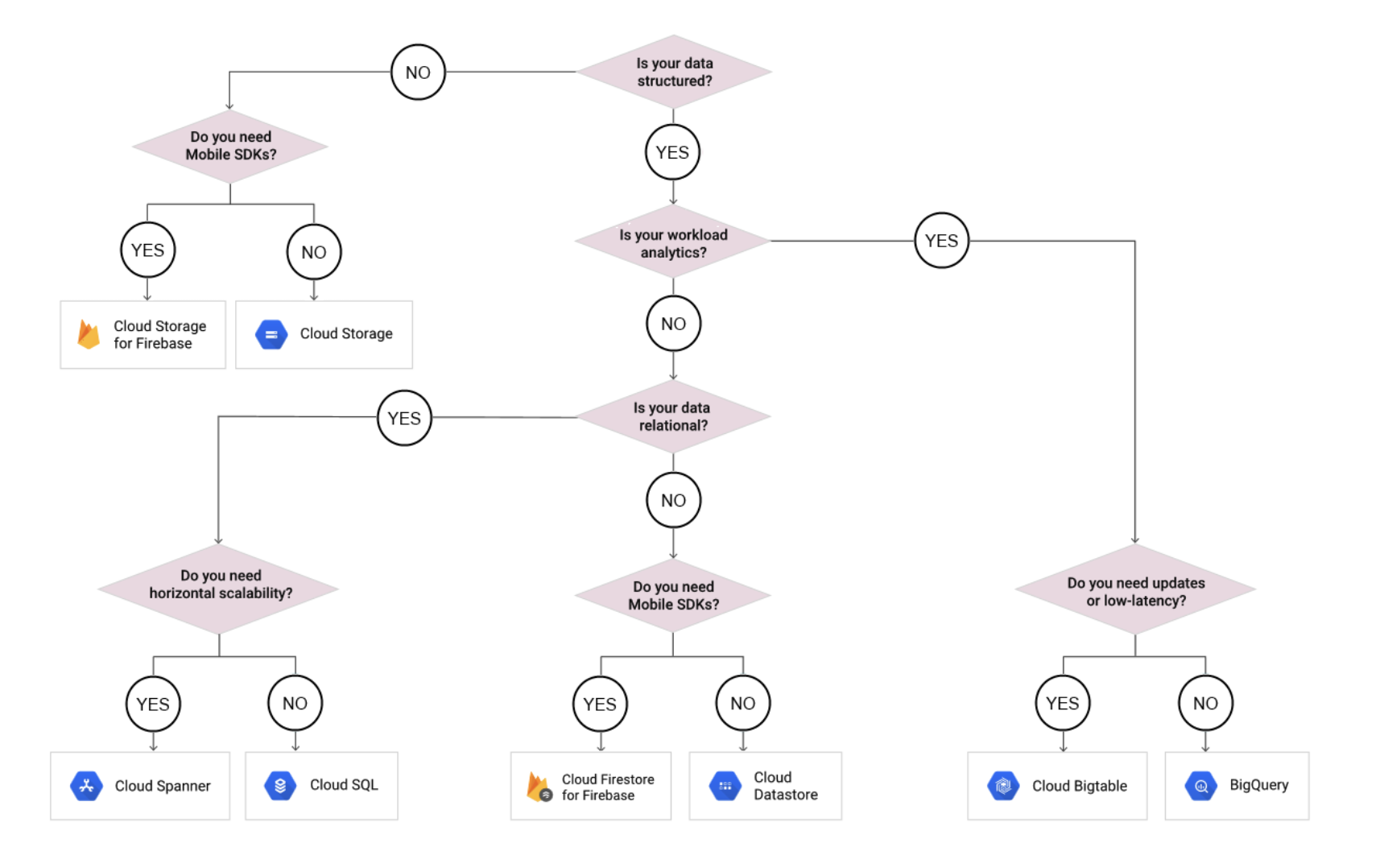
GCP Storage Options Decision Tree

GCP Storage Options Decision Tree

GCP Certification Exam Practice Questions

  • Questions are collected from Internet and the answers are marked as per my knowledge and understanding (which might differ with yours).
  • GCP services are updated everyday and both the answers and questions might be outdated soon, so research accordingly.
  • GCP exam questions are not updated to keep up the pace with GCP updates, so even if the underlying feature has changed the question might not be updated
  • Open to further feedback, discussion and correction.
  1. Your application is hosted across multiple regions and consists of both relational database data and static images. Your database has over 10 TB of data. You want to use a single storage repository for each data type across all regions. Which two products would you choose for this task? (Choose two)
    1. Cloud Bigtable
    2. Cloud Spanner
    3. Cloud SQL
    4. Cloud Storage
  2. You are building an application that stores relational data from users. Users across the globe will use this application. Your CTO is concerned about the scaling requirements because the size of the user base is unknown. You need to implement a database solution that can scale with your user growth with minimum configuration changes. Which storage solution should you use?
    1. Cloud SQL
    2. Cloud Spanner
    3. Cloud Firestore
    4. Cloud Datastore
  3. Your company processes high volumes of IoT data that are time-stamped. The total data volume can be several petabytes. The data needs to be written and changed at a high speed. You want to use the most performant storage option for your data. Which product should you use?
    1. Cloud Datastore
    2. Cloud Storage
    3. Cloud Bigtable
    4. BigQuery
  4. Your App Engine application needs to store stateful data in a proper storage service. Your data is non-relational database data. You do not expect the database size to grow beyond 10 GB and you need to have the ability to scale down to zero to avoid unnecessary costs. Which storage service should you use?
    1. Cloud Bigtable
    2. Cloud Dataproc
    3. Cloud SQL
    4. Cloud Firestore (Datastore mode)
  5. A financial organization wishes to develop a global application to store transactions happening from different part of the world. The storage system must provide low latency transaction support and horizontal scaling. Which GCP service is appropriate for this use case?
    1. Bigtable
    2. Datastore
    3. Cloud Storage
    4. Cloud Spanner
  6. You work for a mid-sized enterprise that needs to move its operational system transaction data from an on-premises database to GCP. The database is about 20 TB in size. Which database should you choose?
    1. Cloud SQL
    2. Cloud Bigtable
    3. Cloud Spanner
    4. Cloud Datastore

    Note: With Cloud SQL now supporting up to 64 TB, Cloud SQL could also be a valid option for 20 TB. However, for operational transactional data requiring high scalability, Cloud Spanner remains the better choice.

  7. Your team needs a PostgreSQL-compatible database that can handle both transactional and analytical queries with high performance. The application also requires built-in vector search capabilities for an AI-powered recommendation engine. Which GCP service should you choose?
    1. Cloud SQL for PostgreSQL
    2. AlloyDB for PostgreSQL
    3. Cloud Spanner
    4. BigQuery
  8. Your company is building a real-time fraud detection system that needs to query relationships between entities (accounts, transactions, merchants) while also performing vector similarity searches on transaction patterns. The system must provide strong consistency and global availability. Which database should you use?
    1. Cloud Bigtable
    2. BigQuery
    3. Cloud Spanner
    4. Cloud Firestore
  9. Your organization is migrating from MongoDB to Google Cloud. You want to minimize code changes and use existing MongoDB drivers and tools. The application requires automatic scaling and high availability. Which GCP service should you use?
    1. Cloud SQL for PostgreSQL
    2. Cloud Bigtable
    3. Cloud Firestore (Enterprise edition with MongoDB compatibility)
    4. AlloyDB for PostgreSQL
  10. You need a high-performance caching layer for your microservices application on GCP. The solution must support cross-region replication, provide 99.99% availability, and be compatible with open-source tooling. Which service should you choose?
    1. Memorystore for Redis
    2. Cloud CDN
    3. Memorystore for Valkey
    4. Cloud Firestore

See also: Google Cloud Storage Services Cheat Sheet

AWS Storage Options – Whitepaper – Certification

AWS Storage Options – Whitepaper – Certification

📋 Whitepaper Archived

The original AWS Storage Options whitepaper has been archived by AWS. AWS now recommends referring to the Storage section in the AWS Overview whitepaper or the AWS Cloud Storage page for current storage guidance.

This content is maintained and updated for certification exam preparation as the core storage concepts and service selection patterns remain highly relevant.

AWS Storage Options is one of the most important topics for AWS Solution Architect Professional Certification exam and covers a brief summary of each AWS storage option, their ideal usage patterns, anti-patterns, performance, durability and availability, scalability etc.

Overview

  • AWS offers multiple cloud-based storage options. Each has a unique combination of performance, durability, availability, cost, and interface, as well as other characteristics such as scalability and elasticity
  • All storage options are ideally suited for some use cases and there are certain Anti-Patterns which should be taken into account while making a storage choice
  • AWS storage services now span object storage, block storage, file storage, archival storage, hybrid storage, data transfer, and backup services
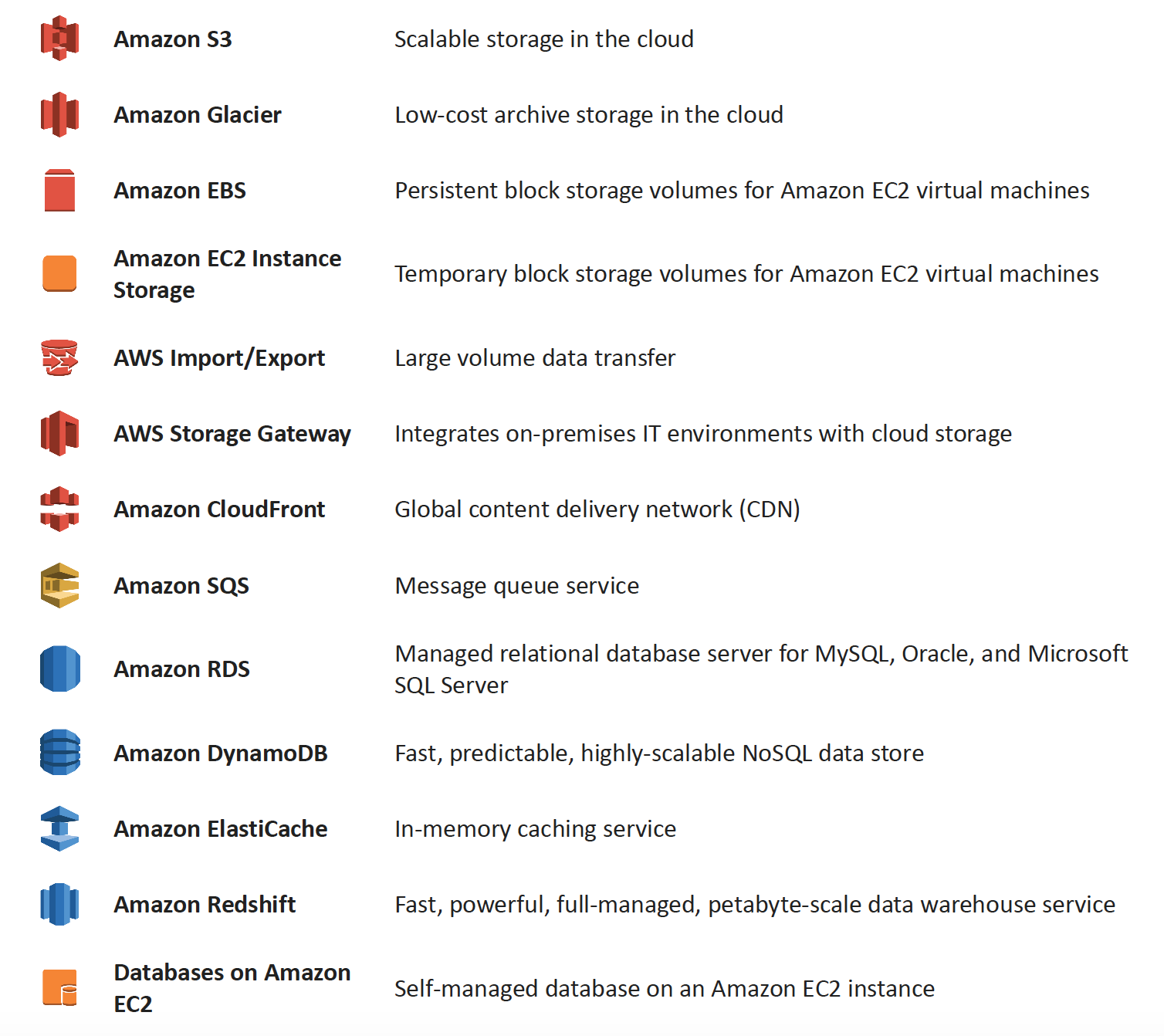
AWS Various Storage Options

AWS Storage Services

Amazon S3 & S3 Glacier Storage Classes

More Details @ AWS Storage Options – S3 & Glacier

Key Updates (2024-2026):

  • S3 Glacier is now three separate storage classes:
    • S3 Glacier Instant Retrieval – millisecond retrieval for rarely accessed data
    • S3 Glacier Flexible Retrieval (formerly S3 Glacier) – minutes to hours retrieval
    • S3 Glacier Deep Archive – lowest cost, 12-48 hour retrieval
  • S3 Express One Zone (launched 2023) – up to 10x faster performance than S3 Standard, single-digit millisecond latency, designed for most frequently accessed data. Received up to 85% price reduction in 2025.
  • S3 Tables (launched Dec 2024) – fully managed Apache Iceberg tables optimized for analytics workloads with up to 3x faster query throughput
  • S3 Intelligent-Tiering – now includes Archive Instant Access, Archive Access, and Deep Archive Access tiers

Amazon Elastic Block Store (EBS) & Instance Store Volumes

More details @ AWS Storage Options – EBS & Instance Store

Amazon EFS (Elastic File System)

  • Fully managed, elastic NFS file system for Linux workloads
  • Supports machine learning, big data analytics, web serving, and content management
  • Scales automatically without provisioning or managing capacity
  • Offers Standard and Infrequent Access storage classes with lifecycle management

Amazon FSx Family

  • FSx for Windows File Server – fully managed Windows-native file system
  • FSx for Lustre – high-performance file system for compute-intensive workloads (new Elastic storage class launched 2025)
  • FSx for NetApp ONTAP – fully managed shared storage with NetApp ONTAP (2nd gen file systems in 2024)
  • FSx for OpenZFS – fully managed OpenZFS file system (Intelligent-Tiering storage class launched Dec 2024, saves up to 85%)

Amazon RDS, DynamoDB & Database on EC2

More details @ AWS Storage Options – RDS, DynamoDB & Database on EC2

Amazon SQS & Redshift

More details @ AWS Storage Options – SQS & Redshift

Amazon CloudFront & ElastiCache

More details @ AWS Storage Options – CloudFront & ElastiCache

AWS Storage Gateway

More details @ AWS Storage Options – Storage Gateway & Import/Export

Key Updates:

  • Storage Gateway continues to provide S3 File Gateway, Tape Gateway, and Volume Gateway
  • FSx File Gateway is no longer available to new customers (effective October 28, 2024). Existing customers should migrate to direct Amazon FSx for Windows File Server access.
  • All Storage Gateway appliances must migrate from Amazon Linux 2 to AL2023 for continued updates

AWS Data Transfer & Migration Services

⚠️ AWS Import/Export & Snow Family Updates:

  • AWS Import/Export (original disk-shipping service) – deprecated long ago, replaced by Snow Family
  • AWS Snowmobile – Retired in March 2024. Service is no longer available.
  • AWS Snowcone – Discontinued effective November 12, 2024. Support ended November 12, 2025.
  • AWS Snowball Edge – Only available to existing customers as of November 7, 2025. Not available to new customers.

Recommended Replacements:

  • AWS DataSync – for online data transfers (now supports cross-cloud transfers to Google Cloud, Azure, Oracle Cloud as of 2025)
  • AWS Data Transfer Terminal (launched Dec 2024) – secure physical locations where you bring your storage devices and connect directly to the AWS network for high-speed uploads to S3, EFS, and other services
  • AWS Outposts – for edge computing use cases previously served by Snow devices
  • AWS Partner solutions – for specialized migration needs

AWS Backup

  • Fully managed, centralized backup service that automates data protection across AWS services and hybrid workloads
  • Supports EC2, EBS, RDS, DynamoDB, EFS, FSx, S3, Storage Gateway, and Amazon EKS (added 2025)
  • Provides ransomware detection and recovery capabilities
  • Supports cross-Region and cross-account backup with AWS Organizations integration
  • Logically air-gapped vaults for additional protection
  • Policy-based backup plans with configurable frequency and retention

Deprecated Services Referenced in Exam Questions

⚠️ Amazon Elastic Transcoder – EOL November 13, 2025

Amazon Elastic Transcoder has been discontinued. AWS Elemental MediaConvert is the recommended replacement, offering better performance, more features, and lower pricing. Questions referencing Elastic Transcoder still appear on older exam versions but the correct architectural pattern (S3 + transcoding + CloudFront) remains valid using MediaConvert.

⚠️ Amazon SWF (Simple Workflow Service) – Superseded by Step Functions

While SWF remains available, AWS recommends Step Functions for all new applications. SWF still appears in exam questions but new designs should use Step Functions for workflow orchestration.

AWS Certification Exam Practice Questions

  • Questions are collected from Internet and the answers are marked as per my knowledge and understanding (which might differ with yours).
  • AWS services are updated everyday and both the answers and questions might be outdated soon, so research accordingly.
  • AWS exam questions are not updated to keep up the pace with AWS updates, so even if the underlying feature has changed the question might not be updated
  • Open to further feedback, discussion and correction.
  1. You are developing a highly available web application using stateless web servers. Which services are suitable for storing session state data? Choose 3 answers.
    1. Elastic Load Balancing
    2. Amazon Relational Database Service (RDS)
    3. Amazon CloudWatch
    4. Amazon ElastiCache
    5. Amazon DynamoDB
    6. AWS Storage Gateway
  2. Your firm has uploaded a large amount of aerial image data to S3. In the past, in your on-premises environment, you used a dedicated group of servers to oaten process this data and used Rabbit MQ, an open source messaging system, to get job information to the servers. Once processed the data would go to tape and be shipped offsite. Your manager told you to stay with the current design, and leverage AWS archival storage and messaging services to minimize cost. Which is correct? [PROFESSIONAL]
    1. Use SQS for passing job messages, use Cloud Watch alarms to terminate EC2 worker instances when they become idle. Once data is processed, change the storage class of the S3 objects to Reduced Redundancy Storage.
    2. Setup Auto-Scaled workers triggered by queue depth that use spot instances to process messages in SQS. Once data is processed, change the storage class of the S3 objects to Reduced Redundancy Storage.
    3. Setup Auto-Scaled workers triggered by queue depth that use spot instances to process messages in SQS. Once data is processed, change the storage class of the S3 objects to Glacier. (Now S3 Glacier Flexible Retrieval or S3 Glacier Deep Archive)
    4. Use SNS to pass job messages use Cloud Watch alarms to terminate spot worker instances when they become idle. Once data is processed, change the storage class of the S3 object to Glacier.
  3. You are developing a new mobile application and are considering storing user preferences in AWS, which would provide a more uniform cross-device experience to users using multiple mobile devices to access the application. The preference data for each user is estimated to be 50KB in size. Additionally 5 million customers are expected to use the application on a regular basis. The solution needs to be cost-effective, highly available, scalable and secure, how would you design a solution to meet the above requirements? [PROFESSIONAL]
    1. Setup an RDS MySQL instance in 2 availability zones to store the user preference data. Deploy a public facing application on a server in front of the database to manage security and access credentials
    2. Setup a DynamoDB table with an item for each user having the necessary attributes to hold the user preferences. The mobile application will query the user preferences directly from the DynamoDB table. Utilize STS. Web Identity Federation, and DynamoDB Fine Grained Access Control to authenticate and authorize access
    3. Setup an RDS MySQL instance with multiple read replicas in 2 availability zones to store the user preference data .The mobile application will query the user preferences from the read replicas. Leverage the MySQL user management and access privilege system to manage security and access credentials.
    4. Store the user preference data in S3 Setup a DynamoDB table with an item for each user and an item attribute pointing to the user’ S3 object. The mobile application will retrieve the S3 URL from DynamoDB and then access the S3 object directly utilize STS, Web identity Federation, and S3 ACLs to authenticate and authorize access.
  4. A company is building a voting system for a popular TV show, viewers would watch the performances then visit the show’s website to vote for their favorite performer. It is expected that in a short period of time after the show has finished the site will receive millions of visitors. The visitors will first login to the site using their Amazon.com credentials and then submit their vote. After the voting is completed the page will display the vote totals. The company needs to build the site such that can handle the rapid influx of traffic while maintaining good performance but also wants to keep costs to a minimum. Which of the design patterns below should they use? [PROFESSIONAL]
    1. Use CloudFront and an Elastic Load balancer in front of an auto-scaled set of web servers, the web servers will first can the Login With Amazon service to authenticate the user then process the users vote and store the result into a multi-AZ Relational Database Service instance.
    2. Use CloudFront and the static website hosting feature of S3 with the Javascript SDK to call the Login With Amazon service to authenticate the user, use IAM Roles to gain permissions to a DynamoDB table to store the users vote.
    3. Use CloudFront and an Elastic Load Balancer in front of an auto-scaled set of web servers, the web servers will first call the Login with Amazon service to authenticate the user, the web servers will process the users vote and store the result into a DynamoDB table using IAM Roles for EC2 instances to gain permissions to the DynamoDB table.
    4. Use CloudFront and an Elastic Load Balancer in front of an auto-scaled set of web servers, the web servers will first call the Login With Amazon service to authenticate the user, the web servers would process the users vote and store the result into an SQS queue using IAM Roles for EC2 Instances to gain permissions to the SQS queue. A set of application servers will then retrieve the items from the queue and store the result into a DynamoDB table
  5. A large real-estate brokerage is exploring the option to adding a cost-effective location-based alert to their existing mobile application. The application backend infrastructure currently runs on AWS. Users who opt in to this service will receive alerts on their mobile device regarding real-estate offers in proximity to their location. For the alerts to be relevant delivery time needs to be in the low minute count. The existing mobile app has 5 million users across the US. Which one of the following architectural suggestions would you make to the customer? [PROFESSIONAL]
    1. Mobile application will submit its location to a web service endpoint utilizing Elastic Load Balancing and EC2 instances. DynamoDB will be used to store and retrieve relevant offers. EC2 instances will communicate with mobile carriers/device providers to push alerts back to mobile application.
    2. Use AWS Direct Connect or VPN to establish connectivity with mobile carriers EC2 instances will receive the mobile applications location through carrier connection: RDS will be used to store and relevant offers. EC2 instances will communicate with mobile carriers to push alerts back to the mobile application
    3. Mobile application will send device location using SQS. EC2 instances will retrieve the relevant offers from DynamoDB. AWS Mobile Push will be used to send offers to the mobile application (Note: Amazon SNS Mobile Push is now the terminology for mobile push notifications)
    4. Mobile application will send device location using AWS Mobile Push. EC2 instances will retrieve the relevant offers from DynamoDB. EC2 instances will communicate with mobile carriers/device providers to push alerts back to the mobile application.
  6. You are running a news website in the eu-west-1 region that updates every 15 minutes. The website has a worldwide audience and it uses an Auto Scaling group behind an Elastic Load Balancer and an Amazon RDS database. Static content resides on Amazon S3, and is distributed through Amazon CloudFront. Your Auto Scaling group is set to trigger a scale up event at 60% CPU utilization; you use an Amazon RDS extra-large DB instance with 10.000 Provisioned IOPS its CPU utilization is around 80%. While freeable memory is in the 2 GB range. Web analytics reports show that the average load time of your web pages is around 1.5 to 2 seconds, but your SEO consultant wants to bring down the average load time to under 0.5 seconds. How would you improve page load times for your users? (Choose 3 answers) [PROFESSIONAL]
    1. Lower the scale up trigger of your Auto Scaling group to 30% so it scales more aggressively.
    2. Add an Amazon ElastiCache caching layer to your application for storing sessions and frequent DB queries
    3. Configure Amazon CloudFront dynamic content support to enable caching of re-usable content from your site
    4. Switch Amazon RDS database to the high memory extra-large Instance type
    5. Set up a second installation in another region, and use the Amazon Route 53 latency-based routing feature to select the right region.
  7. A read only news reporting site with a combined web and application tier and a database tier that receives large and unpredictable traffic demands must be able to respond to these traffic fluctuations automatically. What AWS services should be used meet these requirements? [PROFESSIONAL]
    1. Stateless instances for the web and application tier synchronized using ElastiCache Memcached in an autoscaling group monitored with CloudWatch. And RDS with read replicas.
    2. Stateful instances for the web and application tier in an autoscaling group monitored with CloudWatch and RDS with read replicas
    3. Stateful instances for the web and application tier in an autoscaling group monitored with CloudWatch. And multi-AZ RDS
    4. Stateless instances for the web and application tier synchronized using ElastiCache Memcached in an autoscaling group monitored with CloudWatch and multi-AZ RDS
  8. You have a periodic Image analysis application that gets some files as input, analyzes them and for each file writes some data in output to a ten file. The number of files in input per day is high and concentrated in a few hours of the day. Currently you have a server on EC2 with a large EBS volume that hosts the input data and the results it takes almost 20 hours per day to complete the process. What services could be used to reduce the elaboration time and improve the availability of the solution? [PROFESSIONAL]
    1. S3 to store I/O files. SQS to distribute elaboration commands to a group of hosts working in parallel. Auto scaling to dynamically size the group of hosts depending on the length of the SQS queue
    2. EBS with Provisioned IOPS (PIOPS) to store I/O files. SNS to distribute elaboration commands to a group of hosts working in parallel Auto Scaling to dynamically size the group of hosts depending on the number of SNS notifications
    3. S3 to store I/O files, SNS to distribute evaporation commands to a group of hosts working in parallel. Auto scaling to dynamically size the group of hosts depending on the number of SNS notifications
    4. EBS with Provisioned IOPS (PIOPS) to store I/O files SQS to distribute elaboration commands to a group of hosts working in parallel Auto Scaling to dynamically size the group to hosts depending on the length of the SQS queue.
  9. A 3-tier e-commerce web application is current deployed on-premises and will be migrated to AWS for greater scalability and elasticity. The web server currently shares read-only data using a network distributed file system The app server tier uses a clustering mechanism for discovery and shared session state that depends on IP multicast The database tier uses shared-storage clustering to provide database fail over capability, and uses several read slaves for scaling. Data on all servers and the distributed file system directory is backed up weekly to off-site tapes. Which AWS storage and database architecture meets the requirements of the application? [PROFESSIONAL]
    1. Web servers store read-only data in S3, and copy from S3 to root volume at boot time. App servers share state using a combination of DynamoDB and IP unicast. Database use RDS with multi-AZ deployment and one or more Read Replicas. Backup web and app servers backed up weekly via AMIs, database backed up via DB snapshots.
    2. Web servers store read-only data in S3, and copy from S3 to root volume at boot time. App servers share state using a combination of DynamoDB and IP unicast. Database use RDS with multi-AZ deployment and one or more Read replicas. Backup web servers app servers, and database backed up weekly to Glacier using snapshots (Snapshots to Glacier don’t work directly with EBS snapshots)
    3. Web servers store read-only data in S3 and copy from S3 to root volume at boot time. App servers share state using a combination of DynamoDB and IP unicast. Database use RDS with multi-AZ deployment. Backup web and app servers backed up weekly via AMIs. Database backed up via DB snapshots (Need Read replicas for scalability and elasticity)
    4. Web servers, store read-only data in an EC2 NFS server, mount to each web server at boot time App servers share state using a combination of DynamoDB and IP multicast Database use RDS with multi-AZ deployment and one or more Read Replicas Backup web and app servers backed up weekly via AMIs database backed up via DB snapshots (IP multicast not available in AWS)
  10. Our company is getting ready to do a major public announcement of a social media site on AWS. The website is running on EC2 instances deployed across multiple Availability Zones with a Multi-AZ RDS MySQL Extra Large DB Instance. The site performs a high number of small reads and writes per second and relies on an eventual consistency model. After comprehensive tests you discover that there is read contention on RDS MySQL. Which are the best approaches to meet these requirements? (Choose 2 answers) [PROFESSIONAL]
    1. Deploy ElastiCache in-memory cache running in each availability zone
    2. Implement sharding to distribute load to multiple RDS MySQL instances (Would distribute read write both, focus is on read contention)
    3. Increase the RDS MySQL Instance size and Implement provisioned IOPS (Would distribute read write both, focus is on read contention)
    4. Add an RDS MySQL read replica in each availability zone
  11. Run 2-tier app with the following: an ELB, three web app server on EC2, and 1 MySQL RDS db. With grown load, db queries take longer and longer and slow down the overall response time for user request. What Options could speed up performance? (Choose 3) [PROFESSIONAL]
    1. Create an RDS read-replica and redirect half of the database read request to it
    2. Cache database queries in Amazon ElastiCache
    3. Setup RDS in multi-availability zone mode.
    4. Shard the database and distribute loads between shards.
    5. Use Amazon CloudFront to cache database queries.
  12. You have a web application leveraging an Elastic Load Balancer (ELB) In front of the web servers deployed using an Auto Scaling Group Your database is running on Relational Database Service (RDS) The application serves out technical articles and responses to them in general there are more views of an article than there are responses to the article. On occasion, an article on the site becomes extremely popular resulting in significant traffic Increases that causes the site to go down. What could you do to help alleviate the pressure on the infrastructure while maintaining availability during these events? Choose 3 answers [PROFESSIONAL]
    1. Leverage CloudFront for the delivery of the articles.
    2. Add RDS read-replicas for the read traffic going to your relational database
    3. Leverage ElastiCache for caching the most frequently used data.
    4. Use SQS to queue up the requests for the technical posts and deliver them out of the queue (does not process and would not be real time)
    5. Use Route53 health checks to fail over to an S3 bucket for an error page (more of an error handling then availability)
  1. Your website is serving on-demand training videos to your workforce. Videos are uploaded monthly in high resolution MP4 format. Your workforce is distributed globally often on the move and using company-provided tablets that require the HTTP Live Streaming (HLS) protocol to watch a video. Your company has no video transcoding expertise and it required you might need to pay for a consultant. How do you implement the most cost-efficient architecture without compromising high availability and quality of video delivery? [PROFESSIONAL]
    1. AWS Elemental MediaConvert to transcode original high-resolution MP4 videos to HLS. S3 to host videos with Lifecycle Management to archive original files to S3 Glacier Flexible Retrieval after a few days. CloudFront to serve HLS transcoded videos from S3. (MediaConvert replaces Elastic Transcoder (EOL Nov 2025) for high quality transcoding. S3 to host videos cheaply, Glacier for archives and CloudFront for high availability)
    2. A video transcoding pipeline running on EC2 using SQS to distribute tasks and Auto Scaling to adjust the number of nodes depending on the length of the queue S3 to host videos with Lifecycle Management to archive all files to Glacier after a few days CloudFront to serve HLS transcoding videos from Glacier
    3. AWS Elemental MediaConvert to transcode original high-resolution MP4 videos to HLS EBS volumes to host videos and EBS snapshots to incrementally backup original files after a few days. CloudFront to serve HLS transcoded videos from EC2.
    4. A video transcoding pipeline running on EC2 using SQS to distribute tasks and Auto Scaling to adjust the number of nodes depending on the length of the queue. EBS volumes to host videos and EBS snapshots to incrementally backup original files after a few days. CloudFront to serve HLS transcoded videos from EC2

    Note: Original question referenced Elastic Transcoder which reached End of Life on November 13, 2025. AWS Elemental MediaConvert is the replacement service. The architectural pattern remains the same.

  2. To meet regulatory requirements, a pharmaceuticals company needs to archive data after a drug trial test is concluded. Each drug trial test may generate up to several thousands of files, with compressed file sizes ranging from 1 byte to 100MB. Once archived, data rarely needs to be restored, and on the rare occasion when restoration is needed, the company has 24 hours to restore specific files that match certain metadata. Searches must be possible by numeric file ID, drug name, participant names, date ranges, and other metadata. Which is the most cost-effective architectural approach that can meet the requirements? [PROFESSIONAL]
    1. Store individual files in Amazon S3 Glacier, using the file ID as the archive name. When restoring data, query the Amazon Glacier vault for files matching the search criteria. (Individual files are expensive and does not allow searching by participant names etc)
    2. Store individual files in Amazon S3, and store search metadata in an Amazon Relational Database Service (RDS) multi-AZ database. Create a lifecycle rule to move the data to Amazon S3 Glacier after a certain number of days. When restoring data, query the Amazon RDS database for files matching the search criteria, and move the files matching the search criteria back to S3 Standard class. (As the data is not needed can be stored to Glacier directly and the data need not be moved back to S3 standard)
    3. Store individual files in Amazon S3 Glacier, and store the search metadata in an Amazon RDS multi-AZ database. When restoring data, query the Amazon RDS database for files matching the search criteria, and retrieve the archive name that matches the file ID returned from the database query. (Individual files and Multi-AZ is expensive)
    4. First, compress and then concatenate all files for a completed drug trial test into a single Amazon S3 Glacier archive. Store the associated byte ranges for the compressed files along with other search metadata in an Amazon RDS database with regular snapshotting. When restoring data, query the database for files that match the search criteria, and create restored files from the retrieved byte ranges.
    5. Store individual compressed files and search metadata in Amazon Simple Storage Service (S3). Create a lifecycle rule to move the data to Amazon S3 Glacier, after a certain number of days. When restoring data, query the Amazon S3 bucket for files matching the search criteria, and retrieve the file to S3 reduced redundancy in order to move it back to S3 Standard class. (Once the data is moved from S3 to Glacier the metadata is lost, as Glacier does not have metadata and must be maintained externally. Also S3 Reduced Redundancy Storage is no longer recommended.)
  3. A document storage company is deploying their application to AWS and changing their business model to support both free tier and premium tier users. The premium tier users will be allowed to store up to 200GB of data and free tier customers will be allowed to store only 5GB. The customer expects that billions of files will be stored. All users need to be alerted when approaching 75 percent quota utilization and again at 90 percent quota use. To support the free tier and premium tier users, how should they architect their application? [PROFESSIONAL]
    1. The company should utilize an Amazon Simple Workflow Service activity worker that updates the users data counter in Amazon DynamoDB. The activity worker will use Simple Email Service to send an email if the counter increases above the appropriate thresholds. (Note: For new implementations, AWS Step Functions with DynamoDB and SES would be the modern approach)
    2. The company should deploy an Amazon Relational Database Service relational database with a store objects table that has a row for each stored object along with size of each object. The upload server will query the aggregate consumption of the user in question by first determining the files stored by the user, and then querying the stored objects table for respective file sizes and send an email via Amazon Simple Email Service if the thresholds are breached.
    3. The company should write both the content length and the username of the files owner as S3 metadata for the object. They should then create a file watcher to iterate over each object and aggregate the size for each user and send a notification via Amazon Simple Queue Service to an emailing service if the storage threshold is exceeded.
    4. The company should create two separated Amazon Simple Storage Service buckets one for data storage for free tier users and another for data storage for premium tier users. An Amazon Simple Workflow Service activity worker will query all objects for a given user based on the bucket the data is stored
  4. Your company has been contracted to develop and operate a website that tracks NBA basketball statistics. Statistical data to derive reports like “best game-winning shots from the regular season” and more frequently built reports like “top shots of the game” need to be stored durably for repeated lookup. Leveraging social media techniques, NBA fans submit and vote on new report types from the existing data set so the system needs to accommodate variability in data queries and new static reports must be generated and posted daily. Initial research in the design phase indicates that there will be over 3 million report queries on game day by end users and other applications that use this application as a data source. It is expected that this system will gain in popularity over time and reach peaks of 10-15 million report queries of the system on game days. Select the answer that will allow your application to best meet these requirements while minimizing costs. [PROFESSIONAL]
    1. Launch a multi-AZ MySQL Amazon Relational Database Service (RDS) Read Replica connected to your multi AZ master database and generate reports by querying the Read Replica. Perform a daily table cleanup.
    2. Implement a multi-AZ MySQL RDS deployment and have the application generate reports from Amazon ElastiCache for in-memory performance results. Utilize the default expire parameter for items in the cache.
    3. Generate reports from a multi-AZ MySQL Amazon RDS deployment and have an offline task put reports in Amazon Simple Storage Service (S3) and use CloudFront to cache the content. Use a TTL to expire objects daily. (Offline task with S3 storage and CloudFront cache)
    4. Query a multi-AZ MySQL RDS instance and store the results in a DynamoDB table. Generate reports from the DynamoDB table. Remove stale tables daily.

References
AWS Storage Options – SQS & Redshift

SQS

  • is a fully managed message queuing service that provides a reliable, highly scalable, hosted queue for temporary storage and delivery of messages up to 1 MiB in size (increased from 256 KB in August 2025).
  • supports a virtually unlimited number of queues and supports two queue types:
    • Standard queues – unordered, at-least-once delivery with nearly unlimited throughput.
    • FIFO queues – exactly-once processing with strict message ordering, supporting up to 70,000 messages per second with high throughput mode.

Ideal Usage Patterns

  • is ideally suited to any scenario where multiple application components must communicate and coordinate their work in a loosely coupled manner particularly producer consumer scenarios.
  • can be used to coordinate a multi-step processing pipeline, where each message is associated with a task that must be processed.
  • enables the number of worker instances to scale up or down, and also enable the processing power of each single worker instance to scale up or down, to suit the total workload, without any application changes.
  • ideal for multi-tenant workloads using fair queues (launched July 2025) to mitigate noisy neighbor impact and ensure consistent processing across tenants.
  • supports event-driven architectures with AWS Lambda event source mapping, including provisioned mode for 3x faster scaling and 16x higher concurrency.

Anti-Patterns

  • Binary or Large Messages
    • SQS supports messages up to 1 MiB. If the application requires binary or messages exceeding this limit, it is best to use the Amazon SQS Extended Client Library with Amazon S3 to store the payload and SQS to store the pointer.
  • Long Term storage
    • SQS stores messages for max 14 days and if application requires storage period longer than 14 days, Amazon S3 or other storage options should be preferred.
  • High-speed message queuing or very short tasks
    • If the application requires a very high-speed message send and receive response from a single producer or consumer, use of Amazon DynamoDB or a message-queuing system hosted on Amazon EC2 may be more appropriate.

Performance

  • is a distributed queuing system that is optimized for horizontal scalability, not for single-threaded sending or receiving speeds.
  • Standard queues support nearly unlimited throughput (thousands of transactions per second per API action).
  • FIFO queues support up to 3,000 messages per second with batching by default, or up to 70,000 messages per second (700,000 with batching) in high throughput mode in select regions.
  • FIFO queues support up to 120,000 in-flight messages (increased from 20,000 in November 2024).
  • Higher receive performance can be achieved by requesting multiple messages (up to 10) in a single call.
  • Fair queues (July 2025) automatically reorder messages to maintain consistent dwell time across tenants, preventing noisy neighbors from impacting processing latency.

Durability & Availability

  • are highly durable but temporary.
  • stores all messages redundantly across multiple servers and data centers.
  • Message retention time is configurable on a per-queue basis, from a minimum of one minute to a maximum of 14 days.
  • Messages are retained in a queue until they are explicitly deleted, or until they are automatically deleted upon expiration of the retention time.
  • supports dead-letter queues (DLQ) for isolating messages that fail processing, with DLQ redrive capability to move messages back to the source queue or a custom destination for reprocessing.

Cost Model

  • pricing is based on
    • number of requests (per million requests)
    • the amount of data transferred out (priced per GB per month)
    • First 1 million requests per month are free (Free Tier)

Scalability & Elasticity

  • is both highly elastic and massively scalable.
  • is designed to enable a virtually unlimited number of computers to read and write a virtually unlimited number of messages at any time.
  • supports virtually unlimited numbers of queues and messages per queue for any user.
  • supports dual-stack (IPv4 and IPv6) endpoints for flexible network access.

Key Features (Recent Updates)

  • Message payload size increased to 1 MiB (August 2025) – supports larger messages for both standard and FIFO queues without needing the Extended Client Library.
  • Fair queues (July 2025) – automatically mitigates noisy neighbor impact in multi-tenant standard queues by reordering messages to maintain consistent dwell time across tenants.
  • FIFO high throughput mode – up to 70,000 TPS per API action (November 2023), enabling 700,000 messages per second with batching.
  • FIFO in-flight limit increase (November 2024) – increased from 20,000 to 120,000 in-flight messages per FIFO queue.
  • Lambda provisioned mode for SQS (January 2025) – dedicated polling resources providing 3x faster scaling and 16x higher concurrency for event source mapping.
  • Dead-letter queue redrive – move failed messages from DLQ back to source queue or a custom destination for both standard and FIFO queues.
  • Simplified KMS permissions – SendMessage no longer requires kms:Decrypt permission; only kms:GenerateDataKey is needed.
  • Temporary queues – application-managed virtual queues for request-response patterns that reduce cost and development time.

Amazon Redshift

  • is a fast, fully-managed, petabyte-scale data warehouse service that makes it simple and cost-effective to efficiently analyze all data using existing business intelligence tools.
  • is optimized for datasets that range from a few hundred gigabytes to a petabyte or more.
  • manages the work needed to set up, operate, and scale a data warehouse, from provisioning the infrastructure capacity to automating ongoing administrative tasks such as backups and patching.
  • offers two deployment models: Provisioned clusters (RA3 and new RG instances) and Redshift Serverless (pay-per-use with automatic scaling).
⚠️ Important: Amazon Redshift DC2 instances reached End of Life on April 24, 2026. New DC2 clusters cannot be created since May 15, 2025. Migrate to RA3 instances, RG instances (Graviton-powered, GA May 2026), or Redshift Serverless. DS2 instances were previously deprecated in favor of RA3.

Ideal Usage Pattern

  • is ideal for analyzing large datasets using existing business intelligence tools.
  • Common use cases include
    • Analyze global sales data for multiple products
    • Store historical stock trade data
    • Analyze ad impressions and clicks
    • Aggregate gaming data
    • Analyze social trends
    • Measure clinical quality, operation efficiency, and financial performance in the health care space
    • Near real-time analytics using zero-ETL integrations from Aurora, DynamoDB, RDS, and SaaS applications
    • Data lakehouse analytics querying data in S3 data lakes using Redshift Spectrum
    • Generative AI applications using Amazon Bedrock integration for sentiment analysis, text generation, and summarization directly on warehouse data

Anti-Pattern

  • OLTP workloads
    • Redshift is a column-oriented database and more suited for data warehousing and analytics. If application involves online transaction processing, Amazon RDS or Aurora would be a better choice.
  • Blob data
    • For Blob storage, Amazon S3 would be a better choice with metadata in other storage as RDS or DynamoDB.

Performance

  • Amazon Redshift allows very high query performance on datasets ranging in size from hundreds of gigabytes to a petabyte or more.
  • It uses columnar storage, data compression, and zone maps to reduce the amount of I/O needed to perform queries.
  • It has a massively parallel processing (MPP) architecture that parallelizes and distributes SQL operations to take advantage of all available resources.
  • Underlying hardware is designed for high performance data processing that uses local attached storage to maximize throughput.
  • New RG instances (GA May 2026) powered by AWS Graviton deliver up to 2.4x faster performance than RA3 at 30% lower price per vCPU.
  • AI-driven scaling and optimization in Redshift Serverless automatically provisions and scales capacity for demanding workloads.
  • Query performance improvements (March 2026) speed up new queries in BI dashboards and ETL workloads by up to 7x.
  • Concurrency scaling automatically adds additional cluster capacity to handle burst read and write workloads, with support for data ingestion (COPY queries in Parquet/ORC from S3).

Durability & Availability

  • Amazon Redshift stores three copies of your data—all data written to a node in your cluster is automatically replicated to other nodes within the cluster, and all data is continuously backed up to Amazon S3.
  • Snapshots are automated, incremental, and continuous and stored for a user-defined period (1-35 days).
  • Manual snapshots can be created and are retained until explicitly deleted.
  • Amazon Redshift continuously monitors the health of the cluster and automatically re-replicates data from failed drives and replaces nodes as necessary.
  • Multi-AZ deployments (GA for RA3 clusters) run your data warehouse across two Availability Zones simultaneously, providing continued operation during AZ failure scenarios.

Cost Model

  • Provisioned clusters pricing:
    • Compute node hours – total hours run across all compute nodes (RA3 or RG instances)
    • Redshift Managed Storage (RMS) – billed per GB/month, separate from compute (RA3/RG only)
    • Backup storage – for automated and manual snapshots beyond the free tier
    • Data transfer – standard AWS data transfer charges apply
    • Concurrency scaling – free for 1 hour per day per cluster, then per-second billing
    • Spectrum – per TB of data scanned in S3
  • Redshift Serverless pricing:
    • Compute – per RPU-hour (Redshift Processing Unit), billed per second with no charge when idle
    • Storage – per GB/month for managed storage
  • Reserved Instance pricing available for provisioned clusters (1-year or 3-year terms) for significant discounts.

Scalability & Elasticity

  • Provisioned clusters – Elastic resize allows adding or removing nodes within minutes. Classic resize available for node type changes.
  • Redshift Serverless – automatically scales compute capacity up and down based on workload demands with no cluster management required.
  • Data sharing allows securely sharing live, transactionally consistent data across Redshift clusters (cross-account, cross-region) without copying data.
  • Multi-warehouse writes through data sharing (GA November 2024) enable using different warehouses of different types and sizes for ETL workloads.

Key Features (Recent Updates)

  • RG Instances (GA May 2026) – New Graviton-powered instance family delivering 2.4x faster performance than RA3 at 30% lower price per vCPU.
  • DC2 End of Life (April 24, 2026) – Migrate to RA3, RG, or Serverless. New DC2 cluster creation blocked since May 15, 2025.
  • Redshift Serverless – Pay-per-use model with automatic scaling, AI-driven optimization, and per-second billing with no charge when idle.
  • Zero-ETL integrations – Near real-time data replication from Aurora, DynamoDB, RDS, and self-managed databases to Redshift without building ETL pipelines. Also supports SaaS sources (Salesforce, SAP, Zendesk).
  • Multi-AZ deployments – Run RA3 provisioned clusters across two Availability Zones for high availability.
  • Amazon Bedrock integration (October 2024) – Run generative AI tasks (text generation, sentiment analysis, summarization, classification) directly on Redshift data using foundation models via SQL.
  • Amazon Q generative SQL – Generate SQL from natural language prompts in the Redshift Query Editor.
  • Data sharing – Share live data across clusters, accounts, and regions without data movement. Supports multi-warehouse writes for ETL.
  • Redshift Spectrum – Query exabytes of data in S3 without loading it into Redshift, enabling data lakehouse architectures.
  • Concurrency scaling for ingestion (2026) – Automatically scales for COPY queries in Parquet/ORC formats from S3 during traffic spikes.
  • 7x query performance improvement (March 2026) – Faster response for BI dashboards, ETL pipelines, and near real-time analytics.

AWS Storage Options – CloudFront & ElastiCache

Amazon CloudFront

  • is a webservice for content delivery
  • provides low latency by caching and delivering content from a global network of 750+ Points of Presence (PoPs) across 100+ cities in 50+ countries
  • supports HTTP/HTTPS for static and dynamic content delivery
  • optimized to work with Amazon services like S3, ELB, MediaConvert etc. as well as works seamlessly with any non-AWS origin server
⚠️ Note: CloudFront RTMP distributions were discontinued on December 31, 2020. For streaming, use HTTP-based streaming protocols (HLS, DASH) with CloudFront web distributions and AWS Elemental MediaConvert.

Ideal Usage Patterns

  • is ideal for distribution of frequently accessed static content, or dynamic content or for streaming audio or video that benefits from edge delivery
  • API acceleration and real-time content personalization at the edge
  • security at the edge with integrated WAF, DDoS protection, and bot management

Anti-Pattern

  • Infrequently accessed data
    • If the data is infrequently accessed, it would be better to serve the data from the Origin server
  • Programmatic cache invalidation
    • CloudFront supports cache invalidation, however AWS recommends using object versioning rather than programmatic cache invalidation.

Performance

  • is designed for low latency and high bandwidth delivery of content by redirecting the user to the nearest edge location in terms of latency and caching the content preventing the round trip to the origin server
  • supports HTTP/2 and HTTP/3 (QUIC) for improved connection performance

Durability & Availability

  • provides high Availability by delivering content from a distributed global network of edge locations. Amazon also constantly monitors the network paths connecting Origin servers to CloudFront
  • does not provide durable storage, which is more of the responsibility of the underlying Origin server providing the content for e.g. S3

Cost Model

  • has pay-as-you-go pricing with two main components:
    • regional data transfer out (per GB) and
    • requests (per 10,000)
  • Flat-Rate Pricing Plans (launched Nov 2025) — combine CloudFront CDN, AWS WAF, DDoS protection, bot management, Route 53 DNS, CloudWatch Logs, edge compute, and S3 storage credits into one monthly price with no overage charges

Scalability & Elasticity

  • provides seamless scalability & elasticity by automatically responding to the increase or the decrease in the demand

Edge Compute

  • CloudFront Functions — lightweight functions for high-scale, latency-sensitive request/response transformations (URL rewrites, header manipulation, redirects) executed at 750+ PoPs
  • Lambda@Edge — more powerful compute triggered at regional edge caches for complex logic (authentication, dynamic origin selection, content generation)
  • CloudFront KeyValueStore (launched 2023) — globally distributed, low-latency data store for CloudFront Functions enabling dynamic configuration (A/B testing, feature flags, geo-routing) without code redeployment

Security

  • Origin Access Control (OAC) — recommended method to restrict S3 origin access to CloudFront only, replacing the legacy Origin Access Identity (OAI). OAI creation was deprecated in 2024; new distributions since March 2026 can only use OAC.
  • AWS Shield Standard — included automatically with every CloudFront distribution for DDoS protection at no extra cost
  • AWS WAF integration — protect against web exploits and bots at the edge
  • Field-Level Encryption — encrypt sensitive data fields at the edge before forwarding to origin

ElastiCache

  • is a fully managed, serverless caching service that makes it easy to deploy, operate, and scale distributed in-memory caches in the cloud
  • helps improves performance of the applications by allowing retrieval of data from fast, managed, in-memory caching system with microsecond latency and up to 99.99% availability SLA
  • supports three open-source caching engines:
    • Valkey (recommended for new workloads) — open-source fork of Redis OSS 7.2, stewarded by the Linux Foundation (BSD-3 licensed)
    • Memcached — simple object caching engine
    • Redis OSS — key-value store (note: Redis OSS 7.2 is the last fully open-source Redis version)
🆕 Valkey Engine (Oct 2024): AWS recommends Valkey for new workloads. It provides 33% lower Serverless pricing and 20% lower node-based pricing compared to Redis OSS, with better performance and active open-source development. Valkey is a drop-in replacement for Redis OSS 7.2 and can be upgraded in-place.

Deployment Modes

  • ElastiCache Serverless (launched Nov 2023)
    • zero infrastructure management with instant auto-scaling
    • pay-per-use pricing based on data stored (GB-hour) and ElastiCache Processing Units (ECPUs)
    • creates a cache in under a minute; starts as low as $6/month with Valkey
    • zero downtime maintenance
  • Node-based (self-designed clusters)
    • fine-grained control over node type, count, and placement
    • supports Reserved Nodes for cost savings
    • Graviton3-based nodes available for better price-performance

Ideal Usage Patterns

  • improving application performance by storing critical data in-memory for low latency access
  • use cases involve usage as a database front end for read heavy applications, improving performance and reducing load on databases, or managing user session data, cache dynamically generated pages, or compute intensive calculations etc.
  • Real-time search (2026) — full-text, exact-match, numeric range, and hybrid search with microsecond latency
  • Vector similarity search — AI-driven semantic retrieval for RAG and recommendation systems

Anti-Patterns

  • Persistent Data
    • If the application needs fast access to data coupled with strong data durability, Amazon DynamoDB would be a better option
    • Note: ElastiCache for Valkey now supports durability with Multi-AZ transactional log (June 2026), enabling fast failover and data recovery without data loss

Performance

  • provides microsecond read latency and single-digit millisecond write latency with throughput up to millions of requests per second
  • Valkey 9.0 (May 2026) introduces enhanced search capabilities with full-text, hybrid, and aggregation queries directly in the cache

Durability & Availability

  • provides up to 99.99% availability SLA with Multi-AZ deployments
  • With the Memcached engine
    • all ElastiCache nodes in a single cache cluster are provisioned in a single Availability Zone.
    • ElastiCache automatically monitors the health of your cache nodes and replaces them in the event of network partitioning, host hardware, or software failure.
    • In the event of cache node failure, the cluster remains available, but performance may be reduced due to time needed to repopulate the cache in the new “cold” cache nodes.
    • To provide enhanced fault-tolerance for Availability Zone failures or cold-cache effects, you can run redundant cache clusters in different Availability Zones.
  • With the Valkey/Redis OSS engine,
    • ElastiCache supports replication to up to five read replicas for scaling. To improve availability, you can place read replicas in other Availability Zones.
    • ElastiCache monitors the primary node, and if the node becomes unavailable, ElastiCache will repair or replace the primary node if possible, using the same DNS name.
    • If the primary cache node recovery fails or its Availability Zone is unavailable, primary node can be failed over to one of the read replicas with an API call.
    • Durability support (June 2026): Multi-AZ transactional log enables data persistence across AZs, preventing data loss during failover, recovery, and node restarts.

Cost Model

  • offers two pricing models:
    • Serverless: pay-per-use based on data stored (GB-hour) and ECPUs consumed. Valkey Serverless is 33% cheaper than Redis OSS Serverless.
    • Node-based: pricing per cache node-hour consumed. Supports Reserved Nodes for up to 55% savings.

Scalability & Elasticity

  • ElastiCache is highly scalable and elastic.
  • Serverless: instantly auto-scales to match application demand with no capacity planning
  • Node-based: Cache nodes can be added or deleted from the cache cluster. Auto Discovery enables automatic discovery of Memcached cache nodes by ElastiCache Clients when the nodes are added to or removed from an ElastiCache cluster.


Storage Options Whitepaper – Storage Gateway – Import/Export – AWS Certification

AWS Storage Options – Storage Gateway & Import/Export (Snow Family)

Provides a brief summary for the Ideal Use cases and Anti-Patterns for AWS Storage Gateway and AWS Snow Family (formerly Import/Export) storage options.

📌 2025/2026 Update: This post has been significantly updated to reflect current AWS service terminology and availability:

  • Storage Gateway now offers four gateway types: S3 File Gateway, FSx File Gateway (no longer available to new customers), Volume Gateway, and Tape Gateway.
  • AWS Import/Export was replaced by AWS Snowball (2015), and the Snow Family is being significantly reduced — Snowmobile retired (March 2024), Snowcone discontinued (Nov 2024), and Snowball Edge restricted to existing customers only (Nov 2025).
  • AWS Data Transfer Terminal is the new physical data transfer alternative for new customers.

AWS Storage Gateway

  • AWS Storage Gateway is a hybrid cloud storage service that provides on-premises access to virtually unlimited cloud storage.
  • Storage Gateway provides a standard set of storage protocols such as iSCSI, SMB, and NFS, which allow you to use AWS storage without rewriting existing applications.
  • It provides low-latency performance by maintaining frequently accessed data on-premises while securely storing all data encrypted in AWS.
  • For disaster recovery scenarios, it can serve as a cloud-hosted solution, together with EC2, that mirrors the entire production environment.
  • Storage Gateway can be deployed as a virtual machine (VM) within VMware, Hyper-V, or Linux KVM virtual environments, or as an Amazon EC2 instance within a VPC, or on a dedicated hardware appliance.
  • Storage Gateway offers four gateway types:
    • Amazon S3 File Gateway
      • Presents Amazon S3 objects as files accessible via NFS or SMB protocols.
      • On-premises applications read and write files to the gateway, which stores them as objects in S3 buckets.
      • Maintains a local cache of recently accessed files for low-latency retrieval.
      • Supports S3 Standard, S3 Intelligent-Tiering, S3 Standard-IA, and S3 One Zone-IA storage classes.
    • Amazon FSx File Gateway
      • Provides low-latency, on-premises access to fully managed Windows file shares in Amazon FSx for Windows File Server.
      • ⚠️ No longer available to new customers as of October 28, 2024. Existing customers can continue using the service. AWS recommends connecting directly to Amazon FSx for Windows File Server as an alternative.
    • Volume Gateway
      • Presents cloud-backed iSCSI block storage volumes to on-premises applications.
      • Operates in two modes:
        • Cached volumes (formerly Gateway-cached volumes) – Primary data stored in S3, with frequently accessed data retained locally in a cache. Minimizes the need to scale on-premises storage while providing low-latency access to frequently accessed data.
        • Stored volumes (formerly Gateway-stored volumes) – Complete primary data stored locally, while asynchronously backing up data to AWS as EBS snapshots. Provides low-latency access to entire datasets with durable, off-site backups.
      • Cached volumes can be up to 32 TiB; stored volumes can be up to 16 TiB.
    • Tape Gateway
      • Presents a virtual tape library (VTL) interface to existing backup applications using iSCSI.
      • Virtual tapes are stored in S3, and archived tapes are stored in S3 Glacier or S3 Glacier Deep Archive.
      • Compatible with leading backup software (Veeam, Veritas NetBackup, Commvault, etc.).

Ideal Usage Patterns

  • AWS Storage Gateway use cases include
    • Corporate file sharing and collaboration (S3 File Gateway)
    • Enabling on-premises backup applications to store primary backups in S3 (Volume Gateway, Tape Gateway)
    • Disaster recovery with cloud-backed storage
    • Data mirroring to cloud-based compute resources
    • Tiering on-premises data to cloud storage

Anti-Patterns

  • Database storage
    • For Database backup or storage, EC2 instances using EBS volumes or managed database services (RDS, Aurora) are better choices.

Performance

  • Performance depends on the speed and configuration of underlying local disks, network bandwidth between the iSCSI initiator and gateway VM, amount of local storage allocated to the gateway VM, and bandwidth between the gateway VM and AWS.
  • For cached volumes, providing enough local cache storage for recently accessed data is important for low-latency read access.
  • Storage Gateway efficiently uses Internet bandwidth by only uploading incremental changes (data that has changed), minimizing data sent over the Internet.
  • AWS Direct Connect can be used to increase throughput and reduce network costs by establishing a dedicated network connection between the on-premises gateway and AWS.
  • Storage Gateway supports bandwidth throttling to control the amount of network bandwidth used for data transfer.

Durability and Availability

  • AWS Storage Gateway durably stores on-premises application data by uploading it to S3.
  • S3 stores data across multiple facilities and on multiple devices within each facility, providing 99.999999999% (11 9s) durability.
  • S3 performs regular, systematic data integrity checks and is built to be automatically self-healing.

Cost Model

  • AWS Storage Gateway pricing components vary by gateway type:
    • S3 File Gateway: Storage (S3 pricing), requests, and data transfer
    • Volume Gateway: Volume storage usage (per GB per month), snapshot storage, and data transfer
    • Tape Gateway: Virtual tape storage, virtual tape shelf (archive) storage, and data retrieval
    • All types: No charge for the gateway software; charges apply for AWS storage used

Scalability and Elasticity

  • Storage Gateway stores data in Amazon S3, which provides virtually unlimited scalability and elasticity.
  • A single gateway supports up to 32 cached volumes (max 1,024 TiB total) or 32 stored volumes (max 512 TiB total).

Interfaces

  • AWS Management Console, AWS CLI, and AWS SDKs can be used to manage Storage Gateway.
  • Gateway VM images are available for VMware ESXi, Microsoft Hyper-V, and Linux KVM.
  • Hardware appliance option is available for environments without virtualization infrastructure.
  • Volumes are attached as iSCSI devices; file shares are accessible via NFS or SMB protocols.

AL2 to AL2023 Migration (2025-2026)

  • AWS is transitioning Storage Gateway appliance OS from Amazon Linux 2 to AL2023.
  • This migration enables new hybrid cloud storage features and maintains optimal performance and security.
  • Gateway versions 1.x.x cannot be updated to 2.x.x — a new gateway deployment is required.

AWS Import/Export (Replaced by AWS Snow Family)

⚠️ SERVICE DEPRECATED & SIGNIFICANTLY REDUCED

AWS Import/Export (the original ship-your-own-disk service) was fully replaced by AWS Snowball in 2015.

AWS Snow Family Current Status (2025):

  • AWS Snowmobile — Retired (March 2024). Service is no longer available.
  • AWS Snowcone (HDD & SSD) — Discontinued November 12, 2024. Support for existing customers ended November 12, 2025.
  • Previous generation Snowball devices (80TB Storage Optimized, 52 vCPU Compute Optimized, Compute Optimized with GPU) — Discontinued November 12, 2024.
  • AWS Snowball Edge (latest generation) — Only available to existing customers as of November 7, 2025. New customers cannot order Snowball Edge devices.

Alternatives for New Customers:

  • AWS DataSync — For online data transfers when network bandwidth is available
  • AWS Data Transfer Terminal — For secure physical data transfers at AWS-managed locations
  • AWS Partner solutions — Third-party data migration services

AWS Snow Family (Current Service)

  • AWS Snow Family provides secure, rugged devices for edge computing and offline data transfer.
  • AWS Snowball Edge is the primary device, available in two options:
    • Snowball Edge Storage Optimized (210 TB) — Primary device for large data transfers with high storage capacity and faster transfer speeds.
    • Snowball Edge Compute Optimized — For edge computing workloads requiring local processing power.
  • Data encryption is performed on the device itself, enabling higher data throughput and shorter transfer times.
  • Supports Amazon S3 compatible storage on the device for edge workloads.

AWS Data Transfer Terminal (New Alternative)

  • AWS Data Transfer Terminal is a secure, physical location where customers bring their storage devices to transfer data using a high-throughput connection directly to AWS.
  • Provides direct network connectivity to AWS services including Amazon S3, Amazon EFS, and others.
  • Available in multiple locations globally (New York, Los Angeles, San Francisco Bay Area, Munich, and more being added).
  • Customers reserve a date and time, visit the location, connect their storage devices, and transfer data.
  • No device shipping required — eliminates wait times associated with Snowball device logistics.
  • Ideal for customers who need frequent, high-volume physical data transfers.

Original AWS Import/Export (Historical Reference)

  • AWS Import/Export (now fully replaced) accelerated moving large amounts of data into and out of AWS using portable storage devices for transport.
  • AWS transferred data directly onto and off of storage devices using Amazon’s high-speed internal network, bypassing the Internet.
  • Supported importing into EBS snapshots, S3 buckets, and Glacier vaults, and exporting data from S3.

Ideal Usage Patterns (Snow Family / Data Transfer Terminal)

  • Ideal for transferring large amounts of data in and out of the AWS cloud, especially in cases where transferring the data over the Internet would be too slow (a week or more) or too costly.
  • Common use cases include:
    • Initial data migration to AWS (large-scale lift-and-shift)
    • Content distribution or regular data interchange with customers/business associates
    • Transfer to Amazon S3 for off-site backup and archival storage
    • Edge computing in disconnected environments (Snowball Edge only)
    • Disaster recovery with rapid data retrieval

Anti-Patterns

  • Data that is more easily transferred over the Internet in less than one week — use AWS DataSync or AWS Transfer Family instead.
  • For new customers needing physical data transfer (post Nov 2025) — use AWS Data Transfer Terminal or AWS Partner solutions.

Performance

  • Snowball Edge Storage Optimized 210TB devices provide up to 100 Gbps network connectivity.
  • Data transfer rate is bounded by the read/write speed of the storage device and network connectivity.
  • AWS Data Transfer Terminal provides high-throughput direct connections for fast transfers.

Durability and Availability

  • Durability and availability characteristics of the target storage (S3, EBS, EFS) apply after data has been imported.
  • Snowball Edge devices use 256-bit encryption and tamper-resistant enclosures for data security during transit.

Cost Model

  • AWS Snowball Edge pricing includes: service fee per job, shipping costs, and per-day charges for device use beyond included days.
  • Standard Amazon S3, EBS, and other storage pricing applies for the destination storage.
  • AWS Data Transfer Terminal pricing is based on reservation time and data transferred.

Scalability and Elasticity

  • Multiple Snowball Edge devices can be used in parallel for petabyte-scale transfers.
  • Large Data Migration Manager available in the AWS Console for managing multi-device migration projects.
  • For Amazon S3, individual objects may range up to 5 terabytes in size.
  • Aggregate total amount of data that can be imported is virtually unlimited.

Interfaces

  • AWS Snowball is managed through the AWS Management Console (OpsHub), AWS CLI, and SDKs.
  • AWS OpsHub provides a graphical interface for managing Snow devices.
  • AWS Data Transfer Terminal is managed through the AWS Management Console for reservations.

AWS Certification Exam Practice Questions

  • Questions are collected from Internet and the answers are marked as per my knowledge and understanding (which might differ with yours).
  • AWS services are updated everyday and both the answers and questions might be outdated soon, so research accordingly.
  • AWS exam questions are not updated to keep up the pace with AWS updates, so even if the underlying feature has changed the question might not be updated
  • Open to further feedback, discussion and correction.
  1. You are working with a customer who has 10 TB of archival data that they want to migrate to Amazon Glacier. The customer has a 1-Mbps connection to the Internet. Which service or feature provides the fastest method of getting the data into Amazon Glacier?
    1. Amazon Glacier multipart upload
    2. AWS Storage Gateway
    3. VM Import/Export
    4. AWS Import/Export (Now: AWS Snowball)

    Note: This question uses legacy service names. AWS Import/Export has been replaced by AWS Snowball Edge. As of Nov 2025, Snowball Edge is only available to existing customers — new customers should use AWS Data Transfer Terminal.

  2. A company needs to provide on-premises applications with low-latency access to frequently used data while storing the complete dataset in AWS for disaster recovery. Which Storage Gateway configuration is most appropriate?
    1. S3 File Gateway with local cache
    2. Volume Gateway in cached mode
    3. Volume Gateway in stored mode
    4. Tape Gateway
    Show Answer

    Answer: C – Volume Gateway in stored mode keeps the complete primary data locally for low-latency access to the entire dataset, while asynchronously backing up data to AWS as EBS snapshots for disaster recovery.

  3. A company wants to minimize on-premises storage costs while maintaining low-latency access to frequently accessed data. The full dataset is several hundred terabytes. Which Storage Gateway solution is most suitable?
    1. S3 File Gateway
    2. Volume Gateway in cached mode
    3. Volume Gateway in stored mode
    4. Tape Gateway
    Show Answer

    Answer: B – Volume Gateway in cached mode stores primary data in S3 while retaining frequently accessed data locally in a cache, minimizing on-premises storage requirements.

  4. A new customer needs to physically transfer 50 TB of data to AWS but cannot use AWS Snowball Edge (no longer available to new customers as of November 2025). What is the recommended alternative?
    1. AWS Snowcone
    2. AWS Snowmobile
    3. AWS Data Transfer Terminal
    4. AWS Import/Export with customer-owned devices
    Show Answer

    Answer: C – AWS Data Transfer Terminal provides secure, physical locations where customers can bring their storage devices and transfer data using high-throughput connections to AWS. Snowcone and Snowmobile are discontinued, and Import/Export was replaced by Snowball in 2015.

  5. Which AWS Storage Gateway type would you recommend for a company that wants to replace their physical tape backup infrastructure with cloud-based backup while keeping existing backup software?
    1. S3 File Gateway
    2. Volume Gateway
    3. Tape Gateway
    4. FSx File Gateway
    Show Answer

    Answer: C – Tape Gateway presents a virtual tape library (VTL) interface compatible with existing backup applications, allowing companies to replace physical tape infrastructure while maintaining their current backup workflows.

AWS Storage Options – RDS, DynamoDB & Database on EC2

AWS Storage Options Whitepaper with RDS, DynamoDB & Database on EC2 Cont.

Provides a brief summary for the Ideal Use cases, Anti-Patterns and other factors for Amazon RDS, DynamoDB & Databases on EC2 storage options

📝 Note: The original AWS Storage Services Overview whitepaper has been archived by AWS. This content is maintained and updated with current service capabilities for certification study reference. See the AWS Overview – Storage Services for the latest official guidance.

Amazon RDS

  • RDS is a fully managed relational database service supporting Amazon Aurora, MySQL, PostgreSQL, MariaDB, Oracle, and Microsoft SQL Server database engines
  • RDS eliminates much of the administrative overhead associated with launching, managing, and scaling your own relational database on Amazon EC2 or in another computing environment.
  • RDS provides automated patching, backups, Multi-AZ high availability, read replicas, and monitoring out of the box.

Key Features (Updated 2024-2026)

  • Multi-AZ DB Cluster Deployments – deploys a primary and two readable standby instances across three AZs, providing faster failover (~35 seconds), improved commit latency via semisynchronous replication, and readable standbys (MySQL/PostgreSQL)
  • Blue/Green Deployments – creates a fully managed staging (green) environment that mirrors production (blue), allowing safe testing of major version upgrades and schema changes with minimal downtime switchover
  • RDS Proxy – a fully managed database proxy that pools and shares connections, improving application scalability, resilience to database failovers, and security via IAM/Secrets Manager authentication
  • RDS Data API – available for Aurora (Serverless v2 and provisioned), enables secure HTTP-based SQL execution without managing database drivers or connections
  • Aurora Serverless v2 – auto-scales database capacity in fine-grained increments based on application demand, scaling to hundreds of thousands of transactions per second
  • Aurora DSQL (launched Dec 2024) – a serverless, distributed SQL database with active-active multi-Region high availability, PostgreSQL-compatible, with strong consistency across all Regional endpoints
  • RDS Custom – provides OS and database access for Oracle and SQL Server when full administrative control is needed (Note: RDS Custom for Oracle reaches end of support March 31, 2027)
  • Graviton (ARM) Instances – M7g, R7g, M7i, R7i instance types offering better price-performance
  • gp3 Storage – baseline of 3,000 IOPS and 125 MiB/s, scalable up to 80,000 IOPS and 2,000 MiB/s per volume (up to 64 TiB per volume)
  • Extended Support – up to 3 additional years of critical security and bug fixes beyond community end-of-life for major engine versions

Ideal Usage Patterns

  • RDS is a great solution for cloud-based fully-managed relational database
  • RDS is also optimal for new applications with structured data that requires more sophisticated querying and joining capabilities than that provided by Amazon’s NoSQL database offering, DynamoDB.
  • RDS provides full compatibility with the databases supported and direct access to native database engines, code and libraries and is ideal for existing applications that rely on these databases
  • Applications requiring zero-downtime upgrades can leverage Blue/Green Deployments for safe major version changes
  • Serverless and event-driven applications benefit from RDS Proxy and Aurora Serverless v2 for connection management and auto-scaling

Anti-Patterns

  • Index and query-focused data
    • If the applications don’t require advanced features such as joins and complex transactions and is more oriented toward indexing and querying data, DynamoDB would be more appropriate for this needs
  • Numerous BLOBs
    • If the application makes heavy use of files (audio files, videos, images, etc), it is a better choice to use S3 to store the objects instead of database engines Blob feature and use RDS or DynamoDB only to save the metadata
  • Automated scalability
    • RDS provides vertical scaling (scale up) and limited horizontal scale-out via read replicas. For fully-automated serverless scaling, consider Aurora Serverless v2 or DynamoDB.
  • Complete control
    • RDS does not provide full OS-level admin access.
    • If the application requires complete OS-level control, consider RDS Custom (for Oracle/SQL Server) or a self-managed database on EC2.
  • Other database platforms
    • RDS supports Aurora, MySQL, PostgreSQL, MariaDB, Oracle, and SQL Server.
    • If any other database platform (such as IBM DB2, Informix, or Sybase) is needed, it should be deployed on a self-managed database on an EC2 instance.

Performance

  • RDS offers multiple storage types optimized for different workloads:
    • gp3 (General Purpose SSD) – baseline 3,000 IOPS, scalable up to 80,000 IOPS and 2,000 MiB/s throughput, up to 64 TiB per volume
    • io1/io2 (Provisioned IOPS SSD) – designed for I/O-intensive transactional workloads, up to 256,000 IOPS
  • Multi-AZ DB Cluster deployments provide improved write commit latency through optimized semisynchronous replication
  • Performance Insights provides a dashboard to monitor database load and identify bottlenecks
  • RDS Optimized Reads/Writes (Aurora) provide up to 2x faster query processing and 6x higher write throughput

Durability and Availability

  • RDS leverages Amazon EBS volumes as its data store
  • RDS provides database backups, for enhanced durability, which are replicated across multiple AZ’s
    • Automated backups
      • RDS automatically performs a full daily backup during the specified backup window, and captures DB transaction logs (up to 35-day retention)
    • User initiated backups (DB Snapshots)
      • User can initiate manual snapshots at any time; they are retained until explicitly deleted
  • Multi-AZ DB Instance – synchronously replicates data to a standby in another AZ with automatic failover (typically 60-120 seconds)
  • Multi-AZ DB Cluster – maintains a primary and two readable standbys across three AZs with faster failover (~35 seconds) and transaction log-based replication
  • RDS provides a DNS endpoint; in case of failure on the primary, it automatically fails over to the standby instance
  • RDS Read Replicas provide asynchronous replication for read scaling and can be promoted for disaster recovery (including cross-Region replicas)

Cost Model

  • RDS offers a tiered pricing structure based on instance size, deployment type (Single-AZ/Multi-AZ Instance/Multi-AZ Cluster), and AWS Region
  • Pricing components: DB instance hours, provisioned storage (per GB-month), I/O requests (for io1/io2), additional backup storage, and data transfer
  • Reserved Instances provide significant discounts (up to 69%) for 1-year or 3-year commitments
  • Aurora Serverless v2 charges per Aurora Capacity Unit (ACU) consumed per second

Scalability and Elasticity

  • RDS resources can be scaled in several dimensions: storage size, IOPS, instance compute capacity, and number of read replicas
  • Storage Auto Scaling automatically increases storage when approaching capacity limits
  • Aurora Auto Scaling automatically adjusts the number of Aurora Replicas based on demand
  • Aurora Serverless v2 scales compute capacity automatically in fine-grained increments (0.5 ACU) from minimum to maximum configured capacity
  • Read Replicas (up to 15 for Aurora, 5 for other engines) enable read scaling across AZs and Regions
  • Aurora Limitless Database provides horizontal write scaling by automatically sharding data across multiple writer instances

Interfaces

  • RDS APIs, AWS CLI, and the AWS Management Console provide management interfaces for creating, modifying, and managing DB instances
  • RDS Data API (Aurora) provides a secure HTTP endpoint for running SQL statements without managing database connections or drivers
  • Once a database is created, RDS provides a DNS endpoint for the database which can be used to connect using standard database drivers
  • Endpoint does not change over the lifetime of the instance, even during failover in Multi-AZ configurations
  • RDS Proxy endpoints provide connection pooling and improved failover handling for applications

Amazon DynamoDB

  • Amazon DynamoDB is a fully managed, serverless NoSQL database service that delivers single-digit millisecond performance at any scale.
  • DynamoDB offers zero infrastructure management, zero downtime maintenance, and automatic scaling to accommodate any workload demand.
  • DynamoDB provides both eventually-consistent reads (by default) and strongly-consistent reads (optional), as well as ACID transactions (TransactWriteItems, TransactGetItems) for coordinated operations across multiple items and tables.
  • Amazon DynamoDB handles data as follows:
    • DynamoDB stores structured data in tables, indexed by primary key, and allows low-latency read and write access to items.
    • DynamoDB supports rich data types: Scalar (String, Number, Binary, Boolean, Null), Document (List, Map), and Set (String Set, Number Set, Binary Set)
    • Tables do not have a fixed schema, so each data item can have a different number of attributes.
    • Primary key can either be a single-attribute partition key (hash key) or a composite partition key + sort key (hash-range key).
    • Local Secondary Indexes (LSI) – alternate sort key on the same partition key (defined at table creation)
    • Global Secondary Indexes (GSI) – alternate partition key and optional sort key, can be added/modified anytime

Key Features (Updated 2024-2026)

  • On-Demand Capacity Mode – pay-per-request pricing with no capacity planning; automatically scales to accommodate workload demand. 50% price reduction effective November 2024.
  • Global Tables – fully managed, multi-Region, multi-active replication with two consistency modes:
    • Multi-Region Eventual Consistency (MREC) – default mode, typically sub-second replication
    • Multi-Region Strong Consistency (MRSC) – GA 2025, provides zero RPO with strongly consistent reads/writes across all Regions
  • DynamoDB Accelerator (DAX) – fully managed, in-memory cache providing microsecond read latency for read-heavy workloads
  • Standard-IA Table Class – lower storage cost option (up to 60% cheaper storage) for infrequently accessed data
  • PartiQL – SQL-compatible query language for DynamoDB, enabling familiar SELECT, INSERT, UPDATE, DELETE syntax
  • Zero-ETL Integrations – seamless data replication to Amazon Redshift, OpenSearch Service, and SageMaker Lakehouse without building ETL pipelines
  • S3 Import/Export – bulk import data from S3 and export table data to S3 in DynamoDB JSON or Amazon Ion format
  • Point-in-Time Recovery (PITR) – continuous backups with per-second granularity, restorable to any point within a configurable 1-35 day window
  • Encryption at Rest – enabled by default using AWS owned keys, with options for AWS managed key or customer managed KMS key
  • DynamoDB Streams / Kinesis Data Streams – capture item-level changes for event-driven architectures, real-time analytics, and cross-Region replication

Ideal Usage Patterns

  • DynamoDB is ideal for applications that need a flexible NoSQL database with low read and write latencies, and the ability to scale storage and throughput up or down as needed without code changes or downtime.
  • Use cases requiring a highly available and scalable database e.g., mobile apps, gaming, digital ad serving, live voting, sensor networks, log ingestion, access control, metadata storage for S3 objects, e-commerce shopping carts, web session management, and serverless applications
  • Event-driven architectures leveraging DynamoDB Streams to trigger Lambda functions or downstream processing
  • Global applications requiring multi-Region active-active deployments with Global Tables

Anti-Patterns

  • Structured data with Join and/or Complex Transactions
    • If the application uses structured data and requires complex joins, multi-table transactions, or relationship infrastructure provided by traditional relational databases, RDS or Aurora would be a better choice. (Note: DynamoDB does support ACID transactions within and across tables, but not SQL-style joins.)
  • Large Blob data
    • DynamoDB has a maximum item size of 400 KB. For large media files, videos, etc., use S3 for storage and DynamoDB for metadata.
  • Large Objects with Low I/O rate
    • DynamoDB uses SSD drives and is optimized for high I/O workloads. If the application stores very large amounts of infrequently accessed data, S3 or the Standard-IA table class might be more cost-effective.
  • Complex ad-hoc analytics
    • For complex analytical queries across large datasets, use DynamoDB zero-ETL integration with Amazon Redshift or export to S3 for Athena queries.

Performance

  • SSDs and limited indexing on attributes provides single-digit millisecond latency at any scale.
  • Provisioned capacity mode – define exact read/write capacity units for predictable workloads with optional auto-scaling
  • On-demand capacity mode – automatically accommodates up to double previous peak traffic instantly, with further scaling within minutes
  • DAX (DynamoDB Accelerator) – in-memory cache providing microsecond response times for eventually consistent reads
  • DynamoDB automatically partitions data to maintain consistent performance as tables grow.

Durability and Availability

  • DynamoDB automatically and synchronously replicates data across three AZs in a Region for high availability and data protection against facility failures.
  • Global Tables provide multi-Region replication with 99.999% availability SLA (multi-Region)
  • PITR provides continuous backups for point-in-time restore capability
  • On-demand backups allow full table backups at any time without performance impact

Cost Model

  • DynamoDB offers two capacity modes:
    • On-Demand – pay per read/write request (no capacity planning). 50% price reduction since November 2024.
    • Provisioned – pay per hour for provisioned Read/Write Capacity Units (with optional auto-scaling and Reserved Capacity discounts)
  • Additional pricing components: data storage (per GB-month), Global Tables replication (per replicated write unit), backups, data export/import, DynamoDB Streams reads, and data transfer
  • Standard-IA table class reduces storage costs by up to 60% with higher per-request costs (ideal when storage dominates)
  • Global Tables pricing reduced by up to 67% (November 2024)

Scalability and Elasticity

  • DynamoDB is both highly-scalable and elastic with virtually unlimited storage and throughput capacity.
  • Data is automatically partitioned and re-partitioned as needed, while SSD storage provides predictable low-latency at any scale.
  • On-Demand mode provides truly serverless scaling with no capacity planning required
  • Provisioned mode with Auto Scaling automatically adjusts capacity based on utilization targets
  • DynamoDB can handle more than 10 trillion requests per day and support peaks of more than 100 million requests per second.

Interfaces

  • DynamoDB provides a low-level REST API, AWS SDKs in multiple languages, and the AWS CLI
  • PartiQL – SQL-compatible query language supported via Console, CLI, SDKs, and NoSQL Workbench
  • APIs provide both management and data interfaces: table management (create, list, delete, describe) and item operations (Get, Put, Update, Delete, Query, Scan, BatchWrite, BatchGet, TransactWrite, TransactGet)
  • DynamoDB Streams API – captures ordered sequence of item-level changes
  • NoSQL Workbench – visual tool for data modeling, visualization, and query development

Databases on EC2

  • EC2 with EBS volumes allows hosting a self-managed relational database with full OS and database administrative control
  • Ready-to-use, prebuilt AMIs are available from leading database vendors in AWS Marketplace
  • Note: With the introduction of RDS Custom (for Oracle and SQL Server), the need for self-managed databases on EC2 has decreased for these specific engines

Ideal Usage Patterns

  • Self-managed database on EC2 is ideal for applications that require a specific database platform not supported by Amazon RDS e.g., IBM DB2, Informix, Sybase, or specialized configurations
  • Applications requiring maximum level of administrative control and configurability including custom storage engines, specialized replication, or kernel-level tuning not available in RDS or RDS Custom
  • Database versions or configurations not yet supported by RDS

Anti-Patterns

  • Index and query-focused data
    • If the applications don’t require advanced features such as joins and complex transactions and is more oriented toward indexing and querying data, DynamoDB would be more appropriate
  • Numerous BLOBs
    • If the application makes heavy use of files (audio files, videos, images), use S3 for object storage and RDS or DynamoDB for metadata
  • Managed service available
    • If RDS supports the database engine and provides the needed features, RDS is preferred for reduced operational overhead. For Oracle/SQL Server requiring OS access, consider RDS Custom before self-managing on EC2.
  • Automated scalability
    • Self-managed databases require manual or scripted scaling operations. If fully-automated scaling is needed, DynamoDB, Aurora Serverless, or RDS with Auto Scaling may be better choices.

Performance

  • Performance depends on the EC2 instance type, number/configuration of EBS volumes, and database tuning
  • Scale up by choosing larger instance types (compute-optimized, memory-optimized) or Graviton-based instances for better price-performance
  • For storage: use gp3 or io2 Block Express EBS volumes. Use software RAID 0 (disk striping) across multiple EBS volumes for aggregated IOPS and bandwidth
  • Instance store (NVMe SSDs) can provide very high IOPS for temporary/cache workloads

Durability & Availability

  • Uses EBS for storage with same durability guarantees (99.999% availability for io2 Block Express)
  • Enhanced durability via EBS snapshots, cross-Region replication, or third-party backup tools (e.g., Oracle RMAN) to S3
  • High availability requires manual configuration: Multi-AZ replication, clustering solutions, or automated failover scripts

Cost Model

  • Cost determined by: EC2 instance size/type, EBS volume size and IOPS, data transfer, and any third-party database licensing costs
  • Savings Plans and Reserved Instances reduce EC2 compute costs for steady-state workloads
  • BYOL (Bring Your Own License) options available for Oracle, SQL Server, and other commercial databases

Scalability & Elasticity

  • Leverage EC2 scalability by creating AMIs for horizontal scaling, though database-specific clustering/sharding is required
  • Vertical scaling requires instance stop/start (brief downtime without clustering)
  • Auto Scaling groups can manage read replica fleets for read-heavy workloads

Comparison: RDS vs DynamoDB vs Database on EC2

Factor Amazon RDS DynamoDB Database on EC2
Type Managed Relational (SQL) Managed NoSQL (Key-Value/Document) Self-Managed Relational
Scaling Vertical + Read Replicas; Aurora Serverless for auto-scaling Fully automatic (on-demand) or provisioned with auto-scaling Manual vertical/horizontal
Availability Multi-AZ (2 or 3 AZs), automated failover Automatic across 3 AZs; Global Tables for multi-Region Manual HA configuration required
Admin Overhead Low (managed patching, backups) None (serverless) High (full responsibility)
Use Case Complex queries, joins, ACID transactions High-speed key-value access, flexible schema, massive scale Unsupported engines, full OS control

AWS Certification Exam Practice Questions

  • Questions are collected from Internet and the answers are marked as per my knowledge and understanding (which might differ with yours).
  • AWS services are updated everyday and both the answers and questions might be outdated soon, so research accordingly.
  • AWS exam questions are not updated to keep up the pace with AWS updates, so even if the underlying feature has changed the question might not be updated
  • Open to further feedback, discussion and correction.
  1. Which of the following are use cases for Amazon DynamoDB? Choose 3 answers
    1. Storing BLOB data.
    2. Managing web sessions
    3. Storing JSON documents
    4. Storing metadata for Amazon S3 objects
    5. Running relational joins and complex updates.
    6. Storing large amounts of infrequently accessed data.
  2. A client application requires operating system privileges on a relational database server. What is an appropriate configuration for highly available database architecture?
    1. A standalone Amazon EC2 instance
    2. Amazon RDS in a Multi-AZ configuration
    3. Amazon EC2 instances in a replication configuration utilizing a single Availability Zone
    4. Amazon EC2 instances in a replication configuration utilizing two different Availability Zones

    Note: With the introduction of RDS Custom, this question’s context has evolved. RDS Custom for SQL Server now supports Multi-AZ. However, for full OS-level control beyond what RDS Custom offers, EC2 remains the answer.

  3. You are developing a new mobile application and are considering storing user preferences in AWS, which would provide a more uniform cross-device experience to users using multiple mobile devices to access the application. The preference data for each user is estimated to be 50KB in size. Additionally 5 million customers are expected to use the application on a regular basis. The solution needs to be cost-effective, highly available, scalable and secure, how would you design a solution to meet the above requirements?
    1. Setup an RDS MySQL instance in 2 availability zones to store the user preference data. Deploy a public facing application on a server in front of the database to manage security and access credentials
    2. Setup a DynamoDB table with an item for each user having the necessary attributes to hold the user preferences. The mobile application will query the user preferences directly from the DynamoDB table. Utilize STS. Web Identity Federation, and DynamoDB Fine Grained Access Control to authenticate and authorize access (DynamoDB provides high availability as it synchronously replicates data across three facilities within an AWS Region and scalability as it is designed to scale its provisioned throughput up or down while still remaining available. Also suitable for storing user preference data)
    3. Setup an RDS MySQL instance with multiple read replicas in 2 availability zones to store the user preference data. The mobile application will query the user preferences from the read replicas. Leverage the MySQL user management and access privilege system to manage security and access credentials.
    4. Store the user preference data in S3 Setup a DynamoDB table with an item for each user and an item attribute pointing to the user’ S3 object. The mobile application will retrieve the S3 URL from DynamoDB and then access the S3 object directly utilize STS, Web identity Federation, and S3 ACLs to authenticate and authorize access.
  4. A customer is running an application in US-West (Northern California) region and wants to setup disaster recovery failover to the Asian Pacific (Singapore) region. The customer is interested in achieving a low Recovery Point Objective (RPO) for an Amazon RDS multi-AZ MySQL database instance. Which approach is best suited to this need?
    1. Synchronous replication
    2. Asynchronous replication (Cross-Region Read Replicas use asynchronous replication. Note: DynamoDB Global Tables with MRSC now offers zero RPO across Regions for NoSQL workloads.)
    3. Route53 health checks
    4. Copying of RDS incremental snapshots
  5. You are designing a file-sharing service. This service will have millions of files in it. Revenue for the service will come from fees based on how much storage a user is using. You also want to store metadata on each file, such as title, description and whether the object is public or private. How do you achieve all of these goals in a way that is economical and can scale to millions of users?
    1. Store all files in Amazon Simple Storage Service (S3). Create a bucket for each user. Store metadata in the filename of each object, and access it with LIST commands against the S3 API.
    2. Store all files in Amazon S3. Create Amazon DynamoDB tables for the corresponding key-value pairs on the associated metadata, when objects are uploaded.
    3. Create a striped set of 4000 IOPS Elastic Load Balancing volumes to store the data. Use a database running in Amazon Relational Database Service (RDS) to store the metadata.
    4. Create a striped set of 4000 IOPS Elastic Load Balancing volumes to store the data. Create Amazon DynamoDB tables for the corresponding key-value pairs on the associated metadata, when objects are uploaded.
  6. Company ABCD has recently launched an online commerce site for bicycles on AWS. They have a “Product” DynamoDB table that stores details for each bicycle, such as, manufacturer, color, price, quantity and size to display in the online store. Due to customer demand, they want to include an image for each bicycle along with the existing details. Which approach below provides the least impact to provisioned throughput on the “Product” table?
    1. Serialize the image and store it in multiple DynamoDB tables
    2. Create an “Images” DynamoDB table to store the Image with a foreign key constraint to the “Product” table
    3. Add an image data type to the “Product” table to store the images in binary format
    4. Store the images in Amazon S3 and add an S3 URL pointer to the “Product” table item for each image
  7. A company needs to store IoT sensor data from thousands of devices. The data is small (under 1KB per reading), arrives at unpredictable rates, and must be queryable by device ID and timestamp with single-digit millisecond latency. Which database solution is most appropriate?
    1. Amazon RDS MySQL with Multi-AZ
    2. Self-managed Cassandra on EC2
    3. Amazon DynamoDB with on-demand capacity mode (DynamoDB with on-demand mode is ideal: handles unpredictable workloads without capacity planning, supports composite key (device ID as partition key, timestamp as sort key), and provides single-digit millisecond latency)
    4. Amazon Aurora Serverless
  8. A company wants to perform real-time analytics on data stored in their DynamoDB table without impacting production read/write performance. Which approach is the most operationally efficient?
    1. Create a read replica of the DynamoDB table
    2. Export data to S3 on a scheduled basis and query with Athena
    3. Use DynamoDB zero-ETL integration with Amazon Redshift (Zero-ETL integration provides near real-time data replication to Redshift without building custom pipelines or impacting DynamoDB performance)
    4. Use DynamoDB Streams with a Lambda function to copy data to RDS

AWS Storage Options – S3 & Glacier

📋 Post Updated: June 2026

This post has been updated to reflect the current AWS S3 storage classes (8 classes as of 2025), the deprecation of standalone Amazon Glacier vaults, S3 Glacier storage class renaming, removal of S3 Reduced Redundancy Storage (RRS) recommendation, and new S3 capabilities including S3 Tables, S3 Vectors, and S3 Express One Zone.

Amazon S3

  • highly-scalable, reliable, and low-latency data storage infrastructure at very low costs.
  • provides a simple web services interface that can be used to store and retrieve any amount of data, at any time, from within Amazon EC2 or from anywhere on the web.
  • allows you to write, read, and delete objects containing from 1 byte to 5 terabytes of data each.
  • number of objects you can store in an Amazon S3 bucket is virtually unlimited.
  • highly secure, supporting encryption at rest and in transit, and providing multiple mechanisms to provide fine-grained control of access to Amazon S3 resources.
  • as of January 5, 2023, all new objects are automatically encrypted with SSE-S3 (server-side encryption with S3 managed keys) at no additional cost.
  • highly scalable, allowing concurrent read or write access to Amazon S3 data by many separate clients or application threads.
  • provides data lifecycle management capabilities, allowing users to define rules to automatically transition data between storage classes (including S3 Glacier classes) or delete data at end of life.
  • stores data redundantly across a minimum of 3 Availability Zones by default (except One Zone classes), providing built-in resilience against widespread disaster.

S3 Storage Classes

Amazon S3 offers 8 storage classes designed for different access patterns and cost requirements:

  • S3 Standard – General-purpose storage for frequently accessed data. High throughput and low latency.
  • S3 Intelligent-Tiering – Automatic cost optimization by moving data between access tiers (Frequent, Infrequent, Archive Instant Access) based on changing access patterns, with no retrieval charges or operational overhead.
  • S3 Standard-Infrequent Access (S3 Standard-IA) – For data accessed less frequently but requiring rapid access when needed. Lower storage cost with per-GB retrieval charge.
  • S3 One Zone-Infrequent Access (S3 One Zone-IA) – Lower-cost option for infrequently accessed data that does not require multi-AZ resilience. Replaces the legacy Reduced Redundancy Storage (RRS).
  • S3 Express One Zone – Single-digit millisecond data access with up to 10x faster performance and 80% lower request costs than S3 Standard. Data stored in a single Availability Zone. Ideal for latency-sensitive applications like ML training and analytics.
  • S3 Glacier Instant Retrieval – Lowest-cost storage for long-lived data rarely accessed (once per quarter) that requires millisecond retrieval. 68% lower cost than S3 Standard-IA.
  • S3 Glacier Flexible Retrieval (formerly S3 Glacier) – For archive data accessed once or twice per year. Retrieval options: Expedited (1-5 minutes), Standard (3-5 hours), or free Bulk (5-12 hours). Minimum 90-day storage.
  • S3 Glacier Deep Archive – Lowest-cost storage class for long-term archive and digital preservation. Retrieval: Standard (within 12 hours) or Bulk (within 48 hours). Minimum 180-day storage.

Ideal Use Cases

  • Storage & Distribution of static web content and media
    • frequently used to host static websites and provides a highly-available and highly-scalable solution for websites with only static content, including HTML files, images, videos, and client-side scripts such as JavaScript
    • works well for fast growing websites hosting data intensive, user-generated content, such as video and photo sharing sites as no storage provisioning is required
    • content can either be directly served from Amazon S3 since each object in Amazon S3 has a unique HTTP URL address
    • can also act as an Origin store for the Content Delivery Network (CDN) such as Amazon CloudFront
    • it works particularly well for hosting web content with extremely spiky bandwidth demands because of S3’s elasticity
  • Data Store for Large Objects
    • can be paired with RDS or NoSQL database and used to store large objects for e.g. file or objects, while the associated metadata for e.g. name, tags, comments etc. can be stored in RDS or NoSQL database where it can be indexed and queried providing faster access to relevant data
  • Data store for computation and large-scale analytics
    • commonly used as a data store for computation and large-scale analytics, such as analyzing financial transactions, clickstream analytics, and media transcoding.
    • data can be accessed from multiple computing nodes concurrently without being constrained by a single connection because of its horizontal scalability
    • S3 Tables (launched Dec 2024) provides storage optimized for tabular data in Apache Iceberg format, with up to 3x faster query throughput for analytics workloads
  • Backup and Archival of critical data
    • used as a highly durable, scalable, and secure solution for backup and archival of critical data, and to provide disaster recovery solutions for business continuity.
    • stores objects redundantly on multiple devices across multiple facilities, it provides the highly-durable storage infrastructure needed for these scenarios.
    • it’s versioning capability is available to protect critical data from inadvertent deletion
  • AI and Machine Learning
    • S3 Vectors (GA Dec 2025) provides native vector storage with subsecond query performance for AI embeddings, reducing costs up to 90% compared to dedicated vector databases
    • integrated with Amazon Bedrock Knowledge Bases for retrieval augmented generation (RAG) workloads
  • Data Lakes
    • S3 serves as the foundation for building data lakes, with native integration with analytics services like Amazon Athena, Amazon EMR, and Amazon Redshift Spectrum
    • Mountpoint for Amazon S3 (GA Aug 2023) allows mounting S3 buckets as local file systems on Linux compute instances for high-throughput workloads

Anti-Patterns

Amazon S3 has following Anti-Patterns where it is not an optimal solution

  • Dynamic website hosting
    • While Amazon S3 is ideal for hosting static websites, dynamic websites requiring server side interaction, scripting or database interaction cannot be hosted and should rather be hosted on Amazon EC2 or AWS Lambda with API Gateway
  • Rapidly Changing Data
    • Data that needs to updated frequently might be better served by a storage solution with lower read/write latencies, such as Amazon EBS volumes, RDS, or DynamoDB.
  • File System Requirements
    • Amazon S3 uses a flat namespace and isn’t meant to serve as a standalone, POSIX-compliant file system. However, by using delimiters (commonly the ‘/’ character) you can emulate hierarchical folder structures within a bucket.
    • NOTE: Mountpoint for Amazon S3 provides file system access for read-heavy workloads, but is not a full POSIX file system. For full POSIX compliance, consider Amazon EFS or Amazon FSx.

Performance

  • Access to Amazon S3 from within Amazon EC2 in the same region is fast.
  • Amazon S3 is designed so that server-side latencies are insignificant relative to Internet latencies.
  • Amazon S3 automatically scales to high request rates — your application can achieve at least 3,500 PUT/COPY/POST/DELETE and 5,500 GET/HEAD requests per second per partitioned prefix in a bucket. There are no limits to the number of prefixes in a bucket.
  • If Amazon S3 is accessed using multiple threads, multiple applications, or multiple clients concurrently, total Amazon S3 aggregate throughput will typically scale to rates that far exceed what any single server can generate or consume.
  • S3 Express One Zone provides single-digit millisecond latency and up to 10x faster performance than S3 Standard for latency-sensitive workloads.
  • S3 Transfer Acceleration enables fast, easy, and secure transfers of files over long distances between your client and an S3 bucket using CloudFront’s globally distributed edge locations.

Durability & Availability

  • Amazon S3 storage provides the highest level of data durability and availability, by automatically and synchronously storing your data across a minimum of three Availability Zones within the selected geographical region
  • Amazon S3 is designed to sustain the concurrent loss of data in two facilities, making it very well-suited to serve as the primary data storage for mission-critical data.
  • Amazon S3 is designed for 99.999999999% (11 nines) durability per object and 99.99% availability over a one-year period.
  • Amazon S3 data can be protected from unintended deletions or overwrites using Versioning.
  • Versioning can be enabled with MFA (Multi Factor Authentication) Delete on the bucket, which would require two forms of authentication to delete an object
  • S3 Object Lock provides write-once-read-many (WORM) protection to prevent objects from being deleted or overwritten for a fixed period or indefinitely (Governance or Compliance mode).
  • For Non Critical and Reproducible data, S3 Reduced Redundancy Storage (RRS) was previously available but is no longer recommended. Use S3 One Zone-IA instead for non-critical, reproducible data at lower cost with 99.5% availability.

Cost Model

  • With Amazon S3, you pay only for what you use and there is no minimum fee.
  • Amazon S3 pricing components include: storage (per GB per month, varies by storage class), data transfer out (per GB per month), requests and data retrievals (per n thousand requests per month), and optional management/analytics features.
  • S3 Intelligent-Tiering has a small monthly monitoring and automation charge per object but no retrieval fees, making it ideal for data with unknown or changing access patterns.

Scalability & Elasticity

  • Amazon S3 has been designed to offer a very high level of scalability and elasticity automatically
  • Amazon S3 supports a virtually unlimited number of files in any bucket
  • Amazon S3 bucket can store a virtually unlimited number of bytes
  • Amazon S3 allows you to store any number of objects (files) in a single bucket, and Amazon S3 will automatically manage scaling and distributing redundant copies of your information across multiple AZs in the same region, all using Amazon’s high-performance infrastructure.

Security & Access Management

  • Default Encryption: Since January 5, 2023, all new objects are automatically encrypted with SSE-S3. Options include SSE-S3, SSE-KMS (AWS KMS keys), SSE-C (customer-provided keys), and client-side encryption.
  • SSE-C Disabled by Default: As of April 2026, SSE-C is disabled by default on all new S3 general purpose buckets for improved security.
  • S3 Access Points: Simplify managing data access at scale by creating named access points with distinct permissions and network controls for different applications or teams.
  • S3 Block Public Access: Bucket-level and account-level settings to prevent public access.
  • Bucket Policies & ACLs: Fine-grained access control using IAM policies, bucket policies, and (legacy) Access Control Lists.
  • VPC Endpoints: Access S3 privately from within a VPC without traversing the public internet.

Interfaces

  • Amazon S3 provides standards-based REST APIs for both management and data operations.
  • NOTE – SOAP support over HTTP was deprecated. New Amazon S3 features are not supported for SOAP. Use the REST API or the AWS SDKs.
  • Amazon S3 provides SDKs in multiple languages (Java, Python, .NET, Go, JavaScript/TypeScript, PHP, Ruby, and more) that wrap the underlying APIs
  • AWS CLI provides high-level S3 file commands (ls, cp, mv, sync, etc.) with support for parallel transfers and recursive operations.
  • AWS Management Console provides a web-based interface for managing S3 buckets and objects
  • Mountpoint for Amazon S3 – open-source file client that mounts S3 buckets as local file systems on Linux, optimized for high-throughput read-heavy workloads (GA August 2023).
  • All interfaces provide the ability to store Amazon S3 objects in uniquely-named buckets, with each object identified by a unique Object key within that bucket.

S3 Data Query & Analytics

  • Amazon Athena – Serverless query service to analyze data in S3 using standard SQL without loading data into a database.
  • S3 Tables (Dec 2024) – Fully managed Apache Iceberg tables optimized for analytics, with up to 3x faster query throughput. Supports Intelligent-Tiering and replication.
  • S3 Vectors (GA Dec 2025) – Native vector storage and query for AI embeddings with subsecond performance, up to 2 billion vectors per index.
  • S3 Storage Lens – Cloud storage analytics providing organization-wide visibility into object storage usage, activity, and cost optimization recommendations.
  • S3 Select – Closed to new customers as of July 25, 2024. Use Amazon Athena, S3 Object Lambda, or client-side filtering as alternatives.

Amazon S3 Glacier

⚠️ Standalone Amazon Glacier Vaults – No Longer Available to New Customers

As of December 15, 2025, the original standalone vault-based Amazon Glacier service stopped accepting new customers. Existing customers can continue using it, but no migration is required.

Recommendation: Use the S3 Glacier storage classes (Instant Retrieval, Flexible Retrieval, Deep Archive) which are fully integrated with Amazon S3 and provide the same low-cost archival storage with better management capabilities.

AWS provides a Data Transfer from Amazon S3 Glacier Vaults to Amazon S3 guidance for migrating existing vault data to S3 buckets.

Amazon S3 Glacier storage classes provide extremely low-cost storage for data archival and long-term backup:

  • S3 Glacier Instant Retrieval – Millisecond access for archive data accessed once per quarter. Up to 68% lower cost than S3 Standard-IA. Minimum 90-day storage.
  • S3 Glacier Flexible Retrieval (formerly S3 Glacier) – For archive data accessed once or twice per year. Retrieval options:
    • Expedited: 1-5 minutes
    • Standard: 3-5 hours
    • Bulk: 5-12 hours (free)

    Minimum 90-day storage duration.

  • S3 Glacier Deep Archive – Lowest-cost storage for data retained for 7-10+ years. Retrieval options:
    • Standard: Within 12 hours
    • Bulk: Within 48 hours

    Minimum 180-day storage duration.

Ideal Usage Patterns

  • Amazon S3 Glacier classes are ideally suited for long-term archival storage for infrequently accessed data including:
    • Offsite enterprise information archiving
    • Media asset preservation
    • Research and scientific data retention
    • Digital preservation and magnetic tape replacement
    • Regulatory and compliance archives
    • Healthcare records, financial records retention
  • S3 Glacier Instant Retrieval is ideal for data like medical images, news media assets, or user-generated content archives that need millisecond access but are rarely retrieved.

Anti-Patterns

Amazon S3 Glacier storage classes have following Anti-Patterns where they are not an optimal solution

  • Rapidly changing data
    • Data that must be updated very frequently should use a storage solution with lower read/write latencies such as Amazon EBS, DynamoDB, or S3 Standard
  • Real time access (Flexible Retrieval and Deep Archive)
    • Data stored in Glacier Flexible Retrieval or Deep Archive cannot be accessed in real time and requires a restore request with retrieval times from minutes to hours. If immediate access is needed, use S3 Standard, S3 Glacier Instant Retrieval, or S3 Intelligent-Tiering.
  • Short-lived data
    • Glacier classes have minimum storage duration charges (90 days for Instant/Flexible, 180 days for Deep Archive). Data deleted before the minimum is charged for the remainder.

Performance

  • S3 Glacier Instant Retrieval: Millisecond access time, same performance as S3 Standard-IA.
  • S3 Glacier Flexible Retrieval: Expedited (1-5 min), Standard (3-5 hours), Bulk (5-12 hours, free).
  • S3 Glacier Deep Archive: Standard (within 12 hours), Bulk (within 48 hours).

Durability and Availability

  • All S3 Glacier storage classes redundantly store data across a minimum of three Availability Zones
  • Designed to provide 99.999999999% (11 nines) durability per object
  • Data is synchronously stored across multiple facilities before returning SUCCESS on upload.
  • Regular, systematic data integrity checks are performed and the system is built to be automatically self-healing.

Cost Model

  • S3 Glacier pricing components include: storage (per GB per month), data transfer out (per GB per month), requests (per thousand requests per month), and data retrievals (per GB retrieved).
  • S3 Glacier Flexible Retrieval Bulk retrievals are free.
  • Early deletion charges apply if objects are deleted before the minimum storage duration (90 days for Instant/Flexible, 180 days for Deep Archive).
  • S3 Glacier Deep Archive offers storage starting at approximately $0.00099 per GB per month (lowest cost in the cloud).

Scalability & Elasticity

  • Individual objects can be up to 5 TB in size.
  • There is no limit to the total amount of data stored — Amazon S3 Glacier scales automatically from gigabytes to petabytes.

Interfaces & Lifecycle Integration

  • S3 Glacier storage classes are fully managed through the Amazon S3 APIs and console — objects are transitioned to Glacier classes via S3 Lifecycle policies or direct PUT with storage class specification.
  • S3 Lifecycle policies can automatically transition objects from S3 Standard → S3 Standard-IA → S3 Glacier Instant Retrieval → S3 Glacier Flexible Retrieval → S3 Glacier Deep Archive based on age.
  • Restoring objects from Glacier Flexible Retrieval or Deep Archive creates a temporary copy in S3 Standard for a specified retention period; the archived object remains in Glacier.
  • S3 Batch Operations can restore archived objects at scale across millions of objects.
  • Objects in S3 Glacier classes are managed through S3 APIs — they appear in S3 bucket listings and can be managed with standard S3 tools.
  • For data migration into AWS at scale, use the AWS Snow Family (Snowball Edge, Snowcone) for physical data transport. AWS Import/Export (legacy disk-based service) has been replaced by the Snow Family.

AWS Certification Exam Practice Questions

  • Questions are collected from Internet and the answers are marked as per my knowledge and understanding (which might differ with yours).
  • AWS services are updated everyday and both the answers and questions might be outdated soon, so research accordingly.
  • AWS exam questions are not updated to keep up the pace with AWS updates, so even if the underlying feature has changed the question might not be updated
  • Open to further feedback, discussion and correction.
  1. You want to pass queue messages that are 1GB each. How should you achieve this?
    1. Use Kinesis as a buffer stream for message bodies. Store the checkpoint id for the placement in the Kinesis Stream in SQS.
    2. Use the Amazon SQS Extended Client Library for Java and Amazon S3 as a storage mechanism for message bodies. (Amazon SQS messages with Amazon S3 can be useful for storing and retrieving messages with a message size of up to 2 GB. To manage Amazon SQS messages with Amazon S3, use the Amazon SQS Extended Client Library for Java. Refer link)
    3. Use SQS’s support for message partitioning and multi-part uploads on Amazon S3.
    4. Use AWS EFS as a shared pool storage medium. Store filesystem pointers to the files on disk in the SQS message bodies.
  2. Company ABCD has recently launched an online commerce site for bicycles on AWS. They have a “Product” DynamoDB table that stores details for each bicycle, such as, manufacturer, color, price, quantity and size to display in the online store. Due to customer demand, they want to include an image for each bicycle along with the existing details. Which approach below provides the least impact to provisioned throughput on the “Product” table?
    1. Serialize the image and store it in multiple DynamoDB tables
    2. Create an “Images” DynamoDB table to store the Image with a foreign key constraint to the “Product” table
    3. Add an image data type to the “Product” table to store the images in binary format
    4. Store the images in Amazon S3 and add an S3 URL pointer to the “Product” table item for each image
  3. A company has 500 TB of archival data that must be retained for 10 years for regulatory compliance. The data is rarely accessed but must be retrievable within 12 hours when needed. Which S3 storage class is the MOST cost-effective?
    1. S3 Standard-IA
    2. S3 Glacier Instant Retrieval
    3. S3 Glacier Flexible Retrieval
    4. S3 Glacier Deep Archive (For data retained 7-10+ years with retrieval within 12 hours, Deep Archive provides the lowest cost at approximately $0.00099/GB/month with Standard retrieval within 12 hours.)
  4. A media company stores user-uploaded photos that are frequently accessed for the first 30 days, occasionally accessed for the next 90 days, and rarely accessed after that. They want to minimize storage costs without operational overhead. Which solution is MOST appropriate?
    1. Store in S3 Standard and create lifecycle rules to transition to S3 Standard-IA after 30 days and S3 Glacier Flexible Retrieval after 120 days
    2. Store in S3 Intelligent-Tiering which automatically moves objects between Frequent, Infrequent, and Archive Instant Access tiers based on access patterns (S3 Intelligent-Tiering eliminates operational overhead by automatically optimizing costs based on changing access patterns with no retrieval charges.)
    3. Store in S3 One Zone-IA with lifecycle rules
    4. Store in S3 Standard and manually move objects between storage classes
  5. An organization needs to query CSV data stored in S3 without provisioning any infrastructure. The data is several terabytes and they need to run ad-hoc SQL queries. Which AWS service should they use?
    1. Amazon RDS
    2. Amazon Redshift
    3. Amazon Athena (Amazon Athena is a serverless query service that can run SQL queries directly against data in S3 without loading it into a database. It’s ideal for ad-hoc queries on S3 data.)
    4. S3 Select
  6. A healthcare company needs to store patient records in S3 that cannot be deleted or modified for 7 years due to compliance regulations. Which S3 feature should they use?
    1. S3 Versioning with MFA Delete
    2. S3 Bucket Policy denying delete operations
    3. S3 Object Lock in Compliance mode with a 7-year retention period (S3 Object Lock in Compliance mode provides WORM protection that cannot be overridden by any user, including the root account, ensuring objects cannot be deleted or overwritten for the retention period.)
    4. S3 Glacier Vault Lock
  7. A machine learning team needs to store and query billions of vector embeddings from their AI models with subsecond performance. Which AWS service is purpose-built for this use case?
    1. Amazon OpenSearch Service
    2. Amazon DynamoDB
    3. Amazon S3 with Athena
    4. Amazon S3 Vectors (S3 Vectors provides native vector storage and query capabilities with subsecond performance, supporting up to 2 billion vectors per index, purpose-built for AI embedding workloads at S3’s low cost.)

References