Google Cloud Hybrid Connectivity
Google Cloud provides various network connectivity options to meet the needs, using either public networks, peering, or interconnect technologies.
🆕 Updated June 2026: This post covers major updates including Cross-Cloud Interconnect (multicloud connectivity), Cross-Site Interconnect (L2 site-to-site), Network Connectivity Center (hub-spoke orchestration), 400 Gbps Dedicated Interconnect circuits, Classic VPN BGP deprecation, HA VPN over Cloud Interconnect, MACsec encryption, and customizable VPN ciphers.
Public Network Connectivity
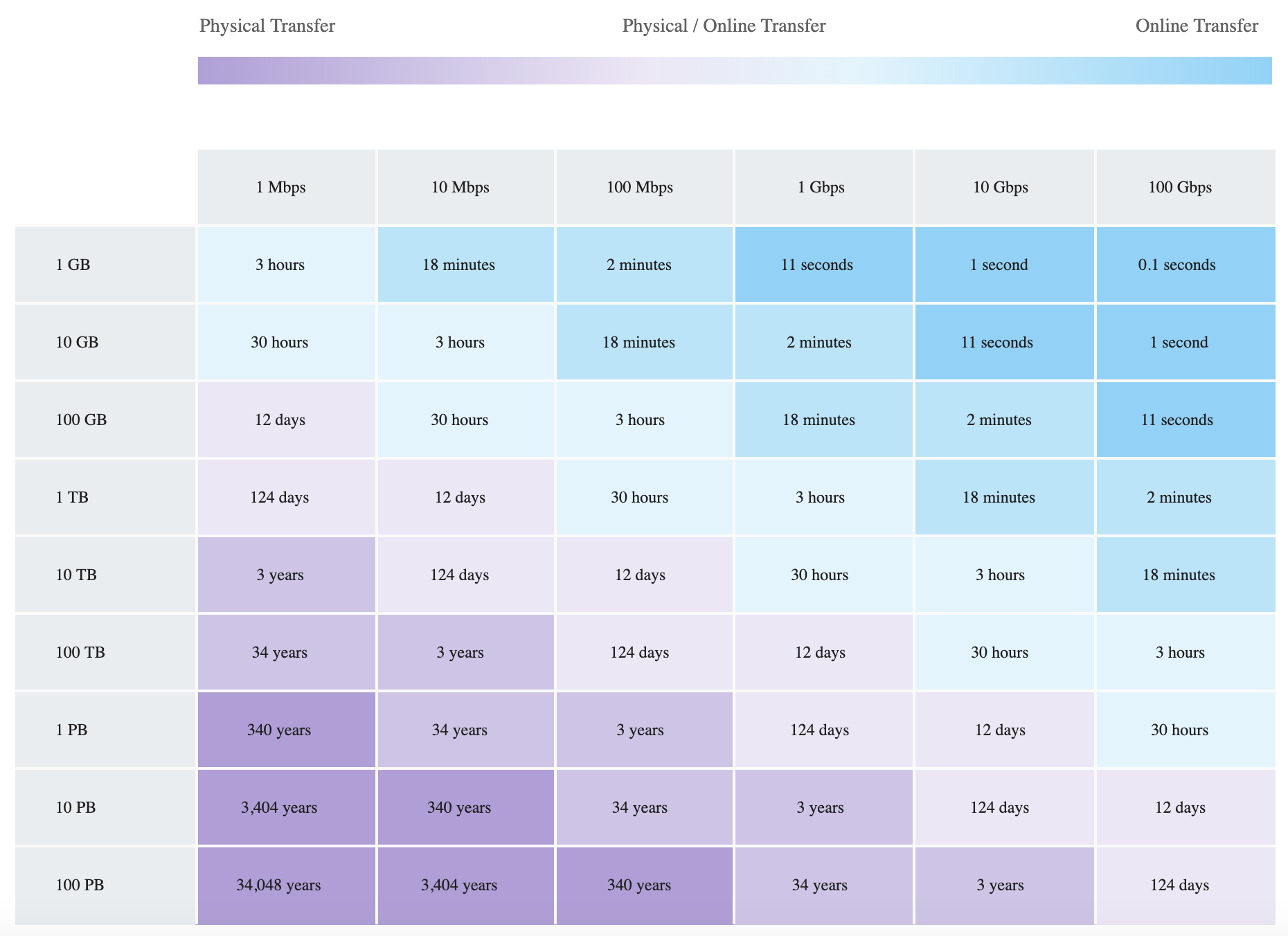
Standard internet connection can be used to connect Google Cloud with the on-premises environment if it meets the bandwidth needs.
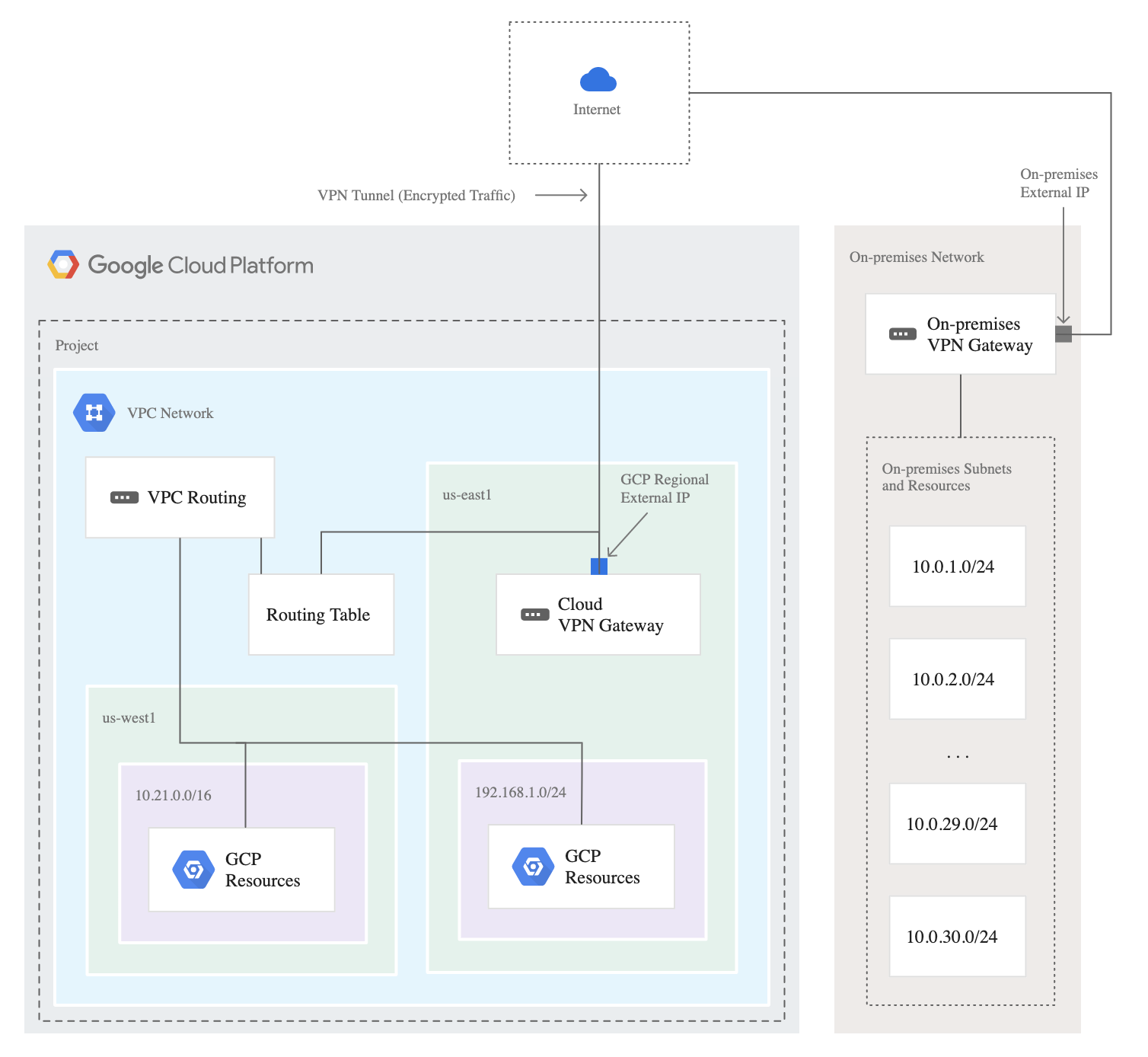
Cloud VPN
- provides secure, private connectivity using IPSec
- connects on-premises networks to VPC or two VPCs in GCP
- traffic flows via the VPN tunnel but is still routed over the public internet
- traffic is encrypted by one gateway and decrypted by the other
- allows users to access private RFC1918 addresses on resources in the VPC from on-prem computers also using private RFC1918 addresses.
- can be used with Private Google Access for on-premises hosts
- provides guaranteed uptime of 99.99% using High Availability (HA) VPN
- supports only site-to-site VPN
- supports up to 3Gbps per tunnel with a maximum of 8 tunnels
- supports static as well as dynamic routing using Cloud Router
- supports IKEv1 or IKEv2 using a shared secret
- supports IPv6 traffic exchange with dual-stack (IPv4/IPv6) HA VPN gateways
- supports customizable cipher options allowing you to configure specific ciphers per your security requirements (GA)
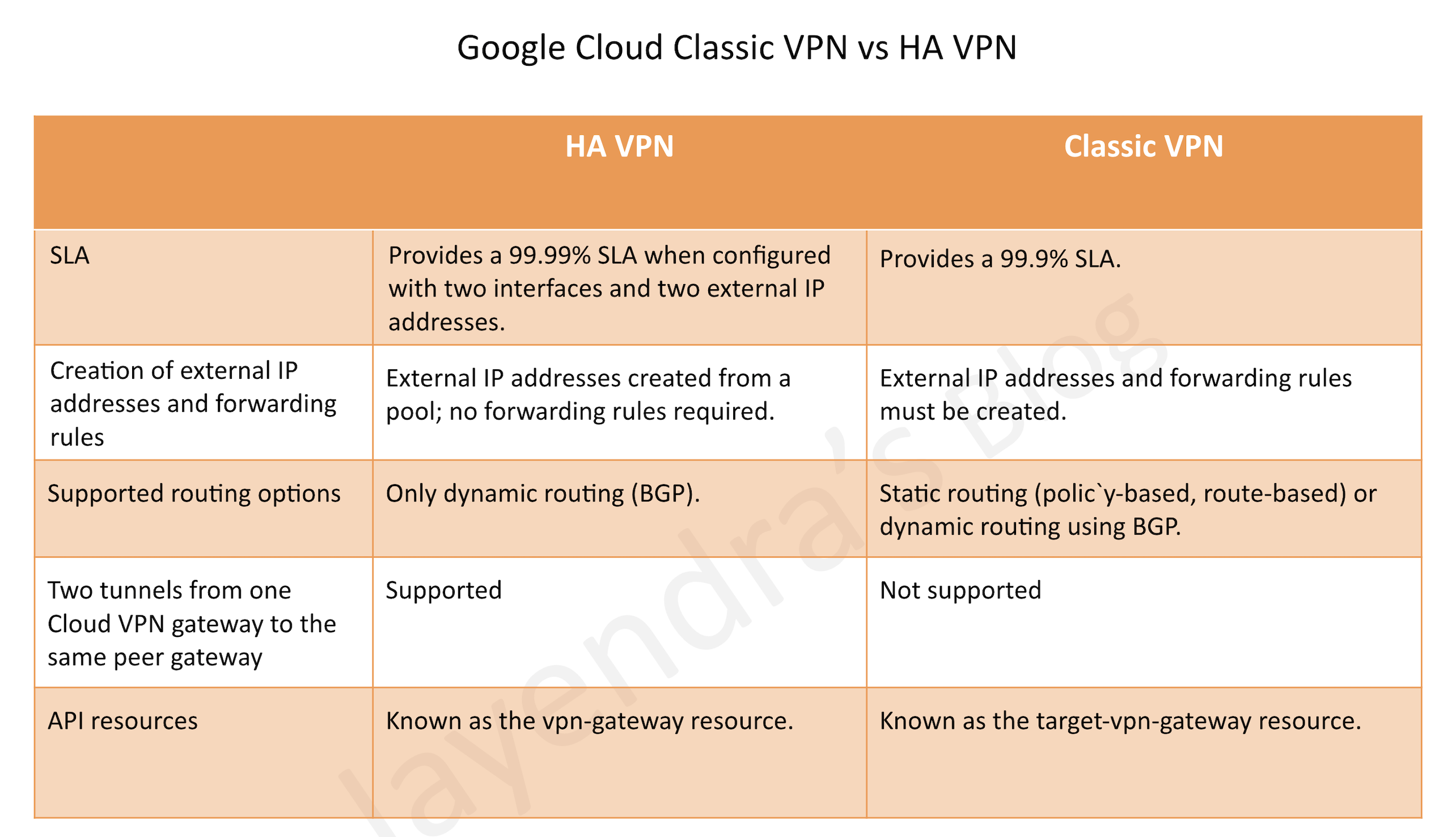
Classic VPN vs HA VPN
- Classic VPN provides a single external IP address and tunnels with 99.9% SLA
- HA VPN uses redundant interfaces and provides 99.99% SLA
- HA VPN supports IPv6/dual-stack; Classic VPN does not
- HA VPN supports dynamic routing (BGP) and is the only VPN option for BGP
⚠️ Classic VPN BGP Deprecation (August 1, 2025): Dynamic routing (BGP) for Classic VPN tunnels is deprecated. You cannot create new Classic VPN tunnels using BGP. Existing BGP tunnels continue to function but without SLA. For workloads requiring BGP, you must migrate to HA VPN. Classic VPN with static routing remains supported.
Peering
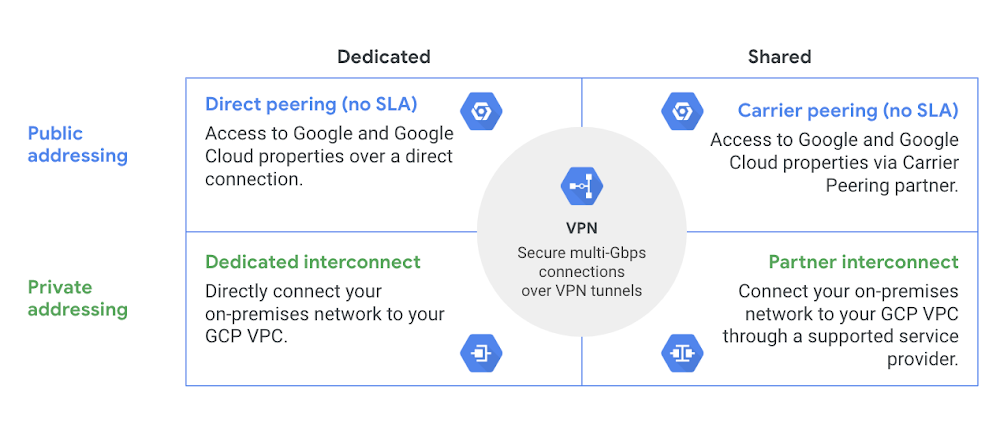
- Peering provides better connectivity to Google Cloud as compared to the public connection. However, the connectivity is still not RFC1918-to-RFC1918 private address connectivity.
- Peering gets your network as close as possible to Google Cloud public IP addresses.
- Google does not offer an SLA with Direct Peering or Carrier Peering. For customers requiring SLA, Google recommends Cloud Interconnect.
- Google recommends using a Verified Peering Provider instead of Direct Peering.
Direct Peering
- requires you to lease co-lo space and install and support routing equipment in a Google Point Of Presence (PoP).
- supports BGP over a link to exchange network routes.
- All traffic destined to Google rides over this new link, while traffic to other sites on the internet rides your regular internet connection.
Carrier Peering
- preferred if installing equipment isn’t an option or would prefer to work with a service provider partner as an intermediary to peer with Google
- connection to Google is via a new link connection installed to a partner carrier that is already connected to the Google network itself.
- supports BGP or uses static routing over that link.
- All traffic destined to Google rides over this new link.
- Traffic to other sites on the internet rides your regular internet connection.
Interconnect
- Interconnects are similar to peering in that the connections get your network as close as possible to the Google network.
- Interconnects differ from peering as they provide connectivity using private address space into the Google VPC.
- For RFC1918-to-RFC1918 private address connectivity, either a dedicated or partner interconnect is required.
- Cloud Interconnect now offers four types: Dedicated Interconnect, Partner Interconnect, Cross-Cloud Interconnect, and Cross-Site Interconnect.
- Traffic doesn’t traverse the public internet, resulting in fewer hops and points of failure.
- Supports MACsec for link-layer encryption between your on-premises router and Google’s edge routers.
- Supports HA VPN over Cloud Interconnect for IPsec encryption of VLAN attachment traffic.
Dedicated Interconnect
- provides private, high-performance connectivity to Google Cloud
- requires you to lease co-lo space and install and support routing equipment in a Google Point Of Presence (PoP).
- supports 10 Gbps, 100 Gbps, and 400 Gbps circuits with up to 8 circuits per connection (max 3200 Gbps with 400G circuits)
- gives the RFC1918-to-RFC1918 private address connectivity.
- All traffic destined to the Google Cloud VPC rides over this new link.
- Traffic to other sites on the internet rides the regular internet connection.
- Single Interconnect connection does not offer HA and GCP recommends redundancy using 2 (99.9%) or 4 (99.99%) interconnect connections so that if one connection fails, the other connection can continue to serve traffic
- supports IPv6 traffic with dual-stack (IPv4 and IPv6) VLAN attachments
- supports VLAN attachment MTU of 1440, 1460, 1500, or 8896 bytes (jumbo frames)
- supports MACsec encryption for securing traffic between on-premises router and Google’s edge routers
- supports connection groups (Interconnect groups and Attachment groups) for reliability monitoring and SLA eligibility tracking
- supports application awareness for traffic differentiation using DSCP for prioritizing business-critical traffic
- offers fixed port pricing for predictable monthly billing of outbound data transfers
Partner Interconnect
- provides private, high-performance connectivity to Google Cloud
- preferred if bandwidth requirements are below 10 Gbps or installing equipment isn’t an option or would prefer to work with a service provider partner as an intermediary
- similar to carrier peering in that you connect to a partner service provider that is directly connected to Google.
- supports BGP or use static routing over that link.
- requires provisioning a VLAN attachment over the physical link
- gives the RFC1918-to-RFC1918 private address connectivity.
- supports VLAN attachment capacities from 50 Mbps to 50 Gbps
- All traffic destined to your Google VPC rides over this new link.
- Traffic to other sites on the internet rides your regular internet connection.
- supports IPv6 traffic with dual-stack VLAN attachments
- supports HA VPN over Cloud Interconnect for encrypting traffic
Cross-Cloud Interconnect
- provides dedicated, private connectivity between Google Cloud and another cloud service provider (multicloud connectivity)
- establishes a direct physical connection between Google’s network and another cloud provider’s network
- supports connectivity to AWS, Microsoft Azure, Oracle Cloud Infrastructure (OCI), and Alibaba Cloud
- available in 10 Gbps and 100 Gbps circuit sizes
- provides private RFC1918-to-RFC1918 connectivity across clouds
- backed by Google Cloud SLA (99.9% or 99.99% depending on redundancy)
- Partner Cross-Cloud Interconnect is available for AWS and OCI for on-demand, managed cross-cloud connectivity without provisioning dedicated physical connections
- supports application awareness for traffic differentiation
- supports HA VPN over Cloud Interconnect for encryption
- Google and AWS announced a managed, private, on-demand cross-cloud connectivity collaboration in 2026
Cross-Site Interconnect (GA 2025)
- provides transparent, on-demand Layer 2 connectivity between your on-premises network sites using Google’s global infrastructure
- simplifies, augments, and improves reliability for WAN connectivity between your data centers
- leverages Google’s global network for high-performance and high-bandwidth site-to-site connectivity
- requires colocation in Google-supported facilities
- supports cross-site network MTU of 9,000 bytes
- ideal for disaster recovery, data replication, and site-to-site backup use cases
HA VPN over Cloud Interconnect
- allows deploying HA VPN tunnels over Dedicated Interconnect or Partner Interconnect VLAN attachments
- encrypts traffic that traverses Cloud Interconnect connections using IPsec
- helps meet regulatory and security requirements for data encryption in transit
- supported for both Dedicated Interconnect and Partner Interconnect
- provides both the private connectivity of Cloud Interconnect and the encryption of VPN
MACsec for Cloud Interconnect
- provides link-layer encryption (IEEE 802.1AE) between your on-premises router and Google’s edge routers
- secures traffic on the physical connection without the overhead of IPsec tunneling
- supported on Dedicated Interconnect circuits
- provides configurable fail-open behavior (traffic passes unencrypted if MACsec fails) or fail-close (traffic is blocked)
- requires MACsec-capable on-premises router
Network Connectivity Center (NCC)
- a hub-and-spoke orchestration framework that simplifies network connectivity
- provides centralized management of connectivity between VPC networks, on-premises networks, and other clouds
- supports VPC spokes for inter-VPC connectivity (up to 250 VPC spokes per hub)
- supports hybrid spokes using Cloud VPN, Cloud Interconnect, or Router appliance
- enables site-to-site data transfer using Google’s global network as part of your WAN
- provides full mesh transitivity between all spokes connected to a hub
- supports spoke groups for preset connectivity topologies (mesh, star, etc.)
- integrates with Cross-Cloud Interconnect for multicloud hub-spoke architectures
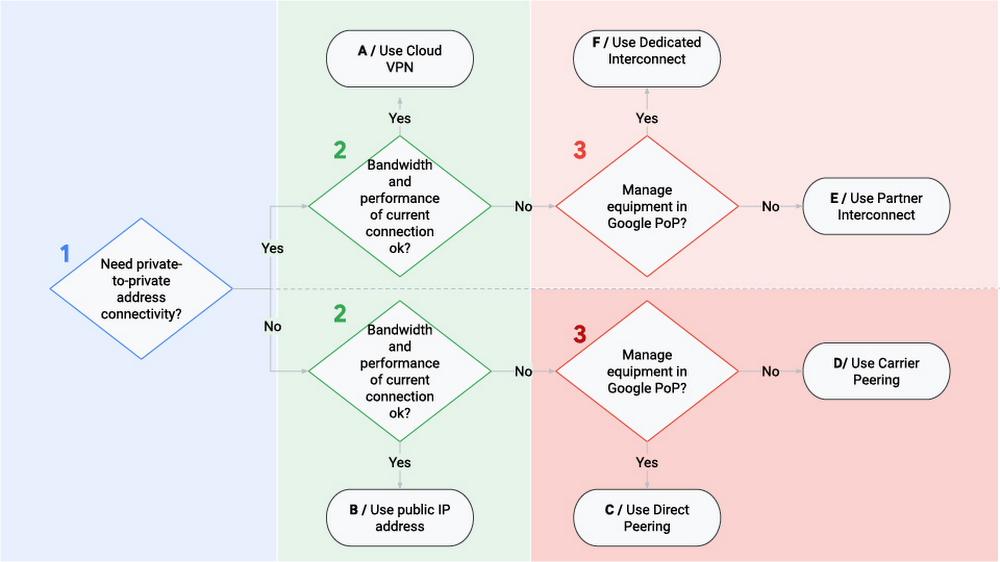
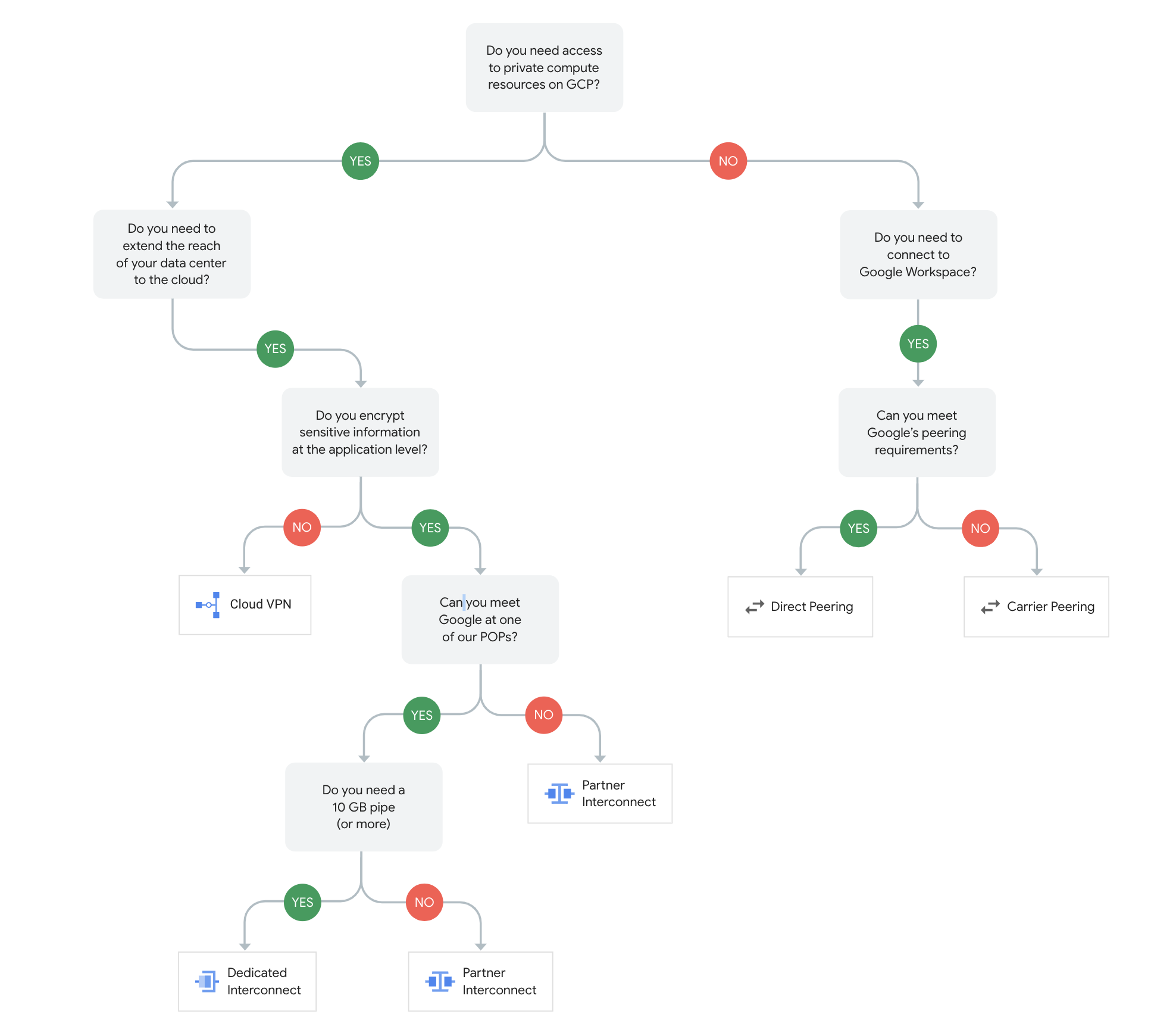
Google Cloud Hybrid Connectivity Decision Tree
Google Cloud Hybrid Connectivity Comparison
| Option | Connectivity | Bandwidth | SLA | Private RFC1918 |
|---|---|---|---|---|
| Cloud VPN (HA) | Over public internet (encrypted) | Up to 3 Gbps/tunnel | 99.99% | Yes |
| Direct Peering | Direct to Google PoP | 10 Gbps per link | No SLA | No |
| Carrier Peering | Via partner to Google | Varies by partner | No SLA | No |
| Dedicated Interconnect | Direct physical to Google | 10/100/400 Gbps (up to 3200 Gbps) | 99.9%/99.99% | Yes |
| Partner Interconnect | Via partner to Google | 50 Mbps–50 Gbps | 99.9%/99.99% | Yes |
| Cross-Cloud Interconnect | Google to other cloud provider | 10/100 Gbps | 99.9%/99.99% | Yes |
| Cross-Site Interconnect | Between on-prem sites via Google | 10/100 Gbps | Yes | L2 transparent |
Google Cloud Hybrid Connectivity Certification Tips
- HA VPN is the recommended option for encrypted connectivity over public internet; Classic VPN BGP is deprecated
- For private RFC1918 connectivity, Dedicated or Partner Interconnect is required (peering does NOT provide private addressing)
- Cross-Cloud Interconnect is the recommended option for multicloud private connectivity (Google ↔ AWS/Azure/OCI)
- Network Connectivity Center enables hub-spoke topologies and site-to-site data transfer across Google’s backbone
- MACsec provides link-layer encryption; HA VPN over Interconnect provides IPsec encryption for Interconnect traffic
- Dedicated Interconnect requires colocation in Google PoP; Partner Interconnect does not
- Minimum 2 connections in different edge availability domains for 99.9%; 4 connections for 99.99% SLA