AWS EC2 Storage

EC2 Storage Overview

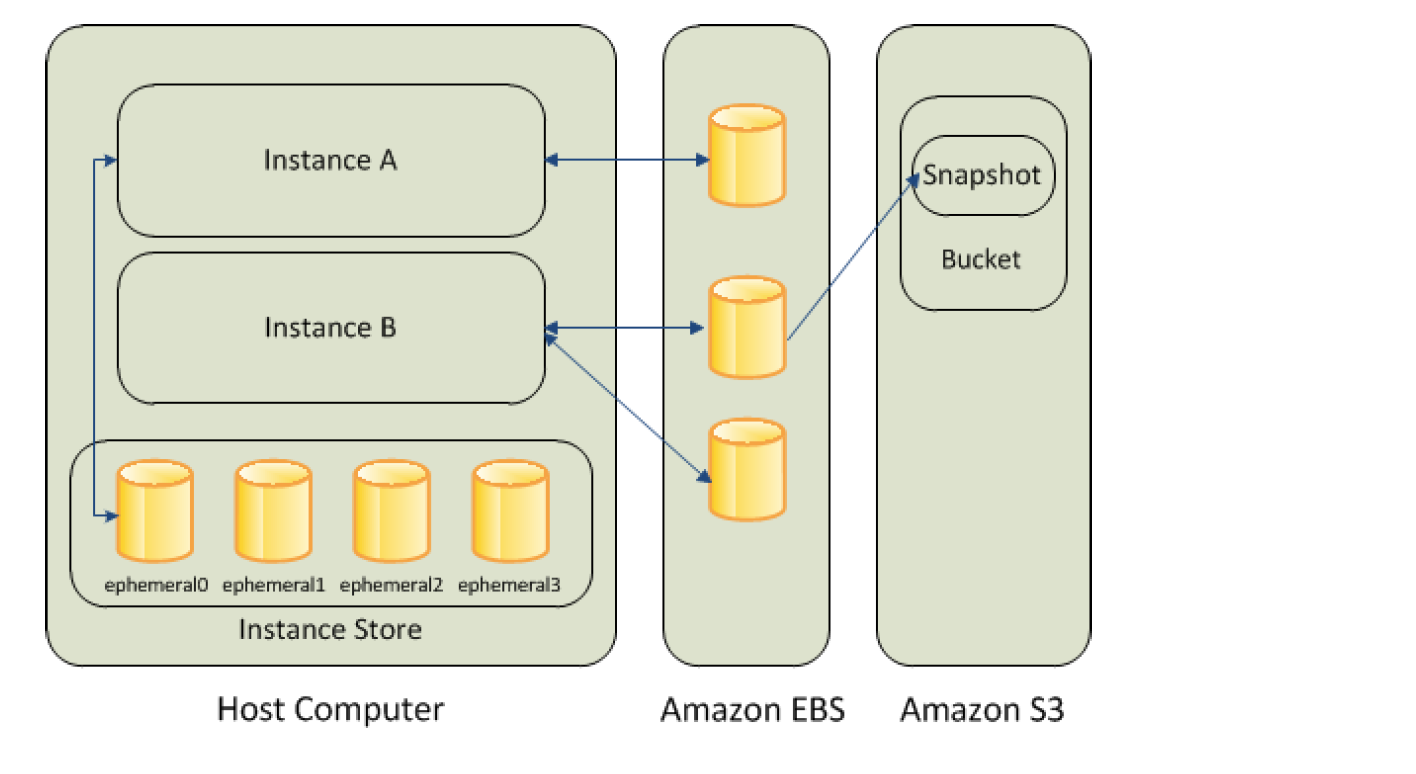
EC2 Storage Options - EBS, S3 & Instance Store

Storage Types

Elastic Block Store – EBS

  • Elastic Block Store – EBS provides highly available, reliable, durable, block-level storage volumes that can be attached to an EC2 instance.
  • persists independently from the running life of an instance.
  • behaves like a raw, unformatted, external block device that can be attached to a single EC2 instance at a time (except Multi-Attach enabled io1/io2 volumes that can attach to up to 16 Nitro-based instances).
  • is recommended for data that requires frequent and granular updates e.g. running a database or filesystem.
  • is Zonal and can be attached to any instance within the same Availability Zone and can be used like any other physical hard drive.
  • is particularly well-suited for use as the primary storage for file systems, databases, or any applications that require fine granular updates and access to raw, unformatted, block-level storage.
  • provides six volume types: Provisioned IOPS SSD (io2 Block Express and io1), General Purpose SSD (gp3 and gp2), Throughput Optimized HDD (st1) and Cold HDD (sc1).
  • General Purpose SSD (gp3) volumes support up to 64 TiB, 80,000 IOPS, and 2,000 MiB/s throughput (enhanced in September 2025 from 16 TiB, 16,000 IOPS, 1,000 MiB/s).
  • Provisioned IOPS SSD (io2 Block Express) volumes support up to 64 TiB, 256,000 IOPS, and 4,000 MB/s throughput with sub-millisecond latency and 99.999% durability.
  • supports data protection features including Snapshots, EBS Snapshot Archive, Recycle Bin (accidental deletion protection), and Snapshot Lock (WORM protection).

Instance Store Storage

  • Instance store provides temporary or Ephemeral block-level storage.
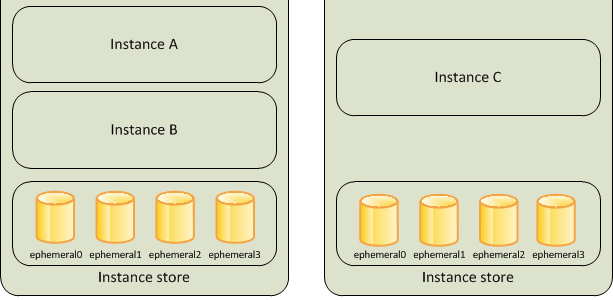
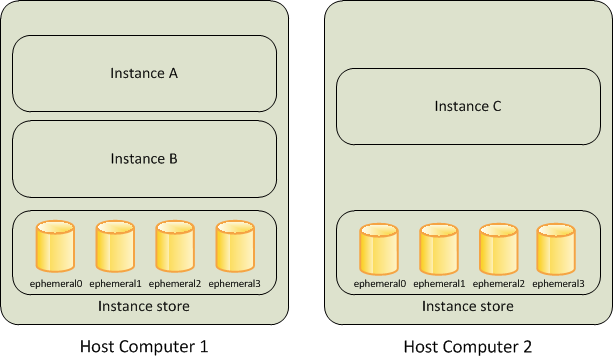
  • is located on the disks that are physically attached to the host computer.
  • consists of one or more instance store volumes exposed as block devices.
  • The size of an instance store varies by instance type.
  • Virtual devices for instance store volumes are ephemeral[0-23], starting the first one as ephemeral0 and so on.
  • While an instance store is dedicated to a particular instance, the disk subsystem is shared among instances on a host computer.
  • is ideal for temporary storage of information that changes frequently, such as buffers, caches, scratch data, and other temporary content, or for data that is replicated across a fleet of instances, such as a load-balanced pool of web servers.
  • delivers very high random I/O performance and is a good option for storage with very low latency requirements, but you don’t need the data to persist when the instance terminates or you can take advantage of fault-tolerant architectures.
  • Data is lost when the instance is stopped, terminated, or the underlying host fails. Data persists during an instance reboot.
  • Instance store volumes are included as part of the usage cost of the instance.

Amazon EBS vs Instance Store

More detailed @ Comparison of EBS vs Instance Store

Simple Storage Service – S3

More details @ AWS S3

Elastic File System – EFS

  • Elastic File System – EFS provides a simple, fully managed, easy-to-set-up, scalable, serverless, and cost-optimized file storage.
  • can automatically scale from gigabytes to petabytes of data without needing to provision storage.
  • provides managed NFS (network file system) that can be mounted on and accessed by multiple EC2 instances in multiple AZs simultaneously.
  • offers highly durable, highly scalable, and highly available storage.
    • EFS Regional file systems (recommended) store data redundantly across multiple AZs in the same region.
    • EFS One Zone file systems provide lower-cost option storing data in a single AZ.
    • grows and shrinks automatically as files are added and removed, so there is no need to manage storage procurement or provisioning.
  • supports the Network File System version 4 (NFSv4.1 and NFSv4.0) protocol.
  • provides file system access semantics, such as strong data consistency and file locking.
  • is compatible with all Linux-based AMIs for EC2, POSIX file system (~Linux) that has a standard file API.
  • is a shared POSIX system for Linux systems and does not work for Windows (use FSx for Windows File Server instead).
  • offers the ability to encrypt data at rest using KMS and in transit.
  • can be accessed from on-premises using an AWS Direct Connect or AWS VPN connection between the on-premises datacenter and VPC.
  • can be accessed concurrently from servers in the on-premises data center as well as EC2 instances in the VPC.
  • supports up to 2.5 million read IOPS and 500,000 write IOPS per file system (10x increase announced Nov 2024).
  • supports Elastic Throughput of up to 60 GiB/s read and 5 GiB/s write throughput per file system.
  • supports up to 10,000 access points per file system for application-specific access management (increased Feb 2025).
  • supports IPv6 for both EFS APIs and mount targets (added Jun 2025).

Amazon FSx

  • Amazon FSx provides fully managed file storage built on four widely-used file systems: Lustre, NetApp ONTAP, OpenZFS, and Windows File Server.
  • FSx for Windows File Server – provides fully managed Windows-native shared file storage using SMB protocol. Supports Windows features like Active Directory, DFS, and shadow copies.
  • FSx for Lustre – provides high-performance file storage optimized for fast processing of workloads such as ML, HPC, video processing, and financial modeling. Delivers up to terabytes/second of throughput and millions of IOPS.
  • FSx for NetApp ONTAP – provides fully managed shared storage with NetApp ONTAP features including snapshots, clones, FlexClone, SnapMirror replication. Supports NFS, SMB, and iSCSI protocols.
  • FSx for OpenZFS – provides fully managed shared storage powered by OpenZFS file system. Delivers up to 21 GB/s throughput and over 1 million IOPS for cached data. Supports NFS protocol with data compression, snapshots, and cloning.
  • Use FSx for Windows File Server for Windows-based applications that need SMB protocol.
  • Use FSx for Lustre for compute-intensive workloads requiring the fastest storage performance.

Block Device Mapping

  • A block device is a storage device that moves data in sequences of bytes or bits (blocks) and supports random access and generally use buffered I/O for e.g. hard disks, CD-ROM etc
  • Block devices can be physically attached to a computer (like an instance store volume) or can be accessed remotely as if it was attached (like an EBS volume)
  • Block device mapping defines the block devices to be attached to an instance, which can either be done while creation of an AMI or when an instance is launched
  • Block device must be mounted on the instance, after being attached to the instance, to be able to be accessed
  • When a block device is detached from an instance, it is unmounted by the operating system and you can no longer access the storage device.
  • Additional Instance store volumes can be attached only when the instance is launched while EBS volumes can be attached to a running instance.
  • Viewing the block device mapping for an instance only shows the EBS volumes and not the instance store volumes. Instance metadata can be used to query the complete block device mapping.

AWS Open Data (Registry of Open Data on AWS)

  • AWS provides the Registry of Open Data on AWS that makes high-value, cloud-optimized datasets publicly available for analysis on AWS.
  • The registry has surpassed 1,000+ datasets and over 100 petabytes of data available for public use.
  • Datasets are also discoverable on AWS Data Exchange alongside 3,000+ existing data products.
  • There is no charge for accessing the public data sets. You pay only for the compute and storage you use for your own applications.
  • Previously referred to as “AWS Public Data Sets,” this is now the AWS Open Data Sponsorship Program.

EC2 Storage Comparison

Feature EBS Instance Store EFS S3
Storage Type Block Block File (NFS) Object
Persistence Persistent Ephemeral Persistent Persistent
Scope Single AZ Single Instance Regional (Multi-AZ) Regional (Multi-AZ)
Access Single instance (or Multi-Attach for io1/io2) Single instance Multiple instances concurrently Multiple instances/services
Performance Up to 256K IOPS (io2 BE) Very high random I/O Up to 2.5M read IOPS Virtually unlimited
Use Case Databases, boot volumes Buffers, caches, temp data Shared file systems, CMS Backups, data lakes, static content
OS Support Linux/Windows Linux/Windows Linux only Any (via API)

AWS Certification Exam Practice Questions

  • Questions are collected from Internet and the answers are marked as per my knowledge and understanding (which might differ with yours).
  • AWS services are updated everyday and both the answers and questions might be outdated soon, so research accordingly.
  • AWS exam questions are not updated to keep up the pace with AWS updates, so even if the underlying feature has changed the question might not be updated
  • Open to further feedback, discussion and correction.
  1. When you view the block device mapping for your instance, you can see only the EBS volumes, not the instance store volumes.
    1. Depends on the instance type
    2. FALSE
    3. Depends on whether you use API call
    4. TRUE
  1. Amazon provides the Registry of Open Data on AWS that makes high-value datasets publicly available. What is the monthly charge for using the public data sets?
    1. A 1 time charge of 10$ for all the datasets.
    2. 1$ per dataset per month
    3. 10$ per month for all the datasets
    4. There is no charge for using the public data sets
  1. How many types of block devices does Amazon EC2 support?
    1. 2 (EBS volumes and Instance Store volumes)
    2. 4
    3. 3
    4. 1
  1. A company needs shared file storage for Linux-based EC2 instances across multiple Availability Zones. Which AWS storage service should they use?
    1. Amazon EBS with Multi-Attach
    2. Amazon S3
    3. Amazon EFS
    4. Amazon FSx for Windows File Server
  1. Which EC2 storage option provides the highest random I/O performance but does NOT persist data when the instance is stopped or terminated?
    1. Amazon EBS gp3
    2. Amazon EBS io2 Block Express
    3. EC2 Instance Store
    4. Amazon EFS
  1. A company requires Windows-based shared file storage with SMB protocol support. Which AWS service is the most appropriate?
    1. Amazon EFS
    2. Amazon EBS
    3. Amazon FSx for Windows File Server
    4. Amazon S3
  1. Which statement about EBS Multi-Attach is correct?
    1. Multi-Attach is supported on all EBS volume types
    2. Multi-Attach allows io1/io2 volumes to be attached to up to 16 Nitro-based instances in the same AZ
    3. Multi-Attach allows volumes to be attached to instances across multiple AZs
    4. Multi-Attach is only supported on gp3 volumes
  1. What is the maximum IOPS supported by Amazon EBS General Purpose SSD (gp3) volumes? [Updated Sept 2025]
    1. 16,000 IOPS
    2. 64,000 IOPS
    3. 80,000 IOPS
    4. 256,000 IOPS

References

EC2 Instance Store vs EBS – Ephemeral NVMe Storage Explained

EC2 Instance Store

EC2 Instance Store

  • An instance store provides temporary or Ephemeral block-level storage for an Elastic Cloud Compute – EC2 instance.
  • is located on the disks that are physically attached to the host computer.
  • consists of one or more instance store volumes exposed as block devices.
  • The size of an instance store varies by instance type.
  • Virtual devices for instance store volumes are named ephemeral[0-23], starting the first one as ephemeral0 and so on.
  • While an instance store is dedicated to a particular instance, the disk subsystem is shared among instances on a host computer.
  • is ideal for temporary storage of information that changes frequently, such as buffers, caches, scratch data, and other temporary content, or for data that is replicated across a fleet of instances, such as a load-balanced pool of web servers.
  • delivers very high random I/O performance and is a good option for storage with very low latency requirements, but you don’t need the data to persist when the instance terminates or you can take advantage of fault-tolerant architectures.
  • Instance store volumes are included as part of the usage cost of the instance. There is no additional charge.

EC2 Instance Store

Instance Store Volume Types

  • Instance store volumes use either NVMe-based solid state drives (SSD), SATA-based SSDs, or SATA-based hard disk drives (HDD).
  • NVMe SSD – Used by most current-generation instances (e.g., C8gd, M8gd, R8gd, C8id, M8id, R8id, I7i, I8g, I8ge, M9gd). Provides the highest performance.
  • Non-NVMe SSD – Used by older instance types such as C3, I2, M3, R3, and X1.
  • HDD – Used by dense storage instances such as D2 and H1.
  • For instance types with NVMe instance store volumes, all supported instance store volumes are automatically attached at launch.
  • For instance types with non-NVMe instance store volumes (C1, C3, M1, M2, M3, R3, D2, H1, I2, X1, X1e), block device mappings must be manually specified at launch.

Instance Store Lifecycle

  • Instance store data lifetime is dependent on the lifecycle of the Instance to which it is attached.
  • Data on the Instance store persists when an instance is rebooted.
  • However, the data on the instance store does not persist if the
    • underlying disk drive fails
    • instance terminates
    • instance hibernates
    • instance stops i.e. if the EBS-backed instance with instance store volumes attached is stopped
  • Stopping, hibernating, or terminating an instance causes every block of storage in the instance store to be reset.
  • You can’t stop or hibernate instance store-backed instances.
  • If an AMI is created from an Instance with an Instance store volume, the data on its instance store volume isn’t preserved.
  • Do not rely on instance store volumes for valuable, long-term data.

Instance Store Volumes

  • Instance type of an instance determines the size of the instance store available for the instance and the type of hardware used for the instance store volumes.
  • Instance store volumes are included as part of the instance’s usage cost.
  • Some instance types use solid-state drives (SSD) to deliver very high random I/O performance, which is a good option when storage with very low latency is needed, but the data does not need to be persisted when the instance terminates or architecture is fault tolerant.
  • Instance store volume capacity varies widely by instance type:
    • General purpose (M8gd, M9gd): up to 11.4 TB NVMe SSD
    • Compute optimized (C8gd, C8id): up to 11.4–22.8 TB NVMe SSD
    • Memory optimized (R8gd, R8id): up to 11.4–22.8 TB NVMe SSD
    • Storage optimized (I7i): up to 45 TB NVMe SSD
    • Storage optimized (I8g): up to 45 TB NVMe SSD (3rd gen Nitro SSDs)
    • Storage optimized (I8ge): up to 120 TB NVMe SSD (3rd gen Nitro SSDs)

Instance Store Volumes with EC2 instances

  • EBS volumes and instance store volumes for an instance are specified using a block device mapping.
  • Instance store volume
    • can only be attached to an EC2 instance when the instance is launched.
    • cannot be detached and reattached to a different instance.
  • After an instance is launched, the instance store volumes for the instance should be formatted and mounted before it can be used.
  • Root volume of an instance store-backed instance is mounted automatically.
  • For NVMe-based instance store volumes, all volumes are automatically attached at launch — no block device mapping specification is needed.

Instance Store Encryption

  • Data on NVMe instance store volumes is encrypted at rest using an XTS-AES-256 block cipher implemented in a hardware module on the instance.
  • Encryption keys are generated using the hardware module and are unique to each NVMe instance storage device.
  • All encryption keys are destroyed when the instance is stopped or terminated and cannot be recovered.
  • You cannot disable this encryption and you cannot provide your own encryption key.
  • Some HDD instance store volumes also support encryption at rest.
  • AWS Nitro SSDs (used in I4i, I7i, I8g, I8ge, and other storage-optimized instances) provide always-on encryption as part of the hardware design.

Instance Store TRIM Support

  • Some instance types support SSD volumes with TRIM.
  • Instance store volumes that support TRIM are fully trimmed before they are allocated to the instance.
  • These volumes are not formatted with a file system when an instance launches, so you must format them before they can be mounted and used.
  • For faster access, skip the TRIM operation when initially formatting the volumes.
  • Use the TRIM command to notify the SSD controller when data is no longer needed, which provides more free space, reduces write amplification, and increases performance.
  • On Linux, use the fstrim command to enable periodic TRIM.
  • On Windows, use fsutil behavior set DisableDeleteNotify 0 to ensure TRIM support is enabled.

Instance Store Optimizing Writes

  • Because of the way that EC2 virtualizes disks, the first write to any location on an instance store volume performs more slowly than subsequent writes.
  • Amortizing (gradually writing off) this cost over the lifetime of the instance might be acceptable.
  • However, if high disk performance is required, AWS recommends initializing the drives by writing once to every drive location before production use.
  • To reduce write amplification on SSD-based instance store volumes, leave 10 percent of the volume unpartitioned for over-provisioning. This decreases usable storage but increases performance even when the disk is close to full capacity.

Detailed NVMe Performance Statistics

  • EC2 provides real-time, high-resolution performance statistics for NVMe instance store volumes attached to Nitro-based instances (launched September 2025).
  • Statistics include 11 comprehensive metrics at 1-second granularity:
    • Total read/write operations and bytes
    • Total read/write time (microseconds)
    • Volume queue length
    • Volume performance exceeded IOPS/throughput counters
    • Read/Write I/O latency histograms (broken down by I/O size)
  • Statistics are available at no additional cost.
  • Can be accessed via nvme-cli tool directly on the instance or via Amazon CloudWatch agent for monitoring and alarms.
  • Counters are not persistent across instance stops and restarts.
  • Helps identify performance bottlenecks and optimize latency-sensitive workloads.

Latest Instance Types with Instance Store (2025-2026)

  • Graviton5 (M9gd) – General purpose instances with local NVMe SSD storage, powered by AWS Graviton5 processors (June 2026). Ideal for data logging, media processing, and batch/log processing.
  • Graviton4 (C8gd, M8gd, R8gd) – Compute, general purpose, and memory optimized instances with up to 11.4 TB NVMe SSD storage, powered by AWS Graviton4 (April 2025). 30% better performance vs. Graviton3-based predecessors.
  • Intel Xeon 6 (C8id, M8id, R8id) – Up to 22.8 TB NVMe SSD storage with up to 384 vCPUs (February 2026). 43% higher performance and 3x more local storage vs. 6th generation.
  • Storage Optimized I7i – Up to 45 TB NVMe storage with PCIe Gen5-based Nitro SSDs. 50% better real-time storage performance and 50% lower I/O latency vs. I4i.
  • Storage Optimized I7ie – Up to 120 TB NVMe storage (highest density in the cloud). Up to 2x vCPUs and memory vs. prior generation.
  • Storage Optimized I8g – Graviton4-powered with 3rd generation Nitro SSDs, up to 45 TB. 65% better performance per TB and 60% lower latency variability vs. I4g (December 2024).
  • Storage Optimized I8ge – Up to 120 TB NVMe with 3rd gen Nitro SSDs. 55% better performance per TB and 75% lower I/O latency variability vs. Im4gn (August 2025).

AWS Nitro SSDs

  • AWS Nitro SSDs are custom-built by AWS specifically for cloud-scale storage workloads.
  • Provide high I/O performance, low latency, minimal latency variability, and security with always-on encryption.
  • Currently in 3rd generation, used in I8g and I8ge instance types.
  • PCIe Gen5-based Nitro SSDs are used in I7i and I7ie instances.
  • Combined with the AWS Nitro System (6th generation Nitro Cards), these offload CPU virtualization, storage, and networking functions to dedicated hardware.

EBS vs Instance Store

Refer blog post @ EBS vs Instance Store

AWS Certification Exam Practice Questions

  • Questions are collected from Internet and the answers are marked as per my knowledge and understanding (which might differ with yours).
  • AWS services are updated everyday and both the answers and questions might be outdated soon, so research accordingly.
  • AWS exam questions are not updated to keep up the pace with AWS updates, so even if the underlying feature has changed the question might not be updated
  • Open to further feedback, discussion and correction.
  1. Please select the most correct answer regarding the persistence of the Amazon Instance Store
    1. The data on an instance store volume persists only during the life of the associated Amazon EC2 instance
    2. The data on an instance store volume is lost when the security group rule of the associated instance is changed.
    3. The data on an instance store volume persists even after associated Amazon EC2 instance is deleted
  2. A user has launched an EC2 instance from an instance store backed AMI. The user has attached an additional instance store volume to the instance. The user wants to create an AMI from the running instance. Will the AMI have the additional instance store volume data?
    1. Yes, the block device mapping will have information about the additional instance store volume
    2. No, since the instance store backed AMI can have only the root volume bundled
    3. It is not possible to attach an additional instance store volume to the existing instance store backed AMI instance
    4. No, since this is ephemeral storage it will not be a part of the AMI
  3. When an EC2 instance that is backed by an S3-based AMI Is terminated, what happens to the data on the root volume?
    1. Data is automatically saved as an EBS volume.
    2. Data is automatically saved as an EBS snapshot.
    3. Data is automatically deleted
    4. Data is unavailable until the instance is restarted.
  4. A user has launched an EC2 instance from an instance store backed AMI. If the user restarts the instance, what will happen to the ephemeral storage data?
    1. All the data will be erased but the ephemeral storage will stay connected
    2. All data will be erased and the ephemeral storage is released
    3. It is not possible to restart an instance launched from an instance store backed AMI
    4. The data is preserved
  5. When an EC2 EBS-backed instance is stopped, what happens to the data on any ephemeral store volumes?
    1. Data will be deleted and will no longer be accessible
    2. Data is automatically saved in an EBS volume.
    3. Data is automatically saved as an EBS snapshot
    4. Data is unavailable until the instance is restarted
  6. A user has launched an EC2 Windows instance from an instance store backed AMI. The user has also set the Instance initiated shutdown behavior to stop. What will happen when the user shuts down the OS?
    1. It will not allow the user to shutdown the OS when the shutdown behavior is set to Stop
    2. It is not possible to set the termination behavior to Stop for an Instance store backed AMI instance
    3. The instance will stay running but the OS will be shutdown
    4. The instance will be terminated
  7. Which of the following will occur when an EC2 instance in a VPC (Virtual Private Cloud) with an associated Elastic IP is stopped and started? (Choose 2 answers)
    1. The Elastic IP will be dissociated from the instance
    2. All data on instance-store devices will be lost
    3. All data on EBS (Elastic Block Store) devices will be lost
    4. The ENI (Elastic Network Interface) is detached
    5. The underlying host for the instance is changed
  8. Which of the following statements about EC2 instance store NVMe encryption is correct? (Choose 2 answers)
    1. You can provide your own encryption key for instance store NVMe volumes
    2. Data on NVMe instance store volumes is encrypted using XTS-AES-256 cipher in hardware
    3. Encryption keys persist after the instance is terminated for data recovery
    4. Encryption keys are unique per device and destroyed when the instance stops or terminates
    5. Instance store encryption must be enabled manually via the AWS Console
  9. A company needs temporary high-performance storage with up to 120 TB capacity and the lowest possible I/O latency for a real-time analytics workload on AWS. Which EC2 instance family should they choose?
    1. R8gd instances with up to 11.4 TB NVMe storage
    2. I7i instances with up to 45 TB NVMe storage
    3. I8ge instances with up to 120 TB NVMe storage and 3rd gen Nitro SSDs
    4. C8id instances with up to 22.8 TB NVMe storage
  10. Which feature allows you to monitor NVMe instance store volume performance at 1-second granularity on Nitro-based EC2 instances?
    1. Amazon EBS CloudWatch Metrics
    2. EC2 Detailed NVMe Performance Statistics
    3. AWS CloudTrail storage events
    4. Amazon Inspector performance assessment

References

AWS Storage Options – EBS & Instance Store

AWS Storage Options – EBS & Instance Store

  • Elastic Block Store – EBS and Instance Store provide block-level storage options for EC2 instances.

Elastic Block Store (EBS) volume

  • EBS provides durable block-level storage for use with EC2 instances
  • EBS volumes are off-instance, network-attached storage (NAS) that persists independently from the running life of a single EC2 instance.
  • EBS volume is attached to an instance and can be used as a physical hard drive, typically by formatting it with the file system of your choice and using the file I/O interface provided by the instance operating system.
  • EBS volume can be used to boot an EC2 instance (EBS-root AMIs only), and multiple EBS volumes can be attached to a single EC2 instance.
  • EBS volume can be attached to a single EC2 instance only at any point in time.
  • EBS Multi-Attach volume can be attached to multiple EC2 instances (up to 16 Nitro-based instances in the same AZ). Multi-Attach is supported on io1 and io2 Block Express volumes.
  • EBS provides the ability to take point-in-time snapshots, which are persisted in S3. These snapshots can be used to instantiate new EBS volumes and to protect data for long-term durability
  • EBS snapshots can be copied across AWS regions as well, making it easier to leverage multiple AWS regions for geographical expansion, data center migration, and disaster recovery
  • All EBS volume types are designed for 99.999% availability.

EBS Volume Types

  • Amazon EBS provides six volume types divided into two major categories:
    • SSD-backed storage for transactional workloads (databases, virtual desktops, boot volumes)
    • HDD-backed storage for throughput-intensive workloads (MapReduce, log processing)
  • General Purpose SSD (gp3) — baseline 3,000 IOPS and 125 MiB/s at any size; scales up to 64 TiB, 80,000 IOPS, and 2,000 MiB/s (enhanced Sep 2025). Performance provisioned independently of capacity. 99.8%-99.9% durability.
  • General Purpose SSD (gp2) — burstable performance tied to volume size (3 IOPS/GiB, up to 16,000 IOPS). Being superseded by gp3 for new workloads.
  • Provisioned IOPS SSD (io2 Block Express) — highest performance block storage: up to 256,000 IOPS, 4,000 MiB/s throughput, 64 TiB capacity, sub-millisecond latency. 99.999% durability (100X more durable than gp3). Supports Multi-Attach and NVMe reservations for shared storage fencing.
  • Provisioned IOPS SSD (io1) — previous generation Provisioned IOPS; up to 64,000 IOPS and 1,000 MiB/s. 99.8%-99.9% durability.
  • Throughput Optimized HDD (st1) — low-cost HDD for frequently accessed, throughput-intensive workloads; up to 500 MiB/s. Cannot be a boot volume.
  • Cold HDD (sc1) — lowest cost HDD for less frequently accessed workloads; up to 250 MiB/s. Cannot be a boot volume.
  • Magnetic (standard) — previous generation volume type with lower performance. AWS recommends migrating to current generation volume types.

Ideal Usage Patterns

  • EBS is meant for data that changes relatively frequently and requires long-term persistence.
  • EBS volume provides access to raw block-level storage and is particularly well-suited for use as the primary storage for a database or file system
  • EBS Provisioned IOPS volumes (io2 Block Express) are particularly well-suited for use with databases applications that require a high and consistent rate of random disk reads and writes, such as Oracle, SAP HANA, Microsoft SQL Server, and SAS Analytics.
  • gp3 volumes are ideal for a wide variety of workloads including virtual desktops, medium-sized databases, development/test environments, and boot volumes.
  • st1 volumes are ideal for big data, data warehouses, and log processing.
  • sc1 volumes are ideal for infrequently accessed cold data requiring lowest storage cost.

Anti-Patterns

  • Temporary Storage
    • EBS volume persists independent of the attached EC2 life cycle.
    • For temporary storage such as caches, buffers, queues, etc it is better to use local instance store volumes, SQS, or ElastiCache
  • Highly-durable storage
    • For highly durable storage, use S3 or Glacier which provides 99.999999999% (11 9’s) annual durability per object. EBS io2 Block Express offers 99.999% durability, while gp3/gp2/io1 offer 99.8%-99.9% durability.
  • Static data or web content
    • For static web content, where data infrequently changes, EBS with EC2 would require a web server to serve the pages.
    • S3 may represent a more cost-effective and scalable solution for storing this fixed information and is served directly out of S3.

EBS Performance

  • EBS provides multiple volume types that differ in performance characteristics and pricing, allowing you to tailor storage performance and cost to application needs.
  • EBS Volumes can be attached and striped across multiple similarly-provisioned EBS volumes using RAID 0 or logical volume manager software, thus aggregating available IOPS, total volume throughput, and total volume size.
  • gp3 volumes offer cost-effective storage with independently configurable IOPS and throughput. Baseline: 3,000 IOPS and 125 MiB/s; scalable up to 80,000 IOPS and 2,000 MiB/s (as of Sep 2025).
  • io2 Block Express volumes deliver predictable, high performance for I/O intensive workloads: up to 256,000 IOPS, 4,000 MiB/s throughput, with sub-millisecond latency. Supports 1,000 IOPS per GB provisioned.
  • As EBS volumes are network-attached devices, other network I/O performed by the instance, as well as the total load on the shared network, can affect individual EBS volume performance.
  • EBS-optimized instances deliver dedicated throughput between EC2 and EBS. Latest Nitro-based instances (e.g., C8gn, M8gn, R8gn in 48xlarge/metal sizes) support up to 120 Gbps EBS bandwidth and 480,000 IOPS (as of Apr 2026).
  • Each separate EBS volume can be configured independently with its own type and performance settings.

EBS Durability & Availability

  • EBS volumes are designed to be highly available and reliable.
  • EBS volume data is replicated across multiple servers in a single AZ to prevent the loss of data from the failure of any single component.
  • All EBS volume types are designed for 99.999% availability.
  • io2 Block Express volumes provide 99.999% durability (0.001% annual failure rate) — 100X more durable than other volume types.
  • gp3, gp2, and io1 volumes provide 99.8%-99.9% durability (0.1%-0.2% annual failure rate).
  • EBS snapshots are incremental, point-in-time backups, containing only the data blocks changed since the last snapshot.
  • Frequent snapshots are recommended to maximize both the durability and availability of EBS data.
  • EBS snapshots provide an easy-to-use disk clone or disk image mechanism for backup, sharing, and disaster recovery.

EBS Snapshots Archive

  • EBS Snapshots Archive offers up to 75% lower snapshot storage costs for snapshots stored for 90 days or longer that are rarely accessed.
  • Snapshots in the standard tier are incremental; when archived, they are converted to full snapshots and moved to the archive tier.
  • Archived snapshots can be restored to the standard tier when needed (restoration takes 24-72 hours).
  • AWS Backup now supports EBS Snapshots Archive in backup policies for automated lifecycle management.
  • EBS now displays full snapshot size information in Console and via DescribeSnapshots API (full-snapshot-size-in-bytes field, Feb 2025).

EBS Elastic Volumes

  • Elastic Volumes allows you to dynamically increase capacity, tune performance, and change the type of live volumes with no downtime or performance impact.
  • EBS volumes can be resized dynamically (increased only, cannot be reduced in size).
  • As of Jan 2026, EBS supports up to 4 Elastic Volumes modifications per volume within a rolling 24-hour window (previously limited to 1 modification per 6 hours).
  • Modifications include: increasing size, changing volume type, and adjusting provisioned performance (IOPS/throughput).

EBS Cost Model

  • EBS pricing varies by volume type:
    • gp3: charged per GB-month of provisioned storage, plus separately for provisioned IOPS (above 3,000) and throughput (above 125 MiB/s)
    • gp2: charged per GB-month of provisioned storage (IOPS included based on size)
    • io2/io1: charged per GB-month of provisioned storage and per Provisioned IOPS-month
    • st1/sc1: charged per GB-month of provisioned storage
  • EBS snapshots are charged per GB-month of data stored. Snapshots are incremental and compressed, so storage used is generally much less than volume size.
  • EBS Snapshots Archive tier costs up to 75% less than standard snapshot storage (minimum 90-day retention).
  • EBS snapshot copy is charged for data transferred between regions, plus standard snapshot charges in the destination region.
  • EBS volume storage capacity is allocated at creation time, and you are charged for allocated storage even if not fully used.

EBS Scalability and Elasticity

  • EBS volumes can easily and rapidly be provisioned and released to scale in and out with changing storage demands.
  • EBS volumes can be resized dynamically using Elastic Volumes (increase only, cannot be reduced).
  • Volume type and performance can be changed without detaching the volume or stopping the instance.
  • Up to 4 modifications are allowed per 24-hour rolling window.

Interfaces

  • AWS offers management APIs for EBS through REST-based APIs, AWS CLI, and SDKs, which can be used to create, delete, describe, attach, and detach EBS volumes, as well as to create, delete, and describe snapshots and copy snapshots across regions.
  • Amazon also offers the same capabilities through the AWS Management Console.
  • EBS Direct APIs allow you to read and write data directly to/from EBS snapshots without needing to attach them to an instance — useful for backup, disaster recovery, and data migration.

Instance Store Volumes

  • Instance Store volumes are also referred to as Ephemeral Storage.
  • Instance Store volumes provide temporary block-level storage and consist of a preconfigured and pre-attached block of disk storage on the same physical server as the EC2 instance.
  • Instance storage amount depends on the Instance type; larger instances provide both more and larger instance store volumes.
  • Modern instance store volumes use NVMe SSD storage on Nitro-based instances, delivering high random I/O performance with low latency.
  • Latest generation storage-optimized instances (2025-2026):
    • C8gd, M8gd, R8gd (Graviton4): up to 11.4 TB of NVMe SSD local storage, 3X more than previous generation
    • C8id, M8id, R8id (Intel Xeon 6): up to 22.8 TB of NVMe SSD local storage, 3X more than 6th-gen instances
  • Instance store volumes, unlike EBS volumes, cannot be detached or attached to another instance.
  • Data on instance store volumes persists only during the life of the associated EC2 instance — data is lost when the instance stops, terminates, or the underlying hardware fails.

Ideal Usage Patterns

  • EC2 local instance store volumes are fast, free (included in the price of the EC2 instance) “scratch volumes” best suited for storing temporary data that is continually changing, such as buffers, caches, scratch data, or data that is replicated for durability.
  • NVMe SSD-backed instances are ideally suited for many high performance database workloads. e.g., NoSQL databases like Cassandra, MongoDB, and real-time analytics.
  • High storage instances support much higher storage density per EC2 instance and are ideally suited for applications that benefit from high sequential I/O performance across very large datasets. e.g., data warehouses, Hadoop/Spark storage nodes, distributed file systems.
  • Machine learning training workloads that need fast local scratch storage for datasets and checkpoints.

Anti-Patterns

  • Persistent storage
    • For persistent virtual disk storage similar to a physical disk drive for files or other data that must persist longer than the lifetime of a single EC2 instance, EBS volumes or S3 are more appropriate.
  • Relational database storage
    • In most cases, relational databases require storage that persists beyond the lifetime of a single EC2 instance, making EBS volumes the natural choice.
  • Shared storage
    • Instance store volumes are dedicated to a single EC2 instance, and cannot be shared with other systems or users.
    • If you need storage that can be detached from one instance and attached to a different instance, or if you need the ability to share data easily, EBS volumes, EFS, or S3 are better choices.
  • Snapshots
    • If you need the convenience, long-term durability, availability, and shareability of point-in-time disk snapshots, EBS volumes are a better choice.

Instance Store Performance

  • EC2 instance virtual machine and the local instance store volumes are located on the same physical server, providing very fast access with low latency, particularly for sequential access.
  • Because the bandwidth to the disks is not limited by the network, aggregate sequential throughput for multiple instance volumes can be higher than for the same number of EBS volumes.
  • NVMe SSD instance store volumes provide from tens of thousands to hundreds of thousands of low-latency, random 4 KB IOPS.
  • To further increase aggregate IOPS or improve sequential disk throughput, multiple instance store volumes can be grouped together using RAID 0 (disk striping) software.
  • High storage instances are capable of delivering multi-GB/sec sequential read and write performance.
  • AWS provides detailed NVMe statistics for instance store volumes to help optimize latency-sensitive workloads (available 2025).

Instance Store Durability and Availability

  • EC2 local instance store volumes are NOT intended to be used as durable disk storage.
  • Data persists only during the life of the associated EC2 instance.
  • Data is lost when: instance is stopped or terminated, underlying disk drive fails, or instance hibernates.
  • Always replicate important data to EBS, S3, or other durable storage.

Cost Model

  • Cost of the EC2 instance includes any local instance store volumes if the instance type provides them.
  • While there is no additional charge for data storage on local instance store volumes, data transferred to and from instance store volumes from other AZs or outside an EC2 region may incur data transfer charges.
  • Additional charges apply for any persistent storage used (S3, Glacier, EBS volumes, EBS snapshots).

Scalability and Elasticity

  • Local instance store volumes are tied to a particular EC2 instance and are fixed in number and size for a given EC2 instance type.
  • Scalability and elasticity of this storage are tied to the number of EC2 instances running.

Interfaces

  • Instance store volumes are specified using the block device mapping feature of the EC2 API and the AWS Management Console.
  • To the EC2 instance, an instance store volume appears just like a local disk drive. Use the native file system I/O interfaces of the chosen operating system to read and write data.
  • On Nitro-based instances, instance store volumes are exposed as NVMe block devices.

EBS vs Instance Store Comparison

Feature EBS Instance Store
Persistence Persists independently of instance Ephemeral — lost on stop/terminate
Network Network-attached Physically attached (local)
Snapshots Supported (incremental, cross-region) Not supported
Boot volume Yes No (legacy only)
Resize Yes (Elastic Volumes) Fixed per instance type
Max IOPS 256,000 (io2 Block Express) Millions (NVMe, instance-dependent)
Max size per volume 64 TiB Instance-type dependent (up to 22.8 TB)
Durability 99.999% (io2) / 99.8-99.9% (others) None — ephemeral
Multi-Attach Yes (io1/io2, up to 16 instances) No
Cost Pay per provisioned GB + IOPS/throughput Included in instance price

AWS Certification Exam Practice Questions

  • Questions are collected from Internet and the answers are marked as per my knowledge and understanding (which might differ with yours).
  • AWS services are updated everyday and both the answers and questions might be outdated soon, so research accordingly.
  • AWS exam questions are not updated to keep up the pace with AWS updates, so even if the underlying feature has changed the question might not be updated
  • Open to further feedback, discussion and correction.
  1. Which of the following provides the fastest storage medium?
    1. Amazon S3
    2. Amazon EBS using Provisioned IOPS (PIOPS)
    3. SSD Instance (ephemeral) store (SSD Instance Storage provides hundreds of thousands of IOPS on some instance types, much faster than any network-attached storage)
    4. AWS Storage Gateway
  2. A company needs a block storage volume with the highest durability for a mission-critical Oracle database. Which EBS volume type should they choose?
    1. gp3
    2. gp2
    3. io2 Block Express (io2 Block Express provides 99.999% durability — 100X more durable than other volume types, designed for mission-critical applications)
    4. io1
  3. An application requires a single EBS volume with 50,000 IOPS. Which volume type(s) can meet this requirement? (Choose TWO)
    1. gp3 (gp3 now supports up to 80,000 IOPS as of Sep 2025)
    2. gp2 (gp2 max is 16,000 IOPS)
    3. io2 Block Express (io2 Block Express supports up to 256,000 IOPS)
    4. st1 (st1 is HDD-backed and optimized for throughput, not IOPS)
  4. Which statements about EBS Elastic Volumes are correct? (Choose TWO)
    1. You can increase volume size without detaching or stopping the instance
    2. You can decrease volume size dynamically (Volume size can only be increased, not decreased)
    3. Up to 4 modifications are allowed per volume within a 24-hour rolling window
    4. Volume modifications require a reboot to take effect (No downtime or reboot required)
  5. A company wants to reduce costs for EBS snapshots that are retained for compliance for 2 years but rarely accessed. What should they use?
    1. S3 Glacier Deep Archive
    2. EBS Snapshots Archive (EBS Snapshots Archive provides up to 75% lower costs for snapshots stored 90+ days that are rarely accessed)
    3. Delete the snapshots and use AMIs instead
    4. Use sc1 volumes instead of snapshots
  6. Which of the following is true about EC2 Instance Store volumes? (Choose TWO)
    1. Data is lost when the instance is stopped or terminated
    2. Instance store volumes can be detached and attached to another instance (Instance store volumes cannot be detached)
    3. Instance store volumes provide lower latency than EBS because they are physically attached
    4. Instance store volumes support point-in-time snapshots (Snapshots are not supported for instance store)
  7. A company needs to attach a single high-performance EBS volume to 8 EC2 instances in the same AZ for a clustered application. Which solution is appropriate?
    1. Use gp3 with Multi-Attach (Multi-Attach is not supported on gp3)
    2. Use io2 Block Express with Multi-Attach (io2 Block Express supports Multi-Attach to up to 16 Nitro-based instances in the same AZ with NVMe reservations for I/O fencing)
    3. Use instance store volumes shared via NFS
    4. Use st1 with Multi-Attach (Multi-Attach is not supported on HDD volumes)

References