AWS Auto Scaling – EC2, ECS & DynamoDB Scaling

Auto Scaling Overview

  • Auto Scaling provides the ability to ensure a correct number of EC2 instances are always running to handle the load of the application
  • Auto Scaling helps
    • to achieve better fault tolerance, better availability and cost management.
    • helps specify scaling policies that can be used to launch and terminate EC2 instances to handle any increase or decrease in demand.
  • Auto Scaling attempts to distribute instances evenly between the AZs that are enabled for the Auto Scaling group.
  • Auto Scaling does this by attempting to launch new instances in the AZ with the fewest instances. If the attempt fails, it attempts to launch the instances in another AZ until it succeeds.

Auto Scaling Components

AWS Auto Scaling

Auto Scaling Groups – ASG

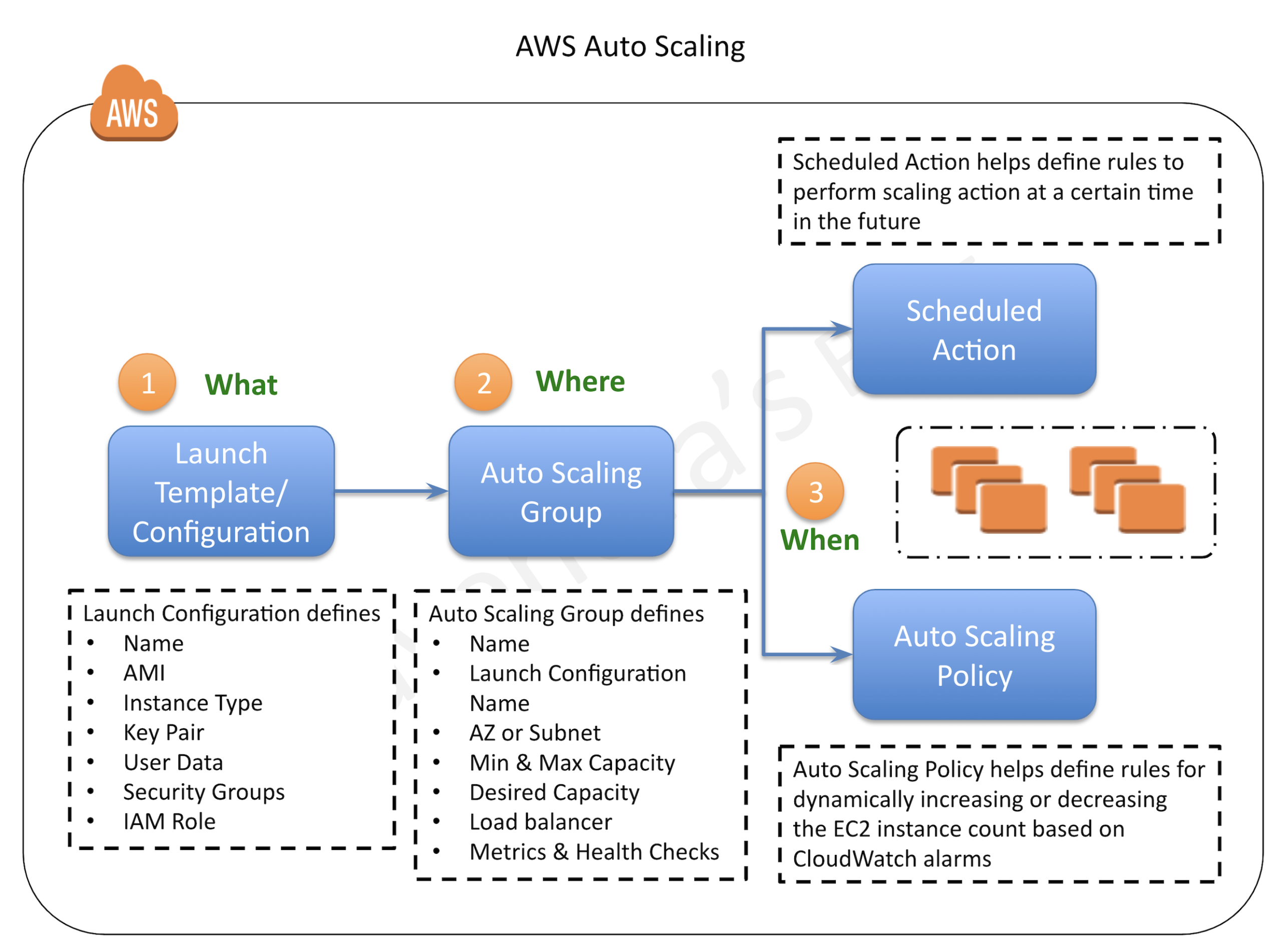
  • Auto Scaling groups are the core of Auto Scaling and contain a collection of EC2 instances that share similar characteristics and are treated as a logical grouping for the purposes of automatic scaling and management.
  • ASG requires
    • Launch Template (recommended) OR Launch Configuration (deprecated)
      • determine the EC2 template to use for launching the instance
    • Minimum & Maximum capacity
      • determine the number of instances when an autoscaling policy is applied.
      • Number of instances cannot grow beyond these boundaries
    • Desired capacity
      • to determine the number of instances the ASG must maintain at all times. If missing, it equals the minimum size.
      • Desired capacity is different from minimum capacity.
      • An Auto Scaling group’s desired capacity is the default number of instances that should be running. A group’s minimum capacity is the fewest number of instances the group can have running
    • Availability Zones or Subnets in which the instances will be launched.
    • Metrics & Health Checks
      • metrics to determine when it should launch or terminate instances and health checks to determine if the instance is healthy or not
  • ASG starts by launching a desired capacity of instances and maintains this number by performing periodic health checks.
  • If an instance becomes unhealthy, the ASG terminates and launches a new instance.
  • ASG can also use scaling policies to increase or decrease the number of instances automatically to meet changing demands
  • An ASG can contain EC2 instances in one or more AZs within the same region.
  • ASGs cannot span multiple regions.
  • ASG can launch On-Demand Instances, Spot Instances, or both when configured to use a launch template.
  • To merge separate single-zone ASGs into a single ASG spanning multiple AZs, rezone one of the single-zone groups into a multi-zone group, and then delete the other groups. This process works for groups with or without a load balancer, as long as the new multi-zone group is in one of the same AZs as the original single-zone groups.
  • ASG can be associated with a single launch configuration or template
  • As the Launch Configuration can’t be modified once created, the only way to update the Launch Configuration for an ASG is to create a new one and associate it with the ASG.
  • When the launch configuration for the ASG is changed, any new instances launched, use the new configuration parameters, but the existing instances are not affected.
  • ASG can be deleted from CLI, if it has no running instances else need to set the minimum and desired capacity to 0. This is handled automatically when deleting an ASG from the AWS management console.
  • Deletion Protection (Jan 2026) – ASGs now support deletion protection with multiple protection levels to prevent accidental deletions. A new IAM policy condition key autoscaling:ForceDelete controls the use of the ForceDelete parameter.

Launch Configuration

⚠️ LAUNCH CONFIGURATION – DEPRECATED

Launch Configurations are being phased out in favor of Launch Templates.

  • As of January 1, 2023 – No new EC2 instance types are supported in launch configurations.
  • As of June 1, 2023 – New accounts cannot create launch configurations via the console.
  • As of October 1, 2024 – New accounts cannot create launch configurations using any method (console, API, CLI, or CloudFormation).
  • Existing accounts can still use existing launch configurations but should migrate to Launch Templates.

Migration: Use Migrate to Launch Templates guide to transition.

  • Launch configuration is an instance configuration template that an ASG uses to launch EC2 instances.
  • Launch configuration is similar to EC2 configuration and involves the selection of the Amazon Machine Image (AMI), block devices, key pair, instance type, security groups, user data, EC2 instance monitoring, instance profile, kernel, ramdisk, the instance tenancy, whether the instance has a public IP address, and is EBS-optimized.
  • Launch configuration can be associated with multiple ASGs
  • Launch configuration can’t be modified after creation and needs to be created new if any modification is required.
  • Basic or detailed monitoring for the instances in the ASG can be enabled when a launch configuration is created.
  • By default, basic monitoring is enabled when you create the launch configuration using the AWS Management Console, and detailed monitoring is enabled when you create the launch configuration using the AWS CLI or an API
  • AWS recommends using Launch Template instead. Launch Configurations are deprecated for new accounts.

Launch Template

  • A Launch Template is similar to a launch configuration, with additional features, and is the recommended and only supported option for new AWS accounts (since Oct 2024).
  • Launch Template allows multiple versions of a template to be defined.
  • With versioning, a subset of the full set of parameters can be created and then reused to create other templates or template versions for e.g, a default template that defines common configuration parameters can be created and allow the other parameters to be specified as part of another version of the same template.
  • Launch Template allows the selection of both Spot and On-Demand Instances or multiple instance types.
  • Launch templates support EC2 Dedicated Hosts. Dedicated Hosts are physical servers with EC2 instance capacity that are dedicated to your use.
  • Launch templates provide the following features
    • Support for multiple instance types and purchase options in a single ASG.
    • Launching Spot Instances with the capacity-optimized allocation strategy.
    • Support for launching instances into existing Capacity Reservations through an ASG.
    • Support for unlimited mode for burstable performance instances.
    • Support for Dedicated Hosts.
    • Combining CPU architectures such as Intel, AMD, and ARM (Graviton2/Graviton3/Graviton4)
    • Improved governance through IAM controls and versioning.
    • Automating instance deployment with Instance Refresh.
    • Support for all new EC2 instance types (required since Jan 2023 as launch configs no longer support new types).

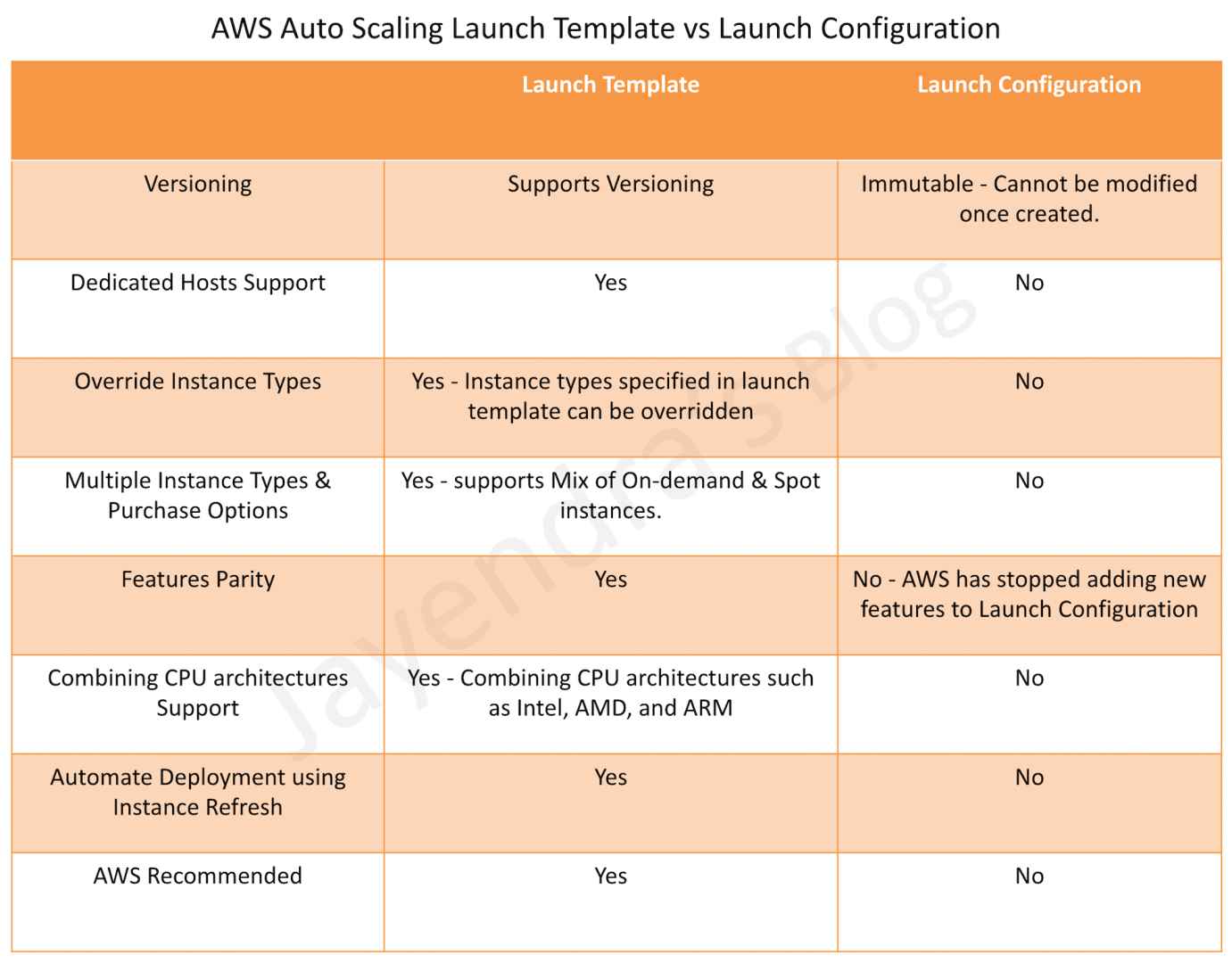
Auto Scaling Launch Configuration vs Launch Template

Auto Scaling Launch Template vs Launch Configuration

Auto Scaling Policies

Refer blog post @ Auto Scaling Policies

Predictive Scaling

  • Predictive Scaling uses machine learning to predict future traffic patterns and proactively scales capacity in advance of predicted changes.
  • It analyzes historical load data to detect daily and weekly patterns and automatically adjusts forecasts.
  • Predictive Scaling provisions EC2 instances ahead of anticipated demand, improving availability and reducing the need for over-provisioning.
  • It works alongside dynamic scaling policies – predictive scaling handles anticipated load changes while dynamic scaling handles unexpected spikes.
  • Predictive Scaling supports:
    • Forecast-only mode for evaluation before activating scaling
    • Forecast and scale mode for automatic capacity adjustment
    • Custom metrics in addition to predefined CPU, network, and ALB request metrics
  • Best suited for workloads with recurring, predictable traffic patterns (e.g., business-hour traffic, weekly patterns).

Auto Scaling Cooldown Period

  • Auto Scaling Cooldown period is a configurable setting for the ASG that helps to ensure that Auto Scaling doesn’t launch or terminate additional instances before the previous scaling activity takes effect and allows the newly launched instances to start handling traffic and reduce load
  • When ASG dynamically scales using a simple scaling policy and launches an instance, Auto Scaling suspends the scaling activities for the cooldown period (default 300 seconds) to complete before resuming scaling activities
  • Example Use Case
    • You configure a scale out alarm to increase the capacity, if the CPU utilization increases more than 80%
    • A CPU spike occurs and causes the alarm to be triggered, Auto Scaling launches a new instance
    • However, it would take time for the newly launched instance to be configured, instantiated, and started, let’s say 5 mins
    • Without a cooldown period, if another CPU spike occurs Auto Scaling would launch a new instance again and this would continue for 5 mins till the previously launched instance is up and running and started handling traffic
    • With a cooldown period, Auto Scaling would suspend the activity for the specified time period enabling the newly launched instance to start handling traffic and reduce the load.
    • After the cooldown period, Auto Scaling resumes acting on the alarms
  • When manually scaling the ASG, the default is not to wait for the cooldown period but can be overridden to honour the cooldown period.
  • Note that if an instance becomes unhealthy, Auto Scaling does not wait for the cooldown period to complete before replacing the unhealthy instance.
  • Cooldown periods are automatically applied to dynamic scaling activities for simple scaling policies and are not supported for step scaling or target tracking policies.
  • Default Instance Warmup – a recommended alternative to cooldown periods. It specifies how long after an instance reaches InService state before it contributes to aggregated CloudWatch metrics. This prevents premature scaling decisions based on incomplete data from newly launched instances.

Auto Scaling Termination Policy

  • Termination policy helps Auto Scaling decide which instances it should terminate first when Auto Scaling automatically scales in.
  • Auto Scaling specifies a default termination policy and also provides the ability to create a customized one.

Default Termination Policy

Default termination policy helps ensure that the network architecture spans AZs evenly and instances are selected for termination as follows:-

  1. Selection of Availability Zone
    • selects the AZ, in multiple AZs environments, with the most instances and at least one instance that is not protected from scale in.
    • selects the AZ with instances that use the oldest launch template or configuration, if there is more than one AZ with the same number of instances
  2. Selection of an Instance within the Availability Zone
    • terminates the unprotected instance using the oldest launch template or configuration if one exists.
    • terminates unprotected instances closest to the next billing hour, If multiple instances with the oldest launch configuration. This helps in maximizing the use of the EC2 instances that have an hourly charge while minimizing the number of hours billed for EC2 usage.
    • terminates instances at random, if more than one unprotected instance is closest to the next billing hour.

Customized Termination Policy

  1. Auto Scaling first assesses the AZs for any imbalance. If an AZ has more instances than the other AZs that are used by the group, then it applies the specified termination policy on the instances from the imbalanced AZ
  2. If the Availability Zones used by the group are balanced, then Auto Scaling applies the specified termination policy.
  3. Following Customized Termination policies are supported:
    1. OldestInstance – terminates the oldest instance in the group and can be useful to upgrade to new instance types
    2. NewestInstance – terminates the newest instance in the group and can be useful when testing a new launch configuration
    3. OldestLaunchConfiguration – terminates instances that have the oldest launch configuration
    4. OldestLaunchTemplate – terminates instances that have the oldest launch template
    5. ClosestToNextInstanceHour – terminates instances that are closest to the next billing hour and helps to maximize the use of your instances and manage costs.
    6. AllocationStrategy – terminates instances to align remaining instances to the allocation strategy for the instance type (Spot or On-Demand).
    7. Default – terminates as per the default termination policy

Custom Termination Policy with Lambda

  • Auto Scaling supports using an AWS Lambda function as a custom termination policy for advanced termination logic.
  • The Lambda function receives a JSON payload with candidate instances and returns which instances should be terminated.
  • This provides fine-grained control over termination decisions, e.g., avoiding instances running critical workloads.
  • Requires granting EC2 Auto Scaling permission via a Lambda resource-based policy.

Instance Refresh

  • Instance refresh can be used to update the instances in the ASG instead of manually replacing instances a few at a time.
  • An instance refresh can be helpful when you have a new AMI or a new user data script.
  • Instance refresh also helps configure the minimum healthy percentage, instance warmup, and checkpoints.
  • Instance refresh supports two strategies:
    • Rolling strategy (default) – Terminates instances and launches new ones in batches while maintaining desired capacity and availability.
    • Replace Root Volume strategy (Nov 2025) – Updates instances by replacing only the root EBS volume without terminating the instance. Preserves network interfaces, non-root EBS volumes, and instance store data.
  • To use an instance refresh:
    • Create a new launch template that specifies the new AMI or user data script.
    • Start an instance refresh to begin updating the instances in the group immediately.
    • EC2 Auto Scaling starts performing a rolling replacement of the instances.
  • Skip Matching – When enabled, Auto Scaling compares each instance’s current configuration against the desired configuration and only replaces instances that don’t match, skipping already-updated instances.

Warm Pools

  • A warm pool is a pool of pre-initialized EC2 instances that sits alongside the Auto Scaling group for faster scale-out.
  • When the application needs to scale out, the ASG draws from the warm pool instead of launching cold instances, significantly reducing startup latency.
  • Instances in a warm pool can be in one of three states: Stopped, Running, or Hibernated.
  • Warm pools are ideal for applications with long boot times (e.g., instances that need to load large datasets or perform complex initialization).
  • Warm pool supports lifecycle hooks to perform custom actions when instances transition between states.
  • Supports ASGs with mixed instances policies (Nov 2025) – warm pools can now be used with groups that have multiple instance types and purchase options.
  • Creating a warm pool when not required can lead to unnecessary costs for the stopped/running instances.

Instance Maintenance Policy

  • Instance Maintenance Policy (Nov 2023) defines whether new instances are launched before or after existing instances are terminated during replacement operations.
  • Controls replacement behavior for instance refresh, health checks, and AZ rebalancing.
  • Three preset options:
    • Launch before terminating – Provisions new instance first, then terminates old one. Favors availability over cost.
    • Terminate and launch – Terminates and launches simultaneously. Favors cost savings over availability.
    • Custom policy – Set custom min/max range for available capacity during replacement.
  • Can be set at the ASG level and overridden for individual instance refresh operations.

Instance Protection

  • Instance protection controls whether Auto Scaling can terminate a particular instance or not.
  • Instance protection can be enabled on an ASG or an individual instance as well, at any time
  • Instances launched within an ASG with Instance protection enabled would inherit the property.
  • Instance protection starts as soon as the instance is InService and if the Instance is detached, it loses its Instance protection
  • If all instances in an ASG are protected from termination during scale in and a scale-in event occurs, it can’t terminate any instance and will decrement the desired capacity.
  • Instance protection does not protect for the below cases
    • Manual termination through the EC2 console, the terminate-instances command, or the TerminateInstances API.
    • If it fails health checks and must be replaced
    • Spot instances in an ASG from interruption

Standby State

Auto Scaling allows putting the InService instances in the Standby state during which the instance is still a part of the ASG but does not serve any requests. This can be used to either troubleshoot an instance or update an instance and return the instance back to service.

  • An instance can be put into Standby state and it will continue to remain in the Standby state unless exited.
  • Auto Scaling, by default, decrements the desired capacity for the group and prevents it from launching a new instance. If no decrement is selected, it would launch a new instance
  • When the instance is in the standby state, the instance can be updated or used for troubleshooting.
  • If a load balancer is associated with Auto Scaling, the instance is automatically deregistered when the instance is in Standby state and registered again when the instance exits the Standby state

Suspension

  • Auto Scaling processes can be suspended and then resumed. This can be very useful to investigate a configuration problem or debug an issue with the application, without triggering the Auto Scaling process.
  • Auto Scaling also performs Administrative Suspension where it would suspend processes for ASGs if the ASG has been trying to launch instances for over 24 hours but has not succeeded in launching any instances.
  • Auto Scaling processes include
    • Launch – Adds a new EC2 instance to the group, increasing its capacity.
    • Terminate – Removes an EC2 instance from the group, decreasing its capacity.
    • HealthCheck – Checks the health of the instances.
    • ReplaceUnhealthy – Terminates instances that are marked as unhealthy and subsequently creates new instances to replace them.
    • AlarmNotification – Accepts notifications from CloudWatch alarms that are associated with the group. If suspended, Auto Scaling does not automatically execute policies that would be triggered by an alarm
    • ScheduledActions – Performs scheduled actions that you create.
    • AddToLoadBalancer – Adds instances to the load balancer when they are launched.
    • InstanceRefresh – Terminates and replaces instances using the instance refresh feature.
    • AZRebalance – Balances the number of EC2 instances in the group across the Availability Zones in the region.
      • If an AZ either is removed from the ASG or becomes unhealthy or unavailable, Auto Scaling launches new instances in an unaffected AZ before terminating the unhealthy or unavailable instances
      • When the unhealthy AZ returns to a healthy state, Auto Scaling automatically redistributes the instances evenly across the Availability Zones for the group.
      • Note that if you suspend AZRebalance and a scale out or scale in event occurs, Auto Scaling still tries to balance the Availability Zones for e.g. during scale out, it launches the instance in the Availability Zone with the fewest instances.
      • If you suspend Launch, AZRebalance neither launches new instances nor terminates existing instances. This is because AZRebalance terminates instances only after launching the replacement instances.
      • If you suspend Terminate, the ASG can grow up to 10% larger than its maximum size, because Auto Scaling allows this temporarily during rebalancing activities. If it cannot terminate instances, your ASG could remain above its maximum size until the Terminate process is resumed

Zonal Shift Integration

  • Zonal Shift (Nov 2024) integrates with Amazon Application Recovery Controller (ARC) to rapidly recover from AZ impairments.
  • When a zonal shift is activated, Auto Scaling stops dynamic scale-in to preserve capacity and launches new instances in healthy AZs only.
  • Zonal Autoshift can automatically shift traffic away from an impaired AZ on a periodic basis to test resilience.
  • Health checks can be configured to either remain enabled or be disabled in the impaired AZ during a zonal shift.
  • Can be initiated from the EC2 Auto Scaling console, ARC console, or programmatically via AWS SDK.

Strict Availability Zone Balance

  • Strict AZ Balance (Nov 2024) provides a new provisioning control to strictly balance workloads across Availability Zones.
  • Unlike the default best-effort balancing, strict mode ensures exact equal distribution across configured AZs.
  • Provides greater control over instance placement for compliance or performance requirements.

Auto Scaling Lifecycle

Refer to blog post @ Auto Scaling Lifecycle

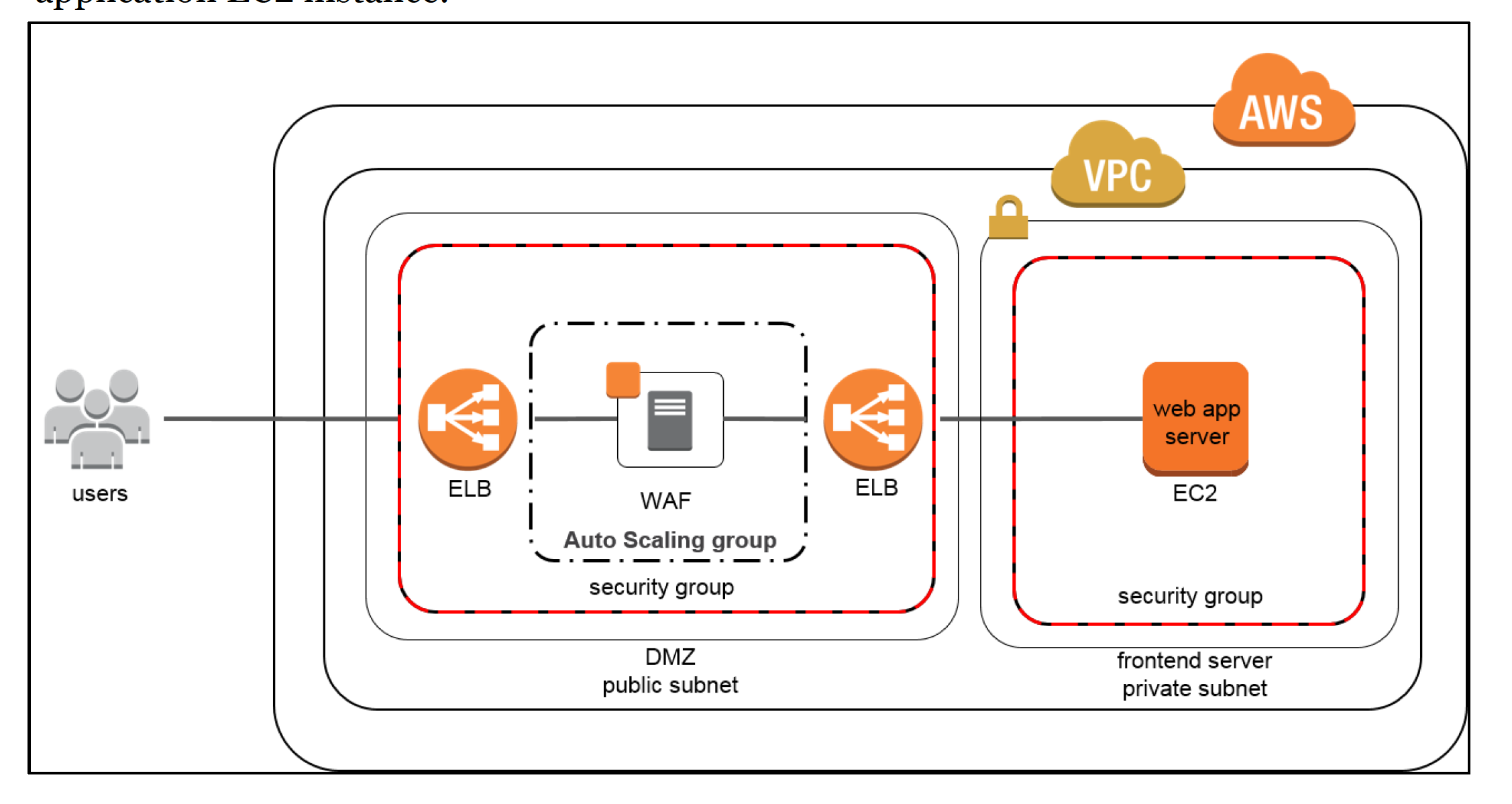
Autoscaling & ELB

Refer to blog post @ Autoscaling & ELB

AWS Certification Exam Practice Questions

  • Questions are collected from Internet and the answers are marked as per my knowledge and understanding (which might differ with yours).
  • AWS services are updated everyday and both the answers and questions might be outdated soon, so research accordingly.
  • AWS exam questions are not updated to keep up the pace with AWS updates, so even if the underlying feature has changed the question might not be updated
  • Open to further feedback, discussion and correction.
  1. A user is trying to setup a scheduled scaling activity using Auto Scaling. The user wants to setup the recurring schedule. Which of the below mentioned parameters is not required in this case?
    1. Maximum size
    2. Auto Scaling group name
    3. End time
    4. Recurrence value
  2. A user has configured Auto Scaling with 3 instances. The user had created a new AMI after updating one of the instances. If the user wants to terminate two specific instances to ensure that Auto Scaling launches an instances with the new launch configuration, which command should he run?
    1. as-delete-instance-in-auto-scaling-group <Instance ID> –no-decrement-desired-capacity
    2. as-terminate-instance-in-auto-scaling-group <Instance ID> –update-desired-capacity
    3. as-terminate-instance-in-auto-scaling-group <Instance ID> –decrement-desired-capacity
    4. as-terminate-instance-in-auto-scaling-group <Instance ID> –no-decrement-desired-capacity
  3. A user is planning to scale up an application by 8 AM and scale down by 7 PM daily using Auto Scaling. What should the user do in this case?
    1. Setup the scaling policy to scale up and down based on the CloudWatch alarms
    2. User should increase the desired capacity at 8 AM and decrease it by 7 PM manually
    3. User should setup a batch process which launches the EC2 instance at a specific time
    4. Setup scheduled actions to scale up or down at a specific time
  4. An organization has setup Auto Scaling with ELB. Due to some manual error, one of the instances got rebooted. Thus, it failed the Auto Scaling health check. Auto Scaling has marked it for replacement. How can the system admin ensure that the instance does not get terminated?
    1. Update the Auto Scaling group to ignore the instance reboot event
    2. It is not possible to change the status once it is marked for replacement
    3. Manually add that instance to the Auto Scaling group after reboot to avoid replacement
    4. Change the health of the instance to healthy using the Auto Scaling commands
  5. A user has configured Auto Scaling with the minimum capacity as 2 and the desired capacity as 2. The user is trying to terminate one of the existing instance with the command: as-terminate-instance-in-auto-scaling-group<Instance ID> –decrement-desired-capacity. What will Auto Scaling do in this scenario?
    1. Terminates the instance and does not launch a new instance
    2. Terminates the instance and updates the desired capacity to 1
    3. Terminates the instance and updates the desired capacity & minimum size to 1
    4. Throws an error
  6. An organization has configured Auto Scaling for hosting their application. The system admin wants to understand the Auto Scaling health check process. If the instance is unhealthy, Auto Scaling launches an instance and terminates the unhealthy instance. What is the order execution?
    1. Auto Scaling launches a new instance first and then terminates the unhealthy instance
    2. Auto Scaling performs the launch and terminate processes in a random order
    3. Auto Scaling launches and terminates the instances simultaneously
    4. Auto Scaling terminates the instance first and then launches a new instance
  7. A user has configured ELB with Auto Scaling. The user suspended the Auto Scaling terminate process only for a while. What will happen to the availability zone rebalancing process (AZRebalance) during this period?
    1. Auto Scaling will not launch or terminate any instances
    2. Auto Scaling will allow the instances to grow more than the maximum size
    3. Auto Scaling will keep launching instances till the maximum instance size
    4. It is not possible to suspend the terminate process while keeping the launch active
  8. An organization has configured Auto Scaling with ELB. There is a memory issue in the application which is causing CPU utilization to go above 90%. The higher CPU usage triggers an event for Auto Scaling as per the scaling policy. If the user wants to find the root cause inside the application without triggering a scaling activity, how can he achieve this?
    1. Stop the scaling process until research is completed
    2. It is not possible to find the root cause from that instance without triggering scaling
    3. Delete Auto Scaling until research is completed
    4. Suspend the scaling process until research is completed
  9. A user has configured ELB with Auto Scaling. The user suspended the Auto Scaling Alarm Notification (which notifies Auto Scaling for CloudWatch alarms) process for a while. What will Auto Scaling do during this period?
    1. AWS will not receive the alarms from CloudWatch
    2. AWS will receive the alarms but will not execute the Auto Scaling policy
    3. Auto Scaling will execute the policy but it will not launch the instances until the process is resumed
    4. It is not possible to suspend the AlarmNotification process
  10. An organization has configured two single availability zones. The Auto Scaling groups are configured in separate zones. The user wants to merge the groups such that one group spans across multiple zones. How can the user configure this?
    1. Run the command as-join-auto-scaling-group to join the two groups
    2. Run the command as-update-auto-scaling-group to configure one group to span across zones and delete the other group
    3. Run the command as-copy-auto-scaling-group to join the two groups
    4. Run the command as-merge-auto-scaling-group to merge the groups
  11. An organization has configured Auto Scaling with ELB. One of the instance health check returns the status as Impaired to Auto Scaling. What will Auto Scaling do in this scenario?
    1. Perform a health check until cool down before declaring that the instance has failed
    2. Terminate the instance and launch a new instance
    3. Notify the user using SNS for the failed state
    4. Notify ELB to stop sending traffic to the impaired instance
  12. A user has setup an Auto Scaling group. The group has failed to launch a single instance for more than 24 hours. What will happen to Auto Scaling in this condition
    1. Auto Scaling will keep trying to launch the instance for 72 hours
    2. Auto Scaling will suspend the scaling process
    3. Auto Scaling will start an instance in a separate region
    4. The Auto Scaling group will be terminated automatically
  13. A user is planning to setup infrastructure on AWS for the Christmas sales. The user is planning to use Auto Scaling based on the schedule for proactive scaling. What advise would you give to the user?
    1. It is good to schedule now because if the user forgets later on it will not scale up
    2. The scaling should be setup only one week before Christmas
    3. Wait till end of November before scheduling the activity
    4. It is not advisable to use scheduled based scaling
  14. A user is trying to setup a recurring Auto Scaling process. The user has setup one process to scale up every day at 8 am and scale down at 7 PM. The user is trying to setup another recurring process which scales up on the 1st of every month at 8 AM and scales down the same day at 7 PM. What will Auto Scaling do in this scenario
    1. Auto Scaling will execute both processes but will add just one instance on the 1st
    2. Auto Scaling will add two instances on the 1st of the month
    3. Auto Scaling will schedule both the processes but execute only one process randomly
    4. Auto Scaling will throw an error since there is a conflict in the schedule of two separate Auto Scaling Processes
  15. A sys admin is trying to understand the Auto Scaling activities. Which of the below mentioned processes is not performed by Auto Scaling?
    1. Reboot Instance
    2. Schedule Actions
    3. Replace Unhealthy
    4. Availability Zone Re-Balancing
  16. You have started a new job and are reviewing your company’s infrastructure on AWS. You notice one web application where they have an Elastic Load Balancer in front of web instances in an Auto Scaling Group. When you check the metrics for the ELB in CloudWatch you see four healthy instances in Availability Zone (AZ) A and zero in AZ B. There are zero unhealthy instances. What do you need to fix to balance the instances across AZs?
    1. Set the ELB to only be attached to another AZ
    2. Make sure Auto Scaling is configured to launch in both AZs
    3. Make sure your AMI is available in both AZs
    4. Make sure the maximum size of the Auto Scaling Group is greater than 4
  17. You have been asked to leverage Amazon VPC EC2 and SQS to implement an application that submits and receives millions of messages per second to a message queue. You want to ensure your application has sufficient bandwidth between your EC2 instances and SQS. Which option will provide the most scalable solution for communicating between the application and SQS?
    1. Ensure the application instances are properly configured with an Elastic Load Balancer
    2. Ensure the application instances are launched in private subnets with the EBS-optimized option enabled
    3. Ensure the application instances are launched in public subnets with the associate-public-IP-address=trueoption enabled
    4. Launch application instances in private subnets with an Auto Scaling group and Auto Scaling triggers configured to watch the SQS queue size
  18. You have decided to change the Instance type for instances running in your application tier that are using Auto Scaling. In which area below would you change the instance type definition?
    1. Auto Scaling launch configuration or launch template
    2. Auto Scaling group
    3. Auto Scaling policy
    4. Auto Scaling tags
  19. A user is trying to delete an Auto Scaling group from CLI. Which of the below mentioned steps are to be performed by the user?
    1. Terminate the instances with the ec2-terminate-instance command
    2. Terminate the Auto Scaling instances with the as-terminate-instance command
    3. Set the minimum size and desired capacity to 0
    4. There is no need to change the capacity. Run the as-delete-group command and it will reset all values to 0
  20. A user has created a web application with Auto Scaling. The user is regularly monitoring the application and he observed that the traffic is highest on Thursday and Friday between 8 AM to 6 PM. What is the best solution to handle scaling in this case?
    1. Add a new instance manually by 8 AM Thursday and terminate the same by 6 PM Friday
    2. Schedule Auto Scaling to scale up by 8 AM Thursday and scale down after 6 PM on Friday
    3. Schedule a policy which may scale up every day at 8 AM and scales down by 6 PM
    4. Configure a batch process to add a instance by 8 AM and remove it by Friday 6 PM
  21. A user has configured the Auto Scaling group with the minimum capacity as 3 and the maximum capacity as 5. When the user configures the AS group, how many instances will Auto Scaling launch?
    1. 3
    2. 0
    3. 5
    4. 2
  22. A sys admin is maintaining an application on AWS. The application is installed on EC2 and user has configured ELB and Auto Scaling. Considering future load increase, the user is planning to launch new servers proactively so that they get registered with ELB. How can the user add these instances with Auto Scaling?
    1. Increase the desired capacity of the Auto Scaling group
    2. Increase the maximum limit of the Auto Scaling group
    3. Launch an instance manually and register it with ELB on the fly
    4. Decrease the minimum limit of the Auto Scaling group
  23. In reviewing the auto scaling events for your application you notice that your application is scaling up and down multiple times in the same hour. What design choice could you make to optimize for the cost while preserving elasticity? Choose 2 answers.
    1. Modify the Amazon CloudWatch alarm period that triggers your auto scaling scale down policy.
    2. Modify the Auto scaling group termination policy to terminate the oldest instance first.
    3. Modify the Auto scaling policy to use scheduled scaling actions.
    4. Modify the Auto scaling group cool down timers.
    5. Modify the Auto scaling group termination policy to terminate newest instance first.
  24. You have a business critical two tier web app currently deployed in two availability zones in a single region, using Elastic Load Balancing and Auto Scaling. The app depends on synchronous replication (very low latency connectivity) at the database layer. The application needs to remain fully available even if one application Availability Zone goes off-line, and Auto scaling cannot launch new instances in the remaining Availability Zones. How can the current architecture be enhanced to ensure this? [PROFESSIONAL]
    1. Deploy in two regions using Weighted Round Robin (WRR), with Auto Scaling minimums set for 100% peak load per region.
    2. Deploy in three AZs, with Auto Scaling minimum set to handle 50% peak load per zone.
    3. Deploy in three AZs, with Auto Scaling minimum set to handle 33% peak load per zone. (Loss of one AZ will handle only 66% if the autoscaling also fails)
    4. Deploy in two regions using Weighted Round Robin (WRR), with Auto Scaling minimums set for 50% peak load per region.
  25. A user has created a launch configuration for Auto Scaling where CloudWatch detailed monitoring is disabled. The user wants to now enable detailed monitoring. How can the user achieve this?
    1. Update the Launch config with CLI to set InstanceMonitoringDisabled = false
    2. The user should change the Auto Scaling group from the AWS console to enable detailed monitoring
    3. Update the Launch config with CLI to set InstanceMonitoring.Enabled = true
    4. Create a new Launch Config with detail monitoring enabled and update the Auto Scaling group (Note: For new accounts, create a new Launch Template version instead)
  26. A user has created an Auto Scaling group with default configurations from CLI. The user wants to setup the CloudWatch alarm on the EC2 instances, which are launched by the Auto Scaling group. The user has setup an alarm to monitor the CPU utilization every minute. Which of the below mentioned statements is true?
    1. It will fetch the data at every minute but the four data points [corresponding to 4 minutes] will not have value since the EC2 basic monitoring metrics are collected every five minutes
    2. It will fetch the data at every minute as detailed monitoring on EC2 will be enabled by the default launch configuration of Auto Scaling
    3. The alarm creation will fail since the user has not enabled detailed monitoring on the EC2 instances
    4. The user has to first enable detailed monitoring on the EC2 instances to support alarm monitoring at every minute
  27. A customer has a website which shows all the deals available across the market. The site experiences a load of 5 large EC2 instances generally. However, a week before Thanksgiving vacation they encounter a load of almost 20 large instances. The load during that period varies over the day based on the office timings. Which of the below mentioned solutions is cost effective as well as help the website achieve better performance?
    1. Keep only 10 instances running and manually launch 10 instances every day during office hours.
    2. Setup to run 10 instances during the pre-vacation period and only scale up during the office time by launching 10 more instances using the AutoScaling schedule.
    3. During the pre-vacation period setup a scenario where the organization has 15 instances running and 5 instances to scale up and down using Auto Scaling based on the network I/O policy.
    4. During the pre-vacation period setup 20 instances to run continuously.
  28. When Auto Scaling is launching a new instance based on condition, which of the below mentioned policies will it follow?
    1. Based on the criteria defined with cross zone Load balancing
    2. Launch an instance which has the highest load distribution
    3. Launch an instance in the AZ with the fewest instances
    4. Launch an instance in the AZ which has the highest instances
  29. The user has created multiple AutoScaling groups. The user is trying to create a new AS group but it fails. How can the user know that he has reached the AS group limit specified by AutoScaling in that region?
    1. Run the command: as-describe-account-limits
    2. Run the command: as-describe-group-limits
    3. Run the command: as-max-account-limits
    4. Run the command: as-list-account-limits
  30. A user is trying to save some cost on the AWS services. Which of the below mentioned options will not help him save cost?
    1. Delete the unutilized EBS volumes once the instance is terminated
    2. Delete the Auto Scaling launch configuration after the instances are terminated (Auto Scaling Launch config does not cost anything)
    3. Release the elastic IP if not required once the instance is terminated
    4. Delete the AWS ELB after the instances are terminated
  31. To scale up the AWS resources using manual Auto Scaling, which of the below mentioned parameters should the user change?
    1. Maximum capacity
    2. Desired capacity
    3. Preferred capacity
    4. Current capacity
  32. For AWS Auto Scaling, what is the first transition state an existing instance enters after leaving steady state in Standby mode?
    1. Detaching
    2. Terminating:Wait
    3. Pending (You can put any instance that is in an InService state into a Standby state. This enables you to remove the instance from service, troubleshoot or make changes to it, and then put it back into service. Instances in a Standby state continue to be managed by the Auto Scaling group. However, they are not an active part of your application until you put them back into service. Refer link)
    4. EnteringStandby
  33. For AWS Auto Scaling, what is the first transition state an instance enters after leaving steady state when scaling in due to health check failure or decreased load?
    1. Terminating (When Auto Scaling responds to a scale in event, it terminates one or more instances. These instances are detached from the Auto Scaling group and enter the Terminating state. Refer link)
    2. Detaching
    3. Terminating:Wait
    4. EnteringStandby
  34. A user has setup Auto Scaling with ELB on the EC2 instances. The user wants to configure that whenever the CPU utilization is below 10%, Auto Scaling should remove one instance. How can the user configure this?
    1. The user can get an email using SNS when the CPU utilization is less than 10%. The user can use the desired capacity of Auto Scaling to remove the instance
    2. Use CloudWatch to monitor the data and Auto Scaling to remove the instances using scheduled actions
    3. Configure CloudWatch to send a notification to Auto Scaling Launch configuration when the CPU utilization is less than 10% and configure the Auto Scaling policy to remove the instance
    4. Configure CloudWatch to send a notification to the Auto Scaling group when the CPU Utilization is less than 10% and configure the Auto Scaling policy to remove the instance
  35. A user has enabled detailed CloudWatch metric monitoring on an Auto Scaling group. Which of the below mentioned metrics will help the user identify the total number of instances in an Auto Scaling group including pending, terminating and running instances?
    1. GroupTotalInstances (Refer link)
    2. GroupSumInstances
    3. It is not possible to get a count of all the three metrics together. The user has to find the individual number of running, terminating and pending instances and sum it
    4. GroupInstancesCount
  36. Your startup wants to implement an order fulfillment process for selling a personalized gadget that needs an average of 3-4 days to produce with some orders taking up to 6 months you expect 10 orders per day on your first day. 1000 orders per day after 6 months and 10,000 orders after 12 months. Orders coming in are checked for consistency then dispatched to your manufacturing plant for production quality control packaging shipment and payment processing. If the product does not meet the quality standards at any stage of the process employees may force the process to repeat a step. Customers are notified via email about order status and any critical issues with their orders such as payment failure. Your case architecture includes AWS Elastic Beanstalk for your website with an RDS MySQL instance for customer data and orders. How can you implement the order fulfillment process while making sure that the emails are delivered reliably? [PROFESSIONAL]
    1. Add a business process management application to your Elastic Beanstalk app servers and re-use the ROS database for tracking order status use one of the Elastic Beanstalk instances to send emails to customers.
    2. Use SWF with an Auto Scaling group of activity workers and a decider instance in another Auto Scaling group with min/max=1 Use the decider instance to send emails to customers.
    3. Use SWF with an Auto Scaling group of activity workers and a decider instance in another Auto Scaling group with min/max=1 use SES to send emails to customers.
    4. Use an SQS queue to manage all process tasks Use an Auto Scaling group of EC2 Instances that poll the tasks and execute them. Use SES to send emails to customers.
  37. An organization wants to reduce latency for their Auto Scaling group during scale-out events. Their application takes 5 minutes to boot and initialize. Which Auto Scaling feature should they use?
    1. Increase the desired capacity permanently
    2. Use Predictive Scaling to pre-provision
    3. Configure a Warm Pool with pre-initialized instances
    4. Set a longer cooldown period
  38. A company has an application with predictable traffic patterns that peaks every weekday at 9 AM and reduces at 6 PM. They want Auto Scaling to proactively provision capacity before the peak. Which scaling approach is most appropriate?
    1. Target tracking scaling policy with CPU metric
    2. Step scaling policy with CloudWatch alarms
    3. Scheduled scaling actions
    4. Predictive Scaling policy
  39. A company needs to update the AMI across all instances in their Auto Scaling group without terminating instances, preserving their network interfaces and non-root EBS volumes. Which approach should they use?
    1. Create new launch template version and wait for scale-in/scale-out to replace instances
    2. Use instance refresh with the rolling strategy
    3. Use instance refresh with the replace root volume strategy
    4. Manually stop and update each instance
  40. An application team wants to control the order in which instances are replaced during Auto Scaling health check replacements. They want new instances launched BEFORE unhealthy ones are terminated to maintain capacity. Which feature should they configure?
    1. Instance protection
    2. Lifecycle hooks
    3. Instance maintenance policy with “Launch before terminating”
    4. Custom termination policy
  41. An Auto Scaling group experiences an Availability Zone impairment. The team wants to quickly shift traffic away from the impaired AZ while preventing Auto Scaling from terminating instances in that zone. Which feature integrates with Auto Scaling to handle this? [PROFESSIONAL]
    1. Suspend the AZRebalance process
    2. Remove the AZ from the ASG configuration
    3. Use Amazon ARC Zonal Shift with the Auto Scaling group
    4. Enable cross-zone load balancing on the ELB

References

AWS Auto Scaling User Guide


AWS ELB Monitoring

AWS ELB Monitoring

  • Elastic Load Balancing publishes data points to Amazon CloudWatch about the load balancers and targets (or back-end instances for Classic Load Balancer).
  • Elastic Load Balancing reports metrics to CloudWatch only when requests are flowing through the load balancer.
    • If there are requests flowing through the load balancer, Elastic Load Balancing measures and sends its metrics in 60-second intervals.
    • If there are no requests flowing through the load balancer or no data for a metric, the metric is not reported.
  • AWS provides four types of load balancers, each with its own monitoring capabilities:
    • Application Load Balancer (ALB) – Layer 7, HTTP/HTTPS/gRPC
    • Network Load Balancer (NLB) – Layer 4, TCP/UDP/TLS
    • Gateway Load Balancer (GWLB) – Layer 3, transparent network gateway
    • Classic Load Balancer (CLB) – Previous generation (Layer 4/7)
  • ELB monitoring options include CloudWatch metrics, access logs, connection logs, health check logs, CloudTrail logs, and CloudWatch Internet Monitor.

CloudWatch Metrics

Classic Load Balancer (CLB) Metrics

  • CLB metrics use the AWS/ELB namespace.
  • HealthyHostCount, UnHealthyHostCount
    • Number of healthy and unhealthy instances registered with the load balancer.
    • Most useful statistics are Average, Min, and Max.
  • RequestCount
    • Number of requests completed or connections made during the specified interval (1 or 5 minutes).
    • Most useful statistic is Sum.
  • Latency
    • Time elapsed, in seconds, after the request leaves the load balancer until the headers of the response are received.
    • Most useful statistic is Average.
  • SurgeQueueLength
    • Total number of requests that are pending routing.
    • Load balancer queues a request if it is unable to establish a connection with a healthy instance in order to route the request.
    • Maximum size of the queue is 1,024. Additional requests are rejected when the queue is full.
    • Most useful statistic is Max, because it represents the peak of queued requests.
  • SpilloverCount
    • The total number of requests that were rejected because the surge queue is full. Should ideally be 0.
    • Most useful statistic is Sum.
  • HTTPCode_ELB_4XX, HTTPCode_ELB_5XX
    • Client and server error codes generated by the load balancer.
    • Most useful statistic is Sum.
  • HTTPCode_Backend_2XX, HTTPCode_Backend_3XX, HTTPCode_Backend_4XX, HTTPCode_Backend_5XX
    • Number of HTTP response codes generated by registered instances.
    • Most useful statistic is Sum.

Application Load Balancer (ALB) Metrics

  • ALB metrics use the AWS/ApplicationELB namespace.
  • ActiveConnectionCount – Total concurrent TCP connections active from clients to the load balancer and from the load balancer to targets. Useful statistic: Sum.
  • NewConnectionCount – Total new TCP connections established from clients to the load balancer and from the load balancer to targets. Useful statistic: Sum.
  • RejectedConnectionCount – Number of connections rejected because the load balancer reached its maximum number of connections. Useful statistic: Sum.
  • RequestCount – Number of requests processed over IPv4 and IPv6. Useful statistic: Sum.
  • TargetResponseTime – Time elapsed after the request leaves the load balancer until the target starts to send response headers. Useful statistics: Average, pNN.NN (percentiles).
  • HealthyHostCount, UnHealthyHostCount – Number of healthy/unhealthy targets. Useful statistics: Average, Min, Max.
  • HTTPCode_Target_2XX_Count through 5XX_Count – HTTP response codes generated by targets. Useful statistic: Sum.
  • HTTPCode_ELB_4XX_Count, HTTPCode_ELB_5XX_Count – HTTP error codes generated by the load balancer itself. Useful statistic: Sum.
  • ClientTLSNegotiationErrorCount – TLS connections initiated by clients that did not establish a session with the load balancer. Useful statistic: Sum.
  • TargetConnectionErrorCount – Connections that were not successfully established between the load balancer and target. Useful statistic: Sum.
  • ProcessedBytes – Total bytes processed by the load balancer over IPv4 and IPv6. Useful statistic: Sum.
  • ConsumedLCUs – Number of Load Balancer Capacity Units (LCU) consumed. Used for billing calculations.
  • RuleEvaluations – Number of rules evaluated while processing requests.
  • AnomalousHostCount – Number of targets detected with anomalies (used with Automatic Target Weights). Useful statistics: Min, Max.

Network Load Balancer (NLB) Metrics

  • NLB metrics use the AWS/NetworkELB namespace.
  • ActiveFlowCount – Total number of concurrent flows (connections) from clients to targets. Useful statistic: Average.
  • NewFlowCount – Total number of new flows established from clients to targets. Useful statistic: Sum.
  • ProcessedBytes – Total bytes processed by the load balancer (TCP/TLS, UDP). Useful statistic: Sum.
  • TCP_Client_Reset_Count, TCP_Target_Reset_Count, TCP_ELB_Reset_Count – Number of reset (RST) packets sent from client, target, or the load balancer.
  • HealthyHostCount, UnHealthyHostCount – Number of healthy/unhealthy targets.
  • ConsumedLCUs – Number of Network Load Balancer Capacity Units consumed.
  • PeakBytesPerSecond – Highest average bytes per second for the load balancer during a period.

Gateway Load Balancer (GWLB) Metrics

  • GWLB metrics use the AWS/GatewayELB namespace.
  • ActiveFlowCount, NewFlowCount – Concurrent and new flows from clients to targets.
  • ProcessedBytes – Total bytes processed by the GWLB.
  • HealthyHostCount, UnHealthyHostCount – Number of healthy/unhealthy targets.
  • GWLB does NOT generate access logs since it is a transparent Layer 3 load balancer that does not terminate flows.

Elastic Load Balancer Access Logs

  • Elastic Load Balancing provides access logs that capture detailed information about all requests sent to the load balancer.
  • Each log contains information such as the time the request was received, the client’s IP address, latencies, request paths, and server responses.
  • Access logging is disabled by default and can be enabled without any additional charge. You are only charged for S3 storage.
  • Access logs are supported for ALB, NLB, and CLB. GWLB does not generate access logs.

ALB Access Logs

  • ALB publishes a log file for each load balancer node every 5 minutes to Amazon S3.
  • Log entries include: request type, timestamp, ELB name, client:port, target:port, request processing time, target processing time, response processing time, ELB/target status codes, received/sent bytes, request details, user agent, SSL cipher/protocol, target group ARN, trace ID, and more.

NLB Access Logs

  • NLB access logs capture information about TLS requests sent to the load balancer.
  • Logs can be stored in Amazon S3.
  • New (Nov 2025): NLB access logs now support delivery as CloudWatch Vended Logs, enabling direct delivery to CloudWatch Logs, Amazon Data Firehose, and Amazon S3 with Apache Parquet format support. This allows real-time log analysis using CloudWatch Logs Insights and Live Tail.

ALB Connection Logs

  • Connection logs capture detailed information about TLS connections established between clients and the ALB.
  • Useful for troubleshooting TLS client connection issues (e.g., mTLS failures, cipher mismatches).
  • Connection logs are stored in Amazon S3, with a log file published every 5 minutes.
  • This is an optional feature, disabled by default.
  • Log entries include: timestamp, client IP:port, listener port, TLS protocol/cipher, connection status, client certificate details (for mTLS), and more.

ALB Health Check Logs

  • New (Nov 2025): ALB now supports Health Check Logs that send detailed target health check data directly to a designated Amazon S3 bucket.
  • This optional feature captures:
    • Health check status (healthy/unhealthy)
    • Timestamps
    • Target identification data
    • Failure reasons for unhealthy targets
  • Health check logs are published every 5 minutes per load balancer node.
  • Helps troubleshoot intermittent target health check failures without needing to rely solely on CloudWatch metrics.
  • No additional charge; you pay only for S3 storage.

CloudWatch Internet Monitor

  • Amazon CloudWatch Internet Monitor provides internet performance and availability measurements for user traffic to load balancers.
  • Monitors internet traffic patterns and identifies issues that affect internet connectivity between users and AWS.
  • Supported for both ALB and NLB.
  • NLB integration (Sep 2024): You can create or associate a monitor for an NLB directly when creating it in the AWS Management Console.
  • Provides city-level visibility into performance impairments and their geographic scope.

CloudWatch Network Flow Monitor

  • New (Dec 2024, re:Invent): CloudWatch Network Flow Monitor offers network performance monitoring across AWS managed services.
  • Provides near real-time visibility into network performance for traffic between compute resources (EC2, EKS), to AWS services (S3, DynamoDB), and to other AWS Regions.
  • Uses lightweight agents to gather TCP connection performance statistics (packet loss, latency).
  • Can determine if AWS is the cause of a detected network issue for monitored flows.

ALB Automatic Target Weights (ATW)

  • New (Nov 2023): ALB supports Automatic Target Weights (ATW), which uses anomaly detection to optimize traffic routing.
  • ATW detects and mitigates gray failures — situations where a target passes health checks but still returns elevated errors.
  • Anomaly detection is automatically enabled on HTTP/HTTPS target groups with at least three healthy targets.
  • ATW analyzes HTTP return status codes and TCP/TLS errors to identify anomalous targets and reduces traffic to them.
  • Provides the AnomalousHostCount CloudWatch metric to monitor detected anomalies.

CloudWatch Anomaly Detection Alarms

  • CloudWatch anomaly detection uses machine learning to model expected metric behavior and automatically creates upper and lower bounds.
  • Can be used with ELB metrics like TargetResponseTime, RequestCount, HTTPCode_ELB_5XX to detect unusual patterns.
  • Recommended approach for monitoring ELB performance without manually setting static thresholds.
  • Works with ALB, NLB, CLB, and GWLB metrics.

CloudTrail Logs

  • AWS CloudTrail captures all API calls to the Elastic Load Balancing API made by or on behalf of your AWS account.
  • API calls can be made directly, or indirectly through the AWS Management Console, AWS CLI, or SDKs.
  • CloudTrail stores the information as log files in an Amazon S3 bucket.
  • Logs can be used to monitor load balancer activity and determine what API call was made, what source IP address was used, who made the call, when it was made, and so on.
  • Applies to all ELB types (ALB, NLB, GWLB, CLB).

Classic Load Balancer – Migration Recommendation

⚠️ Note: Classic Load Balancer is the previous generation load balancer. AWS strongly recommends migrating to Application Load Balancer (Layer 7) or Network Load Balancer (Layer 4).

EC2-Classic networking was fully retired in August 2023. While CLB continues to function in VPC, no new features are being added to it. Use the AWS Migration Wizard to move to ALB or NLB.

AWS Certification Exam Practice Questions

  • Questions are collected from Internet and the answers are marked as per my knowledge and understanding (which might differ with yours).
  • AWS services are updated everyday and both the answers and questions might be outdated soon, so research accordingly.
  • AWS exam questions are not updated to keep up the pace with AWS updates, so even if the underlying feature has changed the question might not be updated
  • Open to further feedback, discussion and correction.
  1. An admin is planning to monitor the ELB. Which of the below mentioned services does not help the admin capture the monitoring information about the ELB activity?
    1. ELB Access logs
    2. ELB health check
    3. CloudWatch metrics
    4. ELB API calls with CloudTrail
  2. A customer needs to capture all client connection information from their load balancer every five minutes. The company wants to use this data for analyzing traffic patterns and troubleshooting their applications. Which of the following options meets the customer requirements?
    1. Enable AWS CloudTrail for the load balancer.
    2. Enable access logs on the load balancer.
    3. Install the Amazon CloudWatch Logs agent on the load balancer.
    4. Enable Amazon CloudWatch metrics on the load balancer.
  3. Your supervisor has requested a way to analyze traffic patterns for your application. You need to capture all connection information from your load balancer every 10 minutes. Pick a solution from below. Choose the correct answer:
    1. Enable access logs on the load balancer.
    2. Create a custom metric CloudWatch filter on your load balancer.
    3. Use a CloudWatch Logs Agent.
    4. Use AWS CloudTrail with your load balancer.
  4. A company runs a web application behind an Application Load Balancer. Some users are experiencing intermittent 5XX errors but health checks show all targets as healthy. Which ALB feature can automatically detect and mitigate this issue?
    1. Cross-Zone Load Balancing
    2. Automatic Target Weights (ATW)
    3. Connection Draining
    4. Sticky Sessions
  5. A DevOps engineer needs to troubleshoot why targets behind an ALB are intermittently failing health checks. Which recently introduced feature provides detailed health check failure reasons stored in S3?
    1. ALB Access Logs
    2. CloudWatch HealthyHostCount metric
    3. ALB Health Check Logs
    4. AWS CloudTrail
  6. A solutions architect wants to analyze NLB access logs in near real-time using CloudWatch Logs Insights. Which delivery option should they configure?
    1. Enable NLB access logs to S3 and create Athena queries
    2. Configure NLB access logs as CloudWatch Vended Logs
    3. Enable VPC Flow Logs on the NLB
    4. Install CloudWatch Agent on NLB nodes
  7. Which of the following is a metric specific to Classic Load Balancer that indicates the load balancer cannot route requests because the queue is full?
    1. RejectedConnectionCount
    2. TargetConnectionErrorCount
    3. SpilloverCount
    4. HTTPCode_ELB_503
  8. A company wants to identify if AWS infrastructure is causing latency issues for users connecting to their Network Load Balancer from different geographic locations. Which service should they use?
    1. AWS X-Ray
    2. CloudWatch Metrics
    3. Amazon CloudWatch Internet Monitor
    4. VPC Flow Logs

References

AWS Bastion Host – Secure SSH/RDP Access

Bastion Host Overview

📌 2025 Update: Modern Alternatives to Bastion Hosts

While bastion hosts remain a valid architecture pattern, AWS now offers several modern alternatives that eliminate the need for managing a dedicated jump server:

The AWS Quick Start for Linux Bastion was archived in October 2024 as part of the full AWS Quick Start program retirement.

  • Bastion means a structure for Fortification to protect things behind it
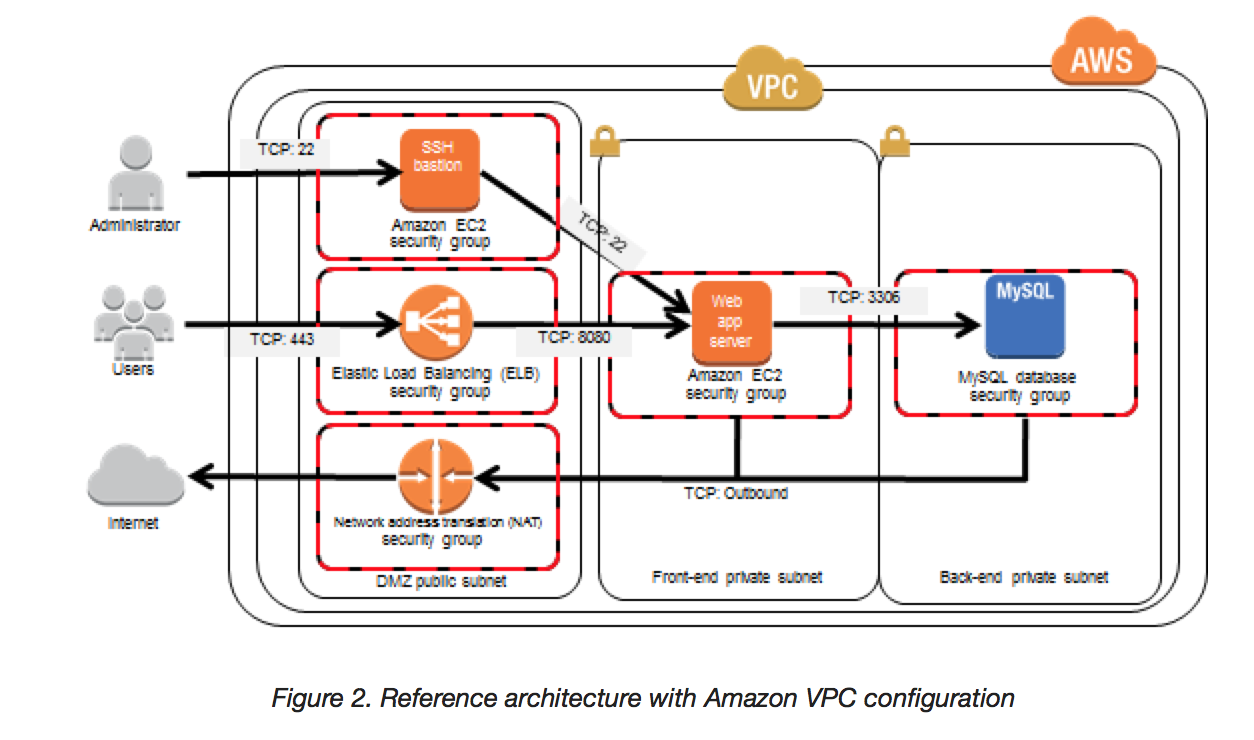
  • In AWS, a Bastion host (also referred to as a Jump server) can be used to securely access instances in the private subnets.
  • Bastion host launched in the Public subnets would act as a primary access point from the Internet and acts as a proxy to other instances.

Bastion Host

Key points

  • Bastion host is deployed in the Public subnet and acts as a proxy or a gateway between you and your instances
  • Bastion host is a security measure that helps to reduce attack on your infrastructure and you have to concentrate to hardening a single layer
  • Bastion host allows you to login to instances in the Private subnet securely without having to store the private keys on the Bastion host (using ssh-agent forwarding or RDP gateways)
  • Bastion host security can be further tightened to allow SSH/RDP access from specific trusted IPs or corporate IP ranges
  • Bastion host for your AWS infrastructure shouldn’t be used for any other purpose, as that could open unnecessary security holes
  • Security for all the Instances in the private subnet should be hardened to accept SSH/RDP connections only from the Bastion host
  • Deploy a Bastion host within each Availability Zone for HA, cause if the Bastion instance or the AZ hosting the Bastion server goes down the ability to connect to your private instances is lost completely

Modern Alternatives to Bastion Hosts

EC2 Instance Connect Endpoint (EIC Endpoint)

  • Launched in June 2023, EC2 Instance Connect Endpoint allows secure connectivity to instances in private subnets from the internet without requiring a bastion host
  • No IGW in the VPC, no public IP on the instance, and no agent installation required
  • Supports SSH and RDP connections using private IP addresses
  • Access is controlled through IAM policies and security groups
  • Available at no additional cost
  • One EIC Endpoint per VPC; supported in all AWS Regions except Canada West (Calgary)
  • Ideal for ad-hoc access to private instances without maintaining bastion infrastructure

AWS Systems Manager Session Manager

  • Provides secure, auditable instance management without opening inbound ports (no port 22/3389 needed)
  • No SSH keys to manage – access is controlled entirely through IAM policies
  • Requires SSM Agent installed on the instance (pre-installed on Amazon Linux 2, Amazon Linux 2023, and many other AMIs)
  • Provides full audit trail in AWS CloudTrail and session logging to S3/CloudWatch
  • Supports port forwarding for accessing applications on private instances
  • Works with instances in private subnets without internet access (via VPC endpoints)
  • Recommended by AWS as a bastion host replacement for operational access

AWS Verified Access

  • Provides secure, VPN-less access based on Zero Trust principles
  • Originally supported only HTTP/HTTPS applications (GA April 2023)
  • Non-HTTP protocol support (SSH, RDP, TCP) went GA in February 2025
  • Evaluates access based on user identity and device security posture on every request
  • Uses Cedar policy language for fine-grained access control
  • Integrates with identity providers (IdPs) and device trust providers (Jamf, CrowdStrike, etc.)
  • Achieved FedRAMP High and Moderate authorization (March 2025)
  • Ideal for enterprise environments requiring identity-aware, device-trust-based access

When to Still Use a Bastion Host

  • Legacy environments where SSM Agent cannot be installed
  • Compliance requirements mandating a traditional network perimeter
  • Environments needing specific protocol support not covered by alternatives
  • Third-party access where IAM-based solutions are not feasible
  • AWS certification exams still heavily test bastion host concepts

AWS Certification Exam Practice Questions

  • Questions are collected from Internet and the answers are marked as per my knowledge and understanding (which might differ with yours).
  • AWS services are updated everyday and both the answers and questions might be outdated soon, so research accordingly.
  • AWS exam questions are not updated to keep up the pace with AWS updates, so even if the underlying feature has changed the question might not be updated
  • Open to further feedback, discussion and correction.
  1. A customer is running a multi-tier web application farm in a virtual private cloud (VPC) that is not connected to their corporate network. They are connecting to the VPC over the Internet to manage all of their Amazon EC2 instances running in both the public and private subnets. They have only authorized the bastion-security-group with Microsoft Remote Desktop Protocol (RDP) access to the application instance security groups, but the company wants to further limit administrative access to all of the instances in the VPC. Which of the following Bastion deployment scenarios will meet this requirement?
    1. Deploy a Windows Bastion host on the corporate network that has RDP access to all instances in the VPC.
    2. Deploy a Windows Bastion host with an Elastic IP address in the public subnet and allow SSH access to the bastion from anywhere.
    3. Deploy a Windows Bastion host with an Elastic IP address in the private subnet, and restrict RDP access to the bastion from only the corporate public IP addresses.
    4. Deploy a Windows Bastion host with an auto-assigned Public IP address in the public subnet, and allow RDP access to the bastion from only the corporate public IP addresses.
  2. You are designing a system that has a Bastion host. This component needs to be highly available without human intervention. Which of the following approaches would you select?
    1. Run the bastion on two instances one in each AZ
    2. Run the bastion on an active Instance in one AZ and have an AMI ready to boot up in the event of failure
    3. Configure the bastion instance in an Auto Scaling group Specify the Auto Scaling group to include multiple AZs but have a min-size of 1 and max-size of 1
    4. Configure an ELB in front of the bastion instance
  3. You’ve been brought in as solutions architect to assist an enterprise customer with their migration of an ecommerce platform to Amazon Virtual Private Cloud (VPC) The previous architect has already deployed a 3- tier VPC. The configuration is as follows: VPC vpc-2f8t>C447
    IGW ig-2d8bc445
    NACL acl-2080c448
    Subnets and Route Tables:
    Web server’s subnet-258bc44d
    Application server’s subnet-248DC44c
    Database server’s subnet-9189c6f9
    Route Tables:
    rtb-2i8bc449
    rtb-238bc44b
    Associations:
    Subnet-258bc44d: rtb-2i8bc449
    Subnet-248DC44c: rtb-238bc44b
    Subnet-9189c6f9: rtb-238bc44b
    You are now ready to begin deploying EC2 instances into the VPC. Web servers must have direct access to the internet Application and database servers cannot have direct access to the internet. Which configuration below will allow you the ability to remotely administer your application and database servers, as well as allow these servers to retrieve updates from the Internet?

    1. Create a bastion and NAT Instance in subnet-258bc44d and add a route from rtb-238bc44b to subnet-258bc44d. (Route should point to the NAT)
    2. Add a route from rtb-238bc44b to igw-2d8bc445 and add a bastion and NAT instance within Subnet-248DC44c. (Adding IGW to routertb-238bc44b would expose the Application and Database server to internet. Bastion and NAT should be in public subnet)
    3. Create a Bastion and NAT Instance in subnet-258bc44d. Add a route from rtb-238bc44b to igw-2d8bc445. And a new NACL that allows access between subnet-258bc44d and subnet-248bc44c. (Route should point to NAT and not Internet Gateway else it would be internet accessible.)
    4. Create a Bastion and NAT instance in subnet-258bc44d and add a route from rtb-238bc44b to the NAT instance. (Bastion and NAT should be in the public subnet. As Web Server has direct access to Internet, the subnet subnet-258bc44d should be public and Route rtb-2i8bc449 pointing to IGW. Route rtb-238bc44b for private subnets should point to NAT for outgoing internet access)
  4. You are tasked with setting up a Linux bastion host for access to Amazon EC2 instances running in your VPC. Only clients connecting from the corporate external public IP address 72.34.51.100 should have SSH access to the host. Which option will meet the customer requirement?
    1. Security Group Inbound Rule: Protocol – TCP. Port Range – 22, Source 72.34.51.100/32
    2. Security Group Inbound Rule: Protocol – UDP, Port Range – 22, Source 72.34.51.100/32
    3. Network ACL Inbound Rule: Protocol – UDP, Port Range – 22, Source 72.34.51.100/32
    4. Network ACL Inbound Rule: Protocol – TCP, Port Range-22, Source 72.34.51.100/0
  5. A company needs to provide secure access to EC2 instances in private subnets without managing SSH keys or opening inbound ports. The solution must provide an audit trail of all sessions. Which AWS service should they use?
    1. Deploy a bastion host in a public subnet with an Auto Scaling group
    2. Use AWS Systems Manager Session Manager with IAM-based access control
    3. Use EC2 Instance Connect Endpoint with a public IP on the instances
    4. Configure a VPN connection from the corporate network
  6. A solutions architect needs to allow developers to connect via SSH to EC2 instances in a private subnet that has no internet gateway and no NAT gateway. The instances do not have public IP addresses. Which solution requires the LEAST operational overhead?
    1. Deploy a bastion host in a public subnet and configure security groups
    2. Set up an AWS Site-to-Site VPN connection
    3. Create an EC2 Instance Connect Endpoint in the VPC
    4. Configure AWS Direct Connect with a private virtual interface
  7. An enterprise wants to implement zero trust access to their internal applications and SSH-based administration of EC2 instances. Access should be granted based on user identity and device security posture without using a VPN or bastion host. Which AWS service meets these requirements?
    1. AWS Systems Manager Session Manager
    2. EC2 Instance Connect Endpoint
    3. AWS Verified Access
    4. AWS Client VPN
  8. Which of the following are valid modern alternatives to using a bastion host for accessing private EC2 instances? (Select THREE)
    1. AWS Systems Manager Session Manager
    2. Amazon Inspector
    3. EC2 Instance Connect Endpoint
    4. AWS Config
    5. AWS Verified Access with non-HTTP protocol support

Related Posts

AWS Consolidated Billing – Multi-Account Savings

AWS Consolidated Billing

  • Consolidated billing enables consolidating payments from multiple AWS accounts (Linked or Member Accounts) within the organization to a single account by designating it to be the Management (formerly Payer) Account.
  • Every organization in AWS Organizations has a management account that pays the charges of all the member accounts.
  • Consolidated billing is automatically enabled when you create an AWS Organization and is offered at no additional cost.
  • Consolidate billing
    • is strictly an accounting and billing feature.
    • allows receiving a combined view of charges incurred by all the associated accounts as well as each of the accounts.
    • is not a method for controlling accounts, or provisioning resources for accounts.
  • Management account is billed for all charges of the member accounts.
  • Each linked account is still an independent account in every other way.
  • AWS Organization Consolidated Billing feature does not allow the Management account to access data belonging to the linked account owners. All Features mode needs to be enabled for organizational policies.
  • However, access to the Management account users can be granted through Cross-Account Access roles.
  • AWS limits work on the account level only and AWS support is per account only.
  • All workload resources should reside only within member accounts and no resource should be created in the management account (AWS Well-Architected best practice).

Consolidated Billing Process

  • AWS Organizations provides consolidated billing so that the combined costs of all the member accounts in your organization can be tracked.
  • Create an Organization.
  • Create member accounts or invite existing accounts to join the organization.
  • Each month AWS charges your management account for all the member accounts in a consolidated bill.
  • The consolidated bill is available within minutes and includes detailed breakdowns by account, service, and region.

Consolidated Billing Scenarios

  • Have multiple accounts and want to get a single bill and track each account’s charges for e.g. multiple projects, each with its own AWS account or separate environments (Dev, Prod) within the same project.
  • Have multiple cost centers to track.
  • Have acquired a project or company with its own existing AWS account and you want a consolidated bill with your other AWS accounts.
  • Have multiple organizations and want centralized billing management across them (using AWS Billing Transfer).

Consolidated Billing Benefits

  • One Bill
    • A single bill with a combined view of AWS costs incurred by all accounts is generated.
  • Easy Tracking
    • Detailed cost reports & charges for each of the individual AWS accounts associated with the management account can be easily tracked.
    • Use Cost Allocation Tags to categorize and track costs; tags are included in the detailed billing report.
  • Combined Usage & Volume Discounts
    • Charges might actually decrease because AWS combines usage from all the accounts to qualify you for volume pricing discounts.
  • Free Tier
    • Customers that use Consolidated Billing to consolidate payment across multiple accounts will only have access to one free usage tier and it is not combined across accounts.
  • No Extra Cost
    • Consolidated billing is offered at no additional cost.

Volume Pricing Discounts

  • For billing purposes, AWS treats all the accounts in the organization on the consolidated bill as if they were one account.
  • AWS combines the usage from all accounts to determine which volume pricing tiers to apply, giving you a lower overall price whenever possible.
  • This applies to services with tiered pricing such as S3 storage, data transfer, and DynamoDB.

Volume Discounts Example

  • Example AWS Pricing – AWS charges $0.17/GB for the first 10 TB of data transfer out used, and $0.13/GB for the next 40 TB used that translates into $174.08 per TB for the first 10 TB, and $133.12 per TB for the next 40 TB.
  • Usage – Bob uses 8 TB of data transfer out during the month, and Susan uses 4 TB (for a total of 12 TB used).
  • Actual Individual Bill – AWS would have charged Bob and Susan each $174.08 per TB for their usage, for a total of $2088.96.
  • Volume Discount Bill – Combined 12 TB total that Bob and Susan used, would cost the management account ($174.08 * 10 TB) + ($133.12 * 2 TB) = $1740.80 + $266.24 = $2007.04.

Reserved Instances and Savings Plans Sharing

  • All member accounts in an Organization on a consolidated bill can receive the hourly cost-benefit of Reserved Instances (RIs) and Savings Plans that are purchased by any other account.
  • The management account of an organization can turn off Reserved Instance and Savings Plans discount sharing for any accounts in that organization, including the management account.
  • RIs and Savings Plans discounts aren’t shared between any accounts that have sharing turned off. To share an RI or Savings Plans discount with an account, both accounts must have sharing turned on.
  • For e.g., Bob and Susan each have an account on Bob’s consolidated bill. Susan has 5 Reserved Instances of the same type, and Bob has none. During one particular hour, Susan uses 3 instances and Bob uses 6, for a total of 9 instances used on Bob’s consolidated bill. AWS will bill 5 as Reserved Instances, and the remaining 4 as normal instances.

RI and Savings Plans Group Sharing (Nov 2025)

  • RISP Group Sharing provides granular control over how AWS commitments (RIs and Savings Plans) are shared across accounts within an organization.
  • Allows defining groups of accounts (using AWS Cost Categories) based on business units, projects, regions, or funding sources.
  • Two sharing options:
    • Prioritized Group Sharing – Applies commitments to defined groups first, then shares unused capacity organization-wide.
    • Restricted Group Sharing – Keeps commitments exclusively within defined groups for complete isolation when strict boundaries are required.
  • Addresses the challenge of ensuring Reserved Instances and Savings Plans benefit the teams that actually purchased them.
  • When using Billing Transfer, Reserved Instances and Savings Plans apply only to the AWS Organization where they were purchased and cannot be shared across multiple Organizations.

AWS Billing Transfer (Nov 2025)

  • AWS Billing Transfer allows centralized billing management and payment across multiple AWS Organizations.
  • Customers operating in multi-organization environments can designate a single management account to centrally manage and pay bills for multiple organizations.
  • Capabilities include:
    • Centralized invoice collection across organizations.
    • Single payment processing for multiple organizations.
    • Detailed cost analysis spanning multiple organizations.
  • Individual management accounts maintain complete security autonomy over their organizations.
  • Integrated with AWS Billing Conductor to control how cost data is viewed by organizations and implement advanced cost allocation strategies.
  • Pricing:
    • AWS managed pricing plan – No additional cost.
    • Customer managed pricing plan – $50/month per AWS Organization.
    • Free trial available through May 31, 2026.
  • Available in all public AWS Regions (excluding GovCloud (US), China Beijing, and China Ningxia).

AWS Billing View & Custom Billing Views (2024-2025)

  • AWS Billing View enables scoping and securely sharing exact cost and usage data access levels with stakeholders.
  • Custom Billing Views represent a filtered view of cost management data that can be:
    • Shared with member accounts within an organization, giving business unit owners access to their cost data without management account access.
    • Shared with accounts outside the organization (multi-source views).
    • Combined from multiple organizations into consolidated multi-source views.
  • Accessible through AWS Cost Explorer and AWS Budgets.
  • Enables cross-account cost visibility in AWS Budgets without requiring management account access.

AWS Cost and Usage Report (CUR 2.0) & Data Exports

  • AWS Data Exports enables creating recurring exports of billing and cost management data to S3.
  • CUR 2.0 is gradually replacing the Legacy Cost and Usage Report with improvements:
    • Static schema for easier data ingestion.
    • Additional columns (usage account name, billing account name).
    • Collapsed columns to reduce data sparsity.
    • Supports FOCUS 1.2 specification for open-source cost data formatting.
  • In AWS Organizations, both management accounts and member accounts can create Cost and Usage Reports.
  • Split Cost Allocation Data enables cost visibility for containerized workloads (ECS tasks, EKS pods, AWS Batch jobs) across the entire consolidated billing family, including CPU, memory, and GPU/accelerator resource allocation.

Consolidated Billing Best Practices

  • Paying account should be used solely for accounting and billing purposes
  • Consolidated billing works best with Resource tagging, as tags are included in the detailed billing report, which enables cost to be analyzed and decomposed across multiple dimensions and aggregation levels.
  • Paying account owners should secure their accounts by using MFA (multi-factor authentication) and a strong password

Consolidated Billing Best Practices (Current)

  • Management account should be used solely for billing, governance, and organizational management—no workload resources should be created in it.
  • Use Cost Allocation Tags to categorize and track costs; tags are included in the detailed billing report for analysis across multiple dimensions.
  • Secure the management account with MFA, a strong password, and minimal IAM users.
  • Use AWS Budgets to set cost thresholds and receive alerts.
  • Use Billing View to delegate cost visibility to business unit owners without sharing management account access.
  • Leverage RISP Group Sharing to align commitment discounts with the business units that purchased them.
  • Use Service Control Policies (SCPs) with All Features mode for governance and access control.

AWS Certification Exam Practice Questions

  • Questions are collected from Internet and the answers are marked as per my knowledge and understanding (which might differ with yours).
  • AWS services are updated everyday and both the answers and questions might be outdated soon, so research accordingly.
  • AWS exam questions are not updated to keep up the pace with AWS updates, so even if the underlying feature has changed the question might not be updated
  • Open to further feedback, discussion and correction.
  1. An organization is planning to create 5 different AWS accounts considering various security requirements. The organization wants to use a single payee account by using the consolidated billing option. Which of the below mentioned statements is true with respect to the above information?
    • Master (Payee) account will get only the total bill and cannot see the cost incurred by each account
    • Master (Payee) account can view only the AWS billing details of the linked accounts
    • It is not recommended to use consolidated billing since the payee account will have access to the linked accounts
    • Each AWS account needs to create an AWS billing policy to provide permission to the payee account
  2. An organization has setup consolidated billing with 3 different AWS accounts. Which of the below mentioned advantages will organization receive in terms of the AWS pricing?
    • The consolidated billing does not bring any cost advantage for the organization
    • All AWS accounts will be charged for S3 storage by combining the total storage of each account
    • EC2 instances of each account will receive a total of 750*3 micro instance hours free
    • The free usage tier for all the 3 accounts will be 3 years and not a single year
  3. An organization has added 3 of his AWS accounts to consolidated billing. One of the AWS accounts has purchased a Reserved Instance (RI) of a small instance size in the us-east-1a zone. All other AWS accounts are running instances of a small size in the same zone. What will happen in this case for the RI pricing?
    • Only the account that has purchased the RI will get the advantage of RI pricing
    • One instance of a small size and running in the us-east-1a zone of each AWS account will get the benefit of RI pricing
    • Any single instance from all the three accounts can get the benefit of AWS RI pricing if they are running in the same zone and are of the same size
    • If there are more than one instances of a small size running across multiple accounts in the same zone no one will get the benefit of RI
  4. An organization is planning to use AWS for 5 different departments. The finance department is responsible to pay for all the accounts. However, they want the cost separation for each account to map with the right cost centre. How can the finance department achieve this?
    • Create 5 separate accounts and make them a part of one consolidated billing
    • Create 5 separate accounts and use the IAM cross account access with the roles for better management
    • Create 5 separate IAM users and set a different policy for their access
    • Create 5 separate IAM groups and add users as per the department’s employees
  5. An AWS account wants to be part of the consolidated billing of his organization’s payee account. How can the owner of that account achieve this?
    • The payee account has to request AWS support to link the other accounts with his account
    • The owner of the linked account should add the payee account to his master account list from the billing console
    • The payee account will send a request to the linked account to be a part of consolidated billing (Check Process)
    • The owner of the linked account requests the payee account to add his account to consolidated billing
  6. You are looking to migrate your Development (Dev) and Test environments to AWS. You have decided to use separate AWS accounts to host each environment. You plan to link each accounts bill to a Master AWS account using Consolidated Billing. To make sure you keep within budget you would like to implement a way for administrators in the Master account to have access to stop, delete and/or terminate resources in both the Dev and Test accounts. Identify which option will allow you to achieve this goal.
    • Create IAM users in the Master account with full Admin permissions. Create cross-account roles in the Dev and Test accounts that grant the Master account access to the resources in the account by inheriting permissions from the Master account.
    • Create IAM users and a cross-account role in the Master account that grants full Admin permissions to the Dev and Test accounts.
    • Create IAM users in the Master account. Create cross-account roles in the Dev and Test accounts that have full Admin permissions and grant the Master account access.
    • Link the accounts using Consolidated Billing. This will give IAM users in the Master account access to resources in the Dev and Test accounts
  7. When using consolidated billing there are two account types. What are they?
    • Paying account and Linked account
    • Parent account and Child account
    • Main account and Sub account.
    • Main account and Secondary account.
  8. A customer needs corporate IT governance and cost oversight of all AWS resources consumed by its divisions. The divisions want to maintain administrative control of the discrete AWS resources they consume and keep those resources separate from the resources of other divisions. Which of the following options, when used together will support the autonomy/control of divisions while enabling corporate IT to maintain governance and cost oversight? Choose 2 answers
    • Use AWS Consolidated Billing and disable AWS root account access for the child accounts. (Need to link accounts and disabling root access is just a best practice)
    • Enable IAM cross-account access for all corporate IT administrators in each child account. (Provides IT governance)
    • Create separate VPCs for each division within the corporate IT AWS account.
    • Use AWS Consolidated Billing to link the divisions’ accounts to a parent corporate account (Will provide cost oversight)
    • Write all child AWS CloudTrail and Amazon CloudWatch logs to each child account’s Amazon S3 ‘Log’ bucket (Preferred approach would be to store logs from multiple accounts to a single S3 bucket with CloudTrail for IT Governance and CloudWatch alerts for Cost Oversight)
  9. An organization has 10 departments. The organization wants to track the AWS usage of each department. Which of the below mentioned options meets the requirement?
    1. Setup IAM groups for each department and track their usage
    2. Create separate accounts for each department, but use consolidated billing for payment and tracking
    3. Create separate accounts for each department and track them separately
    4. Setup IAM users for each department and track their usage
  10. A large enterprise operates multiple AWS Organizations for different business units. They want to centralize invoice collection and payment processing while allowing each organization to maintain security autonomy. Which AWS feature should they use?
    • Create a single AWS Organization and move all accounts into it
    • Use IAM cross-account roles to access billing in each organization
    • Use AWS Billing Transfer to designate a single management account to centrally manage billing across multiple organizations
    • Enable consolidated billing in each organization and manually combine invoices
  11. An organization has purchased Reserved Instances in Account A for the engineering team. They want to ensure the RI discounts benefit only the engineering team’s accounts (A, B, and C) and are NOT shared with other accounts in the organization. Which approach provides the most granular control?
    • Turn off RI sharing in the management account for all non-engineering accounts
    • Purchase Reserved Instances in a separate organization with only engineering accounts
    • Use Reserved Instances and Savings Plans Group Sharing with Restricted Group Sharing to limit discount sharing to the engineering group only
    • Create a Service Control Policy to prevent other accounts from using Reserved Instances
  12. A company wants to give department managers visibility into their team’s AWS costs without providing access to the management account. Which AWS feature enables this?
    • Share IAM credentials for the management account billing console
    • Create Custom Billing Views and share them with department manager accounts
    • Enable all member accounts to create their own Cost and Usage Reports
    • Use AWS Billing Conductor to create separate pro forma bills

References

AWS Support Tiers – Certification

AWS Support Plans

⚠️ Major Update: AWS Support Plans Restructured (Dec 2025)

At AWS re:Invent 2025, AWS announced a fundamental restructuring of Support Plans. The legacy Developer, Business, and Enterprise On-Ramp plans will be discontinued on January 1, 2027.

New Plan Structure:

  • Basic (free) — unchanged, included for all accounts
  • Business Support+ — replaces Developer and Business (from $29/month)
  • Enterprise Support — enhanced with AI capabilities (from $5,000/month)
  • Unified Operations — new top-tier for mission-critical workloads (from $50,000/month)

All new plans combine AI-powered capabilities with AWS human expertise for proactive, rather than reactive, support.

Current AWS Support Plans (2025+)

AWS now provides four Support tiers — one free tier and three paid plans. Support is per AWS Account (except Enterprise and Unified Operations which aggregate across accounts).

Basic Support (Free)

  • Included for all AWS customers at no additional charge
  • Customer Service: 24/7 access to account and billing questions
  • AWS re:Post community access
  • AWS Health Dashboard — personalized view of service health
  • AWS Trusted Advisor — core checks only (service limits)
  • Documentation, whitepapers, and best-practice guides

Business Support+ (from $29/month)

  • All features from Basic Support
  • AI-powered contextual recommendations — 24/7 intelligent troubleshooting
  • AWS DevOps Agent integration — credits equal to 30% of Support charge
  • 24/7 phone, web, chat, and email technical support
  • Unlimited support cases and contacts
  • Response times:
    • Business/Mission-critical system down: < 30 minutes
    • Production system down: < 1 hour
    • Production system impaired: < 4 hours
    • System impaired: < 12 hours
    • General guidance: < 24 hours
  • Full set of AWS Trusted Advisor checks
  • Contextual architectural guidance for your use cases
  • Third-party software support
  • AWS Support API for automated case management
  • AWS Support App in Slack
  • AWS Support Automation Workflows
  • AWS Health API access
  • IAM for controlling access to AWS Support
  • Pricing: Greater of $29/month or tiered: 9% (first $10K), 7% ($10K-$80K), 5% ($80K-$250K), 3% (over $250K)

Enterprise Support (from $5,000/month)

  • All features from Business Support+
  • Designated Technical Account Manager (TAM) — deep AWS knowledge with data-driven insights
  • AWS DevOps Agent integration — credits equal to 75% of Support charge
  • AWS Security Incident Response — included at no additional cost
  • Response times:
    • Business/Mission-critical system down: < 15 minutes
    • Production system down: < 1 hour
    • Production system impaired: < 4 hours
    • System impaired: < 12 hours
    • General guidance: < 24 hours
  • AWS Trusted Advisor Priority — prioritized and contextual recommendations
  • AWS Well-Architected Reviews
  • Proactive security reviews
  • Infrastructure event management and planned events support
  • White-glove billing concierge
  • Personalized strategic support plan
  • Consultative architectural reviews and guidance
  • Interactive programs and hands-on workshops
  • Pricing: Greater of $5,000/month or tiered: 10% (first $150K), 7% ($150K-$500K), 5% ($500K-$1M), 3% (over $1M)

Unified Operations (from $50,000/month)

  • All features from Enterprise Support
  • Designated team: TAM + Domain Specialist Engineers + Senior Billing and Account Specialist + Incident Management Engineers
  • AWS DevOps Agent integration — credits equal to 100% of Support charge
  • Response times:
    • Business/Mission-critical system down: < 5 minutes (from Incident Management Engineer)
    • Production system down: < 1 hour
    • Production system impaired: < 4 hours
    • System impaired: < 12 hours
    • General guidance: < 24 hours
  • 24/7 proactive workload monitoring
  • Continuous architectural reviews with designated domain specialists
  • Customized proactive services and resiliency reviews
  • Critical Workload Reviews
  • AWS Countdown Premium included (one subscription per month)
  • AWS Incident Detection and Response included
  • Global TAM coverage
  • Pricing: Greater of $50,000/month or tiered: 10% (first $1M), 6% ($1M-$5M), 5% (over $5M)

Legacy Plans (Discontinued January 1, 2027)

⚠️ The following plans are being discontinued on January 1, 2027. Existing subscribers can continue using them until that date or transition to new plans at any time.

Developer Support (Legacy)

  • All features from Basic Support
  • Best-practice guidance
  • Client-side diagnostic tools
  • Building-block architecture support
  • Business hours email access to Cloud Support Associates
  • Migration path: → Business Support+ ($29/month minimum)

Business Support (Legacy)

  • All features from Developer Support
  • Phone/Email/Chat support, 1 hour response time for production system down
  • Use-case guidance
  • AWS Trusted Advisor — full set of checks
  • Support API access
  • Third-party software support
  • IAM for AWS Support access
  • Migration path: → Business Support+ ($29/month minimum, improved 30-min response time)

Enterprise On-Ramp (Legacy)

  • All features from Business Support
  • Pool of TAMs (shared, not designated)
  • 30-minute response time for critical issues
  • Concierge support team
  • Migration path: → Enterprise Support ($5,000/month — automatic upgrade during 2026)

Support Plan Comparison

Feature Basic Business Support+ Enterprise Unified Operations
Pricing Free From $29/month From $5,000/month From $50,000/month
Critical Response Time < 30 minutes < 15 minutes < 5 minutes
Technical Support 24/7 phone, web, chat 24/7 phone, web, chat 24/7 phone, web, chat
AI-Powered Assistance
Trusted Advisor Core checks Full checks Full + Priority Full + Priority
TAM Designated Designated + Team
Well-Architected Reviews
Security Incident Response Additional fee Included Included
Proactive Monitoring 24/7 workload monitoring
Third-Party Software Support

Key Changes from Legacy to New Plans

  • Business Support+ replaces both Developer and Business Support
    • Lower minimum: $29/month (was $100/month for Business)
    • Faster critical response: 30 minutes (was 1 hour)
    • New AI-powered troubleshooting and recommendations
    • AWS DevOps Agent integration included
  • Enterprise Support (enhanced)
    • Lower minimum: $5,000/month (was $15,000/month)
    • AWS Security Incident Response now included at no additional cost
    • AWS DevOps Agent credits (75% of Support charge)
    • Enhanced AI-powered insights for TAMs
  • Unified Operations (new tier — replaces Enterprise On-Ramp position conceptually at the top)
    • 5-minute response time for critical issues
    • Dedicated team: TAM + Domain Engineers + Billing Specialist + Incident Engineers
    • 24/7 proactive workload monitoring
    • AWS Countdown Premium and Incident Detection & Response included
  • Enterprise On-Ramp discontinued — customers automatically upgraded to Enterprise Support during 2026

AWS Certification Exam Practice Questions

  • Questions are collected from Internet and the answers are marked as per my knowledge and understanding (which might differ with yours).
  • AWS services are updated everyday and both the answers and questions might be outdated soon, so research accordingly.
  • AWS exam questions are not updated to keep up the pace with AWS updates, so even if the underlying feature has changed the question might not be updated
  • Open to further feedback, discussion and correction.
  1. What are the four levels of AWS Premium Support?
    • Basic, Developer, Business, Enterprise [Note: Legacy plans. New structure (2025+) is Basic, Business Support+, Enterprise, Unified Operations]
    • Basic, Startup, Business, Enterprise
    • Free, Bronze, Silver, Gold
    • All support is free
  2. What is the maximum response time for a Business level Premium Support case with a production system down?
    • 120 seconds
    • 1 hour [Note: With new Business Support+, critical response time is 30 minutes]
    • 10 minutes
    • 12 hours
  3. A company requires a dedicated Technical Account Manager (TAM) and a response time of less than 15 minutes for business-critical system issues. Which AWS Support plan should they choose?
    • Business Support+
    • Enterprise Support
    • Unified Operations
    • Basic Support
  4. Which AWS Support plan provides AI-powered contextual recommendations and 24/7 technical support starting at $29/month?
    • Basic Support
    • Developer Support
    • Business Support+
    • Enterprise Support
  5. A large enterprise needs 5-minute response times for mission-critical incidents, designated domain specialist engineers, and 24/7 proactive workload monitoring. Which AWS Support plan meets these requirements?
    • Business Support+
    • Enterprise Support
    • Unified Operations
    • Enterprise On-Ramp
  6. Which AWS Support plans include AWS Trusted Advisor with the full set of checks? (Select TWO)
    • Basic Support
    • Business Support+
    • Enterprise Support
    • Developer Support
  7. Which AWS Support plan includes AWS Security Incident Response at no additional cost?
    • Basic Support
    • Business Support+
    • Enterprise Support
    • Developer Support
  8. A startup wants the minimum AWS Support plan that provides 24/7 phone access to cloud support engineers. Which plan should they choose?
    • Basic Support
    • Developer Support
    • Business Support+
    • Enterprise Support

References

AWS Security – Whitepaper – Certification

AWS Security – Whitepaper – Certification

📋 Important Update

The original AWS Security Whitepaper and the “Overview of Security Processes” whitepaper have been archived by AWS and marked as “historical reference only.” AWS now recommends the following current resources:

The core concepts below remain relevant for AWS certification exams, updated with current information.

Shared Security Responsibility Model

In the Shared Security Responsibility Model, AWS is responsible for securing the underlying infrastructure that supports the cloud (“Security of the Cloud”), and you’re responsible for anything you put on the cloud or connect to the cloud (“Security in the Cloud”).

AWS Security Shared Responsibility Model

AWS Security Responsibilities (“Security OF the Cloud”)

  • AWS is responsible for protecting the global infrastructure that runs all of the services offered in the AWS cloud. This infrastructure is comprised of the hardware, software, networking, and facilities that run AWS services.
  • AWS provides several reports from third-party auditors who have verified their compliance with a variety of computer security standards and regulations (available via AWS Artifact)
  • AWS is responsible for the security configuration of its products that are considered managed services for e.g. RDS, DynamoDB, Lambda, Fargate
  • For Managed Services, AWS will handle basic security tasks like guest operating system (OS) and database patching, firewall configuration, and disaster recovery.
  • AWS infrastructure is built on the AWS Nitro System, which provides hardware-enforced isolation between instances and prohibits administrative access to customer data.

Customer Security Responsibilities (“Security IN the Cloud”)

  • AWS Infrastructure as a Service (IaaS) products for e.g. EC2, VPC, S3 are completely under your control and require you to perform all of the necessary security configuration and management tasks.
  • Management of the guest OS (including updates and security patches), any application software or utilities installed on the instances, and the configuration of the AWS-provided firewall (called a security group) on each instance
  • For managed services, you are responsible for configuring logical access controls for the resources, protecting account credentials, and encrypting data at rest and in transit as applicable
  • Identity and access management using AWS IAM, including MFA, password policies, IAM roles, and least-privilege access
  • Data encryption at rest and in transit using services like AWS KMS, ACM, and S3 encryption options

Shared Responsibility Model Variations

  • Infrastructure Services (EC2, EBS, VPC) – Customer manages OS, patching, firewall, encryption
  • Container Services (RDS, ECS, EMR) – AWS manages OS/platform, customer manages access, firewall rules, data encryption
  • Abstract Services (S3, DynamoDB, Lambda, SQS) – AWS manages platform entirely, customer manages data classification, IAM policies, and encryption options

AWS Global Infrastructure Security

AWS Nitro System

  • The AWS Nitro System is the underlying platform for all modern EC2 instances, providing hardware-based security isolation
  • Virtualization resources are offloaded to dedicated hardware and software, minimizing the attack surface
  • Nitro System’s security model is locked down and prohibits administrative access, eliminating the possibility of human error and tampering
  • Nitro Isolation Engine (GA 2025 on Graviton5) – The first commercially deployed formally verified hypervisor, providing mathematically proven isolation between virtual machines
  • Nitro Enclaves – Provides isolated compute environments for processing highly sensitive data (e.g., PII, healthcare, financial data) with no persistent storage, interactive access, or external networking

AWS Compliance Program

AWS supports 143 security standards and compliance certifications, including:

  • SOC 1, SOC 2, SOC 3 (covering 188 services as of Spring 2026)
  • ISO 9001, ISO 27001:2022, ISO 27017, ISO 27018, ISO 27701, ISO 22301, ISO 20000-1
  • CSA STAR CCM v4.0
  • FedRAMP (High, Moderate)
  • PCI DSS Level 1
  • FIPS 140-3 (upgraded from FIPS 140-2)
  • HIPAA
  • GDPR
  • NIST 800-171 (CMMC 2.0)
  • C5 (Cloud Computing Compliance Criteria Catalogue)
  • ITAR
  • MTCS Level 3
  • IRAP (Australia)

Compliance reports are available through AWS Artifact, a self-service portal for on-demand access to AWS compliance reports and select online agreements.

Physical and Environmental Security

Storage Decommissioning

  • When a storage device has reached the end of its useful life, AWS procedures include a decommissioning process that is designed to prevent customer data from being exposed to unauthorized individuals.
  • AWS uses the techniques detailed in NIST 800-88 (“Guidelines for Media Sanitization”) to destroy data as part of the decommissioning process.
  • All decommissioned magnetic storage devices are degaussed and physically destroyed in accordance with industry-standard practices.
  • Media that stored customer data is not removed from AWS control until it has been securely decommissioned.

Network Security

Amazon Corporate Segregation

  • AWS Production network is segregated from the Amazon Corporate network and requires a separate set of credentials for logical access.
  • Amazon Corporate network relies on user IDs, passwords, and Kerberos, while the AWS Production network requires SSH public-key authentication through a bastion host.

Network Monitoring & Protection

AWS utilizes a wide variety of automated monitoring systems to provide a high level of service performance and availability. These tools monitor server and network usage, port scanning activities, application usage, and unauthorized intrusion attempts. The tools have the ability to set custom performance metrics thresholds for unusual activity.

AWS network provides protection against traditional network security issues:

  1. DDoS – AWS provides AWS Shield Standard (free, automatic L3/L4 DDoS protection for all AWS customers) and AWS Shield Advanced (paid, advanced L3/L4/L7 DDoS protection with 24/7 DDoS Response Team support, DDoS attack flow logs, and cost protection). AWS WAF now includes an Anti-DDoS Managed Rule Group (2025) for automatic application-layer (L7) DDoS mitigation.
  2. Man in the Middle attacks – AWS APIs are available via SSL/TLS-protected endpoints which provide server authentication. AWS Certificate Manager (ACM) provides free public SSL/TLS certificates.
  3. IP spoofing – AWS-controlled, host-based firewall infrastructure will not permit an instance to send traffic with a source IP or MAC address other than its own.
  4. Port Scanning – Unauthorized port scans by Amazon EC2 customers are a violation of the AWS Acceptable Use Policy. When unauthorized port scanning is detected by AWS, it is stopped and blocked.
  5. Packet Sniffing by other tenants – It is not possible for a virtual instance running in promiscuous mode to receive or “sniff” traffic that is intended for a different virtual instance. The Nitro System hypervisor will not deliver any traffic to them that is not addressed to them. Even two virtual instances that are owned by the same customer located on the same physical host cannot listen to each other’s traffic.

Penetration Testing

Updated Policy: AWS no longer requires prior approval for penetration testing on the following permitted services:

  • Amazon EC2 instances, WAF, NAT Gateways, and Elastic Load Balancers
  • Amazon RDS
  • Amazon CloudFront
  • Amazon Aurora
  • Amazon API Gateway
  • AWS Lambda and Lambda@Edge functions
  • Amazon Lightsail
  • AWS Elastic Beanstalk

Prohibited Activities (still require AWS approval): DNS zone walking, DoS/DDoS attacks, port flooding, protocol flooding, request flooding.

Secure Design Principles

  • Secure software development best practices, which include formal design reviews by the AWS Security Team, threat modeling, and completion of a risk assessment
  • Static code analysis tools are run as a part of the standard build process
  • Recurring penetration testing performed by carefully selected industry experts
  • AWS Nitro System hardware-level isolation with formally verified components
  • Secure by Design principles documented in the 2024 AWS whitepaper “Building Security from the Ground Up”

AWS Account Security Features

AWS account security features include credentials for access control, HTTPS endpoints for encrypted data transmission, the creation of separate IAM user accounts, user activity logging for security monitoring, and Trusted Advisor security checks.

AWS Credentials

AWS IAM Credentials

Individual User Accounts

Do not use the Root account; instead create an IAM User for each user (or use AWS IAM Identity Center, formerly AWS SSO, for centralized workforce identity management) and provide them with a unique set of credentials with least-privilege access required to perform their job function.

Secure HTTPS Access Points

Use HTTPS (TLS 1.2 minimum, TLS 1.3 recommended), provided by all AWS services, for data transmissions, which uses public-key cryptography to prevent eavesdropping, tampering, and forgery.

Security Logs

Use Amazon CloudTrail which provides logs of all requests for AWS resources within the account and captures information about every API call to every AWS resource you use, including sign-in events. CloudTrail logs can be sent to Amazon S3, CloudWatch Logs, or analyzed through Amazon Security Lake.

Trusted Advisor Security Checks

Use AWS Trusted Advisor which inspects your AWS environment and provides recommendations for cost optimization, performance, security, fault tolerance, service limits, and operational excellence. Security checks include open ports, MFA on root account, exposed access keys, and IAM usage.

AWS Security Services

AWS provides a comprehensive suite of security services that complement the infrastructure security:

Threat Detection & Monitoring

  • Amazon GuardDuty – Intelligent threat detection service that continuously monitors for malicious activity and unauthorized behavior. Features Extended Threat Detection (2024) using AI/ML to identify attack sequences.
  • AWS Security Hub – Centralized security posture management with near real-time risk analytics (GA Dec 2025). Unifies GuardDuty, Inspector, Macie, and IAM Access Analyzer findings. Extended plan (2026) offers full-stack enterprise security.
  • Amazon Detective – Analyzes and visualizes security data to investigate potential security issues and identify root cause.
  • AWS CloudTrail – Records API calls and account activity for governance, compliance, operational auditing, and risk auditing.

Identity & Access Management

  • AWS IAM – Manage access to AWS services and resources securely with users, groups, roles, and policies.
  • AWS IAM Identity Center (formerly AWS SSO) – Centrally manage workforce access to multiple AWS accounts and applications.
  • IAM Access Analyzer – Identifies external access, internal access, and unused access to your resources. Generates least-privilege policies based on CloudTrail activity.

Data Protection

  • AWS KMS – Create and manage encryption keys for data encryption across AWS services.
  • AWS CloudHSM – Hardware security modules for regulatory compliance requirements.
  • Amazon Macie – Uses machine learning to discover and protect sensitive data in S3.
  • AWS Certificate Manager (ACM) – Provision, manage, and deploy public and private SSL/TLS certificates.

Network & Application Protection

  • AWS WAF – Web application firewall to protect against common web exploits with Anti-DDoS Managed Rule Group.
  • AWS Shield – Standard (free) and Advanced DDoS protection.
  • AWS Network Firewall – Managed network firewall for VPC traffic filtering.
  • AWS Firewall Manager – Centrally configure and manage firewall rules across accounts.

Compliance & Governance

  • AWS Artifact – On-demand access to AWS compliance reports (SOC, ISO, PCI, etc.).
  • AWS Config – Assess, audit, and evaluate configurations of AWS resources.
  • AWS Audit Manager – Continuously audit AWS usage to simplify risk and compliance assessment.

AWS Certification Exam Practice Questions

  • Questions are collected from Internet and the answers are marked as per my knowledge and understanding (which might differ with yours).
  • AWS services are updated everyday and both the answers and questions might be outdated soon, so research accordingly.
  • AWS exam questions are not updated to keep up the pace with AWS updates, so even if the underlying feature has changed the question might not be updated
  • Open to further feedback, discussion and correction.
  1. In the shared security model, AWS is responsible for which of the following security best practices (check all that apply) :
    1. Penetration testing
    2. Operating system account security management (User responsibility)
    3. Threat modeling
    4. User group access management (User responsibility)
    5. Static code analysis (AWS development cycle responsibility)
  2. You are running a web-application on AWS consisting of the following components an Elastic Load Balancer (ELB) an Auto-Scaling Group of EC2 instances running Linux/PHP/Apache, and Relational DataBase Service (RDS) MySQL. Which security measures fall into AWS’s responsibility?
    1. Protect the EC2 instances against unsolicited access by enforcing the principle of least-privilege access (User responsibility)
    2. Protect against IP spoofing or packet sniffing
    3. Assure all communication between EC2 instances and ELB is encrypted (User responsibility)
    4. Install latest security patches on ELB, RDS and EC2 instances (User responsibility for EC2 OS patches; AWS responsibility for ELB and RDS platform patches)
  3. In AWS, which security aspects are the customer’s responsibility? Choose 4 answers
    1. Controlling physical access to compute resources (AWS responsibility)
    2. Patch management on the EC2 instances operating system
    3. Encryption of EBS (Elastic Block Storage) volumes
    4. Life-cycle management of IAM credentials
    5. Decommissioning storage devices (AWS responsibility)
    6. Security Group and ACL (Access Control List) settings
  4. Per the AWS Acceptable Use Policy, penetration testing of EC2 instances:
    1. May be performed by AWS, and will be performed by AWS upon customer request.
    2. May be performed by AWS, and is periodically performed by AWS.
    3. Are expressly prohibited under all circumstances.
    4. May be performed by the customer on their own instances without prior authorization from AWS.
    5. May be performed by the customer on their own instances, only if performed from EC2 instances

    Note: AWS updated their penetration testing policy — prior approval is no longer required for permitted services including EC2, RDS, CloudFront, Aurora, API Gateway, Lambda, Lightsail, and Elastic Beanstalk. DoS/DDoS testing still requires approval.

  5. Which is an operational process performed by AWS for data security?
    1. AES-256 encryption of data stored on any shared storage device (User responsibility)
    2. Decommissioning of storage devices using industry-standard practices
    3. Background virus scans of EBS volumes and EBS snapshots (No virus scan is performed by AWS on User instances)
    4. Replication of data across multiple AWS Regions (AWS does not replicate data across regions unless done by User)
    5. Secure wiping of EBS data when an EBS volume is unmounted (data is not wiped off on EBS volume when unmounted and it can be remounted on other EC2 instance)
  6. Which AWS service provides on-demand access to AWS compliance reports such as SOC and ISO certifications?
    1. AWS Trusted Advisor
    2. AWS Config
    3. AWS Artifact
    4. Amazon Inspector
  7. Which of the following is a key security feature of the AWS Nitro System? (Select TWO)
    1. No administrative access to customer data is possible
    2. Automatic patching of customer operating systems
    3. Hardware-enforced isolation between instances
    4. Automatic encryption of all EBS volumes
    5. Built-in antivirus protection
  8. A company wants to centrally view and manage security findings across multiple AWS accounts. Which service should they use?
    1. Amazon GuardDuty
    2. AWS Security Hub
    3. AWS CloudTrail
    4. Amazon Detective
  9. Which AWS service provides intelligent threat detection by continuously monitoring for malicious activity using AI/ML?
    1. AWS WAF
    2. AWS Shield
    3. Amazon GuardDuty
    4. AWS Config
  10. Under the Shared Responsibility Model, for Amazon RDS, which of the following is the customer’s responsibility? (Select TWO)
    1. Patching the database engine (AWS responsibility for managed services)
    2. Managing database user accounts and permissions
    3. Physical security of the underlying hardware (AWS responsibility)
    4. Configuring Security Groups to control network access
    5. Replacing failed storage hardware (AWS responsibility)

References

AWS S3 Data Durability

AWS S3 Data Durability

  • Amazon S3 provides a highly durable storage infrastructure designed for mission-critical and primary data storage.
  • S3 is designed to provide 99.999999999% (11 nines) durability of objects over a given year.
  • S3 Standard, S3 Intelligent-Tiering, S3 Standard-IA, S3 Glacier Instant Retrieval, S3 Glacier Flexible Retrieval, and S3 Glacier Deep Archive redundantly store objects on multiple devices across a minimum of three Availability Zones in an AWS Region.
  • S3 One Zone-IA stores data redundantly across multiple devices within a single Availability Zone. It still offers 11 nines of durability but may be susceptible to data loss in the unlikely case of the loss or damage to all or part of an AWS Availability Zone.
  • S3 Express One Zone stores data within a single Availability Zone for high-performance, single-digit millisecond latency access. It is designed for 99.95% availability.
  • To help ensure data durability, Amazon S3 PUT and PUT Object copy operations synchronously store data across multiple facilities before returning SUCCESS.
  • Once the objects are stored, Amazon S3 maintains their durability by quickly detecting and repairing any lost redundancy.
  • Amazon S3 regularly verifies the integrity of data stored using checksums and provides auto-healing capability.
  • S3 is designed to sustain data in the event of the loss of an entire Availability Zone.

S3 Data Integrity Protections

  • As of December 2024, Amazon S3 provides default data integrity protections for all new object uploads.
  • AWS SDKs automatically calculate CRC-based checksums (CRC64NVME by default) for uploads as data is transmitted over the network.
  • S3 independently verifies these checksums and accepts objects only after confirming data integrity was maintained in transit.
  • If no checksum is provided on upload, S3 automatically calculates and applies a CRC64NVME checksum as default integrity protection.
  • S3 continually monitors data durability over time with periodic integrity checks of data at rest.

S3 Storage Classes – Durability & Availability Comparison

Storage Class Durability Availability AZs
S3 Standard 99.999999999% (11 nines) 99.99% ≥ 3
S3 Intelligent-Tiering 99.999999999% (11 nines) 99.9% ≥ 3
S3 Express One Zone 99.999999999% (11 nines) 99.95% 1
S3 Standard-IA 99.999999999% (11 nines) 99.9% ≥ 3
S3 One Zone-IA 99.999999999% (11 nines) 99.5% 1
S3 Glacier Instant Retrieval 99.999999999% (11 nines) 99.9% ≥ 3
S3 Glacier Flexible Retrieval 99.999999999% (11 nines) 99.99% ≥ 3
S3 Glacier Deep Archive 99.999999999% (11 nines) 99.99% ≥ 3

Additional Data Protection Features

  • S3 Versioning – Preserves, retrieves, and restores every version of every object stored in a bucket, allowing easy recovery from unintended user actions and application failures.
  • S3 Object Lock – Provides Write Once Read Many (WORM) capability, preventing object deletion or overwriting for a specified retention period.
  • S3 Replication – Enables automatic, asynchronous copying of objects across S3 buckets in same or different AWS Regions for additional redundancy and compliance.
  • S3 Multi-Region Access Points – Provides a global endpoint to route requests to the nearest replicated bucket, improving availability across regions.

Key Points for Certification Exams

  • All S3 storage classes are designed for 99.999999999% (11 nines) durability.
  • S3 Standard stores data across a minimum of 3 AZs – NOT across regions, NOT in a single facility.
  • S3 One Zone-IA and S3 Express One Zone store data in a single AZ but still provide 11 nines durability.
  • One Zone classes may lose data if the entire AZ is lost (fire, flood, etc.) – use for re-creatable data only.
  • S3 provides both durability (data not lost) and availability (data accessible) – these are different metrics.
  • S3 automatically detects and repairs lost redundancy (auto-healing).

AWS Certification Exam Practice Questions

Question 1:
A customer is leveraging Amazon Simple Storage Service in eu-west-1 to store static content for a web-based property. The customer is storing objects using the Standard Storage class. Where are the customer’s objects replicated?
  1. Single facility in eu-west-1 and a single facility in eu-central-1
  2. Single facility in eu-west-1 and a single facility in us-east-1
  3. Multiple facilities across a minimum of 3 Availability Zones in eu-west-1
  4. A single facility in eu-west-1
Show Answer

Answer: 3

S3 Standard stores objects redundantly across a minimum of three Availability Zones within the same AWS Region. Objects are NOT replicated across regions by default.


Question 2:
A company wants to store infrequently accessed backup data at the lowest possible cost. The data can be re-created if lost. Which S3 storage class should they use?
  1. S3 Standard
  2. S3 Standard-IA
  3. S3 One Zone-IA
  4. S3 Glacier Deep Archive
Show Answer

Answer: 3

S3 One Zone-IA is the best choice for infrequently accessed, re-creatable data as it costs 20% less than S3 Standard-IA. While it stores data in a single AZ (susceptible to AZ-level disasters), it still provides 11 nines durability and the data can be re-created if lost.


Question 3:
What is the designed durability of Amazon S3?
  1. 99.99%
  2. 99.999%
  3. 99.9999999%
  4. 99.999999999%
Show Answer

Answer: 4

Amazon S3 is designed for 99.999999999% (11 nines) durability. This applies to all S3 storage classes. Note that durability (data not lost) is different from availability (data accessible when requested).


Question 4:
Which of the following statements about S3 data integrity are correct? (Choose 2)
  1. S3 automatically calculates and verifies checksums for uploaded objects
  2. S3 encrypts data at rest by default using customer-managed keys
  3. S3 regularly performs integrity checks on stored data and automatically repairs any lost redundancy
  4. S3 replicates data across multiple AWS Regions by default
Answer: 1, 3
S3 provides default data integrity protections with automatic CRC-based checksums on upload (since Dec 2024) and performs periodic integrity checks of data at rest with auto-healing. S3 encrypts at rest with SSE-S3 (AWS-managed keys) by default, not customer-managed keys. Cross-region replication must be explicitly configured.

📖 Related: AWS S3 vs EBS vs EFS – Complete Storage Comparison Guide

📖 Related: AWS EBS Volume Types – gp3, io2, st1, sc1 Comparison

References

AWS EBS vs Instance Store – Persistence & Speed

AWS EBS vs Instance Store

🆕 Major Updates (2024-2026)

  • EBS gp3 Performance Boost (Sep 2025) – Up to 64 TiB size, 80,000 IOPS, and 2,000 MiB/s throughput (4X/5X/2X previous limits)
  • EBS Multi-Attach – io1/io2 volumes can attach to up to 16 Nitro-based instances simultaneously
  • EBS Elastic Volumes – Up to 4 volume modifications per 24-hour window (Jan 2026)
  • io2 Block Express – 256,000 IOPS, 4,000 MB/s, 64 TiB capacity, 99.999% durability
  • EBS Recycle Bin – Recover deleted snapshots, AMIs, and volumes (volumes support added Nov 2025)
  • EBS Snapshots Archive – Low-cost archive tier for infrequently accessed snapshots
  • New Instance Store Types – I7i (45 TB NVMe, 50% better performance), C8id/M8id/R8id (22.8 TB), M9gd (Graviton5)
  • EC2 instances support two types for block level storage
  • EC2 Instances can be launched using either Elastic Block Store (EBS) or Instance Store volume as root volumes and additional volumes.
  • EC2 instances can be launched by choosing between AMIs backed by EC2 instance store and AMIs backed by EBS. However, AWS recommends using EBS backed AMIs because they launch faster and use persistent storage.
  • Instance store backed AMIs (S3-backed) are supported for Linux instances only. Windows instances can only use EBS-backed AMIs.

Instance Store (Ephemeral storage)

  • An Instance store backed instance is an EC2 instance using an Instance store as root device volume created from a template stored in S3.
  • Instance store volumes access storage from disks that are physically attached to the host computer.
  • When an Instance stored instance is launched, the image that is used to boot the instance is copied to the root volume (typically sda1).
  • Instance store provides temporary block-level storage for instances.
  • Data on an instance store volume persists only during the life of the associated instance; if an instance is stopped or terminated, any data on instance store volumes is lost.
  • Modern instance store volumes use NVMe-based SSDs (Nitro SSDs) that provide high I/O performance, low latency, and always-on hardware encryption.

Key points for Instance store backed Instance

  1. Boot time is slower than EBS backed volumes and usually less than 5 min
  2. Can be selected as Root Volume and attached as additional volumes
  3. Instance store backed Instances can be of a maximum 10GiB volume size for root volumes
  4. Instance store volume can be attached as additional volumes only when the instance is being launched and cannot be attached once the Instance is up and running.
  5. Instance store backed Instances cannot be stopped, as when stopped and started AWS does not guarantee the instance would be launched in the same host, and hence the data is lost.
  6. Data on Instance store volume is LOST in the following scenarios:-
    • Failure of an underlying drive
    • Stopping an EBS-backed instance where instance stores are attached as additional volumes
    • Termination of the Instance
  7. Data on Instance store volume is NOT LOST when the instance is rebooted
  8. For EC2 instance store-backed instances AWS recommends to
    1. distribute the data on the instance stores across multiple AZs
    2. back up critical data from the instance store volumes to persistent storage on a regular basis.
  9. AMI creation requires the usage of AMI tools and needs to be executed from within the running instance.
  10. Instance store backed Instances cannot be upgraded

Instance Store Instance Types (2024-2026)

  • Storage Optimized:
    • I7i instances (Apr 2025) – Up to 45 TB NVMe storage with 3rd gen Nitro SSDs, 50% better real-time storage performance, 50% lower I/O latency, and 60% lower latency variability vs I4i
    • I4i instances – Up to 30 TB local Nitro SSD storage with always-on encryption
    • I3en instances – Up to 60 TB NVMe SSD with 100 Gbps networking
  • General Purpose with local storage:
    • M9gd (Jun 2026) – Graviton5-based with NVMe SSD, up to 30% faster compute than M8g
    • C8id/M8id/R8id (Feb 2026) – Intel Xeon 6 with up to 22.8 TB NVMe storage, 3X more local storage than 6th-gen
    • C8gd/M8gd/R8gd (Apr 2025) – Graviton4-based with NVMe SSD storage
  • Instance store volumes can deliver over 100,000+ IOPS on certain instance types (much faster than network-attached EBS storage)

Elastic Block Store (EBS)

  • An “EBS-backed” instance means that the root device for an instance launched from the AMI is an EBS volume created from an EBS snapshot
  • An EBS volume behaves like a raw, unformatted, external block device that can be attached to an instance and is not physically attached to the Instance host computer (more like network-attached storage).
  • Volume persists independently from the running life of an instance.
  • After an EBS volume is attached to an instance, you can use it like any other physical hard drive.
  • EBS volume can be detached from one instance and attached to another instance
  • EBS volumes can be created as encrypted volumes using the EBS encryption feature
  • EBS Multi-Attach: io1 and io2 Provisioned IOPS volumes can be attached to up to 16 Nitro-based instances simultaneously within the same AZ
  • EBS Elastic Volumes: Allows modification of volume size, type, and IOPS without detaching the volume or stopping the instance

Key points for EBS backed Instance

  1. Boot time is very fast usually less than a min
  2. Can be selected as Root Volume and attached as additional volumes
  3. EBS backed Instances can be of maximum 64 TiB volume size depending upon the volume type and OS (gp3 and io2 Block Express both support up to 64 TiB)
  4. EBS volume can be attached as additional volumes when the Instance is launched and even when the Instance is up and running
  5. Data on the EBS volume is LOST for

    1. EBS Root volume, if Delete On Termination flag is enabled, which is the default.
    2. Attached EBS volumes, if the Delete On Termination flag is enabled. It’s disabled, by default.
  6. Data on EBS volume is NOT LOST in the following scenarios:-
    • Reboot on the Instance
    • Stopping an EBS-backed instance
    • Termination of the Instance for the additional EBS volumes. Additional EBS volumes are detached with their data intact
  7. When an EBS-backed instance is in a stopped state, various instance– and volume-related tasks can be done for e.g. you can modify the properties of the instance, you can change the size of your instance or update the kernel it is using, or you can attach your root volume to a different running instance for debugging or any other purpose
  8. EBS volumes are AZ scoped and tied to a single AZ where created.
  9. EBS volumes are automatically replicated within that zone to prevent data loss due to the failure of any single hardware component
  10. AMI creation is easy using a Single command
  11. EBS backed Instances can be upgraded for instance type, Kernel, RAM disk, and user data
  12. EBS volumes support Elastic Volumes modifications – change size, type, and IOPS/throughput without detaching (up to 4 modifications per 24-hour window as of Jan 2026)

EBS Volume Types (Current)

  • EBS provides six volume types:
    • General Purpose SSD (gp3) – Up to 64 TiB, 80,000 IOPS, 2,000 MiB/s (enhanced Sep 2025). Baseline: 3,000 IOPS, 125 MiB/s. Recommended for most workloads.
    • General Purpose SSD (gp2) – Up to 16 TiB, 16,000 IOPS. Burstable performance. Migration to gp3 recommended for cost savings (up to 20% less).
    • Provisioned IOPS SSD (io2 Block Express) – Up to 64 TiB, 256,000 IOPS, 4,000 MB/s, 99.999% durability, sub-millisecond latency. Supports Multi-Attach.
    • Provisioned IOPS SSD (io1) – Up to 16 TiB, 64,000 IOPS. Migration to io2 recommended for better durability at same cost.
    • Throughput Optimized HDD (st1) – Up to 16 TiB, 500 MiB/s. For frequently accessed, throughput-intensive workloads.
    • Cold HDD (sc1) – Up to 16 TiB, 250 MiB/s. Lowest cost for infrequently accessed data.

EBS Data Protection Features

  • EBS Snapshots: Point-in-time backups stored in S3, incremental in nature
    • Snapshots Archive: Low-cost tier for infrequently accessed snapshots (75% cheaper). Minimum 90-day retention. Restore takes 24-72 hours.
    • Snapshots Lock: Prevent snapshot deletion for a specified period (governance or compliance mode)
  • Recycle Bin: Recover accidentally deleted EBS snapshots, AMIs, and EBS volumes
    • Retention rules specify how long deleted resources are retained (1 day to 1 year)
    • Rule Lock: Prevent retention rules from being modified or deleted
    • EBS Volumes support added in Nov 2025
  • Encryption by Default: Enable at account/region level to encrypt all new EBS volumes and snapshots using AWS KMS

EBS vs Instance Store Comparison

Feature EBS Instance Store
Persistence Persists independently of instance lifecycle Ephemeral – lost on stop/terminate/hardware failure
Boot Time Fast (less than 1 minute) Slower (up to 5 minutes, retrieved from S3)
Max Volume Size Up to 64 TiB (gp3, io2 Block Express) Up to 10 GiB (root); varies by instance type for additional
Performance Up to 256,000 IOPS (io2), 80,000 IOPS (gp3) 100,000+ IOPS (SSD); lowest latency (physically attached)
Attachment Can attach/detach while running; Multi-Attach for io1/io2 Only at launch; cannot be added later
Stop/Start Supported; data persists Cannot stop instance-store backed instances
Encryption EBS encryption with KMS; encryption by default option Hardware encryption on Nitro SSD instance types
Snapshots Supported (incremental, archive tier, Recycle Bin) Not supported
AMI Creation Single command Requires AMI tools from within instance
Instance Upgrade Can change instance type while stopped Cannot upgrade instance type
Cost Pay for provisioned storage (per GB-month + IOPS/throughput) Included in instance price
Use Cases Databases, boot volumes, persistent storage, most workloads Temporary data, caches, buffers, scratch data, high-IOPS workloads
Replication Automatically replicated within AZ No replication

Boot Times

  • EBS-backed AMIs launch faster than EC2 instance store-backed AMIs.
  • When an EC2 instance store-backed AMI is launched, all the parts have to be retrieved from S3 before the instance is available.
  • When an EBS-backed AMI is launched, parts are lazily loaded and only the parts required to boot the instance need to be retrieved from the snapshot before the instance is available.
  • However, the performance of an instance that uses an EBS volume for its root device is slower for a short time while the remaining parts are retrieved from the snapshot and loaded into the volume.
  • When you stop and restart the instance, it launches quickly, because the state is stored in an EBS volume.

AWS Certification Exam Practice Questions

  • Questions are collected from Internet and the answers are marked as per my knowledge and understanding (which might differ with yours).
  • AWS services are updated everyday and both the answers and questions might be outdated soon, so research accordingly.
  • AWS exam questions are not updated to keep up the pace with AWS updates, so even if the underlying feature has changed the question might not be updated
  • Open to further feedback, discussion and correction.
  1. EC2 EBS-backed (EBS root) instance is stopped, what happens to the data on any ephemeral store volumes?
    1. Data is automatically saved in an EBS volume.
    2. Data is unavailable until the instance is restarted.
    3. Data will be deleted and will no longer be accessible.
    4. Data is automatically saved as an EBS snapshot.
  2. When an EC2 instance that is backed by an S3-based AMI is terminated, what happens to the data on the root volume?
    1. Data is automatically saved as an EBS snapshot.
    2. Data is automatically saved as an EBS volume.
    3. Data is unavailable until the instance is restarted.
    4. Data is automatically deleted.
  3. Which of the following will occur when an EC2 instance in a VPC (Virtual Private Cloud) with an associated Elastic IP is stopped and started? (Choose 2 answers)
    1. The Elastic IP will be dissociated from the instance
    2. All data on instance-store devices will be lost
    3. All data on EBS (Elastic Block Store) devices will be lost
    4. The ENI (Elastic Network Interface) is detached
    5. The underlying host for the instance is changed
  4. Which of the following provides the fastest storage medium?
    1. Amazon S3
    2. Amazon EBS using Provisioned IOPS (PIOPS)
    3. SSD Instance (ephemeral) store (SSD Instance Storage provides 100,000+ IOPS on some instance types, much faster than any network-attached storage)
    4. AWS Storage Gateway
  5. A company needs to store database files that require very high IOPS with the lowest possible latency. The data does not need to persist if the instance is terminated. Which storage option is MOST appropriate?
    1. Amazon EBS io2 Block Express volume
    2. Amazon EBS gp3 volume
    3. Instance store volume (Instance store provides the lowest latency as it’s physically attached. Data persistence is not required, making ephemeral storage appropriate.)
    4. Amazon S3
  6. An EBS volume is attached to a running EC2 instance. The team needs to increase the volume size and change the volume type without downtime. Which EBS feature enables this?
    1. EBS Snapshots
    2. EBS Multi-Attach
    3. EBS Elastic Volumes (Elastic Volumes allows modification of size, type, and IOPS without detaching the volume or stopping the instance.)
    4. EBS Encryption
  7. A company requires a single EBS volume to be shared across multiple EC2 instances for a clustered application in the same AZ. Which EBS feature and volume type should be used?
    1. gp3 with EBS Elastic Volumes
    2. io1 or io2 with Multi-Attach (Multi-Attach is available only for io1 and io2 Provisioned IOPS volumes and supports up to 16 Nitro-based instances in the same AZ.)
    3. st1 with EBS Snapshots
    4. gp2 with Multi-Attach
  8. An administrator accidentally deleted several EBS snapshots. Which AWS feature can help recover these deleted snapshots?
    1. EBS Snapshot Archive
    2. AWS Backup
    3. Recycle Bin (Recycle Bin retains deleted EBS snapshots, AMIs, and EBS volumes based on configured retention rules, allowing recovery within the retention period.)
    4. EBS Snapshot Lock

📖 Related: AWS S3 vs EBS vs EFS – Complete Storage Comparison Guide

📖 Related: AWS EBS Volume Types – gp3, io2, st1, sc1 Comparison

References

AWS Disaster Recovery – Whitepaper

AWS Disaster Recovery Whitepaper

📋 Content Update Notice (June 2026)

This post has been updated to reflect the latest AWS DR whitepaper “Disaster Recovery of Workloads on AWS: Recovery in the Cloud” which replaces the original AWS Disaster Recovery whitepaper. Key updates include AWS Elastic Disaster Recovery (DRS), AWS Backup, AWS Resilience Hub, deprecation of OpsWorks and AWS Import/Export, and rebranding of Amazon Glacier to S3 Glacier storage classes.

AWS Disaster Recovery Whitepaper is one of the very important Whitepaper for both the Associate & Professional AWS Certification exam

Disaster Recovery Overview

  • AWS Disaster Recovery whitepaper “Disaster Recovery of Workloads on AWS: Recovery in the Cloud” highlights AWS services and features that can be leveraged for disaster recovery (DR) processes to significantly minimize the impact on data, system, and overall business operations.
  • It outlines best practices to improve your DR processes, from minimal investments to full-scale availability and fault tolerance, and describes how AWS services can be used to reduce cost and ensure business continuity during a DR event
  • Disaster recovery (DR) is about preparing for and recovering from a disaster. Any event that has a negative impact on a company’s business continuity or finances could be termed a disaster. One of the AWS best practice is to always design your systems for failures
  • Resiliency is a shared responsibility between AWS and the customer. AWS is responsible for “Resiliency of the Cloud” (infrastructure), while customers are responsible for “Resiliency in the Cloud” (workload architecture)

Disaster Recovery Key AWS services

  1. Region
    • AWS services are available in multiple regions around the globe, and the DR site location can be selected as appropriate, in addition to the primary site location
    • Each AWS Region is fully isolated and consists of multiple Availability Zones, which are physically isolated partitions of infrastructure
    • All traffic between AZs is encrypted and interconnected with high-bandwidth, low-latency networking
  2. Storage
    • Amazon S3
      • provides a highly durable (99.999999999%) storage infrastructure designed for mission-critical and primary data storage.
      • stores Objects redundantly on multiple devices across multiple facilities within a region
      • supports cross-region replication for DR scenarios
    • Amazon S3 Glacier Storage Classes (formerly Amazon Glacier)
      • S3 Glacier Instant Retrieval – millisecond retrieval for archives that need immediate access
      • S3 Glacier Flexible Retrieval (formerly S3 Glacier) – retrieval times of minutes to hours, suitable for backup data
      • S3 Glacier Deep Archive – lowest cost storage, retrieval time of 12-48 hours for long-term archive
      • Note: Amazon Glacier (original standalone vault-based service) no longer accepts new customers as of December 15, 2025. Use S3 Glacier storage classes instead.
    • Amazon EBS
      • provides the ability to create point-in-time snapshots of data volumes.
      • Snapshots can then be used to create volumes and attached to running instances
      • Snapshots can be copied across regions for cross-region DR
    • AWS Storage Gateway
      • a service that provides seamless and highly secure integration between on-premises IT environment and the storage infrastructure of AWS.
      • Supports File Gateway (S3 File Gateway, FSx File Gateway), Volume Gateway (cached and stored), and Tape Gateway
    • AWS Snow Family (formerly AWS Import/Export)
      • accelerates moving large amounts of data into and out of AWS by using portable storage devices for transport bypassing the Internet
      • ⚠️ Important: Effective November 7, 2025, AWS Snowball Edge devices are only available to existing customers. New customers should explore:
        • AWS DataSync – for online data transfers
        • AWS Data Transfer Terminal – secure physical locations for high-speed data upload using 100 GbE connections
        • AWS Partner solutions – for specialized transfer needs
    • AWS Backup
      • Fully managed service that centralizes and automates data protection across AWS services and hybrid workloads
      • Define central backup policies (backup plans) that work across compute, storage, and database services
      • Supports cross-region and cross-account backup for DR
      • Provides ransomware detection and recovery capabilities
      • Includes compliance insights and analytics for data protection policies
  3. Compute
    • Amazon EC2
      • provides resizable compute capacity in the cloud which can be easily created and scaled.
      • EC2 instance creation using Preconfigured AMIs
      • EC2 instances can be launched in multiple AZs, which are engineered to be insulated from failures in other AZs
  4. Networking
    • Amazon Route 53
      • is a highly available and scalable DNS web service
      • includes a number of global load-balancing capabilities that can be effective when dealing with DR scenarios for e.g. DNS endpoint health checks and the ability to failover between multiple endpoints
    • Amazon Route 53 Application Recovery Controller (ARC)
      • Provides readiness checks and routing controls to manage application failover across AZs and Regions
      • Zonal Shift – temporarily moves traffic away from an impaired Availability Zone within minutes
      • Zonal Autoshift – AWS automatically shifts traffic away from an AZ when a potential failure is detected
      • No additional charge for zonal autoshift
    • Elastic IP
      • addresses enables masking of instance or Availability Zone failures by programmatically remapping
      • addresses are static IP addresses designed for dynamic cloud computing.
    • Elastic Load Balancing (ELB)
      • performs health checks and automatically distributes incoming application traffic across multiple EC2 instances
    • Amazon Virtual Private Cloud (Amazon VPC)
      • allows provisioning of a private, isolated section of the AWS cloud where resources can be launched in a defined virtual network
    • Amazon Direct Connect
      • makes it easy to set up a dedicated network connection from on-premises environment to AWS
  5. Databases
    • RDS, DynamoDB, Redshift provided as a fully managed RDBMS, NoSQL and data warehouse solutions which can scale up easily
    • DynamoDB offers global tables with multi-region, active-active replication
    • RDS provides Multi-AZ and Read Replicas and also ability to snapshot data from one region to other
    • Amazon Aurora Global Database provides cross-region replication with RPO typically measured in seconds and RTO in under a minute for failover
  6. Deployment Orchestration
    • CloudFormation
      • gives developers and systems administrators an easy way to create a collection of related AWS resources and provision them in an orderly and predictable fashion
      • Infrastructure as Code (IaC) enables rapid re-creation of environments in DR regions
    • Elastic Beanstalk
      • is an easy-to-use service for deploying and scaling web applications and services
    • OpsWorks (EOL – May 26, 2024)
      • ⚠️ AWS OpsWorks reached End of Life on May 26, 2024 and has been disabled for both new and existing customers.
      • The OpsWorks console, API, CLI, and CloudFormation resources have been discontinued in all AWS Regions.
      • Migration alternatives: AWS Systems Manager, AWS CloudFormation, AWS CDK, or third-party tools like Ansible, Puppet, or Chef directly.
  7. Disaster Recovery Services
    • AWS Elastic Disaster Recovery (AWS DRS)
      • Minimizes downtime and data loss with fast, reliable recovery of on-premises and cloud-based applications
      • Achieves RPOs in seconds and RTOs in minutes (typically 5-20 minutes)
      • Uses lightweight staging environment with minimal resources to keep costs down
      • Supports automated failover and failback
      • Supports physical, VMware vSphere, Microsoft Hyper-V, and cloud infrastructure sources
      • Provides point-in-time recovery capability for ransomware protection
      • Supports servers with up to 60 volumes
      • Supports AWS Outposts for on-premises recovery
      • Note: AWS DRS replaced CloudEndure Disaster Recovery (CEDR), which was discontinued on March 31, 2024
    • AWS Resilience Hub
      • Central location to define resilience goals, assess resilience posture, and implement recommendations
      • Continuously validates and tracks the resilience of AWS workloads
      • Assesses whether RTO and RPO targets can be met
      • Provides automated DR testing and compliance reporting
      • Integrates with AWS Well-Architected Framework for improvement recommendations
      • Next generation (GA May 2026) includes generative AI-based SRE resilience journey

Key factors for Disaster Planning

Disaster Recovery RTO RPO Defination

Recovery Time Objective (RTO) – The time it takes after a disruption to restore a business process to its service level, as defined by the operational level agreement (OLA) for e.g. if the RTO is 1 hour and disaster occurs @ 12:00 p.m (noon), then the DR process should restore the systems to an acceptable service level within an hour i.e. by 1:00 p.m

Recovery Point Objective (RPO) – The acceptable amount of data loss measured in time before the disaster occurs. for e.g., if a disaster occurs at 12:00 p.m (noon) and the RPO is one hour, the system should recover all data that was in the system before 11:00 a.m.

Disaster Recovery Scenarios

  • Disaster Recovery scenarios can be implemented with the Primary infrastructure running in your data center in conjunction with the AWS
  • Disaster Recovery Scenarios still apply if Primary site is running in AWS using AWS multi region feature.
  • Combination and variation of the below is always possible.
  • Use AWS Resilience Hub to continuously validate and track the resilience of your workloads, including whether you are likely to meet your RTO and RPO targets.

Disaster Recovery Scenarios Options

  1. Backup & Restore (Data backed up and restored)
  2. Pilot Light (Only Minimal critical functionalities)
  3. Warm Standby (Fully Functional Scaled down version)
  4. Multi-Site Active/Active

For the DR scenarios options, RTO and RPO reduces with an increase in Cost as you move from Backup & Restore option (left) to Multi-Site option (right)

Note: For a disaster event based on disruption or loss of one physical data center for a well-architected, highly available workload, you may only require a backup and restore approach. If your definition of a disaster goes beyond the disruption of a physical data center to that of a Region or if you are subject to regulatory requirements, then consider Pilot Light, Warm Standby, or Multi-Site Active/Active.

Backup & Restore

AWS can be used to backup the data in a cost effective, durable and secure manner as well as recover the data quickly and reliably.

Backup phase

In most traditional environments, data is backed up to tape and sent off-site regularly taking longer time to restore the system in the event of a disruption or disasterBackup Restore - Backup Phase

  1. Amazon S3 can be used to backup the data and perform a quick restore and is also available from any location
  2. AWS Snow Family (for existing customers) or AWS Data Transfer Terminal (for new customers) can be used to transfer large data sets bypassing the Internet
  3. Amazon S3 Glacier storage classes can be used for archiving data – use S3 Glacier Flexible Retrieval for hours or S3 Glacier Instant Retrieval for millisecond access
  4. AWS Storage Gateway enables snapshots (used to created EBS volumes) of the on-premises data volumes to be transparently copied into S3 for backup. It can be used either as a backup solution (Volume Gateway – stored volumes) or as a primary data store (Volume Gateway – cached volumes)
  5. AWS Direct Connect can be used to transfer data directly from On-Premise to Amazon consistently and at high speed
  6. Snapshots of Amazon EBS volumes, Amazon RDS databases, and Amazon Redshift data warehouses can be stored in Amazon S3
  7. AWS Backup can centrally manage backup policies across all AWS services with automated scheduling, retention management, and cross-region/cross-account copying

Restore phase

Data backed up then can be used to quickly restore and create Compute and Database instances

Backup Restore - Recovery PhaseKey steps for Backup and Restore:
1. Select an appropriate tool or method to back up the data into AWS.
2. Ensure an appropriate retention policy for this data.
3. Ensure appropriate security measures are in place for this data, including encryption and access policies.
4. Regularly test the recovery of this data and the restoration of the system.

Pilot Light

In a Pilot Light Disaster Recovery scenario option a minimal version of an environment is always running in the cloud, which basically host the critical functionalities of the application for e.g. databases

In this approach :-

  1. Maintain a pilot light by configuring and running the most critical core elements of your system in AWS for e.g. Databases where the data needs to be replicated and kept updated.
  2. During recovery, a full-scale production environment, for e.g. application and web servers, can be rapidly provisioned (using preconfigured AMIs and EBS volume snapshots) around the critical core
  3. For Networking, either a ELB to distribute traffic to multiple instances and have DNS point to the load balancer or preallocated Elastic IP address with instances associated can be used
  4. AWS Elastic Disaster Recovery (DRS) can automate the pilot light approach with continuous replication and rapid failover capabilities
Preparation phase steps :
  1. Set up Amazon EC2 instances or RDS instances to replicate or mirror data critical data
  2. Ensure that all supporting custom software packages available in AWS.
  3. Create and maintain AMIs of key servers where fast recovery is required.
  4. Regularly run these servers, test them, and apply any software updates and configuration changes.
  5. Consider automating the provisioning of AWS resources.
  6. Use AWS Resilience Hub to validate your DR posture and ensure RTO/RPO targets can be met.
Pilot Light Scenario - Preparation Phase

Recovery Phase steps :

  1. Start the application EC2 instances from your custom AMIs.
  2. Resize existing database/data store instances to process the increased traffic for e.g. If using RDS, it can be easily scaled vertically while EC2 instances can be easily scaled horizontally
  3. Add additional database/data store instances to give the DR site resilience in the data tier for e.g. turn on Multi-AZ for RDS to improve resilience.
  4. Change DNS to point at the Amazon EC2 servers.
  5. Install and configure any non-AMI based systems, ideally in an automated way.

Pilot Light Scenario - Recovery Phase

Warm Standby

  • In a Warm standby DR scenario a scaled-down version of a fully functional environment identical to the business critical systems is always running in the cloud
  • This setup can be used for testing, quality assurances or for internal use.
  • In case of an disaster, the system can be easily scaled up or out to handle production load.

Preparation phase steps :

  1. Set up Amazon EC2 instances to replicate or mirror data.
  2. Create and maintain AMIs for faster provisioning
  3. Run the application using a minimal footprint of EC2 instances or AWS infrastructure.
  4. Patch and update software and configuration files in line with your live environment.

Warm Standby - Preparation PhaseRecovery phase Steps:

  1. Increase the size of the Amazon EC2 fleets in service with the load balancer (horizontal scaling).
  2. Start applications on larger Amazon EC2 instance types as needed (vertical scaling).
  3. Either manually change the DNS records, or use Route 53 automated health checks to route all the traffic to the AWS environment.
  4. Consider using Auto Scaling to right-size the fleet or accommodate the increased load.
  5. Add resilience or scale up your database to guard against DR going down

Warm Standby - Recovery Phase

Multi-Site Active/Active

  • Multi-Site is an active-active configuration DR approach, where in an identical solution runs on AWS as your on-site infrastructure.
  • Traffic can be equally distributed to both the infrastructure as needed by using DNS service weighted routing approach.
  • In case of a disaster the DNS can be tuned to send all the traffic to the AWS environment and the AWS infrastructure scaled accordingly.
  • Route 53 Application Recovery Controller (ARC) can manage failover with readiness checks and routing controls for multi-site architectures.

Preparation phase steps :

  1. Set up your AWS environment to duplicate the production environment.
  2. Set up DNS weighting, or similar traffic routing technology, to distribute incoming requests to both sites.
  3. Configure automated failover to re-route traffic away from the affected site. for e.g. application to check if primary DB is available if not then redirect to the AWS DB
Multi-Site - Preparation Phase

Recovery phase steps :

  1. Either manually or by using DNS failover, change the DNS weighting so that all requests are sent to the AWS site.
  2. Have application logic for failover to use the local AWS database servers for all queries.
  3. Consider using Auto Scaling to automatically right-size the AWS fleet.Multi-Site - Recovery Phase

AWS Elastic Disaster Recovery (AWS DRS)

  • AWS Elastic Disaster Recovery (DRS) is the primary AWS service for disaster recovery, replacing CloudEndure Disaster Recovery which was discontinued in March 2024.
  • Provides continuous block-level replication of source servers to a lightweight staging area in the target AWS Region
  • Achieves RPOs in seconds and RTOs in minutes (typically 5-20 minutes)
  • Uses cost-effective AWS resources – you only pay for the full recovery site during drills or actual recovery
  • Supports recovery from:
    • Physical infrastructure (on-premises)
    • VMware vSphere environments
    • Microsoft Hyper-V workloads
    • Other cloud providers (e.g., Azure to AWS)
    • AWS EC2 instances (cross-region DR)
  • Point-in-time recovery – launch previous versions of servers from before a ransomware attack without paying ransom
  • Automated failover and failback – reduces RTO and eliminates manual intervention
  • Supports source servers with up to 60 volumes
  • Supports AWS Outposts for on-premises DR targets
  • Integrates with AWS CloudTrail, IAM, and CloudWatch for security and monitoring
  • Can be used alongside any DR scenario (Pilot Light, Warm Standby, Multi-Site) for automated recovery

AWS Resilience Hub

  • Central service for defining resilience goals, assessing resilience posture, and implementing improvements
  • Continuously validates and tracks whether workloads can meet defined RTO and RPO targets
  • Provides automated resilience assessments based on the AWS Well-Architected Framework
  • Generates compliance evidence for auditors without manually spinning up DR environments
  • Detects drift in infrastructure and triggers remediation
  • Sends notifications to operators to launch recovery processes during outages
  • Available at no additional charge in the AWS Management Console
  • Supports multi-account application resilience assessment
  • Next Generation (GA May 2026): Includes generative AI-based SRE resilience journey for structured alignment on resilience policy expectations

AWS Certification Exam Practice Questions

  • Questions are collected from Internet and the answers are marked as per my knowledge and understanding (which might differ with yours).
  • AWS services are updated everyday and both the answers and questions might be outdated soon, so research accordingly.
  • AWS exam questions are not updated to keep up the pace with AWS updates, so even if the underlying feature has changed the question might not be updated
  • Open to further feedback, discussion and correction.
  1. Which of these Disaster Recovery options costs the least?
    1. Pilot Light (most systems are down and brought up only after disaster)
    2. Fully Working Low capacity Warm standby
    3. Multi site Active-Active
  2. Your company currently has a 2-tier web application running in an on-premises data center. You have experienced several infrastructure failures in the past two months resulting in significant financial losses. Your CIO is strongly agreeing to move the application to AWS. While working on achieving buy-in from the other company executives, he asks you to develop a disaster recovery plan to help improve Business continuity in the short term. He specifies a target Recovery Time Objective (RTO) of 4 hours and a Recovery Point Objective (RPO) of 1 hour or less. He also asks you to implement the solution within 2 weeks. Your database is 200GB in size and you have a 20Mbps Internet connection. How would you do this while minimizing costs?
    1. Create an EBS backed private AMI which includes a fresh install or your application. Setup a script in your data center to backup the local database every 1 hour and to encrypt and copy the resulting file to an S3 bucket using multi-part upload (while AMI is a right approach to keep cost down, Upload to S3 very Slow)
    2. Install your application on a compute-optimized EC2 instance capable of supporting the application’s average load synchronously replicate transactions from your on-premises database to a database instance in AWS across a secure Direct Connect connection. (EC2 running in Compute Optimized as well as Direct Connect is expensive to start with also Direct Connect cannot be implemented in 2 weeks)
    3. Deploy your application on EC2 instances within an Auto Scaling group across multiple availability zones asynchronously replicate transactions from your on-premises database to a database instance in AWS across a secure VPN connection. (While VPN can be setup quickly asynchronous replication using VPN would work, running instances in DR is expensive)
    4. Create an EBS backed private AMI that includes a fresh install of your application. Develop a CloudFormation template which includes your AMI and the required EC2. Auto-Scaling and ELB resources to support deploying the application across Multiple Availability Zones. Asynchronously replicate transactions from your on-premises database to a database instance in AWS across a secure VPN connection. (Pilot Light approach with only DB running and replicate while you have preconfigured AMI and autoscaling config. Note: Today, AWS Elastic Disaster Recovery (DRS) could also achieve this more easily with automated failover.)
  3. You are designing an architecture that can recover from a disaster very quickly with minimum down time to the end users. Which of the following approaches is best?
    1. Leverage Route 53 health checks to automatically fail over to backup site when the primary site becomes unreachable
    2. Implement the Pilot Light DR architecture so that traffic can be processed seamlessly in case the primary site becomes unreachable
    3. Implement either Fully Working Low Capacity Standby or Multi-site Active-Active architecture so that the end users will not experience any delay even if the primary site becomes unreachable
    4. Implement multi-region architecture to ensure high availability
  4. Your customer wishes to deploy an enterprise application to AWS that will consist of several web servers, several application servers and a small (50GB) Oracle database. Information is stored, both in the database and the file systems of the various servers. The backup system must support database recovery, whole server and whole disk restores, and individual file restores with a recovery time of no more than two hours. They have chosen to use RDS Oracle as the database. Which backup architecture will meet these requirements?
    1. Backup RDS using automated daily DB backups. Backup the EC2 instances using AMIs and supplement with file-level backup to S3 using traditional enterprise backup software to provide file level restore (RDS automated backups with file-level backups can be used. Note: AWS Backup can now centrally manage all of these backups.)
    2. Backup RDS using a Multi-AZ Deployment Backup the EC2 instances using AMIs, and supplement by copying file system data to S3 to provide file level restore (Multi-AZ is more of a High Availability solution, not a backup solution)
    3. Backup RDS using automated daily DB backups. Backup the EC2 instances using EBS snapshots and supplement with file-level backups to Amazon S3 Glacier using traditional enterprise backup software to provide file level restore (S3 Glacier Flexible Retrieval (formerly Glacier) retrieval time may not meet the 2 hours RTO depending on retrieval option selected)
    4. Backup RDS database to S3 using Oracle RMAN. Backup the EC2 instances using AMIs, and supplement with EBS snapshots for individual volume restore. (Will use RMAN only if Database hosted on EC2 and not when using RDS)
  5. Which statements are true about the Pilot Light Disaster recovery architecture pattern?
    1. Pilot Light is a hot standby (Cold Standby)
    2. Enables replication of all critical data to AWS
    3. Very cost-effective DR pattern
    4. Can scale the system as needed to handle current production load
  6. An ERP application is deployed across multiple AZs in a single region. In the event of failure, the Recovery Time Objective (RTO) must be less than 3 hours, and the Recovery Point Objective (RPO) must be 15 minutes. The customer realizes that data corruption occurred roughly 1.5 hours ago. What DR strategy could be used to achieve this RTO and RPO in the event of this kind of failure?
    1. Take hourly DB backups to S3, with transaction logs stored in S3 every 5 minutes
    2. Use synchronous database master-slave replication between two availability zones. (Replication won’t help to backtrack and would be sync always)
    3. Take hourly DB backups to EC2 Instance store volumes with transaction logs stored In S3 every 5 minutes. (Instance store not a preferred storage)
    4. Take 15 minute DB backups stored in S3 Glacier with transaction logs stored in S3 every 5 minutes. (S3 Glacier Flexible Retrieval does not meet the RTO)
  7. Your company’s on-premises content management system has the following architecture:
    – Application Tier – Java code on a JBoss application server
    – Database Tier – Oracle database regularly backed up to Amazon Simple Storage Service (S3) using the Oracle RMAN backup utility
    – Static Content – stored on a 512GB gateway stored Storage Gateway volume attached to the application server via the iSCSI interface

    Which AWS based disaster recovery strategy will give you the best RTO?

    1. Deploy the Oracle database and the JBoss app server on EC2. Restore the RMAN Oracle backups from Amazon S3. Generate an EBS volume of static content from the Storage Gateway and attach it to the JBoss EC2 server.
    2. Deploy the Oracle database on RDS. Deploy the JBoss app server on EC2. Restore the RMAN Oracle backups from Amazon S3 Glacier. Generate an EBS volume of static content from the Storage Gateway and attach it to the JBoss EC2 server. (S3 Glacier retrieval does not help to give best RTO)
    3. Deploy the Oracle database and the JBoss app server on EC2. Restore the RMAN Oracle backups from Amazon S3. Restore the static content by attaching an AWS Storage Gateway running on Amazon EC2 as an iSCSI volume to the JBoss EC2 server. (No need to attach the Storage Gateway as an iSCSI volume can just create an EBS volume)
    4. Deploy the Oracle database and the JBoss app server on EC2. Restore the RMAN Oracle backups from Amazon S3. Restore the static content from an AWS Storage Gateway-VTL running on Amazon EC2 (VTL is Virtual Tape library and doesn’t fit the RTO)
  8. [New] A company wants to implement disaster recovery for their on-premises application with an RPO of seconds and RTO of minutes. They want to minimize idle DR resources and costs. Which AWS service should they use?
    1. AWS Backup with cross-region copy (AWS Backup provides RPO in hours, not seconds)
    2. AWS Elastic Disaster Recovery (DRS) (DRS provides RPO in seconds and RTO in minutes using continuous replication with minimal staging resources)
    3. Amazon S3 Cross-Region Replication with CloudFormation templates (This is a Backup & Restore approach, not suitable for seconds RPO)
    4. Multi-Site Active-Active with Route 53 failover (Achieves the RPO/RTO but does not minimize costs – full duplicate environment runs at all times)
  9. [New] Which AWS service provides a centralized way to define resilience goals, assess whether applications can meet their RTO and RPO targets, and provides recommendations for improvement?
    1. AWS CloudWatch
    2. AWS Config
    3. AWS Resilience Hub (Resilience Hub provides centralized resilience assessment, RTO/RPO validation, and improvement recommendations based on the Well-Architected Framework)
    4. AWS Systems Manager
  10. [New] A company wants to automatically shift traffic away from an impaired Availability Zone without manual intervention. Which AWS service provides this capability?
    1. Amazon Route 53 weighted routing
    2. AWS Global Accelerator
    3. Amazon Route 53 Application Recovery Controller (ARC) with Zonal Autoshift (ARC Zonal Autoshift automatically moves traffic away from an AZ when AWS detects a potential failure, at no additional charge)
    4. Elastic Load Balancing cross-zone load balancing

References

AWS Services with Root Privileges

⚠️ Important Update (2024): AWS OpsWorks Stacks reached End of Life (EOL) on May 26, 2024 and has been disabled for both new and existing customers. The recommended migration path is AWS Systems Manager. OpsWorks is retained below for historical/exam reference only.

AWS Services with Root/OS-Level Access

  • AWS provides root or system (OS-level) privileges only for services where the customer manages the underlying EC2 instances. These include:
    • Amazon EC2 (Elastic Compute Cloud)
    • Amazon EMR (Elastic MapReduce) – EMR on EC2 clusters provide SSH access to cluster nodes
    • AWS Elastic Beanstalk – provides SSH/RDP access to underlying EC2 instances
    • AWS OpsWorksEOL May 26, 2024 (see note above)
  • Additional services that provide OS-level access to underlying EC2 instances:
    • Amazon ECS (EC2 launch type) – full access to container instances; note: Fargate and ECS Managed Instances do NOT provide OS access
    • Amazon EKS (self-managed or managed node groups) – SSH access to worker nodes; note: EKS Auto Mode managed instances do NOT provide administrative access
    • AWS Batch (EC2 launch type) – access to compute environment instances
  • AWS does not provide root/OS privileges for fully managed services like RDS, DynamoDB, S3, Glacier, ElastiCache, Redshift, etc.
  • For RDS, if you need OS-level admin privileges or want to use features not supported by RDS, you should run a self-managed database on EC2 instead
  • This distinction aligns with the AWS Shared Responsibility Model: for services where AWS manages the infrastructure, the customer does not get OS access

Serverless and Managed Alternatives (No Root Access)

  • EMR Serverless – no underlying instances to manage; AWS handles infrastructure
  • ECS on Fargate – serverless containers; no access to host OS
  • EKS on Fargate / EKS Auto Mode – no SSH or administrative access to nodes
  • AWS Lambda – fully serverless; no OS access
  • Amazon RDS / Aurora – managed databases; no OS access

AWS OpsWorks – End of Life

  • AWS OpsWorks Stacks reached End of Life on May 26, 2024
  • The OpsWorks console, API, CLI, and CloudFormation resources have been discontinued in all AWS Regions
  • Migration alternatives:
    • AWS Systems Manager – recommended replacement for configuration management and automation
    • AWS CloudFormation – infrastructure as code
    • Direct EC2 management – instances detached from OpsWorks remain in the AWS account
    • Puppet Enterprise / Chef – third-party configuration management tools

Sample Exam Questions

  1. Which services allow the customer to retain full administrative privileges of the underlying EC2 instances? Choose 2 answers
    1. Amazon Elastic MapReduce
    2. Elastic Load Balancing
    3. AWS Elastic Beanstalk
    4. Amazon ElastiCache
    5. Amazon Relational Database Service
  2. Which of the following services provide root/OS-level access to the underlying instances? (Choose 3)
    1. Elastic Beanstalk
    2. EC2
    3. Amazon EMR
    4. DynamoDB
    5. RDS
    6. S3
  3. A client application requires operating system privileges on a relational database server. What is an appropriate configuration for highly available database architecture?
    1. A standalone Amazon EC2 instance
    2. Amazon RDS in a Multi-AZ configuration
    3. Amazon EC2 instances in a replication configuration utilizing a single Availability Zone
    4. Amazon EC2 instances in a replication configuration utilizing two different Availability Zones
  4. A company needs to run containers with full administrative access to the underlying host operating system. Which AWS service and launch type should they use?
    1. Amazon ECS with Fargate launch type
    2. Amazon ECS with EC2 launch type
    3. AWS Lambda with container image support
    4. Amazon EKS with EKS Auto Mode
  5. Which of the following is the recommended migration path for workloads previously managed by AWS OpsWorks Stacks?
    1. AWS CloudTrail
    2. AWS Systems Manager
    3. Amazon Inspector
    4. AWS Config