AWS Certified Developer – Associate DVA-C02 Exam Learning Path

AWS Certified Developer - Associate Certification

AWS Certified Developer – Associate DVA-C02 Exam Learning Path

  • AWS Certified Developer – Associate DVA-C02 exam is the latest AWS exam released on 27th February 2023 and has replaced the previous AWS Developer – Associate DVA-C01 certification exam.
  • I passed the AWS Developer – Associate DVA-C02 exam with a score of 835/1000.

AWS Certified Developer – Associate DVA-C02 Exam Content

  • DVA-C02 validates a candidate’s ability to demonstrate proficiency in developing, testing, deploying, and debugging AWS cloud-based applications.
  • DVA-C02 also validates a candidate’s ability to complete the following tasks:
    • Develop and optimize applications on AWS
    • Package and deploy by using continuous integration and continuous delivery (CI/CD) workflows
    • Secure application code and data
    • Identify and resolve application issues

Refer AWS Certified Developer – Associate Exam Blue Print

AWS Certified Developer - Associate Domains

DVA-C02 Exam Guide Version 2.1 Update (December 2024)

  • AWS revised the DVA-C02 exam guide to Version 2.1 on December 12, 2024, adding 18 new skills and updating in-scope services.
  • Key new skills added:
    • Use Amazon Q Developer for development assistance
    • Implement event-driven patterns using Amazon EventBridge
    • Implement resilient application code (retry logic, circuit breakers, error handling patterns)
    • Implement Lambda functions for real-time data processing and transformation
    • Use specialized data stores based on access patterns (e.g., Amazon OpenSearch Service)
    • Implement application-level authorization for fine-grained access control
    • Handle cross-service authentication in microservices architectures
    • Implement application-level data masking and sanitization
    • Implement data access patterns for multi-tenant applications
    • Prepare application configurations for different environments (e.g., AWS AppConfig)
    • Test event-driven applications
    • Use Amazon Q Developer to generate automated tests
    • Debug service integration issues in applications
    • Create application health checks and readiness probes
    • Implement application-level caching for improved performance
    • Implement structured logging for application events and user actions
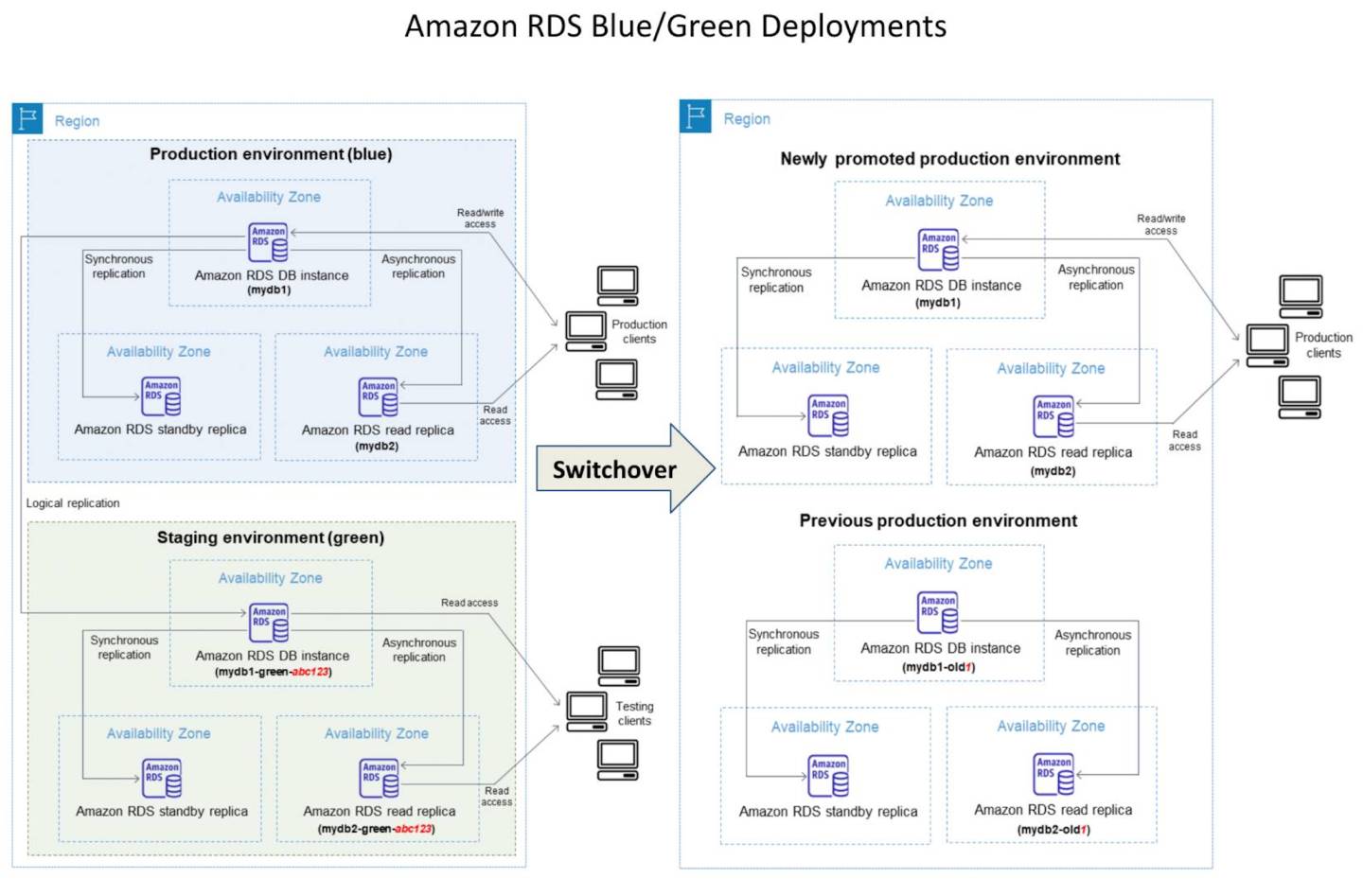
    • Configure deployment strategies (blue/green, canary, rolling) for application releases
  • Services added to in-scope: Amazon Q Developer
  • Services removed from in-scope: AWS Copilot (EOL June 2026), Amazon CodeGuru (EOL November 2025)
  • Refer DVA-C02 Exam Guide Revisions

AWS Certified Developer – Associate DVA-C02 Summary

  • DVA-C02 exam consists of 65 questions in 130 minutes, and the time is more than sufficient if you are well-prepared.
  • DVA-C02 exam includes two types of questions, multiple-choice and multiple-response.
  • DVA-C02 has a scaled score between 100 and 1,000. The scaled score needed to pass the exam is 720.
  • Associate exams currently cost $ 150 + tax.
  • You can get an additional 30 minutes if English is your second language by requesting Exam Accommodations. It might not be needed for Associate exams but is helpful for Professional and Specialty ones.
  • AWS exams can be taken either remotely or online, I prefer to take them online as it provides a lot of flexibility. Just make sure you have a proper place to take the exam with no disturbance and nothing around you.
  • Also, if you are taking the AWS Online exam for the first time try to join at least 30 minutes before the actual time as I have had issues with both PSI and Pearson with long wait times.

AWS Certified Developer – Associate DVA-C02 Exam Resources

AWS Certified Developer – Associate DVA-C02 Exam Topics

  • AWS DVA-C02 exam concepts cover solutions that fall within AWS Well-Architected framework to cover scalable, highly available, cost-effective, performant, and resilient pillars.
  • AWS Certified Developer – Associate DVA-C02 exam covers a lot of the latest AWS services like Amplify, X-Ray, Amazon Q Developer while focusing majorly on other services like Lambda, DynamoDB, Elastic Beanstalk, S3, EC2
  • The December 2024 exam revision (Version 2.1) added focus on event-driven architectures, resilient coding patterns, multi-tenant data access, and AI-assisted development using Amazon Q Developer.
  • AWS Certified Developer – Associate DVA-C02 exam is similar to DVA-C01 with more focus on the hands-on development and deployment concepts rather than just the architectural concepts.

Compute

  • Elastic Cloud Compute – EC2
  • Auto Scaling and ELB
    • Auto Scaling provides the ability to ensure a correct number of EC2 instances are always running to handle the load of the application
    • Elastic Load Balancer allows the incoming traffic to be distributed automatically across multiple healthy EC2 instances
  • Autoscaling & ELB
    • work together to provide High Availability and Scalability.
    • Span both ELB and Auto Scaling across Multi-AZs to provide High Availability
    • Do not span across regions. Use Route 53 or Global Accelerator to route traffic across regions.
  • Lambda and serverless architecture, its features, and use cases.
    • Lambda integrated with API Gateway to provide a serverless, highly scalable, cost-effective architecture.
    • Lambda execution role needs the required permissions to integrate with other AWS services.
    • Environment variables to keep functions configurable.
    • Lambda Layers provide a convenient way to package libraries and other dependencies that you can use with your Lambda functions.
    • Function versions can be used to manage the deployment of the functions.
    • Function Alias supports creating aliases, which are mutable, for each function version.
    • provides /tmp ephemeral scratch storage.
    • Integrates with X-Ray for distributed tracing.
    • Use RDS proxy for connection pooling.
    • Lambda SnapStart – reduces cold start latency to sub-second for Java (GA 2022), and now also supports Python and .NET functions (GA November 2024). Works by caching and reusing snapshotted memory and disk state.
    • Recursive loop detection – automatically detects and stops recursive invocations between Lambda and supported services (SQS, SNS, S3) after 16 invocations. Function-level configuration APIs added (August 2024) to customize behavior.
    • Advanced logging controls – supports structured JSON logging format, configurable log levels, and choice of log destination. Tiered pricing for CloudWatch Logs introduced (May 2025).
  • Elastic Container Service – ECS with its ability to deploy containers and microservices architecture.
    • ECS role for tasks can be provided through taskRoleArn
    • ALB provides dynamic port mapping to allow multiple same tasks on the same node.
  • Elastic Kubernetes Service – EKS
    • managed Kubernetes service to run Kubernetes in the AWS cloud and on-premises data centers
    • ideal for migration of an existing workload on Kubernetes
  • Elastic Beanstalk
    • at a high level, what it provides, and its ability to get an application running quickly.
    • Deployment types with their advantages and disadvantages

Databases

  • Understand relational and NoSQL data storage options which include RDS, DynamoDB, and Aurora with their use cases
  • Relational Database Service – RDS
    • Read Replicas vs Multi-AZ
      • Read Replicas for scalability, Multi-AZ for High Availability
      • Multi-AZ is regional only
      • Read Replicas can span across regions and can be used for disaster recovery
  • RDS Proxy
    • fully managed, highly available database proxy for RDS that makes applications more secure, scalable, more resilient to database failures.
    • allows apps to pool and share DB connections established with the database
  • DynamoDB
    • provides low latency performance, a key-value store
    • is not a relational database
    • Secondary indexes on a table allow efficient access to data with attributes other than the primary key.
    • Know Local Secondary Indexes vs Global Secondary Indexes
    • DynamoDB DAX provides caching for DynamoDB
    • DynamoDB TTL helps expire data in DynamoDB without any cost or consuming any write throughput.
    • DynamoDB Streams provides a time-ordered sequence of item-level changes made to data in a table and integrates with Lambda.
    • DynamoDB Best Practices around designing partition keys and secondary indexes.
    • DynamoDB Zero-ETL integration with Amazon Redshift (GA October 2024) – enables running analytics on DynamoDB data without managing ETL pipelines.
    • Price reductions (November 2024) – 50% reduction for on-demand throughput and up to 67% for global tables.
    • Global tables cross-account replication (2025) – supports replication across AWS accounts for multi-account architectures.
  • ElastiCache use cases, mainly for caching performance

Storage

  • Simple Storage Service – S3
    • S3 storage classes with lifecycle policies
      • Understand the difference between SA Standard vs SA IA vs SA IA One Zone in terms of cost and durability
    • S3 Data Protection
      • S3 Client-side encryption encrypts data before storing it in S3
      • S3 encryption in transit can be enforced with S3 bucket policies using secureTransport attributes.
      • S3 encryption at rest can be enforced with S3 bucket policies using x-amz-server-side-encryption attribute.
    • S3 features including
      • S3 provides cost-effective static website hosting. However, it does not support HTTPS endpoint. Can be integrated with CloudFront for HTTPS, caching, performance, and low-latency access.
      • S3 versioning provides protection against accidental overwrites and deletions. Used with MFA Delete feature.
      • S3 Pre-Signed URLs for both upload and download provide access without needing AWS credentials.
      • S3 CORS allows cross-domain calls
      • S3 Transfer Acceleration enables fast, easy, and secure transfers of files over long distances between your client and an S3 bucket.
      • S3 Event Notifications to trigger events on various S3 events like objects added or deleted. Supports SQS, SNS, Lambda functions, and Amazon EventBridge.
      • Integrates with Amazon Macie to detect PII data
      • Replication that supports the same and cross-region replication required versioning to be enabled.
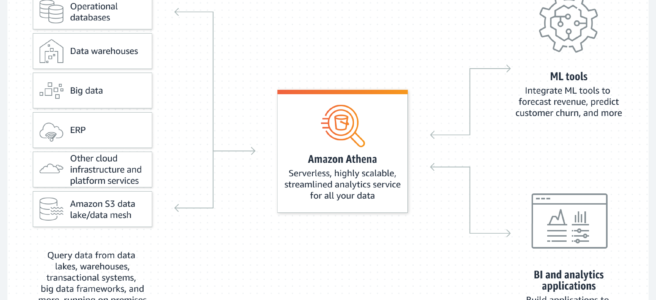
      • Integrates with Athena to analyze data in S3 using standard SQL.
  • Instance Store
    • is physically attached to the EC2 instance and provides the lowest latency and highest IOPS
  • Elastic Block Storage – EBS
    • EBS volume types and their use cases in terms of IOPS and throughput. SSD for IOPS and HDD for throughput
  • Elastic File System – EFS
    • simple, fully managed, scalable, serverless, and cost-optimized file storage for use with AWS Cloud and on-premises resources.
    • provides shared volume across multiple EC2 instances, while EBS can be attached to a single instance within the same AZ or EBS Multi-Attach can be attached to multiple instances within the same AZ
    • can be mounted with Lambda functions
    • supports the NFS protocol, and is compatible with Linux-based AMIs
    • supports cross-region replication and storage classes for cost management.
  • Difference between EBS vs S3 vs EFS
  • Difference between EBS vs Instance Store
  • Would recommend referring Storage Options whitepaper, although a bit dated 90% still holds right

Security & Identity

  • Identity Access Management – IAM
    • IAM role
      • provides permissions that are not associated with a particular user, group, or service and are intended to be assumable by anyone who needs it.
      • can be used for EC2 application access and Cross-account access
    • IAM Best Practices
  • Cognito
    • provides authentication, authorization, and user management for the web and mobile apps.
    • User pools are user directories that provide sign-up and sign-in options for the app users.
    • Identity pools enable you to grant the users access to other AWS services.
  • Key Management Services – KMS encryption service
    • for key management and envelope encryption
    • provides encryption at rest and does not handle encryption in transit.
  • Amazon Certificate Manager – ACM
    • helps easily provision, manage, and deploy public and private SSL/TLS certificates for use with AWS services and internally connected resources.
  • AWS Secrets Manager
    • helps protect secrets needed to access applications, services, and IT resources.
    • supports automatic rotations of secrets
  • Secrets Manager vs Systems Manager Parameter Store for secrets management
    • Secrets Manager supports automatic credentials rotation and is integrated with Lambda and other services like RDS, and DynamoDB.
    • Systems Manager Parameter Store provides free standard parameters and is cost-effective as compared to Secrets Manager.

Front-end Web and Mobile

  • API Gateway
    • is a fully managed service that makes it easy for developers to publish, maintain, monitor, and secure APIs at any scale.
    • Powerful, flexible authentication mechanisms, such as AWS IAM policies, Lambda authorizer functions, and Amazon Cognito user pools.
    • supports Canary release deployments for safely rolling out changes.
    • define usage plans to meter, restrict third-party developer access, configure throttling, and quota limits on a per API key basis
    • integrates with AWS X-Ray for understanding and triaging performance latencies.
    • API Gateway CORS allows cross-domain calls
  • Amplify
    • is a complete solution that lets frontend web and mobile developers easily build, ship, and host full-stack applications on AWS, with the flexibility to leverage the breadth of AWS services as use cases evolve.

Management Tools

  • CloudWatch
    • monitoring to provide operational transparency
    • is extendable with custom metrics
    • does not capture memory metrics, by default, and can be done using the CloudWatch agent.
  • EventBridge
    • is a serverless event bus service that makes it easy to connect applications with data from a variety of sources.
    • enables building loosely coupled and distributed event-driven architectures.
    • (New in V2.1) Understand implementing event-driven patterns using EventBridge for decoupled, scalable architectures.
  • CloudTrail
    • helps enable governance, compliance, and operational and risk auditing of the AWS account.
    • helps to get a history of AWS API calls and related events for the AWS account.
  • CloudFormation
    • easy way to create and manage a collection of related AWS resources, and provision and update them in an orderly and predictable fashion.
    • Supports Serverless Application Model – SAM for the deployment of serverless applications including Lambda.
    • CloudFormation StackSets extends the functionality of stacks by enabling you to create, update, or delete stacks across multiple accounts and Regions with a single operation.
  • AWS AppConfig (capability of AWS Systems Manager)
    • (New in V2.1) Used to prepare application configurations for different environments.
    • Helps create, manage, and deploy application configurations including feature flags.
    • Integrates with Lambda via the AppConfig Agent Lambda extension for dynamic configuration without redeployment.
    • Supports gradual deployment with rollback on errors.

Integration Tools

  • Simple Queue Service
    • as message queuing service and SNS as pub/sub notification service
    • as a decoupling service and provide resiliency
    • SQS features like visibility, and long poll vs short poll
    • provide scaling for the Auto Scaling group based on the SQS size.
    • SQS Standard vs SQS FIFO difference
      • FIFO provides exactly-once delivery but with low throughput
  • Simple Notification Service – SNS
    • is a web service that coordinates and manages the delivery or sending of messages to subscribing endpoints or clients
    • Fanout pattern can be used to push messages to multiple subscribers.
  • Understand SQS as a message queuing service and SNS as a pub/sub notification service.
  • Know AWS Developer tools
    • CodeCommit is a secure, scalable, fully-managed source control service that hosts private Git repositories. Note: CodeCommit was briefly deprecated in July 2024 but returned to General Availability in November 2025. However, it remains in feature freeze with no new features planned.
    • CodeBuild is a fully managed build service that compiles source code, runs tests, and produces software packages that are ready to deploy.
    • CodeDeploy helps automate code deployments to any instance, including EC2 instances and instances running on-premises.
    • CodePipeline is a fully managed continuous delivery service that helps automate the release pipelines for fast and reliable application and infrastructure updates.
    • CodeArtifact is a fully managed artifact repository service that makes it easy for organizations of any size to securely store, publish, and share software packages used in their software development process.
  • X-Ray
    • helps developers analyze and debug production, distributed applications for e.g. built using a microservices lambda architecture

AI-Assisted Development (New in V2.1)

  • Amazon Q Developer
    • AI-powered development assistant added to DVA-C02 in-scope services (December 2024 revision).
    • Provides code generation, debugging assistance, code transformation, and security scanning.
    • Can generate automated tests for application code.
    • Supports code optimization and refactoring recommendations.
    • Note: AWS announced end-of-support for Amazon Q Developer IDE plugins (April 30, 2027) with successor being Kiro IDE. The exam currently tests Q Developer concepts.

Resilient Application Patterns (New in V2.1)

  • Implement resilient application code for third-party service integrations:
    • Retry logic – exponential backoff with jitter for transient failures
    • Circuit breakers – prevent cascading failures by stopping requests to failing services
    • Error handling patterns – graceful degradation, fallback responses
    • Health checks and readiness probes – application-level health monitoring
  • Cross-service authentication in microservices architectures
  • Data access patterns for multi-tenant applications
  • Application-level data masking and sanitization

Analytics

  • Redshift as a business intelligence tool
  • Kinesis
    • for real-time data capture and analytics.
    • Integrates with Lambda functions to perform transformations
  • AWS Glue
    • fully-managed, ETL service that automates the time-consuming steps of data preparation for analytics
  • Amazon OpenSearch Service
    • (New in V2.1) Use specialized data stores based on access patterns.
    • Provides search, log analytics, and real-time application monitoring.

Networking

  • Does not cover much networking or designing networks, but be sure you understand VPC, Subnets, Routes, Security Groups, etc.

AWS Cloud Computing Whitepapers

Deprecated/Removed Services (No Longer in DVA-C02 Scope)

  • AWS Copilot CLI – Reached end-of-support on June 12, 2026. Use ECS Express Mode or AWS CDK for containerized deployments instead. Removed from exam scope in December 2024 revision.
  • Amazon CodeGuru – End of support November 20, 2025. Functionality replaced by Amazon Q Developer for code reviews and security scanning. Removed from exam scope in December 2024 revision.

On the Exam Day

  • Make sure you are relaxed and get some good night’s sleep. The exam is not tough if you are well-prepared.
  • If you are taking the AWS Online exam
    • Try to join at least 30 minutes before the actual time as I have had issues with both PSI and Pearson with long wait times.
    • The online verification process does take some time and usually, there are glitches.
    • Remember, you would not be allowed to take the take if you are late by more than 30 minutes.
    • Make sure you have your desk clear, no hand-watches, or external monitors, keep your phones away, and nobody can enter the room.

Finally, All the Best 🙂
AWS Auto Scaling Policies – Target, Step & Simple

AWS Auto Scaling Policies

Maintain a Steady Count of Instances

  • Auto Scaling ensures a steady minimum (or desired if specified) count of Instances will always be running.
  • If an instance is found unhealthy, Auto Scaling will terminate the Instance and launch a new one.
  • ASG determines the health state of each instance by periodically checking the results of EC2 instance status checks.
  • ASG can be associated with an Elastic load balancer enabled to use the Elastic Load Balancing health check, Auto Scaling determines the health status of the instances by checking the results of both EC2 instance status and Elastic Load Balancing instance health.
  • Auto Scaling marks an instance unhealthy and launches a replacement if
    • the instance is in a state other than running,
    • the system status is impaired, or
    • Elastic Load Balancing reports the instance state as OutOfService.
  • After an instance has been marked unhealthy as a result of an EC2 or ELB health check, it is almost immediately scheduled for replacement. It never automatically recovers its health.
  • For an unhealthy instance, the instance’s health check can be changed back to healthy manually but you will encounter an error if the instance is already terminating.
  • Because the interval between marking an instance unhealthy and its actual termination is so small, attempting to set an instance’s health status back to healthy is probably useful only for a suspended group.
  • When the instance is terminated, any associated Elastic IP addresses are disassociated and are not automatically associated with the new instance.
  • Elastic IP addresses must be associated with the new instance manually.
  • Similarly, when the instance is terminated, its attached EBS volumes are detached and must be attached to the new instance manually.

Manual Scaling

  • Manual scaling can be performed by
    • Changing the desired capacity limit of the ASG
    • Attaching/Detaching instances to the ASG
  • Attaching/Detaching an EC2 instance can be done only if
    • Instance is in the running state.
    • AMI used to launch the instance must still exist.
    • Instance is not a member of another ASG.
    • Instance is in the same Availability Zone as the ASG.
    • If the ASG is associated with a load balancer, the instance and the load balancer must both be in the same VPC.
  • Auto Scaling increases the desired capacity of the group by the number of instances being attached. But if the number of instances being attached plus the desired capacity exceeds the maximum size, the request fails.
  • When Detaching instances, an option to decrement the desired capacity for the ASG by the number of instances being detached is provided. If chosen not to decrement the capacity, Auto Scaling launches new instances to replace the ones that you detached.
  • If an instance is detached from an ASG that is also registered with a load balancer, the instance is deregistered from the load balancer. If connection draining is enabled for the load balancer, Auto Scaling waits for the in-flight requests to complete.

Synchronous Instance Launch API (New – Dec 2025)

  • EC2 Auto Scaling now offers a LaunchInstances API that allows synchronous launching of instances inside an Auto Scaling group.
  • The API provides immediate feedback on capacity availability, returning instance IDs on success or error details on failure.
  • Allows precise control over where instances are launched by specifying an override for any Availability Zone and/or subnet in the ASG.
  • Unlike the traditional asynchronous scaling approach (where you must monitor scaling activities), this API immediately returns results.
  • Use cases include workloads that need deterministic instance placement or immediate confirmation of capacity provisioning.
  • Refer: Launching instances with synchronous provisioning

Scheduled Scaling

  • Scaling based on a schedule allows you to scale the application in response to predictable load changes for e.g. last day of the month, the last day of a financial year.
  • Scheduled scaling requires the configuration of Scheduled actions, which tells Auto Scaling to perform a scaling action at a certain time in the future, with the start time at which the scaling action should take effect, and the new minimum, maximum, and desired size of group should have.
  • Auto Scaling guarantees the order of execution for scheduled actions within the same group, but not for scheduled actions across groups.
  • Multiple Scheduled Actions can be specified but should have unique time values and they cannot have overlapping times scheduled which will lead to their rejection.
  • Cooldown periods are not supported.

Dynamic Scaling

  • Allows automatic scaling in response to the changing demand for e.g. scale-out in case CPU utilization of the instance goes above 70% and scale in when the CPU utilization goes below 30%
  • ASG uses a combination of alarms & policies to determine when the conditions for scaling are met.
    • An alarm is an object that watches over a single metric over a specified time period. When the value of the metric breaches the defined threshold, for the number of specified time periods the alarm performs one or more actions (such as sending messages to Auto Scaling).
    • A policy is a set of instructions that tells Auto Scaling how to respond to alarm messages.
  • Dynamic scaling process works as below
    1. CloudWatch monitors the specified metrics for all the instances in the Auto Scaling Group.
    2. Changes are reflected in the metrics as the demand grows or shrinks
    3. When the change in the metrics breaches the threshold of the CloudWatch alarm, the CloudWatch alarm performs an action. Depending on the breach, the action is a message sent to either the scale-in policy or the scale-out policy
    4. After the Auto Scaling policy receives the message, Auto Scaling performs the scaling activity for the ASG.
    5. This process continues until you delete either the scaling policies or the ASG.
  • When a scaling policy is executed, if the capacity calculation produces a number outside of the minimum and maximum size range of the group, EC2 Auto Scaling ensures that the new capacity never goes outside of the minimum and maximum size limits.
  • When the desired capacity reaches the maximum size limit, scaling out stops. If demand drops and capacity decreases, Auto Scaling can scale out again.

Dynamic Scaling Policy Types

Target tracking scaling

  • Increase or decrease the current capacity of the group based on a target value for a specific metric.
  • (Updated Nov 2024) Target Tracking policies now feature highly responsive scaling:
    • Self-tuning responsiveness – Target Tracking automatically adapts to the unique usage patterns of individual applications using historical usage data, determining the optimal balance between cost and performance without manual intervention.
    • Sub-minute metric support – Can be configured to monitor high-resolution CloudWatch metrics (as low as 10-second intervals) to make more timely scaling decisions.
    • Ideal for applications with volatile demand patterns such as client-serving APIs, live streaming services, ecommerce websites, or on-demand data processing.

Auto Scaling Target Tracking Scaling

Step scaling

  • Increase or decrease the current capacity of the group based on a set of scaling adjustments, known as step adjustments, that vary based on the size of the alarm breach.

Simple scaling

  • Increase or decrease the current capacity of the group based on a single scaling adjustment.
  • Note: AWS recommends not using simple scaling policies and scaling cooldowns as a best practice. Use target tracking or step scaling instead for more responsive and efficient scaling behavior.

Multiple Policies

  • ASG can have more than one scaling policy attached at any given time.
  • Each ASG would have at least two policies: one to scale the architecture out and another to scale the architecture in.
  • If an ASG has multiple policies, there is always a chance that both policies can instruct the Auto Scaling to Scale Out or Scale In at the same time.
  • When these situations occur, Auto Scaling chooses the policy that has the greatest impact i.e. provides the largest capacity for both scale out and scale in on the ASG for e.g. if two policies are triggered at the same time and Policy 1 instructs to scale out the instance by 1 while Policy 2 instructs to scale out the instances by 2, Auto Scaling will use the Policy 2 and scale out the instances by 2 as it has a greater impact.

Predictive Scaling

  • Predictive scaling can be used to increase the number of EC2 instances in the ASG in advance of daily and weekly patterns in traffic flows.
  • Predictive scaling is well suited for situations where you have:
    • Cyclical traffic, such as high use of resources during regular business hours and low use of resources during evenings and weekends
    • Recurring on-and-off workload patterns, such as batch processing, testing, or periodic data analysis
    • Applications that take a long time to initialize, causing a noticeable latency impact on application performance during scale-out events
  • Predictive scaling provides proactive scaling that can help scale faster by launching capacity in advance of forecasted load, compared to using only dynamic scaling, which is reactive in nature.
  • Predictive scaling uses machine learning to predict capacity requirements based on historical data from CloudWatch. The machine learning algorithm consumes the available historical data and calculates the capacity that best fits the historical load pattern, and then continuously learns based on new data to make future forecasts more accurate.
  • Predictive scaling supports forecast only mode so that you can evaluate the forecast before you allow predictive scaling to actively scale capacity
  • When you are ready to start scaling with predictive scaling, switch the policy from forecast only mode to forecast and scale mode.
  • (Updated Oct 2025) Predictive scaling is now available in additional AWS Regions, expanding its availability to more customers globally.

Warm Pools

  • A warm pool is a pool of pre-initialized EC2 instances that sits alongside the Auto Scaling group, ready to be quickly placed into service when needed.
  • Warm pools help decrease latency for applications that have exceptionally long boot times (e.g., instances that need to write large amounts of data to disk or perform lengthy initialization).
  • Instances in a warm pool can be in one of the following states: Stopped, Running, or Hibernated.
  • When a scale-out event occurs, instances from the warm pool are moved into the ASG, reducing launch latency significantly.
  • Lifecycle hooks can be used with warm pools to perform custom actions while instances transition between states.
  • (Updated Nov 2025) Warm pools now support Auto Scaling groups with mixed instances policies, allowing customers using multiple instance types and purchase options to benefit from pre-initialized instance pools.
  • (Updated Apr 2026) Amazon EKS managed node groups now support EC2 Auto Scaling warm pools, enabling Kubernetes workloads to benefit from faster instance readiness.
  • Refer: Warm pools for Amazon EC2 Auto Scaling

Zonal Shift and Zonal Autoshift

  • (New – Nov 2024) EC2 Auto Scaling now supports Amazon Application Recovery Controller (ARC) zonal shift and zonal autoshift.
  • Zonal shift allows you to rapidly recover from application impairments in a single Availability Zone by shifting traffic and instances away from the affected AZ.
  • Zonal autoshift enables AWS to automatically detect AZ impairments and shift traffic away from the affected zone on your behalf.
  • Can be initiated from the EC2 Auto Scaling console, Application Recovery Controller console, or via the AWS SDK.
  • When a zonal shift is active, Auto Scaling will not launch new instances in the shifted-away AZ and will launch replacement capacity in healthy AZs.
  • Refer: Auto Scaling group zonal shift

ASG Deletion Protection

  • (New – Jan 2026) EC2 Auto Scaling now provides deletion protection at the group level to safeguard against accidental ASG deletions.
  • Multiple protection levels are available:
    • No protection – Default behavior, ASG can be deleted normally.
    • Prevent force deletion – Blocks force-delete operations (ASG cannot be deleted while it still has running instances).
    • Prevent all deletion – Blocks all delete operations on the ASG.
  • A new IAM policy condition key autoscaling:ForceDelete can be used with the DeleteAutoScalingGroup action to control whether the ForceDelete parameter can be used during deletion.
  • Deletion protection can be set when creating or updating an ASG.
  • Combining the condition key with group-level protection provides layered defense against unwanted ASG termination.
  • Available in all AWS Regions and AWS GovCloud (US) Regions.
  • Refer: Configure deletion protection

Instance Lifecycle Policy

  • (New – Nov 2025) EC2 Auto Scaling introduces instance lifecycle policy to control instance retention when termination lifecycle hooks fail or timeout.
  • Customers can configure the ASG to retain instances (instead of terminating them) when lifecycle hook actions are abandoned, providing greater confidence in graceful shutdown processes.
  • Useful for workloads that require guaranteed completion of cleanup tasks before instance termination.
  • Refer: Control instance retention with instance lifecycle policies

Lambda as Lifecycle Hook Target

  • (New – Jul 2025) AWS Lambda functions can now be used as direct notification targets for EC2 Auto Scaling lifecycle hooks.
  • Previously, lifecycle hooks required EventBridge or SNS/SQS intermediaries to invoke Lambda functions.
  • This simplifies the architecture for custom actions when instances enter a wait state (during both launch and termination).
  • Common use cases include downloading logs, running configuration scripts, draining connections, or performing data backups before termination.
  • Refer: Prepare for lifecycle notifications

Instance Maintenance Policy

  • (Introduced Nov 2023) Instance maintenance policy allows you to control how Amazon EC2 Auto Scaling handles instance replacement during events such as instance refresh, health check replacements, and AZ rebalancing.
  • Available options:
    • Launch before terminating – A new instance must be provisioned first before an existing instance can be terminated (ensures availability but temporarily increases capacity).
    • Terminate and launch – An existing instance is terminated first, then a new instance is launched (reduces cost but temporarily decreases capacity).
    • Custom – Set min/max healthy percentage to control the capacity range during replacement.
  • Helps maintain application availability and performance during routine maintenance operations.
  • Refer: Instance maintenance policies

AWS Certification Exam Practice Questions

  • Questions are collected from Internet and the answers are marked as per my knowledge and understanding (which might differ with yours).
  • AWS services are updated everyday and both the answers and questions might be outdated soon, so research accordingly.
  • AWS exam questions are not updated to keep up the pace with AWS updates, so even if the underlying feature has changed the question might not be updated
  • Open to further feedback, discussion and correction.
  1. A user has created a web application with Auto Scaling. The user is regularly monitoring the application and he observed that the traffic is highest on Thursday and Friday between 8 AM to 6 PM. What is the best solution to handle scaling in this case?
    1. Add a new instance manually by 8 AM Thursday and terminate the same by 6 PM Friday
    2. Schedule Auto Scaling to scale up by 8 AM Thursday and scale down after 6 PM on Friday
    3. Schedule a policy which may scale up every day at 8 AM and scales down by 6 PM
    4. Configure a batch process to add a instance by 8 AM and remove it by Friday 6 PM
  2. A customer has a website which shows all the deals available across the market. The site experiences a load of 5 large EC2 instances generally. However, a week before Thanksgiving vacation they encounter a load of almost 20 large instances. The load during that period varies over the day based on the office timings. Which of the below mentioned solutions is cost effective as well as help the website achieve better performance?
    1. Keep only 10 instances running and manually launch 10 instances every day during office hours.
    2. Setup to run 10 instances during the pre-vacation period and only scale up during the office time by launching 10 more instances using the AutoScaling schedule.
    3. During the pre-vacation period setup a scenario where the organization has 15 instances running and 5 instances to scale up and down using Auto Scaling based on the network I/O policy.
    4. During the pre-vacation period setup 20 instances to run continuously.
  3. A user has setup Auto Scaling with ELB on the EC2 instances. The user wants to configure that whenever the CPU utilization is below 10%, Auto Scaling should remove one instance. How can the user configure this?
    1. The user can get an email using SNS when the CPU utilization is less than 10%. The user can use the desired capacity of Auto Scaling to remove the instance
    2. Use CloudWatch to monitor the data and Auto Scaling to remove the instances using scheduled actions
    3. Configure CloudWatch to send a notification to Auto Scaling Launch configuration when the CPU utilization is less than 10% and configure the Auto Scaling policy to remove the instance
    4. Configure CloudWatch to send a notification to the Auto Scaling group when the CPU Utilization is less than 10% and configure the Auto Scaling policy to remove the instance
  4. A company has an application with unpredictable traffic that spikes rapidly. They are using target tracking scaling with a 60-second CloudWatch metric period. Despite scaling policies, users experience latency during sudden traffic bursts. What should they do to improve scaling responsiveness?
    1. Switch to simple scaling with a lower cooldown period
    2. Add more instances to the minimum capacity of the ASG
    3. Configure the target tracking policy to use high-resolution CloudWatch metrics with sub-minute (10-second) evaluation periods
    4. Replace target tracking with step scaling policies
  5. A company wants to protect their production Auto Scaling group from accidental deletion. The ASG runs critical workloads and must remain available at all times. What combination of features provides the strongest protection? (Select TWO)
    1. Enable instance scale-in protection on all instances
    2. Enable ASG deletion protection with “Prevent all deletion” level
    3. Set the minimum capacity to match the desired capacity
    4. Use the autoscaling:ForceDelete IAM condition key to restrict force-delete permissions
    5. Enable termination protection on individual EC2 instances
  6. An application running on an Auto Scaling group takes 10 minutes to fully initialize. The application experiences predictable daily traffic spikes at 9 AM. Which approach would minimize user-facing latency during the morning traffic increase?
    1. Use dynamic target tracking scaling with aggressive scale-out settings
    2. Use scheduled scaling to add instances at 8:50 AM daily
    3. Use predictive scaling combined with a warm pool of pre-initialized instances
    4. Increase the minimum capacity of the ASG to handle peak load
  7. A company detects degraded performance in one Availability Zone affecting their Auto Scaling group. They need to quickly shift traffic and instances away from the impaired AZ without manual intervention in the future. What should they configure?
    1. Remove the affected subnet from the ASG configuration
    2. Use a scheduled action to reduce capacity in the affected AZ
    3. Enable cross-zone load balancing on the load balancer
    4. Enable zonal autoshift with Amazon Application Recovery Controller for the ASG

References

Amazon SQS Features – Visibility, DLQ & Batching

Amazon SQS Features

  • Visibility timeout defines the period where SQS blocks the visibility of the message and prevents other consuming components from receiving and processing that message.
  • Dead-letter queues – DLQ helps source queues (Standard and FIFO) target messages that can’t be processed (consumed) successfully.
  • DLQ Redrive policy specifies the source queue, the dead-letter queue, and the conditions under which messages are moved from the former to the latter if the consumer of the source queue fails to process a message a specified number of times.
  • DLQ Redrive APIs (StartMessageMoveTask, CancelMessageMoveTask, ListMessageMoveTasks) allow programmatic management of dead-letter queue redrive, enabling messages to be moved from DLQ back to the original source queue or to a custom destination queue.
  • Short and Long polling control how the queues would be polled and Long polling help reduce empty responses.
  • Fair Queues automatically mitigate noisy-neighbor impact in multi-tenant standard queues by prioritizing message delivery for quieter tenants when one tenant creates a backlog.

Queue and Message Identifiers

Queue URLs

  • Queue is identified by a unique queue name within the same AWS account
  • Each queue is assigned with a Queue URL identifier for e.g. http://sqs.us-east-1.amazonaws.com/123456789012/queue2
  • Queue URL is needed to perform any operation on the Queue.

Message ID

  • Message IDs are useful for identifying messages
  • Each message receives a system-assigned message ID that is returned with the SendMessage response.
  • To delete a message, the message’s receipt handle instead of the message ID is needed
  • Message ID can be of is 100 characters max

Receipt Handle

  • When a message is received from a queue, a receipt handle is returned with the message which is associated with the act of receiving the message rather than the message itself.
  • Receipt handle is required, not the message id, to delete a message or to change the message visibility.
  • If a message is received more than once, each time it is received, a different receipt handle is assigned and the latest should be used always.

Message Deduplication ID

  • Message Deduplication ID is used for the deduplication of sent messages.
  • Message Deduplication ID is applicable for FIFO queues.
  • If a message with a particular message deduplication ID is sent successfully, any messages sent with the same message deduplication ID are accepted successfully but aren’t delivered during the 5-minute deduplication interval.

Message Group ID

  • Message Group ID specifies that a message belongs to a specific message group.
  • Message Group ID is applicable for FIFO queues.
  • Messages that belong to the same message group are always processed one by one, in a strict order relative to the message group.
  • However, messages that belong to different message groups might be processed out of order.
  • For Standard queues with Fair Queues enabled, MessageGroupId is used only as a tenant identifier for fair queuing and does not enforce message ordering.

Visibility timeout

Screen Shot 2016-05-05 at 8.17.04 AM.png

  • SQS does not delete the message once it is received by a consumer, because the system is distributed, there’s no guarantee that the consumer will actually receive the message (it’s possible the connection could break or the component could fail before receiving the message)
  • The consumer should explicitly delete the message from the Queue once it is received and successfully processed.
  • As the message is still available in the Queue, other consumers would be able to receive and process and this needs to be prevented.
  • SQS handles the above behavior using Visibility timeout.
  • SQS blocks the visibility of the message for the Visibility timeout period, which is the time during which SQS prevents other consuming components from receiving and processing that message.
  • Consumer should delete the message within the Visibility timeout. If the consumer fails to delete the message before the visibility timeout expires, the message is visible again to other consumers.
  • Once Visible the message is available for other consumers to consume and can lead to duplicate messages.
  • Visibility timeout considerations
    • Clock starts ticking once SQS returns the message
    • should be large enough to take into account the processing time for each message
    • default Visibility timeout for each Queue is 30 seconds and can be changed at the Queue level
    • when receiving messages, a special visibility timeout for the returned messages can be set without changing the overall queue timeout using the receipt handle
    • can be extended by the consumer, using ChangeMessageVisibility , if the consumer thinks it won’t be able to process the message within the current visibility timeout period. SQS restarts the timeout period using the new value.
    • a message’s Visibility timeout extension applies only to that particular receipt of the message and does not affect the timeout for the queue or later receipts of the message
    • Maximum visibility timeout is 12 hours from the time SQS receives the ReceiveMessage request.
  • SQS has a 120,000 limit for the number of inflight messages per queue (both Standard and FIFO queues) i.e. messages received but not yet deleted and any further messages would receive an error after reaching the limit.

Message Lifecycle

Screen Shot 2016-05-05 at 8.16.39 AM.png

  1. Component 1 sends Message A to a queue, and the message is redundantly distributed across the SQS servers.
  2. When Component 2 is ready to process a message, it retrieves messages from the queue, and Message A is returned. While Message A is being processed, it remains in the queue but is not returned to subsequent receive requests for the duration of the visibility timeout.
  3. Component 2 deletes Message A from the queue to avoid the message being received and processed again once the visibility timeout expires.

SQS Dead Letter Queues – DLQ

  • SQS supports dead-letter queues (DLQ), which other queues (source queues – Standard and FIFO) can target for messages that can’t be processed (consumed) successfully.
  • Dead-letter queues are useful for debugging the application or messaging system because DLQ help isolates unconsumed messages to determine why their processing doesn’t succeed.
  • DLQ redrive policy
    • specifies the source queue, the dead-letter queue, and the conditions under which SQS moves messages from the former to the latter if the consumer of the source queue fails to process a message a specified number of times.
    • specifies which source queues can access the dead-letter queue.
    • also helps move the messages back to the source queue.
  • DLQ Redrive APIs
    • StartMessageMoveTask – starts an asynchronous task to move messages from the DLQ to the original source queue or a custom destination queue.
    • CancelMessageMoveTask – cancels a message move task in progress.
    • ListMessageMoveTasks – lists the most recent message move tasks (up to 10) for a specific source queue.
    • Enables programmatic DLQ management via AWS SDK or CLI at scale.
    • FIFO queues also support DLQ redrive.
  • SQS does not create the dead-letter queue automatically. DLQ must first be created before being used.
  • DLQ for the source queue should be of the same type i.e. Dead-letter queue of a FIFO queue must also be a FIFO queue. Similarly, the dead-letter queue of a standard queue must also be a standard queue.
  • DLQ should be in the same account and region as the source queue.

SQS Dead Letter Queue - Redrive Policy

SQS Delay Queues

  • Delay queues help postpone the delivery of new messages to consumers for a number of seconds
  • Messages sent to the delay queue remain invisible to consumers for the duration of the delay period.
  • Minimum delay is 0 seconds (default) and the Maximum is 15 minutes.
  • Delay queues are similar to visibility timeouts as both features make messages unavailable to consumers for a specific period of time.
  • The difference between the two is that, for delay queues, a message is hidden when it is first added to the queue, whereas for visibility timeouts a message is hidden only after it is consumed from the queue.

SQS Fair Queues

  • Fair Queues is a feature of Amazon SQS standard queues that automatically mitigates noisy-neighbor impact in multi-tenant queues.
  • In multi-tenant systems, one tenant can become a “noisy neighbor” by sending a larger volume of messages or requiring longer processing time, creating a backlog that increases message dwell time for all other tenants.
  • Fair Queues detects noisy neighbors by monitoring message distribution among tenants during the in-flight state (messages received by consumers but not yet deleted).
  • When a tenant has a disproportionately large number of in-flight messages, SQS prioritizes message delivery for other (quieter) tenants, reducing dwell time impact.
  • To enable Fair Queues, message producers set a MessageGroupId on outgoing messages as a tenant identifier.
  • MessageGroupId on standard queues with Fair Queues does NOT enforce message ordering (unlike FIFO queues) — it is used only as a tenant identifier.
  • Fair Queues does not limit the consumption rate per tenant — it allows consumers to receive messages from noisy tenants when there is spare consumer capacity.
  • No changes required in consumer code, no impact on API latency, and no throughput limitations.
  • Supports virtually unlimited throughput and unlimited number of tenants.
  • Provides additional CloudWatch metrics:
    • ApproximateNumberOfMessagesVisibleInQuietGroups – backlog for non-noisy tenants
    • ApproximateAgeOfOldestMessageInQuietGroups – oldest message age for quiet groups
  • Best suited for high-throughput multi-tenant queues where dwell time is a quality-of-service metric.

Learn More: Amazon SQS Fair Queues Documentation

Short and Long polling

SQS provides short polling and long polling to receive messages from a queue.

Short Polling

  • ReceiveMessage request queries only a subset of the servers (based on a weighted random distribution) to find messages that are available to include in the response.
  • SQS sends the response right away, even if the query found no messages.
  • By default, queues use short polling.

Long Polling

  • ReceiveMessage request queries all of the servers for messages.
  • SQS sends a response after it collects at least one available message, up to the maximum number of messages specified in the request.
  • SQS sends an empty response only if the polling wait time expires.
  • Wait time greater than 0 triggers long polling with a max of 20 secs.
  • Long polling helps
    • reduce the cost of using SQS by eliminating the number of empty responses (when there are no messages available for a ReceiveMessage request)
    • reduce false empty responses (when messages are available but aren’t included in a response).
    • Return messages as soon as they become available.

SQS Message Size

  • Maximum message payload size is 1 MiB (1,048,576 bytes) for both Standard and FIFO queues. (Increased from 256 KB in August 2025)
  • For messages larger than 1 MiB, use the Amazon SQS Extended Client Library to store the message payload in Amazon S3 and send a reference pointer through SQS.
  • Each message can have up to 10 message attributes (metadata).
  • Message retention period: minimum 60 seconds, default 4 days, maximum 14 days.

SQS Server-Side Encryption (SSE)

  • All SQS queues are encrypted by default using SQS-owned encryption keys (SSE-SQS).
  • SSE-SQS requires no configuration and encrypts all messages at rest at no additional cost.
  • Optionally, queues can be configured with AWS KMS-managed keys (SSE-KMS) for customer-managed encryption keys with more granular access control.
  • With SSE-KMS, only kms:GenerateDataKey permission is needed for SendMessage (kms:Decrypt is no longer required for sending). kms:Decrypt is still required for ReceiveMessage.

SQS FIFO High Throughput

  • FIFO queues by default support 300 transactions per second (TPS) per API action (SendMessage, ReceiveMessage, DeleteMessage).
  • High throughput mode for FIFO queues supports up to 70,000 TPS per API action without batching, and up to 700,000 messages per second with batching in select regions (US East N. Virginia, US West Oregon, Europe Ireland).
  • High throughput mode can be enabled via the Amazon SQS console by setting FifoThroughputLimit to perMessageGroupId and DeduplicationScope to messageGroup.
  • Messages should be distributed across multiple message groups to take advantage of high throughput.

SQS Integration with AWS Lambda

  • SQS can trigger AWS Lambda functions via event source mappings (ESM).
  • Lambda supports both Standard and FIFO queue triggers.
  • Provisioned Mode for SQS ESM (November 2025): Allocates dedicated event polling resources with configurable minimum and maximum limits.
    • Provides 3x faster scaling compared to standard mode.
    • Supports up to 20,000 concurrency (16x higher capacity).
    • Ideal for handling sudden traffic spikes with lower latency processing.
  • The Lambda function and the SQS queue must be in the same AWS Region (but can be in different AWS accounts).

AWS Certification Exam Practice Questions

  • Questions are collected from Internet and the answers are marked as per my knowledge and understanding (which might differ with yours).
  • AWS services are updated everyday and both the answers and questions might be outdated soon, so research accordingly.
  • AWS exam questions are not updated to keep up the pace with AWS updates, so even if the underlying feature has changed the question might not be updated
  • Open to further feedback, discussion and correction.
  1. How does Amazon SQS allow multiple readers to access the same message queue without losing messages or processing them many times?
    1. By identifying a user by his unique id
    2. By using unique cryptography
    3. Amazon SQS queue has a configurable visibility timeout
    4. Multiple readers can’t access the same message queue
  2. If a message is retrieved from a queue in Amazon SQS, how long is the message inaccessible to other users by default?
    1. 0 seconds
    2. 1 hour
    3. 1 day
    4. forever
    5. 30 seconds
  3. When a Simple Queue Service message triggers a task that takes 5 minutes to complete, which process below will result in successful processing of the message and remove it from the queue while minimizing the chances of duplicate processing?
    1. Retrieve the message with an increased visibility timeout, process the message, delete the message from the queue
    2. Retrieve the message with an increased visibility timeout, delete the message from the queue, process the message
    3. Retrieve the message with increased DelaySeconds, process the message, delete the message from the queue
    4. Retrieve the message with increased DelaySeconds, delete the message from the queue, process the message
  4. You need to process long-running jobs once and only once. How might you do this?
    1. Use an SNS queue and set the visibility timeout to long enough for jobs to process.
    2. Use an SQS queue and set the reprocessing timeout to long enough for jobs to process.
    3. Use an SQS queue and set the visibility timeout to long enough for jobs to process.
    4. Use an SNS queue and set the reprocessing timeout to long enough for jobs to process.
  5. You are getting a lot of empty receive requests when using Amazon SQS. This is making a lot of unnecessary network load on your instances. What can you do to reduce this load?
    1. Subscribe your queue to an SNS topic instead.
    2. Use as long of a poll as possible, instead of short polls.
    3. Alter your visibility timeout to be shorter.
    4. Use sqsd on your EC2 instances.
  6. Company B provides an online image recognition service and utilizes SQS to decouple system components for scalability. The SQS consumers poll the imaging queue as often as possible to keep end-to-end throughput as high as possible. However, Company B is realizing that polling in tight loops is burning CPU cycles and increasing costs with empty responses. How can Company B reduce the number of empty responses?
    1. Set the imaging queue visibility Timeout attribute to 20 seconds
    2. Set the Imaging queue ReceiveMessageWaitTimeSeconds attribute to 20 seconds (Long polling. Refer link)
    3. Set the imaging queue MessageRetentionPeriod attribute to 20 seconds
    4. Set the DelaySeconds parameter of a message to 20 seconds
  7. A multi-tenant SaaS application uses a single SQS standard queue shared across all customers. During peak hours, one large customer floods the queue with messages, causing increased dwell time for all other customers. Which SQS feature helps mitigate this noisy neighbor problem?
    1. Enable FIFO queue with message group IDs
    2. Configure visibility timeout to a lower value
    3. Enable Fair Queues by setting MessageGroupId as tenant identifier on standard queue
    4. Create separate DLQs for each customer
  8. A development team needs to programmatically move messages from a dead-letter queue back to the original source queue for reprocessing. Which API action should they use?
    1. SendMessage with the source queue URL
    2. ChangeMessageVisibility on DLQ messages
    3. StartMessageMoveTask
    4. PurgeQueue followed by republishing messages
  9. An application using Amazon SQS FIFO queues needs to process a high volume of ordered messages. What is the maximum throughput achievable with FIFO high throughput mode without batching?
    1. 300 TPS per API action
    2. 3,000 TPS per API action
    3. 18,000 TPS per API action
    4. 70,000 TPS per API action
  10. What is the maximum message payload size supported by Amazon SQS?
    1. 64 KB
    2. 256 KB
    3. 1 MiB (1,048,576 bytes)
    4. 2 MiB

AWS Developer Tools – CodePipeline & CodeBuild

AWS DevOps Tools

AWS Developer Tools

  • AWS Developer Tools provide a set of services designed to enable developers and IT operations professionals practicing DevOps to rapidly and safely deliver software.
  • AWS Developer Tools help securely store and version control the application’s source code and automatically build, test, and deploy the application to AWS or the on-premises environment.
  • Core Developer Tools include CodeCommit (source control), CodeBuild (build), CodeDeploy (deployment), CodePipeline (CI/CD orchestration), and CodeArtifact (artifact management).

AWS DevOps Tools

📢 Major Developer Tools Changes (2024-2025)

  • AWS CodeStar — Discontinued on July 31, 2024. No longer accessible.
  • AWS CodeCommit — Was de-emphasized (no new customers) in July 2024, but returned to full General Availability on Nov 24, 2025. Git LFS support planned.
  • Amazon CodeCatalyst — Closed to new customers as of Nov 7, 2025. No new features planned.
  • AWS CodePipeline — Introduced V2 pipeline type with triggers, execution modes, and new deploy actions.
  • AWS CodeBuild — Added Docker Server capability, test splitting/parallelism, reserved capacity fleets, and Lambda compute.
  • Amazon Q Developer — Now the primary AI-powered development assistant, replacing CodeWhisperer.

AWS CodeCommit

  • CodeCommit is a secure, scalable, fully-managed source control service that helps to host secure and highly scalable private Git repositories.
  • eliminates the need to operate your own source control system or worry about scaling its infrastructure.
  • can be used to securely store anything from source code to binaries, and it works seamlessly with your existing Git tools.
  • provide high availability as it is built on highly scalable, redundant, and durable AWS services such as S3 and DynamoDB.
  • is designed for collaborative software development and it manages batches of changes across multiple files, offers parallel branching, and includes version differencing.
  • automatically encrypts the files in transit and at rest.
  • is integrated with AWS Identity and Access Management (IAM), allowing you to assign user-specific permissions to your repositories.
  • supports resource-level permissions at the repository level. Permissions can specify which users can perform which actions including MFA.
  • supports HTTPS or SSH or both communication protocols.
  • supports repository triggers, to send notifications and create HTTP webhooks with SNS or invoke Lambda functions.
  • provides deep IAM integration, VPC endpoint support, and CloudTrail logging, making it ideal for regulated industries.
  • integrates seamlessly with CodePipeline and CodeBuild for CI/CD workflows within AWS boundaries.
⚠️ CodeCommit Status Update: In July 2024, AWS de-emphasized CodeCommit and stopped onboarding new customers. However, on November 24, 2025, AWS reversed this decision and returned CodeCommit to full General Availability. New customers can sign up again (fully open as of Feb 14, 2026). Git Large File Storage (LFS) support was announced for Q1 2026, with regional expansion planned for Q3 2026.

AWS CodeBuild

  • AWS CodeBuild is a fully managed continuous integration service that compiles source code, runs tests, and produces software packages that are ready to deploy.
  • helps provision, manage, and scale the build servers.
  • scales continuously and processes multiple builds concurrently, so the builds are not left waiting in a queue.
  • provides prepackaged build environments or the creation of custom build environments that use your own build tools.
  • supports AWS CodeCommit, S3, GitHub, GitHub Enterprise, Bitbucket, and GitLab to pull source code for builds.
  • provides security and separation at the infrastructure and execution levels.
  • runs the build in fresh environments isolated from other users and discards each build environment upon completion.

CodeBuild Compute Options

  • On-demand — Default compute; builds run on fresh, isolated environments and are discarded upon completion.
  • Reserved Capacity Fleets — Pre-provisioned machines that are always running, enabling instant build starts and reduced build times. Supports Linux x86, Arm, GPU, Windows, and macOS environments.
  • Lambda Compute — Run builds in AWS Lambda for faster startup times. Supports Node 22, Python 3.13, Go 1.24, and Ruby 3.4 in both x86_64 and aarch64 architectures.

CodeBuild Key Features (2024-2025)

  • Docker Server Capability (May 2025) — Provides a persistent Docker server with consistent caching, dramatically reducing Docker image build times (demonstrated 98% reduction — from 24 minutes to 16 seconds).
  • Test Splitting and Parallelism (Jan 2025) — Split tests across multiple parallel compute environments based on a sharding strategy for faster test execution.
  • Batch Builds with Reserved Capacity & Lambda (Jan 2025) — Select a mix of on-demand, reserved capacity fleets, or Lambda compute for batch builds.
  • Managed Webhooks for GitHub Enterprise (Feb 2025) — Simplified webhook management for GitHub Enterprise source providers.
  • EC2 Instance Type Selection (Apr 2025) — Select specific EC2 instance types and configure storage size for reserved capacity fleets.
  • Pull Request Build Policies — Additional control over builds triggered by pull requests.

AWS CodeDeploy

  • AWS CodeDeploy helps automate code deployments to any instance, including EC2 instances and instances running on-premises.
  • helps to rapidly release new features, avoid downtime during application deployment, and handles the complexity of updating the applications.
  • helps automate software deployments, eliminating the need for error-prone manual operations.
  • scales with the infrastructure and can be used to easily deploy from one instance or thousands.
  • performs a deployment with the following parameters
    • Revision – what to deploy
    • Deployment group – where to deploy
    • Deployment configuration – how to deploy
  • Deployment group is an entity for grouping EC2 instances or Lambda functions in deployment and supports instances by specifying a tag, an Auto Scaling group.
  • AppSpec file provides the instructions and is a configuration file that specifies the files to be copied and scripts to be executed.
  • supports both in-place deployments, where rolling updates are performed, and blue/green deployments.
  • supports deployment to EC2/On-premises instances, Lambda functions, and Amazon ECS services.
📢 Amazon ECS Native Blue/Green Deployments (July 2025): Amazon ECS launched built-in blue/green deployments directly within the ECS service, removing the need for CodeDeploy integration. In October 2025, ECS added canary and linear deployment strategies, achieving feature parity with CodeDeploy. For new ECS deployments, consider using ECS native blue/green instead of CodeDeploy. AWS provides migration guidance for existing CodeDeploy-based ECS deployments.

AWS CodePipeline

  • AWS CodePipeline is a fully managed continuous delivery service that helps automate the release pipelines for fast and reliable application and infrastructure updates.
  • automates the builds, tests, and deploys the code every time there is a code change, based on the defined release process models.
  • enables rapid and reliable delivery of features and updates.
  • can be integrated with third-party services such as GitHub, Bitbucket, GitLab, or with your own custom plugin.
  • pay per use with no upfront fees or long-term commitments.
  • supports resource-level permissions. Permissions can specify which users can perform what action on a pipeline.

CodePipeline Pipeline Types

  • CodePipeline supports two pipeline types: V1 (original) and V2 (recommended for new pipelines).
  • V2 type pipelines support advanced features including:
    • Triggers — Configure pipelines to start on specific events (push, pull request) with filtering on branches, file paths, or Git tags.
    • Execution Modes — SUPERSEDED (default, replaces waiting executions), QUEUED (executes in order), and PARALLEL (runs independently/simultaneously).
    • Commands Action — Run build commands directly in the pipeline without needing a separate CodeBuild project.
    • EC2 Deploy Action — Deploy directly to EC2 instances from the pipeline (V2 only).
    • Lambda Deploy Action (May 2025) — Deploy to Lambda functions with traffic-shifting strategies (AllAtOnce, Canary, Linear).

CodePipeline Concepts

CodePipeline Concepts

  • A Pipeline describes how software changes go through a release process.
  • A revision is a change made to the source location defined for the pipeline.
  • Pipeline is a sequence of stages and actions.
  • A stage is a group of one or more actions. A pipeline can have two or more stages.
  • An action is a task performed on a revision.
  • Pipeline actions occur in a specified order, in serial or in parallel, as determined in the stage configuration.
  • Stages are connected by transitions.
  • Transitions can be disabled or enabled between stages.


  • A pipeline can have multiple revisions flowing through it at the same time.
  • Action acts upon a file or set of files are called artifacts. These artifacts can be worked upon by later actions in the pipeline.
  • Source connections (via AWS CodeConnections, formerly CodeStar Connections) support GitHub, Bitbucket, GitLab, and Azure DevOps.

AWS CodeArtifact

  • AWS CodeArtifact is a fully managed artifact repository service that makes it easy for organizations of any size to securely store, publish, and share software packages used in their software development process.
  • CodeArtifact can be configured to automatically fetch software packages and dependencies from public artifact repositories so developers have access to the latest versions.
  • CodeArtifact works with commonly used package managers and build tools like Maven, Gradle, npm, yarn, twine, pip, and NuGet making it easy to integrate into existing development workflows.
  • Supports eight package formats: npm, PyPI, Maven, NuGet, Swift, Ruby (Apr 2024), Cargo/Rust (Jun 2024), and generic packages.
  • Integrates with AWS IAM for access control, AWS KMS for encryption, and CloudTrail for audit logging.
  • Supports upstream repositories to chain multiple repositories and automatically resolve dependencies.

AWS CodeStar (Discontinued)

⚠️ AWS CodeStar was discontinued on July 31, 2024. You can no longer access the CodeStar console or create new projects. Existing AWS resources created by CodeStar (repositories, pipelines, builds) continue to function independently.

Alternatives:

  • AWS CodePipeline + CodeBuild — For CI/CD pipeline setup
  • Amazon Q Developer — For AI-assisted development and code generation

Note: AWS CodeStar Connections has been renamed to AWS CodeConnections (March 2024) and continues to function for connecting pipelines to GitHub, Bitbucket, GitLab, and Azure DevOps.

Amazon Q Developer

  • Amazon Q Developer is a generative AI-powered software development assistant that integrates with IDEs and the AWS Management Console.
  • Provides inline code suggestions, code generation, code explanations, debugging, optimization, and refactoring capabilities.
  • Supports agentic capabilities — can autonomously implement features, document code, generate tests, review and refactor code, and perform software upgrades.
  • Integrates with VS Code, JetBrains IDEs, Visual Studio, and Eclipse.
  • Previously known as Amazon CodeWhisperer (rebranded to Amazon Q Developer in 2024).
  • Available in Free and Pro tiers.

AWS Certification Exam Practice Questions

  • Questions are collected from Internet and the answers are marked as per my knowledge and understanding (which might differ with yours).
  • AWS services are updated everyday and both the answers and questions might be outdated soon, so research accordingly.
  • AWS exam questions are not updated to keep up the pace with AWS updates, so even if the underlying feature has changed the question might not be updated
  • Open to further feedback, discussion and correction.
  1. Which AWS service’s PRIMARY purpose is to provide a fully managed continuous delivery service?
    1. Amazon CodeStar
    2. Amazon CodePipeline
    3. Amazon Cognito
    4. AWS CodeCommit
  2. Which AWS service’s PRIMARY purpose is quickly develop, build, and deploy applications on AWS? [Note: AWS CodeStar was discontinued July 31, 2024]
    1. Amazon CodeStar
    2. AWS Command Line Interface (AWS CLI)
    3. Amazon Cognito
    4. AWS CodeCommit
  3. Which AWS service’s PRIMARY purpose is software version control?
    1. Amazon CodeStar
    2. AWS Command Line Interface (AWS CLI)
    3. Amazon Cognito
    4. AWS CodeCommit
  4. Which of the following services could be used to deploy an application to servers running on-premises?
    1. AWS Elastic Beanstalk
    2. AWS CodeDeploy
    3. AWS Batch
    4. AWS X-Ray
  5. A company wants to automate its CI/CD pipeline and needs to support branch-based triggers, parallel execution of pipelines, and the ability to run build commands without a separate build project. Which CodePipeline feature should they use?
    1. CodePipeline V1 type with manual approvals
    2. CodePipeline V2 type with triggers and Commands action
    3. CodePipeline with Jenkins integration
    4. CodePipeline with CodeBuild batch builds
  6. A team needs to significantly reduce their Docker image build times in AWS CodeBuild. They currently spend 24 minutes building Docker images. Which CodeBuild feature should they enable?
    1. Reserved capacity fleets with larger instance types
    2. Lambda compute for Docker builds
    3. Docker Server capability with persistent caching
    4. Batch builds across multiple environments
  7. Which package formats does AWS CodeArtifact support? (Select THREE)
    1. npm
    2. Docker images
    3. Cargo (Rust)
    4. Maven
    5. Helm charts
  8. A company uses CodeDeploy for blue/green deployments to Amazon ECS. They want to simplify their architecture and reduce service dependencies. What should they consider? (Select the BEST answer)
    1. Switch to CodeDeploy in-place deployments
    2. Migrate to Amazon ECS native blue/green deployments
    3. Use AWS CodePipeline Lambda deploy action
    4. Switch to EC2-based deployments

References

AWS SQS – Simple Queue Service Overview

AWS Simple Queue Service – SQS

  • Simple Queue Service – SQS is a highly available distributed queue system
  • A queue is a temporary repository for messages awaiting processing and acts as a buffer between the component producer and the consumer
  • is a message queue service used by distributed applications to exchange messages through a polling model, and can be used to decouple sending and receiving components.
  • is fully managed and requires no administrative overhead and little configuration
  • offers a reliable, highly-scalable, hosted queue for storing messages in transit between applications.
  • provides fault-tolerant, loosely coupled, flexibility of distributed components of applications to send & receive without requiring each component to be concurrently available
  • helps build distributed applications with decoupled components
  • supports encryption at rest (SSE-SQS enabled by default since Oct 2022) and encryption in transit using the HTTP over SSL (HTTPS) and Transport Layer Security (TLS) protocols for security.
  • supports a maximum message payload size of 1 MB (increased from 256 KB in January 2026). For payloads up to 2 GB, use the Extended Client Library with Amazon S3.
  • provides two types of Queues

SQS Standard Queue

  • Standard queues are the default queue type.
  • Standard queues support at-least-once message delivery. However, occasionally (because of the highly distributed architecture that allows nearly unlimited throughput), more than one copy of a message might be delivered out of order.
  • Standard queues support a nearly unlimited number of API calls per second, per API action (SendMessage, ReceiveMessage, or DeleteMessage).
  • Standard queues provide best-effort ordering which ensures that messages are generally delivered in the same order as they’re sent.

Refer SQS Standard Queue for detailed information

SQS FIFO Queue

  • FIFO (First-In-First-Out) queues provide messages in order and exactly once delivery.
  • FIFO queues have all the capabilities of the standard queues but are designed to enhance messaging between applications when the order of operations and events is critical, or where duplicates can’t be tolerated.
  • FIFO queues support High Throughput mode with up to 70,000 transactions per second (TPS) per API action without batching (and up to 700,000 messages per second with batching) in select regions.

Refer SQS FIFO Queue for detailed information

SQS Standard Queues vs SQS FIFO Queues

SQS Standard vs FIFO Queues

SQS Fair Queues (New – July 2025)

  • SQS Fair Queues is a feature for standard queues that mitigates the noisy neighbor impact in multi-tenant systems.
  • Fair queues automatically reorder messages when a single tenant causes a backlog, prioritizing message delivery for other tenants.
  • Helps maintain consistent dwell time (time a message spends in queue between being sent and received) across all tenants.
  • Works transparently without requiring changes to existing message processing logic.
  • Supported by Amazon SNS standard topics and Amazon EventBridge as targets.
  • Ideal for SaaS and multi-tenant architectures where tenant isolation at the messaging layer is important.

SQS Use Cases

  • Work Queues
    • Decouple components of a distributed application that may not all process the same amount of work simultaneously.
  • Buffer and Batch Operations
    • Add scalability and reliability to the architecture and smooth out temporary volume spikes without losing messages or increasing latency
  • Request Offloading
    • Move slow operations off of interactive request paths by enqueueing the request.
  • Fan-out
    • Combine SQS with SNS to send identical copies of a message to multiple queues in parallel for simultaneous processing.
  • Auto Scaling
    • SQS queues can be used to determine the load on an application, and combined with Auto Scaling, the EC2 instances can be scaled in or out, depending on the volume of traffic
  • Event-Driven Architectures
    • Use SQS with EventBridge Pipes, Lambda event source mappings, or Step Functions for serverless event-driven processing pipelines.

How SQS Queues Works

  • SQS allows queues to be created, deleted and messages can be sent and received from it
  • SQS queue retains messages for four days, by default.
  • Queues can be configured to retain messages for 1 minute to 14 days after the message has been sent.
  • SQS can delete a queue without notification if any action hasn’t been performed on it for 30 consecutive days.
  • SQS allows the deletion of the queue with messages in it

SQS Features & Capabilities

  • Visibility timeout defines the period where SQS blocks the visibility of the message and prevents other consuming components from receiving and processing that message.
  • SQS Dead-letter queues – DLQ helps source queues (Standard and FIFO) target messages that can’t be processed (consumed) successfully.
  • DLQ Redrive policy specifies the source queue, the dead-letter queue, and the conditions under which SQS moves messages from the former to the latter if the consumer of the source queue fails to process a message a specified number of times.
  • DLQ Redrive to Source – SQS supports programmatic dead-letter queue redrive via APIs (StartMessageMoveTask, ListMessageMoveTasks, CancelMessageMoveTask) allowing you to move messages from DLQ back to the original source queue or a custom destination queue.
  • SQS Short and Long polling control how the queues would be polled and Long polling help reduce empty responses.

SQS Integration with AWS Lambda

  • SQS can trigger AWS Lambda functions using event source mappings (ESM).
  • Lambda automatically polls the SQS queue, retrieves messages in batches, and invokes the Lambda function.
  • Provisioned Mode for SQS ESM (November 2025) – Allows dedicated polling resources for the SQS event source mapping:
    • Provides 3x faster scaling and up to 16x higher capacity (up to 20,000 concurrency).
    • You define minimum and maximum limits for provisioned event pollers.
    • Ideal for handling sudden traffic spikes and high-throughput workloads.
  • Lambda function and SQS queue must be in the same AWS Region (can be in different accounts).
  • Supports both Standard and FIFO queues as triggers.

SQS Integration with EventBridge Pipes

  • Amazon EventBridge Pipes supports SQS (Standard and FIFO) as a source for point-to-point integrations.
  • Pipes poll the SQS queue and deliver messages to configured targets with optional filtering, enrichment, and transformation.
  • Can be configured directly from the SQS console via “Connect SQS queue to pipe” button.
  • Eliminates the need for custom polling code or Lambda functions for simple integrations.

SQS Buffered Asynchronous Client

  • Amazon SQS Buffered Async Client for Java provides an implementation of the AmazonSQSAsyncClient interface and adds several important features:
    • Automatic batching of multiple SendMessage, DeleteMessage, or ChangeMessageVisibility requests without any required changes to the application
    • Prefetching of messages into a local buffer that allows the application to immediately process messages from SQS without waiting for the messages to be retrieved
  • Working together, automatic batching and prefetching increase the throughput and reduce the latency of the application while reducing the costs by making fewer SQS requests.

SQS Security and Reliability

  • SQS stores all message queues and messages within a single, highly-available AWS region with multiple redundant Availability Zones (AZs)
  • SQS supports HTTP over SSL (HTTPS) and Transport Layer Security (TLS) protocols.
  • SQS supports Encryption at Rest with two options:
    • SSE-SQS (SQS-managed encryption keys) – Enabled by default for all new queues created via HTTPS/TLS endpoints since October 2022. No additional cost.
    • SSE-KMS (AWS KMS customer-managed keys) – For customers needing to manage their own encryption keys with fine-grained control.
  • SQS supports dual-stack (IPv4 and IPv6) endpoints (April 2025), allowing queues to be accessed via both IP protocols.
  • SQS supports resource-based permissions and Attribute-Based Access Control (ABAC) using queue tags for flexible and scalable access permissions.
  • SQSUnlockQueuePolicy – AWS-managed policy to unlock a queue and remove a misconfigured queue policy that denies all principals access (November 2024).
  • SQS supports CloudTrail integration for all APIs including data plane events (SendMessage, ReceiveMessage, DeleteMessage) for comprehensive audit logging (January 2025).

SQS Design Patterns

Priority Queue Pattern

SQS Priority Queue Pattern

  1. Use SQS to prepare multiple queues for the individual priority levels.
  2. Place those processes to be executed immediately (job requests) in the high priority queue.
  3. Prepare numbers of batch servers, for processing the job requests of the queues, depending on the priority levels.
  4. Queues have a message “Delayed Send” function, which can be used to delay the time for starting a process.

SQS Job Observer Pattern

Job Observer Pattern - SQS + CloudWatch + Auto Scaling

  1. Enqueue job requests as SQS messages.
  2. Have the batch server dequeue and process messages from SQS.
  3. Set up Auto Scaling to automatically increase or decrease the number of batch servers, using the number of SQS messages, with CloudWatch, as the trigger to do so.

SQS vs Kinesis Data Streams

Kinesis Data Streams vs SQS

SQS Recent Updates (2024-2026)

  • January 2026 – Maximum message payload size increased from 256 KB to 1 MB for all SQS queues (Standard and FIFO). Also applies to Lambda async invocations and EventBridge.
  • November 2025 – Lambda Provisioned Mode for SQS ESM with 3x faster scaling and 16x higher concurrency.
  • July 2025 – Fair Queues for multi-tenant standard queues to mitigate noisy neighbor issues.
  • April 2025 – Dual-stack (IPv4/IPv6) endpoint support.
  • January 2025 – CloudTrail integration for all SQS APIs (including data plane events).
  • November 2024 – SQSUnlockQueuePolicy managed policy for recovering locked queues.
  • July 2024 – kms:Decrypt permission no longer required for SendMessage API; only kms:GenerateDataKey needed.
  • July 2024 – New FIFO metrics: NumberOfDeduplicatedSentMessages and ApproximateNumberOfGroupsWithInflightMessages.
  • November 2023 – FIFO High Throughput increased to 70,000 TPS per API action in select regions.
  • June 2023 – DLQ Redrive APIs (StartMessageMoveTask, ListMessageMoveTasks, CancelMessageMoveTask).

AWS Certification Exam Practice Questions

  • Questions are collected from Internet and the answers are marked as per my knowledge and understanding (which might differ with yours).
  • AWS services are updated everyday and both the answers and questions might be outdated soon, so research accordingly.
  • AWS exam questions are not updated to keep up the pace with AWS updates, so even if the underlying feature has changed the question might not be updated
  • Open to further feedback, discussion and correction.
  1. Which AWS service can help design architecture to persist in-flight transactions?
    1. Elastic IP Address
    2. SQS
    3. Amazon CloudWatch
    4. Amazon ElastiCache
  2. A company has a workflow that sends video files from their on-premise system to AWS for transcoding. They use EC2 worker instances that pull transcoding jobs from SQS. Why is SQS an appropriate service for this scenario?
    1. SQS guarantees the order of the messages.
    2. SQS synchronously provides transcoding output.
    3. SQS checks the health of the worker instances.
    4. SQS helps to facilitate horizontal scaling of encoding tasks
  3. Which statement best describes an Amazon SQS use case?
    1. Automate the process of sending an email notification to administrators when the CPU utilization reaches 70% on production servers (Amazon EC2 instances) (CloudWatch + SNS + SES)
    2. Create a video transcoding website where multiple components need to communicate with each other, but can’t all process the same amount of work simultaneously (SQS provides loose coupling)
    3. Coordinate work across distributed web services to process employee’s expense reports (SWF or Step Functions – Steps in order and might need manual steps)
    4. Distribute static web content to end users with low latency across multiple countries (CloudFront + S3)
  4. Your application provides data transformation services. Files containing data to be transformed are first uploaded to Amazon S3 and then transformed by a fleet of spot EC2 instances. Files submitted by your premium customers must be transformed with the highest priority. How should you implement such a system?
    1. Use a DynamoDB table with an attribute defining the priority level. Transformation instances will scan the table for tasks, sorting the results by priority level.
    2. Use Route 53 latency based-routing to send high priority tasks to the closest transformation instances.
    3. Use two SQS queues, one for high priority messages, and the other for default priority. Transformation instances first poll the high priority queue; if there is no message, they poll the default priority queue
    4. Use a single SQS queue. Each message contains the priority level. Transformation instances poll high-priority messages first.
  5. Your company plans to host a large donation website on Amazon Web Services (AWS). You anticipate a large and undetermined amount of traffic that will create many database writes. To be certain that you do not drop any writes to a database hosted on AWS. Which service should you use?
    1. Amazon RDS with provisioned IOPS up to the anticipated peak write throughput.
    2. Amazon Simple Queue Service (SQS) for capturing the writes and draining the queue to write to the database
    3. Amazon ElastiCache to store the writes until the writes are committed to the database.
    4. Amazon DynamoDB with provisioned write throughput up to the anticipated peak write throughput.
  6. A customer has a 10 GB AWS Direct Connect connection to an AWS region where they have a web application hosted on Amazon Elastic Computer Cloud (EC2). The application has dependencies on an on-premises mainframe database that uses a BASE (Basic Available, Soft state, Eventual consistency) rather than an ACID (Atomicity, Consistency, Isolation, Durability) consistency model. The application is exhibiting undesirable behavior because the database is not able to handle the volume of writes. How can you reduce the load on your on-premises database resources in the most cost-effective way?
    1. Use an Amazon Elastic Map Reduce (EMR) S3DistCp as a synchronization mechanism between the onpremises database and a Hadoop cluster on AWS.
    2. Modify the application to write to an Amazon SQS queue and develop a worker process to flush the queue to the on-premises database
    3. Modify the application to use DynamoDB to feed an EMR cluster which uses a map function to write to the on-premises database.
    4. Provision an RDS read-replica database on AWS to handle the writes and synchronize the two databases using Data Pipeline.
  7. An organization has created a Queue named “modularqueue” with SQS. The organization is not performing any operations such as SendMessage, ReceiveMessage, DeleteMessage, GetQueueAttributes, SetQueueAttributes, AddPermission, and RemovePermission on the queue. What can happen in this scenario?
    1. AWS SQS sends notification after 15 days for inactivity on queue
    2. AWS SQS can delete queue after 30 days without notification
    3. AWS SQS marks queue inactive after 30 days
    4. AWS SQS notifies the user after 2 weeks and deletes the queue after 3 weeks.
  8. A user is using the AWS SQS to decouple the services. Which of the below mentioned operations is not supported by SQS?
    1. SendMessageBatch
    2. DeleteMessageBatch
    3. CreateQueue
    4. DeleteMessageQueue
  9. A user has created a queue named “awsmodule” with SQS. One of the consumers of queue is down for 3 days and then becomes available. Will that component receive message from queue?
    1. Yes, since SQS by default stores message for 4 days
    2. No, since SQS by default stores message for 1 day only
    3. No, since SQS sends message to consumers who are available that time
    4. Yes, since SQS will not delete message until it is delivered to all consumers
  10. A user has created a queue named “queue2” in US-East region with AWS SQS. The user’s AWS account ID is 123456789012. If the user wants to perform some action on this queue, which of the below Queue URL should he use?
    1. http://sqs.us-east-1.amazonaws.com/123456789012/queue2
    2. http://sqs.amazonaws.com/123456789012/queue2
    3. http://sqs. 123456789012.us-east-1.amazonaws.com/queue2
    4. http://123456789012.sqs.us-east-1.amazonaws.com/queue2
  11. A user has created a queue named “myqueue” with SQS. There are four messages published to queue, which are not received by the consumer yet. If the user tries to delete the queue, what will happen?
    1. A user can never delete a queue manually. AWS deletes it after 30 days of inactivity on queue
    2. It will delete the queue
    3. It will initiate the delete but wait for four days before deleting until all messages are deleted automatically.
    4. It will ask user to delete the messages first
  12. A user has developed an application, which is required to send the data to a NoSQL database. The user wants to decouple the data sending such that the application keeps processing and sending data but does not wait for an acknowledgement of DB. Which of the below mentioned applications helps in this scenario?
    1. AWS Simple Notification Service
    2. AWS Simple Workflow
    3. AWS Simple Queue Service
    4. AWS Simple Query Service
  13. You are building an online store on AWS that uses SQS to process your customer orders. Your backend system needs those messages in the same sequence the customer orders have been put in. How can you achieve that?
    1. It is not possible to do this with SQS
    2. You can use sequencing information on each message (Note: With FIFO queues now available, using a FIFO queue is the recommended approach for strict ordering)
    3. You can do this with SQS but you also need to use SWF
    4. Messages will arrive in the same order by default
  14. A user has created a photo editing software and hosted it on EC2. The software accepts requests from the user about the photo format and resolution and sends a message to S3 to enhance the picture accordingly. Which of the below mentioned AWS services will help make a scalable software with the AWS infrastructure in this scenario?
    1. AWS Glacier
    2. AWS Elastic Transcoder
    3. AWS Simple Notification Service
    4. AWS Simple Queue Service
  15. Refer to the architecture diagram of a batch processing solution using Simple Queue Service (SQS) to set up a message queue between EC2 instances, which are used as batch processors. Cloud Watch monitors the number of Job requests (queued messages) and an Auto Scaling group adds or deletes batch servers automatically based on parameters set in Cloud Watch alarms. You can use this architecture to implement which of the following features in a cost effective and efficient manner?
    1. Reduce the overall time for executing jobs through parallel processing by allowing a busy EC2 instance that receives a message to pass it to the next instance in a daisy-chain setup.
    2. Implement fault tolerance against EC2 instance failure since messages would remain in SQS and work can continue with recovery of EC2 instances implement fault tolerance against SQS failure by backing up messages to S3.
    3. Implement message passing between EC2 instances within a batch by exchanging messages through SQS.
    4. Coordinate number of EC2 instances with number of job requests automatically thus Improving cost effectiveness
    5. Handle high priority jobs before lower priority jobs by assigning a priority metadata field to SQS messages.
  16. How does Amazon SQS allow multiple readers to access the same message queue without losing messages or processing them many times?
    1. By identifying a user by his unique id
    2. By using unique cryptography
    3. Amazon SQS queue has a configurable visibility timeout
    4. Multiple readers can’t access the same message queue
  17. A user has created photo editing software and hosted it on EC2. The software accepts requests from the user about the photo format and resolution and sends a message to S3 to enhance the picture accordingly. Which of the below mentioned AWS services will help make a scalable software with the AWS infrastructure in this scenario?
    1. AWS Elastic Transcoder
    2. AWS Simple Notification Service
    3. AWS Simple Queue Service
    4. AWS Glacier
  18. How do you configure SQS to support longer message retention?
    1. Set the MessageRetentionPeriod attribute using the SetQueueAttributes method
    2. Using a Lambda function
    3. You can’t. It is set to 14 days and cannot be changed
    4. You need to request it from AWS
  19. A user has developed an application, which is required to send the data to a NoSQL database. The user wants to decouple the data sending such that the application keeps processing and sending data but does not wait for an acknowledgement of DB. Which of the below mentioned applications helps in this scenario?
    1. AWS Simple Notification Service
    2. AWS Simple Workflow
    3. AWS Simple Query Service
    4. AWS Simple Queue Service
  20. If a message is retrieved from a queue in Amazon SQS, how long is the message inaccessible to other users by default?
    1. 0 seconds
    2. 1 hour
    3. 1 day
    4. forever
    5. 30 seconds
  21. Which of the following statements about SQS is true?
    1. Messages will be delivered exactly once and messages will be delivered in First in, First out order
    2. Messages will be delivered exactly once and message delivery order is indeterminate
    3. Messages will be delivered one or more times and messages will be delivered in First in, First out order
    4. Messages will be delivered one or more times and message delivery order is indeterminate (This applies to Standard queues. FIFO queues provide exactly-once processing and strict ordering.)
  22. How long can you keep your Amazon SQS messages in Amazon SQS queues?
    1. From 120 secs up to 4 weeks
    2. From 10 secs up to 7 days
    3. From 60 secs up to 2 weeks
    4. From 30 secs up to 1 week
  23. When a Simple Queue Service message triggers a task that takes 5 minutes to complete, which process below will result in successful processing of the message and remove it from the queue while minimizing the chances of duplicate processing?
    1. Retrieve the message with an increased visibility timeout, process the message, delete the message from the queue
    2. Retrieve the message with an increased visibility timeout, delete the message from the queue, process the message
    3. Retrieve the message with increased DelaySeconds, process the message, delete the message from the queue
    4. Retrieve the message with increased DelaySeconds, delete the message from the queue, process the message
  24. You need to process long-running jobs once and only once. How might you do this?
    1. Use an SNS queue and set the visibility timeout to long enough for jobs to process.
    2. Use an SQS queue and set the reprocessing timeout to long enough for jobs to process.
    3. Use an SQS queue and set the visibility timeout to long enough for jobs to process.
    4. Use an SNS queue and set the reprocessing timeout to long enough for jobs to process.
  25. You are getting a lot of empty receive requests when using Amazon SQS. This is making a lot of unnecessary network load on your instances. What can you do to reduce this load?
    1. Subscribe your queue to an SNS topic instead.
    2. Use as long of a poll as possible, instead of short polls. (Refer link)
    3. Alter your visibility timeout to be shorter.
    4. Use <code>sqsd</code> on your EC2 instances.
  26. You have an asynchronous processing application using an Auto Scaling Group and an SQS Queue. The Auto Scaling Group scales according to the depth of the job queue. The completion velocity of the jobs has gone down, the Auto Scaling Group size has maxed out, but the inbound job velocity did not increase. What is a possible issue?
    1. Some of the new jobs coming in are malformed and unprocessable. (As other options would cause the job to stop processing completely, the only reasonable option seems that some of the recent messages must be malformed and unprocessable)
    2. The routing tables changed and none of the workers can process events anymore. (If changed, none of the jobs would be processed)
    3. Someone changed the IAM Role Policy on the instances in the worker group and broke permissions to access the queue. (If IAM role changed no jobs would be processed)
    4. The scaling metric is not functioning correctly. (scaling metric did work fine as the autoscaling caused the instances to increase)
  27. Company B provides an online image recognition service and utilizes SQS to decouple system components for scalability. The SQS consumers poll the imaging queue as often as possible to keep end-to-end throughput as high as possible. However, Company B is realizing that polling in tight loops is burning CPU cycles and increasing costs with empty responses. How can Company B reduce the number of empty responses?
    1. Set the imaging queue visibility Timeout attribute to 20 seconds
    2. Set the Imaging queue ReceiveMessageWaitTimeSeconds attribute to 20 seconds (Long polling. Refer link)
    3. Set the imaging queue MessageRetentionPeriod attribute to 20 seconds
    4. Set the DelaySeconds parameter of a message to 20 seconds
  28. A multi-tenant SaaS application uses a single SQS standard queue. During peak load from one large tenant, other tenants experience increased message processing latency. What SQS feature can help resolve this?
    1. Enable FIFO mode on the queue
    2. Increase the visibility timeout
    3. Enable SQS Fair Queues to mitigate noisy neighbor impact
    4. Create separate queues for each tenant
  29. An application needs to process messages larger than 256 KB but smaller than 1 MB from an SQS queue. What is the simplest approach as of 2026?
    1. Use the Extended Client Library to store messages in S3
    2. Send the message directly to SQS since the maximum message size is now 1 MB
    3. Compress the message before sending
    4. Split the message into multiple smaller messages
  30. A company wants to programmatically move failed messages from a dead-letter queue back to the original source queue for reprocessing. Which API should they use?
    1. RedriveMessage
    2. MoveMessage
    3. StartMessageMoveTask
    4. RetryMessage

References

AWS Lambda Functions

AWS Lambda Functions

  • Each function has associated configuration information, such as its name, description, runtime, entry point, and resource requirements
  • Lambda functions should be designed as stateless
    • to allow launching of as many copies of the function as needed as per the demand.
    • Local file system access, child processes, and similar artifacts may not extend beyond the lifetime of the request
    • The state can be maintained externally in DynamoDB or S3
  • Lambda Execution role can be assigned to the function to grant permission to access other resources.
  • Functions have the following restrictions
    • Inbound network connections are blocked
    • Outbound connections only TCP/IP sockets are supported
    • ptrace (debugging) system calls are blocked
    • TCP port 25 traffic is also blocked as an anti-spam measure.
  • Lambda may choose to retain an instance of the function and reuse it to serve a subsequent request, rather than creating a new copy.
  • Lambda Layers provide a convenient way to package libraries and other dependencies that you can use with your Lambda functions.
  • Function versions can be used to manage the deployment of the functions.
  • Function Alias supports creating aliases, which are mutable, for each function version.
  • Functions have the following limits
    • RAM – 128 MB to 10,240 MB (10 GB)
    • CPU is linked to RAM and cannot be set manually.
      • 2 vCPUs = 1769 MB RAM
      • 6 vCPUs = 10240 MB RAM
    • Timeout – 900 Secs or 15 mins
    • /tmp storage between 512 MB and 10,240 MB
    • Deployment Package – 50 MB (zipped), 250 MB (unzipped) including layers
    • Concurrent Executions – 1000 (soft limit)
    • Container Image Size – 10 GB
    • Invocation Payload (request/response) – 6 MB (sync), 1 MB (async)
  • Functions are automatically monitored, and real-time metrics are reported through CloudWatch, including total requests, latency, error rates, and throttled requests.
  • Lambda automatically integrates with CloudWatch logs, creating a log group for each function and providing basic application lifecycle event log entries, including logging the resources consumed for each use of that function.
  • Lambda supports Advanced Logging Controls that allow configuring JSON structured logging, log-level filtering, and choosing which CloudWatch log group to send logs to.
  • Functions support code written in
    • Node.js (JavaScript) – Node.js 22, Node.js 24
    • Python – Python 3.12, 3.13, 3.14
    • Ruby – Ruby 3.3, 3.4, 4.0
    • Java – Java 21, Java 25
    • .NET – .NET 8, .NET 10
    • Go (via OS-only runtime on Amazon Linux 2023)
    • Rust (via OS-only runtime)
    • Custom runtime (provided.al2023)
  • Container images are also supported.
  • All supported runtimes support both x86_64 and arm64 (Graviton) architectures.
  • Failure Handling
    • For S3 bucket notifications and custom events, Lambda will attempt execution of the function three times in the event of an error condition in the code or if a service or resource limit is exceeded.
    • For ordered event sources that Lambda polls, e.g. DynamoDB Streams and Kinesis streams, it will continue attempting execution in the event of a developer code error until the data expires.
    • Kinesis and DynamoDB Streams retain data for a minimum of 24 hours
    • Dead Letter Queues (SNS or SQS) can be configured for events to be placed, once the retry policy for asynchronous invocations is exceeded
  • Recursive Loop Detection is enabled by default. Lambda detects recursive loops between Lambda and supported services (SQS, SNS, S3) and stops function invocation after 16 iterations to prevent unintended usage and billing.

Lambda Layers

  • Lambda Layers provide a convenient way to package libraries and other dependencies that you can use with your Lambda functions.
  • Layers help reduce the size of uploaded deployment archives and make it faster to deploy your code.
  • A layer is a .zip file archive that can contain additional code or data.
  • A layer can contain libraries, a custom runtime, data, or configuration files.
  • Layers promote reusability, code sharing, and separation of responsibilities so that you can iterate faster on writing business logic.
  • Layers can be used only with Lambda functions deployed as a .zip file archive.
  • For functions defined as a container image, the preferred runtime and all code dependencies can be packaged when the container image is created.
  • A Layer can be created by bundling the content into a .zip file archive and uploading the .zip file archive to the layer from S3 or the local machine.
  • Lambda extracts the layer contents into the /opt directory when setting up the execution environment for the function.

Environment Variables

  • Environment variables can be used to adjust the function’s behavior without updating the code.
  • An environment variable is a pair of strings that are stored in a function’s version-specific configuration.
  • The Lambda runtime makes environment variables available to the code and sets additional environment variables that contain information about the function and invocation request.
  • Environment variables are not evaluated prior to the function invocation.
  • Lambda stores environment variables securely by encrypting them at rest.
  • AWS recommends using Secrets Manager instead of storing secrets in the environment variables.

Lambda Function Limits

  • RAM – 128 MB to 10,240 MB (10 GB)
  • CPU is linked to RAM and cannot be set manually.
    • 2 vCPUs = 1769 MB RAM
    • 6 vCPUs = 10240 MB RAM
  • Timeout – 900 Secs or 15 mins
  • /tmp storage between 512 MB and 10,240 MB
  • Deployment Package – 50 MB (zipped), 250 MB (unzipped) including layers
  • Concurrent Executions – 1000 (soft limit)
  • Container Image Size – 10 GB
  • Invocation Payload (request/response) – 6 MB (sync), 1 MB (async)
  • Response Streaming Payload – 200 MB

Lambda Scaling

  • Lambda scales by 1,000 concurrent executions every 10 seconds (12x faster than previous scaling).
  • Each function scales independently from other functions in the same account.
  • Default account concurrency limit is 1,000 concurrent executions (soft limit, can be raised).
  • Reserved Concurrency sets both the maximum and minimum concurrent instances for a function. No other function can use that reserved capacity.
  • Provisioned Concurrency pre-initializes execution environments to provide double-digit millisecond response times with no cold starts.

Lambda SnapStart

  • Lambda SnapStart is an opt-in performance optimization that reduces cold start latency from several seconds to as low as sub-second, typically with no code changes.
  • SnapStart takes a snapshot of the initialized execution environment (memory and disk state), caches it, and reuses it to rapidly start new environments.
  • Supported for Java, Python, and .NET runtimes.
  • Eliminates the need for complex performance optimizations or provisioned concurrency for cold-start-sensitive workloads.
  • SnapStart cannot be used simultaneously with Provisioned Concurrency on the same function version.

Lambda Function URLs

  • A function URL is a dedicated HTTP(S) endpoint for a Lambda function.
  • Function URLs can be created without the need for API Gateway or an Application Load Balancer.
  • Support AWS_IAM auth type for authenticated access or NONE for public access.
  • Support CORS configuration for cross-origin requests.
  • Function URLs support response streaming, enabling progressive delivery of responses to clients.
  • Suitable for single-function microservices, webhooks, and simple APIs that don’t require API Gateway features.

Lambda Response Streaming

  • Response streaming allows functions to progressively stream response payloads back to clients as data becomes available.
  • Improves time-to-first-byte (TTFB) latency for web applications and LLM-based applications.
  • Supports response payloads up to 200 MB (10x higher than buffered responses).
  • Available through Lambda function URLs or the InvokeWithResponseStream API.
  • Well suited for AI/ML inference, real-time data processing, and generating large files or reports.

Lambda Durable Functions

  • Durable functions extend the Lambda programming model for building reliable multi-step applications and AI workflows.
  • Automatically checkpoint progress, suspend execution for up to one year, and recover from failures without custom state management code.
  • Use new primitives in the event handler such as steps (for checkpointing) and waits (for pausing execution).
  • No compute charges during suspended wait periods for on-demand functions.
  • Supported for Python and Node.js runtimes.
  • Use cases include AI agent orchestration, human-in-the-loop workflows, multi-step order processing, and long-running data pipelines.
  • Can be integrated with AWS Step Functions for complex orchestration scenarios.

Lambda Managed Instances

  • Lambda Managed Instances (LMI) lets you run Lambda functions on Amazon EC2 instances while maintaining Lambda’s operational simplicity.
  • AWS manages infrastructure operations including instance lifecycle management, OS patching, runtime updates, request routing, load balancing, and auto-scaling.
  • Provides access to specialized compute configurations including Graviton4, network-optimized, and memory-optimized instances.
  • Supports up to 32 GB of memory and 16 vCPUs per function (3x more memory than standard Lambda).
  • Enables multi-concurrent invocations per execution environment (multiple requests handled simultaneously).
  • Provides access to EC2 pricing models including Compute Savings Plans and Reserved Instances (up to 72% discount over On-Demand).
  • Supports over 400 EC2 instance types from general purpose, compute-optimized, and memory-optimized families.
  • Ideal for compute-intensive workloads such as media transcoding, scientific simulations, and large-scale data processing.

Lambda Functions Versioning

  • Function versions can be used to manage the deployment of the functions.
  • Each function has a single, current version of the code.
  • Lambda creates a new version of the function each time it’s published.
  • A function version includes the following information:
    • The function code and all associated dependencies.
    • The Lambda runtime that invokes the function.
    • All the function settings, including the environment variables.
    • A unique Amazon Resource Name (ARN) to identify the specific version of the function.
  • Function versions are immutable, however, support Aliases which are mutable.

Lambda Functions Alias

  • Lambda supports creating aliases, which are mutable, for each function version.
  • Alias is a pointer to a specific function version, with a unique ARN.
  • Each alias maintains an ARN for a function version to which it points.
  • An alias can only point to a function version, not to another alias
  • Alias helps in rolling out new changes or rolling back to old versions
  • Alias supports routing configuration to point to a maximum of two Lambda function versions. It can be used for canary testing to send a portion of traffic to a second function version.

References

Amazon EventBridge

EventBridge Components

Amazon EventBridge

  • Amazon EventBridge is a serverless event bus service that makes it easy to connect applications with data from a variety of sources.
  • EventBridge enables building loosely coupled and distributed event-driven architectures.
  • EventBridge provides a simple and consistent way to ingest, filter, transform, and deliver events so you can build new applications quickly.
  • EventBridge delivers a stream of real-time data from applications, SaaS applications, and AWS services, and routes that data to targets such as AWS Lambda.
  • EventBridge supports routing rules to determine where to send the data to build application architectures that react in real-time to all of the data sources.
  • EventBridge supports event buses for many-to-many routing of events between event-driven services.
  • EventBridge provides Pipes for point-to-point integrations between sources and targets, with support for advanced transformations and enrichment.
  • EventBridge provides Scheduler for creating, running, and managing scheduled tasks at scale.
  • EventBridge provides schemas, which define the structure of events, for all events that are generated by AWS services.
  • EventBridge extends its predecessor, Amazon CloudWatch Events, and provides a near real-time stream of system events that describe changes to AWS resources.
  • EventBridge is directly integrated with over 200 event sources and over 20 targets.

EventBridge Components

EventBridge Components

  • EventBridge receives an event on an event bus and applies a rule to route the event to a target.
  • Event sources
    • An event source is used to ingest events from AWS Services, applications, or SaaS partners.
    • EventBridge is natively integrated with SaaS applications including Shopify, BuildKite, Datadog, OneLogin, PagerDuty, Saviynt, Segment, Stripe, Zendesk, and many others.
  • Events
    • An event is a real-time indicator of a change in the environment such as an AWS environment, a SaaS partner service or application, or one of your applications or services.
    • All events are associated with an event bus.
    • Events are represented as JSON objects and they all have a similar structure and the same top-level fields.
    • Contents of the detail top-level field are different depending on which service generated the event and what the event is.
    • An event pattern defines the event structure and the fields that a rule matches.
  • Event buses
    • Event bus is a pipeline that receives events.
    • Each account has a default event bus that receives events from AWS services. Custom event buses can be created to send or receive events from a different account or Region.
    • Partner event buses can be created to receive events from SaaS partner applications.
  • Rules
    • Rules associated with the event bus evaluate events as they arrive.
    • Rules match incoming events to targets based either on the structure of the event, called an event pattern, or on a schedule.
    • Each rule checks whether an event matches the rule’s criteria.
    • A single rule can send an event to multiple targets, which then run in parallel.
    • Up to five targets can be defined for each rule.
    • Rules that are based on a schedule perform an action at regular intervals.
  • Targets
    • A target is a resource or endpoint that EventBridge sends an event to when the event matches the event pattern defined for a rule.
    • The rule processes the event data and sends the relevant information to the target.
    • EventBridge needs permission to access the target resource to be able to deliver event data to the target.
    • Supported targets include AWS Lambda, Amazon SQS, Amazon SNS, AWS Step Functions, Amazon Kinesis Data Streams, Amazon Kinesis Data Firehose, and more.
    • EventBridge also supports API Destinations as targets for sending events to any HTTPS endpoint.
  • EventBridge allows events to be archived and replayed later.

EventBridge Pipes

  • EventBridge Pipes is a serverless integration resource for building point-to-point integrations between event producers and consumers.
  • Pipes provide a simpler and consistent way to integrate sources with targets without writing additional code.
  • Pipes support four sequential stages: Source → Filter → Enrichment → Target.
  • Supported sources include Amazon DynamoDB Streams, Amazon Kinesis Data Streams, Amazon MQ, Amazon MSK, Apache Kafka, Amazon SQS.
  • Supported targets include over 14 AWS services including Lambda, Step Functions, SQS, SNS, Kinesis Data Streams, Kinesis Data Firehose, EventBridge event buses, and API destinations.
  • Filtering enables processing only a targeted subset of events using event patterns.
  • Enrichment allows enhancing data by calling Lambda, Step Functions, API Gateway, or API destinations before sending to the target.
  • Pipes support logging to Amazon CloudWatch Logs, Amazon S3, and Amazon Kinesis Data Firehose for improved observability.
  • Pricing is based on events processed at $0.40 per million events.

EventBridge Scheduler

  • Amazon EventBridge Scheduler is a serverless scheduler that allows creating, running, and managing scheduled tasks at scale.
  • EventBridge Scheduler can schedule one-time or recurring tens of millions of tasks across many AWS services without provisioning or managing underlying infrastructure.
  • Scheduler is highly customizable and offers improved scalability over EventBridge scheduled rules, with a wider set of target API operations and AWS services.
  • Supports three schedule types:
    • Rate-based schedules – run at regular intervals (e.g., every 5 minutes).
    • Cron-based schedules – run at specific times using cron expressions.
    • One-time schedules – run once at a specific date and time.
  • Can invoke over 200 AWS services as targets using the universal target (any AWS API).
  • Supports flexible time windows for delivery, retry limits, and maximum retention time for failed API invocations.
  • Supports schedule groups for organizing and managing related schedules.
  • Supports automatic deletion – EventBridge Scheduler automatically deletes the schedule after its last target invocation.
  • Scheduler provides independent functionality from event buses and rules.

EventBridge Global Endpoints

  • Global endpoints provide an easier and reliable way to improve the availability of event-driven applications.
  • Global endpoints automatically fail over event ingestion to a secondary Region during service disruptions without manual intervention.
  • Event replication (optional) is built-in to send all custom events to event buses in both primary and secondary Regions using managed rules.
  • Uses Amazon Route 53 health checks (backed by CloudWatch Alarms) to determine when to fail over and when to route events back to the primary Region.
  • Minimizes data loss during service disruptions.
  • Reduces operational burden with automatic failover and recovery capability.

EventBridge Schema Registry

  • Schema Registry stores event schemas in a shared central location that developers can easily search and access.
  • Schemas for AWS services are automatically available in the registry.
  • Schema Discovery can be enabled on an event bus to automatically detect and add schemas for all events flowing through the bus.
  • Supports cross-account event discovery.
  • Schema Registry can generate code bindings for Java, Python, and TypeScript, allowing events to be used as objects in code.
  • Schemas are stored in OpenAPI or JSONSchema formats.
  • Schema Discovery does not support events larger than 1000 KiB.

EventBridge API Destinations

  • API Destinations enable sending events to any web-based application with an HTTPS endpoint without writing custom code.
  • Supports routing events to on-premises, SaaS, and third-party applications.
  • Provides built-in authentication support (Basic, OAuth, API Key).
  • Supports rate limiting to control throughput to the destination.
  • Uses connections to define authorization methods, credentials, and network connectivity.
  • Supports integration with private APIs powered by AWS PrivateLink and Amazon VPC Lattice (announced December 2024), enabling secure connectivity to private resources across VPCs, accounts, and on-premises environments.
  • Supports input transformations to map event format to the receiving service format.

Event Archive and Replay

  • EventBridge allows events to be archived for later replay.
  • Event Replay enables reprocessing past events back to an event bus or a specific rule.
  • Useful for debugging applications, hydrating targets with historic events, and recovering from errors.
  • Events can be stored for compliance requirements.

EventBridge Enhanced Logging

  • Enhanced logging (launched July 2025) enables monitoring and debugging event-driven applications with comprehensive logs.
  • Supports logging to Amazon CloudWatch Logs, Amazon S3, and Amazon Kinesis Data Firehose.
  • Logs results from rule matching, errors, and target invocations for event buses.
  • Helps track event lifecycles and gain deeper insights into event processing.

EventBridge Data Plane CloudTrail Logging

  • EventBridge supports logging data plane APIs using AWS CloudTrail (announced May 2026).
  • Enables greater visibility into event bus activity, including PutEvents API calls.
  • The feature is opt-in and provides enhanced security auditing and operational troubleshooting capabilities.
  • Additional charges apply for CloudTrail data events.

EventBridge Enhanced Visual Rule Builder

  • EventBridge introduced an enhanced visual rule builder (November 2025) with a drag-and-drop console-based interface.
  • Includes a comprehensive event catalog for discovering and subscribing to events from custom applications and over 200 AWS services.
  • Simplifies the process of creating rules by providing a visual canvas for building rules and targets.

EventBridge Security and Compliance

  • Integrates with AWS IAM for controlling access to resources.
  • Supports VPC endpoints via AWS PrivateLink.
  • Encryption in transit using TLS 1.2.
  • GDPR, SOC, ISO, DoD CC SRG, and FedRAMP compliant.
  • HIPAA eligible.

EventBridge Key Features Summary

  • Provides at-least-once event delivery to targets, with retry and exponential backoff for up to 24 hours.
  • Events are stored durably across multiple Availability Zones (AZs).
  • 99.99% availability SLA.
  • Pay-per-use pricing model – pay only for events published to the event bus.
  • All state change events published by AWS services are free.
  • Supports cross-account and cross-region event routing.

AWS Certification Exam Practice Questions

  • Questions are collected from Internet and the answers are marked as per my knowledge and understanding (which might differ with yours).
  • AWS services are updated everyday and both the answers and questions might be outdated soon, so research accordingly.
  • AWS exam questions are not updated to keep up the pace with AWS updates, so even if the underlying feature has changed the question might not be updated
  • Open to further feedback, discussion and correction.
  1. A company wants to be alerted through email when IAM CreateUser API calls are made within its AWS account. Which combination of actions should a SysOps administrator take to meet this requirement? (Choose two.)
    1. Create an Amazon EventBridge rule with AWS CloudTrail as the event source and IAM CreateUser as the specific API call for the event pattern.
    2. Create an Amazon EventBridge rule with Amazon CloudSearch as the event source and IAM CreateUser as the specific API call for the event pattern.
    3. Create an Amazon EventBridge rule with AWS IAM Access Analyzer as the event source and IAM CreateUser as the specific API call for the event pattern.
    4. Use an Amazon Simple Notification Service (Amazon SNS) topic as an event target with an email subscription.
    5. Use an Amazon Simple Email Service (Amazon SES) notification as an event target with an email subscription.
  2. A company needs to schedule millions of one-time notifications to be sent to mobile devices at specific times. The scheduled times vary for each notification. Which AWS service should the solutions architect recommend?
    1. Amazon EventBridge scheduled rules
    2. Amazon EventBridge Scheduler
    3. AWS Lambda with Amazon CloudWatch Events
    4. Amazon SQS with delay queues
  3. A development team wants to create a point-to-point integration that processes events from an Amazon SQS queue, filters specific events, enriches them with data from a Lambda function, and delivers them to an Amazon Kinesis Data Stream. Which EventBridge feature should they use?
    1. EventBridge Rules with multiple targets
    2. EventBridge API Destinations
    3. EventBridge Pipes
    4. EventBridge Schema Registry
  4. A company wants to build a highly available event-driven application that automatically fails over to a secondary Region during service disruptions. Which EventBridge feature should they implement?
    1. EventBridge cross-Region event routing with rules
    2. EventBridge Archive and Replay
    3. EventBridge Global Endpoints
    4. EventBridge Pipes with multi-region targets
  5. A solutions architect needs to send events from an EventBridge event bus to a third-party SaaS application’s REST API endpoint. The endpoint requires OAuth authentication and rate limiting. Which feature should be used?
    1. EventBridge Pipes with an HTTP enrichment
    2. EventBridge rule targeting AWS Lambda
    3. EventBridge API Destinations
    4. EventBridge Partner Event Source
  6. A company wants to invoke a private API hosted in their VPC directly from EventBridge without traversing the public internet. Which combination of services enables this? (Choose two.)
    1. Amazon VPC Lattice resource configuration
    2. Amazon API Gateway public endpoint with VPC link
    3. AWS Direct Connect with EventBridge
    4. EventBridge API Destinations with private API connection
    5. EventBridge Pipes with VPC target

References

Amazon Cognito

Amazon Cognito

Amazon Cognito

  • Amazon Cognito provides authentication, authorization, and user management for web and mobile apps, AI agents, and microservices.
  • Amazon Cognito processes more than 100 billion authentications per month, providing comprehensive identity and access management for both human users and machine identities.
  • Users can sign in directly with a username and password, through passwordless methods (passkeys, email OTP, SMS OTP), or through a third party such as Facebook, Amazon, Google, or Apple.
  • Cognito has two main components:
    • User pools are user directories that provide sign-up and sign-in options for the app users.
    • Identity pools enable you to grant the users access to other AWS services.
  • Cognito is tightly integrated with Amazon Bedrock AgentCore Identity, serving as a trusted identity provider to enable secure agent access to AWS and third-party resources.

Amazon Cognito

Cognito User Pool Feature Tiers

  • Amazon Cognito offers three feature tiers for user pools (introduced Nov 2024): Lite, Essentials, and Plus.
  • The default plan for new user pools is Essentials.
  • Lite
    • Low-cost plan for user pools with lower numbers of monthly active users.
    • Includes basic authentication features, sign-in, and the classic hosted UI.
    • Does not include newer features like access-token customization or passkey authentication.
  • Essentials
    • Includes all Lite features plus the latest authentication capabilities.
    • Supports Managed Login with customizable branding via a no-code visual editor.
    • Supports passwordless authentication (passkeys, email OTP, SMS OTP).
    • Supports email MFA and choice-based sign-in.
    • Supports access token customization at runtime via Lambda triggers.
    • Supports password reuse prevention policies.
  • Plus
    • Includes all Essentials features plus advanced threat protection.
    • Supports risk-based adaptive authentication to detect suspicious sign-ins.
    • Detects compromised credentials and passwords.
    • Generates logs of user activity details and risk evaluations.
    • Allows exporting user authentication event logs to external services for analysis.

Cognito User Pools

  • User pools are for authentication (identity verification).
  • User pools are user directories that provide sign-up and sign-in options for web and mobile app users.
  • User pool helps users sign in to the web or mobile app, or federate through a third-party identity provider (IdP).
  • All user pool members have a directory profile, whether the users sign in directly or through a third party, that can be accessed through an SDK.
  • After successfully authenticating a user, Cognito issues JSON web tokens (JWT) that can be used to secure and authorize access to your own APIs, or exchange for AWS credentials.
  • User pools provide:
    • Sign-up and sign-in services.
    • Managed Login – a fully-managed, hosted sign-in and sign-up experience with a no-code visual editor for branding customization (available in Essentials and Plus tiers).
    • Classic hosted UI for basic login pages (available in all tiers).
    • Social sign-in with Facebook, Google, Apple, or Amazon, and through SAML and OIDC identity providers from the user pool.
    • Passwordless authentication using WebAuthn passkeys (FIDO2), email one-time passwords, or SMS one-time passwords (Essentials and Plus tiers).
    • User directory management and user profiles.
    • Security features such as MFA (SMS, authenticator apps, and email OTP), checks for compromised credentials, account takeover protection, and phone and email verification.
    • Access token customization – use Lambda triggers to add custom claims and scopes to access tokens at runtime (Essentials and Plus tiers).
    • Customized workflows and user migration through Lambda triggers.
    • Machine-to-machine (M2M) authorization using OAuth 2.0 client credentials grants for non-human entities (available in all tiers).
    • Resource binding (RFC 8707) – resource servers can perform audience verification of access tokens for enhanced API protection.
  • Use cases
    • Design sign-up and sign-in webpages for your app.
    • Access and manage user data.
    • Track user device, location, and IP address, and adapt to sign-in requests of different risk levels.
    • Use a custom authentication flow for your app.
    • Authenticate AI agents and microservices using M2M authorization.
    • Implement passwordless sign-in with passkeys for phishing-resistant authentication.

Cognito Managed Login

  • Managed Login is a fully-managed, hosted sign-in and sign-up experience introduced in November 2024.
  • Provides a no-code visual editor (branding editor) to customize colors, positioning, backgrounds, images, logos, fonts, and layout.
  • Covers the complete user journey from signup and login to password recovery and multi-factor authentication.
  • Available in Essentials and Plus tiers (replaces the need for the classic hosted UI).
  • Supports all authentication methods including passwordless options.
  • Available in AWS GovCloud (US) Regions (March 2025).

Cognito Identity Pools

  • Identity pools are for authorization (access control).
  • Identity pool helps users obtain temporary AWS credentials to access AWS services.
  • Identity pools support both authenticated and unauthenticated identities.
  • Unauthenticated identities typically belong to guest users.
  • Authenticated identities belong to users who are authenticated by any supported identity provider:
    • Cognito user pools
    • Social sign-in with Facebook, Google, Login with Amazon, and Sign in with Apple
    • OpenID Connect (OIDC) providers
    • SAML identity providers
    • Developer authenticated identities
  • Each identity type has a role with policies assigned that determines the AWS services that the role can access.
  • Identity Pools do not store any user profiles.
  • Use cases
    • Give your users access to AWS resources, such as S3 and DynamoDB.
    • Generate temporary AWS credentials for unauthenticated users.

Machine-to-Machine (M2M) Authorization

  • Amazon Cognito supports OAuth 2.0 client credentials grants for machine-to-machine (M2M) authorization.
  • Used for authenticating communication between applications, microservices, APIs, and AI agents without user interaction.
  • Issues short-lived, scoped access tokens instead of static API keys.
  • Supports custom scopes through resource servers to define granular access controls.
  • Supports enhanced context for M2M authorization flows (April 2025), allowing additional contextual information in client credentials requests.
  • Supports client secret rotation with up to two active secrets per app client (February 2026).
  • Supports custom client secrets (bring your own) for new or existing app clients.
  • Integrates with Amazon Bedrock AgentCore Identity for securing AI agent access to resources.

Multi-Region Replication

  • Amazon Cognito supports multi-Region replication (June 2026) for business continuity and disaster recovery.
  • Automatically synchronizes user data, credentials, user pool configurations, and federation setups to a secondary AWS Region in near real-time.
  • Enables uninterrupted authentication during regional failovers without forced password resets.
  • Replication flows in one direction from the primary Region to the secondary Region.
  • Supports customer-managed AWS KMS keys for full control over data encryption at rest.
  • Supports high-throughput performance with tens of millions of users per user pool and thousands of transactions per second (TPS).

Cognito Sync

⚠️ Note: AWS recommends using AWS AppSync instead of Amazon Cognito Sync for new implementations.

AWS AppSync provides similar data synchronization capabilities with additional features including real-time collaboration, multi-user sync, and GraphQL-based APIs.

  • Cognito Sync is an AWS service and client library that makes it possible to sync application-related user data across devices.
  • Cognito Sync can synchronize user profile data across mobile devices and the web without using your own backend.
  • The client libraries cache data locally so that the app can read and write data regardless of device connectivity status.
  • When the device is online, the data can be synchronized.
  • If you set up push sync, other devices can be notified immediately that an update is available.
  • Sync store is a key/value pair store linked to an identity.
  • Migration: New implementations should use AWS AppSync, which provides real-time and offline capabilities with GraphQL-based managed service.

AWS Certification Exam Practice Questions

  • Questions are collected from Internet and the answers are marked as per my knowledge and understanding (which might differ with yours).
  • AWS services are updated everyday and both the answers and questions might be outdated soon, so research accordingly.
  • AWS exam questions are not updated to keep up the pace with AWS updates, so even if the underlying feature has changed the question might not be updated
  • Open to further feedback, discussion and correction.
  1. A company is building a social media mobile and web app for consumers. They want the application to be available on all desktop and mobile platforms, while being able to maintain user preferences across platforms. How can they implement the authentication to support the requirement?
    1. Use AWS Cognito
    2. Use AWS Glue
    3. Use Web Identity Federation
    4. Use AWS IAM
  2. A Developer needs to create an application that supports Security Assertion Markup Language (SAML) and Facebook authentication. It must also allow access to AWS services, such as Amazon DynamoDB. Which AWS service or feature will meet these requirements with the LEAST amount of additional coding?
    1. AWS AppSync
    2. Amazon Cognito identity pools
    3. Amazon Cognito user pools
    4. Amazon Lambda@Edge
  3. A development team is designing a mobile app that requires multi-factor authentication. Which steps should be taken to achieve this? (Choose two.)
    1. Use Amazon Cognito to create a user pool and create users in the user pool.
    2. Send multi-factor authentication text codes to users with the Amazon SNS Publish API call in the app code.
    3. Enable multi-factor authentication for the Amazon Cognito user pool.
    4. Use AWS IAM to create IAM users.
    5. Enable multi-factor authentication for the users created in AWS IAM.
  4. A Developer is building a mobile application and needs any update to user profile data to be pushed to all devices accessing the specific identity. The Developer does not want to manage a back end to maintain the user profile data. What is the MOST efficient way for the Developer to achieve these requirements using Amazon Cognito?
    1. Use Cognito federated identities.
    2. Use a Cognito user pool.
    3. Use Cognito Sync. (Note: For new implementations, AWS recommends AWS AppSync instead of Cognito Sync)
    4. Use Cognito events.
  5. A company wants to implement phishing-resistant, passwordless authentication for their customer-facing web application. Which Amazon Cognito feature should they use?
    1. SMS-based MFA
    2. WebAuthn passkeys with the Essentials or Plus feature tier
    3. Custom authentication flow with Lambda triggers
    4. Social identity provider federation
  6. A company needs to authenticate communication between its microservices without user interaction, using short-lived tokens instead of static API keys. Which Amazon Cognito feature should they implement?
    1. Cognito User Pool with custom authentication
    2. Cognito Identity Pool with developer authenticated identities
    3. OAuth 2.0 client credentials grant (M2M authorization)
    4. SAML-based federation with an external IdP
  7. A company requires that its authentication system maintains availability during an AWS Regional outage without requiring users to reset their passwords. Which Amazon Cognito feature addresses this requirement?
    1. Cognito Identity Pools with multiple providers
    2. Custom domain with Route 53 failover
    3. Multi-Region replication with a secondary user pool
    4. Lambda triggers with cross-Region DynamoDB Global Tables
  8. An organization wants to implement risk-based adaptive authentication that automatically blocks or challenges suspicious sign-in attempts. Which Amazon Cognito feature tier is required?
    1. Lite
    2. Essentials
    3. Plus
    4. Any tier with advanced security enabled

References

Amazon ECR – Container Registry & Image Scanning

Elastic Container Registry – ECR

  • Amazon Elastic Container Registry – ECR is a fully managed, secure, scalable, reliable container image registry service.
  • makes it easy for developers to share and deploy container images and artifacts.
  • is integrated with ECS, EKS, Fargate, and Lambda, simplifying the development to production workflow.
  • eliminates the need to operate your own container repositories or worry about scaling the underlying infrastructure.
  • hosts the images, using S3, in a highly available and scalable architecture, allowing you to deploy containers for the applications reliably.
  • is a Regional service with the ability to push/pull images to the same AWS Region. Images can be pulled between Regions or out to the internet with additional latency and data transfer costs.
  • supports cross-region and cross-account image replication.
  • integrates with AWS IAM and supports resource-based permissions.
  • supports public and private repositories.
  • automatically encrypts images at rest using S3 server-side encryption or AWS KMS encryption and transfers the container images over HTTPS.
  • supports tools and docker CLI to push, pull and manage Docker images, Open Container Initiative (OCI) images, and OCI-compatible artifacts.
  • supports OCI Image and Distribution specification version 1.1, which includes support for Reference Types (referrers) for storing and discovering artifacts related to a container image such as signatures, SBOMs, and attestations.
  • provides two types of image scanning: basic scanning (AWS native, for OS vulnerabilities) and enhanced scanning (Amazon Inspector integration, for OS and programming language vulnerabilities).
  • supports ECR Lifecycle policies that help with managing the lifecycle of the images in the repositories, including expiring and archiving images.
  • supports managed container image signing using AWS Signer to automatically sign images on push.
  • supports pull through cache to automatically sync container images from upstream registries.
  • supports automatic repository creation on image push.
  • supports cross-repository layer sharing (blob mounting) to optimize storage and improve push performance.

Elastic Container Registry - ECR

ECR Components

  • Registry
    • ECR private registry hosts the container images in a highly available and scalable architecture.
    • A default ECR private registry is provided to each AWS account.
    • One or more repositories can be created in the registry and images stored in them.
    • Repositories can be configured for either cross-Region or cross-account replication.
    • Private Registry is enabled for basic scanning, by default.
    • Enhanced scanning can be enabled which provides an automated, continuous scanning mode that scans for both operating system and programming language package vulnerabilities.
    • Registry supports up to 100,000 repositories per Region per account (increased from 10,000 in Nov 2024).
  • Repository
    • An ECR repository contains Docker images, Open Container Initiative (OCI) images, and OCI compatible artifacts.
    • Repositories can be controlled with both user access policies and individual repository policies.
    • Each repository supports up to 100,000 images (increased from 20,000 in Aug 2025).
    • Repositories can be automatically created on image push using repository creation templates.
  • Image
    • Images can be pushed and pulled to the repositories.
    • Images can be used locally on the development system, or in ECS task definitions and EKS pod specifications.
    • Images support two storage classes: standard and archive (for rarely accessed images).
  • Repository policy
    • Repository policies are resource-based policies that can help control access to the repositories and the images within them.
    • Repository policies are a subset of IAM policies that are scoped for, and specifically used for, controlling access to individual ECR repositories.
    • A user or role only needs to be allowed permission for an action through either a repository policy or an IAM policy but not both for the action to be allowed.
    • Resource-based policies also help grant the usage permission to other accounts on a per-resource basis.
  • Authorization token
    • A client must authenticate to the registries as an AWS user before they can push and pull images.
    • An authentication token is used to access any ECR registry that the IAM principal has access to and is valid for 12 hours.
    • Authorization token’s permission scope matches that of the IAM principal used to retrieve the authentication token.

ECR Image Scanning

  • ECR provides two scanning modes: Basic Scanning and Enhanced Scanning.
  • Basic Scanning
    • Uses AWS native scanning engine (Clair-based scanning was deprecated as of February 2, 2026).
    • Scans for operating system vulnerabilities.
    • Enabled by default for all private registries.
    • Supports scan on push or manual scanning.
    • Scanning configuration is managed at the registry level (repository-level PutImageScanningConfiguration API is deprecated).
  • Enhanced Scanning
    • Powered by Amazon Inspector integration.
    • Provides automated, continuous scanning for both OS and programming language package vulnerabilities.
    • Re-evaluates images whenever new vulnerabilities are published, not just at push time.
    • Maps ECR images to running containers in ECS tasks and EKS pods to help prioritize vulnerabilities.
    • Supports minimal and security-focused container base images.
    • Now surfaces image use status to identify which images are actively running.

ECR Managed Signing

  • ECR supports managed container image signing (launched Nov 2025) to verify that images are from trusted sources.
  • Managed signing automatically signs container images using AWS Signer when images are pushed to ECR.
  • Eliminates the need to install and configure client-side signing tools.
  • Allows centralized governance of signing as a registry configuration.
  • Signatures are stored as OCI referrers in the same repository as the image.
  • Manual signing using Notation CLI with AWS Signer is also supported for client-side workflows.

ECR Pull Through Cache

  • Pull through cache automatically syncs container images from supported upstream registries into ECR private registry.
  • Provides reduced latency of in-region image pulls with built-in ECR security features (lifecycle policies, enhanced scanning).
  • Supports multiple upstream registries including Docker Hub, GitHub Container Registry, Quay, ECR Public, Azure Container Registry, GitLab, Chainguard, and other ECR private registries.
  • ECR to ECR pull through cache (launched Mar 2025) allows syncing images between ECR registries cross-region and cross-account in a cost-effective way by caching only images that are pulled.
  • Automatically creates repositories in the downstream registry for cached images.
  • Supports frequent syncs with upstream to keep cached images up to date (at least once every 24 hours).
  • Now supports automatic discovery and sync of OCI referrers (signatures, SBOMs, attestations) from upstream registries (Apr 2026).

ECR Repository Creation on Push

  • ECR supports automatic repository creation on image push (launched Dec 2025).
  • Simplifies container workflows by automatically creating repositories if they don’t exist when an image is pushed.
  • Eliminates the need to pre-create repositories before pushing container images.
  • New repositories are created according to defined repository creation template settings.
  • Repository creation templates allow configuring encryption, lifecycle policies, access permissions, and tag immutability for automatically created repositories.

ECR Cross-Repository Layer Sharing (Blob Mounting)

  • ECR supports cross-repository layer sharing through blob mounting (launched Jan 2026).
  • Allows sharing common image layers across repositories within a registry.
  • Especially valuable for managing multiple microservices or applications built from common base images.
  • Reduces storage costs by deduplicating common layers.
  • Improves push performance by avoiding re-uploading layers that already exist in the registry.
  • When enabled, ECR automatically checks for existing layers in the registry during push operations.

ECR Archive Storage Class

  • ECR supports an archive storage class for rarely accessed container images (launched Nov 2025).
  • Images can be archived based on criteria such as image age, count, or last pull time via lifecycle policies.
  • Images can also be archived individually using the ECR Console or API.
  • Archived images do not count against the image per repository limit.
  • An unlimited number of images can be archived.
  • Archived images are not accessible for pulls but can be restored via Console, CLI, or API within 20 minutes.
  • A 90-day minimum storage duration applies for archived images.
  • Lifecycle policies cannot delete images archived for less than 90 days.

ECR Lifecycle Policies

  • Lifecycle policies help manage the lifecycle of images in repositories.
  • Define rules to automatically expire or archive unused images based on criteria such as image age, image count, or last pull time.
  • Support tag pattern matching (e.g., prod*) to target specific images.
  • Affected images are expired or archived within 24 hours of policy creation.
  • Support referring artifacts – references are deleted when a subject image is deleted by a lifecycle policy rule.
  • Preview rules to see exactly which container images are affected before the rule runs.

ECR CloudWatch Metrics

  • ECR metric data is automatically sent to CloudWatch in one-minute periods.
  • Supports repository-level metrics including image pull counts.
  • New metrics (Feb 2026): RepositoryCount and ImagesPerRepositoryCount help identify growth trends and monitor usage patterns.
  • Can be used to set up alarms for anomalous behavior in image storage growth.

ECR with VPC Endpoints

  • ECR can be configured to use an Interface VPC endpoint, that enables you to privately access Amazon ECR APIs through private IP addresses.
  • AWS PrivateLink restricts all network traffic between the VPC and ECR to the Amazon network. You don’t need an internet gateway, a NAT device, or a virtual private gateway.
  • VPC endpoints currently don’t support cross-Region requests.
  • VPC endpoints currently don’t support ECR Public repositories.
  • VPC endpoints only support AWS provided DNS through Route 53.

ECR Security Best Practices

  • Use enhanced scanning with Amazon Inspector for continuous vulnerability monitoring.
  • Enable managed image signing to verify image provenance and integrity.
  • Use lifecycle policies to automatically clean up or archive unused images.
  • Configure VPC endpoints to keep ECR traffic on the AWS private network.
  • Use repository policies with least-privilege access.
  • Enable tag immutability to prevent image tags from being overwritten.
  • Use KMS encryption for sensitive container images.
  • Use pull through cache to avoid direct dependencies on external registries.

AWS Certification Exam Practice Questions

  • Questions are collected from Internet and the answers are marked as per my knowledge and understanding (which might differ with yours).
  • AWS services are updated everyday and both the answers and questions might be outdated soon, so research accordingly.
  • AWS exam questions are not updated to keep up the pace with AWS updates, so even if the underlying feature has changed the question might not be updated
  • Open to further feedback, discussion and correction.
  1. A company is using Amazon Elastic Container Service (Amazon ECS) to run its container-based application on AWS. The company needs to ensure that the container images contain no severe vulnerabilities. Which solution will meet these requirements with the LEAST management overhead?
    1. Pull images from the public container registry. Publish the images to Amazon ECR repositories with scan on push configured.
    2. Pull images from the public container registry. Publish the images to a private container registry hosted on Amazon EC2 instances. Deploy host-based container scanning tools to EC2 instances that run ECS.
    3. Pull images from the public container registry. Publish the images to Amazon ECR repositories with scan on push configured.
    4. Pull images from the public container registry. Publish the images to AWS CodeArtifact repositories in a centralized AWS account.
  2. A company wants to ensure that only signed and verified container images are deployed to their Amazon EKS clusters. They want minimal operational overhead for the signing process. Which approach should they use?
    1. Use a third-party signing tool integrated with their CI/CD pipeline.
    2. Enable ECR managed signing with AWS Signer on their ECR repositories.
    3. Manually sign images using Notation CLI before pushing to ECR.
    4. Use AWS Lambda to sign images after they are pushed to ECR.
  3. A company manages hundreds of microservices using Amazon ECS and stores container images in Amazon ECR. They want to reduce storage costs for images that share common base layers across multiple repositories. Which ECR feature should they enable?
    1. ECR image replication
    2. ECR lifecycle policies
    3. ECR cross-repository layer sharing (blob mounting)
    4. ECR pull through cache
  4. A development team wants to avoid pre-creating ECR repositories for every new microservice. They want repositories to be automatically created with consistent settings when images are pushed. What should they configure?
    1. An AWS Lambda function triggered by CloudTrail events.
    2. An AWS Config rule to auto-remediate missing repositories.
    3. ECR repository creation templates with create-on-push enabled.
    4. An AWS CloudFormation stack with dynamic resource creation.
  5. A company has container images in ECR that are only needed for compliance audits and are rarely pulled. They want to reduce storage costs while keeping the images available if needed. Which ECR feature should they use?
    1. ECR lifecycle policies to delete old images
    2. Move images to S3 Glacier manually
    3. ECR archive storage class
    4. ECR cross-region replication to a cheaper region
  6. A company uses multiple third-party container registries (Docker Hub, GitHub Container Registry) and wants to reduce latency and improve security when pulling images. Which ECR feature should they implement?
    1. ECR cross-region replication
    2. ECR pull through cache with upstream registry rules
    3. ECR public repositories
    4. ECR lifecycle policies
  7. An organization wants continuous vulnerability scanning of their container images that also identifies which vulnerable images are actively running in their ECS and EKS environments. Which scanning configuration should they use?
    1. ECR basic scanning with scan on push
    2. Third-party vulnerability scanner integrated with CI/CD
    3. ECR enhanced scanning with Amazon Inspector
    4. AWS Config rules for container compliance

References

AWS Global vs Regional vs AZ Resources

AWS Global, Regional, AZ resource Availability

  • AWS provides a lot of services and these services are either Global, Regional, or Availability Zone specific and cannot be accessed outside.
  • Most of the AWS-managed services are regional-based services with few exceptions being Global (e.g. IAM, Route53, CloudFront, etc) or AZ bound.

Global vs Regional vs AZ Resource locations

AWS Global vs Regional vs AZ

AWS Networking Services

  • Virtual Private Cloud
    • VPC – Regional
      • VPCs are created within a region
    • Subnet – Availability Zone
      • A subnet can span only a single Availability Zone
    • Security groups – Regional
      • A security group is tied to a region and can be assigned only to instances in the same region.
    • VPC Endpoints – Regional (with Cross-Region Support – Nov 2025)
      • VPC Gateway Endpoints cannot be created between a VPC and an AWS service in a different region.
      • VPC Interface Endpoints (PrivateLink) now support cross-region connectivity (announced November 2025)
        • Interface endpoints can connect to AWS services in other regions within the same AWS partition
        • Interface endpoints can connect to VPC endpoint services in other regions
        • Traffic remains on AWS backbone and does not traverse public internet
        • Cross-region connectivity available within same AWS partition only (Commercial, GovCloud, China)
    • VPC PeeringRegional
      • VPC Peering can be performed across VPC in the same account of different AWS accounts but only within the same region. They cannot span across regions
      • VPC Peering can now span inter-region
    • Elastic IP Address – Regional
      • Elastic IP addresses created within the region can be assigned to instances within the region only.
    • Elastic Network Interface – Availability Zone
  • Route 53Global
    • Route53 services are offered at AWS edge locations and are global
    • Route 53 Global Resolver (GA March 2026) – internet-reachable anycast DNS resolver available across 30 AWS Regions
      • Provides DNS resolution for authorized clients from any location
      • Supports both IPv4 and IPv6 DNS query traffic
      • Includes DNS query filtering, encrypted queries, and centralized logging
  • CloudFrontGlobal
    • CloudFront is the global content delivery network (CDN) services are offered at AWS edge locations
  • ELB, ALB, NLB, GWLB – Regional
    • Elastic Load Balancer distributes traffic across instances in multiple Availability Zones in the same region
    • Use Route 53 to route traffic to load balancers across regions.
  • Direct Connect Gateway – Global
    • is a globally available resource that can be created in any Region and accessed from all other Regions.
  • Transit Gateway – Regional
    • is a Regional resource and can connect VPCs within the same AWS Region.
    • Transit Gateway Peering can be used to attach TGWs across regions.
  • AWS Global Accelerator – Global
    • is a global service that supports endpoints in multiple AWS Regions.
  • AWS VPC Lattice – Regional
    • is a Regional service that simplifies service-to-service connectivity, security, and monitoring.

AWS Compute Services

  • EC2
    • Resource Identifiers – Regional
      • Each resource identifier, such as an AMI ID, instance ID, EBS volume ID, or EBS snapshot ID, is tied to its region and can be used only in the region where you created the resource.
    • Instances – Availability Zone
      • An instance is tied to the Availability Zones in which you launched it. However, note that its instance ID is tied to the region.
    • EBS Volumes – Availability Zone
      • Amazon EBS volume is tied to its Availability Zone and can be attached only to instances in the same Availability Zone.
    • EBS Snapshot – Regional
      • An EBS snapshot is tied to its region and can only be used to create volumes in the same region and has to be copied from one region to another if needed.
    • AMIs – Regional
      • AMI provides templates to launch EC2 instances
      • AMI is tied to the Region where its files are located with Amazon S3. For using AMI in different regions, the AMI can be copied to other regions
    • Auto Scaling – Regional
      • Auto Scaling spans across multiple Availability Zones within the same region but cannot span across regions
  • Cluster Placement GroupsAvailability Zone
    • Cluster Placement groups can span across Instances within the same Availability Zones
  • ECSRegional
  • ECRRegional
    • Images can be pushed/pulled within the same AWS Region.
    • Images can also be pulled between Regions or out to the internet with additional latency and data transfer costs.
  • AWS Lambda – Regional
    • Lambda functions are deployed in a specific AWS Region.
    • Lambda@Edge runs at CloudFront edge locations globally.
  • AWS Fargate – Regional
    • Fargate is a serverless compute engine for containers (ECS/EKS) deployed in a specific AWS Region.
  • AWS App Runner – Regional
    • App Runner is a fully managed service for deploying containerized web applications and APIs in a specific AWS Region.
  • AWS Step Functions – Regional
    • Step Functions workflows (both Standard and Express) are created in a specific AWS Region.

AWS Storage Services

  • S3 – Global but Data is Regional
    • S3 buckets are created within the selected region
    • Objects stored are replicated across Availability Zones to provide high durability but are not cross-region replicated unless done explicitly.
    • S3 cross-region replication can be used to replicate data across regions.
    • S3 Account Regional Namespaces (March 2026) – buckets can now be created in account-regional namespaces
      • Eliminates the need for globally unique bucket names
      • Bucket names only need to be unique within the account’s regional namespace
      • Enables predictable bucket names across multiple AWS Regions
      • SCPs and IAM policies can enforce namespace usage across organizations
  • DynamoDB – Regional
    • All data objects are stored within the same region and replicated across multiple Availability Zones in the same region
    • Data objects can be explicitly replicated across regions using cross-region replication
  • DynamoDB Global Tables – Across Regions
    • is a new multi-master, cross-region replication capability of DynamoDB to support data access locality and regional fault tolerance for database workloads
  • Storage Gateway – Regional
    • AWS Storage Gateway stores volume, snapshot, and tape data in the AWS region in which the gateway is activated

AWS Identity & Security Services

  • Identity Access Management – IAM
    • Users, Groups, Roles, Accounts – Global
      • Same AWS accounts, users, groups, and roles can be used in all regions
    • Key Pairs – Global or Regional
      • EC2 created key pairs are specific to the region
      • RSA key pair can be created and uploaded that can be used in all regions
    • IAM Identity Center – Regional (with Multi-Region Replication – Feb 2026)
      • IAM Identity Center is deployed in a primary AWS Region
      • Supports multi-region replication (February 2026) for account access and application use
      • In case of primary region disruption, workforce can access AWS accounts through the access portal in a replicated region
  • Web Access Firewall – WAFRegional (with Global for CloudFront)
    • WAF protects web applications from common web exploits.
    • For CloudFront distributions: WAF Web ACLs must be created in US East (N. Virginia) / us-east-1 region (also shown as “Global (CloudFront)” in console)
    • For regional resources (ALB, API Gateway, AppSync, etc.): WAF Web ACLs must be created in the same region as the protected resource
    • A Web ACL associated with CloudFront cannot be associated with other AWS resource types
  • AWS GuardDuty – Regional
    • findings remain in the same Regions where the underlying data was generated.
  • Amazon Detective – Regional
  • Amazon Inspector – Regional
  • Amazon Macie – Regional
    • must be enabled on a region-by-region basis and helps view findings across all the accounts within each Region.
    • verifies that all data analyzed is regionally based and doesn’t cross AWS regional boundaries.
  • AWS Security Hub – Regional.
    • supports cross-region aggregation of findings via the designation of an aggregator region.
  • AWS Migration Hub – Regional.
    • runs in a single home region, however, can collect data from all regions

AWS Management & Governance Tools

  • AWS Config – Regional
  • AWS Service Catalog – Regional
  • AWS CloudFormation – Regional
    • CloudFormation stacks are created in a specific region
    • StackSets can deploy stacks across multiple regions
  • AWS Systems Manager – Regional
    • Systems Manager resources are regional
    • Can manage resources across multiple regions from a single console

AWS Application Integration Services

  • Amazon EventBridge – Regional (with Global Endpoints)
    • Event buses are regional resources
    • Global endpoints (announced April 2022) allow automatic failover to secondary region
    • Can route events cross-region
  • Amazon EventBridge Scheduler – Regional
    • Schedules are created in a specific AWS Region
  • Amazon EventBridge Pipes – Regional
    • Pipes are regional resources for point-to-point integrations
  • Amazon SQS – Regional
    • Queues are created in a specific AWS Region
  • Amazon SNS – Regional
    • Topics are created in a specific AWS Region

AWS Security & Authorization Services

  • Amazon Verified Permissions – Regional
    • Policy stores are created in a specific AWS Region
    • Provides fine-grained authorization for applications
  • AWS Secrets Manager – Regional
    • Secrets are stored in a specific AWS Region
    • Can replicate secrets to other regions
  • AWS Certificate Manager (ACM) – Regional (with Global for CloudFront)
    • Certificates for regional resources (ALB, API Gateway) must be in the same region
    • Certificates for CloudFront must be in us-east-1

AWS Certification Exam Practice Questions

  • Questions are collected from Internet and the answers are marked as per my knowledge and understanding (which might differ with yours).
  • AWS services are updated everyday and both the answers and questions might be outdated soon, so research accordingly.
  • AWS exam questions are not updated to keep up the pace with AWS updates, so even if the underlying feature has changed the question might not be updated
  • Open to further feedback, discussion and correction.
  1. You would like to create a mirror image of your production environment in another region for disaster recovery purposes. Which of the following AWS resources do not need to be recreated in the second region? (Choose 2 answers)
    1. Route 53 Record Sets
    2. IAM Roles
    3. Elastic IP Addresses (EIP) (are specific to a region)
    4. EC2 Key Pairs (are specific to a region)
    5. Launch configurations
    6. Security Groups (are specific to a region)
  2. When using the following AWS services, which should be implemented in multiple Availability Zones for high availability solutions? Choose 2 answers
    1. Amazon DynamoDB (already replicates across AZs)
    2. Amazon Elastic Compute Cloud (EC2)
    3. Amazon Elastic Load Balancing
    4. Amazon Simple Notification Service (SNS) (Global Managed Service)
    5. Amazon Simple Storage Service (S3) (Global Managed Service)
  3. What is the scope of an EBS volume?
    1. VPC
    2. Region
    3. Placement Group
    4. Availability Zone
  4. What is the scope of AWS IAM?
    1. Global (IAM resources are all global; there is not regional constraint)
    2. Availability Zone
    3. Region
    4. Placement Group
  5. What is the scope of an EC2 EIP?
    1. Placement Group
    2. Availability Zone
    3. Region (An Elastic IP address is tied to a region and can be associated only with an instance in the same region. Refer link)
    4. VPC
  6. What is the scope of an EC2 security group?
    1. Availability Zone
    2. Placement Group
    3. Region (A security group is tied to a region and can be assigned only to instances in the same region)
    4. VPC
  7. A company needs to deploy AWS WAF to protect their Application Load Balancer in the eu-west-1 region. In which region should they create the WAF Web ACL?
    1. us-east-1 (Global)
    2. eu-west-1 (same region as ALB)
    3. Any region
    4. WAF is global and doesn’t require region selection
  8. A company wants to use Interface VPC endpoints to access DynamoDB in a different AWS region privately. Is this possible? (Assume November 2025 or later)
    1. No, VPC endpoints cannot span regions
    2. Yes, Interface VPC endpoints now support cross-region connectivity within the same AWS partition
    3. Yes, but only with Gateway VPC endpoints
    4. Yes, but only within the same Availability Zone
  9. Which of the following AWS services are truly global and do NOT require region selection? (Choose 3)
    1. IAM
    2. Route 53
    3. Lambda
    4. CloudFront
    5. EC2
    6. DynamoDB
  10. A company is deploying AWS Step Functions workflows for their application. What is the scope of Step Functions?
    1. Global
    2. Regional
    3. Availability Zone
    4. Multi-Region by default
  11. A company needs to deploy ACM certificates for both CloudFront and Application Load Balancer in eu-west-1. Where should they create the certificates?
    1. Both in us-east-1
    2. Both in eu-west-1
    3. CloudFront certificate in us-east-1, ALB certificate in eu-west-1
    4. Certificates are global and can be created in any region
  12. A company wants to use the same S3 bucket name across multiple AWS Regions for different environments. Using S3 Account Regional Namespaces (March 2026), is this possible?
    1. No, S3 bucket names must still be globally unique
    2. Yes, account regional namespaces allow the same bucket name to be used across different regions within the same account
    3. Yes, but only with S3 Directory Buckets
    4. No, bucket names are unique per account regardless of region

References