AWS Network Load Balancer – NLB

AWS Network Load Balancer – NLB

  • Network Load Balancer – NLB operates at the connection level (Layer 4), routing connections to targets – EC2 instances, and containers based on IP protocol data.
  • NLB is suited for load balancing of TCP traffic
  • NLB is capable of handling millions of requests per second while maintaining ultra-low latencies (~100 ms vs 400 ms for ALB)
  • NLB is optimized to handle sudden and volatile traffic patterns while using a single static IP address per Availability Zone.
  • NLB also supports TLS termination, preserves the source IP of the clients, and provides stable IP support and Zonal isolation.
  • NLB supports long-running connections that are very useful for WebSocket-type applications.
  • NLB is integrated with other AWS services such as Auto Scaling, EC2 Container Service (ECS), and CloudFormation.
  • NLB supports connections from clients over VPC peering, AWS-managed VPN, and third-party VPN solutions.
  • For TCP traffic,
    • the load balancer selects a target using a flow hash algorithm based on the protocol, source IP address, source port, destination IP address, destination port, and TCP sequence number.
    • TCP connections from a client having different source ports and sequence numbers and can be routed to different targets.
    • Each individual TCP connection is routed to a single target for the life of the connection.
  • For UDP traffic,
    • the load balancer selects a target using a flow hash algorithm based on the protocol, source IP address, source port, destination IP address, and destination port.
    • A UDP flow has the same source and destination, so it is consistently routed to a single target throughout its lifetime.
    • Different UDP flows have different source IP addresses and ports, so they can be routed to different targets.
  • back-end server authentication (MTLS) is not supported.
  • session stickiness is not supported

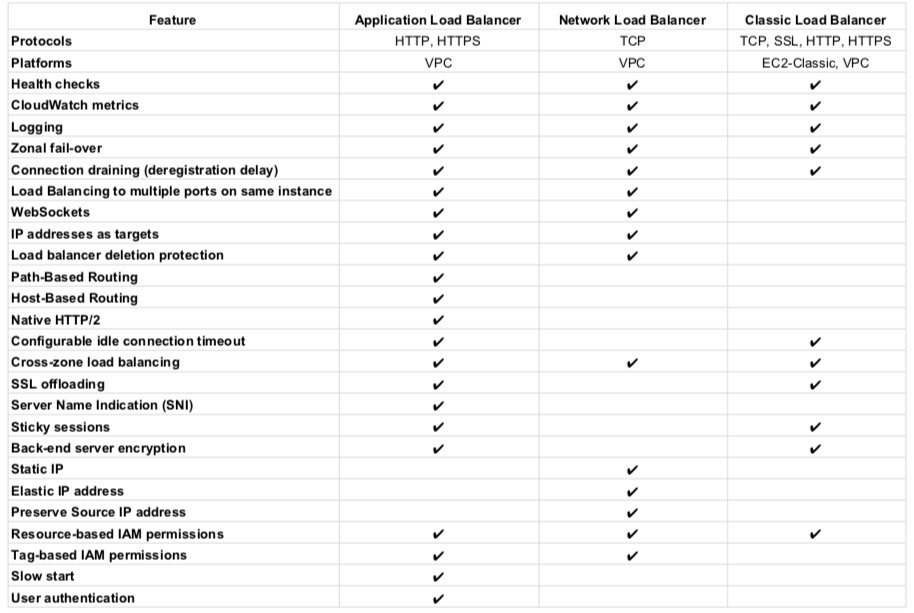
Classic Load Balancer vs Application Load Balancer vs Network Load Balancer

Refer Blog Post @ Classic Load Balancer vs Application Load Balancer vs Network Load Balancer

Network Load Balancer Features

Connection-based Layer 4 Load Balancing

  • Allows load balancing of both TCP and UDP traffic, routing connections to targets – EC2 instances, microservices, and containers.

High Availability

  • is highly available.
  • accepts incoming traffic from clients and distributes this traffic across the targets within the same AZ (except for Cross-zone load balancing).
  • monitors the health of its registered targets and routes the traffic only to healthy targets
  • if a health check fails and an unhealthy target is detected, it stops routing traffic to that target and reroutes traffic to remaining healthy targets.
  • if configured with multiple AZs and if all the targets in a single AZ fail, it routes traffic to healthy targets in the other AZs

Availability Zones

  • can be used to route traffic across multiple Availability Zones.
  • However, AZ must be enabled before the traffic is routed to that AZ.
  • AZ can be enabled, even after the NLB creation.
  • AZ once enabled, cannot be removed.
  • Cross-zone load balancing works only for AZs enabled with NLB.

High Throughput

  • is designed to handle traffic as it grows and can load balance millions of requests/sec.
  • can also handle sudden volatile traffic patterns.

Low Latency

  • offers extremely low latencies for latency-sensitive applications.

Cross Zone Load Balancing

  • enables cross-zone loading balancing only after creating the NLB
  • is disabled, by default, and charges apply for inter-az traffic.
  • only works for the AZs that are enabled on the AZ

Sticky Sessions

  • Sticky sessions (source IP affinity) are a mechanism to route requests from the same client to the same target.
  • Stickiness is defined at the target group level

Load Balancing using IP addresses as Targets

  • allows load balancing of any application hosted in AWS or on-premises using IP addresses of the application backends as targets.
  • allows load balancing to an application backend hosted on any IP address and any interface on an instance.
  • ability to load balance across AWS and on-premises resources help migrate-to-cloud, burst-to-cloud or failover-to-cloud.
  • applications hosted in on-premises locations can be used as targets over a Direct Connect connection and EC2-Classic (using ClassicLink).

Preserve Source IP Address

  • preserves client-side source IP allowing the back-end to see the client IP address.
  • Target groups can be created with target type as instance ID or IP address.
    • If targets are registered by instance ID or ECS tasks, the source IP addresses of the clients are preserved and provided to the applications.
    • If targets are registered by IP address
      • for TCP & TLS, the source IP addresses are the private IP addresses of the load balancer nodes. Use Proxy Protocol.
      • for UDP & TCP_UDP, it is enabled by default and the source IP addresses of the clients are preserved.

Static IP support

  • automatically provides a static IP per Availability Zone (subnet) that can be used by applications as the front-end IP of the load balancer.
  • creates a network interface for each enabled AZ. Each load balancer node in the AZ uses this network interface to get a static IP address.
  • Internet-facing load balancer can optionally associate one Elastic IP address per subnet.

Elastic IP support

  • an Elastic IP per Availability Zone (subnet) can also be assigned, optionally, thereby providing a fixed IP.

Health Checks

  • supports both network and application target health checks using HTTP, HTTPS, and TCP.
  • Network-level health check
    • is based on the overall response of the underlying target (instance or a container) to normal traffic.
    • target is marked unavailable if it is slow or unable to respond to new connection requests
  • Application-level health check
    • is based on a specific URL on a given target to test the application health deeper

DNS Fail-over

  • integrates with Route 53
  • Route 53 will direct traffic to load balancer nodes in other AZs, if there are no healthy targets with NLB or if the NLB itself is unhealthy
  • if NLB is unresponsive, Route 53 will remove the unavailable load balancer IP address from service and direct traffic to an alternate Network Load Balancer in another region.

Integration with AWS Services

Long-lived TCP Connections

  • supports long-lived TCP connections ideal for WebSocket-type of applications

Central API Support

  • uses the same API as Application Load Balancer.
  • enables you to work with target groups, health checks, and load balance across multiple ports on the same EC2 instance to support containerized applications.

Robust Monitoring and Auditing

  • integrated with CloudWatch to report Network Load Balancer metrics.
  • CloudWatch provides metrics such as Active Flow count, Healthy Host Count, New Flow Count, Processed bytes, and more.
  • integrated with CloudTrail to track API calls to the NLB

Enhanced Logging

  • Flow Logs feature helps record all requests sent to the load balancer.
  • Flow Logs capture information about the IP traffic going to and from network interfaces in the VPC.
  • Flow log data is stored using CloudWatch Logs.

Zonal Isolation

  • is designed for application architectures in a single zone.
  • can be enabled in a single AZ to support architectures that require zonal isolation
  • automatically fails-over to other healthy AZs, if something fails in an AZ
  • it’s recommended to configure the load balancer and targets in multiple AZs for achieving high availability

Zonal DNS Name

  • supports DNS names for each of its nodes.
  • by default, resolving the Regional NLB DNS name returns the IP address for all NLB nodes in all enabled AZs.
  • can be used to determine the IP address of each node.
  • useful to minimize latency and inter-az data transfer costs.

Advantages over Classic Load Balancer

  • Ability to handle volatile workloads and scale to millions of requests per second, without the need of pre-warming
  • Support for static IP/Elastic IP addresses for the load balancer
  • Support for registering targets by IP address, including targets outside the VPC (on-premises) for the load balancer.
  • Support for routing requests to multiple applications on a single EC2 instance. A single instance or IP address can be registered with the same target group using multiple ports.
  • Support for containerized applications. Using Dynamic port mapping, ECS can select an unused port when scheduling a task and register the task with a target group using this port.
  • Support for monitoring the health of each service independently, as health checks are defined at the target group level and many CloudWatch metrics are reported at the target group level. Attaching a target group to an Auto Scaling group enables scaling each service dynamically based on demand

Network Load Balancer Limitations

  • can’t associate Security Groups with NLBs
  • can’t disable/remove an AZ once you enable it.
  • can’t modify ENIs created by NLB in each AZ
  • can’t change EIPs and Private IPs attached to the ENIs after NLB creation.
  • can’t register EC2 instances by instance ID for instances in another VPC even if VPC peering is done.

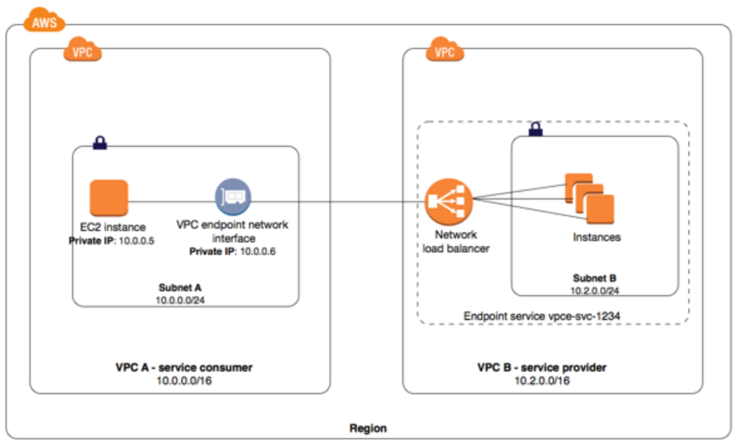
Network Load Balancer with AWS PrivateLink

  • Interface Endpoints can be used to create custom applications in VPC and configure them as an AWS PrivateLink-powered service (referred to as an endpoint service) exposed through a Network Load Balancer. The custom applications can be hosted within AWS or on-premises.
Network Load Balancer Pricing

  • charged for each hour or partial hour that an NLB is running and the number of Load Balancer Capacity Units (LCU) used per hour.
  • An LCU is a new metric for determining NLB pricing
  • An LCU defines the maximum resource consumed in any one of the dimensions (new connections/flows, active connections/flows, bandwidth and rule evaluations) the Network Load Balancer processes your traffic.

AWS Certification Exam Practice Questions

  • Questions are collected from Internet and the answers are marked as per my knowledge and understanding (which might differ with yours).
  • AWS services are updated everyday and both the answers and questions might be outdated soon, so research accordingly.
  • AWS exam questions are not updated to keep up the pace with AWS updates, so even if the underlying feature has changed the question might not be updated
  • Open to further feedback, discussion and correction.
  1. A company wants to use load balancer for their application. However, the company wants to forward the requests without any header modification. What service should the company use?
    1. Classic Load Balancer
    2. Network Load Balancer
    3. Application Load Balancer
    4. Use Route 53
  2. A company is hosting an application in AWS for third party access. The third party needs to whitelist the application based on the IP. Which AWS service can the company use in the whitelisting of the IP address?
    1. AWS Application Load Balancer
    2. AWS Classic Load balancer
    3. AWS Network Load Balancer
    4. AWS Route 53

References

AWS Documentation – ELB_Network_Load_Balancer

AWS Classic Load Balancer vs Application Load Balancer vs Network Load Balancer

AWS Classic Load Balancer vs Application Load Balancer vs Network Load Balancer

📌 Post Updated: June 2026 — Added Gateway Load Balancer (GWLB), NLB Security Groups support, ALB Mutual TLS, NLB QUIC protocol, ALB JWT verification, ALB Target Optimizer, LCU Reservation, Post-Quantum TLS, and updated EC2-Classic retirement status.

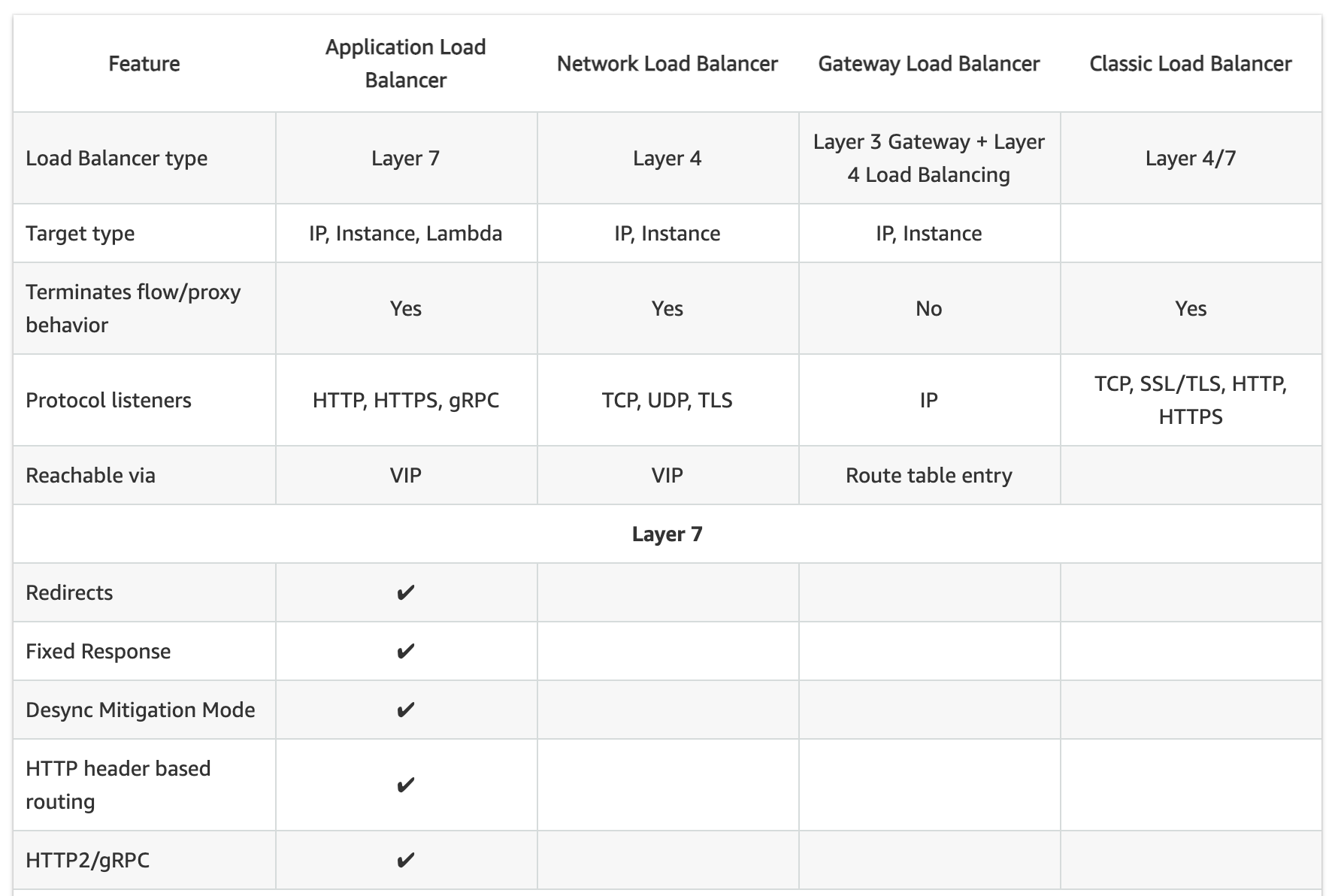
  • Elastic Load Balancing supports four types of load balancers:
    • Classic Load Balancer – CLB (Previous Generation)
    • Application Load Balancer – ALB
    • Network Load Balancer – NLB
    • Gateway Load Balancer – GWLB
  • While there is some overlap in the features, AWS does not maintain feature parity between the different types of load balancers.

⚠️ Classic Load Balancer – Previous Generation

Classic Load Balancer is the previous generation load balancer. AWS recommends using Application Load Balancer for Layer 7 and Network Load Balancer for Layer 4. CLB was originally designed for the EC2-Classic network, which was fully retired in August 2023. While CLB continues to function in VPC, no new features are being added to it.

Migration: Use the AWS Migration Wizard to migrate existing CLBs to ALB or NLB. See Migrate your Classic Load Balancer.

CLB vs ALB vs NLB General

Usage Patterns

  • Classic Load Balancer (Previous Generation)
    • provides basic load balancing across multiple EC2 instances and operates at both the request level and connection level.
    • is intended for applications that were built within the EC2-Classic network. EC2-Classic was fully retired in August 2023.
    • is ideal for simple load balancing of traffic across multiple EC2 instances.
    • AWS recommends migrating to ALB or NLB for all new workloads.
  • Application Load Balancer
    • is ideal for microservices or container-based architectures where there is a need to route traffic to multiple services or load balance across multiple ports on the same EC2 instance.
    • operates at the request level (layer 7), routing traffic to targets – EC2 instances, containers, IP addresses, and Lambda functions based on the content of the request.
    • is ideal for advanced load balancing of HTTP and HTTPS traffic, and provides advanced request routing targeted at delivery of modern application architectures, including microservices and container-based applications.
    • simplifies and improves the security of the application, by ensuring that the latest SSL/TLS ciphers and protocols are used at all times.
    • supports Mutual TLS (mTLS) authentication to verify client certificate-based identities.
    • supports native JWT (JSON Web Token) verification for secure service-to-service authentication.
  • Network Load Balancer
    • operates at the connection level (Layer 4), routing connections to targets – EC2 instances, microservices, and containers – within VPC based on IP protocol data.
    • is ideal for load balancing of TCP, UDP, TLS, and QUIC traffic.
    • is capable of handling millions of requests per second while maintaining ultra-low latencies.
    • is optimized to handle sudden and volatile traffic patterns while using a single static IP address per AZ
    • is integrated with other popular AWS services such as Auto Scaling, ECS, CloudFormation, and AWS Certificate Manager (ACM).
    • now supports security groups (since August 2023) for centralized access control.
    • supports QUIC protocol in passthrough mode (since November 2025) for low-latency mobile and real-time applications.
  • Gateway Load Balancer
    • operates at Layer 3 (network layer), providing a transparent network gateway and distributing traffic to virtual appliances.
    • is ideal for deploying, scaling, and managing third-party virtual appliances such as firewalls, intrusion detection/prevention systems (IDS/IPS), and deep packet inspection systems.
    • combines a transparent network gateway (single entry and exit point for all traffic) with load balancing of virtual appliances.
    • uses the GENEVE protocol on port 6081 to exchange traffic with registered virtual appliance instances.
    • maintains flow stickiness using 5-tuple (default), 3-tuple, or 2-tuple.
  • AWS recommends using Application Load Balancer for Layer 7 and Network Load Balancer for Layer 4 when using VPC.

AWS ELB Classic Load Balancer vs Application Load Balancer
Supported Protocols

  • Classic ELB operates at layer 4 and supports HTTP, HTTPS, TCP, SSL
  • ALB operates at layer 7 and supports HTTP, HTTPS, HTTP/2, gRPC, WebSockets
  • NLB operates at the connection level (Layer 4) and supports TCP, UDP, TLS, QUIC, TCP_QUIC
  • GWLB operates at Layer 3 and listens for all IP packets across all ports

Load Balancing to Multiple Ports on the same instance

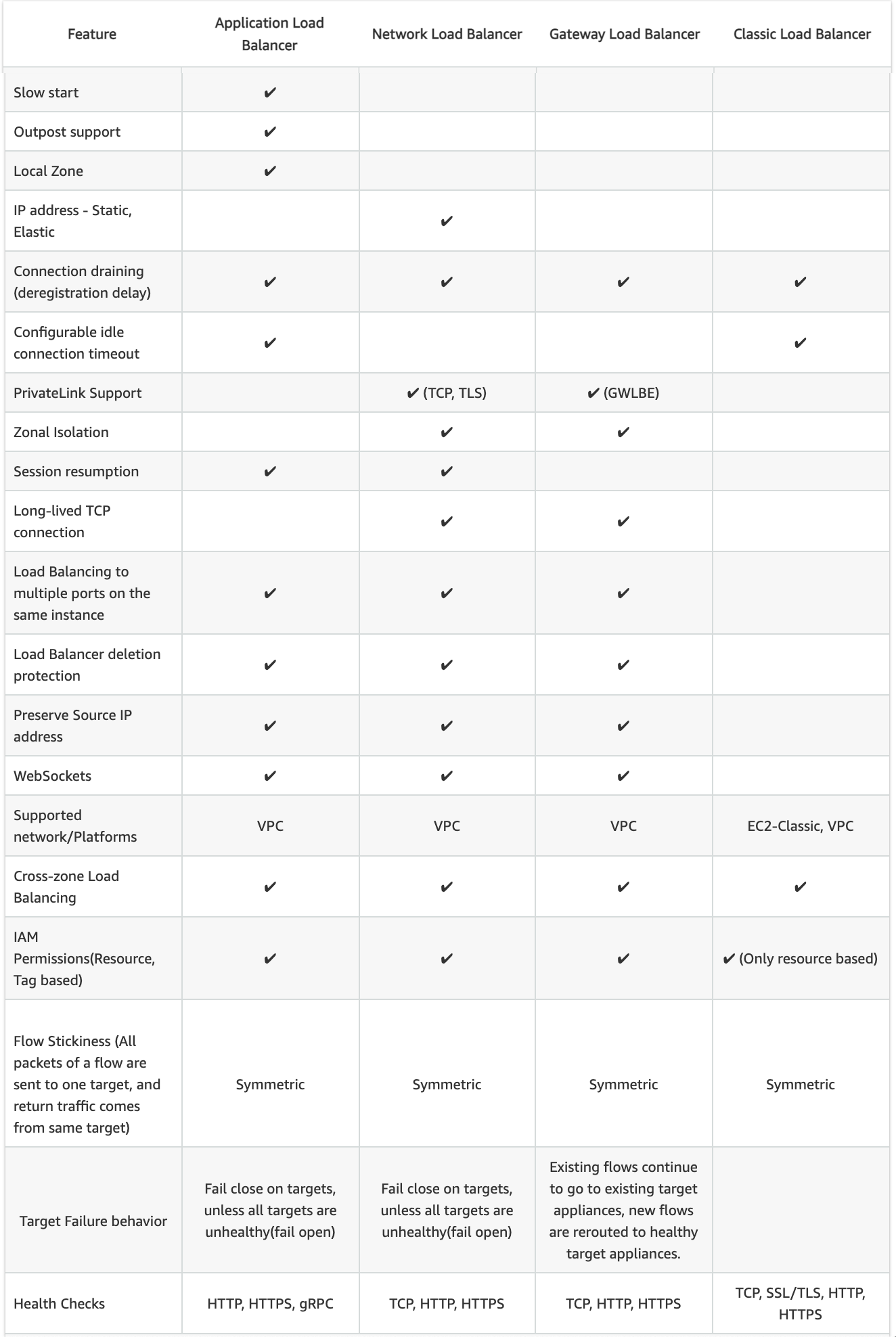
  • ALB, NLB, and GWLB support Load Balancing to multiple ports on the same instance
  • CLB does not support load balancing to multiple ports on the same instance

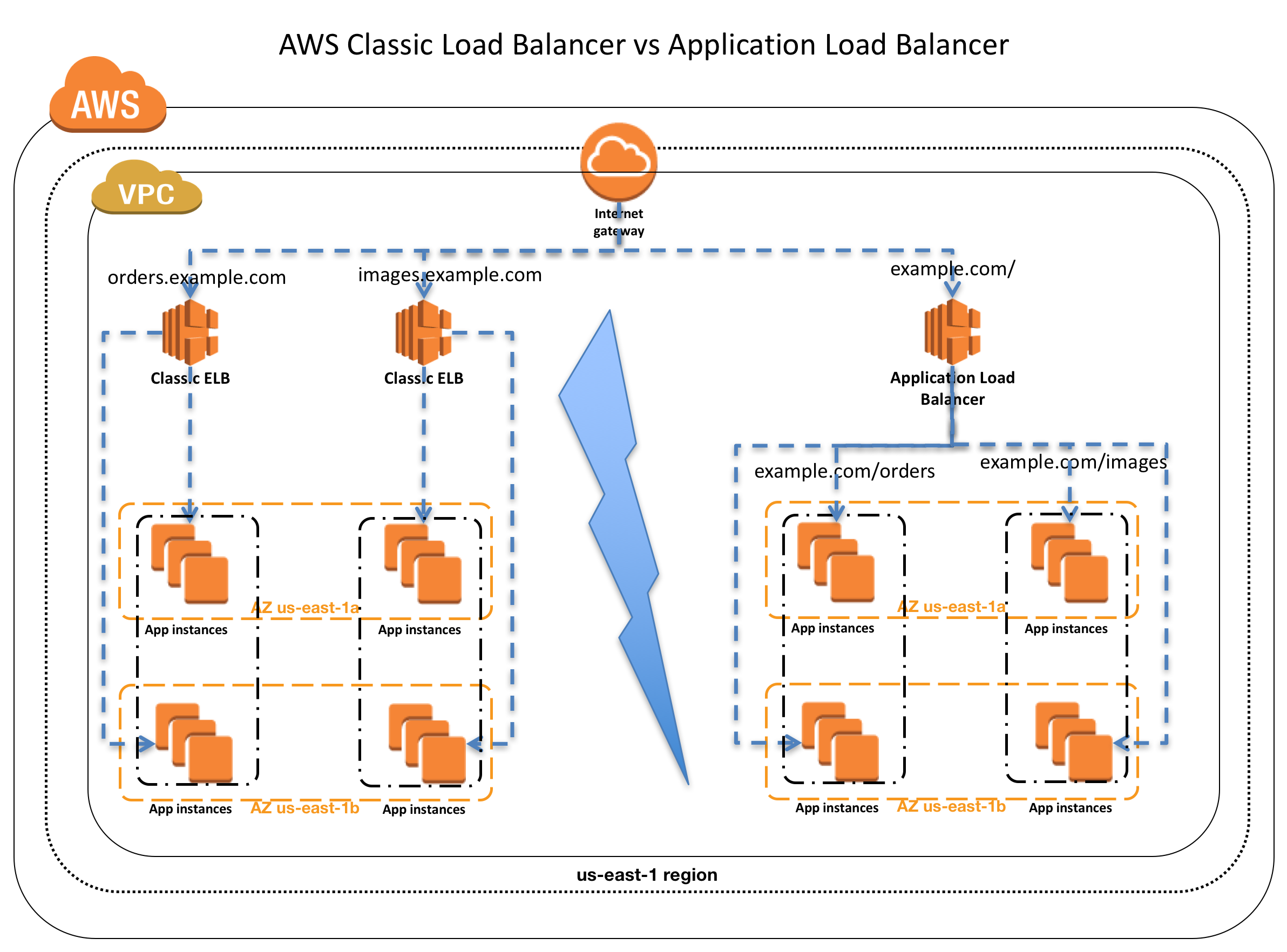
Host-based Routing & Path-based Routing

  • Host-based routing use host conditions to define rules that forward requests to different target groups based on the hostname in the host header. This enables ALB to support multiple domains using a single load balancer.
  • Path-based routing use path conditions to define rules that forward requests to different target groups based on the URL in the request. Each path condition has one path pattern. If the URL in a request matches the path pattern in a listener rule exactly, the request is routed using that rule.
  • Only ALB supports Host-based & Path-based routing.

URL and Host Header Rewrite (ALB – New 2025)

  • ALB now supports URL and Host Header rewrite capabilities (October 2025).
  • Enables modification of request URLs and Host Headers using regex-based pattern matching before routing requests to targets.
  • Useful for URL normalization, path rewriting, and host header transformation without application code changes.
  • Only ALB supports URL and Host Header Rewrite.

CLB vs ALB vs NLB Common configurations and Features

Slow Start

  • By default, a target starts to receive its full share of requests as soon as it is registered with a target group and passes an initial health check.
  • Using slow start mode gives targets time to warm up before the load balancer sends them a full share of requests.
  • Only ALB supports slow start mode

Target Optimizer (ALB – New 2025)

  • ALB Target Optimizer (November 2025) allows you to enforce a maximum number of concurrent requests on a target.
  • Uses an agent installed on each target that tracks concurrent requests and signals the ALB when capacity is available.
  • Enables high-efficiency load balanced applications while maintaining low latency and high availability.
  • Returns 503 errors during overload rather than overwhelming targets.
  • Only ALB supports Target Optimizer.

Static IP and Elastic IP Address

  • NLB automatically provides a static IP per AZ (subnet) that can be used by applications as the front-end IP of the load balancer.
  • NLB also allows the option to assign an Elastic IP per AZ (subnet) thereby providing your own fixed IP.
  • Classic ELB, ALB, and GWLB do not support Static and Elastic IP address

Connection Draining OR Deregistration Delay

  • Connection draining enables the load balancer to complete in-flight requests made to instances that are de-registering or unhealthy.
  • All Load Balancer types (CLB, ALB, NLB, GWLB) support connection draining/deregistration delay.

Idle Connection Timeout

  • Idle Connection Timeout helps specify a time period, which ELB uses to close the connection if no data has been sent or received by the time that the idle timeout period elapses
  • Can be configured for CLB & ALB (default 60 seconds)
  • Cannot be configured for NLB (350 secs for TCP, 120 secs for UDP)
  • GWLB supports configurable TCP idle timeout (60 to 6000 seconds, since September 2024)
  • It is recommended to enable HTTP keep-alive in the web server settings for the EC2 instances, thus making the ELB reuse the backend connections until the keep-alive timeout expires.

PrivateLink Support

  • CLB and ALB do not support PrivateLink
  • NLB supports PrivateLink (TCP, TLS, UDP)
  • GWLB supports PrivateLink via Gateway Load Balancer Endpoints (GWLBE)

Zonal Isolation

  • NLB and GWLB support Zonal Isolation which supports application architectures in a single zone. It automatically fails over to other healthy AZs, if something fails in an AZ
  • CLB and ALB do not support Zonal Isolation.
  • NLB supports Zonal DNS Affinity (since October 2023), allowing clients to resolve the load balancer DNS to an IP in their same AZ.

Deletion Protection

  • ALB, NLB, and GWLB support Deletion Protection, wherein a load balancer can’t be deleted if deletion protection is enabled
  • CLB does not support deletion protection.

Preserve Source IP address

  • As the ELB intercepts the traffic between the client and the back-end servers, the back-end server does not know the IP address, Protocol, and the Port used between the Client and the Load balancer.
  • Classic ELB (HTTP/HTTPS) and ALB do not preserve the client-side source IP. It needs to be retrieved using X-Forward-XXX.
    • X-Forwarded-For request header to help back-end servers identify the IP address of a client when you use an HTTP or HTTPS load balancer.
    • X-Forwarded-Proto request header to help back-end servers identify the protocol (HTTP/S) that a client used to connect to the server
    • X-Forwarded-Port request header to help back-end servers identify the port that an HTTP or HTTPS load balancer uses to connect to the client.
  • CLB (SSL/TLS) uses Proxy Protocol Version 1 and NLB uses Proxy Protocol Version 2 to provide the information.
  • NLB preserves the client-side source IP or needs Proxy Protocol allowing the back-end to see the IP address of the client.
    • If targets are registered by instance ID or ECS tasks, the source IP addresses of the clients are preserved and provided to the applications.
    • If targets are registered by IP address
      • for TCP & TLS, the source IP addresses are the private IP addresses of the load balancer nodes. Use Proxy Protocol.
      • for UDP & TCP_UDP, it is enabled by default and the source IP addresses of the clients are preserved.
  • GWLB preserves the source IP address as it operates as a transparent bump-in-the-wire.

Health Checks

  • All Load Balancer types support Health checks to determine if the instance is healthy or unhealthy
  • ALB provides health check improvements that allow detailed error codes from 200-399 to be configured
  • ALB supports HTTP, HTTPS, and gRPC health checks
  • NLB and GWLB support TCP, HTTP, and HTTPS health checks
  • CLB supports TCP, SSL/TLS, HTTP, and HTTPS health checks

Security Groups

  • ALB, NLB, and CLB support security groups
  • NLB added security group support in August 2023, enabling centralized access control and inbound rule enforcement
  • GWLB does not support security groups
  • Note: NLB security groups must be associated at creation time; they cannot be added to an existing NLB that was created without them.

Supported Platforms

  • Classic ELB supports both EC2-Classic and EC2-VPC — EC2-Classic was fully retired in August 2023. All load balancers now operate in VPC only.
  • ALB, NLB, and GWLB support only EC2-VPC.
  • CLB now effectively operates only in VPC (EC2-Classic no longer exists).

WebSockets

  • CLB does not support WebSockets
  • ALB, NLB, and GWLB support WebSockets

Cross-zone Load Balancing

  • By default, Load Balancer will distribute requests evenly across its enabled AZs, irrespective of the instances it hosts.
  • Cross-zone Load Balancing help distribute incoming requests evenly across all instances in its enabled AZs.
  • CLB → Cross Zone load balancing is disabled, by default, and can be enabled and free of charge.
  • ALB → Cross Zone load balancing is always enabled at the load balancer level, but can be turned off at the target group level (since November 2022). Free of charge.
  • NLB → Cross Zone load balancing is disabled, by default, and can be enabled but is charged for inter-az data transfer.
  • GWLB → Cross Zone load balancing is disabled, by default, and can be enabled.
  • Zonal Shift & Autoshift: Both ALB and NLB (with cross-zone enabled) now support zonal shift and zonal autoshift (2024) to move traffic away from an impaired AZ.

Sticky Sessions (Cookies)

  • Sticky Sessions (Session Affinity) enables the load balancer to bind a user’s session to a specific instance, which ensures that all requests from the user during the session are sent to the same instance
  • CLB, ALB, and NLB support sticky sessions to maintain session affinity
  • CLB and ALB maintain session stickiness using cookies.
  • NLB supports sticky sessions using a built-in 5-tuple hash table to maintain stickiness across backend servers.
  • NLB idle timeout for TCP connections is 350 seconds. Once the timeout is reached or the session is terminated, the NLB will forget the stickiness and incoming packets will be considered as a new flow and could be load balanced to a new target.
  • NLB QUIC protocol uses QUIC Connection IDs for session stickiness, which is resilient to client IP/NAT changes.

CLB vs ALB vs NLB Security

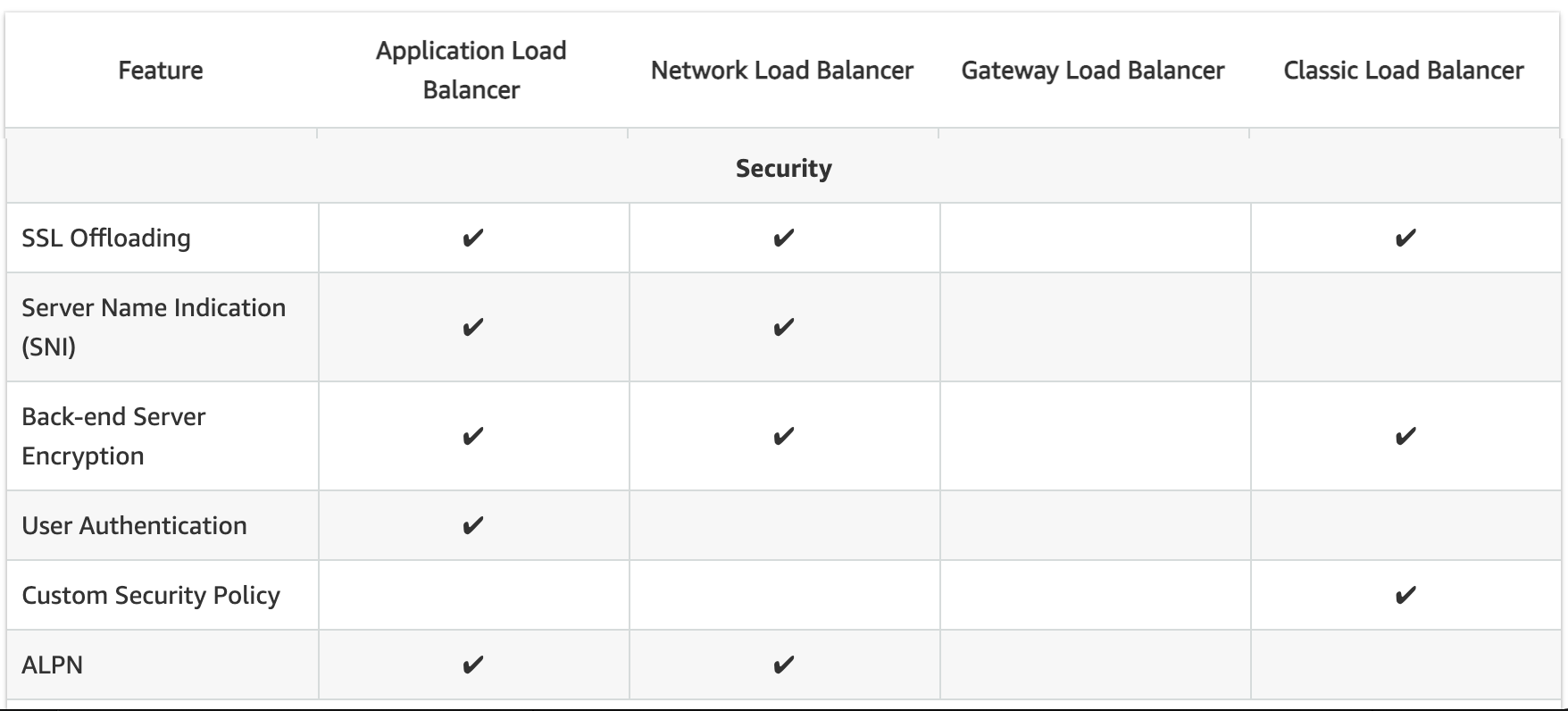
SSL Termination/Offloading

  • SSL Termination helps decrypt requests from clients before sending them to targets and hence reducing the load. SSL certificate must be installed on the load balancer.
  • CLB, ALB, and NLB support SSL Termination.
  • GWLB does not support SSL offloading (operates at Layer 3).
  • ALB and NLB now support Post-Quantum Key Exchange for TLS (November 2025), using hybrid post-quantum key agreement with ML-KEM algorithm for quantum-resistant encryption.

Mutual TLS (mTLS) Authentication (ALB – New 2023)

  • Mutual TLS extends standard TLS by requiring clients to present X.509 certificates for authentication.
  • ALB can authenticate client certificates from third-party Certificate Authorities or AWS Private Certificate Authority (PCA).
  • Supports certificate revocation checks to restrict access for compromised certificates.
  • Offloads client authentication to the load balancer, eliminating the need for custom authentication in applications.
  • Only ALB supports Mutual TLS authentication.

JWT Verification (ALB – New 2025)

  • ALB now supports native JSON Web Token (JWT) verification (November 2025) for secure service-to-service (S2S) or machine-to-machine (M2M) communications.
  • Validates token signatures, expiration times, and claims without requiring application code changes.
  • Useful for OAuth 2.0 client credentials flow.
  • Only ALB supports native JWT verification.

Server Name Indication

  • CLB only supports a single certificate and does not support SNI
  • ALB and NLB support multiple certificates and use SNI to serve multiple secure websites using a single TLS listener.
    • If the hostname provided by a client matches a single certificate in the certificate list, the load balancer selects this certificate.
    • If a hostname provided by a client matches multiple certificates in the certificate list, the load balancer selects the best certificate that the client can support.

Back-end Server Authentication

  • Back-end Server Authentication enables authentication of the instances.
  • Load balancer communicates with an instance only if the public key that the instance presents to the load balancer matches a public key in the authentication policy for the load balancer.
  • Classic Load Balancer supports Back-end Server Authentication
  • ALB does not support Back-end Server Authentication

Capacity Unit Reservation (New 2024)

  • ALB and NLB support Load Balancer Capacity Unit (LCU) Reservation (November 2024).
  • Allows proactively setting a minimum capacity for the load balancer to prepare for planned traffic spikes.
  • Complements existing auto-scaling, useful for product launches, sales events, or traffic migrations.
  • GWLB added LCU Reservation support in April 2025.
  • ALB, NLB, and GWLB support LCU Reservation.
  • CLB does not support LCU Reservation.

Weighted Target Groups (NLB – New 2025)

  • NLB now supports weighted target groups (November 2025).
  • Allows distributing traffic across multiple target groups with configurable static weights.
  • Enables blue/green and canary deployment strategies with zero downtime without needing multiple load balancers.
  • ALB has long supported weighted target groups via listener rules; NLB now supports this natively.

CloudWatch Metrics

  • All Load Balancer types integrate with CloudWatch to provide metrics, with ALB providing additional metrics
  • ALB and CLB report request counts, error counts, error types, and request latency
  • NLB and GWLB report Active Flow Count, New Flow Count, and Processed Bytes

Access Logs

  • Access logs capture detailed information about requests sent to the load balancer. Each log contains information such as request received time, client’s IP address, latencies, request paths, and server responses
  • All Load Balancer types provide access logs, with ALB providing additional attributes

Gateway Load Balancer (GWLB)

  • Operates at Layer 3 (network layer) as a transparent network gateway combined with load balancing.
  • Designed for deploying, scaling, and managing third-party virtual appliances (firewalls, IDS/IPS, deep packet inspection).
  • Provides a single entry and exit point for all traffic, distributing it to virtual appliances while scaling based on demand.
  • Uses GENEVE encapsulation protocol on port 6081.
  • Supports 5-tuple (default), 3-tuple, or 2-tuple flow stickiness.
  • Accessible via VPC route table entries (not via VIP like ALB/NLB).
  • Target types: IP and Instance.
  • Supports cross-zone load balancing, deletion protection, and connection draining.
  • Supports configurable TCP idle timeout (60–6000 seconds) since September 2024.
  • Supports LCU Reservation since April 2025.
  • Does not support: SSL offloading, security groups, SNI, static/elastic IP, or slow start.

AWS Certification Exam Practice Questions

  • Questions are collected from Internet and the answers are marked as per my knowledge and understanding (which might differ with yours).
  • AWS services are updated everyday and both the answers and questions might be outdated soon, so research accordingly.
  • AWS exam questions are not updated to keep up the pace with AWS updates, so even if the underlying feature has changed the question might not be updated
  • Open to further feedback, discussion and correction.
  1. A company wants to use load balancer for their application. However, the company wants to forward the requests without any header modification. What service should the company use?
    1. Classic Load Balancer
    2. Network Load Balancer
    3. Application Load Balancer
    4. Use Route 53
  2. A Solutions Architect is building an Amazon ECS-based web application that requires that headers are not modified when being forwarded to Amazon ECS. Which load balancer should the Architect use?
    1. Application Load Balancer
    2. Network Load Balancer
    3. A virtual load balancer appliance from AWS marketplace
    4. Classic Load Balancer
  3. An application tier currently hosts two web services on the same set of instances, listening on different ports. Which AWS service should a solutions architect use to route traffic to the service based on the incoming request?
    1. AWS Application Load Balancer
    2. Amazon CloudFront
    3. Amazon Route 53
    4. AWS Classic Load Balancer
  4. A Solutions Architect needs to deploy an HTTP/HTTPS service on Amazon EC2 instances with support for WebSockets using load balancers. How can the Architect meet these requirements?
    1. Configure a Network Load balancer.
    2. Configure an Application Load Balancer.
    3. Configure a Classic Load Balancer.
    4. Configure a Layer-4 Load Balancer.
  5. A company is hosting an application in AWS for third party access. The third party needs to whitelist the application based on the IP. Which AWS service can the company use in the whitelisting of the IP address?
    1. AWS Application Load Balancer
    2. AWS Classic Load balancer
    3. AWS Network Load Balancer
    4. AWS Route 53
  6. A company needs to deploy inline virtual firewall appliances to inspect all traffic entering and leaving their VPC. The solution must scale automatically with traffic. Which load balancer type should they use?
    1. Application Load Balancer
    2. Network Load Balancer
    3. Classic Load Balancer
    4. Gateway Load Balancer
  7. A solutions architect needs to implement mutual TLS authentication for an application behind a load balancer to verify client certificates. Which load balancer supports this natively?
    1. Application Load Balancer
    2. Network Load Balancer
    3. Classic Load Balancer
    4. Gateway Load Balancer
  8. A company wants to perform blue/green deployments with their Network Load Balancer by gradually shifting traffic between two target groups. Which NLB feature enables this?
    1. Path-based routing
    2. Slow start mode
    3. Weighted target groups
    4. Cross-zone load balancing
  9. An organization wants to prepare their Network Load Balancer for a planned marketing event that will cause a sudden spike in traffic. Which feature should they use?
    1. Cross-zone load balancing
    2. Load Balancer Capacity Unit (LCU) Reservation
    3. Target group health configuration
    4. Slow start mode
  10. A company running a mobile gaming application needs ultra-low latency load balancing with session stickiness that survives client IP changes due to mobile network roaming. Which protocol and load balancer combination best meets this need?
    1. ALB with cookie-based stickiness
    2. NLB with TCP 5-tuple stickiness
    3. NLB with QUIC protocol using Connection ID stickiness
    4. CLB with session cookies

References

AWS Compute Services Cheat Sheet

AWS Compute Services Cheat Sheet

AWS Compute Services

Elastic Cloud Compute – EC2

  • provides scalable computing capacity
  • Features
    • Virtual computing environments, known as EC2 instances
    • Preconfigured templates for EC2 instances, known as Amazon Machine Images (AMIs), that package the bits needed for the server (including the operating system and additional software)
    • Various configurations of CPU, memory, storage, and networking capacity for your instances, known as Instance types
    • Secure login information for your instances using key pairs (public-private keys where private is kept by user)
    • Storage volumes for temporary data that’s deleted when you stop or terminate your instance, known as Instance store volumes
    • Persistent storage volumes for data using Elastic Block Store (EBS)
    • Multiple physical locations for your resources, such as instances and EBS volumes, known as Regions and Availability Zones
    • A firewall to specify the protocols, ports, and source IP ranges that can reach your instances using Security Groups
    • Static IP addresses, known as Elastic IP addresses
    • Metadata, known as tags, can be created and assigned to EC2 resources
    • Virtual networks that are logically isolated from the rest of the AWS cloud, and can optionally connect to on-premises network, known as Virtual private clouds (VPCs)

Amazon Machine Image – AMI

    • template from which EC2 instances can be launched quickly
    • does NOT span across regions, and needs to be copied
    • can be shared with other specific AWS accounts or made public

Instance Types

  • T for applications needing general usage
    • T2 instances are Burstable Performance Instances that provide a baseline level of CPU performance with the ability to burst above the baseline.
    • T2 instances accumulate CPU Credits when they are idle, and consume CPU Credits when they are active.
    • T2 Unlimited Instances can sustain high CPU performance for as long as a workload needs it at an additional cost.
    • T4g instances are powered by AWS Graviton2 processors and provide the next generation low cost burstable general purpose instance type.
  • R for applications needing more RAM or Memory
    • R8g instances powered by Graviton4 processors deliver up to 30% better performance over Graviton3-based instances for memory-intensive workloads.
  • C for applications needing more Compute
    • C8g instances powered by Graviton4 and C8i instances powered by Intel Xeon 6 processors represent the latest generation (2024-2025).
  • M for applications needing more Medium or Moderate performance on both Memory and CPU
    • M8g instances powered by Graviton4 and M8i instances powered by Intel Xeon 6 processors are the latest generation (2024-2025).
  • I for applications needing more IOPS
  • G for applications needing more GPU
  • P for applications needing GPU-accelerated computing for ML/AI
    • P5 and P5e instances for high-performance ML training and inference workloads.
  • Graviton-based instances (suffix “g”, e.g., C8g, M8g, R8g) are powered by AWS-designed Arm processors and provide the best price performance for most workloads.

Instance Purchasing Option

  • On-Demand Instances
    • pay for instances and compute capacity that you use by the hour or second
    • no long-term commitments or up-front payments
  • Reserved Instances
    • provides lower hourly running costs by providing a billing discount (up to 72%)
    • capacity reservation is applied to instances
    • suited if consistent, heavy, predictable usage
    • provides benefits with Consolidate Billing
    • can be modified to switch Availability Zones or the instance size within the same instance type, given the instance size footprint (Normalization factor) remains the same
    • pay for the entire term regardless of the usage
    • is not a physical instance that is launched, but rather a billing discount applied to the use of On-Demand Instances
    • available in Standard and Convertible options
  • Savings Plans
    • flexible pricing model offering savings up to 72% on compute usage in exchange for a commitment to a consistent amount of usage (measured in $/hour) for a 1 or 3 year term
    • Compute Savings Plans apply to EC2, Fargate, and Lambda usage regardless of instance family, size, AZ, region, OS, or tenancy
    • EC2 Instance Savings Plans apply to a specific instance family within a region
    • recommended over Reserved Instances for new workloads due to greater flexibility
  • Scheduled Reserved Instances
    • ⚠️ Scheduled Reserved Instances are no longer available for purchase. AWS does not have capacity available and has no plans to make it available in the future. Use On-Demand Capacity Reservations instead.
  • On-Demand Capacity Reservations
    • reserve compute capacity for instances in a specific AZ for any duration
    • can be created to start immediately or scheduled for a future date
    • ensures access to EC2 capacity when needed, independent of billing discounts
    • can be combined with Savings Plans or Reserved Instances for cost savings
  • Capacity Blocks for ML
    • reserve GPU instances (P4d, P5, P5e, Trn1) for ML workloads up to 8 weeks in advance
    • durations of up to 6 months in cluster sizes of 1 to 64 instances
    • supports instant start times and extensions
    • instances are placed in EC2 UltraClusters for low-latency networking
  • Spot Instances
    • cost-effective choice (up to 90% discount) but does NOT guarantee availability
    • applications flexible in the timing when they can run and also able to handle interruption by storing the state externally
    • provides a two-minute warning if the instance is to be terminated to save any unsaved work
    • Spot blocks can also be launched with a required duration, which are not interrupted due to changes in the Spot price Spot Blocks (Defined Duration) are no longer available for new customers.
    • Spot Fleet is a collection, or fleet, of Spot Instances, and optionally On-Demand Instances, which attempts to launch the number of Spot and On-Demand Instances to meet the specified target capacity
  • Dedicated Instances
    • is a tenancy option that enables instances to run in VPC on hardware that’s isolated, dedicated to a single customer
  • Dedicated Host
    • is a physical server with EC2 instance capacity fully dedicated to your use
    • helps meet compliance requirements and reduce costs by allowing use of existing server-bound software licenses
  • Light, Medium, and Heavy Utilization Reserved Instances are no longer available for purchase and were part of the Previous Generation AWS EC2 purchasing model

Enhanced Networking

  • results in higher bandwidth, higher packet per second (PPS) performance, lower latency, consistency, scalability, and lower jitter
  • supported using Single Root – I/O Virtualization (SR-IOV) only on supported instance types
  • is supported only with a VPC and HVM virtualization type
  • available by default on Amazon AMI but can be installed on other AMIs as well
  • no additional charge for using enhanced networking
  • Note: EC2-Classic has been fully retired (August 2023). All instances now run in VPC only.

Placement Group

  • Cluster Placement Group
    • provide low latency, High-Performance Computing via 10Gbps network
    • is a logical grouping on instances within a Single AZ
    • don’t span availability zones, can span multiple subnets but subnets must be in the same AZ
    • can span across peered VPCs for the same Availability Zones
    • An existing instance can be moved to a placement group, or moved from one placement group to another, or removed from a placement group, given it is in the stopped state.
    • for capacity errors, stop and start the instances in the placement group
    • use homogenous instance types which support enhanced networking and launch all the instances at once
  • Spread Placement Groups
    • is a group of instances that are each placed on distinct underlying hardware i.e. each instance on a distinct rack across AZ
    • recommended for applications that have a small number of critical instances that should be kept separate from each other.
    • reduces the risk of simultaneous failures that might occur when instances share the same underlying hardware.
  • Partition Placement Groups
    • is a group of instances spread across partitions i.e. group of instances spread across racks across AZs
    • reduces the likelihood of correlated hardware failures for the application.
    • can be used to spread deployment of large distributed and replicated workloads, such as HDFS, HBase, and Cassandra, across distinct hardware

EC2 Monitoring

  • CloudWatch provides monitoring for EC2 instances
  • Status monitoring helps quickly determine whether EC2 has detected any problems that might prevent instances from running applications.
  • Status monitoring includes
    • System Status checks – indicate issues with the underlying hardware
    • Instance Status checks – indicate issues with the underlying instance.

Elastic Load Balancer

  • Managed load balancing service and scales automatically
  • distributes incoming application traffic across multiple EC2 instances
  • is distributed system that is fault tolerant and actively monitored by AWS scales it as per the demand
  • are engineered to not be a single point of failure
  • supports Load Balancer Capacity Unit (LCU) Reservation to proactively set a minimum capacity for ALB and NLB, complementing auto-scaling for planned traffic events (launched Nov 2024)
  • supports routing traffic to instances in multiple AZs in the same region
  • performs Health Checks to route traffic only to the healthy instances
  • support Listeners with HTTP, HTTPS, SSL, TCP protocols
  • has an associated IPv4 and dual stack DNS name
  • can offload the work of encryption and decryption (SSL termination) so that the EC2 instances can focus on their main work
  • supports Cross Zone load balancing to help route traffic evenly across all EC2 instances regardless of the AZs they reside in
  • to help identify the IP address of a client
    • supports Proxy Protocol header for TCP/SSL connections
    • supports X-Forward headers for HTTP/HTTPS connections
  • supports Stick Sessions (session affinity) to bind a user’s session to a specific application instance,
    • it is not fault tolerant, if an instance is lost the information is lost
    • requires HTTP/HTTPS listener and does not work with TCP
    • requires SSL termination on ELB as it users the headers
  • supports Connection draining to help complete the in-flight requests in case an instance is deregistered
  • For High Availability, it is recommended to attach one subnet per AZ for at least two AZs, even if the instances are in a single subnet.
  • supports Static/Elastic IP (NLB only)
  • IPv4 & IPv6 support. VPC supports IPv6.
  • HTTPS listener does not support Client Side Certificate
  • For SSL termination at backend instances or support for Client Side Certificate use TCP for connections from the client to the ELB, use the SSL protocol for connections from the ELB to the back-end application, and deploy certificates on the back-end instances handling requests
  • Uses Server Name Indication to supports multiple SSL certificates
  • Supports four types: Application Load Balancer (ALB), Network Load Balancer (NLB), Gateway Load Balancer (GWLB), and Classic Load Balancer (CLB – previous generation)

Application Load Balancer

  • supports HTTP and HTTPS (Secure HTTP) protocols
  • supports HTTP/2, which is enabled natively. Clients that support HTTP/2 can connect over TLS
  • supports WebSockets and Secure WebSockets natively
  • supports Request tracing, by default.
    • request tracing can be used to track HTTP requests from clients to targets or other services.
    • Load balancer upon receiving a request from a client, adds or updates the X-Amzn-Trace-Id header before sending the request to the target
  • supports containerized applications. Using Dynamic port mapping, ECS can select an unused port when scheduling a task and register the task with a target group using this port.
  • supports Sticky Sessions (Session Affinity) using load balancer generated cookies, to route requests from the same client to the same target
  • supports SSL termination, to decrypt the request on ALB before sending it to the underlying targets.
  • supports layer 7 specific features like X-Forwarded-For headers to help determine the actual client IP, port and protocol
  • automatically scales its request handling capacity in response to incoming application traffic.
  • supports hybrid load balancing, to route traffic to instances in VPC and an on-premises location
  • provides High Availability, by allowing more than one AZ to be specified
  • integrates with ACM to provision and bind a SSL/TLS certificate to the load balancer thereby making the entire SSL offload process very easy
  • supports multiple certificates for the same domain to a secure listener
  • supports IPv6 addressing, for an Internet facing load balancer
  • supports dual-stack without public IPv4, enabling clients to connect using only IPv6 addresses without needing public IPv4 addresses (launched May 2024)
  • supports Cross-zone load balancing, and cannot be disabled.
  • supports Security Groups to control the traffic allowed to and from the load balancer.
  • provides Access Logs, to record all requests sent the load balancer, and store the logs in S3 for later analysis in compressed format
  • provides Delete Protection, to prevent the ALB from accidental deletion
  • supports Connection Idle Timeout – ALB maintains two connections for each request one with the Client (front end) and one with the target instance (back end). If no data has been sent or received by the time that the idle timeout period elapses, ALB closes the front-end connection
  • integrates with CloudWatch to provide metrics such as request counts, error counts, error types, and request latency
  • integrates with AWS WAF, a web application firewall that helps protect web applications from attacks by allowing rules configuration based on IP addresses, HTTP headers, and custom URI strings
  • integrates with CloudTrail to receive a history of ALB API calls made on the AWS account
  • back-end server authentication is NOT supported
  • does not provide Static, Elastic IP addresses

Network Load Balancer

  • handles volatile workloads and scale to millions of requests per second, without the need of pre-warming
  • offers extremely low latencies for latency-sensitive applications.
  • provides static IP/Elastic IP addresses for the load balancer
  • allows registering targets by IP address, including targets outside the VPC (on-premises) for the load balancer.
  • supports containerized applications. Using Dynamic port mapping, ECS can select an unused port when scheduling a task and register the task with a target group using this port.
  • monitors the health of its registered targets and routes the traffic only to healthy targets
  • enable cross-zone loading balancing only after creating the NLB
  • preserves client side source IP allowing the back-end to see client IP address. Target groups can be created with target type as instance ID or IP address. If targets registered by instance ID, the source IP addresses of the clients are preserved and provided to the applications. If register targets registered by IP address, the source IP addresses are the private IP addresses of the load balancer nodes.
  • supports both network and application target health checks.
  • supports long-lived TCP connections ideal for WebSocket type of applications
  • supports Zonal Isolation, which is designed for application architectures in a single zone and can be enabled in a single AZ to support architectures that require zonal isolation
  • supports sticky sessions using source IP affinity at the target group level to route traffic from the same client to the same target
  • supports removing Availability Zones after creation, enabling subnet reconfiguration without recreating the NLB (launched Feb 2025)
  • supports weighted target groups for blue/green and canary deployments without multiple load balancers (launched 2025)
  • supports QUIC protocol in passthrough mode, enabling low-latency forwarding of QUIC traffic while preserving session stickiness through QUIC Connection ID (launched Nov 2025)
  • supports UDP over IPv6 for dualstack load balancers (launched Nov 2024)

Gateway Load Balancer

  • enables deployment, scaling, and management of third-party virtual appliances such as firewalls, intrusion detection/prevention systems, and deep packet inspection systems
  • provides one gateway for distributing traffic across multiple virtual appliances while scaling them up or down based on demand
  • operates at Layer 3 (Network layer) and listens for all IP packets across all ports
  • uses the GENEVE protocol on port 6081 to encapsulate traffic
  • supports flow stickiness using 2-tuple, 3-tuple, or 5-tuple hash
  • configurable TCP idle timeout from 60 to 6000 seconds
  • decreases potential points of failure in network and increases availability
  • use cases include centralized network security inspection, traffic mirroring, and compliance monitoring

Auto Scaling

  • ensures correct number of EC2 instances are always running to handle the load by scaling up or down automatically as demand changes
  • cannot span multiple regions.
  • attempts to distribute instances evenly between the AZs that are enabled for the Auto Scaling group
  • performs checks either using EC2 status checks or can use ELB health checks to determine the health of an instance and terminates the instance if unhealthy, to launch a new instance
  • can be scaled using manual scaling, scheduled scaling, dynamic scaling (target tracking, step, simple) or predictive scaling
  • Predictive Scaling uses machine learning to predict future traffic based on historical patterns and proactively launches instances ahead of demand, ideal for applications with recurring traffic spikes
  • Target Tracking scaling now features highly responsive scaling policies that adapt to unique application usage patterns and support high-resolution CloudWatch metrics (enhanced Nov 2024)
  • cooldown period helps ensure instances are not launched or terminated before the previous scaling activity takes effect to allow the newly launched instances to start handling traffic and reduce load

AWS Auto Scaling & ELB

  • Auto Scaling & ELB can be used for High Availability and Redundancy by spanning Auto Scaling groups across multiple AZs within a region and then setting up ELB to distribute incoming traffic across those AZs
  • With Auto Scaling, use ELB health check with the instances to ensure that traffic is routed only to the healthy instances

Lambda

  • offers Serverless computing that allows applications and services to be built and run without thinking about servers.
  • helps run code without provisioning or managing servers, where you pay only for the compute time when the code is running.
  • is priced on a pay-per-use basis and there are no charges when the code is not running.
  • performs all the operational and administrative activities on your behalf, including capacity provisioning, monitoring fleet health, applying security patches to the underlying compute resources, deploying code, running a web service front end, and monitoring and logging the code.
  • does not provide access to the underlying compute infrastructure.
  • handles scalability and availability as it
    • provides easy scaling and high availability to the code without additional effort on your part.
    • is designed to process events within milliseconds.
    • is designed to run many instances of the functions in parallel.
    • is designed to use replication and redundancy to provide high availability for both the service and the functions it operates.
    • has no maintenance windows or scheduled downtimes for either.
    • has a default safety throttle for the number of concurrent executions per account per region.
    • has a higher latency immediately after a function is created, or updated, or if it has not been used recently.
    • for any function updates, there is a brief window of time, less than a minute, when requests would be served by both versions
  • Security
    • stores code in S3 and encrypts it at rest and performs additional integrity checks while the code is in use.
    • each function runs in its own isolated environment, with its own resources and file system view
    • supports Code Signing using AWS Signer, which offers trust and integrity controls that enable you to verify that only unaltered code from approved developers is deployed in the functions.
  • Functions must complete execution within 900 seconds (15 minutes). The default timeout is 3 seconds. The timeout can be set to any value between 1 and 900 seconds.
  • Supports up to 10,240 MB (10 GB) of memory per function.
  • AWS Step Functions can help coordinate a series of Lambda functions in a specific order. Multiple functions can be invoked sequentially, passing the output of one to the other, and/or in parallel, while the state is being maintained by Step Functions.
  • AWS X-Ray helps to trace functions, which provides insights such as service overhead, function init time, and function execution time.
  • Lambda Provisioned Concurrency provides greater control over the performance of serverless applications.
  • Lambda@Edge allows you to run code across AWS locations globally without provisioning or managing servers, responding to end-users at the lowest network latency.
  • Lambda Extensions allow integration of Lambda with other third-party tools for monitoring, observability, security, and governance.
  • Compute Savings Plan can help save money for Lambda executions.
  • CodePipeline and CodeDeploy can be used to automate the serverless application release process.
  • RDS Proxy provides a highly available database proxy that manages thousands of concurrent connections to relational databases.
  • Supports Elastic File Store, to provide a shared, external, persistent, scalable volume using a fully managed elastic NFS file system without the need for provisioning or capacity management.
  • Supports Function URLs, a built-in HTTPS endpoint that can be invoked using the browser, curl, and any HTTP client.
  • Lambda SnapStart reduces cold start latency from several seconds to sub-second for Java, Python, and .NET functions by taking a snapshot of the initialized execution environment (GA for Python & .NET in Nov 2024).
  • Lambda Durable Functions enable building resilient multi-step applications and AI workflows that can execute for up to one year, automatically checkpoint progress, suspend execution during long-running tasks, and recover from failures without custom state management code (launched Dec 2025).
  • Lambda Managed Instances enables running Lambda functions on EC2 instances (including Graviton4, GPU, network-optimized) while maintaining Lambda’s operational simplicity, with access to EC2 commitment-based pricing (Savings Plans, Reserved Instances) for up to 72% cost savings (launched Nov 2025).
  • Supports runtimes including Node.js 24, Python 3.12+, Java 25, .NET 8, and more.

AWS Compute – Additional Services

  • Amazon ECS (Elastic Container Service) – fully managed container orchestration service
    • Supports Fargate (serverless) and EC2 launch types
    • ECS Express Mode (launched Nov 2025) – streamlines deployment of containerized workloads by automatically setting up load balancing, auto scaling, networking, and monitoring with simplified APIs
    • ECS Managed Instances (launched Sep 2025) – fully managed compute option for broader EC2 instance access without infrastructure overhead
    • Supports predictive scaling (launched Nov 2024)
  • Amazon EKS (Elastic Kubernetes Service) – managed Kubernetes service for running containers at scale
  • AWS Fargate – serverless compute engine for containers that works with both ECS and EKS, removing the need to manage underlying infrastructure
  • AWS Batch – fully managed batch computing service for running batch jobs at any scale
  • AWS App Runner⚠️ No longer accepting new customers as of April 30, 2026. Existing services continue to operate. AWS recommends migrating to Amazon ECS Express Mode. No new features planned.