AWS Macie
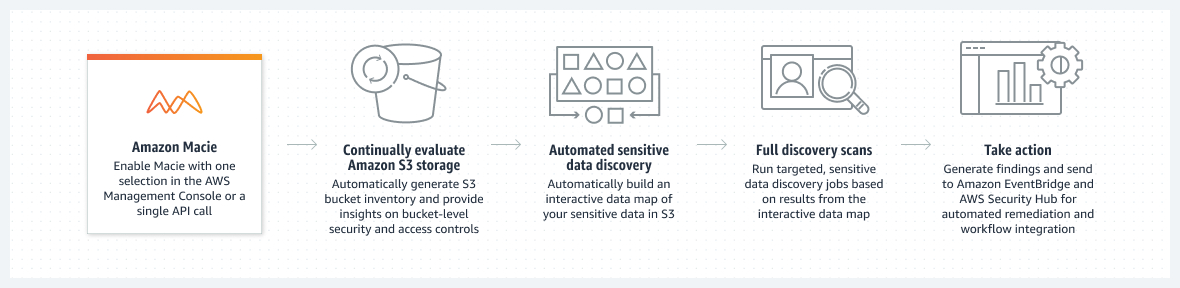
- Macie is a data security service that discovers sensitive data by using machine learning and pattern matching, provides visibility into data security risks, and enables automated protection against those risks.
- provides an inventory of the S3 general purpose buckets and automatically evaluates and monitors the buckets for security and access control.
- automates the discovery, classification, and reporting of sensitive data.
- generates a finding for you to review and remediate as necessary if it detects a potential issue with the security or privacy of the data, such as a bucket that becomes publicly accessible.
- provides multi-account support using AWS Organizations to enable Macie across all of the accounts.
- is a regional service and must be enabled on a region-by-region basis and helps view findings across all the accounts within each Region.
- supports VPC Interface Endpoints and endpoint policies to access Macie privately from a VPC without an internet gateway, NAT device, VPN connection, or AWS Direct Connect connection.
- can perform preventative control monitoring for up to 10,000 S3 general purpose buckets per account.
- stores policy and sensitive data findings for 90 days.
- offers a 30-day free trial that includes automated sensitive data discovery and S3 bucket-level evaluation, plus 1 GB of data processed per month at no cost (free tier does not expire).
- integrates with AWS Security Hub, Amazon EventBridge, and AWS User Notifications for centralized monitoring and remediation.
Macie Sensitive Data Discovery
- Macie provides two ways to discover sensitive data:
- Automated Sensitive Data Discovery – continuously evaluates S3 bucket inventory, samples and analyzes representative objects, and builds sensitivity profiles for each bucket.
- Sensitive Data Discovery Jobs – on-demand, daily, weekly, or monthly jobs that analyze all or a subset of objects in specified S3 buckets.
- Macie uses Managed Data Identifiers (built-in ML and pattern matching) to detect common sensitive data types including:
- Personally identifiable information (PII) – names, addresses, passport numbers, national IDs
- Financial data – credit card numbers, bank account numbers, IBANs (50+ countries)
- Credentials – AWS secret keys, API keys (Google Cloud, Stripe), HTTP authorization headers, JSON Web Tokens
- Custom Data Identifiers allow detection of organization-specific sensitive data using regex patterns, keywords, and proximity rules.
- Allow Lists define text or patterns for Macie to ignore, enabling exceptions for known safe data (e.g., public representative names, test data).
- Macie supports analysis of objects encrypted with SSE-S3, SSE-KMS, and DSSE-KMS (dual-layer server-side encryption).
- Supports S3 storage classes including Standard, Intelligent-Tiering, and S3 Glacier Instant Retrieval.
Automated Sensitive Data Discovery
- Continually evaluates and samples S3 objects across all buckets, providing ongoing discovery without manual job creation.
- Builds an interactive data map of where sensitive data resides across accounts.
- Provides a sensitivity score for each bucket (1-100) with a corresponding sensitivity label.
- Administrators can enable/disable automated discovery for individual accounts in an organization.
- Member accounts have read access to statistics and inventory data produced by automated discovery.
- Uses a dynamic, recommended default set of managed data identifiers optimized for common sensitive data categories.
- Resource coverage page provides unified view of coverage statistics and remediation guidance for analysis issues.
Sensitive Data Discovery Jobs
- Jobs can analyze data across up to 1,000 buckets spanning up to 1,000 accounts in an organization.
- Can specify which managed data identifiers a job should use, or use the recommended set.
- Support runtime criteria for dynamic bucket selection based on inventory changes.
- Can use S3 object prefixes for custom include/exclude criteria to refine scope.
- Jobs can be paused and resumed.
- Estimated costs are calculated and displayed during job creation.
- CloudWatch Logs can be used to monitor and analyze events during job execution.
Macie Findings
- Macie generates two categories of findings:
- Policy Findings – from continuous monitoring of S3 bucket configurations and policies (no active scanning required).
- Sensitive Data Findings – from discovery jobs or automated discovery that inspects object content.
- Policy finding types include:
Policy:IAMUser/S3BlockPublicAccessDisabledPolicy:IAMUser/S3BucketPublicPolicy:IAMUser/S3BucketReplicatedExternallyPolicy:IAMUser/S3BucketSharedExternallyPolicy:IAMUser/S3BucketSharedWithCloudFront– indicates bucket shared with CloudFront OAI or OAC.Policy:IAMUser/S3BucketEncryptionDisabled
- Findings are retained for 90 days and can be viewed in the console or via API.
- Findings can be published to AWS Security Hub and Amazon EventBridge for centralized monitoring.
- Findings are consolidated by object or bucket with severity-based prioritization.
- Sensitive Data Samples – Macie can retrieve and reveal samples of sensitive data reported in findings to verify the nature of detected data. Supports configuring an IAM role for cross-account access.
- Suppression rules (filter rules) can be used to automatically archive findings that match specific criteria.
Macie Multiple Accounts
- Macie provides multi-account support using AWS Organizations to enable Macie across all of the accounts.
- An organization consists of a designated administrator account and one or more associated member accounts.
- Accounts can be associated in two ways,
- by integrating AWS Organizations (Recommended) or
- by sending and accepting membership invitations
- The designated administrator can assess and monitor the overall security posture of the organization’s S3 data estate, and discover sensitive data in the organization’s S3 buckets.
- The administrator can also perform various account management and administration tasks at scale, such as monitoring estimated usage costs and assessing account quotas.
- Can manage Macie for up to 10,000 accounts in an organization.
- Administrator can enable/disable automated sensitive data discovery for individual accounts or all accounts selectively.
Macie Integration with AWS Security Hub
- Macie publishes both policy findings and sensitive data findings to AWS Security Hub.
- Security Hub provides security controls that check:
- Macie.1 – whether Macie is enabled for an AWS account.
- Macie.2 – whether automated sensitive data discovery is enabled for a Macie account.
- Integrates with AWS User Notifications for configuring custom notification rules and delivery channels.
Macie Pricing
- Charged based on three dimensions:
- Number of S3 buckets evaluated for bucket inventory and monitoring (up to 10,000 per account).
- Number of S3 objects monitored for automated data discovery.
- Quantity of data inspected for sensitive data discovery jobs.
- 30-day free trial includes automated sensitive data discovery and S3 bucket-level security evaluation.
- 1 GB of data processed per month at no cost (perpetual free tier, not limited to trial).
AWS Certification Exam Practice Questions
- Questions are collected from Internet and the answers are marked as per my knowledge and understanding (which might differ with yours).
- AWS services are updated everyday and both the answers and questions might be outdated soon, so research accordingly.
- AWS exam questions are not updated to keep up the pace with AWS updates, so even if the underlying feature has changed the question might not be updated
- Open to further feedback, discussion and correction.
- Which AWS service makes it easy to automate the process of discovering, classifying, and protecting data stored in AWS?
- AWS Shield
- AWS WAF
- AWS GuardDuty
- AWS Macie
- A company needs to continuously monitor its S3 buckets for sensitive data such as PII and financial information across multiple AWS accounts. They want an automated solution that provides sensitivity scores and an interactive data map. Which approach should they use?
- Create individual S3 event notifications for each bucket
- Enable Amazon Macie automated sensitive data discovery across the organization
- Write custom Lambda functions to scan S3 objects on upload
- Use AWS Config rules to check for sensitive data
- A security team wants to identify sensitive data in S3 that matches their company’s proprietary data formats, in addition to standard PII detection. Which Macie feature should they use?
- Managed data identifiers only
- Custom data identifiers with regex patterns and keywords
- S3 Object Lock
- AWS Config custom rules
- An organization is using Macie and wants to prevent findings from being generated for known safe data patterns, such as test credit card numbers used in development environments. What should they configure?
- Suppression rules
- Custom data identifiers with exclusion patterns
- Allow lists
- IAM policies to restrict Macie access to development buckets
- How does Amazon Macie integrate with AWS Security Hub? (Select TWO)
- Macie publishes policy and sensitive data findings to Security Hub
- Security Hub triggers Macie scans automatically
- Security Hub provides controls to verify Macie is enabled (Macie.1) and automated discovery is active (Macie.2)
- Security Hub manages Macie pricing
- Macie uses Security Hub to store discovery results