AWS Kinesis Data Streams vs Firehose vs Managed Apache Flink
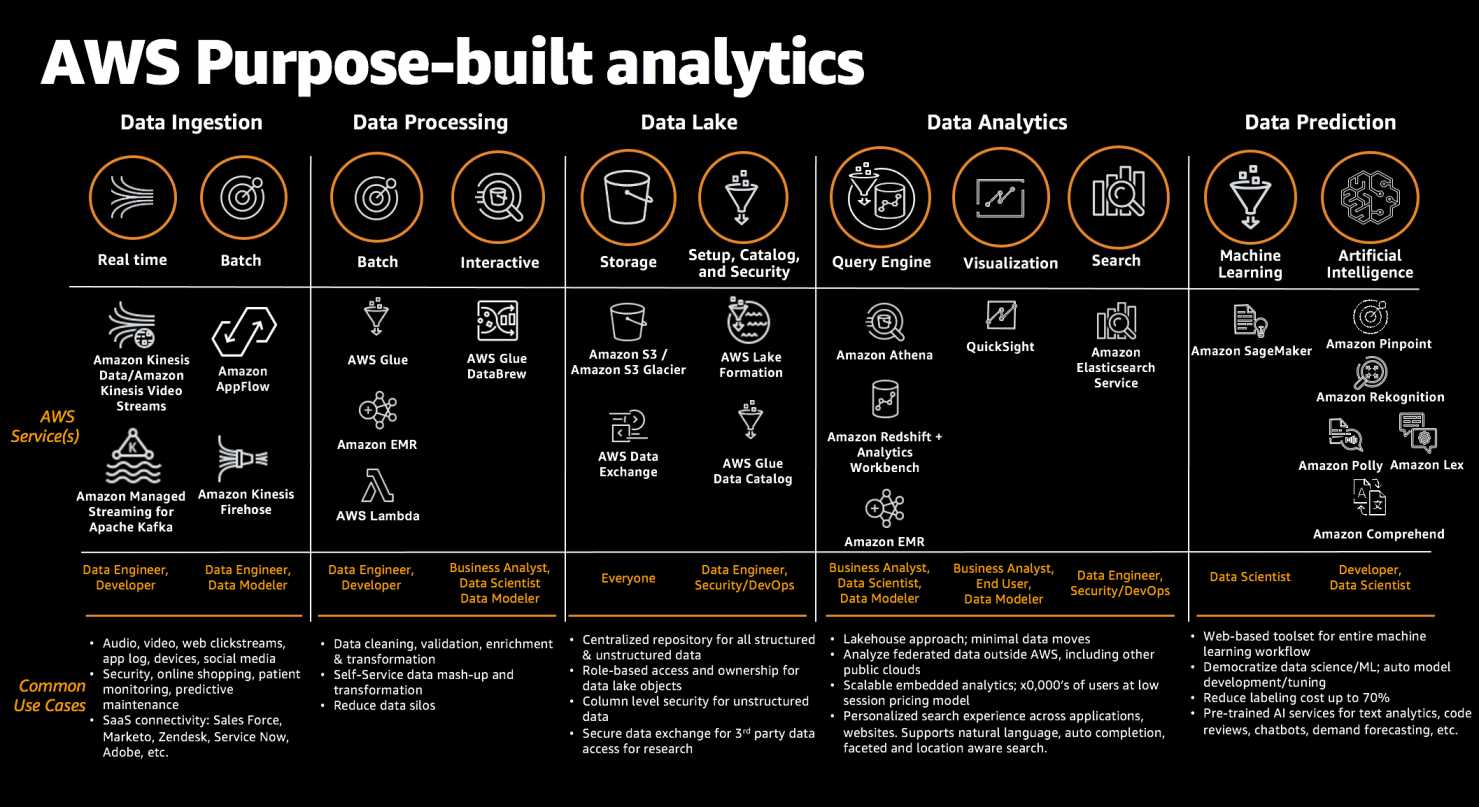
AWS offers three core streaming services under the Kinesis umbrella, each designed for different use cases in real-time data processing pipelines. Understanding when to use Amazon Kinesis Data Streams, Amazon Data Firehose (formerly Kinesis Data Firehose), or Amazon Managed Service for Apache Flink (formerly Kinesis Data Analytics) is critical for AWS certification exams and real-world architecture decisions.
- February 2024: Amazon Kinesis Data Firehose renamed to Amazon Data Firehose
- August 2023: Amazon Kinesis Data Analytics renamed to Amazon Managed Service for Apache Flink
- January 2026: Kinesis Data Analytics for SQL discontinued — migrate to Managed Service for Apache Flink
(retain 24h-365d)
(Lambda/format)
(SQL/Java/Python)
Service Overview
Amazon Kinesis Data Streams
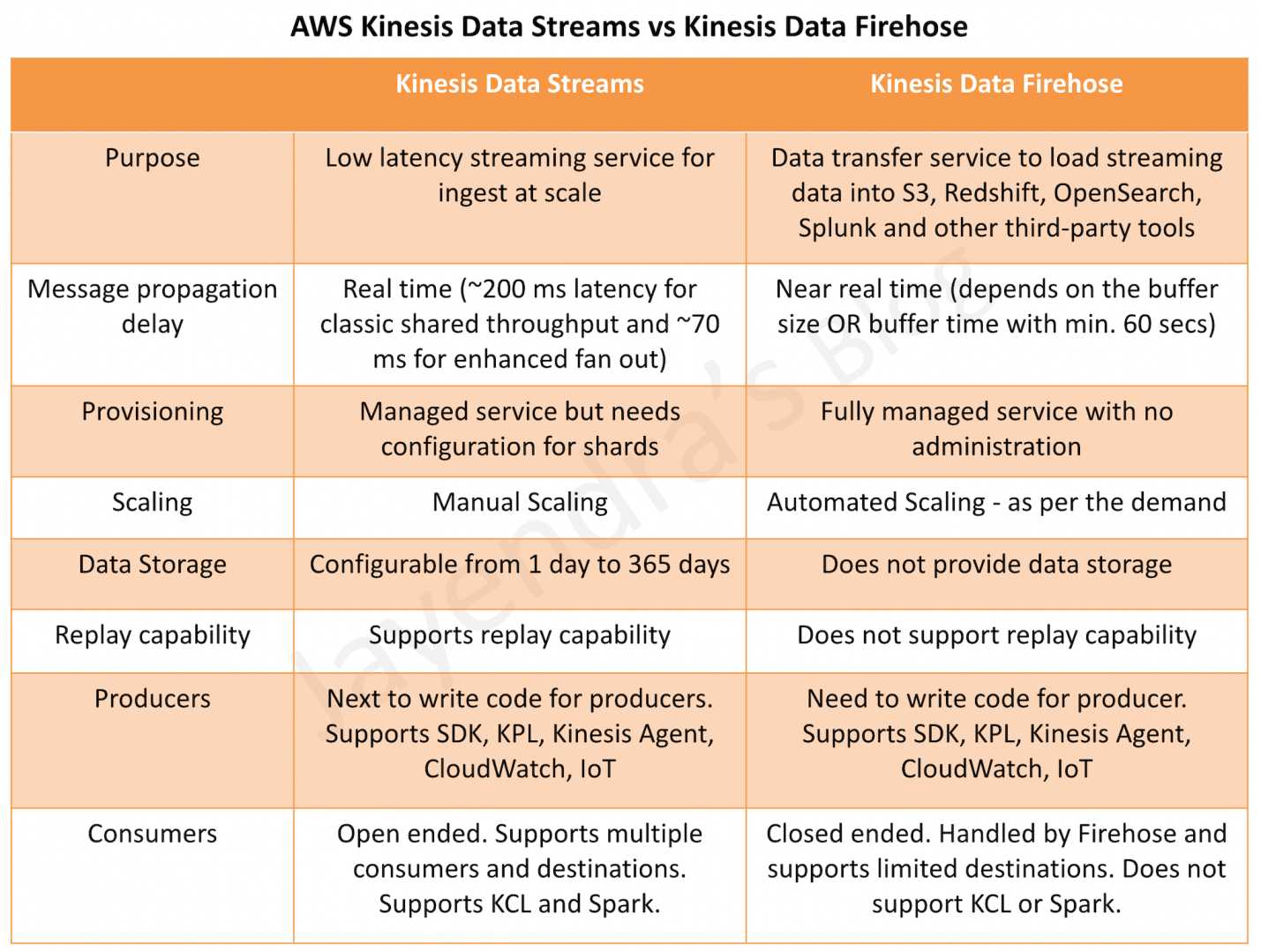
A real-time data streaming service that enables you to collect, process, and analyze streaming data with sub-second latency. You build custom consumer applications using KCL, AWS Lambda, or the SDK. It provides full control over data retention (up to 365 days), ordering guarantees via partition keys, and supports multiple simultaneous consumers.
Amazon Data Firehose
A fully managed delivery service that captures, transforms, and loads streaming data into AWS destinations (S3, Redshift, OpenSearch, Apache Iceberg tables, Snowflake) and third-party HTTP endpoints. It requires zero administration — no shards, no capacity planning, and no custom consumer code.
Amazon Managed Service for Apache Flink
A fully managed stream processing engine that runs Apache Flink applications for complex event processing, real-time analytics, and stateful computations. Supports Java, Scala, Python (PyFlink), and SQL. Provides exactly-once processing semantics, windowed aggregations, and joins across multiple streams.
Architecture Comparison
Kinesis Data Streams Architecture
- Shard-based model: Each shard provides 1 MB/s write (1,000 records/s) and 2 MB/s read capacity
- Producers → Stream (Shards) → Consumers — fully decoupled
- Data is stored in shards and replicated across 3 Availability Zones
- Records are ordered within a shard by sequence number
- Three capacity modes: Provisioned, On-Demand Standard, On-Demand Advantage
- Consumers pull data via GetRecords (shared throughput) or SubscribeToShard (enhanced fan-out with push model)
Amazon Data Firehose Architecture
- Serverless pipeline: No shards, no partitions, fully managed infrastructure
- Producers → Firehose Stream → Buffer → Transform (optional) → Destination
- Automatically scales to match incoming data throughput (up to GB/s)
- Buffers data by size (1–128 MB) or time (0–900 seconds) before delivery
- Can source directly from producers (Direct PUT) or from Kinesis Data Streams
- Supports inline transformation via AWS Lambda functions
Managed Apache Flink Architecture
- Application-based model: Deploy Apache Flink applications (JAR/ZIP) to a managed cluster
- Sources → Flink Application (operators, state) → Sinks
- Uses Kinesis Processing Units (KPUs) — each KPU = 1 vCPU + 4 GB memory
- Supports parallel processing across multiple KPUs with automatic scaling
- Maintains application state with checkpointing and savepoints
- Integrates with Kinesis Data Streams, MSK, S3, DynamoDB, and custom connectors as sources/sinks
Data Retention
| Feature | Kinesis Data Streams | Amazon Data Firehose | Managed Apache Flink |
|---|---|---|---|
| Data Storage | Yes — stores data in stream | No — transit/delivery only | Application state only (checkpoints) |
| Default Retention | 24 hours | N/A (buffered up to 15 min max) | N/A (state stored in checkpoints) |
| Extended Retention | Up to 7 days (additional charge) | N/A | N/A |
| Long-term Retention | Up to 365 days | N/A | Snapshots stored in S3 (indefinite) |
| Replay Capability | ✅ Yes — within retention window | ❌ No | ✅ Yes — via savepoints/snapshots |
Scaling Model
Kinesis Data Streams — Shards & On-Demand
- Provisioned Mode: Manually add/remove shards. Each shard = 1 MB/s in, 2 MB/s out. You pay per shard-hour ($0.015/shard-hour in us-east-1).
- On-Demand Standard Mode: Auto-scales up to 200 MB/s write (expandable to 1 GB/s). Per-stream hourly charge + per-GB pricing ($0.08/GB ingest, $0.04/GB retrieval).
- On-Demand Advantage Mode (Nov 2025): Instant scaling up to 10 GB/s or 10M events/s via warm throughput. 60% lower per-GB pricing ($0.032/GB ingest, $0.016/GB retrieval). No per-stream hourly fee. Requires 25 MB/s minimum aggregate commitment.
Amazon Data Firehose — Fully Automatic
- No capacity units to manage — scales automatically from KB/s to GB/s
- No shard splitting, merging, or resharding operations
- Pricing based purely on data volume ingested (per GB)
- Scales buffer size and parallelism transparently
Managed Apache Flink — KPU-based Auto-scaling
- Uses Kinesis Processing Units (KPUs): 1 KPU = 1 vCPU + 4 GB memory
- Default limit: 64 KPUs per application (can request increase)
- Auto-scaling: Scales out when CPU utilization exceeds 75% for 15 minutes
- Parallelism configurable per operator (default 1, max 8 per KPU)
- Also supports metric-based scaling and scheduled scaling policies
Consumers & Processing
Kinesis Data Streams Consumers
- Shared Throughput (Classic): Multiple consumers share 2 MB/s per shard. ~200 ms latency via GetRecords polling.
- Enhanced Fan-Out (EFO): Dedicated 2 MB/s per consumer per shard. Push-based via HTTP/2 SubscribeToShard. ~70 ms latency.
- Consumer Options:
- KCL (Kinesis Client Library): Managed checkpointing, load balancing, shard assignment. KCL 1.x EOL January 30, 2026 — migrate to KCL 3.x.
- AWS Lambda: Event source mapping with automatic scaling, batching, and error handling.
- SDK: Low-level GetRecords/SubscribeToShard API calls for custom consumers.
- Amazon Data Firehose: As a consumer for delivery to destinations.
- Managed Apache Flink: As a consumer for complex stream processing.
- Fan-out limits: Up to 50 EFO consumers per stream (On-Demand Advantage), 20 for other modes.
Amazon Data Firehose Consumers
- No custom consumers — Firehose IS the consumer; it delivers to pre-defined destinations
- Supported Destinations:
- Amazon S3 (including S3 Tables)
- Amazon Redshift (via S3 COPY)
- Amazon OpenSearch Service / OpenSearch Serverless
- Apache Iceberg Tables in S3
- Snowflake (via Snowpipe Streaming)
- Splunk
- HTTP endpoints (Datadog, Dynatrace, New Relic, MongoDB, Coralogix, Elastic, etc.)
- Data Transformation: Inline via AWS Lambda (up to 3 min timeout per invocation)
Managed Apache Flink Processing
- Sources: Kinesis Data Streams, Amazon MSK, Amazon S3, DynamoDB Streams, JDBC, custom Apache Flink connectors
- Sinks: Kinesis Data Streams, Amazon Data Firehose, S3, DynamoDB, OpenSearch, JDBC, custom connectors
- Languages: Java, Scala, Python (PyFlink), SQL (via Flink Studio notebooks)
- Processing: Windowed aggregations, joins, pattern detection (CEP), stateful transformations
Latency Comparison
| Service | Latency Type | Typical Latency | Best For |
|---|---|---|---|
| Kinesis Data Streams | Real-time | ~70 ms (EFO) / ~200 ms (shared) | Sub-second event processing, real-time dashboards |
| Amazon Data Firehose | Near real-time / Micro-batch | ~5 seconds (zero buffering) / 60–900 seconds (standard) | Log delivery, data lake loading, ETL pipelines |
| Managed Apache Flink | Real-time (continuous processing) | Milliseconds to seconds (application-dependent) | Complex event processing, windowed analytics, real-time ML inference |
Pricing Models (US East – N. Virginia)
Kinesis Data Streams Pricing
| Mode | Ingestion | Retrieval | Other Charges |
|---|---|---|---|
| Provisioned | $0.014 per 1M PUT payload units | Included (2 MB/s per shard) | $0.015/shard-hour |
| On-Demand Standard | $0.08/GB | $0.04/GB | $0.04/stream-hour |
| On-Demand Advantage | $0.032/GB | $0.016/GB | No per-stream fee; 25 MB/s min commitment |
Additional charges: Extended retention (24h–7d): $0.020/shard-hour (Provisioned) or $0.023/GB-month (Advantage). Long-term retention (7d–365d): $0.023/GB-month (Advantage) vs $0.10/GB-month (Standard). Enhanced Fan-Out: $0.013/shard-hour + $0.016/GB (Advantage has no EFO surcharge).
Amazon Data Firehose Pricing
- Ingestion: Tiered pricing starting at ~$0.029/GB for first 500 TB/month (billed in 5 KB increments)
- Format conversion: $0.018/GB (Parquet/ORC conversion)
- VPC delivery: Additional charges for VPC endpoints
- Dynamic partitioning: $0.020/GB
- No charges for: Delivery to destinations, scaling, or idle streams
Managed Apache Flink Pricing
- KPU-hour: $0.11/KPU-hour (1 KPU = 1 vCPU + 4 GB RAM)
- Running application storage: $0.10/GB-month (for application state/checkpoints)
- Durable application backups (snapshots): $0.023/GB-month
- Orchestration: $0.011/orchestration-hour per KPU
- Billed per second with a 1-minute minimum
- Auto-scaling adjusts KPUs automatically — you pay only for KPUs consumed
Data Transformation Capabilities
| Capability | Kinesis Data Streams | Amazon Data Firehose | Managed Apache Flink |
|---|---|---|---|
| Built-in Transformation | ❌ None (requires consumer code) | ✅ Lambda-based transformation | ✅ Full Apache Flink operators |
| Format Conversion | ❌ Not built-in | ✅ JSON → Parquet/ORC (via Glue schema) | ✅ Any format (programmatic) |
| Compression | ❌ Client-side only | ✅ GZIP, Snappy, Zip, Hadoop Snappy | ✅ Programmatic |
| Aggregation/Windowing | ❌ Not built-in | ❌ No (only batching by buffer) | ✅ Tumbling, Sliding, Session windows |
| Joins | ❌ Not built-in | ❌ No | ✅ Stream-stream & stream-table joins |
| Stateful Processing | ❌ Consumer must manage state | ❌ Stateless delivery | ✅ Managed state with checkpointing |
| Complex Event Processing | ❌ Custom code required | ❌ No | ✅ Pattern detection via Flink CEP |
Ordering & Delivery Guarantees
| Guarantee | Kinesis Data Streams | Amazon Data Firehose | Managed Apache Flink |
|---|---|---|---|
| Ordering | ✅ Per-shard ordering via partition key | ⚠️ Best-effort ordering (no strict guarantee) | ✅ Per-key ordering with watermarks and event-time processing |
| Delivery Semantics | At-least-once (exactly-once with KCL deduplication) | At-least-once | Exactly-once for application state (with checkpointing) |
| Deduplication | Consumer responsibility (sequence numbers) | Not guaranteed (possible duplicates on retry) | Built-in via Flink’s checkpoint mechanism |
| Data Durability | 3 AZ replication, up to 365 days retention | Retry with S3 backup for failed deliveries | Checkpoints stored in durable storage, snapshots in S3 |
Comprehensive Comparison Table
| Feature | Kinesis Data Streams | Amazon Data Firehose | Managed Apache Flink |
|---|---|---|---|
| Type | Data streaming & ingestion | Data delivery & loading | Stream processing & analytics |
| Management | Semi-managed (shard management in Provisioned mode) | Fully managed (zero admin) | Fully managed (auto-scaling KPUs) |
| Scaling | Shards (manual) or On-Demand (auto up to 10 GB/s) | Automatic (unlimited, up to GB/s) | KPU auto-scaling (default max 64 KPUs) |
| Latency | ~70 ms (EFO) to ~200 ms (shared) | ~5s (zero buffer) to 60–900s | Milliseconds (continuous processing) |
| Data Retention | 24 hours – 365 days | None (pass-through) | State in checkpoints/snapshots |
| Max Record Size | 10 MiB (since Oct 2025) | 1 MiB | Limited by available memory |
| Consumers | KCL, Lambda, SDK, EFO (up to 50) | Built-in delivery (no custom consumers) | Flink application sinks |
| Destinations | Any (custom consumer code) | S3, Redshift, OpenSearch, Iceberg, Snowflake, Splunk, HTTP endpoints | Kinesis, S3, DynamoDB, OpenSearch, MSK, JDBC, custom connectors |
| Transformation | None (consumer responsibility) | Lambda functions, format conversion | Full Flink operators (map, filter, join, window, CEP) |
| Ordering | Per-shard (partition key) | Best-effort | Per-key with event-time semantics |
| Delivery Semantics | At-least-once | At-least-once | Exactly-once (state) |
| Replay | ✅ Yes | ❌ No | ✅ Yes (savepoints) |
| Pricing Model | Per shard-hour OR per GB (on-demand) | Per GB ingested (5 KB increments) | Per KPU-hour + storage |
| Languages/SDK | Any (via SDK/KCL) | N/A (configuration-based) | Java, Scala, Python, SQL |
| Use Case | Custom real-time apps, multiple consumers, replay | Simple data delivery/ETL to storage | Complex analytics, CEP, ML inference, joins |
When to Choose Each Service
Choose Kinesis Data Streams When:
- You need sub-second latency (real-time processing with ~70 ms via EFO)
- You need multiple consumers reading the same stream independently
- You require data replay capability (reprocess historical data)
- You need ordering guarantees per partition key
- You need data retention beyond delivery (audit, compliance — up to 365 days)
- You want to build custom processing logic with KCL, Lambda, or SDK
- You need large record support (up to 10 MiB)
- Your architecture needs a durable message bus between producers and multiple downstream services
Choose Amazon Data Firehose When:
- You need the simplest path to load data into S3, Redshift, OpenSearch, or Iceberg
- You want zero operational overhead — no code, no capacity planning
- Near real-time delivery (seconds to minutes) is acceptable
- You need built-in format conversion (JSON to Parquet/ORC)
- You need automatic compression and batching before storage
- You’re building a data lake ingestion pipeline with minimal complexity
- You need to deliver to third-party destinations (Datadog, Splunk, Snowflake, etc.)
- You don’t need replay, multiple consumers, or strict ordering
Choose Managed Apache Flink When:
- You need complex stream processing — windowed aggregations, joins, pattern detection
- You need exactly-once processing guarantees for application state
- You’re building real-time analytics with SQL or programmatic queries
- You need to join multiple streams or enrich streams with reference data
- You need event-time processing with watermarks (handling late/out-of-order events)
- You’re implementing real-time ML scoring or anomaly detection
- You need stateful computations (running totals, session tracking, deduplication)
- You want an interactive notebook environment for stream exploration (Flink Studio)
Common Architecture Pattern: Using All Three Together
These services are complementary, not mutually exclusive. A common production pattern:
- Kinesis Data Streams — Ingests and buffers high-volume event data from producers
- Managed Apache Flink — Reads from the stream, performs real-time analytics (windowed counts, anomaly detection, enrichment), writes results to another stream or DynamoDB
- Amazon Data Firehose — Consumes from Kinesis Data Streams and delivers raw/processed data to S3/Redshift data lake for batch analytics
AWS Certification Exam Practice Questions
Question 1:
A company collects clickstream data from its website at 500,000 events per second. The data must be processed in real-time to update a fraud detection dashboard with sub-second latency, while also being stored in S3 in Parquet format for batch analytics. Which architecture meets these requirements?
- Send data directly to Amazon Data Firehose with Lambda transformation and zero buffering enabled
- Send data to Kinesis Data Streams, use a Lambda consumer for real-time fraud detection, and configure Amazon Data Firehose as a second consumer to deliver to S3 in Parquet format
- Send data to Amazon Data Firehose with two delivery destinations: one for the dashboard and one for S3
- Send data directly to Amazon Managed Service for Apache Flink which writes to both the dashboard and S3
Show Answer
Answer: B –
Explanation: Kinesis Data Streams supports multiple consumers — Lambda provides sub-second processing for real-time fraud detection, while Firehose as a second consumer handles S3 delivery with Parquet format conversion. Firehose alone (A, C) cannot provide sub-second latency for the dashboard. Option D is possible but adds unnecessary complexity when Lambda suffices for the fraud detection logic.
Question 2:
A data engineering team needs to continuously aggregate IoT sensor readings into 5-minute tumbling windows, join the aggregated data with a reference table in DynamoDB, and detect anomalous patterns across multiple sensors. Which AWS service is BEST suited for this requirement?
- Amazon Kinesis Data Streams with KCL consumers
- Amazon Data Firehose with Lambda transformation
- Amazon Managed Service for Apache Flink
- AWS Lambda with Kinesis Data Streams event source mapping
Show Answer
Answer: C –
Explanation: Amazon Managed Service for Apache Flink (formerly Kinesis Data Analytics) is purpose-built for windowed aggregations, stream-table joins, and complex event processing (CEP). KCL (A) and Lambda (D) would require custom state management for windows. Firehose (B) cannot perform windowed aggregations or joins.
Question 3:
A company wants to stream application logs to Amazon OpenSearch Service with minimal operational overhead and within 60 seconds of generation. They do not need to reprocess or replay the data. Which is the MOST operationally efficient solution?
- Kinesis Data Streams with a KCL consumer that writes to OpenSearch
- Amazon Data Firehose with OpenSearch as the destination
- Amazon Managed Service for Apache Flink reading from Kinesis Data Streams and writing to OpenSearch
- Kinesis Data Streams with an AWS Lambda consumer writing to OpenSearch
Show Answer
Answer: B –
Explanation: Amazon Data Firehose provides the most operationally efficient solution — it natively supports OpenSearch as a destination, requires no custom code, auto-scales, and can deliver within 60 seconds with standard buffering (or ~5 seconds with zero buffering). Since replay is not needed, Kinesis Data Streams (A, D) adds unnecessary complexity. Managed Flink (C) is overkill for simple log delivery.
Question 4:
A company uses Kinesis Data Streams with 5 enhanced fan-out consumers. During peak traffic, Consumer A is experiencing high latency while Consumer B processes normally. What is the MOST likely cause?
- Enhanced fan-out consumers share throughput, so Consumer A is being throttled by Consumer B’s usage
- Consumer A has a processing bottleneck in its application code, causing its iterator to fall behind
- The stream has insufficient shards to support 5 enhanced fan-out consumers
- Enhanced fan-out only supports up to 2 consumers per stream
Show Answer
Answer: B –
Explanation: Enhanced fan-out provides dedicated 2 MB/s throughput per consumer per shard — consumers do NOT share throughput (eliminating A). Since Consumer B is fine, the stream has adequate shards (eliminating C). Enhanced fan-out supports up to 20 consumers (Standard/Provisioned) or 50 (Advantage mode), not 2 (eliminating D). The issue is Consumer A’s own processing performance.
Question 5:
A company is evaluating pricing for their streaming workload: 50 GB/hour of data ingested continuously, single consumer, 24-hour retention, in us-east-1. They want the lowest-cost Kinesis Data Streams option. Which capacity mode should they choose?
- Provisioned mode with calculated shard count
- On-Demand Standard mode
- On-Demand Advantage mode
- Amazon Data Firehose instead of Kinesis Data Streams
Show Answer
Answer: C –
Explanation: At 50 GB/hour (~13.9 MB/s), the workload exceeds On-Demand Advantage’s 25 MB/s minimum aggregate commitment threshold (when considering retrieval). On-Demand Advantage costs $0.032/GB ingest + $0.016/GB retrieval = ~$57.60/day, vs On-Demand Standard at $0.08/GB + $0.04/GB + stream-hour fees = ~$145/day+. Provisioned mode (A) could be cheaper for very predictable loads but requires operational overhead for shard management. Firehose (D) is a different service that doesn’t provide retention or replay capabilities the company may need.
Related Posts
References
- Amazon Kinesis Data Streams
- Kinesis Data Streams Pricing
- Amazon Data Firehose
- Amazon Data Firehose Pricing
- Amazon Managed Service for Apache Flink
- Managed Service for Apache Flink Pricing
- Enhanced Fan-Out Consumers
- On-Demand Advantage Mode Announcement