Kinesis Streams vs Firehose vs Flink – Compared

AWS Kinesis Data Streams vs Firehose vs Managed Apache Flink

AWS offers three core streaming services under the Kinesis umbrella, each designed for different use cases in real-time data processing pipelines. Understanding when to use Amazon Kinesis Data Streams, Amazon Data Firehose (formerly Kinesis Data Firehose), or Amazon Managed Service for Apache Flink (formerly Kinesis Data Analytics) is critical for AWS certification exams and real-world architecture decisions.

📢 Service Naming Updates:

  • February 2024: Amazon Kinesis Data Firehose renamed to Amazon Data Firehose
  • August 2023: Amazon Kinesis Data Analytics renamed to Amazon Managed Service for Apache Flink
  • January 2026: Kinesis Data Analytics for SQL discontinued — migrate to Managed Service for Apache Flink
Kinesis Data Streams vs Firehose vs Managed Flink
Data Streams
Producers
Shards
(retain 24h-365d)
KCL / Lambda / EFO
Real-time (~70ms)
Firehose
Sources (Streams/Direct)
Buffer + Transform
(Lambda/format)
S3 / Redshift / OpenSearch
Near real-time (60s-900s)
Managed Flink
Streams / MSK / S3
Apache Flink
(SQL/Java/Python)
Any destination
Complex processing (ms)

Service Overview

Amazon Kinesis Data Streams

A real-time data streaming service that enables you to collect, process, and analyze streaming data with sub-second latency. You build custom consumer applications using KCL, AWS Lambda, or the SDK. It provides full control over data retention (up to 365 days), ordering guarantees via partition keys, and supports multiple simultaneous consumers.

Amazon Data Firehose

A fully managed delivery service that captures, transforms, and loads streaming data into AWS destinations (S3, Redshift, OpenSearch, Apache Iceberg tables, Snowflake) and third-party HTTP endpoints. It requires zero administration — no shards, no capacity planning, and no custom consumer code.

Amazon Managed Service for Apache Flink

A fully managed stream processing engine that runs Apache Flink applications for complex event processing, real-time analytics, and stateful computations. Supports Java, Scala, Python (PyFlink), and SQL. Provides exactly-once processing semantics, windowed aggregations, and joins across multiple streams.

Architecture Comparison

Kinesis Data Streams Architecture

  • Shard-based model: Each shard provides 1 MB/s write (1,000 records/s) and 2 MB/s read capacity
  • Producers → Stream (Shards) → Consumers — fully decoupled
  • Data is stored in shards and replicated across 3 Availability Zones
  • Records are ordered within a shard by sequence number
  • Three capacity modes: Provisioned, On-Demand Standard, On-Demand Advantage
  • Consumers pull data via GetRecords (shared throughput) or SubscribeToShard (enhanced fan-out with push model)

Amazon Data Firehose Architecture

  • Serverless pipeline: No shards, no partitions, fully managed infrastructure
  • Producers → Firehose Stream → Buffer → Transform (optional) → Destination
  • Automatically scales to match incoming data throughput (up to GB/s)
  • Buffers data by size (1–128 MB) or time (0–900 seconds) before delivery
  • Can source directly from producers (Direct PUT) or from Kinesis Data Streams
  • Supports inline transformation via AWS Lambda functions

Managed Apache Flink Architecture

  • Application-based model: Deploy Apache Flink applications (JAR/ZIP) to a managed cluster
  • Sources → Flink Application (operators, state) → Sinks
  • Uses Kinesis Processing Units (KPUs) — each KPU = 1 vCPU + 4 GB memory
  • Supports parallel processing across multiple KPUs with automatic scaling
  • Maintains application state with checkpointing and savepoints
  • Integrates with Kinesis Data Streams, MSK, S3, DynamoDB, and custom connectors as sources/sinks

Data Retention

Feature Kinesis Data Streams Amazon Data Firehose Managed Apache Flink
Data Storage Yes — stores data in stream No — transit/delivery only Application state only (checkpoints)
Default Retention 24 hours N/A (buffered up to 15 min max) N/A (state stored in checkpoints)
Extended Retention Up to 7 days (additional charge) N/A N/A
Long-term Retention Up to 365 days N/A Snapshots stored in S3 (indefinite)
Replay Capability ✅ Yes — within retention window ❌ No ✅ Yes — via savepoints/snapshots

Scaling Model

Kinesis Data Streams — Shards & On-Demand

  • Provisioned Mode: Manually add/remove shards. Each shard = 1 MB/s in, 2 MB/s out. You pay per shard-hour ($0.015/shard-hour in us-east-1).
  • On-Demand Standard Mode: Auto-scales up to 200 MB/s write (expandable to 1 GB/s). Per-stream hourly charge + per-GB pricing ($0.08/GB ingest, $0.04/GB retrieval).
  • On-Demand Advantage Mode (Nov 2025): Instant scaling up to 10 GB/s or 10M events/s via warm throughput. 60% lower per-GB pricing ($0.032/GB ingest, $0.016/GB retrieval). No per-stream hourly fee. Requires 25 MB/s minimum aggregate commitment.

Amazon Data Firehose — Fully Automatic

  • No capacity units to manage — scales automatically from KB/s to GB/s
  • No shard splitting, merging, or resharding operations
  • Pricing based purely on data volume ingested (per GB)
  • Scales buffer size and parallelism transparently

Managed Apache Flink — KPU-based Auto-scaling

  • Uses Kinesis Processing Units (KPUs): 1 KPU = 1 vCPU + 4 GB memory
  • Default limit: 64 KPUs per application (can request increase)
  • Auto-scaling: Scales out when CPU utilization exceeds 75% for 15 minutes
  • Parallelism configurable per operator (default 1, max 8 per KPU)
  • Also supports metric-based scaling and scheduled scaling policies

Consumers & Processing

Kinesis Data Streams Consumers

  • Shared Throughput (Classic): Multiple consumers share 2 MB/s per shard. ~200 ms latency via GetRecords polling.
  • Enhanced Fan-Out (EFO): Dedicated 2 MB/s per consumer per shard. Push-based via HTTP/2 SubscribeToShard. ~70 ms latency.
  • Consumer Options:
    • KCL (Kinesis Client Library): Managed checkpointing, load balancing, shard assignment. KCL 1.x EOL January 30, 2026 — migrate to KCL 3.x.
    • AWS Lambda: Event source mapping with automatic scaling, batching, and error handling.
    • SDK: Low-level GetRecords/SubscribeToShard API calls for custom consumers.
    • Amazon Data Firehose: As a consumer for delivery to destinations.
    • Managed Apache Flink: As a consumer for complex stream processing.
  • Fan-out limits: Up to 50 EFO consumers per stream (On-Demand Advantage), 20 for other modes.

Amazon Data Firehose Consumers

  • No custom consumers — Firehose IS the consumer; it delivers to pre-defined destinations
  • Supported Destinations:
    • Amazon S3 (including S3 Tables)
    • Amazon Redshift (via S3 COPY)
    • Amazon OpenSearch Service / OpenSearch Serverless
    • Apache Iceberg Tables in S3
    • Snowflake (via Snowpipe Streaming)
    • Splunk
    • HTTP endpoints (Datadog, Dynatrace, New Relic, MongoDB, Coralogix, Elastic, etc.)
  • Data Transformation: Inline via AWS Lambda (up to 3 min timeout per invocation)

Managed Apache Flink Processing

  • Sources: Kinesis Data Streams, Amazon MSK, Amazon S3, DynamoDB Streams, JDBC, custom Apache Flink connectors
  • Sinks: Kinesis Data Streams, Amazon Data Firehose, S3, DynamoDB, OpenSearch, JDBC, custom connectors
  • Languages: Java, Scala, Python (PyFlink), SQL (via Flink Studio notebooks)
  • Processing: Windowed aggregations, joins, pattern detection (CEP), stateful transformations

Latency Comparison

Service Latency Type Typical Latency Best For
Kinesis Data Streams Real-time ~70 ms (EFO) / ~200 ms (shared) Sub-second event processing, real-time dashboards
Amazon Data Firehose Near real-time / Micro-batch ~5 seconds (zero buffering) / 60–900 seconds (standard) Log delivery, data lake loading, ETL pipelines
Managed Apache Flink Real-time (continuous processing) Milliseconds to seconds (application-dependent) Complex event processing, windowed analytics, real-time ML inference

Pricing Models (US East – N. Virginia)

Kinesis Data Streams Pricing

Mode Ingestion Retrieval Other Charges
Provisioned $0.014 per 1M PUT payload units Included (2 MB/s per shard) $0.015/shard-hour
On-Demand Standard $0.08/GB $0.04/GB $0.04/stream-hour
On-Demand Advantage $0.032/GB $0.016/GB No per-stream fee; 25 MB/s min commitment

Additional charges: Extended retention (24h–7d): $0.020/shard-hour (Provisioned) or $0.023/GB-month (Advantage). Long-term retention (7d–365d): $0.023/GB-month (Advantage) vs $0.10/GB-month (Standard). Enhanced Fan-Out: $0.013/shard-hour + $0.016/GB (Advantage has no EFO surcharge).

Amazon Data Firehose Pricing

  • Ingestion: Tiered pricing starting at ~$0.029/GB for first 500 TB/month (billed in 5 KB increments)
  • Format conversion: $0.018/GB (Parquet/ORC conversion)
  • VPC delivery: Additional charges for VPC endpoints
  • Dynamic partitioning: $0.020/GB
  • No charges for: Delivery to destinations, scaling, or idle streams

Managed Apache Flink Pricing

  • KPU-hour: $0.11/KPU-hour (1 KPU = 1 vCPU + 4 GB RAM)
  • Running application storage: $0.10/GB-month (for application state/checkpoints)
  • Durable application backups (snapshots): $0.023/GB-month
  • Orchestration: $0.011/orchestration-hour per KPU
  • Billed per second with a 1-minute minimum
  • Auto-scaling adjusts KPUs automatically — you pay only for KPUs consumed

Data Transformation Capabilities

Capability Kinesis Data Streams Amazon Data Firehose Managed Apache Flink
Built-in Transformation ❌ None (requires consumer code) ✅ Lambda-based transformation ✅ Full Apache Flink operators
Format Conversion ❌ Not built-in ✅ JSON → Parquet/ORC (via Glue schema) ✅ Any format (programmatic)
Compression ❌ Client-side only ✅ GZIP, Snappy, Zip, Hadoop Snappy ✅ Programmatic
Aggregation/Windowing ❌ Not built-in ❌ No (only batching by buffer) ✅ Tumbling, Sliding, Session windows
Joins ❌ Not built-in ❌ No ✅ Stream-stream & stream-table joins
Stateful Processing ❌ Consumer must manage state ❌ Stateless delivery ✅ Managed state with checkpointing
Complex Event Processing ❌ Custom code required ❌ No ✅ Pattern detection via Flink CEP

Ordering & Delivery Guarantees

Guarantee Kinesis Data Streams Amazon Data Firehose Managed Apache Flink
Ordering ✅ Per-shard ordering via partition key ⚠️ Best-effort ordering (no strict guarantee) ✅ Per-key ordering with watermarks and event-time processing
Delivery Semantics At-least-once (exactly-once with KCL deduplication) At-least-once Exactly-once for application state (with checkpointing)
Deduplication Consumer responsibility (sequence numbers) Not guaranteed (possible duplicates on retry) Built-in via Flink’s checkpoint mechanism
Data Durability 3 AZ replication, up to 365 days retention Retry with S3 backup for failed deliveries Checkpoints stored in durable storage, snapshots in S3

Comprehensive Comparison Table

Feature Kinesis Data Streams Amazon Data Firehose Managed Apache Flink
Type Data streaming & ingestion Data delivery & loading Stream processing & analytics
Management Semi-managed (shard management in Provisioned mode) Fully managed (zero admin) Fully managed (auto-scaling KPUs)
Scaling Shards (manual) or On-Demand (auto up to 10 GB/s) Automatic (unlimited, up to GB/s) KPU auto-scaling (default max 64 KPUs)
Latency ~70 ms (EFO) to ~200 ms (shared) ~5s (zero buffer) to 60–900s Milliseconds (continuous processing)
Data Retention 24 hours – 365 days None (pass-through) State in checkpoints/snapshots
Max Record Size 10 MiB (since Oct 2025) 1 MiB Limited by available memory
Consumers KCL, Lambda, SDK, EFO (up to 50) Built-in delivery (no custom consumers) Flink application sinks
Destinations Any (custom consumer code) S3, Redshift, OpenSearch, Iceberg, Snowflake, Splunk, HTTP endpoints Kinesis, S3, DynamoDB, OpenSearch, MSK, JDBC, custom connectors
Transformation None (consumer responsibility) Lambda functions, format conversion Full Flink operators (map, filter, join, window, CEP)
Ordering Per-shard (partition key) Best-effort Per-key with event-time semantics
Delivery Semantics At-least-once At-least-once Exactly-once (state)
Replay ✅ Yes ❌ No ✅ Yes (savepoints)
Pricing Model Per shard-hour OR per GB (on-demand) Per GB ingested (5 KB increments) Per KPU-hour + storage
Languages/SDK Any (via SDK/KCL) N/A (configuration-based) Java, Scala, Python, SQL
Use Case Custom real-time apps, multiple consumers, replay Simple data delivery/ETL to storage Complex analytics, CEP, ML inference, joins

When to Choose Each Service

Choose Kinesis Data Streams When:

  • You need sub-second latency (real-time processing with ~70 ms via EFO)
  • You need multiple consumers reading the same stream independently
  • You require data replay capability (reprocess historical data)
  • You need ordering guarantees per partition key
  • You need data retention beyond delivery (audit, compliance — up to 365 days)
  • You want to build custom processing logic with KCL, Lambda, or SDK
  • You need large record support (up to 10 MiB)
  • Your architecture needs a durable message bus between producers and multiple downstream services

Choose Amazon Data Firehose When:

  • You need the simplest path to load data into S3, Redshift, OpenSearch, or Iceberg
  • You want zero operational overhead — no code, no capacity planning
  • Near real-time delivery (seconds to minutes) is acceptable
  • You need built-in format conversion (JSON to Parquet/ORC)
  • You need automatic compression and batching before storage
  • You’re building a data lake ingestion pipeline with minimal complexity
  • You need to deliver to third-party destinations (Datadog, Splunk, Snowflake, etc.)
  • You don’t need replay, multiple consumers, or strict ordering

Choose Managed Apache Flink When:

  • You need complex stream processing — windowed aggregations, joins, pattern detection
  • You need exactly-once processing guarantees for application state
  • You’re building real-time analytics with SQL or programmatic queries
  • You need to join multiple streams or enrich streams with reference data
  • You need event-time processing with watermarks (handling late/out-of-order events)
  • You’re implementing real-time ML scoring or anomaly detection
  • You need stateful computations (running totals, session tracking, deduplication)
  • You want an interactive notebook environment for stream exploration (Flink Studio)

Common Architecture Pattern: Using All Three Together

These services are complementary, not mutually exclusive. A common production pattern:

  1. Kinesis Data Streams — Ingests and buffers high-volume event data from producers
  2. Managed Apache Flink — Reads from the stream, performs real-time analytics (windowed counts, anomaly detection, enrichment), writes results to another stream or DynamoDB
  3. Amazon Data Firehose — Consumes from Kinesis Data Streams and delivers raw/processed data to S3/Redshift data lake for batch analytics

AWS Certification Exam Practice Questions

Question 1:

A company collects clickstream data from its website at 500,000 events per second. The data must be processed in real-time to update a fraud detection dashboard with sub-second latency, while also being stored in S3 in Parquet format for batch analytics. Which architecture meets these requirements?

  1. Send data directly to Amazon Data Firehose with Lambda transformation and zero buffering enabled
  2. Send data to Kinesis Data Streams, use a Lambda consumer for real-time fraud detection, and configure Amazon Data Firehose as a second consumer to deliver to S3 in Parquet format
  3. Send data to Amazon Data Firehose with two delivery destinations: one for the dashboard and one for S3
  4. Send data directly to Amazon Managed Service for Apache Flink which writes to both the dashboard and S3
Show Answer

Answer: B –

Explanation: Kinesis Data Streams supports multiple consumers — Lambda provides sub-second processing for real-time fraud detection, while Firehose as a second consumer handles S3 delivery with Parquet format conversion. Firehose alone (A, C) cannot provide sub-second latency for the dashboard. Option D is possible but adds unnecessary complexity when Lambda suffices for the fraud detection logic.

Question 2:

A data engineering team needs to continuously aggregate IoT sensor readings into 5-minute tumbling windows, join the aggregated data with a reference table in DynamoDB, and detect anomalous patterns across multiple sensors. Which AWS service is BEST suited for this requirement?

  1. Amazon Kinesis Data Streams with KCL consumers
  2. Amazon Data Firehose with Lambda transformation
  3. Amazon Managed Service for Apache Flink
  4. AWS Lambda with Kinesis Data Streams event source mapping
Show Answer

Answer: C –

Explanation: Amazon Managed Service for Apache Flink (formerly Kinesis Data Analytics) is purpose-built for windowed aggregations, stream-table joins, and complex event processing (CEP). KCL (A) and Lambda (D) would require custom state management for windows. Firehose (B) cannot perform windowed aggregations or joins.

Question 3:

A company wants to stream application logs to Amazon OpenSearch Service with minimal operational overhead and within 60 seconds of generation. They do not need to reprocess or replay the data. Which is the MOST operationally efficient solution?

  1. Kinesis Data Streams with a KCL consumer that writes to OpenSearch
  2. Amazon Data Firehose with OpenSearch as the destination
  3. Amazon Managed Service for Apache Flink reading from Kinesis Data Streams and writing to OpenSearch
  4. Kinesis Data Streams with an AWS Lambda consumer writing to OpenSearch
Show Answer

Answer: B –

Explanation: Amazon Data Firehose provides the most operationally efficient solution — it natively supports OpenSearch as a destination, requires no custom code, auto-scales, and can deliver within 60 seconds with standard buffering (or ~5 seconds with zero buffering). Since replay is not needed, Kinesis Data Streams (A, D) adds unnecessary complexity. Managed Flink (C) is overkill for simple log delivery.

Question 4:

A company uses Kinesis Data Streams with 5 enhanced fan-out consumers. During peak traffic, Consumer A is experiencing high latency while Consumer B processes normally. What is the MOST likely cause?

  1. Enhanced fan-out consumers share throughput, so Consumer A is being throttled by Consumer B’s usage
  2. Consumer A has a processing bottleneck in its application code, causing its iterator to fall behind
  3. The stream has insufficient shards to support 5 enhanced fan-out consumers
  4. Enhanced fan-out only supports up to 2 consumers per stream
Show Answer

Answer: B –

Explanation: Enhanced fan-out provides dedicated 2 MB/s throughput per consumer per shard — consumers do NOT share throughput (eliminating A). Since Consumer B is fine, the stream has adequate shards (eliminating C). Enhanced fan-out supports up to 20 consumers (Standard/Provisioned) or 50 (Advantage mode), not 2 (eliminating D). The issue is Consumer A’s own processing performance.

Question 5:

A company is evaluating pricing for their streaming workload: 50 GB/hour of data ingested continuously, single consumer, 24-hour retention, in us-east-1. They want the lowest-cost Kinesis Data Streams option. Which capacity mode should they choose?

  1. Provisioned mode with calculated shard count
  2. On-Demand Standard mode
  3. On-Demand Advantage mode
  4. Amazon Data Firehose instead of Kinesis Data Streams
Show Answer

Answer: C –

Explanation: At 50 GB/hour (~13.9 MB/s), the workload exceeds On-Demand Advantage’s 25 MB/s minimum aggregate commitment threshold (when considering retrieval). On-Demand Advantage costs $0.032/GB ingest + $0.016/GB retrieval = ~$57.60/day, vs On-Demand Standard at $0.08/GB + $0.04/GB + stream-hour fees = ~$145/day+. Provisioned mode (A) could be cheaper for very predictable loads but requires operational overhead for shard management. Firehose (D) is a different service that doesn’t provide retention or replay capabilities the company may need.

Related Posts

References

Related Posts

AWS Certified Data Analytics – Specialty (DAS-C01) Exam Learning Path

AWS Data Analytics - Specialty DAS-C01 Certificate

⚠️ CERTIFICATION RETIRED

AWS Certified Data Analytics – Specialty (DAS-C01) was retired on April 9, 2024.

AWS retired the DAS-C01 exam along with two other specialty certifications (Database – Specialty and SAP on AWS – Specialty) in April 2024.

This content is maintained for historical reference and for learning AWS analytics services.

Replacement Certification:

  • AWS Certified Data Engineer – Associate (DEA-C01) – Launched March 2024, validates ability to implement data pipelines, monitor and troubleshoot issues, and optimize cost and performance. Covers data ingestion, transformation, storage, operations, security, and governance. 65 questions, 130 minutes, $150, passing score 720.

Key Differences (DEA-C01 vs DAS-C01):

  • Associate-level (vs. Specialty-level) – broader accessibility
  • Stronger focus on data pipeline orchestration (Step Functions, MWAA, EventBridge)
  • Includes newer services: AWS Lake Formation, Amazon MSK, Amazon Managed Service for Apache Flink, Amazon AppFlow, S3 Tables
  • Reduced emphasis on legacy services like EMR Hadoop ecosystem
  • Programming concepts and Git source control knowledge expected

AWS Certified Data Analytics – Specialty (DAS-C01) Exam Learning Path

  • Recertified with the AWS Certified Data Analytics – Specialty (DAS-C01) which tends to cover a lot of big data topics focused on AWS services.
  • Data Analytics – Specialty (DAS-C01) has replaced the previous Big Data – Specialty (BDS-C01).
  • Note: DAS-C01 was retired on April 9, 2024. The replacement certification is AWS Certified Data Engineer – Associate (DEA-C01).

AWS Certified Data Analytics – Specialty (DAS-C01) exam basically validates

  • Define AWS data analytics services and understand how they integrate with each other.
  • Explain how AWS data analytics services fit in the data lifecycle of collection, storage, processing, and visualization.

Refer AWS Certified Data Analytics – Specialty Exam Guide for details

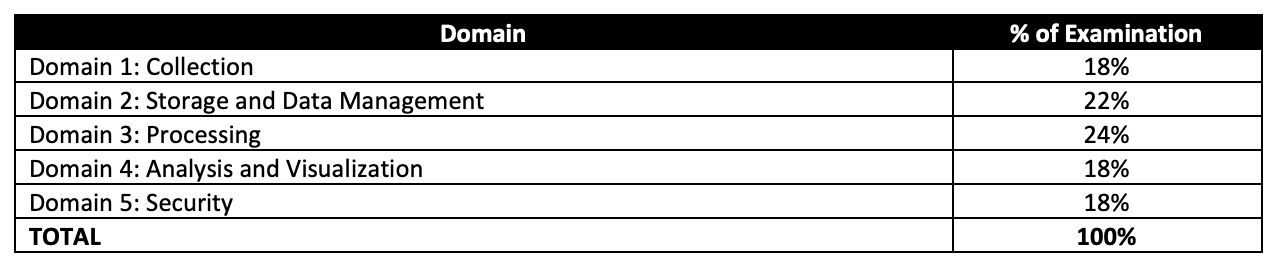
AWS Certified Data Analytics - Specialty DAS-C01 Domains

AWS Certified Data Analytics – Specialty (DAS-C01) Exam Resources

AWS Certified Data Analytics – Specialty (DAS-C01) Exam Summary

  • Specialty exams are tough, lengthy, and tiresome. Most of the questions and answers options have a lot of prose and a lot of reading that needs to be done, so be sure you are prepared and manage your time well.
  • DAS-C01 exam has 65 questions to be solved in 170 minutes which gives you roughly 2 1/2 minutes to attempt each question.
  • DAS-C01 exam includes two types of questions, multiple-choice and multiple-response.
  • DAS-C01 has a scaled score between 100 and 1,000. The scaled score needed to pass the exam is 750.
  • Specialty exams currently cost $ 300 + tax.
  • You can get an additional 30 minutes if English is your second language by requesting Exam Accommodations. It might not be needed for Associate exams but is helpful for Professional and Specialty ones.
  • As always, mark the questions for review and move on and come back to them after you are done with all.
  • As always, having a rough architecture or mental picture of the setup helps focus on the areas that you need to improve. Trust me, you will be able to eliminate 2 answers for sure and then need to focus on only the other two. Read the other 2 answers to check the difference area and that would help you reach the right answer or at least have a 50% chance of getting it right.
  • AWS exams can be taken either remotely or online, I prefer to take them online as it provides a lot of flexibility. Just make sure you have a proper place to take the exam with no disturbance and nothing around you.
  • Also, if you are taking the AWS Online exam for the first time try to join at least 30 minutes before the actual time as I have had issues with both PSI and Pearson with long wait times.

AWS Certified Data Analytics – Specialty (DAS-C01) Exam Topics

  • AWS Certified Data Analytics – Specialty exam, as its name suggests, covers a lot of Big Data concepts right from data collection, ingestion, transfer, storage, pre and post-processing, analytics, and visualization with the added concepts for data security at each layer.

Analytics

  • Make sure you know and cover all the services in-depth, as 80% of the exam is focused on topics like Glue, Kinesis, and Redshift.
  • AWS Analytics Services Cheat Sheet
  • Glue
    • DAS-C01 covers Glue in great detail.
    • AWS Glue is a fully managed, ETL service that automates the time-consuming steps of data preparation for analytics.
    • supports server-side encryption for data at rest and SSL for data in motion.
    • Glue ETL engine to Extract, Transform, and Load data that can automatically generate Scala or Python code.
    • Glue Data Catalog is a central repository and persistent metadata store to store structural and operational metadata for all the data assets. It works with Apache Hive as its metastore.
    • Glue Crawlers scan various data stores to automatically infer schemas and partition structures to populate the Data Catalog with corresponding table definitions and statistics.
    • Glue Job Bookmark tracks data that has already been processed during a previous run of an ETL job by persisting state information from the job run.
    • Glue Streaming ETL enables performing ETL operations on streaming data using continuously-running jobs.
    • Glue provides flexible scheduler that handles dependency resolution, job monitoring, and retries.
    • Glue Studio offers a graphical interface for authoring AWS Glue jobs to process data allowing you to define the flow of the data sources, transformations, and targets in the visual interface and generating Apache Spark code on your behalf.
    • Glue Data Quality helps reduces manual data quality efforts by automatically measuring and monitoring the quality of data in data lakes and pipelines.
    • Glue DataBrew helps prepare, visualize, clean, and normalize data directly from the data lake, data warehouses, and databases, including S3, Redshift, Aurora, and RDS.
  • Redshift
    • Redshift is also covered in depth.
    • Cover Redshift Advanced topics
      • Redshift Distribution Style determines how data is distributed across compute nodes and helps minimize the impact of the redistribution step by locating the data where it needs to be before the query is executed.
      • Redshift Enhanced VPC routing forces all COPY and UNLOAD traffic between the cluster and the data repositories through the VPC.
      • Workload management (WLM) enables users to flexibly manage priorities within workloads so that short, fast-running queries won’t get stuck in queues behind long-running queries.
      • Redshift Spectrum helps query and retrieve structured and semistructured data from files in S3 without having to load the data into Redshift tables.
      • Federated Query feature allows querying and analyzing data across operational databases, data warehouses, and data lakes.
      • Short query acceleration (SQA) prioritizes selected short-running queries ahead of longer-running queries.
      • Redshift Serverless is a serverless option of Redshift that makes it more efficient to run and scale analytics in seconds without the need to set up and manage data warehouse infrastructure.
    • Redshift Best Practices w.r.t selection of Distribution style, Sort key, importing/exporting data
      • COPY command which allows parallelism, and performs better than multiple COPY commands
      • COPY command can use manifest files to load data
      • COPY command handles encrypted data
    • Redshift Resizing cluster options (elastic resize did not support node type changes before, but does now)
    • Redshift supports encryption at rest and in transit
    • Redshift supports encrypting an unencrypted cluster using KMS. However, you can’t enable hardware security module (HSM) encryption by modifying the cluster. Instead, create a new, HSM-encrypted cluster and migrate your data to the new cluster.
    • Know Redshift views to control access to data.
  • Elastic Map Reduce
    • Understand EMRFS
      • Use Consistent view to make sure S3 objects referred by different applications are in sync. Although, it is not needed now.
    • Know EMR Best Practices (hint: start with many small nodes instead of few large nodes)
    • Know EMR Encryption options
      • supports SSE-S3, SS3-KMS, CSE-KMS, and CSE-Custom encryption for EMRFS
      • supports LUKS encryption for local disks
      • supports TLS for data in transit encryption
      • supports EBS encryption
    • Hive metastore can be externally hosted using RDS, Aurora, and AWS Glue Data Catalog
    • Know also different technologies
      • Presto is a fast SQL query engine designed for interactive analytic queries over large datasets from multiple sources
      • Spark is a distributed processing framework and programming model that helps do machine learning, stream processing, or graph analytics using Amazon EMR clusters
      • Zeppelin/Jupyter as a notebook for interactive data exploration and provides open-source web application that can be used to create and share documents that contain live code, equations, visualizations, and narrative text
      • Phoenix is used for OLTP and operational analytics, allowing you to use standard SQL queries and JDBC APIs to work with an Apache HBase backing store
  • Kinesis
    • Understand Kinesis Data Streams and Amazon Data Firehose (formerly Kinesis Data Firehose) in depth
    • Know Kinesis Data Streams vs Data Firehose
      • Know Kinesis Data Streams is open-ended for both producer and consumer. It supports KCL and works with Spark.
      • Know Amazon Data Firehose is open-ended for producers only. Data is stored in S3, Redshift, and OpenSearch.
      • Data Firehose works in batches with minimum 60secs intervals and in near-real time.
      • Data Firehose supports out-of-the-box transformation and custom transformation using Lambda
    • Kinesis supports encryption at rest using server-side encryption
    • Kinesis Producer Library supports batching
    • Amazon Managed Service for Apache Flink (formerly Kinesis Data Analytics)
      • helps transform and analyze streaming data in real time using Apache Flink.
      • supports anomaly detection using Random Cut Forest ML
      • supports reference data stored in S3.
      • Note: Kinesis Data Analytics for SQL applications was discontinued effective January 27, 2026. Migrate to Amazon Managed Service for Apache Flink or Apache Flink Studio.
  • OpenSearch
    • OpenSearch is a search service that supports indexing, full-text search, faceting, etc.
    • OpenSearch can be used for analysis and supports visualization using OpenSearch Dashboards which can be real-time.
    • OpenSearch Service Storage tiers support Hot, UltraWarm, and Cold and the data can be transitioned using Index State management.
  • QuickSight
    • Know Visual Types (hint: esp. word clouds, plotting line, bar, and story based visualizations)
    • Know Supported Data Sources
    • QuickSight provides IP addresses that need to be whitelisted for QuickSight to access the data store.
    • QuickSight provides direct integration with Microsoft AD
    • QuickSight supports Row level security using dataset rules to control access to data at row granularity based on permissions associated with the user interacting with the data.
    • QuickSight supports ML insights as well
    • QuickSight supports users defined via IAM or email signup.
  • Athena
    • is a serverless, interactive analytics service built on open-source frameworks, supporting open-table and file formats.
    • provides a simplified, flexible way to analyze data in an S3 data lake and 30 data sources, including on-premises data sources or other cloud systems using SQL or Python without loading the data.
    • integrates with QuickSight for visualizing the data or creating dashboards.
    • uses a managed Glue Data Catalog to store information and schemas about the databases and tables that you create for the data stored in S3
    • Workgroups can be used to separate users, teams, applications, or workloads, to set limits on the amount of data each query or the entire workgroup can process, and to track costs.
    • Athena best practices recommended partitioning the data, partition projection, and using the Columnar file format like ORC or Parquet as they support compression and are splittable.
  • Know Data Pipeline for data transfer
    • Note: AWS Data Pipeline was closed to new customers effective July 25, 2024. The service is in maintenance mode. Consider AWS Glue, Amazon MWAA, or AWS Step Functions as alternatives.

Security, Identity & Compliance

Management & Governance Tools

  • Understand AWS CloudWatch for Logs and Metrics.
  • CloudWatch Subscription Filters can be used to route data to Kinesis Data Streams, Amazon Data Firehose, and Lambda.

Whitepapers and articles

On the Exam Day

  • Make sure you are relaxed and get some good night’s sleep. The exam is not tough if you are well-prepared.
  • If you are taking the AWS Online exam
    • Try to join at least 30 minutes before the actual time as I have had issues with both PSI and Pearson with long wait times.
    • The online verification process does take some time and usually, there are glitches.
    • Remember, you would not be allowed to take the take if you are late by more than 30 minutes.
    • Make sure you have your desk clear, no hand-watches, or external monitors, keep your phones away, and nobody can enter the room.

Finally, All the Best 🙂

Related Posts

Breaking into Data Analytics: Tips and Strategies for Aspiring Data Analysts

Breaking into Data Analytics: Tips and Strategies for Aspiring Data Analysts

Data analytics is analyzing and interpreting data to draw meaningful insights and conclusions. In today’s data-driven world, data analytics has become crucial for businesses to make informed decisions and gain a competitive edge. It uses statistical and computational techniques to analyze large datasets, identify patterns, and make predictions.

Data analytics is essential because it enables organizations to identify trends, make accurate forecasts, and gain insights into customer behavior. Businesses can make data-driven decisions, improve efficiency, and increase profitability by leveraging data analytics.

Anyone interested in working with data can benefit from data analytics. Whether you’re a recent graduate, a mid-career professional, or an executive, data analytics skills can help you progress your career and achieve your goals.

What is Data Analytics and Why is it Important?

Data analytics is the approach of analyzing and interpreting data to extract meaningful insights and information. It involves using various techniques and tools to examine large datasets, identify patterns, and draw conclusions. It has become increasingly important in today’s business landscape, enabling organizations to make informed decisions based on data-driven insights.

Data analytics is crucial for businesses because it helps them to identify trends, make accurate forecasts, and gain insights into customer behavior. With the help of data analytics, organizations can improve their operations, optimize their resources, and increase profitability. It can also help businesses identify improvement areas, streamline their processes, and stay ahead of the competition.

Data analytics is a growing field with a high demand for skilled professionals. There are various career opportunities in data analytics, including data analyst, business analyst, data scientist, data engineer, and more. These roles require a mix of technical and soft skills, such as data analysis, programming, communication, problem-solving, and critical thinking.

Essential Skills and Knowledge for Aspiring Data Analysts

To become a successful data analyst, there are a variety of technical and non-technical skills that you need to possess. Technical skills include knowledge of programming languages, databases, data visualization tools, and statistical analysis. Non-technical skills include communication, problem-solving, and critical thinking.

It’s also important to have domain knowledge in the industry you’re working in. For example, it’s important to understand healthcare terminology and regulations if you’re analyzing data for a healthcare organization. This will enable you to ask the right questions and draw meaningful insights from the data.

Many resources are available for acquiring the necessary skills and knowledge for data analytics. Online courses, boot camps, and degree programs are all viable options. Additionally, many free resources are available, such as YouTube tutorials and open-source software.

Tips and Strategies for Breaking into Data Analytics

Breaking into the field of data analytics can be challenging, but with the proper strategies and mindset, you can achieve your goals. Here are some tips and techniques to help you break into data analytics:

1. Identify your career goals and paths

Before starting your journey in data analytics, you must identify your career goals and the path you want to take. Do you want to become a data analyst, data scientist, or data engineer? Understanding your goals will help you focus your efforts and choose the right resources and tools.

2. Build a strong foundation in statistics and programming

You must have a reliable statistics and programming foundation to succeed in data analytics. Familiarize yourself with programming languages like Python and R, and learn statistical analysis techniques like regression analysis and hypothesis testing.

3. Gain experience through internships and projects

Internships and projects are excellent ways to gain practical experience in data analytics. Seek internships in data-driven organizations and participate in data analytics projects on platforms like Kaggle.

4. Network and build professional relationships

Networking is essential in any field, and data analytics is no exception. Attend industry events, join online communities, and connect with other professionals in the field. Building relationships with others can lead to job opportunities and valuable insights.

5. Create a strong portfolio and resume

Your portfolio and resume should showcase your skills, knowledge, and experience in data analytics. Include projects you’ve worked on, data visualizations you’ve created, and any relevant coursework or certifications.

By following these tips and strategies, you can position yourself for success in the field of data analytics. You can break into this exciting and growing field with determination, hard work, and a willingness to learn.

Data Science and Data Analytics Courses for Aspiring Data Analysts

Taking data science and data analytics courses can be an excellent way to gain the necessary skills and knowledge to break into the field of data analytics. Here are some pivotal points to consider when exploring data science and data analytics courses:

Overview of data science and data analytics courses

Data science and data analytics courses provide training in statistical analysis, data visualization, programming, and other relevant topics. They can be taken online or in person and vary in length and depth.

Benefits of taking data science and data analytics courses

Data science and data analytics courses can provide a comprehensive education in the field, help you gain practical skills, and provide networking opportunities. They can also help demonstrate your dedication and expertise to potential employers.

Types of courses available for aspiring data analysts

Various types of data science and data analytics courses are available, including certificate programs, boot camps, online courses, and degree programs. Each has its own strengths and weaknesses and can be tailored to fit different skill levels. Two highly recommended programs are Great Learning’s Data Science Courses and Data Analytics Courses, which provide in-depth knowledge of concepts and hands-on experience in solving real-world problems.

Comparison of different courses available

Consider factors like cost, length, content, and instructor experience when choosing a course. Research reviews and ratings from previous students to get an idea of the quality of the course.

Recommended courses for different skill levels

For beginners, introductory courses in Python and statistics can be helpful. For intermediate learners, courses on machine learning, data visualization, and databases can be useful. Advanced learners may benefit from big data, data engineering, and data science research courses.

Wrapping Up

Data analytics is a rapidly evolving field and an incredibly rewarding career choice for those with the right skills and experience. With the right tips and strategies, aspiring data analysts can break into the field and position themselves for tremendous success. By understanding the essential skills and industry language, carefully planning their entry into the field, and leveraging contacts in the field, ambitious analysts can take the first steps in achieving their career goals and begin to make an impact within the data analytics industry.