Dataflow vs Dataproc – Streaming vs Batch

Google Cloud Dataflow vs Dataproc (Managed Service for Apache Spark)

📌 2025-2026 Update: Google Cloud has rebranded Dataproc to Managed Service for Apache Spark (formerly known as “Dataproc on Compute Engine” for cluster deployment and “Google Cloud Serverless for Apache Spark” for serverless deployment). The core functionality remains unchanged. Additionally, GCP AI Platform Training (Cloud ML Engine) has been superseded by Vertex AI, which is now part of the Gemini Enterprise Agent Platform.

Cloud Dataproc (Managed Service for Apache Spark)

  • Cloud Dataproc, now rebranded as Managed Service for Apache Spark, is a managed Spark and Hadoop service that lets you take advantage of open-source data tools for batch processing, querying, streaming, and machine learning.
  • Provides a Hadoop cluster on GCP with access to Hadoop-ecosystem tools (e.g., Apache Pig, Hive, and Spark); this has strong appeal if already familiar with Hadoop tools and have Hadoop jobs.
  • Ideal for Lift and Shift migration of existing Hadoop environment.
  • Offers two deployment modes:
    • Cluster deployment — managed Spark clusters on Compute Engine (you pay for cluster uptime)
    • Serverless deployment — Spark-jobs-as-a-service on fully managed Google Cloud infrastructure (you pay for job runtime only, zero cluster management)
  • Consider Dataproc (Managed Service for Apache Spark) when:
    • You have a substantial investment in Apache Spark or Hadoop on-premise and are considering moving to the cloud
    • You are looking at a Hybrid cloud and need portability across a private/multi-cloud environment
    • In the current environment, Spark is the primary machine learning tool and platform
    • The code depends on custom packages along with distributed computing needs
    • You need fine-grained cluster configuration, custom libraries, or specific Hadoop ecosystem tool versions

Key Features (2024-2026)

  • Lightning Engine — next-generation native C++ vectorized execution engine that delivers up to 4.9x faster performance than open-source Spark with zero code changes. Uses SIMD vectorization, intelligent caching, and optimized columnar shuffling. Available on the premium pricing tier.
  • Serverless Spark (Zero-Ops) — zero cluster management with intelligent autoscaling. Resources scale up and down automatically to match job needs, ensuring maximum performance and cost-efficiency without paying for idle time.
  • Enhanced Autoscaling — reduces cluster VM expenditures by up to 40% and cumulative job runtime by 10%.
  • BigQuery Integration — Serverless for Apache Spark is deeply integrated with the BigQuery unified data-to-AI platform, offering a unified developer experience in BigQuery Studio.
  • Vertex AI / Gemini Enterprise Agent Platform Integration — seamless interoperability for ML workflows.
  • Dataproc on GKE — run Spark workloads on Google Kubernetes Engine for containerized environments.

Cloud Dataflow

  • Google Cloud Dataflow is a fully managed, serverless service for unified stream and batch data processing at scale, based on the open-source Apache Beam SDK.
  • Scales to 4,000 workers per job and routinely processes petabytes of data with built-in autoscaling.
  • Ideal for new pipelines with minimal infrastructure management, event stream processing, and real-time analytics.
  • Consider Dataflow when:
    • Building new, greenfield data pipelines (no existing Spark/Hadoop code to migrate)
    • Requiring truly serverless, zero-ops data processing
    • Working with unified batch and streaming in a single pipeline
    • Using it as a pre-processing pipeline for ML models deployed in Vertex AI (Gemini Enterprise Agent Platform)
    • None of the above considerations made for Cloud Dataproc are relevant

Key Features (2024-2026)

  • Dataflow Prime — supports both horizontal autoscaling (more machines) and vertical autoscaling (larger machines) automatically for streaming and batch workloads.
  • AI/ML Integration (Dataflow ML) — RunInference API enables running ML models (PyTorch, TensorFlow, scikit-learn, ONNX, TensorRT) directly within Dataflow pipelines. MLTransform API for data preparation.
  • GPU Support — supports NVIDIA T4, L4, A100, H100, V100, and RTX Pro 6000 GPUs for ML inference workloads.
  • TPU Support — TPU V5E, V5P, and V6E for high-volume, low-latency ML inference at scale directly within Dataflow jobs.
  • Global Compute — dynamically schedules workloads across Google’s global infrastructure, automatically determining optimal location based on data locality and resource availability.
  • Streaming AI — build streaming AI with Gemini models and Gemma models, run remote inference, and streamline data processing.
⚠️ Deprecation Notice: Dataflow SQL was deprecated on July 31, 2024, and fully removed on January 31, 2025. Users should use BigQuery for SQL-based analytics instead.

Cloud Dataflow vs Dataproc — Key Differences

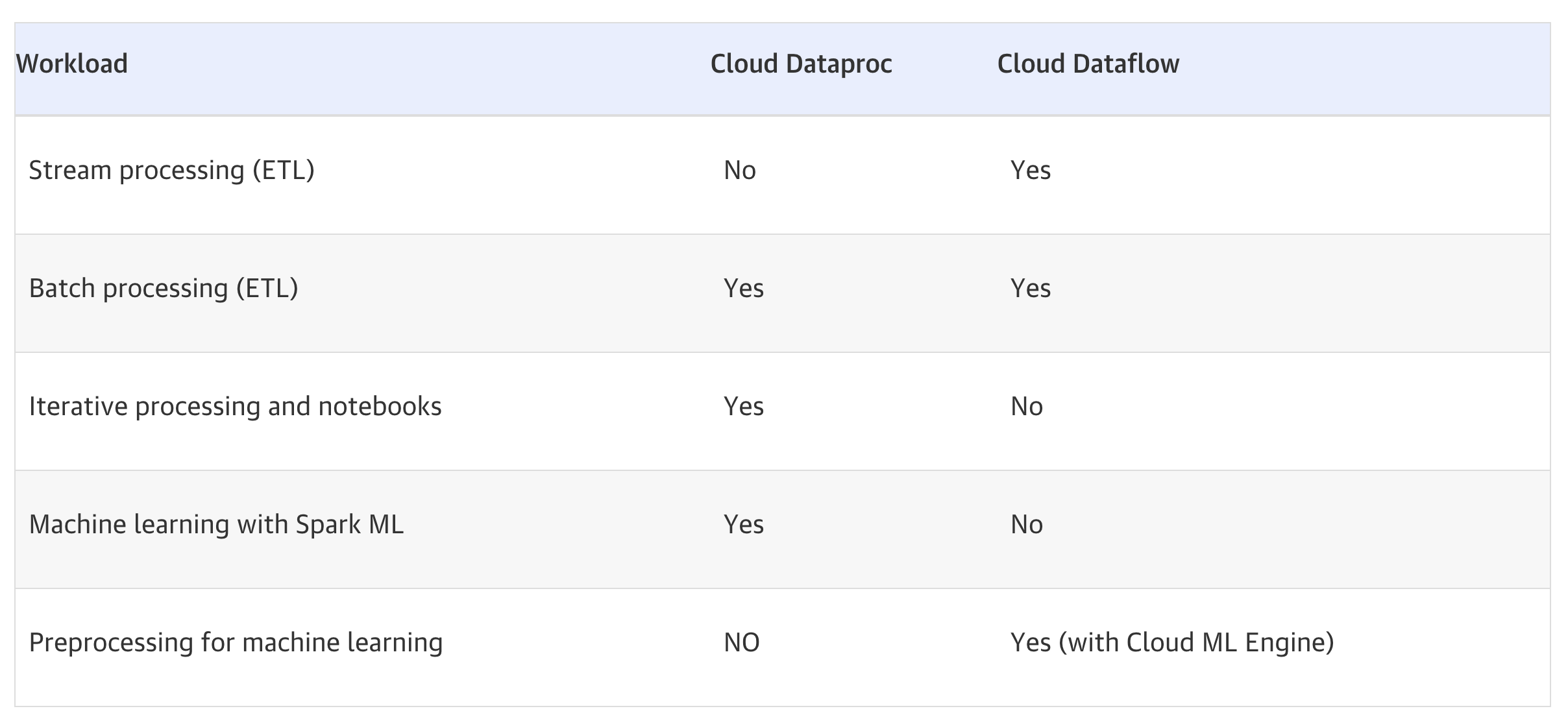
Criteria Dataflow Dataproc (Managed Service for Apache Spark)
Programming Model Apache Beam (Java, Python, Go) Apache Spark, Hadoop, Pig, Hive, Flink, Trino
Infrastructure Fully serverless, zero ops Managed clusters OR Serverless Spark
Cluster Management None (fully managed) User-managed (cluster) or None (serverless)
Best For New pipelines, streaming, minimal ops Existing Spark/Hadoop jobs, lift-and-shift
Streaming Native, unified batch + stream Spark Structured Streaming
ML/AI RunInference API, GPU/TPU support SparkML, Vertex AI integration
Scaling Auto (up to 4K workers), Global Compute Auto or manual, Lightning Engine (4.9x faster)
Code Changes Requires Apache Beam rewrite Minimal (run existing Spark/Hadoop code)

Cloud Dataflow vs Dataproc Decision Tree
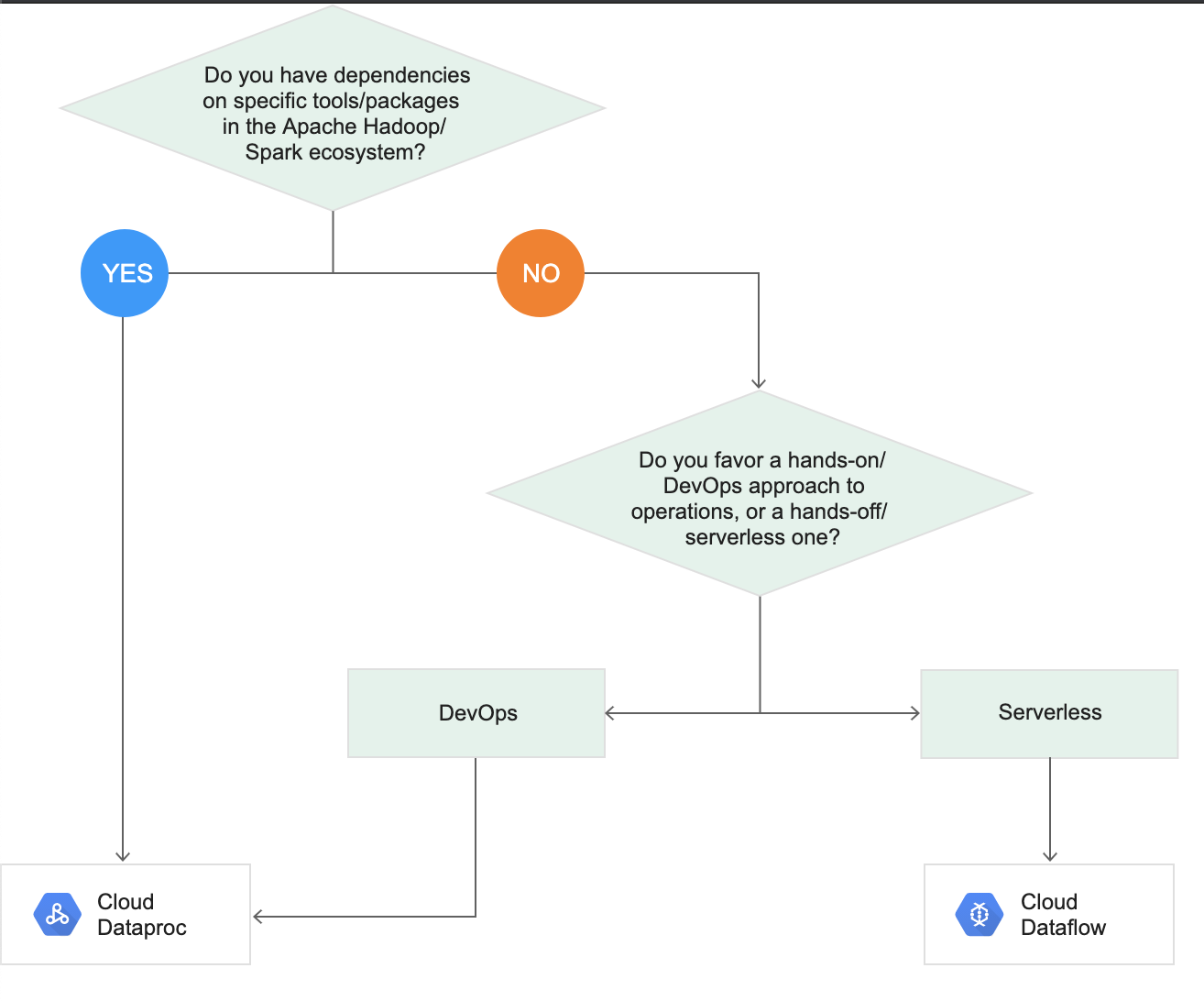
Dataflow vs Dataproc

Dataflow vs Dataproc Table

GCP Certification Exam Practice Questions

  • Questions are collected from Internet and the answers are marked as per my knowledge and understanding (which might differ with yours).
  • GCP services are updated everyday and both the answers and questions might be outdated soon, so research accordingly.
  • GCP exam questions are not updated to keep up the pace with GCP updates, so even if the underlying feature has changed the question might not be updated
  • Open to further feedback, discussion and correction.
  1. Your company is forecasting a sharp increase in the number and size of Apache Spark and Hadoop jobs being run on your local data center. You want to utilize the cloud to help you scale this upcoming demand with the least amount of operations work and code change. Which product should you use?
    1. Google Cloud Dataflow
    2. Google Cloud Dataproc (Managed Service for Apache Spark)
    3. Google Compute Engine
    4. Google Kubernetes Engine
  2. A startup plans to use a data processing platform, which supports both batch and streaming applications. They would prefer to have a hands-off/serverless data processing platform to start with. Which GCP service is suited for them?
    1. Dataproc
    2. Dataprep
    3. Dataflow
    4. BigQuery
  3. A company has existing Apache Spark ML pipelines running on-premises and wants to migrate to Google Cloud with minimal code changes while achieving better performance. Which service should they use?
    1. Cloud Dataflow
    2. Managed Service for Apache Spark (Dataproc) with Lightning Engine
    3. BigQuery ML
    4. Vertex AI Training
  4. An organization needs to run real-time ML inference on streaming data with GPU acceleration in a fully serverless manner. Which GCP service best fits this requirement?
    1. Dataproc Serverless
    2. Google Cloud Dataflow with RunInference API
    3. Cloud Functions
    4. GKE with Spark Streaming
  5. A team wants to run Apache Spark batch jobs without managing any infrastructure and wants to pay only for the time their jobs are running. Which deployment option should they choose?
    1. Dataproc Cluster deployment
    2. Managed Service for Apache Spark – Serverless deployment
    3. Cloud Dataflow
    4. Compute Engine with Spark installed

Frequently Asked Questions

What is the difference between Dataflow and Dataproc?

Dataflow is a fully managed serverless stream/batch processing service based on Apache Beam. Dataproc (now Managed Service for Apache Spark) is a managed Hadoop/Spark cluster for lift-and-shift big data workloads.

When should I use Dataproc instead of Dataflow?

Use Dataproc when you have existing Spark/Hadoop code to migrate, need specific Hadoop ecosystem tools (Hive, Pig, Presto), or want fine-grained cluster control. Use Dataflow for new pipelines or unified stream+batch processing.

Is Dataflow serverless?

Yes, Dataflow is fully serverless — it automatically provisions, manages, and scales workers based on workload. You only pay for resources consumed during pipeline execution with no idle cluster costs.

Related Posts

References

Google Cloud Dataflow – Stream & Batch Processing

Google Cloud Dataflow

  • Google Cloud Dataflow is a fully managed, serverless service for unified stream and batch data processing at enterprise scale.
  • Dataflow provides Horizontal autoscaling to automatically choose the appropriate number of worker instances required to run the job.
  • Dataflow is based on Apache Beam, an open-source, unified model for defining both batch and streaming-data parallel-processing pipelines.
  • Dataflow scales to 4,000 workers per job and routinely processes petabytes of data.
  • Dataflow provides exactly-once processing by default for streaming pipelines, with an at-least-once mode available for lower latency when duplicates are tolerable.
  • Dataflow supports Java, Python, and Go SDKs, as well as multi-language pipelines.

Dataflow Prime

  • Dataflow Prime is an enhanced execution mode that provides advanced autoscaling and resource optimization features.
  • Starting August 4, 2025, Google-managed template jobs run on Dataflow Prime by default.
  • Vertical Autoscaling – Automatically scales up or down the memory available to workers to fit the requirements of the job, preventing out-of-memory (OOM) errors and maximizing pipeline efficiency.
  • Right Fitting – Uses Apache Beam resource hints to customize worker resources for specific pipeline steps, providing flexibility and potential cost savings.
  • Dynamic Thread Scaling – Adjusts the number of parallel tasks (bundles) each worker runs, complementing horizontal autoscaling.
  • Vertical Autoscaling works alongside Horizontal Autoscaling to scale resources dynamically for both batch and streaming pipelines.

Dataflow (Apache Beam) Programming Model

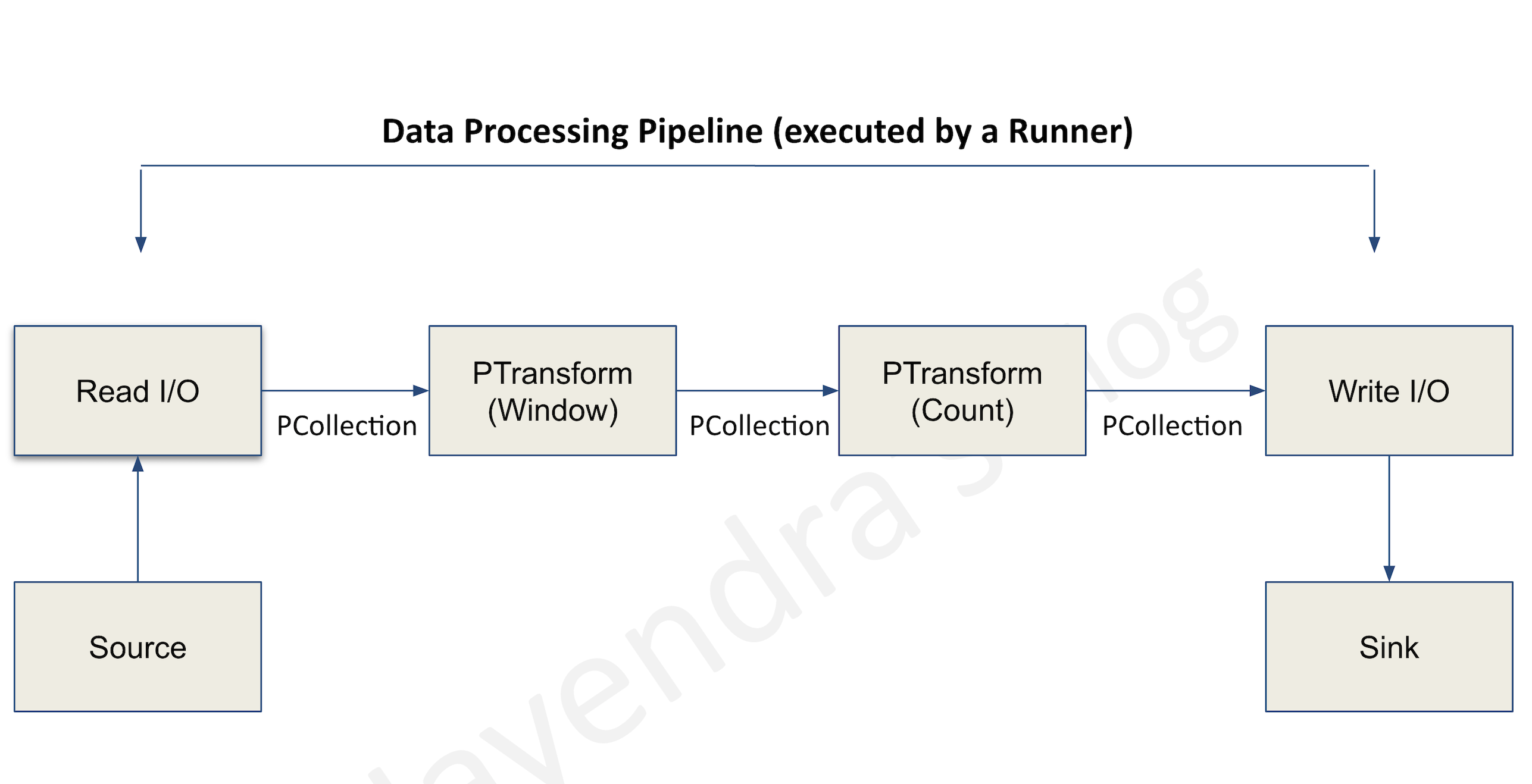
Data Processing Model

Pipelines

  • A pipeline encapsulates the entire series of computations involved in reading input data, transforming that data, and writing output data.
  • The input source and output sink can be the same or of different types, allowing data conversion from one format to another.
  • Apache Beam programs start by constructing a Pipeline object and then using that object as the basis for creating the pipeline’s datasets.
  • Each pipeline represents a single, repeatable job.

PCollection

  • A PCollection represents a potentially distributed, multi-element dataset that acts as the pipeline’s data.
  • Apache Beam transforms use PCollection objects as inputs and outputs for each step in your pipeline.

Transforms

  • A transform represents a processing operation that transforms data.
  • A transform takes one or more PCollections as input, performs a specified operation on each element in that collection, and produces one or more PCollections as output.
  • A transform can perform nearly any kind of processing operation like
    • performing mathematical computations,
    • data conversion from one format to another,
    • grouping data together,
    • reading and writing data,
    • filtering data to output only the required elements, or
    • combining data elements into single values.

ParDo

  • ParDo is the core parallel processing operation invoking a user-specified function on each of the elements of the input PCollection.
  • ParDo collects the zero or more output elements into an output PCollection.
  • ParDo processes elements independently and in parallel, if possible.

Pipeline I/O

  • Apache Beam I/O connectors help read data into the pipeline and write output data from the pipeline.
  • An I/O connector consists of a source and a sink.
  • All Apache Beam sources and sinks are transforms that let the pipeline work with data from several different data storage formats.
  • Managed I/O (introduced 2024) – Dataflow automatically upgrades managed I/O connectors in your pipeline, providing security fixes, performance improvements, and bug fixes without requiring code changes. Managed I/O also supports rolling upgrades for streaming jobs.

Aggregation

  • Aggregation is the process of computing some value from multiple input elements.
  • The primary computational pattern for aggregation is to
    • group all elements with a common key and window.
    • combine each group of elements using an associative and commutative operation.

User-defined functions (UDFs)

  • User-defined functions allow executing user-defined code as a way of configuring the transform.
  • For ParDo, user-defined code specifies the operation to apply to every element, and for Combine, it specifies how values should be combined.
  • A pipeline might contain UDFs written in a different language than the language of the runner.
  • A pipeline might also contain UDFs written in multiple languages.

Runner

  • Runners are the software that accepts a pipeline and executes it.
  • Dataflow Runner v2 is the current recommended runner for Dataflow jobs. It supports multi-language pipelines (Java transforms from Python and vice versa), custom containers, and is required for GPU/TPU workloads.

Event time

  • Time a data event occurs, determined by the timestamp on the data element itself.
  • This contrasts with the time the actual data element gets processed at any stage in the pipeline.

Windowing

  • Windowing enables grouping operations over unbounded collections by dividing the collection into windows of finite collections according to the timestamps of the individual elements.
  • A windowing function tells the runner how to assign elements to an initial window, and how to merge windows of grouped elements.

Tumbling Windows (Fixed Windows)

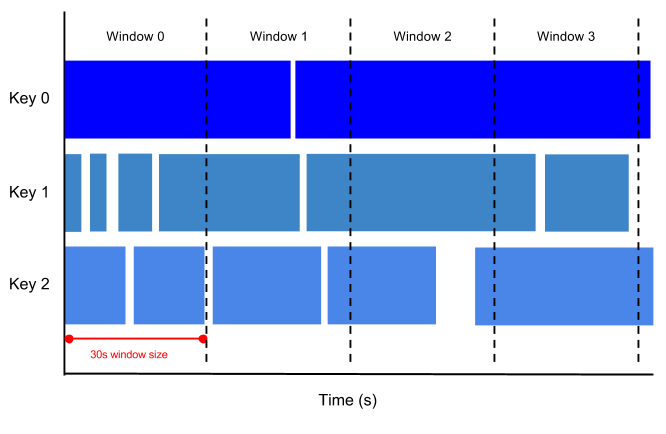
  • A tumbling window represents a consistent, disjoint time interval, for e.g. every 1 min, in the data stream.

An image that shows tumbling windows, 30 seconds in duration

Hopping Windows (Sliding Windows)

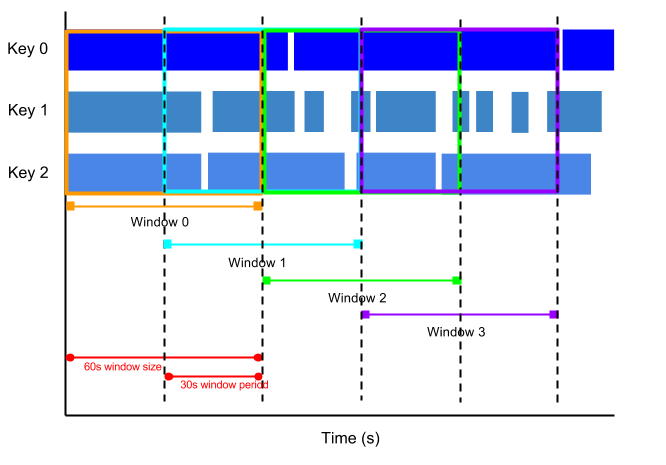
  • A hopping window represents a consistent time interval in the data stream for e.g., a hopping window can start every 30 seconds and capture 1 min of data and the window. The frequency with which hopping windows begin is called the period.
  • Hopping windows can overlap, whereas tumbling windows are disjoint.
  • Hopping windows are ideal to take running averages of data

An image that shows hopping windows with 1 minute window duration and 30 second window period

Session windows

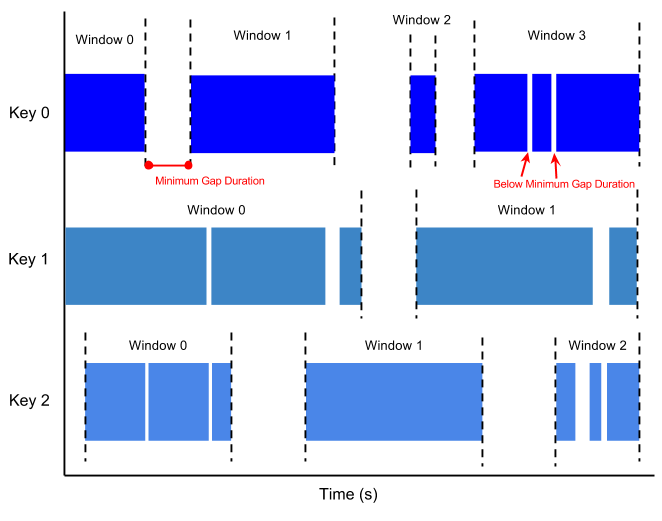
  • A session window contains elements within a gap duration of another element for e.g., session windows can divide a data stream representing user mouse activity. This data stream might have long periods of idle time interspersed with many clicks. A session window can contain the data generated by the clicks.
  • The gap duration is an interval between new data in a data stream.
  • If data arrives after the gap duration, the data is assigned to a new window
  • Session windowing assigns different windows to each data key.
  • Tumbling and hopping windows contain all elements in the specified time interval, regardless of data keys.

An image that shows session windows with a minimum gap duration

Watermarks

  • A Watermark is a threshold that indicates when Dataflow expects all of the data in a window to have arrived.
  • Watermark is tracked and its a system’s notion of when all data in a certain window can be expected to have arrived in the pipeline
  • If new data arrives with a timestamp that’s in the window but older than the watermark, the data is considered late data.
  • Dataflow tracks watermarks because of the following:
    • Data is not guaranteed to arrive in time order or at predictable intervals.
    • Data events are not guaranteed to appear in pipelines in the same order that they were generated.

Trigger

  • Triggers determine when to emit aggregated results as data arrives.
  • For bounded data, results are emitted after all of the input has been processed.
  • For unbounded data, results are emitted when the watermark passes the end of the window, indicating that the system believes all input data for that window has been processed.

Dataflow Streaming Engine

  • Streaming Engine offloads the window state storage from worker VMs to a back-end service, enabling better autoscaling and reducing resource consumption on worker VMs.
  • Streaming Engine is recommended for all streaming jobs and is required for in-flight job updates.
  • Exactly-once processing – Default mode that ensures results are accurate with no duplicate records in the output.
  • At-least-once mode – Available for use cases that can tolerate duplicate records; reduces cost and improves latency by skipping deduplication overhead.
  • Streaming Engine provides responsive autoscaling that can be tuned using an autoscaling hint value (0.3 for minimal latency, 0.7 for minimal cost).

Dataflow Templates

  • Dataflow templates allow you to package a pipeline for deployment without requiring a development environment.
  • Templates separate pipeline design from deployment — a developer creates a template, and others can deploy it later.
  • Flex Templates (recommended for new templates)
    • Package the pipeline as a Docker image in Artifact Registry, along with a template specification file in Cloud Storage.
    • Support any source or sink I/O and allow parameterized customization.
    • Support launching from the Console, CLI, or REST API.
  • Classic Templates – Older template format; Flex Templates are recommended for new development.
  • Google provides pre-built templates for common scenarios (e.g., Pub/Sub to BigQuery, Cloud Storage to BigQuery).

Dataflow ML and AI Integration

  • Dataflow supports machine learning inference directly within pipelines using the RunInference transform from Apache Beam.
  • RunInference provides intelligent model memory management, automatic model refresh, batching for throughput optimization, and support for multiple ML frameworks (TensorFlow, PyTorch, scikit-learn, and custom models).
  • GPU Support – Dataflow supports GPUs (including NVIDIA RTX Pro 6000) for ML inference workloads. Requires Runner v2 and custom Docker containers.
  • TPU Support (launched 2025) – Supports TPU V5E, V5P, and V6E for high-volume, low-latency ML inference at scale. Features include TPU-aware autoscaling and duty-cycle policy enforcement.
  • MLTransform – Provides ready-to-use patterns for data preprocessing and feature engineering for ML pipelines.
  • Vertex AI Integration – Supports remote inference with Vertex AI models, Gemini models, and Gemma models.
  • Global Compute – Dynamically schedules workloads across Google’s global infrastructure, automatically determining optimal location based on data locality and resource availability.

Dataflow Pipeline Operations

  • Cancelling a job
    • causes the Dataflow service to stop the job immediately.
    • might lose in-flight data
  • Draining a job
    • supports graceful stop
    • prevents data loss
    • is useful to deploy incompatible changes
    • allows the job to clear the existing queue before stopping
    • supports only streaming jobs and does not support batch pipelines
  • Updating a streaming job
    • In-flight job update – For streaming jobs using Streaming Engine, you can update min/max worker counts without stopping the job or changing the job ID.
    • Job replacement – Submit updated pipeline code; Dataflow performs a compatibility check before swapping the job (new job ID, same job name).
  • Snapshots
    • Save the state of a streaming pipeline, allowing you to start a new version without losing state.
    • Useful for backup and recovery, testing, and rolling back updates to streaming pipelines.

Dataflow Security

  • Dataflow provides data-in-transit encryption.
    • All communication with Google Cloud sources and sinks is encrypted and is carried over HTTPS.
    • All inter-worker communication occurs over a private network and is subject to the project’s permissions and firewall rules.
  • Supports Customer-Managed Encryption Keys (CMEK) for data at rest.
  • Supports VPC Service Controls to restrict data exfiltration.
  • Supports Private Google Access and private IPs for workers to run without public IP addresses.

Dataflow SQL (Deprecated)

⚠️ Dataflow SQL has been deprecated.

  • As of July 31, 2024, Dataflow SQL is no longer accessible in the Google Cloud Console.
  • As of January 31, 2025, Dataflow SQL cannot be used in the Google Cloud CLI.

Alternatives: Use BigQuery for SQL-based analytics or Apache Beam SQL transform for SQL within pipelines.

Cloud Dataflow vs Dataproc

Refer blog post @ Cloud Dataflow vs Dataproc

GCP Certification Exam Practice Questions

  • Questions are collected from Internet and the answers are marked as per my knowledge and understanding (which might differ with yours).
  • GCP services are updated everyday and both the answers and questions might be outdated soon, so research accordingly.
  • GCP exam questions are not updated to keep up the pace with GCP updates, so even if the underlying feature has changed the question might not be updated
  • Open to further feedback, discussion and correction.
  1. A startup plans to use a data processing platform, which supports both batch and streaming applications. They would prefer to have a hands-off/serverless data processing platform to start with. Which GCP service is suited for them?
    1. Dataproc
    2. Dataprep
    3. Dataflow
    4. BigQuery
  2. A company is running a streaming Dataflow pipeline that processes real-time events. They need to minimize costs but can tolerate occasional duplicate records in the output. What should they do?
    1. Use Dataflow Prime with vertical autoscaling
    2. Enable at-least-once streaming mode
    3. Use Classic templates instead of Flex templates
    4. Disable Streaming Engine
  3. An ML team wants to run inference using a large language model directly within their Dataflow streaming pipeline. Which feature should they use?
    1. Cloud Functions trigger
    2. BigQuery ML
    3. RunInference transform with GPU/TPU support
    4. Vertex AI batch prediction
  4. A data engineer’s streaming Dataflow job is experiencing out-of-memory errors. They want an automated solution without manually tuning worker configurations. What should they use?
    1. Increase the machine type for all workers
    2. Set a higher max-num-workers value
    3. Enable Dataflow Prime with Vertical Autoscaling
    4. Use session windows to reduce data volume
  5. A company needs to update a running streaming pipeline with new transformation logic without losing the pipeline’s in-flight state. What approach should they use?
    1. Cancel the job and start a new one
    2. Drain the job and resubmit
    3. Use the pipeline update feature to replace the running job
    4. Use Dataflow snapshots and start a new job from the snapshot
  6. A team wants to deploy Dataflow pipelines without requiring a development environment on the deployment machine. What should they use?
    1. Cloud Composer DAGs
    2. Cloud Run Jobs
    3. Dataflow Flex Templates
    4. Cloud Build triggers
  7. Which of the following is NOT a valid window type in Apache Beam / Dataflow?
    1. Fixed (Tumbling) windows
    2. Sliding (Hopping) windows
    3. Session windows
    4. Rotating windows

See also: Google Cloud Data Services Cheat Sheet

References

Google Cloud Data Analytics Services Cheat Sheet

Cloud Pub/Sub

  • Pub/Sub is a fully managed, asynchronous messaging service designed to be highly reliable and scalable with latencies on the order of 100 ms
  • Pub/Sub offers at-least-once message delivery and best-effort ordering to existing subscribers
  • Pub/Sub also supports exactly-once delivery (GA since 2022) for pull subscriptions and StreamingPull API, ensuring messages are not redelivered after successful acknowledgment. Push and export subscriptions do not support exactly-once delivery.
  • Pub/Sub enables the creation of event producers and consumers, called publishers and subscribers.
  • Pub/Sub messages should be no greater than 10MB in size.
  • Messages can be received with pull or push delivery.
  • Messages published before a subscription is created will not be delivered to that subscription
  • Acknowledged messages are no longer available to subscribers and are deleted, by default. However, can be retained setting retention period.
  • Publishers can send messages with an ordering key and message ordering is set, Pub/Sub delivers the messages in order.
  • Pub/Sub support encryption at rest and encryption in transit.
  • Seek feature allows subscribers to alter the acknowledgment state of messages in bulk to replay or purge messages in bulk.
  • Supports BigQuery subscriptions to write messages directly to BigQuery tables without additional processing.
  • Supports Cloud Storage subscriptions to write messages to Cloud Storage buckets in Avro or Text format.
  • Message filtering allows subscribers to receive a subset of messages published to a topic using filter expressions.
  • Pub/Sub Lite is deprecated (EOL March 18, 2026). Migrate to standard Pub/Sub for cost-effective messaging.

BigQuery

  • BigQuery is a fully managed, durable, petabyte scale, serverless, highly scalable, and cost-effective multi-cloud data warehouse that has evolved into an AI data platform.
  • supports a standard SQL dialect. Legacy SQL is deprecated — effective June 1, 2026, BigQuery limits legacy SQL use for organizations that have not used it between Nov 2025–Jun 2026.
  • automatically replicates data and keeps a seven-day history of changes (time travel), allowing easy restoration and comparison of data from different times
  • supports federated data and can process external data sources in GCS for Parquet and ORC open-source file formats, transactional databases (Bigtable, Cloud SQL), or spreadsheets in Drive without moving the data.
  • BigLake provides a unified storage engine for data lakehouse workloads, supporting Apache Iceberg tables with fine-grained governance across multiple engines (Spark, Flink, Trino, BigQuery).
  • Data model consists of Datasets, tables
  • BigQuery performance can be improved using Partitioned tables and Clustered tables.
  • BigQuery encrypts all data at rest and supports encryption in transit.
  • BigQuery Data Transfer Service automates data movement into BigQuery on a scheduled, managed basis
  • BigQuery Editions (Standard, Enterprise, Enterprise Plus) provide different capability tiers with slot-based pricing, autoscaling reservations, and capacity commitments.
  • BigQuery Studio provides a unified workspace with SQL editor, notebooks (Colab Enterprise), and data canvas for end-to-end analytics workflows.
  • BigQuery ML (BQML) allows building and deploying ML models using SQL, including integration with Gemini and Vertex AI for generative AI tasks like text summarization, sentiment analysis, and embeddings.
  • Vector Search enables similarity search using embeddings directly in BigQuery, supporting RAG applications, semantic search, and KNN-based retrieval without needing external vector databases.
  • BI Engine provides in-memory caching and vectorized processing for sub-second query response times, accelerating dashboards and visualization tools.
  • Best Practices
    • Control projection, avoid select *
    • Estimate costs as queries are billed according to the number of bytes read and the cost can be estimated using --dry-run feature
    • Use the maximum bytes billed setting to limit query costs.
    • Use clustering and partitioning to reduce the amount of data scanned.
    • Avoid repeatedly transforming data via SQL queries. Materialize the query results in stages.
    • Use streaming inserts only if the data must be immediately available as streaming data is charged.
    • Prune partitioned queries, use the _PARTITIONTIME pseudo column to filter the partitions.
    • Denormalize data whenever possible using nested and repeated fields.
    • Avoid external data sources, if query performance is a top priority
    • Avoid using Javascript user-defined functions
    • Optimize Join patterns. Start with the largest table.
    • Use the expiration settings to remove unneeded tables and partitions
    • Keep the data in BigQuery to take advantage of the long-term storage cost benefits rather than exporting to other storage options.
    • Use BigQuery editions with autoscaling for predictable costs and optimal performance.

Bigtable

  • Bigtable is a fully managed, scalable, wide-column NoSQL database service with up to 99.999% availability.
  • ideal for applications that need very high throughput and scalability for key/value data, where each value is max. of 10 MB.
  • supports high read and write throughput at low latency and provides consistent sub-10ms latency – handles millions of requests/second
  • is a sparsely populated table that can scale to billions of rows and thousands of columns,
  • supports storage of terabytes or even petabytes of data
  • is not a relational database. It does not support joins or multi-row transactions.
  • Now supports GoogleSQL for querying data, including window functions for advanced analytic operations (GA 2026).
  • handles upgrades and restarts transparently, and it automatically maintains high data durability.
  • scales linearly in direct proportion to the number of nodes in the cluster
  • stores data in tables, which is composed of rows, each of which typically describes a single entity, and columns, which contain individual values for each row.
  • Each table has only one index, the row key. There are no secondary indices. Each row key must be unique.
  • Single-cluster Bigtable instances provide strong consistency.
  • Multi-cluster instances, by default, provide eventual consistency but can be configured to provide read-over-write consistency or strong consistency, depending on the workload and app profile settings
  • Bigtable Editions (Enterprise and Enterprise Plus) provide advanced features for performance, analytic query capabilities, and resource management (GA 2026).
  • Data Boost provides serverless compute for analytical queries without impacting operational workloads, eliminating the need for multiple data copies.
  • In-memory tier delivers hotspot resistance supporting up to 120,000 queries per second on a single row for ultra-low latency use cases.

Cloud Dataflow

  • Cloud Dataflow is a managed, serverless service for unified stream and batch data processing requirements
  • provides Horizontal autoscaling to automatically choose the appropriate number of worker instances required to run the job.
  • is based on Apache Beam, an open-source, unified model for defining both batch and streaming-data parallel-processing pipelines.
  • supports Windowing which enables grouping operations over unbounded collections by dividing the collection into windows of finite collections according to the timestamps of the individual elements.
  • supports drain feature to deploy incompatible updates
  • Runner v2 supports cross-language transforms, allowing use of Java transforms from Python pipelines and vice versa.
  • Dataflow Prime provides advanced features including Job Visualizer, Smart Recommendations, vertical autoscaling, and right-fitting for optimal resource utilization.
  • GPU and TPU support (TPU V5E, V5P, V6E) enables running high-volume, low-latency ML inference workloads directly within Dataflow jobs.
  • Global Compute enables enormous scaling by dynamically scheduling workloads across Google’s global infrastructure, automatically determining optimal locations based on data locality and resource availability.
  • Speculative Execution for batch pipelines mitigates the impact of slow-running tasks (stragglers) by launching redundant executions.
  • Scales to 4,000 workers per job and routinely processes petabytes of data.
  • Dataflow SQL was deprecated (July 31, 2024) and is no longer available in Google Cloud CLI as of January 31, 2025.

Managed Service for Apache Spark (formerly Cloud Dataproc)

  • Note: Cloud Dataproc has been rebranded to Managed Service for Apache Spark (2025), consolidating Dataproc on Compute Engine and Google Cloud Serverless for Apache Spark under a unified brand.
  • Managed Service for Apache Spark is a managed Spark and Hadoop service to take advantage of open-source data tools for batch processing, querying, streaming, and machine learning.
  • helps to create clusters quickly, manage them easily, and save money by turning clusters on and off as needed.
  • helps reduce time and money spent on administration and lets you focus on your jobs and your data.
  • has built-in integration with other GCP services, such as BigQuery, Cloud Storage, Bigtable, Cloud Logging, and Monitoring
  • support preemptible instances (now called Spot VMs) that have lower compute prices to reduce costs further.
  • also supports HBase, Flink, Hive WebHcat, Druid, Jupyter, Presto, Solr, Zeppelin, Ranger, Zookeeper, and much more.
  • supports connectors for BigQuery, Bigtable, Cloud Storage
  • can be configured for High Availability by specifying the number of master instances in the cluster
  • All nodes in a High Availability cluster reside in the same zone. If there is a failure that impacts all nodes in a zone, the failure will not be mitigated.
  • supports cluster scaling by increasing or decreasing the number of primary or secondary worker nodes (horizontal scaling)
  • supports Autoscaling that provides a mechanism for automating cluster resource management and enables cluster autoscaling.
  • supports initialization actions in executables or scripts that will run on all nodes in the cluster immediately after the cluster is set up
  • Serverless Spark allows submitting batch workloads without provisioning or managing clusters, with automatic scaling and resource management.
  • Supports Zero-Scale clusters for cost optimization when clusters are idle (2026).
  • Includes Lightning Engine for boosted Spark performance.

Cloud Dataprep

⚠️ SERVICE END OF SUPPORT

Cloud Dataprep by Trifacta reached End of Support in December 2025. Trifacta was acquired by Alteryx, and the service has transitioned to Alteryx Designer Cloud.

Migration Options:

  • Alteryx Designer Cloud — successor to Dataprep by Trifacta with enhanced AI/ML capabilities
  • Cloud Data Fusion — Google Cloud’s managed data integration service for visual ETL/ELT pipelines
  • Dataform — for SQL-based data transformations in BigQuery
  • BigQuery Data Preparations — built-in data preparation within BigQuery Studio
  • Cloud Dataprep by Trifacta was an intelligent data service for visually exploring, cleaning, and preparing structured and unstructured data for analysis, reporting, and machine learning.
  • was fully managed, serverless, and scaled on-demand with no infrastructure to deploy or manage
  • provided easy data preparation with clicks and no code.
  • automatically identified data anomalies & helped take fast corrective action
  • automatically detected schemas, data types, possible joins, and anomalies such as missing values, outliers, and duplicates
  • used Dataflow or BigQuery under the hood, enabling unstructured or structured datasets processing of any size with the ease of clicks, not code

Cloud Datalab

⚠️ SERVICE DEPRECATED

Cloud Datalab was deprecated on September 2, 2022.

Migration Options:

  • Vertex AI Workbench — managed notebook environment with JupyterLab, providing capabilities beyond Datalab with integrated ML workflows
  • Colab Enterprise — collaborative notebook environment integrated with BigQuery Studio
  • Cloud Datalab was a powerful interactive tool created to explore, analyze, transform and visualize data and build machine learning models using familiar languages, such as Python and SQL, interactively.
  • ran on Google Compute Engine and connected to multiple cloud services easily so you could focus on data science tasks.
  • was built on Jupyter (formerly IPython)
  • enabled analysis of the data on Google BigQuery, Cloud Machine Learning Engine, Google Compute Engine, and Google Cloud Storage using Python, SQL, and JavaScript (for BigQuery user-defined functions).

Dataplex / Knowledge Catalog

  • Dataplex (now Knowledge Catalog) is an AI-powered, unified data governance solution for managing, understanding, and governing data and AI assets across Google Cloud.
  • Provides centralized inventory to discover, manage, and govern data across BigQuery, Cloud Storage, Pub/Sub, and Spanner.
  • Supports data products — curated, ready-to-use packages of data assets, documentation, and governance controls assembled to solve specific business problems.
  • Offers automated data discovery, metadata management, data quality checks, data lineage, and semantic search.
  • Integrates with BigQuery Studio for unified governance across analytical workflows.

Related Posts