AWS VPN

AWS VPC VPN

  • AWS VPN connections are used to extend on-premises data centers to AWS.
  • VPN connections provide secure IPSec connections between the data center or branch office and the AWS resources.
  • AWS Site-to-Site VPN or AWS Hardware VPN or AWS Managed VPN
    • Connectivity can be established by creating an IPSec, hardware VPN connection between the VPC and the remote network.
    • On the AWS side of the VPN connection, a Virtual Private Gateway (VGW) or Transit Gateway provides two VPN endpoints for automatic failover.
    • On the customer side, a customer gateway (CGW) needs to be configured, which is the physical device or software application on the remote side of the VPN connection
  • AWS Client VPN
    • AWS Client VPN is a managed client-based VPN service that enables secure access to AWS resources and resources in the on-premises network.
  • AWS VPN CloudHub
    • For more than one remote network e.g. multiple branch offices, multiple AWS hardware VPN connections can be created via the VPC to enable communication between these networks
  • AWS Software VPN
    • A VPN connection can be created to the remote network by using an EC2 instance in the VPC that’s running a third-party software VPN appliance.
    • AWS does not provide or maintain third-party software VPN appliances; however, there is a range of products provided by partners and open source communities.
  • AWS Direct Connect provides a dedicated private connection from a remote network to the VPC. Direct Connect can be combined with an AWS hardware VPN connection to create an IPsec-encrypted connection

AWS Site-to-Site VPN Options (2025)

  • As of November 2025, AWS Site-to-Site VPN includes five distinct options:
    • Standard VPN with VGW – Up to 1.25 Gbps per tunnel; terminates on a Virtual Private Gateway.
    • Standard VPN with TGW or Cloud WAN – Up to 1.25 Gbps per tunnel; terminates on a Transit Gateway or AWS Cloud WAN. Supports ECMP for higher aggregate bandwidth.
    • Large Bandwidth Tunnel with TGW – Up to 5 Gbps per tunnel (launched November 2025); a 4x improvement over the standard 1.25 Gbps limit. Ideal for bandwidth-intensive hybrid applications, big data migrations, and disaster recovery.
    • VPN Concentrator – Simplifies multi-site connectivity for distributed enterprises (launched November 2025). Supports up to 100 low-bandwidth remote sites (under 100 Mbps each) through a single Transit Gateway attachment with 5 Gbps aggregate bandwidth.
    • Accelerated VPN – Uses AWS Global Accelerator to route traffic through the nearest AWS edge location, reducing internet distance and improving performance. Supported on Transit Gateway.
  • Private IP VPN – Enables Site-to-Site VPN connections over AWS Direct Connect using private IP addresses. Encrypts DX traffic between on-premises networks and AWS without traversing the public internet. Requires Transit Gateway.

VPN Components
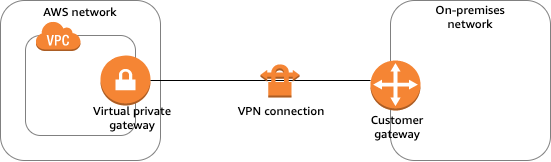
AWS VPN Components

  • Virtual Private Gateway – VGW
    • A virtual private gateway is the VPN concentrator on the AWS side of the VPN connection
    • Supports standard bandwidth (up to 1.25 Gbps per tunnel)
    • Does not support IPv6 for Site-to-Site VPN connections
    • Does not support ECMP
  • Customer Gateway – CGW
    • A customer gateway is a physical device or software application on the customer side of the VPN connection.
    • When a VPN connection is created, the VPN tunnel comes up when traffic is generated from the remote side of the VPN connection.
    • By default, VGW is not the initiator; CGW must bring up the tunnels for the Site-to-Site VPN connection by generating traffic and initiating the Internet Key Exchange (IKE) negotiation process.
    • If the VPN connection experiences a period of idle time, usually 10 seconds, depending on the configuration, the tunnel may go down. To prevent this, a network monitoring tool to generate keepalive pings; for e.g. by using IP SLA.
  • Transit Gateway
    • A transit gateway is a transit hub that can be used to interconnect VPCs and on-premises networks.
    • A Site-to-Site VPN connection on a transit gateway can support either IPv4 traffic or IPv6 traffic inside the VPN tunnels.
    • Supports ECMP (Equal Cost Multi-Path) routing for aggregating bandwidth across multiple VPN tunnels (up to 50 Gbps).
    • Supports large bandwidth tunnels (up to 5 Gbps per tunnel).
    • Supports IPv6 addresses for outer tunnel IPs (announced July 2025), enabling full IPv6 migration (IPv6-in-IPv6) and IPv4-in-IPv6 configurations.
    • Supports VPN Concentrator attachments for multi-site connectivity.
    • Supports Private IP VPN connections over Direct Connect.
  • AWS Cloud WAN
    • AWS Cloud WAN is a managed wide area networking service for building and managing global networks.
    • Site-to-Site VPN connections can be attached to Cloud WAN core networks for global hybrid connectivity.
    • Supports IPv6 outer tunnel IPs (same as Transit Gateway).
  • A Site-to-Site VPN connection offers two VPN tunnels between a VGW or a transit gateway on the AWS side, and a CGW (which represents a VPN device) on the remote (on-premises) side.

VPN Routing Options

  • For a VPN connection, the route table for the subnets should be updated with the type of routing (static or dynamic) that you plan to use.
  • Route tables determine where network traffic is directed. Traffic destined for the VPN connections must be routed to the virtual private gateway.
  • The type of routing can depend on the make and model of the CGW device
    • Static Routing
      • If your device does not support BGP, specify static routing.
      • Using static routing, the routes (IP prefixes) can be specified that should be communicated to the virtual private gateway.
      • Devices that don’t support BGP may also perform health checks to assist failover to the second tunnel when needed.
    • BGP Dynamic Routing
      • If the VPN device supports Border Gateway Protocol (BGP), specify dynamic routing with the VPN connection.
      • When using a BGP device, static routes need not be specified to the VPN connection because the device uses BGP for auto-discovery and to advertise its routes to the virtual private gateway.
      • BGP-capable devices are recommended as the BGP protocol offers robust liveness detection checks that can assist failover to the second VPN tunnel if the first tunnel goes down.
  • Only IP prefixes known to the virtual private gateway, either through BGP advertisement or static route entry, can receive traffic from the VPC.
  • Virtual private gateway does not route any other traffic destined outside of the advertised BGP, static route entries, or its attached VPC CIDR.

VPN Route Priority

  • Longest prefix match applies.
  • If the prefixes are the same, then the VGW prioritizes routes as follows, from most preferred to least preferred:
    • BGP propagated routes from an AWS Direct Connect connection
    • Manually added static routes for a Site-to-Site VPN connection
    • BGP propagated routes from a Site-to-Site VPN connection
    • Prefix with the shortest AS PATH is preferred for matching prefixes where each Site-to-Site VPN connection uses BGP
    • Path with the lowest multi-exit discriminators (MEDs) value is preferred when the AS PATHs are the same length and if the first AS in the AS_SEQUENCE is the same across multiple paths.

VPN Bandwidth and Throughput

  • Standard VPN Tunnel: Up to 1.25 Gbps per tunnel (default)
  • Large Bandwidth VPN Tunnel: Up to 5 Gbps per tunnel (available on Transit Gateway, launched November 2025)
    • Supports modifying tunnel bandwidth on existing VPN connections (announced May 2026) without changing IP addresses, CIDR blocks, or pre-shared keys
  • VPN Concentrator Tunnel: Up to 100 Mbps per tunnel, 5 Gbps aggregate per concentrator
  • ECMP (Transit Gateway): Up to 50 Gbps aggregate bandwidth using multiple VPN tunnels with ECMP configured (each flow limited to max bandwidth per tunnel)
  • Many factors affect realized bandwidth including packet size, traffic mix (TCP/UDP), shaping or throttling policies on intermediate networks, internet weather, and specific application requirements.

VPN Limitations

  • supports only IPSec tunnel mode. Transport mode is currently not supported.
  • supports only one VGW can be attached to a VPC at a time.
  • does not support IPv6 traffic on a virtual private gateway. (IPv6 is supported on Transit Gateway and Cloud WAN.)
  • does not support Path MTU Discovery.
  • does not support overlapping CIDR blocks for the networks. It is recommended to use non-overlapping CIDR blocks.
  • does not support transitive routing. So for traffic from on-premises to AWS via a virtual private gateway, it
    • does not support Internet connectivity through Internet Gateway
    • does not support Internet connectivity through NAT Gateway
    • does not support VPC Peered resources access through VPC Peering
    • does not support S3, DynamoDB access through VPC Gateway Endpoint
    • However, Internet connectivity through NAT instance and VPC Interface Endpoint or PrivateLink services are accessible.
  • provides a bandwidth of 1.25 Gbps per tunnel for standard VPN connections. Large bandwidth tunnels support up to 5 Gbps per tunnel on Transit Gateway.
  • MTU is 1446 bytes and MSS is 1406 bytes. Jumbo frames are not supported.

VPN Tunnel Endpoint Lifecycle Control

  • The VPN Tunnel Endpoint Lifecycle Control feature enables scheduling endpoint replacements at a time that aligns with business and operational needs, prior to the service-mandated deadline.
  • Provides advanced notice of upcoming maintenance updates to help plan and minimize service disruptions.
  • When enabled, AWS notifies before performing tunnel endpoint replacements.
  • Users can accept the maintenance update at a convenient time or let it apply automatically by the deadline.
  • During a tunnel endpoint update, AWS applies replacement to one tunnel at a time to ensure continuous connectivity.
  • Available in most AWS commercial and GovCloud regions.

VPN Monitoring

  • AWS Site-to-Site VPN automatically sends notifications to the AWS Health Dashboard
  • AWS Site-to-Site VPN is integrated with CloudWatch with the following metrics available
    • TunnelState
      • The state of the tunnels.
      • For static VPNs, 0 indicates DOWN and 1 indicates UP.
      • For BGP VPNs, 1 indicates ESTABLISHED and 0 is used for all other states.
      • For both types of VPNs, values between 0 and 1 indicate at least one tunnel is not UP.
    • TunnelDataIn
      • The bytes received on the AWS side of the connection through the VPN tunnel from a customer gateway.
      • This metric counts the data after decryption.
    • TunnelDataOut
      • The bytes sent from the AWS side of the connection through the VPN tunnel to the customer gateway.
      • This metric counts the data before encryption.
    • ConcentratorBandwidthUsage
      • The bandwidth usage for a Site-to-Site VPN Concentrator connection.
      • Available only for VPN connections using a VPN Concentrator.
      • Units: Bits per second
  • Site-to-Site VPN Logs
    • VPN logs can be published to Amazon CloudWatch Logs for detailed analysis of VPN connection activity.
    • Provides tunnel activity logs for troubleshooting connectivity issues.
  • Amazon CloudWatch Network Synthetic Monitor
    • Supports hybrid monitors for networking built with AWS Direct Connect and AWS Site-to-Site VPN.
    • Provides proactive monitoring of hybrid connectivity health.

IPv6 Support for Site-to-Site VPN

  • Inner Tunnel IPv6: Supported on Transit Gateway and Cloud WAN. Allows IPv4 or IPv6 traffic inside VPN tunnels.
  • Outer Tunnel IPv6 (July 2025): Site-to-Site VPN now supports IPv6 addresses for outer tunnel IPs on Transit Gateway and Cloud WAN connections.
  • Enables full IPv6 migration with IPv6 addresses for both outer tunnel IPs and inner packet IPs (IPv6-in-IPv6).
  • Supports IPv6 outer tunnel IPs with IPv4 inner packet IPs (IPv4-in-IPv6).
  • Helps customers with IPv6-only network mandates meet regulatory and compliance needs.
  • IPv6 VPNs support the same throughput (Gbps and PPS), MTU, and route limits as IPv4 VPNs.
  • Note: Virtual private gateways do NOT support IPv6 for Site-to-Site VPN connections. IPv6 requires Transit Gateway or Cloud WAN.

VPN Concentrator (November 2025)

  • AWS Site-to-Site VPN Concentrator simplifies multi-site connectivity for distributed enterprises with many low-bandwidth remote sites.
  • Suitable for customers needing to connect 25+ remote sites to AWS, with each site needing low bandwidth (under 100 Mbps).
  • Allows up to 100 remote sites to connect through a single VPN Concentrator attachment to AWS Transit Gateway.
  • Provides 5 Gbps aggregate bandwidth shared across all connected sites.
  • Eliminates the need to deploy and manage multiple virtual appliances for HA and connectivity.
  • AWS manages high availability across multiple Availability Zones.
  • Can be used with eero integration for simplified remote site connectivity without manual tunnel configuration.
  • Quotas:
    • Up to 50 VPN Concentrators per Region
    • Up to 5 VPN Concentrators per Transit Gateway or Cloud WAN
    • Up to 100 remote sites per VPN Concentrator

VPN Connection Redundancy
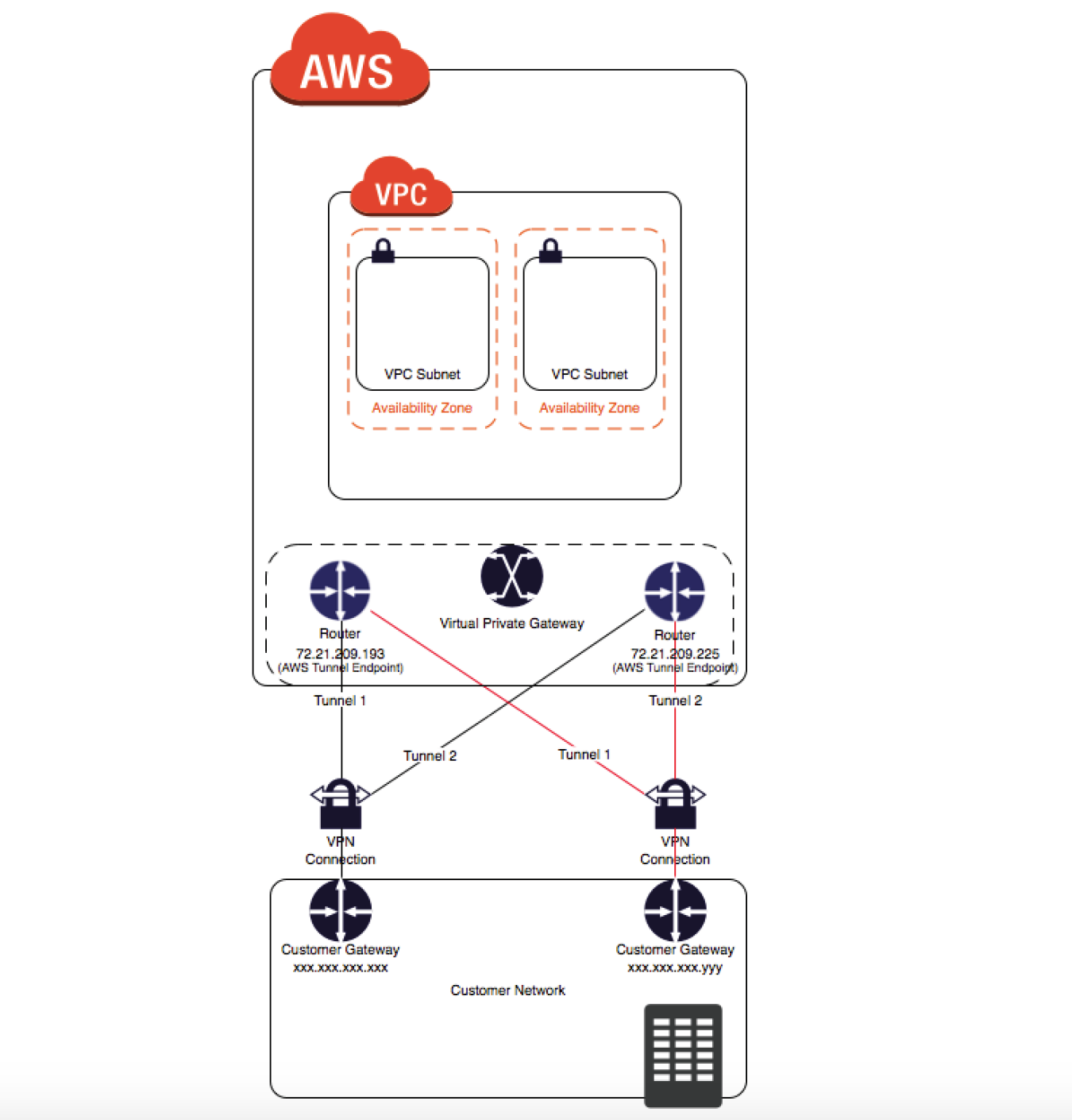
VPN Connection Redundancy

  • A VPN connection is used to connect the customer network to a VPC.
  • Each VPN connection has two tunnels to help ensure connectivity in case one of the VPN connections becomes unavailable, with each tunnel using a unique virtual private gateway public IP address.
  • Both tunnels should be configured for redundancy.
  • When one tunnel becomes unavailable, for e.g. down for maintenance, network traffic is automatically routed to the available tunnel for that specific VPN connection.
  • To protect against a loss of connectivity in case the customer gateway becomes unavailable, a second VPN connection can be set up to the VPC and virtual private gateway by using a second customer gateway.
  • Customer gateway IP address for the second VPN connection must be publicly accessible.
  • By using redundant VPN connections and CGWs, maintenance on one of the customer gateways can be performed while traffic continues to flow over the second customer gateway’s VPN connection.
  • Dynamically routed VPN connections using the Border Gateway Protocol (BGP) are recommended, if available, to exchange routing information between the customer gateways and the virtual private gateways.
  • Statically routed VPN connections require static routes for the network to be entered on the customer gateway side.
  • BGP-advertised and statically entered route information allows gateways on both sides to determine which tunnels are available and reroute traffic if a failure occurs.

Multiple Site-to-Site VPN Connections
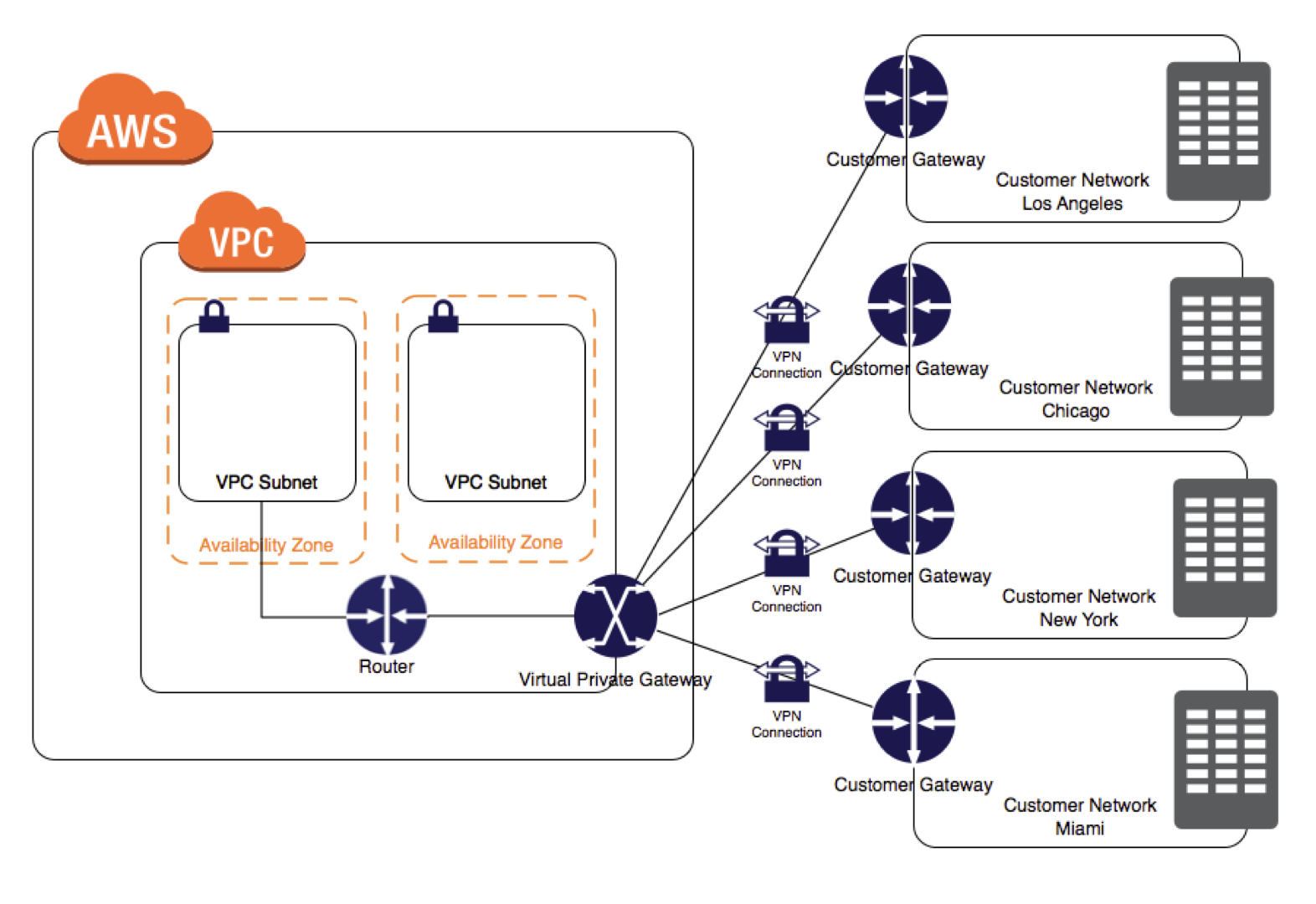
VPN Connection

  • VPC has an attached virtual private gateway, and the remote network includes a customer gateway, which must be configured to enable the
    VPN connection.
  • Routing must be set up so that any traffic from the VPC bound for the remote network is routed to the virtual private gateway.
  • Each VPN has two tunnels associated with it that can be configured on the customer router, as is not a single point of failure
  • Multiple VPN connections to a single VPC can be created, and a second CGW can be configured to create a redundant connection to the same external location or to create VPN connections to multiple geographic locations.

VPN CloudHub

  • VPN CloudHub can be used to provide secure communication between multiple on-premises sites if you have multiple VPN connections
  • VPN CloudHub operates on a simple hub-and-spoke model using a Virtual Private gateway in a detached mode that can be used without a VPC.
  • Design is suitable for customers with multiple branch offices and existing
    Internet connections who’d like to implement a convenient, potentially low-cost hub-and-spoke model for primary or backup connectivity between these remote offices
  • Note: For large-scale multi-site connectivity (25+ sites), consider using the newer VPN Concentrator feature with Transit Gateway, which provides a managed, scalable alternative.
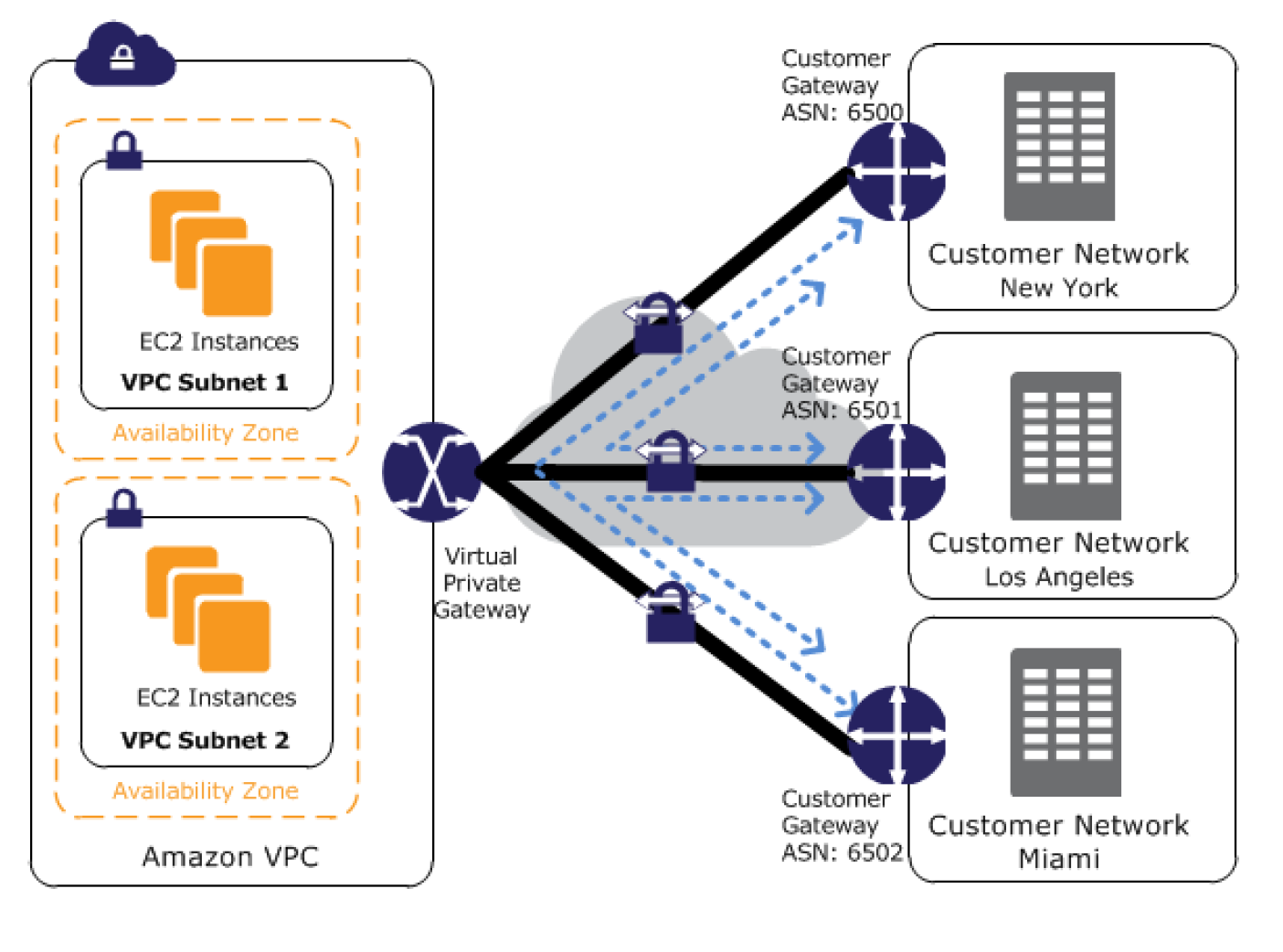
VPN CloudHub Architecture

  • VPN CloudHub architecture with blue dashed lines indicates network
    traffic between remote sites being routed over their VPN connections.
  • AWS VPN CloudHub requires a virtual private gateway with multiple customer gateways.
  • Each customer gateway must use a unique Border Gateway Protocol (BGP) Autonomous System Number (ASN)
  • Customer gateways advertise the appropriate routes (BGP prefixes) over their VPN connections.
  • Routing advertisements are received and re-advertised to each BGP peer, enabling each site to send data to and receive data from the other sites.
  • Routes for each spoke must have unique ASNs and the sites must not have overlapping IP ranges.
  • Each site can also send and receive data from the VPC as if they were using a standard VPN connection.
  • Sites that use AWS Direct Connect connections to the virtual private gateway can also be part of the AWS VPN CloudHub.
  • To configure the AWS VPN CloudHub,
    • multiple customer gateways can be created, each with the unique public IP address of the gateway and the ASN.
    • a VPN connection can be created from each customer gateway to a common virtual private gateway.
    • each VPN connection must advertise its specific BGP routes. This is done using the network statements in the VPN configuration files for the VPN connection.

Private IP VPN over Direct Connect

  • AWS Site-to-Site VPN Private IP VPN enables deploying VPN connections over Direct Connect using private IP addresses.
  • Direct Connect provides a private, dedicated connection but is not encrypted. Private IP VPN adds IPSec encryption to DX traffic.
  • Requires a Transit Gateway with a Direct Connect Gateway attachment.
  • Traffic stays on the AWS private network and never traverses the public internet.
  • Satisfies security and compliance regulations requiring encryption at layer 3 for dedicated connections.
  • Configuration:
    • Create or use an existing Transit Gateway with a private IP CIDR block.
    • Establish a Direct Connect connection and Transit VIF to a Direct Connect Gateway.
    • Create a Private IP VPN connection specifying private outside IP address type.

Accelerated Site-to-Site VPN

  • An accelerated VPN connection uses AWS Global Accelerator to route traffic from the on-premises network to the nearest AWS edge location.
  • Reduces the distance over which data is shared on the internet by leveraging the AWS global fiber network.
  • Improves performance for VPN connections where the customer gateway is geographically distant from the AWS Region.
  • Requires a Transit Gateway (not supported on VGW).
  • Each accelerated VPN connection uses two Global Accelerator resources (one per tunnel).
  • Default quota: 10 accelerated Site-to-Site VPN connections per Region (adjustable).

VPN vs Direct Connect
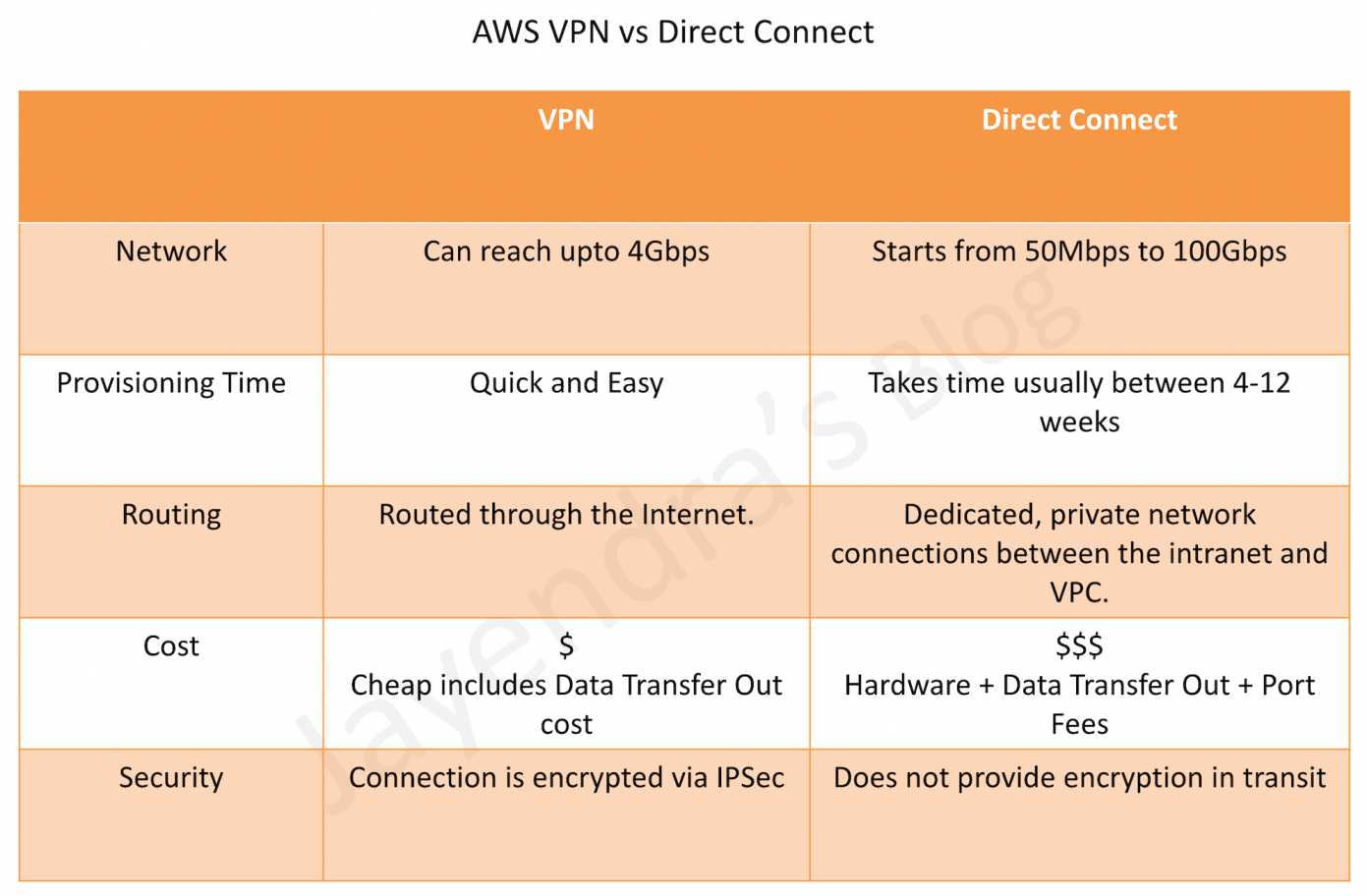
AWS Direct Connect vs VPN

VPN Quotas

  • Customer gateways per Region: 50 (adjustable)
  • Virtual private gateways per Region: 5 (adjustable)
  • Site-to-Site VPN connections per Region: 50 (adjustable)
  • Site-to-Site VPN connections per virtual private gateway: 10 (adjustable)
  • Accelerated VPN connections per Region: 10 (adjustable)
  • Large Bandwidth Tunnel connections per Region: 50 (adjustable)
  • VPN Concentrators per Region: 50 (adjustable)
  • VPN Concentrators per Transit Gateway or Cloud WAN: 5 (adjustable)
  • Remote sites per VPN Concentrator: 100 (adjustable)
  • Dynamic routes advertised from CGW to VPN on VGW: 100 (not adjustable)
  • Routes advertised from VPN on VGW to CGW: 1,000 (not adjustable)
  • Dynamic routes advertised from CGW to VPN on Transit Gateway: 1,000 (not adjustable)
  • Routes advertised from VPN on Transit Gateway to CGW: 5,000 (not adjustable)

AWS Certification Exam Practice Questions

  • Questions are collected from Internet and the answers are marked as per my knowledge and understanding (which might differ with yours).
  • AWS services are updated everyday and both the answers and questions might be outdated soon, so research accordingly.
  • AWS exam questions are not updated to keep up the pace with AWS updates, so even if the underlying feature has changed the question might not be updated
  • Open to further feedback, discussion and correction.
  1. You have in total 5 offices, and the entire employee-related information is stored under AWS VPC instances. Now all the offices want to connect the instances in VPC using VPN. Which of the below help you to implement this?
    1. you can have redundant customer gateways between your data center and your VPC
    2. you can have multiple locations connected to the AWS VPN CloudHub
    3. You have to define 5 different static IP addresses in route table.
    4. 1 and 2
    5. 1,2 and 3
  2. You have in total of 15 offices, and the entire employee-related information is stored under AWS VPC instances. Now all the offices want to connect the instances in VPC using VPN. What problem do you see in this scenario?
    1. You can not create more than 1 VPN connections with single VPC (Can be created)
    2. You can not create more than 10 VPN connections with single VPC (soft limit can be extended)
    3. When you create multiple VPN connections, the virtual private gateway can not sends network traffic to the appropriate VPN connection using statically assigned routes. (Can route the traffic to correct connection)
    4. Statically assigned routes cannot be configured in case of more than 1 VPN with the virtual private gateway. (can be configured)
    5. None of above
  3. You have been asked to virtually extend two existing data centers into AWS to support a highly available application that depends on existing, on-premises resources located in multiple data centers and static content that is served from an Amazon Simple Storage Service (S3) bucket. Your design currently includes a dual-tunnel VPN connection between your CGW and VGW. Which component of your architecture represents a potential single point of failure that you should consider changing to make the solution more highly available?
    1. Add another VGW in a different Availability Zone and create another dual-tunnel VPN connection.
    2. Add another CGW in a different data center and create another dual-tunnel VPN connection. (Refer link)
    3. Add a second VGW in a different Availability Zone, and a CGW in a different data center, and create another dual-tunnel.
    4. No changes are necessary: the network architecture is currently highly available.
  4. You are designing network connectivity for your fat client application. The application is designed for business travelers who must be able to connect to it from their hotel rooms, cafes, public Wi-Fi hotspots, and elsewhere on the Internet. You do not want to publish the application on the Internet. Which network design meets the above requirements while minimizing deployment and operational costs? [PROFESSIONAL]
    1. Implement AWS Direct Connect, and create a private interface to your VPC. Create a public subnet and place your application servers in it. (High Cost and does not minimize deployment)
    2. Implement Elastic Load Balancing with an SSL listener that terminates the back-end connection to the application. (Needs to be published to internet)
    3. Configure an IPsec VPN connection, and provide the users with the configuration details. Create a public subnet in your VPC, and place your application servers in it. (Instances still in public subnet are internet accessible)
    4. Configure an SSL VPN solution in a public subnet of your VPC, then install and configure SSL VPN client software on all user computers. Create a private subnet in your VPC and place your application servers in it. (Cost effective and can be in private subnet as well. Note: AWS Client VPN is the managed alternative for this use case.)
  5. You are designing a connectivity solution between on-premises infrastructure and Amazon VPC Your server’s on-premises will De communicating with your VPC instances You will De establishing IPSec tunnels over the internet You will be using VPN gateways and terminating the IPsec tunnels on AWS-supported customer gateways. Which of the following objectives would you achieve by implementing an IPSec tunnel as outlined above? (Choose 4 answers) [PROFESSIONAL]
    1. End-to-end protection of data in transit
    2. End-to-end Identity authentication
    3. Data encryption across the Internet
    4. Protection of data in transit over the Internet
    5. Peer identity authentication between VPN gateway and customer gateway
    6. Data integrity protection across the Internet
  6. A development team that is currently doing a nightly six-hour build which is lengthening over time on-premises with a large and mostly under utilized server would like to transition to a continuous integration model of development on AWS with multiple builds triggered within the same day. However, they are concerned about cost, security and how to integrate with existing on-premises applications such as their LDAP and email servers, which cannot move off-premises. The development environment needs a source code repository; a project management system with a MySQL database resources for performing the builds and a storage location for QA to pick up builds from. What AWS services combination would you recommend to meet the development team’s requirements? [PROFESSIONAL]
    1. A Bastion host Amazon EC2 instance running a VPN server for access from on-premises, Amazon EC2 for the source code repository with attached Amazon EBS volumes, Amazon EC2 and Amazon RDS MySQL for the project management system, EIP for the source code repository and project management system, Amazon SQL for a build queue, An Amazon Auto Scaling group of Amazon EC2 instances for performing builds and Amazon Simple Email Service for sending the build output. (Bastion is not for VPN connectivity also SES should not be used)
    2. An AWS Storage Gateway for connecting on-premises software applications with cloud-based storage securely, Amazon EC2 for the resource code repository with attached Amazon EBS volumes, Amazon EC2 and Amazon RDS MySQL for the project management system, EIPs for the source code repository and project management system, Amazon Simple Notification Service for a notification initiated build, An Auto Scaling group of Amazon EC2 instances for performing builds and Amazon S3 for the build output. (Storage Gateway does provide secure connectivity but still needs VPN. SNS alone cannot handle builds)
    3. An AWS Storage Gateway for connecting on-premises software applications with cloud-based storage securely, Amazon EC2 for the resource code repository with attached Amazon EBS volumes, Amazon EC2 and Amazon RDS MySQL for the project management system, EIPs for the source code repository and project management system, Amazon SQS for a build queue, An Amazon Elastic Map Reduce (EMR) cluster of Amazon EC2 instances for performing builds and Amazon CloudFront for the build output. (Storage Gateway does not provide secure connectivity, still needs VPN. EMR is not ideal for performing builds as it needs normal EC2 instances)
    4. A VPC with a VPN Gateway back to their on-premises servers, Amazon EC2 for the source-code repository with attached Amazon EBS volumes, Amazon EC2 and Amazon RDS MySQL for the project management system, EIPs for the source code repository and project management system, SQS for a build queue, An Auto Scaling group of EC2 instances for performing builds and S3 for the build output. (VPN gateway is required for secure connectivity. SQS for build queue and EC2 for builds)
  7. A company has 50 branch offices and wants to connect all of them to AWS. Each branch has bandwidth requirements under 50 Mbps. Which AWS VPN solution is most cost-effective and operationally simple?
    1. Create 50 individual Site-to-Site VPN connections to a Transit Gateway (Works but higher cost and operational overhead with 50 separate VPN connections)
    2. Use a VPN Concentrator on Transit Gateway to connect all branches through a single attachment (VPN Concentrator supports up to 100 sites with under 100 Mbps each, single TGW attachment simplifies management)
    3. Use VPN CloudHub with a Virtual Private Gateway (VPN CloudHub works but limited to VGW capabilities and doesn’t scale as easily)
    4. Deploy EC2-based VPN appliances in multiple AZs (Self-managed, higher operational overhead)
  8. A company requires encrypted connectivity between their on-premises data center and AWS over their existing Direct Connect connection. The traffic must not traverse the public internet. Which solution meets these requirements?
    1. Configure a standard Site-to-Site VPN over the internet as backup to Direct Connect (Traffic traverses the public internet)
    2. Configure a Private IP VPN connection over Direct Connect using Transit Gateway (Private IP VPN encrypts DX traffic using private IP addresses without internet traversal)
    3. Enable MACsec on Direct Connect and use VGW for VPN termination (MACsec provides L2 encryption but VGW doesn’t support Private IP VPN)
    4. Use AWS Client VPN over Direct Connect (Client VPN is for remote user access, not site-to-site connectivity)
  9. A company needs to migrate large datasets to AWS and requires more than 1.25 Gbps of VPN bandwidth per tunnel. What should they configure?
    1. Create multiple standard VPN connections and enable ECMP on a VGW (VGW does not support ECMP)
    2. Use Accelerated VPN with Global Accelerator to increase per-tunnel bandwidth (Accelerated VPN improves latency but does not increase per-tunnel bandwidth beyond standard limits)
    3. Configure a Large Bandwidth Tunnel VPN connection on Transit Gateway for up to 5 Gbps per tunnel (Large Bandwidth Tunnels support up to 5 Gbps per tunnel on TGW)
    4. Configure Direct Connect with 10 Gbps dedicated connection (Meets bandwidth needs but is not a VPN solution and takes longer to provision)
  10. An organization has VPN connections from multiple branch offices to AWS. The VPN performance is poor because the branches are far from the AWS Region. What can improve VPN performance without changing the on-premises equipment? (Choose 2)
    1. Enable Accelerated VPN using AWS Global Accelerator on Transit Gateway (Routes traffic to the nearest AWS edge location to reduce internet distance)
    2. Enable VPN CloudHub on a Virtual Private Gateway (VPN CloudHub is for inter-site communication, not for improving performance)
    3. Use Large Bandwidth Tunnels (5 Gbps) on Transit Gateway (Higher per-tunnel bandwidth can improve throughput for bandwidth-constrained connections)
    4. Configure Private IP VPN over Direct Connect (Requires Direct Connect infrastructure, changes the connectivity model)
    5. Add more VPN tunnels with ECMP on VGW (VGW does not support ECMP)

References

AWS Direct Connect vs VPN – Hybrid Connectivity

AWS Direct Connect vs VPN

AWS Direct Connect vs VPN

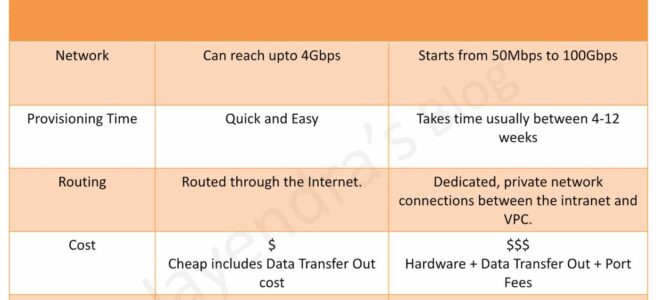
  • AWS VPN Connection utilizes IPSec to establish encrypted network connectivity between the intranet and VPC over the Internet.
  • AWS Direct Connect provides dedicated, private network connections between the intranet and VPC.
  • Setup time
    • VPN Connections can be configured in minutes and are a good solution for immediate needs, have low to modest bandwidth requirements, and can tolerate the inherent variability in Internet-based connectivity.
    • Direct Connect can take anywhere from 4 to 12 weeks
  • Routing
    • VPN traffic is still routed through the Internet.
    • Direct Connect does not involve the Internet; instead, it uses dedicated, private network connections between the intranet and VPC. The network traffic remains on the AWS global network and never touches the public internet. This reduces the chance of hitting bottlenecks or unexpected increases in latency
  • Bandwidth
    • VPN connections support up to 1.25 Gbps per tunnel (standard) or 5 Gbps per tunnel (large bandwidth tunnels, launched Nov 2025). With ECMP on Transit Gateway, multiple tunnels can be aggregated for higher throughput.
    • Direct Connect supports dedicated connections at 1 Gbps, 10 Gbps, 100 Gbps, or 400 Gbps (native 400 Gbps launched Jul 2024 at select locations). Hosted connections are available from 50 Mbps up to 25 Gbps via AWS Direct Connect Partners.
  • Cost
    • VPN connections are relatively inexpensive — standard 1.25 Gbps connections cost $0.05/hr (~$36/month) per connection. The 5 Gbps large bandwidth tunnels cost $0.60/hr (~$432/month). Additional charges apply for data transfer out and Transit Gateway attachments.
    • Direct Connect requires actual hardware and infrastructure — port-hour charges vary by speed (e.g., 1 Gbps, 10 Gbps, 100 Gbps, 400 Gbps) plus data transfer charges. Total costs can run into thousands per month depending on port speed and data volumes.
  • Encryption in Transit
    • VPN connections encrypt the data in transit using IPSec.
    • Direct Connect data transfer can be encrypted using:
      • MACsec (IEEE 802.1AE) — Layer 2 encryption on dedicated connections (1 Gbps, 10 Gbps, 100 Gbps, 400 Gbps) and supported partner interconnects (extended Jul 2025).
      • Private IP VPN — IPSec encryption over Direct Connect transit VIFs, providing end-to-end encryption without using public VIFs or public IP addresses.
  • Resiliency
    • VPN provides built-in high availability with two tunnels per connection across multiple Availability Zones. Accelerated VPN uses AWS Global Accelerator for optimized routing.
    • Direct Connect offers the Resiliency Toolkit with connection wizard supporting Maximum Resiliency, High Resiliency, and Development/Test models. SiteLink enables direct data transfer between Direct Connect locations bypassing AWS Regions.

Direct Connect vs VPN Comparison

AWS Direct Connect vs VPN

AWS VPN Connection Types (Updated 2025)

As of November 2025, AWS Site-to-Site VPN offers five distinct connection options:

  • Standard 1.25 Gbps VPN — Up to 1.25 Gbps per tunnel; terminates on Virtual Private Gateway (VGW) or Transit Gateway. Supports ECMP for higher aggregate bandwidth when used with Transit Gateway.
  • 5 Gbps Large Bandwidth VPN (Nov 2025) — Up to 5 Gbps per tunnel; terminates on Transit Gateway only. Ideal for bandwidth-intensive hybrid applications, big data migrations, and disaster recovery. Existing tunnels can be upgraded in-place (May 2026) without changing IP addresses or configuration.
  • Accelerated VPN — Uses AWS Global Accelerator to route traffic from on-premises to the nearest AWS edge location, reducing internet path variability. Available for both 1.25 Gbps connections.
  • VPN Concentrator (Nov 2025) — Simplifies multi-site connectivity for 25+ remote sites (each under 100 Mbps). Single Transit Gateway attachment for all sites with 5 Gbps aggregate bandwidth. Cost-effective for distributed enterprises (retail, hospitality, healthcare).
  • Private IP VPN — IPSec VPN over Direct Connect transit VIFs using private IP addresses. Provides encryption on dedicated connections without traversing the public internet.

AWS Direct Connect + VPN

AWS Direct Connect + VPN

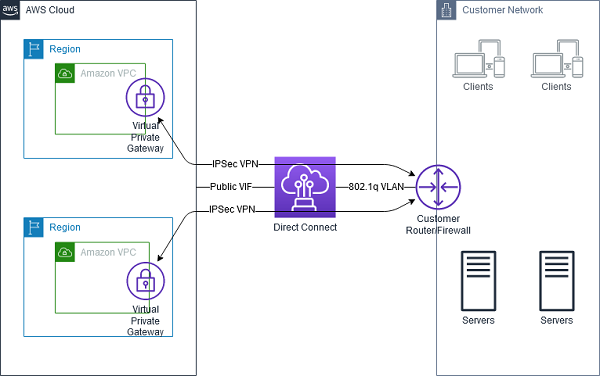
  • AWS Direct Connect + VPN combines the benefits of the end-to-end secure IPSec connection with low latency and increased bandwidth of the AWS Direct Connect to provide a more consistent network experience than internet-based VPN connections.
  • Two approaches are available:
    • Public VIF approach (legacy) — Direct Connect public VIF establishes a dedicated network connection between the on-premises network to public AWS resources, such as an Amazon virtual private gateway IPsec endpoint. A BGP connection is established on the public VIF, and another BGP session or static route is established on the IPSec VPN tunnel.
    • Private IP VPN (recommended) — Uses Direct Connect transit VIFs with private IP addresses to establish IPSec connections to Transit Gateway. This eliminates the need for public IP addresses and keeps all traffic private end-to-end.

Direct Connect + VPN as Backup

Direct Connect with VPN as Backup

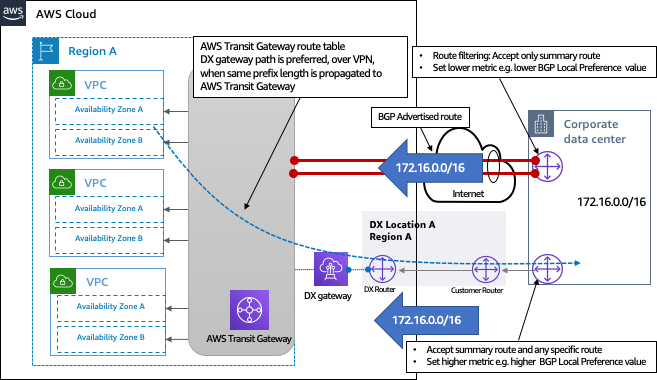
  • VPN can be selected to provide a quick and cost-effective, backup hybrid network connection to an AWS Direct Connect. However, it provides a lower level of reliability and indeterministic performance over the internet.
  • Be sure that you use the same virtual private gateway for both Direct Connect and the VPN connection to the VPC.
  • If you are configuring a Border Gateway Protocol (BGP) VPN, advertise the same prefix for Direct Connect and the VPN.
  • If you are configuring a static VPN, add the same static prefixes to the VPN connection that you are announcing with the Direct Connect virtual interface.
  • If you are advertising the same routes toward the AWS VPC, the Direct Connect path is always preferred, regardless of AS path prepending.
  • For Transit Gateway architectures, both Direct Connect (via Direct Connect Gateway) and VPN can attach to the same Transit Gateway with route table preferences configured appropriately.

AWS Direct Connect SiteLink

  • SiteLink enables sending data from one Direct Connect location to another, bypassing AWS Regions entirely.
  • Useful for building a private, low-latency global backbone between on-premises data centers using the AWS global network.
  • Traffic flows between Direct Connect locations over the shortest available path on the AWS backbone without being routed through any AWS Region.
  • Enabled per virtual interface — only SiteLink-enabled VIFs can communicate with each other.
  • Combined with MACsec encryption, provides a secure and private global WAN over AWS infrastructure.

AWS Certification Exam Practice Questions

  • Questions are collected from Internet and the answers are marked as per my knowledge and understanding (which might differ with yours).
  • AWS services are updated everyday and both the answers and questions might be outdated soon, so research accordingly.
  • AWS exam questions are not updated to keep up the pace with AWS updates, so even if the underlying feature has changed the question might not be updated
  • Open to further feedback, discussion and correction.
  1. You work as an AWS Architect for a company that has an on-premise data center. They want to connect their on-premise infra to the AWS Cloud. Note that this connection must have the maximum throughput and be dedicated to the company. How can this be achieved?
    1. Use AWS Express Route
    2. Use AWS Direct Connect
    3. Use AWS VPC Peering
    4. Use AWS VPN
  2. A company wants to set up a hybrid connection between their AWS VPC and their on-premise network. They need to have high bandwidth and less latency because they need to transfer their current database workloads to AWS. Which of the following would you use for this purpose?
    1. AWS Managed software VPN
    2. AWS Managed hardware VPN
    3. AWS Direct Connect
    4. AWS VPC Peering
  3. An organization has established an Internet-based VPN connection between their on-premises data center and AWS. They are considering migrating from VPN to AWS Direct Connect. Which operational concern should drive an organization to consider switching from an Internet-based VPN connection to AWS Direct Connect?
    1. AWS Direct Connect provides greater redundancy than an Internet-based VPN connection.
    2. AWS Direct Connect provides greater resiliency than an Internet-based VPN connection.
    3. AWS Direct Connect provides greater bandwidth than an Internet-based VPN connection.
    4. AWS Direct Connect provides greater control of network provider selection than an Internet-based VPN connection.
  4. A company needs to encrypt data in transit over their existing AWS Direct Connect connection. They want to use private IP addresses and avoid routing traffic over the public internet. Which solution should they implement?
    1. Configure MACsec encryption on the Direct Connect connection.
    2. Create a VPN connection over a Direct Connect public VIF.
    3. Create a Private IP VPN connection over a Direct Connect transit VIF.
    4. Use AWS CloudHSM to encrypt data before transmission.
  5. A retail company has 200 store locations across the country, each requiring under 50 Mbps bandwidth to access centralized applications in AWS. They want to minimize the number of Transit Gateway attachments and reduce costs. Which VPN solution is most appropriate?
    1. Create 200 individual Site-to-Site VPN connections to Transit Gateway.
    2. Use AWS Client VPN for each store location.
    3. Use AWS Site-to-Site VPN Concentrator to connect all sites through a single Transit Gateway attachment.
    4. Set up AWS Direct Connect for each store location.
  6. A company requires a single encrypted VPN connection with bandwidth exceeding 2 Gbps for disaster recovery replication to AWS. They want the simplest architecture with the fewest connections. Which solution meets these requirements?
    1. Create two standard 1.25 Gbps VPN connections with ECMP enabled.
    2. Use AWS Direct Connect with MACsec encryption.
    3. Create a 5 Gbps Site-to-Site VPN connection to Transit Gateway.
    4. Create four standard VPN connections with load balancing.
  7. A company uses AWS Direct Connect as their primary connection and Site-to-Site VPN as backup. Both connections advertise the same routes. Which path will AWS prefer for traffic from the VPC to on-premises?
    1. The path with the shortest AS path length.
    2. The VPN connection because it is encrypted.
    3. The Direct Connect path is always preferred, regardless of AS path prepending.
    4. Traffic is load balanced between both connections.

AWS Data Transfer Services

AWS Data Transfer Services

📋 Last Updated: June 2026. Major changes include AWS Snowcone discontinuation (Nov 2024), AWS Snowmobile retirement (March 2024), Snowball Edge restricted to existing customers (Nov 2025), and the launch of AWS Data Transfer Terminal (Dec 2024).
  • AWS provides a suite of data transfer services that includes many methods to migrate data more effectively.
  • Data Transfer services work both Online and Offline and the usage depends on several factors like the amount of data, the time required, frequency, available bandwidth, and cost.
  • Online data transfer and hybrid cloud storage
    • A network link to the VPC, transfer data to AWS or use S3 for hybrid cloud storage with existing on-premises applications.
    • Helps both to lift and shift large datasets once, as well as help integrate existing process flows like backup and recovery or continuous data streams directly with cloud storage.
  • Offline/Physical data migration to S3.
    • Use shippable, ruggedized devices or visit AWS Data Transfer Terminals for moving large archives, data lakes, or in situations where bandwidth and data volumes cannot pass over your networks within your desired time frame.

Online Data Transfer

VPN

  • Connect securely between data centers and AWS
  • Quick to set up and cost-efficient
  • Ideal for small data transfers and connectivity
  • Not reliable as still uses shared Internet connection

Direct Connect

  • Provides a dedicated physical connection to accelerate network transfers between data centers and AWS
  • Provides reliable data transfer with consistent low latency
  • Ideal for regular large data transfer
  • Needs time to setup
  • Is not a cost-efficient solution for small workloads
  • Can be secured using VPN over Direct Connect or MACsec encryption
  • Supports dedicated connections at 1 Gbps, 10 Gbps, 100 Gbps, and 400 Gbps speeds
  • Supports hosted connections from 50 Mbps up to 25 Gbps via AWS Direct Connect Partners
  • MACsec (IEEE 802.1AE) – provides native, near line-rate, point-to-point Layer 2 encryption on 10 Gbps, 100 Gbps, and 400 Gbps dedicated connections at select locations
  • SiteLink – enables sending data between Direct Connect locations over the AWS global backbone, bypassing AWS Regions, for private site-to-site network connectivity

AWS S3 Transfer Acceleration

  • Makes public Internet transfers to S3 faster by up to 50-500% for long-distance transfers of larger objects.
  • Helps maximize the available bandwidth regardless of distance or varying Internet weather, and there are no special clients or proprietary network protocols. Simply change the endpoint you use with your S3 bucket and acceleration is automatically applied.
  • Uses globally distributed CloudFront edge locations (over 50 locations worldwide) for data transport.
  • Ideal for recurring jobs that travel across the globe, such as media uploads, backups, and local data processing tasks that are regularly sent to a central location.

AWS DataSync

  • Automates moving data between on-premises storage and Amazon S3, Amazon EFS, Amazon FSx, and other AWS storage services.
  • Automatically handles many of the tasks related to data transfers that can slow down migrations, including encryption, managing scripts, network optimization, and data integrity validation.
  • Helps transfer data at speeds up to 10 times faster than open-source tools.
  • Uses AWS Direct Connect or internet links to AWS and is ideal for one-time data migrations, recurring data processing workflows, and automated replication for data protection and recovery.
  • Enhanced Mode (2024-2025) – provides higher performance, scalability, and observability for transfers between S3 locations with virtually unlimited numbers of objects.
  • Cross-Cloud Transfers (May 2025) – supports direct data transfers between other clouds (Google Cloud Storage, Microsoft Azure Blob Storage, Oracle Cloud Object Storage) and Amazon S3 without deploying DataSync agents.
  • On-Premises Enhanced Mode (Dec 2025) – Enhanced mode now supports transfers between on-premises file servers and Amazon S3 with higher performance.
  • Supports AWS Secrets Manager for credential management across all location types including HDFS, FSx for Windows, and FSx for NetApp ONTAP.

AWS Transfer Family

  • Provides fully managed support for file transfers directly into and out of Amazon S3 and Amazon EFS using SFTP, FTPS, FTP, and AS2 protocols.
  • Eliminates the need to manage file transfer infrastructure and helps migrate file transfer workflows to AWS seamlessly.
  • SFTP Connectors – fully managed, low-code capability to copy files between remote SFTP servers and Amazon S3, supporting up to 150 GB files at 100 files/second throughput.
  • VPC-Based Connectivity (2025) – SFTP connectors can connect to remote servers through your VPC for private transfers.
  • Web Apps – browser-based interface for data transfers to/from S3, with VPC hosted endpoint support.
  • Supports quantum-resistant ML-KEM key exchange for SFTP connections.
  • Ideal for B2B file exchanges, data distribution, and supply chain management.

Physical/Offline Data Transfer

AWS Data Transfer Terminal

🆕 NEW (December 2024) – AWS recommends Data Transfer Terminal for new customers requiring physical data transfer.
  • AWS Data Transfer Terminal provides secure, upload-ready, physical locations where you can bring your own storage devices and connect them to the AWS network for high-speed data transfer.
  • Supports upload to any AWS endpoint including Amazon S3, Amazon EFS, and others using a high-throughput connection.
  • Each Terminal includes at least two 100 Gigabit Ethernet (100 GbE) ports.
  • You can reserve a date and time to visit, connect your storage device, initiate transfer, and validate completion.
  • Available at multiple locations globally (including Los Angeles, New York, San Francisco Bay Area, Munich, and more).
  • Pricing is based on port hours (number of 100 GbE ports actively used during your reservation).
  • Ideal for media production teams, large-scale data migrations, and data center shutdowns where you bring your own storage devices.

AWS Snowball Edge

⚠️ Notice: Effective November 7, 2025, AWS Snowball Edge devices are only available to existing customers. New customers should use AWS DataSync for online transfers or AWS Data Transfer Terminal for physical transfers.
  • AWS Snowball Edge is a data migration and edge computing device.
  • Latest Generation Devices (available to existing customers only):
    • Storage Optimized 210TB
      • 210 terabytes of NVMe storage with up to 1.5 GB/s data transfer speed.
      • Connectivity options: 10GBASE-T, SFP48, and QSFP28.
      • Well-suited for petabyte-scale data migrations.
    • Compute Optimized
      • 104 vCPUs, 416 GB of memory, and 28 TB of dedicated NVMe SSD for compute instances.
      • 42 TB of usable block or object storage plus 7.68 TB of dedicated NVMe SSD for instances.
      • Well-suited for advanced machine learning, full-motion video analysis, and edge computing in disconnected environments.
  • Data is encrypted at rest and in transit for security during physical transport.
  • Five to ten devices can be clustered for local compute jobs, data durability, and to grow/shrink storage on demand.
  • Customers can use these for data collection, machine learning and processing, and storage in environments with intermittent connectivity (manufacturing, industrial, transportation) or extremely remote locations (military or maritime operations).
  • Supports running Lambda functions and EC2 instances locally on the device.
  • Managed using AWS OpsHub (graphical interface).

AWS Snowcone (Discontinued)

⚠️ DISCONTINUED – AWS Snowcone was discontinued effective November 12, 2024. Support for existing customers ended November 12, 2025. Use AWS DataSync for online transfers or AWS Data Transfer Terminal for physical transfers.
  • AWS Snowcone was a portable, rugged, and secure edge computing and data transfer device.
  • Snowcone could collect, process, and move data to AWS, either offline by shipping the device or online with AWS DataSync.
  • Snowcone devices were small and weighed 4.5 lbs. (2.1 kg) for IoT, vehicular, or drone use cases.

Previous Generation Snowball Devices (Discontinued)

⚠️ DISCONTINUED – Previous generation Snowball Edge devices (80TB Storage Optimized, 52 vCPU Compute Optimized, and Compute Optimized with GPU) were discontinued effective November 12, 2024. Support for existing customers ended November 12, 2025.
  • Snowball Edge Storage Optimized (previous gen) provided 40 vCPUs with 80 terabytes of usable block or S3-compatible object storage.
  • Snowball Edge Compute Optimized (previous gen) provided 52 vCPUs, 42 terabytes of usable storage.

AWS Snowmobile (Retired)

⚠️ SERVICE RETIRED – AWS Snowmobile was retired in March 2024. The service is no longer available. For exabyte-scale migrations, AWS recommends using multiple Snowball Edge devices or AWS Data Transfer Terminal combined with AWS DataSync.
  • AWS Snowmobile moved up to 100 PB of data in a 45-foot long ruggedized shipping container for multi-petabyte or Exabyte-scale digital media migrations and data center shutdowns.
  • A Snowmobile arrived at the customer site and appeared as a network-attached data store for high-speed data transfer.
  • After data was transferred to Snowmobile, it was driven back to an AWS Region where the data was loaded into S3.

Data Transfer Decision Guide

Scenario Recommended Service Notes
Regular ongoing transfers with reliable bandwidth AWS Direct Connect + DataSync Dedicated connection, consistent performance
One-time large migration (limited bandwidth) AWS Data Transfer Terminal Bring your own devices, 100 GbE speeds
Edge computing + data transfer (existing customer) AWS Snowball Edge Only available to existing customers
Cross-globe S3 uploads S3 Transfer Acceleration 50-500% faster for long-distance transfers
Multi-cloud data migration AWS DataSync (Enhanced Mode) Agentless cross-cloud transfers to S3
B2B file transfers (SFTP/FTPS/AS2) AWS Transfer Family Managed file transfer protocols
Quick, low-cost secure connectivity VPN Uses shared internet, unpredictable performance

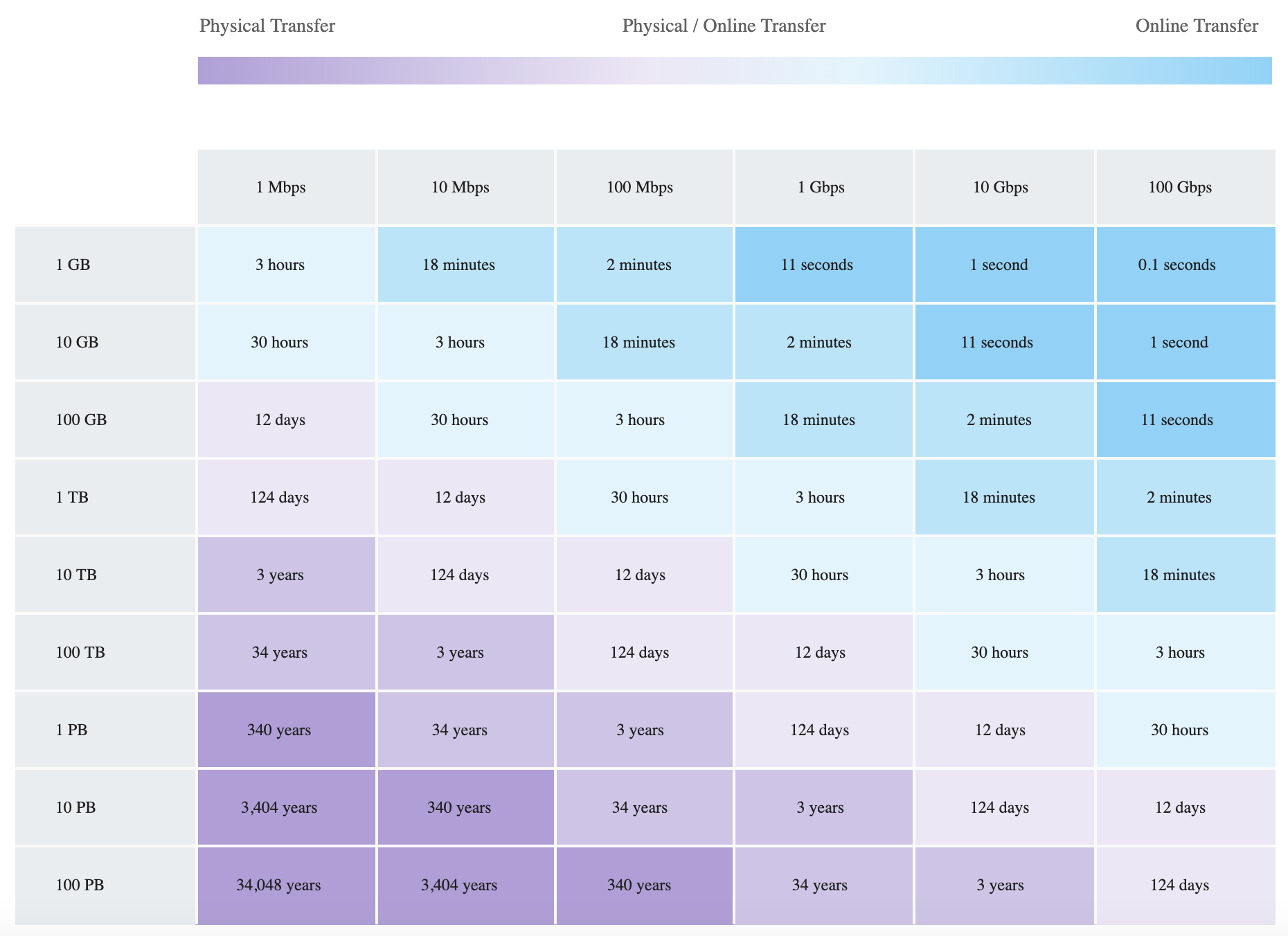
Data Transfer Chart – Bandwidth vs Time

Data Migration Speeds

AWS Certification Exam Practice Questions

  • Questions are collected from Internet and the answers are marked as per my knowledge and understanding (which might differ with yours).
  • AWS services are updated everyday and both the answers and questions might be outdated soon, so research accordingly.
  • AWS exam questions are not updated to keep up the pace with AWS updates, so even if the underlying feature has changed the question might not be updated
  • Open to further feedback, discussion and correction.
  1. An organization is moving non-business-critical applications to AWS while maintaining a mission critical application in an on-premises data center. An on-premises application must share limited confidential information with the applications in AWS. The Internet performance is unpredictable. Which configuration will ensure continued connectivity between sites MOST securely?
    1. VPN and a cached storage gateway
    2. AWS Snowball Edge
    3. VPN Gateway over AWS Direct Connect
    4. AWS Direct Connect
  2. A company wants to transfer petabyte-scale of data to AWS for their analytics, however are constrained on their internet connectivity? Which AWS service can help them transfer the data quickly?
    1. S3 enhanced uploader
    2. Snowmobile
    3. Snowball
    4. Direct Connect
  3. A company wants to transfer its video library data, which runs in exabytes, to AWS. Which AWS service can help the company transfer the data? [Note: Snowmobile was retired in March 2024. For current exabyte-scale migrations, multiple Snowball Edge devices or AWS Data Transfer Terminal would be recommended.]
    1. Snowmobile
    2. Snowball
    3. S3 upload
    4. S3 enhanced uploader
  4. You are working with a customer who has 100 TB of archival data that they want to migrate to Amazon Glacier. The customer has a 1-Gbps connection to the Internet. Which service or feature provides the fastest method of getting the data into Amazon Glacier?
    1. Amazon Glacier multipart upload
    2. AWS Storage Gateway
    3. VM Import/Export
    4. AWS Snowball
  5. A media company needs to transfer 500 TB of video content from their on-premises data center to Amazon S3. They have a 10 Gbps Direct Connect link but need the transfer completed within 1 week. Which approach is MOST appropriate?
    1. Use S3 Transfer Acceleration over the internet
    2. Use AWS DataSync over the Direct Connect link
    3. Use multiple AWS Snowball Edge devices
    4. Upload directly using the AWS CLI
  6. A company needs to regularly transfer files from a partner’s SFTP server to Amazon S3 for processing. Which AWS service provides a fully managed solution for this requirement?
    1. AWS DataSync
    2. Amazon S3 Transfer Acceleration
    3. AWS Transfer Family SFTP Connectors
    4. AWS Direct Connect
  7. A company is migrating data from Google Cloud Storage to Amazon S3. They want a managed solution that does not require deploying agents. Which AWS service and feature should they use?
    1. AWS DataSync Basic mode with an agent
    2. AWS S3 Batch Operations
    3. AWS DataSync Enhanced mode (cross-cloud transfers)
    4. AWS Transfer Family
  8. A film production company has 200 TB of raw footage on portable NAS devices after a remote shoot. They need to upload it to S3 as quickly as possible. They are near an AWS Data Transfer Terminal location. What is the FASTEST approach?
    1. Ship an AWS Snowball Edge device and transfer offline
    2. Use AWS DataSync over the internet
    3. Visit the AWS Data Transfer Terminal with their storage devices
    4. Use S3 Transfer Acceleration for parallel uploads

References

AWS Networking & Content Delivery Cheat Sheet

AWS Networking & Content Delivery Services

AWS Networking & Content Delivery Services Cheat Sheet

AWS Networking & Content Delivery Services

Virtual Private Cloud – VPC

  • helps define a logically isolated dedicated virtual network within the AWS
  • provides control of IP addressing using CIDR block from a minimum of /28 to a maximum of /16 block size
  • supports IPv4 and IPv6 addressing
  • cannot be extended once created
  • can be extended by associating secondary IPv4 CIDR blocks to VPC
  • Components
    • Internet gateway (IGW) provides access to the Internet
    • Virtual gateway (VGW) provides access to the on-premises data center through VPN and Direct Connect connections
    • VPC can have only one IGW and VGW
    • Route tables determine network traffic routing from the subnet
    • Ability to create a subnet with VPC CIDR block
    • A Network Address Translation (NAT) server provides outbound Internet access for EC2 instances in private subnets
    • Elastic IP addresses are static, persistent public IP addresses
    • Instances launched in the VPC will have a Private IP address and can have a Public or an Elastic IP address associated with it
    • Security Groups and NACLs help define security
    • Flow logs – Capture information about the IP traffic going to and from network interfaces in your VPC
  • Tenancy option for instances
    • shared, by default, allows instances to be launched on shared tenancy
    • dedicated allows instances to be launched on a dedicated hardware
  • Route Tables
    • defines rules, termed as routes, which determine where network traffic from the subnet would be routed
    • Each VPC has a Main Route table and can have multiple custom route tables created
    • Every route table contains a local route that enables communication within a VPC which cannot be modified or deleted
    • Route priority is decided by matching the most specific route in the route table that matches the traffic
  • Subnets
    • map to AZs and do not span across AZs
    • have a CIDR range that is a portion of the whole VPC.
    • CIDR ranges cannot overlap between subnets within the VPC.
    • AWS reserves 5 IP addresses in each subnet – first 4 and last one
    • Each subnet is associated with a route table which define its behavior
      • Public subnets – inbound/outbound Internet connectivity via IGW
      • Private subnets – outbound Internet connectivity via an NAT or VGW
      • Protected subnets – no outbound connectivity and used for regulated workloads
  • Elastic Network Interface (ENI)
    • a default ENI, eth0, is attached to an instance which cannot be detached with one or more secondary detachable ENIs (eth1-ethn)
    • has primary private, one or more secondary private, public, Elastic IP address, security groups, MAC address and source/destination check flag attributes associated
    • AN ENI in one subnet can be attached to an instance in the same or another subnet, in the same AZ and the same VPC
    • Security group membership of an ENI can be changed
    • with pre-allocated Mac Address can be used for applications with special licensing requirements
  • Security Groups vs NACLs – Network Access Control Lists
    • Stateful vs Stateless
    • At instance level vs At subnet level
    • Only allows Allow rule vs Allows both Allow and Deny rules
    • Evaluated as a Whole vs Evaluated in defined Order
  • Elastic IP
    • is a static IP address designed for dynamic cloud computing.
    • is associated with an AWS account, and not a particular instance
    • can be remapped from one instance to another instance
    • is charged for non-usage, if not linked for any instance or instance associated is in a stopped state
  • NAT
    • allows internet access to instances in the private subnets.
    • performs the function of both address translation and port address translation (PAT)
    • needs source/destination check flag to be disabled as it is not the actual destination of the traffic for NAT Instance.
    • NAT gateway is an AWS managed NAT service that provides better availability, higher bandwidth, and requires less administrative effort
    • are not supported for IPv6 traffic
    • NAT Gateway supports private NAT with fixed private IPs.
    • Regional NAT Gateway (announced Nov 2025) automatically expands across Availability Zones based on workload footprint, providing simplified setup, enhanced security, and automatic high availability without manual multi-AZ configuration.
  • Egress-Only Internet Gateways
    • outbound communication over IPv6 from instances in the VPC to the Internet, and prevents the Internet from initiating an IPv6 connection with your instances
    • supports IPv6 traffic only
  • Shared VPCs
    • allows multiple AWS accounts to create their application resources, such as EC2 instances, RDS databases, Redshift clusters, and AWS Lambda functions, into shared, centrally-managed VPCs
  • VPC Encryption Controls (announced Nov 2025)
    • allows enforcing encryption in transit for network traffic within the VPC
    • provides centralized encryption policy enforcement and monitoring capabilities
    • supports monitor and enforce modes to audit and enforce encryption compliance
    • transitioned to paid feature starting March 2026

VPC Peering

  • allows routing of traffic between the peer VPCs using private IP addresses with no IGW or VGW required.
  • No single point of failure and bandwidth bottlenecks
  • supports inter-region VPC peering
  • Limitations
    • IP space or CIDR blocks cannot overlap
    • cannot be transitive
    • supports a one-to-one relationship between two VPCs and has to be explicitly peered.
    • does not support edge-to-edge routing.
    • supports only one connection between any two VPCs
  • Private DNS values cannot be resolved
  • Security groups from peered VPC can now be referred to, however, the VPC should be in the same region.

VPC Endpoints

  • enables private connectivity from VPC to supported AWS services and VPC endpoint services powered by PrivateLink
  • does not require a public IP address, access over the Internet, NAT device, a VPN connection, or Direct Connect
  • traffic between VPC & AWS service does not leave the Amazon network
  • are virtual devices.
  • are horizontally scaled, redundant, and highly available VPC components that allow communication between instances in the VPC and services without imposing availability risks or bandwidth constraints on the network traffic.
  • Gateway Endpoints
    • is a gateway that is a target for a specified route in the route table, used for traffic destined to a supported AWS service.
    • only S3 and DynamoDB are currently supported
  • Interface Endpoints OR Private Links
    • is an elastic network interface with a private IP address that serves as an entry point for traffic destined to a supported service
    • supports services include AWS services, services hosted by other AWS customers and partners in their own VPCs (referred to as endpoint services), and supported AWS Marketplace partner services.
    • Private Links
      • provide fine-grained access control
      • provides a point-to-point integration.
      • supports overlapping CIDR blocks.
      • supports transitive routing
    • Access to VPC Resources over PrivateLink (announced Dec 2024) – allows sharing any VPC resource using AWS RAM and accessing them privately using VPC endpoints, without requiring the resource to sit behind a NLB.

CloudFront

  • provides low latency and high data transfer speeds for the distribution of static, dynamic web, or streaming content to web users.
  • delivers the content through a worldwide network of data centers called Edge Locations or Point of Presence (PoPs)
  • keeps persistent connections with the origin servers so that the files can be fetched from the origin servers as quickly as possible.
  • dramatically reduces the number of network hops that users’ requests must pass through
  • supports multiple origin server options, like AWS hosted service for e.g. S3, EC2, ELB, or an on-premise server, which stores the original, definitive version of the objects
  • single distribution can have multiple origins and Path pattern in a cache behavior determines which requests are routed to the origin
  • Web distribution supports static, dynamic web content, on-demand using progressive download & HLS, and live streaming video content
  • RTMP distributions were deprecated and removed on December 31, 2020. Use Web distributions with HTTP-based streaming protocols (HLS, DASH) instead.
  • supports HTTPS using either
    • dedicated IP address, which is expensive as a dedicated IP address is assigned to each CloudFront edge location
    • Server Name Indication (SNI), which is free but supported by modern browsers only with the domain name available in the request header
  • For E2E HTTPS connection,
    • Viewers -> CloudFront needs either a certificate issued by CA or ACM
    • CloudFront -> Origin needs a certificate issued by ACM for ELB and by CA for other origins
  • Security
    • Origin Access Control (OAC) is the recommended method to restrict content from S3 origin to be accessible from CloudFront only. OAC supports SSE-KMS, all HTTP methods, and all AWS Regions.
      • Origin Access Identity (OAI) is the legacy method. OAI creation was deprecated in 2024 and new distributions (as of March 2026) can only use OAC. Existing OAI configurations continue to work but migration to OAC is recommended.
    • supports Geo restriction (Geo-Blocking) to whitelist or blacklist countries that can access the content
    • Signed URLs
      • to restrict access to individual files, for e.g., an installation download for your application.
      • users using a client, for e.g. a custom HTTP client, that doesn’t support cookies
    • Signed Cookies
      • provide access to multiple restricted files, for e.g., video part files in HLS format or all of the files in the subscribers’ area of a website.
      • don’t want to change the current URLs
    • integrates with AWS WAF, a web application firewall that helps protect web applications from attacks by allowing rules configured based on IP addresses, HTTP headers, and custom URI strings
  • supports GET, HEAD, OPTIONS, PUT, POST, PATCH, DELETE to get object & object headers, add, update, and delete objects
    • only caches responses to GET and HEAD requests and, optionally, OPTIONS requests
    • does not cache responses to PUT, POST, PATCH, DELETE request methods and these requests are proxied back to the origin
  • object removal from the cache
    • would be removed upon expiry (TTL) from the cache, by default 24 hrs
    • can be invalidated explicitly, but has a cost associated, however, might continue to see the old version until it expires from those caches
    • objects can be invalidated only for Web distribution
    • use versioning or change object name, to serve a different version
    • Tag-based cache invalidation (announced May 2026) – allows tagging cached objects via origin response headers or S3 metadata and invalidating them by tag directly through the CloudFront API.
  • supports adding or modifying custom headers before the request is sent to origin which can be used to
    • validate if a user is accessing the content from CDN
    • identifying CDN from which the request was forwarded, in case of multiple CloudFront distributions
    • for viewers not supporting CORS to return the Access-Control-Allow-Origin header for every request
  • supports Partial GET requests using range header to download objects in smaller units improving the efficiency of partial downloads and recovery from partially failed transfers
  • supports compression to compress and serve compressed files when viewer requests include Accept-Encoding: gzip in the request header
  • supports different price classes to include all regions, or only the least expensive regions and other regions without the most expensive regions
  • supports access logs which contain detailed information about every user request for both web distribution
  • Edge Compute
    • CloudFront Functions – lightweight JavaScript functions for simple request/response transformations (URL rewrites, header manipulation, redirects) executed at viewer request/response events with sub-millisecond latency
    • Lambda@Edge – more powerful compute for complex processing at origin request/response and viewer request/response events
    • CloudFront KeyValueStore (launched 2023) – a globally distributed, low-latency data store that CloudFront Functions can read at runtime for dynamic routing, A/B testing, feature flags, and geo-routing without redeploying function code
  • CloudFront Flat-Rate Pricing Plans – combine CDN, AWS WAF, DDoS protection, bot management, Route 53 DNS, CloudWatch Logs ingestion, serverless edge compute, and S3 storage credits into a single monthly price

AWS VPN

  • AWS Site-to-Site VPN provides secure IPSec connections from on-premise computers or services to AWS over the Internet
  • is cheap, and quick to set up however it depends on the Internet speed
  • delivers high availability by using two tunnels across multiple Availability Zones within the AWS global network
  • VPN requires a Virtual Gateway – VGW and Customer Gateway – CGW for communication
  • VPN connection is terminated on VGW on AWS
  • Only one VGW can be attached to a VPC at a time
  • VGW supports both static and dynamic routing using Border Gateway Protocol (BGP)
  • VGW supports AWS-256 and SHA-2 for data encryption and integrity
  • AWS Client VPN is a managed client-based VPN service that enables secure access to AWS resources and resources in the on-premises network.
  • AWS VPN does not allow accessing the Internet through IGW or NAT Gateway, peered VPC resources, or VPC Gateway Endpoints from on-premises.
  • AWS VPN allows access accessing the Internet through NAT Instance and VPC Interface Endpoints from on-premises.

Direct Connect

  • is a network service that uses a private dedicated network connection to connect to AWS services.
  • helps reduce costs (long term), increases bandwidth, and provides a more consistent network experience than internet-based connections.
  • supports Dedicated and Hosted connections
    • Dedicated connection is made through a 1 Gbps, 10 Gbps, or 100 Gbps Ethernet port dedicated to a single customer.
    • Hosted connections are sourced from an AWS Direct Connect Partner that has a network link between themselves and AWS.
  • provides Virtual Interfaces
    • Private VIF to access instances within a VPC via VGW
    • Public VIF to access non VPC services
    • Transit VIF to access one or more Amazon VPC Transit Gateways associated with Direct Connect gateways, enabling connectivity to multiple VPCs through a single VIF
  • requires time to setup probably months, and should not be considered as an option if the turnaround time is less
  • does not provide redundancy, use either second direct connection or IPSec VPN connection
  • Virtual Private Gateway is on the AWS side and Customer Gateway is on the Customer side
  • route propagation is enabled on VGW and not on CGW
  • A link aggregation group (LAG) is a logical interface that uses the link aggregation control protocol (LACP) to aggregate multiple dedicated connections at a single AWS Direct Connect endpoint and treat them as a single, managed connection
  • VIF Rate Limiters (announced June 2026) on dedicated connections help prevent network congestion caused by unexpected traffic spikes on a VIF that could consume all available bandwidth impacting other VIFs on the same connection.
  • Direct Connect vs VPN IPSec
    • Expensive to Setup and Takes time vs Cheap & Immediate
    • Dedicated private connections vs Internet
    • Reduced data transfer rate vs Internet data transfer cost
    • Consistent performance vs Internet inherent variability
    • Do not provide Redundancy vs Provides Redundancy

Route 53

  • provides highly available and scalable DNS, Domain Registration Service, and health-checking web services
  • Reliable and cost-effective way to route end users to Internet applications
  • Supports multi-region and backup architectures for High availability. ELB is limited to region and does not support multi-region HA architecture.
  • supports private Intranet facing DNS service
  • internal resource record sets only work for requests originating from within the VPC and currently cannot extend to on-premise
  • Global propagation of any changes made to the DN records within ~ 1min
  • supports Alias resource record set is a Route 53 extension to DNS.
    • It’s similar to a CNAME resource record set, but supports both for root domain – zone apex e.g. example.com, and for subdomains for e.g. www.example.com.
    • supports ELB load balancers, CloudFront distributions, Elastic Beanstalk environments, API Gateways, VPC interface endpoints, and S3 buckets that are configured as websites.
  • CNAME resource record sets can be created only for subdomains and cannot be mapped to the zone apex record
  • supports Private DNS to provide an authoritative DNS within the VPCs without exposing the DNS records (including the name of the resource and its IP address(es) to the Internet.
  • Split-view (Split-horizon) DNS enables mapping the same domain publicly and privately. Requests are routed as per the origin.
  • Routing policy
    • Simple routing – simple round-robin policy
    • Weighted routing – assign weights to resource records sets to specify the proportion for e.g. 80%:20%
    • Latency based routing – helps improve global applications as requests are sent to the server from the location with minimal latency, is based on the latency and cannot guarantee users from the same geography will be served from the same location for any compliance reasons
    • Geolocation routing – Specify geographic locations by continent, country, the state limited to the US, is based on IP accuracy
    • Geoproximity routing policy – Use to route traffic based on the location of the resources and, optionally, shift traffic from resources in one location to resources in another.
    • Multivalue answer routing policy – Use to respond to DNS queries with up to eight healthy records selected at random.
    • Failover routing – failover to a backup site if the primary site fails and becomes unreachable
    • IP-based routing – route traffic based on the IP address of the client making the DNS query
  • Weighted, Latency and Geolocation can be used for Active-Active while Failover routing can be used for Active-Passive multi-region architecture
  • Traffic Flow is an easy-to-use and cost-effective global traffic management service. Traffic Flow supports versioning and helps create policies that route traffic based on the constraints they care most about, including latency, endpoint health, load, geoproximity, and geography.
  • Route 53 Resolver is a regional DNS service that helps with hybrid DNS
    • Inbound Endpoints are used to resolve DNS queries from an on-premises network to AWS
    • Outbound Endpoints are used to resolve DNS queries from AWS to an on-premises network
    • Resolver endpoints now support DNS delegation for private hosted zones (June 2025)
  • Route 53 Profiles – enables sharing DNS configurations (private hosted zone associations, Resolver rules, and Resolver DNS Firewall rule group associations) across VPCs and accounts using AWS RAM
  • Accelerated Recovery (announced Nov 2025) – provides a 60-minute recovery time objective (RTO) for regaining the ability to make DNS changes to public hosted zones during regional disruptions in US East (N. Virginia)
  • PrivateLink Support (announced Nov 2025) – allows making changes to DNS infrastructure (hosted zones, records, health checks) without using the public internet

AWS Global Accelerator

  • is a networking service that helps you improve the availability and performance of the applications to global users.
  • utilizes the Amazon global backbone network, improving the performance of the applications by lowering first-byte latency, and jitter, and increasing throughput as compared to the public internet.
  • provides two static IP addresses serviced by independent network zones that provide a fixed entry point to the applications and eliminate the complexity of managing specific IP addresses for different AWS Regions and AZs.
  • always routes user traffic to the optimal endpoint based on performance, reacting instantly to changes in application health, the user’s location, and configured policies
  • improves performance for a wide range of applications over TCP or UDP by proxying packets at the edge to applications running in one or more AWS Regions.
  • is a good fit for non-HTTP use cases, such as gaming (UDP), IoT (MQTT), or Voice over IP, as well as for HTTP use cases that specifically require static IP addresses or deterministic, fast regional failover.
  • integrates with AWS Shield for DDoS protection
  • uses a global network of 130+ Points of Presence in 95+ cities across 53+ countries
  • supports dual-stack Network Load Balancers as endpoints
  • supports endpoints in 33 AWS Regions (as of 2025)
  • integrates with AWS Load Balancer Controller for Kubernetes (announced 2025)

Transit Gateway – TGW

  • is a highly available and scalable service to consolidate the AWS VPC routing configuration for a region with a hub-and-spoke architecture.
  • acts as a Regional virtual router and is a network transit hub that can be used to interconnect VPCs and on-premises networks.
  • traffic always stays on the global AWS backbone, data is automatically encrypted, and never traverses the public internet, thereby reducing threat vectors, such as common exploits and DDoS attacks.
  • is a Regional resource and can connect VPCs within the same AWS Region.
  • TGWs across the same or different regions can peer with each other.
  • provides simpler VPC-to-VPC communication management over VPC Peering with a large number of VPCs.
  • scales elastically based on the volume of network traffic.
  • supports security group referencing (announced Sept 2024) – allows creating inbound security rules that reference security groups defined in other VPCs attached to the same Transit Gateway within the same Region.
  • supports per-AZ metrics delivered to CloudWatch and Path MTU Discovery (PMTUD) for both IPv4 and IPv6 (announced Nov 2024).
  • supports Transit Gateway Flow Logs for monitoring and logging network traffic between transit gateways.
  • supports Flexible Cost Allocation (announced Nov 2025) – provides versatile cost allocation options through a central metering policy beyond the default sender-pay model.

Amazon VPC Lattice

  • is a fully managed application networking service that connects, monitors, and secures communications between services and resources across VPCs and accounts.
  • simplifies service-to-service connectivity without requiring VPC peering, Transit Gateway, or PrivateLink NLBs.
  • automatically manages network connectivity and application-layer routing between services across different VPCs and AWS accounts.
  • supports connectivity to TCP resources, such as databases, domain names, and IP addresses across VPCs and accounts.
  • integrates with AWS IAM for service-to-service authentication and authorization using Auth policies.
  • removes the NLB requirement that PrivateLink imposes on providers and supports cross-VPC/cross-account connectivity without CIDR coordination.
  • terminates TLS at the data plane so callers do not need to manage certificates.
  • provides built-in observability with access logs, connection logs, and traffic metrics.
  • Key concepts:
    • Service Network – a logical boundary for a collection of services that can communicate with each other
    • Service – represents an application unit that is independently deployable
    • Target Groups – collection of resources (instances, IPs, Lambda, ALB) for routing
    • Resource Configurations – define TCP resources (databases, IPs, domain names) accessible through VPC Lattice
  • Use cases:
    • Microservices connectivity across multiple VPCs/accounts
    • Secure service-to-service communication with zero trust
    • Alternative to VPC Peering and Transit Gateway for application-layer connectivity
    • Replacement for AWS App Mesh (which reached EOL on September 30, 2026)

Amazon VPC IP Address Manager (IPAM)

  • is a VPC feature that allows you to plan, track, and monitor IP addresses for AWS workloads.
  • organizes IP addresses by routing and security requirements while automating allocation to VPCs, replacing manual spreadsheet-based tracking.
  • tracks AWS accounts and VPCs, eliminating IP bookkeeping overhead.
  • supports management at both VPC and subnet CIDR levels.
  • integrates with AWS Organizations for cross-account IP address management.
  • supports provisioning Amazon-provided contiguous IPv4 blocks into publicly scoped regional pools for use with EIPs, NLBs, and NAT Gateways.
  • Public IP Insights – free feature that simplifies monitoring, analysis, and auditing of public IPv4 addresses.
  • IPAM Policies – define public IPv4 allocation strategies and automate prefix lists.
  • integrates with ALB for predictable IP address blocks for internet-facing ALBs (March 2025).
  • IPAM Advanced Tier – includes Infoblox integration (Nov 2025) for managing AWS IP addresses through existing Infoblox workflows.

AWS Network Firewall

  • is a managed, stateful network firewall and intrusion detection and prevention service for all Amazon VPCs.
  • scales automatically with network traffic, requiring no infrastructure management.
  • provides Layer 7 firewall capabilities with deep packet inspection.
  • supports flexible rules engine for fine-grained control of VPC network traffic.
  • provides active threat defense using AWS managed rules to block evasive C2 channels, malicious URLs, and other threat vectors.
  • supports Suricata-compatible IPS rules for known bad signatures and traffic patterns.
  • includes Network Firewall Proxy for granular security controls to inspect and filter VPC outbound connections, preventing data exfiltration and malware intrusion.
  • integrates with AWS Firewall Manager for centralized policy management across accounts.
  • can be combined with VPC Lattice for comprehensive security (VPC Lattice for HTTP/S with identity-based controls, Network Firewall for other traffic types).

AWS Cloud WAN

  • is a managed WAN service that provides a central dashboard to connect and manage branch offices, data centers, VPN connections, SD-WAN, VPCs, and Transit Gateways.
  • uses network policies to create a global network spanning multiple locations and networks, removing the need for different technologies.
  • provides a single console and set of APIs to manage networks across AWS Regions.
  • supports direct Direct Connect gateway attachments without requiring an intermediate Transit Gateway (announced Nov 2024).
  • supports Routing Policy for advanced traffic control (announced Nov 2025) – enables controlled routing environments, minimizing route reachability blast radius.
  • supports Service Insertion for inspection and security appliance integration.
  • supports PMTUD for both IPv4 and IPv6 (announced Nov 2024).
  • supports AWS PrivateLink and IPv6 for management endpoint connectivity (announced March 2025).
  • available in AWS GovCloud (US) Regions.

AWS Verified Access

  • provides secure access to corporate applications and resources without requiring a VPN.
  • implements zero trust principles by evaluating each access request based on user identity and device security posture rather than network location.
  • uses the Cedar policy language for defining fine-grained access policies.
  • supports secure access to resources over non-HTTP(S) protocols (announced Feb 2025) – enables VPN-less access to TCP-based resources like SSH, RDP, and databases.
  • continuously monitors active connections and terminates connections when security requirements aren’t met.
  • integrates with third-party identity providers and device management solutions.
  • can be used with PrivateLink-backed services to provide authorized internet-based access while maintaining security boundaries.