This post has been significantly updated to align with the latest AWS IAM security best practices. Key changes include: use of AWS IAM Identity Center for centralized workforce access, mandatory MFA enforcement for all root users (completed June 2025), support for passkeys (FIDO2) as phishing-resistant MFA, IAM Roles Anywhere for external workloads, Resource Control Policies (RCPs) for resource-level guardrails, enhanced IAM Access Analyzer capabilities including unused access analysis and guided revocation, and centralized root access management in AWS Organizations.
Do not use the AWS Root account which has full access to all the AWS resources and services including the Billing information.
Permissions associated with the AWS Root account cannot be restricted.
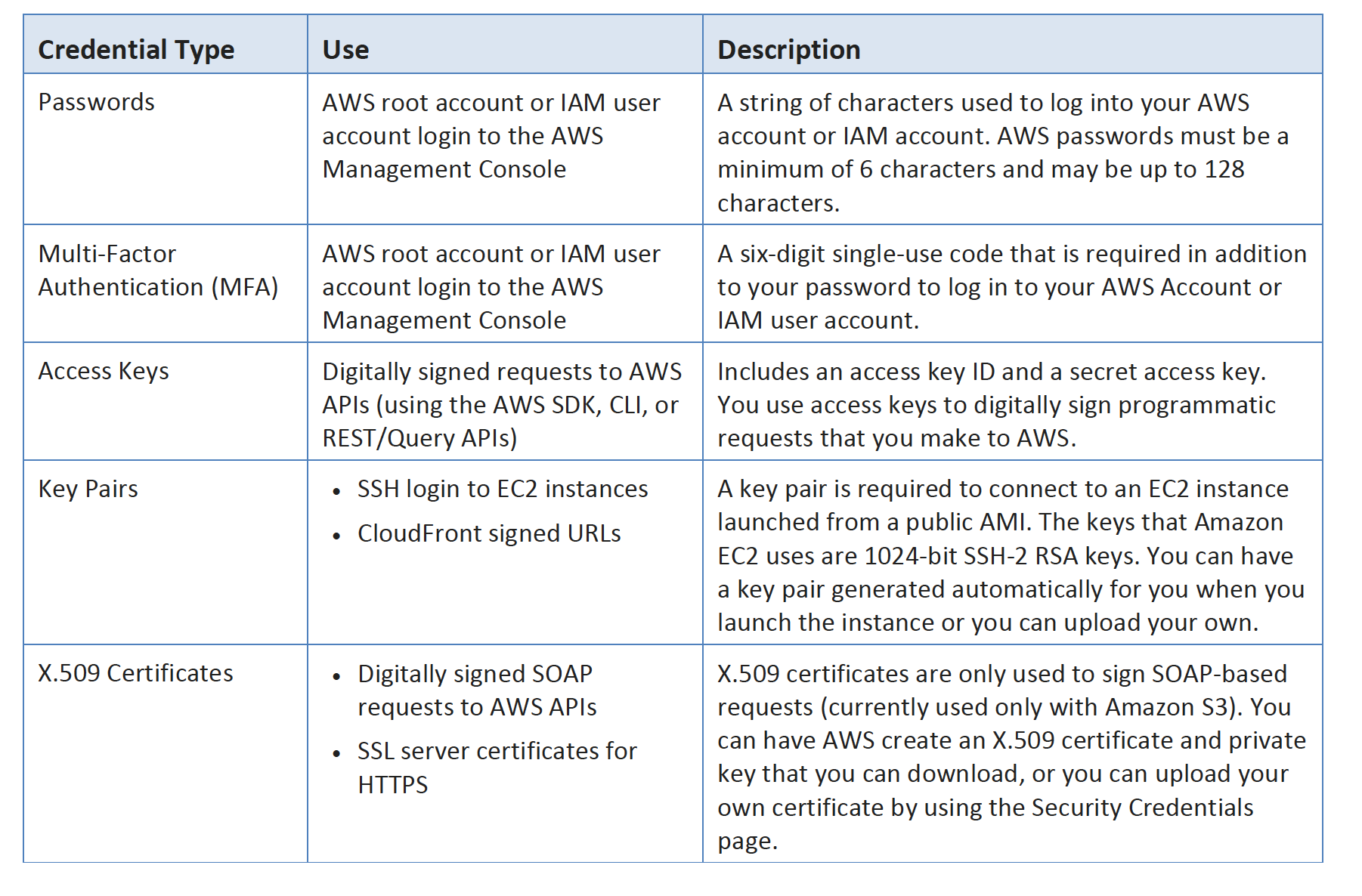
Do not generate the access keys, if not required.
If already generated and not needed, delete the access keys.
If access keys are needed, rotate (change) the access key regularly.
Never share the Root account credentials or access keys, instead create IAM users or Roles to grant granular access.
Enable AWS multifactor authentication (MFA) on the AWS account — AWS now enforces MFA for all root users across all account types (as of June 2025).
Use phishing-resistant MFA methods such as passkeys or FIDO2 security keys for root account protection.
Use centralized root access management in AWS Organizations to monitor, remove, and prevent recovery of long-term root credentials across member accounts.
Root users must register MFA within 35 days of first sign-in attempt if not already enabled.
Use Federation with IAM Identity Center for Human Users
Don’t use the AWS root account credentials to access AWS, and don’t share the credentials with anyone else.
Use AWS IAM Identity Center (formerly AWS SSO) for centralized access management to provide workforce access to AWS accounts using temporary credentials.
Use an identity provider (IdP) for federated access to AWS accounts by assuming IAM roles, which provide temporary credentials.
IAM Identity Center supports integration with external identity providers (Okta, Azure AD, Google Workspace, etc.) or its own built-in identity store.
Create individual IAM users only for specific legacy use cases that cannot use federation (e.g., third-party tools, CodeCommit SSH access, Amazon Keyspaces).
For scenarios requiring IAM users with programmatic access, use long-term credentials only when temporary credentials via roles are not feasible.
Groups – Use groups to assign permissions to IAM users
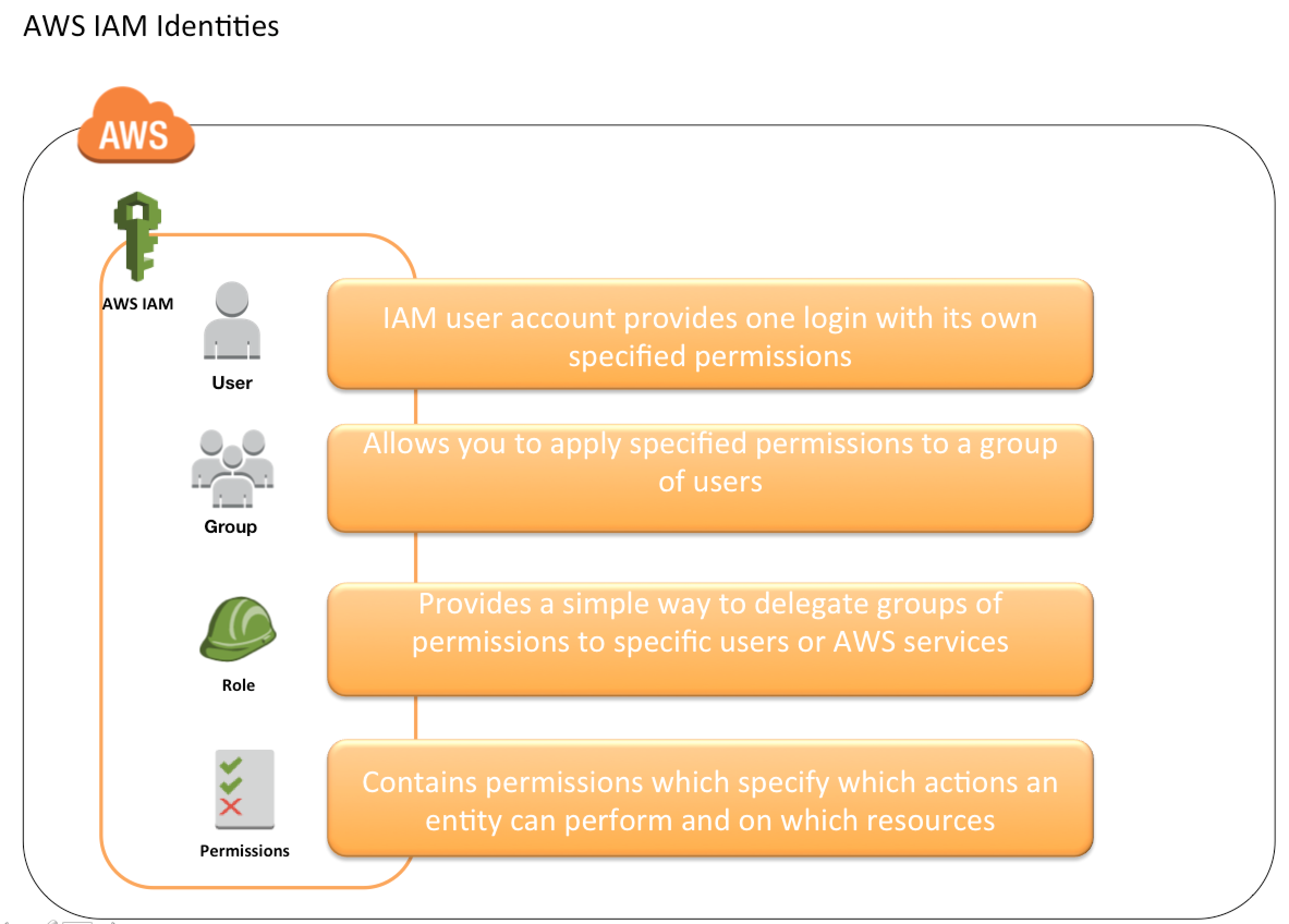
Instead of defining permissions for individual IAM users, create groups and define the relevant permissions for each group as per the job function, and then associate IAM users to those groups.
Users in an IAM group inherit the permissions assigned to the group and a User can belong to multiple groups.
It is much easier to add new users, remove users and modify the permissions of a group of users.
Permission – Apply Least-Privilege Permissions
IAM user, by default, is created with no permissions.
Users should be granted LEAST PRIVILEGE as required to perform a task.
Starting with minimal permissions and adding to the permissions as required to perform the job function is far better than granting all access and trying to then tighten it down.
Get started with AWS managed policies for common use cases and move toward least-privilege with customer managed policies specific to your use cases.
Use IAM Access Analyzer policy generation to generate fine-grained policies based on actual access activity logged in CloudTrail.
Use IAM last accessed information to identify and remove unused permissions, policies, and credentials.
Passwords – Enforce strong password policy for users
Enforce users to create strong passwords and enforce them to rotate their passwords periodically.
Enable a strong password policy to define password requirements forcing users to create passwords with requirements like at least one capital letter, one number, and how frequently it should be rotated.
MFA – Require MFA for All Users
Enable MultiFactor Authentication (MFA) for all IAM users, especially those with privileged access to sensitive resources or APIs.
AWS now enforces MFA for root users across all account types — Organizations management accounts (May 2024), standalone accounts (June 2024), and all remaining root users (June 2025).
Use phishing-resistant MFA such as passkeys and FIDO2 security keys wherever possible.
Passkeys (supported since June 2024) use public key cryptography for strong, phishing-resistant authentication that works across devices.
AWS supports up to 8 MFA devices per root and IAM user.
Synced passkeys allow users to access their FIDO sign-in credentials across multiple devices without re-enrolling each device.
MFA prevents over 99% of password-related attacks.
If using IAM Identity Center, configure MFA capabilities within Identity Center when using its built-in identity store or AD Connector.
Role – Use Temporary Credentials with IAM Roles
Use roles for workloads instead of creating IAM users and hardcoding the credentials which can compromise the access and are also hard to rotate.
Roles have specific permissions and do not have a permanent set of credentials.
Roles provide a way to access AWS by relying on dynamically generated & automatically rotated temporary security credentials.
For workloads running on AWS compute services (EC2, Lambda, ECS), IAM roles deliver temporary credentials automatically.
For workloads running outside AWS, use:
IAM Roles Anywhere — obtain temporary credentials using X.509 certificates from your PKI (credentials valid up to 12 hours).
AssumeRoleWithSAML — using SAML assertions from an external IdP.
AssumeRoleWithWebIdentity — using JWT from an OIDC-compatible IdP.
AWS IoT Core — using Mutual TLS (MTLS) authentication for IoT devices.
Additional options for hybrid workloads: ECS Anywhere, EKS Hybrid Nodes, and Systems Manager Hybrid Activations all deliver temporary credentials to external compute resources.
Sharing – Delegate using roles
Allow users from same AWS account, another AWS account, or externally authenticated users (either through any corporate authentication service or through Google, Facebook etc) to use IAM roles to specify the permissions which can then be assumed by them.
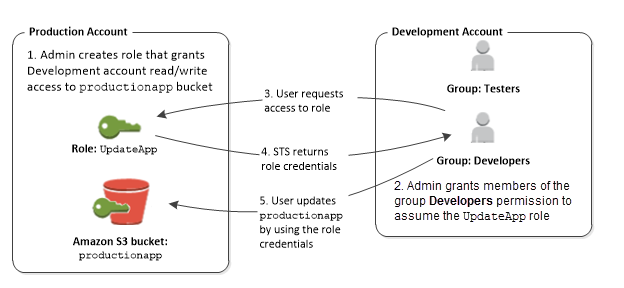
A role can be defined that specifies what permissions the IAM users in the other account are allowed, and from which AWS accounts the IAM users are allowed to assume the role.
Rotation – Update Access Keys When Needed
Where possible, rely on temporary credentials instead of creating long-term credentials such as access keys.
For scenarios requiring IAM users with programmatic access and long-term credentials, update access keys when needed (e.g., when an employee leaves).
Use IAM access last used information to update and remove access keys safely.
Access keys allow creation of 2 active keys at the same time for a user. These can be used to rotate the keys.
Remove IAM users, roles, permissions, policies, and credentials (passwords and access keys) that are not needed.
Use the IAM Credential report that lists all IAM users in the account and the status of their various credentials, including passwords, access keys, and MFA devices and usage patterns.
Use IAM last accessed information to identify users, roles, and permissions no longer needed.
Passwords and access keys that have not been used recently might be good candidates for removal.
Use IAM Access Analyzer unused access analysis to continuously identify unused roles, access keys, passwords, and unused service/action-level permissions across your organization.
Conditions – Use policy conditions for extra security
Define conditions under which IAM policies allow access to a resource.
Conditions would help provide finer access control to the AWS services and resources for e.g. access limited to a specific IP range, requiring TLS for all requests, allowing only encrypted requests for uploads to S3 buckets, or restricting access to specific AWS services like CloudFormation.
Auditing – Monitor activity in the AWS account
Enable logging features provided through CloudTrail, S3, CloudFront in AWS to determine the actions users have taken in the account and the resources that were used.
Log files show the time and date of actions, the source IP for an action, which actions failed due to inadequate permissions, and more.
Use IAM Access Analyzer
IAM Access Analyzer provides multiple capabilities to help achieve least privilege:
External access analysis — identifies resources shared with external principals and generates findings for public and cross-account access.
Unused access analysis — continuously identifies unused IAM roles, unused access keys, unused passwords, and unused service/action-level permissions across your organization (paid feature).
Policy generation — generates fine-grained least-privilege policies based on actual access activity captured in CloudTrail logs.
Policy validation — provides 100+ policy checks and actionable recommendations to ensure policies adhere to IAM best practices.
Custom policy checks — CheckNoNewAccess and CheckAccessNotGranted APIs to verify policies don’t grant unintended access.
Guided revocation — provides guidance to revoke unused permissions, with quick links to delete unused roles, access keys, and passwords.
Integrates with AWS Security Hub for centralized unused access findings.
IAM permissions boundaries help set the maximum permissions that you delegate and that an identity-based policy can grant to an IAM role.
A permissions boundary does not grant permissions on its own.
Establish Permissions Guardrails Across Multiple Accounts
Use AWS Organizations to separate workloads using multiple accounts.
Use Service Control Policies (SCPs) to establish permissions guardrails controlling access for all IAM principals (roles and users) across accounts.
Use Resource Control Policies (RCPs) (launched November 2024) to establish permissions guardrails controlling access to AWS resources across your organization.
RCPs set the maximum available permissions on resources at the organization, OU, or account level.
RCPs complement SCPs — SCPs restrict what principals can do, RCPs restrict what can be done to resources.
RCPs help establish data perimeters by restricting external access to resources at scale.
SCPs and RCPs do not grant permissions — you must still attach identity-based or resource-based policies to grant access.
Use AWS Managed Policies and Move Toward Least Privilege
Start with AWS managed policies that grant permissions for common use cases and job functions.
AWS managed policies may not grant least-privilege for specific use cases as they are designed for all AWS customers.
Reduce permissions further by defining customer managed policies specific to your use cases.
Use AWS managed policies for job functions (e.g., ViewOnlyAccess, SystemAdministrator, DatabaseAdministrator) as starting points.
AWS Certification Exam Practice Questions
Questions are collected from Internet and the answers are marked as per my knowledge and understanding (which might differ with yours).
AWS services are updated everyday and both the answers and questions might be outdated soon, so research accordingly.
AWS exam questions are not updated to keep up the pace with AWS updates, so even if the underlying feature has changed the question might not be updated
Open to further feedback, discussion and correction.
Your organization is preparing for a security assessment of your use of AWS. In preparation for this assessment, which two IAM best practices should you consider implementing? Choose 2 answers
Create individual IAM users for everyone in your organization (May not be needed as can use IAM Identity Center with federation)
Configure MFA on the root account and for privileged IAM users
Assign IAM users and groups configured with policies granting least privilege access
Ensure all users have been assigned and are frequently rotating a password, access ID/secret key, and X.509 certificate (Must be assigned only if using console or through command line)
What are the recommended best practices for IAM? (Choose 3 answers)
Grant least privilege
Use the AWS account(root) for regular user
Use Mutli-Factor Authentication (MFA)
Store access key/private key in git
Rotate credentials regularly
Which of the below mentioned options is not a best practice to securely manage the AWS access credentials?
Enable MFA for privileged users
Create individual IAM users
Keep rotating your secure access credentials at regular intervals
Create strong access key and secret access key and attach to the root account
Your CTO is very worried about the security of your AWS account. How best can you prevent hackers from completely hijacking your account?
Use short but complex password on the root account and any administrators.
Use AWS IAM Geo-Lock and disallow anyone from logging in except for in your city.
Use MFA on all users and accounts, especially on the root account. (For increased security, it is recommend to configure MFA to help protect AWS resources. AWS now enforces MFA for all root users.)
Don’t write down or remember the root account password after creating the AWS account.
Fill the blanks: ____ helps us track AWS API calls and transitions, ____ helps to understand what resources we have now, and ____ allows auditing credentials and logins.
AWS Config, CloudTrail, IAM Credential Reports
CloudTrail, IAM Credential Reports, AWS Config
CloudTrail, AWS Config, IAM Credential Reports
AWS Config, IAM Credential Reports, CloudTrail
A company wants to ensure that its workforce users access AWS accounts using temporary credentials and centralized access management. Which AWS service should they use? [Updated 2026]
AWS Directory Service
AWS IAM Identity Center
Amazon Cognito
AWS Certificate Manager
An organization needs to provide temporary AWS credentials to workloads running on-premises that cannot use IAM Identity Center. Which service should they use? [Updated 2026]
AWS STS AssumeRole
IAM User access keys
IAM Roles Anywhere
AWS Secrets Manager
Which IAM Access Analyzer capability helps identify unused IAM roles, access keys, and permissions across an AWS Organization? [Updated 2026]
External access analysis
Policy validation
Unused access analysis
Policy generation
Which AWS Organizations policy type was introduced in November 2024 to centrally restrict access to AWS resources across an organization? [Updated 2026]
Service Control Policies (SCPs)
Tag Policies
Backup Policies
Resource Control Policies (RCPs)
Which MFA method does AWS recommend as the most secure, phishing-resistant option for protecting AWS accounts? [Updated 2026]
AWS allows granting cross-account access to AWS resources, which can be done using IAM Roles or Resource-Based Policies. Understanding the differences between these two mechanisms is critical for designing secure, multi-account architectures.
Cross-Account Access Methods
AWS provides four primary ways to grant cross-account access using resource-based policies:
Method 1: Grant access to a specific IAM role using the Principal element (most granular, but role deletion breaks access)
Method 2: Grant access to an entire account using the Principal element (delegates access control to the other account)
Method 3: Grant access to a specific IAM role using the aws:PrincipalArn condition key (balanced approach — survives role recreation)
Method 4: Grant access to an entire AWS Organizations organization using aws:PrincipalOrgId condition key
AWS recommends using IAM roles with temporary credentials for cross-account access instead of IAM users with long-term credentials (access keys).
IAM Roles
Roles can be created to act as a proxy to allow users or services to access resources.
Roles support
trust policy which helps determine who can access the resources and
permission policy which helps to determine what they can access.
Users who assume a role temporarily give up their own permissions and instead take on the permissions of the role. The original user permissions are restored when the user exits or stops using the role.
Roles can be used to provide access to almost all the AWS resources.
Permissions provided to the User through the Role can be further restricted per user by passing an optional session policy to the STS request. This session policy cannot be used to elevate privileges beyond what the assumed role is allowed to access.
When a role ARN is specified in a resource-based policy’s Principal element, AWS maps it to the role’s unique ID. If the role is deleted and recreated with the same name, the new role will have a different unique ID and will not have access — this is an intentional security feature.
Using the aws:PrincipalArn condition key in resource-based policies (instead of specifying the role in the Principal element) allows access to survive role recreation, as the condition compares by ARN string rather than unique ID.
IAM Roles Anywhere
IAM Roles Anywhere extends the short-term credential model beyond the cloud, allowing on-premises and multi-cloud workloads to authenticate using X.509 certificates issued by your existing PKI (Public Key Infrastructure).
Eliminates the need for long-term access keys for on-premises workloads.
Supports credentials valid for up to 12 hours (extended from the original shorter duration).
Integrates with enterprise PKI so non-AWS workloads can use the same IAM policies and roles as AWS workloads.
Use cases include on-premises Kubernetes clusters, CI/CD pipelines running outside AWS, and hybrid cloud environments.
Confused Deputy Prevention
The confused deputy problem is a security issue where a less-privileged entity coerces a more-privileged service to perform actions on its behalf.
AWS recommends using the following global condition context keys in role trust policies and resource-based policies:
aws:SourceArn — restrict to a specific resource ARN (most effective)
aws:SourceAccount — restrict to a specific AWS account
aws:SourceOrgID — restrict to an AWS Organizations organization
aws:SourceOrgPaths — restrict to specific organizational units
These condition keys should always be used when granting service principals access to your resources.
Resource-based Policies
Resource-based policy allows you to attach a policy directly to the resource you want to share, instead of using a role as a proxy.
Resource-based policy specifies the Principal, in the form of a list of AWS account ID numbers, IAM role ARNs, or IAM user ARNs, that can access that resource and what actions they can perform.
Using cross-account access with a resource-based policy, the User still works in the trusted account and does not have to give up their permissions in place of the role permissions.
Users can work on the resources from both accounts at the same time and this can be useful for scenarios e.g. copying objects from one bucket to the other bucket in a different AWS account.
For same-account access, policy evaluation requires either the identity-based policy or the resource-based policy (but not both) to allow the request. For cross-account access, both an identity-based policy in the principal’s account and the resource-based policy on the resource must allow the request.
Resources that support resource-based policies include (but are not limited to):
Amazon S3 — Bucket policies for bucket and object access
RCPs are applied organization-wide through AWS Organizations and can be attached to the organization root, OUs, or individual accounts.
AWS Sign-in now supports both resource-based policies and RCPs for the AWS Management Console, enabling restriction of console sign-in to expected networks.
AWS Resource Access Manager (RAM)
AWS RAM enables you to share resources with other AWS accounts or within your AWS Organization without using resource-based policies directly.
RAM eliminates the need to provision and manage duplicate resources in every account.
When sharing a resource, the receiving account’s IAM policies and permissions apply to the shared resource.
Supported resources include: VPC subnets, Transit Gateway, Route 53 Resolver rules, License Manager configurations, Aurora DB clusters, and many more.
RAM integrates with AWS Organizations to enable sharing without requiring individual account acceptance.
IAM Roles vs Resource-Based Policies – Key Differences
Permission Delegation: With IAM roles, the user gives up their original permissions and takes on role permissions. With resource-based policies, the user retains their original permissions.
Simultaneous Access: Resource-based policies allow users to work with resources in both accounts simultaneously. Roles do not.
Coverage: IAM roles can provide access to almost all AWS resources. Resource-based policies are limited to services that support them.
Session Policies: IAM roles support session policies for further restricting permissions. Resource-based policies do not support this concept.
Policy Evaluation: For cross-account access via roles, only the role’s identity-based policy determines effective permissions. For cross-account access via resource-based policies, both the caller’s identity-based policy and the resource policy must allow the action.
Best Practices for Cross-Account Access
Use IAM roles with temporary credentials instead of IAM users with long-term access keys.
Use the aws:PrincipalArn condition key in resource-based policies for a balance of security and availability.
Use the aws:PrincipalOrgId condition key to restrict access to your AWS Organization.
Use External ID in trust policies when granting access to third parties to prevent confused deputy attacks.
Implement the principle of least privilege in all cross-account policies.
Use RCPs to enforce organization-wide data perimeters on resources.
Regularly audit cross-account access using IAM Access Analyzer.
Consider using IAM Identity Center (formerly AWS SSO) with permission sets for centralized multi-account access management.
AWS Certification Exam Practice Questions
Questions are collected from Internet and the answers are marked as per my knowledge and understanding (which might differ with yours).
AWS services are updated everyday and both the answers and questions might be outdated soon, so research accordingly.
AWS exam questions are not updated to keep up the pace with AWS updates, so even if the underlying feature has changed the question might not be updated
Open to further feedback, discussion and correction.
What are the two permission types used by AWS?
Resource-based and Product-based
Product-based and Service-based
Service-based
User-based and Resource-based
What’s the policy used for cross-account access? (Choose 2)
Trust policy
Permissions Policy
Key policy
A company has two AWS accounts – Account A and Account B. Account A has an S3 bucket that Account B needs to access. The security team wants to ensure that if the IAM role in Account B is accidentally deleted and recreated, access is maintained. Which approach should be used in the bucket policy?
Specify the IAM role ARN in the Principal element
Specify the account number in the Principal element with an aws:PrincipalArn condition
Specify the account number in the Principal element without any condition
Use a service control policy
An organization wants to centrally restrict external access to their AWS resources across all accounts. Which policy type should they use?
Service Control Policies (SCPs)
Identity-based policies
Resource Control Policies (RCPs)
Permission boundaries
A developer needs to copy objects from an S3 bucket in Account A to an S3 bucket in Account B, and needs to access both buckets simultaneously. Which cross-account access method should be used?
IAM Role in Account A
IAM Role in Account B
Resource-based policy on the S3 bucket in Account A
AWS Resource Access Manager
Which condition keys should be used to prevent the confused deputy problem when granting a service principal access to your resources? (Choose 2)
aws:SourceArn
aws:SourceAccount
aws:PrincipalOrgId
aws:RequestedRegion
An on-premises server needs to access AWS resources using temporary credentials without managing long-term access keys. Which service should be used?
This post has been updated to reflect the latest IAM Role features including IAM Roles Anywhere, STS global endpoint changes (April 2025), Resource Control Policies (RCPs), IAM Access Analyzer unused access findings, increased IAM quotas (May 2026), and post-quantum certificate support.
IAM role is very similar to a user, in that it is an identity with permission policies that determine what the identity can and cannot do in AWS.
IAM role is not intended to be uniquely associated with a particular user, group, or service and is intended to be assumable by anyone who needs it.
Role does not have any static credentials (password or access keys) associated with it and whoever assumes the role is provided with dynamic temporary credentials.
Role helps in access delegation to grant permissions to someone that allows access to resources that you control.
Roles can help to prevent accidental access to or modification of sensitive resources.
Modification of a Role can be done anytime and the changes are reflected across all the entities associated with the Role immediately.
IAM Role plays a very important role in the following scenarios
Services like EC2 instances running an application that needs to access other AWS services.
Cross-Account access – Allowing users from different AWS accounts to have access to AWS resources in a different account, instead of having to create users.
Identity Providers & Federation
Company uses a Corporate Authentication mechanism and doesn’t want the User to authenticate twice or create duplicate users in AWS
Applications allowing login through external authentication mechanisms e.g. Amazon, Facebook, Google, etc
Workloads running outside AWS (on-premises, other clouds) that need to access AWS resources using IAM Roles Anywhere.
Role can be assumed by
IAM user within the same AWS account
IAM user from a different AWS account
AWS services such as EC2, EMR to interact with other services
An external user authenticated by an external identity provider (IdP) service that is compatible with SAML 2.0 or OpenID Connect (OIDC), or a custom-built identity broker.
Workloads outside AWS using X.509 certificates via IAM Roles Anywhere
Role involves defining two policies
Trust policy
Trust policy defines – who can assume the role
Trust policy involves setting up a trust between the account that owns the resource (trusting account) and the account that owns the user that needs access to the resources (trusted account).
Trust policy must explicitly list the trusted principal; roles no longer implicitly trust themselves (updated behavior since 2022).
Permissions policy
Permissions policy defines – what they can access
Permissions policy determines authorization, which grants the user of the role with the needed permissions to carry out the desired tasks on the resource
Federation is creating a trust relationship between an external Identity Provider (IdP) and AWS.
Users can also sign in to an enterprise identity system that is compatible with SAML
Users can sign in to a web identity provider, such as Login with Amazon, Facebook, Google, or any IdP that is compatible with OpenID connect (OIDC).
When using OIDC and SAML 2.0 to configure a trust relationship between these external identity providers and AWS, the user is assigned to an IAM role and receives temporary credentials that enable the user to access AWS resources.
IAM Best Practice – Use roles for applications running on EC2 instances
IAM Best Practice – Delegate using roles instead of sharing credentials
IAM Best Practice – Use IAM Access Analyzer to identify and remove unused roles and permissions
AWS STS & Temporary Credentials
AWS Security Token Service – STS helps create and provide trusted users with temporary security credentials that control access to AWS resources
STS is a global service with a single endpoint https://sts.amazonaws.com
AWS STS API calls can be made either to a global endpoint or to one of the regional endpoints. Regional endpoint can help reduce latency and improve the performance of the API calls
Important Update (April 2025): AWS STS global endpoint now serves requests locally in the same AWS Region as your workloads for all Regions enabled by default. Requests from opt-in Regions continue to be served from US East (N. Virginia). No action is required from customers.
SDK Default Change (July 2025): AWS SDKs have updated the default STS endpoint resolution from global to regional, and the default retry strategy to standard. Customers using older SDK versions should verify their configurations.
Temporary Credentials are similar to long-term credentials except for
are short-term and are regularly rotated.
can be configured to last from a few minutes to several hours.
do not have to be embedded or distributed.
are not stored or attached to the User, but are generated dynamically and provided to the user as and when requested
Key STS API Operations:
AssumeRole – Returns temporary credentials for cross-account access or role delegation
AssumeRoleWithSAML – For SAML-authenticated users
AssumeRoleWithWebIdentity – For web identity (OIDC) authenticated users
AssumeRoot (New – 2024) – Returns short-term credentials for performing privileged tasks on member accounts from the Organizations management or delegated admin account. Limited to 900 seconds (15 minutes) and scoped with task-specific policies.
GetSessionToken – For MFA-protected API access
GetFederationToken – For custom federation implementations
Session Tags – You can pass key-value pairs (session tags) when assuming a role to enable attribute-based access control (ABAC). Session tags are available in the session and can be used in policy conditions.
Source Identity – You can set a source identity when assuming a role, which persists through role chaining and is logged in CloudTrail for auditing who originally assumed the role.
AWS Service Roles
Some AWS services need to interact with other AWS services for e.g. EC2 interacting with S3, SQS, etc
Best practice is to assign these services with IAM roles instead of embedding or passing IAM user credentials directly into an instance, because distributing and rotating long-term credentials to multiple instances is challenging to manage and a potential security risk.
AWS automatically provides temporary security credentials for these services e.g. EC2 instance to use on behalf of its applications
Deleting a role or instance profile that is associated with a running EC2 instance will break any applications running on the instance
IAM roles can be attached to or replaced on a running EC2 instance (not just at launch time).
Complete Process Flow
Create an IAM role with services who would use it for e.g. EC2 as a trusted entity and define permission policies with the access the service needs
Associate a Role (actually an Instance profile) with the EC2 service when the instance is launched or attach/replace it on a running instance
Temporary security credentials are available on the instance and are automatically rotated before they expire so that a valid set is always available
Application can retrieve the temporary credentials either using the Instance metadata (IMDSv2 recommended) directly or through AWS SDK
Applications running on the EC2 instance can now use the permissions defined in the Role to access other AWS resources
Application, if caching the credentials, needs to make sure it uses the correct credentials before they expire
Instance Profile
An instance profile is a container for an IAM role that you can use to pass role information to an EC2 instance when the instance starts.
If a Role is created for EC2 instance or any other service that uses EC2 through AWS Management Console, AWS creates an Instance profile automatically with the same name as the Role. However, if the Role is created through CLI the instance profile needs to be created as well.
An instance profile can contain only one IAM role. However, a role can be included in multiple instance profiles.
IAM Roles Anywhere
IAM Roles Anywhere enables workloads running outside of AWS (on-premises servers, other cloud providers, IoT devices) to obtain temporary AWS credentials using X.509 certificates from your existing Public Key Infrastructure (PKI).
Eliminates the need for long-term access keys for hybrid and multi-cloud workloads.
Key components:
Trust Anchor – References your AWS Private Certificate Authority or registers your external CA with IAM Roles Anywhere.
Profile – Specifies the IAM roles that can be assumed and optionally sets session policies and duration.
X.509 Certificate – End-entity certificate issued by your PKI, presented by the workload to obtain credentials.
Credentials can be valid for up to 12 hours (extended from the initial shorter limits in March 2024).
Supports certificate attribute mapping (April 2024) – allows defining mapping rules to specify which data is extracted from X.509 end-entity certificates for use in session tags and conditions.
Supports post-quantum digital certificates (March 2026) – Supports FIPS 204 Module-Lattice Digital Signature Standard (ML-DSA) for quantum-resistant authentication.
On-premises Kubernetes clusters connecting to AWS APIs
Amazon WorkSpaces accessing AWS resources
Integrates with your enterprise PKI, so no separate credential management infrastructure is needed.
Service-linked Roles
A service-linked role is a unique type of IAM role that is linked directly to an AWS service.
Service-linked roles are predefined by the service and include all the permissions that the service requires to call other AWS services on your behalf.
Service-linked roles appear in your IAM account and are owned by the service. An IAM administrator can view, but not edit the permissions for service-linked roles.
Service-linked roles can only be deleted after ensuring no resources depend on the role.
Cross-Account Access Roles
IAM users can be granted permission to switch roles within the same AWS account or to roles defined in other AWS accounts that you own.
Roles can also be used to delegate permissions to IAM users from AWS accounts owned by Third parties
You must explicitly grant the users permission to assume the role.
Users must actively switch to the role using the AWS Management Console.
Multi-factor authentication (MFA) protection can be enabled for the role so that only users who sign in with an MFA device can assume the role
However, only One set of permissions are applicable at a time. User who assumes a role temporarily gives up his or her own permissions and instead takes on the permissions of the role. When the user exits, or stops using the role, the original user permissions are restored.
Four ways to grant cross-account access in AWS (2025 Best Practice):
IAM Roles (AssumeRole) – most common, identity-based approach
Resource-based policies – attach directly to resources (S3, KMS, etc.)
AWS Resource Access Manager (RAM) – for sharing resources across accounts
AWS Organizations trust – using organization-level policies (SCPs, RCPs)
Complete Process Flow
Trusting account creates an IAM Role with a
Trust policy which defines the account (trusted account) as a principal who can access the resources and a
Permissions policy to define what resources can the user in the trusted account access
Trusting account provides the Account ID and the Role name (or the ARN) to the trusted account
If the Trusting account is owned by Third Party it can optionally provide an External ID (recommended for additional security), required to uniquely identify the trusted account, which can be added to the trust policy as a condition
Trusted account creates an IAM user who has permission (Permission to call the AWS Security Token Service (AWS STS) AssumeRole API for the role) to assume the role/switch to the role.
IAM User in the Trusted account switches to the Role/assumes the role and passes the ARN of the role
Trusted account belonging to the Third party would also pass the External ID mapped to the Trusting account
AWS STS verifies the request for the role ARN, External ID if any and if it is from the trusted resource matching the roles’s trust policy and
AWS STS upon successful verification returns temporary credentials
Temporary credentials allow the user to access the resources of the Trusting account
When the user exits the role, the user’s permissions revert to the original permissions held before switching to the role
Resource Control Policies (RCPs)
Resource Control Policies (RCPs) were introduced in November 2024 as a new authorization policy type in AWS Organizations.
RCPs allow you to centrally set the maximum available permissions on AWS resources across your organization.
RCPs complement Service Control Policies (SCPs):
SCPs restrict what principals (users/roles) can do
RCPs restrict what can be done to resources, regardless of who the principal is
RCPs are particularly useful for preventing cross-account access from external principals, e.g., restricting S3 bucket access to only principals within your organization.
RCPs do not affect resources in the management account – they only apply to member accounts.
External ID and Confused Deputy Problem
External ID allows the user assuming the role to assert the circumstances in which they are operating.
External ID provides a way for the account owner to permit the role to be assumed only under specific circumstances and prevents an unauthorized customer from gaining access to your resources
Primary function of the external ID is to address and prevent the “confused deputy” problem.
Confused Deputy Problem
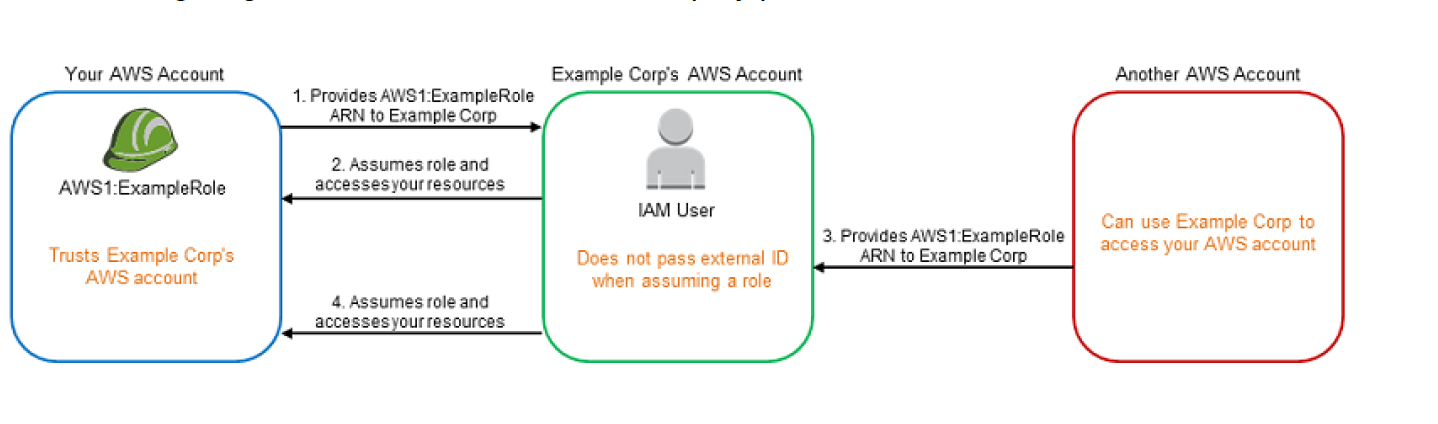
Example Corp’s AWS Account provides the services (access, analyze and process data and provide back reports) to multiple different AWS accounts.
Preferred mechanism is to have each AWS account customer define a Role that Example Corp’s AWS Account users can assume and act upon.
You provide Example Corp’s AWS Account access to your AWS account through Role and providing Role ARN.
Example Corp when working on your account assumes the IAM role and provides the ARN with the request.
As Example Corp is already trusted by your account it will receive the temporary security credentials and gain access to your resources.
If another AWS account is able to know or guess your ARN (Role with Account ID), it can provide the same to Example Corp.
Example Corp’s would use the ARN (belonging to your AWS account) to process the data but would provide the same data to the other AWS account.
This form of privilege escalation is known as the confused deputy problem
Address Confused Deputy Problem using External ID
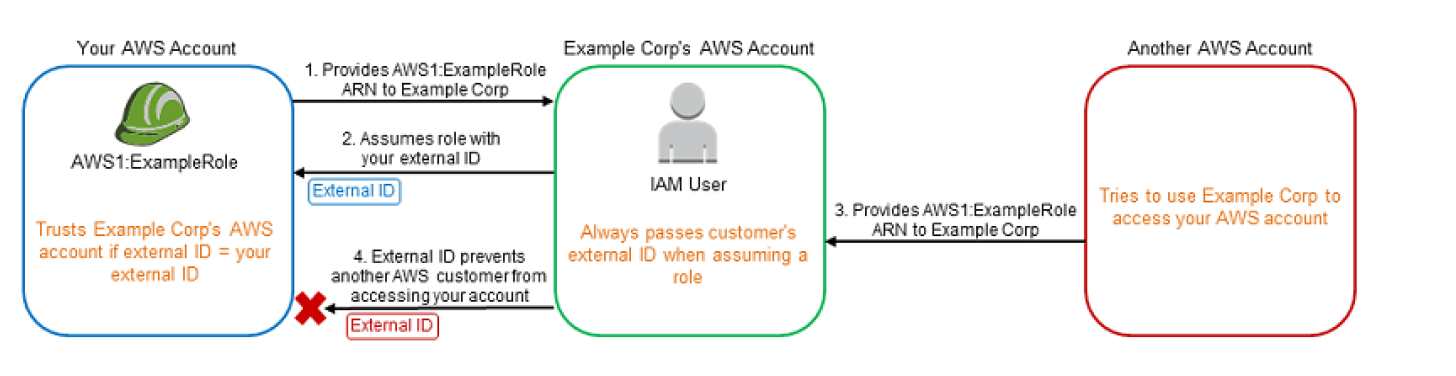
Using External ID, Example Corp’s generates a unique External ID for each of its Customers which is known only to them and is kept secret.
Example Corp provides you with an External ID which needs to be added as a condition while defining the trust policy.
You provide Example Corp’s AWS Account access to your AWS account through Role and providing Role ARN.
Example Corp when working on your account uses the IAM role and provides the ARN along with the External ID and as it is already trusted would be able to gain access.
Other AWS accounts registered with Example Corp would have a Unique External ID assigned to them.
If the Other AWS account is able to know or guess your ARN (Role with Account ID), it can provide the same to Example Corp
Example Corp’s would request access to your Account using the ARN (belonging to your AWS account) but with the External ID belonging to Other AWS account as the request was made on its behalf.
As the External ID provided by Example Corp does not match the condition defined in the Role trust policy, the authentication would fail and hence denied access.
Additional Confused Deputy Protections
aws:SourceArn and aws:SourceAccount condition keys – Can be used in trust policies to restrict which specific services or accounts can assume a role, preventing confused deputy attacks from AWS services.
Source Identity – Setting source identity when assuming roles helps trace the original identity through role chaining, preventing lateral movement attacks.
aws:SourceOrgID and aws:SourceOrgPaths – Condition keys to restrict access to principals from within your AWS Organization.
IAM Access Analyzer – Unused Access
IAM Access Analyzer continuously monitors roles and users to identify unused access, including:
Unused IAM roles (roles not assumed within a specified period)
Unused permissions on active roles (services/actions granted but never used)
Unused access keys and passwords for IAM users
Provides a centralized dashboard for organization-wide unused access findings.
Guided Revocation (June 2024) – Provides actionable guidance to safely revoke unused permissions, including quick links to delete unused roles.
Customizable Scope (January 2025) – Allows excluding specific accounts, roles, or users from analysis using account IDs or tags.
Security Hub Integration (May 2026) – AWS Security Hub now detects unused IAM permissions, roles, and credentials across your organization.
Best Practice: Regularly review IAM Access Analyzer findings to implement least-privilege access and remove unused roles.
AWS IAM Identity Center (previously known as AWS Single Sign-On/SSO) is the recommended service for managing workforce access to multiple AWS accounts and applications.
Provides centralized, federated access using your existing identity provider (Okta, Microsoft Entra ID, Ping Identity, CyberArk, JumpCloud).
Uses IAM Roles under the hood – creates temporary role sessions for each account/application access.
Key features:
Single sign-on access to all assigned AWS accounts
Permission sets that map to IAM roles in target accounts
Multi-Region replication of workforce identities and permission sets (2025)
Session tags support for context-aware access control
Eliminates the need to manage static credentials and provides automatic token refresh.
IAM Role Quotas (Updated May 2026)
AWS IAM increased maximum quotas in May 2026:
Roles per account: Default 1,000, maximum increased from 5,000 to 10,000
OpenID Connect providers per account: increased from 100 to 700
Role trust policy, instance profiles, and managed policies quotas also increased
An instance profile can contain only one IAM role.
Maximum session duration for a role: configurable from 1 hour to 12 hours.
Maximum of 25 managed policies can be attached to a role.
AWS Certification Exam Practice Questions
Questions are collected from Internet and the answers are marked as per my knowledge and understanding (which might differ with yours).
AWS services are updated everyday and both the answers and questions might be outdated soon, so research accordingly.
AWS exam questions are not updated to keep up the pace with AWS updates, so even if the underlying feature has changed the question might not be updated
Open to further feedback, discussion and correction.
A company is building software on AWS that requires access to various AWS services. Which configuration should be used to ensure that AWS credentials (i.e., Access Key ID/Secret Access Key combination) are not compromised?
Enable Multi-Factor Authentication for your AWS root account.
Assign an IAM role to the Amazon EC2 instance.
Store the AWS Access Key ID/Secret Access Key combination in software comments.
Assign an IAM user to the Amazon EC2 Instance.
A company is preparing to give AWS Management Console access to developers. Company policy mandates identity federation and role-based access control. Roles are currently assigned using groups in the corporate Active Directory. What combination of the following will give developers access to the AWS console? (Select 2) Choose 2 answers
AWS Directory Service AD Connector
AWS Directory Service Simple AD
AWS Identity and Access Management groups
AWS identity and Access Management roles
AWS identity and Access Management users
A customer needs corporate IT governance and cost oversight of all AWS resources consumed by its divisions. The divisions want to maintain administrative control of the discrete AWS resources they consume and keep those resources separate from the resources of other divisions. Which of the following options, when used together will support the autonomy/control of divisions while enabling corporate IT to maintain governance and cost oversight? Choose 2 answers
Use AWS Consolidated Billing and disable AWS root account access for the child accounts.
Enable IAM cross-account access for all corporate IT administrators in each child account. (Provides IT governance)
Create separate VPCs for each division within the corporate IT AWS account.
Use AWS Consolidated Billing to link the divisions’ accounts to a parent corporate account. (Will provide cost oversight)
Write all child AWS CloudTrail and Amazon CloudWatch logs to each child account’s Amazon S3 ‘Log’ bucket.
Which of the following items are required to allow an application deployed on an EC2 instance to write data to a DynamoDB table? Assume that no security keys are allowed to be stored on the EC2 instance. (Choose 2 answers)
Create an IAM Role that allows write access to the DynamoDB table
Add an IAM Role to a running EC2 instance. (With latest enhancement from AWS, IAM role can be assigned to a running EC2 instance)
Create an IAM User that allows write access to the DynamoDB table.
Add an IAM User to a running EC2 instance.
Launch an EC2 Instance with the IAM Role included in the launch configuration (This was the correct answer before, as AWS did not allow IAM role to be added to an existing instance)
You are looking to migrate your Development (Dev) and Test environments to AWS. You have decided to use separate AWS accounts to host each environment. You plan to link each accounts bill to a Master AWS account using Consolidated Billing. To make sure you Keep within budget you would like to implement a way for administrators in the Master account to have access to stop, delete and/or terminate resources in both the Dev and Test accounts. Identify which option will allow you to achieve this goal. [PROFESSIONAL]
Create IAM users in the Master account with full Admin permissions. Create cross-account roles in the Dev and Test accounts that grant the Master account access to the resources in the account by inheriting permissions from the Master account.
Create IAM users and a cross-account role in the Master account that grants full Admin permissions to the Dev and Test accounts.
Create IAM users in the Master account Create cross-account roles in the Dev and Test accounts that have full Admin permissions and grant the Master account access
Link the accounts using Consolidated Billing. This will give IAM users in the Master account access to resources in the Dev and Test accounts
You have an application running on an EC2 Instance which will allow users to download flies from a private S3 bucket using a pre-assigned URL. Before generating the URL the application should verify the existence of the file in S3. How should the application use AWS credentials to access the S3 bucket securely? [PROFESSIONAL]
Use the AWS account access Keys the application retrieves the credentials from the source code of the application.
Create a IAM user for the application with permissions that allow list access to the S3 bucket launch the instance as the IAM user and retrieve the IAM user’s credentials from the EC2 instance user data.
Create an IAM role for EC2 that allows list access to objects in the S3 bucket. Launch the instance with the role, and retrieve the role’s credentials from the EC2 Instance metadata
Create an IAM user for the application with permissions that allow list access to the S3 bucket. The application retrieves the IAM user credentials from a temporary directory with permissions that allow read access only to the application user.
An administrator is using Amazon CloudFormation to deploy a three tier web application that consists of a web tier and application tier that will utilize Amazon DynamoDB for storage when creating the CloudFormation template which of the following would allow the application instance access to the DynamoDB tables without exposing API credentials? [PROFESSIONAL]
Create an Identity and Access Management Role that has the required permissions to read and write from the required DynamoDB table and associate the Role to the application instances by referencing an instance profile.
Use the Parameter section in the Cloud Formation template to nave the user input Access and Secret Keys from an already created IAM user that has me permissions required to read and write from the required DynamoDB table.
Create an Identity and Access Management Role that has the required permissions to read and write from the required DynamoDB table and reference the Role in the instance profile property of the application instance.
Create an identity and Access Management user in the CloudFormation template that has permissions to read and write from the required DynamoDB table, use the GetAtt function to retrieve the Access and secret keys and pass them to the application instance through user-data.
An enterprise wants to use a third-party SaaS application. The SaaS application needs to have access to issue several API commands to discover Amazon EC2 resources running within the enterprise’s account. The enterprise has internal security policies that require any outside access to their environment must conform to the principles of least privilege and there must be controls in place to ensure that the credentials used by the SaaS vendor cannot be used by any other third party. Which of the following would meet all of these conditions? [PROFESSIONAL]
From the AWS Management Console, navigate to the Security Credentials page and retrieve the access and secret key for your account.
Create an IAM user within the enterprise account assign a user policy to the IAM user that allows only the actions required by the SaaS application create a new access and secret key for the user and provide these credentials to the SaaS provider.
Create an IAM role for cross-account access allows the SaaS provider’s account to assume the role and assign it a policy that allows only the actions required by the SaaS application.
Create an IAM role for EC2 instances, assign it a policy mat allows only the actions required tor the SaaS application to work, provide the role ARM to the SaaS provider to use when launching their application instances.
A user has created an application which will be hosted on EC2. The application makes calls to DynamoDB to fetch certain data. The application is using the DynamoDB SDK to connect with from the EC2 instance. Which of the below mentioned statements is true with respect to the best practice for security in this scenario?
The user should attach an IAM role with DynamoDB access to the EC2 instance
The user should create an IAM user with DynamoDB access and use its credentials within the application to connect with DynamoDB
The user should create an IAM role, which has EC2 access so that it will allow deploying the application
The user should create an IAM user with DynamoDB and EC2 access. Attach the user with the application so that it does not use the root account credentials
A customer is in the process of deploying multiple applications to AWS that are owned and operated by different development teams. Each development team maintains the authorization of its users independently from other teams. The customer’s information security team would like to be able to delegate user authorization to the individual development teams but independently apply restrictions to the users permissions based on factors such as the users device and location. For example, the information security team would like to grant read-only permissions to a user who is defined by the development team as read/write whenever the user is authenticating from outside the corporate network. What steps can the information security team take to implement this capability? [PROFESSIONAL]
Operate an authentication service that generates AWS STS tokens with IAM policies from application-defined IAM roles. (nouser separation, will just help generate temporary tokens)
Add additional IAM policies to the application IAM roles that deny user privileges based on information security policy. (Different policy with deny rules based on location, device and more restrictive wins)
Configure IAM policies that restrict modification of the application IAM roles only to the information security team. (Authorization should still be in developers control)
Enable federation with the internal LDAP directory and grant the application teams permissions to modify users.
You are creating an Auto Scaling group whose Instances need to insert a custom metric into CloudWatch. Which method would be the best way to authenticate your CloudWatch PUT request?
Create an IAM role with the Put MetricData permission and modify the Auto Scaling launch configuration to launch instances in that role
Create an IAM user with the PutMetricData permission and modify the Auto Scaling launch configuration to inject the users credentials into the instance User Data
Modify the appropriate Cloud Watch metric policies to allow the Put MetricData permission to instances from the Auto Scaling group
Create an IAM user with the PutMetricData permission and put the credentials in a private repository and have applications on the server pull the credentials as needed
A company has on-premises applications that need to access AWS S3 and DynamoDB. The company does not want to manage long-term AWS access keys. Which solution meets these requirements with the LEAST operational overhead?
Create an IAM user with programmatic access and rotate the access keys regularly.
Use IAM Roles Anywhere with X.509 certificates from the company’s existing PKI to obtain temporary credentials.
Set up a VPN connection and use EC2 instance roles to proxy the requests.
Store credentials in AWS Secrets Manager and have the application retrieve them.
An organization uses AWS Organizations to manage 50 AWS accounts. The security team wants to ensure that S3 buckets in member accounts can only be accessed by principals within the organization, regardless of the bucket policies set by individual account owners. Which solution achieves this with the LEAST effort?
Attach SCPs to all OUs that deny S3 actions from external principals.
Attach Resource Control Policies (RCPs) at the organization root that restrict S3 resource access to organization principals only.
Use IAM Access Analyzer to identify and manually fix external access in each account.
Create a Lambda function to remediate bucket policies across all accounts.
A company wants to perform privileged recovery tasks on a member account without enabling root user credentials for that account. Which approach should they use?
Enable root user access for the member account temporarily.
Create an IAM user with AdministratorAccess in the member account.
Use STS AssumeRoot from the Organizations management account with a task-scoped policy.
Use cross-account role assumption with PowerUserAccess.
Metrics in different namespaces are isolated from each other, so that metrics from different applications are not mistakenly aggregated into the same statistics.
AWS namespaces all follow the convention AWS/<service>, for e.g. AWS/EC2 and AWS/ELB
Namespace names must be fewer than 256 characters in length.
There is no default namespace. Each data element put into CloudWatch must specify a namespace.
Metrics
Metric is the fundamental concept in CloudWatch.
Uniquely defined by a name, a namespace, and one or more dimensions.
Represents a time-ordered set of data points published to CloudWatch.
Each data point has a time stamp, and (optionally) a unit of measure.
Data points can be either custom metrics or metrics from other services in AWS.
Statistics can be retrieved about those data points as an ordered set of time-series data that occur within a specified time window.
When the statistics are requested, the returned data stream is identified by namespace, metric name, dimension, and (optionally) the unit.
Metrics exist only in the region in which they are created.
CloudWatch stores the metric data for two weeks
Metrics cannot be deleted, but they automatically expire after 15 months, if no new data is published to them.
Metric retention is as follows
Data points with a period of less than 60 seconds are available for 3 hours. These data points are high-resolution custom metrics.
Data points with a 60 secs (1 min) period are available for 15 days
Data points with a 300 secs (5 min) period are available for 63 days
Data points with a 3600 secs (1 hour) period are available for 455 days (15 months)
Dimensions
A dimension is a name/value pair that uniquely identifies a metric.
Every metric has specific characteristics that describe it, and you can think of dimensions as categories for those characteristics.
Dimensions help design a structure for the statistics plan.
Dimensions are part of the unique identifier for a metric, whenever a unique name pair is added to one of the metrics, a new metric is created.
Dimensions can be used to filter result sets that CloudWatch query returns.
A metric can be assigned up to ten dimensions to a metric.
Time Stamps
Each metric data point must be marked with a time stamp to identify the data point on a time series.
Timestamp can be up to two weeks in the past and up to two hours into the future.
If no timestamp is provided, a time stamp based on the time the data element was received is created.
All times reflect the UTC time zone when statistics are retrieved
Resolution
Each metric is one of the following:
Standard resolution, with data having a one-minute granularity
High resolution, with data at a granularity of one second
Units
Units represent the statistic’s unit of measure e.g. count, bytes, %, etc
Statistics
Statistics are metric data aggregations over specified periods of time
Aggregations are made using the namespace, metric name, dimensions, and the data point unit of measure, within the specified time period
Periods
Period is the length of time associated with a specific statistic.
Each statistic represents an aggregation of the metrics data collected for a specified period of time.
Although periods are expressed in seconds, the minimum granularity for a period is one minute.
Aggregation
CloudWatch aggregates statistics according to the period length specified in calls to GetMetricStatistics.
Multiple data points can be published with the same or similar time stamps. CloudWatch aggregates them by period length when the statistics about those data points are requested.
Aggregated statistics are only available when using detailed monitoring.
Instances that use basic monitoring are not included in the aggregates
CloudWatch does not aggregate data across regions.
Alarms
Alarms can automatically initiate actions on behalf of the user, based on specified parameters.
Alarm watches a single metric over a specified time period, and performs one or more actions based on the value of the metric relative to a given threshold over a number of time periods.
Alarms invoke actions for sustained state changes only i.e. the state must have changed and been maintained for a specified number of periods.
Action can be a
SNS notification
Auto Scaling policies
EC2 action – stop or terminate EC2 instances
Lambda function invocation (same or cross-account)
Systems Manager OpsItems or Incident Manager incidents
After an alarm invokes an action due to a change in state, its subsequent behavior depends on the type of action associated with the alarm.
For Auto Scaling policy notifications, the alarm continues to invoke the action for every period that the alarm remains in the new state.
For SNS notifications, no additional actions are invoked.
An alarm has three possible states:
OK—The metric is within the defined threshold
ALARM—The metric is outside of the defined threshold
INSUFFICIENT_DATA—Alarm has just started, the metric is not available, or not enough data is available for the metric to determine the alarm state
Alarms exist only in the region in which they are created.
Alarm actions must reside in the same region as the alarm
Alarm history is available for the last 14 days.
Alarm can be tested by setting it to any state using the SetAlarmState API (mon-set-alarm-state command). This temporary state change lasts only until the next alarm comparison occurs.
Alarms can be disabled and enabled using the DisableAlarmActions and EnableAlarmActions APIs (mon-disable-alarm-actions and mon-enable-alarm-actions commands).
CloudWatch now allows alarming on data up to 7 days old (increased from previous 24-hour limit), with a period of at least 3,600 seconds (1 hour).
Composite Alarms
Composite alarms determine their state by monitoring the states of other alarms.
Rules are defined to combine the status of monitored alarms using Boolean logic (AND, OR, NOT).
Composite alarms help reduce alarm noise by taking actions only at an aggregated level.
A composite alarm’s rule expression can include as many as 100 underlying alarms.
Any single alarm can be included in the rule expressions of as many as 150 composite alarms.
Composite alarms can:
Send Amazon SNS notifications when they change state
Create Systems Manager OpsItems or incidents when they go into ALARM state
Start CloudWatch Investigations for root cause analysis
Composite alarms cannot perform EC2 actions or Auto Scaling actions.
Anomaly Detection
CloudWatch anomaly detection analyzes past metric data and creates a model of expected values.
Alarms can be created based on anomaly detection to alert when metric values are outside the expected band.
The model adjusts for time-of-day patterns, day-of-week patterns, and trends over time.
Useful for metrics without a fixed threshold, such as CPU utilization with seasonal patterns.
Regions
CloudWatch does not aggregate data across regions. Therefore, metrics are completely separate between regions.
CloudWatch Metrics Insights
CloudWatch Metrics Insights is a high-performance SQL-based query engine to query metrics at scale.
Enables identification of trends and patterns across all CloudWatch metrics in real time.
Provides access to up to two weeks of historical data for trend analysis.
Supports functions including AVG, COUNT, MAX, MIN, and SUM.
Can be combined with CloudWatch Alarms to set up dynamic alarms that consistently monitor fast-moving environments.
Supports natural language query generation powered by generative AI – users can ask questions in plain English to generate metric queries.
Custom Metrics
CloudWatch allows publishing custom metrics with put-metric-data CLI command (or its Query API equivalent PutMetricData)
CloudWatch creates a new metric if put-metric-data is called with a new metric name, else it associates the data with the specified existing metric
put-metric-data command can only publish one data point per call
CloudWatch stores data about a metric as a series of data points and each data point has an associated time stamp
Creating a new metric using the put-metric-data command, can take up to two minutes before statistics can be retrieved on the new metric using the get-metric-statistics command and can take up to fifteen minutes before the new metric appears in the list of metrics retrieved using the list-metrics command.
CloudWatch allows publishing
Single data point
Data points can be published with time stamps as granular as one-thousandth of a second, CloudWatch aggregates the data to a minimum granularity of one minute
CloudWatch records the average (sum of all items divided by number of items) of the values received for every 1-minute period, as well as number of samples, maximum value, and minimum value for the same time period
CloudWatch uses one-minute boundaries when aggregating data points
Aggregated set of data points called a statistics set
Data can also be aggregated before being published to CloudWatch
Aggregating data minimizes the number of calls reducing it to a single call per minute with the statistic set of data
Statistics include Sum, Average, Minimum, Maximum, SampleCount
If the application produces data that is more sporadic and have periods that have no associated data, either a the value zero (0) or no value at all can be published
However, it can be helpful to publish zero instead of no value
to monitor the health of your application for e.g. alarm can be configured to notify if no metrics published every 5 minutes
to track the total number of data points
to have statistics such as minimum and average to include data points with the value 0.
CloudWatch Dashboards
CloudWatch dashboards are customizable home pages in the CloudWatch console used to monitor the resources in a single view, even those resources that are spread across different Regions.
Dashboards can be used to create customized views of the metrics and alarms for the AWS resources.
Dashboards can help to create
A single view for selected metrics and alarms to help assess the health of the resources and applications across one or more Regions.
An operational playbook that provides guidance for team members during operational events about how to respond to specific incidents.
A common view of critical resource and application measurements that can be shared by team members for faster communication flow during operational events.
CloudWatch Cross-Account Observability
CloudWatch cross-account observability helps monitor and troubleshoot applications that span multiple accounts within a Region.
Uses Observability Access Manager (OAM) to create and manage links between source and monitoring accounts.
Cross-account observability includes monitoring and source accounts
A monitoring account is a central AWS account that can view and interact with observability data generated from source accounts.
A source account is an individual AWS account that generates observability data for the resources that reside in it.
Source accounts share their observability data with the monitoring account which can include the following types of telemetry:
Metrics in CloudWatch
Log groups in CloudWatch Logs
Traces in AWS X-Ray
Application Signals services and SLOs
Available in all commercial AWS Regions and AWS GovCloud (US) Regions at no extra cost for logs and metrics.
Cross-Account and Cross-Region Log Centralization (2025) allows copying log data from multiple accounts and regions into a single destination account for consolidated analysis.
AWS Console Mobile App (supports interactive alarm graphs, AI log summaries, and natural language log search)
CloudWatch Key Updates (2024-2026)
Unified Data Management (Dec 2025) – CloudWatch provides unified management and analytics for operational, security, and compliance data across AWS and third-party sources.
Organization-wide EC2 Detailed Monitoring (Mar 2026) – Enablement rules automatically enable detailed monitoring for existing and new EC2 instances matching the rule scope.
Natural Language Query Generation (GA June 2024) – Powered by generative AI for both Logs Insights and Metrics Insights, supporting CloudWatch Logs Insights QL, OpenSearch PPL, and OpenSearch SQL.
Integrated Analytics with OpenSearch (Dec 2024) – Supports SQL and PPL query languages for log analytics with JOIN, sub-queries, and SQL functions.
Cross-Region Telemetry Auditing (Apr 2026) – Enable telemetry auditing for account/organization across all regions with enablement rules.
Lambda Tiered Pricing for Logs (May 2025) – Reduces Lambda CloudWatch logging costs with tiered pricing and additional logging destinations.
AWS Certification Exam Practice Questions
Questions are collected from Internet and the answers are marked as per my knowledge and understanding (which might differ with yours).
AWS services are updated everyday and both the answers and questions might be outdated soon, so research accordingly.
AWS exam questions are not updated to keep up the pace with AWS updates, so even if the underlying feature has changed the question might not be updated
Open to further feedback, discussion and correction.
Questions are collected from Internet and the answers are marked as per my knowledge and understanding (which might differ with yours).
AWS services are updated everyday and both the answers and questions might be outdated soon, so research accordingly.
AWS exam questions are not updated to keep up the pace with AWS updates, so even if the underlying feature has changed the question might not be updated
Open to further feedback, discussion and correction.
A company needs to monitor the read and write IOPs metrics for their AWS MySQL RDS instance and send real-time alerts to their operations team. Which AWS services can accomplish this? Choose 2 answers
Amazon Simple Email Service (Cannot be integrated with CloudWatch directly)
Amazon CloudWatch
Amazon Simple Queue Service
Amazon Route 53
Amazon Simple Notification Service
A customer needs to capture all client connection information from their load balancer every five minutes. The company wants to use this data for analyzing traffic patterns and troubleshooting their applications. Which of the following options meets the customer requirements?
Enable AWS CloudTrail for the load balancer.
Enable access logs on the load balancer. (Refer link)
Install the Amazon CloudWatch Logs agent on the load balancer.
Enable Amazon CloudWatch metrics on the load balancer (does not provide Client connection information)
A user is running a batch process on EBS backed EC2 instances. The batch process starts a few instances to process Hadoop Map reduce jobs, which can run between 50 – 600 minutes or sometimes for more time. The user wants to configure that the instance gets terminated only when the process is completed. How can the user configure this with CloudWatch?
Setup the CloudWatch action to terminate the instance when the CPU utilization is less than 5%
Setup the CloudWatch with Auto Scaling to terminate all the instances
Setup a job which terminates all instances after 600 minutes
It is not possible to terminate instances automatically
A user has two EC2 instances running in two separate regions. The user is running an internal memory management tool, which captures the data and sends it to CloudWatch in US East, using a CLI with the same namespace and metric. Which of the below mentioned options is true with respect to the above statement?
The setup will not work as CloudWatch cannot receive data across regions
CloudWatch will receive and aggregate the data based on the namespace and metric
CloudWatch will give an error since the data will conflict due to two sources
CloudWatch will take the data of the server, which sends the data first
A user is sending the data to CloudWatch using the CloudWatch API. The user is sending data 90 minutes in the future. What will CloudWatch do in this case?
CloudWatch will accept the data
It is not possible to send data of the future
It is not possible to send the data manually to CloudWatch
The user cannot send data for more than 60 minutes in the future
A user is having data generated randomly based on a certain event. The user wants to upload that data to CloudWatch. It may happen that event may not have data generated for some period due to randomness. Which of the below mentioned options is a recommended option for this case?
For the period when there is no data, the user should not send the data at all
For the period when there is no data the user should send a blank value
For the period when there is no data the user should send the value as 0 (Refer User Guide)
The user must upload the data to CloudWatch as having no data for some period will cause an error at CloudWatch monitoring
A user has a weighing plant. The user measures the weight of some goods every 5 minutes and sends data to AWS CloudWatch for monitoring and tracking. Which of the below mentioned parameters is mandatory for the user to include in the request list?
A user has a refrigerator plant. The user is measuring the temperature of the plant every 15 minutes. If the user wants to send the data to CloudWatch to view the data visually, which of the below mentioned statements is true with respect to the information given above?
The user needs to use AWS CLI or API to upload the data
The user can use the AWS Import Export facility to import data to CloudWatch
The user will upload data from the AWS console
The user cannot upload data to CloudWatch since it is not an AWS service metric
A user has launched an EC2 instance. The user is planning to setup the CloudWatch alarm. Which of the below mentioned actions is not supported by the CloudWatch alarm?
Notify the Auto Scaling launch config to scale up
Send an SMS using SNS
Notify the Auto Scaling group to scale down
Stop the EC2 instance
A user has a refrigerator plant. The user is measuring the temperature of the plant every 15 minutes. If the user wants to send the data to CloudWatch to view the data visually, which of the below mentioned statements is true with respect to the information given above?
The user needs to use AWS CLI or API to upload the data
The user can use the AWS Import Export facility to import data to CloudWatch
The user will upload data from the AWS console
The user cannot upload data to CloudWatch since it is not an AWS service metric
A user is trying to aggregate all the CloudWatch metric data of the last 1 week. Which of the below mentioned statistics is not available for the user as a part of data aggregation?
Aggregate
Sum
Sample data
Average
A user has setup a CloudWatch alarm on an EC2 action when the CPU utilization is above 75%. The alarm sends a notification to SNS on the alarm state. If the user wants to simulate the alarm action how can he achieve this?
Run activities on the CPU such that its utilization reaches above 75%
From the AWS console change the state to ‘Alarm’
The user can set the alarm state to ‘Alarm’ using CLI
Run the SNS action manually
A user is publishing custom metrics to CloudWatch. Which of the below mentioned statements will help the user understand the functionality better?
The user can use the CloudWatch Import tool
The user should be able to see the data in the console after around 15 minutes
If the user is uploading the custom data, the user must supply the namespace, timezone, and metric name as part of the command
The user can view as well as upload data using the console, CLI and APIs
An application that you are managing has EC2 instances and DynamoDB tables deployed to several AWS Regions. In order to monitor the performance of the application globally, you would like to see two graphs 1) Avg CPU Utilization across all EC2 instances and 2) Number of Throttled Requests for all DynamoDB tables. How can you accomplish this? [PROFESSIONAL]
Tag your resources with the application name, and select the tag name as the dimension in the CloudWatch Management console to view the respective graphs (CloudWatch metrics are regional)
Use the CloudWatch CLI tools to pull the respective metrics from each regional endpoint. Aggregate the data offline & store it for graphing in CloudWatch. (Note: CloudWatch cross-account cross-region dashboards and log centralization are now available but this question tests the concept that metrics are regional)
Add SNMP traps to each instance and DynamoDB table. Leverage a central monitoring server to capture data from each instance and table. Put the aggregate data into CloudWatch for graphing (Can’t add SNMP traps to DynamoDB as it is a managed service)
Add a CloudWatch agent to each instance and attach one to each DynamoDB table. When configuring the agent set the appropriate application name & view the graphs in CloudWatch. (Can’t add agents to DynamoDB as it is a managed service)
You have set up Individual AWS accounts for each project. You have been asked to make sure your AWS Infrastructure costs do not exceed the budget set per project for each month. Which of the following approaches can help ensure that you do not exceed the budget each month? [PROFESSIONAL]
Consolidate your accounts so you have a single bill for all accounts and projects (Consolidation will not help limit per account)
Set up auto scaling with CloudWatch alarms using SNS to notify you when you are running too many Instances in a given account (many instances do not directly map to cost and would not give exact cost)
Set up CloudWatch billing alerts for all AWS resources used by each project, with a notification occurring when the amount for each resource tagged to a particular project matches the budget allocated to the project. (as each project already has a account, no need for resource tagging)
Set up CloudWatch billing alerts for all AWS resources used by each account, with email notifications when it hits 50%. 80% and 90% of its budgeted monthly spend
You meet once per month with your operations team to review the past month’s data. During the meeting, you realize that 3 weeks ago, your monitoring system which pings over HTTP from outside AWS recorded a large spike in latency on your 3-tier web service API. You use DynamoDB for the database layer, ELB, EBS, and EC2 for the business logic tier, and SQS, ELB, and EC2 for the presentation layer. Which of the following techniques will NOT help you figure out what happened?
Check your CloudTrail log history around the spike’s time for any API calls that caused slowness.
Review CloudWatch Metrics graphs to determine which component(s) slowed the system down. (Note: CloudWatch metric data is retained for 15 months. Data at 1-min resolution is available for 15 days, 5-min for 63 days, and 1-hour for 455 days. The 3-week old data would still be available at 5-min or 1-hour resolution.)
Review your ELB access logs in S3 to see if any ELBs in your system saw the latency.
Analyze your logs to detect bursts in traffic at that time.
You have a high security requirement for your AWS accounts. What is the most rapid and sophisticated setup you can use to react to AWS API calls to your account?
Subscription to AWS Config via an SNS Topic. Use a Lambda Function to perform in-flight analysis and reactivity to changes as they occur.
Global AWS CloudTrail setup delivering to S3 with an SNS subscription to the deliver notifications, pushing into a Lambda, which inserts records into an ELK stack for analysis.
Use a CloudWatch Rule ScheduleExpression to periodically analyze IAM credential logs. Push the deltas for events into an ELK stack and perform ad-hoc analysis there.
Amazon EventBridge Rules (formerly CloudWatch Events Rules), which trigger based on all AWS API calls, submitting all events to an AWS Kinesis Stream for arbitrary downstream analysis. (EventBridge (evolution of CloudWatch Events) allows subscription to AWS API calls, and direction of these events into Kinesis Streams. This allows a unified, near real-time stream for all API calls. Referlink)
To monitor API calls against our AWS account by different users and entities, we can use ____ to create a history of calls in bulk for later review, and use ____ for reacting to AWS API calls in real-time.
AWS Config; AWS Inspector
AWS CloudTrail; AWS Config
AWS CloudTrail; Amazon EventBridge (formerly CloudWatch Events) (CloudTrail is a batch API call collection service, EventBridge enables real-time monitoring of calls through the Rules object interface. Referlink)
AWS Config; AWS Lambda
You are hired as the new head of operations for a SaaS company. Your CTO has asked you to make debugging any part of your entire operation simpler and as fast as possible. She complains that she has no idea what is going on in the complex, service-oriented architecture, because the developers just log to disk, and it’s very hard to find errors in logs on so many services. How can you best meet this requirement and satisfy your CTO? [PROFESSIONAL]
Copy all log files into AWS S3 using a cron job on each instance. Use an S3 Notification Configuration on the <code>PutBucket</code> event and publish events to AWS Lambda. Use the Lambda to analyze logs as soon as they come in and flag issues. (is not fast in search and introduces delay)
Begin using CloudWatch Logs on every service. Stream all Log Groups into S3 objects. Use AWS EMR cluster jobs to perform adhoc MapReduce analysis and write new queries when needed. (is not fast in search and introduces delay)
Copy all log files into AWS S3 using a cron job on each instance. Use an S3 Notification Configuration on the <code>PutBucket</code> event and publish events to AWS Kinesis. Use Apache Spark on AWS EMR to perform at-scale stream processing queries on the log chunks and flag issues. (is not fast in search and introduces delay)
Begin using CloudWatch Logs on every service. Stream all Log Groups into an Amazon OpenSearch Service Domain running Kibana and perform log analysis on a search cluster. (OpenSearch (formerly Elasticsearch) with Kibana/OpenSearch Dashboards is designed for real-time, ad-hoc log analysis and aggregation. Note: CloudWatch now also offers integrated analytics with OpenSearch Service directly.)
Your EC2-Based Multi-tier application includes a monitoring instance that periodically makes application-level read only requests of various application components and if any of those fail more than three times 30 seconds calls CloudWatch to fire an alarm, and the alarm notifies your operations team by email and SMS of a possible application health problem. However, you also need to watch the watcher -the monitoring instance itself – and be notified if it becomes unhealthy. Which of the following is a simple way to achieve that goal? [PROFESSIONAL]
Run another monitoring instance that pings the monitoring instance and fires a CloudWatch alarm that notifies your operations team should the primary monitoring instance become unhealthy.
Set a CloudWatch alarm based on EC2 system and instance status checks and have the alarm notify your operations team of any detected problem with the monitoring instance.
Set a CloudWatch alarm based on the CPU utilization of the monitoring instance and have the alarm notify your operations team if the CPU usage exceeds 50% for more than one minute: then have your monitoring application go into a CPU-bound loop should it detect any application problems.
Have the monitoring instances post messages to an SQS queue and then dequeue those messages on another instance should the queue cease to have new messages, the second instance should first terminate the original monitoring instance start another backup monitoring instance and assume the role of the previous monitoring instance and beginning adding messages to the SQS queue.
A company wants to reduce alarm noise in their monitoring system. They have multiple alarms for different components of a web application. Which CloudWatch feature should they use to consolidate multiple alarms into a single notification?
CloudWatch Metrics Insights
CloudWatch Composite Alarms (Composite alarms combine multiple alarm states using Boolean logic to reduce noise and send notifications only at an aggregated level)
CloudWatch Anomaly Detection
CloudWatch Dashboards
A DevOps team wants to automatically identify root causes when CloudWatch alarms fire, correlating metrics, logs, and deployment events without manual investigation. Which CloudWatch feature should they use?
CloudWatch Logs Insights
CloudWatch Contributor Insights
CloudWatch Investigations (Powered by Amazon Q Developer, Investigations uses AI to analyze multiple telemetry sources and suggest root causes and remediation steps)
CloudWatch Application Signals
An organization wants to send application metrics to CloudWatch using open standards without vendor-specific conversion logic. They need support for high-cardinality metrics with many labels. Which approach should they use?
Use CloudWatch PutMetricData API with custom metrics
Use CloudWatch Metric Streams to export to a third-party tool
Send metrics directly using the OpenTelemetry Protocol (OTLP) to CloudWatch’s native OTel endpoint (CloudWatch supports native OTLP metrics ingestion with up to 150 labels per metric, queryable via PromQL)
Use the CloudWatch Agent with StatsD protocol
A company wants to ingest, transform, and route log data from multiple sources to CloudWatch without managing any infrastructure. They need to parse complex log formats and enrich the data during ingestion. Which service should they use?
CloudWatch Logs Subscription Filters
Amazon Kinesis Data Firehose
CloudWatch Pipelines (CloudWatch Pipelines is a fully managed service that ingests, transforms, and routes log data with support for parsing, conditional processing, and AI-assisted processor configuration)
CloudWatch Log Transformers only
A team needs to monitor their application’s availability, latency, and error rate with pre-built dashboards and set up Service Level Objectives (SLOs) without building custom monitoring. Which CloudWatch capability provides this?
CloudWatch Synthetics
CloudWatch Container Insights
CloudWatch Internet Monitor
CloudWatch Application Signals (Application Signals provides automatic instrumentation, pre-built APM dashboards with golden metrics, and SLO tracking without custom setup)
Amazon CloudWatch
CloudWatch monitors AWS resources and applications in real time.
CloudWatch can be used to collect and track metrics, which are the variables to be measured for resources and applications.
CloudWatch is basically a metrics repository where the metrics can be inserted and statistics retrieved based on those metrics.
In addition to monitoring the built-in metrics that come with AWS, custom metrics can also be monitored
CloudWatch provides system-wide visibility into resource utilization, application performance, and operational health.
By default, CloudWatch stores the log data indefinitely, and the retention can be changed for each log group at any time.
CloudWatch alarms can be configured
to send notifications or
to automatically make changes to the resources based on defined rules
CloudWatch dashboards are customizable home pages in the CloudWatch console used to monitor the resources in a single view, even those resources that are spread across different Regions.
CloudWatch Agent helps collect metrics and logs from EC2 instances and on-premises servers and push them to CloudWatch.
CloudWatch now supports native OpenTelemetry (OTel) metrics, enabling metrics to be sent directly using the OpenTelemetry Protocol (OTLP) without custom conversion logic.
CloudWatch supports PromQL (Prometheus Query Language) for querying metrics including OTel-ingested and AWS vended metrics.
CloudWatch Investigations uses AI-powered root cause analysis to help identify anomalies, surface related signals, and suggest remediation steps.
CloudWatch Architecture
CloudWatch collects various metrics from various resources
These metrics, as statistics, are available to the user through Console, CLI
CloudWatch allows the creation of alarms with defined rules
to perform actions to auto-scaling or stop, start, or terminate instances
to send notifications using SNS actions on your behalf
CloudWatch Concepts
Namespaces
CloudWatch namespaces are containers for metrics.
Metrics in different namespaces are isolated from each other, so that metrics from different applications are not mistakenly aggregated into the same statistics.
AWS namespaces all follow the convention AWS/<service>, for e.g. AWS/EC2 and AWS/ELB
Namespace names must be fewer than 256 characters in length.
There is no default namespace. Each data element put into CloudWatch must specify a namespace.
Metrics
Metric is the fundamental concept in CloudWatch.
Uniquely defined by a name, a namespace, and one or more dimensions.
Represents a time-ordered set of data points published to CloudWatch.
Each data point has a time stamp, and (optionally) a unit of measure.
Data points can be either custom metrics or metrics from other services in AWS.
Statistics can be retrieved about those data points as an ordered set of time-series data that occur within a specified time window.
When the statistics are requested, the returned data stream is identified by namespace, metric name, dimension, and (optionally) the unit.
Metrics exist only in the region in which they are created.
CloudWatch stores the metric data for two weeks
Metrics cannot be deleted, but they automatically expire after 15 months, if no new data is published to them.
Metric retention is as follows
Data points with a period of less than 60 seconds are available for 3 hours. These data points are high-resolution custom metrics.
Data points with a 60 secs (1 min) period are available for 15 days
Data points with a 300 secs (5 min) period are available for 63 days
Data points with a 3600 secs (1 hour) period are available for 455 days (15 months)
Dimensions
A dimension is a name/value pair that uniquely identifies a metric.
Every metric has specific characteristics that describe it, and you can think of dimensions as categories for those characteristics.
Dimensions help design a structure for the statistics plan.
Dimensions are part of the unique identifier for a metric, whenever a unique name pair is added to one of the metrics, a new metric is created.
Dimensions can be used to filter result sets that CloudWatch query returns.
A metric can be assigned up to ten dimensions to a metric.
Time Stamps
Each metric data point must be marked with a time stamp to identify the data point on a time series.
Timestamp can be up to two weeks in the past and up to two hours into the future.
If no timestamp is provided, a time stamp based on the time the data element was received is created.
All times reflect the UTC time zone when statistics are retrieved
Resolution
Each metric is one of the following:
Standard resolution, with data having a one-minute granularity
High resolution, with data at a granularity of one second
Units
Units represent the statistic’s unit of measure e.g. count, bytes, %, etc
Statistics
Statistics are metric data aggregations over specified periods of time
Aggregations are made using the namespace, metric name, dimensions, and the data point unit of measure, within the specified time period
Periods
Period is the length of time associated with a specific statistic.
Each statistic represents an aggregation of the metrics data collected for a specified period of time.
Although periods are expressed in seconds, the minimum granularity for a period is one minute.
Aggregation
CloudWatch aggregates statistics according to the period length specified in calls to GetMetricStatistics.
Multiple data points can be published with the same or similar time stamps. CloudWatch aggregates them by period length when the statistics about those data points are requested.
Aggregated statistics are only available when using detailed monitoring.
Instances that use basic monitoring are not included in the aggregates
CloudWatch does not aggregate data across regions.
Alarms
Alarms can automatically initiate actions on behalf of the user, based on specified parameters.
Alarm watches a single metric over a specified time period, and performs one or more actions based on the value of the metric relative to a given threshold over a number of time periods.
Alarms invoke actions for sustained state changes only i.e. the state must have changed and been maintained for a specified number of periods.
Action can be a
SNS notification
Auto Scaling policies
EC2 action – stop or terminate EC2 instances
Lambda function invocation (same or cross-account)
Systems Manager OpsItems or Incident Manager incidents
After an alarm invokes an action due to a change in state, its subsequent behavior depends on the type of action associated with the alarm.
For Auto Scaling policy notifications, the alarm continues to invoke the action for every period that the alarm remains in the new state.
For SNS notifications, no additional actions are invoked.
An alarm has three possible states:
OK—The metric is within the defined threshold
ALARM—The metric is outside of the defined threshold
INSUFFICIENT_DATA—Alarm has just started, the metric is not available, or not enough data is available for the metric to determine the alarm state
Alarms exist only in the region in which they are created.
Alarm actions must reside in the same region as the alarm
Alarm history is available for the last 14 days.
Alarm can be tested by setting it to any state using the SetAlarmState API (mon-set-alarm-state command). This temporary state change lasts only until the next alarm comparison occurs.
Alarms can be disabled and enabled using the DisableAlarmActions and EnableAlarmActions APIs (mon-disable-alarm-actions and mon-enable-alarm-actions commands).
CloudWatch now allows alarming on data up to 7 days old (increased from previous 24-hour limit), with a period of at least 3,600 seconds (1 hour).
Composite Alarms
Composite alarms determine their state by monitoring the states of other alarms.
Rules are defined to combine the status of monitored alarms using Boolean logic (AND, OR, NOT).
Composite alarms help reduce alarm noise by taking actions only at an aggregated level.
A composite alarm’s rule expression can include as many as 100 underlying alarms.
Any single alarm can be included in the rule expressions of as many as 150 composite alarms.
Composite alarms can:
Send Amazon SNS notifications when they change state
Create Systems Manager OpsItems or incidents when they go into ALARM state
Start CloudWatch Investigations for root cause analysis
Composite alarms cannot perform EC2 actions or Auto Scaling actions.
Anomaly Detection
CloudWatch anomaly detection analyzes past metric data and creates a model of expected values.
Alarms can be created based on anomaly detection to alert when metric values are outside the expected band.
The model adjusts for time-of-day patterns, day-of-week patterns, and trends over time.
Useful for metrics without a fixed threshold, such as CPU utilization with seasonal patterns.
Regions
CloudWatch does not aggregate data across regions. Therefore, metrics are completely separate between regions.
CloudWatch Metrics Insights
CloudWatch Metrics Insights is a high-performance SQL-based query engine to query metrics at scale.
Enables identification of trends and patterns across all CloudWatch metrics in real time.
Provides access to up to two weeks of historical data for trend analysis.
Supports functions including AVG, COUNT, MAX, MIN, and SUM.
Can be combined with CloudWatch Alarms to set up dynamic alarms that consistently monitor fast-moving environments.
Supports natural language query generation powered by generative AI – users can ask questions in plain English to generate metric queries.
Custom Metrics
CloudWatch allows publishing custom metrics with put-metric-data CLI command (or its Query API equivalent PutMetricData)
CloudWatch creates a new metric if put-metric-data is called with a new metric name, else it associates the data with the specified existing metric
put-metric-data command can only publish one data point per call
CloudWatch stores data about a metric as a series of data points and each data point has an associated time stamp
Creating a new metric using the put-metric-data command, can take up to two minutes before statistics can be retrieved on the new metric using the get-metric-statistics command and can take up to fifteen minutes before the new metric appears in the list of metrics retrieved using the list-metrics command.
CloudWatch allows publishing
Single data point
Data points can be published with time stamps as granular as one-thousandth of a second, CloudWatch aggregates the data to a minimum granularity of one minute
CloudWatch records the average (sum of all items divided by number of items) of the values received for every 1-minute period, as well as number of samples, maximum value, and minimum value for the same time period
CloudWatch uses one-minute boundaries when aggregating data points
Aggregated set of data points called a statistics set
Data can also be aggregated before being published to CloudWatch
Aggregating data minimizes the number of calls reducing it to a single call per minute with the statistic set of data
Statistics include Sum, Average, Minimum, Maximum, SampleCount
If the application produces data that is more sporadic and have periods that have no associated data, either a the value zero (0) or no value at all can be published
However, it can be helpful to publish zero instead of no value
to monitor the health of your application for e.g. alarm can be configured to notify if no metrics published every 5 minutes
to track the total number of data points
to have statistics such as minimum and average to include data points with the value 0.
CloudWatch Dashboards
CloudWatch dashboards are customizable home pages in the CloudWatch console used to monitor the resources in a single view, even those resources that are spread across different Regions.
Dashboards can be used to create customized views of the metrics and alarms for the AWS resources.
Dashboards can help to create
A single view for selected metrics and alarms to help assess the health of the resources and applications across one or more Regions.
An operational playbook that provides guidance for team members during operational events about how to respond to specific incidents.
A common view of critical resource and application measurements that can be shared by team members for faster communication flow during operational events.
CloudWatch Cross-Account Observability
CloudWatch cross-account observability helps monitor and troubleshoot applications that span multiple accounts within a Region.
Uses Observability Access Manager (OAM) to create and manage links between source and monitoring accounts.
Cross-account observability includes monitoring and source accounts
A monitoring account is a central AWS account that can view and interact with observability data generated from source accounts.
A source account is an individual AWS account that generates observability data for the resources that reside in it.
Source accounts share their observability data with the monitoring account which can include the following types of telemetry:
Metrics in CloudWatch
Log groups in CloudWatch Logs
Traces in AWS X-Ray
Application Signals services and SLOs
Available in all commercial AWS Regions and AWS GovCloud (US) Regions at no extra cost for logs and metrics.
Cross-Account and Cross-Region Log Centralization (2025) allows copying log data from multiple accounts and regions into a single destination account for consolidated analysis.
AWS Console Mobile App (supports interactive alarm graphs, AI log summaries, and natural language log search)
CloudWatch Key Updates (2024-2026)
Unified Data Management (Dec 2025) – CloudWatch provides unified management and analytics for operational, security, and compliance data across AWS and third-party sources.
Organization-wide EC2 Detailed Monitoring (Mar 2026) – Enablement rules automatically enable detailed monitoring for existing and new EC2 instances matching the rule scope.
Natural Language Query Generation (GA June 2024) – Powered by generative AI for both Logs Insights and Metrics Insights, supporting CloudWatch Logs Insights QL, OpenSearch PPL, and OpenSearch SQL.
Integrated Analytics with OpenSearch (Dec 2024) – Supports SQL and PPL query languages for log analytics with JOIN, sub-queries, and SQL functions.
Cross-Region Telemetry Auditing (Apr 2026) – Enable telemetry auditing for account/organization across all regions with enablement rules.
Lambda Tiered Pricing for Logs (May 2025) – Reduces Lambda CloudWatch logging costs with tiered pricing and additional logging destinations.
AWS Certification Exam Practice Questions
Questions are collected from Internet and the answers are marked as per my knowledge and understanding (which might differ with yours).
AWS services are updated everyday and both the answers and questions might be outdated soon, so research accordingly.
AWS exam questions are not updated to keep up the pace with AWS updates, so even if the underlying feature has changed the question might not be updated
Open to further feedback, discussion and correction.
A company needs to monitor the read and write IOPs metrics for their AWS MySQL RDS instance and send real-time alerts to their operations team. Which AWS services can accomplish this? Choose 2 answers
Amazon Simple Email Service (Cannot be integrated with CloudWatch directly)
Amazon CloudWatch
Amazon Simple Queue Service
Amazon Route 53
Amazon Simple Notification Service
A customer needs to capture all client connection information from their load balancer every five minutes. The company wants to use this data for analyzing traffic patterns and troubleshooting their applications. Which of the following options meets the customer requirements?
Enable AWS CloudTrail for the load balancer.
Enable access logs on the load balancer. (Refer link)
Install the Amazon CloudWatch Logs agent on the load balancer.
Enable Amazon CloudWatch metrics on the load balancer (does not provide Client connection information)
A user is running a batch process on EBS backed EC2 instances. The batch process starts a few instances to process Hadoop Map reduce jobs, which can run between 50 – 600 minutes or sometimes for more time. The user wants to configure that the instance gets terminated only when the process is completed. How can the user configure this with CloudWatch?
Setup the CloudWatch action to terminate the instance when the CPU utilization is less than 5%
Setup the CloudWatch with Auto Scaling to terminate all the instances
Setup a job which terminates all instances after 600 minutes
It is not possible to terminate instances automatically
A user has two EC2 instances running in two separate regions. The user is running an internal memory management tool, which captures the data and sends it to CloudWatch in US East, using a CLI with the same namespace and metric. Which of the below mentioned options is true with respect to the above statement?
The setup will not work as CloudWatch cannot receive data across regions
CloudWatch will receive and aggregate the data based on the namespace and metric
CloudWatch will give an error since the data will conflict due to two sources
CloudWatch will take the data of the server, which sends the data first
A user is sending the data to CloudWatch using the CloudWatch API. The user is sending data 90 minutes in the future. What will CloudWatch do in this case?
CloudWatch will accept the data
It is not possible to send data of the future
It is not possible to send the data manually to CloudWatch
The user cannot send data for more than 60 minutes in the future
A user is having data generated randomly based on a certain event. The user wants to upload that data to CloudWatch. It may happen that event may not have data generated for some period due to randomness. Which of the below mentioned options is a recommended option for this case?
For the period when there is no data, the user should not send the data at all
For the period when there is no data the user should send a blank value
For the period when there is no data the user should send the value as 0 (Refer User Guide)
The user must upload the data to CloudWatch as having no data for some period will cause an error at CloudWatch monitoring
A user has a weighing plant. The user measures the weight of some goods every 5 minutes and sends data to AWS CloudWatch for monitoring and tracking. Which of the below mentioned parameters is mandatory for the user to include in the request list?
A user has a refrigerator plant. The user is measuring the temperature of the plant every 15 minutes. If the user wants to send the data to CloudWatch to view the data visually, which of the below mentioned statements is true with respect to the information given above?
The user needs to use AWS CLI or API to upload the data
The user can use the AWS Import Export facility to import data to CloudWatch
The user will upload data from the AWS console
The user cannot upload data to CloudWatch since it is not an AWS service metric
A user has launched an EC2 instance. The user is planning to setup the CloudWatch alarm. Which of the below mentioned actions is not supported by the CloudWatch alarm?
Notify the Auto Scaling launch config to scale up
Send an SMS using SNS
Notify the Auto Scaling group to scale down
Stop the EC2 instance
A user has a refrigerator plant. The user is measuring the temperature of the plant every 15 minutes. If the user wants to send the data to CloudWatch to view the data visually, which of the below mentioned statements is true with respect to the information given above?
The user needs to use AWS CLI or API to upload the data
The user can use the AWS Import Export facility to import data to CloudWatch
The user will upload data from the AWS console
The user cannot upload data to CloudWatch since it is not an AWS service metric
A user is trying to aggregate all the CloudWatch metric data of the last 1 week. Which of the below mentioned statistics is not available for the user as a part of data aggregation?
Aggregate
Sum
Sample data
Average
A user has setup a CloudWatch alarm on an EC2 action when the CPU utilization is above 75%. The alarm sends a notification to SNS on the alarm state. If the user wants to simulate the alarm action how can he achieve this?
Run activities on the CPU such that its utilization reaches above 75%
From the AWS console change the state to ‘Alarm’
The user can set the alarm state to ‘Alarm’ using CLI
Run the SNS action manually
A user is publishing custom metrics to CloudWatch. Which of the below mentioned statements will help the user understand the functionality better?
The user can use the CloudWatch Import tool
The user should be able to see the data in the console after around 15 minutes
If the user is uploading the custom data, the user must supply the namespace, timezone, and metric name as part of the command
The user can view as well as upload data using the console, CLI and APIs
An application that you are managing has EC2 instances and DynamoDB tables deployed to several AWS Regions. In order to monitor the performance of the application globally, you would like to see two graphs 1) Avg CPU Utilization across all EC2 instances and 2) Number of Throttled Requests for all DynamoDB tables. How can you accomplish this? [PROFESSIONAL]
Tag your resources with the application name, and select the tag name as the dimension in the CloudWatch Management console to view the respective graphs (CloudWatch metrics are regional)
Use the CloudWatch CLI tools to pull the respective metrics from each regional endpoint. Aggregate the data offline & store it for graphing in CloudWatch. (Note: CloudWatch cross-account cross-region dashboards and log centralization are now available but this question tests the concept that metrics are regional)
Add SNMP traps to each instance and DynamoDB table. Leverage a central monitoring server to capture data from each instance and table. Put the aggregate data into CloudWatch for graphing (Can’t add SNMP traps to DynamoDB as it is a managed service)
Add a CloudWatch agent to each instance and attach one to each DynamoDB table. When configuring the agent set the appropriate application name & view the graphs in CloudWatch. (Can’t add agents to DynamoDB as it is a managed service)
You have set up Individual AWS accounts for each project. You have been asked to make sure your AWS Infrastructure costs do not exceed the budget set per project for each month. Which of the following approaches can help ensure that you do not exceed the budget each month? [PROFESSIONAL]
Consolidate your accounts so you have a single bill for all accounts and projects (Consolidation will not help limit per account)
Set up auto scaling with CloudWatch alarms using SNS to notify you when you are running too many Instances in a given account (many instances do not directly map to cost and would not give exact cost)
Set up CloudWatch billing alerts for all AWS resources used by each project, with a notification occurring when the amount for each resource tagged to a particular project matches the budget allocated to the project. (as each project already has a account, no need for resource tagging)
Set up CloudWatch billing alerts for all AWS resources used by each account, with email notifications when it hits 50%. 80% and 90% of its budgeted monthly spend
You meet once per month with your operations team to review the past month’s data. During the meeting, you realize that 3 weeks ago, your monitoring system which pings over HTTP from outside AWS recorded a large spike in latency on your 3-tier web service API. You use DynamoDB for the database layer, ELB, EBS, and EC2 for the business logic tier, and SQS, ELB, and EC2 for the presentation layer. Which of the following techniques will NOT help you figure out what happened?
Check your CloudTrail log history around the spike’s time for any API calls that caused slowness.
Review CloudWatch Metrics graphs to determine which component(s) slowed the system down. (Note: CloudWatch metric data is retained for 15 months. Data at 1-min resolution is available for 15 days, 5-min for 63 days, and 1-hour for 455 days. The 3-week old data would still be available at 5-min or 1-hour resolution.)
Review your ELB access logs in S3 to see if any ELBs in your system saw the latency.
Analyze your logs to detect bursts in traffic at that time.
You have a high security requirement for your AWS accounts. What is the most rapid and sophisticated setup you can use to react to AWS API calls to your account?
Subscription to AWS Config via an SNS Topic. Use a Lambda Function to perform in-flight analysis and reactivity to changes as they occur.
Global AWS CloudTrail setup delivering to S3 with an SNS subscription to the deliver notifications, pushing into a Lambda, which inserts records into an ELK stack for analysis.
Use a CloudWatch Rule ScheduleExpression to periodically analyze IAM credential logs. Push the deltas for events into an ELK stack and perform ad-hoc analysis there.
Amazon EventBridge Rules (formerly CloudWatch Events Rules), which trigger based on all AWS API calls, submitting all events to an AWS Kinesis Stream for arbitrary downstream analysis. (EventBridge (evolution of CloudWatch Events) allows subscription to AWS API calls, and direction of these events into Kinesis Streams. This allows a unified, near real-time stream for all API calls. Referlink)
To monitor API calls against our AWS account by different users and entities, we can use ____ to create a history of calls in bulk for later review, and use ____ for reacting to AWS API calls in real-time.
AWS Config; AWS Inspector
AWS CloudTrail; AWS Config
AWS CloudTrail; Amazon EventBridge (formerly CloudWatch Events) (CloudTrail is a batch API call collection service, EventBridge enables real-time monitoring of calls through the Rules object interface. Referlink)
AWS Config; AWS Lambda
You are hired as the new head of operations for a SaaS company. Your CTO has asked you to make debugging any part of your entire operation simpler and as fast as possible. She complains that she has no idea what is going on in the complex, service-oriented architecture, because the developers just log to disk, and it’s very hard to find errors in logs on so many services. How can you best meet this requirement and satisfy your CTO? [PROFESSIONAL]
Copy all log files into AWS S3 using a cron job on each instance. Use an S3 Notification Configuration on the <code>PutBucket</code> event and publish events to AWS Lambda. Use the Lambda to analyze logs as soon as they come in and flag issues. (is not fast in search and introduces delay)
Begin using CloudWatch Logs on every service. Stream all Log Groups into S3 objects. Use AWS EMR cluster jobs to perform adhoc MapReduce analysis and write new queries when needed. (is not fast in search and introduces delay)
Copy all log files into AWS S3 using a cron job on each instance. Use an S3 Notification Configuration on the <code>PutBucket</code> event and publish events to AWS Kinesis. Use Apache Spark on AWS EMR to perform at-scale stream processing queries on the log chunks and flag issues. (is not fast in search and introduces delay)
Begin using CloudWatch Logs on every service. Stream all Log Groups into an Amazon OpenSearch Service Domain running Kibana and perform log analysis on a search cluster. (OpenSearch (formerly Elasticsearch) with Kibana/OpenSearch Dashboards is designed for real-time, ad-hoc log analysis and aggregation. Note: CloudWatch now also offers integrated analytics with OpenSearch Service directly.)
Your EC2-Based Multi-tier application includes a monitoring instance that periodically makes application-level read only requests of various application components and if any of those fail more than three times 30 seconds calls CloudWatch to fire an alarm, and the alarm notifies your operations team by email and SMS of a possible application health problem. However, you also need to watch the watcher -the monitoring instance itself – and be notified if it becomes unhealthy. Which of the following is a simple way to achieve that goal? [PROFESSIONAL]
Run another monitoring instance that pings the monitoring instance and fires a CloudWatch alarm that notifies your operations team should the primary monitoring instance become unhealthy.
Set a CloudWatch alarm based on EC2 system and instance status checks and have the alarm notify your operations team of any detected problem with the monitoring instance.
Set a CloudWatch alarm based on the CPU utilization of the monitoring instance and have the alarm notify your operations team if the CPU usage exceeds 50% for more than one minute: then have your monitoring application go into a CPU-bound loop should it detect any application problems.
Have the monitoring instances post messages to an SQS queue and then dequeue those messages on another instance should the queue cease to have new messages, the second instance should first terminate the original monitoring instance start another backup monitoring instance and assume the role of the previous monitoring instance and beginning adding messages to the SQS queue.
A company wants to reduce alarm noise in their monitoring system. They have multiple alarms for different components of a web application. Which CloudWatch feature should they use to consolidate multiple alarms into a single notification?
CloudWatch Metrics Insights
CloudWatch Composite Alarms (Composite alarms combine multiple alarm states using Boolean logic to reduce noise and send notifications only at an aggregated level)
CloudWatch Anomaly Detection
CloudWatch Dashboards
A DevOps team wants to automatically identify root causes when CloudWatch alarms fire, correlating metrics, logs, and deployment events without manual investigation. Which CloudWatch feature should they use?
CloudWatch Logs Insights
CloudWatch Contributor Insights
CloudWatch Investigations (Powered by Amazon Q Developer, Investigations uses AI to analyze multiple telemetry sources and suggest root causes and remediation steps)
CloudWatch Application Signals
An organization wants to send application metrics to CloudWatch using open standards without vendor-specific conversion logic. They need support for high-cardinality metrics with many labels. Which approach should they use?
Use CloudWatch PutMetricData API with custom metrics
Use CloudWatch Metric Streams to export to a third-party tool
Send metrics directly using the OpenTelemetry Protocol (OTLP) to CloudWatch’s native OTel endpoint (CloudWatch supports native OTLP metrics ingestion with up to 150 labels per metric, queryable via PromQL)
Use the CloudWatch Agent with StatsD protocol
A company wants to ingest, transform, and route log data from multiple sources to CloudWatch without managing any infrastructure. They need to parse complex log formats and enrich the data during ingestion. Which service should they use?
CloudWatch Logs Subscription Filters
Amazon Kinesis Data Firehose
CloudWatch Pipelines (CloudWatch Pipelines is a fully managed service that ingests, transforms, and routes log data with support for parsing, conditional processing, and AI-assisted processor configuration)
CloudWatch Log Transformers only
A team needs to monitor their application’s availability, latency, and error rate with pre-built dashboards and set up Service Level Objectives (SLOs) without building custom monitoring. Which CloudWatch capability provides this?
CloudWatch Synthetics
CloudWatch Container Insights
CloudWatch Internet Monitor
CloudWatch Application Signals (Application Signals provides automatic instrumentation, pre-built APM dashboards with golden metrics, and SLO tracking without custom setup)
MFA Now Mandatory for Root Users – AWS enforces MFA for root users across all account types (June 2025). Supports FIDO2 passkeys and up to 8 MFA devices per user.
Centralized Root Access Management – New capability to centrally manage root credentials across AWS Organizations member accounts (November 2024).
IAM Roles Anywhere – Enables temporary credentials for hybrid, on-premises, and multi-cloud workloads using X.509 certificates.
IAM Identity Center – Recommended service for workforce access (formerly AWS SSO). Supports multi-Region replication.
Increased IAM Quotas (May 2026) – Roles per account up to 10,000; managed policies up to 10,000; role trust policy up to 8,192 characters.
SMS MFA Discontinued – AWS ended support for enabling SMS-based MFA. Use FIDO2 passkeys or virtual/hardware MFA devices instead.
AWS IAM – Identity and Access Management is a web service that helps you securely control access to AWS resources for your users.
IAM is used to control
Identity – who can use your AWS resources (authentication)
Access – what resources they can use and in what ways (authorization)
IAM can also keep the account credentials private.
With IAM, multiple users can be created under the umbrella of the AWS account or temporary access can be enabled through identity federation with the corporate directory or third-party providers.
IAM also enables access to resources across AWS accounts.
IAM Features
Shared access to your AWS account
Grant other people permission to administer and use resources in your AWS account without having to share your password or access key.
Granular permissions
Each user can be granted a different set of granular permissions as required to perform their job
Secure access to AWS resources for applications that run on EC2
can help provide applications running on EC2 instance temporary credentials that they need in order to access other AWS resources
Identity federation
allows users to access AWS resources, without requiring the user to have accounts with AWS, by providing temporary credentials for e.g. through corporate network or Google or Amazon authentication
Identity information for assurance
CloudTrail can be used to receive log records that include information about those who made requests for resources in the account.
PCI DSS Compliance
supports the processing, storage, and transmission of credit card data by a merchant or service provider, and has been validated as being Payment Card Industry Data Security Standard (PCI DSS) compliant
Integrated with many AWS services
integrates with almost all the AWS services
Eventually Consistent
is eventually consistent and achieves high availability by replicating data across multiple servers within Amazon’s data centers around the world.
Changes made to IAM would be eventually consistent and hence would take some time to reflect
Free to use
is offered at no additional charge and charges are applied only for use of other AWS products by your IAM users.
AWS Security Token Service
provides STS which is an included feature of the AWS account offered at no additional charge.
AWS charges only for the use of other AWS services accessed by the AWS STS temporary security credentials.
Identities
IAM identities determine who can access and help to provide authentication for people and processes in your AWS account
Account Root User
Root Account Credentials are the email address and password with which you sign in to the AWS account.
Root Credentials has full unrestricted access to AWS account including the account security credentials which include sensitive information
IAM Best Practice – Do not use or share the Root account once the AWS account is created, instead create a separate user with admin privilege
An Administrator account can be created for all the activities which also have full access to the AWS account except for the accounts security credentials, billing information, and ability to change the password.
⚠️ MFA is now mandatory for root users across all account types (enforced June 2025). Users must register MFA within 35 days of first sign-in if MFA is not already enabled.
Centralized Root Access Management (November 2024) – For AWS Organizations, you can now centrally manage root credentials, remove long-term root credentials from member accounts, and perform privileged root-only tasks using short-lived sessions without standing root credentials.
IAM Users
IAM user represents the person or service who uses the access to interact with AWS.
IAM Best Practice – Create Individual Users, do not share credentials.
User credentials can consist of the following
Password to access AWS services through AWS Management Console
Access Key/Secret Access Key to access AWS services through API, CLI, or SDK
A user starts with no permissions and is not authorized to perform any AWS actions on any AWS resources and should be granted permissions as per the job function requirement
IAM Best Practice – Grant Least Privilege
Each user is associated with one and only one AWS account.
A user cannot be renamed from the AWS management console and has to be done from CLI or SDK tools.
IAM handles the renaming of user w.r.t unique id, groups, and policies where the user was mentioned as a principal. However, you need to handle the renaming in the policies where the user was mentioned as a resource
IAM Groups
IAM group is a collection of IAM users
Groups can be used to specify permissions for a collection of users sharing the same job function making it easier to manage
IAM Best Practice – Use groups to assign permissions to IAM Users
A group is not truly an identity because it cannot be identified as a Principal in an access policy. It is only a way to attach policies to multiple users at one time
A group can have multiple users, while a user can belong to multiple groups (10 max)
Groups cannot be nested and can only have users within it
AWS does not provide any default group to hold all users in it and if one is required it should be created with all users assigned to it.
IAM handles the renaming of a group name or path w.r.t to policies attached to the group, unique ids, and users within the group. However, IAM does not update the policies where the group is mentioned as a resource and must be handled manually
Deletion of the groups requires you to detach users and managed policies and delete any inline policies before deleting the group. With the AWS management console, the deletion and detachment are taken care of.
IAM role is very similar to a user, in that it is an identity with permission policies that determine what the identity can and cannot do in AWS.
IAM role is not intended to be uniquely associated with a particular user, group, or service and is intended to be assumable by anyone who needs it.
Role does not have any static credentials (password or access keys) associated with it and whoever assumes the role is provided with dynamic temporary credentials.
Role helps in access delegation to grant permissions to someone that allows access to resources that you control.
Roles can help to prevent accidental access to or modification of sensitive resources.
Modification of a Role can be done anytime and the changes are reflected across all the entities associated with the Role immediately.
IAM Role plays a very important role in the following scenarios
Services like EC2 instances running an application that needs to access other AWS services.
Cross-Account access – Allowing users from different AWS accounts to have access to AWS resources in a different account, instead of having to create users.
Identity Providers & Federation
Company uses a Corporate Authentication mechanism and doesn’t want the User to authenticate twice or create duplicate users in AWS
Applications allowing login through external authentication mechanisms e.g. Amazon, Facebook, Google, etc
Hybrid/On-premises Workloads – Using IAM Roles Anywhere to provide temporary credentials to workloads running outside AWS.
Role can be assumed by
IAM user within the same AWS account
IAM user from a different AWS account
AWS services such as EC2, EMR to interact with other services
An external user authenticated by an external identity provider (IdP) service that is compatible with SAML 2.0 or OpenID Connect (OIDC), or a custom-built identity broker.
Workloads outside AWS using IAM Roles Anywhere with X.509 certificates issued by a trusted Certificate Authority (CA).
Role involves defining two policies
Trust policy
Trust policy defines – who can assume the role
Trust policy involves setting up a trust between the account that owns the resource (trusting account) and the account that owns the user that needs access to the resources (trusted account).
Role trust policy maximum length: 8,192 characters (increased from 4,096 in May 2026)
Permissions policy
Permissions policy defines – what they can access
Permissions policy determines authorization, which grants the user of the role with the needed permissions to carry out the desired tasks on the resource
Federation is creating a trust relationship between an external Identity Provider (IdP) and AWS.
Users can also sign in to an enterprise identity system that is compatible with SAML
Users can sign in to a web identity provider, such as Login with Amazon, Facebook, Google, or any IdP that is compatible with OpenID connect (OIDC).
When using OIDC and SAML 2.0 to configure a trust relationship between these external identity providers and AWS, the user is assigned to an IAM role and receives temporary credentials that enable the user to access AWS resources.
IAM Best Practice – Use roles for applications running on EC2 instances
IAM Best Practice – Delegate using roles instead of sharing credentials
IAM Roles Anywhere
IAM Roles Anywhere enables workloads running outside of AWS (on-premises, hybrid, multi-cloud) to obtain temporary AWS credentials using X.509 certificates.
Eliminates the need for long-term access keys for external workloads.
Uses the same IAM roles and policies configured for AWS workloads.
Requires a trusted Certificate Authority (CA) registered as a trust anchor in IAM Roles Anywhere.
Supports temporary credential validity periods from 1 hour (default) up to 12 hours.
Use cases include:
On-premises servers accessing S3, DynamoDB, or other AWS services
For increased security and to help protect the AWS resources, Multi-Factor authentication can be configured
IAM Best Practice – Enable MFA on Root accounts and privilege users
⚠️ MFA is now enforced (mandatory) for root users across all account types as of June 2025.
AWS supports up to 8 MFA devices per root and IAM user.
Multi-Factor Authentication can be configured using
FIDO2 Passkeys (Recommended)
AWS supports FIDO2 passkeys as a phishing-resistant MFA method (launched June 2024)
Based on public key cryptography, passkeys are more secure than passwords and traditional MFA
Synced passkeys can be used across devices (e.g., Apple iCloud Keychain, Google Password Manager)
Device-bound passkeys (FIDO2 security keys) are tied to a specific hardware device
Hardware MFA device
Physical device that generates a six-digit numeric code based upon a time-synchronized one-time password algorithm
Virtual MFA device
Software app (e.g., Google Authenticator, Authy) that generates TOTP codes
AWS Root user or IAM user can be assigned a virtual MFA device
SMS text message-based
⚠️ DISCONTINUED – AWS ended support for enabling SMS multi-factor authentication. Existing SMS MFA configurations may still function but new enablement is not supported. Migrate to FIDO2 passkeys or virtual/hardware MFA devices.
MFA needs to be enabled on the Root user and IAM user separately as they are distinct entities.
Enabling MFA on Root does not enable it for all other users
MFA protection can be enabled for service API’s calls using "Condition": {"Bool": {"aws:MultiFactorAuthPresent": "true"}} and is available only if the service supports temporary security credentials.
IAM allows you to generate and download a credential report that lists all users in the account and the status of their various credentials, including passwords, access keys, and MFA devices.
Credential report can be used to assist in auditing and compliance efforts
Credential report can be used to audit the effects of credential lifecycle requirements, such as password and access key rotation.
IAM Best Practice – Perform Audits and Remove all unused users and credentials
Credential report is generated as often as once every four hours. If the existing report was generated in less than four hours, the same is available for download. If more than four hours, IAM generates and downloads a new report.
IAM Access Analyzer
IAM Access Analyzer helps
identify resources in the organization and accounts that are shared with an external entity.
validate IAM policies against policy grammar and best practices.
generate IAM policies based on access activity in your CloudTrail logs.
Analyzer Types:
External Access Analyzer – Identifies resources shared with external principals (other accounts, root users, anonymous access). Uses automated reasoning (Zelkova) for mathematical proof of access.
Internal Access Analyzer – Identifies which principals within your organization or account have access to selected resources.
Unused Access Analyzer (paid feature, launched re:Invent 2023) – Identifies unused IAM roles, unused access keys, unused console passwords, and principals with unused service/action-level permissions. Provides a centralized dashboard and guided revocation recommendations.
Custom Policy Checks – Uses automated reasoning to check policies against your security standards before deployment. Includes:
CheckNoNewAccess – Verifies a new policy doesn’t grant more access than an existing policy.
CheckAccessNotGranted – Verifies specific access is not granted by a policy.
CheckNoPublicAccess – Verifies a resource policy doesn’t grant public access.
Guided Revocation (2024) – Provides actionable guidance to help developers revoke unused permissions, roles, and access keys.
Questions are collected from Internet and the answers are marked as per my knowledge and understanding (which might differ with yours).
AWS services are updated everyday and both the answers and questions might be outdated soon, so research accordingly.
AWS exam questions are not updated to keep up the pace with AWS updates, so even if the underlying feature has changed the question might not be updated
Open to further feedback, discussion and correction.
Which service enables AWS customers to manage users and permissions in AWS?
AWS Access Control Service (ACS)
AWS Identity and Access Management (IAM)
AWS Identity Manager (AIM)
IAM provides several policy templates you can use to automatically assign permissions to the groups you create. The _____ policy template gives the Admins group permission to access all account resources, except your AWS account information
Read Only Access
Power User Access
AWS Cloud Formation Read Only Access
Administrator Access
Every user you create in the IAM system starts with _________.
Partial permissions
Full permissions
No permissions
Groups can’t _____.
be nested more than 3 levels
be nested at all
be nested more than 4 levels
be nested more than 2 levels
The _____ service is targeted at organizations with multiple users or systems that use AWS products such as Amazon EC2, Amazon SimpleDB, and the AWS Management Console.
Amazon RDS
AWS Integrity Management
AWS Identity and Access Management
Amazon EMR
An AWS customer is deploying an application that is composed of an AutoScaling group of EC2 Instances. The customers security policy requires that every outbound connection from these instances to any other service within the customers Virtual Private Cloud must be authenticated using a unique x.509 certificate that contains the specific instanceid. In addition an x.509 certificates must be designed by the customer’s Key management service in order to be trusted for authentication. Which of the following configurations will support these requirements?
Configure an IAM Role that grants access to an Amazon S3 object containing a signed certificate and configure the Auto Scaling group to launch instances with this role. Have the instances bootstrap get the certificate from Amazon S3 upon first boot.
Embed a certificate into the Amazon Machine Image that is used by the Auto Scaling group. Have the launched instances generate a certificate signature request with the instance’s assigned instance-id to the Key management service for signature.
Configure the Auto Scaling group to send an SNS notification of the launch of a new instance to the trusted key management service. Have the Key management service generate a signed certificate and send it directly to the newly launched instance.
Configure the launched instances to generate a new certificate upon first boot. Have the Key management service poll the AutoScaling group for associated instances and send new instances a certificate signature that contains the specific instance-id.
When assessing an organization AWS use of AWS API access credentials which of the following three credentials should be evaluated? Choose 3 answers
Key pairs
Console passwords
Access keys
Signing certificates
Security Group memberships (required for EC2 instance access)
An organization has created 50 IAM users. The organization wants that each user can change their password but cannot change their access keys. How can the organization achieve this?
The organization has to create a special password policy and attach it to each user
The root account owner has to use CLI which forces each IAM user to change their password on first login
By default each IAM user can modify their passwords
Root account owner can set the policy from the IAM console under the password policy screen
An organization has created 50 IAM users. The organization has introduced a new policy which will change the access of an IAM user. How can the organization implement this effectively so that there is no need to apply the policy at the individual user level?
Use the IAM groups and add users as per their role to different groups and apply policy to group
The user can create a policy and apply it to multiple users in a single go with the AWS CLI
Add each user to the IAM role as per their organization role to achieve effective policy setup
Use the IAM role and implement access at the role level
Your organization’s security policy requires that all privileged users either use frequently rotated passwords or one-time access credentials in addition to username/password. Which two of the following options would allow an organization to enforce this policy for AWS users? Choose 2 answers
Configure multi-factor authentication for privileged IAM users
Create IAM users for privileged accounts (can set password policy)
Implement identity federation between your organization’s Identity provider leveraging the IAM Security Token Service
Enable the IAM single-use password policy option for privileged users (no such option the password expiration can be set from 1 to 1095 days)
Your organization is preparing for a security assessment of your use of AWS. In preparation for this assessment, which two IAM best practices should you consider implementing? Choose 2 answers
Create individual IAM users for everyone in your organization
Configure MFA on the root account and for privileged IAM users
Assign IAM users and groups configured with policies granting least privilege access
Ensure all users have been assigned and are frequently rotating a password, access ID/secret key, and X.509 certificate
A company needs to deploy services to an AWS region which they have not previously used. The company currently has an AWS identity and Access Management (IAM) role for the Amazon EC2 instances, which permits the instance to have access to Amazon DynamoDB. The company wants their EC2 instances in the new region to have the same privileges. How should the company achieve this?
Create a new IAM role and associated policies within the new region
Assign the existing IAM role to the Amazon EC2 instances in the new region
Copy the IAM role and associated policies to the new region and attach it to the instances
Create an Amazon Machine Image (AMI) of the instance and copy it to the desired region using the AMI Copy feature
After creating a new IAM user which of the following must be done before they can successfully make API calls?
Add a password to the user.
Enable Multi-Factor Authentication for the user.
Assign a Password Policy to the user.
Create a set of Access Keys for the user
An organization is planning to create a user with IAM. They are trying to understand the limitations of IAM so that they can plan accordingly. Which of the below mentioned statements is not true with respect to the limitations of IAM?
One IAM user can be a part of a maximum of 5 groups (Incorrect – the limit is 10 groups per user. Refer link)
Organization can create 100 groups per AWS account (Note: default is now 300, max 500)
One AWS account can have a maximum of 5000 IAM users
One AWS account can have 250 roles (Note: default is now 1,000, max 10,000)
Within the IAM service a GROUP is regarded as a:
A collection of AWS accounts
It’s the group of EC2 machines that gain the permissions specified in the GROUP.
There’s no GROUP in IAM, but only USERS and RESOURCES.
A collection of users.
Is there a limit to the number of groups you can have?
Yes for all users except root
No
Yes unless special permission granted
Yes for all users
What is the default maximum number of MFA devices in use per AWS account (at the root account level)?
1 (Note: As of 2024, AWS supports up to 8 MFA devices per root and IAM user)
5
15
10
When you use the AWS Management Console to delete an IAM user, IAM also deletes any signing certificates and any access keys belonging to the user.
FALSE
This is configurable
TRUE
You are setting up a blog on AWS. In which of the following scenarios will you need AWS credentials? (Choose 3)
Sign in to the AWS management console to launch an Amazon EC2 instance
Sign in to the running instance to instance some software (needs ssh keys)
Launch an Amazon RDS instance
Log into your blog’s content management system to write a blog post (need to authenticate using blog authentication)
Post pictures to your blog on Amazon S3
An organization has 500 employees. The organization wants to set up AWS access for each department. Which of the below mentioned options is a possible solution?
Create IAM roles based on the permission and assign users to each role
Create IAM users and provide individual permission to each
Create IAM groups based on the permission and assign IAM users to the groups
It is not possible to manage more than 100 IAM users with AWS
An organization has hosted an application on the EC2 instances. There will be multiple users connecting to the instance for setup and configuration of application. The organization is planning to implement certain security best practices. Which of the below mentioned pointers will not help the organization achieve better security arrangement?
Apply the latest patch of OS and always keep it updated.
Allow only IAM users to connect with the EC2 instances with their own secret access key. (Refer link)
Disable the password-based login for all the users. All the users should use their own keys to connect with the instance securely.
Create a procedure to revoke the access rights of the individual user when they are not required to connect to EC2 instance anymore for the purpose of application configuration.
A company wants to provide temporary AWS credentials to on-premises servers so they can access S3 buckets without storing long-term access keys. Which AWS service should they use?
AWS STS AssumeRole
IAM Identity Center
IAM Roles Anywhere
AWS Cognito Identity Pools
Which IAM Access Analyzer feature helps identify IAM roles and users with permissions that are granted but never used?
External Access Analyzer
Policy Generation
Unused Access Analyzer
Custom Policy Checks
What is the recommended AWS service for managing workforce single sign-on access to multiple AWS accounts?
Amazon Cognito
IAM Identity Center
AWS Directory Service
IAM Users with Federation
Which MFA method does AWS recommend as the most phishing-resistant option for securing IAM users?
Virtual MFA device (TOTP)
Hardware MFA token
SMS-based MFA
FIDO2 Passkeys
An organization using AWS Organizations wants to eliminate standing root credentials in member accounts while retaining the ability to perform root-only privileged actions when needed. Which feature should they enable?
AWS Application Discovery Service is no longer open to new customers as of November 7, 2025.
Existing customers can continue using the service to complete ongoing migration projects. No new features will be added.
Recommended Alternative:
AWS Transform – Next-generation agentic AI service that provides all Application Discovery Service capabilities with enhanced VM discovery, automated dependency mapping, wave planning, and AI-driven migration automation.
Additional Changes:
Discovery Connector was deprecated on November 17, 2025 (replaced by Agentless Collector, now succeeded by the AWS Transform Discovery Tool).
AWS Migration Hub is also closed to new customers as of November 7, 2025 (replaced by AWS Transform).
AWS Application Discovery Service
AWS Application Discovery Service helps plan migration to the AWS cloud by collecting usage and configuration data about the on-premises servers.
helps enterprises obtain a snapshot of the current state of their data center servers by collecting server specification information, hardware configuration, performance data, details of running processes, and network connections
which simplifies migration tracking as it aggregates migration status information into a single console.
can help view the discovered servers, group them into applications, and then track the migration status of each application.
discovered data for all the regions is stored in the AWS Migration Hub home Region.
The data can be exported for analysis in Microsoft Excel or AWS analysis tools such as Amazon Athena and Amazon QuickSight.
supports both agent and agentless-based on-premises tooling, in addition to file-based import for performing discovery and collecting data about the on-premises servers.
Application Discovery Service Modes
Agentless discovery
is an on-premises application that collects information through agentless methods.
can be performed by deploying the Agentless Collector (OVA file) through the VMware vCenter.
After Agentless Collector is configured,
it identifies VMs and hosts associated with vCenter.
collects the following static configuration data: Server hostnames, IP addresses, MAC addresses, and disk resource allocations.
Additionally, it collects the utilization data for each VM and computes average and peak utilization for metrics such as CPU, RAM, and Disk I/O.
Note: The Discovery Connector (legacy agentless tool) was deprecated on November 17, 2025. Customers should use the Agentless Collector or migrate to the AWS Transform Discovery Tool.
Agent-based discovery
can be performed by deploying the Application Discovery Agent on each of the VMs and physical servers.
supports most Windows and Linux operating systems.
can be deployed on physical on-premises servers, EC2 instances, and virtual machines.
collects static configuration data, detailed time-series system-performance information, inbound and outbound network connections, and processes that are running.
pings the Discovery Service at 15-minute intervals for configuration information.
transmits data securely to the Discovery Service using TLS encryption.
AWS Transform – Recommended Replacement
AWS Transform is the next-generation, agentic AI-powered service that replaces Application Discovery Service and AWS Migration Hub.
Launched in May 2025, it brings together 20 years of AWS migration experience with specialized AI agents.
Provides comprehensive discovery and assessment capabilities:
Discovery: Agent-based and agentless collectors with enhanced VMware environment analysis.
Assessment: Automated application dependency mapping, what-if analysis, and cost estimates.
Continuous modernization (preview) for autonomous tech debt remediation.
No data migration required from Application Discovery Service to AWS Transform.
AWS Certification Exam Practice Questions
Questions are collected from Internet and the answers are marked as per my knowledge and understanding (which might differ with yours).
AWS services are updated everyday and both the answers and questions might be outdated soon, so research accordingly.
AWS exam questions are not updated to keep up the pace with AWS updates, so even if the underlying feature has changed the question might not be updated
Open to further feedback, discussion and correction.
A company is migrating its on-premises systems to AWS. The user environment consists of the following systems:
• Windows and Linux virtual machines running on VMware.
• Physical servers running Red Hat Enterprise Linux.
The company wants to be able to perform the following steps before migrating to AWS:
• Identify dependencies between on-premises systems.
• Group systems together into applications to build migration plans.
How can these requirements be met?
Install the AWS Systems Manager Discovery Agent on each of the on-premises systems.
Install the AWS Application Discovery Service Discovery Agent on each of the on-premises systems.
Install the AWS Application Discovery Service Discovery Connector on each of the on-premises systems and in VMware vCenter.
Install the AWS Application Discovery Service Discovery Agent on the physical on-premises servers. Install the AWS Application Discovery Service Discovery Connector in VMware vCenter.
Note: Discovery Connector was deprecated in Nov 2025. The current equivalent would use the Agentless Collector or AWS Transform Discovery Tool for VMware VMs, and the Discovery Agent for physical servers.
A company wants to migrate to AWS and needs to discover on-premises server dependencies, map applications, and generate a Total Cost of Ownership (TCO) analysis. Which AWS service should they use?
AWS Migration Hub
AWS Application Discovery Service
AWS Transform
AWS Server Migration Service
A company operating in a highly regulated industry needs to discover on-premises VMware workloads for migration planning but cannot allow any data to leave their premises. Which tool should they use?
AWS Application Discovery Service Agent
AWS Application Discovery Service Discovery Connector
Simple Notification Service – SNS is a web service that coordinates and manages the delivery or sending of messages to subscribing endpoints or clients.
SNS provides the ability to create a Topic which is a logical access point and communication channel.
Each topic has a unique name that identifies the SNS endpoint for publishers to post messages and subscribers to register for notifications.
Producers and Consumers communicate asynchronously with subscribers by producing and sending a message on a topic.
Producers push messages to the topic, they created or have access to, and SNS matches the topic to a list of subscribers who have subscribed to that topic and delivers the message to each of those subscribers.
Subscribers receive all messages published to the topics to which they subscribe, and all subscribers to a topic receive the same messages.
Subscribers (i.e., web servers, email addresses, SQS queues, AWS Lambda functions) consume or receive the message or notification over one of the supported protocols (i.e., SQS, HTTP/S, email, SMS, Lambda) when they are subscribed to the topic.
SNS supports two types of topics:
Standard topics – provide best-effort message ordering and at-least-once delivery. Support up to 100,000 topics and 12.5 million subscriptions per topic.
FIFO topics – provide strict message ordering, exactly-once message delivery, and message deduplication. Support up to 1,000 topics and 100 subscriptions per topic.
Accessing SNS
Amazon Management console
Amazon Management console is the web-based user interface that can be used to manage SNS
AWS Command-line Interface (CLI)
Provides commands for a broad set of AWS products, and is supported on Windows, Mac, and Linux.
AWS Tools for Windows Powershell
Provides commands for a broad set of AWS products for those who script in the PowerShell environment
AWS SNS Query API
Query API allows for requests are HTTP or HTTPS requests that use the HTTP verbs GET or POST and a Query parameter named Action
AWS SDK libraries
AWS provides libraries in various languages which provide basic functions that automate tasks such as cryptographically signing your requests, retrying requests, and handling error responses
SNS Supported Transport Protocols
HTTP, HTTPS – Subscribers specify a URL as part of the subscription registration; notifications will be delivered through an HTTP POST to the specified URL.
Email, Email-JSON – Messages are sent to registered addresses as email. Email-JSON sends notifications as a JSON object, while Email sends text-based email.
SQS – Users can specify an SQS queue as the endpoint; SNS will enqueue a notification message to the specified queue (which subscribers can then process using SQS APIs such as ReceiveMessage, DeleteMessage, etc.)
SMS – Messages are sent to registered phone numbers as SMS text messages.
Note: As of September 2024, Amazon SNS delivers SMS text messages via AWS End User Messaging. Existing SNS SMS APIs continue to work, but new phone numbers requested after Sept 24, 2024 require explicit permissions to be granted to Amazon SNS.
Lambda – SNS can invoke Lambda functions with the payload of the published message.
Amazon Data Firehose – Deliver events to delivery streams for archiving and analysis purposes (formerly known as Kinesis Data Firehose, renamed Feb 2024).
SNS Supported Endpoints
Email Notifications
SNS provides the ability to send Email notifications
Mobile Push Notifications
SNS provides an ability to send push notification messages directly to apps on mobile devices. Push notification messages sent to a mobile endpoint can appear in the mobile app as message alerts, badge updates, or even sound alerts
Supported push notification services
Amazon Device Messaging (ADM)
Apple Push Notification Service (APNs)
Firebase Cloud Messaging (FCM) – previously Google Cloud Messaging (GCM), which was deprecated April 2019. SNS added FCM HTTP v1 API support in January 2024. The legacy FCM API was removed by Google in June 2024.
Windows Push Notification Service (WNS) for Windows 8+ and Windows Phone 8.1+
Baidu Cloud Push for Android devices in China
Note: Microsoft Push Notification Service (MPNS) for Windows Phone 7+ has been deprecated and is no longer supported.
SQS Queues
SNS with SQS provides the ability for messages to be delivered to applications that require immediate notification of an event, and also persist in an SQS queue for other applications to process at a later time
SNS allows applications to send time-critical messages to multiple subscribers through a “push” mechanism, eliminating the need to periodically check or “poll” for updates.
SQS can be used by distributed applications to exchange messages through a polling model, and can be used to decouple sending and receiving components, without requiring each component to be concurrently available.
SMS Notifications
SNS provides the ability to send and receive Short Message Service (SMS) notifications to SMS-enabled mobile phones and smart phones
SMS delivery is now handled through AWS End User Messaging, providing enhanced features like SMS resource management, two-way messaging, granular resource permissions, and country block rules.
HTTP/HTTPS Endpoints
SNS provides the ability to send notification messages to one or more HTTP or HTTPS endpoints. When you subscribe an endpoint to a topic, you can publish a notification to the topic and Amazon SNS sends an HTTP POST request delivering the contents of the notification to the subscribed endpoint
Lambda
SNS and Lambda are integrated so Lambda functions can be invoked with SNS notifications.
When a message is published to an SNS topic that has a Lambda function subscribed to it, the Lambda function is invoked with the payload of the published message
Amazon Data Firehose
Deliver events to delivery streams for archiving and analysis purposes.
Through delivery streams, events can be delivered to AWS destinations like S3, Redshift, and OpenSearch Service, or to third-party destinations such as Datadog, New Relic, MongoDB, and Splunk.
Note: Amazon Kinesis Data Firehose was renamed to Amazon Data Firehose in February 2024.
SNS FIFO Topics
SNS FIFO (First-In-First-Out) topics provide strict message ordering and exactly-once message delivery combined with deduplication.
Message Ordering – Messages are delivered in the exact order in which they are published to the topic, using message group IDs.
Message Deduplication – Prevents duplicate messages from being delivered within a 5-minute deduplication interval using either content-based deduplication or a deduplication ID.
Supported Subscriptions – FIFO topics can only deliver messages to SQS FIFO queues.
Message Filtering – FIFO topics support the same subscription filter policies as standard topics.
Message Archiving and Replay (launched Oct 2023) – Topic owners can set an archive policy with retention up to 365 days. Subscribers can set a replay policy to retrieve and redeliver archived messages using timestamps.
High Throughput Mode – Supports higher message throughput per message group with the FifoThroughputScope attribute.
Use Cases – Bank transaction logging, stock monitoring, flight tracking, inventory management, price update applications.
SNS Message Filtering
SNS message filtering allows subscribers to receive only a subset of messages published to a topic by setting subscription filter policies.
Attribute-based filtering – Filter messages based on message attributes (original capability).
Payload-based filtering (launched Nov 2022) – Filter messages based on message body content, enabling filtering of events from 60+ AWS services that publish to SNS without message attributes.
Filter policy scope can be set to MessageAttributes or MessageBody.
Total combination of values in a filter policy must not exceed 150.
If no filter policy is set, the subscriber receives all messages published to the topic.
SNS Message Security and Encryption
Server-Side Encryption (SSE) – SNS supports encryption at rest using AWS KMS. Messages are stored in encrypted form and only decrypted when delivered.
Only the message body is encrypted; message attributes, resource metadata, and metrics remain unencrypted.
All requests to SNS topics with SSE activated must use HTTPS and Signature Version 4.
In-transit encryption – All SNS API requests use HTTPS with TLS 1.2 or later recommended.
SNS Dead-Letter Queues
SNS supports dead-letter queues (DLQ) for capturing messages that cannot be delivered to subscribed endpoints.
Messages that fail delivery due to client errors or server errors are held in the DLQ for further analysis or reprocessing.
A DLQ is an Amazon SQS queue attached to an SNS subscription (not the topic itself).
Useful for debugging and recovering from delivery failures.
SNS Message Batching
The PublishBatch API allows publishing up to 10 messages in a single API request.
Reduces the number of API calls required for high-volume publishers.
Supports both standard and FIFO topics.
SNS Cross-Region Delivery
SNS supports cross-region delivery of messages to SQS queues and Lambda functions in other AWS Regions.
As of July 2025, SNS enhanced cross-region delivery capabilities to support delivery from default-enabled Regions to opt-in Regions.
SNS Message Data Protection
⚠️ Feature No Longer Available to New Customers
Amazon SNS message data protection is no longer available to new customers effective April 30, 2026.
Existing customers with configured data protection policies can continue to use the feature, but no new enhancements will be introduced.
Recommended Alternative: An AWS Lambda-based architecture using Amazon Bedrock Guardrails for real-time sensitive data detection and protection. See the AWS Samples repository for implementation guidance.
SNS message data protection could scan messages in real time for PII/PHI data and provide audit reports.
Supported operations: Audit (log sensitive data findings), Deny (block messages with sensitive data), and Redact (mask sensitive data).
AWS Certification Exam Practice Questions
Questions are collected from Internet and the answers are marked as per my knowledge and understanding (which might differ with yours).
AWS services are updated everyday and both the answers and questions might be outdated soon, so research accordingly.
AWS exam questions are not updated to keep up the pace with AWS updates, so even if the underlying feature has changed the question might not be updated
Open to further feedback, discussion and correction.
Which of the following notification endpoints or clients does Amazon Simple Notification Service support? Choose 2 answers
Email
CloudFront distribution
File Transfer Protocol
Short Message Service
Simple Network Management Protocol
What happens when you create a topic on Amazon SNS?
The topic is created, and it has the name you specified for it.
An ARN (Amazon Resource Name) is created
You can create a topic on Amazon SQS, not on Amazon SNS.
This question doesn’t make sense.
A user has deployed an application on his private cloud. The user is using his own monitoring tool. He wants to configure that whenever there is an error, the monitoring tool should notify him via SMS. Which of the below mentioned AWS services will help in this scenario?
None because the user infrastructure is in the private cloud/
AWS SNS
AWS SES
AWS SMS
A user wants to make so that whenever the CPU utilization of the AWS EC2 instance is above 90%, the redlight of his bedroom turns on. Which of the below mentioned AWS services is helpful for this purpose?
AWS CloudWatch + AWS SES
AWS CloudWatch + AWS SNS
It is not possible to configure the light with the AWS infrastructure services
AWS CloudWatch and a dedicated software turning on the light
A user is trying to understand AWS SNS. To which of the below mentioned end points is SNS unable to send a notification?
Email JSON
HTTP
AWS SQS
AWS SES
A user is running a webserver on EC2. The user wants to receive the SMS when the EC2 instance utilization is above the threshold limit. Which AWS services should the user configure in this case?
AWS CloudWatch + AWS SES
AWS CloudWatch + AWS SNS
AWS CloudWatch + AWS SQS
AWS EC2 + AWS CloudWatch
A user is planning to host a mobile game on EC2 which sends notifications to active users on either high score or the addition of new features. The user should get this notification when he is online on his mobile device. Which of the below mentioned AWS services can help achieve this functionality?
AWS Simple Notification Service
AWS Simple Queue Service
AWS Mobile Communication Service
AWS Simple Email Service
You are providing AWS consulting service for a company developing a new mobile application that will be leveraging amazon SNS push for push notifications. In order to send direct notification messages to individual devices each device registration identifier or token needs to be registered with SNS, however the developers are not sure of the best way to do this. You advise them to: –
Bulk upload the device tokens contained in a CSV file via the AWS Management Console
Let the push notification service (e.g. Amazon Device messaging) handle the registration
Implement a token vending service to handle the registration
Call the CreatePlatformEndpoint API function to register multiple device tokens. (Refer documentation)
A company is running a batch analysis every hour on their main transactional DB running on an RDS MySQL instance to populate their central Data Warehouse running on Redshift. During the execution of the batch their transactional applications are very slow. When the batch completes they need to update the top management dashboard with the new data. The dashboard is produced by another system running on-premises that is currently started when a manually-sent email notifies that an update is required The on-premises system cannot be modified because is managed by another team. How would you optimize this scenario to solve performance issues and automate the process as much as possible?
Replace RDS with Redshift for the batch analysis and SNS to notify the on-premises system to update the dashboard
Replace RDS with Redshift for the batch analysis and SQS to send a message to the on-premises system to update the dashboard
Create an RDS Read Replica for the batch analysis and SNS to notify the on-premises system to update the dashboard
Create an RDS Read Replica for the batch analysis and SQS to send a message to the on-premises system to update the dashboard.
Which of the following are valid SNS delivery transports? Choose 2 answers.
HTTP
UDP
SMS
DynamoDB
Named Pipes
What is the format of structured notification messages sent by Amazon SNS?
An XML object containing MessageId, UnsubscribeURL, Subject, Message and other values
An JSON object containing MessageId, DuplicateFlag, Message and other values
An XML object containing MessageId, DuplicateFlag, Message and other values
An JSON object containing MessageId, unsubscribeURL, Subject, Message and other values
Which of the following are valid arguments for an SNS Publish request? Choose 3 answers.
TopicArn
Subject
Destination
Format
Message
Language
A company requires strict message ordering for their financial transaction processing system. Which SNS feature should they use?
Standard topics with message attributes
FIFO topics with message group IDs
Standard topics with delivery policies
FIFO topics with dead-letter queues only
An application publishes thousands of events per second to an SNS topic. Subscribers only need to process events matching specific criteria. What is the most efficient approach?
Have each subscriber receive all messages and filter locally
Create separate topics for each message type
Use SNS subscription filter policies to deliver only matching messages
Use SQS queues with consumer-side filtering
Which of the following statements about SNS FIFO topics are correct? Choose 2 answers.
FIFO topics provide exactly-once message delivery
FIFO topics support delivery to HTTP/HTTPS endpoints
FIFO topics can deliver to up to 12.5 million subscriptions
FIFO topics support message archiving and replay
FIFO topics can deliver to Lambda functions directly
A development team needs to filter SNS messages based on message body content from S3 event notifications. Which feature should they use?
Message attributes filtering with attribute-based scope
Payload-based message filtering with MessageBody scope
⚠️ AWS Migration Hub – No Longer Accepting New Customers
AWS Migration Hub stopped accepting new customers as of November 7, 2025. Existing customers can continue using the service to complete ongoing migration projects.
Replacement:AWS Transform (launched May 2025) provides equivalent capabilities with enhanced AI-driven automation for migration and modernization.
Related services also closed to new customers (Nov 7, 2025):
AWS Application Discovery Service → Use AWS Transform
Migration Hub Orchestrator → Use AWS Transform
Migration Hub Refactor Spaces → Use AWS Transform
Migration Hub Strategy Recommendations → Use AWS Transform
This content is maintained for historical reference, certification exam preparation, and existing customers.
AWS Migration Hub provides a centralized, single place to discover the existing servers, plan migrations, and track the status of each application migration.
provides visibility into the application portfolio and streamlines planning and tracking.
helps visualize the connections and the status of the migrating servers and databases, regardless of which migration tool is used.
stores all the data in the selected Home Region and provides a single repository of discovery and migration planning information for the entire portfolio and a single view of migrations into multiple AWS Regions.
helps track the status of the migrations in all AWS Regions, provided the migration tools are available in that Region.
helps understand the environment by letting you explore information collected by AWS discovery tools and stored in the AWS Application Discovery Service’s repository.
supports migration status updates from the following tools:
migration tools send migration status to the selected Home Region
supports EC2 instance recommendations, that provide you with the ability to estimate the cost of running the existing servers in AWS.
supports Strategy Recommendations, that help easily build a migration and modernization strategy for the applications running on-premises or in AWS.
Migration Hub Journeys
Migration Hub Journeys (launched 2024) provides a guided migration experience with pre-defined journey templates that templatize migration projects and orchestrate tasks between project contributors.
provides a hierarchy for all tasks per migration phase and converts them to subtasks for easy execution.
furnishes step-by-step runbooks for each subtask, reducing the time needed for project planning.
supports collaboration across partners, practitioners, and customers with pre-defined roles (administrator, contributor).
enables inviting other users (including partners and AWS personnel) to collaborate on migration journeys.
Migration Hub Automation
Migration Hub Automation (launched Dec 2024) enables customers to automate common migration tasks, significantly reducing manual effort and potential for errors.
integrates with Migration Hub Journeys to streamline migration processes.
helps achieve more efficient, cost-effective, and scalable cloud migrations.
Migration Hub Orchestrator
Migration Hub Orchestrator provides customizable workflow templates to automate and orchestrate end-to-end migration processes.
reduces migration costs and time by removing many of the manual tasks involved in migrating large-scale enterprise applications.
manages dependencies between different tools and provides visibility into migration progress.
supports pre-built workflow templates for common migration patterns including SAP, SQL Server, and rehost migrations.
Note: No longer accepting new customers as of November 7, 2025. Use AWS Transform for similar capabilities.
Migration Hub’s Strategy Recommendations
AWS Migration Hub’s Strategy Recommendations help easily build a migration and modernization strategy for the applications running on-premises or in AWS.
Strategy Recommendations provides guidance on the strategy and tools that help you migrate and modernize at scale.
Strategy Recommendations supports analysis for potential rehost (EC2) and replatform (managed environments such as RDS and Elastic BeanStalk, Containers, and OS upgrades) options for applications running on Windows Server 2003 or above or a wide variety of Linux distributions, including Ubuntu, RedHat, Oracle Linux, Debian, and Fedora.
Strategy Recommendations offers additional refactor analysis for custom applications written in C# and Java, and licensed databases (such as Microsoft SQL Server and Oracle).
Note: No longer accepting new customers as of November 7, 2025. Use AWS Transform for AI-driven assessment and strategy recommendations.
Migration Hub Refactor Spaces
Migration Hub Refactor Spaces helps incrementally refactor applications by providing a managed environment for the strangler fig pattern.
creates the infrastructure needed to route traffic between legacy and refactored services.
provides a managed multi-account environment that facilitates application refactoring.
Note: No longer accepting new customers as of November 7, 2025. Use AWS Transform for similar capabilities.
EC2 Instance Recommendations
EC2 instance recommendations help analyze the data collected from each on-premises server, including server specification, CPU, and memory utilization, to recommend the most cost-effective, least expensive EC2 instance required to run the on-premises workload.
EC2 instance recommendations can be fine-tuned by specifying preferences for AWS purchasing options, AWS Region, EC2 instance type exclusions, and CPU/RAM utilization metric (average, peak, or percentile).
AWS Transform (Successor Service)
AWS Transform, launched May 2025, is the next-generation replacement for AWS Migration Hub using agentic AI to accelerate enterprise migration and modernization.
uses specialized AI agents to automate complex migration and modernization tasks, delivering transformation projects up to 4x faster.
provides a collaborative enterprise IT transformation workbench powered by expert agents.
Key capabilities include:
AWS Transform for VMware — automates application discovery, dependency mapping, migration planning, network conversion, and EC2 instance optimization. Reduces network configuration from weeks to hours.
AWS Transform for .NET — modernizes Windows-based .NET Framework applications to Linux, reducing operating costs by up to 40%.
AWS Transform for Mainframe — accelerates mainframe modernization by automating tasks from initial assessment to deployment, converting COBOL/JCL to Java/Postgres.
AWS Transform MGN (formerly AWS Application Migration Service) — the proven replication engine for lift-and-shift migrations (rebranded June 2026).
Migration Assessment — analyzes IT environments with intelligent, data-driven insights and actionable recommendations.
uses Graph Neural Networks for dependency mapping and migration wave planning.
provides a chat interface as a knowledgeable transformation assistant for specifying objectives, reviewing plans, and approving changes.
supports human-in-the-loop controls at critical gates for reviewing and approving artifacts.
AWS Certification Exam Practice Questions
Questions are collected from Internet and the answers are marked as per my knowledge and understanding (which might differ with yours).
AWS services are updated everyday and both the answers and questions might be outdated soon, so research accordingly.
AWS exam questions are not updated to keep up the pace with AWS updates, so even if the underlying feature has changed the question might not be updated
Open to further feedback, discussion and correction.
A company wants to migrate its on-premises data center to the AWS Cloud. This includes thousands of virtualized Linux and Microsoft Windows servers, SAN storage, Java and PHP applications with MYSQL, and Oracle databases. There are many department services hosted either in the same data center or externally.
The technical documentation is incomplete and outdated. A solutions architect needs to understand the current environment and estimate the cloud resource costs after the migration.
Which tools or services should be used to plan the cloud migration (Choose TWO.)
AWS Application Discovery Service
AWS SMS
AWS X-Ray
Amazon Inspector
AWS Migration Hub
A company is planning a large-scale migration of 500+ servers from on-premises VMware to AWS. They want to automate dependency mapping, generate optimized migration wave plans, and convert their on-premises network configurations to AWS equivalents. Which service should they use?
AWS Migration Hub
AWS Application Migration Service
AWS Transform
AWS Server Migration Service
A company needs to track the progress of its ongoing migration that uses both AWS Application Migration Service and AWS Database Migration Service. They signed up for Migration Hub before November 2025. Which AWS service provides a centralized view of migration status across multiple tools?
AWS CloudTrail
AWS Migration Hub
AWS Config
AWS Systems Manager
An enterprise wants to modernize its .NET Framework applications running on Windows Server to reduce licensing costs. They want an AI-driven service that can analyze dependencies, develop modernization plans, and autonomously transform code. Which service should they use?
is the next-generation migration and modernization service launched in May 2025, replacing AWS Migration Hub and integrating multiple migration capabilities into a unified platform.
uses agentic AI to automate discovery, dependency mapping, migration planning, network conversion, and EC2 instance optimization.
accelerates full-stack Windows modernization, mainframe modernization, and VMware migration.
provides a unified experience that consolidates capabilities previously spread across Migration Hub, Application Discovery Service, and Application Migration Service.
generates migration plans for tens of thousands of servers and applications in hours.
automatically creates or updates landing zones, modernizes and right-sizes networks, and containerizes applications during migration.
supports custom transformations of code, APIs, frameworks, and more—making tech stacks AI-ready while eliminating technical debt.
Key capabilities include:
AWS Transform for VMware – Automates VMware-to-AWS migration with dependency mapping, wave planning, and network configuration conversions.
is the primary migration service for lift-and-shift migrations to AWS (rebranded from AWS Application Migration Service in June 2026).
simplifies migration by allowing the same automated process for a wide range of applications, without changes to applications, their architecture, or the migrated servers.
supports non-disruptive tests prior to cutover.
performs continuous block-level replication of source servers to AWS.
supports migration from physical, virtual, or cloud servers to AWS.
replaces both AWS Server Migration Service (SMS) and CloudEndure Migration.
⚠️ Note: AWS Migration Hub stopped accepting new customers on November 7, 2025. Existing customers can continue using the service. New customers should use AWS Transform.
provides a centralized, single place to discover the existing servers, plan migrations, and track the status of each application migration.
provides visibility into the application portfolio and streamlines planning and tracking.
helps visualize the connections and the status of the migrating servers and databases, regardless of which migration tool is used.
stores all the data in the selected Home Region and provides a single repository of discovery and migration planning information for the entire portfolio and a single view of migrations into multiple AWS Regions.
helps track the status of the migrations in all AWS Regions, provided the migration tools are available in that Region.
helps understand the environment by letting you explore information collected by AWS discovery tools and stored in the AWS Application Discovery Service’s repository.
supports migration status updates from the following tools:
migration tools send migration status to the selected Home Region
supports EC2 instance recommendations, that provide you with the ability to estimate the cost of running the existing servers in AWS.
supports Strategy Recommendations, that help easily build a migration and modernization strategy for the applications running on-premises or in AWS.
All current Migration Hub features, including Strategy Recommendations, EC2 Instance Recommendations, Migration Hub Journeys, and Orchestrator, are available in AWS Transform with improved functionality.
⚠️ Note: AWS Application Discovery Service stopped accepting new customers on November 7, 2025. The Discovery Connector was deprecated on November 17, 2025. New customers should use AWS Transform for VM discovery and assessment.
AWS Application Discovery Service helps plan migration to the AWS cloud by collecting usage and configuration data about the on-premises servers.
helps enterprises obtain a snapshot of the current state of their data center servers by collecting server specification information, hardware configuration, performance data, details of running processes, and network connections
which simplifies migration tracking as it aggregates migration status information into a single console.
can help view the discovered servers, group them into applications, and then track the migration status of each application.
discovered data for all the regions is stored in the AWS Migration Hub home Region.
The data can be exported for analysis in Microsoft Excel or AWS analysis tools such as Amazon Athena and Amazon QuickSight.
supports Agentless Collector (for VMware environments) and Discovery Agent (for all environments) for performing discovery and collecting data about the on-premises servers.
Note: The Discovery Connector (agentless, vCenter-based) was deprecated on November 17, 2025. The Agentless Collector (supports network connection discovery since November 2024) remains available for existing customers.
AWS Server Migration Service (SMS)
⚠️ DEPRECATED: AWS Server Migration Service was discontinued on March 31, 2022. Use AWS Transform MGN (formerly Application Migration Service) for all lift-and-shift migrations.
was an agentless service that made it easier and faster to migrate thousands of on-premises workloads to AWS.
helped automate, schedule, and track incremental replications of live server volumes, making it easier to coordinate large-scale server migrations.
supported migration of virtual machines from VMware vSphere, Windows Hyper-V and Azure VM to AWS.
replicated each server volume, which was saved as a new AMI, which could be launched as an EC2 instance.
was a significant enhancement of EC2 VM Import/Export service.
was used to Re-host.
Migration Path: Use AWS Transform MGN, which supports physical, virtual, and cloud servers with continuous block-level replication and non-disruptive testing.
helps migrate databases to AWS quickly and securely.
source database remains fully operational during the migration, minimizing downtime to applications that rely on the database.
supports homogeneous migrations such as Oracle to Oracle, as well as heterogeneous migrations between different database platforms, such as Oracle or Microsoft SQL Server to Amazon Aurora.
monitors for replication tasks, network or host failures, and automatically provisions a host replacement in case of failures that can’t be repaired
supports both one-time data migration into RDS and EC2-based databases as well as for continuous data replication
supports continuous replication of the data with high availability and consolidate databases into a petabyte-scale data warehouse by streaming data to Amazon Redshift and Amazon S3
provides free AWS Schema Conversion Tool (SCT) that automates the conversion of Oracle PL/SQL and SQL Server T-SQL code to equivalent code in the Amazon Aurora / MySQL dialect of SQL or the equivalent PL/pgSQL code in PostgreSQL
AWS DMS Serverless (launched June 2023)
automatically provisions, scales, and manages migration resources without infrastructure management.
removes the need for capacity estimation, provisioning, cost-optimization, and version/patch management.
supports automatic storage scaling beyond the default 100GB limit for large transaction volumes.
supports S3 source endpoints for migrating CSV or Parquet data.
supports homogeneous migrations via CLI, SDK, and API with fully automated replication (October 2024).
supports premigration assessments to identify potential issues before migration.
Note: AWS DMS Fleet Advisor reaches end of support on May 20, 2026.
AWS EC2 VM Import/Export
allows easy import of virtual machine images from existing environment to EC2 instances and export them back to on-premises environment
allows leveraging of existing investments in the virtual machines, built to meet compliance requirements, configuration management and IT security by bringing those virtual machines into EC2 as ready-to-use instances
Common usages include
Migrate Existing Applications and Workloads to EC2, allowing preserving of the software and settings configured in the existing VMs.
Copy Your VM Image Catalog to EC2
Create a Disaster Recovery Repository for your VM images
Note: For server migrations, AWS Transform MGN is the recommended service as it provides continuous replication, non-disruptive testing, and automated cutover. VM Import/Export remains available for specific image import/export use cases.
connection utilizes IPSec to establish encrypted network connectivity between on-premises network and VPC over the Internet.
connections can be configured in minutes and a good solution for an immediate need, have low to modest bandwidth requirements, and can tolerate the inherent variability in Internet-based connectivity.
still requires internet and be configured using VGW and CGW
is a managed connectivity service that simplifies connectivity into AWS, launched as GA in April 2026.
enables customers to establish private, high-speed network connections with dedicated bandwidth to and from AWS across hybrid and multicloud environments.
AWS Interconnect – Last Mile
automates the end-to-end process of establishing private, resilient connectivity between customer on-premises locations and AWS.
customers select their location, preferred AWS Region, and bandwidth speed—everything else is automated.
automates complex network configuration including BGP peering, VLAN configuration, and ASN assignment.
supports dynamic bandwidth scaling from 1 Gbps to 100 Gbps through the AWS console with zero downtime maintenance.
AWS Interconnect – Multicloud
enables private, secure connectivity between AWS VPCs and other cloud environments (e.g., Google Cloud).
uses pre-built capacity pools between AWS and partner cloud providers, eliminating physical cross-connect management.
connection can be established in minutes through a simple two-step creation and approval process.
simplifies what previously required Direct Connect setup with third-party coordination.
Snowball Edge (latest generation) – Available to existing customers only (November 2025). New customers should use AWS DataSync for online transfers or AWS Data Transfer Terminal for physical transfers.
AWS Snowball Edge (latest generation)
is a petabyte-scale data transfer service built around a secure device that moves data into and out of the AWS Cloud quickly and efficiently.
transfers the data to S3 bucket.
transfer times are about a week from start to finish.
commonly used to ship terabytes or petabytes of analytics data, healthcare and life sciences data, video libraries, image repositories, backups, and archives as part of data center shutdown, tape replacement, or application migration projects.
contains embedded computing platform that helps perform simple processing tasks.
can be rack shelved and may also be clustered together, making it simpler to collect and store data in extremely remote locations.
commonly used in environments with intermittent connectivity (such as manufacturing, industrial, and transportation); or in extremely remote locations (such as military or maritime operations) before shipping them back to AWS data centers.
delivers serverless computing applications at the network edge using AWS Greengrass and Lambda functions.
Only available to existing customers as of November 7, 2025.
AWS Snowmobile (RETIRED)
Retired in March 2024. AWS no longer offers this service.
Previously moved up to 100PB of data in a 45-foot long ruggedized shipping container.
Was ideal for multi-petabyte or Exabyte-scale digital media migrations and datacenter shutdowns.
Alternatives: For large-scale transfers, use AWS Data Transfer Terminal or multiple Snowball Edge devices (existing customers), or AWS DataSync for online transfers.
AWS Import/Export (Legacy – Upgraded to Snowball)
accelerated moving large amounts of data into and out of AWS using secure Snowball appliances
AWS transferred the data directly onto and off of the storage devices using Amazon’s high-speed internal network, bypassing the Internet
Data Migration
for significant data size, AWS Import/Export was faster than Internet transfer and more cost-effective than upgrading the connectivity
if loading the data over the Internet would take a week or more, AWS Import/Export should be considered
data from appliances could be imported to S3, Glacier and EBS volumes and exported from S3
not suitable for applications that cannot tolerate offline transfer time
Security
Snowball uses an industry-standard Trusted Platform Module (TPM) that has a dedicated processor designed to detect any unauthorized modifications to the hardware, firmware, or software to physically secure the AWS Snowball device.
Note: With Snow Family availability changes, new customers should use AWS DataSync or AWS Data Transfer Terminal.
are physical locations around the world where customers bring data storage devices and connect them to the AWS network for high-speed, secure data transfer.
recommended replacement for AWS Snow Family for new customers needing physical data transfer.
provides a secure, upload-ready, physical location—customers bring their own storage devices.
enables upload to any AWS endpoint including Amazon S3, Amazon EFS, or others using a high-throughput connection.
suited for data transfer or migration use cases where large amounts of data need to be transferred quickly.
customers can also bring Snowball Edge devices to these locations for upload.
Key Differences from Snow Family:
Customer brings their own storage devices (no AWS-provided appliance).
No shipping required—customer physically visits the terminal.
Direct connection to AWS high-speed network at the terminal location.
On-demand access without device ordering lead times.
connects an on-premises software appliance with cloud-based storage to provide seamless and secure integration between an organization’s on-premises IT environment and the AWS storage infrastructure
provides low-latency performance by maintaining frequently accessed data on-premises while securely storing all of the data encrypted in S3 or Glacier.
for disaster recovery scenarios, Storage Gateway, together with EC2, can serve as a cloud-hosted solution that mirrors the entire production environment
Gateway Types:
S3 File Gateway – NFS/SMB access to S3 objects.
FSx File Gateway – Local cache for Windows-based file shares on FSx for Windows File Server. (No longer accepting new customers as of October 2024.)
Files up to 5GB can be transferred using single operation
Multipart uploads can be used to upload files up to 5 TB and speed up data uploads by dividing the file into multiple parts
transfer rate still limited by the network speed
S3 Transfer Acceleration uses CloudFront edge locations to accelerate uploads over long distances.
Security
Data in transit can be secured by using SSL/TLS or client-side encryption.
Encrypt data at-rest by performing server-side encryption using Amazon S3-Managed Keys (SSE-S3), AWS Key Management Service (KMS)-Managed Keys (SSE-KMS), or Customer Provided Keys (SSE-C). Or by performing client-side encryption using AWS KMS–Managed Customer Master Key (CMK) or Client-Side Master Key.
Note: SSE-S3 is now applied by default to all new objects (January 2023).
AWS Migration Strategy Summary
Use Case
Recommended Service (2025+)
Previous Service
Migration planning & discovery
AWS Transform
Migration Hub + Application Discovery Service
Lift-and-shift server migration
AWS Transform MGN
SMS → Application Migration Service
Database migration
AWS DMS / DMS Serverless
AWS DMS
Online data transfer
AWS DataSync
Snow Family / Storage Gateway
Physical bulk data transfer
AWS Data Transfer Terminal
Snow Family (Snowball/Snowmobile)
Private network connectivity
AWS Direct Connect / AWS Interconnect
AWS Direct Connect
Hybrid storage
AWS Storage Gateway
AWS Storage Gateway
VM image import
VM Import/Export
VM Import/Export
AWS Certification Exam Practice Questions
Questions are collected from Internet and the answers are marked as per my knowledge and understanding (which might differ with yours).
AWS services are updated everyday and both the answers and questions might be outdated soon, so research accordingly.
AWS exam questions are not updated to keep up the pace with AWS updates, so even if the underlying feature has changed the question might not be updated
Open to further feedback, discussion and correction.
Your must architect the migration of a web application to AWS. The application consists of Linux web servers running a custom web server. You are required to save the logs generated from the application to a durable location. What options could you select to migrate the application to AWS? (Choose 2)
Create an AWS Elastic Beanstalk application using the custom web server platform. Specify the web server executable and the application project and source files. Enable log file rotation to Amazon Simple Storage Service (S3). (EB does not work with Custom server executable)
Create Dockerfile for the application. Create an AWS OpsWorks stack consisting of a custom layer. Create custom recipes to install Docker and to deploy your Docker container using the Dockerfile. Create custom recipes to install and configure the application to publish the logs to Amazon CloudWatch Logs (OpsWorks Stacks is now deprecated (EOL May 2024). Also, the last sentence mentions configure the application to push the logs to S3, which would need changes to application as it needs to use SDK or CLI)
Create Dockerfile for the application. Create an AWS OpsWorks stack consisting of a Docker layer that uses the Dockerfile. Create custom recipes to install and configure Amazon Kinesis to publish the logs into Amazon CloudWatch. (Kinesis not needed, OpsWorks deprecated)
Create a Dockerfile for the application. Create an AWS Elastic Beanstalk application using the Docker platform and the Dockerfile. Enable logging the Docker configuration to automatically publish the application logs. Enable log file rotation to Amazon S3. (Use Docker configuration with awslogs and EB with Docker)
Use VM import/Export to import a virtual machine image of the server into AWS as an AMI. Create an Amazon Elastic Compute Cloud (EC2) instance from AMI, and install and configure the Amazon CloudWatch Logs agent. Create a new AMI from the instance. Create an AWS Elastic Beanstalk application using the AMI platform and the new AMI. (Use VM Import/Export to create AMI and CloudWatch logs agent to log)
Your company hosts an on-premises legacy engineering application with 900GB of data shared via a central file server. The engineering data consists of thousands of individual files ranging in size from megabytes to multiple gigabytes. Engineers typically modify 5-10 percent of the files a day. Your CTO would like to migrate this application to AWS, but only if the application can be migrated over the weekend to minimize user downtime. You calculate that it will take a minimum of 48 hours to transfer 900GB of data using your company’s existing 45-Mbps Internet connection. After replicating the application’s environment in AWS, which option will allow you to move the application’s data to AWS without losing any data and within the given timeframe?
Copy the data to Amazon S3 using multiple threads and multi-part upload for large files over the weekend, and work in parallel with your developers to reconfigure the replicated application environment to leverage Amazon S3 to serve the engineering files. (Still limited by 45 Mbps speed with minimum 48 hours when utilized to max)
Sync the application data to Amazon S3 starting a week before the migration, on Friday morning perform a final sync, and copy the entire data set to your AWS file server after the sync completes. (Works best as the data changes can be propagated over the week and are fractional and downtime would be known. Note: AWS DataSync would be ideal for this use case today.)
Copy the application data to a 1-TB USB drive on Friday and immediately send overnight, with Saturday delivery, the USB drive to AWS Import/Export to be imported as an EBS volume, mount the resulting EBS volume to your AWS file server on Sunday. (Downtime is not known when the data upload would be done, although Amazon says the same day the package is received)
Leverage the AWS Storage Gateway to create a Gateway-Stored volume. On Friday copy the application data to the Storage Gateway volume. After the data has been copied, perform a snapshot of the volume and restore the volume as an EBS volume to be attached to your AWS file server on Sunday. (Still uses the internet)
You are tasked with moving a legacy application from a virtual machine running inside your datacenter to an Amazon VPC. Unfortunately this app requires access to a number of on-premises services and no one who configured the app still works for your company. Even worse there’s no documentation for it. What will allow the application running inside the VPC to reach back and access its internal dependencies without being reconfigured? (Choose 3 answers)
An AWS Direct Connect link between the VPC and the network housing the internal services
An Internet Gateway to allow a VPN connection. (Virtual and Customer gateway is needed)
An Elastic IP address on the VPC instance
An IP address space that does not conflict with the one on-premises
Entries in Amazon Route 53 that allow the Instance to resolve its dependencies’ IP addresses
A VM Import of the current virtual machine
An enterprise runs 103 line-of-business applications on virtual machines in an on-premises data center. Many of the applications are simple PHP, Java, or Ruby web applications, are no longer actively developed, and serve little traffic. Which approach should be used to migrate these applications to AWS with the LOWEST infrastructure costs?
Deploy the applications to single-instance AWS Elastic Beanstalk environments without a load balancer.
Use AWS SMS to create AMIs for each virtual machine and run them in Amazon EC2. (Note: AWS SMS is deprecated. AWS Transform MGN would be the equivalent today.)
Convert each application to a Docker image and deploy to a small Amazon ECS cluster behind an Application Load Balancer.
Use VM Import/Export to create AMIs for each virtual machine and run them in single-instance AWS Elastic Beanstalk environments by configuring a custom image.
[NEW] A company needs to migrate 500 VMware virtual machines to AWS with minimal downtime. The company wants automated dependency mapping, wave planning, and network conversion. Which service should they use?
AWS Server Migration Service
AWS Migration Hub with Application Migration Service
AWS Transform for VMware (AWS Transform for VMware provides automated dependency mapping, wave planning, and network configuration conversions using agentic AI.)
VM Import/Export with CloudFormation
[NEW] A company needs to transfer 50TB of data to AWS S3 as quickly as possible. They are a new AWS customer. Which combination of services should they consider? (Choose 2)
AWS Snowball Edge (Not available to new customers since November 2025)
AWS Data Transfer Terminal (Physical location for high-speed upload using customer’s own devices. Available to new customers.)
AWS DataSync (Online data transfer with automated scheduling, encryption, and validation.)
AWS Snowmobile (Retired in March 2024)
[NEW] A company wants to establish private connectivity between their AWS VPCs and Google Cloud environment without managing physical cross-connects. Which service should they use?
AWS Direct Connect with VPN overlay
AWS Site-to-Site VPN
AWS Interconnect – Multicloud (Provides pre-built capacity pools between AWS and partner cloud providers, eliminating physical cross-connect management. GA April 2026.)
AWS Transit Gateway with peering
[NEW] A company wants to migrate databases to AWS with minimal infrastructure management. They need automatic scaling and don’t want to manage replication instances. Which service option should they use?
AWS DMS with provisioned replication instances
AWS DMS Serverless (Automatically provisions, scales, and manages migration resources. Supports automatic storage scaling and premigration assessments.)
AWS VPN connections are used to extend on-premises data centers to AWS.
VPN connections provide secure IPSec connections between the data center or branch office and the AWS resources.
AWS Site-to-Site VPN or AWS Hardware VPN or AWS Managed VPN
Connectivity can be established by creating an IPSec, hardware VPN connection between the VPC and the remote network.
On the AWS side of the VPN connection, a Virtual Private Gateway (VGW) or Transit Gateway provides two VPN endpoints for automatic failover.
On the customer side, a customer gateway (CGW) needs to be configured, which is the physical device or software application on the remote side of the VPN connection
AWS Client VPN is a managed client-based VPN service that enables secure access to AWS resources and resources in the on-premises network.
AWS VPN CloudHub
For more than one remote network e.g. multiple branch offices, multiple AWS hardware VPN connections can be created via the VPC to enable communication between these networks
AWS Software VPN
A VPN connection can be created to the remote network by using an EC2 instance in the VPC that’s running a third-party software VPN appliance.
AWS does not provide or maintain third-party software VPN appliances; however, there is a range of products provided by partners and open source communities.
AWS Direct Connect provides a dedicated private connection from a remote network to the VPC. Direct Connect can be combined with an AWS hardware VPN connection to create an IPsec-encrypted connection
AWS Site-to-Site VPN Options (2025)
As of November 2025, AWS Site-to-Site VPN includes five distinct options:
Standard VPN with VGW – Up to 1.25 Gbps per tunnel; terminates on a Virtual Private Gateway.
Standard VPN with TGW or Cloud WAN – Up to 1.25 Gbps per tunnel; terminates on a Transit Gateway or AWS Cloud WAN. Supports ECMP for higher aggregate bandwidth.
Large Bandwidth Tunnel with TGW – Up to 5 Gbps per tunnel (launched November 2025); a 4x improvement over the standard 1.25 Gbps limit. Ideal for bandwidth-intensive hybrid applications, big data migrations, and disaster recovery.
VPN Concentrator – Simplifies multi-site connectivity for distributed enterprises (launched November 2025). Supports up to 100 low-bandwidth remote sites (under 100 Mbps each) through a single Transit Gateway attachment with 5 Gbps aggregate bandwidth.
Accelerated VPN – Uses AWS Global Accelerator to route traffic through the nearest AWS edge location, reducing internet distance and improving performance. Supported on Transit Gateway.
Private IP VPN – Enables Site-to-Site VPN connections over AWS Direct Connect using private IP addresses. Encrypts DX traffic between on-premises networks and AWS without traversing the public internet. Requires Transit Gateway.
VPN Components
Virtual Private Gateway – VGW
A virtual private gateway is the VPN concentrator on the AWS side of the VPN connection
Supports standard bandwidth (up to 1.25 Gbps per tunnel)
Does not support IPv6 for Site-to-Site VPN connections
Does not support ECMP
Customer Gateway – CGW
A customer gateway is a physical device or software application on the customer side of the VPN connection.
When a VPN connection is created, the VPN tunnel comes up when traffic is generated from the remote side of the VPN connection.
By default, VGW is not the initiator; CGW must bring up the tunnels for the Site-to-Site VPN connection by generating traffic and initiating the Internet Key Exchange (IKE) negotiation process.
If the VPN connection experiences a period of idle time, usually 10 seconds, depending on the configuration, the tunnel may go down. To prevent this, a network monitoring tool to generate keepalive pings; for e.g. by using IP SLA.
Transit Gateway
A transit gateway is a transit hub that can be used to interconnect VPCs and on-premises networks.
A Site-to-Site VPN connection on a transit gateway can support either IPv4 traffic or IPv6 traffic inside the VPN tunnels.
Supports ECMP (Equal Cost Multi-Path) routing for aggregating bandwidth across multiple VPN tunnels (up to 50 Gbps).
Supports large bandwidth tunnels (up to 5 Gbps per tunnel).
Supports IPv6 addresses for outer tunnel IPs (announced July 2025), enabling full IPv6 migration (IPv6-in-IPv6) and IPv4-in-IPv6 configurations.
Supports VPN Concentrator attachments for multi-site connectivity.
Supports Private IP VPN connections over Direct Connect.
AWS Cloud WAN
AWS Cloud WAN is a managed wide area networking service for building and managing global networks.
Site-to-Site VPN connections can be attached to Cloud WAN core networks for global hybrid connectivity.
Supports IPv6 outer tunnel IPs (same as Transit Gateway).
A Site-to-Site VPN connection offers two VPN tunnels between a VGW or a transit gateway on the AWS side, and a CGW (which represents a VPN device) on the remote (on-premises) side.
VPN Routing Options
For a VPN connection, the route table for the subnets should be updated with the type of routing (static or dynamic) that you plan to use.
Route tables determine where network traffic is directed. Traffic destined for the VPN connections must be routed to the virtual private gateway.
The type of routing can depend on the make and model of the CGW device
Static Routing
If your device does not support BGP, specify static routing.
Using static routing, the routes (IP prefixes) can be specified that should be communicated to the virtual private gateway.
Devices that don’t support BGP may also perform health checks to assist failover to the second tunnel when needed.
BGP Dynamic Routing
If the VPN device supports Border Gateway Protocol (BGP), specify dynamic routing with the VPN connection.
When using a BGP device, static routes need not be specified to the VPN connection because the device uses BGP for auto-discovery and to advertise its routes to the virtual private gateway.
BGP-capable devices are recommended as the BGP protocol offers robust liveness detection checks that can assist failover to the second VPN tunnel if the first tunnel goes down.
Only IP prefixes known to the virtual private gateway, either through BGP advertisement or static route entry, can receive traffic from the VPC.
Virtual private gateway does not route any other traffic destined outside of the advertised BGP, static route entries, or its attached VPC CIDR.
VPN Route Priority
Longest prefix match applies.
If the prefixes are the same, then the VGW prioritizes routes as follows, from most preferred to least preferred:
BGP propagated routes from an AWS Direct Connect connection
Manually added static routes for a Site-to-Site VPN connection
BGP propagated routes from a Site-to-Site VPN connection
Prefix with the shortest AS PATH is preferred for matching prefixes where each Site-to-Site VPN connection uses BGP
Path with the lowest multi-exit discriminators (MEDs) value is preferred when the AS PATHs are the same length and if the first AS in the AS_SEQUENCE is the same across multiple paths.
VPN Bandwidth and Throughput
Standard VPN Tunnel: Up to 1.25 Gbps per tunnel (default)
Large Bandwidth VPN Tunnel: Up to 5 Gbps per tunnel (available on Transit Gateway, launched November 2025)
Supports modifying tunnel bandwidth on existing VPN connections (announced May 2026) without changing IP addresses, CIDR blocks, or pre-shared keys
VPN Concentrator Tunnel: Up to 100 Mbps per tunnel, 5 Gbps aggregate per concentrator
ECMP (Transit Gateway): Up to 50 Gbps aggregate bandwidth using multiple VPN tunnels with ECMP configured (each flow limited to max bandwidth per tunnel)
Many factors affect realized bandwidth including packet size, traffic mix (TCP/UDP), shaping or throttling policies on intermediate networks, internet weather, and specific application requirements.
VPN Limitations
supports only IPSec tunnel mode. Transport mode is currently not supported.
supports only one VGW can be attached to a VPC at a time.
does not support IPv6 traffic on a virtual private gateway. (IPv6 is supported on Transit Gateway and Cloud WAN.)
does not support Path MTU Discovery.
does not support overlapping CIDR blocks for the networks. It is recommended to use non-overlapping CIDR blocks.
does not support transitive routing. So for traffic from on-premises to AWS via a virtual private gateway, it
does not support Internet connectivity through Internet Gateway
does not support Internet connectivity through NAT Gateway
does not support VPC Peered resources access through VPC Peering
However, Internet connectivity through NAT instance and VPC Interface Endpoint or PrivateLink services are accessible.
provides a bandwidth of 1.25 Gbps per tunnel for standard VPN connections. Large bandwidth tunnels support up to 5 Gbps per tunnel on Transit Gateway.
MTU is 1446 bytes and MSS is 1406 bytes. Jumbo frames are not supported.
VPN Tunnel Endpoint Lifecycle Control
The VPN Tunnel Endpoint Lifecycle Control feature enables scheduling endpoint replacements at a time that aligns with business and operational needs, prior to the service-mandated deadline.
Provides advanced notice of upcoming maintenance updates to help plan and minimize service disruptions.
When enabled, AWS notifies before performing tunnel endpoint replacements.
Users can accept the maintenance update at a convenient time or let it apply automatically by the deadline.
During a tunnel endpoint update, AWS applies replacement to one tunnel at a time to ensure continuous connectivity.
Available in most AWS commercial and GovCloud regions.
VPN Monitoring
AWS Site-to-Site VPN automatically sends notifications to the AWS Health Dashboard
AWS Site-to-Site VPN is integrated with CloudWatch with the following metrics available
TunnelState
The state of the tunnels.
For static VPNs, 0 indicates DOWN and 1 indicates UP.
For BGP VPNs, 1 indicates ESTABLISHED and 0 is used for all other states.
For both types of VPNs, values between 0 and 1 indicate at least one tunnel is not UP.
TunnelDataIn
The bytes received on the AWS side of the connection through the VPN tunnel from a customer gateway.
This metric counts the data after decryption.
TunnelDataOut
The bytes sent from the AWS side of the connection through the VPN tunnel to the customer gateway.
This metric counts the data before encryption.
ConcentratorBandwidthUsage
The bandwidth usage for a Site-to-Site VPN Concentrator connection.
Available only for VPN connections using a VPN Concentrator.
Units: Bits per second
Site-to-Site VPN Logs
VPN logs can be published to Amazon CloudWatch Logs for detailed analysis of VPN connection activity.
Provides tunnel activity logs for troubleshooting connectivity issues.
Amazon CloudWatch Network Synthetic Monitor
Supports hybrid monitors for networking built with AWS Direct Connect and AWS Site-to-Site VPN.
Provides proactive monitoring of hybrid connectivity health.
IPv6 Support for Site-to-Site VPN
Inner Tunnel IPv6: Supported on Transit Gateway and Cloud WAN. Allows IPv4 or IPv6 traffic inside VPN tunnels.
Outer Tunnel IPv6 (July 2025): Site-to-Site VPN now supports IPv6 addresses for outer tunnel IPs on Transit Gateway and Cloud WAN connections.
Enables full IPv6 migration with IPv6 addresses for both outer tunnel IPs and inner packet IPs (IPv6-in-IPv6).
Helps customers with IPv6-only network mandates meet regulatory and compliance needs.
IPv6 VPNs support the same throughput (Gbps and PPS), MTU, and route limits as IPv4 VPNs.
Note: Virtual private gateways do NOT support IPv6 for Site-to-Site VPN connections. IPv6 requires Transit Gateway or Cloud WAN.
VPN Concentrator (November 2025)
AWS Site-to-Site VPN Concentrator simplifies multi-site connectivity for distributed enterprises with many low-bandwidth remote sites.
Suitable for customers needing to connect 25+ remote sites to AWS, with each site needing low bandwidth (under 100 Mbps).
Allows up to 100 remote sites to connect through a single VPN Concentrator attachment to AWS Transit Gateway.
Provides 5 Gbps aggregate bandwidth shared across all connected sites.
Eliminates the need to deploy and manage multiple virtual appliances for HA and connectivity.
AWS manages high availability across multiple Availability Zones.
Can be used with eero integration for simplified remote site connectivity without manual tunnel configuration.
Quotas:
Up to 50 VPN Concentrators per Region
Up to 5 VPN Concentrators per Transit Gateway or Cloud WAN
Up to 100 remote sites per VPN Concentrator
VPN Connection Redundancy
A VPN connection is used to connect the customer network to a VPC.
Each VPN connection has two tunnels to help ensure connectivity in case one of the VPN connections becomes unavailable, with each tunnel using a unique virtual private gateway public IP address.
Both tunnels should be configured for redundancy.
When one tunnel becomes unavailable, for e.g. down for maintenance, network traffic is automatically routed to the available tunnel for that specific VPN connection.
To protect against a loss of connectivity in case the customer gateway becomes unavailable, a second VPN connection can be set up to the VPC and virtual private gateway by using a second customer gateway.
Customer gateway IP address for the second VPN connection must be publicly accessible.
By using redundant VPN connections and CGWs, maintenance on one of the customer gateways can be performed while traffic continues to flow over the second customer gateway’s VPN connection.
Dynamically routed VPN connections using the Border Gateway Protocol (BGP) are recommended, if available, to exchange routing information between the customer gateways and the virtual private gateways.
Statically routed VPN connections require static routes for the network to be entered on the customer gateway side.
BGP-advertised and statically entered route information allows gateways on both sides to determine which tunnels are available and reroute traffic if a failure occurs.
Multiple Site-to-Site VPN Connections
VPC has an attached virtual private gateway, and the remote network includes a customer gateway, which must be configured to enable the
VPN connection.
Routing must be set up so that any traffic from the VPC bound for the remote network is routed to the virtual private gateway.
Each VPN has two tunnels associated with it that can be configured on the customer router, as is not a single point of failure
Multiple VPN connections to a single VPC can be created, and a second CGW can be configured to create a redundant connection to the same external location or to create VPN connections to multiple geographic locations.
VPN CloudHub
VPN CloudHub can be used to provide secure communication between multiple on-premises sites if you have multiple VPN connections
VPN CloudHub operates on a simple hub-and-spoke model using a Virtual Private gateway in a detached mode that can be used without a VPC.
Design is suitable for customers with multiple branch offices and existing
Internet connections who’d like to implement a convenient, potentially low-cost hub-and-spoke model for primary or backup connectivity between these remote offices
Note: For large-scale multi-site connectivity (25+ sites), consider using the newer VPN Concentrator feature with Transit Gateway, which provides a managed, scalable alternative.
VPN CloudHub architecture with blue dashed lines indicates network
traffic between remote sites being routed over their VPN connections.
AWS VPN CloudHub requires a virtual private gateway with multiple customer gateways.
Each customer gateway must use a unique Border Gateway Protocol (BGP) Autonomous System Number (ASN)
Customer gateways advertise the appropriate routes (BGP prefixes) over their VPN connections.
Routing advertisements are received and re-advertised to each BGP peer, enabling each site to send data to and receive data from the other sites.
Routes for each spoke must have unique ASNs and the sites must not have overlapping IP ranges.
Each site can also send and receive data from the VPC as if they were using a standard VPN connection.
Sites that use AWS Direct Connect connections to the virtual private gateway can also be part of the AWS VPN CloudHub.
To configure the AWS VPN CloudHub,
multiple customer gateways can be created, each with the unique public IP address of the gateway and the ASN.
a VPN connection can be created from each customer gateway to a common virtual private gateway.
each VPN connection must advertise its specific BGP routes. This is done using the network statements in the VPN configuration files for the VPN connection.
Private IP VPN over Direct Connect
AWS Site-to-Site VPN Private IP VPN enables deploying VPN connections over Direct Connect using private IP addresses.
Direct Connect provides a private, dedicated connection but is not encrypted. Private IP VPN adds IPSec encryption to DX traffic.
Requires a Transit Gateway with a Direct Connect Gateway attachment.
Traffic stays on the AWS private network and never traverses the public internet.
Satisfies security and compliance regulations requiring encryption at layer 3 for dedicated connections.
Configuration:
Create or use an existing Transit Gateway with a private IP CIDR block.
Establish a Direct Connect connection and Transit VIF to a Direct Connect Gateway.
Create a Private IP VPN connection specifying private outside IP address type.
Accelerated Site-to-Site VPN
An accelerated VPN connection uses AWS Global Accelerator to route traffic from the on-premises network to the nearest AWS edge location.
Reduces the distance over which data is shared on the internet by leveraging the AWS global fiber network.
Improves performance for VPN connections where the customer gateway is geographically distant from the AWS Region.
Requires a Transit Gateway (not supported on VGW).
Each accelerated VPN connection uses two Global Accelerator resources (one per tunnel).
Default quota: 10 accelerated Site-to-Site VPN connections per Region (adjustable).
Virtual private gateways per Region: 5 (adjustable)
Site-to-Site VPN connections per Region: 50 (adjustable)
Site-to-Site VPN connections per virtual private gateway: 10 (adjustable)
Accelerated VPN connections per Region: 10 (adjustable)
Large Bandwidth Tunnel connections per Region: 50 (adjustable)
VPN Concentrators per Region: 50 (adjustable)
VPN Concentrators per Transit Gateway or Cloud WAN: 5 (adjustable)
Remote sites per VPN Concentrator: 100 (adjustable)
Dynamic routes advertised from CGW to VPN on VGW: 100 (not adjustable)
Routes advertised from VPN on VGW to CGW: 1,000 (not adjustable)
Dynamic routes advertised from CGW to VPN on Transit Gateway: 1,000 (not adjustable)
Routes advertised from VPN on Transit Gateway to CGW: 5,000 (not adjustable)
AWS Certification Exam Practice Questions
Questions are collected from Internet and the answers are marked as per my knowledge and understanding (which might differ with yours).
AWS services are updated everyday and both the answers and questions might be outdated soon, so research accordingly.
AWS exam questions are not updated to keep up the pace with AWS updates, so even if the underlying feature has changed the question might not be updated
Open to further feedback, discussion and correction.
You have in total 5 offices, and the entire employee-related information is stored under AWS VPC instances. Now all the offices want to connect the instances in VPC using VPN. Which of the below help you to implement this?
you can have redundant customer gateways between your data center and your VPC
you can have multiple locations connected to the AWS VPN CloudHub
You have to define 5 different static IP addresses in route table.
1 and 2
1,2 and 3
You have in total of 15 offices, and the entire employee-related information is stored under AWS VPC instances. Now all the offices want to connect the instances in VPC using VPN. What problem do you see in this scenario?
You can not create more than 1 VPN connections with single VPC (Can be created)
You can not create more than 10 VPN connections with single VPC (soft limit can be extended)
When you create multiple VPN connections, the virtual private gateway can not sends network traffic to the appropriate VPN connection using statically assigned routes. (Can route the traffic to correct connection)
Statically assigned routes cannot be configured in case of more than 1 VPN with the virtual private gateway. (can be configured)
None of above
You have been asked to virtually extend two existing data centers into AWS to support a highly available application that depends on existing, on-premises resources located in multiple data centers and static content that is served from an Amazon Simple Storage Service (S3) bucket. Your design currently includes a dual-tunnel VPN connection between your CGW and VGW. Which component of your architecture represents a potential single point of failure that you should consider changing to make the solution more highly available?
Add another VGW in a different Availability Zone and create another dual-tunnel VPN connection.
Add another CGW in a different data center and create another dual-tunnel VPN connection. (Refer link)
Add a second VGW in a different Availability Zone, and a CGW in a different data center, and create another dual-tunnel.
No changes are necessary: the network architecture is currently highly available.
You are designing network connectivity for your fat client application. The application is designed for business travelers who must be able to connect to it from their hotel rooms, cafes, public Wi-Fi hotspots, and elsewhere on the Internet. You do not want to publish the application on the Internet. Which network design meets the above requirements while minimizing deployment and operational costs? [PROFESSIONAL]
Implement AWS Direct Connect, and create a private interface to your VPC. Create a public subnet and place your application servers in it. (High Cost and does not minimize deployment)
Implement Elastic Load Balancing with an SSL listener that terminates the back-end connection to the application. (Needs to be published to internet)
Configure an IPsec VPN connection, and provide the users with the configuration details. Create a public subnet in your VPC, and place your application servers in it. (Instances still in public subnet are internet accessible)
Configure an SSL VPN solution in a public subnet of your VPC, then install and configure SSL VPN client software on all user computers. Create a private subnet in your VPC and place your application servers in it. (Cost effective and can be in private subnet as well. Note: AWS Client VPN is the managed alternative for this use case.)
You are designing a connectivity solution between on-premises infrastructure and Amazon VPC Your server’s on-premises will De communicating with your VPC instances You will De establishing IPSec tunnels over the internet You will be using VPN gateways and terminating the IPsec tunnels on AWS-supported customer gateways. Which of the following objectives would you achieve by implementing an IPSec tunnel as outlined above? (Choose 4 answers) [PROFESSIONAL]
End-to-end protection of data in transit
End-to-end Identity authentication
Data encryption across the Internet
Protection of data in transit over the Internet
Peer identity authentication between VPN gateway and customer gateway
Data integrity protection across the Internet
A development team that is currently doing a nightly six-hour build which is lengthening over time on-premises with a large and mostly under utilized server would like to transition to a continuous integration model of development on AWS with multiple builds triggered within the same day. However, they are concerned about cost, security and how to integrate with existing on-premises applications such as their LDAP and email servers, which cannot move off-premises. The development environment needs a source code repository; a project management system with a MySQL database resources for performing the builds and a storage location for QA to pick up builds from. What AWS services combination would you recommend to meet the development team’s requirements? [PROFESSIONAL]
A Bastion host Amazon EC2 instance running a VPN server for access from on-premises, Amazon EC2 for the source code repository with attached Amazon EBS volumes, Amazon EC2 and Amazon RDS MySQL for the project management system, EIP for the source code repository and project management system, Amazon SQL for a build queue, An Amazon Auto Scaling group of Amazon EC2 instances for performing builds and Amazon Simple Email Service for sending the build output. (Bastion is not for VPN connectivity also SES should not be used)
An AWS Storage Gateway for connecting on-premises software applications with cloud-based storage securely, Amazon EC2 for the resource code repository with attached Amazon EBS volumes, Amazon EC2 and Amazon RDS MySQL for the project management system, EIPs for the source code repository and project management system, Amazon Simple Notification Service for a notification initiated build, An Auto Scaling group of Amazon EC2 instances for performing builds and Amazon S3 for the build output. (Storage Gateway does provide secure connectivity but still needs VPN. SNS alone cannot handle builds)
An AWS Storage Gateway for connecting on-premises software applications with cloud-based storage securely, Amazon EC2 for the resource code repository with attached Amazon EBS volumes, Amazon EC2 and Amazon RDS MySQL for the project management system, EIPs for the source code repository and project management system, Amazon SQS for a build queue, An Amazon Elastic Map Reduce (EMR) cluster of Amazon EC2 instances for performing builds and Amazon CloudFront for the build output. (Storage Gateway does not provide secure connectivity, still needs VPN. EMR is not ideal for performing builds as it needs normal EC2 instances)
A VPC with a VPN Gateway back to their on-premises servers, Amazon EC2 for the source-code repository with attached Amazon EBS volumes, Amazon EC2 and Amazon RDS MySQL for the project management system, EIPs for the source code repository and project management system, SQS for a build queue, An Auto Scaling group of EC2 instances for performing builds and S3 for the build output. (VPN gateway is required for secure connectivity. SQS for build queue and EC2 for builds)
A company has 50 branch offices and wants to connect all of them to AWS. Each branch has bandwidth requirements under 50 Mbps. Which AWS VPN solution is most cost-effective and operationally simple?
Create 50 individual Site-to-Site VPN connections to a Transit Gateway (Works but higher cost and operational overhead with 50 separate VPN connections)
Use a VPN Concentrator on Transit Gateway to connect all branches through a single attachment (VPN Concentrator supports up to 100 sites with under 100 Mbps each, single TGW attachment simplifies management)
Use VPN CloudHub with a Virtual Private Gateway (VPN CloudHub works but limited to VGW capabilities and doesn’t scale as easily)
A company requires encrypted connectivity between their on-premises data center and AWS over their existing Direct Connect connection. The traffic must not traverse the public internet. Which solution meets these requirements?
Configure a standard Site-to-Site VPN over the internet as backup to Direct Connect (Traffic traverses the public internet)
Configure a Private IP VPN connection over Direct Connect using Transit Gateway (Private IP VPN encrypts DX traffic using private IP addresses without internet traversal)
Enable MACsec on Direct Connect and use VGW for VPN termination (MACsec provides L2 encryption but VGW doesn’t support Private IP VPN)
Use AWS Client VPN over Direct Connect (Client VPN is for remote user access, not site-to-site connectivity)
A company needs to migrate large datasets to AWS and requires more than 1.25 Gbps of VPN bandwidth per tunnel. What should they configure?
Create multiple standard VPN connections and enable ECMP on a VGW (VGW does not support ECMP)
Use Accelerated VPN with Global Accelerator to increase per-tunnel bandwidth (Accelerated VPN improves latency but does not increase per-tunnel bandwidth beyond standard limits)
Configure a Large Bandwidth Tunnel VPN connection on Transit Gateway for up to 5 Gbps per tunnel (Large Bandwidth Tunnels support up to 5 Gbps per tunnel on TGW)
Configure Direct Connect with 10 Gbps dedicated connection (Meets bandwidth needs but is not a VPN solution and takes longer to provision)
An organization has VPN connections from multiple branch offices to AWS. The VPN performance is poor because the branches are far from the AWS Region. What can improve VPN performance without changing the on-premises equipment? (Choose 2)
Enable Accelerated VPN using AWS Global Accelerator on Transit Gateway (Routes traffic to the nearest AWS edge location to reduce internet distance)
Enable VPN CloudHub on a Virtual Private Gateway (VPN CloudHub is for inter-site communication, not for improving performance)
Use Large Bandwidth Tunnels (5 Gbps) on Transit Gateway (Higher per-tunnel bandwidth can improve throughput for bandwidth-constrained connections)
Configure Private IP VPN over Direct Connect (Requires Direct Connect infrastructure, changes the connectivity model)
Add more VPN tunnels with ECMP on VGW (VGW does not support ECMP)