AWS DynamoDB vs DocumentDB vs Neptune

AWS DynamoDB vs DocumentDB vs Neptune

  • AWS offers multiple purpose-built NoSQL database services, each optimized for different data models and access patterns.
  • DynamoDB is a key-value/document database for high-scale low-latency workloads, DocumentDB is MongoDB-compatible for document workloads, and Neptune is a graph database for highly connected data.
  • Choice depends on data model, query patterns, scale requirements, and existing application compatibility.

DynamoDB vs DocumentDB vs Neptune Comparison

Feature DynamoDB DocumentDB Neptune
Data Model Key-value + Document Document (JSON) Graph (property graph + RDF)
Compatibility AWS proprietary API MongoDB 3.6/4.0/5.0 compatible Gremlin, SPARQL, openCypher
Architecture Serverless, fully managed Cluster-based (primary + replicas) Cluster-based (primary + replicas)
Scaling Automatic, unlimited (horizontal) Vertical (instance size) + read replicas (up to 15) Vertical (instance size) + read replicas (up to 15)
Serverless Option Yes (On-Demand or Provisioned) Yes (DocumentDB Elastic Clusters) Yes (Neptune Serverless)
Latency Single-digit milliseconds Low milliseconds Milliseconds for traversals
Max Item/Document Size 400KB 16MB N/A (graph edges/vertices)
Query Flexibility Limited (partition key + sort key, GSI/LSI) Rich (MongoDB query language, aggregation pipelines) Graph traversals (multi-hop relationships)
Transactions Yes (up to 100 items, 4MB) Yes (multi-document ACID) Yes (ACID)
Global Replication Global Tables (multi-region active-active) Global Clusters (up to 5 regions, read replicas) Global Database (up to 5 read regions)
Change Streams DynamoDB Streams / Kinesis Data Streams Change Streams (MongoDB compatible) Neptune Streams
Caching DAX (microsecond reads) No built-in (use ElastiCache) No built-in (use ElastiCache)
Full-Text Search No (integrate OpenSearch) Basic text indexes Neptune Analytics (vector + full-text)
Vector Search No No Yes (Neptune Analytics)
Pricing Per request (on-demand) or per RCU/WCU (provisioned) Per instance-hour + storage + I/O Per instance-hour + storage + I/O

Amazon DynamoDB

  • Fully serverless key-value and document database – single-digit millisecond latency at any scale.
  • Capacity modes: On-Demand (pay per request, zero capacity planning) or Provisioned (with Auto Scaling).
  • Designed for massive scale – handles 10+ trillion requests per day, peaks above 100 million requests/second.
  • Global Tables – multi-region, multi-active replication with Multi-Region Strong Consistency (MRSC, GA 2025).
  • DynamoDB Accelerator (DAX) – in-memory cache for microsecond read latency.
  • DynamoDB Streams – capture item-level changes for event-driven processing (Lambda integration).
  • TTL – automatic item expiration at no cost.
  • Zero-ETL to Redshift – replicate data to Redshift for analytics without pipelines.
  • Limitations: 400KB item size, limited query flexibility (must know partition key), no joins, no aggregations.
  • Best for: High-scale applications with known access patterns – gaming leaderboards, session stores, IoT, e-commerce carts, serverless backends.

Amazon DocumentDB

  • MongoDB-compatible document database – supports MongoDB 3.6, 4.0, and 5.0 API compatibility.
  • Purpose-built storage – separates compute from storage (similar to Aurora); storage auto-scales to 128TB.
  • Rich queries – full MongoDB query language, aggregation pipelines, secondary indexes, geospatial queries.
  • Elastic Clusters – shard collections across multiple nodes for horizontal scaling (millions of reads/writes per second).
  • Global Clusters – cross-region disaster recovery with up to 5 read regions.
  • Change Streams – MongoDB-compatible change data capture for event-driven architectures.
  • 16MB document size – suitable for complex nested documents.
  • Not 100% MongoDB compatible – some features differ (check compatibility matrix).
  • Best for: MongoDB workloads migrating to AWS, content management, catalogs, user profiles, applications needing flexible schemas with rich querying.

Amazon Neptune

  • Fully managed graph database – purpose-built for storing and querying highly connected data.
  • Supports three query languages: Apache TinkerPop Gremlin (property graphs), SPARQL (RDF/linked data), and openCypher (declarative graph queries).
  • Neptune Analytics – analyze graph data with vector search, graph algorithms, and full-text search.
  • Neptune Serverless – automatically scales compute based on workload.
  • Neptune ML – machine learning predictions on graph data using GNNs (Graph Neural Networks) via SageMaker.
  • Global Database – cross-region read replicas for low-latency reads and disaster recovery.
  • Neptune Streams – capture graph changes for downstream processing.
  • Up to 15 read replicas – scale reads across multiple instances.
  • Best for: Relationship-heavy data – social networks, recommendation engines, fraud detection, knowledge graphs, network topology, identity graphs, supply chain.

When to Choose Which

  • Choose DynamoDB when:
    • You need extreme scale with single-digit ms latency
    • Access patterns are well-defined (key-value lookups)
    • You want fully serverless with zero management
    • Use cases: session stores, gaming, IoT, e-commerce, serverless apps
  • Choose DocumentDB when:
    • You’re migrating from MongoDB or need MongoDB compatibility
    • Documents are complex/nested and need flexible querying
    • You need aggregation pipelines and secondary indexes
    • Use cases: content management, catalogs, user profiles
  • Choose Neptune when:
    • Data is highly connected with complex relationships
    • Queries involve traversing relationships (multi-hop)
    • You need graph algorithms (shortest path, centrality, community detection)
    • Use cases: social networks, fraud detection, knowledge graphs, recommendations

AWS Certification Exam Practice Questions

  1. A social media application needs to find “friends of friends” and recommend connections based on mutual relationships. Which database is purpose-built for this query pattern?
    1. DynamoDB with GSI
    2. DocumentDB with aggregation
    3. Neptune (graph traversal)
    4. RDS with JOIN queries
  2. A company is migrating a MongoDB application to AWS. They use aggregation pipelines, geospatial queries, and change streams extensively. Which service provides the best compatibility?
    1. DynamoDB with Document model
    2. DocumentDB
    3. Neptune
    4. ElastiCache for MongoDB
  3. A gaming application needs a leaderboard that handles 50,000 writes per second with single-digit millisecond latency, using simple key-value access patterns. Which database fits?
    1. DocumentDB
    2. Neptune
    3. Aurora
    4. DynamoDB
  4. A fraud detection system needs to analyze transaction patterns by traversing relationships between accounts, devices, IP addresses, and merchants to find suspicious clusters. Which database is best suited?
    1. DynamoDB with Streams
    2. DocumentDB with aggregation
    3. Neptune with graph algorithms
    4. Redshift for analytics
  5. An e-commerce application stores product catalogs with deeply nested attributes (variations, specifications, reviews) and needs to query by any attribute with aggregation. Documents average 2MB. Which database fits?
    1. DynamoDB (400KB limit would be exceeded)
    2. DocumentDB (16MB limit, rich queries)
    3. Neptune
    4. S3 with Athena

Related Posts

References

Amazon DynamoDB Developer Guide

Amazon DocumentDB Developer Guide

Amazon Neptune User Guide

AWS Aurora vs RDS – Performance & Cost Comparison

AWS Aurora vs RDS – MySQL & PostgreSQL

  • Both Amazon Aurora and Amazon RDS provide managed relational database services, but Aurora is AWS’s cloud-native redesign with significantly different architecture.
  • Aurora is compatible with MySQL and PostgreSQL but delivers up to 5x throughput of MySQL and 3x of PostgreSQL on the same hardware.
  • Choice depends on performance requirements, cost tolerance, and need for advanced features like global databases or serverless scaling.

Aurora vs RDS Comparison

Feature Amazon Aurora Amazon RDS (MySQL/PostgreSQL)
Architecture Cloud-native, distributed storage (6 copies across 3 AZs) Traditional architecture with EBS-based storage
Performance 5x MySQL, 3x PostgreSQL throughput Standard MySQL/PostgreSQL performance
Storage Auto-scales 10GB to 128TB, no pre-provisioning Provision up to 64TB (gp3/io1/io2)
Replication Up to 15 read replicas, millisecond lag Up to 15 read replicas, seconds to minutes lag
Failover <30 seconds (shared storage, no data sync needed) 60-120 seconds (Multi-AZ DNS failover)
Multi-AZ Built-in (storage spans 3 AZs by default) Synchronous standby in separate AZ
Global Database Yes – cross-region replication <1 second lag Cross-region read replicas (minutes lag)
Serverless Aurora Serverless v2 (scales to 0 ACU, instant scaling) Not available
Backtrack Yes – rewind DB to any point in seconds (MySQL only) Not available (use point-in-time restore)
Cloning Fast clone using copy-on-write (seconds, no storage cost initially) Snapshot restore (minutes to hours)
Blue/Green Deployments Yes Yes
Cost ~20-30% more than RDS for same instance size Lower base cost
I/O Cost Standard (pay per I/O) or I/O-Optimized (included) Included in storage (gp3) or provisioned (io1/io2)
Max Connections Higher (optimized connection handling) Based on instance memory
Engines MySQL-compatible, PostgreSQL-compatible only MySQL, PostgreSQL, MariaDB, Oracle, SQL Server

When to Choose Aurora

  • High availability is critical – built-in 6-way replication across 3 AZs, <30s failover.
  • Read-heavy workloads – up to 15 read replicas with millisecond replication lag.
  • Variable workloads – Aurora Serverless v2 scales compute automatically (even to zero).
  • Global applications – Aurora Global Database provides <1 second cross-region replication.
  • Development/testing – fast cloning creates copies in seconds without additional storage cost.
  • Need to undo mistakes quickly – Backtrack rewinds the database without restoring from backup.

When to Choose RDS

  • Cost-sensitive workloads – 20-30% cheaper for equivalent instance sizes.
  • Non-MySQL/PostgreSQL engines – need Oracle, SQL Server, or MariaDB.
  • Simple workloads – don’t need Aurora’s advanced features (global DB, serverless, cloning).
  • Lift-and-shift migrations – exact MySQL/PostgreSQL compatibility without Aurora-specific behavior.
  • Predictable I/O costs – gp3 storage includes I/O in the storage price.

AWS Certification Exam Practice Questions

  1. A company needs a database that automatically scales storage and provides sub-second failover with no data loss. Which service meets these requirements?
    1. RDS MySQL with Multi-AZ
    2. Amazon Aurora
    3. RDS PostgreSQL with read replicas
    4. DynamoDB
  2. A developer accidentally ran a DELETE query on a production Aurora MySQL database 5 minutes ago. What is the fastest recovery method?
    1. Restore from automated backup
    2. Point-in-time recovery
    3. Aurora Backtrack
    4. Promote a read replica
  3. A global application needs a relational database with cross-region read access and less than 1 second replication lag for disaster recovery. Which solution is appropriate?
    1. RDS with cross-region read replicas
    2. Aurora Global Database
    3. DynamoDB Global Tables
    4. RDS Multi-AZ with manual failover
  4. A startup has unpredictable traffic – sometimes zero users, sometimes thousands. They need a relational database that scales to zero during idle periods to minimize costs. What should they use?
    1. RDS with Scheduled Scaling
    2. Aurora Provisioned with Auto Scaling
    3. Aurora Serverless v2
    4. DynamoDB On-Demand

Related Posts

References

Amazon Aurora User Guide

Amazon RDS User Guide

AWS Database Services Cheat Sheet – RDS, DynamoDB, Aurora

AWS Database Services Cheat Sheet

AWS Database Services

📋 Last Updated: June 2026

This cheat sheet has been updated to include Aurora DSQL, Aurora storage increase to 256 TiB, ElastiCache for Valkey, ElastiCache Serverless, Redshift Multi-AZ and Serverless, DynamoDB multi-Region strong consistency, zero-ETL integrations, RDS Multi-AZ DB Clusters with readable standbys, and RDS Extended Support.

Relational Database Service – RDS

  • provides Relational Database service
  • supports MySQL, MariaDB, PostgreSQL, Oracle, Microsoft SQL Server, Amazon Aurora, and IBM Db2 (added in 2023) DB engines
  • as it is a managed service, shell (root ssh) access is not provided
  • manages backups, software patching, automatic failure detection, and recovery
  • supports use initiated manual backups and snapshots
  • daily automated backups with database transaction logs enables Point in Time recovery up to the last five minutes of database usage
  • snapshots are user-initiated storage volume snapshot of DB instance, backing up the entire DB instance and not just individual databases that can be restored as a independent RDS instance
  • RDS Security
    • support encryption at rest using KMS as well as encryption in transit using SSL endpoints
    • supports IAM database authentication, which prevents the need to store static user credentials in the database, because authentication is managed externally using IAM.
    • supports Encryption only during creation of an RDS DB instance
    • existing unencrypted DB cannot be encrypted and you need to create a snapshot, create an encrypted copy of the snapshot and restore as encrypted DB
    • supports Secrets Manager for storing and rotating secrets
    • for encrypted database
      • logs, snapshots, backups, read replicas are all encrypted as well
      • cross region replicas and snapshots are supported for encrypted instances
  • Multi-AZ deployment
    • provides high availability and automatic failover support and is NOT a scaling solution
    • maintains a synchronous standby replica in a different AZ
    • transaction success is returned only if the commit is successful both on the primary and the standby DB
    • Oracle, PostgreSQL, MySQL, and MariaDB DB instances use Amazon technology, while SQL Server DB instances use SQL Server Always On Availability Groups
    • snapshots and backups are taken from standby & eliminate I/O freezes
    • during automatic failover, its seamless and RDS switches to the standby instance and updates the DNS record to point to standby
    • failover can be forced with the Reboot with failover option
  • Multi-AZ DB Cluster (Readable Standbys)
    • provides a primary DB instance and two readable standby DB instances in different AZs
    • standby instances can serve read traffic, providing additional read capacity
    • uses semi-synchronous replication with transaction log-based replication
    • provides faster failover (typically under 35 seconds) compared to Multi-AZ instance deployment
    • supports MySQL and PostgreSQL engines
    • offers lower write latency compared to Multi-AZ instance deployments
  • Read Replicas
    • uses the PostgreSQL, MySQL, and MariaDB DB engines’ built-in replication functionality to create a separate Read Only instance
    • updates are asynchronously copied to the Read Replica, and data might be stale
    • can help scale applications and reduce read only load
    • requires automatic backups enabled
    • replicates all databases in the source DB instance
    • for disaster recovery, can be promoted to a full fledged database
    • can be created in a different region for disaster recovery, migration and low latency across regions
    • can’t create encrypted read replicas from unencrypted DB or read replica
  • RDS does not support all the features of underlying databases, and if required the database instance can be launched on an EC2 instance
  • RDS Components
    • DB parameter groups contains engine configuration values that can be applied to one or more DB instances of the same instance type for e.g. SSL, max connections etc.
    • Default DB parameter group cannot be modified, create a custom one and attach to the DB
    • Supports static and dynamic parameters
      • changes to dynamic parameters are applied immediately (irrespective of apply immediately setting)
      • changes to static parameters are NOT applied immediately and require a manual reboot.
  • RDS Monitoring & Notification
    • integrates with CloudWatch and CloudTrail
    • CloudWatch provides metrics about CPU utilization from the hypervisor for a DB instance, and Enhanced Monitoring gathers its metrics from an agent on the instance
    • Performance Insights is a database performance tuning and monitoring feature that helps illustrate the database’s performance and help analyze any issues that affect it
    • supports RDS Event Notification which uses the SNS to provide notification when an RDS event like creation, deletion or snapshot creation etc occurs
  • RDS Blue/Green Deployments
    • creates a staging (green) environment that mirrors the production (blue) environment
    • enables safer database updates, major version upgrades, and schema changes with minimal downtime (under 5 seconds)
    • supports Aurora MySQL, Aurora PostgreSQL, RDS for MySQL, RDS for MariaDB, and RDS for PostgreSQL
    • now supports Aurora Global Database (2025)
  • RDS Extended Support
    • allows running databases on a major engine version up to 3 years past its RDS end of standard support date at an additional cost
    • provides critical security and bug fixes after the community ends support for a major version
    • databases are automatically enrolled if not upgraded before the end of standard support date
  • Zero-ETL Integrations
    • RDS for MySQL and Aurora support zero-ETL integration with Amazon Redshift
    • enables near real-time analytics on transactional data without building ETL pipelines
    • data is automatically replicated to Amazon Redshift within seconds of being written

⚠️ RDS Custom for Oracle – End of Support (March 31, 2027)

AWS will end support for Amazon RDS Custom for Oracle on March 31, 2027. After this date, you will no longer be able to access the RDS Custom for Oracle console or resources.

Migration Options: Migrate to Amazon RDS for Oracle (standard) or run Oracle on Amazon EC2 bare metal instances.

Aurora

  • is a relational database engine that combines the speed and reliability of high-end commercial databases with the simplicity and cost-effectiveness of open source databases
  • is a managed service and handles time-consuming tasks such as provisioning, patching, backup, recovery, failure detection and repair
  • is a proprietary technology from AWS (not open sourced)
  • provides PostgreSQL and MySQL compatibility
  • is “AWS cloud optimized” and claims 5x performance improvement over MySQL on RDS, over 3x the performance of PostgreSQL on RDS
  • scales storage automatically in increments of 10GB, up to 256 TiB (increased from 128 TiB in July 2025) with no impact to database performance. Storage is striped across 100s of volumes.
  • no need to provision storage in advance.
  • provides self-healing storage. Data blocks and disks are continuously scanned for errors and repaired automatically.
  • provides instantaneous failover
  • replicates each chunk of the database volume six ways across three Availability Zones i.e. 6 copies of the data across 3 AZ
    • requires 4 copies out of 6 needed for writes
    • requires 3 copies out of 6 need for reads
  • costs more than RDS (20% more) – but is more efficient
  • Read Replicas
    • can have 15 replicas while MySQL has 5, and the replication process is faster (sub 10 ms replica lag)
    • share the same data volume as the primary instance in the same AWS Region, there is virtually no replication lag
    • supports Automated failover for master in less than 30 seconds
    • supports Cross Region Replication using either physical or logical replication.
  • Security
    • supports Encryption at rest using KMS
    • supports Encryption in flight using SSL (same process as MySQL or Postgres)
    • Automated backups, snapshots and replicas are also encrypted
    • Possibility to authenticate using IAM token (same method as RDS)
    • supports protecting the instance with security groups
    • does not support SSH access to the underlying servers
  • Aurora I/O-Optimized
    • a cluster configuration that provides predictable pricing with no charges for I/O operations
    • ideal for I/O-intensive applications such as e-commerce, payment processing, and SaaS applications
    • can deliver up to 40% cost savings for I/O-intensive workloads
    • supports both Aurora Serverless and provisioned instances
    • can switch between I/O-Optimized and Standard configurations (once every 30 days to I/O-Optimized, back to Standard anytime)
  • Aurora Serverless
    • provides automated database instantiation and on-demand autoscaling based on actual usage
    • provides a relatively simple, cost-effective option for infrequent, intermittent, or unpredictable workloads
    • automatically starts up, shuts down, and scales capacity up or down based on the application’s needs. No capacity planning needed
    • Pay per second, can be more cost-effective
    • Aurora Serverless v1 reached end of life on March 31, 2025 – all clusters have been migrated to Aurora Serverless v2 (now simply called “Aurora Serverless”)
    • Aurora Serverless (v2) supports features like read replicas, Multi-AZ, Global Database, and logical replication that v1 did not
    • supports scale to zero capability and up to 30% better performance with smarter scaling (2026 enhancement)
  • Aurora Global Database
    • allows a single Aurora database to span multiple AWS regions.
    • provides Physical replication, which uses dedicated infrastructure that leaves the databases entirely available to serve the application
    • supports 1 Primary Region (read / write)
    • replicates across up to 5 secondary (read-only) regions, replication lag is less than 1 second
    • supports up to 16 Read Replicas per secondary region
    • recommended for low-latency global reads and disaster recovery with an RTO of < 1 minute
    • supports managed failover (Global Database Failover) which automates the cross-Region failover process, reducing operational overhead (introduced August 2023)
    • supports Blue/Green Deployments for Global Database (2025) for safer major version upgrades across all regions
    • supports a global writer endpoint for simplified application connectivity
  • Aurora Backtrack
    • Backtracking “rewinds” the DB cluster to the specified time
    • Backtracking performs in place restore and does not create a new instance. There is a minimal downtime associated with it.
  • Aurora Clone feature allows quick and cost-effective creation of Aurora Cluster duplicates
  • supports parallel or distributed query using Aurora Parallel Query, which refers to the ability to push down and distribute the computational load of a single query across thousands of CPUs in Aurora’s storage layer.
  • Aurora Optimized Reads
    • delivers up to 8x improved query latency for applications with datasets exceeding instance memory
    • uses local NVMe-based storage on Graviton-based instances to extend caching capacity
    • available for both PostgreSQL and MySQL compatible editions

Amazon Aurora DSQL (New – GA May 2025)

  • a serverless, distributed SQL database optimized for transaction processing
  • the fastest serverless distributed SQL database with active-active high availability
  • provides PostgreSQL compatibility (subset of features)
  • designed for 99.99% availability in single-Region and 99.999% availability in multi-Region configurations
  • delivers strong consistency for all reads and writes to any Regional endpoint
  • provides virtually unlimited scalability with zero infrastructure management and zero downtime maintenance
  • offers the fastest distributed SQL reads and writes with 4x faster reads and writes compared to other popular distributed SQL databases
  • employs an active-active deployment model where all database resources function as peers capable of handling both read and write traffic
  • supports up to 256 TiB of storage per database cluster
  • ideal for globally distributed applications requiring strong consistency, such as financial transactions, gaming, and SaaS applications

DynamoDB

  • fully managed NoSQL database service
  • synchronously replicates data across three facilities in an AWS Region, giving high availability and data durability
  • runs exclusively on SSDs to provide high I/O performance
  • provides provisioned table reads and writes
  • automatically partitions, reallocates, and re-partitions the data and provisions additional server capacity as data or throughput changes
  • creates and maintains indexes for the primary key attributes for efficient access to data in the table
  • DynamoDB Table classes currently support
    • DynamoDB Standard table class is the default and is recommended for the vast majority of workloads.
    • DynamoDB Standard-Infrequent Access (DynamoDB Standard-IA) table class which is optimized for tables where storage is the dominant cost.
  • supports Secondary Indexes
    • allows querying attributes other than the primary key attributes without impacting performance.
    • are automatically maintained as sparse objects
  • Local secondary index vs Global secondary index
    • shares partition key + different sort key vs different partition + sort key
    • search limited to partition vs across all partition
    • unique attributes vs non-unique attributes
    • linked to the base table vs independent separate index
    • only created during the base table creation vs can be created later
    • cannot be deleted after creation vs can be deleted
    • consumes provisioned throughput capacity of the base table vs independent throughput
    • returns all attributes for item vs only projected attributes
    • Eventually or Strongly vs Only Eventually consistent reads
    • size limited to 10Gb per partition vs unlimited
  • DynamoDB Consistency
    • provides Eventually consistent (by default) or Strongly Consistent option to be specified during a read operation
    • supports Strongly consistent reads for a few operations like Query, GetItem, and BatchGetItem using the ConsistentRead parameter
  • DynamoDB Throughput Capacity
    • supports On-demand and Provisioned read/write capacity modes
    • Provisioned mode requires the number of reads and writes per second as required by the application to be specified
    • On-demand mode provides flexible billing option capable of serving thousands of requests per second without capacity planning
    • On-demand pricing reduced by 50% in November 2024
    • supports switching from provisioned to on-demand up to 4 times in a rolling 24-hour period (2025 improvement)
  • DynamoDB Auto Scaling helps dynamically adjust provisioned throughput capacity on your behalf, in response to actual traffic patterns.
  • DynamoDB Adaptive capacity is a feature that enables DynamoDB to run imbalanced workloads indefinitely.
  • DynamoDB Global Tables
    • provide multi-active, cross-region replication capability of DynamoDB to support data access locality and regional fault tolerance for database workloads.
    • provide up to 99.999% availability
    • Multi-Region Strong Consistency (MRSC) – GA June 2025
      • enables applications to always read the latest version of data from any Region in a global table
      • provides zero RPO (Recovery Point Objective) for the highest application resilience
      • removes the need to manage consistency across multiple Regions manually
      • slightly higher write latencies compared to eventually consistent (MREC) mode
    • Global tables pricing reduced by up to 67% in November 2024
  • DynamoDB Streams provides a time-ordered sequence of item-level changes made to data in a table
  • DynamoDB Time to Live (TTL)
    • enables a per-item timestamp to determine when an item expiry
    • expired items are deleted from the table without consuming any write throughput.
  • DynamoDB Accelerator (DAX) is a fully managed, highly available, in-memory cache for DynamoDB that delivers up to a 10x performance improvement – from milliseconds to microseconds – even at millions of requests per second.
  • DynamoDB Triggers (just like database triggers) are a feature that allows the execution of custom actions based on item-level updates on a table.
  • VPC Gateway Endpoints provide private access to DynamoDB from within a VPC without the need for an internet gateway or NAT gateway.
  • DynamoDB Zero-ETL Integrations
    • Zero-ETL with Amazon Redshift (GA October 2024) – automatically replicates DynamoDB tables into Redshift for SQL analytics without building ETL pipelines
    • Zero-ETL with Amazon OpenSearch Service – provides seamless, code-free data replication for vector search and near real-time analytics
    • enables analytics on DynamoDB data without impacting production workload performance

ElastiCache

  • managed web service that provides in-memory caching to deploy and run Valkey, Redis OSS, or Memcached protocol-compliant cache clusters
  • ElastiCache for Valkey (Recommended – default since October 2024)
    • Valkey is an open-source fork of Redis OSS 7.2, maintained by the Linux Foundation with contributions from AWS, Google, Microsoft, and others
    • is a drop-in replacement for Redis OSS – supports the same data structures, commands, and protocols
    • all features available with Redis OSS 7.2 are available in Valkey 7.2 and above
    • AWS recommends Valkey for new deployments and offers migration paths from existing Redis OSS clusters
    • like Redis OSS, supports Multi-AZ, Read Replicas and Snapshots
    • supports cluster mode for horizontal scaling
  • ElastiCache with Redis OSS
    • available up to version 7.1 (the last BSD-licensed release); now a maintenance track with no active new feature development from AWS
    • Redis 8.0+ is licensed under AGPLv3, which is not supported by ElastiCache
    • Standard support for versions 4 and 5 ends January 31, 2026; clusters will be enrolled in Extended Support after that date
    • like RDS, supports Multi-AZ, Read Replicas and Snapshots
    • Read Replicas are created across AZ within same region using Redis’s asynchronous replication technology
    • Multi-AZ differs from RDS as there is no standby, but if the primary goes down a Read Replica is promoted as primary
    • allows snapshots for backup and restore
    • AOF can be enabled for recovery scenarios, to recover the data in case the node fails or service crashes. But it does not help in case the underlying hardware fails
    • Enabling Redis Multi-AZ as a Better Approach to Fault Tolerance
  • ElastiCache with Memcached
    • can be scaled up by increasing size and scaled out by adding nodes
    • nodes can span across multiple AZs within the same region
    • cached data is spread across the nodes, and a node failure will always result in some data loss from the cluster
    • supports auto discovery
    • every node should be homogenous and of same instance type
  • ElastiCache Valkey/Redis vs Memcached
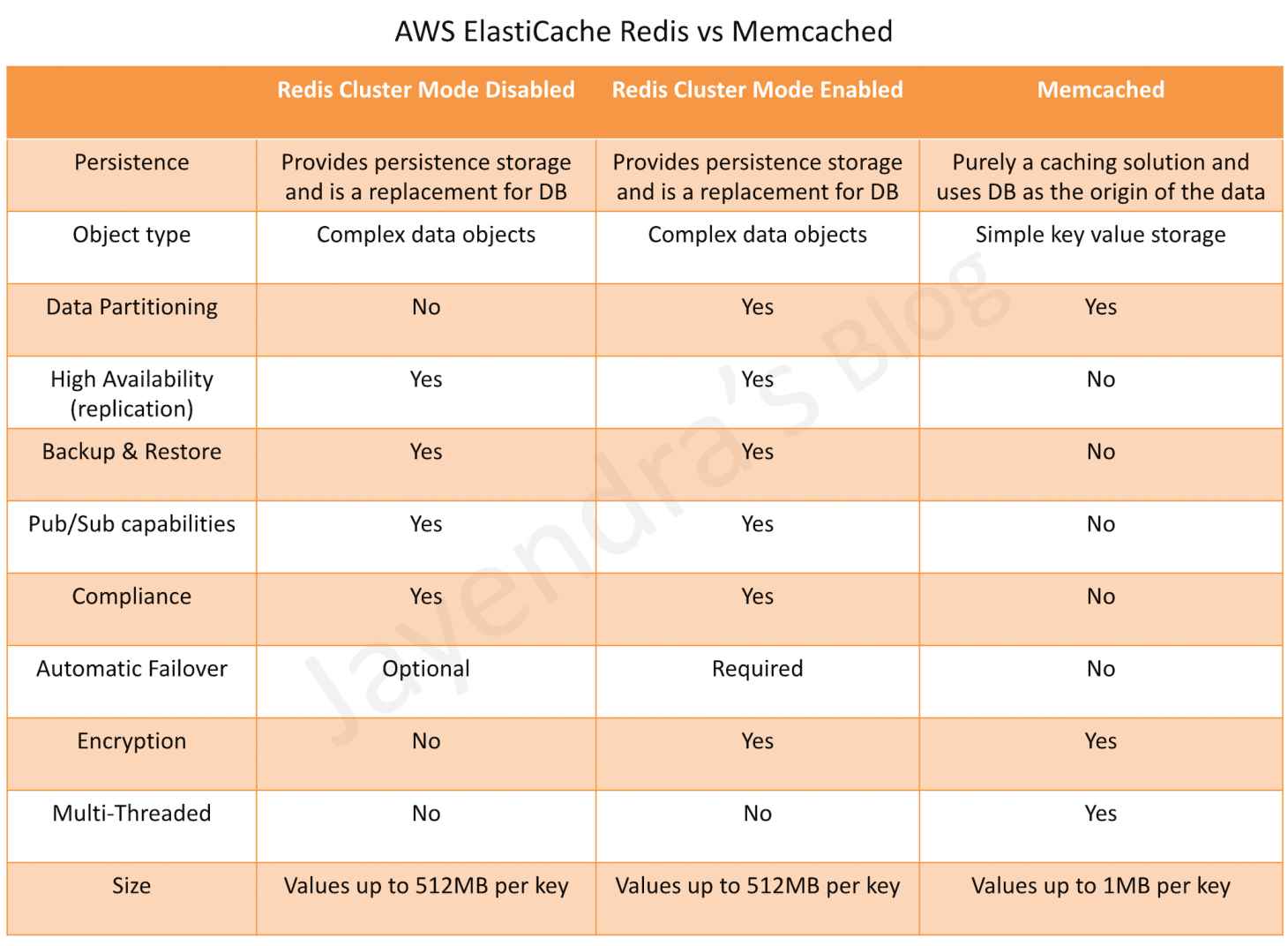
    • complex data objects vs simple key value storage
    • persistent vs non persistent, pure caching
    • automatic failover with Multi-AZ vs Multi-AZ not supported
    • scaling using Read Replicas vs using multiple nodes
    • backup & restore supported vs not supported
  • ElastiCache Serverless (launched November 2023)
    • creates a cache in under a minute with zero capacity planning
    • instantly scales capacity based on application traffic patterns
    • provides zero infrastructure management and zero downtime maintenance
    • supports Valkey 7.2+, Redis OSS 7.0+, and Memcached 1.6+
    • pay-per-use pricing based on data stored and requests executed
    • automatically provisions resources across multiple AZs for high availability
  • can be used for state management to keep the web application stateless

Redshift

  • fully managed, fast and powerful, petabyte scale data warehouse service
  • uses replication and continuous backups to enhance availability and improve data durability and can automatically recover from node and component failures
  • provides Massive Parallel Processing (MPP) by distributing & parallelizing queries across multiple physical resources
  • columnar data storage improving query performance and allowing advance compression techniques
  • now supports Multi-AZ deployments for RA3 clusters (GA 2024), running the data warehouse in two AZs simultaneously with 99.99% SLA
  • spot instances are NOT an option
  • Redshift Serverless
    • enables running and scaling analytics without provisioning or managing clusters
    • automatically scales compute up or down based on workload demands
    • AI-driven scaling and optimization (default for new workgroups since April 2026) uses machine learning to predict compute needs and automatically adjust resources
    • offers minimum capacity as low as 4 RPUs for cost-effective development workloads
    • supports Serverless Reservations (2025) for discounted pricing and cost predictability
    • pay-as-you-go pricing based on compute used
  • Zero-ETL Integrations
    • supports zero-ETL from Aurora MySQL, Aurora PostgreSQL, RDS for MySQL, DynamoDB, and self-managed databases
    • automatically replicates data from source to Redshift without building ETL pipelines
    • enables near real-time analytics on transactional data
  • Enhanced Security Defaults (2025)
    • new clusters default to public accessibility disabled, encryption enabled, and secure connections enforced

AWS ElastiCache

AWS ElastiCache

🆕 Major Updates (2024-2026)

  • Valkey is now the recommended engine (open-source Redis fork, BSD licensed, stewarded by Linux Foundation)
  • ElastiCache Serverless (GA Nov 2023) – zero infrastructure management with instant scaling
  • Vector Search (GA Oct 2025) – microsecond-latency similarity search with 99% recall
  • Full-Text & Hybrid Search (Valkey 9.0, May 2026) – real-time search without separate service
  • Durability (June 2026) – Multi-AZ transactional log with zero data loss option
  • ElastiCache now supports three engines: Valkey, Memcached, and Redis OSS
  • AWS ElastiCache is a managed web service that helps deploy and run Valkey, Memcached, or Redis OSS protocol-compliant cache clusters in the cloud easily.
  • ElastiCache is available in three engines: Valkey (recommended), Memcached, and Redis OSS
  • ElastiCache helps
    • simplify and offload the management, monitoring, and operation of in-memory cache environments, enabling the engineering resources to focus on developing applications.
    • automate common administrative tasks required to operate a distributed cache environment.
    • improves the performance of web applications by allowing retrieval of information from a fast, managed, in-memory caching system, instead of relying entirely on slower disk-based databases.
    • helps improve load & response times to user actions and queries, but also reduces the cost associated with scaling web applications.
    • helps automatically detect and replace failed cache nodes, providing a resilient system that mitigates the risk of overloaded databases, which can slow website and application load times.
    • provides enhanced visibility into key performance metrics associated with the cache nodes through integration with CloudWatch.
    • code, applications, and popular tools already using Memcached, Redis OSS, or Valkey environments work seamlessly, with being protocol-compliant with these environments
  • ElastiCache provides in-memory caching which can
    • significantly lower latency and improve throughput for many
      • read-heavy application workloads e.g. social networking, gaming, media sharing, and Q&A portals.
      • compute-intensive workloads such as a recommendation engine.
    • improve application performance by storing critical pieces of data in memory for low-latency access.
    • be used to cache the results of I/O-intensive database queries or the results of computationally-intensive calculations.
  • ElastiCache currently allows access only from within a VPC. It can be accessed from EC2 instances, Lambda functions, or other services within the same VPC, or via VPN/Direct Connect from on-premises networks.

ElastiCache Engine Options

  • ElastiCache supports three engines:
    • Valkey – Recommended engine. Open-source, BSD-licensed, high-performance key-value datastore stewarded by the Linux Foundation. Drop-in replacement for Redis OSS with 230% higher throughput and 20% better memory efficiency.
    • Redis OSS – Open-source key-value store (versions up to 7.2 under BSD license). Redis 7.4+ changed to SSPL/RSALv2, and Redis 8.0+ moved to AGPLv3. ElastiCache continues to support Redis OSS 7.x.
    • Memcached – Simple, high-performance in-memory key-value store for small chunks of arbitrary data.
  • ElastiCache offers two deployment options:
    • Serverless – Zero infrastructure management, instant scaling, create a cache in under a minute. Pay-per-use based on data stored and requests executed.
    • Self-designed (Node-based) – Traditional cluster deployment with control over node types, shard count, and replica configuration.

Valkey (Recommended Engine)

  • Valkey is an open-source, high-performance key-value datastore stewarded by the Linux Foundation, backed by 40+ companies including AWS, Google, and Microsoft.
  • Valkey was forked from Redis OSS 7.2.4 (the last BSD-licensed release) in March 2024, after Redis Ltd. changed its license to SSPL/RSALv2.
  • ElastiCache for Valkey provides:
    • 230% higher throughput compared to Redis OSS
    • 20% better memory efficiency
    • 33% lower pricing on Serverless compared to other engines
    • 20% lower pricing on self-designed (node-based) clusters
    • Full wire-compatibility with Redis OSS – existing code works without changes
  • Valkey version history on ElastiCache:
    • Valkey 7.2 (Oct 2024) – Initial release, drop-in Redis OSS replacement
    • Valkey 8.0 (Nov 2024) – Faster scaling for Serverless, improved memory efficiency
    • Valkey 8.1 (Jul 2025) – Vector search, Bloom filters, performance improvements (8% more ops/sec, 22% lower P99 latency)
    • Valkey 9.0 (May 2026) – Full-text search, hybrid search, aggregation pipelines, durability

Valkey Key Features

  • All Redis OSS features (replication, Multi-AZ, backup/restore, cluster mode, Global Datastore)
  • Vector Search (GA Oct 2025) – Index, search, and update billions of high-dimensional vectors with microsecond latency and up to 99% recall. Supports HNSW and FLAT algorithms with Euclidean, cosine, and inner product distance metrics.
  • Full-Text Search (May 2026) – Real-time full-text, exact-match, and numeric range search directly in cache. Search terabytes of data with microsecond latency and millions of search ops/sec.
  • Hybrid Search (May 2026) – Combine vector similarity with full-text search, tag filters, and numeric filters in a single query for optimized relevance.
  • Durability (Jun 2026) – Multi-AZ transactional log prevents data loss during failures:
    • Synchronous writes: Data persisted across 2+ AZs before responding. Zero data loss at single-digit millisecond write latency.
    • Asynchronous writes: Data persisted after responding. Microsecond write latency at no extra cost, with up to 10 seconds of possible data loss in rare failures.
  • Bloom Filters (Jul 2025) – Space-efficient probabilistic data structure to quickly check set membership.
  • Semantic Caching for AI – Use vector search to cache and retrieve semantically similar queries for GenAI/LLM applications, reducing API costs and latency.

ElastiCache Valkey/Redis vs Memcached

AWS ElastiCache Redis vs Memcached

ElastiCache Serverless

  • ElastiCache Serverless (GA November 2023) provides a serverless option that eliminates infrastructure management and capacity planning.
  • Key capabilities:
    • Create a cache in under a minute by providing just a name
    • Automatically scales capacity based on application traffic patterns
    • Monitors memory, CPU, and network utilization continuously
    • Provides a simple endpoint experience abstracting cluster topology
    • Data automatically replicated across multiple AZs with up to 99.99% availability SLA
    • Zero downtime maintenance
  • Supported engines for Serverless:
    • Valkey 7.2 and above (recommended, 33% lower pricing)
    • Memcached 1.6 and above
    • Redis OSS 7.0 and above
  • Pricing: Pay-per-use based on data stored (per GB-hour) and ElastiCache Processing Units (ECPUs) consumed
  • Serverless for Valkey 8.0 can scale from zero to 5M requests per second in under 13 minutes with consistent sub-millisecond p50 read latency
  • Ideal for:
    • Variable or unpredictable workloads
    • New applications where traffic patterns are unknown
    • Development and testing environments
    • Applications with spiky traffic that want to avoid over-provisioning

Redis OSS

  • Redis is an open source key-value cache & store. Note: Redis 7.4+ changed to SSPL/RSALv2 license (March 2024), and Redis 8.0 moved to AGPLv3 (March 2025).
  • ElastiCache for Redis OSS continues to support versions up to Redis OSS 7.x. AWS recommends migrating to ElastiCache for Valkey for better performance, lower cost, and continued open-source (BSD) licensing.
  • Redis OSS versions 4 and 5 reached community End of Life. Standard support for ElastiCache versions 4 and 5 ended January 31, 2026, after which clusters are enrolled in Extended Support.
  • ElastiCache for Redis OSS can be used as a primary in-memory key-value data store, providing fast, sub-millisecond data performance, high availability and scalability up to 16 nodes plus up to 5 read replicas, each of up to 3.55 TiB of in-memory data.
  • ElastiCache for Redis OSS supports (similar to RDS features)
    • Redis Master/Slave replication.
    • Multi-AZ operation by creating read replicas in another AZ
    • Backup and Restore feature for persistence using snapshots
  • ElastiCache for Redis OSS can be vertically scaled upwards by selecting a larger node type or by adding shards (with cluster mode enabled).
  • Parameter group can be specified for Redis OSS during installation, which acts as a “container” for configuration values that can be applied to one or more primary clusters.
  • Append Only File – AOF
    • provides persistence and can be enabled for recovery scenarios.
    • if a node restarts or service crashes, Redis will replay the updates from an AOF file, thereby recovering the data lost due to the restart or crash.
    • cannot protect against all failure scenarios, cause if the underlying hardware fails, a new server would be provisioned and the AOF file will no longer be available to recover the data.
  • ElastiCache for Redis OSS doesn’t support the AOF feature but you can achieve persistence by snapshotting the Redis data using the Backup and Restore feature.
  • Enabling Redis Multi-AZ is a Better Approach to Fault Tolerance, as failing over to a read replica is much faster than rebuilding the primary from an AOF file.
  • Note: For new deployments, AWS recommends using ElastiCache for Valkey with the new Durability feature (Multi-AZ transactional log) instead of AOF for data persistence.

Redis OSS / Valkey Features

  • High Availability, Fault Tolerance & Auto Recovery
    • Multi-AZ for a failed primary cluster to a read replica, in Redis/Valkey clusters that support replication.
    • Fault Tolerance – Flexible AZ placement of nodes and clusters
    • High Availability – Primary instance and a synchronous secondary instance to fail over when problems occur. You can also use read replicas to increase read scaling.
    • Auto-Recovery – Automatic detection of and recovery from cache node failures.
    • Backup & Restore – Automated backups or manual snapshots can be performed. Restore process works reliably and efficiently.
  • Performance
    • Data Partitioning – Cluster mode supports partitioning the data across up to 500 shards.
    • Data Tiering – Provides a price-performance option by utilizing lower-cost solid state drives (SSDs) in each cluster node in addition to storing data in memory. It is ideal for workloads that access up to 20% of their overall dataset regularly, and for applications that can tolerate additional latency when accessing data on SSD.
    • Auto Scaling – Automatically adjusts the number of shards or replicas in response to changes in demand (not supported for Global Datastores, Outposts, or Local Zones).
  • Security
    • Encryption – Supports encryption in transit and encryption at rest. This support helps you build HIPAA-compliant applications.
    • Access Control – Control access using AWS IAM to define users and permissions.
    • Supports Redis AUTH or Managed Role-Based Access Control (RBAC).
    • AWS PrivateLink – Privately access ElastiCache APIs from within a VPC without exposing traffic to the public internet.
  • Administration
    • Low Administration – Manages backups, software patching, automatic failure detection, and recovery.
    • Integration with other AWS services such as EC2, CloudWatch, CloudTrail, and SNS.
    • Global Datastore provides fully managed, fast, reliable, and secure replication across AWS Regions. Cross-Region read replica clusters can be created to enable low-latency reads and disaster recovery across AWS Regions.

Read Replica (Valkey/Redis OSS)

  • Read Replicas help provide Read scaling and handling failures
  • Read Replicas are kept in sync with the Primary node using asynchronous replication technology
  • Read Replicas provides
    • Horizontal scaling beyond the compute or I/O capacity of a single primary node for read-heavy workloads.
    • Serving read traffic while the primary is unavailable either being down due to failure or maintenance
    • Data protection scenarios to promote a Read Replica as the primary node, in case the primary node or the AZ of the primary node fails.
  • ElastiCache supports initiated or forced failover where it flips the DNS record for the primary node to point at the read replica, which is in turn promoted to become the new primary.
  • Read replica cannot span across regions and may only be provisioned in the same or different AZ of the same Region as the cache node primary. (Use Global Datastore for cross-region replication.)

Multi-AZ (Valkey/Redis OSS)

  • ElastiCache for Valkey/Redis OSS shard consists of a primary and up to 5 read replicas
  • Data is asynchronously replicated from the primary node to the read replicas
  • Multi-AZ mode
    • provides enhanced availability and a smaller need for administration as the node failover is automatic.
    • impact on the ability to read/write to the primary is limited to the time it takes for automatic failover to complete.
    • no longer needs monitoring of nodes and manually initiating a recovery in the event of a primary node disruption.
  • During certain types of planned maintenance, or in the unlikely event of node failure or AZ failure,
    • it automatically detects the failure,
    • selects a replica, depending upon the read replica with the smallest asynchronous replication lag to the primary, and promotes it to become the new primary node
    • it will also propagate the DNS changes so that the primary endpoint remains the same
  • If Multi-AZ is not enabled,
    • ElastiCache monitors the primary node.
    • in case the node becomes unavailable or unresponsive, it will repair the node by acquiring new service resources.
    • it propagates the DNS endpoint changes to redirect the node’s existing DNS name to point to the new service resources.
    • If the primary node cannot be healed and you will have the choice to promote one of the read replicas to be the new primary.

Backup & Restore (Valkey/Redis OSS)

  • Backup and Restore allow users to create snapshots of clusters.
  • Snapshots can be used for recovery, restoration, archiving purposes, or warm start a cluster with preloaded data
  • Snapshots can be created on a cluster basis using the native mechanism to create and store an RDB file as the snapshot.
  • Increased latencies for a brief period at the node might be encountered while taking a snapshot and is recommended to be taken from a Read Replica minimizing performance impact
  • Snapshots can be created either automatically (if configured) or manually
  • When a cluster is deleted, automatic snapshots are removed. However, manual snapshots are retained.

Cluster Mode (Valkey/Redis OSS)

ElastiCache provides the ability to create distinct types of clusters:

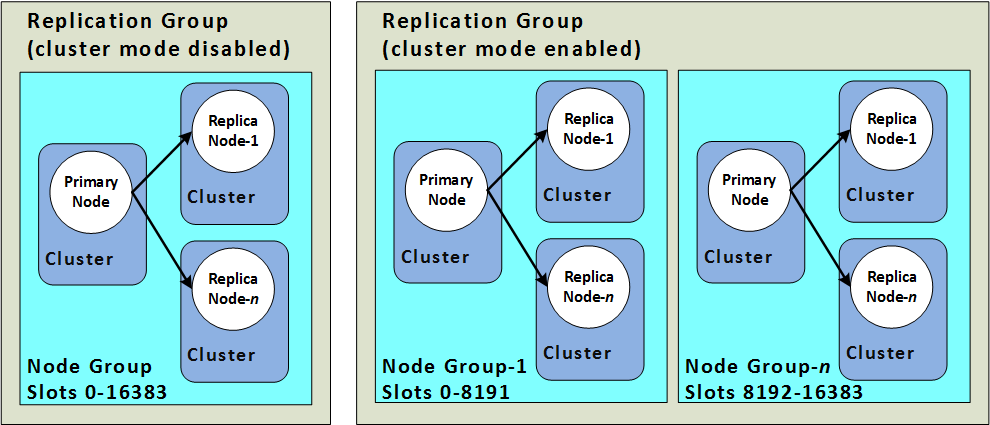
  • A cluster mode disabled cluster
    • always has a single shard with up to 5 read replica nodes.
  • A cluster mode enabled cluster
    • has up to 500 shards with 1 to 5 read replica nodes in each.

ElastiCache Redis Cluster Mode

  • Scaling vs Partitioning
    • Cluster mode disabled supports Horizontal scaling for read capacity by adding or deleting replica nodes, or vertical scaling by scaling up to a larger node type.
    • Cluster mode enabled supports partitioning the data across up to 500 node groups. The number of shards can be changed dynamically as the demand changes. It also helps spread the load over a greater number of endpoints, which reduces access bottlenecks during peak demand.
  • Node Size vs Number of Nodes
    • Cluster mode disabled has only one shard and the node type must be large enough to accommodate all the cluster’s data plus necessary overhead.
    • Cluster mode enabled can have smaller node types as the data can be spread across partitions.
  • Reads vs Writes
    • Cluster mode disabled can be scaled for reads by adding more read replicas (5 max)
    • Cluster mode enabled can be scaled for both reads and writes by adding read replicas and multiple shards.

Memcached

  • Memcached is an in-memory key-value store for small chunks of arbitrary data.
  • ElastiCache for Memcached can be used to cache a variety of objects
    • from the content in persistent data stores such as RDS, DynamoDB, or self-managed databases hosted on EC2)
    • dynamically generated web pages e.g. with Nginx
    • transient session data that may not require a persistent backing store
  • ElastiCache for Memcached
    • can be scaled Vertically by increasing the node type size
    • can be scaled Horizontally by adding and removing nodes
    • does not support the persistence of data
    • does not support replication, Multi-AZ, or backups
  • ElastiCache for Memcached cluster can have
    • nodes that can span across multiple AZs within the same region
    • maximum of 20 nodes per cluster with a maximum of 100 nodes per region (soft limit and can be extended).
  • ElastiCache for Memcached supports auto-discovery, which enables the automatic discovery of cache nodes by clients when they are added to or removed from an ElastiCache cluster.

ElastiCache Mitigating Failures

  • ElastiCache should be designed to plan so that failures have a minimal impact on the application and data.
  • Mitigating Failures when Running Memcached
    • Mitigating Node Failures
      • spread the cached data over more nodes
      • as Memcached does not support replication, a node failure will always result in some data loss from the cluster
      • having more nodes will reduce the proportion of cache data lost
    • Mitigating Availability Zone Failures
      • locate the nodes in as many availability zones as possible, only the data cached in that AZ is lost, not the data cached in the other AZs
  • Mitigating Failures when Running Valkey/Redis OSS
    • Mitigating Cluster Failures
      • Durability (Valkey 9.0+, Recommended)
        • Uses Multi-AZ transactional log to prevent data loss during failures
        • Synchronous writes: zero data loss, single-digit millisecond write latency
        • Asynchronous writes: microsecond write latency, up to 10 seconds of potential data loss
        • Both options maintain microsecond read latency
        • Replaces the need for AOF-based recovery
      • Redis Append Only Files (AOF) (Legacy approach)
        • enable AOF so whenever data is written to the cluster, a corresponding transaction record is written to a Redis AOF.
        • when Redis process restarts, ElastiCache creates a replacement cluster and provisions it and repopulates it with data from AOF.
        • It is time-consuming
        • AOF can get big.
        • Using AOF cannot protect you from all failure scenarios.
      • Replication Groups
        • A replication group is comprised of a single primary cluster which the application can both read from and write to, and from 1 to 5 read-only replica clusters.
        • Data written to the primary cluster is also asynchronously updated on the read replica clusters.
        • When a Read Replica fails, ElastiCache detects the failure, replaces the instance in the same AZ, and synchronizes with the Primary Cluster.
        • Multi-AZ with Automatic Failover: ElastiCache detects Primary cluster failure and promotes a read replica with the least replication lag to primary.
        • Multi-AZ with Auto Failover disabled: ElastiCache detects Primary cluster failure, creates a new one and syncs the new Primary with one of the existing replicas.
    • Mitigating Availability Zone Failures
      • locate the clusters in as many availability zones as possible

AWS Certification Exam Practice Questions

  • Questions are collected from Internet and the answers are marked as per my knowledge and understanding (which might differ with yours).
  • AWS services are updated everyday and both the answers and questions might be outdated soon, so research accordingly.
  • AWS exam questions are not updated to keep up the pace with AWS updates, so even if the underlying feature has changed the question might not be updated
  • Open to further feedback, discussion and correction.
  1. What does Amazon ElastiCache provide?
    1. A service by this name doesn’t exist. Perhaps you mean Amazon CloudCache.
    2. A virtual server with a huge amount of memory.
    3. A managed In-memory cache service
    4. An Amazon EC2 instance with the Memcached software already pre-installed.
  2. You are developing a highly available web application using stateless web servers. Which services are suitable for storing session state data? Choose 3 answers.
    1. Elastic Load Balancing
    2. Amazon Relational Database Service (RDS)
    3. Amazon CloudWatch
    4. Amazon ElastiCache
    5. Amazon DynamoDB
    6. AWS Storage Gateway
  3. Which statement best describes ElastiCache?
    1. Reduces the latency by splitting the workload across multiple AZs
    2. A simple web services interface to create and store multiple data sets, query your data easily, and return the results
    3. Offload the read traffic from your database in order to reduce latency caused by read-heavy workload
    4. Managed service that makes it easy to set up, operate and scale a relational database in the cloud
  4. Our company is getting ready to do a major public announcement of a social media site on AWS. The website is running on EC2 instances deployed across multiple Availability Zones with a Multi-AZ RDS MySQL Extra Large DB Instance. The site performs a high number of small reads and writes per second and relies on an eventual consistency model. After comprehensive tests you discover that there is read contention on RDS MySQL. Which are the best approaches to meet these requirements? (Choose 2 answers)
    1. Deploy ElastiCache in-memory cache running in each availability zone
    2. Implement sharding to distribute load to multiple RDS MySQL instances
    3. Increase the RDS MySQL Instance size and Implement provisioned IOPS
    4. Add an RDS MySQL read replica in each availability zone
  5. You are using ElastiCache Memcached to store session state and cache database queries in your infrastructure. You notice in CloudWatch that Evictions and Get Misses are both very high. What two actions could you take to rectify this? Choose 2 answers
    1. Increase the number of nodes in your cluster
    2. Tweak the max_item_size parameter
    3. Shrink the number of nodes in your cluster
    4. Increase the size of the nodes in the cluster
  6. You have been tasked with moving an ecommerce web application from a customer’s datacenter into a VPC. The application must be fault tolerant and well as highly scalable. Moreover, the customer is adamant that service interruptions not affect the user experience. As you near launch, you discover that the application currently uses multicast to share session state between web servers, In order to handle session state within the VPC, you choose to:
    1. Store session state in Amazon ElastiCache for Valkey/Redis (scalable and makes the web applications stateless)
    2. Create a mesh VPN between instances and allow multicast on it
    3. Store session state in Amazon Relational Database Service (RDS solution not highly scalable)
    4. Enable session stickiness via Elastic Load Balancing (affects user experience if the instance goes down)
  7. When you are designing to support a 24-hour flash sale, which one of the following methods best describes a strategy to lower the latency while keeping up with unusually heavy traffic?
    1. Launch enhanced networking instances in a placement group to support the heavy traffic (only improves internal communication)
    2. Apply Service Oriented Architecture (SOA) principles instead of a 3-tier architecture (just simplifies architecture)
    3. Use Elastic Beanstalk to enable blue-green deployment (only minimizes download for applications and ease of rollback)
    4. Use ElastiCache as in-memory storage on top of DynamoDB to store user sessions (scalable, faster read/writes and in memory storage)
  8. You are configuring your company’s application to use Auto Scaling and need to move user state information. Which of the following AWS services provides a shared data store with durability and low latency?
    1. AWS ElastiCache Memcached (does not provide durability as if the node is gone the data is gone)
    2. Amazon Simple Storage Service
    3. Amazon EC2 instance storage
    4. Amazon DynamoDB
  9. Your application is using an ELB in front of an Auto Scaling group of web/application servers deployed across two AZs and a Multi-AZ RDS Instance for data persistence. The database CPU is often above 80% usage and 90% of I/O operations on the database are reads. To improve performance you recently added a single-node Memcached ElastiCache Cluster to cache frequent DB query results. In the next weeks the overall workload is expected to grow by 30%. Do you need to change anything in the architecture to maintain the high availability for the application with the anticipated additional load and Why?
    1. You should deploy two Memcached ElastiCache Clusters in different AZs because the RDS Instance will not be able to handle the load if the cache node fails.
    2. If the cache node fails the automated ElastiCache node recovery feature will prevent any availability impact. (does not provide high availability, as data is lost if the node is lost)
    3. Yes you should deploy the Memcached ElastiCache Cluster with two nodes in the same AZ as the RDS DB master instance to handle the load if one cache node fails. (Single AZ affects availability as DB is Multi AZ and would be overloaded is the AZ goes down)
    4. No if the cache node fails you can always get the same data from the DB without having any availability impact. (Will overload the database affecting availability)
  10. A read only news reporting site with a combined web and application tier and a database tier that receives large and unpredictable traffic demands must be able to respond to these traffic fluctuations automatically. What AWS services should be used meet these requirements?
    1. Stateless instances for the web and application tier synchronized using ElastiCache Memcached in an autoscaling group monitored with CloudWatch and RDS with read replicas.
    2. Stateful instances for the web and application tier in an autoscaling group monitored with CloudWatch and RDS with read replicas (Stateful instances will not allow for scaling)
    3. Stateful instances for the web and application tier in an autoscaling group monitored with CloudWatch and multi-AZ RDS (Stateful instances will allow not for scaling & multi-AZ is for high availability and not scaling)
    4. Stateless instances for the web and application tier synchronized using ElastiCache Memcached in an autoscaling group monitored with CloudWatch and multi-AZ RDS (multi-AZ is for high availability and not scaling)
  11. You have written an application that uses the Elastic Load Balancing service to spread traffic to several web servers. Your users complain that they are sometimes forced to login again in the middle of using your application, after they have already logged in. This is not behavior you have designed. What is a possible solution to prevent this happening?
    1. Use instance memory to save session state.
    2. Use instance storage to save session state.
    3. Use EBS to save session state.
    4. Use ElastiCache to save session state.
    5. Use Glacier to save session slate.
  12. A company wants to build a real-time recommendation engine for their e-commerce platform. The system needs to perform vector similarity searches against millions of product embeddings with sub-millisecond latency. Which AWS service and feature combination is most appropriate?
    1. Amazon OpenSearch Service with k-NN plugin
    2. Amazon RDS for PostgreSQL with pgvector extension
    3. Amazon ElastiCache for Valkey with vector search (provides microsecond-latency vector search with up to 99% recall, ideal for real-time use cases)
    4. Amazon Neptune with vector similarity
  13. A startup is launching a new application with unpredictable traffic patterns. They need a caching solution that requires minimal management and can scale automatically. They want to minimize costs during low-traffic periods. Which ElastiCache deployment option should they choose?
    1. ElastiCache for Redis OSS with cluster mode enabled
    2. ElastiCache Serverless for Valkey (zero infrastructure management, instant auto-scaling, pay-per-use, and Valkey offers 33% lower Serverless pricing)
    3. ElastiCache for Memcached with Auto Discovery
    4. ElastiCache for Redis OSS with data tiering
  14. An organization is migrating from ElastiCache for Redis OSS to ElastiCache for Valkey. Which statements about this migration are correct? (Choose 2 answers)
    1. Valkey is wire-compatible with Redis OSS, requiring no application code changes
    2. Valkey requires a different client library than Redis
    3. Valkey does not support cluster mode
    4. Valkey provides up to 230% higher throughput and 20% better memory efficiency compared to Redis OSS
  15. A financial services company needs an in-memory data store for payment tokenization that cannot tolerate any data loss, while maintaining microsecond read latency. Which ElastiCache configuration meets these requirements?
    1. ElastiCache for Redis OSS with AOF enabled
    2. ElastiCache for Memcached with Multi-AZ nodes
    3. ElastiCache for Valkey 9.0 with synchronous durability (Multi-AZ transactional log with synchronous writes ensures zero data loss while maintaining microsecond read latency)
    4. ElastiCache for Valkey with asynchronous durability

ElastiCache Redis vs Memcached – Key Differences & Use Cases

AWS ElastiCache Redis vs Memcached

AWS ElastiCache Redis (Valkey) vs Memcached – When to Use Which

📅 Published June 2026: Covers Valkey 9.0 (full-text search, durability), Valkey 8.2 (vector search), ElastiCache Serverless pricing, Redis OSS Extended Support, and updated exam guidance for SAA-C03 and DVA-C02.

Overview

Amazon ElastiCache is a fully managed, in-memory caching service that supports three engines: Valkey, Redis OSS, and Memcached. While all three serve as high-performance key-value stores, they differ significantly in features, architecture, and use cases. This guide provides a comprehensive comparison to help you choose the right engine for your workload.

Engine Overview

Valkey (Recommended for New Workloads)

  • Valkey is an open-source, high-performance key-value datastore stewarded by the Linux Foundation.
  • Created in March 2024 as a community-driven fork of Redis OSS 7.2 after Redis Inc. changed its licensing to a non-open-source model.
  • Backed by 40+ companies including AWS, Google, Microsoft, Oracle, and Ericsson.
  • Drop-in replacement for Redis OSS — fully compatible with existing Redis clients and commands.
  • AWS actively recommends Valkey for all new workloads due to:
    • 33% lower Serverless pricing and 20% lower node-based pricing compared to Redis OSS/Memcached.
    • Active open-source development with rapid innovation (Bloom filters, vector search, full-text search, durability).
    • BSD license — no copyleft restrictions.
  • Supports all Redis OSS features plus: vector search (8.2+), Bloom filters (8.1+), full-text search (9.0+), durability via Multi-AZ transactional log (9.0+), and hash field expiration (9.0+).

Redis OSS (Maintenance Track)

  • Redis OSS 7.2 is the last fully open-source version of Redis supported on ElastiCache.
  • As of March 2025, Redis 8.0 is licensed under AGPLv3 — a copyleft license that many organizations cannot use.
  • ElastiCache versions 4 and 5 for Redis OSS reached end of standard support on January 31, 2026. Extended Support available (at 80-160% premium) through January 31, 2029.
  • Redis OSS 6 reaches End of Life on January 31, 2027.
  • AWS recommends migrating existing Redis OSS workloads to Valkey — zero-downtime, in-place upgrades are supported.
  • Supports complex data types (strings, hashes, lists, sets, sorted sets, bitmaps, HyperLogLog, geospatial, streams), persistence, replication, Pub/Sub, Lua scripting, and cluster mode.

Memcached

  • Memcached is a fully open-source (BSD licensed), high-performance, distributed memory object caching system.
  • Designed for simplicity — pure key-value caching with a multi-threaded architecture.
  • Ideal for simple caching use cases where advanced data structures, persistence, and replication are not needed.
  • Supports only simple data types (strings and objects up to 1 MB).
  • Multi-threaded — can utilize multiple CPU cores on a single node, unlike Valkey/Redis which are single-threaded (with I/O multithreading in Valkey).
  • No replication, no automatic failover, no persistence (node-based), no Pub/Sub.
  • Supports horizontal scaling by adding/removing nodes from the cluster.

Detailed Comparison Table

Feature Valkey / Redis OSS Memcached
Data Types Complex — strings, hashes, lists, sets, sorted sets, bitmaps, HyperLogLog, geospatial, streams, Bloom filters (Valkey 8.1+) Simple — strings and objects only
Persistence Yes — RDB snapshots + AOF. Valkey 9.0 adds durability via Multi-AZ transactional log No — data lost on node restart (node-based)
Replication Yes — up to 5 read replicas per shard No
Multi-AZ with Automatic Failover Yes — automatic failover to read replica No — requires application-level redundancy
Clustering / Data Partitioning Yes — cluster mode with up to 500 shards Yes — client-side sharding across nodes
Pub/Sub Yes — including Sharded Pub/Sub (7.2+) No
Lua Scripting Yes — Lua scripts and Functions (7.2+) No
Backup & Restore Yes — automated daily snapshots + manual snapshots Serverless only (not available for node-based clusters)
Encryption at Rest Yes (4.0.10+) No
Encryption in Transit (TLS) Yes (4.0.10+) Yes (1.6.12+)
Compliance (HIPAA, FedRAMP, PCI DSS) Yes Yes (1.6.12+ for HIPAA/FedRAMP)
Multi-threaded No (single-threaded with I/O multithreading in Valkey) Yes — utilizes multiple CPU cores
Geospatial Indexing Yes (4.0.10+, polygon queries in Valkey 9.0) No
Vector Search Yes (Valkey 8.2+) — microsecond latency, 95%+ recall No
Full-Text Search Yes (Valkey 9.0+) — hybrid text + vector search No
Sorted Sets / Leaderboards Yes No
Data Tiering (SSD) Yes (6.2+ with r6gd nodes) — 5x more storage, 60%+ cost savings No
Global Datastore (Cross-Region) Yes — fully managed cross-region replication No
Authentication AUTH token + RBAC (Role-Based Access Control, 6.0+) SASL authentication
Max Item Size 512 MB per key 1 MB per item (default)

ElastiCache Serverless

ElastiCache Serverless (GA November 2023) eliminates infrastructure management for all three engines. It automatically scales compute, memory, and network to match demand with no nodes to provision or manage.

Feature Serverless for Valkey Serverless for Redis OSS Serverless for Memcached
Availability SLA 99.99% 99.99% 99.99%
Multi-AZ Yes (default) Yes (default) Yes (default)
Backup & Restore Yes Yes Yes
Minimum Data Storage 100 MB (90% lower) 1 GB 1 GB
Max Throughput 5 million RPS (Valkey 8.0+) 5 million RPS 5 million RPS
Zero Downtime Maintenance Yes Yes Yes
IPv6 / Dual-Stack Yes Yes Yes
Create Time < 1 minute < 1 minute < 1 minute

Key Serverless Benefit: Memcached Serverless now includes backup & restore, which is NOT available for node-based Memcached clusters. This resolves one of Memcached’s traditional limitations.

Pricing Comparison (US East – N. Virginia)

ElastiCache Serverless Pricing

Dimension Valkey Redis OSS Memcached
ECPU (per million) $0.0023 $0.0034 $0.0034
Data Storage (per GB-hour) $0.084 $0.125 $0.125
Min Data Metered 100 MB 1 GB 1 GB
Savings vs Redis/Memcached 33% lower Baseline Baseline

Node-Based Pricing (On-Demand, cache.r7g.large)

Dimension Valkey Redis OSS Memcached
On-Demand (per hour) $0.1402 $0.1752 $0.218
Savings vs Redis OSS 20% lower Baseline
Reserved (1-yr, All Upfront) Up to 55% off On-Demand Up to 55% off On-Demand Up to 55% off On-Demand
Extended Support Premium N/A 80% (Yr 1-2), 160% (Yr 3) N/A

Cost Optimization Tips:

  • Migrate Redis OSS → Valkey for immediate 20-33% savings with zero-downtime, in-place upgrades.
  • Existing Redis OSS Reserved Instances automatically apply to Valkey nodes in the same instance family — you get 20% more value.
  • Use Database Savings Plans (1-year commitment) for additional savings on Serverless.
  • Use Data Tiering (r6gd nodes) for workloads accessing <20% of data frequently — 60%+ cost savings.
  • Backup storage: $0.085 per GiB/month for all engines.

Decision Guide – When to Use Which

Choose Valkey (Recommended Default) When:

  • Starting any new caching workload — Valkey is the default recommendation.
  • You need complex data structures (sorted sets, lists, hashes, streams).
  • You need persistence, backup/restore, or durability for data protection.
  • You need high availability with Multi-AZ automatic failover.
  • You need Pub/Sub for real-time messaging.
  • You need Lua scripting or server-side Functions for atomic operations.
  • You need leaderboards, ranking, or rate limiting.
  • You need session management with automatic expiration.
  • You need geospatial queries (nearby search, distance calculations).
  • You need vector similarity search for AI/ML recommendations (Valkey 8.2+).
  • You need full-text search within your cache layer (Valkey 9.0+).
  • You need cross-region replication (Global Datastore).
  • You want the lowest cost option (33% cheaper Serverless, 20% cheaper node-based).

Choose Memcached When:

  • You need the simplest possible caching model — just key-value GET/SET.
  • You need multi-threaded performance on large nodes with multiple cores.
  • You need horizontal scaling with simple add/remove node operations.
  • You are caching database query results or rendered HTML fragments.
  • You don’t need persistence — data can be easily regenerated from the source.
  • You don’t need replication or automatic failover (or use Serverless for HA).
  • Your objects are simple strings/blobs and you don’t need complex data operations.
  • You have an existing Memcached application and don’t want to change client code.

Common Use Case Mapping

Use Case Recommended Engine Why
Session store Valkey Persistence + TTL + replication prevent session loss
Gaming leaderboard Valkey Sorted sets with O(log N) ranking operations
Real-time chat / messaging Valkey Pub/Sub + Lists for message queues
AI recommendation engine Valkey 8.2+ Native vector search with microsecond latency
Database query caching Valkey or Memcached Both work; Valkey preferred for persistence
Simple object caching (HTML, API responses) Memcached Simple key-value with multi-threaded throughput
Rate limiting Valkey Atomic INCR with TTL expiration
Geospatial (nearby stores, riders) Valkey GEOADD, GEORADIUS, polygon queries (9.0)
Durable cache / primary datastore Valkey 9.0 Multi-AZ transactional log for zero data loss
Large-scale ephemeral caching Memcached Multi-threaded, simple horizontal scaling

DAX vs ElastiCache – When to Use Which

DynamoDB Accelerator (DAX) and ElastiCache are both in-memory caching solutions, but they serve different purposes:

Criteria DAX ElastiCache
Purpose Accelerate DynamoDB reads General-purpose in-memory cache for any data source
Data Source DynamoDB only Any (RDS, APIs, DynamoDB, files, etc.)
Code Changes Minimal — drop-in DynamoDB client replacement Requires cache-aside logic in application
Latency Microseconds (single-digit) Microseconds to sub-millisecond
Write Caching Write-through (automatic) Application-managed invalidation
Best For Read-heavy DynamoDB workloads with hot keys Aggregated results, computed data, session stores, leaderboards

Exam Tip: If the question mentions DynamoDB with read-heavy workloads and hot partitions, choose DAX. If the question involves caching from multiple sources, complex data structures, or Pub/Sub, choose ElastiCache.

AWS Certification Exam Relevance

  • SAA-C03 (Solutions Architect Associate): Frequently tests ElastiCache engine selection (Redis/Valkey vs Memcached), caching strategies (lazy loading, write-through), Multi-AZ failover, and DAX vs ElastiCache decision making.
  • DVA-C02 (Developer Associate): Tests session management with ElastiCache, caching patterns, TTL strategies, and integration with Lambda/API Gateway.
  • SAP-C02 (Solutions Architect Professional): Tests Global Datastore for cross-region caching, data tiering, and advanced caching architectures.
  • Key Exam Themes:
    • Memcached = simple, multi-threaded, no persistence, no replication.
    • Redis/Valkey = complex data types, persistence, replication, Multi-AZ, Pub/Sub, backup/restore.
    • DAX = DynamoDB-specific, microsecond reads, drop-in replacement, no code changes.
    • ElastiCache Serverless = no capacity planning, auto-scaling, pay-per-use.
    • Valkey = recommended for new workloads, lower cost, open-source.

AWS Certification Exam Practice Questions

  • Questions are collected from Internet and the answers are marked as per my knowledge and understanding (which might differ with yours).
  • AWS services are updated everyday and both the answers and questions might be outdated soon, so research accordingly.
  • AWS exam questions are not updated to keep up the pace with AWS updates, so even if the underlying feature has changed the question might not be updated
  • Open to further feedback, discussion and correction.
  1. A company is building a gaming application that needs a real-time leaderboard with millions of players. The leaderboard must support efficient ranking, score updates, and range queries. Which ElastiCache solution should a solutions architect recommend?
    1. ElastiCache for Memcached with client-side sorting
    2. ElastiCache for Valkey using Sorted Sets
    3. ElastiCache for Memcached with application-layer ranking
    4. ElastiCache for Redis OSS with simple key-value pairs
    Show Answer

    Answer: b. – Valkey/Redis Sorted Sets provide O(log N) ranking operations with ZADD, ZRANK, and ZRANGE commands, making them ideal for leaderboards. Memcached does not support sorted sets.

  2. A startup wants to deploy an in-memory cache with the lowest possible cost and no infrastructure management. They have unpredictable traffic patterns and their average dataset is 500 MB. Which option provides the MOST cost-effective solution?
    1. ElastiCache Serverless for Redis OSS
    2. ElastiCache node-based cluster for Valkey with reserved instances
    3. ElastiCache Serverless for Valkey
    4. ElastiCache Serverless for Memcached
    Show Answer

    Answer: c. – ElastiCache Serverless for Valkey offers 33% lower pricing than Redis OSS and Memcached Serverless, with a minimum metered storage of only 100 MB (vs 1 GB for others). For unpredictable traffic, Serverless auto-scales without overprovisioning.

  3. A company has a DynamoDB table experiencing hot partition reads. Read latency must be reduced to microseconds. Which caching solution requires the LEAST application code changes?
    1. ElastiCache for Valkey with cache-aside pattern
    2. ElastiCache for Memcached with lazy loading
    3. DynamoDB Accelerator (DAX)
    4. ElastiCache for Valkey with write-through caching
    Show Answer

    Answer: c. – DAX is a drop-in replacement for the DynamoDB client — it requires minimal code changes (just change the endpoint). ElastiCache requires implementing cache-aside or write-through logic in the application.

  4. A solutions architect needs to choose a caching engine for a web application. The requirements are: multi-threaded performance, simple key-value caching of database query results, no need for persistence, and the ability to horizontally scale by adding nodes. Which engine is MOST appropriate?
    1. ElastiCache for Valkey in cluster mode
    2. ElastiCache for Memcached
    3. ElastiCache for Redis OSS with read replicas
    4. DynamoDB Accelerator (DAX)
    Show Answer

    Answer: b. – Memcached matches all stated requirements: multi-threaded, simple key-value, no persistence needed, and horizontal scaling by adding/removing nodes. While Valkey could work, it adds complexity that isn’t needed here.

  5. A company is migrating from ElastiCache for Redis OSS version 5. They received an Extended Support notification with 80% premium charges. What is the MOST cost-effective long-term migration path?
    1. Pay for Extended Support to avoid migration effort
    2. Upgrade to Redis OSS 7.2
    3. Migrate to ElastiCache for Valkey using in-place upgrade
    4. Move to Amazon MemoryDB for Redis
    Show Answer

    Answer: c. – Migrating to Valkey provides 20% lower node-based pricing (or 33% lower Serverless), active development, and avoids Extended Support premiums (80-160%). In-place upgrades from Redis OSS to Valkey are zero-downtime.

  6. A development team needs an in-memory caching solution that supports: persistence for disaster recovery, Multi-AZ failover for high availability, encryption at rest and in transit for compliance, and Pub/Sub for real-time notifications. Which combination of ElastiCache features meets ALL requirements? (Select TWO)
    1. ElastiCache for Memcached with SASL authentication
    2. ElastiCache for Valkey with Multi-AZ enabled
    3. ElastiCache for Valkey with encryption at rest and in-transit enabled
    4. ElastiCache for Memcached with TLS encryption
    5. ElastiCache for Memcached with backup enabled
    Show Answer

    Answer: b, c – Only Valkey/Redis OSS supports persistence, Multi-AZ automatic failover, encryption at rest, AND Pub/Sub together. Memcached lacks persistence (node-based), replication, failover, encryption at rest, and Pub/Sub.

  7. An e-commerce application requires a cache that can serve as a durable primary datastore with microsecond read latency and zero data loss during failures. Which ElastiCache option should a solutions architect recommend?
    1. ElastiCache for Redis OSS 7.2 with AOF persistence
    2. ElastiCache for Valkey 8.0 with daily backups
    3. ElastiCache for Valkey 9.0 with synchronous durability
    4. ElastiCache for Memcached Serverless
    Show Answer

    Answer: c. – Valkey 9.0 introduces durability via a Multi-AZ transactional log with synchronous writes designed for zero data loss. Traditional RDB/AOF persistence can lose recent writes during failures.

Related Posts

References
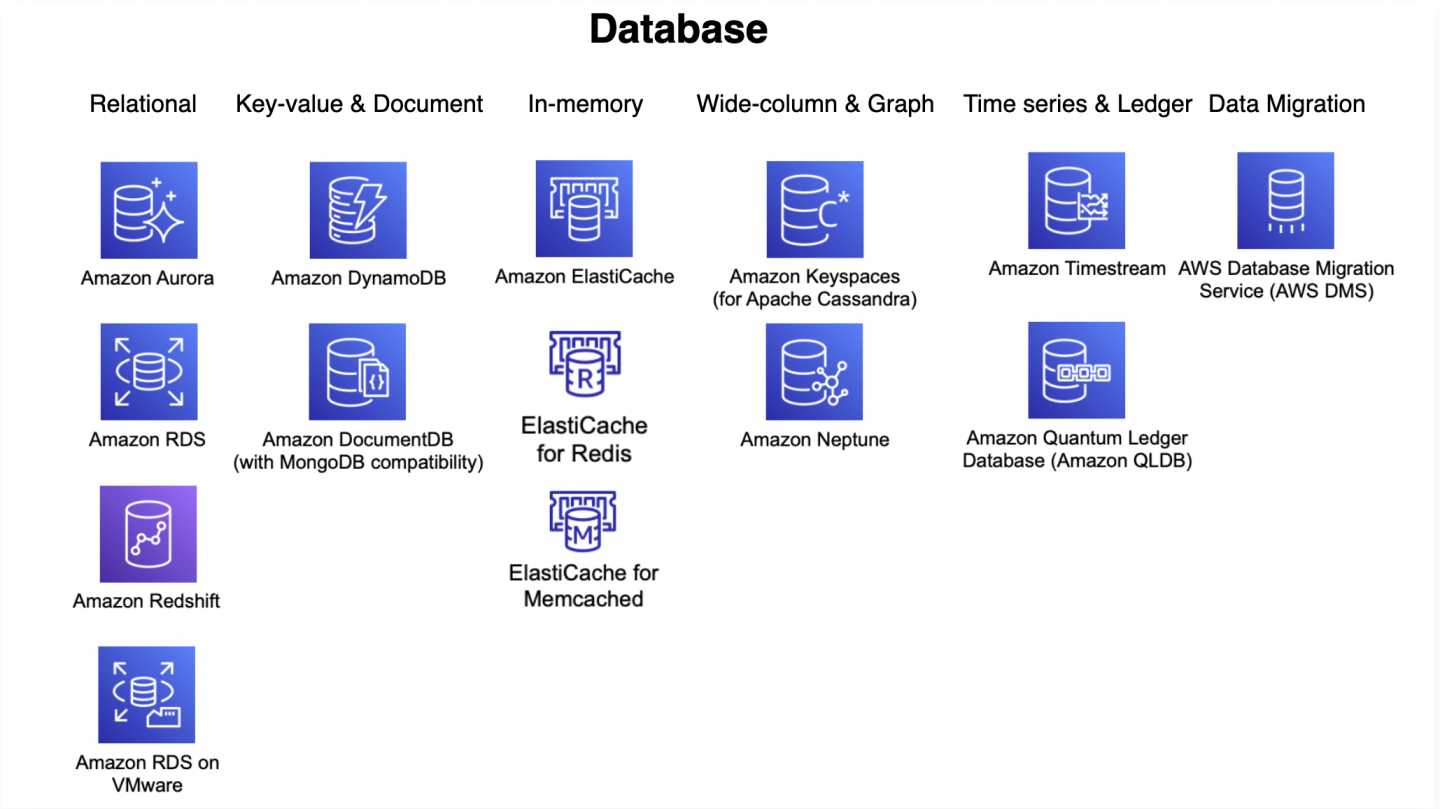
AWS Storage Options – CloudFront & ElastiCache

Amazon CloudFront

  • is a webservice for content delivery
  • provides low latency by caching and delivering content from a global network of 750+ Points of Presence (PoPs) across 100+ cities in 50+ countries
  • supports HTTP/HTTPS for static and dynamic content delivery
  • optimized to work with Amazon services like S3, ELB, MediaConvert etc. as well as works seamlessly with any non-AWS origin server
⚠️ Note: CloudFront RTMP distributions were discontinued on December 31, 2020. For streaming, use HTTP-based streaming protocols (HLS, DASH) with CloudFront web distributions and AWS Elemental MediaConvert.

Ideal Usage Patterns

  • is ideal for distribution of frequently accessed static content, or dynamic content or for streaming audio or video that benefits from edge delivery
  • API acceleration and real-time content personalization at the edge
  • security at the edge with integrated WAF, DDoS protection, and bot management

Anti-Pattern

  • Infrequently accessed data
    • If the data is infrequently accessed, it would be better to serve the data from the Origin server
  • Programmatic cache invalidation
    • CloudFront supports cache invalidation, however AWS recommends using object versioning rather than programmatic cache invalidation.

Performance

  • is designed for low latency and high bandwidth delivery of content by redirecting the user to the nearest edge location in terms of latency and caching the content preventing the round trip to the origin server
  • supports HTTP/2 and HTTP/3 (QUIC) for improved connection performance

Durability & Availability

  • provides high Availability by delivering content from a distributed global network of edge locations. Amazon also constantly monitors the network paths connecting Origin servers to CloudFront
  • does not provide durable storage, which is more of the responsibility of the underlying Origin server providing the content for e.g. S3

Cost Model

  • has pay-as-you-go pricing with two main components:
    • regional data transfer out (per GB) and
    • requests (per 10,000)
  • Flat-Rate Pricing Plans (launched Nov 2025) — combine CloudFront CDN, AWS WAF, DDoS protection, bot management, Route 53 DNS, CloudWatch Logs, edge compute, and S3 storage credits into one monthly price with no overage charges

Scalability & Elasticity

  • provides seamless scalability & elasticity by automatically responding to the increase or the decrease in the demand

Edge Compute

  • CloudFront Functions — lightweight functions for high-scale, latency-sensitive request/response transformations (URL rewrites, header manipulation, redirects) executed at 750+ PoPs
  • Lambda@Edge — more powerful compute triggered at regional edge caches for complex logic (authentication, dynamic origin selection, content generation)
  • CloudFront KeyValueStore (launched 2023) — globally distributed, low-latency data store for CloudFront Functions enabling dynamic configuration (A/B testing, feature flags, geo-routing) without code redeployment

Security

  • Origin Access Control (OAC) — recommended method to restrict S3 origin access to CloudFront only, replacing the legacy Origin Access Identity (OAI). OAI creation was deprecated in 2024; new distributions since March 2026 can only use OAC.
  • AWS Shield Standard — included automatically with every CloudFront distribution for DDoS protection at no extra cost
  • AWS WAF integration — protect against web exploits and bots at the edge
  • Field-Level Encryption — encrypt sensitive data fields at the edge before forwarding to origin

ElastiCache

  • is a fully managed, serverless caching service that makes it easy to deploy, operate, and scale distributed in-memory caches in the cloud
  • helps improves performance of the applications by allowing retrieval of data from fast, managed, in-memory caching system with microsecond latency and up to 99.99% availability SLA
  • supports three open-source caching engines:
    • Valkey (recommended for new workloads) — open-source fork of Redis OSS 7.2, stewarded by the Linux Foundation (BSD-3 licensed)
    • Memcached — simple object caching engine
    • Redis OSS — key-value store (note: Redis OSS 7.2 is the last fully open-source Redis version)
🆕 Valkey Engine (Oct 2024): AWS recommends Valkey for new workloads. It provides 33% lower Serverless pricing and 20% lower node-based pricing compared to Redis OSS, with better performance and active open-source development. Valkey is a drop-in replacement for Redis OSS 7.2 and can be upgraded in-place.

Deployment Modes

  • ElastiCache Serverless (launched Nov 2023)
    • zero infrastructure management with instant auto-scaling
    • pay-per-use pricing based on data stored (GB-hour) and ElastiCache Processing Units (ECPUs)
    • creates a cache in under a minute; starts as low as $6/month with Valkey
    • zero downtime maintenance
  • Node-based (self-designed clusters)
    • fine-grained control over node type, count, and placement
    • supports Reserved Nodes for cost savings
    • Graviton3-based nodes available for better price-performance

Ideal Usage Patterns

  • improving application performance by storing critical data in-memory for low latency access
  • use cases involve usage as a database front end for read heavy applications, improving performance and reducing load on databases, or managing user session data, cache dynamically generated pages, or compute intensive calculations etc.
  • Real-time search (2026) — full-text, exact-match, numeric range, and hybrid search with microsecond latency
  • Vector similarity search — AI-driven semantic retrieval for RAG and recommendation systems

Anti-Patterns

  • Persistent Data
    • If the application needs fast access to data coupled with strong data durability, Amazon DynamoDB would be a better option
    • Note: ElastiCache for Valkey now supports durability with Multi-AZ transactional log (June 2026), enabling fast failover and data recovery without data loss

Performance

  • provides microsecond read latency and single-digit millisecond write latency with throughput up to millions of requests per second
  • Valkey 9.0 (May 2026) introduces enhanced search capabilities with full-text, hybrid, and aggregation queries directly in the cache

Durability & Availability

  • provides up to 99.99% availability SLA with Multi-AZ deployments
  • With the Memcached engine
    • all ElastiCache nodes in a single cache cluster are provisioned in a single Availability Zone.
    • ElastiCache automatically monitors the health of your cache nodes and replaces them in the event of network partitioning, host hardware, or software failure.
    • In the event of cache node failure, the cluster remains available, but performance may be reduced due to time needed to repopulate the cache in the new “cold” cache nodes.
    • To provide enhanced fault-tolerance for Availability Zone failures or cold-cache effects, you can run redundant cache clusters in different Availability Zones.
  • With the Valkey/Redis OSS engine,
    • ElastiCache supports replication to up to five read replicas for scaling. To improve availability, you can place read replicas in other Availability Zones.
    • ElastiCache monitors the primary node, and if the node becomes unavailable, ElastiCache will repair or replace the primary node if possible, using the same DNS name.
    • If the primary cache node recovery fails or its Availability Zone is unavailable, primary node can be failed over to one of the read replicas with an API call.
    • Durability support (June 2026): Multi-AZ transactional log enables data persistence across AZs, preventing data loss during failover, recovery, and node restarts.

Cost Model

  • offers two pricing models:
    • Serverless: pay-per-use based on data stored (GB-hour) and ECPUs consumed. Valkey Serverless is 33% cheaper than Redis OSS Serverless.
    • Node-based: pricing per cache node-hour consumed. Supports Reserved Nodes for up to 55% savings.

Scalability & Elasticity

  • ElastiCache is highly scalable and elastic.
  • Serverless: instantly auto-scales to match application demand with no capacity planning
  • Node-based: Cache nodes can be added or deleted from the cache cluster. Auto Discovery enables automatic discovery of Memcached cache nodes by ElastiCache Clients when the nodes are added to or removed from an ElastiCache cluster.