AWS Elastic Block Store Storage – EBS

EC2 Elastic Block Store – EBS

  • Elastic Block Store – EBS provides highly available, reliable, durable, block-level storage volumes that can be attached to an EC2 instance.
  • EBS as a primary storage device is recommended for data that requires frequent and granular updates e.g. running a database or filesystem.
  • An EBS volume
    • behaves like a raw, unformatted, external block device that can be attached to a single EC2 instance at a time (except with Multi-Attach enabled io1/io2 volumes).
    • persists independently from the running life of an instance.
    • is Zonal and can be attached to any instance within the same Availability Zone and can be used like any other physical hard drive.
    • is particularly well-suited for use as the primary storage for file systems, databases, or any applications that require fine granular updates and access to raw, unformatted, block-level storage.
    • is designed for 99.999% availability and offers 99.999% durability for io2 Block Express volumes (0.001% annual failure rate).

Elastic Block Storage Features

  • EBS Volumes are created in a specific Availability Zone and can be attached to any instance in that same AZ.
  • Volumes can be backed up by creating a snapshot of the volume, which is stored in S3.
  • Volumes can be created from a snapshot that can be attached to another instance within the same region.
  • Volumes can be made available outside of the AZ by creating and restoring the snapshot to a new volume anywhere in that region.
  • Snapshots can also be copied to other regions and then restored to new volumes, making it easier to leverage multiple AWS regions for geographical expansion, data center migration, and disaster recovery.
  • Volumes allow encryption using the EBS encryption feature. All data stored at rest, disk I/O, and snapshots created from the volume are encrypted.
  • Encryption occurs on the EC2 instance, providing encryption of data-in-transit from EC2 to the EBS volume.
  • Elastic Volumes help easily adapt the volumes as the needs of the applications change. Elastic Volumes allow you to dynamically increase capacity, tune performance, and change the type of any new or existing current generation volume with no downtime or performance impact.
  • You can dynamically increase size, modify the provisioned IOPS capacity, and change volume type on live production volumes.
  • EBS now supports up to four Elastic Volumes modifications per volume within a rolling 24-hour window (previously required a 6-hour cooldown between modifications). A new modification can be initiated as soon as the previous one completes.
  • General Purpose SSD (gp3) volumes support up to 80,000 IOPS and 2,000 MiB/s of throughput with up to 64 TiB capacity (increased from 16,000 IOPS, 1,000 MiB/s, and 16 TiB in September 2025).
  • Provisioned IOPS SSD (io2 Block Express) volumes support up to 256,000 IOPS and 4,000 MB/s of throughput with up to 64 TiB capacity and sub-millisecond latency.

EBS Benefits

  • Data Availability
    • Data is automatically replicated in an Availability Zone to prevent data loss due to the failure of any single hardware component.
    • io2 Block Express volumes are designed for 99.999% durability (0.001% annual failure rate), while other volume types provide 99.8%-99.9% durability.
  • Data Persistence
    • persists independently of the running life of an EC2 instance
    • persists when an instance is stopped, started, or rebooted
    • Root volume is deleted, by default, on Instance termination but the behaviour can be changed using the DeleteOnTermination flag
    • All attached volumes persist, by default, on instance termination
  • Data Encryption
    • can be encrypted by the EBS encryption feature
    • uses 256-bit AES-256 and an Amazon-managed key infrastructure.
    • Encryption occurs on the server that hosts the EC2 instance, providing encryption of data-in-transit from the EC2 instance to EBS storage
    • Snapshots of encrypted EBS volumes are automatically encrypted.
    • EBS encryption by default can be enabled at the account level per region, so all new volumes created are automatically encrypted.
  • Snapshots
    • provides the ability to create snapshots (backups) of any EBS volume and write a copy of the data in the volume to S3, where it is stored redundantly in multiple Availability Zones.
    • can be used to create new volumes, increase the size of the volumes or replicate data across Availability Zones or Regions.
    • are incremental backups and store only the data that was changed from the time the last snapshot was taken.
    • Snapshot size can probably be smaller than the volume size as the data is compressed before being saved to S3.
    • Even though snapshots are saved incrementally, the snapshot deletion process is designed so that you need to retain only the most recent snapshot in order to restore the volume.

EBS Volume Types

Refer blog post @ EBS Volume Types

EBS Volume

EBS Volume Creation

  • Creating New volumes
    • Completely new from console or command line tools and can then be attached to an EC2 instance in the same Availability Zone.
  • Restore volume from Snapshots
    • Volumes can also be restored from previously created snapshots
    • New volumes created from existing snapshots are loaded lazily in the background.
    • There is no need to wait for all of the data to transfer from S3 to the volume before the attached instance can start accessing the volume and all its data.
    • If the instance accesses the data that hasn’t yet been loaded, the volume immediately downloads the requested data from S3, and continues loading the rest of the data in the background.
    • Volumes restored from encrypted snapshots are always encrypted, by default.
    • Provisioned Rate for Volume Initialization (May 2025) allows specifying an initialization rate (up to 300 MiB/s) to accelerate the transfer of snapshot data to new volumes, ensuring fully performant volumes within a predictable time frame.
  • Volumes can be created and attached to a running EC2 instance by specifying a block device mapping

EBS Volume Clones (Oct 2025)

  • EBS Volume Clones allow creating instant point-in-time copies of EBS volumes within the same Availability Zone with a single API call.
  • Cloned volumes are available within seconds and provide immediate access to data with single-digit millisecond latency.
  • Data is copied lazily in the background without impacting the performance of the source volume.
  • Eliminates the previous multi-step process of taking snapshots and creating volumes from them for same-AZ copies.
  • Useful for quickly setting up test/development environments with production data.

EBS Volume Detachment

  • EBS volumes can be detached from an instance explicitly or by terminating the instance.
  • EBS root volumes can be detached by stopping the instance.
  • EBS data volumes, attached to a running instance, can be detached by unmounting the volume from the instance first.
  • If the volume is detached without being unmounted, it might result in the volume being stuck in a busy state and could possibly damage the file system or the data it contains.
  • EBS volume can be force detached from an instance, using the Force Detach option, but it might lead to data loss or a corrupted file system as the instance does not get an opportunity to flush file system caches or file system metadata.
  • Charges are still incurred for the volume after its detachment

EBS Volume Deletion

  • EBS volume deletion would wipe out its data and the volume can’t be attached to any instance. However, it can be backed up before deletion using EBS snapshots
  • Recycle Bin for EBS Volumes (Nov 2025) allows setting retention periods for deleted volumes. Deleted volumes can be recovered within the retention period with all attributes (tags, permissions, encryption status) preserved.

EBS Volume Resize

  • EBS Elastic Volumes can be modified to increase the volume size, change the volume type, or adjust the performance of your EBS volumes.
  • If the instance supports Elastic Volumes, changes can be performed without detaching the volume or restarting the instance.
  • Volumes can be modified up to four times within a rolling 24-hour window (enhanced Jan 2026, previously limited to one modification with a 6-hour cooldown).

EBS Volume Snapshots

Refer blog post @ EBS Snapshot

EBS Snapshot Lock

  • EBS Snapshot Lock (Nov 2023) enables locking snapshots to protect them from inadvertent or malicious deletions for compliance and data retention requirements.
  • Snapshots can be locked for a duration ranging from 1 day to approximately 100 years.
  • Supports WORM (Write Once Read Many) compliance requirements.
  • Locked snapshots cannot be deleted until the lock duration expires.
  • No additional cost for locking snapshots.

EBS Snapshots Archive

  • EBS Snapshots Archive provides a low-cost storage tier for long-term retention of rarely-accessed snapshots.
  • Up to 75% lower cost compared to standard snapshot storage.
  • Archived snapshots can be restored when needed (restoration takes 24-72 hours).
  • Amazon Data Lifecycle Manager can automate archival and retention policies.

Recycle Bin for Snapshots

  • Recycle Bin enables restoration of accidentally deleted EBS Snapshots and EBS-backed AMIs.
  • Supports customized delete protection with exclusion tags (Nov 2024) to exclude non-critical resources.
  • Supports CloudFormation for managing Recycle Bin rules (Nov 2024).
  • Supports IPv6 endpoints (Dec 2024).
  • Now also supports EBS Volumes (Nov 2025) in addition to snapshots and AMIs.

EBS Encryption

  • EBS volumes can be created and attached to a supported instance type and support the following types of data
    • Data at rest
    • All disk I/O i.e All data moving between the volume and the instance
    • All snapshots created from the volume
    • All volumes created from those snapshots
  • Encryption occurs on the servers that host EC2 instances, providing encryption of data-in-transit from EC2 instances to EBS storage.
  • EBS encryption is supported with all EBS volume types (gp3, gp2, io2, io1, st1, and sc1), and has the same IOPS performance on encrypted volumes as with unencrypted volumes, with a minimal effect on latency
  • EBS encryption is available on all current generation instance types and select previous generation types.
  • Volumes created from encrypted snapshots and snapshots of encrypted volumes are automatically encrypted using the same encryption key.
  • EBS encryption uses AWS KMS keys (formerly called customer master keys/CMK) when creating encrypted volumes and any snapshots created from the encrypted volumes.
  • EBS volumes can be encrypted using either
    • the AWS managed key (aws/ebs) created for you automatically in each region.
    • a customer managed key that you created separately using AWS KMS, giving you more flexibility, including the ability to create, rotate, disable, define access controls, and audit the encryption keys used to protect your data.
  • Encryption by default can be enabled at the account level per region. When enabled, all new EBS volumes and snapshot copies are automatically encrypted.
  • Public or shared snapshots of encrypted volumes are not supported, because other accounts would be able to decrypt your data and needs to be migrated to an unencrypted status before sharing.
  • Existing unencrypted volumes cannot be encrypted directly, but can be migrated by
    • Option 1
      • create an unencrypted snapshot from the volume
      • create an encrypted copy of an unencrypted snapshot
      • create an encrypted volume from the encrypted snapshot
    • Option 2
      • create an unencrypted snapshot from the volume
      • create an encrypted volume from an unencrypted snapshot (selecting encryption during volume creation)
  • An encrypted snapshot can be created from an unencrypted snapshot by creating an encrypted copy of the unencrypted snapshot.
  • Unencrypted volume cannot be created from an encrypted volume directly but needs to be migrated

EBS Multi-Attach

  • EBS Multi-Attach allows attaching a single Provisioned IOPS SSD (io1 or io2) volume to up to 16 Nitro System-based EC2 instances within the same Availability Zone.
  • All attached instances have full read and write access to the shared volume.
  • io2 Block Express volumes support NVMe reservations for I/O fencing, enabling shared storage with proper coordination between instances (enabled by default for io2 volumes created after Sept 18, 2023).
  • Multi-Attach can be enabled for io2 volumes after creation (if not attached to any instances). For io1, it must be enabled at creation time.
  • Requires a cluster-aware file system (not standard XFS or EXT4) for data resiliency in production.

Refer blog Post @ EBS Multi-Attach

EBS Performance

Refer blog Post @ EBS Performance

EBS vs Instance Store

Refer blog post @ EBS vs Instance Store

AWS Certification Exam Practice Questions

  • Questions are collected from Internet and the answers are marked as per my knowledge and understanding (which might differ with yours).
  • AWS services are updated everyday and both the answers and questions might be outdated soon, so research accordingly.
  • AWS exam questions are not updated to keep up the pace with AWS updates, so even if the underlying feature has changed the question might not be updated
  • Open to further feedback, discussion and correction.
  1. _____ is a durable, block-level storage volume that you can attach to a single, running Amazon EC2 instance.
    1. Amazon S3
    2. Amazon EBS
    3. None of these
    4. All of these
  2. Which Amazon storage do you think is the best for my database-style applications that frequently encounter many random reads and writes across the dataset?
    1. None of these.
    2. Amazon Instance Storage
    3. Any of these
    4. Amazon EBS
  3. What does Amazon EBS stand for?
    1. Elastic Block Storage
    2. Elastic Business Server
    3. Elastic Blade Server
    4. Elastic Block Store
  4. Which Amazon Storage behaves like raw, unformatted, external block devices that you can attach to your instances?
    1. None of these.
    2. Amazon Instance Storage
    3. Amazon EBS
    4. All of these
  5. A user has created numerous EBS volumes. What is the general limit for each AWS account for the maximum number of EBS volumes that can be created?
    1. 10000
    2. 5000
    3. 100
    4. 1000
  6. Select the correct set of steps for exposing the snapshot only to specific AWS accounts
    1. Select Public for all the accounts and check mark those accounts with whom you want to expose the snapshots and click save.
    2. Select Private and enter the IDs of those AWS accounts, and click Save.
    3. Select Public, enter the IDs of those AWS accounts, and click Save.
    4. Select Public, mark the IDs of those AWS accounts as private, and click Save.
  7. If an Amazon EBS volume is the root device of an instance, can I detach it without stopping the instance?
    1. Yes but only if Windows instance
    2. No
    3. Yes
    4. Yes but only if a Linux instance
  8. Can we attach an EBS volume to more than one EC2 instance at the same time?
    1. Yes, with Multi-Attach enabled io1/io2 volumes to up to 16 Nitro-based instances in the same AZ
    2. No
    3. Only EC2-optimized EBS volumes.
    4. Only in read mode.

    Note: This answer has been updated. EBS Multi-Attach (available since 2020) allows io1/io2 volumes to be attached to up to 16 Nitro-based instances simultaneously within the same AZ.

  9. Do the Amazon EBS volumes persist independently from the running life of an Amazon EC2 instance?
    1. Only if instructed to when created
    2. Yes
    3. No
  10. Can I delete a snapshot of the root device of an EBS volume used by a registered AMI?
    1. Only via API
    2. Only via Console
    3. Yes
    4. No
  11. By default, EBS volumes that are created and attached to an instance at launch are deleted when that instance is terminated. You can modify this behavior by changing the value of the flag_____ to false when you launch the instance
    1. DeleteOnTermination
    2. RemoveOnDeletion
    3. RemoveOnTermination
    4. TerminateOnDeletion
  12. Your company policies require encryption of sensitive data at rest. You are considering the possible options for protecting data while storing it at rest on an EBS data volume, attached to an EC2 instance. Which of these options would allow you to encrypt your data at rest? (Choose 3 answers)
    1. Implement third party volume encryption tools
    2. Do nothing as EBS volumes are encrypted by default
    3. Encrypt data inside your applications before storing it on EBS
    4. Encrypt data using native data encryption drivers at the file system level
    5. Implement SSL/TLS for all services running on the server
  13. Which of the following are true regarding encrypted Amazon Elastic Block Store (EBS) volumes? Choose 2 answers
    1. Supported on all Amazon EBS volume types
    2. Snapshots are automatically encrypted
    3. Available to all instance types
    4. Existing volumes can be encrypted
    5. Shared volumes can be encrypted
  14. How can you secure data at rest on an EBS volume?
    1. Encrypt the volume using the S3 server-side encryption service
    2. Attach the volume to an instance using EC2’s SSL interface.
    3. Create an IAM policy that restricts read and write access to the volume.
    4. Write the data randomly instead of sequentially.
    5. Use an encrypted file system on top of the EBS volume
  15. A user has deployed an application on an EBS backed EC2 instance. For a better performance of application, it requires dedicated EC2 to EBS traffic. How can the user achieve this?
    1. Launch the EC2 instance as EBS dedicated with PIOPS EBS
    2. Launch the EC2 instance as EBS enhanced with PIOPS EBS
    3. Launch the EC2 instance as EBS dedicated with PIOPS EBS
    4. Launch the EC2 instance as EBS optimized with PIOPS EBS
  16. A user is trying to launch an EBS backed EC2 instance under free usage. The user wants to achieve encryption of the EBS volume. How can the user encrypt the data at rest?
    1. Use AWS EBS encryption to encrypt the data at rest (EBS encryption is supported on all current generation instance types including t2/t3 micro)
    2. User cannot use EBS encryption and has to encrypt the data manually or using a third party tool
    3. The user has to select the encryption enabled flag while launching the EC2 instance
    4. Encryption of volume is not available as a part of the free usage tier
  17. A user is planning to schedule a backup for an EBS volume. The user wants security of the snapshot data. How can the user achieve data encryption with a snapshot?
    1. Use encrypted EBS volumes so that the snapshot will be encrypted by AWS
    2. While creating a snapshot select the snapshot with encryption
    3. By default the snapshot is encrypted by AWS
    4. Enable server side encryption for the snapshot using S3
  18. A user has launched an EBS backed EC2 instance. The user has rebooted the instance. Which of the below mentioned statements is not true with respect to the reboot action?
    1. The private and public address remains the same
    2. The Elastic IP remains associated with the instance
    3. The volume is preserved
    4. The instance runs on a new host computer
  19. A user has launched an EBS backed EC2 instance. What will be the difference while performing the restart or stop/start options on that instance?
    1. For restart it does not charge for an extra hour, while every stop/start it will be charged as a separate hour
    2. Every restart is charged by AWS as a separate hour, while multiple start/stop actions during a single hour will be counted as a single hour
    3. For every restart or start/stop it will be charged as a separate hour
    4. For restart it charges extra only once, while for every stop/start it will be charged as a separate hour
  20. A user has launched an EBS backed instance. The user started the instance at 9 AM in the morning. Between 9 AM to 10 AM, the user is testing some script. Thus, he stopped the instance twice and restarted it. In the same hour the user rebooted the instance once. For how many instance hours will AWS charge the user?
    1. 3 hours
    2. 4 hours
    3. 2 hours
    4. 1 hour
  21. You are running a database on an EC2 instance, with the data stored on Elastic Block Store (EBS) for persistence At times throughout the day, you are seeing large variance in the response times of the database queries Looking into the instance with the isolate command you see a lot of wait time on the disk volume that the database’s data is stored on. What two ways can you improve the performance of the database’s storage while maintaining the current persistence of the data? Choose 2 answers
    1. Move to an SSD backed instance
    2. Move the database to an EBS-Optimized Instance
    3. Use Provisioned IOPs EBS
    4. Use the ephemeral storage on an m2.4xLarge Instance Instead
  22. An organization wants to move to Cloud. They are looking for a secure encrypted database storage option. Which of the below mentioned AWS functionalities helps them to achieve this?
    1. AWS MFA with EBS
    2. AWS EBS encryption
    3. Multi-tier encryption with Redshift
    4. AWS S3 server-side storage
  23. A user has stored data on an encrypted EBS volume. The user wants to share the data with his friend’s AWS account. How can user achieve this?
    1. Create an AMI from the volume and share the AMI
    2. Copy the data to an unencrypted volume and then share
    3. Take a snapshot and share the snapshot with a friend
    4. If both the accounts are using the same encryption key then the user can share the volume directly
  24. A user is using an EBS backed instance. Which of the below mentioned statements is true?
    1. The user will be charged for volume and instance only when the instance is running
    2. The user will be charged for the volume even if the instance is stopped
    3. The user will be charged only for the instance running cost
    4. The user will not be charged for the volume if the instance is stopped
  25. A user is planning to use EBS for his DB requirement. The user already has an EC2 instance running in the VPC private subnet. How can the user attach the EBS volume to a running instance?
    1. The user must create EBS within the same VPC and then attach it to a running instance.
    2. The user can create EBS in the same zone as the subnet of instance and attach that EBS to instance. (Should be in the same AZ)
    3. It is not possible to attach an EBS to an instance running in VPC until the instance is stopped.
    4. The user can specify the same subnet while creating EBS and then attach it to a running instance.
  26. A user is creating an EBS volume. He asks for your advice. Which advice mentioned below should you not give to the user for creating an EBS volume?
    1. Take the snapshot of the volume when the instance is stopped
    2. Stripe multiple volumes attached to the same instance
    3. Create an AMI from the attached volume (AMI is created from the snapshot)
    4. Attach multiple volumes to the same instance
  27. An EC2 instance has one additional EBS volume attached to it. How can a user attach the same volume to another running instance in the same AZ?
    1. Terminate the first instance and only then attach to the new instance
    2. Attach the volume as read only to the second instance
    3. Detach the volume first and attach to new instance
    4. No need to detach. Just select the volume and attach it to the new instance, it will take care of mapping internally
  28. What is the scope of an EBS volume?
    1. VPC
    2. Region
    3. Placement Group
    4. Availability Zone

Additional Practice Questions (Updated 2025-2026)

  1. A company wants to create instant copies of their EBS volumes for testing purposes within the same Availability Zone without using snapshots. Which feature should they use?
    1. EBS Fast Snapshot Restore
    2. EBS Snapshot Copy
    3. EBS Volume Clones
    4. EBS Multi-Attach
  2. Which EBS volume type provides sub-millisecond latency, up to 256,000 IOPS, and 99.999% durability?
    1. gp3
    2. io1
    3. io2 Block Express
    4. gp2
  3. A company needs to protect their EBS snapshots from accidental or malicious deletion to meet regulatory compliance requirements. Which feature should they use?
    1. EBS Encryption
    2. Recycle Bin
    3. AWS Backup
    4. EBS Snapshot Lock
  4. What is the maximum size, IOPS, and throughput for a gp3 volume as of September 2025?
    1. 16 TiB, 16,000 IOPS, 1,000 MiB/s
    2. 64 TiB, 64,000 IOPS, 4,000 MiB/s
    3. 64 TiB, 80,000 IOPS, 2,000 MiB/s
    4. 32 TiB, 32,000 IOPS, 2,000 MiB/s
  5. A team needs to accelerate the initialization of hundreds of EBS volumes from snapshots for a large-scale deployment. Which feature ensures predictable initialization times?
    1. EBS Fast Snapshot Restore
    2. Provisioned Rate for Volume Initialization
    3. EBS Volume Clones
    4. EBS Elastic Volumes
  6. How many times can you modify an EBS volume within a rolling 24-hour window? (as of Jan 2026)
    1. 1 time with 6-hour cooldown
    2. 2 times
    3. 4 times
    4. Unlimited
  7. Which of the following statements about EBS Multi-Attach is correct? (Choose 2)
    1. Multi-Attach is supported on io1 and io2 Provisioned IOPS volumes
    2. Multi-Attach allows attachment to instances across multiple Availability Zones
    3. Multi-Attach enabled volumes can be attached to up to 16 Nitro-based instances
    4. Multi-Attach is supported on gp3 volumes
Reference

Amazon EBS User Guide

AWS EC2 Instance Types – Families & Use Cases

EC2 Instance Types

📌 2026 Update Summary

  • EC2-Classic retired (August 2023) – All instances now run in VPC only.
  • T2, C4, G2, I2, D2 are now Previous Generation instances. Current generation alternatives include T3/T4g, C7i/C8i/C7g/C8g, G5/G6, I4i/I7i/I8g, and D3/D3en.
  • All current generation instances are built on the AWS Nitro System, are HVM-only, and EBS-optimized by default.
  • AWS Graviton processors (Graviton4/Graviton5) power Arm-based instance families (suffix “g”) with up to 40% better price-performance.
  • Flex instances (M7i-flex, C7i-flex, M8i-flex, C8i-flex) offer cost-effective burst performance for most workloads.
  • Paravirtual (PV) virtualization is effectively deprecated – all current instances use HVM exclusively.
  • EC2 Instance types determine the hardware of the host computer used for the instance.
  • EC2 Instance types offer different compute, memory & storage capabilities and are grouped in instance families based on these capabilities.
  • EC2 provides each instance with a consistent and predictable amount of CPU capacity, regardless of its underlying hardware.
  • EC2 dedicates some resources of the host computer, such as CPU, memory, and instance storage, to a particular instance.
  • EC2 shares other resources of the host computer, such as the network and the disk subsystem, among instances. If each instance on a host computer tries to use as much of one of these shared resources as possible, each receives an equal share of that resource. However, when a resource is under-utilized, an instance can consume a higher share of that resource while it’s available.
  • All current generation instances are built on the AWS Nitro System, a combination of dedicated hardware and a lightweight hypervisor that delivers isolated multi-tenancy, private networking, and fast local storage.

EC2 Instance Naming Convention

  • Instance types follow a naming convention: [Family][Generation][Additional capabilities].[Size]
  • Example: m7i.xlarge = General Purpose (m), 7th generation, Intel processor, Extra Large size
  • Common suffixes:
    • g – AWS Graviton (Arm-based) processor
    • i – Intel processor
    • a – AMD processor
    • d – Local NVMe instance storage
    • n – Network optimized
    • e – Extra storage or memory
    • flex – Flex variant (baseline + burst)

EC2 Instance Types Selection Criteria

  • All current generation instances use HVM virtualization exclusively. Paravirtual (PV) is only available on legacy previous-generation instances and is not recommended.
  • All EC2 instances run in a VPC. EC2-Classic was fully retired in August 2023.
  • Some instances support only EBS volumes, while others support both EBS and Instance store volumes (indicated by “d” suffix, e.g., m7gd, c7gd). Instance store volumes on current generations use NVMe-based SSDs.
  • All current generation instances are EBS-optimized by default with dedicated capacity for EBS I/O.
  • Some EC2 Instance types can be launched in placement groups to optimize instances for High-Performance Computing (HPC).
  • All current generation instances support Enhanced Networking using Elastic Network Adapter (ENA) for significantly higher packet per second (PPS) performance, lower network jitter, and lower latencies.
  • All EBS volumes support encryption on current generation instances.
  • Processor options: Intel Xeon (6th Gen), AMD EPYC, or AWS Graviton (Arm-based) processors depending on the instance family.

EBS-Optimized

  • EBS-optimized instance uses an optimized configuration stack and provides additional, dedicated capacity for EBS I/O.
  • EBS-optimized instances enable you to get consistently high performance for the EBS volumes by eliminating contention between EBS I/O and other network traffic from the instance.
  • EBS-optimized instances deliver dedicated throughput between Amazon EC2 and EBS, with options between 500 and 400,000 Megabits per second (Mbps) depending on the instance type used.
  • When attached to an EBS-optimized instance, General Purpose (SSD) volumes are designed to deliver within 10 percent of their baseline and burst performance 99.9 percent of the time in a given year, and Provisioned IOPS (SSD) volumes are designed to deliver within 10 percent of their provisioned performance 99.9 percent of the time in a given year.
  • All current generation instances (5th gen and later) are EBS-optimized by default at no additional cost.

Placement Groups

  • EC2 Placement groups determine how the instances are placed on the underlying hardware.
  • AWS provides three types of placement groups:
    • Cluster – clusters instances into a low-latency group in a single AZ
    • Partition – spreads instances across logical partitions, ensuring that instances in one partition do not share underlying hardware with instances in other partitions
    • Spread – strictly places a small group of instances across distinct underlying hardware to reduce correlated failures

NOTE – AWS continuously releases new instance types. Refer to the AWS EC2 Instance Types documentation for the latest information.

EC2 Instance Families – Current Generation (2024-2026)

Family Category Current Generations Use Cases
M General Purpose M7i, M7g, M7a, M8i, M8g, M9g Web servers, app servers, gaming, mid-size databases
T General Purpose (Burstable) T3, T3a, T4g Micro-services, dev/test, small databases
C Compute Optimized C7i, C7g, C7a, C8i, C8g, C8a HPC, batch processing, gaming, ML inference
R Memory Optimized R7i, R7g, R7a, R8i, R8g In-memory databases, real-time analytics
X Memory Intensive X2gd, X2idn, X8g SAP HANA, large in-memory databases
I Storage Optimized (SSD) I4i, I4g, I7i, I8g NoSQL databases, OLTP, data warehousing
D Storage Optimized (HDD) D3, D3en Hadoop, data lakes, distributed file systems
G Accelerated Computing (Graphics) G5, G6, G6e ML inference, graphics rendering, game streaming
P Accelerated Computing (GPU) P4d, P5, P5e, P5en, P6 Deep learning training, HPC, scientific computing
Hpc High Performance Computing Hpc7g, Hpc7a, Hpc6a Tightly-coupled HPC workloads

AWS Graviton-Based Instances

  • AWS Graviton processors are custom-designed by AWS to deliver the best price-performance for cloud workloads.
  • Graviton-based instances (suffix “g”) deliver up to 40% better price-performance over comparable x86-based instances.
  • Graviton4 (current, 2024) – Powers M8g, C8g, R8g, X8g instances with up to 30% better performance over Graviton3.
  • Graviton5 (GA June 2026) – Powers M9g instances with 25% better performance over Graviton4, purpose-built for agentic AI workloads.
  • Graviton instances support Linux-based operating systems (Amazon Linux 2/2023, Ubuntu, RHEL, SUSE) and containers.
  • Ideal for applications that can run on Arm architecture: web servers, containers, microservices, open-source databases, caching layers, and ML inference.

Flex Instances

  • EC2 Flex instances (M7i-flex, C7i-flex, M8i-flex, C8i-flex) are lower-priced variants of their standard counterparts.
  • They deliver a baseline of 40% CPU performance and can scale up to full CPU performance 95% of the time.
  • Offer up to 19% better price-performance compared to previous generation instances.
  • Available in sizes from large to 16xlarge.
  • Well suited for: web/application servers, virtual desktops, batch processing, microservices, databases, and enterprise applications.
  • Unlike T-series burstable instances, Flex instances do not use a CPU credit system — they simply deliver baseline performance with automatic scaling.

Burstable Performance Instances (T-Series)

  • T-series instances (current: T3, T3a, T4g) are designed to provide moderate baseline performance with the capability to burst to significantly higher performance as required.
  • Mainly intended for workloads that don’t use the full CPU often or consistently, but occasionally need to burst.
  • Well suited for:
    • General-purpose workloads such as web servers, developer environments, remote desktops, and small databases
  • Current T-series Instances:
    • T4g – Powered by AWS Graviton2 (Arm-based), up to 40% better price-performance than T3
    • T3 – Intel Xeon processors, Nitro-based
    • T3a – AMD EPYC processors, lower cost alternative to T3
  • Features:
    • Launch with HVM AMI only
    • VPC only (EC2-Classic retired)
    • EBS-backed only
    • Available as On-Demand, Reserved, Dedicated Instances (T3/T3a), and Spot Instances
    • Built on AWS Nitro System
    • Support Enhanced Networking with ENA
    • Support Unlimited mode by default (T3/T3a/T4g)
  • Unlimited Mode (Default for T3/T3a/T4g)
    • Can sustain high CPU performance for as long as a workload needs it.
    • For most general-purpose workloads, provides ample performance without additional charges.
    • If the instance runs at higher CPU utilization for a prolonged period beyond earned credits, additional charges apply at a flat rate per vCPU-hour.

CPU Credits

  • CPU Credits provide the performance of a full CPU core for one minute.
  • T-series instances provide a baseline level of CPU performance, while CPU credits govern the ability to burst above the baseline level.
  • One CPU credit is equal to one vCPU running at 100% utilization for one minute. For e.g., One vCPU running at 100% for One min OR One vCPU running @ 50% for 2 mins OR Two vCPU running @ 25% for 2 mins.
  • Each instance continuously receives a set rate of CPU credits per hour, depending on instance size.
  • Each instance accumulates CPU credits when it uses fewer CPU resources than its allowed baseline performance levels.
  • Maximum earned credit balance for an instance is equal to the number of CPU credits received per hour times 24 hours.
  • CPU credit balance is available for a period of 24 hours; it expires 24 hours after they were earned.
  • CPU credits cease to persist between an instance stop-start. However, after the start, the instance receives initial CPU credits again.
  • In Standard mode, when the credit balance is completely exhausted, the instance will perform at its baseline performance.
  • In Unlimited mode (default for T3/T3a/T4g), the instance can burst beyond earned credits and surplus credits are charged.

⚠️ Previous Generation: T2 Instances

T2 instances are now classified as Previous Generation. They are still fully supported but AWS recommends migrating to:

  • T3 – Intel-based, Nitro system, better performance
  • T3a – AMD-based, lower cost than T3
  • T4g – Graviton2-based, up to 40% better price-performance than T3

Key differences: T3/T3a/T4g are Nitro-based, support Unlimited mode by default, and provide better baseline performance and networking.

C7i/C8i Instances (Compute Optimized – Current Generation)

  • Compute-optimized instances are ideal for compute-bound applications that benefit from high-performance processors.
  • Current generation compute-optimized:
    • C8i / C8i-flex (2025) – Custom Intel Xeon 6 processors, up to 20% better performance than C7i
    • C8g / C8gn (2025) – Graviton4, up to 30% better performance than C7g; C8gn offers up to 600 Gbps network bandwidth
    • C8a (2025) – AMD EPYC, up to 57% faster for Java workloads than C7a
    • C7i / C7i-flex – 4th Gen Intel Xeon Scalable (Sapphire Rapids)
    • C7g / C7gn – Graviton3 processors
    • C7a – AMD EPYC (Genoa) processors
  • Well suited for:
    • Batch processing workloads
    • Media transcoding
    • High-performance web servers
    • High-performance computing (HPC)
    • Scientific modeling and machine learning inference
    • Dedicated gaming servers and ad serving engines
  • Features:
    • EBS-optimized by default
    • Enhanced Networking with ENA (up to 600 Gbps for C8gn)
    • Can be launched in placement groups
    • Built on AWS Nitro System
    • Requires 64-bit HVM AMI

⚠️ Previous Generation: C4 Instances

C4 instances are now classified as Previous Generation. Upgrade to:

  • C7i / C8i – Intel-based, significantly better performance
  • C7g / C8g – Graviton-based, best price-performance
  • C7a / C8a – AMD-based alternative

G5/G6 Instances (Accelerated Computing – Graphics)

  • GPU instances provide high parallel processing capability for graphics and ML inference workloads.
  • Current generation:
    • G6 / G6e (2024) – NVIDIA L4 GPUs (up to 8), ideal for ML inference and graphics workloads
    • G5 – NVIDIA A10G GPUs (up to 8), for graphics-intensive applications and ML inference
  • Well suited for:
    • Machine learning inference
    • Graphics rendering and game streaming
    • Video transcoding with hardware acceleration
    • Remote visualization workstations
  • For deep learning training, use P-series instances:
    • P5 / P5en – NVIDIA H100/H200 Tensor Core GPUs for large-scale training
    • P4d / P4de – NVIDIA A100 GPUs
  • Features:
    • Built on AWS Nitro System
    • Requires HVM AMI with NVIDIA drivers installed
    • Support Enhanced Networking with ENA
    • Support Elastic Fabric Adapter (EFA) for GPU-to-GPU communication

⚠️ Previous Generation: G2 Instances

G2 instances are now classified as Previous Generation. Upgrade to:

  • G6 / G6e – NVIDIA L4 GPUs, latest generation for inference and graphics
  • G5 – NVIDIA A10G GPUs, widely available

I4i/I7i/I8g Instances (Storage Optimized – SSD)

  • Storage-optimized I-series instances are designed to deliver high random I/O operations per second (IOPS) to applications.
  • Current generation:
    • I8g (2024) – Graviton4 + 3rd Gen Nitro SSDs, up to 65% better storage performance per TB vs I4g
    • I7i (2025) – Intel Xeon + 3rd Gen Nitro SSDs, up to 50% better storage performance vs I4i, up to 45TB NVMe
    • I4i – Intel Xeon (Ice Lake) + Nitro SSDs, up to 30TB NVMe storage
    • I4g / Im4gn / Is4gen – Graviton2-based storage optimized
  • Well suited for:
    • NoSQL databases (Cassandra, MongoDB, DynamoDB-compatible)
    • In-memory databases
    • Online transaction processing (OLTP) systems
    • Real-time analytics and data warehousing
  • Features:
    • NVMe-based SSD instance storage with always-on encryption
    • Built on AWS Nitro System
    • Enhanced Networking with ENA
    • Can be launched in placement groups
    • EBS-optimized by default

⚠️ Previous Generation: I2 Instances

I2 instances are now classified as Previous Generation. Upgrade path:

  • I2 → I3 → I4i → I7i (Intel-based progression)
  • I4g / I8g (Graviton-based alternative for best price-performance)

I3 provides 4x higher I/O performance, 2x higher disk throughput, and NVMe SSDs compared to I2.

D3/D3en Instances (Storage Optimized – HDD)

  • D3/D3en instances are designed for workloads with very high storage density and that require high sequential read/write access to very large data sets on local storage.
  • Current generation:
    • D3 – 30% higher processor performance, 2.5x higher networking, 45% higher disk throughput compared to D2
    • D3en – Up to 336TB of HDD storage, optimized for lowest cost per TB of storage
  • Well suited for:
    • Massive parallel processing (MPP) data warehouse
    • Hadoop/Spark distributed computing and data lakes
    • Log or data processing applications
    • Distributed file systems
  • Features:
    • Primary data storage is HDD-based instance storage
    • EBS-optimized by default
    • Enhanced Networking with ENA
    • Can be clustered in a placement group
    • Built on AWS Nitro System

⚠️ Previous Generation: D2 Instances

D2 instances are now classified as Previous Generation. Upgrade to:

  • D3 – 30% more compute power, 2.5x networking, 45% higher disk throughput
  • D3en – Up to 336TB storage, lowest cost per TB

AWS Nitro System

  • The AWS Nitro System is the underlying platform for all current generation EC2 instances.
  • It offloads virtualization, storage, and networking functions to dedicated hardware and software.
  • Benefits:
    • Nearly all CPU resources devoted to customer workloads
    • Enhanced security with hardware-based isolation
    • Higher network performance (up to 600 Gbps)
    • Higher EBS performance (up to 400 Gbps)
    • Bare metal instances (no hypervisor overhead)
  • Nitro components: Nitro Cards (VPC, EBS, local storage), Nitro Security Chip, Nitro Hypervisor.
  • 6th generation Nitro Cards (2026) power the latest C8, M8, R8 instances.

AWS Certification Exam Practice Questions

  • Questions are collected from Internet and the answers are marked as per my knowledge and understanding (which might differ with yours).
  • AWS services are updated everyday and both the answers and questions might be outdated soon, so research accordingly.
  • AWS exam questions are not updated to keep up the pace with AWS updates, so even if the underlying feature has changed the question might not be updated
  • Open to further feedback, discussion and correction.
  1. Which of the following instance types are available as Amazon EBS-backed only? Choose 2 answers
    1. General purpose T2
    2. General purpose M3
    3. Compute-optimized C4
    4. Compute-optimized C3
    5. Storage-optimized I2
  2. A t2.medium EC2 instance type must be launched with what type of Amazon Machine Image (AMI)?
    1. An Instance store Hardware Virtual Machine AMI
    2. An Instance store Paravirtual AMI
    3. An Amazon EBS-backed Hardware Virtual Machine AMI
    4. An Amazon EBS-backed Paravirtual AMI
  3. You have identified network throughput as a bottleneck on your m1.small EC2 instance when uploading data into Amazon S3 in the same region. How do you remedy this situation?
    1. Add an additional ENI
    2. Change to a larger instance
    3. Use DirectConnect between EC2 and S3
    4. Use EBS PIOPS on the local volume

    [Note: m1.small is a previous generation instance. Current recommendation would be to migrate to a current-gen instance like M7i or T3 for better network performance.]

  4. You are using an m1.small EC2 Instance with one 300 GB EBS volume to host a relational database. You determined that write throughput to the database needs to be increased. Which of the following approaches can help achieve this? Choose 2 answers
    1. Use an array of EBS volumes (Striping to increase throughput)
    2. Enable Multi-AZ mode
    3. Place the instance in an Auto Scaling Groups
    4. Add an EBS volume and place into RAID 5 (RAID 5 is not recommended as it provides parity and EBS volumes are already replicated across multiple servers in an Availability Zone for availability and durability, so AWS recommends striping for performance rather than durability)
    5. Increase the size of the EC2 Instance
    6. Put the database behind an Elastic Load Balancer
  5. You are tasked with setting up a cluster of EC2 Instances for a NoSQL database. The database requires random read IO disk performance up to a 100,000 IOPS at 4KB block size per node. Which of the following EC2 instances will perform the best for this workload?
    1. A High-Memory Quadruple Extra Large (m2.4xlarge) with EBS-Optimized set to true and a PIOPs EBS volume
    2. A Cluster Compute Eight Extra Large (cc2.8xlarge) using instance storage
    3. High I/O Quadruple Extra Large (hi1.4xlarge) using instance storage
    4. A Cluster GPU Quadruple Extra Large (cg1.4xlarge) using four separate 4000 PIOPS EBS volumes in a RAID 0 configuration

    [Note: This is a legacy question. For current generation, I4i or I7i instances would be the optimal choice for high IOPS NoSQL workloads, offering hundreds of thousands of IOPS with NVMe SSDs.]

  6. A t2.medium EC2 instance type must be launched with what type of Amazon Machine Image (AMI)?
    1. An Instance store Hardware Virtual Machine AMI
    2. An Instance store Paravirtual AMI
    3. An Amazon EBS-backed Hardware Virtual Machine AMI
    4. An Amazon EBS-backed Paravirtual AMI
  7. You are implementing a URL whitelisting system for a company that wants to restrict outbound HTTPS connections to specific domains from their EC2-hosted applications. You deploy a single EC2 instance running proxy software and configure it to accept traffic from all subnets and EC2 instances in the VPC. After a few days you notice that some machines are failing to successfully download some updates. What might be happening? (Choose 2 answers) [PROFESSIONAL]
    1. You are running the proxy on an undersized EC2 instance type so network throughput is not sufficient for all instances to download their updates in time.
    2. You have not allocated enough storage to the EC2 instance running the proxy so the network buffer is filling up causing some requests to fail
    3. You are running the proxy in a public subnet but have not allocated enough EIPs to support the needed network throughput through the Internet Gateway (IGW)
    4. You are running the proxy on a sufficiently-sized EC2 instance in a private subnet and its network throughput is being throttled by a NAT running on an undersized EC2 instance
    5. The route table for the subnets containing the affected EC2 instances is not configured to direct network traffic for the software update locations to the proxy
  8. You have been asked to design the storage layer for an application. The application requires disk performance of at least 100,000 IOPS. The storage layer must be able to survive the loss of an individual disk, EC2 instance, or Availability Zone without any data loss. The volume must have a capacity of at least 3TB. Which design will meet these objectives? [PROFESSIONAL]
    1. Instantiate an i2.8xlarge instance in us-east-1a. Create a RAID 0 volume using the four 800GB SSD ephemeral disks provided with the instance. Provision 3×1 TB EBS volumes, attach them and configure them as a second RAID 0 volume. Configure synchronous, block-level replication from the ephemeral backed volume to the EBS-backed volume. (Same AZ will not survive the AZ loss)
    2. Instantiate an i2.8xlarge instance in us-east-1a. Create a RAID 0 volume using the four 800GB SSD ephemeral disks provided with the instance. Configure synchronous block-level replication to an identically configured instance in us-east-1b.
    3. Instantiate a c3.8xlarge instance in us-east-1. Provision an AWS Storage Gateway and configure it for 3 TB of storage and 100,000 IOPS. Attach the volume to the instance. (Need synchronous replication to prevent any data loss)
    4. Instantiate a c3.8xlarge instance in us-east-1. Provision 4x1TB EBS volumes, attach them and configure them as a single RAID 5 volume. Ensure that EBS snapshots are performed every 15 minutes. (RAID 5 not recommended by AWS and Need synchronous replication to prevent any data loss)
    5. Instantiate a c3.8xlarge instance in us-east-1. Provision 3x1TB EBS volumes, attach them and configure them as a single RAID 0 volume. Ensure that EBS snapshots are performed every 15 minutes. (Need synchronous replication to prevent any data loss)

    [Note: This is a legacy question using previous-gen instances (i2, c3). For current architecture, I7i instances with cross-AZ replication or io2 Block Express volumes with Multi-Attach would be considered.]

  9. [NEW] A company wants to deploy a general-purpose web application with unpredictable traffic patterns. They want the best price-performance and the application runs on Linux with open-source software. Which instance type provides the best option?
    1. M7i.large
    2. T4g.large
    3. C7i.large
    4. T3.large

    [T4g offers the best price-performance for burstable workloads with open-source Linux applications due to Graviton2 Arm-based processors.]

  10. [NEW] A company needs to run a high-performance NoSQL database that requires consistent sub-millisecond latency and at least 100,000 random read IOPS from local storage. Which current-generation instance family is MOST suitable?
    1. D3en
    2. M7i
    3. I4i
    4. R7g

    [I4i instances use AWS Nitro NVMe SSDs optimized for high random IOPS with consistent low latency, ideal for NoSQL databases.]

  11. [NEW] Which of the following are benefits of AWS Graviton-based instances? (Choose 3 answers)
    1. Up to 40% better price-performance over comparable x86 instances
    2. Support for Windows Server operating system
    3. Lower energy consumption and better sustainability
    4. Support for Linux-based operating systems and containers
    5. Support for PV (paravirtual) AMIs
  12. [NEW] Which statement about EC2 Flex instances (e.g., M7i-flex, C7i-flex) is correct?
    1. They use a CPU credit system similar to T2 instances
    2. They are only available for Graviton-based instances
    3. They deliver a baseline of 40% CPU performance and can scale up to full performance 95% of the time
    4. They are limited to small and medium instance sizes only
  13. [NEW] All current generation EC2 instances share which of the following characteristics? (Choose 3 answers)
    1. Built on the AWS Nitro System
    2. Support both HVM and PV virtualization
    3. EBS-optimized by default
    4. Support Enhanced Networking with ENA
    5. Include local instance storage

References

AWS EC2 Best Practices

AWS EC2 Best Practices

AWS recommends the following best practices to get maximum benefit and satisfaction from EC2.

Security & Network

  • Manage access to AWS resources and APIs using identity federation with an identity provider and IAM roles whenever possible.
  • Implement the least permissive rules for the security group.
  • Regularly patch, update, and secure the operating system and applications on the instance. Use AWS Systems Manager Patch Manager to automate OS and application patching across EC2 fleets.
  • Use AWS Systems Manager Session Manager for secure shell access instead of opening SSH/RDP ports. Session Manager provides IAM-based access control, full audit logging via CloudTrail, and eliminates the need for bastion hosts or managing SSH keys.
  • Establish credential management policies and procedures for creating, distributing, rotating, and revoking AWS access credentials.
  • Use Amazon Inspector to automatically discover and scan EC2 instances for software vulnerabilities and unintended network exposure.
  • Use AWS Security Hub controls to monitor EC2 resources against security best practices and standards (e.g., EBS encryption enabled, IMDSv2 required, no public IPv4 addresses).
  • Enforce IMDSv2 (Instance Metadata Service Version 2) on all instances. IMDSv2 uses session-oriented requests with tokens, protecting against SSRF attacks. As of mid-2024, all newly released EC2 instance types use IMDSv2 only by default.
  • Encrypt EBS volumes and snapshots. Enable EBS encryption by default at the account level to ensure all newly created volumes are automatically encrypted using AWS KMS.
  • Set the time-to-live (TTL) value for applications to 255 for both IPv4 and IPv6. Using a smaller value risks TTL expiring while traffic is in transit, causing reachability issues.
  • Use the AWS Nitro System based instances which provide enhanced security through hardware-based isolation, encrypted memory (starting with Graviton2, AMD EPYC Milan, and Intel Ice Lake processors), and a minimized attack surface with no administrative access.

📝 Note: EC2-Classic was fully retired on August 15, 2023. All instances now launch into a VPC by default. Any references to EC2-Classic are historical only.

Storage

  • EC2 supports Instance store and EBS volumes. Understand the implications of the root device type for data persistence, backup, and recovery.
  • Use separate Amazon EBS volumes for the operating system (root device) versus the data.
  • Ensure that the data volume persists after instance termination by configuring the DeleteOnTermination attribute appropriately.
  • Use the instance store available for the instance to store only temporary data. Data stored in instance store is deleted when an instance is stopped, hibernated, or terminated.
  • If instance store is used for database storage, ensure a cluster with a replication factor that ensures fault tolerance.
  • Enable EBS encryption by default at the account/region level so all new volumes and snapshots are encrypted automatically.
  • Use appropriate EBS volume types based on workload requirements:
    • gp3 – General purpose SSD (baseline 3,000 IOPS, up to 16,000 IOPS)
    • io2 Block Express – High-performance SSD (up to 256,000 IOPS) for mission-critical workloads
    • st1/sc1 – HDD volumes for throughput-intensive or cold storage workloads

Resource Management

  • Use instance metadata and custom resource tags to track and identify AWS resources.
  • View current limits for Amazon EC2 using Service Quotas. Plan to request any limit increases in advance of the time needed.
  • Use AWS Trusted Advisor to inspect the AWS environment and get recommendations for saving money, improving system availability and performance, and closing security gaps.
  • Use AWS Compute Optimizer for right-sizing recommendations based on actual utilization metrics. It analyzes CPU, memory, network, and storage to recommend optimal instance types.
  • Consider AWS Graviton instances (Arm-based processors) for up to 40% better price-performance compared to x86 instances for compatible workloads.
  • Use Savings Plans or Reserved Instances for predictable workloads (up to 72% discount), and Spot Instances for fault-tolerant workloads (up to 90% discount).

Backup & Recovery

  • Regularly back up EBS volumes using Amazon EBS snapshots and create an Amazon Machine Image (AMI) from the instance to save the configuration as a template for launching future instances.
  • Use Amazon Data Lifecycle Manager (DLM) to automate the creation, retention, and deletion of EBS snapshots and EBS-backed AMIs on a schedule.
  • Use AWS Backup for centralized, policy-based backup management across EC2, EBS, and other AWS services with cross-account and cross-region capabilities.
  • Deploy critical components of the application across multiple Availability Zones, and replicate data appropriately.
  • Design applications to handle dynamic IP addressing when the instance restarts.
  • Monitor and respond to events using Amazon EventBridge and CloudWatch Alarms.
  • Implement failover:
    • For a basic solution, manually attach a network interface or Elastic IP address to a replacement instance.
    • For an automated solution, use Amazon EC2 Auto Scaling with health checks to automatically replace unhealthy instances.
    • For predictable traffic patterns, use Predictive Scaling to proactively scale capacity ahead of demand spikes.
  • Regularly test the process of recovering instances and EBS volumes to ensure data and services are restored successfully.
  • Use EC2 instance recovery with CloudWatch alarms to automatically recover instances when underlying hardware fails.

Networking

  • Set the time-to-live (TTL) value for applications to 255, for IPv4 and IPv6, to prevent TTL expiry during transit.
  • Be aware of connection tracking behavior on Nitro-based instances. Sixth-generation Nitro (Nitro V6) instances launched in June 2025 changed the default TCP connection tracking idle timeout from 432,000 seconds (5 days) to 350 seconds.
  • Use configurable idle timeouts for connection tracking to optimize conntrack allowance usage and reduce leaked connections.
  • Use Capacity Reservations for business-critical workloads to ensure EC2 capacity is available when needed, especially in multi-AZ deployments.

References

AWS Bastion Host – Secure SSH/RDP Access

Bastion Host Overview

📌 2025 Update: Modern Alternatives to Bastion Hosts

While bastion hosts remain a valid architecture pattern, AWS now offers several modern alternatives that eliminate the need for managing a dedicated jump server:

The AWS Quick Start for Linux Bastion was archived in October 2024 as part of the full AWS Quick Start program retirement.

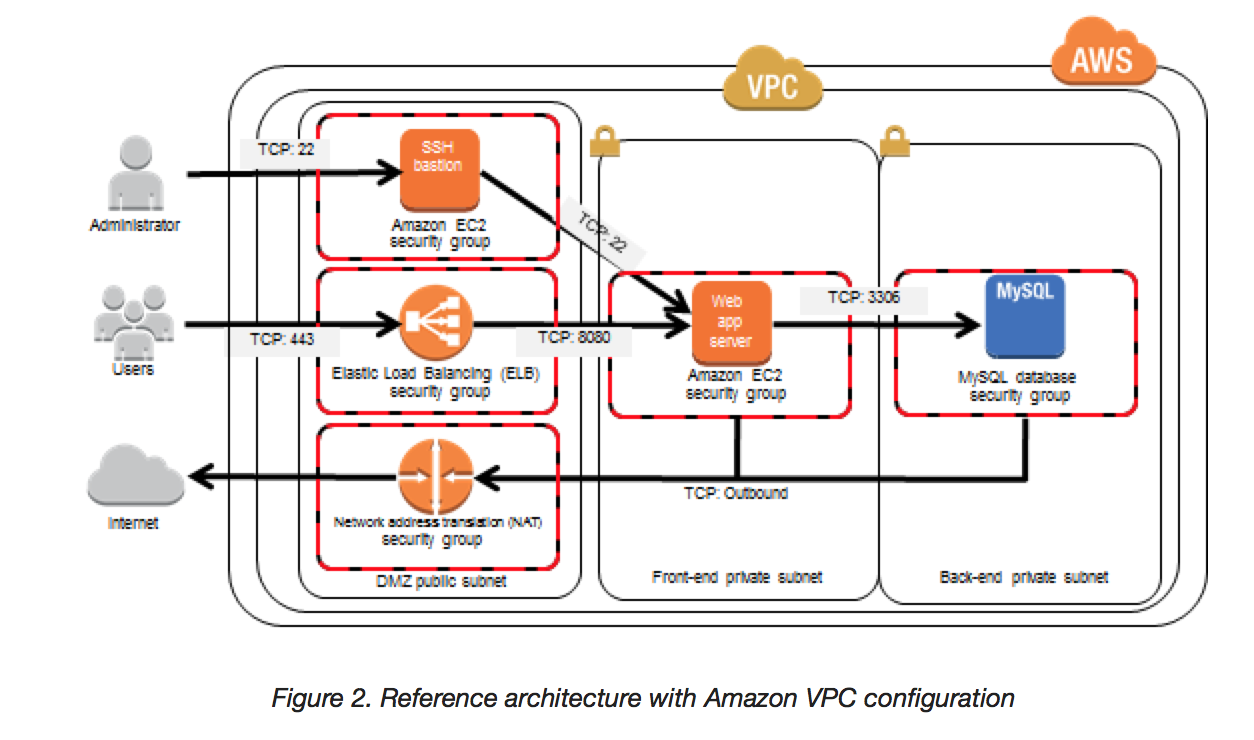
  • Bastion means a structure for Fortification to protect things behind it
  • In AWS, a Bastion host (also referred to as a Jump server) can be used to securely access instances in the private subnets.
  • Bastion host launched in the Public subnets would act as a primary access point from the Internet and acts as a proxy to other instances.

Bastion Host

Key points

  • Bastion host is deployed in the Public subnet and acts as a proxy or a gateway between you and your instances
  • Bastion host is a security measure that helps to reduce attack on your infrastructure and you have to concentrate to hardening a single layer
  • Bastion host allows you to login to instances in the Private subnet securely without having to store the private keys on the Bastion host (using ssh-agent forwarding or RDP gateways)
  • Bastion host security can be further tightened to allow SSH/RDP access from specific trusted IPs or corporate IP ranges
  • Bastion host for your AWS infrastructure shouldn’t be used for any other purpose, as that could open unnecessary security holes
  • Security for all the Instances in the private subnet should be hardened to accept SSH/RDP connections only from the Bastion host
  • Deploy a Bastion host within each Availability Zone for HA, cause if the Bastion instance or the AZ hosting the Bastion server goes down the ability to connect to your private instances is lost completely

Modern Alternatives to Bastion Hosts

EC2 Instance Connect Endpoint (EIC Endpoint)

  • Launched in June 2023, EC2 Instance Connect Endpoint allows secure connectivity to instances in private subnets from the internet without requiring a bastion host
  • No IGW in the VPC, no public IP on the instance, and no agent installation required
  • Supports SSH and RDP connections using private IP addresses
  • Access is controlled through IAM policies and security groups
  • Available at no additional cost
  • One EIC Endpoint per VPC; supported in all AWS Regions except Canada West (Calgary)
  • Ideal for ad-hoc access to private instances without maintaining bastion infrastructure

AWS Systems Manager Session Manager

  • Provides secure, auditable instance management without opening inbound ports (no port 22/3389 needed)
  • No SSH keys to manage – access is controlled entirely through IAM policies
  • Requires SSM Agent installed on the instance (pre-installed on Amazon Linux 2, Amazon Linux 2023, and many other AMIs)
  • Provides full audit trail in AWS CloudTrail and session logging to S3/CloudWatch
  • Supports port forwarding for accessing applications on private instances
  • Works with instances in private subnets without internet access (via VPC endpoints)
  • Recommended by AWS as a bastion host replacement for operational access

AWS Verified Access

  • Provides secure, VPN-less access based on Zero Trust principles
  • Originally supported only HTTP/HTTPS applications (GA April 2023)
  • Non-HTTP protocol support (SSH, RDP, TCP) went GA in February 2025
  • Evaluates access based on user identity and device security posture on every request
  • Uses Cedar policy language for fine-grained access control
  • Integrates with identity providers (IdPs) and device trust providers (Jamf, CrowdStrike, etc.)
  • Achieved FedRAMP High and Moderate authorization (March 2025)
  • Ideal for enterprise environments requiring identity-aware, device-trust-based access

When to Still Use a Bastion Host

  • Legacy environments where SSM Agent cannot be installed
  • Compliance requirements mandating a traditional network perimeter
  • Environments needing specific protocol support not covered by alternatives
  • Third-party access where IAM-based solutions are not feasible
  • AWS certification exams still heavily test bastion host concepts

AWS Certification Exam Practice Questions

  • Questions are collected from Internet and the answers are marked as per my knowledge and understanding (which might differ with yours).
  • AWS services are updated everyday and both the answers and questions might be outdated soon, so research accordingly.
  • AWS exam questions are not updated to keep up the pace with AWS updates, so even if the underlying feature has changed the question might not be updated
  • Open to further feedback, discussion and correction.
  1. A customer is running a multi-tier web application farm in a virtual private cloud (VPC) that is not connected to their corporate network. They are connecting to the VPC over the Internet to manage all of their Amazon EC2 instances running in both the public and private subnets. They have only authorized the bastion-security-group with Microsoft Remote Desktop Protocol (RDP) access to the application instance security groups, but the company wants to further limit administrative access to all of the instances in the VPC. Which of the following Bastion deployment scenarios will meet this requirement?
    1. Deploy a Windows Bastion host on the corporate network that has RDP access to all instances in the VPC.
    2. Deploy a Windows Bastion host with an Elastic IP address in the public subnet and allow SSH access to the bastion from anywhere.
    3. Deploy a Windows Bastion host with an Elastic IP address in the private subnet, and restrict RDP access to the bastion from only the corporate public IP addresses.
    4. Deploy a Windows Bastion host with an auto-assigned Public IP address in the public subnet, and allow RDP access to the bastion from only the corporate public IP addresses.
  2. You are designing a system that has a Bastion host. This component needs to be highly available without human intervention. Which of the following approaches would you select?
    1. Run the bastion on two instances one in each AZ
    2. Run the bastion on an active Instance in one AZ and have an AMI ready to boot up in the event of failure
    3. Configure the bastion instance in an Auto Scaling group Specify the Auto Scaling group to include multiple AZs but have a min-size of 1 and max-size of 1
    4. Configure an ELB in front of the bastion instance
  3. You’ve been brought in as solutions architect to assist an enterprise customer with their migration of an ecommerce platform to Amazon Virtual Private Cloud (VPC) The previous architect has already deployed a 3- tier VPC. The configuration is as follows: VPC vpc-2f8t>C447
    IGW ig-2d8bc445
    NACL acl-2080c448
    Subnets and Route Tables:
    Web server’s subnet-258bc44d
    Application server’s subnet-248DC44c
    Database server’s subnet-9189c6f9
    Route Tables:
    rtb-2i8bc449
    rtb-238bc44b
    Associations:
    Subnet-258bc44d: rtb-2i8bc449
    Subnet-248DC44c: rtb-238bc44b
    Subnet-9189c6f9: rtb-238bc44b
    You are now ready to begin deploying EC2 instances into the VPC. Web servers must have direct access to the internet Application and database servers cannot have direct access to the internet. Which configuration below will allow you the ability to remotely administer your application and database servers, as well as allow these servers to retrieve updates from the Internet?

    1. Create a bastion and NAT Instance in subnet-258bc44d and add a route from rtb-238bc44b to subnet-258bc44d. (Route should point to the NAT)
    2. Add a route from rtb-238bc44b to igw-2d8bc445 and add a bastion and NAT instance within Subnet-248DC44c. (Adding IGW to routertb-238bc44b would expose the Application and Database server to internet. Bastion and NAT should be in public subnet)
    3. Create a Bastion and NAT Instance in subnet-258bc44d. Add a route from rtb-238bc44b to igw-2d8bc445. And a new NACL that allows access between subnet-258bc44d and subnet-248bc44c. (Route should point to NAT and not Internet Gateway else it would be internet accessible.)
    4. Create a Bastion and NAT instance in subnet-258bc44d and add a route from rtb-238bc44b to the NAT instance. (Bastion and NAT should be in the public subnet. As Web Server has direct access to Internet, the subnet subnet-258bc44d should be public and Route rtb-2i8bc449 pointing to IGW. Route rtb-238bc44b for private subnets should point to NAT for outgoing internet access)
  4. You are tasked with setting up a Linux bastion host for access to Amazon EC2 instances running in your VPC. Only clients connecting from the corporate external public IP address 72.34.51.100 should have SSH access to the host. Which option will meet the customer requirement?
    1. Security Group Inbound Rule: Protocol – TCP. Port Range – 22, Source 72.34.51.100/32
    2. Security Group Inbound Rule: Protocol – UDP, Port Range – 22, Source 72.34.51.100/32
    3. Network ACL Inbound Rule: Protocol – UDP, Port Range – 22, Source 72.34.51.100/32
    4. Network ACL Inbound Rule: Protocol – TCP, Port Range-22, Source 72.34.51.100/0
  5. A company needs to provide secure access to EC2 instances in private subnets without managing SSH keys or opening inbound ports. The solution must provide an audit trail of all sessions. Which AWS service should they use?
    1. Deploy a bastion host in a public subnet with an Auto Scaling group
    2. Use AWS Systems Manager Session Manager with IAM-based access control
    3. Use EC2 Instance Connect Endpoint with a public IP on the instances
    4. Configure a VPN connection from the corporate network
  6. A solutions architect needs to allow developers to connect via SSH to EC2 instances in a private subnet that has no internet gateway and no NAT gateway. The instances do not have public IP addresses. Which solution requires the LEAST operational overhead?
    1. Deploy a bastion host in a public subnet and configure security groups
    2. Set up an AWS Site-to-Site VPN connection
    3. Create an EC2 Instance Connect Endpoint in the VPC
    4. Configure AWS Direct Connect with a private virtual interface
  7. An enterprise wants to implement zero trust access to their internal applications and SSH-based administration of EC2 instances. Access should be granted based on user identity and device security posture without using a VPN or bastion host. Which AWS service meets these requirements?
    1. AWS Systems Manager Session Manager
    2. EC2 Instance Connect Endpoint
    3. AWS Verified Access
    4. AWS Client VPN
  8. Which of the following are valid modern alternatives to using a bastion host for accessing private EC2 instances? (Select THREE)
    1. AWS Systems Manager Session Manager
    2. Amazon Inspector
    3. EC2 Instance Connect Endpoint
    4. AWS Config
    5. AWS Verified Access with non-HTTP protocol support

Related Posts

AWS – EC2 Troubleshooting Connecting to an Instance

AWS – EC2 Troubleshooting Connecting to an Instance

EC2 Connection Methods

AWS provides multiple methods to connect to EC2 instances. Understanding these helps choose the right approach and troubleshoot connection issues effectively.

  • SSH/RDP (Traditional) – Requires open inbound ports (22/3389), key pairs, and a public IP or VPN connectivity.
  • EC2 Instance Connect – Browser-based SSH using temporary keys pushed via IAM. Requires the EC2 Instance Connect agent installed and port 22 open from EC2 Instance Connect service IP ranges.
  • EC2 Instance Connect Endpoint (EIC Endpoint) – Launched June 2023, allows SSH/RDP to instances in private subnets without a public IP, bastion host, or internet gateway. Creates a private tunnel through an endpoint in the VPC. No additional cost.
  • AWS Systems Manager Session Manager – Provides shell access without opening inbound ports, managing SSH keys, or requiring a public IP. Uses the SSM Agent and IAM for authentication. All sessions are logged and auditable. AWS recommends this as the preferred method for EC2 access.
  • EC2 Serial Console – Provides low-level serial port access for troubleshooting boot, network, and OS configuration issues even when SSH/RDP is unavailable. Does not require network connectivity to the instance.

Common Causes for Connection Issues

  1. Security Group misconfiguration – Inbound rules must allow SSH (port 22) or RDP (port 3389) traffic from your IP address. The default VPC security group does not allow inbound SSH by default.
  2. Network ACL (NACL) misconfiguration – NACLs are stateless. Both inbound rules (allow traffic on port 22 from source IP) and outbound rules (allow response traffic on ephemeral ports 1024-65535) must be configured.
  3. Missing or incorrect key pair – Verify the private key (.pem) file corresponds to the key pair selected when the instance was launched.
  4. Incorrect username – The default username varies by AMI/OS:
    AMI Default Username
    Amazon Linux ec2-user
    Ubuntu ubuntu
    Debian admin
    CentOS centos or ec2-user
    RHEL ec2-user or root
    SUSE ec2-user or root
    Fedora fedora or ec2-user
    FreeBSD ec2-user
    Oracle ec2-user
    Bitnami bitnami
    Rocky Linux rocky
  5. No public IP address – Instance must have a public IPv4 address (or Elastic IP) to connect via SSH over the internet. Alternatively, use Session Manager or EC2 Instance Connect Endpoint for private instances.
  6. Missing route to Internet Gateway – The subnet’s route table must have a route for 0.0.0.0/0 pointing to an Internet Gateway for internet-facing instances.
  7. Instance not in running state or failed status checks – Verify the instance is running and passes both system and instance status checks.
  8. Key file permissions too open – Private key file must have restrictive permissions (chmod 400 on Linux/macOS). SSH ignores keys with permissions broader than 0400.
  9. Corporate firewall blocking port 22 – Internal firewalls may block outbound SSH. Use Session Manager (HTTPS-based) as an alternative.
  10. CPU overload on instance – High CPU utilization can make the instance unresponsive. Check CloudWatch metrics and consider resizing or using Auto Scaling.

Connection Error Messages and Solutions

“Connection timed out” Error

Indicates network-level connectivity issues. Troubleshoot:

  1. Verify security group allows inbound SSH from your current public IP (IP may change with dynamic addressing)
  2. Verify route table has a route to an Internet Gateway (0.0.0.0/0 → igw-xxx)
  3. Verify Network ACL allows inbound on port 22 AND outbound on ephemeral ports (1024-65535)
  4. Verify instance has a public IPv4 address or Elastic IP
  5. Check for corporate firewall blocking outbound port 22
  6. Use VPC Reachability Analyzer to diagnose the network path

“Permission denied (publickey)” Error

Indicates authentication failure. Troubleshoot:

  1. Verify you are using the correct private key for the instance’s key pair
  2. Verify you are connecting with the correct username for the AMI
  3. Verify key file permissions are 0400 (Linux/macOS) or properly restricted (Windows)
  4. Check if permissions on ~/.ssh/authorized_keys or home directory were changed on the instance

“Unprotected Private Key File” Warning

SSH ignores keys with overly permissive file permissions.

  • Linux/macOS: chmod 0400 my_private_key.pem
  • Windows: Remove inherited permissions and grant Read access only to your user account via file Properties → Security → Advanced

“Host key verification failed” Error

Occurs when the host key stored in ~/.ssh/known_hosts doesn’t match the instance. Common after stopping/starting instances (which may change the public IP) or associating/removing an Elastic IP. Remove the old host key entry and reconnect.

“Server refused our key” Error (PuTTY)

  • Verify the .pem file was converted to .ppk format using PuTTYgen
  • Verify correct username is entered in the PuTTY configuration
  • Verify the latest version of PuTTY is installed

Troubleshooting Tools

VPC Reachability Analyzer

A configuration analysis tool that checks network reachability between a source and destination resource in your VPC. For EC2 connectivity troubleshooting:

  • Set Source type to Internet Gateway and Destination to your EC2 instance
  • Analyzes security groups, NACLs, route tables, and other network components
  • Provides hop-by-hop path details when reachable or identifies the blocking component when not reachable
  • Amazon Q network troubleshooting (2024) integrates with Reachability Analyzer to help diagnose connectivity issues using natural language

AWSSupport-TroubleshootSSH Automation Runbook

An AWS Systems Manager Automation document that automatically diagnoses and repairs common SSH connection issues:

  • Installs EC2Rescue for Linux on the instance
  • Checks and attempts to fix SSH daemon configuration, file permissions, and firewall rules
  • Can be run with Action: FixAll to automatically repair identified issues
  • Creates a temporary VPC and uses Lambda functions to perform the analysis

EC2 Serial Console

Provides serial port access for troubleshooting when SSH/RDP is unavailable:

  • Does not require network connectivity to the instance
  • Useful for troubleshooting boot failures, network misconfigurations, and OS-level issues
  • Must be enabled at the account level; requires IAM permissions and a password-based OS user
  • Supported on Nitro-based instance types

SSH Verbose Mode

Use ssh -vvv for detailed debugging output to identify where the connection fails in the SSH handshake process.

Modern Alternatives to Traditional SSH

AWS Systems Manager Session Manager

AWS recommends Session Manager as the preferred access method because it:

  • Eliminates the need to open inbound port 22
  • Removes the need to manage SSH keys
  • Does not require bastion hosts or public IP addresses
  • Provides centralized access control through IAM policies
  • Logs all sessions to CloudWatch Logs and/or S3 for audit
  • Supports port forwarding for accessing remote services
  • Encrypts all traffic using TLS 1.2
  • Available at no additional charge for EC2 instances

Requirements: SSM Agent installed (pre-installed on Amazon Linux 2/2023, Ubuntu 16.04+), instance profile with AmazonSSMManagedInstanceCore policy, and outbound HTTPS connectivity (or VPC endpoints for private subnets).

EC2 Instance Connect Endpoint

For instances in private subnets without Session Manager configured:

  • Create an EIC Endpoint in your VPC (no additional cost)
  • Connect via AWS CLI: aws ec2-instance-connect ssh --instance-id i-xxx
  • No need for public IP, IGW, or bastion hosts
  • Uses IAM for authorization
  • Security group on the endpoint controls which instances can be accessed

Lost Private Key Recovery

If the private key for an EBS-backed instance is lost:

  1. Create a new key pair
  2. Stop the instance (not terminate)
  3. Detach the root EBS volume
  4. Attach the volume to a temporary instance
  5. Mount the volume and update ~/.ssh/authorized_keys with the new public key
  6. Detach the volume and reattach to the original instance as the root volume
  7. Start the instance and connect with the new key pair

Note: This procedure only works for EBS-backed instances. Instance store-backed instances cannot be recovered without the original key. Alternatively, use Session Manager if SSM Agent is running, or use EC2 Serial Console if a password-based user is configured.

AWS Certification Exam Tips

  • “Connection timed out” typically indicates network-level issues (security groups, NACLs, route tables, no public IP)
  • “Permission denied” typically indicates authentication issues (wrong key, wrong username, key file permissions)
  • Session Manager is the recommended approach for secure, auditable access without open ports
  • EC2 Instance Connect Endpoint enables access to private instances without bastion hosts
  • EC2 Serial Console is the last-resort tool when all network-based access fails
  • VPC Reachability Analyzer is used to diagnose network path issues

Exam Scenario Questions

  1. You try to connect via SSH to a newly created Amazon EC2 instance and get one of the following error messages: “Network error: Connection timed out” or “Error connecting to [instance], reason: → Connection timed out: connect.” You have confirmed that the network and security group rules are configured correctly and the instance is passing status checks. What steps should you take to identify the source of the behavior? Choose 2 answers
    • Verify that the private key file corresponds to the Amazon EC2 key pair assigned at launch.
    • Verify that your IAM user policy has permission to launch Amazon EC2 instances.
    • Verify that you are connecting with the appropriate user name for your AMI.
    • Verify that the Amazon EC2 Instance was launched with the proper IAM role.
    • Verify that your federation trust to AWS has been established.
  2. A developer is unable to SSH into an EC2 instance in a private subnet. The instance has no public IP address and no internet gateway is attached to the VPC. The instance has the SSM Agent installed with an appropriate instance profile. What is the MOST operationally efficient way to connect?
    • Attach an Elastic IP address to the instance and connect via SSH.
    • Deploy a bastion host in a public subnet and use it to SSH into the private instance.
    • Use AWS Systems Manager Session Manager to establish a session to the instance.
    • Create a VPN connection to the VPC and connect via the private IP.
  3. An administrator receives “Permission denied (publickey)” when connecting via SSH to an EC2 instance running Amazon Linux. The administrator confirmed the correct key pair was used. What should be checked NEXT?
    • Verify the security group allows inbound traffic on port 22.
    • Verify the username is ec2-user (not root) and the key file permissions are chmod 400.
    • Verify the instance has an IAM role attached.
    • Verify the instance is in a public subnet.
  4. A security team wants to provide developers access to EC2 instances without opening any inbound ports and with full session logging. Which AWS service should they implement?
    • EC2 Instance Connect
    • AWS Systems Manager Session Manager
    • AWS Direct Connect
    • Amazon WorkSpaces
  5. An EC2 instance has become unresponsive and all network-based connection methods (SSH, Session Manager) are failing. The instance is running on a Nitro-based instance type. Which AWS feature can provide access for troubleshooting?
    • VPC Flow Logs
    • AWS CloudTrail
    • EC2 Serial Console
    • AWS X-Ray
  6. A solutions architect needs to diagnose why SSH connections to an EC2 instance are timing out. Which AWS tool can analyze the network path between an internet gateway and the instance to identify the blocking component?
    • AWS CloudTrail
    • VPC Reachability Analyzer
    • Amazon Inspector
    • AWS Trusted Advisor

References