AWS Route 53
- Route 53 is a highly available and scalable Domain Name System (DNS) web service.
- Route 53 provides three main functions:
- Domain registration
- allows domain names registration
- supports registration and management of 34+ new top-level domains (TLDs) including .app, .dev, .art, .forum, .health, and .realty
- Domain Name System (DNS) service
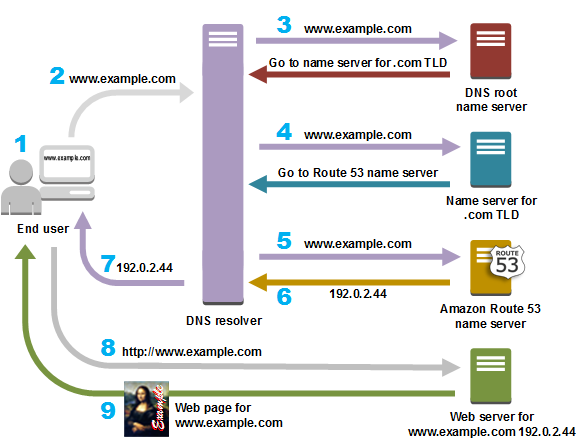
- translates friendly domains names like www.example.com into IP addresses like 192.0.2.1
- responds to DNS queries using a global network of authoritative DNS servers, which reduces latency
- can route Internet traffic to CloudFront, Elastic Beanstalk, ELB, or S3. There’s no charge for DNS queries to these resources
- Health Checking
- can monitor the health of resources such as web and email servers.
- sends automated requests over the Internet to the application to verify that it’s reachable, available, and functional
- CloudWatch alarms can be configured for the health checks to send notifications when a resource becomes unavailable.
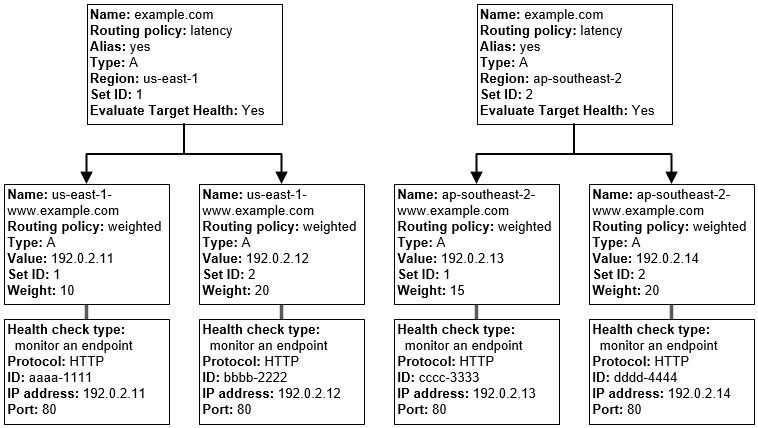
- can be configured to route Internet traffic away from resources that are unavailable
- Security
- supports both DNSSEC for domain registration and DNSSEC signing
- supports AWS PrivateLink for API requests, allowing workloads to manage DNS infrastructure without using the public internet (announced Nov 2025)
- Domain registration
Supported DNS Resource Record Types
- A (Address) Format
- is an IPv4 address in dotted decimal notation for e.g. 192.0.2.1
- AAAA Format
- is an IPv6 address in colon-separated hexadecimal format
- CNAME Format
- is the same format as a domain name
- DNS protocol does not allow creation of a CNAME record for the top node of a DNS namespace, also known as the zone apex for e.g. the DNS name example.com registration, the zone apex is example.com, a CNAME record for example.com cannot be created, but CNAME records can be created for www.example.com, newproduct.example.com etc.
- If a CNAME record is created for a subdomain, any other resource record sets for that subdomain cannot be created for e.g. if a CNAME created for www.example.com, no other resource record sets for which the value of the Name field is www.example.com can be created
- MX (Mail Xchange) Format
- contains a decimal number that represents the priority of the MX record, and the domain name of an email server
- NS (Name Server) Format
- An NS record identifies the name servers for the hosted zone. The value for an NS record is the domain name of a name server.
- PTR Format
- A PTR record Value element is the same format as a domain name.
- SOA (Start of Authority) Format
- SOA record provides information about a domain and the corresponding Amazon Route 53 hosted zone
- SPF (Sender Policy Framework) Format
- SPF records were formerly used to verify the identity of the sender of email messages, however is not recommended
- Instead of an SPF record, a TXT record that contains the applicable value is recommended
- SRV Format
- An SRV record Value element consists of four space-separated values. The first three values are decimal numbers representing priority, weight, and port. The fourth value is a domain name for e.g. 10 5 80 hostname.example.com
- TXT (Text) Format
- A TXT record contains a space-separated list of double-quoted strings. A single string include a maximum of 255 characters. In addition to the characters that are permitted unescaped in domain names, space is allowed in TXT strings
- HTTPS Format (New – Oct 2024)
- HTTPS records are specific for use with the HTTP protocol and allow application owners to bind endpoint-specific information into the DNS reply.
- Enables clients to discover the optimal HTTP protocol version (HTTP/2, HTTP/3) during the initial DNS resolution phase rather than in a subsequent connection step, reducing latency.
- Supports two modes: AliasMode (aliases a DNS name to another DNS name) and ServiceMode (passes parameters like ALPN, port, ECH, and IP hints).
- Supported for both public and private hosted zones.
- SVCB (Service Binding) Format (New – Oct 2024)
- SVCB records allow application owners to bind endpoint-specific information for any service, irrespective of protocol.
- Similar to HTTPS records but the record name includes the port and protocol.
- Supports AliasMode and ServiceMode with parameters like TLS ALPN, port number, ECH configuration, and IP hints.
- Supported for both public and private hosted zones.
- TLSA Format (New – Oct 2024)
- TLSA records allow administrators to specify a public key fingerprint of the TLS certificate in DNS (DNS-based Authentication of Named Entities – DANE).
- Enables a TLS client to verify using DNS that the certificate presented by a server is expected.
- Helps prevent man-in-the-middle attacks and downgrade attacks, particularly useful for SMTP over TLS.
- Requires DNSSEC to be enabled on the hosted zone.
- Supported only for public hosted zones.
- SSHFP (Secure Shell Fingerprint) Format (New – Oct 2024)
- SSHFP records allow DNS servers to answer SSH client requests for SSH fingerprints with DNSSEC-signed records.
- SSH client validates the fingerprint a server presents with those provided by the DNS server, mitigating man-in-the-middle attacks.
- Requires DNSSEC to be enabled on the hosted zone and DNSSEC validation on the client.
- Supported only for public hosted zones.
Alias Resource Record Sets
- Route 53 supports alias resource record sets, which enables routing of queries to a CloudFront distribution, Elastic Beanstalk, ELB, an S3 bucket configured as a static website, or another Route 53 resource record set
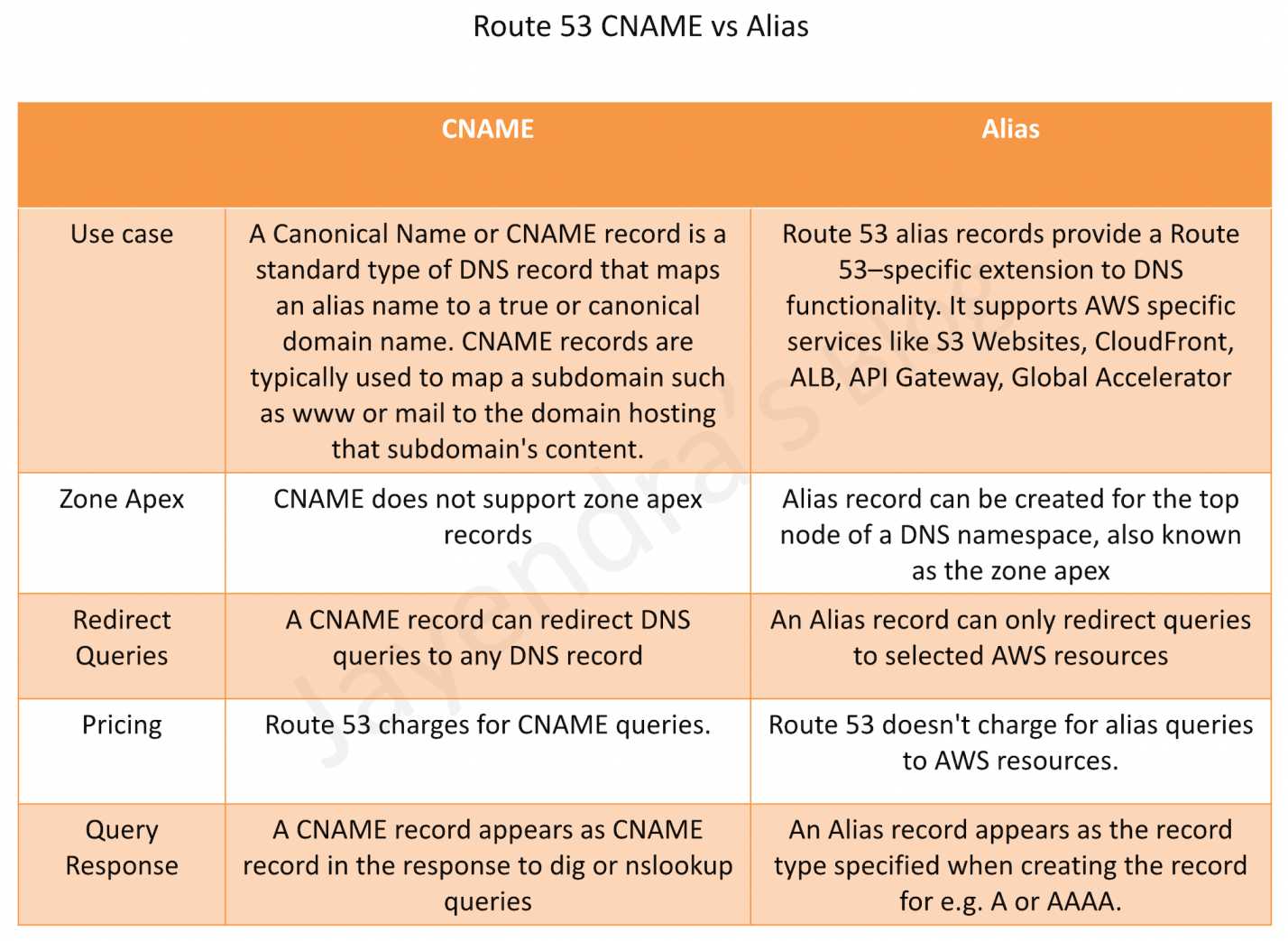
- Alias records are not standard for DNS RFC and are a Route 53 extension to DNS functionality
- Alias record is similar to a CNAME record and is always of type A or AAAA
- Alias record can be created both for the root domain or apex zone, such as example.com, and for subdomains, such as www.example.com. CNAME records can be used only for subdomains.
- Route 53 automatically recognizes changes in the resource record sets that the alias resource record set refers to for e.g. for a site pointing to a load balancer, if the IP of the load balancer changes, it will reflect those changes automatically in the DNS answers without any changes to the hosted zone that contains resource record sets
- Alias resource record set does not support TTL or Time to Live if it points to a CloudFront distribution, an ELB, or an S3 bucket. Underlying CloudFront, load balancer, or S3 TTLs are used.
- Alias records are free to query and do not incur any charges.
- Alias record supported targets
- Elastic Load Balancers
- CloudFront distributions
- API Gateway
- Elastic Beanstalk
- S3 Website
- Global Accelerator
- VPC Interface Endpoints
- Route 53 record in the same hosted zone
- Alias records are not supported for
- EC2 DNS
- RDS endpoints.
Route 53 Alias vs CNAME
Refer to blog post @ Route 53 Alias vs CNAME
Route 53 Hosted Zone
- Hosted Zone is a container for records, which include information about how to route traffic for a domain (such as example.com) and all of its subdomains (such as www.example.com, retail.example.com, and seattle.accounting.example.com).
- A hosted zone has the same name as the corresponding domain.
- Routing Traffic to the Resources
- Create a hosted zone with either a public hosted zone or a private hosted zone:
- Public Hosted Zone – for routing internet traffic to the resources for a specific domain and its subdomains
- Private hosted zone – for routing traffic within a VPC
- Create records in the hosted zone
- Records define where to route traffic for each domain name or subdomain name.
- Name of each record in a hosted zone must end with the name of the hosted zone.
- Create a hosted zone with either a public hosted zone or a private hosted zone:
- For public/private and private Hosted Zones that have overlapping namespaces, Route 53 Resolvers routes traffic to the most specific match.
- IAM permissions apply only at the Hosted Zone level
- Accelerated Recovery (New – Nov 2025)
- Accelerated recovery for public hosted zones targets a 60-minute Recovery Time Objective (RTO) for DNS record changes during service disruptions in the US East (N. Virginia) Region.
- Provides built-in failover of the Route 53 control plane to the Oregon Region (us-west-2).
- When enabled, allows making changes to DNS records in public hosted zones even when the us-east-1 Region is unavailable.
- Enhances business continuity for mission-critical applications that rely on DNS changes for failover.
Route 53 Health Checks
- Route 53 health checks monitor the health and performance of the underlying resources.
- Health check types
- Health checks that monitor an endpoint, such as a web server.
- Health checkers are located in locations around the world.
- The health checker location and interval can be specified.
- Health checker evaluates the health of the endpoint based
- Response time
- Specified failure threshold – Whether the endpoint responds to a number of consecutive health checks
- The endpoint is considered healthy if more than 18% of health checkers report that an endpoint is healthy.
- Health check is considered healthy if
- HTTP and HTTPS health checks
- TCP connection can be established within four seconds.
- Returns 2xx or 3xx within two seconds after connecting.
- TCP health checks
- TCP connection can be established within ten seconds.
- HTTP and HTTPS health checks with string matching
- TCP connection can be established within four seconds.
- Returns 2xx or 3xx within two seconds after connecting.
- Route 53 searches the response body for the specified string which must appear entirely in the first 5,120 bytes of the response body or the endpoint fails the health check.
- HTTP and HTTPS health checks
- Calculated health checks – Health checks that monitor the status of other health checks.
- Health check that does the monitoring is the parent health check, and the health checks that are monitored are child health checks.
- One parent health check can monitor the health of up to 255 child health checks
- Health checks that monitor the status of a CloudWatch alarm.
- Route 53 monitors the data stream for the corresponding alarm instead of monitoring the alarm state.
- Health checks that monitor an endpoint, such as a web server.
- Route 53 checks the health of an endpoint by sending an HTTP, HTTPS, or TCP request to the specified IP address and port.
- For a health check to succeed, the router and firewall rules must allow inbound traffic from the IP addresses that the health checkers use.
Route 53 Routing Policies
Refer Blog post @ Route 53 Routing Policies
Route 53 Resolver
Refer Blog post @ Route 53 Resolver
Route 53 Global Resolver (New – GA March 2026)
- Route 53 Global Resolver is an internet-reachable anycast DNS resolver that delivers easy, secure, and reliable DNS resolution for authorized clients from anywhere.
- Provides DNS resolution for authenticated clients in on-premises data centers, branch offices, and remote locations through globally distributed anycast IP addresses.
- Resolves both public internet domains and Route 53 private hosted zones, eliminating the need for separate split-DNS forwarding infrastructure.
- Supports multiple DNS protocols including DNS over UDP (Do53), DNS-over-HTTPS (DoH), and DNS-over-TLS (DoT).
- Includes built-in security controls:
- DNS traffic filtering to block potentially malicious domains
- Support for encrypted DNS queries
- Centralized logging for auditing and compliance
- Integration with Route 53 Resolver DNS Firewall rules (threat categories, content categories, and advanced DNS threat protection)
- Anycast architecture automatically routes each query to the closest healthy AWS Region, providing built-in failover without client-side changes.
- Deployed across multiple AWS Regions simultaneously (minimum two).
- Supports adding and removing AWS Regions for flexible control over where DNS queries are resolved.
- Available across 30+ AWS Regions with support for both IPv4 and IPv6 DNS query traffic.
Route 53 Profiles (New – April 2024)
- Route 53 Profiles allows defining a standard DNS configuration and applying it to multiple VPCs in the same AWS Region.
- A Profile can include:
- Route 53 private hosted zone (PHZ) associations
- Route 53 Resolver forwarding rules
- Route 53 Resolver DNS Firewall rule groups
- VPC endpoint associations
- Profiles can be shared across AWS accounts using AWS Resource Access Manager (RAM).
- Eliminates the need for per-VPC PHZ associations by allowing DNS configurations to be managed centrally.
- Simplifies DNS management in multi-account environments by reducing operational complexity.
- Supports consistent DNS Query Logging configuration at the Profile level with automatic propagation to all associated VPCs.
- Supports granular IAM permissions for resource and VPC associations.
- Supports AWS PrivateLink for private access to manage Profiles without going through the public internet.
Route 53 Split-view (Split-horizon) DNS
- Route 53 Split-view (Split-horizon) DNS helps access an internal version of the website using the same domain name that is used publicly.
- Both a private and public hosted zone can be maintained with the same domain name for split-view DNS.
- Ensure that DNS resolution and DNS hostnames are enabled on the source VPC.
- DNS queries will respond with answers based on the source of the request.
- From within the VPC, answers will come from the private hosted zone, while public queries will return answers from the public hosted zone.
Route 53 DNSSEC
- DNSSEC – Domain Name System Security Extensions, a protocol for securing DNS traffic, helps protect a domain from DNS spoofing man-in-the-middle attacks.
- DNSSEC works only for public hosted zones.
- Route 53 supports DNSSEC signing as well as DNSSEC for domain registration.
- With DNSSEC enabled for a domain, the DNS resolver establishes a chain of trust for responses from intermediate resolvers.
- The chain of trust begins with the TLD registry for the domain (your domain’s parent zone) and ends with the authoritative name servers at your DNS service provider.
- With DNSSEC enabled, Route 53 creates a key-signing key (KSK) using customer managed key in AWS KMS that supports DNSSEC. The customer-managed key must meet the following requirements:
- must be in the US East (N. Virginia) Region
- must be an asymmetric customer managed key with an ECC_NIST_P256 key spec.
Route 53 Resolver DNS Firewall
- Route 53 Resolver DNS Firewall provides protection for outbound DNS requests from the VPCs and can monitor and control the domains that the applications can query.
- DNS Firewall can filter and regulate outbound DNS traffic for the VPC.
- Reusable collections of filtering rules can be created in DNS Firewall rule groups and be associated with the VPC, with the activity monitored in DNS Firewall logs and metrics.
- A primary use of DNS Firewall protections is to help prevent DNS exfiltration of the data. DNS exfiltration can happen when a bad actor compromises an application instance in the VPC and then uses DNS lookup to send data out of the VPC to a domain that they control.
- DNS Firewall can be configured to
- deny access to the domains that you know to be bad and allow all other queries to pass through OR
- deny access to all domains except for the ones that you explicitly trust.
- DNS Firewall is a feature of Route 53 Resolver and doesn’t require any additional Resolver setup to use.
- Firewall Manager can be used to centrally configure and manage the DNS Firewall rule group associations for the VPCs across the accounts in an Organization. Firewall Manager automatically adds associations for VPCs that come into the scope of the Firewall Manager DNS Firewall policy.
- DNS Firewall Advanced (New – Nov 2024)
- DNS Firewall Advanced provides intelligent, real-time protection against advanced DNS threats.
- Detects DNS tunneling attacks by inspecting DNS payload characteristics including request timestamps, frequency, query string length, and response sizes.
- Identifies Domain Generation Algorithm (DGA) based threats, including dictionary-based DGAs used by attackers to evade detection in malware command-and-control communications.
- Supports threat domain categories (e.g., Malware, Spam, Phishing) for DNS query blocking based on DNS threat types.
- Supports content domain categories (e.g., Adult Content, Gambling, Not-safe-for-work domains) for granular content filtering.
- Works alongside existing DNS Firewall domain list rules for comprehensive defense-in-depth.
Route 53 Application Recovery Controller (ARC)
- Route 53 Application Recovery Controller helps manage and coordinate recovery for applications across AWS Regions and Availability Zones.
- Zonal Shift
- Zonal shift allows shifting traffic for a supported resource away from an impaired Availability Zone to healthy AZs in the same Region.
- All zonal shifts are temporary and must be set initially to expire within three days (72 hours), but can be updated to set a new expiration.
- Zonal Autoshift
- Zonal autoshift allows AWS to automatically shift traffic away from an AZ when AWS detects a potential failure there.
- Operates on the principle of static stability, where the application is pre-scaled across multiple AZs to handle the complete loss of capacity in any single zone.
- Practice runs are initiated to ensure that shifting traffic during an autoshift is safe for the application.
- Routing Control
- Routing controls are simple on/off switches that allow failover of traffic from one replica to another.
- Enables highly available data plane operations for multi-Region failover.
Route 53 Logging
- DNS Query Logging
- DNS Query logs contain information like
- Domain or subdomain that was requested
- Date and time of the request
- DNS record type (such as A or AAAA)
- Route 53 edge location that responded to the DNS query
- DNS response code, such as
NoErrororServFail
- Route 53 will send DNS Query logs to CloudWatch Logs.
- DNS Query Logging is only available for public hosted zones. Use Resolver Query logging for private hosted zones.
- Query logs contain only the queries that DNS resolvers forward to Route 53 and do not include the entries cached by DNS resolvers.
- DNS Query logs contain information like
- Resolver Query Logging
- Resolver Query logging logs the following queries
- Queries that originate in specified VPCs, as well as the responses to those DNS queries.
- Queries from on-premises resources that use an inbound Resolver endpoint.
- Queries that use an outbound Resolver endpoint for recursive DNS resolution.
- Queries that use Route 53 Resolver DNS Firewall rules to block, allow, or monitor domain lists.
- Resolver query logging logs only unique queries, not queries that Resolver is able to respond to from the cache.
- Resolver query logs include values such as the following:
- AWS Region where the VPC was created
- The ID of the VPC that the query originated from
- The IP address of the instance that the query originated from
- The instance ID of the resource that the query originated from
- The date and time that the query was first made
- The DNS name requested (such as prod.example.com)
- The DNS record type (such as A or AAAA)
- The DNS response code, such as NoError or ServFail
- The DNS response data, such as the IP address that is returned in response to the DNS query
- A response to a DNS Firewall rule action
- Route 53 will send Resolver Query logs to
- CloudWatch Logs log group
- S3
- Kinesis Data Firehose delivery stream
- Resolver Query logging logs the following queries
Route 53 Resolver Endpoints – DNS Delegation (New – June 2025)
- Route 53 Resolver endpoints now support DNS delegation for private hosted zones.
- Allows delegating the authority for a subdomain from on-premises infrastructure to the Route 53 Resolver cloud service and vice versa.
- Uses standard name server (NS) records for delegation, eliminating the need for conditional forwarding rules across the organization.
- Simplifies hybrid DNS management by providing a cloud-native experience across namespaces in AWS and on-premises infrastructure.
- Supports Resolver endpoints with DNS64 on inbound endpoints and IPv6 forwarding through IGW on outbound endpoints for IPv4/IPv6 hybrid network management.
AWS Certification Exam Practice Questions
- Questions are collected from Internet and the answers are marked as per my knowledge and understanding (which might differ with yours).
- AWS services are updated everyday and both the answers and questions might be outdated soon, so research accordingly.
- AWS exam questions are not updated to keep up the pace with AWS updates, so even if the underlying feature has changed the question might not be updated
- Open to further feedback, discussion and correction.
- What does Amazon Route53 provide?
- A global Content Delivery Network.
- None of these.
- A scalable Domain Name System
- An SSH endpoint for Amazon EC2.
- Does Amazon Route 53 support NS Records?
- Yes, it supports Name Service records.
- No
- It supports only MX records.
- Yes, it supports Name Server records.
- Does Route 53 support MX Records?
- Yes
- It supports CNAME records, but not MX records.
- No
- Only Primary MX records. Secondary MX records are not supported.
- Which of the following statements are true about Amazon Route 53 resource records? Choose 2 answers
- An Alias record can map one DNS name to another Amazon Route 53 DNS name.
- A CNAME record can be created for your zone apex.
- An Amazon Route 53 CNAME record can point to any DNS record hosted anywhere.
- TTL can be set for an Alias record in Amazon Route 53.
- An Amazon Route 53 Alias record can point to any DNS record hosted anywhere.
- Which statements are true about Amazon Route 53? (Choose 2 answers)
- Amazon Route 53 is a region-level service
- You can register your domain name
- Amazon Route 53 can perform health checks and failovers to a backup site in the event of the primary site failure
- Amazon Route 53 only supports Latency-based routing
- A customer is hosting their company website on a cluster of web servers that are behind a public-facing load balancer. The customer also uses Amazon Route 53 to manage their public DNS. How should the customer configure the DNS zone apex record to point to the load balancer?
- Create an A record pointing to the IP address of the load balancer
- Create a CNAME record pointing to the load balancer DNS name.
- Create a CNAME record aliased to the load balancer DNS name.
- Create an A record aliased to the load balancer DNS name
- A user has configured ELB with three instances. The user wants to achieve High Availability as well as redundancy with ELB. Which of the below mentioned AWS services helps the user achieve this for ELB?
- Route 53
- AWS Mechanical Turk
- Auto Scaling
- AWS EMR
- How can the domain’s zone apex for example “myzoneapexdomain.com” be pointed towards an Elastic Load Balancer?
- By using an AAAA record
- By using an A record
- By using an Amazon Route 53 CNAME record
- By using an Amazon Route 53 Alias record
- You need to create a simple, holistic check for your system’s general availability and uptime. Your system presents itself as an HTTP-speaking API. What is the simplest tool on AWS to achieve this with?
- Route53 Health Checks (Refer link)
- CloudWatch Health Checks
- AWS ELB Health Checks
- EC2 Health Checks
- Your organization’s corporate website must be available on www.acme.com and acme.com. How should you configure Amazon Route 53 to meet this requirement?
- Configure acme.com with an ALIAS record targeting the ELB. www.acme.com with an ALIAS record targeting the ELB.
- Configure acme.com with an A record targeting the ELB. www.acme.com with a CNAME record targeting the acme.com record.
- Configure acme.com with a CNAME record targeting the ELB. www.acme.com with a CNAME record targeting the acme.com record.
- Configure acme.com using a second ALIAS record with the ELB target. www.acme.com using a PTR record with the acme.com record target.
- A company wants to prevent DNS exfiltration from their VPCs. They need to block DNS queries to known malicious domains and detect DNS tunneling attempts. Which Route 53 feature should they use? (New)
- Route 53 Health Checks with CloudWatch Alarms
- Route 53 Resolver DNS Firewall with DNS Firewall Advanced
- Route 53 DNSSEC Signing
- Route 53 Traffic Flow policies
- An organization manages DNS configurations across 200+ VPCs in multiple AWS accounts. They need to standardize private hosted zone associations, Resolver forwarding rules, and DNS Firewall rule groups across all VPCs. Which feature simplifies this? (New)
- Route 53 Traffic Flow
- AWS Organizations Service Control Policies
- Route 53 Profiles
- Route 53 Resolver Rules shared via RAM individually
- A company wants to improve the security of SMTP email between their mail servers. They need DNS to provide TLS certificate fingerprints so sending servers can verify the receiving server’s identity. Which DNS record type should they use? (New)
- SSHFP record
- HTTPS record
- SVCB record
- TLSA record
- A company has remote offices and on-premises data centers that need secure DNS resolution for both public internet domains and Route 53 private hosted zones without deploying Route 53 Resolver endpoints in each location. Which service should they use? (New)
- Route 53 Resolver with outbound endpoints in every Region
- A self-managed recursive DNS resolver
- Route 53 Global Resolver
- Route 53 Profiles with AWS PrivateLink
- A company wants to ensure they can continue making DNS record changes during a regional outage in us-east-1. Which Route 53 feature should they enable? (New)
- Route 53 Multi-Value Answer routing
- Route 53 Application Recovery Controller
- Route 53 Accelerated Recovery for public hosted zones
- Route 53 Health Checks with Failover routing