AWS DynamoDB
- Amazon DynamoDB is a fully managed, serverless NoSQL database service that
- makes it simple and cost-effective to store and retrieve any amount of data and serve any level of request traffic.
- provides fast and predictable performance with seamless scalability
- offers single-digit millisecond performance at any scale
- DynamoDB enables customers to offload the administrative burdens of operating and scaling distributed databases to AWS, without having to worry about hardware provisioning, setup and configuration, replication, software patching, or cluster scaling.
- DynamoDB offers zero infrastructure management, zero downtime maintenance, instant scaling to any application demand, and pay-per-request billing. There are no cold starts, no version upgrades, and no maintenance windows.
- DynamoDB tables do not have fixed schemas, and the table consists of items and each item may have a different number of attributes.
- DynamoDB synchronously replicates data across three facilities in an AWS Region, giving high availability and data durability.
- DynamoDB supports fast in-place updates. A numeric attribute can be incremented or decremented in a row using a single API call.
- DynamoDB uses proven cryptographic methods to securely authenticate users and prevent unauthorized data access.
- Durability, performance, reliability, and security are built in, with SSD (solid state drive) storage and automatic 3-way replication.
- DynamoDB supports two different kinds of primary keys:
- Partition Key (previously called the Hash key)
- A simple primary key, composed of one attribute
- The partition key value is used as input to an internal hash function; the output from the hash function determines the partition where the item will be stored.
- No two items in a table can have the same partition key value.
- Partition Key and Sort Key (previously called the Hash and Range key)
- A composite primary key is composed of two attributes. The first attribute is the partition key, and the second attribute is the sort key.
- The partition key value is used as input to an internal hash function; the output from the hash function determines the partition where the item will be stored.
- All items with the same partition key are stored together, in sorted order by sort key value.
- The combination of the partition key and sort key must be unique.
- It is possible for two items to have the same partition key value, but those two items must have different sort key values.
- Partition Key (previously called the Hash key)
- DynamoDB Table classes currently support
- DynamoDB Standard table class is the default and is recommended for the vast majority of workloads.
- DynamoDB Standard-Infrequent Access (DynamoDB Standard-IA) table class which is optimized for tables where storage is the dominant cost.
- DynamoDB Throughput Capacity determines the read/write capacity for processing reads and writes on the tables and it currently supports
- Provisioned – maximum amount of capacity in terms of reads/writes per second that an application can consume from a table or index
- On-demand – serves thousands of requests per second without capacity planning.
- DynamoDB Secondary indexes
- add flexibility to the queries, without impacting performance.
- are automatically maintained as sparse objects, items will only appear in an index if they exist in the table on which the index is defined making queries against an index very efficient
- DynamoDB throughput and single-digit millisecond latency make it a great fit for gaming, ad tech, mobile, and many other applications
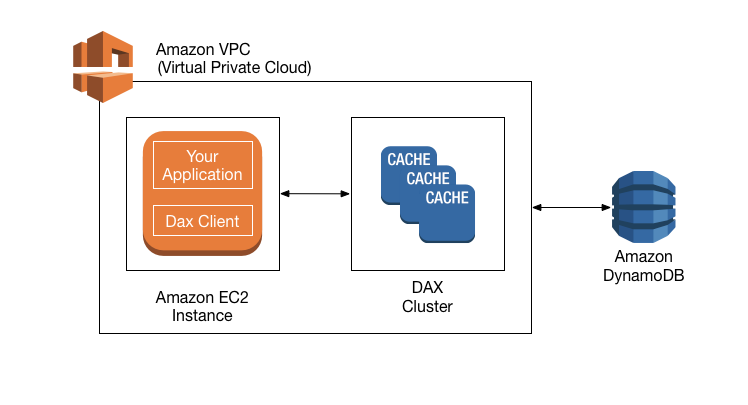
- ElastiCache or DAX can be used in front of DynamoDB in order to offload a high amount of reads for non-frequently changed data
DynamoDB Consistency
- Each DynamoDB table is automatically stored in the three geographically distributed locations for durability.
- Read consistency represents the manner and timing in which the successful write or update of a data item is reflected in a subsequent read operation of that same item.
- DynamoDB allows the user to specify whether the read should be eventually consistent or strongly consistent at the time of the request
- Eventually Consistent Reads (Default)
- Eventual consistency option maximizes the read throughput.
- Consistency across all copies is usually reached within a second
- However, an eventually consistent read might not reflect the results of a recently completed write.
- Repeating a read after a short time should return the updated data.
- DynamoDB uses eventually consistent reads, by default.
- Strongly Consistent Reads
- Strongly consistent read returns a result that reflects all writes that received a successful response prior to the read
- Strongly consistent reads are 2x the cost of Eventually consistent reads
- Strongly Consistent Reads come with disadvantages
- A strongly consistent read might not be available if there is a network delay or outage. In this case, DynamoDB may return a server error (HTTP 500).
- Strongly consistent reads may have higher latency than eventually consistent reads.
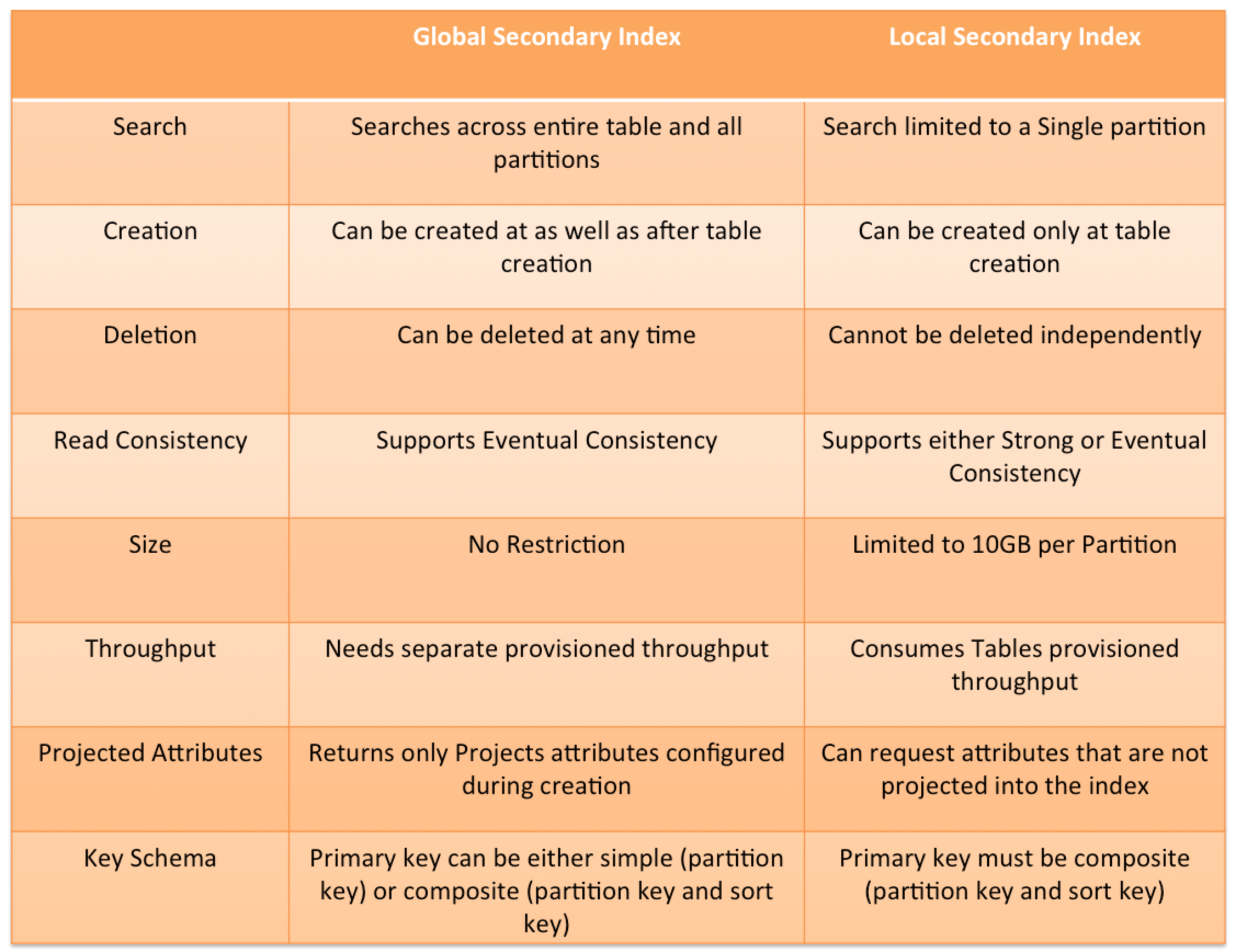
- Strongly consistent reads are not supported on global secondary indexes.
- Strongly consistent reads use more throughput capacity than eventually consistent reads.
- Eventually Consistent Reads (Default)
- Read operations (such as
GetItem,Query, andScan) provide aConsistentReadparameter, if set to true, DynamoDB uses strongly consistent reads during the operation. - Query, GetItem, and BatchGetItem operations perform eventually consistent reads by default.
- Query and GetItem operations can be forced to be strongly consistent
- Query operations cannot perform strongly consistent reads on Global Secondary Indexes
- BatchGetItem operations can be forced to be strongly consistent on a per-table basis
DynamoDB Throughput Capacity
- DynamoDB throughput capacity depends on the read/write capacity modes for processing reads and writes on the tables.
- DynamoDB supports two types of read/write capacity modes:
- Provisioned – maximum amount of capacity in terms of reads/writes per second that an application can consume from a table or index
- On-demand – serves thousands of requests per second without capacity planning.
- DynamoDB Auto Scaling helps dynamically adjust provisioned throughput capacity on your behalf, in response to actual traffic patterns.
- DynamoDB Adaptive capacity is a feature that enables DynamoDB to run imbalanced workloads indefinitely.
Warm Throughput (November 2024)
- Warm throughput provides visibility into the number of read and write operations a DynamoDB table or index can immediately support.
- Warm throughput values grow automatically as usage increases over time.
- Pre-warming allows proactively setting higher warm throughput values to meet anticipated future traffic demands.
- Warm throughput values are available for all provisioned and on-demand tables and indexes at no cost.
- Pre-warming incurs an additional charge based on the DynamoDB pricing page.
- Useful for planned events like product launches, sales events, or traffic migrations where a sudden spike is expected.
Configurable Maximum Throughput for On-Demand (May 2024)
- Allows optionally configuring maximum read or write (or both) throughput for individual on-demand DynamoDB tables and associated secondary indexes.
- Throughput requests exceeding the configured maximum are automatically throttled.
- Simplifies balancing cost and performance for on-demand mode.
- Protects against accidental surges in consumed resources and excessive use.
- Safeguards downstream services with fixed capacity from potential overloading.
- Maximum throughput can be modified at any time based on application requirements.
DynamoDB Secondary Indexes
- DynamoDB Secondary indexes
- add flexibility to the queries, without impacting performance.
- are automatically maintained as sparse objects, items will only appear in an index if they exist in the table on which the index is defined making queries against an index very efficient
- DynamoDB Secondary indexes on a table allow efficient access to data with attributes other than the primary key.
- DynamoDB Secondary indexes support two types
- Global secondary index (GSI) – an index with a partition key and a sort key that can be different from those on the base table.
- Local secondary index (LSI) – an index that has the same partition key as the base table, but a different sort key.
Multi-Attribute Composite Keys in GSIs (November 2025)
- DynamoDB now supports primary keys composed of up to eight attributes in Global Secondary Indexes (GSIs).
- Allows up to four attributes each for the partition key and sort key in a GSI.
- Previously, partition and sort keys were limited to one attribute each.
- Enables querying data at scale across multiple dimensions without client-side composite key construction.
- Reduces client-side code and makes it easier to initially model data and add new access patterns later.
- Each index key attribute must be a scalar of type String, Number, or Binary.
- Base table primary keys still use the traditional structure (single partition key + optional single sort key).
DynamoDB Advanced Topics
- DynamoDB Secondary indexes on a table allow efficient access to data with attributes other than the primary key.
- DynamoDB Time to Live – TTL enables a per-item timestamp to determine when an item is no longer needed.
- DynamoDB cross-region replication allows identical copies (called replicas) of a DynamoDB table (called master table) to be maintained in one or more AWS regions.
- DynamoDB Global Tables is a fully managed, serverless, multi-Region, and multi-active database that provides up to 99.999% availability.
- DynamoDB Streams provides a time-ordered sequence of item-level changes made to data in a table.
- DynamoDB Triggers (just like database triggers) are a feature that allows the execution of custom actions based on item-level updates on a table.
- DynamoDB Accelerator – DAX is a fully managed, highly available, in-memory cache for DynamoDB that delivers up to a 10x performance improvement – from ms to µs – even at millions of requests per second.
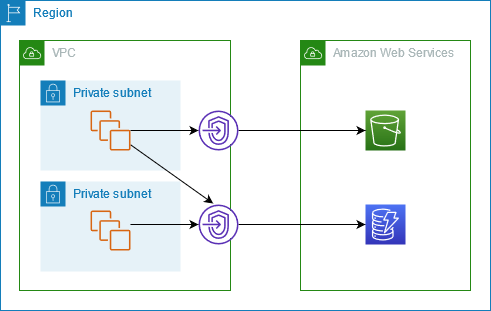
- VPC Gateway Endpoints provide private access to DynamoDB from within a VPC without the need for an internet gateway or NAT gateway.
- AWS PrivateLink (Interface Endpoints) – DynamoDB also supports interface VPC endpoints via AWS PrivateLink, enabling private connectivity from on-premises workloads using Direct Connect or VPN without requiring an internet gateway.
DynamoDB Global Tables
- DynamoDB Global Tables is a fully managed, serverless, multi-Region, and multi-active database.
- Provides up to 99.999% availability and increased application resiliency.
- Automatically replicates tables across selected AWS Regions for fast, local read and write performance.
- Supports two versions:
- Version 2019.11.21 (Current) – recommended version with latest features
- Version 2017.11.29 (Legacy) – original version, AWS recommends upgrading to current version
Multi-Region Strong Consistency (MRSC) – GA June 2025
- DynamoDB Global Tables now supports Multi-Region Strong Consistency (MRSC), enabling zero Recovery Point Objective (RPO).
- Ensures applications can consistently read the latest data version from any Region in a global table.
- Eliminates the need for manual cross-Region consistency management.
- Particularly beneficial for:
- User profile management
- Inventory tracking
- Financial transaction processing
- Any application with strict consistency requirements
- Supports application resiliency testing with AWS Fault Injection Service (FIS).
- Previously, Global Tables only supported eventual consistency across Regions.
DynamoDB Zero-ETL Integrations
- DynamoDB offers zero-ETL integrations that automatically replicate data to analytics services without building complex ETL pipelines.
Zero-ETL with Amazon Redshift (GA October 2024)
- Enables seamless analytics on DynamoDB data without impacting production workloads.
- Data written to DynamoDB becomes immediately available in Amazon Redshift.
- Allows using Amazon Redshift capabilities: high-performance SQL, built-in ML, Spark integrations, and data sharing.
- Supports Redshift Serverless workgroups and provisioned clusters using RA3 instance types.
- Eliminates the need to build and maintain custom ETL pipelines.
Zero-ETL with Amazon OpenSearch Service
- Provides a fully managed, no-code solution for ingesting data from DynamoDB into OpenSearch Service.
- Uses the DynamoDB plugin for Amazon OpenSearch Ingestion.
- Enables near real-time analytics, full-text search, and vector search on DynamoDB data.
- Supports complex search queries and analytics capabilities not natively available in DynamoDB.
Zero-ETL with Amazon SageMaker Lakehouse (December 2024)
- Automates extracting and loading data from DynamoDB into SageMaker Lakehouse.
- Enables analytics and machine learning (ML) workloads on DynamoDB data.
- SageMaker Lakehouse provides integrated access control and open source Apache Iceberg for data interoperability.
DynamoDB S3 Import and Export
- DynamoDB supports import and export features to easily move, transform, and copy table data.
- Export to S3
- Exports data to S3 without consuming read capacity units (RCUs).
- Leverages Point-in-Time Recovery (PITR) capability.
- Supports both full exports and incremental exports (only changed data between two time points).
- Supports DynamoDB JSON and Amazon Ion formats.
- Import from S3
- Allows bulk importing S3 data into a new DynamoDB table.
- Supports up to 50,000 S3 objects in a single bulk import (increased from previous limits in March 2024).
- Supports DynamoDB JSON, Amazon Ion, and CSV formats.
- Incremental exports enable change data capture (CDC) pipelines more efficiently and cost-effectively.
DynamoDB Performance
- Automatically scales horizontally
- runs exclusively on Solid State Drives (SSDs).
- SSDs help achieve the design goals of predictable low-latency response times for storing and accessing data at any scale.
- SSDs High I/O performance enables them to serve high-scale request workloads cost-efficiently and to pass this efficiency along in low request pricing.
- allows provisioned table reads and writes
- Scale up throughput when needed
- Scale down throughput four times per UTC calendar day
- automatically partitions, reallocates and re-partitions the data and provisions additional server capacity as the
- table size grows or
- provisioned throughput is increased
- Global Secondary indexes (GSI)
- can be created upfront or added later
- Supports IPv6 addressing (October 2025), allowing connections to DynamoDB tables, streams, and DAX in IPv4-only, IPv6-only, or dual-stack networking modes.
DynamoDB Security
- AWS handles basic security tasks like guest operating system (OS) and database patching, firewall configuration, and disaster recovery.
- DynamoDB protects user data stored at rest and in transit between on-premises clients and DynamoDB, and between DynamoDB and other AWS resources within the same AWS Region.
- Encryption at rest is enabled on all DynamoDB table data and cannot be disabled.
- Encryption at rest includes the base tables, primary key, local and global secondary indexes, streams, global tables, backups, and DynamoDB Accelerator (DAX) clusters.
- Fine-Grained Access Control (FGAC) gives a high degree of control over data in the table and helps control who (caller) can access which items or attributes of the table and perform what actions (read/write capability).
- Resource-Based Policies (March 2024)
- Allow specifying IAM principals and their allowed actions on tables, streams, and indexes.
- Simplify cross-account access control without needing to configure IAM roles in each account.
- Integrate with AWS IAM Access Analyzer and Block Public Access capabilities.
- Available at no additional cost.
- Attribute-Based Access Control – ABAC (November 2024)
- DynamoDB supports ABAC for tables and indexes.
- Uses tag-based conditions in IAM policies to allow or deny specific actions based on IAM principals’ tags matching table/index tags.
- Automatically applies tag-based permissions to new employees and changing resource structures without rewriting policies.
- Provides more granular access permissions based on organizational structures.
- AWS PrivateLink (March 2024)
- DynamoDB supports interface VPC endpoints via AWS PrivateLink for private network connectivity.
- Eliminates the need to use public IP addresses, configure firewall rules, or set up an internet gateway.
- Compatible with Direct Connect and AWS VPN for end-to-end private network connectivity from on-premises.
- Available in addition to VPC Gateway Endpoints.
- VPC Endpoints allow private connectivity from within a VPC only to DynamoDB.
- DynamoDB supports FIPS 140-3 compliant interface VPC and Streams endpoints in US and Canada Regions (December 2024).
Refer blog post @ DynamoDB Security
DynamoDB Costs
- Index Storage
- DynamoDB is an indexed data store
- Billable Data = Raw byte data size + 100 byte per-item storage indexing overhead
- DynamoDB is an indexed data store
- Provisioned throughput
- Pay flat, hourly rate based on the capacity reserved as the throughput provisioned for the table
- one Write Capacity Unit provides one write per second for items < 1KB in size.
- one Read Capacity Unit provides one strongly consistent read (or two eventually consistent reads) per second for items < 4KB in size.
- Provisioned throughput charges for every 10 units of Write Capacity and every 50 units of Read Capacity.
- On-demand throughput
- Pay per read/write request consumed with no minimum capacity required.
- Effective November 1, 2024, DynamoDB reduced on-demand throughput prices by 50%.
- Makes on-demand mode significantly more cost-effective for variable workloads.
- Reserved capacity
- Significant savings over the normal price
- Pay a one-time upfront fee
- Available for 1-year or 3-year terms
- AWS Cost Explorer now provides purchase recommendations for DynamoDB reserved capacity.
- Global Tables
- Effective November 1, 2024, DynamoDB reduced global tables pricing by up to 67% for on-demand and 33% for provisioned capacity.
- Replicated write capacity units (rWCU/rWRU) are now priced identically to standard single-region writes.
- DynamoDB also charges for storage, backup, replication, streams, caching, data transfer out, and S3 exports.
DynamoDB Best Practices
Refer blog post @ DynamoDB Best Practices
AWS Certification Exam Practice Questions
- Questions are collected from Internet and the answers are marked as per my knowledge and understanding (which might differ with yours).
- AWS services are updated everyday and both the answers and questions might be outdated soon, so research accordingly.
- AWS exam questions are not updated to keep up the pace with AWS updates, so even if the underlying feature has changed the question might not be updated
- Open to further feedback, discussion and correction.
- Which of the following are use cases for Amazon DynamoDB? Choose 3 answers
- Storing BLOB data.
- Managing web sessions
- Storing JSON documents
- Storing metadata for Amazon S3 objects
- Running relational joins and complex updates.
- Storing large amounts of infrequently accessed data.
- You are configuring your company’s application to use Auto Scaling and need to move user state information. Which of the following AWS services provides a shared data store with durability and low latency?
- AWS ElastiCache Memcached (does not allow writes)
- Amazon Simple Storage Service (does not provide low latency)
- Amazon EC2 instance storage (not durable)
- Amazon DynamoDB
- Does Dynamo DB support in-place atomic updates?
- It is not defined
- No
- Yes
- It does support in-place non-atomic updates
- What is the maximum write throughput I can provision for a single Dynamic DB table?
- 1,000 write capacity units
- 100,000 write capacity units
- Dynamic DB is designed to scale without limits, but if you go beyond 10,000 you have to contact AWS first
- 10,000 write capacity units
- For a DynamoDB table, what happens if the application performs more reads or writes than your provisioned capacity?
- Nothing
- requests above the provisioned capacity will be performed but you will receive 400 error codes.
- requests above the provisioned capacity will be performed but you will receive 200 error codes.
- requests above the provisioned capacity will be throttled and you will receive 400 error codes.
- In which of the following situations might you benefit from using DynamoDB? (Choose 2 answers)
- You need fully managed database to handle highly complex queries
- You need to deal with massive amount of “hot” data and require very low latency
- You need a rapid ingestion of clickstream in order to collect data about user behavior
- Your on-premises data center runs Oracle database, and you need to host a backup in AWS cloud
- You are designing a file-sharing service. This service will have millions of files in it. Revenue for the service will come from fees based on how much storage a user is using. You also want to store metadata on each file, such as title, description and whether the object is public or private. How do you achieve all of these goals in a way that is economical and can scale to millions of users? [PROFESSIONAL]
- Store all files in Amazon Simple Storage Service (S3). Create a bucket for each user. Store metadata in the filename of each object, and access it with LIST commands against the S3 API. (expensive and slow as it returns only 1000 items at a time)
- Store all files in Amazon S3. Create Amazon DynamoDB tables for the corresponding key-value pairs on the associated metadata, when objects are uploaded.
- Create a striped set of 4000 IOPS Elastic Load Balancing volumes to store the data. Use a database running in Amazon Relational Database Service (RDS) to store the metadata.(not economical with volumes)
- Create a striped set of 4000 IOPS Elastic Load Balancing volumes to store the data. Create Amazon DynamoDB tables for the corresponding key-value pairs on the associated metadata, when objects are uploaded. (not economical with volumes)
- A utility company is building an application that stores data coming from more than 10,000 sensors. Each sensor has a unique ID and will send a datapoint (approximately 1KB) every 10 minutes throughout the day. Each datapoint contains the information coming from the sensor as well as a timestamp. This company would like to query information coming from a particular sensor for the past week very rapidly and want to delete all the data that is older than 4 weeks. Using Amazon DynamoDB for its scalability and rapidity, how do you implement this in the most cost effective way? [PROFESSIONAL]
- One table, with a primary key that is the sensor ID and a hash key that is the timestamp (Single table impacts performance)
- One table, with a primary key that is the concatenation of the sensor ID and timestamp (Single table and concatenation impacts performance)
- One table for each week, with a primary key that is the concatenation of the sensor ID and timestamp (Concatenation will cause queries would be slower, if at all)
- One table for each week, with a primary key that is the sensor ID and a hash key that is the timestamp (Composite key with Sensor ID and timestamp would help for faster queries)
- You have recently joined a startup company building sensors to measure street noise and air quality in urban areas. The company has been running a pilot deployment of around 100 sensors for 3 months. Each sensor uploads 1KB of sensor data every minute to a backend hosted on AWS. During the pilot, you measured a peak of 10 IOPS on the database, and you stored an average of 3GB of sensor data per month in the database. The current deployment consists of a load-balanced auto scaled Ingestion layer using EC2 instances and a PostgreSQL RDS database with 500GB standard storage. The pilot is considered a success and your CEO has managed to get the attention or some potential investors. The business plan requires a deployment of at least 100K sensors, which needs to be supported by the backend. You also need to store sensor data for at least two years to be able to compare year over year Improvements. To secure funding, you have to make sure that the platform meets these requirements and leaves room for further scaling. Which setup will meet the requirements? [PROFESSIONAL]
- Add an SQS queue to the ingestion layer to buffer writes to the RDS instance (RDS instance will not support data for 2 years)
- Ingest data into a DynamoDB table and move old data to a Redshift cluster (Handle 10K IOPS ingestion and store data into Redshift for analysis. Note: DynamoDB zero-ETL integration with Redshift (GA 2024) can now simplify this architecture.)
- Replace the RDS instance with a 6 node Redshift cluster with 96TB of storage (Does not handle the ingestion issue)
- Keep the current architecture but upgrade RDS storage to 3TB and 10K provisioned IOPS (RDS instance will not support data for 2 years)
- Does Amazon DynamoDB support both increment and decrement atomic operations?
- No, neither increment nor decrement operations.
- Only increment, since decrement are inherently impossible with DynamoDB’s data model.
- Only decrement, since increment are inherently impossible with DynamoDB’s data model.
- Yes, both increment and decrement operations.
- What is the data model of DynamoDB?
- “Items”, with Keys and one or more Attribute; and “Attribute”, with Name and Value.
- “Database”, which is a set of “Tables”, which is a set of “Items”, which is a set of “Attributes”.
- “Table”, a collection of Items; “Items”, with Keys and one or more Attribute; and “Attribute”, with Name and Value.
- “Database”, a collection of Tables; “Tables”, with Keys and one or more Attribute; and “Attribute”, with Name and Value.
- In regard to DynamoDB, for which one of the following parameters does Amazon not charge you?
- Cost per provisioned write units
- Cost per provisioned read units
- Storage cost
- I/O usage within the same Region
- Which statements about DynamoDB are true? Choose 2 answers.
- DynamoDB uses a pessimistic locking model
- DynamoDB uses optimistic concurrency control
- DynamoDB uses conditional writes for consistency
- DynamoDB restricts item access during reads
- DynamoDB restricts item access during writes
- Which of the following is an example of a good DynamoDB hash key schema for provisioned throughput efficiency?
- User ID, where the application has many different users.
- Status Code where most status codes is the same.
- Device ID, where one is by far more popular than all the others.
- Game Type, where there are three possible game types.
- You are inserting 1000 new items every second in a DynamoDB table. Once an hour these items are analyzed and then are no longer needed. You need to minimize provisioned throughput, storage, and API calls. Given these requirements, what is the most efficient way to manage these Items after the analysis?
- Retain the items in a single table
- Delete items individually over a 24 hour period
- Delete the table and create a new table per hour
- Create a new table per hour
- When using a large Scan operation in DynamoDB, what technique can be used to minimize the impact of a scan on a table’s provisioned throughput?
- Set a smaller page size for the scan (Refer link)
- Use parallel scans
- Define a range index on the table
- Prewarm the table by updating all items
- In regard to DynamoDB, which of the following statements is correct?
- An Item should have at least two value sets, a primary key and another attribute.
- An Item can have more than one attributes
- A primary key should be single-valued.
- An attribute can have one or several other attributes.
- Which one of the following statements is NOT an advantage of DynamoDB being built on Solid State Drives?
- serve high-scale request workloads
- low request pricing
- high I/O performance of WebApp on EC2 instance (Not related to DynamoDB)
- low-latency response times
- Which one of the following operations is NOT a DynamoDB operation?
- BatchWriteItem
- DescribeTable
- BatchGetItem
- BatchDeleteItem (DeleteItem deletes a single item in a table by primary key, but BatchDeleteItem doesn’t exist)
- What item operation allows the retrieval of multiple items from a DynamoDB table in a single API call?
- GetItem
- BatchGetItem
- GetMultipleItems
- GetItemRange
- An application stores payroll information nightly in DynamoDB for a large number of employees across hundreds of offices. Item attributes consist of individual name, office identifier, and cumulative daily hours. Managers run reports for ranges of names working in their office. One query is. “Return all Items in this office for names starting with A through E”. Which table configuration will result in the lowest impact on provisioned throughput for this query? [PROFESSIONAL]
- Configure the table to have a hash index on the name attribute, and a range index on the office identifier
- Configure the table to have a range index on the name attribute, and a hash index on the office identifier
- Configure a hash index on the name attribute and no range index
- Configure a hash index on the office Identifier attribute and no range index
- You need to migrate 10 million records in one hour into DynamoDB. All records are 1.5KB in size. The data is evenly distributed across the partition key. How many write capacity units should you provision during this batch load?
- 6667
- 4166
- 5556 ( 2 write units (1 for each 1KB) * 10 million/3600 secs, refer link)
- 2778
- A meteorological system monitors 600 temperature gauges, obtaining temperature samples every minute and saving each sample to a DynamoDB table. Each sample involves writing 1K of data and the writes are evenly distributed over time. How much write throughput is required for the target table?
- 1 write capacity unit
- 10 write capacity units ( 1 write unit for 1K * 600 gauges/60 secs)
- 60 write capacity units
- 600 write capacity units
- 3600 write capacity units
- You are building a game high score table in DynamoDB. You will store each user’s highest score for each game, with many games, all of which have relatively similar usage levels and numbers of players. You need to be able to look up the highest score for any game. What’s the best DynamoDB key structure?
- HighestScore as the hash / only key.
- GameID as the hash key, HighestScore as the range key. (hash (partition) key should be the GameID, and there should be a range key for ordering HighestScore. Refer link)
- GameID as the hash / only key.
- GameID as the range / only key.
- You are experiencing performance issues writing to a DynamoDB table. Your system tracks high scores for video games on a marketplace. Your most popular game experiences all of the performance issues. What is the most likely problem?
- DynamoDB’s vector clock is out of sync, because of the rapid growth in request for the most popular game.
- You selected the Game ID or equivalent identifier as the primary partition key for the table. (Refer link)
- Users of the most popular video game each perform more read and write requests than average.
- You did not provision enough read or write throughput to the table.
- You are writing to a DynamoDB table and receive the following exception:” ProvisionedThroughputExceededException”. Though according to your Cloudwatch metrics for the table, you are not exceeding your provisioned throughput. What could be an explanation for this?
- You haven’t provisioned enough DynamoDB storage instances
- You’re exceeding your capacity on a particular Range Key
- You’re exceeding your capacity on a particular Hash Key (Hash key determines the partition and hence the performance)
- You’re exceeding your capacity on a particular Sort Key
- You haven’t configured DynamoDB Auto Scaling triggers
- Your company sells consumer devices and needs to record the first activation of all sold devices. Devices are not activated until the information is written on a persistent database. Activation data is very important for your company and must be analyzed daily with a MapReduce job. The execution time of the data analysis process must be less than three hours per day. Devices are usually sold evenly during the year, but when a new device model is out, there is a predictable peak in activation’s, that is, for a few days there are 10 times or even 100 times more activation’s than in average day. Which of the following databases and analysis framework would you implement to better optimize costs and performance for this workload? [PROFESSIONAL]
- Amazon RDS and Amazon Elastic MapReduce with Spot instances.
- Amazon DynamoDB and Amazon Elastic MapReduce with Spot instances.
- Amazon RDS and Amazon Elastic MapReduce with Reserved instances.
- Amazon DynamoDB and Amazon Elastic MapReduce with Reserved instances
- A company needs to analyze DynamoDB transactional data in near real-time using SQL queries and generate business intelligence dashboards. Which solution requires the LEAST operational overhead?
- Use DynamoDB Streams with AWS Lambda to write data to Amazon RDS for analytics.
- Export DynamoDB data to S3 and use Amazon Athena for querying.
- Use DynamoDB zero-ETL integration with Amazon Redshift and run SQL queries directly. (Zero-ETL integration (GA Oct 2024) automatically replicates data without building custom ETL pipelines)
- Set up an AWS Glue ETL job to copy data from DynamoDB to Amazon Redshift on a schedule.
- A global e-commerce application uses DynamoDB global tables with replicas in US, Europe, and Asia. The application requires that all users always read the most recent data regardless of which Region they connect to. Which DynamoDB capability supports this requirement?
- Enable strongly consistent reads on the global table.
- Use DynamoDB Streams to synchronize data between Regions.
- Enable Multi-Region Strong Consistency (MRSC) on the global table. (MRSC (GA June 2025) ensures applications always read the latest data from any Region, providing zero RPO)
- Implement a custom conflict resolution strategy using Lambda triggers.
- A team wants to control costs for their DynamoDB on-demand table by preventing accidental traffic spikes from consuming excessive throughput. Which feature should they use?
- Switch to provisioned mode with Auto Scaling.
- Configure maximum throughput limits on the on-demand table. (Configurable maximum throughput (May 2024) allows setting max read/write throughput on on-demand tables)
- Use DynamoDB Accelerator (DAX) to absorb traffic spikes.
- Enable adaptive capacity for the table.
- A company wants to grant a partner organization’s AWS account access to specific DynamoDB tables without creating IAM roles in their own account. Which approach requires the LEAST configuration?
- Create an IAM role with a trust policy for the partner account.
- Set up AWS Organizations with shared access policies.
- Attach a resource-based policy to the DynamoDB table specifying the partner account as principal. (Resource-based policies (March 2024) simplify cross-account access without IAM role configuration)
- Use AWS RAM (Resource Access Manager) to share the table.
- An application team expects a major product launch will triple their DynamoDB table traffic within the first minute. They want to ensure the table can immediately handle the increased load. What should they do?
- Switch the table to on-demand mode the day before launch.
- Increase provisioned capacity to triple the current value.
- Pre-warm the table using DynamoDB warm throughput to set the expected read and write capacity. (Warm throughput (Nov 2024) allows pre-warming tables to handle anticipated traffic spikes immediately)
- Enable DynamoDB Auto Scaling with aggressive scaling policies.
References
- DynamoDB Developer Guide
- DynamoDB Pricing
- DynamoDB Features
- DynamoDB Global Tables
- DynamoDB Zero-ETL Integration with Amazon Redshift
- DynamoDB Zero-ETL Integration with Amazon OpenSearch Service
- Understanding DynamoDB Warm Throughput
- Using Resource-Based Policies for DynamoDB
- Multi-Attribute Keys Pattern for GSIs