AWS EC2 Instance Purchasing Options
- Amazon provides different ways to pay for the EC2 instances
- On-Demand Instances
- Savings Plans
- Reserved Instances
- Spot Instances
- Dedicated Hosts
- Dedicated Instances
- On-Demand Capacity Reservations
- Capacity Blocks for ML
- EC2 instances can be launched on shared or dedicated tenancy
- AWS recommends Savings Plans over Reserved Instances for most use cases due to greater flexibility, though RIs still provide capacity reservations and slightly deeper discounts for narrow workloads
On-Demand Instances
- Pay for the instances and the compute capacity used by the second (Linux, Windows, RHEL, Ubuntu) or by the hour (SUSE), depending on which instances you run
- No long-term commitments or up-front payments
- Instances can be scaled accordingly as per the demand
- Although AWS makes effort to have the capacity to launch On-Demand instances, there might be instances during peak demand where the instance cannot be launched
- Per-second billing (with a 60-second minimum) is available for Amazon Linux, Windows, RHEL (since April 2024), Ubuntu, and Ubuntu Pro instances across all Regions
- SUSE Linux Enterprise Server instances are still billed per-hour
- Well suited for
- Users that want the low cost and flexibility of EC2 without any up-front payment or long-term commitment
- Applications with short term, spiky, or unpredictable workloads that cannot be interrupted
- Applications being developed or tested on EC2 for the first time
Savings Plans
- Savings Plans are a flexible pricing model offering savings of up to 72% on AWS compute usage, in exchange for a commitment to a consistent amount of usage (measured in $/hour) for a 1 or 3-year term
- Unlike Reserved Instances which commit to specific instance configurations, Savings Plans commit to a dollar-per-hour spend, providing significantly more flexibility
- Savings Plans automatically apply to usage across accounts in an AWS Organization
- AWS offers four types of Savings Plans:
- Compute Savings Plans
- Provide the most flexibility with savings up to 66% off On-Demand rates
- Automatically apply to EC2 instance usage regardless of instance family, size, Region, OS, or tenancy
- Also apply to AWS Fargate and AWS Lambda usage
- Best for workloads where instance family or Region may change over time
- EC2 Instance Savings Plans
- Provide savings up to 72% off On-Demand (similar to Standard RIs)
- Committed to a specific instance family in a chosen Region (e.g., M5 in us-east-1)
- Automatically apply regardless of instance size, OS, and tenancy within the specified family
- Best for stable workloads with a known instance family
- SageMaker AI Savings Plans
- Provide savings up to 64% off On-Demand rates for SageMaker AI usage
- Apply regardless of instance family, size, Region, and component (Notebook, Training, Inference)
- Database Savings Plans (Launched December 2025)
- Provide savings up to 35% on AWS database services
- Apply to Aurora, RDS, DynamoDB, ElastiCache, DocumentDB, Timestream, Neptune, Keyspaces, DMS, and Amazon OpenSearch Service
- Automatically apply regardless of engine, instance family, size, AZ, or Region
- Available only as a 1-year term with no upfront payment
- Savings Plans can be returned within 7 days of purchase (announced March 2024)
- Savings Plans purchases can be queued to align with expiring commitments
- Well suited for
- Applications with steady state or predictable usage where flexibility in instance configuration is desired
- Organizations that want simplified commitment management across multiple services
- Workloads that may change instance families, sizes, or Regions over time
Savings Plans vs Reserved Instances
- Savings Plans commit to a spend rate ($/hour); Reserved Instances commit to a specific instance configuration
- Savings Plans offer more flexibility; RIs can offer slightly deeper discounts (up to 72-75%) for narrow, stable workloads
- Only RIs provide capacity reservations (when scoped to an AZ)
- RIs can be sold on the RI Marketplace; Savings Plans cannot be resold
- AWS recommends Savings Plans for most new commitments due to their flexibility and broader applicability
Reserved Instances
- Reserved Instances provides lower hourly running costs by providing a billing discount (up to 72%) as well as capacity reservation that is applied to instances and there would never be a case of insufficient capacity (when scoped to an AZ)
- Discounted usage price is fixed as long as you own the Reserved Instance, allowing compute costs prediction over the term of the reservation
- Reserved instances are best suited if consistent, heavy, use is expected and they can provide savings over owning the hardware or running only On-Demand instances.
- Well Suited for
- Applications with steady state or predictable usage
- Applications that require reserved capacity
- Users are able to make upfront payments to reduce their total computing costs even further
- Reserved instance is not a physical instance that is launched, but rather a billing discount applied to the use of On-Demand Instances
- On-Demand Instances must match certain attributes, such as instance type and Region, in order to benefit from the billing discount.
- Reserved Instances do not renew automatically, and the EC2 instances can be continued to be used but charged On-Demand rates
- Auto Scaling or other AWS services can be used to launch the On-Demand instances that use the Reserved Instance benefits
- With Reserved Instances
- You pay for the entire term, regardless of the usage
- Once purchased, the reservation cannot be canceled but can be sold in the Reserved Instance Marketplace
- Reserved Instance pricing tier discounts only apply to purchases made from AWS, and not to the third party Reserved instances
- As of January 2024, AWS prohibits the resale of RIs acquired at a discount (EDP) on the RI Marketplace
- As of June 2025, AWS prohibits sharing of RIs and Savings Plans across end customers within a single AWS Organization (impacts MSPs/resellers)
Reserved Instance Pricing Key Variables
Instance attributes
A Reserved Instance has four instance attributes that determine its price.
- Instance type: Instance family + Instance size e.g.
m4.large composed of the instance family (m4) and the instance size (large).
- Region: Region in which the Reserved Instance is purchased.
- Tenancy: Whether your instance runs on shared (default) or single-tenant (dedicated) hardware.
- Platform: Operating system; for example, Windows or Linux/Unix.
Term commitment
Reserved Instance can be purchased for a one-year or three-year commitment, with the three-year commitment offering a bigger discount.
- One-year: A year is defined as 31536000 seconds (365 days).
- Three-year: Three years is defined as 94608000 seconds (1095 days).
Payment options
- No Upfront
- No upfront payment is required and the account is charged at a discounted hourly rate for every hour, regardless of the usage
- Only available as a 1-year reservation
- Partial Upfront
- A portion of the cost is paid upfront and the remaining hours in the term are charged at an hourly discounted rate, regardless of the usage
- Full Upfront
- Full payment is made at the start of the term, with no costs for the remainder of the term, regardless of the usage
Offering class
- Standard: Provide the most significant discount (up to 72%), but can only be modified.
- Convertible: Provide a lower discount (up to 66%) than Standard Reserved Instances, but can be exchanged for another Convertible Reserved Instance with different instance attributes. Convertible Reserved Instances can also be modified.
How Reserved Instances Work
Billing Benefits & Payment Options
- Reserved Instance purchase reservation is automatically applied to running instances that match the specified parameters
- Reserved Instance can also be utilized by launching On-Demand instances with the same configuration as to the purchased reserved capacity
Understanding Billing
- Reserved Instances are billed for every clock-hour during the term that you select, regardless of whether the instance is running or not.
- A Reserved Instance billing benefit can be applied to a running instance on a per-second basis. Per-second billing is available for instances using Amazon Linux, Windows, RHEL (since April 2024), and Ubuntu.
- Per-hour billing is used for SUSE Linux Enterprise Server.
- A Reserved Instance billing benefit can apply to a maximum of 3600 seconds (one hour) of instance usage per clock-hour. You can run multiple instances concurrently, but can only receive the benefit of the Reserved Instance discount for a total of 3600 seconds per clock-hour; instance usage that exceeds 3600 seconds in a clock-hour is billed at the On-Demand rate.
Consolidated Billing
- Pricing benefits of Reserved Instances are shared when the purchasing account is part of a set of accounts billed under one consolidated billing payer account
- Consolidated billing account aggregates the list value of member accounts within a region.
- When the list value of all active Reserved Instances for the consolidated billing account reaches a discount pricing tier, any Reserved Instances purchased after this point by any member of the consolidated billing account are charged at the discounted rate (as long as the list value for that consolidated account stays above the discount pricing tier threshold)
Buying Reserved Instances
Buying Reserved Instances need a selection of the following
- Platform (for example, Linux)
- Instance type (for example, m5.large)
- Availability Zone in which to run the instance for Zonal reserved instance
- Term (time period) over which you want to reserve capacity
- Tenancy – reserve capacity for shared or dedicated tenancy
- Offering (No Upfront, Partial Upfront, All Upfront).
Modifying Reserved Instances
- Standard or Convertible Reserved Instances can be modified and continue to benefit from the capacity reservation as the computing needs change.
- Availability Zone, instance size (within the same instance family and generation), and scope of the Reserved Instance can be modified
- All or a subset of the Reserved Instances can be modified
- Two or more Reserved Instances can be merged into a single Reserved Instance
- Modification does not change the remaining term of the Reserved Instances; their end dates remain the same.
- There is no fee, and you do not receive any new bills or invoices.
- Modification is separate from purchasing and does not affect how you use, purchase, or sell Reserved Instances.
- Complete reservation or a subset of it can be modified in one or more of the following ways:
- Switch Availability Zones within the same region
- Change the scope between Regional and Zonal
- Change the instance size within the same instance family and generation, given the instance size footprint (normalization factor) remains the same for e.g. four m4.medium instances (4 x 2), you can turn it into a reservation for eight m4.small instances (8 x 1) and vice versa. However, you cannot convert a reservation for a single m4.small instance (1 x 1) into a reservation for an m4.large instance (1 x 4).
Scheduled Reserved Instances (Discontinued)
⚠️ SERVICE DISCONTINUED
As of September 2024, Scheduled Reserved Instances are no longer available for purchase. AWS has no plans to make them available in the future.
Alternative: Use On-Demand Capacity Reservations (including future-dated reservations) instead.
- Scheduled Reserved Instances (Scheduled Instances) previously enabled capacity reservations that recurred on a daily, weekly, or monthly basis, with a specified start time and duration, for a one-year term.
- They were suited for workloads that do not run continuously, but do run on a regular schedule
- This content is maintained for historical reference only.
On-Demand Capacity Reservations
- On-Demand Capacity Reservations enable you to reserve compute capacity for the EC2 instances in a specific AZ for any duration.
- This gives you the ability to create and manage Capacity Reservations independently from the billing discounts offered by Savings Plans or regional Reserved Instances.
- By creating Capacity Reservations, you ensure that you always have access to EC2 capacity when you need it, for as long as you need it.
- Capacity Reservations can be created at any time, without entering into a one-year or three-year term commitment, and the capacity is available immediately.
- Billing starts as soon as the capacity is provisioned and the Capacity Reservation enters the active state. Charged at the equivalent On-Demand rate whether instances run in the reserved capacity or not.
- When no longer needed, the Capacity Reservation can be canceled to stop incurring charges.
- Savings Plans and Regional RIs apply to both unused reservations and instances running on the reservation, reducing effective cost.
- Capacity Reservation creation requires
- AZ in which to reserve the capacity
- Number of instances for which to reserve capacity
- Instance attributes, including the instance type, tenancy, and platform/OS
- Capacity Reservations can only be used by instances that match their attributes. By default, they are automatically used by running instances that match the attributes. If you don’t have any running instances that match the attributes of the Capacity Reservation, it remains unused until you launch an instance with matching attributes.
Future-Dated Capacity Reservations (November 2024)
- You can now plan and schedule Capacity Reservations up to 120 days in advance
- Specify the capacity needed, start date, delivery preference, and minimum commitment duration
- No upfront charges to schedule a future-dated Capacity Reservation
- AWS evaluates the request (usually within 5 days) and changes status to “Scheduled” if supportable
- On the scheduled date, the reservation activates automatically and instances can be launched immediately
- Minimum commitment is typically 14 days; recommended to request at least 56 days (8 weeks) in advance
- Ideal for planned events such as product launches, large migrations, or seasonal sales events
Split, Move, and Modify (August 2024)
- Split: Separate available capacity from an existing reservation into a new reservation
- Move: Move available capacity from one reservation into another with matching configuration
- Modify: Change additional attributes like instance count
- Provides flexibility to redistribute capacity across teams and accounts
Interruptible Capacity Reservations (November 2025)
- Make unused compute capacity in your reservations temporarily available to other workloads within your account
- Maintain control to reclaim capacity when needed – instances running on interruptible reservations are terminated when capacity is reclaimed
- Helps optimize reservation utilization and reduce costs
- Can share unused capacity across accounts within an AWS Organization
Capacity Reservation Fleets
- A Capacity Reservation Fleet is a group of Capacity Reservations
- Reserve large amounts of capacity across multiple instance types using a single request up to a specified target capacity
- Manage all reservations in the fleet collectively by modifying or canceling the fleet
EC2 Capacity Blocks for ML
- EC2 Capacity Blocks allow you to reserve GPU-based accelerated computing instances for machine learning workloads
- Reserve instances for up to six months in cluster sizes of 1 to 64 instances (512 GPUs or 1024 Trainium chips)
- Can be reserved up to eight weeks in advance
- Support instant start times and extensions (since November 2024)
- Supported instance types include P4d, P5, P5e, P5en, and Trn1
- Pricing consists of a reservation fee and an operating system fee; prices are updated regularly based on supply and demand
- Pay upfront for the reserved capacity
- Ideal for short-duration ML workloads such as model training, fine-tuning, and experimentation
- Different from On-Demand Capacity Reservations – specifically designed for GPU/ML chip capacity
Spot Instances
Refer blog post @ EC2 Spot Instances
Dedicated Instances
- Dedicated Instances are EC2 instances that run in a VPC on hardware that’s dedicated to a single customer
- Dedicated Instances are physically isolated at the host hardware level from the instances that aren’t Dedicated Instances and from instances that belong to other AWS accounts.
- There are no performance, security, or physical differences between Dedicated Instances and instances on Dedicated Hosts.
- Each VPC has a related instance tenancy attribute.
default
- default is shared.
- the tenancy can be changed to
dedicated after creation
- all instances launched would be shared, unless you explicitly specify a different tenancy during instance launch.
dedicated
- all instances launched would be dedicated
- the tenancy can’t be changed to
default after creation
- Each instance launched into a VPC has a tenancy attribute. Default tenancy depends on the VPC tenancy, which by default is shared.
default – instance runs on shared hardware.dedicated – instance runs on single-tenant hardware.host – instance runs on a Dedicated Host, which is an isolated server with configurations that you can control.default tenancy cannot be changed to dedicated or host and vice versa.dedicated tenancy can be changed to host and vice versa
- Dedicated Instances can be launched using
- Create the VPC with the instance tenancy set to dedicated, all instances launched into this VPC are Dedicated Instances even though if you mark the tenancy as shared.
- Create the VPC with the instance tenancy set to default, and specify dedicated tenancy for any instances that should be Dedicated Instances when launched.
- Dedicated Instances are charged a per-region fee of $2/hour whenever at least one Dedicated Instance is running in the Region (not discounted by Savings Plans)
Dedicated Hosts
- EC2 Dedicated Host is a physical server with EC2 instance capacity fully dedicated to your use
- Dedicated Hosts allow using existing per-socket, per-core, or per-VM software licenses, including Windows Server, Microsoft SQL Server, SUSE, Red Hat Enterprise Linux, or other software licenses bound to VMs, sockets, or physical cores.
- Dedicated Hosts provide visibility and control over instance placement and support host affinity
- Can launch and run instances on specific hosts, and ensure that instances run only on specific hosts
- Host Maintenance with Live Migration (October 2024): AWS can now automatically migrate instances to a replacement Dedicated Host without stopping them when maintenance is required, improving uptime and reducing operational effort
- Host maintenance options include:
- Live migration – instances are migrated to a new host within 24 hours without stopping
- Reboot-based maintenance – instances are rebooted on a replacement host
- Dedicated Hosts can be purchased On-Demand or as Reserved Instances (1 or 3-year term) or covered by Savings Plans
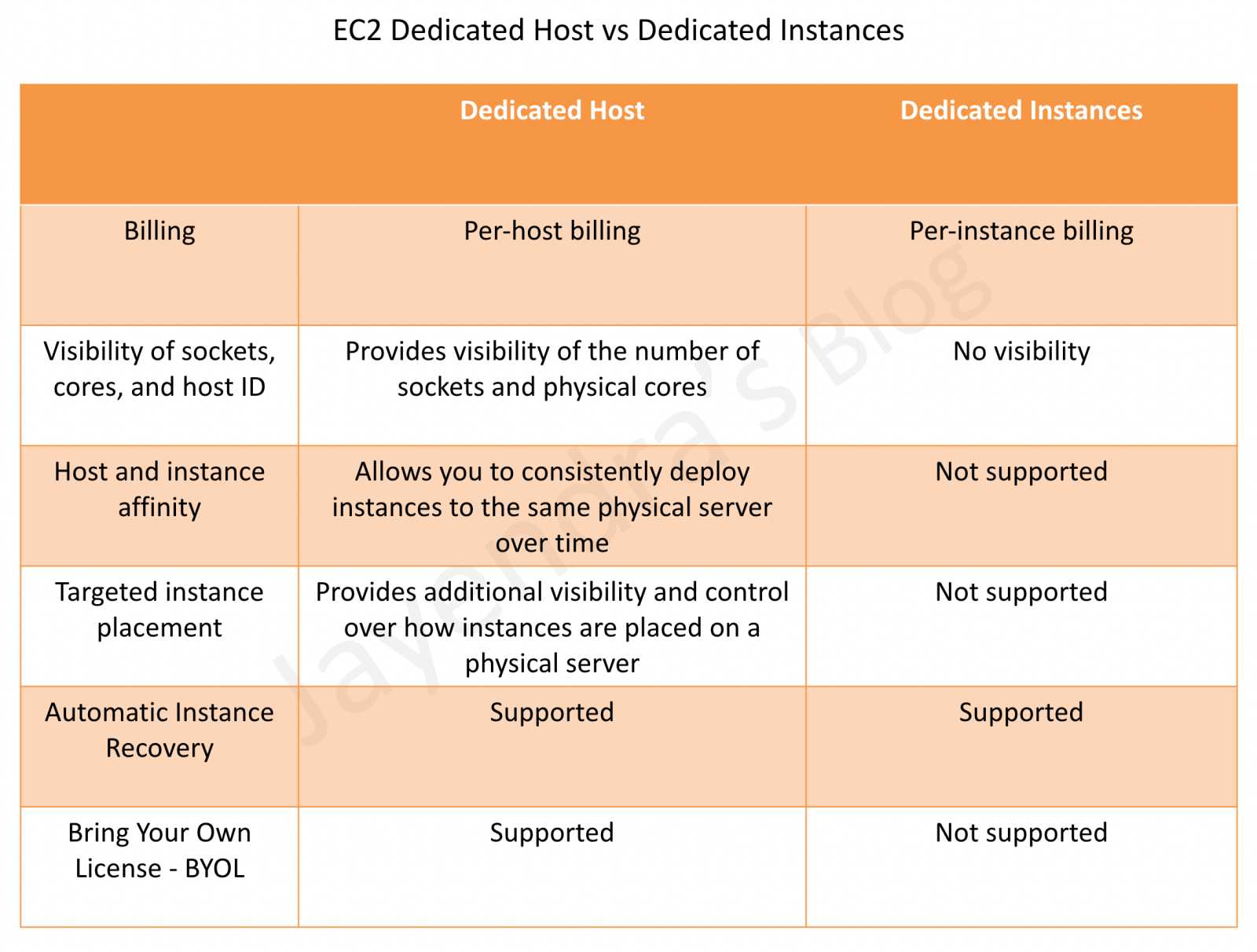
Dedicated Hosts vs Dedicated Instances
| Feature |
Dedicated Instances |
Dedicated Hosts |
| Billing |
Per-instance + per-region fee |
Per-host billing |
| Visibility of sockets, cores, host ID |
No |
Yes |
| Host and instance affinity |
No |
Yes |
| Targeted instance placement |
No |
Yes |
| Automatic instance recovery |
Yes |
Yes |
| BYOL (Bring Your Own License) |
No |
Yes |
| Capacity reservation |
No |
Yes (host-level) |
AWS Certification Exam Practice Questions
- Questions are collected from Internet and the answers are marked as per my knowledge and understanding (which might differ with yours).
- AWS services are updated everyday and both the answers and questions might be outdated soon, so research accordingly.
- AWS exam questions are not updated to keep up the pace with AWS updates, so even if the underlying feature has changed the question might not be updated
- Open to further feedback, discussion and correction.
- If I want my instance to run on a single-tenant hardware, which value do I have to set the instance’s tenancy attribute to?
- dedicated
- isolated
- one
- reserved
- You have a video transcoding application running on Amazon EC2. Each instance polls a queue to find out which video should be transcoded, and then runs a transcoding process. If this process is interrupted, the video will be transcoded by another instance based on the queuing system. You have a large backlog of videos, which need to be transcoded, and would like to reduce this backlog by adding more instances. You will need these instances only until the backlog is reduced. Which type of Amazon EC2 instances should you use to reduce the backlog in the most cost efficient way?
- Reserved instances
- Spot instances
- Dedicated instances
- On-demand instances
- The one-time payment for Reserved Instances is __________ refundable if the reservation is cancelled.
- always
- in some circumstances
- never
- You run a web application where web servers on EC2 Instances are In an Auto Scaling group. Monitoring over the last 6 months shows that 6 web servers are necessary to handle the minimum load. During the day up to 12 servers are needed. Five to six days per year, the number of web servers required might go up to 15. What would you recommend to minimize costs while being able to provide full availability?
- 6 Reserved instances (heavy utilization). 6 Reserved instances (medium utilization), rest covered by On-Demand instances
- 6 Reserved instances (heavy utilization). 6 On-Demand instances, rest covered by Spot Instances (don’t go for spot as availability not guaranteed)
- 6 Reserved instances (heavy utilization) 6 Spot instances, rest covered by On-Demand instances (don’t go for spot as availability not guaranteed)
- 6 Reserved instances (heavy utilization) 6 Reserved instances (medium utilization) rest covered by Spot instances (don’t go for spot as availability not guaranteed)
- A user is running one instance for only 3 hours every day. The user wants to save some cost with the instance. Which of the below mentioned options is advised in this case?
- The user should not use RI; instead only go with the on-demand pricing (Scheduled Reserved Instances are no longer available. On-Demand Capacity Reservations with future-dated scheduling could be considered for recurring workloads, but for cost savings, On-Demand remains the best option for 3 hours/day usage)
- The user should use the AWS heavy utilized RI
- The user should use the AWS medium utilized RI
- The user should use Savings Plans
- Which of the following are characteristics of a reserved instance? Choose 3 answers
- It can be migrated across Availability Zones (can be modified)
- It is specific to an Amazon Machine Image (AMI) (specific to platform, not AMI)
- It can be applied to instances launched by Auto Scaling (are allowed)
- It is specific to an instance Type (specific to instance family but instance size can be changed within same family)
- It can be used to lower Total Cost of Ownership (TCO) of a system (helps to reduce cost)
- You have a distributed application that periodically processes large volumes of data across multiple Amazon EC2 Instances. The application is designed to recover gracefully from Amazon EC2 instance failures. You are required to accomplish this task in the most cost-effective way. Which of the following will meet your requirements?
- Spot Instances
- Reserved instances
- Dedicated instances
- On-Demand instances
- Can I move a Reserved Instance from one Region to another?
- No
- Only if they are moving into GovCloud
- Yes
- Only if they are moving to US East from another region
- An application you maintain consists of multiple EC2 instances in a default tenancy VPC. This application has undergone an internal audit and has been determined to require dedicated hardware for one instance. Your compliance team has given you a week to move this instance to single-tenant hardware. Which process will have minimal impact on your application while complying with this requirement?
- Create a new VPC with tenancy=dedicated and migrate to the new VPC (possible but impact not minimal)
- Use
ec2-reboot-instances command line and set the parameter dedicated=true
- Right click on the instance, select properties and check the box for dedicated tenancy
- Stop the instance, create an AMI, launch a new instance with tenancy=dedicated, and terminate the old instance
- Your department creates regular analytics reports from your company’s log files. All log data is collected in Amazon S3 and processed by daily Amazon Elastic Map Reduce (EMR) jobs that generate daily PDF reports and aggregated tables in CSV format for an Amazon Redshift data warehouse. Your CFO requests that you optimize the cost structure for this system. Which of the following alternatives will lower costs without compromising average performance of the system or data integrity for the raw data? [PROFESSIONAL]
- Use reduced redundancy storage (RRS) for PDF and CSV data in Amazon S3. Add Spot instances to Amazon EMR jobs. Use Reserved Instances for Amazon Redshift. (Spot instances impacts performance)
- Use reduced redundancy storage (RRS) for all data in S3. Use a combination of Spot instances and Reserved Instances for Amazon EMR jobs. Use Reserved instances for Amazon Redshift (Combination of the Spot and reserved with guarantee performance and help reduce cost. Also, RRS would reduce cost and guarantee data integrity, which is different from data durability )
- Use reduced redundancy storage (RRS) for all data in Amazon S3. Add Spot Instances to Amazon EMR jobs. Use Reserved Instances for Amazon Redshift (Spot instances impacts performance)
- Use reduced redundancy storage (RRS) for PDF and CSV data in S3. Add Spot Instances to EMR jobs. Use Spot Instances for Amazon Redshift. (Spot instances impacts performance)
- A research scientist is planning for the one-time launch of an Elastic MapReduce cluster and is encouraged by her manager to minimize the costs. The cluster is designed to ingest 200TB of genomics data with a total of 100 Amazon EC2 instances and is expected to run for around four hours. The resulting data set must be stored temporarily until archived into an Amazon RDS Oracle instance. Which option will help save the most money while meeting requirements? [PROFESSIONAL]
- Store ingest and output files in Amazon S3. Deploy on-demand for the master and core nodes and spot for the task nodes.
- Optimize by deploying a combination of on-demand, RI and spot-pricing models for the master, core and task nodes. Store ingest and output files in Amazon S3 with a lifecycle policy that archives them to Amazon Glacier. (Reserved Instance not cost effective for 4 hour job and data not needed in S3 once moved to RDS)
- Store the ingest files in Amazon S3 RRS and store the output files in S3. Deploy Reserved Instances for the master and core nodes and on-demand for the task nodes. (Reserved Instance not cost effective)
- Deploy on-demand master, core and task nodes and store ingest and output files in Amazon S3 RRS (RRS provides not much cost benefits for a 4 hour job while the amount of input data would take time to upload and Output data to reproduce)
- A company currently has a highly available web application running in production. The application’s web front-end utilizes an Elastic Load Balancer and Auto scaling across 3 availability zones. During peak load, your web servers operate at 90% utilization and leverage a combination of heavy utilization reserved instances for steady state load and on-demand and spot instances for peak load. You are asked with designing a cost effective architecture to allow the application to recover quickly in the event that an availability zone is unavailable during peak load. Which option provides the most cost effective high availability architectural design for this application? [PROFESSIONAL]
- Increase auto scaling capacity and scaling thresholds to allow the web-front to cost-effectively scale across all availability zones to lower aggregate utilization levels that will allow an availability zone to fail during peak load without affecting the applications availability. (Ideal for HA to reduce and distribute load)
- Continue to run your web front-end at 90% utilization, but purchase an appropriate number of utilization RIs in each availability zone to cover the loss of any of the other availability zones during peak load. (90% is not recommended as well RIs would increase the cost)
- Continue to run your web front-end at 90% utilization, but leverage a high bid price strategy to cover the loss of any of the other availability zones during peak load. (90% is not recommended as high bid price would not guarantee instances and would increase cost)
- Increase use of spot instances to cost effectively to scale the web front-end across all availability zones to lower aggregate utilization levels that will allow an availability zone to fail during peak load without affecting the applications availability. (Availability cannot be guaranteed)
- You run accounting software in the AWS cloud. This software needs to be online continuously during the day every day of the week, and has a very static requirement for compute resources. You also have other, unrelated batch jobs that need to run once per day at any time of your choosing. How should you minimize cost? [PROFESSIONAL]
- Purchase a Heavy Utilization Reserved Instance to run the accounting software. Turn it off after hours. Run the batch jobs with the same instance class, so the Reserved Instance credits are also applied to the batch jobs. (Because the instance will always be online during the day, in a predictable manner, and there are sequences of batch jobs to perform at any time, we should run the batch jobs when the account software is off. We can achieve Heavy Utilization by alternating these times, so we should purchase the reservation as such, as this represents the lowest cost. There is no such thing a “Full” level utilization purchases on EC2.)
- Purchase a Medium Utilization Reserved Instance to run the accounting software. Turn it off after hours. Run the batch jobs with the same instance class, so the Reserved Instance credits are also applied to the batch jobs.
- Purchase a Light Utilization Reserved Instance to run the accounting software. Turn it off after hours. Run the batch jobs with the same instance class, so the Reserved Instance credits are also applied to the batch jobs.
- Purchase a Full Utilization Reserved Instance to run the accounting software. Turn it off after hours. Run the batch jobs with the same instance class, so the Reserved Instance credits are also applied to the batch jobs.
New Practice Questions
- A company wants to reduce EC2 costs but anticipates changing instance families and Regions over the next year as they modernize their architecture. Which purchasing option provides the most flexibility while still offering significant savings?
- Standard Reserved Instances
- Convertible Reserved Instances
- Compute Savings Plans (Compute Savings Plans provide up to 66% savings and apply regardless of instance family, size, Region, OS, or tenancy)
- EC2 Instance Savings Plans
- A company needs guaranteed EC2 capacity for a planned product launch event in 3 months. They want to reserve capacity without paying until the capacity is actually used. Which option best meets this requirement?
- Purchase Reserved Instances 3 months in advance
- Create a future-dated On-Demand Capacity Reservation (Future-dated CRs can be scheduled up to 120 days in advance with no upfront charges. Billing starts only when the reservation activates on the scheduled date)
- Purchase Savings Plans
- Use EC2 Capacity Blocks
- A machine learning team needs to reserve GPU capacity (P5 instances) for a 2-week training job that will start in 4 weeks. Which EC2 purchasing option is most appropriate?
- On-Demand Instances
- Spot Instances
- Reserved Instances
- EC2 Capacity Blocks for ML (Capacity Blocks are designed specifically for short-duration ML workloads, supporting GPU reservations up to 6 months, reservable up to 8 weeks in advance)
- Which of the following statements about Savings Plans is CORRECT? (Select TWO)
- Compute Savings Plans apply to EC2, Lambda, and Fargate usage
- Savings Plans provide capacity reservations
- Savings Plans can be returned within 7 days of purchase
- EC2 Instance Savings Plans apply across all Regions
- Savings Plans can be sold on the RI Marketplace
- A company has unused On-Demand Capacity Reservations for 50 instances, but only uses 30 instances most of the time. They want to allow other teams in their organization to temporarily use the unused capacity. Which feature should they use?
- Capacity Reservation Fleets
- Split Capacity Reservations
- Interruptible Capacity Reservations (Interruptible CRs allow making unused capacity temporarily available to other workloads while maintaining control to reclaim it when needed)
- Future-dated Capacity Reservations
- Which of the following correctly describes the difference between Reserved Instances and Savings Plans? (Select TWO)
- Reserved Instances scoped to an AZ provide capacity reservation; Savings Plans do not
- Savings Plans offer deeper discounts than Standard RIs
- Reserved Instances can cover Lambda and Fargate; Savings Plans cannot
- Savings Plans commit to a dollar-per-hour spend; RIs commit to specific instance configurations
- Savings Plans require a 3-year minimum commitment
References