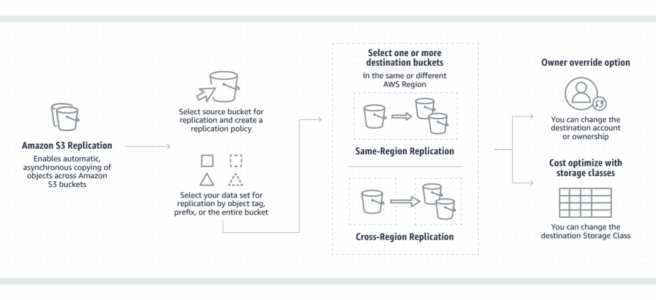
Amazon S3 Replication

S3 Replication

Amazon S3 Replication

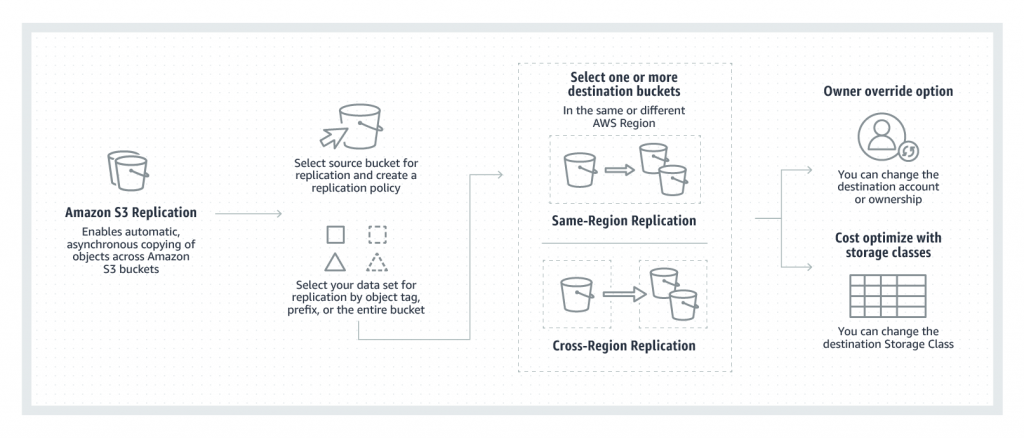
  • S3 Replication enables automatic, asynchronous copying of objects across S3 buckets in the same or different AWS regions.
  • S3 Replication supports two types:
    • Live Replication – automatically replicates new and updated objects as they are written to the source bucket.
    • On-Demand Replication (Batch Replication) – replicates existing objects from the source bucket to destination buckets on demand.
  • S3 Cross-Region Replication (CRR) is used to copy objects across S3 buckets in different AWS Regions.
  • S3 Same-Region Replication (SRR) is used to copy objects across S3 buckets in the same AWS Region.
  • S3 Replication supports two-way (bidirectional) replication between two or more buckets in the same or different AWS Regions.
  • S3 Replication helps to
    • Replicate objects while retaining metadata (creation time, version IDs, ACLs)
    • Replicate objects into different storage classes (including S3 Glacier, Deep Archive)
    • Maintain object copies under different ownership (owner override option)
    • Keep objects stored over multiple AWS Regions
    • Replicate objects within 15 minutes (with S3 Replication Time Control)
    • Sync buckets, replicate existing objects, and retry previously failed replications (with Batch Replication)
    • Replicate objects and fail over to a bucket in another AWS Region (with Multi-Region Access Points)
  • S3 can replicate all or a subset of objects with specific key name prefixes or object tags
  • S3 encrypts all data in transit across AWS regions using SSL
  • Object replicas in the destination bucket are exact replicas of the objects in the source bucket with the same key names and the same metadata.
  • Objects may be replicated to a single destination bucket or multiple destination buckets.
  • Cross-Region Replication can be useful for the following scenarios:-
    • Compliance requirement to have data backed up across regions
    • Minimize latency to allow users across geography to access objects
    • Operational reasons compute clusters in two different regions that analyze the same set of objects
  • Same-Region Replication can be useful for the following scenarios:-
    • Aggregate logs into a single bucket
    • Configure live replication between production and test accounts
    • Abide by data sovereignty laws to store multiple copies
S3 Replication

S3 Replication Requirements

  • Source and destination buckets must be versioning-enabled
  • For CRR, the source and destination buckets must be in different AWS Regions.
  • The source bucket owner must have the source and destination AWS Regions enabled for their account. The destination bucket owner must have the destination Region enabled for their account.
  • S3 must have permission to replicate objects from that source bucket to the destination bucket on your behalf.
  • If the source bucket owner also owns the object, the bucket owner has full permission to replicate the object. If not, the object owner must grant the bucket owner READ and READ_ACP permissions with the object ACL.
  • Setting up cross-region replication in a cross-account scenario (where the source and destination buckets are owned by different AWS accounts), the destination bucket owner must grant the source bucket owner permissions to replicate objects with a bucket policy.
  • If the source bucket has S3 Object Lock enabled, the destination buckets must also have S3 Object Lock enabled. Additional permissions s3:GetObjectRetention and s3:GetObjectLegalHold are required on the IAM role.
  • Destination buckets cannot be configured as Requester Pays buckets.

S3 Batch Replication

  • S3 Batch Replication allows you to replicate existing objects to different buckets as an on-demand operation.
  • Live replication (CRR/SRR) only replicates new objects created after the replication rule is configured. Batch Replication addresses the gap for pre-existing objects.
  • Use cases for Batch Replication:
    • Backfill newly created buckets with existing objects from another bucket
    • Retry failed replications – replicate objects with a replication status of FAILED
    • Migrate data across accounts while preserving metadata and version IDs
    • Add new buckets to your data lake by replicating existing objects to new destinations
    • Replicate replicas – replicate objects that were created by another replication rule (not possible with live replication)
  • Batch Replication uses S3 Batch Operations jobs and provides a completion report when finished.
  • S3 RTC does not apply to Batch Replication; it is tracked via S3 Batch Operations.

S3 Replication Time Control (S3 RTC)

  • S3 Replication Time Control (RTC) provides a predictable replication time backed by a Service Level Agreement (SLA).
  • S3 RTC replicates 99.99% of new objects within 15 minutes after upload, with the majority replicated in seconds.
  • S3 RTC is backed by an SLA with a commitment to replicate 99.9% of objects within 15 minutes during any billing month.
  • S3 RTC, by default, includes S3 Replication Metrics and S3 Event Notifications.
  • S3 RTC is available in all AWS Regions including AWS GovCloud (US) Regions.
  • Delete marker replication does not adhere to the 15-minute SLA granted by S3 RTC.

S3 Two-Way Replication (Bidirectional)

  • S3 Replication supports two-way (bidirectional) replication between two or more buckets in the same or different AWS Regions.
  • Replica Modification Sync enables replicating metadata changes (ACLs, object tags, Object Lock settings) made to replica objects back to the source.
  • Replica Modification Sync must be enabled on both buckets for bidirectional metadata synchronization.
  • Two-way replication is essential for:
    • Building shared datasets across multiple AWS Regions
    • Keeping data synchronized during failover with S3 Multi-Region Access Points
    • Making applications highly available even during Regional traffic disruptions
  • To set up two-way replication, create replication rules in both directions between the source and destination buckets.

S3 Multi-Region Access Points with Replication

  • S3 Multi-Region Access Points provide a single global endpoint that routes S3 requests to the bucket closest to the requester.
  • Multi-Region Access Points include failover controls to shift S3 data request traffic between AWS Regions within minutes.
  • Supports active-active and active-passive configurations:
    • Active-Active – Traffic is distributed to multiple active Regions. If disruption occurs, traffic is automatically redirected.
    • Active-Passive – An active Region services all requests; a passive Region is on standby for failover.
  • Multi-Region Access Points require Cross-Region Replication (CRR) to be configured so that objects are available regardless of which bucket receives the request.
  • Two-way replication rules should be configured with Multi-Region Access Points to keep all objects and metadata in sync during failover.
  • Multi-Region Access Points accelerate performance by routing requests via AWS Global Accelerator, reducing latency by up to 60%.

S3 Replication Metrics and Notifications

  • S3 Replication provides detailed metrics and notifications to monitor replication status between buckets.
  • Replication metrics available in S3 console and Amazon CloudWatch:
    • Bytes Pending – total size of objects pending replication
    • Operations Pending – total number of operations pending replication
    • Replication Latency – maximum time to replicate
    • Operations Failed Replication – per-minute count of objects that failed to replicate
  • S3 Replication metrics are automatically enabled with S3 Replication Time Control (RTC).
  • S3 Event Notifications provide replication events:
    • s3:Replication:OperationFailedReplication
    • s3:Replication:OperationMissedThreshold
    • s3:Replication:OperationReplicatedAfterThreshold
    • s3:Replication:OperationNotTracked
  • Failure notifications do NOT require S3 RTC to be enabled.
  • Notifications can be sent to Amazon SNS, Amazon SQS, or AWS Lambda to diagnose configuration issues.

S3 Replication – Replicated & Not Replicated

  • Only new objects created after you add a replication configuration are replicated by live replication. Use S3 Batch Replication to replicate existing objects.
  • Objects encrypted using:
    • SSE-S3 (S3 managed keys) – replicated by default
    • SSE-KMS (AWS KMS keys) – replicated when the replication rule is configured with KMS key specification
    • DSSE-KMS (Dual-layer server-side encryption) – supported for replication
    • SSE-C (Customer-provided keys) – supported for replication (added October 2022)
  • S3 replicates only objects in the source bucket for which the bucket owner has permission to read objects and read ACLs.
  • Any object ACL updates are replicated, although there can be some delay before S3 can bring the two in sync.
  • S3 does NOT replicate objects in the source bucket for which the bucket owner does not have permission.
  • Updates to bucket-level S3 subresources are NOT replicated, allowing different bucket configurations on the source and destination buckets.
  • Only customer actions are replicated & actions performed by lifecycle configuration are NOT replicated.
  • Replication chaining is NOT allowed – objects that are replicas created by another replication rule are NOT replicated by live replication. Use Batch Replication to replicate replicas.
  • S3 does NOT replicate the delete marker by default. However, you can enable delete marker replication in non-tag-based rules to replicate delete markers.
    • Delete marker replication is NOT supported for tag-based replication rules.
    • Delete markers added by S3 Lifecycle expiration rules are NOT replicated even with delete marker replication enabled.
  • S3 does NOT replicate deletion by object version ID. This protects data from malicious deletions.

S3 Replication with Encryption

  • Starting January 5, 2023, Amazon S3 applies server-side encryption with S3 managed keys (SSE-S3) as the base level of encryption for every bucket.
  • SSE-S3 encrypted objects are replicated by default with no additional configuration.
  • SSE-KMS encrypted objects require specifying the destination KMS key in the replication rule. The IAM role must have kms:Decrypt permission on the source key and kms:Encrypt on the destination key.
  • DSSE-KMS (dual-layer encryption with KMS keys) is supported for replication.
  • SSE-C encrypted objects are supported for replication since October 2022. S3 automatically replicates newly uploaded SSE-C objects if eligible per replication configuration.
  • Note: Starting April 2026, SSE-C is disabled by default on all new S3 general purpose buckets. Applications requiring SSE-C must explicitly enable it via the PutBucketEncryption API.

S3 on Outposts Replication

  • S3 Replication on AWS Outposts enables automatic replication of S3 objects across different Outposts or between buckets on the same Outpost.
  • Available at no additional cost in all AWS Regions where AWS Outposts racks are available (since March 2023).
  • Helps meet local data residency requirements while providing data redundancy.
  • S3 on Outposts does NOT support replicating delete markers for tag-based rules.
  • Existing Object Replication is NOT supported for S3 on Outposts buckets.

AWS Certification Exam Practice Questions

  • Questions are collected from Internet and the answers are marked as per my knowledge and understanding (which might differ with yours).
  • AWS services are updated everyday and both the answers and questions might be outdated soon, so research accordingly.
  • AWS exam questions are not updated to keep up the pace with AWS updates, so even if the underlying feature has changed the question might not be updated
  • Open to further feedback, discussion and correction.
  1. A company needs to replicate millions of existing objects from a source S3 bucket to a new destination bucket in another region. They also need to replicate any new objects going forward. What combination of features should they use?
    1. Enable Cross-Region Replication for new objects and use S3 Batch Replication for existing objects
    2. Use S3 Batch Replication only, as it handles both existing and new objects
    3. Enable Cross-Region Replication with Replication Time Control
    4. Use AWS DataSync to copy existing objects and CRR for new objects

    Answer: a – CRR handles new objects automatically, while Batch Replication is the managed way to replicate existing objects on demand.

  2. A company requires that all replicated objects arrive at the destination bucket within 15 minutes and needs an SLA guarantee. Which feature should they enable?
    1. S3 Cross-Region Replication with Transfer Acceleration
    2. S3 Replication Time Control (S3 RTC)
    3. S3 Same-Region Replication with CloudWatch alarms
    4. S3 Multi-Region Access Points

    Answer: b – S3 RTC replicates 99.99% of objects within 15 minutes and is backed by an SLA guaranteeing 99.9% within 15 minutes.

  3. A company wants to build a highly available multi-region application using S3. They need automatic failover of S3 data requests if a region becomes unavailable. What should they configure?
    1. CRR with CloudFront distribution
    2. S3 Multi-Region Access Points with two-way replication and failover controls
    3. SRR with Route 53 failover routing
    4. S3 Batch Operations with Lambda triggers

    Answer: b – S3 Multi-Region Access Points with failover controls and two-way CRR provide a single global endpoint with the ability to shift traffic between regions.

  4. Which of the following statements about S3 Replication are correct? (Choose 3)
    1. Live replication automatically replicates objects that existed before the replication rule was configured
    2. Versioning must be enabled on both source and destination buckets
    3. S3 Batch Replication can replicate replicas that were created by another replication rule
    4. Delete markers are replicated by default
    5. SSE-C encrypted objects are supported for replication

    Answer: b, c, e – Live replication does NOT replicate pre-existing objects (a is wrong). Delete markers are NOT replicated by default (d is wrong). Versioning is required, Batch Replication can replicate replicas, and SSE-C is supported since October 2022.

  5. A company uses two-way replication between two S3 buckets. They want metadata changes (ACLs and tags) made to replica objects to be synchronized back to the source. What must they enable?
    1. S3 Replication Time Control on both buckets
    2. Replica Modification Sync on both buckets
    3. S3 Batch Replication with metadata preservation
    4. S3 Object Lock on both buckets

    Answer: b – Replica Modification Sync must be enabled on both buckets to replicate metadata changes (ACLs, tags, Object Lock settings) bidirectionally.

  6. Which S3 Replication metrics can be monitored via Amazon CloudWatch? (Choose 3)
    1. Bytes Pending replication
    2. Operations Pending replication
    3. Number of buckets with replication enabled
    4. Operations Failed Replication
    5. Cost of data transfer for replication

    Answer: a, b, d – S3 Replication metrics include Bytes Pending, Operations Pending, Replication Latency, and Operations Failed Replication. Number of buckets and cost are not replication metrics.

References

AWS S3 Subresources

AWS S3 Subresources

  • S3 Subresources provides support to store, and manage the bucket configuration information.
  • S3 subresources only exist in the context of a specific bucket or object
  • S3 subresources are associated with buckets and objects.
  • S3 Subresources are subordinates to objects; i.e. they do not exist on their own, they are always associated with some other entity, such as an object or a bucket.
  • S3 supports various options to configure a bucket for e.g., the bucket can be configured for website hosting, configuration added to manage the lifecycle of objects in the bucket, and to log all access to the bucket.

S3 Default Security Settings

  • Starting April 2023, Amazon S3 applies two default security settings for all new S3 buckets:
    • S3 Block Public Access is enabled by default
    • S3 Access Control Lists (ACLs) are disabled by default (Bucket owner enforced setting)
  • Starting January 5, 2023, all new object uploads to S3 are automatically encrypted with server-side encryption using Amazon S3 managed keys (SSE-S3) at no additional cost.
  • Starting April 2026, SSE-C (server-side encryption with customer-provided keys) is disabled by default on all new general purpose buckets. It can be re-enabled if needed.
  • These defaults help enforce security best practices without requiring manual configuration.

S3 Object Lifecycle

Refer blog post @ S3 Object Lifecycle Management

Static Website Hosting

  • S3 can be used for Static Website hosting with Client-side scripts.
  • S3 does not support server-side scripting.
  • S3, in conjunction with Route 53, supports hosting a website at the root domain which can point to the S3 website endpoint
  • S3 website endpoints do not support HTTPS or access points. For HTTPS, use Amazon CloudFront to serve a static website hosted on Amazon S3.
  • For S3 website hosting the content should be made publicly readable which can be provided using a bucket policy.
  • Users can configure the index, and error document as well as configure the conditional routing of an object name
  • Requester Pays buckets do not allow access through the website endpoint. Any request to such a bucket will receive a 403 – Access Denied response
  • AWS Amplify Hosting now integrates with S3 (announced 2024), allowing static websites stored in S3 buckets to be served over a CDN with custom domains, HTTPS, and CI/CD pipelines with just a few clicks.

S3 Versioning

Refer blog post @ S3 Object Versioning

Policy & Access Control List (ACL)

Refer blog post @ S3 Permissions

  • Important (April 2023): ACLs are now disabled by default for all new S3 buckets. S3 Object Ownership is set to “Bucket owner enforced” by default, meaning the bucket owner automatically owns and has full control over every object in the bucket.
  • AWS recommends keeping ACLs disabled and using bucket policies for access management in most modern use cases.
  • ACLs can still be re-enabled by changing the Object Ownership setting if required for legacy compatibility.

CORS (Cross Origin Resource Sharing)

  • All browsers implement the Same-Origin policy, for security reasons, where the web page from a domain can only request resources from the same domain.
  • CORS allows client web applications loaded in one domain access to the restricted resources to be requested from another domain.
  • With CORS support, S3 allows cross-origin access to S3 resources
  • CORS configuration rules identify the origins allowed to access the bucket, the operations (HTTP methods) that would be supported for each origin, and other operation-specific information.
  • In the S3 console, the CORS configuration must be a JSON document (XML format was deprecated).

S3 Access Logs

  • S3 Access Logs enable tracking access requests to an S3 bucket.
  • S3 Access logs are disabled by default.
  • Each access log record provides details about a single access request, such as the requester, bucket name, request time, request action, response status, and error code, etc.
  • Access log information can be useful in security and access audits and also help learn about the customer base and understand the S3 bill.
  • S3 periodically collects access log records, consolidates the records in log files, and then uploads log files to a target bucket as log objects.
  • Logging can be enabled on multiple source buckets with the same target bucket which will have access logs for all those source buckets, but each log object will report access log records for a specific source bucket.
  • Source and target buckets should be in the same region.
  • Source and target buckets should be different to avoid an infinite loop of logs issue.
  • Target bucket can be encrypted using SSE-S3 default encryption. However, Default encryption with AWS KMS keys (SSE-KMS) is not supported.
  • S3 Object Lock cannot be enabled on the target bucket.
  • S3 uses a special log delivery account to write server access logs.
    • AWS recommends updating the bucket policy on the target bucket to grant access to the logging service principal (logging.s3.amazonaws.com) for access log delivery.
    • Access for access log delivery can also be granted to the S3 log delivery group through the bucket ACL. Granting access to the S3 log delivery group using your bucket ACL is not recommended.
  • Access log records are delivered on a best-effort basis. The completeness and timeliness of server logging is not guaranteed i.e. log record for a particular request might be delivered long after the request was actually processed, or it might not be delivered at all.
  • S3 Access Logs can be analyzed using data analysis tools or Amazon Athena.
  • AWS recommends using AWS CloudTrail for logging bucket-level and object-level actions for S3 resources, as it provides more comprehensive logging with identity context.
  • S3 Metadata journal tables (launched 2024) provide another logging option focused on object state changes—capturing storage class transitions, encryption changes, tag modifications, and Object Lock events in query-optimized Parquet format.

Tagging

  • S3 provides the tagging subresource to store and manage tags on a bucket
  • Cost allocation tags can be added to the bucket to categorize and track AWS costs.
  • AWS can generate a cost allocation report with usage and costs aggregated by the tags applied to the buckets.
  • Object tags can also be used for S3 Lifecycle rules, replication rules, access control, and S3 Analytics.

Location

  • AWS region needs to be specified during bucket creation and it cannot be changed.
  • S3 stores this information in the location subresource and provides an API for retrieving this information
  • S3 supports two bucket types:
    • General purpose buckets – the original S3 bucket type, recommended for most use cases, supporting all storage classes except S3 Express One Zone.
    • Directory buckets – use the S3 Express One Zone storage class for single-digit millisecond latency, with data stored in a specific Availability Zone.

Event Notifications

  • S3 notification feature enables notifications to be triggered when certain events happen in the bucket.
  • Notifications are enabled at the Bucket level
  • Notifications can be configured to be filtered by the prefix and suffix of the key name of objects. However, filtering rules cannot be defined with overlapping prefixes, overlapping suffixes, or prefix and suffix overlapping
  • S3 can publish the following events
    • New Object created events
      • Can be enabled for PUT, POST, or COPY operations
      • You will not receive event notifications from failed operations
    • Object Removal events
      • Can publish delete events for object deletion, version object deletion or insertion of delete marker
      • You will not receive event notifications from automatic deletes from lifecycle policies or from failed operations.
    • Restore object events
      • restoration of objects archived to the S3 Glacier storage classes
    • Lifecycle transition events
      • notification when an object is transitioned from one storage class to another by an S3 Lifecycle configuration
    • Lifecycle expiration events
      • notification when S3 Lifecycle deletes an object or creates a delete marker
    • S3 Intelligent-Tiering archive events
      • notification when objects are moved to Archive Access or Deep Archive Access tiers
    • Object tagging events
      • notification when tags are added, updated, or deleted on an object
    • Object ACL events
      • notification when an object ACL is put
    • Replication events
      • for replication configurations that have S3 replication metrics or S3 Replication Time Control (S3 RTC) enabled
  • S3 can publish events to the following destinations
    • SNS topic
    • SQS queue
    • AWS Lambda
    • Amazon EventBridge – allows matching any attribute or combination of attributes (object size, time range, etc.) for filtering before invoking targets. Unlike other destinations, EventBridge does not require selecting specific event types.
  • For S3 to be able to publish events to the destination, the S3 principal should be granted the necessary permissions
  • S3 event notifications are designed to be delivered at least once. Typically, event notifications are delivered in seconds but can sometimes take a minute or longer.

Cross-Region Replication & Same-Region Replication

  • S3 Replication enables automatic, asynchronous copying of objects across S3 buckets in the same or different AWS regions.
  • S3 Cross-Region Replication – CRR is used to copy objects across S3 buckets in different AWS Regions.
  • S3 Same-Region Replication – SRR is used to copy objects across S3 buckets in the same AWS Regions.
  • S3 Replication helps to
    • Replicate objects while retaining metadata
    • Replicate objects into different storage classes
    • Maintain object copies under different ownership
    • Keep objects stored over multiple AWS Regions
    • Replicate objects within 15 minutes (with S3 Replication Time Control – RTC)
  • S3 can replicate all or a subset of objects with specific key name prefixes or tags
  • S3 encrypts all data in transit across AWS regions using SSL
  • Object replicas in the destination bucket are exact replicas of the objects in the source bucket with the same key names and the same metadata.
  • Objects may be replicated to a single destination bucket or multiple destination buckets.
  • S3 Batch Replication allows replication of existing objects that were created before a replication configuration was added, objects that previously failed to replicate, or objects that were already replicated. It uses an S3 Batch Operations job.
  • Two-way (bi-directional) replication enables data to be fully synchronized between two or more buckets, keeping replicas in sync using replica modification sync.
  • Cross-Region Replication can be useful for the following scenarios:-
    • Compliance requirement to have data backed up across regions
    • Minimize latency to allow users across geography to access objects
    • Operational reasons compute clusters in two different regions that analyze the same set of objects
  • Same-Region Replication can be useful for the following scenarios:-
    • Aggregate logs into a single bucket
    • Configure live replication between production and test accounts
    • Abide by data sovereignty laws to store multiple copies
  • Replication Requirements
    • source and destination buckets must be versioning-enabled
    • for CRR, the source and destination buckets must be in different AWS regions.
    • S3 must have permission to replicate objects from that source bucket to the destination bucket on your behalf.
    • If the source bucket owner also owns the object, the bucket owner has full permission to replicate the object. If not, the source bucket owner must have permission for the S3 actions s3:GetObjectVersion and s3:GetObjectVersionACL to read the object and object ACL
    • Setting up cross-region replication in a cross-account scenario (where the source and destination buckets are owned by different AWS accounts), the source bucket owner must have permission to replicate objects in the destination bucket.
    • if the source bucket has S3 Object Lock enabled, the destination buckets must also have S3 Object Lock enabled.
    • destination buckets cannot be configured as Requester Pays buckets
  • Replicated & Not Replicated
    • Only new objects created after you add a replication configuration are replicated. S3 does NOT retroactively replicate objects that existed before you added replication configuration. Use S3 Batch Replication to replicate existing objects.
    • Objects encrypted using SSE-C, SSE-S3, or SSE-KMS can all be replicated.
    • S3 replicates only objects in the source bucket for which the bucket owner has permission to read objects and read ACLs
    • Any object ACL updates are replicated, although there can be some delay before S3 can bring the two in sync. This applies only to objects created after you add a replication configuration to the bucket.
    • S3 does NOT replicate objects in the source bucket for which the bucket owner does not have permission.
    • Updates to bucket-level S3 subresources are NOT replicated, allowing different bucket configurations on the source and destination buckets
    • Only customer actions are replicated & actions performed by lifecycle configuration are NOT replicated
    • S3 does NOT replicate the delete marker by default. However, you can add delete marker replication to non-tag-based rules to override it.
    • S3 does NOT replicate deletion by object version ID. This protects data from malicious deletions.

S3 Inventory

  • S3 Inventory helps manage the storage and can be used to audit and report on the replication and encryption status of the objects for business, compliance, and regulatory needs.
  • S3 inventory provides a scheduled alternative to the S3 synchronous List API operation.
  • S3 inventory provides CSV, ORC, or Apache Parquet output files that list the objects and their corresponding metadata on a daily or weekly basis for an S3 bucket or a shared prefix.
  • S3 Express One Zone directory buckets now also support S3 Inventory (2026).

S3 Metadata

  • Amazon S3 Metadata (launched at re:Invent 2024, GA in January 2025) delivers queryable object metadata in near real-time.
  • S3 Metadata automatically captures metadata from objects as they are uploaded and makes it queryable in a read-only Apache Iceberg table.
  • The metadata schema includes over 20 elements: bucket name, object key, creation/modification time, storage class, encryption status, tags, and user metadata.
  • Metadata tables can be queried using Amazon Athena and other analytics engines.
  • S3 Metadata now supports visibility into all existing objects (not just new/changed objects).
  • S3 Annotations (launched 2026) allow attaching up to 1 GB of rich, queryable context (JSON, XML, YAML, or plain text) directly to S3 objects without re-writing the objects.
  • S3 Metadata provides an alternative to S3 Inventory for real-time metadata analysis, while S3 Inventory is better for scheduled batch reporting.

Requester Pays

  • By default, buckets are owned by the AWS account that created it (the bucket owner) and the AWS account pays for storage costs, downloads, and data transfer charges associated with the bucket.
  • Using Requester Pays subresource:-
    • Bucket owner specifies that the requester requesting the download will be charged for the download
    • However, the bucket owner still pays the storage costs
  • Enabling Requester Pays on a bucket
    • disables anonymous access to that bucket
    • cannot be enabled for end-user logging bucket

Object ACL

Refer blog post @ S3 Permissions

  • Note: Starting April 2023, ACLs are disabled by default on new buckets. AWS recommends using bucket policies instead of ACLs for access management.

AWS Certification Exam Practice Questions

  • Questions are collected from Internet and the answers are marked as per my knowledge and understanding (which might differ with yours).
  • AWS services are updated everyday and both the answers and questions might be outdated soon, so research accordingly.
  • AWS exam questions are not updated to keep up the pace with AWS updates, so even if the underlying feature has changed the question might not be updated
  • Open to further feedback, discussion and correction.
  1. An organization’s security policy requires multiple copies of all critical data to be replicated across at least a primary and backup data center. The organization has decided to store some critical data on Amazon S3. Which option should you implement to ensure this requirement is met?
    1. Use the S3 copy API to replicate data between two S3 buckets in different regions
    2. You do not need to implement anything since S3 data is automatically replicated between regions
    3. Use the S3 copy API to replicate data between two S3 buckets in different facilities within an AWS Region
    4. You do not need to implement anything since S3 data is automatically replicated between multiple facilities within an AWS Region
  2. A customer wants to track access to their Amazon Simple Storage Service (S3) buckets and also use this information for their internal security and access audits. Which of the following will meet the Customer requirement?
    1. Enable AWS CloudTrail to audit all Amazon S3 bucket access.
    2. Enable server access logging for all required Amazon S3 buckets
    3. Enable the Requester Pays option to track access via AWS Billing
    4. Enable Amazon S3 event notifications for Put and Post.
  3. A user is enabling a static website hosting on an S3 bucket. Which of the below mentioned parameters cannot be configured by the user?
    1. Error document
    2. Conditional error on object name
    3. Index document
    4. Conditional redirection on object name
  4. Company ABCD is running their corporate website on Amazon S3 accessed from http//www.companyabcd.com. Their marketing team has published new web fonts to a separate S3 bucket accessed by the S3 endpoint: https://s3-us-west1.amazonaws.com/abcdfonts. While testing the new web fonts, Company ABCD recognized the web fonts are being blocked by the browser. What should Company ABCD do to prevent the web fonts from being blocked by the browser?
    1. Enable versioning on the abcdfonts bucket for each web font
    2. Create a policy on the abcdfonts bucket to enable access to everyone
    3. Add the Content-MD5 header to the request for webfonts in the abcdfonts bucket from the website
    4. Configure the abcdfonts bucket to allow cross-origin requests by creating a CORS configuration
  5. Company ABCD is currently hosting their corporate site in an Amazon S3 bucket with Static Website Hosting enabled. Currently, when visitors go to http://www.companyabcd.com the index.html page is returned. Company C now would like a new page welcome.html to be returned when a visitor enters http://www.companyabcd.com in the browser. Which of the following steps will allow Company ABCD to meet this requirement? Choose 2 answers.
    1. Upload an html page named welcome.html to their S3 bucket
    2. Create a welcome subfolder in their S3 bucket
    3. Set the Index Document property to welcome.html
    4. Move the index.html page to a welcome subfolder
    5. Set the Error Document property to welcome.html
  6. A company needs to replicate existing objects that were uploaded before a replication rule was configured. Which S3 feature should they use?
    1. S3 Cross-Region Replication with versioning
    2. S3 Same-Region Replication with lifecycle policies
    3. S3 Batch Replication
    4. S3 Transfer Acceleration
  7. A company wants to receive S3 event notifications and route them to multiple targets based on object attributes like size and key prefix patterns. Which destination should be configured?
    1. Amazon SNS
    2. Amazon SQS
    3. AWS Lambda
    4. Amazon EventBridge
  8. What security settings are applied by default to all new S3 buckets created after April 2023? (Choose 2)
    1. S3 Block Public Access is enabled
    2. Server-side encryption with KMS keys (SSE-KMS) is applied
    3. ACLs are disabled (Bucket owner enforced)
    4. Versioning is enabled
    5. Cross-region replication is configured

AWS S3 Best Practices

S3 Best Practices

Performance

Multiple Concurrent PUTs/GETs

  • S3 scales to support very high request rates. S3 automatically partitions the buckets as needed to support higher request rates.
  • S3 can achieve at least 3,500 PUT/COPY/POST/DELETE and 5,500 GET/HEAD requests per second per partitioned prefix in a bucket.
  • There are no limits to the number of prefixes in a bucket, so throughput can be scaled horizontally by parallelizing reads or writes across different prefixes.
  • Random prefix key naming is NO LONGER required for performance optimization.
    • Since July 2018, S3 automatically handles internal partitioning to support high request rates.
    • Logical or sequential naming patterns can be used without any performance implications.
    • S3 dynamically optimizes performance in response to sustained high request rates.
  • If a workload experiences sudden bursts above the per-prefix limit, S3 will return HTTP 503 (Slow Down) responses temporarily while it repartitions. Gradually ramping up request rates (prefix-level warm-up) helps avoid throttling for new prefixes.

S3 Express One Zone (High-Performance Storage)

  • S3 Express One Zone is a high-performance storage class (launched Nov 2023) purpose-built for latency-sensitive applications.
    • Delivers consistent single-digit millisecond first-byte read and write latency — up to 10x faster than S3 Standard.
    • Reduces request costs by up to 50% compared to S3 Standard.
    • Scales to process millions of requests per minute.
    • Uses directory buckets stored in a single Availability Zone.
    • Ideal for ML model training, interactive analytics, media content creation, and high-frequency trading.
  • AWS announced up to 85% price reductions for S3 Express One Zone in April 2025.

Transfer Acceleration

  • S3 Transfer Acceleration enables fast, easy, and secure transfers of files over long distances between the client and an S3 bucket.
  • Transfer Acceleration takes advantage of CloudFront’s globally distributed edge locations. As the data arrives at an edge location, data is routed to S3 over an optimized network path.
  • Use the S3 Transfer Acceleration Speed Comparison tool to determine if it would benefit your use case.

GET-intensive Workloads

  • CloudFront can be used for performance optimization and can help by
    • distributing content with low latency and high data transfer rate.
    • caching the content and thereby reducing the number of direct requests to S3
    • providing multiple endpoints (Edge locations) for data availability
  • CloudFront RTMP distributions were deprecated on December 31, 2020. Use CloudFront Web distributions with HTTP-based streaming (HLS, DASH) for media delivery.
  • To fast data transport over long distances between a client and an S3 bucket, use S3 Transfer Acceleration. Transfer Acceleration uses the globally distributed edge locations in CloudFront to accelerate data transport over geographical distances.

PUTs/GETs for Large Objects

  • AWS allows Parallelizing the PUTs/GETs request to improve the upload and download performance as well as the ability to recover in case it fails
  • For PUTs, Multipart upload can help improve the uploads by
    • performing multiple uploads at the same time and maximizing network bandwidth utilization
    • quick recovery from failures, as only the part that failed to upload needs to be re-uploaded
    • ability to pause and resume uploads
    • begin an upload before the Object size is known
    • Recommended for objects larger than 100 MB; required for objects larger than 5 GB
  • For GETs, the Range HTTP header (byte-range fetches) can help improve the downloads by
    • allowing the object to be retrieved in parts instead of the whole object
    • quick recovery from failures, as only the part that failed to download needs to be retried
    • higher aggregate throughput by downloading parts in parallel

List Operations

  • Object key names are stored lexicographically in S3 indexes, making it hard to sort and manipulate the contents of LIST
  • S3 maintains a single lexicographically sorted list of indexes
  • Build and maintain Secondary Index outside of S3 for e.g. DynamoDB or RDS to store, index and query objects metadata rather than performing operations on S3
  • Use S3 Inventory reports (daily or weekly) as an alternative to LIST API calls for large buckets — more efficient and cost-effective for auditing or analytics workloads.

Security

  • Use Versioning
    • can be used to protect from unintended overwrites and deletions
    • allows the ability to retrieve and restore deleted objects or rollback to previous versions
  • Enable additional security by configuring a bucket to enable MFA (Multi-Factor Authentication) Delete
  • Versioning does not prevent Bucket deletion and must be backed up as if accidentally or maliciously deleted the data is lost
  • Use S3 Object Lock for WORM (Write Once Read Many) protection
    • Prevents objects from being deleted or overwritten for a fixed period or indefinitely
    • Supports Governance mode (can be overridden with special permissions) and Compliance mode (cannot be overridden by anyone, including root)
    • Requires versioning to be enabled
    • Helps meet regulatory requirements (SEC, FINRA, CFTC)
  • Use Same Region Replication or Cross Region Replication feature to backup data to a different bucket or region
  • When using VPC with S3, use VPC S3 endpoints as
    • are horizontally scaled, redundant, and highly available VPC components
    • help establish a private connection between VPC and S3 and the traffic never leaves the Amazon network
    • Support both Gateway endpoints (free, for S3 and DynamoDB) and Interface endpoints (PrivateLink, for cross-region or on-premises access)

S3 Security Defaults (Since 2023)

  • Default Encryption: Since January 5, 2023, all new objects are automatically encrypted with SSE-S3 (AES-256) at no additional cost. You can override with SSE-KMS or SSE-C.
  • Block Public Access: Since April 2023, S3 Block Public Access is enabled by default and ACLs are disabled for all new buckets.
  • SSE-C Disabled by Default: New general purpose buckets automatically disable server-side encryption with customer-provided keys (SSE-C) as a security best practice.
  • Use S3 Access Grants for scalable, fine-grained access control — maps S3 permissions to corporate identities via IAM Identity Center.

Refer blog post @ S3 Security Best Practices

Cost

  • Optimize S3 storage cost by selecting an appropriate storage class for objects:
    • S3 Standard — frequently accessed data
    • S3 Intelligent-Tiering — data with unknown or changing access patterns (automatically moves objects between Frequent, Infrequent, Archive Instant, Archive, and Deep Archive access tiers)
    • S3 Standard-IA — infrequent access, rapid retrieval needed
    • S3 One Zone-IA — infrequent access, non-critical data
    • S3 Glacier Instant Retrieval — archive data needing millisecond access
    • S3 Glacier Flexible Retrieval — archive with minutes to hours retrieval
    • S3 Glacier Deep Archive — lowest cost, 12-48 hour retrieval
    • S3 Express One Zone — highest performance, single-digit ms latency
  • Configure appropriate Lifecycle Management rules to automatically transition objects to lower-cost storage classes and expire them when no longer needed.
  • Use S3 Intelligent-Tiering as the default storage class for data with unpredictable access patterns — no retrieval charges, automatic optimization.
  • Use S3 Storage Lens to get organization-wide visibility into storage usage and activity trends, identify cost optimization opportunities, and apply data protection best practices.
  • Use S3 Storage Class Analysis to identify the optimal lifecycle policy for transitioning data to the right storage class.

Data Integrity

  • Use Conditional Writes (launched August 2024) to prevent overwriting existing objects
    • Supports If-None-Match header to check for object existence before creating
    • Supports If-Match header to check ETag before updating
    • Eliminates the need for external locking mechanisms (e.g., DynamoDB) for multi-writer applications
    • Can be enforced at the bucket level using bucket policies (November 2024)
  • Use S3 Object Lock for immutable data protection (compliance, ransomware protection)
  • Enable S3 Versioning to preserve every version of every object
  • Use additional checksums (CRC32, CRC32C, SHA-1, SHA-256) for end-to-end data integrity validation during uploads

Tracking and Monitoring

  • Use S3 Event Notifications with Amazon EventBridge for advanced event-driven architectures
    • Supports filtering by object size, key name patterns, metadata, and event time
    • Can route events to over 20+ AWS service targets
    • More flexible than legacy S3 Event Notifications (which only support SNS, SQS, and Lambda)
  • Use CloudTrail for API-level logging — captures all S3 API calls for auditing and compliance
  • Use S3 Server Access Logging for detailed access records (object-level access patterns)
  • Use CloudWatch to monitor S3 buckets, tracking metrics such as object counts, bytes stored, request counts, and latency
  • Use S3 Storage Lens for organization-wide visibility across all accounts and buckets with actionable recommendations

S3 Monitoring and Auditing Best Practices

Refer blog post @ S3 Monitoring and Auditing Best Practices

AWS Certification Exam Practice Questions

  • Questions are collected from Internet and the answers are marked as per my knowledge and understanding (which might differ with yours).
  • AWS services are updated everyday and both the answers and questions might be outdated soon, so research accordingly.
  • AWS exam questions are not updated to keep up the pace with AWS updates, so even if the underlying feature has changed the question might not be updated
  • Open to further feedback, discussion and correction.
  1. A media company produces new video files on-premises every day with a total size of around 100GB after compression. All files have a size of 1-2 GB and need to be uploaded to Amazon S3 every night in a fixed time window between 3am and 5am. Current upload takes almost 3 hours, although less than half of the available bandwidth is used. What step(s) would ensure that the file uploads are able to complete in the allotted time window?
    1. Increase your network bandwidth to provide faster throughput to S3
    2. Upload the files in parallel to S3 using multipart upload
    3. Pack all files into a single archive, upload it to S3, then extract the files in AWS
    4. Use AWS Import/Export to transfer the video files
  2. You are designing a web application that stores static assets in an Amazon Simple Storage Service (S3) bucket. You expect this bucket to immediately receive over 150 PUT requests per second. What should you do to ensure optimal performance?
    1. Use multi-part upload.
    2. Add a random prefix to the key names.
    3. Amazon S3 will automatically manage performance at this scale. (Since July 2018, S3 automatically partitions for high request rates. 150 PUT/s is well within the 3,500 PUT/s per prefix limit. Random prefixes are no longer needed.)
    4. Use a predictable naming scheme, such as sequential numbers or date time sequences, in the key names
  3. You have an application running on an Amazon Elastic Compute Cloud instance, that uploads 5 GB video objects to Amazon Simple Storage Service (S3). Video uploads are taking longer than expected, resulting in poor application performance. Which method will help improve performance of your application?
    1. Enable enhanced networking
    2. Use Amazon S3 multipart upload
    3. Leveraging Amazon CloudFront, use the HTTP POST method to reduce latency.
    4. Use Amazon Elastic Block Store Provisioned IOPs and use an Amazon EBS-optimized instance
  4. Which of the following methods gives you protection against accidental loss of data stored in Amazon S3? (Choose 2)
    1. Set bucket policies to restrict deletes, and also enable versioning
    2. By default, versioning is enabled on a new bucket so you don’t have to worry about it (Not enabled by default)
    3. Build a secondary index of your keys to protect the data (improves performance only)
    4. Back up your bucket to a bucket owned by another AWS account for redundancy
  5. A startup company hired you to help them build a mobile application that will ultimately store billions of image and videos in Amazon S3. The company is lean on funding, and wants to minimize operational costs, however, they have an aggressive marketing plan, and expect to double their current installation base every six months. Due to the nature of their business, they are expecting sudden and large increases to traffic to and from S3, and need to ensure that it can handle the performance needs of their application. What other information must you gather from this customer in order to determine whether S3 is the right option?
    1. You must know how many customers that company has today, because this is critical in understanding what their customer base will be in two years. (No. of customers do not matter)
    2. You must find out total number of requests per second at peak usage.
    3. You must know the size of the individual objects being written to S3 in order to properly design the key namespace. (Size does not relate to the key namespace design but the count does)
    4. In order to build the key namespace correctly, you must understand the total amount of storage needs for each S3 bucket. (S3 provided unlimited storage the key namespace design would depend on the number)
  6. A document storage company is deploying their application to AWS and changing their business model to support both free tier and premium tier users. The premium tier users will be allowed to store up to 200GB of data and free tier customers will be allowed to store only 5GB. The customer expects that billions of files will be stored. All users need to be alerted when approaching 75 percent quota utilization and again at 90 percent quota use. To support the free tier and premium tier users, how should they architect their application?
    1. The company should utilize an amazon simple workflow service activity worker that updates the users data counter in amazon dynamo DB. The activity worker will use simple email service to send an email if the counter increases above the appropriate thresholds.
    2. The company should deploy an amazon relational data base service relational database with a store objects table that has a row for each stored object along with size of each object. The upload server will query the aggregate consumption of the user in questions (by first determining the files store by the user, and then querying the stored objects table for respective file sizes) and send an email via Amazon Simple Email Service if the thresholds are breached. (Good Approach to use RDS but with so many objects might not be a good option)
    3. The company should write both the content length and the username of the files owner as S3 metadata for the object. They should then create a file watcher to iterate over each object and aggregate the size for each user and send a notification via Amazon Simple Queue Service to an emailing service if the storage threshold is exceeded. (List operations on S3 not feasible)
    4. The company should create two separated amazon simple storage service buckets one for data storage for free tier users and another for data storage for premium tier users. An amazon simple workflow service activity worker will query all objects for a given user based on the bucket the data is stored in and aggregate storage. The activity worker will notify the user via Amazon Simple Notification Service when necessary (List operations on S3 not feasible as well as SNS does not address email requirement)
  7. Your company host a social media website for storing and sharing documents. the web application allow users to upload large files while resuming and pausing the upload as needed. Currently, files are uploaded to your php front end backed by Elastic Load Balancing and an autoscaling fleet of amazon elastic compute cloud (EC2) instances that scale upon average of bytes received (NetworkIn) After a file has been uploaded. it is copied to amazon simple storage service(S3). Amazon Ec2 instances use an AWS Identity and Access Management (AMI) role that allows Amazon s3 uploads. Over the last six months, your user base and scale have increased significantly, forcing you to increase the auto scaling groups Max parameter a few times. Your CFO is concerned about the rising costs and has asked you to adjust the architecture where needed to better optimize costs. Which architecture change could you introduce to reduce cost and still keep your web application secure and scalable?
    1. Replace the Autoscaling launch Configuration to include c3.8xlarge instances; those instances can potentially yield a network throughput of 10gbps. (no info of current size and might increase cost)
    2. Re-architect your ingest pattern, have the app authenticate against your identity provider as a broker fetching temporary AWS credentials from AWS Secure token service (GetFederation Token). Securely pass the credentials and s3 endpoint/prefix to your app. Implement client-side logic to directly upload the file to amazon s3 using the given credentials and S3 Prefix. (will not provide the ability to handle pause and restarts)
    3. Re-architect your ingest pattern, and move your web application instances into a VPC public subnet. Attach a public IP address for each EC2 instance (using the auto scaling launch configuration settings). Use Amazon Route 53 round robin records set and http health check to DNS load balance the app request this approach will significantly reduce the cost by bypassing elastic load balancing. (ELB is not the bottleneck)
    4. Re-architect your ingest pattern, have the app authenticate against your identity provider as a broker fetching temporary AWS credentials from AWS Secure token service (GetFederation Token). Securely pass the credentials and s3 endpoint/prefix to your app. Implement client-side logic that used the S3 multipart upload API to directly upload the file to Amazon s3 using the given credentials and s3 Prefix. (multipart allows one to start uploading directly to S3 before the actual size is known or complete data is downloaded)
  8. If an application is storing hourly log files from thousands of instances from a high traffic web site, which naming scheme would give optimal performance on S3?
    1. Sequential
    2. instanceID_log-HH-DD-MM-YYYY
    3. instanceID_log-YYYY-MM-DD-HH
    4. HH-DD-MM-YYYY-log_instanceID (HH will give some randomness to start with instead of instanceId where the first characters would be i-)
    5. YYYY-MM-DD-HH-log_instanceID

    📝 Note: Since July 2018, S3 no longer requires random prefixes for performance. S3 automatically partitions based on request patterns. However, this exam question may still appear as it tests understanding of the historical key naming optimization concept.

  9. A company wants to ensure that objects uploaded to their S3 bucket are never accidentally overwritten by concurrent writes from multiple application instances. Which S3 feature should they use? [Added 2024]
    1. S3 Versioning
    2. S3 Object Lock in Governance mode
    3. S3 Conditional Writes with If-None-Match header (Conditional writes (Aug 2024) allow checking object existence before creating, preventing accidental overwrites without external locking)
    4. S3 Bucket Policy with deny overwrite
  10. A company stores millions of objects in S3 with unpredictable access patterns. Some objects are accessed frequently for a few weeks, then rarely accessed again. Which storage class provides the most cost-effective solution without operational overhead? [Added 2024]
    1. S3 Standard with lifecycle policy to S3 Standard-IA
    2. S3 Intelligent-Tiering (Automatically moves objects between frequent, infrequent, and archive access tiers based on access patterns with no retrieval charges and no operational overhead)
    3. S3 One Zone-IA
    4. S3 Standard with manual storage class changes
  11. An application requires single-digit millisecond latency for read and write operations on objects stored in S3. The application processes millions of transactions per minute. Which S3 storage option provides the best performance? [Added 2024]
    1. S3 Standard with CloudFront caching
    2. S3 Standard with Transfer Acceleration
    3. S3 Express One Zone (Delivers consistent single-digit millisecond latency, up to 10x faster than S3 Standard, and supports millions of requests per minute. Uses directory buckets in a single AZ.)
    4. S3 Standard with provisioned capacity

References