Amazon Machine Image – AMI
- An Amazon Machine Image – AMI provides the information required to launch an instance, which is a virtual server in the cloud.
- An AMI is basically a template and can be used to launch as many instances as needed
- Within a VPC, instances can be launched from as many different AMIs
- An AMI includes the following:
- One or more EBS snapshots, or, for instance-store-backed AMIs, a template for the root volume of the instance for e.g, an operating system, an application server, and applications
- Launch permissions that control which AWS accounts can use the AMI to launch instances for e.g. AWS account ids whom the AMI is shared
- A block device mapping that specifies the volumes to attach to the instance when it’s launched
- Amazon Machine Images can be either
- AWS managed, provided, and published AMIs
- Third-party or Community provided public custom AMIs
- Private AMIs created by other AWS accounts and shared with you
- Private and Custom AMIs created by you
AMI Types
- Region & Availability Zone
- are regional but can be copied over to other regions
- Operating system
- are available in a variety of OS flavors for e.g. Linux, windows, etc.
- Architecture (32-bit, 64-bit x86_64, or 64-bit ARM arm64)
- ARM-based (arm64) AMIs are used with AWS Graviton processors (Graviton2, Graviton3, Graviton4) for better price-performance
- Launch Permissions
- Launch permissions define who has access to the AMI
- Public – Accessible to all AWS accounts
- Explicit – Shared with specific AWS accounts, Organizations, or Organizational Units (OUs)
- Private/Implicit – Owned and available for AMI creator account only
- Launch permissions define who has access to the AMI
- Boot Mode
- AMIs can be configured with a boot mode parameter:
legacy-bios,uefi, oruefi-preferred - UEFI boot mode is required for Graviton instances and supports features like UEFI Secure Boot and NitroTPM
- If no boot mode parameter is set, Graviton instances default to
uefi, while Intel/AMD default tolegacy-bios
- AMIs can be configured with a boot mode parameter:
- Root device storage
- can have EBS or Instance store as the root device storage
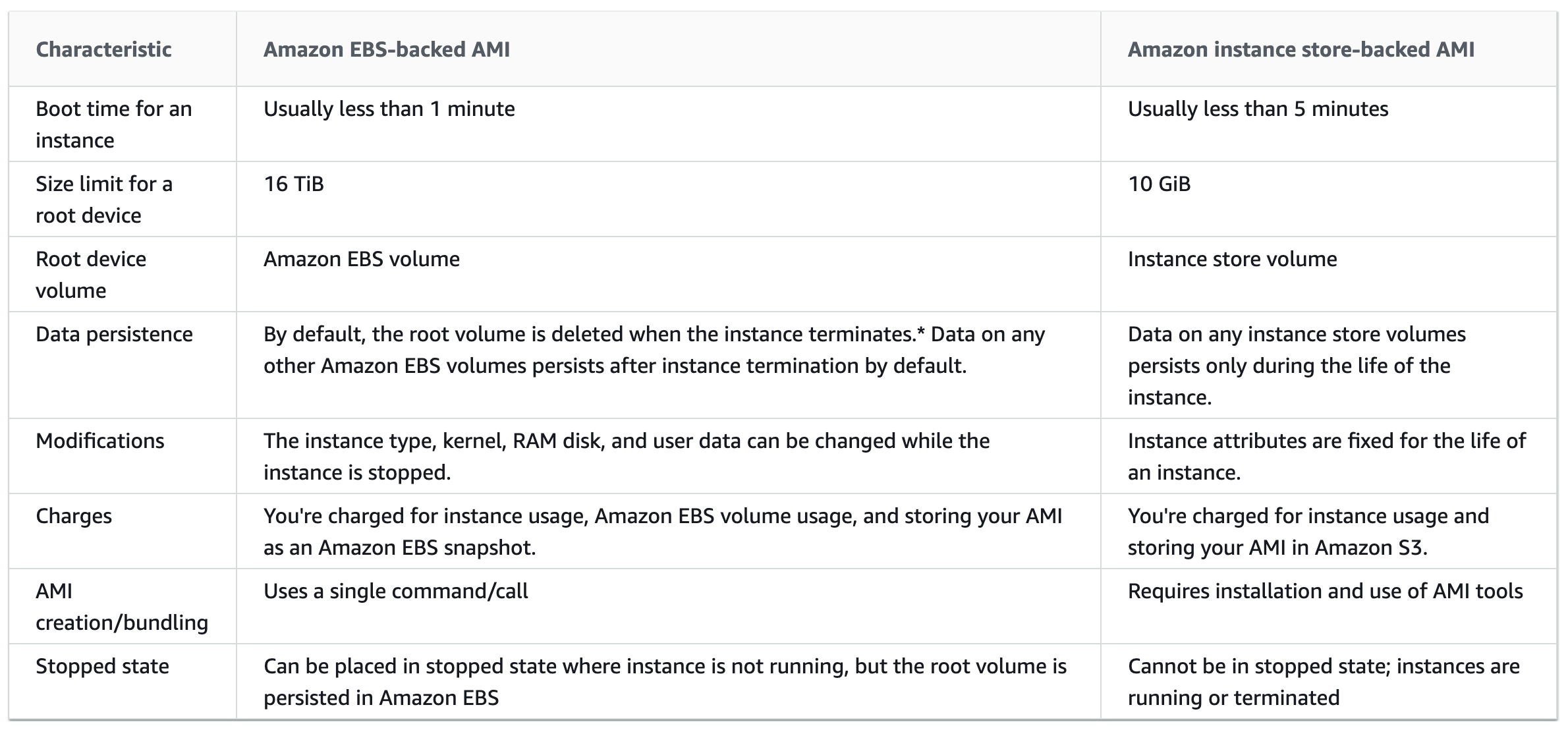
- EBS backed
- EBS volumes are independent of the EC2 instance lifecycle and can persist independently
- EBS backed instances can be stopped without losing the volumes
- EBS instance can also be persisted without losing the volumes on instance termination if the Delete On Termination flag is disabled
- EBS backed instances boot up much faster than the Instance store backed instances as only the parts required to boot the instance needs to be retrieved from the snapshot before the instance is made available
- AMI creation is much easier for AMIs backed by EBS. The CreateImage API action creates the EBS-backed AMI and registers it
- EBS-backed AMIs are the recommended and standard approach for all new workloads
- Instance Store backed
- Instance store-backed AMIs are considered end of life and are not recommended for new usage.
- They are only supported on older instance types: C1, C3, D2, I2, M1, M2, M3, R3, and X1.
- Instance store is ephemeral storage and is dependent on the lifecycle of the Instance
- Instance store is deleted if the instance is terminated or if the EBS backed instance, with attached instance store volumes, is stopped
- Instance store volumes cannot be stopped
- Instance store volumes have their AMI in S3 and have higher boot times compared to EBS backed instances, as all the parts have to be retrieved from S3 before the instance is made available
- To create Linux AMIs backed by the instance store, you must create an AMI from your instance on the instance itself using the Amazon EC2 AMI tools.
More detailed @ EBS vs Instance Store
Linux Virtualization Types
- Linux Amazon Machine Images use one of two types of virtualization: paravirtual (PV) or hardware virtual machine (HVM).
- Main difference between PV and HVM AMIs is the way in which they boot and whether they can take advantage of special hardware extensions (CPU, network, and storage) for better performance.
- AWS recommends the use of current generation instance types and HVM AMIs for all workloads. PV AMIs are legacy and only supported on older instance types.
- HVM AMIs
- HVM AMIs are presented with a fully virtualized set of hardware and boot by executing the master boot record of the root block device of the image.
- HVM virtualization type provides the ability to run an operating system directly on top of a virtual machine without any modification as if it were run on bare-metal hardware.
- EC2 host system emulates some or all of the underlying hardware that is presented to the guest.
- HVM guests, unlike PV guests, can take advantage of hardware extensions that provide fast access to the underlying hardware on the host system.
- HVM AMIs are required to take advantage of enhanced networking and GPU processing. In order to pass through instructions to specialized network and GPU devices, the OS needs to be able to have access to the native hardware platform; HVM virtualization provides this access.
- All current generation instance types support HVM AMIs only. HVM is the only virtualization type supported on Nitro-based instances.
- PV AMIs
- PV AMIs are legacy. Historically, PV guests had better performance than HVM guests in many cases, but because of enhancements in HVM virtualization and the availability of PV drivers for HVM AMIs, this is no longer true.
- PV AMIs boot with a special boot loader called PV-GRUB, which starts the boot cycle and then chain loads the kernel specified in the
menu.lstfile on your image. - Paravirtual guests can run on host hardware that does not have explicit support for virtualization, but they cannot take advantage of special hardware extensions such as enhanced networking or GPU processing
- PV is only supported on older instance types such as C1, C3, M1, M2, M3, and T1.
AMI Lifecycle
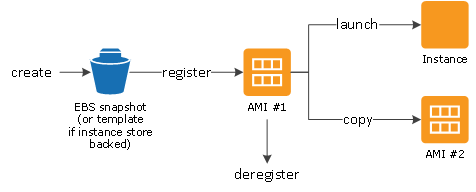
- AMI lifecycle includes the following stages:
- Create and register an AMI
- Launch new instances (You can also launch instances from an AMI if the AMI owner grants you launch permissions)
- Copy an AMI to the same region or to different regions
- Deprecate the AMI to mark it as outdated
- Disable the AMI to prevent new launches while retaining it
- Deregister the AMI when no longer needed
AMI Deprecation
- An AMI can be deprecated to indicate that it is out of date and should not be used.
- Deprecated AMIs are hidden from AMI listings, but users and services can continue to use deprecated AMIs if they know the AMI ID.
- Public AMIs are automatically deprecated after 2 years from their creation date.
- Deprecation can be set to a future date (up to 10 years for private AMIs, 2 years for public AMIs).
- Deprecation does not affect running instances launched from the AMI.
AMI Disable
- An AMI can be disabled to prevent new instance launches while retaining the AMI and its snapshots.
- Disabling an AMI changes its state to
disabled, makes it private (removes all sharing permissions), and prevents any new EC2 instance launches. - Useful for retaining old AMIs for compliance or audit purposes while preventing accidental usage.
- A disabled AMI can be re-enabled later if needed.
AMI Deregistration Protection
- AMIs can be marked as protected from accidental deregistration (launched May 2024).
- A protected AMI cannot be deregistered until deregistration protection is explicitly disabled.
- Supports a 24-hour cooldown period — after disabling protection, you must wait 24 hours before the AMI can be deregistered.
- Deregistration protection is turned off by default on all existing and new AMIs.
AMI Creation
EBS-Backed Linux AMI
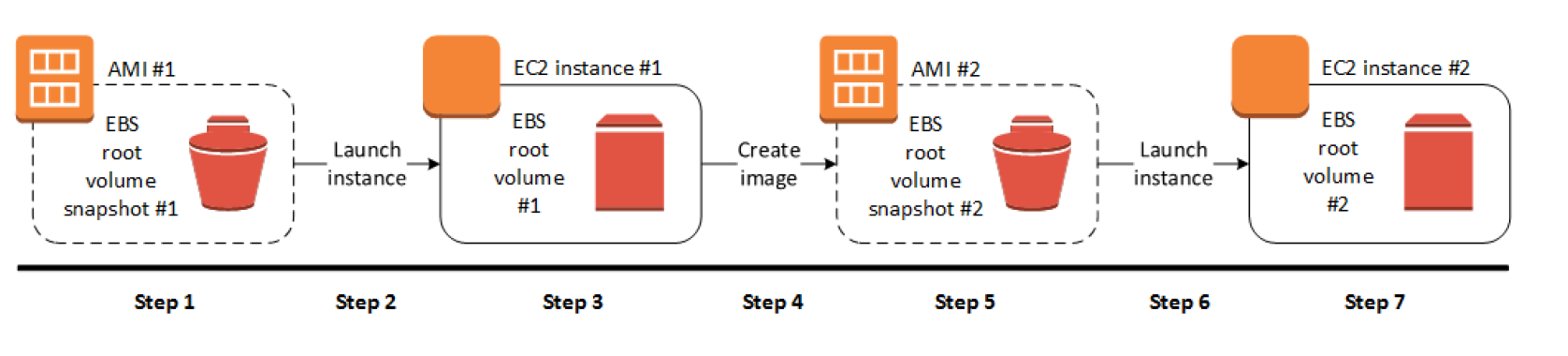
- EBS-Backed Linux AMI can be created from the instance directly or from the EBS snapshot
- EBS-backed Linux AMI creation process:-
- Select an AMI #1 similar to what you want to have your new AMI #2
- Launch an Instance from AMI #1 and configure it accordingly
- Stop the instance to ensure data integrity
- Create AMI #2 OR create an EBS snapshot and then create an AMI #2 from the snapshot
- Amazon automatically register the EBS-backed AMI
- AMI #2 can be now used to launch new instances
- By default, EC2 shuts down the instance, takes snapshots of any attached volumes, creates and registers the AMI, and then reboots the instance.
- No Reboot option
- No Reboot option prevents the instance from shut down & reboot
- AMI will be crash consistent as all the volumes are snapshotted at the same time
- However, AMI is not application consistent as all the operating system buffers are not flushed to disk before the snapshots are created and file system integrity can’t be guaranteed
- EC2 creates snapshots of the instance’s root volume and any other EBS volumes attached to the instance. If any volumes attached to the instance are encrypted, the new AMI only launches successfully on instances that support Amazon EBS encryption
- For any additional instance-store volumes or EBS volumes, the block device mapping for the new AMI contains information for these volumes and the block device mappings for instances that you launch from the new AMI automatically contain information for these volumes.
- While data on EBS volumes persist, the Instance-store volumes specified in the block device mapping for the new instance are new and don’t contain any data from the instance store volumes of the instance you used to create the AMI.
- It’s more efficient to create an EBS-backed AMI with EBS snapshots already taken as the snapshot created during AMI creation is just an incremental one
- You are charged for the storage of both the image and the snapshots
Instance Store-Backed Linux AMI
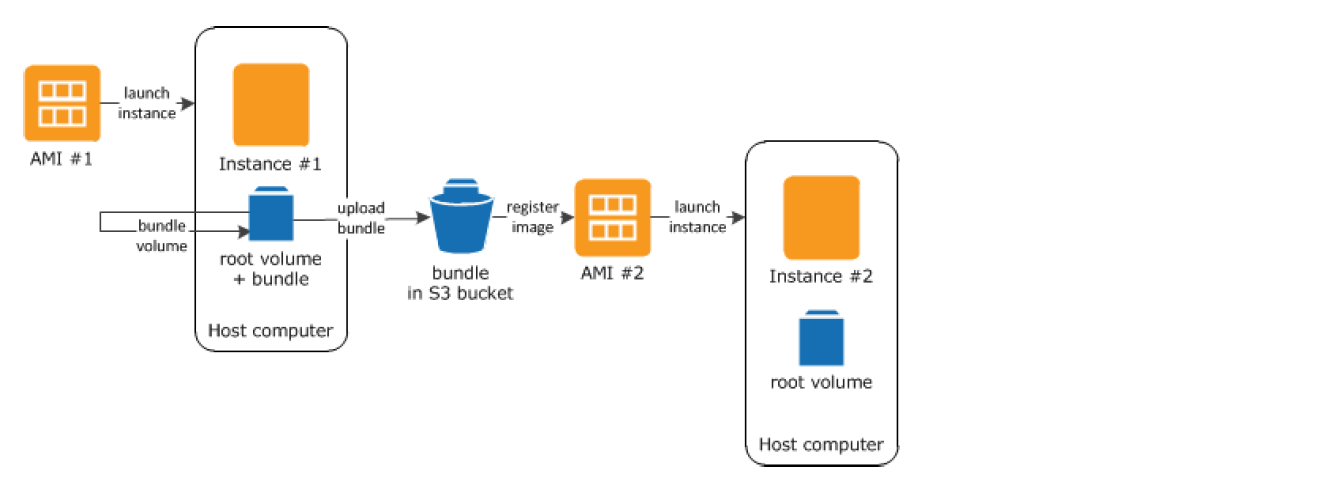
- Note: Instance store-backed AMIs are considered end of life and not recommended for new usage. They are only supported on C1, C3, D2, I2, M1, M2, M3, R3, and X1 instance types.
- Instance Store-Backed Linux AMI creation process
- Select an AMI #1 similar to what you want to have your new AMI #2
- Launch an Instance from AMI #1 and configure the instance accordingly
- Bundle the Instance. It takes several minutes for the bundling process to complete.
- After the process completes, you have a bundle, which consists of an image manifest (image.manifest.xml) and files (image.part.xx) that contain a template for the root volume.
- Upload the bundle to the S3 bucket
- Register the Instance Store-backed AMI.
- Launching an instance using the new AMI #2, the root volume for the instance is created using the bundle that you uploaded to S3.
- Charges are incurred for the storage space used by the bundle in S3 until deleted
- For additional instance store volumes, not root volumes, the block device mapping for the new AMI contains information for these volumes and the block device mappings for instances that you launch from the new AMI automatically contain information for these volumes.
Deregistering AMI
- Charges are incurred on the AMI created and they can be deregistered, if not needed.
- Deregistering an AMI does not delete the EBS snapshots or the bundles in the S3 buckets and have to be removed separately
- Once deregistered, new instances cannot be launched from the AMI. However, it does not impact already created instances from the AMI
- An AMI that has deregistration protection enabled cannot be deregistered until protection is disabled.
- Clean up EBS-Backed AMI
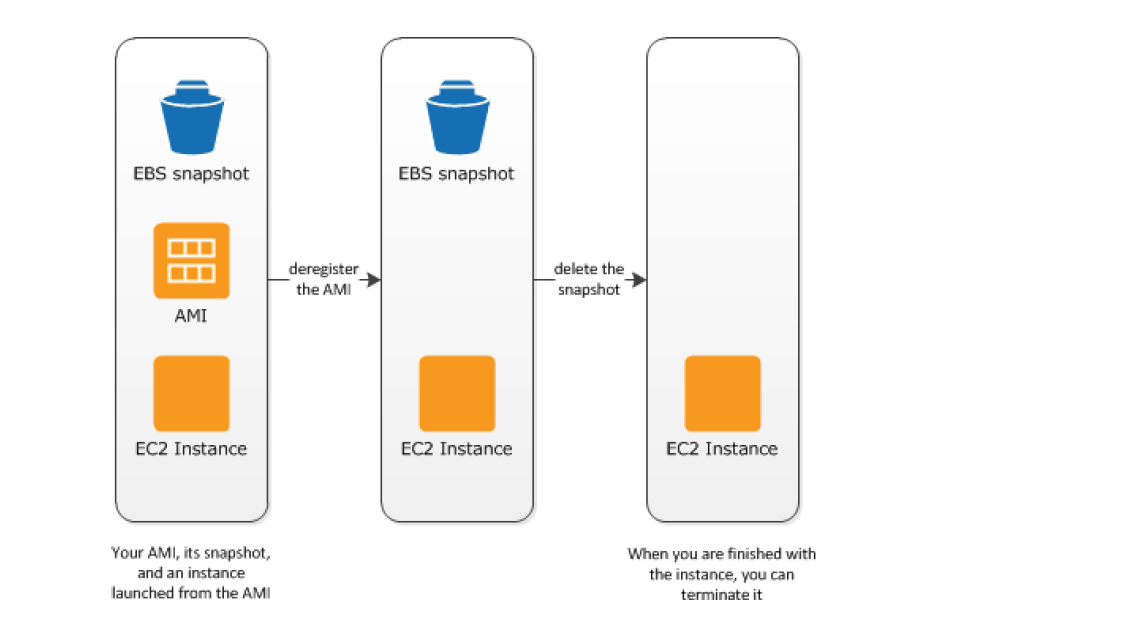
-
- Deregister the EBS-Backed AMI
- Delete the EBS Snapshot, as deregistering the AMI doesn’t impact the snapshot
- Clean up Instance Store-backed AMI
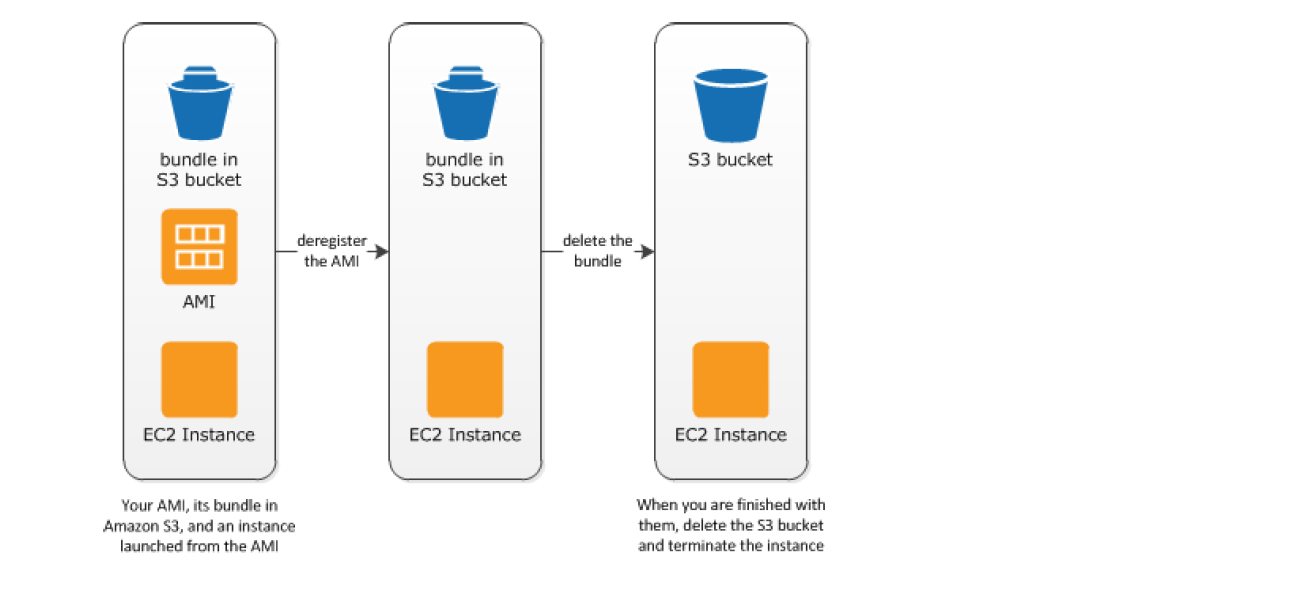
-
- Deregister the Instance Store-Backed AMI
- Delete the bundle from the S3 bucket, as deregistering the AMI doesn’t affect the bundles stored in the S3 bucket
AMI Lineage and Ancestry
- AMI Lineage (launched Nov 2024) provides source details for AMIs, enabling tracing of copied or derived AMIs back to their original source.
- AMI Ancestry (launched Nov 2025) extends this by enabling complete lineage tracing from any AMI back to the root AMI through each preceding generation.
- Key benefits:
- Track AMI derivatives to ensure compliance with internal policies
- Identify potentially vulnerable AMIs when a security issue is found in an ancestor AMI
- Maintain visibility of AMI origins across multiple Regions
- When an AMI is created or copied, the new AMI retains the ID and Region of its source (parent) AMI.
- Ancestry information is maintained even if intermediate generation AMIs are deleted.
- Use the
GetImageAncestryAPI ordescribe-image-ancestryCLI command to retrieve lineage information.
AMI Usage Monitoring
- Last Launched Time (launched 2022, enhanced May 2024)
- Tracks when an AMI was last used to launch an EC2 instance
- Helps identify unused AMIs for cleanup and cost optimization
- Available via
DescribeImagesAPI and EC2 console
- AMI Usage Reports (launched Sep 2025)
- Generate reports listing accounts using your AMIs in EC2 instances and launch templates
- Check utilization of any AMI within your account across instances, launch templates, Image Builder recipes, and SSM parameters
- Reports are automatically deleted after 30 days
AMI Governance – Allowed AMIs
- Allowed AMIs (launched Dec 2024) is an account-wide setting that enables limiting the discovery and use of AMIs within AWS accounts.
- Specify criteria that AMIs must meet to be visible and available within the account.
- Criteria parameters include:
- ImageProviders – AMI providers (AWS account IDs,
amazon,aws-marketplace,aws-backup-vaultaliases) - ImageNames – AMI names with wildcard support
- MarketplaceProductCodes – AWS Marketplace product codes
- CreationDateCondition – Maximum age for allowed AMIs
- DeprecationTimeCondition – Maximum period since deprecation
- ImageProviders – AMI providers (AWS account IDs,
- Operational states:
- Enabled – Criteria enforced, only allowed AMIs visible and launchable
- Disabled – No restrictions
- Audit mode – Criteria evaluated but not enforced (for testing)
- Does NOT restrict AMIs owned by your own account — only controls public AMIs and AMIs shared with your account.
- Can be configured via declarative policies in AWS Organizations for multi-account and multi-region enforcement.
- Integrates with AWS Config (Mar 2025) using the
ec2-instance-launched-with-allowed-amirule.
AMI Block Public Access
- AMI Block Public Access (BPA), launched Sep 2023, is an account-wide setting that prevents public sharing of AMIs in a region.
- Enabled by default for all new AWS accounts and existing accounts that have not owned a public AMI since July 2023.
- When enabled, prevents making any AMI public in that region.
- Existing public AMIs remain publicly available — BPA only blocks new public sharing.
- Must be explicitly disabled if you need to share AMIs publicly.
Shared AMIs
- Shared AMI is an AMI that can be created and shared with others for use
- A Shared AMI with all the components needed can be used to get started and then add custom components as and when needed
- Shared AMI can be risky as Amazon does not perform detailed checks and vouch for the integrity and security of these AMIs
- Before using a Shared AMI, check for any pre-installed credentials that would allow unwanted access to the instance by a third party and no pre-configured remote logging that could transmit sensitive data to a third party
- Amazon allows you to share an image, by defining launch permissions, to all (making it public) or only to specific AWS accounts, Organizations, or Organizational Units (OUs)
- Launch permissions work at the AWS account level, or at the AWS Organizations/OU level for broader sharing.
- Sharing an image does not affect the ownership of the AMI
- Only AMIs with unencrypted volumes or encrypted with a customer-managed key can be shared.
- AMIs are a regional resource. Therefore, sharing an image makes it available in that Region. To make an image available in a different Region, copy the AMI to the Region and then share it.
- Share with Organizations/OUs
- AMIs can be shared with an entire AWS Organization or specific OUs using the Org ID or OU ID in launch permissions.
- When shared with an organization or OU, all children accounts gain access to the AMI.
- If shared with encrypted snapshots, the Organizations or OUs must also be allowed to use the KMS keys used to encrypt the snapshots.
- Make AMI Public
- AMIs with encrypted volumes cannot be made public.
- AMI with product codes or snapshots of an encrypted volume can’t be made public; they can be shared only with specific AWS accounts.
- AMI Block Public Access must be disabled in the region before an AMI can be made public.
- Guidelines for Shared Linux AMIs
- Update the AMI Tools at Boot-Time
- Update the AMI tools or any software during startup.
- Take into account the software updates do not break any software and consider the WAN traffic as the downloads will be charged to the AMI user
- Disable Password-Based Remote Logins for Root
- Fixed root passwords can be a security risk and need to be disabled
- Disable Local Root Access
- disable direct root logins
- Remove SSH Host Key Pairs
- Remove the existing SSH host key pairs located in /etc/ssh, which forces SSH to generate new unique SSH key pairs when someone launches an instance using your AMI, improving security and reducing the likelihood of “man-in-the-middle” attacks
- Install Public Key Credentials
- EC2 allows users to specify a public-private key pair name when launching an instance.
- A valid key pair name needs to be provided when launching an instance, the public key, the portion of the key pair that EC2 maintains on the server, is made available to the instance through an HTTP query against the instance metadata and appended to the authorized keys
- Users can launch instances of the AMI with a key pair and log in without requiring a root password
- Disabling
sshdDNS Checks (Optional)- Disabling
sshdDNS checks slightly weaken thesshdsecurity. However, if DNS resolution fails, SSH logins still work. If you do not disablesshdchecks, DNS resolution failures prevent all logins.
- Disabling
- Identify Yourself
- AMI is only represented by an account ID without any further information, so it is better to provide more information to help describe the AMI
- Protect Yourself
- Don’t store any sensitive data or software on the AMI
- Exclude & Skip any directories holding sensitive data or secret information and delete the shell history before creating an AMI
- Update the AMI Tools at Boot-Time
AMIs with Encrypted Snapshots
- AMIs, with EBS backed snapshots, can be attached with both an encrypted root and data volume
- AMIs copy image can be used to create AMIs with encrypted snapshots from AMIs with unencrypted snapshots. By default, copy image preserves the encryption status of the snapshots
- Snapshots can be encrypted with either the default AWS managed key or a customer managed KMS key
AMI Copying
- EBS-backed AMIs and instance store-backed AMIs can be copied.
- Copying an AMI
- An identical target AMI is created, but with its own unique identifier
- For EBS backed AMI, identical but distinct root and data snapshots are created
- Encryption status of the snapshots are preserved
- However, Launch permissions, user-defined tags, or S3 bucket permissions are not copied from the source AMI to the new AMI. After the copy operation is complete, different launch permissions, user-defined tags, and S3 bucket permissions to the new AMI
- Source AMI can be deregistered without any impact to the Target AMI
- AMIs owned or shared with proper permissions can be copied
- AMIs are created specific to a region and can be copied within or across regions which can help to aid in the consistent global deployment and build highly scalable and available applications
- AMI copy image can be used to encrypt an AMI from an unencrypted AMI
- AMIs with encrypted snapshots can be copied and also encryption status changed during the copy process.
- AWS Marketplace AMI cannot be copied, regardless of whether obtained directly or shared. Instead, launch an EC2 instance using the AWS Marketplace AMI and then create an AMI from the instance.
- AMI Lineage is maintained through copies — the copied AMI retains the source AMI ID and Region for tracking.
Amazon Linux 2023
⚠️ Amazon Linux Version Status:
- Amazon Linux 1 (AL1) reached End of Life on December 31, 2023. No security updates since January 1, 2024.
- Amazon Linux 2 (AL2) will reach End of Life on June 30, 2026. Migrate to AL2023.
- Amazon Linux 2023 (AL2023) is the current recommended version with support until June 30, 2029.
Amazon Linux 2023 (AL2023)
Amazon Linux 2023 is the latest generation of Amazon Linux, a cloud-optimized Linux distribution with long-term support provided by AWS.
- A stable, secure, and high-performance execution environment for applications running on EC2.
- does not allow remote root SSH by default.
- Password authentication is disabled to prevent brute-force password attacks.
- Instances launched using Amazon Linux AMI must be provided with a key pair at launch to enable SSH logins
- Inbound security group must allow SSH access
- By default, the only account that can log in remotely using SSH is
ec2-user; this account also has sudo privileges. - are configured to download and install security updates at launch time.
- Provided at no additional charge to Amazon EC2 users.
- Key improvements over Amazon Linux 2:
- Deterministic updates through versioned repositories (locking to a specific version)
- FIPS 140-3 certification for enhanced security compliance
- Kernel livepatch support for applying security patches without rebooting
- SELinux support in permissive mode by default
- Uses
dnfpackage manager (replacesyum) - Uses IMDSv2 by default (Instance Metadata Service Version 2)
- Modern system components with regular major version updates
- Support lifecycle: 5 years per major version (2 years standard + 3 years maintenance)
- Includes pre-installed packages to enable easy integration with AWS services, such as the AWS CLI, Amazon EC2 API tools, the Boto3 library for Python, and SSM Agent.
Amazon Linux 2 (AL2) – End of Life June 30, 2026
- Amazon Linux 2 continues to receive maintenance updates until June 30, 2026.
- AWS recommends migrating to Amazon Linux 2023 for new workloads.
- ECS-optimized AL2 AMIs and EKS-optimized AL2 AMIs also end support in 2025-2026.
EC2 Image Builder
- EC2 Image Builder is a fully managed AWS service that makes it easier to automate the creation, management, and deployment of customized, secure, and up-to-date server images that are pre-installed and pre-configured with software and settings to meet specific IT standards
- EC2 Image Builder simplifies the building, testing, and deployment of Virtual Machine and container images for use on AWS or on-premises.
- Image Builder significantly reduces the effort of keeping images up-to-date and secure by providing a simple graphical interface, built-in automation, and AWS-provided security settings.
- Image Builder removes any manual steps for updating an image and you do not have to build your own automation pipeline.
- Image Builder provides a one-stop-shop to build, secure, and test up-to-date Virtual Machine and container images using common workflows.
- Image Builder allows image validation for functionality, compatibility, and security compliance with AWS-provided tests and your own tests before using them in production.
- Image Builder is offered at no cost, other than the cost of the underlying AWS resources used to create, store, and share the images.
- Lifecycle Management (launched Nov 2023)
- Automates deprecating, disabling, and deleting outdated images and associated resources
- Supports wildcard patterns in lifecycle policies (enhanced Feb 2026)
- Helps save costs by cleaning up unused images that accumulate storage charges
- Flexible AMI Distribution (launched Nov 2025)
- Distribute existing AMIs to multiple regions and accounts without running a full pipeline build
- Specify AMI and distribution configuration, and Image Builder handles copying and sharing
- AWS Marketplace Components (launched 2025)
- Procure third-party components from AWS Marketplace directly in the Image Builder console
- Streamlines AMI creation with pre-built software components
- Pipeline Management Enhancements (launched Oct 2025)
- Automatically disables pipelines after consecutive failures
- Custom log groups for image pipelines for better visibility
- Supports sharing AMIs with AWS Organizations and Organizational Units
AWS Certification Exam Practice Questions
- Questions are collected from Internet and the answers are marked as per my knowledge and understanding (which might differ with yours).
- AWS services are updated everyday and both the answers and questions might be outdated soon, so research accordingly.
- AWS exam questions are not updated to keep up the pace with AWS updates, so even if the underlying feature has changed the question might not be updated
- Open to further feedback, discussion and correction.
- A user has launched an EC2 instance from an instance store backed AMI. The infrastructure team wants to create an AMI from the running instance. Which of the below mentioned credentials is not required while creating the AMI?
- AWS account ID
- 509 certificate and private key
- AWS login ID to login to the console
- Access key and secret access key
- A user has launched an EC2 Windows instance from an instance store backed AMI. The user wants to convert the AMI to an EBS backed AMI. How can the user convert it?
- Attach an EBS volume to the instance and unbundle all the AMI bundled data inside the EBS
- A Windows based instance store backed AMI cannot be converted to an EBS backed AMI
- It is not possible to convert an instance store backed AMI to an EBS backed AMI
- Attach an EBS volume and use the copy command to copy all the ephemeral content to the EBS Volume
- A user has launched two EBS backed EC2 instances in the US-East-1a region. The user wants to change the zone of one of the instances. How can the user change it?
- Stop one of the instances and change the availability zone
- The zone can only be modified using the AWS CLI
- From the AWS EC2 console, select the Actions – > Change zones and specify new zone
- Create an AMI of the running instance and launch the instance in a separate AZ
- A user has launched a large EBS backed EC2 instance in the US-East-1a region. The user wants to achieve Disaster Recovery (DR) for that instance by creating another small instance in Europe. How can the user achieve DR?
- Copy the running instance using the “Instance Copy” command to the EU region
- Create an AMI of the instance and copy the AMI to the EU region. Then launch the instance from the EU AMI
- Copy the instance from the US East region to the EU region
- Use the “Launch more like this” option to copy the instance from one region to another
- A user has launched an EC2 instance store backed instance in the US-East-1a zone. The user created AMI #1 and copied it to the Europe region. After that, the user made a few updates to the application running in the US-East-1a zone. The user makes an AMI#2 after the changes. If the user launches a new instance in Europe from the AMI #1 copy, which of the below mentioned statements is true?
- The new instance will have the changes made after the AMI copy as AWS just copies the reference of the original AMI during the copying. Thus, the copied AMI will have all the updated data
- The new instance will have the changes made after the AMI copy since AWS keeps updating the AMI
- It is not possible to copy the instance store backed AMI from one region to another
- The new instance in the EU region will not have the changes made after the AMI copy
- George has shared an EC2 AMI created in the US East region from his AWS account with Stefano. George copies the same AMI to the US West region. Can Stefano access the copied AMI of George’s account from the US West region?
- No, copy AMI does not copy the permission
- It is not possible to share the AMI with a specific account
- Yes, since copy AMI copies all private account sharing permissions
- Yes, since copy AMI copies all the permissions attached with the AMI
- EC2 instances are launched from Amazon Machine images (AMIS). A given public AMI can:
- be used to launch EC2 Instances in any AWS region.
- only be used to launch EC2 instances in the same country as the AMI is stored.
- only be used to launch EC2 instances in the same AWS region as the AMI is stored. (An AMI is tied to the region where its files are located within Amazon S3)
- only be used to launch EC2 instances in the same AWS availability zone as the AMI is stored.
- A company wants to ensure that only approved AMIs can be used to launch EC2 instances in their AWS account. They want to restrict the use of community AMIs and only allow AMIs from trusted providers. Which feature should they use?
- AMI Block Public Access
- AMI Deprecation
- Allowed AMIs
- AMI Deregistration Protection
- An organization needs to track the complete lineage of an AMI that has been copied across multiple regions over several years. Which AWS feature provides this capability?
- AMI Last Launched Time
- AMI Usage Reports
- AMI Deprecation
- AMI Ancestry
- A team wants to prevent critical production AMIs from being accidentally deregistered while still allowing cleanup of development AMIs. What is the most appropriate approach?
- Use IAM policies to deny DeregisterImage on all AMIs
- Disable the AMIs instead of deregistering them
- Enable deregistration protection on production AMIs
- Use AMI Block Public Access
- Which of the following statements about Amazon Linux versions is correct? (Choose 2)
- Amazon Linux 1 continues to receive security updates
- Amazon Linux 2023 is supported until June 2029
- Amazon Linux 2 has no announced end of life date
- Amazon Linux 2 reaches end of life on June 30, 2026
- Amazon Linux 2023 uses yum as its package manager
- A security team wants to disable an old AMI so no new instances can be launched from it, but needs to retain it for compliance auditing. Which approach should they use?
- Deregister the AMI and keep the snapshots
- Remove all launch permissions from the AMI
- Set the AMI to disabled state
- Deprecate the AMI