AWS EC2 Image Builder
- EC2 Image Builder is a fully managed AWS service that automates the creation, management, and deployment of customized, secure, and up-to-date server images that are pre-installed and pre-configured with software and settings to meet specific IT standards.
- EC2 Image Builder simplifies the building, testing, and deployment of Virtual Machine and container images for use on AWS or on-premises.
- Image Builder significantly reduces the effort of keeping images up-to-date and secure by providing a simple graphical interface, built-in automation, and AWS-provided security settings.
- Image Builder removes any manual steps for updating an image without the need to build your own automation pipeline.
- Image Builder provides a one-stop-shop to build, secure, and test up-to-date Virtual Machine and container images using common workflows.
- Image Builder allows image validation for functionality, compatibility, and security compliance with AWS-provided tests and your own tests before using them in production.
- Image Builder is offered at no cost, other than the cost of the underlying AWS resources used to create, store, and share the images.
- Image Builder supports creating both AMI images and Docker container images (stored in Amazon ECR).
- Image Builder supports Windows, Linux (Amazon Linux 2, Amazon Linux 2023, RHEL, Ubuntu, CentOS, SUSE), and macOS platforms.
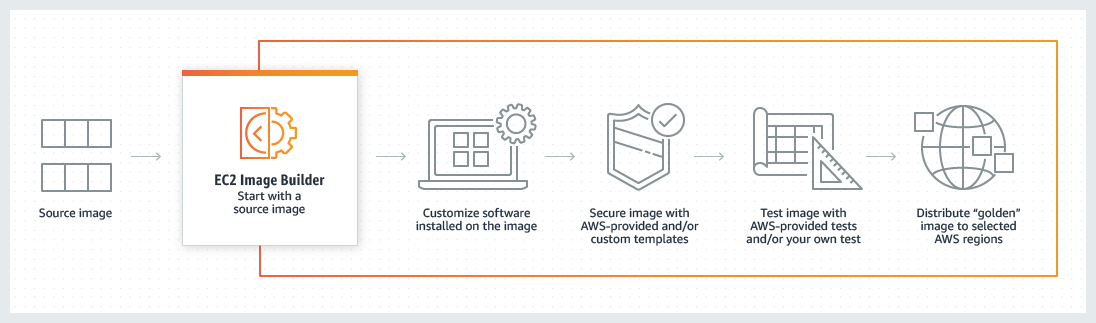
EC2 Image Builder Key Concepts
- Image Pipeline – defines the end-to-end process of building, testing, and distributing images. Pipelines can be run manually or on a schedule using cron expressions.
- Image Recipe – defines the base image (source AMI) and the components applied to produce the output AMI image. Container recipes are used for Docker container image outputs.
- Components – building blocks consumed by recipes that define build, validate, and test actions. Components use YAML-based documents and run via AWSTOE (AWS Task Orchestrator and Executor).
- Base Image – the starting OS image. Image Builder supports automatic versioning to always use the latest available OS version.
- Infrastructure Configuration – specifies EC2 instance details (instance type, VPC, subnet, security groups, IAM role, SNS topic) for the build and test instances launched during image creation.
- Distribution Configuration – defines how and where the output image is distributed (AWS Regions, target accounts, Organizations/OUs, launch permissions, launch templates).
- Image Workflows – define the sequence of steps during build, test, and distribution stages, providing flexibility, visibility, and control over image creation.
AWSTOE (AWS Task Orchestrator and Executor)
- AWSTOE is a standalone component management application used by Image Builder to orchestrate complex workflows, modify system configurations, and test images.
- Components use YAML-based documents with phases (build, validate, test) and steps to group related tasks.
- AWSTOE supports looping constructs, conditional constructs (if statements), logical operators, and comparison operators for complex component logic.
- Components can be parameterized for reuse with different configurations across recipes.
- Component sources include AWS-managed components, AWS Marketplace components (from ISVs, added December 2024), and custom components you create.
- AWSTOE can run on any cloud infrastructure and on-premises for local component development and testing.
Image Lifecycle Management
- Image lifecycle management allows defining policies and rules to manage outdated images and their associated resources through a process of deprecation, disabling, and deletion.
- Deprecate Rule – sets image status to Deprecated; pipelines still run, but the AMI is ignored by general searches (e.g., EC2 describe-images).
- Disable Rule – sets image status to Disabled; prevents pipelines from running and makes AMI private (no new instance launches).
- Delete Rule – removes image resources by age or count threshold.
- Lifecycle policies now support wildcard semantic version patterns (1.0.x, 1.x.x, x.x.x) to target multiple recipe versions with a single policy (February 2026).
- Tag-based resource collection and exclusion rules are available for lifecycle policies.
- Simplified IAM role management with console-based role creation using service defaults.
Image Distribution
- Image Builder can distribute AMIs or container images to any AWS Region after the build is complete and tests pass.
- Supports cross-account AMI distribution to specific accounts, AWS Organizations, and OUs.
- AMI launch permissions can be configured as private, public, or shared with specific accounts.
- Supports encrypted AMI distribution using AWS KMS.
- Supports VM disk export to Amazon S3.
- Integration with EC2 Launch Templates for AMI distribution settings.
- Enhanced Distribution (November 2025) – enables distributing existing AMIs to multiple regions and accounts without running a full pipeline build. Supports retry distribution from point of failure.
Image Scanning and Security
- Amazon Inspector Integration – when Amazon Inspector is enabled, Image Builder captures CVE findings during the test stage of the build process for both AMI and container images.
- Security findings are accessible via Console, CLI, API, CloudFormation, and CDK.
- Image Builder creates a snapshot of findings to support detailed analysis, with filtering by account, pipeline, or image.
- STIG Hardening Components – AWS-managed components that scan for misconfigurations and run remediation scripts for STIG compliance. No additional charges.
- Supports STIG compliance for Windows Server 2016/2019/2022/2025, Amazon Linux 2, Amazon Linux 2023, RHEL, Ubuntu, CentOS, and SUSE (SLES).
- CIS Hardening – CIS Benchmark components from the Center for Internet Security available through AWS Marketplace integration for CIS Level 1 and Level 2 hardening.
Auto-Versioning and IaC Enhancements (November 2025)
- Automatic version incrementing for recipes, components, and workflows eliminates manual version management.
- Wildcard version referencing allows dynamically referencing the latest compatible versions in pipelines without manual updates.
- Component dry-run testing capability for testing components before pipeline execution.
- Enhanced component authoring experience in the console.
Lambda and Step Functions Integration (November 2025)
- Image workflows now support invoking AWS Lambda functions and executing AWS Step Functions state machines.
- Enables complex, multi-step workflows and custom validation logic during image creation.
- Provides greater flexibility and control over how images are built and validated.
Windows ISO to AMI Conversion (January 2025)
- EC2 Image Builder supports direct conversion of Microsoft Windows ISO files to AMIs.
- Simplifies the process of using your own Windows AMIs and leveraging existing Windows licenses (BYOL).
- Supports Windows 11 and later client operating systems.
- AMIs can be used to launch EC2 instances or imported to Amazon WorkSpaces.
Pipeline Enhancements (September 2025)
- Pipeline execution logs provide better visibility into build processes.
- Configurable CloudWatch Logs groups for pipeline logging.
- Automatic disabling of scheduled pipelines that fail repeatedly.
- Expanded pipeline schedule information in console.
AWS Marketplace Components (December 2024)
- EC2 Image Builder now supports software components from independent software vendors (ISVs) via AWS Marketplace.
- Expands the catalog of available components beyond AWS-managed and custom components.
- ISV components can be included in recipes for building and testing images.
macOS Support (October 2024)
- EC2 Image Builder added support for building macOS images.
- Enables automated creation and management of macOS AMIs for Apple development workloads on EC2 Mac instances.
Additional Features
- SSM Parameter Store Integration (April 2025) – supports using SSM Parameters in recipes and during image distribution.
- AWS PrivateLink – private connectivity to Image Builder APIs via VPC interface endpoints without internet access.
- Amazon EventBridge Integration – connect Image Builder events with other AWS services and initiate actions based on rules.
- CloudTrail Integration – all API calls are logged for auditing.
- AWS RAM Sharing – share components, recipes, and images with other accounts or within AWS Organizations.
- SNS Notifications – receive notifications when builds complete.
- Faster Launching for Windows AMIs – distribution settings that enable pre-provisioned snapshots for faster Windows instance launches.
AWS Certification Exam Practice Questions
- Questions are collected from Internet and the answers are marked as per my knowledge and understanding (which might differ with yours).
- AWS services are updated everyday and both the answers and questions might be outdated soon, so research accordingly.
- AWS exam questions are not updated to keep up the pace with AWS updates, so even if the underlying feature has changed the question might not be updated
- Open to further feedback, discussion and correction.
- A company is running a website on Amazon EC2 instances that are in an Auto Scaling group. When the website traffic increases, additional instances take several minutes to become available because of a long-running user data script that installs software. An AWS engineer must decrease the time that is required for new instances to become available. Which action should the engineer take to meet this requirement?
- Reduce the scaling thresholds so that instances are added before traffic increases.
- Purchase Reserved Instances to cover 100% of the maximum capacity of the Auto Scaling group.
- Update the Auto Scaling group to launch instances that have a storage optimized instance type.
- Use EC2 Image Builder to prepare an Amazon Machine Image (AMI) that has pre-installed software.
- A security team requires all AMIs used in production to be hardened according to CIS benchmarks and scanned for vulnerabilities before deployment. The team wants an automated, repeatable process. Which combination of AWS services provides this capability?
- AWS Systems Manager Patch Manager with custom baselines and manual AMI creation.
- EC2 Image Builder with CIS hardening components and Amazon Inspector integration for vulnerability scanning.
- AWS Config rules to detect non-compliant AMIs after instance launch.
- Amazon GuardDuty with automated AMI scanning enabled.
- A company needs to distribute a custom AMI to multiple AWS accounts across an AWS Organization after every weekly build. The company wants to automate this process without manual intervention. Which Image Builder feature should they use?
- Create a separate pipeline in each target account.
- Use AWS RAM to share the AMI after manual build.
- Configure distribution settings with target accounts and Organizations/OUs in the image pipeline, and set a weekly schedule.
- Use AWS Lambda to copy the AMI to each account after build completion.
- A DevOps engineer manages dozens of Image Builder recipes and components with Infrastructure as Code. Version management has become a significant overhead. Which recent Image Builder feature addresses this challenge?
- Use AWS CloudFormation stack sets for multi-region deployment.
- Implement a custom Lambda function to increment versions.
- Use Image Builder auto-versioning with wildcard version referencing to automatically increment versions and dynamically reference the latest compatible versions.
- Store all versions in AWS CodeCommit with automated tagging.
- A company wants to incorporate complex, custom validation logic including calling external APIs and running multi-step approval workflows during their image creation process. Which Image Builder capability enables this?
- Add custom AWSTOE test components with shell scripts.
- Use Amazon EventBridge to trigger post-build validations.
- Use Image Builder’s Lambda and Step Functions integration in image workflows to invoke custom validation logic.
- Configure SNS notifications and manual approval steps.
- An organization needs to manage the lifecycle of hundreds of AMIs created by Image Builder, automatically deprecating images older than 90 days across multiple recipe versions. What is the most efficient approach?
- Create individual lifecycle policies for each recipe version.
- Use AWS Lambda scheduled functions to deprecate old AMIs.
- Create a lifecycle policy with wildcard semantic version patterns (e.g., 1.x.x) to target multiple recipe versions with a single policy.
- Manually deprecate AMIs using the AWS CLI on a schedule.