Skip to content

Jayendra's Cloud Certification Blog

  • Home
  • Coupons
  • About Me
  • Contact Me
  • Privacy Policy

VPC Firewall Rules

Google Cloud VPC Firewall Rules & NGFW Policies

May 9, 2021 ~ Last updated on : June 29, 2026 ~ jayendrapatil

Google Cloud VPC Firewall Rules

📋 Migration Recommended: Move to Network Firewall Policies

Google Cloud recommends migrating from VPC firewall rules to Network Firewall Policies (part of Cloud NGFW). Network firewall policies offer enhanced features including IAM-governed Tags, FQDN objects, geolocation filtering, threat intelligence, and batch updates.

A migration tool (gcloud compute firewall-rules migrate) is available to convert existing VPC firewall rules to a global network firewall policy automatically.

Learn more about migration →

  • VPC firewall rules are part of Cloud NGFW (Cloud Next Generation Firewall) Essentials tier, Google Cloud’s distributed, cloud-native stateful inspection firewall service.
  • Firewall rules help define allow or deny connections and apply to both outgoing (egress) and incoming (ingress) traffic in the network.
  • Firewall rules control traffic even if it is entirely within the VPC network, including communication among VM instances.
  • Firewall rules apply to a given project and network, and connections are allowed or denied on a per-instance basis.
  • Every VPC network has two implied firewall rules
    • Implied allow egress rule – allow all egress traffic,
    • Implied deny ingress rule – denies all ingress traffic.
  • Implied rules cannot be deleted but have the lowest possible priorities and can be overridden
  • Firewall rules support IPv4 and IPv6 connections. When specifying a source or destination by address, IPv4 or IPv6 addresses can be specified in CIDR notation. Each firewall rule can contain either IPv4 or IPv6 ranges, but not both.
  • Firewall rules always allow the following traffic (via the metadata server at 169.254.169.254 for IPv4 and fd20:ce::254 for IPv6)
    • DHCP
    • DNS resolution
    • Instance metadata
    • NTP
  • Google Cloud blocks or limits the following traffic
    • Egress traffic on TCP port 25 (SMTP) to external IP addresses (to prevent spam)
    • DHCP offers/acknowledgments from sources other than the metadata server
    • External IP addresses only accept TCP, UDP, ICMP, IPIP, AH, ESP, SCTP, and GRE packets
  • VPC firewall rules are stateful
    • Google Cloud associates incoming packets with corresponding outbound packets by using a connection tracking table.
    • When a connection is allowed through the firewall in either direction, return traffic matching this connection is also allowed.
    • Firewall rule cannot be configured to deny associated response traffic.
    • Stateful response to the request is not logged as well
    • Return traffic must match the 5-tuple (source IP, destination IP, source port, destination port, protocol) of the accepted request traffic, but the source and destination addresses and ports are reversed.
    • IPv4 connections support TCP, UDP, SCTP, and ICMP protocols for connection tracking. IPv6 connections support TCP, UDP, SCTP, and ICMPv6 protocols.
    • Google Cloud implements connection tracking regardless of whether the protocol supports connections.
    • A firewall rule’s tracking state is considered active if at least one packet is sent every 10 minutes.
    • The maximum number of tracked connections depends on the machine type:
      • Shared-core machine types: 130,000 connections
      • Instances with 1–8 vCPUs: 130,000 connections per vCPU
      • Instances with more than 8 vCPUs: 1,040,000 (130,000×8) connections total
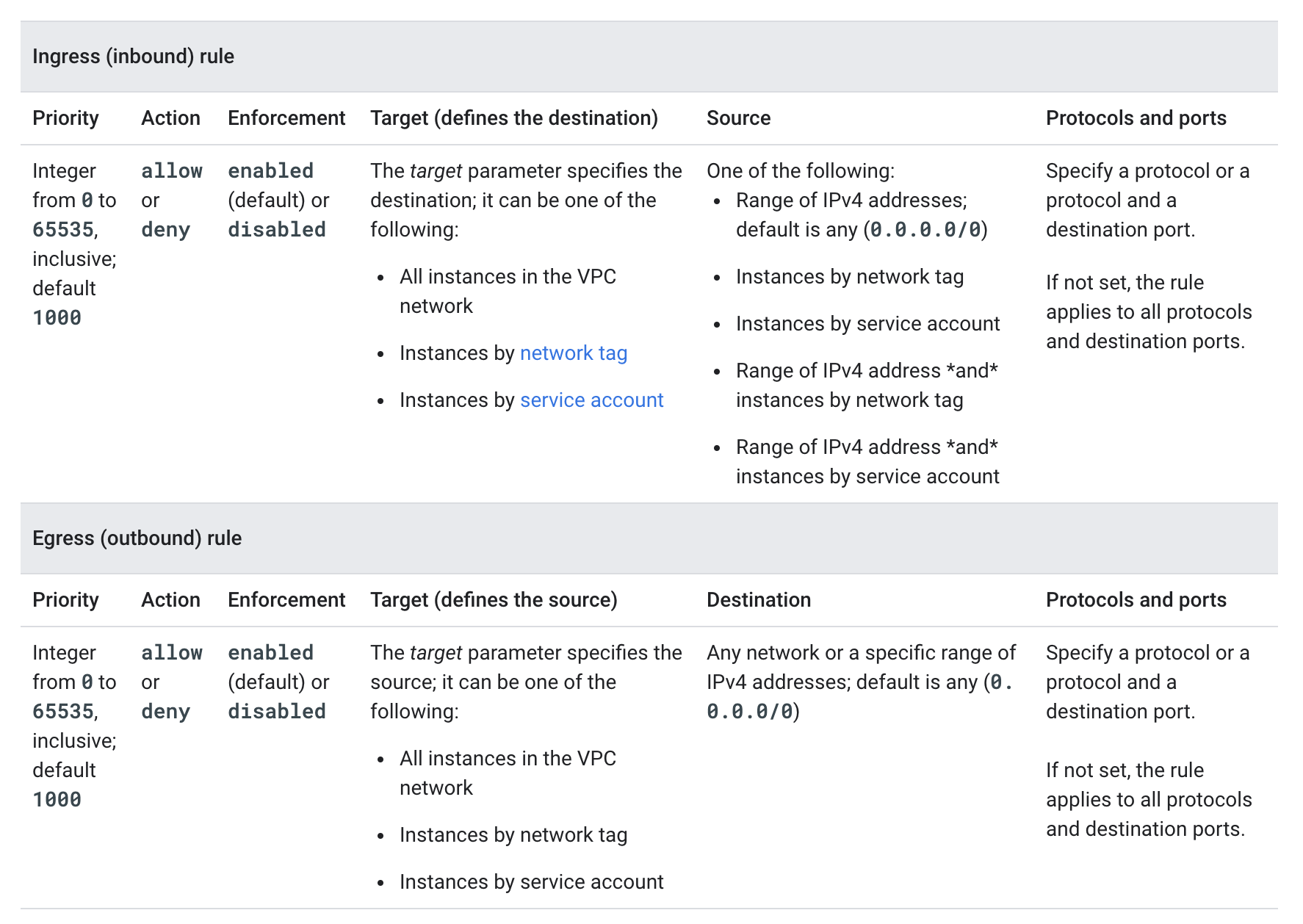
VPC Firewall Rules Components

Cloud NGFW Tiers

  • VPC firewall rules are part of the broader Cloud NGFW (Cloud Next Generation Firewall) product, which is offered in three tiers:
    • Cloud NGFW Essentials – Foundational tier including VPC firewall rules, global and regional network firewall policies, hierarchical firewall policies, IAM-governed Tags, and Address groups.
    • Cloud NGFW Standard – Extends Essentials with Fully Qualified Domain Name (FQDN) objects, geolocation objects, and threat intelligence for firewall policy rules.
    • Cloud NGFW Enterprise – Provides advanced Layer 7 security capabilities including Intrusion Detection and Prevention Service (IDPS), TLS inspection, and URL filtering, powered by Palo Alto Networks.
  • Cloud NGFW Enterprise uses firewall endpoints (Google-managed zonal resources) that use packet intercept technology to inspect workload traffic for threat signatures.

Firewall Policies (Recommended)

  • Google Cloud now provides Firewall Policies as the recommended approach for managing firewall rules, offering several advantages over VPC firewall rules:
    • Batch updates to multiple rules simultaneously
    • IAM-governed Tags (Secure Tags) instead of network tags
    • FQDN objects, geolocation filtering, and threat intelligence (Standard/Enterprise)
    • Consistent experience across the resource hierarchy
  • Types of Firewall Policies:
    • Hierarchical Firewall Policies – Applied at organization and folder levels. Support goto_next action to delegate evaluation to lower-level policies.
    • Global Network Firewall Policies – Applied to all subnetworks in all regions of a VPC network.
    • Regional Network Firewall Policies – Applied only to subnetworks of the VPC network in the target region.
  • Firewall policy rules have a priority range of 0 to 2,147,483,547 (vs. 0 to 65,535 for VPC firewall rules).
  • Firewall policy rules support additional actions: allow, deny, goto_next, and apply_security_profile_group.

Firewall Rule Evaluation Order

  • Google Cloud supports two network firewall policy enforcement orders:
    • AFTER_CLASSIC_FIREWALL (default):
      1. Hierarchical firewall policies
      2. Regional system firewall policies
      3. VPC firewall rules
      4. Global network firewall policies
      5. Regional network firewall policies
      6. Implied actions
    • BEFORE_CLASSIC_FIREWALL:
      1. Hierarchical firewall policies
      2. Regional system firewall policies
      3. Global network firewall policies
      4. Regional network firewall policies
      5. VPC firewall rules
      6. Implied actions
  • The enforcement order can be changed using gcloud compute networks update with the --network-firewall-policy-enforcement-order flag.

Firewall Rule Components

  • Each firewall rule requires the direction of connection and applies to incoming (ingress) or outgoing (egress) connection, not both
  • Each firewall rule’s action is either allow or deny.
  • Each firewall rule has a priority defined from 0 to 65535 inclusive, defaults to 1000. Lower integers indicate higher priorities.
  • A target, which defines the instances to which the rule applies.
    • Ingress (inbound) rule, the target parameter designates the destination VM instances
    • Egress (outbound) rule, the target designates the source instances.
    • supports the following options
      • All instances in the network.
      • Instances by target tags.
      • Instances by target service accounts
  • A source for ingress rules or a destination for egress rules.
    • Ingress (inbound) rules
      • target parameter specifies the destination instances for traffic;
      • destination parameter cannot be used
      • source is specified by using the source parameter.
    • Egress (outbound) rules
      • target parameter specifies the source instances for traffic;
      • source parameter cannot be used
      • destination is specified by using the destination parameter.
    • supports the following options
      • Source IP ranges (IPv4 or IPv6 in CIDR format)
      • Source tags
      • Source service accounts
  • Protocols and Ports
    • Supported protocol names: tcp, udp, icmp (IPv4 ICMP), esp, ah, sctp, and ipip. For other protocols, use IANA protocol numbers.
    • IPv6 Hop-by-Hop protocol is not supported in firewall rules.
    • Port-based protocols (tcp, udp, sctp) support destination port or port range specification.
  • Firewall rules have enforcement status and are enabled by default. They can be disabled for troubleshooting or for maintenance, instead of having to delete and add them again.

Service Account vs Network Tag Filtering

  • Firewall rules support source and target filtering by Service Account and Network Tags
  • Service Accounts and Network Tags cannot be mixed and matched in any firewall rule.
  • Use service accounts instead of network tags for strict control over how firewall rules are applied to VMs, as network tags can be inferred while using a service account would require access to it as well.
  • A network tag is an arbitrary attribute. One or more network tags can be associated with an instance by any IAM member who has permission to edit it. IAM members with the Compute Engine Instance Admin role to a project have this permission. IAM members who can edit an instance can change its network tags, which could change the set of applicable firewall rules for that instance.
  • A service account represents an identity associated with an instance. Only one service account can be associated with an instance. Access to the service account can be controlled by controlling the grant of the Service Account User role for other IAM members. For an IAM member to start an instance by using a service account, that member must have the Service Account User role to at least use that service account and appropriate permissions to create instances.

IAM-Governed Tags (Secure Tags)

  • IAM-governed Tags (also called Secure Tags) are available in Firewall Policies as a replacement for network tags.
  • Unlike network tags, IAM-governed Tags are controlled by IAM permissions, providing better security and governance.
  • Tags deliver intra-subnet micro-segmentation with pervasive policy coverage that automatically applies to workloads wherever they are deployed, independently of the network architecture.
  • IAM-governed Tags are only available in firewall policies (not VPC firewall rules).
  • For new deployments, use IAM-governed Tags with Network Firewall Policies instead of network tags with VPC firewall rules.

Firewall Rules Logging

  • Firewall Rules Logging enables auditing, verifying, and analyzing the effects of the firewall rules.
  • Firewall Rules Logging can be enabled individually for each firewall rule whose connections need to log
  • Google Cloud creates an entry called a connection record each time the firewall rule allows or denies traffic.
  • Each connection record contains the source and destination IP addresses, the protocol and ports, date and time, and a reference to the firewall rule that applied to the traffic.
  • Firewall Rules Logging only records TCP and UDP connections.
  • Firewall Rules Logging cannot be enabled for the implied deny ingress and implied allow egress rules. Instead, create explicit Allow or Deny rules.

Firewall Insights

  • Firewall Insights (part of Network Intelligence Center) analyzes firewall rules and provides recommendations to optimize security posture.
  • Key capabilities:
    • Shadowed Rules – Detects rules that share attributes with other higher-priority rules, making them ineffective.
    • Overly Permissive Rules – Identifies allow rules with no hits, unused attributes, or overly permissive IP addresses/port ranges.
    • Deny Rules with No Hits – Identifies deny rules that haven’t blocked any traffic during the observation period.
  • Requires Firewall Rules Logging to be enabled for log-based insights.
  • Provides recommendations through the Recommender Hub to help tighten firewall rules.

VPC Firewall Rules Migration

  • Google Cloud provides a migration tool to help transition from VPC firewall rules to network firewall policies.
  • The migration tool creates a global network firewall policy and converts existing VPC firewall rules into firewall policy rules.
  • Two migration paths:
    • Without dependencies – For rules that don’t use network tags or service accounts.
    • With dependencies – For rules that use network tags or service accounts (tags are converted to IAM-governed Tags).
  • Command: gcloud beta compute firewall-rules migrate
  • Benefits of migrating:
    • Access to Cloud NGFW Standard and Enterprise features
    • Better policy organization and batch updates
    • IAM-governed Tags for improved security
    • Consistent policy management across the resource hierarchy


GCP Certification Exam Practice Questions

  • Questions are collected from Internet and the answers are marked as per my knowledge and understanding (which might differ with yours).
  • GCP services are updated everyday and both the answers and questions might be outdated soon, so research accordingly.
  • GCP exam questions are not updated to keep up the pace with GCP updates, so even if the underlying feature has changed the question might not be updated
  • Open to further feedback, discussion and correction.
  1. Your developers are trying to connect to an Ubuntu server over SSH to diagnose some errors. However, the connection times out.
    Which command should help solve the problem?

    1. gcloud compute firewall-rules create "open-ssh" --network $NETWORK --allow tcp:22
    2. gcloud compute firewall-rules create "open-ssh"
    3. gcloud compute firewall-rules create "open-ssh" --network $NETWORK --deny tcp:22
    4. gcloud compute firewall-rules create "open-ssh" --network $NETWORK --allow tcp:3389
  2. You’ve created a new firewall rule to allow incoming traffic on port 22, using a target tag of “dev-ssh”. You tried to connect to one of your instances, and you’re still unable to connect. What steps do you need to take to resolve the problem?
    1. Run the gcloud firewall-rules refresh command, as they need to be reloaded
    2. Use source tags in place of the target tags.
    3. Reboot the instances for the firewall rule to take effect.
    4. Apply a network tag of “dev-ssh” to the instance you’re trying to connect into and test again.
  3. You have created a firewall with rules that only allow traffic over HTTP, HTTPS, and SSH ports. While testing, you specifically try to reach the server over multiple ports and protocols; however, you do not see any denied connections in the firewall logs. You want to resolve the issue. What should you do?
    1. Enable logging on the default Deny Any Firewall Rule.
    2. Enable logging on the VM Instances that receive traffic.
    3. Create a logging sink forwarding all firewall logs with no filters.
    4. Create an explicit Deny Any rule and enable logging on the new rule.
  4. Your organization wants to enforce a consistent firewall policy across all projects and VPC networks. Which approach provides centralized management at the organization level?
    1. Create VPC firewall rules in each project individually.
    2. Use Hierarchical Firewall Policies at the organization or folder level.
    3. Use network tags across all projects.
    4. Create shared VPC firewall rules in the host project only.
  5. You want to migrate your existing VPC firewall rules to network firewall policies for better management. Your rules use network tags for targeting. What should you use in the new firewall policies?
    1. Continue using network tags in firewall policies.
    2. Use source IP ranges only.
    3. Use IAM-governed Tags (Secure Tags) to replace network tags.
    4. Use service accounts exclusively.
  6. Your security team needs to filter outbound traffic based on domain names and block connections to specific countries. Which Cloud NGFW tier should you use?
    1. Cloud NGFW Essentials
    2. Cloud NGFW Standard
    3. Cloud NGFW Enterprise
    4. VPC firewall rules
  7. You need to inspect network traffic for malware and command-and-control attacks with TLS decryption. Which Cloud NGFW feature provides this capability?
    1. Firewall Rules Logging
    2. Firewall Insights
    3. Cloud NGFW Standard threat intelligence
    4. Cloud NGFW Enterprise with Intrusion Detection and Prevention Service (IDPS) and TLS inspection
  8. In the default (AFTER_CLASSIC_FIREWALL) enforcement order, which firewall rules are evaluated first?
    1. VPC firewall rules
    2. Global network firewall policies
    3. Hierarchical firewall policies
    4. Regional network firewall policies

See also: Google Cloud Networking Services Cheat Sheet
References

  • Google Cloud – VPC Firewall Rules Overview
  • Google Cloud – Cloud NGFW Overview
  • Google Cloud – Firewall Policies Overview
  • Google Cloud – Firewall Rule Evaluation Order
  • Google Cloud – VPC Firewall Rules Migration
  • Google Cloud – Firewall Insights

Google Cloud VPC – Subnets, Routes & Firewalls

February 2, 2021 ~ Last updated on : June 29, 2026 ~ jayendrapatil

Google Cloud Virtual Private Cloud – VPC

Virtual Private Cloud (VPC) provides networking functionality to Compute Engine virtual machine (VM) instances, Google Kubernetes Engine (GKE) clusters, and serverless workloads. VPC provides networking for the cloud-based resources and services that is global, scalable, and flexible.

VPC Networks

  • VPC network is a virtual version of a physical network, implemented inside of Google’s production network by using Andromeda (Google’s distributed network virtualization platform).
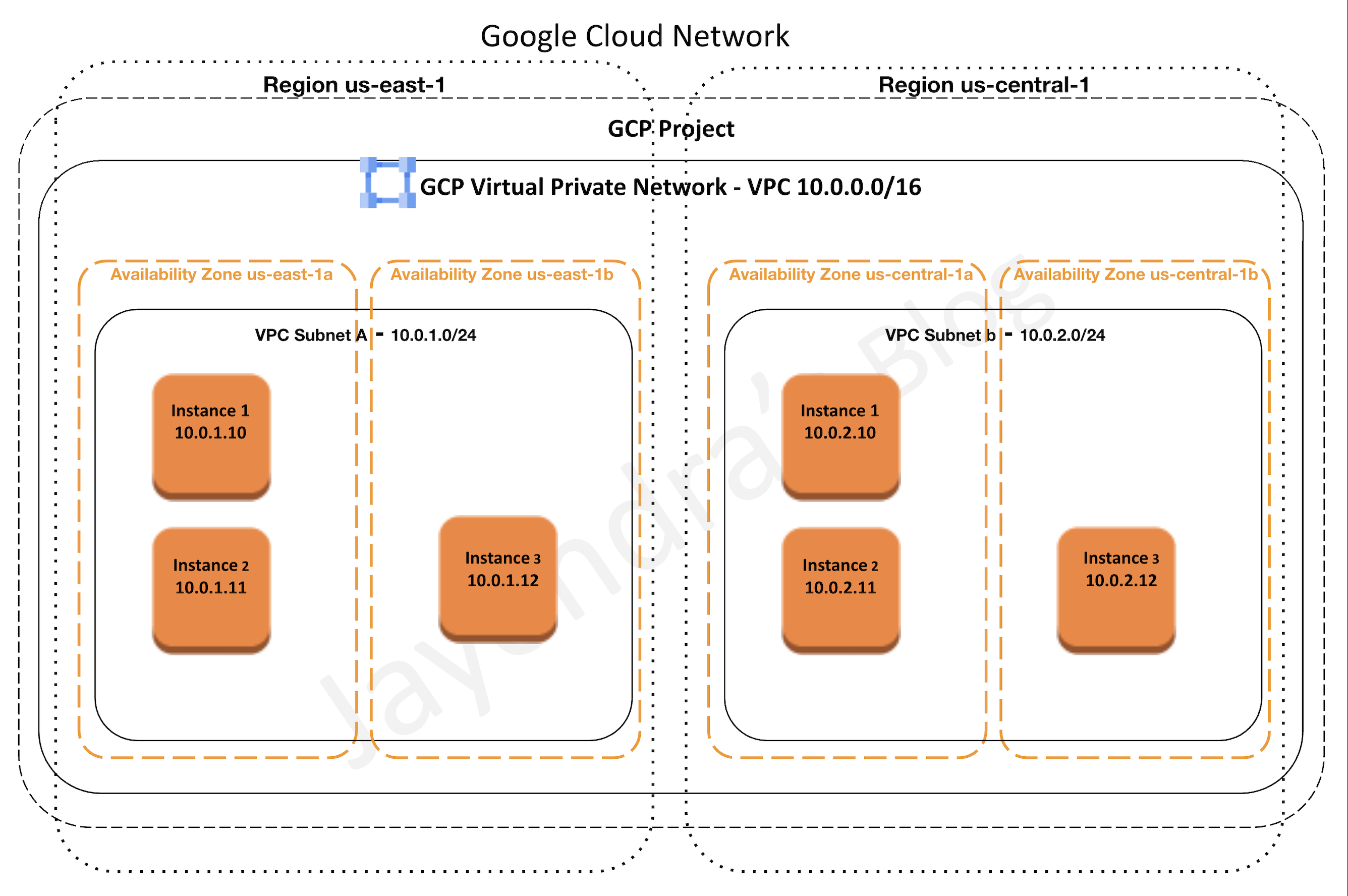
  • A VPC network is a global resource that consists of a list of regional virtual subnets in data centers, all connected by a global wide area network.
  • VPC networks are logically isolated from each other in Google Cloud.
  • VPC networks
    • provides connectivity for the Compute Engine VMs, including GKE clusters, serverless workloads, and other Google Cloud products built on Compute Engine VMs
    • offers built-in internal passthrough Network Load Balancers and proxy systems for internal Application Load Balancers.
    • connects to on-premises networks using Cloud VPN tunnels and VLAN attachments for Cloud Interconnect.
    • distributes traffic from Google Cloud external load balancers to backends

Specifications

  • VPC networks are global resources, including the associated routes and firewall rules, and are not associated with any particular region or zone.
  • Subnets are regional resources and each subnet defines a range of IP addresses.
  • Firewall rules control the traffic to and from instances. Rules are implemented on the VMs themselves, so traffic can only be controlled and logged as it leaves or arrives at a VM.
  • Resources within a VPC network can communicate with one another by using internal IPv4 addresses (and IPv6 addresses in dual-stack or IPv6-only subnets), subject to applicable network firewall rules.
  • Private access options for services allow instances with internal IP addresses to communicate with Google APIs and services.
  • Network administration can be secured by using IAM roles.
  • An organization can use Shared VPC to keep a VPC network in a common host project. Authorized IAM members from other projects in the same organization can create resources that use Shared VPC network subnets.
  • VPC Network Peering allows VPC networks to be connected with other VPC networks in different projects or organizations.
  • VPC networks can be securely connected in hybrid environments by using Cloud VPN or Cloud Interconnect.
  • VPC networks support IPv4 unicast traffic, and now also support IPv6 traffic through dual-stack and IPv6-only subnets (available in custom-mode VPC networks only). Broadcast and multicast traffic are not supported within the network.
  • Network Connectivity Center (NCC) can be used to connect VPC networks via a hub-and-spoke model using VPC spokes, supporting up to 250 VPC spokes per hub.

Google Cloud VPC - Virtual Private Cloud

VPC Subnets

  • VPC networks do not have any IP address ranges associated with them.
  • Each VPC network consists of one or more useful IP range partitions called subnets and IP ranges are defined for the subnets.
  • Subnets are regional resources and each subnet is associated with a region.
  • A network must have at least one subnet before it can be used.
  • More than one subnet per region can be created.
  • VPC Network supports the following subnet creation mode
    • Auto mode VPC networks
      • create subnets in each region automatically
      • adds new subnets automatically, if a new region becomes available
      • can be switched to custom mode VPC networks
      • support only IPv4 subnet ranges
    • Custom mode VPC networks
      • start with no subnets, giving full control over subnet creation.
      • are more flexible and are better suited for production
      • cannot be switched to auto mode VPC networks
      • support IPv4, dual-stack (IPv4 + IPv6), and IPv6-only subnet configurations
  • Subnet must have a defined primary IP address range, and any resources created within are assigned an IP address from the defined range.
  • Subnets can be assigned a secondary IP address range, which is only used by alias IP ranges. This is useful if you have multiple services running on a VM and want to assign each service a different IP address.
  • Primary IP range of an existing subnet can be expanded by modifying its subnet mask, setting the prefix length to a smaller number.

Subnet Stack Types

  • IPv4-only subnets — default, supports IPv4 addressing only.
  • Dual-stack (IPv4 and IPv6) subnets — have both IPv4 and IPv6 address ranges. The IPv6 subnet range is /64 (e.g., fd20:a:b:c::/64).
    • IPv6 can be either internal ULA (Unique Local Address) or external GUA (Globally Unique Address)
    • Internal ULA requires the VPC network internal IPv6 range to be enabled
  • IPv6-only subnets — support only IPv6 addressing. Can use DNS64 and NAT64 to access IPv4-only destinations.
  • IPv6 functionality is available only in Premium Tier networking.
  • IPv6 addressing is not available in auto mode VPC networks — only custom mode networks support IPv6.

VPC Routes

  • Routes define paths for packets leaving instances (egress traffic), either inside the network or outside of Google Cloud.
  • A route consists of
    • a single destination prefix in CIDR format (0.0.0.0/0) and
    • a single next hop (for e.g. Internet Gateway)
  • When an instance in a VPC network sends a packet, Google Cloud delivers the packet to the route’s next hop if the packet’s destination address is within the route’s destination range.
  • Routes are defined at the VPC network level but implemented at each VM instance level.
  • Each VM instance has a controller that is kept informed of all applicable routes from the network’s routing table. Each packet leaving a VM is delivered to the appropriate next hop of an applicable route based on a routing order. When a route is added or deleted, the set of changes is propagated to the VM controllers by using an eventually consistent design.
  • Routes are divided into two categories: system-generated and custom.
    • system-generated routes
      • default — send traffic from eligible instances to the internet and can be removed or replaced
      • subnet routes — route traffic among its subnets and updated automatically by Google Cloud
      • are applied at the VPC level to all the instances
    • custom routes
      • are either static routes created manually or dynamic routes maintained automatically by one or more of the Cloud Routers
      • can be applied to all the instances or specific instance using network tag
  • Policy-based routes let you direct traffic based on more than just the destination IP address — they can match on source IP, protocol, and port to steer traffic to specific next hops (e.g., for third-party network appliances).

VPC Firewall Rules & Cloud NGFW

  • Refer blog post @ Google Cloud VPC Firewall Rules
📢 Update (2024-2025): Google Cloud now recommends migrating from legacy VPC firewall rules to Cloud NGFW (Next Generation Firewall) network firewall policies. Cloud NGFW provides:

  • Hierarchical firewall policies — apply to an entire organization or folders
  • Global network firewall policies — apply across all regions of a VPC network
  • Regional network firewall policies — apply to a specific region
  • Cloud NGFW Standard — FQDN objects, geolocation objects, threat intelligence
  • Cloud NGFW Enterprise — intrusion prevention (IPS), TLS inspection

A migration tool is available to convert existing VPC firewall rules to global network firewall policies.

VPC Private Access Options

  • Google Cloud provides several private access options which allow VM instances with internal IP addresses to reach certain APIs and services.
  • Private Google Access
    • allows VMs to connect to the set of external IP addresses used by Google APIs and services by enabling Private Google Access on the subnet used by the VM’s network interface.
    • allows access to the external IP addresses used by App Engine, including third-party App Engine-based services.
    • configured on a subnet by subnet basis
    • provides following routing options
      • use default route with its next-hop being the default internet gateway, and it provides a path to the default domains, private.googleapis.com, and restricted.googleapis.com.
      • use custom static routes, each having a more specific destination, and each using the default internet gateway next hop.
    • Use this option to connect to Google APIs and services without giving the Google Cloud resources external IP addresses.
  • Private Service Connect (PSC)
    • is a capability of Google Cloud networking that allows consumers to access managed services privately from inside their VPC network.
    • allows managed service producers to host services in their own separate VPC networks and offer a private connection to their consumers.
    • creates a private endpoint with an internal IP address in the consumer’s VPC to access producer services.
    • supports access to Google APIs (global and regional), published third-party services, and your own services.
    • PSC Endpoints — consumer-side resources for accessing published services or Google APIs via an internal IP.
    • PSC Interfaces — allow producer VPCs to initiate connections to consumer VPCs via network attachments.
    • Service Connectivity Automation — lets service consumers automate the deployment of connectivity to managed services using service connection policies.
    • PSC is the recommended approach for private connectivity to Google Cloud managed services.
  • Private services access
    • is a private connection between the VPC network and a network owned by Google or a third party i.e. service producers
    • enables VM instances in the VPC network and the accessed services to communicate exclusively by using internal IP addresses.
    • VM instances don’t need Internet access or external IP addresses to reach services that are available through private services access.
    • Use this option to connect to specific Google and third-party services without assigning external IP addresses to the Google Cloud and Google or third-party resources.

Shared VPC – VPC Sharing

Refer blog post GCP Shared VPC

VPC Peering

Refer blog post GCP VPC Peering

Network Connectivity Center

  • Network Connectivity Center (NCC) provides a hub-and-spoke connectivity model for connecting VPC networks.
  • VPC spokes let you connect two or more VPC networks to an NCC hub so that the networks can exchange subnet routes.
  • Supports up to 250 VPC spokes per hub and millions of VMs.
  • Provides smooth workload mobility between VPCs and simplified management of cross-VPC connectivity.
  • Also supports hybrid spokes (Cloud VPN, Cloud Interconnect, Router Appliance) for connecting on-premises/multi-cloud networks.
  • NCC is an alternative to VPC Peering for large-scale network topologies, providing centralized management and transitive connectivity.

VPC Flow Logs

  • VPC Flow Logs records a sample of network flows sent from and received by VM instances, including instances used as GKE nodes.
  • Flow Logs can be used for network monitoring, forensics, real-time security analysis, and expense optimization.
  • Flow logs can be configured at multiple levels:
    • Organization level — enables flow logs for all subnets, VLAN attachments, and Cloud VPN tunnels across the entire organization
    • VPC network level — enables for all subnets in a VPC
    • Subnet level — enables for a specific subnet
    • VLAN attachment level — for Cloud Interconnect traffic
    • Cloud VPN tunnel level — for VPN traffic
  • Flow logs record TCP, UDP, ICMP, ESP, and GRE connections.
  • With GCP Shared VPC, all Flow logs are in the host project.
  • Cloud Logging can be used to view the flow logs and it can be exported to any destination that Cloud Logging export supports.
  • Flow logs are aggregated by the connection from Compute Engine VMs and exported in real-time.
  • Flow logs can be analyzed using real-time streaming APIs by subscribing to Pub/Sub.
  • Flow logs are collected for each VM connection at specific intervals (sampling period). All packets collected for a given interval for a given connection are aggregated for a period of time (aggregation interval) into a single flow log entry.
  • VPC Flow Logs for Cross-Cloud Network — expanded support for logging traffic across multi-cloud and hybrid topologies.
  • Organization policy constraints can be configured to enforce VPC Flow Logs enablement.

Hybrid Subnets (Preview)

  • Hybrid Subnets helps migrate workloads to Google Cloud without needing to change any IP addresses.
  • A hybrid subnet is a single logical subnet that combines a segment of an on-premises network with a subnet in a VPC network.
  • Enables gradual migration where workloads can reside both on-premises and in Google Cloud on the same subnet during transition.
  • Useful for lift-and-shift migrations where changing IP addresses is impractical.


GCP Certification Exam Practice Questions

  • Questions are collected from Internet and the answers are marked as per my knowledge and understanding (which might differ with yours).
  • GCP services are updated everyday and both the answers and questions might be outdated soon, so research accordingly.
  • GCP exam questions are not updated to keep up the pace with GCP updates, so even if the underlying feature has changed the question might not be updated
  • Open to further feedback, discussion and correction.
  1. Your VMs are running in a subnet that has a subnet mask of 255.255.255.240. The current subnet has no more free IP addresses and you require an additional 10 IP addresses for new VMs. The existing and new VMs should all be able to reach each other without additional routes. What should you do?
    1. Use gcloud to expand the IP range of the current subnet.
    2. Delete the subnet, and recreate it using a wider range of IP addresses.
    3. Create a new project. Use Shared VPC to share the current network with the new project.
    4. Create a new subnet with the same starting IP but a wider range to overwrite the current subnet
  2. An IT company has a set of compute engine instances hosted in a VPC. They are not exposed to the internet. These instances now need to install an important security patch. How can the security patch be installed on the instances?
    1. Upload to Cloud Storage and enable VPC peering
    2. Upload to Cloud Storage and whitelist instance IP address
    3. Upload to Cloud Storage and enable Private Google Access
    4. Upload to Cloud Source Repository and enable VPC peering
  3. Your security team wants to be able to audit network traffic inside of your network. What’s the best way to ensure they have access to the data they need?
    1. Disable flow logs.
    2. Enable flow logs.
    3. Enable VPC Network logs
    4. Add a firewall capture filter.
  4. Your organization needs to provide private connectivity from a VPC to a managed Google service without using external IP addresses. The solution should assign an internal IP address for the connection. What should you use?
    1. VPC Network Peering
    2. Private Google Access
    3. Private Service Connect
    4. Cloud VPN
  5. You need to connect 50 VPC networks across different projects in your organization with centralized management and transitive routing. Which solution is most appropriate?
    1. Create VPC Peering between all networks
    2. Use Shared VPC for all projects
    3. Use Network Connectivity Center with VPC spokes
    4. Create Cloud VPN tunnels between all networks
  6. You are deploying IPv6 workloads in Google Cloud. Which VPC network mode supports dual-stack subnets?
    1. Auto mode VPC networks
    2. Custom mode VPC networks
    3. Both auto mode and custom mode
    4. Legacy networks
  7. Your organization wants to enforce consistent firewall rules across multiple VPC networks in different projects and folders. What should you use?
    1. VPC firewall rules in each network
    2. Cloud NGFW hierarchical firewall policies
    3. Network tags
    4. Service accounts

See also: Google Cloud Networking Services Cheat Sheet

References

  • Google Cloud Virtual Private Cloud (VPC) Overview
  • VPC Networks
  • VPC Subnets
  • IPv6 Support in Google Cloud
  • Private Service Connect
  • Cloud NGFW Overview
  • Network Connectivity Center
  • VPC Flow Logs

Follow by Email
Twitter
YouTube
YouTube
LinkedIn

DISCLOSURE

This post may contain affiliate links, meaning when you click the links and make a purchase, we receive a commission.

Recent Posts

  • DynamoDB Advanced – Streams, Global Tables, TTL & Capacity Patterns
  • CloudFormation Advanced – StackSets, Drift Detection, Custom Resources & Guard
  • RDS & Aurora Performance – Read Replicas, Proxy, Global & Performance Insights
  • AWS EMR & Spark Architecture – Cluster Modes, EMRFS & Optimization
  • ALB vs NLB vs GWLB – Load Balancer Advanced Decision Guide

Categories

Social media & sharing icons powered by UltimatelySocial