AWS SQS FIFO Queue
- SQS FIFO Queue provides enhanced messaging between applications with the additional features
- FIFO (First-In-First-Out) delivery
- order in which messages are sent and received is strictly preserved
- key when the order of operations & events is critical
- Exactly-once processing
- a message is delivered once and remains available until consumer processes and deletes it
- key when duplicates can’t be tolerated.
- By default, limited to 300 transactions per second (TPS) per API action (SendMessage, ReceiveMessage, DeleteMessage)
- With batching (up to 10 messages per API call), effective throughput can reach 3,000 messages per second
- With High Throughput Mode enabled, supports up to 70,000 TPS per API action (700,000 messages/sec with batching) in select regions
- FIFO (First-In-First-Out) delivery
- FIFO queues provide all the capabilities of Standard queues, improve upon, and complement the standard queue.
- FIFO queues support message groups that allow multiple ordered message groups within a single queue. There is no quota to the number of message groups within a FIFO queue.
- FIFO Queue name should end with
.fifo - SQS FIFO supports one or more producers and messages are stored in the order that they were successfully received by SQS.
- SQS FIFO queues don’t serve messages from the same message group to more than one consumer at a time.
- FIFO queues support a maximum of 120,000 in-flight messages (increased from 20,000 in Nov 2024). Messages are considered in-flight after being received by a consumer but not yet deleted.
- Maximum message payload size is 1 MiB (increased from 256 KiB in Aug 2025), applicable to both standard and FIFO queues. For payloads up to 2 GB, use the Extended Client Library with Amazon S3.
- AWS Lambda supports SQS FIFO as an event source for building event-driven applications with ordered processing.
- Not all AWS services support FIFO queues as a direct event destination. For example:
- Amazon S3 Event Notifications (use Amazon EventBridge as an intermediary to route to FIFO queues)
- Amazon EventBridge Scheduler Dead-Letter Queues
High Throughput Mode for FIFO Queues
- High throughput mode increases the transaction limit significantly beyond the default 300 TPS.
- Supports up to 70,000 transactions per second per API action in select regions (US East N. Virginia, US West Oregon, Europe Ireland).
- With batching, this translates to up to 700,000 messages per second.
- Enabling high throughput mode requires two configuration changes:
- Deduplication scope – Set to Message group (deduplication occurs at the message group level instead of queue level)
- FIFO throughput limit – Set to Per message group ID (throughput quota applies per message group rather than per queue)
- If either setting is changed from the required configuration, normal throughput (300 TPS) is in effect.
- Available in all regions where Amazon SQS is available, though maximum throughput quotas vary by region.
- To achieve maximum throughput, distribute messages across multiple message groups.
Message Deduplication
- SQS APIs provide deduplication functionality that prevents message producers from sending duplicates.
- Message deduplication ID is the token used for the deduplication of sent messages.
- If a message with a particular message deduplication ID is sent successfully, any messages sent with the same message deduplication ID are accepted successfully but aren’t delivered during the 5-minute deduplication interval.
- So basically, any duplicates introduced by the message producer are removed within a 5-minute deduplication interval.
- Message deduplication applies to an entire queue (default), not to individual message groups.
- With High Throughput Mode enabled, deduplication scope is set to message group level.
- Content-based deduplication can be enabled on the queue, which uses a SHA-256 hash of the message body to generate the deduplication ID automatically.
- New FIFO-specific CloudWatch metric NumberOfDeduplicatedSentMessages (added July 2024) tracks the number of messages that were deduplicated.
Message Groups
- Messages are grouped into distinct, ordered “bundles” within a FIFO queue.
- Message group ID is the tag that specifies that a message belongs to a specific message group.
- For each message group ID, all messages are sent and received in strict order.
- However, messages with different message group ID values might be sent and received out of order.
- Every message must be associated with a message group ID, without which the action fails.
- SQS delivers the messages in the order in which they arrive for processing if multiple hosts (or different threads on the same host) send messages with the same message group ID.
- There is no quota to the number of message groups within a FIFO queue.
- New FIFO-specific CloudWatch metric ApproximateNumberOfGroupsWithInflightMessages (added July 2024) tracks the approximate number of message groups with in-flight messages.
Dead-Letter Queue (DLQ) Support for FIFO Queues
- FIFO queues support dead-letter queues. A DLQ for a FIFO queue must also be a FIFO queue.
- DLQ Redrive for FIFO Queues (launched Nov 2023) allows messages to be moved from a FIFO dead-letter queue back to the source queue or a custom FIFO destination queue.
- Previously, DLQ redrive was only available for standard queues.
- Supported via the AWS Console, AWS SDK, and CLI.
- Available in all commercial regions and AWS GovCloud (US) Regions (April 2024).
- Configure a redrive policy to specify the maximum number of receives before a message is moved to the DLQ.
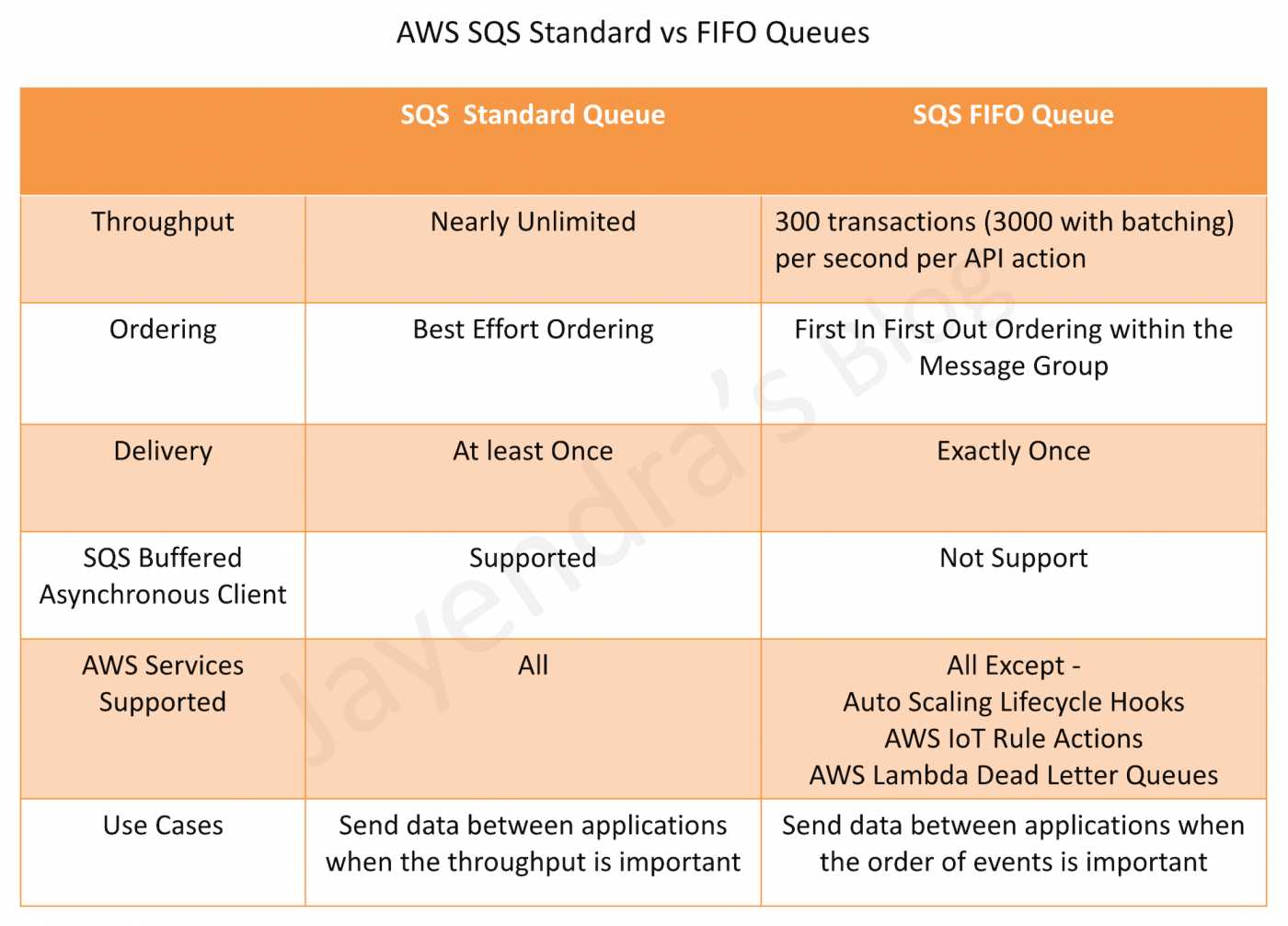
SQS Standard Queues vs SQS FIFO Queues
AWS Certification Exam Practice Questions
- Questions are collected from Internet and the answers are marked as per my knowledge and understanding (which might differ with yours).
- AWS services are updated everyday and both the answers and questions might be outdated soon, so research accordingly.
- AWS exam questions are not updated to keep up the pace with AWS updates, so even if the underlying feature has changed the question might not be updated
- Open to further feedback, discussion and correction.
- A restaurant reservation application needs the ability to maintain a waiting list. When a customer tries to reserve a table, and none are available, the customer must be put on the waiting list, and the application must notify the customer when a table becomes free. What service should the Solutions Architect recommend to ensure that the system respects the order in which the customer requests are put onto the waiting list?
- Amazon SNS
- AWS Lambda with sequential dispatch
- A FIFO queue in Amazon SQS
- A standard queue in Amazon SQS
- In relation to Amazon SQS, how can you ensure that messages are delivered in order? Select 2 answers
- Increase the size of your queue
- Send them with a timestamp
- Using FIFO queues
- Give each message a unique id
- Use sequence number within the messages with Standard queues
- A company has run a major auction platform where people buy and sell a wide range of products. The platform requires that transactions from buyers and sellers get processed in exactly the order received. At the moment, the platform is implemented using RabbitMQ, which is a light weighted queue system. The company consulted you to migrate the on-premise platform to AWS. How should you design the migration plan? (Select TWO)
- When the bids are received, send the bids to an SQS FIFO queue before they are processed.
- When the users have submitted the bids from frontend, the backend service delivers the messages to an SQS standard queue.
- Add a message group ID to the messages before they are sent to the SQS queue so that the message processing is in a strict order.
- Use an EC2 or Lambda to add a deduplication ID to the messages before the messages are sent to the SQS queue to ensure that bids are processed in the right order.
- A company needs to process financial transactions with exactly-once semantics and strict ordering. The system currently handles 500 transactions per second and is expected to grow to 5,000 TPS. Which SQS FIFO configuration should the solutions architect recommend?
- Use a standard SQS queue with application-level deduplication
- Enable high throughput mode on the FIFO queue with deduplication scope set to message group and distribute transactions across multiple message groups
- Use multiple standard queues with sequence numbers
- Use a single FIFO queue with default settings and request a quota increase
- An application uses an SQS FIFO queue and frequently encounters messages that cannot be processed successfully. The development team needs a mechanism to isolate failed messages for analysis and then reprocess them after fixing the underlying issue. What is the most operationally efficient approach?
- Implement application logic to move failed messages to a separate standard queue
- Delete failed messages and log them to CloudWatch for later replay
- Configure a FIFO dead-letter queue with a redrive policy, then use DLQ redrive to move messages back to the source queue after fixing the issue
- Use a Lambda function to periodically check and reprocess failed messages
- A solutions architect is designing a system that processes messages from an SQS FIFO queue using AWS Lambda. The system needs to handle partial failures within a batch without blocking the entire message group. Which approach should the architect implement?
- Configure the Lambda function with a batch size of 1 to process messages individually
- Enable ReportBatchItemFailures in the Lambda event source mapping and implement partial batch response handling in the function code
- Use a standard queue instead of FIFO to avoid message group blocking
- Set a very short visibility timeout to quickly retry failed messages