Spot Instances
- EC2 Spot instances allow access to spare EC2 computing capacity at up to 90% off the On-Demand price.
- Spot Instance prices are set by Amazon EC2 and adjust gradually based on long-term trends in supply and demand for Spot Instance capacity, but never exceed On-Demand prices.
- Spot Instances can be interrupted by EC2 when EC2 needs the capacity back with a two-minute notification.
- Spot instances are a cost-effective choice and can bring the EC2 costs down significantly.
- Spot instances can be used for applications flexible in the timing when they can run and also able to handle interruption by storing the state externally for e.g. they are well-suited for data analysis, batch jobs, background processing, and optional tasks
- The only difference between an On-Demand Instance and a Spot Instance is that a Spot Instance can be interrupted by Amazon EC2, with two minutes of notice, when EC2 needs the capacity back.
- Usual strategy involves using Spot instances with On-Demand or Reserved Instances, which provide a minimum level of guaranteed compute resources, while spot instances provide an additional computation boost.
Spot instances can also be launched with a required duration (also known as Spot blocks), which are not interrupted due to changes in the Spot price.- Spot Blocks (Defined Duration) have been discontinued. Spot Blocks were not available to new customers from July 1, 2021, and support ended entirely on December 31, 2022.
- EC2 provides a data feed, sent to an S3 bucket specified during subscription, that describes the Spot instance usage and pricing.
- Spot Instances are not suitable for workloads that are inflexible, stateful, fault-intolerant, or tightly coupled between instance nodes.
- Well Suited for
- Ideal for various stateless, fault-tolerant, or flexible applications such as big data, containerized workloads, CI/CD, high-performance computing (HPC), stateless web servers, image and media rendering, machine learning, and other test & development workloads
- Applications that have flexible start and end times
- Applications that are only feasible at very low compute prices
- Users with urgent computing needs for large amounts of additional capacity
Spot Concepts
- Spot capacity pool – A set of unused EC2 instances with the same instance type (for example, m5.large), operating system, Availability Zone, and network platform.
- Spot price – Current price of a Spot Instance per hour, set by Amazon EC2 and adjusting gradually based on long-term trends in supply and demand. Spot prices never exceed On-Demand prices.
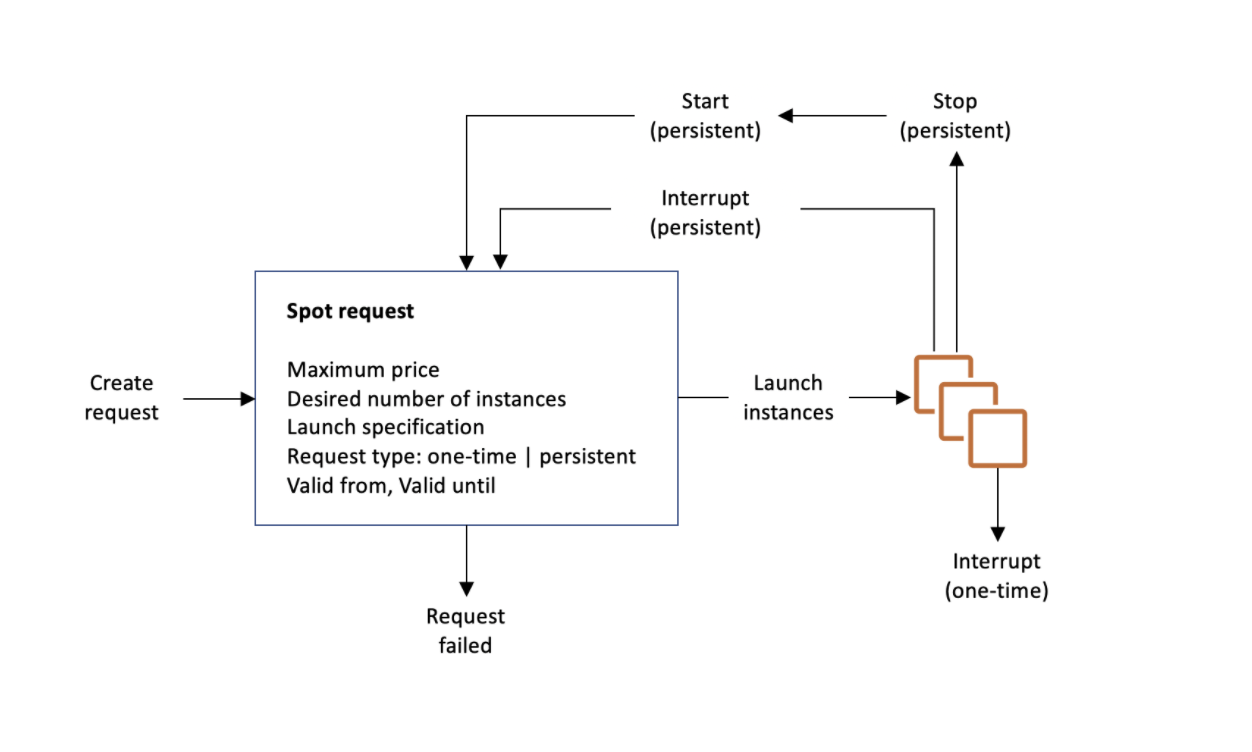
- Spot Instance request
- Provides the maximum price per hour that you are willing to pay for a Spot Instance. If unspecified, it defaults to the On-Demand price.
- EC2 fulfils the request when the maximum price per hour for the request exceeds the Spot price and if capacity is available.
- A Spot Instance request is either one-time or persistent.
- EC2 automatically resubmits a persistent Spot request after the Spot Instance associated with the request is terminated.
- Spot Instance interruption – EC2 terminates, stops, or hibernates the Spot Instance when capacity is no longer available. EC2 provides a Spot Instance interruption notice, which gives the instance a two-minute warning before it is interrupted.
- EC2 Instance Rebalance Recommendation is a signal that notifies when a Spot Instance is at elevated risk of interruption. The signal provides an opportunity to proactively manage the Spot Instance in advance of the two-minute Spot Instance interruption notice.
- Spot placement score – indicates how likely it is that a Spot request will succeed in a Region or Availability Zone, scored on a scale from 1 to 10.
Spot Pricing Model
ℹ️ Important: Since 2017, AWS uses a simplified Spot pricing model. Spot prices adjust gradually based on long-term supply and demand trends, not on a real-time bidding/auction system. You no longer need to analyze historical prices or determine bidding strategies. Typical savings are 70-90% over On-Demand prices.
- Spot Instance prices are set by Amazon EC2 and adjust gradually based on long-term trends in supply and demand for Spot Instance capacity.
- Spot prices never exceed On-Demand prices.
- You can specify a maximum price when requesting Spot Instances. If unspecified, it defaults to the On-Demand price.
- EC2 fulfils the request when the maximum price per hour exceeds the Spot price and capacity is available.
- Everyone pays the same Spot price for the period irrespective of the maximum price specified, given the maximum price is more than the Spot price.
- EC2 can interrupt the Spot Instance when the demand for Spot instances rises or when the supply of Spot instances decreases.
- When EC2 interrupts a Spot Instance, it provides a two-minute warning before interruption.
- Termination notice warning is made available via:
- Instance metadata:
http://169.254.169.254/latest/meta-data/spot/termination-time - Amazon EventBridge event:
EC2 Spot Instance Interruption Warning
- Instance metadata:
- Applications on Spot Instances should poll for the termination notice at 5-second intervals or use EventBridge for event-driven handling.
- EBS-backed Spot Instance can be stopped, started, rebooted, or terminated.
Spot Instance Billing
- Spot Instances use per-second billing (with a minimum of 60 seconds) for Linux and Windows instances.
- If Amazon EC2 interrupts the Spot Instance in the first hour, you are not charged for the usage.
- If Amazon EC2 interrupts the Spot Instance after the first hour, you are charged for the seconds used.
- If you stop or terminate the Spot Instance, you are charged for the seconds used (even in the first hour).
- While an interrupted Spot Instance is stopped, you are charged only for the EBS volumes, which are preserved.
Spot Instances Requests
- A Spot Instance request is either
- One-time
- A one-time request remains active until EC2 launches the Spot Instance, the request expires, or you cancel the request.
- Persistent
- EC2 automatically resubmits a persistent Spot request after the Spot Instance associated with the request is terminated.
- A persistent Spot Instance request remains active until it expires or you cancel it, even if the request is fulfilled.
- Cancelling spot instance requests does not terminate the instances.
- Be sure to cancel the spot request before you terminate the instances, else they would be launched again.
- One-time
Spot Fleet and EC2 Fleet
⚠️ Spot Fleet is Legacy: AWS strongly discourages using Spot Fleet because it uses a legacy API with no planned investment. Use EC2 Fleet or EC2 Auto Scaling groups instead.
- EC2 Fleet (Recommended)
- Creates a fleet of both On-Demand Instances and Spot Instances in a single request.
- Supports multiple launch specifications that vary by instance type, AMI, Availability Zone, or subnet.
- EC2 Fleet types:
- instant – Places a synchronous one-time request. Returns launched instances immediately. Recommended when you don’t need auto scaling.
- request – Places an asynchronous one-time request. Does not attempt to replenish interrupted capacity.
- maintain – Places an asynchronous request and maintains capacity by automatically replenishing interrupted Spot Instances.
Spot Fleet (Legacy – Not Recommended)- Collection of Spot Instances and optionally On-Demand Instances.
- Attempts to launch the number of instances to meet the specified target capacity.
- Uses a legacy API with no planned investment.
Allocation Strategies
- priceCapacityOptimized (Recommended)
- Requests Spot Instances from the pools that have the lowest chance of interruption AND the lowest possible price.
- Best choice for most Spot workloads: containerized applications, microservices, web applications, data analytics, batch processing.
- AWS recommended default strategy.
- capacityOptimized
- From the pools with optimal capacity for the number of instances launching.
- Lowest risk of interruption.
- capacityOptimizedPrioritized
- Optimizes for capacity first, but honors instance type priorities on a best-effort basis.
- Set priority for each instance type using the Priority parameter.
- diversified
- Distributed across all specified pools.
- Good for high availability, long workloads.
- lowestPrice (Not Recommended)
- From the pool with the lowest price.
- AWS does not recommend this strategy because it has the highest risk of interruption for Spot Instances.
Spot Instances Interruption
- EC2 Instance Rebalance Recommendations and Spot Instance interruption notices can be used to gracefully handle Spot Instance interruptions.
- EC2 Instance Rebalance Recommendation
- Signal that notifies when a Spot Instance is at elevated risk of interruption.
- Provides an opportunity to proactively manage the Spot Instance in advance of the two-minute interruption notice.
- Can be monitored via Amazon EventBridge events.
- Capacity Rebalancing feature in Auto Scaling groups and EC2 Fleet automatically acts on these signals.
- Spot Instance Interruption Notice
- Warning issued two minutes before EC2 interrupts a Spot Instance (except for hibernation, which begins immediately).
- Available as an EventBridge event and in instance metadata.
- Interruption Behavior – You can specify what happens when a Spot Instance is interrupted:
- Terminate (default) – Instance is terminated.
- Stop – Instance is stopped and can be restarted when capacity is available. You are charged only for EBS volumes while stopped.
- Hibernate – Instance memory (RAM) is saved to EBS root volume. Instance resumes from where it left off when capacity is available. Hibernation begins immediately (no two-minute warning period).
- Initiate a Spot Instance Interruption
- You can test your application’s fault tolerance by initiating Spot Instance interruptions using AWS Fault Injection Service (AWS FIS).
- Available directly from the Amazon EC2 console: Spot Request → Actions → Initiate interruption.
- FIS-injected interruptions behave identically to real interruptions (including notifications and configured behaviors).
Spot Placement Score
- Indicates how likely it is that a Spot request will succeed in a Region or Availability Zone.
- Scored on a scale from 1 to 10 (10 = highly likely to succeed, 1 = not likely to succeed).
- Recommends optimal Regions or Availability Zones based on capacity requirements and instance type specifications.
- A point-in-time recommendation — capacity can vary over time. It does not guarantee available capacity or predict interruption risk.
- Best for workloads that are flexible about instance types and Region/AZ.
- Available via Amazon EC2 console, AWS CLI, or SDKs.
Attribute-Based Instance Type Selection
- Specify instance attributes (vCPUs, memory, storage, network throughput) rather than specific instance types.
- EC2 Auto Scaling or EC2 Fleet automatically identifies and launches matching instances.
- Automatically uses newly released instance types as they become available.
- Removes the effort of manually selecting specific instance types.
- Provides access to an increasingly broad range of Spot Instance capacity, reducing interruption risk.
- Ideal for workloads that can be flexible about instance types: HPC, big data, containerized workloads.
Which is the Best Spot Request Method?
- CreateAutoScalingGroup (Recommended)
- Use when you need multiple instances and want automated lifecycle management.
- Supports horizontal scaling between specified minimum and maximum limits.
- Best for most workloads that need Spot Instances.
- CreateFleet (EC2 Fleet) (Recommended)
- Use when you need multiple instances but want to self-manage instance lifecycle.
- Creates both On-Demand and Spot Instances in a single request.
- Use
instantmode if you don’t need auto scaling.
- RunInstances
- Use if already using RunInstances for On-Demand and want to switch to Spot.
- Does not allow mixed instance types in a single request.
RequestSpotFleet– Legacy. DO NOT USE. No planned investment.RequestSpotInstances– Legacy. DO NOT USE. No planned investment.
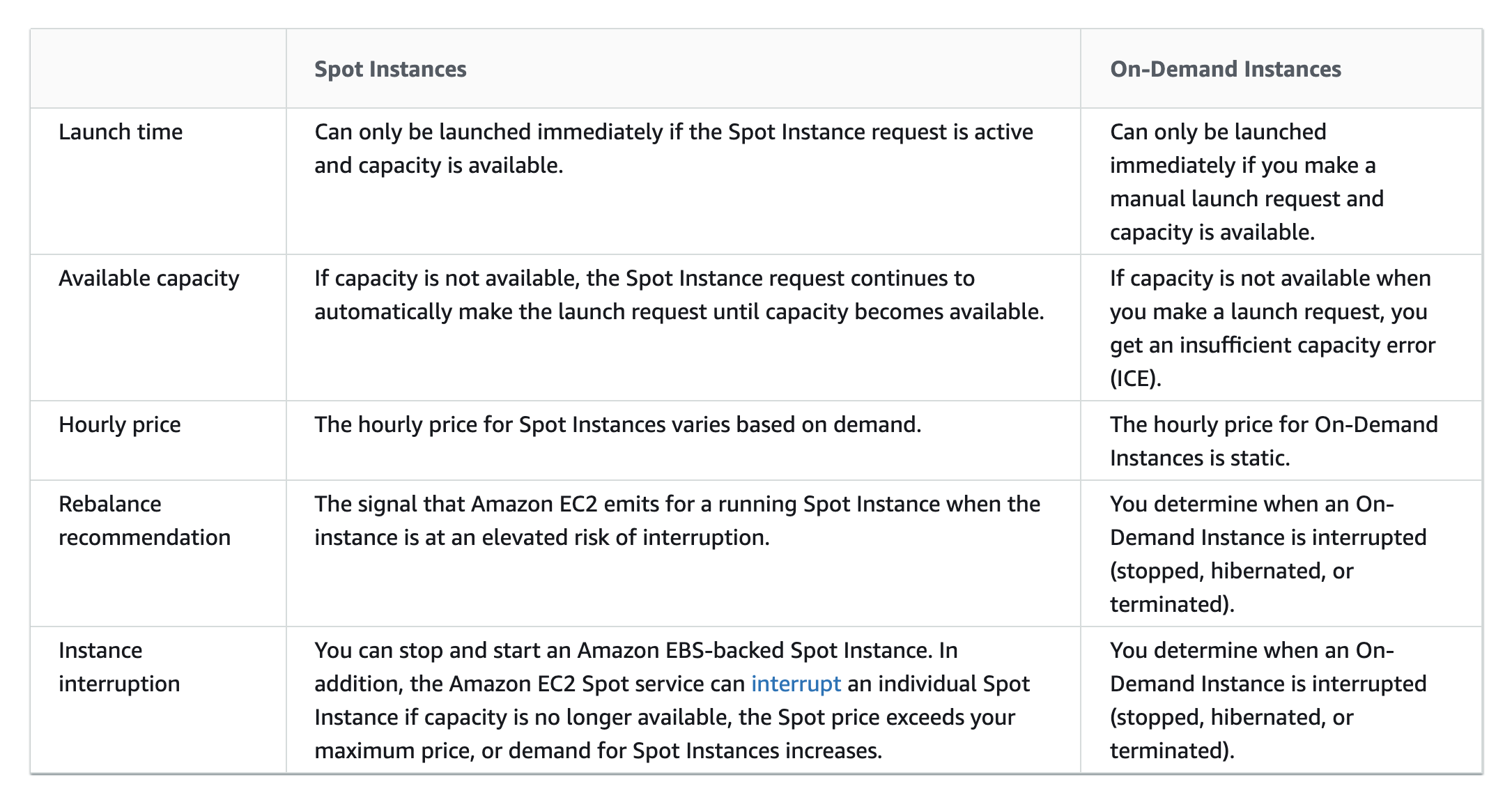
Spot Instances vs On-Demand Instances
Spot Instances Best Practices
- Be flexible about instance types and Availability Zones
- Be flexible across at least 10 instance types for each workload.
- Include larger instance types (for vertical scaling) and older generation types (less demand from On-Demand customers).
- Ensure all Availability Zones are configured for use in your VPC.
- Use attribute-based instance type selection
- Specify attributes (vCPUs, memory) instead of specific instance types.
- Automatically uses new instance types as they become available.
- Use Spot placement scores
- Identify optimal Regions and Availability Zones before launching.
- Use EC2 Auto Scaling groups or EC2 Fleet to manage aggregate capacity
- Think in terms of aggregate capacity (vCPUs, memory, throughput) rather than individual instances.
- These services automatically request resources to replace interrupted instances.
- Use the price-capacity-optimized allocation strategy
- Automatically provisions instances from pools that are least likely to be interrupted AND have the lowest price.
- Recommended strategy for most Spot workloads.
- Prepare individual instances for interruptions
- Make applications fault-tolerant. Store important data externally (S3, EBS, DynamoDB).
- Use EventBridge rules to capture rebalance recommendations and interruption notices.
- Configure Spot Instances to stop or hibernate instead of terminate if workload is time-flexible.
- Use Proactive Capacity Rebalancing
- Proactively augments fleet with new Spot Instances before a running instance receives the two-minute interruption notice.
- Auto Scaling or EC2 Fleet replaces instances that have received a rebalance recommendation.
- Complements the capacity-optimized allocation strategy and mixed instances policy.
- Test interruption handling with AWS FIS
- Use AWS Fault Injection Service to simulate Spot interruptions.
- Verify application handles unexpected termination gracefully.
- Use integrated AWS services
- Amazon EMR, Amazon ECS, AWS Batch, Amazon EKS, Amazon SageMaker, AWS Elastic Beanstalk, Amazon GameLift Servers all integrate with Spot.
AWS Certification Exam Practice Questions
- Questions are collected from Internet and the answers are marked as per my knowledge and understanding (which might differ with yours).
- AWS services are updated everyday and both the answers and questions might be outdated soon, so research accordingly.
- AWS exam questions are not updated to keep up the pace with AWS updates, so even if the underlying feature has changed the question might not be updated
- Open to further feedback, discussion and correction.
- You have a video transcoding application running on Amazon EC2. Each instance polls a queue to find out which video should be transcoded, and then runs a transcoding process. If this process is interrupted, the video will be transcoded by another instance based on the queuing system. You have a large backlog of videos, which need to be transcoded, and would like to reduce this backlog by adding more instances. You will need these instances only until the backlog is reduced. Which type of Amazon EC2 instances should you use to reduce the backlog in the most cost efficient way?
- Reserved instances
- Spot instances
- Dedicated instances
- On-demand instances
- You have a distributed application that periodically processes large volumes of data across multiple Amazon EC2 Instances. The application is designed to recover gracefully from Amazon EC2 instance failures. You are required to accomplish this task in the most cost-effective way. Which of the following will meet your requirements?
- Spot Instances
- Reserved instances
- Dedicated instances
- On-Demand instances
- A company runs a fault-tolerant batch processing workload on EC2 instances. The workload can be interrupted and resumed. Which allocation strategy should be used with EC2 Fleet to minimize cost while reducing interruptions?
- lowestPrice
- capacityOptimized
- priceCapacityOptimized
- diversified
- A company wants to run Spot Instances for a containerized workload. They need to identify which AWS Region is most likely to have available Spot capacity for their required instance types. Which feature should they use?
- Spot Instance Advisor
- Spot placement score
- EC2 Fleet instant mode
- Capacity Reservations
- A company uses Spot Instances for a stateless web application. They want to be notified before interruption so they can gracefully drain connections. Which TWO signals can they use? (Choose 2)
- EC2 Instance Rebalance Recommendation
- Spot Instance interruption notice (two-minute warning)
- CloudWatch CPU alarm
- Auto Scaling lifecycle hook
- Which of the following is the AWS recommended method for launching and managing Spot Instances for workloads that require auto scaling?
- RequestSpotInstances API
- Spot Fleet (RequestSpotFleet API)
- EC2 Auto Scaling group (CreateAutoScalingGroup API)
- RunInstances API with Spot market options
- A Spot Instance is interrupted by Amazon EC2 within the first hour of launch. How is the customer billed for Linux instances?
- Charged for the full hour
- Charged for seconds used
- No charge
- Charged at 50% of the Spot price
- A company wants to test how their application handles Spot Instance interruptions. Which AWS service allows them to simulate Spot interruptions?
- AWS CloudWatch
- AWS Config
- AWS Fault Injection Service (AWS FIS)
- AWS Systems Manager