Compute Engine Snapshots
- Snapshots provide periodic backup of Persistent Disk and Google Cloud Hyperdisk volumes.
- Snapshots incrementally back up data from the disks.
- Snapshots are global resources by default, so any snapshot is accessible by any resource within the same project. Regionally scoped snapshots (Preview) are also available for data residency requirements.
- Snapshots can be shared across projects.
- Storage costs for disk snapshots charge only for the total size of the snapshot.
- Snapshots once created with the current state of the disk, can be restored as a new disk.
- Compute Engine stores multiple copies of each snapshot across multiple locations with automatic checksums to ensure the integrity of the data.
- Snapshots can be created from disks even while they are attached to running virtual machine (VM) instances.
- Lifecycle of a snapshot created from a disk attached to a running VM instance is independent of the lifecycle of the VM instance.
- Standard and archive snapshots can be stored in either one Cloud Storage multi-regional location, such as
asia, or one Cloud Storage regional location, such asasia-south1. - A multi-regional storage location provides higher availability and might reduce network costs when creating or restoring a snapshot.
- A snapshot can be used to create a new disk in any region and zone, regardless of the storage location of the snapshot.
Snapshot Types
- Compute Engine provides three types of snapshots: Standard, Archive, and Instant.
- All three types capture the contents of a disk at a specific point in time but differ in retention behavior, recovery time, and storage location.
Standard Snapshots
- Provide geo-redundant data backup stored in one or more regions, separate from the source disk.
- Best for disaster recovery and regular backups.
- Support both Persistent Disk and Hyperdisk volumes.
- Can be created with snapshot schedules for automated backups.
- Are NOT deleted when the source disk is deleted.
- Offer faster data recovery times than archive snapshots.
Archive Snapshots
- Same benefits as standard snapshots (incremental chains, compression, encryption) but at lower cost.
- Best suited for compliance, audit, and long-term cold storage use cases.
- Have a 90-day minimum billing period and charges for retrievals.
- Have the longest data recovery times but offer the most cost-efficient storage.
- Cannot be created with snapshot schedules.
- Are NOT deleted when the source disk is deleted.
- Stored in separate incremental snapshot chains from standard snapshots.
Instant Snapshots
- Introduced in August 2024, instant snapshots provide near-instantaneous, high-frequency, point-in-time checkpoints of a disk.
- Provide in-place data backup stored in the same zone or region as the source disk.
- Offer the lowest and best recovery times — RPO of seconds and RTO in tens of seconds.
- Created in seconds with no performance impact to the underlying disk.
- Are incremental — only store changed data blocks since the previous instant snapshot.
- Are deleted when the source disk is deleted (lifecycle tied to source disk).
- Not redundant — stored only in the same zone/region as the source disk.
- Cannot be created with snapshot schedules.
- Can be converted to standard or archive snapshots for geo-redundant, long-term storage.
- Support Persistent Disk and most Hyperdisk types (except Hyperdisk ML and Hyperdisk Throughput).
- Use cases include:
- Rapid recovery from user error, application failures, and file system corruption.
- Backup verification workflows (create snapshot, restore, verify consistency).
- Taking restore points before application upgrades for rapid rollback.
- Improving developer productivity with fast restores during development cycles.
Snapshot Type Comparison
| Feature | Standard | Archive | Instant |
|---|---|---|---|
| Best for | Geo-redundant DR backup | Long-term cold storage, compliance | In-place backup, rapid restore |
| Storage Location | Multi-region or regional (separate from source) | Multi-region or regional (separate from source) | Same zone/region as source disk |
| Recovery Time | Minutes | Longest (minutes to hours) | Seconds |
| Redundancy | Geo-redundant | Geo-redundant | Not redundant (same zone only) |
| Hyperdisk Support | Yes | Yes | Yes (except ML & Throughput) |
| Snapshot Schedules | Yes | No | No |
| Deleted on Source Disk Deletion | No | No | Yes |
Snapshot Scopes (Preview)
- Snapshots can be created as globally scoped (default) or regionally scoped.
- Globally scoped snapshots can be created and restored in any region without restriction.
- Regionally scoped snapshots ensure all snapshot data and metadata are co-located within the scoped region.
- Restrict allowed snapshot creation and restore locations.
- Help control network costs.
- Enhance resiliency to global outages.
- Provide additional data security by limiting locations where data can be created/restored.
- Regionally scoped snapshots can only be stored in Cloud Storage regional locations (not multi-regional).
- Cannot convert a globally scoped snapshot to a regionally scoped snapshot — must create a new one.
Snapshot Creation
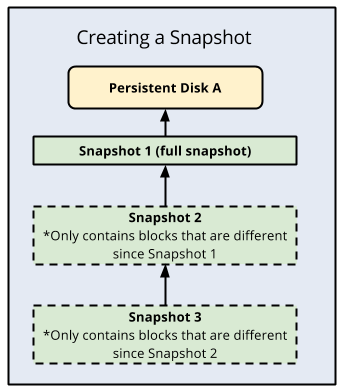
- Snapshots are incremental and automatically compressed, so that they can be regularly created on a Persistent Disk or Hyperdisk faster and at a lower cost than regularly creating a full image of the disk.
- Incremental snapshots work as follows:
- The first successful snapshot of a disk is a full snapshot that contains all the data on the disk.
- The second snapshot only contains any new data or modified data since the first snapshot. Data that hasn’t changed since the first snapshot isn’t included. Instead, it contains references to the first snapshot for any unchanged data.
- Snapshot 3 contains any new or changed data since snapshot 2 but won’t contain any unchanged data from snapshot 1 or 2. Instead, snapshot 3 contains references to blocks in snapshot 1 and snapshot 2 for any unchanged data.
- To ensure the reliability of snapshot history, a snapshot might occasionally capture a full image of the disk automatically.
Snapshot Chains
- Standard snapshots can be created in distinct snapshot chains by specifying a chain name at creation time.
- Each new snapshot with the same chain name is based incrementally on the last successful snapshot created with that chain name.
- Useful for advanced use cases like chargeback tracking across separate incremental chains.
- Standard and archive snapshots are stored in separate incremental chains.
Snapshot Deletion
- Compute Engine uses incremental snapshots so that each snapshot contains only the data that has changed since the previous snapshot.
- For unchanged data, snapshots reference the data in previous snapshots.
- Warning: Deleting a snapshot is irreversible. You can’t recover a deleted snapshot.
- When a snapshot is deleted:
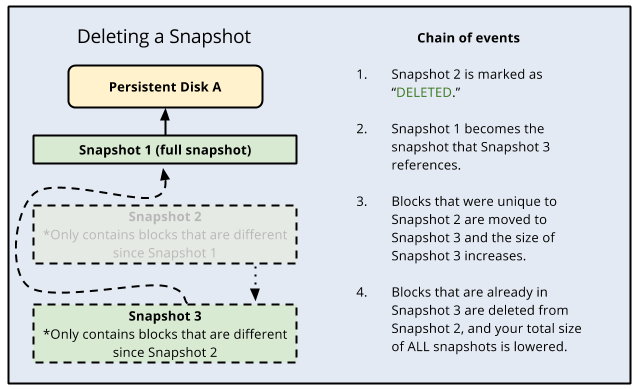
- If the snapshot has no dependent snapshots, it is deleted outright.
- If the snapshot does have dependent snapshots:
- Any data that is required for restoring other snapshots is moved into the next snapshot, increasing its size.
- Any data that is not required for restoring other snapshots is deleted. This lowers the total size of all your snapshots.
- The next snapshot no longer references the snapshot marked for deletion, and instead references the snapshot before it.
- Deleting a snapshot does not necessarily delete all the data on the snapshot because subsequent snapshots might require that information.
- To definitively delete data from the snapshots, you should delete all snapshots.
- If a disk has a snapshot schedule, you must detach the schedule from the disk before deleting it.
Snapshot Schedules
- Snapshot schedules create standard snapshots at specified intervals to provide automated, geo-redundant disk backups.
- Support both Persistent Disk and Hyperdisk volumes (zonal and regional).
- Snapshot schedules are a best practice for backing up Compute Engine workloads — available at no additional charge.
- Configure schedules with:
- Frequency: Hourly (1-23 hour intervals), daily, or weekly.
- Retention policy: Maximum number of days to retain snapshots with auto-deletion of older ones.
- Source disk deletion behavior: What happens to automatic snapshots when the source disk is deleted.
- Storage location: Region or multi-region for snapshot storage.
- Application consistent snapshots can be configured for:
- Windows: VSS (Volume Shadow Copy Service) snapshots.
- Linux: Guest-flush option with pre/post snapshot scripts (Persistent Disk only).
- Snapshot schedules have separate frequency considerations and don’t contribute to the manual snapshot frequency limit.
Backup and DR Service
- Google Cloud Backup and DR Service provides enhanced protection with immutable and indelible backups of Compute Engine instances.
- Offers an out-of-the-box backup solution with seamless backup management across projects.
- Supports backup plans that can be applied to instances during or after creation.
- Provides features beyond snapshot schedules:
- Immutable backups protected against deletion for a specified retention period.
- Centralized backup management console.
- Cross-region backup storage for disaster recovery.
- Scheduled backups (daily, weekly, monthly, yearly).
- Uses Persistent Disk snapshots under the hood to incrementally back up data at the instance level.
Snapshot Best Practices
- Security: Only grant snapshot-related IAM permissions (
compute.snapshots.useReadOnly,compute.instantSnapshots.useReadOnly) to trusted principals to prevent unintended privilege escalation. - Crash Consistent vs Application Consistent:
- Crash consistent: Default behavior — captures disk state as if the machine crashed (may have pending writes in transit).
- Application consistent: Pause applications and flush writes before snapshot to capture complete application state.
- If creating a snapshot while an application is running, prepare disk for consistency:
- Pause application/processes that write data, flush disk buffers.
- Unmount disk completely.
- For Windows, use VSS snapshots.
- For Linux on Persistent Disk, use guest-flush with pre/post scripts.
- For Linux on Hyperdisk, manually pause the application before creating the snapshot.
- Use snapshot schedules as a best practice to back up your Compute Engine workloads.
- Use instant snapshots or disk clones instead of standard snapshots when you need an immediate copy in the same zone.
- Schedule snapshots during off-peak hours (avoid midnight peaks).
- Snapshot frequency limit: You can snapshot a specific disk at most 6 times every 60 minutes. Avoid taking snapshots more often than once per hour.
- Use multiple disks for large data volumes. Larger amounts of data create larger snapshots, which cost more and take longer.
- Run
fstrimbefore snapshot (Linux) or enable thediscardmount option to clean up space, reducing snapshot size and creation time. - Create an image from an infrequently used snapshot, instead of using the snapshot itself repeatedly (saves networking costs).
- Use journaling file systems like
ext4to reduce the risk that data is cached without being written to disk. - Wait for new snapshots to finish before taking subsequent snapshots from the same disk to avoid duplicate effort.
Snapshot Storage Locations
- Standard and archive snapshots can be stored in:
- Cloud Storage multi-regional locations (e.g.,
asia,us) — highest availability and resilience. - Cloud Storage regional locations (e.g.,
asia-south1,us-central1) — more control over data placement.
- Cloud Storage multi-regional locations (e.g.,
- Regionally scoped snapshots can only be stored in regional locations.
- You cannot change the storage location of an existing snapshot.
- Snapshot settings define a default storage location for all project snapshots (configurable).
- Network charges apply for cross-region snapshot creation or restoration.
- To minimize costs, store snapshots in the same region as the source disk.
GCP Certification Exam Practice Questions
- Questions are collected from Internet and the answers are marked as per my knowledge and understanding (which might differ with yours).
- GCP services are updated everyday and both the answers and questions might be outdated soon, so research accordingly.
- GCP exam questions are not updated to keep up the pace with GCP updates, so even if the underlying feature has changed the question might not be updated
- Open to further feedback, discussion and correction.
- You have a workload running on Compute Engine that is critical to your business. You want to ensure that the data on the boot disk of this workload is backed up regularly. You need to be able to restore a backup as quickly as possible in case of disaster. You also want older backups to be cleaned automatically to save on cost. You want to follow Google-recommended practices. What should you do?
- Create a Cloud Function to create an instance template.
- Create a snapshot schedule for the disk using the desired interval.
- Create a cron job to create a new disk from the disk using gcloud.
- Create a Cloud Task to create an image and export it to Cloud Storage.
- Your application is running on Compute Engine and you need to take point-in-time backups of your Persistent Disk that allow restoration within seconds. The backup must be stored locally for fastest recovery. Which solution should you use?
- Create a standard snapshot and store it in the same region.
- Create an archive snapshot for long-term storage.
- Create an instant snapshot of the disk.
- Create a machine image of the entire VM.
- You need to retain disk backups for compliance purposes for 2 years, and you rarely need to access them. You want the lowest cost option. What should you do?
- Create standard snapshots on a schedule.
- Create archive snapshots of the disk.
- Create instant snapshots and convert them to standard snapshots.
- Export disk images to Cloud Storage Coldline.
- You are performing a software upgrade on a Compute Engine VM and want a rapid rollback option if the upgrade fails. You need to restore the disk state in seconds. What is the recommended approach?
- Create a standard snapshot before the upgrade.
- Create a machine image before the upgrade.
- Create an instant snapshot before the upgrade.
- Clone the disk before the upgrade.
- You delete a snapshot from an incremental chain. What happens to the data that is needed by subsequent snapshots?
- The data is permanently lost.
- The data is moved to the next snapshot in the chain.
- All dependent snapshots are also deleted.
- The source disk is updated with the snapshot data.
- You need to ensure your Compute Engine disk snapshots comply with data residency requirements and are restricted to a specific region. What should you do?
- Store globally scoped snapshots in a regional location.
- Use instant snapshots which are stored in the same zone.
- Create regionally scoped snapshots with restricted creation and restore locations.
- Use archive snapshots with a specific storage location.