Google Cloud VPC Firewall Rules
📋 Migration Recommended: Move to Network Firewall Policies
Google Cloud recommends migrating from VPC firewall rules to Network Firewall Policies (part of Cloud NGFW). Network firewall policies offer enhanced features including IAM-governed Tags, FQDN objects, geolocation filtering, threat intelligence, and batch updates.
A migration tool (gcloud compute firewall-rules migrate) is available to convert existing VPC firewall rules to a global network firewall policy automatically.
- VPC firewall rules are part of Cloud NGFW (Cloud Next Generation Firewall) Essentials tier, Google Cloud’s distributed, cloud-native stateful inspection firewall service.
- Firewall rules help define allow or deny connections and apply to both outgoing (egress) and incoming (ingress) traffic in the network.
- Firewall rules control traffic even if it is entirely within the VPC network, including communication among VM instances.
- Firewall rules apply to a given project and network, and connections are allowed or denied on a per-instance basis.
- Every VPC network has two implied firewall rules
- Implied allow egress rule – allow all egress traffic,
- Implied deny ingress rule – denies all ingress traffic.
- Implied rules cannot be deleted but have the lowest possible priorities and can be overridden
- Firewall rules support IPv4 and IPv6 connections. When specifying a source or destination by address, IPv4 or IPv6 addresses can be specified in CIDR notation. Each firewall rule can contain either IPv4 or IPv6 ranges, but not both.
- Firewall rules always allow the following traffic (via the metadata server at
169.254.169.254for IPv4 andfd20:ce::254for IPv6)- DHCP
- DNS resolution
- Instance metadata
- NTP
- Google Cloud blocks or limits the following traffic
- Egress traffic on TCP port 25 (SMTP) to external IP addresses (to prevent spam)
- DHCP offers/acknowledgments from sources other than the metadata server
- External IP addresses only accept TCP, UDP, ICMP, IPIP, AH, ESP, SCTP, and GRE packets
- VPC firewall rules are stateful
- Google Cloud associates incoming packets with corresponding outbound packets by using a connection tracking table.
- When a connection is allowed through the firewall in either direction, return traffic matching this connection is also allowed.
- Firewall rule cannot be configured to deny associated response traffic.
- Stateful response to the request is not logged as well
- Return traffic must match the 5-tuple (source IP, destination IP, source port, destination port, protocol) of the accepted request traffic, but the source and destination addresses and ports are reversed.
- IPv4 connections support TCP, UDP, SCTP, and ICMP protocols for connection tracking. IPv6 connections support TCP, UDP, SCTP, and ICMPv6 protocols.
- Google Cloud implements connection tracking regardless of whether the protocol supports connections.
- A firewall rule’s tracking state is considered active if at least one packet is sent every 10 minutes.
- The maximum number of tracked connections depends on the machine type:
- Shared-core machine types: 130,000 connections
- Instances with 1–8 vCPUs: 130,000 connections per vCPU
- Instances with more than 8 vCPUs: 1,040,000 (130,000×8) connections total
Cloud NGFW Tiers
- VPC firewall rules are part of the broader Cloud NGFW (Cloud Next Generation Firewall) product, which is offered in three tiers:
- Cloud NGFW Essentials – Foundational tier including VPC firewall rules, global and regional network firewall policies, hierarchical firewall policies, IAM-governed Tags, and Address groups.
- Cloud NGFW Standard – Extends Essentials with Fully Qualified Domain Name (FQDN) objects, geolocation objects, and threat intelligence for firewall policy rules.
- Cloud NGFW Enterprise – Provides advanced Layer 7 security capabilities including Intrusion Detection and Prevention Service (IDPS), TLS inspection, and URL filtering, powered by Palo Alto Networks.
- Cloud NGFW Enterprise uses firewall endpoints (Google-managed zonal resources) that use packet intercept technology to inspect workload traffic for threat signatures.
Firewall Policies (Recommended)
- Google Cloud now provides Firewall Policies as the recommended approach for managing firewall rules, offering several advantages over VPC firewall rules:
- Batch updates to multiple rules simultaneously
- IAM-governed Tags (Secure Tags) instead of network tags
- FQDN objects, geolocation filtering, and threat intelligence (Standard/Enterprise)
- Consistent experience across the resource hierarchy
- Types of Firewall Policies:
- Hierarchical Firewall Policies – Applied at organization and folder levels. Support
goto_nextaction to delegate evaluation to lower-level policies. - Global Network Firewall Policies – Applied to all subnetworks in all regions of a VPC network.
- Regional Network Firewall Policies – Applied only to subnetworks of the VPC network in the target region.
- Hierarchical Firewall Policies – Applied at organization and folder levels. Support
- Firewall policy rules have a priority range of 0 to 2,147,483,547 (vs. 0 to 65,535 for VPC firewall rules).
- Firewall policy rules support additional actions:
allow,deny,goto_next, andapply_security_profile_group.
Firewall Rule Evaluation Order
- Google Cloud supports two network firewall policy enforcement orders:
- AFTER_CLASSIC_FIREWALL (default):
- Hierarchical firewall policies
- Regional system firewall policies
- VPC firewall rules
- Global network firewall policies
- Regional network firewall policies
- Implied actions
- BEFORE_CLASSIC_FIREWALL:
- Hierarchical firewall policies
- Regional system firewall policies
- Global network firewall policies
- Regional network firewall policies
- VPC firewall rules
- Implied actions
- AFTER_CLASSIC_FIREWALL (default):
- The enforcement order can be changed using
gcloud compute networks updatewith the--network-firewall-policy-enforcement-orderflag.
Firewall Rule Components
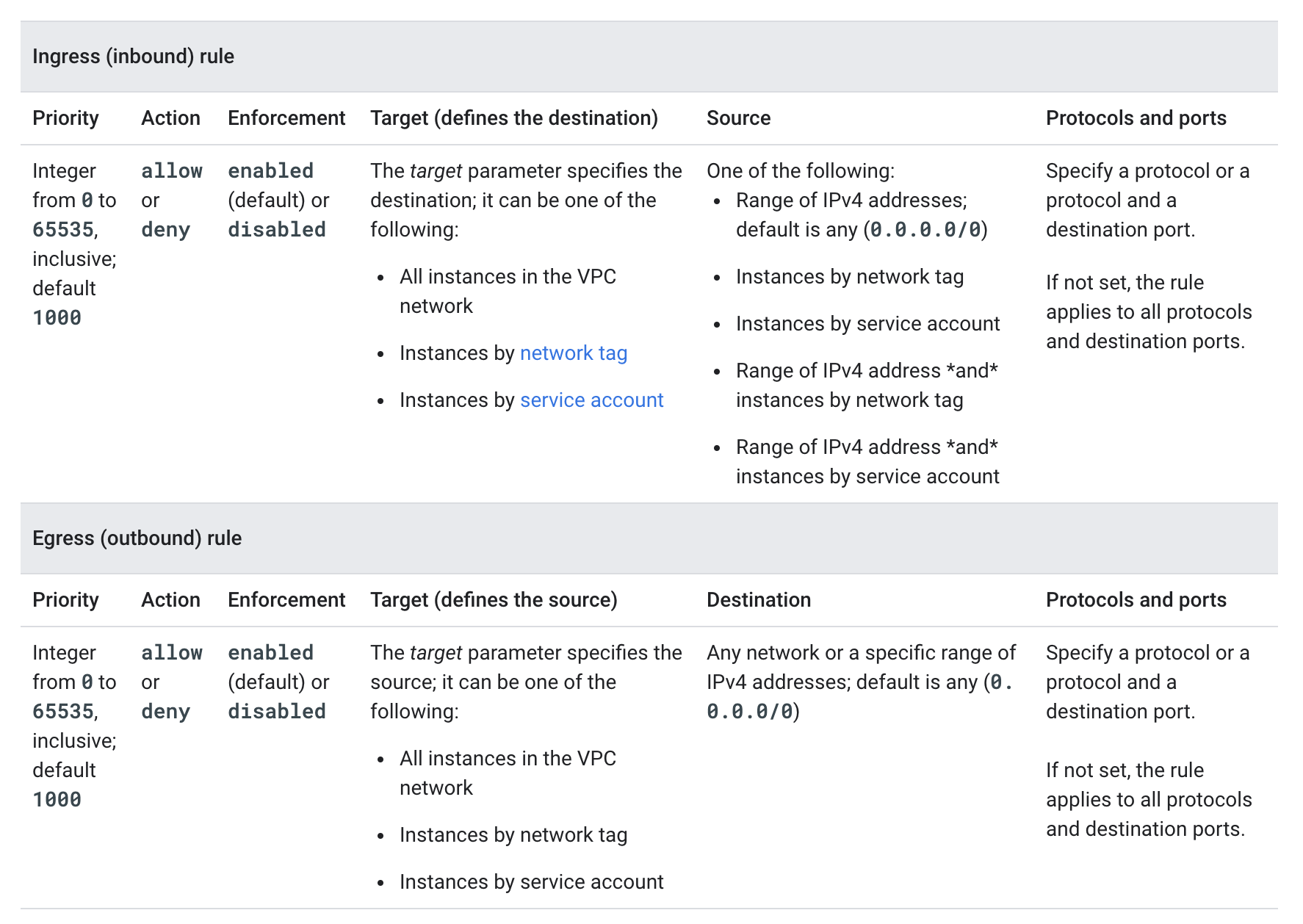
- Each firewall rule requires the direction of connection and applies to incoming (ingress) or outgoing (egress) connection, not both
- Each firewall rule’s action is either
allowordeny. - Each firewall rule has a priority defined from
0to65535inclusive, defaults to 1000. Lower integers indicate higher priorities. - A target, which defines the instances to which the rule applies.
- Ingress (inbound) rule, the target parameter designates the destination VM instances
- Egress (outbound) rule, the target designates the source instances.
- supports the following options
- All instances in the network.
- Instances by target tags.
- Instances by target service accounts
- A source for ingress rules or a destination for egress rules.
- Ingress (inbound) rules
- target parameter specifies the destination instances for traffic;
- destination parameter cannot be used
- source is specified by using the source parameter.
- Egress (outbound) rules
- target parameter specifies the source instances for traffic;
- source parameter cannot be used
- destination is specified by using the destination parameter.
- supports the following options
- Source IP ranges (IPv4 or IPv6 in CIDR format)
- Source tags
- Source service accounts
- Ingress (inbound) rules
- Protocols and Ports
- Supported protocol names:
tcp,udp,icmp(IPv4 ICMP),esp,ah,sctp, andipip. For other protocols, use IANA protocol numbers. - IPv6 Hop-by-Hop protocol is not supported in firewall rules.
- Port-based protocols (tcp, udp, sctp) support destination port or port range specification.
- Supported protocol names:
- Firewall rules have enforcement status and are enabled by default. They can be disabled for troubleshooting or for maintenance, instead of having to delete and add them again.
Service Account vs Network Tag Filtering
- Firewall rules support source and target filtering by Service Account and Network Tags
- Service Accounts and Network Tags cannot be mixed and matched in any firewall rule.
- Use service accounts instead of network tags for strict control over how firewall rules are applied to VMs, as network tags can be inferred while using a service account would require access to it as well.
- A network tag is an arbitrary attribute. One or more network tags can be associated with an instance by any IAM member who has permission to edit it. IAM members with the Compute Engine Instance Admin role to a project have this permission. IAM members who can edit an instance can change its network tags, which could change the set of applicable firewall rules for that instance.
- A service account represents an identity associated with an instance. Only one service account can be associated with an instance. Access to the service account can be controlled by controlling the grant of the Service Account User role for other IAM members. For an IAM member to start an instance by using a service account, that member must have the Service Account User role to at least use that service account and appropriate permissions to create instances.
IAM-Governed Tags (Secure Tags)
- IAM-governed Tags (also called Secure Tags) are available in Firewall Policies as a replacement for network tags.
- Unlike network tags, IAM-governed Tags are controlled by IAM permissions, providing better security and governance.
- Tags deliver intra-subnet micro-segmentation with pervasive policy coverage that automatically applies to workloads wherever they are deployed, independently of the network architecture.
- IAM-governed Tags are only available in firewall policies (not VPC firewall rules).
- For new deployments, use IAM-governed Tags with Network Firewall Policies instead of network tags with VPC firewall rules.
Firewall Rules Logging
- Firewall Rules Logging enables auditing, verifying, and analyzing the effects of the firewall rules.
- Firewall Rules Logging can be enabled individually for each firewall rule whose connections need to log
- Google Cloud creates an entry called a connection record each time the firewall rule allows or denies traffic.
- Each connection record contains the source and destination IP addresses, the protocol and ports, date and time, and a reference to the firewall rule that applied to the traffic.
- Firewall Rules Logging only records TCP and UDP connections.
- Firewall Rules Logging cannot be enabled for the implied deny ingress and implied allow egress rules. Instead, create explicit Allow or Deny rules.
Firewall Insights
- Firewall Insights (part of Network Intelligence Center) analyzes firewall rules and provides recommendations to optimize security posture.
- Key capabilities:
- Shadowed Rules – Detects rules that share attributes with other higher-priority rules, making them ineffective.
- Overly Permissive Rules – Identifies allow rules with no hits, unused attributes, or overly permissive IP addresses/port ranges.
- Deny Rules with No Hits – Identifies deny rules that haven’t blocked any traffic during the observation period.
- Requires Firewall Rules Logging to be enabled for log-based insights.
- Provides recommendations through the Recommender Hub to help tighten firewall rules.
VPC Firewall Rules Migration
- Google Cloud provides a migration tool to help transition from VPC firewall rules to network firewall policies.
- The migration tool creates a global network firewall policy and converts existing VPC firewall rules into firewall policy rules.
- Two migration paths:
- Without dependencies – For rules that don’t use network tags or service accounts.
- With dependencies – For rules that use network tags or service accounts (tags are converted to IAM-governed Tags).
- Command:
gcloud beta compute firewall-rules migrate - Benefits of migrating:
- Access to Cloud NGFW Standard and Enterprise features
- Better policy organization and batch updates
- IAM-governed Tags for improved security
- Consistent policy management across the resource hierarchy
GCP Certification Exam Practice Questions
- Questions are collected from Internet and the answers are marked as per my knowledge and understanding (which might differ with yours).
- GCP services are updated everyday and both the answers and questions might be outdated soon, so research accordingly.
- GCP exam questions are not updated to keep up the pace with GCP updates, so even if the underlying feature has changed the question might not be updated
- Open to further feedback, discussion and correction.
- Your developers are trying to connect to an Ubuntu server over SSH to diagnose some errors. However, the connection times out.
Which command should help solve the problem?gcloud compute firewall-rules create "open-ssh" --network $NETWORK --allow tcp:22gcloud compute firewall-rules create "open-ssh"gcloud compute firewall-rules create "open-ssh" --network $NETWORK --deny tcp:22gcloud compute firewall-rules create "open-ssh" --network $NETWORK --allow tcp:3389
- You’ve created a new firewall rule to allow incoming traffic on port 22, using a target tag of “dev-ssh”. You tried to connect to one of your instances, and you’re still unable to connect. What steps do you need to take to resolve the problem?
- Run the
gcloud firewall-rules refreshcommand, as they need to be reloaded - Use source tags in place of the target tags.
- Reboot the instances for the firewall rule to take effect.
- Apply a network tag of “dev-ssh” to the instance you’re trying to connect into and test again.
- Run the
- You have created a firewall with rules that only allow traffic over HTTP, HTTPS, and SSH ports. While testing, you specifically try to reach the server over multiple ports and protocols; however, you do not see any denied connections in the firewall logs. You want to resolve the issue. What should you do?
- Enable logging on the default Deny Any Firewall Rule.
- Enable logging on the VM Instances that receive traffic.
- Create a logging sink forwarding all firewall logs with no filters.
- Create an explicit Deny Any rule and enable logging on the new rule.
- Your organization wants to enforce a consistent firewall policy across all projects and VPC networks. Which approach provides centralized management at the organization level?
- Create VPC firewall rules in each project individually.
- Use Hierarchical Firewall Policies at the organization or folder level.
- Use network tags across all projects.
- Create shared VPC firewall rules in the host project only.
- You want to migrate your existing VPC firewall rules to network firewall policies for better management. Your rules use network tags for targeting. What should you use in the new firewall policies?
- Continue using network tags in firewall policies.
- Use source IP ranges only.
- Use IAM-governed Tags (Secure Tags) to replace network tags.
- Use service accounts exclusively.
- Your security team needs to filter outbound traffic based on domain names and block connections to specific countries. Which Cloud NGFW tier should you use?
- Cloud NGFW Essentials
- Cloud NGFW Standard
- Cloud NGFW Enterprise
- VPC firewall rules
- You need to inspect network traffic for malware and command-and-control attacks with TLS decryption. Which Cloud NGFW feature provides this capability?
- Firewall Rules Logging
- Firewall Insights
- Cloud NGFW Standard threat intelligence
- Cloud NGFW Enterprise with Intrusion Detection and Prevention Service (IDPS) and TLS inspection
- In the default (AFTER_CLASSIC_FIREWALL) enforcement order, which firewall rules are evaluated first?
- VPC firewall rules
- Global network firewall policies
- Hierarchical firewall policies
- Regional network firewall policies
See also: Google Cloud Networking Services Cheat Sheet