Kubernetes Security
- Security in general is not something that can be achieved only at the container layer. It’s a continuous process that needs to be adapted on all layers and all the time.
- 4C’s of Cloud Native security are Cloud, Clusters, Containers, and Code.
- Containers are started on a machine and they always share the same kernel, which then becomes a risk for the whole system, if containers are allowed to call kernel functions like for example killing other processes or modifying the host network by creating routing rules.

Authentication
Users
- Kubernetes does not support the creation of users
- Users can be passed as
--basic-auth-fileor--token-auth-fileto thekube-apiserverusing a static user + password (deprecated) or static user + token file. - This approach is deprecated.
X509 Client Certificates
- Kubernetes requires PKI certificates for authentication over TLS.
- Kubernetes requires PKI for the following operations:
- Client certificates for the kubelet to authenticate to the API server
- Server certificate for the API server endpoint
- Client certificates for administrators of the cluster to authenticate to the API server
- Client certificates for the API server to talk to the
kubelet - Client certificate for the API server to talk to
etcd - Client certificate/kubeconfig for the controller manager to talk to the API server
- Client certificate/kubeconfig for the scheduler to talk to the API server.
Client and server certificates for the front-proxy
- Client certificates can be signed in two ways so that they can be used to authenticate with the Kubernetes API.
- Internally signing the certificate using the Kubernetes API.
- It involves the creation of a certificate signing request (CSR) by a client.
- Administrators can approve or deny the CSR.
- Once approved, the administrator can extract and provide a signed certificate to the requesting client or user.
- This method cannot be scaled for large organizations as it requires manual intervention.
- Use enterprise PKI, which can sign the client-submitted CSR.
- The signing authority can send signed certificates back to clients.
- This approach requires the private key to be managed by an external solution.
- Internally signing the certificate using the Kubernetes API.
Refer Authentication Exercises
Service Accounts
- Kubernetes service accounts can be used to provide bearer tokens to authenticate with Kubernetes API.
- Bearer tokens can be verified using a webhook, which involves API configuration with option
--authentication-token-webhook-config-file, which includes the details of the remote webhook service. - Kubernetes internally uses Bootstrap and Node authentication tokens to initialize the cluster.
- Each namespace has a default service account created.
kubectl create token <service-account-name> to manually create tokens when needed. Long-lived tokens can still be created manually via Secret objects if required.
- Existing service account for a pod cannot be modified, the pod needs to be recreated.
- The service account can be associated with the pod using the
serviceAccountNamefield in the pod specification and a projected token volume is automatically mounted on the pod. automountServiceAccountTokenflag can be used to prevent the service account token from being auto-mounted.- Kubernetes 1.36 introduces support for external signing of service account tokens via KMS or HSM through a gRPC interface, enabling key rotation and compliance alignment.
Practice Service Account Exercises
Authorization
Node
- Node authorization is used by Kubernetes internally and enables read, write, and auth-related operations by kubelet.
- In order to successfully make a request, kubelet must use a credential that identifies it as being in the
system:nodesgroup. - Node authorization can be enabled using the
--authorization-mode=Nodeoption in Kubernetes API Server configurations.
ABAC
- Kubernetes defines attribute-based access control (ABAC) as “an access control paradigm whereby access rights are granted to users through the use of policies which combine attributes together.”
- ABAC can be enabled by providing a .json file to
--authorization-policy-fileand--authorization-mode=ABACoptions in Kubernetes API Server configurations. - The .json file needs to be present before Kubernetes API can be invoked.
- Any changes in the ABAC policy file require a Kube API Server restart and hence the ABAC approach is not preferred.
AlwaysDeny/AlwaysAllow
- AlwaysDeny or AlwaysAllow authorization mode is usually used in development environments where all requests to the Kubernetes API need to be allowed or denied.
- AlwaysDeny or AlwaysAllow mode can be enabled using the option
--authorization-mode=AlwaysDeny/AlwaysAllowwhile configuring Kubernetes API. - This mode is considered insecure and hence is not recommended in production environments.
RBAC
- Role-based access control is the most secure and recommended authorization mechanism in Kubernetes.
- It is an approach to restrict system access based on the roles of
users within the cluster. - It allows organizations to enforce the principle of least privileges.
- Kubernetes RBAC follows a declarative nature with clear permissions (operations), API objects (resources), and subjects (users, groups, or service accounts) declared in authorization requests.
- RBAC authorization can be enabled using the
--authorization-mode=RBACoption in Kubernetes API Server configurations. - RBAC can be configured using
- Role or ClusterRole – is made up of verbs, resources, and subjects, which provide a capability (verb) on a resource
- RoleBinding or ClusterRoleBinding – helps assign privileges to the user, group, or service account.
- Role vs ClusterRole AND RoleBinding vs ClusterRoleBinding
- ClusterRole is a global object whereas Role is a namespace object.
- Roles and RoleBindings are the only namespaced resources.
- ClusterRoleBindings (global resource) cannot be used with Roles, which is a namespaced resource.
- RoleBindings (namespaced resource) cannot be used with ClusterRoles, which are global resources.
- Only ClusterRoles can be aggregated.
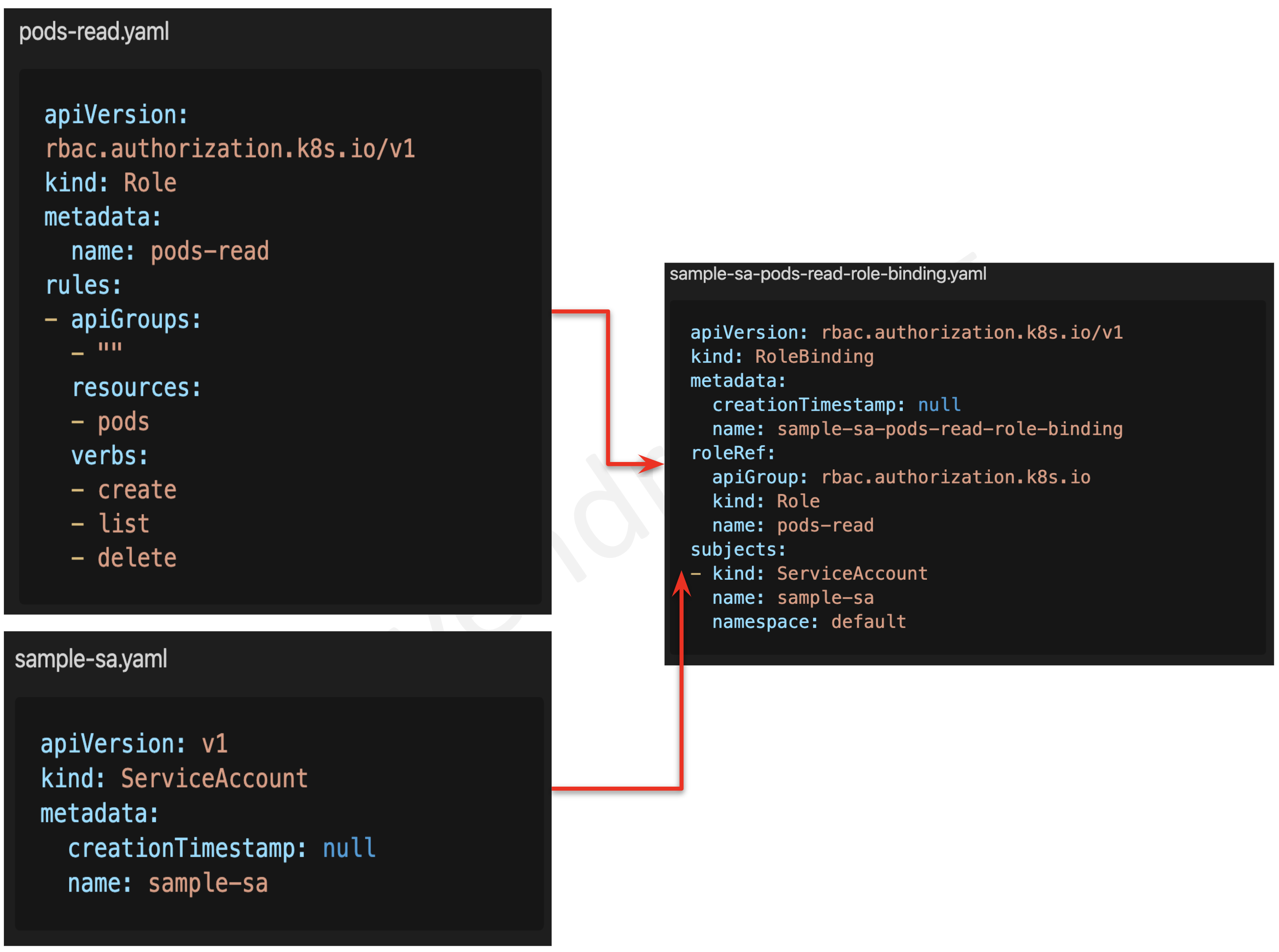
Practice RBAC Exercises
Admission Controllers
- Admission Controller is an interceptor to the Kubernetes API server requests prior to persistence of the object, but after the request is authenticated and authorized.
- Admission controllers limit requests to create, delete, modify or connect to (proxy). They do not support read requests.
- Admission controllers may be “validating”, “mutating”, or both.
- Mutating controllers may modify the objects they admit; validating controllers may not.
- Mutating controllers are executed before the validating controllers.
- If any of the controllers in either phase reject the request, the entire request is rejected immediately and an error is returned to the end-user.
- Admission Controllers provide fine-grained control over what can be performed on the cluster, that cannot be handled using Authentication or Authorization.
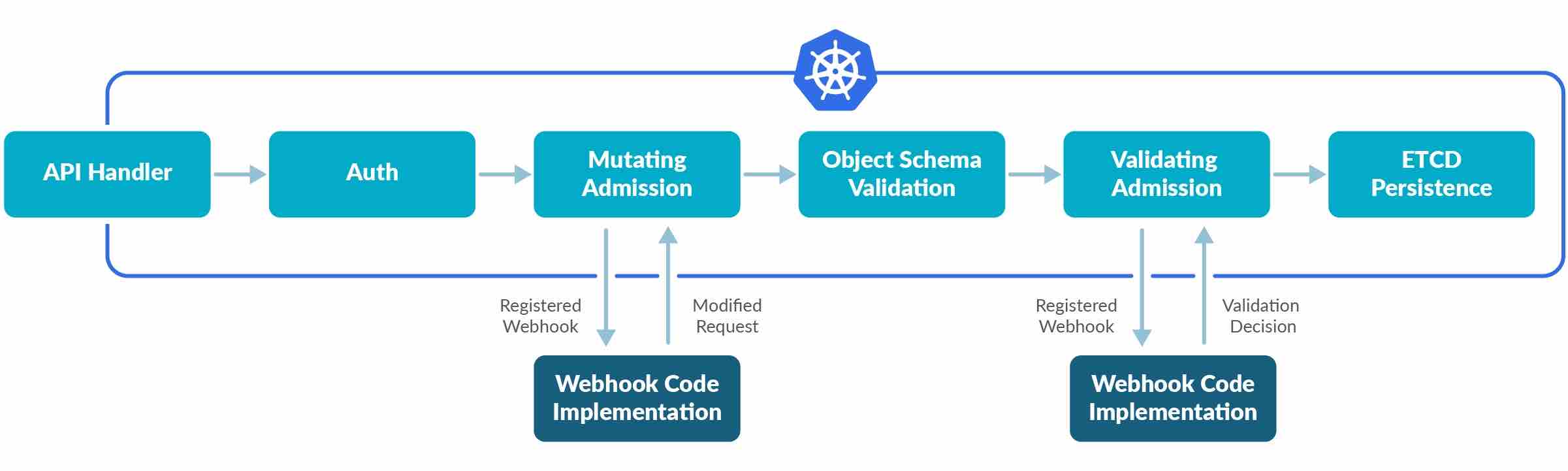
- Admission controllers can only be enabled and configured by the cluster administrator using the
--enable-admission-pluginsand--admission-control-config-fileflags. - Few of the admission controllers are as below
- PodSecurity (replacement for PodSecurityPolicy) enforces Pod Security Standards at the namespace level using labels.
- ImagePolicyWebhook to decide if an image should be admitted.
- MutatingAdmissionWebhook to modify a request.
- ValidatingAdmissionWebhook to decide whether the request should be allowed to run at all.
ValidatingAdmissionPolicy (GA in Kubernetes 1.30)
- ValidatingAdmissionPolicy provides an in-process, declarative alternative to validating admission webhooks.
- Uses Common Expression Language (CEL) expressions evaluated directly in the kube-apiserver, eliminating the need for external webhook infrastructure.
- Offers lower latency, better reliability, and simpler operations compared to webhook-based admission control.
- Policies are defined using
ValidatingAdmissionPolicyand bound to resources usingValidatingAdmissionPolicyBinding. - Example use cases: enforce label conventions, restrict resource configurations, validate naming standards.
Practice Admission Controller Exercises
Pod Security Policies
⚠️ PodSecurityPolicy REMOVED
PodSecurityPolicy was deprecated in Kubernetes 1.21 and completely removed in Kubernetes 1.25.
This content is maintained for historical reference and legacy exam preparation only.
Migration: Use Pod Security Admission (PSA) with Pod Security Standards (PSS) as the built-in replacement. For advanced policy needs, consider OPA Gatekeeper, Kyverno, or Kubewarden.
- Pod Security Policies enabled fine-grained authorization of pod creation and updates and was implemented as an optional admission controller.
- A Pod Security Policy was a cluster-level resource that controlled security-sensitive aspects of the pod specification.
- PodSecurityPolicy was disabled, by default. Once enabled using
--enable-admission-plugins, it applied itself to all the pod creation requests. - PodSecurityPolicies enforced without authorizing any policies would prevent any pods from being created in the cluster.
Practice Pod Security Policies Exercises
Pod Security Admission & Pod Security Standards (Replacement for PSP)
- Pod Security Admission (PSA) is a built-in admission controller (GA since Kubernetes 1.25) that enforces Pod Security Standards (PSS) at the namespace level.
- PSA uses namespace labels to configure enforcement — no CRDs or webhook infrastructure required.
- Three security levels defined by Pod Security Standards:
- Privileged — Unrestricted policy, no restrictions applied (for system-level workloads).
- Baseline — Minimally restrictive, prevents known privilege escalations (blocks hostPID, hostNetwork, privileged containers, etc.).
- Restricted — Heavily restricted, follows best practices (requires runAsNonRoot, drops ALL capabilities, restricts volume types, requires seccomp profile).
- Three enforcement modes:
- enforce — Violations cause pod rejection.
- audit — Violations are logged in the audit log but pods are admitted.
- warn — Violations trigger a warning to the user but pods are admitted.
- PSA is configured via namespace labels:
123456# Example: Enforce baseline, warn on restricted violationskubectl label namespace my-ns \pod-security.kubernetes.io/enforce=baseline \pod-security.kubernetes.io/enforce-version=latest \pod-security.kubernetes.io/warn=restricted \pod-security.kubernetes.io/warn-version=latest - PSA evaluates pods at creation and update time only — existing running pods are not affected when policy is tightened.
- Cluster-wide defaults can be set via the API server
--admission-control-config-file.
Pod Security Context
- Security Context helps define privileges and access control settings for a Pod or Container that includes
- Discretionary Access Control: Permission to access an object, like a file, is based on user ID (UID) and group ID (GID)
- Security-Enhanced Linux (SELinux): Objects are assigned security labels.
- Running as privileged or unprivileged.
- Linux Capabilities: Give a process some privileges, but not all the privileges of the root user.
- AppArmor: Use program profiles to restrict the capabilities of individual programs.
- Seccomp: Filter a process’s system calls.
- AllowPrivilegeEscalation: Controls whether a process can gain more privileges than its parent process. AllowPrivilegeEscalation is true always when the container is: 1) run as Privileged OR 2) has CAP_SYS_ADMIN.
- readOnlyRootFilesystem: Mounts the container’s root filesystem as read-only.
- PodSecurityContext holds pod-level security attributes and common container settings.
- Fields present in
container.securityContextover the field values of PodSecurityContext.
|
1 2 3 4 5 6 7 8 9 10 11 12 13 14 15 16 17 18 19 20 21 22 23 24 |
# Pod Security Context example apiVersion: v1 kind: Pod metadata: name: security-context-demo spec: securityContext: # Pod level Security Context, can also be defined at container level runAsUser: 1000 # run as uid runAsGroup: 3000 # run as gid fsGroup: 2000 runAsNonRoot: true # Prevents running a container with 'root' user as part of the pod readOnlyRootFilesystem: Controls whether a container will be able to write into the root filesystem. seccompProfile: # secure computing i.e. seccomp profile type: RuntimeDefault seLinuxOptions: # se linux options level: "s0:c123,c456" containers: - name: sec-ctx-demo image: gcr.io/google-samples/node-hello:1.0 securityContext: # Container level security context overrides Pod level settings runAsUser: 2000 allowPrivilegeEscalation: false # allow running as privileged user capabilities: # controls the Linux capabilities assigned to the container add: ["NET_ADMIN", "SYS_TIME"] |
Practice Pod Security Context Exercises
User Namespaces (GA in Kubernetes 1.36)
- User Namespaces graduated to General Availability in Kubernetes 1.36 (April 2026) after being in development since Kubernetes 1.25.
- With user namespaces enabled, a process running as root (UID 0) inside a container is mapped to an unprivileged user on the host, significantly reducing the blast radius of container escapes.
- Enabled by setting
hostUsers: falsein the pod spec. - Provides an additional layer of defense-in-depth — even if an attacker escapes the container, they have no privileges on the host.
- Works with all container runtimes that support the OCI runtime spec for user namespaces (containerd 2.0+, CRI-O 1.25+).
|
1 2 3 4 5 6 7 8 9 10 11 12 |
# User Namespaces example apiVersion: v1 kind: Pod metadata: name: userns-demo spec: hostUsers: false # Enable user namespaces containers: - name: app image: nginx securityContext: runAsUser: 0 # Root inside container, unprivileged on host |
MTLS or Two Way Authentication
- Service Mesh like Istio and Linkerd can help implement MTLS for intra-cluster pod-to-pod communication.
- Istio supports both sidecar mode and ambient mode (GA in Istio 1.24, November 2024):
- Sidecar mode: Deploys a sidecar proxy container per pod that handles encryption/decryption transparently.
- Ambient mode (sidecar-less): Uses a per-node ztunnel proxy for L4 mTLS and optional waypoint proxies for L7 policy — no per-pod sidecars required, reducing resource overhead and operational complexity.
- Istio supports both permissive and strict mTLS modes.
- Cilium service mesh also provides mTLS using eBPF-based encryption without sidecars.
Network Policies
- By default, pods are non-isolated; they accept traffic from any source.
- NetworkPolicies help specify how a pod is allowed to communicate with various network “entities” over the network.
- NetworkPolicies can be used to control traffic to/from Pods, Namespaces or specific IP addresses
- Pod- or namespace-based NetworkPolicy uses a selector to specify what traffic is allowed to and from the Pod(s) that match the selector.
|
1 2 3 4 5 6 7 8 9 10 11 12 13 14 15 16 17 18 19 20 21 22 23 24 25 26 27 28 29 30 31 32 33 34 35 |
# Kubernetes Network Policy apiVersion: networking.k8s.io/v1 kind: NetworkPolicy # defines the Network Policy metadata: name: test-network-policy namespace: default spec: podSelector: # selects the pod - leave it empty {} to apply to all the pods matchLabels: # match the pods based on the labels role: db policyTypes: - Ingress # Enables Ingress rules - Egress #Enables Egress rules ingress: # Ingress rules incoming to the target - from: - ipBlock: # access limited through IPs cidr: 172.17.0.0/16 except: - 172.17.1.0/24 - namespaceSelector: # access limited through Namespace labels matchLabels: project: myproject - podSelector: # access limited through pods with matching labels matchLabels: role: frontend ports: # ingress rules for the ports - if not specified its opens for all ports - protocol: TCP port: 6379 egress: # egress rules outgoing from the target - to: - ipBlock: # access limited through IPs cidr: 10.0.0.0/24 ports: # ingress rules for the ports - if not specified its opens for all ports - protocol: TCP port: 5978 |
AdminNetworkPolicy / ClusterNetworkPolicy (Alpha)
- Standard NetworkPolicies are namespace-scoped and managed by namespace owners. AdminNetworkPolicy (renamed to ClusterNetworkPolicy in v1alpha2) provides cluster-wide network policy for administrators.
- Allows cluster administrators to enforce network rules that take precedence over namespace-level NetworkPolicies.
- Supports a
Passaction to delegate to namespace-level policies, enabling a layered policy model. - Currently alpha — available in CNI implementations like Cilium and OVN-Kubernetes.
Practice Network Policies Exercises
Kubernetes Auditing
- Kubernetes auditing provides a security-relevant, chronological set of records documenting the sequence of actions in a cluster for activities generated by users, by applications that use the Kubernetes API, and by the control plane itself.
- Audit records begin their lifecycle inside the
kube-apiservercomponent. - Each request on each stage of its execution generates an audit event, which is then pre-processed according to a certain policy and written to a backend.
- Audit policy determines what’s recorded and the backends persist the records.
- Backend implementations include logs files and webhooks.
- Each request can be recorded with an associated stage as below
RequestReceived– generated as soon as the audit handler receives the request, and before it is delegated down the handler chain.ResponseStarted– generated once the response headers are sent, but before the response body is sent. This stage is only generated for long-running requests (e.g. watch).ResponseComplete– generated once the response body has been completed and no more bytes will be sent.Panic– generated when a panic or a failure occurs.
Kubernetes Audit Policy
|
1 2 3 4 5 6 7 8 9 10 11 |
# kubernetes audit policy apiVersion: audit.k8s.io/v1 # This is required. kind: Policy # Policy object omitStages: # audit events to be omitted or ignored - "RequestReceived" # Options RequestReceived, ResponseStarted, ResponseComplete, Panic rules: - level: RequestResponse # Log pod level changes, Options RequestResponse, Request, Metadata, None namespace: ["prod"] # limit to namespace - optional resources: # resources array which is consistent with the RBAC policy. - group: "" resources: ["pods"] |
Kubernetes kube-apiserver.yaml file with audit configuration
|
1 2 3 4 5 6 |
# kubernetes audit configuration --audit-policy-file=/etc/kubernetes/audit-policy.yaml # audit policy file --audit-log-path=/var/log/audit.log # specifies the log file path that log backend uses to write audit events. --audit-log-maxage=1 # defined the maximum number of days to retain old audit log files --audit-log-maxbackup=1 #defines the maximum number of audit log files to retain --audit-log-maxsize=1 # defines the maximum size in megabytes of the audit log file before it gets rotated |
Practice Kubernetes Auditing Exercises
Seccomp – Secure Computing
- Seccomp stands for secure computing mode and has been a feature of the Linux kernel since version 2.6.12.
- Seccomp can be used to sandbox the privileges of a process, restricting the calls it is able to make from user space into the kernel.
- Kubernetes lets you automatically apply seccomp profiles loaded onto a Node to the Pods and containers.
SeccompDefault feature graduated to GA in Kubernetes 1.27. When enabled (via kubelet flag --seccomp-default=true), all pods without an explicit seccomp profile automatically receive the RuntimeDefault profile. This is the recommended configuration for production clusters.
Seccomp profile
|
1 2 3 4 5 6 7 8 9 10 11 12 13 14 15 16 17 18 19 20 |
# fine grained Seccomp profile { "defaultAction": "SCMP_ACT_ERRNO", # default deny "architectures": [ "SCMP_ARCH_X86_64", "SCMP_ARCH_X86", "SCMP_ARCH_X32" ], "syscalls": [ { "names": [ "accept4", "epoll_wait", "pselect6", .... ], "action": "SCMP_ACT_ALLOW" # explicitly whitelist calls } ] } |
Seccomp profile attached to the pod
|
1 2 3 4 5 6 7 8 9 10 11 12 13 14 15 |
# Seccomp profile attached to pod apiVersion: v1 kind: Pod metadata: name: audit-pod labels: app: audit-pod spec: securityContext: seccompProfile: type: Localhost localhostProfile: profiles/audit.json containers: - name: nginx image: nginx |
Practice Seccomp Exercises
AppArmor
- AppArmor is a Linux kernel security module that supplements the standard Linux user and group-based permissions to confine programs to a limited set of resources.
- AppArmor can be configured for any application to reduce its potential attack surface and provide a greater in-depth defense.
- AppArmor is configured through profiles tuned to allow the access needed by a specific program or container, such as Linux capabilities, network access, file permissions, etc.
- Each profile can be run in either enforcing mode, which blocks access to disallowed resources or complain mode, which only reports violations.
- AppArmor helps to run a more secure deployment by restricting what containers are allowed to do, and/or providing better auditing through system logs.
- Use
aa-statusto check AppArmor status and profiles are loaded - Use
apparmor_parser -q <<profile file>>to load profiles
securityContext using appArmorProfile. The legacy beta annotation (container.apparmor.security.beta.kubernetes.io/<container_name>) is deprecated and will be removed in a future release. Migrate to the new field-based configuration shown below.
AppArmor profile
|
1 2 3 4 5 |
# sample AppArmor profile profile k8s-apparmor-example-deny-write flags=(attach_disconnected) { file, # all access to files deny /** w, # Deny all file writes. } |
AppArmor usage (New GA field-based approach – Kubernetes 1.30+)
|
1 2 3 4 5 6 7 8 9 10 11 12 13 |
# AppArmor usage - GA field-based configuration apiVersion: v1 kind: Pod metadata: name: nginx spec: containers: - name: nginx image: nginx securityContext: appArmorProfile: type: Localhost localhostProfile: k8s-apparmor-example-deny-write |
AppArmor usage (Legacy annotation-based approach – deprecated)
|
1 2 3 4 5 6 7 8 9 10 11 |
# AppArmor usage - deprecated annotation approach apiVersion: v1 kind: Pod metadata: name: nginx annotations: # deprecated - use securityContext.appArmorProfile instead container.apparmor.security.beta.kubernetes.io/nginx: localhost/k8s-apparmor-example-deny-write spec: containers: - name: nginx image: nginx |
Practice App Armor Exercises
Kubesec
- Kubesec can be used to perform a static security risk analysis of the configurations files.
Sample configuration file
|
1 2 3 4 5 6 7 8 9 10 11 12 |
# pod with privileged container apiVersion: v1 kind: Pod metadata: name: nginx spec: containers: - image: nginx name: nginx securityContext: privileged: true # security issue readOnlyRootFilesystem: false # security issue |
Kubesec Report
|
1 2 3 4 5 6 7 8 9 10 11 12 13 14 15 16 17 18 19 20 21 22 23 24 25 26 27 28 29 30 |
# Kubesec Report [ { "object": "Pod/nginx.default", "valid": true, "fileName": "kubesec-test.yaml", "message": "Failed with a score of -30 points", "score": -30, "scoring": { "critical": [ { "id": "Privileged", "selector": "containers[] .securityContext .privileged == true", "reason": "Privileged containers can allow almost completely unrestricted host access", "points": -30 } ], "advise": [ ... { "id": "ReadOnlyRootFilesystem", "selector": "containers[] .securityContext .readOnlyRootFilesystem == true", "reason": "An immutable root filesystem can prevent malicious binaries being added to PATH and increase attack cost", "points": 1 }, ... ] } } ] |
Practice Kubesec Exercises
Trivy (or Clair or Anchore)
- Trivy is a comprehensive security scanner for vulnerabilities in container images, file systems, Git repositories, Kubernetes clusters, and Infrastructure as Code (IaC).
- Trivy detects vulnerabilities of OS packages (Alpine, RHEL, CentOS, etc.) and language-specific packages (Bundler, Composer, npm, yarn, etc.).
- Trivy scans Infrastructure as Code (IaC) files such as Terraform, Dockerfile, and Kubernetes, to detect potential configuration issues that expose your deployments to the risk of attack.
- Use
trivy image <<image_name>>to scan images - Use
trivy k8s --report summary clusterto scan an entire Kubernetes cluster for vulnerabilities and misconfigurations. - Use
--severityflag to filter the vulnerabilities as per the category. - Trivy Operator runs within the Kubernetes cluster as a controller, continuously scanning workloads and generating security reports as Kubernetes CRDs (VulnerabilityReport, ConfigAuditReport, ExposedSecretReport).
- Trivy also detects exposed secrets, license violations, and SBOM (Software Bill of Materials) generation.

Practice Trivy Exercises
Falco
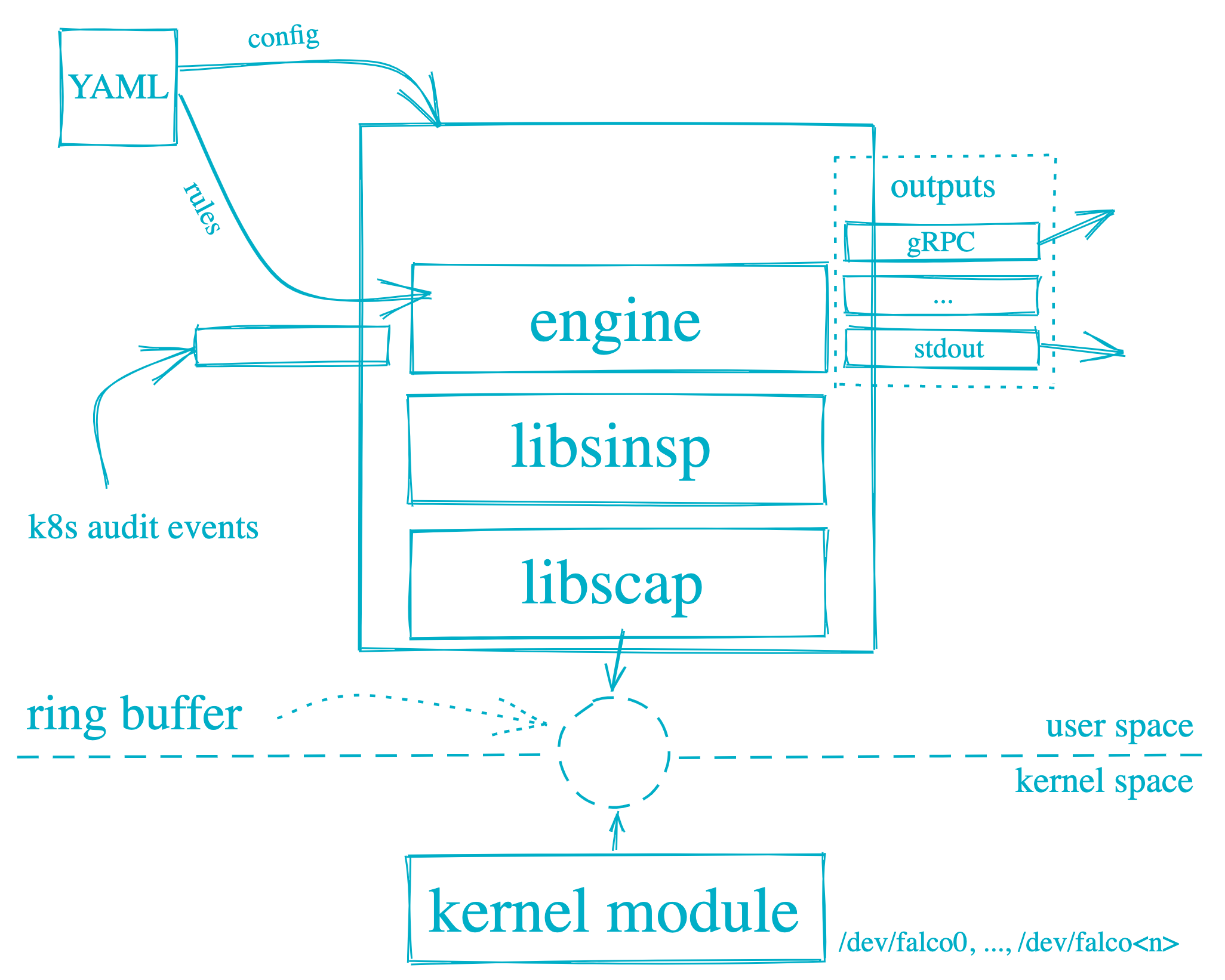
- Falco can be installed as a package on the nodes, as DaemonSets on the Kubernetes cluster, or via the Falco Operator (recommended).
- Falco uses eBPF probes (default) or kernel modules to monitor system calls at the kernel level without modifying application code.
- Falco is driven through configuration (defaults to
/etc/falco/falco.yaml) files which includes- Rules
- Name and description
- Condition to trigger the rule
- Priority
emergency,alert,critical,error,warning,notice,info,debug - Output data for the event
- Multiple rule files can be specified, with the last one taking the priority in case of the same rule defined in multiple files
- Log attributes for Falco i.e. level, format
- Output file and format i.e JSON or text
- Alerts output destination which includes stdout, file, HTTP, gRPC, etc.
- Rules
- Falco detects runtime threats including:
- Privilege escalation attempts
- Unexpected shell spawning in containers
- File access in sensitive paths (/etc/shadow, /etc/passwd)
- Unauthorized network connections
- Container escape attempts
Practice Falco Exercises
Reduce Attack Surface
- Follow the principle of least privilege and limit access
- Limit Node access,
- keep nodes private
- disable login using the root account
PermitRootLogin Noand use privilege escalation usingsudo. - disable password-based authentication
PasswordAuthentication Noand use SSH keys.
- Remove any unwanted packages
- Block or close unwanted ports
- Keep the base image light and limited to the bare minimum required
- Identify and fix any open ports
- Use User Namespaces (
hostUsers: false) to map container root to unprivileged host users (GA in 1.36). - Enable SeccompDefault on kubelets to apply RuntimeDefault seccomp profile to all pods.
- Enforce Pod Security Standards at namespace level using PSA labels.