⚠️ SERVICE DEPRECATED – IMPORTANT NOTICE
AWS OpsWorks Stacks reached End of Life (EOL) on May 26, 2024. All OpsWorks services (Stacks, Chef Automate, and Puppet Enterprise) have been disabled for both new and existing customers.
This content is maintained for historical reference and for understanding deployment strategies that remain applicable to modern AWS services.
Recommended Migration Paths:
- AWS CodeDeploy – Application deployment automation (EC2, Lambda, ECS)
- AWS Systems Manager – Configuration management and automation
- Amazon ECS – Native blue/green, canary, and linear deployments (July/Oct 2025)
- AWS CloudFormation – Infrastructure as code
- AWS App Runner – Simplified containerized application deployment
For migration guidance: Migrate OpsWorks to Systems Manager
AWS OpsWorks Deployment Strategies (Historical Reference)
NOTE: OpsWorks was deprecated in 2024. These deployment strategy concepts remain relevant for the DevOps Professional Exam using modern services (CodeDeploy, ECS, Systems Manager).
The deployment strategies described below (All at Once, Rolling, Blue/Green) are foundational concepts that apply across modern AWS services like CodeDeploy, ECS, EKS, and Elastic Beanstalk.
All at Once Deployment
- OpsWorks Stacks did not automatically deploy updated code to online instances, requiring manual deployment
- Deploy command (for apps) or Update Custom Cookbooks command (for cookbooks) deployed the update to every instance concurrently
- Approach was simple and fast, but led to downtime in case of error
- OpsWorks allowed rollback to restore previously deployed app version
- By default, AWS OpsWorks Stacks stored the five most recent deployments, allowing rollback up to four versions
Modern Equivalent
- AWS CodeDeploy – All-at-once deployment configuration with automatic rollback on CloudWatch alarm triggers
- Amazon ECS – Rolling updates with
minimumHealthyPercent=0andmaximumPercent=100achieves all-at-once behavior
Rolling Deployment
- A rolling deployment updates an application on instances in multiple phases.
- With each phase, a subset of the online instances is updated and verified before starting the next phase.
- In case of issues, instances running the old version continue handling incoming traffic until issues are resolved.
- Steps to perform Rolling deployment:
- Deploy the app on a single application server instance
- Deregister the instance from the load balancer to prevent it from serving traffic
- Verify the app is working fine
- Deploy the update on the remainder of instances
Modern Equivalent
- AWS CodeDeploy – Rolling deployments with configurable batch sizes, health checks, and automatic rollback
- Amazon ECS – Default rolling update with
minimumHealthyPercentandmaximumPercentparameters - Amazon EKS – Kubernetes native rolling updates with
maxSurgeandmaxUnavailable - Elastic Beanstalk – Rolling deployment policy with configurable batch size
Blue Green Deployment
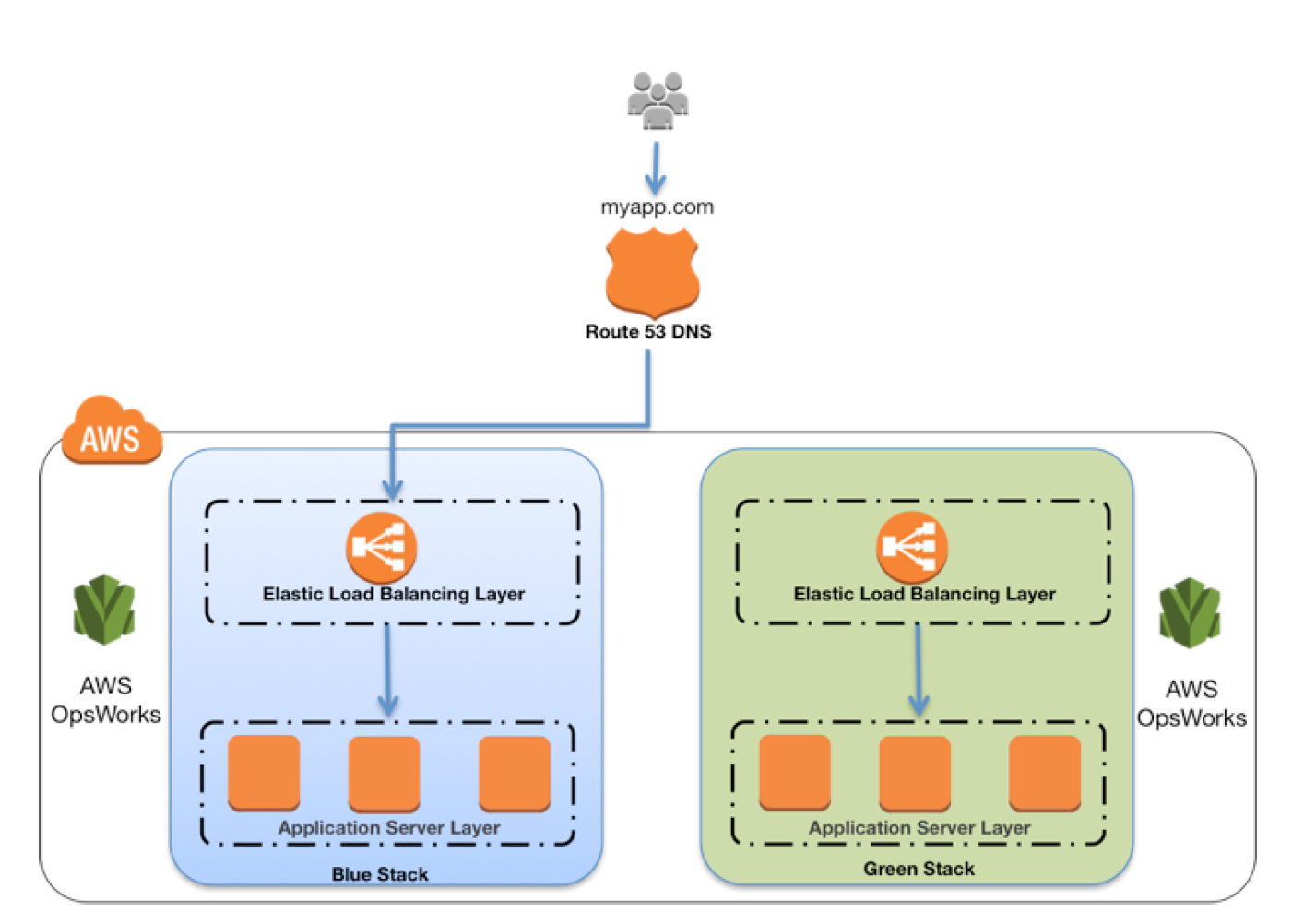
- Blue Green deployment uses separate environments for each phase of the application’s lifecycle.
- Blue environment is the production environment hosting the current application.
- Green environment is the staging environment hosting the updated application.
- Development and testing can be performed on non-publicly-accessible environments, and traffic switched when ready.
- Steps for Blue Green deployment with Route 53 and ELB:
- Attach unused ELB to the green environment’s application server layer
- After green instances pass ELB health checks, adjust Route 53 weights to route traffic gradually from Blue to Green
- Once Green is ready to handle all traffic, detach the load balancer from the Blue environment
- Retain Blue environment for rollback capability
Modern Equivalent
- Amazon ECS (Native) – Built-in blue/green deployments launched July 2025, no CodeDeploy dependency required
- AWS CodeDeploy – Blue/green deployment for EC2, Lambda, and ECS with traffic shifting
- Elastic Beanstalk – Blue/green via environment cloning and CNAME swap
- Route 53 – Weighted routing policies for gradual traffic shifting
- Application Load Balancer – Target group weighting for blue/green deployments
Modern AWS Deployment Strategies (2025-2026)
With OpsWorks deprecated, AWS now offers more powerful and integrated deployment capabilities across multiple services.
AWS CodeDeploy
- Fully managed deployment service automating software deployments to EC2, Lambda, ECS, and on-premises servers
- Deployment strategies: All-at-once, Rolling, Blue/Green, Canary, Linear
- Automatic rollback on deployment failure or CloudWatch alarm triggers
- Integration with CI/CD pipelines via CodePipeline
- Lifecycle event hooks for custom validation at each deployment stage
- For ECS, CodeDeploy is being superseded by ECS-native deployments for new workloads
Amazon ECS Native Deployments (New – 2025)
- Built-in Blue/Green (July 2025) – ECS now supports blue/green deployments natively without requiring CodeDeploy
- Deployment lifecycle hooks for custom testing during deployment
- Dark Canary deployments for testing with production traffic shadows
- Automatic rollback on CloudWatch alarm breaches
- Canary Deployments (October 2025) – Route a small percentage of traffic (as low as 0.1%) to the new revision, monitor during bake time, then complete the shift
- Linear Deployments (October 2025) – Shift traffic in equal increments (minimum 3%) with configurable bake time between each shift
- Supports ALB and NLB (NLB support added February 2026)
- Integrated with CloudWatch alarms for automatic deployment stop/rollback
- ECS-native is now the recommended default for new ECS deployments over CodeDeploy
AWS Systems Manager
- Unified interface for managing AWS resources – direct replacement for OpsWorks configuration management
- State Manager for configuration management and compliance
- Automation runbooks for common operational tasks
- Patch Manager for automated OS and application patching
- Run Command for executing commands across fleet of instances
Amazon EKS Deployment Strategies
- Kubernetes native rolling updates with fine-grained control
- Blue/green using service mesh (Istio, App Mesh successor) or ingress controller
- Canary deployments with Argo Rollouts or Flagger
- GitOps workflows with ArgoCD or Flux
AWS App Runner
- Fully managed service for containerized web applications
- Automatic deployments from source code or container images
- Built-in load balancing, auto-scaling, and zero-downtime deployments
- No infrastructure management required
Deployment Strategy Comparison
| Strategy | Downtime | Rollback Speed | Risk | AWS Services |
|---|---|---|---|---|
| All at Once | Yes (if failure) | Slow | High | CodeDeploy, Elastic Beanstalk |
| Rolling | No | Medium | Medium | CodeDeploy, ECS, EKS, Beanstalk |
| Blue/Green | No | Fast | Low | CodeDeploy, ECS (native), Beanstalk, Route 53 |
| Canary | No | Fast | Lowest | CodeDeploy, ECS (native), Lambda |
| Linear | No | Fast | Low | CodeDeploy, ECS (native), Lambda |
AWS Certification Exam Practice Questions
⚠️ EXAM NOTE: AWS OpsWorks is still listed as an in-scope service for the DOP-C02 (DevOps Professional) exam as of 2026. However, questions are expected to focus on understanding the service’s deprecation and migration to modern alternatives. Focus study efforts on CodeDeploy, ECS deployment strategies, and Systems Manager.
- Questions are collected from Internet and the answers are marked as per my knowledge and understanding (which might differ with yours).
- AWS services are updated everyday and both the answers and questions might be outdated soon, so research accordingly.
- AWS exam questions are not updated to keep up the pace with AWS updates, so even if the underlying feature has changed the question might not be updated
- Open to further feedback, discussion and correction.
Historical OpsWorks Questions
- You company runs a complex customer relations management system that consists of around 10 different software components all backed by the same Amazon Relational Database (RDS) database. You adopted AWS OpsWorks to simplify management and deployment of that application and created an AWS OpsWorks stack with layers for each of the individual components. An internal security policy requires that all instances should run on the latest Amazon Linux AMI and that instances must be replaced within one month after the latest Amazon Linux AMI has been released. AMI replacements should be done without incurring application downtime or capacity problems. You decide to write a script to be run as soon as a new Amazon Linux AMI is released. Which solutions support the security policy and meet your requirements? Choose 2 answers
- Assign a custom recipe to each layer, which replaces the underlying AMI. Use AWS OpsWorks life-cycle events to incrementally execute this custom recipe and update the instances with the new AMI. (AMI cannot be updated using recipes)
- Create a new stack and layers with identical configuration, add instances with the latest Amazon Linux AMI specified as a custom AMI to the new layer, switch DNS to the new stack, and tear down the old stack. (Blue-Green Deployment)
- Identify all Amazon Elastic Compute Cloud (EC2) instances of your AWS OpsWorks stack, stop each instance, replace the AMI ID property with the ID of the latest Amazon Linux AMI ID, and restart the instance. To avoid downtime, make sure not more than one instance is stopped at the same time. (Instances cannot be updated by updating the AMI id and needs to be launched anew)
- Specify the latest Amazon Linux AMI as a custom AMI at the stack level, terminate instances of the stack and let AWS OpsWorks launch new instances with the new AMI. (Would result in downtime)
- Add new instances with the latest Amazon Linux AMI specified as a custom AMI to all AWS OpsWorks layers of your stack, and terminate the old ones. (Disposable Rolling deployment)
- A company has developed a Ruby on Rails content management platform. Currently, OpsWorks with several stacks for dev, staging, and production is being used to deploy and manage the application. Now the company wants to start using Python instead of Ruby. How should the company manage the new deployment?
- Update the existing stack with Python application code and deploy the application using the deploy life-cycle action to implement the application code.
- Create a new stack that contains a new layer with the Python code. To cut over to the new stack the company should consider using Blue/Green deployment
- Create a new stack that contains the Python application code and manage separate deployments of the application via the secondary stack using the deploy lifecycle action to implement the application code.
- Create a new stack that contains the Python application code and manages separate deployments of the application via the secondary stack
Modern Deployment Strategy Questions
- A company is migrating from AWS OpsWorks to a modern deployment solution. Their application runs on Amazon ECS with Fargate. They want to deploy updates with minimal risk, routing only 10% of traffic to the new version initially, monitoring for 10 minutes, then completing the shift. Which deployment strategy should they use?
- ECS rolling update with minimumHealthyPercent set to 90%
- ECS native canary deployment with a 10% initial traffic shift and 10-minute bake time
- AWS CodeDeploy blue/green deployment with a 10-minute wait time
- ECS native linear deployment with 10% increments
Answer: B – ECS native canary deployment (launched October 2025) allows routing a small percentage of traffic to the new revision with a configurable bake time before completing the shift. This matches the requirement of 10% initial traffic with monitoring.
- A DevOps engineer needs to implement a deployment strategy for an ECS service that shifts traffic in 5 equal increments over 25 minutes. Which approach is most appropriate?
- AWS CodeDeploy with a custom linear deployment configuration
- ECS native linear deployment with 20% increments and 5-minute bake time
- ECS blue/green deployment with Route 53 weighted routing
- ECS rolling update with maximum percent set to 120%
Answer: B – ECS native linear deployments (October 2025) shift traffic in equal increments with bake time between each shift. 5 increments of 20% with 5-minute bake times achieves the 25-minute gradual shift requirement. For new ECS deployments, ECS-native is preferred over CodeDeploy.
- A company previously managed configuration and deployments using AWS OpsWorks Stacks with custom Chef cookbooks. Now that OpsWorks has reached EOL, which combination of services provides equivalent functionality? (Choose 2)
- AWS Elastic Beanstalk with custom platform hooks
- AWS Systems Manager State Manager with custom SSM documents
- AWS Config rules with auto-remediation
- AWS CodeDeploy with AppSpec lifecycle hooks
- Amazon Inspector with automated patching
Answers: B, D – Systems Manager State Manager replaces OpsWorks configuration management (cookbooks → SSM documents), and CodeDeploy replaces OpsWorks deployment commands with AppSpec lifecycle hooks providing similar customization to Chef recipes.
- An organization wants to implement blue/green deployments for their ECS services. They are evaluating ECS-native blue/green versus CodeDeploy-managed blue/green. Which statement is correct about ECS-native blue/green deployments?
- ECS-native blue/green requires a separate CodeDeploy application and deployment group
- ECS-native blue/green only supports ALB, not NLB
- ECS-native blue/green supports deployment lifecycle hooks for custom testing without requiring CodeDeploy
- ECS-native blue/green does not support automatic rollback on CloudWatch alarms
Answer: C – ECS native blue/green (July 2025) operates entirely within ECS without CodeDeploy dependency. It supports lifecycle hooks for custom testing, CloudWatch alarm-based rollback, and both ALB and NLB (NLB support added February 2026).
References
- AWS OpsWorks Stacks End of Life FAQs
- Migrate OpsWorks Stacks to AWS Systems Manager
- AWS CodeDeploy User Guide
- Amazon ECS Deployment Types
- ECS Native Blue/Green Deployments (July 2025)
- ECS Linear and Canary Deployments (October 2025)
- AWS Systems Manager User Guide
- AWS Whitepaper: Deployment Strategies