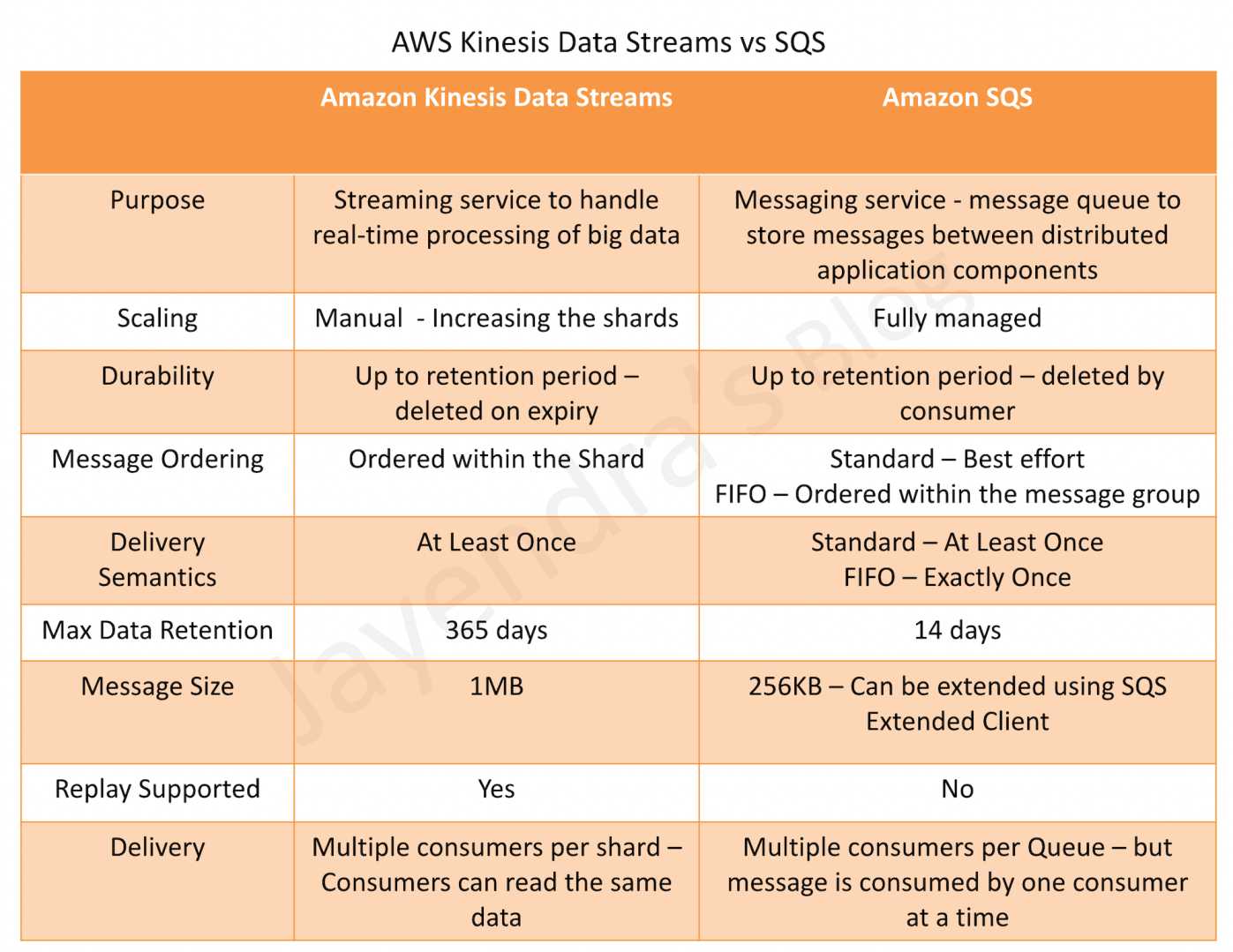
Kinesis Data Streams vs SQS
Purpose
- Amazon Kinesis Data Streams
- allows real-time processing of streaming big data and the ability to read and replay records to multiple Amazon Kinesis Applications.
- Amazon Kinesis Client Library (KCL) delivers all records for a given partition key to the same record processor, making it easier to build multiple applications that read from the same Amazon Kinesis stream (for example, to perform counting, aggregation, and filtering).
- designed for high-volume, real-time data ingestion and processing with multiple concurrent consumers reading the same data.
- Amazon SQS
- offers a reliable, highly-scalable hosted queue for storing messages as they travel between applications or microservices.
- It moves data between distributed application components and helps decouple these components.
- provides common middleware constructs such as dead-letter queues, poison-pill management, and dead-letter queue redrive (including FIFO DLQ redrive).
- provides a generic web services API and can be accessed by any programming language that the AWS SDK supports.
- supports both standard and FIFO queues
- supports Fair Queues (launched Jul 2025) for standard queues to mitigate noisy neighbor impact in multi-tenant systems.
Scaling
- Kinesis Data Streams offers three capacity modes:
- Provisioned mode – requires manual shard management and scaling.
- On-demand Standard mode – automatically scales throughput (up to 200 MB/s write), eliminating the need for manual shard provisioning.
- On-demand Advantage mode (launched Nov 2025) – provides warm throughput for instant scaling to handle traffic surges up to 10 GB/s, with 60%+ lower pricing compared to On-demand Standard for high-volume workloads.
- SQS is fully managed, highly scalable and requires no administrative overhead and little configuration. It scales transparently to handle any volume of messages.
- SQS FIFO queues support High Throughput mode with up to 70,000 transactions per second per API action (without batching), and up to 700,000 messages per second with batching in select regions.
Ordering
- Kinesis provides ordering of records within a shard (by partition key), as well as the ability to read and/or replay records in the same order to multiple Kinesis Applications
- SQS Standard Queue provides best-effort ordering but does not guarantee strict data ordering and provides at least once delivery of messages
- SQS FIFO Queue guarantees strict data ordering within the message group
Data Retention Period
- Kinesis Data Streams stores the data for up to 24 hours, by default, and can be extended to 365 days (with extended retention up to 7 days, and long-term retention from 7 to 365 days)
- SQS stores the message for up to 4 days, by default, and can be configured from 1 minute to 14 days but clears the message once deleted by the consumer
Delivery Semantics
- Kinesis and SQS Standard Queue both guarantee at least one delivery of the message.
- SQS FIFO Queue guarantees Exactly once delivery (exactly-once processing via deduplication)
Parallel Clients
- Kinesis supports multiple consumers reading from the same stream simultaneously
- With shared throughput (GetRecords), all consumers share the 2 MB/s per shard read capacity
- With Enhanced Fan-Out, each consumer gets a dedicated 2 MB/s per shard throughput via SubscribeToShard (push-based)
- On-demand Advantage mode supports up to 50 enhanced fan-out consumers per stream (vs 20 on On-demand Standard or Provisioned)
- SQS allows the messages to be delivered to only one consumer at a time and requires multiple queues to deliver messages to multiple consumers
- SQS Fair Queues (Jul 2025) dynamically reorder message delivery to ensure fair processing across tenants when one tenant becomes a noisy neighbor
Message/Record Size
- Kinesis supports a maximum record size of 1 MB per data record
- SQS supports a maximum message payload size of 1 MiB (increased from 256 KiB in August 2025). For larger payloads, the Amazon SQS Extended Client Library can be used to store the payload in S3.
Throughput
- Kinesis Data Streams
- Provisioned: 1 MB/s write and 2 MB/s read per shard
- On-demand Standard: automatically scales, default 4 MB/s write, can burst to 200 MB/s
- On-demand Advantage: supports instant scaling with warm throughput up to 10 GB/s
- SQS
- Standard queues: nearly unlimited throughput (no per-queue limits)
- FIFO queues: 300 TPS default, up to 70,000 TPS with High Throughput mode enabled
Integration with AWS Lambda
- Kinesis integrates with Lambda via event source mapping with parallelization factor, tumbling windows, and failure handling (bisect on error, max retry)
- SQS integrates with Lambda via event source mapping with support for batch windows and Provisioned Mode (Nov 2025) that provides 3x faster scaling (up to 1,000 concurrent executions per minute) and 16x higher concurrency (up to 20,000 concurrent executions)
Use Cases
- Kinesis use cases requirements
- Ordering of records.
- Ability to consume records in the same order a few hours later (data replay)
- Ability for multiple applications to consume the same stream concurrently
- Routing related records to the same record processor (as in streaming MapReduce)
- Real-time analytics, log and event data aggregation, IoT telemetry ingestion
- SQS uses cases requirements
- Messaging semantics like message-level ack/fail and visibility timeout
- Leveraging SQS’s ability to scale transparently
- Dynamically increasing concurrency/throughput at read time
- Individual message delay, which can be delayed
- Multi-tenant workloads requiring fair message processing (Fair Queues)
- Decoupling microservices and serverless event-driven architectures
Kinesis Data Streams vs SQS Comparison Table
| Feature | Kinesis Data Streams | SQS |
|---|---|---|
| Primary Use Case | Real-time streaming data processing | Message queuing and decoupling |
| Ordering | Per-shard (partition key) | Best-effort (Standard) / Strict per message group (FIFO) |
| Delivery | At least once | At least once (Standard) / Exactly once (FIFO) |
| Retention | 24 hours to 365 days | 1 minute to 14 days |
| Multiple Consumers | Yes (shared or enhanced fan-out) | No (single consumer per message) |
| Max Record/Message Size | 1 MB | 1 MiB |
| Scaling | Provisioned (manual) / On-demand (automatic) | Fully automatic |
| Data Replay | Yes | No (message deleted after processing) |
| Provisioning | Three modes: Provisioned, On-demand Standard, On-demand Advantage | Fully serverless, no provisioning |
| Fair Processing | N/A | Fair Queues for multi-tenant workloads |
AWS Certification Exam Practice Questions
- Questions are collected from Internet and the answers are marked as per my knowledge and understanding (which might differ with yours).
- AWS services are updated everyday and both the answers and questions might be outdated soon, so research accordingly.
- AWS exam questions are not updated to keep up the pace with AWS updates, so even if the underlying feature has changed the question might not be updated
- Open to further feedback, discussion and correction.
- You are deploying an application to track GPS coordinates of delivery trucks in the United States. Coordinates are transmitted from each delivery truck once every three seconds. You need to design an architecture that will enable real-time processing of these coordinates from multiple consumers. Which service should you use to implement data ingestion?
- Amazon Kinesis
- AWS Data Pipeline
- Amazon AppStream
- Amazon Simple Queue Service
- Your customer is willing to consolidate their log streams (access logs, application logs, security logs etc.) in one single system. Once consolidated, the customer wants to analyze these logs in real time based on heuristics. From time to time, the customer needs to validate heuristics, which requires going back to data samples extracted from the last 12 hours? What is the best approach to meet your customer’s requirements?
- Send all the log events to Amazon SQS. Setup an Auto Scaling group of EC2 servers to consume the logs and apply the heuristics.
- Send all the log events to Amazon Kinesis develop a client process to apply heuristics on the logs (Can perform real time analysis and stores data for 24 hours which can be extended to 365 days)
- Configure Amazon CloudTrail to receive custom logs, use EMR to apply heuristics the logs (CloudTrail is only for auditing)
- Setup an Auto Scaling group of EC2 syslogd servers, store the logs on S3 use EMR to apply heuristics on the logs (EMR is for batch analysis)
- A company runs a multi-tenant SaaS application where different customers submit varying volumes of jobs to an SQS queue. During peak hours, one large customer floods the queue with messages, causing increased dwell time for all other customers. Which SQS feature should the team enable to address this noisy neighbor problem?
- SQS FIFO High Throughput mode
- SQS Long Polling
- SQS Fair Queues (Fair Queues dynamically reorder message delivery to mitigate noisy neighbor impact in multi-tenant standard queues)
- SQS Dead-Letter Queue Redrive
- A streaming analytics application needs to process real-time clickstream data with five independent consumer applications reading from the same stream simultaneously, each requiring dedicated throughput. The team wants to minimize operational overhead. Which configuration is most appropriate?
- Amazon SQS with five separate queues using SNS fan-out
- Kinesis Data Streams in Provisioned mode with Enhanced Fan-Out
- Kinesis Data Streams in On-demand Advantage mode with Enhanced Fan-Out (On-demand Advantage provides automatic scaling with no shard management and supports up to 50 enhanced fan-out consumers with dedicated 2 MB/s per shard throughput)
- Kinesis Data Streams in On-demand Standard mode with shared GetRecords
- An application processes order events that are each approximately 500 KB in size. The events need to be placed in a queue for asynchronous processing by a Lambda function. Which approach meets the requirements with the LEAST operational overhead?
- Use SQS with the Extended Client Library to store messages in S3
- Use SQS directly, as it now supports message payloads up to 1 MiB (Since August 2025, SQS supports up to 1 MiB message payload natively, eliminating the need for S3 offloading for messages under 1 MiB)
- Use Kinesis Data Streams with 1 MB record limit
- Use Amazon SNS to fan out to multiple SQS queues